http://www.flickr.com/photos/barkaway/342359810 
Speed is Essential for a 
Great Web Experience 
Andy Davies 
NCC Group
https://www.flickr.com/photos/joelhughes/8743984985
http://www.flickr.com/photos/randomidea/247994072 
Performance isn’t always a priority
https://www.flickr.com/photos/sharynmorrow/643126727 
“Has it loaded yet?”
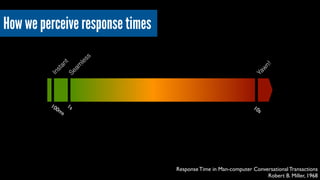
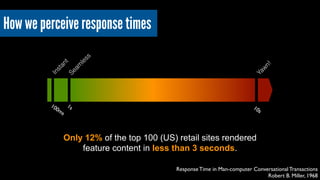
100ms 
1s 
10s 
Response Time in Man-computer Conversational Transactions 
Robert B. Miller, 1968 
Instant 
Seamless 
Yawn! 
How we perceive response times
100ms 
1s 
10s 
Response Time in Man-computer Conversational Transactions 
Robert B. Miller, 1968 
Instant 
Seamless 
Yawn! 
How we perceive response times 
Only 12% of the top 100 (US) retail sites rendered 
feature content in less than 3 seconds.
“50% more concentration when using 
badly performing web sites” 
Foviance 
http://www.flickr.com/photos/yourdon/3366991042
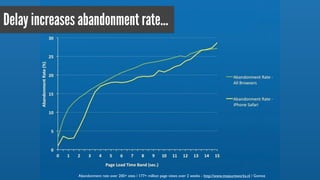
Delay increases abandonment rate... 
Abandonment rate over 200+ sites / 177+ million page views over 2 weeks - http://www.measureworks.nl / Gomez
…and has a negative impact on brand perception 
Tesco’s ‘Fast’ 
Tesco’s ‘Slow’ 
Mobile Web Stress: Understanding the Neurological Impact of Poor Performance, Tammy Everts, Radware
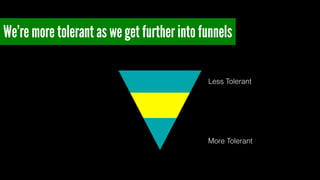
We’re more tolerant as we get further into funnels 
Less Tolerant 
More Tolerant
and suspicious if something’s too fast
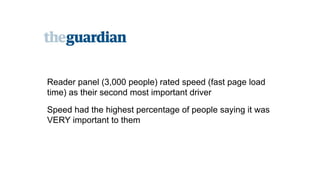
Reader panel (3,000 people) rated speed (fast page load 
time) as their second most important driver! 
Speed had the highest percentage of people saying it was 
VERY important to them
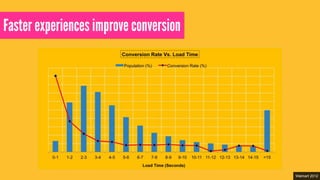
Faster experiences improve conversion 
Walmart 2012
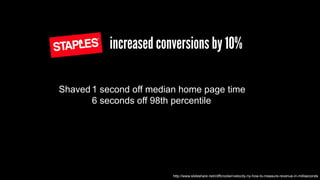
increased conversions by 10% 
Shaved 1 second off median home page time! 
6 seconds off 98th percentile 
http://www.slideshare.net/cliffcrocker/velocity-ny-how-to-measure-revenue-in-milliseconds
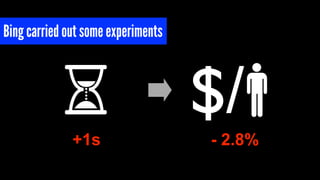
Bing carried out some experiments 
$/ 
+1s - 2.8%
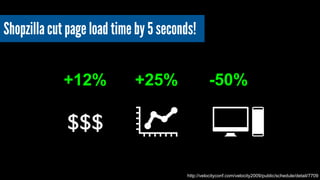
Shopzilla cut page load time by 5 seconds! 
+12% +25% -50% 
http://velocityconf.com/velocity2009/public/schedule/detail/7709 
$$$
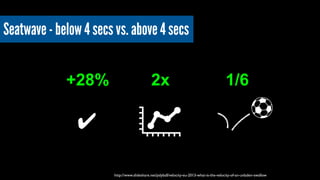
Seatwave - below 4 secs vs. above 4 secs 
+28% 2x 1/6 
http://www.slideshare.net/pdyball/velocity-eu-2013-what-is-the-velocity-of-an-unladen-swallow 
✔ 
凝
But I’m frustrated… 
http://www.flickr.com/photos/sybrenstuvel/2468506922
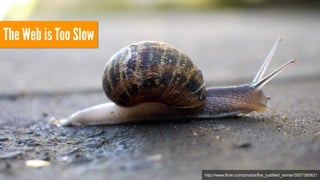
The Web is Too Slow 
http://www.flickr.com/photos/the_justified_sinner/3507390621
Too many sites are too slow 
http://www.flickr.com/photos/the_justified_sinner/3507390621
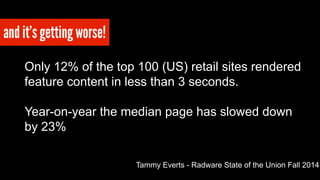
and it’s getting worse! 
Only 12% of the top 100 (US) retail sites rendered 
feature content in less than 3 seconds. ! 
! 
Year-on-year the median page has slowed down 
by 23% 
Tammy Everts - Radware State of the Union Fall 2014
“We’re not being deliberate about performance”! 
Tim Kadlec 
https://www.flickr.com/photos/lukew/7382528728
But only if we build it that way… 
http://3.bp.blogspot.com/-0RqujOyE1ro/Up9HF7bPxbI/AAAAAAAAAbM/Ijudm6uq-dg/s1600/This+is+for+Everyone.jpg
We need to understand our fundamental building blocks 
https://www.flickr.com/photos/ogimogi/2253657555
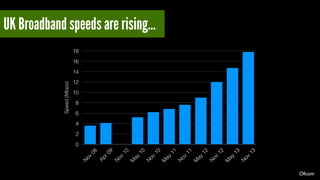
Everyone has fast broadband now… Right? 
https://www.flickr.com/photos/98640399@N08/9287370881
Speed (Mbps) 
18 
16 
14 
12 
10 
8 
6 
4 
2 
0 
Nov 08 
Apr 09 
May 10 
Nov 10 
May 11 
Nov 10 
May 12 
Nov 11 
May 13 
Nov 12 
Nov 13 
UK Broadband speeds are rising… 
Ofcom
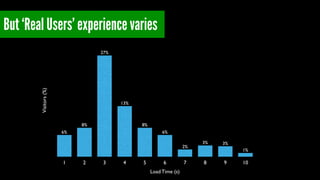
But ‘Real Users’ experience varies 
Visitors (%) 
1 2 3 4 5 6 7 8 9 10 
Load Time (s) 
1% 
3% 3% 
2% 
6% 
8% 
13% 
27% 
8% 
6%
24% 
1% 
3% 3% 
2% 
6% 
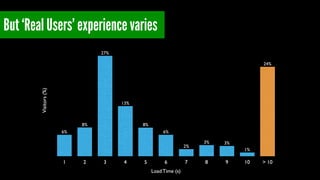
But ‘Real Users’ experience varies 
8% 
13% 
27% 
8% 
6% 
Visitors (%) 
1 2 3 4 5 6 7 8 9 10 > 10 
Load Time (s)
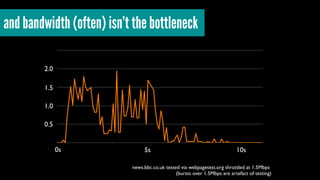
and bandwidth (often) isn’t the bottleneck 
0s 5s 10s 
news.bbc.co.uk tested via webpagetest.org throttled at 1.5Mbps 
(bursts over 1.5Mbps are artefact of testing) 
2.0 
1.5 
1.0 
0.5
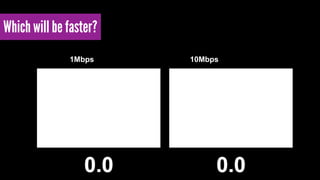
Which will be faster? 
1Mbps 10Mbps
Which will be faster? 
1Mbps 10Mbps
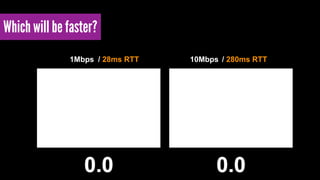
Which will be faster? 
1Mbps / 28ms RTT 10Mbps / 280ms RTT
We often think of the network as a pipe 
https://www.flickr.com/photos/63567936@N00/4181042889
that’s sometimes really bad 
https://www.flickr.com/photos/chesh2000/4487000196
but the reality is closer to 
http://1m0esx2939yhjwld8419obqhyb.wpengine.netdna-cdn.com/wp-content/uploads/2014/06/DSC_0492.jpg
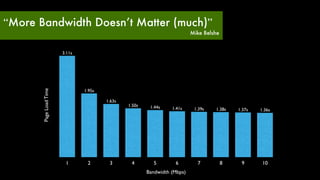
“More Bandwidth Doesn’t Matter (much)” 
Mike Belshe 
Page Load Time 
1.41s 1.39s 1.38s 1.37s 1.36s 1.50s 1.44s 
1 2 3 4 5 6 7 8 9 10 
Bandwidth (Mbps) 
1.63s 
1.95s 
3.11s
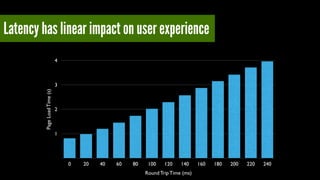
Latency has linear impact on user experience 
4 
3 
Page Load Time (s) 1 
2 
0 20 40 60 80 100 120 140 160 180 200 220 240 
Round Trip Time (ms)
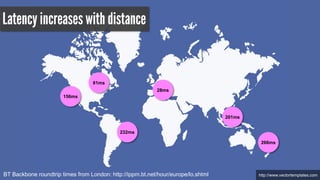
Latency increases with distance 
http://BT Backbone roundtrip times from London: http://ippm.bt.net/hour/europe/lo.shtml www.vectortemplates.com
Latency increases with distance 
81ms 
201ms 
156ms 
266ms 
232ms 
28ms 
http://BT Backbone roundtrip times from London: http://ippm.bt.net/hour/europe/lo.shtml www.vectortemplates.com
There’s the last mile latency too 
(and routers, other networking kit, mobile latencies too) 
https://www.flickr.com/photos/kiwanja/3170292282
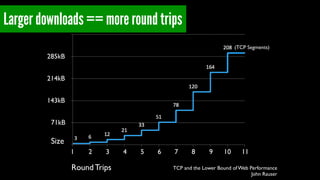
(TCP Segments) 
TCP and the Lower Bound of Web Performance 
John Rauser 
Larger downloads == more round trips 
285kB 
214kB 
143kB 
71kB 
1 2 3 4 5 6 7 8 9 10 11 
Round Trips 
Size
Latency is one of our greatest enemies 
https://www.flickr.com/photos/jjvaca/728072059
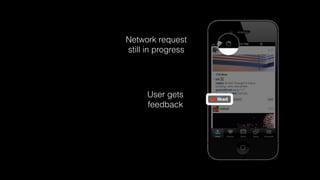
We can cheat the latency penalty 
(sometimes) 
https://speakerdeck.com/mikeyk/secrets-to-lightning-fast-mobile-design
User gets 
feedback
Network request 
still in progress 
User gets 
feedback
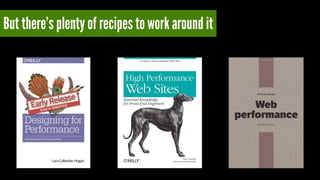
But there’s plenty of recipes to work around it
Some of the optimisations are hacks! 
https://www.flickr.com/photos/rocketnumber9/13695281
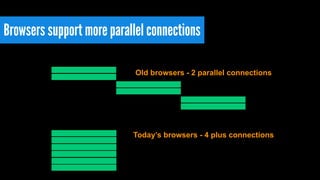
Browsers support more parallel connections 
Old browsers - 2 parallel connections 
Today’s browsers - 4 plus connections
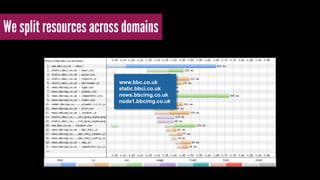
We split resources across domains 
www.bbc.co.uk! 
static.bbci.co.uk! 
news.bbcimg.co.uk! 
node1.bbcimg.co.uk
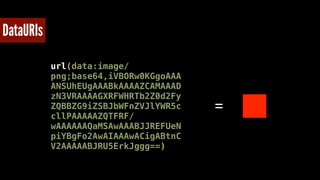
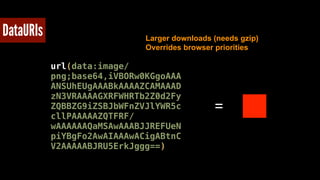
DataURIs 
url(data:image/ 
png;base64,iVBORw0KGgoAAA 
ANSUhEUgAAABkAAAAZCAMAAAD 
zN3VRAAAAGXRFWHRTb2Z0d2Fy 
ZQBBZG9iZSBJbWFnZVJlYWR5c 
cllPAAAAAZQTFRF/ 
wAAAAAAQaMSAwAAABJJREFUeN 
piYBgFo2AwAIAAAwACigABtnC 
V2AAAAABJRU5ErkJggg==) 
=
DataURIs 
Larger downloads (needs gzip)! 
Overrides browser priorities 
url(data:image/ 
png;base64,iVBORw0KGgoAAA 
ANSUhEUgAAABkAAAAZCAMAAAD 
zN3VRAAAAGXRFWHRTb2Z0d2Fy 
ZQBBZG9iZSBJbWFnZVJlYWR5c 
cllPAAAAAZQTFRF/ 
wAAAAAAQaMSAwAAABJJREFUeN 
piYBgFo2AwAIAAAwACigABtnC 
V2AAAAABJRU5ErkJggg==) 
=
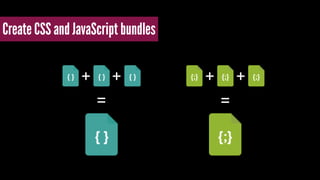
Create CSS and JavaScript bundles 
+ + + + 
= =
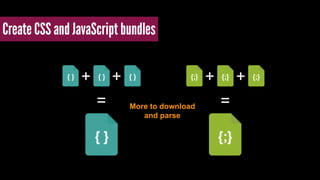
Create CSS and JavaScript bundles 
+ + + + 
= = More to download 
and parse
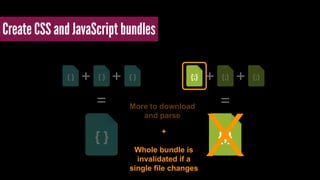
Create CSS and JavaScript bundles 
+ + + + 
= = More to download 
and parse +! x 
! 
Whole bundle is 
invalidated if a 
single file changes
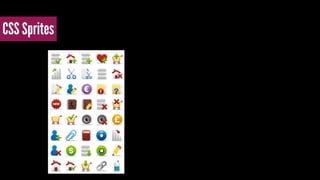
CSS Sprites
CSS Sprites 
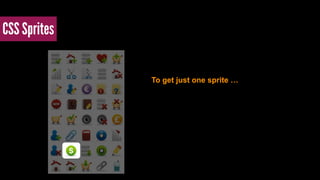
To get just one sprite …
CSS Sprites 
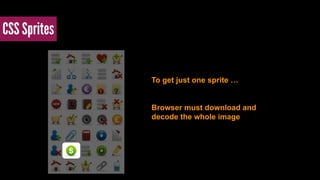
To get just one sprite … 
Browser must download and 
decode the whole image
There’s a tension between development and delivery 
https://www.flickr.com/photos/domiriel/7376397968
Build tools and optimisation services help plug gaps 
and won’t be going away…
But couldn’t we be more efficient? 
https://www.flickr.com/photos/belsymington/4102783610
HTTP/2 
(Evolved from Google’s SPDY)
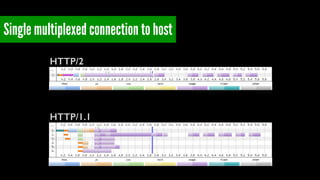
Single multiplexed connection to host 
HTTP/2 
HTTP/1.1
Multiplexing offers interesting possibilities
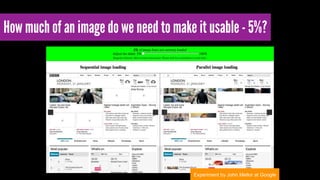
How much of an image do we need to make it usable - 5%? 
Experiment by John Mellor at Google
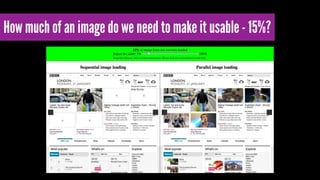
How much of an image do we need to make it usable - 15%?
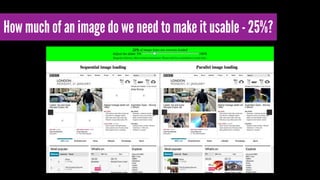
How much of an image do we need to make it usable - 25%?
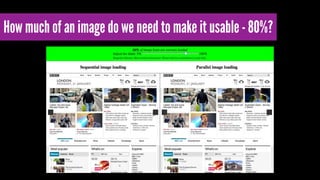
How much of an image do we need to make it usable - 80%?
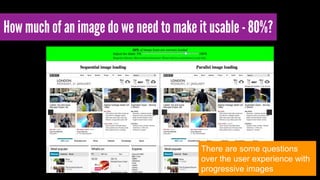
How much of an image do we need to make it usable - 80%? 
There are some questions 
over the user experience with 
progressive images
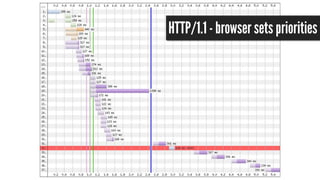
HTTP/1.1 - browser sets priorities
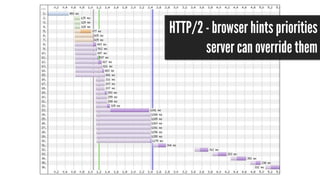
HTTP/2 - browser hints priorities 
server can override them
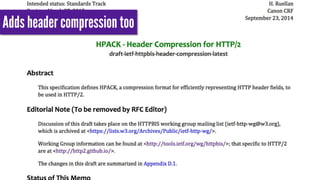
Adds header compression too
Google and Mozilla will only support over HTTPS 
http://www.flickr.com/photos/forsytht/4553656244
HTTP/2 rollouts will start next year - we still have a lot to learn 
http://www.flickr.com/photos/atoach/6014917153
???
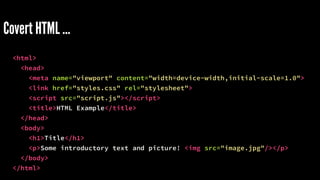
Covert HTML … 
<html> 
<head> 
<meta name="viewport" content="width=device-width,initial-scale=1.0"> 
<link href="styles.css" rel="stylesheet"> 
<script src="script.js"></script> 
<title>HTML Example</title> 
</head> 
<body> 
<h1>Title</h1> 
<p>Some introductory text and picture! <img src="image.jpg"/></p> 
</body> 
</html>
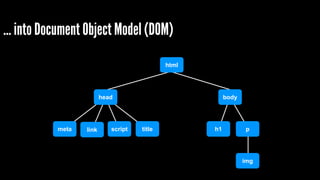
… into Document Object Model (DOM) 
html 
head body 
meta link script title h1 p 
img
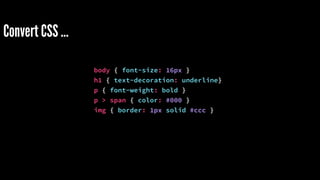
Convert CSS … 
body { font-size: 16px } 
h1 { text-decoration: underline} 
p { font-weight: bold } 
p > span { color: #000 } 
img { border: 1px solid #ccc }
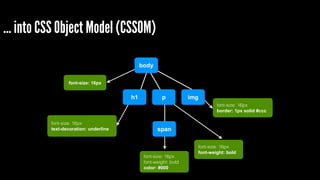
… into CSS Object Model (CSSOM) 
body 
h1 p 
span 
font-size: 16px 
font-size: 16px 
text-decoration: underline 
font-size: 16px 
font-weight: bold 
font-size: 16px 
font-weight: bold 
color: #000 
img 
font-size: 16px 
border: 1px solid #ccc
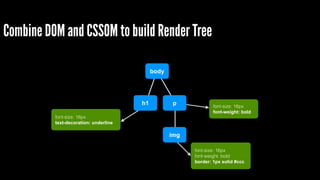
Combine DOM and CSSOM to build Render Tree 
body 
h1 p 
img 
font-size: 16px 
text-decoration: underline 
font-size: 16px 
font-weight: bold 
font-size: 16px 
font-weight: bold 
border: 1px solid #ccc
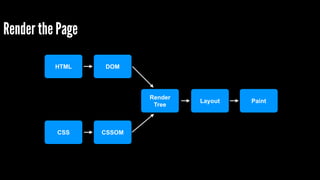
Render the Page 
HTML 
CSS 
DOM 
CSSOM 
Render! 
Tree 
Layout Paint
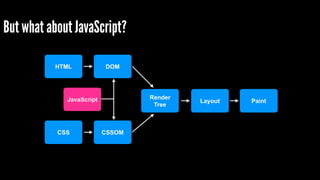
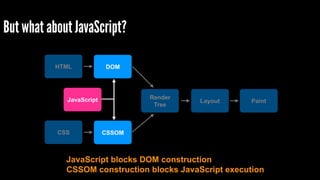
But what about JavaScript? 
HTML 
CSS 
DOM 
CSSOM 
Render! 
Tree 
JavaScript Layout Paint
But what about JavaScript? 
HTML 
CSS 
DOM 
CSSOM 
Render! 
Tree 
JavaScript 
Layout Paint 
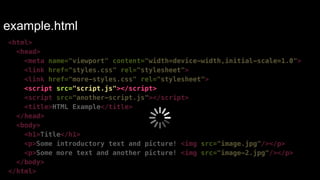
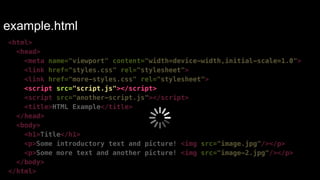
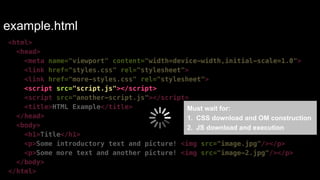
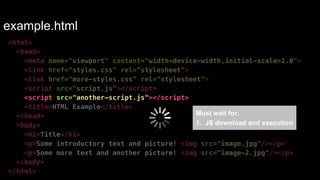
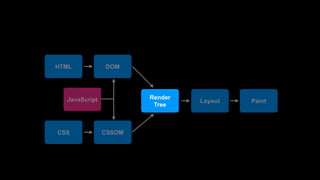
JavaScript blocks DOM construction! 
CSSOM construction blocks JavaScript execution
Let’s pretend we’re a browser 
(with the preloader switched off) 
https://www.flickr.com/photos/mozillaeu/11171168996
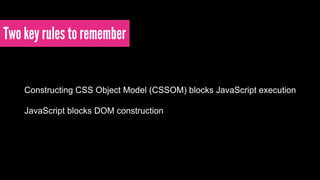
Two key rules to remember 
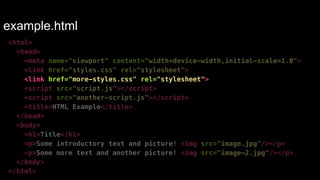
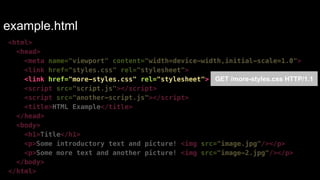
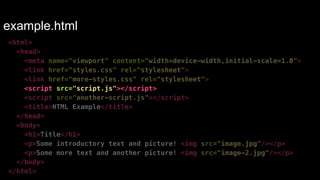
Constructing CSS Object Model (CSSOM) blocks JavaScript execution! 
! 
JavaScript blocks DOM construction
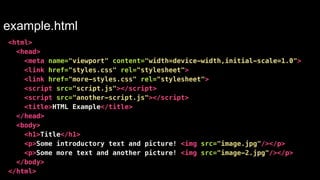
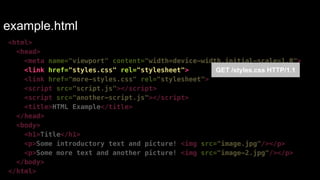
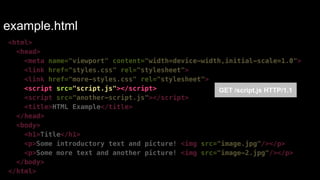
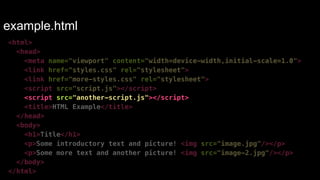
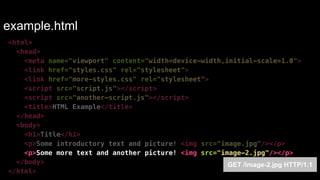
GET example.html HTTP/1.1
example.html 
<html> 
<head> 
<meta name="viewport" content="width=device-width,initial-scale=1.0"> 
<link href="styles.css" rel="stylesheet"> 
<link href="more-styles.css" rel="stylesheet"> 
<script src="script.js"></script> 
<script src="another-script.js"></script> 
<title>HTML Example</title> 
</head> 
<body> 
<h1>Title</h1> 
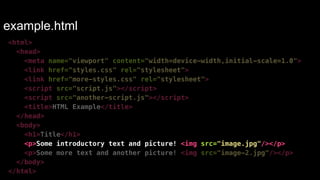
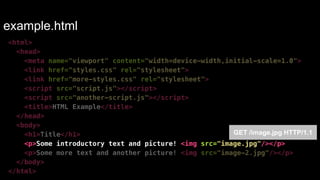
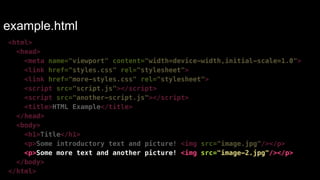
<p>Some introductory text and picture! <img src="image.jpg"/></p> 
<p>Some more text and another picture! <img src="image-2.jpg"/></p> 
</body> 
</html>
example.html 
<html> 
<head> 
<meta name="viewport" content="width=device-width,initial-scale=1.0"> 
<link href="styles.css" rel="stylesheet"> 
<link href="more-styles.css" rel="stylesheet"> 
<script src="script.js"></script> 
<script src="another-script.js"></script> 
<title>HTML Example</title> 
</head> 
<body> 
<h1>Title</h1> 
<p>Some introductory text and picture! <img src="image.jpg"/></p> 
<p>Some more text and another picture! <img src="image-2.jpg"/></p> 
</body> 
</html>
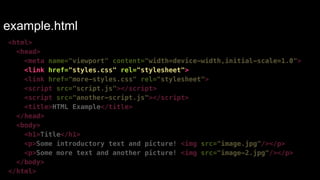
example.html 
<html> 
<head> 
<meta name="viewport" content="width=device-width,initial-scale=1.0"> 
<link href="styles.css" rel="stylesheet"> 
GET /styles.css HTTP/1.1 
<link href="more-styles.css" rel="stylesheet"> 
<script src="script.js"></script> 
<script src="another-script.js"></script> 
<title>HTML Example</title> 
</head> 
<body> 
<h1>Title</h1> 
<p>Some introductory text and picture! <img src="image.jpg"/></p> 
<p>Some more text and another picture! <img src="image-2.jpg"/></p> 
</body> 
</html>
example.html 
<html> 
<head> 
<meta name="viewport" content="width=device-width,initial-scale=1.0"> 
<link href="styles.css" rel="stylesheet"> 
<link href="more-styles.css" rel="stylesheet"> 
<script src="script.js"></script> 
<script src="another-script.js"></script> 
<title>HTML Example</title> 
</head> 
<body> 
<h1>Title</h1> 
<p>Some introductory text and picture! <img src="image.jpg"/></p> 
<p>Some more text and another picture! <img src="image-2.jpg"/></p> 
</body> 
</html>
example.html 
<html> 
<head> 
<meta name="viewport" content="width=device-width,initial-scale=1.0"> 
<link href="styles.css" rel="stylesheet"> 
<link href="more-styles.css" rel="stylesheet"> 
<script src="script.js"></script> 
<script src="another-script.js"></script> 
<title>HTML Example</title> 
</head> 
<body> 
<h1>Title</h1> 
<p>Some introductory text and picture! <img src="image.jpg"/></p> 
<p>Some more text and another picture! <img src="image-2.jpg"/></p> 
</body> 
</html> 
GET /more-styles.css HTTP/1.1
example.html 
<html> 
<head> 
<meta name="viewport" content="width=device-width,initial-scale=1.0"> 
<link href="styles.css" rel="stylesheet"> 
<link href="more-styles.css" rel="stylesheet"> 
<script src="script.js"></script> 
<script src="another-script.js"></script> 
<title>HTML Example</title> 
</head> 
<body> 
<h1>Title</h1> 
<p>Some introductory text and picture! <img src="image.jpg"/></p> 
<p>Some more text and another picture! <img src="image-2.jpg"/></p> 
</body> 
</html>
example.html 
<html> 
<head> 
<meta name="viewport" content="width=device-width,initial-scale=1.0"> 
<link href="styles.css" rel="stylesheet"> 
<link href="more-styles.css" rel="stylesheet"> 
<script src="script.js"></script> 
GET /script.js HTTP/1.1 
<script src="another-script.js"></script> 
<title>HTML Example</title> 
</head> 
<body> 
<h1>Title</h1> 
<p>Some introductory text and picture! <img src="image.jpg"/></p> 
<p>Some more text and another picture! <img src="image-2.jpg"/></p> 
</body> 
</html>
example.html 
<html> 
<head> 
<meta name="viewport" content="width=device-width,initial-scale=1.0"> 
<link href="styles.css" rel="stylesheet"> 
<link href="more-styles.css" rel="stylesheet"> 
<script src="script.js"></script> 
<script src="another-script.js"></script> 
<title>HTML Example</title> 
</head> 
<body> 
<h1>Title</h1> 
<p>Some introductory text and picture! <img src="image.jpg"/></p> 
<p>Some more text and another picture! <img src="image-2.jpg"/></p> 
</body> 
</html>
example.html 
<html> 
<head> 
<meta name="viewport" content="width=device-width,initial-scale=1.0"> 
<link href="styles.css" rel="stylesheet"> 
<link href="more-styles.css" rel="stylesheet"> 
<script src="script.js"></script> 
<script src="another-script.js"></script> 
<title>HTML Example</title> 
</head> 
<body> 
<h1>Title</h1> 
<p>Some introductory text and picture! <img src="image.jpg"/></p> 
<p>Some more text and another picture! <img src="image-2.jpg"/></p> 
</body> 
</html>
example.html 
<html> 
<head> 
<meta name="viewport" content="width=device-width,initial-scale=1.0"> 
<link href="styles.css" rel="stylesheet"> 
<link href="more-styles.css" rel="stylesheet"> 
<script src="script.js"></script> 
<script src="another-script.js"></script> 
<title>HTML Example</title> 
</head> 
<body> 
<h1>Title</h1> 
<p>Some introductory text and picture! <img src="image.jpg"/></p> 
<p>Some more text and another picture! <img src="image-2.jpg"/></p> 
</body> 
</html> 
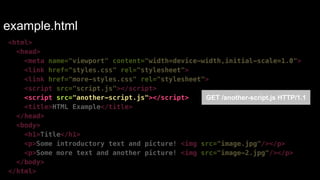
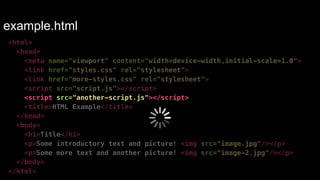
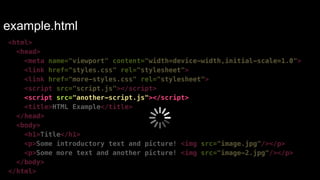
Must wait for:! 
1. CSS download and OM construction! 
2. JS download and execution
example.html 
<html> 
<head> 
<meta name="viewport" content="width=device-width,initial-scale=1.0"> 
<link href="styles.css" rel="stylesheet"> 
<link href="more-styles.css" rel="stylesheet"> 
<script src="script.js"></script> 
<script src="another-script.js"></script> 
<title>HTML Example</title> 
</head> 
<body> 
<h1>Title</h1> 
<p>Some introductory text and picture! <img src="image.jpg"/></p> 
<p>Some more text and another picture! <img src="image-2.jpg"/></p> 
</body> 
</html>
example.html 
<html> 
<head> 
<meta name="viewport" content="width=device-width,initial-scale=1.0"> 
<link href="styles.css" rel="stylesheet"> 
<link href="more-styles.css" rel="stylesheet"> 
<script src="script.js"></script> 
<script src="another-script.js"></script> 
<title>HTML Example</title> 
</head> 
<body> 
<h1>Title</h1> 
<p>Some introductory text and picture! <img src="image.jpg"/></p> 
<p>Some more text and another picture! <img src="image-2.jpg"/></p> 
</body> 
</html> 
GET /another-script.js HTTP/1.1
example.html 
<html> 
<head> 
<meta name="viewport" content="width=device-width,initial-scale=1.0"> 
<link href="styles.css" rel="stylesheet"> 
<link href="more-styles.css" rel="stylesheet"> 
<script src="script.js"></script> 
<script src="another-script.js"></script> 
<title>HTML Example</title> 
</head> 
<body> 
<h1>Title</h1> 
<p>Some introductory text and picture! <img src="image.jpg"/></p> 
<p>Some more text and another picture! <img src="image-2.jpg"/></p> 
</body> 
</html>
example.html 
<html> 
<head> 
<meta name="viewport" content="width=device-width,initial-scale=1.0"> 
<link href="styles.css" rel="stylesheet"> 
<link href="more-styles.css" rel="stylesheet"> 
<script src="script.js"></script> 
<script src="another-script.js"></script> 
<title>HTML Example</title> 
</head> 
<body> 
<h1>Title</h1> 
<p>Some introductory text and picture! <img src="image.jpg"/></p> 
<p>Some more text and another picture! <img src="image-2.jpg"/></p> 
</body> 
</html>
example.html 
<html> 
<head> 
<meta name="viewport" content="width=device-width,initial-scale=1.0"> 
<link href="styles.css" rel="stylesheet"> 
<link href="more-styles.css" rel="stylesheet"> 
<script src="script.js"></script> 
<script src="another-script.js"></script> 
<title>HTML Example</title> 
</head> 
Must wait for:! 
<body> 
1. JS download and execution 
<h1>Title</h1> 
<p>Some introductory text and picture! <img src="image.jpg"/></p> 
<p>Some more text and another picture! <img src="image-2.jpg"/></p> 
</body> 
</html>
example.html 
<html> 
<head> 
<meta name="viewport" content="width=device-width,initial-scale=1.0"> 
<link href="styles.css" rel="stylesheet"> 
<link href="more-styles.css" rel="stylesheet"> 
<script src="script.js"></script> 
<script src="another-script.js"></script> 
<title>HTML Example</title> 
</head> 
<body> 
<h1>Title</h1> 
<p>Some introductory text and picture! <img src="image.jpg"/></p> 
<p>Some more text and another picture! <img src="image-2.jpg"/></p> 
</body> 
</html>
example.html 
<html> 
<head> 
<meta name="viewport" content="width=device-width,initial-scale=1.0"> 
<link href="styles.css" rel="stylesheet"> 
<link href="more-styles.css" rel="stylesheet"> 
<script src="script.js"></script> 
<script src="another-script.js"></script> 
<title>HTML Example</title> 
</head> 
<body> 
<h1>Title</h1> 
<p>Some introductory text and picture! <img src="image.jpg"/></p> 
<p>Some more text and another picture! <img src="image-2.jpg"/></p> 
</body> 
</html> 
GET /image.jpg HTTP/1.1
example.html 
<html> 
<head> 
<meta name="viewport" content="width=device-width,initial-scale=1.0"> 
<link href="styles.css" rel="stylesheet"> 
<link href="more-styles.css" rel="stylesheet"> 
<script src="script.js"></script> 
<script src="another-script.js"></script> 
<title>HTML Example</title> 
</head> 
<body> 
<h1>Title</h1> 
<p>Some introductory text and picture! <img src="image.jpg"/></p> 
<p>Some more text and another picture! <img src="image-2.jpg"/></p> 
</body> 
</html>
example.html 
<html> 
<head> 
<meta name="viewport" content="width=device-width,initial-scale=1.0"> 
<link href="styles.css" rel="stylesheet"> 
<link href="more-styles.css" rel="stylesheet"> 
<script src="script.js"></script> 
<script src="another-script.js"></script> 
<title>HTML Example</title> 
</head> 
<body> 
<h1>Title</h1> 
<p>Some introductory text and picture! <img src="image.jpg"/></p> 
<p>Some more text and another picture! <img src="image-2.jpg"/></p> 
</body> 
</html> 
GET /image-2.jpg HTTP/1.1
http://www.flickr.com/photos/nozzer/3990622685 
Pre-loader hides some of the latency penalty 
So our pages load 20% faster
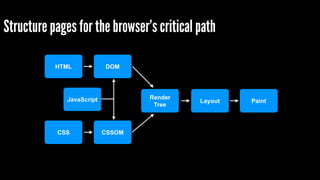
Structure pages for the browser’s critical path 
HTML 
CSS 
DOM 
CSSOM 
Render! 
Tree 
JavaScript Layout Paint
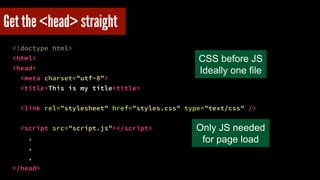
Get the <head> straight 
<!doctype html> 
<html> 
<head> 
<meta charset="utf-8"> 
<title>This is my title<title> 
! 
<link rel="stylesheet" href="styles.css" type="text/css" /> 
! 
<script src="script.js"></script> 
. 
. 
. 
</head> 
CSS before JS! 
Ideally one file 
Only JS needed 
for page load
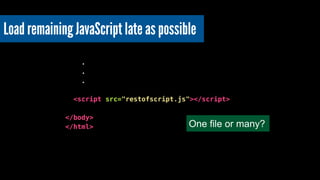
Load remaining JavaScript late as possible 
! 
. 
. 
. 
! 
<script src="restofscript.js"></script> 
! 
</body> 
</html> One file or many?
Use async attribute to avoid blocking DOM 
! 
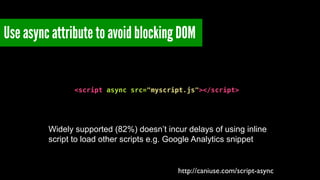
<script async src="myscript.js"></script> 
Widely supported (82%) doesn’t incur delays of using inline 
script to load other scripts e.g. Google Analytics snippet 
http://caniuse.com/script-async
HTML 
CSS 
DOM 
CSSOM 
Render! 
Tree 
JavaScript Layout Paint
HTML 
CSS 
DOM 
CSSOM 
Render! 
Tree 
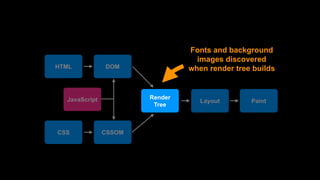
Fonts and background 
images discovered 
when render tree builds 
JavaScript Layout Paint
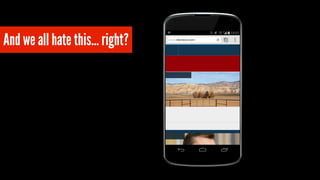
And we all hate this… right?
Use font foundries that prioritise our visitor’s experience 
http://www.flickr.com/photos/splorp/4951916342
Browsers pull resources from the server but … 
https://www.flickr.com/photos/steveweaver/2915792034
https://www.flickr.com/photos/christian_bachellier/582457911 
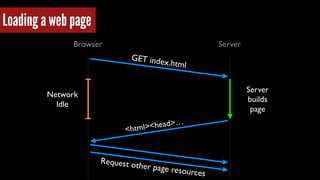
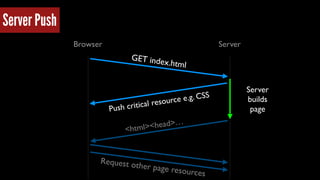
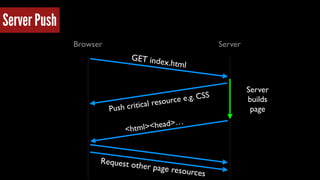
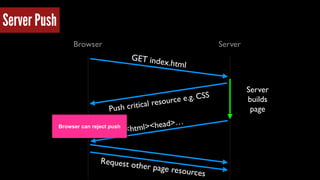
What if the server could push them?
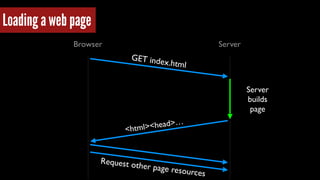
Browser Server 
Server 
builds 
page 
GET index.html 
<html><head>… 
Loading a web page 
Request other page resources
Browser Server 
Server 
builds 
page 
GET index.html 
<html><head>… 
Network 
Idle 
Request other page resources 
Loading a web page
Browser Server 
Server 
builds 
page 
GET index.html 
Push critical resource e .g. CSS 
<html><head>… 
Server Push 
Request other page resources
Browser Server 
Server 
builds 
page 
GET index.html 
Push critical resource e .g. CSS 
<html><head>… 
Request other page resources 
Server Push
Browser Server 
Server 
builds 
page 
GET index.html 
Push critical resource e .g. CSS 
<html><head>… 
Request other page resources 
Server Push 
Browser can reject push
We need to be deliberate, to design for performance 
https://www.flickr.com/photos/9760699@N08/3748770917
http://www.flickr.com/photos/communityfriend/2342578485 
Set performance budgets
Setting a budget 
An event that matters to the visitor! 
within a set time! 
under defined network conditions
“Usable within 10 seconds on GPRS connection”! 
BBC News
“SpeedIndex under 1000”! 
Paul Irish
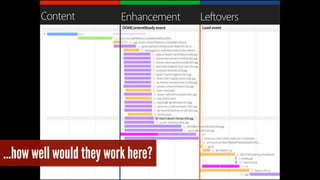
Could use page size or number of objects but…
…how well would they work here?
Measure frequently - during build and in live 
http://www.flickr.com/photos/chandramarsono/4324373384
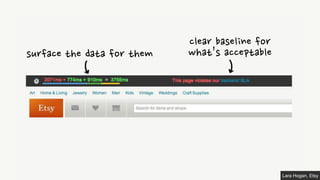
Make performance visible 
Lara Hogan, Etsy
!
Lara Hogan, Etsy
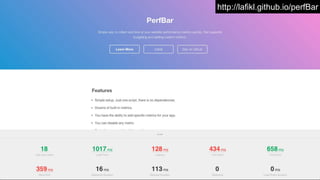
http://lafikl.github.io/perfBar
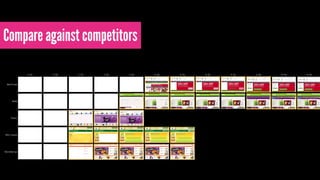
Compare against competitors
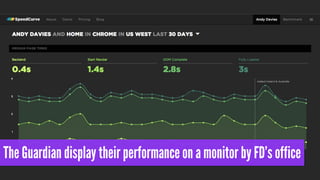
The Guardian display their performance on a monitor by FD’s office
Remember the constraints of our medium 
https://www.flickr.com/photos/33649815@N03/3367739514
https://www.flickr.com/photos/basheertome/4762529213

Speed is Essential for a Great Web Experience

  • 1.
    http://www.flickr.com/photos/barkaway/342359810 Speed isEssential for a Great Web Experience Andy Davies NCC Group
  • 3.
  • 4.
  • 5.
  • 6.
    100ms 1s 10s Response Time in Man-computer Conversational Transactions Robert B. Miller, 1968 Instant Seamless Yawn! How we perceive response times
  • 7.
    100ms 1s 10s Response Time in Man-computer Conversational Transactions Robert B. Miller, 1968 Instant Seamless Yawn! How we perceive response times Only 12% of the top 100 (US) retail sites rendered feature content in less than 3 seconds.
  • 8.
    “50% more concentrationwhen using badly performing web sites” Foviance http://www.flickr.com/photos/yourdon/3366991042
  • 9.
    Delay increases abandonmentrate... Abandonment rate over 200+ sites / 177+ million page views over 2 weeks - http://www.measureworks.nl / Gomez
  • 10.
    …and has anegative impact on brand perception Tesco’s ‘Fast’ Tesco’s ‘Slow’ Mobile Web Stress: Understanding the Neurological Impact of Poor Performance, Tammy Everts, Radware
  • 11.
    We’re more tolerantas we get further into funnels Less Tolerant More Tolerant
  • 12.
    and suspicious ifsomething’s too fast
  • 13.
    and suspicious ifsomething’s too fast
  • 14.
    Reader panel (3,000people) rated speed (fast page load time) as their second most important driver! Speed had the highest percentage of people saying it was VERY important to them
  • 15.
    Faster experiences improveconversion Walmart 2012
  • 16.
    increased conversions by10% Shaved 1 second off median home page time! 6 seconds off 98th percentile http://www.slideshare.net/cliffcrocker/velocity-ny-how-to-measure-revenue-in-milliseconds
  • 17.
    Bing carried outsome experiments $/ +1s - 2.8%
  • 18.
    Shopzilla cut pageload time by 5 seconds! +12% +25% -50% http://velocityconf.com/velocity2009/public/schedule/detail/7709 $$$
  • 19.
    Seatwave - below4 secs vs. above 4 secs +28% 2x 1/6 http://www.slideshare.net/pdyball/velocity-eu-2013-what-is-the-velocity-of-an-unladen-swallow ✔ 凝
  • 20.
    But I’m frustrated… http://www.flickr.com/photos/sybrenstuvel/2468506922
  • 21.
    The Web isToo Slow http://www.flickr.com/photos/the_justified_sinner/3507390621
  • 24.
    Too many sitesare too slow http://www.flickr.com/photos/the_justified_sinner/3507390621
  • 25.
    and it’s gettingworse! Only 12% of the top 100 (US) retail sites rendered feature content in less than 3 seconds. ! ! Year-on-year the median page has slowed down by 23% Tammy Everts - Radware State of the Union Fall 2014
  • 26.
    “We’re not beingdeliberate about performance”! Tim Kadlec https://www.flickr.com/photos/lukew/7382528728
  • 27.
    But only ifwe build it that way… http://3.bp.blogspot.com/-0RqujOyE1ro/Up9HF7bPxbI/AAAAAAAAAbM/Ijudm6uq-dg/s1600/This+is+for+Everyone.jpg
  • 28.
    We need tounderstand our fundamental building blocks https://www.flickr.com/photos/ogimogi/2253657555
  • 29.
    Everyone has fastbroadband now… Right? https://www.flickr.com/photos/98640399@N08/9287370881
  • 30.
    Speed (Mbps) 18 16 14 12 10 8 6 4 2 0 Nov 08 Apr 09 May 10 Nov 10 May 11 Nov 10 May 12 Nov 11 May 13 Nov 12 Nov 13 UK Broadband speeds are rising… Ofcom
  • 31.
    But ‘Real Users’experience varies Visitors (%) 1 2 3 4 5 6 7 8 9 10 Load Time (s) 1% 3% 3% 2% 6% 8% 13% 27% 8% 6%
  • 32.
    24% 1% 3%3% 2% 6% But ‘Real Users’ experience varies 8% 13% 27% 8% 6% Visitors (%) 1 2 3 4 5 6 7 8 9 10 > 10 Load Time (s)
  • 33.
    and bandwidth (often)isn’t the bottleneck 0s 5s 10s news.bbc.co.uk tested via webpagetest.org throttled at 1.5Mbps (bursts over 1.5Mbps are artefact of testing) 2.0 1.5 1.0 0.5
  • 34.
    Which will befaster? 1Mbps 10Mbps
  • 35.
    Which will befaster? 1Mbps 10Mbps
  • 36.
    Which will befaster? 1Mbps / 28ms RTT 10Mbps / 280ms RTT
  • 37.
    We often thinkof the network as a pipe https://www.flickr.com/photos/63567936@N00/4181042889
  • 38.
    that’s sometimes reallybad https://www.flickr.com/photos/chesh2000/4487000196
  • 39.
    but the realityis closer to http://1m0esx2939yhjwld8419obqhyb.wpengine.netdna-cdn.com/wp-content/uploads/2014/06/DSC_0492.jpg
  • 40.
    “More Bandwidth Doesn’tMatter (much)” Mike Belshe Page Load Time 1.41s 1.39s 1.38s 1.37s 1.36s 1.50s 1.44s 1 2 3 4 5 6 7 8 9 10 Bandwidth (Mbps) 1.63s 1.95s 3.11s
  • 41.
    Latency has linearimpact on user experience 4 3 Page Load Time (s) 1 2 0 20 40 60 80 100 120 140 160 180 200 220 240 Round Trip Time (ms)
  • 42.
    Latency increases withdistance http://BT Backbone roundtrip times from London: http://ippm.bt.net/hour/europe/lo.shtml www.vectortemplates.com
  • 43.
    Latency increases withdistance 81ms 201ms 156ms 266ms 232ms 28ms http://BT Backbone roundtrip times from London: http://ippm.bt.net/hour/europe/lo.shtml www.vectortemplates.com
  • 44.
    There’s the lastmile latency too (and routers, other networking kit, mobile latencies too) https://www.flickr.com/photos/kiwanja/3170292282
  • 45.
    (TCP Segments) TCPand the Lower Bound of Web Performance John Rauser Larger downloads == more round trips 285kB 214kB 143kB 71kB 1 2 3 4 5 6 7 8 9 10 11 Round Trips Size
  • 46.
    Latency is oneof our greatest enemies https://www.flickr.com/photos/jjvaca/728072059
  • 47.
    We can cheatthe latency penalty (sometimes) https://speakerdeck.com/mikeyk/secrets-to-lightning-fast-mobile-design
  • 49.
  • 50.
    Network request stillin progress User gets feedback
  • 51.
    But there’s plentyof recipes to work around it
  • 52.
    Some of theoptimisations are hacks! https://www.flickr.com/photos/rocketnumber9/13695281
  • 53.
    Browsers support moreparallel connections Old browsers - 2 parallel connections Today’s browsers - 4 plus connections
  • 54.
    We split resourcesacross domains www.bbc.co.uk! static.bbci.co.uk! news.bbcimg.co.uk! node1.bbcimg.co.uk
  • 55.
    DataURIs url(data:image/ png;base64,iVBORw0KGgoAAA ANSUhEUgAAABkAAAAZCAMAAAD zN3VRAAAAGXRFWHRTb2Z0d2Fy ZQBBZG9iZSBJbWFnZVJlYWR5c cllPAAAAAZQTFRF/ wAAAAAAQaMSAwAAABJJREFUeN piYBgFo2AwAIAAAwACigABtnC V2AAAAABJRU5ErkJggg==) =
  • 56.
    DataURIs Larger downloads(needs gzip)! Overrides browser priorities url(data:image/ png;base64,iVBORw0KGgoAAA ANSUhEUgAAABkAAAAZCAMAAAD zN3VRAAAAGXRFWHRTb2Z0d2Fy ZQBBZG9iZSBJbWFnZVJlYWR5c cllPAAAAAZQTFRF/ wAAAAAAQaMSAwAAABJJREFUeN piYBgFo2AwAIAAAwACigABtnC V2AAAAABJRU5ErkJggg==) =
  • 57.
    Create CSS andJavaScript bundles + + + + = =
  • 58.
    Create CSS andJavaScript bundles + + + + = = More to download and parse
  • 59.
    Create CSS andJavaScript bundles + + + + = = More to download and parse +! x ! Whole bundle is invalidated if a single file changes
  • 60.
  • 61.
    CSS Sprites Toget just one sprite …
  • 62.
    CSS Sprites Toget just one sprite … Browser must download and decode the whole image
  • 63.
    There’s a tensionbetween development and delivery https://www.flickr.com/photos/domiriel/7376397968
  • 64.
    Build tools andoptimisation services help plug gaps and won’t be going away…
  • 65.
    But couldn’t webe more efficient? https://www.flickr.com/photos/belsymington/4102783610
  • 66.
    HTTP/2 (Evolved fromGoogle’s SPDY)
  • 67.
    Single multiplexed connectionto host HTTP/2 HTTP/1.1
  • 68.
  • 69.
    How much ofan image do we need to make it usable - 5%? Experiment by John Mellor at Google
  • 70.
    How much ofan image do we need to make it usable - 15%?
  • 71.
    How much ofan image do we need to make it usable - 25%?
  • 72.
    How much ofan image do we need to make it usable - 80%?
  • 73.
    How much ofan image do we need to make it usable - 80%? There are some questions over the user experience with progressive images
  • 74.
    HTTP/1.1 - browsersets priorities
  • 75.
    HTTP/2 - browserhints priorities server can override them
  • 76.
  • 77.
    Google and Mozillawill only support over HTTPS http://www.flickr.com/photos/forsytht/4553656244
  • 78.
    HTTP/2 rollouts willstart next year - we still have a lot to learn http://www.flickr.com/photos/atoach/6014917153
  • 79.
  • 80.
    Covert HTML … <html> <head> <meta name="viewport" content="width=device-width,initial-scale=1.0"> <link href="styles.css" rel="stylesheet"> <script src="script.js"></script> <title>HTML Example</title> </head> <body> <h1>Title</h1> <p>Some introductory text and picture! <img src="image.jpg"/></p> </body> </html>
  • 81.
    … into DocumentObject Model (DOM) html head body meta link script title h1 p img
  • 82.
    Convert CSS … body { font-size: 16px } h1 { text-decoration: underline} p { font-weight: bold } p > span { color: #000 } img { border: 1px solid #ccc }
  • 83.
    … into CSSObject Model (CSSOM) body h1 p span font-size: 16px font-size: 16px text-decoration: underline font-size: 16px font-weight: bold font-size: 16px font-weight: bold color: #000 img font-size: 16px border: 1px solid #ccc
  • 84.
    Combine DOM andCSSOM to build Render Tree body h1 p img font-size: 16px text-decoration: underline font-size: 16px font-weight: bold font-size: 16px font-weight: bold border: 1px solid #ccc
  • 85.
    Render the Page HTML CSS DOM CSSOM Render! Tree Layout Paint
  • 86.
    But what aboutJavaScript? HTML CSS DOM CSSOM Render! Tree JavaScript Layout Paint
  • 87.
    But what aboutJavaScript? HTML CSS DOM CSSOM Render! Tree JavaScript Layout Paint JavaScript blocks DOM construction! CSSOM construction blocks JavaScript execution
  • 88.
    Let’s pretend we’rea browser (with the preloader switched off) https://www.flickr.com/photos/mozillaeu/11171168996
  • 89.
    Two key rulesto remember Constructing CSS Object Model (CSSOM) blocks JavaScript execution! ! JavaScript blocks DOM construction
  • 90.
  • 91.
  • 92.
  • 93.
    example.html <html> <head> <meta name="viewport" content="width=device-width,initial-scale=1.0"> <link href="styles.css" rel="stylesheet"> <link href="more-styles.css" rel="stylesheet"> <script src="script.js"></script> <script src="another-script.js"></script> <title>HTML Example</title> </head> <body> <h1>Title</h1> <p>Some introductory text and picture! <img src="image.jpg"/></p> <p>Some more text and another picture! <img src="image-2.jpg"/></p> </body> </html>
  • 94.
    example.html <html> <head> <meta name="viewport" content="width=device-width,initial-scale=1.0"> <link href="styles.css" rel="stylesheet"> <link href="more-styles.css" rel="stylesheet"> <script src="script.js"></script> <script src="another-script.js"></script> <title>HTML Example</title> </head> <body> <h1>Title</h1> <p>Some introductory text and picture! <img src="image.jpg"/></p> <p>Some more text and another picture! <img src="image-2.jpg"/></p> </body> </html>
  • 95.
    example.html <html> <head> <meta name="viewport" content="width=device-width,initial-scale=1.0"> <link href="styles.css" rel="stylesheet"> GET /styles.css HTTP/1.1 <link href="more-styles.css" rel="stylesheet"> <script src="script.js"></script> <script src="another-script.js"></script> <title>HTML Example</title> </head> <body> <h1>Title</h1> <p>Some introductory text and picture! <img src="image.jpg"/></p> <p>Some more text and another picture! <img src="image-2.jpg"/></p> </body> </html>
  • 96.
    example.html <html> <head> <meta name="viewport" content="width=device-width,initial-scale=1.0"> <link href="styles.css" rel="stylesheet"> <link href="more-styles.css" rel="stylesheet"> <script src="script.js"></script> <script src="another-script.js"></script> <title>HTML Example</title> </head> <body> <h1>Title</h1> <p>Some introductory text and picture! <img src="image.jpg"/></p> <p>Some more text and another picture! <img src="image-2.jpg"/></p> </body> </html>
  • 97.
    example.html <html> <head> <meta name="viewport" content="width=device-width,initial-scale=1.0"> <link href="styles.css" rel="stylesheet"> <link href="more-styles.css" rel="stylesheet"> <script src="script.js"></script> <script src="another-script.js"></script> <title>HTML Example</title> </head> <body> <h1>Title</h1> <p>Some introductory text and picture! <img src="image.jpg"/></p> <p>Some more text and another picture! <img src="image-2.jpg"/></p> </body> </html> GET /more-styles.css HTTP/1.1
  • 98.
    example.html <html> <head> <meta name="viewport" content="width=device-width,initial-scale=1.0"> <link href="styles.css" rel="stylesheet"> <link href="more-styles.css" rel="stylesheet"> <script src="script.js"></script> <script src="another-script.js"></script> <title>HTML Example</title> </head> <body> <h1>Title</h1> <p>Some introductory text and picture! <img src="image.jpg"/></p> <p>Some more text and another picture! <img src="image-2.jpg"/></p> </body> </html>
  • 99.
    example.html <html> <head> <meta name="viewport" content="width=device-width,initial-scale=1.0"> <link href="styles.css" rel="stylesheet"> <link href="more-styles.css" rel="stylesheet"> <script src="script.js"></script> GET /script.js HTTP/1.1 <script src="another-script.js"></script> <title>HTML Example</title> </head> <body> <h1>Title</h1> <p>Some introductory text and picture! <img src="image.jpg"/></p> <p>Some more text and another picture! <img src="image-2.jpg"/></p> </body> </html>
  • 100.
    example.html <html> <head> <meta name="viewport" content="width=device-width,initial-scale=1.0"> <link href="styles.css" rel="stylesheet"> <link href="more-styles.css" rel="stylesheet"> <script src="script.js"></script> <script src="another-script.js"></script> <title>HTML Example</title> </head> <body> <h1>Title</h1> <p>Some introductory text and picture! <img src="image.jpg"/></p> <p>Some more text and another picture! <img src="image-2.jpg"/></p> </body> </html>
  • 101.
    example.html <html> <head> <meta name="viewport" content="width=device-width,initial-scale=1.0"> <link href="styles.css" rel="stylesheet"> <link href="more-styles.css" rel="stylesheet"> <script src="script.js"></script> <script src="another-script.js"></script> <title>HTML Example</title> </head> <body> <h1>Title</h1> <p>Some introductory text and picture! <img src="image.jpg"/></p> <p>Some more text and another picture! <img src="image-2.jpg"/></p> </body> </html>
  • 102.
    example.html <html> <head> <meta name="viewport" content="width=device-width,initial-scale=1.0"> <link href="styles.css" rel="stylesheet"> <link href="more-styles.css" rel="stylesheet"> <script src="script.js"></script> <script src="another-script.js"></script> <title>HTML Example</title> </head> <body> <h1>Title</h1> <p>Some introductory text and picture! <img src="image.jpg"/></p> <p>Some more text and another picture! <img src="image-2.jpg"/></p> </body> </html> Must wait for:! 1. CSS download and OM construction! 2. JS download and execution
  • 103.
    example.html <html> <head> <meta name="viewport" content="width=device-width,initial-scale=1.0"> <link href="styles.css" rel="stylesheet"> <link href="more-styles.css" rel="stylesheet"> <script src="script.js"></script> <script src="another-script.js"></script> <title>HTML Example</title> </head> <body> <h1>Title</h1> <p>Some introductory text and picture! <img src="image.jpg"/></p> <p>Some more text and another picture! <img src="image-2.jpg"/></p> </body> </html>
  • 104.
    example.html <html> <head> <meta name="viewport" content="width=device-width,initial-scale=1.0"> <link href="styles.css" rel="stylesheet"> <link href="more-styles.css" rel="stylesheet"> <script src="script.js"></script> <script src="another-script.js"></script> <title>HTML Example</title> </head> <body> <h1>Title</h1> <p>Some introductory text and picture! <img src="image.jpg"/></p> <p>Some more text and another picture! <img src="image-2.jpg"/></p> </body> </html> GET /another-script.js HTTP/1.1
  • 105.
    example.html <html> <head> <meta name="viewport" content="width=device-width,initial-scale=1.0"> <link href="styles.css" rel="stylesheet"> <link href="more-styles.css" rel="stylesheet"> <script src="script.js"></script> <script src="another-script.js"></script> <title>HTML Example</title> </head> <body> <h1>Title</h1> <p>Some introductory text and picture! <img src="image.jpg"/></p> <p>Some more text and another picture! <img src="image-2.jpg"/></p> </body> </html>
  • 106.
    example.html <html> <head> <meta name="viewport" content="width=device-width,initial-scale=1.0"> <link href="styles.css" rel="stylesheet"> <link href="more-styles.css" rel="stylesheet"> <script src="script.js"></script> <script src="another-script.js"></script> <title>HTML Example</title> </head> <body> <h1>Title</h1> <p>Some introductory text and picture! <img src="image.jpg"/></p> <p>Some more text and another picture! <img src="image-2.jpg"/></p> </body> </html>
  • 107.
    example.html <html> <head> <meta name="viewport" content="width=device-width,initial-scale=1.0"> <link href="styles.css" rel="stylesheet"> <link href="more-styles.css" rel="stylesheet"> <script src="script.js"></script> <script src="another-script.js"></script> <title>HTML Example</title> </head> Must wait for:! <body> 1. JS download and execution <h1>Title</h1> <p>Some introductory text and picture! <img src="image.jpg"/></p> <p>Some more text and another picture! <img src="image-2.jpg"/></p> </body> </html>
  • 108.
    example.html <html> <head> <meta name="viewport" content="width=device-width,initial-scale=1.0"> <link href="styles.css" rel="stylesheet"> <link href="more-styles.css" rel="stylesheet"> <script src="script.js"></script> <script src="another-script.js"></script> <title>HTML Example</title> </head> <body> <h1>Title</h1> <p>Some introductory text and picture! <img src="image.jpg"/></p> <p>Some more text and another picture! <img src="image-2.jpg"/></p> </body> </html>
  • 109.
    example.html <html> <head> <meta name="viewport" content="width=device-width,initial-scale=1.0"> <link href="styles.css" rel="stylesheet"> <link href="more-styles.css" rel="stylesheet"> <script src="script.js"></script> <script src="another-script.js"></script> <title>HTML Example</title> </head> <body> <h1>Title</h1> <p>Some introductory text and picture! <img src="image.jpg"/></p> <p>Some more text and another picture! <img src="image-2.jpg"/></p> </body> </html> GET /image.jpg HTTP/1.1
  • 110.
    example.html <html> <head> <meta name="viewport" content="width=device-width,initial-scale=1.0"> <link href="styles.css" rel="stylesheet"> <link href="more-styles.css" rel="stylesheet"> <script src="script.js"></script> <script src="another-script.js"></script> <title>HTML Example</title> </head> <body> <h1>Title</h1> <p>Some introductory text and picture! <img src="image.jpg"/></p> <p>Some more text and another picture! <img src="image-2.jpg"/></p> </body> </html>
  • 111.
    example.html <html> <head> <meta name="viewport" content="width=device-width,initial-scale=1.0"> <link href="styles.css" rel="stylesheet"> <link href="more-styles.css" rel="stylesheet"> <script src="script.js"></script> <script src="another-script.js"></script> <title>HTML Example</title> </head> <body> <h1>Title</h1> <p>Some introductory text and picture! <img src="image.jpg"/></p> <p>Some more text and another picture! <img src="image-2.jpg"/></p> </body> </html> GET /image-2.jpg HTTP/1.1
  • 112.
    http://www.flickr.com/photos/nozzer/3990622685 Pre-loader hidessome of the latency penalty So our pages load 20% faster
  • 113.
    Structure pages forthe browser’s critical path HTML CSS DOM CSSOM Render! Tree JavaScript Layout Paint
  • 114.
    Get the <head>straight <!doctype html> <html> <head> <meta charset="utf-8"> <title>This is my title<title> ! <link rel="stylesheet" href="styles.css" type="text/css" /> ! <script src="script.js"></script> . . . </head> CSS before JS! Ideally one file Only JS needed for page load
  • 115.
    Load remaining JavaScriptlate as possible ! . . . ! <script src="restofscript.js"></script> ! </body> </html> One file or many?
  • 116.
    Use async attributeto avoid blocking DOM ! <script async src="myscript.js"></script> Widely supported (82%) doesn’t incur delays of using inline script to load other scripts e.g. Google Analytics snippet http://caniuse.com/script-async
  • 117.
    HTML CSS DOM CSSOM Render! Tree JavaScript Layout Paint
  • 118.
    HTML CSS DOM CSSOM Render! Tree Fonts and background images discovered when render tree builds JavaScript Layout Paint
  • 119.
    And we allhate this… right?
  • 120.
    Use font foundriesthat prioritise our visitor’s experience http://www.flickr.com/photos/splorp/4951916342
  • 121.
    Browsers pull resourcesfrom the server but … https://www.flickr.com/photos/steveweaver/2915792034
  • 122.
  • 123.
    Browser Server Server builds page GET index.html <html><head>… Loading a web page Request other page resources
  • 124.
    Browser Server Server builds page GET index.html <html><head>… Network Idle Request other page resources Loading a web page
  • 125.
    Browser Server Server builds page GET index.html Push critical resource e .g. CSS <html><head>… Server Push Request other page resources
  • 126.
    Browser Server Server builds page GET index.html Push critical resource e .g. CSS <html><head>… Request other page resources Server Push
  • 127.
    Browser Server Server builds page GET index.html Push critical resource e .g. CSS <html><head>… Request other page resources Server Push Browser can reject push
  • 128.
    We need tobe deliberate, to design for performance https://www.flickr.com/photos/9760699@N08/3748770917
  • 129.
  • 130.
    Setting a budget An event that matters to the visitor! within a set time! under defined network conditions
  • 131.
    “Usable within 10seconds on GPRS connection”! BBC News
  • 132.
  • 133.
    Could use pagesize or number of objects but…
  • 134.
    …how well wouldthey work here?
  • 135.
    Measure frequently -during build and in live http://www.flickr.com/photos/chandramarsono/4324373384
  • 136.
    Make performance visible Lara Hogan, Etsy
  • 137.
  • 138.
  • 139.
  • 140.
  • 141.
    The Guardian displaytheir performance on a monitor by FD’s office
  • 142.
    Remember the constraintsof our medium https://www.flickr.com/photos/33649815@N03/3367739514
  • 143.