https://www.flickr.com/photos/benjreay/14713228051 
What does the browser pre-loader do? 
@andydavies 
Sept 2014
The Preloader! 
A.K.A.! 
look-ahead or speculative pre-parser
What if you could make your pages load 20% faster? 
https://www.flickr.com/photos/chrisjohnbeckett/10446312055
preloading is the single biggest performance 
improvement browsers have ever made 
Steve Souders, April 2013 
https://hacks.mozilla.org/2013/03/capturing-improving-performance-of-the-adaptive-web/comment-page-1/#comment-2060698 
www.stevesouders.com/blog/2013/04/26/i/
most destructive “performance enhancement”! 
I think there’s ever been 
Matt Wilcox, creator of Adaptive Images, March 2013 
Matt’s point is a bit more nuanced than this, read the full discussion:! 
https://hacks.mozilla.org/2013/03/capturing-improving-performance-of-the-adaptive-web/comment-page-1/#comment-2060698
What’s our greatest enemy? 
https://www.flickr.com/photos/54459164@N00/5218183788
The browser that just won’t die?
The explosion in device diversity? 
http://opensignal.com/reports/2014/android-fragmentation/
… or maybe latency is our greatest enemy 
https://www.flickr.com/photos/jjvaca/728072059
At best network packets travel at roughly 2/3 speed of light 
https://www.flickr.com/photos/98640399@N08/9287370881
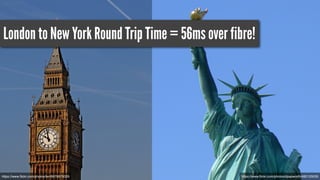
London to New York Round Trip Time = 56ms over fibre! 
https://www.flickr.com/photos/https://www.flickr.com/photos/lwr/6979975029 dpapworth/482125035
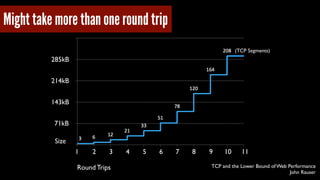
(TCP Segments) 
TCP and the Lower Bound of Web Performance 
John Rauser 
Might take more than one round trip 
285kB 
214kB 
143kB 
71kB 
1 2 3 4 5 6 7 8 9 10 11 
Round Trips 
Size
So what’s this got to do with the preloader?
Let’s pretend we’re a browser 
(with the preloader switched off) 
https://www.flickr.com/photos/mozillaeu/11171168996
Two key rules to remember 
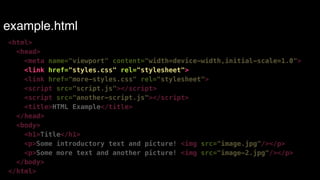
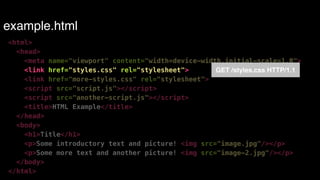
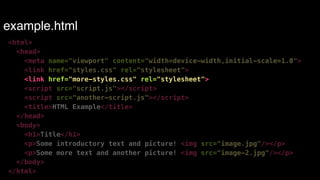
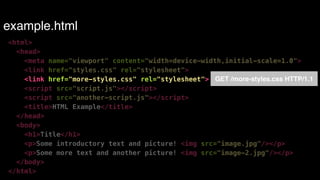
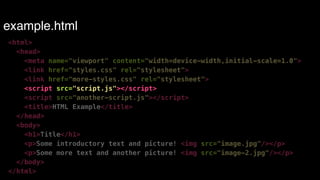
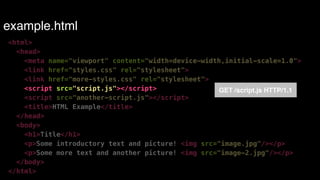
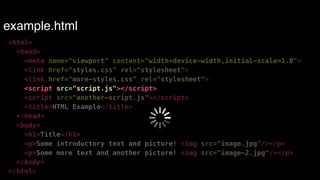
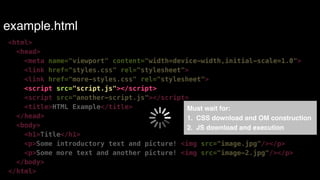
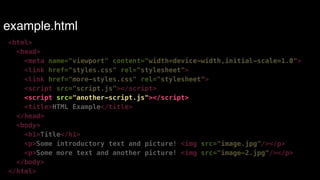
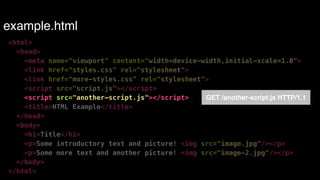
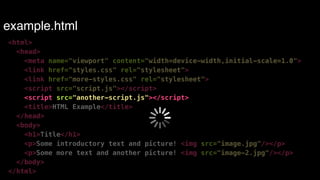
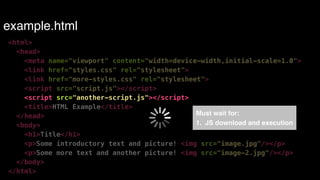
Constructing CSS Object Model (CSSOM) blocks JavaScript execution! 
! 
JavaScript blocks DOM construction
GET example.html HTTP/1.1
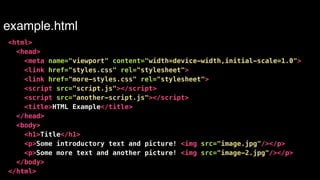
example.html 
<html> 
<head> 
<meta name="viewport" content="width=device-width,initial-scale=1.0"> 
<link href="styles.css" rel="stylesheet"> 
<link href="more-styles.css" rel="stylesheet"> 
<script src="script.js"></script> 
<script src="another-script.js"></script> 
<title>HTML Example</title> 
</head> 
<body> 
<h1>Title</h1> 
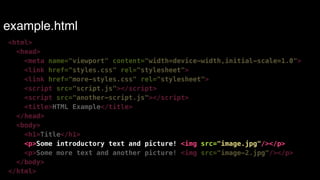
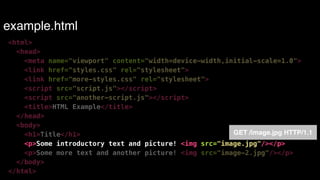
<p>Some introductory text and picture! <img src="image.jpg"/></p> 
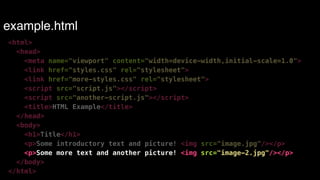
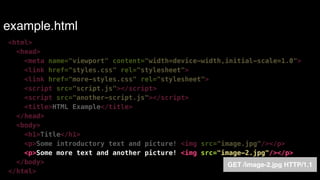
<p>Some more text and another picture! <img src="image-2.jpg"/></p> 
</body> 
</html>
example.html 
<html> 
<head> 
<meta name="viewport" content="width=device-width,initial-scale=1.0"> 
<link href="styles.css" rel="stylesheet"> 
<link href="more-styles.css" rel="stylesheet"> 
<script src="script.js"></script> 
<script src="another-script.js"></script> 
<title>HTML Example</title> 
</head> 
<body> 
<h1>Title</h1> 
<p>Some introductory text and picture! <img src="image.jpg"/></p> 
<p>Some more text and another picture! <img src="image-2.jpg"/></p> 
</body> 
</html>
example.html 
<html> 
<head> 
<meta name="viewport" content="width=device-width,initial-scale=1.0"> 
<link href="styles.css" rel="stylesheet"> 
GET /styles.css HTTP/1.1 
<link href="more-styles.css" rel="stylesheet"> 
<script src="script.js"></script> 
<script src="another-script.js"></script> 
<title>HTML Example</title> 
</head> 
<body> 
<h1>Title</h1> 
<p>Some introductory text and picture! <img src="image.jpg"/></p> 
<p>Some more text and another picture! <img src="image-2.jpg"/></p> 
</body> 
</html>
example.html 
<html> 
<head> 
<meta name="viewport" content="width=device-width,initial-scale=1.0"> 
<link href="styles.css" rel="stylesheet"> 
<link href="more-styles.css" rel="stylesheet"> 
<script src="script.js"></script> 
<script src="another-script.js"></script> 
<title>HTML Example</title> 
</head> 
<body> 
<h1>Title</h1> 
<p>Some introductory text and picture! <img src="image.jpg"/></p> 
<p>Some more text and another picture! <img src="image-2.jpg"/></p> 
</body> 
</html>
example.html 
<html> 
<head> 
<meta name="viewport" content="width=device-width,initial-scale=1.0"> 
<link href="styles.css" rel="stylesheet"> 
<link href="more-styles.css" rel="stylesheet"> 
<script src="script.js"></script> 
<script src="another-script.js"></script> 
<title>HTML Example</title> 
</head> 
<body> 
<h1>Title</h1> 
<p>Some introductory text and picture! <img src="image.jpg"/></p> 
<p>Some more text and another picture! <img src="image-2.jpg"/></p> 
</body> 
</html> 
GET /more-styles.css HTTP/1.1
example.html 
<html> 
<head> 
<meta name="viewport" content="width=device-width,initial-scale=1.0"> 
<link href="styles.css" rel="stylesheet"> 
<link href="more-styles.css" rel="stylesheet"> 
<script src="script.js"></script> 
<script src="another-script.js"></script> 
<title>HTML Example</title> 
</head> 
<body> 
<h1>Title</h1> 
<p>Some introductory text and picture! <img src="image.jpg"/></p> 
<p>Some more text and another picture! <img src="image-2.jpg"/></p> 
</body> 
</html>
example.html 
<html> 
<head> 
<meta name="viewport" content="width=device-width,initial-scale=1.0"> 
<link href="styles.css" rel="stylesheet"> 
<link href="more-styles.css" rel="stylesheet"> 
<script src="script.js"></script> 
GET /script.js HTTP/1.1 
<script src="another-script.js"></script> 
<title>HTML Example</title> 
</head> 
<body> 
<h1>Title</h1> 
<p>Some introductory text and picture! <img src="image.jpg"/></p> 
<p>Some more text and another picture! <img src="image-2.jpg"/></p> 
</body> 
</html>
example.html 
<html> 
<head> 
<meta name="viewport" content="width=device-width,initial-scale=1.0"> 
<link href="styles.css" rel="stylesheet"> 
<link href="more-styles.css" rel="stylesheet"> 
<script src="script.js"></script> 
<script src="another-script.js"></script> 
<title>HTML Example</title> 
</head> 
<body> 
<h1>Title</h1> 
<p>Some introductory text and picture! <img src="image.jpg"/></p> 
<p>Some more text and another picture! <img src="image-2.jpg"/></p> 
</body> 
</html>
example.html 
<html> 
<head> 
<meta name="viewport" content="width=device-width,initial-scale=1.0"> 
<link href="styles.css" rel="stylesheet"> 
<link href="more-styles.css" rel="stylesheet"> 
<script src="script.js"></script> 
<script src="another-script.js"></script> 
<title>HTML Example</title> 
</head> 
<body> 
<h1>Title</h1> 
<p>Some introductory text and picture! <img src="image.jpg"/></p> 
<p>Some more text and another picture! <img src="image-2.jpg"/></p> 
</body> 
</html> 
Must wait for:! 
1. CSS download and OM construction! 
2. JS download and execution
example.html 
<html> 
<head> 
<meta name="viewport" content="width=device-width,initial-scale=1.0"> 
<link href="styles.css" rel="stylesheet"> 
<link href="more-styles.css" rel="stylesheet"> 
<script src="script.js"></script> 
<script src="another-script.js"></script> 
<title>HTML Example</title> 
</head> 
<body> 
<h1>Title</h1> 
<p>Some introductory text and picture! <img src="image.jpg"/></p> 
<p>Some more text and another picture! <img src="image-2.jpg"/></p> 
</body> 
</html>
example.html 
<html> 
<head> 
<meta name="viewport" content="width=device-width,initial-scale=1.0"> 
<link href="styles.css" rel="stylesheet"> 
<link href="more-styles.css" rel="stylesheet"> 
<script src="script.js"></script> 
<script src="another-script.js"></script> 
<title>HTML Example</title> 
</head> 
<body> 
<h1>Title</h1> 
<p>Some introductory text and picture! <img src="image.jpg"/></p> 
<p>Some more text and another picture! <img src="image-2.jpg"/></p> 
</body> 
</html> 
GET /another-script.js HTTP/1.1
example.html 
<html> 
<head> 
<meta name="viewport" content="width=device-width,initial-scale=1.0"> 
<link href="styles.css" rel="stylesheet"> 
<link href="more-styles.css" rel="stylesheet"> 
<script src="script.js"></script> 
<script src="another-script.js"></script> 
<title>HTML Example</title> 
</head> 
<body> 
<h1>Title</h1> 
<p>Some introductory text and picture! <img src="image.jpg"/></p> 
<p>Some more text and another picture! <img src="image-2.jpg"/></p> 
</body> 
</html>
example.html 
<html> 
<head> 
<meta name="viewport" content="width=device-width,initial-scale=1.0"> 
<link href="styles.css" rel="stylesheet"> 
<link href="more-styles.css" rel="stylesheet"> 
<script src="script.js"></script> 
<script src="another-script.js"></script> 
<title>HTML Example</title> 
</head> 
Must wait for:! 
<body> 
1. JS download and execution 
<h1>Title</h1> 
<p>Some introductory text and picture! <img src="image.jpg"/></p> 
<p>Some more text and another picture! <img src="image-2.jpg"/></p> 
</body> 
</html>
example.html 
<html> 
<head> 
<meta name="viewport" content="width=device-width,initial-scale=1.0"> 
<link href="styles.css" rel="stylesheet"> 
<link href="more-styles.css" rel="stylesheet"> 
<script src="script.js"></script> 
<script src="another-script.js"></script> 
<title>HTML Example</title> 
</head> 
<body> 
<h1>Title</h1> 
<p>Some introductory text and picture! <img src="image.jpg"/></p> 
<p>Some more text and another picture! <img src="image-2.jpg"/></p> 
</body> 
</html>
example.html 
<html> 
<head> 
<meta name="viewport" content="width=device-width,initial-scale=1.0"> 
<link href="styles.css" rel="stylesheet"> 
<link href="more-styles.css" rel="stylesheet"> 
<script src="script.js"></script> 
<script src="another-script.js"></script> 
<title>HTML Example</title> 
</head> 
<body> 
<h1>Title</h1> 
<p>Some introductory text and picture! <img src="image.jpg"/></p> 
<p>Some more text and another picture! <img src="image-2.jpg"/></p> 
</body> 
</html> 
GET /image.jpg HTTP/1.1
example.html 
<html> 
<head> 
<meta name="viewport" content="width=device-width,initial-scale=1.0"> 
<link href="styles.css" rel="stylesheet"> 
<link href="more-styles.css" rel="stylesheet"> 
<script src="script.js"></script> 
<script src="another-script.js"></script> 
<title>HTML Example</title> 
</head> 
<body> 
<h1>Title</h1> 
<p>Some introductory text and picture! <img src="image.jpg"/></p> 
<p>Some more text and another picture! <img src="image-2.jpg"/></p> 
</body> 
</html>
example.html 
<html> 
<head> 
<meta name="viewport" content="width=device-width,initial-scale=1.0"> 
<link href="styles.css" rel="stylesheet"> 
<link href="more-styles.css" rel="stylesheet"> 
<script src="script.js"></script> 
<script src="another-script.js"></script> 
<title>HTML Example</title> 
</head> 
<body> 
<h1>Title</h1> 
<p>Some introductory text and picture! <img src="image.jpg"/></p> 
<p>Some more text and another picture! <img src="image-2.jpg"/></p> 
</body> 
</html> 
GET /image-2.jpg HTTP/1.1
What does the waterfall look like? 
scripts download in series 
WebPagetest - IE7, Cable, Korea
What if we decouple resource discovery from DOM construction? 
When DOM construction is blocked ! 
! e.g. waiting for script to download and execute! 
! 
Search rest of document for external resources! 
! e.g. <link rel=“stylesheet”…>, <script src=…>, <img src=…>! 
! 
Download and cache discovered resources ready for DOM 
construction
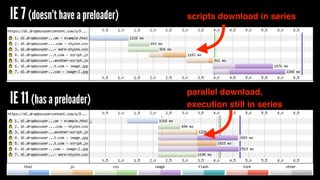
IE 7 (doesn’t have a preloader) 
IE 11 (has a preloader) 
scripts download in series 
parallel download, 
execution still in series
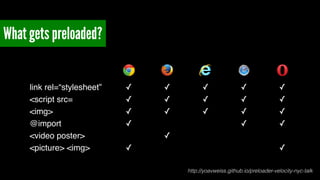
What gets preloaded? 
link rel=“stylesheet” ✓ ✓ ✓ ✓ ✓ 
<script src= ✓ ✓ ✓ ✓ ✓ 
<img> ✓ ✓ ✓ ✓ ✓ 
@import ✓ ✓ ✓ 
<video poster> ✓ 
<picture> <img> ✓ ✓ 
http://yoavweiss.github.io/preloader-velocity-nyc-talk
Script inserted resources aren’t discoverable 
<script type="text/javascript"> 
function() { 
Browser won’t discover 
script until outer script 
inserts it into DOM 
var js = document.createElement('script'); 
js.async = true; 
js.src = 'script.js'; 
var e = document.getElementsByTagName('script')[0]; 
e.parentNode.insertBefore(js, first); 
})(); 
</script>
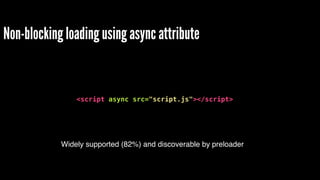
Non-blocking loading using async attribute 
! 
<script async src="script.js"></script> 
Widely supported (82%) and discoverable by preloader
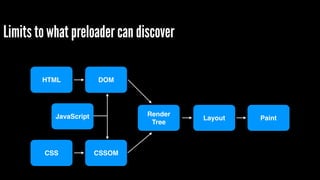
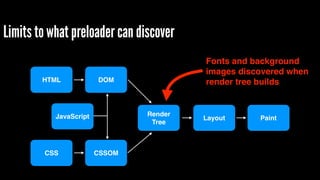
Limits to what preloader can discover 
HTML 
CSS 
DOM 
CSSOM 
Render! 
Tree 
JavaScript Layout Paint
Limits to what preloader can discover 
HTML 
CSS 
DOM 
CSSOM 
Render! 
Tree 
Fonts and background 
images discovered when 
render tree builds 
JavaScript Layout Paint
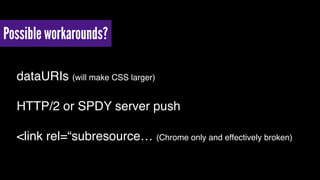
Possible workarounds? 
dataURIs (will make CSS larger)! 
HTTP/2 or SPDY server push! 
<link rel=“subresource… (Chrome only and effectively broken)
Download order != Document order 
https://www.flickr.com/photos/add1sun/4993432274
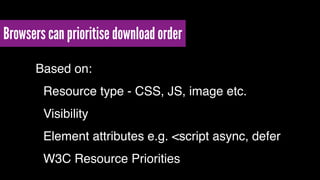
Browsers can prioritise download order 
Based on:! 
! Resource type - CSS, JS, image etc.! 
! Visibility! 
! Element attributes e.g. <script async, defer! 
! W3C Resource Priorities
W3C Resource Priorities - adds lazyload attribute 
(also look at Ilya Grigorik’s proposal for Resource Hints)
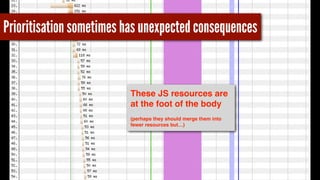
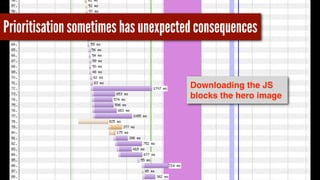
Prioritisation sometimes has unexpected consequences 
Major UK retailer’s 
site in Chrome
Prioritisation sometimes has unexpected consequences 
These JS resources are 
at the foot of the body! 
(perhaps they should merge them into 
fewer resources but…)
Prioritisation sometimes has unexpected consequences 
Downloading the JS 
blocks the hero image
Some edge cases you might come across
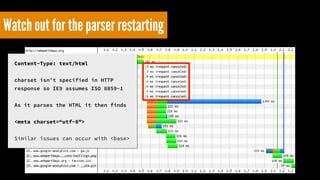
Watch out for the parser restarting
Watch out for the parser restarting 
Content-Type: text/html 
! 
charset isn’t specified in HTTP 
response so IE9 assumes ISO 8859-1 
! 
As it parses the HTML it then finds 
! 
<meta charset=“utf-8"> 
! 
Similar issues can occur with <base>
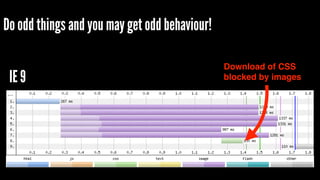
Do odd things and you may get odd behaviour! 
<html> 
<head> 
<script> 
var file = window.innerWidth < 1000 ? "mobile.css" : "desktop.css"; 
document.write('<link rel="stylesheet" type="text/css" href="css/' + file + '"/>'); 
</script> 
</head> 
<body> 
<img src="img/gallery-img1.jpg" /> 
<img src="img/gallery-img2.jpg" /> 
<img src="img/gallery-img3.jpg" /> 
<img src="img/gallery-img4.jpg" /> 
<img src="img/gallery-img5.jpg" /> 
<img src="img/gallery-img6.jpg" /> 
</body> 
</html> This is based on a suggested Stack Overflow answer!
Do odd things and you may get odd behaviour! 
IE 9 Download of CSS 
blocked by images
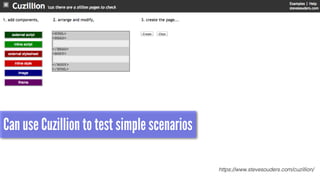
Can use Cuzillion to test simple scenarios 
https://www.stevesouders.com/cuzillion/
Latency is web performance enemy #1! 
Preloader helps hide the latency! 
Can only ‘see’ resources in markup! 
May not load resources in order we intend! 
Getting methods to hint our intent to browsers
https://www.flickr.com/photos/auntiep/5024494612 
! 
@andydavies! 
! 
andy.davies@nccgroup.com ! 
! 
http://slideshare.net/andydavies!
What does the browser pre-loader do?

What does the browser pre-loader do?

  • 1.
    https://www.flickr.com/photos/benjreay/14713228051 What doesthe browser pre-loader do? @andydavies Sept 2014
  • 2.
    The Preloader! A.K.A.! look-ahead or speculative pre-parser
  • 3.
    What if youcould make your pages load 20% faster? https://www.flickr.com/photos/chrisjohnbeckett/10446312055
  • 4.
    preloading is thesingle biggest performance improvement browsers have ever made Steve Souders, April 2013 https://hacks.mozilla.org/2013/03/capturing-improving-performance-of-the-adaptive-web/comment-page-1/#comment-2060698 www.stevesouders.com/blog/2013/04/26/i/
  • 5.
    most destructive “performanceenhancement”! I think there’s ever been Matt Wilcox, creator of Adaptive Images, March 2013 Matt’s point is a bit more nuanced than this, read the full discussion:! https://hacks.mozilla.org/2013/03/capturing-improving-performance-of-the-adaptive-web/comment-page-1/#comment-2060698
  • 6.
    What’s our greatestenemy? https://www.flickr.com/photos/54459164@N00/5218183788
  • 7.
    The browser thatjust won’t die?
  • 8.
    The explosion indevice diversity? http://opensignal.com/reports/2014/android-fragmentation/
  • 9.
    … or maybelatency is our greatest enemy https://www.flickr.com/photos/jjvaca/728072059
  • 10.
    At best networkpackets travel at roughly 2/3 speed of light https://www.flickr.com/photos/98640399@N08/9287370881
  • 11.
    London to NewYork Round Trip Time = 56ms over fibre! https://www.flickr.com/photos/https://www.flickr.com/photos/lwr/6979975029 dpapworth/482125035
  • 12.
    (TCP Segments) TCPand the Lower Bound of Web Performance John Rauser Might take more than one round trip 285kB 214kB 143kB 71kB 1 2 3 4 5 6 7 8 9 10 11 Round Trips Size
  • 13.
    So what’s thisgot to do with the preloader?
  • 14.
    Let’s pretend we’rea browser (with the preloader switched off) https://www.flickr.com/photos/mozillaeu/11171168996
  • 15.
    Two key rulesto remember Constructing CSS Object Model (CSSOM) blocks JavaScript execution! ! JavaScript blocks DOM construction
  • 16.
  • 17.
  • 18.
    example.html <html> <head> <meta name="viewport" content="width=device-width,initial-scale=1.0"> <link href="styles.css" rel="stylesheet"> <link href="more-styles.css" rel="stylesheet"> <script src="script.js"></script> <script src="another-script.js"></script> <title>HTML Example</title> </head> <body> <h1>Title</h1> <p>Some introductory text and picture! <img src="image.jpg"/></p> <p>Some more text and another picture! <img src="image-2.jpg"/></p> </body> </html>
  • 19.
    example.html <html> <head> <meta name="viewport" content="width=device-width,initial-scale=1.0"> <link href="styles.css" rel="stylesheet"> <link href="more-styles.css" rel="stylesheet"> <script src="script.js"></script> <script src="another-script.js"></script> <title>HTML Example</title> </head> <body> <h1>Title</h1> <p>Some introductory text and picture! <img src="image.jpg"/></p> <p>Some more text and another picture! <img src="image-2.jpg"/></p> </body> </html>
  • 20.
    example.html <html> <head> <meta name="viewport" content="width=device-width,initial-scale=1.0"> <link href="styles.css" rel="stylesheet"> GET /styles.css HTTP/1.1 <link href="more-styles.css" rel="stylesheet"> <script src="script.js"></script> <script src="another-script.js"></script> <title>HTML Example</title> </head> <body> <h1>Title</h1> <p>Some introductory text and picture! <img src="image.jpg"/></p> <p>Some more text and another picture! <img src="image-2.jpg"/></p> </body> </html>
  • 21.
    example.html <html> <head> <meta name="viewport" content="width=device-width,initial-scale=1.0"> <link href="styles.css" rel="stylesheet"> <link href="more-styles.css" rel="stylesheet"> <script src="script.js"></script> <script src="another-script.js"></script> <title>HTML Example</title> </head> <body> <h1>Title</h1> <p>Some introductory text and picture! <img src="image.jpg"/></p> <p>Some more text and another picture! <img src="image-2.jpg"/></p> </body> </html>
  • 22.
    example.html <html> <head> <meta name="viewport" content="width=device-width,initial-scale=1.0"> <link href="styles.css" rel="stylesheet"> <link href="more-styles.css" rel="stylesheet"> <script src="script.js"></script> <script src="another-script.js"></script> <title>HTML Example</title> </head> <body> <h1>Title</h1> <p>Some introductory text and picture! <img src="image.jpg"/></p> <p>Some more text and another picture! <img src="image-2.jpg"/></p> </body> </html> GET /more-styles.css HTTP/1.1
  • 23.
    example.html <html> <head> <meta name="viewport" content="width=device-width,initial-scale=1.0"> <link href="styles.css" rel="stylesheet"> <link href="more-styles.css" rel="stylesheet"> <script src="script.js"></script> <script src="another-script.js"></script> <title>HTML Example</title> </head> <body> <h1>Title</h1> <p>Some introductory text and picture! <img src="image.jpg"/></p> <p>Some more text and another picture! <img src="image-2.jpg"/></p> </body> </html>
  • 24.
    example.html <html> <head> <meta name="viewport" content="width=device-width,initial-scale=1.0"> <link href="styles.css" rel="stylesheet"> <link href="more-styles.css" rel="stylesheet"> <script src="script.js"></script> GET /script.js HTTP/1.1 <script src="another-script.js"></script> <title>HTML Example</title> </head> <body> <h1>Title</h1> <p>Some introductory text and picture! <img src="image.jpg"/></p> <p>Some more text and another picture! <img src="image-2.jpg"/></p> </body> </html>
  • 25.
    example.html <html> <head> <meta name="viewport" content="width=device-width,initial-scale=1.0"> <link href="styles.css" rel="stylesheet"> <link href="more-styles.css" rel="stylesheet"> <script src="script.js"></script> <script src="another-script.js"></script> <title>HTML Example</title> </head> <body> <h1>Title</h1> <p>Some introductory text and picture! <img src="image.jpg"/></p> <p>Some more text and another picture! <img src="image-2.jpg"/></p> </body> </html>
  • 26.
    example.html <html> <head> <meta name="viewport" content="width=device-width,initial-scale=1.0"> <link href="styles.css" rel="stylesheet"> <link href="more-styles.css" rel="stylesheet"> <script src="script.js"></script> <script src="another-script.js"></script> <title>HTML Example</title> </head> <body> <h1>Title</h1> <p>Some introductory text and picture! <img src="image.jpg"/></p> <p>Some more text and another picture! <img src="image-2.jpg"/></p> </body> </html> Must wait for:! 1. CSS download and OM construction! 2. JS download and execution
  • 27.
    example.html <html> <head> <meta name="viewport" content="width=device-width,initial-scale=1.0"> <link href="styles.css" rel="stylesheet"> <link href="more-styles.css" rel="stylesheet"> <script src="script.js"></script> <script src="another-script.js"></script> <title>HTML Example</title> </head> <body> <h1>Title</h1> <p>Some introductory text and picture! <img src="image.jpg"/></p> <p>Some more text and another picture! <img src="image-2.jpg"/></p> </body> </html>
  • 28.
    example.html <html> <head> <meta name="viewport" content="width=device-width,initial-scale=1.0"> <link href="styles.css" rel="stylesheet"> <link href="more-styles.css" rel="stylesheet"> <script src="script.js"></script> <script src="another-script.js"></script> <title>HTML Example</title> </head> <body> <h1>Title</h1> <p>Some introductory text and picture! <img src="image.jpg"/></p> <p>Some more text and another picture! <img src="image-2.jpg"/></p> </body> </html> GET /another-script.js HTTP/1.1
  • 29.
    example.html <html> <head> <meta name="viewport" content="width=device-width,initial-scale=1.0"> <link href="styles.css" rel="stylesheet"> <link href="more-styles.css" rel="stylesheet"> <script src="script.js"></script> <script src="another-script.js"></script> <title>HTML Example</title> </head> <body> <h1>Title</h1> <p>Some introductory text and picture! <img src="image.jpg"/></p> <p>Some more text and another picture! <img src="image-2.jpg"/></p> </body> </html>
  • 30.
    example.html <html> <head> <meta name="viewport" content="width=device-width,initial-scale=1.0"> <link href="styles.css" rel="stylesheet"> <link href="more-styles.css" rel="stylesheet"> <script src="script.js"></script> <script src="another-script.js"></script> <title>HTML Example</title> </head> Must wait for:! <body> 1. JS download and execution <h1>Title</h1> <p>Some introductory text and picture! <img src="image.jpg"/></p> <p>Some more text and another picture! <img src="image-2.jpg"/></p> </body> </html>
  • 31.
    example.html <html> <head> <meta name="viewport" content="width=device-width,initial-scale=1.0"> <link href="styles.css" rel="stylesheet"> <link href="more-styles.css" rel="stylesheet"> <script src="script.js"></script> <script src="another-script.js"></script> <title>HTML Example</title> </head> <body> <h1>Title</h1> <p>Some introductory text and picture! <img src="image.jpg"/></p> <p>Some more text and another picture! <img src="image-2.jpg"/></p> </body> </html>
  • 32.
    example.html <html> <head> <meta name="viewport" content="width=device-width,initial-scale=1.0"> <link href="styles.css" rel="stylesheet"> <link href="more-styles.css" rel="stylesheet"> <script src="script.js"></script> <script src="another-script.js"></script> <title>HTML Example</title> </head> <body> <h1>Title</h1> <p>Some introductory text and picture! <img src="image.jpg"/></p> <p>Some more text and another picture! <img src="image-2.jpg"/></p> </body> </html> GET /image.jpg HTTP/1.1
  • 33.
    example.html <html> <head> <meta name="viewport" content="width=device-width,initial-scale=1.0"> <link href="styles.css" rel="stylesheet"> <link href="more-styles.css" rel="stylesheet"> <script src="script.js"></script> <script src="another-script.js"></script> <title>HTML Example</title> </head> <body> <h1>Title</h1> <p>Some introductory text and picture! <img src="image.jpg"/></p> <p>Some more text and another picture! <img src="image-2.jpg"/></p> </body> </html>
  • 34.
    example.html <html> <head> <meta name="viewport" content="width=device-width,initial-scale=1.0"> <link href="styles.css" rel="stylesheet"> <link href="more-styles.css" rel="stylesheet"> <script src="script.js"></script> <script src="another-script.js"></script> <title>HTML Example</title> </head> <body> <h1>Title</h1> <p>Some introductory text and picture! <img src="image.jpg"/></p> <p>Some more text and another picture! <img src="image-2.jpg"/></p> </body> </html> GET /image-2.jpg HTTP/1.1
  • 35.
    What does thewaterfall look like? scripts download in series WebPagetest - IE7, Cable, Korea
  • 36.
    What if wedecouple resource discovery from DOM construction? When DOM construction is blocked ! ! e.g. waiting for script to download and execute! ! Search rest of document for external resources! ! e.g. <link rel=“stylesheet”…>, <script src=…>, <img src=…>! ! Download and cache discovered resources ready for DOM construction
  • 37.
    IE 7 (doesn’thave a preloader) IE 11 (has a preloader) scripts download in series parallel download, execution still in series
  • 38.
    What gets preloaded? link rel=“stylesheet” ✓ ✓ ✓ ✓ ✓ <script src= ✓ ✓ ✓ ✓ ✓ <img> ✓ ✓ ✓ ✓ ✓ @import ✓ ✓ ✓ <video poster> ✓ <picture> <img> ✓ ✓ http://yoavweiss.github.io/preloader-velocity-nyc-talk
  • 39.
    Script inserted resourcesaren’t discoverable <script type="text/javascript"> function() { Browser won’t discover script until outer script inserts it into DOM var js = document.createElement('script'); js.async = true; js.src = 'script.js'; var e = document.getElementsByTagName('script')[0]; e.parentNode.insertBefore(js, first); })(); </script>
  • 40.
    Non-blocking loading usingasync attribute ! <script async src="script.js"></script> Widely supported (82%) and discoverable by preloader
  • 41.
    Limits to whatpreloader can discover HTML CSS DOM CSSOM Render! Tree JavaScript Layout Paint
  • 42.
    Limits to whatpreloader can discover HTML CSS DOM CSSOM Render! Tree Fonts and background images discovered when render tree builds JavaScript Layout Paint
  • 43.
    Possible workarounds? dataURIs(will make CSS larger)! HTTP/2 or SPDY server push! <link rel=“subresource… (Chrome only and effectively broken)
  • 44.
    Download order !=Document order https://www.flickr.com/photos/add1sun/4993432274
  • 45.
    Browsers can prioritisedownload order Based on:! ! Resource type - CSS, JS, image etc.! ! Visibility! ! Element attributes e.g. <script async, defer! ! W3C Resource Priorities
  • 46.
    W3C Resource Priorities- adds lazyload attribute (also look at Ilya Grigorik’s proposal for Resource Hints)
  • 47.
    Prioritisation sometimes hasunexpected consequences Major UK retailer’s site in Chrome
  • 48.
    Prioritisation sometimes hasunexpected consequences These JS resources are at the foot of the body! (perhaps they should merge them into fewer resources but…)
  • 49.
    Prioritisation sometimes hasunexpected consequences Downloading the JS blocks the hero image
  • 50.
    Some edge casesyou might come across
  • 51.
    Watch out forthe parser restarting
  • 52.
    Watch out forthe parser restarting Content-Type: text/html ! charset isn’t specified in HTTP response so IE9 assumes ISO 8859-1 ! As it parses the HTML it then finds ! <meta charset=“utf-8"> ! Similar issues can occur with <base>
  • 53.
    Do odd thingsand you may get odd behaviour! <html> <head> <script> var file = window.innerWidth < 1000 ? "mobile.css" : "desktop.css"; document.write('<link rel="stylesheet" type="text/css" href="css/' + file + '"/>'); </script> </head> <body> <img src="img/gallery-img1.jpg" /> <img src="img/gallery-img2.jpg" /> <img src="img/gallery-img3.jpg" /> <img src="img/gallery-img4.jpg" /> <img src="img/gallery-img5.jpg" /> <img src="img/gallery-img6.jpg" /> </body> </html> This is based on a suggested Stack Overflow answer!
  • 54.
    Do odd thingsand you may get odd behaviour! IE 9 Download of CSS blocked by images
  • 55.
    Can use Cuzillionto test simple scenarios https://www.stevesouders.com/cuzillion/
  • 56.
    Latency is webperformance enemy #1! Preloader helps hide the latency! Can only ‘see’ resources in markup! May not load resources in order we intend! Getting methods to hint our intent to browsers
  • 57.
    https://www.flickr.com/photos/auntiep/5024494612 ! @andydavies! ! andy.davies@nccgroup.com ! ! http://slideshare.net/andydavies!