Intel Array Visualizer
HDF Workshop VIII
October 27, 2004
John Readey
john.readey@intel.com
R

®

Intel Compiler Lab –

Page 1
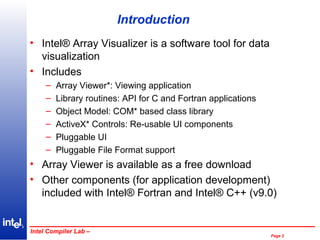
Introduction
• Intel® Array Visualizer is a software tool for data
visualization
• Includes
–
–
–
–
–
–

Array Viewer*: Viewing application
Library routines: API for C and Fortran applications
Object Model: COM* based class library
ActiveX* Controls: Re-usable UI components
Pluggable UI
Pluggable File Format support

• Array Viewer is available as a free download
• Other components (for application development)
included with Intel® Fortran and Intel® C++ (v9.0)
R

®

Intel Compiler Lab –

Page 2
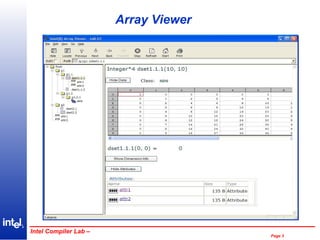
Array Viewer

R

®

Intel Compiler Lab –

Page 3
Array Viewer - Features
• Data visualization program for viewing HDF4,
HDF5, and NetCDF files
– Also supports XML, FITS, WAVE, PLY, BMP, GIF,
JPG, PNG
– Incremental Load/Save (for HDF4, HDF5)

•
•
•
•

Browser-like interface
Internet Explorer plug-in
Macro support, UI templates
Data Grid for displaying Datasets, Attributes

R

®

Intel Compiler Lab –

Page 4
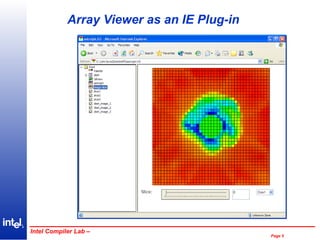
Array Viewer as an IE Plug-in

R

®

Intel Compiler Lab –

Page 5
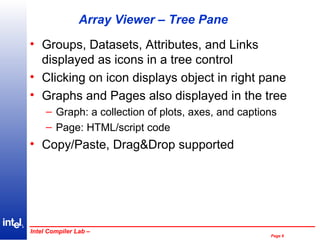
Array Viewer – Tree Pane
• Groups, Datasets, Attributes, and Links
displayed as icons in a tree control
• Clicking on icon displays object in right pane
• Graphs and Pages also displayed in the tree
– Graph: a collection of plots, axes, and captions
– Page: HTML/script code

• Copy/Paste, Drag&Drop supported

R

®

Intel Compiler Lab –

Page 6
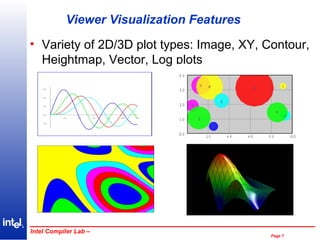
Viewer Visualization Features
• Variety of 2D/3D plot types: Image, XY, Contour,
Heightmap, Vector, Log plots

R

®

Intel Compiler Lab –

Page 7
Viewer Visualization Features - Cont
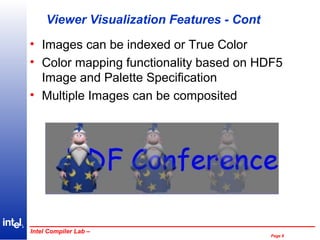
• Images can be indexed or True Color
• Color mapping functionality based on HDF5
Image and Palette Specification
• Multiple Images can be composited

R

®

Intel Compiler Lab –

Page 8
Viewer Visualization Features - Cont
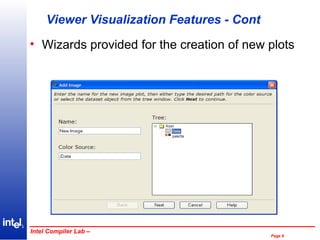
• Wizards provided for the creation of new plots

R

®

Intel Compiler Lab –

Page 9
Viewer Visualization Features - Cont
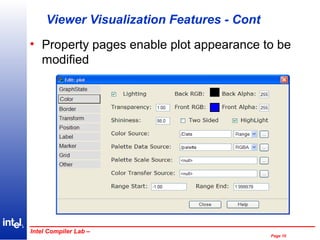
• Property pages enable plot appearance to be
modified

R

®

Intel Compiler Lab –

Page 10
Viewer Visualization Features - Cont
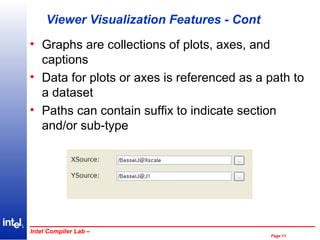
• Graphs are collections of plots, axes, and
captions
• Data for plots or axes is referenced as a path to
a dataset
• Paths can contain suffix to indicate section
and/or sub-type

R

®

Intel Compiler Lab –

Page 11
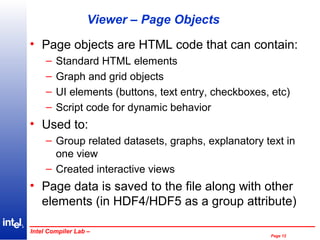
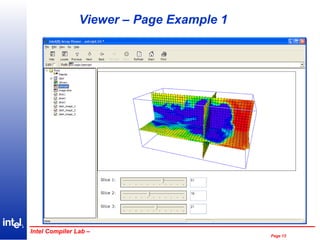
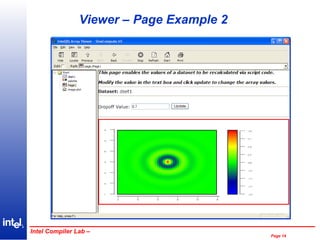
Viewer – Page Objects
• Page objects are HTML code that can contain:
–
–
–
–

Standard HTML elements
Graph and grid objects
UI elements (buttons, text entry, checkboxes, etc)
Script code for dynamic behavior

• Used to:
– Group related datasets, graphs, explanatory text in
one view
– Created interactive views

• Page data is saved to the file along with other
elements (in HDF4/HDF5 as a group attribute)
R

®

Intel Compiler Lab –

Page 12
Viewer – Page Example 1

R

®

Intel Compiler Lab –

Page 13
Viewer – Page Example 2

R

®

Intel Compiler Lab –

Page 14
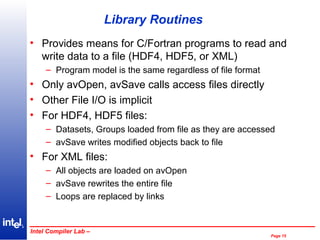
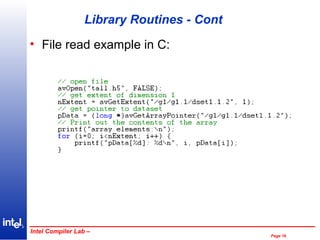
Library Routines
• Provides means for C/Fortran programs to read and
write data to a file (HDF4, HDF5, or XML)
– Program model is the same regardless of file format

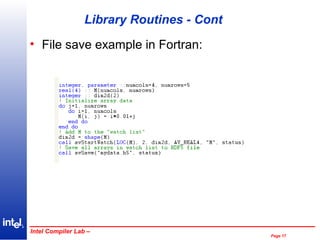
• Only avOpen, avSave calls access files directly
• Other File I/O is implicit
• For HDF4, HDF5 files:
– Datasets, Groups loaded from file as they are accessed
– avSave writes modified objects back to file

• For XML files:
– All objects are loaded on avOpen
– avSave rewrites the entire file
– Loops are replaced by links

R

®

Intel Compiler Lab –

Page 15
Library Routines - Cont
• File read example in C:

R

®

Intel Compiler Lab –

Page 16
Library Routines - Cont
• File save example in Fortran:

R

®

Intel Compiler Lab –

Page 17
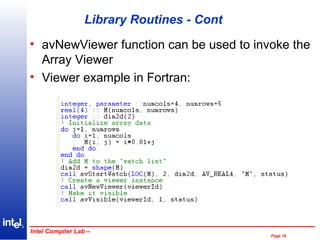
Library Routines - Cont
• avNewViewer function can be used to invoke the
Array Viewer
• Viewer example in Fortran:

R

®

Intel Compiler Lab –

Page 18
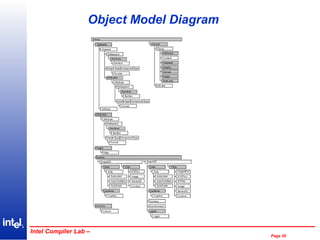
Object Model
• COM based class library
• 40+ classes representing datasets, dataspaces,
types, groups, links, graphs, plots, etc.
• Provides more fine-grained control than
C/Fortran lib (but not direct file access)
• Organized in hierarchy:
– Class properties link to sub-objects
• Example: mydataset.Dataspace

– Collection classes contain an arbitrary number of
objects of a given type
• Example: mygroup.Groups[“mysubgroup”]
R

®

Intel Compiler Lab –

Page 19
Object Model Diagram

R

®

Intel Compiler Lab –

Page 20
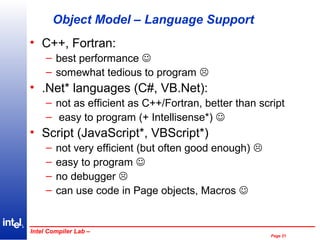
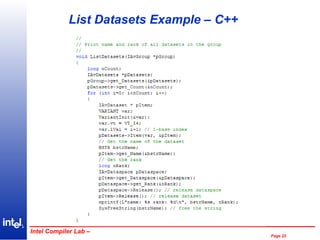
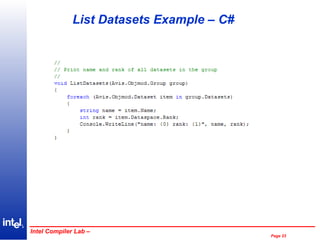
Object Model – Language Support
• C++, Fortran:
– best performance 
– somewhat tedious to program 

• .Net* languages (C#, VB.Net):
– not as efficient as C++/Fortran, better than script
– easy to program (+ Intellisense*) 

• Script (JavaScript*, VBScript*)
–
–
–
–

not very efficient (but often good enough) 
easy to program 
no debugger 
can use code in Page objects, Macros 

R

®

Intel Compiler Lab –

Page 21
List Datasets Example – C++

R

®

Intel Compiler Lab –

Page 22
List Datasets Example – C#

R

®

Intel Compiler Lab –

Page 23
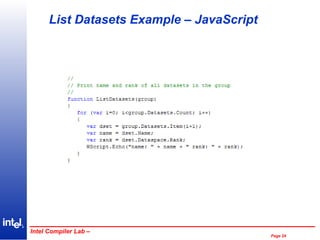
List Datasets Example – JavaScript

R

®

Intel Compiler Lab –

Page 24
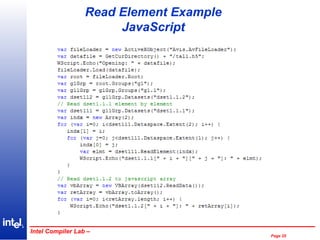
Read Element Example
JavaScript

R

®

Intel Compiler Lab –

Page 25
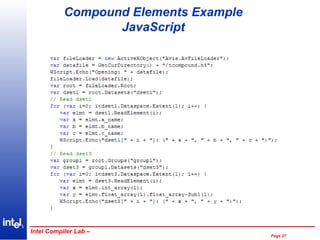
Reading Compound Elements
• For datasets of compound types ReadElement()
returns an object
• Properties of the object are the fields of the type
• Fields that have an extent > 1 become indexed
properties
• Fields that are themselves compound types
become sub-objects of the returned object

R

®

Intel Compiler Lab –

Page 26
Compound Elements Example
JavaScript

R

®

Intel Compiler Lab –

Page 27
ActiveX Controls
• User Interface components that can be used to
create GUI applications
• Controls supported in Visual C++*, Visual
Basic*, Compaq Visual Fortran*
• Graph, Grid, Tree controls supply most of the
functionality in Array Viewer
• Each control has a limited number of properties
– Most state is accessed through object model

• Events signal changes of state

R

®

Intel Compiler Lab –

Page 28
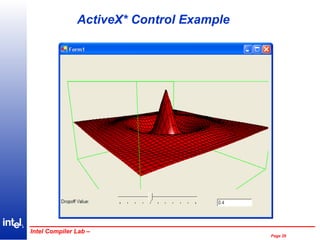
ActiveX* Control Example

R

®

Intel Compiler Lab –

Page 29
File Loaders
• Each file format supported by Array Visualizer is
implemented by a separate file loader
component
• File loaders run in their own address space
• Additional file formats can be supported by
registering a new file loader on the system
• No source changes, re-linking required for
applications
• New file loaders can be created by AV users
Must be written in C++ (VS.Net Wizard
provided)
R

®

Intel Compiler Lab –

Page 30
Getting the Software
• Free Viewer download
– available soon

• Development version
– http://www.intel.com/software/products
– Order or download Intel Fortran for Windows v8.1
– Free evaluation available

• Post questions or comments on Fortran forum
– http://softwareforums.intel.com/ids/board?board.id=5

• Let us know what features you’d like to see in
future versions
R

®

Intel Compiler Lab –

Page 31
Legal Addendum
• * Other names and brands may be claimed as the property of
•

others
Copyright Intel© Corporation 2004

R

®

Intel Compiler Lab –

Page 32

Intel Array Visualizer

  • 1.
    Intel Array Visualizer HDFWorkshop VIII October 27, 2004 John Readey john.readey@intel.com R ® Intel Compiler Lab – Page 1
  • 2.
    Introduction • Intel® ArrayVisualizer is a software tool for data visualization • Includes – – – – – – Array Viewer*: Viewing application Library routines: API for C and Fortran applications Object Model: COM* based class library ActiveX* Controls: Re-usable UI components Pluggable UI Pluggable File Format support • Array Viewer is available as a free download • Other components (for application development) included with Intel® Fortran and Intel® C++ (v9.0) R ® Intel Compiler Lab – Page 2
  • 3.
  • 4.
    Array Viewer -Features • Data visualization program for viewing HDF4, HDF5, and NetCDF files – Also supports XML, FITS, WAVE, PLY, BMP, GIF, JPG, PNG – Incremental Load/Save (for HDF4, HDF5) • • • • Browser-like interface Internet Explorer plug-in Macro support, UI templates Data Grid for displaying Datasets, Attributes R ® Intel Compiler Lab – Page 4
  • 5.
    Array Viewer asan IE Plug-in R ® Intel Compiler Lab – Page 5
  • 6.
    Array Viewer –Tree Pane • Groups, Datasets, Attributes, and Links displayed as icons in a tree control • Clicking on icon displays object in right pane • Graphs and Pages also displayed in the tree – Graph: a collection of plots, axes, and captions – Page: HTML/script code • Copy/Paste, Drag&Drop supported R ® Intel Compiler Lab – Page 6
  • 7.
    Viewer Visualization Features •Variety of 2D/3D plot types: Image, XY, Contour, Heightmap, Vector, Log plots R ® Intel Compiler Lab – Page 7
  • 8.
    Viewer Visualization Features- Cont • Images can be indexed or True Color • Color mapping functionality based on HDF5 Image and Palette Specification • Multiple Images can be composited R ® Intel Compiler Lab – Page 8
  • 9.
    Viewer Visualization Features- Cont • Wizards provided for the creation of new plots R ® Intel Compiler Lab – Page 9
  • 10.
    Viewer Visualization Features- Cont • Property pages enable plot appearance to be modified R ® Intel Compiler Lab – Page 10
  • 11.
    Viewer Visualization Features- Cont • Graphs are collections of plots, axes, and captions • Data for plots or axes is referenced as a path to a dataset • Paths can contain suffix to indicate section and/or sub-type R ® Intel Compiler Lab – Page 11
  • 12.
    Viewer – PageObjects • Page objects are HTML code that can contain: – – – – Standard HTML elements Graph and grid objects UI elements (buttons, text entry, checkboxes, etc) Script code for dynamic behavior • Used to: – Group related datasets, graphs, explanatory text in one view – Created interactive views • Page data is saved to the file along with other elements (in HDF4/HDF5 as a group attribute) R ® Intel Compiler Lab – Page 12
  • 13.
    Viewer – PageExample 1 R ® Intel Compiler Lab – Page 13
  • 14.
    Viewer – PageExample 2 R ® Intel Compiler Lab – Page 14
  • 15.
    Library Routines • Providesmeans for C/Fortran programs to read and write data to a file (HDF4, HDF5, or XML) – Program model is the same regardless of file format • Only avOpen, avSave calls access files directly • Other File I/O is implicit • For HDF4, HDF5 files: – Datasets, Groups loaded from file as they are accessed – avSave writes modified objects back to file • For XML files: – All objects are loaded on avOpen – avSave rewrites the entire file – Loops are replaced by links R ® Intel Compiler Lab – Page 15
  • 16.
    Library Routines -Cont • File read example in C: R ® Intel Compiler Lab – Page 16
  • 17.
    Library Routines -Cont • File save example in Fortran: R ® Intel Compiler Lab – Page 17
  • 18.
    Library Routines -Cont • avNewViewer function can be used to invoke the Array Viewer • Viewer example in Fortran: R ® Intel Compiler Lab – Page 18
  • 19.
    Object Model • COMbased class library • 40+ classes representing datasets, dataspaces, types, groups, links, graphs, plots, etc. • Provides more fine-grained control than C/Fortran lib (but not direct file access) • Organized in hierarchy: – Class properties link to sub-objects • Example: mydataset.Dataspace – Collection classes contain an arbitrary number of objects of a given type • Example: mygroup.Groups[“mysubgroup”] R ® Intel Compiler Lab – Page 19
  • 20.
    Object Model Diagram R ® IntelCompiler Lab – Page 20
  • 21.
    Object Model –Language Support • C++, Fortran: – best performance  – somewhat tedious to program  • .Net* languages (C#, VB.Net): – not as efficient as C++/Fortran, better than script – easy to program (+ Intellisense*)  • Script (JavaScript*, VBScript*) – – – – not very efficient (but often good enough)  easy to program  no debugger  can use code in Page objects, Macros  R ® Intel Compiler Lab – Page 21
  • 22.
    List Datasets Example– C++ R ® Intel Compiler Lab – Page 22
  • 23.
    List Datasets Example– C# R ® Intel Compiler Lab – Page 23
  • 24.
    List Datasets Example– JavaScript R ® Intel Compiler Lab – Page 24
  • 25.
  • 26.
    Reading Compound Elements •For datasets of compound types ReadElement() returns an object • Properties of the object are the fields of the type • Fields that have an extent > 1 become indexed properties • Fields that are themselves compound types become sub-objects of the returned object R ® Intel Compiler Lab – Page 26
  • 27.
  • 28.
    ActiveX Controls • UserInterface components that can be used to create GUI applications • Controls supported in Visual C++*, Visual Basic*, Compaq Visual Fortran* • Graph, Grid, Tree controls supply most of the functionality in Array Viewer • Each control has a limited number of properties – Most state is accessed through object model • Events signal changes of state R ® Intel Compiler Lab – Page 28
  • 29.
    ActiveX* Control Example R ® IntelCompiler Lab – Page 29
  • 30.
    File Loaders • Eachfile format supported by Array Visualizer is implemented by a separate file loader component • File loaders run in their own address space • Additional file formats can be supported by registering a new file loader on the system • No source changes, re-linking required for applications • New file loaders can be created by AV users Must be written in C++ (VS.Net Wizard provided) R ® Intel Compiler Lab – Page 30
  • 31.
    Getting the Software •Free Viewer download – available soon • Development version – http://www.intel.com/software/products – Order or download Intel Fortran for Windows v8.1 – Free evaluation available • Post questions or comments on Fortran forum – http://softwareforums.intel.com/ids/board?board.id=5 • Let us know what features you’d like to see in future versions R ® Intel Compiler Lab – Page 31
  • 32.
    Legal Addendum • *Other names and brands may be claimed as the property of • others Copyright Intel© Corporation 2004 R ® Intel Compiler Lab – Page 32