Somewhere between schema
and schemaless
SHANE K JOHNSON
MARIADB CORPORATION
About me
I’m not a morning person,
but I like breakfast.
About me
I’m not a NoSQL person,
but I like JSON.
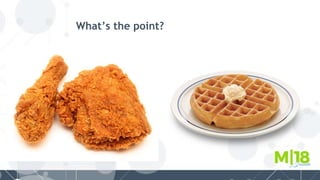
What’s the point?
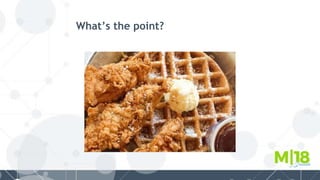
What’s the point?
What’s the point?
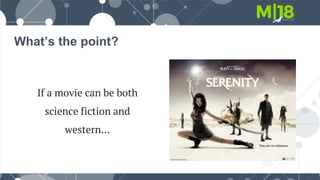
If a movie can be both
science fiction and
western…
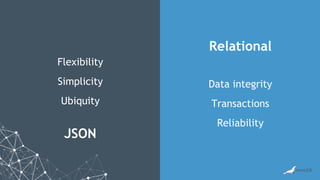
A data model can be comprised of
structured and semi-structured data.
JSON
Relational
Flexibility
Simplicity
Ubiquity
Data integrity
Transactions
Reliability
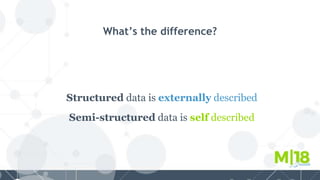
What’s the difference?
Structured data is externally described
Semi-structured data is self described
Structured and semi-structured data
with relational + JSON
Structured Semi-structured
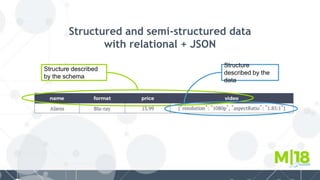
Structured and semi-structured data
with relational + JSON
Structure described
by the schema
Structure
described by the
data
Creating and querying
JSON documents
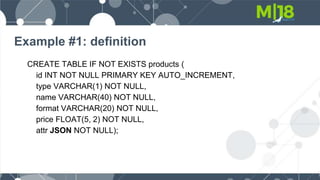
Example #1: definition
CREATE TABLE IF NOT EXISTS products (
id INT NOT NULL PRIMARY KEY AUTO_INCREMENT,
type VARCHAR(1) NOT NULL,
name VARCHAR(40) NOT NULL,
format VARCHAR(20) NOT NULL,
price FLOAT(5, 2) NOT NULL,
attr JSON NOT NULL);
Example #2: create
INSERT INTO products (type, name, format, price, attr) VALUES
('M', 'Aliens', 'Blu-ray', 13.99,'{"video": {"resolution": "1080p", "aspectRatio": "1.85:1"}, "cuts":
[{"name": "Theatrical", "runtime": 138}, {"name": "Special Edition", "runtime": 155}], "audio":
["DTS HD", "Dolby Surround"]}');
INSERT INTO products (type, name, format, price, attr) VALUES
('B', 'Foundation', 'Paperback', 7.99, '{"author": "Isaac Asimov", "page_count": 296}');
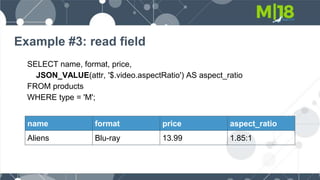
Example #3: read field
SELECT name, format, price,
JSON_VALUE(attr, '$.video.aspectRatio') AS aspect_ratio
FROM products
WHERE type = 'M';
name format price aspect_ratio
Aliens Blu-ray 13.99 1.85:1
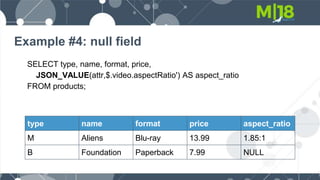
Example #4: null field
SELECT type, name, format, price,
JSON_VALUE(attr,$.video.aspectRatio') AS aspect_ratio
FROM products;
type name format price aspect_ratio
M Aliens Blu-ray 13.99 1.85:1
B Foundation Paperback 7.99 NULL
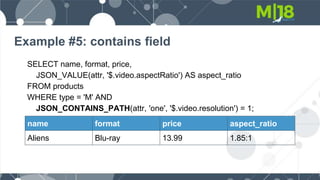
Example #5: contains field
SELECT name, format, price,
JSON_VALUE(attr, '$.video.aspectRatio') AS aspect_ratio
FROM products
WHERE type = 'M' AND
JSON_CONTAINS_PATH(attr, 'one', '$.video.resolution') = 1;
name format price aspect_ratio
Aliens Blu-ray 13.99 1.85:1
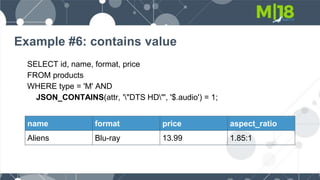
Example #6: contains value
SELECT id, name, format, price
FROM products
WHERE type = 'M' AND
JSON_CONTAINS(attr, '"DTS HD"', '$.audio') = 1;
name format price aspect_ratio
Aliens Blu-ray 13.99 1.85:1
Example #7: read array
SELECT name, format, price,
JSON_QUERY(attr, '$.audio') AS audio
FROM products
WHERE type = 'M';
name format price audio
Aliens Blu-ray 13.99 [
"DTS HD",
"Dolby Surround"
]
Example #8: read array element
SELECT name, format, price,
JSON_VALUE(attr, '$.audio[0]') AS default_audio
FROM products
WHERE type = 'M';
name format price audio
Aliens Blu-ray 13.99 DTS HD
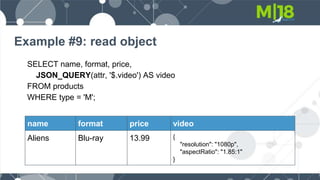
Example #9: read object
SELECT name, format, price,
JSON_QUERY(attr, '$.video') AS video
FROM products
WHERE type = 'M';
name format price video
Aliens Blu-ray 13.99 {
"resolution": "1080p",
"aspectRatio": "1.85:1"
}
Example #10: read objects
SELECT name,
JSON_QUERY(attr, '$.audio') AS audio,
JSON_QUERY(attr, '$.video') AS video
FROM products
WHERE type = 'M';
name audio video
Aliens [
"DTS HD",
"Dolby Surround"
]
{
"resolution": "1080p",
"aspectRatio": "1.85:1"
}
Example #11: field equals
SELECT id, name, format, price
FROM products
WHERE type = 'M' AND
JSON_VALUE(attr, '$.video.resolution') = '1080p';
name format price aspect_ratio
Aliens Blu-ray 13.99 1.85:1
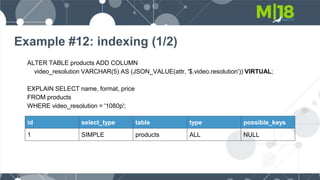
Example #12: indexing (1/2)
ALTER TABLE products ADD COLUMN
video_resolution VARCHAR(5) AS (JSON_VALUE(attr, '$.video.resolution')) VIRTUAL;
EXPLAIN SELECT name, format, price
FROM products
WHERE video_resolution = '1080p';
id select_type table type possible_keys
1 SIMPLE products ALL NULL
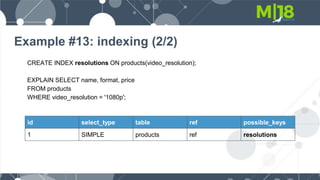
Example #13: indexing (2/2)
CREATE INDEX resolutions ON products(video_resolution);
EXPLAIN SELECT name, format, price
FROM products
WHERE video_resolution = '1080p';
id select_type table ref possible_keys
1 SIMPLE products ref resolutions
Modifying JSON documents
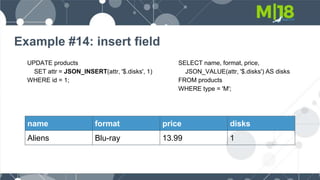
Example #14: insert field
UPDATE products
SET attr = JSON_INSERT(attr, '$.disks', 1)
WHERE id = 1;
name format price disks
Aliens Blu-ray 13.99 1
SELECT name, format, price,
JSON_VALUE(attr, '$.disks') AS disks
FROM products
WHERE type = 'M';
Example #15: insert array
UPDATE products
SET attr =JSON_INSERT(attr, '$.languages',
JSON_ARRAY('English', 'French'))
WHERE id = 1;
SELECT name, format, price,
JSON_QUERY(attr, '$.languages')
AS languages
FROM products
WHERE type = 'M';
name format price languages
Aliens Blu-ray 13.99 [
"English",
"French"
]
Example #16: add array element
UPDATE products
SET attr = JSON_ARRAY_APPEND(attr,
'$.languages', 'Spanish')
WHERE id = 1;
SELECT name, format, price,
JSON_QUERY(attr, '$.languages')
AS languages
FROM products
WHERE type = 'M';
name format price languages
Aliens Blu-ray 13.99 [
"English",
"French",
"Spanish"
]
Example #17: remove array element
UPDATE products
SET attr = JSON_REMOVE(attr,
'$.languages[0]')
WHERE id = 1;
SELECT name, format, price,
JSON_QUERY(attr, '$.languages')
AS languages
FROM products
WHERE type = 'M';
name format price languages
Aliens Blu-ray 13.99 [
"French",
"Spanish"
]
Creating JSON documents
from relational data
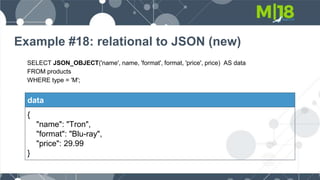
Example #18: relational to JSON (new)
SELECT JSON_OBJECT('name', name, 'format', format, 'price', price) AS data
FROM products
WHERE type = 'M';
data
{
"name": "Tron",
"format": "Blu-ray",
"price": 29.99
}
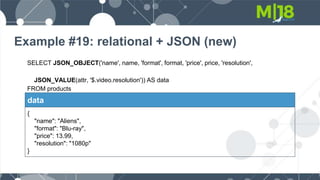
Example #19: relational + JSON (new)
SELECT JSON_OBJECT('name', name, 'format', format, 'price', price, 'resolution',
JSON_VALUE(attr, '$.video.resolution')) AS data
FROM products
WHERE type = 'M';
data
{
"name": "Aliens",
"format": "Blu-ray",
"price": 13.99,
"resolution": "1080p"
}
Example #20: relational + JSON (merge)
SELECT JSON_MERGE(
JSON_OBJECT(
'name', name,
'format', format),
attr) AS data
FROM products
WHERE type = 'M';
data
{
"name": "Tron",
"format": "Blu-ray",
"video": {
"resolution": "1080p",
"aspectRatio": "1.85:1"},
"cuts": [
{"name": "Theatrical", "runtime": 138},
{"name": "Special Edition", "runtime": 155}],
"audio": [
"DTS HD",
"Dolby Surround"]}
Enforcing data integrity with
JSON documents
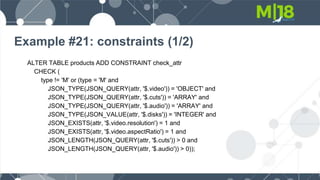
Example #21: constraints (1/2)
ALTER TABLE products ADD CONSTRAINT check_attr
CHECK (
type != 'M' or (type = 'M' and
JSON_TYPE(JSON_QUERY(attr, '$.video')) = 'OBJECT' and
JSON_TYPE(JSON_QUERY(attr, '$.cuts')) = 'ARRAY' and
JSON_TYPE(JSON_QUERY(attr, '$.audio')) = 'ARRAY' and
JSON_TYPE(JSON_VALUE(attr, '$.disks')) = 'INTEGER' and
JSON_EXISTS(attr, '$.video.resolution') = 1 and
JSON_EXISTS(attr, '$.video.aspectRatio') = 1 and
JSON_LENGTH(JSON_QUERY(attr, '$.cuts')) > 0 and
JSON_LENGTH(JSON_QUERY(attr, '$.audio')) > 0));
Example #21: constraints (1/2)
INSERT INTO products (type, name, format, price, attr) VALUES
('M', 'Tron', 'Blu-ray', 29.99, '{"video": {"aspectRatio": "2.21:1"}, "cuts": [{"name": "Theatrical",
"runtime": 96}], "audio": ["DTS HD", "Dolby Digital"], "disks": 1}');
ERROR 4025 (23000): CONSTRAINT `check_attr` failed for `test`.`products`
no resolution field!
Example #22: constraints (2/2)
INSERT INTO products (type, name, format, price, attr) VALUES
('M', 'Tron', 'Blu-ray', 29.99, '{"video": {"resolution": "1080p", "aspectRatio": "2.21:1"}, "cuts":
[{"name": "Theatrical", "runtime": 96}], "audio": ["DTS HD", "Dolby Digital"], "disks": "one"}');
ERROR 4038 (HY000): Syntax error in JSON text in argument 1 to function 'json_type' at
position 1
"one" is not a number!
One more thing…
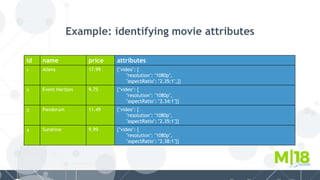
Example: identifying movie attributes
id name price attributes
1 Aliens 17.99 {"video": {
"resolution": "1080p",
"aspectRatio": "2.35:1",}}
2 Event Horizon 9.75 {"video": {
"resolution": "1080p",
"aspectRatio": "2.34:1"}}
3 Pandorum 11.49 {"video": {
"resolution": "1080p",
"aspectRatio": "2.35:1"}}
4 Sunshine 9.99 {"video": {
"resolution": "1080p",
"aspectRatio": "2.38:1"}}
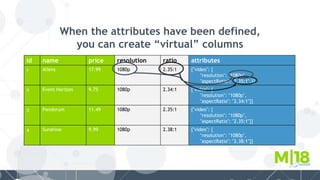
When the attributes have been defined,
you can create “virtual” columns
id name price resolution ratio attributes
1 Aliens 17.99 1080p 2.35:1 {"video": {
"resolution": "1080p",
"aspectRatio": "2.35:1",}}
2 Event Horizon 9.75 1080p 2.34:1 {"video": {
"resolution": "1080p",
"aspectRatio": "2.34:1"}}
3 Pandorum 11.49 1080p 2.35:1 {"video": {
"resolution": "1080p",
"aspectRatio": "2.35:1"}}
4 Sunshine 9.99 1080p 2.38:1 {"video": {
"resolution": "1080p",
"aspectRatio": "2.38:1"}}
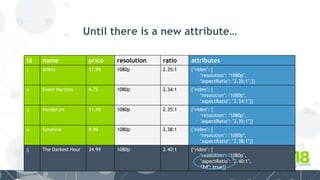
Until there is a new attribute…
id name price resolution ratio attributes
1 Aliens 17.99 1080p 2.35:1 {"video": {
"resolution": "1080p",
"aspectRatio": "2.35:1",}}
2 Event Horizon 9.75 1080p 2.34:1 {"video": {
"resolution": "1080p",
"aspectRatio": "2.34:1"}}
3 Pandorum 11.49 1080p 2.35:1 {"video": {
"resolution": "1080p",
"aspectRatio": "2.35:1"}}
4 Sunshine 9.99 1080p 2.38:1 {"video": {
"resolution": "1080p",
"aspectRatio": "2.38:1"}}
5 The Darkest Hour 34.99 1080p 2.40:1 {"video": {
"resolution": "1080p",
"aspectRatio": "2.40:1",
"3d": true}}
But, you can create “virtual” columns
using functions
id name price resolution ratio 3d attributes
4 Sunshine 9.99 1080p 2.38:1 false {"video": {
"resolution": "1080p",
"aspectRatio": "2.38:1"}}
5 The Darkest Hour 34.99 1080p 2.40:1 true {"video": {
"resolution": "1080p",
"aspectRatio": "2.40:1",
"3d": true}}
IFNULL(JSON_VALUE(attr, '$.video.3d'), false)
Questions?
Check out the JSON microsite:
mariadb.com/database/topics/json
Check out the JSON white paper:
goo.gl/sw34cx
Try it out!
What’s next?
Thank you!

Somewhere between schema and schemaless

  • 1.
    Somewhere between schema andschemaless SHANE K JOHNSON MARIADB CORPORATION
  • 2.
    About me I’m nota morning person, but I like breakfast.
  • 3.
    About me I’m nota NoSQL person, but I like JSON.
  • 4.
  • 5.
  • 6.
    What’s the point? Ifa movie can be both science fiction and western…
  • 7.
    A data modelcan be comprised of structured and semi-structured data.
  • 8.
  • 9.
    What’s the difference? Structureddata is externally described Semi-structured data is self described
  • 10.
    Structured and semi-structureddata with relational + JSON Structured Semi-structured
  • 11.
    Structured and semi-structureddata with relational + JSON Structure described by the schema Structure described by the data
  • 12.
  • 13.
    Example #1: definition CREATETABLE IF NOT EXISTS products ( id INT NOT NULL PRIMARY KEY AUTO_INCREMENT, type VARCHAR(1) NOT NULL, name VARCHAR(40) NOT NULL, format VARCHAR(20) NOT NULL, price FLOAT(5, 2) NOT NULL, attr JSON NOT NULL);
  • 14.
    Example #2: create INSERTINTO products (type, name, format, price, attr) VALUES ('M', 'Aliens', 'Blu-ray', 13.99,'{"video": {"resolution": "1080p", "aspectRatio": "1.85:1"}, "cuts": [{"name": "Theatrical", "runtime": 138}, {"name": "Special Edition", "runtime": 155}], "audio": ["DTS HD", "Dolby Surround"]}'); INSERT INTO products (type, name, format, price, attr) VALUES ('B', 'Foundation', 'Paperback', 7.99, '{"author": "Isaac Asimov", "page_count": 296}');
  • 15.
    Example #3: readfield SELECT name, format, price, JSON_VALUE(attr, '$.video.aspectRatio') AS aspect_ratio FROM products WHERE type = 'M'; name format price aspect_ratio Aliens Blu-ray 13.99 1.85:1
  • 16.
    Example #4: nullfield SELECT type, name, format, price, JSON_VALUE(attr,$.video.aspectRatio') AS aspect_ratio FROM products; type name format price aspect_ratio M Aliens Blu-ray 13.99 1.85:1 B Foundation Paperback 7.99 NULL
  • 17.
    Example #5: containsfield SELECT name, format, price, JSON_VALUE(attr, '$.video.aspectRatio') AS aspect_ratio FROM products WHERE type = 'M' AND JSON_CONTAINS_PATH(attr, 'one', '$.video.resolution') = 1; name format price aspect_ratio Aliens Blu-ray 13.99 1.85:1
  • 18.
    Example #6: containsvalue SELECT id, name, format, price FROM products WHERE type = 'M' AND JSON_CONTAINS(attr, '"DTS HD"', '$.audio') = 1; name format price aspect_ratio Aliens Blu-ray 13.99 1.85:1
  • 19.
    Example #7: readarray SELECT name, format, price, JSON_QUERY(attr, '$.audio') AS audio FROM products WHERE type = 'M'; name format price audio Aliens Blu-ray 13.99 [ "DTS HD", "Dolby Surround" ]
  • 20.
    Example #8: readarray element SELECT name, format, price, JSON_VALUE(attr, '$.audio[0]') AS default_audio FROM products WHERE type = 'M'; name format price audio Aliens Blu-ray 13.99 DTS HD
  • 21.
    Example #9: readobject SELECT name, format, price, JSON_QUERY(attr, '$.video') AS video FROM products WHERE type = 'M'; name format price video Aliens Blu-ray 13.99 { "resolution": "1080p", "aspectRatio": "1.85:1" }
  • 22.
    Example #10: readobjects SELECT name, JSON_QUERY(attr, '$.audio') AS audio, JSON_QUERY(attr, '$.video') AS video FROM products WHERE type = 'M'; name audio video Aliens [ "DTS HD", "Dolby Surround" ] { "resolution": "1080p", "aspectRatio": "1.85:1" }
  • 23.
    Example #11: fieldequals SELECT id, name, format, price FROM products WHERE type = 'M' AND JSON_VALUE(attr, '$.video.resolution') = '1080p'; name format price aspect_ratio Aliens Blu-ray 13.99 1.85:1
  • 24.
    Example #12: indexing(1/2) ALTER TABLE products ADD COLUMN video_resolution VARCHAR(5) AS (JSON_VALUE(attr, '$.video.resolution')) VIRTUAL; EXPLAIN SELECT name, format, price FROM products WHERE video_resolution = '1080p'; id select_type table type possible_keys 1 SIMPLE products ALL NULL
  • 25.
    Example #13: indexing(2/2) CREATE INDEX resolutions ON products(video_resolution); EXPLAIN SELECT name, format, price FROM products WHERE video_resolution = '1080p'; id select_type table ref possible_keys 1 SIMPLE products ref resolutions
  • 26.
  • 27.
    Example #14: insertfield UPDATE products SET attr = JSON_INSERT(attr, '$.disks', 1) WHERE id = 1; name format price disks Aliens Blu-ray 13.99 1 SELECT name, format, price, JSON_VALUE(attr, '$.disks') AS disks FROM products WHERE type = 'M';
  • 28.
    Example #15: insertarray UPDATE products SET attr =JSON_INSERT(attr, '$.languages', JSON_ARRAY('English', 'French')) WHERE id = 1; SELECT name, format, price, JSON_QUERY(attr, '$.languages') AS languages FROM products WHERE type = 'M'; name format price languages Aliens Blu-ray 13.99 [ "English", "French" ]
  • 29.
    Example #16: addarray element UPDATE products SET attr = JSON_ARRAY_APPEND(attr, '$.languages', 'Spanish') WHERE id = 1; SELECT name, format, price, JSON_QUERY(attr, '$.languages') AS languages FROM products WHERE type = 'M'; name format price languages Aliens Blu-ray 13.99 [ "English", "French", "Spanish" ]
  • 30.
    Example #17: removearray element UPDATE products SET attr = JSON_REMOVE(attr, '$.languages[0]') WHERE id = 1; SELECT name, format, price, JSON_QUERY(attr, '$.languages') AS languages FROM products WHERE type = 'M'; name format price languages Aliens Blu-ray 13.99 [ "French", "Spanish" ]
  • 31.
  • 32.
    Example #18: relationalto JSON (new) SELECT JSON_OBJECT('name', name, 'format', format, 'price', price) AS data FROM products WHERE type = 'M'; data { "name": "Tron", "format": "Blu-ray", "price": 29.99 }
  • 33.
    Example #19: relational+ JSON (new) SELECT JSON_OBJECT('name', name, 'format', format, 'price', price, 'resolution', JSON_VALUE(attr, '$.video.resolution')) AS data FROM products WHERE type = 'M'; data { "name": "Aliens", "format": "Blu-ray", "price": 13.99, "resolution": "1080p" }
  • 34.
    Example #20: relational+ JSON (merge) SELECT JSON_MERGE( JSON_OBJECT( 'name', name, 'format', format), attr) AS data FROM products WHERE type = 'M'; data { "name": "Tron", "format": "Blu-ray", "video": { "resolution": "1080p", "aspectRatio": "1.85:1"}, "cuts": [ {"name": "Theatrical", "runtime": 138}, {"name": "Special Edition", "runtime": 155}], "audio": [ "DTS HD", "Dolby Surround"]}
  • 35.
    Enforcing data integritywith JSON documents
  • 36.
    Example #21: constraints(1/2) ALTER TABLE products ADD CONSTRAINT check_attr CHECK ( type != 'M' or (type = 'M' and JSON_TYPE(JSON_QUERY(attr, '$.video')) = 'OBJECT' and JSON_TYPE(JSON_QUERY(attr, '$.cuts')) = 'ARRAY' and JSON_TYPE(JSON_QUERY(attr, '$.audio')) = 'ARRAY' and JSON_TYPE(JSON_VALUE(attr, '$.disks')) = 'INTEGER' and JSON_EXISTS(attr, '$.video.resolution') = 1 and JSON_EXISTS(attr, '$.video.aspectRatio') = 1 and JSON_LENGTH(JSON_QUERY(attr, '$.cuts')) > 0 and JSON_LENGTH(JSON_QUERY(attr, '$.audio')) > 0));
  • 37.
    Example #21: constraints(1/2) INSERT INTO products (type, name, format, price, attr) VALUES ('M', 'Tron', 'Blu-ray', 29.99, '{"video": {"aspectRatio": "2.21:1"}, "cuts": [{"name": "Theatrical", "runtime": 96}], "audio": ["DTS HD", "Dolby Digital"], "disks": 1}'); ERROR 4025 (23000): CONSTRAINT `check_attr` failed for `test`.`products` no resolution field!
  • 38.
    Example #22: constraints(2/2) INSERT INTO products (type, name, format, price, attr) VALUES ('M', 'Tron', 'Blu-ray', 29.99, '{"video": {"resolution": "1080p", "aspectRatio": "2.21:1"}, "cuts": [{"name": "Theatrical", "runtime": 96}], "audio": ["DTS HD", "Dolby Digital"], "disks": "one"}'); ERROR 4038 (HY000): Syntax error in JSON text in argument 1 to function 'json_type' at position 1 "one" is not a number!
  • 39.
  • 40.
    Example: identifying movieattributes id name price attributes 1 Aliens 17.99 {"video": { "resolution": "1080p", "aspectRatio": "2.35:1",}} 2 Event Horizon 9.75 {"video": { "resolution": "1080p", "aspectRatio": "2.34:1"}} 3 Pandorum 11.49 {"video": { "resolution": "1080p", "aspectRatio": "2.35:1"}} 4 Sunshine 9.99 {"video": { "resolution": "1080p", "aspectRatio": "2.38:1"}}
  • 41.
    When the attributeshave been defined, you can create “virtual” columns id name price resolution ratio attributes 1 Aliens 17.99 1080p 2.35:1 {"video": { "resolution": "1080p", "aspectRatio": "2.35:1",}} 2 Event Horizon 9.75 1080p 2.34:1 {"video": { "resolution": "1080p", "aspectRatio": "2.34:1"}} 3 Pandorum 11.49 1080p 2.35:1 {"video": { "resolution": "1080p", "aspectRatio": "2.35:1"}} 4 Sunshine 9.99 1080p 2.38:1 {"video": { "resolution": "1080p", "aspectRatio": "2.38:1"}}
  • 42.
    Until there isa new attribute… id name price resolution ratio attributes 1 Aliens 17.99 1080p 2.35:1 {"video": { "resolution": "1080p", "aspectRatio": "2.35:1",}} 2 Event Horizon 9.75 1080p 2.34:1 {"video": { "resolution": "1080p", "aspectRatio": "2.34:1"}} 3 Pandorum 11.49 1080p 2.35:1 {"video": { "resolution": "1080p", "aspectRatio": "2.35:1"}} 4 Sunshine 9.99 1080p 2.38:1 {"video": { "resolution": "1080p", "aspectRatio": "2.38:1"}} 5 The Darkest Hour 34.99 1080p 2.40:1 {"video": { "resolution": "1080p", "aspectRatio": "2.40:1", "3d": true}}
  • 43.
    But, you cancreate “virtual” columns using functions id name price resolution ratio 3d attributes 4 Sunshine 9.99 1080p 2.38:1 false {"video": { "resolution": "1080p", "aspectRatio": "2.38:1"}} 5 The Darkest Hour 34.99 1080p 2.40:1 true {"video": { "resolution": "1080p", "aspectRatio": "2.40:1", "3d": true}} IFNULL(JSON_VALUE(attr, '$.video.3d'), false)
  • 44.
  • 45.
    Check out theJSON microsite: mariadb.com/database/topics/json Check out the JSON white paper: goo.gl/sw34cx Try it out! What’s next?
  • 46.