{ JSON }
in MySQL and MariaDB
Databases
Federico Razzoli
€ whoami
● Federico Razzoli
● Freelance consultant
● Working with databases since 2000
hello@federico-razzoli.com
federico-razzoli.com
● I worked as a consultant for Percona and Ibuildings
(mainly MySQL and MariaDB)
● I worked as a DBA for fast-growing companies like
Catawiki, HumanState, TransferWise
JSON Support
JSON Support
● MySQL 7.0 has a JSON type and JSON functions
● MariaDB 10.2 has JSON alias (LONGTEXT) and JSON functions
○ From MariaDB 10.4 JSON columns must contain valid JSON data
JSON Type Benefits
● Persons from both MySQL and MariaDB state that their approach is faster
○ Surprise, surprise!
● MySQL format is smaller
● When updating a property, MySQL does not rewrite the whole JSON
document
● MySQL binary log only contains the modified properties
○ binlog_row_value_options = 'PARTIAL_JSON'
● However, in MySQL 8, make sure that:
○ Default_tmp_storage_engine = 'TEMPTABLE'
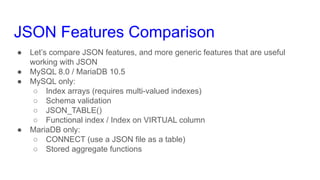
JSON Features Comparison
● Let’s compare JSON features, and more generic features that are useful
working with JSON
● MySQL 8.0 / MariaDB 10.5
● MySQL only:
○ Index arrays (requires multi-valued indexes)
○ Schema validation
○ JSON_TABLE()
○ Functional index / Index on VIRTUAL column
● MariaDB only:
○ CONNECT (use a JSON file as a table)
○ Stored aggregate functions
Use Cases
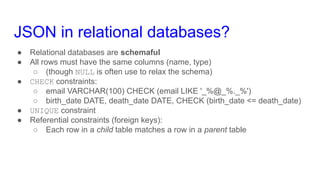
JSON in relational databases?
● Relational databases are schemaful
● All rows must have the same columns (name, type)
○ (though NULL is often use to relax the schema)
● CHECK constraints:
○ email VARCHAR(100) CHECK (email LIKE '_%@_%._%')
○ birth_date DATE, death_date DATE, CHECK (birth_date <= death_date)
● UNIQUE constraint
● Referential constraints (foreign keys):
○ Each row in a child table matches a row in a parent table
JSON in relational databases?
● JSON is usually schemaless
● Two different objects can have different structures:
{
"product-type": "shirt",
"cost": 10.0,
"size": "M"
}
{
"product-type": "phone",
"cost": 69.99,
"size": [6.37, 2.9, 0.3],
"os": "Android"
}
JSON in relational databases?
● How would you store heterogeneous products in a relational database?
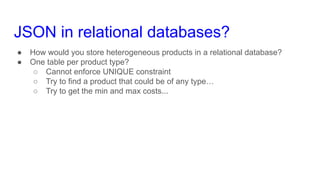
JSON in relational databases?
● How would you store heterogeneous products in a relational database?
● One table per product type?
○ Cannot enforce UNIQUE constraint
○ Try to find a product that could be of any type…
○ Try to get the min and max costs...
JSON in relational databases?
● How would you store heterogeneous products in a relational database?
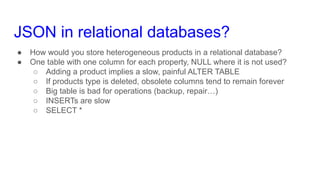
● One table with one column for each property, NULL where it is not used?
○ Adding a product implies a slow, painful ALTER TABLE
○ If products type is deleted, obsolete columns tend to remain forever
○ Big table is bad for operations (backup, repair…)
○ INSERTs are slow
○ SELECT *
JSON in relational databases?
● How would you store heterogeneous products in a relational database?
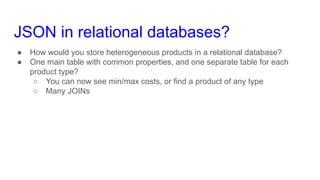
● One main table with common properties, and one separate table for each
product type?
○ You can now see min/max costs, or find a product of any type
○ Many JOINs
JSON in relational databases?
● How would you store heterogeneous products in a relational database?
● Entity-Attribute-Value pattern (EAV)?
○ Store all data as texts
○ Crazy amount of JOINs
JSON in relational databases?
● How would you store heterogeneous products in a relational database?
● Single table, where all non-common property are stored as JSON
○ Still not perfect
○ But it’s good enough
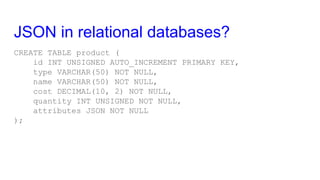
JSON in relational databases?
CREATE TABLE product (
id INT UNSIGNED AUTO_INCREMENT PRIMARY KEY,
type VARCHAR(50) NOT NULL,
name VARCHAR(50) NOT NULL,
cost DECIMAL(10, 2) NOT NULL,
quantity INT UNSIGNED NOT NULL,
attributes JSON NOT NULL
);
Indexing Properties
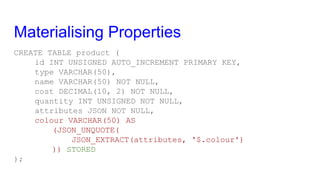
Materialising Properties
CREATE TABLE product (
id INT UNSIGNED AUTO_INCREMENT PRIMARY KEY,
type VARCHAR(50),
name VARCHAR(50) NOT NULL,
cost DECIMAL(10, 2) NOT NULL,
quantity INT UNSIGNED NOT NULL,
attributes JSON NOT NULL,
colour VARCHAR(50) AS
(JSON_UNQUOTE(
JSON_EXTRACT(attributes, '$.colour')
)) STORED
);
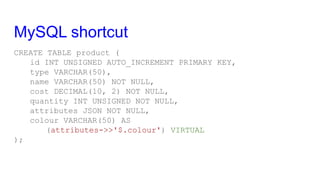
MySQL shortcut
CREATE TABLE product (
id INT UNSIGNED AUTO_INCREMENT PRIMARY KEY,
type VARCHAR(50),
name VARCHAR(50) NOT NULL,
cost DECIMAL(10, 2) NOT NULL,
quantity INT UNSIGNED NOT NULL,
attributes JSON NOT NULL,
colour VARCHAR(50) AS
(attributes->>'$.colour') VIRTUAL
);
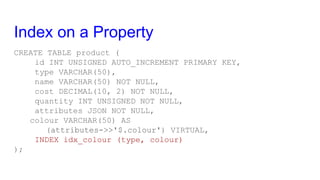
Index on a Property
CREATE TABLE product (
id INT UNSIGNED AUTO_INCREMENT PRIMARY KEY,
type VARCHAR(50),
name VARCHAR(50) NOT NULL,
cost DECIMAL(10, 2) NOT NULL,
quantity INT UNSIGNED NOT NULL,
attributes JSON NOT NULL,
colour VARCHAR(50) AS
(attributes->>'$.colour') VIRTUAL,
INDEX idx_colour (type, colour)
);
Index on a Property
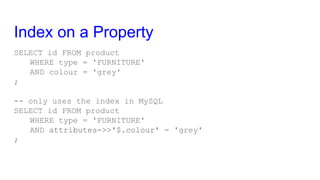
SELECT id FROM product
WHERE type = 'FURNITURE'
AND colour = 'grey'
;
-- only uses the index in MySQL
SELECT id FROM product
WHERE type = 'FURNITURE'
AND attributes->>'$.colour' = 'grey'
;
Indexing Properties
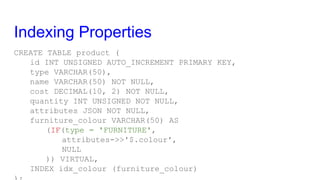
CREATE TABLE product (
id INT UNSIGNED AUTO_INCREMENT PRIMARY KEY,
type VARCHAR(50),
name VARCHAR(50) NOT NULL,
cost DECIMAL(10, 2) NOT NULL,
quantity INT UNSIGNED NOT NULL,
attributes JSON NOT NULL,
furniture_colour VARCHAR(50) AS
(IF(type = 'FURNITURE',
attributes->>'$.colour',
NULL
)) VIRTUAL,
INDEX idx_colour (furniture_colour)
Indexing Arrays
Indexing ARRAYS
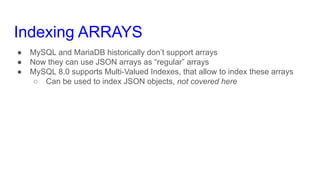
● MySQL and MariaDB historically don’t support arrays
● Now they can use JSON arrays as “regular” arrays
● MySQL 8.0 supports Multi-Valued Indexes, that allow to index these arrays
○ Can be used to index JSON objects, not covered here
Indexing Arrays
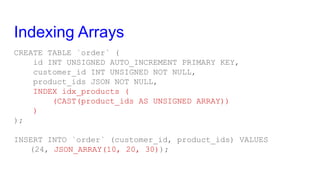
CREATE TABLE `order` (
id INT UNSIGNED AUTO_INCREMENT PRIMARY KEY,
customer_id INT UNSIGNED NOT NULL,
product_ids JSON NOT NULL,
INDEX idx_products (
(CAST(product_ids AS UNSIGNED ARRAY))
)
);
INSERT INTO `order` (customer_id, product_ids) VALUES
(24, JSON_ARRAY(10, 20, 30));
Indexing Arrays
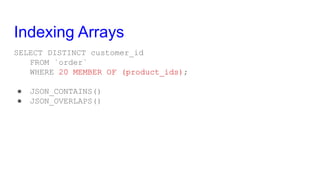
SELECT DISTINCT customer_id
FROM `order`
WHERE 20 MEMBER OF (product_ids);
● JSON_CONTAINS()
● JSON_OVERLAPS()
Relationships
Foreign Keys on Properties
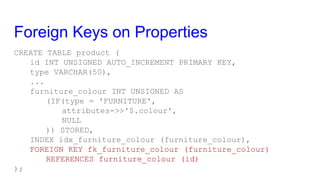
CREATE TABLE product (
id INT UNSIGNED AUTO_INCREMENT PRIMARY KEY,
type VARCHAR(50),
...
furniture_colour INT UNSIGNED AS
(IF(type = 'FURNITURE',
attributes->>'$.colour',
NULL
)) STORED,
INDEX idx_furniture_colour (furniture_colour),
FOREIGN KEY fk_furniture_colour (furniture_colour)
REFERENCES furniture_colour (id)
);
Not suggesting to use Foreign Keys
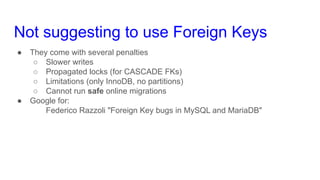
● They come with several penalties
○ Slower writes
○ Propagated locks (for CASCADE FKs)
○ Limitations (only InnoDB, no partitions)
○ Cannot run safe online migrations
● Google for:
Federico Razzoli "Foreign Key bugs in MySQL and MariaDB"
But...
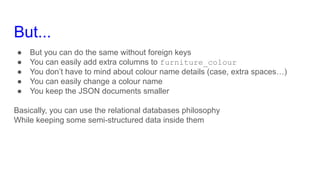
● But you can do the same without foreign keys
● You can easily add extra columns to furniture_colour
● You don’t have to mind about colour name details (case, extra spaces…)
● You can easily change a colour name
● You keep the JSON documents smaller
Basically, you can use the relational databases philosophy
While keeping some semi-structured data inside them
Validating JSON documents
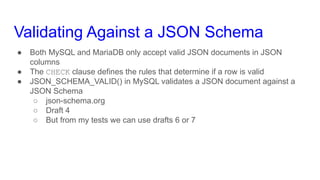
Validating Against a JSON Schema
● Both MySQL and MariaDB only accept valid JSON documents in JSON
columns
● The CHECK clause defines the rules that determine if a row is valid
● JSON_SCHEMA_VALID() in MySQL validates a JSON document against a
JSON Schema
○ json-schema.org
○ Draft 4
○ But from my tests we can use drafts 6 or 7
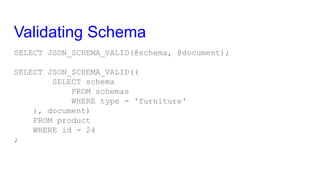
Validating Schema
SELECT JSON_SCHEMA_VALID(@schema, @document);
SELECT JSON_SCHEMA_VALID((
SELECT schema
FROM schemas
WHERE type = 'furniture'
), document)
FROM product
WHERE id = 24
;
Validating Schema
Suppose we want to validate objects of this type:
{
"material": "iron",
"colour": "grey",
"size": [1.5, 1.5, 1.0]
}
{
"$id": "https://federico-razzoli.com/schemas/furniture",
"$schema": "http://json-schema.org/draft-07/schema#",
"type": "object",
"properties": {
"material": {
"type": "string",
"enum": ["iron", "wood"]
},
"size": {
"type": "array",
"items": {
"type": "number",
"minItems": 3,
"maxItems": 3
}
},
"colour": {
"type": "string"
}
},
"required": ["material", "size"]
}
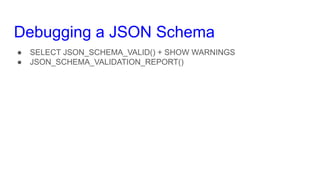
Debugging a JSON Schema
● SELECT JSON_SCHEMA_VALID() + SHOW WARNINGS
● JSON_SCHEMA_VALIDATION_REPORT()
Default Properties
Default Properties
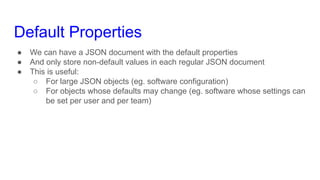
● We can have a JSON document with the default properties
● And only store non-default values in each regular JSON document
● This is useful:
○ For large JSON objects (eg. software configuration)
○ For objects whose defaults may change (eg. software whose settings can
be set per user and per team)
Merging Documents
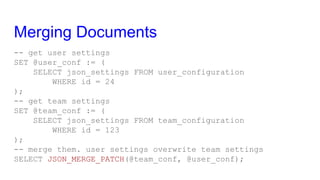
-- get user settings
SET @user_conf := (
SELECT json_settings FROM user_configuration
WHERE id = 24
);
-- get team settings
SET @team_conf := (
SELECT json_settings FROM team_configuration
WHERE id = 123
);
-- merge them. user settings overwrite team settings
SELECT JSON_MERGE_PATCH(@team_conf, @user_conf);
JSON_MERGE_PATCH() example
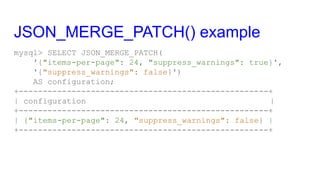
mysql> SELECT JSON_MERGE_PATCH(
'{"items-per-page": 24, "suppress_warnings": true}',
'{"suppress_warnings": false}')
AS configuration;
+----------------------------------------------------+
| configuration |
+----------------------------------------------------+
| {"items-per-page": 24, "suppress_warnings": false} |
+----------------------------------------------------+
JSON_ARRAYAGG()
JSON_OBJECTAGG()
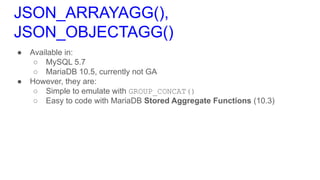
JSON_ARRAYAGG(),
JSON_OBJECTAGG()
● Available in:
○ MySQL 5.7
○ MariaDB 10.5, currently not GA
● However, they are:
○ Simple to emulate with GROUP_CONCAT()
○ Easy to code with MariaDB Stored Aggregate Functions (10.3)
JSON_ARRAYAGG()
mysql> SELECT type, JSON_ARRAYAGG(colour) AS colours
-> FROM product
-> GROUP BY type
-> ORDER BY type;
+-------+-----------------------------------+
| type | colours |
+-------+-----------------------------------+
| chair | ["green", "blue", "red", "black"] |
| shelf | ["white", "brown"] |
| table | ["white", "gray", "black"] |
+-------+-----------------------------------+
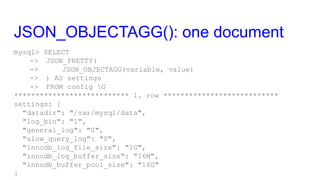
JSON_OBJECTAGG(): one document
mysql> SELECT
-> JSON_PRETTY(
-> JSON_OBJECTAGG(variable, value)
-> ) AS settings
-> FROM config G
*************************** 1. row ***************************
settings: {
"datadir": "/var/mysql/data",
"log_bin": "1",
"general_log": "0",
"slow_query_log": "0",
"innodb_log_file_size": "1G",
"innodb_log_buffer_size": "16M",
"innodb_buffer_pool_size": "16G"
}
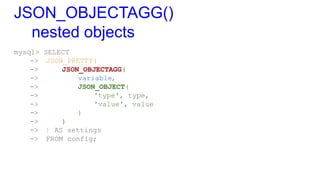
JSON_OBJECTAGG()
nested objects
mysql> SELECT
-> JSON_PRETTY(
-> JSON_OBJECTAGG(
-> variable,
-> JSON_OBJECT(
-> 'type', type,
-> 'value', value
-> )
-> )
-> ) AS settings
-> FROM config;
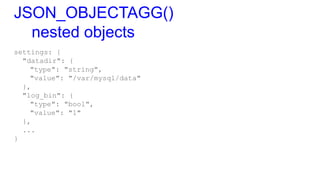
JSON_OBJECTAGG()
nested objects
settings: {
"datadir": {
"type": "string",
"value": "/var/mysql/data"
},
"log_bin": {
"type": "bool",
"value": "1"
},
...
}
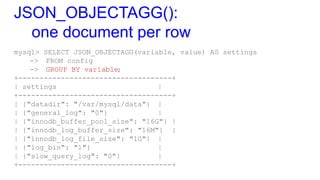
JSON_OBJECTAGG():
one document per row
mysql> SELECT JSON_OBJECTAGG(variable, value) AS settings
-> FROM config
-> GROUP BY variable;
+------------------------------------+
| settings |
+------------------------------------+
| {"datadir": "/var/mysql/data"} |
| {"general_log": "0"} |
| {"innodb_buffer_pool_size": "16G"} |
| {"innodb_log_buffer_size": "16M"} |
| {"innodb_log_file_size": "1G"} |
| {"log_bin": "1"} |
| {"slow_query_log": "0"} |
+------------------------------------+
JSON_TABLE()
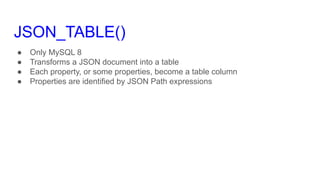
JSON_TABLE()
● Only MySQL 8
● Transforms a JSON document into a table
● Each property, or some properties, become a table column
● Properties are identified by JSON Path expressions
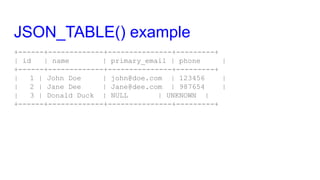
JSON_TABLE() example
{
"customers": [
{
"name": "John Doe",
"emails": ["john@doe.com"],
"phone": "123456"
},
{
"name": "Jane Dee",
"emails": ["Jane@dee.com"],
"phone": "987654"
},
{
"name": "Donald Duck",
"emails": []
}
],
"products": [],
"orders": []
}
JSON_TABLE() example
SELECT *
FROM JSON_TABLE(
@customers,
'$.customers[*]'
COLUMNS (
id FOR ORDINALITY,
name VARCHAR(50) PATH '$.name',
primary_email VARCHAR(50) PATH '$.emails[0]',
phone VARCHAR(50) PATH '$.phone'
DEFAULT '"UNKNOWN"' ON EMPTY
NULL ON ERROR
)
) AS customers;
JSON_TABLE() example
+------+-------------+---------------+---------+
| id | name | primary_email | phone |
+------+-------------+---------------+---------+
| 1 | John Doe | john@doe.com | 123456 |
| 2 | Jane Dee | Jane@dee.com | 987654 |
| 3 | Donald Duck | NULL | UNKNOWN |
+------+-------------+---------------+---------+
MariaDB CONNECT
What CONNECT is
● Connect is a storage engine for MariaDB
○ Won’t compile on MySQL or Percona Server
● Reads data from different data sources:
○ Remote tables (MySQL protocol, ODBC, JDBC)
○ Files in various formats (JSON, XML, CSV, custom formats…)
○ Special data sources
○ Transformed data from other tables (pivot, …)
CONNECT and JSON
● JSON Table Type (10.1)
● On Windows, can read data from REST APIs (not easy to do)
● CONNECT comes with a library of JSON UDFs
○ Probably not battle-tested as the current built-in functions
Thank you for listening!
Federico
hello@federico-razzoli.com

JSON in MySQL and MariaDB Databases

  • 1.
    { JSON } inMySQL and MariaDB Databases Federico Razzoli
  • 2.
    € whoami ● FedericoRazzoli ● Freelance consultant ● Working with databases since 2000 hello@federico-razzoli.com federico-razzoli.com ● I worked as a consultant for Percona and Ibuildings (mainly MySQL and MariaDB) ● I worked as a DBA for fast-growing companies like Catawiki, HumanState, TransferWise
  • 3.
  • 4.
    JSON Support ● MySQL7.0 has a JSON type and JSON functions ● MariaDB 10.2 has JSON alias (LONGTEXT) and JSON functions ○ From MariaDB 10.4 JSON columns must contain valid JSON data
  • 5.
    JSON Type Benefits ●Persons from both MySQL and MariaDB state that their approach is faster ○ Surprise, surprise! ● MySQL format is smaller ● When updating a property, MySQL does not rewrite the whole JSON document ● MySQL binary log only contains the modified properties ○ binlog_row_value_options = 'PARTIAL_JSON' ● However, in MySQL 8, make sure that: ○ Default_tmp_storage_engine = 'TEMPTABLE'
  • 6.
    JSON Features Comparison ●Let’s compare JSON features, and more generic features that are useful working with JSON ● MySQL 8.0 / MariaDB 10.5 ● MySQL only: ○ Index arrays (requires multi-valued indexes) ○ Schema validation ○ JSON_TABLE() ○ Functional index / Index on VIRTUAL column ● MariaDB only: ○ CONNECT (use a JSON file as a table) ○ Stored aggregate functions
  • 7.
  • 8.
    JSON in relationaldatabases? ● Relational databases are schemaful ● All rows must have the same columns (name, type) ○ (though NULL is often use to relax the schema) ● CHECK constraints: ○ email VARCHAR(100) CHECK (email LIKE '_%@_%._%') ○ birth_date DATE, death_date DATE, CHECK (birth_date <= death_date) ● UNIQUE constraint ● Referential constraints (foreign keys): ○ Each row in a child table matches a row in a parent table
  • 9.
    JSON in relationaldatabases? ● JSON is usually schemaless ● Two different objects can have different structures: { "product-type": "shirt", "cost": 10.0, "size": "M" } { "product-type": "phone", "cost": 69.99, "size": [6.37, 2.9, 0.3], "os": "Android" }
  • 10.
    JSON in relationaldatabases? ● How would you store heterogeneous products in a relational database?
  • 11.
    JSON in relationaldatabases? ● How would you store heterogeneous products in a relational database? ● One table per product type? ○ Cannot enforce UNIQUE constraint ○ Try to find a product that could be of any type… ○ Try to get the min and max costs...
  • 12.
    JSON in relationaldatabases? ● How would you store heterogeneous products in a relational database? ● One table with one column for each property, NULL where it is not used? ○ Adding a product implies a slow, painful ALTER TABLE ○ If products type is deleted, obsolete columns tend to remain forever ○ Big table is bad for operations (backup, repair…) ○ INSERTs are slow ○ SELECT *
  • 13.
    JSON in relationaldatabases? ● How would you store heterogeneous products in a relational database? ● One main table with common properties, and one separate table for each product type? ○ You can now see min/max costs, or find a product of any type ○ Many JOINs
  • 14.
    JSON in relationaldatabases? ● How would you store heterogeneous products in a relational database? ● Entity-Attribute-Value pattern (EAV)? ○ Store all data as texts ○ Crazy amount of JOINs
  • 15.
    JSON in relationaldatabases? ● How would you store heterogeneous products in a relational database? ● Single table, where all non-common property are stored as JSON ○ Still not perfect ○ But it’s good enough
  • 16.
    JSON in relationaldatabases? CREATE TABLE product ( id INT UNSIGNED AUTO_INCREMENT PRIMARY KEY, type VARCHAR(50) NOT NULL, name VARCHAR(50) NOT NULL, cost DECIMAL(10, 2) NOT NULL, quantity INT UNSIGNED NOT NULL, attributes JSON NOT NULL );
  • 17.
  • 18.
    Materialising Properties CREATE TABLEproduct ( id INT UNSIGNED AUTO_INCREMENT PRIMARY KEY, type VARCHAR(50), name VARCHAR(50) NOT NULL, cost DECIMAL(10, 2) NOT NULL, quantity INT UNSIGNED NOT NULL, attributes JSON NOT NULL, colour VARCHAR(50) AS (JSON_UNQUOTE( JSON_EXTRACT(attributes, '$.colour') )) STORED );
  • 19.
    MySQL shortcut CREATE TABLEproduct ( id INT UNSIGNED AUTO_INCREMENT PRIMARY KEY, type VARCHAR(50), name VARCHAR(50) NOT NULL, cost DECIMAL(10, 2) NOT NULL, quantity INT UNSIGNED NOT NULL, attributes JSON NOT NULL, colour VARCHAR(50) AS (attributes->>'$.colour') VIRTUAL );
  • 20.
    Index on aProperty CREATE TABLE product ( id INT UNSIGNED AUTO_INCREMENT PRIMARY KEY, type VARCHAR(50), name VARCHAR(50) NOT NULL, cost DECIMAL(10, 2) NOT NULL, quantity INT UNSIGNED NOT NULL, attributes JSON NOT NULL, colour VARCHAR(50) AS (attributes->>'$.colour') VIRTUAL, INDEX idx_colour (type, colour) );
  • 21.
    Index on aProperty SELECT id FROM product WHERE type = 'FURNITURE' AND colour = 'grey' ; -- only uses the index in MySQL SELECT id FROM product WHERE type = 'FURNITURE' AND attributes->>'$.colour' = 'grey' ;
  • 22.
    Indexing Properties CREATE TABLEproduct ( id INT UNSIGNED AUTO_INCREMENT PRIMARY KEY, type VARCHAR(50), name VARCHAR(50) NOT NULL, cost DECIMAL(10, 2) NOT NULL, quantity INT UNSIGNED NOT NULL, attributes JSON NOT NULL, furniture_colour VARCHAR(50) AS (IF(type = 'FURNITURE', attributes->>'$.colour', NULL )) VIRTUAL, INDEX idx_colour (furniture_colour)
  • 23.
  • 24.
    Indexing ARRAYS ● MySQLand MariaDB historically don’t support arrays ● Now they can use JSON arrays as “regular” arrays ● MySQL 8.0 supports Multi-Valued Indexes, that allow to index these arrays ○ Can be used to index JSON objects, not covered here
  • 25.
    Indexing Arrays CREATE TABLE`order` ( id INT UNSIGNED AUTO_INCREMENT PRIMARY KEY, customer_id INT UNSIGNED NOT NULL, product_ids JSON NOT NULL, INDEX idx_products ( (CAST(product_ids AS UNSIGNED ARRAY)) ) ); INSERT INTO `order` (customer_id, product_ids) VALUES (24, JSON_ARRAY(10, 20, 30));
  • 26.
    Indexing Arrays SELECT DISTINCTcustomer_id FROM `order` WHERE 20 MEMBER OF (product_ids); ● JSON_CONTAINS() ● JSON_OVERLAPS()
  • 27.
  • 28.
    Foreign Keys onProperties CREATE TABLE product ( id INT UNSIGNED AUTO_INCREMENT PRIMARY KEY, type VARCHAR(50), ... furniture_colour INT UNSIGNED AS (IF(type = 'FURNITURE', attributes->>'$.colour', NULL )) STORED, INDEX idx_furniture_colour (furniture_colour), FOREIGN KEY fk_furniture_colour (furniture_colour) REFERENCES furniture_colour (id) );
  • 29.
    Not suggesting touse Foreign Keys ● They come with several penalties ○ Slower writes ○ Propagated locks (for CASCADE FKs) ○ Limitations (only InnoDB, no partitions) ○ Cannot run safe online migrations ● Google for: Federico Razzoli "Foreign Key bugs in MySQL and MariaDB"
  • 30.
    But... ● But youcan do the same without foreign keys ● You can easily add extra columns to furniture_colour ● You don’t have to mind about colour name details (case, extra spaces…) ● You can easily change a colour name ● You keep the JSON documents smaller Basically, you can use the relational databases philosophy While keeping some semi-structured data inside them
  • 31.
  • 32.
    Validating Against aJSON Schema ● Both MySQL and MariaDB only accept valid JSON documents in JSON columns ● The CHECK clause defines the rules that determine if a row is valid ● JSON_SCHEMA_VALID() in MySQL validates a JSON document against a JSON Schema ○ json-schema.org ○ Draft 4 ○ But from my tests we can use drafts 6 or 7
  • 33.
    Validating Schema SELECT JSON_SCHEMA_VALID(@schema,@document); SELECT JSON_SCHEMA_VALID(( SELECT schema FROM schemas WHERE type = 'furniture' ), document) FROM product WHERE id = 24 ;
  • 34.
    Validating Schema Suppose wewant to validate objects of this type: { "material": "iron", "colour": "grey", "size": [1.5, 1.5, 1.0] }
  • 35.
    { "$id": "https://federico-razzoli.com/schemas/furniture", "$schema": "http://json-schema.org/draft-07/schema#", "type":"object", "properties": { "material": { "type": "string", "enum": ["iron", "wood"] }, "size": { "type": "array", "items": { "type": "number", "minItems": 3, "maxItems": 3 } }, "colour": { "type": "string" } }, "required": ["material", "size"] }
  • 36.
    Debugging a JSONSchema ● SELECT JSON_SCHEMA_VALID() + SHOW WARNINGS ● JSON_SCHEMA_VALIDATION_REPORT()
  • 37.
  • 38.
    Default Properties ● Wecan have a JSON document with the default properties ● And only store non-default values in each regular JSON document ● This is useful: ○ For large JSON objects (eg. software configuration) ○ For objects whose defaults may change (eg. software whose settings can be set per user and per team)
  • 39.
    Merging Documents -- getuser settings SET @user_conf := ( SELECT json_settings FROM user_configuration WHERE id = 24 ); -- get team settings SET @team_conf := ( SELECT json_settings FROM team_configuration WHERE id = 123 ); -- merge them. user settings overwrite team settings SELECT JSON_MERGE_PATCH(@team_conf, @user_conf);
  • 40.
    JSON_MERGE_PATCH() example mysql> SELECTJSON_MERGE_PATCH( '{"items-per-page": 24, "suppress_warnings": true}', '{"suppress_warnings": false}') AS configuration; +----------------------------------------------------+ | configuration | +----------------------------------------------------+ | {"items-per-page": 24, "suppress_warnings": false} | +----------------------------------------------------+
  • 41.
  • 42.
    JSON_ARRAYAGG(), JSON_OBJECTAGG() ● Available in: ○MySQL 5.7 ○ MariaDB 10.5, currently not GA ● However, they are: ○ Simple to emulate with GROUP_CONCAT() ○ Easy to code with MariaDB Stored Aggregate Functions (10.3)
  • 43.
    JSON_ARRAYAGG() mysql> SELECT type,JSON_ARRAYAGG(colour) AS colours -> FROM product -> GROUP BY type -> ORDER BY type; +-------+-----------------------------------+ | type | colours | +-------+-----------------------------------+ | chair | ["green", "blue", "red", "black"] | | shelf | ["white", "brown"] | | table | ["white", "gray", "black"] | +-------+-----------------------------------+
  • 44.
    JSON_OBJECTAGG(): one document mysql>SELECT -> JSON_PRETTY( -> JSON_OBJECTAGG(variable, value) -> ) AS settings -> FROM config G *************************** 1. row *************************** settings: { "datadir": "/var/mysql/data", "log_bin": "1", "general_log": "0", "slow_query_log": "0", "innodb_log_file_size": "1G", "innodb_log_buffer_size": "16M", "innodb_buffer_pool_size": "16G" }
  • 45.
    JSON_OBJECTAGG() nested objects mysql> SELECT ->JSON_PRETTY( -> JSON_OBJECTAGG( -> variable, -> JSON_OBJECT( -> 'type', type, -> 'value', value -> ) -> ) -> ) AS settings -> FROM config;
  • 46.
    JSON_OBJECTAGG() nested objects settings: { "datadir":{ "type": "string", "value": "/var/mysql/data" }, "log_bin": { "type": "bool", "value": "1" }, ... }
  • 47.
    JSON_OBJECTAGG(): one document perrow mysql> SELECT JSON_OBJECTAGG(variable, value) AS settings -> FROM config -> GROUP BY variable; +------------------------------------+ | settings | +------------------------------------+ | {"datadir": "/var/mysql/data"} | | {"general_log": "0"} | | {"innodb_buffer_pool_size": "16G"} | | {"innodb_log_buffer_size": "16M"} | | {"innodb_log_file_size": "1G"} | | {"log_bin": "1"} | | {"slow_query_log": "0"} | +------------------------------------+
  • 48.
  • 49.
    JSON_TABLE() ● Only MySQL8 ● Transforms a JSON document into a table ● Each property, or some properties, become a table column ● Properties are identified by JSON Path expressions
  • 50.
    JSON_TABLE() example { "customers": [ { "name":"John Doe", "emails": ["john@doe.com"], "phone": "123456" }, { "name": "Jane Dee", "emails": ["Jane@dee.com"], "phone": "987654" }, { "name": "Donald Duck", "emails": [] } ], "products": [], "orders": [] }
  • 51.
    JSON_TABLE() example SELECT * FROMJSON_TABLE( @customers, '$.customers[*]' COLUMNS ( id FOR ORDINALITY, name VARCHAR(50) PATH '$.name', primary_email VARCHAR(50) PATH '$.emails[0]', phone VARCHAR(50) PATH '$.phone' DEFAULT '"UNKNOWN"' ON EMPTY NULL ON ERROR ) ) AS customers;
  • 52.
    JSON_TABLE() example +------+-------------+---------------+---------+ | id| name | primary_email | phone | +------+-------------+---------------+---------+ | 1 | John Doe | john@doe.com | 123456 | | 2 | Jane Dee | Jane@dee.com | 987654 | | 3 | Donald Duck | NULL | UNKNOWN | +------+-------------+---------------+---------+
  • 53.
  • 54.
    What CONNECT is ●Connect is a storage engine for MariaDB ○ Won’t compile on MySQL or Percona Server ● Reads data from different data sources: ○ Remote tables (MySQL protocol, ODBC, JDBC) ○ Files in various formats (JSON, XML, CSV, custom formats…) ○ Special data sources ○ Transformed data from other tables (pivot, …)
  • 55.
    CONNECT and JSON ●JSON Table Type (10.1) ● On Windows, can read data from REST APIs (not easy to do) ● CONNECT comes with a library of JSON UDFs ○ Probably not battle-tested as the current built-in functions
  • 56.
    Thank you forlistening! Federico hello@federico-razzoli.com