SOLVION TRENDWERKSTATT /
MICROSOFT DISCOVER ZUM
THEMA TEAMS VOICE
Ewald Murgg
Team Lead Communications
+43 316 696 540 605
Ewald.Murgg@solvion.net
www.solvion.net/emu
VORSTELLUNG
Focus on Microsoft UC and Enterprise
Voice since OCS 2007 R2
FRAGEBOGEN TEILNEHMERDATEN
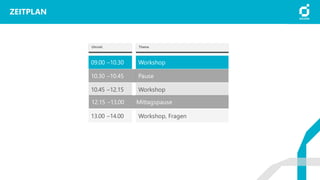
ZEITPLAN
Uhrzeit Thema
09.00 –10.30 Workshop
Pause10.30 –10.45
10.45 –12.15 Workshop
13.00 –14.00 Workshop, Fragen
Mittagspause12.15 –13.00
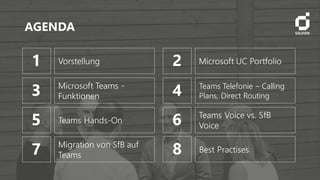
AGENDA
1 Vorstellung 2 Microsoft UC Portfolio
3 Microsoft Teams -
Funktionen 4 Teams Telefonie – Calling
Plans, Direct Routing
5 Teams Hands-On
7 Migration von SfB auf
Teams
6 Teams Voice vs. SfB
Voice
8 Best Practises
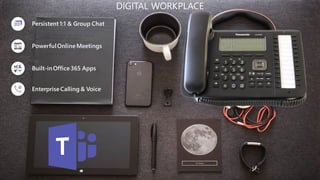
Persistent 1:1 & Group Chat
PowerfulOnlineMeetings
Built-inOffice365 Apps
EnterpriseCalling & Voice
DIGITAL WORKPLACE
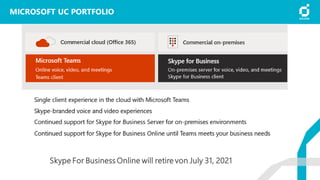
MICROSOFT UC PORTFOLIO
Teams, Skype For Business Online, Skype For Business onprem
MICROSOFT UC PORTFOLIO
Skype For Business Online will retire von July 31, 2021
MICROSOFT TEAMS CLIENT
Funktionen, Clients
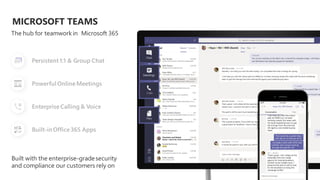
MICROSOFT TEAMS
Persistent 1:1 & Group Chat
PowerfulOnlineMeetings
EnterpriseCalling & Voice
Built-inOffice365 Apps
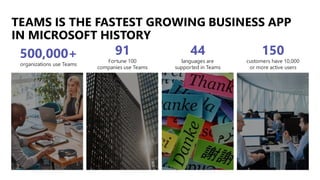
TEAMS IS THE FASTEST GROWING BUSINESS APP
IN MICROSOFT HISTORY
91
Fortune 100
companies use Teams
500,000+
organizations use Teams
44
languages are
supported in Teams
150
customers have 10,000
or more active users
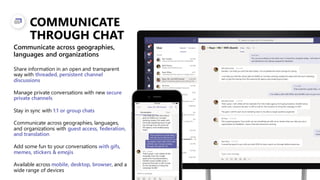
COMMUNICATE
THROUGH CHAT
Share information in an open and transparent
way with threaded, persistent channel
discussions
Manage private conversations with new secure
private channels
Stay in sync with 1:1 or group chats
Communicate across geographies, languages,
and organizations with guest access, federation,
and translation
Add some fun to your conversations with gifs,
memes, stickers & emojis
Available across mobile, desktop, browser, and a
wide range of devices
Communicate across geographies,
languages and organizations
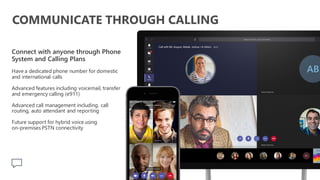
COMMUNICATE THROUGH CALLING
Connect with anyone through Phone
System and Calling Plans
Have a dedicated phone number for domestic
and international calls
Advanced features including voicemail, transfer
and emergency calling (e911)
Advanced call management including. call
routing, auto attendant and reporting
Future support for hybrid voice using
on-premises PSTN connectivity
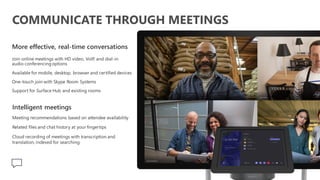
COMMUNICATE THROUGH MEETINGS
More effective, real-time conversations
Join online meetings with HD video, VoIP, and dial-in
audio conferencingoptions
Available for mobile, desktop, browser and certified devices
One-touch join with Skype Room Systems
Support for Surface Hub and existing rooms
Intelligent meetings
Meeting recommendations based on attendee availability
Related files and chat history at your fingertips
Cloud recording of meetings with transcription and
translation, indexed for searching
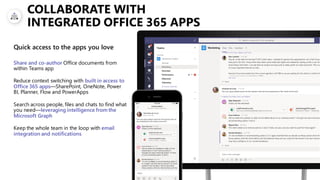
COLLABORATE WITH
INTEGRATED OFFICE 365 APPS
Share and co-author Office documents from
within Teams app
Reduce context switching with built in access to
Office 365 apps—SharePoint, OneNote, Power
BI, Planner, Flow and PowerApps
Search across people, files and chats to find what
you need—leveraging intelligence from the
Microsoft Graph
Keep the whole team in the loop with email
integration and notifications
Quick access to the apps you love
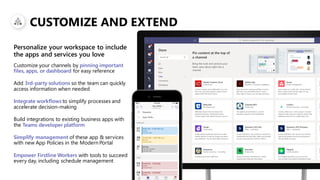
CUSTOMIZE AND EXTEND
Customize your channels by pinning important
files, apps, or dashboard for easy reference
Add 3rd-party solutions so the team can quickly
access information when needed
Integrate workflows to simplify processes and
accelerate decision-making
Build integrations to existing business apps with
the Teams developer platform
Simplify management of these app & services
with new App Policies in the Modern Portal
Empower Firstline Workers with tools to succeed
every day, including schedule management
Personalize your workspace to include
the apps and services you love
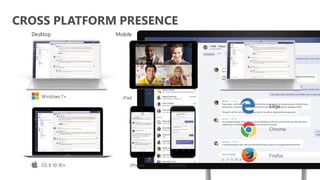
CROSS PLATFORM PRESENCE
Desktop Mobile Browsers
iPhone Android
iPad
OS X 10.10+
Windows 7+
Edge
Chrome
Firefox
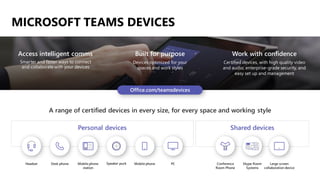
MICROSOFT TEAMS DEVICES
Work with confidence
Certified devices, with high quality video
and audio, enterprise-grade security, and
easy set up and management
Access intelligent comms
Smarter and faster ways to connect
and collaborate with your devices
Built for purpose
Devices optimized for your
spaces and work styles
A range of certified devices in every size, for every space and working style
Personal devices Shared devices
Large screen
collaboration device
Skype Room
Systems
Conference
Room Phone
Headset Desk phone Mobile phone
station
Speaker puck Mobile phone PC
MIT TEAMS TELEFONIEREN
ABER WIE?
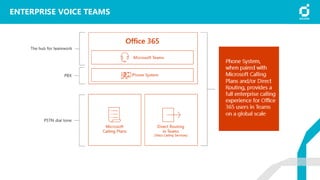
Phone System, Calling Plans, Direct Routing
ENTERPRISE VOICE TEAMS
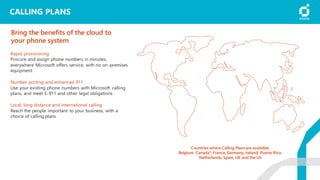
CALLING PLANS
Rapid provisioning
Procure and assign phone numbers in minutes,
everywhere Microsoft offers service, with no on-premises
equipment
Number porting and enhanced 911
Use your existing phone numbers with Microsoft calling
plans, and meet E-911 and other legal obligations
Local, long distance and international calling
Reach the people important to your business, with a
choice of calling plans
Bring the benefits of the cloud to
your phone system
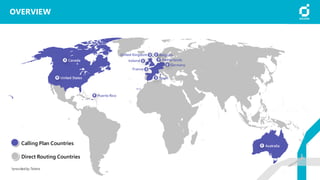
Countries where Calling Plans are available:
Belgium, Canada*, France, Germany, Ireland, Puerto Rico,
Netherlands, Spain, UK and the US
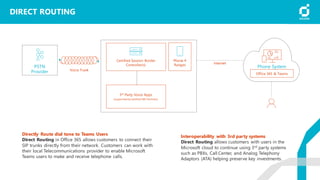
DIRECT ROUTING
Directly Route dial tone to Teams Users
Direct Routing in Office 365 allows customers to connect their
SIP trunks directly from their network. Customers can work with
their local Telecommunications provider to enable Microsoft
Teams users to make and receive telephone calls.
PSTN
Provider
Phone System
Voice Trunk
Internet
3rd Party Voice Apps
(supported bycertified SBC Partners)
Phone #
Ranges
Certified Session Border
Controller(s)
Interoperability with 3rd party systems
Direct Routing allows customers with users in the
Microsoft cloud to continue using 3rd party systems
such as PBXs, Call Center, and Analog Telephony
Adaptors (ATA) helping preserve key investments.
Office 365 & Teams
OVERVIEW
*provided by Telstra
Canada
United States
Puerto Rico
United Kingdom
Ireland Netherlands
Germany
Spain
France
Belgium
Australia
Calling Plan Countries
Direct Routing Countries
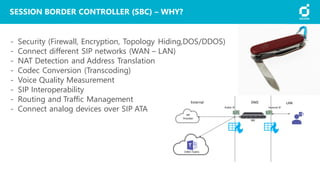
SESSION BORDER CONTROLLER (SBC) – WHY?
- Security (Firewall, Encryption, Topology Hiding,DOS/DDOS)
- Connect different SIP networks (WAN – LAN)
- NAT Detection and Address Translation
- Codec Conversion (Transcoding)
- Voice Quality Measurement
- SIP Interoperability
- Routing and Traffic Management
- Connect analog devices over SIP ATA
O365-Teams
SBC
SIP
Provider
DMZExternal LAN
Public IP Internal IP
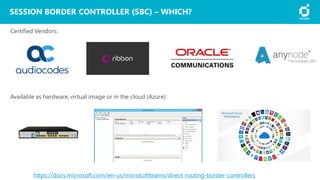
SESSION BORDER CONTROLLER (SBC) – WHICH?
https://docs.microsoft.com/en-us/microsoftteams/direct-routing-border-controllers
Certified Vendors:
Available as hardware, virtual image or in the cloud (Azure):
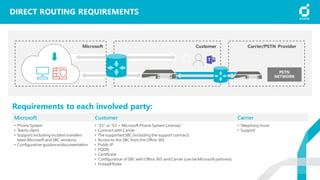
DIRECT ROUTING REQUIREMENTS
Microsoft Customer Carrier
• Phone System
• Teams client
• Support (including incident transfers
been Microsoft and SBC vendors)
• Configuration guidance/documentation
• “E5” or “E3 + Microsoft Phone System Licenses”
• Contract with Carrier
• The supported SBC (including the support contract)
• Access to the SBC from the Office 365
• Public IP
• FQDN
• Certificate
• Configuration of SBC with Office 365 and Carrier (can be Microsoft partners)
• Firewall Rules
• Telephony trunk
• Support
CustomerMicrosoft Carrier/PSTN Provider
Requirements to each involved party:
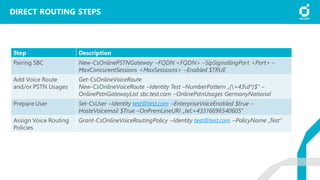
Step Description
Pairing SBC New-CsOnlinePSTNGateway –FQDN <FQDN> –SipSignallingPort <Port> –
MaxConcurentSessions <MaxSessiosns> –Enabled $TRUE
Add Voice Route
and/or PSTN Usages
Get-CsOnlineVoiceRoute
New-CsOnlineVoiceRoute –Identity Test –NumberPattern „(+43d*)$“ –
OnlinePstnGatewayList sbc.test.com –OnlinePstnUsages GermanyNational
Prepare User Set-CsUser –Identity test@test.com –EnterpriseVoiceEnabled $true –
HosteVoicemail $True –OnPremLineURI „tel:+43316696540605“
Assign Voice Routing
Policies
Grant-CsOnlineVoiceRoutingPolicy –Identity test@test.com –PolicyName „Test“
DIRECT ROUTING STEPS
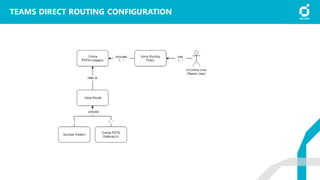
TEAMS DIRECT ROUTING CONFIGURATION
TEAMS HANDSON
Admin Center VOIP
Call Quality Dashboard
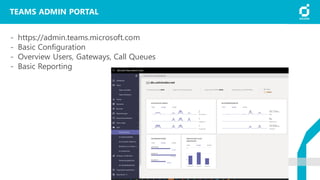
TEAMS ADMIN PORTAL
- https://admin.teams.microsoft.com
- Basic Configuration
- Overview Users, Gateways, Call Queues
- Basic Reporting
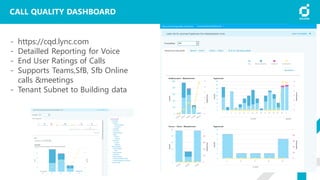
CALL QUALITY DASHBOARD
- https://cqd.lync.com
- Detailled Reporting for Voice
- End User Ratings of Calls
- Supports Teams,SfB, Sfb Online
calls &meetings
- Tenant Subnet to Building data
TEAMS TELEFONIE VS. SFB
TELEFONIE
Funktionen, Unterschiede, Call Queues, Auto Attendant
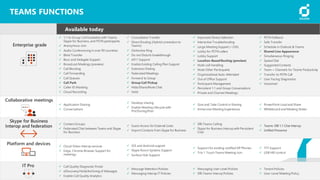
TEAMS FUNCTIONS
Available today
✓ 1:1 to Group Call Escalation with Teams,
Skype for Business, and PSTN participants
✓ Anonymous Join
✓ Audio Conferencing in over 90 countries
✓ Blind Transfer
✓ Boss and Delegate Support
✓ Broadcast Meetings (preview)
✓ Call Blocking
✓ Call Forwarding
✓ Call Queues
✓ Call Park
✓ Caller ID Masking
✓ Cloud Recording
✓ Consultative Transfer
✓ Direct Routing (Hybrid connection to
Teams)
✓ Distinctive Ring
✓ Do not Disturb breakthrough
✓ e911 Support
✓ Enable Existing Calling Plan Support
✓ Extension Dialing
✓ Federated Meetings
✓ Forward to Group
✓ Group Call Pickup
✓ Hide/Share/Mute Chat
✓ Hold
✓ Improved Device Selection
✓ Interactive Troubleshooting
✓ Large Meeting Support (~250)
✓ Lobby for PSTN callers
✓ Lobby Support
✓ Location-BasedRouting (preview)
✓ Multi-call Handling
✓ Mute Other Participants
✓ Organizational Auto-Attendant
✓ Out of Office Support
✓ Participant Management
✓ Persistent 1:1 and Group Conversations
✓ Private and Channel Meetings
✓ PSTN Fallback
✓ Safe Transfer
✓ Schedule in Outlook & Teams
✓ Shared Line Appearance
✓ Simultaneous Ringing
✓ Speed Dial
✓ Suggested Contacts
✓ Team + Channels for Teams Productivity
✓ Transfer to PSTN Call
✓ User Facing Diagnostics
✓ Voicemail
✓ Application Sharing
✓ Conversations
✓ Desktop sharing
✓ Enable Meeting Lifecycle with
Pre/During/Post
✓ Give and Take Control in Sharing
✓ Immersive Meeting Experiences
✓ PowerPoint Load and Share
✓ Whiteboard and Meeting Notes
✓ Contact Groups
✓ Federated Chat between Teams and Skype
for Business
✓ Guest Access for External Users
✓ Import Contacts from Skype for Business
✓ SfB-Teams Calling
✓ Skype for Business Interop with Persistent
Chat
✓ Teams-SfB 1:1 Chat Interop
✓ Unified Presence
✓ Cloud Video Interop services
✓ Edge, Chrome Browser Support for
meetings
✓ iOS and Android support
✓ Skype Room Systems Support
✓ Surface Hub Support
✓ Support for existing certified SIP Phones
✓ Trio 1 Touch Teams Meeting Join
✓ TTY Support
✓ USB HID control
✓ Call Quality Diagnostic Portal
✓ eDiscovery/Hold/Archiving of Messages
✓ Enable Call Quality Analytics
✓ Message Retention Policies
✓ Messaging Interop IT Policies
✓ Messaging User-Level Policies
✓ SfB-Teams Interop Policies
✓ Tenant Policies
✓ User-Level Meeting Policy
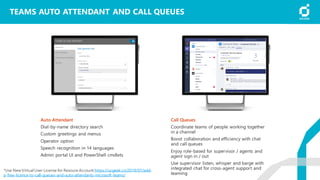
TEAMS AUTO ATTENDANT AND CALL QUEUES
Auto Attendant
Dial-by-name directory search
Custom greetings and menus
Operator option
Speech recognition in 14 languages
Admin portal UI and PowerShell cmdlets
Call Queues
Coordinate teams of people working together
in a channel
Boost collaboration and efficiency with chat
and call queues
Enjoy role-based for supervisor / agents and
agent sign in / out
Use supervisor listen, whisper and barge with
integrated chat for cross-agent support and
teaming
*Use New Virtual User License for Resoure Account https://ucgeek.co/2019/07/add-
a-free-licence-to-call-queues-and-auto-attendants-microsoft-teams/
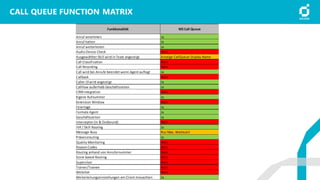
CALL QUEUE FUNCTION MATRIX
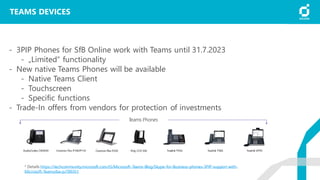
TEAMS DEVICES
- 3PIP Phones for SfB Online work with Teams until 31.7.2023
- „Limited“ functionality
- New native Teams Phones will be available
- Native Teams Client
- Touchscreen
- Specific functions
- Trade-In offers from vendors for protection of investments
* Details https://techcommunity.microsoft.com/t5/Microsoft-Teams-Blog/Skype-for-Business-phones-3PIP-support-with-
Microsoft-Teams/ba-p/789351
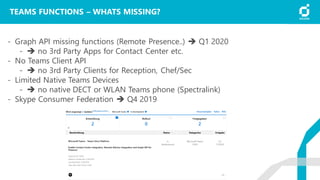
TEAMS FUNCTIONS – WHATS MISSING?
- Graph API missing functions (Remote Presence..) ➔ Q1 2020
- ➔ no 3rd Party Apps for Contact Center etc.
- No Teams Client API
- ➔ no 3rd Party Clients for Reception, Chef/Sec
- Limited Native Teams Devices
- ➔ no native DECT or WLAN Teams phone (Spectralink)
- Skype Consumer Federation ➔ Q4 2019
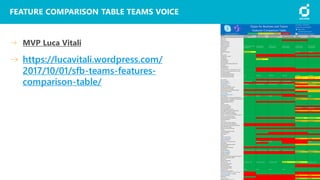
FEATURE COMPARISON TABLE TEAMS VOICE
MVP Luca Vitali
https://lucavitali.wordpress.com/
2017/10/01/sfb-teams-features-
comparison-table/
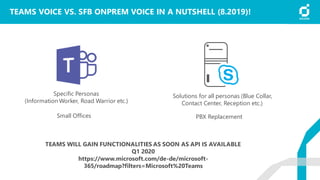
TEAMS VOICE VS. SFB ONPREM VOICE IN A NUTSHELL (8.2019)!
Specific Personas
(Information Worker, Road Warrior etc.)
Small Offices
Solutions for all personas (Blue Collar,
Contact Center, Reception etc.)
PBX Replacement
TEAMS WILL GAIN FUNCTIONALITIES AS SOON AS API IS AVAILABLE
Q1 2020
https://www.microsoft.com/de-de/microsoft-
365/roadmap?filters=Microsoft%20Teams
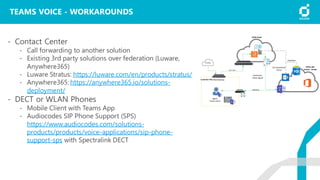
TEAMS VOICE - WORKAROUNDS
- Contact Center
- Call forwarding to another solution
- Existing 3rd party solutions over federation (Luware,
Anywhere365)
- Luware Stratus: https://luware.com/en/products/stratus/
- Anywhere365: https://anywhere365.io/solutions-
deployment/
- DECT or WLAN Phones
- Mobile Client with Teams App
- Audiocodes SIP Phone Support (SPS)
https://www.audiocodes.com/solutions-
products/products/voice-applications/sip-phone-
support-sps with Spectralink DECT
Provider
Sip Trunk
A365 Cloud
Office 365
Tenant - Kunde
Database
UCC SharePoint
Portal
Federation
Teams Agent
Internet
Customer HQ
Agent
Teams Client
SBC/Gateway
MIGRATION VON SKYPE FOR
BUSINESS AUF TEAMS
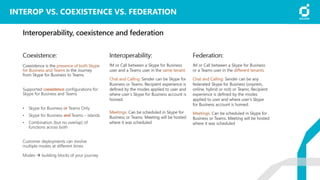
INTEROP VS. COEXISTENCE VS. FEDERATION
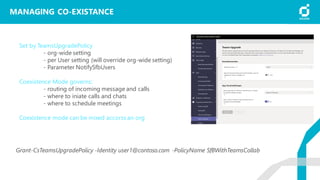
MANAGING CO-EXISTANCE
Set by TeamsUpgradePolicy
- org-wide setting
- per User setting (will override org-wide setting)
- Parameter NotifySfbUsers
Coexistence Mode governs:
- routing of incoming message and calls
- where to iniate calls and chats
- where to schedule meetings
Coexistence mode can be mixed accorss an org
Grant-CsTeamsUpgradePolicy -Identity user1@contoso.com -PolicyName SfBWithTeamsCollab
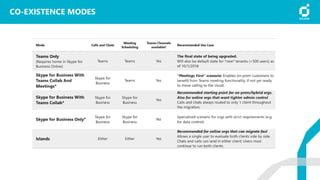
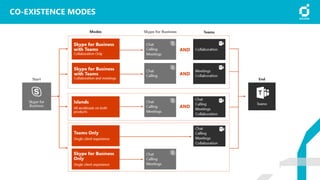
CO-EXISTENCE MODES
CO-EXISTENCE MODES
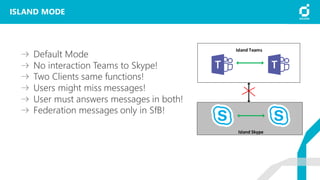
ISLAND MODE
Default Mode
No interaction Teams to Skype!
Two Clients same functions!
Users might miss messages!
User must answers messages in both!
Federation messages only in SfB!
Island Skype
Island Teams
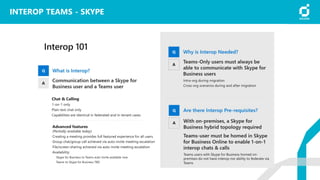
INTEROP TEAMS - SKYPE
1
Plan your upgrade
to Teams Only
ROUTE
1
Upgrade to
Teams Only
2
+
Coexistence
“Islands” mode (side-by-side) when:
• Skype for Business Online and most on-premises
(recommended path)
• Desire to quickly move to Teams
Teams Collab or Collab+Meetings when:
• More complex organizational environment (on-premises and hybrid)
• Expect a long co-existence period
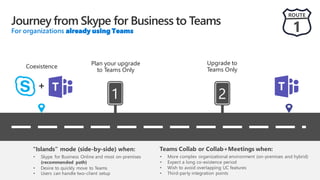
Journey from Skype for Business to Teams
For organizations already using Teams
1
Envision
teamwork for your
organization
ROUTE
2
Pilot
Teams
Deploy
Teams
Adopt
Teams
Plan your
upgrade to
Teams Only
Upgrade
to Teams
Only
2 3 4 5 6
+
Coexistence
“Islands” mode (side-by-side) when:
• Skype for Business Online and most on-
premises (recommended path)
• Desire to quickly move to Teams
Teams Collab or Collab+Meetings when:
• More complex organizational environment (on-premises and hybrid)
• Expect a long co-existence period
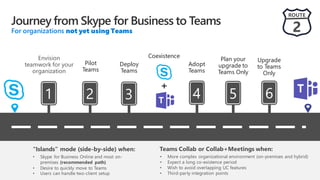
Journey from Skype for Business to Teams
For organizations not yet using Teams
SFB ONPREM MIGRATION
Enabling Skype for Business Hybrid is required to start moving to
TeamsOnly
• All msRTCSIP attributes from on-prem must be sync’d to Azure AD
Background: Users with Skype for Business On-prem may use Teams, but:
• They cannot be “TeamsOnly” (Enforced via grant-CsTeamsUpgradePolicy)
• They have no interop, no federation from their Teams client (must use Skype for Business client
for this)
• On-prem users must first be moved to online using Move-CsUser, in order to execute
grant-csTeamsUpgradePolicy
2-step vs 1-step migration
• 1 step: use –MoveToTeams switch in Move-CsUser (Requires Server 2019 and CU8 for 2015)
• 2 steps: use any version of Move-CsUser,then assign TeamsUpgradePolicy mode=TeamsOnly
• Results are same either way, except MeetingMigration
• 1-step migration: mtgs will be moved direct to Teams (upcoming functionality)
• 2-step migration: meetings moved to Skype for Business Online
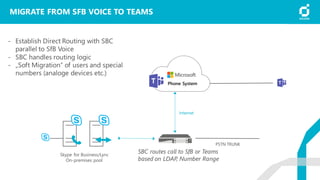
MIGRATE FROM SFB VOICE TO TEAMS
Internet
Phone System
PSTN
network
PSTN TRUNK
Skype for Business/Lync
On-premises pool
SBC routes call to SfB or Teams
based on LDAP, Number Range
- Establish Direct Routing with SBC
parallel to SfB Voice
- SBC handles routing logic
- „Soft Migration“ of users and special
numbers (analoge devices etc.)
RESSOURCES
https://docs.microsoft.com/en-us/microsoftteams/faq-journey
https://docs.microsoft.com/en-us/microsoftteams/migration-interop-guidance-for-teams-with-skype
https://docs.microsoft.com/en-us/SkypeForBusiness/hybrid/plan-hybrid-connectivity
https://blog.valeconsulting.co.uk/2018/10/26/microsoft-teams-coexistence-interop-with-skype-for-business/
https://www.enowsoftware.com/solutions-engine/teams-islandmode-trap
https://techcommunity.microsoft.com/t5/Microsoft-Teams-Blog/bg-p/MicrosoftTeamsBlog
https://lucavitali.wordpress.com/
https://www.microsoft.com/en-us/microsoft-365/blog/2019/03/19/microsoft-teams-experiences-intelligent-
workplace/
https://aka.ms/TeamsAcademy
https://www.microsoft.com/en-us/microsoft-365/roadmap?filters=Microsoft%20Teams%2CRolling%20out
BEST PRACTISES
TEAMS MIGRATION – BEST PRACTISES
- Sync all Users to Azure AD! Check if msRTCSIP Properties are synced!
- Go SfB Hybrid!
- Interop between Teams and SfB has some pitfalls (desktop sharing*,
escalate Peer2Peer Call) ➔ TRAINING!!!
- Try to avoide „Island Mode“ for a longer period!
- Use SBC for „soft migration“ between SfB Voice and Teams Voice
- Choose „right“ Teams Upgrade Modes for your users
- Teams Only ➔ SfB can only be used for meetings!
- Be careful with special voice requirements (Call Center, Reception)
* Desktop Sharing Rolling out Sept. 2019
FRAGEBOGEN FEEDBACK
DANKE FÜR DIE AUFMERKSAMKEIT! VIELEN DANK FÜR IHR FEEDBACK!

Solvion Trendwerkstatt Microsoft Teams Voice

  • 1.
    SOLVION TRENDWERKSTATT / MICROSOFTDISCOVER ZUM THEMA TEAMS VOICE
  • 2.
    Ewald Murgg Team LeadCommunications +43 316 696 540 605 Ewald.Murgg@solvion.net www.solvion.net/emu VORSTELLUNG Focus on Microsoft UC and Enterprise Voice since OCS 2007 R2
  • 3.
  • 4.
    ZEITPLAN Uhrzeit Thema 09.00 –10.30Workshop Pause10.30 –10.45 10.45 –12.15 Workshop 13.00 –14.00 Workshop, Fragen Mittagspause12.15 –13.00
  • 5.
    AGENDA 1 Vorstellung 2Microsoft UC Portfolio 3 Microsoft Teams - Funktionen 4 Teams Telefonie – Calling Plans, Direct Routing 5 Teams Hands-On 7 Migration von SfB auf Teams 6 Teams Voice vs. SfB Voice 8 Best Practises
  • 6.
    Persistent 1:1 &Group Chat PowerfulOnlineMeetings Built-inOffice365 Apps EnterpriseCalling & Voice DIGITAL WORKPLACE
  • 7.
    MICROSOFT UC PORTFOLIO Teams,Skype For Business Online, Skype For Business onprem
  • 8.
    MICROSOFT UC PORTFOLIO SkypeFor Business Online will retire von July 31, 2021
  • 9.
  • 10.
    MICROSOFT TEAMS Persistent 1:1& Group Chat PowerfulOnlineMeetings EnterpriseCalling & Voice Built-inOffice365 Apps
  • 11.
    TEAMS IS THEFASTEST GROWING BUSINESS APP IN MICROSOFT HISTORY 91 Fortune 100 companies use Teams 500,000+ organizations use Teams 44 languages are supported in Teams 150 customers have 10,000 or more active users
  • 12.
    COMMUNICATE THROUGH CHAT Share informationin an open and transparent way with threaded, persistent channel discussions Manage private conversations with new secure private channels Stay in sync with 1:1 or group chats Communicate across geographies, languages, and organizations with guest access, federation, and translation Add some fun to your conversations with gifs, memes, stickers & emojis Available across mobile, desktop, browser, and a wide range of devices Communicate across geographies, languages and organizations
  • 13.
    COMMUNICATE THROUGH CALLING Connectwith anyone through Phone System and Calling Plans Have a dedicated phone number for domestic and international calls Advanced features including voicemail, transfer and emergency calling (e911) Advanced call management including. call routing, auto attendant and reporting Future support for hybrid voice using on-premises PSTN connectivity
  • 14.
    COMMUNICATE THROUGH MEETINGS Moreeffective, real-time conversations Join online meetings with HD video, VoIP, and dial-in audio conferencingoptions Available for mobile, desktop, browser and certified devices One-touch join with Skype Room Systems Support for Surface Hub and existing rooms Intelligent meetings Meeting recommendations based on attendee availability Related files and chat history at your fingertips Cloud recording of meetings with transcription and translation, indexed for searching
  • 15.
    COLLABORATE WITH INTEGRATED OFFICE365 APPS Share and co-author Office documents from within Teams app Reduce context switching with built in access to Office 365 apps—SharePoint, OneNote, Power BI, Planner, Flow and PowerApps Search across people, files and chats to find what you need—leveraging intelligence from the Microsoft Graph Keep the whole team in the loop with email integration and notifications Quick access to the apps you love
  • 16.
    CUSTOMIZE AND EXTEND Customizeyour channels by pinning important files, apps, or dashboard for easy reference Add 3rd-party solutions so the team can quickly access information when needed Integrate workflows to simplify processes and accelerate decision-making Build integrations to existing business apps with the Teams developer platform Simplify management of these app & services with new App Policies in the Modern Portal Empower Firstline Workers with tools to succeed every day, including schedule management Personalize your workspace to include the apps and services you love
  • 17.
    CROSS PLATFORM PRESENCE DesktopMobile Browsers iPhone Android iPad OS X 10.10+ Windows 7+ Edge Chrome Firefox
  • 18.
    MICROSOFT TEAMS DEVICES Workwith confidence Certified devices, with high quality video and audio, enterprise-grade security, and easy set up and management Access intelligent comms Smarter and faster ways to connect and collaborate with your devices Built for purpose Devices optimized for your spaces and work styles A range of certified devices in every size, for every space and working style Personal devices Shared devices Large screen collaboration device Skype Room Systems Conference Room Phone Headset Desk phone Mobile phone station Speaker puck Mobile phone PC
  • 19.
    MIT TEAMS TELEFONIEREN ABERWIE? Phone System, Calling Plans, Direct Routing
  • 20.
  • 21.
    CALLING PLANS Rapid provisioning Procureand assign phone numbers in minutes, everywhere Microsoft offers service, with no on-premises equipment Number porting and enhanced 911 Use your existing phone numbers with Microsoft calling plans, and meet E-911 and other legal obligations Local, long distance and international calling Reach the people important to your business, with a choice of calling plans Bring the benefits of the cloud to your phone system Countries where Calling Plans are available: Belgium, Canada*, France, Germany, Ireland, Puerto Rico, Netherlands, Spain, UK and the US
  • 22.
    DIRECT ROUTING Directly Routedial tone to Teams Users Direct Routing in Office 365 allows customers to connect their SIP trunks directly from their network. Customers can work with their local Telecommunications provider to enable Microsoft Teams users to make and receive telephone calls. PSTN Provider Phone System Voice Trunk Internet 3rd Party Voice Apps (supported bycertified SBC Partners) Phone # Ranges Certified Session Border Controller(s) Interoperability with 3rd party systems Direct Routing allows customers with users in the Microsoft cloud to continue using 3rd party systems such as PBXs, Call Center, and Analog Telephony Adaptors (ATA) helping preserve key investments. Office 365 & Teams
  • 23.
    OVERVIEW *provided by Telstra Canada UnitedStates Puerto Rico United Kingdom Ireland Netherlands Germany Spain France Belgium Australia Calling Plan Countries Direct Routing Countries
  • 24.
    SESSION BORDER CONTROLLER(SBC) – WHY? - Security (Firewall, Encryption, Topology Hiding,DOS/DDOS) - Connect different SIP networks (WAN – LAN) - NAT Detection and Address Translation - Codec Conversion (Transcoding) - Voice Quality Measurement - SIP Interoperability - Routing and Traffic Management - Connect analog devices over SIP ATA O365-Teams SBC SIP Provider DMZExternal LAN Public IP Internal IP
  • 25.
    SESSION BORDER CONTROLLER(SBC) – WHICH? https://docs.microsoft.com/en-us/microsoftteams/direct-routing-border-controllers Certified Vendors: Available as hardware, virtual image or in the cloud (Azure):
  • 26.
    DIRECT ROUTING REQUIREMENTS MicrosoftCustomer Carrier • Phone System • Teams client • Support (including incident transfers been Microsoft and SBC vendors) • Configuration guidance/documentation • “E5” or “E3 + Microsoft Phone System Licenses” • Contract with Carrier • The supported SBC (including the support contract) • Access to the SBC from the Office 365 • Public IP • FQDN • Certificate • Configuration of SBC with Office 365 and Carrier (can be Microsoft partners) • Firewall Rules • Telephony trunk • Support CustomerMicrosoft Carrier/PSTN Provider Requirements to each involved party:
  • 27.
    Step Description Pairing SBCNew-CsOnlinePSTNGateway –FQDN <FQDN> –SipSignallingPort <Port> – MaxConcurentSessions <MaxSessiosns> –Enabled $TRUE Add Voice Route and/or PSTN Usages Get-CsOnlineVoiceRoute New-CsOnlineVoiceRoute –Identity Test –NumberPattern „(+43d*)$“ – OnlinePstnGatewayList sbc.test.com –OnlinePstnUsages GermanyNational Prepare User Set-CsUser –Identity test@test.com –EnterpriseVoiceEnabled $true – HosteVoicemail $True –OnPremLineURI „tel:+43316696540605“ Assign Voice Routing Policies Grant-CsOnlineVoiceRoutingPolicy –Identity test@test.com –PolicyName „Test“ DIRECT ROUTING STEPS
  • 28.
    TEAMS DIRECT ROUTINGCONFIGURATION
  • 29.
    TEAMS HANDSON Admin CenterVOIP Call Quality Dashboard
  • 30.
    TEAMS ADMIN PORTAL -https://admin.teams.microsoft.com - Basic Configuration - Overview Users, Gateways, Call Queues - Basic Reporting
  • 31.
    CALL QUALITY DASHBOARD -https://cqd.lync.com - Detailled Reporting for Voice - End User Ratings of Calls - Supports Teams,SfB, Sfb Online calls &meetings - Tenant Subnet to Building data
  • 32.
    TEAMS TELEFONIE VS.SFB TELEFONIE Funktionen, Unterschiede, Call Queues, Auto Attendant
  • 33.
    TEAMS FUNCTIONS Available today ✓1:1 to Group Call Escalation with Teams, Skype for Business, and PSTN participants ✓ Anonymous Join ✓ Audio Conferencing in over 90 countries ✓ Blind Transfer ✓ Boss and Delegate Support ✓ Broadcast Meetings (preview) ✓ Call Blocking ✓ Call Forwarding ✓ Call Queues ✓ Call Park ✓ Caller ID Masking ✓ Cloud Recording ✓ Consultative Transfer ✓ Direct Routing (Hybrid connection to Teams) ✓ Distinctive Ring ✓ Do not Disturb breakthrough ✓ e911 Support ✓ Enable Existing Calling Plan Support ✓ Extension Dialing ✓ Federated Meetings ✓ Forward to Group ✓ Group Call Pickup ✓ Hide/Share/Mute Chat ✓ Hold ✓ Improved Device Selection ✓ Interactive Troubleshooting ✓ Large Meeting Support (~250) ✓ Lobby for PSTN callers ✓ Lobby Support ✓ Location-BasedRouting (preview) ✓ Multi-call Handling ✓ Mute Other Participants ✓ Organizational Auto-Attendant ✓ Out of Office Support ✓ Participant Management ✓ Persistent 1:1 and Group Conversations ✓ Private and Channel Meetings ✓ PSTN Fallback ✓ Safe Transfer ✓ Schedule in Outlook & Teams ✓ Shared Line Appearance ✓ Simultaneous Ringing ✓ Speed Dial ✓ Suggested Contacts ✓ Team + Channels for Teams Productivity ✓ Transfer to PSTN Call ✓ User Facing Diagnostics ✓ Voicemail ✓ Application Sharing ✓ Conversations ✓ Desktop sharing ✓ Enable Meeting Lifecycle with Pre/During/Post ✓ Give and Take Control in Sharing ✓ Immersive Meeting Experiences ✓ PowerPoint Load and Share ✓ Whiteboard and Meeting Notes ✓ Contact Groups ✓ Federated Chat between Teams and Skype for Business ✓ Guest Access for External Users ✓ Import Contacts from Skype for Business ✓ SfB-Teams Calling ✓ Skype for Business Interop with Persistent Chat ✓ Teams-SfB 1:1 Chat Interop ✓ Unified Presence ✓ Cloud Video Interop services ✓ Edge, Chrome Browser Support for meetings ✓ iOS and Android support ✓ Skype Room Systems Support ✓ Surface Hub Support ✓ Support for existing certified SIP Phones ✓ Trio 1 Touch Teams Meeting Join ✓ TTY Support ✓ USB HID control ✓ Call Quality Diagnostic Portal ✓ eDiscovery/Hold/Archiving of Messages ✓ Enable Call Quality Analytics ✓ Message Retention Policies ✓ Messaging Interop IT Policies ✓ Messaging User-Level Policies ✓ SfB-Teams Interop Policies ✓ Tenant Policies ✓ User-Level Meeting Policy
  • 34.
    TEAMS AUTO ATTENDANTAND CALL QUEUES Auto Attendant Dial-by-name directory search Custom greetings and menus Operator option Speech recognition in 14 languages Admin portal UI and PowerShell cmdlets Call Queues Coordinate teams of people working together in a channel Boost collaboration and efficiency with chat and call queues Enjoy role-based for supervisor / agents and agent sign in / out Use supervisor listen, whisper and barge with integrated chat for cross-agent support and teaming *Use New Virtual User License for Resoure Account https://ucgeek.co/2019/07/add- a-free-licence-to-call-queues-and-auto-attendants-microsoft-teams/
  • 35.
  • 36.
    TEAMS DEVICES - 3PIPPhones for SfB Online work with Teams until 31.7.2023 - „Limited“ functionality - New native Teams Phones will be available - Native Teams Client - Touchscreen - Specific functions - Trade-In offers from vendors for protection of investments * Details https://techcommunity.microsoft.com/t5/Microsoft-Teams-Blog/Skype-for-Business-phones-3PIP-support-with- Microsoft-Teams/ba-p/789351
  • 37.
    TEAMS FUNCTIONS –WHATS MISSING? - Graph API missing functions (Remote Presence..) ➔ Q1 2020 - ➔ no 3rd Party Apps for Contact Center etc. - No Teams Client API - ➔ no 3rd Party Clients for Reception, Chef/Sec - Limited Native Teams Devices - ➔ no native DECT or WLAN Teams phone (Spectralink) - Skype Consumer Federation ➔ Q4 2019
  • 38.
    FEATURE COMPARISON TABLETEAMS VOICE MVP Luca Vitali https://lucavitali.wordpress.com/ 2017/10/01/sfb-teams-features- comparison-table/
  • 39.
    TEAMS VOICE VS.SFB ONPREM VOICE IN A NUTSHELL (8.2019)! Specific Personas (Information Worker, Road Warrior etc.) Small Offices Solutions for all personas (Blue Collar, Contact Center, Reception etc.) PBX Replacement TEAMS WILL GAIN FUNCTIONALITIES AS SOON AS API IS AVAILABLE Q1 2020 https://www.microsoft.com/de-de/microsoft- 365/roadmap?filters=Microsoft%20Teams
  • 40.
    TEAMS VOICE -WORKAROUNDS - Contact Center - Call forwarding to another solution - Existing 3rd party solutions over federation (Luware, Anywhere365) - Luware Stratus: https://luware.com/en/products/stratus/ - Anywhere365: https://anywhere365.io/solutions- deployment/ - DECT or WLAN Phones - Mobile Client with Teams App - Audiocodes SIP Phone Support (SPS) https://www.audiocodes.com/solutions- products/products/voice-applications/sip-phone- support-sps with Spectralink DECT Provider Sip Trunk A365 Cloud Office 365 Tenant - Kunde Database UCC SharePoint Portal Federation Teams Agent Internet Customer HQ Agent Teams Client SBC/Gateway
  • 41.
    MIGRATION VON SKYPEFOR BUSINESS AUF TEAMS
  • 42.
  • 43.
    MANAGING CO-EXISTANCE Set byTeamsUpgradePolicy - org-wide setting - per User setting (will override org-wide setting) - Parameter NotifySfbUsers Coexistence Mode governs: - routing of incoming message and calls - where to iniate calls and chats - where to schedule meetings Coexistence mode can be mixed accorss an org Grant-CsTeamsUpgradePolicy -Identity user1@contoso.com -PolicyName SfBWithTeamsCollab
  • 44.
  • 45.
  • 46.
    ISLAND MODE Default Mode Nointeraction Teams to Skype! Two Clients same functions! Users might miss messages! User must answers messages in both! Federation messages only in SfB! Island Skype Island Teams
  • 47.
  • 48.
    1 Plan your upgrade toTeams Only ROUTE 1 Upgrade to Teams Only 2 + Coexistence “Islands” mode (side-by-side) when: • Skype for Business Online and most on-premises (recommended path) • Desire to quickly move to Teams Teams Collab or Collab+Meetings when: • More complex organizational environment (on-premises and hybrid) • Expect a long co-existence period Journey from Skype for Business to Teams For organizations already using Teams
  • 49.
    1 Envision teamwork for your organization ROUTE 2 Pilot Teams Deploy Teams Adopt Teams Planyour upgrade to Teams Only Upgrade to Teams Only 2 3 4 5 6 + Coexistence “Islands” mode (side-by-side) when: • Skype for Business Online and most on- premises (recommended path) • Desire to quickly move to Teams Teams Collab or Collab+Meetings when: • More complex organizational environment (on-premises and hybrid) • Expect a long co-existence period Journey from Skype for Business to Teams For organizations not yet using Teams
  • 50.
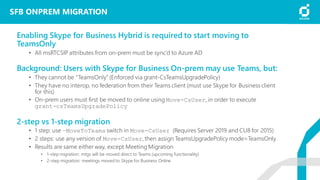
    SFB ONPREM MIGRATION EnablingSkype for Business Hybrid is required to start moving to TeamsOnly • All msRTCSIP attributes from on-prem must be sync’d to Azure AD Background: Users with Skype for Business On-prem may use Teams, but: • They cannot be “TeamsOnly” (Enforced via grant-CsTeamsUpgradePolicy) • They have no interop, no federation from their Teams client (must use Skype for Business client for this) • On-prem users must first be moved to online using Move-CsUser, in order to execute grant-csTeamsUpgradePolicy 2-step vs 1-step migration • 1 step: use –MoveToTeams switch in Move-CsUser (Requires Server 2019 and CU8 for 2015) • 2 steps: use any version of Move-CsUser,then assign TeamsUpgradePolicy mode=TeamsOnly • Results are same either way, except MeetingMigration • 1-step migration: mtgs will be moved direct to Teams (upcoming functionality) • 2-step migration: meetings moved to Skype for Business Online
  • 51.
    MIGRATE FROM SFBVOICE TO TEAMS Internet Phone System PSTN network PSTN TRUNK Skype for Business/Lync On-premises pool SBC routes call to SfB or Teams based on LDAP, Number Range - Establish Direct Routing with SBC parallel to SfB Voice - SBC handles routing logic - „Soft Migration“ of users and special numbers (analoge devices etc.)
  • 52.
  • 53.
  • 54.
    TEAMS MIGRATION –BEST PRACTISES - Sync all Users to Azure AD! Check if msRTCSIP Properties are synced! - Go SfB Hybrid! - Interop between Teams and SfB has some pitfalls (desktop sharing*, escalate Peer2Peer Call) ➔ TRAINING!!! - Try to avoide „Island Mode“ for a longer period! - Use SBC for „soft migration“ between SfB Voice and Teams Voice - Choose „right“ Teams Upgrade Modes for your users - Teams Only ➔ SfB can only be used for meetings! - Be careful with special voice requirements (Call Center, Reception) * Desktop Sharing Rolling out Sept. 2019
  • 55.
    FRAGEBOGEN FEEDBACK DANKE FÜRDIE AUFMERKSAMKEIT! VIELEN DANK FÜR IHR FEEDBACK!