D-Bus Usage and Debug
Introduction
潘建宏 Jian-Hong Pan (StarNight)
@ COSCUP 2024
Who am I
潘建宏 / Jian-Hong Pan (StarNight)
Endless OS Foundation
You can find me at
● http://www.slideshare.net/chienhungpan/
● GitHub: starnight
● X: starnight_pan
● Email:
jhp [AT] endlessos.org
chienhung.pan [AT] gmail.com
Agenda
1. How to implement Inter Proccess Communication (IPC)
2. What is D-Bus
a. Resource Addressing
b. Message Bus
c. Data Types
d. Message Types
3. Debug Tools
4. Write D-Bus Applications
5. Reference
Inter Process Communication (IPC)
A process communicates with another process for exchanging information.
How to implement?
● Share memory between the processes
● The processes write and read the same file
● Pipeline
● Communicate with Sockets
● How about with a library, such as D-Bus library?
Why D-Bus?
● Based on UNIX Domain socket
● Ecosystem uses it widely
○ systemd, Desktop Environment: GNOME, KDE …
● Server-client architecture
● Data serialization format
● Method call communication and broadcasting mechanism
This slide is more like a note extracted
from
D-Bus Specification & D-Bus Tutorial
D-Bus is
● A message bus system, a simple way for applications to talk to one another.
● A system for interprocess communication (IPC). Architecturally, it has several
layers:
○ A library, libdbus, that allows two applications to connect to each other
and exchange messages.
○ A message bus daemon executable, built on libdbus, that multiple
applications can connect to. The daemon can route messages from one
application to zero or more other applications.
○ Wrapper libraries or bindings based on particular application frameworks.
Some reimplement by following D-Bus specification, such as GLib’s
built-in D-Bus library GDBus. There are also bindings to languages such
as Python, Go, Rust ...
D-Bus Supplies Bus Types
● System daemon (for system related things)
○ NetworkManager, UPower, udisks …
● Per-user-login-session daemon (for general IPC needs among user
applications)
○ GNOME Files, IBus …
● Some applications use both:
○ systemd, GNOME Control Center (Settings), GNOME Shell …
Resource Addressing: Bus, Object, Interface
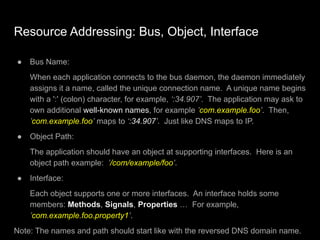
● Bus Name:
When each application connects to the bus daemon, the daemon immediately
assigns it a name, called the unique connection name. A unique name begins
with a ':' (colon) character, for example, ‘:34.907’. The application may ask to
own additional well-known names, for example ’com.example.foo’. Then,
’com.example.foo’ maps to ‘:34.907’. Just like DNS maps to IP.
● Object Path:
The application should have an object at supporting interfaces. Here is an
object path example: ’/com/example/foo’.
● Interface:
Each object supports one or more interfaces. An interface holds some
members: Methods, Signals, Properties … For example,
’com.example.foo.property1’.
Note: The names and path should start like with the reversed DNS domain name.
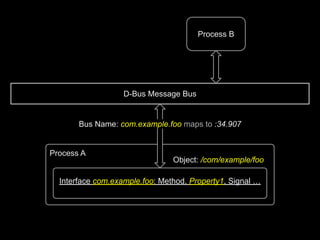
D-Bus Message Bus
Process B
Process A
Interface com.example.foo: Method, Property1, Signal …
Object: /com/example/foo
Bus Name: com.example.foo maps to :34.907
Example: Enumerate power devices
$ dbus-send --print-reply --system --dest=org.freedesktop.UPower
/org/freedesktop/UPower org.freedesktop.UPower.EnumerateDevices
method return time=1719720362.974990 sender=:1.28 -> destination=:1.120
serial=333 reply_serial=2
array [
object path "/org/freedesktop/UPower/devices/battery_BAT0"
object path "/org/freedesktop/UPower/devices/line_power_AC"
object path
"/org/freedesktop/UPower/devices/line_power_ucsi_source_psy_USBC000o001"
]
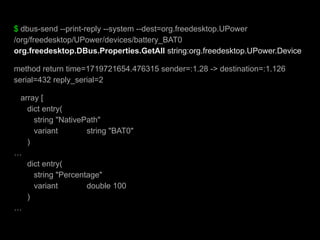
$ dbus-send --print-reply --system --dest=org.freedesktop.UPower
/org/freedesktop/UPower/devices/battery_BAT0
org.freedesktop.DBus.Properties.GetAll string:org.freedesktop.UPower.Device
method return time=1719721654.476315 sender=:1.28 -> destination=:1.126
serial=432 reply_serial=2
array [
dict entry(
string "NativePath"
variant string "BAT0"
)
…
dict entry(
string "Percentage"
variant double 100
)
…
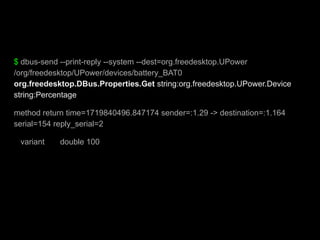
$ dbus-send --print-reply --system --dest=org.freedesktop.UPower
/org/freedesktop/UPower/devices/battery_BAT0
org.freedesktop.DBus.Properties.Get string:org.freedesktop.UPower.Device
string:Percentage
method return time=1719840496.847174 sender=:1.29 -> destination=:1.164
serial=154 reply_serial=2
variant double 100
Message Bus
● The message bus accepts connections from one or more applications. Once
connected, applications can exchange messages with other applications that
are also connected to the bus.
● In order to route messages among connections, the message bus keeps a
mapping from names to connections.
● The bus itself owns a special name, org.freedesktop.DBus, with an object
located at /org/freedesktop/DBus that implements the
org.freedesktop.DBus interface. This service allows applications to make
administrative requests of the bus itself. For example, applications can ask
the bus to assign a name to a connection.
● Message bus daemon: dbus-daemon, dbus-broker …
Standard Interfaces
There are some standard interfaces across various D-Bus applications:
● org.freedesktop.DBus.Introspectable
● org.freedesktop.DBus.Properties
● …
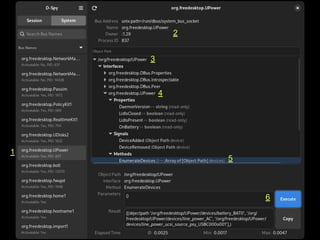
org.freedesktop.DBus.Introspectable interface
● org.freedesktop.DBus.Introspectable.Introspect (out STRING xml_data)
Objects instances may implement Introspect which returns an XML
description of the object, including its interfaces (with signals and methods),
objects below it in the object path tree, and its properties.
The section “Introspection Data Format” describes the format of this XML
string.
1
2
3
4
5
6
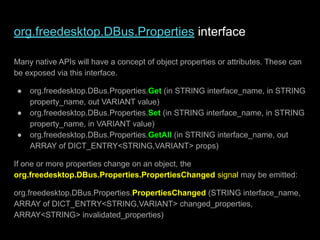
org.freedesktop.DBus.Properties interface
Many native APIs will have a concept of object properties or attributes. These can
be exposed via this interface.
● org.freedesktop.DBus.Properties.Get (in STRING interface_name, in STRING
property_name, out VARIANT value)
● org.freedesktop.DBus.Properties.Set (in STRING interface_name, in STRING
property_name, in VARIANT value)
● org.freedesktop.DBus.Properties.GetAll (in STRING interface_name, out
ARRAY of DICT_ENTRY<STRING,VARIANT> props)
If one or more properties change on an object, the
org.freedesktop.DBus.Properties.PropertiesChanged signal may be emitted:
org.freedesktop.DBus.Properties.PropertiesChanged (STRING interface_name,
ARRAY of DICT_ENTRY<STRING,VARIANT> changed_properties,
ARRAY<STRING> invalidated_properties)
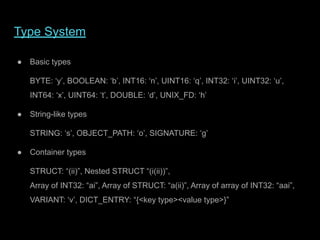
Type System
● Basic types
BYTE: ‘y’, BOOLEAN: ‘b’, INT16: ‘n’, UINT16: ‘q’, INT32: ‘i’, UINT32: ‘u’,
INT64: ‘x’, UINT64: ‘t’, DOUBLE: ‘d’, UNIX_FD: ‘h’
● String-like types
STRING: ‘s’, OBJECT_PATH: ‘o’, SIGNATURE: ‘g’
● Container types
STRUCT: “(ii)”, Nested STRUCT “(i(ii))”,
Array of INT32: “ai”, Array of STRUCT: “a(ii)”, Array of array of INT32: “aai”,
VARIANT: ‘v’, DICT_ENTRY: “{<key type><value type>}”
Big Conceptual Picture
A particular method call on a particular object instance:
Address -> [Bus Name] -> Object Path -> Interface -> Method
Address:
A D-Bus address specifies where a server will listen, and where a client will
connect. For example, the address unix:path=/tmp/abcdef specifies that the server
will listen on a UNIX domain socket at the path /tmp/abcdef and the client will
connect to that socket. An address can also specify TCP/IP sockets, or any other
transport defined in future iterations of the D-Bus specification.
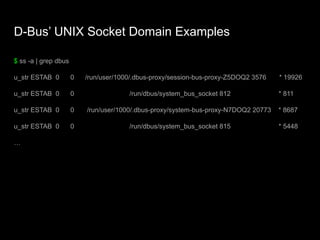
D-Bus’ UNIX Socket Domain Examples
$ ss -a | grep dbus
u_str ESTAB 0 0 /run/user/1000/.dbus-proxy/session-bus-proxy-Z5DOQ2 3576 * 19926
u_str ESTAB 0 0 /run/dbus/system_bus_socket 812 * 811
u_str ESTAB 0 0 /run/user/1000/.dbus-proxy/system-bus-proxy-N7DOQ2 20773 * 8687
u_str ESTAB 0 0 /run/dbus/system_bus_socket 815 * 5448
…
Message Types
● METHOD_CALL
● METHOD_RETURN
● ERROR
● SIGNAL
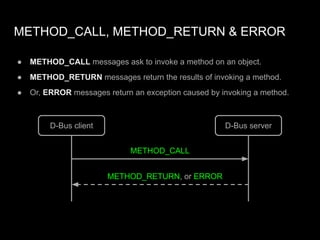
METHOD_CALL, METHOD_RETURN & ERROR
● METHOD_CALL messages ask to invoke a method on an object.
● METHOD_RETURN messages return the results of invoking a method.
● Or, ERROR messages return an exception caused by invoking a method.
D-Bus client D-Bus server
METHOD_CALL
METHOD_RETURN, or ERROR
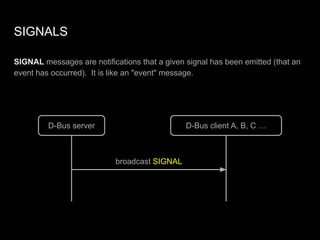
SIGNALS
SIGNAL messages are notifications that a given signal has been emitted (that an
event has occurred). It is like an "event" message.
D-Bus server D-Bus client A, B, C …
broadcast SIGNAL
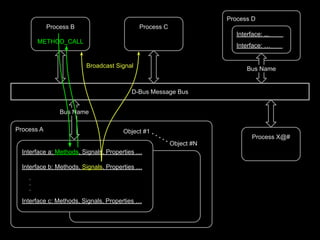
D-Bus Message Bus
Process B
METHOD_CALL
Process C
Process X@#
Process A
Interface a: Methods, Signals, Properties …
Interface b: Methods, Signals, Properties …
.
.
.
Interface c: Methods, Signals, Properties …
Object #1
Object #N
Bus Name
Broadcast Signal
Process D
Interface: ,,. ,
Interface: … .
Bus Name
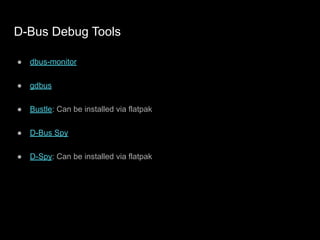
D-Bus Debug Tools
● dbus-monitor
● gdbus
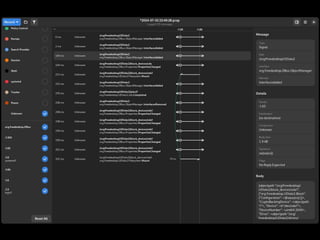
● Bustle: Can be installed via flatpak
● D-Bus Spy
● D-Spy: Can be installed via flatpak
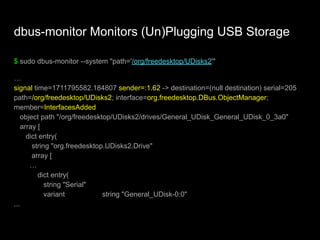
dbus-monitor Monitors (Un)Plugging USB Storage
$ sudo dbus-monitor --system "path='/org/freedesktop/UDisks2'"
…
signal time=1711795582.184807 sender=:1.62 -> destination=(null destination) serial=205
path=/org/freedesktop/UDisks2; interface=org.freedesktop.DBus.ObjectManager;
member=InterfacesAdded
object path "/org/freedesktop/UDisks2/drives/General_UDisk_General_UDisk_0_3a0"
array [
dict entry(
string "org.freedesktop.UDisks2.Drive"
array [
…
dict entry(
string "Serial"
variant string "General_UDisk-0:0"
...
Write applications using D-Bus
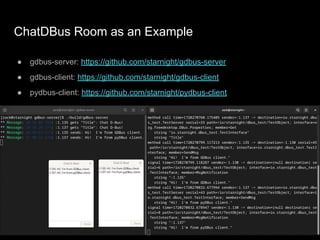
ChatDBus Room as an Example
● gdbus-server: https://github.com/starnight/gdbus-server
● gdbus-client: https://github.com/starnight/gdbus-client
● pydbus-client: https://github.com/starnight/pydbus-client
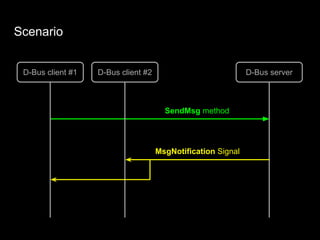
Scenario
D-Bus client #1
SendMsg method
D-Bus client #2 D-Bus server
MsgNotification Signal
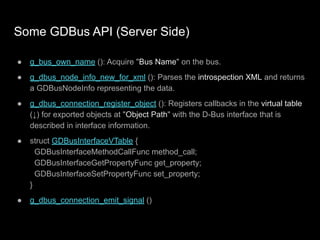
Some GDBus API (Server Side)
● g_bus_own_name (): Acquire "Bus Name" on the bus.
● g_dbus_node_info_new_for_xml (): Parses the introspection XML and returns
a GDBusNodeInfo representing the data.
● g_dbus_connection_register_object (): Registers callbacks in the virtual table
(↓) for exported objects at "Object Path" with the D-Bus interface that is
described in interface information.
● struct GDBusInterfaceVTable {
GDBusInterfaceMethodCallFunc method_call;
GDBusInterfaceGetPropertyFunc get_property;
GDBusInterfaceSetPropertyFunc set_property;
}
● g_dbus_connection_emit_signal ()
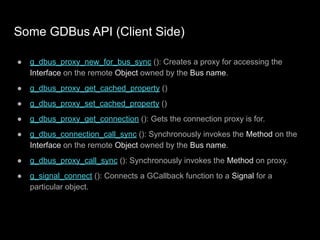
Some GDBus API (Client Side)
● g_dbus_proxy_new_for_bus_sync (): Creates a proxy for accessing the
Interface on the remote Object owned by the Bus name.
● g_dbus_proxy_get_cached_property ()
● g_dbus_proxy_set_cached_property ()
● g_dbus_proxy_get_connection (): Gets the connection proxy is for.
● g_dbus_connection_call_sync (): Synchronously invokes the Method on the
Interface on the remote Object owned by the Bus name.
● g_dbus_proxy_call_sync (): Synchronously invokes the Method on proxy.
● g_signal_connect (): Connects a GCallback function to a Signal for a
particular object.
Reference
● D-Bus
○ D-Bus Specification
■ Message Bus Starting Services (Activation)
○ D-Bus Overview
○ D-Bus Tutorial
● D-Bus API Design Guidelines
● GLib
● dbus-send, dbus-monitor, Bustle and D-Spy
● pydbus
● gdbus-codegen
D-Bus Usage and Debug Introduction @ COSCUP 2024

D-Bus Usage and Debug Introduction @ COSCUP 2024

  • 1.
    D-Bus Usage andDebug Introduction 潘建宏 Jian-Hong Pan (StarNight) @ COSCUP 2024
  • 2.
    Who am I 潘建宏/ Jian-Hong Pan (StarNight) Endless OS Foundation You can find me at ● http://www.slideshare.net/chienhungpan/ ● GitHub: starnight ● X: starnight_pan ● Email: jhp [AT] endlessos.org chienhung.pan [AT] gmail.com
  • 3.
    Agenda 1. How toimplement Inter Proccess Communication (IPC) 2. What is D-Bus a. Resource Addressing b. Message Bus c. Data Types d. Message Types 3. Debug Tools 4. Write D-Bus Applications 5. Reference
  • 4.
    Inter Process Communication(IPC) A process communicates with another process for exchanging information. How to implement? ● Share memory between the processes ● The processes write and read the same file ● Pipeline ● Communicate with Sockets ● How about with a library, such as D-Bus library?
  • 5.
    Why D-Bus? ● Basedon UNIX Domain socket ● Ecosystem uses it widely ○ systemd, Desktop Environment: GNOME, KDE … ● Server-client architecture ● Data serialization format ● Method call communication and broadcasting mechanism
  • 6.
    This slide ismore like a note extracted from D-Bus Specification & D-Bus Tutorial
  • 7.
    D-Bus is ● Amessage bus system, a simple way for applications to talk to one another. ● A system for interprocess communication (IPC). Architecturally, it has several layers: ○ A library, libdbus, that allows two applications to connect to each other and exchange messages. ○ A message bus daemon executable, built on libdbus, that multiple applications can connect to. The daemon can route messages from one application to zero or more other applications. ○ Wrapper libraries or bindings based on particular application frameworks. Some reimplement by following D-Bus specification, such as GLib’s built-in D-Bus library GDBus. There are also bindings to languages such as Python, Go, Rust ...
  • 8.
    D-Bus Supplies BusTypes ● System daemon (for system related things) ○ NetworkManager, UPower, udisks … ● Per-user-login-session daemon (for general IPC needs among user applications) ○ GNOME Files, IBus … ● Some applications use both: ○ systemd, GNOME Control Center (Settings), GNOME Shell …
  • 9.
    Resource Addressing: Bus,Object, Interface ● Bus Name: When each application connects to the bus daemon, the daemon immediately assigns it a name, called the unique connection name. A unique name begins with a ':' (colon) character, for example, ‘:34.907’. The application may ask to own additional well-known names, for example ’com.example.foo’. Then, ’com.example.foo’ maps to ‘:34.907’. Just like DNS maps to IP. ● Object Path: The application should have an object at supporting interfaces. Here is an object path example: ’/com/example/foo’. ● Interface: Each object supports one or more interfaces. An interface holds some members: Methods, Signals, Properties … For example, ’com.example.foo.property1’. Note: The names and path should start like with the reversed DNS domain name.
  • 10.
    D-Bus Message Bus ProcessB Process A Interface com.example.foo: Method, Property1, Signal … Object: /com/example/foo Bus Name: com.example.foo maps to :34.907
  • 11.
    Example: Enumerate powerdevices $ dbus-send --print-reply --system --dest=org.freedesktop.UPower /org/freedesktop/UPower org.freedesktop.UPower.EnumerateDevices method return time=1719720362.974990 sender=:1.28 -> destination=:1.120 serial=333 reply_serial=2 array [ object path "/org/freedesktop/UPower/devices/battery_BAT0" object path "/org/freedesktop/UPower/devices/line_power_AC" object path "/org/freedesktop/UPower/devices/line_power_ucsi_source_psy_USBC000o001" ]
  • 12.
    $ dbus-send --print-reply--system --dest=org.freedesktop.UPower /org/freedesktop/UPower/devices/battery_BAT0 org.freedesktop.DBus.Properties.GetAll string:org.freedesktop.UPower.Device method return time=1719721654.476315 sender=:1.28 -> destination=:1.126 serial=432 reply_serial=2 array [ dict entry( string "NativePath" variant string "BAT0" ) … dict entry( string "Percentage" variant double 100 ) …
  • 13.
    $ dbus-send --print-reply--system --dest=org.freedesktop.UPower /org/freedesktop/UPower/devices/battery_BAT0 org.freedesktop.DBus.Properties.Get string:org.freedesktop.UPower.Device string:Percentage method return time=1719840496.847174 sender=:1.29 -> destination=:1.164 serial=154 reply_serial=2 variant double 100
  • 14.
    Message Bus ● Themessage bus accepts connections from one or more applications. Once connected, applications can exchange messages with other applications that are also connected to the bus. ● In order to route messages among connections, the message bus keeps a mapping from names to connections. ● The bus itself owns a special name, org.freedesktop.DBus, with an object located at /org/freedesktop/DBus that implements the org.freedesktop.DBus interface. This service allows applications to make administrative requests of the bus itself. For example, applications can ask the bus to assign a name to a connection. ● Message bus daemon: dbus-daemon, dbus-broker …
  • 15.
    Standard Interfaces There aresome standard interfaces across various D-Bus applications: ● org.freedesktop.DBus.Introspectable ● org.freedesktop.DBus.Properties ● …
  • 16.
    org.freedesktop.DBus.Introspectable interface ● org.freedesktop.DBus.Introspectable.Introspect(out STRING xml_data) Objects instances may implement Introspect which returns an XML description of the object, including its interfaces (with signals and methods), objects below it in the object path tree, and its properties. The section “Introspection Data Format” describes the format of this XML string.
  • 17.
  • 18.
    org.freedesktop.DBus.Properties interface Many nativeAPIs will have a concept of object properties or attributes. These can be exposed via this interface. ● org.freedesktop.DBus.Properties.Get (in STRING interface_name, in STRING property_name, out VARIANT value) ● org.freedesktop.DBus.Properties.Set (in STRING interface_name, in STRING property_name, in VARIANT value) ● org.freedesktop.DBus.Properties.GetAll (in STRING interface_name, out ARRAY of DICT_ENTRY<STRING,VARIANT> props) If one or more properties change on an object, the org.freedesktop.DBus.Properties.PropertiesChanged signal may be emitted: org.freedesktop.DBus.Properties.PropertiesChanged (STRING interface_name, ARRAY of DICT_ENTRY<STRING,VARIANT> changed_properties, ARRAY<STRING> invalidated_properties)
  • 19.
    Type System ● Basictypes BYTE: ‘y’, BOOLEAN: ‘b’, INT16: ‘n’, UINT16: ‘q’, INT32: ‘i’, UINT32: ‘u’, INT64: ‘x’, UINT64: ‘t’, DOUBLE: ‘d’, UNIX_FD: ‘h’ ● String-like types STRING: ‘s’, OBJECT_PATH: ‘o’, SIGNATURE: ‘g’ ● Container types STRUCT: “(ii)”, Nested STRUCT “(i(ii))”, Array of INT32: “ai”, Array of STRUCT: “a(ii)”, Array of array of INT32: “aai”, VARIANT: ‘v’, DICT_ENTRY: “{<key type><value type>}”
  • 20.
    Big Conceptual Picture Aparticular method call on a particular object instance: Address -> [Bus Name] -> Object Path -> Interface -> Method Address: A D-Bus address specifies where a server will listen, and where a client will connect. For example, the address unix:path=/tmp/abcdef specifies that the server will listen on a UNIX domain socket at the path /tmp/abcdef and the client will connect to that socket. An address can also specify TCP/IP sockets, or any other transport defined in future iterations of the D-Bus specification.
  • 21.
    D-Bus’ UNIX SocketDomain Examples $ ss -a | grep dbus u_str ESTAB 0 0 /run/user/1000/.dbus-proxy/session-bus-proxy-Z5DOQ2 3576 * 19926 u_str ESTAB 0 0 /run/dbus/system_bus_socket 812 * 811 u_str ESTAB 0 0 /run/user/1000/.dbus-proxy/system-bus-proxy-N7DOQ2 20773 * 8687 u_str ESTAB 0 0 /run/dbus/system_bus_socket 815 * 5448 …
  • 22.
    Message Types ● METHOD_CALL ●METHOD_RETURN ● ERROR ● SIGNAL
  • 23.
    METHOD_CALL, METHOD_RETURN &ERROR ● METHOD_CALL messages ask to invoke a method on an object. ● METHOD_RETURN messages return the results of invoking a method. ● Or, ERROR messages return an exception caused by invoking a method. D-Bus client D-Bus server METHOD_CALL METHOD_RETURN, or ERROR
  • 24.
    SIGNALS SIGNAL messages arenotifications that a given signal has been emitted (that an event has occurred). It is like an "event" message. D-Bus server D-Bus client A, B, C … broadcast SIGNAL
  • 25.
    D-Bus Message Bus ProcessB METHOD_CALL Process C Process X@# Process A Interface a: Methods, Signals, Properties … Interface b: Methods, Signals, Properties … . . . Interface c: Methods, Signals, Properties … Object #1 Object #N Bus Name Broadcast Signal Process D Interface: ,,. , Interface: … . Bus Name
  • 26.
    D-Bus Debug Tools ●dbus-monitor ● gdbus ● Bustle: Can be installed via flatpak ● D-Bus Spy ● D-Spy: Can be installed via flatpak
  • 27.
    dbus-monitor Monitors (Un)PluggingUSB Storage $ sudo dbus-monitor --system "path='/org/freedesktop/UDisks2'" … signal time=1711795582.184807 sender=:1.62 -> destination=(null destination) serial=205 path=/org/freedesktop/UDisks2; interface=org.freedesktop.DBus.ObjectManager; member=InterfacesAdded object path "/org/freedesktop/UDisks2/drives/General_UDisk_General_UDisk_0_3a0" array [ dict entry( string "org.freedesktop.UDisks2.Drive" array [ … dict entry( string "Serial" variant string "General_UDisk-0:0" ...
  • 29.
  • 30.
    ChatDBus Room asan Example ● gdbus-server: https://github.com/starnight/gdbus-server ● gdbus-client: https://github.com/starnight/gdbus-client ● pydbus-client: https://github.com/starnight/pydbus-client
  • 31.
    Scenario D-Bus client #1 SendMsgmethod D-Bus client #2 D-Bus server MsgNotification Signal
  • 32.
    Some GDBus API(Server Side) ● g_bus_own_name (): Acquire "Bus Name" on the bus. ● g_dbus_node_info_new_for_xml (): Parses the introspection XML and returns a GDBusNodeInfo representing the data. ● g_dbus_connection_register_object (): Registers callbacks in the virtual table (↓) for exported objects at "Object Path" with the D-Bus interface that is described in interface information. ● struct GDBusInterfaceVTable { GDBusInterfaceMethodCallFunc method_call; GDBusInterfaceGetPropertyFunc get_property; GDBusInterfaceSetPropertyFunc set_property; } ● g_dbus_connection_emit_signal ()
  • 33.
    Some GDBus API(Client Side) ● g_dbus_proxy_new_for_bus_sync (): Creates a proxy for accessing the Interface on the remote Object owned by the Bus name. ● g_dbus_proxy_get_cached_property () ● g_dbus_proxy_set_cached_property () ● g_dbus_proxy_get_connection (): Gets the connection proxy is for. ● g_dbus_connection_call_sync (): Synchronously invokes the Method on the Interface on the remote Object owned by the Bus name. ● g_dbus_proxy_call_sync (): Synchronously invokes the Method on proxy. ● g_signal_connect (): Connects a GCallback function to a Signal for a particular object.
  • 34.
    Reference ● D-Bus ○ D-BusSpecification ■ Message Bus Starting Services (Activation) ○ D-Bus Overview ○ D-Bus Tutorial ● D-Bus API Design Guidelines ● GLib ● dbus-send, dbus-monitor, Bustle and D-Spy ● pydbus ● gdbus-codegen