Social Media 101
Presented to:

Saturday, February 1, 2014

www.corporatecalibermedia.com
What is social
media marketing?
Social media marketing is the process of building
awareness about you, your products or services through
the various social media channels. The ultimate goal of
any social media marketing campaign is to drive traffic to
a website, increase brand visibility, gain more social
media followers or find more customers.
The most popular social media networks today are:
Why is social
media marketing
important?
 It’s faster and more cost-effective than traditional media as
a way to communicate your message
 It’s a trend – Millions of people spend a good amount of
their time on social media networks
 It’s the new influencer – with the increased amount of
brand presence on social media networks, more fans and
followers are converting into ambassadors for their favorite
products and services.
 It creates loyalty among fans and followers by providing
valuable content.
 It’s the new way to market and it’s here to stay.
Effective social
media tells your
story and
compels people
to take action.
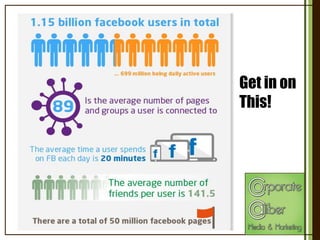
Get in on
This!
The 4 C’s of Social
Media Marketing:
1. COMMITMENT – Be consistent with efforts; don’t set it [up]
and forget it
2. COMPELLING STORY – Add engaging posts that elicit
emotion in your fans
3. CONTENT – Share valuable content that teaches or
inspires fans
4. CALL TO ACTION – Ask the fan to take action BUT always
be mindful of your Pitch to Value Ratio (PVR); fans don’t
want a constant sell; be sure to provide more value and
entertainment than requests to act
LIKE

ME!!!!!
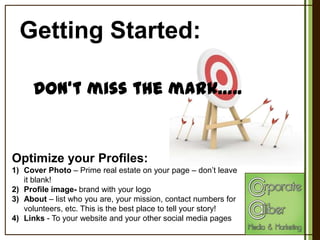
Getting Started:
Don‘t miss the mark…..

Optimize your Profiles:
1) Cover Photo – Prime real estate on your page – don’t leave
it blank!
2) Profile image- brand with your logo
3) About – list who you are, your mission, contact numbers for
volunteers, etc. This is the best place to tell your story!
4) Links - To your website and your other social media pages
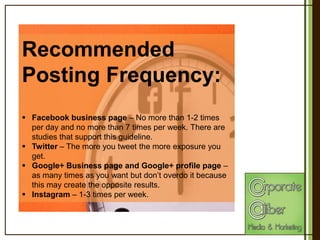
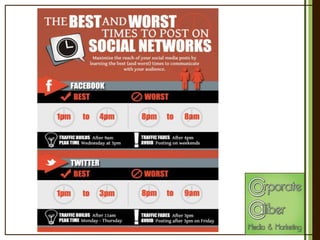
Recommended
Posting Frequency:
 Facebook business page – No more than 1-2 times
per day and no more than 7 times per week. There are
studies that support this guideline.
 Twitter – The more you tweet the more exposure you
get.
 Google+ Business page and Google+ profile page –
as many times as you want but don’t overdo it because
this may create the opposite results.
 Instagram – 1-3 times per week.
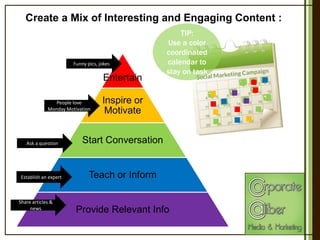
Create a Mix of Interesting and Engaging Content :

Funny pics, jokes

Entertain
People love
Monday Motivation

TIP:
Use a color
coordinated
calendar to
stay on task

Inspire or
Motivate

Ask a question

Start Conversation

Establish an expert

Teach or Inform

Share articles &
news

Provide Relevant Info
More Content
Ideas:
 Articles/Stories/Pages related to your niche but not only
from your own website
 Interesting statistics about your niche
 Motivational quotes related to your niche or otherwise
 Research studies
 Images and Videos – Videos are shared 12x more often
than photos; Photos are liked 2x more than plain text posts.
 Funny stuff- whatever your niche, you can share once in a
while a joke, a funny image or video to make your followers
smile.
 3rd Party Endorsements – Testimonials from others have
higher value. Ask for a comment from a happy
customer/volunteer.
 Don’t Forget to Engage – Every time you “like” or “share” or
“comment” on a post you create a backlink to you.
Know Your Platforms:
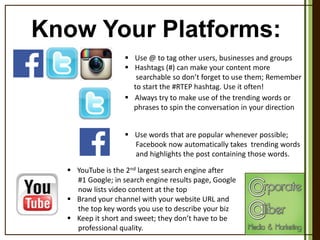
 Use @ to tag other users, businesses and groups
 Hashtags (#) can make your content more
searchable so don’t forget to use them; Remember
to start the #RTEP hashtag. Use it often!
 Always try to make use of the trending words or
phrases to spin the conversation in your direction
 Use words that are popular whenever possible;
Facebook now automatically takes trending words
and highlights the post containing those words.
 YouTube is the 2nd largest search engine after
#1 Google; in search engine results page, Google
now lists video content at the top
 Brand your channel with your website URL and
the top key words you use to describe your biz
 Keep it short and sweet; they don’t have to be
professional quality.
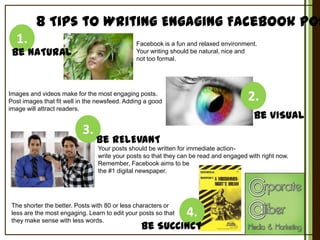
8 Tips to Writing Engaging Facebook Pos
1.

Facebook is a fun and relaxed environment.
Your writing should be natural, nice and
not too formal.

Be NATURAL

2.

Images and videos make for the most engaging posts.
Post images that fit well in the newsfeed. Adding a good
image will attract readers.

3.

Be VISUAL

Be RELEVANT
Your posts should be written for immediate actionwrite your posts so that they can be read and engaged with right now.
Remember, Facebook aims to be
the #1 digital newspaper.

The shorter the better. Posts with 80 or less characters or
less are the most engaging. Learn to edit your posts so that
they make sense with less words.

4.

Be SUCCINCT
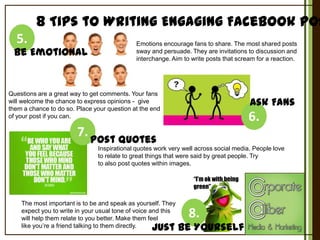
8 Tips to Writing Engaging Facebook Pos
5.

Be Emotional

Emotions encourage fans to share. The most shared posts
sway and persuade. They are invitations to discussion and
interchange. Aim to write posts that scream for a reaction.

Questions are a great way to get comments. Your fans
will welcome the chance to express opinions - give
them a chance to do so. Place your question at the end
of your post if you can.

Ask Fans

6.

7. Post Quotes
Inspirational quotes work very well across social media. People love
to relate to great things that were said by great people. Try
to also post quotes within images.

“I’m ok with being
green”
The most important is to be and speak as yourself. They
expect you to write in your usual tone of voice and this
will help them relate to you better. Make them feel
like you’re a friend talking to them directly.

8.

Just Be Yourself
Your Checklist:
Think before you post!
Ask yourself these questions before you click that button:
 Did I post something to entertain, inspire, start a conversation, inform or
provide relevant info?
 Did I tag (@) a person or business to increase my reach and include a hashtag (#)
to make my post more searchable?
 Is my post engaging enough to be shared or liked?
 Is my grammar, spelling and punctuation on point?
 Have I said something insensitive or offensive?
 If I shared a link, did I add my own commentary and insight?
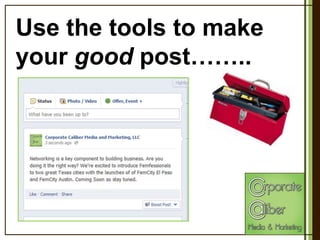
Use the tools to make
your good post……..
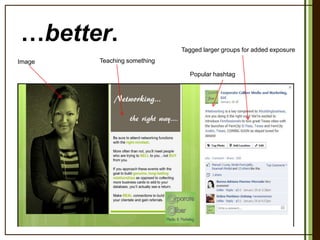
…better.
Tagged larger groups for added exposure
Image

Teaching something
Popular hashtag
Social Media 101 brought to you by:

Corporate Caliber Media and Marketing, LLC
Shantae Jones, presenter
Owner | CEO
sjones@corporatecalibermedia.com
561-809-6633
www.corporatecalibermedia.com

Social Media 101

  • 1.
    Social Media 101 Presentedto: Saturday, February 1, 2014 www.corporatecalibermedia.com
  • 2.
    What is social mediamarketing? Social media marketing is the process of building awareness about you, your products or services through the various social media channels. The ultimate goal of any social media marketing campaign is to drive traffic to a website, increase brand visibility, gain more social media followers or find more customers. The most popular social media networks today are:
  • 3.
    Why is social mediamarketing important?  It’s faster and more cost-effective than traditional media as a way to communicate your message  It’s a trend – Millions of people spend a good amount of their time on social media networks  It’s the new influencer – with the increased amount of brand presence on social media networks, more fans and followers are converting into ambassadors for their favorite products and services.  It creates loyalty among fans and followers by providing valuable content.  It’s the new way to market and it’s here to stay.
  • 4.
    Effective social media tellsyour story and compels people to take action.
  • 5.
  • 6.
    The 4 C’sof Social Media Marketing: 1. COMMITMENT – Be consistent with efforts; don’t set it [up] and forget it 2. COMPELLING STORY – Add engaging posts that elicit emotion in your fans 3. CONTENT – Share valuable content that teaches or inspires fans 4. CALL TO ACTION – Ask the fan to take action BUT always be mindful of your Pitch to Value Ratio (PVR); fans don’t want a constant sell; be sure to provide more value and entertainment than requests to act LIKE ME!!!!!
  • 7.
    Getting Started: Don‘t missthe mark….. Optimize your Profiles: 1) Cover Photo – Prime real estate on your page – don’t leave it blank! 2) Profile image- brand with your logo 3) About – list who you are, your mission, contact numbers for volunteers, etc. This is the best place to tell your story! 4) Links - To your website and your other social media pages
  • 8.
    Recommended Posting Frequency:  Facebookbusiness page – No more than 1-2 times per day and no more than 7 times per week. There are studies that support this guideline.  Twitter – The more you tweet the more exposure you get.  Google+ Business page and Google+ profile page – as many times as you want but don’t overdo it because this may create the opposite results.  Instagram – 1-3 times per week.
  • 10.
    Create a Mixof Interesting and Engaging Content : Funny pics, jokes Entertain People love Monday Motivation TIP: Use a color coordinated calendar to stay on task Inspire or Motivate Ask a question Start Conversation Establish an expert Teach or Inform Share articles & news Provide Relevant Info
  • 11.
    More Content Ideas:  Articles/Stories/Pagesrelated to your niche but not only from your own website  Interesting statistics about your niche  Motivational quotes related to your niche or otherwise  Research studies  Images and Videos – Videos are shared 12x more often than photos; Photos are liked 2x more than plain text posts.  Funny stuff- whatever your niche, you can share once in a while a joke, a funny image or video to make your followers smile.  3rd Party Endorsements – Testimonials from others have higher value. Ask for a comment from a happy customer/volunteer.  Don’t Forget to Engage – Every time you “like” or “share” or “comment” on a post you create a backlink to you.
  • 12.
    Know Your Platforms: Use @ to tag other users, businesses and groups  Hashtags (#) can make your content more searchable so don’t forget to use them; Remember to start the #RTEP hashtag. Use it often!  Always try to make use of the trending words or phrases to spin the conversation in your direction  Use words that are popular whenever possible; Facebook now automatically takes trending words and highlights the post containing those words.  YouTube is the 2nd largest search engine after #1 Google; in search engine results page, Google now lists video content at the top  Brand your channel with your website URL and the top key words you use to describe your biz  Keep it short and sweet; they don’t have to be professional quality.
  • 13.
    8 Tips toWriting Engaging Facebook Pos 1. Facebook is a fun and relaxed environment. Your writing should be natural, nice and not too formal. Be NATURAL 2. Images and videos make for the most engaging posts. Post images that fit well in the newsfeed. Adding a good image will attract readers. 3. Be VISUAL Be RELEVANT Your posts should be written for immediate actionwrite your posts so that they can be read and engaged with right now. Remember, Facebook aims to be the #1 digital newspaper. The shorter the better. Posts with 80 or less characters or less are the most engaging. Learn to edit your posts so that they make sense with less words. 4. Be SUCCINCT
  • 14.
    8 Tips toWriting Engaging Facebook Pos 5. Be Emotional Emotions encourage fans to share. The most shared posts sway and persuade. They are invitations to discussion and interchange. Aim to write posts that scream for a reaction. Questions are a great way to get comments. Your fans will welcome the chance to express opinions - give them a chance to do so. Place your question at the end of your post if you can. Ask Fans 6. 7. Post Quotes Inspirational quotes work very well across social media. People love to relate to great things that were said by great people. Try to also post quotes within images. “I’m ok with being green” The most important is to be and speak as yourself. They expect you to write in your usual tone of voice and this will help them relate to you better. Make them feel like you’re a friend talking to them directly. 8. Just Be Yourself
  • 15.
    Your Checklist: Think beforeyou post! Ask yourself these questions before you click that button:  Did I post something to entertain, inspire, start a conversation, inform or provide relevant info?  Did I tag (@) a person or business to increase my reach and include a hashtag (#) to make my post more searchable?  Is my post engaging enough to be shared or liked?  Is my grammar, spelling and punctuation on point?  Have I said something insensitive or offensive?  If I shared a link, did I add my own commentary and insight?
  • 16.
    Use the toolsto make your good post……..
  • 17.
    …better. Tagged larger groupsfor added exposure Image Teaching something Popular hashtag
  • 19.
    Social Media 101brought to you by: Corporate Caliber Media and Marketing, LLC Shantae Jones, presenter Owner | CEO sjones@corporatecalibermedia.com 561-809-6633 www.corporatecalibermedia.com