

Utilizing Social Media to Attract Talent & Build the Right
           Relationships for Success- Part 3 of 3
                       HRACO SIG
                    October 26, 2012
TODAY’S AGENDA
•   Focus on pushing your personal and company brand out specific
    networks and groups you’ve built through utilizing the tips and
    tools given to you in the first two parts of the series. • What
    Image are you going for?
•   LinkedIn: Branding You and Your Company 
 o What are people
    saying about you and your company today? 
 o What is your
    ideal image you are setting? 
 o Keeping your company and YOU
    consistent in their/your image 
 o Participating & Owning
    Groups and the ROI from your efforts
•   Utilization of your company LinkedIn Page 
 o Following Others
    and Organizations on LinkedIn and the value
PERSONAL BRANDING

•   Have goals in mind
•   Create search alert on your name
•   Consistency
•   Recommendations
•   Skills
•   Group participation
•   Q&A
•   Updating regularly
•   Response time
•   Don’t ever ask yourself, “What’s in it for
    me?”
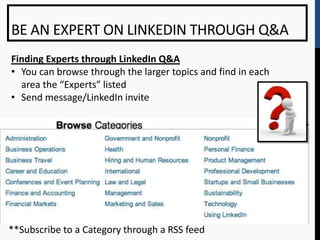
BE AN EXPERT ON LINKEDIN THROUGH Q&A
Finding Experts through LinkedIn Q&A
• You can browse through the larger topics and find in each
  area the “Experts” listed
• Send message/LinkedIn invite


**Subscribe to a Category through a RSS feed
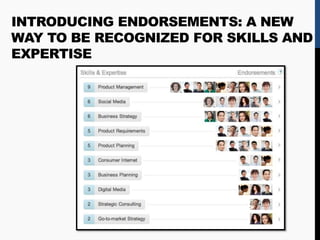
INTRODUCING ENDORSEMENTS: A NEW
WAY TO BE RECOGNIZED FOR SKILLS AND
EXPERTISE
USING TAGS ON LINKEDIN
THE WHAT:             THE WHY:

Using Tags            You can categorize a 1st
                      degree connection with a
                      tag to send out a mass
                      email through LinkedIn.

                      (Each tag can only send
                      up to 50 people a
                      message so you may want
                      to create a secondary tag
                      if you gain more than 50
                      people)


                                                  6
LINKEDIN: GROUPS
CREATING & MANAGING GROUPS

• Statistics
• Types of Groups
• Setting up Groups
• Managing your groups
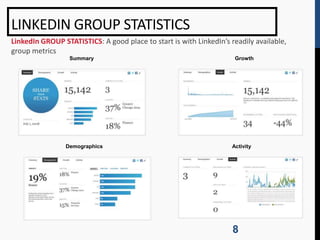
LINKEDIN GROUP STATISTICS
LinkedIn GROUP STATISTICS: A good place to start is with LinkedIn’s readily available,
group metrics
                  Summary                                             Growth


                 Demographics                                        Activity


                                                                     8
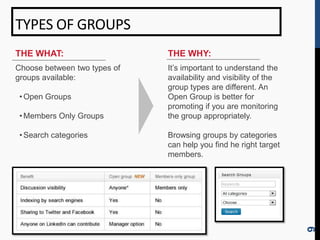
TYPES OF GROUPS
THE WHAT:                     THE WHY:
Choose between two types of   It’s important to understand the
groups available:             availability and visibility of the
                              group types are different. An
 • Open Groups                Open Group is better for
                              promoting if you are monitoring
 • Members Only Groups        the group appropriately.

 • Search categories          Browsing groups by categories
                              can help you find he right target
                              members.


                                                                   9
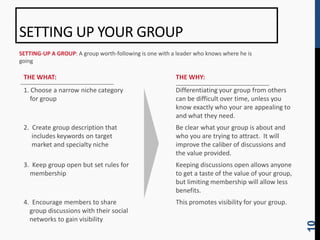
SETTING UP YOUR GROUP
SETTING-UP A GROUP: A group worth-following is one with a leader who knows where he is
going

 THE WHAT:                                               THE WHY:
 1. Choose a narrow niche category                       Differentiating your group from others
    for group                                            can be difficult over time, unless you
                                                         know exactly who your are appealing to
                                                         and what they need.
 2. Create group description that                        Be clear what your group is about and
    includes keywords on target                          who you are trying to attract. It will
    market and specialty niche                           improve the caliber of discussions and
                                                         the value provided.
 3. Keep group open but set rules for                    Keeping discussions open allows anyone
   membership                                            to get a taste of the value of your group,
                                                         but limiting membership will allow less
                                                         benefits.
 4. Encourage members to share                           This promotes visibility for your group.
   group discussions with their social
   networks to gain visibility


                                                                                                      10
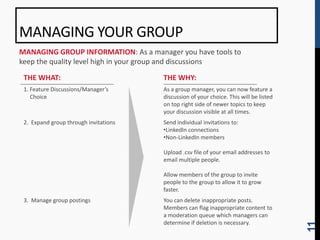
MANAGING YOUR GROUP
MANAGING GROUP INFORMATION: As a manager you have tools to
keep the quality level high in your group and discussions

 THE WHAT:                             THE WHY:
 1. Feature Discussions/Manager’s      As a group manager, you can now feature a
    Choice                             discussion of your choice. This will be listed
                                       on top right side of newer topics to keep
                                       your discussion visible at all times.
 2. Expand group through invitations   Send individual invitations to:
                                       •LinkedIn connections
                                       •Non-LinkedIn members

                                       Upload .csv file of your email addresses to
                                       email multiple people.

                                       Allow members of the group to invite
                                       people to the group to allow it to grow
                                       faster.
 3. Manage group postings              You can delete inappropriate posts.
                                       Members can flag inappropriate content to
                                       a moderation queue which managers can
                                       determine if deletion is necessary.


                                                                                        11
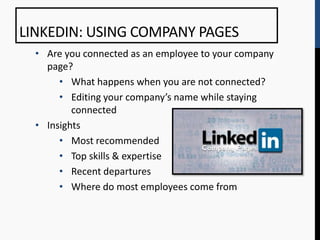
LINKEDIN: USING COMPANY PAGES
  • Are you connected as an employee to your company
    page?
       • What happens when you are not connected?
       • Editing your company’s name while staying
          connected
  • Insights
       • Most recommended
       • Top skills & expertise
       • Recent departures
       • Where do most employees come from
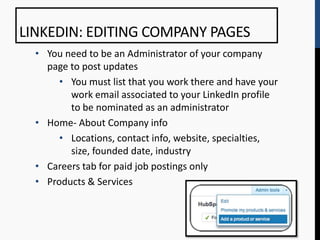
LINKEDIN: EDITING COMPANY PAGES
  • You need to be an Administrator of your company
    page to post updates
       • You must list that you work there and have your
         work email associated to your LinkedIn profile
         to be nominated as an administrator
  • Home- About Company info
       • Locations, contact info, website, specialties,
         size, founded date, industry
  • Careers tab for paid job postings only
  • Products & Services
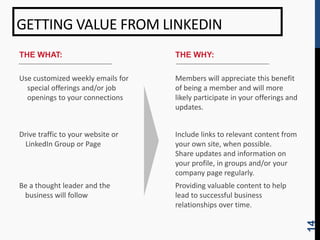
GETTING VALUE FROM LINKEDIN
THE WHAT:                          THE WHY:

Use customized weekly emails for   Members will appreciate this benefit
  special offerings and/or job     of being a member and will more
  openings to your connections     likely participate in your offerings and
                                   updates.


Drive traffic to your website or   Include links to relevant content from
 LinkedIn Group or Page            your own site, when possible.
                                   Share updates and information on
                                   your profile, in groups and/or your
                                   company page regularly.
Be a thought leader and the        Providing valuable content to help
 business will follow              lead to successful business
                                   relationships over time.


                                                                              14
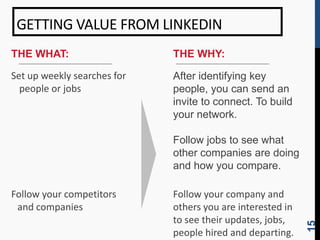
GETTING VALUE FROM LINKEDIN
THE WHAT:                    THE WHY:

Set up weekly searches for   After identifying key
  people or jobs             people, you can send an
                             invite to connect. To build
                             your network.

                             Follow jobs to see what
                             other companies are doing
                             and how you compare.

Follow your competitors      Follow your company and
 and companies               others you are interested in
                             to see their updates, jobs,


                                                            15
                             people hired and departing.
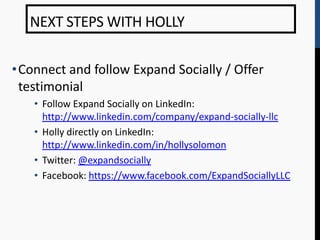
NEXT STEPS WITH HOLLY

•Connect and follow Expand Socially / Offer
 testimonial
   • Follow Expand Socially on LinkedIn:
     http://www.linkedin.com/company/expand-socially-llc
   • Holly directly on LinkedIn:
     http://www.linkedin.com/in/hollysolomon
   • Twitter: @expandsocially
   • Facebook: https://www.facebook.com/ExpandSociallyLLC
THANK YOU!
QUESTIONS?   Holly Solomon
             Expand Socially
             614-440-7988
             holly@expandsocially.com
             www.expandsocially.com

Social media training part 3 - slideshare

  • 1.
    Utilizing Social Mediato Attract Talent & Build the Right Relationships for Success- Part 3 of 3 HRACO SIG October 26, 2012
  • 2.
    TODAY’S AGENDA • Focus on pushing your personal and company brand out specific networks and groups you’ve built through utilizing the tips and tools given to you in the first two parts of the series. • What Image are you going for? • LinkedIn: Branding You and Your Company 
 o What are people saying about you and your company today? 
 o What is your ideal image you are setting? 
 o Keeping your company and YOU consistent in their/your image 
 o Participating & Owning Groups and the ROI from your efforts • Utilization of your company LinkedIn Page 
 o Following Others and Organizations on LinkedIn and the value
  • 3.
    PERSONAL BRANDING • Have goals in mind • Create search alert on your name • Consistency • Recommendations • Skills • Group participation • Q&A • Updating regularly • Response time • Don’t ever ask yourself, “What’s in it for me?”
  • 4.
    BE AN EXPERTON LINKEDIN THROUGH Q&A Finding Experts through LinkedIn Q&A • You can browse through the larger topics and find in each area the “Experts” listed • Send message/LinkedIn invite **Subscribe to a Category through a RSS feed
  • 5.
    INTRODUCING ENDORSEMENTS: ANEW WAY TO BE RECOGNIZED FOR SKILLS AND EXPERTISE
  • 6.
    USING TAGS ONLINKEDIN THE WHAT: THE WHY: Using Tags You can categorize a 1st degree connection with a tag to send out a mass email through LinkedIn. (Each tag can only send up to 50 people a message so you may want to create a secondary tag if you gain more than 50 people) 6
  • 7.
    LINKEDIN: GROUPS CREATING &MANAGING GROUPS • Statistics • Types of Groups • Setting up Groups • Managing your groups
  • 8.
    LINKEDIN GROUP STATISTICS LinkedInGROUP STATISTICS: A good place to start is with LinkedIn’s readily available, group metrics Summary Growth Demographics Activity 8
  • 9.
    TYPES OF GROUPS THEWHAT: THE WHY: Choose between two types of It’s important to understand the groups available: availability and visibility of the group types are different. An • Open Groups Open Group is better for promoting if you are monitoring • Members Only Groups the group appropriately. • Search categories Browsing groups by categories can help you find he right target members. 9
  • 10.
    SETTING UP YOURGROUP SETTING-UP A GROUP: A group worth-following is one with a leader who knows where he is going THE WHAT: THE WHY: 1. Choose a narrow niche category Differentiating your group from others for group can be difficult over time, unless you know exactly who your are appealing to and what they need. 2. Create group description that Be clear what your group is about and includes keywords on target who you are trying to attract. It will market and specialty niche improve the caliber of discussions and the value provided. 3. Keep group open but set rules for Keeping discussions open allows anyone membership to get a taste of the value of your group, but limiting membership will allow less benefits. 4. Encourage members to share This promotes visibility for your group. group discussions with their social networks to gain visibility 10
  • 11.
    MANAGING YOUR GROUP MANAGINGGROUP INFORMATION: As a manager you have tools to keep the quality level high in your group and discussions THE WHAT: THE WHY: 1. Feature Discussions/Manager’s As a group manager, you can now feature a Choice discussion of your choice. This will be listed on top right side of newer topics to keep your discussion visible at all times. 2. Expand group through invitations Send individual invitations to: •LinkedIn connections •Non-LinkedIn members Upload .csv file of your email addresses to email multiple people. Allow members of the group to invite people to the group to allow it to grow faster. 3. Manage group postings You can delete inappropriate posts. Members can flag inappropriate content to a moderation queue which managers can determine if deletion is necessary. 11
  • 12.
    LINKEDIN: USING COMPANYPAGES • Are you connected as an employee to your company page? • What happens when you are not connected? • Editing your company’s name while staying connected • Insights • Most recommended • Top skills & expertise • Recent departures • Where do most employees come from
  • 13.
    LINKEDIN: EDITING COMPANYPAGES • You need to be an Administrator of your company page to post updates • You must list that you work there and have your work email associated to your LinkedIn profile to be nominated as an administrator • Home- About Company info • Locations, contact info, website, specialties, size, founded date, industry • Careers tab for paid job postings only • Products & Services
  • 14.
    GETTING VALUE FROMLINKEDIN THE WHAT: THE WHY: Use customized weekly emails for Members will appreciate this benefit special offerings and/or job of being a member and will more openings to your connections likely participate in your offerings and updates. Drive traffic to your website or Include links to relevant content from LinkedIn Group or Page your own site, when possible. Share updates and information on your profile, in groups and/or your company page regularly. Be a thought leader and the Providing valuable content to help business will follow lead to successful business relationships over time. 14
  • 15.
    GETTING VALUE FROMLINKEDIN THE WHAT: THE WHY: Set up weekly searches for After identifying key people or jobs people, you can send an invite to connect. To build your network. Follow jobs to see what other companies are doing and how you compare. Follow your competitors Follow your company and and companies others you are interested in to see their updates, jobs, 15 people hired and departing.
  • 16.
    NEXT STEPS WITHHOLLY •Connect and follow Expand Socially / Offer testimonial • Follow Expand Socially on LinkedIn: http://www.linkedin.com/company/expand-socially-llc • Holly directly on LinkedIn: http://www.linkedin.com/in/hollysolomon • Twitter: @expandsocially • Facebook: https://www.facebook.com/ExpandSociallyLLC
  • 17.
    THANK YOU! QUESTIONS? Holly Solomon Expand Socially 614-440-7988 holly@expandsocially.com www.expandsocially.com

Editor's Notes

  • #13 19 languages, College grads/students
  • #14 19 languages, College grads/students