Marc Vael
Managing social media risks 

to an acceptable level
Definition of social media
The social interaction among people in which
they create, share or exchange information and
ideas in virtual communities and networks.
A group of Internet-based applications that
build on the ideological and technological
foundations of Web 2.0, and that allow the
creation and exchange of user-generated
content.
Social media and technology
Social media depend on mobile and web-based
technologies to create highly interactive
platforms through which individuals and
communities share, co-create, discuss, and
modify user-generated content.
Social media introduce substantial and
pervasive changes to communication between
organizations, communities, and individuals.
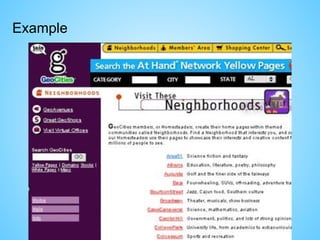
Example
What makes social media social?
Social media differ from traditional or industrial
media in many ways, including quality, reach,
frequency, usability, immediacy, and permanence.
Internet users spend more time with social media
sites than any other type of site.
For content contributors, the benefits of
participating in social media have gone beyond
simply social sharing to building reputation and
bringing in career opportunities and monetary
income.
What makes social media different?
• It’s very, very public
• It’s amplified (one to many, many to many,
possibly millions)
• It’s a continuous live conversation driven
by everyone.
• It’s permanent (Twitter is now archived in
the U.S. Library of Congress)
• It lacks much of the contextual information
of traditional media.
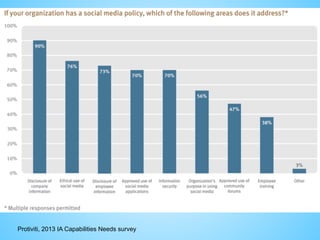
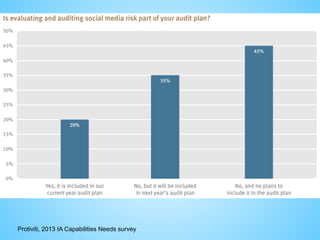
Protiviti, 2013 IA Capabilities Needs survey
Social media risks
Threats and Vulnerabilities
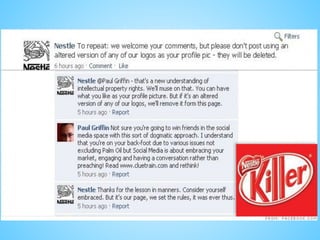
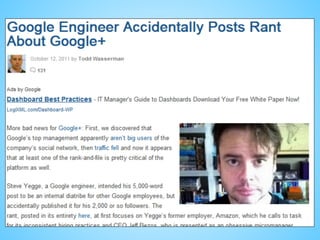
• Employee posting of pictures or information linking
them to the organisation
Risks
• Brand damage
• Reputational damage
• Legal contract damage
Risk Mitigation Techniques
• policy that specifies how employees may use organisation
related images, assets, and intellectual property (IP) in their
online presence.
• awareness training and campaigns to inform employees on
using social media sites
Aanmaken van een vals sociaal media
profiel leidt tot de volgende (gezamenlijke)
juridische aanklachten:

1. Valsheid in informatica (artikel
210bis Sw.);
2. Belaging/stalking (artikel 442bis Sw.);
3. Laster en eerroof (artikel 443 Sw.);
4. Belaging via telecommunicatie (o.a. artikel
145 §3bis van de Wet van 13 juni 2005
betreffende de elektronische communicatie)
5. Aanmatiging van naam (231 Sw).
Social media risks
Threats and Vulnerabilities
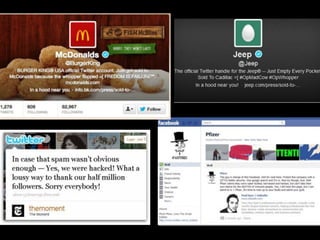
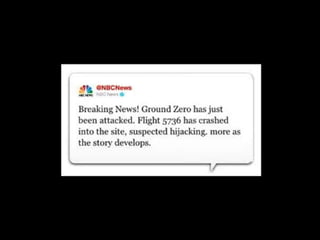
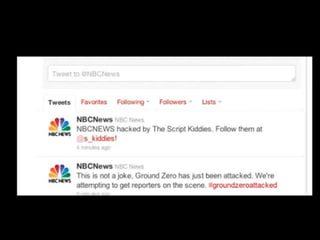
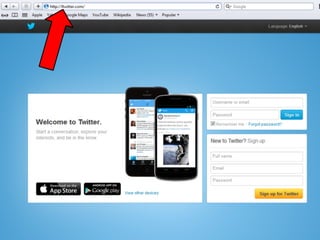
• Exposure to customers and organisation through fraudulent or
hijacked corporate presence
Risks
• Customer backlash/adverse legal actions
• Exposure of customer information
• Reputational damage
• Targeted phishing attacks on customers or employees
Risk Mitigation Techniques
• brand protection firm scans & searches brand misuse.
• periodic informational updates to customers to maintain awareness of
potential fraud and to establish clear guidelines regarding what
information should be posted as part of enterprise social media
presence.
• awareness training and campaigns to inform employees of the risks
involved with using social media sites
Social media risks
Threats and Vulnerabilities
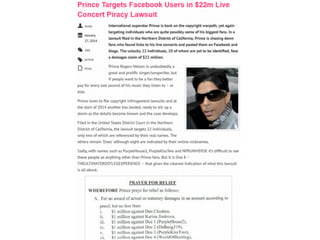
• Mismanagement of electronic communications impacted by
retention regulations or e-discovery
Risks
• Regulatory sanctions and fines
• Adverse legal actions
Risk Mitigation Techniques
• appropriate policies, processes, tools & technologies, training are in
place to ensure that communications via social media that may be
impacted by litigation or regulations are tracked & archived
appropriately.
• ensuring security protocols & audits are adequate
• avoid publishing misleading tweets from consumers
• depending on social media site, maintaining archives may or may
not be a recommended approach.
Once Upon a Time…
• Coastal photos taken 

by photographer 

Kenneth Adelman as

part of erosion 

documentation study
• Study commissioned

by California Coastal Records Project and
contained over 12,000 photographs later placed
on Pictopia.com
• This image was descriptively named Image 3850
The Streisand Effect
is born
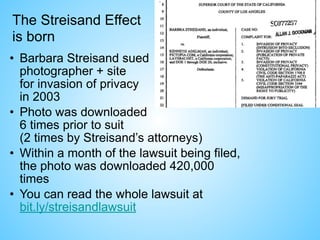
• Barbara Streisand sued

photographer + site

for invasion of privacy

in 2003
• Photo was downloaded 

6 times prior to suit 

(2 times by Streisand’s attorneys)
• Within a month of the lawsuit being filed, 

the photo was downloaded 420,000
times
• You can read the whole lawsuit at 

bit.ly/streisandlawsuit
The Streisand Effect Irony
• “…the property is owned by an entity which cannot
be traced, with any certainty, back to her.”
• “…Plaintiff’s living quarters are set back from the
brink of the cliff…In fact, to catch a glimpse of
[Plaintiff’s living quarters] one would have to walk a
significant distance from the property either to the
north or the south.”
• “…by entering the word ‘Streisand’ on the website’s
own search engine, one is immediately taken to the
detailed picture…”
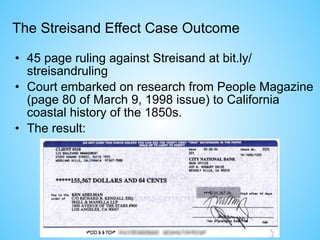
The Streisand Effect Case Outcome
• 45 page ruling against Streisand at bit.ly/
streisandruling
• Court embarked on research from People Magazine
(page 80 of March 9, 1998 issue) to California
coastal history of the 1850s.
• The result:
Social media risks
Threats and Vulnerabilities
• Introduction of viruses and malware to corporate network
Risks
• Data leakage/theft
• “Owned” systems (zombies)
• System downtime
• Resources required to clean systems
Risk Mitigation Techniques
• antivirus & anti malware controls installed and updated.
• content filtering technology to restrict or limit access.
• controls installed on mobile devices such as smartphones.
• social media policies & standards.
• awareness training and campaigns to inform employees of the risks
involved with using social media sites.
• regular audits
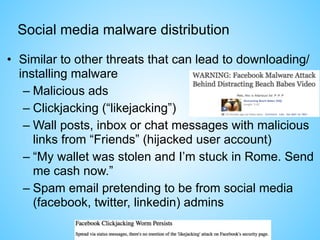
Social media malware distribution
• Similar to other threats that can lead to downloading/
installing malware
– Malicious ads
– Clickjacking (“likejacking”)
– Wall posts, inbox or chat messages with malicious
links from “Friends” (hijacked user account)
– “My wallet was stolen and I’m stuck in Rome. Send
me cash now.”
– Spam email pretending to be from social media
(facebook, twitter, linkedin) admins
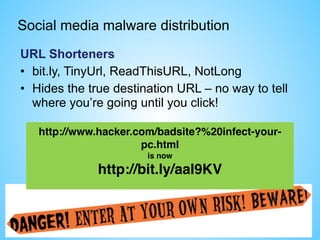
Social media malware distribution
URL Shorteners
• bit.ly, TinyUrl, ReadThisURL, NotLong
• Hides the true destination URL – no way to tell
where you’re going until you click!
http://www.hacker.com/badsite?%20infect-your-
pc.html
is now
http://bit.ly/aaI9KV
Social media malware distribution
3rd
party apps
• Games, quizzes, cutesie stuff
• Untested by Facebook: anyone can write one
• No Terms & Conditions: you either allow or you
don’t
• Installation gives developers rights to look at
your profile and overrides your privacy settings!
Hollywood Celebrity iCloud picture incident
OMG!
Social media risks
Threats and Vulnerabilities
• Move to digital business model increases customer
service expectations
Risks
• Customer dissatisfaction with the responsiveness
received, leading to potential reputational damage for
the organisation and customer retention issues
Risk Mitigation Techniques
• adequate staffing to handle the traffic created from social
media presence.
• notices with clear windows for customer response.
Social media risks
Threats and Vulnerabilities
• Use of personal accounts to communicate work-related
information
Risks
• Privacy violations
• Reputational damage
• Loss of competitive advantage
Risk Mitigation Techniques
• policies address employee posting of work-related
information
• awareness training and campaigns that reinforce policies.
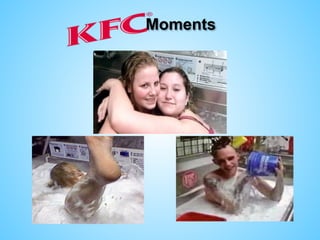
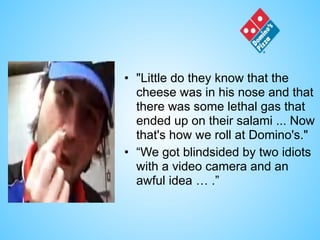
Moments
• "Little do they know that the
cheese was in his nose and that
there was some lethal gas that
ended up on their salami ... Now
that's how we roll at Domino's."
• “We got blindsided by two idiots
with a video camera and an
awful idea … .”
Social media risks
Threats and Vulnerabilities
• Excessive employee use of social media in the workplace
Risks
• Network utilization issues
• Productivity loss
• Increased risk of defamation
• Increased risk of exposure to viruses and malware due to
longer duration of sessions
Risk Mitigation Techniques
• awareness training and campaigns that reinforce policies
• manage accessibility to social media sites via
– content filtering
– limiting network throughput to social media sites.
Social media risks
Threats and Vulnerabilities
• Unclear/undefined content rights to information posted to
social media
Risks
• Organisation’s loss of control/legal rights of information
posted to the social media sites
• Unwanted contracts
Risk Mitigation Techniques
• legal & communications teams review user agreements for
social media sites that are being considered.
• clear policies to employees and customers what information
should be posted as part of the organisation social media
presence.
• (If feasible and appropriate) capability to capture & log all
communications.
Social media risks
Threats and Vulnerabilities
• Employee access to social media via organisation-supplied mobile
devices (smartphones, tablets, laptops,…)
Risks
• Infection of mobile devices
• Data theft from mobile devices
• Circumvention of corporate controls
• Data leakage
Risk Mitigation Techniques
• route corporate mobile devices through corporate network filtering
technology to restrict or limit access to social media sites.
• appropriate controls are installed & continuously updated on mobile
devices.
• policies & standards regarding use of mobile devices to access social
media.
• awareness training and campaigns to inform employees of the risks
involved with using social media sites
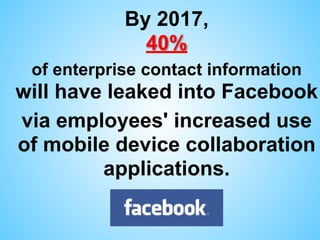
By 2017, 

40%
of enterprise contact information
will have leaked into Facebook
via employees' increased use
of mobile device collaboration
applications.
“Not using social media 

in the workplace 

is starting to make 

about as much sense as 

not using the phone or email.”
Ryan Holmes
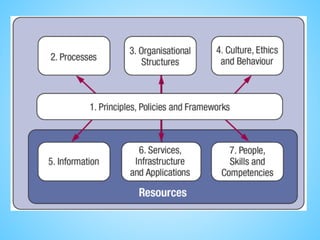
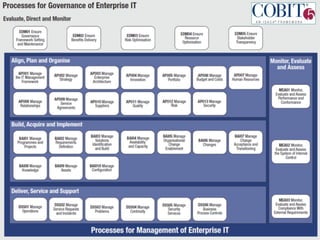
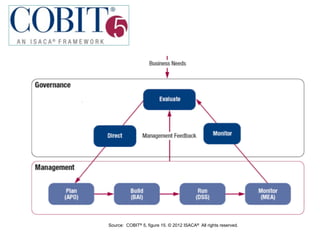
www.isaca.org/cobit
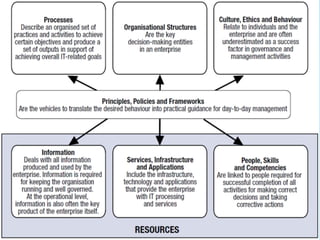
Source: COBIT® 5, figure 15. © 2012 ISACA® All rights reserved.
Principles, policies & frameworks
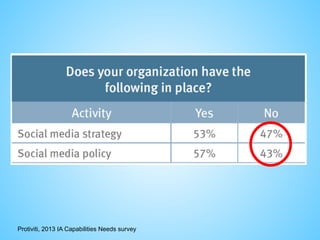
Protiviti, 2013 IA Capabilities Needs survey
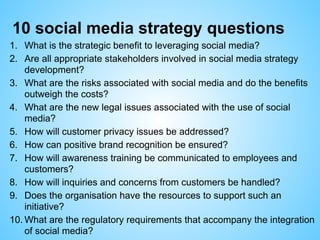
10 social media strategy questions
1. What is the strategic benefit to leveraging social media?
2. Are all appropriate stakeholders involved in social media strategy
development?
3. What are the risks associated with social media and do the benefits
outweigh the costs?
4. What are the new legal issues associated with the use of social
media?
5. How will customer privacy issues be addressed?
6. How can positive brand recognition be ensured?
7. How will awareness training be communicated to employees and
customers?
8. How will inquiries and concerns from customers be handled?
9. Does the organisation have the resources to support such an
initiative?
10. What are the regulatory requirements that accompany the integration
of social media?
What to consider in a social media policy?
• Who is going to manage social media in the organisation?
(consider a collaborative approach)
• The nature of conduct that the employer seeks to protect
itself against
• Who should such a policy apply to: the entire business or
levels within the business, suppliers, business partners
contractors?
• The nature of control over social media use: a total ban,
limited use, total accessibility?
• Authority limits or restrictions for use: is permission
required, content pre-approval, who is responsible for
such approvals?
• What can or cannot be discussed on social media
forums ?
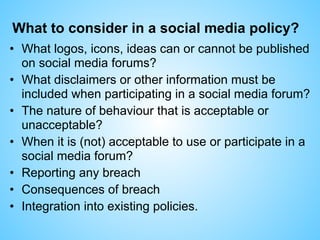
What to consider in a social media policy?
• What logos, icons, ideas can or cannot be published
on social media forums?
• What disclaimers or other information must be
included when participating in a social media forum?
• The nature of behaviour that is acceptable or
unacceptable?
• When it is (not) acceptable to use or participate in a
social media forum?
• Reporting any breach
• Consequences of breach
• Integration into existing policies.
Review existing policies for social media
implications
• Code of Conduct / Ethics
• Conflict of Interest
• User agreements or term of use
• Disclaimers
• Linking agreement
• License agreement
• Logo use guidelines
• Affiliation agreements
Advantages of a social media policy
• Provide guidelines for using social media:
you can define what you consider
appropriate
• Provide recourse as an employer if
something does go wrong
• If you don’t have a policy in place you
may find it hard to discipline staff for what
you consider to be inappropriate use of
social media
Social media guidelines: in general
• Think about language & etiquette: nothing
beats good manners
• Understand that every post is public: this is not
a relationship between you & your computer!
• Consider information you are posting: is it
confidential or private in any way?
• Think about consequences in terms of being
“quoted out of context”
• Have systems in place for dealing with
negative events.
Social media guidelines: private vs
public
• Anything posted on social media should be
considered public – ie front page of the
newspaper
• Know your privacy settings, especially on
Facebook
• Be careful of “linking” private social media
accounts to company accounts
• Share freely that which is public (and appropriate).
• Think about location based social media
networking ie do you want your competition to
know when you’re visiting clients?
Protiviti, 2013 IA Capabilities Needs survey
Privacy basics
Privacy basics
Basic principles: the Data controller
–collect & process personal data only when
this is legally permitted
–respect certain obligations regarding the
processing of personal data;
–respond to complaints regarding breaches
of data protection rules;
–collaborate with national data protection
supervisory authorities
Source: http://ec.europa.eu/justice/data-protection/
Privacy basics
• Personal data must be
– processed legally & fairly;
– collected for explicit & legitimate purposes and used
accordingly;
– adequate, relevant & not excessive in relation to the
purposes for which it is collected and/or further processed;
– accurate & updated where necessary;
– kept any longer than strictly necessary;
– rectified, removed or blocked by the data subject if
incorrect;
– Protected against accidental or unlawful destruction, loss,
alteration and disclosure, particularly when processing
involves data transmission over networks.
Source: http://ec.europa.eu/justice/data-protection/
Privacy basics & social media
Who’s looking?
• Parents
• Friends & family
• Friends of friends & family
• Employers & co-workers
• Customers
• Universities
• Marketing companies & vendors
• Criminals & hackers
• Government agencies
• EVERYONE ELSE
Privacy basics & social media
Dimensions
• Privacy of Personal Communications
• Privacy of Personal Data / Data Protection
• Privacy of Personal Behaviour
• Privacy of the Person
Privacy concerns
• Privacy-Abusive Data Collection
• Privacy-Abusive Service-Provider Rights
• Privacy-Abusive Functionality & User Interfaces
• Privacy-Abusive Data Exploitation
Privacy basics & social media
Disincentives
Impediments
Incentives
Stimulants
Attractors
Detractors
'turn-off' 'turn-on'
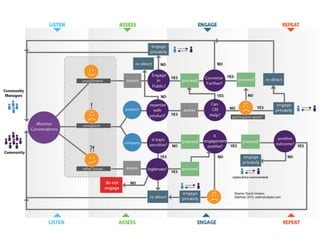
Processes
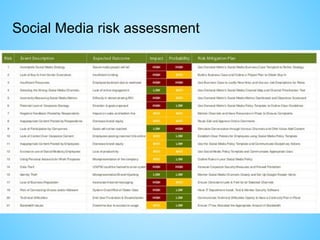
Social Media risk assessment
Corporate governance
: ERM = COSO
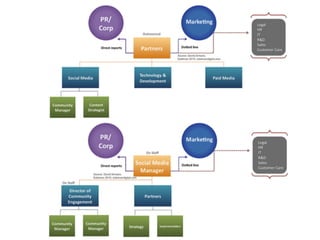
Organisational structure
Roles involved in social media risk management
Information
Services, Infrastructure, Applications
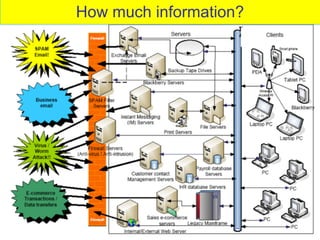
How much information?
Social Media technological controls
• Technology can assist in policy enforcement,
blocking, preventing or identifying potential
incidents.
• Monitor social media via tools like Google
Alerts, Social Mention, Twitter search,….
• Combination of web content filtering, which can
block all access or allow limited access, and provide
protection against malware downloads and end-user
system antimalware, antivirus and operating system
security to counter such attacks.
• A layered approach is optimal.
• Tracking & reporting results
Social Media technological controls
Electronic security
• Viruses
• False links
• Spam
• Phishing
• Hackers
• Web site security
• Internet security
• Electronic discovery
– Electronic information lasts forever
Social Media technological controls
Personal security
• Identity theft
• Stalking
• Cyber-bullying
• Sextortion
• Sexting
• Predators
Culture, Ethics, Behaviour
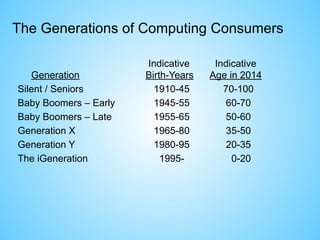
Indicative Indicative

Generation Birth-Years Age in 2014
Silent / Seniors 1910-45 70-100
Baby Boomers – Early 1945-55 60-70
Baby Boomers – Late 1955-65 50-60
Generation X 1965-80 35-50
Generation Y 1980-95 20-35
The iGeneration 1995- 0-20
The Generations of Computing Consumers
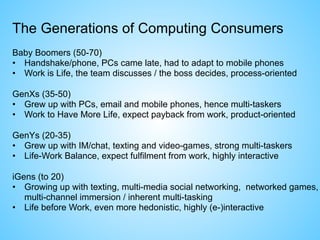
Baby Boomers (50-70)
• Handshake/phone, PCs came late, had to adapt to mobile phones
• Work is Life, the team discusses / the boss decides, process-oriented
GenXs (35-50)
• Grew up with PCs, email and mobile phones, hence multi-taskers
• Work to Have More Life, expect payback from work, product-oriented
GenYs (20-35)
• Grew up with IM/chat, texting and video-games, strong multi-taskers
• Life-Work Balance, expect fulfilment from work, highly interactive
iGens (to 20)
• Growing up with texting, multi-media social networking, networked games,
multi-channel immersion / inherent multi-tasking
• Life before Work, even more hedonistic, highly (e-)interactive
The Generations of Computing Consumers
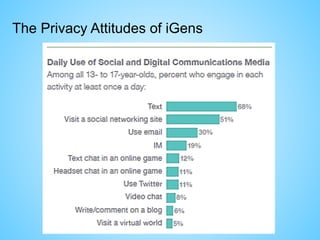
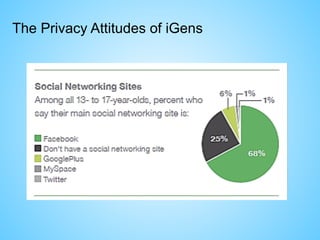
The Privacy Attitudes of iGens
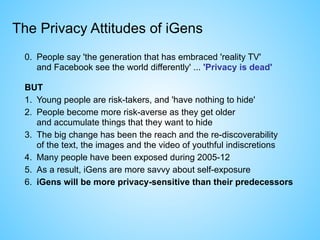
0. People say 'the generation that has embraced 'reality TV' 

and Facebook see the world differently' ... 'Privacy is dead'
BUT
1. Young people are risk-takers, and 'have nothing to hide'
2. People become more risk-averse as they get older 

and accumulate things that they want to hide
3. The big change has been the reach and the re-discoverability 

of the text, the images and the video of youthful indiscretions
4. Many people have been exposed during 2005-12
5. As a result, iGens are more savvy about self-exposure
6. iGens will be more privacy-sensitive than their predecessors
The Privacy Attitudes of iGens
Share appropriately
• Caution everyone about the information they share with
family members.
• The greatest social media risks revolve around discussing:
• company’s finances
• strategies & goals
• brand & trade secrets
• proprietary research
• unreleased advertising
• personal information of employees or clients
• Different perceptions on social media communications
– Unofficial communications (It’s private, isn’t it?...)
– Ephemeral communications (Did we really say that?)
– Anonymous communications (Catch me if you can!)
Trust your gut feeling
• If you feel like you may have
come upon information you are
not authorized to have, err on
the side of not using it.
• In other words: When in doubt,
don’t. Once it’s out there, it’s
out there forever.
• It’s truly better to be safe than
sorry.
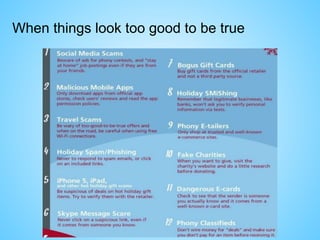
When things look too good to be true
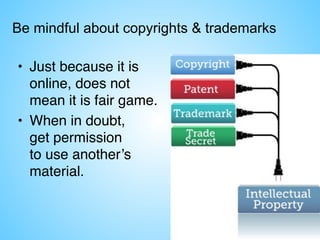
Be mindful about copyrights & trademarks
• Just because it is
online, does not
mean it is fair game.
• When in doubt, 

get permission 

to use another’s
material.
“More companies are discovering
that an über-connected workplace 

is not just about implementing a
new set of tools: it is also about
embracing a cultural shift to
create an open environment
where employees are encouraged
to share, innovate and collaborate
virtually.” 

Willyerd & Meister, HarvardBusiness.org
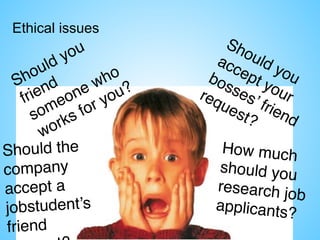
Ethical issues
Should you
friend
someone who
works for you?
Should you
accept your
bosses’ friend
request?
Should the
company
accept a
jobstudent’s
friend
How much
should you
research job
applicants?
People, Skills, Competencies
Social media awareness and training program
Personal use in the workplace:
• is it allowed?
• nondisclosure/posting of business-related content
• discussion of workplace-related topics
• inappropriate sites, content or conversations
Personal use outside the workplace:
• nondisclosure/posting of business-related content
• standard disclaimers if identifying the employer
• dangers of posting too much personal information
Business use:
• is it allowed?
• process to gain approval for use
• scope of topics or information permitted to flow through this channel
• disallowed activities (installation of applications, playing games, etc.)
• escalation process for customer issues
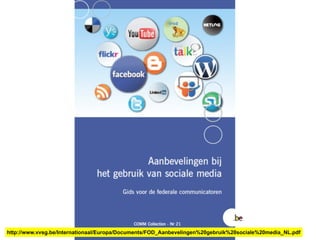
http://www.vvsg.be/Internationaal/Europa/Documents/FOD_Aanbevelingen%20gebruik%20sociale%20media_NL.pdf
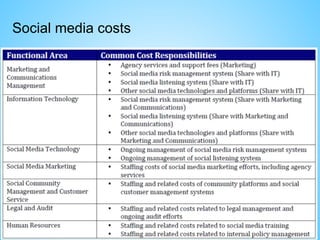
Social media costs
Social media ROI
1. Higher customer satisfaction and interaction
through personalized webcare.
2. Know about (problems with) your new
products and services faster.
3. Increase impact of own content. Without filter.
4. Strengthen your reputation.
5. Strengthen your relationships.
6. Strengthen your controls.
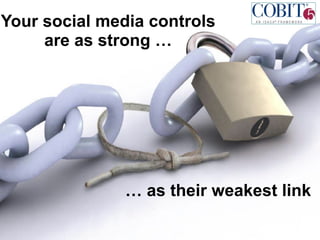
Your social media controls
are as strong …
… as their weakest link
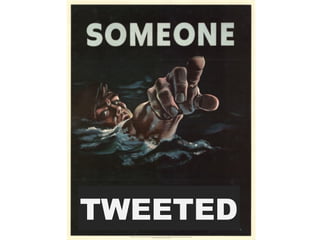
TWEETED
145
For more information…
Marc Vael

President
http://www.isaca.org/
http://www.isaca.be/
marc@vael.net
Follow Marc Vael on Twitter http://twitter.com/marcvael
Join Marc Vael on Linkedin: http://www.linkedin.com/in/marcvael

Social media risks and controls

  • 1.
    Marc Vael Managing socialmedia risks 
 to an acceptable level
  • 3.
    Definition of socialmedia The social interaction among people in which they create, share or exchange information and ideas in virtual communities and networks. A group of Internet-based applications that build on the ideological and technological foundations of Web 2.0, and that allow the creation and exchange of user-generated content.
  • 4.
    Social media andtechnology Social media depend on mobile and web-based technologies to create highly interactive platforms through which individuals and communities share, co-create, discuss, and modify user-generated content. Social media introduce substantial and pervasive changes to communication between organizations, communities, and individuals.
  • 5.
  • 8.
    What makes socialmedia social? Social media differ from traditional or industrial media in many ways, including quality, reach, frequency, usability, immediacy, and permanence. Internet users spend more time with social media sites than any other type of site. For content contributors, the benefits of participating in social media have gone beyond simply social sharing to building reputation and bringing in career opportunities and monetary income.
  • 9.
    What makes socialmedia different? • It’s very, very public • It’s amplified (one to many, many to many, possibly millions) • It’s a continuous live conversation driven by everyone. • It’s permanent (Twitter is now archived in the U.S. Library of Congress) • It lacks much of the contextual information of traditional media.
  • 12.
    Protiviti, 2013 IACapabilities Needs survey
  • 13.
    Social media risks Threatsand Vulnerabilities • Employee posting of pictures or information linking them to the organisation Risks • Brand damage • Reputational damage • Legal contract damage Risk Mitigation Techniques • policy that specifies how employees may use organisation related images, assets, and intellectual property (IP) in their online presence. • awareness training and campaigns to inform employees on using social media sites
  • 16.
    Aanmaken van eenvals sociaal media profiel leidt tot de volgende (gezamenlijke) juridische aanklachten:
 1. Valsheid in informatica (artikel 210bis Sw.); 2. Belaging/stalking (artikel 442bis Sw.); 3. Laster en eerroof (artikel 443 Sw.); 4. Belaging via telecommunicatie (o.a. artikel 145 §3bis van de Wet van 13 juni 2005 betreffende de elektronische communicatie) 5. Aanmatiging van naam (231 Sw).
  • 19.
    Social media risks Threatsand Vulnerabilities • Exposure to customers and organisation through fraudulent or hijacked corporate presence Risks • Customer backlash/adverse legal actions • Exposure of customer information • Reputational damage • Targeted phishing attacks on customers or employees Risk Mitigation Techniques • brand protection firm scans & searches brand misuse. • periodic informational updates to customers to maintain awareness of potential fraud and to establish clear guidelines regarding what information should be posted as part of enterprise social media presence. • awareness training and campaigns to inform employees of the risks involved with using social media sites
  • 26.
    Social media risks Threatsand Vulnerabilities • Mismanagement of electronic communications impacted by retention regulations or e-discovery Risks • Regulatory sanctions and fines • Adverse legal actions Risk Mitigation Techniques • appropriate policies, processes, tools & technologies, training are in place to ensure that communications via social media that may be impacted by litigation or regulations are tracked & archived appropriately. • ensuring security protocols & audits are adequate • avoid publishing misleading tweets from consumers • depending on social media site, maintaining archives may or may not be a recommended approach.
  • 28.
    Once Upon aTime… • Coastal photos taken 
 by photographer 
 Kenneth Adelman as
 part of erosion 
 documentation study • Study commissioned
 by California Coastal Records Project and contained over 12,000 photographs later placed on Pictopia.com • This image was descriptively named Image 3850
  • 29.
    The Streisand Effect isborn • Barbara Streisand sued
 photographer + site
 for invasion of privacy
 in 2003 • Photo was downloaded 
 6 times prior to suit 
 (2 times by Streisand’s attorneys) • Within a month of the lawsuit being filed, 
 the photo was downloaded 420,000 times • You can read the whole lawsuit at 
 bit.ly/streisandlawsuit
  • 30.
    The Streisand EffectIrony • “…the property is owned by an entity which cannot be traced, with any certainty, back to her.” • “…Plaintiff’s living quarters are set back from the brink of the cliff…In fact, to catch a glimpse of [Plaintiff’s living quarters] one would have to walk a significant distance from the property either to the north or the south.” • “…by entering the word ‘Streisand’ on the website’s own search engine, one is immediately taken to the detailed picture…”
  • 31.
    The Streisand EffectCase Outcome • 45 page ruling against Streisand at bit.ly/ streisandruling • Court embarked on research from People Magazine (page 80 of March 9, 1998 issue) to California coastal history of the 1850s. • The result:
  • 32.
    Social media risks Threatsand Vulnerabilities • Introduction of viruses and malware to corporate network Risks • Data leakage/theft • “Owned” systems (zombies) • System downtime • Resources required to clean systems Risk Mitigation Techniques • antivirus & anti malware controls installed and updated. • content filtering technology to restrict or limit access. • controls installed on mobile devices such as smartphones. • social media policies & standards. • awareness training and campaigns to inform employees of the risks involved with using social media sites. • regular audits
  • 33.
    Social media malwaredistribution • Similar to other threats that can lead to downloading/ installing malware – Malicious ads – Clickjacking (“likejacking”) – Wall posts, inbox or chat messages with malicious links from “Friends” (hijacked user account) – “My wallet was stolen and I’m stuck in Rome. Send me cash now.” – Spam email pretending to be from social media (facebook, twitter, linkedin) admins
  • 34.
    Social media malwaredistribution URL Shorteners • bit.ly, TinyUrl, ReadThisURL, NotLong • Hides the true destination URL – no way to tell where you’re going until you click! http://www.hacker.com/badsite?%20infect-your- pc.html is now http://bit.ly/aaI9KV
  • 35.
    Social media malwaredistribution 3rd party apps • Games, quizzes, cutesie stuff • Untested by Facebook: anyone can write one • No Terms & Conditions: you either allow or you don’t • Installation gives developers rights to look at your profile and overrides your privacy settings!
  • 37.
  • 40.
  • 47.
    Social media risks Threatsand Vulnerabilities • Move to digital business model increases customer service expectations Risks • Customer dissatisfaction with the responsiveness received, leading to potential reputational damage for the organisation and customer retention issues Risk Mitigation Techniques • adequate staffing to handle the traffic created from social media presence. • notices with clear windows for customer response.
  • 48.
    Social media risks Threatsand Vulnerabilities • Use of personal accounts to communicate work-related information Risks • Privacy violations • Reputational damage • Loss of competitive advantage Risk Mitigation Techniques • policies address employee posting of work-related information • awareness training and campaigns that reinforce policies.
  • 55.
  • 56.
    • "Little dothey know that the cheese was in his nose and that there was some lethal gas that ended up on their salami ... Now that's how we roll at Domino's." • “We got blindsided by two idiots with a video camera and an awful idea … .”
  • 60.
    Social media risks Threatsand Vulnerabilities • Excessive employee use of social media in the workplace Risks • Network utilization issues • Productivity loss • Increased risk of defamation • Increased risk of exposure to viruses and malware due to longer duration of sessions Risk Mitigation Techniques • awareness training and campaigns that reinforce policies • manage accessibility to social media sites via – content filtering – limiting network throughput to social media sites.
  • 61.
    Social media risks Threatsand Vulnerabilities • Unclear/undefined content rights to information posted to social media Risks • Organisation’s loss of control/legal rights of information posted to the social media sites • Unwanted contracts Risk Mitigation Techniques • legal & communications teams review user agreements for social media sites that are being considered. • clear policies to employees and customers what information should be posted as part of the organisation social media presence. • (If feasible and appropriate) capability to capture & log all communications.
  • 62.
    Social media risks Threatsand Vulnerabilities • Employee access to social media via organisation-supplied mobile devices (smartphones, tablets, laptops,…) Risks • Infection of mobile devices • Data theft from mobile devices • Circumvention of corporate controls • Data leakage Risk Mitigation Techniques • route corporate mobile devices through corporate network filtering technology to restrict or limit access to social media sites. • appropriate controls are installed & continuously updated on mobile devices. • policies & standards regarding use of mobile devices to access social media. • awareness training and campaigns to inform employees of the risks involved with using social media sites
  • 63.
    By 2017, 
 40% ofenterprise contact information will have leaked into Facebook via employees' increased use of mobile device collaboration applications.
  • 65.
    “Not using socialmedia 
 in the workplace 
 is starting to make 
 about as much sense as 
 not using the phone or email.” Ryan Holmes
  • 66.
  • 69.
    Source: COBIT® 5,figure 15. © 2012 ISACA® All rights reserved.
  • 71.
  • 74.
    Protiviti, 2013 IACapabilities Needs survey
  • 75.
    Protiviti, 2013 IACapabilities Needs survey
  • 76.
    10 social mediastrategy questions 1. What is the strategic benefit to leveraging social media? 2. Are all appropriate stakeholders involved in social media strategy development? 3. What are the risks associated with social media and do the benefits outweigh the costs? 4. What are the new legal issues associated with the use of social media? 5. How will customer privacy issues be addressed? 6. How can positive brand recognition be ensured? 7. How will awareness training be communicated to employees and customers? 8. How will inquiries and concerns from customers be handled? 9. Does the organisation have the resources to support such an initiative? 10. What are the regulatory requirements that accompany the integration of social media?
  • 78.
    What to considerin a social media policy? • Who is going to manage social media in the organisation? (consider a collaborative approach) • The nature of conduct that the employer seeks to protect itself against • Who should such a policy apply to: the entire business or levels within the business, suppliers, business partners contractors? • The nature of control over social media use: a total ban, limited use, total accessibility? • Authority limits or restrictions for use: is permission required, content pre-approval, who is responsible for such approvals? • What can or cannot be discussed on social media forums ?
  • 79.
    What to considerin a social media policy? • What logos, icons, ideas can or cannot be published on social media forums? • What disclaimers or other information must be included when participating in a social media forum? • The nature of behaviour that is acceptable or unacceptable? • When it is (not) acceptable to use or participate in a social media forum? • Reporting any breach • Consequences of breach • Integration into existing policies.
  • 80.
    Review existing policiesfor social media implications • Code of Conduct / Ethics • Conflict of Interest • User agreements or term of use • Disclaimers • Linking agreement • License agreement • Logo use guidelines • Affiliation agreements
  • 82.
    Advantages of asocial media policy • Provide guidelines for using social media: you can define what you consider appropriate • Provide recourse as an employer if something does go wrong • If you don’t have a policy in place you may find it hard to discipline staff for what you consider to be inappropriate use of social media
  • 83.
    Social media guidelines:in general • Think about language & etiquette: nothing beats good manners • Understand that every post is public: this is not a relationship between you & your computer! • Consider information you are posting: is it confidential or private in any way? • Think about consequences in terms of being “quoted out of context” • Have systems in place for dealing with negative events.
  • 84.
    Social media guidelines:private vs public • Anything posted on social media should be considered public – ie front page of the newspaper • Know your privacy settings, especially on Facebook • Be careful of “linking” private social media accounts to company accounts • Share freely that which is public (and appropriate). • Think about location based social media networking ie do you want your competition to know when you’re visiting clients?
  • 86.
    Protiviti, 2013 IACapabilities Needs survey
  • 87.
  • 88.
    Privacy basics Basic principles:the Data controller –collect & process personal data only when this is legally permitted –respect certain obligations regarding the processing of personal data; –respond to complaints regarding breaches of data protection rules; –collaborate with national data protection supervisory authorities Source: http://ec.europa.eu/justice/data-protection/
  • 89.
    Privacy basics • Personaldata must be – processed legally & fairly; – collected for explicit & legitimate purposes and used accordingly; – adequate, relevant & not excessive in relation to the purposes for which it is collected and/or further processed; – accurate & updated where necessary; – kept any longer than strictly necessary; – rectified, removed or blocked by the data subject if incorrect; – Protected against accidental or unlawful destruction, loss, alteration and disclosure, particularly when processing involves data transmission over networks. Source: http://ec.europa.eu/justice/data-protection/
  • 90.
    Privacy basics &social media Who’s looking? • Parents • Friends & family • Friends of friends & family • Employers & co-workers • Customers • Universities • Marketing companies & vendors • Criminals & hackers • Government agencies • EVERYONE ELSE
  • 92.
    Privacy basics &social media
  • 93.
    Privacy basics &social media Dimensions • Privacy of Personal Communications • Privacy of Personal Data / Data Protection • Privacy of Personal Behaviour • Privacy of the Person Privacy concerns • Privacy-Abusive Data Collection • Privacy-Abusive Service-Provider Rights • Privacy-Abusive Functionality & User Interfaces • Privacy-Abusive Data Exploitation
  • 94.
    Privacy basics &social media Disincentives Impediments Incentives Stimulants Attractors Detractors 'turn-off' 'turn-on'
  • 97.
  • 100.
  • 101.
    Corporate governance : ERM= COSO Organisational structure
  • 102.
    Roles involved insocial media risk management
  • 105.
  • 108.
  • 111.
  • 112.
    Social Media technologicalcontrols • Technology can assist in policy enforcement, blocking, preventing or identifying potential incidents. • Monitor social media via tools like Google Alerts, Social Mention, Twitter search,…. • Combination of web content filtering, which can block all access or allow limited access, and provide protection against malware downloads and end-user system antimalware, antivirus and operating system security to counter such attacks. • A layered approach is optimal. • Tracking & reporting results
  • 113.
    Social Media technologicalcontrols Electronic security • Viruses • False links • Spam • Phishing • Hackers • Web site security • Internet security • Electronic discovery – Electronic information lasts forever
  • 114.
    Social Media technologicalcontrols Personal security • Identity theft • Stalking • Cyber-bullying • Sextortion • Sexting • Predators
  • 115.
  • 116.
    Indicative Indicative
 Generation Birth-YearsAge in 2014 Silent / Seniors 1910-45 70-100 Baby Boomers – Early 1945-55 60-70 Baby Boomers – Late 1955-65 50-60 Generation X 1965-80 35-50 Generation Y 1980-95 20-35 The iGeneration 1995- 0-20 The Generations of Computing Consumers
  • 117.
    Baby Boomers (50-70) •Handshake/phone, PCs came late, had to adapt to mobile phones • Work is Life, the team discusses / the boss decides, process-oriented GenXs (35-50) • Grew up with PCs, email and mobile phones, hence multi-taskers • Work to Have More Life, expect payback from work, product-oriented GenYs (20-35) • Grew up with IM/chat, texting and video-games, strong multi-taskers • Life-Work Balance, expect fulfilment from work, highly interactive iGens (to 20) • Growing up with texting, multi-media social networking, networked games, multi-channel immersion / inherent multi-tasking • Life before Work, even more hedonistic, highly (e-)interactive The Generations of Computing Consumers
  • 118.
  • 119.
  • 120.
  • 121.
  • 122.
    0. People say'the generation that has embraced 'reality TV' 
 and Facebook see the world differently' ... 'Privacy is dead' BUT 1. Young people are risk-takers, and 'have nothing to hide' 2. People become more risk-averse as they get older 
 and accumulate things that they want to hide 3. The big change has been the reach and the re-discoverability 
 of the text, the images and the video of youthful indiscretions 4. Many people have been exposed during 2005-12 5. As a result, iGens are more savvy about self-exposure 6. iGens will be more privacy-sensitive than their predecessors The Privacy Attitudes of iGens
  • 123.
    Share appropriately • Cautioneveryone about the information they share with family members. • The greatest social media risks revolve around discussing: • company’s finances • strategies & goals • brand & trade secrets • proprietary research • unreleased advertising • personal information of employees or clients • Different perceptions on social media communications – Unofficial communications (It’s private, isn’t it?...) – Ephemeral communications (Did we really say that?) – Anonymous communications (Catch me if you can!)
  • 124.
    Trust your gutfeeling • If you feel like you may have come upon information you are not authorized to have, err on the side of not using it. • In other words: When in doubt, don’t. Once it’s out there, it’s out there forever. • It’s truly better to be safe than sorry.
  • 125.
    When things looktoo good to be true
  • 127.
    Be mindful aboutcopyrights & trademarks • Just because it is online, does not mean it is fair game. • When in doubt, 
 get permission 
 to use another’s material.
  • 128.
    “More companies arediscovering that an über-connected workplace 
 is not just about implementing a new set of tools: it is also about embracing a cultural shift to create an open environment where employees are encouraged to share, innovate and collaborate virtually.” 
 Willyerd & Meister, HarvardBusiness.org
  • 129.
    Ethical issues Should you friend someonewho works for you? Should you accept your bosses’ friend request? Should the company accept a jobstudent’s friend How much should you research job applicants?
  • 130.
  • 131.
    Social media awarenessand training program Personal use in the workplace: • is it allowed? • nondisclosure/posting of business-related content • discussion of workplace-related topics • inappropriate sites, content or conversations Personal use outside the workplace: • nondisclosure/posting of business-related content • standard disclaimers if identifying the employer • dangers of posting too much personal information Business use: • is it allowed? • process to gain approval for use • scope of topics or information permitted to flow through this channel • disallowed activities (installation of applications, playing games, etc.) • escalation process for customer issues
  • 132.
  • 137.
  • 139.
    Social media ROI 1.Higher customer satisfaction and interaction through personalized webcare. 2. Know about (problems with) your new products and services faster. 3. Increase impact of own content. Without filter. 4. Strengthen your reputation. 5. Strengthen your relationships. 6. Strengthen your controls.
  • 140.
    Your social mediacontrols are as strong … … as their weakest link
  • 143.
  • 145.
  • 147.
    For more information… MarcVael
 President http://www.isaca.org/ http://www.isaca.be/ marc@vael.net Follow Marc Vael on Twitter http://twitter.com/marcvael Join Marc Vael on Linkedin: http://www.linkedin.com/in/marcvael