SOCIAL MEDIA FOR FESTIVALS
Creating Content for your Festival or Event
CONTENT PLANNING TOOLS
   From previous sessions:
     Social Media Canvas
     Content Planning Calendar

   Set up timescales for your events and plan
    accordingly
     May decide to focus in 2 months prior to event
     May need all year round strategy
     Partly determined by your resources

 Marketing your event may be responsibility of one
  person/group
 Social media for event is wider responsibility
MESSAGES ACROSS ALL YOUR
COMMUNICATION NEEDS

 Don’t re-invent messages – think of what you want
  to say and the best mediums to use to say it
 Who else can help you spread the message?

 Breaking down news, to spread out spreading the
  news!
 Phrasing news for you to spread and for others to
  pass on
 Where does social media fit into your wider
  communication, PR and marketing plan?
 How can your partnerships help you spread the
  word?
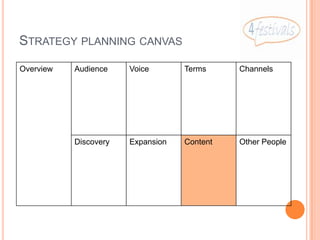
STRATEGY PLANNING CANVAS
Overview   Audience    Voice       Terms     Channels


           Discovery   Expansion   Content   Other People
CONTENT PLANNING CALENDAR
 You have a sample Excel spreadsheet with dates in
  a column & columns for significant events and
  media to be used
 If this doesn’t work for you, then create your own
  methods – but make sure everyone can share as
  this will be a group effort – think about Dropbox or
  Google Drive for sharing
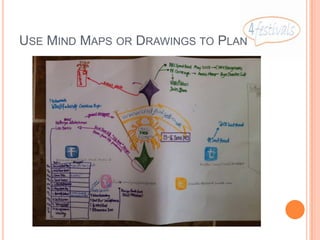
USE MIND MAPS OR DRAWINGS TO PLAN
FILLING THE CALENDAR
 Significant events in the year – seasons, festivals
 Dates for your event

 Milestones for your event

 Significant other events in your area

 Events of interest to your specialist group
       E.g. Radio or TV programmes your audience might be
        interested in
   Similar events in other parts of the country
SOME EXAMPLES – 23 MARCH 2013
 Wedding fair – look for dates of “big weddings” and
  write some content about that
 Musical event – check the calendars of your artistes
  and see where they are before/after your event
 Business fair – significant dates for signing up for
  the event
 Baby tights – different tights for different seasons
 Health workshops – significant types of allergy in
  different seasons
 Art exhibitions – interviews with artists, discussions
  of other events they’re attending
WHAT TYPE OF CONTENT?
   Different media will require different approaches
       Written articles
       Photography
       Videos
       Sound clips
       Content already created by others – re-use by making
        comment and adding your voice
WE’RE A NEW EVENT!
   We have no history – where do we get content?
       Use royalty free stock images to create an impression
           http://sixrevisions.com/resources/15-best-places-for-designers-
            to-get-free-stock-photos-online/
     Take close up images of some of the products you’ll
      have on sale – just enough to create an impression
     Search for video/photographs taken by others at
      previous similar events
     Ask participants if you can use their photos
WHAT GOES WHERE?
   Website core place with (say) one update per week or
    month
   Facebook page – publish your latest web content and
    add some content to get people interacting – have
    discussions, share photographs
   Twitter – can be more frequent updates, more sharing of
    content from others
   YouTube – can collect videos from others in Playlists
    until you have content of your own
   Photo galleries – set up albums within Facebook, web
    pages within your site, groups on Flickr
   Pinterest - make collections of photographs others have
    shared to show your vision of your event
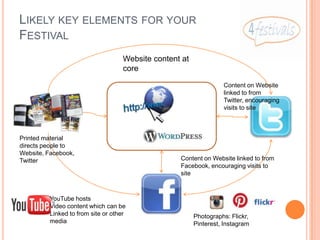
LIKELY KEY ELEMENTS FOR YOUR
FESTIVAL
                                    Website content at
                                    core

                                                                   Content on Website
                                                                   linked to from
                                                                   Twitter, encouraging
                                                                   visits to site


Printed material
directs people to
Website, Facebook,
Twitter                                            Content on Website linked to from
                                                   Facebook, encouraging visits to
                                                   site


         YouTube hosts
         Video content which can be
         Linked to from site or other                    Photographs: Flickr,
         media                                           Pinterest, Instagram
GET BUSY, GET SOCIAL

 •Twitter https://twitter.com/#!/SusanMcNaughton
 •Facebook: https://www.facebook.com/Susan.McNaughton.Social.Media
 •Web: http://www.susanmcnaughton.com
 •LinkedIn: http://www.linkedin.com/in/SusanMcNaughton

Social media for festivals creating content

  • 1.
    SOCIAL MEDIA FORFESTIVALS Creating Content for your Festival or Event
  • 2.
    CONTENT PLANNING TOOLS  From previous sessions:  Social Media Canvas  Content Planning Calendar  Set up timescales for your events and plan accordingly  May decide to focus in 2 months prior to event  May need all year round strategy  Partly determined by your resources  Marketing your event may be responsibility of one person/group  Social media for event is wider responsibility
  • 3.
    MESSAGES ACROSS ALLYOUR COMMUNICATION NEEDS  Don’t re-invent messages – think of what you want to say and the best mediums to use to say it  Who else can help you spread the message?  Breaking down news, to spread out spreading the news!  Phrasing news for you to spread and for others to pass on  Where does social media fit into your wider communication, PR and marketing plan?  How can your partnerships help you spread the word?
  • 4.
    STRATEGY PLANNING CANVAS Overview Audience Voice Terms Channels Discovery Expansion Content Other People
  • 5.
    CONTENT PLANNING CALENDAR You have a sample Excel spreadsheet with dates in a column & columns for significant events and media to be used  If this doesn’t work for you, then create your own methods – but make sure everyone can share as this will be a group effort – think about Dropbox or Google Drive for sharing
  • 6.
    USE MIND MAPSOR DRAWINGS TO PLAN
  • 7.
    FILLING THE CALENDAR Significant events in the year – seasons, festivals  Dates for your event  Milestones for your event  Significant other events in your area  Events of interest to your specialist group  E.g. Radio or TV programmes your audience might be interested in  Similar events in other parts of the country
  • 8.
    SOME EXAMPLES –23 MARCH 2013  Wedding fair – look for dates of “big weddings” and write some content about that  Musical event – check the calendars of your artistes and see where they are before/after your event  Business fair – significant dates for signing up for the event  Baby tights – different tights for different seasons  Health workshops – significant types of allergy in different seasons  Art exhibitions – interviews with artists, discussions of other events they’re attending
  • 9.
    WHAT TYPE OFCONTENT?  Different media will require different approaches  Written articles  Photography  Videos  Sound clips  Content already created by others – re-use by making comment and adding your voice
  • 10.
    WE’RE A NEWEVENT!  We have no history – where do we get content?  Use royalty free stock images to create an impression  http://sixrevisions.com/resources/15-best-places-for-designers- to-get-free-stock-photos-online/  Take close up images of some of the products you’ll have on sale – just enough to create an impression  Search for video/photographs taken by others at previous similar events  Ask participants if you can use their photos
  • 11.
    WHAT GOES WHERE?  Website core place with (say) one update per week or month  Facebook page – publish your latest web content and add some content to get people interacting – have discussions, share photographs  Twitter – can be more frequent updates, more sharing of content from others  YouTube – can collect videos from others in Playlists until you have content of your own  Photo galleries – set up albums within Facebook, web pages within your site, groups on Flickr  Pinterest - make collections of photographs others have shared to show your vision of your event
  • 12.
    LIKELY KEY ELEMENTSFOR YOUR FESTIVAL Website content at core Content on Website linked to from Twitter, encouraging visits to site Printed material directs people to Website, Facebook, Twitter Content on Website linked to from Facebook, encouraging visits to site YouTube hosts Video content which can be Linked to from site or other Photographs: Flickr, media Pinterest, Instagram
  • 13.
    GET BUSY, GETSOCIAL •Twitter https://twitter.com/#!/SusanMcNaughton •Facebook: https://www.facebook.com/Susan.McNaughton.Social.Media •Web: http://www.susanmcnaughton.com •LinkedIn: http://www.linkedin.com/in/SusanMcNaughton