U S I N G P I N T E R E S T F O R
Y O U R F E S T I V A L A N D
E V E N T S
S O C I A L M E D I A F O R F E S T I V A L S
P I N T E R E S T
• A virtual pin-board on which you save interesting
images from the internet
• https://www.youtube.com/watch?v=1QkMOdW0Kyc
• Images can be clicked to take you to the web page
they came from
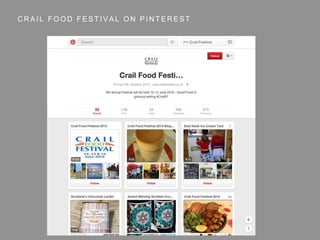
C R A I L F O O D F E S T I V A L O N P I N T E R E S T
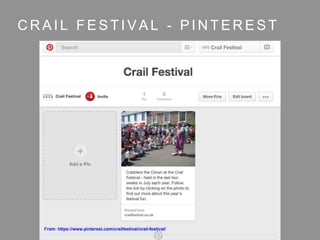
C R A I L F E S T I V A L - P I N T E R E S T
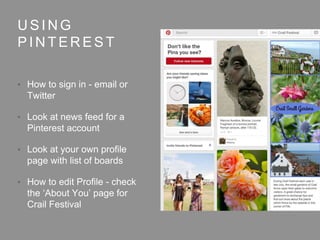
U S I N G
P I N T E R E S T
• How to sign in - email or
Twitter
• Look at news feed for a
Pinterest account
• Look at your own profile
page with list of boards
• How to edit Profile - check
the ‘About You’ page for
Crail Festival
P I N N I N G
F R O M
P I N T E R E S T
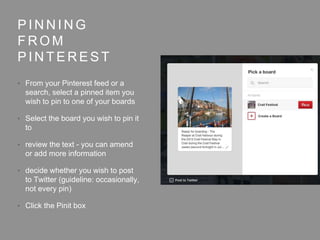
• From your Pinterest feed or a
search, select a pinned item you
wish to pin to one of your boards
• Select the board you wish to pin it
to
• review the text - you can amend
or add more information
• decide whether you wish to post
to Twitter (guideline: occasionally,
not every pin)
• Click the Pinit box
P I N N I N G
F R O M T H E
W E B
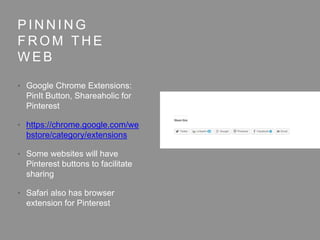
• Google Chrome Extensions:
PinIt Button, Shareaholic for
Pinterest
• https://chrome.google.com/we
bstore/category/extensions
• Some websites will have
Pinterest buttons to facilitate
sharing
• Safari also has browser
extension for Pinterest
P L A N N I N G Y O U R I N B O A R D S
• Every pinboard has a unique web address
• https://www.pinterest.com/crailfestival/crail-festival/
• https://www.pinterest.com/crailfoodfest/scotlands-
chocolate-larder/
• Think about this when naming your boards to make
them easy to find in searches
susan@2crail.com
pinterest.com/2crail
Twitter: @2crail

Pinterest for Festivals and Events

  • 1.
    U S IN G P I N T E R E S T F O R Y O U R F E S T I V A L A N D E V E N T S S O C I A L M E D I A F O R F E S T I V A L S
  • 2.
    P I NT E R E S T • A virtual pin-board on which you save interesting images from the internet • https://www.youtube.com/watch?v=1QkMOdW0Kyc • Images can be clicked to take you to the web page they came from
  • 3.
    C R AI L F O O D F E S T I V A L O N P I N T E R E S T
  • 4.
    C R AI L F E S T I V A L - P I N T E R E S T
  • 5.
    U S IN G P I N T E R E S T • How to sign in - email or Twitter • Look at news feed for a Pinterest account • Look at your own profile page with list of boards • How to edit Profile - check the ‘About You’ page for Crail Festival
  • 6.
    P I NN I N G F R O M P I N T E R E S T • From your Pinterest feed or a search, select a pinned item you wish to pin to one of your boards • Select the board you wish to pin it to • review the text - you can amend or add more information • decide whether you wish to post to Twitter (guideline: occasionally, not every pin) • Click the Pinit box
  • 7.
    P I NN I N G F R O M T H E W E B • Google Chrome Extensions: PinIt Button, Shareaholic for Pinterest • https://chrome.google.com/we bstore/category/extensions • Some websites will have Pinterest buttons to facilitate sharing • Safari also has browser extension for Pinterest
  • 8.
    P L AN N I N G Y O U R I N B O A R D S • Every pinboard has a unique web address • https://www.pinterest.com/crailfestival/crail-festival/ • https://www.pinterest.com/crailfoodfest/scotlands- chocolate-larder/ • Think about this when naming your boards to make them easy to find in searches
  • 9.