SOCIAL MEDIA & CYBERBULLYING
Joshua Nelson
10522132 Positive Classroom Management Techniques
Keynotes about Social Media
 “Forms of Communication either Internet or text-based that support
social interactions of individuals.” (U.S. Dept. of Education, 2012)
 Nearly all youth and adults use social media
 90% of 13 to 17 year-olds reported using some form of social media (2012)
 Over 60% of 13 to 17 year-olds have at least one profile on a social
networking site.
 Social Media increases communication speed
 Educators, parents, and caregivers could assess situations in length of time
 QUICK THINKING, QUICK RESPONSE!
https://www.nasponline.org/resources-and-publications/resources/school-safety-and-crisis/social-media-and-school-crises
http://www.aacap.org/AACAP/Families_and_Youth/Facts_for_Families/FFF-Guide/Children-and-Social-Networking-100.aspx
Statistics
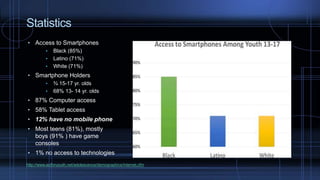
• Access to Smartphones
• Black (85%)
• Latino (71%)
• White (71%)
• Smartphone Holders
• ¾ 15-17 yr. olds
• 68% 13- 14 yr. olds
• 87% Computer access
• 58% Tablet access
• 12% have no mobile phone
• Most teens (81%), mostly
boys (91% ) have game
consoles
• 1% no access to technologies
http://www.actforyouth.net/adolescence/demographics/internet.cfm
Cyberbullying
 What is Cyberbullying?
 An electronic method of bullying
 (i.e. mean text messages/emails, rumors sent by email or posted on social networking
sites, and embarrassing pictures, videos, websites, or fake profiles).
 Why is cyberbullying different from traditional face-to-face?
 With devices it is more difficult to ignore the behavior than just walking away.
 What is the frequency of cyberbullying?
 21% students, ages 12-18, nationwide experience cyberbullying, 2014-15 (National Center
for Education Statistics and Bureau of Justice Statistics) School Crime Supplement
 16% estimated of high school students bullied electronically 12 months prior to survey, 2015
Youth Risk Behavior Surveillance System (Centers for Disease Control and Prevention)
https://www.stopbullying.gov/cyberbullying/what-is-it/
Mindful – Netsmartz
 http://www.netsmartz.org/TeensTalkBack/Cyberbullying
(2:19)
 Netsmartz Workshop
 Interactive, Educational program
 National Center for Missing & Exploited Children (NCMEC)
 Targeted: children (5-17), parents/guardians, educators and law
enforcement
 Goals: Educate, Engage, and Empower
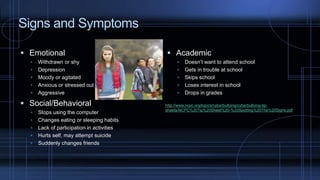
Signs and Symptoms
 Emotional
 Withdrawn or shy
 Depression
 Moody or agitated
 Anxious or stressed out
 Aggressive
 Social/Behavioral
 Stops using the computer
 Changes eating or sleeping habits
 Lack of participation in activities
 Hurts self, may attempt suicide
 Suddenly changes friends
 Academic
 Doesn’t want to attend school
 Gets in trouble at school
 Skips school
 Loses interest in school
 Drops in grades
http://www.ncpc.org/topics/cyberbullying/cyberbullying-tip-
sheets/NCPC%20Tip%20Sheet%20-%20Spotting%20The%20Signs.pdf
Prevention and Support in Cyberbullying
Prevention
 Ask what sites children will be using
 Ask for their passwords, in case of emergency
 Encourage children to talk to educator if
cyberbullying occurs (to self, or someone else)
 Establish rules in use of technology
 Netiquette
 Think Before Post!
 Information and images are out of sender’s hands
 Are contents beneficial or hurtful?
 Who will view information or images online?
Support
 Listen to the child
 Assurance, “It’s Not Your Fault”
 Make subtle arrangements
 Be persistent
 Illustrate bullying is taken seriously
 Use consequences to teach
 Lead a classroom discussion
 Do a project about civil rights and bullying
 Read a book about bullying
 Involve child who bullied to make amends
https://www.stopbullying.gov/cyberbullying/prevention/
https://www.stopbullying.gov/respond/support-kids-involved/
Message & Resources
 STOP BLOCK TELL
 https://www.youtube.com/watch?v=MV5v0m6pEMs (2:36)
 Resources
 StopBullying
 https://www.stopbullying.gov/
 Wisconsin Anti-Bullying Center
 http://www.wasb.org/websites/convention/File/2013/session_hando
uts/wednesday/WED_SSN_319_Anti-
Bullying%20Measures_3_TO_4_PM.pdf
Works Cited
 “Brief Facts and Tips” Social Media and School Crises. NASP (National Association of School
Psychologists). Web 31 May 2017. https://www.nasponline.org/resources-and-publications/resources/school-
safety-and-crisis/social-media-and-school-crises
 “Demographics: Internet and Social Media.” Act for Youth, Center of Excellence. Web 31 May 2017.
http://www.actforyouth.net/adolescence/demographics/internet.cfm
 “What is Cyberbullying.” U.S. Department of Health & Human Services, 200 Independence Ave, S.W. –
Washington D.C. 20201. StopBullying.gov. 31 May 2017. https://www.stopbullying.gov/cyberbullying/what-is-
it/
 “Cyberbullying Spotting the Signs.” National Crime Prevention Council (NCPC). 2001 Jefferson Davis Hwy
Suite 901, Arlington, VA 22202. Web 31 May 2017. http://www.ncpc.org/topics/cyberbullying/cyberbullying-
tip-sheets/NCPC%20Tip%20Sheet%20-%20Spotting%20The%20Signs.pdf

Social Media

  • 1.
    SOCIAL MEDIA &CYBERBULLYING Joshua Nelson 10522132 Positive Classroom Management Techniques
  • 2.
    Keynotes about SocialMedia  “Forms of Communication either Internet or text-based that support social interactions of individuals.” (U.S. Dept. of Education, 2012)  Nearly all youth and adults use social media  90% of 13 to 17 year-olds reported using some form of social media (2012)  Over 60% of 13 to 17 year-olds have at least one profile on a social networking site.  Social Media increases communication speed  Educators, parents, and caregivers could assess situations in length of time  QUICK THINKING, QUICK RESPONSE! https://www.nasponline.org/resources-and-publications/resources/school-safety-and-crisis/social-media-and-school-crises http://www.aacap.org/AACAP/Families_and_Youth/Facts_for_Families/FFF-Guide/Children-and-Social-Networking-100.aspx
  • 3.
    Statistics • Access toSmartphones • Black (85%) • Latino (71%) • White (71%) • Smartphone Holders • ¾ 15-17 yr. olds • 68% 13- 14 yr. olds • 87% Computer access • 58% Tablet access • 12% have no mobile phone • Most teens (81%), mostly boys (91% ) have game consoles • 1% no access to technologies http://www.actforyouth.net/adolescence/demographics/internet.cfm
  • 4.
    Cyberbullying  What isCyberbullying?  An electronic method of bullying  (i.e. mean text messages/emails, rumors sent by email or posted on social networking sites, and embarrassing pictures, videos, websites, or fake profiles).  Why is cyberbullying different from traditional face-to-face?  With devices it is more difficult to ignore the behavior than just walking away.  What is the frequency of cyberbullying?  21% students, ages 12-18, nationwide experience cyberbullying, 2014-15 (National Center for Education Statistics and Bureau of Justice Statistics) School Crime Supplement  16% estimated of high school students bullied electronically 12 months prior to survey, 2015 Youth Risk Behavior Surveillance System (Centers for Disease Control and Prevention) https://www.stopbullying.gov/cyberbullying/what-is-it/
  • 5.
    Mindful – Netsmartz http://www.netsmartz.org/TeensTalkBack/Cyberbullying (2:19)  Netsmartz Workshop  Interactive, Educational program  National Center for Missing & Exploited Children (NCMEC)  Targeted: children (5-17), parents/guardians, educators and law enforcement  Goals: Educate, Engage, and Empower
  • 6.
    Signs and Symptoms Emotional  Withdrawn or shy  Depression  Moody or agitated  Anxious or stressed out  Aggressive  Social/Behavioral  Stops using the computer  Changes eating or sleeping habits  Lack of participation in activities  Hurts self, may attempt suicide  Suddenly changes friends  Academic  Doesn’t want to attend school  Gets in trouble at school  Skips school  Loses interest in school  Drops in grades http://www.ncpc.org/topics/cyberbullying/cyberbullying-tip- sheets/NCPC%20Tip%20Sheet%20-%20Spotting%20The%20Signs.pdf
  • 7.
    Prevention and Supportin Cyberbullying Prevention  Ask what sites children will be using  Ask for their passwords, in case of emergency  Encourage children to talk to educator if cyberbullying occurs (to self, or someone else)  Establish rules in use of technology  Netiquette  Think Before Post!  Information and images are out of sender’s hands  Are contents beneficial or hurtful?  Who will view information or images online? Support  Listen to the child  Assurance, “It’s Not Your Fault”  Make subtle arrangements  Be persistent  Illustrate bullying is taken seriously  Use consequences to teach  Lead a classroom discussion  Do a project about civil rights and bullying  Read a book about bullying  Involve child who bullied to make amends https://www.stopbullying.gov/cyberbullying/prevention/ https://www.stopbullying.gov/respond/support-kids-involved/
  • 8.
    Message & Resources STOP BLOCK TELL  https://www.youtube.com/watch?v=MV5v0m6pEMs (2:36)  Resources  StopBullying  https://www.stopbullying.gov/  Wisconsin Anti-Bullying Center  http://www.wasb.org/websites/convention/File/2013/session_hando uts/wednesday/WED_SSN_319_Anti- Bullying%20Measures_3_TO_4_PM.pdf
  • 9.
    Works Cited  “BriefFacts and Tips” Social Media and School Crises. NASP (National Association of School Psychologists). Web 31 May 2017. https://www.nasponline.org/resources-and-publications/resources/school- safety-and-crisis/social-media-and-school-crises  “Demographics: Internet and Social Media.” Act for Youth, Center of Excellence. Web 31 May 2017. http://www.actforyouth.net/adolescence/demographics/internet.cfm  “What is Cyberbullying.” U.S. Department of Health & Human Services, 200 Independence Ave, S.W. – Washington D.C. 20201. StopBullying.gov. 31 May 2017. https://www.stopbullying.gov/cyberbullying/what-is- it/  “Cyberbullying Spotting the Signs.” National Crime Prevention Council (NCPC). 2001 Jefferson Davis Hwy Suite 901, Arlington, VA 22202. Web 31 May 2017. http://www.ncpc.org/topics/cyberbullying/cyberbullying- tip-sheets/NCPC%20Tip%20Sheet%20-%20Spotting%20The%20Signs.pdf