SOAP UI Introduction
Ikuru Kyogoku
What is SOAP UI?
• Primary use case: Generate xml based Mock
Web Services from wsdl.
• Mock services are needed for testing the
client application before the web service is
ready & running.
• Will not cover definition of xml, web services,
and wsdl (Google will better explain).
• OSS version and Proprietary version.
Mock service lifecycle
• Obtain wsdl -> all web services must publish
this.
• Create SOAP UI project using wsdl
• Generate mock services
• Perform testing of queries, export and deploy
on a server etc…
Starting Project
• Using this web service for all samples
http://wsf.cdyne.com/WeatherWS/Weather.asm
x?WSDL
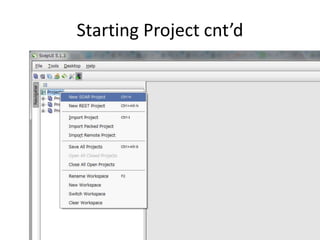
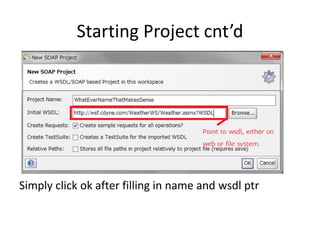
Starting Project cnt’d
Simply click ok after filling in name and wsdl ptr
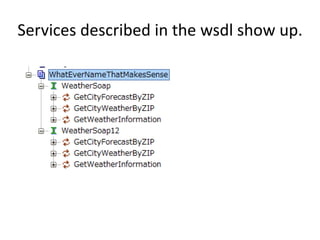
Services described in the wsdl show up.
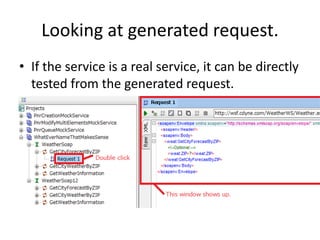
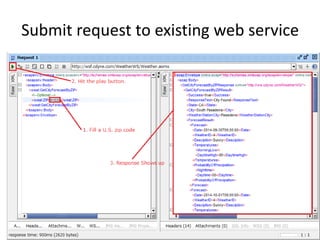
Looking at generated request.
• If the service is a real service, it can be directly
tested from the generated request.
Submit request to existing web service
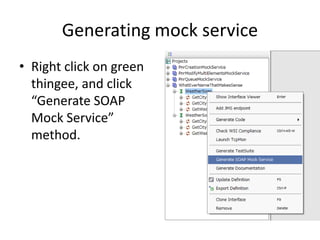
Generating mock service
• Right click on green
thingee, and click
“Generate SOAP
Mock Service”
method.
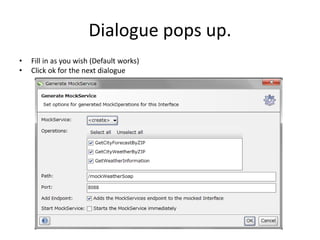
Dialogue pops up.
• Fill in as you wish (Default works)
• Click ok for the next dialogue
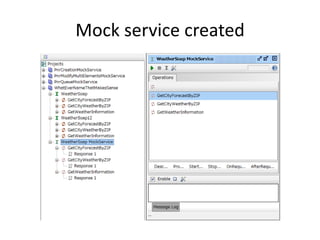
Mock service created
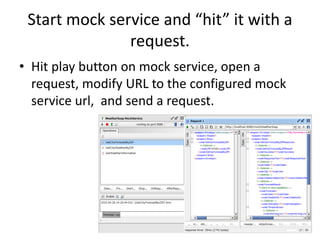
Start mock service and “hit” it with a
request.
• Hit play button on mock service, open a
request, modify URL to the configured mock
service url, and send a request.
Configuring the response
• Can clone a response file
• Can populate values in the response skeleton.
(Notice that default values are “?”, which are to
be replaced with actual values.)
• Can configure logic for response. (Send different
response xml based on different values in the
input xml.)
• Can deploy mock service on a separate machine ,
and access the service from another
application(JBoss supports simply dropping a war
file.)

Soap ui introduction

  • 1.
  • 2.
    What is SOAPUI? • Primary use case: Generate xml based Mock Web Services from wsdl. • Mock services are needed for testing the client application before the web service is ready & running. • Will not cover definition of xml, web services, and wsdl (Google will better explain). • OSS version and Proprietary version.
  • 3.
    Mock service lifecycle •Obtain wsdl -> all web services must publish this. • Create SOAP UI project using wsdl • Generate mock services • Perform testing of queries, export and deploy on a server etc…
  • 4.
    Starting Project • Usingthis web service for all samples http://wsf.cdyne.com/WeatherWS/Weather.asm x?WSDL
  • 5.
  • 6.
    Starting Project cnt’d Simplyclick ok after filling in name and wsdl ptr
  • 7.
    Services described inthe wsdl show up.
  • 8.
    Looking at generatedrequest. • If the service is a real service, it can be directly tested from the generated request.
  • 9.
    Submit request toexisting web service
  • 10.
    Generating mock service •Right click on green thingee, and click “Generate SOAP Mock Service” method.
  • 11.
    Dialogue pops up. •Fill in as you wish (Default works) • Click ok for the next dialogue
  • 12.
  • 13.
    Start mock serviceand “hit” it with a request. • Hit play button on mock service, open a request, modify URL to the configured mock service url, and send a request.
  • 14.
    Configuring the response •Can clone a response file • Can populate values in the response skeleton. (Notice that default values are “?”, which are to be replaced with actual values.) • Can configure logic for response. (Send different response xml based on different values in the input xml.) • Can deploy mock service on a separate machine , and access the service from another application(JBoss supports simply dropping a war file.)