Deep dive into SoapUI
Andrii Olieinik
Senior QA Automation Engineer
About me
• Senior QA Automation Engineer
• About 10 years of work in Quality Assurance area
• DataArt IT school in Odessa and Lublin
• PhD, Theoretical physics
2
Agenda
• SoapUI
• Postman
• SoapUI projects
• Properties
• Assertions
• Groovy scripts
• JavaScript scripts
• Data Driven tests
• Custom reporting
• TestRunner
• Logs
• Authorization
• Maven
• Listeners
3
SoapUI
4
SoapUI is an open-source web service testing
application for service-oriented
architectures(SOA) and representational state
transfers (REST).
SoapUI was developed by Eviware software. In
2011, SmartBear Software acquired Eviware.
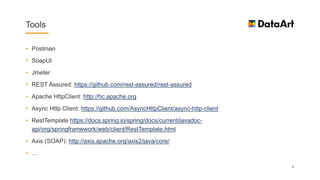
Tools
• Postman
• SoapUI
• Jmeter
• REST Assured: https://github.com/rest-assured/rest-assured
• Apache HttpClient: http://hc.apache.org
• Async Http Client: https://github.com/AsyncHttpClient/async-http-client
• RestTemplate https://docs.spring.io/spring/docs/current/javadoc-
api/org/springframework/web/client/RestTemplate.html
• Axis (SOAP): http://axis.apache.org/axis2/java/core/
• …
5
Postman
6
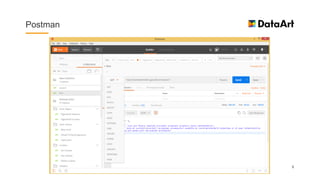
Postman
• REST requests
• SOAP requests +/-
• Collections (test sets)
• Scripts
• Variables
• Execute from command line (with Newman)
• Integration with CI (with Newman)
• JUnit reports (with Newman)
• Web Service Mocking
7
SoapUI
8
SOAP request/response
9
SoapUI
• REST requests
• SOAP requests
• Tests
• Test suits
• Scripts
• Variables
• Execute from command line
• Integration with CI
• Integration with Maven
• JUnit reports
• Web Service Mocking 10
SoapUI testcase
11
SoapUI assertions
12
More details
• Postman docs: https://www.getpostman.com/docs/
• Scripts in Postman: https://www.getpostman.com/docs/postman/scripts/intro_to_scripts
• Newman: https://github.com/postmanlabs/newman
• SoapUI: https://www.soapui.org/downloads/soapui/alternate-platforms.html
• Your First SoapUI Project: https://www.soapui.org/getting-started/your-first-soapui-project.html
• Structuring and Running Tests (SoapUI): https://www.soapui.org/Functional-Testing/structuring-
and-running-tests.html
• Getting Started with REST Testing in SoapUI: https://www.soapui.org/rest-testing/getting-
started.html
13
REST examples
• JSON Placeholder fake API: https://jsonplaceholder.typicode.com/
• National Digital Forecast Database (NDFD) REST Web Service:
http://graphical.weather.gov/xml/rest.php
• National Bank of Ukraine: http://www.bank.gov.ua/control/en/publish/article?art_id=25365630
• Narodowy Bank Polski: http://api.nbp.pl/en.html
14
WSDL examples
• ISBN Test: http://webservices.daehosting.com/services/isbnservice.wso?WSDL
• Country Information:
http://webservices.oorsprong.org/websamples.countryinfo/CountryInfoService.wso?WSDL
• Number Conversion:
http://www.dataaccess.com/webservicesserver/numberconversion.wso?WSDL
• Bankleitzahlen Service: http://www.thomas-bayer.com/axis2/services/BLZService?wsdl
• National Digital Forecast Database (NDFD) SOAP Web Service: http://graphical.weather.gov/xml/
15
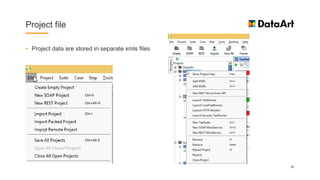
Project file
• Project data are stored in separate xmls files
16
Properties
• Project, TestSuite and TestCase have properties
17
Project properties
18
Properties Transfer
• Transferring Property Values: https://www.soapui.org/functional-testing/properties/transferring-
properties.html
19
Property Expansion
• ${#Scope#Property-name[#xpath-expression]}
• ${#Project#Property-name}refers to a Project Property
• ${#TestSuite#Property-name} refers to a TestSuite Property
• ${#TestCase#Property-name} refers to a TestCase Property
• ${TestStep-name#Property-name} refers to a property in a named TestStep.
20
Assertions (Property Content)
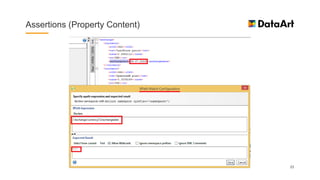
• Contains
• Not Contains
• JsonPath Count
• JsonPath Existance Match
• JsonPath Match
• JsonPath RegEx Match
• XPath Match
• XQuery Math
21
Assertions (Property Content)
22
Assertions (Property Content)
23
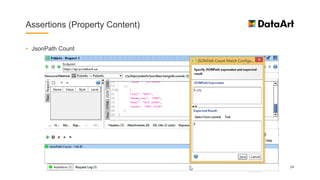
Assertions (Property Content)
• JsonPath Count
24
Assertions (Property Content)
• JsonPath Match
25
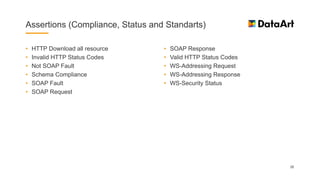
Assertions (Compliance, Status and Standarts)
• HTTP Download all resource
• Invalid HTTP Status Codes
• Not SOAP Fault
• Schema Compliance
• SOAP Fault
• SOAP Request
• SOAP Response
• Valid HTTP Status Codes
• WS-Addressing Request
• WS-Addressing Response
• WS-Security Status
26
Script assertion
27
Script assertion
• JsonSlurper
28
Other assertions
• SLA
• JMS
• JDBC
• Security
29
Groovy scripts
30
Groovy scripts
31
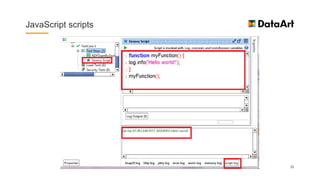
JavaScript scripts
32
JavaScript scripts
33
Setup/TearDown scripts
• Suite Setup/TearDown
• TestCase Setup/TearDown
34
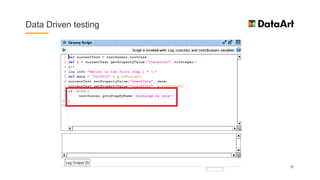
Data Driven testing
35
Data Driven testing
36
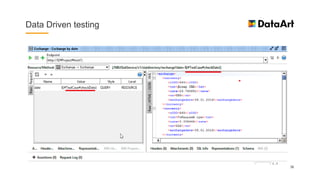
Data Driven testing
37
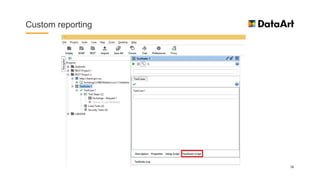
Custom reporting
38
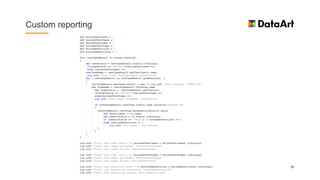
Custom reporting
39
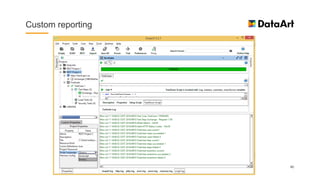
Custom reporting
40
More details (Groovy)
• Groovy Documentation: http://groovy-lang.org/documentation.html
• Groovy JDK API Documentation: http://groovy-lang.org/gdk.html
• SoapUI Tips & Tricks: https://www.soapui.org/scripting-properties/tips-tricks.html
• 10 Groovy scripts on your finger tips – soapUI: https://learnsoapui.wordpress.com/2011/07/17/10-
groovy-scripts-on-your-finger-tips-soapui/
• SoapUI Groovy: Slurping JSON in Script Assertions:
https://thetestsuite.wordpress.com/2013/09/30/soapui-groovy-slurping-json-in-script-assertions/
• XML Parsing in soapUI: http://www.robert-nemet.com/2011/11/groovy-xml-parsing-in-soapui.html
41
TestRunner
42
TestRunner (options)
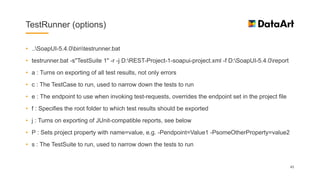
• ..SoapUI-5.4.0bintestrunner.bat
• testrunner.bat -s"TestSuite 1" -r -j D:REST-Project-1-soapui-project.xml -f D:SoapUI-5.4.0report
• a : Turns on exporting of all test results, not only errors
• c : The TestCase to run, used to narrow down the tests to run
• e : The endpoint to use when invoking test-requests, overrides the endpoint set in the project file
• f : Specifies the root folder to which test results should be exported
• j : Turns on exporting of JUnit-compatible reports, see below
• P : Sets project property with name=value, e.g. -Pendpoint=Value1 -PsomeOtherProperty=value2
• s : The TestSuite to run, used to narrow down the tests to run
43
SoapUI logs
• By default in ..SoapUI-5.4.0bin
• soapui-log4j.xml
• soapui.log
• soapui-errors.log
• global-groovy.log
44
Authorization
• Steps to run Twitter API with SoapUI: http://acodediary.com/twitter-api-with-soapui/
45
Authorization (generate bearer token)
46
Authorization (get access token)
47
Authorization (result)
48
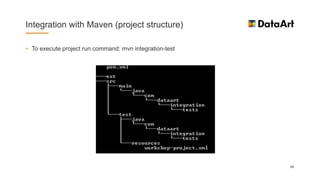
Integration with Maven (project structure)
• To execute project run command: mvn integration-test
49
Integration with Maven (project structure)
50
Integration with Maven (execution result)
51
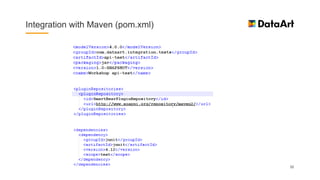
Integration with Maven (pom.xml)
52
Integration with Maven (pom.xml)
53
Integration with Maven (extensions)
• Put additional jars into ext folder
• Or add new module to the project
54
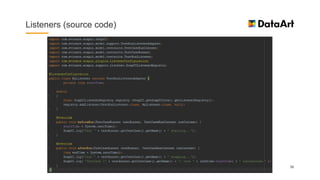
Listeners
• Create my-listeners.xml file in SoapUI-5.2.1binlisteners
• Create MyListener.java, compile it in jar file and put in SoapUI-5.2.1binext
• Create a directory build
• Run java compilation from the command line:
• javac -cp soapui-5.2.1.jar com/dataart/api/listeners/MyListener.java -d ./build
• Go to the build folder (cd build) and create a jar
• jar cvf YourJar.jar *
55
Listeners (source code)
56
Listeners (result)
57
More details
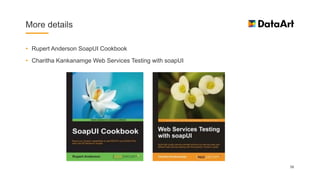
• Rupert Anderson SoapUI Cookbook
• Charitha Kankanamge Web Services Testing with soapUI
58
More details
• JSONPath - XPath for JSON: http://goessner.net/articles/JsonPath/
• Running Functional Tests (TestRunner): https://www.soapui.org/test-automation/running-functional-
tests.html
• SoapUI source code: https://github.com/SmartBear/soapui
• SoapUI and Maven: https://www.soapui.org/test-automation/maven/maven-2-x.html
• Source code in SoapUI maven: http://stackoverflow.com/questions/30320647/source-code-in-
soapui-maven
• Extending soapU: https://www.soapui.org/extension-plugins/old-style-extensions/developing-old-
style-extensions.html
• SoapUI JavaDoc: https://www.soapui.org/apidocs/allclasses-noframe.html
59
More details
• Custom report: https://github.com/a-oleynik/SoapUI/blob/master/CustomReport.groovy
• Maven project with SoapUI example: https://github.com/a-oleynik/SoapUI/tree/master/api-test
• Listener code example: https://github.com/a-oleynik/SoapUI/tree/master/Listener
60
Possible task
• Create custom report into an xml file.
• Create a Data Driven test and read data from excel file.
• Create a Maven project for your SoapUI project. Set the project up and execute it from the
command line.
61
Questions
• Questions?
62

Deep dive into SoapUI

  • 1.
    Deep dive intoSoapUI Andrii Olieinik Senior QA Automation Engineer
  • 2.
    About me • SeniorQA Automation Engineer • About 10 years of work in Quality Assurance area • DataArt IT school in Odessa and Lublin • PhD, Theoretical physics 2
  • 3.
    Agenda • SoapUI • Postman •SoapUI projects • Properties • Assertions • Groovy scripts • JavaScript scripts • Data Driven tests • Custom reporting • TestRunner • Logs • Authorization • Maven • Listeners 3
  • 4.
    SoapUI 4 SoapUI is anopen-source web service testing application for service-oriented architectures(SOA) and representational state transfers (REST). SoapUI was developed by Eviware software. In 2011, SmartBear Software acquired Eviware.
  • 5.
    Tools • Postman • SoapUI •Jmeter • REST Assured: https://github.com/rest-assured/rest-assured • Apache HttpClient: http://hc.apache.org • Async Http Client: https://github.com/AsyncHttpClient/async-http-client • RestTemplate https://docs.spring.io/spring/docs/current/javadoc- api/org/springframework/web/client/RestTemplate.html • Axis (SOAP): http://axis.apache.org/axis2/java/core/ • … 5
  • 6.
  • 7.
    Postman • REST requests •SOAP requests +/- • Collections (test sets) • Scripts • Variables • Execute from command line (with Newman) • Integration with CI (with Newman) • JUnit reports (with Newman) • Web Service Mocking 7
  • 8.
  • 9.
  • 10.
    SoapUI • REST requests •SOAP requests • Tests • Test suits • Scripts • Variables • Execute from command line • Integration with CI • Integration with Maven • JUnit reports • Web Service Mocking 10
  • 11.
  • 12.
  • 13.
    More details • Postmandocs: https://www.getpostman.com/docs/ • Scripts in Postman: https://www.getpostman.com/docs/postman/scripts/intro_to_scripts • Newman: https://github.com/postmanlabs/newman • SoapUI: https://www.soapui.org/downloads/soapui/alternate-platforms.html • Your First SoapUI Project: https://www.soapui.org/getting-started/your-first-soapui-project.html • Structuring and Running Tests (SoapUI): https://www.soapui.org/Functional-Testing/structuring- and-running-tests.html • Getting Started with REST Testing in SoapUI: https://www.soapui.org/rest-testing/getting- started.html 13
  • 14.
    REST examples • JSONPlaceholder fake API: https://jsonplaceholder.typicode.com/ • National Digital Forecast Database (NDFD) REST Web Service: http://graphical.weather.gov/xml/rest.php • National Bank of Ukraine: http://www.bank.gov.ua/control/en/publish/article?art_id=25365630 • Narodowy Bank Polski: http://api.nbp.pl/en.html 14
  • 15.
    WSDL examples • ISBNTest: http://webservices.daehosting.com/services/isbnservice.wso?WSDL • Country Information: http://webservices.oorsprong.org/websamples.countryinfo/CountryInfoService.wso?WSDL • Number Conversion: http://www.dataaccess.com/webservicesserver/numberconversion.wso?WSDL • Bankleitzahlen Service: http://www.thomas-bayer.com/axis2/services/BLZService?wsdl • National Digital Forecast Database (NDFD) SOAP Web Service: http://graphical.weather.gov/xml/ 15
  • 16.
    Project file • Projectdata are stored in separate xmls files 16
  • 17.
    Properties • Project, TestSuiteand TestCase have properties 17
  • 18.
  • 19.
    Properties Transfer • TransferringProperty Values: https://www.soapui.org/functional-testing/properties/transferring- properties.html 19
  • 20.
    Property Expansion • ${#Scope#Property-name[#xpath-expression]} •${#Project#Property-name}refers to a Project Property • ${#TestSuite#Property-name} refers to a TestSuite Property • ${#TestCase#Property-name} refers to a TestCase Property • ${TestStep-name#Property-name} refers to a property in a named TestStep. 20
  • 21.
    Assertions (Property Content) •Contains • Not Contains • JsonPath Count • JsonPath Existance Match • JsonPath Match • JsonPath RegEx Match • XPath Match • XQuery Math 21
  • 22.
  • 23.
  • 24.
  • 25.
  • 26.
    Assertions (Compliance, Statusand Standarts) • HTTP Download all resource • Invalid HTTP Status Codes • Not SOAP Fault • Schema Compliance • SOAP Fault • SOAP Request • SOAP Response • Valid HTTP Status Codes • WS-Addressing Request • WS-Addressing Response • WS-Security Status 26
  • 27.
  • 28.
  • 29.
    Other assertions • SLA •JMS • JDBC • Security 29
  • 30.
  • 31.
  • 32.
  • 33.
  • 34.
    Setup/TearDown scripts • SuiteSetup/TearDown • TestCase Setup/TearDown 34
  • 35.
  • 36.
  • 37.
  • 38.
  • 39.
  • 40.
  • 41.
    More details (Groovy) •Groovy Documentation: http://groovy-lang.org/documentation.html • Groovy JDK API Documentation: http://groovy-lang.org/gdk.html • SoapUI Tips & Tricks: https://www.soapui.org/scripting-properties/tips-tricks.html • 10 Groovy scripts on your finger tips – soapUI: https://learnsoapui.wordpress.com/2011/07/17/10- groovy-scripts-on-your-finger-tips-soapui/ • SoapUI Groovy: Slurping JSON in Script Assertions: https://thetestsuite.wordpress.com/2013/09/30/soapui-groovy-slurping-json-in-script-assertions/ • XML Parsing in soapUI: http://www.robert-nemet.com/2011/11/groovy-xml-parsing-in-soapui.html 41
  • 42.
  • 43.
    TestRunner (options) • ..SoapUI-5.4.0bintestrunner.bat •testrunner.bat -s"TestSuite 1" -r -j D:REST-Project-1-soapui-project.xml -f D:SoapUI-5.4.0report • a : Turns on exporting of all test results, not only errors • c : The TestCase to run, used to narrow down the tests to run • e : The endpoint to use when invoking test-requests, overrides the endpoint set in the project file • f : Specifies the root folder to which test results should be exported • j : Turns on exporting of JUnit-compatible reports, see below • P : Sets project property with name=value, e.g. -Pendpoint=Value1 -PsomeOtherProperty=value2 • s : The TestSuite to run, used to narrow down the tests to run 43
  • 44.
    SoapUI logs • Bydefault in ..SoapUI-5.4.0bin • soapui-log4j.xml • soapui.log • soapui-errors.log • global-groovy.log 44
  • 45.
    Authorization • Steps torun Twitter API with SoapUI: http://acodediary.com/twitter-api-with-soapui/ 45
  • 46.
  • 47.
  • 48.
  • 49.
    Integration with Maven(project structure) • To execute project run command: mvn integration-test 49
  • 50.
    Integration with Maven(project structure) 50
  • 51.
    Integration with Maven(execution result) 51
  • 52.
  • 53.
  • 54.
    Integration with Maven(extensions) • Put additional jars into ext folder • Or add new module to the project 54
  • 55.
    Listeners • Create my-listeners.xmlfile in SoapUI-5.2.1binlisteners • Create MyListener.java, compile it in jar file and put in SoapUI-5.2.1binext • Create a directory build • Run java compilation from the command line: • javac -cp soapui-5.2.1.jar com/dataart/api/listeners/MyListener.java -d ./build • Go to the build folder (cd build) and create a jar • jar cvf YourJar.jar * 55
  • 56.
  • 57.
  • 58.
    More details • RupertAnderson SoapUI Cookbook • Charitha Kankanamge Web Services Testing with soapUI 58
  • 59.
    More details • JSONPath- XPath for JSON: http://goessner.net/articles/JsonPath/ • Running Functional Tests (TestRunner): https://www.soapui.org/test-automation/running-functional- tests.html • SoapUI source code: https://github.com/SmartBear/soapui • SoapUI and Maven: https://www.soapui.org/test-automation/maven/maven-2-x.html • Source code in SoapUI maven: http://stackoverflow.com/questions/30320647/source-code-in- soapui-maven • Extending soapU: https://www.soapui.org/extension-plugins/old-style-extensions/developing-old- style-extensions.html • SoapUI JavaDoc: https://www.soapui.org/apidocs/allclasses-noframe.html 59
  • 60.
    More details • Customreport: https://github.com/a-oleynik/SoapUI/blob/master/CustomReport.groovy • Maven project with SoapUI example: https://github.com/a-oleynik/SoapUI/tree/master/api-test • Listener code example: https://github.com/a-oleynik/SoapUI/tree/master/Listener 60
  • 61.
    Possible task • Createcustom report into an xml file. • Create a Data Driven test and read data from excel file. • Create a Maven project for your SoapUI project. Set the project up and execute it from the command line. 61
  • 62.