ETL Confessions
PgConf US 2017
Corey Huinker
About Me
Database Programmer For 20 Years
1st Benchmark: TPC-C for AS/400
PostgreSQL, Oracle, DB2, SQLServer,
Sybase, Informix, SQLite, DB/400... and
mysql.
Dabbled in Improv and Roller Derby
About Moat
Advertising Analytics
Viewability, Reach, Fraud Detection
Tens of Billions of ad events per day
Summary data imports ~500M rows/day
Hiring for Offices NYC, London, SF, LA,
Singapore, Sydney, Austin, Cincinnati,
Miami
Database Workloads - OLTP
● On-Line Transaction Processing
● also known as Short Request
● Very High concurrency
● Most queries are very small in results fetched, data updated
● New data is essentially random
● Locking issues, latency paramount
Database Workloads - Data Warehouse
● Usually derivative data
○ Either from in-house OLTP databases
○ and other data sources
● Latency tolerance much higher
● Data imported in batches with something in common
○ data from specific time-frame
○ data from specific OLTP shards
○ externally sourced data
● Query throughput more important than any one query's individual
performance
● Data is stored in ways optimal for reading, not updating.
Extract, Transform, Load
● Extract
○ Get the data from the external sources
■ Other databases under our control
■ Data pulls from websites
■ Publicly available data
○ Maybe you control the format, maybe you don't
● Transform
○ Scan the data for correct formatting, valid values, etc
■ Discard? Fix?
○ Reformat the data to the shape of the table(s) you wish to load it.
● Load
○ Get it in the Data Warehouse as fast as possible
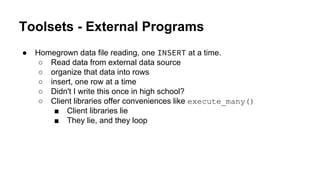
Toolsets - External Programs
● Homegrown data file reading, one INSERT at a time.
○ Read data from external data source
○ organize that data into rows
○ insert, one row at a time
○ Didn't I write this once in high school?
○ Client libraries offer conveniences like execute_many()
■ Client libraries lie
■ They lie, and they loop
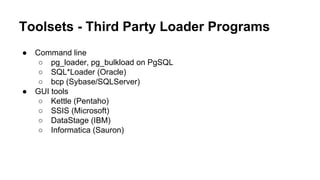
Toolsets - Third Party Loader Programs
● Command line
○ pg_loader, pg_bulkload on PgSQL
○ SQL*Loader (Oracle)
○ bcp (Sybase/SQLServer)
● GUI tools
○ Kettle (Pentaho)
○ SSIS (Microsoft)
○ DataStage (IBM)
○ Informatica (Sauron)
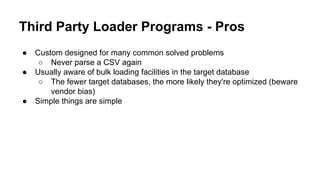
Third Party Loader Programs - Pros
● Custom designed for many common solved problems
○ Never parse a CSV again
● Usually aware of bulk loading facilities in the target database
○ The fewer target databases, the more likely they're optimized (beware
vendor bias)
● Simple things are simple
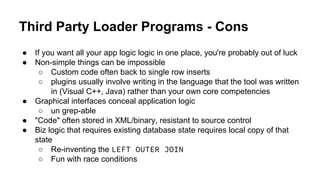
Third Party Loader Programs - Cons
● If you want all your app logic logic in one place, you're probably out of luck
● Non-simple things can be impossible
○ Custom code often back to single row inserts
○ plugins usually involve writing in the language that the tool was written
in (Visual C++, Java) rather than your own core competencies
● Graphical interfaces conceal application logic
○ un grep-able
● "Code" often stored in XML/binary, resistant to source control
● Biz logic that requires existing database state requires local copy of that
state
○ Re-inventing the LEFT OUTER JOIN
○ Fun with race conditions
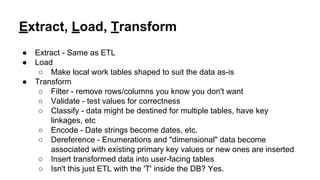
Extract, Load, Transform
● Extract - Same as ETL
● Load
○ Make local work tables shaped to suit the data as-is
● Transform
○ Filter - remove rows/columns you know you don't want
○ Validate - test values for correctness
○ Classify - data might be destined for multiple tables, have key
linkages, etc
○ Encode - Date strings become dates, etc.
○ Dereference - Enumerations and "dimensional" data become
associated with existing primary key values or new ones are inserted
○ Insert transformed data into user-facing tables
○ Isn't this just ETL with the 'T' inside the DB? Yes.
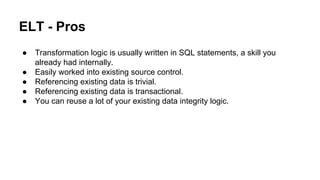
ELT - Pros
● Transformation logic is usually written in SQL statements, a skill you
already had internally.
● Easily worked into existing source control.
● Referencing existing data is trivial.
● Referencing existing data is transactional.
● You can reuse a lot of your existing data integrity logic.
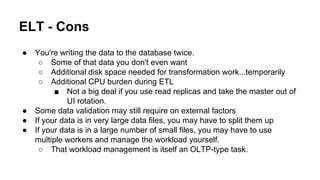
ELT - Cons
● You're writing the data to the database twice.
○ Some of that data you don't even want
○ Additional disk space needed for transformation work...temporarily
○ Additional CPU burden during ETL
■ Not a big deal if you use read replicas and take the master out of
UI rotation.
● Some data validation may still require on external factors
● If your data is in very large data files, you may have to split them up
● If your data is in a large number of small files, you may have to use
multiple workers and manage the workload yourself.
○ That workload management is itself an OLTP-type task.
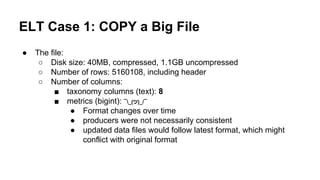
ELT Case 1: COPY a Big File
● The file:
○ Disk size: 40MB, compressed, 1.1GB uncompressed
○ Number of rows: 5160108, including header
○ Number of columns:
■ taxonomy columns (text): 8
■ metrics (bigint): ¯_(ツ)_/¯
● Format changes over time
● producers were not necessarily consistent
● updated data files would follow latest format, which might
conflict with original format
Case 1: Confession 1: Format Discovery
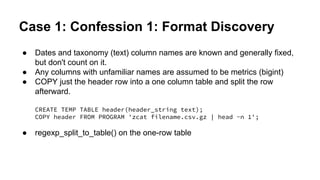
● Dates and taxonomy (text) column names are known and generally fixed,
but don't count on it.
● Any columns with unfamiliar names are assumed to be metrics (bigint)
● COPY just the header row into a one column table and split the row
afterward.
CREATE TEMP TABLE header(header_string text);
COPY header FROM PROGRAM 'zcat filename.csv.gz | head -n 1';
● regexp_split_to_table() on the one-row table
Case 1: Confession 2: Format Discovery
Same as before, but use plpythonu
CREATE OR REPLACE FUNCTION get_header(file_name text)
RETURNS text[]
LANGUAGE PLPYTHONU STRICT SET SEARCH_PATH FROM CURRENT
AS $PYTHON$
import gzip
with gzip.GzipFile(file_name,'rb') as g:
header = g.readline()
if not header:
return None
return header.rstrip().split(',')
$PYTHON$;
Case 1: Confession 2: Format Discovery
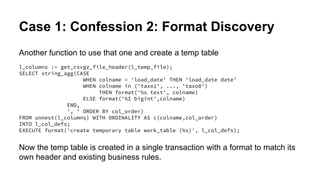
Another function to use that one and create a temp table
l_columns := get_csvgz_file_header(l_temp_file);
SELECT string_agg(CASE
WHEN colname = 'load_date' THEN 'load_date date'
WHEN colname in ('taxo1', ..., 'taxo8')
THEN format('%s text', colname)
ELSE format('%I bigint',colname)
END,
', ' ORDER BY col_order)
FROM unnest(l_columns) WITH ORDINALITY AS c(colname,col_order)
INTO l_col_defs;
EXECUTE format('create temporary table work_table (%s)', l_col_defs);
Now the temp table is created in a single transaction with a format to match its
own header and existing business rules.
ELT Case 2: COPY a Big File
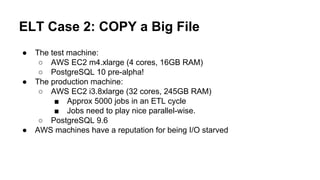
● The test machine:
○ AWS EC2 m4.xlarge (4 cores, 16GB RAM)
○ PostgreSQL 10 pre-alpha!
● The production machine:
○ AWS EC2 i3.8xlarge (32 cores, 245GB RAM)
■ Approx 5000 jobs in an ETL cycle
■ Jobs need to play nice parallel-wise.
○ PostgreSQL 9.6
● AWS machines have a reputation for being I/O starved
Case 2: Load Times By Various Methods
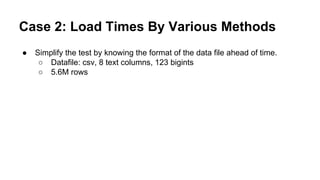
● Simplify the test by knowing the format of the data file ahead of time.
○ Datafile: csv, 8 text columns, 123 bigints
○ 5.6M rows
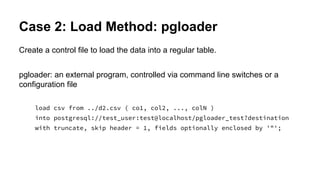
Case 2: Load Method: pgloader
Create a control file to load the data into a regular table.
pgloader: an external program, controlled via command line switches or a
configuration file
load csv from ../d2.csv ( co1, col2, ..., colN )
into postgresql://test_user:test@localhost/pgloader_test?destination
with truncate, skip header = 1, fields optionally enclosed by '"';
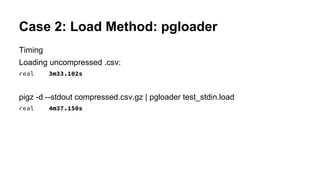
Case 2: Load Method: pgloader
Timing
Loading uncompressed .csv:
real 3m33.102s
pigz -d --stdout compressed.csv.gz | pgloader test_stdin.load
real 4m37.150s
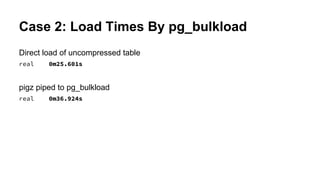
Case 2: Load Times By pg_bulkload
Direct load of uncompressed table
real 0m25.601s
pigz piped to pg_bulkload
real 0m36.924s
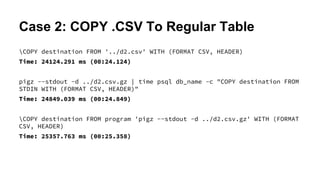
Case 2: COPY .CSV To Regular Table
COPY destination FROM '../d2.csv' WITH (FORMAT CSV, HEADER)
Time: 24124.291 ms (00:24.124)
pigz --stdout -d ../d2.csv.gz | time psql db_name -c "COPY destination FROM
STDIN WITH (FORMAT CSV, HEADER)"
Time: 24849.039 ms (00:24.849)
COPY destination FROM program 'pigz --stdout -d ../d2.csv.gz' WITH (FORMAT
CSV, HEADER)
Time: 25357.763 ms (00:25.358)
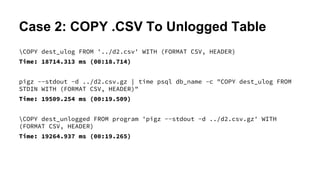
Case 2: COPY .CSV To Unlogged Table
COPY dest_ulog FROM '../d2.csv' WITH (FORMAT CSV, HEADER)
Time: 18714.313 ms (00:18.714)
pigz --stdout -d ../d2.csv.gz | time psql db_name -c "COPY dest_ulog FROM
STDIN WITH (FORMAT CSV, HEADER)"
Time: 19509.254 ms (00:19.509)
COPY dest_unlogged FROM program 'pigz --stdout -d ../d2.csv.gz' WITH
(FORMAT CSV, HEADER)
Time: 19264.937 ms (00:19.265)
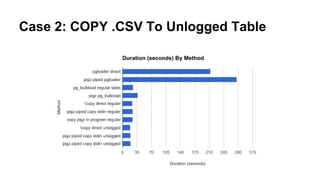
Case 2: COPY .CSV To Unlogged Table
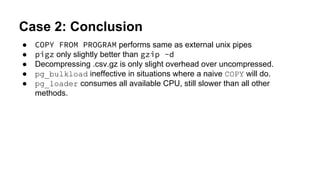
Case 2: Conclusion
● COPY FROM PROGRAM performs same as external unix pipes
● pigz only slightly better than gzip -d
● Decompressing .csv.gz is only slight overhead over uncompressed.
● pg_bulkload ineffective in situations where a naive COPY will do.
● pg_loader consumes all available CPU, still slower than all other
methods.
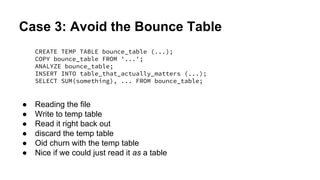
Case 3: Avoid the Bounce Table
CREATE TEMP TABLE bounce_table (...);
COPY bounce_table FROM '...';
ANALYZE bounce_table;
INSERT INTO table_that_actually_matters (...);
SELECT SUM(something), ... FROM bounce_table;
● Reading the file
● Write to temp table
● Read it right back out
● discard the temp table
● Oid churn with the temp table
● Nice if we could just read it as a table
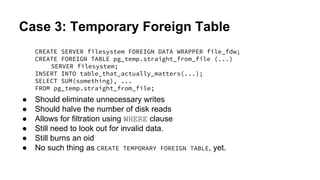
Case 3: Temporary Foreign Table
CREATE SERVER filesystem FOREIGN DATA WRAPPER file_fdw;
CREATE FOREIGN TABLE pg_temp.straight_from_file (...)
SERVER filesystem;
INSERT INTO table_that_actually_matters(...);
SELECT SUM(something), ...
FROM pg_temp.straight_from_file;
● Should eliminate unnecessary writes
● Should halve the number of disk reads
● Allows for filtration using WHERE clause
● Still need to look out for invalid data.
● Still burns an oid
● No such thing as CREATE TEMPORARY FOREIGN TABLE, yet.
Case 3: Temporary Foreign Table
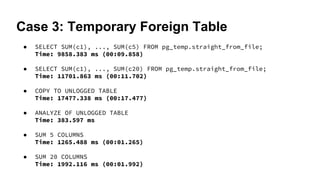
● SELECT SUM(c1), ..., SUM(c5) FROM pg_temp.straight_from_file;
Time: 9858.383 ms (00:09.858)
● SELECT SUM(c1), ..., SUM(c20) FROM pg_temp.straight_from_file;
Time: 11701.863 ms (00:11.702)
● COPY TO UNLOGGED TABLE
Time: 17477.338 ms (00:17.477)
● ANALYZE OF UNLOGGED TABLE
Time: 383.597 ms
● SUM 5 COLUMNS
Time: 1265.488 ms (00:01.265)
● SUM 20 COLUMNS
Time: 1992.116 ms (00:01.992)
Case 3: Temporary Foreign Table
Case 3: Conclusions
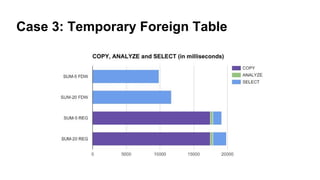
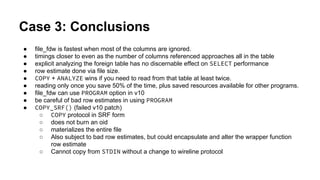
● file_fdw is fastest when most of the columns are ignored.
● timings closer to even as the number of columns referenced approaches all in the table
● explicit analyzing the foreign table has no discernable effect on SELECT performance
● row estimate done via file size.
● COPY + ANALYZE wins if you need to read from that table at least twice.
● reading only once you save 50% of the time, plus saved resources available for other programs.
● file_fdw can use PROGRAM option in v10
● be careful of bad row estimates in using PROGRAM
● COPY_SRF() (failed v10 patch)
○ COPY protocol in SRF form
○ does not burn an oid
○ materializes the entire file
○ Also subject to bad row estimates, but could encapsulate and alter the wrapper function
row estimate
○ Cannot copy from STDIN without a change to wireline protocol
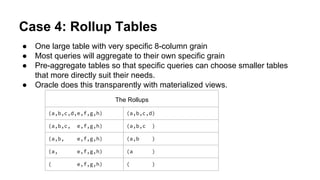
Case 4: Rollup Tables
● One large table with very specific 8-column grain
● Most queries will aggregate to their own specific grain
● Pre-aggregate tables so that specific queries can choose smaller tables
that more directly suit their needs.
● Oracle does this transparently with materialized views.
The Rollups
(a,b,c,d,e,f,g,h) (a,b,c,d)
(a,b,c, e,f,g,h) (a,b,c )
(a,b, e,f,g,h) (a,b )
(a, e,f,g,h) (a )
( e,f,g,h) ( )
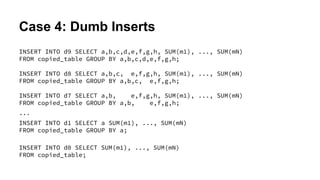
Case 4: Dumb Inserts
INSERT INTO d9 SELECT a,b,c,d,e,f,g,h, SUM(m1), ..., SUM(mN)
FROM copied_table GROUP BY a,b,c,d,e,f,g,h;
INSERT INTO d8 SELECT a,b,c, e,f,g,h, SUM(m1), ..., SUM(mN)
FROM copied_table GROUP BY a,b,c, e,f,g,h;
INSERT INTO d7 SELECT a,b, e,f,g,h, SUM(m1), ..., SUM(mN)
FROM copied_table GROUP BY a,b, e,f,g,h;
...
INSERT INTO d1 SELECT a SUM(m1), ..., SUM(mN)
FROM copied_table GROUP BY a;
INSERT INTO d0 SELECT SUM(m1), ..., SUM(mN)
FROM copied_table;
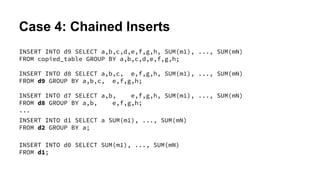
Case 4: Chained Inserts
INSERT INTO d9 SELECT a,b,c,d,e,f,g,h, SUM(m1), ..., SUM(mN)
FROM copied_table GROUP BY a,b,c,d,e,f,g,h;
INSERT INTO d8 SELECT a,b,c, e,f,g,h, SUM(m1), ..., SUM(mN)
FROM d9 GROUP BY a,b,c, e,f,g,h;
INSERT INTO d7 SELECT a,b, e,f,g,h, SUM(m1), ..., SUM(mN)
FROM d8 GROUP BY a,b, e,f,g,h;
...
INSERT INTO d1 SELECT a SUM(m1), ..., SUM(mN)
FROM d2 GROUP BY a;
INSERT INTO d0 SELECT SUM(m1), ..., SUM(mN)
FROM d1;
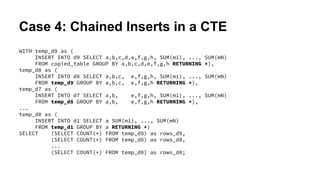
Case 4: Chained Inserts in a CTE
WITH temp_d9 as (
INSERT INTO d9 SELECT a,b,c,d,e,f,g,h, SUM(m1), ..., SUM(mN)
FROM copied_table GROUP BY a,b,c,d,e,f,g,h RETURNING *),
temp_d8 as (
INSERT INTO d8 SELECT a,b,c, e,f,g,h, SUM(m1), ..., SUM(mN)
FROM temp_d9 GROUP BY a,b,c, e,f,g,h RETURNING *),
temp_d7 as (
INSERT INTO d7 SELECT a,b, e,f,g,h, SUM(m1), ..., SUM(mN)
FROM temp_d8 GROUP BY a,b, e,f,g,h RETURNING *),
...
temp_d0 as (
INSERT INTO d1 SELECT a SUM(m1), ..., SUM(mN)
FROM temp_d1 GROUP BY a RETURNING *)
SELECT (SELECT COUNT(*) FROM temp_d9) as rows_d9,
(SELECT COUNT(*) FROM temp_d8) as rows_d8,
...
(SELECT COUNT(*) FROM temp_d0) as rows_d0;
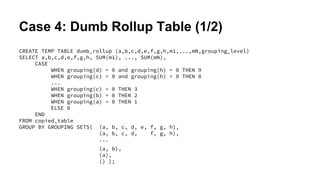
Case 4: Dumb Rollup Table (1/2)
CREATE TEMP TABLE dumb_rollup (a,b,c,d,e,f,g,h,m1,...,mN,grouping_level)
SELECT a,b,c,d,e,f,g,h, SUM(m1), ..., SUM(mN),
CASE
WHEN grouping(d) = 0 and grouping(h) = 0 THEN 9
WHEN grouping(c) = 0 and grouping(h) = 0 THEN 8
...
WHEN grouping(c) = 0 THEN 3
WHEN grouping(b) = 0 THEN 2
WHEN grouping(a) = 0 THEN 1
ELSE 0
END
FROM copied_table
GROUP BY GROUPING SETS( (a, b, c, d, e, f, g, h),
(a, b, c, d, f, g, h),
...
(a, b),
(a),
() );
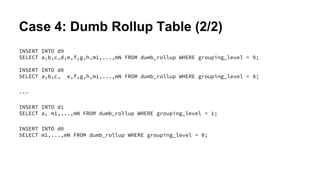
Case 4: Dumb Rollup Table (2/2)
INSERT INTO d9
SELECT a,b,c,d,e,f,g,h,m1,...,mN FROM dumb_rollup WHERE grouping_level = 9;
INSERT INTO d8
SELECT a,b,c, e,f,g,h,m1,...,mN FROM dumb_rollup WHERE grouping_level = 8;
...
INSERT INTO d1
SELECT a, m1,...,mN FROM dumb_rollup WHERE grouping_level = 1;
INSERT INTO d0
SELECT m1,...,mN FROM dumb_rollup WHERE grouping_level = 0;
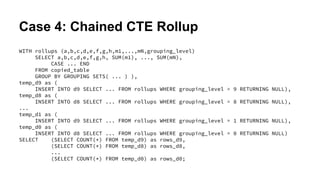
Case 4: Chained CTE Rollup
WITH rollups (a,b,c,d,e,f,g,h,m1,...,mN,grouping_level)
SELECT a,b,c,d,e,f,g,h, SUM(m1), ..., SUM(mN),
CASE ... END
FROM copied_table
GROUP BY GROUPING SETS( ... ) ),
temp_d9 as (
INSERT INTO d9 SELECT ... FROM rollups WHERE grouping_level = 9 RETURNING NULL),
temp_d8 as (
INSERT INTO d8 SELECT ... FROM rollups WHERE grouping_level = 8 RETURNING NULL),
...
temp_d1 as (
INSERT INTO d9 SELECT ... FROM rollups WHERE grouping_level = 1 RETURNING NULL),
temp_d0 as (
INSERT INTO d8 SELECT ... FROM rollups WHERE grouping_level = 0 RETURNING NULL)
SELECT (SELECT COUNT(*) FROM temp_d9) as rows_d9,
(SELECT COUNT(*) FROM temp_d8) as rows_d8,
...
(SELECT COUNT(*) FROM temp_d0) as rows_d0;
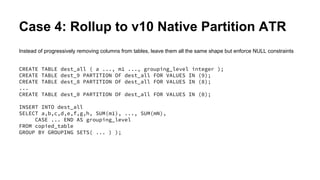
Case 4: Rollup to v10 Native Partition ATR
Instead of progressively removing columns from tables, leave them all the same shape but enforce NULL constraints
CREATE TABLE dest_all ( a ..., m1 ..., grouping_level integer );
CREATE TABLE dest_9 PARTITION OF dest_all FOR VALUES IN (9);
CREATE TABLE dest_8 PARTITION OF dest_all FOR VALUES IN (8);
...
CREATE TABLE dest_0 PARTITION OF dest_all FOR VALUES IN (0);
INSERT INTO dest_all
SELECT a,b,c,d,e,f,g,h, SUM(m1), ..., SUM(mN),
CASE ... END AS grouping_level
FROM copied_table
GROUP BY GROUPING SETS( ... ) );
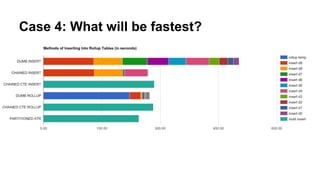
Case 4: What will be fastest?
QUESTIONS

Etl confessions pg conf us 2017

  • 1.
    ETL Confessions PgConf US2017 Corey Huinker
  • 2.
    About Me Database ProgrammerFor 20 Years 1st Benchmark: TPC-C for AS/400 PostgreSQL, Oracle, DB2, SQLServer, Sybase, Informix, SQLite, DB/400... and mysql. Dabbled in Improv and Roller Derby
  • 3.
    About Moat Advertising Analytics Viewability,Reach, Fraud Detection Tens of Billions of ad events per day Summary data imports ~500M rows/day Hiring for Offices NYC, London, SF, LA, Singapore, Sydney, Austin, Cincinnati, Miami
  • 4.
    Database Workloads -OLTP ● On-Line Transaction Processing ● also known as Short Request ● Very High concurrency ● Most queries are very small in results fetched, data updated ● New data is essentially random ● Locking issues, latency paramount
  • 5.
    Database Workloads -Data Warehouse ● Usually derivative data ○ Either from in-house OLTP databases ○ and other data sources ● Latency tolerance much higher ● Data imported in batches with something in common ○ data from specific time-frame ○ data from specific OLTP shards ○ externally sourced data ● Query throughput more important than any one query's individual performance ● Data is stored in ways optimal for reading, not updating.
  • 6.
    Extract, Transform, Load ●Extract ○ Get the data from the external sources ■ Other databases under our control ■ Data pulls from websites ■ Publicly available data ○ Maybe you control the format, maybe you don't ● Transform ○ Scan the data for correct formatting, valid values, etc ■ Discard? Fix? ○ Reformat the data to the shape of the table(s) you wish to load it. ● Load ○ Get it in the Data Warehouse as fast as possible
  • 7.
    Toolsets - ExternalPrograms ● Homegrown data file reading, one INSERT at a time. ○ Read data from external data source ○ organize that data into rows ○ insert, one row at a time ○ Didn't I write this once in high school? ○ Client libraries offer conveniences like execute_many() ■ Client libraries lie ■ They lie, and they loop
  • 8.
    Toolsets - ThirdParty Loader Programs ● Command line ○ pg_loader, pg_bulkload on PgSQL ○ SQL*Loader (Oracle) ○ bcp (Sybase/SQLServer) ● GUI tools ○ Kettle (Pentaho) ○ SSIS (Microsoft) ○ DataStage (IBM) ○ Informatica (Sauron)
  • 9.
    Third Party LoaderPrograms - Pros ● Custom designed for many common solved problems ○ Never parse a CSV again ● Usually aware of bulk loading facilities in the target database ○ The fewer target databases, the more likely they're optimized (beware vendor bias) ● Simple things are simple
  • 10.
    Third Party LoaderPrograms - Cons ● If you want all your app logic logic in one place, you're probably out of luck ● Non-simple things can be impossible ○ Custom code often back to single row inserts ○ plugins usually involve writing in the language that the tool was written in (Visual C++, Java) rather than your own core competencies ● Graphical interfaces conceal application logic ○ un grep-able ● "Code" often stored in XML/binary, resistant to source control ● Biz logic that requires existing database state requires local copy of that state ○ Re-inventing the LEFT OUTER JOIN ○ Fun with race conditions
  • 11.
    Extract, Load, Transform ●Extract - Same as ETL ● Load ○ Make local work tables shaped to suit the data as-is ● Transform ○ Filter - remove rows/columns you know you don't want ○ Validate - test values for correctness ○ Classify - data might be destined for multiple tables, have key linkages, etc ○ Encode - Date strings become dates, etc. ○ Dereference - Enumerations and "dimensional" data become associated with existing primary key values or new ones are inserted ○ Insert transformed data into user-facing tables ○ Isn't this just ETL with the 'T' inside the DB? Yes.
  • 12.
    ELT - Pros ●Transformation logic is usually written in SQL statements, a skill you already had internally. ● Easily worked into existing source control. ● Referencing existing data is trivial. ● Referencing existing data is transactional. ● You can reuse a lot of your existing data integrity logic.
  • 13.
    ELT - Cons ●You're writing the data to the database twice. ○ Some of that data you don't even want ○ Additional disk space needed for transformation work...temporarily ○ Additional CPU burden during ETL ■ Not a big deal if you use read replicas and take the master out of UI rotation. ● Some data validation may still require on external factors ● If your data is in very large data files, you may have to split them up ● If your data is in a large number of small files, you may have to use multiple workers and manage the workload yourself. ○ That workload management is itself an OLTP-type task.
  • 14.
    ELT Case 1:COPY a Big File ● The file: ○ Disk size: 40MB, compressed, 1.1GB uncompressed ○ Number of rows: 5160108, including header ○ Number of columns: ■ taxonomy columns (text): 8 ■ metrics (bigint): ¯_(ツ)_/¯ ● Format changes over time ● producers were not necessarily consistent ● updated data files would follow latest format, which might conflict with original format
  • 15.
    Case 1: Confession1: Format Discovery ● Dates and taxonomy (text) column names are known and generally fixed, but don't count on it. ● Any columns with unfamiliar names are assumed to be metrics (bigint) ● COPY just the header row into a one column table and split the row afterward. CREATE TEMP TABLE header(header_string text); COPY header FROM PROGRAM 'zcat filename.csv.gz | head -n 1'; ● regexp_split_to_table() on the one-row table
  • 16.
    Case 1: Confession2: Format Discovery Same as before, but use plpythonu CREATE OR REPLACE FUNCTION get_header(file_name text) RETURNS text[] LANGUAGE PLPYTHONU STRICT SET SEARCH_PATH FROM CURRENT AS $PYTHON$ import gzip with gzip.GzipFile(file_name,'rb') as g: header = g.readline() if not header: return None return header.rstrip().split(',') $PYTHON$;
  • 17.
    Case 1: Confession2: Format Discovery Another function to use that one and create a temp table l_columns := get_csvgz_file_header(l_temp_file); SELECT string_agg(CASE WHEN colname = 'load_date' THEN 'load_date date' WHEN colname in ('taxo1', ..., 'taxo8') THEN format('%s text', colname) ELSE format('%I bigint',colname) END, ', ' ORDER BY col_order) FROM unnest(l_columns) WITH ORDINALITY AS c(colname,col_order) INTO l_col_defs; EXECUTE format('create temporary table work_table (%s)', l_col_defs); Now the temp table is created in a single transaction with a format to match its own header and existing business rules.
  • 18.
    ELT Case 2:COPY a Big File ● The test machine: ○ AWS EC2 m4.xlarge (4 cores, 16GB RAM) ○ PostgreSQL 10 pre-alpha! ● The production machine: ○ AWS EC2 i3.8xlarge (32 cores, 245GB RAM) ■ Approx 5000 jobs in an ETL cycle ■ Jobs need to play nice parallel-wise. ○ PostgreSQL 9.6 ● AWS machines have a reputation for being I/O starved
  • 19.
    Case 2: LoadTimes By Various Methods ● Simplify the test by knowing the format of the data file ahead of time. ○ Datafile: csv, 8 text columns, 123 bigints ○ 5.6M rows
  • 20.
    Case 2: LoadMethod: pgloader Create a control file to load the data into a regular table. pgloader: an external program, controlled via command line switches or a configuration file load csv from ../d2.csv ( co1, col2, ..., colN ) into postgresql://test_user:test@localhost/pgloader_test?destination with truncate, skip header = 1, fields optionally enclosed by '"';
  • 21.
    Case 2: LoadMethod: pgloader Timing Loading uncompressed .csv: real 3m33.102s pigz -d --stdout compressed.csv.gz | pgloader test_stdin.load real 4m37.150s
  • 22.
    Case 2: LoadTimes By pg_bulkload Direct load of uncompressed table real 0m25.601s pigz piped to pg_bulkload real 0m36.924s
  • 23.
    Case 2: COPY.CSV To Regular Table COPY destination FROM '../d2.csv' WITH (FORMAT CSV, HEADER) Time: 24124.291 ms (00:24.124) pigz --stdout -d ../d2.csv.gz | time psql db_name -c "COPY destination FROM STDIN WITH (FORMAT CSV, HEADER)" Time: 24849.039 ms (00:24.849) COPY destination FROM program 'pigz --stdout -d ../d2.csv.gz' WITH (FORMAT CSV, HEADER) Time: 25357.763 ms (00:25.358)
  • 24.
    Case 2: COPY.CSV To Unlogged Table COPY dest_ulog FROM '../d2.csv' WITH (FORMAT CSV, HEADER) Time: 18714.313 ms (00:18.714) pigz --stdout -d ../d2.csv.gz | time psql db_name -c "COPY dest_ulog FROM STDIN WITH (FORMAT CSV, HEADER)" Time: 19509.254 ms (00:19.509) COPY dest_unlogged FROM program 'pigz --stdout -d ../d2.csv.gz' WITH (FORMAT CSV, HEADER) Time: 19264.937 ms (00:19.265)
  • 25.
    Case 2: COPY.CSV To Unlogged Table
  • 26.
    Case 2: Conclusion ●COPY FROM PROGRAM performs same as external unix pipes ● pigz only slightly better than gzip -d ● Decompressing .csv.gz is only slight overhead over uncompressed. ● pg_bulkload ineffective in situations where a naive COPY will do. ● pg_loader consumes all available CPU, still slower than all other methods.
  • 27.
    Case 3: Avoidthe Bounce Table CREATE TEMP TABLE bounce_table (...); COPY bounce_table FROM '...'; ANALYZE bounce_table; INSERT INTO table_that_actually_matters (...); SELECT SUM(something), ... FROM bounce_table; ● Reading the file ● Write to temp table ● Read it right back out ● discard the temp table ● Oid churn with the temp table ● Nice if we could just read it as a table
  • 28.
    Case 3: TemporaryForeign Table CREATE SERVER filesystem FOREIGN DATA WRAPPER file_fdw; CREATE FOREIGN TABLE pg_temp.straight_from_file (...) SERVER filesystem; INSERT INTO table_that_actually_matters(...); SELECT SUM(something), ... FROM pg_temp.straight_from_file; ● Should eliminate unnecessary writes ● Should halve the number of disk reads ● Allows for filtration using WHERE clause ● Still need to look out for invalid data. ● Still burns an oid ● No such thing as CREATE TEMPORARY FOREIGN TABLE, yet.
  • 29.
    Case 3: TemporaryForeign Table ● SELECT SUM(c1), ..., SUM(c5) FROM pg_temp.straight_from_file; Time: 9858.383 ms (00:09.858) ● SELECT SUM(c1), ..., SUM(c20) FROM pg_temp.straight_from_file; Time: 11701.863 ms (00:11.702) ● COPY TO UNLOGGED TABLE Time: 17477.338 ms (00:17.477) ● ANALYZE OF UNLOGGED TABLE Time: 383.597 ms ● SUM 5 COLUMNS Time: 1265.488 ms (00:01.265) ● SUM 20 COLUMNS Time: 1992.116 ms (00:01.992)
  • 30.
    Case 3: TemporaryForeign Table
  • 31.
    Case 3: Conclusions ●file_fdw is fastest when most of the columns are ignored. ● timings closer to even as the number of columns referenced approaches all in the table ● explicit analyzing the foreign table has no discernable effect on SELECT performance ● row estimate done via file size. ● COPY + ANALYZE wins if you need to read from that table at least twice. ● reading only once you save 50% of the time, plus saved resources available for other programs. ● file_fdw can use PROGRAM option in v10 ● be careful of bad row estimates in using PROGRAM ● COPY_SRF() (failed v10 patch) ○ COPY protocol in SRF form ○ does not burn an oid ○ materializes the entire file ○ Also subject to bad row estimates, but could encapsulate and alter the wrapper function row estimate ○ Cannot copy from STDIN without a change to wireline protocol
  • 32.
    Case 4: RollupTables ● One large table with very specific 8-column grain ● Most queries will aggregate to their own specific grain ● Pre-aggregate tables so that specific queries can choose smaller tables that more directly suit their needs. ● Oracle does this transparently with materialized views. The Rollups (a,b,c,d,e,f,g,h) (a,b,c,d) (a,b,c, e,f,g,h) (a,b,c ) (a,b, e,f,g,h) (a,b ) (a, e,f,g,h) (a ) ( e,f,g,h) ( )
  • 33.
    Case 4: DumbInserts INSERT INTO d9 SELECT a,b,c,d,e,f,g,h, SUM(m1), ..., SUM(mN) FROM copied_table GROUP BY a,b,c,d,e,f,g,h; INSERT INTO d8 SELECT a,b,c, e,f,g,h, SUM(m1), ..., SUM(mN) FROM copied_table GROUP BY a,b,c, e,f,g,h; INSERT INTO d7 SELECT a,b, e,f,g,h, SUM(m1), ..., SUM(mN) FROM copied_table GROUP BY a,b, e,f,g,h; ... INSERT INTO d1 SELECT a SUM(m1), ..., SUM(mN) FROM copied_table GROUP BY a; INSERT INTO d0 SELECT SUM(m1), ..., SUM(mN) FROM copied_table;
  • 34.
    Case 4: ChainedInserts INSERT INTO d9 SELECT a,b,c,d,e,f,g,h, SUM(m1), ..., SUM(mN) FROM copied_table GROUP BY a,b,c,d,e,f,g,h; INSERT INTO d8 SELECT a,b,c, e,f,g,h, SUM(m1), ..., SUM(mN) FROM d9 GROUP BY a,b,c, e,f,g,h; INSERT INTO d7 SELECT a,b, e,f,g,h, SUM(m1), ..., SUM(mN) FROM d8 GROUP BY a,b, e,f,g,h; ... INSERT INTO d1 SELECT a SUM(m1), ..., SUM(mN) FROM d2 GROUP BY a; INSERT INTO d0 SELECT SUM(m1), ..., SUM(mN) FROM d1;
  • 35.
    Case 4: ChainedInserts in a CTE WITH temp_d9 as ( INSERT INTO d9 SELECT a,b,c,d,e,f,g,h, SUM(m1), ..., SUM(mN) FROM copied_table GROUP BY a,b,c,d,e,f,g,h RETURNING *), temp_d8 as ( INSERT INTO d8 SELECT a,b,c, e,f,g,h, SUM(m1), ..., SUM(mN) FROM temp_d9 GROUP BY a,b,c, e,f,g,h RETURNING *), temp_d7 as ( INSERT INTO d7 SELECT a,b, e,f,g,h, SUM(m1), ..., SUM(mN) FROM temp_d8 GROUP BY a,b, e,f,g,h RETURNING *), ... temp_d0 as ( INSERT INTO d1 SELECT a SUM(m1), ..., SUM(mN) FROM temp_d1 GROUP BY a RETURNING *) SELECT (SELECT COUNT(*) FROM temp_d9) as rows_d9, (SELECT COUNT(*) FROM temp_d8) as rows_d8, ... (SELECT COUNT(*) FROM temp_d0) as rows_d0;
  • 36.
    Case 4: DumbRollup Table (1/2) CREATE TEMP TABLE dumb_rollup (a,b,c,d,e,f,g,h,m1,...,mN,grouping_level) SELECT a,b,c,d,e,f,g,h, SUM(m1), ..., SUM(mN), CASE WHEN grouping(d) = 0 and grouping(h) = 0 THEN 9 WHEN grouping(c) = 0 and grouping(h) = 0 THEN 8 ... WHEN grouping(c) = 0 THEN 3 WHEN grouping(b) = 0 THEN 2 WHEN grouping(a) = 0 THEN 1 ELSE 0 END FROM copied_table GROUP BY GROUPING SETS( (a, b, c, d, e, f, g, h), (a, b, c, d, f, g, h), ... (a, b), (a), () );
  • 37.
    Case 4: DumbRollup Table (2/2) INSERT INTO d9 SELECT a,b,c,d,e,f,g,h,m1,...,mN FROM dumb_rollup WHERE grouping_level = 9; INSERT INTO d8 SELECT a,b,c, e,f,g,h,m1,...,mN FROM dumb_rollup WHERE grouping_level = 8; ... INSERT INTO d1 SELECT a, m1,...,mN FROM dumb_rollup WHERE grouping_level = 1; INSERT INTO d0 SELECT m1,...,mN FROM dumb_rollup WHERE grouping_level = 0;
  • 38.
    Case 4: ChainedCTE Rollup WITH rollups (a,b,c,d,e,f,g,h,m1,...,mN,grouping_level) SELECT a,b,c,d,e,f,g,h, SUM(m1), ..., SUM(mN), CASE ... END FROM copied_table GROUP BY GROUPING SETS( ... ) ), temp_d9 as ( INSERT INTO d9 SELECT ... FROM rollups WHERE grouping_level = 9 RETURNING NULL), temp_d8 as ( INSERT INTO d8 SELECT ... FROM rollups WHERE grouping_level = 8 RETURNING NULL), ... temp_d1 as ( INSERT INTO d9 SELECT ... FROM rollups WHERE grouping_level = 1 RETURNING NULL), temp_d0 as ( INSERT INTO d8 SELECT ... FROM rollups WHERE grouping_level = 0 RETURNING NULL) SELECT (SELECT COUNT(*) FROM temp_d9) as rows_d9, (SELECT COUNT(*) FROM temp_d8) as rows_d8, ... (SELECT COUNT(*) FROM temp_d0) as rows_d0;
  • 39.
    Case 4: Rollupto v10 Native Partition ATR Instead of progressively removing columns from tables, leave them all the same shape but enforce NULL constraints CREATE TABLE dest_all ( a ..., m1 ..., grouping_level integer ); CREATE TABLE dest_9 PARTITION OF dest_all FOR VALUES IN (9); CREATE TABLE dest_8 PARTITION OF dest_all FOR VALUES IN (8); ... CREATE TABLE dest_0 PARTITION OF dest_all FOR VALUES IN (0); INSERT INTO dest_all SELECT a,b,c,d,e,f,g,h, SUM(m1), ..., SUM(mN), CASE ... END AS grouping_level FROM copied_table GROUP BY GROUPING SETS( ... ) );
  • 40.
    Case 4: Whatwill be fastest?
  • 41.
    Case 4: Whatwill be fastest?
  • 42.