Introduction to
Presented by
Felix Hoffmann
felix11h.github.io/
Slides
Slideshare:
tiny.cc/smt-present
Source:
tiny.cc/smt-source
Resources on Sumatra
Website: neuralensemble.org/sumatra/
Getting started:
packages.python.org/Sumatra/
Repository:
bitbucket.org/apdavison/sumatra/
Mailinglist:
tiny.cc/smt-user
Maintainer: Andrew Davison
This work is licensed under a Creative Commons Attribution 4.0 International License.
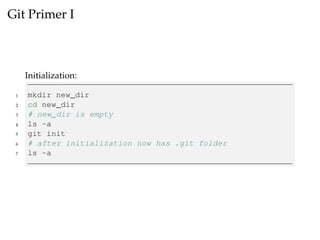
Git Primer I
Initialization:
1 mkdir new_dir
2 cd new_dir
3 # new_dir is empty
4 ls -a
5 git init
6 # after initialization now has .git folder
7 ls -a
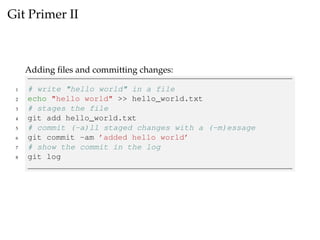
Git Primer II
Adding files and committing changes:
1 # write "hello world" in a file
2 echo "hello world" >> hello_world.txt
3 # stages the file
4 git add hello_world.txt
5 # commit (-a)ll staged changes with a (-m)essage
6 git commit -am ’added hello world’
7 # show the commit in the log
8 git log
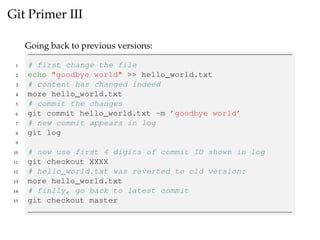
Git Primer III
Going back to previous versions:
1 # first change the file
2 echo "goodbye world" >> hello_world.txt
3 # content has changed indeed
4 more hello_world.txt
5 # commit the changes
6 git commit hello_world.txt -m ’goodbye world’
7 # new commit appears in log
8 git log
9
10 # now use first 4 digits of commit ID shown in log
11 git checkout XXXX
12 # hello_world.txt was reverted to old version:
13 more hello_world.txt
14 # finlly, go back to latest commit
15 git checkout master
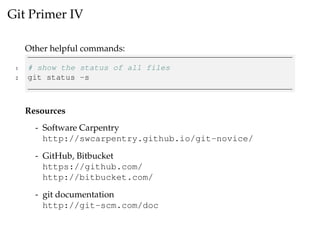
Git Primer IV
Other helpful commands:
1 # show the status of all files
2 git status -s
Resources
- Software Carpentry
http://swcarpentry.github.io/git-novice/
- GitHub, Bitbucket
https://github.com/
http://bitbucket.com/
- git documentation
http://git-scm.com/doc
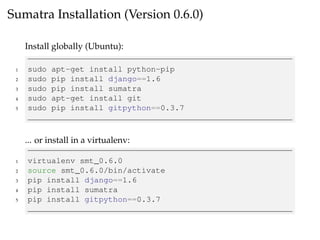
Sumatra Installation (Version 0.6.0)
Install globally (Ubuntu):
1 sudo apt-get install python-pip
2 sudo pip install django==1.6
3 sudo pip install sumatra
4 sudo apt-get install git
5 sudo pip install gitpython==0.3.7
... or install in a virtualenv:
1 virtualenv smt_0.6.0
2 source smt_0.6.0/bin/activate
3 pip install django==1.6
4 pip install sumatra
5 pip install gitpython==0.3.7
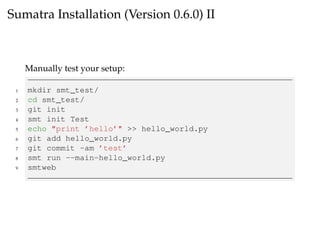
Sumatra Installation (Version 0.6.0) II
Manually test your setup:
1 mkdir smt_test/
2 cd smt_test/
3 git init
4 smt init Test
5 echo "print ’hello’" >> hello_world.py
6 git add hello_world.py
7 git commit -am ’test’
8 smt run --main=hello_world.py
9 smtweb
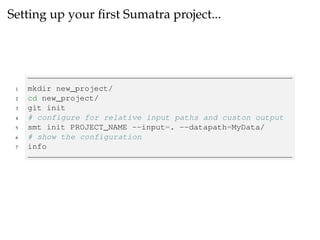
Setting up your first Sumatra project...
1 mkdir new_project/
2 cd new_project/
3 git init
4 # configure for relative input paths and custon output
5 smt init PROJECT_NAME --input=. --datapath=MyData/
6 # show the configuration
7 info
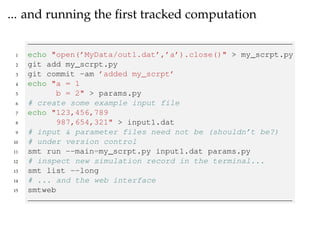
... and running the first tracked computation
1 echo "open(’MyData/out1.dat’,’a’).close()" > my_scrpt.py
2 git add my_scrpt.py
3 git commit -am ’added my_scrpt’
4 echo "a = 1
5 b = 2" > params.py
6 # create some example input file
7 echo "123,456,789
8 987,654,321" > input1.dat
9 # input & parameter files need not be (shouldn’t be?)
10 # under version control
11 smt run --main=my_scrpt.py input1.dat params.py
12 # inspect new simulation record in the terminal...
13 smt list --long
14 # ... and the web interface
15 smtweb
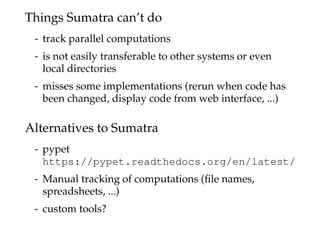
Things Sumatra can’t do
- track parallel computations
- is not easily transferable to other systems or even
local directories
- misses some implementations (rerun when code has
been changed, display code from web interface, ...)
Alternatives to Sumatra
- pypet
https://pypet.readthedocs.org/en/latest/
- Manual tracking of computations (file names,
spreadsheets, ...)
- custom tools?
Have fun with Sumatra!
Presented by
Felix Hoffmann
felix11h.github.io/
Slides
Slideshare:
tiny.cc/smt-present
Source:
tiny.cc/smt-source
Resources on Sumatra
Website: neuralensemble.org/sumatra/
Getting started:
packages.python.org/Sumatra/
Repository:
bitbucket.org/apdavison/sumatra/
Mailinglist:
tiny.cc/smt-user
Maintainer: Andrew Davison
This work is licensed under a Creative Commons Attribution 4.0 International License.

Introduction to Sumatra

  • 1.
    Introduction to Presented by FelixHoffmann felix11h.github.io/ Slides Slideshare: tiny.cc/smt-present Source: tiny.cc/smt-source Resources on Sumatra Website: neuralensemble.org/sumatra/ Getting started: packages.python.org/Sumatra/ Repository: bitbucket.org/apdavison/sumatra/ Mailinglist: tiny.cc/smt-user Maintainer: Andrew Davison This work is licensed under a Creative Commons Attribution 4.0 International License.
  • 2.
    Git Primer I Initialization: 1mkdir new_dir 2 cd new_dir 3 # new_dir is empty 4 ls -a 5 git init 6 # after initialization now has .git folder 7 ls -a
  • 3.
    Git Primer II Addingfiles and committing changes: 1 # write "hello world" in a file 2 echo "hello world" >> hello_world.txt 3 # stages the file 4 git add hello_world.txt 5 # commit (-a)ll staged changes with a (-m)essage 6 git commit -am ’added hello world’ 7 # show the commit in the log 8 git log
  • 4.
    Git Primer III Goingback to previous versions: 1 # first change the file 2 echo "goodbye world" >> hello_world.txt 3 # content has changed indeed 4 more hello_world.txt 5 # commit the changes 6 git commit hello_world.txt -m ’goodbye world’ 7 # new commit appears in log 8 git log 9 10 # now use first 4 digits of commit ID shown in log 11 git checkout XXXX 12 # hello_world.txt was reverted to old version: 13 more hello_world.txt 14 # finlly, go back to latest commit 15 git checkout master
  • 5.
    Git Primer IV Otherhelpful commands: 1 # show the status of all files 2 git status -s Resources - Software Carpentry http://swcarpentry.github.io/git-novice/ - GitHub, Bitbucket https://github.com/ http://bitbucket.com/ - git documentation http://git-scm.com/doc
  • 6.
    Sumatra Installation (Version0.6.0) Install globally (Ubuntu): 1 sudo apt-get install python-pip 2 sudo pip install django==1.6 3 sudo pip install sumatra 4 sudo apt-get install git 5 sudo pip install gitpython==0.3.7 ... or install in a virtualenv: 1 virtualenv smt_0.6.0 2 source smt_0.6.0/bin/activate 3 pip install django==1.6 4 pip install sumatra 5 pip install gitpython==0.3.7
  • 7.
    Sumatra Installation (Version0.6.0) II Manually test your setup: 1 mkdir smt_test/ 2 cd smt_test/ 3 git init 4 smt init Test 5 echo "print ’hello’" >> hello_world.py 6 git add hello_world.py 7 git commit -am ’test’ 8 smt run --main=hello_world.py 9 smtweb
  • 8.
    Setting up yourfirst Sumatra project... 1 mkdir new_project/ 2 cd new_project/ 3 git init 4 # configure for relative input paths and custon output 5 smt init PROJECT_NAME --input=. --datapath=MyData/ 6 # show the configuration 7 info
  • 9.
    ... and runningthe first tracked computation 1 echo "open(’MyData/out1.dat’,’a’).close()" > my_scrpt.py 2 git add my_scrpt.py 3 git commit -am ’added my_scrpt’ 4 echo "a = 1 5 b = 2" > params.py 6 # create some example input file 7 echo "123,456,789 8 987,654,321" > input1.dat 9 # input & parameter files need not be (shouldn’t be?) 10 # under version control 11 smt run --main=my_scrpt.py input1.dat params.py 12 # inspect new simulation record in the terminal... 13 smt list --long 14 # ... and the web interface 15 smtweb
  • 10.
    Things Sumatra can’tdo - track parallel computations - is not easily transferable to other systems or even local directories - misses some implementations (rerun when code has been changed, display code from web interface, ...) Alternatives to Sumatra - pypet https://pypet.readthedocs.org/en/latest/ - Manual tracking of computations (file names, spreadsheets, ...) - custom tools?
  • 11.
    Have fun withSumatra! Presented by Felix Hoffmann felix11h.github.io/ Slides Slideshare: tiny.cc/smt-present Source: tiny.cc/smt-source Resources on Sumatra Website: neuralensemble.org/sumatra/ Getting started: packages.python.org/Sumatra/ Repository: bitbucket.org/apdavison/sumatra/ Mailinglist: tiny.cc/smt-user Maintainer: Andrew Davison This work is licensed under a Creative Commons Attribution 4.0 International License.