The hitchhicker's guide to PIP
and Virtualenv (wrapper)...
Maybe...
Knowing where one's towel is


"Hey, you sass that hoopy Ford Prefect? There's a frood who really
knows where his towel is." (Sass: know, be aware of, meet, have sex
 with; hoopy: really together guy; frood: really amazingly together
                                guy.)
Index
   PIP                     virtual
                                  env

                      r
               r appe
        l envw
v irtua

              mabye...

and e
      veryt
            hing
                 :)

                    wers
                ans
Prerequisites
                                          It (maybe) works also
                                          in other *nix and
                                          with a little effort on
● Python :)                               Windows ;)


● linux ( unfortunately or fortunately :P )
● comfort with shell
● patience required
● internet connection ( not now, but we
   work on the web, in the coils of the Python! )
What is PIP?
      - pip installs packages. Python packages. -


pip is a tool for installing and
managing Python packages, such as
those found in the Python Package
Index (PyPI).
 
It’s a replacement for easy_install.
But...   what is Easy Install?

Easy Install is a python module
(easy_install) bundled with
setuptools that lets you
automatically download, build, install,
and manage Python packages.
 
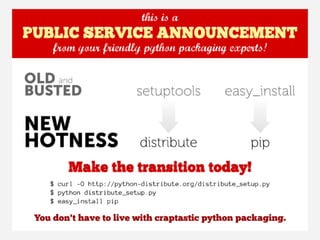
So what?
            ea
              sy
                   _i
                     ns
    I P                ta
P                        ll
PIP installation
    Using package manager, the installer or from source

  (root)# apt-get install python-pip
# or
  (root)# curl http://python-distribute.org/distribute_setup.
py | python
  (root)# curl https://raw.github.
com/pypa/pip/master/contrib/get-pip.py | python
# or
  $ curl -O http://[...]/pip-1.0.tar.gz
  $ tar xvfz pip-x.y.tar.gz ; cd pip-1.0
# or
  $ git clone https://github.com/pypa/pip.git ; cd pip
  (root)# python setup.py install
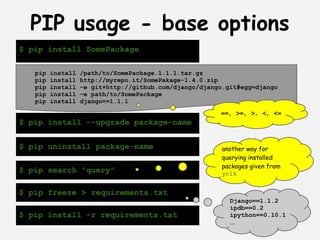
PIP usage - base options
$ pip install SomePackage

   pip   install   /path/to/SomePackage.1.1.1.tar.gz
   pip   install   http://myrepo.it/SomePakage-1.4.0.zip
   pip   install   -e git+http://github.com/django/django.git#egg=django
   pip   install   -e path/to/SomePackage
   pip   install   django==1.1.1
                                                        ==, >=, >, <, <=
$ pip install --upgrade package-name


$ pip uninstall package-name                             another way for
                                                         querying installed
                                                         packages given from
$ pip search "query"                                     yolk


$ pip freeze > requirements.txt
                                                           Django==1.1.2
                                                           ipdb==0.2
$ pip install -r requirements.txt                          ipython==0.10.1
                                                           ...
PIP configuration
                        - quickest look -

*nix $HOME/.pip/pip.conf                           [global]
                                                   timeout = 60
windows %HOME%pippip.ini                         [freeze]
                                                   timeout = 10

$ export PIP_DEFAULT_TIMEOUT=10                    [install]
$ pip install django                               find-links =
                                                       http://mirror.com


 Env. variables
 override config file
                           Each command line options have a
                           PIP_<UPPER_NAME> environment variables


$ pip --default-timeout=60 install django
PyPI
                     - the Python Pakage Index -


 PyPI is a repository of software for Python
 and currently count 20481 packages.
 The PyPI repository provides alternative locations that store the
 packages.
  
                                             [install]
                                             use-mirrors = true
$ pip --use-mirrors ...                      mirrors =
$ export PIP_USE_MIRRORS=true                  http://d.pypi.python.org
                                               http://b.pypi.python.org


 You can create your own mirror, following the PEP 381 or using a tool
 such as pep381client
Want to know more?
           Read the docs!
            ( Luke! :D )


                      PIP
http://www.pip-installer.org/en/latest/index.html
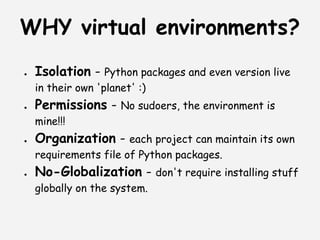
WHY virtual environments?
●   Isolation - Python packages and even version live
    in their own 'planet' :)
●   Permissions - No sudoers, the environment is
    mine!!!
●   Organization - each project can maintain its own
    requirements file of Python packages.
●   No-Globalization - don't require installing stuff
    globally on the system.
PIP + virtualenv
●   it's not recommended install packages
    globally, but you can :)
●   pip works fine with virtualenv!
●   used in conjunction to isolate your
    installation


Well... step forward: setup and play with
           virtual environments!
What is virtualenv?
Is a tool to create isolated Python
environments.


Every virtualenv has pip installed in
it automatically (also easy_install)
under bin directory.


Does not require root access or
modify your system.
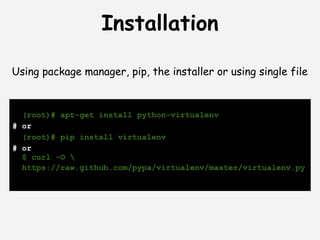
Installation

Using package manager, pip, the installer or using single file


  (root)# apt-get install python-virtualenv
# or
  (root)# pip install virtualenv
# or
  $ curl -O 
  https://raw.github.com/pypa/virtualenv/master/virtualenv.py
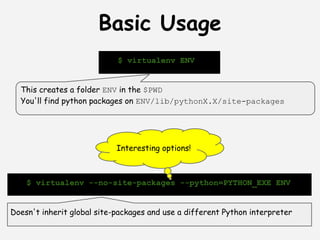
Basic Usage
                            $ virtualenv ENV


  This creates a folder ENV in the $PWD
  You'll find python packages on ENV/lib/pythonX.X/site-packages


                            Interesting options!


    $ virtualenv --no-site-packages --python=PYTHON_EXE ENV


Doesn't inherit global site-packages and use a different Python interpreter
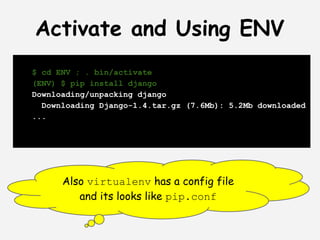
Activate and Using ENV
$ cd ENV ; . bin/activate
(ENV) $ pip install django
Downloading/unpacking django
  Downloading Django-1.4.tar.gz (7.6Mb): 5.2Mb downloaded
...


      Also virtualenv has a config file
         and its looks like pip.conf
Extending virtualenv
# django-day.py
import virtualenv, textwrap
output = virtualenv.create_bootstrap_script(textwrap.
dedent())"""
def after_install(options, home_dir):
    subprocess.call([join(home_dir, 'bin', 'pip'),
       'install',
       'django'])
"""
f = open('django-bootstrap.py', 'w').write(output)


extend_parser(optparse_parser):
    # add or remove option          The script created is an
adjust_options(options, args):
    # change options or args
                                    extension to virtualenv
after_install(options, home_dir):   and inherit all its options!
    # after install run this
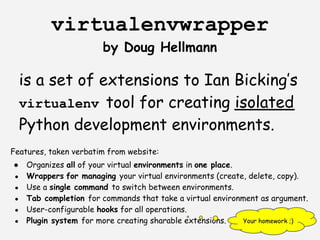
virtualenvwrapper
                         by Doug Hellmann

     is a set of extensions to Ian Bicking’s
     virtualenv tool for creating isolated
     Python development environments.
Features, taken verbatim from website:
●     Organizes all of your virtual environments in one place.
 ●    Wrappers for managing your virtual environments (create, delete, copy).
 ●    Use a single command to switch between environments.
 ●    Tab completion for commands that take a virtual environment as argument.
 ●    User-configurable hooks for all operations.
 ●    Plugin system for more creating sharable extensions.     Your homework ;)
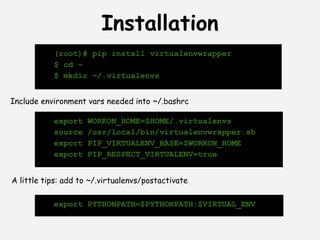
Installation
           (root)# pip install virtualenvwrapper
           $ cd ~
           $ mkdir ~/.virtualenvs


Include environment vars needed into ~/.bashrc

           export    WORKON_HOME=$HOME/.virtualenvs
           source    /usr/local/bin/virtualenvwrapper.sh
           export    PIP_VIRTUALENV_BASE=$WORKON_HOME
           export    PIP_RESPECT_VIRTUALENV=true


A little tips: add to ~/.virtualenvs/postactivate

           export PYTHONPATH=$PYTHONPATH:$VIRTUAL_ENV
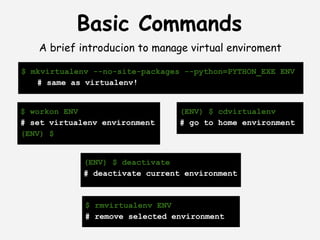
Basic Commands
   A brief introducion to manage virtual enviroment

$ mkvirtualenv --no-site-packages --python=PYTHON_EXE ENV
   # same as virtualenv!


$ workon ENV                     (ENV) $ cdvirtualenv
# set virtualenv environment     # go to home environment
(ENV) $


             (ENV) $ deactivate
             # deactivate current environment


             $ rmvirtualenv ENV
             # remove selected environment
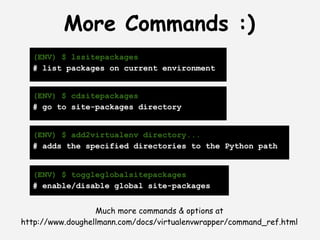
More Commands :)
  (ENV) $ lssitepackages
  # list packages on current environment


  (ENV) $ cdsitepackages
  # go to site-packages directory


  (ENV) $ add2virtualenv directory...
  # adds the specified directories to the Python path


  (ENV) $ toggleglobalsitepackages
  # enable/disable global site-packages


                  Much more commands & options at
http://www.doughellmann.com/docs/virtualenvwrapper/command_ref.html
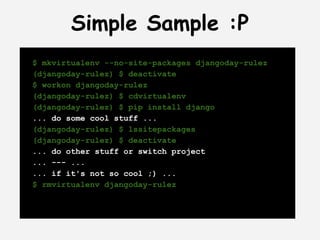
Simple Sample :P
$ mkvirtualenv --no-site-packages djangoday-rulez
(djangoday-rulez) $ deactivate
$ workon djangoday-rulez
(djangoday-rulez) $ cdvirtualenv
(djangoday-rulez) $ pip install django
... do some cool stuff ...
(djangoday-rulez) $ lssitepackages
(djangoday-rulez) $ deactivate
... do other stuff or switch project
... --- ...
... if it's not so cool ;) ...
$ rmvirtualenv djangoday-rulez
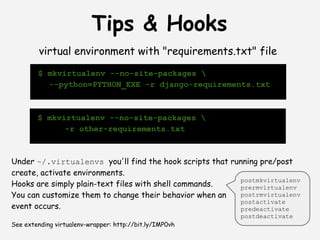
Tips & Hooks
         virtual environment with "requirements.txt" file
        $ mkvirtualenv --no-site-packages 
          --python=PYTHON_EXE -r django-requirements.txt


        $ mkvirtualenv --no-site-packages 
              -r other-requirements.txt


Under ~/.virtualenvs you'll find the hook scripts that running pre/post
create, activate environments.
                                                         postmkvirtualenv
Hooks are simply plain-text files with shell commands.   prermvirtualenv
You can customize them to change their behavior when an  postrmvirtualenv
                                                         postactivate
event occurs.                                            predeactivate
 
                                                         postdeactivate
See extending virtualenv-wrapper: http://bit.ly/IMP0vh
Not entirely unlike...


    virtualenv         virtualenvwrapper
                       http://bit.ly/141dCr
                  
http://bit.ly/jbFVCe
which python ?
Latest stable
2.4.6, 2.5.6,
 2.6.8, 2.7.3


Images comes from
    Wikipedia
pythonbrew !
pythonbrew is a program to automate the
building and installation of Python in the
users $HOME.
Installation
Recommended way

   $ curl -kL http://xrl.us/pythonbrewinstall | bash


 Add the following line into ~/.bashrc

[[ -s $HOME/.pythonbrew/etc/bashrc ]] && source $HOME/.
pythonbrew/etc/bashrc


                           Last News!!!
The original project seems to be unmantained, but there is
    a fork https://github.com/saghul/pythonz
(forked last week... Wait! I have a presentation to do! :D )
                  Long live pythonz!
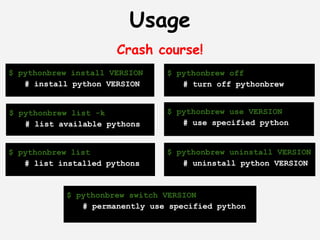
Usage
                      Crash course!
$ pythonbrew install VERSION    $ pythonbrew off
   # install python VERSION        # turn off pythonbrew


$ pythonbrew list -k            $ pythonbrew use VERSION
   # list available pythons        # use specified python


$ pythonbrew list               $ pythonbrew uninstall VERSION
   # list installed pythons        # uninstall python VERSION


            $ pythonbrew switch VERSION
               # permanently use specified python
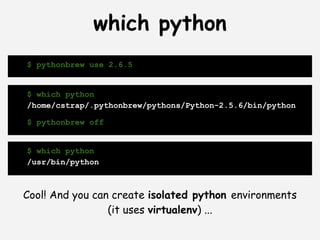
which python
$ pythonbrew use 2.6.5


$ which python
/home/cstrap/.pythonbrew/pythons/Python-2.5.6/bin/python

$ pythonbrew off


$ which python
/usr/bin/python


Cool! And you can create isolated python environments
                 (it uses virtualenv) ...
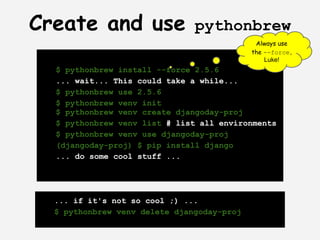
Create and use                 pythonbrew
                                             Always use
                                            the --force,
                                                Luke!
  $ pythonbrew install --force 2.5.6
  ... wait... This could take a while...
  $ pythonbrew use 2.5.6
  $ pythonbrew venv init
  $ pythonbrew venv create djangoday-proj
  $ pythonbrew venv list # list all environments
  $ pythonbrew venv use djangoday-proj
  (djangoday-proj) $ pip install django
  ... do some cool stuff ...


  ... if it's not so cool ;) ...
  $ pythonbrew venv delete djangoday-proj
Mostly Harmles...
●   virtualenv & virtualenvwrapper
    allow you to create and manage
    environments using the system default
    Python interpreter
●   pythonbrew allow you to install
    different Python interpreter, create
    and manage virtual environments


                     ...
Basic Combo
$ pythonbrew install --force 2.6.7
 ... wait...
$ mkvirtualenv --no-site-packages 
 -p $HOME/.pythonbrew/pythons/Python-2.6.7/bin/python
 djangoDay
 ... wait...
(djangoDay) $ cdvirtualenv
(djangoDay) [djangoDay] $ pip install django
... wait...
(djangoDay) $ which python ; python -V
/home/cstrap/.virtualenvs/djangoDay/bin/python
Python 2.6.7
(djangoDay) [djangoDay] $ deactivate
$ which python ; python -V
/usr/bin/python
Python 2.7.2
Super Combo
$ pythonbrew install --force 2.7.3 ... wait...
$ pythonbrew install --force 2.5.6 ... wait...
$ pythonbrew use 2.7.3
$ pip install virtualenv && pip install virtualenvwrapper
# configure .bashrc
export WORKON_HOME=$HOME/.virtualenvs
export 
VIRTUALENVWRAPPER_PYTHON=$HOME/.pythonbrew/pythons/Python-2.7.3/bin/python
source $HOME/.pythonbrew/pythons/Python-2.7.3/bin/virtualenvwrapper.sh
export PIP_VIRTUALENV_BASE=$WORKON_HOME
$ mkdir ~/.virtualenvs
$ mkvirtualenv --no-site-packages 
   -p $HOME/.pythonbrew/pythons/Python-2.5.6/bin/python djangoDay
(djangoDay) $ which python ; python -V
/home/cstrap/.virtualenvs/djangoDay/bin/python
Python 2.5.6
(djangoDay) [djangoDay] $ deactivate
$ which python ; python -V
/home/cstrap/.pythonbrew/pythons/Python-2.7.3/bin/python
Python 2.7.3
$ pythonbrew off; python -V
# Your current system version of Python
Share and Enjoy! :P
lab@strap.it


         @cstrap
Answers?


Thanks for your patience! ;)

Virtualenv

  • 1.
    The hitchhicker's guideto PIP and Virtualenv (wrapper)... Maybe...
  • 2.
    Knowing where one'stowel is "Hey, you sass that hoopy Ford Prefect? There's a frood who really knows where his towel is." (Sass: know, be aware of, meet, have sex with; hoopy: really together guy; frood: really amazingly together guy.)
  • 3.
    Index PIP virtual env r r appe l envw v irtua mabye... and e veryt hing :) wers ans
  • 4.
    Prerequisites It (maybe) works also in other *nix and with a little effort on ● Python :) Windows ;) ● linux ( unfortunately or fortunately :P ) ● comfort with shell ● patience required ● internet connection ( not now, but we work on the web, in the coils of the Python! )
  • 5.
    What is PIP? - pip installs packages. Python packages. - pip is a tool for installing and managing Python packages, such as those found in the Python Package Index (PyPI).   It’s a replacement for easy_install.
  • 6.
    But... what is Easy Install? Easy Install is a python module (easy_install) bundled with setuptools that lets you automatically download, build, install, and manage Python packages.  
  • 7.
    So what? ea sy _i ns I P ta P ll
  • 9.
    PIP installation Using package manager, the installer or from source (root)# apt-get install python-pip # or (root)# curl http://python-distribute.org/distribute_setup. py | python (root)# curl https://raw.github. com/pypa/pip/master/contrib/get-pip.py | python # or $ curl -O http://[...]/pip-1.0.tar.gz $ tar xvfz pip-x.y.tar.gz ; cd pip-1.0 # or $ git clone https://github.com/pypa/pip.git ; cd pip (root)# python setup.py install
  • 10.
    PIP usage -base options $ pip install SomePackage pip install /path/to/SomePackage.1.1.1.tar.gz pip install http://myrepo.it/SomePakage-1.4.0.zip pip install -e git+http://github.com/django/django.git#egg=django pip install -e path/to/SomePackage pip install django==1.1.1 ==, >=, >, <, <= $ pip install --upgrade package-name $ pip uninstall package-name another way for querying installed packages given from $ pip search "query" yolk $ pip freeze > requirements.txt Django==1.1.2 ipdb==0.2 $ pip install -r requirements.txt ipython==0.10.1 ...
  • 11.
    PIP configuration - quickest look - *nix $HOME/.pip/pip.conf [global] timeout = 60 windows %HOME%pippip.ini [freeze] timeout = 10 $ export PIP_DEFAULT_TIMEOUT=10 [install] $ pip install django find-links = http://mirror.com Env. variables override config file Each command line options have a PIP_<UPPER_NAME> environment variables $ pip --default-timeout=60 install django
  • 12.
    PyPI - the Python Pakage Index - PyPI is a repository of software for Python and currently count 20481 packages. The PyPI repository provides alternative locations that store the packages.   [install] use-mirrors = true $ pip --use-mirrors ... mirrors = $ export PIP_USE_MIRRORS=true http://d.pypi.python.org http://b.pypi.python.org You can create your own mirror, following the PEP 381 or using a tool such as pep381client
  • 13.
    Want to knowmore? Read the docs! ( Luke! :D ) PIP http://www.pip-installer.org/en/latest/index.html
  • 14.
    WHY virtual environments? ● Isolation - Python packages and even version live in their own 'planet' :) ● Permissions - No sudoers, the environment is mine!!! ● Organization - each project can maintain its own requirements file of Python packages. ● No-Globalization - don't require installing stuff globally on the system.
  • 15.
    PIP + virtualenv ● it's not recommended install packages globally, but you can :) ● pip works fine with virtualenv! ● used in conjunction to isolate your installation Well... step forward: setup and play with virtual environments!
  • 16.
    What is virtualenv? Isa tool to create isolated Python environments.   Every virtualenv has pip installed in it automatically (also easy_install) under bin directory.   Does not require root access or modify your system.
  • 17.
    Installation Using package manager,pip, the installer or using single file (root)# apt-get install python-virtualenv # or (root)# pip install virtualenv # or $ curl -O https://raw.github.com/pypa/virtualenv/master/virtualenv.py
  • 18.
    Basic Usage $ virtualenv ENV This creates a folder ENV in the $PWD You'll find python packages on ENV/lib/pythonX.X/site-packages Interesting options! $ virtualenv --no-site-packages --python=PYTHON_EXE ENV Doesn't inherit global site-packages and use a different Python interpreter
  • 19.
    Activate and UsingENV $ cd ENV ; . bin/activate (ENV) $ pip install django Downloading/unpacking django Downloading Django-1.4.tar.gz (7.6Mb): 5.2Mb downloaded ... Also virtualenv has a config file and its looks like pip.conf
  • 20.
    Extending virtualenv # django-day.py importvirtualenv, textwrap output = virtualenv.create_bootstrap_script(textwrap. dedent())""" def after_install(options, home_dir): subprocess.call([join(home_dir, 'bin', 'pip'), 'install', 'django']) """ f = open('django-bootstrap.py', 'w').write(output) extend_parser(optparse_parser): # add or remove option The script created is an adjust_options(options, args): # change options or args extension to virtualenv after_install(options, home_dir): and inherit all its options! # after install run this
  • 22.
    virtualenvwrapper by Doug Hellmann is a set of extensions to Ian Bicking’s virtualenv tool for creating isolated Python development environments. Features, taken verbatim from website: ● Organizes all of your virtual environments in one place. ● Wrappers for managing your virtual environments (create, delete, copy). ● Use a single command to switch between environments. ● Tab completion for commands that take a virtual environment as argument. ● User-configurable hooks for all operations. ● Plugin system for more creating sharable extensions. Your homework ;)
  • 23.
    Installation (root)# pip install virtualenvwrapper $ cd ~ $ mkdir ~/.virtualenvs Include environment vars needed into ~/.bashrc export WORKON_HOME=$HOME/.virtualenvs source /usr/local/bin/virtualenvwrapper.sh export PIP_VIRTUALENV_BASE=$WORKON_HOME export PIP_RESPECT_VIRTUALENV=true A little tips: add to ~/.virtualenvs/postactivate export PYTHONPATH=$PYTHONPATH:$VIRTUAL_ENV
  • 24.
    Basic Commands A brief introducion to manage virtual enviroment $ mkvirtualenv --no-site-packages --python=PYTHON_EXE ENV # same as virtualenv! $ workon ENV (ENV) $ cdvirtualenv # set virtualenv environment # go to home environment (ENV) $ (ENV) $ deactivate # deactivate current environment $ rmvirtualenv ENV # remove selected environment
  • 25.
    More Commands :) (ENV) $ lssitepackages # list packages on current environment (ENV) $ cdsitepackages # go to site-packages directory (ENV) $ add2virtualenv directory... # adds the specified directories to the Python path (ENV) $ toggleglobalsitepackages # enable/disable global site-packages Much more commands & options at http://www.doughellmann.com/docs/virtualenvwrapper/command_ref.html
  • 26.
    Simple Sample :P $mkvirtualenv --no-site-packages djangoday-rulez (djangoday-rulez) $ deactivate $ workon djangoday-rulez (djangoday-rulez) $ cdvirtualenv (djangoday-rulez) $ pip install django ... do some cool stuff ... (djangoday-rulez) $ lssitepackages (djangoday-rulez) $ deactivate ... do other stuff or switch project ... --- ... ... if it's not so cool ;) ... $ rmvirtualenv djangoday-rulez
  • 27.
    Tips & Hooks virtual environment with "requirements.txt" file $ mkvirtualenv --no-site-packages --python=PYTHON_EXE -r django-requirements.txt $ mkvirtualenv --no-site-packages -r other-requirements.txt Under ~/.virtualenvs you'll find the hook scripts that running pre/post create, activate environments. postmkvirtualenv Hooks are simply plain-text files with shell commands. prermvirtualenv You can customize them to change their behavior when an postrmvirtualenv postactivate event occurs. predeactivate     postdeactivate See extending virtualenv-wrapper: http://bit.ly/IMP0vh
  • 28.
    Not entirely unlike... virtualenv   virtualenvwrapper http://bit.ly/141dCr   http://bit.ly/jbFVCe
  • 29.
    which python ? Lateststable 2.4.6, 2.5.6, 2.6.8, 2.7.3 Images comes from Wikipedia
  • 31.
    pythonbrew ! pythonbrew isa program to automate the building and installation of Python in the users $HOME.
  • 32.
    Installation Recommended way $ curl -kL http://xrl.us/pythonbrewinstall | bash Add the following line into ~/.bashrc [[ -s $HOME/.pythonbrew/etc/bashrc ]] && source $HOME/. pythonbrew/etc/bashrc Last News!!! The original project seems to be unmantained, but there is a fork https://github.com/saghul/pythonz (forked last week... Wait! I have a presentation to do! :D ) Long live pythonz!
  • 33.
    Usage Crash course! $ pythonbrew install VERSION $ pythonbrew off # install python VERSION # turn off pythonbrew $ pythonbrew list -k $ pythonbrew use VERSION # list available pythons # use specified python $ pythonbrew list $ pythonbrew uninstall VERSION # list installed pythons # uninstall python VERSION $ pythonbrew switch VERSION # permanently use specified python
  • 34.
    which python $ pythonbrewuse 2.6.5 $ which python /home/cstrap/.pythonbrew/pythons/Python-2.5.6/bin/python $ pythonbrew off $ which python /usr/bin/python Cool! And you can create isolated python environments (it uses virtualenv) ...
  • 35.
    Create and use pythonbrew Always use the --force, Luke! $ pythonbrew install --force 2.5.6 ... wait... This could take a while... $ pythonbrew use 2.5.6 $ pythonbrew venv init $ pythonbrew venv create djangoday-proj $ pythonbrew venv list # list all environments $ pythonbrew venv use djangoday-proj (djangoday-proj) $ pip install django ... do some cool stuff ... ... if it's not so cool ;) ... $ pythonbrew venv delete djangoday-proj
  • 36.
    Mostly Harmles... ● virtualenv & virtualenvwrapper allow you to create and manage environments using the system default Python interpreter ● pythonbrew allow you to install different Python interpreter, create and manage virtual environments ...
  • 38.
    Basic Combo $ pythonbrewinstall --force 2.6.7 ... wait... $ mkvirtualenv --no-site-packages -p $HOME/.pythonbrew/pythons/Python-2.6.7/bin/python djangoDay ... wait... (djangoDay) $ cdvirtualenv (djangoDay) [djangoDay] $ pip install django ... wait... (djangoDay) $ which python ; python -V /home/cstrap/.virtualenvs/djangoDay/bin/python Python 2.6.7 (djangoDay) [djangoDay] $ deactivate $ which python ; python -V /usr/bin/python Python 2.7.2
  • 39.
    Super Combo $ pythonbrewinstall --force 2.7.3 ... wait... $ pythonbrew install --force 2.5.6 ... wait... $ pythonbrew use 2.7.3 $ pip install virtualenv && pip install virtualenvwrapper # configure .bashrc export WORKON_HOME=$HOME/.virtualenvs export VIRTUALENVWRAPPER_PYTHON=$HOME/.pythonbrew/pythons/Python-2.7.3/bin/python source $HOME/.pythonbrew/pythons/Python-2.7.3/bin/virtualenvwrapper.sh export PIP_VIRTUALENV_BASE=$WORKON_HOME $ mkdir ~/.virtualenvs $ mkvirtualenv --no-site-packages -p $HOME/.pythonbrew/pythons/Python-2.5.6/bin/python djangoDay (djangoDay) $ which python ; python -V /home/cstrap/.virtualenvs/djangoDay/bin/python Python 2.5.6 (djangoDay) [djangoDay] $ deactivate $ which python ; python -V /home/cstrap/.pythonbrew/pythons/Python-2.7.3/bin/python Python 2.7.3 $ pythonbrew off; python -V # Your current system version of Python
  • 40.
  • 41.
  • 42.