SmartTransport
A Secure Commute for Employees
Functional Modules
Contents
 Introduction
 SmartTransport
 Overview
 Functional Architecture
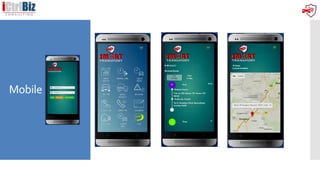
 Mobile
 Safety & Security
 Process flow
 Benefits
 Implementation Overview
 Account Management
 Approach
 Timelines
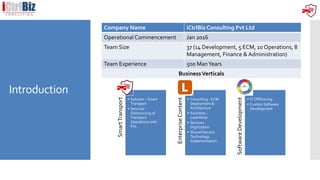
Introduction
Company Name iCtrlBiz Consulting Pvt Ltd
Operational Commencement Jan 2016
Team Size 37 (14 Development, 5 ECM, 10 Operations, 8
Management, Finance & Administration)
Team Experience 500 ManYears
BusinessVerticals
SmartTransport
• Solution - Smart
Transport
• Services -
Outsourcing of
Transport
Operations with
PnL
EnterpriseContent
Management
• Consulting - ECM
Deployment &
Architecture
• Solutions -
Laserfiche
• Services -
Digitization
• Shared Service
Technology
Implementation
SoftwareDevelopment
• IT OffShoring
• Custom Software
Development
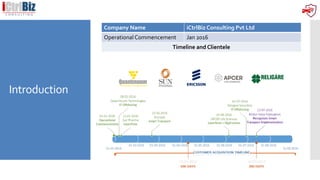
Introduction
Company Name iCtrlBiz Consulting Pvt Ltd
Operational Commencement Jan 2016
Timeline and Clientele
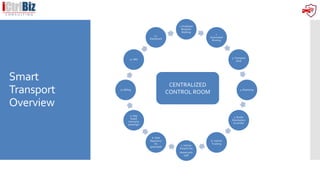
Smart
Transport
Overview
1. Employee
Requests
Booking
2.
Automated
Routing
3. Transport
Desk
4. Rostering
5. Roster
Distribution
to vendor
6. Vehicle
Tracking
7. Vehicle
Detail to be
shared with
staff
8. Shift
Reports to
be
generated
9. App
based
closing by
passenger
10. Billing
11. MIS
12.
Dashboard
CENTRALIZED
CONTROL ROOM
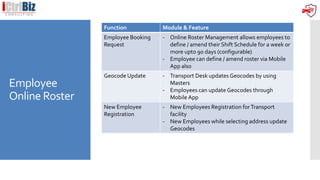
Employee
Online Roster
Function Module & Feature
Employee Booking
Request
- Online Roster Management allows employees to
define / amend their Shift Schedule for a week or
more upto 90 days (configurable)
- Employee can define / amend roster via Mobile
App also
Geocode Update - Transport Desk updates Geocodes by using
Masters
- Employees can update Geocodes through
Mobile App
New Employee
Registration
- New Employees Registration forTransport
facility
- New Employees while selecting address update
Geocodes
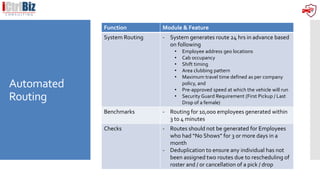
Automated
Routing
Function Module & Feature
System Routing - System generates route 24 hrs in advance based
on following
• Employee address geo locations
• Cab occupancy
• Shift timing
• Area clubbing pattern
• Maximum travel time defined as per company
policy, and
• Pre-approved speed at which the vehicle will run
• Security Guard Requirement (First Pickup / Last
Drop of a female)
Benchmarks - Routing for 10,000 employees generated within
3 to 4 minutes
Checks - Routes should not be generated for Employees
who had “No Shows” for 3 or more days in a
month
- Deduplication to ensure any individual has not
been assigned two routes due to rescheduling of
roster and / or cancellation of a pick / drop
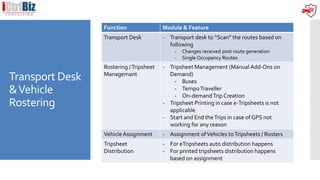
Transport Desk
&Vehicle
Rostering
Function Module & Feature
Transport Desk - Transport desk to “Scan” the routes based on
following
- Changes received post route generation
- Single Occupancy Routes
Rostering /Tripsheet
Managemant
- Tripsheet Management (Manual Add-Ons on
Demand)
- Buses
- TempoTraveller
- On-demandTrip Creation
- Tripsheet Printing in case e-Tripsheets is not
applicable
- Start and End theTrips in case of GPS not
working for any reason
VehicleAssignment - Assignment ofVehicles toTripsheets / Rosters
Tripsheet
Distribution
- For eTripsheets auto distribution happens
- For printed tripsheets distribution happens
based on assignment
Employee
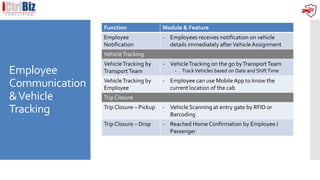
Communication
&Vehicle
Tracking
Function Module & Feature
Employee
Notification
- Employees receives notification on vehicle
details immediately afterVehicleAssignment
VehicleTracking
VehicleTracking by
TransportTeam
- VehicleTracking on the go byTransportTeam
- TrackVehicles based on Date and ShiftTime
VehicleTracking by
Employee
- Employee can use Mobile App to know the
current location of the cab
Trip Closure
Trip Closure – Pickup - Vehicle Scanning at entry gate by RFID or
Barcoding
Trip Closure – Drop - Reached Home Confirmation by Employee /
Passenger
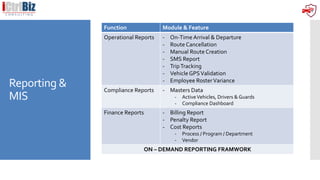
Reporting &
MIS
Function Module & Feature
Operational Reports - On-Time Arrival & Departure
- Route Cancellation
- Manual Route Creation
- SMS Report
- TripTracking
- Vehicle GPSValidation
- Employee RosterVariance
Compliance Reports - Masters Data
- ActiveVehicles, Drivers & Guards
- Compliance Dashboard
Finance Reports - Billing Report
- Penalty Report
- Cost Reports
- Process / Program / Department
- Vendor
ON – DEMAND REPORTING FRAMWORK
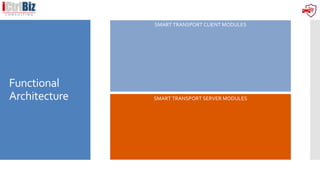
Functional
Architecture SMART TRANSPORT SERVER MODULES
SMART TRANSPORT CLIENT MODULES
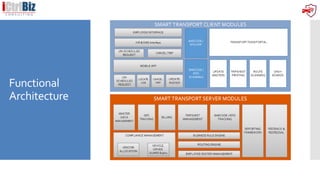
Functional
Architecture
Deployment
Architecture
INTERNET - Webservices Over Port 443, SFTP Port 22 for Route Upload over,
TCP Port 636 for Secured LDAP Authentication
OverInternet
Thirdparty Gateway
DMZ Zone
Transport Team
Employees
Facility Entry / Exit
SmarT IVR Gateway
https://client.safecommute.in 184.168.xxx.xxx
Web Server Cluster
SmartT Web server 1
184.168.xxx.xxx
(AWS)
SmartT Web server 2
184.168.xxx.xxx
(AWS)
System / Content DB
Server
Oracle Cluster Server
IP: 184.168.xxx.xxx IP: 184.168.xxx.xxx
System / Content DB Server
AWS
Cloud
Client HRMSMail Server Directory Server
Master Data Management
Vehicle Tracking
TripSheet Management
Employee Mobile App
1. Adhoc Request
2. Cancellation of Pick & Drop
SmarT SMS Gateway
1. Adhoc Request
2. Cancellation of
Pick & Drop
Employee Self Service @ Web
Vehicle Scanning
OTA & OTD
Mobile
Safety &
Security
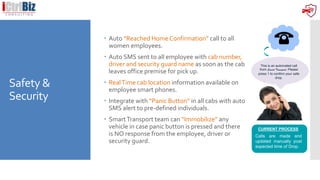
 Auto “Reached Home Confirmation” call to all
women employees.
 Auto SMS sent to all employee with cab number,
driver and security guard name as soon as the cab
leaves office premise for pick up.
 RealTime cab location information available on
employee smart phones.
 Integrate with “Panic Button” in all cabs with auto
SMS alert to pre-defined individuals.
 SmartTransport team can “Immobilize” any
vehicle in case panic button is pressed and there
is NO response from the employee, driver or
security guard.
Calls are made and
updated manually post
expected time of Drop.
CURRENT PROCESS
This is an automated call
from Smart Transport. Please
press 1 to confirm your safe
drop.
Additional
Features
Auto SMS
Auto SMS sent to employees when cab is within 3 KMs away from employee
residence.
Auto SMS sent to remaining employees as soon as the first and subsequent pick
ups are done.
In case of pick up “NO SHOW”, system automatically cancels subsequent
employee drop.
An email is sent to employee supervisor (2 levels) requesting them to click on the
“Drop Required” button on the email in case the employee came to office, and
requires company transport for his / her drop.
Centralized repository of all data including fingerprints of driver, vendor
supervisors and security guards.
Robust vehicle, driver and security guard induction process.
Key Benefits
Benefits
To
Employees
To Client
 Increased Employee Safety 👍 👍
 Increased Employee Satisfaction 👍 👍
 Increased employee retention 👍 👍
 Increased employee productivity 👍
 Increased revenue and profit margins 👍
 Corporate Social Responsibility 👍
 Data Integrity and Authenticity 👍
 Limited manual intervention 👍 👍
 System generated reports and analysis 👍 👍
 Real time information of employee arrival and
departures
👍 👍
 Increased Transparency - System generated billing 👍
Implementation
Overview
Account
Management
Team
The following account team for Client will bring the right fit of industry knowledge, technical expertise, and
service delivery experience.
ClientAccountTeam
Chandresh Sharma,COO, is the overall account director for Client. He has overall
responsibilities for strategic account management.
• Masters in ECM from AIIM
• Functional andTechnical expertise.
• Responsible for assisting with day-to-day account management.
• Responsible for needs analysis, requirements gathering
• Executed 43 key projects including Ranbaxy (now Sun Pharma), ESSAR, IOCL,
BSNL
ShailendraTripathi , Director-IT. He will be responsible for the executive relationships
between Laserfiche and Client, as well as the quality of overall services.
• Prince 2 Practitioner and SCRUM Master
• Align Client’s goals with solution delivery
• Responsible for project management
• Executed key projects in Ranbaxy, ESSAR, Flowserve
• SME for Oracle, MS SQL and Java
Nimitesh Kumar,Technical Lead,
• ITIL v3 professional, Laserfiche Certified CPP
• Responsible for overall Laserfiche ECM and workflow implementation.
• Executed key projects in Ranbaxy, ESSAR
• SME for .NET Development, Mobile Applications
Chandresh Sharma
COO
Shailendra Tripathi
Director – IT
Nimitesh
Kumar
Technical
Lead
Account Management
Professional Services Staff
Satish
Chandra
Operations
Lead
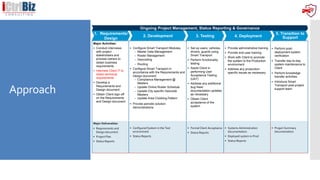
Approach
Major Activities:
 Conduct interviews
with project
stakeholders and
process owners to
obtain business
requirements
 Interview Client IT to
obtain technical
requirements
 Develop a
Requirements and
Design document
 Obtain Client sign-off
on the Requirements
and Design document
 Configure Smart Transport Modules
– Master Data Management
– Roster Management
– Geocoding
– Routing
 Configure Smart Transport in
accordance with the Requirements and
Design document
– Compliance Management @
Masters
– Update Online Roster Schedule
– Update City specific Geocode
Masters
– Update Area Clubbing Pattern
 Provide periodic solution
demonstrations
 Set up users, vehicles,
drivers, guards using
Smart Transport
 Perform functionality
testing
 Assist Client in
performing User
Acceptance Testing
(UAT)
 Address any additional
bug fixes/
documentation updates
as necessary
 Obtain Client
acceptance of the
system
 Provide administrative training
 Provide end-user training
 Work with Client to promote
the system to the Production
environment
 Address any production-
specific issues as necessary
 Perform post-
deployment system
verification
 Transfer day-to-day
system maintenance to
Client
 Perform knowledge
transfer activities
 Introduce Smart
Transport post-project
support team
Major Deliverables:
 Requirements and
Design document
 Project Plan
 Status Reports
 Configured System in the Test
environment
 Status Reports
 Formal Client Acceptance
 Status Reports
 Systems Administration
documentation
 Deployed system in Prod
 Status Reports
 Project Summary
documentation
2. Development 3. Testing 4. Deployment
5. Transition to
Support
1. Requirements/
Design
Ongoing Project Management, Status Reporting & Governance
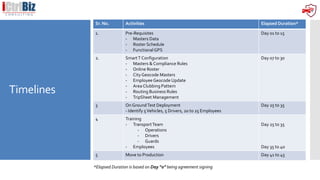
Timelines
Sr. No. Activities Elapsed Duration*
1. Pre-Requisites
- Masters Data
- Roster Schedule
- FunctionalGPS
Day 01 to 15
2. SmartT Configuration
- Masters & Compliance Rules
- Online Roster
- City Geocode Masters
- Employee Geocode Update
- Area Clubbing Pattern
- Routing Business Rules
- TripSheet Management
Day 07 to 30
3 On GroundTest Deployment
- Identify 5Vehicles, 5 Drivers, 20 to 25 Employees
Day 25 to 35
4 Training
- TransportTeam
- Operations
- Drivers
- Guards
- Employees
Day 25 to 35
Day 35 to 40
5 Move to Production Day 41 to 45
*Elapsed Duration is based on Day “0” being agreement signing
Q&A
ThankYou

Smart Transport for benefit of employees, logistics & freight carriers

  • 1.
    SmartTransport A Secure Commutefor Employees Functional Modules
  • 2.
    Contents  Introduction  SmartTransport Overview  Functional Architecture  Mobile  Safety & Security  Process flow  Benefits  Implementation Overview  Account Management  Approach  Timelines
  • 3.
    Introduction Company Name iCtrlBizConsulting Pvt Ltd Operational Commencement Jan 2016 Team Size 37 (14 Development, 5 ECM, 10 Operations, 8 Management, Finance & Administration) Team Experience 500 ManYears BusinessVerticals SmartTransport • Solution - Smart Transport • Services - Outsourcing of Transport Operations with PnL EnterpriseContent Management • Consulting - ECM Deployment & Architecture • Solutions - Laserfiche • Services - Digitization • Shared Service Technology Implementation SoftwareDevelopment • IT OffShoring • Custom Software Development
  • 4.
    Introduction Company Name iCtrlBizConsulting Pvt Ltd Operational Commencement Jan 2016 Timeline and Clientele
  • 5.
    Smart Transport Overview 1. Employee Requests Booking 2. Automated Routing 3. Transport Desk 4.Rostering 5. Roster Distribution to vendor 6. Vehicle Tracking 7. Vehicle Detail to be shared with staff 8. Shift Reports to be generated 9. App based closing by passenger 10. Billing 11. MIS 12. Dashboard CENTRALIZED CONTROL ROOM
  • 6.
    Employee Online Roster Function Module& Feature Employee Booking Request - Online Roster Management allows employees to define / amend their Shift Schedule for a week or more upto 90 days (configurable) - Employee can define / amend roster via Mobile App also Geocode Update - Transport Desk updates Geocodes by using Masters - Employees can update Geocodes through Mobile App New Employee Registration - New Employees Registration forTransport facility - New Employees while selecting address update Geocodes
  • 7.
    Automated Routing Function Module &Feature System Routing - System generates route 24 hrs in advance based on following • Employee address geo locations • Cab occupancy • Shift timing • Area clubbing pattern • Maximum travel time defined as per company policy, and • Pre-approved speed at which the vehicle will run • Security Guard Requirement (First Pickup / Last Drop of a female) Benchmarks - Routing for 10,000 employees generated within 3 to 4 minutes Checks - Routes should not be generated for Employees who had “No Shows” for 3 or more days in a month - Deduplication to ensure any individual has not been assigned two routes due to rescheduling of roster and / or cancellation of a pick / drop
  • 8.
    Transport Desk &Vehicle Rostering Function Module& Feature Transport Desk - Transport desk to “Scan” the routes based on following - Changes received post route generation - Single Occupancy Routes Rostering /Tripsheet Managemant - Tripsheet Management (Manual Add-Ons on Demand) - Buses - TempoTraveller - On-demandTrip Creation - Tripsheet Printing in case e-Tripsheets is not applicable - Start and End theTrips in case of GPS not working for any reason VehicleAssignment - Assignment ofVehicles toTripsheets / Rosters Tripsheet Distribution - For eTripsheets auto distribution happens - For printed tripsheets distribution happens based on assignment
  • 9.
    Employee Communication &Vehicle Tracking Function Module &Feature Employee Notification - Employees receives notification on vehicle details immediately afterVehicleAssignment VehicleTracking VehicleTracking by TransportTeam - VehicleTracking on the go byTransportTeam - TrackVehicles based on Date and ShiftTime VehicleTracking by Employee - Employee can use Mobile App to know the current location of the cab Trip Closure Trip Closure – Pickup - Vehicle Scanning at entry gate by RFID or Barcoding Trip Closure – Drop - Reached Home Confirmation by Employee / Passenger
  • 10.
    Reporting & MIS Function Module& Feature Operational Reports - On-Time Arrival & Departure - Route Cancellation - Manual Route Creation - SMS Report - TripTracking - Vehicle GPSValidation - Employee RosterVariance Compliance Reports - Masters Data - ActiveVehicles, Drivers & Guards - Compliance Dashboard Finance Reports - Billing Report - Penalty Report - Cost Reports - Process / Program / Department - Vendor ON – DEMAND REPORTING FRAMWORK
  • 11.
    Functional Architecture SMART TRANSPORTSERVER MODULES SMART TRANSPORT CLIENT MODULES
  • 12.
  • 13.
    Deployment Architecture INTERNET - WebservicesOver Port 443, SFTP Port 22 for Route Upload over, TCP Port 636 for Secured LDAP Authentication OverInternet Thirdparty Gateway DMZ Zone Transport Team Employees Facility Entry / Exit SmarT IVR Gateway https://client.safecommute.in 184.168.xxx.xxx Web Server Cluster SmartT Web server 1 184.168.xxx.xxx (AWS) SmartT Web server 2 184.168.xxx.xxx (AWS) System / Content DB Server Oracle Cluster Server IP: 184.168.xxx.xxx IP: 184.168.xxx.xxx System / Content DB Server AWS Cloud Client HRMSMail Server Directory Server Master Data Management Vehicle Tracking TripSheet Management Employee Mobile App 1. Adhoc Request 2. Cancellation of Pick & Drop SmarT SMS Gateway 1. Adhoc Request 2. Cancellation of Pick & Drop Employee Self Service @ Web Vehicle Scanning OTA & OTD
  • 14.
  • 15.
    Safety & Security  Auto“Reached Home Confirmation” call to all women employees.  Auto SMS sent to all employee with cab number, driver and security guard name as soon as the cab leaves office premise for pick up.  RealTime cab location information available on employee smart phones.  Integrate with “Panic Button” in all cabs with auto SMS alert to pre-defined individuals.  SmartTransport team can “Immobilize” any vehicle in case panic button is pressed and there is NO response from the employee, driver or security guard. Calls are made and updated manually post expected time of Drop. CURRENT PROCESS This is an automated call from Smart Transport. Please press 1 to confirm your safe drop.
  • 16.
    Additional Features Auto SMS Auto SMSsent to employees when cab is within 3 KMs away from employee residence. Auto SMS sent to remaining employees as soon as the first and subsequent pick ups are done. In case of pick up “NO SHOW”, system automatically cancels subsequent employee drop. An email is sent to employee supervisor (2 levels) requesting them to click on the “Drop Required” button on the email in case the employee came to office, and requires company transport for his / her drop. Centralized repository of all data including fingerprints of driver, vendor supervisors and security guards. Robust vehicle, driver and security guard induction process.
  • 17.
    Key Benefits Benefits To Employees To Client Increased Employee Safety 👍 👍  Increased Employee Satisfaction 👍 👍  Increased employee retention 👍 👍  Increased employee productivity 👍  Increased revenue and profit margins 👍  Corporate Social Responsibility 👍  Data Integrity and Authenticity 👍  Limited manual intervention 👍 👍  System generated reports and analysis 👍 👍  Real time information of employee arrival and departures 👍 👍  Increased Transparency - System generated billing 👍
  • 18.
  • 19.
    Account Management Team The following accountteam for Client will bring the right fit of industry knowledge, technical expertise, and service delivery experience. ClientAccountTeam Chandresh Sharma,COO, is the overall account director for Client. He has overall responsibilities for strategic account management. • Masters in ECM from AIIM • Functional andTechnical expertise. • Responsible for assisting with day-to-day account management. • Responsible for needs analysis, requirements gathering • Executed 43 key projects including Ranbaxy (now Sun Pharma), ESSAR, IOCL, BSNL ShailendraTripathi , Director-IT. He will be responsible for the executive relationships between Laserfiche and Client, as well as the quality of overall services. • Prince 2 Practitioner and SCRUM Master • Align Client’s goals with solution delivery • Responsible for project management • Executed key projects in Ranbaxy, ESSAR, Flowserve • SME for Oracle, MS SQL and Java Nimitesh Kumar,Technical Lead, • ITIL v3 professional, Laserfiche Certified CPP • Responsible for overall Laserfiche ECM and workflow implementation. • Executed key projects in Ranbaxy, ESSAR • SME for .NET Development, Mobile Applications Chandresh Sharma COO Shailendra Tripathi Director – IT Nimitesh Kumar Technical Lead Account Management Professional Services Staff Satish Chandra Operations Lead
  • 20.
    Approach Major Activities:  Conductinterviews with project stakeholders and process owners to obtain business requirements  Interview Client IT to obtain technical requirements  Develop a Requirements and Design document  Obtain Client sign-off on the Requirements and Design document  Configure Smart Transport Modules – Master Data Management – Roster Management – Geocoding – Routing  Configure Smart Transport in accordance with the Requirements and Design document – Compliance Management @ Masters – Update Online Roster Schedule – Update City specific Geocode Masters – Update Area Clubbing Pattern  Provide periodic solution demonstrations  Set up users, vehicles, drivers, guards using Smart Transport  Perform functionality testing  Assist Client in performing User Acceptance Testing (UAT)  Address any additional bug fixes/ documentation updates as necessary  Obtain Client acceptance of the system  Provide administrative training  Provide end-user training  Work with Client to promote the system to the Production environment  Address any production- specific issues as necessary  Perform post- deployment system verification  Transfer day-to-day system maintenance to Client  Perform knowledge transfer activities  Introduce Smart Transport post-project support team Major Deliverables:  Requirements and Design document  Project Plan  Status Reports  Configured System in the Test environment  Status Reports  Formal Client Acceptance  Status Reports  Systems Administration documentation  Deployed system in Prod  Status Reports  Project Summary documentation 2. Development 3. Testing 4. Deployment 5. Transition to Support 1. Requirements/ Design Ongoing Project Management, Status Reporting & Governance
  • 21.
    Timelines Sr. No. ActivitiesElapsed Duration* 1. Pre-Requisites - Masters Data - Roster Schedule - FunctionalGPS Day 01 to 15 2. SmartT Configuration - Masters & Compliance Rules - Online Roster - City Geocode Masters - Employee Geocode Update - Area Clubbing Pattern - Routing Business Rules - TripSheet Management Day 07 to 30 3 On GroundTest Deployment - Identify 5Vehicles, 5 Drivers, 20 to 25 Employees Day 25 to 35 4 Training - TransportTeam - Operations - Drivers - Guards - Employees Day 25 to 35 Day 35 to 40 5 Move to Production Day 41 to 45 *Elapsed Duration is based on Day “0” being agreement signing
  • 22.