Theming Ext JS 4


  ROBERT DOUGAN, SENCHA
Ext JS 4 Theme
       CSS3
 Component Templates
       SASS
   Theming Ext JS 4
       Demo
CSS3
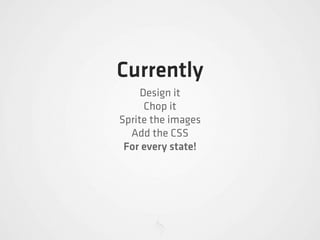
Currently
     Design it
      Chop it
Sprite the images
  Add the CSS
 For every state!
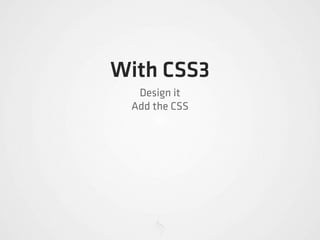
With CSS3
  Design it
 Add the CSS
Every Component!
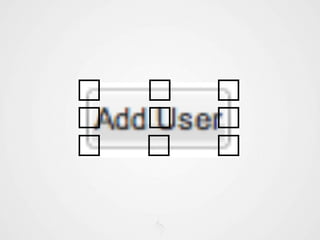
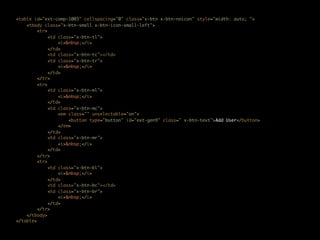
Component Templates
<table id="ext-comp-1003" cellspacing="0" class="x-btn x-btn-noicon" style="width: auto; ">
    <tbody class="x-btn-small x-btn-icon-small-left">
         <tr>
              <td class="x-btn-tl">
                  <i>&nbsp;</i>
              </td>
              <td class="x-btn-tc"></td>
              <td class="x-btn-tr">
                  <i>&nbsp;</i>
              </td>
         </tr>
         <tr>
              <td class="x-btn-ml">
                  <i>&nbsp;</i>
              </td>
              <td class="x-btn-mc">
                  <em class="" unselectable="on">
                      <button type="button" id="ext-gen9" class=" x-btn-text">Add User</button>
                  </em>
              </td>
              <td class="x-btn-mr">
                  <i>&nbsp;</i>
              </td>
         </tr>
         <tr>
              <td class="x-btn-bl">
                  <i>&nbsp;</i>
              </td>
              <td class="x-btn-bc"></td>
              <td class="x-btn-br">
                  <i>&nbsp;</i>
              </td>
         </tr>
    </tbody>
</table>
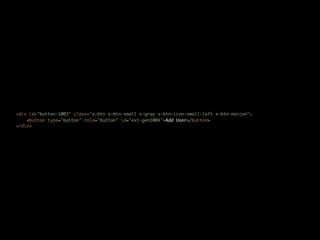
<div id="button-1003" class="x-btn x-btn-small x-gray x-btn-icon-small-left x-btn-noicon">
    <button type="button" role="button" id="ext-gen1004">Add User</button>
</div>
Every Component!
Legacy Browsers?
SASS
http://sass-lang.com
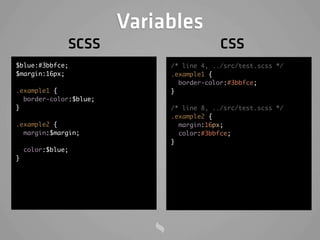
Variables
               SCSS                       CSS
$blue:#3bbfce;               /* line 4, ../src/test.scss */
$margin:16px;                .example1 {
                               border-color:#3bbfce;
.example1 {                  }
  border-color:$blue;
}                            /* line 8, ../src/test.scss */
                             .example2 {
.example2 {                    margin:16px;
  margin:$margin;              color:#3bbfce;
                             }
    color:$blue;
}
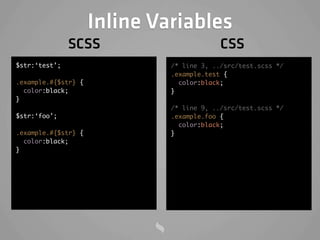
Inline Variables
               SCSS                        CSS
$str:‘test’;                  /* line 3, ../src/test.scss */
                              .example.test {
.example.#{$str} {              color:black;
  color:black;                }
}
                              /* line 9, ../src/test.scss */
$str:‘foo’;                   .example.foo {
                                color:black;
.example.#{$str} {            }
  color:black;
}
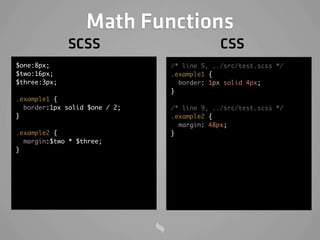
Math Functions
              SCSS                          CSS
$one:8px;                      /* line 5, ../src/test.scss */
$two:16px;                     .example1 {
$three:3px;                      border: 1px solid 4px;
                               }
.example1 {
  border:1px solid $one / 2;   /* line 9, ../src/test.scss */
}                              .example2 {
                                 margin: 48px;
.example2 {                    }
  margin:$two * $three;
}
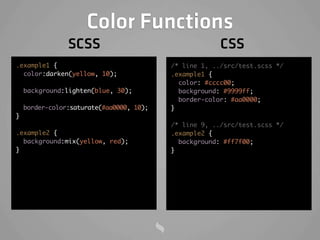
Color Functions
                SCSS                                   CSS
.example1 {                               /* line 1, ../src/test.scss */
  color:darken(yellow, 10);               .example1 {
                                            color: #cccc00;
    background:lighten(blue, 30);           background: #9999ff;
                                            border-color: #aa0000;
    border-color:saturate(#aa0000, 10);   }
}
                                          /* line 9, ../src/test.scss */
.example2 {                               .example2 {
  background:mix(yellow, red);              background: #ff7f00;
}                                         }
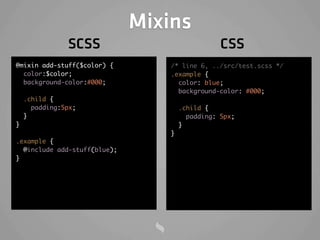
Mixins
               SCSS                              CSS
@mixin add-stuff($color) {        /* line 6, ../src/test.scss */
  color:$color;                   .example {
  background-color:#000;            color: blue;
                                    background-color: #000;
    .child {
      padding:5px;                    .child {
    }                                   padding: 5px;
}                                     }
                                  }
.example {
  @include add-stuff(blue);
}
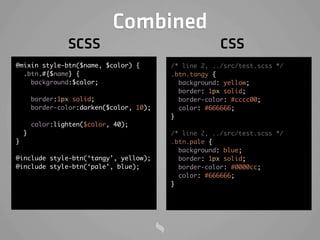
Combined
                 SCSS                                   CSS
@mixin style-btn($name, $color) {          /* line 2, ../src/test.scss */
  .btn.#{$name} {                          .btn.tangy {
    background:$color;                       background: yellow;
                                             border: 1px solid;
        border:1px solid;                    border-color: #cccc00;
        border-color:darken($color, 10);     color: #666666;
                                           }
        color:lighten($color, 40);
    }                                      /* line 2, ../src/test.scss */
}                                          .btn.pale {
                                             background: blue;
@include style-btn(‘tangy’, yellow);         border: 1px solid;
@include style-btn(‘pale’, blue);            border-color: #0000cc;
                                             color: #666666;
                                           }
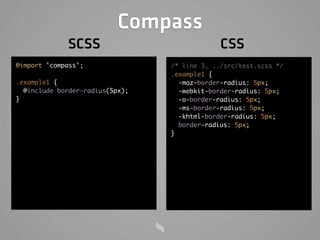
Compass
Compass
             SCSS                             CSS
@import 'compass';               /* line 3, ../src/test.scss */
                                 .example1 {
.example1 {                        -moz-border-radius: 5px;
  @include border-radius(5px);     -webkit-border-radius: 5px;
}                                  -o-border-radius: 5px;
                                   -ms-border-radius: 5px;
                                   -khtml-border-radius: 5px;
                                   border-radius: 5px;
                                 }
Theming Ext JS 4
Neptune
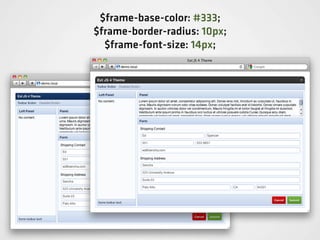
Variables
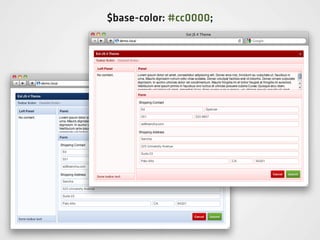
$base-color: #cc0000;
$frame-base-color: #333;
$frame-border-radius: 10px;
  $frame-font-size: 14px;
Mixins
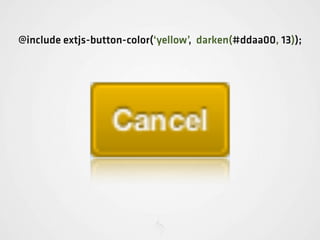
@include extjs-button-color(‘yellow’, darken(#ddaa00, 13));
Optimization
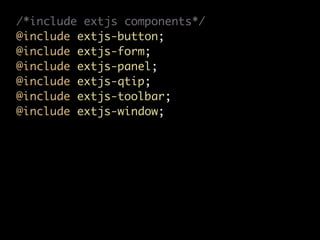
/*include extjs components*/
@include extjs-button;
@include extjs-form;
@include extjs-panel;
@include extjs-qtip;
@include extjs-toolbar;
@include extjs-window;
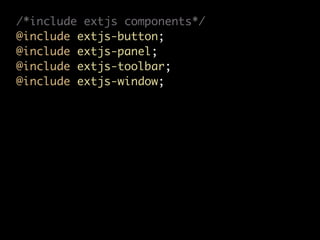
/*include extjs components*/
@include extjs-button;
@include extjs-panel;
@include extjs-toolbar;
@include extjs-window;
Documentation
Demo
Questions?
Thanks!
@rdougan
rdougan@me.com
  http://rwd.me

  @senchainc

Theming Ext JS 4

  • 2.
    Theming Ext JS4 ROBERT DOUGAN, SENCHA
  • 5.
    Ext JS 4Theme CSS3 Component Templates SASS Theming Ext JS 4 Demo
  • 6.
  • 8.
    Currently Design it Chop it Sprite the images Add the CSS For every state!
  • 9.
    With CSS3 Design it Add the CSS
  • 10.
  • 11.
  • 13.
    <table id="ext-comp-1003" cellspacing="0"class="x-btn x-btn-noicon" style="width: auto; "> <tbody class="x-btn-small x-btn-icon-small-left"> <tr> <td class="x-btn-tl"> <i>&nbsp;</i> </td> <td class="x-btn-tc"></td> <td class="x-btn-tr"> <i>&nbsp;</i> </td> </tr> <tr> <td class="x-btn-ml"> <i>&nbsp;</i> </td> <td class="x-btn-mc"> <em class="" unselectable="on"> <button type="button" id="ext-gen9" class=" x-btn-text">Add User</button> </em> </td> <td class="x-btn-mr"> <i>&nbsp;</i> </td> </tr> <tr> <td class="x-btn-bl"> <i>&nbsp;</i> </td> <td class="x-btn-bc"></td> <td class="x-btn-br"> <i>&nbsp;</i> </td> </tr> </tbody> </table>
  • 14.
    <div id="button-1003" class="x-btnx-btn-small x-gray x-btn-icon-small-left x-btn-noicon"> <button type="button" role="button" id="ext-gen1004">Add User</button> </div>
  • 15.
  • 16.
  • 17.
  • 18.
    Variables SCSS CSS $blue:#3bbfce; /* line 4, ../src/test.scss */ $margin:16px; .example1 { border-color:#3bbfce; .example1 { } border-color:$blue; } /* line 8, ../src/test.scss */ .example2 { .example2 { margin:16px; margin:$margin; color:#3bbfce; } color:$blue; }
  • 19.
    Inline Variables SCSS CSS $str:‘test’; /* line 3, ../src/test.scss */ .example.test { .example.#{$str} { color:black; color:black; } } /* line 9, ../src/test.scss */ $str:‘foo’; .example.foo { color:black; .example.#{$str} { } color:black; }
  • 20.
    Math Functions SCSS CSS $one:8px; /* line 5, ../src/test.scss */ $two:16px; .example1 { $three:3px; border: 1px solid 4px; } .example1 { border:1px solid $one / 2; /* line 9, ../src/test.scss */ } .example2 { margin: 48px; .example2 { } margin:$two * $three; }
  • 21.
    Color Functions SCSS CSS .example1 { /* line 1, ../src/test.scss */ color:darken(yellow, 10); .example1 { color: #cccc00; background:lighten(blue, 30); background: #9999ff; border-color: #aa0000; border-color:saturate(#aa0000, 10); } } /* line 9, ../src/test.scss */ .example2 { .example2 { background:mix(yellow, red); background: #ff7f00; } }
  • 22.
    Mixins SCSS CSS @mixin add-stuff($color) { /* line 6, ../src/test.scss */ color:$color; .example { background-color:#000; color: blue; background-color: #000; .child { padding:5px; .child { } padding: 5px; } } } .example { @include add-stuff(blue); }
  • 23.
    Combined SCSS CSS @mixin style-btn($name, $color) { /* line 2, ../src/test.scss */ .btn.#{$name} { .btn.tangy { background:$color; background: yellow; border: 1px solid; border:1px solid; border-color: #cccc00; border-color:darken($color, 10); color: #666666; } color:lighten($color, 40); } /* line 2, ../src/test.scss */ } .btn.pale { background: blue; @include style-btn(‘tangy’, yellow); border: 1px solid; @include style-btn(‘pale’, blue); border-color: #0000cc; color: #666666; }
  • 24.
  • 25.
    Compass SCSS CSS @import 'compass'; /* line 3, ../src/test.scss */ .example1 { .example1 { -moz-border-radius: 5px; @include border-radius(5px); -webkit-border-radius: 5px; } -o-border-radius: 5px; -ms-border-radius: 5px; -khtml-border-radius: 5px; border-radius: 5px; }
  • 26.
  • 28.
  • 35.
  • 36.
  • 37.
  • 38.
  • 39.
  • 40.
  • 41.
    /*include extjs components*/ @includeextjs-button; @include extjs-form; @include extjs-panel; @include extjs-qtip; @include extjs-toolbar; @include extjs-window;
  • 42.
    /*include extjs components*/ @includeextjs-button; @include extjs-panel; @include extjs-toolbar; @include extjs-window;
  • 43.
  • 44.
  • 45.
  • 46.
  • 47.