

Structure
Structure


 SceneGraph
GUI = Tree
Stage
                        Stage
                        Scene
                        Scene
                       VBox
                       VBox
                       HBox
                       HBox
                       TableView
                       TableView


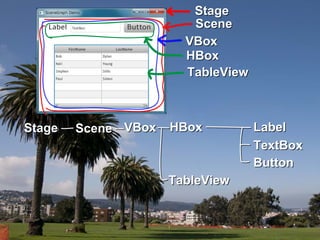
Stage
Stage   Scene VBox
        Scene VBox   HBox
                     HBox          Label
                                   Label
                                   TextBox
                                   TextBox
                                   Button
                                   Button
                     TableView
                     TableView
public class Hello extends Application {
    @Override
    public void start(Stage stage) {
        // コンテナ
        Group container = new Group();

        // シーングラフのルート要素を生成し、コンテナを貼る
        Scene scene = new Scene(container, 100, 20);
        stage.setScene(scene);

        // ラベルを生成しコンテナに貼る
        Label label = new Label("Hello, World!");
        container.getChildren().add(label);


    }
        stage.show();    SceneGraph
        stage.setVisible(true);


    public static void main(String[] args) {
        Application.launch(args);
    }
}
XML     Script

       GroovyFX
FXML   ScalaFX
        Visage
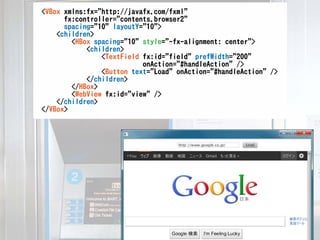
<VBox xmlns:fx="http://javafx.com/fxml"
      fx:controller="contents.browser2"
      spacing="10" layoutY="10">
    <children>
        <HBox spacing="10" style="-fx-alignment: center">
            <children>
                <TextField fx:id="field" prefWidth="200"
                           onAction="#handleAction" />
                <Button text="Load" onAction="#handleAction" />
            </children>
        </HBox>
        <WebView fx:id="view" />
    </children>
</VBox>
<VBox xmlns:fx="http://javafx.com/fxml"
      fx:controller="contents.browser2"
      spacing="10" layoutY="10">
    <children>
        <HBox spacing="10" style="-fx-alignment: center">
            <children>
                <TextField fx:id="field" prefWidth="200"
                           onAction="#handleAction" />
                <Button text="Load" onAction="#handleAction" />
            </children>
        </HBox>
        <WebView fx:id="view" />
    </children>
</VBox>


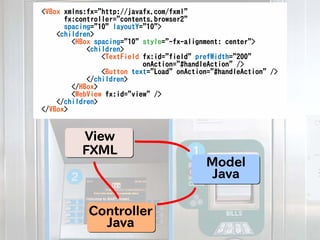
          View
          FXML
                                           Model
                                            Java

            Controller
              Java
<VBox xmlns:fx="http://javafx.com/fxml"
      fx:controller="contents.browser2"
      spacing="10" layoutY="10">
    <children>
        <HBox spacing="10" style="-fx-alignment: center">
            <children>
                <TextField fx:id="field" prefWidth="200"
                           onAction="#handleAction" />
                <Button text="Load" onAction="#handleAction" />
            </children>
        </HBox>
        <WebView fx:id="view" />
    </children>
</VBox>


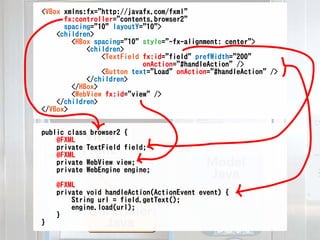
public class browser2 {
    @FXML View
    private TextField field;
    @FXML FXML
    private WebView view;
    private WebEngine engine;
                                           Model
                                            Java
    @FXML
    private void handleAction(ActionEvent event) {
        String url = field.getText();
        engine.load(url);
    }       Controller
}             Java
Contents
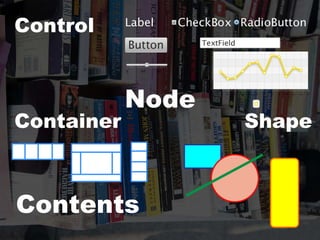
Control


            Node
Container          Shape


Contents
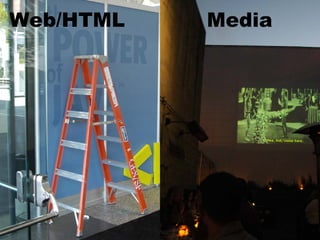
Web/HTML   Media
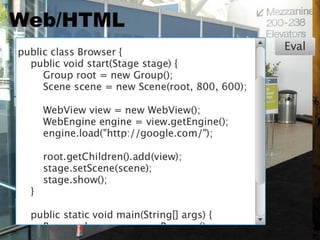
Web/HTML
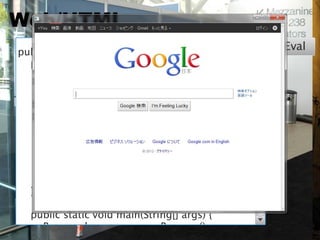
Web/HTML
Web/HTML
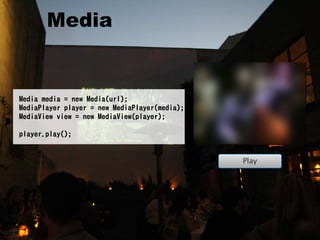
  Media


Media media = new Media(url);
MediaPlayer player = new MediaPlayer(media);
MediaView view = new MediaView(player);

player.play();
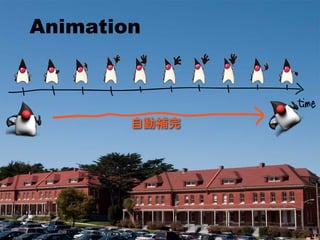
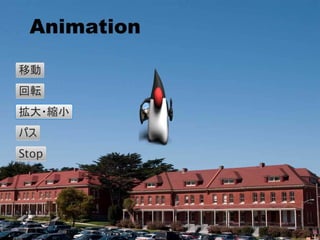
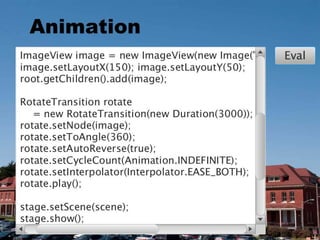
Animation


        自動補完
Animation


        自動補完
Animation
Animation
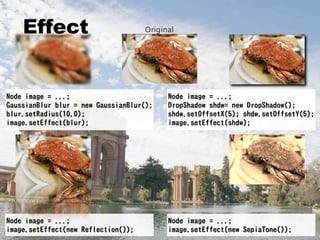
Effect


Node image = ...;                         Node image = ...;
GaussianBlur blur = new GaussianBlur();   DropShadow shdw= new DropShadow();
blur.setRadius(10.0);                     shdw.setOffsetX(5); shdw.setOffsetY(5);
image.setEffect(blur);                    image.setEffect(shdw);


Node image = ...;                         Node image = ...;
image.setEffect(new Reflection());        image.setEffect(new SepiaTone());
CSS

Contents    Design
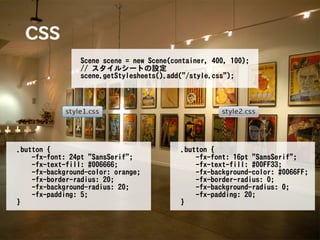
CSS
                 Scene scene = new Scene(container, 400, 100);
                 // スタイルシートの設定
                 scene.getStylesheets().add("/style.css");


.button {                                  .button {
    -fx-font: 24pt "SansSerif";                -fx-font: 16pt "SansSerif";
    -fx-text-fill: #006666;                    -fx-text-fill: #00FF33;
    -fx-background-color: orange;              -fx-background-color: #0066FF;
    -fx-border-radius: 20;                     -fx-border-radius: 0;
    -fx-background-radius: 20;                 -fx-background-radius: 0;
    -fx-padding: 5;                            -fx-padding: 20;
}                                          }
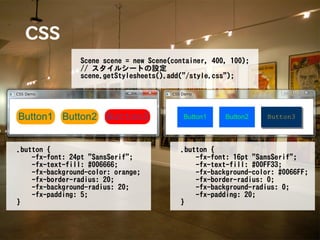
CSS
                 Scene scene = new Scene(container, 400, 100);
                 // スタイルシートの設定
                 scene.getStylesheets().add("/style.css");


.button {                                  .button {
    -fx-font: 24pt "SansSerif";                -fx-font: 16pt "SansSerif";
    -fx-text-fill: #006666;                    -fx-text-fill: #00FF33;
    -fx-background-color: orange;              -fx-background-color: #0066FF;
    -fx-border-radius: 20;                     -fx-border-radius: 0;
    -fx-background-radius: 20;                 -fx-background-radius: 0;
    -fx-padding: 5;                            -fx-padding: 20;
}                                          }
Structure

  Tool
     Logic

  Design SceneBuilder

Contents        Design
Conclusion

Structure    Design

     JavaFX
Contents      Tool
で開く

新世代   GUI

JavaFXで開く新世代GUI

  • 4.
  • 5.
  • 6.
  • 7.
    Stage Stage Scene Scene VBox VBox HBox HBox TableView TableView Stage Stage Scene VBox Scene VBox HBox HBox Label Label TextBox TextBox Button Button TableView TableView
  • 8.
    public class Helloextends Application { @Override public void start(Stage stage) { // コンテナ Group container = new Group(); // シーングラフのルート要素を生成し、コンテナを貼る Scene scene = new Scene(container, 100, 20); stage.setScene(scene); // ラベルを生成しコンテナに貼る Label label = new Label("Hello, World!"); container.getChildren().add(label); } stage.show(); SceneGraph stage.setVisible(true); public static void main(String[] args) { Application.launch(args); } }
  • 9.
    XML Script GroovyFX FXML ScalaFX Visage
  • 10.
    <VBox xmlns:fx="http://javafx.com/fxml" fx:controller="contents.browser2" spacing="10" layoutY="10"> <children> <HBox spacing="10" style="-fx-alignment: center"> <children> <TextField fx:id="field" prefWidth="200" onAction="#handleAction" /> <Button text="Load" onAction="#handleAction" /> </children> </HBox> <WebView fx:id="view" /> </children> </VBox>
  • 11.
    <VBox xmlns:fx="http://javafx.com/fxml" fx:controller="contents.browser2" spacing="10" layoutY="10"> <children> <HBox spacing="10" style="-fx-alignment: center"> <children> <TextField fx:id="field" prefWidth="200" onAction="#handleAction" /> <Button text="Load" onAction="#handleAction" /> </children> </HBox> <WebView fx:id="view" /> </children> </VBox> View FXML Model Java Controller Java
  • 12.
    <VBox xmlns:fx="http://javafx.com/fxml" fx:controller="contents.browser2" spacing="10" layoutY="10"> <children> <HBox spacing="10" style="-fx-alignment: center"> <children> <TextField fx:id="field" prefWidth="200" onAction="#handleAction" /> <Button text="Load" onAction="#handleAction" /> </children> </HBox> <WebView fx:id="view" /> </children> </VBox> public class browser2 { @FXML View private TextField field; @FXML FXML private WebView view; private WebEngine engine; Model Java @FXML private void handleAction(ActionEvent event) { String url = field.getText(); engine.load(url); } Controller } Java
  • 13.
  • 14.
    Control Node Container Shape Contents
  • 15.
    Web/HTML Media
  • 16.
  • 17.
  • 18.
    Web/HTML Media Mediamedia = new Media(url); MediaPlayer player = new MediaPlayer(media); MediaView view = new MediaView(player); player.play();
  • 19.
    Animation 自動補完
  • 20.
    Animation 自動補完
  • 21.
  • 22.
  • 23.
    Effect Node image =...; Node image = ...; GaussianBlur blur = new GaussianBlur(); DropShadow shdw= new DropShadow(); blur.setRadius(10.0); shdw.setOffsetX(5); shdw.setOffsetY(5); image.setEffect(blur); image.setEffect(shdw); Node image = ...; Node image = ...; image.setEffect(new Reflection()); image.setEffect(new SepiaTone());
  • 24.
  • 25.
    CSS Scene scene = new Scene(container, 400, 100); // スタイルシートの設定 scene.getStylesheets().add("/style.css"); .button { .button { -fx-font: 24pt "SansSerif"; -fx-font: 16pt "SansSerif"; -fx-text-fill: #006666; -fx-text-fill: #00FF33; -fx-background-color: orange; -fx-background-color: #0066FF; -fx-border-radius: 20; -fx-border-radius: 0; -fx-background-radius: 20; -fx-background-radius: 0; -fx-padding: 5; -fx-padding: 20; } }
  • 26.
    CSS Scene scene = new Scene(container, 400, 100); // スタイルシートの設定 scene.getStylesheets().add("/style.css"); .button { .button { -fx-font: 24pt "SansSerif"; -fx-font: 16pt "SansSerif"; -fx-text-fill: #006666; -fx-text-fill: #00FF33; -fx-background-color: orange; -fx-background-color: #0066FF; -fx-border-radius: 20; -fx-border-radius: 0; -fx-background-radius: 20; -fx-background-radius: 0; -fx-padding: 5; -fx-padding: 20; } }
  • 27.
    Structure Tool Logic Design SceneBuilder Contents Design
  • 28.
    Conclusion Structure Design JavaFX Contents Tool
  • 29.