1
CREATE A
SLACK CHATBOT
USING
UIPATH AI FABRIC
2
PRE REQUISITE BEFORE WE START:
 Orchestrator Enterprise trial edition
 Enterprise trial edition UiPath studio pro(Stable version)
 Unattedned robot connected with local machine
 AI robot license enabled for currently used orchestrator
instance
 Free account on Google Dialogflow
 Free account on Slack.
3
STEPS TO FOLLOW:
 Deploy German-English Model in UiPath AI Fabric
 Deploy English-German Model in UiPath AI Fabric
 Create a workflow in UiPath Studio Pro
 Publish workflow to orchestrator and create a process
 Create a Chatbot using Google Dialogflow
 Connect Chatbot with chatbot.uipath.com
 Creating a new workspace on Slack
 Connect slack and UiPath Chatbot
4
Deploy German-English Model in UiPath
AI Fabric :
 Navigate to platform.uipath.com
 Login and Navigate to AI Fabric
 Create a new project
 Create a new ML Package and select
 Out of the box -> Language Translation -> German
To English
 Create a ML Skill selecting the same package.
 Deploy and wait for it to be available in Orchestrator
5
Deploy English-German Model in UiPath
AI Fabric :
 Navigate to platform.uipath.com
 Login and Navigate to AI Fabric
 Create a new project
 Create a new ML Package and select
 Out of the box -> Language Translation -> English
To German
 Create a ML Skill selecting the same package.
 Deploy and wait for it to be available in Orchestrator
6
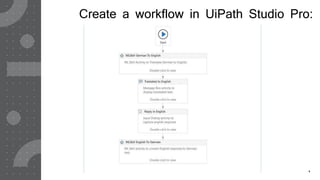
Create a workflow in UiPath Studio Pro:
7
Publish workflow to orchestrator and create a
process:
 Publish workflow from UiPath Studio
 Navigate to platform.uipath.com
 Open orchestrator
 Create a process
 Select published package on orchestrator
 Test execution
8
Create a Chatbot using Google Dialogflow:
 Create a new agent
 Create an intent for accepting input
 Make sure Entity created has exact same name as
UiPath workflow arguments
 Give out response as output with <Out_Argument>
 Proceed for connecting with chatbot.uipath.com
9
Connect Chatbot with chatbot.uipath.com :
 Login to chatbot.uipath.com
 Create new connection
 Establish connection with orchestrator services
 Establish connection with Dialogflow services
 Map the Process with Intent
 Launch Chatbot and test for a web version
10
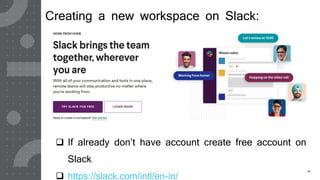
Creating a new workspace on Slack:
 If already don’t have account create free account on
Slack
 https://slack.com/intl/en-in/
11
Connect slack and UiPath Chatbot:
 Open your app in api.slack.com/apps
 Setup authentication and Bot permissions
 Setup messaging
 If verification fails try again in some time
 Install your Bot in Slack
 Open slack channel for BOT and enjoy automation
12
Find video links of each step:
https://www.youtube.com/watch?v=r_4Ra5A4X2c&t=168s
 Deploy German-English Model in UiPath AI Fabric –
 https://www.youtube.com/watch?v=lo03GZ29PTA
 Deploy English-German Model in UiPath AI Fabric –
 https://www.youtube.com/watch?v=be76iELmcaY
 Create a workflow in UiPath Studio Pro –
 https://www.youtube.com/watch?v=cAmw82is83Q&t=162s
 Publish workflow to orchestrator and create a process –
 https://www.youtube.com/watch?v=dzjxwVOsmfA
 Create a Chatbot using Google Dialog Flow –
 https://www.youtube.com/watch?v=52tX5BSJeFI
 Connect Chatbot with chatbot.uipath.com –
 https://www.youtube.com/watch?v=VdDpQpiRN4I
 Creating a new workspace on Slack –
 https://www.youtube.com/watch?v=cjsewr8Pqsw
 Connect slack and UiPath Chatbot –
 https://www.youtube.com/watch?v=HQVosxUgqCg
13

Slack chatbot using UiPath AI Fabric

  • 1.
  • 2.
    2 PRE REQUISITE BEFOREWE START:  Orchestrator Enterprise trial edition  Enterprise trial edition UiPath studio pro(Stable version)  Unattedned robot connected with local machine  AI robot license enabled for currently used orchestrator instance  Free account on Google Dialogflow  Free account on Slack.
  • 3.
    3 STEPS TO FOLLOW: Deploy German-English Model in UiPath AI Fabric  Deploy English-German Model in UiPath AI Fabric  Create a workflow in UiPath Studio Pro  Publish workflow to orchestrator and create a process  Create a Chatbot using Google Dialogflow  Connect Chatbot with chatbot.uipath.com  Creating a new workspace on Slack  Connect slack and UiPath Chatbot
  • 4.
    4 Deploy German-English Modelin UiPath AI Fabric :  Navigate to platform.uipath.com  Login and Navigate to AI Fabric  Create a new project  Create a new ML Package and select  Out of the box -> Language Translation -> German To English  Create a ML Skill selecting the same package.  Deploy and wait for it to be available in Orchestrator
  • 5.
    5 Deploy English-German Modelin UiPath AI Fabric :  Navigate to platform.uipath.com  Login and Navigate to AI Fabric  Create a new project  Create a new ML Package and select  Out of the box -> Language Translation -> English To German  Create a ML Skill selecting the same package.  Deploy and wait for it to be available in Orchestrator
  • 6.
    6 Create a workflowin UiPath Studio Pro:
  • 7.
    7 Publish workflow toorchestrator and create a process:  Publish workflow from UiPath Studio  Navigate to platform.uipath.com  Open orchestrator  Create a process  Select published package on orchestrator  Test execution
  • 8.
    8 Create a Chatbotusing Google Dialogflow:  Create a new agent  Create an intent for accepting input  Make sure Entity created has exact same name as UiPath workflow arguments  Give out response as output with <Out_Argument>  Proceed for connecting with chatbot.uipath.com
  • 9.
    9 Connect Chatbot withchatbot.uipath.com :  Login to chatbot.uipath.com  Create new connection  Establish connection with orchestrator services  Establish connection with Dialogflow services  Map the Process with Intent  Launch Chatbot and test for a web version
  • 10.
    10 Creating a newworkspace on Slack:  If already don’t have account create free account on Slack  https://slack.com/intl/en-in/
  • 11.
    11 Connect slack andUiPath Chatbot:  Open your app in api.slack.com/apps  Setup authentication and Bot permissions  Setup messaging  If verification fails try again in some time  Install your Bot in Slack  Open slack channel for BOT and enjoy automation
  • 12.
    12 Find video linksof each step: https://www.youtube.com/watch?v=r_4Ra5A4X2c&t=168s  Deploy German-English Model in UiPath AI Fabric –  https://www.youtube.com/watch?v=lo03GZ29PTA  Deploy English-German Model in UiPath AI Fabric –  https://www.youtube.com/watch?v=be76iELmcaY  Create a workflow in UiPath Studio Pro –  https://www.youtube.com/watch?v=cAmw82is83Q&t=162s  Publish workflow to orchestrator and create a process –  https://www.youtube.com/watch?v=dzjxwVOsmfA  Create a Chatbot using Google Dialog Flow –  https://www.youtube.com/watch?v=52tX5BSJeFI  Connect Chatbot with chatbot.uipath.com –  https://www.youtube.com/watch?v=VdDpQpiRN4I  Creating a new workspace on Slack –  https://www.youtube.com/watch?v=cjsewr8Pqsw  Connect slack and UiPath Chatbot –  https://www.youtube.com/watch?v=HQVosxUgqCg
  • 13.