Conversation UIs & Chatbots
for internal communications
By Marion Mulder
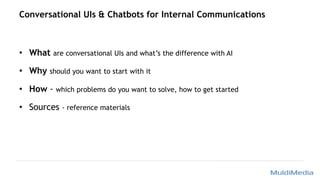
Conversational UIs & Chatbots for Internal Communications
• What are conversational UIs and what’s the difference with AI
• Why should you want to start with it
• How - which problems do you want to solve, how to get started
• Sources - reference materials
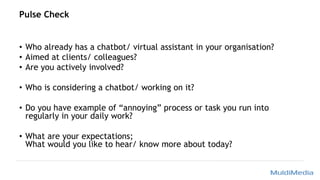
Pulse Check
• Who already has a chatbot/ virtual assistant in your organisation?
• Aimed at clients/ colleagues?
• Are you actively involved?
• Who is considering a chatbot/ working on it?
• Do you have example of “annoying” process or task you run into
regularly in your daily work?
• What are your expectations;
What would you like to hear/ know more about today?
What
• What are chatbots, Virtual Assistants, Conversational UIs?
• What’s the difference between a chatbot and AI
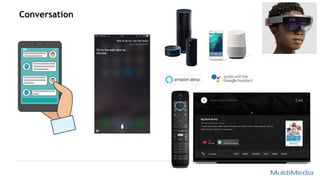
Conversation
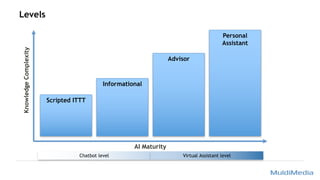
Levels
Scripted ITTT
Informational
Advisor
Personal
Assistant
Chatbot level Virtual Assistant level
KnowledgeComplexity
AI Maturity
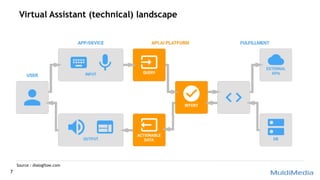
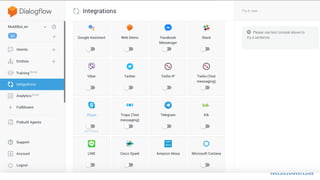
Virtual Assistant (technical) landscape
7
Source : dialogflow.com
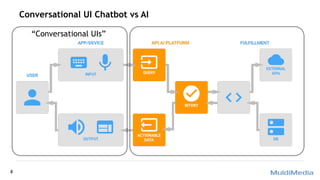
Conversational UI Chatbot vs AI
8
“Conversational UIs”
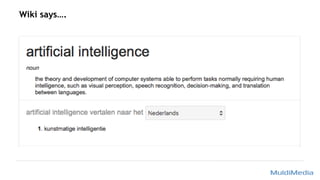
Wiki says….
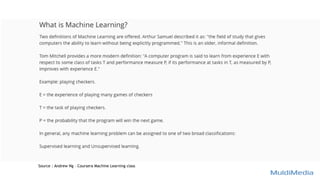
Source : Andrew Ng – Coursera Machine Learning class
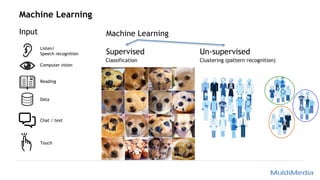
Machine Learning
Input Machine Learning
Supervised
Classification
Un-supervised
Clustering (pattern recognition)
Computer vision
Reading
Data
Chat / text
Listen/
Speech recognition
Touch
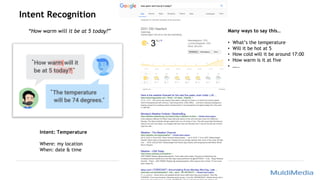
Intent Recognition
Intent: Temperature
Where: my location
When: date & time
Many ways to say this…
• What’s the temperature
• Will it be hot at 5
• How cold will it be around 17:00
• How warm is it at five
• …..
“How warm will it be at 5 today?”
Why
• The market (customers and users will expect it from you)
• Making life at work easier
Source : Steven van Belleghem – Customers the day after tomorrow
Source : https://x.ai
“Chatbots are the new websites …
and messaging platforms are the
new browsers”
Talk to the phone / ‘praatpaal’
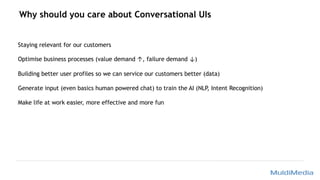
Why should you care about Conversational UIs
Staying relevant for our customers
Optimise business processes (value demand ↑, failure demand ↓)
Building better user profiles so we can service our customers better (data)
Generate input (even basics human powered chat) to train the AI (NLP, Intent Recognition)
Make life at work easier, more effective and more fun
How
• Steps
• Tools
• Key insights
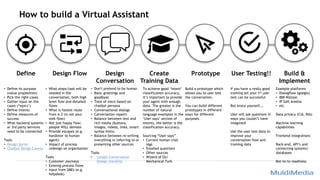
How to build a Virtual Assistant
Define Design Flow Design
Conversation
Create
Training Data
Prototype User Testing!! Build &
Implement
To achieve good ‘Intent’
classification accuracy,
it’s important to provide
your agent with enough
data. The greater is the
number of natural
language examples in the
‘User says’ section of
intents, the better is the
classification accuracy.
Sourcing “User says”
• Current human chat
logs
• Emailed questions
• Other sources
• Wizard of Oz/
Mechanical Turk
• Define its purpose
(value proposition)
• Pick the right cases
• Gather input on the
cases (“epics’)
• Define intents
• Define measures of
success
• What backend systems
or 3rd party services
need to be connected
Tools
• Design Sprint
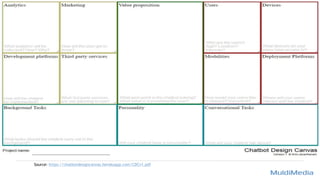
• Chatbot Design Canvas
• What steps/task will be
needed in the
conversation; both high
level flow and detailed
flows
• What is fastest route
from A-Z (is not your
web flow)
• Not just happy flow;
people WILL deviate
• Provide escapes (e.g.
handover to human
agent)
• Impact of process
redesign on organisation
Tools
• Customer Journeys
• Existing process flows
• Input from SMEs (e.g.
helpdesk)
• Don’t pretend to be human
• Basic greetings and
goodbyes
• Tone of voice based on
chatbot persona
• Conversational dialogs
• Conversation repairs
• Balance between text and
rich media (buttons,
images, videos, links, smart
syntax hints)
• Balance between re-writing
everything vs referring to or
presenting other sources
Tools
• Google Conversation
Design checklist
Example platforms
• Dialogflow (google)
• IBM Watson
• IP Soft Amelia
• etc
Data privacy (CIA, BIA)
Machine learning
capabilities
Frontend integrations
Back-end, API’s and
connecting systems/
databases
Bot-to-to readiness
Build a prototype which
allows you to user test
the conversation.
You can build different
prototypes in different
ways for different
purposes
If you have a really good
training set your 1st user
test can be successful
But brace yourself….
User will ask questions in
ways you couldn’t have
imagined!
Use the user test data to
improve your
conversation flow and
training data
Source: https://chatbotdesigncanvas.herokuapp.com/CDCv1.pdf
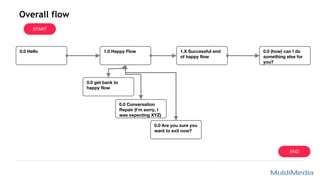
Overall flow
START
1.0 Happy Flow0.0 Hello
0.0 Conversation
Repair (I’m sorry, I
was expecting XYZ)
1.X Successful end
of happy flow
0.0 Are you sure you
want to exit now?
END
0.0 get back to
happy flow
0.0 (how) can I do
something else for
you?
Example of high level flows (employee onboarding)
0.0 Hello
0.0 (how) can I do
something else
for you?
Get a Digital
Workplace
I AM a new
employee
Account Activation
(Password)
Getting Familiar
with /Discover your
new Digital
Workplace
Get a Digital
Workplace for other
I HAVE a new
employee
Product Discovery
Order & Request
Direct request
Product/ Service
Change My Services
Product Discovery/
functional question
I have a Question/
Problem
Incident/ Problem
Process Question/
status update
Password Reset
Broken/ Problem?
[Product Name]
Discover Options?
Order/Request?
(if applicable)
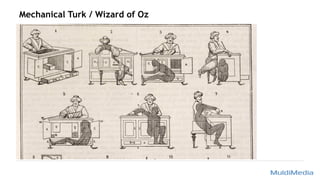
Mechanical Turk / Wizard of Oz
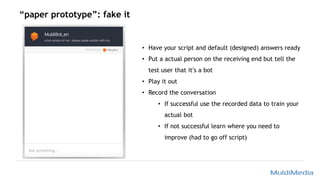
“paper prototype”: fake it
• Have your script and default (designed) answers ready
• Put a actual person on the receiving end but tell the
test user that it’s a bot
• Play it out
• Record the conversation
• If successful use the recorded data to train your
actual bot
• If not successful learn where you need to
improve (had to go off script)
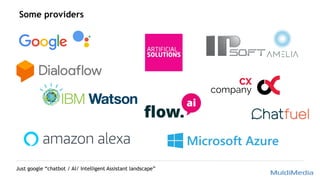
Some providers
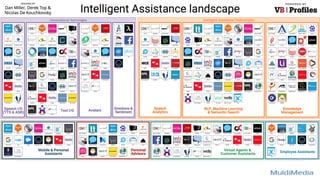
Just google “chatbot / AI/ Intelligent Assistant landscape”
Sample Cases
• From user point of view (‘pull’)
• Repetitive tasks
• HR, FM, Procurement, IT helpdesk
• Search
• FAQs
• Frequently recurring processes
• Basic needs (what would make you unhappy if it isn’t there)
• Can you anticipate user’s next need?
Lets stay in touch
Marion Mulder
info@muldimedia.com
+31642111245
www.muldimedia.com
Sources
Resources
• General interesting resources
• https://www.topbots.com https://nl.pinterest.com/muldimedia/artificial-
intelligence/
• https://dialogflow.com
• https://www.chatbotconference.nl
• Canvases
• http://ai-experiments.io/lets-start/
• https://chatbotslife.com/chatbot-design-canvas-c3940685ca2c
• https://strategyzer.com/canvas
• Conversation design
• https://chatbotsmagazine.com/designing-conversations-with-chat-bots-af601583458a
• https://developers.google.com/actions/design/principles
Conversational UIs for internal comms

Conversational UIs for internal comms

  • 1.
    Conversation UIs &Chatbots for internal communications By Marion Mulder
  • 2.
    Conversational UIs &Chatbots for Internal Communications • What are conversational UIs and what’s the difference with AI • Why should you want to start with it • How - which problems do you want to solve, how to get started • Sources - reference materials
  • 3.
    Pulse Check • Whoalready has a chatbot/ virtual assistant in your organisation? • Aimed at clients/ colleagues? • Are you actively involved? • Who is considering a chatbot/ working on it? • Do you have example of “annoying” process or task you run into regularly in your daily work? • What are your expectations; What would you like to hear/ know more about today?
  • 4.
    What • What arechatbots, Virtual Assistants, Conversational UIs? • What’s the difference between a chatbot and AI
  • 5.
  • 6.
    Levels Scripted ITTT Informational Advisor Personal Assistant Chatbot levelVirtual Assistant level KnowledgeComplexity AI Maturity
  • 7.
    Virtual Assistant (technical)landscape 7 Source : dialogflow.com
  • 8.
    Conversational UI Chatbotvs AI 8 “Conversational UIs”
  • 9.
  • 10.
    Source : AndrewNg – Coursera Machine Learning class
  • 11.
    Machine Learning Input MachineLearning Supervised Classification Un-supervised Clustering (pattern recognition) Computer vision Reading Data Chat / text Listen/ Speech recognition Touch
  • 13.
    Intent Recognition Intent: Temperature Where:my location When: date & time Many ways to say this… • What’s the temperature • Will it be hot at 5 • How cold will it be around 17:00 • How warm is it at five • ….. “How warm will it be at 5 today?”
  • 14.
    Why • The market(customers and users will expect it from you) • Making life at work easier
  • 15.
    Source : Stevenvan Belleghem – Customers the day after tomorrow
  • 17.
  • 18.
    “Chatbots are thenew websites … and messaging platforms are the new browsers”
  • 19.
    Talk to thephone / ‘praatpaal’
  • 20.
    Why should youcare about Conversational UIs Staying relevant for our customers Optimise business processes (value demand ↑, failure demand ↓) Building better user profiles so we can service our customers better (data) Generate input (even basics human powered chat) to train the AI (NLP, Intent Recognition) Make life at work easier, more effective and more fun
  • 21.
  • 22.
    How to builda Virtual Assistant Define Design Flow Design Conversation Create Training Data Prototype User Testing!! Build & Implement To achieve good ‘Intent’ classification accuracy, it’s important to provide your agent with enough data. The greater is the number of natural language examples in the ‘User says’ section of intents, the better is the classification accuracy. Sourcing “User says” • Current human chat logs • Emailed questions • Other sources • Wizard of Oz/ Mechanical Turk • Define its purpose (value proposition) • Pick the right cases • Gather input on the cases (“epics’) • Define intents • Define measures of success • What backend systems or 3rd party services need to be connected Tools • Design Sprint • Chatbot Design Canvas • What steps/task will be needed in the conversation; both high level flow and detailed flows • What is fastest route from A-Z (is not your web flow) • Not just happy flow; people WILL deviate • Provide escapes (e.g. handover to human agent) • Impact of process redesign on organisation Tools • Customer Journeys • Existing process flows • Input from SMEs (e.g. helpdesk) • Don’t pretend to be human • Basic greetings and goodbyes • Tone of voice based on chatbot persona • Conversational dialogs • Conversation repairs • Balance between text and rich media (buttons, images, videos, links, smart syntax hints) • Balance between re-writing everything vs referring to or presenting other sources Tools • Google Conversation Design checklist Example platforms • Dialogflow (google) • IBM Watson • IP Soft Amelia • etc Data privacy (CIA, BIA) Machine learning capabilities Frontend integrations Back-end, API’s and connecting systems/ databases Bot-to-to readiness Build a prototype which allows you to user test the conversation. You can build different prototypes in different ways for different purposes If you have a really good training set your 1st user test can be successful But brace yourself…. User will ask questions in ways you couldn’t have imagined! Use the user test data to improve your conversation flow and training data
  • 23.
  • 24.
    Overall flow START 1.0 HappyFlow0.0 Hello 0.0 Conversation Repair (I’m sorry, I was expecting XYZ) 1.X Successful end of happy flow 0.0 Are you sure you want to exit now? END 0.0 get back to happy flow 0.0 (how) can I do something else for you?
  • 25.
    Example of highlevel flows (employee onboarding) 0.0 Hello 0.0 (how) can I do something else for you? Get a Digital Workplace I AM a new employee Account Activation (Password) Getting Familiar with /Discover your new Digital Workplace Get a Digital Workplace for other I HAVE a new employee Product Discovery Order & Request Direct request Product/ Service Change My Services Product Discovery/ functional question I have a Question/ Problem Incident/ Problem Process Question/ status update Password Reset Broken/ Problem? [Product Name] Discover Options? Order/Request? (if applicable)
  • 26.
    Mechanical Turk /Wizard of Oz
  • 27.
    “paper prototype”: fakeit • Have your script and default (designed) answers ready • Put a actual person on the receiving end but tell the test user that it’s a bot • Play it out • Record the conversation • If successful use the recorded data to train your actual bot • If not successful learn where you need to improve (had to go off script)
  • 29.
    Some providers Just google“chatbot / AI/ Intelligent Assistant landscape”
  • 31.
    Sample Cases • Fromuser point of view (‘pull’) • Repetitive tasks • HR, FM, Procurement, IT helpdesk • Search • FAQs • Frequently recurring processes • Basic needs (what would make you unhappy if it isn’t there) • Can you anticipate user’s next need?
  • 32.
    Lets stay intouch Marion Mulder info@muldimedia.com +31642111245 www.muldimedia.com
  • 33.
  • 34.
    Resources • General interestingresources • https://www.topbots.com https://nl.pinterest.com/muldimedia/artificial- intelligence/ • https://dialogflow.com • https://www.chatbotconference.nl • Canvases • http://ai-experiments.io/lets-start/ • https://chatbotslife.com/chatbot-design-canvas-c3940685ca2c • https://strategyzer.com/canvas • Conversation design • https://chatbotsmagazine.com/designing-conversations-with-chat-bots-af601583458a • https://developers.google.com/actions/design/principles