Skills Development Journal

        James Dooley
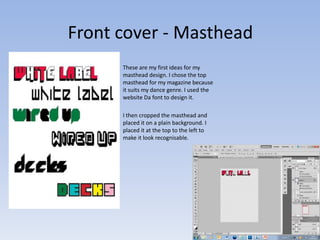
Front cover - Masthead
      These are my first ideas for my
      masthead design. I chose the top
      masthead for my magazine because
      it suits my dance genre. I used the
      website Da font to design it.

      I then cropped the masthead and
      placed it on a plain background. I
      placed it at the top to the left to
      make it look recognisable.
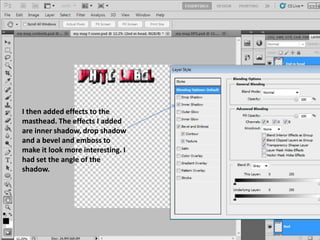
I then added effects to the
masthead. The effects I added
are inner shadow, drop shadow
and a bevel and emboss to
make it look more interesting. I
had set the angle of the
shadow.
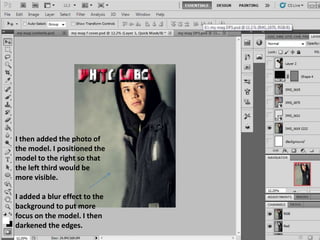
I then added the photo of
the model. I positioned the
model to the right so that
the left third would be
more visible.

I added a blur effect to the
background to put more
focus on the model. I then
darkened the edges.
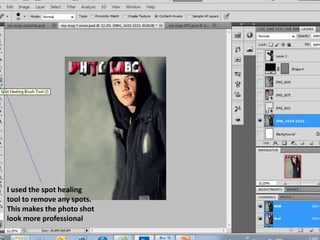
I used the spot healing
tool to remove any spots.
This makes the photo shot
look more professional
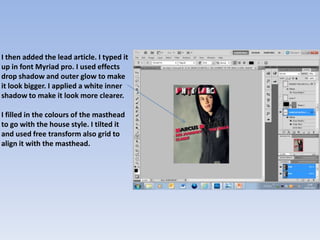
I then added the lead article. I typed it
up in font Myriad pro. I used effects
drop shadow and outer glow to make
it look bigger. I applied a white inner
shadow to make it look more clearer.

I filled in the colours of the masthead
to go with the house style. I tilted it
and used free transform also grid to
align it with the masthead.
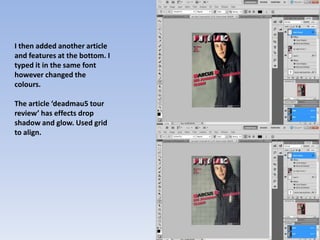
I then added another article
and features at the bottom. I
typed it in the same font
however changed the
colours.

The article ‘deadmau5 tour
review’ has effects drop
shadow and glow. Used grid
to align.
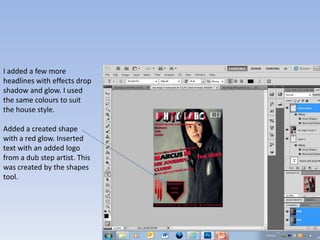
I added a few more
headlines with effects drop
shadow and glow. I used
the same colours to suit
the house style.

Added a created shape
with a red glow. Inserted
text with an added logo
from a dub step artist. This
was created by the shapes
tool.
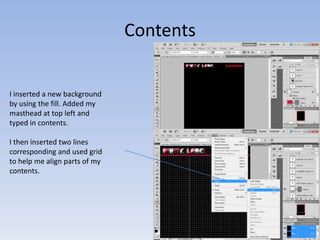
Contents


I inserted a new background
by using the fill. Added my
masthead at top left and
typed in contents.

I then inserted two lines
corresponding and used grid
to help me align parts of my
contents.
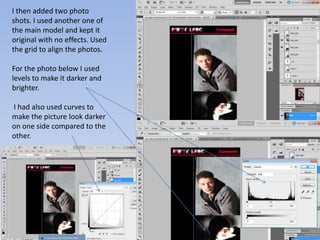
I then added two photo
shots. I used another one of
the main model and kept it
original with no effects. Used
the grid to align the photos.

For the photo below I used
levels to make it darker and
brighter.

I had also used curves to
make the picture look darker
on one side compared to the
other.
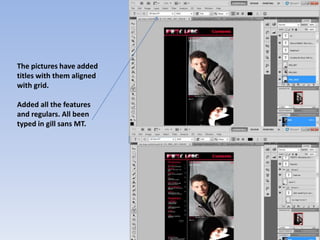
The pictures have added
titles with them aligned
with grid.

Added all the features
and regulars. All been
typed in gill sans MT.
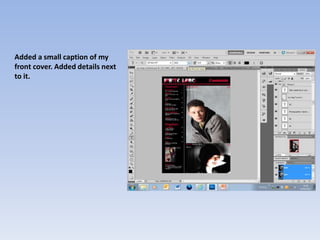
Added a small caption of my
front cover. Added details next
to it.
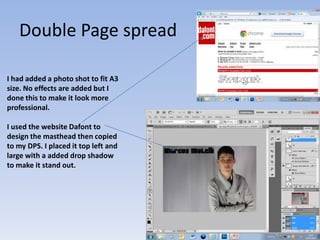
Double Page spread

I had added a photo shot to fit A3
size. No effects are added but I
done this to make it look more
professional.

I used the website Dafont to
design the masthead then copied
to my DPS. I placed it top left and
large with a added drop shadow
to make it stand out.
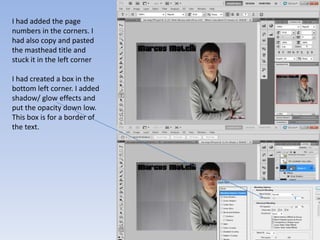
I had added the page
numbers in the corners. I
had also copy and pasted
the masthead title and
stuck it in the left corner

I had created a box in the
bottom left corner. I added
shadow/ glow effects and
put the opacity down low.
This box is for a border of
the text.
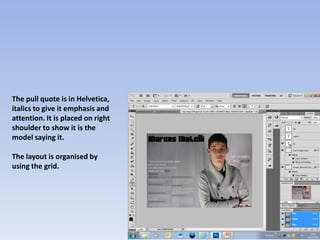
The pull quote is in Helvetica,
italics to give it emphasis and
attention. It is placed on right
shoulder to show it is the
model saying it.

The layout is organised by
using the grid.
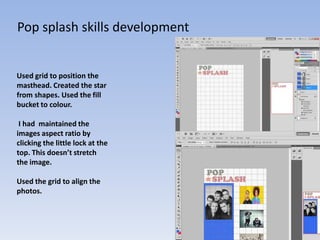
Pop splash skills development


Used grid to position the
masthead. Created the star
from shapes. Used the fill
bucket to colour.

 I had maintained the
images aspect ratio by
clicking the little lock at the
top. This doesn’t stretch
the image.

Used the grid to align the
photos.

Skills development journal

  • 1.
  • 2.
    Front cover -Masthead These are my first ideas for my masthead design. I chose the top masthead for my magazine because it suits my dance genre. I used the website Da font to design it. I then cropped the masthead and placed it on a plain background. I placed it at the top to the left to make it look recognisable.
  • 3.
    I then addedeffects to the masthead. The effects I added are inner shadow, drop shadow and a bevel and emboss to make it look more interesting. I had set the angle of the shadow.
  • 4.
    I then addedthe photo of the model. I positioned the model to the right so that the left third would be more visible. I added a blur effect to the background to put more focus on the model. I then darkened the edges.
  • 5.
    I used thespot healing tool to remove any spots. This makes the photo shot look more professional
  • 6.
    I then addedthe lead article. I typed it up in font Myriad pro. I used effects drop shadow and outer glow to make it look bigger. I applied a white inner shadow to make it look more clearer. I filled in the colours of the masthead to go with the house style. I tilted it and used free transform also grid to align it with the masthead.
  • 7.
    I then addedanother article and features at the bottom. I typed it in the same font however changed the colours. The article ‘deadmau5 tour review’ has effects drop shadow and glow. Used grid to align.
  • 8.
    I added afew more headlines with effects drop shadow and glow. I used the same colours to suit the house style. Added a created shape with a red glow. Inserted text with an added logo from a dub step artist. This was created by the shapes tool.
  • 9.
    Contents I inserted anew background by using the fill. Added my masthead at top left and typed in contents. I then inserted two lines corresponding and used grid to help me align parts of my contents.
  • 10.
    I then addedtwo photo shots. I used another one of the main model and kept it original with no effects. Used the grid to align the photos. For the photo below I used levels to make it darker and brighter. I had also used curves to make the picture look darker on one side compared to the other.
  • 11.
    The pictures haveadded titles with them aligned with grid. Added all the features and regulars. All been typed in gill sans MT.
  • 12.
    Added a smallcaption of my front cover. Added details next to it.
  • 13.
    Double Page spread Ihad added a photo shot to fit A3 size. No effects are added but I done this to make it look more professional. I used the website Dafont to design the masthead then copied to my DPS. I placed it top left and large with a added drop shadow to make it stand out.
  • 14.
    I had addedthe page numbers in the corners. I had also copy and pasted the masthead title and stuck it in the left corner I had created a box in the bottom left corner. I added shadow/ glow effects and put the opacity down low. This box is for a border of the text.
  • 15.
    The pull quoteis in Helvetica, italics to give it emphasis and attention. It is placed on right shoulder to show it is the model saying it. The layout is organised by using the grid.
  • 16.
    Pop splash skillsdevelopment Used grid to position the masthead. Created the star from shapes. Used the fill bucket to colour. I had maintained the images aspect ratio by clicking the little lock at the top. This doesn’t stretch the image. Used the grid to align the photos.