1 | P a g e
Kiran Reddy Chagam
S. No. Title Page No.
1 Introduction 06
2 Technology Learnt 07 - 24
3 Reason for choosing Data Structures and Algorithms 25
4 Conclusion 26
5 Bibliography 26
INTRODUCTION
What are Data Structures?
The data structure name indicates itself that organizing the data in memory. There are many ways of
organizing the data in the memory. A data structure is defined as a format for arranging, processing,
accessing, and storing data. Data structures are the combination of both simple and complex forms, all of
which are made to organise data for a certain use
The data structure is not any programming language like C, C++, java, etc. It is a set of
algorithms that we can use in any programming language to structure the data in the memory.
To structure the data in memory, 'n' number of algorithms were proposed, and all these algorithms are known
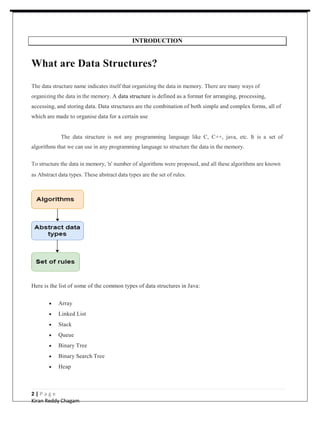
as Abstract data types. These abstract data types are the set of rules.
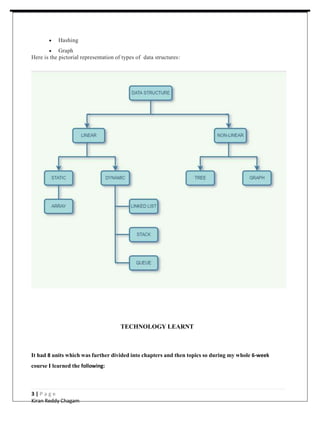
Here is the list of some of the common types of data structures in Java:
 Array
 Linked List
 Stack
 Queue
 Binary Tree
 Binary Search Tree
 Heap
2 | P a g e
Kiran Reddy Chagam
 Hashing
 Graph
Here is the pictorial representation of types of data structures:
TECHNOLOGY LEARNT
It had 8 units which was further divided into chapters and then topics so during my whole 6-week
course I learned the following:
3 | P a g e
Kiran Reddy Chagam
Types of Data Structures
There are two types of data structures:
o Primitive data structure
o Non-primitive data structure
Primitive Data structure
The primitive data structures are primitive data types. The int, char, float, double, and pointer are the
primitive data structures that can hold a single value.
Non-Primitive Data structure
The non-primitive data structure is divided into two types:
o Linear data structure
o Non-linear data structure
Linear Data Structures – The elements arranged in a linear fashion are called Linear Data
Structures. Here, each element is connected to one other element only. Linear Data Structures are
as follows:
 Arrays
o Single dimensional Array
o Multidimensional Array
 Stack
 Queue
 Linked List
o Singly-linked list
o Doubly Linked list
o Circular Linked List
4 | P a g e
Kiran Reddy Chagam
In these data structures, one element is connected to only one another element in a linear form.
Non-Linear Data Structures – The elements arranged in a non-linear fashion are called Non-
Linear Data Structures. Here, each element is connected to n-other elements. Non-Linear Data
Structures are as follows:
 Trees
o Binary Tree
o Binary Search Tree
o AVL Tree
o Red-Black Tree
 Graph
Data structures can also be classified as:
o Static data structure: It is a type of data structure where the size is allocated at the
compile time. Therefore, the maximum size is fixed.
o Ex: Arrays
o Dynamic data structure: It is a type of data structure where the size is allocated at
the run time. Therefore, the maximum size is flexible.
o Ex: Binary Trees.
Major Operations
The major or the common operations that can be performed on the data structures are:
o Searching: We can search for any element in a data structure.
o Sorting: We can sort the elements of a data structure either in an ascending or
descending order.
o Insertion: We can also insert the new element in a data structure.
o Updation: We can also update the element, i.e., we can replace the element with
another element.
5 | P a g e
Kiran Reddy Chagam
o Deletion: We can also perform the delete operation to remove the element from the
data structure.
Array
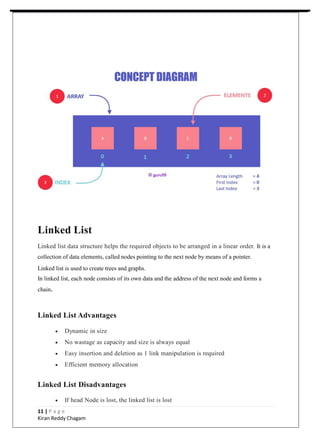
An array is the simplest data structure where a collection of similar data elements
takes place and each data element can be accessed directly by only using its index
number. An array is a data structure for storing more than one data item that has a
similar data type. The items of an array are allocated at adjacent memory locations.
These memory locations are called elements of that array. The total number of
elements in an array is called length.
The details of an array are accessed about its position. This reference is
called index or subscript.
Array Advantages
 Random access
 Easy sorting and iteration
 Replacement of multiple variables
Array Disadvantages
 Size is fixed
 Difficult to insert and delete
 If capacity is more and occupancy less, most of the array gets wasted
 Needs contiguous memory to get allocated
Array Applications
 For storing information in a linear fashion.
 Suitable for applications that require frequent searching.
10 | P a g e
Kiran Reddy Chagam
Linked List
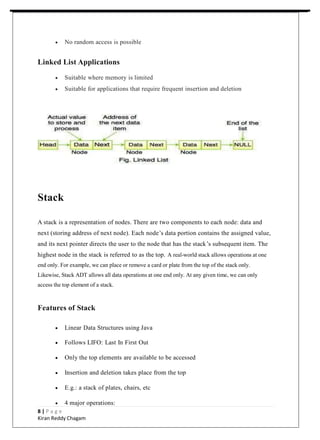
Linked list data structure helps the required objects to be arranged in a linear order. It is a
collection of data elements, called nodes pointing to the next node by means of a pointer.
Linked list is used to create trees and graphs.
In linked list, each node consists of its own data and the address of the next node and forms a
chain.
Linked List Advantages
 Dynamic in size
 No wastage as capacity and size is always equal
 Easy insertion and deletion as 1 link manipulation is required
 Efficient memory allocation
Linked List Disadvantages
 If head Node is lost, the linked list is lost
11 | P a g e
Kiran Reddy Chagam
 No random access is possible
Linked List Applications
 Suitable where memory is limited
 Suitable for applications that require frequent insertion and deletion
Stack
A stack is a representation of nodes. There are two components to each node: data and
next (storing address of next node). Each node’s data portion contains the assigned value,
and its next pointer directs the user to the node that has the stack’s subsequent item. The
highest node in the stack is referred to as the top. A real-world stack allows operations at one
end only. For example, we can place or remove a card or plate from the top of the stack only.
Likewise, Stack ADT allows all data operations at one end only. At any given time, we can only
access the top element of a stack.
Features of Stack
 Linear Data Structures using Java
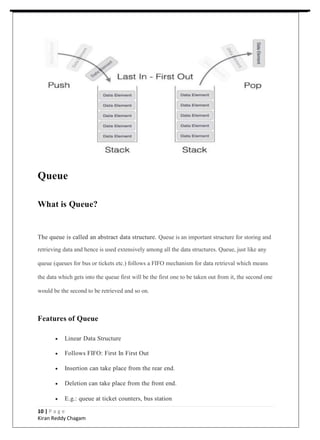
 Follows LIFO: Last In First Out
 Only the top elements are available to be accessed
 Insertion and deletion takes place from the top
 E.g.: a stack of plates, chairs, etc
 4 major operations:
8 | P a g e
Kiran Reddy Chagam
o push () – used to insert element at top
o pop () – removes the top element from stack
o isEmpty () – returns true is stack is empty
o peek () – to get the top element of the stack
 All operation works in constant time i.e. O (1)
Stack Advantages
 Maintains data in a LIFO manner
 The last element is readily available for use
 All operations are of O(1) complexity
Stack Disadvantages
 Manipulation is restricted to the top of the stack
 Not much flexible
Stack Applications
 Recursion
 Parsing
 Browser
 Editors
9 | P a g e
Kiran Reddy Chagam
Queue
What is Queue?
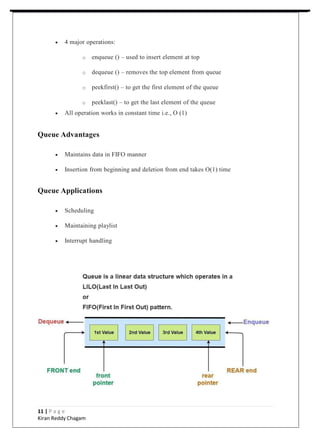
The queue is called an abstract data structure. Queue is an important structure for storing and
retrieving data and hence is used extensively among all the data structures. Queue, just like any
queue (queues for bus or tickets etc.) follows a FIFO mechanism for data retrieval which means
the data which gets into the queue first will be the first one to be taken out from it, the second one
would be the second to be retrieved and so on.
Features of Queue
 Linear Data Structure
 Follows FIFO: First In First Out
 Insertion can take place from the rear end.
 Deletion can take place from the front end.
 E.g.: queue at ticket counters, bus station
10 | P a g e
Kiran Reddy Chagam
 4 major operations:
o enqueue () – used to insert element at top
o dequeue () – removes the top element from queue
o peekfirst() – to get the first element of the queue
o peeklast() – to get the last element of the queue
 All operation works in constant time i.e., O (1)
Queue Advantages
 Maintains data in FIFO manner
 Insertion from beginning and deletion from end takes O(1) time
Queue Applications
 Scheduling
 Maintaining playlist
 Interrupt handling
11 | P a g e
Kiran Reddy Chagam
Binary Trees
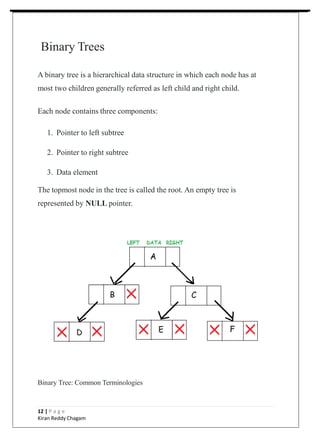
A binary tree is a hierarchical data structure in which each node has at
most two children generally referred as left child and right child.
Each node contains three components:
1. Pointer to left subtree
2. Pointer to right subtree
3. Data element
The topmost node in the tree is called the root. An empty tree is
represented by NULL pointer.
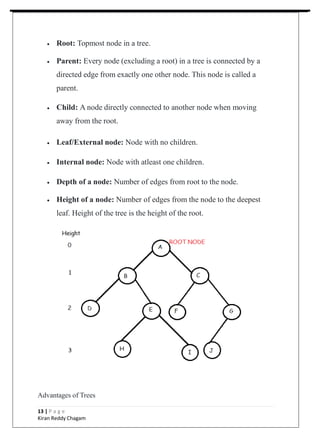
Binary Tree: Common Terminologies
12 | P a g e
Kiran Reddy Chagam
 Root: Topmost node in a tree.
 Parent: Every node (excluding a root) in a tree is connected by a
directed edge from exactly one other node. This node is called a
parent.
 Child: A node directly connected to another node when moving
away from the root.
 Leaf/External node: Node with no children.
 Internal node: Node with atleast one children.
 Depth of a node: Number of edges from root to the node.
 Height of a node: Number of edges from the node to the deepest
leaf. Height of the tree is the height of the root.
Advantages of Trees
13 | P a g e
Kiran Reddy Chagam
Trees are so useful and frequently used, because they have some very
serious advantages:
 Trees reflect structural relationships in the data.
 Trees are used to represent hierarchies.
 Trees provide an efficient insertion and searching.
 Trees are very flexible data, allowing to move subtrees around with
minumum effort.
Types of Binary Trees (Based on Structure)
 Rooted binary tree: It has a root node and every node has atmost
two children.
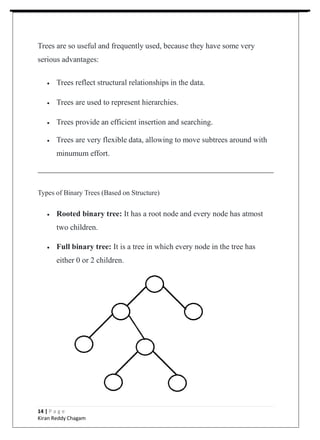
 Full binary tree: It is a tree in which every node in the tree has
either 0 or 2 children.
14 | P a g e
Kiran Reddy Chagam
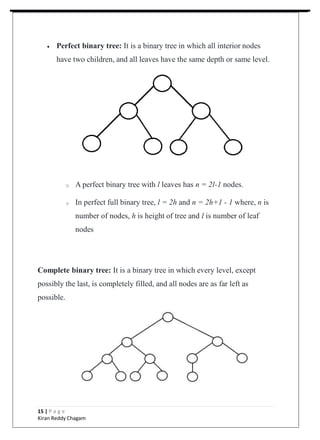
 Perfect binary tree: It is a binary tree in which all interior nodes
have two children, and all leaves have the same depth or same level.
o A perfect binary tree with l leaves has n = 2l-1 nodes.
o In perfect full binary tree, l = 2h and n = 2h+1 - 1 where, n is
number of nodes, h is height of tree and l is number of leaf
nodes
Complete binary tree: It is a binary tree in which every level, except
possibly the last, is completely filled, and all nodes are as far left as
possible.
15 | P a g e
Kiran Reddy Chagam
o The number of internal nodes in a complete binary tree of n
nodes is floor(n/2).
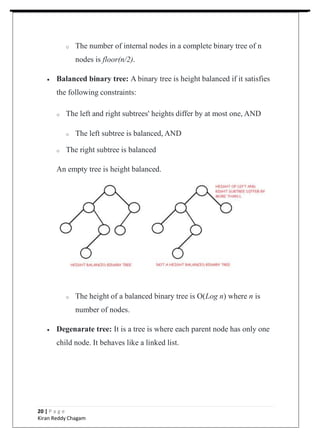
 Balanced binary tree: A binary tree is height balanced if it satisfies
the following constraints:
o The left and right subtrees' heights differ by at most one, AND
o The left subtree is balanced, AND
o The right subtree is balanced
An empty tree is height balanced.
o The height of a balanced binary tree is O(Log n) where n is
number of nodes.
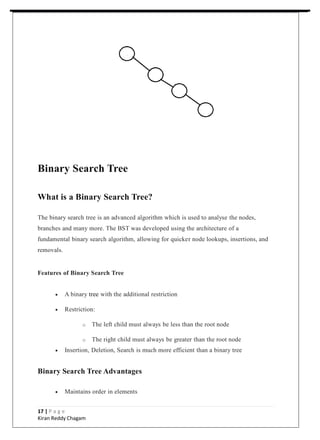
 Degenarate tree: It is a tree is where each parent node has only one
child node. It behaves like a linked list.
20 | P a g e
Kiran Reddy Chagam
Binary Search Tree
What is a Binary Search Tree?
The binary search tree is an advanced algorithm which is used to analyse the nodes,
branches and many more. The BST was developed using the architecture of a
fundamental binary search algorithm, allowing for quicker node lookups, insertions, and
removals.
Features of Binary Search Tree
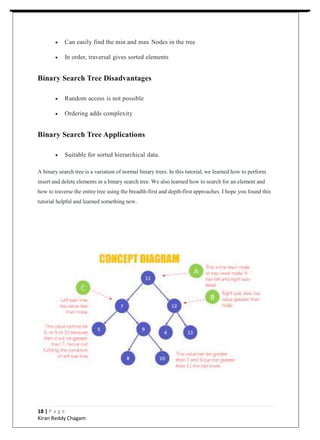
 A binary tree with the additional restriction
 Restriction:
o The left child must always be less than the root node
o The right child must always be greater than the root node
 Insertion, Deletion, Search is much more efficient than a binary tree
Binary Search Tree Advantages
 Maintains order in elements
17 | P a g e
Kiran Reddy Chagam
 Can easily find the min and max Nodes in the tree
 In order, traversal gives sorted elements
Binary Search Tree Disadvantages
 Random access is not possible
 Ordering adds complexity
Binary Search Tree Applications
 Suitable for sorted hierarchical data.
A binary search tree is a variation of normal binary trees. In this tutorial, we learned how to perform
insert and delete elements in a binary search tree. We also learned how to search for an element and
how to traverse the entire tree using the breadth-first and depth-first approaches. I hope you found this
tutorial helpful and learned something new.
18 | P a g e
Kiran Reddy Chagam
Graph
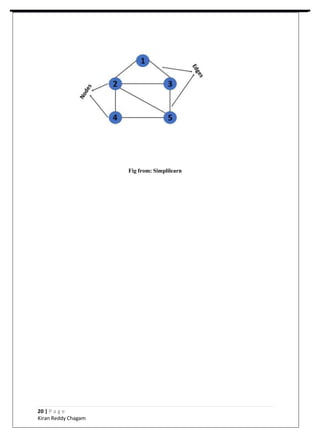
Graphs in data structures are non-linear data structures made up of a finite number of nodes or
vertices and the edges that connect them. Graphs in data structures are used to address real-world
problems in which it represents the problem area as a network like telephone networks, circuit
networks, and social networks. For example, it can represent a single user as nodes or vertices in a
telephone network, while the link between them via telephone represents edges.
 Basically, it is a group of edges and vertices
 Graph representation
o G (V, E); where V(G) represents a set of vertices and E(G)
represents a set of edges
 The graph can be directed or undirected
 The graph can be connected or disjoint
Graph Advantages
 finding connectivity
 Shortest path
 min cost to reach from 1 pt to other
 Min spanning tree
Graph Disadvantages
 Storing graph (Adjacency list and Adjacency matrix) can lead to complexities
Graph Applications
 Suitable for a circuit network
 Suitable for applications like Facebook, LinkedIn, etc
 Medical science
19 | P a g e
Kiran Reddy Chagam
Fig from: Simplilearn
20 | P a g e
Kiran Reddy Chagam
REASON FOR CHOOSING Data Structures and Algorithms
All the above was part of my training during my summer break I specially choose the DSA
by Techvanto Academy for reasons stated below:
• Techvanto Academy is a good precursor to learning other programming languages
and Computer Science related Services
• One need to learn how to make algorithm of a real-life problem he/she is facing.
• It Live video lectures of all the topics from which one can easily learn. I prefer
learning Live rather than books and notes.
• It was a great opportunity for me to invest my time in learning instead of wasting it.
• It contained a lot of knowledge for such a reasonable price.
21 | P a g e
Kiran Reddy Chagam
CONCLUSION
Practical knowledge means the visualization of the knowledge, which we read in our books. For
this, we perform experiments and get observations. Practical knowledge is very important in
every field. One must be familiar with the problems related to that field so that he may solve
them and become a successful person.
After achieving the proper goal in life, an engineer has to enter in professional life.
According to this life, he has to serve an industry, may be public or private sector or self-own.
For the efficient work in the field, he must be well aware of the practical knowledge as well as
theoretical knowledge.
Due to all above reasons and to bridge the gap between theory and practical, our
Engineering curriculum provides a practical training of 45 days. During this period a
student work in the industry and get well all type of experience and knowledge
about the working of companies and hardware and software tools.
I have undergone my 45 days summer training in 5th
Sem at Techvanto Academy. This report is
based on the knowledge, which I acquired during my 45 days of summer training.
BIBLIOGRAPHY
• Techvanto Website https://techvantoacademy.com/
•Techvanto Academy DSA Course
https://techvantoacademy.com/#/courses/622f172253eb9fa232f68f1f
22 | P a g e
Kiran Reddy Chagam

SIX WEEKS SUMMER TRAINING REPORT.pptx

  • 1.
    1 | Pa g e Kiran Reddy Chagam S. No. Title Page No. 1 Introduction 06 2 Technology Learnt 07 - 24 3 Reason for choosing Data Structures and Algorithms 25 4 Conclusion 26 5 Bibliography 26
  • 2.
    INTRODUCTION What are DataStructures? The data structure name indicates itself that organizing the data in memory. There are many ways of organizing the data in the memory. A data structure is defined as a format for arranging, processing, accessing, and storing data. Data structures are the combination of both simple and complex forms, all of which are made to organise data for a certain use The data structure is not any programming language like C, C++, java, etc. It is a set of algorithms that we can use in any programming language to structure the data in the memory. To structure the data in memory, 'n' number of algorithms were proposed, and all these algorithms are known as Abstract data types. These abstract data types are the set of rules. Here is the list of some of the common types of data structures in Java:  Array  Linked List  Stack  Queue  Binary Tree  Binary Search Tree  Heap 2 | P a g e Kiran Reddy Chagam
  • 3.
     Hashing  Graph Hereis the pictorial representation of types of data structures: TECHNOLOGY LEARNT It had 8 units which was further divided into chapters and then topics so during my whole 6-week course I learned the following: 3 | P a g e Kiran Reddy Chagam
  • 4.
    Types of DataStructures There are two types of data structures: o Primitive data structure o Non-primitive data structure Primitive Data structure The primitive data structures are primitive data types. The int, char, float, double, and pointer are the primitive data structures that can hold a single value. Non-Primitive Data structure The non-primitive data structure is divided into two types: o Linear data structure o Non-linear data structure Linear Data Structures – The elements arranged in a linear fashion are called Linear Data Structures. Here, each element is connected to one other element only. Linear Data Structures are as follows:  Arrays o Single dimensional Array o Multidimensional Array  Stack  Queue  Linked List o Singly-linked list o Doubly Linked list o Circular Linked List 4 | P a g e Kiran Reddy Chagam
  • 5.
    In these datastructures, one element is connected to only one another element in a linear form. Non-Linear Data Structures – The elements arranged in a non-linear fashion are called Non- Linear Data Structures. Here, each element is connected to n-other elements. Non-Linear Data Structures are as follows:  Trees o Binary Tree o Binary Search Tree o AVL Tree o Red-Black Tree  Graph Data structures can also be classified as: o Static data structure: It is a type of data structure where the size is allocated at the compile time. Therefore, the maximum size is fixed. o Ex: Arrays o Dynamic data structure: It is a type of data structure where the size is allocated at the run time. Therefore, the maximum size is flexible. o Ex: Binary Trees. Major Operations The major or the common operations that can be performed on the data structures are: o Searching: We can search for any element in a data structure. o Sorting: We can sort the elements of a data structure either in an ascending or descending order. o Insertion: We can also insert the new element in a data structure. o Updation: We can also update the element, i.e., we can replace the element with another element. 5 | P a g e Kiran Reddy Chagam
  • 6.
    o Deletion: Wecan also perform the delete operation to remove the element from the data structure. Array An array is the simplest data structure where a collection of similar data elements takes place and each data element can be accessed directly by only using its index number. An array is a data structure for storing more than one data item that has a similar data type. The items of an array are allocated at adjacent memory locations. These memory locations are called elements of that array. The total number of elements in an array is called length. The details of an array are accessed about its position. This reference is called index or subscript. Array Advantages  Random access  Easy sorting and iteration  Replacement of multiple variables Array Disadvantages  Size is fixed  Difficult to insert and delete  If capacity is more and occupancy less, most of the array gets wasted  Needs contiguous memory to get allocated Array Applications  For storing information in a linear fashion.  Suitable for applications that require frequent searching. 10 | P a g e Kiran Reddy Chagam
  • 7.
    Linked List Linked listdata structure helps the required objects to be arranged in a linear order. It is a collection of data elements, called nodes pointing to the next node by means of a pointer. Linked list is used to create trees and graphs. In linked list, each node consists of its own data and the address of the next node and forms a chain. Linked List Advantages  Dynamic in size  No wastage as capacity and size is always equal  Easy insertion and deletion as 1 link manipulation is required  Efficient memory allocation Linked List Disadvantages  If head Node is lost, the linked list is lost 11 | P a g e Kiran Reddy Chagam
  • 8.
     No randomaccess is possible Linked List Applications  Suitable where memory is limited  Suitable for applications that require frequent insertion and deletion Stack A stack is a representation of nodes. There are two components to each node: data and next (storing address of next node). Each node’s data portion contains the assigned value, and its next pointer directs the user to the node that has the stack’s subsequent item. The highest node in the stack is referred to as the top. A real-world stack allows operations at one end only. For example, we can place or remove a card or plate from the top of the stack only. Likewise, Stack ADT allows all data operations at one end only. At any given time, we can only access the top element of a stack. Features of Stack  Linear Data Structures using Java  Follows LIFO: Last In First Out  Only the top elements are available to be accessed  Insertion and deletion takes place from the top  E.g.: a stack of plates, chairs, etc  4 major operations: 8 | P a g e Kiran Reddy Chagam
  • 9.
    o push ()– used to insert element at top o pop () – removes the top element from stack o isEmpty () – returns true is stack is empty o peek () – to get the top element of the stack  All operation works in constant time i.e. O (1) Stack Advantages  Maintains data in a LIFO manner  The last element is readily available for use  All operations are of O(1) complexity Stack Disadvantages  Manipulation is restricted to the top of the stack  Not much flexible Stack Applications  Recursion  Parsing  Browser  Editors 9 | P a g e Kiran Reddy Chagam
  • 10.
    Queue What is Queue? Thequeue is called an abstract data structure. Queue is an important structure for storing and retrieving data and hence is used extensively among all the data structures. Queue, just like any queue (queues for bus or tickets etc.) follows a FIFO mechanism for data retrieval which means the data which gets into the queue first will be the first one to be taken out from it, the second one would be the second to be retrieved and so on. Features of Queue  Linear Data Structure  Follows FIFO: First In First Out  Insertion can take place from the rear end.  Deletion can take place from the front end.  E.g.: queue at ticket counters, bus station 10 | P a g e Kiran Reddy Chagam
  • 11.
     4 majoroperations: o enqueue () – used to insert element at top o dequeue () – removes the top element from queue o peekfirst() – to get the first element of the queue o peeklast() – to get the last element of the queue  All operation works in constant time i.e., O (1) Queue Advantages  Maintains data in FIFO manner  Insertion from beginning and deletion from end takes O(1) time Queue Applications  Scheduling  Maintaining playlist  Interrupt handling 11 | P a g e Kiran Reddy Chagam
  • 12.
    Binary Trees A binarytree is a hierarchical data structure in which each node has at most two children generally referred as left child and right child. Each node contains three components: 1. Pointer to left subtree 2. Pointer to right subtree 3. Data element The topmost node in the tree is called the root. An empty tree is represented by NULL pointer. Binary Tree: Common Terminologies 12 | P a g e Kiran Reddy Chagam
  • 13.
     Root: Topmostnode in a tree.  Parent: Every node (excluding a root) in a tree is connected by a directed edge from exactly one other node. This node is called a parent.  Child: A node directly connected to another node when moving away from the root.  Leaf/External node: Node with no children.  Internal node: Node with atleast one children.  Depth of a node: Number of edges from root to the node.  Height of a node: Number of edges from the node to the deepest leaf. Height of the tree is the height of the root. Advantages of Trees 13 | P a g e Kiran Reddy Chagam
  • 14.
    Trees are souseful and frequently used, because they have some very serious advantages:  Trees reflect structural relationships in the data.  Trees are used to represent hierarchies.  Trees provide an efficient insertion and searching.  Trees are very flexible data, allowing to move subtrees around with minumum effort. Types of Binary Trees (Based on Structure)  Rooted binary tree: It has a root node and every node has atmost two children.  Full binary tree: It is a tree in which every node in the tree has either 0 or 2 children. 14 | P a g e Kiran Reddy Chagam
  • 15.
     Perfect binarytree: It is a binary tree in which all interior nodes have two children, and all leaves have the same depth or same level. o A perfect binary tree with l leaves has n = 2l-1 nodes. o In perfect full binary tree, l = 2h and n = 2h+1 - 1 where, n is number of nodes, h is height of tree and l is number of leaf nodes Complete binary tree: It is a binary tree in which every level, except possibly the last, is completely filled, and all nodes are as far left as possible. 15 | P a g e Kiran Reddy Chagam
  • 16.
    o The numberof internal nodes in a complete binary tree of n nodes is floor(n/2).  Balanced binary tree: A binary tree is height balanced if it satisfies the following constraints: o The left and right subtrees' heights differ by at most one, AND o The left subtree is balanced, AND o The right subtree is balanced An empty tree is height balanced. o The height of a balanced binary tree is O(Log n) where n is number of nodes.  Degenarate tree: It is a tree is where each parent node has only one child node. It behaves like a linked list. 20 | P a g e Kiran Reddy Chagam
  • 17.
    Binary Search Tree Whatis a Binary Search Tree? The binary search tree is an advanced algorithm which is used to analyse the nodes, branches and many more. The BST was developed using the architecture of a fundamental binary search algorithm, allowing for quicker node lookups, insertions, and removals. Features of Binary Search Tree  A binary tree with the additional restriction  Restriction: o The left child must always be less than the root node o The right child must always be greater than the root node  Insertion, Deletion, Search is much more efficient than a binary tree Binary Search Tree Advantages  Maintains order in elements 17 | P a g e Kiran Reddy Chagam
  • 18.
     Can easilyfind the min and max Nodes in the tree  In order, traversal gives sorted elements Binary Search Tree Disadvantages  Random access is not possible  Ordering adds complexity Binary Search Tree Applications  Suitable for sorted hierarchical data. A binary search tree is a variation of normal binary trees. In this tutorial, we learned how to perform insert and delete elements in a binary search tree. We also learned how to search for an element and how to traverse the entire tree using the breadth-first and depth-first approaches. I hope you found this tutorial helpful and learned something new. 18 | P a g e Kiran Reddy Chagam
  • 19.
    Graph Graphs in datastructures are non-linear data structures made up of a finite number of nodes or vertices and the edges that connect them. Graphs in data structures are used to address real-world problems in which it represents the problem area as a network like telephone networks, circuit networks, and social networks. For example, it can represent a single user as nodes or vertices in a telephone network, while the link between them via telephone represents edges.  Basically, it is a group of edges and vertices  Graph representation o G (V, E); where V(G) represents a set of vertices and E(G) represents a set of edges  The graph can be directed or undirected  The graph can be connected or disjoint Graph Advantages  finding connectivity  Shortest path  min cost to reach from 1 pt to other  Min spanning tree Graph Disadvantages  Storing graph (Adjacency list and Adjacency matrix) can lead to complexities Graph Applications  Suitable for a circuit network  Suitable for applications like Facebook, LinkedIn, etc  Medical science 19 | P a g e Kiran Reddy Chagam
  • 20.
    Fig from: Simplilearn 20| P a g e Kiran Reddy Chagam
  • 21.
    REASON FOR CHOOSINGData Structures and Algorithms All the above was part of my training during my summer break I specially choose the DSA by Techvanto Academy for reasons stated below: • Techvanto Academy is a good precursor to learning other programming languages and Computer Science related Services • One need to learn how to make algorithm of a real-life problem he/she is facing. • It Live video lectures of all the topics from which one can easily learn. I prefer learning Live rather than books and notes. • It was a great opportunity for me to invest my time in learning instead of wasting it. • It contained a lot of knowledge for such a reasonable price. 21 | P a g e Kiran Reddy Chagam
  • 22.
    CONCLUSION Practical knowledge meansthe visualization of the knowledge, which we read in our books. For this, we perform experiments and get observations. Practical knowledge is very important in every field. One must be familiar with the problems related to that field so that he may solve them and become a successful person. After achieving the proper goal in life, an engineer has to enter in professional life. According to this life, he has to serve an industry, may be public or private sector or self-own. For the efficient work in the field, he must be well aware of the practical knowledge as well as theoretical knowledge. Due to all above reasons and to bridge the gap between theory and practical, our Engineering curriculum provides a practical training of 45 days. During this period a student work in the industry and get well all type of experience and knowledge about the working of companies and hardware and software tools. I have undergone my 45 days summer training in 5th Sem at Techvanto Academy. This report is based on the knowledge, which I acquired during my 45 days of summer training. BIBLIOGRAPHY • Techvanto Website https://techvantoacademy.com/ •Techvanto Academy DSA Course https://techvantoacademy.com/#/courses/622f172253eb9fa232f68f1f 22 | P a g e Kiran Reddy Chagam