BITS Pilani
Pilani Campus
MATLAB & SIMULINK
for Process Engineers
@
SLIET, LONGOWAL
under TEQIP-3, April 25-26, 2019
BITS Pilani
Pilani Campus
Amit Jain, PhD
Assistant Professor
Dept. of Chemical Engg.
BITS Pilani – Pilani Campus
BITS Pilani, Pilani Campus
Developed by Mathworks.
MATLAB deals with matrix operation.
Simulink, is a graphical programming environment
for modeling, simulating and analyzing multi-domain
dynamical systems.
Simply, it deals with differential equations in graphic.
Its primary interface is a graphical block
diagramming tool and a customizable set of block
libraries.
Simulink is widely used in automatic control,
digital signal processing and Model-Based Design.
MATLAB & SIMULINK
326 April 2019
BITS Pilani, Pilani Campus
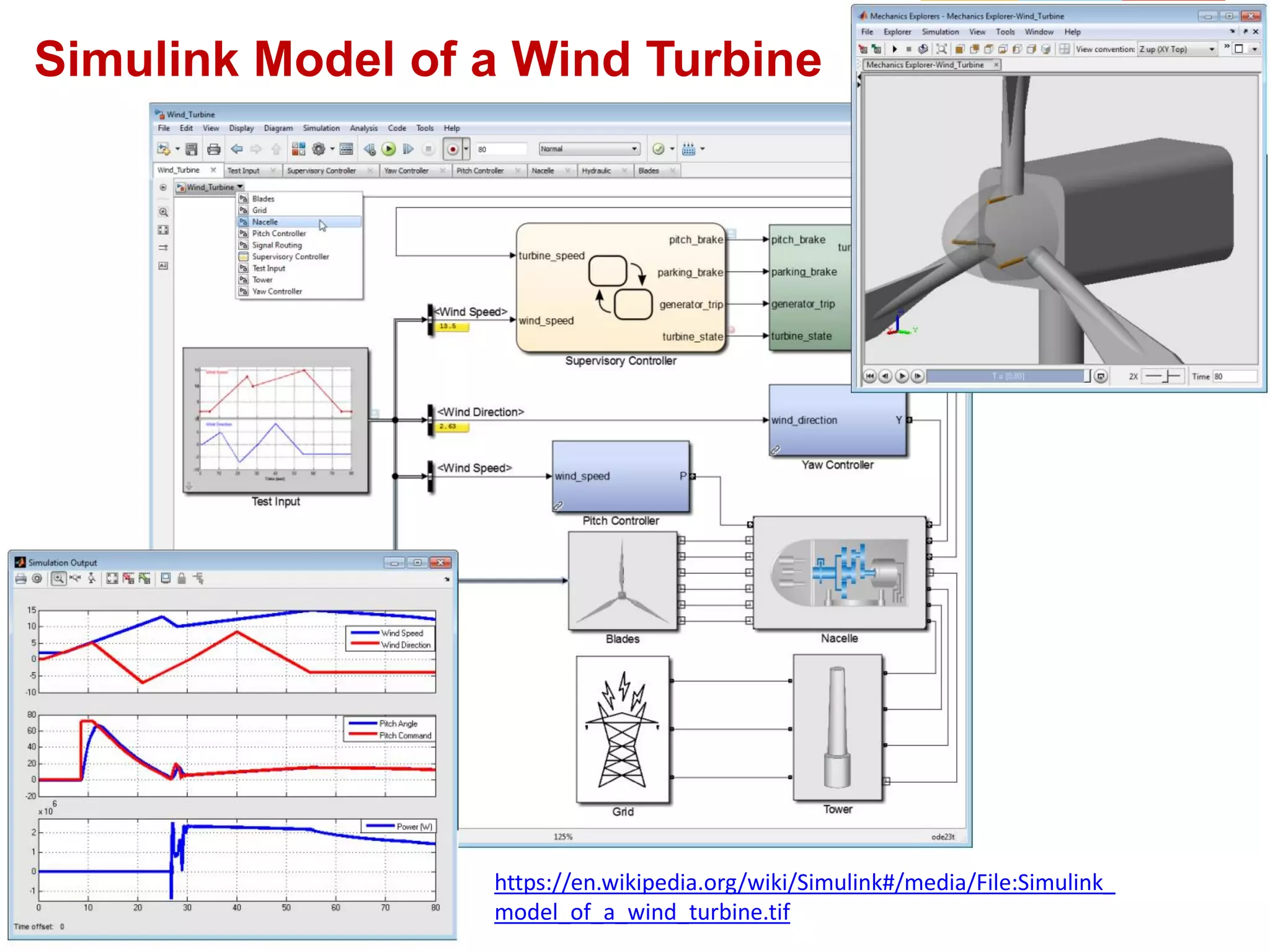
Model based design of control systems.
Simulink Applications
426 April 2019
Simulink Model of a Wind Turbine
https://en.wikipedia.org/wiki/Simulink#/media/File:Simulink_
model_of_a_wind_turbine.tif
BITS Pilani, Pilani Campus
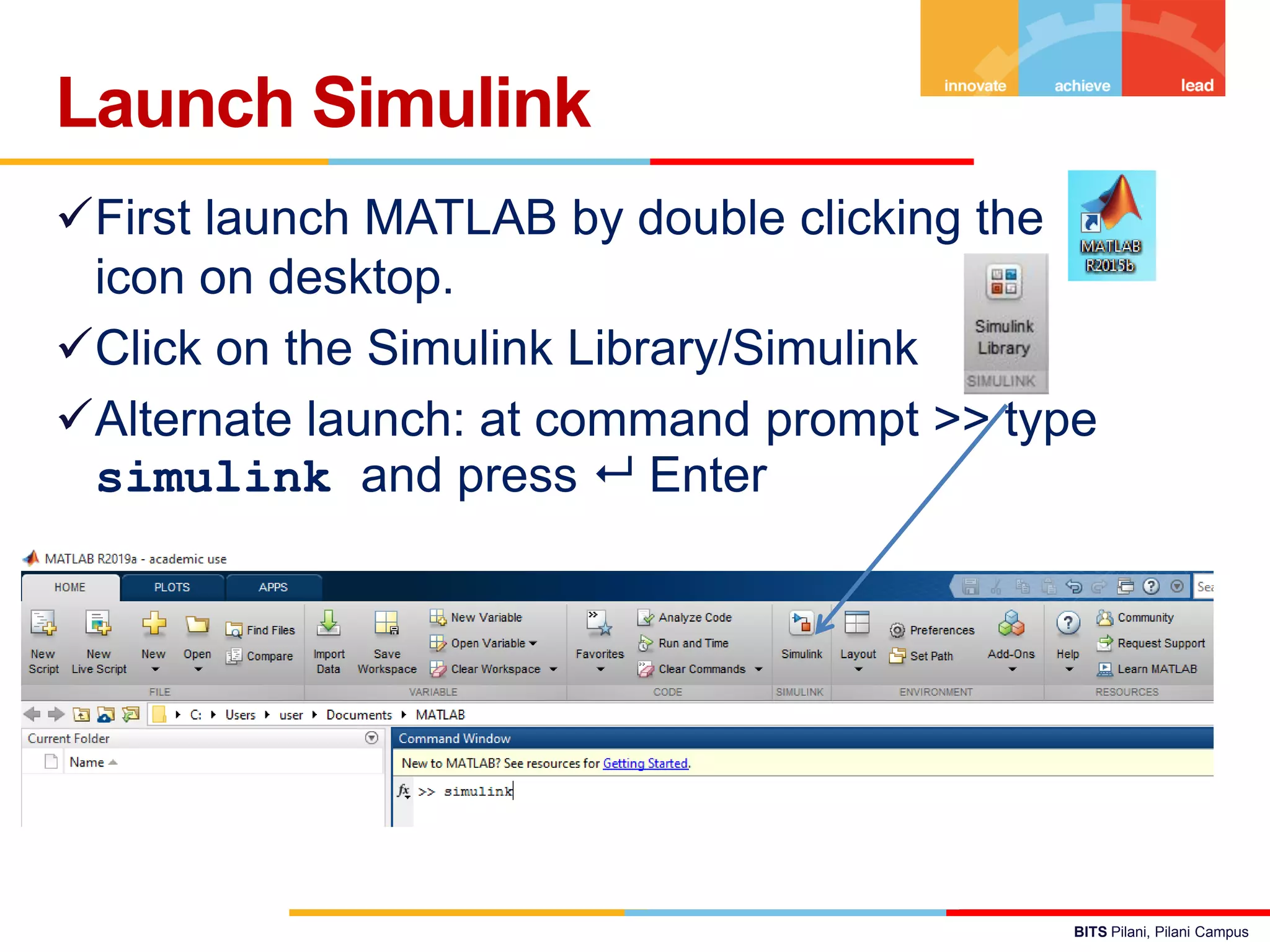
First launch MATLAB by double clicking the
icon on desktop.
Click on the Simulink Library/Simulink
Alternate launch: at command prompt >> type
simulink and press  Enter
Launch Simulink
BITS Pilani, Pilani Campus
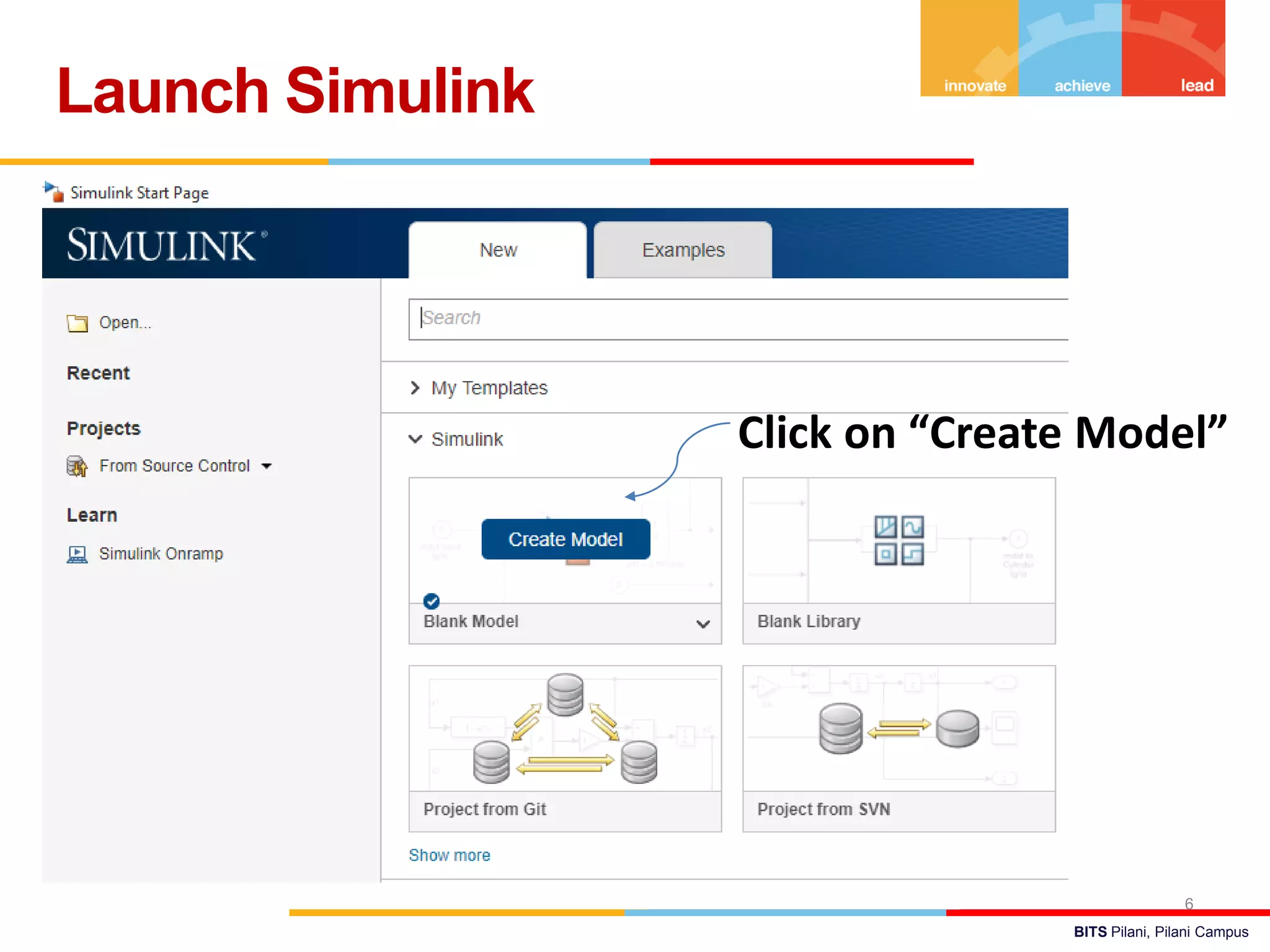
Launch Simulink
6
Click on “Create Model”
BITS Pilani, Pilani Campus
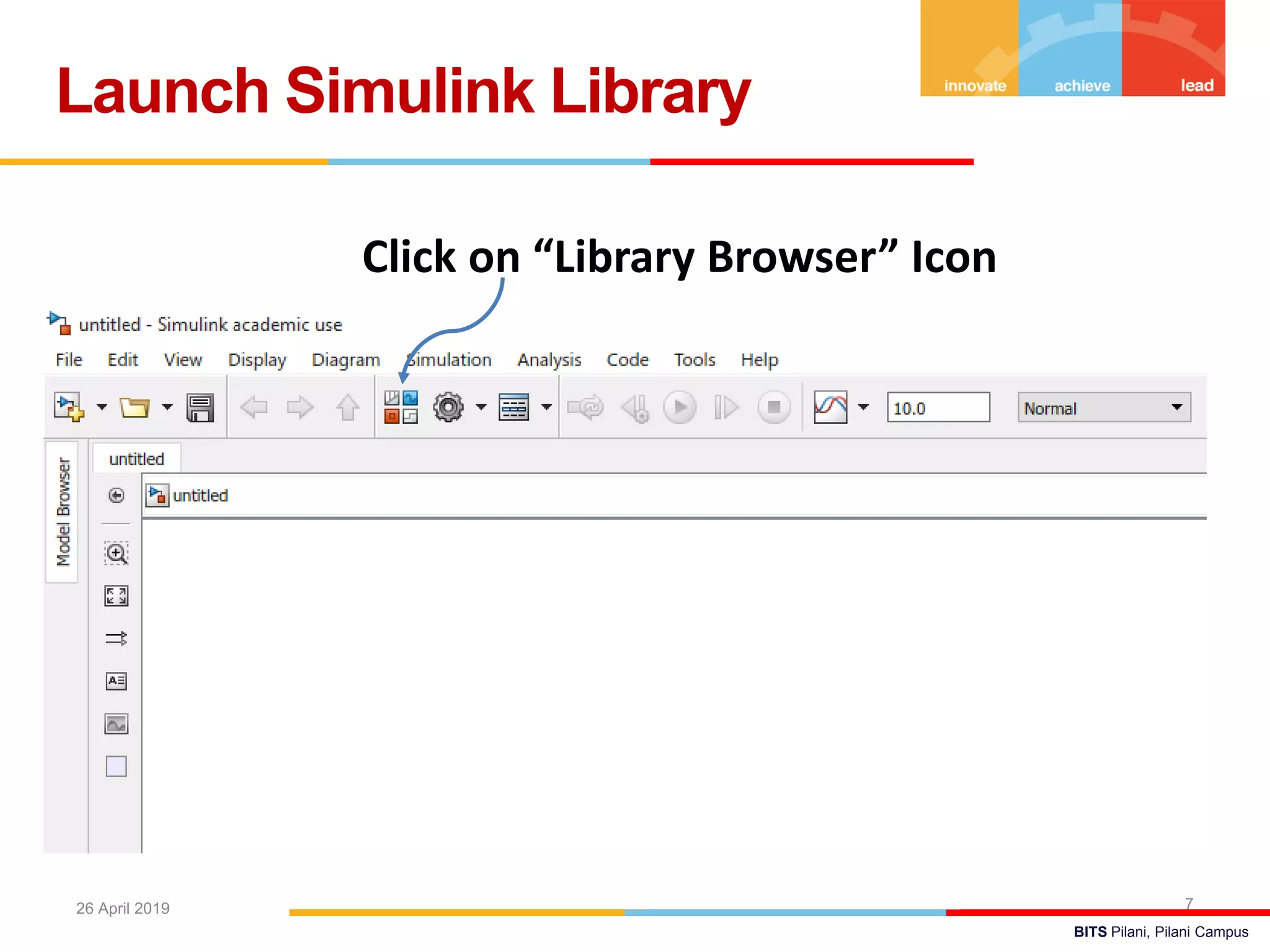
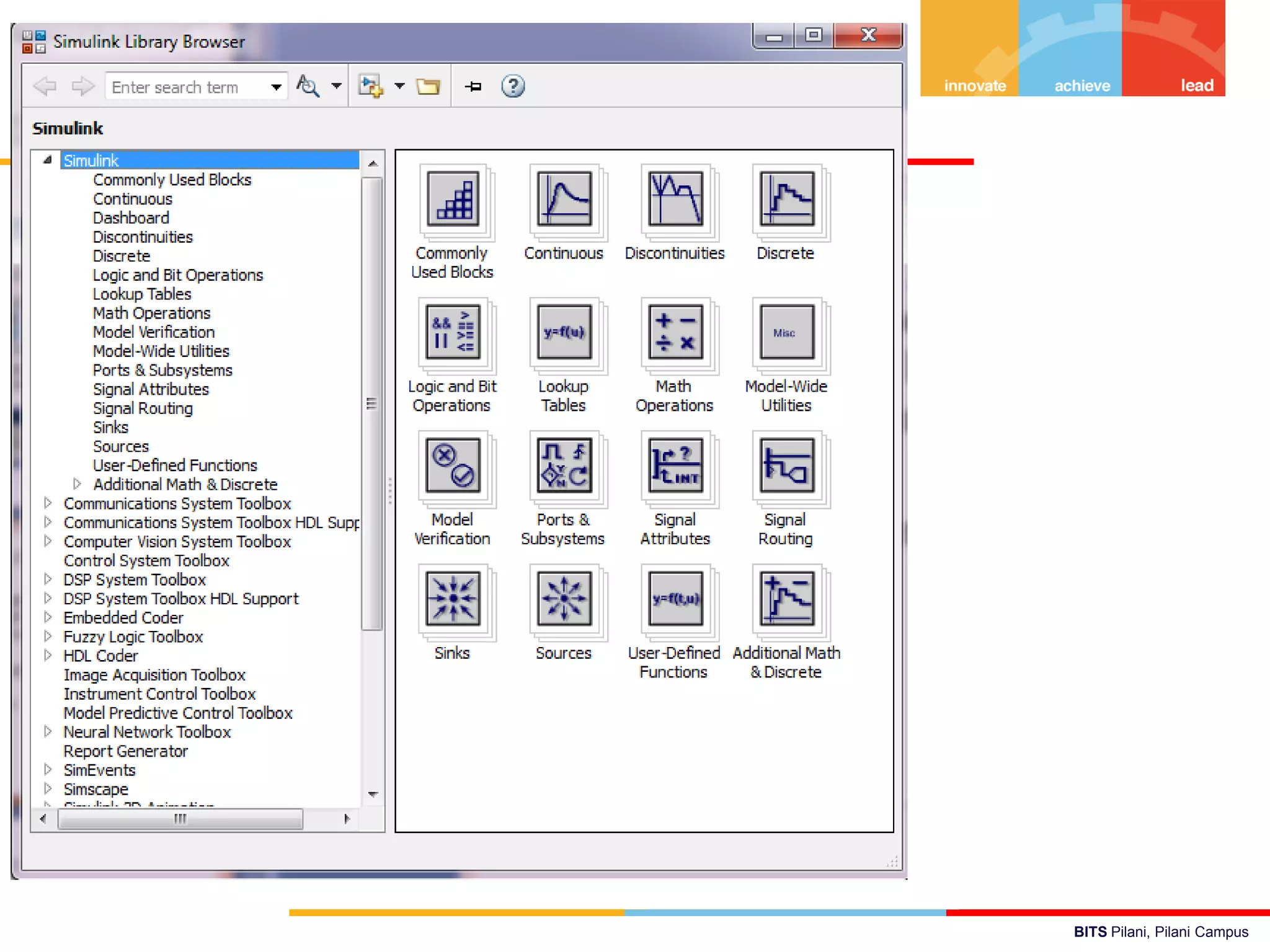
Launch Simulink Library
726 April 2019
Click on “Library Browser” Icon
BITS Pilani, Pilani Campus
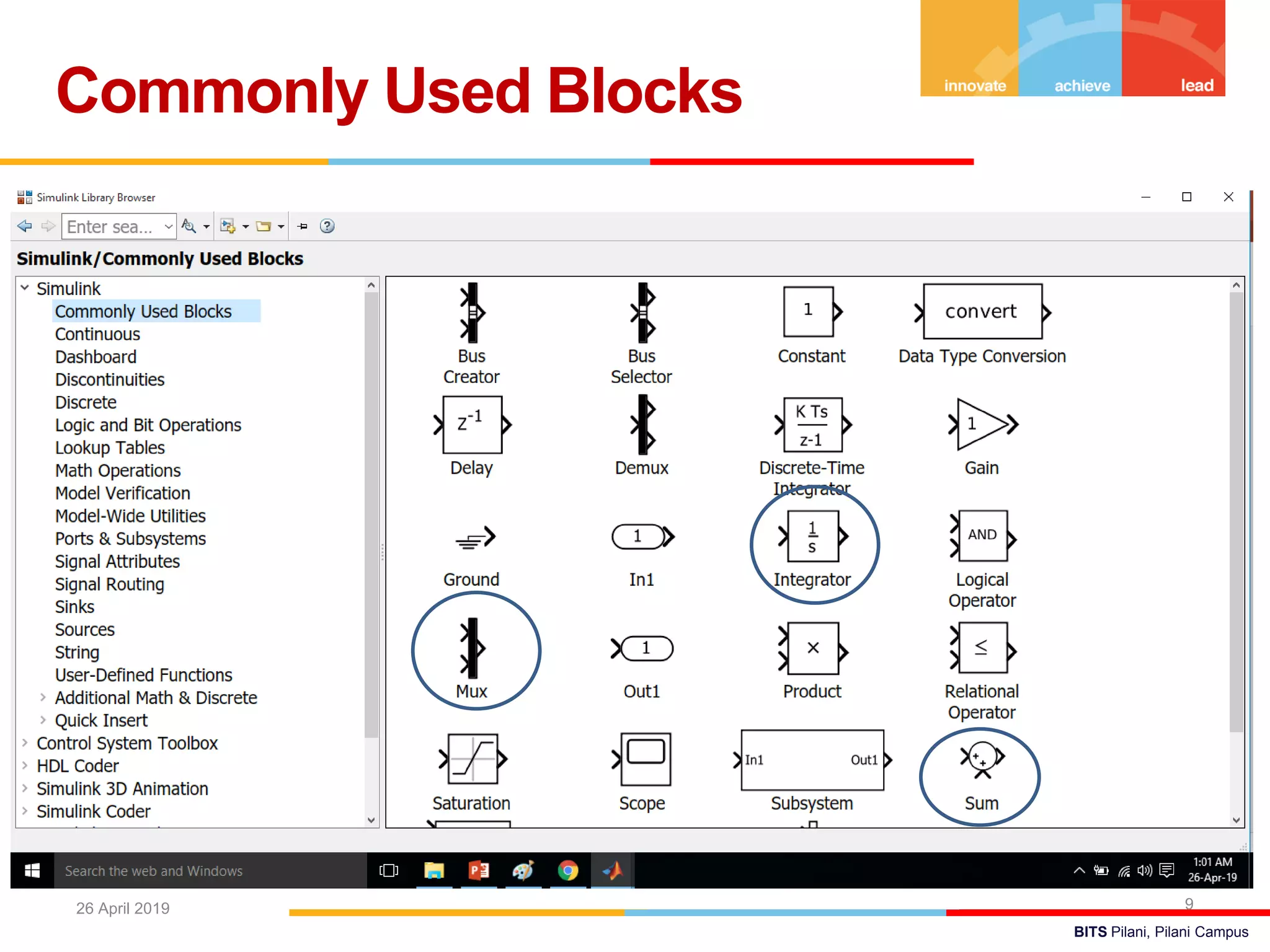
Commonly Used Blocks
926 April 2019
BITS Pilani, Pilani Campus
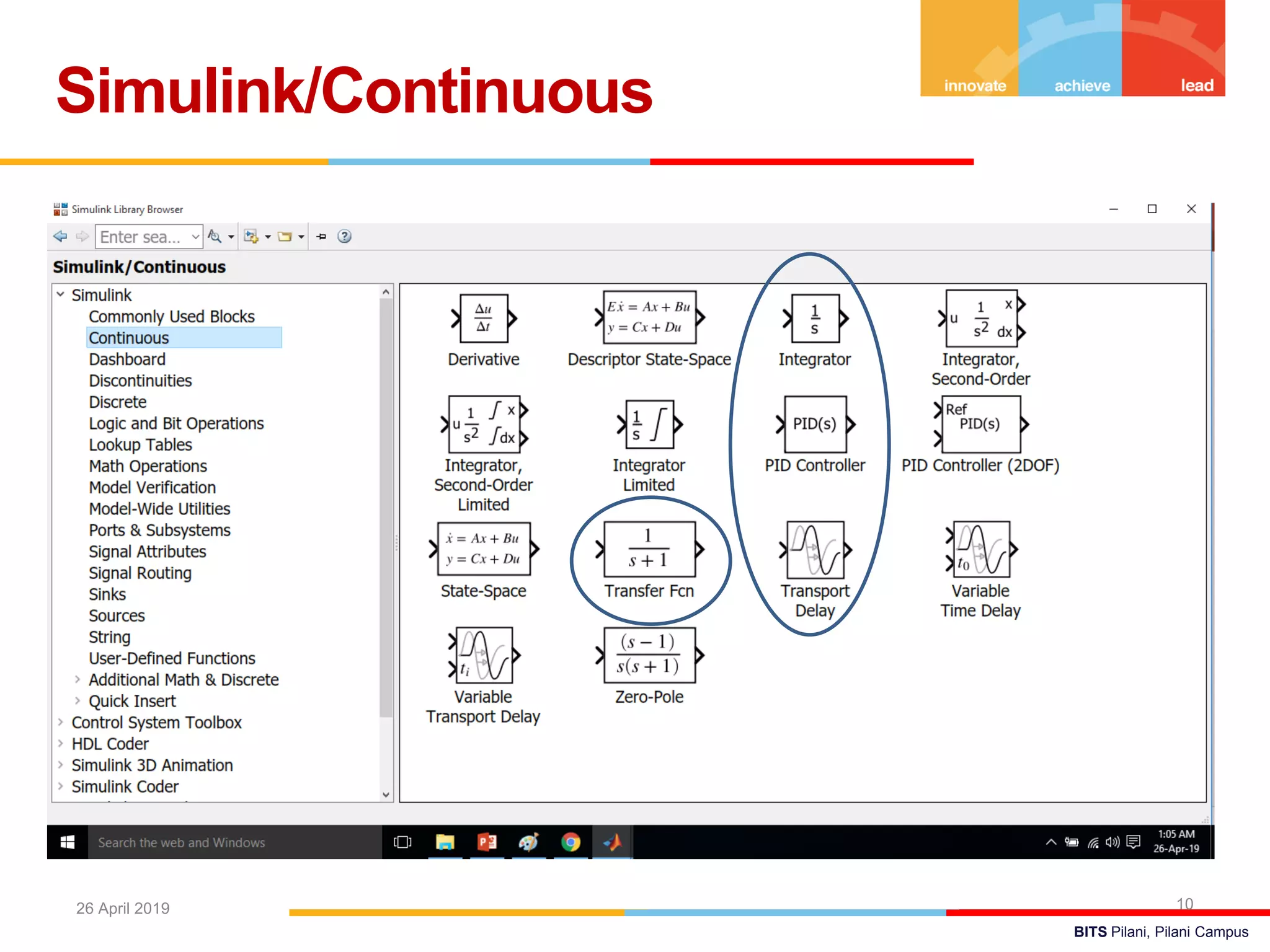
Simulink/Continuous
1026 April 2019
BITS Pilani, Pilani Campus
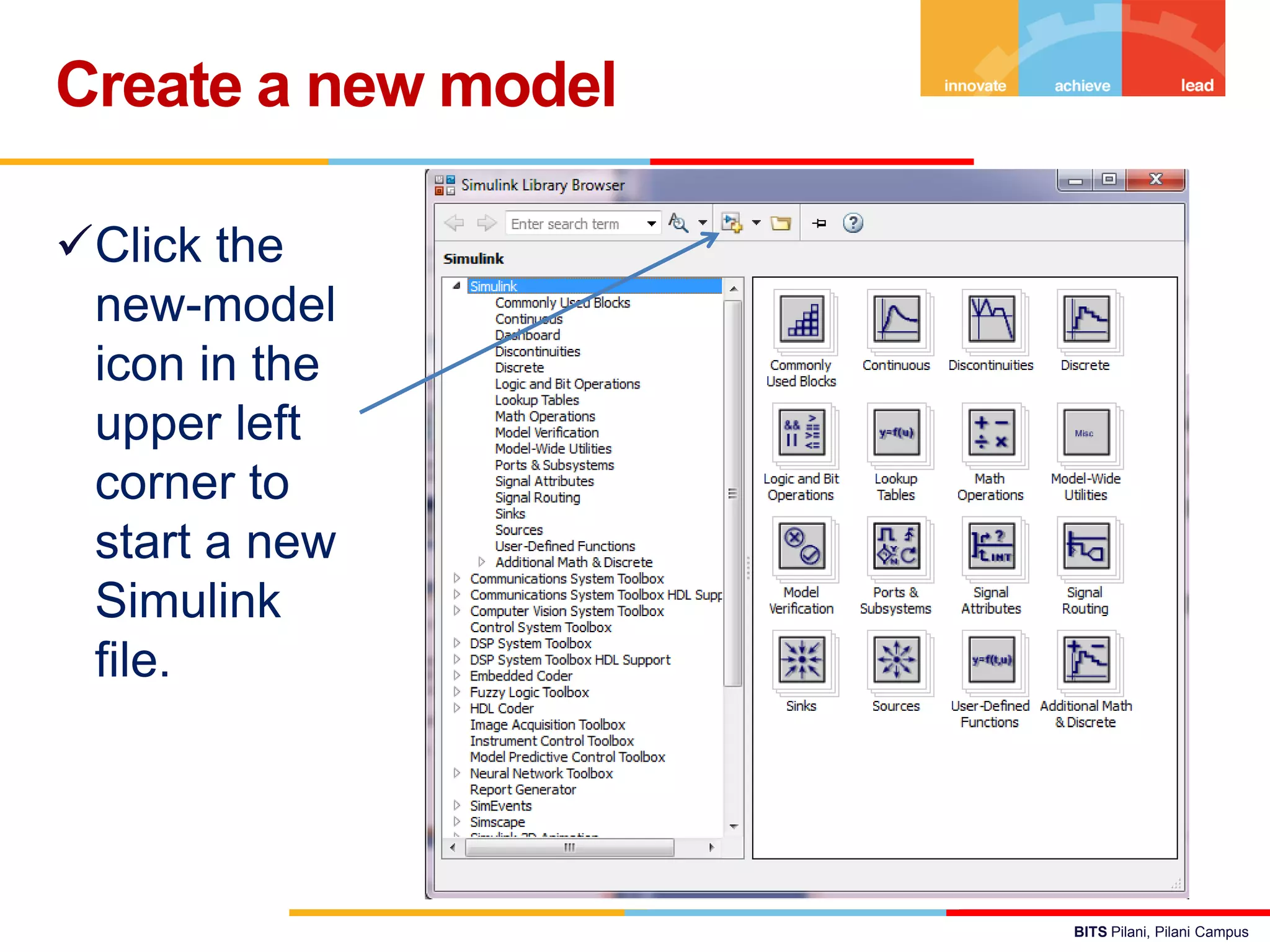
Click the
new-model
icon in the
upper left
corner to
start a new
Simulink
file.
Create a new model
BITS Pilani, Pilani Campus
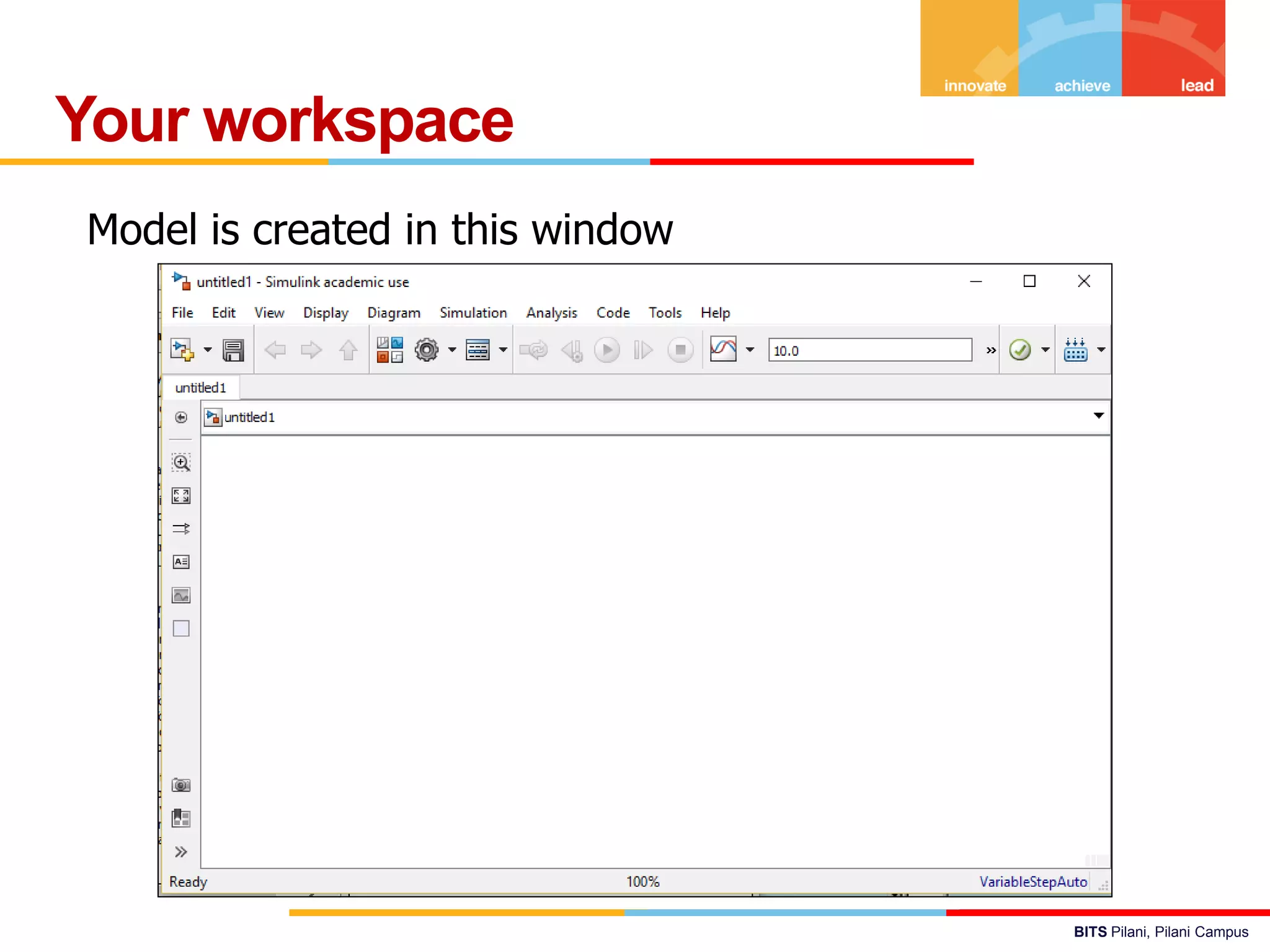
Your workspace
Model is created in this window
BITS Pilani, Pilani Campus
 Simulating this model integrates a sine wave signal to a
cosine signal and then displays the result, along with the
original signal, in a Scope window.
Simple Simulink Model
Add Blocks to Model
Drag the
Sine Wave
block to the
Simulink
Editor.
Add other blocks too…
Move the blocks as per convenience
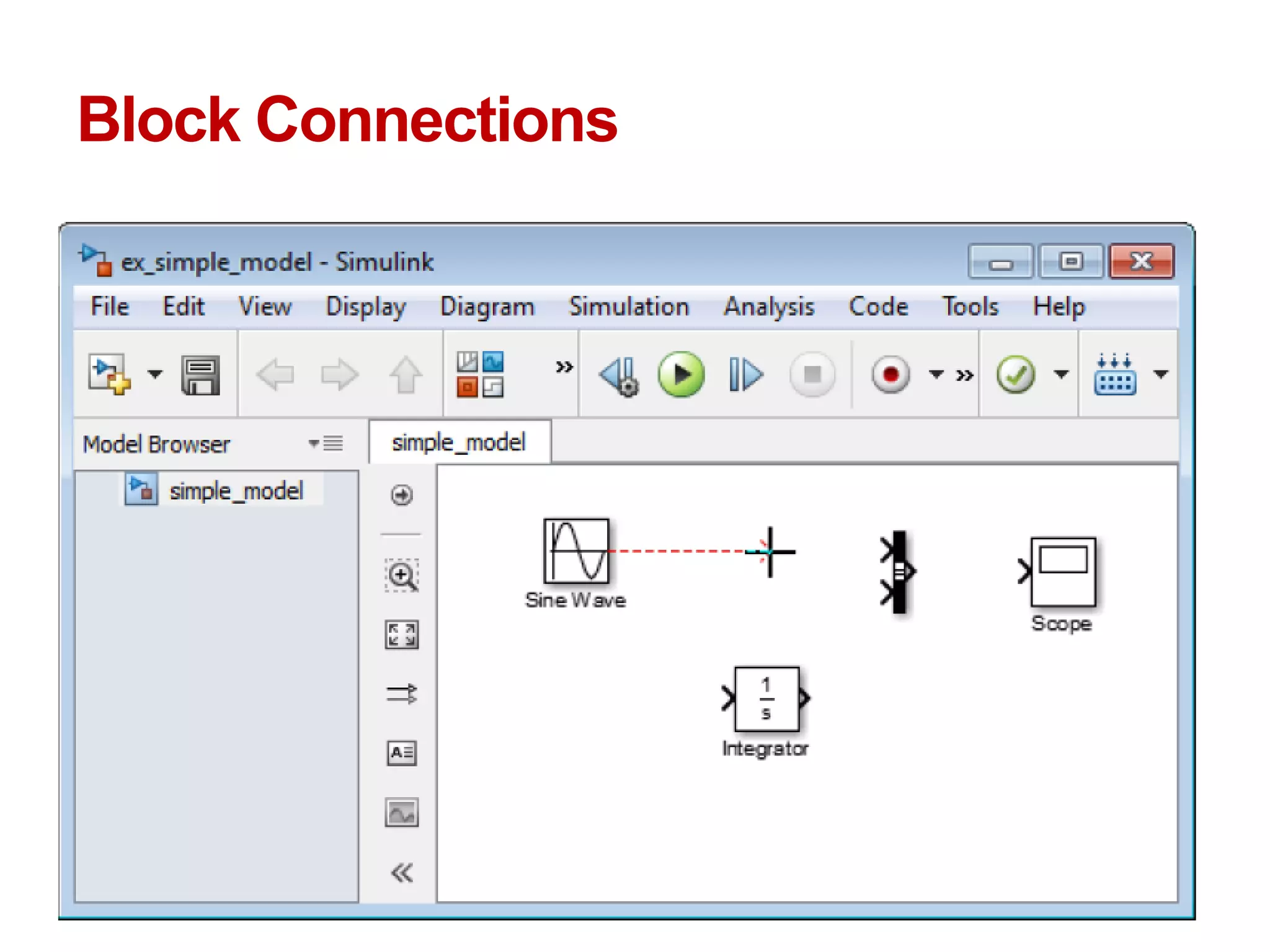
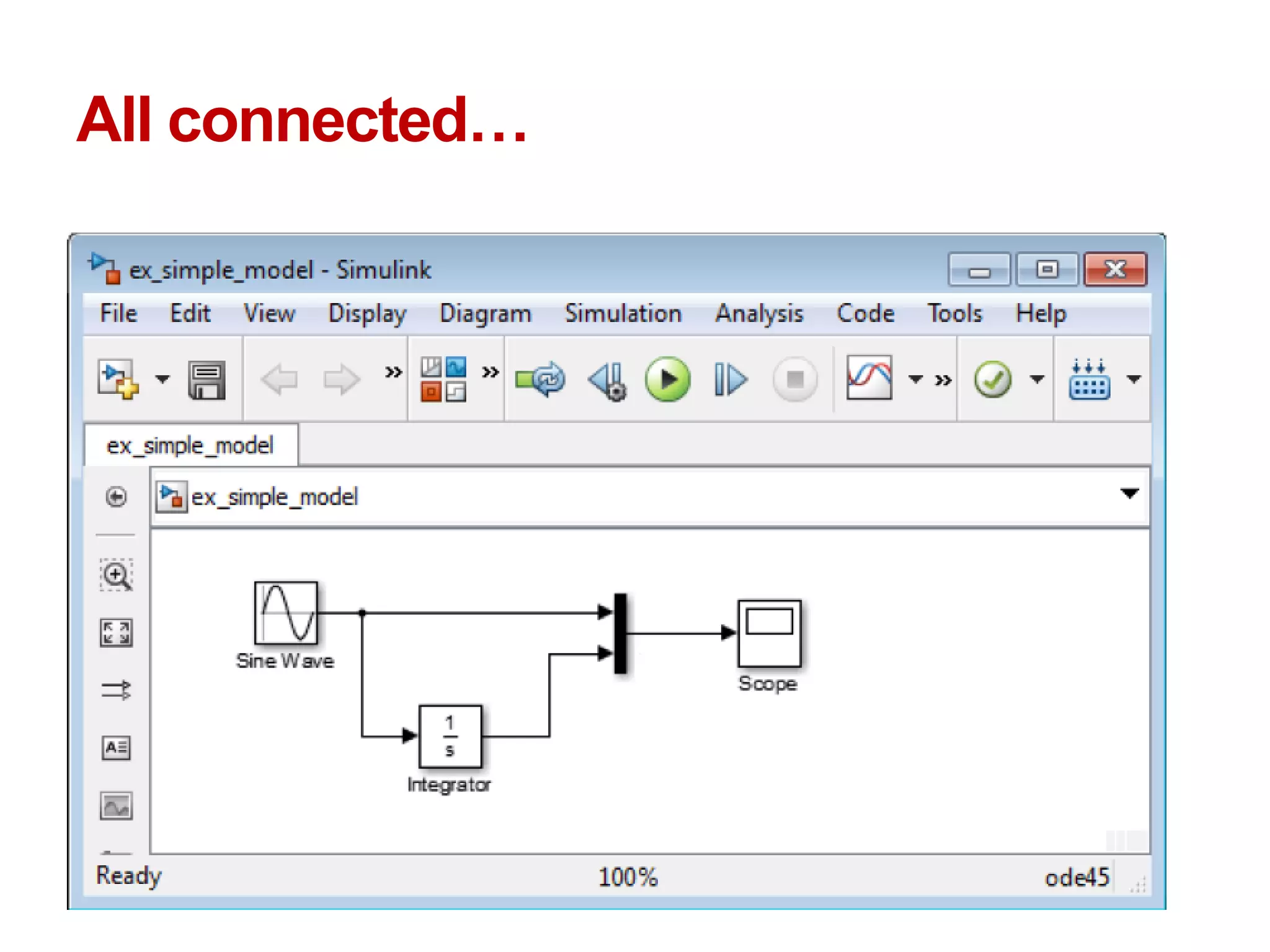
Block Connections
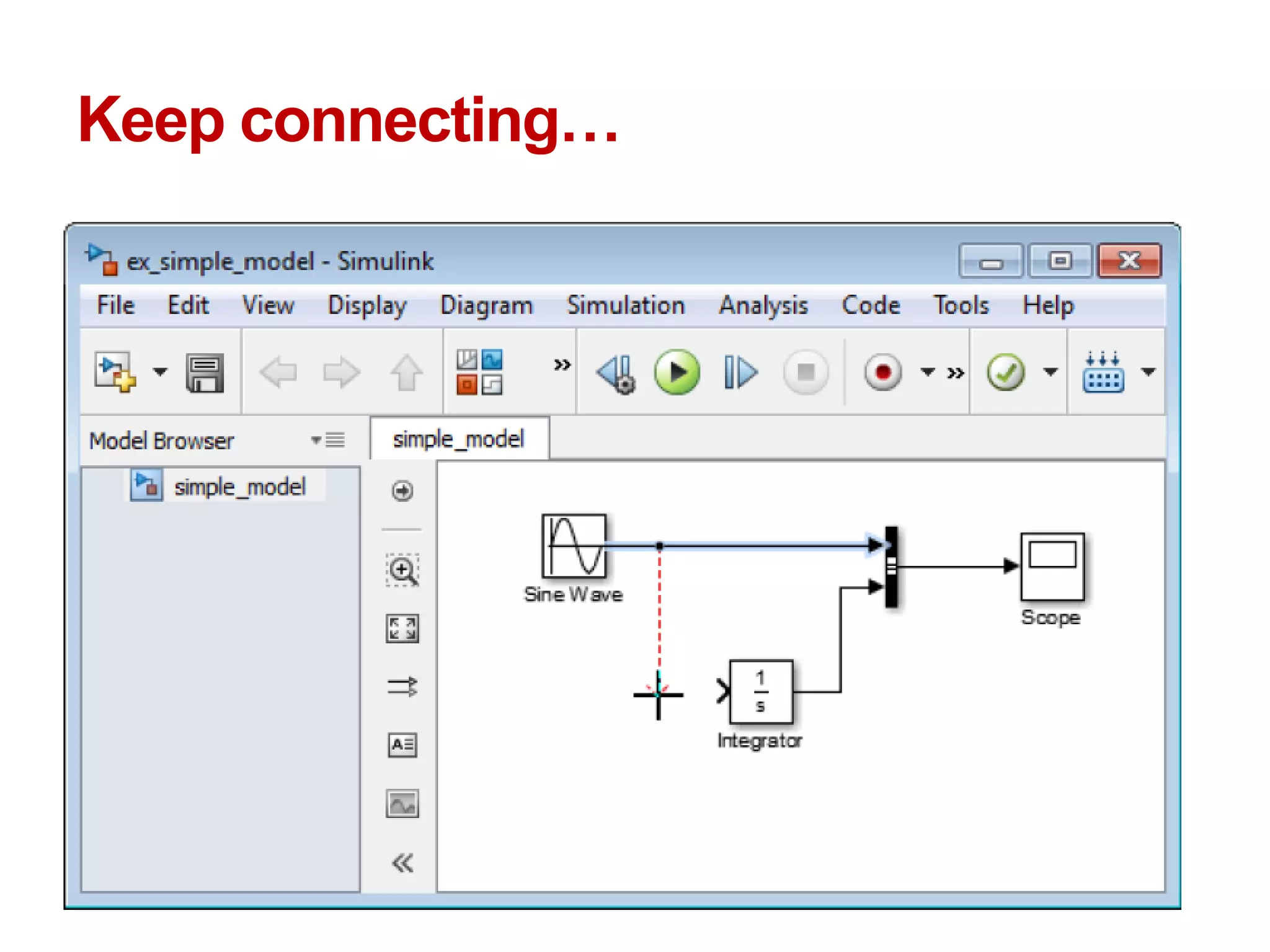
Keep connecting…
All connected…
Define Configuration Parameters
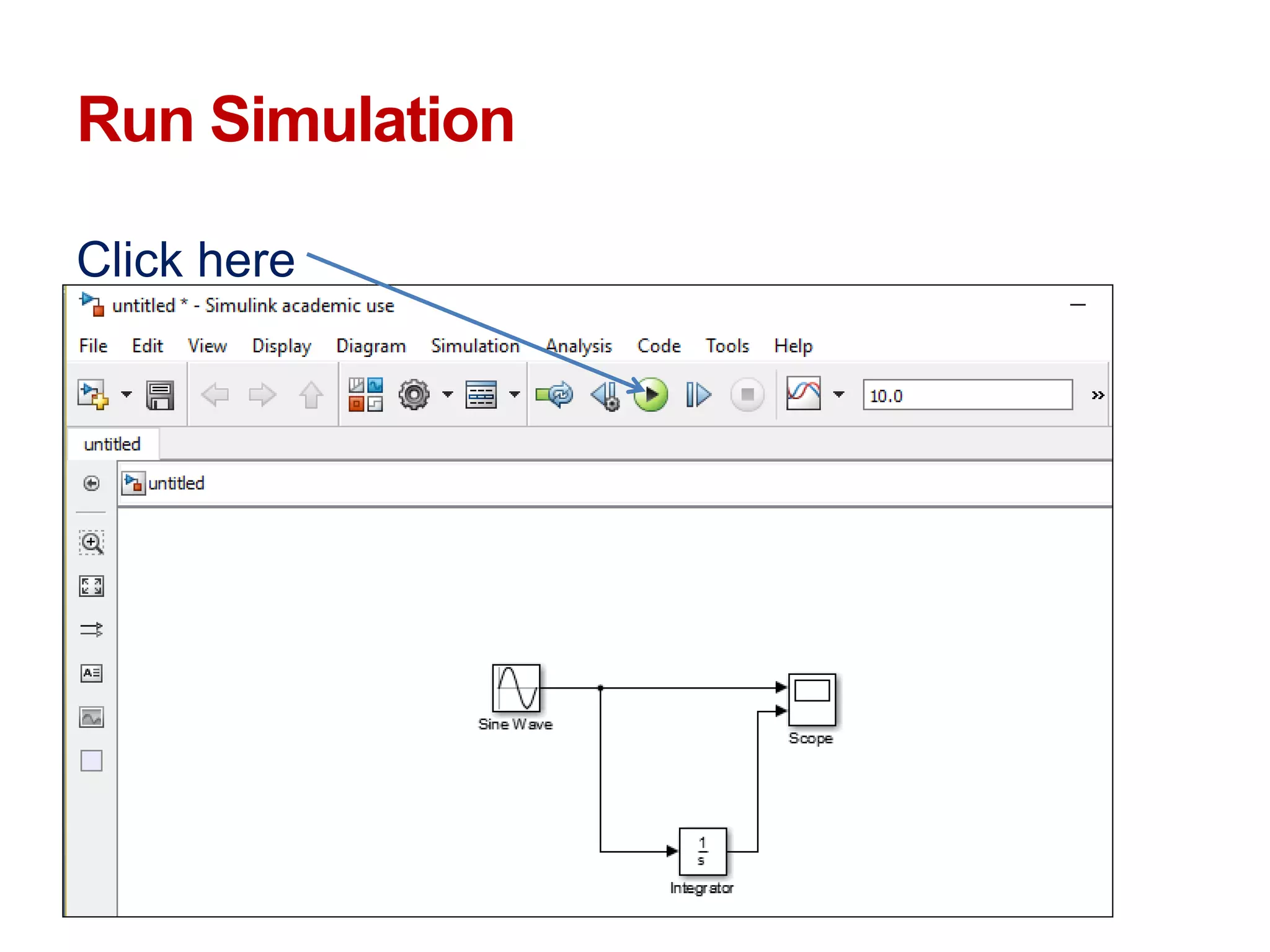
Run Simulation
Click here
Results: Double click scope block
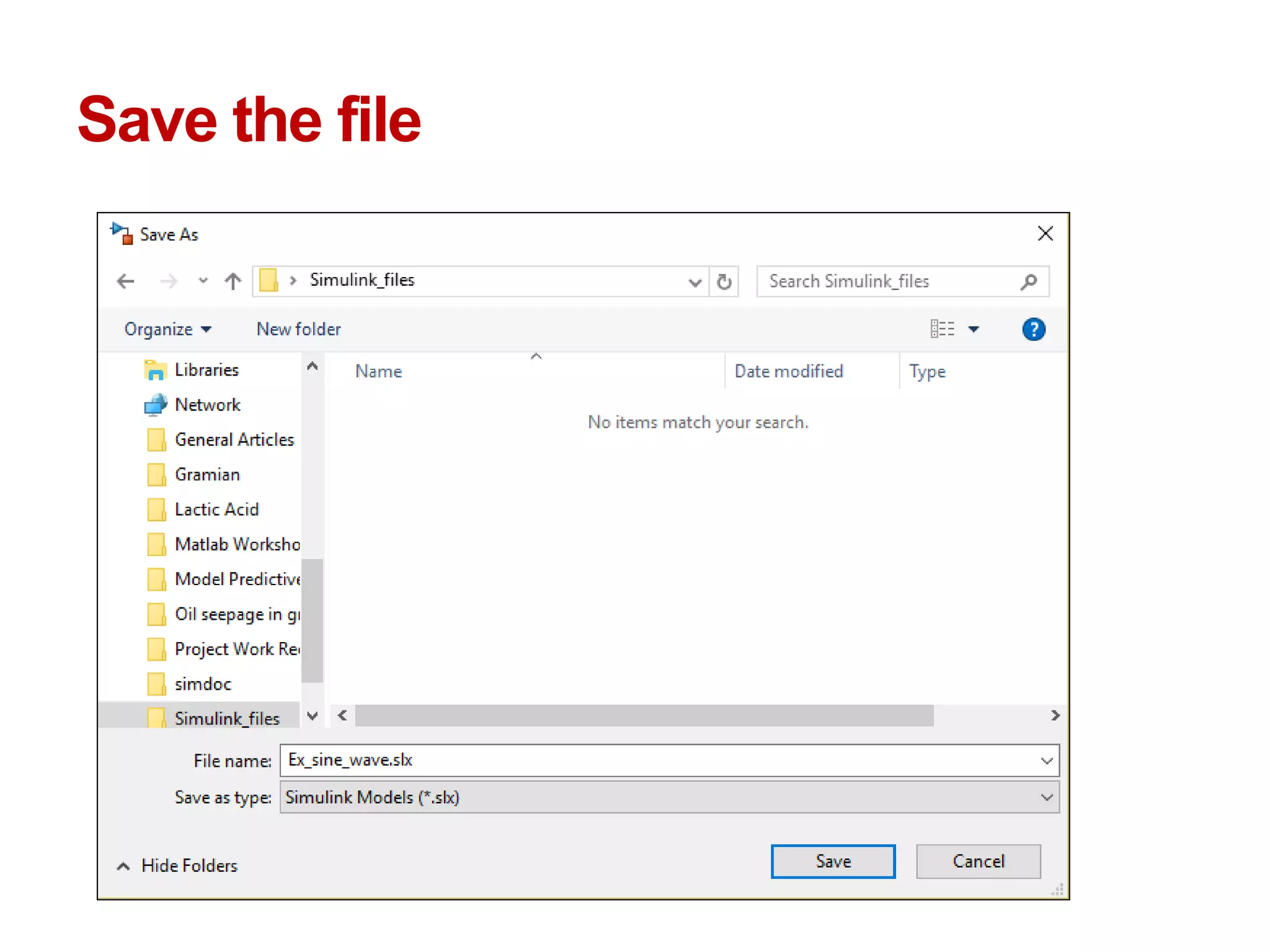
Save the file
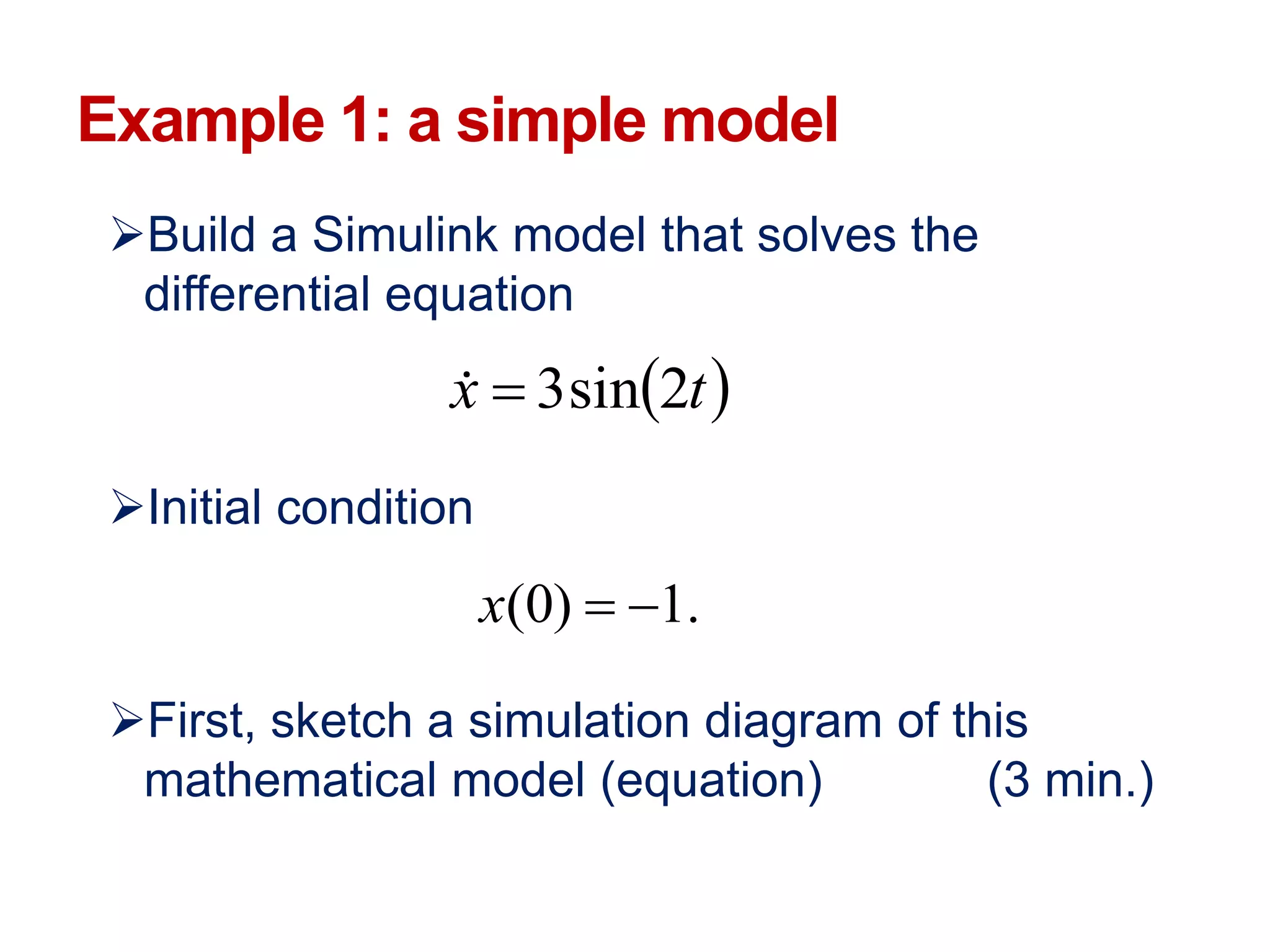
Example 1: a simple model
Build a Simulink model that solves the
differential equation
Initial condition
First, sketch a simulation diagram of this
mathematical model (equation) (3 min.)
 tx 2sin3
.1)0( x
Simulation diagram
Input is the forcing function 3sin(2t)
Output is the solution of the differential equation
x(t)
Now build this model in Simulink
xx
s
1
3sin(2t)
(input)
x(t)
(output)
1)0( x
integrator
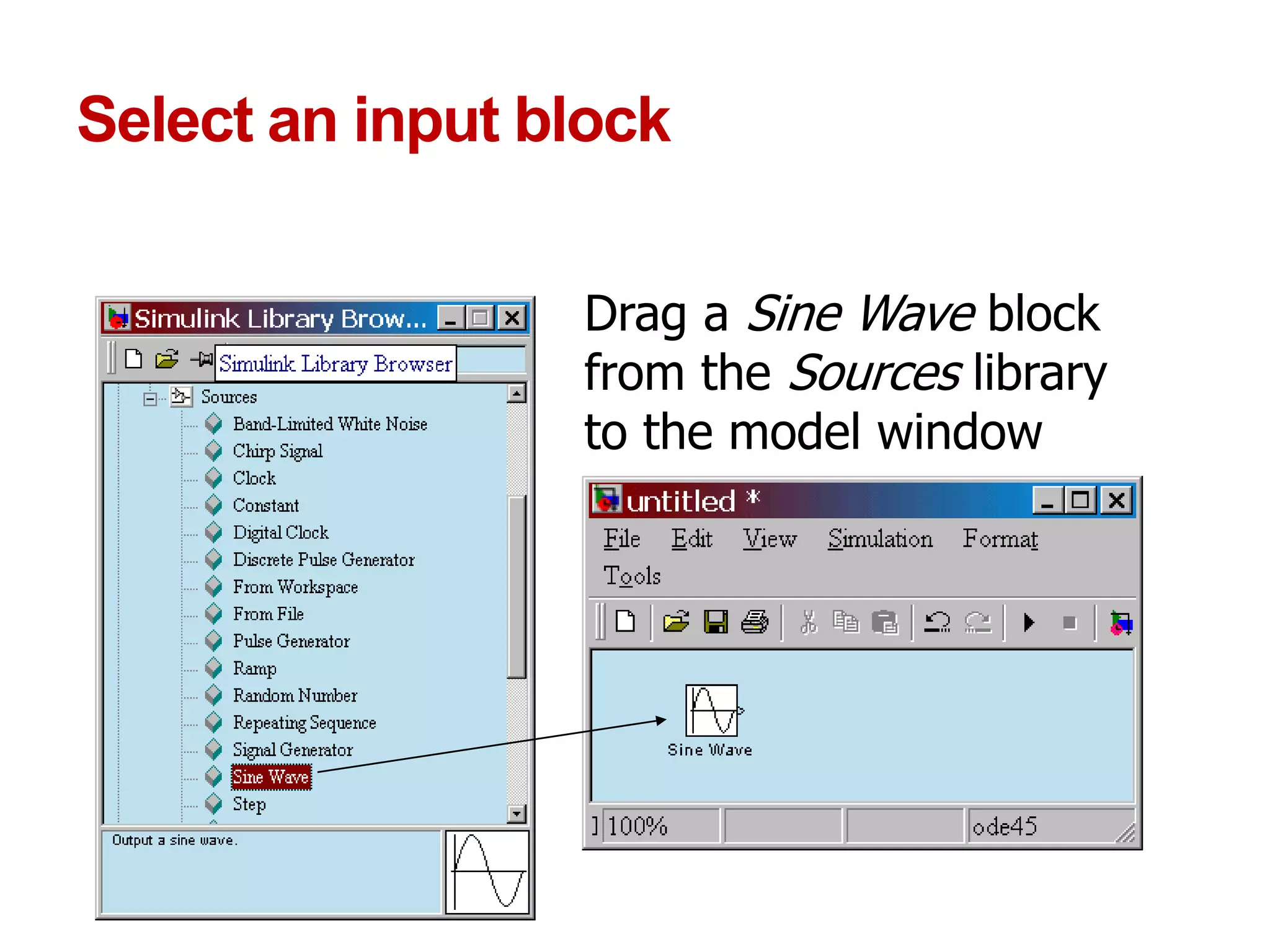
Select an input block
Drag a Sine Wave block
from the Sources library
to the model window
Select an operator block
Drag an Integrator block
from the Continuous library
to the model window
Select an output block
Drag a Scope block from the
Sinks library to the model
window
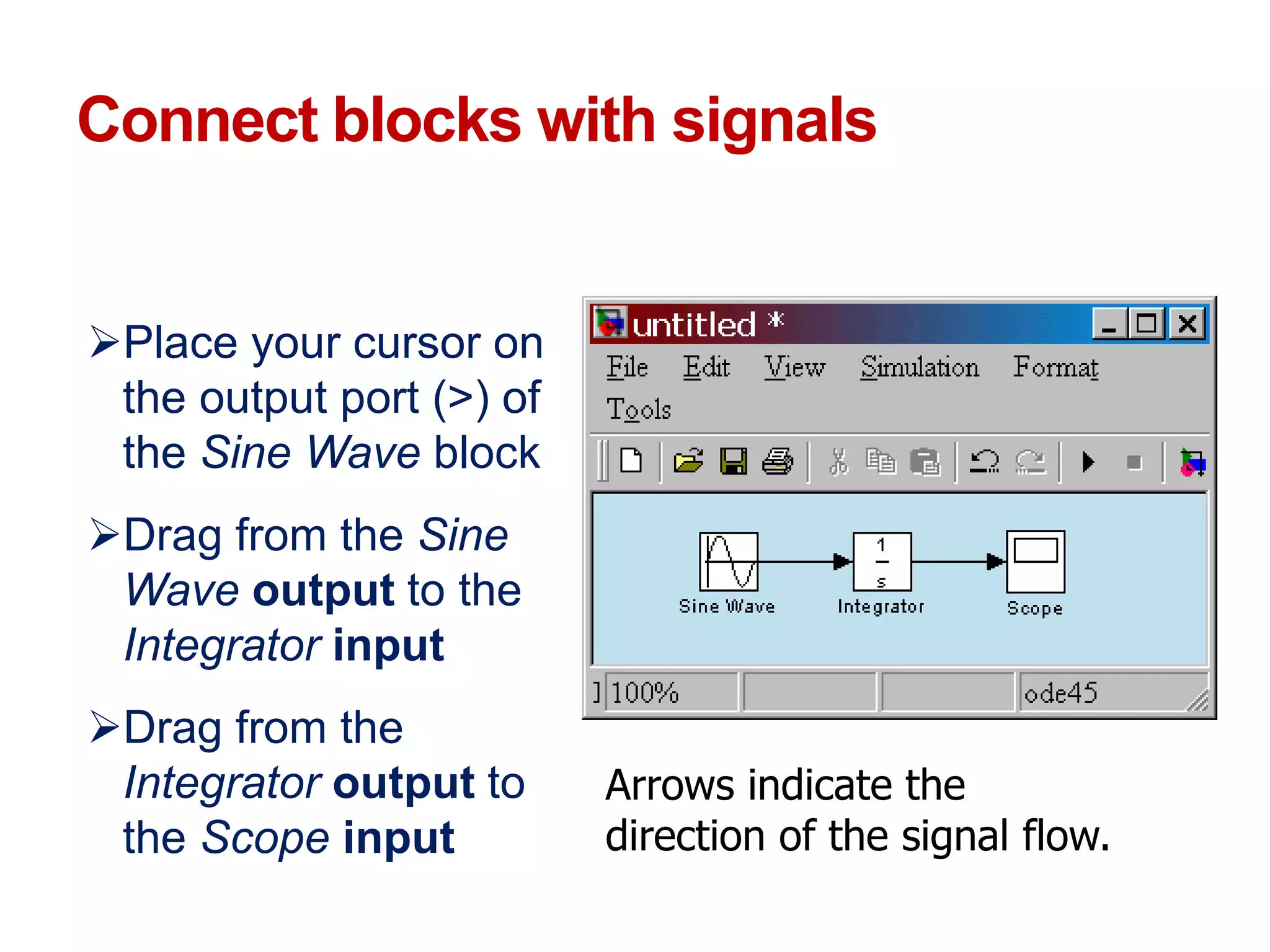
Connect blocks with signals
Place your cursor on
the output port (>) of
the Sine Wave block
Drag from the Sine
Wave output to the
Integrator input
Drag from the
Integrator output to
the Scope input
Arrows indicate the
direction of the signal flow.
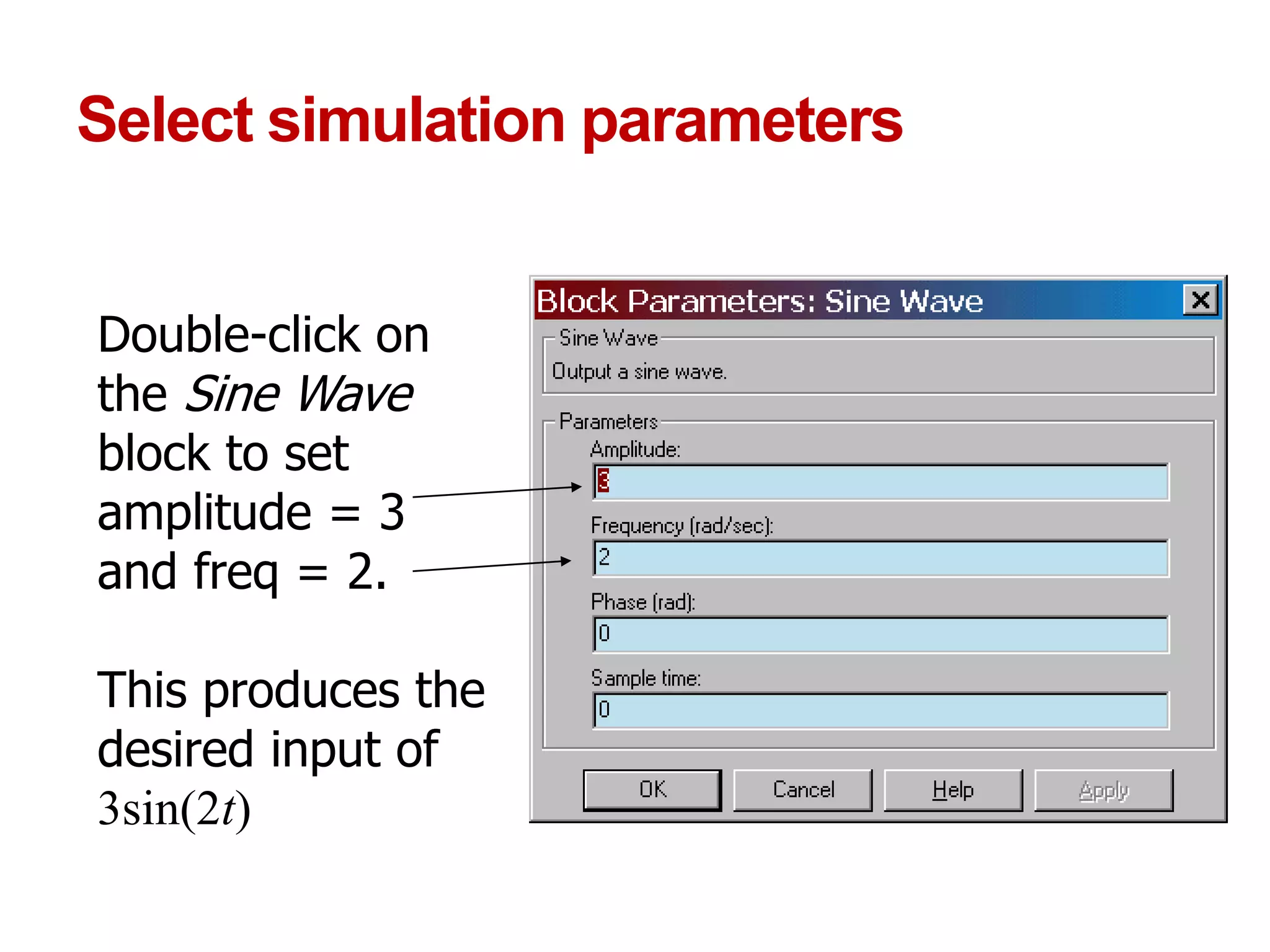
Select simulation parameters
Double-click on
the Sine Wave
block to set
amplitude = 3
and freq = 2.
This produces the
desired input of
3sin(2t)
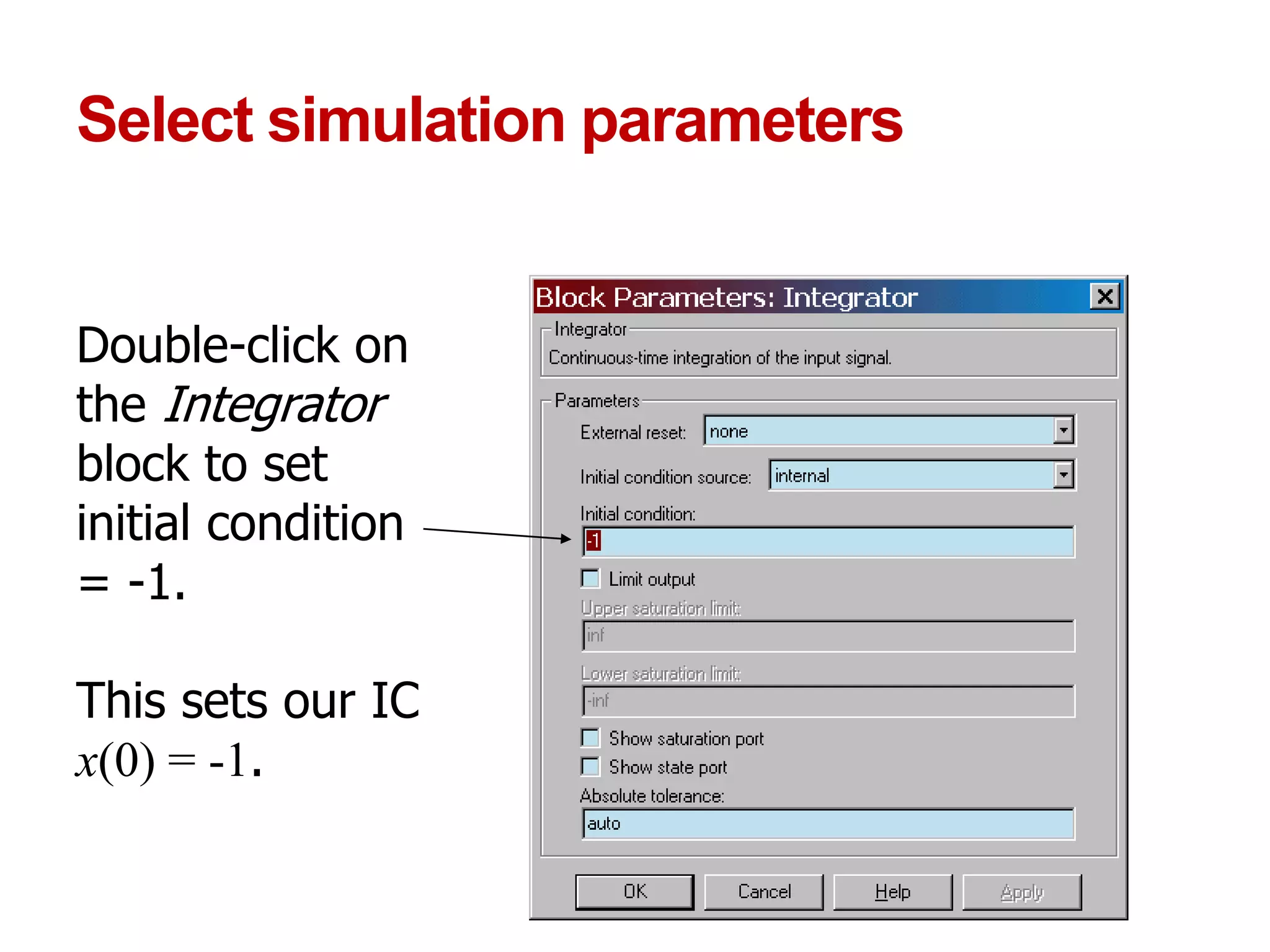
Select simulation parameters
Double-click on
the Integrator
block to set
initial condition
= -1.
This sets our IC
x(0) = -1.
Select simulation parameters
Double-click on
the Scope to view
the simulation
results
Run the simulation
In the model
window, from the
Simulation pull-
down menu,
select Start
View the output
x(t) in the Scope
window.
BITS Pilani, Pilani Campus
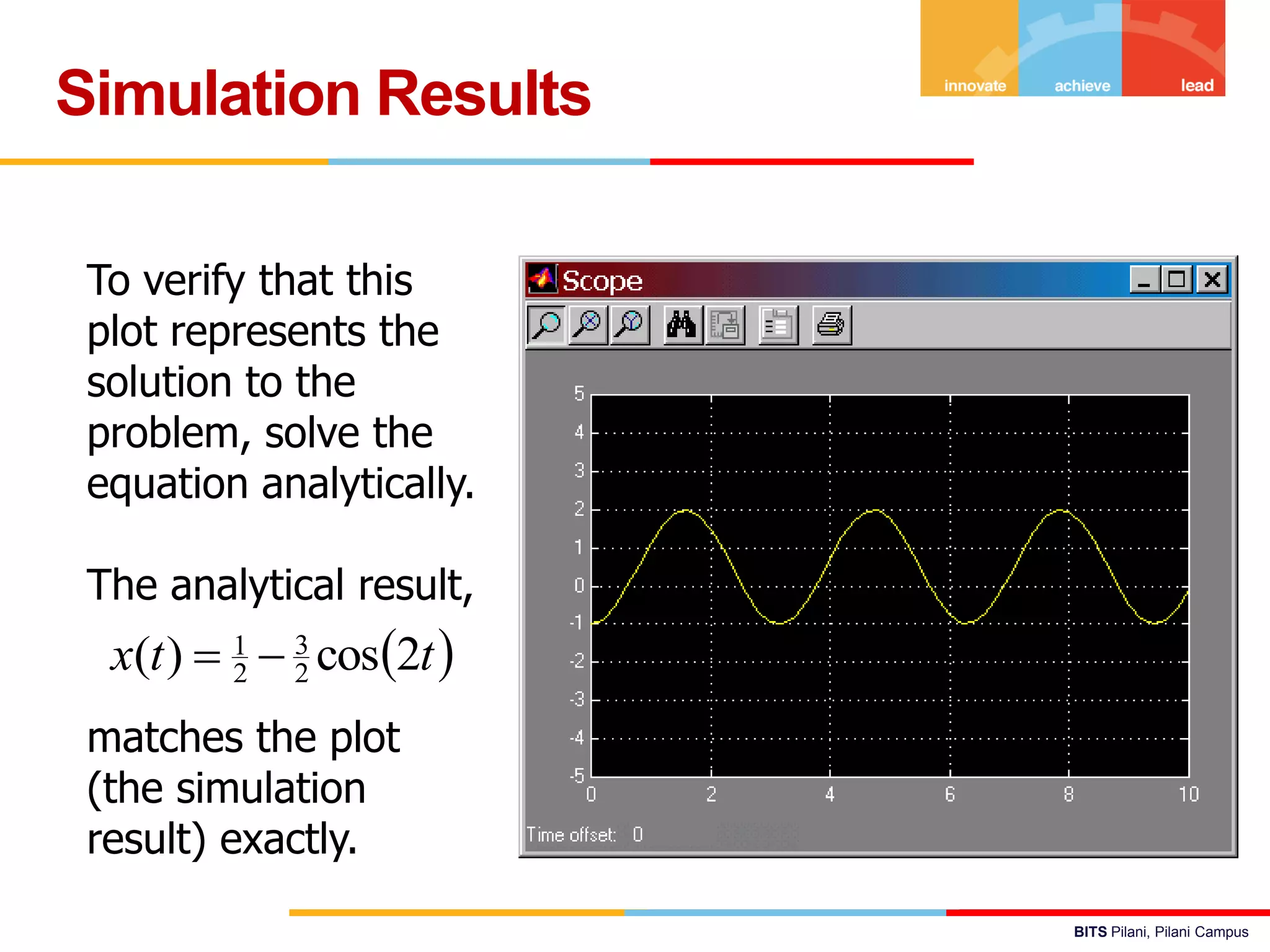
Simulation Results
To verify that this
plot represents the
solution to the
problem, solve the
equation analytically.
The analytical result,
matches the plot
(the simulation
result) exactly.
 ttx 2cos)( 2
3
2
1

BITS Pilani, Pilani Campus
Any Process in General
3526 April 2019
BITS Pilani, Pilani Campus
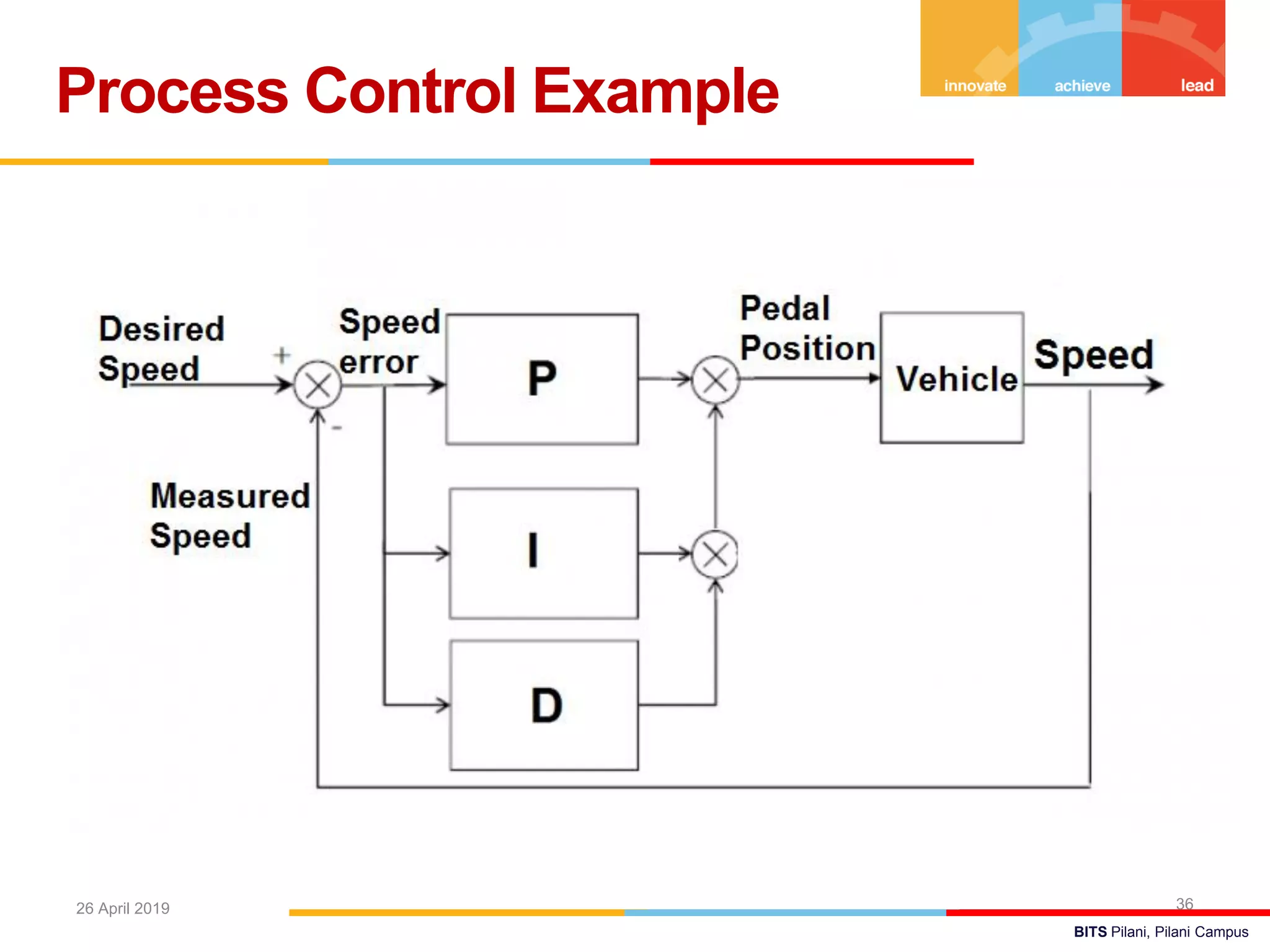
Process Control Example
3626 April 2019
BITS Pilani, Pilani Campus
Servo Problem or Servo mechanism or Set point
tracking
• Set point changes but there is no change in the Load
or DV
Regulator Problem
• Load changes but there is no change in set point
Servo Problem Versus Regulator
Problem
3726 April 2019
BITS Pilani, Pilani Campus
Typical Response of
Feedback Control Systems
3826 April 2019
BITS Pilani, Pilani Campus
Effect of Kc in P-Only Control
3926 April 2019
BITS Pilani, Pilani Campus
Effect of Kc and TI in PI
Control
4026 April 2019
BITS Pilani, Pilani Campus
Effect of Derivative Time in
PID Control
4126 April 2019
Brings stabilizing effect by
reducing the number of
oscillations.
BITS Pilani, Pilani Campus
PID Controller Block Diagram
4226 April 2019
BITS Pilani, Pilani Campus
Simulink Application to
Process Control
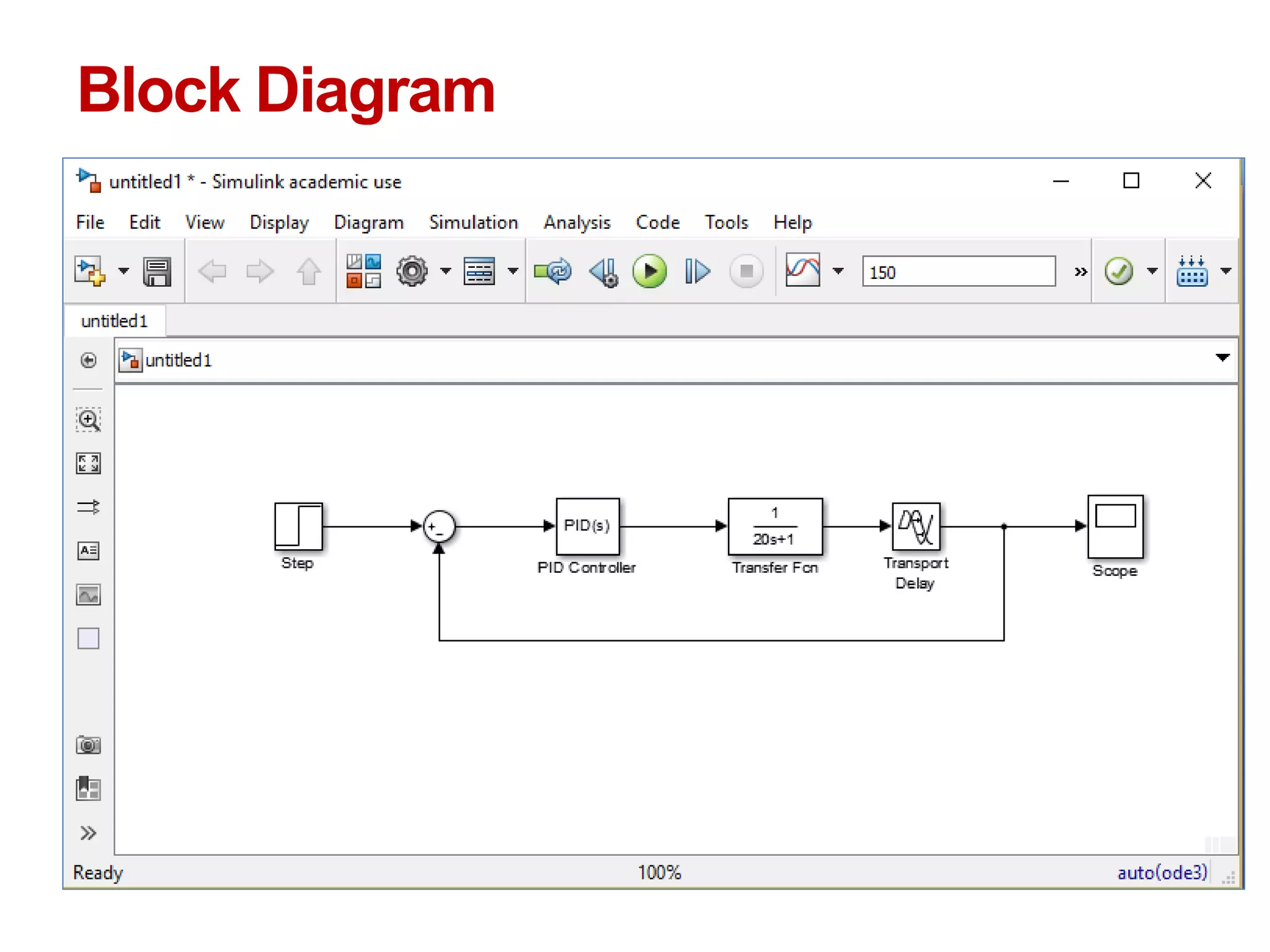
Consider the standard first-order-plus-time-delay
model,
Chapter12
 
  parameter)SimulinkD&I(P,
or
1
1
Ds
s
I
PsG
sk
s
k
ks
s
ksG
c
Dc
I
c
cD
I
cc













 



The controller transfer function model:
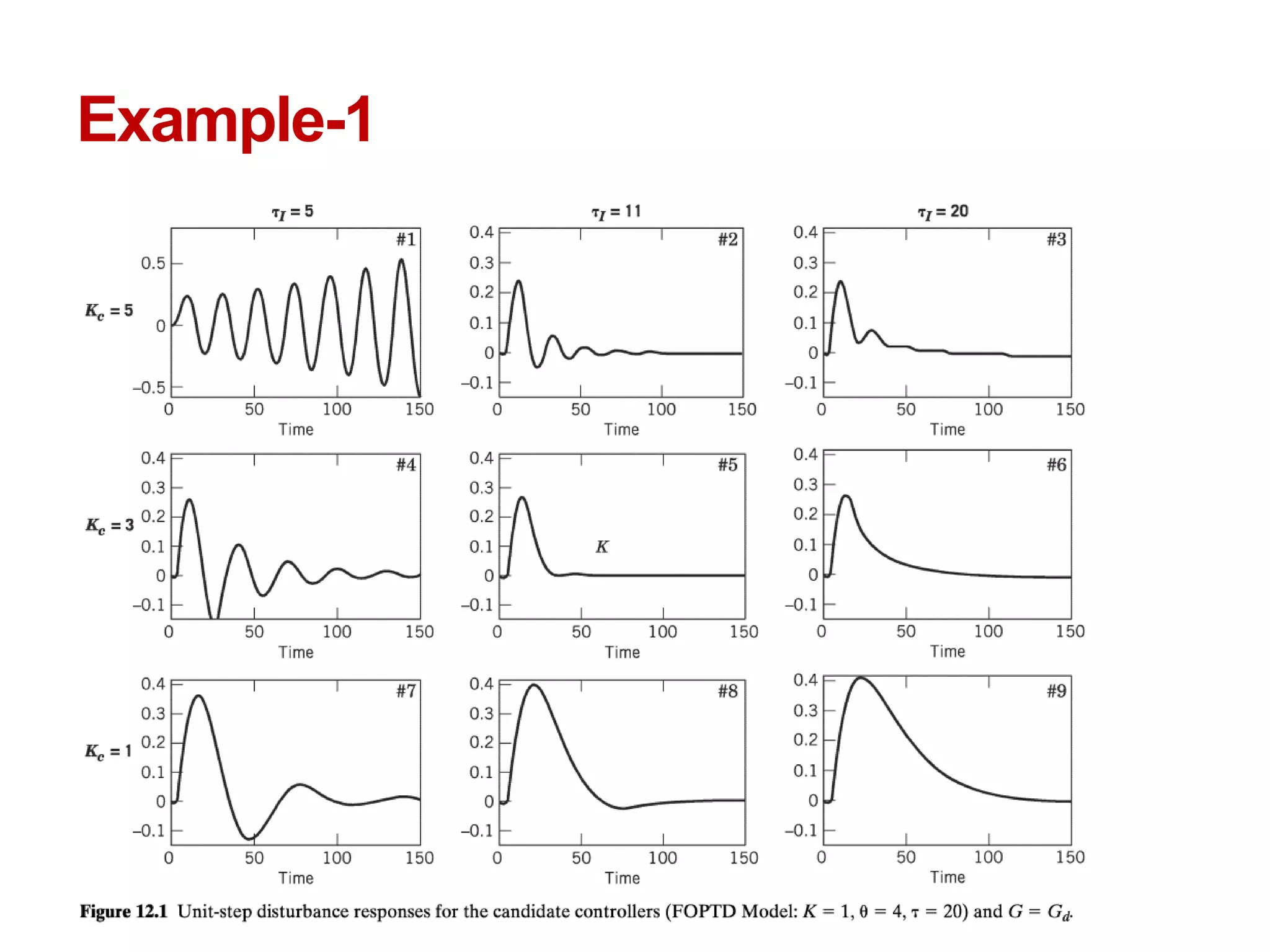
Example-1
BITS Pilani, Pilani Campus
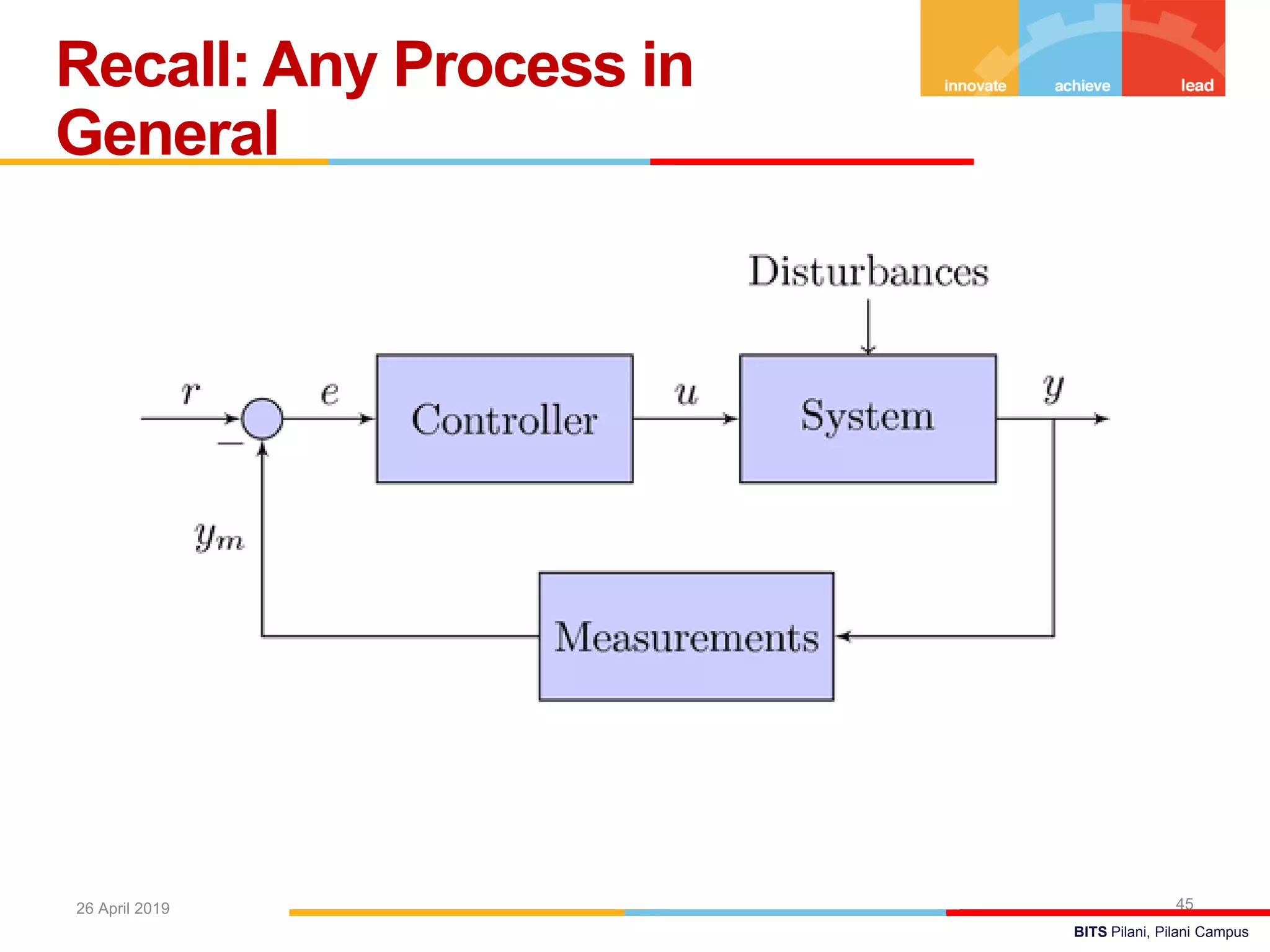
Recall: Any Process in
General
4526 April 2019
BITS Pilani, Pilani Campus
Standard Block Diagram of a
Feedback Control System
4626 April 2019
Block Diagram
Process with disturbance variable
Example-2 second order process
  15110
2



ss
e
GG
s
d
Results
Thank you

Simulink lecture sliet

  • 1.
    BITS Pilani Pilani Campus MATLAB& SIMULINK for Process Engineers @ SLIET, LONGOWAL under TEQIP-3, April 25-26, 2019
  • 2.
    BITS Pilani Pilani Campus AmitJain, PhD Assistant Professor Dept. of Chemical Engg. BITS Pilani – Pilani Campus
  • 3.
    BITS Pilani, PilaniCampus Developed by Mathworks. MATLAB deals with matrix operation. Simulink, is a graphical programming environment for modeling, simulating and analyzing multi-domain dynamical systems. Simply, it deals with differential equations in graphic. Its primary interface is a graphical block diagramming tool and a customizable set of block libraries. Simulink is widely used in automatic control, digital signal processing and Model-Based Design. MATLAB & SIMULINK 326 April 2019
  • 4.
    BITS Pilani, PilaniCampus Model based design of control systems. Simulink Applications 426 April 2019 Simulink Model of a Wind Turbine https://en.wikipedia.org/wiki/Simulink#/media/File:Simulink_ model_of_a_wind_turbine.tif
  • 5.
    BITS Pilani, PilaniCampus First launch MATLAB by double clicking the icon on desktop. Click on the Simulink Library/Simulink Alternate launch: at command prompt >> type simulink and press  Enter Launch Simulink
  • 6.
    BITS Pilani, PilaniCampus Launch Simulink 6 Click on “Create Model”
  • 7.
    BITS Pilani, PilaniCampus Launch Simulink Library 726 April 2019 Click on “Library Browser” Icon
  • 8.
  • 9.
    BITS Pilani, PilaniCampus Commonly Used Blocks 926 April 2019
  • 10.
    BITS Pilani, PilaniCampus Simulink/Continuous 1026 April 2019
  • 11.
    BITS Pilani, PilaniCampus Click the new-model icon in the upper left corner to start a new Simulink file. Create a new model
  • 12.
    BITS Pilani, PilaniCampus Your workspace Model is created in this window
  • 13.
    BITS Pilani, PilaniCampus  Simulating this model integrates a sine wave signal to a cosine signal and then displays the result, along with the original signal, in a Scope window. Simple Simulink Model
  • 14.
    Add Blocks toModel Drag the Sine Wave block to the Simulink Editor.
  • 15.
  • 16.
    Move the blocksas per convenience
  • 17.
  • 18.
  • 19.
  • 20.
  • 21.
  • 22.
  • 23.
  • 24.
    Example 1: asimple model Build a Simulink model that solves the differential equation Initial condition First, sketch a simulation diagram of this mathematical model (equation) (3 min.)  tx 2sin3 .1)0( x
  • 25.
    Simulation diagram Input isthe forcing function 3sin(2t) Output is the solution of the differential equation x(t) Now build this model in Simulink xx s 1 3sin(2t) (input) x(t) (output) 1)0( x integrator
  • 26.
    Select an inputblock Drag a Sine Wave block from the Sources library to the model window
  • 27.
    Select an operatorblock Drag an Integrator block from the Continuous library to the model window
  • 28.
    Select an outputblock Drag a Scope block from the Sinks library to the model window
  • 29.
    Connect blocks withsignals Place your cursor on the output port (>) of the Sine Wave block Drag from the Sine Wave output to the Integrator input Drag from the Integrator output to the Scope input Arrows indicate the direction of the signal flow.
  • 30.
    Select simulation parameters Double-clickon the Sine Wave block to set amplitude = 3 and freq = 2. This produces the desired input of 3sin(2t)
  • 31.
    Select simulation parameters Double-clickon the Integrator block to set initial condition = -1. This sets our IC x(0) = -1.
  • 32.
    Select simulation parameters Double-clickon the Scope to view the simulation results
  • 33.
    Run the simulation Inthe model window, from the Simulation pull- down menu, select Start View the output x(t) in the Scope window.
  • 34.
    BITS Pilani, PilaniCampus Simulation Results To verify that this plot represents the solution to the problem, solve the equation analytically. The analytical result, matches the plot (the simulation result) exactly.  ttx 2cos)( 2 3 2 1 
  • 35.
    BITS Pilani, PilaniCampus Any Process in General 3526 April 2019
  • 36.
    BITS Pilani, PilaniCampus Process Control Example 3626 April 2019
  • 37.
    BITS Pilani, PilaniCampus Servo Problem or Servo mechanism or Set point tracking • Set point changes but there is no change in the Load or DV Regulator Problem • Load changes but there is no change in set point Servo Problem Versus Regulator Problem 3726 April 2019
  • 38.
    BITS Pilani, PilaniCampus Typical Response of Feedback Control Systems 3826 April 2019
  • 39.
    BITS Pilani, PilaniCampus Effect of Kc in P-Only Control 3926 April 2019
  • 40.
    BITS Pilani, PilaniCampus Effect of Kc and TI in PI Control 4026 April 2019
  • 41.
    BITS Pilani, PilaniCampus Effect of Derivative Time in PID Control 4126 April 2019 Brings stabilizing effect by reducing the number of oscillations.
  • 42.
    BITS Pilani, PilaniCampus PID Controller Block Diagram 4226 April 2019
  • 43.
    BITS Pilani, PilaniCampus Simulink Application to Process Control Consider the standard first-order-plus-time-delay model, Chapter12     parameter)SimulinkD&I(P, or 1 1 Ds s I PsG sk s k ks s ksG c Dc I c cD I cc                   The controller transfer function model:
  • 44.
  • 45.
    BITS Pilani, PilaniCampus Recall: Any Process in General 4526 April 2019
  • 46.
    BITS Pilani, PilaniCampus Standard Block Diagram of a Feedback Control System 4626 April 2019
  • 47.
  • 48.
  • 49.
    Example-2 second orderprocess   15110 2    ss e GG s d
  • 50.
  • 51.