
SENGUNTHAR COLLEGE OF ENGINEERING
SATHINAICKANPALAYAM, KUMARAMANGALAM (PO),
TIRUCHENGODE – 637205
Name:……………………………………………………………………………………………....
Branch: …MEDICAL ELECTRONICS ENGINEERING………Semester:……VIII…………
Name of the laboratory: SIMULATION SOFTWARE LAB………………………………….
This is to certify that this is the bonafide record of work done by……………………………........
During the year 2013.
University register No:

Staff in – charge :

Head of the Department

Date:
Submitted for the practical examination held at Sengunthar College of Engineering
On ……………………

INTERNAL EXAMINER

EXTERNAL EXAMINER

1
INDEX
SL.NO DATE

NAME OF THE
EXPERIMENT

PAGE MARKS
NO AWARED

1A

HDP- 01 CORONARY RISK
CALCULATION FOR
DISEASED PATIENT

3

1B

HDP- 01 CORONARY RISK
CALCULATION FOR
NORMAL PATIENT

5

1C

HDP- 03 DEFIBRILLATOR
USING SIMULINK

7

2

HOSPITAL MANAGEMENT
SYSTEM - MYCIN

11

3

EPILEXIA - TEIRASIS
MEDICAL SOFTWARE

27

4A

STRESS OF STENT –ANSYS
SOFTWARE

34

4B

THERMAL CONDUCTIONANSYS SOFTWARE

37

5A

BLOOD PRESSURE
MEASUREMENT BY
USING PUFF MEDICAL
SOFTWARE

40

5B

AMPLITUDE MODULATIONSIMULINK

43

5C

RESPIRATORY RATE
DISORDER- PUFF MEDICAL
SOFTWARE

49

2

SIGNATURE
EXP.NO: 1A

HDP- 01 CORONARY RISK CALCULATION

DATE:

FOR DISEASED PATIENT

AIM:
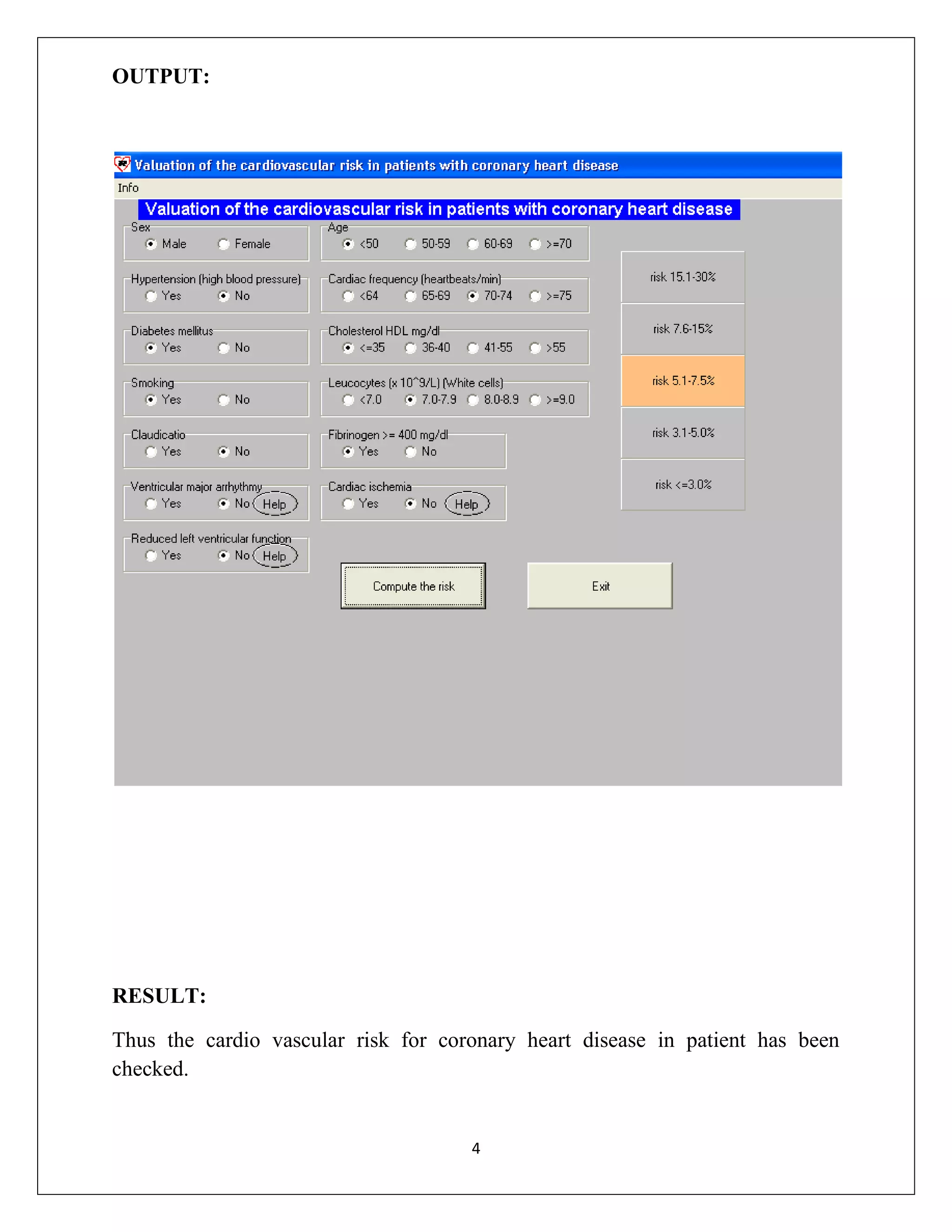
To evaluate cardio vascular risk in the patient with coronary heart

disease.
SOFTWARE:
 Heart development program software.
 Cardio vascular _risk _2software(doctorslongue.com)
PROCEDURE:
 Enter the data in to the form.
 Then click compute.
 Display the percentage of risk.
THEORY:
CORONARY HEART DISEASE
Coronary heart disease is the narrowing or blockage of the coronary arteries,
usually caused by atherosclerosis. Atherosclerosis is the buildup of cholesterol and
fatty deposits(called plaques) on the inner walls of the arteries. These plaques can
restrict blood flow to the heart muscle by physically clogging the artery or by
causing abnormal artery tone and function.
Without an adequate blood supply , the heart becomes starved of oxygen and
the vital nutrients it needs to work properly. This can cause chest pain called
angina. If the energy demands of the heart become much greater than its blood
supply , a heart attack may occur.

3
OUTPUT:

RESULT:
Thus the cardio vascular risk for coronary heart disease in patient has been
checked.

4
EXP.NO: 1B
DATE:

HDP- 02 CORONARY RISK CALCULATION
FOR NORMAL PATIENT

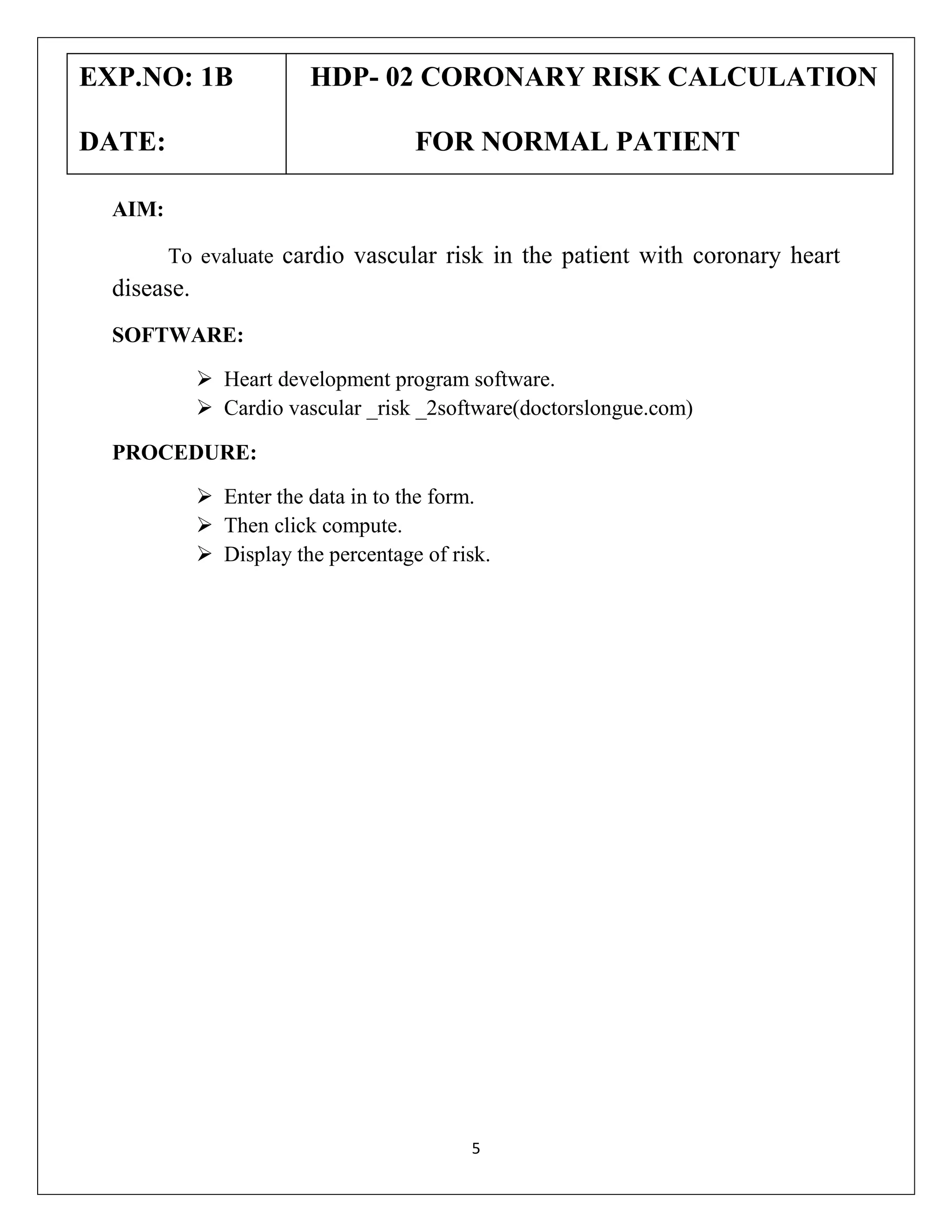
AIM:
To evaluate cardio vascular risk in the patient with coronary heart

disease.
SOFTWARE:
 Heart development program software.
 Cardio vascular _risk _2software(doctorslongue.com)
PROCEDURE:
 Enter the data in to the form.
 Then click compute.
 Display the percentage of risk.

5
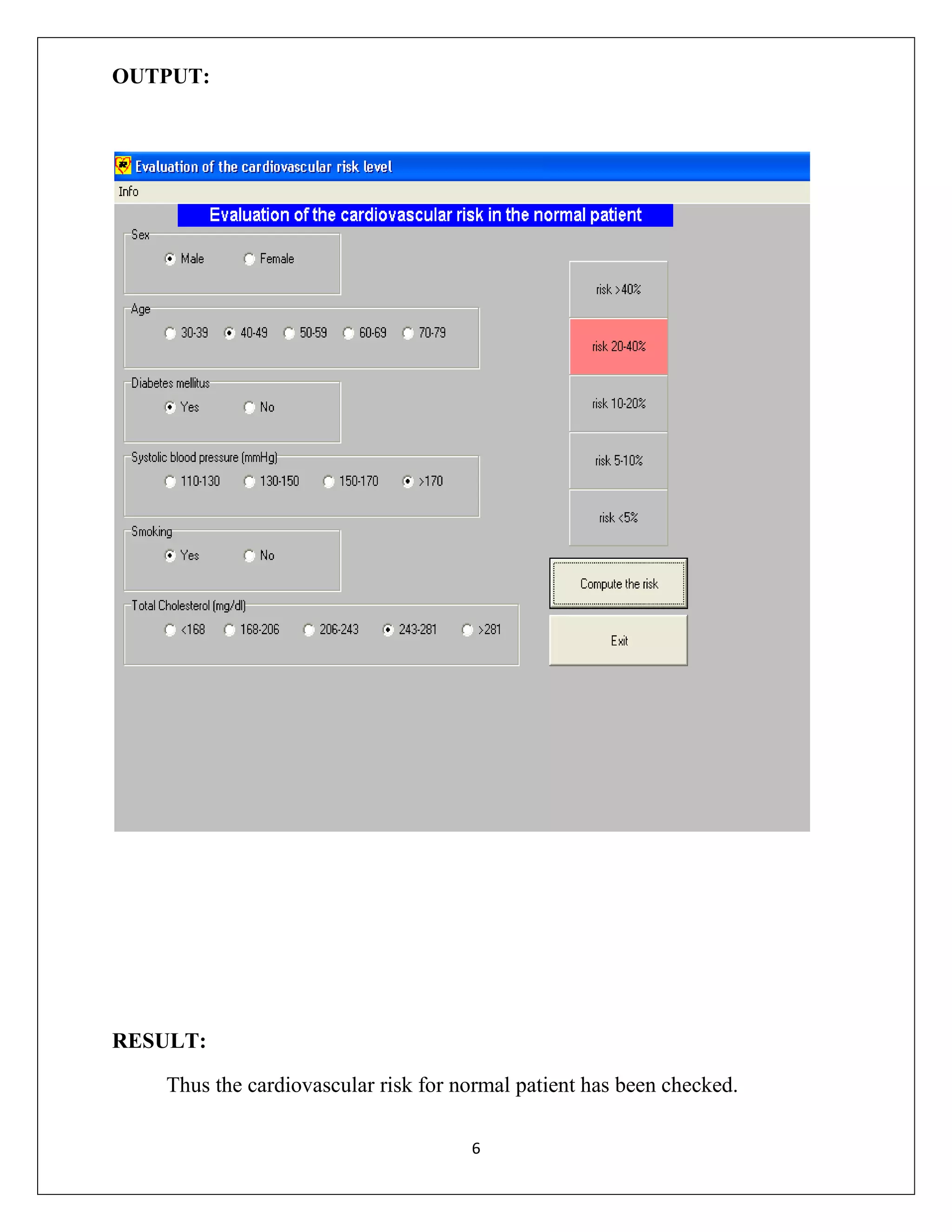
OUTPUT:

RESULT:
Thus the cardiovascular risk for normal patient has been checked.
6
EXP.NO: 1C

HDP- 03 DEFIBRILLATOR USING

DATE:

SIMULINK

AIM:
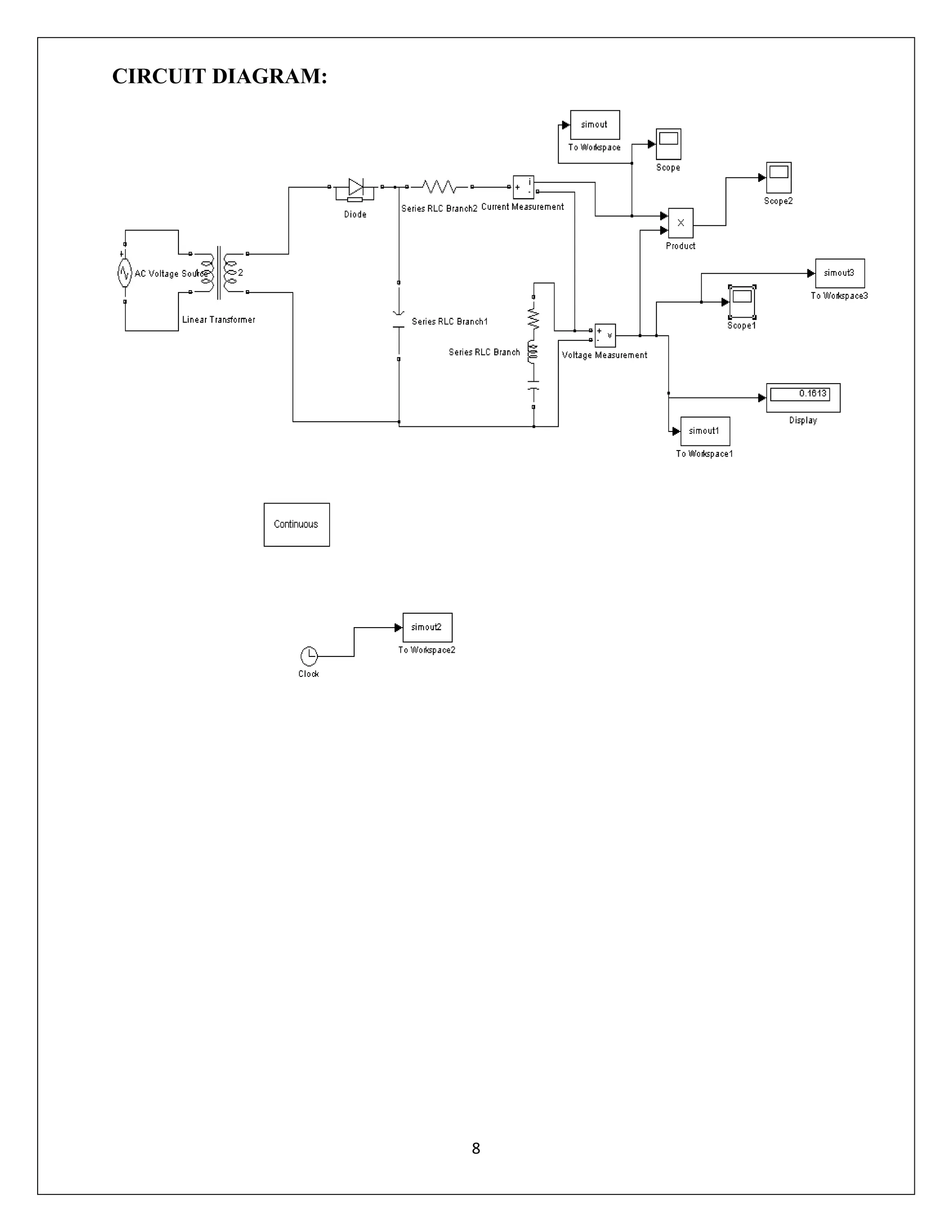
To design the defibrillator circuit by using simulink software for HDP.
TOOLS REQUIRED:
 MATLAB10
 PC
PROCEDURE:
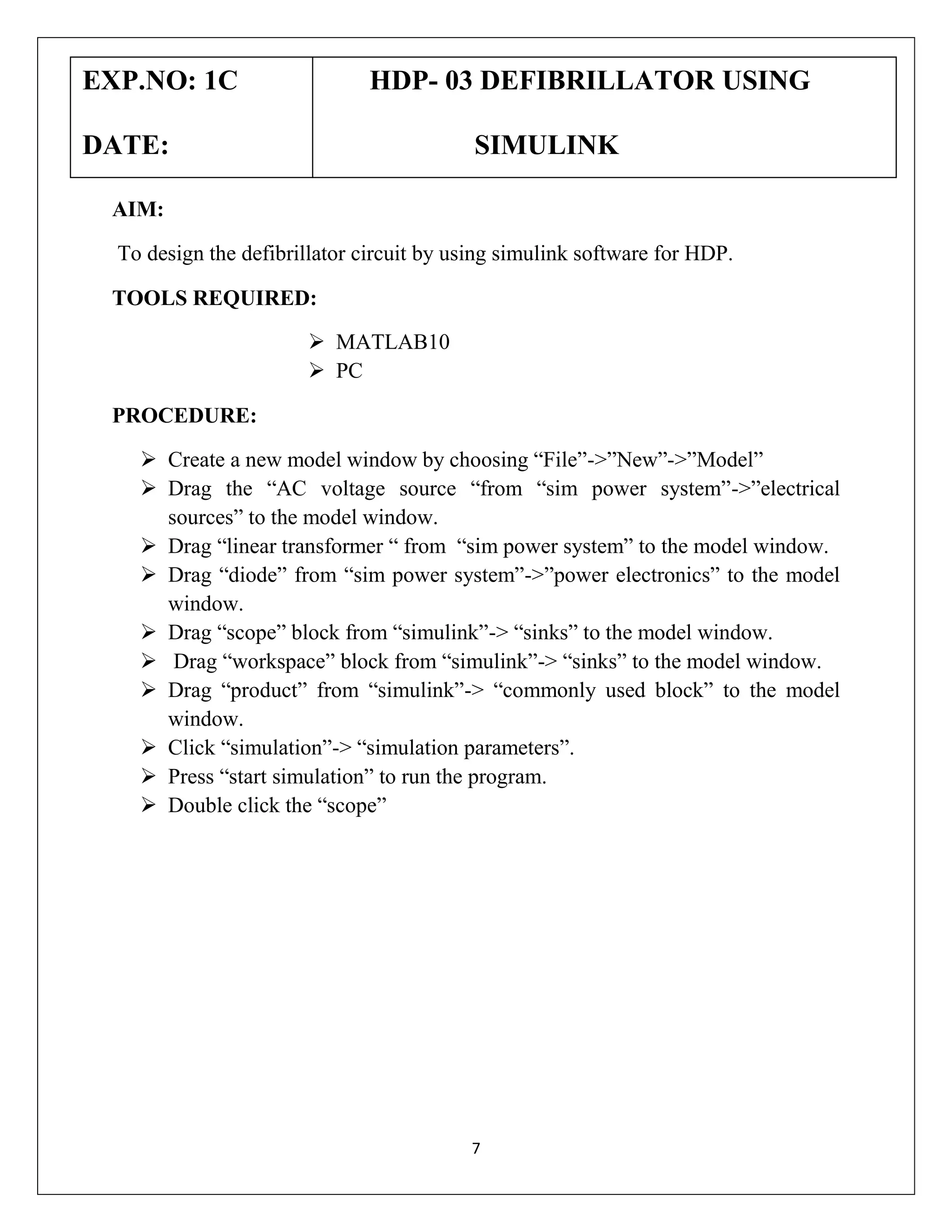
 Create a new model window by choosing “File”->”New”->”Model”
 Drag the “AC voltage source “from “sim power system”->”electrical
sources” to the model window.
 Drag “linear transformer “ from “sim power system” to the model window.
 Drag “diode” from “sim power system”->”power electronics” to the model
window.
 Drag “scope” block from “simulink”-> “sinks” to the model window.
 Drag “workspace” block from “simulink”-> “sinks” to the model window.
 Drag “product” from “simulink”-> “commonly used block” to the model
window.
 Click “simulation”-> “simulation parameters”.
 Press “start simulation” to run the program.
 Double click the “scope”

7
CIRCUIT DIAGRAM:

8
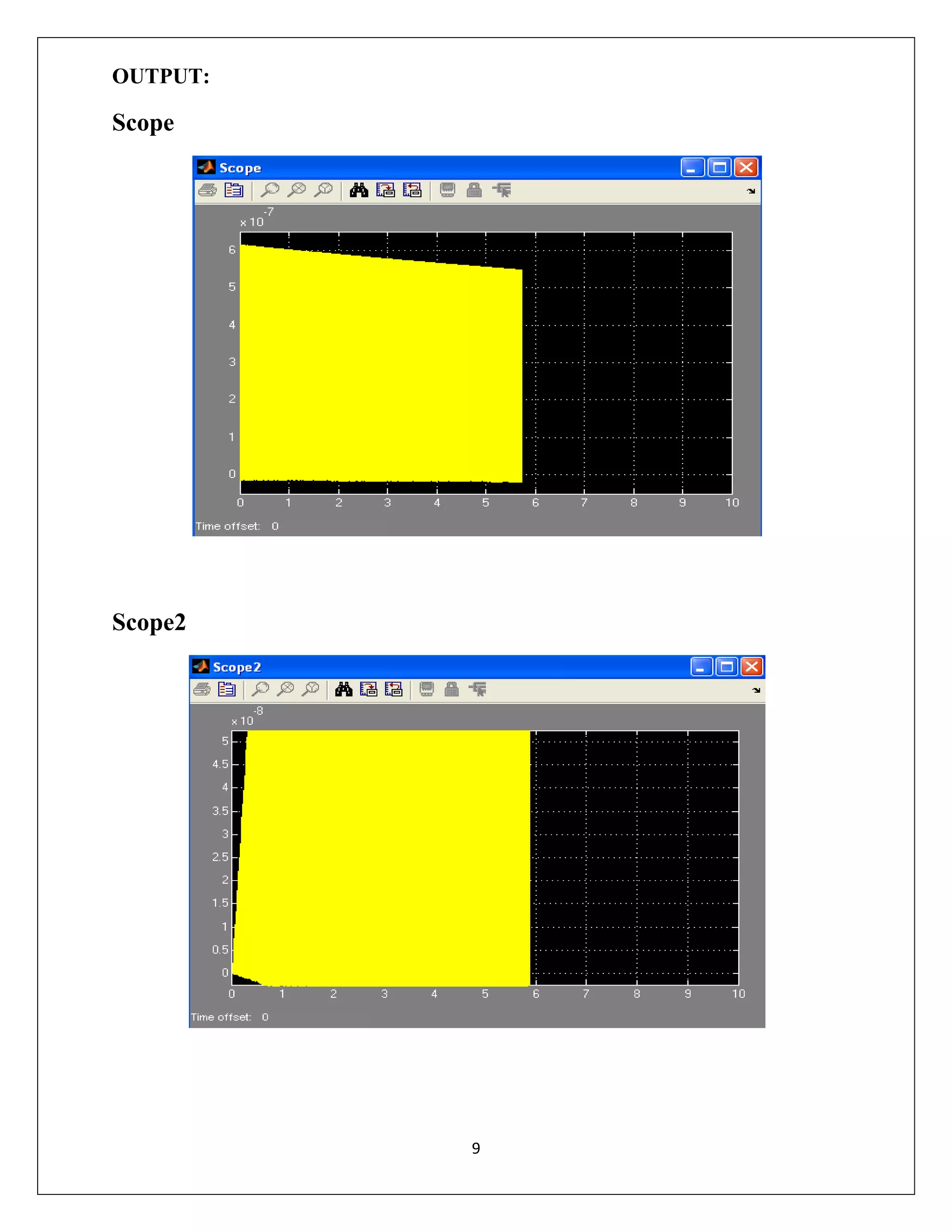
OUTPUT:

Scope

Scope2

9
RESULT:
Thus the defibrillator circuit is designed by using simulink software
for HDP.
10
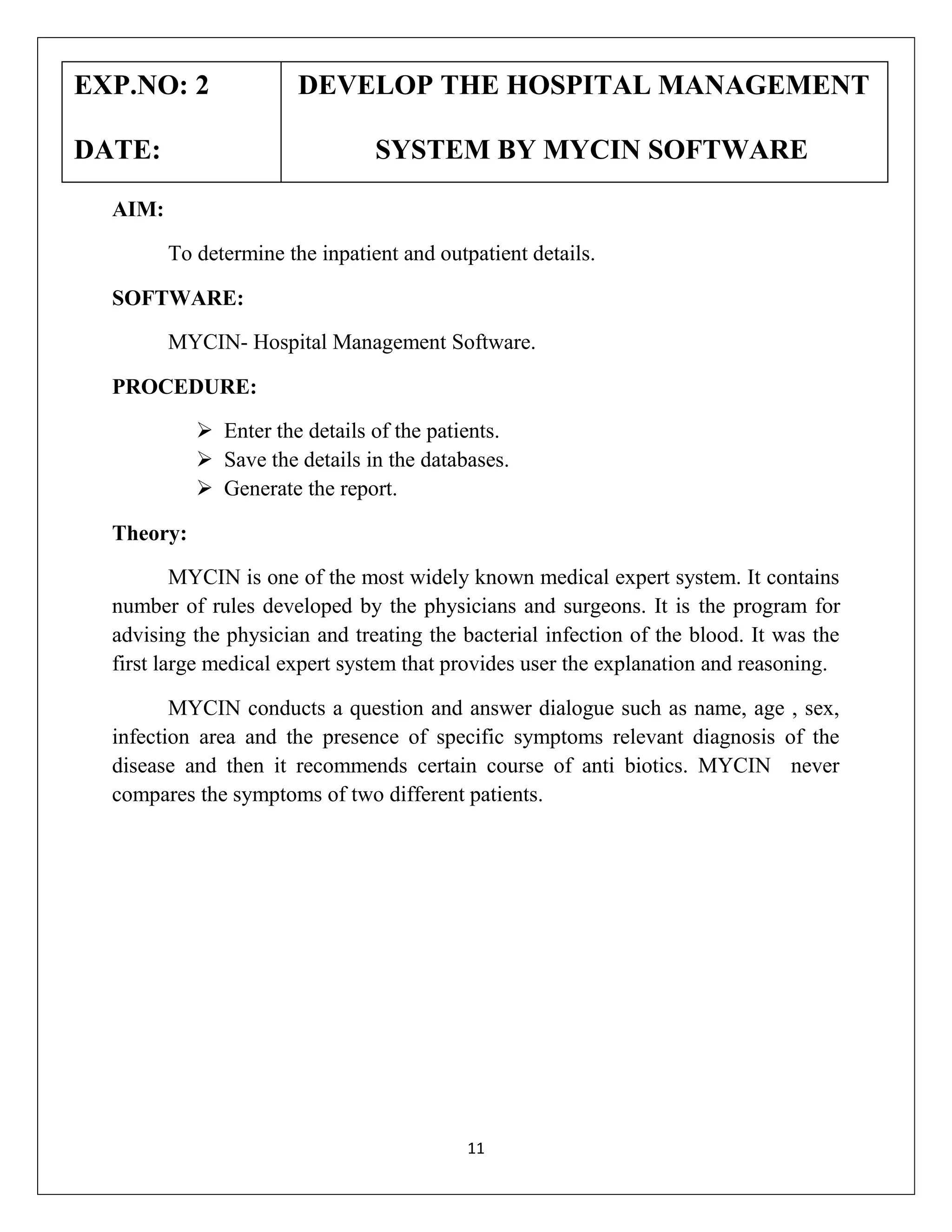
EXP.NO: 2
DATE:

DEVELOP THE HOSPITAL MANAGEMENT
SYSTEM BY MYCIN SOFTWARE

AIM:
To determine the inpatient and outpatient details.
SOFTWARE:
MYCIN- Hospital Management Software.
PROCEDURE:
 Enter the details of the patients.
 Save the details in the databases.
 Generate the report.
Theory:
MYCIN is one of the most widely known medical expert system. It contains
number of rules developed by the physicians and surgeons. It is the program for
advising the physician and treating the bacterial infection of the blood. It was the
first large medical expert system that provides user the explanation and reasoning.
MYCIN conducts a question and answer dialogue such as name, age , sex,
infection area and the presence of specific symptoms relevant diagnosis of the
disease and then it recommends certain course of anti biotics. MYCIN never
compares the symptoms of two different patients.

11
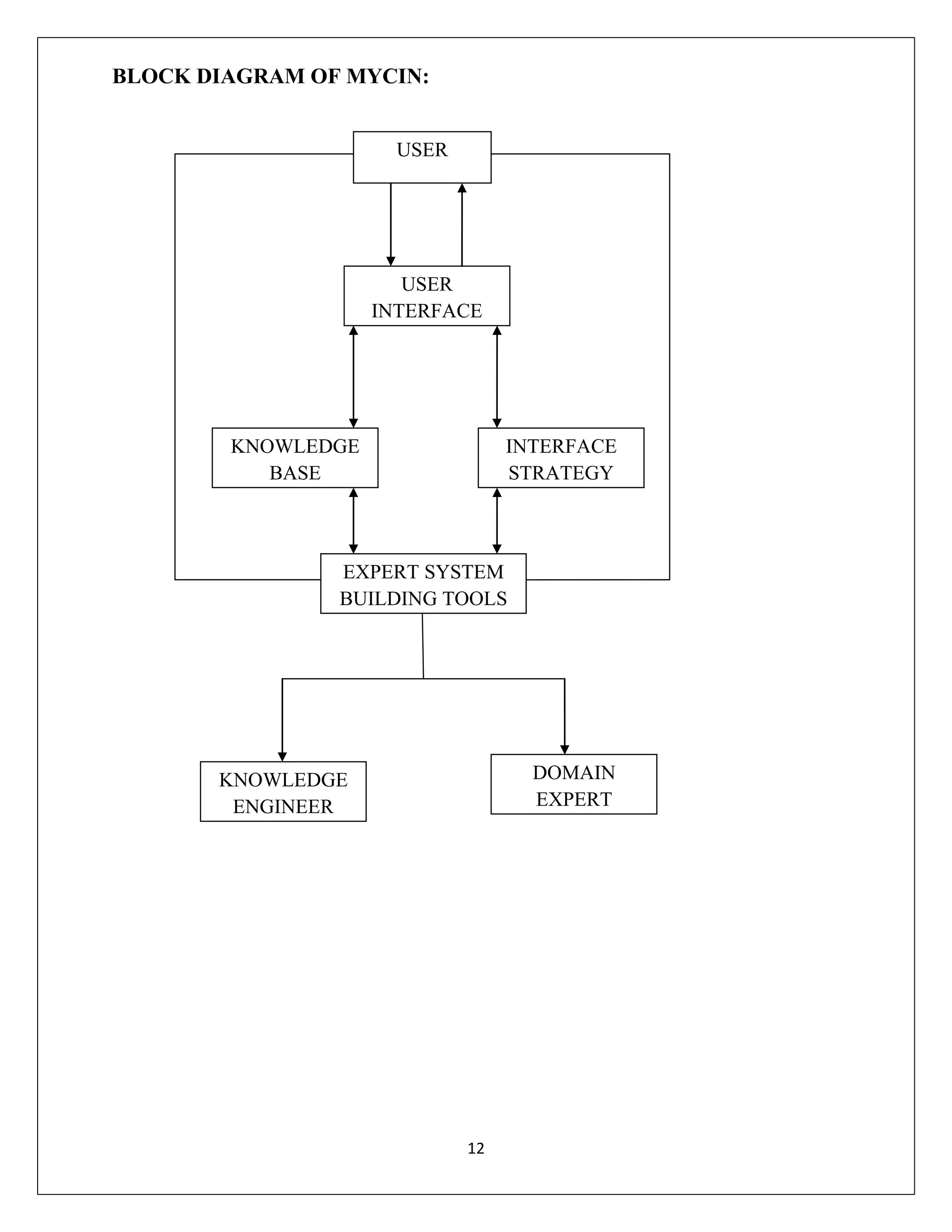
BLOCK DIAGRAM OF MYCIN:
USER

USER
INTERFACE

KNOWLEDGE
BASE

INTERFACE
STRATEGY

EXPERT SYSTEM
BUILDING TOOLS

DOMAIN
EXPERT

KNOWLEDGE
ENGINEER

12
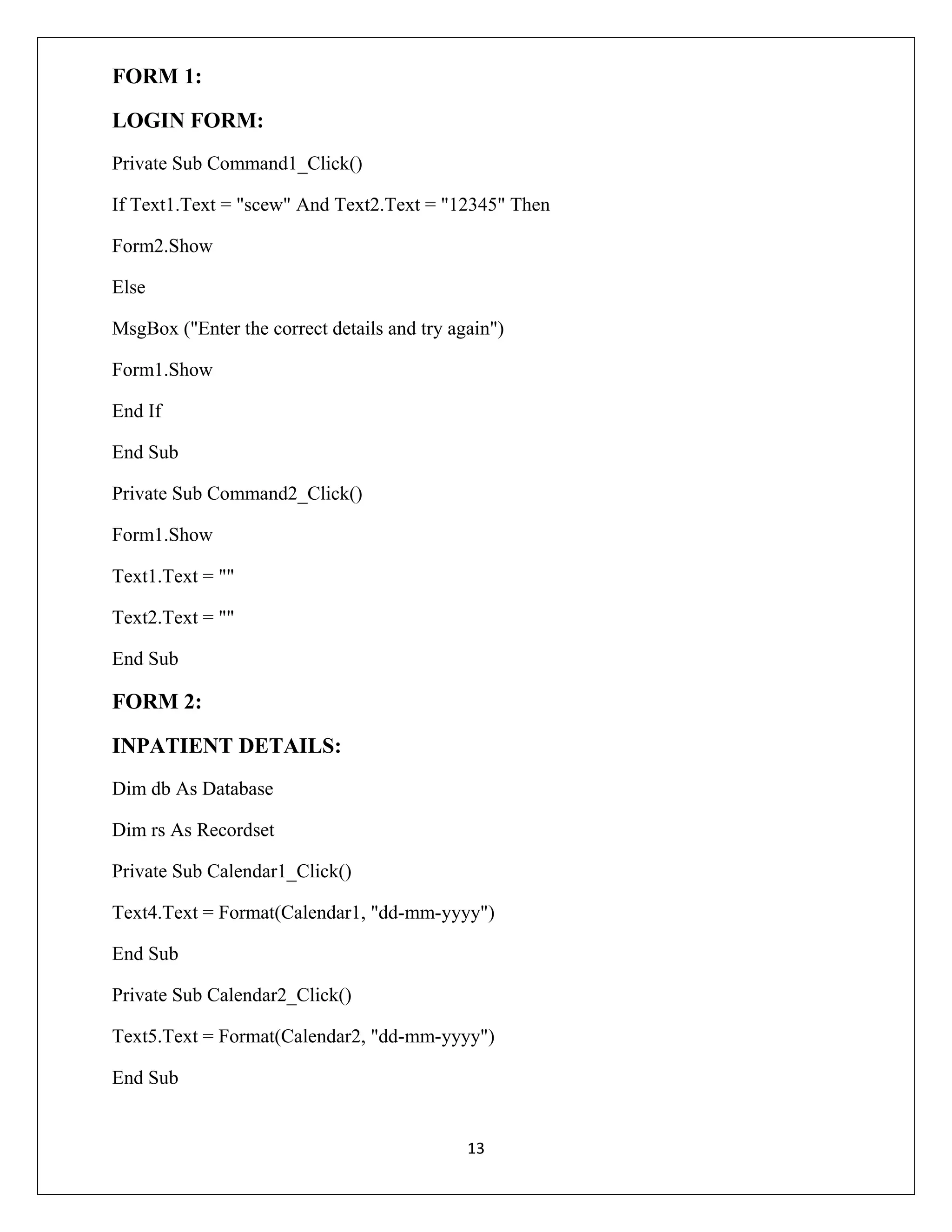
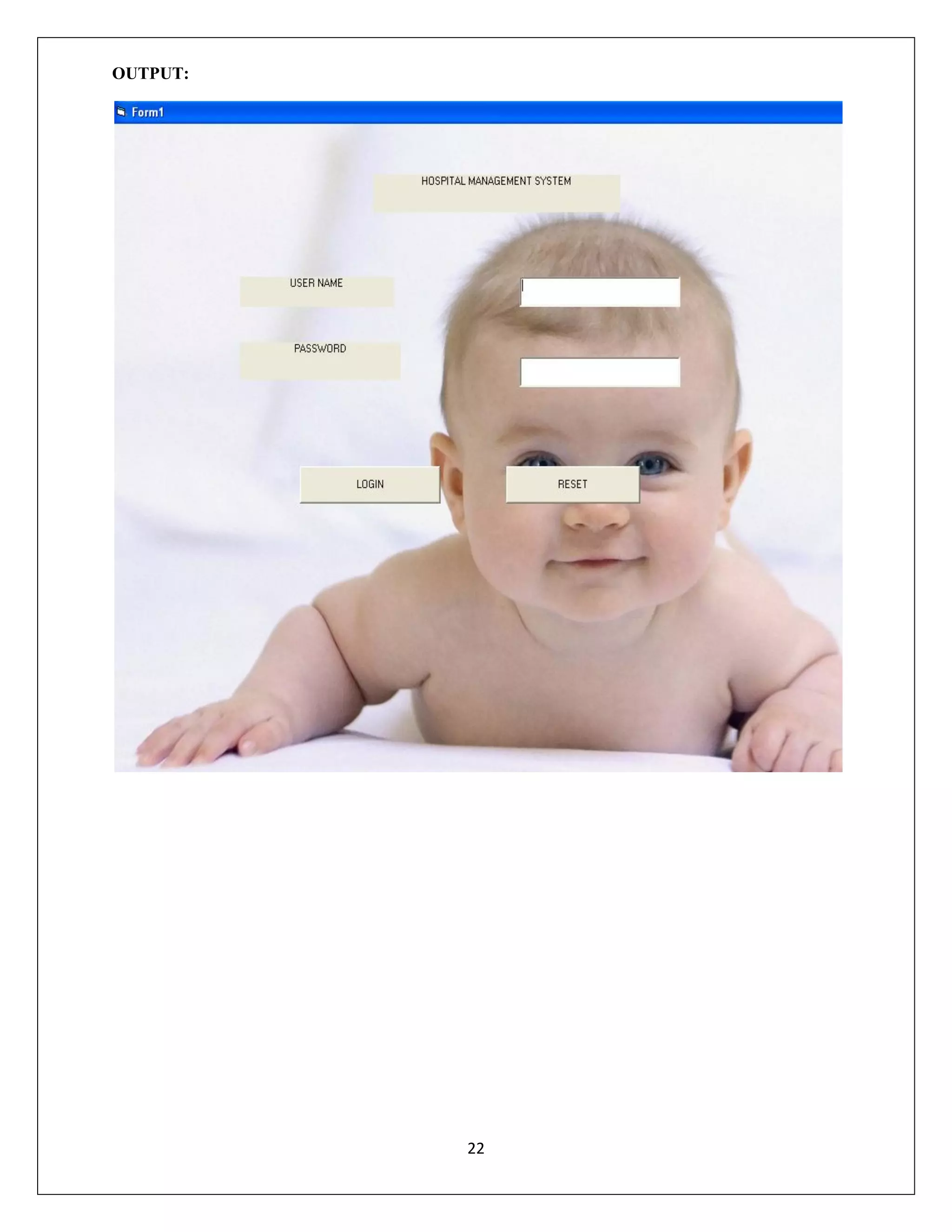
FORM 1:
LOGIN FORM:
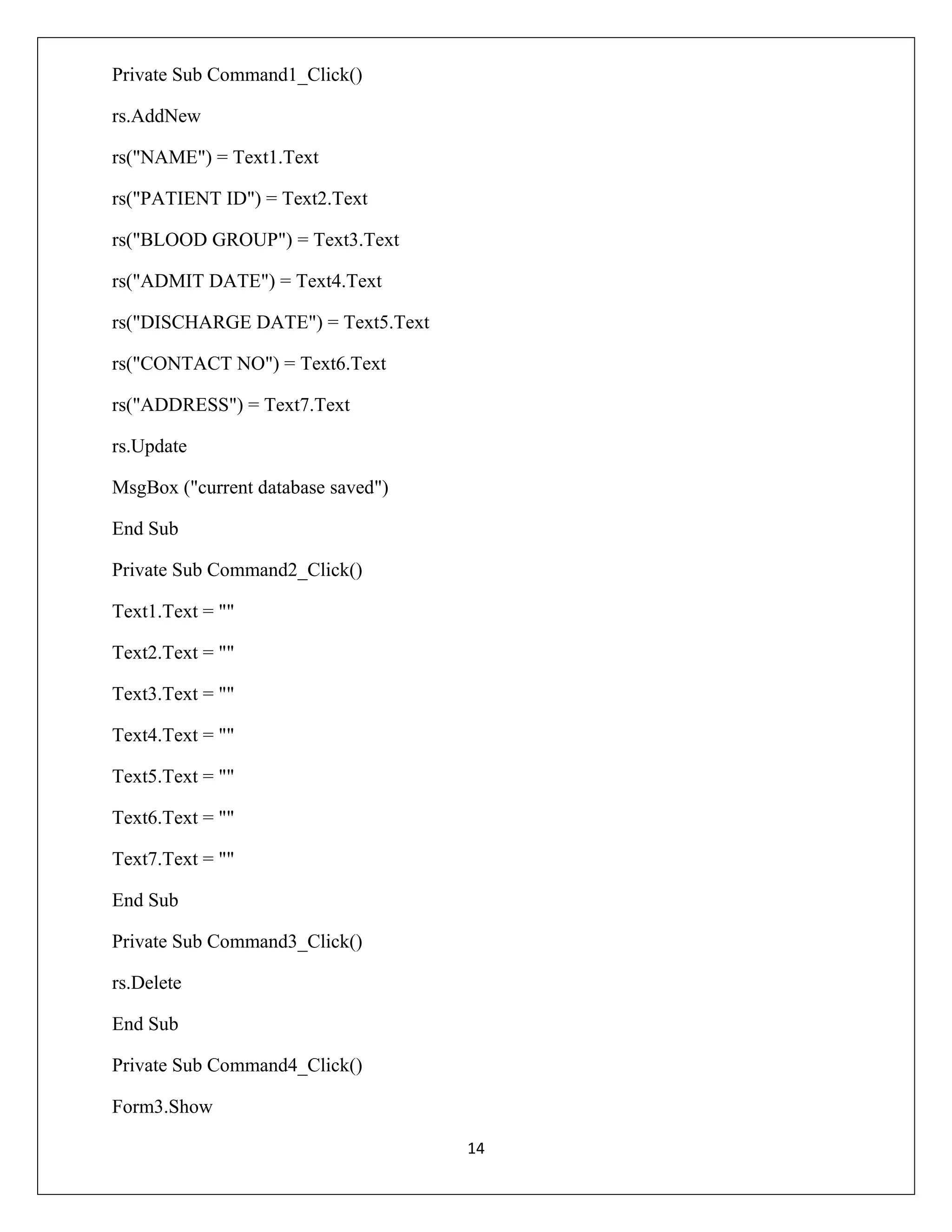
Private Sub Command1_Click()
If Text1.Text = "scew" And Text2.Text = "12345" Then
Form2.Show
Else
MsgBox ("Enter the correct details and try again")
Form1.Show
End If
End Sub
Private Sub Command2_Click()
Form1.Show
Text1.Text = ""
Text2.Text = ""
End Sub

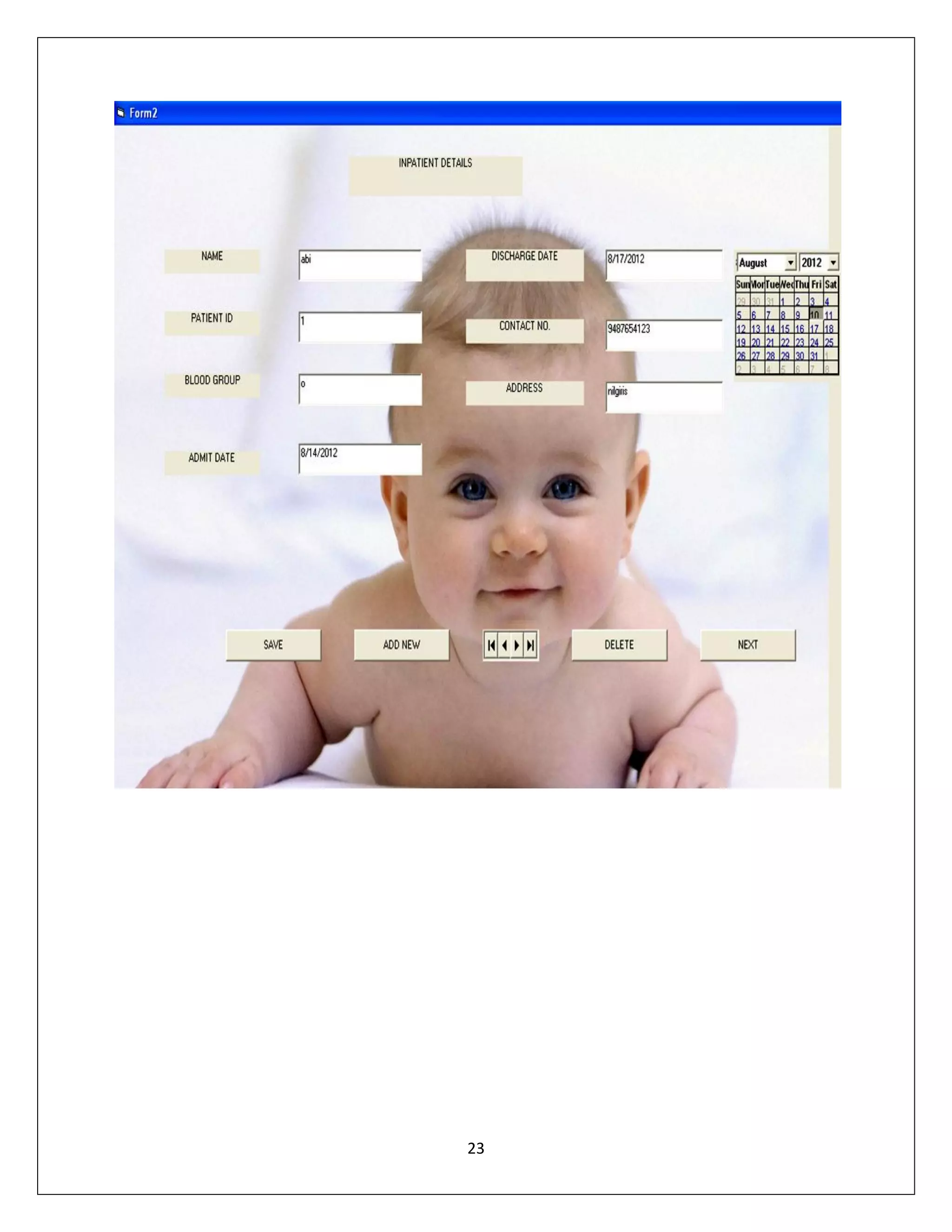
FORM 2:
INPATIENT DETAILS:
Dim db As Database
Dim rs As Recordset
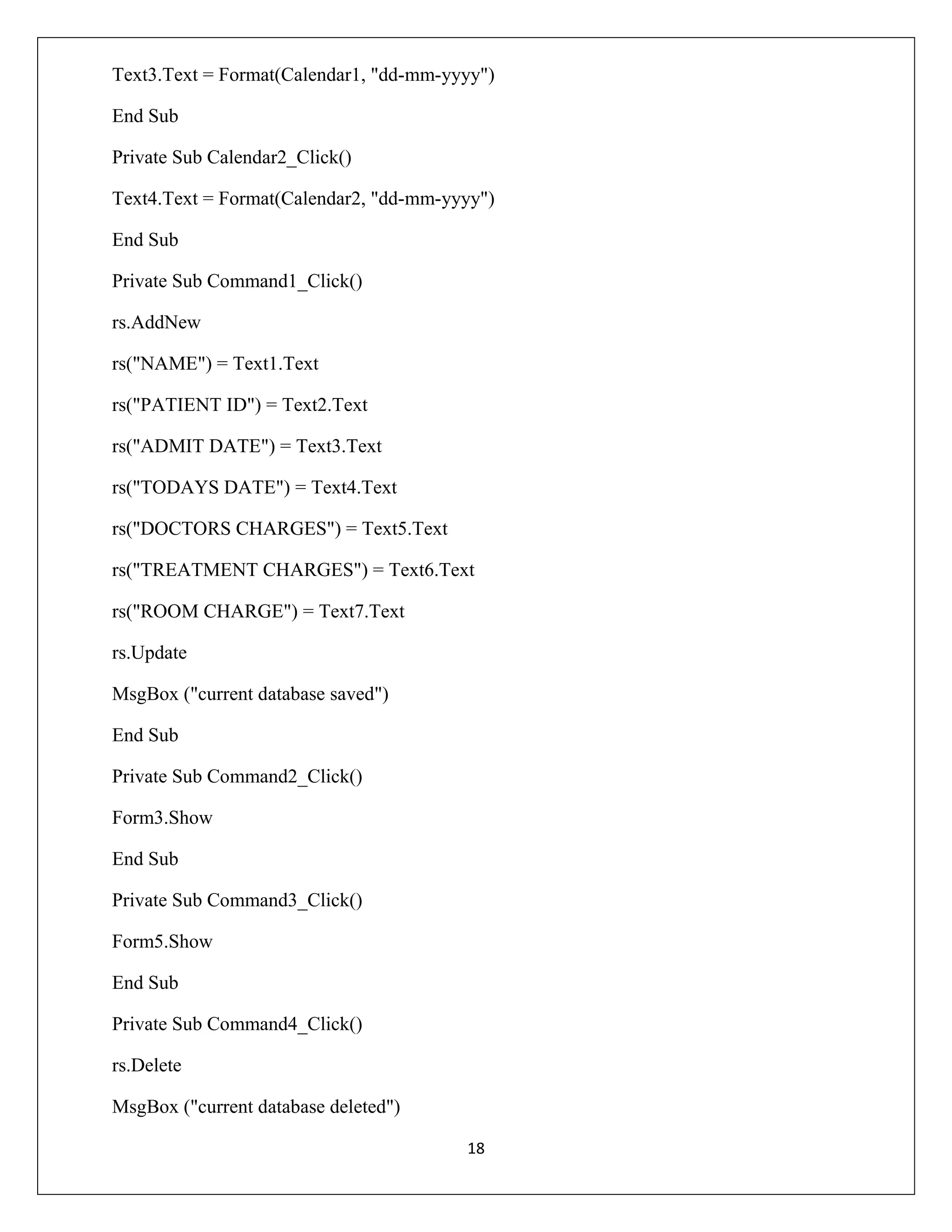
Private Sub Calendar1_Click()
Text4.Text = Format(Calendar1, "dd-mm-yyyy")
End Sub
Private Sub Calendar2_Click()
Text5.Text = Format(Calendar2, "dd-mm-yyyy")
End Sub

13
Private Sub Command1_Click()
rs.AddNew
rs("NAME") = Text1.Text
rs("PATIENT ID") = Text2.Text
rs("BLOOD GROUP") = Text3.Text
rs("ADMIT DATE") = Text4.Text
rs("DISCHARGE DATE") = Text5.Text
rs("CONTACT NO") = Text6.Text
rs("ADDRESS") = Text7.Text
rs.Update
MsgBox ("current database saved")
End Sub
Private Sub Command2_Click()
Text1.Text = ""
Text2.Text = ""
Text3.Text = ""
Text4.Text = ""
Text5.Text = ""
Text6.Text = ""
Text7.Text = ""
End Sub
Private Sub Command3_Click()
rs.Delete
End Sub
Private Sub Command4_Click()
Form3.Show
14
End Sub
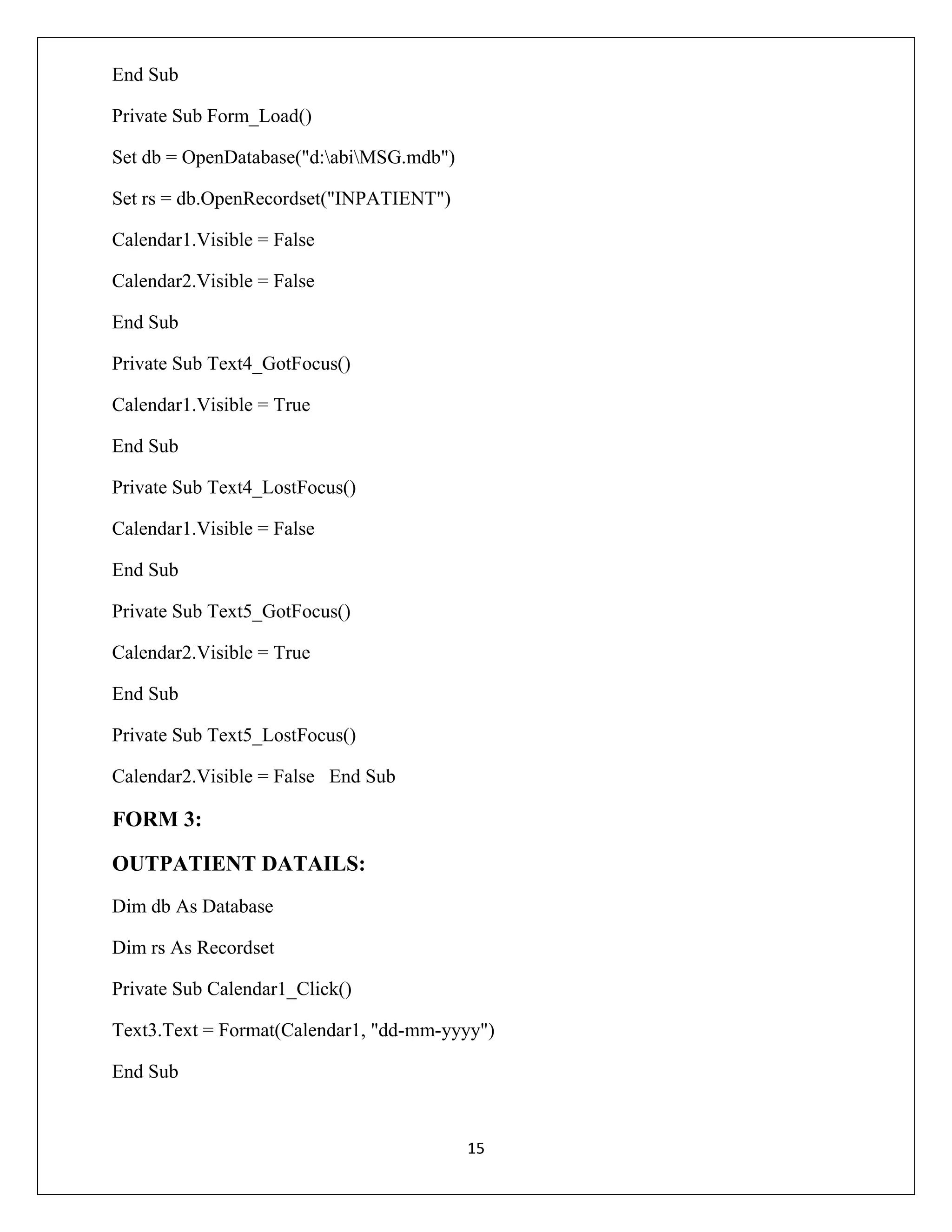
Private Sub Form_Load()
Set db = OpenDatabase("d:abiMSG.mdb")
Set rs = db.OpenRecordset("INPATIENT")
Calendar1.Visible = False
Calendar2.Visible = False
End Sub
Private Sub Text4_GotFocus()
Calendar1.Visible = True
End Sub
Private Sub Text4_LostFocus()
Calendar1.Visible = False
End Sub
Private Sub Text5_GotFocus()
Calendar2.Visible = True
End Sub
Private Sub Text5_LostFocus()
Calendar2.Visible = False End Sub

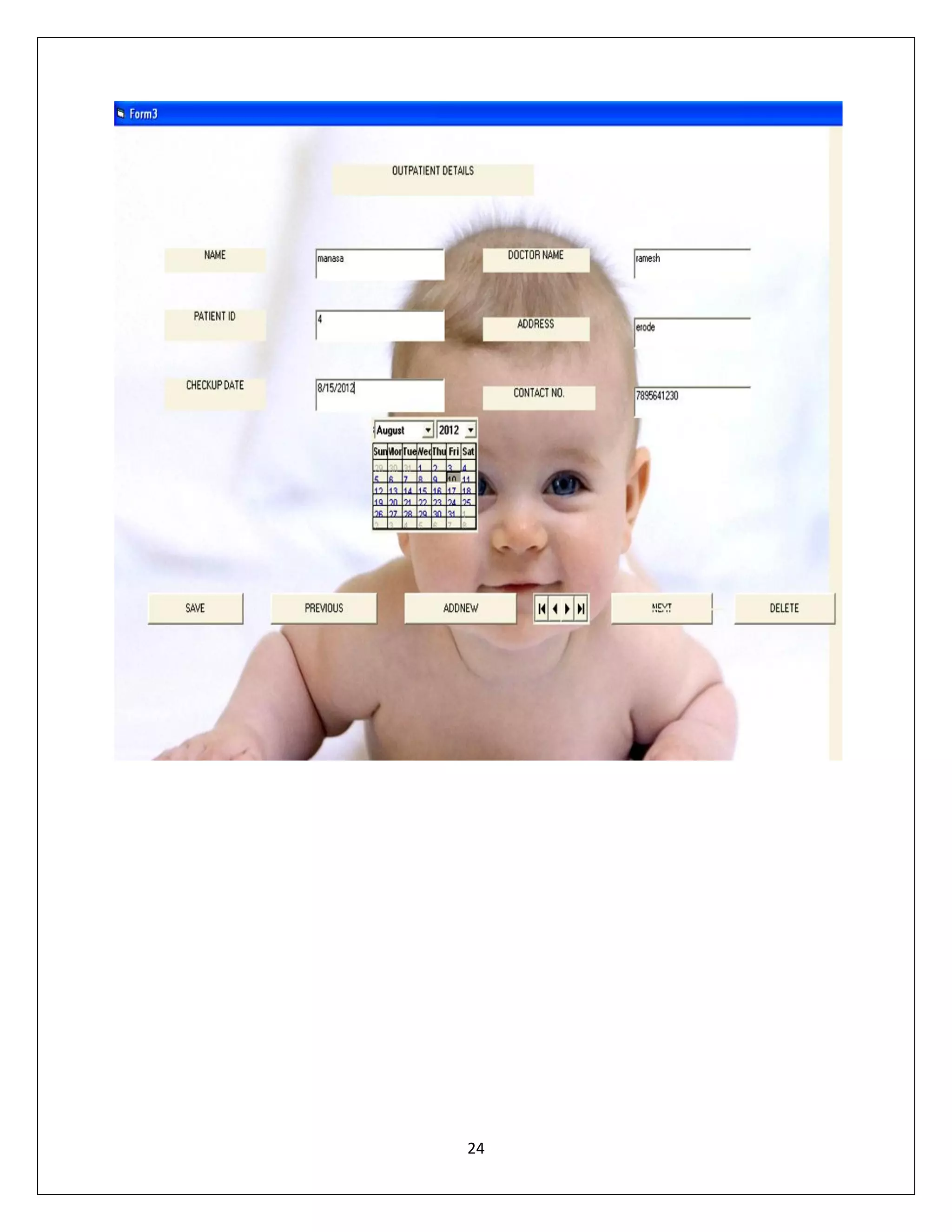
FORM 3:
OUTPATIENT DATAILS:
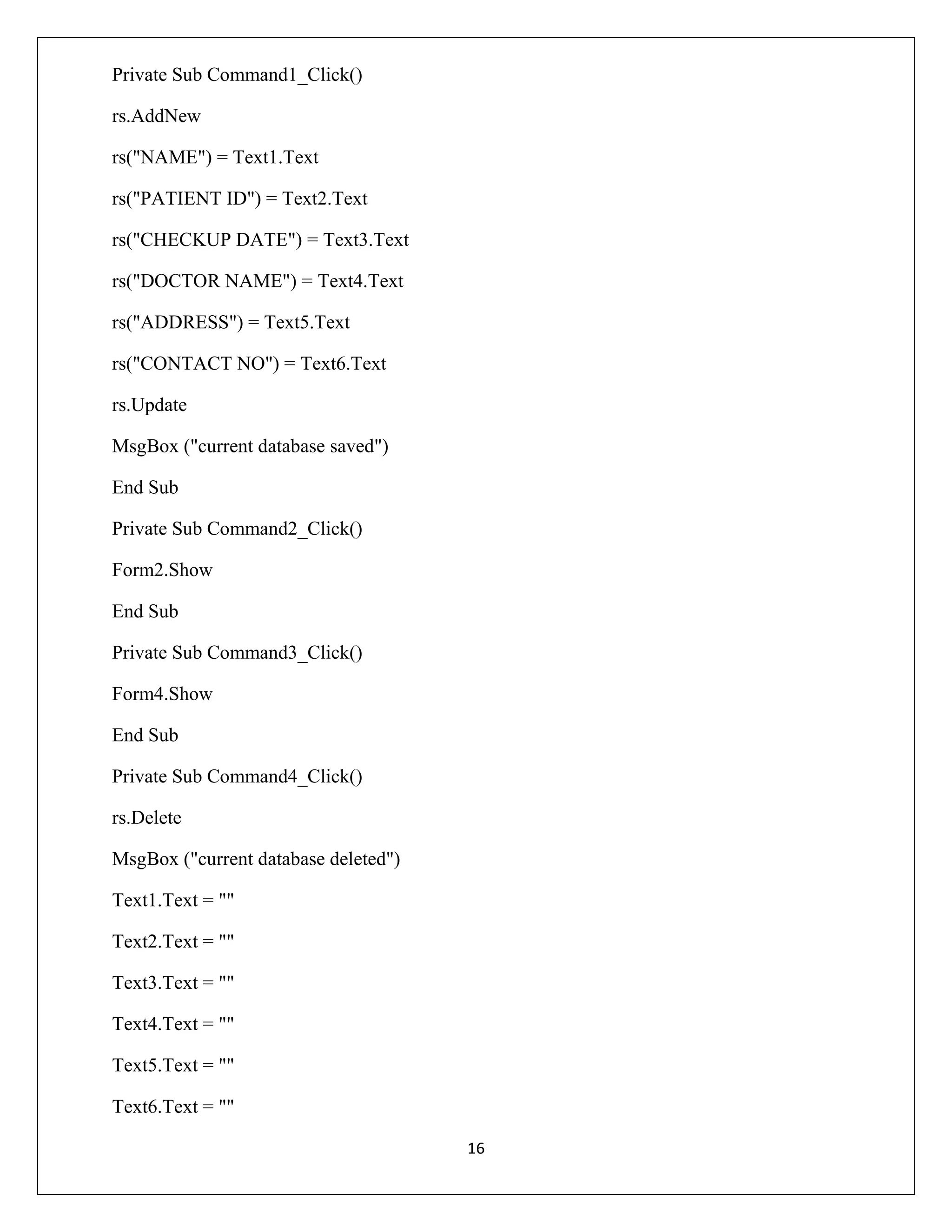
Dim db As Database
Dim rs As Recordset
Private Sub Calendar1_Click()
Text3.Text = Format(Calendar1, "dd-mm-yyyy")
End Sub

15
Private Sub Command1_Click()
rs.AddNew
rs("NAME") = Text1.Text
rs("PATIENT ID") = Text2.Text
rs("CHECKUP DATE") = Text3.Text
rs("DOCTOR NAME") = Text4.Text
rs("ADDRESS") = Text5.Text
rs("CONTACT NO") = Text6.Text
rs.Update
MsgBox ("current database saved")
End Sub
Private Sub Command2_Click()
Form2.Show
End Sub
Private Sub Command3_Click()
Form4.Show
End Sub
Private Sub Command4_Click()
rs.Delete
MsgBox ("current database deleted")
Text1.Text = ""
Text2.Text = ""
Text3.Text = ""
Text4.Text = ""
Text5.Text = ""
Text6.Text = ""
16
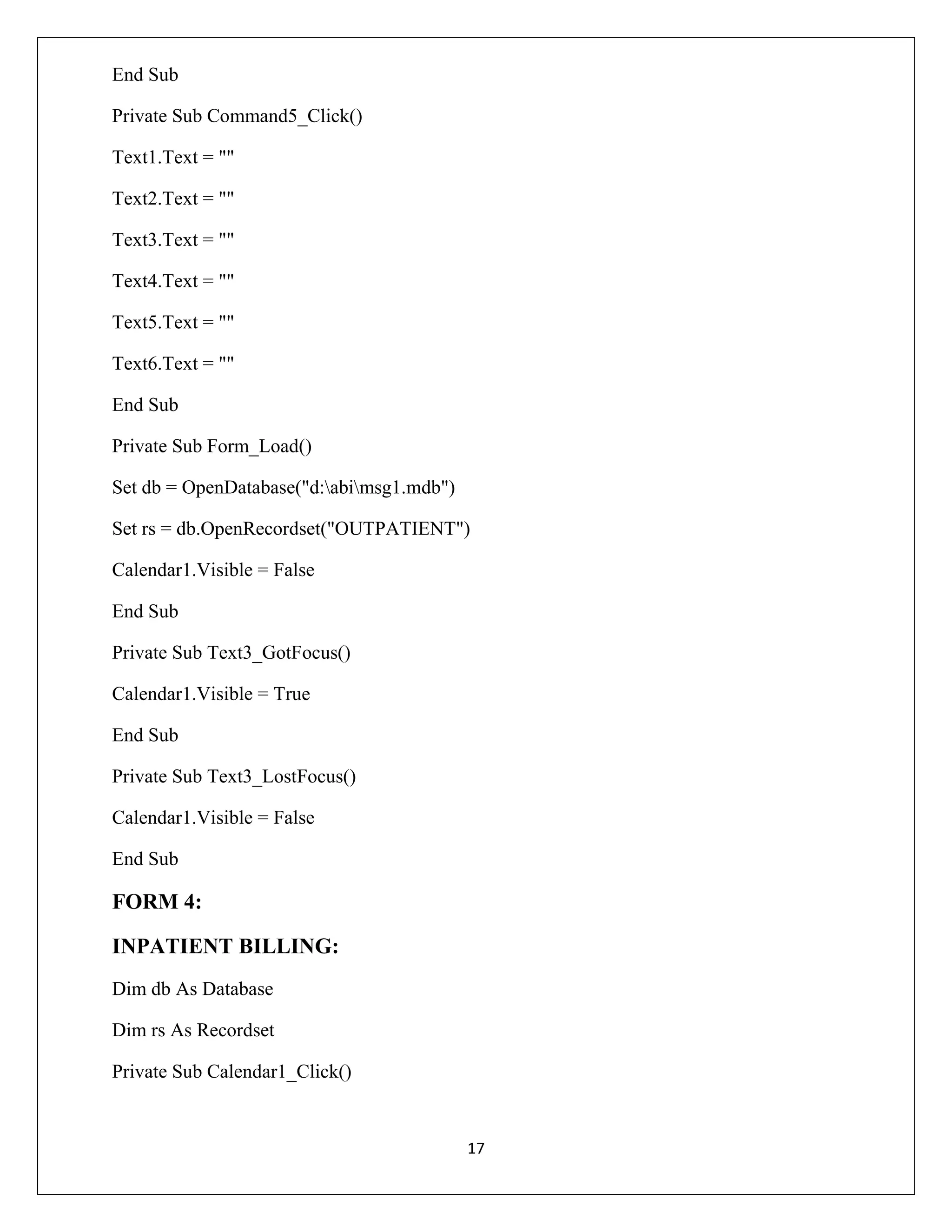
End Sub
Private Sub Command5_Click()
Text1.Text = ""
Text2.Text = ""
Text3.Text = ""
Text4.Text = ""
Text5.Text = ""
Text6.Text = ""
End Sub
Private Sub Form_Load()
Set db = OpenDatabase("d:abimsg1.mdb")
Set rs = db.OpenRecordset("OUTPATIENT")
Calendar1.Visible = False
End Sub
Private Sub Text3_GotFocus()
Calendar1.Visible = True
End Sub
Private Sub Text3_LostFocus()
Calendar1.Visible = False
End Sub

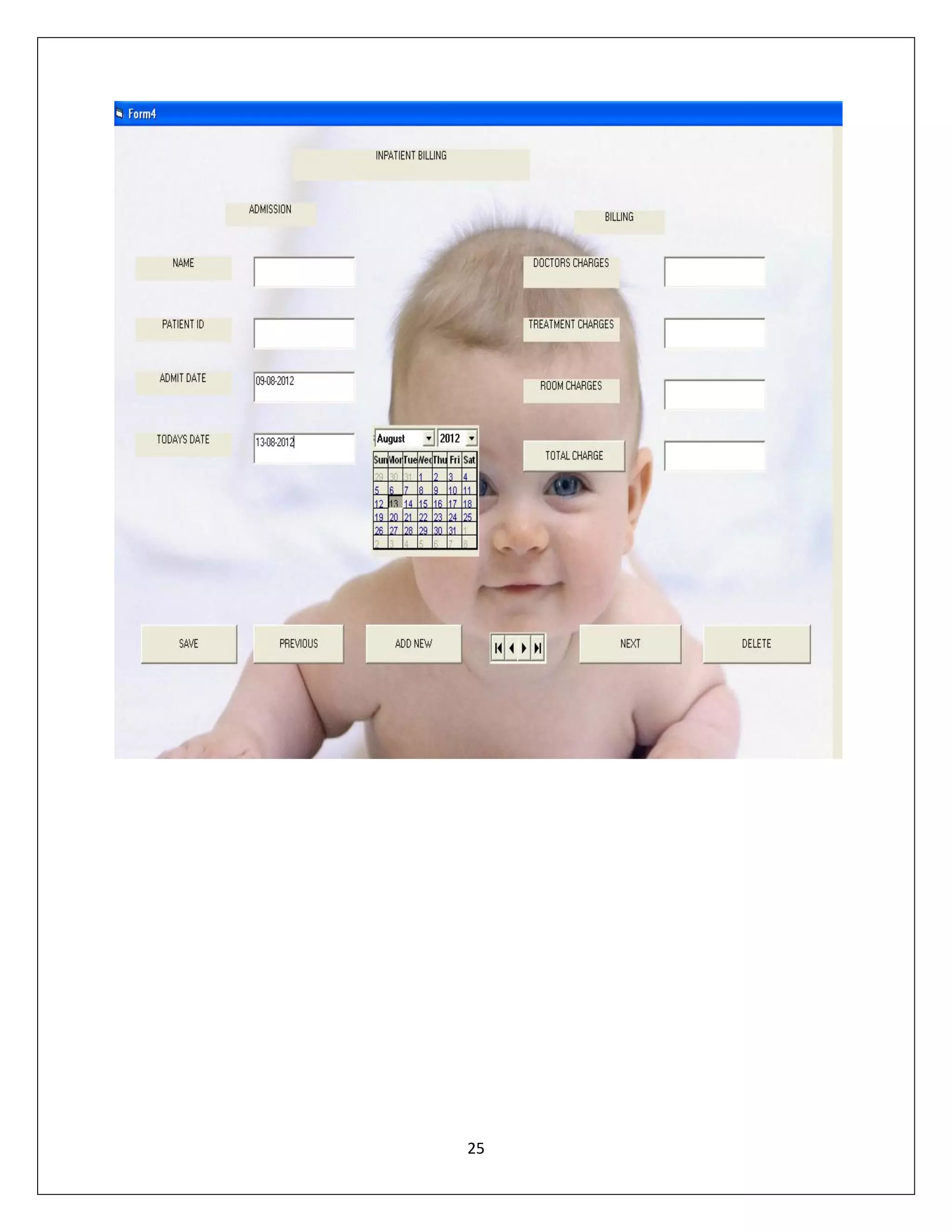
FORM 4:
INPATIENT BILLING:
Dim db As Database
Dim rs As Recordset
Private Sub Calendar1_Click()

17
Text3.Text = Format(Calendar1, "dd-mm-yyyy")
End Sub
Private Sub Calendar2_Click()
Text4.Text = Format(Calendar2, "dd-mm-yyyy")
End Sub
Private Sub Command1_Click()
rs.AddNew
rs("NAME") = Text1.Text
rs("PATIENT ID") = Text2.Text
rs("ADMIT DATE") = Text3.Text
rs("TODAYS DATE") = Text4.Text
rs("DOCTORS CHARGES") = Text5.Text
rs("TREATMENT CHARGES") = Text6.Text
rs("ROOM CHARGE") = Text7.Text
rs.Update
MsgBox ("current database saved")
End Sub
Private Sub Command2_Click()
Form3.Show
End Sub
Private Sub Command3_Click()
Form5.Show
End Sub
Private Sub Command4_Click()
rs.Delete
MsgBox ("current database deleted")
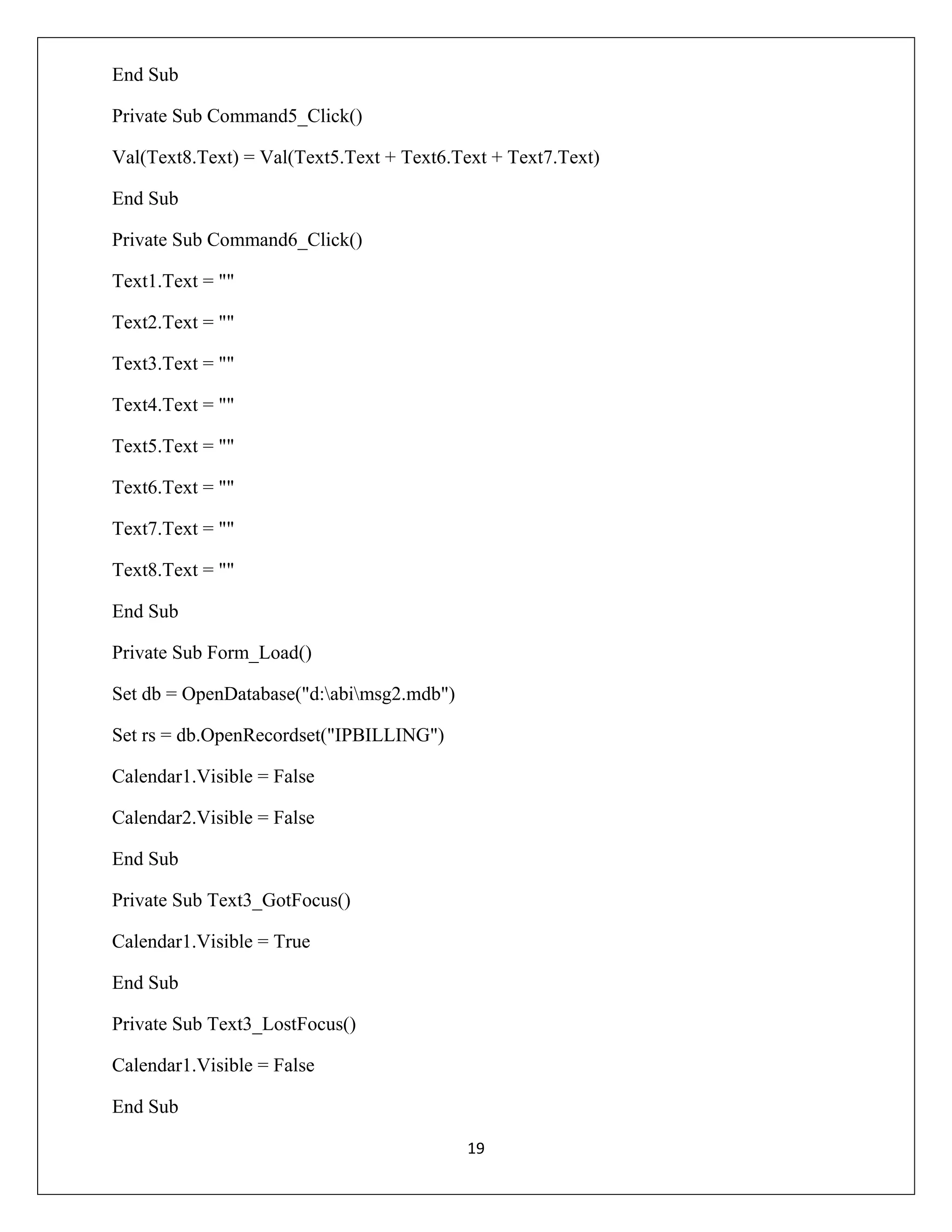
18
End Sub
Private Sub Command5_Click()
Val(Text8.Text) = Val(Text5.Text + Text6.Text + Text7.Text)
End Sub
Private Sub Command6_Click()
Text1.Text = ""
Text2.Text = ""
Text3.Text = ""
Text4.Text = ""
Text5.Text = ""
Text6.Text = ""
Text7.Text = ""
Text8.Text = ""
End Sub
Private Sub Form_Load()
Set db = OpenDatabase("d:abimsg2.mdb")
Set rs = db.OpenRecordset("IPBILLING")
Calendar1.Visible = False
Calendar2.Visible = False
End Sub
Private Sub Text3_GotFocus()
Calendar1.Visible = True
End Sub
Private Sub Text3_LostFocus()
Calendar1.Visible = False
End Sub
19
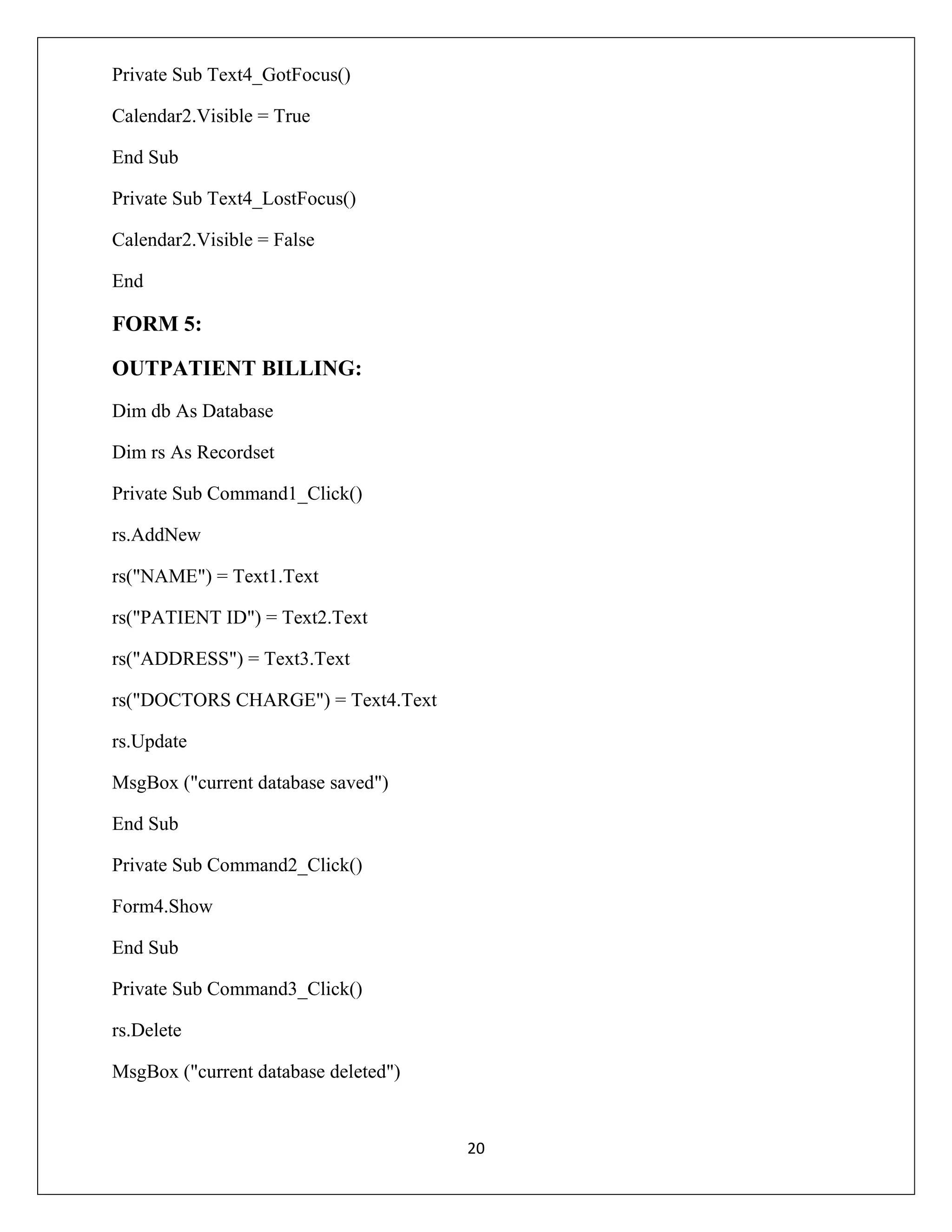
Private Sub Text4_GotFocus()
Calendar2.Visible = True
End Sub
Private Sub Text4_LostFocus()
Calendar2.Visible = False
End

FORM 5:
OUTPATIENT BILLING:
Dim db As Database
Dim rs As Recordset
Private Sub Command1_Click()
rs.AddNew
rs("NAME") = Text1.Text
rs("PATIENT ID") = Text2.Text
rs("ADDRESS") = Text3.Text
rs("DOCTORS CHARGE") = Text4.Text
rs.Update
MsgBox ("current database saved")
End Sub
Private Sub Command2_Click()
Form4.Show
End Sub
Private Sub Command3_Click()
rs.Delete
MsgBox ("current database deleted")

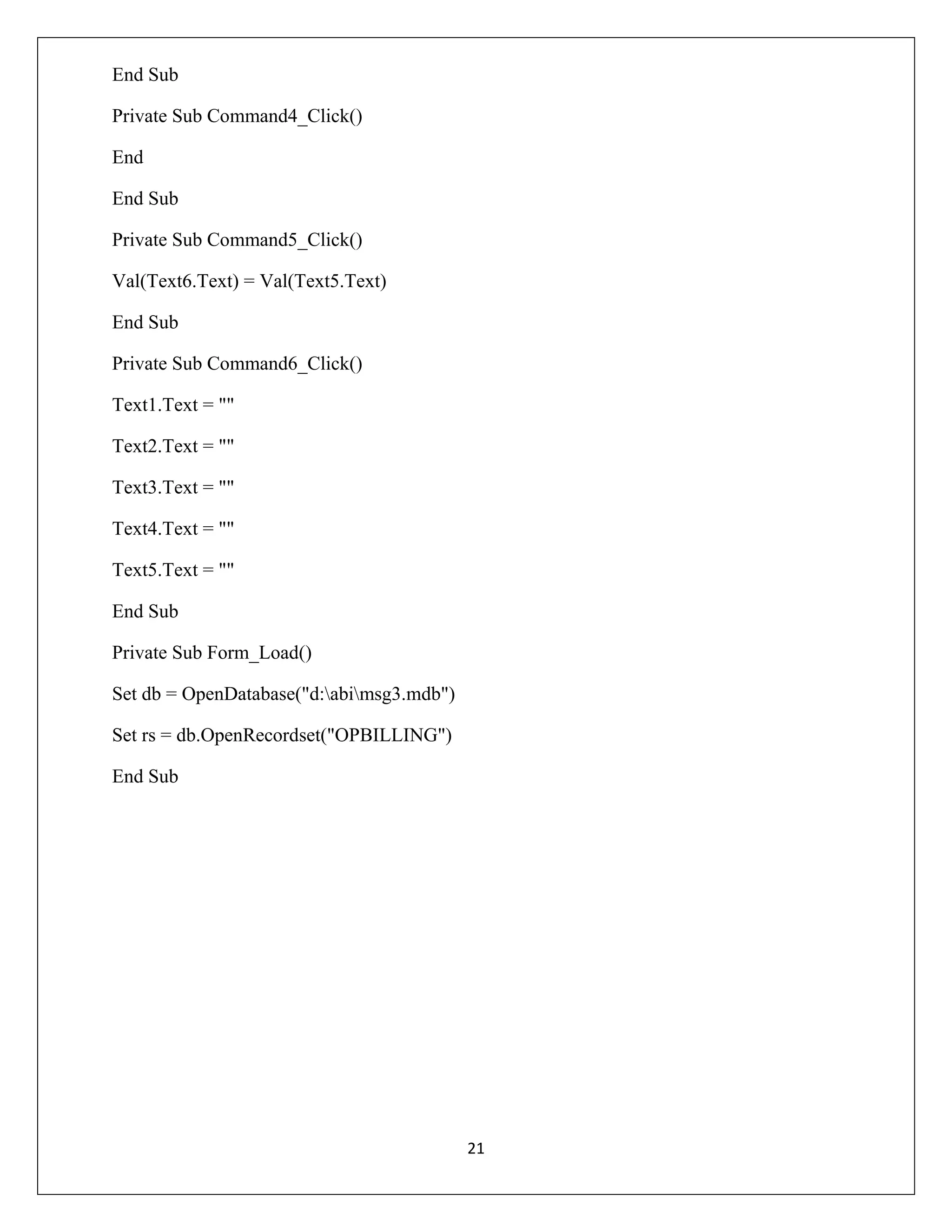
20
End Sub
Private Sub Command4_Click()
End
End Sub
Private Sub Command5_Click()
Val(Text6.Text) = Val(Text5.Text)
End Sub
Private Sub Command6_Click()
Text1.Text = ""
Text2.Text = ""
Text3.Text = ""
Text4.Text = ""
Text5.Text = ""
End Sub
Private Sub Form_Load()
Set db = OpenDatabase("d:abimsg3.mdb")
Set rs = db.OpenRecordset("OPBILLING")
End Sub

21
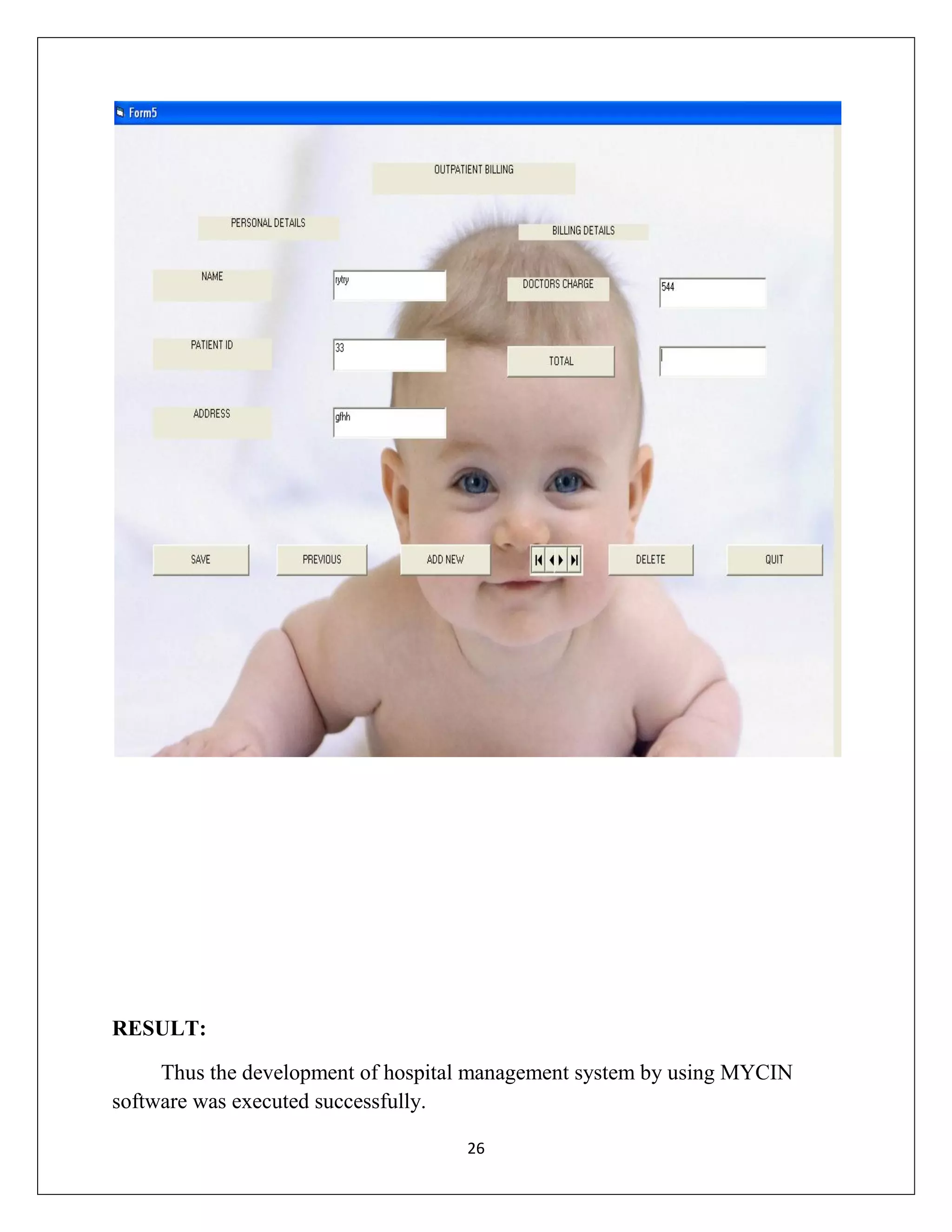
OUTPUT:

22
23
24
25
RESULT:
Thus the development of hospital management system by using MYCIN
software was executed successfully.
26
EXP.NO: 3
DATE:

EPILEXIA OF BLIND PATIENT
USING TEIRASIS MEDICAL SOFTWARE

AIM:
To determine the Epilexia of blind patient by TEIRASIS.
HARDWARE:
 Computer.
 Printer.
 Chart.
SOFTWARE:
 TEIRASIS medical software.
 Printer software.
THEORY:
TEIRESIAS recognizes that some of the knowledge required for the
knowledge base is inexact or rough and it succeeds in offering advice for its
correction. It also provides method for extracting the best performance out of an
expert system such as MYCIN.
TEIRESIAS's approach is to make use of the expert's ability to correct incorrect or
partially correct responses to common questions and then to focus the expert's
reply
TEIRESIAS fixes bugs by
1) Stopping the performance program when the human expert identifies an
error;
2) Working backwards through the steps in the performance program that
led to the error until the bug is found;
3) Helping the expert fix the bug by modifying the knowledge base

27
TEIRESIAS's techniques for generating explanations are based upon two
assumptions
The two assumptions used are;
1) That a recapitulation of program actions can be an effective explanation
as long as the correct level of detail is given
2) That there is some shared framework for viewing the program's actions
that will make them understandable to the user.
PROCEDURE:








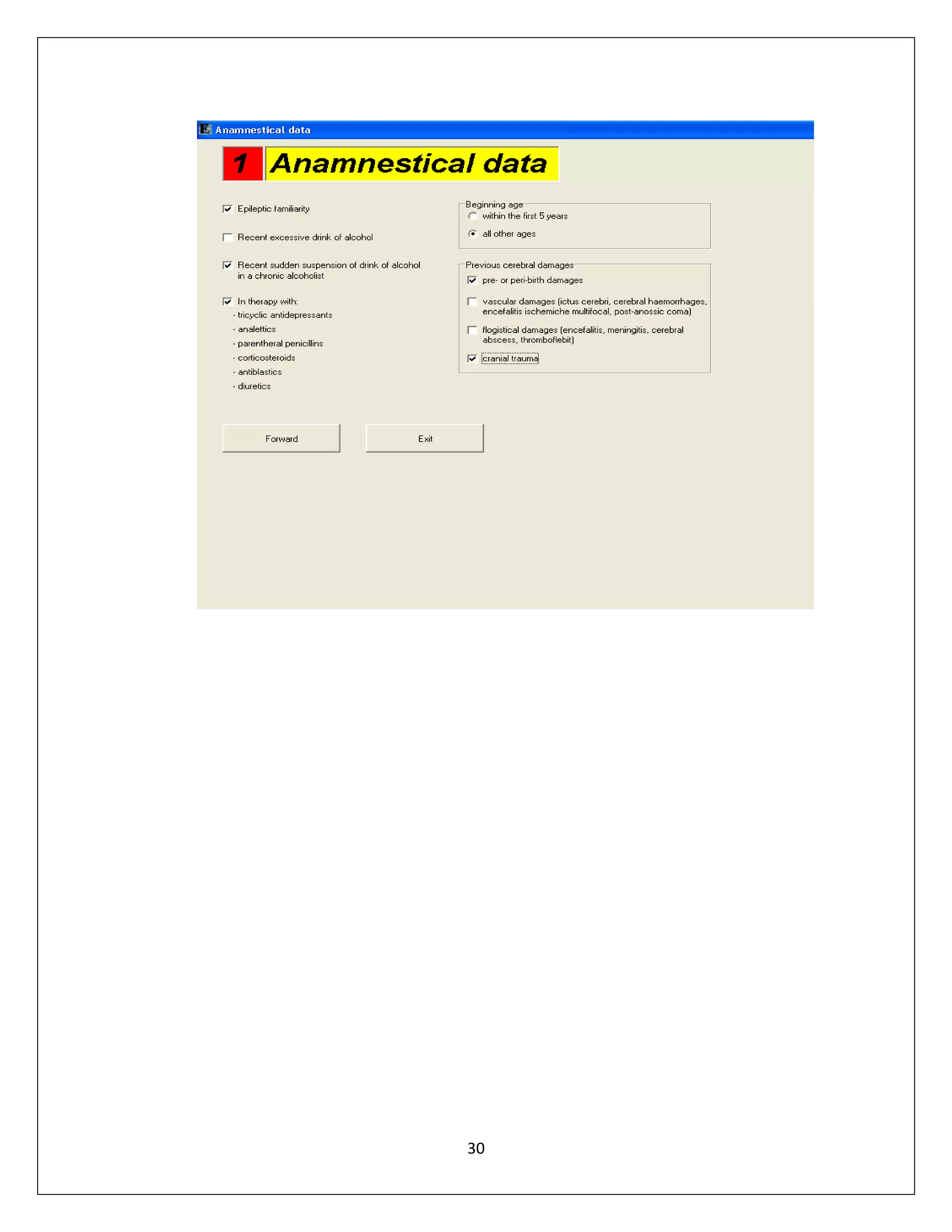
Take one option.
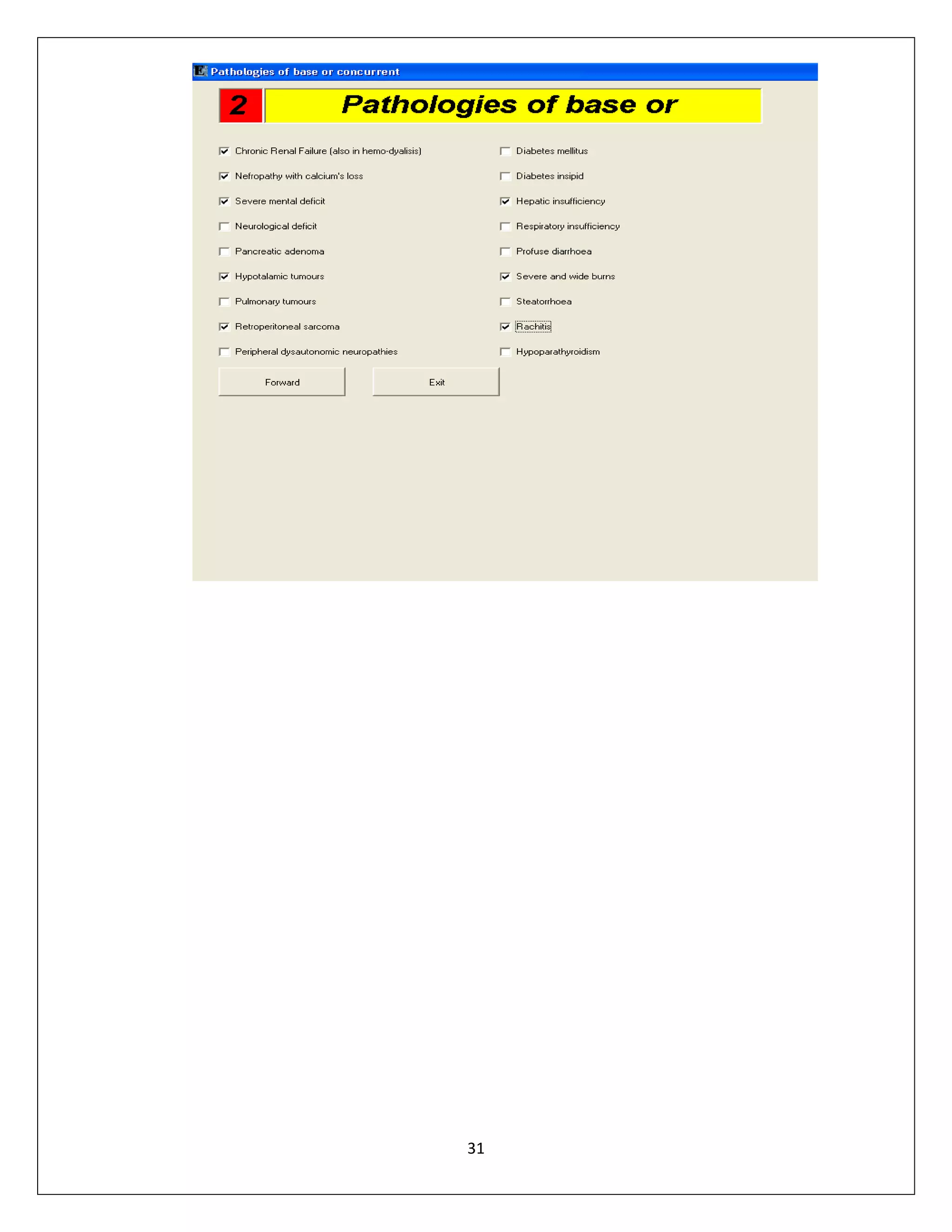
After selecting the condition enter data in the sheet.
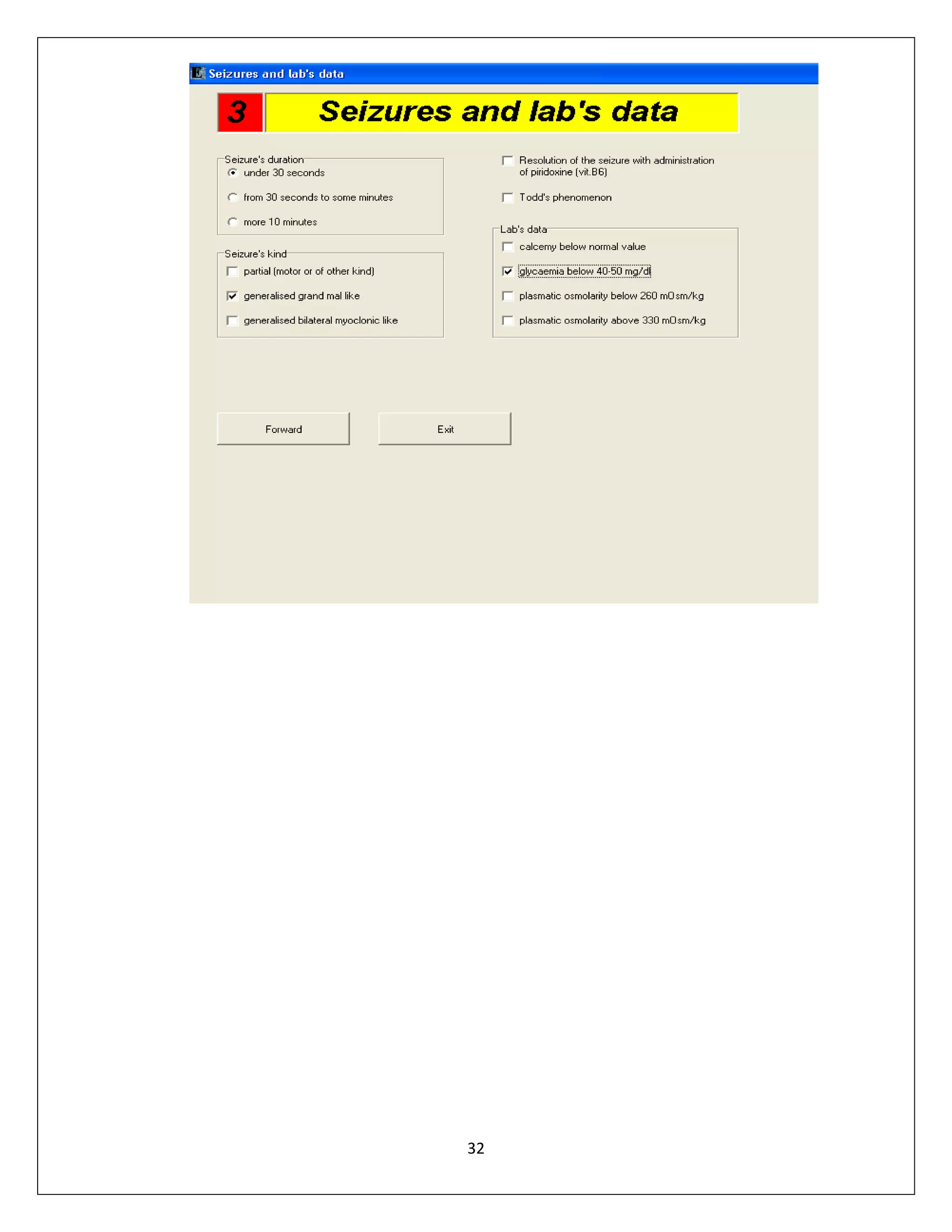
After that some other table will displayed.
Then enter data into the next table.
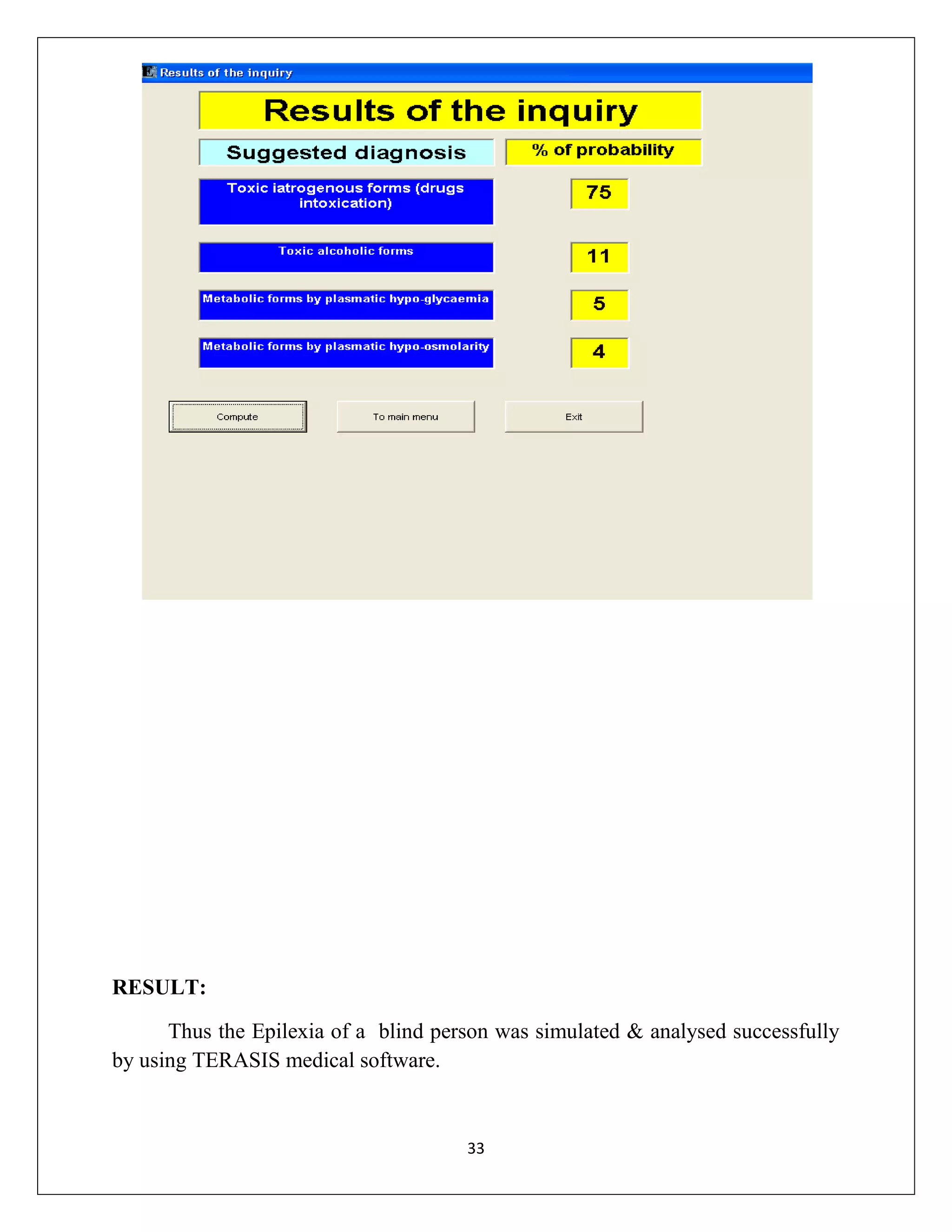
Then we will obtain the result.
Then click compute.
Probability of disease will display.

28
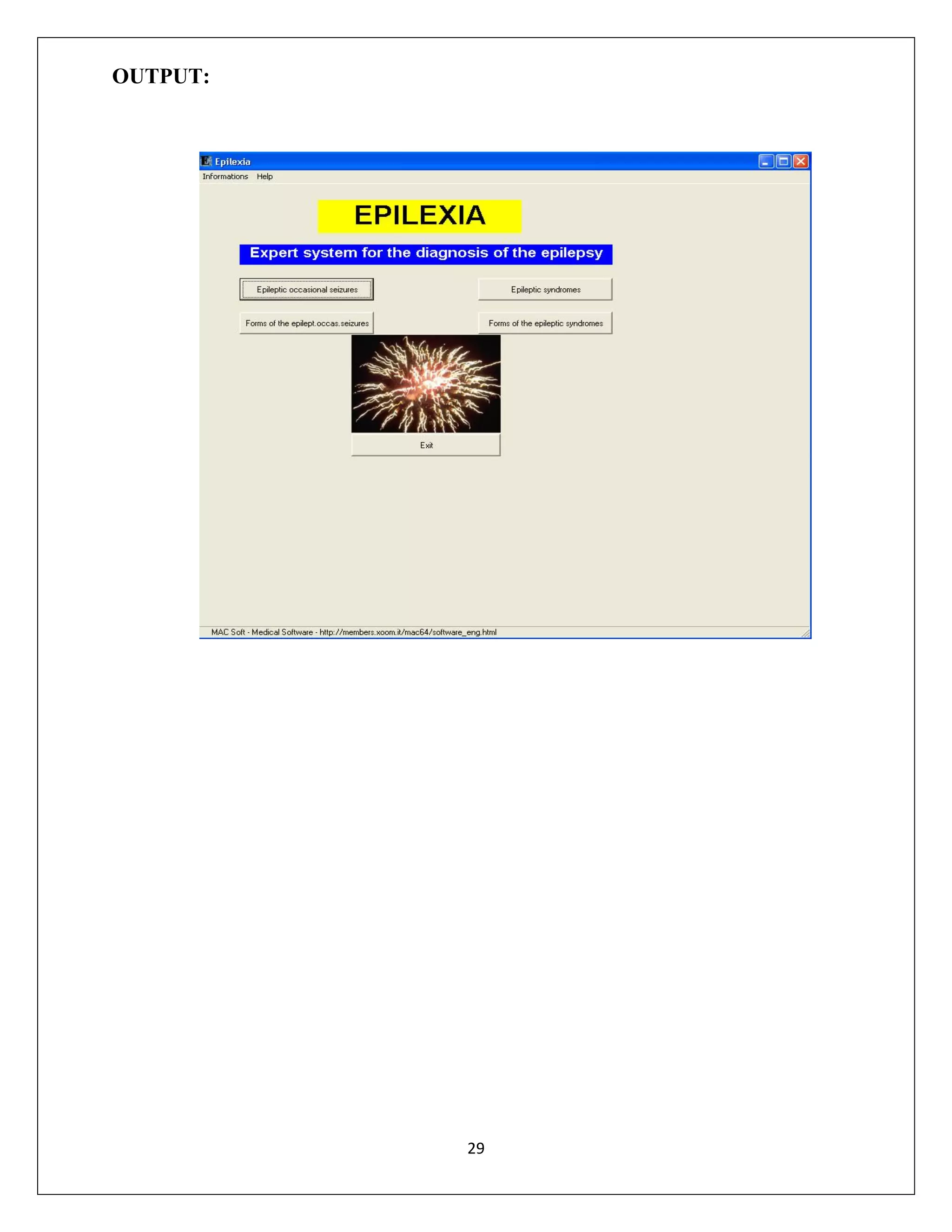
OUTPUT:

29
30
31
32
RESULT:
Thus the Epilexia of a blind person was simulated & analysed successfully
by using TERASIS medical software.

33
EXP.NO: 4A

STRESS OF STENT

DATE:

ANSYS SIMULATION SOFTWARE

AIM:
To determine the stress analysis of stet using ANSYS Software.
SOFTWARE USED:
ANSYS VERSION-11
BOUNDARY CONDITIONS:
Material properties:
Young’s Modulus (Ex) = 2e5
PRXY

= 0.3

Real constants:
Area

=

100

Izz

=

0.0833

Height

=

10

Force

=

100 N

Density

=

7.86e-6

PROCEDURE
STEP:1
Preference > Structural> OK
STEP:2
1)Preprocessor > Element type > Add /Edit/Delete > Add > Beam 2D elastic
3 > OK

34
2)Real constants > > Add /Edit/Delete > Add>Area> Izz = 0.0833>Total
beam hight 10>OK
3)Material properties > Material models >
structural>linear>elastic>isotropic>Ex=2e6>PRXY=0.3>density = 7.86e-6>OK
4)Modeling>create>key point>inactive CS>keypoint 1>0,0>keypont
2>1000,0>OK
5)modeling>create>line>straight line>OK
6)meshing>size controls>manual size>line>all line>edge length=100>OK
7)mesh>lines>pick all>OK
STEP:3
1)solution>analysis type>new analysis>static
2)define load>apply>structural>displacement>on key point>fix keypoint 1
3)apply>structural>force/moment>on key point>select key point 2 >Fy>load
value>100N
4)solve>current LS>OK
STEP:4
1)General post processing > plot result DOF+under+edge
2)plot result>contour plot>nodal solution>DOF solution>displacement
vector sum>OK

35
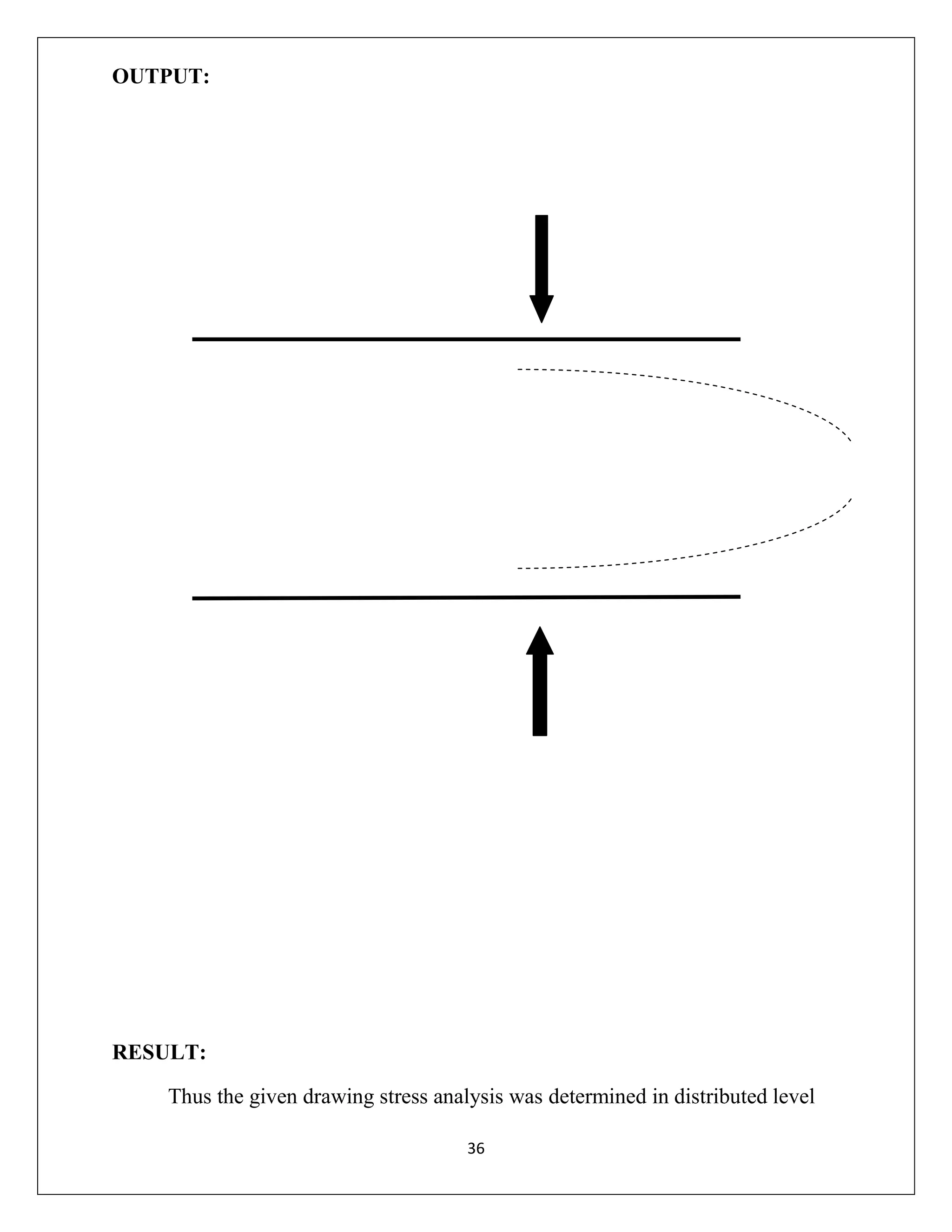
OUTPUT:

RESULT:
Thus the given drawing stress analysis was determined in distributed level
36
EXP.NO: 4B
DATE:

THERMAL CONDUCTION
ANYSYS SIMULATION SOFTWAR E

AIM:
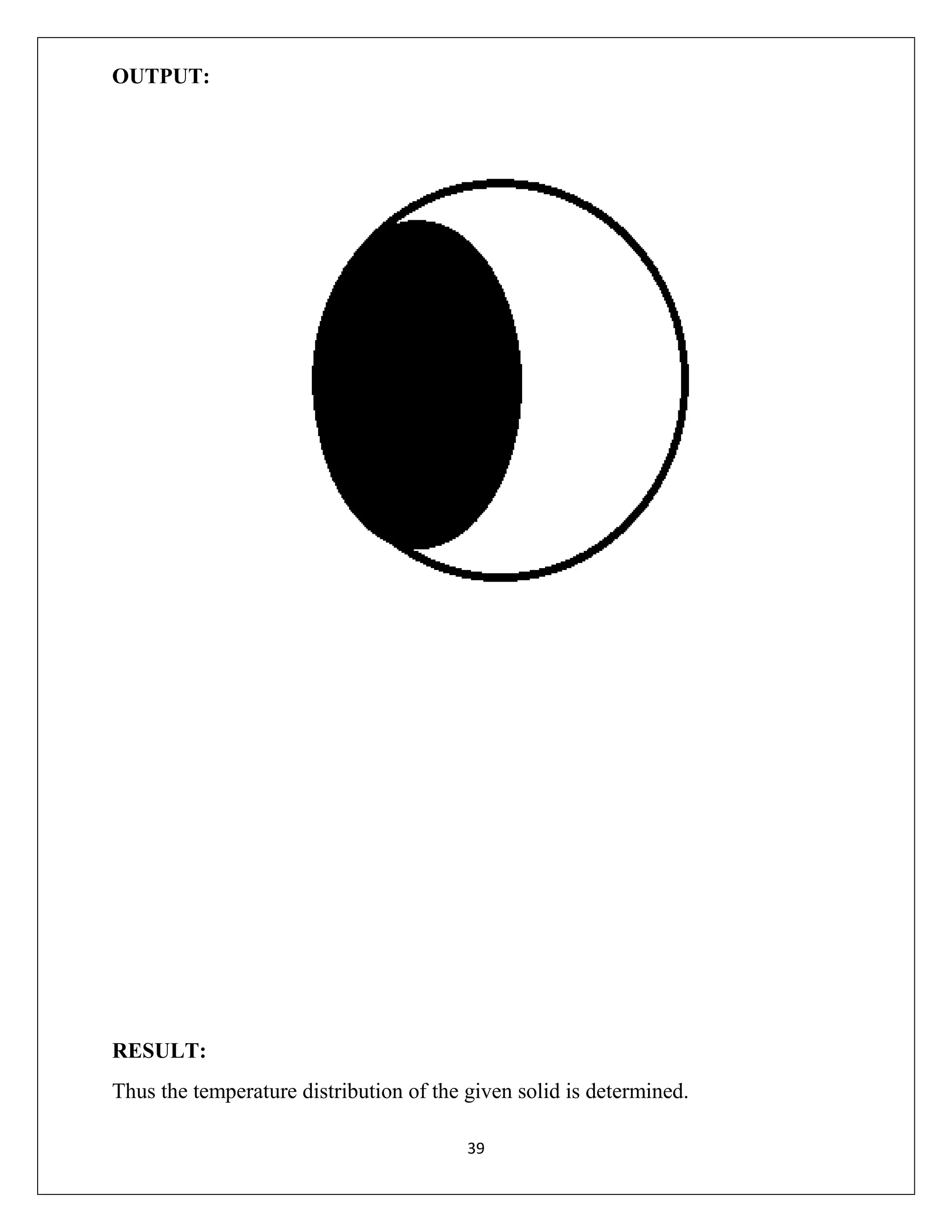
To determine the temperature of given solid by using Ansys-11.
PROBLEM DESCRIPTION:
Length of the solid in 1 cm
Height of the solid in 1 cm
BOUNDARY CONDITIONS:
Top is maintained at 500oc
Outer solid are maintained at 100oc
Thermal conductivity k= 10w/m2oc
PROCEDURE:
Step: 1
Preference > Structural > Ok
Step: 2
1) Preprocessor > Element type > Add/Edit/Delete > Add > Solid quad 4 node 55
> Ok
2) Material properties > Material models > Thermal > Conductivity > Isentrophic
> Kxx=10
3) Modeling > Create > Areas > Rectangle > By 2 Corners >
x=0,y=0,width=1,height=1
4) Meshing > Size control > Manual size > Area > All areas=0.05
5) Mesh > Areas > Free > Pick all
Step: 3
solution
1)solution > Analysis type > New analysis > Steady > State > Apply constraints
2)solution > Define loads > Apply > Thermal > Temperature > on lines
37
3)Top edge of the horizondal lines 500oc
4)left,right,bottom surface 100oc
5)solve > currentls > Ok
Step: 4
1)General post process > Plot result > Contoure plot > Nodal solution > Dof
solution > Displacement vector sum > Ok

38
OUTPUT:

RESULT:
Thus the temperature distribution of the given solid is determined.
39
EXP.NO: 5A
DATE:

BLOOD PRESSURE MEASUREMENT BY
USING PUFF MEDICAL SOFTWARE

AIM:
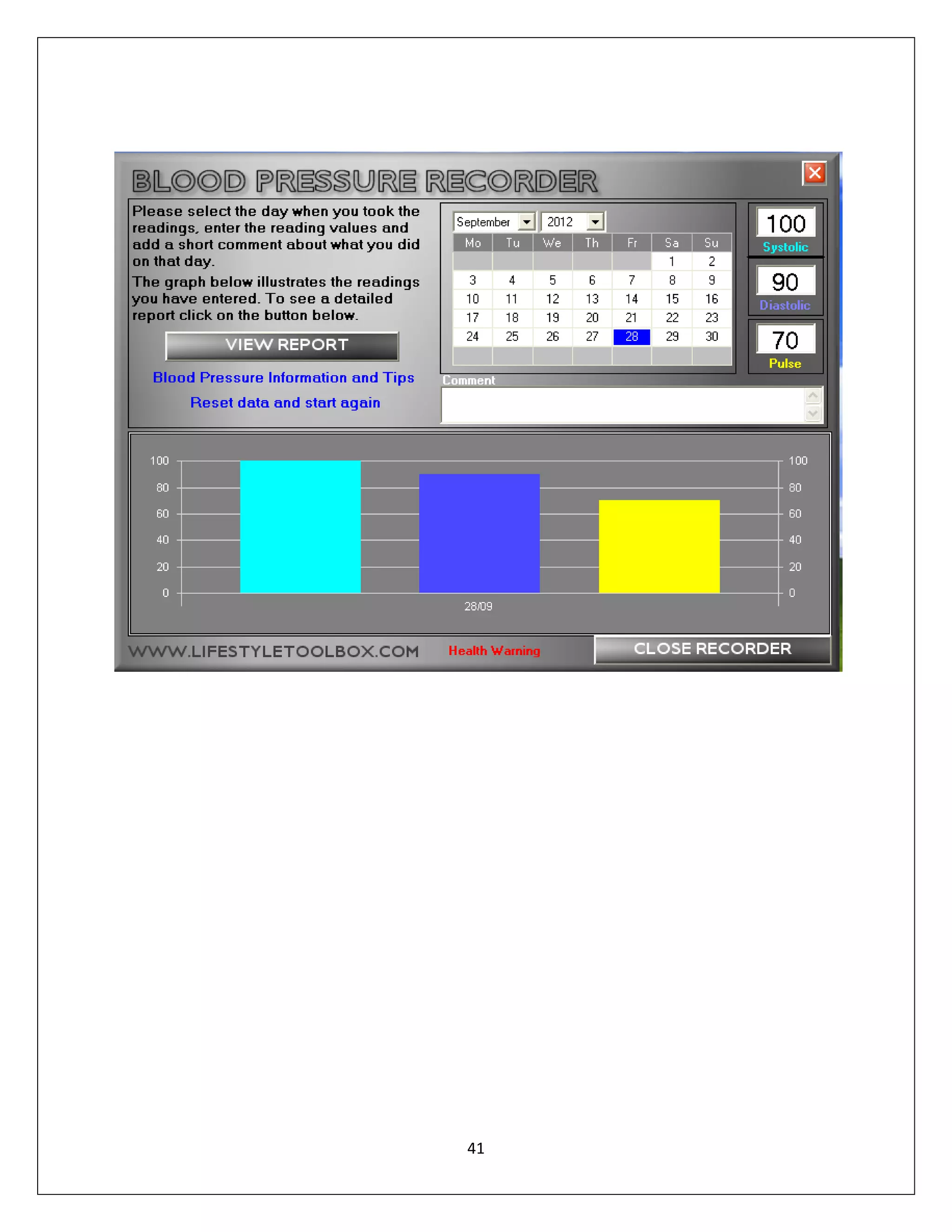
To measure blood pressure using systolic, diastolic and pulse value.
SOFTWARE:
 PUFF- Blood pressure software.
PROCEDURE:





Enter systolic value.
Enter the diastolic value.
Enter the pulse rate.
View the report.

40
41
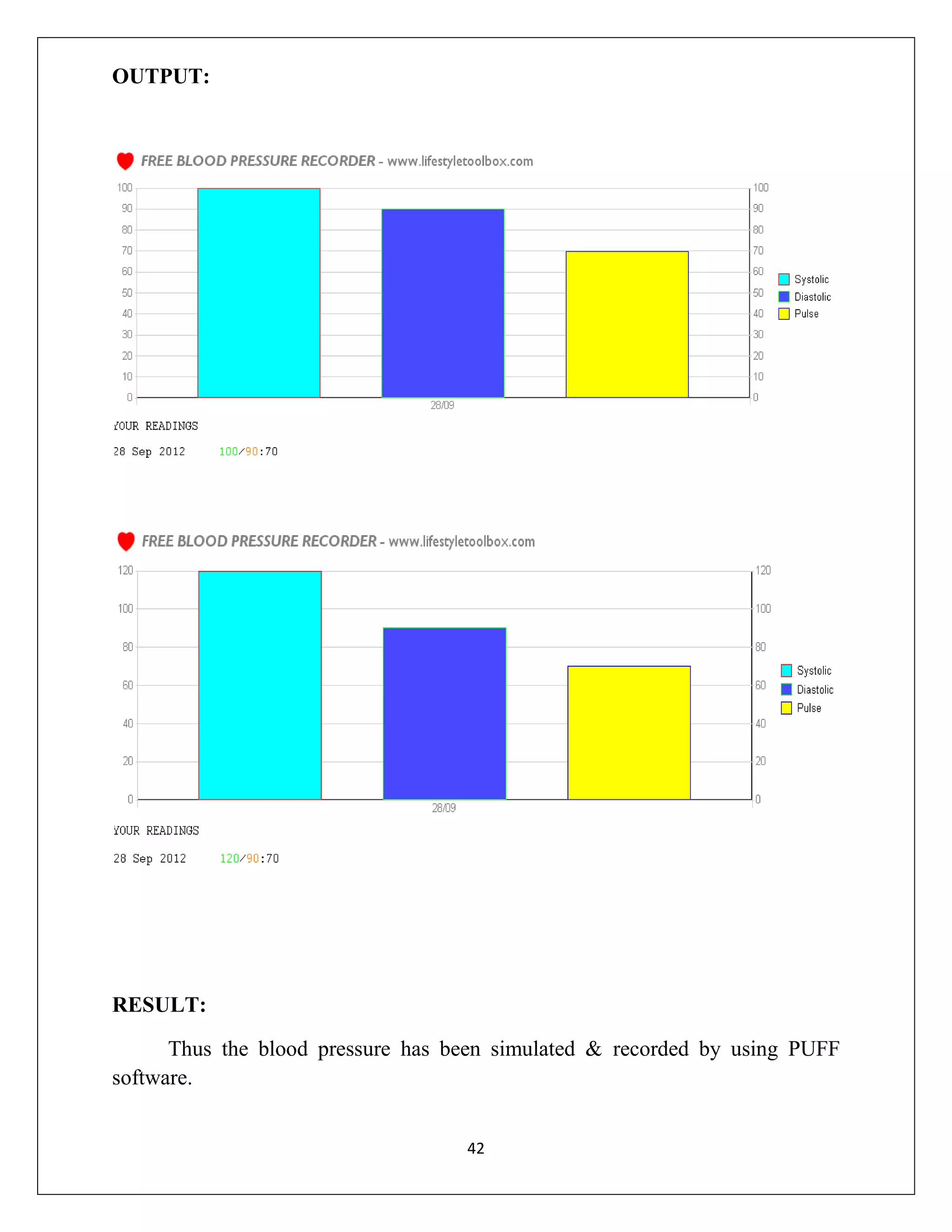
OUTPUT:

RESULT:
Thus the blood pressure has been simulated & recorded by using PUFF
software.
42
EXP.NO: 5B
DATE:

AMPLITUDE MODULATION
SIMULINK SOFTWARE

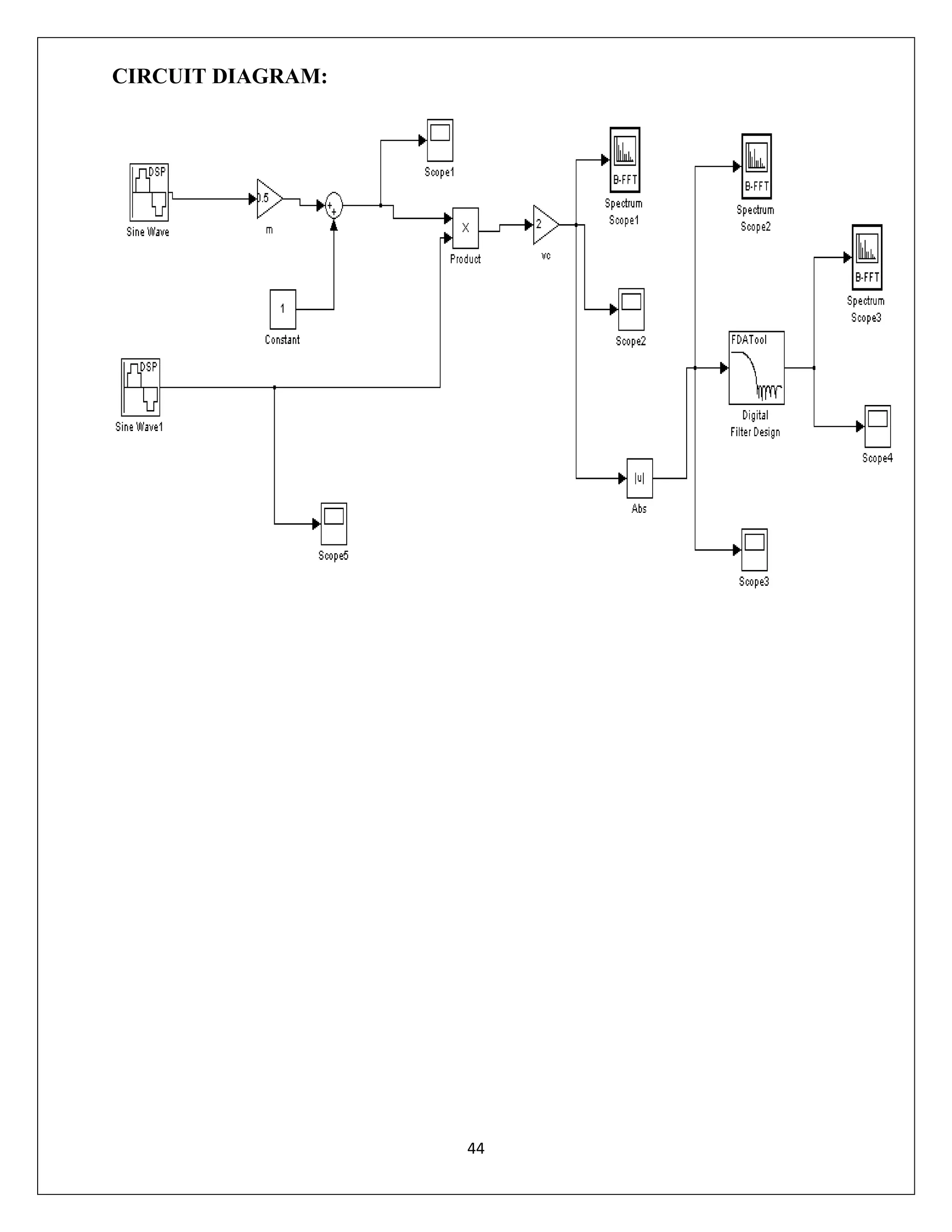
AIM:
To simulate the amplitude modulation and demodulation using simulink.
TOOLS REQUIRED:
 MATLAB
 PC
PROCEDURE:
 Create a new model window by choosing file > new > model.
 Drag sine wave block from simulink > source to the model window.
 Drag scope block from simulink > sinks to the model window.
 Left- press the mouse when the arrow becomes a single cross by moving the
mouse near to the right side of “sine wave” ,keep left button pressed and
move the single cross to the left side of scope.
 Click simulation > simulation parameters.
 Double click the sine wave and set the parameters.
 Press start simulation to run the program.
 Double click the scope.
 To set the parameters of scope press parameters button on the display panel.
 Right click on the scope ,then choose axes properties to set “Y” scales.

43
CIRCUIT DIAGRAM:

44
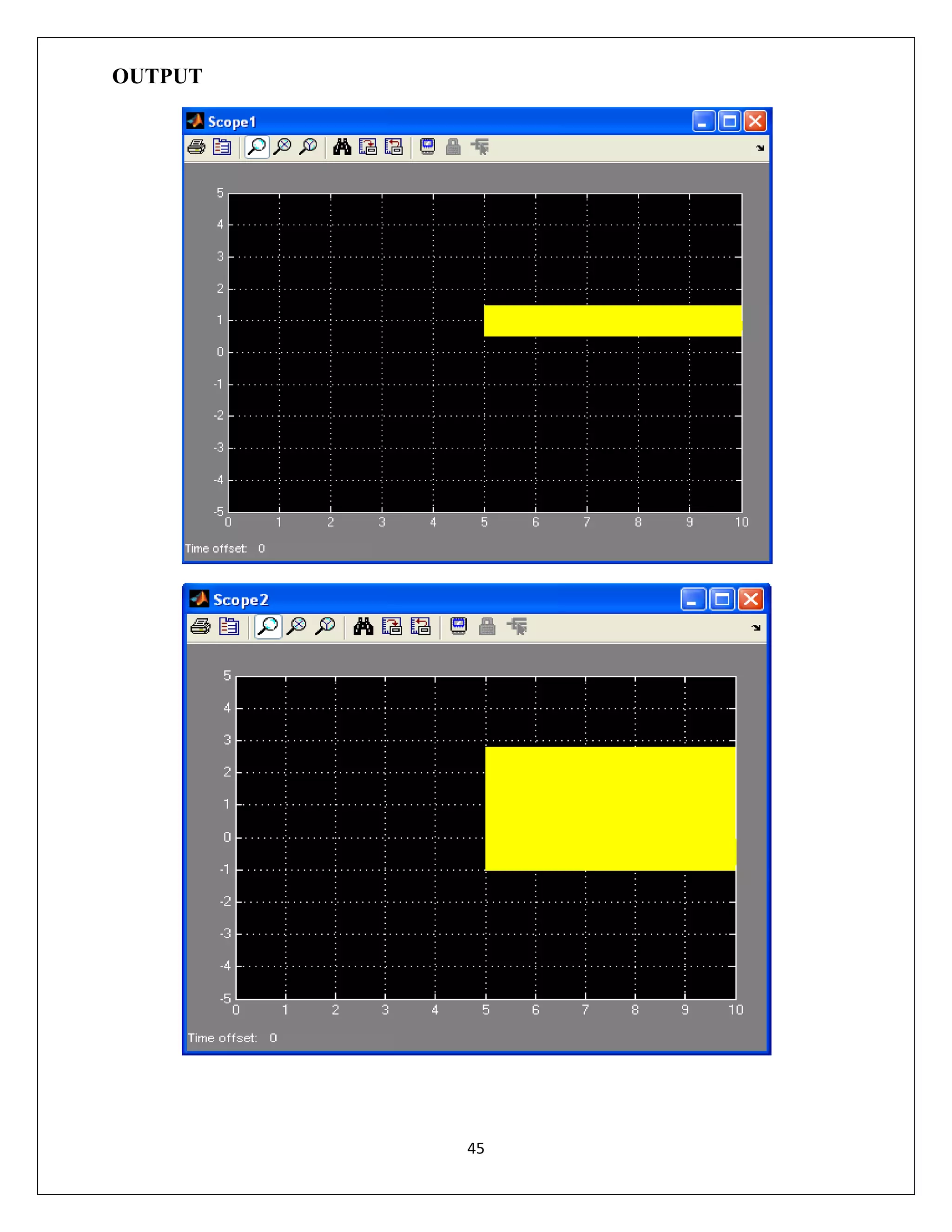
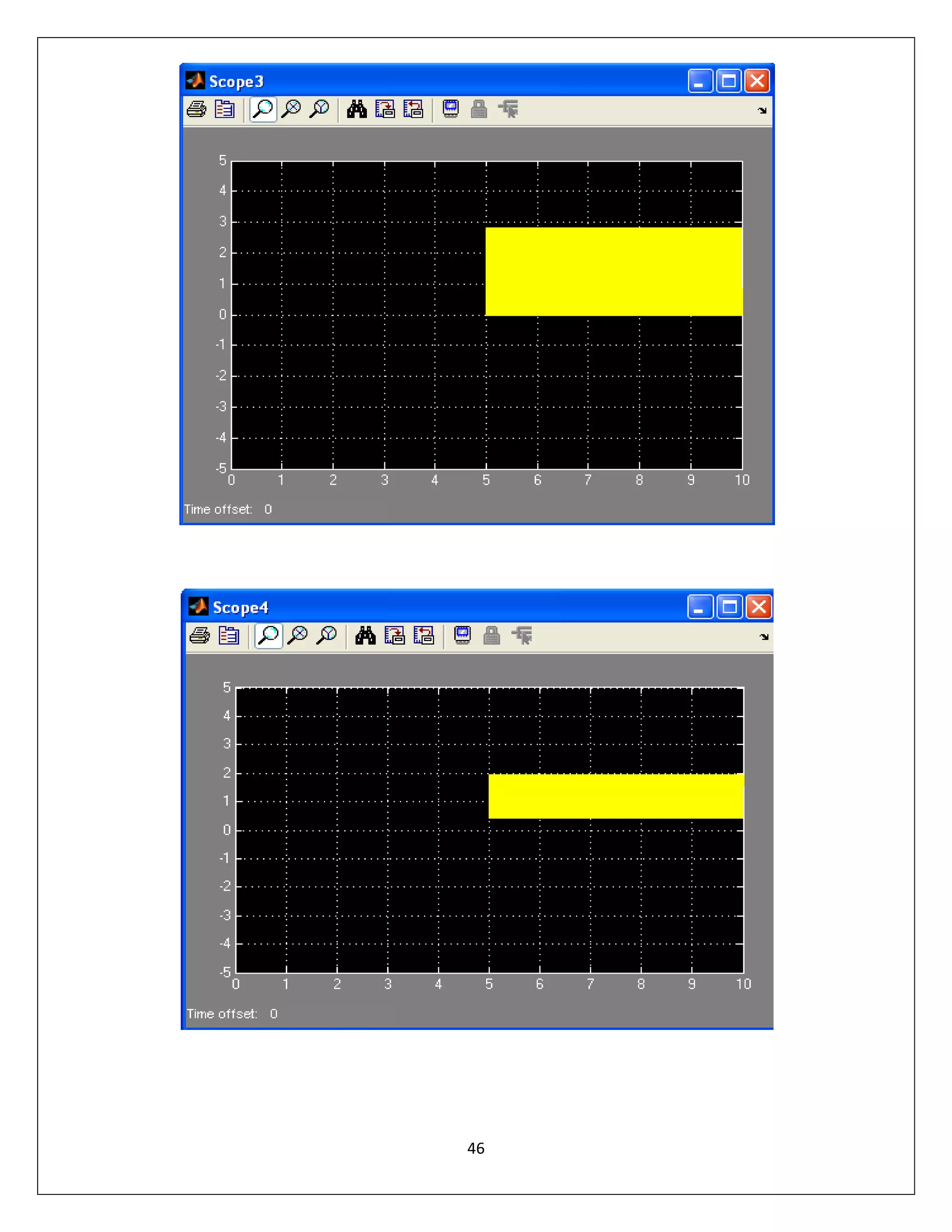
OUTPUT

45
46
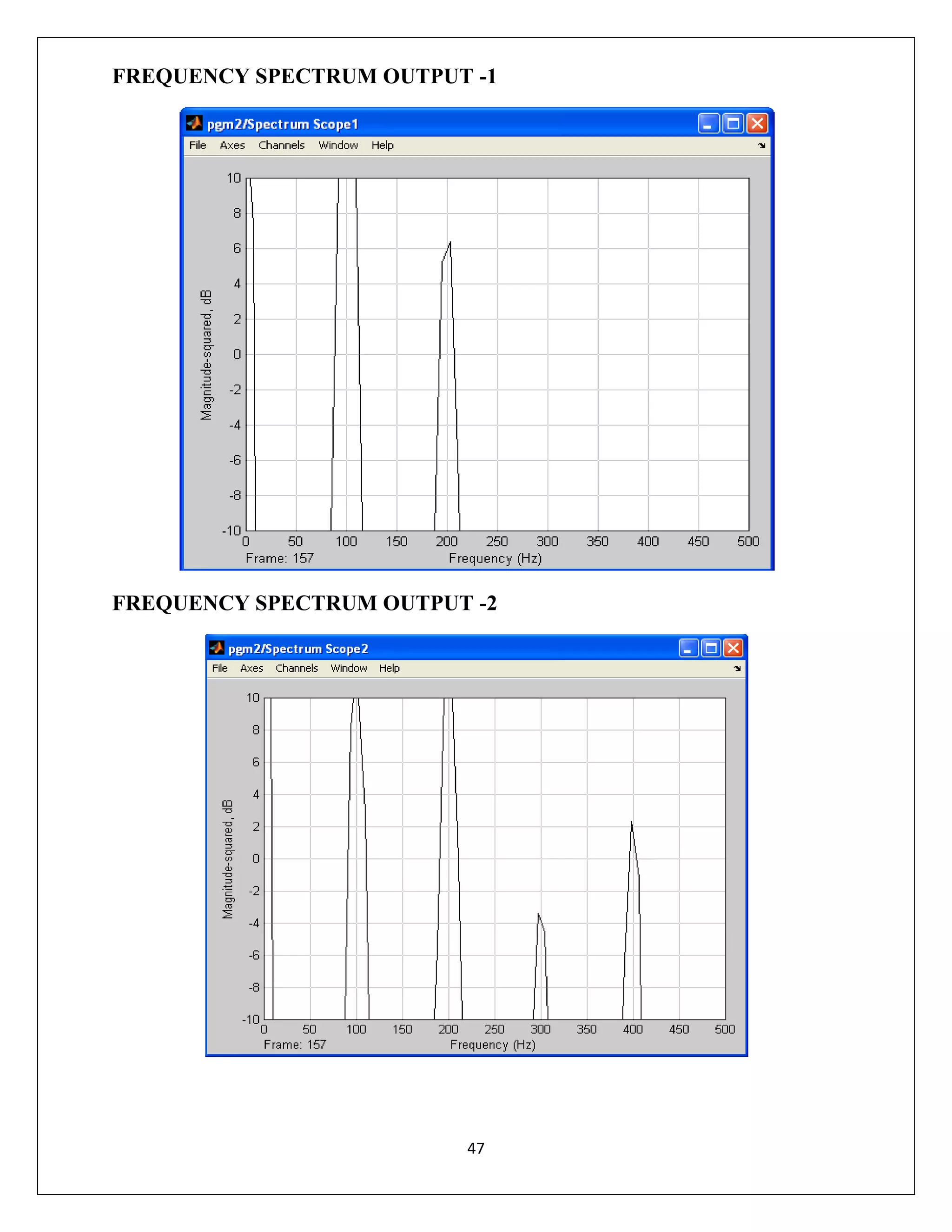
FREQUENCY SPECTRUM OUTPUT -1

FREQUENCY SPECTRUM OUTPUT -2

47
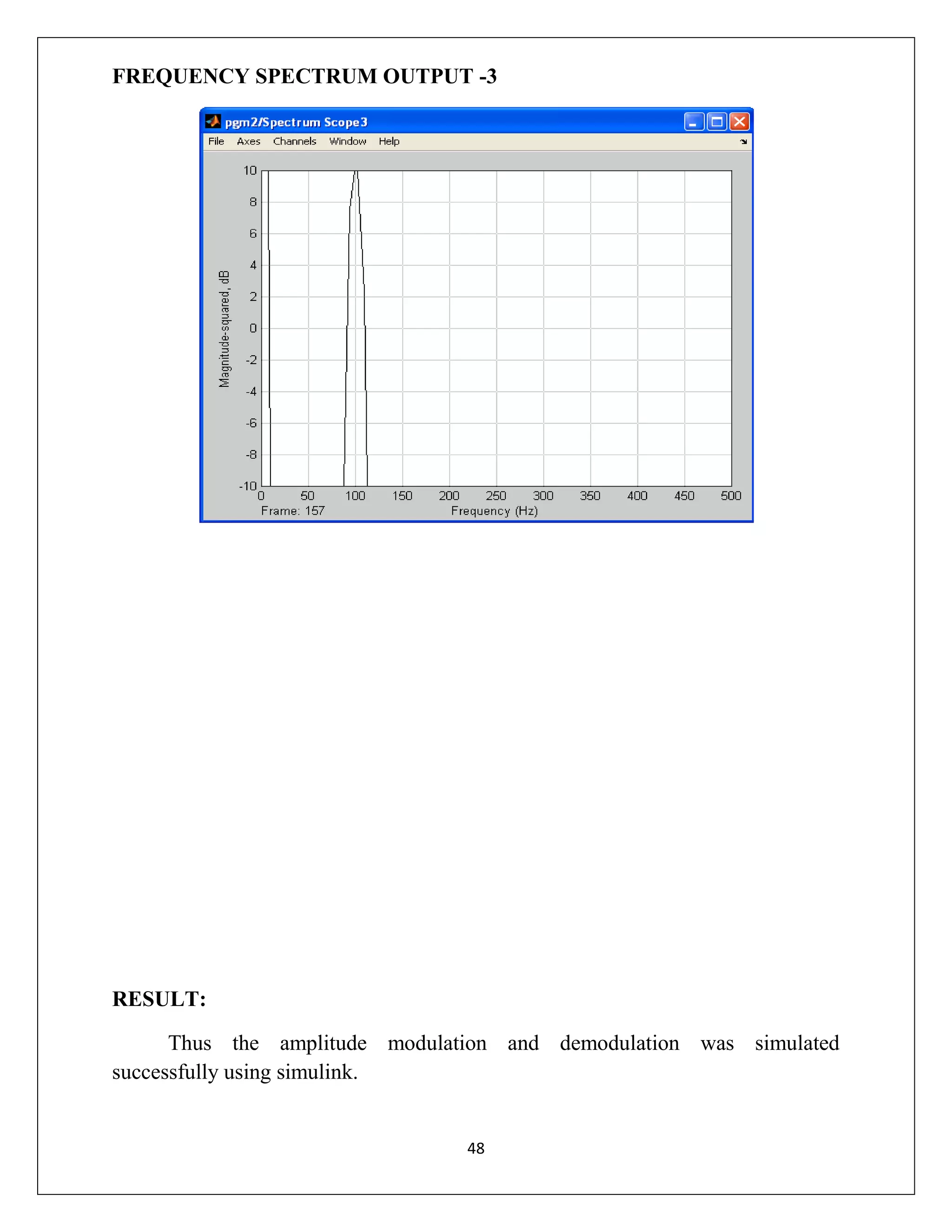
FREQUENCY SPECTRUM OUTPUT -3

RESULT:
Thus the amplitude modulation and demodulation was simulated
successfully using simulink.

48
EXP.NO: 5C
DATE:

RESPIRATORY RATE DISORDER
PUFF MEDICAL SOFTWARE

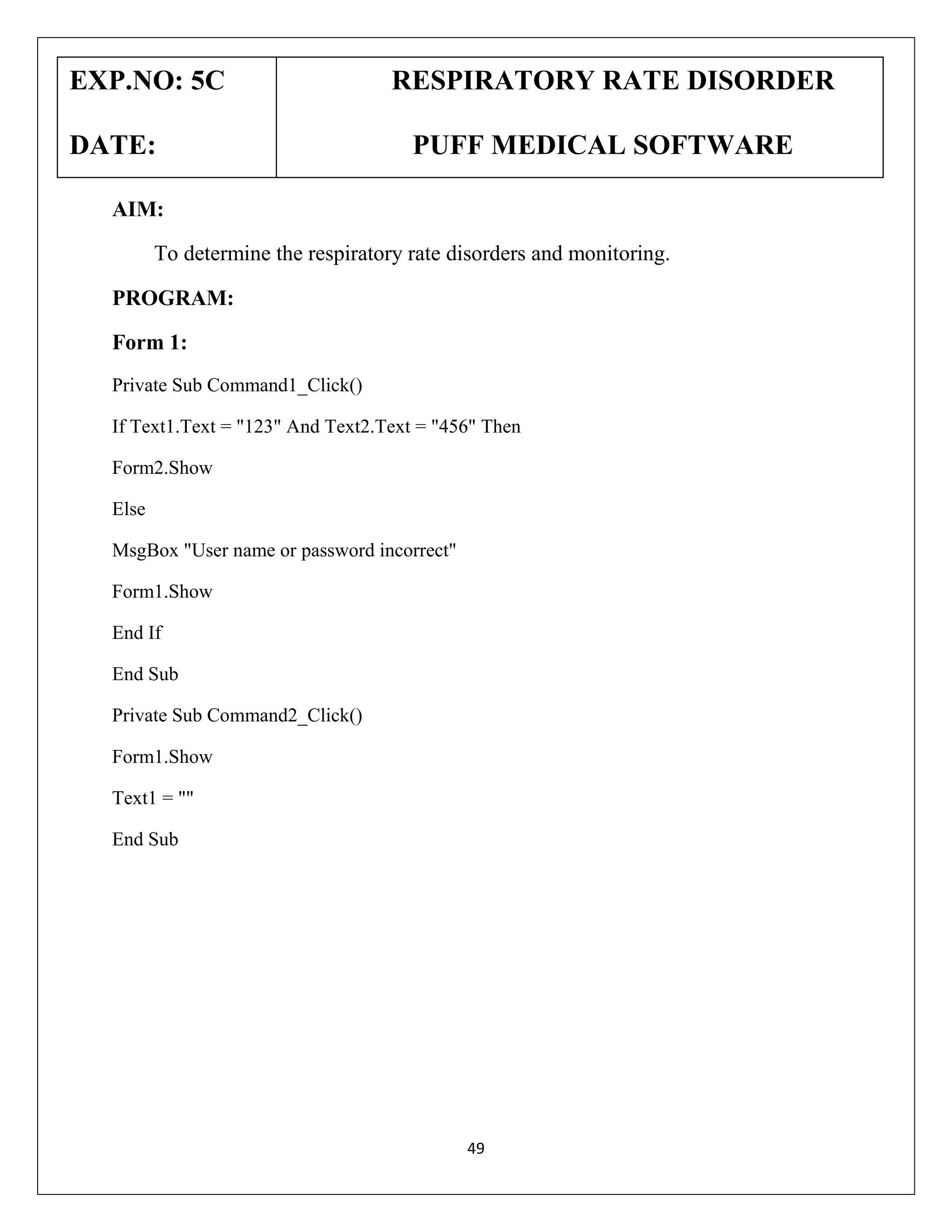
AIM:
To determine the respiratory rate disorders and monitoring.
PROGRAM:
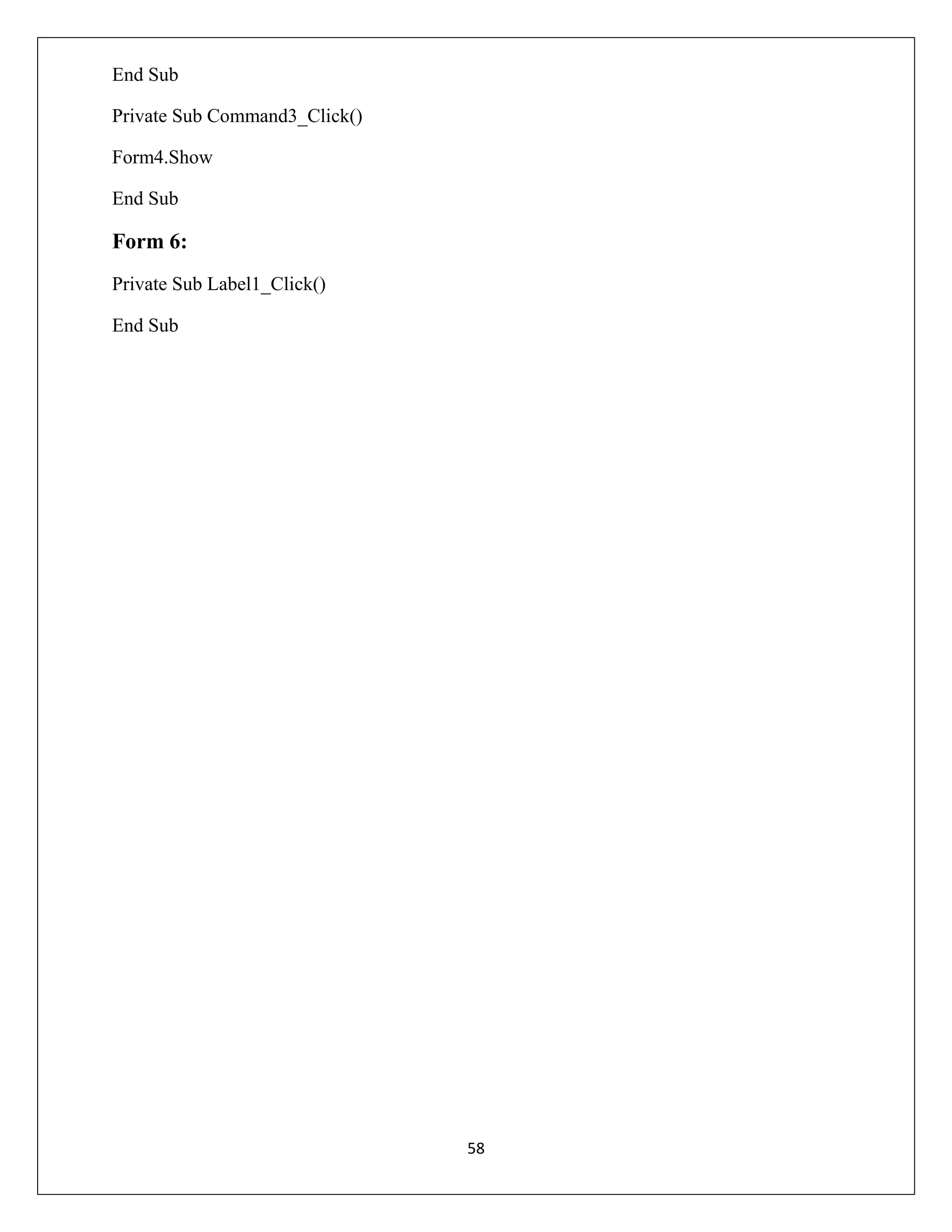
Form 1:
Private Sub Command1_Click()
If Text1.Text = "123" And Text2.Text = "456" Then
Form2.Show
Else
MsgBox "User name or password incorrect"
Form1.Show
End If
End Sub
Private Sub Command2_Click()
Form1.Show
Text1 = ""
End Sub

49
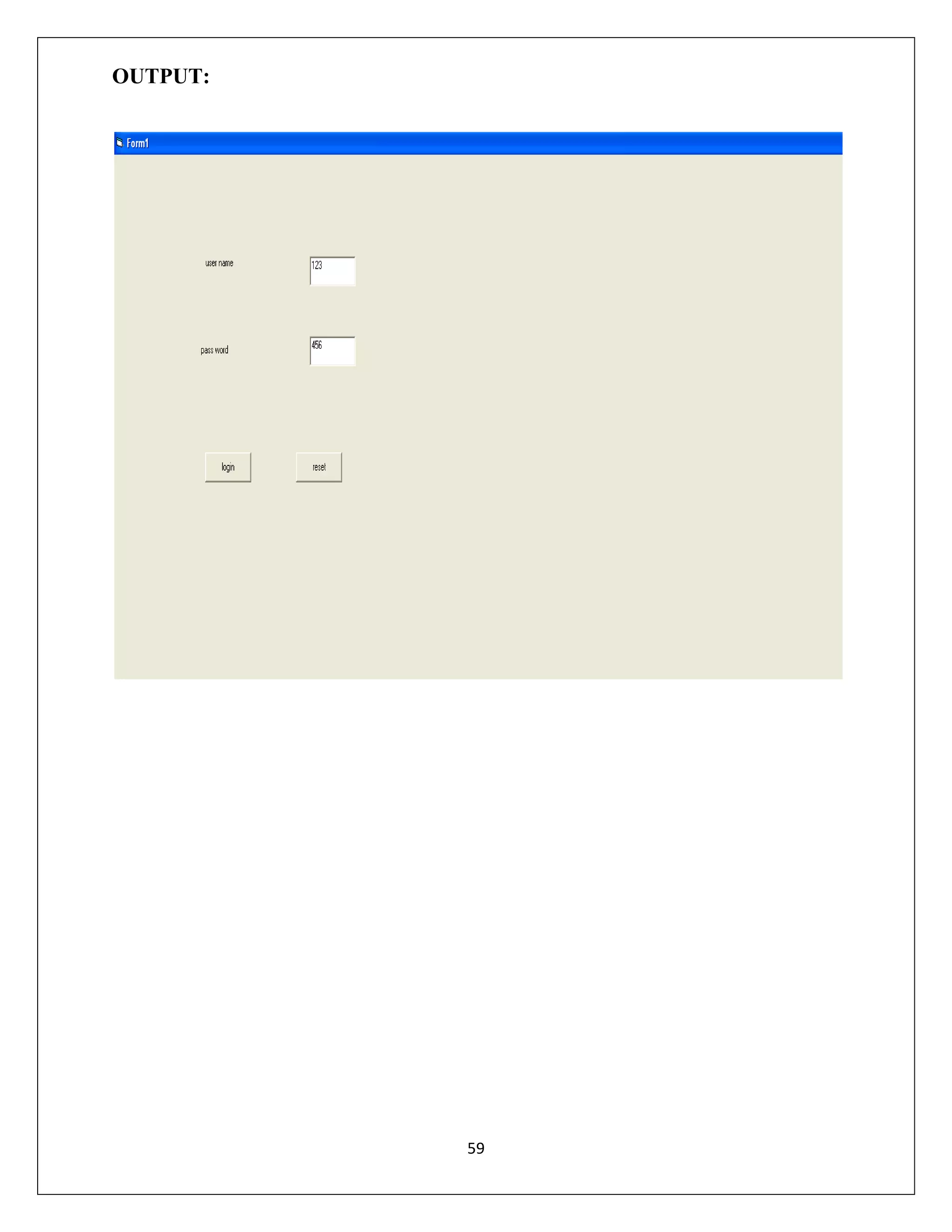
Form 2:
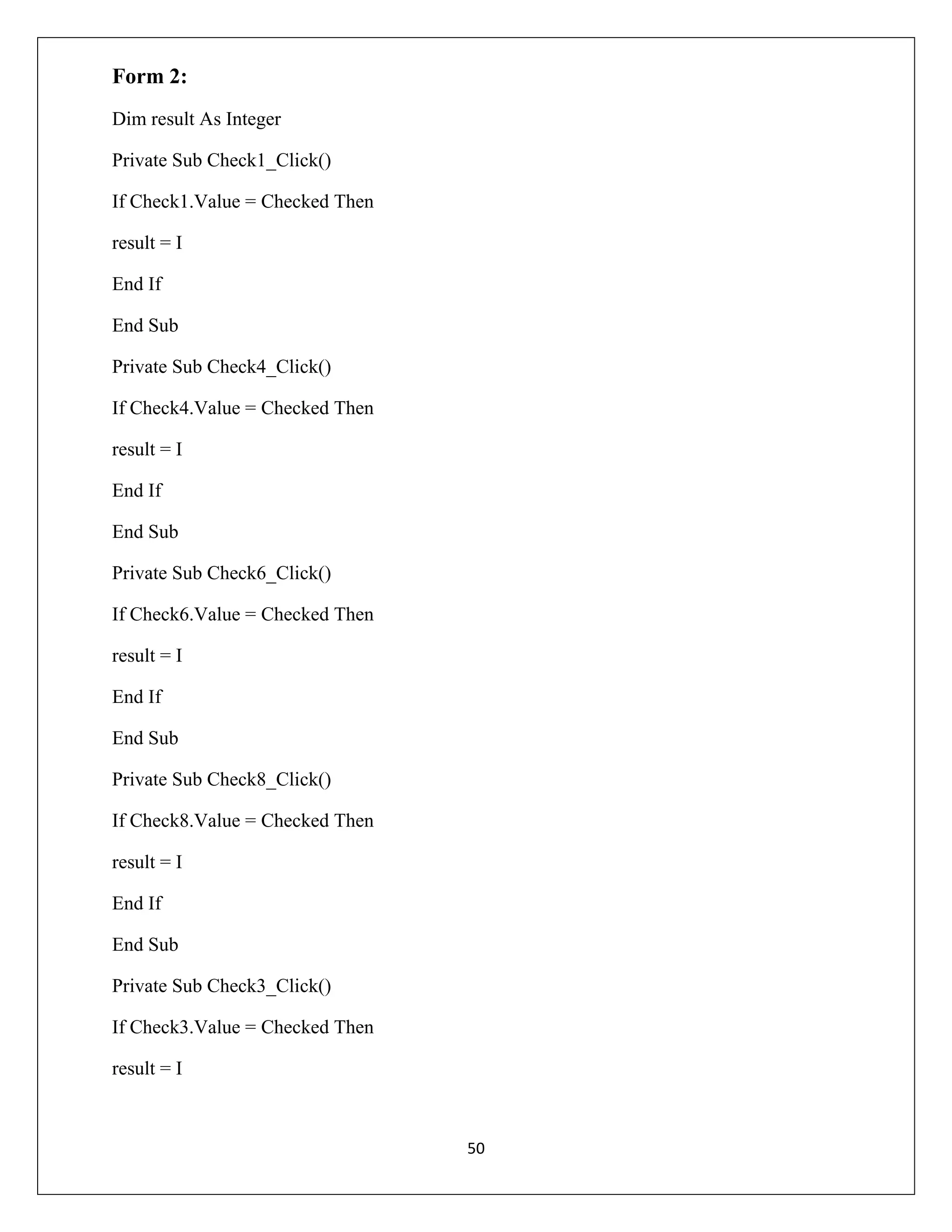
Dim result As Integer
Private Sub Check1_Click()
If Check1.Value = Checked Then
result = I
End If
End Sub
Private Sub Check4_Click()
If Check4.Value = Checked Then
result = I
End If
End Sub
Private Sub Check6_Click()
If Check6.Value = Checked Then
result = I
End If
End Sub
Private Sub Check8_Click()
If Check8.Value = Checked Then
result = I
End If
End Sub
Private Sub Check3_Click()
If Check3.Value = Checked Then
result = I

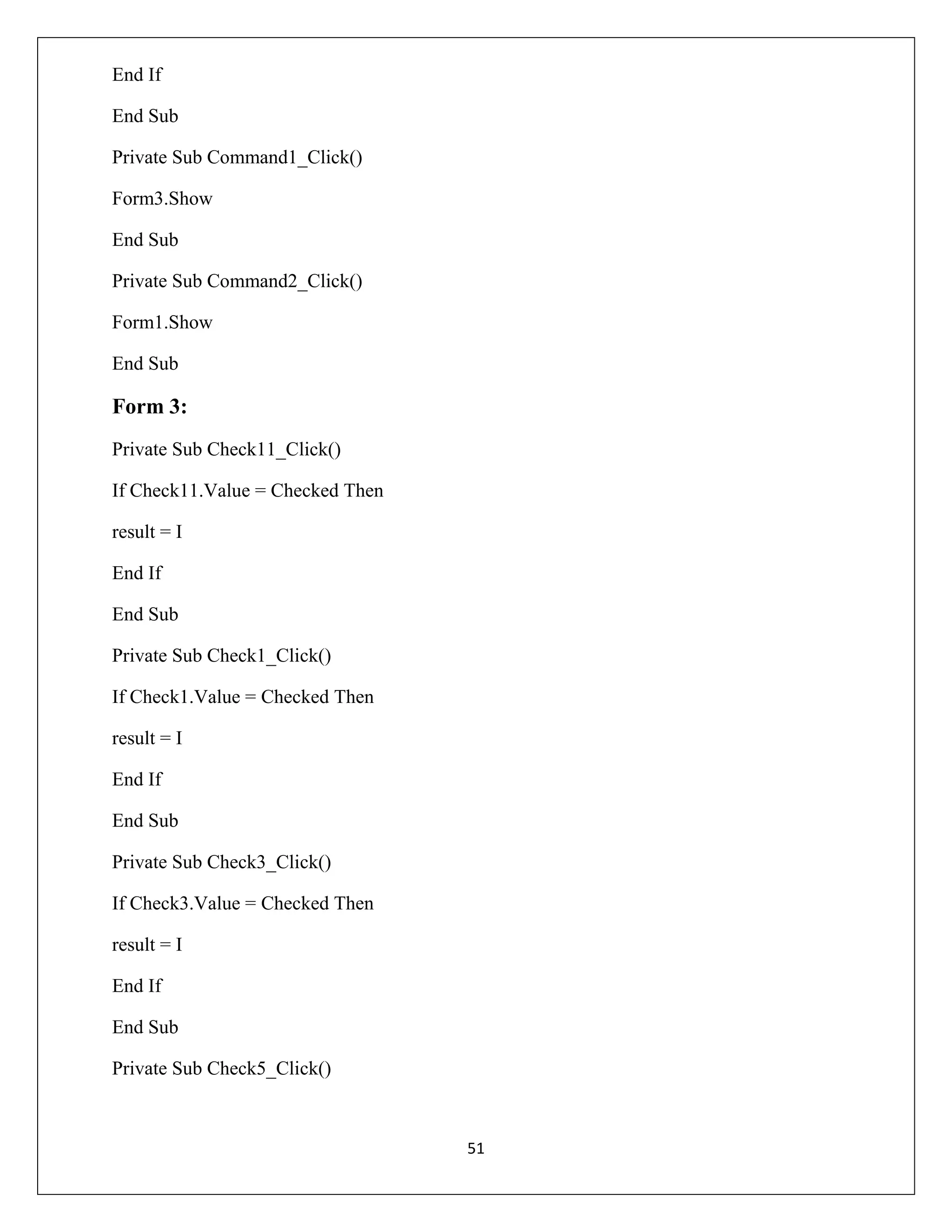
50
End If
End Sub
Private Sub Command1_Click()
Form3.Show
End Sub
Private Sub Command2_Click()
Form1.Show
End Sub

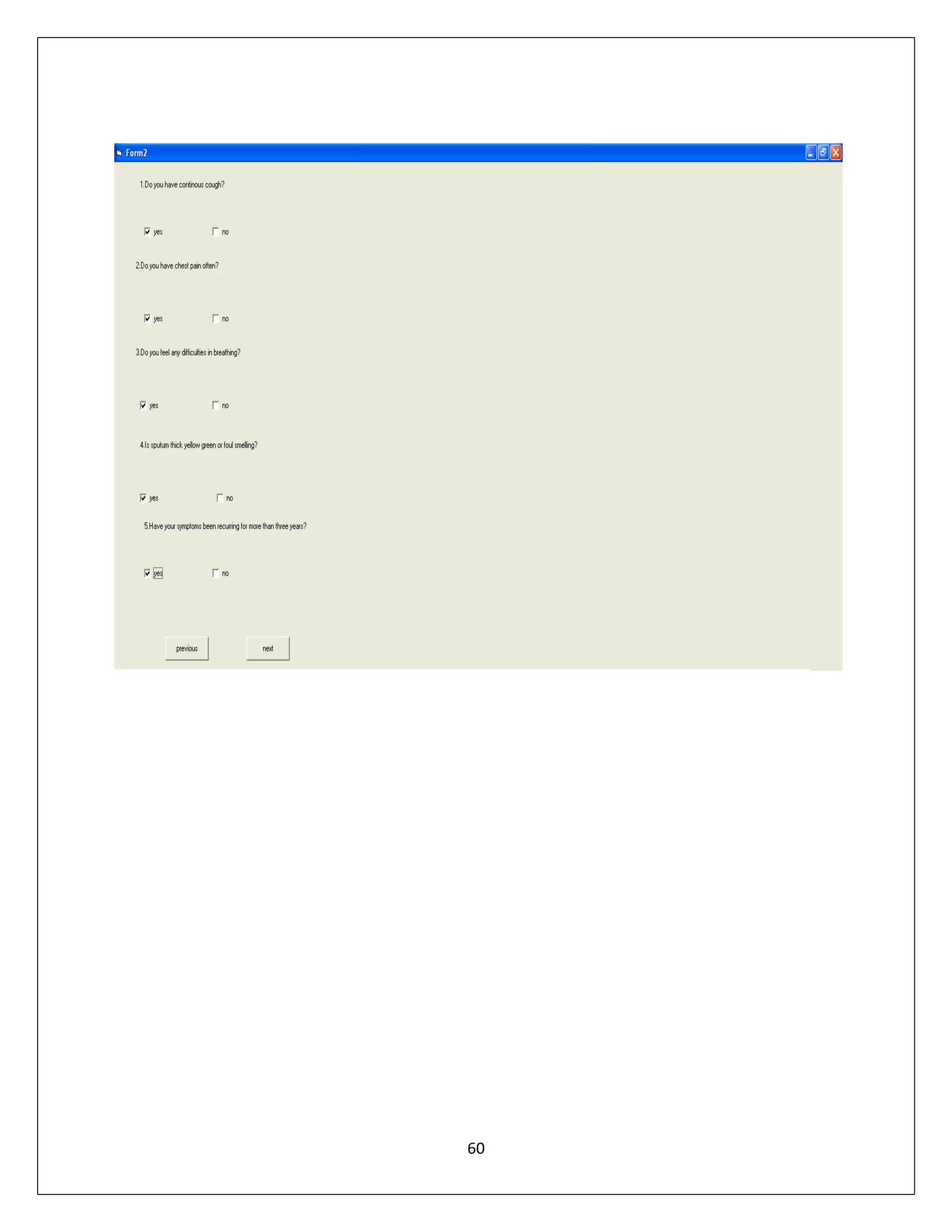
Form 3:
Private Sub Check11_Click()
If Check11.Value = Checked Then
result = I
End If
End Sub
Private Sub Check1_Click()
If Check1.Value = Checked Then
result = I
End If
End Sub
Private Sub Check3_Click()
If Check3.Value = Checked Then
result = I
End If
End Sub
Private Sub Check5_Click()

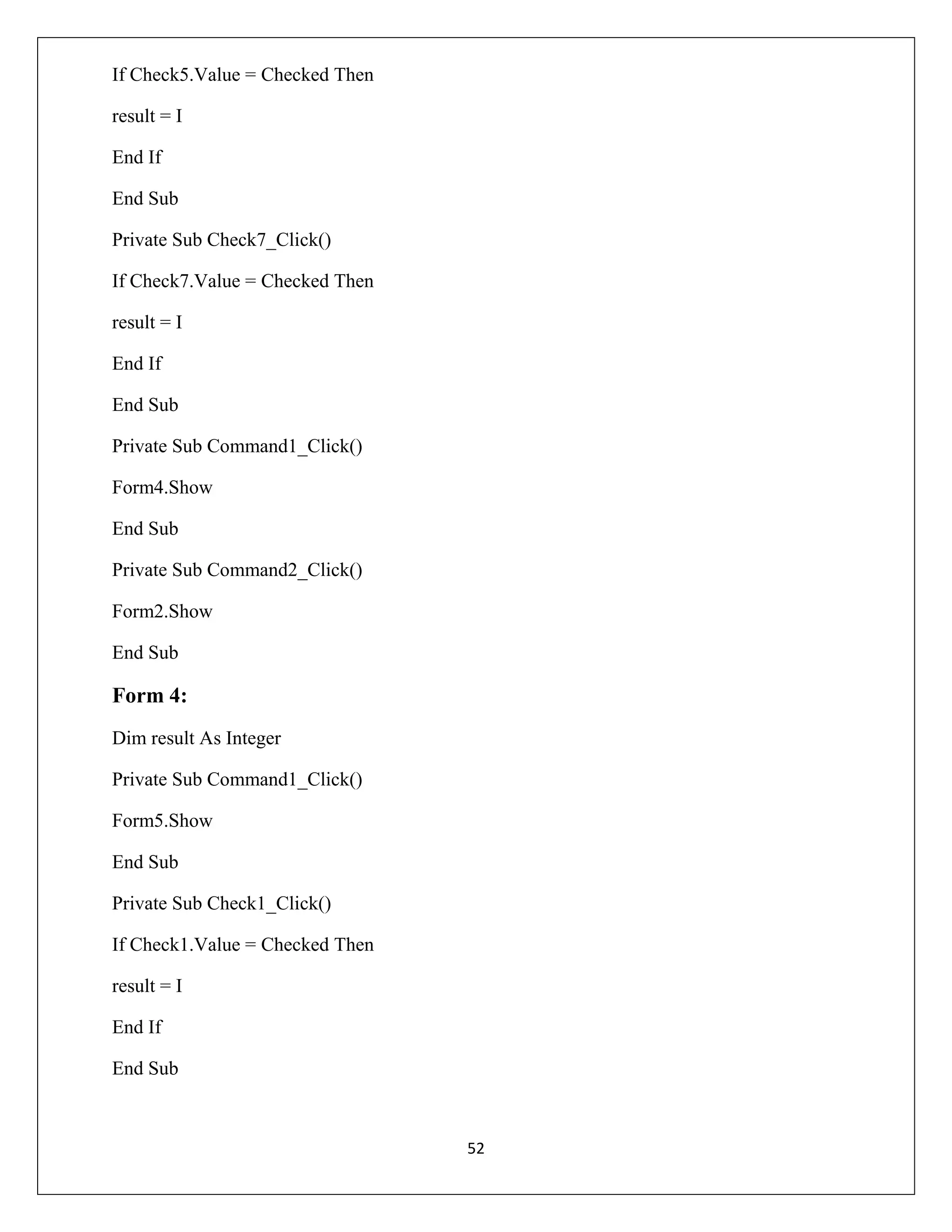
51
If Check5.Value = Checked Then
result = I
End If
End Sub
Private Sub Check7_Click()
If Check7.Value = Checked Then
result = I
End If
End Sub
Private Sub Command1_Click()
Form4.Show
End Sub
Private Sub Command2_Click()
Form2.Show
End Sub

Form 4:
Dim result As Integer
Private Sub Command1_Click()
Form5.Show
End Sub
Private Sub Check1_Click()
If Check1.Value = Checked Then
result = I
End If
End Sub

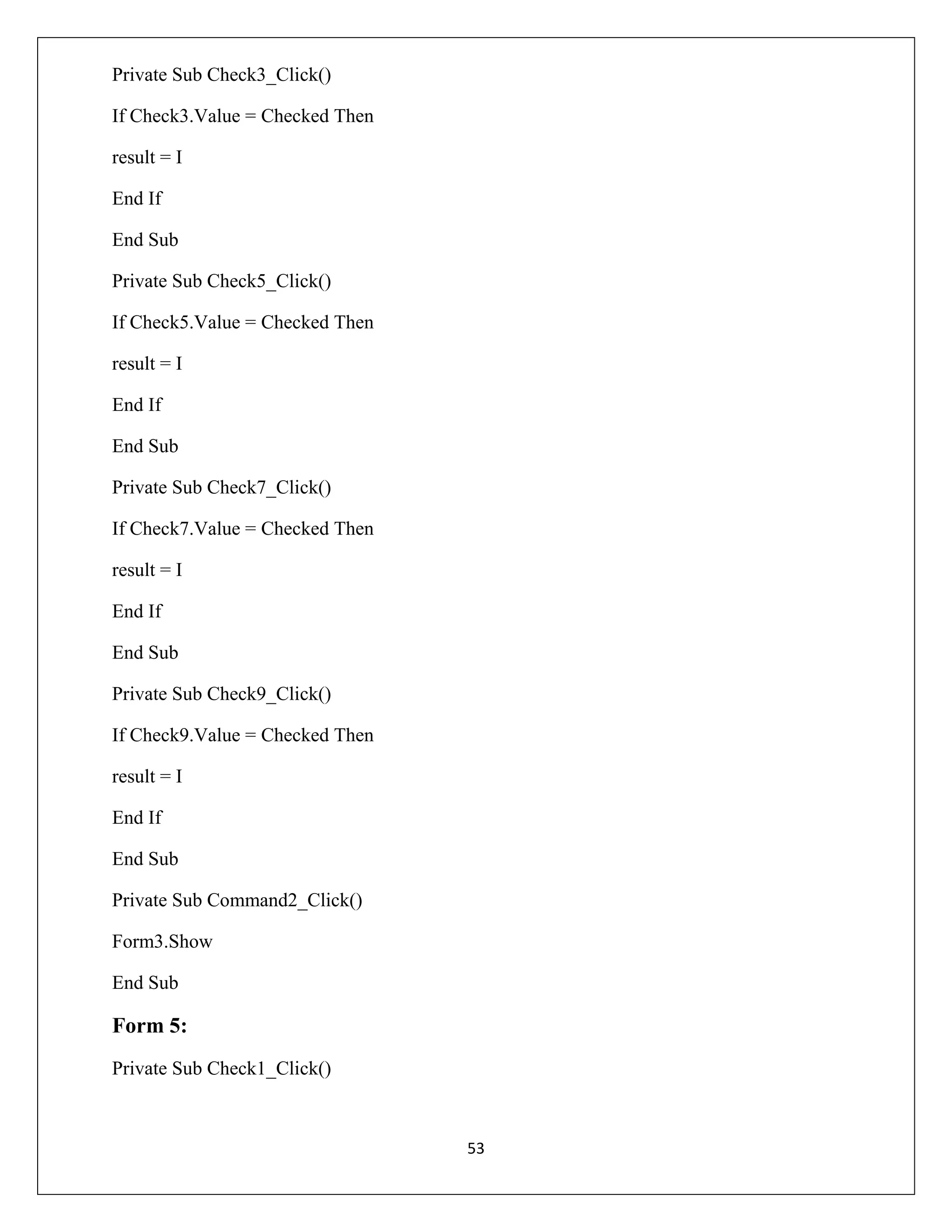
52
Private Sub Check3_Click()
If Check3.Value = Checked Then
result = I
End If
End Sub
Private Sub Check5_Click()
If Check5.Value = Checked Then
result = I
End If
End Sub
Private Sub Check7_Click()
If Check7.Value = Checked Then
result = I
End If
End Sub
Private Sub Check9_Click()
If Check9.Value = Checked Then
result = I
End If
End Sub
Private Sub Command2_Click()
Form3.Show
End Sub

Form 5:
Private Sub Check1_Click()

53
If Check1.Value = Checked Then
result = I
End If
End Sub
Private Sub Check3_Click()
If Check3.Value = Checked Then
result = I
End If
End Sub
Private Sub Check5_Click()
If Check5.Value = Checked Then
result = I
End If
End Sub
Private Sub Check7_Click()
If Check7.Value = Checked Then
result = I
End If
End Sub
Private Sub Check9_Click()
If Check9.Value = Checked Then
result = I
End If
End Sub
Private Sub Command1_Click()
I=0
54
'Form2
If Form2.Check1.Value = Checked Then
I=I+5
End If
If Form2.Check4.Value = Checked Then
I=I+5
End If
If Form2.Check6.Value = Checked Then
I=I+5
End If
If Form2.Check8.Value = Checked Then
I=I+5
End If
If Form2.Check3.Value = Checked Then
I=I+5
End If
I=0
'form3
If Form3.Check11.Value = Checked Then
I=I+5
End If
If Form3.Check1.Value = Checked Then
I=I+5
End If
If Form3.Check3.Value = Checked Then
I=I+5
55
End If
If Form3.Check5.Value = Checked Then
I=I+5
End If
If Form3.Check7.Value = Checked Then
I=I+5
End If
I=0
'form4
If Form4.Check1.Value = Checked Then
I=I+5
End If
If Form4.Check3.Value = Checked Then
I=I+5
End If
If Form4.Check5.Value = Checked Then
I=I+5
End If
If Form4.Check7.Value = Checked Then
I=I+5
End If
If Form4.Check9.Value = Checked Then
I=I+5
End If
I=0
'form5
56
If Form5.Check1.Value = Checked Then
I=I+5
End If
If Form5.Check3.Value = Checked Then
I=I+5
End If
If Form5.Check5.Value = Checked Then
I=I+5
End If
If Form5.Check7.Value = Checked Then
I=I+5
End If
If Form5.Check9.Value = Checked Then
I=I+5
End If
Text1.Text = I
End Sub
Private Sub Command2_Click()
If Val(Text1.Text) <= 10 Then
Form6.Label1.Caption = " YOU ARE SUFFERED FROM RESPIRATORY DISEASE "
Form6.Show
End If
If Val(Text1.Text) = 0 Then
Form6.Label.Caption = " YOU ARE ALL RIGHT "
Form6.Show
End If
57
End Sub
Private Sub Command3_Click()
Form4.Show
End Sub

Form 6:
Private Sub Label1_Click()
End Sub

58
OUTPUT:

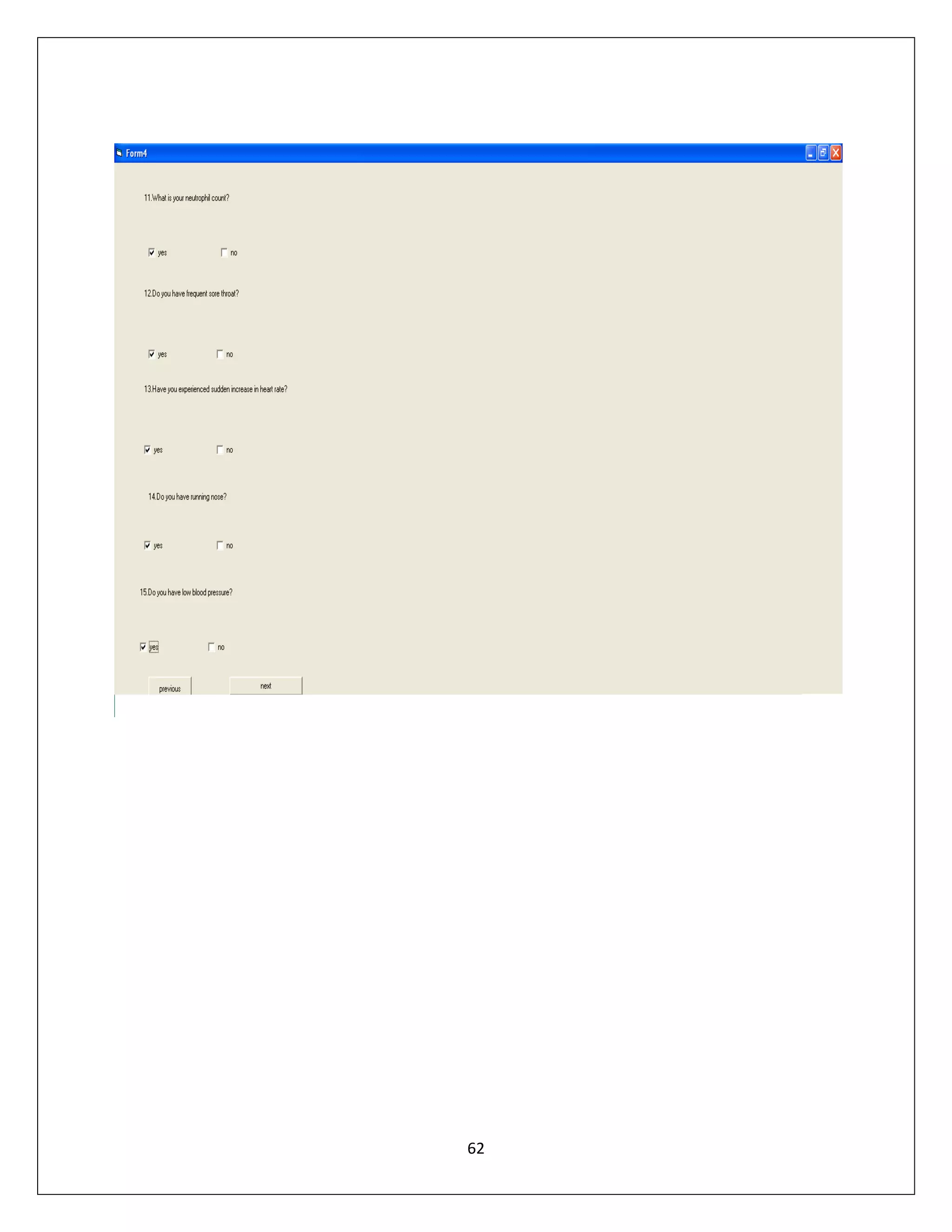
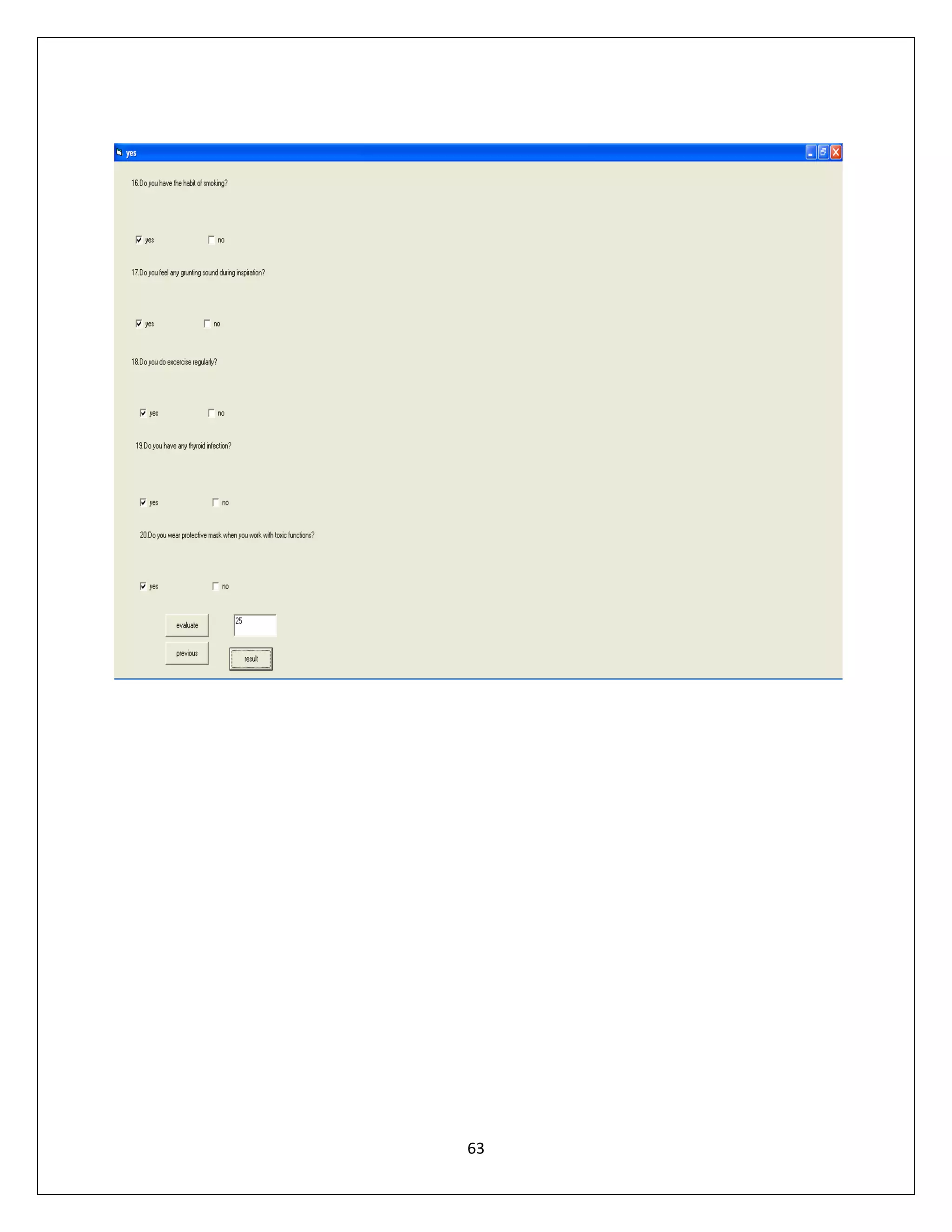
59
60
61
62
63
RESULT:
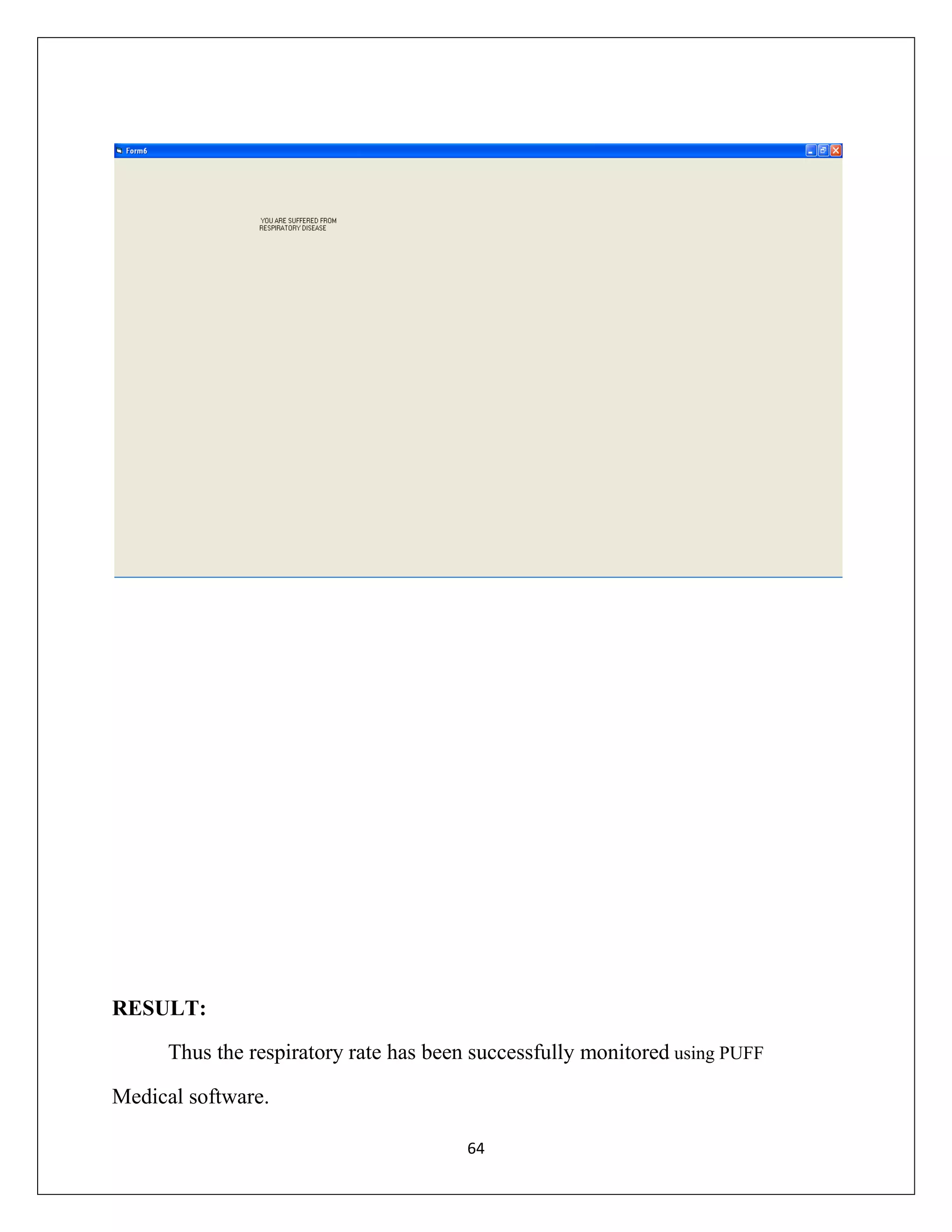
Thus the respiratory rate has been successfully monitored using PUFF
Medical software.
64

SIMULATION SOFTWARE LAB MANUAL - MEDICAL ELECTRONICS ENGINEERING BY PROF MUHAMMADU SATHIK RAJA

  • 1.
    SENGUNTHAR COLLEGE OFENGINEERING SATHINAICKANPALAYAM, KUMARAMANGALAM (PO), TIRUCHENGODE – 637205 Name:…………………………………………………………………………………………….... Branch: …MEDICAL ELECTRONICS ENGINEERING………Semester:……VIII………… Name of the laboratory: SIMULATION SOFTWARE LAB…………………………………. This is to certify that this is the bonafide record of work done by……………………………........ During the year 2013. University register No: Staff in – charge : Head of the Department Date: Submitted for the practical examination held at Sengunthar College of Engineering On …………………… INTERNAL EXAMINER EXTERNAL EXAMINER 1
  • 2.
    INDEX SL.NO DATE NAME OFTHE EXPERIMENT PAGE MARKS NO AWARED 1A HDP- 01 CORONARY RISK CALCULATION FOR DISEASED PATIENT 3 1B HDP- 01 CORONARY RISK CALCULATION FOR NORMAL PATIENT 5 1C HDP- 03 DEFIBRILLATOR USING SIMULINK 7 2 HOSPITAL MANAGEMENT SYSTEM - MYCIN 11 3 EPILEXIA - TEIRASIS MEDICAL SOFTWARE 27 4A STRESS OF STENT –ANSYS SOFTWARE 34 4B THERMAL CONDUCTIONANSYS SOFTWARE 37 5A BLOOD PRESSURE MEASUREMENT BY USING PUFF MEDICAL SOFTWARE 40 5B AMPLITUDE MODULATIONSIMULINK 43 5C RESPIRATORY RATE DISORDER- PUFF MEDICAL SOFTWARE 49 2 SIGNATURE
  • 3.
    EXP.NO: 1A HDP- 01CORONARY RISK CALCULATION DATE: FOR DISEASED PATIENT AIM: To evaluate cardio vascular risk in the patient with coronary heart disease. SOFTWARE:  Heart development program software.  Cardio vascular _risk _2software(doctorslongue.com) PROCEDURE:  Enter the data in to the form.  Then click compute.  Display the percentage of risk. THEORY: CORONARY HEART DISEASE Coronary heart disease is the narrowing or blockage of the coronary arteries, usually caused by atherosclerosis. Atherosclerosis is the buildup of cholesterol and fatty deposits(called plaques) on the inner walls of the arteries. These plaques can restrict blood flow to the heart muscle by physically clogging the artery or by causing abnormal artery tone and function. Without an adequate blood supply , the heart becomes starved of oxygen and the vital nutrients it needs to work properly. This can cause chest pain called angina. If the energy demands of the heart become much greater than its blood supply , a heart attack may occur. 3
  • 4.
    OUTPUT: RESULT: Thus the cardiovascular risk for coronary heart disease in patient has been checked. 4
  • 5.
    EXP.NO: 1B DATE: HDP- 02CORONARY RISK CALCULATION FOR NORMAL PATIENT AIM: To evaluate cardio vascular risk in the patient with coronary heart disease. SOFTWARE:  Heart development program software.  Cardio vascular _risk _2software(doctorslongue.com) PROCEDURE:  Enter the data in to the form.  Then click compute.  Display the percentage of risk. 5
  • 6.
    OUTPUT: RESULT: Thus the cardiovascularrisk for normal patient has been checked. 6
  • 7.
    EXP.NO: 1C HDP- 03DEFIBRILLATOR USING DATE: SIMULINK AIM: To design the defibrillator circuit by using simulink software for HDP. TOOLS REQUIRED:  MATLAB10  PC PROCEDURE:  Create a new model window by choosing “File”->”New”->”Model”  Drag the “AC voltage source “from “sim power system”->”electrical sources” to the model window.  Drag “linear transformer “ from “sim power system” to the model window.  Drag “diode” from “sim power system”->”power electronics” to the model window.  Drag “scope” block from “simulink”-> “sinks” to the model window.  Drag “workspace” block from “simulink”-> “sinks” to the model window.  Drag “product” from “simulink”-> “commonly used block” to the model window.  Click “simulation”-> “simulation parameters”.  Press “start simulation” to run the program.  Double click the “scope” 7
  • 8.
  • 9.
  • 10.
    RESULT: Thus the defibrillatorcircuit is designed by using simulink software for HDP. 10
  • 11.
    EXP.NO: 2 DATE: DEVELOP THEHOSPITAL MANAGEMENT SYSTEM BY MYCIN SOFTWARE AIM: To determine the inpatient and outpatient details. SOFTWARE: MYCIN- Hospital Management Software. PROCEDURE:  Enter the details of the patients.  Save the details in the databases.  Generate the report. Theory: MYCIN is one of the most widely known medical expert system. It contains number of rules developed by the physicians and surgeons. It is the program for advising the physician and treating the bacterial infection of the blood. It was the first large medical expert system that provides user the explanation and reasoning. MYCIN conducts a question and answer dialogue such as name, age , sex, infection area and the presence of specific symptoms relevant diagnosis of the disease and then it recommends certain course of anti biotics. MYCIN never compares the symptoms of two different patients. 11
  • 12.
    BLOCK DIAGRAM OFMYCIN: USER USER INTERFACE KNOWLEDGE BASE INTERFACE STRATEGY EXPERT SYSTEM BUILDING TOOLS DOMAIN EXPERT KNOWLEDGE ENGINEER 12
  • 13.
    FORM 1: LOGIN FORM: PrivateSub Command1_Click() If Text1.Text = "scew" And Text2.Text = "12345" Then Form2.Show Else MsgBox ("Enter the correct details and try again") Form1.Show End If End Sub Private Sub Command2_Click() Form1.Show Text1.Text = "" Text2.Text = "" End Sub FORM 2: INPATIENT DETAILS: Dim db As Database Dim rs As Recordset Private Sub Calendar1_Click() Text4.Text = Format(Calendar1, "dd-mm-yyyy") End Sub Private Sub Calendar2_Click() Text5.Text = Format(Calendar2, "dd-mm-yyyy") End Sub 13
  • 14.
    Private Sub Command1_Click() rs.AddNew rs("NAME")= Text1.Text rs("PATIENT ID") = Text2.Text rs("BLOOD GROUP") = Text3.Text rs("ADMIT DATE") = Text4.Text rs("DISCHARGE DATE") = Text5.Text rs("CONTACT NO") = Text6.Text rs("ADDRESS") = Text7.Text rs.Update MsgBox ("current database saved") End Sub Private Sub Command2_Click() Text1.Text = "" Text2.Text = "" Text3.Text = "" Text4.Text = "" Text5.Text = "" Text6.Text = "" Text7.Text = "" End Sub Private Sub Command3_Click() rs.Delete End Sub Private Sub Command4_Click() Form3.Show 14
  • 15.
    End Sub Private SubForm_Load() Set db = OpenDatabase("d:abiMSG.mdb") Set rs = db.OpenRecordset("INPATIENT") Calendar1.Visible = False Calendar2.Visible = False End Sub Private Sub Text4_GotFocus() Calendar1.Visible = True End Sub Private Sub Text4_LostFocus() Calendar1.Visible = False End Sub Private Sub Text5_GotFocus() Calendar2.Visible = True End Sub Private Sub Text5_LostFocus() Calendar2.Visible = False End Sub FORM 3: OUTPATIENT DATAILS: Dim db As Database Dim rs As Recordset Private Sub Calendar1_Click() Text3.Text = Format(Calendar1, "dd-mm-yyyy") End Sub 15
  • 16.
    Private Sub Command1_Click() rs.AddNew rs("NAME")= Text1.Text rs("PATIENT ID") = Text2.Text rs("CHECKUP DATE") = Text3.Text rs("DOCTOR NAME") = Text4.Text rs("ADDRESS") = Text5.Text rs("CONTACT NO") = Text6.Text rs.Update MsgBox ("current database saved") End Sub Private Sub Command2_Click() Form2.Show End Sub Private Sub Command3_Click() Form4.Show End Sub Private Sub Command4_Click() rs.Delete MsgBox ("current database deleted") Text1.Text = "" Text2.Text = "" Text3.Text = "" Text4.Text = "" Text5.Text = "" Text6.Text = "" 16
  • 17.
    End Sub Private SubCommand5_Click() Text1.Text = "" Text2.Text = "" Text3.Text = "" Text4.Text = "" Text5.Text = "" Text6.Text = "" End Sub Private Sub Form_Load() Set db = OpenDatabase("d:abimsg1.mdb") Set rs = db.OpenRecordset("OUTPATIENT") Calendar1.Visible = False End Sub Private Sub Text3_GotFocus() Calendar1.Visible = True End Sub Private Sub Text3_LostFocus() Calendar1.Visible = False End Sub FORM 4: INPATIENT BILLING: Dim db As Database Dim rs As Recordset Private Sub Calendar1_Click() 17
  • 18.
    Text3.Text = Format(Calendar1,"dd-mm-yyyy") End Sub Private Sub Calendar2_Click() Text4.Text = Format(Calendar2, "dd-mm-yyyy") End Sub Private Sub Command1_Click() rs.AddNew rs("NAME") = Text1.Text rs("PATIENT ID") = Text2.Text rs("ADMIT DATE") = Text3.Text rs("TODAYS DATE") = Text4.Text rs("DOCTORS CHARGES") = Text5.Text rs("TREATMENT CHARGES") = Text6.Text rs("ROOM CHARGE") = Text7.Text rs.Update MsgBox ("current database saved") End Sub Private Sub Command2_Click() Form3.Show End Sub Private Sub Command3_Click() Form5.Show End Sub Private Sub Command4_Click() rs.Delete MsgBox ("current database deleted") 18
  • 19.
    End Sub Private SubCommand5_Click() Val(Text8.Text) = Val(Text5.Text + Text6.Text + Text7.Text) End Sub Private Sub Command6_Click() Text1.Text = "" Text2.Text = "" Text3.Text = "" Text4.Text = "" Text5.Text = "" Text6.Text = "" Text7.Text = "" Text8.Text = "" End Sub Private Sub Form_Load() Set db = OpenDatabase("d:abimsg2.mdb") Set rs = db.OpenRecordset("IPBILLING") Calendar1.Visible = False Calendar2.Visible = False End Sub Private Sub Text3_GotFocus() Calendar1.Visible = True End Sub Private Sub Text3_LostFocus() Calendar1.Visible = False End Sub 19
  • 20.
    Private Sub Text4_GotFocus() Calendar2.Visible= True End Sub Private Sub Text4_LostFocus() Calendar2.Visible = False End FORM 5: OUTPATIENT BILLING: Dim db As Database Dim rs As Recordset Private Sub Command1_Click() rs.AddNew rs("NAME") = Text1.Text rs("PATIENT ID") = Text2.Text rs("ADDRESS") = Text3.Text rs("DOCTORS CHARGE") = Text4.Text rs.Update MsgBox ("current database saved") End Sub Private Sub Command2_Click() Form4.Show End Sub Private Sub Command3_Click() rs.Delete MsgBox ("current database deleted") 20
  • 21.
    End Sub Private SubCommand4_Click() End End Sub Private Sub Command5_Click() Val(Text6.Text) = Val(Text5.Text) End Sub Private Sub Command6_Click() Text1.Text = "" Text2.Text = "" Text3.Text = "" Text4.Text = "" Text5.Text = "" End Sub Private Sub Form_Load() Set db = OpenDatabase("d:abimsg3.mdb") Set rs = db.OpenRecordset("OPBILLING") End Sub 21
  • 22.
  • 23.
  • 24.
  • 25.
  • 26.
    RESULT: Thus the developmentof hospital management system by using MYCIN software was executed successfully. 26
  • 27.
    EXP.NO: 3 DATE: EPILEXIA OFBLIND PATIENT USING TEIRASIS MEDICAL SOFTWARE AIM: To determine the Epilexia of blind patient by TEIRASIS. HARDWARE:  Computer.  Printer.  Chart. SOFTWARE:  TEIRASIS medical software.  Printer software. THEORY: TEIRESIAS recognizes that some of the knowledge required for the knowledge base is inexact or rough and it succeeds in offering advice for its correction. It also provides method for extracting the best performance out of an expert system such as MYCIN. TEIRESIAS's approach is to make use of the expert's ability to correct incorrect or partially correct responses to common questions and then to focus the expert's reply TEIRESIAS fixes bugs by 1) Stopping the performance program when the human expert identifies an error; 2) Working backwards through the steps in the performance program that led to the error until the bug is found; 3) Helping the expert fix the bug by modifying the knowledge base 27
  • 28.
    TEIRESIAS's techniques forgenerating explanations are based upon two assumptions The two assumptions used are; 1) That a recapitulation of program actions can be an effective explanation as long as the correct level of detail is given 2) That there is some shared framework for viewing the program's actions that will make them understandable to the user. PROCEDURE:        Take one option. After selecting the condition enter data in the sheet. After that some other table will displayed. Then enter data into the next table. Then we will obtain the result. Then click compute. Probability of disease will display. 28
  • 29.
  • 30.
  • 31.
  • 32.
  • 33.
    RESULT: Thus the Epilexiaof a blind person was simulated & analysed successfully by using TERASIS medical software. 33
  • 34.
    EXP.NO: 4A STRESS OFSTENT DATE: ANSYS SIMULATION SOFTWARE AIM: To determine the stress analysis of stet using ANSYS Software. SOFTWARE USED: ANSYS VERSION-11 BOUNDARY CONDITIONS: Material properties: Young’s Modulus (Ex) = 2e5 PRXY = 0.3 Real constants: Area = 100 Izz = 0.0833 Height = 10 Force = 100 N Density = 7.86e-6 PROCEDURE STEP:1 Preference > Structural> OK STEP:2 1)Preprocessor > Element type > Add /Edit/Delete > Add > Beam 2D elastic 3 > OK 34
  • 35.
    2)Real constants >> Add /Edit/Delete > Add>Area> Izz = 0.0833>Total beam hight 10>OK 3)Material properties > Material models > structural>linear>elastic>isotropic>Ex=2e6>PRXY=0.3>density = 7.86e-6>OK 4)Modeling>create>key point>inactive CS>keypoint 1>0,0>keypont 2>1000,0>OK 5)modeling>create>line>straight line>OK 6)meshing>size controls>manual size>line>all line>edge length=100>OK 7)mesh>lines>pick all>OK STEP:3 1)solution>analysis type>new analysis>static 2)define load>apply>structural>displacement>on key point>fix keypoint 1 3)apply>structural>force/moment>on key point>select key point 2 >Fy>load value>100N 4)solve>current LS>OK STEP:4 1)General post processing > plot result DOF+under+edge 2)plot result>contour plot>nodal solution>DOF solution>displacement vector sum>OK 35
  • 36.
    OUTPUT: RESULT: Thus the givendrawing stress analysis was determined in distributed level 36
  • 37.
    EXP.NO: 4B DATE: THERMAL CONDUCTION ANYSYSSIMULATION SOFTWAR E AIM: To determine the temperature of given solid by using Ansys-11. PROBLEM DESCRIPTION: Length of the solid in 1 cm Height of the solid in 1 cm BOUNDARY CONDITIONS: Top is maintained at 500oc Outer solid are maintained at 100oc Thermal conductivity k= 10w/m2oc PROCEDURE: Step: 1 Preference > Structural > Ok Step: 2 1) Preprocessor > Element type > Add/Edit/Delete > Add > Solid quad 4 node 55 > Ok 2) Material properties > Material models > Thermal > Conductivity > Isentrophic > Kxx=10 3) Modeling > Create > Areas > Rectangle > By 2 Corners > x=0,y=0,width=1,height=1 4) Meshing > Size control > Manual size > Area > All areas=0.05 5) Mesh > Areas > Free > Pick all Step: 3 solution 1)solution > Analysis type > New analysis > Steady > State > Apply constraints 2)solution > Define loads > Apply > Thermal > Temperature > on lines 37
  • 38.
    3)Top edge ofthe horizondal lines 500oc 4)left,right,bottom surface 100oc 5)solve > currentls > Ok Step: 4 1)General post process > Plot result > Contoure plot > Nodal solution > Dof solution > Displacement vector sum > Ok 38
  • 39.
    OUTPUT: RESULT: Thus the temperaturedistribution of the given solid is determined. 39
  • 40.
    EXP.NO: 5A DATE: BLOOD PRESSUREMEASUREMENT BY USING PUFF MEDICAL SOFTWARE AIM: To measure blood pressure using systolic, diastolic and pulse value. SOFTWARE:  PUFF- Blood pressure software. PROCEDURE:     Enter systolic value. Enter the diastolic value. Enter the pulse rate. View the report. 40
  • 41.
  • 42.
    OUTPUT: RESULT: Thus the bloodpressure has been simulated & recorded by using PUFF software. 42
  • 43.
    EXP.NO: 5B DATE: AMPLITUDE MODULATION SIMULINKSOFTWARE AIM: To simulate the amplitude modulation and demodulation using simulink. TOOLS REQUIRED:  MATLAB  PC PROCEDURE:  Create a new model window by choosing file > new > model.  Drag sine wave block from simulink > source to the model window.  Drag scope block from simulink > sinks to the model window.  Left- press the mouse when the arrow becomes a single cross by moving the mouse near to the right side of “sine wave” ,keep left button pressed and move the single cross to the left side of scope.  Click simulation > simulation parameters.  Double click the sine wave and set the parameters.  Press start simulation to run the program.  Double click the scope.  To set the parameters of scope press parameters button on the display panel.  Right click on the scope ,then choose axes properties to set “Y” scales. 43
  • 44.
  • 45.
  • 46.
  • 47.
    FREQUENCY SPECTRUM OUTPUT-1 FREQUENCY SPECTRUM OUTPUT -2 47
  • 48.
    FREQUENCY SPECTRUM OUTPUT-3 RESULT: Thus the amplitude modulation and demodulation was simulated successfully using simulink. 48
  • 49.
    EXP.NO: 5C DATE: RESPIRATORY RATEDISORDER PUFF MEDICAL SOFTWARE AIM: To determine the respiratory rate disorders and monitoring. PROGRAM: Form 1: Private Sub Command1_Click() If Text1.Text = "123" And Text2.Text = "456" Then Form2.Show Else MsgBox "User name or password incorrect" Form1.Show End If End Sub Private Sub Command2_Click() Form1.Show Text1 = "" End Sub 49
  • 50.
    Form 2: Dim resultAs Integer Private Sub Check1_Click() If Check1.Value = Checked Then result = I End If End Sub Private Sub Check4_Click() If Check4.Value = Checked Then result = I End If End Sub Private Sub Check6_Click() If Check6.Value = Checked Then result = I End If End Sub Private Sub Check8_Click() If Check8.Value = Checked Then result = I End If End Sub Private Sub Check3_Click() If Check3.Value = Checked Then result = I 50
  • 51.
    End If End Sub PrivateSub Command1_Click() Form3.Show End Sub Private Sub Command2_Click() Form1.Show End Sub Form 3: Private Sub Check11_Click() If Check11.Value = Checked Then result = I End If End Sub Private Sub Check1_Click() If Check1.Value = Checked Then result = I End If End Sub Private Sub Check3_Click() If Check3.Value = Checked Then result = I End If End Sub Private Sub Check5_Click() 51
  • 52.
    If Check5.Value =Checked Then result = I End If End Sub Private Sub Check7_Click() If Check7.Value = Checked Then result = I End If End Sub Private Sub Command1_Click() Form4.Show End Sub Private Sub Command2_Click() Form2.Show End Sub Form 4: Dim result As Integer Private Sub Command1_Click() Form5.Show End Sub Private Sub Check1_Click() If Check1.Value = Checked Then result = I End If End Sub 52
  • 53.
    Private Sub Check3_Click() IfCheck3.Value = Checked Then result = I End If End Sub Private Sub Check5_Click() If Check5.Value = Checked Then result = I End If End Sub Private Sub Check7_Click() If Check7.Value = Checked Then result = I End If End Sub Private Sub Check9_Click() If Check9.Value = Checked Then result = I End If End Sub Private Sub Command2_Click() Form3.Show End Sub Form 5: Private Sub Check1_Click() 53
  • 54.
    If Check1.Value =Checked Then result = I End If End Sub Private Sub Check3_Click() If Check3.Value = Checked Then result = I End If End Sub Private Sub Check5_Click() If Check5.Value = Checked Then result = I End If End Sub Private Sub Check7_Click() If Check7.Value = Checked Then result = I End If End Sub Private Sub Check9_Click() If Check9.Value = Checked Then result = I End If End Sub Private Sub Command1_Click() I=0 54
  • 55.
    'Form2 If Form2.Check1.Value =Checked Then I=I+5 End If If Form2.Check4.Value = Checked Then I=I+5 End If If Form2.Check6.Value = Checked Then I=I+5 End If If Form2.Check8.Value = Checked Then I=I+5 End If If Form2.Check3.Value = Checked Then I=I+5 End If I=0 'form3 If Form3.Check11.Value = Checked Then I=I+5 End If If Form3.Check1.Value = Checked Then I=I+5 End If If Form3.Check3.Value = Checked Then I=I+5 55
  • 56.
    End If If Form3.Check5.Value= Checked Then I=I+5 End If If Form3.Check7.Value = Checked Then I=I+5 End If I=0 'form4 If Form4.Check1.Value = Checked Then I=I+5 End If If Form4.Check3.Value = Checked Then I=I+5 End If If Form4.Check5.Value = Checked Then I=I+5 End If If Form4.Check7.Value = Checked Then I=I+5 End If If Form4.Check9.Value = Checked Then I=I+5 End If I=0 'form5 56
  • 57.
    If Form5.Check1.Value =Checked Then I=I+5 End If If Form5.Check3.Value = Checked Then I=I+5 End If If Form5.Check5.Value = Checked Then I=I+5 End If If Form5.Check7.Value = Checked Then I=I+5 End If If Form5.Check9.Value = Checked Then I=I+5 End If Text1.Text = I End Sub Private Sub Command2_Click() If Val(Text1.Text) <= 10 Then Form6.Label1.Caption = " YOU ARE SUFFERED FROM RESPIRATORY DISEASE " Form6.Show End If If Val(Text1.Text) = 0 Then Form6.Label.Caption = " YOU ARE ALL RIGHT " Form6.Show End If 57
  • 58.
    End Sub Private SubCommand3_Click() Form4.Show End Sub Form 6: Private Sub Label1_Click() End Sub 58
  • 59.
  • 60.
  • 61.
  • 62.
  • 63.
  • 64.
    RESULT: Thus the respiratoryrate has been successfully monitored using PUFF Medical software. 64