InstructionalInstructional
Softwares:Softwares:
SimulationsSimulations
Group 3
Ayala, de Leon, Lao,
Legaspi, Tiongson, Villar
Simulation, through the use of simulation
software, is the science of creating
statistically accurate models to represent
the behaviour of real life systems in
order to subject them to predictive
experimentation.
These experiments or scenarios can then
enable 'what if?' questions to be
answered without risk or disturbance to
the real life system.
DefinitionDefinition
TypesTypes
In academic settings, simulation software is used in
application areas such as :
agriculture, business, communications, defense,
health, manufacturing, oil terminals, service, traffic,
and waste processing.
In industrial settings, the application areas include:
business processes, communications, compiler
networks, customer service, distribution,
manufacturing, packing halls, repair, statistical
sampling in surveys, and stock control.
Simulations made for entertainment would form
another category in this hierarchy.
Criteria for SelectionCriteria for Selection
●easy to use
●can be accessed by multiple
people simultaneously
●has all of the features required by
the users
●reasonably priced
Advantages and DisadvantagesAdvantages and Disadvantages
Advantages
●Enjoyable, motivating activity
●Element of reality is compatible with principles of
constructivism
●Enhances appreciation of the more subtle aspects
of a concept/principle
●Promotes critical thinking and evaluative thinking
Disadvantages
●Preparation time
●Cost can be an issue
●Assessment is more complex than some
traditional teaching methods
Ways to UseWays to Use
The practice mode is one where simulation users
are first exposed to a body of knowledge
through traditional instruction and then asked to
apply that knowledge during tasks presented in
the simulation.
In the presentation mode, the simulation is
meant to be a source of both instruction and
practice opportunities for the student. The
simulation itself is presented to students in
either a pure form (no guidance) or a hybrid
(some guidance)
GuidelinesGuidelines
Ensure that students understand the procedures before
beginning. It improves efficacy if the students can enjoy
uninterrupted participation. Frustration can arise with
too many uncertainties. This will be counter productive.
Try to anticipate questions before they are asked. The
pace of some simulations is quick and the sense of
reality is best maintained with ready responses. Monitor
student progress.
Know what you wish to accomplish. Many simulations
can have more than one instructional goal. Developing
a rubric for evaluation is a worthwhile step. If
appropriate, students should be made aware of the
specific outcomes expected of them.
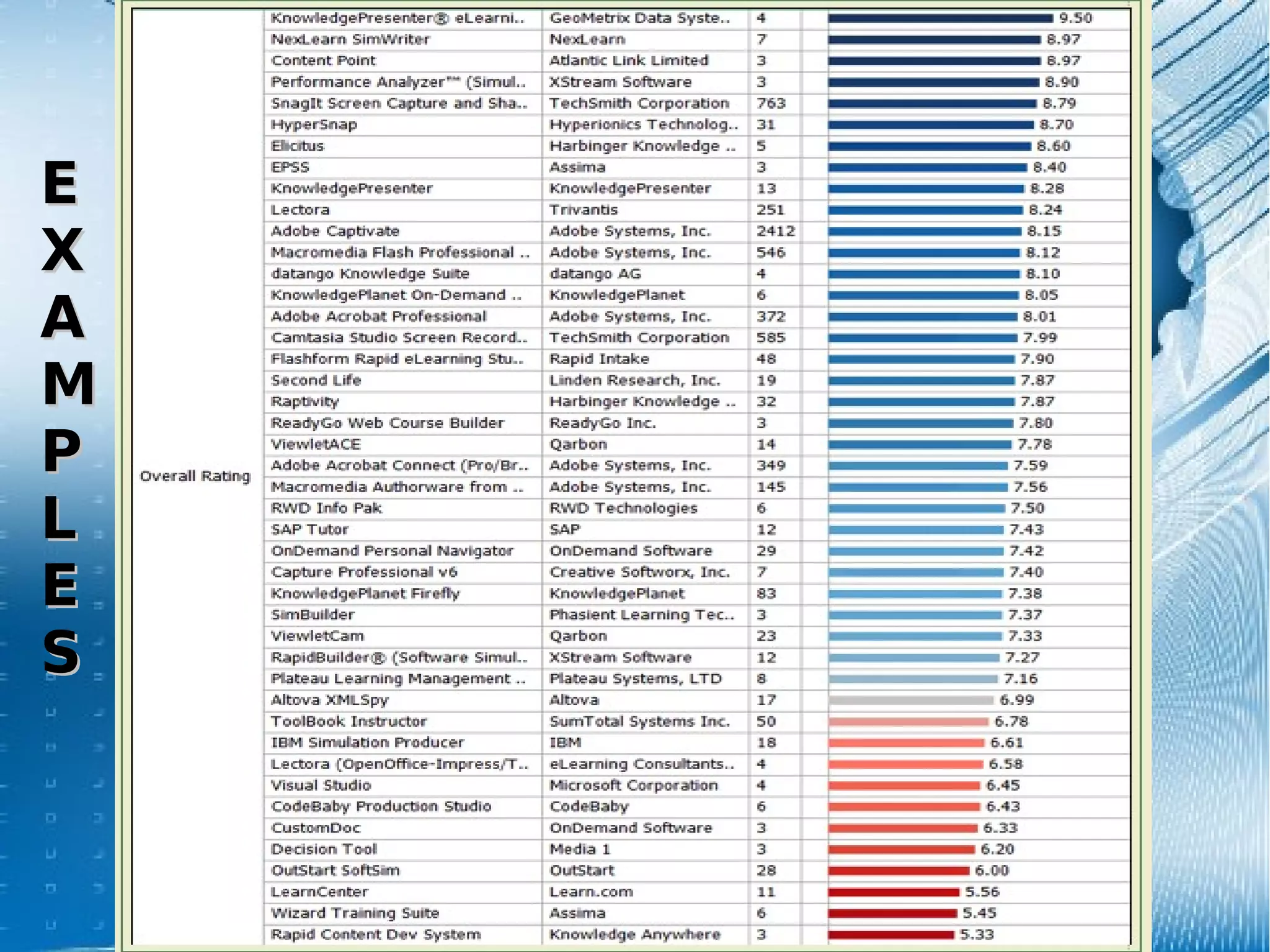
ExamplesExamples
EE
XX
AA
MM
PP
LL
EE
SS
ReferencesReferences
Brown, J. (2006). The use of instructional simulations to support classroom
teaching: a crisis communication case study. Journal of Educational Multimedia
and Hypermedia. Retrieved from:
http://www.thefreelibrary.com/The+use+of+instructional+simulations+to+support+
Elizabeth, M. (2010, September). What Are The Different Types of Simulation
Software?, from
http://www.wisegeek.com/what-are-the-different-types-of-simulation-software.htm
Karrer, T. (2006, March). Re: Software Simulation Tools: eLearning Technology.
Message posted to
http://elearningtech.blogspot.com/2006/03/software-simulation-elearning-w-links.htm
Kumar, D.P. (2009, July 20). Simulations: Real life situation teaching method.
Retrieved from
http://www.saching.com/Article/Simulations--Real-life-situation-teaching-method/3181
Lanner (2010). Simulation Software Explained. Retrieved from
http://www.lanner.com/en/simulation-explained.cfm
Saskatoon Public Schools. (2009). Instructional strategies online. Retrieved
from http://olc.spsd.sk.ca/de/pd/instr/strats/simul/index.html.
For more information (that is
too long to include in 10
slides...)
See:
Alaa,S. (2010, February). Instructional simulations
[Powerpoint slides]. Retrieved from
http://www.slideshare.net/alaasadik/simulationppt-3372399.

Simulation Software Educ 190-Group 3

  • 1.
  • 2.
    Simulation, through theuse of simulation software, is the science of creating statistically accurate models to represent the behaviour of real life systems in order to subject them to predictive experimentation. These experiments or scenarios can then enable 'what if?' questions to be answered without risk or disturbance to the real life system. DefinitionDefinition
  • 3.
    TypesTypes In academic settings,simulation software is used in application areas such as : agriculture, business, communications, defense, health, manufacturing, oil terminals, service, traffic, and waste processing. In industrial settings, the application areas include: business processes, communications, compiler networks, customer service, distribution, manufacturing, packing halls, repair, statistical sampling in surveys, and stock control. Simulations made for entertainment would form another category in this hierarchy.
  • 4.
    Criteria for SelectionCriteriafor Selection ●easy to use ●can be accessed by multiple people simultaneously ●has all of the features required by the users ●reasonably priced
  • 5.
    Advantages and DisadvantagesAdvantagesand Disadvantages Advantages ●Enjoyable, motivating activity ●Element of reality is compatible with principles of constructivism ●Enhances appreciation of the more subtle aspects of a concept/principle ●Promotes critical thinking and evaluative thinking Disadvantages ●Preparation time ●Cost can be an issue ●Assessment is more complex than some traditional teaching methods
  • 6.
    Ways to UseWaysto Use The practice mode is one where simulation users are first exposed to a body of knowledge through traditional instruction and then asked to apply that knowledge during tasks presented in the simulation. In the presentation mode, the simulation is meant to be a source of both instruction and practice opportunities for the student. The simulation itself is presented to students in either a pure form (no guidance) or a hybrid (some guidance)
  • 7.
    GuidelinesGuidelines Ensure that studentsunderstand the procedures before beginning. It improves efficacy if the students can enjoy uninterrupted participation. Frustration can arise with too many uncertainties. This will be counter productive. Try to anticipate questions before they are asked. The pace of some simulations is quick and the sense of reality is best maintained with ready responses. Monitor student progress. Know what you wish to accomplish. Many simulations can have more than one instructional goal. Developing a rubric for evaluation is a worthwhile step. If appropriate, students should be made aware of the specific outcomes expected of them.
  • 8.
  • 9.
    ReferencesReferences Brown, J. (2006).The use of instructional simulations to support classroom teaching: a crisis communication case study. Journal of Educational Multimedia and Hypermedia. Retrieved from: http://www.thefreelibrary.com/The+use+of+instructional+simulations+to+support+ Elizabeth, M. (2010, September). What Are The Different Types of Simulation Software?, from http://www.wisegeek.com/what-are-the-different-types-of-simulation-software.htm Karrer, T. (2006, March). Re: Software Simulation Tools: eLearning Technology. Message posted to http://elearningtech.blogspot.com/2006/03/software-simulation-elearning-w-links.htm Kumar, D.P. (2009, July 20). Simulations: Real life situation teaching method. Retrieved from http://www.saching.com/Article/Simulations--Real-life-situation-teaching-method/3181 Lanner (2010). Simulation Software Explained. Retrieved from http://www.lanner.com/en/simulation-explained.cfm Saskatoon Public Schools. (2009). Instructional strategies online. Retrieved from http://olc.spsd.sk.ca/de/pd/instr/strats/simul/index.html.
  • 10.
    For more information(that is too long to include in 10 slides...) See: Alaa,S. (2010, February). Instructional simulations [Powerpoint slides]. Retrieved from http://www.slideshare.net/alaasadik/simulationppt-3372399.