Synthesis and Simulation
Design Guide


UG626 (v 11.4) December 2, 2009
Xilinx Trademarks and Copyright Information


Xilinx is disclosing this user guide, manual, release note, and/or specification (the “Documentation”) to you
solely for use in the development of designs to operate with Xilinx hardware devices. You may not reproduce,
distribute, republish, download, display, post, or transmit the Documentation in any form or by any means
including, but not limited to, electronic, mechanical, photocopying, recording, or otherwise, without the prior
written consent of Xilinx. Xilinx expressly disclaims any liability arising out of your use of the Documentation.
Xilinx reserves the right, at its sole discretion, to change the Documentation without notice at any time. Xilinx
assumes no obligation to correct any errors contained in the Documentation, or to advise you of any corrections
or updates. Xilinx expressly disclaims any liability in connection with technical support or assistance that may be
provided to you in connection with the Information.
THE DOCUMENTATION IS DISCLOSED TO YOU “AS-IS” WITH NO WARRANTY OF ANY KIND. XILINX
MAKES NO OTHER WARRANTIES, WHETHER EXPRESS, IMPLIED, OR STATUTORY, REGARDING
THE DOCUMENTATION, INCLUDING ANY WARRANTIES OF MERCHANTABILITY, FITNESS FOR A
PARTICULAR PURPOSE, OR NONINFRINGEMENT OF THIRD-PARTY RIGHTS. IN NO EVENT WILL
XILINX BE LIABLE FOR ANY CONSEQUENTIAL, INDIRECT, EXEMPLARY, SPECIAL, OR INCIDENTAL
DAMAGES, INCLUDING ANY LOSS OF DATA OR LOST PROFITS, ARISING FROM YOUR USE OF THE
DOCUMENTATION.
© Copyright 2002-2009 Xilinx Inc. All Rights Reserved. XILINX, the Xilinx logo, the Brand Window and other
designated brands included herein are trademarks of Xilinx, Inc. All other trademarks are the property of their
respective owners. The PowerPC name and logo are registered trademarks of IBM Corp., and used under license.
All other trademarks are the property of their respective owners.


                                                                          Synthesis and Simulation Design Guide
2                                                www.xilinx.com                 UG626 (v 11.4) December 2, 2009
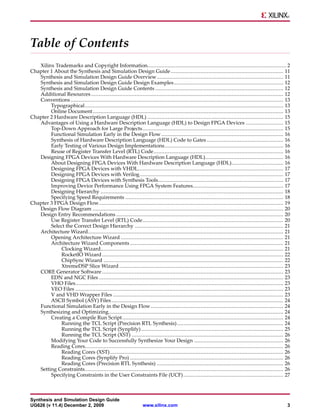
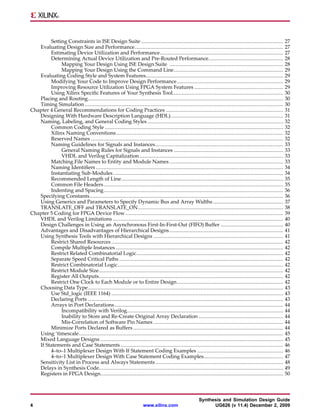
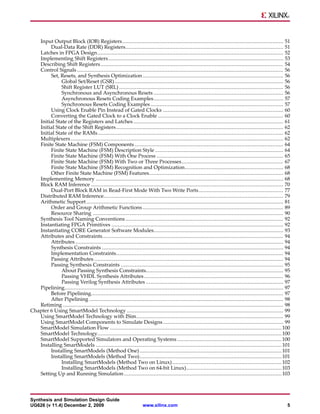
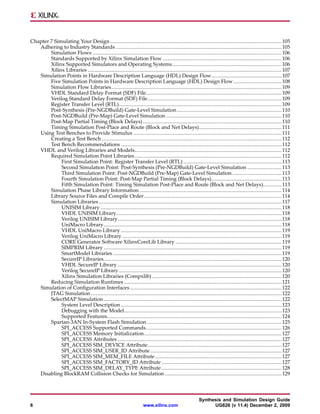
Table of Contents
   Xilinx Trademarks and Copyright Information......................................................................................... 2
Chapter 1 About the Synthesis and Simulation Design Guide ........................................................................ 11
   Synthesis and Simulation Design Guide Overview................................................................................. 11
   Synthesis and Simulation Design Guide Design Examples ...................................................................... 12
   Synthesis and Simulation Design Guide Contents .................................................................................. 12
   Additional Resources ........................................................................................................................... 12
   Conventions ........................................................................................................................................ 13
        Typographical............................................................................................................................... 13
        Online Document .......................................................................................................................... 13
Chapter 2 Hardware Description Language (HDL) ....................................................................................... 15
   Advantages of Using a Hardware Description Language (HDL) to Design FPGA Devices ........................ 15
        Top-Down Approach for Large Projects .......................................................................................... 15
        Functional Simulation Early in the Design Flow .............................................................................. 16
        Synthesis of Hardware Description Language (HDL) Code to Gates ................................................. 16
        Early Testing of Various Design Implementations............................................................................ 16
        Reuse of Register Transfer Level (RTL) Code................................................................................... 16
   Designing FPGA Devices With Hardware Description Language (HDL).................................................. 16
        About Designing FPGA Devices With Hardware Description Language (HDL)................................. 16
        Designing FPGA Devices with VHDL............................................................................................. 17
        Designing FPGA Devices with Verilog............................................................................................ 17
        Designing FPGA Devices with Synthesis Tools................................................................................ 17
        Improving Device Performance Using FPGA System Features.......................................................... 17
        Designing Hierarchy ..................................................................................................................... 18
        Specifying Speed Requirements ..................................................................................................... 18
Chapter 3 FPGA Design Flow...................................................................................................................... 19
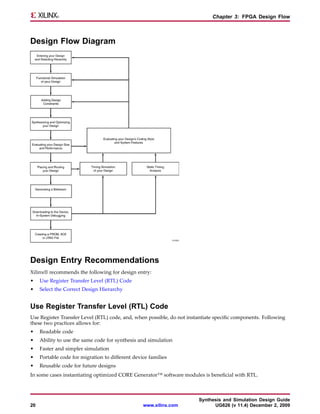
   Design Flow Diagram .......................................................................................................................... 20
   Design Entry Recommendations ........................................................................................................... 20
        Use Register Transfer Level (RTL) Code.......................................................................................... 20
        Select the Correct Design Hierarchy ............................................................................................... 21
   Architecture Wizard............................................................................................................................. 21
        Opening Architecture Wizard ........................................................................................................ 21
        Architecture Wizard Components .................................................................................................. 21
             Clocking Wizard..................................................................................................................... 21
             RocketIO Wizard .................................................................................................................... 22
             ChipSync Wizard ................................................................................................................... 22
             XtremeDSP Slice Wizard ......................................................................................................... 23
   CORE Generator Software .................................................................................................................... 23
        EDN and NGC Files ...................................................................................................................... 23
        VHO Files..................................................................................................................................... 23
        VEO Files ..................................................................................................................................... 23
        V and VHD Wrapper Files ............................................................................................................. 23
        ASCII Symbol (ASY) Files .............................................................................................................. 24
   Functional Simulation Early in the Design Flow..................................................................................... 24
   Synthesizing and Optimizing................................................................................................................ 24
        Creating a Compile Run Script ....................................................................................................... 24
             Running the TCL Script (Precision RTL Synthesis) .................................................................... 24
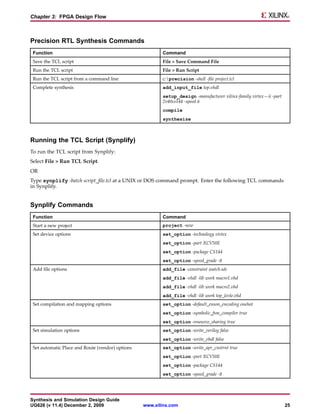
             Running the TCL Script (Synplify) ........................................................................................... 25
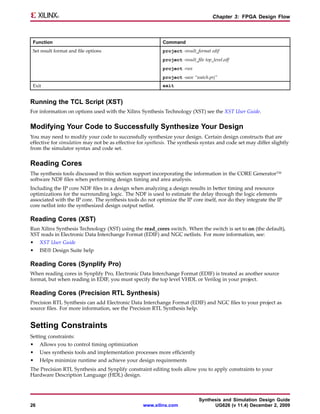
             Running the TCL Script (XST) ................................................................................................. 26
        Modifying Your Code to Successfully Synthesize Your Design ......................................................... 26
        Reading Cores............................................................................................................................... 26
             Reading Cores (XST)............................................................................................................... 26
             Reading Cores (Synplify Pro) .................................................................................................. 26
             Reading Cores (Precision RTL Synthesis) ................................................................................. 26
   Setting Constraints............................................................................................................................... 26
        Specifying Constraints in the User Constraints File (UCF) ................................................................ 27


Synthesis and Simulation Design Guide
UG626 (v 11.4) December 2, 2009                                   www.xilinx.com                                                                        3
Setting Constraints in ISE Design Suite ...........................................................................................              27
   Evaluating Design Size and Performance...............................................................................................                 27
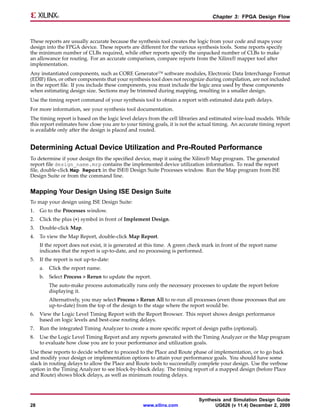
        Estimating Device Utilization and Performance...............................................................................                     27
        Determining Actual Device Utilization and Pre-Routed Performance................................................                                 28
             Mapping Your Design Using ISE Design Suite .........................................................................                        28
             Mapping Your Design Using the Command Line......................................................................                            29
   Evaluating Coding Style and System Features........................................................................................                   29
        Modifying Your Code to Improve Design Performance ....................................................................                           29
        Improving Resource Utilization Using FPGA System Features .........................................................                              29
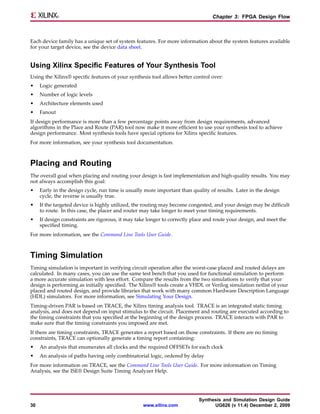
        Using Xilinx Specific Features of Your Synthesis Tool.......................................................................                     30
   Placing and Routing.............................................................................................................................      30
   Timing Simulation ...............................................................................................................................     30
Chapter 4 General Recommendations for Coding Practices ...........................................................................                       31
   Designing With Hardware Description Language (HDL)........................................................................                            31
   Naming, Labeling, and General Coding Styles .......................................................................................                   32
        Common Coding Style ..................................................................................................................           32
        Xilinx Naming Conventions ...........................................................................................................            32
        Reserved Names ...........................................................................................................................       32
        Naming Guidelines for Signals and Instances..................................................................................                    33
             General Naming Rules for Signals and Instances ......................................................................                       33
             VHDL and Verilog Capitalization ............................................................................................                33
        Matching File Names to Entity and Module Names .........................................................................                         33
        Naming Identifiers ........................................................................................................................      34
        Instantiating Sub-Modules .............................................................................................................          34
        Recommended Length of Line........................................................................................................               35
        Common File Headers ...................................................................................................................          35
        Indenting and Spacing...................................................................................................................         36
   Specifying Constants............................................................................................................................      36
   Using Generics and Parameters to Specify Dynamic Bus and Array Widths .............................................                                   37
   TRANSLATE_OFF and TRANSLATE_ON.............................................................................................                           38
Chapter 5 Coding for FPGA Device Flow .....................................................................................................              39
   VHDL and Verilog Limitations .............................................................................................................            40
   Design Challenges in Using an Asynchronous First-In-First-Out (FIFO) Buffer ........................................                                  40
   Advantages and Disadvantages of Hierarchical Designs .........................................................................                        41
   Using Synthesis Tools with Hierarchical Designs ...................................................................................                   41
        Restrict Shared Resources ..............................................................................................................         42
        Compile Multiple Instances ...........................................................................................................           42
        Restrict Related Combinatorial Logic..............................................................................................               42
        Separate Speed Critical Paths .........................................................................................................          42
        Restrict Combinatorial Logic..........................................................................................................           42
        Restrict Module Size......................................................................................................................       42
        Register All Outputs......................................................................................................................       42
        Restrict One Clock to Each Module or to Entire Design ....................................................................                       42
   Choosing Data Type.............................................................................................................................       43
        Use Std_logic (IEEE 1164) ..............................................................................................................         43
        Declaring Ports .............................................................................................................................    43
        Arrays in Port Declarations ............................................................................................................         44
             Incompatibility with Verilog....................................................................................................            44
             Inability to Store and Re-Create Original Array Declaration ......................................................                          44
             Mis-Correlation of Software Pin Names ...................................................................................                   44
        Minimize Ports Declared as Buffers ................................................................................................              44
   Using ‘timescale...................................................................................................................................   45
   Mixed Language Designs .....................................................................................................................          45
   If Statements and Case Statements ........................................................................................................            46
        4–to–1 Multiplexer Design With If Statement Coding Examples .......................................................                              46
        4–to–1 Multiplexer Design With Case Statement Coding Examples...................................................                                 47
   Sensitivity List in Process and Always Statements ..................................................................................                  48
   Delays in Synthesis Code......................................................................................................................        49
   Registers in FPGA Design.....................................................................................................................         50


                                                                                                   Synthesis and Simulation Design Guide
4                                                                 www.xilinx.com                         UG626 (v 11.4) December 2, 2009
Input Output Block (IOB) Registers ....................................................................................................... 51
        Dual-Data Rate (DDR) Registers..................................................................................................... 51
   Latches in FPGA Design ....................................................................................................................... 52
   Implementing Shift Registers ................................................................................................................ 53
   Describing Shift Registers ..................................................................................................................... 54
   Control Signals .................................................................................................................................... 56
        Set, Resets, and Synthesis Optimization .......................................................................................... 56
              Global Set/Reset (GSR) ............................................................................................................ 56
              Shift Register LUT (SRL) ......................................................................................................... 56
              Synchronous and Asynchronous Resets ................................................................................... 56
              Asynchronous Resets Coding Examples................................................................................... 57
              Synchronous Resets Coding Examples ..................................................................................... 57
        Using Clock Enable Pin Instead of Gated Clocks ............................................................................. 60
        Converting the Gated Clock to a Clock Enable ................................................................................ 60
   Initial State of the Registers and Latches ................................................................................................ 61
   Initial State of the Shift Registers ........................................................................................................... 62
   Initial State of the RAMs....................................................................................................................... 62
   Multiplexers ........................................................................................................................................ 62
   Finite State Machine (FSM) Components ............................................................................................... 64
        Finite State Machine (FSM) Description Style .................................................................................. 64
        Finite State Machine (FSM) With One Process ................................................................................. 65
        Finite State Machine (FSM) With Two or Three Processes ................................................................. 67
        Finite State Machine (FSM) Recognition and Optimization............................................................... 68
        Other Finite State Machine (FSM) Features...................................................................................... 68
   Implementing Memory ........................................................................................................................ 68
   Block RAM Inference ........................................................................................................................... 70
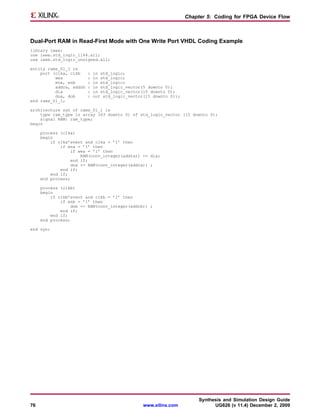
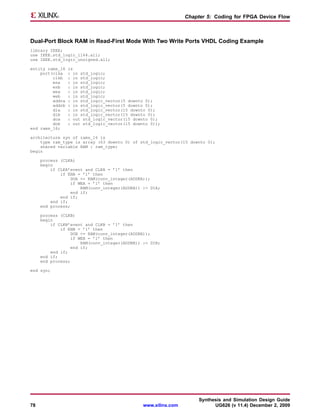
        Dual-Port Block RAM in Read-First Mode With Two Write Ports ...................................................... 77
   Distributed RAM Inference................................................................................................................... 79
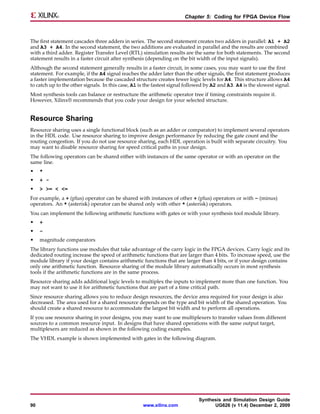
   Arithmetic Support .............................................................................................................................. 81
        Order and Group Arithmetic Functions .......................................................................................... 89
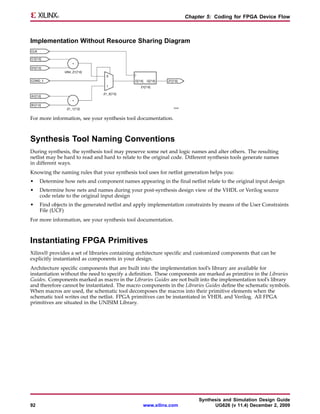
        Resource Sharing .......................................................................................................................... 90
   Synthesis Tool Naming Conventions ..................................................................................................... 92
   Instantiating FPGA Primitives .............................................................................................................. 92
   Instantiating CORE Generator Software Modules................................................................................... 93
   Attributes and Constraints.................................................................................................................... 94
        Attributes ..................................................................................................................................... 94
        Synthesis Constraints .................................................................................................................... 94
        Implementation Constraints........................................................................................................... 94
        Passing Attributes ......................................................................................................................... 94
        Passing Synthesis Constraints ........................................................................................................ 95
              About Passing Synthesis Constraints........................................................................................ 95
              Passing VHDL Synthesis Attributes ......................................................................................... 96
              Passing Verilog Synthesis Attributes ........................................................................................ 97
   Pipelining............................................................................................................................................ 97
        Before Pipelining........................................................................................................................... 97
        After Pipelining ............................................................................................................................ 98
   Retiming ............................................................................................................................................. 98
Chapter 6 Using SmartModel Technology .................................................................................................... 99
   Using SmartModel Technology with ISim.............................................................................................. 99
   Using SmartModel Components to Simulate Designs ............................................................................. 99
   SmartModel Simulation Flow .............................................................................................................. 100
   SmartModel Technology...................................................................................................................... 100
   SmartModel Supported Simulators and Operating Systems ................................................................... 100
   Installing SmartModels ....................................................................................................................... 101
        Installing SmartModels (Method One) ........................................................................................... 101
        Installing SmartModels (Method Two)........................................................................................... 101
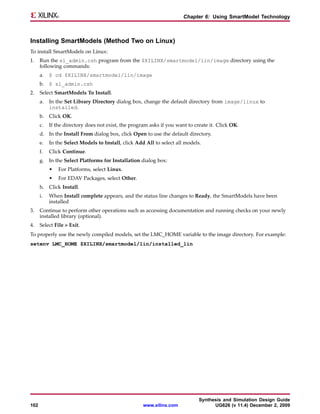
              Installing SmartModels (Method Two on Linux) ...................................................................... 102
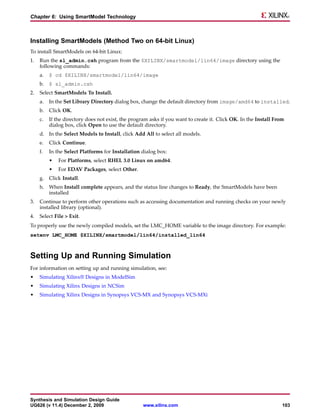
              Installing SmartModels (Method Two on 64-bit Linux)............................................................. 103
   Setting Up and Running Simulation ..................................................................................................... 103


Synthesis and Simulation Design Guide
UG626 (v 11.4) December 2, 2009                                    www.xilinx.com                                                                         5
Chapter 7 Simulating Your Design .............................................................................................................. 105
   Adhering to Industry Standards .......................................................................................................... 105
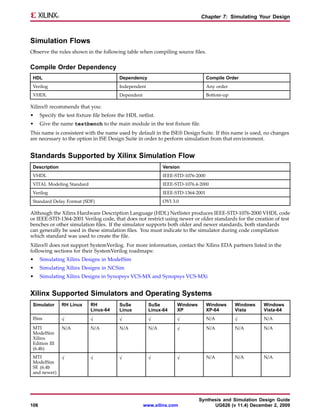
        Simulation Flows ......................................................................................................................... 106
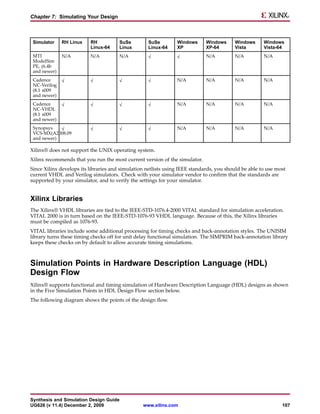
        Standards Supported by Xilinx Simulation Flow ............................................................................ 106
        Xilinx Supported Simulators and Operating Systems ...................................................................... 106
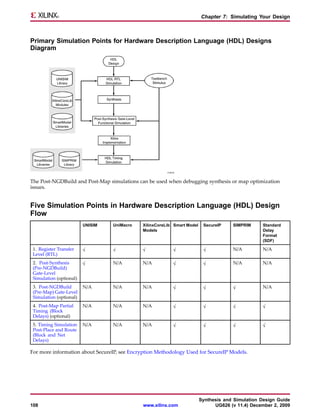
        Xilinx Libraries ............................................................................................................................ 107
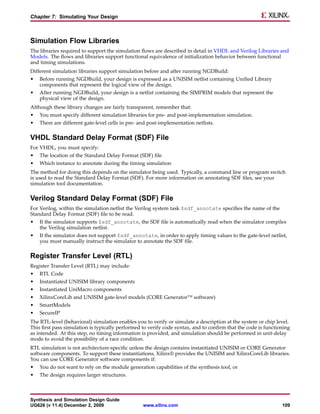
   Simulation Points in Hardware Description Language (HDL) Design Flow............................................. 107
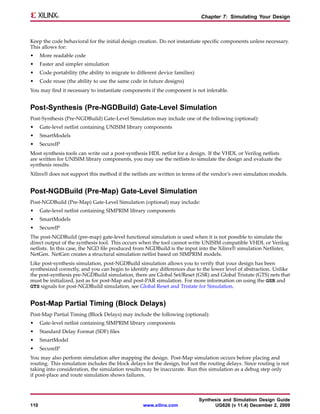
        Five Simulation Points in Hardware Description Language (HDL) Design Flow ............................... 108
        Simulation Flow Libraries............................................................................................................. 109
        VHDL Standard Delay Format (SDF) File....................................................................................... 109
        Verilog Standard Delay Format (SDF) File...................................................................................... 109
        Register Transfer Level (RTL) ........................................................................................................ 109
        Post-Synthesis (Pre-NGDBuild) Gate-Level Simulation ................................................................... 110
        Post-NGDBuild (Pre-Map) Gate-Level Simulation .......................................................................... 110
        Post-Map Partial Timing (Block Delays) ......................................................................................... 110
        Timing Simulation Post-Place and Route (Block and Net Delays)..................................................... 111
   Using Test Benches to Provide Stimulus ............................................................................................... 111
        Creating a Test Bench ................................................................................................................... 112
        Test Bench Recommendations ....................................................................................................... 112
   VHDL and Verilog Libraries and Models.............................................................................................. 112
        Required Simulation Point Libraries .............................................................................................. 112
             First Simulation Point: Register Transfer Level (RTL) ............................................................... 113
             Second Simulation Point: Post-Synthesis (Pre-NGDBuild) Gate-Level Simulation ...................... 113
             Third Simulation Point: Post-NGDBuild (Pre-Map) Gate-Level Simulation................................ 113
             Fourth Simulation Point: Post-Map Partial Timing (Block Delays)............................................. 113
             Fifth Simulation Point: Timing Simulation Post-Place and Route (Block and Net Delays)............ 113
        Simulation Phase Library Information ........................................................................................... 114
        Library Source Files and Compile Order ........................................................................................ 114
        Simulation Libraries ..................................................................................................................... 117
             UNISIM Library .................................................................................................................... 118
             VHDL UNISIM Library.......................................................................................................... 118
             Verilog UNISIM Library......................................................................................................... 118
             UniMacro Library.................................................................................................................. 118
             VHDL UniMacro Library ....................................................................................................... 119
             Verilog UniMacro Library ...................................................................................................... 119
             CORE Generator Software XilinxCoreLib Library .................................................................... 119
             SIMPRIM Library .................................................................................................................. 119
             SmartModel Libraries ............................................................................................................ 119
             SecureIP Libraries.................................................................................................................. 120
             VHDL SecureIP Library ......................................................................................................... 120
             Verilog SecureIP Library ........................................................................................................ 120
             Xilinx Simulation Libraries (Compxlib) ................................................................................... 120
        Reducing Simulation Runtimes ..................................................................................................... 121
   Simulation of Configuration Interfaces ................................................................................................. 122
        JTAG Simulation .......................................................................................................................... 122
        SelectMAP Simulation .................................................................................................................. 122
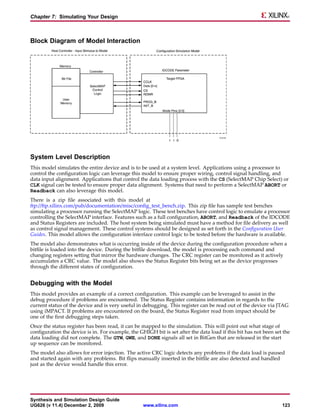
             System Level Description ....................................................................................................... 123
             Debugging with the Model..................................................................................................... 123
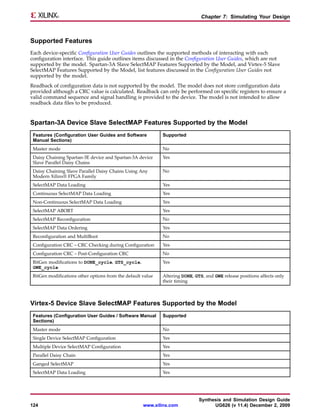
             Supported Features................................................................................................................ 124
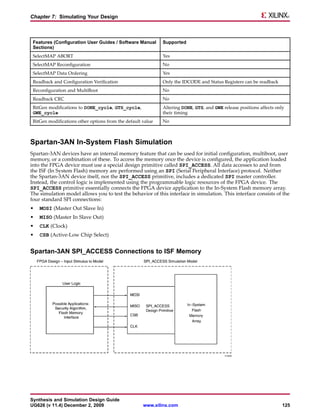
        Spartan-3AN In-System Flash Simulation ...................................................................................... 125
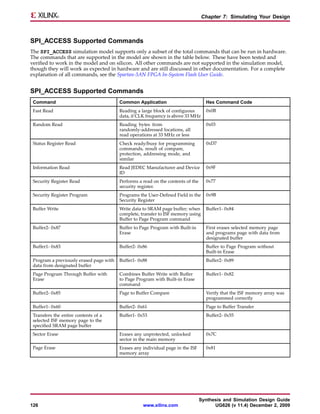
             SPI_ACCESS Supported Commands....................................................................................... 126
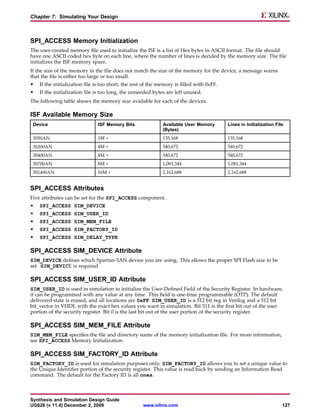
             SPI_ACCESS Memory Initialization ........................................................................................ 127
             SPI_ACCESS Attributes ......................................................................................................... 127
             SPI_ACCESS SIM_DEVICE Attribute...................................................................................... 127
             SPI_ACCESS SIM_USER_ID Attribute .................................................................................... 127
             SPI_ACCESS SIM_MEM_FILE Attribute ................................................................................. 127
             SPI_ACCESS SIM_FACTORY_ID Attribute ............................................................................. 127
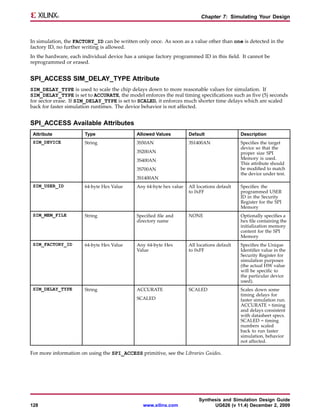
             SPI_ACCESS SIM_DELAY_TYPE Attribute ............................................................................. 128
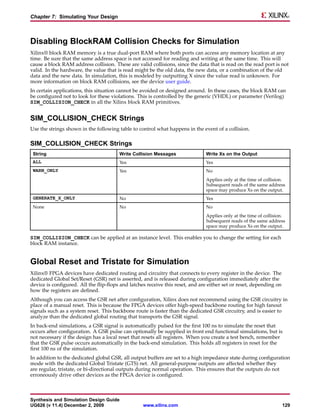
   Disabling BlockRAM Collision Checks for Simulation ........................................................................... 129


                                                                                                   Synthesis and Simulation Design Guide
6                                                                 www.xilinx.com                         UG626 (v 11.4) December 2, 2009
SIM_COLLISION_CHECK Strings ................................................................................................ 129
    Global Reset and Tristate for Simulation ............................................................................................... 129
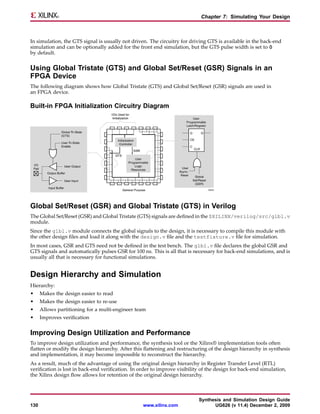
        Using Global Tristate (GTS) and Global Set/Reset (GSR) Signals in an FPGA Device ......................... 130
        Global Set/Reset (GSR) and Global Tristate (GTS) in Verilog ............................................................ 130
    Design Hierarchy and Simulation ........................................................................................................ 130
        Improving Design Utilization and Performance.............................................................................. 130
        Good Design Practices .................................................................................................................. 131
        Maintaining the Hierarchy............................................................................................................ 131
    Register Transfer Level (RTL) Simulation Using Xilinx Libraries ............................................................ 133
        Delta Cycles and Race Conditions ................................................................................................. 133
        Recommended Simulation Resolution ........................................................................................... 134
        Encryption Methodology Used for SecureIP Models ....................................................................... 134
    Generating Gate-Level Netlist (Running NetGen) ................................................................................. 135
    Disabling X Propagation for Synchronous Elements .............................................................................. 135
    Using the ASYNC_REG Constraint ...................................................................................................... 135
    MIN/TYP/MAX Simulation ................................................................................................................. 136
        Minimum (MIN) .......................................................................................................................... 136
        Typical (TYP) ............................................................................................................................... 136
        Maximum (MAX)......................................................................................................................... 136
        Obtaining Accurate Timing Simulation Results .............................................................................. 136
             Run NetGen .......................................................................................................................... 137
             Run Setup Simulation ............................................................................................................ 137
             Run Hold Simulation ............................................................................................................. 137
        Absolute Min Simulation .............................................................................................................. 137
        Using the VOLTAGE and TEMPERATURE Constraints .................................................................. 138
             Using the VOLTAGE Constraint ............................................................................................. 138
             Using the TEMPERATURE Constraint .................................................................................... 138
             Determining Valid Operating Temperatures and Voltages ....................................................... 138
             NetGen Options for Different Delay Values ............................................................................. 139
    Special Considerations for CLKDLL, DCM, and DCM_ADV.................................................................. 139
        DLL/DCM Clocks Do Not Appear De-Skewed ............................................................................... 139
        TRACE/Simulation Model Differences for DCM/DLL ..................................................................... 139
        Non-LVTTL Input Drivers ............................................................................................................ 140
        Viewer Considerations ................................................................................................................. 140
        Attributes for Simulation and Implementation ............................................................................... 141
    Understanding Timing Simulation ....................................................................................................... 141
        Importance of Timing Simulation .................................................................................................. 141
             Functional Simulation............................................................................................................ 141
             Static Timing Analysis and Equivalency Checking ................................................................... 141
             In-System Testing .................................................................................................................. 142
        Glitches in Your Design ................................................................................................................ 142
             VHDL Simulation.................................................................................................................. 142
             Verilog Simulation ................................................................................................................. 142
        Debugging Timing Problems ........................................................................................................ 142
        Timing Problem Root Causes ........................................................................................................ 143
             Simulation Clock Does Not Meet Timespec ............................................................................. 143
             Unaccounted Clock Skew....................................................................................................... 143
             Asynchronous Inputs, Asynchronous Clock Domains, Crossing Out-of-Phase........................... 144
             Asynchronous Clocks ............................................................................................................ 144
             Asynchronous Inputs............................................................................................................. 144
             Out of Phase Data Paths ......................................................................................................... 144
        Debugging Tips ........................................................................................................................... 144
        Setup and Hold Violations ............................................................................................................ 145
             Zero Hold Time Considerations.............................................................................................. 145
             Negative Hold Time Considerations ....................................................................................... 145
             RAM Considerations ............................................................................................................. 145
                  Timing Violations ........................................................................................................... 145
                  Collision Checking.......................................................................................................... 145
                  Hierarchy Considerations................................................................................................ 146


Synthesis and Simulation Design Guide
UG626 (v 11.4) December 2, 2009                                 www.xilinx.com                                                                         7
Simulation Using Xilinx Supported EDA Simulation Tools .................................................................... 146
Chapter 8 Design Considerations................................................................................................................ 147
   Understanding the Architecture........................................................................................................... 147
        Slice Structure .............................................................................................................................. 147
        Hard IP Blocks ............................................................................................................................. 148
             Use Block Features Optimally................................................................................................. 148
             Evaluate the Percentage of BRAMs or DSP Blocks.................................................................... 148
             Lock Down Block Placement .................................................................................................. 148
             Compare Hard-IP Blocks and Slice Logic ................................................................................ 148
             Use SelectRAM Memory ........................................................................................................ 148
             Compare Placing Logic Functions in Slice Logic or DSP Block .................................................. 148
   Clocking Resources ............................................................................................................................. 149
        Evaluating Clocking Implementation............................................................................................. 149
        Clock Reporting ........................................................................................................................... 150
             Reviewing the Place and Route Report.................................................................................... 150
             Clock Region Reports ............................................................................................................ 150
             Global Clock Region Report ................................................................................................... 150
             Secondary Clock Region Report.............................................................................................. 151
   Defining Timing Requirements ............................................................................................................ 151
        Over-Constraining ....................................................................................................................... 151
        Constraint Coverage..................................................................................................................... 151
   Driving Synthesis................................................................................................................................ 152
        Use Proper Coding Techniques ..................................................................................................... 152
        Analyze Inference of Logic............................................................................................................ 152
        Provide a Complete Picture of Your Design.................................................................................... 152
        Use Optimal Software Settings ...................................................................................................... 152
        Helpful Synthesis Attributes ......................................................................................................... 153
        Additional Timing Options ........................................................................................................... 153
   Choosing Implementation Options....................................................................................................... 154
        Performance Evaluation Mode ...................................................................................................... 154
        Packing and Placement Option...................................................................................................... 154
        Physical Synthesis Options ........................................................................................................... 154
        SmartXplorer ............................................................................................................................... 154
             Timing Closure Mode ............................................................................................................ 155
             Best Performance Mode ......................................................................................................... 155
   Evaluating Critical Paths ..................................................................................................................... 155
        Many Logic Levels ....................................................................................................................... 155
        Few Logic Levels.......................................................................................................................... 155
   Design Preservation With SmartCompile Technology ............................................................................ 156
        Deciding Whether to Use Partitions or SmartGuide Technology ...................................................... 156
             When to Use SmartGuide Technology ..................................................................................... 156
             When to Use Partitions........................................................................................................... 156
        Design Preservation with Partitions............................................................................................... 156
             Defining Partitions for Design Preservation ............................................................................. 157
             Tips for Using Partitions for Design Preservation..................................................................... 158
        Design Preservation with SmartGuide Technology ......................................................................... 158
             Optimal Changes for SmartGuide Technology ......................................................................... 158
             Constraint Changes That Impact SmartGuide Technology ........................................................ 159
             Reimplementing Without SmartGuide Technology .................................................................. 159
Appendix A Simulating Xilinx Designs in ModelSim ................................................................................... 161
   Simulating Xilinx Designs in ModelSim................................................................................................ 161
        Running Simulation from ISE Design Suite (VHDL or Verilog)........................................................ 161
        Running Functional Simulation in ModelSim (Standalone) ............................................................. 161
             Running Functional Simulation in MTI Standalone (VHDL) ..................................................... 161
             Running Functional Simulation in MTI Standalone (Verilog) .................................................... 162
        Running Back Annotated Simulation in ModelSim (Standalone)...................................................... 162
             Running Back Annotated Simulation in MTI Standalone (VHDL) ............................................. 162
             Running Back Annotated Simulation in MTI Standalone (Verilog) ............................................ 163
   Simulating SecureIP with ModelSim and Questa................................................................................... 163


                                                                                                   Synthesis and Simulation Design Guide
8                                                                 www.xilinx.com                         UG626 (v 11.4) December 2, 2009
Appendix B Simulating Xilinx Designs in NCSim ........................................................................................ 165
   Running Simulation from ISE Design Suite........................................................................................... 165
   Running Simulation in NC-Verilog ...................................................................................................... 165
       Running Simulations in NC-Verilog (Method One)......................................................................... 165
       Running Simulations in Cadence NC-Verilog (Method Two) ........................................................... 165
            Back-Annotating Delay Values from Standard Delay Format (SDF) File .................................... 166
       Simulating SecureIP with NC-Verilog ............................................................................................ 166
            Multi-Step Process with Precompiled Libraries........................................................................ 166
            Single Step Process ................................................................................................................ 166
   Running Simulation in NC-VHDL ....................................................................................................... 167
       Running Behavioral Simulation With NC-VHDL............................................................................ 167
       Running Timing Simulation With Cadence NC-VHDL ................................................................... 167
Appendix C Simulating Xilinx Designs in Synopsys VCS-MX and Synopsys VCS-MXi................................... 169
   Simulating Xilinx® Designs from ISE Design Suite in Synopsys VCS-MX and Synopsys VCS-MXi ........... 169
   Simulating Xilinx Designs in Standalone Synopsys VCS-MX and Synopsys VCS-MXi.............................. 169
       Using Library Source Files With Compile Time Options ................................................................. 169
       Using Shared Pre-Compiled Libraries............................................................................................ 170
       Using Unified Usage Model (Three-Step Process) ........................................................................... 170
            Three-Step Process Analysis Phase ......................................................................................... 171
            Three-Step Process Elaboration Phase ..................................................................................... 171
            Three-Step Process Simulation Phase ...................................................................................... 171
       Using Standard Delay Format (SDF) with VCS ............................................................................... 171
            Compiling the Standard Delay Format (SDF) file at Compile Time............................................ 171
            Reading the ASCII Standard Delay Format (SDF) File at Runtime ............................................. 171
   Simulating SecureIP with VCS ............................................................................................................. 172
       About Simulating SecureIP with VCS ............................................................................................ 172
       Using Library Source Files With Compile Time Options ................................................................. 172
       Using SIMPRIM-Based Libraries for Timing Simulation.................................................................. 172


Synthesis and Simulation Design Guide
UG626 (v 11.4) December 2, 2009                                 www.xilinx.com                                                                    9
Synthesis and Simulation Design Guide
10   www.xilinx.com         UG626 (v 11.4) December 2, 2009
Chapter 1


About the Synthesis and Simulation
Design Guide
This chapter provides general information about the Synthesis and Simulation Design Guide. This chapter includes:
•   Synthesis and Simulation Design Guide Overview
•   Synthesis and Simulation Design Guide Design Examples
•   Synthesis and Simulation Design Guide Contents
•   Additional Resources
•   Conventions


Synthesis and Simulation Design Guide Overview
The Synthesis and Simulation Design Guide provides a general overview of designing Field Programmable Gate
Array (FPGA) devices using a Hardware Description Language (HDL). It includes design hints for the novice
HDL user, as well as for the experienced user who is designing FPGA devices for the first time. Before using
the Synthesis and Simulation Design Guide, you should be familiar with the operations that are common to all
Xilinx® tools.
The Synthesis and Simulation Design Guide does not address certain topics that are important when creating
HDL designs, such as:
•   Design environment
•   Verification techniques
•   Constraining in the synthesis tool
•   Test considerations
•   System verification
For more information, see your synthesis tool documentation.


Synthesis and Simulation Design Guide
UG626 (v 11.4) December 2, 2009                  www.xilinx.com                                                11
Chapter 1: About the Synthesis and Simulation Design Guide


Synthesis and Simulation Design Guide Design Examples
The design examples in this Guide were:
•    Created with VHDL and Verilog
     Xilinx® endorses Verilog and VHDL equally. VHDL may be more difficult to learn than Verilog, and usually
     requires more explanation.
•    Compiled with various synthesis tools
•    Targeted for the following devices:
     –   Spartan®-3
     –   Spartan-3E
     –   Spartan-3A
     –   Spartan-6
     –   Virtex®-4
     –   Virtex-5
     –   Virtex-6


Synthesis and Simulation Design Guide Contents
The Synthesis and Simulation Design Guide contains the following:
•    Chapter One, About the Synthesis and Simulation Design Guide, gives general information about this Guide
•    Chapter Two, Hardware Description Language (HDL), describes how to design Field Programmable Gate
     Arrays (FPGA devices) using a Hardware Description Language (HDL).
•    Chapter Three, FPGA Design Flow, describes the steps in a typical FPGA design flow.
•    Chapter Four, General Recommendations for Coding Practices, contains general information relating
     to Hardware Description Language (HDL) coding styles and design examples to help you develop an
     efficient coding style.
•    Chapter Five, Coding for FPGA Flow, contains specific information relating to coding for FPGA devices.
•    Chapter Six, Using SmartModels, describes special considerations when simulating designs for Virtex®-4
     devices and Virtex-5 devices. These devices are for designs based on IP cores and customized modules. The
     family incorporates RocketIO™ and PowerPC® CPU and Ethernet MAC cores in the FPGA architecture
•    Chapter Seven, Simulating Your Design, describes the basic Hardware Description Language (HDL)
     simulation flow using Xilinx® and third party tools.
•    Chapter Eight, Design Considerations, describes understanding the architecture, clocking resources, defining
     timing requirements, driving synthesis, choosing implementation options, and evaluating critical paths.
•    Appendix A provides information on Simulating Xilinx Designs in ModelSim.
•    Appendix B provides information on Simulating Xilinx Designs in NCSim.
•    Appendix C provides information on Simulating Xilinx Designs in Synopsys VCS-MX and Synopsys
     VCS-MXi.


Additional Resources
To find additional documentation, see the Xilinx website at:
http://www.xilinx.com/literature.
To search the Answer Database of silicon, software, and IP questions and answers, or to create a technical
support WebCase, see the Xilinx website at:
http://www.xilinx.com/support.


                                                                         Synthesis and Simulation Design Guide
12                                               www.xilinx.com                UG626 (v 11.4) December 2, 2009
Chapter 1: About the Synthesis and Simulation Design Guide


Conventions
This document uses the following conventions. An example illustrates each convention.


Typographical
The following typographical conventions are used in this document:
 Convention                          Meaning or Use                            Example
 Courier font                        Messages, prompts, and program files      speed grade:          - 100
                                     that the system displays
 Courier bold                        Literal commands that you enter in a      ngdbuild design_name
                                     syntactical statement
 Helvetica bold                      Commands that you select from a           File > Open
                                     menu
                                     Keyboard shortcuts                        Ctrl+C
 Italic font                         Variables in a syntax statement for       ngdbuild design_name
                                     which you must supply values
                                     References to other manuals               See the Command Line Tools User Guide
                                                                               for more information.
                                     Emphasis in text                          If a wire is drawn so that it overlaps
                                                                               the pin of a symbol, the two nets are
                                                                               not connected.
 Square brackets [ ]                 An optional entry or parameter.           ngdbuild [option_name]
                                     However, in bus specifications, such as   design_name
                                     bus[7:0], they are required.
 Braces { }                          A list of items from which you must       lowpwr ={on|off}
                                     choose one or more
 Vertical bar |                      Separates items in a list of choices      lowpwr ={on|off}
 Vertical ellipsis                   Repetitive material that has been         IOB #1: Name = QOUT IOB #2:
                                     omitted                                   Name = CLKIN
                                                                               .
                                                                               .
                                                                               .
 Horizontal ellipsis .   .   .       Repetitive material that has been         allow block .         .   . block_name
                                     omitted                                   loc1 loc2 ... locn;


Online Document
The following conventions are used in this document:
 Convention                          Meaning or Use                            Example
 Blue text                           Cross-reference link                      See the section Additional Resources
                                                                               for details.
                                                                               Refer to Title Formats in Chapter 1 for
                                                                               details.
                                                                               See Figure 2-5 in the Virtex®-6
                                                                               Handbook.


Synthesis and Simulation Design Guide
UG626 (v 11.4) December 2, 2009                  www.xilinx.com                                                         13
Synthesis and Simulation Design Guide
14   www.xilinx.com         UG626 (v 11.4) December 2, 2009
Chapter 2


Hardware Description Language (HDL)

This chapter describes Hardware Description Language (HDL). This chapter includes:
•   Advantages of Using a Hardware Description Language (HDL) to Design FPGA Devices
•   Designing FPGA Devices With Hardware Description Language (HDL)
Designers use an HDL to describe the behavior and structure of system and circuit designs. Understanding
FPGA architecture allows you to create HDL code that effectively uses FPGA system features. To learn more
about designing FPGA devices with HDL:
•   Enroll in training classes offered by Xilinx® and by synthesis tool vendors.
•   Review the HDL design examples in this Guide.
•   Download design examples from Xilinx Support.
•   Take advantage of the many other resources offered by Xilinx, including:
    –   Documentation
    –   Tutorials
    –   Service packs
    –   Telephone hotline
    –   Answers database
For more information, see Additional Resources.


Advantages of Using a Hardware Description Language (HDL)
to Design FPGA Devices
Using a Hardware Description Language (HDL) to design high-density FPGA devices has the following
advantages:
•   Top-Down Approach for Large Projects
•   Functional Simulation Early in the Design Flow
•   Synthesis of Hardware Description Language (HDL) Code to Gates
•   Early Testing of Various Design Implementations
•   Reuse of Register Transfer Level (RTL) Code


Top-Down Approach for Large Projects
Designers use a Hardware Description Language (HDL) to create complex designs. The top-down approach to
system design works well for large HDL projects that require many designers working together. After the design
team determines the overall design plan, individual designers can work independently on separate code sections.


Synthesis and Simulation Design Guide
UG626 (v 11.4) December 2, 2009                   www.xilinx.com                                            15
Chapter 2: Hardware Description Language (HDL)


Functional Simulation Early in the Design Flow
You can verify design functionality early in the design flow by simulating the HDL description. Testing your
design decisions before the design is implemented at the Register Transfer Level (RTL) or gate level allows you
to make any necessary changes early on.


Synthesis of Hardware Description Language (HDL) Code to Gates
Synthesizing your hardware description to target the FPGA device implementation:
•    Decreases design time by allowing a higher-level design specification, rather than specifying the design
     from the FPGA device base elements.
•    Reduces the errors that can occur during a manual translation of a hardware description to a schematic
     design.
•    Allows you to apply the automation techniques used by the synthesis tool (such as machine encoding styles
     and automatic I/O insertion) during optimization to the original Hardware Description Language (HDL)
     code. This results in greater optimization and efficiency.


Early Testing of Various Design Implementations
Using a Hardware Description Language (HDL) allows you to test different design implementations early in the
design flow. Use the synthesis tool to perform the logic synthesis and optimization into gates.
Xilinx® FPGA devices allow you to implement your design at your computer. Since the synthesis time is short,
you have more time to explore different architectural possibilities at the Register Transfer Level (RTL) You can
reprogram Xilinx FPGA devices to test several design implementations.


Reuse of Register Transfer Level (RTL) Code
You can retarget Register Transfer Level (RTL) code to new FPGA devices with minimum recoding.


Designing FPGA Devices With Hardware Description Language
(HDL)
This section discusses Designing FPGA Devices With Hardware Description Language (HDL), and includes:
•    About Designing FPGA Devices With Hardware Description Language (HDL)
•    Designing FPGA Devices with VHDL
•    Designing FPGA Devices with Verilog
•    Designing FPGA Devices with Synthesis Tools
•    Improving Device Performance Using FPGA System Features
•    Designing Hierarchy
•    Specifying Speed Requirements


About Designing FPGA Devices With Hardware Description Language
(HDL)
If you are used to schematic design entry, you may find it difficult at first to create Hardware Description
Language (HDL) designs. You must make the transition from graphical concepts, such as block diagrams, state
machines, flow diagrams, and truth tables, to abstract representations of design components. To ease this
transition, keep your overall design plan in mind as you code in HDL.


                                                                          Synthesis and Simulation Design Guide
16                                               www.xilinx.com                 UG626 (v 11.4) December 2, 2009
Chapter 2: Hardware Description Language (HDL)


To effectively use an HDL, you must understand the:
•   Syntax of the language
•   Synthesis and simulator tools
•   Architecture of your target device
•   Implementation tools


Designing FPGA Devices with VHDL
VHSIC Hardware Description Language (VHDL) is a hardware description language for designing integrated
circuits. Since VHDL was not originally intended as an input to synthesis, many VHDL constructs are not
supported by synthesis tools. The high level of abstraction of VHDL makes it easy to describe the system-level
components and test benches that are not synthesized. In addition, the various synthesis tools use different
subsets of VHDL.
The examples in this Synthesis and Simulation Design Guide work with most FPGA synthesis tools. The coding
strategies presented in the remaining sections of this Guide can help you create Hardware Description Language
(HDL) descriptions that can be synthesized.


Designing FPGA Devices with Verilog
Verilog is popular for synthesis designs because:
•   Verilog is less verbose than traditional VHDL.
•   Verilog is standardized as IEEE-STD-1364-95 and IEEE-STD-1364-2001.
Since Verilog was not originally intended as an input to synthesis, many Verilog constructs are not supported
by synthesis tools. The Verilog coding examples in this Guide were tested and synthesized with current,
commonly-used FPGA synthesis tools. The coding strategies presented in the remaining sections of this Guide
can help you create Hardware Description Language (HDL) descriptions that can be synthesized.
SystemVerilog is a new emerging standard for both synthesis and simulation. It is not known if, or when, this
standard will be adopted and supported by the various design tools.
Whether or not you plan to use this new standard, Xilinx® recommends that you:
•   Review the standard to ensure that your current Verilog code can be readily carried forward as the new
    standard evolves.
•   Review any new keywords specified by the standard.
•   Avoid using the new keywords in your current Verilog code.


Designing FPGA Devices with Synthesis Tools
Most synthesis tools have special optimization algorithms for Xilinx® FPGA devices. Constraints and compiling
options perform differently depending on the target device. Some commands and constraints in ASIC synthesis
tools do not apply to FPGA devices. If you use them, they may adversely impact your results.
You should understand how your synthesis tool processes designs before you create FPGA designs. Most FPGA
synthesis vendors include information in their documentation specifically for Xilinx FPGA devices.


Improving Device Performance Using FPGA System Features
To improve device performance, area utilization, and power characteristics, create Hardware Description
Language (HDL) code that uses FPGA system features such as DCM, multipliers, shift registers, and memory.
For a description of these and other features, see the device data sheet and user guide.
The choice of the size (width and depth) and functional characteristics must be taken into account by
understanding the target FPGA resources and making the proper system choices to best target the underlying
architecture.


Synthesis and Simulation Design Guide
UG626 (v 11.4) December 2, 2009                     www.xilinx.com                                              17
Chapter 2: Hardware Description Language (HDL)


Designing Hierarchy
Using a Hardware Description Language (HDL) gives added flexibility in describing the design. Not all HDL
code is optimized the same. How and where the functionality is described can have dramatic effects on end
optimization. For example:
•    Certain techniques may unnecessarily increase the design size and power while decreasing performance.
•    Other techniques can result in more optimal designs in terms of any or all of those same metrics.
This Guide will help instruct you in techniques for optional FPGA design methodologies.
Design hierarchy is important in both the implementation of an FPGA and during interactive changes. Some
synthesizers maintain the hierarchical boundaries unless you group modules together. Modules should have
registered outputs so their boundaries are not an impediment to optimization. Otherwise, modules should be as
large as possible within the limitations of your synthesis tool.
The “5,000 gates per module” rule is no longer valid, and can interfere with optimization. Check with your
synthesis vendor for the preferred module size. As a last resort, use the grouping commands of your synthesizer,
if available. The size and content of the modules influence synthesis results and design implementation. This
Guide describes how to create effective design hierarchy.


Specifying Speed Requirements
To meet timing requirements, you must set timing constraints in both the synthesis tool and the placement and
routing tool. If you specify the desired timing at the beginning, the tools can maximize not only performance,
but also area, power, and tool runtime.
This may result in a design that:
•    Achieves the desired performance
•    Is smaller
•    Consumes less power
•    Requires less processing time
For more information, see Setting Constraints.


                                                                          Synthesis and Simulation Design Guide
18                                                www.xilinx.com                UG626 (v 11.4) December 2, 2009
Chapter 3


FPGA Design Flow
This chapter describes the steps in a typical FPGA design flow. This chapter includes:
•   Design Flow Diagram
•   Design Entry Recommendations
•   Architecture Wizard
•   CORE Generator™ Software
•   Functional Simulation
•   Synthesizing and Optimizing
•   Setting Constraints
•   Evaluating Design Size and Performance
•   Evaluating Coding Style and System Features
•   Placing and Routing
•   Timing Simulation


Synthesis and Simulation Design Guide
UG626 (v 11.4) December 2, 2009                  www.xilinx.com                                  19
Chapter 3: FPGA Design Flow


Design Flow Diagram


Design Entry Recommendations
Xilinx® recommends the following for design entry:
•    Use Register Transfer Level (RTL) Code
•    Select the Correct Design Hierarchy


Use Register Transfer Level (RTL) Code
Use Register Transfer Level (RTL) code, and, when possible, do not instantiate specific components. Following
these two practices allows for:
•    Readable code
•    Ability to use the same code for synthesis and simulation
•    Faster and simpler simulation
•    Portable code for migration to different device families
•    Reusable code for future designs
In some cases instantiating optimized CORE Generator™ software modules is beneficial with RTL.


                                                                        Synthesis and Simulation Design Guide
20                                                www.xilinx.com              UG626 (v 11.4) December 2, 2009
Chapter 3: FPGA Design Flow


Select the Correct Design Hierarchy
Select the correct design hierarchy to:
•   Improve simulation and synthesis results
•   Improve debugging
•   Allow parallel engineering, in which a team of engineers can work on different parts of the design at the
    same time
•   Improve placement and routing by reducing routing congestion and improving timing
•   Allow for easier code reuse in both current and future designs


Architecture Wizard
Use Architecture Wizard to configure advanced features of Xilinx® devices. Architecture Wizard consists of
several components for configuring specific device features. Each component functions as an independent
wizard. For more information, see Architecture Wizard Components.
Architecture Wizard creates a VHDL, Verilog, or Electronic Data Interchange Format (EDIF) file, depending on
the flow type passed to it. The generated Hardware Description Language (HDL) output is a module consisting
of one or more primitives and the corresponding properties, and not just a code snippet. This allows the output
file to be referenced from the HDL Editor. No User Constraints File (UCF) is output, since the necessary
attributes are embedded inside the HDL file.


Opening Architecture Wizard
You can open Architecture Wizard from:
•   ISE® Design Suite
    For more information, see the ISE Design Suite Help, especially Working with Architecture Wizard IP.
•   The CORE Generator™ software
    Select any of the Architecture Wizard IP from the list of available IP in the CORE Generator software window.
•   The command line
    Type arwz.


Architecture Wizard Components
Architecture Wizard components include:
•   Clocking Wizard
•   RocketIO™ Wizard
•   ChipSync Wizard
•   XtremeDSP™ Slice Wizard


Clocking Wizard
The Clocking Wizard enables:
•   Digital clock setup
•   DCM and clock buffer viewing
•   DRC checking


Synthesis and Simulation Design Guide
UG626 (v 11.4) December 2, 2009                  www.xilinx.com                                                 21
Chapter 3: FPGA Design Flow


The Clocking Wizard allows you to:
•    View the DCM component
•    Specify attributes
•    Generate corresponding components and signals
•    Execute DRC checks
•    Display up to eight clock buffers
•    Set up the Feedback Path information
•    Set up the Clock Frequency Generator information and execute DRC checks
•    View and edit component attributes
•    View and edit component constraints
•    View and configure one or two Phase Matched Clock Dividers (PMCDs) in a Virtex®-4 device
•    View and configure a Phase Locked Loop (PLL) in a Virtex-5 device
•    Automatically place one component in the XAW file
•    Save component settings in a VHDL file
•    Save component settings in a Verilog file

RocketIO Wizard
The RocketIO Wizard enables serial connectivity between devices, backplanes, and subsystems.
The RocketIO Wizard allows you to:
•    Specify RocketIO type
•    Define Channel Bonding options
•    Specify General Transmitter Settings, including encoding, CRC, and clock
•    Specify General Receptor Settings, including encoding, CRC, and clock
•    Provide the ability to specify Synchronization
•    Specify Equalization, Signal integrity tip (resister, termination mode ...)
•    View and edit component attributes
•    View and edit component constraints
•    Automatically place one component in the XAW file
•    Save component settings to a VHDL file or Verilog file

ChipSync Wizard
The ChipSync Wizard applies to Virtex-4 devices and Virtex-5 devices only.
The ChipSync Wizard:
•    Facilitates the implementation of high-speed source synchronous applications.
•    Configures a group of I/O blocks into an interface for use in memory, networking, or any other type
     of bus interface.
•    Creates Hardware Description Language (HDL) code with these features configured according to your input:
     –   Width and IO standard of data, address, and clocks for the interface
     –   Additional pins such as reference clocks and control pins
     –   Adjustable input delay for data and clock pins
     –   Clock buffers (BUFIO) for input clocks
     –   ISERDES/OSERDES or IDDR/ODDR blocks to control the width of data, clock enables, and tristate
         signals to the fabric


                                                                             Synthesis and Simulation Design Guide
22                                                  www.xilinx.com                 UG626 (v 11.4) December 2, 2009
Chapter 3: FPGA Design Flow


XtremeDSP Slice Wizard
The XtremeDSP Slice Wizard applies to Virtex-4 devices and Virtex-5 devices only.
The XtremeDSP Slice Wizard facilitates the implementation of the XtremeDSP Slice. For more information,
see the:
•   data sheet for Virtex-4 devices and Virtex-5 devices
•   XtremeDSP for Virtex-4 FPGAs User Guide
•   Virtex-5 XtremeDSP User Guide


CORE Generator Software
The CORE Generator™ software delivers parameterized Intellectual Property (IP) optimized for Xilinx® FPGA
devices. It provides a catalog of ready-made functions ranging in complexity from FIFOs and memories to high
level system functions. High level system functions can include:
•   Reed-Solomon Decoder and Encoder
•   FIR filters
•   FFTs for DSP applications
•   Standard bus interfaces (for example, the PCI™ and PCI-X™ bus interfaces)
•   Connectivity and networking interfaces (for example, the Ethernet, SPI-4.2, and PCI EXPRESS®
    microprocessor interfaces)
For a typical core, the CORE Generator software produces the following files:
•   EDN and NGC Files
•   VHO Files
•   VEO Files
•   V and VHD Wrapper Files
•   ASY Files


EDN and NGC Files
The Electronic Data Interchange Format (EDIF) Netlist (EDN) file and NGC files contain the information required
to implement the module in a Xilinx FPGA device. Since NGC files are in binary format, ASCII NDF files may
also be produced to communicate resource and timing information for NGC files to third party synthesis tools.
The NDF file is read by the synthesis tool only and is not used for implementation.


VHO Files
VHDL template (VHO) template files contain code that can be used as a model for instantiating a CORE
Generator software module in a VHDL design. VHO files come with a VHDL (VHD) wrapper file.


VEO Files
Verilog template (VEO) files contain code that can be used as a model for instantiating a CORE Generator
software module in a Verilog design. VEO files come with a Verilog (V) wrapper file.


V and VHD Wrapper Files
V (Verilog) and VHD (VHDL) wrapper files support functional simulation. These files contain simulation model
customization data that is passed to a parameterized simulation model for the core. In the case of Verilog
designs, the V wrapper file also provides the port information required to integrate the core into a Verilog
design for synthesis.


Synthesis and Simulation Design Guide
UG626 (v 11.4) December 2, 2009                  www.xilinx.com                                             23
Chapter 3: FPGA Design Flow


Some cores may generate actual source code or an additional top level Hardware Description Language (HDL)
wrapper with clocking resource and Input Output Block (IOB) instances to enable you to tailor your clocking
scheme to your own requirements. For more information, see the core-specific documentation.
The V (Verilog) and VHD (VHDL) wrapper files mainly support simulation and are not synthesizable.


ASCII Symbol (ASY) Files
ASCII Symbol (ASY) symbol information files allow you to integrate the CORE Generator software modules
into a schematic design for Mentor Graphics or ISE® Design Suite tools.


Functional Simulation Early in the Design Flow
Use functional or Register Transfer Level (RTL) simulation to verify syntax and functionality.
When you simulate your design, Xilinx® recommends that you:
•    Perform Separate Simulations
     With larger hierarchical Hardware Description Language (HDL) designs, perform separate simulations on
     each module before testing your entire design. This makes it easier to debug your code.
•    Create a Test Bench
     Once each module functions as expected, create a test bench to verify that your entire design functions as
     planned. Use the same test bench again for the final timing simulation to confirm that your design functions
     as expected under worst-case delay conditions.
You can use ModelSim simulators with ISE® Design Suite. The appropriate processes appear in ISE Design Suite
when you choose ModelSim as your design simulator, provided you have installed any of the following:
•    ModelSim Xilinx Edition III
•    ModelSim SE or ModelSim PE
You can also use these simulators with third-party synthesis tools in ISE Design Suite.


Synthesizing and Optimizing
To improve results and decrease run time, follow these recommendations:
•    Creating a Compile Run Script
•    Modifying Your Code to Successfully Synthesize Your Design
•    Reading Cores
For more information, see your synthesis tool documentation.


Creating a Compile Run Script
TCL scripting can make compiling your design easier and faster. With advanced scripting, you can:
•    Run a compile multiple times using different options
•    Write to different directories
•    Run other command line tools

Running the TCL Script (Precision RTL Synthesis)
To run the TCL script from Precision RTL Synthesis:
1.   Set up your project in Precision.
2.   Synthesize your project.
3.   Run the commands shown in Precision RTL Synthesis Commands to save and run the TCL script.


                                                                          Synthesis and Simulation Design Guide
24                                               www.xilinx.com                 UG626 (v 11.4) December 2, 2009
Chapter 3: FPGA Design Flow


Precision RTL Synthesis Commands
 Function                                                Command
 Save the TCL script                                     File > Save Command File
 Run the TCL script                                      File > Run Script
 Run the TCL script from a command line                  c:precision -shell -file project.tcl
 Complete synthesis                                      add_input_file top.vhdl
                                                         setup_design -manufacturer xilinx-family virtex—ii -part
                                                         2v40cs144 -speed 6
                                                         compile
                                                         synthesize


Running the TCL Script (Synplify)
To run the TCL script from Synplify:
Select File > Run TCL Script.
OR
Type synplify -batch script_file.tcl at a UNIX or DOS command prompt. Enter the following TCL commands
in Synplify.


Synplify Commands
 Function                                                Command
 Start a new project                                     project -new
 Set device options                                      set_option -technology virtex
                                                         set_option -part XCV50E
                                                         set_option -package CS144
                                                         set_option -speed_grade -8
 Add file options                                        add_file -constraint watch.sdc
                                                         add_file -vhdl -lib work macro1.vhd
                                                         add_file -vhdl -lib work macro2.vhd
                                                         add_file -vhdl -lib work top_levle.vhd
 Set compilation and mapping options                     set_option -default_enum_encoding onehot
                                                         set_option -symbolic_fsm_compiler true
                                                         set_option -resource_sharing true
 Set simulation options                                  set_option -write_verilog false
                                                         set_option -write_vhdl false
 Set automatic Place and Route (vendor) options          set_option -write_apr_cnstrnt true
                                                         set_option -part XCV50E
                                                         set_option -package CS144
                                                         set_option -speed_grade -8


Synthesis and Simulation Design Guide
UG626 (v 11.4) December 2, 2009                   www.xilinx.com                                                    25
Chapter 3: FPGA Design Flow


 Function                                                  Command
 Set result format and file options                        project -result_format edif
                                                           project -result_file top_level.edf
                                                           project -run
                                                           project -save “watch.prj”
 Exit                                                      exit


Running the TCL Script (XST)
For information on options used with the Xilinx Synthesis Technology (XST) see the XST User Guide.


Modifying Your Code to Successfully Synthesize Your Design
You may need to modify your code to successfully synthesize your design. Certain design constructs that are
effective for simulation may not be as effective for synthesis. The synthesis syntax and code set may differ slightly
from the simulator syntax and code set.


Reading Cores
The synthesis tools discussed in this section support incorporating the information in the CORE Generator™
software NDF files when performing design timing and area analysis.
Including the IP core NDF files in a design when analyzing a design results in better timing and resource
optimizations for the surrounding logic. The NDF is used to estimate the delay through the logic elements
associated with the IP core. The synthesis tools do not optimize the IP core itself, nor do they integrate the IP
core netlist into the synthesized design output netlist.

Reading Cores (XST)
Run Xilinx Synthesis Technology (XST) using the read_cores switch. When the switch is set to on (the default),
XST reads in Electronic Data Interchange Format (EDIF) and NGC netlists. For more information, see:
•    XST User Guide
•    ISE® Design Suite help

Reading Cores (Synplify Pro)
When reading cores in Synplify Pro, Electronic Data Interchange Format (EDIF) is treated as another source
format, but when reading in EDIF, you must specify the top level VHDL or Verilog in your project.

Reading Cores (Precision RTL Synthesis)
Precision RTL Synthesis can add Electronic Data Interchange Format (EDIF) and NGC files to your project as
source files. For more information, see the Precision RTL Synthesis help.


Setting Constraints
Setting constraints:
•    Allows you to control timing optimization
•    Uses synthesis tools and implementation processes more efficiently
•    Helps minimize runtime and achieve your design requirements
The Precision RTL Synthesis and Synplify constraint editing tools allow you to apply constraints to your
Hardware Description Language (HDL) design.


                                                                             Synthesis and Simulation Design Guide
26                                                 www.xilinx.com                  UG626 (v 11.4) December 2, 2009
Chapter 3: FPGA Design Flow


For more information, see your synthesis tool documentation.
You can add the following constraints:
•   Clock frequency or cycle and offset
•   Input and Output timing
•   Signal Preservation
•   Module constraints
•   Buffering ports
•   Path timing
•   Global timing


Specifying Constraints in the User Constraints File (UCF)
Constraints defined for synthesis can also be passed to implementation in a Netlist Constraints File (NCF) or the
output Electronic Data Interchange Format (EDIF) file. However, Xilinx® recommends that you do not pass these
constraints to implementation. Instead, specify your constraints separately in a User Constraints File (UCF). The
UCF gives you tight control over the overall specifications by giving you the ability to:
•   Access more types of constraints
•   Define precise timing paths
•   Prioritize signal constraints
For recommendations on constraining synthesis and implementation, see Design Considerations. For
information on specific timing constraints, together with syntax examples, see the Constraints Guide.


Setting Constraints in ISE Design Suite
You can set constraints in ISE® Design Suite with:
•   Constraints Editor
•   PACE (CPLD devices only)
•   PlanAhead™
For more information, see the ISE Design Suite Help.


Evaluating Design Size and Performance
Your design must:
•   Function at the specified speed
•   Fit in the targeted device
After your design is compiled, use the reporting options of your synthesis tool to determine preliminary device
utilization and performance. After your design is mapped by ISE® Design Suite, you can determine the actual
device utilization.
At this point, you should verify that:
•   Your chosen device is large enough to accommodate any future changes or additions
•   Your design performs as specified


Estimating Device Utilization and Performance
Use the area and timing reporting options of your synthesis tool to estimate device utilization and performance.
After compiling, use the report area command to obtain a report of device resource utilization. Some synthesis
tools provide area reports automatically. For correct command syntax, see your synthesis tool documentation.


Synthesis and Simulation Design Guide
UG626 (v 11.4) December 2, 2009                  www.xilinx.com                                               27
Chapter 3: FPGA Design Flow


These reports are usually accurate because the synthesis tool creates the logic from your code and maps your
design into the FPGA device. These reports are different for the various synthesis tools. Some reports specify
the minimum number of CLBs required, while other reports specify the unpacked number of CLBs to make
an allowance for routing. For an accurate comparison, compare reports from the Xilinx® mapper tool after
implementation.
Any instantiated components, such as CORE Generator™ software modules, Electronic Data Interchange Format
(EDIF) files, or other components that your synthesis tool does not recognize during compilation, are not included
in the report file. If you include these components, you must include the logic area used by these components
when estimating design size. Sections may be trimmed during mapping, resulting in a smaller design.
Use the timing report command of your synthesis tool to obtain a report with estimated data path delays.
For more information, see your synthesis tool documentation.
The timing report is based on the logic level delays from the cell libraries and estimated wire-load models. While
this report estimates how close you are to your timing goals, it is not the actual timing. An accurate timing report
is available only after the design is placed and routed.


Determining Actual Device Utilization and Pre-Routed Performance
To determine if your design fits the specified device, map it using the Xilinx® Map program. The generated
report file design_name.mrp contains the implemented device utilization information. To read the report
file, double-click Map Report in the ISE® Design Suite Processes window. Run the Map program from ISE
Design Suite or from the command line.


Mapping Your Design Using ISE Design Suite
To map your design using ISE Design Suite:
1.   Go to the Processes window.
2.   Click the plus (+) symbol in front of Implement Design.
3.   Double-click Map.
4.   To view the Map Report, double-click Map Report.
     If the report does not exist, it is generated at this time. A green check mark in front of the report name
     indicates that the report is up-to-date, and no processing is performed.
5.   If the report is not up-to-date:
     a.   Click the report name.
     b. Select Process > Rerun to update the report.
          The auto-make process automatically runs only the necessary processes to update the report before
          displaying it.
          Alternatively, you may select Process > Rerun All to re-run all processes (even those processes that are
          up-to-date) from the top of the design to the stage where the report would be.
6.   View the Logic Level Timing Report with the Report Browser. This report shows design performance
     based on logic levels and best-case routing delays.
7.   Run the integrated Timing Analyzer to create a more specific report of design paths (optional).
8.   Use the Logic Level Timing Report and any reports generated with the Timing Analyzer or the Map program
     to evaluate how close you are to your performance and utilization goals.
Use these reports to decide whether to proceed to the Place and Route phase of implementation, or to go back
and modify your design or implementation options to attain your performance goals. You should have some
slack in routing delays to allow the Place and Route tools to successfully complete your design. Use the verbose
option in the Timing Analyzer to see block-by-block delay. The timing report of a mapped design (before Place
and Route) shows block delays, as well as minimum routing delays.


                                                                            Synthesis and Simulation Design Guide
28                                                 www.xilinx.com                 UG626 (v 11.4) December 2, 2009
Chapter 3: FPGA Design Flow


A typical design for a Virtex®-4 device or a Virtex-5 device should allow 40% of the delay for logic, and 60%
of the delay for routing. If most of your time is taken by logic, the design will probably not meet timing after
Place and Route.

Mapping Your Design Using the Command Line
For available options, enter the trce command at the command line without any arguments.
To map your design using the command line:
1.   To translate your design, run:
     ngdbuild -p target_device design_name.edf (or ngc)
2.   To map your design, run:
     map design_name.ngd
3.   Use a text editor to view the Device Summary section of the Map Report <design_name.mrp>.
     The Device Summary section contains the device utilization information.
4.   Run a timing analysis of the logic level delays from your mapped design as follows:
     trce [options] design_name.ncd
Use the TRACE reports to:
•    See how well the design meets performance goals
•    Decide whether to proceed to Place and Route, or to modify your design or implementation options
Leave some slack in routing delays to allow the Place and Route tools to successfully complete your design.


Evaluating Coding Style and System Features
If you are not satisfied with design performance, re-evaluate your code. Modifying your code and selecting
different compiler options can dramatically improve device utilization and speed.


Modifying Your Code to Improve Design Performance
To improve design performance:
1.   Reduce levels of logic to improve timing by:
     a.   Using pipelining and re-timing techniques
     b. Rewriting the Hardware Description Language (HDL) descriptions
     c.   Enabling or disabling resource sharing
2.   Restructure logic to redefine hierarchical boundaries to help the compiler optimize design logic
3.   Perform logic replication to reduce critical nets fanout to improve placement and reduce congestion
4.   Take advantage of device resource with the CORE Generator™ software modules


Improving Resource Utilization Using FPGA System Features
After correcting any coding problems, use the following FPGA system features to improve resource utilization
and enhance the speed of critical paths:
•    Use clock enables.
•    Use one-hot encoding for large or complex state machines.
•    Use I/O registers when applicable.
•    Use dedicated shift registers.
•    In Virtex®-4 devices and Virtex-5 devices, use the dedicated DSP blocks.


Synthesis and Simulation Design Guide
UG626 (v 11.4) December 2, 2009                     www.xilinx.com                                                 29
Chapter 3: FPGA Design Flow


Each device family has a unique set of system features. For more information about the system features available
for your target device, see the device data sheet.


Using Xilinx Specific Features of Your Synthesis Tool
Using the Xilinx® specific features of your synthesis tool allows better control over:
•    Logic generated
•    Number of logic levels
•    Architecture elements used
•    Fanout
If design performance is more than a few percentage points away from design requirements, advanced
algorithms in the Place and Route (PAR) tool now make it more efficient to use your synthesis tool to achieve
design performance. Most synthesis tools have special options for Xilinx specific features.
For more information, see your synthesis tool documentation.


Placing and Routing
The overall goal when placing and routing your design is fast implementation and high-quality results. You may
not always accomplish this goal:
•    Early in the design cycle, run time is usually more important than quality of results. Later in the design
     cycle, the reverse is usually true.
•    If the targeted device is highly utilized, the routing may become congested, and your design may be difficult
     to route. In this case, the placer and router may take longer to meet your timing requirements.
•    If design constraints are rigorous, it may take longer to correctly place and route your design, and meet the
     specified timing.
For more information, see the Command Line Tools User Guide.


Timing Simulation
Timing simulation is important in verifying circuit operation after the worst-case placed and routed delays are
calculated. In many cases, you can use the same test bench that you used for functional simulation to perform
a more accurate simulation with less effort. Compare the results from the two simulations to verify that your
design is performing as initially specified. The Xilinx® tools create a VHDL or Verilog simulation netlist of your
placed and routed design, and provide libraries that work with many common Hardware Description Language
(HDL) simulators. For more information, see Simulating Your Design.
Timing-driven PAR is based on TRACE, the Xilinx timing analysis tool. TRACE is an integrated static timing
analysis, and does not depend on input stimulus to the circuit. Placement and routing are executed according to
the timing constraints that you specified at the beginning of the design process. TRACE interacts with PAR to
make sure that the timing constraints you imposed are met.
If there are timing constraints, TRACE generates a report based on those constraints. If there are no timing
constraints, TRACE can optionally generate a timing report containing:
•    An analysis that enumerates all clocks and the required OFFSETs for each clock
•    An analysis of paths having only combinatorial logic, ordered by delay
For more information on TRACE, see the Command Line Tools User Guide. For more information on Timing
Analysis, see the ISE® Design Suite Timing Analyzer Help.


                                                                           Synthesis and Simulation Design Guide
30                                                www.xilinx.com                 UG626 (v 11.4) December 2, 2009
Chapter 4


General Recommendations for
Coding Practices
This chapter contains general information relating to Hardware Description Language (HDL) coding styles and
design examples. Its purpose is to help you develop an efficient coding style. For specific information relating to
coding for FPGA devices, see Coding for FPGA Flow. This chapter includes:
•   Designing With Hardware Description Language (HDL)
•   Naming, Labeling, and General Coding Styles
•   Specifying Constants
•   Using Generics and Parameters to Specify Dynamic Bus and Array Widths
•   TRANSLATE_OFF and TRANSLATE_ON


Designing With Hardware Description Language (HDL)
A Hardware Description Language (HDL) contains many complex constructs that may be difficult to understand
at first. The methods and examples included in HDL guides do not always apply to the design of FPGA devices.
If you currently use HDLs to design ASIC devices, your established coding style may unnecessarily increase the
number of logic levels in FPGA designs.
HDL synthesis tools implement logic based on the coding style of your design. To learn how to efficiently
code with HDLs, you can:
•   Attend training classes
•   Read reference and methodology notes
•   See synthesis guidelines and templates available from Xilinx® and synthesis tool vendors
When coding your designs, remember that an HDL is usually a VHSIC Hardware Description Language (VHDL).
You should try to find a balance between the quality of the end hardware results and the speed of simulation.
This Guide will not teach you every aspect of VHDL or Verilog, but it will help you develop an efficient coding
style.


Synthesis and Simulation Design Guide
UG626 (v 11.4) December 2, 2009                   www.xilinx.com                                                 31
Chapter 4: General Recommendations for Coding Practices


Naming, Labeling, and General Coding Styles
Xilinx® recommends that you observe the following naming, labeling, and general coding styles:
•    Common Coding Style
•    Xilinx Naming Conventions
•    Reserved Names
•    Naming Guidelines for Signals and Instances
•    Matching File Names to Entity and Module Names
•    Naming Identifiers
•    Instantiating Sub-Modules
•    Recommended Length of Line
•    Common File Headers
•    Indenting and Spacing


Common Coding Style
Xilinx® recommends that your design team agree on a coding style at the beginning of your project. An
established coding style allows you to read and understand code written by your team members. Inefficient
coding styles can adversely impact synthesis and simulation, resulting in slow circuits. Because portions of
existing Hardware Description Language (HDL) designs are often used in new designs, you should follow
coding standards that are understood by the majority of HDL designers. This Guide describes recommended
coding styles that you should establish before you begin your designs.


Xilinx Naming Conventions
Use Xilinx® naming conventions for naming signals, variables, and instances that are translated into nets,
buses, and symbols.
•    Avoid VHDL keywords (such as entity, architecture, signal, and component) even when coding
     in Verilog.
•    Avoid Verilog keywords (such as module, reg, and wire) even when coding in VHDL. See Annex B of
     System Verilog Spec version 3.1a.
•    A user-generated name should not contain a forward slash (/). The forward slash is usually used to denote
     a hierarchy separator.
•    Names must contain at least one non-numeric character.
•    Names must not contain a dollar sign ($).
•    Names must not use less-than (<) or greater-than signs (>). These signs are sometimes used to denote a
     bus index.


Reserved Names
The following FPGA resource names are reserved. Do not use them to name nets or components.
•    Device architecture names (such as CLB, IOB, PAD, and Slice)
•    Dedicated pin names (such as CLK and INIT)
•    GND and VCC
•    UNISIM primitive names such as BUFG, DCM, and RAMB16
•    Do not use pin names such as P1 or A4 for component names
For language-specific naming restrictions, see the VHDL and Verilog reference manuals. Xilinx® does not
recommend using escape sequences for illegal characters. If you plan to import schematics, or to use mixed
language synthesis or verification, use the most restrictive character set.


                                                                        Synthesis and Simulation Design Guide
32                                                www.xilinx.com              UG626 (v 11.4) December 2, 2009
Chapter 4: General Recommendations for Coding Practices


Naming Guidelines for Signals and Instances
Naming conventions help you achieve:
•   Maximum line length
•   Coherent and legible code
•   Allowance for mixed VHDL and Verilog design
•   Consistent HDL code


General Naming Rules for Signals and Instances
Xilinx® recommends that you observe the following general naming rules:
•   Do not use reserved words for signal or instance names.
•   Do not exceed 16 characters for the length of signal and instance names, whenever possible.
•   Create signal and instance names that reflect their connection or purpose.
•   Do not use mixed case for any particular name or keyword. Use either all capitals, or all lowercase.


VHDL and Verilog Capitalization
Xilinx recommends that you observe the following guidelines when naming signals and instances in VHDL
and Verilog.
 lower case                            UPPER CASE                            Mixed Case
 library names                         USER PORTS                            Comments
 keywords                              INSTANCE NAMES                        —

 module names                          UNISIM COMPONENT NAMES                —
 entity names                          PARAMETERS                            —
 user component names                  GENERICS                              —

 internal signals                      —                                     —

Since Verilog is case sensitive, module and instance names can be made unique by changing their capitalization.
For compatibility with file names, mixed language support, and other tools, Xilinx recommends that you rely on
more than just capitalization to make instances unique.


Matching File Names to Entity and Module Names
When you name your Hardware Description Language (HDL) files:
•   Make sure that the VHDL or Verilog source code file name matches the designated name of the entity
    (VHDL) or module (Verilog) specified in your design file. This is less confusing, and usually makes it easier
    to create a script file for compiling your design.
•   If your design contains more than one entity or module, put each in a separate file. For VHDL designs,
    Xilinx® recommends grouping the entity and the associated architecture into the same file.
•   Use the same name as your top-level design file for your synthesis script file with either a .do, .scr,
    .script, or other appropriate default script file extension for your synthesis tool.


Synthesis and Simulation Design Guide
UG626 (v 11.4) December 2, 2009                  www.xilinx.com                                                33
Chapter 4: General Recommendations for Coding Practices


Naming Identifiers
To make design code easier to debug and reuse:
•    Use concise but meaningful identifier names.
•    Use meaningful names for wires, regs, signals, variables, types, and any identifier in the code.
     Example: CONTROL_reg
•    Use underscores to make the identifiers easier to read.


Instantiating Sub-Modules
Xilinx® recommends the following when using instantiating sub-modules:
•    Use named association. Named association prevents incorrect connections for the ports of instantiated
     components.
•    Never combine positional and named association in the same statement.
•    Use one port mapping per line to:
     –     Improve readability
     –     Provide space for a comment
     –     Allow for easier modification

Incorrect and Correct VHDL and Verilog Coding Examples
                                           VHDL                               Verilog
 Incorrect                                 CLK_1: BUFG                        BUFG CLK_1 (
                                             port map (                         .I(CLOCK_IN),
                                              I=>CLOCK_IN,                      CLOCK_OUT
                                              CLOCK_OUT                       );
                                           );

 Correct                                   CLK_1: BUFG                        BUFG CLK_1 (
                                              port map(                         .I(CLOCK_IN),
                                               I=>CLOCK_IN,                     .O(CLOCK_OUT)
                                               O=>CLOCK_OUT                   );
                                           );


Instantiating Sub-Modules VHDL Coding Example
    -- FDCPE: Single Data Rate D Flip-Flop with Asynchronous Clear, Set and
    -- Clock Enable (posedge clk). All families.
    -- Xilinx HDL Language Template

    FDCPE_inst : FDCPE
    generic map (
     INIT => ’0’) -- Initial value of register (’0’ or ’1’)
    port map (
     Q => Q,   -- Data output
     C => C,   -- Clock input
     CE => CE, -- Clock enable input
     CLR => CLR, -- Asynchronous clear input
     D => D,   -- Data input
     PRE => PRE -- Asynchronous set input
    );

    -- End of FDCPE_inst instantiation


                                                                           Synthesis and Simulation Design Guide
34                                                   www.xilinx.com              UG626 (v 11.4) December 2, 2009
Chapter 4: General Recommendations for Coding Practices


Instantiating Sub-Modules Verilog Coding Example
// FDCPE: Single Data Rate D Flip-Flop with Asynchronous Clear, Set and
  // Clock Enable (posedge clk). All families.
  // Xilinx HDL Language Template

    FDCPE #(
     .INIT(1’b0) // Initial value of register (1’b0 or 1’b1)
    ) FDCPE_inst (
     .Q(Q),   // Data output
     .C(C),   // Clock input
     .CE(CE), // Clock enable input
     .CLR(CLR), // Asynchronous clear input
     .D(D),   // Data input
     .PRE(PRE) // Asynchronous set input
    );

    // End of FDCPE_inst instantiation

Recommended Length of Line
Xilinx® recommends that a line of VHDL or Verilog code not exceed 80 characters. Choose signal and instance
names carefully in order to not exceed the 80 character limit.
If a line must exceed 80 characters, break it with the continuation character, and align the subsequent lines
with the preceding code.
Avoid excessive nests in the code, such as nested if and case statements. Excessive nesting can make the line
too long, as well as inhibit optimization. By limiting nested statements, code is usually more readable and more
portable, and can be more easily formatted for printing.


Common File Headers
Xilinx® recommends that you use a common file header surrounded by comments at the beginning of each file.
A common file header:
•    Allows better documentation
•    Improves code revision tracking
•    Enhances reuse
The header contents depend on personal and company standards.

VHDL File Header Example
--------------------------------------------------------------------------------
-- Copyright (c) 1996-2003 Xilinx, Inc.
-- All Rights Reserved
--------------------------------------------------------------------------------
-- ____ ____
-- / // / Company: Xilinx
-- /___/  / Design Name: MY_CPU
--   / Filename: my_cpu.vhd
--       Version: 1.1.1
-- / /     Date Last Modified: Fri Sep 24 2004
-- /___/ / Date Created: Tue Sep 21 2004
--   / 
-- ___/___
--
--Device: XC3S1000-5FG676
--Software Used: ISE 8.1i
--Libraries used: UNISIM
--Purpose: CPU design
--Reference:
-- CPU specification found at: http://www.mycpu.com/docs
--Revision History:
-- Rev 1.1.0 - First created, joe_engineer, Tue Sep 21 2004.
-- Rev 1.1.1 - Ran changed architecture name from CPU_FINAL
--    john_engineer, Fri Sep 24 2004.


Synthesis and Simulation Design Guide
UG626 (v 11.4) December 2, 2009                  www.xilinx.com                                                 35
Chapter 4: General Recommendations for Coding Practices


Indenting and Spacing
Proper indentation in code offers these benefits:
•    More readable and comprehensible code by showing grouped constructs at the same indentation level
•    Fewer coding mistakes
•    Easier debugging

Code Indentation VHDL Coding Example
entity AND_OR is
 port (
  AND_OUT : out std_logic;
  OR_OUT : out std_logic;
  I0    : in std_logic;
  I1    : in std_logic;
  CLK    : in std_logic;
  CE    : in std_logic;
  RST    : in std_logic);
end AND_OR;
architecture BEHAVIORAL_ARCHITECTURE of AND_OR is
  signal and_int : std_logic;
  signal or_int : std_logic;
begin
  AND_OUT <= and_int;
  OR_OUT <= or_int;
  process (CLK)
  begin
   if (CLK’event and CLK=’1’) then
      if (RST=’1’) then
       and_int <= ’0’;
       or_int <= ’0’;
      elsif (CE =’1’) then
       and_int <= I0 and I1;
       or_int <= I0 or I1;
      end if;
   end if;
  end process;
end AND_OR;

Code Indentation Verilog Coding Example
module AND_OR (AND_OUT, OR_OUT, I0, I1, CLK, CE, RST);
  output reg AND_OUT, OR_OUT;
  input I0, I1;
  input CLK, CE, RST;
  always @(posedge CLK)
   if (RST) begin
     AND_OUT <= 1’b0;
     OR_OUT <= 1’b0;
   end else (CE) begin
     AND_OUT <= I0 and I1;
     OR_OUT <= I0 or I1;
   end
endmodule


Specifying Constants
Use constants in your design to substitute numbers with more meaningful names. Constants make a design
more readable and portable.
Specifying constants can be a form of in-code documentation that allows for easier understanding of code
function.
•    For VHDL, Xilinx® recommends not using variables for constants. Define constant numeric values as
     constants, and use them by name.
•    For Verilog, parameters can be used as constants in the code in a similar manner. This coding convention
     allows you to easily determine if several occurrences of the same literal value have the same meaning.


                                                                         Synthesis and Simulation Design Guide
36                                                  www.xilinx.com             UG626 (v 11.4) December 2, 2009
Chapter 4: General Recommendations for Coding Practices


In the following coding examples, the OPCODE values are declared as constants or parameters, and the names
refer to their function. This method produces readable code that is easier to understand and modify.

Using Constants and Parameters VHDL Coding Example
constant ZERO : STD_LOGIC_VECTOR (1 downto 0):=00; constant A_B: STD_LOGIC_VECTOR (1 downto 0):=01;
constant A_B : STD_LOGIC_VECTOR (1 downto 0):=10;
constant ONE : STD_LOGIC_VECTOR (1 downto 0):=11;
process (OPCODE, A, B)
begin
         if (OPCODE = A_B)then OP_OUT <= A and B;
             elsif (OPCODE = A_B) then
                   OP_OUT <= A or B;
             elsif (OPCODE = ONE) then
                   OP_OUT <= ‘1’;
             else
                   OP_OUT <= ‘0’;
         end if;
end process;

Using Constants and Parameters Verilog Coding Example
//Using parameters for OPCODE functions
parameter ZERO = 2’b00;
parameter A_B = 2’b01;
parameter A_B = 2’b10;
parameter ONE = 2’b11;
always @ (*)
         begin
             if (OPCODE == ZERO)
                   OP_OUT = 1’b0;
             else if (OPCODE == A_B)
                   OP_OUT=A&B;
             else if (OPCODE == A_B)
                   OP_OUT = A|B;
             else
                   OP_OUT = 1’b1;
         end


Using Generics and Parameters to Specify Dynamic Bus and
Array Widths
To specify a dynamic or paramatizable bus width for a VHDL or Verilog design module:
•   Define a generic (VHDL) or parameter (Verilog).
•   Use the generic (VHDL) or parameter (Verilog) to define the bus width of a port or signal.
The generic (VHDL) or parameter (Verilog) can contain a default which can be overridden by the instantiating
module. This can make the code easier to reuse, as well as making it more readable.


Synthesis and Simulation Design Guide
UG626 (v 11.4) December 2, 2009                 www.xilinx.com                                                 37
Chapter 4: General Recommendations for Coding Practices


VHDL Generic Coding Example
-- FIFO_WIDTH data width (number of bits)
-- FIFO_DEPTH by number of address bits
-- for the FIFO RAM i.e. 9 -> 2**9 -> 512 words
-- FIFO_RAM_TYPE: BLOCKRAM or DISTRIBUTED_RAM
-- Note: DISTRIBUTED_RAM suggested for FIFO_DEPTH
-- of 5 or less
entity async_fifo is
  generic (FIFO_WIDTH: integer := 16;)
      FIFO_DEPTH: integer := 9; FIFO_RAM_TYPE: string := "BLOCKRAM");
      rd_clk : in std_logic;
      rd_en : in std_logic;
      ainit : in std_logic;
      wr_clk : in std_logic;
      wr_en : in std_logic;
      dout : out std_logic_vector(FIFO_WIDTH-1 downto 0) := (others=> ’0’);
      empty : out std_logic := ’1’;
      full : out std_logic := ’0’;
      almost_empty : out std_logic := ’1’;
      almost_full : out std_logic := ’0’);
end async_fifo;
architecture BEHAVIORAL of async_fifo is
  type ram_type is array ((2**FIFO_DEPTH)-1 downto 0) of std_logic_vector (FIFO_WIDTH-1 downto 0);

Verilog Parameter Coding Example
-- FIFO_WIDTH data width(number of bits)
-- FIFO_DEPTH by number of address bits
-- for the FIFO RAM i.e. 9 -> 2**9 -> 512 words
-- FIFO_RAM_TYPE: BLOCKRAM or DISTRIBUTED_RAM
-- Note: DISTRIBUTED_RAM suggested for FIFO_DEPTH
-- of 5 or less
module async_fifo (din, rd_clk, rd_en, ainit, wr_clk, wr_en, dout, empty, full, almost_empty, almost_full, wr_ack);
  parameter FIFO_WIDTH = 16;
  parameter FIFO_DEPTH = 9;
                parameter FIFO_RAM_TYPE = "BLOCKRAM";
  input [FIFO_WIDTH-1:0] din;
  input         rd_clk;
  input         rd_en;
  input         ainit;
  input         wr_clk;
  input         wr_en;
  output reg [FIFO_WIDTH-1:0] dout;
  output           empty;
  output           full;
  output           almost_empty;
  output           almost_full;
  output reg         wr_ack;
  reg [FIFO_WIDTH-1:0] fifo_ram [(2**FIFO_DEPTH)-1:0];


TRANSLATE_OFF and TRANSLATE_ON
The synthesis directives TRANSLATE_OFF and TRANSLATE_ON were formerly used when passing generics
or parameters for synthesis tools, since most synthesis tools were unable to read generics or parameters.
These directives were also used for library declarations such as library UNISIM, since synthesis tools did not
understand that library.
Since most synthesis tools can now read generics and parameters and understand the UNISIM library, you no
longer need to use these directives in synthesizable code. TRANSLATE_OFF and TRANSLATE_ON can also be
used to embed simulation-only code in synthesizable files. Xilinx® recommends that any simulation-only
constructs reside in simulation-only files or test benches.
For more information about TRANSLATE_OFF and TRANSLATE_ON, see the Constraints Guide.


                                                                         Synthesis and Simulation Design Guide
38                                               www.xilinx.com                UG626 (v 11.4) December 2, 2009
Chapter 5


Coding for FPGA Device Flow
This chapter contains specific information relating to coding for FPGA devices. For general information
relating to Hardware Description Language (HDL), see General Recommendations for Coding Practices. This
chapter includes:
•   VHDL and Verilog Limitations
•   Design Challenges in Using an Asynchronous First-In-First-Out (FIFO) Buffer
•   Advantages and Disadvantages of Hierarchical Designs
•   Using Synthesis Tools with Hierarchical Designs
•   Choosing Data Type
•   Using ‘timescale
•   Mixed Language Designs
•   If Statements and Case Statements
•   Sensitivity List in Process and Always Statements
•   Delays in Synthesis Code
•   Registers in FPGA Design
•   Input Output Block (IOB) Registers
•   Latches in FPGA Design
•   Implementing Shift Registers
•   Describing Shift Registers
•   Control Signals
•   Initial State of the Registers and Latches
•   Initial State of the Shift Registers
•   Initial State of the RAMs
•   Finite State Machine (FSM) Components
•   Implementing Memory
•   Block RAM Inference
•   Distributed RAM Inference
•   Arithmetic Support
•   Synthesis Tool Naming Conventions
•   Instantiating FPGA Primitives
•   Instantiating CORE Generator™ Software Modules
•   Attributes and Constraints
•   Pipelining
•   Retiming


Synthesis and Simulation Design Guide
UG626 (v 11.4) December 2, 2009                  www.xilinx.com                                           39
Chapter 5: Coding for FPGA Device Flow


VHDL and Verilog Limitations
VHDL and Verilog were not originally intended as inputs to synthesis. For this reason, synthesis tools do not
support many hardware description and simulation constructs. In addition, synthesis tools may use different
subsets of VHDL and Verilog. VHDL and Verilog semantics are well defined for design simulation. The synthesis
tools must adhere to these semantics to ensure that designs simulate the same way before and after synthesis.
Observe the guidelines in the following sections to create code that is most suitable for Xilinx® design flow.


Design Challenges in Using an Asynchronous First-In-First-Out
(FIFO) Buffer
Designers often use an asynchronous First-In-First-Out (FIFO) buffer (also known as an async FIFO or multi-rate
FIFO) to transfer data from one clock domain to another. In order to determine the status of the FIFO and safely
transfer the data, the design must monitor and react to status flags (empty and full signals).
Since these flags are based on two clock domains that do not have related phases or periods, the timing and
predictability of the flags can not always be readily determined. For this reason, you must take special
precautions when using an asynchronous FIFO.
Flag assertion and de-assertion for most asynchronous FIFO implementations is not inherently cycle
deterministic. A functional or timing simulation may show the status flag changing on one clock cycle, while on
the FPGA device itself, the status flag may change in the previous or next clock cycle. This may occur when the
timing and order of events in the simulator differs from the timing and order of events in the FPGA device.
The end timing of the FPGA device is determined by process, voltage, and temperature (PVT). It is therefore
possible to have cycle differences on different chips, as well as under different environmental conditions on the
same chip. You must be sure to take these differences into account when designing your circuits.
You may encounter problems if you expect data to be valid after or during a certain number of clock cycles, and
you do not monitor the empty and full flags directly. In most FIFO implementations, even if there is memory
space, reading from a FIFO that has its empty flag asserted, or writing to a FIFO that has its full flag asserted,
gives an invalid read or write condition. This can lead to unexpected results, and can create a serious debugging
problem. Xilinx® strongly recommends that you always monitor the status flags, regardless of whether the
asynchronous FIFO implementation passes simulation.
In most asynchronous FIFO implementations, empty and full flags default to a safe condition when a read and a
write is performed at or near the same time at status flag boundaries. A full flag may assert even if the FIFO is
not actually full. An empty flag may assert even if the FIFO is not actually empty. This prevents either flag from
not asserting when the FIFO is empty or full. A false full or false empty flag may result depending on (a) the
timing of the two clock domains and (b) the occurrence of a read and a write close together when the FIFO is
nearly empty or full. This must be accounted for in the design to ensure proper operation under all conditions.
Many designers either use the CORE Generator™ software, or instantiate the FIFO primitive (FIFO18 for
example), in order to realize their FIFO circuit. Other designers implement their own FIFO logic in order to
create a more portable, more customized, and more efficient implementation.


                                                                          Synthesis and Simulation Design Guide
40                                               www.xilinx.com                 UG626 (v 11.4) December 2, 2009
Chapter 5: Coding for FPGA Device Flow


Various synthesis and simulation directives can allow the asynchronous FIFO to behave in a known manner
when testing asynchronous conditions.
•   In many cases, a timing violation can not be avoided when designing FIFO flag logic. If a timing violation
    occurs during timing simulation, the simulator produces an unknown (X) output to indicate the unknown
    state. For this reason, if logic is being driven from a known asynchronous source, and the proper design
    precautions were made to ensure proper operation regardless of the violation, Xilinx recommends adding
    the ASYNC_REG=TRUE attribute to the associated flag register. This indicates that the register can safely
    receive asynchronous input. Timing violations on the register no longer result in an X, but instead maintain
    its previous value. This can also prevent the software from replicating the register, or performing other
    optimizations that can have a negative affect on the register operation. For more information, see Disabling X
    Propagation for Synchronous Elements.
•   A memory collision may take place when a read occurs at the same time as a write to the same memory
    location. Memory collisions should generally be avoided, since they can corrupt the read data. The memory
    collision can be safely ignored only if the read data is disregarded in the logic or design. In those rare cases,
    you can disable collision checking with the SIM_COLLISION_CHECK attribute on the RAM model. For more
    information, see Disabling BlockRAM Collision Checks for Simulation.


Advantages and Disadvantages of Hierarchical Designs
Hardware Description Language (HDL) designs can either be described (synthesized) as a large flat module, or
as many small modules. Each methodology has its advantages and disadvantages. As higher density FPGA
devices are created, the advantages of hierarchical designs outweigh many of the disadvantages.
Some advantages of hierarchical designs are:
•   Provide easier and faster verification and simulation
•   Allow several engineers to work on one design at the same time
•   Speed up design compilation
•   Produce designs that are easier to understand
•   Manage the design flow efficiently
Some disadvantages of hierarchical designs are:
•   Design mapping into the FPGA device may not be optimal across hierarchical boundaries. This can cause
    lesser device utilization and decreased design performance. If special care is taken, the effect of this can be
    minimized.
•   Design file revision control becomes more difficult.
•   Designs become more verbose.
You can overcome most of these disadvantages with careful design consideration when you choose the design
hierarchy.


Using Synthesis Tools with Hierarchical Designs
Effectively partitioning your designs can significantly reduce compile time and improve synthesis results. To
effectively partition your design:
•   Restrict Shared Resources
•   Compile Multiple Instances
•   Restrict Related Combinatorial Logic
•   Separate Speed Critical Paths
•   Restrict Combinatorial Logic
•   Restrict Module Size
•   Register All Outputs
•   Restrict One Clock to Each Module or to Entire Design


Synthesis and Simulation Design Guide
UG626 (v 11.4) December 2, 2009                   www.xilinx.com                                                  41
Chapter 5: Coding for FPGA Device Flow


Restrict Shared Resources
Place resources that can be shared on the same hierarchy level. If these resources are not on the same hierarchy
level, the synthesis tool cannot determine if they should be shared.


Compile Multiple Instances
Compile multiple occurrences of the same instance together to reduce the gate count. To increase design speed,
do not compile a module in a critical path with other instances.


Restrict Related Combinatorial Logic
Keep related combinatorial logic in the same hierarchical level to allow the synthesis tool to optimize an entire
critical path in a single operation. Boolean optimization does not operate across hierarchical boundaries. If a
critical path is partitioned across boundaries, logic optimization is restricted. Constraining modules is difficult if
combinatorial logic is not restricted to the same hierarchy level.


Separate Speed Critical Paths
To achieve satisfactory synthesis results, locate design modules with different functions at different hierarchy
levels. Design speed is the first priority of optimization algorithms. To achieve a design that efficiently utilizes
device area, remove timing constraints from design modules.


Restrict Combinatorial Logic
To reduce the number of CLBs used, restrict combinatorial logic that drives a register to the same hierarchical
block.


Restrict Module Size
Restrict module size to 100 - 200 CLBs. This range varies based on:
•    Your computer configuration
•    Whether the design is worked on by a design team
•    The target FPGA device routing resources
Although smaller blocks give you more control, you may not always obtain the most efficient design. During
final compilation, you may want to compile fully from the top down.
For more information, see your synthesis tool documentation.


Register All Outputs
Arrange your design hierarchy so that registers drive the module output in each hierarchical block. Registering
outputs makes your design easier to constrain, since you only need to constrain the clock period and the
ClockToSetup of the previous module. If you have multiple combinatorial blocks at different hierarchy levels,
you must manually calculate the delay for each module. Registering the outputs of your design hierarchy can
eliminate any possible problems with logic optimization across hierarchical boundaries.


Restrict One Clock to Each Module or to Entire Design
By restricting one clock to each module, you need only to describe the relationship between the clock at the top
hierarchy level and each module clock.
By restricting one clock to the entire design, you need only to describe the clock at the top hierarchy level.
For more information on optimizing logic across hierarchical boundaries and compiling hierarchical designs,
see your synthesis tool documentation.


                                                                            Synthesis and Simulation Design Guide
42                                                 www.xilinx.com                 UG626 (v 11.4) December 2, 2009
Chapter 5: Coding for FPGA Device Flow


For more information, see Using Partitions in the ISE® Design Suite Help.


Choosing Data Type
Attention This section applies to VHDL only.
This section discusses Choosing Data Type, and includes:
•    Use Std_logic (IEEE 1164)
•    Declaring Ports
•    Arrays in Port Declarations
•    Minimize Ports Declared as Buffers


Use Std_logic (IEEE 1164)
Use the std_logic (IEEE 1164) standards for hardware descriptions when coding your design. These standards
are recommended for the following reasons:
1.   std_logic applies as a wide range of state values
     std_logic has nine different values that represent most of the states found in digital circuits.
2.   std_logic allows indication of all possible logic states within the FPGA
     a.   std_logic not only allows specification of logic high (1) and logic low (0), but also whether a pullup
          (H) or pulldown (L) is used, or whether an output is in high impedance (Z).
     b. std_logic allows the specification of unknown values (X) due to possible contention, timing violations,
        or other occurrences, or whether an input or signal is unconnected (U).
     c.   std_logic allows a more realistic representation of the FPGA logic for both synthesis and simulation,
          frequently giving more accurate results.
3.   std_logic easily performs board-level simulation
For example, if you use an integer type for ports for one circuit and standard logic for ports for another circuit,
your design can be synthesized. However, you must perform time-consuming type conversions for a board-level
simulation.
The back-annotated netlist from Xilinx® implementation is in std_logic. If you do not use std_logic type to
drive your top-level entity in the test bench, you cannot reuse your functional test bench for timing simulation.
Some synthesis tools can create a wrapper for type conversion between the two top-level entities. Xilinx does
not recommend this practice.


Declaring Ports
Use the std_logic type for all entity port declarations. The std_logic type makes it easier to integrate the
synthesized netlist back into the design hierarchy without requiring conversion functions for the ports. The
following VHDL coding example uses the std_logic for port declarations:
Entity alu is
         port(
                     A : in STD_LOGIC_VECTOR(3 downto 0);
                     B : in STD_LOGIC_VECTOR(3 downto 0);
                     CLK : in STD_LOGIC;
                     C : out STD_LOGIC_VECTOR(3 downto 0)
                     );
end alu;

If a top-level port is specified as a type other than std_logic, software generated simulation models (such as
timing simulation) may no longer bind to the test bench. This is due to the following factors:
•    Type information cannot be stored for a particular design port.
•    Simulation of FPGA hardware requires the ability to specify the values of std_logic such as high-Z
     (tristate), and X (unknown) in order to properly display hardware behavior.


Synthesis and Simulation Design Guide
UG626 (v 11.4) December 2, 2009                   www.xilinx.com                                                 43
Chapter 5: Coding for FPGA Device Flow


Xilinx® recommends that you:
•    Do not declare arrays as ports. This information cannot be properly represented or re-created.
•    Use std_logic and STD_LOGIC_VECTOR for all top-level port declarations.


Arrays in Port Declarations
Although VHDL allows you to declare a port as an array type, Xilinx® recommends that you not do so, for
the following reasons:
•    Incompatibility with Verilog
•    Inability to Store and Re-Create Original Array Declaration
•    Mis-Correlation of Software Pin Names

Incompatibility with Verilog
There is no equivalent way to declare a port as an array type in Verilog. Verilog does not allow ports to be
declared as arrays. This limits portability across languages. It also limits as the ability to use the code for
mixed-language projects.

Inability to Store and Re-Create Original Array Declaration
When you declare a port as an array type in VHDL, the original array declaration cannot be stored and
re-created. The Electronic Data Interchange Format (EDIF) netlist format, as well as the Xilinx database, are
unable to store the original type declaration for the array.
As a result, when NetGen or another Netlister attempts to re-create the design, there is no information as to
how the port was originally declared. The resulting netlist generally has mis-matched port declarations and
resulting signal names. This is true not only for the top-level port declarations, but also for the lower-level port
declarations of a hierarchical design since KEEP_HIERARCHY can be used to attempt to preserve those net names.

Mis-Correlation of Software Pin Names
Array port declarations can cause a mis-correlation of the software pin names from the original source code.
Since the software must treat each I/O as a separate label, the corresponding name for the broken-out port
may not match your expectation. This makes design constraint passing, design analysis, and design reporting
more difficult to understand.


Minimize Ports Declared as Buffers
Do not use buffers when a signal is used internally and as an output port. See the following VHDL coding
examples.

Signal C Used Internally and As Output Port VHDL Coding Example
In the following VHDL coding example, signal C is used internally and as an output port:
Entity alu is
         port(
                    A : in STD_LOGIC_VECTOR(3 downto 0);
                    B : in STD_LOGIC_VECTOR(3 downto 0);
                    CLK : in STD_LOGIC;
                    C : buffer STD_LOGIC_VECTOR(3 downto 0) );
end alu;
architecture BEHAVIORAL of alu is
begin
         process begin
            if (CLK’event and CLK=’1’) then
                  C <= UNSIGNED(A) + UNSIGNED(B) UNSIGNED(C);
            end if;
         end process;
end BEHAVIORAL;


                                                                           Synthesis and Simulation Design Guide
44                                                www.xilinx.com                 UG626 (v 11.4) December 2, 2009
Chapter 5: Coding for FPGA Device Flow


Because signal C is used both internally and as an output port, every level of hierarchy in your design that
connects to port C must be declared as a buffer. Buffer types are not commonly used in VHDL designs because
they can cause errors during synthesis.

Dummy Signal with Port C Declares as Output VHDL Coding Example
To reduce buffer coding in hierarchical designs, insert a dummy signal and declare port C as an output, as shown
in the following VHDL coding example:
Entity alu is
         port(
                    A : in STD_LOGIC_VECTOR(3 downto 0);
                    B : in STD_LOGIC_VECTOR(3 downto 0);
                    CLK : in STD_LOGIC;
                    C : out STD_LOGIC_VECTOR(3 downto 0)
                    );
end alu;
architecture BEHAVIORAL of alu is
-- dummy signal
         signal C_INT : STD_LOGIC_VECTOR(3 downto 0);
         begin
            C <= C_INT;
            process begin
                if (CLK’event and CLK=’1’) then
                      C_INT <= A and B and C_INT;
                end if;
            end process;
end BEHAVIORAL;


Using ‘timescale
Attention This section applies to Verilog only.
All Verilog test bench and source files should contain a ‘timescale directive, or reference an include file
containing a ‘timescale directive. Place the ‘timescale directive or reference near the beginning of the
source file, and before any module or other design unit definitions in the source file.
Xilinx® recommends that you use a ‘timescale with a resolution of 1ps. Some Xilinx primitive components
such as DCM require a 1ps resolution in order to work properly in either functional or timing simulation. There is
little or no simulation speed difference for a 1ps resolution as compared to a coarser resolution.
The following directive is a typical default:
‘timescale 1ns/1ps


Mixed Language Designs
Most FPGA synthesis tools allow you to create projects containing both VHDL and Verilog files. Mixing VHDL
and Verilog is restricted to design unit (cell) instantiation only. A VHDL design can instantiate a Verilog module,
and a Verilog design can instantiate a VHDL entity.
Since VHDL and Verilog have different features, it is important to follow the rules for creating mixed language
projects, including:
•   Case sensitivity
•   Instantiating a VHDL design unit in a Verilog design
•   Instantiating a Verilog module in a VHDL design
•   Permitted data types
•   Using generics and parameters
Synthesis tools may differ in mixed language support.
For more information, see your synthesis tool documentation.


Synthesis and Simulation Design Guide
UG626 (v 11.4) December 2, 2009                   www.xilinx.com                                                45
Chapter 5: Coding for FPGA Device Flow


If Statements and Case Statements
Most synthesis tools can determine whether the if-elsif conditions are mutually exclusive, and do not
create extra logic to build the priority tree.
When writing if statements:
•    Make sure that all outputs are defined in all branches of an if statement. If not, it can create latches or long
     equations on the CE signal. To prevent this, specify default values for all outputs before the if statements.
•    Remember that limiting the input signals into an if statement can reduce the number of logic levels. If
     there are a large number of input signals, determine whether some can be pre-decoded and registered
     before the if statement.
•    Avoid bringing the dataflow into a complex if statement. Only control signals should be generated in
     complex if-elsif statements.


Comparison of If Statements and Case Statements
 If Statement                                               Case Statement
 Creates priority-encoded logic                             Creates balanced logic
 Can contain a set of different expressions                 Evaluated against a common controlling expression
 Use for speed critical paths                               Use for complex decoding


4–to–1 Multiplexer Design With If Statement Coding Examples
The following coding examples use an if statement in a 4–to–1 multiplexer design.

4–to–1 Multiplexer Design With If Statement VHDL Coding Example
-- IF_EX.VHD
library IEEE;
use IEEE.std_logic_1164.all;
use IEEE.std_logic_unsigned.all;
entity if_ex is
         port (
                   SEL: in STD_LOGIC_VECTOR(1 downto 0);
                   A,B,C,D: in STD_LOGIC;
                   MUX_OUT: out STD_LOGIC);
end if_ex;
architecture BEHAV of if_ex is
begin
         IF_PRO: process (SEL,A,B,C,D)
             begin
                if (SEL="00") then MUX_OUT <= A;
                elsif (SEL="01") then
                      MUX_OUT <= B;
                elsif (SEL="10") then
                      MUX_OUT <= C;
                elsif (SEL="11") then
                      MUX_OUT <= D;
                else
                      MUX_OUT <= ’0’;
                end if;
             end process; --END IF_PRO
end BEHAV;


                                                                             Synthesis and Simulation Design Guide
46                                                 www.xilinx.com                  UG626 (v 11.4) December 2, 2009
Chapter 5: Coding for FPGA Device Flow


4–to–1 Multiplexer Design With If Statement Verilog Coding Example
/////////////////////////////////////////////////
// IF_EX.V                     //
// Example of a if statement showing a     //
// mux created using priority encoded logic //
// HDL Synthesis Design Guide for FPGA devices //
/////////////////////////////////////////////////
module if_ex (
input A, B, C, D,
input [1:0] SEL,
output reg MUX_OUT);
always @ (*)
         begin
             if (SEL == 2’b00)
                   MUX_OUT = A;
             else if (SEL == 2’b01)
                   MUX_OUT = B;
             else if (SEL == 2’b10)
                   MUX_OUT = C;
             else if (SEL == 2’b11)
                   MUX_OUT = D;
             else
                   MUX_OUT = 0;
             end
endmodule

4–to–1 Multiplexer Design With Case Statement Coding Examples
The following coding examples use a case statement for the same multiplexer.
In these examples, the case statement requires only one slice, while the if statement requires two slices in some
synthesis tools. In this instance, design the multiplexer using the case statement. Fewer resources are used and
the delay path is shorter. When writing case statements, make sure all outputs are defined in all branches.
The Case_Ex Implementation diagram below shows the implementation of these designs.

4–to–1 Multiplexer Design With Case Statement VHDL Coding Example
-- CASE_EX.VHD
-- May 2001
library IEEE;
use IEEE.std_logic_1164.all;
use IEEE.std_logic_unsigned.all;
entity case_ex is
         port (
                   SEL : in STD_LOGIC_VECTOR(1 downto 0);
                   A,B,C,D: in STD_LOGIC;
                   MUX_OUT: out STD_LOGIC);
end case_ex;
architecture BEHAV of case_ex is
begin
         CASE_PRO: process (SEL,A,B,C,D)
         begin
                case SEL is
                   when “00” => MUX_OUT <= A;
                   when “01” => MUX_OUT <= B;
                   when “10” => MUX_OUT <= C;
                   when “11” => MUX_OUT <= D;
                   when others => MUX_OUT <= ’0’;
                end case;
         end process; --End CASE_PRO
end BEHAV;


Synthesis and Simulation Design Guide
UG626 (v 11.4) December 2, 2009                  www.xilinx.com                                               47
Chapter 5: Coding for FPGA Device Flow


4–to–1 Multiplexer Design With Case Statement Verilog Coding Example
/////////////////////////////////////////////////
// CASE_EX.V                  //
// Example of a Case statement showing     //
// A mux created using parallel logic     //
// HDL Synthesis Design Guide for FPGA devices //
/////////////////////////////////////////////////
module case_ex (
input A, B, C, D,
input [1:0] SEL,
output reg MUX_OUT);

always @ (*)
          begin
              case (SEL)
                 2’b00: MUX_OUT =   A;
                 2’b01: MUX_OUT =   B;
                 2’b10: MUX_OUT =   C;
                 2’b11: MUX_OUT =   D;
                 default: MUX_OUT   = 0;
              endcase
          end
endmodule

Case_Ex Implementation Diagram


Sensitivity List in Process and Always Statements
A sensitivity list in a process statement (VHDL) or always block (Verilog) is a list of signals to which the process
statement (VHDL) or always block (Verilog) is sensitive. When any of the listed signals changes its value, the
process statement (VHDL) or always block (Verilog) resumes and executes its statements. Depending on the
sensitivity list and set of statements, the process statement (VHDL) or always block (Verilog) can describe
sequential elements as flip-flops and latches or combinatorial elements, or a mix of them.
When working with sensitivity lists, be sure to specify all necessary signals. If you do not do so, hardware
generated from the Hardware Description Language (HDL) code may behave differently as compared to the
Register Transfer Level (RTL) description. This behavior arises from the synthesis tool for the following reasons:
•    In some cases, it is impossible to model the RTL description using existing hardware.
•    The HDL code requires additional logic in the final implementation in order to exactly model the RTL
     description.


                                                                           Synthesis and Simulation Design Guide
48                                                www.xilinx.com                 UG626 (v 11.4) December 2, 2009
Chapter 5: Coding for FPGA Device Flow


In order to avoid these two problems, synthesis may assume that the sensitivity list contains other signals which
were not explicitly listed in the HDL code. As a result, while you will get the hardware you intended, the RTL
and post-synthesis simulation will differ. In this case, some synthesis tools may issue a message warning of an
incomplete sensitivity list. In that event, check the synthesis log file and, if necessary, fix the RTL code.
The following example describes a simple AND function using a process and always block. The sensitivity list is
complete and a single LUT is generated.

VHDL Process Coding Example One
process (a,b)
begin
      c <= a and b;
end process;

Verilog Always Block Coding Example One
always @(a or b)
         c <= a & b;

The following examples are based on the previous two coding examples, but signal b is omitted from the
sensitivity list. In this case, the synthesis tool assumes the presence of b in the sensitivity list and still generates
the combinatorial logic (AND function).

VHDL Process Coding Example Two
process (a)
begin
      c <= a and b;
end process;

Verilog Always Block Coding Example Two
always @(a)
         c <= a & b;


Delays in Synthesis Code
Do not use Wait for XX ns (VHDL) or the #XX (Verilog) statements in your code. XX specifies the number of
nanoseconds that must pass before a condition is executed. This statement does not synthesize to a component.
In designs that include this construct, the functionality of the simulated design does not always match the
functionality of the synthesized design.

Wait for XX ns Statement VHDL Coding Example
wait for XX ns;

Wait for XX ns Statement Verilog Coding Example
#XX;

Do not use the After XX ns statement in your VHDL code or the Delay assignment in your Verilog code.

After XX ns Statement VHDL Coding Example
(Q <=0 after XX ns)

Delay Assignment Verilog Coding Example
assign #XX Q=0;

XX specifies the number of nanoseconds that must pass before a condition is executed. This statement is
usually ignored by the synthesis tool. In this case, the functionality of the simulated design does not match
the functionality of the synthesized design.


Synthesis and Simulation Design Guide
UG626 (v 11.4) December 2, 2009                     www.xilinx.com                                                     49
Chapter 5: Coding for FPGA Device Flow


Registers in FPGA Design
Xilinx® FPGA devices have abundant flip-flops. FPGA architectures support flip-flops with the following
control signals:
•    Clock Enable
•    Asynchronous Set/Reset
•    Synchronous Set/Reset
All synthesis tools targeting Xilinx FPGA devices are capable to infer registers with all mentioned above control
signals. For more information on control signal usage in FPGA design, see Control Signals.
In addition, the value of a flip-flop at device start-up can be set to a logical value 0 or 1. This is known as
the initialization state, or INIT.

Flip-Flop with Positive Edge Clock VHDL Coding Example
process (C)
begin
    if (C’event and C=’1’) then
        Q <= D;
    end if;
end process;

Flip-Flop with Positive Edge Clock Verilog Coding Example
always @(posedge C)
begin
    Q <= D;
end

Flip-Flop with Positive Edge Clock and Clock Enable VHDL Coding Example
process (C)
begin
    if (C’event and C=’1’) then
        if (CE=’1’) then
             Q <= D;
        end if;
    end if;
end process;

Flip-Flop with Positive Edge Clock and Clock Enable Verilog Coding Example
always @(posedge C)
begin
    if (CE)
        Q <= D;
end

Flip-Flop with Negative Edge Clock and Asynchronous Reset VHDL Coding Example
process (C, CLR)
begin
    if (CLR = ’1’)then
        Q <= ’0’;
    elsif (C’event and C=’0’)then
        Q <= D;
    end if;
end process;

Flip-Flop with Negative Edge Clock and Asynchronous Reset Verilog Coding Example
always @(negedge C or posedge CLR)
begin
    if (CLR)
        Q <= 1’b0;
    else
         Q <= D;
end


                                                                            Synthesis and Simulation Design Guide
50                                                 www.xilinx.com                 UG626 (v 11.4) December 2, 2009
Chapter 5: Coding for FPGA Device Flow


Flip-Flop with Positive Edge Clock and Synchronous Set VHDL Coding Example
process (C)
begin
    if (C’event and C=’1’) then
        if (S=’1’) then
            Q <= ’1’;
        else
             Q <= D;
        end if;
    end if;
end process;

Flip-Flop with Positive Edge Clock and Synchronous Set Verilog Coding Example
always @(posedge C)
begin
    if (S)
        Q <= 1’b1;
    else
         Q <= D;
end


Input Output Block (IOB) Registers
An Input Output Block (IOB) contains several storage elements that can be configured as regular flip-flops or,
depending on the FPGA family, as Dual-Data Rate (DDR) registers.
All flip-flops that are to be pushed into the IOB must have a fanout of 1. This applies to output and tristate
enable registers. For example, for a 32-bit bidirectional bus, the tristate enable signal must be replicated in the
original design so that it has a fanout of 1.
In order to push flip-flops to IOBs, you may use the following methods:
•   Use a synthesis specific constraint
•   Apply the IOB=TRUE constraint in the User Constraints File (UCF)
•   Use the –pr command line option in map
Synthesis tools may automatically push flip-flops to IOBs.
For more information, see your synthesis tool documentation.


Dual-Data Rate (DDR) Registers
In order to take advantage of Dual-Data Rate (DDR) registers, you must instantiate the corresponding UNISIM
primitives. However, some synthesis tools are able to infer DDR registers directly from the Hardware Description
Language (HDL) code.
For more information, see your synthesis tool documentation.


Synthesis and Simulation Design Guide
UG626 (v 11.4) December 2, 2009                    www.xilinx.com                                                     51
Chapter 5: Coding for FPGA Device Flow


Dual-Data Rate (DDR) Input Output Block (IOB) Registers VHDL Coding Example
library ieee;
use ieee.std_logic_1164.all;
entity ddr_input is
port ( clk : in std_logic;
        d : in std_logic;
        rst : in std_logic;
        q1 : out std_logic;
        q2 : out std_logic
     );
end ddr_input;

architecture behavioral of ddr_input is
begin
    q1reg : process (clk, rst)
    begin
        if rst = ’1’ then
            q1 <= ’0’;
        elsif clk’event and clk=’1’ then
            q1 <= d;
        end if;
    end process;

    q2reg : process (clk, rst)
    begin
        if rst = ’1’ then
             q2 <= ’0’;
        elsif clk’event and clk=’0’ then
        q2 <= d;
    end if;
end process;
end behavioral;

Dual-Data Rate (DDR) Input Output Block (IOB) Registers Verilog Coding Example
module ddr_input (
    input data_in, clk, rst,
    output data_out);

     reg q1, q2;

     always @ (posedge clk, posedge rst)
     begin
         if (rst)
             q1 <=1’b0;
         else
              q1 <= data_in;
     end

    always @ (negedge clk, posedge rst)
    begin
        if (rst)
            q2 <=1’b0;
        else
             q2 <= data_in;
    end
    assign data_out = q1 & q2;
end module


Latches in FPGA Design
Synthesizers infer latches from incomplete conditional expressions, such as:
•    An if statement without an else clause
•    An intended register without a rising edge or falling edge construct


                                                                            Synthesis and Simulation Design Guide
52                                               www.xilinx.com                   UG626 (v 11.4) December 2, 2009
Chapter 5: Coding for FPGA Device Flow


If Statement Without an else Clause VHDL Coding Example
process (G, D)
begin
    if (G=’1’) then
        Q <= D;
    end if;
end process;

If Statement Without an else Clause Verilog Coding Example
always @(G or D)
begin
    if (G)
        Q = D;
end

Many times this is done by mistake. The design may still appear to function properly in simulation. This can be
problematic for FPGA designs, since timing for paths containing latches can be difficult to analyze. Synthesis
tools usually report in the log files when a latch is inferred to alert you to this occurrence.
Xilinx® recommends that you avoid using latches in FPGA designs, due to the more difficult timing analyses
that take place when latches are used.
Some synthesis tools can determine the number of latches in your design.
For more information, see your synthesis tool documentation.
You should convert all if statements without corresponding else statements and without a clock edge to
registers or logic gates. Use the recommended coding styles in the synthesis tool documentation to complete this
conversion.


Implementing Shift Registers
In general, a shift register is characterized by the following control and data signals:
•   Clock
•   Serial input
•   Asynchronous set/reset
•   Synchronous set/reset
•   Synchronous/asynchronous parallel load
•   Clock enable
•   Serial or parallel output
The shift register output mode may be:
•   Serial
    Only the contents of the last flip-flop are accessed by the rest of the circuit
•   Parallel
    The contents of one or several flip-flops, other than the last one, are accessed as Shift modes: for example,
    left, right.
Xilinx® FPGA devices contain dedicated SRL16 and SRL32 resources (integrated in LUTs) allowing efficiently
implement shift registers without using flip-flop resources. However these elements support only LEFT shift
operations, and have a limited number of IO signals:
•   Clock
•   Clock Enable
•   Serial Data In
•   Serial Data Out


Synthesis and Simulation Design Guide
UG626 (v 11.4) December 2, 2009                    www.xilinx.com                                                   53
Chapter 5: Coding for FPGA Device Flow


In addition, SRLs have address inputs (LUT A3, A2, A1, A0 inputs for SRL16) determining the length of the
shift register. The shift register may be of a fixed, static length, or it may be dynamically adjusted. In dynamic
mode each time a new address is applied to the address pins, the new bit position value is available on the Q
output after the time delay to access the LUT.
As mentioned before, Synchronous and Asynchronous set/reset control signals are not available in the SLRs
primitives. However some synthesis tools are able to take advantage of dedicated SRL resources and propose
implementation allowing a significant area savings.
For more information, see your synthesis tool documentation.


Describing Shift Registers
There are several ways to describe shift registers in VHDL:
•    Concatenation Operators
     shreg <= shreg (6 downto 0) & SI;
•    for loop constructs
     for i in 0 to 6 loop
     shreg(i+1) <= shreg(i);
     end loop;
     shreg(0) <= SI;
•    Predefined shift operators
     For example, SLL or SRL

8-Bit Shift-Left Register Serial In and Serial Out VHDL Coding Example
library ieee;
use ieee.std_logic_1164.all;

entity shift_regs_1 is
    port(C, SI : in std_logic;
         SO : out std_logic);
end shift_regs_1;

architecture archi of shift_regs_1 is
    signal tmp: std_logic_vector(7 downto 0);
begin

     process (C)
     begin
         if (C’event and C=’1’) then
             tmp <= tmp(6 downto 0) & SI;
         end if;
     end process;

     SO <= tmp(7);

end archi;


                                                                           Synthesis and Simulation Design Guide
54                                                www.xilinx.com                 UG626 (v 11.4) December 2, 2009
Chapter 5: Coding for FPGA Device Flow


8-Bit Shift-Left Register Serial In and Serial Out Verilog Coding Example
module v_shift_regs_1 (C, SI, SO);
    input C,SI;
    output SO;
    reg [7:0] tmp;

    always @(posedge C)
    begin
        tmp = {tmp[6:0], SI};
    end

    assign SO = tmp[7];

endmodule

16-Bit Dynamic Shift Register With Serial In and Serial Out VHDL Coding Example
library IEEE;
use IEEE.std_logic_1164.all;
use IEEE.std_logic_unsigned.all;

entity dynamic_shift_regs_1 is
    port(CLK : in std_logic;
         DATA : in std_logic;
         CE : in std_logic;
         A : in std_logic_vector(3 downto 0);
         Q : out std_logic);
end dynamic_shift_regs_1;

architecture rtl of dynamic_shift_regs_1 is
    constant DEPTH_WIDTH : integer := 16;

    type SRL_ARRAY is array (0 to DEPTH_WIDTH-1) of std_logic;
    -- The type SRL_ARRAY can be array
    -- (0 to DEPTH_WIDTH-1) of
    -- std_logic_vector(BUS_WIDTH downto 0)
    -- or array (DEPTH_WIDTH-1 downto 0) of
    -- std_logic_vector(BUS_WIDTH downto 0)
    -- (the subtype is forward (see below))
    signal SRL_SIG : SRL_ARRAY;

begin
    PROC_SRL16 : process (CLK)
    begin
        if (CLK’event and CLK = ’1’) then
            if (CE = ’1’) then
                 SRL_SIG <= DATA & SRL_SIG(0 to DEPTH_WIDTH-2);
            end if;
        end if;
    end process;

    Q <= SRL_SIG(conv_integer(A));

end rtl;

16-Bit Dynamic Shift Register With Serial In and Serial Out Verilog Coding Example
module v_dynamic_shift_regs_1 (Q,CE,CLK,D,A);
    input CLK, D, CE;
    input [3:0] A;
    output Q;
    reg [15:0] data;

    assign Q = data[A];

    always @(posedge CLK)
    begin
        if (CE == 1’b1)
            data <= {data[14:0], D};
    end

endmodule


Synthesis and Simulation Design Guide
UG626 (v 11.4) December 2, 2009                 www.xilinx.com                       55
Chapter 5: Coding for FPGA Device Flow


Control Signals
This section discusses Control Signals, and includes:
•    Set, Resets, and Synthesis Optimization
•    Asynchronous Resets Coding Examples
•    Synchronous Resets Coding Examples
•    Using Clock Enable Pin Instead of Gated Clocks
•    Converting the Gated Clock to a Clock Enable


Set, Resets, and Synthesis Optimization
Xilinx® FPGA devices have abundant flip-flops. All architectures support an asynchronous reset for those
registers and latches. Even though this capability exists, Xilinx does not recommend that you code for it. Using
asynchronous resets may result in:
•    More difficult timing analysis
•    Less optimal optimization by the synthesis tool
The timing hazard which an asynchronous reset poses on a synchronous system is well known. Less well known
is the optimization trade-off which the asynchronous reset poses on a design.

Global Set/Reset (GSR)
All Xilinx FPGA devices have a dedicated asynchronous reset called Global Set/Reset (GSR). GSR is automatically
asserted at the end of FPGA configuration, regardless of the design. For gate-level simulation, this GSR signal is
also inserted to mimic this operation to allow accurate simulation of the initialized design as it happens in the
silicon. Adding another asynchronous reset to the actual code only duplicates this dedicated feature. It is not
necessary for device initialization or simulation initialization.

Shift Register LUT (SRL)
FPGA devices contain LUTs that may be configured to act as a 16-bit shift register called a Shift Register LUT
(SRL). Using any reset when inferring shift registers prohibits the inference of the SRL.
The SRL is an efficient structure for building static and variable length shift registers. A reset (either synchronous
or asynchronous) would preclude using this component. This generally leads to a less efficient structure using a
combination of registers and, sometimes, logic.

Synchronous and Asynchronous Resets
The choice between synchronous and asynchronous resets can also change the choices of how registers are used
within larger IP blocks. For instance, DSP48 in Virtex®-4 devices and Virtex-5 devices has several registers within
the block which, if used, may result in a substantial area savings, as well as improve overall circuit performance.
DSP48 has only a synchronous reset. If a synchronous reset is inferred in registers around logic that could be
packed into a DSP48, the registers can also be packed into the component, resulting in a smaller and faster
design. If an asynchronous reset is used, the register must remain outside the block, resulting in a less optimal
design. Similar optimization applies to the block RAM registers and other components within the FPGA device.
The flip-flops within the FPGA device are configurable to be either an asynchronous set/reset, or a synchronous
set/reset. If an asynchronous reset is described in the code, the synthesis tool must configure the flip-flop to use
the asynchronous set/reset. This precludes the using any other signals using this resource.
If a synchronous reset (or no reset at all) is described for the flip-flop, the synthesis tool can configure the set/reset
as a synchronous operation. Doing so allows the synthesis tool to use this resource as a set/reset from the
described code. It may also use this resource to break up the data path. This may result in fewer resources and
shorter data paths to the register. Details of these optimizations depend on the code and synthesis tools used.


                                                                               Synthesis and Simulation Design Guide
56                                                  www.xilinx.com                   UG626 (v 11.4) December 2, 2009
Chapter 5: Coding for FPGA Device Flow


Asynchronous Resets Coding Examples
This section gives asynchronous resets coding examples. For the same code re-written for synchronous resets, see
Synchronous Resets Coding Examples.

Asynchronous Resets VHDL Coding Example
process (CLK, RST)
begin
  if (RST = ’1’) then
   Q <= ’0’;
  elsif (CLK’event and CLK = ’1’) then
   Q <= A or (B and C and D and E);
  end if;
end process;

Asynchronous Resets Verilog Coding Example
To implement the following code, the synthesis tool must infer two LUTs for the data path, since five signals
were used to create this logic
always @(posedge CLK or posedge RST)
  if (RST)
   Q <= 1’b0;
  else
   Q <= A | (B & C & D & E);

For a possible implementation of this code, see the following diagram.

Asynchronous Resets Verilog Coding Example Diagram


Synchronous Resets Coding Examples
For the code shown under Asynchronous Resets Coding Examples re-written for synchronous reset, see the
following synchronous resets coding examples.

Synchronous Resets VHDL Coding Example One
process (CLK)
begin
  if (CLK’event and CLK = ’1’) then
   if (RST = ’1’) then
      Q <= ’0’;
   else
      Q <= A or (B and C and D and E);
   end if;
  end if;
end process;

Synchronous Resets Verilog Coding Example One
always @(posedge CLK)
  if (RST)
   Q <= 1’b0;
  else
   Q <= A | (B & C & D & E);


Synthesis and Simulation Design Guide
UG626 (v 11.4) December 2, 2009                  www.xilinx.com                                                 57
Chapter 5: Coding for FPGA Device Flow


The synthesis tool now has more flexibility as to how this function can be represented. For a possible
implementation of this code, see the following diagram.
In this implementation, the synthesis tool can identify that any time A is active high, Q is always a logic one.
With the register now configured with the set/reset as a synchronous operation, the set is now free to be used
as part of the synchronous data path. This reduces:
•    The amount of logic necessary to implement the function
•    The data path delays for the D and E signals
Logic could have also been shifted to the reset side as well if the code was written in a way that was a more
beneficial implementation


Synchronous Resets Verilog Coding Example One Diagram


Synchronous Resets VHDL Coding Example Two
Now consider the following addition to the example shown in Synchronous Resets VHDL Coding Example One.
process (CLK, RST)
begin
  if (RST = ’1’) then
   Q <= ’0’;
  elsif (CLK’event and CLK = ’1’) then
   Q <= (F or G or H) and (A or (B and C and D and E));
  end if;
end process;

Synchronous Resets Verilog Coding Example Two
always @(posedge CLK or posedge RST)
  if (RST)
   Q <= 1’b0;
  else
   Q <= (F | G | H) & (A | (B & C & D & E));

Since eight signals now contribute to the logic function, a minimum of three LUTs are needed to implement this
function. For a possible implementation of this code, see the following diagram.


                                                                          Synthesis and Simulation Design Guide
58                                                  www.xilinx.com              UG626 (v 11.4) December 2, 2009
Chapter 5: Coding for FPGA Device Flow


Synchronous Resets Verilog Coding Example Two Diagram


Synchronous Resets VHDL Coding Example Three
If the same code is written with a synchronous reset:
process (CLK)
begin
  if (CLK’event and CLK = ’1’) then
   if (RST = ’1’) then
      Q <= ’0’;
   else
      Q <= (F or G or H) and (A or (B and C and D and E));
   end if;
  end if;
end process;

Synchronous Resets Verilog Coding Example Three
always @(posedge CLK)
  if (RST)
   Q <= 1’b0;
  else
   Q <= (F | G | H) & (A | (B & C & D & E));

For a possible implementation of this code, see the following diagram.
The resulting implementation not only uses fewer LUTs to implement the same logic function, but may result in
a faster design due to the reduction of logic levels for nearly every signal that creates this function. While these
are simple examples, they do show how asynchronous resets force all synchronous data signals on the data input
to the register, resulting in a potentially less optimal implementation.
In general, the more signals that fan into a logic function, the more effective using synchronous sets/resets (or no
resets at all) can be in minimizing logic resources and in maximizing design performance.

Synchronous Resets Verilog Coding Example Three Diagram


Synthesis and Simulation Design Guide
UG626 (v 11.4) December 2, 2009                   www.xilinx.com                                                  59
Chapter 5: Coding for FPGA Device Flow


Using Clock Enable Pin Instead of Gated Clocks
Xilinx® recommends that you use the CLB clock enable pin instead of gated clocks. Gated clocks can cause
glitches, increased clock delay, clock skew, and other undesirable effects. Using clock enable saves clock
resources, and can improve timing characteristic and analysis of the design.
If you want to use a gated clock for power reduction, most FPGA devices now have a clock enabled global
buffer resource called BUFGCE. However, a clock enable is still the preferred method to reduce or stop the
clock to portions of the design.

Gated Clock VHDL Coding Example
-- The following code is for demonstration purposes only
-- Xilinx does not suggest using the following coding style in FPGAs
library IEEE;
use IEEE.std_logic_1164.all;
use IEEE.std_logic_unsigned.all;
entity gate_clock is
            port (DATA, IN1, IN2, LOAD, CLOCK: in STD_LOGIC;
                        OUT1: out STD_LOGIC);
end gate_clock;
architecture BEHAVIORAL of gate_clock is
signal GATECLK: STD_LOGIC;
begin
            GATECLK <= (IN1 and IN2 and LOAD and CLOCK);
            GATE_PR: process (GATECLK)
            begin
                if (GATECLK’event and GATECLK=’1’) then
                      OUT1 <= DATA;
                end if;
            end process; -- End GATE_PR
end BEHAVIORAL;

Gated Clock Verilog Coding Example
// The following code is for demonstration purposes only
// Xilinx does not suggest using the following coding style in FPGAs
module gate_clock(
   input DATA, IN1, IN2, LOAD, CLOCK,
  output reg OUT1
);
  wire GATECLK;
  assign GATECLK = (IN1 & IN2 & LOAD & CLOCK);
  always @(posedge GATECLK)
    OUT1 <= DATA;
endmodule

Converting the Gated Clock to a Clock Enable
This section contains VHDL and Verilog coding examples for converting the gated clock to a clock enable.


                                                                        Synthesis and Simulation Design Guide
60                                              www.xilinx.com                UG626 (v 11.4) December 2, 2009
Chapter 5: Coding for FPGA Device Flow


Clock Enable VHDL Coding Example
library IEEE;
use IEEE.std_logic_1164.all;
use IEEE.std_logic_unsigned.all;
entity clock_enable is
            port (DATA, IN1, IN2, LOAD, CLOCK: in STD_LOGIC;
                        OUT1: out STD_LOGIC);
end clock_enable;
architecture BEHAVIORAL of clock_enable is
         signal ENABLE: std_logic;
begin
   ENABLE <= IN1 and IN2 and LOAD;
            EN_PR: process (CLOCK)
            begin
                if (CLOCK’event and CLOCK=’1’) then
                   if (ENABLE = ’1’) then
                      OUT1 <= DATA;
                   end if;
                end if;
            end process;
end BEHAVIORAL;

Clock Enable Verilog Coding Example
module clock_enable (
   input DATA, IN1, IN2, LOAD, CLOCK,
  output reg OUT1
);
  wire ENABLE;

  assign ENABLE = (IN1 & IN2 & LOAD);
  always @(posedge CLOCK)
   if (ENABLE)
    OUT1 <= DATA;
endmoduleI

Implementation of Clock Enable Diagram


Initial State of the Registers and Latches
FPGA flip-flops are configured as either preset (asynchronous set) or clear (asynchronous reset) during startup.
This is known as the initialization state, or INIT. The initial state of the register can be specified as follows:
•   If the register is instantiated, it can be specified by setting the INIT generic/parameter value to either a 1or 0,
    depending on the desired state. For more information, see the Libraries Guides.
•   If the register is inferred, the initial state can be specified by initializing the VHDL signal declaration or the
    Verilog reg declaration as shown in the following coding examples.

Initial State of the Registers and Latches VHDL Coding Example One
signal register1 : std_logic := ’0’; -- specifying register1 to start as a zero
signal register2 : std_logic := ’1’; -- specifying register2 to start as a one
signal register3 : std_logic_vector(3 downto 0):="1011"; -- specifying INIT value for 4-bit register

Initial State of the Registers and Latches Verilog Coding Example One
reg register1 = 1’b0; // specifying regsiter1 to start as a zero
reg register2 = 1’b1; // specifying register2 to start as a one
reg [3:0] register3 = 4’b1011; //specifying INIT value for 4-bit register


Synthesis and Simulation Design Guide
UG626 (v 11.4) December 2, 2009                    www.xilinx.com                                                    61
Chapter 5: Coding for FPGA Device Flow


Initial State of the Registers and Latches Verilog Coding Example Two
Another possibility in Verilog is to use an initial statement:
reg [3:0] register3;
initial begin
    register3= 4’b1011;
end

Not all synthesis tools support this initialization. To determine whether it is supported, see your synthesis
tool documentation. If this initialization is not supported, or if it is not specified in the code, the initial value
is determined by the presence or absence of an asynchronous preset in the code. If an asynchronous preset is
present, the register initializes to a one. If an asynchronous preset is not present, the register initializes to a
logic zero.


Initial State of the Shift Registers
The definition method of initial values for shift registers is the same used for Registers and Latches. For more
information, see Initial State of the Registers and Latches.


Initial State of the RAMs
The definition method of initial values for RAMs (block or distributed) is similar to the one used for Registers
and Latches. The initial state of the RAM can be specified as follows:
•    If the RAM is instantiated, it can be specified by setting the INIT_00, INIT_01, … generic/parameter values,
     depending on the desired state. For more information, see the Libraries Guides.
•    If the RAM is inferred, the initial state can be specified by initializing the VHDL signal declaration or using
     Verilog initial statement as shown in the following coding examples. The initial values could be specified
     directly in the HDL code, or in an external file containing the initialization data.

Initial State of the RAMs VHDL Coding Example
type ram_type is array (0 to 63) of std_logic_vector(19 downto 0);
signal RAM : ram_type :=(
  X"0200A", X"00300", X"08101", X"04000", X"08601", X"0233A",
  X"00300", X"08602", X"02310", X"0203B", X"08300", X"04002",
  X"08201", X"00500", ... );

Initial State of the RAMs Verilog Coding Example
reg [19:0] ram [63:0];
initial begin
  ram[63] = 20’h0200A; ram[62] = 20’h00300; ram[61] = 20’h08101;
  ram[60] = 20’h04000; ram[59] = 20’h08601; ram[58] = 20’h0233A;
  ...
  ram[2] = 20’h02341; ram[1] = 20’h08201; ram[0] = 20’h0400D;
end

Not all synthesis tools support this initialization. To determine whether it is supported, see your synthesis
tool documentation.


Multiplexers
You can implement multiplexers on Xilinx® FPGA devices by using:
•    Dedicated resources such as MUXF5, MUXF6 ...
•    Using Carry chains
•    LUTs only
The implementation choice is automatically taken by the synthesis tool and driven by speed or area design
requirements. However some synthesis tools allow you to control the implementation style of multiplexers.


                                                                              Synthesis and Simulation Design Guide
62                                                  www.xilinx.com                  UG626 (v 11.4) December 2, 2009
Chapter 5: Coding for FPGA Device Flow


For more information, see your synthesis tool documentation.
There are different description styles for multiplexers (MUXs), such as If-Then-Else or Case. When writing
MUXs, pay special attention in order to avoid common traps. For example, if you describe a MUX using a Case
statement, and you do not specify all values of the selector, the result may be latches instead of a multiplexer.
Verilog Case statements can be:
•   full
•   not full
A Case statement is full if all possible branches are specified.
Verilog Case statements can also be:
•   parallel
•   not parallel
A Case statement is parallel if it does not contain branches that can be executed simultaneously.
Synthesis tools automatically determine the characteristics of the Case statements and generate corresponding
logic. In addition they provide a way of allowing guide interpretation of Case statements by means of special
directives.
For more information, see your synthesis tool documentation.

4-to-1 1-Bit MUX Using Case Statement VHDL Coding Example
library ieee;
use ieee.std_logic_1164.all;

entity multiplexers_2 is
    port (a, b, c, d : in std_logic;
          s : in std_logic_vector (1 downto 0);
          o : out std_logic);
end multiplexers_2;

architecture archi of multiplexers_2 is
begin
    process (a, b, c, d, s)
    begin
        case s is
            when "00" => o <= a;
            when "01" => o <= b;
            when "10" => o <= c;
            when others => o <= d;
        end case;
    end process;
end archi;

4-to-1 1-Bit MUX Using Case Statement Verilog Coding Example
module v_mults_2 (a, b, c, d, s, o);
    input a,b,c,d;
    input [1:0] s;
    output o;
    reg o;

    always @(a or b   or c or d or s)
    begin
        case (s)
            2’b00 :   o   =   a;
            2’b01 :   o   =   b;
            2’b10 :   o   =   c;
            default   :   o   = d;
        endcase
    end
endmodule


Synthesis and Simulation Design Guide
UG626 (v 11.4) December 2, 2009                  www.xilinx.com                                                63
Chapter 5: Coding for FPGA Device Flow


4-to-1 1-Bit MUX Using IF Statement VHDL Coding Example
library ieee;
use ieee.std_logic_1164.all;

entity multiplexers_1 is
    port (a, b, c, d : in std_logic;
          s : in std_logic_vector (1 downto 0);
          o : out std_logic);
end multiplexers_1;

architecture archi of multiplexers_1 is
begin
    process (a, b, c, d, s)
    begin
        if (s = "00") then o <= a;
        elsif (s = "01") then o <= b;
        elsif (s = "10") then o <= c;
        else o <= d;
        end if;
    end process;
end archi;

4-to-1 1-Bit MUX Using IF Statement Verilog Coding Example
module v_mults_1 (a, b, c, d, s, o);
    input a,b,c,d;
    input [1:0] s;
    output o;
    reg o;

    always @(a or b or c or d or s)
    begin
        if (s == 2’b00) o = a;
        else if (s == 2’b01) o = b;
        else if (s == 2’b10) o = c;
        else o = d;
    end
endmodule


Finite State Machine (FSM) Components
This section discusses Finite State Machine (FSM) Components, and includes:
•    Finite State Machine (FSM) Description Style
•    Finite State Machine (FSM) With One Process
•    Finite State Machine (FSM) With Two or Three Processes
•    Finite State Machine (FSM) Recognition and Optimization
•    Other Finite State Machine (FSM) Features


Finite State Machine (FSM) Description Style
Most FPGA synthesis tools propose a large set of templates to describe a Finite State Machine (FSM). There are
many ways to describe FSM components. A traditional FSM representation incorporates Mealy and Moore
machines, as shown in the following diagram.


                                                                        Synthesis and Simulation Design Guide
64                                               www.xilinx.com               UG626 (v 11.4) December 2, 2009
Chapter 5: Coding for FPGA Device Flow


Mealy and Moore Machines Diagram


For a Hardware Description Language (HDL), process (VHDL) and always blocks (Verilog) are the best ways to
describe FSM components. Xilinx® uses process to refer to both VHDL processes and Verilog always blocks.
You may have several processes (1, 2 or 3) in your description, consider and decompose the different parts
of the preceding model.
The following example shows the Moore Machine with an Asynchronous Reset (RESET):
•   4 states: s1, s2, s3, s4
•   5 transitions
•   1 input: "x1"
•   1 output: "outp"
This model is represented by the following Bubble Diagram.


Bubble Diagram


Finite State Machine (FSM) With One Process
In the following coding examples, output signal outp is a register.


Synthesis and Simulation Design Guide
UG626 (v 11.4) December 2, 2009                  www.xilinx.com                                              65
Chapter 5: Coding for FPGA Device Flow


Finite State Machine (FSM) With One Process VHDL Coding Example
---- State Machine with a single process.
--
library IEEE;
use IEEE.std_logic_1164.all;

entity fsm_1 is
  port ( clk, reset, x1 : IN std_logic;
         outp : OUT std_logic);
end entity;

architecture beh1 of fsm_1 is
  type state_type is (s1,s2,s3,s4);
  signal state: state_type ;

begin
  process (clk,reset)
  begin
    if (reset =’1’) then
      state <=s1;
      outp<=’1’;
    elsif (clk=’1’ and clk’event) then
      case state is
        when s1 => if x1=’1’ then
                      state <= s2;
                      outp <= ’1’;
                    else
                      state <= s3;
                      outp <= ’0’;
                    end if;
        when s2 => state <= s4; outp <= ’0’;
        when s3 => state <= s4; outp <= ’0’;
        when s4 => state <= s1; outp <= ’1’;
      end case;
    end if;
  end process;
end beh1;


                                                                     Synthesis and Simulation Design Guide
66                                             www.xilinx.com              UG626 (v 11.4) December 2, 2009
Chapter 5: Coding for FPGA Device Flow


Finite State Machine (FSM) With a Single Always Block Verilog Coding Example
//
// State Machine with a single always block.
//
module v_fsm_1 (clk, reset, x1, outp);
  input clk, reset, x1;
  output outp;
  reg outp;
  reg [1:0] state;

    parameter s1 = 2’b00; parameter s2 = 2’b01;
    parameter s3 = 2’b10; parameter s4 = 2’b11;

    initial begin
      state = 2’b00;
    end

  always@(posedge clk or posedge reset)
  begin
    if (reset)
      begin
        state <= s1; outp <= 1’b1;
      end
    else
      begin
        case (state)
           s1: begin
               if (x1==1’b1)
                 begin
                    state <= s2;
                    outp <= 1’b1;
                 end
               else
                 begin
                   state <= s3;
                   outp <= 1’b0;
                 end
               end
           s2: begin
                 state <= s4; outp <= 1’b1;
               end
           s3: begin
                 state <= s4; outp <= 1’b0;
               end
           s4: begin
                 state <= s1; outp <= 1’b0;
               end
         endcase
      end
    end
endmodule

In VHDL, the type of a state register can be a different type, such as:
•    integer
•    bit_vector
•    std_logic_vector
Xilinx® recommends that you use an enumerated type containing all possible state values and to declare your
state register with that type. This method was used in the previous VHDL Coding Example.
In Verilog, the type of state register can be an integer or a set of defined parameters. Xilinx recommends using a
set of defined for state register definition. This method was used in the previous Verilog coding example.


Finite State Machine (FSM) With Two or Three Processes
A Finite State Machine (FSM) With One Process can be described with two processes using the FSM
decomposition shown in the following diagram.


Synthesis and Simulation Design Guide
UG626 (v 11.4) December 2, 2009                   www.xilinx.com                                                67
Chapter 5: Coding for FPGA Device Flow


Finite State Machine (FSM) Using Two Processes Diagram


A Finite State Machine (FSM) With One Process can be described with three processes using the FSM
decomposition shown in the following diagram.

Finite State Machine (FSM) Using Three Processes Diagram


Finite State Machine (FSM) Recognition and Optimization
FPGA synthesis tools can automatically recognize Finite State Machine (FSM) components from HDL code
and perform FSM dedicated optimization. Depending on your synthesis tool, recognizing an FSM may be
conditioned by specific requirements, such as the presence of initialization on a state register.
For more information, see your synthesis tool documentation.
In general, in the default mode, a synthesis tries to search for the best encoding method for an FSM in order
to reach best speed or smallest area. Many encoding methods such as One-Hot, Sequential or Gray methods
are supported. In general, One-Hot encoding allows you to create state machine implementations that are
efficient for FPGA architectures.
If are not satisfied with the automatic solution, you may force your synthesis tool to use a specific encoding
method. Another possibility is to directly specify binary codes synthesis tool must apply for each state using
specific synthesis constraints.


Other Finite State Machine (FSM) Features
Some synthesis tools offer additional Finite State Machine (FSM) related features, such as implementing Safe
State machines, and implementing FSM components on BRAMs.
For more information, see your synthesis tool documentation.


Implementing Memory
Xilinx® FPGA devices provide two types of RAM:
•    Distributed RAM (SelectRAM)
•    Block RAM (Block SelectRAM)


                                                                         Synthesis and Simulation Design Guide
68                                               www.xilinx.com                UG626 (v 11.4) December 2, 2009
Chapter 5: Coding for FPGA Device Flow


There are three ways to incorporate RAM into a design:
•   Use the automatic inference capability of the synthesis tool
•   Use the CORE Generator™ software
•   Instantiate dedicated elements from a UNISIM or UniMacro Library
Each of these methods has its advantages and disadvantages as shown in the following table.


Incorporating RAM into a Design
 Method                                Advantages                            Disadvantages
 Inference                             •   Most generic way to incorporate   •   Requires specific coding styles
                                           RAMs into the design, allowing
                                           easy/automatic design migration   •   Not all RAMs modes are supported
                                           from one FPGA family to another   •   Gives you the least control over
                                       •   FAST simulation                       implementation

 CORE Generator software               Gives more control over the RAM       •   May complicate design migration
                                       creation                                  from one FPGA family to another
                                                                             •   Slower simulation comparing to
                                                                                 Inference
 Instantiation                         Offers the most control over the      •   Limit and complicates design
                                       implementation                            migration from one FPGA family
                                                                                 to another
                                                                             •   Requires multiple instantiations
                                                                                 to properly create the right RAM
                                                                                 configuration

Block and Distributed RAMs offer synchronous write capabilities. Read operation of the Block RAM is
synchronous, while the distributed RAM can be configured for either asynchronous or synchronous reads.
In general, the selection of distributed RAM versus block RAM depends on the size of the RAM. If the RAM
is not very deep, it is generally advantageous to use the distributed RAM. If you require a deeper RAM, it is
generally more advantageous to use the block memory.
If a memory description can be implemented using Block and Distributed RAM resources, the synthesis tool
automatically chooses how to implement RAM. This choice is driven by RAM size, speed, and area design
requirements. If the automatic implementation choice does not meet your requirements, synthesis tools offer
dedicated constraints allowing you to select the RAM type.
For more information, see your synthesis tool documentation.
Since all Xilinx RAMs have the ability to be initialized, the RAMs may also be configured either as a ROM
(Read Only Memory), or as a RAM with pre-defined contents. Initialization of RAMs can be done directly
from HDL code.
Some synthesis tools provide additional control over RAM inference and optimization process, such as
pipelining, automatic Block RAM packing, and automatic Block RAM resource management.
For more information, see your synthesis tool documentation.
For additional information about Implementing Memory, see:
•   Block RAM Inference
•   Distributed RAM Inference


Synthesis and Simulation Design Guide
UG626 (v 11.4) December 2, 2009                   www.xilinx.com                                                    69
Chapter 5: Coding for FPGA Device Flow


Block RAM Inference
Xilinx® Block RAMs are True Dual-Port Block resources. Each port is totally independent and can be configured
with different depth and width. Read and write operations are synchronous. Block RAM resources offer
different read/write synchronization modes:
•      Read-First
•      Write-First
•      No-Change
FPGA device families such as Virtex®-5 devices offer additional enhancements, including:
•      Cascadable Block RAMs
•      Pipelined output registers
•      Byte-Wide Write Enable
BRAM inference capabilities differ from one synthesis tool to another.
For more information, see your synthesis tool documentation.
The coding examples in this section show coding styles for the most frequently used Block RAM configurations,
which are supported by most synthesis tools.


Single-Port RAM in Read-First Mode Pin Descriptions
 IO Pins                                                 Description
 clk                                                     Positive-Edge Clock
 we                                                      Synchronous Write Enable (Active High)
 en                                                      Clock Enable
 addr                                                    Read/Write Address
 di                                                      Data Input
 do                                                      Data Output


                                                                         Synthesis and Simulation Design Guide
70                                              www.xilinx.com                 UG626 (v 11.4) December 2, 2009
Chapter 5: Coding for FPGA Device Flow


Single-Port RAM in Read-First Mode VHDL Coding Example
library ieee;
use ieee.std_logic_1164.all;
use ieee.std_logic_unsigned.all;

entity rams_01     is
    port (clk      : in std_logic;
          we       : in std_logic;
          en       : in std_logic;
          addr     : in std_logic_vector(5 downto 0);
          di       : in std_logic_vector(15 downto 0);
          do       : out std_logic_vector(15 downto 0));
end rams_01;

architecture syn of rams_01 is
    type ram_type is array (63 downto 0) of std_logic_vector (15 downto 0);
    signal RAM: ram_type;
begin

       process (clk)
       begin
           if clk’event and clk = ’1’ then
               if en = ’1’ then
                   if we = ’1’ then
                        RAM(conv_integer(addr)) <= di;
                    end if;
                    do <= RAM(conv_integer(addr)) ;
               end if;
           end if;
       end process;

end syn;

Single-Port RAM in Read-First Mode Verilog Coding Example
module v_rams_01 (clk, en, we, addr, di, do);

       input    clk;
       input    we;
       input    en;
       input    [5:0] addr;
       input    [15:0] di;
       output   [15:0] do;
       reg      [15:0] RAM [63:0];
       reg      [15:0] do;

    always @(posedge clk)
    begin
        if (en)
        begin
            if (we)
              RAM[addr]<=di;
            do <= RAM[addr];
        end
    end
endmodule

Single-Port RAM in Write-First Mode Pin Descriptions
 IO Pins                                                   Description
 clk                                                       Positive-Edge Clock
 we                                                        Synchronous Write Enable (Active High)
 en                                                        Clock Enable
 addr                                                      Read/Write Address
 di                                                        Data Input
 do                                                        Data Output


Synthesis and Simulation Design Guide
UG626 (v 11.4) December 2, 2009                  www.xilinx.com                                     71
Chapter 5: Coding for FPGA Device Flow


Single-Port RAM in Write-First Mode VHDL Coding Example One
library ieee;
use ieee.std_logic_1164.all;
use ieee.std_logic_unsigned.all;

entity rams_02a is
    port (clk : in std_logic;
          we   : in std_logic;
          en   : in std_logic;
          addr : in std_logic_vector(5 downto 0);
          di   : in std_logic_vector(15 downto 0);
          do   : out std_logic_vector(15 downto 0));
end rams_02a;

architecture syn of rams_02a is
    type ram_type is array (63 downto 0)
         of std_logic_vector (15 downto 0);
    signal RAM : ram_type;
begin

     process (clk)
     begin
         if clk’event and clk = ’1’ then
             if en = ’1’ then
                 if we = ’1’ then
                      RAM(conv_integer(addr)) <= di;
                      do <= di;
                  else
                       do <= RAM( conv_integer(addr));
                  end if;
             end if;
         end if;
     end process;

end syn;

Single-Port RAM in Write-First Mode Verilog Coding Example One
module v_rams_02a (clk, we, en, addr, di, do);

     input    clk;
     input    we;
     input    en;
     input    [5:0] addr;
     input    [15:0] di;
     output   [15:0] do;
     reg      [15:0] RAM [63:0];
     reg      [15:0] do;

    always @(posedge clk)
    begin
        if (en)
        begin
            if (we)
            begin
                RAM[addr] <= di;
                do <= di;
            end
            else
                 do <= RAM[addr];
        end
    end
endmodule


                                                                     Synthesis and Simulation Design Guide
72                                             www.xilinx.com              UG626 (v 11.4) December 2, 2009
Chapter 5: Coding for FPGA Device Flow


Single-Port RAM in Write-First Mode VHDL Coding Example Two
library ieee;
use ieee.std_logic_1164.all;
use ieee.std_logic_unsigned.all;

entity rams_02b is
port (clk : in std_logic;
      we   : in std_logic;
      en   : in std_logic;
      addr : in std_logic_vector(5 downto 0);
      di   : in std_logic_vector(15 downto 0);
      do   : out std_logic_vector(15 downto 0));
end rams_02b;

architecture syn of rams_02b is
    type ram_type is array (63 downto 0) of std_logic_vector (15 downto 0);
    signal RAM : ram_type;
    signal read_addr: std_logic_vector(5 downto 0);
begin
process (clk)
    begin
        if clk’event and clk = ’1’ then
            if en = ’1’ then
                 if we = ’1’ then
                     ram(conv_integer(addr)) <= di;
                 end if;
                 read_addr <= addr;
            end if;
        end if;
    end process;

    do <= ram(conv_integer(read_addr));

end syn;

Single-Port RAM in Write-First Mode Verilog Coding Example Two
module v_rams_02b (clk, we, en, addr, di, do);

    input    clk;
    input    we;
    input    en;
    input    [5:0] addr;
    input    [15:0] di;
    output   [15:0] do;
    reg      [15:0] RAM [63:0];
    reg      [5:0] read_addr;

    always @(posedge clk)
    begin
        if (en)
        begin
            if (we)
              RAM[addr] <= di;
            read_addr <= addr;
        end
    end

    assign do = RAM[read_addr];

endmodule


Synthesis and Simulation Design Guide
UG626 (v 11.4) December 2, 2009              www.xilinx.com                   73
Chapter 5: Coding for FPGA Device Flow


Single-Port RAM In No-Change Mode Pin Descriptions
 IO Pins                                                   Description
 clk                                                       Positive-Edge Clock
 we                                                        Synchronous Write Enable (Active High)
 en                                                        Clock Enable
 addr                                                      Read/Write Address
 di                                                        Data Input
 do                                                        Data Output


Single-Port RAM In No-Change Mode VHDL Coding Example
library ieee;
use ieee.std_logic_1164.all;
use ieee.std_logic_unsigned.all;

entity rams_03    is
    port (clk     : in std_logic;
          we      : in std_logic;
          en      : in std_logic;
          addr    : in std_logic_vector(5 downto 0);
          di      : in std_logic_vector(15 downto 0);
          do      : out std_logic_vector(15 downto 0));
end rams_03;

architecture syn of rams_03 is
    type ram_type is array (63 downto 0) of std_logic_vector (15 downto 0);
    signal RAM : ram_type;
begin

       process (clk)
       begin
           if clk’event and clk = ’1’ then
               if en = ’1’ then
                   if we = ’1’ then
                         RAM(conv_integer(addr)) <= di;
                    else
                         do <= RAM( conv_integer(addr));
                    end if;
               end if;
           end if;
       end process;

end syn;


                                                                           Synthesis and Simulation Design Guide
74                                               www.xilinx.com                  UG626 (v 11.4) December 2, 2009
Chapter 5: Coding for FPGA Device Flow


Single-Port RAM In No-Change Mode Verilog Coding Example
module v_rams_03 (clk, we, en, addr, di, do);

       input    clk;
       input    we;
       input    en;
       input    [5:0] addr;
       input    [15:0] di;
       output   [15:0] do;
       reg      [15:0] RAM [63:0];
       reg      [15:0] do;

       always @(posedge clk)
       begin
           if (en)
           begin
               if (we)
                 RAM[addr] <= di;
               else
                 do <= RAM[addr];
           end
       end

endmodule

Dual-Port RAM in Read-First Mode With One Write Port Pin Descriptions
 IO Pins                                               Description
 clka, clkb                                            Positive-Edge Clock
 ena                                                   Primary Global Enable (Active High)
 enb                                                   Dual Global Enable (Active High)
 wea                                                   Primary Synchronous Write
 addra                                                 Write Address/Primary Read Address
 addrb                                                 Dual Read Address
 dia                                                   Primary Data Input
 doa                                                   Primary Output Port
 dob                                                   Dual Output Port


Synthesis and Simulation Design Guide
UG626 (v 11.4) December 2, 2009                 www.xilinx.com                               75
Chapter 5: Coding for FPGA Device Flow


Dual-Port RAM in Read-First Mode with One Write Port VHDL Coding Example
library ieee;
use ieee.std_logic_1164.all;
use ieee.std_logic_unsigned.all;

entity rams_01_1 is
    port (clka, clkb     :   in std_logic;
          wea            :   in std_logic;
          ena, enb       :   in std_logic;
          addra, addrb   :   in std_logic_vector(5 downto 0);
          dia            :   in std_logic_vector(15 downto 0);
          doa, dob       :   out std_logic_vector(15 downto 0));
end rams_01_1;

architecture syn of rams_01_1 is
    type ram_type is array (63 downto 0) of std_logic_vector (15 downto 0);
    signal RAM: ram_type;
begin

     process (clka)
     begin
         if clka’event and clka = ’1’ then
             if ena = ’1’ then
                 if wea = ’1’ then
                      RAM(conv_integer(addra)) <= dia;
                  end if;
                  doa <= RAM(conv_integer(addra)) ;
             end if;
         end if;
     end process;

     process (clkb)
     begin
         if clkb’event and clkb = ’1’ then
             if enb = ’1’ then
                  dob <= RAM(conv_integer(addrb)) ;
             end if;
         end if;
     end process;

end syn;


                                                                        Synthesis and Simulation Design Guide
76                                               www.xilinx.com               UG626 (v 11.4) December 2, 2009
Chapter 5: Coding for FPGA Device Flow


Dual-Port RAM in Read-First Mode with One Write Port Verilog Coding Example
module v_rams_01_1 (clka, clkb, ena, enb, wea, addra, addrb, dia, doa, dob);

       input    clka, clkb;
       input    wea;
       input    ena, enb;
       input    [5:0] addra, addrb;
       input    [15:0] dia;
       output   [15:0] doa, dob;
       reg      [15:0] RAM [63:0];
       reg      [15:0] doa, dob;

       always @(posedge clka)
       begin
           if (ena)
           begin
               if (wea)
                 RAM[addra]<=dia;
               doa <= RAM[addra];
           end
       end

       always @(posedge clkb)
       begin
           if (enb)
           begin
               dob <= RAM[addrb];
           end
       end

endmodule

Dual-Port Block RAM in Read-First Mode With Two Write Ports
Some synthesis tools support dual-port block RAMs with two write ports for VHDL and Verilog. The concept of
dual-write ports implies not only distinct data ports, but also the possibility of having distinct write clocks and
write enables. Distinct write clocks also mean distinct read clocks, since the dual-port block RAM offers two
clocks, one shared by the primary read and write port, the other shared by the secondary read and write port. In
VHDL, the description of this type of block RAM is based on the usage of shared variables.
Because of the shared variable, the description of the different read/write synchronizations may be different from
coding examples recommended for single-write RAMs. The order of appearance of the different lines of code
is significant. In the next VHDL example describing read-first synchronization the read statement must come
BEFORE the write statement.


Dual-Port Block RAM in Read-First Mode With Two Write Ports Pin Descriptions
 IO Pins                                                  Description
 clka, clkb                                               Positive-Edge Clock
 ena                                                      Primary Global Enable (Active High)
 enb                                                      Dual Global Enable (Active High)
 wea, web                                                 Primary Synchronous Write Enable (Active High)
 addra                                                    Write Address/Primary Read Address
 addrb                                                    Dual Read Address
 dia                                                      Primary Data Input
 dib                                                      Dual Data Input
 doa                                                      Primary Output Port
 dob                                                      Dual Output Port


Synthesis and Simulation Design Guide
UG626 (v 11.4) December 2, 2009                   www.xilinx.com                                                 77
Chapter 5: Coding for FPGA Device Flow


Dual-Port Block RAM in Read-First Mode With Two Write Ports VHDL Coding Example
library IEEE;
use IEEE.std_logic_1164.all;
use IEEE.std_logic_unsigned.all;

entity rams_16   is
    port(clka    : in std_logic;
         clkb    : in std_logic;
         ena     : in std_logic;
         enb     : in std_logic;
         wea     : in std_logic;
         web     : in std_logic;
         addra   : in std_logic_vector(5 downto 0);
         addrb   : in std_logic_vector(5 downto 0);
         dia     : in std_logic_vector(15 downto 0);
         dib     : in std_logic_vector(15 downto 0);
         doa     : out std_logic_vector(15 downto 0);
         dob     : out std_logic_vector(15 downto 0));
end rams_16;

architecture syn of rams_16 is
    type ram_type is array (63 downto 0) of std_logic_vector(15 downto 0);
    shared variable RAM : ram_type;
begin

     process (CLKA)
     begin
         if CLKA’event and CLKA = ’1’ then
             if ENA = ’1’ then
                 DOA <= RAM(conv_integer(ADDRA));
                 if WEA = ’1’ then
                      RAM(conv_integer(ADDRA)) := DIA;
                  end if;
             end if;
         end if;
     end process;

     process (CLKB)
     begin
         if CLKB’event and CLKB = ’1’ then
             if ENB = ’1’ then
                 DOB <= RAM(conv_integer(ADDRB));
                 if WEB = ’1’ then
                      RAM(conv_integer(ADDRB)) := DIB;
                  end if;
         end if;
     end if;
     end process;

end syn;


                                                                     Synthesis and Simulation Design Guide
78                                             www.xilinx.com              UG626 (v 11.4) December 2, 2009
Chapter 5: Coding for FPGA Device Flow


Dual-Port Block RAM in Read-First Mode With Two Write Ports Verilog Coding Example
module v_rams_16 (clka,clkb,ena,enb,wea,web,addra,addrb,dia,dib,doa,dob);

       input    clka,clkb,ena,enb,wea,web;
       input    [5:0] addra,addrb;
       input    [15:0] dia,dib;
       output   [15:0] doa,dob;
       reg      [15:0] ram [63:0];
       reg      [15:0] doa,dob;

       always @(posedge clka) begin
           if (ena)
           begin
               if (wea)
                    ram[addra] <= dia;
               doa <= ram[addra];
           end
       end

       always @(posedge clkb) begin
           if (enb)
           begin
               if (web)
                    ram[addrb] <= dib;
               dob <= ram[addrb];
           end
       end

endmodule


Distributed RAM Inference
The coding examples shown below provide coding styles for the most frequently used Distributed RAM
configurations, which are supported by most synthesis tools.

Single-Port Distributed RAM Pin Descriptions
 IO Pins                                             Description
 clk                                                 Positive-Edge Clock
 we                                                  Synchronous Write Enable (Active High)
 a                                                   Read/Write Address
 di                                                  Data Input
 do                                                  Data Output


Synthesis and Simulation Design Guide
UG626 (v 11.4) December 2, 2009              www.xilinx.com                                          79
Chapter 5: Coding for FPGA Device Flow


Single-Port Distributed RAM VHDL Coding Example
library ieee;
use ieee.std_logic_1164.all;
use ieee.std_logic_unsigned.all;

entity rams_04 is
    port (clk : in std_logic;
          we : in std_logic;
          a   : in std_logic_vector(5 downto 0);
          di : in std_logic_vector(15 downto 0);
          do : out std_logic_vector(15 downto 0));
end rams_04;

architecture syn of rams_04 is
    type ram_type is array (63 downto 0) of std_logic_vector (15 downto 0);
    signal RAM : ram_type;
begin

       process (clk)
       begin
           if (clk’event and clk = ’1’) then
               if (we = ’1’) then
                    RAM(conv_integer(a)) <= di;
               end if;
           end if;
       end process;

       do <= RAM(conv_integer(a));

end syn;

Single-Port Distributed RAM Verilog Coding Example
module v_rams_04 (clk, we, a, di, do);

       input    clk;
       input    we;
       input    [5:0] a;
       input    [15:0] di;
       output   [15:0] do;
       reg      [15:0] ram [63:0];

       always @(posedge clk) begin
           if (we)
               ram[a] <= di;
       end

       assign do = ram[a];

endmodule

Dual-Port Distributed RAM Pin Descriptions
 IO Pins                                                 Description
 clk                                                     Positive-Edge Clock
 we                                                      Synchronous Write Enable (Active High)
 a                                                       Write Address/Primary Read Address
 dpra                                                    Dual Read Address
 di                                                      Data Input
 spo                                                     Primary Output Port
 dpo                                                     Dual Output Port


                                                                         Synthesis and Simulation Design Guide
80                                                www.xilinx.com               UG626 (v 11.4) December 2, 2009
Chapter 5: Coding for FPGA Device Flow


Dual-Port Distributed RAM VHDL Coding Example
library ieee;
use ieee.std_logic_1164.all;
use ieee.std_logic_unsigned.all;

entity rams_09   is
    port (clk    : in std_logic;
          we     : in std_logic;
          a      : in std_logic_vector(5 downto 0);
          dpra   : in std_logic_vector(5 downto 0);
          di     : in std_logic_vector(15 downto 0);
          spo    : out std_logic_vector(15 downto 0);
          dpo    : out std_logic_vector(15 downto 0));
end rams_09;

architecture syn of rams_09 is
    type ram_type is array (63 downto 0) of std_logic_vector (15 downto 0);
    signal RAM : ram_type;
begin

    process (clk)
    begin
        if (clk’event and clk = ’1’) then
            if (we = ’1’) then
                 RAM(conv_integer(a)) <= di;
            end if;
        end if;
    end process;

    spo <= RAM(conv_integer(a));
    dpo <= RAM(conv_integer(dpra));

end syn;

Dual-Port Distributed RAM Verilog Coding Example
module v_rams_09 (clk, we, a, dpra, di, spo, dpo);

    input    clk;
    input    we;
    input    [5:0] a;
    input    [5:0] dpra;
    input    [15:0] di;
    output   [15:0] spo;
    output   [15:0] dpo;
    reg      [15:0] ram [63:0];

    always @(posedge clk) begin
        if (we)
            ram[a] <= di;
    end

    assign spo = ram[a];
    assign dpo = ram[dpra];

endmodule


Arithmetic Support
Xilinx® FPGA devices traditionally contain several hardware resources such as LUTs and Carry Chains. These
hardware resources efficiently implement various arithmetic operations such as adders, subtractors, counters,
accumulators, and comparators.
With the release of the Virtex®-4 device, Xilinx introduced a new primitive called DSP48. This block was
further enhanced in later families such as Virtex-5 devices and Spartan®-3A DSP devices. DSP48 allows you to
create numerous functions, including multipliers, adders, counters, barrel shifters, comparators, accumulators,
multiply accumulate, complex multipliers, and others.


Synthesis and Simulation Design Guide
UG626 (v 11.4) December 2, 2009                  www.xilinx.com                                               81
Chapter 5: Coding for FPGA Device Flow


Currently, synthesis tools support the most important and frequently used DSP48 modes for DSP applications
such as multipliers, adders/subtractors, multiply adders/subtractors, and multiply accumulate. The synthesis
tools also take advantage of the internal registers available in DSP48, as well as the dynamic OPMODE port.
DSP48 fast connections allow you to efficiently build fast DSP48 chains as filters. These fast connections are
automatically supported by synthesis tools today.
The level of DSP48 support may differ from one synthesis tool to another.
For more information, see your synthesis tool documentation.
Since there are several ways to implement the same arithmetic operation on the target device, synthesis tools
make automatic choices depending on the operation type, size, context usage, or timing requirements. In some
situations, the automatic choice may not meet your goals. Synthesis tools therefore offer several constraints to
control implementation process such as use_dsp48 in Xilinx Synthesis Technology (XST) or syn_dspstyle in
Synplicity.
For more information, see your synthesis tool documentation.
If you migrate a design previously implemented using an older and FPGA device family to a newer one with a
DSP48 block, and you want to take advantage of available DSP48 blocks, you must be aware of the following
rules in order to get the best performance.
•    DSP48 blocks give you the best performance when fully pipelined. You should add additional pipelining
     stages in order to get the best performance.
•    Internal DSP48 registers support synchronous set and reset signals. Asynchronous set and reset signals are
     not supported. You must replace asynchronous initialization signals by synchronous ones. Some synthesis
     tools may automatically make this replacement. This operation renders the generated netlist NOT equivalent
     to the initial RTL description.
     For more information, see your synthesis tool documentation.
•    For DSP applications, use chain structures instead of tree structures in your RTL description in order to take
     full advantage of the DSP48 capabilities.
For more information on DSP48 blocks and specific DSP application coding style, see the XtremeDSP™ User
Guide for your target family.

Unsigned 8-bit Adder VHDL Coding Example
library ieee;
use ieee.std_logic_1164.all;
use ieee.std_logic_unsigned.all;

entity arith_01 is
    port(A,B : in std_logic_vector(7 downto 0);
         SUM : out std_logic_vector(7 downto 0));
end arith_01;

architecture archi of arith_01 is
begin

     SUM <= A + B;

end archi;

Unsigned 8-bit Adder Verilog Coding Example
module v_arith_01(A, B, SUM);
    input [7:0] A;
    input [7:0] B;
    output [7:0] SUM;

     assign SUM = A + B;

Endmodule


                                                                           Synthesis and Simulation Design Guide
82                                                www.xilinx.com                 UG626 (v 11.4) December 2, 2009
Chapter 5: Coding for FPGA Device Flow


Signed 8-bit Adder VHDL Coding Example
library ieee;
use ieee.std_logic_1164.all;
use ieee.std_logic_signed.all;

entity arith_02 is
    port(A,B : in std_logic_vector(7 downto 0);
         SUM : out std_logic_vector(7 downto 0));
end arith_02;

architecture archi of arith_02 is
begin

    SUM <= A + B;

end archi;

Signed 8-bit Adder Verilog Coding Example
module v_arith_02 (A,B,SUM);
    input signed [7:0] A;
    input signed [7:0] B;
    output signed [7:0] SUM;
    wire signed [7:0] SUM;

    assign SUM = A + B;

Endmodule

Unsigned 8-bit Adder with Registered Input/Outputs VHDL Coding Example
library ieee;
use ieee.std_logic_1164.all;
use ieee.std_logic_unsigned.all;

entity arith_03 is
    port(clk : in std_logic;
         A,B : in std_logic_vector(7 downto 0);
         SUM : out std_logic_vector(7 downto 0));
end arith_03;

architecture archi of arith_03 is
    signal reg_a, reg_b: std_logic_vector(7 downto 0);
begin
    process (clk)
    begin
        if (clk’event and clk=’1’) then
            reg_a <= A;
            reg_b <= B;
            SUM <= reg_a + reg_b;
        end if;
    end process;

end archi;


Synthesis and Simulation Design Guide
UG626 (v 11.4) December 2, 2009              www.xilinx.com              83
Chapter 5: Coding for FPGA Device Flow


Unsigned 8-bit Adder with Registered Input/Outputs Verilog Coding Example
module v_arith_03 (clk, A, B, SUM);
    input       clk;
    input [7:0] A;
    input [7:0] B;
    output [7:0] SUM;

     reg [7:0] reg_a, reg_b, SUM;

     always @(posedge clk)
     begin
         reg_a <= A;
         reg_b <= B;
         SUM   <= reg_a + reg_b;
     end

endmodule

Unsigned 8-bit Adder/Subtractor VHDL Coding Example
library ieee;
use ieee.std_logic_1164.all;
use ieee.std_logic_unsigned.all;

entity arith_04 is
    port(A,B : in std_logic_vector(7 downto 0);
         OPER: in std_logic;
         RES : out std_logic_vector(7 downto 0));
end arith_04;

architecture archi of arith_04 is
begin

     RES <= A + B when OPER=’0’
       else A - B;

end archi;

Unsigned 8-bit Adder/Subtractor Verilog Coding Example
module v_arith_04 (A, B, OPER, RES);
    input OPER;
    input [7:0] A;
    input [7:0] B;
    output [7:0] RES;
    reg [7:0] RES;

     always @(A or B or OPER)
     begin
         if (OPER==1’b0) RES = A + B;
         else RES = A - B;
     end

endmodule

Unsigned 8-Bit Greater or Equal Comparator VHDL Coding Example
library ieee;
use ieee.std_logic_1164.all;
use ieee.std_logic_unsigned.all;

entity arith_05 is
    port(A,B : in std_logic_vector(7 downto 0);
         CMP : out std_logic);
end arith_05;

architecture archi of arith_05 is
begin

     CMP <= ’1’ when A >= B else ’0’;

end archi;


                                                                   Synthesis and Simulation Design Guide
84                                           www.xilinx.com              UG626 (v 11.4) December 2, 2009
Chapter 5: Coding for FPGA Device Flow


Unsigned 8-Bit Greater or Equal Comparator Verilog Coding Example
module v_arith_05 (A, B, CMP);
    input [7:0] A;
    input [7:0] B;
    output CMP;

    assign CMP = (A >= B) ? 1’b1 : 1’b0;

endmodule

Unsigned 17x17-Bit Multiplier with Registered Input/Outputs VHDL Coding Example
library ieee;
use ieee.std_logic_1164.all;
use ieee.numeric_std.all;

entity arith_06 is
    port(clk : in std_logic;
         A : in unsigned (16 downto 0);
         B : in unsigned (16 downto 0);
         MULT : out unsigned (33 downto 0));
end arith_06;

architecture beh of arith_06 is
    signal reg_a, reg_b : unsigned (16 downto 0);

begin

    process (clk)
    begin
        if (clk’event and clk=’1’) then
            reg_a <= A; reg_b <= B;
            MULT <= reg_a * reg_b;
        end if;
    end process;

end beh;

Unsigned 17x17-Bit Multiplier with Registered Input/Outputs Verilog Coding Example
module v_arith_06(clk, A, B, MULT);

    input         clk;
    input [16:0] A;
    input [16:0] B;
    output [33:0] MULT;

    reg [33:0] MULT;
    reg [16:0] reg_a, reg_b;

    always @(posedge clk)
    begin
        reg_a <= A;
        reg_b <= B;
        MULT <= reg_a * reg_b;
    end
endmodule


Synthesis and Simulation Design Guide
UG626 (v 11.4) December 2, 2009                www.xilinx.com                        85
Chapter 5: Coding for FPGA Device Flow


Unsigned 8-Bit Up Counter with an Synchronous Reset VHDL Coding Example
library ieee;
use ieee.std_logic_1164.all;
use ieee.std_logic_unsigned.all;

entity arith_07 is
    port(clk, reset : in std_logic;
         Res : out std_logic_vector(7 downto 0));
end arith_07;

architecture archi of arith_07 is
    signal cnt: std_logic_vector(7 downto 0);
begin
    process (clk)
    begin
        if (clk’event and clk=’1’) then
            if (reset = ’1’) then
                cnt <= "00000000";
            else
                 cnt <= cnt + 1;
            end if;
        end if;
    end process;

     Res <= cnt;

end archi;

Unsigned 8-Bit Up Counter with an Synchronous Reset Verilog Coding Example
module v_arith_07 (clk, reset, Res);
    input        clk, reset;
    output [7:0] Res;

     reg [7:0] cnt;

     always @(posedge clk)
     begin
         if (reset)
             cnt <= 8’b00000000;
         else
              cnt <= cnt + 1’b1;
     end

    assign Res = cnt;
endmodule


                                                                      Synthesis and Simulation Design Guide
86                                              www.xilinx.com              UG626 (v 11.4) December 2, 2009
Chapter 5: Coding for FPGA Device Flow


Unsigned 8-Bit Up Accumulator With Synchronous Reset VHDL Coding Example
library ieee;
use ieee.std_logic_1164.all;
use ieee.std_logic_unsigned.all;

entity arith_08 is
    port(clk, reset : in std_logic;
         din : in std_logic_vector(7 downto 0);
         Res : out std_logic_vector(7 downto 0));
end arith_08;

architecture archi of arith_08 is
    signal accu: std_logic_vector(7 downto 0);
begin
    process (clk)
    begin
        if (clk’event and clk=’1’) then
            if (reset = ’1’) then
                 accu <= "00000000";
            else
                 accu <= accu + din;
            end if;
        end if;
    end process;

    Res <= accu;

end archi;

Unsigned 8-Bit Up Accumulator With Synchronous Reset Verilog Coding Example
module v_arith_08 (clk, reset, din, Res);
    input        clk, reset;
    input [7:0] din;
    output [7:0] Res;

    reg [7:0] accu;

    always @(posedge clk)
    begin
        if (reset)
             accu <= 8’b00000000;
        else
             accu <= accu + din;
    end

    assign Res = accu;
endmodule


Synthesis and Simulation Design Guide
UG626 (v 11.4) December 2, 2009              www.xilinx.com                   87
Chapter 5: Coding for FPGA Device Flow


Multiplier Adder With 2 Register Levels on Multiplier Inputs, 1 Register Level after Multiplier and
1 Register Level after Adder VHDL Coding Example
library IEEE;
use IEEE.STD_LOGIC_1164.ALL;
use IEEE.STD_LOGIC_UNSIGNED.ALL;

entity arith_09 is
    generic (p_width: integer:=8);
    port (clk : in std_logic;
          A, B : in std_logic_vector(7 downto 0);
          C    : in std_logic_vector(15 downto 0);
          RES : out std_logic_vector(15 downto 0));
end arith_09;

architecture beh of arith_09 is
    signal reg1_A, reg2_A,
           reg1_B, reg2_B   : std_logic_vector(7 downto 0);
    signal reg_C, reg_mult : std_logic_vector(15 downto 0);
begin

     process (clk)
     begin
         if (clk’event and clk=’1’) then
             reg1_A <= A; reg2_A <= reg1_A;
             reg1_B <= B; reg2_B <= reg1_B;
             reg_C <= C;
             reg_mult <= reg2_A * reg2_B;
             RES <= reg_mult + reg_C;
         end if;
     end process;

end beh;

Multiplier Adder With 2 Register Levels on Multiplier Inputs, 1 Register Level after Multiplier and
1 Register Level after Adder Verilog Coding Example
module v_arith_09 (clk, A, B, C, RES);

     input             clk;
     input    [7:0]    A;
     input    [7:0]    B;
     input    [15:0]   C;
     output   [15:0]   RES;
     reg      [7:0]    reg1_A, reg2_A, reg1_B, reg2_B;
     reg      [15:0]   reg_C, reg_mult, RES;

     always @(posedge clk)
     begin
         reg1_A <= A; reg2_A <= reg1_A;
         reg1_B <= B; reg2_B <= reg1_B;
         reg_C <= C;
         reg_mult <= reg2_A * reg2_B;
         RES <= reg_mult + reg_C;
     end

endmodule


                                                                        Synthesis and Simulation Design Guide
88                                                www.xilinx.com              UG626 (v 11.4) December 2, 2009
Chapter 5: Coding for FPGA Device Flow


Multiplier Up Accumulator With 2 Register Levels on Multiplier Inputs, 1 Register Level after
Multiplier and 1 Register Level after Accumulator VHDL Coding Example
library IEEE;
use IEEE.STD_LOGIC_1164.ALL;
use IEEE.STD_LOGIC_UNSIGNED.ALL;

entity arith_10 is
    port (clk : in std_logic;
          A, B : in std_logic_vector(7 downto 0);
          RES : out std_logic_vector(15 downto 0));
end arith_10;

architecture beh of arith_10 is
    signal reg1_A, reg2_A,
           reg1_B, reg2_B   : std_logic_vector(7 downto 0);
    signal reg_mult, reg_accu : std_logic_vector(15 downto 0);
begin

    process (clk)
    begin
        if (clk’event and clk=’1’) then
            reg1_A <= A; reg2_A <= reg1_A;
            reg1_B <= B; reg2_B <= reg1_B;
            reg_mult <= reg2_A * reg2_B;
            reg_accu <= reg_accu + reg_mult;
        end if;
    end process;

    RES <= reg_accu;

end beh;

Multiplier Up Accumulator With 2 Register Levels on Multiplier Inputs, 1 Register Level after
Multiplier and 1 Register Level after Accumulator Verilog Coding Example
module v_arith_10 (clk, A, B, RES);

    input             clk;
    input    [7:0]    A;
    input    [7:0]    B;
    output   [15:0]   RES;
    reg      [7:0]    reg1_A, reg2_A, reg1_B, reg2_B;
    reg      [15:0]   reg_mult, reg_accu;
    wire     [15:0]   RES;

    always @(posedge clk)
    begin
        reg1_A <= A; reg2_A <= reg1_A;
        reg1_B <= B; reg2_B <= reg1_B;
        reg_mult <= reg2_A * reg2_B;
        reg_accu <= reg_accu + reg_mult;
    end

    assign RES = reg_accu;

endmodule

Order and Group Arithmetic Functions
The ordering and grouping of arithmetic functions can influence design performance. For example, the following
two VHDL statements are not necessarily equivalent:
ADD <= A1 + A2 + A3 + A4;
ADD <= (A1 + A2) + (A3 + A4);

For Verilog, the following two statements are not necessarily equivalent:
ADD = A1 + A2 + A3 + A4;
ADD = (A1 + A2) + (A3 + A4);


Synthesis and Simulation Design Guide
UG626 (v 11.4) December 2, 2009                  www.xilinx.com                                            89
Chapter 5: Coding for FPGA Device Flow


The first statement cascades three adders in series. The second statement creates two adders in parallel: A1 + A2
and A3 + A4. In the second statement, the two additions are evaluated in parallel and the results are combined
with a third adder. Register Transfer Level (RTL) simulation results are the same for both statements. The second
statement results in a faster circuit after synthesis (depending on the bit width of the input signals).
Although the second statement generally results in a faster circuit, in some cases, you may want to use the first
statement. For example, if the A4 signal reaches the adder later than the other signals, the first statement produces
a faster implementation because the cascaded structure creates fewer logic levels for A4. This structure allows A4
to catch up to the other signals. In this case, A1 is the fastest signal followed by A2 and A3. A4 is the slowest signal.
Most synthesis tools can balance or restructure the arithmetic operator tree if timing constraints require it.
However, Xilinx® recommends that you code your design for your selected structure.


Resource Sharing
Resource sharing uses a single functional block (such as an adder or comparator) to implement several operators
in the HDL code. Use resource sharing to improve design performance by reducing the gate count and the
routing congestion. If you do not use resource sharing, each HDL operation is built with separate circuitry. You
may want to disable resource sharing for speed critical paths in your design.
The following operators can be shared either with instances of the same operator or with an operator on the
same line.
•    *
•    + -
•    > >= < <=
For example, a + (plus) operator can be shared with instances of other + (plus) operators or with – (minus)
operators. An * (asterisk) operator can be shared only with other * (asterisk) operators.
You can implement the following arithmetic functions with gates or with your synthesis tool module library.
•    +
•    –
•    magnitude comparators
The library functions use modules that take advantage of the carry logic in the FPGA devices. Carry logic and its
dedicated routing increase the speed of arithmetic functions that are larger than 4 bits. To increase speed, use the
module library if your design contains arithmetic functions that are larger than 4 bits, or if your design contains
only one arithmetic function. Resource sharing of the module library automatically occurs in most synthesis
tools if the arithmetic functions are in the same process.
Resource sharing adds additional logic levels to multiplex the inputs to implement more than one function. You
may not want to use it for arithmetic functions that are part of a time critical path.
Since resource sharing allows you to reduce design resources, the device area required for your design is also
decreased. The area used for a shared resource depends on the type and bit width of the shared operation. You
should create a shared resource to accommodate the largest bit width and to perform all operations.
If you use resource sharing in your designs, you may want to use multiplexers to transfer values from different
sources to a common resource input. In designs that have shared operations with the same output target,
multiplexers are reduced as shown in the following coding examples.
The VHDL example is shown implemented with gates in the following diagram.


                                                                              Synthesis and Simulation Design Guide
90                                                  www.xilinx.com                  UG626 (v 11.4) December 2, 2009
Chapter 5: Coding for FPGA Device Flow


Implementation of Resource Sharing Diagram


Resource Sharing VHDL Coding Example
-- RES_SHARING.VHD
library IEEE;
use IEEE.std_logic_1164.all;
use IEEE.std_logic_unsigned.all;
use IEEE.std_logic_arith.all;
entity res_sharing is
         port (
                   A1,B1,C1,D1 : in STD_LOGIC_VECTOR (7 downto 0);
                   COND_1 : in STD_LOGIC;
                   Z1 : out STD_LOGIC_VECTOR (7 downto 0));
end res_sharing;
architecture BEHAV of res_sharing is
begin
         P1: process (A1,B1,C1,D1,COND_1)
         begin
            if (COND_1=’1’) then
                   Z1 <= A1 + B1;
            else
                   Z1 <= C1 + D1;
            end if;
         end process; -- end P1
end BEHAV;

Resource Sharing Verilog Coding Example
/* Resource Sharing Example
 * RES_SHARING.V
*/
module res_sharing (
input [7:0] A1, B1, C1, D1,
input COND_1,
output reg [7:0] Z1);
always @(*)
         begin
             if (COND_1)
                   Z1 <= A1 + B1;
             else
                   Z1 <= C1 + D1;
          end
endmodule

If you disable resource sharing, or if you code the design with the adders in separate processes, the design is
implemented using two separate modules as shown in the following diagram.


Synthesis and Simulation Design Guide
UG626 (v 11.4) December 2, 2009                  www.xilinx.com                                                   91
Chapter 5: Coding for FPGA Device Flow


Implementation Without Resource Sharing Diagram


For more information, see your synthesis tool documentation.


Synthesis Tool Naming Conventions
During synthesis, the synthesis tool may preserve some net and logic names and alter others. The resulting
netlist may be hard to read and hard to relate to the original code. Different synthesis tools generate names
in different ways.
Knowing the naming rules that your synthesis tool uses for netlist generation helps you:
•    Determine how nets and component names appearing in the final netlist relate to the original input design
•    Determine how nets and names during your post-synthesis design view of the VHDL or Verilog source
     code relate to the original input design
•    Find objects in the generated netlist and apply implementation constraints by means of the User Constraints
     File (UCF)
For more information, see your synthesis tool documentation.


Instantiating FPGA Primitives
Xilinx® provides a set of libraries containing architecture specific and customized components that can be
explicitly instantiated as components in your design.
Architecture specific components that are built into the implementation tool’s library are available for
instantiation without the need to specify a definition. These components are marked as primitive in the Libraries
Guides. Components marked as macro in the Libraries Guides are not built into the implementation tool’s library
and therefore cannot be instantiated. The macro components in the Libraries Guides define the schematic symbols.
When macros are used, the schematic tool decomposes the macros into their primitive elements when the
schematic tool writes out the netlist. FPGA primitives can be instantiated in VHDL and Verilog. All FPGA
primitives are situated in the UNISIM Library.


                                                                         Synthesis and Simulation Design Guide
92                                               www.xilinx.com                UG626 (v 11.4) December 2, 2009
Chapter 5: Coding for FPGA Device Flow


Declaring Component and Port Map VHDL Coding Example
library IEEE;
use IEEE.std_logic_1164.all;
library unisim;
use unisim.vcomponents.all;
entity flops is port(
                  di : in std_logic;
                  ce : in std_logic;
                  clk : in std_logic;
                  qo : out std_logic;
                  rst : in std_logic);
end flops;

architecture inst of flops is
begin
U0 : FDCE port map(
                  D   => di,
                  CE => ce,
                  C   => clk,
                  CLR => rst,
                  Q   => qo);
end inst;

Declaring Component and Port Map Verilog Coding Example
module flops (
 input d1, ce, clk, rst,
 output q1);
 FDCE u1 (
                  .D (d1),
                  .CE (ce),
                  .C (clk),
                  .CLR (rst),
                  .Q (q1));
endmodule

Some synthesis tools may require you to explicitly include a UNISIM library to the project.
For more information, see your synthesis tool documentation.
Many Xilinx Primitives have a set of associated properties. These constraints can be added to the primitive
through:
•   VHDL attribute passing
•   Verilog attribute passing
•   VHDL generic passing
•   Verilog parameter passing
•   User Constraints File (UCF)
For more information on how to use these properties, see Attributes and Constraints.


Instantiating CORE Generator Software Modules
CORE Generator™ software generates:
•   An Electronic Data Interchange Format (EDIF) or NGC netlist, or both, to describe the functionality
•   A component instantiation template for HDL instantiation
For information on instantiating a CORE Generator software module in ISE® Design Suite, see the ISE Design
Suite Help, especially, Working with CORE Generator IP. For more information on the CORE Generator software,
see the CORE Generator software Help.


Synthesis and Simulation Design Guide
UG626 (v 11.4) December 2, 2009                  www.xilinx.com                                               93
Chapter 5: Coding for FPGA Device Flow


Attributes and Constraints
Some designers use attribute and constraint interchangeably, while other designers give them different meanings.
Language constructs use attribute and directive in similar yet different senses. Xilinx® documentation uses
attributes and constraints as defined in this section.


Attributes
An attribute is a property associated with a device architecture primitive component that affects an instantiated
component’s functionality or implementation. Attributes are passed as follows:
•    In VHDL, by means of generic maps
•    In Verilog, by means of defparams or inline parameter passing
Examples of attributes are:
•    The INIT property on a LUT4 component
•    The CLKFX_DIVIDE property on a DCM
All attributes are described in the Libraries Guides as a part of the primitive component description.


Synthesis Constraints
Synthesis constraints direct the synthesis tool optimization technique for a particular design or piece of HDL
code. They are either embedded within the VHDL or Verilog code, or within a separate synthesis constraints file.
Examples of synthesis constraints are:
•    USE_DSP48 (XST)
•    RAM_STYLE (XST)
For more information, see your synthesis tool documentation.
For more information about Xilinx Synthesis Technology (XST) constraints, see the XST User Guide.


Implementation Constraints
Implementation constraints are instructions given to the FPGA implementation tools to direct the mapping,
placement, timing, or other guidelines for the implementation tools to follow while processing an FPGA design.
Implementation constraints are generally placed in the User Constraints File (UCF), but may exist in the HDL
code, or in a synthesis constraints file.
Examples of implementation constraints are:
•    LOC (placement)
•    PERIOD (timing)
For more information, see the Constraints Guide.


Passing Attributes
Attributes are properties that are attached to Xilinx® primitive instantiations in order to specify their behavior.
They should be passed via the generic (VHDL) or parameter (Verilog) mechanism to ensure that they are
properly passed to both synthesis and simulation.


                                                                           Synthesis and Simulation Design Guide
94                                                 www.xilinx.com                UG626 (v 11.4) December 2, 2009
Chapter 5: Coding for FPGA Device Flow


VHDL Primitive Attribute Coding Example
The following VHDL coding example shows an example of setting the INIT primitive attribute for an instantiated
RAM16X1S which will specify the initial contents of this RAM symbol to the hexadecimal value of A1B2.
    small_ram_inst : RAM16X1S
    generic map (
     INIT => X"A1B2")
    port map (
     O => ram_out,    -- RAM output
     A0 => addr(0),    -- RAM address[0] input
     A1 => addr(1),    -- RAM address[1] input
     A2 => addr(2),    -- RAM address[2] input
     A3 => addr(3),    -- RAM address[3] input
     D => data_in,    -- RAM data input
     WCLK => clock,    -- Write clock input
     WE => we       -- Write enable input
    );

Verilog Primitive Attribute Coding Example
The following Verilog coding example shows an instantiated IBUFDS symbol in which DIFF_TERM and
IOSTANDARD are specified as FALSE and LVDS_25 respectively.
IBUFDS #(
   .CAPACITANCE("DONT_CARE"), // "LOW", "NORMAL", "DONT_CARE" (Virtex-4/5 only)
   .DIFF_TERM("FALSE"),      // Differential Termination (Virtex-4/5, Spartan-3E/3A)
   .IBUF_DELAY_VALUE("0"),   // Specify the amount of added input delay for
                             // the buffer, "0"-"16" (Spartan-3E/3A only)
   .IFD_DELAY_VALUE("AUTO"), // Specify the amount of added delay for input
                             // register, "AUTO", "0"-"8" (Spartan-3E/3A only)
   .IOSTANDARD("DEFAULT")   // Specify the input I/O standard
  ) IBUFDS_inst (
   .O(O), // Buffer output
   .I(I), // Diff_p buffer input (connect directly to top-level port)
   .IB(IB) // Diff_n buffer input (connect directly to top-level port)
  );

Passing Synthesis Constraints
This section discusses Passing Synthesis Constraints, and includes:
•    About Passing Synthesis Constraints
•    Passing VHDL Synthesis Attributes
•    Passing Verilog Synthesis Attributes


About Passing Synthesis Constraints
A constraint can be attached to HDL objects in your design, or specified from a separate constraints file. You can
pass constraints to HDL objects in two ways:
•    Predefine data that describes an object
•    Directly attach an attribute to an HDL object
Predefined attributes can be passed with a COMMAND file or constraints file in your synthesis tool, or you can
place attributes directly in your HDL code.
This section illustrates passing attributes in HDL code only. For information on passing attributes via the
command file, see your synthesis tool documentation.


Synthesis and Simulation Design Guide
UG626 (v 11.4) December 2, 2009                      www.xilinx.com                                             95
Chapter 5: Coding for FPGA Device Flow


Passing VHDL Synthesis Attributes
The following are examples of VHDL attributes:
•    Attribute Declaration Example
•    Attribute Use on a Port or Signal Example
•    Attribute Use on an Instance Example
•    Attribute Use on a Component Example

Attribute Declaration Example
attribute attribute_name : attribute_type;

Attribute Use on a Port or Signal Example
attribute attribute_name of object_name : signal is attribute_value

See the following example:
library IEEE;
use IEEE.std_logic_1164.all;
entity d_reg is
         port (
                  CLK, DATA: in STD_LOGIC;
                  Q: out STD_LOGIC);
         attribute FAST : string;
         attribute FAST of Q : signal is "true";
end d_reg;

Attribute Use on an Instance Example
attribute attribute_name of object_name : label is attribute_value

See the following example:
architecture struct of spblkrams is
attribute LOC: string;
attribute LOC of SDRAM_CLK_IBUFG: label is "AA27";
Begin
  -- IBUFG: Single-ended global clock input buffer
  --    All FPGA
  -- Xilinx HDL Language Template
  SDRAM_CLK_IBUFG : IBUFG
  generic map (
   IOSTANDARD => "DEFAULT")
  port map (
   O => SDRAM_CLK_o, -- Clock buffer output
   I => SDRAM_CLK_i -- Clock buffer input
  );
  -- End of IBUFG_inst instantiation

Attribute Use on a Component Example
attribute attribute_name of object_name : component is attribute_value

See the following example:
architecture xilinx of tenths_ex is
attribute black_box : boolean;
component tenths
         port (
                  CLOCK : in STD_LOGIC;
                  CLK_EN : in STD_LOGIC;
                  Q_OUT : out STD_LOGIC_VECTOR(9 downto 0)
                  );
end component;
attribute black_box of tenths : component is true;
begin


                                                                       Synthesis and Simulation Design Guide
96                                               www.xilinx.com              UG626 (v 11.4) December 2, 2009
Chapter 5: Coding for FPGA Device Flow


Passing Verilog Synthesis Attributes
Most vendors adopt identical syntax for passing attributes in VHDL, but not in Verilog. Historically attribute
passing in Verilog was done via method called meta-comments. Each synthesis tool adopted its own syntax for
meta-comments. For meta-comment syntax, see your synthesis tool documentation.
Verilog 2001 provides a uniform syntax for passing attributes. Since the attribute is declared immediately before
the object is declared, the object name is not mentioned during the attribute declaration.
(* attribute_name = "attribute_value" *)
Verilog_object;

See the following example:
 (* RLOC = "R1C0.S0" *) FDCE #(
   .INIT(1’b0) // Initial value of register (1’b0 or 1’b1)
) U2 (
   .Q(q1), // Data output
   .C(clk), // Clock input
   .CE(ce), // Clock enable input
   .CLR(rst), // Asynchronous clear input
   .D(q0) // Data input
);

Not all synthesis tools support this method of attribute passing.
For more information, see your synthesis tool documentation.


Pipelining
You can use pipelining to:
•   Dramatically improve device performance at the cost of added latency (more clock cycles to process the data)
•   Increase performance by restructuring long data paths with several levels of logic, and breaking it up
    over multiple clock cycles
•   Achieve a faster clock cycle, and, as a result, an increased data throughput at the expense of added data
    latency
Because Xilinx® FPGA devices are register-rich, the pipeline is created at no cost in device resources. Since data
is now on a multi-cycle path, you must account for the added path latency in the rest of your design. Use care
when defining timing specifications for these paths.


Before Pipelining
In the following Before Pipelining diagram the clock speed is limited by:
•   Clock-to out-time of the source flip-flop
•   Logic delay through four levels of logic
•   Routing associated with the four function generators
•   Setup time of the destination register


Before Pipelining Diagram


Synthesis and Simulation Design Guide
UG626 (v 11.4) December 2, 2009                  www.xilinx.com                                                 97
Chapter 5: Coding for FPGA Device Flow


After Pipelining
The After Pipelining diagram below is an example of the same data path shown in the Before Pipelining Diagram
after pipelining. Because the flip-flop is contained in the same CLB as the function generator, the clock speed is
limited by:
•    The clock-to-out time of the source flip-flop
•    The logic delay through one level of logic: one routing delay
•    The setup time of the destination register
In this example, the system clock runs much faster after pipelining than before pipelining.


After Pipelining Diagram


Retiming
Some synthesis tools can automatically move registers across logic (forward or backward) in order to increase
design speed. This process:
•    Is called Retiming or Register Balancing, depending on the synthesis tool
•    Allows you to increase design speed without modifying your design
•    May significantly increase the number of flip-flops
For more information, see your synthesis tool documentation.


                                                                           Synthesis and Simulation Design Guide
98                                                   www.xilinx.com              UG626 (v 11.4) December 2, 2009
Chapter 6


Using SmartModel Technology
This chapter describes special considerations when simulating designs for Virtex®-4 devices and Virtex-5
devices. This chapter includes:
•   Using SmartModel Technology with ISim
•   Using SmartModel Components to Simulate Designs
•   SmartModel Simulation Flow
•   SmartModel Technology
•   SmartModel Supported Simulators and Operating Systems
•   Installing SmartModels
•   Setting Up and Running Simulation
Virtex-4 devices and Virtex-5 devices are FPGA devices for designs based on IP cores and customized modules.
The family incorporates RocketIO™ and PowerPC® processor and Ethernet MAC cores in the FPGA architecture.
Note The use of SmartModels is no longer recommended. Xilinx® recommends instead that you use the new
SecureIP flow documented in Simulating Your Design.


Using SmartModel Technology with ISim
It is not necessary to set up SmartModel technology for ISim. ISim fully supports the Hard IP Blocks in these
devices without any additional setup.


Using SmartModel Components to Simulate Designs
This section assumes familiarity with the Xilinx® FPGA simulation flow.
SmartModel components are an encrypted version of the actual Hardware Description Language (HDL) code.
SmartModel components allow you to simulate functionality without access to the code itself. Simulating these
new features requires using a Synopsys SmartModel along with the user design.

Architecture-Specific SmartModel Components
 SmartModel                           Virtex®-4                             Virtex-5
 EMAC                                 Yes                                   No
 GT11                                 Yes                                   No
 PPC405                               No                                    No
 PPC405_ADV                           Yes                                   No
 PCIe®                                No                                    Yes
 TEMAC                                No                                    Yes
 GTP_DUAL                             No                                    Yes


Synthesis and Simulation Design Guide
UG626 (v 11.4) December 2, 2009                   www.xilinx.com                                                99
Chapter 6: Using SmartModel Technology


SmartModel Simulation Flow
The Hardware Description Language (HDL) simulation flow using Synopsys SmartModel consists of two steps:
1.    Instantiate the SmartModel wrapper used for simulation and synthesis. During synthesis, the SmartModel is
      treated as a black box component. This requires that a wrapper be used that describes the modules port.
2.    Use the SmartModel along with your design in an HDL simulator that supports the SWIFT Interface.
The wrapper file for the SmartModel technology is automatically referenced when using the CORE Generator™
software.


SmartModel Technology
Since Xilinx® SmartModels are simulator-independent models derived from the actual design, they are accurate
evaluation models. To simulate these models, you must use a simulator that supports the SWIFT Interface.
Synopsys Logic Modeling uses the SWIFT Interface to deliver models. The SWIFT Interface is a simulator
and device independent API from Synopsys. It has been adopted by all major simulator vendors, including
Synopsys, Cadence, and Mentor Graphics, as a way of linking simulation models to design tools.
When running a back-annotated simulation, the precompiled SmartModels support:
•     Gate-Level Timing
      Gate-level timing distributes the delays throughout the design. All internal paths are accurately distributed.
      Multiple timing versions can be provided for different speed parts.
•     Pin-to-Pin Timing
      Pin-to-pin timing is less accurate, but it is faster since only a few top-level delays must be processed.
•     Back-Annotation Timing
      Back-annotation timing allows the model to accurately process the interconnect delays between the model
      and the rest of the design. Back-annotation timing can be used with either gate-level or pin-to-pin timing,
      or by itself.


SmartModel Supported Simulators and Operating Systems
A simulator with SmartModel capability is required to use the SmartModels. Any Hardware Description
Language (HDL) simulator that supports the Synopsys SWIFT Interface should be able to handle the SmartModel
simulation flow, the HDL simulators shown in the following table are officially supported by Xilinx® for
SmartModel simulation. Xilinx does not support the UNIX operating system.

SmartModel Supported Simulators and Operating Systems
 Simulator      RH Linux     RH           SuSe         SuSe         Windows      Windows      Windows      Windows
                             Linux-64     Linux        Linux-64     XP           XP-64        Vista        Vista-64
 Cadence        √            √            √            √            N/A          N/A          N/A          N/A
 NC-Verilog
 (6.1 and
 newer)
 Cadence        √            √            √            √            N/A          N/A          N/A          N/A
 NC-VHDL
 (6.1 and
 newer)
 Synopsys       √            √            √            √            N/A          N/A          N/A          N/A
 VCS-MX
 (Verilog
 only.
 Y2006.06
 and newer)


                                                                              Synthesis and Simulation Design Guide
100                                                  www.xilinx.com                 UG626 (v 11.4) December 2, 2009
Chapter 6: Using SmartModel Technology


 Simulator    RH Linux    RH           SuSe        SuSe         Windows     Windows      Windows      Windows
                          Linux-64     Linux       Linux-64     XP          XP-64        Vista        Vista-64
 Synopsys     √           √            √           √            N/A         N/A          N/A          N/A
 VCS-MXi
 (Verilog
 only.
 Y2006-06
 and newer)


Installing SmartModels
The following software is required to install and run SmartModels:
•   The Xilinx® implementation tools
•   A Hardware Description Language (HDL) simulator that can simulate either VHDL or Verilog, and the
    SWIFT Interface
SmartModels are installed with the Xilinx implementation tools, but they are not immediately ready for use.
There are two ways to use them:
•   Installing SmartModels (Method One)
    Use the precompiled models if your design does not use any other vendors’ SmartModels.
•   Installing SmartModels (Method Two)
    Install the SmartModels with additional SmartModels incorporated in the design. Compile all SmartModels
    into a common library for the simulator to use.


Installing SmartModels (Method One)
The ISE® Design Suite installer sets the correct environment to work with SmartModels by default. If this fails,
you must make the following settings for the SmartModels to function correctly.

Installing SmartModels (Method One on Linux)
To use the SmartModels on Linux, set the following variables:
setenv LMC_HOME $XILINX/smartmodel/lin/installed_lin

Installing SmartModels (Method One on 64-bit Linux)
To use the SmartModels on 64-bit Linux, set the following variables:
setenv LMC_HOME $XILINX/smartmodel/lin64/installed_lin64


Installing SmartModels (Method Two)
The software sl_admin is not developed by Xilinx®, which does not support all sl_admin options. For
example, some sl_admin options specify simulators which are not supported by Xilinx.
Use this method only if Installing SmartModels (Method One) did not work correctly.


Synthesis and Simulation Design Guide
UG626 (v 11.4) December 2, 2009                  www.xilinx.com                                               101
Chapter 6: Using SmartModel Technology


Installing SmartModels (Method Two on Linux)
To install SmartModels on Linux:
1.    Run the sl_admin.csh program from the $XILINX/smartmodel/lin/image directory using the
      following commands:
      a.   $ cd $XILINX/smartmodel/lin/image
      b. $ sl_admin.csh
2.    Select SmartModels To Install.
      a.   In the Set Library Directory dialog box, change the default directory from image/linux to
           installed.
      b. Click OK.
      c.   If the directory does not exist, the program asks if you want to create it. Click OK.
      d. In the Install From dialog box, click Open to use the default directory.
      e.   In the Select Models to Install, click Add All to select all models.
      f.   Click Continue.
      g. In the Select Platforms for Installation dialog box:
           •   For Platforms, select Linux.
           •   For EDAV Packages, select Other.
      h. Click Install.
      i.   When Install complete appears, and the status line changes to Ready, the SmartModels have been
           installed
3.    Continue to perform other operations such as accessing documentation and running checks on your newly
      installed library (optional).
4.    Select File > Exit.
To properly use the newly compiled models, set the LMC_HOME variable to the image directory. For example:
setenv LMC_HOME $XILINX/smartmodel/lin/installed_lin


                                                                              Synthesis and Simulation Design Guide
102                                                  www.xilinx.com                 UG626 (v 11.4) December 2, 2009
Chapter 6: Using SmartModel Technology


Installing SmartModels (Method Two on 64-bit Linux)
To install SmartModels on 64-bit Linux:
1.   Run the sl_admin.csh program from the $XILINX/smartmodel/lin64/image directory using the
     following commands:
     a.   $ cd $XILINX/smartmodel/lin64/image
     b. $ sl_admin.csh
2.   Select SmartModels To Install.
     a.   In the Set Library Directory dialog box, change the default directory from image/amd64 to installed.
     b. Click OK.
     c.   If the directory does not exist, the program asks if you want to create it. Click OK. In the Install From
          dialog box, click Open to use the default directory.
     d. In the Select Models to Install, click Add All to select all models.
     e.   Click Continue.
     f.   In the Select Platforms for Installation dialog box:
          •   For Platforms, select RHEL 3.0 Linux on amd64.
          •   For EDAV Packages, select Other.
     g. Click Install.
     h. When Install complete appears, and the status line changes to Ready, the SmartModels have been
        installed
3.   Continue to perform other operations such as accessing documentation and running checks on your newly
     installed library (optional).
4.   Select File > Exit.
To properly use the newly compiled models, set the LMC_HOME variable to the image directory. For example:
setenv LMC_HOME $XILINX/smartmodel/lin64/installed_lin64


Setting Up and Running Simulation
For information on setting up and running simulation, see:
•    Simulating Xilinx® Designs in ModelSim
•    Simulating Xilinx Designs in NCSim
•    Simulating Xilinx Designs in Synopsys VCS-MX and Synopsys VCS-MXi


Synthesis and Simulation Design Guide
UG626 (v 11.4) December 2, 2009                     www.xilinx.com                                                103
Synthesis and Simulation Design Guide
104   www.xilinx.com         UG626 (v 11.4) December 2, 2009
Chapter 7


Simulating Your Design
This chapter describes the basic Hardware Description Language (HDL) simulation flow using Xilinx® and
third party tools. This chapter includes:
•   Adhering to Industry Standards
•   Simulation Points in Hardware Description Language (HDL) Design Flow
•   Using Test Benches to Provide Stimulus
•   VHDL and Verilog Libraries and Models
•   Simulation of Configuration Interfaces
•   Disabling BlockRAM Collision Checks for Simulation
•   Global Reset and Tristate for Simulation
•   Design Hierarchy and Simulation
•   Register Transfer Level (RTL) Simulation Using Xilinx Libraries
•   Generating Gate-Level Netlist (Running NetGen)
•   Disabling X Propagation for Synchronous Elements
•   Using the ASYNC_REG Constraint
•   MIN/TYP/MAX Simulation
•   Special Considerations for CLKDLL, DCM, and DCM_ADV
•   Understanding Timing Simulation
•   Simulation Using Xilinx Supported EDA Simulation Tools
Increasing design size and complexity, as well as improvements in design synthesis and simulation tools,
have made Hardware Description Language (HDL) the preferred design languages of most integrated circuit
designers. The two leading HDL synthesis and simulation languages are Verilog and VHDL. Both have been
adopted as IEEE standards.
The ISE® Design Suite is designed to be used with several HDL synthesis and simulation tools that provide
a solution for programmable logic designs from beginning to end. ISE Design Suite provides libraries, netlist
readers, and netlist writers, along with powerful Place and Route tools, that integrate with your HDL design
environment on Windows and Linux.


Adhering to Industry Standards
Xilinx® adheres to relevant industry standards:
•   Simulation Flows
•   Standards Supported by Xilinx Simulation Flow
•   Xilinx Supported Simulators and Operating Systems
•   Xilinx Libraries


Synthesis and Simulation Design Guide
UG626 (v 11.4) December 2, 2009                   www.xilinx.com                                                105
Chapter 7: Simulating Your Design


Simulation Flows
Observe the rules shown in the following table when compiling source files.


Compile Order Dependency
 HDL                                      Dependency                               Compile Order
 Verilog                                  Independent                              Any order
 VHDL                                     Dependent                                Bottom-up

Xilinx® recommends that you:
•     Specify the test fixture file before the HDL netlist.
•     Give the name testbench to the main module in the test fixture file.
This name is consistent with the name used by default in the ISE® Design Suite. If this name is used, no changes
are necessary to the option in ISE Design Suite in order to perform simulation from that environment.


Standards Supported by Xilinx Simulation Flow
 Description                                                  Version
 VHDL                                                         IEEE-STD-1076-2000
 VITAL Modeling Standard                                      IEEE-STD-1076.4-2000
 Verilog                                                      IEEE-STD-1364-2001
 Standard Delay Format (SDF)                                  OVI 3.0

Although the Xilinx Hardware Description Language (HDL) Netlister produces IEEE-STD-1076-2000 VHDL code
or IEEE-STD-1364-2001 Verilog code, that does not restrict using newer or older standards for the creation of test
benches or other simulation files. If the simulator supports both older and newer standards, both standards
can generally be used in these simulation files. You must indicate to the simulator during code compilation
which standard was used to create the file.
Xilinx® does not support SystemVerilog. For more information, contact the Xilinx EDA partners listed in the
following sections for their SystemVerilog roadmaps:
•     Simulating Xilinx Designs in ModelSim
•     Simulating Xilinx Designs in NCSim
•     Simulating Xilinx Designs in Synopsys VCS-MX and Synopsys VCS-MXi


Xilinx Supported Simulators and Operating Systems
 Simulator      RH Linux     RH           SuSe          SuSe        Windows        Windows     Windows   Windows
                             Linux-64     Linux         Linux-64    XP             XP-64       Vista     Vista-64
 ISim           √            √            √             √           √              N/A         √         N/A
 MTI            N/A          N/A          N/A           N/A         √              N/A         N/A       N/A
 ModelSim
 Xilinx
 Edition III
 (6.4b)
 MTI            √            √            √             √           √              N/A         N/A       N/A
 ModelSim
 SE (6.4b
 and newer)


                                                                              Synthesis and Simulation Design Guide
106                                                   www.xilinx.com                UG626 (v 11.4) December 2, 2009
Chapter 7: Simulating Your Design


 Simulator    RH Linux    RH           SuSe        SuSe         Windows      Windows     Windows      Windows
                          Linux-64     Linux       Linux-64     XP           XP-64       Vista        Vista-64
 MTI          N/A         N/A          N/A         √            √            N/A         N/A          N/A
 ModelSim
 PE, (6.4b
 and newer)
 Cadence      √           √            √           √            N/A          N/A         N/A          N/A
 NC-Verilog
 (8.1 s009
 and newer)
 Cadence      √           √            √           √            N/A          N/A         N/A          N/A
 NC-VHDL
 (8.1 s009
 and newer)
 Synopsys   √             √            √           √            N/A          N/A         N/A          N/A
 VCS-MX(A2008.09
 and newer)

Xilinx® does not support the UNIX operating system.
Xilinx recommends that you run the most current version of the simulator.
Since Xilinx develops its libraries and simulation netlists using IEEE standards, you should be able to use most
current VHDL and Verilog simulators. Check with your simulator vendor to confirm that the standards are
supported by your simulator, and to verify the settings for your simulator.


Xilinx Libraries
The Xilinx® VHDL libraries are tied to the IEEE-STD-1076.4-2000 VITAL standard for simulation acceleration.
VITAL 2000 is in turn based on the IEEE-STD-1076-93 VHDL language. Because of this, the Xilinx libraries
must be compiled as 1076-93.
VITAL libraries include some additional processing for timing checks and back-annotation styles. The UNISIM
library turns these timing checks off for unit delay functional simulation. The SIMPRIM back-annotation library
keeps these checks on by default to allow accurate timing simulations.


Simulation Points in Hardware Description Language (HDL)
Design Flow
Xilinx® supports functional and timing simulation of Hardware Description Language (HDL) designs as shown
in the Five Simulation Points in HDL Design Flow section below.
The following diagram shows the points of the design flow.


Synthesis and Simulation Design Guide
UG626 (v 11.4) December 2, 2009                  www.xilinx.com                                               107
Chapter 7: Simulating Your Design


Primary Simulation Points for Hardware Description Language (HDL) Designs
Diagram


The Post-NGDBuild and Post-Map simulations can be used when debugging synthesis or map optimization
issues.


Five Simulation Points in Hardware Description Language (HDL) Design
Flow
                         UNISIM   UniMacro    XilinxCoreLib Smart Model    SecureIP    SIMPRIM     Standard
                                              Models                                               Delay
                                                                                                   Format
                                                                                                   (SDF)

 1. Register Transfer    √        √           √            √               √           N/A         N/A
 Level (RTL)
 2. Post-Synthesis       √        N/A         N/A          √               √           N/A         N/A
 (Pre-NGDBuild)
 Gate-Level
 Simulation (optional)
 3. Post-NGDBuild        N/A      N/A         N/A          √               √           √           N/A
 (Pre-Map) Gate-Level
 Simulation (optional)
 4. Post-Map Partial     N/A      N/A         N/A          √               √           √           √
 Timing (Block
 Delays) (optional)
 5. Timing Simulation    N/A      N/A         N/A          √               √           √           √
 Post-Place and Route
 (Block and Net
 Delays)

For more information about SecureIP, see Encryption Methodology Used for SecureIP Models.


                                                                          Synthesis and Simulation Design Guide
108                                           www.xilinx.com                    UG626 (v 11.4) December 2, 2009
Chapter 7: Simulating Your Design


Simulation Flow Libraries
The libraries required to support the simulation flows are described in detail in VHDL and Verilog Libraries and
Models. The flows and libraries support functional equivalence of initialization behavior between functional
and timing simulations.
Different simulation libraries support simulation before and after running NGDBuild:
•   Before running NGDBuild, your design is expressed as a UNISIM netlist containing Unified Library
    components that represent the logical view of the design.
•   After running NGDBuild, your design is a netlist containing the SIMPRIM models that represent the
    physical view of the design.
Although these library changes are fairly transparent, remember that:
•   You must specify different simulation libraries for pre- and post-implementation simulation.
•   There are different gate-level cells in pre- and post-implementation netlists.

VHDL Standard Delay Format (SDF) File
For VHDL, you must specify:
•   The location of the Standard Delay Format (SDF) file
•   Which instance to annotate during the timing simulation
The method for doing this depends on the simulator being used. Typically, a command line or program switch
is used to read the Standard Delay Format (SDF). For more information on annotating SDF files, see your
simulation tool documentation.

Verilog Standard Delay Format (SDF) File
For Verilog, within the simulation netlist the Verilog system task $sdf_annotate specifies the name of the
Standard Delay Format (SDF) file to be read.
•   If the simulator supports $sdf_annotate, the SDF file is automatically read when the simulator compiles
    the Verilog simulation netlist.
•   If the simulator does not support $sdf_annotate, in order to apply timing values to the gate-level netlist,
    you must manually instruct the simulator to annotate the SDF file.

Register Transfer Level (RTL)
Register Transfer Level (RTL) may include:
•   RTL Code
•   Instantiated UNISIM library components
•   Instantiated UniMacro components
•   XilinxCoreLib and UNISIM gate-level models (CORE Generator™ software)
•   SmartModels
•   SecureIP
The RTL-level (behavioral) simulation enables you to verify or simulate a description at the system or chip level.
This first pass simulation is typically performed to verify code syntax, and to confirm that the code is functioning
as intended. At this step, no timing information is provided, and simulation should be performed in unit-delay
mode to avoid the possibility of a race condition.
RTL simulation is not architecture-specific unless the design contains instantiated UNISIM or CORE Generator
software components. To support these instantiations, Xilinx® provides the UNISIM and XilinxCoreLib libraries.
You can use CORE Generator software components if:
•   You do not want to rely on the module generation capabilities of the synthesis tool, or
•   The design requires larger structures.


Synthesis and Simulation Design Guide
UG626 (v 11.4) December 2, 2009                   www.xilinx.com                                                109
Chapter 7: Simulating Your Design


Keep the code behavioral for the initial design creation. Do not instantiate specific components unless necessary.
This allows for:
•     More readable code
•     Faster and simpler simulation
•     Code portability (the ability to migrate to different device families)
•     Code reuse (the ability to use the same code in future designs)
You may find it necessary to instantiate components if the component is not inferable.


Post-Synthesis (Pre-NGDBuild) Gate-Level Simulation
Post-Synthesis (Pre-NGDBuild) Gate-Level Simulation may include one of the following (optional):
•     Gate-level netlist containing UNISIM library components
•     SmartModels
•     SecureIP
Most synthesis tools can write out a post-synthesis HDL netlist for a design. If the VHDL or Verilog netlists
are written for UNISIM library components, you may use the netlists to simulate the design and evaluate the
synthesis results.
Xilinx® does not support this method if the netlists are written in terms of the vendor’s own simulation models.


Post-NGDBuild (Pre-Map) Gate-Level Simulation
Post-NGDBuild (Pre-Map) Gate-Level Simulation (optional) may include:
•     Gate-level netlist containing SIMPRIM library components
•     SmartModels
•     SecureIP
The post-NGDBuild (pre-map) gate-level functional simulation is used when it is not possible to simulate the
direct output of the synthesis tool. This occurs when the tool cannot write UNISIM compatible VHDL or Verilog
netlists. In this case, the NGD file produced from NGDBuild is the input into the Xilinx® simulation Netlister,
NetGen. NetGen creates a structural simulation netlist based on SIMPRIM models.
Like post-synthesis simulation, post-NGDBuild simulation allows you to verify that your design has been
synthesized correctly, and you can begin to identify any differences due to the lower level of abstraction. Unlike
the post-synthesis pre-NGDBuild simulation, there are Global Set/Reset (GSR) and Global Tristate (GTS) nets that
must be initialized, just as for post-Map and post-PAR simulation. For more information on using the GSR and
GTS signals for post-NGDBuild simulation, see Global Reset and Tristate for Simulation.


Post-Map Partial Timing (Block Delays)
Post-Map Partial Timing (Block Delays) may include the following (optional):
•     Gate-level netlist containing SIMPRIM library components
•     Standard Delay Format (SDF) files
•     SmartModel
•     SecureIP
You may also perform simulation after mapping the design. Post-Map simulation occurs before placing and
routing. This simulation includes the block delays for the design, but not the routing delays. Since routing is not
taking into consideration, the simulation results may be inaccurate. Run this simulation as a debug step only
if post-place and route simulation shows failures.


                                                                               Synthesis and Simulation Design Guide
110                                                 www.xilinx.com                   UG626 (v 11.4) December 2, 2009
Chapter 7: Simulating Your Design


As with the post-NGDBuild simulation, NetGen is used to create the structural simulation. Running the
simulation Netlister tool, NetGen creates a Standard Delay Format (SDF) file. The delays for the design are
stored in the SDF file which contains all block or logic delays. It does not contain any of the routing delays for the
design since the design has not yet been placed and routed. As with all netlists created with NetGen, Global
Set/Reset (GSR) and Global Tristate (GTS) signals must be accounted for. For more information on using the GSR
and GTS signals for post-NGDBuild simulation, see Global Reset and Tristate for Simulation.


Timing Simulation Post-Place and Route (Block and Net Delays)
Timing Simulation Post-Place and Route Full Timing (Block and Net Delays) may include:
•   Gate-level netlist containing SIMPRIM library components
•   Standard Delay Format (SDF) files
•   SmartModel
•   SecureIP
After your design has completed the Place and Route process in ISE® Design Suite, a timing simulation netlist
can be created. You now begin to see how your design behaves in the actual circuit. The overall functionality
of the design was defined in the beginning, but timing information can not be accurately calculated until the
design has been placed and routed.
The previous simulations that used NetGen created a structural netlist based on SIMPRIM models. This netlist
comes from the placed and routed Native Circuit Description (NCD) file. This netlist has Global Set/Reset (GSR)
and Global Tristate (GTS) nets that must be initialized. For more information on initializing the GSR and GTS
nets, see Global Reset and Tristate for Simulation.
When you run timing simulation, a Standard Delay Format (SDF) file is created as with the post-Map simulation.
This SDF file contains all block and routing delays for the design.
Xilinx® highly recommends running this flow. For more information, see Importance of Timing Simulation.


Using Test Benches to Provide Stimulus
Before you perform simulation, create a test bench or test fixture to apply the stimulus to the design.
A test bench is Hardware Description Language (HDL) code written for the simulator that:
•   Instantiates the design netlists
•   Initializes the design
•   Applies stimuli to verify the functionality of the design
You can also set up the test bench to display the desired simulation output to a file, waveform, or screen.
A test bench can be simple in structure and sequentially apply stimulus to specific inputs. A test bench can also
be complex, and may include:
•   Subroutine calls
•   Stimulus read in from external files
•   Conditional stimulus
•   Other more complex structures
The test bench has the following advantages over interactive simulation:
•   It allows repeatable simulation throughout the design process.
•   It provides documentation of the test conditions.
For more information, see Xilinx Application Note XAPP199, Writing Efficient Test Benches.


Synthesis and Simulation Design Guide
UG626 (v 11.4) December 2, 2009                    www.xilinx.com                                                 111
Chapter 7: Simulating Your Design


Creating a Test Bench
Use either of the following to create a test bench and simulate a design:
•     ISE® Design Suite
      ISE Design Suite creates a template test bench containing the proper structure, library references, and
      design instantiation based on your design files. This greatly eases test bench development at the beginning
      stages of the design.
•     NetGen
      Use the -tb switch in NetGen to create a test bench file.

Test Bench Files Created by NetGen
 Language                                File Name                              File Extension
 VHDL                                    test bench                             .tvhd
 Verilog                                 test fixture                           .tv


Test Bench Recommendations
When you create and run a test bench, Xilinx® recommends that you:
•     Give the name testbench to the main module or entity name in the test bench file. Always specify the
      ‘timescale in Verilog testbench files.
•     Specify the instance name for the instantiated top-level of the design in the test bench as UUT.
      These names are consistent with the default names used by ISE® Design Suite for calling the test bench and
      annotating the Standard Delay Format (SDF) file when invoking the simulator.
•     Initialize all inputs to the design within the test bench at simulation time zero in order to properly begin
      simulation with known values.
•     Apply stimulus data after 100 ns in order to account for the default Global Set/Reset (GSR) pulse used in
      SIMPRIM-based simulation. The clock source should begin before the Global Set/Reset (GSR) is released.
      For more information, see Global Reset and Tristate for Simulation.


VHDL and Verilog Libraries and Models
VHDL and Verilog libraries and models include:
•     Required Simulation Point Libraries
•     Simulation Phase Library Information
•     Library Source Files and Compile Order


Required Simulation Point Libraries
The five simulation points require the following libraries:
•     UNISIM
•     UniMacro
•     CORE Generator™ software (XilinxCoreLib)
•     SmartModel
•     SecureIP
•     SIMPRIM


                                                                             Synthesis and Simulation Design Guide
112                                                     www.xilinx.com             UG626 (v 11.4) December 2, 2009
Chapter 7: Simulating Your Design


First Simulation Point: Register Transfer Level (RTL)
The first point, Register Transfer Level (RTL), is a behavioral description of your design at the register transfer
level. RTL simulation is not architecture-specific unless your design contains instantiated UNISIM, or CORE
Generator software components.
To support these instantiations, Xilinx® provides the following libraries:
•   UNISIM
•   UniMacro
•   CORE Generator technology behavioral XilinxCoreLib
•   SecureIP
•   SmartModels


Second Simulation Point: Post-Synthesis (Pre-NGDBuild) Gate-Level Simulation
The second simulation point is Post-Synthesis (Pre-NGDBuild) Gate-Level Simulation.
The synthesis tool must write out the HDL netlist using UNISIM primitives. Otherwise, the synthesis vendor
provides its own post-synthesis simulation library, which is not supported by Xilinx. If there is IP in the design
that is a blackbox for the synthesis tools, NGCBuild must run before netgen. NGCBuild combines all the ngc
and Electronic Data Interchange Format (EDIF) files into a single ngc. NetGen can be then run on this ngc file.
For more information on running NGCBuild, see the NGCBuild chapter in the Command Line Tools User Guide.
Xilinx provides the following libraries:
•   UNISIM
•   UniMacro
•   SecureIP
•   SmartModels


Third Simulation Point: Post-NGDBuild (Pre-Map) Gate-Level Simulation
The third simulation point is Post-NGDBuild (Pre-Map) Gate-Level Simulation. This simulation point requires
the SIMPRIM and SmartModels/SecureIP Libraries.


Fourth Simulation Point: Post-Map Partial Timing (Block Delays)
The fourth simulation point is Post-Map Partial Timing (Block Delays). This simulation point requires the
SIMPRIM and SmartModel/SecureIP Libraries.


Fifth Simulation Point: Timing Simulation Post-Place and Route (Block and Net
Delays)
The fifth simulation point is Timing Simulation Post-Place and Route (Block and Net Delays). This simulation
point requires the SIMPRIM and SmartModel/SecureIP Libraries.


Synthesis and Simulation Design Guide
UG626 (v 11.4) December 2, 2009                    www.xilinx.com                                                 113
Chapter 7: Simulating Your Design


Simulation Phase Library Information
Library Required for Each of the Five Simulation Points
 Simulation Point                                             Compilation Order of Library Required
 First Simulation Point                                       UNISIM
 Register Transfer Level (RTL)
                                                              UniMacro
                                                              XilinxCoreLib
                                                              SmartModel/SecureIP
 Second Simulation Point                                      UNISIM
 Post-Synthesis (Pre-NGDBuild) Gate-Level Simulation
                                                              UniMacro
                                                              SmartModel/SecureIP
 Third Simulation Point                                       SIMPRIM
 Post-NGDBuild (Pre-Map) Gate-Level Simulation
                                                              SmartModel
 Fourth Simulation Point                                      SIMPRIM
 Post-Map Partial Timing (Block Delays)
                                                              SmartModel/SecureIP
 Fifth Simulation Point                                       SIMPRIM
 Timing Simulation Post-Place and Route (Block and Net
 Delays)                                                      SmartModel/SecureIP


Library Source Files and Compile Order
Xilinx® recommends using Compxlib for compiling libraries.
Compilation order is required for all VITAL VHDL source files.

Simulation Library VITAL VHDL Location of Source Files (UNIX/Linux)
 Libraries                                Location of Source Files (UNIX/Linux)
 UNISIM                                   $XILINX/vhdl/src/unisims
 Spartan®-3                               $XILINX/vhdl/src/unimacro
 Spartan-3E
 Virtex®-4
 Virtex-5
 Xilinx IBMFPGA Core
 UNISIM 9500                              $XILINX/vhdl/src/unisims
 CoolRunner™ XPLA3
 CoolRunner-II
 XilinxCoreLib FPGA Families only         $XILINX/vhdl/src/XilinxCoreLib
 SmartModel                               $XILINX/smartmodel/<platform>/wrappers/<simulator>
 Virtex-4
 Virtex-5
 SecureIP                                 $XILINX/secureip/<simulator> /
 Virtex-4


                                                                              Synthesis and Simulation Design Guide
114                                                   www.xilinx.com                UG626 (v 11.4) December 2, 2009
Chapter 7: Simulating Your Design


 Libraries                           Location of Source Files (UNIX/Linux)

 Virtex-5
 SIMPRIM (All Xilinx Technologies)   $XILINX/vhdl/src/simprims


Simulation Library VITAL VHDL Location of Source Files (Windows)
 Libraries                           Location of Source Files (Windows)
 UNISIM                              %XILINX%vhdlsrcunisims
 Spartan-3                           %%XILINX%vhdlsrcunimacro
 Spartan-3E
 Virtex-4
 Virtex-5
 Xilinx IBMFPGA Core
 UNISIM 9500                         %XILINX%vhdlsrcunisims
 CoolRunner XPLA3
 CoolRunner-II
 XilinxCoreLib FPGA Families only    %XILINX%vhdlsrcXilinxCoreLib
 SmartModel                          N/A
 Virtex-4
 Virtex-5
 SecureIP                            %XILINX%secureip<simulator> 
 Virtex-4
 Virtex-5
 SIMPRIM (All Xilinx Technologies)   %XILINX%vhdlsrcsimprims


Simulation Library VITAL VHDL Required Compile Order
 Libraries                           Compile Order
 •   UNISIM                          •   unisim_VCOMP.vhd
 •   Spartan-3E                      •   unisim_VPKG.vhd
 •   Virtex-4                        •   primitive/vhdl_analyze_order
 •   Virtex-5                        •   unimacro_VCOMP.vhd
                                     •   all files in the UniMacro directory
 •   UNISIM 9500                     •   unisim_VCOMP.vhd
 •   CoolRunner XPLA3                •   unisim_VPKG.vhd
 •   CoolRunner-II                   •   primitive/vhdl_analyze_order
 XilinxCoreLib FPGA Families only    UNISIM Libraries
                                     For the required compile order, see vhdl_analyze_order located in the source
                                     files directory
 •   SmartModel                      Functional Simulation
 •   Virtex-4                        •   UNISIM Libraries


Synthesis and Simulation Design Guide
UG626 (v 11.4) December 2, 2009                   www.xilinx.com                                               115
Chapter 7: Simulating Your Design


Libraries                           Compile Order

•     Virtex-5                      •   <wrapper_files for all the models>
                                    •   smartmodel/vhdl_analyze_order
                                    Timing Simulation
                                    •   SIMPRIM Libraries
                                    •   <wrapper_files for all the models>
                                    •   smartmodel/vhdl_analyze_order
•     SecureIP                      Functional Simulation
•     Virtex-4                      •   UNISIM Libraries
•     Virtex-5                      •   <simulator>_secureip_cell.list.f
                                    •   $XILINX/vhdl/src/unisims/secureip/other/vhdl_analyze_orderr
                                    Timing Simulation
                                    •   SIMPRIM Libraries
                                    •   <simulator>_secureip_cell.list.f>
                                    •   $XILINX/vhdl/src/simprims/secureip/other/vhdl_analyze_order
                                        or
                                        $XILINX/vhdl/src/simprims/secureip/mti/vhdl_analyze_order
                                        (MTI only)
SIMPRIM (All Xilinx Technologies)   •   simprim_Vcomponents.vhd OR simprim_Vcomponents _mti.vhd
                                        (MTI only)
                                    •   simprim_Vcomponents.vhd OR simprim_Vpackage_mt i.vhd (MTI
                                        only)
                                    •   primitive/other/vhdl_analyze_order
                                    •   primitive/mti/vhdl_analyze_order


Simulation Library Verilog Source Files (UNIX/Linux)
Libraries                           Location of Source Files (UNIX/Linux)
•     UNISIM                        $XILINX/verilog/src/unisims$XILINX/verilog/src/unimacro
•     Spartan-3
      Spartan-3E
•     Virtex-4
      Virtex-5
•     Xilinx IBM FPGA Core
•     UNISIM                        $XILINX/verilog/src/uni9000
•     9500
•     CoolRunner XPLA3
•     CoolRunner-II
XilinxCoreLib FPGA Families only    UNISIM Libraries
                                    $XILINX/verilog /src/XilinxCoreLib
•     SecureIP                      UNISIM Libraries
                                    <simulator>_secureip_cell.list.f
•     Virtex-4
•     Virtex-5


                                                                             Synthesis and Simulation Design Guide
116                                             www.xilinx.com                     UG626 (v 11.4) December 2, 2009
Chapter 7: Simulating Your Design


 Libraries                           Location of Source Files (UNIX/Linux)
 •   SmartModel                      UNISIM Libraries
                                     $XILINX/ smartmodel/<platform>/ wrappers/<simulator>
 •   Virtex-4
 •   Virtex-5
 SIMPRIM (All Xilinx Technologies)   $XILINX/verilog/src/simprims


Simulation Library Verilog Source Files (Windows)
 Libraries                           Location of Source Files (Windows)
 •   UNISIM                          %XILINX%verilogsrcunisims%XILINX%verilogsrcunimacro
 •   Spartan-3
     Spartan-3E
 •   Virtex-4
     Virtex-5
 •   Xilinx IBM FPGA Core
 •   UNISIM 9500                     %XILINX%verilogsrcuni9000
 •   CoolRunner XPLA3
 •   CoolRunner-II
 XilinxCoreLib FPGA Families only    UNISIM Libraries
                                     %XILINX%verilogsrcXilinxCoreLib
 •   SecureIP                        UNISIM Libraries
                                     <simulator>_secureip_cell.list.f
 •   Virtex-4
 •   Virtex-5
 •   SmartModel                      N/A
 •   Virtex-4
 •   Virtex-5
 SIMPRIM (All Xilinx Technologies)   %XILINX%verilogsrcsimprims

No special compilation order is required for Verilog libraries


Simulation Libraries
XST supports the following simulation libraries:
•    UNISIM Library
•    VHDL UNISIM Library
•    Verilog UNISIM Library
•    UniMacro Library
•    VHDL UniMacro Library
•    Verilog UniMacro Library
•    CORE Generator™ Software XilinxCoreLib Library
•    SIMPRIM Library
•    SmartModel Libraries
•    SecureIP Libraries
•    VHDL SecureIP Library


Synthesis and Simulation Design Guide
UG626 (v 11.4) December 2, 2009                    www.xilinx.com                                117
Chapter 7: Simulating Your Design


•     Verilog SecureIP Library
•     Xilinx® Simulation Libraries (Compxlib)


UNISIM Library
The UNISIM Library is used for functional simulation and synthesis only. This library includes:
•     All Xilinx Unified Library primitives that are inferred by most synthesis tools
•     Primitives that are commonly instantiated, such as:
      –   DCM
      –   BUFG
      –   MGT
Xilinx recommends that you infer most design functionality using behavioral Register Transfer Level (RTL)
code unless:
•     The desired component is not inferable by your synthesis tool, or
•     You want to take manual control of mapping and placement of a function


VHDL UNISIM Library
The VHDL UNISIM library is split into four files containing:
•     The component declarations (unisim_VCOMP.vhd)
•     Package files (unisim_VPKG.vhd)
•     Entity and architecture declarations (unisim_VITAL.vhd)
•     SmartModel declarations (unisim_SMODEL.vhd)
All primitives for all Xilinx device families are specified in these files. To use these primitives, place the following
two lines at the beginning of each file:
Library UNISIM;
use UNISIM.vcomponents.all;

Verilog UNISIM Library
For Verilog, each library component is specified in a separate file. This allows automatic library expansion using
the -y library specification switch. All Verilog module names and file names are all upper case. For example,
module BUFG is BUFG.v, and module IBUF is IBUF.v. Since Verilog is case-sensitive, make sure that all UNISIM
primitive instantiations adhere to this upper-case naming convention.
If you are using pre-compiled libraries, use the correct directive to point to the precompiled libraries. Following
is an example for ModelSim:
-L unisims_ver

UniMacro Library
The UniMacro library:
•     Is used for functional simulation and synthesis only.
•     Provides macros to aid the instantiation of complex Xilinx primitives.
•     Is an abstraction of the primitives in the UNISIM library. The synthesis tools automatically expand each
      UniMacro to its underlying primitive.
For more information, see the Libraries Guides.


                                                                             Synthesis and Simulation Design Guide
118                                                 www.xilinx.com                 UG626 (v 11.4) December 2, 2009
Chapter 7: Simulating Your Design


VHDL UniMacro Library
To use these macros, place the following two lines at the beginning of each file, in addition to the UNISIM
declarations:
Library UNIMACRO;
use UNIMACRO.vcomponents.all

Verilog UniMacro Library
For Verilog, each macro component is specified in a separate file. This allows automatic library expansion using
the -y library specification switch. All Verilog module names and file names are all UPPER CASE. Since Verilog
is case-sensitive, make sure that all UniMacro instantiations adhere to this UPPER CASE naming convention.
If you are using pre-compiled libraries, use the correct directive to point to the precompiled libraries. Following
is an example for ModelSim:
-L unimacro_ver

CORE Generator Software XilinxCoreLib Library
The CORE Generator software is a graphical intellectual property (IP) design tool for creating high-level
modules such as:
•   FIR Filters
•   FIFOs
•   CAMs
•   Other advanced IP
You can customize and pre-optimize modules to take advantage of the inherent architectural features of Xilinx
FPGA devices, such as:
•   Block multiplier
•   SRL
•   Fast carry logic
•   On-chip single-port RAM
•   On-chip dual-port RAM
You can also select the appropriate HDL model type as output to integrate into your HDL design.
The CORE Generator software HDL library models are used for Register Transfer Level (RTL) simulation.

SIMPRIM Library
The SIMPRIM library is used for the following simulations:
•   Post NGDBuild (gate level functional)
•   Post-Map (partial timing)
•   Post-Place and Route (full timing)
The SIMPRIM library is architecture independent.

SmartModel Libraries
This is the final release of SmartModel libraries. Starting in the next major release, SmartModels will no longer be
used. All users must have a migration plan to transition to the new SecureIP models. This section applies only
if you are using the following simulator versions:
•   NCSim 8.1s005 and below
•   VCS 2006.06
If you are using any of the simulator versions listed in SmartModel Supported Simulators and Operating
Systems, you do not need to set up SmartModels. For more information, see IP Encryption Methodology.


Synthesis and Simulation Design Guide
UG626 (v 11.4) December 2, 2009                   www.xilinx.com                                                119
Chapter 7: Simulating Your Design


The SmartModel Libraries are used to model complex functions of modern FPGA devices such as the PowerPC®
processor and the RocketIO™ transceiver. SmartModels are encrypted source files that communicate with
simulators via the SWIFT interface.
The SmartModel Libraries require additional installation steps to properly install on your system. Additional
setup within the simulator may also be required. For more information on how to install and set up the
SmartModel Libraries, see Using SmartModels.

SecureIP Libraries
HARD IP Blocks are fully supported in ISim without additional setup. For more information see the ISim User
Guide. Xilinx leverages the latest encryption methodology as specified in Verilog LRM - IEEE Std 1364–2005.
Virtex®-4 and Virtex-5 device simulation models for the Hard-IP such as PowerPC processors, MGT, and PCIe®
leverages this technology. Everything is automatically handled by means of Compxlib, provided the appropriate
version of the simulator is present on your computer. When running a simulation with this new methodology
in Verilog, you must reference the SecureIP library. For most simulators, this can be done by using the -L
switch as an argument to the simulator, such as -L secureip. For the switch to use with your simulator, see
your simulator documentation.
The table below lists special considerations that need to be arranged with your simulator vendor for using
these libraries.

Special Considerations for Using SecureIP Libraries
 Simulator Name            Vendor              Special Requirements
 ModelSim SE               Mentor Graphics     If design entry is in VHDL, a mixed language license is required.
 ModelSim PE
 QuestaSim
 IUS                       Cadence             An export control regulation license is required.
 VCS                       Synopsys            None


VHDL SecureIP Library
If you are using VHDL for your design entry, a mixed-language license is required to run any Hard-IP simulation.
Contact your vendor for pricing options for mixed-language simulation.
To use SecureIP, place the following two lines at the beginning of each file:
Library UNISIM;
use UNISIM.vcomponents.all;

Verilog SecureIP Library
These libraries can be used at compile time by leveraging the -f switch in the simulator. Following is an
example for VCS:
vcs -f $XILINX/secureip/vcs/vcs_secureip_cell.list.f 
-y $XILINX/verilog/src/unisims 
-y $XILINX/verilog/src/xilinxcorelib my_design.v

If you are using pre-compiled libraries, use the correct directive to point to the precompiled libraries. Following
is an example for ModelSim:
-L secureip

Xilinx Simulation Libraries (Compxlib)
Do NOT use with ModelSim XE (Xilinx Edition) or ISim.
Before beginning functional simulation, you must use Compxlib to compile the Xilinx Simulation Libraries for
the target simulator. For more information, see the Command Line Tools User Guide.


                                                                             Synthesis and Simulation Design Guide
120                                               www.xilinx.com                   UG626 (v 11.4) December 2, 2009
Chapter 7: Simulating Your Design


Reducing Simulation Runtimes
Xilinx® simulation models have an optional generic/parameter (SIM_MODE) that can reduce the simulation
runtimes. SIM_MODE has two settings:
•   SIM_MODE = "SAFE"
•   SIM_MODE = "FAST"
The different settings impact simulation support of certain features of the primitive. This setting is supported on
the following UNISIM primitives:
•   Virtex®-5 device BlockRAM
•   Virtex-5 device FIFO
•   Virtex-5 device DSP Block
The following tables list the features that are not supported when using FAST mode.


Virtex-5 Device BlockRAM Features Not Supported When Using FAST Mode
 Feature                                                  Description
 Parameter validity checks                                Checks for the generics/parameters to ensure that they are
                                                          legal for the primitive in use
 Cascade feature                                          Ability to cascade multiple BlockRAMs together
 ECC feature                                              Error checking and correction
 Memory collision checks                                  Checks to ensure that data is not being written to and read
                                                          from the same address location


Virtex-5 Device FIFO Features Not Supported When Using FAST Mode
 Feature                                                  Description
 Parameter checks                                         Checks for the generics/parameters to ensure that they are
                                                          legal for the primitive in use
 Design rule checks for reset                             When doing a reset, the model will not check for correct
                                                          number of reset pulses being applied
 ECC feature                                              Error checking and correction


Virtex-5 Device DSP Block Features Not Supported When Using FAST Mode
 Feature                                                  Description
 DRC checks – opmode and alumode                          The DSP48 block has various design rule checks for the
                                                          opmode and alumode settings that have been removed

For a complete simulation, and to insure that the simulation model functions in hardware as expected, use
SAFE mode.
SIM_MODE applies to UNISIM Register Transfer Level (RTL) simulation models only. SIM_MODE is not
supported for SIMPRIM gate simulation models. For a SIMPRIM based simulation, the model performs every
check at the cost of simulation runtimes.


Synthesis and Simulation Design Guide
UG626 (v 11.4) December 2, 2009                   www.xilinx.com                                                     121
Chapter 7: Simulating Your Design


Simulation of Configuration Interfaces
This section discusses Simulation of Configuration Interfaces, and includes:
•     JTAG Simulation
•     SelectMAP Simulation
•     Spartan®-3AN In-System Flash Simulation


JTAG Simulation
Simulation of the BSCAN component is supported for the following devices:
•     Virtex®-4
•     Virtex-5
•     Spartan®-3A
The simulation supports the interaction of the JTAG ports and some of the JTAG operation commands. The JTAG
interface, including interface to the scan chain, is not yet fully supported. In order to simulate this interface:
1.    Instantiate the BSCAN_VIRTEX4, BSCAN_VIRTEX5, or BSCAN_SPARTAN3A component and connect it to
      the design.
2.    Instantiate the JTAG_SIM_VIRTEX4, JTAG_SIM_VIRTEX5, or JTAG_SIM_SPARTAN3A component into
      the test bench (not the design).
This becomes:
•     The interface to the external JTAG signals (such as TDI, TDO, and TCK)
•     The communication channel to the BSCAN component
The communication between the components takes place in the VPKG VHDL package file or the glbl
Verilog global module. Accordingly, no implicit connections are necessary between the JTAG_SIM_VIRTEX4,
JTAG_SIM_VIRTEX5, or JTAG_SIM_SPARTAN3A component and the design, or the BSCAN_VIRTEX4,
BSCAN_VIRTEX5, or BSCAN_SPARTAN3A symbol.
Stimulus can be driven and viewed from the JTAG_SIM_VIRTEX4, JTAG_SIM_VIRTEX5, or
JTAG_SIM_SPARTAN3A component within the test bench to understand the operation of the JTAG/BSCAN
function. Instantiation templates for both of these components are available in both the ISE® Design Suite HDL
Templates and the Virtex-4 device and Virtex-5 device Libraries Guides.


SelectMAP Simulation
The configuration simulation model allows supported configuration interfaces to be simulated ultimately
showing the DONE pin going high. This is a model of how the supported devices will react to stimulus on the
supported configuration interface. For a list of supported interfaces and devices, see the following table. The
model is set up to handle control signal activity as well as bit file downloading. Included are internal register
settings such as the CRC, IDCODE, and Status Registers. The Sync Word can be monitored as it enters the device
and the Start Up Sequence can be monitored as it progresses. The diagram below shows how the system should
map from the hardware to the simulation environment. The configuration process is specifically outlined in the
Configuration User Guides for each device family. These guides contain information on the configuration sequence
as well as the configuration interfaces.


Supported Configuration Devices and Modes
 Devices                 SelectMAP             Serial                 SPI                   BPI
 Virtex®-5               Yes                   No                     No                    No
 Spartan®-3A             Yes                   No                     No                    No


                                                                            Synthesis and Simulation Design Guide
122                                               www.xilinx.com                  UG626 (v 11.4) December 2, 2009
Chapter 7: Simulating Your Design


Block Diagram of Model Interaction


System Level Description
This model simulates the entire device and is to be used at a system level. Applications using a processor to
control the configuration logic can leverage this model to ensure proper wiring, control signal handling, and
data input alignment. Applications that control the data loading process with the CS (SelectMAP Chip Select) or
CLK signal can be tested to ensure proper data alignment. Systems that need to perform a SelectMAP ABORT or
Readback can also leverage this model.
There is a zip file associated with this model at
ftp://ftp.xilinx.com/pub/documentation/misc/config_test_bench.zip. This zip file has sample test benches
simulating a processor running the SelectMAP logic. These test benches have control logic to emulate a processor
controlling the SelectMAP interface. Features such as a full configuration, ABORT, and Readback of the IDCODE
and Status Registers are included. The host system being simulated must have a method for file delivery as well
as control signal management. These control systems should be designed as set forth in the Configuration User
Guides. This model allows the configuration interface control logic to be tested before the hardware is available.
The model also demonstrates what is occurring inside of the device during the configuration procedure when a
bitfile is loaded into the device. During the bitfile download, the model is processing each command and
changing registers setting that mirror the hardware changes. The CRC register can be monitored as it actively
accumulates a CRC value. The model also shows the Status Register bits being set as the device progresses
through the different states of configuration.


Debugging with the Model
This model provides an example of a correct configuration. This example can be leveraged to assist in the
debug procedure if problems are encountered. The Status Register contains information in regards to the
current status of the device and is very useful in debugging. This register can be read out of the device via JTAG
using iMPACT. If problems are encountered on the board, the Status Register read from impact should be
one of the first debugging steps taken.
Once the status register has been read, it can be mapped to the simulation. This will point out what stage of
configuration the device is in. For example, the GHIGH bit is set after the data load if this bit has not been set the
data loading did not complete. The GTW, GWE, and DONE signals all set in BitGen that are released in the start
up sequence can be monitored.
The model also allows for error injection. The active CRC logic detects any problems if the data load is paused
and started again with any problems. Bit flips manually inserted in the bitfile are also detected and handled
just as the device would handle this error.


Synthesis and Simulation Design Guide
UG626 (v 11.4) December 2, 2009                    www.xilinx.com                                                 123
Chapter 7: Simulating Your Design


Supported Features
Each device-specific Configuration User Guides outlines the supported methods of interacting with each
configuration interface. This guide outlines items discussed in the Configuration User Guides, which are not
supported by the model. Spartan-3A Slave SelectMAP Features Supported by the Model, and Virtex-5 Slave
SelectMAP Features Supported by the Model, list features discussed in the Configuration User Guides not
supported by the model.
Readback of configuration data is not supported by the model. The model does not store configuration data
provided although a CRC value is calculated. Readback can only be performed on specific registers to ensure a
valid command sequence and signal handling is provided to the device. The model is not intended to allow
readback data files to be produced.


Spartan-3A Device Slave SelectMAP Features Supported by the Model
 Features (Configuration User Guides and Software            Supported
 Manual Sections)
 Master mode                                                 No
 Daisy Chaining Spartan-3E device and Spartan-3A device      Yes
 Slave Parallel Daisy Chains
 Daisy Chaining Slave Parallel Daisy Chains Using Any        No
 Modern Xilinx® FPGA Family
 SelectMAP Data Loading                                      Yes
 Continuous SelectMAP Data Loading                           Yes
 Non-Continuous SelectMAP Data Loading                       Yes
 SelectMAP ABORT                                             Yes
 SelectMAP Reconfiguration                                   No
 SelectMAP Data Ordering                                     Yes
 Reconfiguration and MultiBoot                               No
 Configuration CRC – CRC Checking during Configuration       Yes
 Configuration CRC – Post-Configuration CRC                  No
 BitGen modifications to DONE_cycle, GTS_cycle,              Yes
 GWE_cycle
 BitGen modifications other options from the default value   Altering DONE, GTS, and GWE release positions affects only
                                                             their timing


Virtex-5 Device Slave SelectMAP Features Supported by the Model
 Features (Configuration User Guides / Software Manual       Supported
 Sections)
 Master mode                                                 No
 Single Device SelectMAP Configuration                       Yes
 Multiple Device SelectMAP Configuration                     Yes
 Parallel Daisy Chain                                        Yes
 Ganged SelectMAP                                            Yes
 SelectMAP Data Loading                                      Yes


                                                                              Synthesis and Simulation Design Guide
124                                                  www.xilinx.com                 UG626 (v 11.4) December 2, 2009
Chapter 7: Simulating Your Design


 Features (Configuration User Guides / Software Manual       Supported
 Sections)
 SelectMAP ABORT                                             Yes
 SelectMAP Reconfiguration                                   No
 SelectMAP Data Ordering                                     Yes
 Readback and Configuration Verification                     Only the IDCODE and Status Registers can be readback
 Reconfiguration and MultiBoot                               No
 Readback CRC                                                No
 BitGen modifications to DONE_cycle, GTS_cycle,              Altering DONE, GTS, and GWE release positions affects only
 GWE_cycle                                                   their timing
 BitGen modifications other options from the default value   No


Spartan-3AN In-System Flash Simulation
Spartan-3AN devices have an internal memory feature that can be used for initial configuration, multiboot, user
memory, or a combination of these. To access the memory once the device is configured, the application loaded
into the FPGA device must use a special design primitive called SPI_ACCESS. All data accesses to and from
the ISF (In System Flash) memory are performed using an SPI (Serial Peripheral Interface) protocol. Neither
the Spartan-3AN device itself, nor the SPI_ACCESS primitive, includes a dedicated SPI master controller.
Instead, the control logic is implemented using the programmable logic resources of the FPGA device. The
SPI_ACCESS primitive essentially connects the FPGA device application to the In-System Flash memory array.
The simulation model allows you to test the behavior of this interface in simulation. This interface consists of the
four standard SPI connections:
•   MOSI (Master Out Slave In)
•   MISO (Master In Slave Out)
•   CLK (Clock)
•   CSB (Active-Low Chip Select)


Spartan-3AN SPI_ACCESS Connections to ISF Memory


Synthesis and Simulation Design Guide
UG626 (v 11.4) December 2, 2009                      www.xilinx.com                                                   125
Chapter 7: Simulating Your Design


SPI_ACCESS Supported Commands
The SPI_ACCESS simulation model supports only a subset of the total commands that can be run in hardware.
The commands that are supported in the model are shown in the table below. These have been tested and
verified to work in the model and on silicon. All other commands are not supported in the simulation model,
though they will work as expected in hardware and are still discussed in other documentation. For a complete
explanation of all commands, see the Spartan-3AN FPGA In-System Flash User Guide.


SPI_ACCESS Supported Commands
 Command                                 Common Application                         Hex Command Code
 Fast Read                               Reading a large block of contiguous        0x0B
                                         data, if CLK frequency is above 33 MHz
 Random Read                             Reading bytes from                         0x03
                                         randomly-addressed locations, all
                                         read operations at 33 MHz or less
 Status Register Read                    Check ready/busy for programming           0xD7
                                         commands, result of compare,
                                         protection, addressing mode, and
                                         similar
 Information Read                        Read JEDEC Manufacturer and Device         0x9F
                                         ID
 Security Register Read                  Performs a read on the contents of the     0x77
                                         security register.
 Security Register Program               Programs the User-Defined Field in the     0x9B
                                         Security Register
 Buffer Write                            Write data to SRAM page buffer; when       Buffer1- 0x84
                                         complete, transfer to ISF memory using
                                         Buffer to Page Program command
 Buffer2- 0x87                           Buffer to Page Program with Built-in       First erases selected memory page
                                         Erase                                      and programs page with data from
                                                                                    designated buffer
 Buffer1- 0x83                           Buffer2- 0x86                              Buffer to Page Program without
                                                                                    Built-in Erase
 Program a previously erased page with   Buffer1- 0x88                              Buffer2- 0x89
 data from designated buffer
 Page Program Through Buffer with        Combines Buffer Write with Buffer          Buffer1- 0x82
 Erase                                   to Page Program with Built-in Erase
                                         command
 Buffer2- 0x85                           Page to Buffer Compare                     Verify that the ISF memory array was
                                                                                    programmed correctly
 Buffer1- 0x60                           Buffer2- 0x61                              Page to Buffer Transfer
 Transfers the entire contents of a      Buffer1- 0x53                              Buffer2- 0x55
 selected ISF memory page to the
 specified SRAM page buffer
 Sector Erase                            Erases any unprotected, unlocked           0x7C
                                         sector in the main memory
 Page Erase                              Erases any individual page in the ISF      0x81
                                         memory array


                                                                                  Synthesis and Simulation Design Guide
126                                                 www.xilinx.com                      UG626 (v 11.4) December 2, 2009
Chapter 7: Simulating Your Design


SPI_ACCESS Memory Initialization
The user-created memory file used to initialize the ISF is a list of Hex bytes in ASCII format. The file should
have one ASCII coded hex byte on each line, where the number of lines is decided by the memory size. The file
initializes the ISF memory space.
If the size of the memory in the file does not match the size of the memory for the device, a message warns
that the file is either too large or too small.
•   If the initialization file is too short, the rest of the memory is filled with 0xFF.
•   If the initialization file is too long, the unneeded bytes are left unused.
The following table shows the memory size available for each of the devices.

ISF Available Memory Size
 Device                        ISF Memory Bits                Available User Memory        Lines in Initialization File
                                                              (Bytes)
 3S50AN                        1M +                           135,168                      135,168
 3S200AN                       4M +                           540,672                      540,672
 3S400AN                       4M +                           540,672                      540,672
 3S700AN                       8M +                           1,081,344                    1,081,344
 3S1400AN                      16M +                          2,162,688                    2,162,688


SPI_ACCESS Attributes
Five attributes can be set for the SPI_ACCESS component.
•   SPI_ACCESS SIM_DEVICE
•   SPI_ACCESS SIM_USER_ID
•   SPI_ACCESS SIM_MEM_FILE
•   SPI_ACCESS SIM_FACTORY_ID
•   SPI_ACCESS SIM_DELAY_TYPE

SPI_ACCESS SIM_DEVICE Attribute
SIM_DEVICE defines which Spartan-3AN device you are using. This allows the proper SPI Flash size to be
set. SIM_DEVICE is required

SPI_ACCESS SIM_USER_ID Attribute
SIM_USER_ID is used in simulation to initialize the User-Defined Field of the Security Register. In hardware,
it can be programmed with any value at any time. This field is one-time programmable (OTP). The default
delivered state is erased, and all locations are 0xFF. SIM_USER_ID is a 512 bit reg in Verilog and a 512 bit
bit_vector in VHDL with the exact hex values you want in simulation. Bit 511 is the first bit out of the user
portion of the security register. Bit 0 is the last bit out of the user portion of the security register.

SPI_ACCESS SIM_MEM_FILE Attribute
SIM_MEM_FILE specifies the file and directory name of the memory initialization file. For more information,
see SPI_ACCESS Memory Initialization.

SPI_ACCESS SIM_FACTORY_ID Attribute
SIM_FACTORY_ID is used for simulation purposes only. SIM_FACTORY_ID allows you to set a unique value to
the Unique Identifier portion of the security register. This value is read back by sending an Information Read
command. The default for the Factory ID is all ones.


Synthesis and Simulation Design Guide
UG626 (v 11.4) December 2, 2009                     www.xilinx.com                                                    127
Chapter 7: Simulating Your Design


In simulation, the FACTORY_ID can be written only once. As soon as a value other than one is detected in the
factory ID, no further writing is allowed.
In the hardware, each individual device has a unique factory programmed ID in this field. It cannot be
reprogrammed or erased.


SPI_ACCESS SIM_DELAY_TYPE Attribute
SIM_DELAY_TYPE is used to scale the chip delays down to more reasonable values for simulation. If
SIM_DELAY_TYPE is set to ACCURATE, the model enforces the real timing specifications such as five (5) seconds
for sector erase. If SIM_DELAY_TYPE is set to SCALED, it enforces much shorter time delays which are scaled
back for faster simulation runtimes. The device behavior is not affected.


SPI_ACCESS Available Attributes
 Attribute             Type                  Allowed Values          Default                 Description
 SIM_DEVICE            String                3S50AN                  3S1400AN                Specifies the target
                                                                                             device so that the
                                             3S200AN                                         proper size SPI
                                             3S400AN                                         Memory is used.
                                                                                             This attribute should
                                             3S700AN                                         be modified to match
                                                                                             the device under test.
                                             3S1400AN
 SIM_USER_ID           64-byte Hex Value     Any 64-byte hex value   All locations default   Specifies the
                                                                     to 0xFF                 programmed USER
                                                                                             ID in the Security
                                                                                             Register for the SPI
                                                                                             Memory
 SIM_MEM_FILE          String                Specified file and      NONE                    Optionally specifies a
                                             directory name                                  hex file containing the
                                                                                             initialization memory
                                                                                             content for the SPI
                                                                                             Memory
 SIM_FACTORY_ID        64-byte Hex Value     Any 64-byte Hex         All locations default   Specifies the Unique
                                             Value                   to 0xFF                 Identifier value in the
                                                                                             Security Register for
                                                                                             simulation purposes
                                                                                             (the actual HW value
                                                                                             will be specific to
                                                                                             the particular device
                                                                                             used).
 SIM_DELAY_TYPE        String                ACCURATE                SCALED                  Scales down some
                                                                                             timing delays for
                                             SCALED                                          faster simulation run.
                                                                                             ACCURATE = timing
                                                                                             and delays consistent
                                                                                             with datasheet specs.
                                                                                             SCALED = timing
                                                                                             numbers scaled
                                                                                             back to run faster
                                                                                             simulation, behavior
                                                                                             not affected.

For more information on using the SPI_ACCESS primitive, see the Libraries Guides.


                                                                          Synthesis and Simulation Design Guide
128                                             www.xilinx.com                  UG626 (v 11.4) December 2, 2009
Chapter 7: Simulating Your Design


Disabling BlockRAM Collision Checks for Simulation
Xilinx® block RAM memory is a true dual-port RAM where both ports can access any memory location at any
time. Be sure that the same address space is not accessed for reading and writing at the same time. This will
cause a block RAM address collision. These are valid collisions, since the data that is read on the read port is not
valid. In the hardware, the value that is read might be the old data, the new data, or a combination of the old
data and the new data. In simulation, this is modeled by outputting X since the value read is unknown. For
more information on block RAM collisions, see the device user guide.
In certain applications, this situation cannot be avoided or designed around. In these cases, the block RAM can
be configured not to look for these violations. This is controlled by the generic (VHDL) or parameter (Verilog)
SIM_COLLISION_CHECK in all the Xilinx block RAM primitives.


SIM_COLLISION_CHECK Strings
Use the strings shown in the following table to control what happens in the event of a collision.

SIM_COLLISION_CHECK Strings
 String                                 Write Collision Messages               Write Xs on the Output
 ALL                                    Yes                                    Yes
 WARN_ONLY                              Yes                                    No
                                                                               Applies only at the time of collision.
                                                                               Subsequent reads of the same address
                                                                               space may produce Xs on the output.
 GENERATE_X_ONLY                        No                                     Yes
 None                                   No                                     No
                                                                               Applies only at the time of collision.
                                                                               Subsequent reads of the same address
                                                                               space may produce Xs on the output.

SIM_COLLISION_CHECK can be applied at an instance level. This enables you to change the setting for each
block RAM instance.


Global Reset and Tristate for Simulation
Xilinx® FPGA devices have dedicated routing and circuitry that connects to every register in the device. The
dedicated Global Set/Reset (GSR) net is asserted, and is released during configuration immediately after the
device is configured. All the flip-flops and latches receive this reset, and are either set or reset, depending on
how the registers are defined.
Although you can access the GSR net after configuration, Xilinx does not recommend using the GSR circuitry in
place of a manual reset. This is because the FPGA devices offer high-speed backbone routing for high fanout
signals such as a system reset. This backbone route is faster than the dedicated GSR circuitry, and is easier to
analyze than the dedicated global routing that transports the GSR signal.
In back-end simulations, a GSR signal is automatically pulsed for the first 100 ns to simulate the reset that
occurs after configuration. A GSR pulse can optionally be supplied in front end functional simulations, but is
not necessary if the design has a local reset that resets all registers. When you create a test bench, remember
that the GSR pulse occurs automatically in the back-end simulation. This holds all registers in reset for the
first 100 ns of the simulation.
In addition to the dedicated global GSR, all output buffers are set to a high impedance state during configuration
mode with the dedicated Global Tristate (GTS) net. All general-purpose outputs are affected whether they
are regular, tristate, or bi-directional outputs during normal operation. This ensures that the outputs do not
erroneously drive other devices as the FPGA device is configured.


Synthesis and Simulation Design Guide
UG626 (v 11.4) December 2, 2009                    www.xilinx.com                                                    129
Chapter 7: Simulating Your Design


In simulation, the GTS signal is usually not driven. The circuitry for driving GTS is available in the back-end
simulation and can be optionally added for the front end simulation, but the GTS pulse width is set to 0
by default.


Using Global Tristate (GTS) and Global Set/Reset (GSR) Signals in an
FPGA Device
The following diagram shows how Global Tristate (GTS) and Global Set/Reset (GSR) signals are used in
an FPGA device.

Built-in FPGA Initialization Circuitry Diagram


Global Set/Reset (GSR) and Global Tristate (GTS) in Verilog
The Global Set/Reset (GSR) and Global Tristate (GTS) signals are defined in the $XILINX/verilog/src/glbl.v
module.
Since the glbl.v module connects the global signals to the design, it is necessary to compile this module with
the other design files and load it along with the design.v file and the testfixture.v file for simulation.
In most cases, GSR and GTS need not be defined in the test bench. The glbl.v file declares the global GSR and
GTS signals and automatically pulses GSR for 100 ns. This is all that is necessary for back-end simulations, and is
usually all that is necessary for functional simulations.


Design Hierarchy and Simulation
Hierarchy:
•     Makes the design easier to read
•     Makes the design easier to re-use
•     Allows partitioning for a multi-engineer team
•     Improves verification


Improving Design Utilization and Performance
To improve design utilization and performance, the synthesis tool or the Xilinx® implementation tools often
flatten or modify the design hierarchy. After this flattening and restructuring of the design hierarchy in synthesis
and implementation, it may become impossible to reconstruct the hierarchy.
As a result, much of the advantage of using the original design hierarchy in Register Transfer Level (RTL)
verification is lost in back-end verification. In order to improve visibility of the design for back-end simulation,
the Xilinx design flow allows for retention of the original design hierarchy.


                                                                            Synthesis and Simulation Design Guide
130                                                www.xilinx.com                 UG626 (v 11.4) December 2, 2009
Chapter 7: Simulating Your Design


To preserve the design hierarchy through implementation with little or no degradation in performance or
increase in design resources:
•   Follow stricter design rules.
•   Select the design hierarchy so that optimization is not necessary across the design hierarchy.


Good Design Practices
For optimal designs:
•   Register all outputs exiting a preserved entity or module.
•   Do not allow critical timing paths to span multiple entities or modules.
•   Keep related or possibly shared logic in the same entity or module.
•   Place all logic that is to be placed or merged into the I/O (such as Input Output Block (IOB) registers,
    tristate buffers, and instantiated I/O buffers) in the top-level module or entity for the design. This includes
    double-data rate registers used in the I/O.
•   Manually duplicate high-fanout registers at hierarchy boundaries if improved timing is necessary.


Maintaining the Hierarchy
To maintain the entire hierarchy (or specified parts of the hierarchy) during synthesis, you must first instruct the
synthesis tool to preserve hierarchy for all levels (or for each selected level of hierarchy). This may be done with:
•   A global switch
•   A compiler directive in the source files
•   A synthesis command
For more information on how to retain hierarchy, see your synthesis tool documentation.
After taking the necessary steps to preserve hierarchy, and properly synthesizing the design, the synthesis tool
creates a hierarchical implementation file (Electronic Data Interchange Format (EDIF) or NGC) that retains
the hierarchy.
Before implementing the design with the Xilinx® software, place a Keep Hierarchy constraint on each instance in
the design in which the hierarchy is to be preserved. Keep Hierarchy tells the Xilinx software which parts of the
design should not be flattened or modified to maintain proper hierarchy boundaries.
Keep Hierarchy may be passed in the source code as an attribute, as an instance constraint in the Netlist
Constraints File (NCF) or User Constraints File (UCF), or may be automatically generated by the synthesis tool.
For more information, see your synthesis tool documentation.
For more information on Keep Hierarchy, see the Constraints Guide.
After the design is mapped, placed, and routed, run NetGen using the following parameters to properly
back-annotate the hierarchy of the design.
netgen -sim -ofmt {vhdl|verilog} design_name .ncd netlist_name
This is the NetGen default when you use ISE® Design Suite or XFLOW to generate the simulation files. It is
necessary to know this only if you plan to execute NetGen outside of ISE Design Suite or XFLOW, or if you have
modified the default options in ISE Design Suite or XFLOW. When you run NetGen in the preceding manner, all
hierarchy that was specified to Keep Hierarchy is reconstructed in the resulting VHDL or Verilog netlist.
NetGen can write out a separate netlist file and Standard Delay Format (SDF) file for each level of preserved
hierarchy. This capability allows for full timing simulation of individual portions of the design, which in turn
allows for:
•   Greater test bench re-use
•   Team-based verification methods
•   The potential for reduced overall verification times


Synthesis and Simulation Design Guide
UG626 (v 11.4) December 2, 2009                    www.xilinx.com                                                131
Chapter 7: Simulating Your Design


Use the –mhf switch to produce individual files for each Keep Hierarchy instance in the design. You can also use
the –mhf switch together with the –dir switch to place all associated files in a separate directory.
netgen -sim -ofmt {vhdl|verilog} -mhf -dir directory_name design_name .ncd
When you run NetGen with the –mhf switch, NetGen produces a text file called design_mhf_info.txt. The
design_mhf_info.txt file lists all produced module and entity names, their associated instance names,
Standard Delay Format (SDF) files, and sub modules. The design_mhf_info.txt file is useful for determining
proper simulation compile order, SDF annotation options, and other information when you use one or more of
these files for simulation.

Example mhf_info.txt File
Following is an example of an mhf_info.txt file for a VHDL produced netlist:
// Xilinx design hierarchy information file produced by netgen (K.31)
// The information in this file is useful for
//   - Design hierarchy relationship between modules
//   - Bottom up compilation order (VHDL simulation)
//   - SDF file annotation (VHDL simulation)
//
// Design Name : stopwatch
//
// Module       : The name of the hierarchical design module.
// Instance     : The instance name used in the parent module.
// Design File : The name of the file that contains the module.
// SDF File     : The SDF file associated with the module.
// SubModule    : The sub module(s) contained within a given module.
//     Module, Instance : The sub module and instance names.

  Module        :   hex2led_1
  Instance      :   msbled
  Design File   :   hex2led_1_sim.vhd
  SDF File      :   hex2led_1_sim.sdf
  SubModule     :   NONE

  Module        :   hex2led
  Instance      :   lsbled
  Design File   :   hex2led_sim.vhd
  SDF File      :   hex2led_sim.sdf
  SubModule     :   NONE

  Module        :   smallcntr_1
  Instance      :   lsbcount
  Design File   :   smallcntr_1_sim.vhd
  SDF File      :   smallcntr_1_sim.sdf
  SubModule     :   NONE

  Module        :   smallcntr
  Instance      :   msbcount
  Design File   :   smallcntr_sim.vhd
  SDF File      :   smallcntr_sim.sdf
  SubModule     :   NONE

  Module        :   cnt60
  Instance      :   sixty
  Design File   :   cnt60_sim.vhd
  SDF File      :   cnt60_sim.sdf
  SubModule     :   smallcntr, smallcntr_1
       Module   :   smallcntr, Instance : msbcount
       Module   :   smallcntr_1, Instance : lsbcount

  Module        :   decode
  Instance      :   decoder
  Design File   :   decode_sim.vhd
  SDF File      :   decode_sim.sdf
  SubModule     :   NONE

  Module        :   dcm1
  Instance      :   Inst_dcm1
  Design File   :   dcm1_sim.vhd
  SDF File      :   dcm1_sim.sdf


                                                                        Synthesis and Simulation Design Guide
132                                              www.xilinx.com               UG626 (v 11.4) December 2, 2009
Chapter 7: Simulating Your Design


    SubModule     : NONE

    Module        :   statmach
    Instance      :   MACHINE
    Design File   :   statmach_sim.vhd
    SDF File      :   statmach_sim.sdf
    SubModule     :   NONE

    Module        :   stopwatch
    Design File   :   stopwatch_timesim.vhd
    SDF File      :   stopwatch_timesim.sdf
    SubModule     :   statmach, dcm1, decode, cnt60, hex2led, hex2led_1
         Module   :   statmach, Instance : MACHINE
         Module   :   dcm1, Instance : Inst_dcm1
         Module   :   decode, Instance : decoder
         Module   :   cnt60, Instance : sixty
         Module   :   hex2led, Instance : lsbled
         Module   :   hex2led_1, Instance : msbled

Hierarchy created by generate statements may not match the original simulation due to naming differences
between the simulator and synthesis engines for generated instances.


Register Transfer Level (RTL) Simulation Using Xilinx Libraries
Xilinx® simulation libraries can be simulated using any simulator that supports the VHDL-93 and Verilog-2001
language standards. Certain delay and modelling information is built into the libraries, which is required
to correctly simulate the Xilinx hardware devices.
Do not change data signals at clock edges, even for functional simulation. The simulators add a unit delay
between the signals that change at the same simulator time. If the data changes at the same time as a clock, it
is possible that the data input will be scheduled by the simulator to occur after the clock edge. The data will
not go through until the next clock edge, although it is possible that the intent was to have the data clocked in
before the first clock edge. To avoid such unintended simulation results, do not switch data signals and clock
signals simultaneously.


Delta Cycles and Race Conditions
All Xilinx® supported simulators are event-based simulators. Event-based simulators can process multiple
events at a given simulation time. While these events are being processed, the simulator may not advance the
simulation time. This time is commonly referred to as delta cycles. There can be multiple delta cycles in a
given simulation time. Simulation time is advanced only when there are no more transactions to process.
For this reason, simulators may give unexpected results. The following VHDL coding example shows how
an unexpected result can occur.

VHDL Coding Example With Unexpected Results
clk_b <= clk;
clk_prcs : process (clk)
begin
   if (clk’event and clk=’1’) then
      result <= data;
   end if;
end process;

clk_b_prcs : process (clk_b)
begin
   if (clk_b’event and clk_b=’1’) then
      result1 <= result;
   end if;
end process;

In this example, there are two synchronous processes:
•    clk
•    clk_b


Synthesis and Simulation Design Guide
UG626 (v 11.4) December 2, 2009                    www.xilinx.com                                               133
Chapter 7: Simulating Your Design


The simulator performs the clk <= clk_b assignment before advancing the simulation time. As a result,
events that should occur in two clock edges will occur instead in one clock edge, causing a race condition.
Recommended ways to introduce causality in simulators for such cases include:
•     Do not change clock and data at the same time. Insert a delay at every output.
•     Be sure to use the same clock.
•     Force a delta delay by using a temporary signal as follows:
clk_b <= clk;
   clk_prcs : process (clk)
   begin
     end if;
   end process;
   result_temp <= result;
   clk_b_prcs : process (clk_b)
   begin
      if (clk_b’event and clk_b=’1’) then
         result1 <= result_temp;
      end if;
   end process;


Almost every event-based simulator can display delta cycles. Use this to your advantage when debugging
simulation issues.


Recommended Simulation Resolution
Xilinx® recommends that you run simulations using a resolution of 1ps. Some Xilinx primitive components,
such as DCM, require a 1ps resolution in order to work properly in either functional or timing simulation.
There is no simulator performance gain by using coarser resolution with the Xilinx simulation models. Since
much simulation time is spent in delta cycles, and delta cycles are not affected by simulator resolution, no
significant simulation performance can be obtained.
Xilinx recommends that you not run at a finer resolution such as fs. Some simulators may round the numbers,
while other simulators may truncate the numbers.
Picosecond is used as the minimum resolution since all testing equipment can measure timing only to the
nearest picosecond resolution. Xilinx strongly recommends using ps for all Hardware Description Language
(HDL) simulation purposes.


Encryption Methodology Used for SecureIP Models
Xilinx® leverages the latest encryption methodology as specified in Verilog LRM - IEEE Std 1364-2005. Device
simulation models for the Hard-IP such as the PowerPC® processor, MGT, and PCIe® leverages this technology
Everything is automatically handled by means of Compxlib, provided the appropriate version of the simulator
is present on your computer. When running a simulation with this new methodology in Verilog, you must
reference the SecureIP library.
For most simulators, this can be done by using the -L switch as an argument to the simulator, such as -L
secureip. For more information, see SecureIP Libraries.
For the switch to use with your simulator, see your simulator documentation.
If using VHDL as the design entry, a mixed-language license is required to run any Hard-IP simulation using this
new IP Encryption Methodology.


                                                                          Synthesis and Simulation Design Guide
134                                               www.xilinx.com                UG626 (v 11.4) December 2, 2009
Chapter 7: Simulating Your Design


Generating Gate-Level Netlist (Running NetGen)
NetGen can create a verification netlist file from your design files. To create a timing simulation netlist, run
NetGen from any of the following:
•   ISE® Design Suite
    For information on creating a back-annotated simulation netlist in ISE Design Suite, see the ISE Design
    Suite Help.
•   XFLOW
    To display the available options for XFLOW, and for a complete list of the XFLOW option files, type xflow at
    the prompt without any arguments. For complete descriptions of the options and the option files, see the
    Command Line Tools User Guide.
•   Command Line or Script File
    To create a simulation netlist from the command line or a script file, see the NetGen chapter in the Command
    Line Tools User Guide.


Disabling X Propagation for Synchronous Elements
When a timing violation occurs during a timing simulation, the default behavior of a latch, register, RAM, or
other synchronous element outputs an X to the simulator.
This occurs because the actual output value is not known. The output of the register could:
•   Retain its previous value
•   Update to the new value
•   Go metastable, in which a definite value is not settled upon until some time after the clocking of the
    synchronous element
Since this value cannot be determined, and accurate simulation results cannot be guaranteed, the element
outputs an X to represent an unknown value. The X output remains until the next clock cycle in which the next
clocked value updates the output if another violation does not occur.
X generation can significantly affect simulation. For example, an X generated by one register can be propagated
to others on subsequent clock cycles. This may cause large portions of the design being tested to become
unknown. To correct this:
•   On a synchronous path, analyze the path and fix any timing problems associated with this or other paths
    to ensure a properly operating circuit.
•   On an asynchronous path, if you cannot otherwise avoid timing violations, disable the X propagation on
    synchronous elements during timing violations.
    When X propagation is disabled, the previous value is retained at the output of the register. In the actual
    silicon, the register may have changed to the ’new’ value. Disabling X propagation may yield simulation
    results that do not match the silicon behavior.
    Caution! Exercise care when using this option. Use it only if you cannot otherwise avoid timing violations.


Using the ASYNC_REG Constraint
The ASYNC_REG constraint:
•   Identifies asynchronous registers in the design
•   Disables X propagation for those registers
ASYNC_REG can be attached to a register in the front end design by:
•   An attribute in the Hardware Description Language (HDL) code, or
•   A constraint in the User Constraints File (UCF)


Synthesis and Simulation Design Guide
UG626 (v 11.4) December 2, 2009                   www.xilinx.com                                                   135
Chapter 7: Simulating Your Design


The registers to which ASYNC_REG is attached retain the previous value during timing simulation, and do
not output an X to simulation.
A timing violation error may still occur. Use care, as the new value may have been clocked in as well.
ASYNC_REG is applicable to CLB and Input Output Block (IOB) registers and latches only. If you cannot avoid
clocking in asynchronous data, Xilinx® recommends that you do so for IOB or CLB registers only. Clocking in
asynchronous signals to RAM, Shift Register LUT (SRL), or other synchronous elements has less deterministic
results, and therefore should be avoided.
Xilinx highly recommends that you first properly synchronize any asynchronous signal in a register, latch, or
FIFO before writing to a RAM, Shift Register LUT (SRL), or any other synchronous element.
For more information, see the Constraints Guide.


MIN/TYP/MAX Simulation
The Standard Delay Format (SDF) file allows you to specify three sets of delay values for simulation:
•     Minimum (MIN)
•     Typical (TYP)
•     Maximum (MAX)
Xilinx® uses these values to allow the simulation of the target architecture under various operating conditions.
By allowing for the simulation across various operating conditions, you can perform more accurate setup and
hold timing verification.


Minimum (MIN)
Minimum (MIN) represents the device under the best case operating conditions. The base case operating
conditions are defined as the minimum operating temperature, the maximum voltage, and the best case process
variations. Under best case conditions, the data paths of the device have the minimum delay possible, while
the clock path delays are the maximum possible relative to the data path delays. This situation is ideal for hold
time verification of the device.


Typical (TYP)
Typical (TYP) represents the typical operating conditions of the device. In this situation, the clock and data path
delays are both the maximum possible. This is different from the Maximum (MAX) field, in which the clock paths
are the minimum possible relative to the maximum data paths. Xilinx generated Standard Delay Format (SDF)
files do not take advantage of this field.


Maximum (MAX)
Maximum (MAX) represents the delays under the worst case operating conditions of the device. The worst case
operating conditions are defined as the maximum operating temperature, the minimum voltage, and the worst
case process variations. Under worst case conditions, the data paths of the device have the maximum delay
possible, while the clock path delays are the minimum possible relative to the data path delays. This situation is
ideal for setup time verification of the device.


Obtaining Accurate Timing Simulation Results
Run the following to obtain the most accurate setup and hold timing simulations:
•     NetGen
•     Setup Simulation
•     Hold Simulation


                                                                          Synthesis and Simulation Design Guide
136                                                www.xilinx.com               UG626 (v 11.4) December 2, 2009
Chapter 7: Simulating Your Design


Run NetGen
To obtain accurate Standard Delay Format (SDF) numbers, run netgen with -pcf pointing to a valid Physical
Constraints File (PCF). NetGen must be run with -pcf since newer Xilinx® devices take advantage of relative
mins for timing information. Once netgen is called with -pcf the Minimum (MIN) and Maximum (MAX) numbers
in the SDF file will be different for the components.
Once the correct SDF file is created, two types of simulation must be run for complete timing closure:
•   Setup Simulation
•   Hold Simulation
In order to run the different simulations, the simulator must be called with the appropriate switches.


Run Setup Simulation
To perform a Setup Simulation, specify values in the Maximum (MAX) field with the -SDFMAX command
line option.


Run Hold Simulation
To perform the most accurate Hold Simulation, specify values in the Minimum (MIN) field with the -SDFMIN
command line option.
For more information on passing the SDF switches to the simulator, see your simulator tool documentation.


Absolute Min Simulation
NetGen can optionally produce absolute minimum delay values for simulation by applying the -s min
switch. The resulting Standard Delay Format (SDF) file has the absolute process minimums populated in all
three SDF fields:
•   Minimum (MIN)
•   Typical (TYP)
•   Maximum (MAX)
Absolute process Minimum (MIN) values are the absolute fastest delays that a path can run in the target
architecture given the best operating conditions within the specifications of the architecture:
•   Lowest temperature
•   Highest voltage
•   Best possible silicon
Generally, these process minimum delay values are only useful for checking board-level, chip-to-chip timing for
high-speed data paths in best case and worst case conditions.
By default, the worst case delay values are derived from the worst temperature, voltage, and silicon process
for a particular target architecture. If better temperature and voltage characteristics can be ensured during the
operation of the circuit, you can use prorated worst case values in the simulation to gain better performance
results.
The default applies worst case timing values over the specified TEMPERATURE and VOLTAGE within the
operating conditions recommended for the device. For more information on the TEMPERATURE and VOLTAGE
constraints, see the Constraints Guide.
NetGen generates a Standard Delay Format (SDF) file with Minimum (MIN) numbers only for devices that
support absolute min timing numbers.


Synthesis and Simulation Design Guide
UG626 (v 11.4) December 2, 2009                   www.xilinx.com                                                137
Chapter 7: Simulating Your Design


Using the VOLTAGE and TEMPERATURE Constraints
Prorating is a linear scaling operation. It applies to existing speed file delays, and is applied globally to all
delays. The prorating constraints, VOLTAGE and TEMPERATURE, provide a method for determining timing delay
characteristics based on known environmental parameters.
For more information on the VOLTAGE and TEMPERATURE constraints, see the Constraints Guide.

Using the VOLTAGE Constraint
The VOLTAGE constraint provides a means of prorating delay characteristics based on the specified voltage
applied to the device. The User Constraints File (UCF) syntax is:
VOLTAGE=value[units]
where
•     value is an integer or real number specifying the voltage
•     units is an optional parameter specifying the unit of measure.

Using the TEMPERATURE Constraint
The TEMPERATURE constraint provides a means of prorating device delay characteristics based on the specified
junction temperature. The UCF syntax is:
TEMPERATURE=value[C|F|K]
where
•     value
      is an integer or a real number specifying the temperature
•     C, F, and K are the temperature units
      –   C = degrees Celsius (default)
      –   F = degrees Fahrenheit
      –   K = degrees Kelvin
The resulting values in the Standard Delay Format (SDF) fields when using prorated VOLTAGE and
TEMPERATURE values are the prorated worst case values.

Determining Valid Operating Temperatures and Voltages
To determine the specific range of valid operating temperatures and voltages for the target architecture, see the
device data sheet. If the temperature or voltage specified in the constraint does not fall within the supported
range, the constraint is ignored and an architecture specific default value is used instead.
Not all architectures support prorated timing values. For simulation, the VOLTAGE and TEMPERATURE
constraints are processed from the User Constraints File (UCF) into the Physical Constraints File (PCF). The PCF
must then be referenced when running NetGen in order to pass the operating conditions to the delay annotator.
To generate a simulation netlist using prorating for VHDL, type:
netgen -sim -ofmt vhdl [options ] -pcf design.pcf .ncddesign

To generate a simulation netlist using prorating for Verilog, type:
netgen -sim -ofmt verilog [options ] -pcf design.pcf design.ncd

Combining both minimum values overrides prorating, and results in issuing only absolute process MIN values
for the simulation Standard Delay Format (SDF) file.
Prorating is available for certain FPGA devices only. It is not intended for military and industrial ranges. It is
applicable only within commercial operating ranges.


                                                                            Synthesis and Simulation Design Guide
138                                                www.xilinx.com                 UG626 (v 11.4) December 2, 2009
Chapter 7: Simulating Your Design


NetGen Options for Different Delay Values
 NetGen Option                                              MIN:TYP:MAX Field in SDF File Produced by netgen
                                                            –sim
 -pcf <pcf_file>                                            MIN:MIN(Hold time) TYP:TYP(Ignore) MAX:MAX(Setup
                                                            time)
 default                                                    MAX:MAX:MAX
 –s min                                                     Process MIN: Process MIN: Process MIN
 Prorated voltage or temperature in User Constraints File   Prorated MAX: Prorated MAX: Prorated MAX
 (UCF) or Physical Constraints File (PCF)


Special Considerations for CLKDLL, DCM, and DCM_ADV
Following are special considerations for CLKDLL, DCM, and DCM_ADV:
•   DLL/DCM Clocks Do Not Appear De-Skewed
•   TRACE/Simulation Model Differences for DCM/DLL
•   Non-LVTTL Input Drivers
•   Viewer Considerations
•   Attributes for Simulation and Implementation
•   Understanding Timing Simulation


DLL/DCM Clocks Do Not Appear De-Skewed
The DLL and DCM components remove the clock delay from the clock entering into the chip. As a result, the
incoming clock and the clocks feeding the registers in the device have a minimal skew within the range specified
in the databook for any given device. In timing simulation, the clocks may not appear to be de-skewed within
the range specified. This is due to the way the delays in the Standard Delay Format (SDF) file are handled by
some simulators.
The SDF file annotates the CLOCK PORT delay on the X_FF components. Some simulators may show the clock
signal in the waveform viewer before taking this delay into account. If the simulator is not properly de-skewing
the clock, see your simulator tool documentation to determine if your simulator tool is displaying the input port
delays in the waveform viewer at the input nodes. If so, when the CLOCK PORT delay on the X_FF is added to
the internal clock signal, it should line up within the device specifications in the waveform viewer with the input
port clock. The simulation is still functioning properly, the waveform viewer is just not displaying the signal at
the expected node. To verify that the DLL/DCM is functioning correctly, delays from the SDF file may need to be
accounted for manually to calculate the actual skew between the input and internal clocks.


TRACE/Simulation Model Differences for DCM/DLL
To fully understand the simulation model, you must understand that there are differences in the way:
•   DLL/DCM is built in silicon
•   TRACE reports their timing
•   DLL/DCM is modeled for simulation
The DLL/DCM simulation model attempts to replicate the functionality of the DLL/DCM in the Xilinx® silicon, but
it does not always do it exactly how it is implemented in the silicon. In the silicon, the DLL/DCM uses a tapped
delay line to delay the clock signal. This accounts for input delay paths and global buffer delay paths to the
feedback in order to accomplish the proper clock phase adjustment. TRACE or Timing Analyzer reports the phase
adjustment as a simple delay (usually negative) so that you can adjust the clock timing for static timing analysis.


Synthesis and Simulation Design Guide
UG626 (v 11.4) December 2, 2009                      www.xilinx.com                                            139
Chapter 7: Simulating Your Design


As for simulation, the DLL/DCM simulation model itself attempts to align the input clock to the clock coming
back into the feedback input. Instead of putting the delay in the DLL or DCM itself, the delays are handled by
combining some of them into the feedback path as clock delay on the clock buffer (component) and clock net
(port delay). The remainder is combined with the port delay of the CLKFB pin. While this is different from the
way TRACE or Timing Analyzer reports it, and the way it is implemented in the silicon, the end result is the
same functionality and timing. TRACE and simulation both use a simple delay model rather than an adjustable
delay tap line similar to silicon.
The primary function of the DLL/DCM is to remove the clock delay from the internal clocking circuit as shown in
the following diagram.


Delay Locked Loop Block Diagram


Do not confuse this with de-skewing the clock. Clock skew is generally associated with delay variances in the
clock tree, which is a different matter. By removing the clock delay, the input clock to the device pin should be
properly phase aligned with the clock signal as it arrives at each register it is sourcing. Observing signals at the
DLL/DCM pins generally does not give the proper viewpoint to observe the removal of the clock delay.
To determine if the DCM is functioning as intended, compare the input clock (at the input port to the design)
with the clock pins of one of the sourcing registers. If these are aligned (or shifted to the desired amount), then
the DLL/DCM is functioning as intended.


Non-LVTTL Input Drivers
When non-LVTTL input buffer drivers drive the clock, the DCM does not adjust for the type of input buffer.
Instead, the DCM has a single delay value to provide the optimal amount of clock delay across all I/O standards.
If you are using the same input standard for the data, the delay values should track, and usually not cause
a problem.
Even if you are not using the same input standard, the amount of delay variance usually does not cause hold
time failures. The delay variance is small compared to the amount of input delay. The delay variance is
calculated in both static timing analysis and simulation. Proper setup time values should occur during both static
timing analysis and simulation.


Viewer Considerations
Depending on the simulator, the waveform viewer may not depict the delay timing in the expected manner. Some
simulators (including ModelSim) combine interconnect and port delays with the input pins of the component
delays. While the simulation results are correct, the depiction in the waveform viewer may be unexpected.
Since interconnect delays are combined, when you look at a pin using the ModelSim viewer, you do not see the
transition as it happens on the pin. The simulation acts properly, but when attempting to calculate clock delay,
the interconnect delays before the clock pin must be taken into account if the simulator you are using combines
these interconnect delays with component delays.
For more information, search the Xilinx® Answer Database for the following topic: ModelSim Simulations: Input
and Output clocks of the DCM and CLKDLL models do not appear to be de-skewed (VHDL, Verilog).


                                                                            Synthesis and Simulation Design Guide
140                                                www.xilinx.com                 UG626 (v 11.4) December 2, 2009
Chapter 7: Simulating Your Design


Attributes for Simulation and Implementation
Make sure that the same attributes are passed for simulation and implementation. During implementation,
DLL/DCM attributes may be passed by:
•   The synthesis tool (generic or inline parameter declaration)
•   The User Constraints File (UCF)
For Register Transfer Level (RTL) simulation of the UNISIM models, the simulation attributes must be passed
by means of:
•   A generic (VHDL)
•   Inline parameters (Verilog)
If you do not use the default setting for the DLL/DCM, make sure that the attributes for RTL simulation are the
same as those used for implementation. If not, there may be differences between RTL simulation and the
actual device implementation.
To make sure that the attributes passed to implementation are the same as those used for simulation, use the
generic mapping method (VHDL) or inline parameter passing (Verilog), provided your synthesis tool supports
these methods for passing functional attributes.


Understanding Timing Simulation
In back annotated (timing) simulation, the introduction of delays can cause the behavior to differ from what
is expected. Most problems are caused by timing violations in the design, and are reported by the simulator.
There are a few other situations that can occur as discussed in this section.


Importance of Timing Simulation
FPGA devices require both functional and timing simulation to ensure successful designs. FPGA designs are
growing in complexity. Traditional verification methodologies are no longer sufficient. In the past, simulation
was not an important stage in the FPGA design flow. Currently simulation is becoming one of the most critical
stages. Timing simulation is especially important when designing for advanced FPGA devices.


Functional Simulation
While functional simulation is an important part of the verification process, it should not be the only part.
Functional simulation tests only for the functional capabilities of the Register Transfer Level (RTL) design. It
does not include any timing information, nor does it take into consideration changes made to the original design
due to implementation and optimization


Static Timing Analysis and Equivalency Checking
Many designers see Static Timing Analysis and Equivalency Checking as the only analysis needed to verify that
the design meets timing. There are many drawbacks to using Static Timing Analysis and Equivalency Checking
as the only timing analysis methodology. Static analysis cannot find any of the problems that can be seen when
running a design dynamically. It can only show if the design as a whole meets setup and hold requirements. It is
generally only as good as the timing constraints applied.
In a real system, dynamic factors such as Block Ram collisions can cause timing violations on the FPGA device.
With the introduction of Dual Port Block Rams in FPGA devices, care should be taken not to read and write to
the same location at the same time, as this results in incorrect data being read back. Static analysis is unable to
find this problem. Similarly, if there are misconstrued timespecs, static timing analysis cannot find this problem.


Synthesis and Simulation Design Guide
UG626 (v 11.4) December 2, 2009                   www.xilinx.com                                                141
Chapter 7: Simulating Your Design


In-System Testing
Most designers rely on In-System Testing as the ultimate test. If the design works on the board, and passes the
test suites, they view the device as ready for release. While In-System Testing is definitely effective for some
purposes, it may not immediately detect all potential problems. At times the design must be run for a lengthy
period before corner-case issues become apparent. For example, issues such as timing violations may not become
apparent in the same way in all devices. By the time these corner-case issues manifest themselves, the design
may already be in the hands of the end customer. It will mean high costs, downtime, and frustration to try to
resolve the problem. In order to properly complete In-System Testing, all hardware hurdles such as problems
with SSO, Cross-talk, and other board related issues must be overcome. Any external interfaces must also be
connected before beginning the In-System Testing, increasing the time to market.
The traditional methods of verification are not sufficient for a fully verified system. There are compelling
reasons to do dynamic timing analysis.


Glitches in Your Design
When a glitch (small pulse) occurs in an FPGA circuit or any integrated circuit, the glitch may be passed along by
the transistors and interconnect (transport) in the circuit, or it may be swallowed and not passed (internal) to the
next resource in the FPGA device. This depends on the width of the glitch and the type of resource the glitch
passes through. To produce more accurate simulation of how signals are propagated within the silicon, Xilinx®
models this behavior in the timing simulation netlist.


VHDL Simulation
For VHDL simulation, library components are instantiated by NetGen and proper values are annotated for pulse
rejection in the simulation netlist. The result of these constructs in the simulation netlists is a more true-to-life
simulation model, and therefore a more accurate simulation.


Verilog Simulation
For Verilog simulation, this information is passed by the PATHPULSE construct in the Standard Delay Format
(SDF) file. This construct is used to specify the size of pulses to be rejected or swallowed on components in
the netlist.


Debugging Timing Problems
In back-annotated (timing) simulation, the simulator processes timing information in the Standard Delay Format
(SDF) file. This may cause timing violations if the circuit is operated too fast, or if there are asynchronous
components in the design.
This section explains some common timing violations, and gives recommendtions on how to debug and correct
them.
After you run timing simulation, review any warning or error messages generated by your simulator.
The following example is a typical setup violation message from ModelSim for a Verilog design. Message
formats vary from simulator to simulator, but all contain the same basic information. For more information,
see your simulator tool documentation.
# ** Error:/path/to/xilinx/verilog/src/simprims/X_RAMD16.v(96):
$setup(negedge WE:29138 ps, posedge CLK:29151 ps, 373 ps);
# Time:29151 ps Iteration:0 Instance: /test_bench/u1/U1/X_RAMD16

Setup Violation Message Line One
# ** Error:/path/to/xilinx/verilog/src/simprims/X_RAMD16.v(96):

Line One points to the line in the simulation model that is in error. In this example, the failing line is line 96
of the Verilog file X_RAMD16.


                                                                             Synthesis and Simulation Design Guide
142                                                www.xilinx.com                  UG626 (v 11.4) December 2, 2009
Chapter 7: Simulating Your Design


Setup Violation Message Line Two
$setup(negedge WE:29138 ps, posedge CLK:29151 ps, 373 ps);

Line Two gives information about the two signals that caused the error:
•   The type of violation, such as $setup, $hold, or $recovery. This example is a $setup violation.
•   The name of each signal involved in the violation, followed by the simulation time at which that signal last
    changed values. In this example, the failing signals are the negative-going edge of the signal WE, which last
    changed at 29138 picoseconds, and the positive-going edge of the signal CLK, which last changed at 29151
    picoseconds.
•   The allotted amount of time for the setup. In this example, the signal on WE should be stable for 373 pico
    seconds before the clock transitions. Since WE changed only 13 pico seconds before the clock, the simulator
    reported a violation.

Setup Violation Message Line Three
# Time:29151 ps Iteration:0 Instance: /test_bench/u1/U1/X_RAMD16

Line Three gives the simulation time at which the error was reported, and the instance in the structural design
(time_sim) in which the violation occurred.


Timing Problem Root Causes
Timing violations, such as $setuphold, occur any time data changes at a register input (either data or clock
enable) within the setup or hold time window for that particular register. The most typical causes for timing
violations are:
•   Simulation Clock Does Not Meet Timespec
•   Unaccounted Clock Skew
•   Asynchronous Inputs, Asynchronous Clock Domains, Crossing Out-of-Phase


Simulation Clock Does Not Meet Timespec
If the frequency of the clock specified during simulation is greater than the frequency of the clock specified in the
timing constraints, this over-clocking can cause timing violations. For example, if the simulation clock has a
frequency of 5 ns, and a PERIOD constraint is set at 10 ns, a timing violation can occur. This situation can also be
complicated by the presence of DLL or DCM in the clock path.
This problem is usually caused either by an error in the test bench or by an error in the constraint specification.
Make sure that the constraints match the conditions in the test bench, and correct any inconsistencies. If you
modify the constraints, re-run the design through place and route to make sure that all constraints are met.


Unaccounted Clock Skew
Clock skew is the difference between the amount of time the clock signal takes to reach the destination register,
and the amount of time the clock signal takes to reach the source register. The data must reach the destination
register within a single clock period plus or minus the amount of clock skew. While clock skew is usually
not a problem when you use global buffers, it can be a concern if you use the local routing network for your
clock signals.
To determine if clock skew is the problem, run a setup test in TRACE and read the report. For directions on
how to run a setup check, see TRACE in the Command Line Tools User Guide. For information on using Timing
Analyzer to determine clock skew, see Timing Analyzer in the ISE® Design Suite Help.


Synthesis and Simulation Design Guide
UG626 (v 11.4) December 2, 2009                   www.xilinx.com                                                 143
Chapter 7: Simulating Your Design


Asynchronous Inputs, Asynchronous Clock Domains, Crossing Out-of-Phase
Timing violations can be caused by data paths that:
•     Are not controlled by the simulation clock
•     Are not clock controlled at all
•     Cross asynchronous clock boundaries
•     Have asynchronous inputs
•     Cross data paths out of phase

Asynchronous Clocks
If the design has two or more clock domains, any path that crosses data from one domain to another can cause
timing problems. Although data paths that cross from one clock domain to another are not always asynchronous,
it is always best to be cautious.
Always treat the following as asynchronous:
•     Two clocks with unrelated frequencies
•     Any clocking signal coming from off-chip
•     Any time a register’s clock is gated (unless extreme caution is used)
To see if the path in question crosses asynchronous clock boundaries, check the source code and the Timing
Analysis report. If your design does not allow enough time for the path to be properly clocked into the other
domain, you may need to redesign your clocking scheme. Consider using an asynchronous FIFO as a better
way to pass data from one clock domain to another.

Asynchronous Inputs
Data paths that are not controlled by a clocked element are asynchronous inputs. Because they are not clock
controlled, they can easily violate setup and hold time specifications.
Check the source code to see if the path in question is synchronous to the input register. If synchronization is
not possible, you can use the ASYNC_REG constraint to work around the problem. For more information,
see Using the ASYNC_REG Constraint.

Out of Phase Data Paths
Data paths can be clock controlled at the same frequency, but nevertheless can have setup or hold violations
because the clocks are out of phase. Even if the clock frequencies are a derivative of each other, improper phase
alignment could cause setup violations.
To see if the path in question crosses another path with an out of phase clock, check the source code and the
Timing Analysis report.


Debugging Tips
When you have a timing violation, ask:
•     Was the clock path analyzed by TRACE or Timing Analyzer?
•     Did TRACE or Timing Analyzer report that the data path can run at speeds being clocked in simulation?
•     Is clock skew being accounted for in this path delay?
•     Does subtracting the clock path delay from the data path delay still allow clocking speeds?
•     Will slowing down the clock speeds eliminate the $setup or $hold time violations?
•     Does this data path cross clock boundaries (from one clock domain to another) ? Are the clocks synchronous
      to each other? Is there appreciable clock skew or phase difference between these clocks?
•     If this path is an input path to the device, does changing the time at which the input stimulus is applied
      eliminate the $setup or $hold time violations?


                                                                              Synthesis and Simulation Design Guide
144                                                www.xilinx.com                   UG626 (v 11.4) December 2, 2009
Chapter 7: Simulating Your Design


Depending on your answers, you may need to change your design or test bench to accommodate the simulation
conditions. For more information, see Design Considerations.

Setup and Hold Violations
This section discusses Setup and Hold Violations, and includes:
•    Zero Hold Time Considerations
•    Negative Hold Time Considerations
•    RAM Considerations

Zero Hold Time Considerations
While Xilinx® data sheets report that there are zero hold times on the internal registers and I/O registers with the
default delay and using a global clock buffer, it is still possible to receive a $hold violation from the simulator.
This $hold violation is really a $setup violation on the register. In order to obtain an accurate representation of
the CLB delays, part of the setup time must be modeled as a hold time.

Negative Hold Time Considerations
Older Xilinx® simulation models truncate negative hold times and specify them as zero hold times. While this
truncation does not cause inaccuracies in simulation, it results in a more pessimistic timing model than can
actually be achieved in the FPGA device. This makes it more difficult to meet stringent timing requirements.
Negative hold times are now specified in the timing models. Specifying negative hold times provides a
wider, yet more accurate, representation of the timing window. The setup and hold parameters for the
synchronous models are combined into a single setuphold parameter. Such combining does not change the
timing simulation methodology.
There are no longer separate violation messages for setup and hold when using Cadence NC-Verilog. They are
combined into a single setuphold violation message.

RAM Considerations
This section discusses RAM Considerations for Setup and Hold Violations, and includes:
•    Timing Violations
•    Collision Checking
•    Hierarchy Considerations

Timing Violations
Xilinx® devices contain two types of memories:
•    Block RAM
•    Distributed RAM
Since block RAM and distributed RAM are synchronous elements, you must take care to avoid timing violations.
To guarantee proper data storage, the data input, address lines, and enables, must all be stable before the
clock signal arrives.

Collision Checking
Block RAMs also perform synchronous read operations. During a read cycle, the addresses and enables must be
stable before the clock signal arrives, or a timing violation may occur.
When you use block RAM in dual-port mode, take special care to avoid memory collisions. A memory collision
occurs when:
1.   One port is being written to, and
2.   An attempt is made to either read or write to the other port at the same address at the same time (or within
     a very short period of time thereafter)


Synthesis and Simulation Design Guide
UG626 (v 11.4) December 2, 2009                   www.xilinx.com                                                145
Chapter 7: Simulating Your Design


The model warns you if a collision occurs.
If the RAM is being read on one port as it is being written to on the other port, the model outputs an X value
signifying an unknown output. If the two ports are writing data to the same address at the same time, the model
can write unknown data into memory. Take special care to avoid this situation, as unknown results may occur.
For the hardware documentation on collision checking, see Design Considerations: Using Block SelectRAM™
Memory, in the device user guide.
You can use the generic (VHDL) or parameter (Verilog) Disabling BlockRAM Collision Checks for Simulation to
disable these checks in the model.

Hierarchy Considerations
It is possible for the top-level signals to switch correctly, keeping the setup and hold times accounted for, while
at the same time, an error is reported at the lowest level primitive. As the signals travel down the hierarchy
to the lowest level primitive, the delays they experience can reduce the differences between them to the point
that they violate the setup time.
To correct this problem:
1.    Browse the design hierarchy, and add the signals of the instance reporting the error to the top-level
      waveform. Make sure that the setup time is actually being violated at the lower level.
2.    Step back through the structural design until a link between a Register Transfer Level (RTL) (pre-synthesis)
      design path and this instance reporting the error can be determined.
3.    Constrain the Register Transfer Level (RTL) path using timing constraints so that the timing violation no
      longer occurs. Usually, most implemented designs have a small percentage of unconstrained paths after
      timing constraints have been applied, and these are the ones where $setup and $hold violations usually
      occur.
The debugging steps for $hold violations and $setup violations are identical.


Simulation Using Xilinx Supported EDA Simulation Tools
For information on simulation using Xilinx® supported EDA simulation tools, see:
•     Simulating Xilinx Designs in ModelSim
•     Simulating Xilinx Designs in NCSim
•     Simulating Xilinx Designs in Synopsys VCS-MX and Synopsys VCS-MXi


                                                                           Synthesis and Simulation Design Guide
146                                                www.xilinx.com                UG626 (v 11.4) December 2, 2009
Chapter 8


Design Considerations
This chapter discusses practices to consider during your design. This chapter includes:
•   Understanding the Architecture
•   Clocking Resources
•   Defining Timing Requirements
•   Driving Synthesis
•   Choosing Implementation Options
•   Evaluating Critical Paths
•   Design Preservation With SmartCompile™ Technology


Understanding the Architecture
When you evaluate a new FPGA architecture, you must take into account the hardware features and the
trade-offs that can be made in the architecture. Most designers of FPGA devices describe their designs
behaviorally in a Hardware Description Language (HDL) such as VHDL or Verilog, and rely upon a synthesis
tool to map to the architecture.
Keep the specific architecture in mind as you write the HDL code to ensure that the synthesis tool maps to the
hardware in the most efficient way, ensuring maximum performance. Before you begin your design, Xilinx®
recommends that you review the device user guide and data sheet.


Slice Structure
The slice contains the basic elements for implementing both sequential and combinatorial circuits in an FPGA
device. In order to minimize area and optimize performance of a design, it is important to know if a design is
effectively using the slice features. Some issues to consider are:
•   What basic elements are contained with a slice? What are the different configurations for each of those basic
    elements? For example, a look-up table (LUT) can also be configured as a distributed RAM or a shift register.
•   What are the dedicated interconnects between those basic elements? For example, could the fanout of a LUT
    to multiple registers prevent optimal packing of a slice?
•   What common inputs do the elements of a slice share such as control signals and clocks that would
    potentially limit its packing? Using Registers with common set/reset, clock enable, and clocks improves the
    packing of the design. By using logic replication, the same reset net may have multiple unique names, and
    prevents optimal register packing in a slice. Consider turning off Logic Replication for reset nets and clock
    enables in the synthesis flow.
•   What is the size of the LUT, and how many LUTs are required to implement certain combinatorial functions
    of a design?


Synthesis and Simulation Design Guide
UG626 (v 11.4) December 2, 2009                  www.xilinx.com                                               147
Chapter 8: Design Considerations


Hard IP Blocks
If a Hard IP block, such as a BRAM or DSP block, appears repeatedly as the source or destination of your
critical paths, try the following:
•     Use Block Features Optimally
•     Evaluate the Percentage of BRAMs or DSP Blocks
•     Lock Down Block Placement
•     Compare Hard-IP Blocks and Slice Logic
•     Use SelectRAM™ memory
•     Compare Placing Logic Functions in Slice Logic or DSP Block

Use Block Features Optimally
Verify that you are using the block features to their fullest extent. In certain FPGA architectures, these blocks
contain a variety of pipeline registers that reduce the block’s setup and clock-to-out times. Typically, these
internal registers have synchronous sets and resets. Make sure that the Hardware Description Language (HDL)
describes this behavior. Gate-level schematic viewers, such as the one available in ISE® Design Suite or Synplify
Pro’s HDL analyst, can be used to analyze how a synthesis tool infers a hard-IP block and all of its features.

Evaluate the Percentage of BRAMs or DSP Blocks
Evaluate the percentage of BRAMs or DSP blocks that you are using. Both types of blocks are located in a
limited number of columns dispersed throughout the FPGA fabric. This results in a more limited placement,
particularly when a high percentage is used. The software can be further restricted by placement constraints for
I/O or logic interfacing to those blocks.

Lock Down Block Placement
If a design is using a high percentage of BRAMs or DSP blocks which limit performance, consider locking down
their placement with location constraints. For more information, see the Constraints Guide.

Compare Hard-IP Blocks and Slice Logic
Consider the trade-off between using hard-IP blocks and slice logic. Determining whether to use slice logic
over hard-IP blocks should mainly be done when a hard-IP block is consistently showing up as the source or
destination of your critical path and the features of the hard-IP block have been used to their fullest.

Use SelectRAM Memory
If a design has a variety of memory requirements, consider using SelectRAM memory, composed of LUTs, in
addition to BRAMs. Since SelectRAM is composed of LUTs, it has greater placement flexibility. In the case of DSP
blocks, it could potentially be beneficial to move one of the dedicated pipeline registers to a slice register to make
it easier to place logic interfacing to the DSP blocks.

Compare Placing Logic Functions in Slice Logic or DSP Block
Determine whether certain logic functions, such as adders, should be placed in the slice logic or the DSP block.
Many synthesis tools can infer DSP blocks for adders and counters if the number of blocks inferred for more
complex DSP functions does not exceed the number of blocks in the target device. Review the synthesis report
to see where the inference of these blocks occurred.
For Synplify Pro, use the syn_allowed_resources attribute to control the number of blocks that the tool can
infer. For more information, see the Synplify Pro documentation. If design performance is degrading due to a
high percentage of DSP blocks, and it is difficult to place all the blocks with respect to their interface logic, the
syn_allowed_resources attribute can be helpful.


                                                                            Synthesis and Simulation Design Guide
148                                                www.xilinx.com                 UG626 (v 11.4) December 2, 2009
Chapter 8: Design Considerations


Clocking Resources
You must determine whether the clocking resources of the target architecture meet design requirements. These
may include:
•   Number and type of clock routing resources
•   Maximum allowed frequency of each of the clock routing resources
•   Number of dedicated clock input pins
•   Number and type of resources available for clock manipulation, such as DCMs and PLLs
•   Features and restrictions of DCMs and PLLs in terms of frequency, jitter, and flexibility in the manipulation
    of clocks
For most Xilinx® FPGA architectures, the devices are divided into clock regions and there are restrictions on the
number of clock routing resources available in each of those regions. Since the number of total clock routing
resources is typically greater than the number of clocks available to a region, many designs exceed the number of
clocks available for one particular region. When this occurs, the software must place the design so that the clocks
can be dispersed among multiple regions. This can be done only if there are no restrictions in place that force it to
place synchronous elements in a way that violates the clock region rules.


Evaluating Clocking Implementation
When evaluating how to implement the clocking for a design, analyze the following before board layout:
•   What clock frequencies and phase variations must be generated for a design using either the DCM or PLL?
•   Does the design use any hard-IP blocks that require multiple clocks? If so, what types of resources are
    required for these blocks. How are they placed with respect to the device’s clock regions?
    For example, the Virtex®-4 device Tri-Mode Ethernet Macs can utilize five or more global clock resources in a
    clock region that allows a maximum of eight global clock resources. In these cases, Xilinx® recommends that
    you minimize the number of additional I/O pins you lock to the I/O bank associated with that clock region
    that would require different clocking resources.
•   What are the total number of clocks required for your design? What is the loading for each of these clock
    domains? What type of clock routing resource and respective clock buffer is used?
    Depending on the FPGA architecture, there can be several types of clocking resources to utilize. For example,
    Virtex-5 devices have I/O, regional, and global clock routing resources. It is important to understand how to
    balance each of these routing resources, particularly in a design with a large number of clocks, to ensure that
    a design does not violate the architecture’s clock region rules.
•   What specific I/O pins should the clocks be placed on? How can that impact BUFG/DCM/PLL placement?
    For most architectures, if a clock is coming into an I/O and going directly to a BUFG, DCM, or PLL, the
    BUFG, DCM, or PLL must be on the same half of the device (top or bottom, left or right) of the FPGA as
    the I/O. DCM or PLL outputs that connect to BUFGs must have those BUFGs on the same edge of the
    device. Therefore, if you place all of your clock I/O on one edge of the device, you could potentially run
    out of resources on that edge, and be left with resources on another edge that can’t use dedicated high
    quality routing resources due to the pin placement. Local routing may then be needed, which degrades the
    quality of the clock and adds unwanted routing delay.
•   With the routing resources picked, hard-IP identified, and pin location constraints taken into account, what
    is the distribution of clock resources into the different clock regions?


Synthesis and Simulation Design Guide
UG626 (v 11.4) December 2, 2009                   www.xilinx.com                                                 149
Chapter 8: Design Considerations


Clock Reporting
The Place and Route Report (<design_name> .par) includes a Clock Report that details the clocks it has
detected in the design. For each clock, the report details:
•     Whether the resource used was global, regional, or local
•     Whether the clock buffer was locked down with a location constraint or not
•     Fanout
•     Maximum skew
•     Maximum delay

Reviewing the Place and Route Report
Review the Place and Route Report to ensure that the proper resource was used for a particular clock, and that
the net skew is appropriate. For certain architectures, such as the Spartan®-3 architecture, general interconnect,
labeled as local routing in the report, can be used for clocks if carefully planned.
If the Place and Route Report shows that a clock is using a local routing resource, and it was not planned for or
supported in the architecture, determine if it can be put on a dedicated clocking resource. While a clock can use a
global or regional clocking resource, if it is connected to any inputs other than clock inputs, it does not use the
dedicated clock routing resource, but uses general interconnect instead.
Instead of gating a clock, Xilinx® recommends using clock enables, or using the BUFGMUX to select between
the desired clocks.
In Virtex®-4 devices and Virtex-5 devices, if a single ended clock is placed on the N-side of a global clock input
differential pair, it does not have a direct route to the clock resources. A local routing resource is used instead.
Using this local resource increases delay, and can degrade the quality of the clock.

Clock Region Reports
ISE® Design Suite features two reports:
•     Global Clock Region Report
•     Secondary Clock Region Report
These reports can help you determine:
•     Which clock regions are exceeding the number of global or regional clock resources
•     How many resources are being clocked by a specific clock in a clock region
•     Which clock regions are not being used or are using a low number of clock resources
•     How to resolve a clock region error and balance clocks over multiple clock regions.
If you run with timing driven packing and placement (-timing) in map, these reports appear in the map log file
(<design_name> .map). Otherwise, these reports appear in the par report (<design_name> .par).

Global Clock Region Report
The Global Clock Region Report is created only if your design uses more than the maximum number of
clocking resources available in a region. For example, Virtex-5 devices allow ten global clock resources in any
particular clock region. Therefore, the Global Clock Region Report appears only when you have more than
ten global clocks in your design.
The Global Clock Region Report details:
•     The global clocks utilized in a specific region, and the associated number of resources being clocked by
      each clock
•     Location constraints for the DCMs, PLLs, and BUFGs
•     Area group constraints that lock down the loads of each specific global clock to the proper clock region


                                                                            Synthesis and Simulation Design Guide
150                                                www.xilinx.com                 UG626 (v 11.4) December 2, 2009
Chapter 8: Design Considerations


Secondary Clock Region Report
The Secondary Clock Region Report details:
•   The BUFIOs, BUFRs, and regional clock spines in each clock region
•   The I/O and regional clock nets that are utilized in a specific region and the associated number of resources
    being clocked by each clock
•   Location constraints for the BUFIOs and BUFRs
•   Area group constraints that lock down the loads of each specific regional clock to the proper clock region
The location constraints and the area group constraints are defined based on the initial placement at the time the
report was generated. This placement could change due to the various optimizations that occur later in the flow.
These constraints should be a starting point. After analyzing the distribution of the clocks into the different clock
regions, adjust the constraints to ensure that the clock region rules are obeyed. After adjustments to the clocks
are made, the constraints can be appended to the User Constraints File (UCF) (<design_name> .ucf) to be
used for future implementation.


Defining Timing Requirements
The ISE® Design Suite synthesis and implementation tools are driven by the performance goals that you specify
with your timing constraints. Your design must have properly defined constraints in order to achieve:
•   Accurate optimization from synthesis
•   Optimal packing, placement, and routing from implementation
Your design must include all internal clock domains, input and output (IO) paths, multicycle paths, and false
paths. For more information, see the Constraints Guide.


Over-Constraining
Although over-constraining can help you understand a design’s potential maximum performance, use it with
caution. Over-constraining can cause excessive replication in synthesis.
The auto relaxation feature in PAR automatically scales back the constraint if the software determines that the
constraint is not achievable. This reduces runtime, and attempts to ensure the best performance for all constraints.
The timing constraints specified for synthesis should try to match the constraints specified for implementation.
Although most synthesis tools can write out timing constraints for implementation, Xilinx® recommends that
you avoid this option. Specify your implementation constraints separately in the User Constraints File (UCF)
(<design_name.ucf>) For a complete description of the supported timing constraints and syntax examples,
see the Constraints Guide.


Constraint Coverage
In your synthesis report, check for any replicated registers, and ensure that timing constraints that might apply to
the original register also cover the replicated registers for implementation. To minimize implementation runtime
and memory usage, write timing constraints by grouping the maximum number of paths with the same timing
requirement first before generating a specific timespec.

Examples of Non-Consolidated Constraints
TIMESPEC "TS_firsttimespec" = FROM "flopa" TO "flopb" 10ns;
TIMESPEC "TS_secondtimespec" = FROM "flopc" TO "flopb" 10ns;
TIMESPEC "TS_thirdtimespec" = FROM "flopd" TO "flopb" 10ns;

Consolidation of Constraints Using Grouping
INST "flopa" TNM = "flopgroup";
INST "flopc" TNM = "flopgroup";
INST "flopd" TNM = "flopgroup";
TIMESPEC "TS_consolidated" = FROM "flopgroup" TO "flopb" 10ns;


Synthesis and Simulation Design Guide
UG626 (v 11.4) December 2, 2009                   www.xilinx.com                                                 151
Chapter 8: Design Considerations


Driving Synthesis
To create high-performance circuits, Xilinx® recommends that you:
•     Use Proper Coding Techniques
•     Analyze Inference of Logic
•     Provide a Complete Picture of Your Design
•     Use Optimal Software Settings


Use Proper Coding Techniques
Proper coding techniques ensure that the inferences of your behavioral Hardware Description Language (HDL)
code made by the synthesis tool maximize the architectural features of the device. The Language Templates in
ISE® Design Suite contain coding examples in both Verilog and VHDL.


Analyze Inference of Logic
Check to see that the design is maximizing the features of the block, and that the synthesis tool is properly
inferring the expected features from your HDL code. Gate level schematic viewers, such as HDL Analyst in
Synplify Pro, can help with your analysis. When using BRAMs, use the dedicated output pipeline registers when
possible in order to reduce the clock-to-out delay of data leaving the RAM. The DSP blocks also have a variety of
pipeline registers that reduce the setup and clock-to-out timing of these blocks.


Provide a Complete Picture of Your Design
Make sure that the synthesis tool has a complete picture of your design:
•     If a design contains IP generated by the CORE Generator™ software, third party IP, or any other lower level
      blackboxed netlists, include those netlists in the synthesis project. Although the synthesis tool cannot
      optimize logic within the netlist, it can better optimize the HDL code that interfaces to these lower level
      netlists.
•     The tool must understand the performance goals of a design using the timing constraints that you supplied.
      If there are critical paths in your implementation that are not seen as critical in synthesis, use the -route
      constraint from Synplify Pro to force synthesis to focus on that path.


Use Optimal Software Settings
You can modify a variety of software settings in synthesis to achieve optimal design. Xilinx recommends that you
begin with a baseline set of software options, then incrementally add new switches to understand their effects.
A variety of attribute settings can affect logic inference and synthesis optimization. Changing these attribute
settings can affect synthesis with out having to re-code. See Helpful Synthesis Attributes.


                                                                           Synthesis and Simulation Design Guide
152                                                www.xilinx.com                UG626 (v 11.4) December 2, 2009
Chapter 8: Design Considerations


Helpful Synthesis Attributes
                                          Xilinx Synthesis Technology (XST)   Synplify Pro
 Fanout control                           MAX_FANOUT                          syn_maxfan
 Directs inference of RAMs to BRAMs       RAM_STYLE                           syn_ramstyle
 or SelectRAM™
 Directs usage of DSP48                   USE_DSP48                           syn_multstylesyn_dspstyle
 Directs usage of SRL16                   SHREG_EXTRACT                       syn_srlstyle
 Controls percent of Block RAMs           N/A                                 syn_allowed_resources
 utilized
 Preservation of Register Instances       KEEP                                syn_preserve
 During Optimizations
 Preservation of wires                    KEEP                                syn_keep
 Preservation of black boxes with         KEEP                                syn_noprune
 unused outputs
 Controls clock enable function in flip   USE_CLOCK_ENABLE                    N/A
 flops
 Controls synchronous sets                USE_SYNC_SET                        N/A
 Controls synchronous resets              USE_SYNC_RESET                      N/A

For a complete listing of attributes and their functionality, see your synthesis tool documentation. For more
information about XST constraints, see the XST User Guide.


Additional Timing Options
Although timing performance might be enhanced, options that lead to the replication of logic, such as re-timing
in Synplify Pro and register balancing in Xilinx Synthesis Technology (XST), can impact area.
To reduce high fanout nets, use fanout attributes specifically on that net, instead of globally specifying a
maximum fanout limit.
If hierarchical boundaries are maintained, make sure that ports are registered at the hierarchical boundaries. If
critical paths cross over these hierarchical boundaries, the synthesis tool does not allow certain optimizations.
Any physical synthesis options used in the implementation tools are also limited in optimizing those paths if
hierarchy is maintained. This can lead both to lower performance and higher area utilization.
Another option is to set KEEP_HIERARCHY to soft in order to:
•   Maintain hierarchy for synthesis
•   Make it easier to perform post-synthesis simulation
•   Allow the physical synthesis options of MAP to optimize across hierarchical boundaries
For more information about KEEP_HIERARCHY, see the Constraints Guide.
Before you begin implementation:
•   Review the warnings in your synthesis report.
•   Check the RTL schematic view to see how the synthesis tool is interpreting the Hardware Description
    Language (HDL) code. Use the technology schematic to understand how the HDL code is mapping to
    the target architecture.


Synthesis and Simulation Design Guide
UG626 (v 11.4) December 2, 2009                     www.xilinx.com                                              153
Chapter 8: Design Considerations


Choosing Implementation Options
The best options to use to achieve maximum performance may depend on the following design parameters:
•     Performance goals
•     Synthesis flow
•     Overall structure


Performance Evaluation Mode
If you have not specified any timing constraints, use Performance Evaluation Mode to get a quick idea of
design performance. ISE® Design Suite automatically generates timing constraints for each internal clock for
the implementation tool only. To automatically invoke Performance Evaluation Mode, do not specify a User
Constraints File (UCF). Performance Evaluation Mode enables you to obtain high performance results from the
implementation tool without specifying timing goals.


Packing and Placement Option
Try the timing driven packing and placement option (map -timing) in MAP for all architectures that support it.
When map -timing is enabled, MAP does both the packing and placement, while PAR does only the routing. By
tightly integrating packing and placement, and having both processes understand the timing information, the
software can take better advantage of the hardware and provide better performance.
For Virtex®-5 devices, timing driven packing and placement is the only way to run MAP. Because of the added
complexity of the Virtex-5 device slice structure, you can achieve efficient packing only by using this strategy. For
best performance, Xilinx® recommends that you run MAP and PAR with their effort levels set to High. While
runtime is longer compared to standard effort level, you achieve better initial results.


Physical Synthesis Options
Physical synthesis options in implementation can re-optimize and pack logic based on knowledge of the critical
paths of a design, leading to better placement and routing. The physical synthesis options are implemented
during MAP. They include:
•     Global netlist optimization
•     Localized logic optimization
•     Retiming
•     Register duplication
•     Equivalent register removal
For more information, see Xilinx® White Paper 230, Physical Synthesis and Optimization with ISE® 9.1i. These
physical synthesis options provide the greatest benefit to designs that do not follow the guidelines for synthesis
outlined in the previous paragraph. Physical synthesis can lead to increased area due to replication of logic.


SmartXplorer
Use ISE® Design Suite to determine which implementation options provide maximum design performance.
SmartXplorer has two modes of operation:
•     Timing Closure Mode
•     Best Performance Mode
It is usually best to run SmartXplorer over the weekend since it typically runs more than a single iteration of MAP
and PAR. Once SmartXplorer has selected the optimal tools settings, continue to use these settings for subsequent
design runs. If you have made many design changes since the original SmartXplorer run, and your design is no
longer meeting timing with the options determined by SmartXplorer, consider running SmartXplorer again.


                                                                           Synthesis and Simulation Design Guide
154                                               www.xilinx.com                 UG626 (v 11.4) December 2, 2009
Chapter 8: Design Considerations


Timing Closure Mode
You can access Timing Closure mode from ISE Design Suite or the command line. Timing Closure mode
evaluates your timing constraints, then tries different sets of implementation options to achieve your timing
goals. Although initial runtime can be longer because of the need to run multiple implementations, once you have
the optimal set of options, you may reduce the number of design iterations necessary to achieve timing closure.


Best Performance Mode
In Best Performance Mode, you can focus on a particular clock domain. SmartXplorer tries to achieve the best
frequency for the clock. This is especially helpful when benchmarking a design’s maximum performance.


Evaluating Critical Paths
By understanding the characteristics of your critical path, you can make better decisions for the next design
iteration. A data path is comprised of both logic and interconnect delay. Individual component delays that make
up logic delay are fixed. Logic delay can be reduced only if the number of logic levels are reduced, or if the
structure of the logic is changed. In comparison, interconnect delay is much more variable, and is dependent
on the placement of the logic.


Many Logic Levels
When your design has excessive logic levels that lead to many routing interconnects:
•   Evaluate using the physical synthesis options in MAP.
•   Verify that the critical paths reported in implementation match those reported in synthesis. If they do not,
    use constraints such as -route from Synplify Pro to focus the synthesis tool on these paths.
•   Review your Hardware Description Language (HDL) code to ensure that it is taking the best advantage
    of the hardware.
•   Make sure inferencing is occurring properly, particularly for hard-IP blocks.


Few Logic Levels
If there are few logic levels, but certain data paths do not meet your performance requirements:
•   Evaluate fan out on routes with long delay.
•   If the critical path’s destination is the clock enable or synchronous set/reset input of a flop, try implementing
    the SR/CE logic using the sourcing LUT.
    Xilinx Synthesis Technology (XST) has attributes that can be applied globally or locally to disable the
    inference of registers with synchronous sets or resets or clock enables. Instead they infer the synchronous set
    or reset or clock enable function on the data input of the flip flop. This may allow better packing of LUTs and
    FFs into the same slice. This can be especially useful for Virtex®-5 devices where there are four registers in
    each slice, and each must use the same control logic pins.
•   If a critical path contains hard-IP blocks such as Block RAMs or DSP48s, check that the design is taking full
    advantage of the embedded registers. Understand when to make the trade-off between using these hard
    blocks versus using slice logic.
•   Do a placement analysis. If logic appears to be placed far apart from each other, floorplanning of critical
    blocks may be required. Try to floorplan only the logic that is required to meet the timing objectives. Over
    floorplanning can cause worse performance.
•   Evaluate clock path skew. If the clock skew appears to be larger than expected, load the design in FPGA
    Editor and verify that all clock resources are routed on dedicated clocking resources. If they are not, this
    could lead to large clock skew.


Synthesis and Simulation Design Guide
UG626 (v 11.4) December 2, 2009                   www.xilinx.com                                                   155
Chapter 8: Design Considerations


Design Preservation With SmartCompile Technology
Use SmartCompile™ technology to preserve the unchanged portions of a design. SmartCompile technology
consists of two methods:
•     Partitions
•     SmartGuide™ Technology

Comparison of Partitions and SmartGuide Technology
 Feature/Function                        Partitions                             SmartGuide Technology
 Re-uses a previous implementation       Yes                                    Yes
 Unchanged modules are guaranteed        Yes                                    No
 the same implementation
 Require design planning                 Yes                                    No
 Runtime reduction                       Synthesis through Place and Route      Map, Place, and Route
 Ease of use                             Easy                                   Easier


Deciding Whether to Use Partitions or SmartGuide Technology
Although Partitions generally provide the best design flow, the design must follow good design practices such as
registering the outputs of Partitions. For more information, see Application Note XAPP918, Incremental Design
Reuse with Partitions. If your design does not work well with Partitions, or you are at the end of the design
cycle, then SmartGuide™ technology is preferable. Use the following guidelines to help you decide whether to
use Partitions or SmartGuide technology.

When to Use SmartGuide Technology
Use SmartGuide technology when:
•     A design is finished and meets timing, but you are making small design changes and want to reduce runtime.
•     A design is finished and meets timing, but you need to change an attribute or move a pin location.
•     You want to leverage previous results, but design hierarchy does work well with Partitions. If the design
      does not meet timing, runtime may or may not be reduced.

When to Use Partitions
Use Partitions when:
•     You do not want to re-simulate those portions of the design that did not change.
•     One or more modules have difficult timing, and you want to preserve implementation in order to maintain
      the timing paths.
•     You are still making changes to the design and you want to increase turns per day by reducing
      implementation runtime. (Use PRESERVE=PLACEMENT)


Design Preservation with Partitions
If a design includes Partitions, ISE® Design Suite analyzes the modules to determine if they are (a) up-to-date or
(b) out-of-date, with respect to the previous implementation.
•     If the Partition is out-of-date, it is completely re-implemented. No preservation occurs.
•     If the Partition is up-to-date, ISE Design Suite copies it without change from the previous implementation.
      The Partition is completely preserved, from synthesized netlist through routing.


                                                                             Synthesis and Simulation Design Guide
156                                                   www.xilinx.com               UG626 (v 11.4) December 2, 2009
Chapter 8: Design Considerations


Setting the Partition attribute on a module:
•   Isolates the module from the rest of the design
•   Protects the module interface (connectivity across the Partition boundary) against modification between
    implementations
•   Enables the components and nets within the Partition to be copied from a previous implementation into
    the current implementation.
Copying design information:
•   Is faster than reimplementing it
•   Assures exact duplication of the previous implementation
For more information, see Partitions Overview in the ISE Design Suite Help.


Defining Partitions for Design Preservation
You can use Partitions to achieve the following design goals:
•   Decreasing runtime
    To decrease runtime, divide the design into four to ten Partitions, each of which contains equivalent amounts
    of logic. If one Partition is modified, the others are preserved. The amount of preservation is proportional to
    the number of Partitions.
•   Meeting timing
    Create a Partition when meeting timing is difficult. Try to contain the logic that is difficult to meet timing in
    a Partition. Once timing is met for that Partition, do not modify it. Partitions ensure that the logic in the
    Partition is preserved, even if logic outside the Partition is modified.
There is a point of diminishing returns when adding Partitions. The Partition interface is a barrier to optimization.
If a critical timing path or packing problem can be solved only by optimizing across a Partition interface, remove
the Partition. Creating registers on the Partition interface reduces the likelihood of a timing or packing problem.
Both Xilinx Synthesis Technology (XST) and Synplify Pro can be used to specify RTL Partitions.


Synthesis and Simulation Design Guide
UG626 (v 11.4) December 2, 2009                    www.xilinx.com                                                 157
Chapter 8: Design Considerations


Tips for Using Partitions for Design Preservation
•     Partitions must be re-implemented after a command line change, or implementation option change. The
      following project or implementation changes force all Partitions to be re-implemented:
      –   Map-timing
      –   Effort levels
      –   All command line changes
•     Partitions can nest hierarchically and be defined on any HDL module instance in the design. A module
      with multiple instances can have multiple Partitions (a Partition for each instance). The top level of the
      HDL design defaults to be a Partition.
•     Partitions automatically detect input source changes. Source changes include HDL changes and certain
      changes in constraint files such as physical constraints and LOC ranges in the User Constraints File (UCF).
•     Partitions automatically detect command line changes. If an option changes, such as effort levels on the
      implementation tools, all Partitions are reimplemented.
•     Logic may be in the top level Partition.
•     Command line users must use tcl to create and modify Partitions. The implementation applications may be
      called from within a tcl script, or they may be called from a make file by using the -ise switch. You can not
      implement a design with Partitions by calling any of the following without using the -ise switch.
      –   ngdbuild
      –   map
      –   par
•     Partitions do not require floorplanning. If floorplanning is desired, use the graphical Floorplanning tool to
      create area_group ranges for the Partition’s instance.
•     To limit timing constraints to a specific Partition, as opposed to the entire design:
      –   Create a UCF for the Partition
      –   Create the timing constraints within that UCF
•     The global_opt option is not compatible with Partitions.


Design Preservation with SmartGuide Technology
SmartGuide™ technology instructs MAP to use results from a previous implementation to guide the current
implementation, based on a placed and routed Native Circuit Description (NCD) file. SmartGuide technology
can help achieve consistency of results while also improving runtime.
SmartGuide technology can be enabled in:
•     ISE® Design Suite
•     TCL
•     The command line
For more information on how to enable SmartGuide technology, see:
•     ISE Design Suite Help
•     Command Line Tools User Guide


Optimal Changes for SmartGuide Technology
SmartGuide technology is most useful for small logic changes, such as modifying a logic equation. Since large
changes (such as adding new modules and instances) affect the design hierarchy, they reduce the probability
of successfully matching components from a previous implementation.


                                                                              Synthesis and Simulation Design Guide
158                                                  www.xilinx.com                 UG626 (v 11.4) December 2, 2009
Chapter 8: Design Considerations


The changes that work well with SmartGuide technology are:
•   A small logic change (less than 10 percent) in one or two modules
•   Moving a pin location
•   Changing an attribute on a component
•   Changing a timing constraint
The options specified in MAP and PAR for the current implementation should match the options specified for the
previous implementation used to generate the guide file. This ensures that similar algorithms and optimizations
are run between both runs, ensuring the best match.
Changing both timing and placement constraints can impact the results of SmartGuide technology. If you are
changing many constraints, Xilinx® recommends that you allow the tools to run without SmartGuide technology,
then use the output of the initial run with the changed constraints as your guide file for subsequent runs.


Constraint Changes That Impact SmartGuide Technology
The following constraint changes can impact the results of SmartGuide technology:
•   Moving a pin location
    Moving a pin location typically works well. Only the changed pin and net are re-routed. Difficulties may
    occur if the pin is moved to a congested area and requires moving nets in order to route the net that connects
    to the changed pin. This can cause a ripple affect in order to route the design and meet timing.
•   Moving a component
    Moving a component is similar to moving a pin location. Moving a component can be beneficial if it helps
    with timing; but it can be deleterious if the new component is moved to a congested area.
•   Relaxing a timing constraint
    Relaxing a timing constraint can greatly help SmartGuide technology if a failing path now meets timing.
    SmartGuide technology always tries to meet timing regardless whether the logic has changed or not. For this
    reason, Xilinx recommends using SmartGuide technology only on designs that meet timing.
•   Tightening a timing constraint
    Xilinx does not recommend tightening a timing constraint. If the change in constraints now causes a path to
    fail, SmartGuide technology re-implements that path and any other logic in order to route and meet timing


Reimplementing Without SmartGuide Technology
After about ten guided implementations, Xilinx recommends that you reimplement without using SmartGuide
technology in order to fully optimize the entire design. Reimplementing without SmartGuide technology
allows optimizations between logic that had previously been guided by SmartGuide technology, and logic
that is new or modified.


Synthesis and Simulation Design Guide
UG626 (v 11.4) December 2, 2009                  www.xilinx.com                                               159
Synthesis and Simulation Design Guide
160   www.xilinx.com         UG626 (v 11.4) December 2, 2009
Appendix A


Simulating Xilinx Designs in ModelSim
This Appendix discusses Simulating Xilinx® Designs in ModelSim, and includes:
•    Simulating Xilinx Designs in ModelSim
•    Simulating SecureIP with ModelSim and Questa


Simulating Xilinx Designs in ModelSim
Before beginning functional simulation, you must use Compxlib to compile the Xilinx® Simulation Libraries for
the target simulator. For more information, see the Command Line Tools User Guide.


Running Simulation from ISE Design Suite (VHDL or Verilog)
ISE® Design Suite automatically creates the commands needed to run the simulation.
1.   In the Sources pulldown menu, choose the simulation to run (Behavioral/ Post Route Simulation).
2.   Select the Testbench in the Sources window.
3.   Run the Simulate <respective> Model process in the Processes window.


Running Functional Simulation in ModelSim (Standalone)
This section includes:
•    Running Functional Simulation in MTI Standalone (Verilog)
•    Running Functional Simulation in MTI Standalone (VHDL)


Running Functional Simulation in MTI Standalone (VHDL)
To run functional simulation in MTI standalone (VHDL):
1.   Compile the following:
     a.   source files
     b. testbench
          For example:
          vcom -93 <source1>.vhd <source2>.vhd ...               testbench.vhd
2.   Load the design:
     vsim -t 1ps work.<testbench>


Synthesis and Simulation Design Guide
UG626 (v 11.4) December 2, 2009                 www.xilinx.com                                            161
Appendix A: Simulating Xilinx Designs in ModelSim


Running Functional Simulation in MTI Standalone (Verilog)
To run functional simulation in MTI standalone (Verilog):
1.    Compile the following:
      a.   glbl.v module
      b. source files
      c.   testbench
           For example:
           vlog $env(XILINX)/verilog/src/glbl.v <source1>.v <source2).v ... <testbench>.v
           For more information about the glbl.v module, see Global Reset and Tristate for Simulation.
2.    Load the design in ModelSim.
      a.   Use the -L switch to point to the libraries used in the design
      b. Load the glbl.v module
           For example:
           vsim -t ps -L unisims_ver -L xilinxcorelib_ver work.<testbench> work.glbl
The glbl.v automatically pulses Global Set/Reset (GSR) for the first 100 ns of the simulation.


Running Back Annotated Simulation in ModelSim (Standalone)
This section discusses Running Back Annotated Simulation in ModelSim (Standalone), and includes:
•     Running Back Annotated Simulation in MTI Standalone (VHDL)
•     Running Back Annotated Simulation in MTI Standalone (Verilog)

Running Back Annotated Simulation in MTI Standalone (VHDL)
To run back annotated simulation in MTI Standalone (VHDL):
1.    Create the Simulation Model.
      a.   To create the simulation model using ISE Design Suite:
           Under each stage in the Implement Design process, there is a Generate Simulation Model
           Process. For instance, under the Place and Route process is the Generate Post-Place and Route
           Simulation Model. This runs NetGen to generate a simulation model and an SDF file with the timing
           information. The default name of the model and the SDF file are <design_name>_timesim.vhd
           and <design_name>_timesim.sdf. Right-click the Simulate Process to change the properties for
           generating the model. Click Help for a description of each property.
      b. To create the simulation model using the command line:
           NetGen is the executable that creates simulation models. For more information, see the Command Line
           Tools User Guide.
2.    Compile the following:
      a.   generated simulation model
      b. testbench
           For example:
           vcom -93 <design_name>_timesim.vhd testbench.vhd
3.    Load the design, including the Standard Delay Format (SDF) file.
      For example:
      vsim -t ps -sdfmax /UUT=<design_name>_timesim.sdf work.testbench


                                                                            Synthesis and Simulation Design Guide
162                                                  www.xilinx.com               UG626 (v 11.4) December 2, 2009
Appendix A: Simulating Xilinx Designs in ModelSim


You must supply MTI with the following information:
•    The region where the SDF file should be applied. The region tells MTI where the timing simulation netlist
     generated by the Xilinx® tools is instantiated. Assume that the entity name in your testbench is TESTBENCH
     and the simulation netlist is instantiated inside the testbench with an instance name of UUT. The region for
     this example would be /TESTBENCH/UUT.
•    The location of the SDF file. If the SDF file is located in the same directory as the simulation netlist, you need
     to supply only the name of the SDF file. Otherwise, you must specify the entire path to the SDF file.
Following is an example of the VSIM command line:
vsim -t ps -sdfmax /testbench/uut=c:/project/sim/time_sim.sdf work.testbench

Running Back Annotated Simulation in MTI Standalone (Verilog)
To run back annotated simulation in MTI Standalone (Verilog):
1.   Create the Simulation Model.
     a.   To create the simulation model using ISE® Design Suite:
          Under each stage in the Implement Design process, there is a Generate Simulation Model Process. For
          instance, under the Place and Route process is the Generate Place and Route Simulation Model. This runs
          NetGen to generate a simulation model and an SDF file with the timing information. The default name
          of the model and the SDF file are <design_name>_timesim.v and <design_name>_timesim.sdf.
          Right-click the Simulate Process to change the properties for generating the model. Click Help for a
          description of each property.
     b. To create the simulation model using the command line:
          NetGen is the executable that creates simulation models. For more information, see the Command Line
          Tools User Guide.
2.   Load the design in ModelSim.
     a.   Use the -L switch to point to the Verilog SIMPRIM models that define the behavior of the components in
          the simulation model.
     b. Load the glbl module.
          For example:
          vsim -t ps -L simprims_ver work.<testbench> work.glbl
For Verilog, the timing simulation netlist has a $sdf_annotate statement that calls the SDF file. Therefore
the SDF file is automatically pulled in when loading the simulation. The glbl.v automatically pulses Global
Set/Reset (GSR) for the first 100 ns of the simulation.


Simulating SecureIP with ModelSim and Questa
This section discusses Simulating SecureIP with ModelSim and Questa. For more information about SecureIP,
see Encryption Methodology Used for SecureIP Models.
Since SecureIP is a Verilog standard, ModelSim and Questa require a Verilog license. If you do not have a
Verilog license, see How do I run simulation with Xilinx SecureIP in ModelSim without a Verilog license?
(Xilinx Answer Record 33118).
Use Compxlib to compile Xilinx® libraries (including SecureIP libraries). For more information, see the Command
Line Tools User Guide.
Compxlib sets up the libraries automatically. The modelsim.ini file is edited accordingly. Once the libraries
are compiled using Compxlib, no additional changes needed to modelsim.ini are required.
The only additional switch needed to run ModelSim simulation after compiling Xilinx libraries is the -L switch
that points to the SecureIP library.
vsim -t ps -L secureip -L simprims_ver work.<testbench > work.glbl


Synthesis and Simulation Design Guide
UG626 (v 11.4) December 2, 2009                     www.xilinx.com                                                 163
Appendix A: Simulating Xilinx Designs in ModelSim


For help with SecureIP simulation, open a WebCase with Xilinx Technical Support at
http://www.xilinx.com/support.


                                                                    Synthesis and Simulation Design Guide
164                                          www.xilinx.com               UG626 (v 11.4) December 2, 2009
Appendix B


Simulating Xilinx Designs in NCSim
This Appendix discusses Simulating Xilinx® Designs in NCSim. This Appendix includes:
•   Running Simulation from ISE® Design Suite
•   Running Simulation in NC-Verilog
•   Running Simulation in NC-VHDL


Running Simulation from ISE Design Suite
NCSim is not integrated with ISE® Design Suite.


Running Simulation in NC-Verilog
This section discusses Running Simulation in NC-Verilog, and includes:
•   Running Simulations in NC-Verilog (Method One)
•   Running Simulations in NC-Verilog (Method Two)
•   Simulating SecureIP with NC-Verilog


Running Simulations in NC-Verilog (Method One)
Running Simulations in NC-Verilog (Method One) uses library source files with compile time options (similar
to Verilog-XL). Depending on the makeup of your design (for example, Xilinx® instantiated primitives, CORE
Generator™ software components) for RTL simulation, specify the following at the command line:
ncverilog -y $XILINX/verilog/src/unisims -y
$XILINX/verilog/src/XilinxCoreLib 
+incdir+$XILINX/verilog/src +libext+.v $XILINX/verilog/src/glbl.v 
<testfixture>.v <design>.v

The $XILINX/verilog/src/unisims area contains the Unified Library components for RTL simulation. The
$XILINX/verilog/src/simprims area contains generic simulation primitives.
For timing simulation and post-map simulation, or for post-translate simulation, the SIMPRIM based libraries
are used. Specify the following at the command line:
ncverilog -y $XILINX/verilog/src/simprims $XILINX/verilog/src/glbl.v
+libext+.v <testfixture>.v <design>.v

For more information about annotating Standard Delay Format (SDF) files, see Back-Annotating Delay Values
from SDF File.


Running Simulations in Cadence NC-Verilog (Method Two)
Method Two uses shared pre-compiled libraries. Before beginning simulation for this method, you must compile
the Xilinx® Simulation Libraries for the target simulator. Xilinx provides a tool called Compxlib for this purpose.
For more information, see the Command Line Tools User Guide.


Synthesis and Simulation Design Guide
UG626 (v 11.4) December 2, 2009                  www.xilinx.com                                                165
Appendix B: Simulating Xilinx Designs in NCSim


Depending on the makeup of the design (for example, Xilinx instantiated primitives, CORE Generator™
software) for RTL simulation, edit the hdl.var and cds.lib to specify the library mapping as shown in
the following examples.

CDS.LIB Example
# cds.lib DEFINE worklib worklib

HDL.VAR Example
# hdl.var DEFINE LIB_MAP ($LIB_MAP, + => worklib)

After setting up the libraries, compile and simulate the design:
ncvlog -messages -update $XILINX/verilog/src/glbl.v <testfixture>.v <design>.v
ncelab -messages <testfixture_name> glbl
ncsim -messages <testfixture_name>

The -update option of NCVlog enables incremental compilation.

Back-Annotating Delay Values from Standard Delay Format (SDF) File
The NC-Verilog simulator reads compiled Standard Delay Format (SDF) files only. The SDF source file is
supplied as an argument in a $sdf_annotate task by NetGen. For more information on NetGen, see the
Command Line Tools User Guide.
SDF files must be with NCSDFC to annotate the timing information contained in the SDF file:
ncsdfc sdf_filename.sdf

NCSDFC creates a file called sdf_filename.sdf.X. If a compiled file exists, NCSDFC checks to make sure
that the date of the compiled file is newer than the date of the source file and that the version of the compiled
file matches the version of NCSDFC. If either check fails, the SDF file is recompiled. Otherwise, the compiled
file is read.
For Back Annotated simulation, the SIMPRIM based libraries (except for Post Synthesis) are used. Specify the
following at the command line:
ncvlog -messages -update $XILINX/verilog/src/glbl.v <testfixture>.v time_sim.v
ncelab -messages -autosdf <testfixture_name> glbl
ncsim -messages <testfixture_name>

Simulating SecureIP with NC-Verilog
This section discusses Simulating SecureIP with NC-Verilog. For more information about SecureIP, see
Encryption Methodology Used for SecureIP Models.
Starting with Release 11.1, all Hard IP blocks are encrypted using SecureIP. For the supported versions of NCSim,
see Xilinx Supported Simulators and Operating Systems.

Multi-Step Process with Precompiled Libraries
1.    Run Compxlib to compile Xilinx® libraries (including SecureIP libraries).
      Compxlib compiles all the libraries and updates CDS.lib and HDL.var files with the library mappings.
      For more information about Compxlib, see the Command Line Tools User Guide
2.    Run ncvlog, ncelab and NCSim.
      The simulator automatically references the SecureIP libraries based on the mappings in the CDS.lib and
      HDL.var files. Unlike SmartModels, no extra switches or special ENV settings are required.

Single Step Process
In the single step process, you do not have to run Compxlib to compile Xilinx libraries. Only one additional
switch is required.


                                                                           Synthesis and Simulation Design Guide
166                                               www.xilinx.com                 UG626 (v 11.4) December 2, 2009
Appendix B: Simulating Xilinx Designs in NCSim


-f $XILINX/secureip/ncsim/ncsim_secureip_cell.list.f

Example
ncverilog 
design>.v testbench>.v 
${Xilinx}/verilog/src/glbl.v 
-f $XILINX/secureip/ncsim/ncsim_secureip_cell.list.f  b>
-y ${Xilinx}/verilog/src/unisims +libext+.v 
-y ${Xilinx}/verilog/src/simprims +libext+.v 
+access+r+w


For help with SecureIP simulation, open a WebCase with Xilinx Technical Support at
http://www.xilinx.com/support.


Running Simulation in NC-VHDL
Before beginning simulation, you must use Compxlib to compile the Xilinx® Simulation Libraries for the target
simulator. For more information, see the Command Line Tools User Guide.
Depending on the makeup of the design (for example, Xilinx instantiated primitives, or the CORE Generator™
software for Register Transfer Level (RTL) simulation), edit hdl.var and cds.lib to specify the library
mapping as shown in the following examples.

CDS.LIB Example
# cds.lib DEFINE worklib worklib

HDL.VAR Example
# hdl.var DEFINE LIB_MAP ($LIB_MAP, + => worklib)


Running Behavioral Simulation With NC-VHDL
After setting up the libraries, compile and simulate the design as follows:
ncvhdl <testbench>.vhd <design_name>.vhd ncelab -lib_binding -vhdl_time_precision 1ps -work worklib
-cdslib cds.lib -access +wc worklib.testbench:behavior ncsim -extassertmsg -gui -cdslib cds.lib
worklib.<testbench>:<architecture_name>

Running Timing Simulation With Cadence NC-VHDL
For timing simulation, you must compile the Standard Delay Format (SDF) file and then add it to the ncelab line.
To compile the SDF, run the command:
ncsdfc <name_sdf_file>
This command writes out a <name_sdf_file> .X file, which is a compiled SDF file. If a compiled file exists,
NCSDFC checks to make sure that the date of the compiled file is newer than the date of the source file and
that the version of the compiled file matches the version of NCSDFC.
In the NC-Elab stage, the switch -SDF_CMD_FILE <file_name> expects a command file for the SDF file as in
the following example:
// SDF command file sdf_cmd1 COMPILED_SDF_FILE = "dcmt_timesim_vhd.sdf.X", SCOPE = :uut,
MTM_CONTROL = "MAXIMUM", SCALE_FACTORS = "1.0:1.0:1.0", SCALE_TYPE = "FROM_MTM"; // END OF FILE: sdf_cmd

Once the SDF is annotated correctly, change NC-Elab to the following:
ncelab -vhdl_time_precision 1ps -work worklib -cdslib cds.lib -SDF_CMD_FILE <file_name> -access
+wc worklib.<testbench>:<architecture_name>


Synthesis and Simulation Design Guide
UG626 (v 11.4) December 2, 2009                  www.xilinx.com                                             167
Appendix B: Simulating Xilinx Designs in NCSim


If you are using IUS5.5 or higher, run the following command:
ncelab -lib_binding -vhdl_time_precision 1ps -work worklib -cdslib cds.lib
-SDF_CMD_FILE <file_name> -access +wc worklib.<testbench>:<architecture_name>


                                                                     Synthesis and Simulation Design Guide
168                                            www.xilinx.com              UG626 (v 11.4) December 2, 2009
Appendix C


Simulating Xilinx Designs in Synopsys
VCS-MX and Synopsys VCS-MXi
This Appendix discusses Simulating Xilinx® Designs in Synopsys VCS-MX and Synopsys VCS-MXi. This
Appendix includes:
•   Simulating Xilinx Designs from ISE® Design Suite in Synopsys VCS-MX and Synopsys VCS-MXi
•   Simulating Xilinx Designs in Standalone Synopsys VCS-MX and Synopsys VCS-MXi
•   Simulating SecureIP with VCS


Simulating Xilinx® Designs from ISE Design Suite in Synopsys
VCS-MX and Synopsys VCS-MXi
Synopsys VCS-MX and Synopsys VCS-MXi are not integrated with ISE® Design Suite.


Simulating Xilinx Designs in Standalone Synopsys VCS-MX and
Synopsys VCS-MXi
This section discusses Simulating Xilinx® Designs in Standalone Synopsys VCS-MX and Synopsys VCS-MXi,
and includes:
•   Using Library Source Files With Compile Time Options
•   Using Shared Pre-Compiled Libraries
•   Using Unified Usage Model (Three-Step Process)


Using Library Source Files With Compile Time Options
Depending upon the makeup of the design (Xilinx® instantiated primitives or CORE Generator™ software
components), for Register Transfer Level (RTL) simulation, specify the following at the command line:
vcs -y $XILINX/verilog/src/unisims -y $XILINX/verilog/src/xilinxcorelib 
+incdir+$XILINX/verilog/src +libext+.v $XILINX/verilog/src/glbl.v 
-Mupdate -R <testfixture>.v <design>.v

For timing simulation, the SIMPRIM based libraries are used. Specify the following at the command line:
vcs +compsdf -y $XILINX/verilog/src/simprims $XILINX/verilog/src/glbl.v 
+libext+.v -Mupdate -R <testfixture>.v time_sim.v

For information on back-annotating the Standard Delay Format (SDF) file for timing simulation, see Using
Standard Delay Format (SDF) with VCS.
The -R option automatically simulates the executable after compilation.


Synthesis and Simulation Design Guide
UG626 (v 11.4) December 2, 2009                 www.xilinx.com                                             169
Appendix C: Simulating Xilinx Designs in Synopsys VCS-MX and Synopsys VCS-MXi


The -Mupdate option enables incremental compilation. Modules may be recompiled for one of the following
reasons:
•     The target of a hierarchical reference has changed.
•     A compile time constant, such as a parameter, has changed.
•     The ports of a module instantiated in the module have changed.
•     Module inlining. For example, the merging internally in VCS of a group of module definitions into a larger
      module definition that leads to faster simulation. These affected modules are again recompiled. This is
      performed only once.


Using Shared Pre-Compiled Libraries
Before beginning functional simulation, use Compxlib to compile the Xilinx® Simulation Libraries for the target
simulator. For more information, see the Command Line Tools User Guide.
Depending upon the makeup of the design (Xilinx instantiated primitives or CORE Generator™ software
components), for Register Transfer Level (RTL) simulation, specify the following at the command-line:
vcs -Mupdate -Mlib=<compiled_dir>/unisims_ver -y $XILINX/verilog/src/unisims 
-Mlib=<compiled_dir>/xilinxcorelib_ver - +incdir+$XILINX/verilog/src 
+libext+.v $XILINX/verilog/src/glbl.v -R <testfixture>.v <design>.v

For timing simulation or post-NGD2VER, the SIMPRIM based libraries are used. Specify the following at the
command-line:
vcs +compsdf -Mupdate -Mlib=<compiled_lib_dir>/simprims_ver 
-y $XILINX/verilog/src/simprims $XILINX/verilog/src/glbl.v +libext+.v 
-R <testfixture>.v time_sim.v

For information on back-annotating the Standard Delay Format (SDF) file for timing simulation, see Using
Standard Delay Format (SDF) with VCS.
The -R option automatically simulates the executable after compilation.
The -Mlib=<compiled_lib_dir> option provides VCS with a central place to look for the descriptor information
before it compiles a module and a central place to obtain the object files when it links the executables together.
The -Mupdate option enables incremental compilation. Modules may be recompiled for one of the following
reasons:
•     The target of a hierarchical reference has changed.
•     A compile time constant such as a parameter has changed.
•     The ports of a module instantiated in the module have changed.
•     Module inlining. For example, merging internally in VCS a group of module definitions into a larger module
      definition leads to faster simulation. These affected modules are again recompiled. This is performed
      only once.


Using Unified Usage Model (Three-Step Process)
The three-step process consists of the following phases:
•     Analysis
•     Elaboration
•     Simulation


                                                                           Synthesis and Simulation Design Guide
170                                                www.xilinx.com                UG626 (v 11.4) December 2, 2009
Appendix C: Simulating Xilinx Designs in Synopsys VCS-MX and Synopsys VCS-MXi


Three-Step Process Analysis Phase
The three-step process analysis phase consists of:
•    vlogan [vlogan_options] file2.v file3.v file4.v
     Analyze all Verilog files except the top-level Verilog file.
•    vhdlan [vhdlan_options] file5.vhd file6.vhd
     Analyze the VHDL bottom-most entity first, then move up in order.


Three-Step Process Elaboration Phase
The three-step process elaboration phase consists of:
vcs [vcs_options] entity


Three-Step Process Simulation Phase
The three-step process simulation phase consists of:
simv [simv_options]
For more information, see the VCS User Guide, located in your VCS install directory at
VCS_HOME/doc/UserGuide/vcsmx_ug_uum.pdf.


Using Standard Delay Format (SDF) with VCS
There are two methods for back annotating delay values from an Standard Delay Format (SDF) file:
•    Compiling the Standard Delay Format (SDF) file at Compile Time
•    Reading the ASCII Standard Delay Format (SDF) File at Runtime


Compiling the Standard Delay Format (SDF) file at Compile Time
To compile the Standard Delay Format (SDF) file at compile time, run the +compsdf option as follows:
vcsi -R -f options.f +compsdf
VCS defaults to an SDF file that has the same name as the top-level simulation netlist. To use a different SDF
file, specify the SDF file name after the +compsdf option. No table files are required on the command line. VCS
automatically determines the required capabilities.


Reading the ASCII Standard Delay Format (SDF) File at Runtime
To read the ASCII Standard Delay Format (SDF) file at runtime, you must provide a table file with the -P option
as follows:
1.   Create a PLI table file (sdf.tab) that maps the $sdf_annotate system task to the C function
     sdf_annotate_call.
2.   Use the -P option to specify this file as follows:
     vcs -P sdf.tab -y $XILINX/verilog/src/simprims +libext+.v time_sim.v
Following is an example of an entry in the sdf.tab file:
$sdf_annotate call=sdf_ annotate_ call acc+=tchk, mp, mipb:%CELL+


Synthesis and Simulation Design Guide
UG626 (v 11.4) December 2, 2009                     www.xilinx.com                                           171
Appendix C: Simulating Xilinx Designs in Synopsys VCS-MX and Synopsys VCS-MXi


Simulating SecureIP with VCS
This section discusses Simulating SecureIP with VCS, and includes:
•     About Simulating SecureIP with VCS
•     Using Library Source Files With Compile Time Options
•     Using SIMPRIM-Based Libraries for Timing Simulation


About Simulating SecureIP with VCS
Starting with ISE® Design Suite Release 11.1, all Hard IP blocks are encrypted using SecureIP. For the supported
versions of VCS, see Xilinx Supported Simulators and Operating Systems.
For more information about SecureIP, see Encryption Methodology Used for SecureIP Models.


Using Library Source Files With Compile Time Options
Depending upon the makeup of the design (Xilinx® instantiated primitives or CORE Generator™ software
components), for Register Transfer Level (RTL) simulation, specify the following at the command line:
vcs -f $XILINX/secureip/vcs/vcs_secureip_cell.list.f 
-y $XILINX/verilog/src/unisims -y $XILINX/verilog/src/xilinxcorelib 
+incdir+$XILINX/verilog/src +libext+.v $XILINX/verilog/src/glbl.v 
-Mupdate -R <testfixture>.v <design>.v

SecureIP libraries can be used at compile time by leveraging the -f switch in the simulator.


Using SIMPRIM-Based Libraries for Timing Simulation
The SIMPRIM based libraries are used for timing simulation. Specify the following at the command line:
vcs +compsdf -y $XILINX/verilog/src/simprims $XILINX/verilog/src/glbl.v 
-f $XILINX/secureip/vcs/vcs_secureip_cell.list.f 
+libext+.v -Mupdate -R <testfixture>.v time_sim.v

If you are using the SystemVerilog switch with SecureIP, see Xilinx Answer Record 32821).
For help with SecureIP simulation, open a WebCase with Xilinx® Technical Support at
http://www.xilinx.com/support.


                                                                          Synthesis and Simulation Design Guide
172                                              www.xilinx.com                 UG626 (v 11.4) December 2, 2009

Sim

  • 1.
    Synthesis and Simulation DesignGuide UG626 (v 11.4) December 2, 2009
  • 2.
    Xilinx Trademarks andCopyright Information Xilinx is disclosing this user guide, manual, release note, and/or specification (the “Documentation”) to you solely for use in the development of designs to operate with Xilinx hardware devices. You may not reproduce, distribute, republish, download, display, post, or transmit the Documentation in any form or by any means including, but not limited to, electronic, mechanical, photocopying, recording, or otherwise, without the prior written consent of Xilinx. Xilinx expressly disclaims any liability arising out of your use of the Documentation. Xilinx reserves the right, at its sole discretion, to change the Documentation without notice at any time. Xilinx assumes no obligation to correct any errors contained in the Documentation, or to advise you of any corrections or updates. Xilinx expressly disclaims any liability in connection with technical support or assistance that may be provided to you in connection with the Information. THE DOCUMENTATION IS DISCLOSED TO YOU “AS-IS” WITH NO WARRANTY OF ANY KIND. XILINX MAKES NO OTHER WARRANTIES, WHETHER EXPRESS, IMPLIED, OR STATUTORY, REGARDING THE DOCUMENTATION, INCLUDING ANY WARRANTIES OF MERCHANTABILITY, FITNESS FOR A PARTICULAR PURPOSE, OR NONINFRINGEMENT OF THIRD-PARTY RIGHTS. IN NO EVENT WILL XILINX BE LIABLE FOR ANY CONSEQUENTIAL, INDIRECT, EXEMPLARY, SPECIAL, OR INCIDENTAL DAMAGES, INCLUDING ANY LOSS OF DATA OR LOST PROFITS, ARISING FROM YOUR USE OF THE DOCUMENTATION. © Copyright 2002-2009 Xilinx Inc. All Rights Reserved. XILINX, the Xilinx logo, the Brand Window and other designated brands included herein are trademarks of Xilinx, Inc. All other trademarks are the property of their respective owners. The PowerPC name and logo are registered trademarks of IBM Corp., and used under license. All other trademarks are the property of their respective owners. Synthesis and Simulation Design Guide 2 www.xilinx.com UG626 (v 11.4) December 2, 2009
  • 3.
    Table of Contents Xilinx Trademarks and Copyright Information......................................................................................... 2 Chapter 1 About the Synthesis and Simulation Design Guide ........................................................................ 11 Synthesis and Simulation Design Guide Overview................................................................................. 11 Synthesis and Simulation Design Guide Design Examples ...................................................................... 12 Synthesis and Simulation Design Guide Contents .................................................................................. 12 Additional Resources ........................................................................................................................... 12 Conventions ........................................................................................................................................ 13 Typographical............................................................................................................................... 13 Online Document .......................................................................................................................... 13 Chapter 2 Hardware Description Language (HDL) ....................................................................................... 15 Advantages of Using a Hardware Description Language (HDL) to Design FPGA Devices ........................ 15 Top-Down Approach for Large Projects .......................................................................................... 15 Functional Simulation Early in the Design Flow .............................................................................. 16 Synthesis of Hardware Description Language (HDL) Code to Gates ................................................. 16 Early Testing of Various Design Implementations............................................................................ 16 Reuse of Register Transfer Level (RTL) Code................................................................................... 16 Designing FPGA Devices With Hardware Description Language (HDL).................................................. 16 About Designing FPGA Devices With Hardware Description Language (HDL)................................. 16 Designing FPGA Devices with VHDL............................................................................................. 17 Designing FPGA Devices with Verilog............................................................................................ 17 Designing FPGA Devices with Synthesis Tools................................................................................ 17 Improving Device Performance Using FPGA System Features.......................................................... 17 Designing Hierarchy ..................................................................................................................... 18 Specifying Speed Requirements ..................................................................................................... 18 Chapter 3 FPGA Design Flow...................................................................................................................... 19 Design Flow Diagram .......................................................................................................................... 20 Design Entry Recommendations ........................................................................................................... 20 Use Register Transfer Level (RTL) Code.......................................................................................... 20 Select the Correct Design Hierarchy ............................................................................................... 21 Architecture Wizard............................................................................................................................. 21 Opening Architecture Wizard ........................................................................................................ 21 Architecture Wizard Components .................................................................................................. 21 Clocking Wizard..................................................................................................................... 21 RocketIO Wizard .................................................................................................................... 22 ChipSync Wizard ................................................................................................................... 22 XtremeDSP Slice Wizard ......................................................................................................... 23 CORE Generator Software .................................................................................................................... 23 EDN and NGC Files ...................................................................................................................... 23 VHO Files..................................................................................................................................... 23 VEO Files ..................................................................................................................................... 23 V and VHD Wrapper Files ............................................................................................................. 23 ASCII Symbol (ASY) Files .............................................................................................................. 24 Functional Simulation Early in the Design Flow..................................................................................... 24 Synthesizing and Optimizing................................................................................................................ 24 Creating a Compile Run Script ....................................................................................................... 24 Running the TCL Script (Precision RTL Synthesis) .................................................................... 24 Running the TCL Script (Synplify) ........................................................................................... 25 Running the TCL Script (XST) ................................................................................................. 26 Modifying Your Code to Successfully Synthesize Your Design ......................................................... 26 Reading Cores............................................................................................................................... 26 Reading Cores (XST)............................................................................................................... 26 Reading Cores (Synplify Pro) .................................................................................................. 26 Reading Cores (Precision RTL Synthesis) ................................................................................. 26 Setting Constraints............................................................................................................................... 26 Specifying Constraints in the User Constraints File (UCF) ................................................................ 27 Synthesis and Simulation Design Guide UG626 (v 11.4) December 2, 2009 www.xilinx.com 3
  • 4.
    Setting Constraints inISE Design Suite ........................................................................................... 27 Evaluating Design Size and Performance............................................................................................... 27 Estimating Device Utilization and Performance............................................................................... 27 Determining Actual Device Utilization and Pre-Routed Performance................................................ 28 Mapping Your Design Using ISE Design Suite ......................................................................... 28 Mapping Your Design Using the Command Line...................................................................... 29 Evaluating Coding Style and System Features........................................................................................ 29 Modifying Your Code to Improve Design Performance .................................................................... 29 Improving Resource Utilization Using FPGA System Features ......................................................... 29 Using Xilinx Specific Features of Your Synthesis Tool....................................................................... 30 Placing and Routing............................................................................................................................. 30 Timing Simulation ............................................................................................................................... 30 Chapter 4 General Recommendations for Coding Practices ........................................................................... 31 Designing With Hardware Description Language (HDL)........................................................................ 31 Naming, Labeling, and General Coding Styles ....................................................................................... 32 Common Coding Style .................................................................................................................. 32 Xilinx Naming Conventions ........................................................................................................... 32 Reserved Names ........................................................................................................................... 32 Naming Guidelines for Signals and Instances.................................................................................. 33 General Naming Rules for Signals and Instances ...................................................................... 33 VHDL and Verilog Capitalization ............................................................................................ 33 Matching File Names to Entity and Module Names ......................................................................... 33 Naming Identifiers ........................................................................................................................ 34 Instantiating Sub-Modules ............................................................................................................. 34 Recommended Length of Line........................................................................................................ 35 Common File Headers ................................................................................................................... 35 Indenting and Spacing................................................................................................................... 36 Specifying Constants............................................................................................................................ 36 Using Generics and Parameters to Specify Dynamic Bus and Array Widths ............................................. 37 TRANSLATE_OFF and TRANSLATE_ON............................................................................................. 38 Chapter 5 Coding for FPGA Device Flow ..................................................................................................... 39 VHDL and Verilog Limitations ............................................................................................................. 40 Design Challenges in Using an Asynchronous First-In-First-Out (FIFO) Buffer ........................................ 40 Advantages and Disadvantages of Hierarchical Designs ......................................................................... 41 Using Synthesis Tools with Hierarchical Designs ................................................................................... 41 Restrict Shared Resources .............................................................................................................. 42 Compile Multiple Instances ........................................................................................................... 42 Restrict Related Combinatorial Logic.............................................................................................. 42 Separate Speed Critical Paths ......................................................................................................... 42 Restrict Combinatorial Logic.......................................................................................................... 42 Restrict Module Size...................................................................................................................... 42 Register All Outputs...................................................................................................................... 42 Restrict One Clock to Each Module or to Entire Design .................................................................... 42 Choosing Data Type............................................................................................................................. 43 Use Std_logic (IEEE 1164) .............................................................................................................. 43 Declaring Ports ............................................................................................................................. 43 Arrays in Port Declarations ............................................................................................................ 44 Incompatibility with Verilog.................................................................................................... 44 Inability to Store and Re-Create Original Array Declaration ...................................................... 44 Mis-Correlation of Software Pin Names ................................................................................... 44 Minimize Ports Declared as Buffers ................................................................................................ 44 Using ‘timescale................................................................................................................................... 45 Mixed Language Designs ..................................................................................................................... 45 If Statements and Case Statements ........................................................................................................ 46 4–to–1 Multiplexer Design With If Statement Coding Examples ....................................................... 46 4–to–1 Multiplexer Design With Case Statement Coding Examples................................................... 47 Sensitivity List in Process and Always Statements .................................................................................. 48 Delays in Synthesis Code...................................................................................................................... 49 Registers in FPGA Design..................................................................................................................... 50 Synthesis and Simulation Design Guide 4 www.xilinx.com UG626 (v 11.4) December 2, 2009
  • 5.
    Input Output Block(IOB) Registers ....................................................................................................... 51 Dual-Data Rate (DDR) Registers..................................................................................................... 51 Latches in FPGA Design ....................................................................................................................... 52 Implementing Shift Registers ................................................................................................................ 53 Describing Shift Registers ..................................................................................................................... 54 Control Signals .................................................................................................................................... 56 Set, Resets, and Synthesis Optimization .......................................................................................... 56 Global Set/Reset (GSR) ............................................................................................................ 56 Shift Register LUT (SRL) ......................................................................................................... 56 Synchronous and Asynchronous Resets ................................................................................... 56 Asynchronous Resets Coding Examples................................................................................... 57 Synchronous Resets Coding Examples ..................................................................................... 57 Using Clock Enable Pin Instead of Gated Clocks ............................................................................. 60 Converting the Gated Clock to a Clock Enable ................................................................................ 60 Initial State of the Registers and Latches ................................................................................................ 61 Initial State of the Shift Registers ........................................................................................................... 62 Initial State of the RAMs....................................................................................................................... 62 Multiplexers ........................................................................................................................................ 62 Finite State Machine (FSM) Components ............................................................................................... 64 Finite State Machine (FSM) Description Style .................................................................................. 64 Finite State Machine (FSM) With One Process ................................................................................. 65 Finite State Machine (FSM) With Two or Three Processes ................................................................. 67 Finite State Machine (FSM) Recognition and Optimization............................................................... 68 Other Finite State Machine (FSM) Features...................................................................................... 68 Implementing Memory ........................................................................................................................ 68 Block RAM Inference ........................................................................................................................... 70 Dual-Port Block RAM in Read-First Mode With Two Write Ports ...................................................... 77 Distributed RAM Inference................................................................................................................... 79 Arithmetic Support .............................................................................................................................. 81 Order and Group Arithmetic Functions .......................................................................................... 89 Resource Sharing .......................................................................................................................... 90 Synthesis Tool Naming Conventions ..................................................................................................... 92 Instantiating FPGA Primitives .............................................................................................................. 92 Instantiating CORE Generator Software Modules................................................................................... 93 Attributes and Constraints.................................................................................................................... 94 Attributes ..................................................................................................................................... 94 Synthesis Constraints .................................................................................................................... 94 Implementation Constraints........................................................................................................... 94 Passing Attributes ......................................................................................................................... 94 Passing Synthesis Constraints ........................................................................................................ 95 About Passing Synthesis Constraints........................................................................................ 95 Passing VHDL Synthesis Attributes ......................................................................................... 96 Passing Verilog Synthesis Attributes ........................................................................................ 97 Pipelining............................................................................................................................................ 97 Before Pipelining........................................................................................................................... 97 After Pipelining ............................................................................................................................ 98 Retiming ............................................................................................................................................. 98 Chapter 6 Using SmartModel Technology .................................................................................................... 99 Using SmartModel Technology with ISim.............................................................................................. 99 Using SmartModel Components to Simulate Designs ............................................................................. 99 SmartModel Simulation Flow .............................................................................................................. 100 SmartModel Technology...................................................................................................................... 100 SmartModel Supported Simulators and Operating Systems ................................................................... 100 Installing SmartModels ....................................................................................................................... 101 Installing SmartModels (Method One) ........................................................................................... 101 Installing SmartModels (Method Two)........................................................................................... 101 Installing SmartModels (Method Two on Linux) ...................................................................... 102 Installing SmartModels (Method Two on 64-bit Linux)............................................................. 103 Setting Up and Running Simulation ..................................................................................................... 103 Synthesis and Simulation Design Guide UG626 (v 11.4) December 2, 2009 www.xilinx.com 5
  • 6.
    Chapter 7 SimulatingYour Design .............................................................................................................. 105 Adhering to Industry Standards .......................................................................................................... 105 Simulation Flows ......................................................................................................................... 106 Standards Supported by Xilinx Simulation Flow ............................................................................ 106 Xilinx Supported Simulators and Operating Systems ...................................................................... 106 Xilinx Libraries ............................................................................................................................ 107 Simulation Points in Hardware Description Language (HDL) Design Flow............................................. 107 Five Simulation Points in Hardware Description Language (HDL) Design Flow ............................... 108 Simulation Flow Libraries............................................................................................................. 109 VHDL Standard Delay Format (SDF) File....................................................................................... 109 Verilog Standard Delay Format (SDF) File...................................................................................... 109 Register Transfer Level (RTL) ........................................................................................................ 109 Post-Synthesis (Pre-NGDBuild) Gate-Level Simulation ................................................................... 110 Post-NGDBuild (Pre-Map) Gate-Level Simulation .......................................................................... 110 Post-Map Partial Timing (Block Delays) ......................................................................................... 110 Timing Simulation Post-Place and Route (Block and Net Delays)..................................................... 111 Using Test Benches to Provide Stimulus ............................................................................................... 111 Creating a Test Bench ................................................................................................................... 112 Test Bench Recommendations ....................................................................................................... 112 VHDL and Verilog Libraries and Models.............................................................................................. 112 Required Simulation Point Libraries .............................................................................................. 112 First Simulation Point: Register Transfer Level (RTL) ............................................................... 113 Second Simulation Point: Post-Synthesis (Pre-NGDBuild) Gate-Level Simulation ...................... 113 Third Simulation Point: Post-NGDBuild (Pre-Map) Gate-Level Simulation................................ 113 Fourth Simulation Point: Post-Map Partial Timing (Block Delays)............................................. 113 Fifth Simulation Point: Timing Simulation Post-Place and Route (Block and Net Delays)............ 113 Simulation Phase Library Information ........................................................................................... 114 Library Source Files and Compile Order ........................................................................................ 114 Simulation Libraries ..................................................................................................................... 117 UNISIM Library .................................................................................................................... 118 VHDL UNISIM Library.......................................................................................................... 118 Verilog UNISIM Library......................................................................................................... 118 UniMacro Library.................................................................................................................. 118 VHDL UniMacro Library ....................................................................................................... 119 Verilog UniMacro Library ...................................................................................................... 119 CORE Generator Software XilinxCoreLib Library .................................................................... 119 SIMPRIM Library .................................................................................................................. 119 SmartModel Libraries ............................................................................................................ 119 SecureIP Libraries.................................................................................................................. 120 VHDL SecureIP Library ......................................................................................................... 120 Verilog SecureIP Library ........................................................................................................ 120 Xilinx Simulation Libraries (Compxlib) ................................................................................... 120 Reducing Simulation Runtimes ..................................................................................................... 121 Simulation of Configuration Interfaces ................................................................................................. 122 JTAG Simulation .......................................................................................................................... 122 SelectMAP Simulation .................................................................................................................. 122 System Level Description ....................................................................................................... 123 Debugging with the Model..................................................................................................... 123 Supported Features................................................................................................................ 124 Spartan-3AN In-System Flash Simulation ...................................................................................... 125 SPI_ACCESS Supported Commands....................................................................................... 126 SPI_ACCESS Memory Initialization ........................................................................................ 127 SPI_ACCESS Attributes ......................................................................................................... 127 SPI_ACCESS SIM_DEVICE Attribute...................................................................................... 127 SPI_ACCESS SIM_USER_ID Attribute .................................................................................... 127 SPI_ACCESS SIM_MEM_FILE Attribute ................................................................................. 127 SPI_ACCESS SIM_FACTORY_ID Attribute ............................................................................. 127 SPI_ACCESS SIM_DELAY_TYPE Attribute ............................................................................. 128 Disabling BlockRAM Collision Checks for Simulation ........................................................................... 129 Synthesis and Simulation Design Guide 6 www.xilinx.com UG626 (v 11.4) December 2, 2009
  • 7.
    SIM_COLLISION_CHECK Strings ................................................................................................129 Global Reset and Tristate for Simulation ............................................................................................... 129 Using Global Tristate (GTS) and Global Set/Reset (GSR) Signals in an FPGA Device ......................... 130 Global Set/Reset (GSR) and Global Tristate (GTS) in Verilog ............................................................ 130 Design Hierarchy and Simulation ........................................................................................................ 130 Improving Design Utilization and Performance.............................................................................. 130 Good Design Practices .................................................................................................................. 131 Maintaining the Hierarchy............................................................................................................ 131 Register Transfer Level (RTL) Simulation Using Xilinx Libraries ............................................................ 133 Delta Cycles and Race Conditions ................................................................................................. 133 Recommended Simulation Resolution ........................................................................................... 134 Encryption Methodology Used for SecureIP Models ....................................................................... 134 Generating Gate-Level Netlist (Running NetGen) ................................................................................. 135 Disabling X Propagation for Synchronous Elements .............................................................................. 135 Using the ASYNC_REG Constraint ...................................................................................................... 135 MIN/TYP/MAX Simulation ................................................................................................................. 136 Minimum (MIN) .......................................................................................................................... 136 Typical (TYP) ............................................................................................................................... 136 Maximum (MAX)......................................................................................................................... 136 Obtaining Accurate Timing Simulation Results .............................................................................. 136 Run NetGen .......................................................................................................................... 137 Run Setup Simulation ............................................................................................................ 137 Run Hold Simulation ............................................................................................................. 137 Absolute Min Simulation .............................................................................................................. 137 Using the VOLTAGE and TEMPERATURE Constraints .................................................................. 138 Using the VOLTAGE Constraint ............................................................................................. 138 Using the TEMPERATURE Constraint .................................................................................... 138 Determining Valid Operating Temperatures and Voltages ....................................................... 138 NetGen Options for Different Delay Values ............................................................................. 139 Special Considerations for CLKDLL, DCM, and DCM_ADV.................................................................. 139 DLL/DCM Clocks Do Not Appear De-Skewed ............................................................................... 139 TRACE/Simulation Model Differences for DCM/DLL ..................................................................... 139 Non-LVTTL Input Drivers ............................................................................................................ 140 Viewer Considerations ................................................................................................................. 140 Attributes for Simulation and Implementation ............................................................................... 141 Understanding Timing Simulation ....................................................................................................... 141 Importance of Timing Simulation .................................................................................................. 141 Functional Simulation............................................................................................................ 141 Static Timing Analysis and Equivalency Checking ................................................................... 141 In-System Testing .................................................................................................................. 142 Glitches in Your Design ................................................................................................................ 142 VHDL Simulation.................................................................................................................. 142 Verilog Simulation ................................................................................................................. 142 Debugging Timing Problems ........................................................................................................ 142 Timing Problem Root Causes ........................................................................................................ 143 Simulation Clock Does Not Meet Timespec ............................................................................. 143 Unaccounted Clock Skew....................................................................................................... 143 Asynchronous Inputs, Asynchronous Clock Domains, Crossing Out-of-Phase........................... 144 Asynchronous Clocks ............................................................................................................ 144 Asynchronous Inputs............................................................................................................. 144 Out of Phase Data Paths ......................................................................................................... 144 Debugging Tips ........................................................................................................................... 144 Setup and Hold Violations ............................................................................................................ 145 Zero Hold Time Considerations.............................................................................................. 145 Negative Hold Time Considerations ....................................................................................... 145 RAM Considerations ............................................................................................................. 145 Timing Violations ........................................................................................................... 145 Collision Checking.......................................................................................................... 145 Hierarchy Considerations................................................................................................ 146 Synthesis and Simulation Design Guide UG626 (v 11.4) December 2, 2009 www.xilinx.com 7
  • 8.
    Simulation Using XilinxSupported EDA Simulation Tools .................................................................... 146 Chapter 8 Design Considerations................................................................................................................ 147 Understanding the Architecture........................................................................................................... 147 Slice Structure .............................................................................................................................. 147 Hard IP Blocks ............................................................................................................................. 148 Use Block Features Optimally................................................................................................. 148 Evaluate the Percentage of BRAMs or DSP Blocks.................................................................... 148 Lock Down Block Placement .................................................................................................. 148 Compare Hard-IP Blocks and Slice Logic ................................................................................ 148 Use SelectRAM Memory ........................................................................................................ 148 Compare Placing Logic Functions in Slice Logic or DSP Block .................................................. 148 Clocking Resources ............................................................................................................................. 149 Evaluating Clocking Implementation............................................................................................. 149 Clock Reporting ........................................................................................................................... 150 Reviewing the Place and Route Report.................................................................................... 150 Clock Region Reports ............................................................................................................ 150 Global Clock Region Report ................................................................................................... 150 Secondary Clock Region Report.............................................................................................. 151 Defining Timing Requirements ............................................................................................................ 151 Over-Constraining ....................................................................................................................... 151 Constraint Coverage..................................................................................................................... 151 Driving Synthesis................................................................................................................................ 152 Use Proper Coding Techniques ..................................................................................................... 152 Analyze Inference of Logic............................................................................................................ 152 Provide a Complete Picture of Your Design.................................................................................... 152 Use Optimal Software Settings ...................................................................................................... 152 Helpful Synthesis Attributes ......................................................................................................... 153 Additional Timing Options ........................................................................................................... 153 Choosing Implementation Options....................................................................................................... 154 Performance Evaluation Mode ...................................................................................................... 154 Packing and Placement Option...................................................................................................... 154 Physical Synthesis Options ........................................................................................................... 154 SmartXplorer ............................................................................................................................... 154 Timing Closure Mode ............................................................................................................ 155 Best Performance Mode ......................................................................................................... 155 Evaluating Critical Paths ..................................................................................................................... 155 Many Logic Levels ....................................................................................................................... 155 Few Logic Levels.......................................................................................................................... 155 Design Preservation With SmartCompile Technology ............................................................................ 156 Deciding Whether to Use Partitions or SmartGuide Technology ...................................................... 156 When to Use SmartGuide Technology ..................................................................................... 156 When to Use Partitions........................................................................................................... 156 Design Preservation with Partitions............................................................................................... 156 Defining Partitions for Design Preservation ............................................................................. 157 Tips for Using Partitions for Design Preservation..................................................................... 158 Design Preservation with SmartGuide Technology ......................................................................... 158 Optimal Changes for SmartGuide Technology ......................................................................... 158 Constraint Changes That Impact SmartGuide Technology ........................................................ 159 Reimplementing Without SmartGuide Technology .................................................................. 159 Appendix A Simulating Xilinx Designs in ModelSim ................................................................................... 161 Simulating Xilinx Designs in ModelSim................................................................................................ 161 Running Simulation from ISE Design Suite (VHDL or Verilog)........................................................ 161 Running Functional Simulation in ModelSim (Standalone) ............................................................. 161 Running Functional Simulation in MTI Standalone (VHDL) ..................................................... 161 Running Functional Simulation in MTI Standalone (Verilog) .................................................... 162 Running Back Annotated Simulation in ModelSim (Standalone)...................................................... 162 Running Back Annotated Simulation in MTI Standalone (VHDL) ............................................. 162 Running Back Annotated Simulation in MTI Standalone (Verilog) ............................................ 163 Simulating SecureIP with ModelSim and Questa................................................................................... 163 Synthesis and Simulation Design Guide 8 www.xilinx.com UG626 (v 11.4) December 2, 2009
  • 9.
    Appendix B SimulatingXilinx Designs in NCSim ........................................................................................ 165 Running Simulation from ISE Design Suite........................................................................................... 165 Running Simulation in NC-Verilog ...................................................................................................... 165 Running Simulations in NC-Verilog (Method One)......................................................................... 165 Running Simulations in Cadence NC-Verilog (Method Two) ........................................................... 165 Back-Annotating Delay Values from Standard Delay Format (SDF) File .................................... 166 Simulating SecureIP with NC-Verilog ............................................................................................ 166 Multi-Step Process with Precompiled Libraries........................................................................ 166 Single Step Process ................................................................................................................ 166 Running Simulation in NC-VHDL ....................................................................................................... 167 Running Behavioral Simulation With NC-VHDL............................................................................ 167 Running Timing Simulation With Cadence NC-VHDL ................................................................... 167 Appendix C Simulating Xilinx Designs in Synopsys VCS-MX and Synopsys VCS-MXi................................... 169 Simulating Xilinx® Designs from ISE Design Suite in Synopsys VCS-MX and Synopsys VCS-MXi ........... 169 Simulating Xilinx Designs in Standalone Synopsys VCS-MX and Synopsys VCS-MXi.............................. 169 Using Library Source Files With Compile Time Options ................................................................. 169 Using Shared Pre-Compiled Libraries............................................................................................ 170 Using Unified Usage Model (Three-Step Process) ........................................................................... 170 Three-Step Process Analysis Phase ......................................................................................... 171 Three-Step Process Elaboration Phase ..................................................................................... 171 Three-Step Process Simulation Phase ...................................................................................... 171 Using Standard Delay Format (SDF) with VCS ............................................................................... 171 Compiling the Standard Delay Format (SDF) file at Compile Time............................................ 171 Reading the ASCII Standard Delay Format (SDF) File at Runtime ............................................. 171 Simulating SecureIP with VCS ............................................................................................................. 172 About Simulating SecureIP with VCS ............................................................................................ 172 Using Library Source Files With Compile Time Options ................................................................. 172 Using SIMPRIM-Based Libraries for Timing Simulation.................................................................. 172 Synthesis and Simulation Design Guide UG626 (v 11.4) December 2, 2009 www.xilinx.com 9
  • 10.
    Synthesis and SimulationDesign Guide 10 www.xilinx.com UG626 (v 11.4) December 2, 2009
  • 11.
    Chapter 1 About theSynthesis and Simulation Design Guide This chapter provides general information about the Synthesis and Simulation Design Guide. This chapter includes: • Synthesis and Simulation Design Guide Overview • Synthesis and Simulation Design Guide Design Examples • Synthesis and Simulation Design Guide Contents • Additional Resources • Conventions Synthesis and Simulation Design Guide Overview The Synthesis and Simulation Design Guide provides a general overview of designing Field Programmable Gate Array (FPGA) devices using a Hardware Description Language (HDL). It includes design hints for the novice HDL user, as well as for the experienced user who is designing FPGA devices for the first time. Before using the Synthesis and Simulation Design Guide, you should be familiar with the operations that are common to all Xilinx® tools. The Synthesis and Simulation Design Guide does not address certain topics that are important when creating HDL designs, such as: • Design environment • Verification techniques • Constraining in the synthesis tool • Test considerations • System verification For more information, see your synthesis tool documentation. Synthesis and Simulation Design Guide UG626 (v 11.4) December 2, 2009 www.xilinx.com 11
  • 12.
    Chapter 1: Aboutthe Synthesis and Simulation Design Guide Synthesis and Simulation Design Guide Design Examples The design examples in this Guide were: • Created with VHDL and Verilog Xilinx® endorses Verilog and VHDL equally. VHDL may be more difficult to learn than Verilog, and usually requires more explanation. • Compiled with various synthesis tools • Targeted for the following devices: – Spartan®-3 – Spartan-3E – Spartan-3A – Spartan-6 – Virtex®-4 – Virtex-5 – Virtex-6 Synthesis and Simulation Design Guide Contents The Synthesis and Simulation Design Guide contains the following: • Chapter One, About the Synthesis and Simulation Design Guide, gives general information about this Guide • Chapter Two, Hardware Description Language (HDL), describes how to design Field Programmable Gate Arrays (FPGA devices) using a Hardware Description Language (HDL). • Chapter Three, FPGA Design Flow, describes the steps in a typical FPGA design flow. • Chapter Four, General Recommendations for Coding Practices, contains general information relating to Hardware Description Language (HDL) coding styles and design examples to help you develop an efficient coding style. • Chapter Five, Coding for FPGA Flow, contains specific information relating to coding for FPGA devices. • Chapter Six, Using SmartModels, describes special considerations when simulating designs for Virtex®-4 devices and Virtex-5 devices. These devices are for designs based on IP cores and customized modules. The family incorporates RocketIO™ and PowerPC® CPU and Ethernet MAC cores in the FPGA architecture • Chapter Seven, Simulating Your Design, describes the basic Hardware Description Language (HDL) simulation flow using Xilinx® and third party tools. • Chapter Eight, Design Considerations, describes understanding the architecture, clocking resources, defining timing requirements, driving synthesis, choosing implementation options, and evaluating critical paths. • Appendix A provides information on Simulating Xilinx Designs in ModelSim. • Appendix B provides information on Simulating Xilinx Designs in NCSim. • Appendix C provides information on Simulating Xilinx Designs in Synopsys VCS-MX and Synopsys VCS-MXi. Additional Resources To find additional documentation, see the Xilinx website at: http://www.xilinx.com/literature. To search the Answer Database of silicon, software, and IP questions and answers, or to create a technical support WebCase, see the Xilinx website at: http://www.xilinx.com/support. Synthesis and Simulation Design Guide 12 www.xilinx.com UG626 (v 11.4) December 2, 2009
  • 13.
    Chapter 1: Aboutthe Synthesis and Simulation Design Guide Conventions This document uses the following conventions. An example illustrates each convention. Typographical The following typographical conventions are used in this document: Convention Meaning or Use Example Courier font Messages, prompts, and program files speed grade: - 100 that the system displays Courier bold Literal commands that you enter in a ngdbuild design_name syntactical statement Helvetica bold Commands that you select from a File > Open menu Keyboard shortcuts Ctrl+C Italic font Variables in a syntax statement for ngdbuild design_name which you must supply values References to other manuals See the Command Line Tools User Guide for more information. Emphasis in text If a wire is drawn so that it overlaps the pin of a symbol, the two nets are not connected. Square brackets [ ] An optional entry or parameter. ngdbuild [option_name] However, in bus specifications, such as design_name bus[7:0], they are required. Braces { } A list of items from which you must lowpwr ={on|off} choose one or more Vertical bar | Separates items in a list of choices lowpwr ={on|off} Vertical ellipsis Repetitive material that has been IOB #1: Name = QOUT IOB #2: omitted Name = CLKIN . . . Horizontal ellipsis . . . Repetitive material that has been allow block . . . block_name omitted loc1 loc2 ... locn; Online Document The following conventions are used in this document: Convention Meaning or Use Example Blue text Cross-reference link See the section Additional Resources for details. Refer to Title Formats in Chapter 1 for details. See Figure 2-5 in the Virtex®-6 Handbook. Synthesis and Simulation Design Guide UG626 (v 11.4) December 2, 2009 www.xilinx.com 13
  • 14.
    Synthesis and SimulationDesign Guide 14 www.xilinx.com UG626 (v 11.4) December 2, 2009
  • 15.
    Chapter 2 Hardware DescriptionLanguage (HDL) This chapter describes Hardware Description Language (HDL). This chapter includes: • Advantages of Using a Hardware Description Language (HDL) to Design FPGA Devices • Designing FPGA Devices With Hardware Description Language (HDL) Designers use an HDL to describe the behavior and structure of system and circuit designs. Understanding FPGA architecture allows you to create HDL code that effectively uses FPGA system features. To learn more about designing FPGA devices with HDL: • Enroll in training classes offered by Xilinx® and by synthesis tool vendors. • Review the HDL design examples in this Guide. • Download design examples from Xilinx Support. • Take advantage of the many other resources offered by Xilinx, including: – Documentation – Tutorials – Service packs – Telephone hotline – Answers database For more information, see Additional Resources. Advantages of Using a Hardware Description Language (HDL) to Design FPGA Devices Using a Hardware Description Language (HDL) to design high-density FPGA devices has the following advantages: • Top-Down Approach for Large Projects • Functional Simulation Early in the Design Flow • Synthesis of Hardware Description Language (HDL) Code to Gates • Early Testing of Various Design Implementations • Reuse of Register Transfer Level (RTL) Code Top-Down Approach for Large Projects Designers use a Hardware Description Language (HDL) to create complex designs. The top-down approach to system design works well for large HDL projects that require many designers working together. After the design team determines the overall design plan, individual designers can work independently on separate code sections. Synthesis and Simulation Design Guide UG626 (v 11.4) December 2, 2009 www.xilinx.com 15
  • 16.
    Chapter 2: HardwareDescription Language (HDL) Functional Simulation Early in the Design Flow You can verify design functionality early in the design flow by simulating the HDL description. Testing your design decisions before the design is implemented at the Register Transfer Level (RTL) or gate level allows you to make any necessary changes early on. Synthesis of Hardware Description Language (HDL) Code to Gates Synthesizing your hardware description to target the FPGA device implementation: • Decreases design time by allowing a higher-level design specification, rather than specifying the design from the FPGA device base elements. • Reduces the errors that can occur during a manual translation of a hardware description to a schematic design. • Allows you to apply the automation techniques used by the synthesis tool (such as machine encoding styles and automatic I/O insertion) during optimization to the original Hardware Description Language (HDL) code. This results in greater optimization and efficiency. Early Testing of Various Design Implementations Using a Hardware Description Language (HDL) allows you to test different design implementations early in the design flow. Use the synthesis tool to perform the logic synthesis and optimization into gates. Xilinx® FPGA devices allow you to implement your design at your computer. Since the synthesis time is short, you have more time to explore different architectural possibilities at the Register Transfer Level (RTL) You can reprogram Xilinx FPGA devices to test several design implementations. Reuse of Register Transfer Level (RTL) Code You can retarget Register Transfer Level (RTL) code to new FPGA devices with minimum recoding. Designing FPGA Devices With Hardware Description Language (HDL) This section discusses Designing FPGA Devices With Hardware Description Language (HDL), and includes: • About Designing FPGA Devices With Hardware Description Language (HDL) • Designing FPGA Devices with VHDL • Designing FPGA Devices with Verilog • Designing FPGA Devices with Synthesis Tools • Improving Device Performance Using FPGA System Features • Designing Hierarchy • Specifying Speed Requirements About Designing FPGA Devices With Hardware Description Language (HDL) If you are used to schematic design entry, you may find it difficult at first to create Hardware Description Language (HDL) designs. You must make the transition from graphical concepts, such as block diagrams, state machines, flow diagrams, and truth tables, to abstract representations of design components. To ease this transition, keep your overall design plan in mind as you code in HDL. Synthesis and Simulation Design Guide 16 www.xilinx.com UG626 (v 11.4) December 2, 2009
  • 17.
    Chapter 2: HardwareDescription Language (HDL) To effectively use an HDL, you must understand the: • Syntax of the language • Synthesis and simulator tools • Architecture of your target device • Implementation tools Designing FPGA Devices with VHDL VHSIC Hardware Description Language (VHDL) is a hardware description language for designing integrated circuits. Since VHDL was not originally intended as an input to synthesis, many VHDL constructs are not supported by synthesis tools. The high level of abstraction of VHDL makes it easy to describe the system-level components and test benches that are not synthesized. In addition, the various synthesis tools use different subsets of VHDL. The examples in this Synthesis and Simulation Design Guide work with most FPGA synthesis tools. The coding strategies presented in the remaining sections of this Guide can help you create Hardware Description Language (HDL) descriptions that can be synthesized. Designing FPGA Devices with Verilog Verilog is popular for synthesis designs because: • Verilog is less verbose than traditional VHDL. • Verilog is standardized as IEEE-STD-1364-95 and IEEE-STD-1364-2001. Since Verilog was not originally intended as an input to synthesis, many Verilog constructs are not supported by synthesis tools. The Verilog coding examples in this Guide were tested and synthesized with current, commonly-used FPGA synthesis tools. The coding strategies presented in the remaining sections of this Guide can help you create Hardware Description Language (HDL) descriptions that can be synthesized. SystemVerilog is a new emerging standard for both synthesis and simulation. It is not known if, or when, this standard will be adopted and supported by the various design tools. Whether or not you plan to use this new standard, Xilinx® recommends that you: • Review the standard to ensure that your current Verilog code can be readily carried forward as the new standard evolves. • Review any new keywords specified by the standard. • Avoid using the new keywords in your current Verilog code. Designing FPGA Devices with Synthesis Tools Most synthesis tools have special optimization algorithms for Xilinx® FPGA devices. Constraints and compiling options perform differently depending on the target device. Some commands and constraints in ASIC synthesis tools do not apply to FPGA devices. If you use them, they may adversely impact your results. You should understand how your synthesis tool processes designs before you create FPGA designs. Most FPGA synthesis vendors include information in their documentation specifically for Xilinx FPGA devices. Improving Device Performance Using FPGA System Features To improve device performance, area utilization, and power characteristics, create Hardware Description Language (HDL) code that uses FPGA system features such as DCM, multipliers, shift registers, and memory. For a description of these and other features, see the device data sheet and user guide. The choice of the size (width and depth) and functional characteristics must be taken into account by understanding the target FPGA resources and making the proper system choices to best target the underlying architecture. Synthesis and Simulation Design Guide UG626 (v 11.4) December 2, 2009 www.xilinx.com 17
  • 18.
    Chapter 2: HardwareDescription Language (HDL) Designing Hierarchy Using a Hardware Description Language (HDL) gives added flexibility in describing the design. Not all HDL code is optimized the same. How and where the functionality is described can have dramatic effects on end optimization. For example: • Certain techniques may unnecessarily increase the design size and power while decreasing performance. • Other techniques can result in more optimal designs in terms of any or all of those same metrics. This Guide will help instruct you in techniques for optional FPGA design methodologies. Design hierarchy is important in both the implementation of an FPGA and during interactive changes. Some synthesizers maintain the hierarchical boundaries unless you group modules together. Modules should have registered outputs so their boundaries are not an impediment to optimization. Otherwise, modules should be as large as possible within the limitations of your synthesis tool. The “5,000 gates per module” rule is no longer valid, and can interfere with optimization. Check with your synthesis vendor for the preferred module size. As a last resort, use the grouping commands of your synthesizer, if available. The size and content of the modules influence synthesis results and design implementation. This Guide describes how to create effective design hierarchy. Specifying Speed Requirements To meet timing requirements, you must set timing constraints in both the synthesis tool and the placement and routing tool. If you specify the desired timing at the beginning, the tools can maximize not only performance, but also area, power, and tool runtime. This may result in a design that: • Achieves the desired performance • Is smaller • Consumes less power • Requires less processing time For more information, see Setting Constraints. Synthesis and Simulation Design Guide 18 www.xilinx.com UG626 (v 11.4) December 2, 2009
  • 19.
    Chapter 3 FPGA DesignFlow This chapter describes the steps in a typical FPGA design flow. This chapter includes: • Design Flow Diagram • Design Entry Recommendations • Architecture Wizard • CORE Generator™ Software • Functional Simulation • Synthesizing and Optimizing • Setting Constraints • Evaluating Design Size and Performance • Evaluating Coding Style and System Features • Placing and Routing • Timing Simulation Synthesis and Simulation Design Guide UG626 (v 11.4) December 2, 2009 www.xilinx.com 19
  • 20.
    Chapter 3: FPGADesign Flow Design Flow Diagram Design Entry Recommendations Xilinx® recommends the following for design entry: • Use Register Transfer Level (RTL) Code • Select the Correct Design Hierarchy Use Register Transfer Level (RTL) Code Use Register Transfer Level (RTL) code, and, when possible, do not instantiate specific components. Following these two practices allows for: • Readable code • Ability to use the same code for synthesis and simulation • Faster and simpler simulation • Portable code for migration to different device families • Reusable code for future designs In some cases instantiating optimized CORE Generator™ software modules is beneficial with RTL. Synthesis and Simulation Design Guide 20 www.xilinx.com UG626 (v 11.4) December 2, 2009
  • 21.
    Chapter 3: FPGADesign Flow Select the Correct Design Hierarchy Select the correct design hierarchy to: • Improve simulation and synthesis results • Improve debugging • Allow parallel engineering, in which a team of engineers can work on different parts of the design at the same time • Improve placement and routing by reducing routing congestion and improving timing • Allow for easier code reuse in both current and future designs Architecture Wizard Use Architecture Wizard to configure advanced features of Xilinx® devices. Architecture Wizard consists of several components for configuring specific device features. Each component functions as an independent wizard. For more information, see Architecture Wizard Components. Architecture Wizard creates a VHDL, Verilog, or Electronic Data Interchange Format (EDIF) file, depending on the flow type passed to it. The generated Hardware Description Language (HDL) output is a module consisting of one or more primitives and the corresponding properties, and not just a code snippet. This allows the output file to be referenced from the HDL Editor. No User Constraints File (UCF) is output, since the necessary attributes are embedded inside the HDL file. Opening Architecture Wizard You can open Architecture Wizard from: • ISE® Design Suite For more information, see the ISE Design Suite Help, especially Working with Architecture Wizard IP. • The CORE Generator™ software Select any of the Architecture Wizard IP from the list of available IP in the CORE Generator software window. • The command line Type arwz. Architecture Wizard Components Architecture Wizard components include: • Clocking Wizard • RocketIO™ Wizard • ChipSync Wizard • XtremeDSP™ Slice Wizard Clocking Wizard The Clocking Wizard enables: • Digital clock setup • DCM and clock buffer viewing • DRC checking Synthesis and Simulation Design Guide UG626 (v 11.4) December 2, 2009 www.xilinx.com 21
  • 22.
    Chapter 3: FPGADesign Flow The Clocking Wizard allows you to: • View the DCM component • Specify attributes • Generate corresponding components and signals • Execute DRC checks • Display up to eight clock buffers • Set up the Feedback Path information • Set up the Clock Frequency Generator information and execute DRC checks • View and edit component attributes • View and edit component constraints • View and configure one or two Phase Matched Clock Dividers (PMCDs) in a Virtex®-4 device • View and configure a Phase Locked Loop (PLL) in a Virtex-5 device • Automatically place one component in the XAW file • Save component settings in a VHDL file • Save component settings in a Verilog file RocketIO Wizard The RocketIO Wizard enables serial connectivity between devices, backplanes, and subsystems. The RocketIO Wizard allows you to: • Specify RocketIO type • Define Channel Bonding options • Specify General Transmitter Settings, including encoding, CRC, and clock • Specify General Receptor Settings, including encoding, CRC, and clock • Provide the ability to specify Synchronization • Specify Equalization, Signal integrity tip (resister, termination mode ...) • View and edit component attributes • View and edit component constraints • Automatically place one component in the XAW file • Save component settings to a VHDL file or Verilog file ChipSync Wizard The ChipSync Wizard applies to Virtex-4 devices and Virtex-5 devices only. The ChipSync Wizard: • Facilitates the implementation of high-speed source synchronous applications. • Configures a group of I/O blocks into an interface for use in memory, networking, or any other type of bus interface. • Creates Hardware Description Language (HDL) code with these features configured according to your input: – Width and IO standard of data, address, and clocks for the interface – Additional pins such as reference clocks and control pins – Adjustable input delay for data and clock pins – Clock buffers (BUFIO) for input clocks – ISERDES/OSERDES or IDDR/ODDR blocks to control the width of data, clock enables, and tristate signals to the fabric Synthesis and Simulation Design Guide 22 www.xilinx.com UG626 (v 11.4) December 2, 2009
  • 23.
    Chapter 3: FPGADesign Flow XtremeDSP Slice Wizard The XtremeDSP Slice Wizard applies to Virtex-4 devices and Virtex-5 devices only. The XtremeDSP Slice Wizard facilitates the implementation of the XtremeDSP Slice. For more information, see the: • data sheet for Virtex-4 devices and Virtex-5 devices • XtremeDSP for Virtex-4 FPGAs User Guide • Virtex-5 XtremeDSP User Guide CORE Generator Software The CORE Generator™ software delivers parameterized Intellectual Property (IP) optimized for Xilinx® FPGA devices. It provides a catalog of ready-made functions ranging in complexity from FIFOs and memories to high level system functions. High level system functions can include: • Reed-Solomon Decoder and Encoder • FIR filters • FFTs for DSP applications • Standard bus interfaces (for example, the PCI™ and PCI-X™ bus interfaces) • Connectivity and networking interfaces (for example, the Ethernet, SPI-4.2, and PCI EXPRESS® microprocessor interfaces) For a typical core, the CORE Generator software produces the following files: • EDN and NGC Files • VHO Files • VEO Files • V and VHD Wrapper Files • ASY Files EDN and NGC Files The Electronic Data Interchange Format (EDIF) Netlist (EDN) file and NGC files contain the information required to implement the module in a Xilinx FPGA device. Since NGC files are in binary format, ASCII NDF files may also be produced to communicate resource and timing information for NGC files to third party synthesis tools. The NDF file is read by the synthesis tool only and is not used for implementation. VHO Files VHDL template (VHO) template files contain code that can be used as a model for instantiating a CORE Generator software module in a VHDL design. VHO files come with a VHDL (VHD) wrapper file. VEO Files Verilog template (VEO) files contain code that can be used as a model for instantiating a CORE Generator software module in a Verilog design. VEO files come with a Verilog (V) wrapper file. V and VHD Wrapper Files V (Verilog) and VHD (VHDL) wrapper files support functional simulation. These files contain simulation model customization data that is passed to a parameterized simulation model for the core. In the case of Verilog designs, the V wrapper file also provides the port information required to integrate the core into a Verilog design for synthesis. Synthesis and Simulation Design Guide UG626 (v 11.4) December 2, 2009 www.xilinx.com 23
  • 24.
    Chapter 3: FPGADesign Flow Some cores may generate actual source code or an additional top level Hardware Description Language (HDL) wrapper with clocking resource and Input Output Block (IOB) instances to enable you to tailor your clocking scheme to your own requirements. For more information, see the core-specific documentation. The V (Verilog) and VHD (VHDL) wrapper files mainly support simulation and are not synthesizable. ASCII Symbol (ASY) Files ASCII Symbol (ASY) symbol information files allow you to integrate the CORE Generator software modules into a schematic design for Mentor Graphics or ISE® Design Suite tools. Functional Simulation Early in the Design Flow Use functional or Register Transfer Level (RTL) simulation to verify syntax and functionality. When you simulate your design, Xilinx® recommends that you: • Perform Separate Simulations With larger hierarchical Hardware Description Language (HDL) designs, perform separate simulations on each module before testing your entire design. This makes it easier to debug your code. • Create a Test Bench Once each module functions as expected, create a test bench to verify that your entire design functions as planned. Use the same test bench again for the final timing simulation to confirm that your design functions as expected under worst-case delay conditions. You can use ModelSim simulators with ISE® Design Suite. The appropriate processes appear in ISE Design Suite when you choose ModelSim as your design simulator, provided you have installed any of the following: • ModelSim Xilinx Edition III • ModelSim SE or ModelSim PE You can also use these simulators with third-party synthesis tools in ISE Design Suite. Synthesizing and Optimizing To improve results and decrease run time, follow these recommendations: • Creating a Compile Run Script • Modifying Your Code to Successfully Synthesize Your Design • Reading Cores For more information, see your synthesis tool documentation. Creating a Compile Run Script TCL scripting can make compiling your design easier and faster. With advanced scripting, you can: • Run a compile multiple times using different options • Write to different directories • Run other command line tools Running the TCL Script (Precision RTL Synthesis) To run the TCL script from Precision RTL Synthesis: 1. Set up your project in Precision. 2. Synthesize your project. 3. Run the commands shown in Precision RTL Synthesis Commands to save and run the TCL script. Synthesis and Simulation Design Guide 24 www.xilinx.com UG626 (v 11.4) December 2, 2009
  • 25.
    Chapter 3: FPGADesign Flow Precision RTL Synthesis Commands Function Command Save the TCL script File > Save Command File Run the TCL script File > Run Script Run the TCL script from a command line c:precision -shell -file project.tcl Complete synthesis add_input_file top.vhdl setup_design -manufacturer xilinx-family virtex—ii -part 2v40cs144 -speed 6 compile synthesize Running the TCL Script (Synplify) To run the TCL script from Synplify: Select File > Run TCL Script. OR Type synplify -batch script_file.tcl at a UNIX or DOS command prompt. Enter the following TCL commands in Synplify. Synplify Commands Function Command Start a new project project -new Set device options set_option -technology virtex set_option -part XCV50E set_option -package CS144 set_option -speed_grade -8 Add file options add_file -constraint watch.sdc add_file -vhdl -lib work macro1.vhd add_file -vhdl -lib work macro2.vhd add_file -vhdl -lib work top_levle.vhd Set compilation and mapping options set_option -default_enum_encoding onehot set_option -symbolic_fsm_compiler true set_option -resource_sharing true Set simulation options set_option -write_verilog false set_option -write_vhdl false Set automatic Place and Route (vendor) options set_option -write_apr_cnstrnt true set_option -part XCV50E set_option -package CS144 set_option -speed_grade -8 Synthesis and Simulation Design Guide UG626 (v 11.4) December 2, 2009 www.xilinx.com 25
  • 26.
    Chapter 3: FPGADesign Flow Function Command Set result format and file options project -result_format edif project -result_file top_level.edf project -run project -save “watch.prj” Exit exit Running the TCL Script (XST) For information on options used with the Xilinx Synthesis Technology (XST) see the XST User Guide. Modifying Your Code to Successfully Synthesize Your Design You may need to modify your code to successfully synthesize your design. Certain design constructs that are effective for simulation may not be as effective for synthesis. The synthesis syntax and code set may differ slightly from the simulator syntax and code set. Reading Cores The synthesis tools discussed in this section support incorporating the information in the CORE Generator™ software NDF files when performing design timing and area analysis. Including the IP core NDF files in a design when analyzing a design results in better timing and resource optimizations for the surrounding logic. The NDF is used to estimate the delay through the logic elements associated with the IP core. The synthesis tools do not optimize the IP core itself, nor do they integrate the IP core netlist into the synthesized design output netlist. Reading Cores (XST) Run Xilinx Synthesis Technology (XST) using the read_cores switch. When the switch is set to on (the default), XST reads in Electronic Data Interchange Format (EDIF) and NGC netlists. For more information, see: • XST User Guide • ISE® Design Suite help Reading Cores (Synplify Pro) When reading cores in Synplify Pro, Electronic Data Interchange Format (EDIF) is treated as another source format, but when reading in EDIF, you must specify the top level VHDL or Verilog in your project. Reading Cores (Precision RTL Synthesis) Precision RTL Synthesis can add Electronic Data Interchange Format (EDIF) and NGC files to your project as source files. For more information, see the Precision RTL Synthesis help. Setting Constraints Setting constraints: • Allows you to control timing optimization • Uses synthesis tools and implementation processes more efficiently • Helps minimize runtime and achieve your design requirements The Precision RTL Synthesis and Synplify constraint editing tools allow you to apply constraints to your Hardware Description Language (HDL) design. Synthesis and Simulation Design Guide 26 www.xilinx.com UG626 (v 11.4) December 2, 2009
  • 27.
    Chapter 3: FPGADesign Flow For more information, see your synthesis tool documentation. You can add the following constraints: • Clock frequency or cycle and offset • Input and Output timing • Signal Preservation • Module constraints • Buffering ports • Path timing • Global timing Specifying Constraints in the User Constraints File (UCF) Constraints defined for synthesis can also be passed to implementation in a Netlist Constraints File (NCF) or the output Electronic Data Interchange Format (EDIF) file. However, Xilinx® recommends that you do not pass these constraints to implementation. Instead, specify your constraints separately in a User Constraints File (UCF). The UCF gives you tight control over the overall specifications by giving you the ability to: • Access more types of constraints • Define precise timing paths • Prioritize signal constraints For recommendations on constraining synthesis and implementation, see Design Considerations. For information on specific timing constraints, together with syntax examples, see the Constraints Guide. Setting Constraints in ISE Design Suite You can set constraints in ISE® Design Suite with: • Constraints Editor • PACE (CPLD devices only) • PlanAhead™ For more information, see the ISE Design Suite Help. Evaluating Design Size and Performance Your design must: • Function at the specified speed • Fit in the targeted device After your design is compiled, use the reporting options of your synthesis tool to determine preliminary device utilization and performance. After your design is mapped by ISE® Design Suite, you can determine the actual device utilization. At this point, you should verify that: • Your chosen device is large enough to accommodate any future changes or additions • Your design performs as specified Estimating Device Utilization and Performance Use the area and timing reporting options of your synthesis tool to estimate device utilization and performance. After compiling, use the report area command to obtain a report of device resource utilization. Some synthesis tools provide area reports automatically. For correct command syntax, see your synthesis tool documentation. Synthesis and Simulation Design Guide UG626 (v 11.4) December 2, 2009 www.xilinx.com 27
  • 28.
    Chapter 3: FPGADesign Flow These reports are usually accurate because the synthesis tool creates the logic from your code and maps your design into the FPGA device. These reports are different for the various synthesis tools. Some reports specify the minimum number of CLBs required, while other reports specify the unpacked number of CLBs to make an allowance for routing. For an accurate comparison, compare reports from the Xilinx® mapper tool after implementation. Any instantiated components, such as CORE Generator™ software modules, Electronic Data Interchange Format (EDIF) files, or other components that your synthesis tool does not recognize during compilation, are not included in the report file. If you include these components, you must include the logic area used by these components when estimating design size. Sections may be trimmed during mapping, resulting in a smaller design. Use the timing report command of your synthesis tool to obtain a report with estimated data path delays. For more information, see your synthesis tool documentation. The timing report is based on the logic level delays from the cell libraries and estimated wire-load models. While this report estimates how close you are to your timing goals, it is not the actual timing. An accurate timing report is available only after the design is placed and routed. Determining Actual Device Utilization and Pre-Routed Performance To determine if your design fits the specified device, map it using the Xilinx® Map program. The generated report file design_name.mrp contains the implemented device utilization information. To read the report file, double-click Map Report in the ISE® Design Suite Processes window. Run the Map program from ISE Design Suite or from the command line. Mapping Your Design Using ISE Design Suite To map your design using ISE Design Suite: 1. Go to the Processes window. 2. Click the plus (+) symbol in front of Implement Design. 3. Double-click Map. 4. To view the Map Report, double-click Map Report. If the report does not exist, it is generated at this time. A green check mark in front of the report name indicates that the report is up-to-date, and no processing is performed. 5. If the report is not up-to-date: a. Click the report name. b. Select Process > Rerun to update the report. The auto-make process automatically runs only the necessary processes to update the report before displaying it. Alternatively, you may select Process > Rerun All to re-run all processes (even those processes that are up-to-date) from the top of the design to the stage where the report would be. 6. View the Logic Level Timing Report with the Report Browser. This report shows design performance based on logic levels and best-case routing delays. 7. Run the integrated Timing Analyzer to create a more specific report of design paths (optional). 8. Use the Logic Level Timing Report and any reports generated with the Timing Analyzer or the Map program to evaluate how close you are to your performance and utilization goals. Use these reports to decide whether to proceed to the Place and Route phase of implementation, or to go back and modify your design or implementation options to attain your performance goals. You should have some slack in routing delays to allow the Place and Route tools to successfully complete your design. Use the verbose option in the Timing Analyzer to see block-by-block delay. The timing report of a mapped design (before Place and Route) shows block delays, as well as minimum routing delays. Synthesis and Simulation Design Guide 28 www.xilinx.com UG626 (v 11.4) December 2, 2009
  • 29.
    Chapter 3: FPGADesign Flow A typical design for a Virtex®-4 device or a Virtex-5 device should allow 40% of the delay for logic, and 60% of the delay for routing. If most of your time is taken by logic, the design will probably not meet timing after Place and Route. Mapping Your Design Using the Command Line For available options, enter the trce command at the command line without any arguments. To map your design using the command line: 1. To translate your design, run: ngdbuild -p target_device design_name.edf (or ngc) 2. To map your design, run: map design_name.ngd 3. Use a text editor to view the Device Summary section of the Map Report <design_name.mrp>. The Device Summary section contains the device utilization information. 4. Run a timing analysis of the logic level delays from your mapped design as follows: trce [options] design_name.ncd Use the TRACE reports to: • See how well the design meets performance goals • Decide whether to proceed to Place and Route, or to modify your design or implementation options Leave some slack in routing delays to allow the Place and Route tools to successfully complete your design. Evaluating Coding Style and System Features If you are not satisfied with design performance, re-evaluate your code. Modifying your code and selecting different compiler options can dramatically improve device utilization and speed. Modifying Your Code to Improve Design Performance To improve design performance: 1. Reduce levels of logic to improve timing by: a. Using pipelining and re-timing techniques b. Rewriting the Hardware Description Language (HDL) descriptions c. Enabling or disabling resource sharing 2. Restructure logic to redefine hierarchical boundaries to help the compiler optimize design logic 3. Perform logic replication to reduce critical nets fanout to improve placement and reduce congestion 4. Take advantage of device resource with the CORE Generator™ software modules Improving Resource Utilization Using FPGA System Features After correcting any coding problems, use the following FPGA system features to improve resource utilization and enhance the speed of critical paths: • Use clock enables. • Use one-hot encoding for large or complex state machines. • Use I/O registers when applicable. • Use dedicated shift registers. • In Virtex®-4 devices and Virtex-5 devices, use the dedicated DSP blocks. Synthesis and Simulation Design Guide UG626 (v 11.4) December 2, 2009 www.xilinx.com 29
  • 30.
    Chapter 3: FPGADesign Flow Each device family has a unique set of system features. For more information about the system features available for your target device, see the device data sheet. Using Xilinx Specific Features of Your Synthesis Tool Using the Xilinx® specific features of your synthesis tool allows better control over: • Logic generated • Number of logic levels • Architecture elements used • Fanout If design performance is more than a few percentage points away from design requirements, advanced algorithms in the Place and Route (PAR) tool now make it more efficient to use your synthesis tool to achieve design performance. Most synthesis tools have special options for Xilinx specific features. For more information, see your synthesis tool documentation. Placing and Routing The overall goal when placing and routing your design is fast implementation and high-quality results. You may not always accomplish this goal: • Early in the design cycle, run time is usually more important than quality of results. Later in the design cycle, the reverse is usually true. • If the targeted device is highly utilized, the routing may become congested, and your design may be difficult to route. In this case, the placer and router may take longer to meet your timing requirements. • If design constraints are rigorous, it may take longer to correctly place and route your design, and meet the specified timing. For more information, see the Command Line Tools User Guide. Timing Simulation Timing simulation is important in verifying circuit operation after the worst-case placed and routed delays are calculated. In many cases, you can use the same test bench that you used for functional simulation to perform a more accurate simulation with less effort. Compare the results from the two simulations to verify that your design is performing as initially specified. The Xilinx® tools create a VHDL or Verilog simulation netlist of your placed and routed design, and provide libraries that work with many common Hardware Description Language (HDL) simulators. For more information, see Simulating Your Design. Timing-driven PAR is based on TRACE, the Xilinx timing analysis tool. TRACE is an integrated static timing analysis, and does not depend on input stimulus to the circuit. Placement and routing are executed according to the timing constraints that you specified at the beginning of the design process. TRACE interacts with PAR to make sure that the timing constraints you imposed are met. If there are timing constraints, TRACE generates a report based on those constraints. If there are no timing constraints, TRACE can optionally generate a timing report containing: • An analysis that enumerates all clocks and the required OFFSETs for each clock • An analysis of paths having only combinatorial logic, ordered by delay For more information on TRACE, see the Command Line Tools User Guide. For more information on Timing Analysis, see the ISE® Design Suite Timing Analyzer Help. Synthesis and Simulation Design Guide 30 www.xilinx.com UG626 (v 11.4) December 2, 2009
  • 31.
    Chapter 4 General Recommendationsfor Coding Practices This chapter contains general information relating to Hardware Description Language (HDL) coding styles and design examples. Its purpose is to help you develop an efficient coding style. For specific information relating to coding for FPGA devices, see Coding for FPGA Flow. This chapter includes: • Designing With Hardware Description Language (HDL) • Naming, Labeling, and General Coding Styles • Specifying Constants • Using Generics and Parameters to Specify Dynamic Bus and Array Widths • TRANSLATE_OFF and TRANSLATE_ON Designing With Hardware Description Language (HDL) A Hardware Description Language (HDL) contains many complex constructs that may be difficult to understand at first. The methods and examples included in HDL guides do not always apply to the design of FPGA devices. If you currently use HDLs to design ASIC devices, your established coding style may unnecessarily increase the number of logic levels in FPGA designs. HDL synthesis tools implement logic based on the coding style of your design. To learn how to efficiently code with HDLs, you can: • Attend training classes • Read reference and methodology notes • See synthesis guidelines and templates available from Xilinx® and synthesis tool vendors When coding your designs, remember that an HDL is usually a VHSIC Hardware Description Language (VHDL). You should try to find a balance between the quality of the end hardware results and the speed of simulation. This Guide will not teach you every aspect of VHDL or Verilog, but it will help you develop an efficient coding style. Synthesis and Simulation Design Guide UG626 (v 11.4) December 2, 2009 www.xilinx.com 31
  • 32.
    Chapter 4: GeneralRecommendations for Coding Practices Naming, Labeling, and General Coding Styles Xilinx® recommends that you observe the following naming, labeling, and general coding styles: • Common Coding Style • Xilinx Naming Conventions • Reserved Names • Naming Guidelines for Signals and Instances • Matching File Names to Entity and Module Names • Naming Identifiers • Instantiating Sub-Modules • Recommended Length of Line • Common File Headers • Indenting and Spacing Common Coding Style Xilinx® recommends that your design team agree on a coding style at the beginning of your project. An established coding style allows you to read and understand code written by your team members. Inefficient coding styles can adversely impact synthesis and simulation, resulting in slow circuits. Because portions of existing Hardware Description Language (HDL) designs are often used in new designs, you should follow coding standards that are understood by the majority of HDL designers. This Guide describes recommended coding styles that you should establish before you begin your designs. Xilinx Naming Conventions Use Xilinx® naming conventions for naming signals, variables, and instances that are translated into nets, buses, and symbols. • Avoid VHDL keywords (such as entity, architecture, signal, and component) even when coding in Verilog. • Avoid Verilog keywords (such as module, reg, and wire) even when coding in VHDL. See Annex B of System Verilog Spec version 3.1a. • A user-generated name should not contain a forward slash (/). The forward slash is usually used to denote a hierarchy separator. • Names must contain at least one non-numeric character. • Names must not contain a dollar sign ($). • Names must not use less-than (<) or greater-than signs (>). These signs are sometimes used to denote a bus index. Reserved Names The following FPGA resource names are reserved. Do not use them to name nets or components. • Device architecture names (such as CLB, IOB, PAD, and Slice) • Dedicated pin names (such as CLK and INIT) • GND and VCC • UNISIM primitive names such as BUFG, DCM, and RAMB16 • Do not use pin names such as P1 or A4 for component names For language-specific naming restrictions, see the VHDL and Verilog reference manuals. Xilinx® does not recommend using escape sequences for illegal characters. If you plan to import schematics, or to use mixed language synthesis or verification, use the most restrictive character set. Synthesis and Simulation Design Guide 32 www.xilinx.com UG626 (v 11.4) December 2, 2009
  • 33.
    Chapter 4: GeneralRecommendations for Coding Practices Naming Guidelines for Signals and Instances Naming conventions help you achieve: • Maximum line length • Coherent and legible code • Allowance for mixed VHDL and Verilog design • Consistent HDL code General Naming Rules for Signals and Instances Xilinx® recommends that you observe the following general naming rules: • Do not use reserved words for signal or instance names. • Do not exceed 16 characters for the length of signal and instance names, whenever possible. • Create signal and instance names that reflect their connection or purpose. • Do not use mixed case for any particular name or keyword. Use either all capitals, or all lowercase. VHDL and Verilog Capitalization Xilinx recommends that you observe the following guidelines when naming signals and instances in VHDL and Verilog. lower case UPPER CASE Mixed Case library names USER PORTS Comments keywords INSTANCE NAMES — module names UNISIM COMPONENT NAMES — entity names PARAMETERS — user component names GENERICS — internal signals — — Since Verilog is case sensitive, module and instance names can be made unique by changing their capitalization. For compatibility with file names, mixed language support, and other tools, Xilinx recommends that you rely on more than just capitalization to make instances unique. Matching File Names to Entity and Module Names When you name your Hardware Description Language (HDL) files: • Make sure that the VHDL or Verilog source code file name matches the designated name of the entity (VHDL) or module (Verilog) specified in your design file. This is less confusing, and usually makes it easier to create a script file for compiling your design. • If your design contains more than one entity or module, put each in a separate file. For VHDL designs, Xilinx® recommends grouping the entity and the associated architecture into the same file. • Use the same name as your top-level design file for your synthesis script file with either a .do, .scr, .script, or other appropriate default script file extension for your synthesis tool. Synthesis and Simulation Design Guide UG626 (v 11.4) December 2, 2009 www.xilinx.com 33
  • 34.
    Chapter 4: GeneralRecommendations for Coding Practices Naming Identifiers To make design code easier to debug and reuse: • Use concise but meaningful identifier names. • Use meaningful names for wires, regs, signals, variables, types, and any identifier in the code. Example: CONTROL_reg • Use underscores to make the identifiers easier to read. Instantiating Sub-Modules Xilinx® recommends the following when using instantiating sub-modules: • Use named association. Named association prevents incorrect connections for the ports of instantiated components. • Never combine positional and named association in the same statement. • Use one port mapping per line to: – Improve readability – Provide space for a comment – Allow for easier modification Incorrect and Correct VHDL and Verilog Coding Examples VHDL Verilog Incorrect CLK_1: BUFG BUFG CLK_1 ( port map ( .I(CLOCK_IN), I=>CLOCK_IN, CLOCK_OUT CLOCK_OUT ); ); Correct CLK_1: BUFG BUFG CLK_1 ( port map( .I(CLOCK_IN), I=>CLOCK_IN, .O(CLOCK_OUT) O=>CLOCK_OUT ); ); Instantiating Sub-Modules VHDL Coding Example -- FDCPE: Single Data Rate D Flip-Flop with Asynchronous Clear, Set and -- Clock Enable (posedge clk). All families. -- Xilinx HDL Language Template FDCPE_inst : FDCPE generic map ( INIT => ’0’) -- Initial value of register (’0’ or ’1’) port map ( Q => Q, -- Data output C => C, -- Clock input CE => CE, -- Clock enable input CLR => CLR, -- Asynchronous clear input D => D, -- Data input PRE => PRE -- Asynchronous set input ); -- End of FDCPE_inst instantiation Synthesis and Simulation Design Guide 34 www.xilinx.com UG626 (v 11.4) December 2, 2009
  • 35.
    Chapter 4: GeneralRecommendations for Coding Practices Instantiating Sub-Modules Verilog Coding Example // FDCPE: Single Data Rate D Flip-Flop with Asynchronous Clear, Set and // Clock Enable (posedge clk). All families. // Xilinx HDL Language Template FDCPE #( .INIT(1’b0) // Initial value of register (1’b0 or 1’b1) ) FDCPE_inst ( .Q(Q), // Data output .C(C), // Clock input .CE(CE), // Clock enable input .CLR(CLR), // Asynchronous clear input .D(D), // Data input .PRE(PRE) // Asynchronous set input ); // End of FDCPE_inst instantiation Recommended Length of Line Xilinx® recommends that a line of VHDL or Verilog code not exceed 80 characters. Choose signal and instance names carefully in order to not exceed the 80 character limit. If a line must exceed 80 characters, break it with the continuation character, and align the subsequent lines with the preceding code. Avoid excessive nests in the code, such as nested if and case statements. Excessive nesting can make the line too long, as well as inhibit optimization. By limiting nested statements, code is usually more readable and more portable, and can be more easily formatted for printing. Common File Headers Xilinx® recommends that you use a common file header surrounded by comments at the beginning of each file. A common file header: • Allows better documentation • Improves code revision tracking • Enhances reuse The header contents depend on personal and company standards. VHDL File Header Example -------------------------------------------------------------------------------- -- Copyright (c) 1996-2003 Xilinx, Inc. -- All Rights Reserved -------------------------------------------------------------------------------- -- ____ ____ -- / // / Company: Xilinx -- /___/ / Design Name: MY_CPU -- / Filename: my_cpu.vhd -- Version: 1.1.1 -- / / Date Last Modified: Fri Sep 24 2004 -- /___/ / Date Created: Tue Sep 21 2004 -- / -- ___/___ -- --Device: XC3S1000-5FG676 --Software Used: ISE 8.1i --Libraries used: UNISIM --Purpose: CPU design --Reference: -- CPU specification found at: http://www.mycpu.com/docs --Revision History: -- Rev 1.1.0 - First created, joe_engineer, Tue Sep 21 2004. -- Rev 1.1.1 - Ran changed architecture name from CPU_FINAL -- john_engineer, Fri Sep 24 2004. Synthesis and Simulation Design Guide UG626 (v 11.4) December 2, 2009 www.xilinx.com 35
  • 36.
    Chapter 4: GeneralRecommendations for Coding Practices Indenting and Spacing Proper indentation in code offers these benefits: • More readable and comprehensible code by showing grouped constructs at the same indentation level • Fewer coding mistakes • Easier debugging Code Indentation VHDL Coding Example entity AND_OR is port ( AND_OUT : out std_logic; OR_OUT : out std_logic; I0 : in std_logic; I1 : in std_logic; CLK : in std_logic; CE : in std_logic; RST : in std_logic); end AND_OR; architecture BEHAVIORAL_ARCHITECTURE of AND_OR is signal and_int : std_logic; signal or_int : std_logic; begin AND_OUT <= and_int; OR_OUT <= or_int; process (CLK) begin if (CLK’event and CLK=’1’) then if (RST=’1’) then and_int <= ’0’; or_int <= ’0’; elsif (CE =’1’) then and_int <= I0 and I1; or_int <= I0 or I1; end if; end if; end process; end AND_OR; Code Indentation Verilog Coding Example module AND_OR (AND_OUT, OR_OUT, I0, I1, CLK, CE, RST); output reg AND_OUT, OR_OUT; input I0, I1; input CLK, CE, RST; always @(posedge CLK) if (RST) begin AND_OUT <= 1’b0; OR_OUT <= 1’b0; end else (CE) begin AND_OUT <= I0 and I1; OR_OUT <= I0 or I1; end endmodule Specifying Constants Use constants in your design to substitute numbers with more meaningful names. Constants make a design more readable and portable. Specifying constants can be a form of in-code documentation that allows for easier understanding of code function. • For VHDL, Xilinx® recommends not using variables for constants. Define constant numeric values as constants, and use them by name. • For Verilog, parameters can be used as constants in the code in a similar manner. This coding convention allows you to easily determine if several occurrences of the same literal value have the same meaning. Synthesis and Simulation Design Guide 36 www.xilinx.com UG626 (v 11.4) December 2, 2009
  • 37.
    Chapter 4: GeneralRecommendations for Coding Practices In the following coding examples, the OPCODE values are declared as constants or parameters, and the names refer to their function. This method produces readable code that is easier to understand and modify. Using Constants and Parameters VHDL Coding Example constant ZERO : STD_LOGIC_VECTOR (1 downto 0):=00; constant A_B: STD_LOGIC_VECTOR (1 downto 0):=01; constant A_B : STD_LOGIC_VECTOR (1 downto 0):=10; constant ONE : STD_LOGIC_VECTOR (1 downto 0):=11; process (OPCODE, A, B) begin if (OPCODE = A_B)then OP_OUT <= A and B; elsif (OPCODE = A_B) then OP_OUT <= A or B; elsif (OPCODE = ONE) then OP_OUT <= ‘1’; else OP_OUT <= ‘0’; end if; end process; Using Constants and Parameters Verilog Coding Example //Using parameters for OPCODE functions parameter ZERO = 2’b00; parameter A_B = 2’b01; parameter A_B = 2’b10; parameter ONE = 2’b11; always @ (*) begin if (OPCODE == ZERO) OP_OUT = 1’b0; else if (OPCODE == A_B) OP_OUT=A&B; else if (OPCODE == A_B) OP_OUT = A|B; else OP_OUT = 1’b1; end Using Generics and Parameters to Specify Dynamic Bus and Array Widths To specify a dynamic or paramatizable bus width for a VHDL or Verilog design module: • Define a generic (VHDL) or parameter (Verilog). • Use the generic (VHDL) or parameter (Verilog) to define the bus width of a port or signal. The generic (VHDL) or parameter (Verilog) can contain a default which can be overridden by the instantiating module. This can make the code easier to reuse, as well as making it more readable. Synthesis and Simulation Design Guide UG626 (v 11.4) December 2, 2009 www.xilinx.com 37
  • 38.
    Chapter 4: GeneralRecommendations for Coding Practices VHDL Generic Coding Example -- FIFO_WIDTH data width (number of bits) -- FIFO_DEPTH by number of address bits -- for the FIFO RAM i.e. 9 -> 2**9 -> 512 words -- FIFO_RAM_TYPE: BLOCKRAM or DISTRIBUTED_RAM -- Note: DISTRIBUTED_RAM suggested for FIFO_DEPTH -- of 5 or less entity async_fifo is generic (FIFO_WIDTH: integer := 16;) FIFO_DEPTH: integer := 9; FIFO_RAM_TYPE: string := "BLOCKRAM"); rd_clk : in std_logic; rd_en : in std_logic; ainit : in std_logic; wr_clk : in std_logic; wr_en : in std_logic; dout : out std_logic_vector(FIFO_WIDTH-1 downto 0) := (others=> ’0’); empty : out std_logic := ’1’; full : out std_logic := ’0’; almost_empty : out std_logic := ’1’; almost_full : out std_logic := ’0’); end async_fifo; architecture BEHAVIORAL of async_fifo is type ram_type is array ((2**FIFO_DEPTH)-1 downto 0) of std_logic_vector (FIFO_WIDTH-1 downto 0); Verilog Parameter Coding Example -- FIFO_WIDTH data width(number of bits) -- FIFO_DEPTH by number of address bits -- for the FIFO RAM i.e. 9 -> 2**9 -> 512 words -- FIFO_RAM_TYPE: BLOCKRAM or DISTRIBUTED_RAM -- Note: DISTRIBUTED_RAM suggested for FIFO_DEPTH -- of 5 or less module async_fifo (din, rd_clk, rd_en, ainit, wr_clk, wr_en, dout, empty, full, almost_empty, almost_full, wr_ack); parameter FIFO_WIDTH = 16; parameter FIFO_DEPTH = 9; parameter FIFO_RAM_TYPE = "BLOCKRAM"; input [FIFO_WIDTH-1:0] din; input rd_clk; input rd_en; input ainit; input wr_clk; input wr_en; output reg [FIFO_WIDTH-1:0] dout; output empty; output full; output almost_empty; output almost_full; output reg wr_ack; reg [FIFO_WIDTH-1:0] fifo_ram [(2**FIFO_DEPTH)-1:0]; TRANSLATE_OFF and TRANSLATE_ON The synthesis directives TRANSLATE_OFF and TRANSLATE_ON were formerly used when passing generics or parameters for synthesis tools, since most synthesis tools were unable to read generics or parameters. These directives were also used for library declarations such as library UNISIM, since synthesis tools did not understand that library. Since most synthesis tools can now read generics and parameters and understand the UNISIM library, you no longer need to use these directives in synthesizable code. TRANSLATE_OFF and TRANSLATE_ON can also be used to embed simulation-only code in synthesizable files. Xilinx® recommends that any simulation-only constructs reside in simulation-only files or test benches. For more information about TRANSLATE_OFF and TRANSLATE_ON, see the Constraints Guide. Synthesis and Simulation Design Guide 38 www.xilinx.com UG626 (v 11.4) December 2, 2009
  • 39.
    Chapter 5 Coding forFPGA Device Flow This chapter contains specific information relating to coding for FPGA devices. For general information relating to Hardware Description Language (HDL), see General Recommendations for Coding Practices. This chapter includes: • VHDL and Verilog Limitations • Design Challenges in Using an Asynchronous First-In-First-Out (FIFO) Buffer • Advantages and Disadvantages of Hierarchical Designs • Using Synthesis Tools with Hierarchical Designs • Choosing Data Type • Using ‘timescale • Mixed Language Designs • If Statements and Case Statements • Sensitivity List in Process and Always Statements • Delays in Synthesis Code • Registers in FPGA Design • Input Output Block (IOB) Registers • Latches in FPGA Design • Implementing Shift Registers • Describing Shift Registers • Control Signals • Initial State of the Registers and Latches • Initial State of the Shift Registers • Initial State of the RAMs • Finite State Machine (FSM) Components • Implementing Memory • Block RAM Inference • Distributed RAM Inference • Arithmetic Support • Synthesis Tool Naming Conventions • Instantiating FPGA Primitives • Instantiating CORE Generator™ Software Modules • Attributes and Constraints • Pipelining • Retiming Synthesis and Simulation Design Guide UG626 (v 11.4) December 2, 2009 www.xilinx.com 39
  • 40.
    Chapter 5: Codingfor FPGA Device Flow VHDL and Verilog Limitations VHDL and Verilog were not originally intended as inputs to synthesis. For this reason, synthesis tools do not support many hardware description and simulation constructs. In addition, synthesis tools may use different subsets of VHDL and Verilog. VHDL and Verilog semantics are well defined for design simulation. The synthesis tools must adhere to these semantics to ensure that designs simulate the same way before and after synthesis. Observe the guidelines in the following sections to create code that is most suitable for Xilinx® design flow. Design Challenges in Using an Asynchronous First-In-First-Out (FIFO) Buffer Designers often use an asynchronous First-In-First-Out (FIFO) buffer (also known as an async FIFO or multi-rate FIFO) to transfer data from one clock domain to another. In order to determine the status of the FIFO and safely transfer the data, the design must monitor and react to status flags (empty and full signals). Since these flags are based on two clock domains that do not have related phases or periods, the timing and predictability of the flags can not always be readily determined. For this reason, you must take special precautions when using an asynchronous FIFO. Flag assertion and de-assertion for most asynchronous FIFO implementations is not inherently cycle deterministic. A functional or timing simulation may show the status flag changing on one clock cycle, while on the FPGA device itself, the status flag may change in the previous or next clock cycle. This may occur when the timing and order of events in the simulator differs from the timing and order of events in the FPGA device. The end timing of the FPGA device is determined by process, voltage, and temperature (PVT). It is therefore possible to have cycle differences on different chips, as well as under different environmental conditions on the same chip. You must be sure to take these differences into account when designing your circuits. You may encounter problems if you expect data to be valid after or during a certain number of clock cycles, and you do not monitor the empty and full flags directly. In most FIFO implementations, even if there is memory space, reading from a FIFO that has its empty flag asserted, or writing to a FIFO that has its full flag asserted, gives an invalid read or write condition. This can lead to unexpected results, and can create a serious debugging problem. Xilinx® strongly recommends that you always monitor the status flags, regardless of whether the asynchronous FIFO implementation passes simulation. In most asynchronous FIFO implementations, empty and full flags default to a safe condition when a read and a write is performed at or near the same time at status flag boundaries. A full flag may assert even if the FIFO is not actually full. An empty flag may assert even if the FIFO is not actually empty. This prevents either flag from not asserting when the FIFO is empty or full. A false full or false empty flag may result depending on (a) the timing of the two clock domains and (b) the occurrence of a read and a write close together when the FIFO is nearly empty or full. This must be accounted for in the design to ensure proper operation under all conditions. Many designers either use the CORE Generator™ software, or instantiate the FIFO primitive (FIFO18 for example), in order to realize their FIFO circuit. Other designers implement their own FIFO logic in order to create a more portable, more customized, and more efficient implementation. Synthesis and Simulation Design Guide 40 www.xilinx.com UG626 (v 11.4) December 2, 2009
  • 41.
    Chapter 5: Codingfor FPGA Device Flow Various synthesis and simulation directives can allow the asynchronous FIFO to behave in a known manner when testing asynchronous conditions. • In many cases, a timing violation can not be avoided when designing FIFO flag logic. If a timing violation occurs during timing simulation, the simulator produces an unknown (X) output to indicate the unknown state. For this reason, if logic is being driven from a known asynchronous source, and the proper design precautions were made to ensure proper operation regardless of the violation, Xilinx recommends adding the ASYNC_REG=TRUE attribute to the associated flag register. This indicates that the register can safely receive asynchronous input. Timing violations on the register no longer result in an X, but instead maintain its previous value. This can also prevent the software from replicating the register, or performing other optimizations that can have a negative affect on the register operation. For more information, see Disabling X Propagation for Synchronous Elements. • A memory collision may take place when a read occurs at the same time as a write to the same memory location. Memory collisions should generally be avoided, since they can corrupt the read data. The memory collision can be safely ignored only if the read data is disregarded in the logic or design. In those rare cases, you can disable collision checking with the SIM_COLLISION_CHECK attribute on the RAM model. For more information, see Disabling BlockRAM Collision Checks for Simulation. Advantages and Disadvantages of Hierarchical Designs Hardware Description Language (HDL) designs can either be described (synthesized) as a large flat module, or as many small modules. Each methodology has its advantages and disadvantages. As higher density FPGA devices are created, the advantages of hierarchical designs outweigh many of the disadvantages. Some advantages of hierarchical designs are: • Provide easier and faster verification and simulation • Allow several engineers to work on one design at the same time • Speed up design compilation • Produce designs that are easier to understand • Manage the design flow efficiently Some disadvantages of hierarchical designs are: • Design mapping into the FPGA device may not be optimal across hierarchical boundaries. This can cause lesser device utilization and decreased design performance. If special care is taken, the effect of this can be minimized. • Design file revision control becomes more difficult. • Designs become more verbose. You can overcome most of these disadvantages with careful design consideration when you choose the design hierarchy. Using Synthesis Tools with Hierarchical Designs Effectively partitioning your designs can significantly reduce compile time and improve synthesis results. To effectively partition your design: • Restrict Shared Resources • Compile Multiple Instances • Restrict Related Combinatorial Logic • Separate Speed Critical Paths • Restrict Combinatorial Logic • Restrict Module Size • Register All Outputs • Restrict One Clock to Each Module or to Entire Design Synthesis and Simulation Design Guide UG626 (v 11.4) December 2, 2009 www.xilinx.com 41
  • 42.
    Chapter 5: Codingfor FPGA Device Flow Restrict Shared Resources Place resources that can be shared on the same hierarchy level. If these resources are not on the same hierarchy level, the synthesis tool cannot determine if they should be shared. Compile Multiple Instances Compile multiple occurrences of the same instance together to reduce the gate count. To increase design speed, do not compile a module in a critical path with other instances. Restrict Related Combinatorial Logic Keep related combinatorial logic in the same hierarchical level to allow the synthesis tool to optimize an entire critical path in a single operation. Boolean optimization does not operate across hierarchical boundaries. If a critical path is partitioned across boundaries, logic optimization is restricted. Constraining modules is difficult if combinatorial logic is not restricted to the same hierarchy level. Separate Speed Critical Paths To achieve satisfactory synthesis results, locate design modules with different functions at different hierarchy levels. Design speed is the first priority of optimization algorithms. To achieve a design that efficiently utilizes device area, remove timing constraints from design modules. Restrict Combinatorial Logic To reduce the number of CLBs used, restrict combinatorial logic that drives a register to the same hierarchical block. Restrict Module Size Restrict module size to 100 - 200 CLBs. This range varies based on: • Your computer configuration • Whether the design is worked on by a design team • The target FPGA device routing resources Although smaller blocks give you more control, you may not always obtain the most efficient design. During final compilation, you may want to compile fully from the top down. For more information, see your synthesis tool documentation. Register All Outputs Arrange your design hierarchy so that registers drive the module output in each hierarchical block. Registering outputs makes your design easier to constrain, since you only need to constrain the clock period and the ClockToSetup of the previous module. If you have multiple combinatorial blocks at different hierarchy levels, you must manually calculate the delay for each module. Registering the outputs of your design hierarchy can eliminate any possible problems with logic optimization across hierarchical boundaries. Restrict One Clock to Each Module or to Entire Design By restricting one clock to each module, you need only to describe the relationship between the clock at the top hierarchy level and each module clock. By restricting one clock to the entire design, you need only to describe the clock at the top hierarchy level. For more information on optimizing logic across hierarchical boundaries and compiling hierarchical designs, see your synthesis tool documentation. Synthesis and Simulation Design Guide 42 www.xilinx.com UG626 (v 11.4) December 2, 2009
  • 43.
    Chapter 5: Codingfor FPGA Device Flow For more information, see Using Partitions in the ISE® Design Suite Help. Choosing Data Type Attention This section applies to VHDL only. This section discusses Choosing Data Type, and includes: • Use Std_logic (IEEE 1164) • Declaring Ports • Arrays in Port Declarations • Minimize Ports Declared as Buffers Use Std_logic (IEEE 1164) Use the std_logic (IEEE 1164) standards for hardware descriptions when coding your design. These standards are recommended for the following reasons: 1. std_logic applies as a wide range of state values std_logic has nine different values that represent most of the states found in digital circuits. 2. std_logic allows indication of all possible logic states within the FPGA a. std_logic not only allows specification of logic high (1) and logic low (0), but also whether a pullup (H) or pulldown (L) is used, or whether an output is in high impedance (Z). b. std_logic allows the specification of unknown values (X) due to possible contention, timing violations, or other occurrences, or whether an input or signal is unconnected (U). c. std_logic allows a more realistic representation of the FPGA logic for both synthesis and simulation, frequently giving more accurate results. 3. std_logic easily performs board-level simulation For example, if you use an integer type for ports for one circuit and standard logic for ports for another circuit, your design can be synthesized. However, you must perform time-consuming type conversions for a board-level simulation. The back-annotated netlist from Xilinx® implementation is in std_logic. If you do not use std_logic type to drive your top-level entity in the test bench, you cannot reuse your functional test bench for timing simulation. Some synthesis tools can create a wrapper for type conversion between the two top-level entities. Xilinx does not recommend this practice. Declaring Ports Use the std_logic type for all entity port declarations. The std_logic type makes it easier to integrate the synthesized netlist back into the design hierarchy without requiring conversion functions for the ports. The following VHDL coding example uses the std_logic for port declarations: Entity alu is port( A : in STD_LOGIC_VECTOR(3 downto 0); B : in STD_LOGIC_VECTOR(3 downto 0); CLK : in STD_LOGIC; C : out STD_LOGIC_VECTOR(3 downto 0) ); end alu; If a top-level port is specified as a type other than std_logic, software generated simulation models (such as timing simulation) may no longer bind to the test bench. This is due to the following factors: • Type information cannot be stored for a particular design port. • Simulation of FPGA hardware requires the ability to specify the values of std_logic such as high-Z (tristate), and X (unknown) in order to properly display hardware behavior. Synthesis and Simulation Design Guide UG626 (v 11.4) December 2, 2009 www.xilinx.com 43
  • 44.
    Chapter 5: Codingfor FPGA Device Flow Xilinx® recommends that you: • Do not declare arrays as ports. This information cannot be properly represented or re-created. • Use std_logic and STD_LOGIC_VECTOR for all top-level port declarations. Arrays in Port Declarations Although VHDL allows you to declare a port as an array type, Xilinx® recommends that you not do so, for the following reasons: • Incompatibility with Verilog • Inability to Store and Re-Create Original Array Declaration • Mis-Correlation of Software Pin Names Incompatibility with Verilog There is no equivalent way to declare a port as an array type in Verilog. Verilog does not allow ports to be declared as arrays. This limits portability across languages. It also limits as the ability to use the code for mixed-language projects. Inability to Store and Re-Create Original Array Declaration When you declare a port as an array type in VHDL, the original array declaration cannot be stored and re-created. The Electronic Data Interchange Format (EDIF) netlist format, as well as the Xilinx database, are unable to store the original type declaration for the array. As a result, when NetGen or another Netlister attempts to re-create the design, there is no information as to how the port was originally declared. The resulting netlist generally has mis-matched port declarations and resulting signal names. This is true not only for the top-level port declarations, but also for the lower-level port declarations of a hierarchical design since KEEP_HIERARCHY can be used to attempt to preserve those net names. Mis-Correlation of Software Pin Names Array port declarations can cause a mis-correlation of the software pin names from the original source code. Since the software must treat each I/O as a separate label, the corresponding name for the broken-out port may not match your expectation. This makes design constraint passing, design analysis, and design reporting more difficult to understand. Minimize Ports Declared as Buffers Do not use buffers when a signal is used internally and as an output port. See the following VHDL coding examples. Signal C Used Internally and As Output Port VHDL Coding Example In the following VHDL coding example, signal C is used internally and as an output port: Entity alu is port( A : in STD_LOGIC_VECTOR(3 downto 0); B : in STD_LOGIC_VECTOR(3 downto 0); CLK : in STD_LOGIC; C : buffer STD_LOGIC_VECTOR(3 downto 0) ); end alu; architecture BEHAVIORAL of alu is begin process begin if (CLK’event and CLK=’1’) then C <= UNSIGNED(A) + UNSIGNED(B) UNSIGNED(C); end if; end process; end BEHAVIORAL; Synthesis and Simulation Design Guide 44 www.xilinx.com UG626 (v 11.4) December 2, 2009
  • 45.
    Chapter 5: Codingfor FPGA Device Flow Because signal C is used both internally and as an output port, every level of hierarchy in your design that connects to port C must be declared as a buffer. Buffer types are not commonly used in VHDL designs because they can cause errors during synthesis. Dummy Signal with Port C Declares as Output VHDL Coding Example To reduce buffer coding in hierarchical designs, insert a dummy signal and declare port C as an output, as shown in the following VHDL coding example: Entity alu is port( A : in STD_LOGIC_VECTOR(3 downto 0); B : in STD_LOGIC_VECTOR(3 downto 0); CLK : in STD_LOGIC; C : out STD_LOGIC_VECTOR(3 downto 0) ); end alu; architecture BEHAVIORAL of alu is -- dummy signal signal C_INT : STD_LOGIC_VECTOR(3 downto 0); begin C <= C_INT; process begin if (CLK’event and CLK=’1’) then C_INT <= A and B and C_INT; end if; end process; end BEHAVIORAL; Using ‘timescale Attention This section applies to Verilog only. All Verilog test bench and source files should contain a ‘timescale directive, or reference an include file containing a ‘timescale directive. Place the ‘timescale directive or reference near the beginning of the source file, and before any module or other design unit definitions in the source file. Xilinx® recommends that you use a ‘timescale with a resolution of 1ps. Some Xilinx primitive components such as DCM require a 1ps resolution in order to work properly in either functional or timing simulation. There is little or no simulation speed difference for a 1ps resolution as compared to a coarser resolution. The following directive is a typical default: ‘timescale 1ns/1ps Mixed Language Designs Most FPGA synthesis tools allow you to create projects containing both VHDL and Verilog files. Mixing VHDL and Verilog is restricted to design unit (cell) instantiation only. A VHDL design can instantiate a Verilog module, and a Verilog design can instantiate a VHDL entity. Since VHDL and Verilog have different features, it is important to follow the rules for creating mixed language projects, including: • Case sensitivity • Instantiating a VHDL design unit in a Verilog design • Instantiating a Verilog module in a VHDL design • Permitted data types • Using generics and parameters Synthesis tools may differ in mixed language support. For more information, see your synthesis tool documentation. Synthesis and Simulation Design Guide UG626 (v 11.4) December 2, 2009 www.xilinx.com 45
  • 46.
    Chapter 5: Codingfor FPGA Device Flow If Statements and Case Statements Most synthesis tools can determine whether the if-elsif conditions are mutually exclusive, and do not create extra logic to build the priority tree. When writing if statements: • Make sure that all outputs are defined in all branches of an if statement. If not, it can create latches or long equations on the CE signal. To prevent this, specify default values for all outputs before the if statements. • Remember that limiting the input signals into an if statement can reduce the number of logic levels. If there are a large number of input signals, determine whether some can be pre-decoded and registered before the if statement. • Avoid bringing the dataflow into a complex if statement. Only control signals should be generated in complex if-elsif statements. Comparison of If Statements and Case Statements If Statement Case Statement Creates priority-encoded logic Creates balanced logic Can contain a set of different expressions Evaluated against a common controlling expression Use for speed critical paths Use for complex decoding 4–to–1 Multiplexer Design With If Statement Coding Examples The following coding examples use an if statement in a 4–to–1 multiplexer design. 4–to–1 Multiplexer Design With If Statement VHDL Coding Example -- IF_EX.VHD library IEEE; use IEEE.std_logic_1164.all; use IEEE.std_logic_unsigned.all; entity if_ex is port ( SEL: in STD_LOGIC_VECTOR(1 downto 0); A,B,C,D: in STD_LOGIC; MUX_OUT: out STD_LOGIC); end if_ex; architecture BEHAV of if_ex is begin IF_PRO: process (SEL,A,B,C,D) begin if (SEL="00") then MUX_OUT <= A; elsif (SEL="01") then MUX_OUT <= B; elsif (SEL="10") then MUX_OUT <= C; elsif (SEL="11") then MUX_OUT <= D; else MUX_OUT <= ’0’; end if; end process; --END IF_PRO end BEHAV; Synthesis and Simulation Design Guide 46 www.xilinx.com UG626 (v 11.4) December 2, 2009
  • 47.
    Chapter 5: Codingfor FPGA Device Flow 4–to–1 Multiplexer Design With If Statement Verilog Coding Example ///////////////////////////////////////////////// // IF_EX.V // // Example of a if statement showing a // // mux created using priority encoded logic // // HDL Synthesis Design Guide for FPGA devices // ///////////////////////////////////////////////// module if_ex ( input A, B, C, D, input [1:0] SEL, output reg MUX_OUT); always @ (*) begin if (SEL == 2’b00) MUX_OUT = A; else if (SEL == 2’b01) MUX_OUT = B; else if (SEL == 2’b10) MUX_OUT = C; else if (SEL == 2’b11) MUX_OUT = D; else MUX_OUT = 0; end endmodule 4–to–1 Multiplexer Design With Case Statement Coding Examples The following coding examples use a case statement for the same multiplexer. In these examples, the case statement requires only one slice, while the if statement requires two slices in some synthesis tools. In this instance, design the multiplexer using the case statement. Fewer resources are used and the delay path is shorter. When writing case statements, make sure all outputs are defined in all branches. The Case_Ex Implementation diagram below shows the implementation of these designs. 4–to–1 Multiplexer Design With Case Statement VHDL Coding Example -- CASE_EX.VHD -- May 2001 library IEEE; use IEEE.std_logic_1164.all; use IEEE.std_logic_unsigned.all; entity case_ex is port ( SEL : in STD_LOGIC_VECTOR(1 downto 0); A,B,C,D: in STD_LOGIC; MUX_OUT: out STD_LOGIC); end case_ex; architecture BEHAV of case_ex is begin CASE_PRO: process (SEL,A,B,C,D) begin case SEL is when “00” => MUX_OUT <= A; when “01” => MUX_OUT <= B; when “10” => MUX_OUT <= C; when “11” => MUX_OUT <= D; when others => MUX_OUT <= ’0’; end case; end process; --End CASE_PRO end BEHAV; Synthesis and Simulation Design Guide UG626 (v 11.4) December 2, 2009 www.xilinx.com 47
  • 48.
    Chapter 5: Codingfor FPGA Device Flow 4–to–1 Multiplexer Design With Case Statement Verilog Coding Example ///////////////////////////////////////////////// // CASE_EX.V // // Example of a Case statement showing // // A mux created using parallel logic // // HDL Synthesis Design Guide for FPGA devices // ///////////////////////////////////////////////// module case_ex ( input A, B, C, D, input [1:0] SEL, output reg MUX_OUT); always @ (*) begin case (SEL) 2’b00: MUX_OUT = A; 2’b01: MUX_OUT = B; 2’b10: MUX_OUT = C; 2’b11: MUX_OUT = D; default: MUX_OUT = 0; endcase end endmodule Case_Ex Implementation Diagram Sensitivity List in Process and Always Statements A sensitivity list in a process statement (VHDL) or always block (Verilog) is a list of signals to which the process statement (VHDL) or always block (Verilog) is sensitive. When any of the listed signals changes its value, the process statement (VHDL) or always block (Verilog) resumes and executes its statements. Depending on the sensitivity list and set of statements, the process statement (VHDL) or always block (Verilog) can describe sequential elements as flip-flops and latches or combinatorial elements, or a mix of them. When working with sensitivity lists, be sure to specify all necessary signals. If you do not do so, hardware generated from the Hardware Description Language (HDL) code may behave differently as compared to the Register Transfer Level (RTL) description. This behavior arises from the synthesis tool for the following reasons: • In some cases, it is impossible to model the RTL description using existing hardware. • The HDL code requires additional logic in the final implementation in order to exactly model the RTL description. Synthesis and Simulation Design Guide 48 www.xilinx.com UG626 (v 11.4) December 2, 2009
  • 49.
    Chapter 5: Codingfor FPGA Device Flow In order to avoid these two problems, synthesis may assume that the sensitivity list contains other signals which were not explicitly listed in the HDL code. As a result, while you will get the hardware you intended, the RTL and post-synthesis simulation will differ. In this case, some synthesis tools may issue a message warning of an incomplete sensitivity list. In that event, check the synthesis log file and, if necessary, fix the RTL code. The following example describes a simple AND function using a process and always block. The sensitivity list is complete and a single LUT is generated. VHDL Process Coding Example One process (a,b) begin c <= a and b; end process; Verilog Always Block Coding Example One always @(a or b) c <= a & b; The following examples are based on the previous two coding examples, but signal b is omitted from the sensitivity list. In this case, the synthesis tool assumes the presence of b in the sensitivity list and still generates the combinatorial logic (AND function). VHDL Process Coding Example Two process (a) begin c <= a and b; end process; Verilog Always Block Coding Example Two always @(a) c <= a & b; Delays in Synthesis Code Do not use Wait for XX ns (VHDL) or the #XX (Verilog) statements in your code. XX specifies the number of nanoseconds that must pass before a condition is executed. This statement does not synthesize to a component. In designs that include this construct, the functionality of the simulated design does not always match the functionality of the synthesized design. Wait for XX ns Statement VHDL Coding Example wait for XX ns; Wait for XX ns Statement Verilog Coding Example #XX; Do not use the After XX ns statement in your VHDL code or the Delay assignment in your Verilog code. After XX ns Statement VHDL Coding Example (Q <=0 after XX ns) Delay Assignment Verilog Coding Example assign #XX Q=0; XX specifies the number of nanoseconds that must pass before a condition is executed. This statement is usually ignored by the synthesis tool. In this case, the functionality of the simulated design does not match the functionality of the synthesized design. Synthesis and Simulation Design Guide UG626 (v 11.4) December 2, 2009 www.xilinx.com 49
  • 50.
    Chapter 5: Codingfor FPGA Device Flow Registers in FPGA Design Xilinx® FPGA devices have abundant flip-flops. FPGA architectures support flip-flops with the following control signals: • Clock Enable • Asynchronous Set/Reset • Synchronous Set/Reset All synthesis tools targeting Xilinx FPGA devices are capable to infer registers with all mentioned above control signals. For more information on control signal usage in FPGA design, see Control Signals. In addition, the value of a flip-flop at device start-up can be set to a logical value 0 or 1. This is known as the initialization state, or INIT. Flip-Flop with Positive Edge Clock VHDL Coding Example process (C) begin if (C’event and C=’1’) then Q <= D; end if; end process; Flip-Flop with Positive Edge Clock Verilog Coding Example always @(posedge C) begin Q <= D; end Flip-Flop with Positive Edge Clock and Clock Enable VHDL Coding Example process (C) begin if (C’event and C=’1’) then if (CE=’1’) then Q <= D; end if; end if; end process; Flip-Flop with Positive Edge Clock and Clock Enable Verilog Coding Example always @(posedge C) begin if (CE) Q <= D; end Flip-Flop with Negative Edge Clock and Asynchronous Reset VHDL Coding Example process (C, CLR) begin if (CLR = ’1’)then Q <= ’0’; elsif (C’event and C=’0’)then Q <= D; end if; end process; Flip-Flop with Negative Edge Clock and Asynchronous Reset Verilog Coding Example always @(negedge C or posedge CLR) begin if (CLR) Q <= 1’b0; else Q <= D; end Synthesis and Simulation Design Guide 50 www.xilinx.com UG626 (v 11.4) December 2, 2009
  • 51.
    Chapter 5: Codingfor FPGA Device Flow Flip-Flop with Positive Edge Clock and Synchronous Set VHDL Coding Example process (C) begin if (C’event and C=’1’) then if (S=’1’) then Q <= ’1’; else Q <= D; end if; end if; end process; Flip-Flop with Positive Edge Clock and Synchronous Set Verilog Coding Example always @(posedge C) begin if (S) Q <= 1’b1; else Q <= D; end Input Output Block (IOB) Registers An Input Output Block (IOB) contains several storage elements that can be configured as regular flip-flops or, depending on the FPGA family, as Dual-Data Rate (DDR) registers. All flip-flops that are to be pushed into the IOB must have a fanout of 1. This applies to output and tristate enable registers. For example, for a 32-bit bidirectional bus, the tristate enable signal must be replicated in the original design so that it has a fanout of 1. In order to push flip-flops to IOBs, you may use the following methods: • Use a synthesis specific constraint • Apply the IOB=TRUE constraint in the User Constraints File (UCF) • Use the –pr command line option in map Synthesis tools may automatically push flip-flops to IOBs. For more information, see your synthesis tool documentation. Dual-Data Rate (DDR) Registers In order to take advantage of Dual-Data Rate (DDR) registers, you must instantiate the corresponding UNISIM primitives. However, some synthesis tools are able to infer DDR registers directly from the Hardware Description Language (HDL) code. For more information, see your synthesis tool documentation. Synthesis and Simulation Design Guide UG626 (v 11.4) December 2, 2009 www.xilinx.com 51
  • 52.
    Chapter 5: Codingfor FPGA Device Flow Dual-Data Rate (DDR) Input Output Block (IOB) Registers VHDL Coding Example library ieee; use ieee.std_logic_1164.all; entity ddr_input is port ( clk : in std_logic; d : in std_logic; rst : in std_logic; q1 : out std_logic; q2 : out std_logic ); end ddr_input; architecture behavioral of ddr_input is begin q1reg : process (clk, rst) begin if rst = ’1’ then q1 <= ’0’; elsif clk’event and clk=’1’ then q1 <= d; end if; end process; q2reg : process (clk, rst) begin if rst = ’1’ then q2 <= ’0’; elsif clk’event and clk=’0’ then q2 <= d; end if; end process; end behavioral; Dual-Data Rate (DDR) Input Output Block (IOB) Registers Verilog Coding Example module ddr_input ( input data_in, clk, rst, output data_out); reg q1, q2; always @ (posedge clk, posedge rst) begin if (rst) q1 <=1’b0; else q1 <= data_in; end always @ (negedge clk, posedge rst) begin if (rst) q2 <=1’b0; else q2 <= data_in; end assign data_out = q1 & q2; end module Latches in FPGA Design Synthesizers infer latches from incomplete conditional expressions, such as: • An if statement without an else clause • An intended register without a rising edge or falling edge construct Synthesis and Simulation Design Guide 52 www.xilinx.com UG626 (v 11.4) December 2, 2009
  • 53.
    Chapter 5: Codingfor FPGA Device Flow If Statement Without an else Clause VHDL Coding Example process (G, D) begin if (G=’1’) then Q <= D; end if; end process; If Statement Without an else Clause Verilog Coding Example always @(G or D) begin if (G) Q = D; end Many times this is done by mistake. The design may still appear to function properly in simulation. This can be problematic for FPGA designs, since timing for paths containing latches can be difficult to analyze. Synthesis tools usually report in the log files when a latch is inferred to alert you to this occurrence. Xilinx® recommends that you avoid using latches in FPGA designs, due to the more difficult timing analyses that take place when latches are used. Some synthesis tools can determine the number of latches in your design. For more information, see your synthesis tool documentation. You should convert all if statements without corresponding else statements and without a clock edge to registers or logic gates. Use the recommended coding styles in the synthesis tool documentation to complete this conversion. Implementing Shift Registers In general, a shift register is characterized by the following control and data signals: • Clock • Serial input • Asynchronous set/reset • Synchronous set/reset • Synchronous/asynchronous parallel load • Clock enable • Serial or parallel output The shift register output mode may be: • Serial Only the contents of the last flip-flop are accessed by the rest of the circuit • Parallel The contents of one or several flip-flops, other than the last one, are accessed as Shift modes: for example, left, right. Xilinx® FPGA devices contain dedicated SRL16 and SRL32 resources (integrated in LUTs) allowing efficiently implement shift registers without using flip-flop resources. However these elements support only LEFT shift operations, and have a limited number of IO signals: • Clock • Clock Enable • Serial Data In • Serial Data Out Synthesis and Simulation Design Guide UG626 (v 11.4) December 2, 2009 www.xilinx.com 53
  • 54.
    Chapter 5: Codingfor FPGA Device Flow In addition, SRLs have address inputs (LUT A3, A2, A1, A0 inputs for SRL16) determining the length of the shift register. The shift register may be of a fixed, static length, or it may be dynamically adjusted. In dynamic mode each time a new address is applied to the address pins, the new bit position value is available on the Q output after the time delay to access the LUT. As mentioned before, Synchronous and Asynchronous set/reset control signals are not available in the SLRs primitives. However some synthesis tools are able to take advantage of dedicated SRL resources and propose implementation allowing a significant area savings. For more information, see your synthesis tool documentation. Describing Shift Registers There are several ways to describe shift registers in VHDL: • Concatenation Operators shreg <= shreg (6 downto 0) & SI; • for loop constructs for i in 0 to 6 loop shreg(i+1) <= shreg(i); end loop; shreg(0) <= SI; • Predefined shift operators For example, SLL or SRL 8-Bit Shift-Left Register Serial In and Serial Out VHDL Coding Example library ieee; use ieee.std_logic_1164.all; entity shift_regs_1 is port(C, SI : in std_logic; SO : out std_logic); end shift_regs_1; architecture archi of shift_regs_1 is signal tmp: std_logic_vector(7 downto 0); begin process (C) begin if (C’event and C=’1’) then tmp <= tmp(6 downto 0) & SI; end if; end process; SO <= tmp(7); end archi; Synthesis and Simulation Design Guide 54 www.xilinx.com UG626 (v 11.4) December 2, 2009
  • 55.
    Chapter 5: Codingfor FPGA Device Flow 8-Bit Shift-Left Register Serial In and Serial Out Verilog Coding Example module v_shift_regs_1 (C, SI, SO); input C,SI; output SO; reg [7:0] tmp; always @(posedge C) begin tmp = {tmp[6:0], SI}; end assign SO = tmp[7]; endmodule 16-Bit Dynamic Shift Register With Serial In and Serial Out VHDL Coding Example library IEEE; use IEEE.std_logic_1164.all; use IEEE.std_logic_unsigned.all; entity dynamic_shift_regs_1 is port(CLK : in std_logic; DATA : in std_logic; CE : in std_logic; A : in std_logic_vector(3 downto 0); Q : out std_logic); end dynamic_shift_regs_1; architecture rtl of dynamic_shift_regs_1 is constant DEPTH_WIDTH : integer := 16; type SRL_ARRAY is array (0 to DEPTH_WIDTH-1) of std_logic; -- The type SRL_ARRAY can be array -- (0 to DEPTH_WIDTH-1) of -- std_logic_vector(BUS_WIDTH downto 0) -- or array (DEPTH_WIDTH-1 downto 0) of -- std_logic_vector(BUS_WIDTH downto 0) -- (the subtype is forward (see below)) signal SRL_SIG : SRL_ARRAY; begin PROC_SRL16 : process (CLK) begin if (CLK’event and CLK = ’1’) then if (CE = ’1’) then SRL_SIG <= DATA & SRL_SIG(0 to DEPTH_WIDTH-2); end if; end if; end process; Q <= SRL_SIG(conv_integer(A)); end rtl; 16-Bit Dynamic Shift Register With Serial In and Serial Out Verilog Coding Example module v_dynamic_shift_regs_1 (Q,CE,CLK,D,A); input CLK, D, CE; input [3:0] A; output Q; reg [15:0] data; assign Q = data[A]; always @(posedge CLK) begin if (CE == 1’b1) data <= {data[14:0], D}; end endmodule Synthesis and Simulation Design Guide UG626 (v 11.4) December 2, 2009 www.xilinx.com 55
  • 56.
    Chapter 5: Codingfor FPGA Device Flow Control Signals This section discusses Control Signals, and includes: • Set, Resets, and Synthesis Optimization • Asynchronous Resets Coding Examples • Synchronous Resets Coding Examples • Using Clock Enable Pin Instead of Gated Clocks • Converting the Gated Clock to a Clock Enable Set, Resets, and Synthesis Optimization Xilinx® FPGA devices have abundant flip-flops. All architectures support an asynchronous reset for those registers and latches. Even though this capability exists, Xilinx does not recommend that you code for it. Using asynchronous resets may result in: • More difficult timing analysis • Less optimal optimization by the synthesis tool The timing hazard which an asynchronous reset poses on a synchronous system is well known. Less well known is the optimization trade-off which the asynchronous reset poses on a design. Global Set/Reset (GSR) All Xilinx FPGA devices have a dedicated asynchronous reset called Global Set/Reset (GSR). GSR is automatically asserted at the end of FPGA configuration, regardless of the design. For gate-level simulation, this GSR signal is also inserted to mimic this operation to allow accurate simulation of the initialized design as it happens in the silicon. Adding another asynchronous reset to the actual code only duplicates this dedicated feature. It is not necessary for device initialization or simulation initialization. Shift Register LUT (SRL) FPGA devices contain LUTs that may be configured to act as a 16-bit shift register called a Shift Register LUT (SRL). Using any reset when inferring shift registers prohibits the inference of the SRL. The SRL is an efficient structure for building static and variable length shift registers. A reset (either synchronous or asynchronous) would preclude using this component. This generally leads to a less efficient structure using a combination of registers and, sometimes, logic. Synchronous and Asynchronous Resets The choice between synchronous and asynchronous resets can also change the choices of how registers are used within larger IP blocks. For instance, DSP48 in Virtex®-4 devices and Virtex-5 devices has several registers within the block which, if used, may result in a substantial area savings, as well as improve overall circuit performance. DSP48 has only a synchronous reset. If a synchronous reset is inferred in registers around logic that could be packed into a DSP48, the registers can also be packed into the component, resulting in a smaller and faster design. If an asynchronous reset is used, the register must remain outside the block, resulting in a less optimal design. Similar optimization applies to the block RAM registers and other components within the FPGA device. The flip-flops within the FPGA device are configurable to be either an asynchronous set/reset, or a synchronous set/reset. If an asynchronous reset is described in the code, the synthesis tool must configure the flip-flop to use the asynchronous set/reset. This precludes the using any other signals using this resource. If a synchronous reset (or no reset at all) is described for the flip-flop, the synthesis tool can configure the set/reset as a synchronous operation. Doing so allows the synthesis tool to use this resource as a set/reset from the described code. It may also use this resource to break up the data path. This may result in fewer resources and shorter data paths to the register. Details of these optimizations depend on the code and synthesis tools used. Synthesis and Simulation Design Guide 56 www.xilinx.com UG626 (v 11.4) December 2, 2009
  • 57.
    Chapter 5: Codingfor FPGA Device Flow Asynchronous Resets Coding Examples This section gives asynchronous resets coding examples. For the same code re-written for synchronous resets, see Synchronous Resets Coding Examples. Asynchronous Resets VHDL Coding Example process (CLK, RST) begin if (RST = ’1’) then Q <= ’0’; elsif (CLK’event and CLK = ’1’) then Q <= A or (B and C and D and E); end if; end process; Asynchronous Resets Verilog Coding Example To implement the following code, the synthesis tool must infer two LUTs for the data path, since five signals were used to create this logic always @(posedge CLK or posedge RST) if (RST) Q <= 1’b0; else Q <= A | (B & C & D & E); For a possible implementation of this code, see the following diagram. Asynchronous Resets Verilog Coding Example Diagram Synchronous Resets Coding Examples For the code shown under Asynchronous Resets Coding Examples re-written for synchronous reset, see the following synchronous resets coding examples. Synchronous Resets VHDL Coding Example One process (CLK) begin if (CLK’event and CLK = ’1’) then if (RST = ’1’) then Q <= ’0’; else Q <= A or (B and C and D and E); end if; end if; end process; Synchronous Resets Verilog Coding Example One always @(posedge CLK) if (RST) Q <= 1’b0; else Q <= A | (B & C & D & E); Synthesis and Simulation Design Guide UG626 (v 11.4) December 2, 2009 www.xilinx.com 57
  • 58.
    Chapter 5: Codingfor FPGA Device Flow The synthesis tool now has more flexibility as to how this function can be represented. For a possible implementation of this code, see the following diagram. In this implementation, the synthesis tool can identify that any time A is active high, Q is always a logic one. With the register now configured with the set/reset as a synchronous operation, the set is now free to be used as part of the synchronous data path. This reduces: • The amount of logic necessary to implement the function • The data path delays for the D and E signals Logic could have also been shifted to the reset side as well if the code was written in a way that was a more beneficial implementation Synchronous Resets Verilog Coding Example One Diagram Synchronous Resets VHDL Coding Example Two Now consider the following addition to the example shown in Synchronous Resets VHDL Coding Example One. process (CLK, RST) begin if (RST = ’1’) then Q <= ’0’; elsif (CLK’event and CLK = ’1’) then Q <= (F or G or H) and (A or (B and C and D and E)); end if; end process; Synchronous Resets Verilog Coding Example Two always @(posedge CLK or posedge RST) if (RST) Q <= 1’b0; else Q <= (F | G | H) & (A | (B & C & D & E)); Since eight signals now contribute to the logic function, a minimum of three LUTs are needed to implement this function. For a possible implementation of this code, see the following diagram. Synthesis and Simulation Design Guide 58 www.xilinx.com UG626 (v 11.4) December 2, 2009
  • 59.
    Chapter 5: Codingfor FPGA Device Flow Synchronous Resets Verilog Coding Example Two Diagram Synchronous Resets VHDL Coding Example Three If the same code is written with a synchronous reset: process (CLK) begin if (CLK’event and CLK = ’1’) then if (RST = ’1’) then Q <= ’0’; else Q <= (F or G or H) and (A or (B and C and D and E)); end if; end if; end process; Synchronous Resets Verilog Coding Example Three always @(posedge CLK) if (RST) Q <= 1’b0; else Q <= (F | G | H) & (A | (B & C & D & E)); For a possible implementation of this code, see the following diagram. The resulting implementation not only uses fewer LUTs to implement the same logic function, but may result in a faster design due to the reduction of logic levels for nearly every signal that creates this function. While these are simple examples, they do show how asynchronous resets force all synchronous data signals on the data input to the register, resulting in a potentially less optimal implementation. In general, the more signals that fan into a logic function, the more effective using synchronous sets/resets (or no resets at all) can be in minimizing logic resources and in maximizing design performance. Synchronous Resets Verilog Coding Example Three Diagram Synthesis and Simulation Design Guide UG626 (v 11.4) December 2, 2009 www.xilinx.com 59
  • 60.
    Chapter 5: Codingfor FPGA Device Flow Using Clock Enable Pin Instead of Gated Clocks Xilinx® recommends that you use the CLB clock enable pin instead of gated clocks. Gated clocks can cause glitches, increased clock delay, clock skew, and other undesirable effects. Using clock enable saves clock resources, and can improve timing characteristic and analysis of the design. If you want to use a gated clock for power reduction, most FPGA devices now have a clock enabled global buffer resource called BUFGCE. However, a clock enable is still the preferred method to reduce or stop the clock to portions of the design. Gated Clock VHDL Coding Example -- The following code is for demonstration purposes only -- Xilinx does not suggest using the following coding style in FPGAs library IEEE; use IEEE.std_logic_1164.all; use IEEE.std_logic_unsigned.all; entity gate_clock is port (DATA, IN1, IN2, LOAD, CLOCK: in STD_LOGIC; OUT1: out STD_LOGIC); end gate_clock; architecture BEHAVIORAL of gate_clock is signal GATECLK: STD_LOGIC; begin GATECLK <= (IN1 and IN2 and LOAD and CLOCK); GATE_PR: process (GATECLK) begin if (GATECLK’event and GATECLK=’1’) then OUT1 <= DATA; end if; end process; -- End GATE_PR end BEHAVIORAL; Gated Clock Verilog Coding Example // The following code is for demonstration purposes only // Xilinx does not suggest using the following coding style in FPGAs module gate_clock( input DATA, IN1, IN2, LOAD, CLOCK, output reg OUT1 ); wire GATECLK; assign GATECLK = (IN1 & IN2 & LOAD & CLOCK); always @(posedge GATECLK) OUT1 <= DATA; endmodule Converting the Gated Clock to a Clock Enable This section contains VHDL and Verilog coding examples for converting the gated clock to a clock enable. Synthesis and Simulation Design Guide 60 www.xilinx.com UG626 (v 11.4) December 2, 2009
  • 61.
    Chapter 5: Codingfor FPGA Device Flow Clock Enable VHDL Coding Example library IEEE; use IEEE.std_logic_1164.all; use IEEE.std_logic_unsigned.all; entity clock_enable is port (DATA, IN1, IN2, LOAD, CLOCK: in STD_LOGIC; OUT1: out STD_LOGIC); end clock_enable; architecture BEHAVIORAL of clock_enable is signal ENABLE: std_logic; begin ENABLE <= IN1 and IN2 and LOAD; EN_PR: process (CLOCK) begin if (CLOCK’event and CLOCK=’1’) then if (ENABLE = ’1’) then OUT1 <= DATA; end if; end if; end process; end BEHAVIORAL; Clock Enable Verilog Coding Example module clock_enable ( input DATA, IN1, IN2, LOAD, CLOCK, output reg OUT1 ); wire ENABLE; assign ENABLE = (IN1 & IN2 & LOAD); always @(posedge CLOCK) if (ENABLE) OUT1 <= DATA; endmoduleI Implementation of Clock Enable Diagram Initial State of the Registers and Latches FPGA flip-flops are configured as either preset (asynchronous set) or clear (asynchronous reset) during startup. This is known as the initialization state, or INIT. The initial state of the register can be specified as follows: • If the register is instantiated, it can be specified by setting the INIT generic/parameter value to either a 1or 0, depending on the desired state. For more information, see the Libraries Guides. • If the register is inferred, the initial state can be specified by initializing the VHDL signal declaration or the Verilog reg declaration as shown in the following coding examples. Initial State of the Registers and Latches VHDL Coding Example One signal register1 : std_logic := ’0’; -- specifying register1 to start as a zero signal register2 : std_logic := ’1’; -- specifying register2 to start as a one signal register3 : std_logic_vector(3 downto 0):="1011"; -- specifying INIT value for 4-bit register Initial State of the Registers and Latches Verilog Coding Example One reg register1 = 1’b0; // specifying regsiter1 to start as a zero reg register2 = 1’b1; // specifying register2 to start as a one reg [3:0] register3 = 4’b1011; //specifying INIT value for 4-bit register Synthesis and Simulation Design Guide UG626 (v 11.4) December 2, 2009 www.xilinx.com 61
  • 62.
    Chapter 5: Codingfor FPGA Device Flow Initial State of the Registers and Latches Verilog Coding Example Two Another possibility in Verilog is to use an initial statement: reg [3:0] register3; initial begin register3= 4’b1011; end Not all synthesis tools support this initialization. To determine whether it is supported, see your synthesis tool documentation. If this initialization is not supported, or if it is not specified in the code, the initial value is determined by the presence or absence of an asynchronous preset in the code. If an asynchronous preset is present, the register initializes to a one. If an asynchronous preset is not present, the register initializes to a logic zero. Initial State of the Shift Registers The definition method of initial values for shift registers is the same used for Registers and Latches. For more information, see Initial State of the Registers and Latches. Initial State of the RAMs The definition method of initial values for RAMs (block or distributed) is similar to the one used for Registers and Latches. The initial state of the RAM can be specified as follows: • If the RAM is instantiated, it can be specified by setting the INIT_00, INIT_01, … generic/parameter values, depending on the desired state. For more information, see the Libraries Guides. • If the RAM is inferred, the initial state can be specified by initializing the VHDL signal declaration or using Verilog initial statement as shown in the following coding examples. The initial values could be specified directly in the HDL code, or in an external file containing the initialization data. Initial State of the RAMs VHDL Coding Example type ram_type is array (0 to 63) of std_logic_vector(19 downto 0); signal RAM : ram_type :=( X"0200A", X"00300", X"08101", X"04000", X"08601", X"0233A", X"00300", X"08602", X"02310", X"0203B", X"08300", X"04002", X"08201", X"00500", ... ); Initial State of the RAMs Verilog Coding Example reg [19:0] ram [63:0]; initial begin ram[63] = 20’h0200A; ram[62] = 20’h00300; ram[61] = 20’h08101; ram[60] = 20’h04000; ram[59] = 20’h08601; ram[58] = 20’h0233A; ... ram[2] = 20’h02341; ram[1] = 20’h08201; ram[0] = 20’h0400D; end Not all synthesis tools support this initialization. To determine whether it is supported, see your synthesis tool documentation. Multiplexers You can implement multiplexers on Xilinx® FPGA devices by using: • Dedicated resources such as MUXF5, MUXF6 ... • Using Carry chains • LUTs only The implementation choice is automatically taken by the synthesis tool and driven by speed or area design requirements. However some synthesis tools allow you to control the implementation style of multiplexers. Synthesis and Simulation Design Guide 62 www.xilinx.com UG626 (v 11.4) December 2, 2009
  • 63.
    Chapter 5: Codingfor FPGA Device Flow For more information, see your synthesis tool documentation. There are different description styles for multiplexers (MUXs), such as If-Then-Else or Case. When writing MUXs, pay special attention in order to avoid common traps. For example, if you describe a MUX using a Case statement, and you do not specify all values of the selector, the result may be latches instead of a multiplexer. Verilog Case statements can be: • full • not full A Case statement is full if all possible branches are specified. Verilog Case statements can also be: • parallel • not parallel A Case statement is parallel if it does not contain branches that can be executed simultaneously. Synthesis tools automatically determine the characteristics of the Case statements and generate corresponding logic. In addition they provide a way of allowing guide interpretation of Case statements by means of special directives. For more information, see your synthesis tool documentation. 4-to-1 1-Bit MUX Using Case Statement VHDL Coding Example library ieee; use ieee.std_logic_1164.all; entity multiplexers_2 is port (a, b, c, d : in std_logic; s : in std_logic_vector (1 downto 0); o : out std_logic); end multiplexers_2; architecture archi of multiplexers_2 is begin process (a, b, c, d, s) begin case s is when "00" => o <= a; when "01" => o <= b; when "10" => o <= c; when others => o <= d; end case; end process; end archi; 4-to-1 1-Bit MUX Using Case Statement Verilog Coding Example module v_mults_2 (a, b, c, d, s, o); input a,b,c,d; input [1:0] s; output o; reg o; always @(a or b or c or d or s) begin case (s) 2’b00 : o = a; 2’b01 : o = b; 2’b10 : o = c; default : o = d; endcase end endmodule Synthesis and Simulation Design Guide UG626 (v 11.4) December 2, 2009 www.xilinx.com 63
  • 64.
    Chapter 5: Codingfor FPGA Device Flow 4-to-1 1-Bit MUX Using IF Statement VHDL Coding Example library ieee; use ieee.std_logic_1164.all; entity multiplexers_1 is port (a, b, c, d : in std_logic; s : in std_logic_vector (1 downto 0); o : out std_logic); end multiplexers_1; architecture archi of multiplexers_1 is begin process (a, b, c, d, s) begin if (s = "00") then o <= a; elsif (s = "01") then o <= b; elsif (s = "10") then o <= c; else o <= d; end if; end process; end archi; 4-to-1 1-Bit MUX Using IF Statement Verilog Coding Example module v_mults_1 (a, b, c, d, s, o); input a,b,c,d; input [1:0] s; output o; reg o; always @(a or b or c or d or s) begin if (s == 2’b00) o = a; else if (s == 2’b01) o = b; else if (s == 2’b10) o = c; else o = d; end endmodule Finite State Machine (FSM) Components This section discusses Finite State Machine (FSM) Components, and includes: • Finite State Machine (FSM) Description Style • Finite State Machine (FSM) With One Process • Finite State Machine (FSM) With Two or Three Processes • Finite State Machine (FSM) Recognition and Optimization • Other Finite State Machine (FSM) Features Finite State Machine (FSM) Description Style Most FPGA synthesis tools propose a large set of templates to describe a Finite State Machine (FSM). There are many ways to describe FSM components. A traditional FSM representation incorporates Mealy and Moore machines, as shown in the following diagram. Synthesis and Simulation Design Guide 64 www.xilinx.com UG626 (v 11.4) December 2, 2009
  • 65.
    Chapter 5: Codingfor FPGA Device Flow Mealy and Moore Machines Diagram For a Hardware Description Language (HDL), process (VHDL) and always blocks (Verilog) are the best ways to describe FSM components. Xilinx® uses process to refer to both VHDL processes and Verilog always blocks. You may have several processes (1, 2 or 3) in your description, consider and decompose the different parts of the preceding model. The following example shows the Moore Machine with an Asynchronous Reset (RESET): • 4 states: s1, s2, s3, s4 • 5 transitions • 1 input: "x1" • 1 output: "outp" This model is represented by the following Bubble Diagram. Bubble Diagram Finite State Machine (FSM) With One Process In the following coding examples, output signal outp is a register. Synthesis and Simulation Design Guide UG626 (v 11.4) December 2, 2009 www.xilinx.com 65
  • 66.
    Chapter 5: Codingfor FPGA Device Flow Finite State Machine (FSM) With One Process VHDL Coding Example ---- State Machine with a single process. -- library IEEE; use IEEE.std_logic_1164.all; entity fsm_1 is port ( clk, reset, x1 : IN std_logic; outp : OUT std_logic); end entity; architecture beh1 of fsm_1 is type state_type is (s1,s2,s3,s4); signal state: state_type ; begin process (clk,reset) begin if (reset =’1’) then state <=s1; outp<=’1’; elsif (clk=’1’ and clk’event) then case state is when s1 => if x1=’1’ then state <= s2; outp <= ’1’; else state <= s3; outp <= ’0’; end if; when s2 => state <= s4; outp <= ’0’; when s3 => state <= s4; outp <= ’0’; when s4 => state <= s1; outp <= ’1’; end case; end if; end process; end beh1; Synthesis and Simulation Design Guide 66 www.xilinx.com UG626 (v 11.4) December 2, 2009
  • 67.
    Chapter 5: Codingfor FPGA Device Flow Finite State Machine (FSM) With a Single Always Block Verilog Coding Example // // State Machine with a single always block. // module v_fsm_1 (clk, reset, x1, outp); input clk, reset, x1; output outp; reg outp; reg [1:0] state; parameter s1 = 2’b00; parameter s2 = 2’b01; parameter s3 = 2’b10; parameter s4 = 2’b11; initial begin state = 2’b00; end always@(posedge clk or posedge reset) begin if (reset) begin state <= s1; outp <= 1’b1; end else begin case (state) s1: begin if (x1==1’b1) begin state <= s2; outp <= 1’b1; end else begin state <= s3; outp <= 1’b0; end end s2: begin state <= s4; outp <= 1’b1; end s3: begin state <= s4; outp <= 1’b0; end s4: begin state <= s1; outp <= 1’b0; end endcase end end endmodule In VHDL, the type of a state register can be a different type, such as: • integer • bit_vector • std_logic_vector Xilinx® recommends that you use an enumerated type containing all possible state values and to declare your state register with that type. This method was used in the previous VHDL Coding Example. In Verilog, the type of state register can be an integer or a set of defined parameters. Xilinx recommends using a set of defined for state register definition. This method was used in the previous Verilog coding example. Finite State Machine (FSM) With Two or Three Processes A Finite State Machine (FSM) With One Process can be described with two processes using the FSM decomposition shown in the following diagram. Synthesis and Simulation Design Guide UG626 (v 11.4) December 2, 2009 www.xilinx.com 67
  • 68.
    Chapter 5: Codingfor FPGA Device Flow Finite State Machine (FSM) Using Two Processes Diagram A Finite State Machine (FSM) With One Process can be described with three processes using the FSM decomposition shown in the following diagram. Finite State Machine (FSM) Using Three Processes Diagram Finite State Machine (FSM) Recognition and Optimization FPGA synthesis tools can automatically recognize Finite State Machine (FSM) components from HDL code and perform FSM dedicated optimization. Depending on your synthesis tool, recognizing an FSM may be conditioned by specific requirements, such as the presence of initialization on a state register. For more information, see your synthesis tool documentation. In general, in the default mode, a synthesis tries to search for the best encoding method for an FSM in order to reach best speed or smallest area. Many encoding methods such as One-Hot, Sequential or Gray methods are supported. In general, One-Hot encoding allows you to create state machine implementations that are efficient for FPGA architectures. If are not satisfied with the automatic solution, you may force your synthesis tool to use a specific encoding method. Another possibility is to directly specify binary codes synthesis tool must apply for each state using specific synthesis constraints. Other Finite State Machine (FSM) Features Some synthesis tools offer additional Finite State Machine (FSM) related features, such as implementing Safe State machines, and implementing FSM components on BRAMs. For more information, see your synthesis tool documentation. Implementing Memory Xilinx® FPGA devices provide two types of RAM: • Distributed RAM (SelectRAM) • Block RAM (Block SelectRAM) Synthesis and Simulation Design Guide 68 www.xilinx.com UG626 (v 11.4) December 2, 2009
  • 69.
    Chapter 5: Codingfor FPGA Device Flow There are three ways to incorporate RAM into a design: • Use the automatic inference capability of the synthesis tool • Use the CORE Generator™ software • Instantiate dedicated elements from a UNISIM or UniMacro Library Each of these methods has its advantages and disadvantages as shown in the following table. Incorporating RAM into a Design Method Advantages Disadvantages Inference • Most generic way to incorporate • Requires specific coding styles RAMs into the design, allowing easy/automatic design migration • Not all RAMs modes are supported from one FPGA family to another • Gives you the least control over • FAST simulation implementation CORE Generator software Gives more control over the RAM • May complicate design migration creation from one FPGA family to another • Slower simulation comparing to Inference Instantiation Offers the most control over the • Limit and complicates design implementation migration from one FPGA family to another • Requires multiple instantiations to properly create the right RAM configuration Block and Distributed RAMs offer synchronous write capabilities. Read operation of the Block RAM is synchronous, while the distributed RAM can be configured for either asynchronous or synchronous reads. In general, the selection of distributed RAM versus block RAM depends on the size of the RAM. If the RAM is not very deep, it is generally advantageous to use the distributed RAM. If you require a deeper RAM, it is generally more advantageous to use the block memory. If a memory description can be implemented using Block and Distributed RAM resources, the synthesis tool automatically chooses how to implement RAM. This choice is driven by RAM size, speed, and area design requirements. If the automatic implementation choice does not meet your requirements, synthesis tools offer dedicated constraints allowing you to select the RAM type. For more information, see your synthesis tool documentation. Since all Xilinx RAMs have the ability to be initialized, the RAMs may also be configured either as a ROM (Read Only Memory), or as a RAM with pre-defined contents. Initialization of RAMs can be done directly from HDL code. Some synthesis tools provide additional control over RAM inference and optimization process, such as pipelining, automatic Block RAM packing, and automatic Block RAM resource management. For more information, see your synthesis tool documentation. For additional information about Implementing Memory, see: • Block RAM Inference • Distributed RAM Inference Synthesis and Simulation Design Guide UG626 (v 11.4) December 2, 2009 www.xilinx.com 69
  • 70.
    Chapter 5: Codingfor FPGA Device Flow Block RAM Inference Xilinx® Block RAMs are True Dual-Port Block resources. Each port is totally independent and can be configured with different depth and width. Read and write operations are synchronous. Block RAM resources offer different read/write synchronization modes: • Read-First • Write-First • No-Change FPGA device families such as Virtex®-5 devices offer additional enhancements, including: • Cascadable Block RAMs • Pipelined output registers • Byte-Wide Write Enable BRAM inference capabilities differ from one synthesis tool to another. For more information, see your synthesis tool documentation. The coding examples in this section show coding styles for the most frequently used Block RAM configurations, which are supported by most synthesis tools. Single-Port RAM in Read-First Mode Pin Descriptions IO Pins Description clk Positive-Edge Clock we Synchronous Write Enable (Active High) en Clock Enable addr Read/Write Address di Data Input do Data Output Synthesis and Simulation Design Guide 70 www.xilinx.com UG626 (v 11.4) December 2, 2009
  • 71.
    Chapter 5: Codingfor FPGA Device Flow Single-Port RAM in Read-First Mode VHDL Coding Example library ieee; use ieee.std_logic_1164.all; use ieee.std_logic_unsigned.all; entity rams_01 is port (clk : in std_logic; we : in std_logic; en : in std_logic; addr : in std_logic_vector(5 downto 0); di : in std_logic_vector(15 downto 0); do : out std_logic_vector(15 downto 0)); end rams_01; architecture syn of rams_01 is type ram_type is array (63 downto 0) of std_logic_vector (15 downto 0); signal RAM: ram_type; begin process (clk) begin if clk’event and clk = ’1’ then if en = ’1’ then if we = ’1’ then RAM(conv_integer(addr)) <= di; end if; do <= RAM(conv_integer(addr)) ; end if; end if; end process; end syn; Single-Port RAM in Read-First Mode Verilog Coding Example module v_rams_01 (clk, en, we, addr, di, do); input clk; input we; input en; input [5:0] addr; input [15:0] di; output [15:0] do; reg [15:0] RAM [63:0]; reg [15:0] do; always @(posedge clk) begin if (en) begin if (we) RAM[addr]<=di; do <= RAM[addr]; end end endmodule Single-Port RAM in Write-First Mode Pin Descriptions IO Pins Description clk Positive-Edge Clock we Synchronous Write Enable (Active High) en Clock Enable addr Read/Write Address di Data Input do Data Output Synthesis and Simulation Design Guide UG626 (v 11.4) December 2, 2009 www.xilinx.com 71
  • 72.
    Chapter 5: Codingfor FPGA Device Flow Single-Port RAM in Write-First Mode VHDL Coding Example One library ieee; use ieee.std_logic_1164.all; use ieee.std_logic_unsigned.all; entity rams_02a is port (clk : in std_logic; we : in std_logic; en : in std_logic; addr : in std_logic_vector(5 downto 0); di : in std_logic_vector(15 downto 0); do : out std_logic_vector(15 downto 0)); end rams_02a; architecture syn of rams_02a is type ram_type is array (63 downto 0) of std_logic_vector (15 downto 0); signal RAM : ram_type; begin process (clk) begin if clk’event and clk = ’1’ then if en = ’1’ then if we = ’1’ then RAM(conv_integer(addr)) <= di; do <= di; else do <= RAM( conv_integer(addr)); end if; end if; end if; end process; end syn; Single-Port RAM in Write-First Mode Verilog Coding Example One module v_rams_02a (clk, we, en, addr, di, do); input clk; input we; input en; input [5:0] addr; input [15:0] di; output [15:0] do; reg [15:0] RAM [63:0]; reg [15:0] do; always @(posedge clk) begin if (en) begin if (we) begin RAM[addr] <= di; do <= di; end else do <= RAM[addr]; end end endmodule Synthesis and Simulation Design Guide 72 www.xilinx.com UG626 (v 11.4) December 2, 2009
  • 73.
    Chapter 5: Codingfor FPGA Device Flow Single-Port RAM in Write-First Mode VHDL Coding Example Two library ieee; use ieee.std_logic_1164.all; use ieee.std_logic_unsigned.all; entity rams_02b is port (clk : in std_logic; we : in std_logic; en : in std_logic; addr : in std_logic_vector(5 downto 0); di : in std_logic_vector(15 downto 0); do : out std_logic_vector(15 downto 0)); end rams_02b; architecture syn of rams_02b is type ram_type is array (63 downto 0) of std_logic_vector (15 downto 0); signal RAM : ram_type; signal read_addr: std_logic_vector(5 downto 0); begin process (clk) begin if clk’event and clk = ’1’ then if en = ’1’ then if we = ’1’ then ram(conv_integer(addr)) <= di; end if; read_addr <= addr; end if; end if; end process; do <= ram(conv_integer(read_addr)); end syn; Single-Port RAM in Write-First Mode Verilog Coding Example Two module v_rams_02b (clk, we, en, addr, di, do); input clk; input we; input en; input [5:0] addr; input [15:0] di; output [15:0] do; reg [15:0] RAM [63:0]; reg [5:0] read_addr; always @(posedge clk) begin if (en) begin if (we) RAM[addr] <= di; read_addr <= addr; end end assign do = RAM[read_addr]; endmodule Synthesis and Simulation Design Guide UG626 (v 11.4) December 2, 2009 www.xilinx.com 73
  • 74.
    Chapter 5: Codingfor FPGA Device Flow Single-Port RAM In No-Change Mode Pin Descriptions IO Pins Description clk Positive-Edge Clock we Synchronous Write Enable (Active High) en Clock Enable addr Read/Write Address di Data Input do Data Output Single-Port RAM In No-Change Mode VHDL Coding Example library ieee; use ieee.std_logic_1164.all; use ieee.std_logic_unsigned.all; entity rams_03 is port (clk : in std_logic; we : in std_logic; en : in std_logic; addr : in std_logic_vector(5 downto 0); di : in std_logic_vector(15 downto 0); do : out std_logic_vector(15 downto 0)); end rams_03; architecture syn of rams_03 is type ram_type is array (63 downto 0) of std_logic_vector (15 downto 0); signal RAM : ram_type; begin process (clk) begin if clk’event and clk = ’1’ then if en = ’1’ then if we = ’1’ then RAM(conv_integer(addr)) <= di; else do <= RAM( conv_integer(addr)); end if; end if; end if; end process; end syn; Synthesis and Simulation Design Guide 74 www.xilinx.com UG626 (v 11.4) December 2, 2009
  • 75.
    Chapter 5: Codingfor FPGA Device Flow Single-Port RAM In No-Change Mode Verilog Coding Example module v_rams_03 (clk, we, en, addr, di, do); input clk; input we; input en; input [5:0] addr; input [15:0] di; output [15:0] do; reg [15:0] RAM [63:0]; reg [15:0] do; always @(posedge clk) begin if (en) begin if (we) RAM[addr] <= di; else do <= RAM[addr]; end end endmodule Dual-Port RAM in Read-First Mode With One Write Port Pin Descriptions IO Pins Description clka, clkb Positive-Edge Clock ena Primary Global Enable (Active High) enb Dual Global Enable (Active High) wea Primary Synchronous Write addra Write Address/Primary Read Address addrb Dual Read Address dia Primary Data Input doa Primary Output Port dob Dual Output Port Synthesis and Simulation Design Guide UG626 (v 11.4) December 2, 2009 www.xilinx.com 75
  • 76.
    Chapter 5: Codingfor FPGA Device Flow Dual-Port RAM in Read-First Mode with One Write Port VHDL Coding Example library ieee; use ieee.std_logic_1164.all; use ieee.std_logic_unsigned.all; entity rams_01_1 is port (clka, clkb : in std_logic; wea : in std_logic; ena, enb : in std_logic; addra, addrb : in std_logic_vector(5 downto 0); dia : in std_logic_vector(15 downto 0); doa, dob : out std_logic_vector(15 downto 0)); end rams_01_1; architecture syn of rams_01_1 is type ram_type is array (63 downto 0) of std_logic_vector (15 downto 0); signal RAM: ram_type; begin process (clka) begin if clka’event and clka = ’1’ then if ena = ’1’ then if wea = ’1’ then RAM(conv_integer(addra)) <= dia; end if; doa <= RAM(conv_integer(addra)) ; end if; end if; end process; process (clkb) begin if clkb’event and clkb = ’1’ then if enb = ’1’ then dob <= RAM(conv_integer(addrb)) ; end if; end if; end process; end syn; Synthesis and Simulation Design Guide 76 www.xilinx.com UG626 (v 11.4) December 2, 2009
  • 77.
    Chapter 5: Codingfor FPGA Device Flow Dual-Port RAM in Read-First Mode with One Write Port Verilog Coding Example module v_rams_01_1 (clka, clkb, ena, enb, wea, addra, addrb, dia, doa, dob); input clka, clkb; input wea; input ena, enb; input [5:0] addra, addrb; input [15:0] dia; output [15:0] doa, dob; reg [15:0] RAM [63:0]; reg [15:0] doa, dob; always @(posedge clka) begin if (ena) begin if (wea) RAM[addra]<=dia; doa <= RAM[addra]; end end always @(posedge clkb) begin if (enb) begin dob <= RAM[addrb]; end end endmodule Dual-Port Block RAM in Read-First Mode With Two Write Ports Some synthesis tools support dual-port block RAMs with two write ports for VHDL and Verilog. The concept of dual-write ports implies not only distinct data ports, but also the possibility of having distinct write clocks and write enables. Distinct write clocks also mean distinct read clocks, since the dual-port block RAM offers two clocks, one shared by the primary read and write port, the other shared by the secondary read and write port. In VHDL, the description of this type of block RAM is based on the usage of shared variables. Because of the shared variable, the description of the different read/write synchronizations may be different from coding examples recommended for single-write RAMs. The order of appearance of the different lines of code is significant. In the next VHDL example describing read-first synchronization the read statement must come BEFORE the write statement. Dual-Port Block RAM in Read-First Mode With Two Write Ports Pin Descriptions IO Pins Description clka, clkb Positive-Edge Clock ena Primary Global Enable (Active High) enb Dual Global Enable (Active High) wea, web Primary Synchronous Write Enable (Active High) addra Write Address/Primary Read Address addrb Dual Read Address dia Primary Data Input dib Dual Data Input doa Primary Output Port dob Dual Output Port Synthesis and Simulation Design Guide UG626 (v 11.4) December 2, 2009 www.xilinx.com 77
  • 78.
    Chapter 5: Codingfor FPGA Device Flow Dual-Port Block RAM in Read-First Mode With Two Write Ports VHDL Coding Example library IEEE; use IEEE.std_logic_1164.all; use IEEE.std_logic_unsigned.all; entity rams_16 is port(clka : in std_logic; clkb : in std_logic; ena : in std_logic; enb : in std_logic; wea : in std_logic; web : in std_logic; addra : in std_logic_vector(5 downto 0); addrb : in std_logic_vector(5 downto 0); dia : in std_logic_vector(15 downto 0); dib : in std_logic_vector(15 downto 0); doa : out std_logic_vector(15 downto 0); dob : out std_logic_vector(15 downto 0)); end rams_16; architecture syn of rams_16 is type ram_type is array (63 downto 0) of std_logic_vector(15 downto 0); shared variable RAM : ram_type; begin process (CLKA) begin if CLKA’event and CLKA = ’1’ then if ENA = ’1’ then DOA <= RAM(conv_integer(ADDRA)); if WEA = ’1’ then RAM(conv_integer(ADDRA)) := DIA; end if; end if; end if; end process; process (CLKB) begin if CLKB’event and CLKB = ’1’ then if ENB = ’1’ then DOB <= RAM(conv_integer(ADDRB)); if WEB = ’1’ then RAM(conv_integer(ADDRB)) := DIB; end if; end if; end if; end process; end syn; Synthesis and Simulation Design Guide 78 www.xilinx.com UG626 (v 11.4) December 2, 2009
  • 79.
    Chapter 5: Codingfor FPGA Device Flow Dual-Port Block RAM in Read-First Mode With Two Write Ports Verilog Coding Example module v_rams_16 (clka,clkb,ena,enb,wea,web,addra,addrb,dia,dib,doa,dob); input clka,clkb,ena,enb,wea,web; input [5:0] addra,addrb; input [15:0] dia,dib; output [15:0] doa,dob; reg [15:0] ram [63:0]; reg [15:0] doa,dob; always @(posedge clka) begin if (ena) begin if (wea) ram[addra] <= dia; doa <= ram[addra]; end end always @(posedge clkb) begin if (enb) begin if (web) ram[addrb] <= dib; dob <= ram[addrb]; end end endmodule Distributed RAM Inference The coding examples shown below provide coding styles for the most frequently used Distributed RAM configurations, which are supported by most synthesis tools. Single-Port Distributed RAM Pin Descriptions IO Pins Description clk Positive-Edge Clock we Synchronous Write Enable (Active High) a Read/Write Address di Data Input do Data Output Synthesis and Simulation Design Guide UG626 (v 11.4) December 2, 2009 www.xilinx.com 79
  • 80.
    Chapter 5: Codingfor FPGA Device Flow Single-Port Distributed RAM VHDL Coding Example library ieee; use ieee.std_logic_1164.all; use ieee.std_logic_unsigned.all; entity rams_04 is port (clk : in std_logic; we : in std_logic; a : in std_logic_vector(5 downto 0); di : in std_logic_vector(15 downto 0); do : out std_logic_vector(15 downto 0)); end rams_04; architecture syn of rams_04 is type ram_type is array (63 downto 0) of std_logic_vector (15 downto 0); signal RAM : ram_type; begin process (clk) begin if (clk’event and clk = ’1’) then if (we = ’1’) then RAM(conv_integer(a)) <= di; end if; end if; end process; do <= RAM(conv_integer(a)); end syn; Single-Port Distributed RAM Verilog Coding Example module v_rams_04 (clk, we, a, di, do); input clk; input we; input [5:0] a; input [15:0] di; output [15:0] do; reg [15:0] ram [63:0]; always @(posedge clk) begin if (we) ram[a] <= di; end assign do = ram[a]; endmodule Dual-Port Distributed RAM Pin Descriptions IO Pins Description clk Positive-Edge Clock we Synchronous Write Enable (Active High) a Write Address/Primary Read Address dpra Dual Read Address di Data Input spo Primary Output Port dpo Dual Output Port Synthesis and Simulation Design Guide 80 www.xilinx.com UG626 (v 11.4) December 2, 2009
  • 81.
    Chapter 5: Codingfor FPGA Device Flow Dual-Port Distributed RAM VHDL Coding Example library ieee; use ieee.std_logic_1164.all; use ieee.std_logic_unsigned.all; entity rams_09 is port (clk : in std_logic; we : in std_logic; a : in std_logic_vector(5 downto 0); dpra : in std_logic_vector(5 downto 0); di : in std_logic_vector(15 downto 0); spo : out std_logic_vector(15 downto 0); dpo : out std_logic_vector(15 downto 0)); end rams_09; architecture syn of rams_09 is type ram_type is array (63 downto 0) of std_logic_vector (15 downto 0); signal RAM : ram_type; begin process (clk) begin if (clk’event and clk = ’1’) then if (we = ’1’) then RAM(conv_integer(a)) <= di; end if; end if; end process; spo <= RAM(conv_integer(a)); dpo <= RAM(conv_integer(dpra)); end syn; Dual-Port Distributed RAM Verilog Coding Example module v_rams_09 (clk, we, a, dpra, di, spo, dpo); input clk; input we; input [5:0] a; input [5:0] dpra; input [15:0] di; output [15:0] spo; output [15:0] dpo; reg [15:0] ram [63:0]; always @(posedge clk) begin if (we) ram[a] <= di; end assign spo = ram[a]; assign dpo = ram[dpra]; endmodule Arithmetic Support Xilinx® FPGA devices traditionally contain several hardware resources such as LUTs and Carry Chains. These hardware resources efficiently implement various arithmetic operations such as adders, subtractors, counters, accumulators, and comparators. With the release of the Virtex®-4 device, Xilinx introduced a new primitive called DSP48. This block was further enhanced in later families such as Virtex-5 devices and Spartan®-3A DSP devices. DSP48 allows you to create numerous functions, including multipliers, adders, counters, barrel shifters, comparators, accumulators, multiply accumulate, complex multipliers, and others. Synthesis and Simulation Design Guide UG626 (v 11.4) December 2, 2009 www.xilinx.com 81
  • 82.
    Chapter 5: Codingfor FPGA Device Flow Currently, synthesis tools support the most important and frequently used DSP48 modes for DSP applications such as multipliers, adders/subtractors, multiply adders/subtractors, and multiply accumulate. The synthesis tools also take advantage of the internal registers available in DSP48, as well as the dynamic OPMODE port. DSP48 fast connections allow you to efficiently build fast DSP48 chains as filters. These fast connections are automatically supported by synthesis tools today. The level of DSP48 support may differ from one synthesis tool to another. For more information, see your synthesis tool documentation. Since there are several ways to implement the same arithmetic operation on the target device, synthesis tools make automatic choices depending on the operation type, size, context usage, or timing requirements. In some situations, the automatic choice may not meet your goals. Synthesis tools therefore offer several constraints to control implementation process such as use_dsp48 in Xilinx Synthesis Technology (XST) or syn_dspstyle in Synplicity. For more information, see your synthesis tool documentation. If you migrate a design previously implemented using an older and FPGA device family to a newer one with a DSP48 block, and you want to take advantage of available DSP48 blocks, you must be aware of the following rules in order to get the best performance. • DSP48 blocks give you the best performance when fully pipelined. You should add additional pipelining stages in order to get the best performance. • Internal DSP48 registers support synchronous set and reset signals. Asynchronous set and reset signals are not supported. You must replace asynchronous initialization signals by synchronous ones. Some synthesis tools may automatically make this replacement. This operation renders the generated netlist NOT equivalent to the initial RTL description. For more information, see your synthesis tool documentation. • For DSP applications, use chain structures instead of tree structures in your RTL description in order to take full advantage of the DSP48 capabilities. For more information on DSP48 blocks and specific DSP application coding style, see the XtremeDSP™ User Guide for your target family. Unsigned 8-bit Adder VHDL Coding Example library ieee; use ieee.std_logic_1164.all; use ieee.std_logic_unsigned.all; entity arith_01 is port(A,B : in std_logic_vector(7 downto 0); SUM : out std_logic_vector(7 downto 0)); end arith_01; architecture archi of arith_01 is begin SUM <= A + B; end archi; Unsigned 8-bit Adder Verilog Coding Example module v_arith_01(A, B, SUM); input [7:0] A; input [7:0] B; output [7:0] SUM; assign SUM = A + B; Endmodule Synthesis and Simulation Design Guide 82 www.xilinx.com UG626 (v 11.4) December 2, 2009
  • 83.
    Chapter 5: Codingfor FPGA Device Flow Signed 8-bit Adder VHDL Coding Example library ieee; use ieee.std_logic_1164.all; use ieee.std_logic_signed.all; entity arith_02 is port(A,B : in std_logic_vector(7 downto 0); SUM : out std_logic_vector(7 downto 0)); end arith_02; architecture archi of arith_02 is begin SUM <= A + B; end archi; Signed 8-bit Adder Verilog Coding Example module v_arith_02 (A,B,SUM); input signed [7:0] A; input signed [7:0] B; output signed [7:0] SUM; wire signed [7:0] SUM; assign SUM = A + B; Endmodule Unsigned 8-bit Adder with Registered Input/Outputs VHDL Coding Example library ieee; use ieee.std_logic_1164.all; use ieee.std_logic_unsigned.all; entity arith_03 is port(clk : in std_logic; A,B : in std_logic_vector(7 downto 0); SUM : out std_logic_vector(7 downto 0)); end arith_03; architecture archi of arith_03 is signal reg_a, reg_b: std_logic_vector(7 downto 0); begin process (clk) begin if (clk’event and clk=’1’) then reg_a <= A; reg_b <= B; SUM <= reg_a + reg_b; end if; end process; end archi; Synthesis and Simulation Design Guide UG626 (v 11.4) December 2, 2009 www.xilinx.com 83
  • 84.
    Chapter 5: Codingfor FPGA Device Flow Unsigned 8-bit Adder with Registered Input/Outputs Verilog Coding Example module v_arith_03 (clk, A, B, SUM); input clk; input [7:0] A; input [7:0] B; output [7:0] SUM; reg [7:0] reg_a, reg_b, SUM; always @(posedge clk) begin reg_a <= A; reg_b <= B; SUM <= reg_a + reg_b; end endmodule Unsigned 8-bit Adder/Subtractor VHDL Coding Example library ieee; use ieee.std_logic_1164.all; use ieee.std_logic_unsigned.all; entity arith_04 is port(A,B : in std_logic_vector(7 downto 0); OPER: in std_logic; RES : out std_logic_vector(7 downto 0)); end arith_04; architecture archi of arith_04 is begin RES <= A + B when OPER=’0’ else A - B; end archi; Unsigned 8-bit Adder/Subtractor Verilog Coding Example module v_arith_04 (A, B, OPER, RES); input OPER; input [7:0] A; input [7:0] B; output [7:0] RES; reg [7:0] RES; always @(A or B or OPER) begin if (OPER==1’b0) RES = A + B; else RES = A - B; end endmodule Unsigned 8-Bit Greater or Equal Comparator VHDL Coding Example library ieee; use ieee.std_logic_1164.all; use ieee.std_logic_unsigned.all; entity arith_05 is port(A,B : in std_logic_vector(7 downto 0); CMP : out std_logic); end arith_05; architecture archi of arith_05 is begin CMP <= ’1’ when A >= B else ’0’; end archi; Synthesis and Simulation Design Guide 84 www.xilinx.com UG626 (v 11.4) December 2, 2009
  • 85.
    Chapter 5: Codingfor FPGA Device Flow Unsigned 8-Bit Greater or Equal Comparator Verilog Coding Example module v_arith_05 (A, B, CMP); input [7:0] A; input [7:0] B; output CMP; assign CMP = (A >= B) ? 1’b1 : 1’b0; endmodule Unsigned 17x17-Bit Multiplier with Registered Input/Outputs VHDL Coding Example library ieee; use ieee.std_logic_1164.all; use ieee.numeric_std.all; entity arith_06 is port(clk : in std_logic; A : in unsigned (16 downto 0); B : in unsigned (16 downto 0); MULT : out unsigned (33 downto 0)); end arith_06; architecture beh of arith_06 is signal reg_a, reg_b : unsigned (16 downto 0); begin process (clk) begin if (clk’event and clk=’1’) then reg_a <= A; reg_b <= B; MULT <= reg_a * reg_b; end if; end process; end beh; Unsigned 17x17-Bit Multiplier with Registered Input/Outputs Verilog Coding Example module v_arith_06(clk, A, B, MULT); input clk; input [16:0] A; input [16:0] B; output [33:0] MULT; reg [33:0] MULT; reg [16:0] reg_a, reg_b; always @(posedge clk) begin reg_a <= A; reg_b <= B; MULT <= reg_a * reg_b; end endmodule Synthesis and Simulation Design Guide UG626 (v 11.4) December 2, 2009 www.xilinx.com 85
  • 86.
    Chapter 5: Codingfor FPGA Device Flow Unsigned 8-Bit Up Counter with an Synchronous Reset VHDL Coding Example library ieee; use ieee.std_logic_1164.all; use ieee.std_logic_unsigned.all; entity arith_07 is port(clk, reset : in std_logic; Res : out std_logic_vector(7 downto 0)); end arith_07; architecture archi of arith_07 is signal cnt: std_logic_vector(7 downto 0); begin process (clk) begin if (clk’event and clk=’1’) then if (reset = ’1’) then cnt <= "00000000"; else cnt <= cnt + 1; end if; end if; end process; Res <= cnt; end archi; Unsigned 8-Bit Up Counter with an Synchronous Reset Verilog Coding Example module v_arith_07 (clk, reset, Res); input clk, reset; output [7:0] Res; reg [7:0] cnt; always @(posedge clk) begin if (reset) cnt <= 8’b00000000; else cnt <= cnt + 1’b1; end assign Res = cnt; endmodule Synthesis and Simulation Design Guide 86 www.xilinx.com UG626 (v 11.4) December 2, 2009
  • 87.
    Chapter 5: Codingfor FPGA Device Flow Unsigned 8-Bit Up Accumulator With Synchronous Reset VHDL Coding Example library ieee; use ieee.std_logic_1164.all; use ieee.std_logic_unsigned.all; entity arith_08 is port(clk, reset : in std_logic; din : in std_logic_vector(7 downto 0); Res : out std_logic_vector(7 downto 0)); end arith_08; architecture archi of arith_08 is signal accu: std_logic_vector(7 downto 0); begin process (clk) begin if (clk’event and clk=’1’) then if (reset = ’1’) then accu <= "00000000"; else accu <= accu + din; end if; end if; end process; Res <= accu; end archi; Unsigned 8-Bit Up Accumulator With Synchronous Reset Verilog Coding Example module v_arith_08 (clk, reset, din, Res); input clk, reset; input [7:0] din; output [7:0] Res; reg [7:0] accu; always @(posedge clk) begin if (reset) accu <= 8’b00000000; else accu <= accu + din; end assign Res = accu; endmodule Synthesis and Simulation Design Guide UG626 (v 11.4) December 2, 2009 www.xilinx.com 87
  • 88.
    Chapter 5: Codingfor FPGA Device Flow Multiplier Adder With 2 Register Levels on Multiplier Inputs, 1 Register Level after Multiplier and 1 Register Level after Adder VHDL Coding Example library IEEE; use IEEE.STD_LOGIC_1164.ALL; use IEEE.STD_LOGIC_UNSIGNED.ALL; entity arith_09 is generic (p_width: integer:=8); port (clk : in std_logic; A, B : in std_logic_vector(7 downto 0); C : in std_logic_vector(15 downto 0); RES : out std_logic_vector(15 downto 0)); end arith_09; architecture beh of arith_09 is signal reg1_A, reg2_A, reg1_B, reg2_B : std_logic_vector(7 downto 0); signal reg_C, reg_mult : std_logic_vector(15 downto 0); begin process (clk) begin if (clk’event and clk=’1’) then reg1_A <= A; reg2_A <= reg1_A; reg1_B <= B; reg2_B <= reg1_B; reg_C <= C; reg_mult <= reg2_A * reg2_B; RES <= reg_mult + reg_C; end if; end process; end beh; Multiplier Adder With 2 Register Levels on Multiplier Inputs, 1 Register Level after Multiplier and 1 Register Level after Adder Verilog Coding Example module v_arith_09 (clk, A, B, C, RES); input clk; input [7:0] A; input [7:0] B; input [15:0] C; output [15:0] RES; reg [7:0] reg1_A, reg2_A, reg1_B, reg2_B; reg [15:0] reg_C, reg_mult, RES; always @(posedge clk) begin reg1_A <= A; reg2_A <= reg1_A; reg1_B <= B; reg2_B <= reg1_B; reg_C <= C; reg_mult <= reg2_A * reg2_B; RES <= reg_mult + reg_C; end endmodule Synthesis and Simulation Design Guide 88 www.xilinx.com UG626 (v 11.4) December 2, 2009
  • 89.
    Chapter 5: Codingfor FPGA Device Flow Multiplier Up Accumulator With 2 Register Levels on Multiplier Inputs, 1 Register Level after Multiplier and 1 Register Level after Accumulator VHDL Coding Example library IEEE; use IEEE.STD_LOGIC_1164.ALL; use IEEE.STD_LOGIC_UNSIGNED.ALL; entity arith_10 is port (clk : in std_logic; A, B : in std_logic_vector(7 downto 0); RES : out std_logic_vector(15 downto 0)); end arith_10; architecture beh of arith_10 is signal reg1_A, reg2_A, reg1_B, reg2_B : std_logic_vector(7 downto 0); signal reg_mult, reg_accu : std_logic_vector(15 downto 0); begin process (clk) begin if (clk’event and clk=’1’) then reg1_A <= A; reg2_A <= reg1_A; reg1_B <= B; reg2_B <= reg1_B; reg_mult <= reg2_A * reg2_B; reg_accu <= reg_accu + reg_mult; end if; end process; RES <= reg_accu; end beh; Multiplier Up Accumulator With 2 Register Levels on Multiplier Inputs, 1 Register Level after Multiplier and 1 Register Level after Accumulator Verilog Coding Example module v_arith_10 (clk, A, B, RES); input clk; input [7:0] A; input [7:0] B; output [15:0] RES; reg [7:0] reg1_A, reg2_A, reg1_B, reg2_B; reg [15:0] reg_mult, reg_accu; wire [15:0] RES; always @(posedge clk) begin reg1_A <= A; reg2_A <= reg1_A; reg1_B <= B; reg2_B <= reg1_B; reg_mult <= reg2_A * reg2_B; reg_accu <= reg_accu + reg_mult; end assign RES = reg_accu; endmodule Order and Group Arithmetic Functions The ordering and grouping of arithmetic functions can influence design performance. For example, the following two VHDL statements are not necessarily equivalent: ADD <= A1 + A2 + A3 + A4; ADD <= (A1 + A2) + (A3 + A4); For Verilog, the following two statements are not necessarily equivalent: ADD = A1 + A2 + A3 + A4; ADD = (A1 + A2) + (A3 + A4); Synthesis and Simulation Design Guide UG626 (v 11.4) December 2, 2009 www.xilinx.com 89
  • 90.
    Chapter 5: Codingfor FPGA Device Flow The first statement cascades three adders in series. The second statement creates two adders in parallel: A1 + A2 and A3 + A4. In the second statement, the two additions are evaluated in parallel and the results are combined with a third adder. Register Transfer Level (RTL) simulation results are the same for both statements. The second statement results in a faster circuit after synthesis (depending on the bit width of the input signals). Although the second statement generally results in a faster circuit, in some cases, you may want to use the first statement. For example, if the A4 signal reaches the adder later than the other signals, the first statement produces a faster implementation because the cascaded structure creates fewer logic levels for A4. This structure allows A4 to catch up to the other signals. In this case, A1 is the fastest signal followed by A2 and A3. A4 is the slowest signal. Most synthesis tools can balance or restructure the arithmetic operator tree if timing constraints require it. However, Xilinx® recommends that you code your design for your selected structure. Resource Sharing Resource sharing uses a single functional block (such as an adder or comparator) to implement several operators in the HDL code. Use resource sharing to improve design performance by reducing the gate count and the routing congestion. If you do not use resource sharing, each HDL operation is built with separate circuitry. You may want to disable resource sharing for speed critical paths in your design. The following operators can be shared either with instances of the same operator or with an operator on the same line. • * • + - • > >= < <= For example, a + (plus) operator can be shared with instances of other + (plus) operators or with – (minus) operators. An * (asterisk) operator can be shared only with other * (asterisk) operators. You can implement the following arithmetic functions with gates or with your synthesis tool module library. • + • – • magnitude comparators The library functions use modules that take advantage of the carry logic in the FPGA devices. Carry logic and its dedicated routing increase the speed of arithmetic functions that are larger than 4 bits. To increase speed, use the module library if your design contains arithmetic functions that are larger than 4 bits, or if your design contains only one arithmetic function. Resource sharing of the module library automatically occurs in most synthesis tools if the arithmetic functions are in the same process. Resource sharing adds additional logic levels to multiplex the inputs to implement more than one function. You may not want to use it for arithmetic functions that are part of a time critical path. Since resource sharing allows you to reduce design resources, the device area required for your design is also decreased. The area used for a shared resource depends on the type and bit width of the shared operation. You should create a shared resource to accommodate the largest bit width and to perform all operations. If you use resource sharing in your designs, you may want to use multiplexers to transfer values from different sources to a common resource input. In designs that have shared operations with the same output target, multiplexers are reduced as shown in the following coding examples. The VHDL example is shown implemented with gates in the following diagram. Synthesis and Simulation Design Guide 90 www.xilinx.com UG626 (v 11.4) December 2, 2009
  • 91.
    Chapter 5: Codingfor FPGA Device Flow Implementation of Resource Sharing Diagram Resource Sharing VHDL Coding Example -- RES_SHARING.VHD library IEEE; use IEEE.std_logic_1164.all; use IEEE.std_logic_unsigned.all; use IEEE.std_logic_arith.all; entity res_sharing is port ( A1,B1,C1,D1 : in STD_LOGIC_VECTOR (7 downto 0); COND_1 : in STD_LOGIC; Z1 : out STD_LOGIC_VECTOR (7 downto 0)); end res_sharing; architecture BEHAV of res_sharing is begin P1: process (A1,B1,C1,D1,COND_1) begin if (COND_1=’1’) then Z1 <= A1 + B1; else Z1 <= C1 + D1; end if; end process; -- end P1 end BEHAV; Resource Sharing Verilog Coding Example /* Resource Sharing Example * RES_SHARING.V */ module res_sharing ( input [7:0] A1, B1, C1, D1, input COND_1, output reg [7:0] Z1); always @(*) begin if (COND_1) Z1 <= A1 + B1; else Z1 <= C1 + D1; end endmodule If you disable resource sharing, or if you code the design with the adders in separate processes, the design is implemented using two separate modules as shown in the following diagram. Synthesis and Simulation Design Guide UG626 (v 11.4) December 2, 2009 www.xilinx.com 91
  • 92.
    Chapter 5: Codingfor FPGA Device Flow Implementation Without Resource Sharing Diagram For more information, see your synthesis tool documentation. Synthesis Tool Naming Conventions During synthesis, the synthesis tool may preserve some net and logic names and alter others. The resulting netlist may be hard to read and hard to relate to the original code. Different synthesis tools generate names in different ways. Knowing the naming rules that your synthesis tool uses for netlist generation helps you: • Determine how nets and component names appearing in the final netlist relate to the original input design • Determine how nets and names during your post-synthesis design view of the VHDL or Verilog source code relate to the original input design • Find objects in the generated netlist and apply implementation constraints by means of the User Constraints File (UCF) For more information, see your synthesis tool documentation. Instantiating FPGA Primitives Xilinx® provides a set of libraries containing architecture specific and customized components that can be explicitly instantiated as components in your design. Architecture specific components that are built into the implementation tool’s library are available for instantiation without the need to specify a definition. These components are marked as primitive in the Libraries Guides. Components marked as macro in the Libraries Guides are not built into the implementation tool’s library and therefore cannot be instantiated. The macro components in the Libraries Guides define the schematic symbols. When macros are used, the schematic tool decomposes the macros into their primitive elements when the schematic tool writes out the netlist. FPGA primitives can be instantiated in VHDL and Verilog. All FPGA primitives are situated in the UNISIM Library. Synthesis and Simulation Design Guide 92 www.xilinx.com UG626 (v 11.4) December 2, 2009
  • 93.
    Chapter 5: Codingfor FPGA Device Flow Declaring Component and Port Map VHDL Coding Example library IEEE; use IEEE.std_logic_1164.all; library unisim; use unisim.vcomponents.all; entity flops is port( di : in std_logic; ce : in std_logic; clk : in std_logic; qo : out std_logic; rst : in std_logic); end flops; architecture inst of flops is begin U0 : FDCE port map( D => di, CE => ce, C => clk, CLR => rst, Q => qo); end inst; Declaring Component and Port Map Verilog Coding Example module flops ( input d1, ce, clk, rst, output q1); FDCE u1 ( .D (d1), .CE (ce), .C (clk), .CLR (rst), .Q (q1)); endmodule Some synthesis tools may require you to explicitly include a UNISIM library to the project. For more information, see your synthesis tool documentation. Many Xilinx Primitives have a set of associated properties. These constraints can be added to the primitive through: • VHDL attribute passing • Verilog attribute passing • VHDL generic passing • Verilog parameter passing • User Constraints File (UCF) For more information on how to use these properties, see Attributes and Constraints. Instantiating CORE Generator Software Modules CORE Generator™ software generates: • An Electronic Data Interchange Format (EDIF) or NGC netlist, or both, to describe the functionality • A component instantiation template for HDL instantiation For information on instantiating a CORE Generator software module in ISE® Design Suite, see the ISE Design Suite Help, especially, Working with CORE Generator IP. For more information on the CORE Generator software, see the CORE Generator software Help. Synthesis and Simulation Design Guide UG626 (v 11.4) December 2, 2009 www.xilinx.com 93
  • 94.
    Chapter 5: Codingfor FPGA Device Flow Attributes and Constraints Some designers use attribute and constraint interchangeably, while other designers give them different meanings. Language constructs use attribute and directive in similar yet different senses. Xilinx® documentation uses attributes and constraints as defined in this section. Attributes An attribute is a property associated with a device architecture primitive component that affects an instantiated component’s functionality or implementation. Attributes are passed as follows: • In VHDL, by means of generic maps • In Verilog, by means of defparams or inline parameter passing Examples of attributes are: • The INIT property on a LUT4 component • The CLKFX_DIVIDE property on a DCM All attributes are described in the Libraries Guides as a part of the primitive component description. Synthesis Constraints Synthesis constraints direct the synthesis tool optimization technique for a particular design or piece of HDL code. They are either embedded within the VHDL or Verilog code, or within a separate synthesis constraints file. Examples of synthesis constraints are: • USE_DSP48 (XST) • RAM_STYLE (XST) For more information, see your synthesis tool documentation. For more information about Xilinx Synthesis Technology (XST) constraints, see the XST User Guide. Implementation Constraints Implementation constraints are instructions given to the FPGA implementation tools to direct the mapping, placement, timing, or other guidelines for the implementation tools to follow while processing an FPGA design. Implementation constraints are generally placed in the User Constraints File (UCF), but may exist in the HDL code, or in a synthesis constraints file. Examples of implementation constraints are: • LOC (placement) • PERIOD (timing) For more information, see the Constraints Guide. Passing Attributes Attributes are properties that are attached to Xilinx® primitive instantiations in order to specify their behavior. They should be passed via the generic (VHDL) or parameter (Verilog) mechanism to ensure that they are properly passed to both synthesis and simulation. Synthesis and Simulation Design Guide 94 www.xilinx.com UG626 (v 11.4) December 2, 2009
  • 95.
    Chapter 5: Codingfor FPGA Device Flow VHDL Primitive Attribute Coding Example The following VHDL coding example shows an example of setting the INIT primitive attribute for an instantiated RAM16X1S which will specify the initial contents of this RAM symbol to the hexadecimal value of A1B2. small_ram_inst : RAM16X1S generic map ( INIT => X"A1B2") port map ( O => ram_out, -- RAM output A0 => addr(0), -- RAM address[0] input A1 => addr(1), -- RAM address[1] input A2 => addr(2), -- RAM address[2] input A3 => addr(3), -- RAM address[3] input D => data_in, -- RAM data input WCLK => clock, -- Write clock input WE => we -- Write enable input ); Verilog Primitive Attribute Coding Example The following Verilog coding example shows an instantiated IBUFDS symbol in which DIFF_TERM and IOSTANDARD are specified as FALSE and LVDS_25 respectively. IBUFDS #( .CAPACITANCE("DONT_CARE"), // "LOW", "NORMAL", "DONT_CARE" (Virtex-4/5 only) .DIFF_TERM("FALSE"), // Differential Termination (Virtex-4/5, Spartan-3E/3A) .IBUF_DELAY_VALUE("0"), // Specify the amount of added input delay for // the buffer, "0"-"16" (Spartan-3E/3A only) .IFD_DELAY_VALUE("AUTO"), // Specify the amount of added delay for input // register, "AUTO", "0"-"8" (Spartan-3E/3A only) .IOSTANDARD("DEFAULT") // Specify the input I/O standard ) IBUFDS_inst ( .O(O), // Buffer output .I(I), // Diff_p buffer input (connect directly to top-level port) .IB(IB) // Diff_n buffer input (connect directly to top-level port) ); Passing Synthesis Constraints This section discusses Passing Synthesis Constraints, and includes: • About Passing Synthesis Constraints • Passing VHDL Synthesis Attributes • Passing Verilog Synthesis Attributes About Passing Synthesis Constraints A constraint can be attached to HDL objects in your design, or specified from a separate constraints file. You can pass constraints to HDL objects in two ways: • Predefine data that describes an object • Directly attach an attribute to an HDL object Predefined attributes can be passed with a COMMAND file or constraints file in your synthesis tool, or you can place attributes directly in your HDL code. This section illustrates passing attributes in HDL code only. For information on passing attributes via the command file, see your synthesis tool documentation. Synthesis and Simulation Design Guide UG626 (v 11.4) December 2, 2009 www.xilinx.com 95
  • 96.
    Chapter 5: Codingfor FPGA Device Flow Passing VHDL Synthesis Attributes The following are examples of VHDL attributes: • Attribute Declaration Example • Attribute Use on a Port or Signal Example • Attribute Use on an Instance Example • Attribute Use on a Component Example Attribute Declaration Example attribute attribute_name : attribute_type; Attribute Use on a Port or Signal Example attribute attribute_name of object_name : signal is attribute_value See the following example: library IEEE; use IEEE.std_logic_1164.all; entity d_reg is port ( CLK, DATA: in STD_LOGIC; Q: out STD_LOGIC); attribute FAST : string; attribute FAST of Q : signal is "true"; end d_reg; Attribute Use on an Instance Example attribute attribute_name of object_name : label is attribute_value See the following example: architecture struct of spblkrams is attribute LOC: string; attribute LOC of SDRAM_CLK_IBUFG: label is "AA27"; Begin -- IBUFG: Single-ended global clock input buffer -- All FPGA -- Xilinx HDL Language Template SDRAM_CLK_IBUFG : IBUFG generic map ( IOSTANDARD => "DEFAULT") port map ( O => SDRAM_CLK_o, -- Clock buffer output I => SDRAM_CLK_i -- Clock buffer input ); -- End of IBUFG_inst instantiation Attribute Use on a Component Example attribute attribute_name of object_name : component is attribute_value See the following example: architecture xilinx of tenths_ex is attribute black_box : boolean; component tenths port ( CLOCK : in STD_LOGIC; CLK_EN : in STD_LOGIC; Q_OUT : out STD_LOGIC_VECTOR(9 downto 0) ); end component; attribute black_box of tenths : component is true; begin Synthesis and Simulation Design Guide 96 www.xilinx.com UG626 (v 11.4) December 2, 2009
  • 97.
    Chapter 5: Codingfor FPGA Device Flow Passing Verilog Synthesis Attributes Most vendors adopt identical syntax for passing attributes in VHDL, but not in Verilog. Historically attribute passing in Verilog was done via method called meta-comments. Each synthesis tool adopted its own syntax for meta-comments. For meta-comment syntax, see your synthesis tool documentation. Verilog 2001 provides a uniform syntax for passing attributes. Since the attribute is declared immediately before the object is declared, the object name is not mentioned during the attribute declaration. (* attribute_name = "attribute_value" *) Verilog_object; See the following example: (* RLOC = "R1C0.S0" *) FDCE #( .INIT(1’b0) // Initial value of register (1’b0 or 1’b1) ) U2 ( .Q(q1), // Data output .C(clk), // Clock input .CE(ce), // Clock enable input .CLR(rst), // Asynchronous clear input .D(q0) // Data input ); Not all synthesis tools support this method of attribute passing. For more information, see your synthesis tool documentation. Pipelining You can use pipelining to: • Dramatically improve device performance at the cost of added latency (more clock cycles to process the data) • Increase performance by restructuring long data paths with several levels of logic, and breaking it up over multiple clock cycles • Achieve a faster clock cycle, and, as a result, an increased data throughput at the expense of added data latency Because Xilinx® FPGA devices are register-rich, the pipeline is created at no cost in device resources. Since data is now on a multi-cycle path, you must account for the added path latency in the rest of your design. Use care when defining timing specifications for these paths. Before Pipelining In the following Before Pipelining diagram the clock speed is limited by: • Clock-to out-time of the source flip-flop • Logic delay through four levels of logic • Routing associated with the four function generators • Setup time of the destination register Before Pipelining Diagram Synthesis and Simulation Design Guide UG626 (v 11.4) December 2, 2009 www.xilinx.com 97
  • 98.
    Chapter 5: Codingfor FPGA Device Flow After Pipelining The After Pipelining diagram below is an example of the same data path shown in the Before Pipelining Diagram after pipelining. Because the flip-flop is contained in the same CLB as the function generator, the clock speed is limited by: • The clock-to-out time of the source flip-flop • The logic delay through one level of logic: one routing delay • The setup time of the destination register In this example, the system clock runs much faster after pipelining than before pipelining. After Pipelining Diagram Retiming Some synthesis tools can automatically move registers across logic (forward or backward) in order to increase design speed. This process: • Is called Retiming or Register Balancing, depending on the synthesis tool • Allows you to increase design speed without modifying your design • May significantly increase the number of flip-flops For more information, see your synthesis tool documentation. Synthesis and Simulation Design Guide 98 www.xilinx.com UG626 (v 11.4) December 2, 2009
  • 99.
    Chapter 6 Using SmartModelTechnology This chapter describes special considerations when simulating designs for Virtex®-4 devices and Virtex-5 devices. This chapter includes: • Using SmartModel Technology with ISim • Using SmartModel Components to Simulate Designs • SmartModel Simulation Flow • SmartModel Technology • SmartModel Supported Simulators and Operating Systems • Installing SmartModels • Setting Up and Running Simulation Virtex-4 devices and Virtex-5 devices are FPGA devices for designs based on IP cores and customized modules. The family incorporates RocketIO™ and PowerPC® processor and Ethernet MAC cores in the FPGA architecture. Note The use of SmartModels is no longer recommended. Xilinx® recommends instead that you use the new SecureIP flow documented in Simulating Your Design. Using SmartModel Technology with ISim It is not necessary to set up SmartModel technology for ISim. ISim fully supports the Hard IP Blocks in these devices without any additional setup. Using SmartModel Components to Simulate Designs This section assumes familiarity with the Xilinx® FPGA simulation flow. SmartModel components are an encrypted version of the actual Hardware Description Language (HDL) code. SmartModel components allow you to simulate functionality without access to the code itself. Simulating these new features requires using a Synopsys SmartModel along with the user design. Architecture-Specific SmartModel Components SmartModel Virtex®-4 Virtex-5 EMAC Yes No GT11 Yes No PPC405 No No PPC405_ADV Yes No PCIe® No Yes TEMAC No Yes GTP_DUAL No Yes Synthesis and Simulation Design Guide UG626 (v 11.4) December 2, 2009 www.xilinx.com 99
  • 100.
    Chapter 6: UsingSmartModel Technology SmartModel Simulation Flow The Hardware Description Language (HDL) simulation flow using Synopsys SmartModel consists of two steps: 1. Instantiate the SmartModel wrapper used for simulation and synthesis. During synthesis, the SmartModel is treated as a black box component. This requires that a wrapper be used that describes the modules port. 2. Use the SmartModel along with your design in an HDL simulator that supports the SWIFT Interface. The wrapper file for the SmartModel technology is automatically referenced when using the CORE Generator™ software. SmartModel Technology Since Xilinx® SmartModels are simulator-independent models derived from the actual design, they are accurate evaluation models. To simulate these models, you must use a simulator that supports the SWIFT Interface. Synopsys Logic Modeling uses the SWIFT Interface to deliver models. The SWIFT Interface is a simulator and device independent API from Synopsys. It has been adopted by all major simulator vendors, including Synopsys, Cadence, and Mentor Graphics, as a way of linking simulation models to design tools. When running a back-annotated simulation, the precompiled SmartModels support: • Gate-Level Timing Gate-level timing distributes the delays throughout the design. All internal paths are accurately distributed. Multiple timing versions can be provided for different speed parts. • Pin-to-Pin Timing Pin-to-pin timing is less accurate, but it is faster since only a few top-level delays must be processed. • Back-Annotation Timing Back-annotation timing allows the model to accurately process the interconnect delays between the model and the rest of the design. Back-annotation timing can be used with either gate-level or pin-to-pin timing, or by itself. SmartModel Supported Simulators and Operating Systems A simulator with SmartModel capability is required to use the SmartModels. Any Hardware Description Language (HDL) simulator that supports the Synopsys SWIFT Interface should be able to handle the SmartModel simulation flow, the HDL simulators shown in the following table are officially supported by Xilinx® for SmartModel simulation. Xilinx does not support the UNIX operating system. SmartModel Supported Simulators and Operating Systems Simulator RH Linux RH SuSe SuSe Windows Windows Windows Windows Linux-64 Linux Linux-64 XP XP-64 Vista Vista-64 Cadence √ √ √ √ N/A N/A N/A N/A NC-Verilog (6.1 and newer) Cadence √ √ √ √ N/A N/A N/A N/A NC-VHDL (6.1 and newer) Synopsys √ √ √ √ N/A N/A N/A N/A VCS-MX (Verilog only. Y2006.06 and newer) Synthesis and Simulation Design Guide 100 www.xilinx.com UG626 (v 11.4) December 2, 2009
  • 101.
    Chapter 6: UsingSmartModel Technology Simulator RH Linux RH SuSe SuSe Windows Windows Windows Windows Linux-64 Linux Linux-64 XP XP-64 Vista Vista-64 Synopsys √ √ √ √ N/A N/A N/A N/A VCS-MXi (Verilog only. Y2006-06 and newer) Installing SmartModels The following software is required to install and run SmartModels: • The Xilinx® implementation tools • A Hardware Description Language (HDL) simulator that can simulate either VHDL or Verilog, and the SWIFT Interface SmartModels are installed with the Xilinx implementation tools, but they are not immediately ready for use. There are two ways to use them: • Installing SmartModels (Method One) Use the precompiled models if your design does not use any other vendors’ SmartModels. • Installing SmartModels (Method Two) Install the SmartModels with additional SmartModels incorporated in the design. Compile all SmartModels into a common library for the simulator to use. Installing SmartModels (Method One) The ISE® Design Suite installer sets the correct environment to work with SmartModels by default. If this fails, you must make the following settings for the SmartModels to function correctly. Installing SmartModels (Method One on Linux) To use the SmartModels on Linux, set the following variables: setenv LMC_HOME $XILINX/smartmodel/lin/installed_lin Installing SmartModels (Method One on 64-bit Linux) To use the SmartModels on 64-bit Linux, set the following variables: setenv LMC_HOME $XILINX/smartmodel/lin64/installed_lin64 Installing SmartModels (Method Two) The software sl_admin is not developed by Xilinx®, which does not support all sl_admin options. For example, some sl_admin options specify simulators which are not supported by Xilinx. Use this method only if Installing SmartModels (Method One) did not work correctly. Synthesis and Simulation Design Guide UG626 (v 11.4) December 2, 2009 www.xilinx.com 101
  • 102.
    Chapter 6: UsingSmartModel Technology Installing SmartModels (Method Two on Linux) To install SmartModels on Linux: 1. Run the sl_admin.csh program from the $XILINX/smartmodel/lin/image directory using the following commands: a. $ cd $XILINX/smartmodel/lin/image b. $ sl_admin.csh 2. Select SmartModels To Install. a. In the Set Library Directory dialog box, change the default directory from image/linux to installed. b. Click OK. c. If the directory does not exist, the program asks if you want to create it. Click OK. d. In the Install From dialog box, click Open to use the default directory. e. In the Select Models to Install, click Add All to select all models. f. Click Continue. g. In the Select Platforms for Installation dialog box: • For Platforms, select Linux. • For EDAV Packages, select Other. h. Click Install. i. When Install complete appears, and the status line changes to Ready, the SmartModels have been installed 3. Continue to perform other operations such as accessing documentation and running checks on your newly installed library (optional). 4. Select File > Exit. To properly use the newly compiled models, set the LMC_HOME variable to the image directory. For example: setenv LMC_HOME $XILINX/smartmodel/lin/installed_lin Synthesis and Simulation Design Guide 102 www.xilinx.com UG626 (v 11.4) December 2, 2009
  • 103.
    Chapter 6: UsingSmartModel Technology Installing SmartModels (Method Two on 64-bit Linux) To install SmartModels on 64-bit Linux: 1. Run the sl_admin.csh program from the $XILINX/smartmodel/lin64/image directory using the following commands: a. $ cd $XILINX/smartmodel/lin64/image b. $ sl_admin.csh 2. Select SmartModels To Install. a. In the Set Library Directory dialog box, change the default directory from image/amd64 to installed. b. Click OK. c. If the directory does not exist, the program asks if you want to create it. Click OK. In the Install From dialog box, click Open to use the default directory. d. In the Select Models to Install, click Add All to select all models. e. Click Continue. f. In the Select Platforms for Installation dialog box: • For Platforms, select RHEL 3.0 Linux on amd64. • For EDAV Packages, select Other. g. Click Install. h. When Install complete appears, and the status line changes to Ready, the SmartModels have been installed 3. Continue to perform other operations such as accessing documentation and running checks on your newly installed library (optional). 4. Select File > Exit. To properly use the newly compiled models, set the LMC_HOME variable to the image directory. For example: setenv LMC_HOME $XILINX/smartmodel/lin64/installed_lin64 Setting Up and Running Simulation For information on setting up and running simulation, see: • Simulating Xilinx® Designs in ModelSim • Simulating Xilinx Designs in NCSim • Simulating Xilinx Designs in Synopsys VCS-MX and Synopsys VCS-MXi Synthesis and Simulation Design Guide UG626 (v 11.4) December 2, 2009 www.xilinx.com 103
  • 104.
    Synthesis and SimulationDesign Guide 104 www.xilinx.com UG626 (v 11.4) December 2, 2009
  • 105.
    Chapter 7 Simulating YourDesign This chapter describes the basic Hardware Description Language (HDL) simulation flow using Xilinx® and third party tools. This chapter includes: • Adhering to Industry Standards • Simulation Points in Hardware Description Language (HDL) Design Flow • Using Test Benches to Provide Stimulus • VHDL and Verilog Libraries and Models • Simulation of Configuration Interfaces • Disabling BlockRAM Collision Checks for Simulation • Global Reset and Tristate for Simulation • Design Hierarchy and Simulation • Register Transfer Level (RTL) Simulation Using Xilinx Libraries • Generating Gate-Level Netlist (Running NetGen) • Disabling X Propagation for Synchronous Elements • Using the ASYNC_REG Constraint • MIN/TYP/MAX Simulation • Special Considerations for CLKDLL, DCM, and DCM_ADV • Understanding Timing Simulation • Simulation Using Xilinx Supported EDA Simulation Tools Increasing design size and complexity, as well as improvements in design synthesis and simulation tools, have made Hardware Description Language (HDL) the preferred design languages of most integrated circuit designers. The two leading HDL synthesis and simulation languages are Verilog and VHDL. Both have been adopted as IEEE standards. The ISE® Design Suite is designed to be used with several HDL synthesis and simulation tools that provide a solution for programmable logic designs from beginning to end. ISE Design Suite provides libraries, netlist readers, and netlist writers, along with powerful Place and Route tools, that integrate with your HDL design environment on Windows and Linux. Adhering to Industry Standards Xilinx® adheres to relevant industry standards: • Simulation Flows • Standards Supported by Xilinx Simulation Flow • Xilinx Supported Simulators and Operating Systems • Xilinx Libraries Synthesis and Simulation Design Guide UG626 (v 11.4) December 2, 2009 www.xilinx.com 105
  • 106.
    Chapter 7: SimulatingYour Design Simulation Flows Observe the rules shown in the following table when compiling source files. Compile Order Dependency HDL Dependency Compile Order Verilog Independent Any order VHDL Dependent Bottom-up Xilinx® recommends that you: • Specify the test fixture file before the HDL netlist. • Give the name testbench to the main module in the test fixture file. This name is consistent with the name used by default in the ISE® Design Suite. If this name is used, no changes are necessary to the option in ISE Design Suite in order to perform simulation from that environment. Standards Supported by Xilinx Simulation Flow Description Version VHDL IEEE-STD-1076-2000 VITAL Modeling Standard IEEE-STD-1076.4-2000 Verilog IEEE-STD-1364-2001 Standard Delay Format (SDF) OVI 3.0 Although the Xilinx Hardware Description Language (HDL) Netlister produces IEEE-STD-1076-2000 VHDL code or IEEE-STD-1364-2001 Verilog code, that does not restrict using newer or older standards for the creation of test benches or other simulation files. If the simulator supports both older and newer standards, both standards can generally be used in these simulation files. You must indicate to the simulator during code compilation which standard was used to create the file. Xilinx® does not support SystemVerilog. For more information, contact the Xilinx EDA partners listed in the following sections for their SystemVerilog roadmaps: • Simulating Xilinx Designs in ModelSim • Simulating Xilinx Designs in NCSim • Simulating Xilinx Designs in Synopsys VCS-MX and Synopsys VCS-MXi Xilinx Supported Simulators and Operating Systems Simulator RH Linux RH SuSe SuSe Windows Windows Windows Windows Linux-64 Linux Linux-64 XP XP-64 Vista Vista-64 ISim √ √ √ √ √ N/A √ N/A MTI N/A N/A N/A N/A √ N/A N/A N/A ModelSim Xilinx Edition III (6.4b) MTI √ √ √ √ √ N/A N/A N/A ModelSim SE (6.4b and newer) Synthesis and Simulation Design Guide 106 www.xilinx.com UG626 (v 11.4) December 2, 2009
  • 107.
    Chapter 7: SimulatingYour Design Simulator RH Linux RH SuSe SuSe Windows Windows Windows Windows Linux-64 Linux Linux-64 XP XP-64 Vista Vista-64 MTI N/A N/A N/A √ √ N/A N/A N/A ModelSim PE, (6.4b and newer) Cadence √ √ √ √ N/A N/A N/A N/A NC-Verilog (8.1 s009 and newer) Cadence √ √ √ √ N/A N/A N/A N/A NC-VHDL (8.1 s009 and newer) Synopsys √ √ √ √ N/A N/A N/A N/A VCS-MX(A2008.09 and newer) Xilinx® does not support the UNIX operating system. Xilinx recommends that you run the most current version of the simulator. Since Xilinx develops its libraries and simulation netlists using IEEE standards, you should be able to use most current VHDL and Verilog simulators. Check with your simulator vendor to confirm that the standards are supported by your simulator, and to verify the settings for your simulator. Xilinx Libraries The Xilinx® VHDL libraries are tied to the IEEE-STD-1076.4-2000 VITAL standard for simulation acceleration. VITAL 2000 is in turn based on the IEEE-STD-1076-93 VHDL language. Because of this, the Xilinx libraries must be compiled as 1076-93. VITAL libraries include some additional processing for timing checks and back-annotation styles. The UNISIM library turns these timing checks off for unit delay functional simulation. The SIMPRIM back-annotation library keeps these checks on by default to allow accurate timing simulations. Simulation Points in Hardware Description Language (HDL) Design Flow Xilinx® supports functional and timing simulation of Hardware Description Language (HDL) designs as shown in the Five Simulation Points in HDL Design Flow section below. The following diagram shows the points of the design flow. Synthesis and Simulation Design Guide UG626 (v 11.4) December 2, 2009 www.xilinx.com 107
  • 108.
    Chapter 7: SimulatingYour Design Primary Simulation Points for Hardware Description Language (HDL) Designs Diagram The Post-NGDBuild and Post-Map simulations can be used when debugging synthesis or map optimization issues. Five Simulation Points in Hardware Description Language (HDL) Design Flow UNISIM UniMacro XilinxCoreLib Smart Model SecureIP SIMPRIM Standard Models Delay Format (SDF) 1. Register Transfer √ √ √ √ √ N/A N/A Level (RTL) 2. Post-Synthesis √ N/A N/A √ √ N/A N/A (Pre-NGDBuild) Gate-Level Simulation (optional) 3. Post-NGDBuild N/A N/A N/A √ √ √ N/A (Pre-Map) Gate-Level Simulation (optional) 4. Post-Map Partial N/A N/A N/A √ √ √ √ Timing (Block Delays) (optional) 5. Timing Simulation N/A N/A N/A √ √ √ √ Post-Place and Route (Block and Net Delays) For more information about SecureIP, see Encryption Methodology Used for SecureIP Models. Synthesis and Simulation Design Guide 108 www.xilinx.com UG626 (v 11.4) December 2, 2009
  • 109.
    Chapter 7: SimulatingYour Design Simulation Flow Libraries The libraries required to support the simulation flows are described in detail in VHDL and Verilog Libraries and Models. The flows and libraries support functional equivalence of initialization behavior between functional and timing simulations. Different simulation libraries support simulation before and after running NGDBuild: • Before running NGDBuild, your design is expressed as a UNISIM netlist containing Unified Library components that represent the logical view of the design. • After running NGDBuild, your design is a netlist containing the SIMPRIM models that represent the physical view of the design. Although these library changes are fairly transparent, remember that: • You must specify different simulation libraries for pre- and post-implementation simulation. • There are different gate-level cells in pre- and post-implementation netlists. VHDL Standard Delay Format (SDF) File For VHDL, you must specify: • The location of the Standard Delay Format (SDF) file • Which instance to annotate during the timing simulation The method for doing this depends on the simulator being used. Typically, a command line or program switch is used to read the Standard Delay Format (SDF). For more information on annotating SDF files, see your simulation tool documentation. Verilog Standard Delay Format (SDF) File For Verilog, within the simulation netlist the Verilog system task $sdf_annotate specifies the name of the Standard Delay Format (SDF) file to be read. • If the simulator supports $sdf_annotate, the SDF file is automatically read when the simulator compiles the Verilog simulation netlist. • If the simulator does not support $sdf_annotate, in order to apply timing values to the gate-level netlist, you must manually instruct the simulator to annotate the SDF file. Register Transfer Level (RTL) Register Transfer Level (RTL) may include: • RTL Code • Instantiated UNISIM library components • Instantiated UniMacro components • XilinxCoreLib and UNISIM gate-level models (CORE Generator™ software) • SmartModels • SecureIP The RTL-level (behavioral) simulation enables you to verify or simulate a description at the system or chip level. This first pass simulation is typically performed to verify code syntax, and to confirm that the code is functioning as intended. At this step, no timing information is provided, and simulation should be performed in unit-delay mode to avoid the possibility of a race condition. RTL simulation is not architecture-specific unless the design contains instantiated UNISIM or CORE Generator software components. To support these instantiations, Xilinx® provides the UNISIM and XilinxCoreLib libraries. You can use CORE Generator software components if: • You do not want to rely on the module generation capabilities of the synthesis tool, or • The design requires larger structures. Synthesis and Simulation Design Guide UG626 (v 11.4) December 2, 2009 www.xilinx.com 109
  • 110.
    Chapter 7: SimulatingYour Design Keep the code behavioral for the initial design creation. Do not instantiate specific components unless necessary. This allows for: • More readable code • Faster and simpler simulation • Code portability (the ability to migrate to different device families) • Code reuse (the ability to use the same code in future designs) You may find it necessary to instantiate components if the component is not inferable. Post-Synthesis (Pre-NGDBuild) Gate-Level Simulation Post-Synthesis (Pre-NGDBuild) Gate-Level Simulation may include one of the following (optional): • Gate-level netlist containing UNISIM library components • SmartModels • SecureIP Most synthesis tools can write out a post-synthesis HDL netlist for a design. If the VHDL or Verilog netlists are written for UNISIM library components, you may use the netlists to simulate the design and evaluate the synthesis results. Xilinx® does not support this method if the netlists are written in terms of the vendor’s own simulation models. Post-NGDBuild (Pre-Map) Gate-Level Simulation Post-NGDBuild (Pre-Map) Gate-Level Simulation (optional) may include: • Gate-level netlist containing SIMPRIM library components • SmartModels • SecureIP The post-NGDBuild (pre-map) gate-level functional simulation is used when it is not possible to simulate the direct output of the synthesis tool. This occurs when the tool cannot write UNISIM compatible VHDL or Verilog netlists. In this case, the NGD file produced from NGDBuild is the input into the Xilinx® simulation Netlister, NetGen. NetGen creates a structural simulation netlist based on SIMPRIM models. Like post-synthesis simulation, post-NGDBuild simulation allows you to verify that your design has been synthesized correctly, and you can begin to identify any differences due to the lower level of abstraction. Unlike the post-synthesis pre-NGDBuild simulation, there are Global Set/Reset (GSR) and Global Tristate (GTS) nets that must be initialized, just as for post-Map and post-PAR simulation. For more information on using the GSR and GTS signals for post-NGDBuild simulation, see Global Reset and Tristate for Simulation. Post-Map Partial Timing (Block Delays) Post-Map Partial Timing (Block Delays) may include the following (optional): • Gate-level netlist containing SIMPRIM library components • Standard Delay Format (SDF) files • SmartModel • SecureIP You may also perform simulation after mapping the design. Post-Map simulation occurs before placing and routing. This simulation includes the block delays for the design, but not the routing delays. Since routing is not taking into consideration, the simulation results may be inaccurate. Run this simulation as a debug step only if post-place and route simulation shows failures. Synthesis and Simulation Design Guide 110 www.xilinx.com UG626 (v 11.4) December 2, 2009
  • 111.
    Chapter 7: SimulatingYour Design As with the post-NGDBuild simulation, NetGen is used to create the structural simulation. Running the simulation Netlister tool, NetGen creates a Standard Delay Format (SDF) file. The delays for the design are stored in the SDF file which contains all block or logic delays. It does not contain any of the routing delays for the design since the design has not yet been placed and routed. As with all netlists created with NetGen, Global Set/Reset (GSR) and Global Tristate (GTS) signals must be accounted for. For more information on using the GSR and GTS signals for post-NGDBuild simulation, see Global Reset and Tristate for Simulation. Timing Simulation Post-Place and Route (Block and Net Delays) Timing Simulation Post-Place and Route Full Timing (Block and Net Delays) may include: • Gate-level netlist containing SIMPRIM library components • Standard Delay Format (SDF) files • SmartModel • SecureIP After your design has completed the Place and Route process in ISE® Design Suite, a timing simulation netlist can be created. You now begin to see how your design behaves in the actual circuit. The overall functionality of the design was defined in the beginning, but timing information can not be accurately calculated until the design has been placed and routed. The previous simulations that used NetGen created a structural netlist based on SIMPRIM models. This netlist comes from the placed and routed Native Circuit Description (NCD) file. This netlist has Global Set/Reset (GSR) and Global Tristate (GTS) nets that must be initialized. For more information on initializing the GSR and GTS nets, see Global Reset and Tristate for Simulation. When you run timing simulation, a Standard Delay Format (SDF) file is created as with the post-Map simulation. This SDF file contains all block and routing delays for the design. Xilinx® highly recommends running this flow. For more information, see Importance of Timing Simulation. Using Test Benches to Provide Stimulus Before you perform simulation, create a test bench or test fixture to apply the stimulus to the design. A test bench is Hardware Description Language (HDL) code written for the simulator that: • Instantiates the design netlists • Initializes the design • Applies stimuli to verify the functionality of the design You can also set up the test bench to display the desired simulation output to a file, waveform, or screen. A test bench can be simple in structure and sequentially apply stimulus to specific inputs. A test bench can also be complex, and may include: • Subroutine calls • Stimulus read in from external files • Conditional stimulus • Other more complex structures The test bench has the following advantages over interactive simulation: • It allows repeatable simulation throughout the design process. • It provides documentation of the test conditions. For more information, see Xilinx Application Note XAPP199, Writing Efficient Test Benches. Synthesis and Simulation Design Guide UG626 (v 11.4) December 2, 2009 www.xilinx.com 111
  • 112.
    Chapter 7: SimulatingYour Design Creating a Test Bench Use either of the following to create a test bench and simulate a design: • ISE® Design Suite ISE Design Suite creates a template test bench containing the proper structure, library references, and design instantiation based on your design files. This greatly eases test bench development at the beginning stages of the design. • NetGen Use the -tb switch in NetGen to create a test bench file. Test Bench Files Created by NetGen Language File Name File Extension VHDL test bench .tvhd Verilog test fixture .tv Test Bench Recommendations When you create and run a test bench, Xilinx® recommends that you: • Give the name testbench to the main module or entity name in the test bench file. Always specify the ‘timescale in Verilog testbench files. • Specify the instance name for the instantiated top-level of the design in the test bench as UUT. These names are consistent with the default names used by ISE® Design Suite for calling the test bench and annotating the Standard Delay Format (SDF) file when invoking the simulator. • Initialize all inputs to the design within the test bench at simulation time zero in order to properly begin simulation with known values. • Apply stimulus data after 100 ns in order to account for the default Global Set/Reset (GSR) pulse used in SIMPRIM-based simulation. The clock source should begin before the Global Set/Reset (GSR) is released. For more information, see Global Reset and Tristate for Simulation. VHDL and Verilog Libraries and Models VHDL and Verilog libraries and models include: • Required Simulation Point Libraries • Simulation Phase Library Information • Library Source Files and Compile Order Required Simulation Point Libraries The five simulation points require the following libraries: • UNISIM • UniMacro • CORE Generator™ software (XilinxCoreLib) • SmartModel • SecureIP • SIMPRIM Synthesis and Simulation Design Guide 112 www.xilinx.com UG626 (v 11.4) December 2, 2009
  • 113.
    Chapter 7: SimulatingYour Design First Simulation Point: Register Transfer Level (RTL) The first point, Register Transfer Level (RTL), is a behavioral description of your design at the register transfer level. RTL simulation is not architecture-specific unless your design contains instantiated UNISIM, or CORE Generator software components. To support these instantiations, Xilinx® provides the following libraries: • UNISIM • UniMacro • CORE Generator technology behavioral XilinxCoreLib • SecureIP • SmartModels Second Simulation Point: Post-Synthesis (Pre-NGDBuild) Gate-Level Simulation The second simulation point is Post-Synthesis (Pre-NGDBuild) Gate-Level Simulation. The synthesis tool must write out the HDL netlist using UNISIM primitives. Otherwise, the synthesis vendor provides its own post-synthesis simulation library, which is not supported by Xilinx. If there is IP in the design that is a blackbox for the synthesis tools, NGCBuild must run before netgen. NGCBuild combines all the ngc and Electronic Data Interchange Format (EDIF) files into a single ngc. NetGen can be then run on this ngc file. For more information on running NGCBuild, see the NGCBuild chapter in the Command Line Tools User Guide. Xilinx provides the following libraries: • UNISIM • UniMacro • SecureIP • SmartModels Third Simulation Point: Post-NGDBuild (Pre-Map) Gate-Level Simulation The third simulation point is Post-NGDBuild (Pre-Map) Gate-Level Simulation. This simulation point requires the SIMPRIM and SmartModels/SecureIP Libraries. Fourth Simulation Point: Post-Map Partial Timing (Block Delays) The fourth simulation point is Post-Map Partial Timing (Block Delays). This simulation point requires the SIMPRIM and SmartModel/SecureIP Libraries. Fifth Simulation Point: Timing Simulation Post-Place and Route (Block and Net Delays) The fifth simulation point is Timing Simulation Post-Place and Route (Block and Net Delays). This simulation point requires the SIMPRIM and SmartModel/SecureIP Libraries. Synthesis and Simulation Design Guide UG626 (v 11.4) December 2, 2009 www.xilinx.com 113
  • 114.
    Chapter 7: SimulatingYour Design Simulation Phase Library Information Library Required for Each of the Five Simulation Points Simulation Point Compilation Order of Library Required First Simulation Point UNISIM Register Transfer Level (RTL) UniMacro XilinxCoreLib SmartModel/SecureIP Second Simulation Point UNISIM Post-Synthesis (Pre-NGDBuild) Gate-Level Simulation UniMacro SmartModel/SecureIP Third Simulation Point SIMPRIM Post-NGDBuild (Pre-Map) Gate-Level Simulation SmartModel Fourth Simulation Point SIMPRIM Post-Map Partial Timing (Block Delays) SmartModel/SecureIP Fifth Simulation Point SIMPRIM Timing Simulation Post-Place and Route (Block and Net Delays) SmartModel/SecureIP Library Source Files and Compile Order Xilinx® recommends using Compxlib for compiling libraries. Compilation order is required for all VITAL VHDL source files. Simulation Library VITAL VHDL Location of Source Files (UNIX/Linux) Libraries Location of Source Files (UNIX/Linux) UNISIM $XILINX/vhdl/src/unisims Spartan®-3 $XILINX/vhdl/src/unimacro Spartan-3E Virtex®-4 Virtex-5 Xilinx IBMFPGA Core UNISIM 9500 $XILINX/vhdl/src/unisims CoolRunner™ XPLA3 CoolRunner-II XilinxCoreLib FPGA Families only $XILINX/vhdl/src/XilinxCoreLib SmartModel $XILINX/smartmodel/<platform>/wrappers/<simulator> Virtex-4 Virtex-5 SecureIP $XILINX/secureip/<simulator> / Virtex-4 Synthesis and Simulation Design Guide 114 www.xilinx.com UG626 (v 11.4) December 2, 2009
  • 115.
    Chapter 7: SimulatingYour Design Libraries Location of Source Files (UNIX/Linux) Virtex-5 SIMPRIM (All Xilinx Technologies) $XILINX/vhdl/src/simprims Simulation Library VITAL VHDL Location of Source Files (Windows) Libraries Location of Source Files (Windows) UNISIM %XILINX%vhdlsrcunisims Spartan-3 %%XILINX%vhdlsrcunimacro Spartan-3E Virtex-4 Virtex-5 Xilinx IBMFPGA Core UNISIM 9500 %XILINX%vhdlsrcunisims CoolRunner XPLA3 CoolRunner-II XilinxCoreLib FPGA Families only %XILINX%vhdlsrcXilinxCoreLib SmartModel N/A Virtex-4 Virtex-5 SecureIP %XILINX%secureip<simulator> Virtex-4 Virtex-5 SIMPRIM (All Xilinx Technologies) %XILINX%vhdlsrcsimprims Simulation Library VITAL VHDL Required Compile Order Libraries Compile Order • UNISIM • unisim_VCOMP.vhd • Spartan-3E • unisim_VPKG.vhd • Virtex-4 • primitive/vhdl_analyze_order • Virtex-5 • unimacro_VCOMP.vhd • all files in the UniMacro directory • UNISIM 9500 • unisim_VCOMP.vhd • CoolRunner XPLA3 • unisim_VPKG.vhd • CoolRunner-II • primitive/vhdl_analyze_order XilinxCoreLib FPGA Families only UNISIM Libraries For the required compile order, see vhdl_analyze_order located in the source files directory • SmartModel Functional Simulation • Virtex-4 • UNISIM Libraries Synthesis and Simulation Design Guide UG626 (v 11.4) December 2, 2009 www.xilinx.com 115
  • 116.
    Chapter 7: SimulatingYour Design Libraries Compile Order • Virtex-5 • <wrapper_files for all the models> • smartmodel/vhdl_analyze_order Timing Simulation • SIMPRIM Libraries • <wrapper_files for all the models> • smartmodel/vhdl_analyze_order • SecureIP Functional Simulation • Virtex-4 • UNISIM Libraries • Virtex-5 • <simulator>_secureip_cell.list.f • $XILINX/vhdl/src/unisims/secureip/other/vhdl_analyze_orderr Timing Simulation • SIMPRIM Libraries • <simulator>_secureip_cell.list.f> • $XILINX/vhdl/src/simprims/secureip/other/vhdl_analyze_order or $XILINX/vhdl/src/simprims/secureip/mti/vhdl_analyze_order (MTI only) SIMPRIM (All Xilinx Technologies) • simprim_Vcomponents.vhd OR simprim_Vcomponents _mti.vhd (MTI only) • simprim_Vcomponents.vhd OR simprim_Vpackage_mt i.vhd (MTI only) • primitive/other/vhdl_analyze_order • primitive/mti/vhdl_analyze_order Simulation Library Verilog Source Files (UNIX/Linux) Libraries Location of Source Files (UNIX/Linux) • UNISIM $XILINX/verilog/src/unisims$XILINX/verilog/src/unimacro • Spartan-3 Spartan-3E • Virtex-4 Virtex-5 • Xilinx IBM FPGA Core • UNISIM $XILINX/verilog/src/uni9000 • 9500 • CoolRunner XPLA3 • CoolRunner-II XilinxCoreLib FPGA Families only UNISIM Libraries $XILINX/verilog /src/XilinxCoreLib • SecureIP UNISIM Libraries <simulator>_secureip_cell.list.f • Virtex-4 • Virtex-5 Synthesis and Simulation Design Guide 116 www.xilinx.com UG626 (v 11.4) December 2, 2009
  • 117.
    Chapter 7: SimulatingYour Design Libraries Location of Source Files (UNIX/Linux) • SmartModel UNISIM Libraries $XILINX/ smartmodel/<platform>/ wrappers/<simulator> • Virtex-4 • Virtex-5 SIMPRIM (All Xilinx Technologies) $XILINX/verilog/src/simprims Simulation Library Verilog Source Files (Windows) Libraries Location of Source Files (Windows) • UNISIM %XILINX%verilogsrcunisims%XILINX%verilogsrcunimacro • Spartan-3 Spartan-3E • Virtex-4 Virtex-5 • Xilinx IBM FPGA Core • UNISIM 9500 %XILINX%verilogsrcuni9000 • CoolRunner XPLA3 • CoolRunner-II XilinxCoreLib FPGA Families only UNISIM Libraries %XILINX%verilogsrcXilinxCoreLib • SecureIP UNISIM Libraries <simulator>_secureip_cell.list.f • Virtex-4 • Virtex-5 • SmartModel N/A • Virtex-4 • Virtex-5 SIMPRIM (All Xilinx Technologies) %XILINX%verilogsrcsimprims No special compilation order is required for Verilog libraries Simulation Libraries XST supports the following simulation libraries: • UNISIM Library • VHDL UNISIM Library • Verilog UNISIM Library • UniMacro Library • VHDL UniMacro Library • Verilog UniMacro Library • CORE Generator™ Software XilinxCoreLib Library • SIMPRIM Library • SmartModel Libraries • SecureIP Libraries • VHDL SecureIP Library Synthesis and Simulation Design Guide UG626 (v 11.4) December 2, 2009 www.xilinx.com 117
  • 118.
    Chapter 7: SimulatingYour Design • Verilog SecureIP Library • Xilinx® Simulation Libraries (Compxlib) UNISIM Library The UNISIM Library is used for functional simulation and synthesis only. This library includes: • All Xilinx Unified Library primitives that are inferred by most synthesis tools • Primitives that are commonly instantiated, such as: – DCM – BUFG – MGT Xilinx recommends that you infer most design functionality using behavioral Register Transfer Level (RTL) code unless: • The desired component is not inferable by your synthesis tool, or • You want to take manual control of mapping and placement of a function VHDL UNISIM Library The VHDL UNISIM library is split into four files containing: • The component declarations (unisim_VCOMP.vhd) • Package files (unisim_VPKG.vhd) • Entity and architecture declarations (unisim_VITAL.vhd) • SmartModel declarations (unisim_SMODEL.vhd) All primitives for all Xilinx device families are specified in these files. To use these primitives, place the following two lines at the beginning of each file: Library UNISIM; use UNISIM.vcomponents.all; Verilog UNISIM Library For Verilog, each library component is specified in a separate file. This allows automatic library expansion using the -y library specification switch. All Verilog module names and file names are all upper case. For example, module BUFG is BUFG.v, and module IBUF is IBUF.v. Since Verilog is case-sensitive, make sure that all UNISIM primitive instantiations adhere to this upper-case naming convention. If you are using pre-compiled libraries, use the correct directive to point to the precompiled libraries. Following is an example for ModelSim: -L unisims_ver UniMacro Library The UniMacro library: • Is used for functional simulation and synthesis only. • Provides macros to aid the instantiation of complex Xilinx primitives. • Is an abstraction of the primitives in the UNISIM library. The synthesis tools automatically expand each UniMacro to its underlying primitive. For more information, see the Libraries Guides. Synthesis and Simulation Design Guide 118 www.xilinx.com UG626 (v 11.4) December 2, 2009
  • 119.
    Chapter 7: SimulatingYour Design VHDL UniMacro Library To use these macros, place the following two lines at the beginning of each file, in addition to the UNISIM declarations: Library UNIMACRO; use UNIMACRO.vcomponents.all Verilog UniMacro Library For Verilog, each macro component is specified in a separate file. This allows automatic library expansion using the -y library specification switch. All Verilog module names and file names are all UPPER CASE. Since Verilog is case-sensitive, make sure that all UniMacro instantiations adhere to this UPPER CASE naming convention. If you are using pre-compiled libraries, use the correct directive to point to the precompiled libraries. Following is an example for ModelSim: -L unimacro_ver CORE Generator Software XilinxCoreLib Library The CORE Generator software is a graphical intellectual property (IP) design tool for creating high-level modules such as: • FIR Filters • FIFOs • CAMs • Other advanced IP You can customize and pre-optimize modules to take advantage of the inherent architectural features of Xilinx FPGA devices, such as: • Block multiplier • SRL • Fast carry logic • On-chip single-port RAM • On-chip dual-port RAM You can also select the appropriate HDL model type as output to integrate into your HDL design. The CORE Generator software HDL library models are used for Register Transfer Level (RTL) simulation. SIMPRIM Library The SIMPRIM library is used for the following simulations: • Post NGDBuild (gate level functional) • Post-Map (partial timing) • Post-Place and Route (full timing) The SIMPRIM library is architecture independent. SmartModel Libraries This is the final release of SmartModel libraries. Starting in the next major release, SmartModels will no longer be used. All users must have a migration plan to transition to the new SecureIP models. This section applies only if you are using the following simulator versions: • NCSim 8.1s005 and below • VCS 2006.06 If you are using any of the simulator versions listed in SmartModel Supported Simulators and Operating Systems, you do not need to set up SmartModels. For more information, see IP Encryption Methodology. Synthesis and Simulation Design Guide UG626 (v 11.4) December 2, 2009 www.xilinx.com 119
  • 120.
    Chapter 7: SimulatingYour Design The SmartModel Libraries are used to model complex functions of modern FPGA devices such as the PowerPC® processor and the RocketIO™ transceiver. SmartModels are encrypted source files that communicate with simulators via the SWIFT interface. The SmartModel Libraries require additional installation steps to properly install on your system. Additional setup within the simulator may also be required. For more information on how to install and set up the SmartModel Libraries, see Using SmartModels. SecureIP Libraries HARD IP Blocks are fully supported in ISim without additional setup. For more information see the ISim User Guide. Xilinx leverages the latest encryption methodology as specified in Verilog LRM - IEEE Std 1364–2005. Virtex®-4 and Virtex-5 device simulation models for the Hard-IP such as PowerPC processors, MGT, and PCIe® leverages this technology. Everything is automatically handled by means of Compxlib, provided the appropriate version of the simulator is present on your computer. When running a simulation with this new methodology in Verilog, you must reference the SecureIP library. For most simulators, this can be done by using the -L switch as an argument to the simulator, such as -L secureip. For the switch to use with your simulator, see your simulator documentation. The table below lists special considerations that need to be arranged with your simulator vendor for using these libraries. Special Considerations for Using SecureIP Libraries Simulator Name Vendor Special Requirements ModelSim SE Mentor Graphics If design entry is in VHDL, a mixed language license is required. ModelSim PE QuestaSim IUS Cadence An export control regulation license is required. VCS Synopsys None VHDL SecureIP Library If you are using VHDL for your design entry, a mixed-language license is required to run any Hard-IP simulation. Contact your vendor for pricing options for mixed-language simulation. To use SecureIP, place the following two lines at the beginning of each file: Library UNISIM; use UNISIM.vcomponents.all; Verilog SecureIP Library These libraries can be used at compile time by leveraging the -f switch in the simulator. Following is an example for VCS: vcs -f $XILINX/secureip/vcs/vcs_secureip_cell.list.f -y $XILINX/verilog/src/unisims -y $XILINX/verilog/src/xilinxcorelib my_design.v If you are using pre-compiled libraries, use the correct directive to point to the precompiled libraries. Following is an example for ModelSim: -L secureip Xilinx Simulation Libraries (Compxlib) Do NOT use with ModelSim XE (Xilinx Edition) or ISim. Before beginning functional simulation, you must use Compxlib to compile the Xilinx Simulation Libraries for the target simulator. For more information, see the Command Line Tools User Guide. Synthesis and Simulation Design Guide 120 www.xilinx.com UG626 (v 11.4) December 2, 2009
  • 121.
    Chapter 7: SimulatingYour Design Reducing Simulation Runtimes Xilinx® simulation models have an optional generic/parameter (SIM_MODE) that can reduce the simulation runtimes. SIM_MODE has two settings: • SIM_MODE = "SAFE" • SIM_MODE = "FAST" The different settings impact simulation support of certain features of the primitive. This setting is supported on the following UNISIM primitives: • Virtex®-5 device BlockRAM • Virtex-5 device FIFO • Virtex-5 device DSP Block The following tables list the features that are not supported when using FAST mode. Virtex-5 Device BlockRAM Features Not Supported When Using FAST Mode Feature Description Parameter validity checks Checks for the generics/parameters to ensure that they are legal for the primitive in use Cascade feature Ability to cascade multiple BlockRAMs together ECC feature Error checking and correction Memory collision checks Checks to ensure that data is not being written to and read from the same address location Virtex-5 Device FIFO Features Not Supported When Using FAST Mode Feature Description Parameter checks Checks for the generics/parameters to ensure that they are legal for the primitive in use Design rule checks for reset When doing a reset, the model will not check for correct number of reset pulses being applied ECC feature Error checking and correction Virtex-5 Device DSP Block Features Not Supported When Using FAST Mode Feature Description DRC checks – opmode and alumode The DSP48 block has various design rule checks for the opmode and alumode settings that have been removed For a complete simulation, and to insure that the simulation model functions in hardware as expected, use SAFE mode. SIM_MODE applies to UNISIM Register Transfer Level (RTL) simulation models only. SIM_MODE is not supported for SIMPRIM gate simulation models. For a SIMPRIM based simulation, the model performs every check at the cost of simulation runtimes. Synthesis and Simulation Design Guide UG626 (v 11.4) December 2, 2009 www.xilinx.com 121
  • 122.
    Chapter 7: SimulatingYour Design Simulation of Configuration Interfaces This section discusses Simulation of Configuration Interfaces, and includes: • JTAG Simulation • SelectMAP Simulation • Spartan®-3AN In-System Flash Simulation JTAG Simulation Simulation of the BSCAN component is supported for the following devices: • Virtex®-4 • Virtex-5 • Spartan®-3A The simulation supports the interaction of the JTAG ports and some of the JTAG operation commands. The JTAG interface, including interface to the scan chain, is not yet fully supported. In order to simulate this interface: 1. Instantiate the BSCAN_VIRTEX4, BSCAN_VIRTEX5, or BSCAN_SPARTAN3A component and connect it to the design. 2. Instantiate the JTAG_SIM_VIRTEX4, JTAG_SIM_VIRTEX5, or JTAG_SIM_SPARTAN3A component into the test bench (not the design). This becomes: • The interface to the external JTAG signals (such as TDI, TDO, and TCK) • The communication channel to the BSCAN component The communication between the components takes place in the VPKG VHDL package file or the glbl Verilog global module. Accordingly, no implicit connections are necessary between the JTAG_SIM_VIRTEX4, JTAG_SIM_VIRTEX5, or JTAG_SIM_SPARTAN3A component and the design, or the BSCAN_VIRTEX4, BSCAN_VIRTEX5, or BSCAN_SPARTAN3A symbol. Stimulus can be driven and viewed from the JTAG_SIM_VIRTEX4, JTAG_SIM_VIRTEX5, or JTAG_SIM_SPARTAN3A component within the test bench to understand the operation of the JTAG/BSCAN function. Instantiation templates for both of these components are available in both the ISE® Design Suite HDL Templates and the Virtex-4 device and Virtex-5 device Libraries Guides. SelectMAP Simulation The configuration simulation model allows supported configuration interfaces to be simulated ultimately showing the DONE pin going high. This is a model of how the supported devices will react to stimulus on the supported configuration interface. For a list of supported interfaces and devices, see the following table. The model is set up to handle control signal activity as well as bit file downloading. Included are internal register settings such as the CRC, IDCODE, and Status Registers. The Sync Word can be monitored as it enters the device and the Start Up Sequence can be monitored as it progresses. The diagram below shows how the system should map from the hardware to the simulation environment. The configuration process is specifically outlined in the Configuration User Guides for each device family. These guides contain information on the configuration sequence as well as the configuration interfaces. Supported Configuration Devices and Modes Devices SelectMAP Serial SPI BPI Virtex®-5 Yes No No No Spartan®-3A Yes No No No Synthesis and Simulation Design Guide 122 www.xilinx.com UG626 (v 11.4) December 2, 2009
  • 123.
    Chapter 7: SimulatingYour Design Block Diagram of Model Interaction System Level Description This model simulates the entire device and is to be used at a system level. Applications using a processor to control the configuration logic can leverage this model to ensure proper wiring, control signal handling, and data input alignment. Applications that control the data loading process with the CS (SelectMAP Chip Select) or CLK signal can be tested to ensure proper data alignment. Systems that need to perform a SelectMAP ABORT or Readback can also leverage this model. There is a zip file associated with this model at ftp://ftp.xilinx.com/pub/documentation/misc/config_test_bench.zip. This zip file has sample test benches simulating a processor running the SelectMAP logic. These test benches have control logic to emulate a processor controlling the SelectMAP interface. Features such as a full configuration, ABORT, and Readback of the IDCODE and Status Registers are included. The host system being simulated must have a method for file delivery as well as control signal management. These control systems should be designed as set forth in the Configuration User Guides. This model allows the configuration interface control logic to be tested before the hardware is available. The model also demonstrates what is occurring inside of the device during the configuration procedure when a bitfile is loaded into the device. During the bitfile download, the model is processing each command and changing registers setting that mirror the hardware changes. The CRC register can be monitored as it actively accumulates a CRC value. The model also shows the Status Register bits being set as the device progresses through the different states of configuration. Debugging with the Model This model provides an example of a correct configuration. This example can be leveraged to assist in the debug procedure if problems are encountered. The Status Register contains information in regards to the current status of the device and is very useful in debugging. This register can be read out of the device via JTAG using iMPACT. If problems are encountered on the board, the Status Register read from impact should be one of the first debugging steps taken. Once the status register has been read, it can be mapped to the simulation. This will point out what stage of configuration the device is in. For example, the GHIGH bit is set after the data load if this bit has not been set the data loading did not complete. The GTW, GWE, and DONE signals all set in BitGen that are released in the start up sequence can be monitored. The model also allows for error injection. The active CRC logic detects any problems if the data load is paused and started again with any problems. Bit flips manually inserted in the bitfile are also detected and handled just as the device would handle this error. Synthesis and Simulation Design Guide UG626 (v 11.4) December 2, 2009 www.xilinx.com 123
  • 124.
    Chapter 7: SimulatingYour Design Supported Features Each device-specific Configuration User Guides outlines the supported methods of interacting with each configuration interface. This guide outlines items discussed in the Configuration User Guides, which are not supported by the model. Spartan-3A Slave SelectMAP Features Supported by the Model, and Virtex-5 Slave SelectMAP Features Supported by the Model, list features discussed in the Configuration User Guides not supported by the model. Readback of configuration data is not supported by the model. The model does not store configuration data provided although a CRC value is calculated. Readback can only be performed on specific registers to ensure a valid command sequence and signal handling is provided to the device. The model is not intended to allow readback data files to be produced. Spartan-3A Device Slave SelectMAP Features Supported by the Model Features (Configuration User Guides and Software Supported Manual Sections) Master mode No Daisy Chaining Spartan-3E device and Spartan-3A device Yes Slave Parallel Daisy Chains Daisy Chaining Slave Parallel Daisy Chains Using Any No Modern Xilinx® FPGA Family SelectMAP Data Loading Yes Continuous SelectMAP Data Loading Yes Non-Continuous SelectMAP Data Loading Yes SelectMAP ABORT Yes SelectMAP Reconfiguration No SelectMAP Data Ordering Yes Reconfiguration and MultiBoot No Configuration CRC – CRC Checking during Configuration Yes Configuration CRC – Post-Configuration CRC No BitGen modifications to DONE_cycle, GTS_cycle, Yes GWE_cycle BitGen modifications other options from the default value Altering DONE, GTS, and GWE release positions affects only their timing Virtex-5 Device Slave SelectMAP Features Supported by the Model Features (Configuration User Guides / Software Manual Supported Sections) Master mode No Single Device SelectMAP Configuration Yes Multiple Device SelectMAP Configuration Yes Parallel Daisy Chain Yes Ganged SelectMAP Yes SelectMAP Data Loading Yes Synthesis and Simulation Design Guide 124 www.xilinx.com UG626 (v 11.4) December 2, 2009
  • 125.
    Chapter 7: SimulatingYour Design Features (Configuration User Guides / Software Manual Supported Sections) SelectMAP ABORT Yes SelectMAP Reconfiguration No SelectMAP Data Ordering Yes Readback and Configuration Verification Only the IDCODE and Status Registers can be readback Reconfiguration and MultiBoot No Readback CRC No BitGen modifications to DONE_cycle, GTS_cycle, Altering DONE, GTS, and GWE release positions affects only GWE_cycle their timing BitGen modifications other options from the default value No Spartan-3AN In-System Flash Simulation Spartan-3AN devices have an internal memory feature that can be used for initial configuration, multiboot, user memory, or a combination of these. To access the memory once the device is configured, the application loaded into the FPGA device must use a special design primitive called SPI_ACCESS. All data accesses to and from the ISF (In System Flash) memory are performed using an SPI (Serial Peripheral Interface) protocol. Neither the Spartan-3AN device itself, nor the SPI_ACCESS primitive, includes a dedicated SPI master controller. Instead, the control logic is implemented using the programmable logic resources of the FPGA device. The SPI_ACCESS primitive essentially connects the FPGA device application to the In-System Flash memory array. The simulation model allows you to test the behavior of this interface in simulation. This interface consists of the four standard SPI connections: • MOSI (Master Out Slave In) • MISO (Master In Slave Out) • CLK (Clock) • CSB (Active-Low Chip Select) Spartan-3AN SPI_ACCESS Connections to ISF Memory Synthesis and Simulation Design Guide UG626 (v 11.4) December 2, 2009 www.xilinx.com 125
  • 126.
    Chapter 7: SimulatingYour Design SPI_ACCESS Supported Commands The SPI_ACCESS simulation model supports only a subset of the total commands that can be run in hardware. The commands that are supported in the model are shown in the table below. These have been tested and verified to work in the model and on silicon. All other commands are not supported in the simulation model, though they will work as expected in hardware and are still discussed in other documentation. For a complete explanation of all commands, see the Spartan-3AN FPGA In-System Flash User Guide. SPI_ACCESS Supported Commands Command Common Application Hex Command Code Fast Read Reading a large block of contiguous 0x0B data, if CLK frequency is above 33 MHz Random Read Reading bytes from 0x03 randomly-addressed locations, all read operations at 33 MHz or less Status Register Read Check ready/busy for programming 0xD7 commands, result of compare, protection, addressing mode, and similar Information Read Read JEDEC Manufacturer and Device 0x9F ID Security Register Read Performs a read on the contents of the 0x77 security register. Security Register Program Programs the User-Defined Field in the 0x9B Security Register Buffer Write Write data to SRAM page buffer; when Buffer1- 0x84 complete, transfer to ISF memory using Buffer to Page Program command Buffer2- 0x87 Buffer to Page Program with Built-in First erases selected memory page Erase and programs page with data from designated buffer Buffer1- 0x83 Buffer2- 0x86 Buffer to Page Program without Built-in Erase Program a previously erased page with Buffer1- 0x88 Buffer2- 0x89 data from designated buffer Page Program Through Buffer with Combines Buffer Write with Buffer Buffer1- 0x82 Erase to Page Program with Built-in Erase command Buffer2- 0x85 Page to Buffer Compare Verify that the ISF memory array was programmed correctly Buffer1- 0x60 Buffer2- 0x61 Page to Buffer Transfer Transfers the entire contents of a Buffer1- 0x53 Buffer2- 0x55 selected ISF memory page to the specified SRAM page buffer Sector Erase Erases any unprotected, unlocked 0x7C sector in the main memory Page Erase Erases any individual page in the ISF 0x81 memory array Synthesis and Simulation Design Guide 126 www.xilinx.com UG626 (v 11.4) December 2, 2009
  • 127.
    Chapter 7: SimulatingYour Design SPI_ACCESS Memory Initialization The user-created memory file used to initialize the ISF is a list of Hex bytes in ASCII format. The file should have one ASCII coded hex byte on each line, where the number of lines is decided by the memory size. The file initializes the ISF memory space. If the size of the memory in the file does not match the size of the memory for the device, a message warns that the file is either too large or too small. • If the initialization file is too short, the rest of the memory is filled with 0xFF. • If the initialization file is too long, the unneeded bytes are left unused. The following table shows the memory size available for each of the devices. ISF Available Memory Size Device ISF Memory Bits Available User Memory Lines in Initialization File (Bytes) 3S50AN 1M + 135,168 135,168 3S200AN 4M + 540,672 540,672 3S400AN 4M + 540,672 540,672 3S700AN 8M + 1,081,344 1,081,344 3S1400AN 16M + 2,162,688 2,162,688 SPI_ACCESS Attributes Five attributes can be set for the SPI_ACCESS component. • SPI_ACCESS SIM_DEVICE • SPI_ACCESS SIM_USER_ID • SPI_ACCESS SIM_MEM_FILE • SPI_ACCESS SIM_FACTORY_ID • SPI_ACCESS SIM_DELAY_TYPE SPI_ACCESS SIM_DEVICE Attribute SIM_DEVICE defines which Spartan-3AN device you are using. This allows the proper SPI Flash size to be set. SIM_DEVICE is required SPI_ACCESS SIM_USER_ID Attribute SIM_USER_ID is used in simulation to initialize the User-Defined Field of the Security Register. In hardware, it can be programmed with any value at any time. This field is one-time programmable (OTP). The default delivered state is erased, and all locations are 0xFF. SIM_USER_ID is a 512 bit reg in Verilog and a 512 bit bit_vector in VHDL with the exact hex values you want in simulation. Bit 511 is the first bit out of the user portion of the security register. Bit 0 is the last bit out of the user portion of the security register. SPI_ACCESS SIM_MEM_FILE Attribute SIM_MEM_FILE specifies the file and directory name of the memory initialization file. For more information, see SPI_ACCESS Memory Initialization. SPI_ACCESS SIM_FACTORY_ID Attribute SIM_FACTORY_ID is used for simulation purposes only. SIM_FACTORY_ID allows you to set a unique value to the Unique Identifier portion of the security register. This value is read back by sending an Information Read command. The default for the Factory ID is all ones. Synthesis and Simulation Design Guide UG626 (v 11.4) December 2, 2009 www.xilinx.com 127
  • 128.
    Chapter 7: SimulatingYour Design In simulation, the FACTORY_ID can be written only once. As soon as a value other than one is detected in the factory ID, no further writing is allowed. In the hardware, each individual device has a unique factory programmed ID in this field. It cannot be reprogrammed or erased. SPI_ACCESS SIM_DELAY_TYPE Attribute SIM_DELAY_TYPE is used to scale the chip delays down to more reasonable values for simulation. If SIM_DELAY_TYPE is set to ACCURATE, the model enforces the real timing specifications such as five (5) seconds for sector erase. If SIM_DELAY_TYPE is set to SCALED, it enforces much shorter time delays which are scaled back for faster simulation runtimes. The device behavior is not affected. SPI_ACCESS Available Attributes Attribute Type Allowed Values Default Description SIM_DEVICE String 3S50AN 3S1400AN Specifies the target device so that the 3S200AN proper size SPI 3S400AN Memory is used. This attribute should 3S700AN be modified to match the device under test. 3S1400AN SIM_USER_ID 64-byte Hex Value Any 64-byte hex value All locations default Specifies the to 0xFF programmed USER ID in the Security Register for the SPI Memory SIM_MEM_FILE String Specified file and NONE Optionally specifies a directory name hex file containing the initialization memory content for the SPI Memory SIM_FACTORY_ID 64-byte Hex Value Any 64-byte Hex All locations default Specifies the Unique Value to 0xFF Identifier value in the Security Register for simulation purposes (the actual HW value will be specific to the particular device used). SIM_DELAY_TYPE String ACCURATE SCALED Scales down some timing delays for SCALED faster simulation run. ACCURATE = timing and delays consistent with datasheet specs. SCALED = timing numbers scaled back to run faster simulation, behavior not affected. For more information on using the SPI_ACCESS primitive, see the Libraries Guides. Synthesis and Simulation Design Guide 128 www.xilinx.com UG626 (v 11.4) December 2, 2009
  • 129.
    Chapter 7: SimulatingYour Design Disabling BlockRAM Collision Checks for Simulation Xilinx® block RAM memory is a true dual-port RAM where both ports can access any memory location at any time. Be sure that the same address space is not accessed for reading and writing at the same time. This will cause a block RAM address collision. These are valid collisions, since the data that is read on the read port is not valid. In the hardware, the value that is read might be the old data, the new data, or a combination of the old data and the new data. In simulation, this is modeled by outputting X since the value read is unknown. For more information on block RAM collisions, see the device user guide. In certain applications, this situation cannot be avoided or designed around. In these cases, the block RAM can be configured not to look for these violations. This is controlled by the generic (VHDL) or parameter (Verilog) SIM_COLLISION_CHECK in all the Xilinx block RAM primitives. SIM_COLLISION_CHECK Strings Use the strings shown in the following table to control what happens in the event of a collision. SIM_COLLISION_CHECK Strings String Write Collision Messages Write Xs on the Output ALL Yes Yes WARN_ONLY Yes No Applies only at the time of collision. Subsequent reads of the same address space may produce Xs on the output. GENERATE_X_ONLY No Yes None No No Applies only at the time of collision. Subsequent reads of the same address space may produce Xs on the output. SIM_COLLISION_CHECK can be applied at an instance level. This enables you to change the setting for each block RAM instance. Global Reset and Tristate for Simulation Xilinx® FPGA devices have dedicated routing and circuitry that connects to every register in the device. The dedicated Global Set/Reset (GSR) net is asserted, and is released during configuration immediately after the device is configured. All the flip-flops and latches receive this reset, and are either set or reset, depending on how the registers are defined. Although you can access the GSR net after configuration, Xilinx does not recommend using the GSR circuitry in place of a manual reset. This is because the FPGA devices offer high-speed backbone routing for high fanout signals such as a system reset. This backbone route is faster than the dedicated GSR circuitry, and is easier to analyze than the dedicated global routing that transports the GSR signal. In back-end simulations, a GSR signal is automatically pulsed for the first 100 ns to simulate the reset that occurs after configuration. A GSR pulse can optionally be supplied in front end functional simulations, but is not necessary if the design has a local reset that resets all registers. When you create a test bench, remember that the GSR pulse occurs automatically in the back-end simulation. This holds all registers in reset for the first 100 ns of the simulation. In addition to the dedicated global GSR, all output buffers are set to a high impedance state during configuration mode with the dedicated Global Tristate (GTS) net. All general-purpose outputs are affected whether they are regular, tristate, or bi-directional outputs during normal operation. This ensures that the outputs do not erroneously drive other devices as the FPGA device is configured. Synthesis and Simulation Design Guide UG626 (v 11.4) December 2, 2009 www.xilinx.com 129
  • 130.
    Chapter 7: SimulatingYour Design In simulation, the GTS signal is usually not driven. The circuitry for driving GTS is available in the back-end simulation and can be optionally added for the front end simulation, but the GTS pulse width is set to 0 by default. Using Global Tristate (GTS) and Global Set/Reset (GSR) Signals in an FPGA Device The following diagram shows how Global Tristate (GTS) and Global Set/Reset (GSR) signals are used in an FPGA device. Built-in FPGA Initialization Circuitry Diagram Global Set/Reset (GSR) and Global Tristate (GTS) in Verilog The Global Set/Reset (GSR) and Global Tristate (GTS) signals are defined in the $XILINX/verilog/src/glbl.v module. Since the glbl.v module connects the global signals to the design, it is necessary to compile this module with the other design files and load it along with the design.v file and the testfixture.v file for simulation. In most cases, GSR and GTS need not be defined in the test bench. The glbl.v file declares the global GSR and GTS signals and automatically pulses GSR for 100 ns. This is all that is necessary for back-end simulations, and is usually all that is necessary for functional simulations. Design Hierarchy and Simulation Hierarchy: • Makes the design easier to read • Makes the design easier to re-use • Allows partitioning for a multi-engineer team • Improves verification Improving Design Utilization and Performance To improve design utilization and performance, the synthesis tool or the Xilinx® implementation tools often flatten or modify the design hierarchy. After this flattening and restructuring of the design hierarchy in synthesis and implementation, it may become impossible to reconstruct the hierarchy. As a result, much of the advantage of using the original design hierarchy in Register Transfer Level (RTL) verification is lost in back-end verification. In order to improve visibility of the design for back-end simulation, the Xilinx design flow allows for retention of the original design hierarchy. Synthesis and Simulation Design Guide 130 www.xilinx.com UG626 (v 11.4) December 2, 2009
  • 131.
    Chapter 7: SimulatingYour Design To preserve the design hierarchy through implementation with little or no degradation in performance or increase in design resources: • Follow stricter design rules. • Select the design hierarchy so that optimization is not necessary across the design hierarchy. Good Design Practices For optimal designs: • Register all outputs exiting a preserved entity or module. • Do not allow critical timing paths to span multiple entities or modules. • Keep related or possibly shared logic in the same entity or module. • Place all logic that is to be placed or merged into the I/O (such as Input Output Block (IOB) registers, tristate buffers, and instantiated I/O buffers) in the top-level module or entity for the design. This includes double-data rate registers used in the I/O. • Manually duplicate high-fanout registers at hierarchy boundaries if improved timing is necessary. Maintaining the Hierarchy To maintain the entire hierarchy (or specified parts of the hierarchy) during synthesis, you must first instruct the synthesis tool to preserve hierarchy for all levels (or for each selected level of hierarchy). This may be done with: • A global switch • A compiler directive in the source files • A synthesis command For more information on how to retain hierarchy, see your synthesis tool documentation. After taking the necessary steps to preserve hierarchy, and properly synthesizing the design, the synthesis tool creates a hierarchical implementation file (Electronic Data Interchange Format (EDIF) or NGC) that retains the hierarchy. Before implementing the design with the Xilinx® software, place a Keep Hierarchy constraint on each instance in the design in which the hierarchy is to be preserved. Keep Hierarchy tells the Xilinx software which parts of the design should not be flattened or modified to maintain proper hierarchy boundaries. Keep Hierarchy may be passed in the source code as an attribute, as an instance constraint in the Netlist Constraints File (NCF) or User Constraints File (UCF), or may be automatically generated by the synthesis tool. For more information, see your synthesis tool documentation. For more information on Keep Hierarchy, see the Constraints Guide. After the design is mapped, placed, and routed, run NetGen using the following parameters to properly back-annotate the hierarchy of the design. netgen -sim -ofmt {vhdl|verilog} design_name .ncd netlist_name This is the NetGen default when you use ISE® Design Suite or XFLOW to generate the simulation files. It is necessary to know this only if you plan to execute NetGen outside of ISE Design Suite or XFLOW, or if you have modified the default options in ISE Design Suite or XFLOW. When you run NetGen in the preceding manner, all hierarchy that was specified to Keep Hierarchy is reconstructed in the resulting VHDL or Verilog netlist. NetGen can write out a separate netlist file and Standard Delay Format (SDF) file for each level of preserved hierarchy. This capability allows for full timing simulation of individual portions of the design, which in turn allows for: • Greater test bench re-use • Team-based verification methods • The potential for reduced overall verification times Synthesis and Simulation Design Guide UG626 (v 11.4) December 2, 2009 www.xilinx.com 131
  • 132.
    Chapter 7: SimulatingYour Design Use the –mhf switch to produce individual files for each Keep Hierarchy instance in the design. You can also use the –mhf switch together with the –dir switch to place all associated files in a separate directory. netgen -sim -ofmt {vhdl|verilog} -mhf -dir directory_name design_name .ncd When you run NetGen with the –mhf switch, NetGen produces a text file called design_mhf_info.txt. The design_mhf_info.txt file lists all produced module and entity names, their associated instance names, Standard Delay Format (SDF) files, and sub modules. The design_mhf_info.txt file is useful for determining proper simulation compile order, SDF annotation options, and other information when you use one or more of these files for simulation. Example mhf_info.txt File Following is an example of an mhf_info.txt file for a VHDL produced netlist: // Xilinx design hierarchy information file produced by netgen (K.31) // The information in this file is useful for // - Design hierarchy relationship between modules // - Bottom up compilation order (VHDL simulation) // - SDF file annotation (VHDL simulation) // // Design Name : stopwatch // // Module : The name of the hierarchical design module. // Instance : The instance name used in the parent module. // Design File : The name of the file that contains the module. // SDF File : The SDF file associated with the module. // SubModule : The sub module(s) contained within a given module. // Module, Instance : The sub module and instance names. Module : hex2led_1 Instance : msbled Design File : hex2led_1_sim.vhd SDF File : hex2led_1_sim.sdf SubModule : NONE Module : hex2led Instance : lsbled Design File : hex2led_sim.vhd SDF File : hex2led_sim.sdf SubModule : NONE Module : smallcntr_1 Instance : lsbcount Design File : smallcntr_1_sim.vhd SDF File : smallcntr_1_sim.sdf SubModule : NONE Module : smallcntr Instance : msbcount Design File : smallcntr_sim.vhd SDF File : smallcntr_sim.sdf SubModule : NONE Module : cnt60 Instance : sixty Design File : cnt60_sim.vhd SDF File : cnt60_sim.sdf SubModule : smallcntr, smallcntr_1 Module : smallcntr, Instance : msbcount Module : smallcntr_1, Instance : lsbcount Module : decode Instance : decoder Design File : decode_sim.vhd SDF File : decode_sim.sdf SubModule : NONE Module : dcm1 Instance : Inst_dcm1 Design File : dcm1_sim.vhd SDF File : dcm1_sim.sdf Synthesis and Simulation Design Guide 132 www.xilinx.com UG626 (v 11.4) December 2, 2009
  • 133.
    Chapter 7: SimulatingYour Design SubModule : NONE Module : statmach Instance : MACHINE Design File : statmach_sim.vhd SDF File : statmach_sim.sdf SubModule : NONE Module : stopwatch Design File : stopwatch_timesim.vhd SDF File : stopwatch_timesim.sdf SubModule : statmach, dcm1, decode, cnt60, hex2led, hex2led_1 Module : statmach, Instance : MACHINE Module : dcm1, Instance : Inst_dcm1 Module : decode, Instance : decoder Module : cnt60, Instance : sixty Module : hex2led, Instance : lsbled Module : hex2led_1, Instance : msbled Hierarchy created by generate statements may not match the original simulation due to naming differences between the simulator and synthesis engines for generated instances. Register Transfer Level (RTL) Simulation Using Xilinx Libraries Xilinx® simulation libraries can be simulated using any simulator that supports the VHDL-93 and Verilog-2001 language standards. Certain delay and modelling information is built into the libraries, which is required to correctly simulate the Xilinx hardware devices. Do not change data signals at clock edges, even for functional simulation. The simulators add a unit delay between the signals that change at the same simulator time. If the data changes at the same time as a clock, it is possible that the data input will be scheduled by the simulator to occur after the clock edge. The data will not go through until the next clock edge, although it is possible that the intent was to have the data clocked in before the first clock edge. To avoid such unintended simulation results, do not switch data signals and clock signals simultaneously. Delta Cycles and Race Conditions All Xilinx® supported simulators are event-based simulators. Event-based simulators can process multiple events at a given simulation time. While these events are being processed, the simulator may not advance the simulation time. This time is commonly referred to as delta cycles. There can be multiple delta cycles in a given simulation time. Simulation time is advanced only when there are no more transactions to process. For this reason, simulators may give unexpected results. The following VHDL coding example shows how an unexpected result can occur. VHDL Coding Example With Unexpected Results clk_b <= clk; clk_prcs : process (clk) begin if (clk’event and clk=’1’) then result <= data; end if; end process; clk_b_prcs : process (clk_b) begin if (clk_b’event and clk_b=’1’) then result1 <= result; end if; end process; In this example, there are two synchronous processes: • clk • clk_b Synthesis and Simulation Design Guide UG626 (v 11.4) December 2, 2009 www.xilinx.com 133
  • 134.
    Chapter 7: SimulatingYour Design The simulator performs the clk <= clk_b assignment before advancing the simulation time. As a result, events that should occur in two clock edges will occur instead in one clock edge, causing a race condition. Recommended ways to introduce causality in simulators for such cases include: • Do not change clock and data at the same time. Insert a delay at every output. • Be sure to use the same clock. • Force a delta delay by using a temporary signal as follows: clk_b <= clk; clk_prcs : process (clk) begin end if; end process; result_temp <= result; clk_b_prcs : process (clk_b) begin if (clk_b’event and clk_b=’1’) then result1 <= result_temp; end if; end process; Almost every event-based simulator can display delta cycles. Use this to your advantage when debugging simulation issues. Recommended Simulation Resolution Xilinx® recommends that you run simulations using a resolution of 1ps. Some Xilinx primitive components, such as DCM, require a 1ps resolution in order to work properly in either functional or timing simulation. There is no simulator performance gain by using coarser resolution with the Xilinx simulation models. Since much simulation time is spent in delta cycles, and delta cycles are not affected by simulator resolution, no significant simulation performance can be obtained. Xilinx recommends that you not run at a finer resolution such as fs. Some simulators may round the numbers, while other simulators may truncate the numbers. Picosecond is used as the minimum resolution since all testing equipment can measure timing only to the nearest picosecond resolution. Xilinx strongly recommends using ps for all Hardware Description Language (HDL) simulation purposes. Encryption Methodology Used for SecureIP Models Xilinx® leverages the latest encryption methodology as specified in Verilog LRM - IEEE Std 1364-2005. Device simulation models for the Hard-IP such as the PowerPC® processor, MGT, and PCIe® leverages this technology Everything is automatically handled by means of Compxlib, provided the appropriate version of the simulator is present on your computer. When running a simulation with this new methodology in Verilog, you must reference the SecureIP library. For most simulators, this can be done by using the -L switch as an argument to the simulator, such as -L secureip. For more information, see SecureIP Libraries. For the switch to use with your simulator, see your simulator documentation. If using VHDL as the design entry, a mixed-language license is required to run any Hard-IP simulation using this new IP Encryption Methodology. Synthesis and Simulation Design Guide 134 www.xilinx.com UG626 (v 11.4) December 2, 2009
  • 135.
    Chapter 7: SimulatingYour Design Generating Gate-Level Netlist (Running NetGen) NetGen can create a verification netlist file from your design files. To create a timing simulation netlist, run NetGen from any of the following: • ISE® Design Suite For information on creating a back-annotated simulation netlist in ISE Design Suite, see the ISE Design Suite Help. • XFLOW To display the available options for XFLOW, and for a complete list of the XFLOW option files, type xflow at the prompt without any arguments. For complete descriptions of the options and the option files, see the Command Line Tools User Guide. • Command Line or Script File To create a simulation netlist from the command line or a script file, see the NetGen chapter in the Command Line Tools User Guide. Disabling X Propagation for Synchronous Elements When a timing violation occurs during a timing simulation, the default behavior of a latch, register, RAM, or other synchronous element outputs an X to the simulator. This occurs because the actual output value is not known. The output of the register could: • Retain its previous value • Update to the new value • Go metastable, in which a definite value is not settled upon until some time after the clocking of the synchronous element Since this value cannot be determined, and accurate simulation results cannot be guaranteed, the element outputs an X to represent an unknown value. The X output remains until the next clock cycle in which the next clocked value updates the output if another violation does not occur. X generation can significantly affect simulation. For example, an X generated by one register can be propagated to others on subsequent clock cycles. This may cause large portions of the design being tested to become unknown. To correct this: • On a synchronous path, analyze the path and fix any timing problems associated with this or other paths to ensure a properly operating circuit. • On an asynchronous path, if you cannot otherwise avoid timing violations, disable the X propagation on synchronous elements during timing violations. When X propagation is disabled, the previous value is retained at the output of the register. In the actual silicon, the register may have changed to the ’new’ value. Disabling X propagation may yield simulation results that do not match the silicon behavior. Caution! Exercise care when using this option. Use it only if you cannot otherwise avoid timing violations. Using the ASYNC_REG Constraint The ASYNC_REG constraint: • Identifies asynchronous registers in the design • Disables X propagation for those registers ASYNC_REG can be attached to a register in the front end design by: • An attribute in the Hardware Description Language (HDL) code, or • A constraint in the User Constraints File (UCF) Synthesis and Simulation Design Guide UG626 (v 11.4) December 2, 2009 www.xilinx.com 135
  • 136.
    Chapter 7: SimulatingYour Design The registers to which ASYNC_REG is attached retain the previous value during timing simulation, and do not output an X to simulation. A timing violation error may still occur. Use care, as the new value may have been clocked in as well. ASYNC_REG is applicable to CLB and Input Output Block (IOB) registers and latches only. If you cannot avoid clocking in asynchronous data, Xilinx® recommends that you do so for IOB or CLB registers only. Clocking in asynchronous signals to RAM, Shift Register LUT (SRL), or other synchronous elements has less deterministic results, and therefore should be avoided. Xilinx highly recommends that you first properly synchronize any asynchronous signal in a register, latch, or FIFO before writing to a RAM, Shift Register LUT (SRL), or any other synchronous element. For more information, see the Constraints Guide. MIN/TYP/MAX Simulation The Standard Delay Format (SDF) file allows you to specify three sets of delay values for simulation: • Minimum (MIN) • Typical (TYP) • Maximum (MAX) Xilinx® uses these values to allow the simulation of the target architecture under various operating conditions. By allowing for the simulation across various operating conditions, you can perform more accurate setup and hold timing verification. Minimum (MIN) Minimum (MIN) represents the device under the best case operating conditions. The base case operating conditions are defined as the minimum operating temperature, the maximum voltage, and the best case process variations. Under best case conditions, the data paths of the device have the minimum delay possible, while the clock path delays are the maximum possible relative to the data path delays. This situation is ideal for hold time verification of the device. Typical (TYP) Typical (TYP) represents the typical operating conditions of the device. In this situation, the clock and data path delays are both the maximum possible. This is different from the Maximum (MAX) field, in which the clock paths are the minimum possible relative to the maximum data paths. Xilinx generated Standard Delay Format (SDF) files do not take advantage of this field. Maximum (MAX) Maximum (MAX) represents the delays under the worst case operating conditions of the device. The worst case operating conditions are defined as the maximum operating temperature, the minimum voltage, and the worst case process variations. Under worst case conditions, the data paths of the device have the maximum delay possible, while the clock path delays are the minimum possible relative to the data path delays. This situation is ideal for setup time verification of the device. Obtaining Accurate Timing Simulation Results Run the following to obtain the most accurate setup and hold timing simulations: • NetGen • Setup Simulation • Hold Simulation Synthesis and Simulation Design Guide 136 www.xilinx.com UG626 (v 11.4) December 2, 2009
  • 137.
    Chapter 7: SimulatingYour Design Run NetGen To obtain accurate Standard Delay Format (SDF) numbers, run netgen with -pcf pointing to a valid Physical Constraints File (PCF). NetGen must be run with -pcf since newer Xilinx® devices take advantage of relative mins for timing information. Once netgen is called with -pcf the Minimum (MIN) and Maximum (MAX) numbers in the SDF file will be different for the components. Once the correct SDF file is created, two types of simulation must be run for complete timing closure: • Setup Simulation • Hold Simulation In order to run the different simulations, the simulator must be called with the appropriate switches. Run Setup Simulation To perform a Setup Simulation, specify values in the Maximum (MAX) field with the -SDFMAX command line option. Run Hold Simulation To perform the most accurate Hold Simulation, specify values in the Minimum (MIN) field with the -SDFMIN command line option. For more information on passing the SDF switches to the simulator, see your simulator tool documentation. Absolute Min Simulation NetGen can optionally produce absolute minimum delay values for simulation by applying the -s min switch. The resulting Standard Delay Format (SDF) file has the absolute process minimums populated in all three SDF fields: • Minimum (MIN) • Typical (TYP) • Maximum (MAX) Absolute process Minimum (MIN) values are the absolute fastest delays that a path can run in the target architecture given the best operating conditions within the specifications of the architecture: • Lowest temperature • Highest voltage • Best possible silicon Generally, these process minimum delay values are only useful for checking board-level, chip-to-chip timing for high-speed data paths in best case and worst case conditions. By default, the worst case delay values are derived from the worst temperature, voltage, and silicon process for a particular target architecture. If better temperature and voltage characteristics can be ensured during the operation of the circuit, you can use prorated worst case values in the simulation to gain better performance results. The default applies worst case timing values over the specified TEMPERATURE and VOLTAGE within the operating conditions recommended for the device. For more information on the TEMPERATURE and VOLTAGE constraints, see the Constraints Guide. NetGen generates a Standard Delay Format (SDF) file with Minimum (MIN) numbers only for devices that support absolute min timing numbers. Synthesis and Simulation Design Guide UG626 (v 11.4) December 2, 2009 www.xilinx.com 137
  • 138.
    Chapter 7: SimulatingYour Design Using the VOLTAGE and TEMPERATURE Constraints Prorating is a linear scaling operation. It applies to existing speed file delays, and is applied globally to all delays. The prorating constraints, VOLTAGE and TEMPERATURE, provide a method for determining timing delay characteristics based on known environmental parameters. For more information on the VOLTAGE and TEMPERATURE constraints, see the Constraints Guide. Using the VOLTAGE Constraint The VOLTAGE constraint provides a means of prorating delay characteristics based on the specified voltage applied to the device. The User Constraints File (UCF) syntax is: VOLTAGE=value[units] where • value is an integer or real number specifying the voltage • units is an optional parameter specifying the unit of measure. Using the TEMPERATURE Constraint The TEMPERATURE constraint provides a means of prorating device delay characteristics based on the specified junction temperature. The UCF syntax is: TEMPERATURE=value[C|F|K] where • value is an integer or a real number specifying the temperature • C, F, and K are the temperature units – C = degrees Celsius (default) – F = degrees Fahrenheit – K = degrees Kelvin The resulting values in the Standard Delay Format (SDF) fields when using prorated VOLTAGE and TEMPERATURE values are the prorated worst case values. Determining Valid Operating Temperatures and Voltages To determine the specific range of valid operating temperatures and voltages for the target architecture, see the device data sheet. If the temperature or voltage specified in the constraint does not fall within the supported range, the constraint is ignored and an architecture specific default value is used instead. Not all architectures support prorated timing values. For simulation, the VOLTAGE and TEMPERATURE constraints are processed from the User Constraints File (UCF) into the Physical Constraints File (PCF). The PCF must then be referenced when running NetGen in order to pass the operating conditions to the delay annotator. To generate a simulation netlist using prorating for VHDL, type: netgen -sim -ofmt vhdl [options ] -pcf design.pcf .ncddesign To generate a simulation netlist using prorating for Verilog, type: netgen -sim -ofmt verilog [options ] -pcf design.pcf design.ncd Combining both minimum values overrides prorating, and results in issuing only absolute process MIN values for the simulation Standard Delay Format (SDF) file. Prorating is available for certain FPGA devices only. It is not intended for military and industrial ranges. It is applicable only within commercial operating ranges. Synthesis and Simulation Design Guide 138 www.xilinx.com UG626 (v 11.4) December 2, 2009
  • 139.
    Chapter 7: SimulatingYour Design NetGen Options for Different Delay Values NetGen Option MIN:TYP:MAX Field in SDF File Produced by netgen –sim -pcf <pcf_file> MIN:MIN(Hold time) TYP:TYP(Ignore) MAX:MAX(Setup time) default MAX:MAX:MAX –s min Process MIN: Process MIN: Process MIN Prorated voltage or temperature in User Constraints File Prorated MAX: Prorated MAX: Prorated MAX (UCF) or Physical Constraints File (PCF) Special Considerations for CLKDLL, DCM, and DCM_ADV Following are special considerations for CLKDLL, DCM, and DCM_ADV: • DLL/DCM Clocks Do Not Appear De-Skewed • TRACE/Simulation Model Differences for DCM/DLL • Non-LVTTL Input Drivers • Viewer Considerations • Attributes for Simulation and Implementation • Understanding Timing Simulation DLL/DCM Clocks Do Not Appear De-Skewed The DLL and DCM components remove the clock delay from the clock entering into the chip. As a result, the incoming clock and the clocks feeding the registers in the device have a minimal skew within the range specified in the databook for any given device. In timing simulation, the clocks may not appear to be de-skewed within the range specified. This is due to the way the delays in the Standard Delay Format (SDF) file are handled by some simulators. The SDF file annotates the CLOCK PORT delay on the X_FF components. Some simulators may show the clock signal in the waveform viewer before taking this delay into account. If the simulator is not properly de-skewing the clock, see your simulator tool documentation to determine if your simulator tool is displaying the input port delays in the waveform viewer at the input nodes. If so, when the CLOCK PORT delay on the X_FF is added to the internal clock signal, it should line up within the device specifications in the waveform viewer with the input port clock. The simulation is still functioning properly, the waveform viewer is just not displaying the signal at the expected node. To verify that the DLL/DCM is functioning correctly, delays from the SDF file may need to be accounted for manually to calculate the actual skew between the input and internal clocks. TRACE/Simulation Model Differences for DCM/DLL To fully understand the simulation model, you must understand that there are differences in the way: • DLL/DCM is built in silicon • TRACE reports their timing • DLL/DCM is modeled for simulation The DLL/DCM simulation model attempts to replicate the functionality of the DLL/DCM in the Xilinx® silicon, but it does not always do it exactly how it is implemented in the silicon. In the silicon, the DLL/DCM uses a tapped delay line to delay the clock signal. This accounts for input delay paths and global buffer delay paths to the feedback in order to accomplish the proper clock phase adjustment. TRACE or Timing Analyzer reports the phase adjustment as a simple delay (usually negative) so that you can adjust the clock timing for static timing analysis. Synthesis and Simulation Design Guide UG626 (v 11.4) December 2, 2009 www.xilinx.com 139
  • 140.
    Chapter 7: SimulatingYour Design As for simulation, the DLL/DCM simulation model itself attempts to align the input clock to the clock coming back into the feedback input. Instead of putting the delay in the DLL or DCM itself, the delays are handled by combining some of them into the feedback path as clock delay on the clock buffer (component) and clock net (port delay). The remainder is combined with the port delay of the CLKFB pin. While this is different from the way TRACE or Timing Analyzer reports it, and the way it is implemented in the silicon, the end result is the same functionality and timing. TRACE and simulation both use a simple delay model rather than an adjustable delay tap line similar to silicon. The primary function of the DLL/DCM is to remove the clock delay from the internal clocking circuit as shown in the following diagram. Delay Locked Loop Block Diagram Do not confuse this with de-skewing the clock. Clock skew is generally associated with delay variances in the clock tree, which is a different matter. By removing the clock delay, the input clock to the device pin should be properly phase aligned with the clock signal as it arrives at each register it is sourcing. Observing signals at the DLL/DCM pins generally does not give the proper viewpoint to observe the removal of the clock delay. To determine if the DCM is functioning as intended, compare the input clock (at the input port to the design) with the clock pins of one of the sourcing registers. If these are aligned (or shifted to the desired amount), then the DLL/DCM is functioning as intended. Non-LVTTL Input Drivers When non-LVTTL input buffer drivers drive the clock, the DCM does not adjust for the type of input buffer. Instead, the DCM has a single delay value to provide the optimal amount of clock delay across all I/O standards. If you are using the same input standard for the data, the delay values should track, and usually not cause a problem. Even if you are not using the same input standard, the amount of delay variance usually does not cause hold time failures. The delay variance is small compared to the amount of input delay. The delay variance is calculated in both static timing analysis and simulation. Proper setup time values should occur during both static timing analysis and simulation. Viewer Considerations Depending on the simulator, the waveform viewer may not depict the delay timing in the expected manner. Some simulators (including ModelSim) combine interconnect and port delays with the input pins of the component delays. While the simulation results are correct, the depiction in the waveform viewer may be unexpected. Since interconnect delays are combined, when you look at a pin using the ModelSim viewer, you do not see the transition as it happens on the pin. The simulation acts properly, but when attempting to calculate clock delay, the interconnect delays before the clock pin must be taken into account if the simulator you are using combines these interconnect delays with component delays. For more information, search the Xilinx® Answer Database for the following topic: ModelSim Simulations: Input and Output clocks of the DCM and CLKDLL models do not appear to be de-skewed (VHDL, Verilog). Synthesis and Simulation Design Guide 140 www.xilinx.com UG626 (v 11.4) December 2, 2009
  • 141.
    Chapter 7: SimulatingYour Design Attributes for Simulation and Implementation Make sure that the same attributes are passed for simulation and implementation. During implementation, DLL/DCM attributes may be passed by: • The synthesis tool (generic or inline parameter declaration) • The User Constraints File (UCF) For Register Transfer Level (RTL) simulation of the UNISIM models, the simulation attributes must be passed by means of: • A generic (VHDL) • Inline parameters (Verilog) If you do not use the default setting for the DLL/DCM, make sure that the attributes for RTL simulation are the same as those used for implementation. If not, there may be differences between RTL simulation and the actual device implementation. To make sure that the attributes passed to implementation are the same as those used for simulation, use the generic mapping method (VHDL) or inline parameter passing (Verilog), provided your synthesis tool supports these methods for passing functional attributes. Understanding Timing Simulation In back annotated (timing) simulation, the introduction of delays can cause the behavior to differ from what is expected. Most problems are caused by timing violations in the design, and are reported by the simulator. There are a few other situations that can occur as discussed in this section. Importance of Timing Simulation FPGA devices require both functional and timing simulation to ensure successful designs. FPGA designs are growing in complexity. Traditional verification methodologies are no longer sufficient. In the past, simulation was not an important stage in the FPGA design flow. Currently simulation is becoming one of the most critical stages. Timing simulation is especially important when designing for advanced FPGA devices. Functional Simulation While functional simulation is an important part of the verification process, it should not be the only part. Functional simulation tests only for the functional capabilities of the Register Transfer Level (RTL) design. It does not include any timing information, nor does it take into consideration changes made to the original design due to implementation and optimization Static Timing Analysis and Equivalency Checking Many designers see Static Timing Analysis and Equivalency Checking as the only analysis needed to verify that the design meets timing. There are many drawbacks to using Static Timing Analysis and Equivalency Checking as the only timing analysis methodology. Static analysis cannot find any of the problems that can be seen when running a design dynamically. It can only show if the design as a whole meets setup and hold requirements. It is generally only as good as the timing constraints applied. In a real system, dynamic factors such as Block Ram collisions can cause timing violations on the FPGA device. With the introduction of Dual Port Block Rams in FPGA devices, care should be taken not to read and write to the same location at the same time, as this results in incorrect data being read back. Static analysis is unable to find this problem. Similarly, if there are misconstrued timespecs, static timing analysis cannot find this problem. Synthesis and Simulation Design Guide UG626 (v 11.4) December 2, 2009 www.xilinx.com 141
  • 142.
    Chapter 7: SimulatingYour Design In-System Testing Most designers rely on In-System Testing as the ultimate test. If the design works on the board, and passes the test suites, they view the device as ready for release. While In-System Testing is definitely effective for some purposes, it may not immediately detect all potential problems. At times the design must be run for a lengthy period before corner-case issues become apparent. For example, issues such as timing violations may not become apparent in the same way in all devices. By the time these corner-case issues manifest themselves, the design may already be in the hands of the end customer. It will mean high costs, downtime, and frustration to try to resolve the problem. In order to properly complete In-System Testing, all hardware hurdles such as problems with SSO, Cross-talk, and other board related issues must be overcome. Any external interfaces must also be connected before beginning the In-System Testing, increasing the time to market. The traditional methods of verification are not sufficient for a fully verified system. There are compelling reasons to do dynamic timing analysis. Glitches in Your Design When a glitch (small pulse) occurs in an FPGA circuit or any integrated circuit, the glitch may be passed along by the transistors and interconnect (transport) in the circuit, or it may be swallowed and not passed (internal) to the next resource in the FPGA device. This depends on the width of the glitch and the type of resource the glitch passes through. To produce more accurate simulation of how signals are propagated within the silicon, Xilinx® models this behavior in the timing simulation netlist. VHDL Simulation For VHDL simulation, library components are instantiated by NetGen and proper values are annotated for pulse rejection in the simulation netlist. The result of these constructs in the simulation netlists is a more true-to-life simulation model, and therefore a more accurate simulation. Verilog Simulation For Verilog simulation, this information is passed by the PATHPULSE construct in the Standard Delay Format (SDF) file. This construct is used to specify the size of pulses to be rejected or swallowed on components in the netlist. Debugging Timing Problems In back-annotated (timing) simulation, the simulator processes timing information in the Standard Delay Format (SDF) file. This may cause timing violations if the circuit is operated too fast, or if there are asynchronous components in the design. This section explains some common timing violations, and gives recommendtions on how to debug and correct them. After you run timing simulation, review any warning or error messages generated by your simulator. The following example is a typical setup violation message from ModelSim for a Verilog design. Message formats vary from simulator to simulator, but all contain the same basic information. For more information, see your simulator tool documentation. # ** Error:/path/to/xilinx/verilog/src/simprims/X_RAMD16.v(96): $setup(negedge WE:29138 ps, posedge CLK:29151 ps, 373 ps); # Time:29151 ps Iteration:0 Instance: /test_bench/u1/U1/X_RAMD16 Setup Violation Message Line One # ** Error:/path/to/xilinx/verilog/src/simprims/X_RAMD16.v(96): Line One points to the line in the simulation model that is in error. In this example, the failing line is line 96 of the Verilog file X_RAMD16. Synthesis and Simulation Design Guide 142 www.xilinx.com UG626 (v 11.4) December 2, 2009
  • 143.
    Chapter 7: SimulatingYour Design Setup Violation Message Line Two $setup(negedge WE:29138 ps, posedge CLK:29151 ps, 373 ps); Line Two gives information about the two signals that caused the error: • The type of violation, such as $setup, $hold, or $recovery. This example is a $setup violation. • The name of each signal involved in the violation, followed by the simulation time at which that signal last changed values. In this example, the failing signals are the negative-going edge of the signal WE, which last changed at 29138 picoseconds, and the positive-going edge of the signal CLK, which last changed at 29151 picoseconds. • The allotted amount of time for the setup. In this example, the signal on WE should be stable for 373 pico seconds before the clock transitions. Since WE changed only 13 pico seconds before the clock, the simulator reported a violation. Setup Violation Message Line Three # Time:29151 ps Iteration:0 Instance: /test_bench/u1/U1/X_RAMD16 Line Three gives the simulation time at which the error was reported, and the instance in the structural design (time_sim) in which the violation occurred. Timing Problem Root Causes Timing violations, such as $setuphold, occur any time data changes at a register input (either data or clock enable) within the setup or hold time window for that particular register. The most typical causes for timing violations are: • Simulation Clock Does Not Meet Timespec • Unaccounted Clock Skew • Asynchronous Inputs, Asynchronous Clock Domains, Crossing Out-of-Phase Simulation Clock Does Not Meet Timespec If the frequency of the clock specified during simulation is greater than the frequency of the clock specified in the timing constraints, this over-clocking can cause timing violations. For example, if the simulation clock has a frequency of 5 ns, and a PERIOD constraint is set at 10 ns, a timing violation can occur. This situation can also be complicated by the presence of DLL or DCM in the clock path. This problem is usually caused either by an error in the test bench or by an error in the constraint specification. Make sure that the constraints match the conditions in the test bench, and correct any inconsistencies. If you modify the constraints, re-run the design through place and route to make sure that all constraints are met. Unaccounted Clock Skew Clock skew is the difference between the amount of time the clock signal takes to reach the destination register, and the amount of time the clock signal takes to reach the source register. The data must reach the destination register within a single clock period plus or minus the amount of clock skew. While clock skew is usually not a problem when you use global buffers, it can be a concern if you use the local routing network for your clock signals. To determine if clock skew is the problem, run a setup test in TRACE and read the report. For directions on how to run a setup check, see TRACE in the Command Line Tools User Guide. For information on using Timing Analyzer to determine clock skew, see Timing Analyzer in the ISE® Design Suite Help. Synthesis and Simulation Design Guide UG626 (v 11.4) December 2, 2009 www.xilinx.com 143
  • 144.
    Chapter 7: SimulatingYour Design Asynchronous Inputs, Asynchronous Clock Domains, Crossing Out-of-Phase Timing violations can be caused by data paths that: • Are not controlled by the simulation clock • Are not clock controlled at all • Cross asynchronous clock boundaries • Have asynchronous inputs • Cross data paths out of phase Asynchronous Clocks If the design has two or more clock domains, any path that crosses data from one domain to another can cause timing problems. Although data paths that cross from one clock domain to another are not always asynchronous, it is always best to be cautious. Always treat the following as asynchronous: • Two clocks with unrelated frequencies • Any clocking signal coming from off-chip • Any time a register’s clock is gated (unless extreme caution is used) To see if the path in question crosses asynchronous clock boundaries, check the source code and the Timing Analysis report. If your design does not allow enough time for the path to be properly clocked into the other domain, you may need to redesign your clocking scheme. Consider using an asynchronous FIFO as a better way to pass data from one clock domain to another. Asynchronous Inputs Data paths that are not controlled by a clocked element are asynchronous inputs. Because they are not clock controlled, they can easily violate setup and hold time specifications. Check the source code to see if the path in question is synchronous to the input register. If synchronization is not possible, you can use the ASYNC_REG constraint to work around the problem. For more information, see Using the ASYNC_REG Constraint. Out of Phase Data Paths Data paths can be clock controlled at the same frequency, but nevertheless can have setup or hold violations because the clocks are out of phase. Even if the clock frequencies are a derivative of each other, improper phase alignment could cause setup violations. To see if the path in question crosses another path with an out of phase clock, check the source code and the Timing Analysis report. Debugging Tips When you have a timing violation, ask: • Was the clock path analyzed by TRACE or Timing Analyzer? • Did TRACE or Timing Analyzer report that the data path can run at speeds being clocked in simulation? • Is clock skew being accounted for in this path delay? • Does subtracting the clock path delay from the data path delay still allow clocking speeds? • Will slowing down the clock speeds eliminate the $setup or $hold time violations? • Does this data path cross clock boundaries (from one clock domain to another) ? Are the clocks synchronous to each other? Is there appreciable clock skew or phase difference between these clocks? • If this path is an input path to the device, does changing the time at which the input stimulus is applied eliminate the $setup or $hold time violations? Synthesis and Simulation Design Guide 144 www.xilinx.com UG626 (v 11.4) December 2, 2009
  • 145.
    Chapter 7: SimulatingYour Design Depending on your answers, you may need to change your design or test bench to accommodate the simulation conditions. For more information, see Design Considerations. Setup and Hold Violations This section discusses Setup and Hold Violations, and includes: • Zero Hold Time Considerations • Negative Hold Time Considerations • RAM Considerations Zero Hold Time Considerations While Xilinx® data sheets report that there are zero hold times on the internal registers and I/O registers with the default delay and using a global clock buffer, it is still possible to receive a $hold violation from the simulator. This $hold violation is really a $setup violation on the register. In order to obtain an accurate representation of the CLB delays, part of the setup time must be modeled as a hold time. Negative Hold Time Considerations Older Xilinx® simulation models truncate negative hold times and specify them as zero hold times. While this truncation does not cause inaccuracies in simulation, it results in a more pessimistic timing model than can actually be achieved in the FPGA device. This makes it more difficult to meet stringent timing requirements. Negative hold times are now specified in the timing models. Specifying negative hold times provides a wider, yet more accurate, representation of the timing window. The setup and hold parameters for the synchronous models are combined into a single setuphold parameter. Such combining does not change the timing simulation methodology. There are no longer separate violation messages for setup and hold when using Cadence NC-Verilog. They are combined into a single setuphold violation message. RAM Considerations This section discusses RAM Considerations for Setup and Hold Violations, and includes: • Timing Violations • Collision Checking • Hierarchy Considerations Timing Violations Xilinx® devices contain two types of memories: • Block RAM • Distributed RAM Since block RAM and distributed RAM are synchronous elements, you must take care to avoid timing violations. To guarantee proper data storage, the data input, address lines, and enables, must all be stable before the clock signal arrives. Collision Checking Block RAMs also perform synchronous read operations. During a read cycle, the addresses and enables must be stable before the clock signal arrives, or a timing violation may occur. When you use block RAM in dual-port mode, take special care to avoid memory collisions. A memory collision occurs when: 1. One port is being written to, and 2. An attempt is made to either read or write to the other port at the same address at the same time (or within a very short period of time thereafter) Synthesis and Simulation Design Guide UG626 (v 11.4) December 2, 2009 www.xilinx.com 145
  • 146.
    Chapter 7: SimulatingYour Design The model warns you if a collision occurs. If the RAM is being read on one port as it is being written to on the other port, the model outputs an X value signifying an unknown output. If the two ports are writing data to the same address at the same time, the model can write unknown data into memory. Take special care to avoid this situation, as unknown results may occur. For the hardware documentation on collision checking, see Design Considerations: Using Block SelectRAM™ Memory, in the device user guide. You can use the generic (VHDL) or parameter (Verilog) Disabling BlockRAM Collision Checks for Simulation to disable these checks in the model. Hierarchy Considerations It is possible for the top-level signals to switch correctly, keeping the setup and hold times accounted for, while at the same time, an error is reported at the lowest level primitive. As the signals travel down the hierarchy to the lowest level primitive, the delays they experience can reduce the differences between them to the point that they violate the setup time. To correct this problem: 1. Browse the design hierarchy, and add the signals of the instance reporting the error to the top-level waveform. Make sure that the setup time is actually being violated at the lower level. 2. Step back through the structural design until a link between a Register Transfer Level (RTL) (pre-synthesis) design path and this instance reporting the error can be determined. 3. Constrain the Register Transfer Level (RTL) path using timing constraints so that the timing violation no longer occurs. Usually, most implemented designs have a small percentage of unconstrained paths after timing constraints have been applied, and these are the ones where $setup and $hold violations usually occur. The debugging steps for $hold violations and $setup violations are identical. Simulation Using Xilinx Supported EDA Simulation Tools For information on simulation using Xilinx® supported EDA simulation tools, see: • Simulating Xilinx Designs in ModelSim • Simulating Xilinx Designs in NCSim • Simulating Xilinx Designs in Synopsys VCS-MX and Synopsys VCS-MXi Synthesis and Simulation Design Guide 146 www.xilinx.com UG626 (v 11.4) December 2, 2009
  • 147.
    Chapter 8 Design Considerations Thischapter discusses practices to consider during your design. This chapter includes: • Understanding the Architecture • Clocking Resources • Defining Timing Requirements • Driving Synthesis • Choosing Implementation Options • Evaluating Critical Paths • Design Preservation With SmartCompile™ Technology Understanding the Architecture When you evaluate a new FPGA architecture, you must take into account the hardware features and the trade-offs that can be made in the architecture. Most designers of FPGA devices describe their designs behaviorally in a Hardware Description Language (HDL) such as VHDL or Verilog, and rely upon a synthesis tool to map to the architecture. Keep the specific architecture in mind as you write the HDL code to ensure that the synthesis tool maps to the hardware in the most efficient way, ensuring maximum performance. Before you begin your design, Xilinx® recommends that you review the device user guide and data sheet. Slice Structure The slice contains the basic elements for implementing both sequential and combinatorial circuits in an FPGA device. In order to minimize area and optimize performance of a design, it is important to know if a design is effectively using the slice features. Some issues to consider are: • What basic elements are contained with a slice? What are the different configurations for each of those basic elements? For example, a look-up table (LUT) can also be configured as a distributed RAM or a shift register. • What are the dedicated interconnects between those basic elements? For example, could the fanout of a LUT to multiple registers prevent optimal packing of a slice? • What common inputs do the elements of a slice share such as control signals and clocks that would potentially limit its packing? Using Registers with common set/reset, clock enable, and clocks improves the packing of the design. By using logic replication, the same reset net may have multiple unique names, and prevents optimal register packing in a slice. Consider turning off Logic Replication for reset nets and clock enables in the synthesis flow. • What is the size of the LUT, and how many LUTs are required to implement certain combinatorial functions of a design? Synthesis and Simulation Design Guide UG626 (v 11.4) December 2, 2009 www.xilinx.com 147
  • 148.
    Chapter 8: DesignConsiderations Hard IP Blocks If a Hard IP block, such as a BRAM or DSP block, appears repeatedly as the source or destination of your critical paths, try the following: • Use Block Features Optimally • Evaluate the Percentage of BRAMs or DSP Blocks • Lock Down Block Placement • Compare Hard-IP Blocks and Slice Logic • Use SelectRAM™ memory • Compare Placing Logic Functions in Slice Logic or DSP Block Use Block Features Optimally Verify that you are using the block features to their fullest extent. In certain FPGA architectures, these blocks contain a variety of pipeline registers that reduce the block’s setup and clock-to-out times. Typically, these internal registers have synchronous sets and resets. Make sure that the Hardware Description Language (HDL) describes this behavior. Gate-level schematic viewers, such as the one available in ISE® Design Suite or Synplify Pro’s HDL analyst, can be used to analyze how a synthesis tool infers a hard-IP block and all of its features. Evaluate the Percentage of BRAMs or DSP Blocks Evaluate the percentage of BRAMs or DSP blocks that you are using. Both types of blocks are located in a limited number of columns dispersed throughout the FPGA fabric. This results in a more limited placement, particularly when a high percentage is used. The software can be further restricted by placement constraints for I/O or logic interfacing to those blocks. Lock Down Block Placement If a design is using a high percentage of BRAMs or DSP blocks which limit performance, consider locking down their placement with location constraints. For more information, see the Constraints Guide. Compare Hard-IP Blocks and Slice Logic Consider the trade-off between using hard-IP blocks and slice logic. Determining whether to use slice logic over hard-IP blocks should mainly be done when a hard-IP block is consistently showing up as the source or destination of your critical path and the features of the hard-IP block have been used to their fullest. Use SelectRAM Memory If a design has a variety of memory requirements, consider using SelectRAM memory, composed of LUTs, in addition to BRAMs. Since SelectRAM is composed of LUTs, it has greater placement flexibility. In the case of DSP blocks, it could potentially be beneficial to move one of the dedicated pipeline registers to a slice register to make it easier to place logic interfacing to the DSP blocks. Compare Placing Logic Functions in Slice Logic or DSP Block Determine whether certain logic functions, such as adders, should be placed in the slice logic or the DSP block. Many synthesis tools can infer DSP blocks for adders and counters if the number of blocks inferred for more complex DSP functions does not exceed the number of blocks in the target device. Review the synthesis report to see where the inference of these blocks occurred. For Synplify Pro, use the syn_allowed_resources attribute to control the number of blocks that the tool can infer. For more information, see the Synplify Pro documentation. If design performance is degrading due to a high percentage of DSP blocks, and it is difficult to place all the blocks with respect to their interface logic, the syn_allowed_resources attribute can be helpful. Synthesis and Simulation Design Guide 148 www.xilinx.com UG626 (v 11.4) December 2, 2009
  • 149.
    Chapter 8: DesignConsiderations Clocking Resources You must determine whether the clocking resources of the target architecture meet design requirements. These may include: • Number and type of clock routing resources • Maximum allowed frequency of each of the clock routing resources • Number of dedicated clock input pins • Number and type of resources available for clock manipulation, such as DCMs and PLLs • Features and restrictions of DCMs and PLLs in terms of frequency, jitter, and flexibility in the manipulation of clocks For most Xilinx® FPGA architectures, the devices are divided into clock regions and there are restrictions on the number of clock routing resources available in each of those regions. Since the number of total clock routing resources is typically greater than the number of clocks available to a region, many designs exceed the number of clocks available for one particular region. When this occurs, the software must place the design so that the clocks can be dispersed among multiple regions. This can be done only if there are no restrictions in place that force it to place synchronous elements in a way that violates the clock region rules. Evaluating Clocking Implementation When evaluating how to implement the clocking for a design, analyze the following before board layout: • What clock frequencies and phase variations must be generated for a design using either the DCM or PLL? • Does the design use any hard-IP blocks that require multiple clocks? If so, what types of resources are required for these blocks. How are they placed with respect to the device’s clock regions? For example, the Virtex®-4 device Tri-Mode Ethernet Macs can utilize five or more global clock resources in a clock region that allows a maximum of eight global clock resources. In these cases, Xilinx® recommends that you minimize the number of additional I/O pins you lock to the I/O bank associated with that clock region that would require different clocking resources. • What are the total number of clocks required for your design? What is the loading for each of these clock domains? What type of clock routing resource and respective clock buffer is used? Depending on the FPGA architecture, there can be several types of clocking resources to utilize. For example, Virtex-5 devices have I/O, regional, and global clock routing resources. It is important to understand how to balance each of these routing resources, particularly in a design with a large number of clocks, to ensure that a design does not violate the architecture’s clock region rules. • What specific I/O pins should the clocks be placed on? How can that impact BUFG/DCM/PLL placement? For most architectures, if a clock is coming into an I/O and going directly to a BUFG, DCM, or PLL, the BUFG, DCM, or PLL must be on the same half of the device (top or bottom, left or right) of the FPGA as the I/O. DCM or PLL outputs that connect to BUFGs must have those BUFGs on the same edge of the device. Therefore, if you place all of your clock I/O on one edge of the device, you could potentially run out of resources on that edge, and be left with resources on another edge that can’t use dedicated high quality routing resources due to the pin placement. Local routing may then be needed, which degrades the quality of the clock and adds unwanted routing delay. • With the routing resources picked, hard-IP identified, and pin location constraints taken into account, what is the distribution of clock resources into the different clock regions? Synthesis and Simulation Design Guide UG626 (v 11.4) December 2, 2009 www.xilinx.com 149
  • 150.
    Chapter 8: DesignConsiderations Clock Reporting The Place and Route Report (<design_name> .par) includes a Clock Report that details the clocks it has detected in the design. For each clock, the report details: • Whether the resource used was global, regional, or local • Whether the clock buffer was locked down with a location constraint or not • Fanout • Maximum skew • Maximum delay Reviewing the Place and Route Report Review the Place and Route Report to ensure that the proper resource was used for a particular clock, and that the net skew is appropriate. For certain architectures, such as the Spartan®-3 architecture, general interconnect, labeled as local routing in the report, can be used for clocks if carefully planned. If the Place and Route Report shows that a clock is using a local routing resource, and it was not planned for or supported in the architecture, determine if it can be put on a dedicated clocking resource. While a clock can use a global or regional clocking resource, if it is connected to any inputs other than clock inputs, it does not use the dedicated clock routing resource, but uses general interconnect instead. Instead of gating a clock, Xilinx® recommends using clock enables, or using the BUFGMUX to select between the desired clocks. In Virtex®-4 devices and Virtex-5 devices, if a single ended clock is placed on the N-side of a global clock input differential pair, it does not have a direct route to the clock resources. A local routing resource is used instead. Using this local resource increases delay, and can degrade the quality of the clock. Clock Region Reports ISE® Design Suite features two reports: • Global Clock Region Report • Secondary Clock Region Report These reports can help you determine: • Which clock regions are exceeding the number of global or regional clock resources • How many resources are being clocked by a specific clock in a clock region • Which clock regions are not being used or are using a low number of clock resources • How to resolve a clock region error and balance clocks over multiple clock regions. If you run with timing driven packing and placement (-timing) in map, these reports appear in the map log file (<design_name> .map). Otherwise, these reports appear in the par report (<design_name> .par). Global Clock Region Report The Global Clock Region Report is created only if your design uses more than the maximum number of clocking resources available in a region. For example, Virtex-5 devices allow ten global clock resources in any particular clock region. Therefore, the Global Clock Region Report appears only when you have more than ten global clocks in your design. The Global Clock Region Report details: • The global clocks utilized in a specific region, and the associated number of resources being clocked by each clock • Location constraints for the DCMs, PLLs, and BUFGs • Area group constraints that lock down the loads of each specific global clock to the proper clock region Synthesis and Simulation Design Guide 150 www.xilinx.com UG626 (v 11.4) December 2, 2009
  • 151.
    Chapter 8: DesignConsiderations Secondary Clock Region Report The Secondary Clock Region Report details: • The BUFIOs, BUFRs, and regional clock spines in each clock region • The I/O and regional clock nets that are utilized in a specific region and the associated number of resources being clocked by each clock • Location constraints for the BUFIOs and BUFRs • Area group constraints that lock down the loads of each specific regional clock to the proper clock region The location constraints and the area group constraints are defined based on the initial placement at the time the report was generated. This placement could change due to the various optimizations that occur later in the flow. These constraints should be a starting point. After analyzing the distribution of the clocks into the different clock regions, adjust the constraints to ensure that the clock region rules are obeyed. After adjustments to the clocks are made, the constraints can be appended to the User Constraints File (UCF) (<design_name> .ucf) to be used for future implementation. Defining Timing Requirements The ISE® Design Suite synthesis and implementation tools are driven by the performance goals that you specify with your timing constraints. Your design must have properly defined constraints in order to achieve: • Accurate optimization from synthesis • Optimal packing, placement, and routing from implementation Your design must include all internal clock domains, input and output (IO) paths, multicycle paths, and false paths. For more information, see the Constraints Guide. Over-Constraining Although over-constraining can help you understand a design’s potential maximum performance, use it with caution. Over-constraining can cause excessive replication in synthesis. The auto relaxation feature in PAR automatically scales back the constraint if the software determines that the constraint is not achievable. This reduces runtime, and attempts to ensure the best performance for all constraints. The timing constraints specified for synthesis should try to match the constraints specified for implementation. Although most synthesis tools can write out timing constraints for implementation, Xilinx® recommends that you avoid this option. Specify your implementation constraints separately in the User Constraints File (UCF) (<design_name.ucf>) For a complete description of the supported timing constraints and syntax examples, see the Constraints Guide. Constraint Coverage In your synthesis report, check for any replicated registers, and ensure that timing constraints that might apply to the original register also cover the replicated registers for implementation. To minimize implementation runtime and memory usage, write timing constraints by grouping the maximum number of paths with the same timing requirement first before generating a specific timespec. Examples of Non-Consolidated Constraints TIMESPEC "TS_firsttimespec" = FROM "flopa" TO "flopb" 10ns; TIMESPEC "TS_secondtimespec" = FROM "flopc" TO "flopb" 10ns; TIMESPEC "TS_thirdtimespec" = FROM "flopd" TO "flopb" 10ns; Consolidation of Constraints Using Grouping INST "flopa" TNM = "flopgroup"; INST "flopc" TNM = "flopgroup"; INST "flopd" TNM = "flopgroup"; TIMESPEC "TS_consolidated" = FROM "flopgroup" TO "flopb" 10ns; Synthesis and Simulation Design Guide UG626 (v 11.4) December 2, 2009 www.xilinx.com 151
  • 152.
    Chapter 8: DesignConsiderations Driving Synthesis To create high-performance circuits, Xilinx® recommends that you: • Use Proper Coding Techniques • Analyze Inference of Logic • Provide a Complete Picture of Your Design • Use Optimal Software Settings Use Proper Coding Techniques Proper coding techniques ensure that the inferences of your behavioral Hardware Description Language (HDL) code made by the synthesis tool maximize the architectural features of the device. The Language Templates in ISE® Design Suite contain coding examples in both Verilog and VHDL. Analyze Inference of Logic Check to see that the design is maximizing the features of the block, and that the synthesis tool is properly inferring the expected features from your HDL code. Gate level schematic viewers, such as HDL Analyst in Synplify Pro, can help with your analysis. When using BRAMs, use the dedicated output pipeline registers when possible in order to reduce the clock-to-out delay of data leaving the RAM. The DSP blocks also have a variety of pipeline registers that reduce the setup and clock-to-out timing of these blocks. Provide a Complete Picture of Your Design Make sure that the synthesis tool has a complete picture of your design: • If a design contains IP generated by the CORE Generator™ software, third party IP, or any other lower level blackboxed netlists, include those netlists in the synthesis project. Although the synthesis tool cannot optimize logic within the netlist, it can better optimize the HDL code that interfaces to these lower level netlists. • The tool must understand the performance goals of a design using the timing constraints that you supplied. If there are critical paths in your implementation that are not seen as critical in synthesis, use the -route constraint from Synplify Pro to force synthesis to focus on that path. Use Optimal Software Settings You can modify a variety of software settings in synthesis to achieve optimal design. Xilinx recommends that you begin with a baseline set of software options, then incrementally add new switches to understand their effects. A variety of attribute settings can affect logic inference and synthesis optimization. Changing these attribute settings can affect synthesis with out having to re-code. See Helpful Synthesis Attributes. Synthesis and Simulation Design Guide 152 www.xilinx.com UG626 (v 11.4) December 2, 2009
  • 153.
    Chapter 8: DesignConsiderations Helpful Synthesis Attributes Xilinx Synthesis Technology (XST) Synplify Pro Fanout control MAX_FANOUT syn_maxfan Directs inference of RAMs to BRAMs RAM_STYLE syn_ramstyle or SelectRAM™ Directs usage of DSP48 USE_DSP48 syn_multstylesyn_dspstyle Directs usage of SRL16 SHREG_EXTRACT syn_srlstyle Controls percent of Block RAMs N/A syn_allowed_resources utilized Preservation of Register Instances KEEP syn_preserve During Optimizations Preservation of wires KEEP syn_keep Preservation of black boxes with KEEP syn_noprune unused outputs Controls clock enable function in flip USE_CLOCK_ENABLE N/A flops Controls synchronous sets USE_SYNC_SET N/A Controls synchronous resets USE_SYNC_RESET N/A For a complete listing of attributes and their functionality, see your synthesis tool documentation. For more information about XST constraints, see the XST User Guide. Additional Timing Options Although timing performance might be enhanced, options that lead to the replication of logic, such as re-timing in Synplify Pro and register balancing in Xilinx Synthesis Technology (XST), can impact area. To reduce high fanout nets, use fanout attributes specifically on that net, instead of globally specifying a maximum fanout limit. If hierarchical boundaries are maintained, make sure that ports are registered at the hierarchical boundaries. If critical paths cross over these hierarchical boundaries, the synthesis tool does not allow certain optimizations. Any physical synthesis options used in the implementation tools are also limited in optimizing those paths if hierarchy is maintained. This can lead both to lower performance and higher area utilization. Another option is to set KEEP_HIERARCHY to soft in order to: • Maintain hierarchy for synthesis • Make it easier to perform post-synthesis simulation • Allow the physical synthesis options of MAP to optimize across hierarchical boundaries For more information about KEEP_HIERARCHY, see the Constraints Guide. Before you begin implementation: • Review the warnings in your synthesis report. • Check the RTL schematic view to see how the synthesis tool is interpreting the Hardware Description Language (HDL) code. Use the technology schematic to understand how the HDL code is mapping to the target architecture. Synthesis and Simulation Design Guide UG626 (v 11.4) December 2, 2009 www.xilinx.com 153
  • 154.
    Chapter 8: DesignConsiderations Choosing Implementation Options The best options to use to achieve maximum performance may depend on the following design parameters: • Performance goals • Synthesis flow • Overall structure Performance Evaluation Mode If you have not specified any timing constraints, use Performance Evaluation Mode to get a quick idea of design performance. ISE® Design Suite automatically generates timing constraints for each internal clock for the implementation tool only. To automatically invoke Performance Evaluation Mode, do not specify a User Constraints File (UCF). Performance Evaluation Mode enables you to obtain high performance results from the implementation tool without specifying timing goals. Packing and Placement Option Try the timing driven packing and placement option (map -timing) in MAP for all architectures that support it. When map -timing is enabled, MAP does both the packing and placement, while PAR does only the routing. By tightly integrating packing and placement, and having both processes understand the timing information, the software can take better advantage of the hardware and provide better performance. For Virtex®-5 devices, timing driven packing and placement is the only way to run MAP. Because of the added complexity of the Virtex-5 device slice structure, you can achieve efficient packing only by using this strategy. For best performance, Xilinx® recommends that you run MAP and PAR with their effort levels set to High. While runtime is longer compared to standard effort level, you achieve better initial results. Physical Synthesis Options Physical synthesis options in implementation can re-optimize and pack logic based on knowledge of the critical paths of a design, leading to better placement and routing. The physical synthesis options are implemented during MAP. They include: • Global netlist optimization • Localized logic optimization • Retiming • Register duplication • Equivalent register removal For more information, see Xilinx® White Paper 230, Physical Synthesis and Optimization with ISE® 9.1i. These physical synthesis options provide the greatest benefit to designs that do not follow the guidelines for synthesis outlined in the previous paragraph. Physical synthesis can lead to increased area due to replication of logic. SmartXplorer Use ISE® Design Suite to determine which implementation options provide maximum design performance. SmartXplorer has two modes of operation: • Timing Closure Mode • Best Performance Mode It is usually best to run SmartXplorer over the weekend since it typically runs more than a single iteration of MAP and PAR. Once SmartXplorer has selected the optimal tools settings, continue to use these settings for subsequent design runs. If you have made many design changes since the original SmartXplorer run, and your design is no longer meeting timing with the options determined by SmartXplorer, consider running SmartXplorer again. Synthesis and Simulation Design Guide 154 www.xilinx.com UG626 (v 11.4) December 2, 2009
  • 155.
    Chapter 8: DesignConsiderations Timing Closure Mode You can access Timing Closure mode from ISE Design Suite or the command line. Timing Closure mode evaluates your timing constraints, then tries different sets of implementation options to achieve your timing goals. Although initial runtime can be longer because of the need to run multiple implementations, once you have the optimal set of options, you may reduce the number of design iterations necessary to achieve timing closure. Best Performance Mode In Best Performance Mode, you can focus on a particular clock domain. SmartXplorer tries to achieve the best frequency for the clock. This is especially helpful when benchmarking a design’s maximum performance. Evaluating Critical Paths By understanding the characteristics of your critical path, you can make better decisions for the next design iteration. A data path is comprised of both logic and interconnect delay. Individual component delays that make up logic delay are fixed. Logic delay can be reduced only if the number of logic levels are reduced, or if the structure of the logic is changed. In comparison, interconnect delay is much more variable, and is dependent on the placement of the logic. Many Logic Levels When your design has excessive logic levels that lead to many routing interconnects: • Evaluate using the physical synthesis options in MAP. • Verify that the critical paths reported in implementation match those reported in synthesis. If they do not, use constraints such as -route from Synplify Pro to focus the synthesis tool on these paths. • Review your Hardware Description Language (HDL) code to ensure that it is taking the best advantage of the hardware. • Make sure inferencing is occurring properly, particularly for hard-IP blocks. Few Logic Levels If there are few logic levels, but certain data paths do not meet your performance requirements: • Evaluate fan out on routes with long delay. • If the critical path’s destination is the clock enable or synchronous set/reset input of a flop, try implementing the SR/CE logic using the sourcing LUT. Xilinx Synthesis Technology (XST) has attributes that can be applied globally or locally to disable the inference of registers with synchronous sets or resets or clock enables. Instead they infer the synchronous set or reset or clock enable function on the data input of the flip flop. This may allow better packing of LUTs and FFs into the same slice. This can be especially useful for Virtex®-5 devices where there are four registers in each slice, and each must use the same control logic pins. • If a critical path contains hard-IP blocks such as Block RAMs or DSP48s, check that the design is taking full advantage of the embedded registers. Understand when to make the trade-off between using these hard blocks versus using slice logic. • Do a placement analysis. If logic appears to be placed far apart from each other, floorplanning of critical blocks may be required. Try to floorplan only the logic that is required to meet the timing objectives. Over floorplanning can cause worse performance. • Evaluate clock path skew. If the clock skew appears to be larger than expected, load the design in FPGA Editor and verify that all clock resources are routed on dedicated clocking resources. If they are not, this could lead to large clock skew. Synthesis and Simulation Design Guide UG626 (v 11.4) December 2, 2009 www.xilinx.com 155
  • 156.
    Chapter 8: DesignConsiderations Design Preservation With SmartCompile Technology Use SmartCompile™ technology to preserve the unchanged portions of a design. SmartCompile technology consists of two methods: • Partitions • SmartGuide™ Technology Comparison of Partitions and SmartGuide Technology Feature/Function Partitions SmartGuide Technology Re-uses a previous implementation Yes Yes Unchanged modules are guaranteed Yes No the same implementation Require design planning Yes No Runtime reduction Synthesis through Place and Route Map, Place, and Route Ease of use Easy Easier Deciding Whether to Use Partitions or SmartGuide Technology Although Partitions generally provide the best design flow, the design must follow good design practices such as registering the outputs of Partitions. For more information, see Application Note XAPP918, Incremental Design Reuse with Partitions. If your design does not work well with Partitions, or you are at the end of the design cycle, then SmartGuide™ technology is preferable. Use the following guidelines to help you decide whether to use Partitions or SmartGuide technology. When to Use SmartGuide Technology Use SmartGuide technology when: • A design is finished and meets timing, but you are making small design changes and want to reduce runtime. • A design is finished and meets timing, but you need to change an attribute or move a pin location. • You want to leverage previous results, but design hierarchy does work well with Partitions. If the design does not meet timing, runtime may or may not be reduced. When to Use Partitions Use Partitions when: • You do not want to re-simulate those portions of the design that did not change. • One or more modules have difficult timing, and you want to preserve implementation in order to maintain the timing paths. • You are still making changes to the design and you want to increase turns per day by reducing implementation runtime. (Use PRESERVE=PLACEMENT) Design Preservation with Partitions If a design includes Partitions, ISE® Design Suite analyzes the modules to determine if they are (a) up-to-date or (b) out-of-date, with respect to the previous implementation. • If the Partition is out-of-date, it is completely re-implemented. No preservation occurs. • If the Partition is up-to-date, ISE Design Suite copies it without change from the previous implementation. The Partition is completely preserved, from synthesized netlist through routing. Synthesis and Simulation Design Guide 156 www.xilinx.com UG626 (v 11.4) December 2, 2009
  • 157.
    Chapter 8: DesignConsiderations Setting the Partition attribute on a module: • Isolates the module from the rest of the design • Protects the module interface (connectivity across the Partition boundary) against modification between implementations • Enables the components and nets within the Partition to be copied from a previous implementation into the current implementation. Copying design information: • Is faster than reimplementing it • Assures exact duplication of the previous implementation For more information, see Partitions Overview in the ISE Design Suite Help. Defining Partitions for Design Preservation You can use Partitions to achieve the following design goals: • Decreasing runtime To decrease runtime, divide the design into four to ten Partitions, each of which contains equivalent amounts of logic. If one Partition is modified, the others are preserved. The amount of preservation is proportional to the number of Partitions. • Meeting timing Create a Partition when meeting timing is difficult. Try to contain the logic that is difficult to meet timing in a Partition. Once timing is met for that Partition, do not modify it. Partitions ensure that the logic in the Partition is preserved, even if logic outside the Partition is modified. There is a point of diminishing returns when adding Partitions. The Partition interface is a barrier to optimization. If a critical timing path or packing problem can be solved only by optimizing across a Partition interface, remove the Partition. Creating registers on the Partition interface reduces the likelihood of a timing or packing problem. Both Xilinx Synthesis Technology (XST) and Synplify Pro can be used to specify RTL Partitions. Synthesis and Simulation Design Guide UG626 (v 11.4) December 2, 2009 www.xilinx.com 157
  • 158.
    Chapter 8: DesignConsiderations Tips for Using Partitions for Design Preservation • Partitions must be re-implemented after a command line change, or implementation option change. The following project or implementation changes force all Partitions to be re-implemented: – Map-timing – Effort levels – All command line changes • Partitions can nest hierarchically and be defined on any HDL module instance in the design. A module with multiple instances can have multiple Partitions (a Partition for each instance). The top level of the HDL design defaults to be a Partition. • Partitions automatically detect input source changes. Source changes include HDL changes and certain changes in constraint files such as physical constraints and LOC ranges in the User Constraints File (UCF). • Partitions automatically detect command line changes. If an option changes, such as effort levels on the implementation tools, all Partitions are reimplemented. • Logic may be in the top level Partition. • Command line users must use tcl to create and modify Partitions. The implementation applications may be called from within a tcl script, or they may be called from a make file by using the -ise switch. You can not implement a design with Partitions by calling any of the following without using the -ise switch. – ngdbuild – map – par • Partitions do not require floorplanning. If floorplanning is desired, use the graphical Floorplanning tool to create area_group ranges for the Partition’s instance. • To limit timing constraints to a specific Partition, as opposed to the entire design: – Create a UCF for the Partition – Create the timing constraints within that UCF • The global_opt option is not compatible with Partitions. Design Preservation with SmartGuide Technology SmartGuide™ technology instructs MAP to use results from a previous implementation to guide the current implementation, based on a placed and routed Native Circuit Description (NCD) file. SmartGuide technology can help achieve consistency of results while also improving runtime. SmartGuide technology can be enabled in: • ISE® Design Suite • TCL • The command line For more information on how to enable SmartGuide technology, see: • ISE Design Suite Help • Command Line Tools User Guide Optimal Changes for SmartGuide Technology SmartGuide technology is most useful for small logic changes, such as modifying a logic equation. Since large changes (such as adding new modules and instances) affect the design hierarchy, they reduce the probability of successfully matching components from a previous implementation. Synthesis and Simulation Design Guide 158 www.xilinx.com UG626 (v 11.4) December 2, 2009
  • 159.
    Chapter 8: DesignConsiderations The changes that work well with SmartGuide technology are: • A small logic change (less than 10 percent) in one or two modules • Moving a pin location • Changing an attribute on a component • Changing a timing constraint The options specified in MAP and PAR for the current implementation should match the options specified for the previous implementation used to generate the guide file. This ensures that similar algorithms and optimizations are run between both runs, ensuring the best match. Changing both timing and placement constraints can impact the results of SmartGuide technology. If you are changing many constraints, Xilinx® recommends that you allow the tools to run without SmartGuide technology, then use the output of the initial run with the changed constraints as your guide file for subsequent runs. Constraint Changes That Impact SmartGuide Technology The following constraint changes can impact the results of SmartGuide technology: • Moving a pin location Moving a pin location typically works well. Only the changed pin and net are re-routed. Difficulties may occur if the pin is moved to a congested area and requires moving nets in order to route the net that connects to the changed pin. This can cause a ripple affect in order to route the design and meet timing. • Moving a component Moving a component is similar to moving a pin location. Moving a component can be beneficial if it helps with timing; but it can be deleterious if the new component is moved to a congested area. • Relaxing a timing constraint Relaxing a timing constraint can greatly help SmartGuide technology if a failing path now meets timing. SmartGuide technology always tries to meet timing regardless whether the logic has changed or not. For this reason, Xilinx recommends using SmartGuide technology only on designs that meet timing. • Tightening a timing constraint Xilinx does not recommend tightening a timing constraint. If the change in constraints now causes a path to fail, SmartGuide technology re-implements that path and any other logic in order to route and meet timing Reimplementing Without SmartGuide Technology After about ten guided implementations, Xilinx recommends that you reimplement without using SmartGuide technology in order to fully optimize the entire design. Reimplementing without SmartGuide technology allows optimizations between logic that had previously been guided by SmartGuide technology, and logic that is new or modified. Synthesis and Simulation Design Guide UG626 (v 11.4) December 2, 2009 www.xilinx.com 159
  • 160.
    Synthesis and SimulationDesign Guide 160 www.xilinx.com UG626 (v 11.4) December 2, 2009
  • 161.
    Appendix A Simulating XilinxDesigns in ModelSim This Appendix discusses Simulating Xilinx® Designs in ModelSim, and includes: • Simulating Xilinx Designs in ModelSim • Simulating SecureIP with ModelSim and Questa Simulating Xilinx Designs in ModelSim Before beginning functional simulation, you must use Compxlib to compile the Xilinx® Simulation Libraries for the target simulator. For more information, see the Command Line Tools User Guide. Running Simulation from ISE Design Suite (VHDL or Verilog) ISE® Design Suite automatically creates the commands needed to run the simulation. 1. In the Sources pulldown menu, choose the simulation to run (Behavioral/ Post Route Simulation). 2. Select the Testbench in the Sources window. 3. Run the Simulate <respective> Model process in the Processes window. Running Functional Simulation in ModelSim (Standalone) This section includes: • Running Functional Simulation in MTI Standalone (Verilog) • Running Functional Simulation in MTI Standalone (VHDL) Running Functional Simulation in MTI Standalone (VHDL) To run functional simulation in MTI standalone (VHDL): 1. Compile the following: a. source files b. testbench For example: vcom -93 <source1>.vhd <source2>.vhd ... testbench.vhd 2. Load the design: vsim -t 1ps work.<testbench> Synthesis and Simulation Design Guide UG626 (v 11.4) December 2, 2009 www.xilinx.com 161
  • 162.
    Appendix A: SimulatingXilinx Designs in ModelSim Running Functional Simulation in MTI Standalone (Verilog) To run functional simulation in MTI standalone (Verilog): 1. Compile the following: a. glbl.v module b. source files c. testbench For example: vlog $env(XILINX)/verilog/src/glbl.v <source1>.v <source2).v ... <testbench>.v For more information about the glbl.v module, see Global Reset and Tristate for Simulation. 2. Load the design in ModelSim. a. Use the -L switch to point to the libraries used in the design b. Load the glbl.v module For example: vsim -t ps -L unisims_ver -L xilinxcorelib_ver work.<testbench> work.glbl The glbl.v automatically pulses Global Set/Reset (GSR) for the first 100 ns of the simulation. Running Back Annotated Simulation in ModelSim (Standalone) This section discusses Running Back Annotated Simulation in ModelSim (Standalone), and includes: • Running Back Annotated Simulation in MTI Standalone (VHDL) • Running Back Annotated Simulation in MTI Standalone (Verilog) Running Back Annotated Simulation in MTI Standalone (VHDL) To run back annotated simulation in MTI Standalone (VHDL): 1. Create the Simulation Model. a. To create the simulation model using ISE Design Suite: Under each stage in the Implement Design process, there is a Generate Simulation Model Process. For instance, under the Place and Route process is the Generate Post-Place and Route Simulation Model. This runs NetGen to generate a simulation model and an SDF file with the timing information. The default name of the model and the SDF file are <design_name>_timesim.vhd and <design_name>_timesim.sdf. Right-click the Simulate Process to change the properties for generating the model. Click Help for a description of each property. b. To create the simulation model using the command line: NetGen is the executable that creates simulation models. For more information, see the Command Line Tools User Guide. 2. Compile the following: a. generated simulation model b. testbench For example: vcom -93 <design_name>_timesim.vhd testbench.vhd 3. Load the design, including the Standard Delay Format (SDF) file. For example: vsim -t ps -sdfmax /UUT=<design_name>_timesim.sdf work.testbench Synthesis and Simulation Design Guide 162 www.xilinx.com UG626 (v 11.4) December 2, 2009
  • 163.
    Appendix A: SimulatingXilinx Designs in ModelSim You must supply MTI with the following information: • The region where the SDF file should be applied. The region tells MTI where the timing simulation netlist generated by the Xilinx® tools is instantiated. Assume that the entity name in your testbench is TESTBENCH and the simulation netlist is instantiated inside the testbench with an instance name of UUT. The region for this example would be /TESTBENCH/UUT. • The location of the SDF file. If the SDF file is located in the same directory as the simulation netlist, you need to supply only the name of the SDF file. Otherwise, you must specify the entire path to the SDF file. Following is an example of the VSIM command line: vsim -t ps -sdfmax /testbench/uut=c:/project/sim/time_sim.sdf work.testbench Running Back Annotated Simulation in MTI Standalone (Verilog) To run back annotated simulation in MTI Standalone (Verilog): 1. Create the Simulation Model. a. To create the simulation model using ISE® Design Suite: Under each stage in the Implement Design process, there is a Generate Simulation Model Process. For instance, under the Place and Route process is the Generate Place and Route Simulation Model. This runs NetGen to generate a simulation model and an SDF file with the timing information. The default name of the model and the SDF file are <design_name>_timesim.v and <design_name>_timesim.sdf. Right-click the Simulate Process to change the properties for generating the model. Click Help for a description of each property. b. To create the simulation model using the command line: NetGen is the executable that creates simulation models. For more information, see the Command Line Tools User Guide. 2. Load the design in ModelSim. a. Use the -L switch to point to the Verilog SIMPRIM models that define the behavior of the components in the simulation model. b. Load the glbl module. For example: vsim -t ps -L simprims_ver work.<testbench> work.glbl For Verilog, the timing simulation netlist has a $sdf_annotate statement that calls the SDF file. Therefore the SDF file is automatically pulled in when loading the simulation. The glbl.v automatically pulses Global Set/Reset (GSR) for the first 100 ns of the simulation. Simulating SecureIP with ModelSim and Questa This section discusses Simulating SecureIP with ModelSim and Questa. For more information about SecureIP, see Encryption Methodology Used for SecureIP Models. Since SecureIP is a Verilog standard, ModelSim and Questa require a Verilog license. If you do not have a Verilog license, see How do I run simulation with Xilinx SecureIP in ModelSim without a Verilog license? (Xilinx Answer Record 33118). Use Compxlib to compile Xilinx® libraries (including SecureIP libraries). For more information, see the Command Line Tools User Guide. Compxlib sets up the libraries automatically. The modelsim.ini file is edited accordingly. Once the libraries are compiled using Compxlib, no additional changes needed to modelsim.ini are required. The only additional switch needed to run ModelSim simulation after compiling Xilinx libraries is the -L switch that points to the SecureIP library. vsim -t ps -L secureip -L simprims_ver work.<testbench > work.glbl Synthesis and Simulation Design Guide UG626 (v 11.4) December 2, 2009 www.xilinx.com 163
  • 164.
    Appendix A: SimulatingXilinx Designs in ModelSim For help with SecureIP simulation, open a WebCase with Xilinx Technical Support at http://www.xilinx.com/support. Synthesis and Simulation Design Guide 164 www.xilinx.com UG626 (v 11.4) December 2, 2009
  • 165.
    Appendix B Simulating XilinxDesigns in NCSim This Appendix discusses Simulating Xilinx® Designs in NCSim. This Appendix includes: • Running Simulation from ISE® Design Suite • Running Simulation in NC-Verilog • Running Simulation in NC-VHDL Running Simulation from ISE Design Suite NCSim is not integrated with ISE® Design Suite. Running Simulation in NC-Verilog This section discusses Running Simulation in NC-Verilog, and includes: • Running Simulations in NC-Verilog (Method One) • Running Simulations in NC-Verilog (Method Two) • Simulating SecureIP with NC-Verilog Running Simulations in NC-Verilog (Method One) Running Simulations in NC-Verilog (Method One) uses library source files with compile time options (similar to Verilog-XL). Depending on the makeup of your design (for example, Xilinx® instantiated primitives, CORE Generator™ software components) for RTL simulation, specify the following at the command line: ncverilog -y $XILINX/verilog/src/unisims -y $XILINX/verilog/src/XilinxCoreLib +incdir+$XILINX/verilog/src +libext+.v $XILINX/verilog/src/glbl.v <testfixture>.v <design>.v The $XILINX/verilog/src/unisims area contains the Unified Library components for RTL simulation. The $XILINX/verilog/src/simprims area contains generic simulation primitives. For timing simulation and post-map simulation, or for post-translate simulation, the SIMPRIM based libraries are used. Specify the following at the command line: ncverilog -y $XILINX/verilog/src/simprims $XILINX/verilog/src/glbl.v +libext+.v <testfixture>.v <design>.v For more information about annotating Standard Delay Format (SDF) files, see Back-Annotating Delay Values from SDF File. Running Simulations in Cadence NC-Verilog (Method Two) Method Two uses shared pre-compiled libraries. Before beginning simulation for this method, you must compile the Xilinx® Simulation Libraries for the target simulator. Xilinx provides a tool called Compxlib for this purpose. For more information, see the Command Line Tools User Guide. Synthesis and Simulation Design Guide UG626 (v 11.4) December 2, 2009 www.xilinx.com 165
  • 166.
    Appendix B: SimulatingXilinx Designs in NCSim Depending on the makeup of the design (for example, Xilinx instantiated primitives, CORE Generator™ software) for RTL simulation, edit the hdl.var and cds.lib to specify the library mapping as shown in the following examples. CDS.LIB Example # cds.lib DEFINE worklib worklib HDL.VAR Example # hdl.var DEFINE LIB_MAP ($LIB_MAP, + => worklib) After setting up the libraries, compile and simulate the design: ncvlog -messages -update $XILINX/verilog/src/glbl.v <testfixture>.v <design>.v ncelab -messages <testfixture_name> glbl ncsim -messages <testfixture_name> The -update option of NCVlog enables incremental compilation. Back-Annotating Delay Values from Standard Delay Format (SDF) File The NC-Verilog simulator reads compiled Standard Delay Format (SDF) files only. The SDF source file is supplied as an argument in a $sdf_annotate task by NetGen. For more information on NetGen, see the Command Line Tools User Guide. SDF files must be with NCSDFC to annotate the timing information contained in the SDF file: ncsdfc sdf_filename.sdf NCSDFC creates a file called sdf_filename.sdf.X. If a compiled file exists, NCSDFC checks to make sure that the date of the compiled file is newer than the date of the source file and that the version of the compiled file matches the version of NCSDFC. If either check fails, the SDF file is recompiled. Otherwise, the compiled file is read. For Back Annotated simulation, the SIMPRIM based libraries (except for Post Synthesis) are used. Specify the following at the command line: ncvlog -messages -update $XILINX/verilog/src/glbl.v <testfixture>.v time_sim.v ncelab -messages -autosdf <testfixture_name> glbl ncsim -messages <testfixture_name> Simulating SecureIP with NC-Verilog This section discusses Simulating SecureIP with NC-Verilog. For more information about SecureIP, see Encryption Methodology Used for SecureIP Models. Starting with Release 11.1, all Hard IP blocks are encrypted using SecureIP. For the supported versions of NCSim, see Xilinx Supported Simulators and Operating Systems. Multi-Step Process with Precompiled Libraries 1. Run Compxlib to compile Xilinx® libraries (including SecureIP libraries). Compxlib compiles all the libraries and updates CDS.lib and HDL.var files with the library mappings. For more information about Compxlib, see the Command Line Tools User Guide 2. Run ncvlog, ncelab and NCSim. The simulator automatically references the SecureIP libraries based on the mappings in the CDS.lib and HDL.var files. Unlike SmartModels, no extra switches or special ENV settings are required. Single Step Process In the single step process, you do not have to run Compxlib to compile Xilinx libraries. Only one additional switch is required. Synthesis and Simulation Design Guide 166 www.xilinx.com UG626 (v 11.4) December 2, 2009
  • 167.
    Appendix B: SimulatingXilinx Designs in NCSim -f $XILINX/secureip/ncsim/ncsim_secureip_cell.list.f Example ncverilog design>.v testbench>.v ${Xilinx}/verilog/src/glbl.v -f $XILINX/secureip/ncsim/ncsim_secureip_cell.list.f b> -y ${Xilinx}/verilog/src/unisims +libext+.v -y ${Xilinx}/verilog/src/simprims +libext+.v +access+r+w For help with SecureIP simulation, open a WebCase with Xilinx Technical Support at http://www.xilinx.com/support. Running Simulation in NC-VHDL Before beginning simulation, you must use Compxlib to compile the Xilinx® Simulation Libraries for the target simulator. For more information, see the Command Line Tools User Guide. Depending on the makeup of the design (for example, Xilinx instantiated primitives, or the CORE Generator™ software for Register Transfer Level (RTL) simulation), edit hdl.var and cds.lib to specify the library mapping as shown in the following examples. CDS.LIB Example # cds.lib DEFINE worklib worklib HDL.VAR Example # hdl.var DEFINE LIB_MAP ($LIB_MAP, + => worklib) Running Behavioral Simulation With NC-VHDL After setting up the libraries, compile and simulate the design as follows: ncvhdl <testbench>.vhd <design_name>.vhd ncelab -lib_binding -vhdl_time_precision 1ps -work worklib -cdslib cds.lib -access +wc worklib.testbench:behavior ncsim -extassertmsg -gui -cdslib cds.lib worklib.<testbench>:<architecture_name> Running Timing Simulation With Cadence NC-VHDL For timing simulation, you must compile the Standard Delay Format (SDF) file and then add it to the ncelab line. To compile the SDF, run the command: ncsdfc <name_sdf_file> This command writes out a <name_sdf_file> .X file, which is a compiled SDF file. If a compiled file exists, NCSDFC checks to make sure that the date of the compiled file is newer than the date of the source file and that the version of the compiled file matches the version of NCSDFC. In the NC-Elab stage, the switch -SDF_CMD_FILE <file_name> expects a command file for the SDF file as in the following example: // SDF command file sdf_cmd1 COMPILED_SDF_FILE = "dcmt_timesim_vhd.sdf.X", SCOPE = :uut, MTM_CONTROL = "MAXIMUM", SCALE_FACTORS = "1.0:1.0:1.0", SCALE_TYPE = "FROM_MTM"; // END OF FILE: sdf_cmd Once the SDF is annotated correctly, change NC-Elab to the following: ncelab -vhdl_time_precision 1ps -work worklib -cdslib cds.lib -SDF_CMD_FILE <file_name> -access +wc worklib.<testbench>:<architecture_name> Synthesis and Simulation Design Guide UG626 (v 11.4) December 2, 2009 www.xilinx.com 167
  • 168.
    Appendix B: SimulatingXilinx Designs in NCSim If you are using IUS5.5 or higher, run the following command: ncelab -lib_binding -vhdl_time_precision 1ps -work worklib -cdslib cds.lib -SDF_CMD_FILE <file_name> -access +wc worklib.<testbench>:<architecture_name> Synthesis and Simulation Design Guide 168 www.xilinx.com UG626 (v 11.4) December 2, 2009
  • 169.
    Appendix C Simulating XilinxDesigns in Synopsys VCS-MX and Synopsys VCS-MXi This Appendix discusses Simulating Xilinx® Designs in Synopsys VCS-MX and Synopsys VCS-MXi. This Appendix includes: • Simulating Xilinx Designs from ISE® Design Suite in Synopsys VCS-MX and Synopsys VCS-MXi • Simulating Xilinx Designs in Standalone Synopsys VCS-MX and Synopsys VCS-MXi • Simulating SecureIP with VCS Simulating Xilinx® Designs from ISE Design Suite in Synopsys VCS-MX and Synopsys VCS-MXi Synopsys VCS-MX and Synopsys VCS-MXi are not integrated with ISE® Design Suite. Simulating Xilinx Designs in Standalone Synopsys VCS-MX and Synopsys VCS-MXi This section discusses Simulating Xilinx® Designs in Standalone Synopsys VCS-MX and Synopsys VCS-MXi, and includes: • Using Library Source Files With Compile Time Options • Using Shared Pre-Compiled Libraries • Using Unified Usage Model (Three-Step Process) Using Library Source Files With Compile Time Options Depending upon the makeup of the design (Xilinx® instantiated primitives or CORE Generator™ software components), for Register Transfer Level (RTL) simulation, specify the following at the command line: vcs -y $XILINX/verilog/src/unisims -y $XILINX/verilog/src/xilinxcorelib +incdir+$XILINX/verilog/src +libext+.v $XILINX/verilog/src/glbl.v -Mupdate -R <testfixture>.v <design>.v For timing simulation, the SIMPRIM based libraries are used. Specify the following at the command line: vcs +compsdf -y $XILINX/verilog/src/simprims $XILINX/verilog/src/glbl.v +libext+.v -Mupdate -R <testfixture>.v time_sim.v For information on back-annotating the Standard Delay Format (SDF) file for timing simulation, see Using Standard Delay Format (SDF) with VCS. The -R option automatically simulates the executable after compilation. Synthesis and Simulation Design Guide UG626 (v 11.4) December 2, 2009 www.xilinx.com 169
  • 170.
    Appendix C: SimulatingXilinx Designs in Synopsys VCS-MX and Synopsys VCS-MXi The -Mupdate option enables incremental compilation. Modules may be recompiled for one of the following reasons: • The target of a hierarchical reference has changed. • A compile time constant, such as a parameter, has changed. • The ports of a module instantiated in the module have changed. • Module inlining. For example, the merging internally in VCS of a group of module definitions into a larger module definition that leads to faster simulation. These affected modules are again recompiled. This is performed only once. Using Shared Pre-Compiled Libraries Before beginning functional simulation, use Compxlib to compile the Xilinx® Simulation Libraries for the target simulator. For more information, see the Command Line Tools User Guide. Depending upon the makeup of the design (Xilinx instantiated primitives or CORE Generator™ software components), for Register Transfer Level (RTL) simulation, specify the following at the command-line: vcs -Mupdate -Mlib=<compiled_dir>/unisims_ver -y $XILINX/verilog/src/unisims -Mlib=<compiled_dir>/xilinxcorelib_ver - +incdir+$XILINX/verilog/src +libext+.v $XILINX/verilog/src/glbl.v -R <testfixture>.v <design>.v For timing simulation or post-NGD2VER, the SIMPRIM based libraries are used. Specify the following at the command-line: vcs +compsdf -Mupdate -Mlib=<compiled_lib_dir>/simprims_ver -y $XILINX/verilog/src/simprims $XILINX/verilog/src/glbl.v +libext+.v -R <testfixture>.v time_sim.v For information on back-annotating the Standard Delay Format (SDF) file for timing simulation, see Using Standard Delay Format (SDF) with VCS. The -R option automatically simulates the executable after compilation. The -Mlib=<compiled_lib_dir> option provides VCS with a central place to look for the descriptor information before it compiles a module and a central place to obtain the object files when it links the executables together. The -Mupdate option enables incremental compilation. Modules may be recompiled for one of the following reasons: • The target of a hierarchical reference has changed. • A compile time constant such as a parameter has changed. • The ports of a module instantiated in the module have changed. • Module inlining. For example, merging internally in VCS a group of module definitions into a larger module definition leads to faster simulation. These affected modules are again recompiled. This is performed only once. Using Unified Usage Model (Three-Step Process) The three-step process consists of the following phases: • Analysis • Elaboration • Simulation Synthesis and Simulation Design Guide 170 www.xilinx.com UG626 (v 11.4) December 2, 2009
  • 171.
    Appendix C: SimulatingXilinx Designs in Synopsys VCS-MX and Synopsys VCS-MXi Three-Step Process Analysis Phase The three-step process analysis phase consists of: • vlogan [vlogan_options] file2.v file3.v file4.v Analyze all Verilog files except the top-level Verilog file. • vhdlan [vhdlan_options] file5.vhd file6.vhd Analyze the VHDL bottom-most entity first, then move up in order. Three-Step Process Elaboration Phase The three-step process elaboration phase consists of: vcs [vcs_options] entity Three-Step Process Simulation Phase The three-step process simulation phase consists of: simv [simv_options] For more information, see the VCS User Guide, located in your VCS install directory at VCS_HOME/doc/UserGuide/vcsmx_ug_uum.pdf. Using Standard Delay Format (SDF) with VCS There are two methods for back annotating delay values from an Standard Delay Format (SDF) file: • Compiling the Standard Delay Format (SDF) file at Compile Time • Reading the ASCII Standard Delay Format (SDF) File at Runtime Compiling the Standard Delay Format (SDF) file at Compile Time To compile the Standard Delay Format (SDF) file at compile time, run the +compsdf option as follows: vcsi -R -f options.f +compsdf VCS defaults to an SDF file that has the same name as the top-level simulation netlist. To use a different SDF file, specify the SDF file name after the +compsdf option. No table files are required on the command line. VCS automatically determines the required capabilities. Reading the ASCII Standard Delay Format (SDF) File at Runtime To read the ASCII Standard Delay Format (SDF) file at runtime, you must provide a table file with the -P option as follows: 1. Create a PLI table file (sdf.tab) that maps the $sdf_annotate system task to the C function sdf_annotate_call. 2. Use the -P option to specify this file as follows: vcs -P sdf.tab -y $XILINX/verilog/src/simprims +libext+.v time_sim.v Following is an example of an entry in the sdf.tab file: $sdf_annotate call=sdf_ annotate_ call acc+=tchk, mp, mipb:%CELL+ Synthesis and Simulation Design Guide UG626 (v 11.4) December 2, 2009 www.xilinx.com 171
  • 172.
    Appendix C: SimulatingXilinx Designs in Synopsys VCS-MX and Synopsys VCS-MXi Simulating SecureIP with VCS This section discusses Simulating SecureIP with VCS, and includes: • About Simulating SecureIP with VCS • Using Library Source Files With Compile Time Options • Using SIMPRIM-Based Libraries for Timing Simulation About Simulating SecureIP with VCS Starting with ISE® Design Suite Release 11.1, all Hard IP blocks are encrypted using SecureIP. For the supported versions of VCS, see Xilinx Supported Simulators and Operating Systems. For more information about SecureIP, see Encryption Methodology Used for SecureIP Models. Using Library Source Files With Compile Time Options Depending upon the makeup of the design (Xilinx® instantiated primitives or CORE Generator™ software components), for Register Transfer Level (RTL) simulation, specify the following at the command line: vcs -f $XILINX/secureip/vcs/vcs_secureip_cell.list.f -y $XILINX/verilog/src/unisims -y $XILINX/verilog/src/xilinxcorelib +incdir+$XILINX/verilog/src +libext+.v $XILINX/verilog/src/glbl.v -Mupdate -R <testfixture>.v <design>.v SecureIP libraries can be used at compile time by leveraging the -f switch in the simulator. Using SIMPRIM-Based Libraries for Timing Simulation The SIMPRIM based libraries are used for timing simulation. Specify the following at the command line: vcs +compsdf -y $XILINX/verilog/src/simprims $XILINX/verilog/src/glbl.v -f $XILINX/secureip/vcs/vcs_secureip_cell.list.f +libext+.v -Mupdate -R <testfixture>.v time_sim.v If you are using the SystemVerilog switch with SecureIP, see Xilinx Answer Record 32821). For help with SecureIP simulation, open a WebCase with Xilinx® Technical Support at http://www.xilinx.com/support. Synthesis and Simulation Design Guide 172 www.xilinx.com UG626 (v 11.4) December 2, 2009