Company Overview:
             Presented by:
             Shon Bayne
Director of Sales for Southeast Region
       Shon.Bayne@zultys.com
            www.zultys.com
        (408) 328-5425 (Direct)
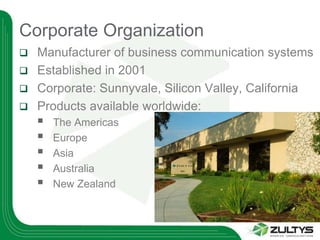
Corporate Organization
 Manufacturer of business communication systems
 Established in 2001
 Corporate: Sunnyvale, Silicon Valley, California
 Products available worldwide:
       The Americas
       Europe
       Asia
       Australia
       New Zealand
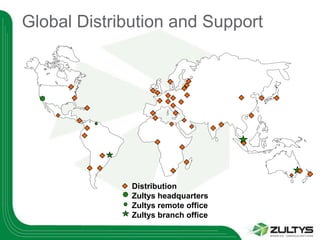
Global Distribution and Support


              Distribution
              Zultys headquarters
              Zultys remote office
              Zultys branch office
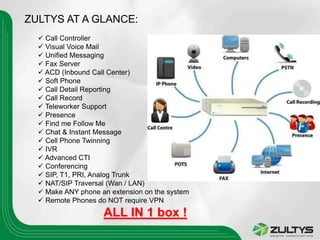
ZULTYS AT A GLANCE:
   Call Controller
   Visual Voice Mail
   Unified Messaging
   Fax Server
   ACD (Inbound Call Center)
   Soft Phone
   Call Detail Reporting
   Call Record
   Teleworker Support
   Presence
   Find me Follow Me
   Chat & Instant Message
   Cell Phone Twinning
   IVR
   Advanced CTI
   Conferencing
   SIP, T1, PRI, Analog Trunk
   NAT/SIP Traversal (Wan / LAN)
   Make ANY phone an extension on the system
   Remote Phones do NOT require VPN
                    ALL IN 1 box !
How are we different ?
   1 thin (30MB) CTI application, 16 functionalities, all
    integrated, running on ALL platforms (XP, 64 or 32
    Bit Vista, MAC, Linux and now… Windows 7.0 !!!)
   All in One 2U Rack mountable Linux based secure
    Appliance)
   No External Servers required or needed
   Based on Open Standards (SIP) NOT OPEN
    SOURCE
   Easy to expand to 10,000 users
   Easy to quote, configure, deploy, maintain and
    expand
Sales & Revenues
 Worldwide sales in Q4 2009 increased 79% over the
  same period of 2008.
 Our 2009 total sales grew 10% compared to 2008.
 Our 2009 focus was on increasing North American
  sales and in Q4 they increased a phenomenal 140%
  over Q4 2008 and 55% over the total year 2008.
 A record breaking year for Zultys.
 Our financial position is strong.
 Our balance sheet ratios, as measured by financial
  standards, meet or exceed the rest of the industry.
Zultys – At a Glance
   Sharply focused on TELEPHONY PRODUCTS ONLY
    (we do NOT sell TVs, laptops, or anything else)
   Supported by a network of hundreds of dealers and
    distributors worldwide (and rapidly growing !)
   Each year since 2001, Zultys has introduced 2 major
    revisions of the software (The product that keeps on
    getting better)
   Based on OPEN STANDARDS (not open source) – NO
    proprietary Skinny or MGCP or H.323. ALL SIP: the
    ONLY ratified standard in Telephony today
Product Advantage: SIP !!!
   Multiple Platform Integration: PC, MAC OSX, Linux
   Based on Open Industry Standards (SIP)
   SIP is the ONLY RATIFIED STANDARD OF
    TELEPHONY TODAY !
   Uses SIP Trunks, SIP Phones, SIP
    Software, Etc…
   (Also uses T1, E1, PRI, Analog Trunks)
   EASILY Scalable to 10,000 phones & 128
    locations
   SIP is where EVERY Phone Manufacturer WILL
    be in a few years. Zultys is here TODAY !
MX250: SIP Protocol !
What’s the buzz ?

 Calls transfer to users not to Phones, desks or
  Ports
 SIP addresses like email addresses:
       SIP:sales@zultys.com
 Users can receive calls at any IP phone (local or
  remote) using binding
 Use ANY SIP Phone (Polycom, Aastra, etc…)
       Log Multiple users on same IP phone
       Log users on Multiple (4) IP phones
       Maintain separate voice mail, extensions, presence
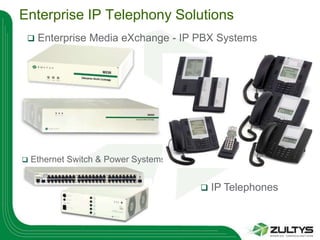
Enterprise IP Telephony Solutions
    Enterprise Media eXchange - IP PBX Systems


   Ethernet Switch & Power Systems


                                         IP Telephones
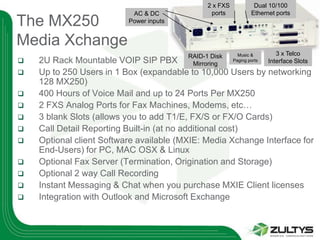
2 x FXS            Dual 10/100
                           AC & DC              ports            Ethernet ports
The MX250                 Power inputs


Media Xchange
                                         RAID-1 Disk       Music &         3 x Telco
   2U Rack Mountable VOIP SIP PBX        Mirroring
                                                         Paging ports   Interface Slots
   Up to 250 Users in 1 Box (expandable to 10,000 Users by networking
    128 MX250)
   400 Hours of Voice Mail and up to 24 Ports Per MX250
   2 FXS Analog Ports for Fax Machines, Modems, etc…
   3 blank Slots (allows you to add T1/E, FX/S or FX/O Cards)
   Call Detail Reporting Built-in (at no additional cost)
   Optional client Software available (MXIE: Media Xchange Interface for
    End-Users) for PC, MAC OSX & Linux
   Optional Fax Server (Termination, Origination and Storage)
   Optional 2 way Call Recording
   Instant Messaging & Chat when you purchase MXIE Client licenses
   Integration with Outlook and Microsoft Exchange
High Availability Features
   Power Failover: AC to Battery Failover with Syslog reporting
    when coupled with our optional BPS-12
   CO Failover:         If the MX250 fails, we fail your first 2 lines to
    the 2 built-in FX/S Ports.
   Drive Failover: Should 1 drive fail, the optional redundant
    RAID drive takes over automatically
   Fan Failover:        MX250 has 2 fans in the box. Should 1 fan
    fail, the other is enough to cool the system
   Clock Failover: Internal battery for real time clock
   T1/PRI Failover: Redirect the PRI to the live MX250
    automatically with our Optional XRS-12
   LAN Failover:        Dual LAN Ports built-in
   Unit Failover:       Clusters for redundancy
Flexible Extensions
 User can log on anywhere in network
 “Extension: belongs to User, not to a socket on wall
 User can be reached via user number regardless of
  location
 Users can receive calls at any IP phone, by binding to
  a device
 Multiple users on same IP phone
   Four registrations per user license
   allows transparent sharing of IP phones
   separate voice mail, extension #, presence
 Flexible numbering using 2-8 digit extension numbers
Call Recording (MX250 only)
    Fully integrated call recording
    Requires no external equipment
    On-demand
        Controlled via record button in MXIE
        Complete call recorded regardless of when
         Record button is pressed
        Recordings delivered to MXIE inbox
    Continuous Recording
        Record all calls based on profile settings
        Search recordings by Caller, Called Party, Date
         etc
        160 hours storage capacity on MX250
        Archiving option to increase storage
    Record up to 60 simultaneous calls
Archiving Option
    Archive:
      •   Recorded Calls
      •   Faxes
      •   Chat/IM
      •   Voice Mail
      •   Configuration Files
      •   Call Logs
    Automatic export to a separate database and
     separate storage device
    Retrieve any of the above items by date, time,
     person(s) and much more in seconds !
    Great for compliance (SOX, Hipaa….)
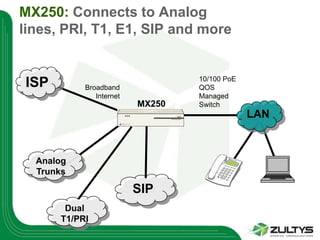
MX250: Connects to Analog
lines, PRI, T1, E1, SIP and more


                                 10/100 PoE
ISP        Broadband             QOS
              Internet           Managed
                         MX250   Switch
                                              LAN


  Analog
  Trunks

                         SIP
       Dual
      T1/PRI
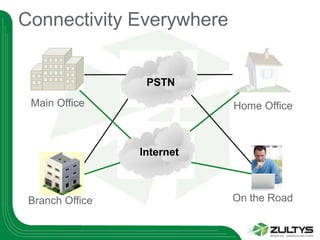
Connectivity Everywhere


                  PSTN
 Main Office                Home Office


                 Internet


 Branch Office              On the Road
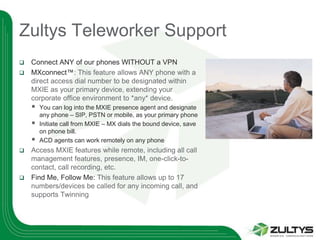
Zultys Teleworker Support
 Connect ANY of our phones WITHOUT a VPN
 MXconnect™: This feature allows ANY phone with a
  direct access dial number to be designated within
  MXIE as your primary device, extending your
  corporate office environment to *any* device.
       You can log into the MXIE presence agent and designate
        any phone – SIP, PSTN or mobile, as your primary phone
       Initiate call from MXIE – MX dials the bound device, save
        on phone bill.
       ACD agents can work remotely on any phone
 Access MXIE features while remote, including all call
  management features, presence, IM, one-click-to-
  contact, call recording, etc.
 Find Me, Follow Me: This feature allows up to 17
  numbers/devices be called for any incoming call, and
  supports Twinning
MX is Secure : end to end

 Secure internal or external conversations
     Secure conversations end to end
     Secure retrieval of voice mail
     Great for HIPAA and SOX compliance
     128 bit AES encryption
     Negligible time to encrypt or decrypt
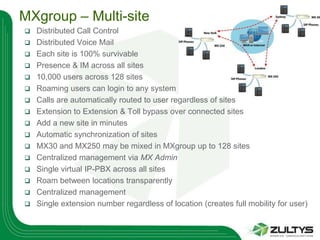
MXgroup – Multi-site
   Distributed Call Control
   Distributed Voice Mail
   Each site is 100% survivable
   Presence & IM across all sites
   10,000 users across 128 sites
   Roaming users can login to any system
   Calls are automatically routed to user regardless of sites
   Extension to Extension & Toll bypass over connected sites
   Add a new site in minutes
   Automatic synchronization of sites
   MX30 and MX250 may be mixed in MXgroup up to 128 sites
   Centralized management via MX Admin
   Single virtual IP-PBX across all sites
   Roam between locations transparently
   Centralized management
   Single extension number regardless of location (creates full mobility for user)
MANAGED !
 With 1 click, the MX can be SECURELY
  tunneled and attached to our monitoring facility
 Our monitoring facility inspects the system
  EVERY night and makes sure all software &
  hardware components are healthy
 Should a software module fail, we will know
  about it, typically before YOU do and contact
  you with corrective actions so as to prevent this
  failure from happening again
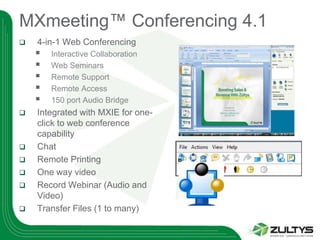
MXmeeting™ Conferencing 4.1
   4-in-1 Web Conferencing
       Interactive Collaboration
       Web Seminars
       Remote Support
       Remote Access
       150 port Audio Bridge
   Integrated with MXIE for one-
    click to web conference
    capability
   Chat
   Remote Printing
   One way video
   Record Webinar (Audio and
    Video)
   Transfer Files (1 to many)
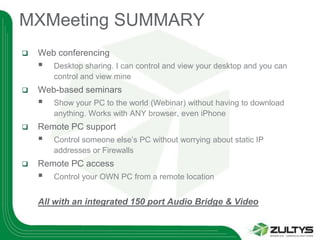
MXMeeting SUMMARY
   Web conferencing
       Desktop sharing. I can control and view your desktop and you can
        control and view mine
   Web-based seminars
       Show your PC to the world (Webinar) without having to download
        anything. Works with ANY browser, even iPhone
   Remote PC support
       Control someone else’s PC without worrying about static IP
        addresses or Firewalls
   Remote PC access
       Control your OWN PC from a remote location


    All with an integrated 150 port Audio Bridge & Video
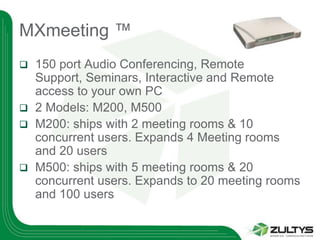
MXmeeting ™
 150 port Audio Conferencing, Remote
  Support, Seminars, Interactive and Remote
  access to your own PC
 2 Models: M200, M500
 M200: ships with 2 meeting rooms & 10
  concurrent users. Expands 4 Meeting rooms
  and 20 users
 M500: ships with 5 meeting rooms & 20
  concurrent users. Expands to 20 meeting rooms
  and 100 users
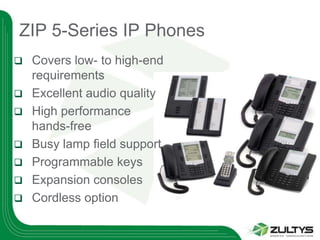
ZIP 5-Series IP Phones
   Covers low- to high-end
    requirements
   Excellent audio quality
   High performance
    hands-free
   Busy lamp field support
   Programmable keys
   Expansion consoles
   Cordless option
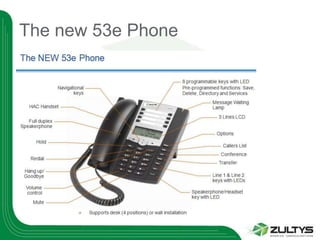
The new 53e Phone
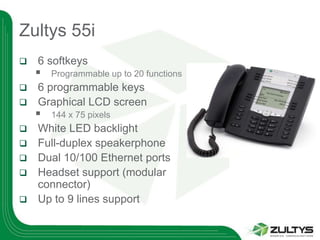
Zultys 55i
   6 softkeys
       Programmable up to 20 functions
 6 programmable keys
 Graphical LCD screen
       144 x 75 pixels
   White LED backlight
   Full-duplex speakerphone
   Dual 10/100 Ethernet ports
   Headset support (modular
    connector)
   Up to 9 lines support
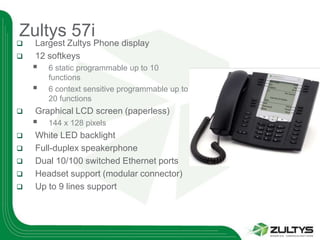
Zultys 57i
   Largest Zultys Phone display
   12 softkeys
       6 static programmable up to 10
        functions
       6 context sensitive programmable up to
        20 functions
   Graphical LCD screen (paperless)
       144 x 128 pixels
   White LED backlight
   Full-duplex speakerphone
   Dual 10/100 switched Ethernet ports
   Headset support (modular connector)
   Up to 9 lines support
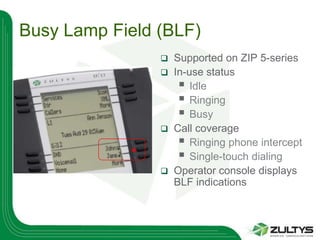
Busy Lamp Field (BLF)
                   Supported on ZIP 5-series
                   In-use status
                      Idle
                      Ringing
                      Busy
                   Call coverage
                      Ringing phone intercept
                      Single-touch dialing
                   Operator console displays
                    BLF indications
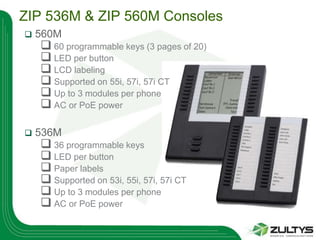
ZIP 536M & ZIP 560M Consoles
   560M
     60 programmable keys (3 pages of 20)
     LED per button
     LCD labeling
     Supported on 55i, 57i, 57i CT
     Up to 3 modules per phone
     AC or PoE power

   536M
     36 programmable keys
     LED per button
     Paper labels
     Supported on 53i, 55i, 57i, 57i CT
     Up to 3 modules per phone
     AC or PoE power
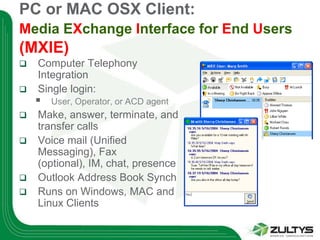
PC or MAC OSX Client:
Media EXchange Interface for End Users
(MXIE)
   Computer Telephony
    Integration
   Single login:
       User, Operator, or ACD agent
   Make, answer, terminate, and
    transfer calls
   Voice mail (Unified
    Messaging), Fax
    (optional), IM, chat, presence
   Outlook Address Book Synch
   Runs on Windows, MAC and
    Linux Clients
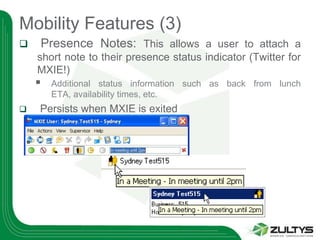
Mobility Features (3)
   Presence Notes: This allows a user to attach a
    short note to their presence status indicator (Twitter for
    MXIE!)
       Additional status information such as back from lunch
        ETA, availability times, etc.
   Persists when MXIE is exited
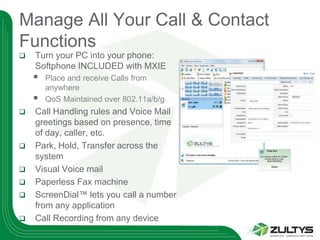
Manage All Your Call & Contact
Functions
   Turn your PC into your phone:
    Softphone INCLUDED with MXIE
       Place and receive Calls from
        anywhere
       QoS Maintained over 802.11a/b/g
   Call Handling rules and Voice Mail
    greetings based on presence, time
    of day, caller, etc.
   Park, Hold, Transfer across the
    system
   Visual Voice mail
   Paperless Fax machine
   ScreenDial™ lets you call a number
    from any application
   Call Recording from any device
Microsoft Exchange

   Microsoft Exchange 2000/03/07/10
    integration allows voice mail
    synchronization
       New messages
       Saved messages
       Deleted messages
       Delete a message from your inbox and it will
        delete it from the phone and vice versa
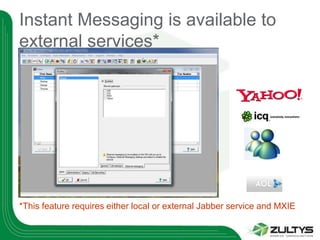
Instant Messaging is available to
external services*


*This feature requires either local or external Jabber service and MXIE
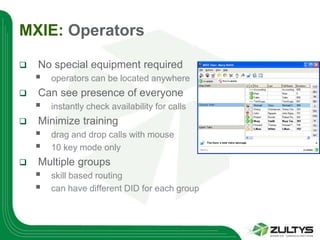
MXIE: Operators

   No special equipment required
       operators can be located anywhere
   Can see presence of everyone
       instantly check availability for calls
   Minimize training
       drag and drop calls with mouse
       10 key mode only
   Multiple groups
       skill based routing
       can have different DID for each group
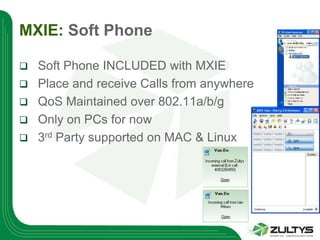
MXIE: Soft Phone

   Soft Phone INCLUDED with MXIE
   Place and receive Calls from anywhere
   QoS Maintained over 802.11a/b/g
   Only on PCs for now
   3rd Party supported on MAC & Linux
Inbound Call Center
Extended
Applications                           Inbound Call Center
   Call queuing with music on hold
   Dedicated voice and fax mailbox
   Queue announcements
       Position in queue
       Expected wait time
       Play customized messages to callers
   Overflow options to maximize customer service
   View Presence of other agents
       IM product champion whilst on call
       Auto logout unresponsive agents
   Prompt for Call Back number
   Multiple groups
       Multiple agents
       Skills based routing
Inbound Call Center:
   Call queuing with music on hold
   Dedicated voice and fax mailbox
   Queue announcements
       Position in queue
       Expected wait time
       Play customized messages to callers
   Overflow options to maximize customer service
   View Presence of other agents
       IM product champion whilst on call
       Auto logout unresponsive agents
   Prompt for Call Back number
   Multiple groups
       Multiple agents
       Skills based routing
Inbound Call Center
   Enhanced functionality for demanding
    call centre environments
       additional call overflow options
       customizable Wallboard
   Supervisors
       real-time group and agent statistics
       monitor queue and prioritize calls
   Agents
       queue and callback monitor
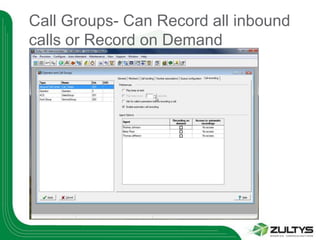
   Call recording included (MX250)
       on demand by agent / supervisor
       continuously record all call centre calls
Operator, ACD and Hunt Groups
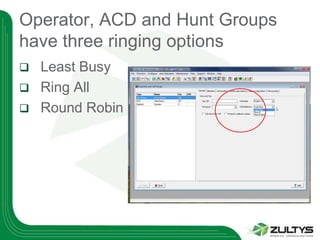
have three ringing options
   Least Busy
   Ring All
   Round Robin
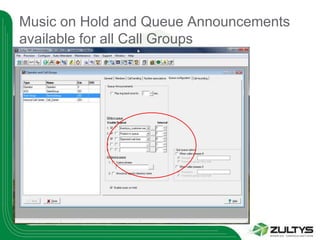
Music on Hold and Queue Announcements
available for all Call Groups
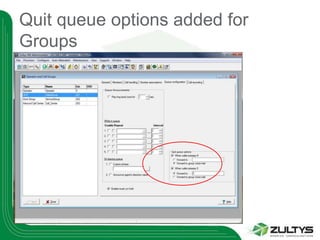
Quit queue options added for
Groups
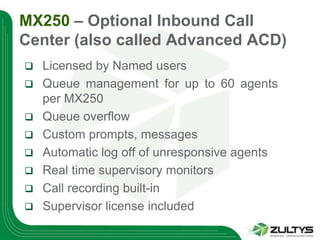
MX250 – Optional Inbound Call
Center (also called Advanced ACD)
   Licensed by Named users
   Queue management for up to 60 agents
    per MX250
   Queue overflow
   Custom prompts, messages
   Automatic log off of unresponsive agents
   Real time supervisory monitors
   Call recording built-in
   Supervisor license included
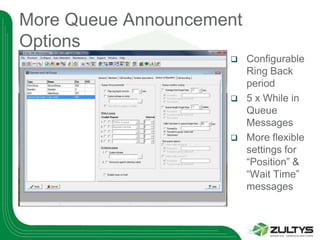
More Queue Announcement
Options
                         Configurable
                          Ring Back
                          period
                         5 x While in
                          Queue
                          Messages
                         More flexible
                          settings for
                          “Position” &
                          “Wait Time”
                          messages
Call Groups- Can Record all inbound
calls or Record on Demand
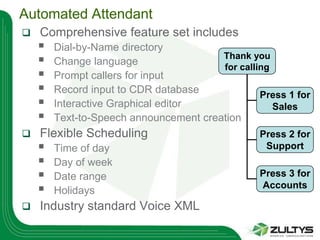
Automated Attendant
   Comprehensive feature set includes
       Dial-by-Name directory
       Change language
                                        Thank you
                                        for calling
       Prompt callers for input
       Record input to CDR database             Press 1 for
       Interactive Graphical editor                Sales
       Text-to-Speech announcement creation
   Flexible Scheduling                          Press 2 for
       Time of day                               Support
       Day of week
       Date range                               Press 3 for
       Holidays
                                                 Accounts

   Industry standard Voice XML
Evolution of Phone Technology
   TDM (Legacy)
   Hybrids (NEC, Avaya, Nortel)… obsolete technology –
    NOT compatible with SIP
   Proprietary (ShoreTel/MGCP)… DEAD technology
   VoIP: converged, but no standards (you can not
    connect a Cisco VoIP and a 3COM VoIP)
   SIP: the 1st and ONLY STANDARD OF TELEPHONY
    – now FULLY RATIFIED
   Zultys: the 1st to deploy a SIP IP PBX with that many
    features
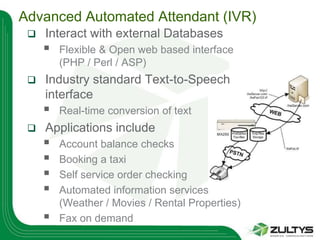
Advanced Automated Attendant (IVR)
    Interact with external Databases
        Flexible & Open web based interface
         (PHP / Perl / ASP)
    Industry standard Text-to-Speech
     interface
        Real-time conversion of text
    Applications include
        Account balance checks
        Booking a taxi
        Self service order checking
        Automated information services
         (Weather / Movies / Rental Properties)
        Fax on demand
SIP: Return on Investment
   Open Standard & embraced worldwide
   Provide CHOICE in additional Equipment
   Pure IP, converged Systems
   1 Wire to the desktop – cuts down on wiring
   No more tracing wires and big ugly cabinets
   Provides native PC, MAC and Linux Integration
   Quick deployment in main and remote locations
   0 effort Moves adds changes
   Upgrades and maintains on LAN
   Easily Interconnects branch offices and remote
    workers
SIP: Return on Investment
   Increase productivity amongst Employees
    (Chat, Presence, Fax to the desktop….)
   0 Toll between offices
   Reduce Maintenance cost
   Centralized Administration to 100% of the
    functions
   0 effort Moves
   Open Standards allows less expensive
    equipment to be added
   Outstanding Call handling – Connect to users
    ANYWHERE ANYTIME
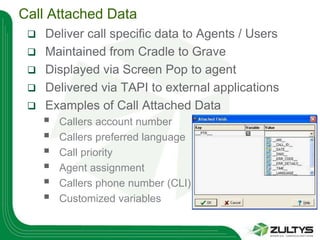
Call Attached Data
    Deliver call specific data to Agents / Users
    Maintained from Cradle to Grave
    Displayed via Screen Pop to agent
    Delivered via TAPI to external applications
    Examples of Call Attached Data
        Callers account number
        Callers preferred language
        Call priority
        Agent assignment
        Callers phone number (CLI)
        Customized variables
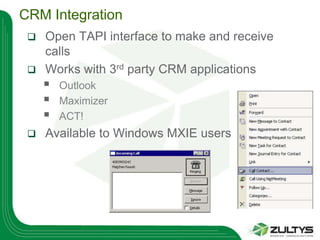
CRM Integration
  Open TAPI interface to make and receive
   calls
  Works with 3rd party CRM applications
        Outlook
        Maximizer
        ACT!
    Available to Windows MXIE users
the right choice

Shon Bayne Zultys Overview

  • 1.
    Company Overview: Presented by: Shon Bayne Director of Sales for Southeast Region Shon.Bayne@zultys.com www.zultys.com (408) 328-5425 (Direct)
  • 2.
    Corporate Organization  Manufacturerof business communication systems  Established in 2001  Corporate: Sunnyvale, Silicon Valley, California  Products available worldwide:  The Americas  Europe  Asia  Australia  New Zealand
  • 3.
    Global Distribution andSupport Distribution Zultys headquarters Zultys remote office Zultys branch office
  • 4.
    ZULTYS AT AGLANCE:  Call Controller  Visual Voice Mail  Unified Messaging  Fax Server  ACD (Inbound Call Center)  Soft Phone  Call Detail Reporting  Call Record  Teleworker Support  Presence  Find me Follow Me  Chat & Instant Message  Cell Phone Twinning  IVR  Advanced CTI  Conferencing  SIP, T1, PRI, Analog Trunk  NAT/SIP Traversal (Wan / LAN)  Make ANY phone an extension on the system  Remote Phones do NOT require VPN ALL IN 1 box !
  • 5.
    How are wedifferent ?  1 thin (30MB) CTI application, 16 functionalities, all integrated, running on ALL platforms (XP, 64 or 32 Bit Vista, MAC, Linux and now… Windows 7.0 !!!)  All in One 2U Rack mountable Linux based secure Appliance)  No External Servers required or needed  Based on Open Standards (SIP) NOT OPEN SOURCE  Easy to expand to 10,000 users  Easy to quote, configure, deploy, maintain and expand
  • 7.
    Sales & Revenues Worldwide sales in Q4 2009 increased 79% over the same period of 2008.  Our 2009 total sales grew 10% compared to 2008.  Our 2009 focus was on increasing North American sales and in Q4 they increased a phenomenal 140% over Q4 2008 and 55% over the total year 2008.  A record breaking year for Zultys.  Our financial position is strong.  Our balance sheet ratios, as measured by financial standards, meet or exceed the rest of the industry.
  • 8.
    Zultys – Ata Glance  Sharply focused on TELEPHONY PRODUCTS ONLY (we do NOT sell TVs, laptops, or anything else)  Supported by a network of hundreds of dealers and distributors worldwide (and rapidly growing !)  Each year since 2001, Zultys has introduced 2 major revisions of the software (The product that keeps on getting better)  Based on OPEN STANDARDS (not open source) – NO proprietary Skinny or MGCP or H.323. ALL SIP: the ONLY ratified standard in Telephony today
  • 9.
    Product Advantage: SIP!!!  Multiple Platform Integration: PC, MAC OSX, Linux  Based on Open Industry Standards (SIP)  SIP is the ONLY RATIFIED STANDARD OF TELEPHONY TODAY !  Uses SIP Trunks, SIP Phones, SIP Software, Etc…  (Also uses T1, E1, PRI, Analog Trunks)  EASILY Scalable to 10,000 phones & 128 locations  SIP is where EVERY Phone Manufacturer WILL be in a few years. Zultys is here TODAY !
  • 10.
    MX250: SIP Protocol! What’s the buzz ?  Calls transfer to users not to Phones, desks or Ports  SIP addresses like email addresses:  SIP:sales@zultys.com  Users can receive calls at any IP phone (local or remote) using binding  Use ANY SIP Phone (Polycom, Aastra, etc…)  Log Multiple users on same IP phone  Log users on Multiple (4) IP phones  Maintain separate voice mail, extensions, presence
  • 11.
    Enterprise IP TelephonySolutions  Enterprise Media eXchange - IP PBX Systems  Ethernet Switch & Power Systems  IP Telephones
  • 12.
    2 x FXS Dual 10/100 AC & DC ports Ethernet ports The MX250 Power inputs Media Xchange RAID-1 Disk Music & 3 x Telco  2U Rack Mountable VOIP SIP PBX Mirroring Paging ports Interface Slots  Up to 250 Users in 1 Box (expandable to 10,000 Users by networking 128 MX250)  400 Hours of Voice Mail and up to 24 Ports Per MX250  2 FXS Analog Ports for Fax Machines, Modems, etc…  3 blank Slots (allows you to add T1/E, FX/S or FX/O Cards)  Call Detail Reporting Built-in (at no additional cost)  Optional client Software available (MXIE: Media Xchange Interface for End-Users) for PC, MAC OSX & Linux  Optional Fax Server (Termination, Origination and Storage)  Optional 2 way Call Recording  Instant Messaging & Chat when you purchase MXIE Client licenses  Integration with Outlook and Microsoft Exchange
  • 13.
    High Availability Features  Power Failover: AC to Battery Failover with Syslog reporting when coupled with our optional BPS-12  CO Failover: If the MX250 fails, we fail your first 2 lines to the 2 built-in FX/S Ports.  Drive Failover: Should 1 drive fail, the optional redundant RAID drive takes over automatically  Fan Failover: MX250 has 2 fans in the box. Should 1 fan fail, the other is enough to cool the system  Clock Failover: Internal battery for real time clock  T1/PRI Failover: Redirect the PRI to the live MX250 automatically with our Optional XRS-12  LAN Failover: Dual LAN Ports built-in  Unit Failover: Clusters for redundancy
  • 14.
    Flexible Extensions  Usercan log on anywhere in network  “Extension: belongs to User, not to a socket on wall  User can be reached via user number regardless of location  Users can receive calls at any IP phone, by binding to a device  Multiple users on same IP phone  Four registrations per user license  allows transparent sharing of IP phones  separate voice mail, extension #, presence  Flexible numbering using 2-8 digit extension numbers
  • 15.
    Call Recording (MX250only)  Fully integrated call recording  Requires no external equipment  On-demand  Controlled via record button in MXIE  Complete call recorded regardless of when Record button is pressed  Recordings delivered to MXIE inbox  Continuous Recording  Record all calls based on profile settings  Search recordings by Caller, Called Party, Date etc  160 hours storage capacity on MX250  Archiving option to increase storage  Record up to 60 simultaneous calls
  • 16.
    Archiving Option  Archive: • Recorded Calls • Faxes • Chat/IM • Voice Mail • Configuration Files • Call Logs  Automatic export to a separate database and separate storage device  Retrieve any of the above items by date, time, person(s) and much more in seconds !  Great for compliance (SOX, Hipaa….)
  • 17.
    MX250: Connects toAnalog lines, PRI, T1, E1, SIP and more 10/100 PoE ISP Broadband QOS Internet Managed MX250 Switch LAN Analog Trunks SIP Dual T1/PRI
  • 18.
    Connectivity Everywhere PSTN Main Office Home Office Internet Branch Office On the Road
  • 19.
    Zultys Teleworker Support Connect ANY of our phones WITHOUT a VPN  MXconnect™: This feature allows ANY phone with a direct access dial number to be designated within MXIE as your primary device, extending your corporate office environment to *any* device.  You can log into the MXIE presence agent and designate any phone – SIP, PSTN or mobile, as your primary phone  Initiate call from MXIE – MX dials the bound device, save on phone bill.  ACD agents can work remotely on any phone  Access MXIE features while remote, including all call management features, presence, IM, one-click-to- contact, call recording, etc.  Find Me, Follow Me: This feature allows up to 17 numbers/devices be called for any incoming call, and supports Twinning
  • 20.
    MX is Secure: end to end  Secure internal or external conversations  Secure conversations end to end  Secure retrieval of voice mail  Great for HIPAA and SOX compliance  128 bit AES encryption  Negligible time to encrypt or decrypt
  • 21.
    MXgroup – Multi-site  Distributed Call Control  Distributed Voice Mail  Each site is 100% survivable  Presence & IM across all sites  10,000 users across 128 sites  Roaming users can login to any system  Calls are automatically routed to user regardless of sites  Extension to Extension & Toll bypass over connected sites  Add a new site in minutes  Automatic synchronization of sites  MX30 and MX250 may be mixed in MXgroup up to 128 sites  Centralized management via MX Admin  Single virtual IP-PBX across all sites  Roam between locations transparently  Centralized management  Single extension number regardless of location (creates full mobility for user)
  • 22.
    MANAGED !  With1 click, the MX can be SECURELY tunneled and attached to our monitoring facility  Our monitoring facility inspects the system EVERY night and makes sure all software & hardware components are healthy  Should a software module fail, we will know about it, typically before YOU do and contact you with corrective actions so as to prevent this failure from happening again
  • 23.
    MXmeeting™ Conferencing 4.1  4-in-1 Web Conferencing  Interactive Collaboration  Web Seminars  Remote Support  Remote Access  150 port Audio Bridge  Integrated with MXIE for one- click to web conference capability  Chat  Remote Printing  One way video  Record Webinar (Audio and Video)  Transfer Files (1 to many)
  • 24.
    MXMeeting SUMMARY  Web conferencing  Desktop sharing. I can control and view your desktop and you can control and view mine  Web-based seminars  Show your PC to the world (Webinar) without having to download anything. Works with ANY browser, even iPhone  Remote PC support  Control someone else’s PC without worrying about static IP addresses or Firewalls  Remote PC access  Control your OWN PC from a remote location All with an integrated 150 port Audio Bridge & Video
  • 25.
    MXmeeting ™  150port Audio Conferencing, Remote Support, Seminars, Interactive and Remote access to your own PC  2 Models: M200, M500  M200: ships with 2 meeting rooms & 10 concurrent users. Expands 4 Meeting rooms and 20 users  M500: ships with 5 meeting rooms & 20 concurrent users. Expands to 20 meeting rooms and 100 users
  • 26.
    ZIP 5-Series IPPhones  Covers low- to high-end requirements  Excellent audio quality  High performance hands-free  Busy lamp field support  Programmable keys  Expansion consoles  Cordless option
  • 27.
  • 28.
    Zultys 55i  6 softkeys  Programmable up to 20 functions  6 programmable keys  Graphical LCD screen  144 x 75 pixels  White LED backlight  Full-duplex speakerphone  Dual 10/100 Ethernet ports  Headset support (modular connector)  Up to 9 lines support
  • 29.
    Zultys 57i  Largest Zultys Phone display  12 softkeys  6 static programmable up to 10 functions  6 context sensitive programmable up to 20 functions  Graphical LCD screen (paperless)  144 x 128 pixels  White LED backlight  Full-duplex speakerphone  Dual 10/100 switched Ethernet ports  Headset support (modular connector)  Up to 9 lines support
  • 30.
    Busy Lamp Field(BLF)  Supported on ZIP 5-series  In-use status  Idle  Ringing  Busy  Call coverage  Ringing phone intercept  Single-touch dialing  Operator console displays BLF indications
  • 31.
    ZIP 536M &ZIP 560M Consoles  560M  60 programmable keys (3 pages of 20)  LED per button  LCD labeling  Supported on 55i, 57i, 57i CT  Up to 3 modules per phone  AC or PoE power  536M  36 programmable keys  LED per button  Paper labels  Supported on 53i, 55i, 57i, 57i CT  Up to 3 modules per phone  AC or PoE power
  • 32.
    PC or MACOSX Client: Media EXchange Interface for End Users (MXIE)  Computer Telephony Integration  Single login:  User, Operator, or ACD agent  Make, answer, terminate, and transfer calls  Voice mail (Unified Messaging), Fax (optional), IM, chat, presence  Outlook Address Book Synch  Runs on Windows, MAC and Linux Clients
  • 33.
    Mobility Features (3)  Presence Notes: This allows a user to attach a short note to their presence status indicator (Twitter for MXIE!)  Additional status information such as back from lunch ETA, availability times, etc.  Persists when MXIE is exited
  • 34.
    Manage All YourCall & Contact Functions  Turn your PC into your phone: Softphone INCLUDED with MXIE  Place and receive Calls from anywhere  QoS Maintained over 802.11a/b/g  Call Handling rules and Voice Mail greetings based on presence, time of day, caller, etc.  Park, Hold, Transfer across the system  Visual Voice mail  Paperless Fax machine  ScreenDial™ lets you call a number from any application  Call Recording from any device
  • 35.
    Microsoft Exchange  Microsoft Exchange 2000/03/07/10 integration allows voice mail synchronization  New messages  Saved messages  Deleted messages  Delete a message from your inbox and it will delete it from the phone and vice versa
  • 36.
    Instant Messaging isavailable to external services* *This feature requires either local or external Jabber service and MXIE
  • 37.
    MXIE: Operators  No special equipment required  operators can be located anywhere  Can see presence of everyone  instantly check availability for calls  Minimize training  drag and drop calls with mouse  10 key mode only  Multiple groups  skill based routing  can have different DID for each group
  • 38.
    MXIE: Soft Phone  Soft Phone INCLUDED with MXIE  Place and receive Calls from anywhere  QoS Maintained over 802.11a/b/g  Only on PCs for now  3rd Party supported on MAC & Linux
  • 39.
  • 40.
    Extended Applications Inbound Call Center  Call queuing with music on hold  Dedicated voice and fax mailbox  Queue announcements  Position in queue  Expected wait time  Play customized messages to callers  Overflow options to maximize customer service  View Presence of other agents  IM product champion whilst on call  Auto logout unresponsive agents  Prompt for Call Back number  Multiple groups  Multiple agents  Skills based routing
  • 41.
    Inbound Call Center:  Call queuing with music on hold  Dedicated voice and fax mailbox  Queue announcements  Position in queue  Expected wait time  Play customized messages to callers  Overflow options to maximize customer service  View Presence of other agents  IM product champion whilst on call  Auto logout unresponsive agents  Prompt for Call Back number  Multiple groups  Multiple agents  Skills based routing
  • 42.
    Inbound Call Center  Enhanced functionality for demanding call centre environments  additional call overflow options  customizable Wallboard  Supervisors  real-time group and agent statistics  monitor queue and prioritize calls  Agents  queue and callback monitor  Call recording included (MX250)  on demand by agent / supervisor  continuously record all call centre calls
  • 43.
    Operator, ACD andHunt Groups have three ringing options  Least Busy  Ring All  Round Robin
  • 44.
    Music on Holdand Queue Announcements available for all Call Groups
  • 45.
    Quit queue optionsadded for Groups
  • 46.
    MX250 – OptionalInbound Call Center (also called Advanced ACD)  Licensed by Named users  Queue management for up to 60 agents per MX250  Queue overflow  Custom prompts, messages  Automatic log off of unresponsive agents  Real time supervisory monitors  Call recording built-in  Supervisor license included
  • 47.
    More Queue Announcement Options  Configurable Ring Back period  5 x While in Queue Messages  More flexible settings for “Position” & “Wait Time” messages
  • 48.
    Call Groups- CanRecord all inbound calls or Record on Demand
  • 49.
    Automated Attendant  Comprehensive feature set includes  Dial-by-Name directory  Change language Thank you for calling  Prompt callers for input  Record input to CDR database Press 1 for  Interactive Graphical editor Sales  Text-to-Speech announcement creation  Flexible Scheduling Press 2 for  Time of day Support  Day of week  Date range Press 3 for  Holidays Accounts  Industry standard Voice XML
  • 50.
    Evolution of PhoneTechnology  TDM (Legacy)  Hybrids (NEC, Avaya, Nortel)… obsolete technology – NOT compatible with SIP  Proprietary (ShoreTel/MGCP)… DEAD technology  VoIP: converged, but no standards (you can not connect a Cisco VoIP and a 3COM VoIP)  SIP: the 1st and ONLY STANDARD OF TELEPHONY – now FULLY RATIFIED  Zultys: the 1st to deploy a SIP IP PBX with that many features
  • 51.
    Advanced Automated Attendant(IVR)  Interact with external Databases  Flexible & Open web based interface (PHP / Perl / ASP)  Industry standard Text-to-Speech interface  Real-time conversion of text  Applications include  Account balance checks  Booking a taxi  Self service order checking  Automated information services (Weather / Movies / Rental Properties)  Fax on demand
  • 52.
    SIP: Return onInvestment  Open Standard & embraced worldwide  Provide CHOICE in additional Equipment  Pure IP, converged Systems  1 Wire to the desktop – cuts down on wiring  No more tracing wires and big ugly cabinets  Provides native PC, MAC and Linux Integration  Quick deployment in main and remote locations  0 effort Moves adds changes  Upgrades and maintains on LAN  Easily Interconnects branch offices and remote workers
  • 53.
    SIP: Return onInvestment  Increase productivity amongst Employees (Chat, Presence, Fax to the desktop….)  0 Toll between offices  Reduce Maintenance cost  Centralized Administration to 100% of the functions  0 effort Moves  Open Standards allows less expensive equipment to be added  Outstanding Call handling – Connect to users ANYWHERE ANYTIME
  • 54.
    Call Attached Data  Deliver call specific data to Agents / Users  Maintained from Cradle to Grave  Displayed via Screen Pop to agent  Delivered via TAPI to external applications  Examples of Call Attached Data  Callers account number  Callers preferred language  Call priority  Agent assignment  Callers phone number (CLI)  Customized variables
  • 55.
    CRM Integration Open TAPI interface to make and receive calls  Works with 3rd party CRM applications  Outlook  Maximizer  ACT!  Available to Windows MXIE users
  • 56.