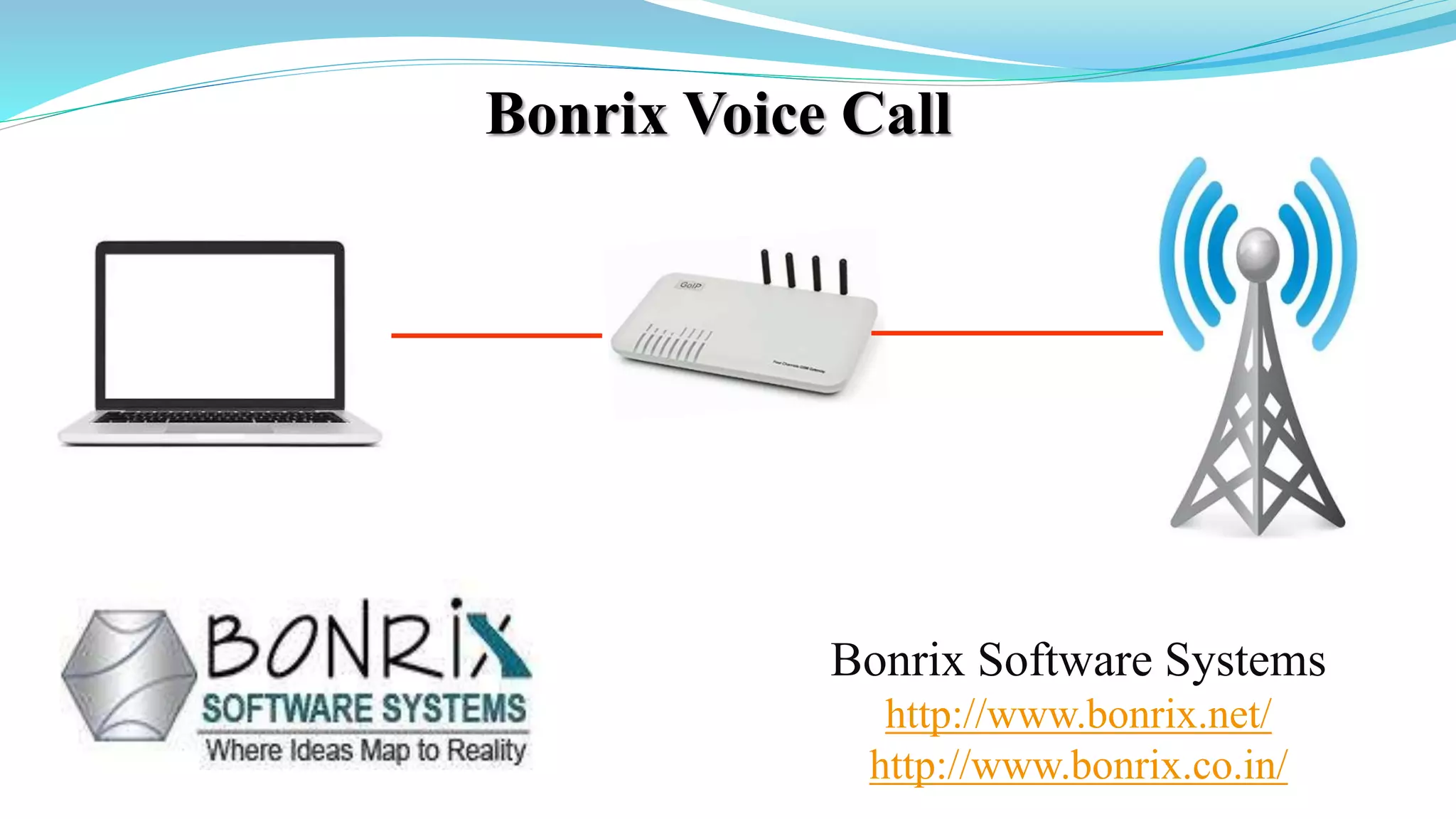
Bonrix Voice Call
Bonrix Software Systems
http://www.bonrix.net/
http://www.bonrix.co.in/
Voice Call Web Panel
 Voice Call Web Panel Simplify The Calling Function.
 Using Voice Call Web Panel User Can Use Calling Function By Various Platforms
like VoIP Devices, SIP Professional Voice Call Manager Software etc.
 Voice Call Web Panel Provide Various Calling Way Like Quick Call, Group Call,
CSV Call By Simply Uploading an Audio File Of Any Formats.
 Voice Call Web Panel Also Provide Date Vise Calling Summary And Calling Report
As Well.
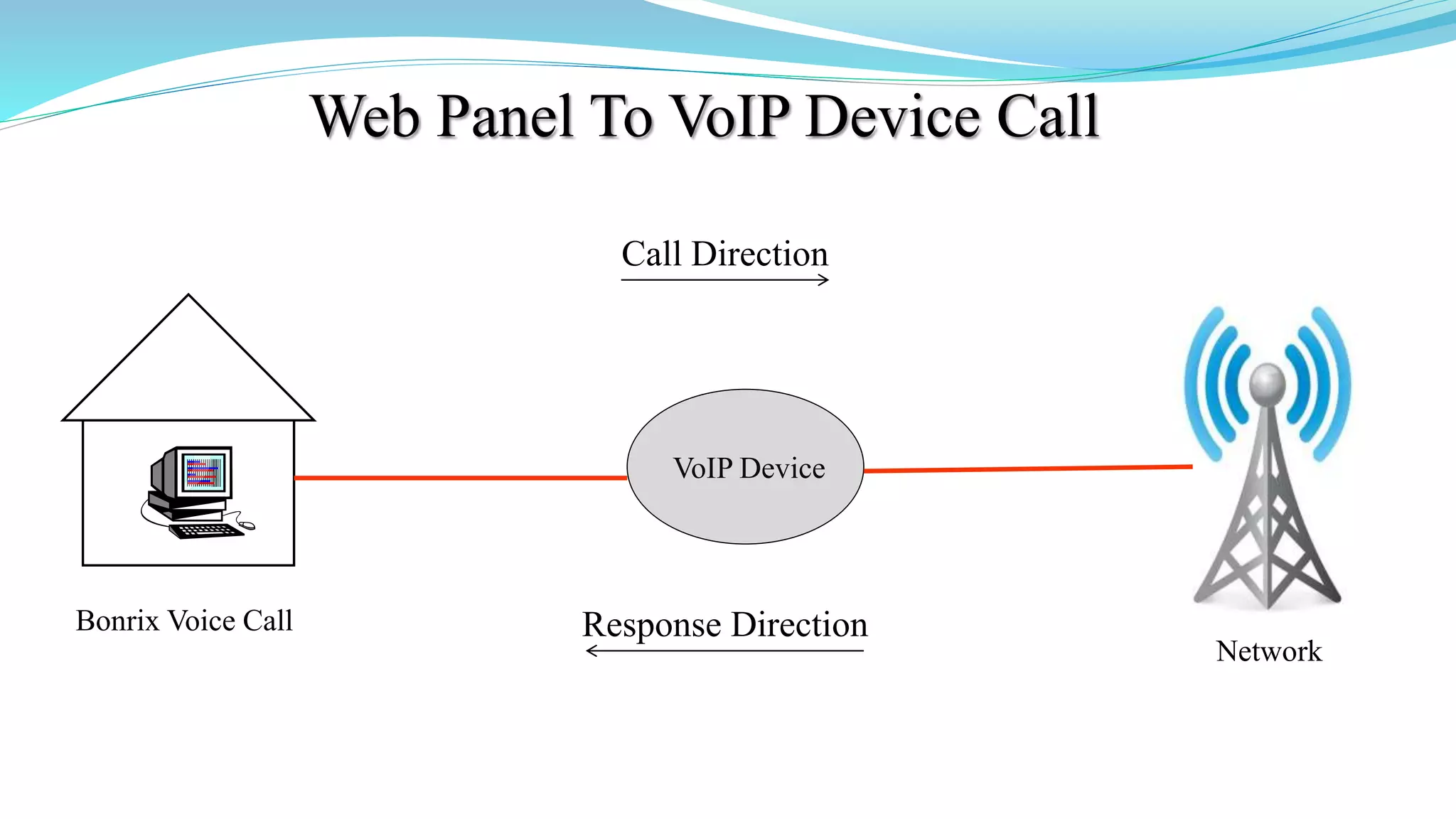
Web Panel To VoIP Device Call
VoIP Device
Bonrix Voice Call
Call Direction
Response Direction
Network
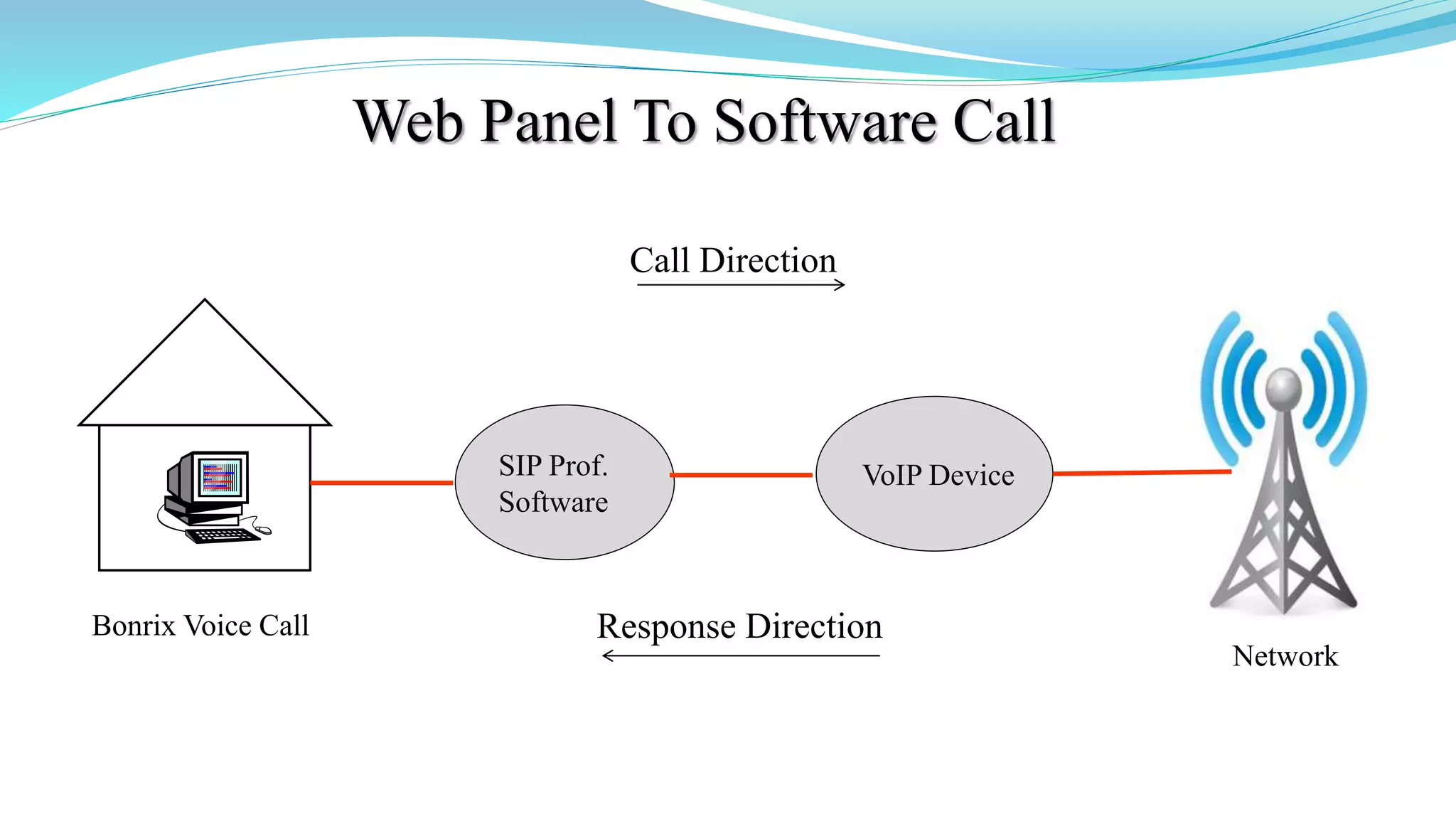
Web Panel To Software Call
VoIP Device
Bonrix Voice Call
Call Direction
Response Direction
Network
SIP Prof.
Software
Bonrix Voice Broadcast Web Panel Description
Description Bonrix Voice Broadcast Web Panel provides facility for only voice
campaign for marketing purposes and also for transnational purpose for voice
notification and Alert as well as OTP notification on voice call.
This web provide re-seller option for selling voice call for voice marketing
purpose.
Android app also available for Bulk Voice campaign from android phone.
Bonrix Voice Broadcast Web Panel Use Cases
Admin Panel :
1. Overall management and voice campain routing - re-seller management,
pricing and tariff management.
Re-seller Panel :
1.User creation, User management , Credit allocation, reporting.
User Panel:
1.Voice broadcasting, Voice sms, running voice marking campaign, upload
pre-recorded audio file, upload bilk contact using Excel /CSV, Checking
Voice report.
Different Type Of Voice Termination
 SIP - VOIP telephony provider connector.
 USB-3G data card dongle based voice to GSM dialer.
 GSM/3G Void GSM Gateway.
 Third party HTTP API for Voice and FTP audio file upload.
 Android app also available for Bulk Voice campaign from android phone.
 Voice API is also available for third party external software integration
SIP Professional Voice Call Software
Bonrix VoIP SIP is developed for outbound call center for processing
leads via different types of VoIP Gateway.
It is developed for automated calling from desktop based phone
working on different VoIP based technology
SIP Professional Config.
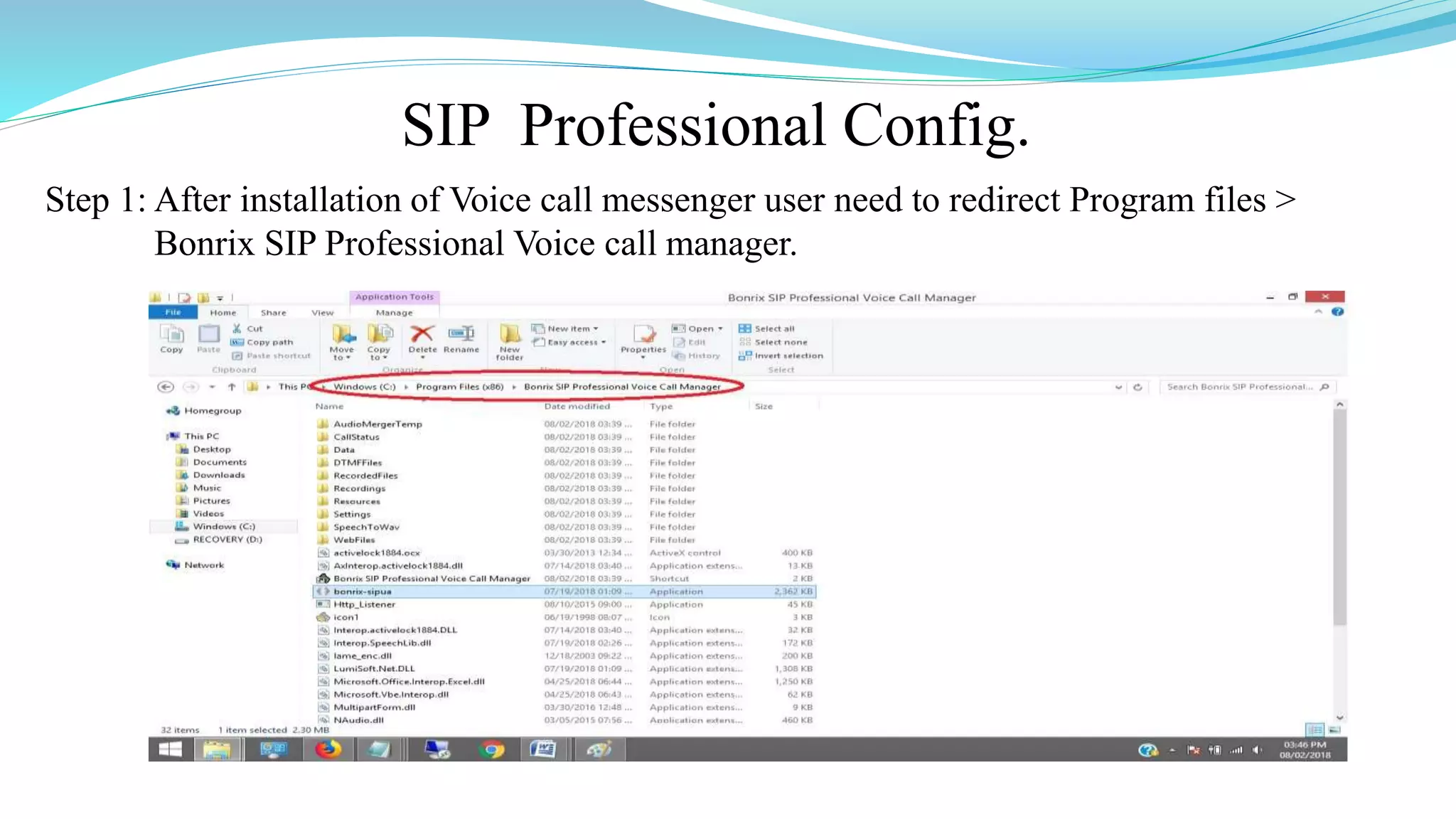
Step 1: After installation of Voice call messenger user need to redirect Program files >
Bonrix SIP Professional Voice call manager.
SIP Professional Config.
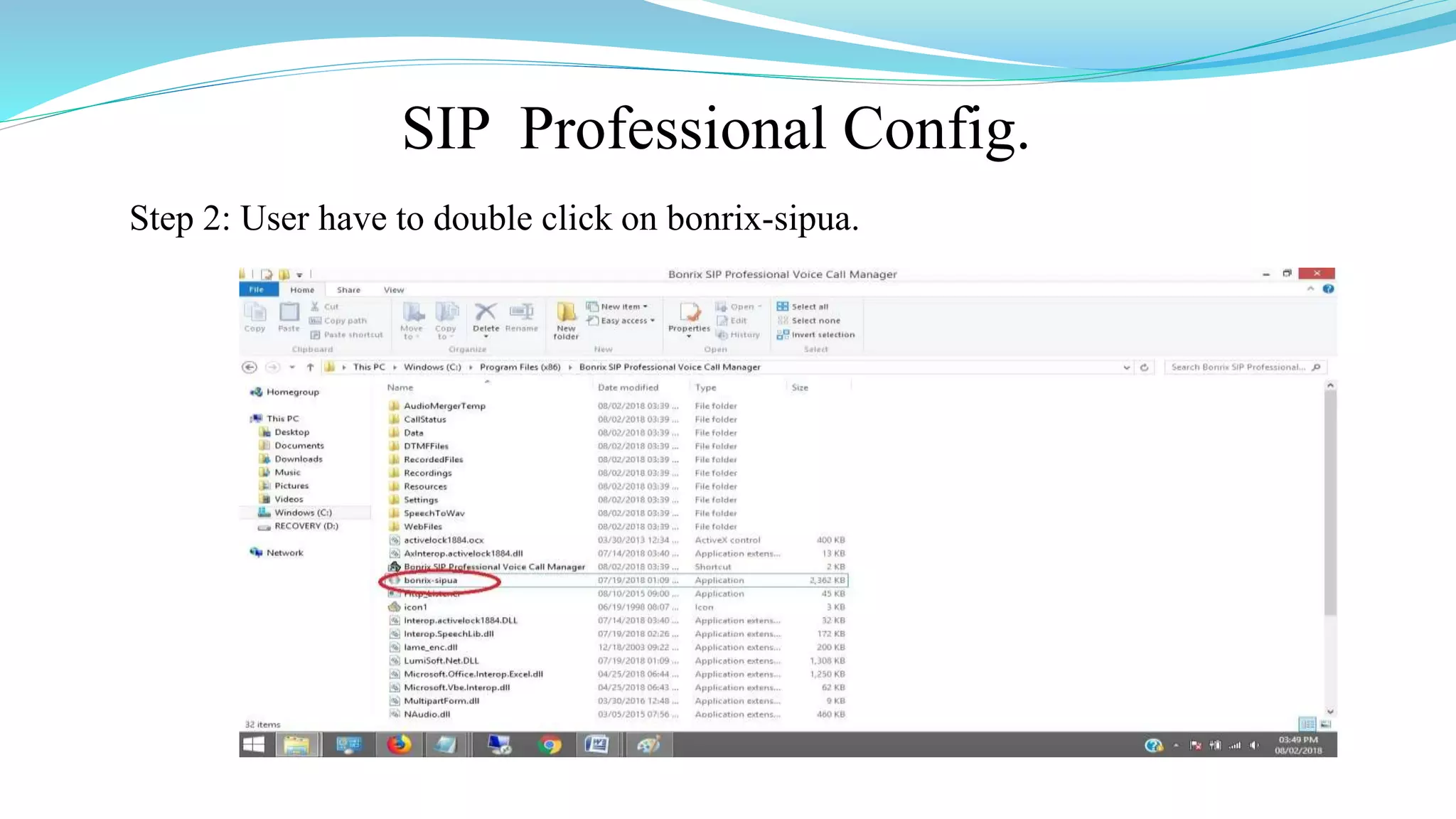
Step 2: User have to double click on bonrix-sipua.
SIP Professional Config.
Step 3: After double click on bonrix-sipua User can see Bonrix SIP Auto Dialer
software go to settings.
SIP Professional Config.
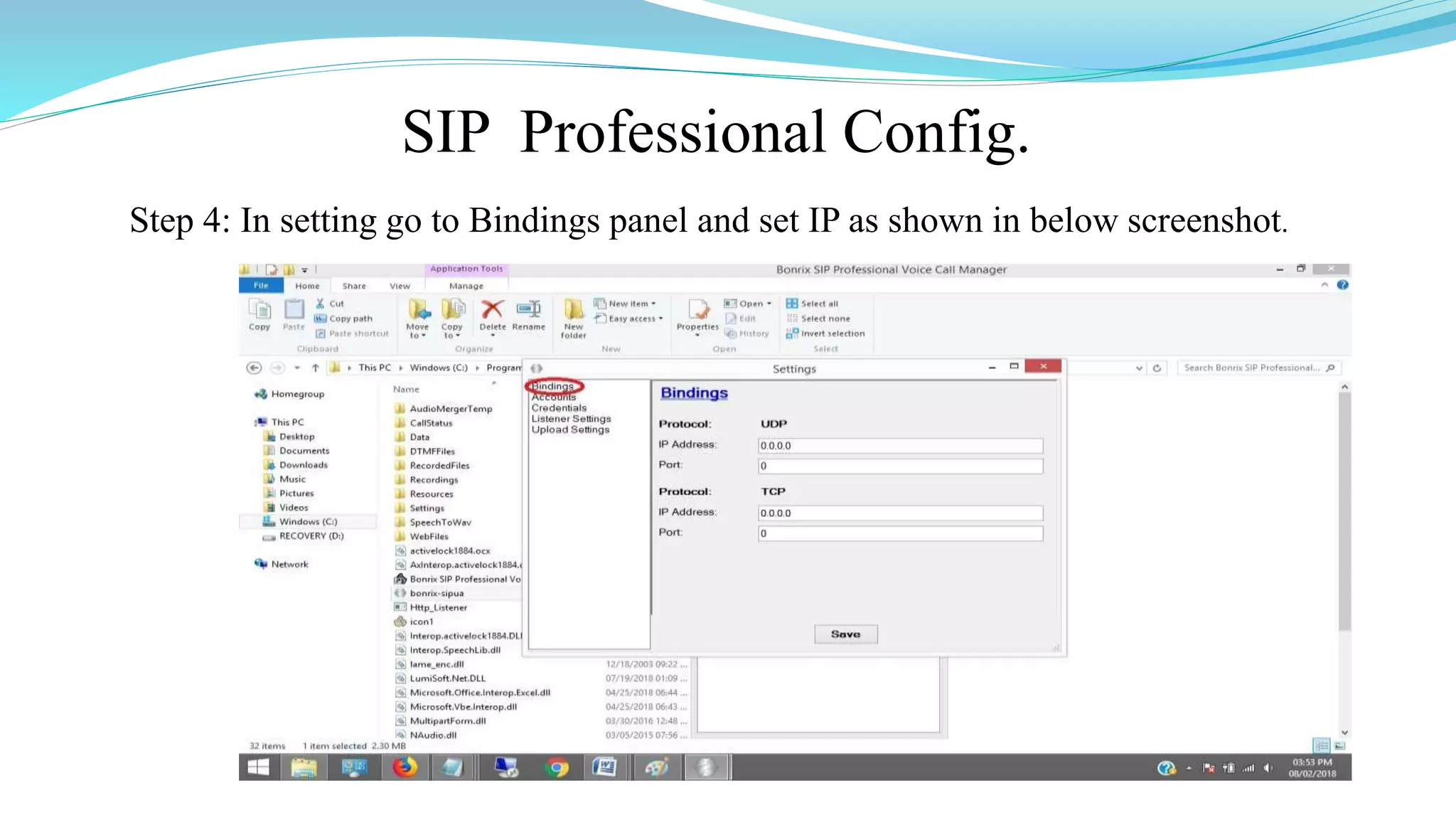
Step 4: In setting go to Bindings panel and set IP as shown in below screenshot.
SIP Professional Config.
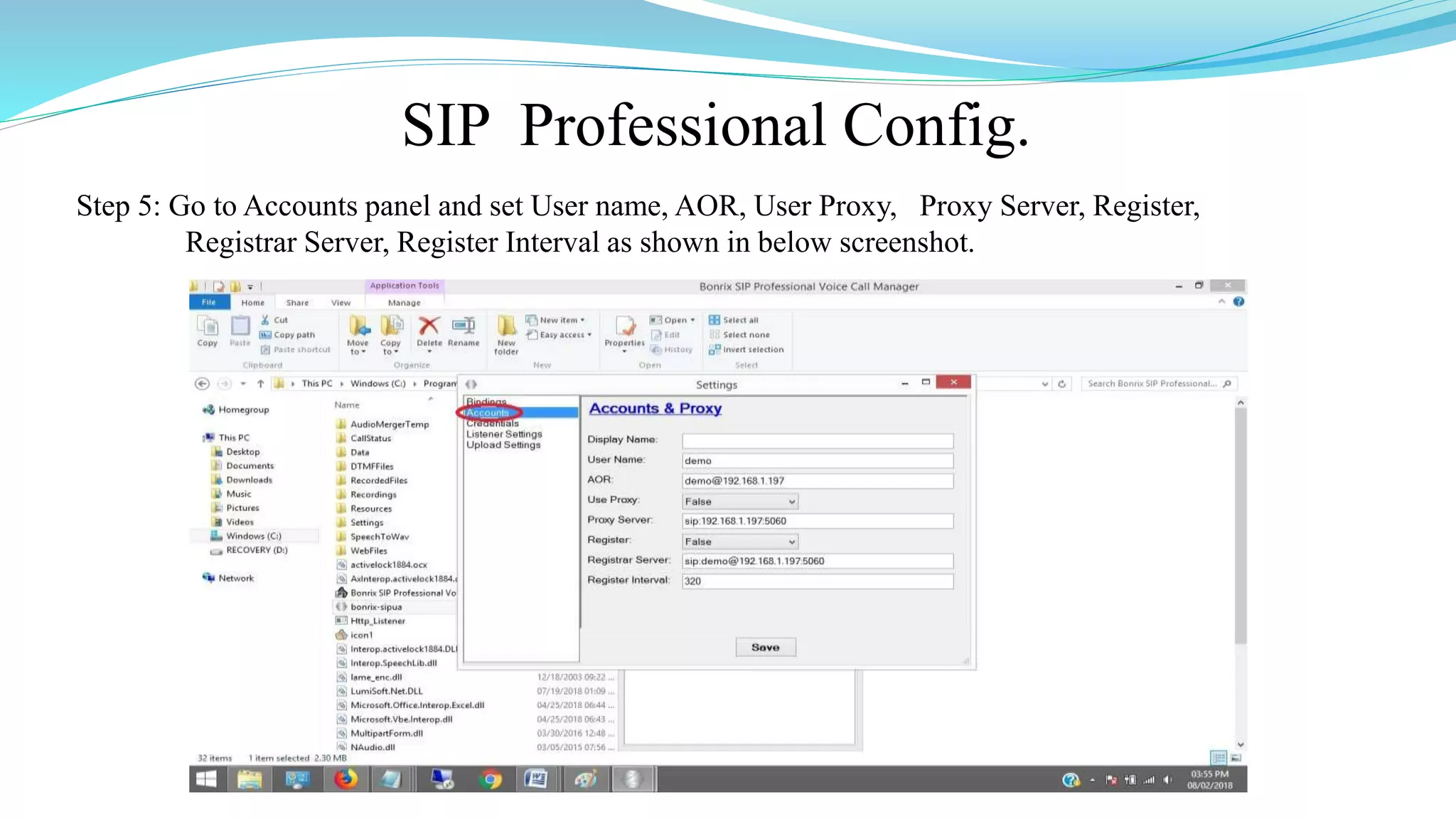
Step 5: Go to Accounts panel and set User name, AOR, User Proxy, Proxy Server, Register,
Registrar Server, Register Interval as shown in below screenshot.
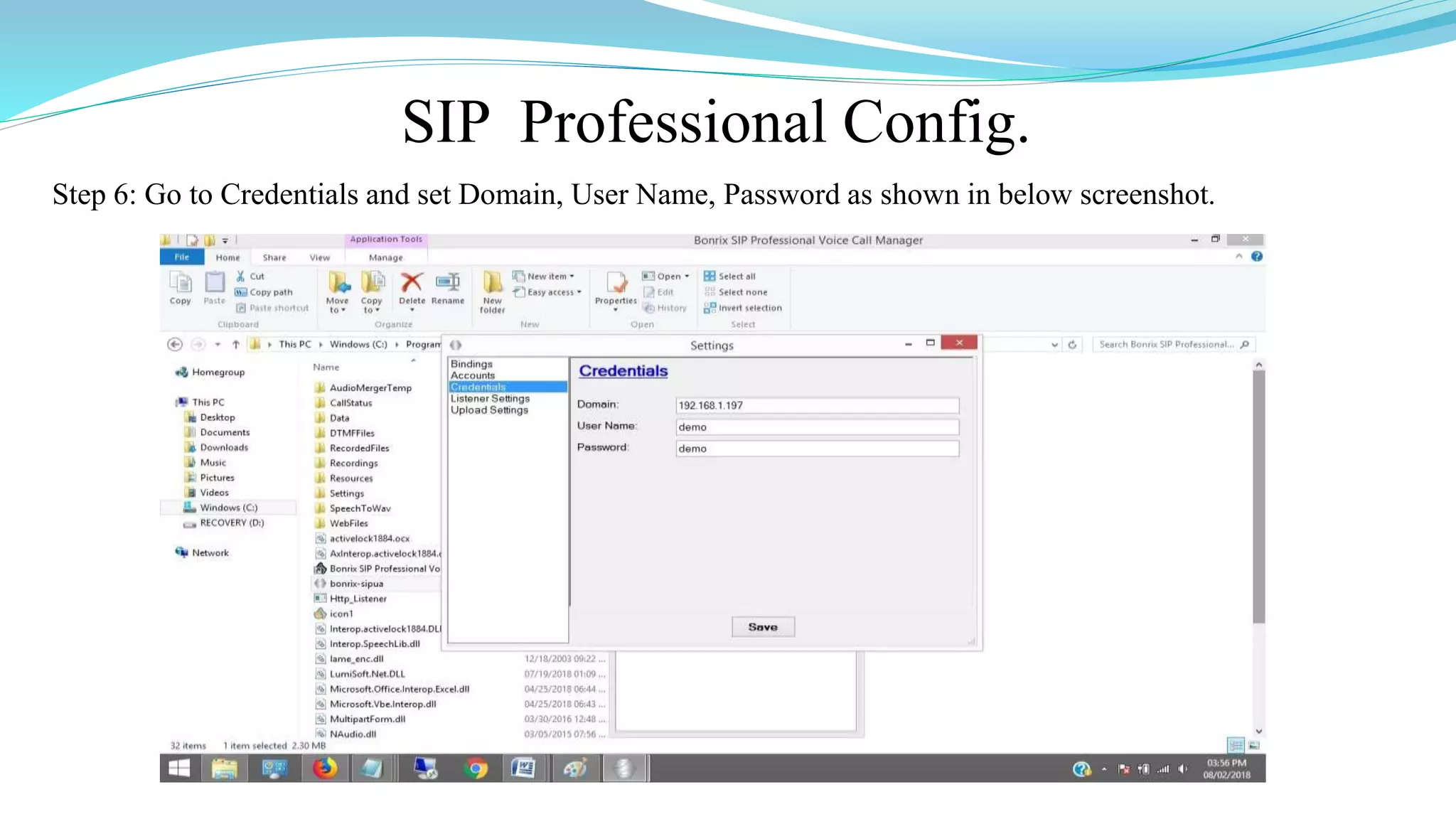
SIP Professional Config.
Step 6: Go to Credentials and set Domain, User Name, Password as shown in below screenshot.
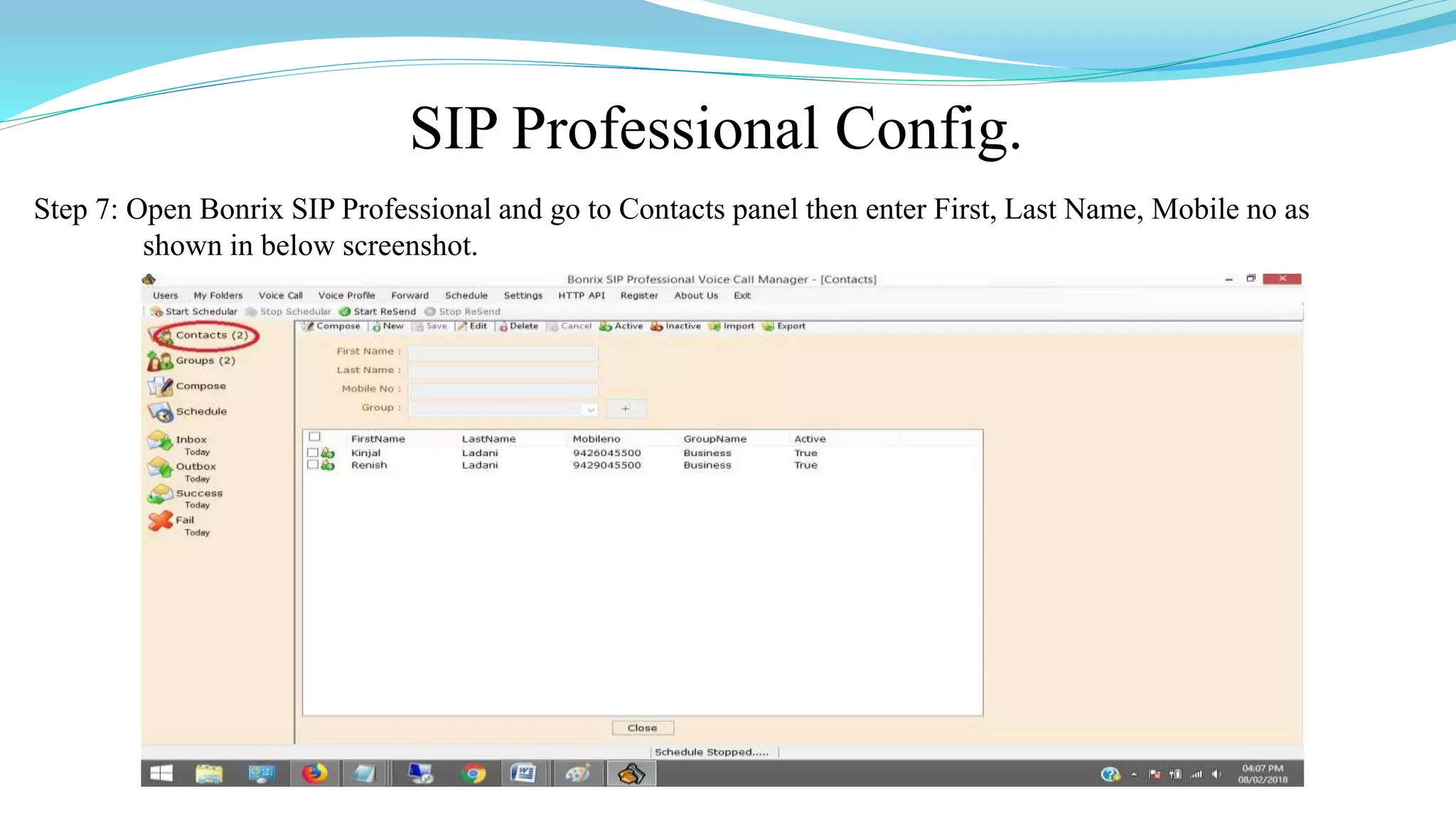
SIP Professional Config.
Step 7: Open Bonrix SIP Professional and go to Contacts panel then enter First, Last Name, Mobile no as
shown in below screenshot.
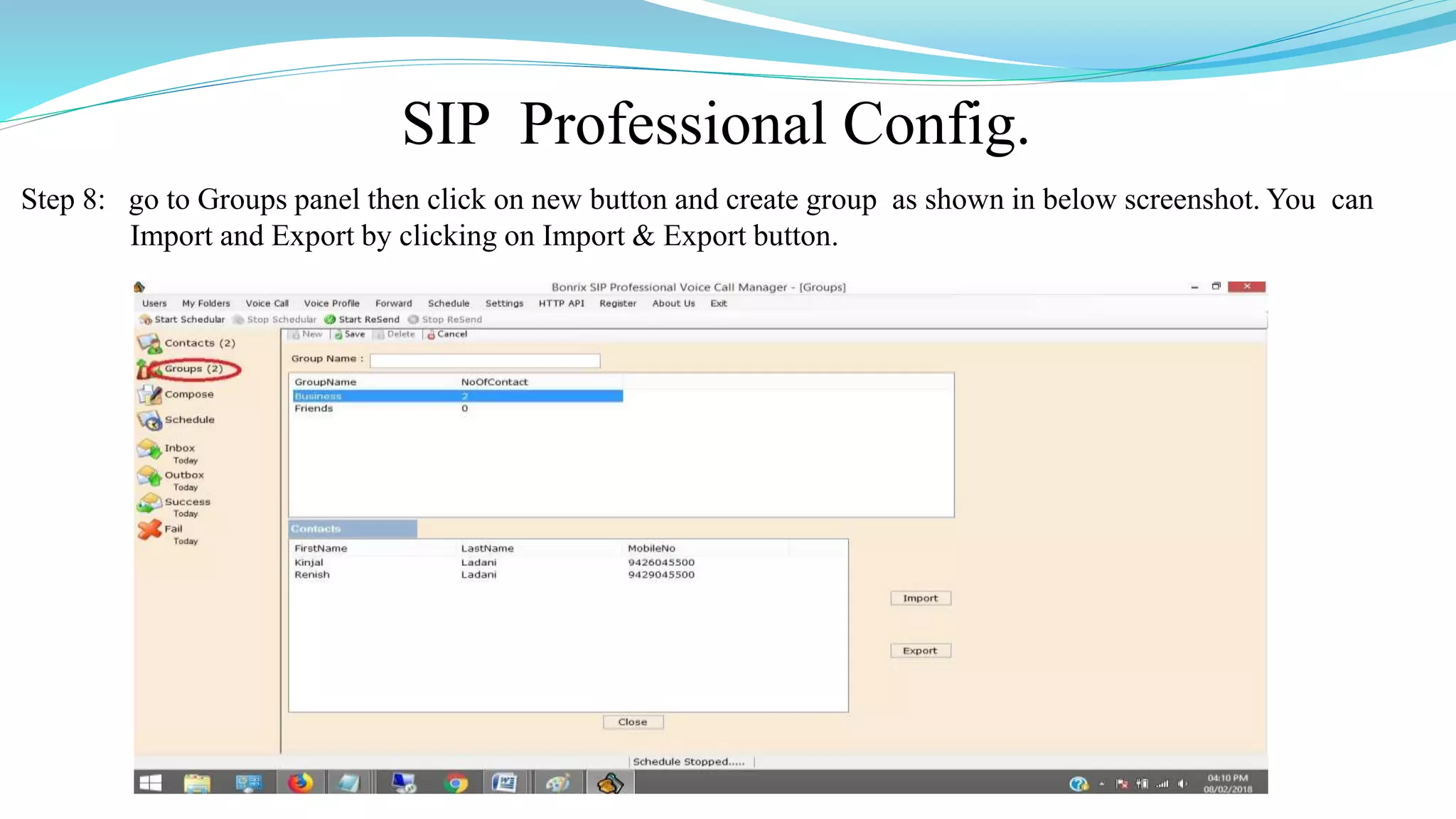
SIP Professional Config.
Step 8: go to Groups panel then click on new button and create group as shown in below screenshot. You can
Import and Export by clicking on Import & Export button.
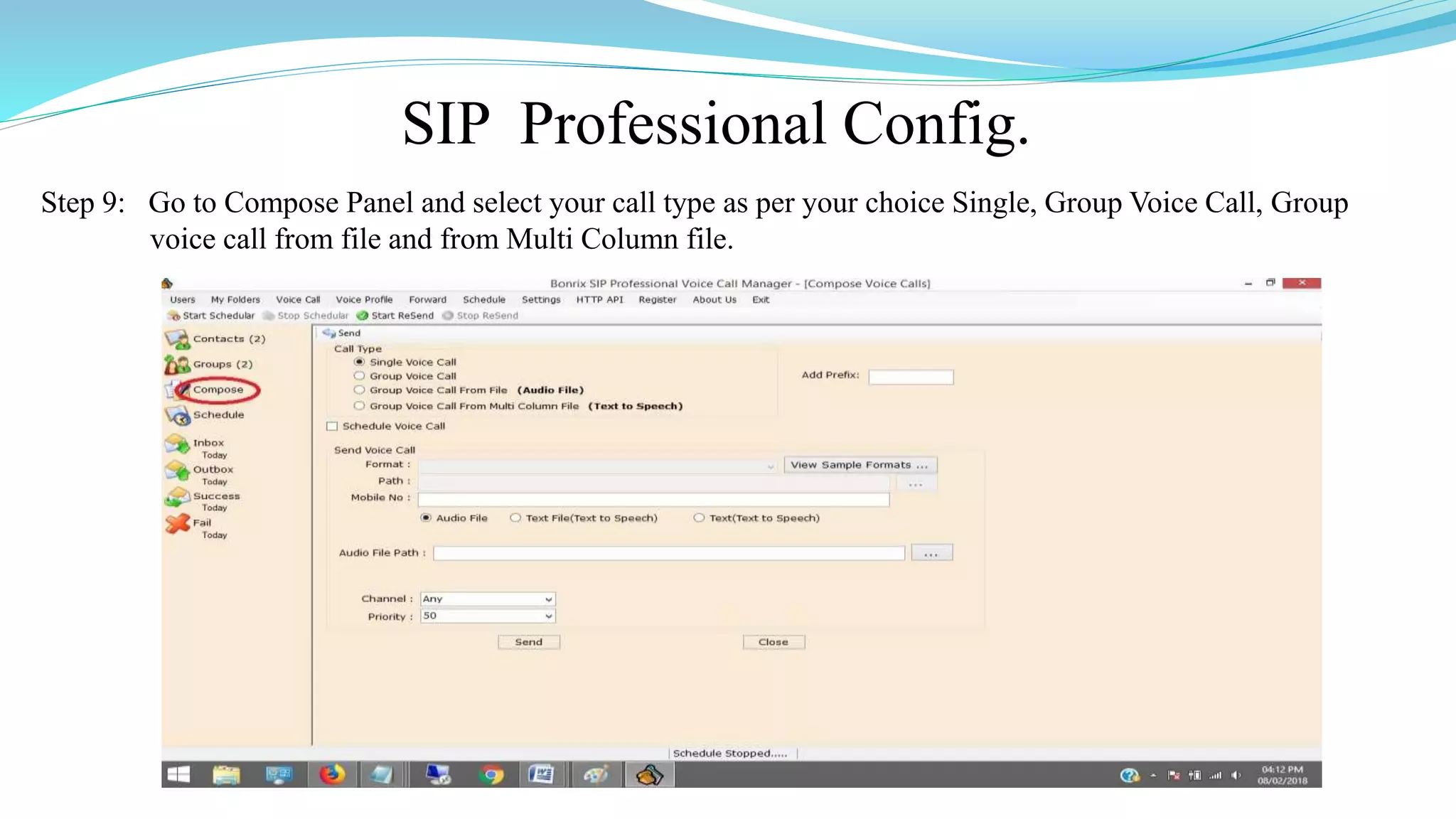
SIP Professional Config.
Step 9: Go to Compose Panel and select your call type as per your choice Single, Group Voice Call, Group
voice call from file and from Multi Column file.
VoIP Devices For Voice Call
 A VoIP Devices uses voice over IP technologies for placing and transmitting
transmitting telephone calls over an IP network, such as the Internet , instead of the
traditional public switched telephone network (PSTN).
 Digital IP-based telephone service uses control protocols such as the Session Initiation
Protocol (SIP), Skinny Client Control Protocol (SCCP) or various other proprietary
protocols.
 A VoIP telephone consist of the hardware and software components.
 The software requires standard networking components such as a TCP/IP network stack,
client implementation for DHCP, and the Domain Name System (DNS).
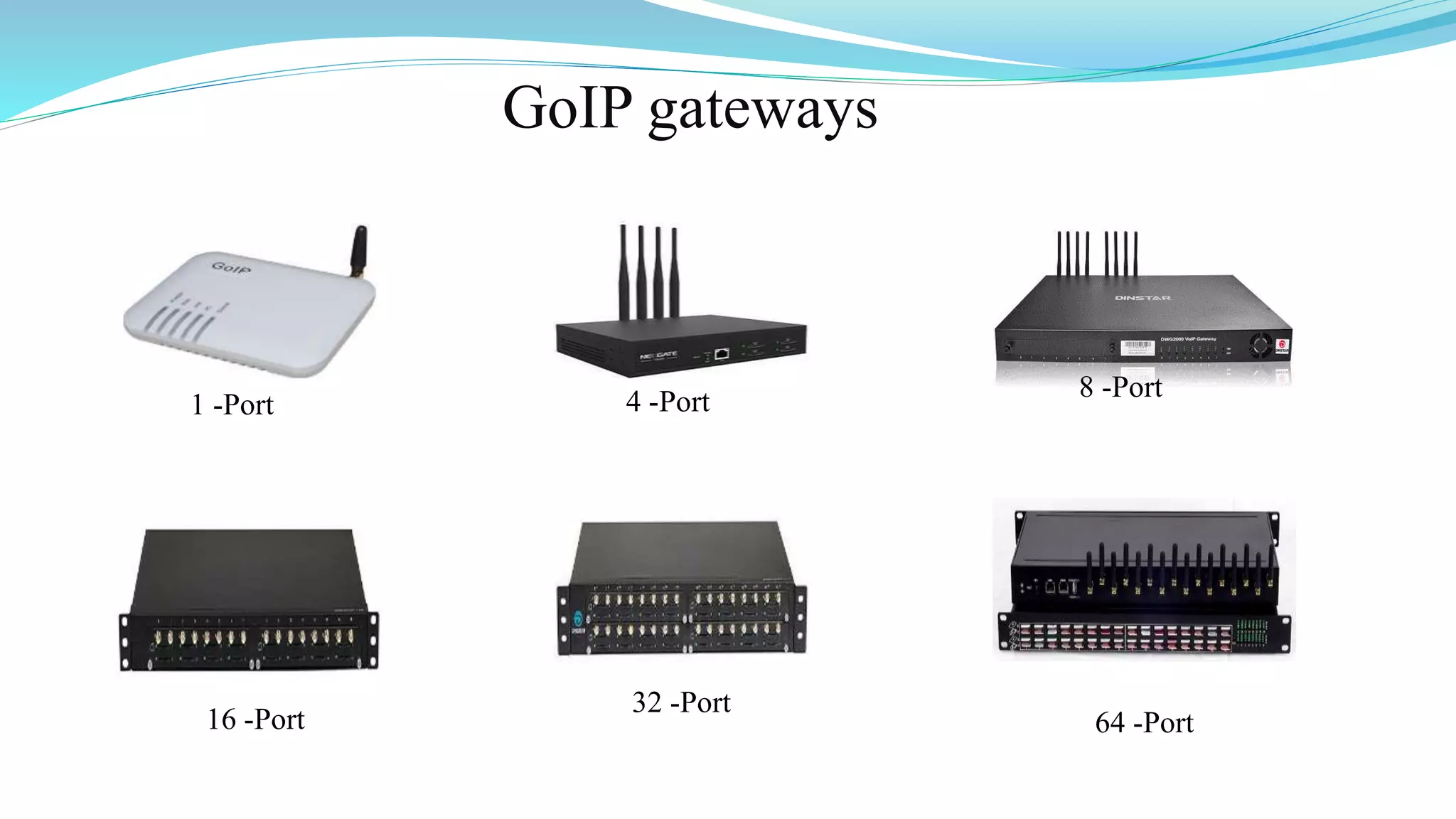
Several Models of GoIP GSM-gateways
 There Are Various Models of GoIP GSM-gateways.
◦ 1 Port GSM VoIP Gateway,
◦ 4 Port GSM VoIP Gateway,
◦ 8 Port GSM VoIP Gateway,
◦ 16 Port GSM VoIP Gateway,
◦ 32 Port GSM VoIP Gateway,
◦ 64 Port GSM VoIP Gateway
Applications of GoIP gateways
 They are vastly usable by system integrators, TCP, call-centers, large and little
companies and domestic users of VoIP as well.
 Adding the mobile lines in the existing telephone system Organization of
outbound call-centers Call transfer from GSM into SIP and backward.
 GoIP provides GSM network between telephone systems and IP PBX,
and ensures the fast connection to PSTN where usual telephone lines
are unavailable.
GoIP gateways
1 -Port 4 -Port 8 -Port
16 -Port
32 -Port
64 -Port
Bonrix Voice Functions
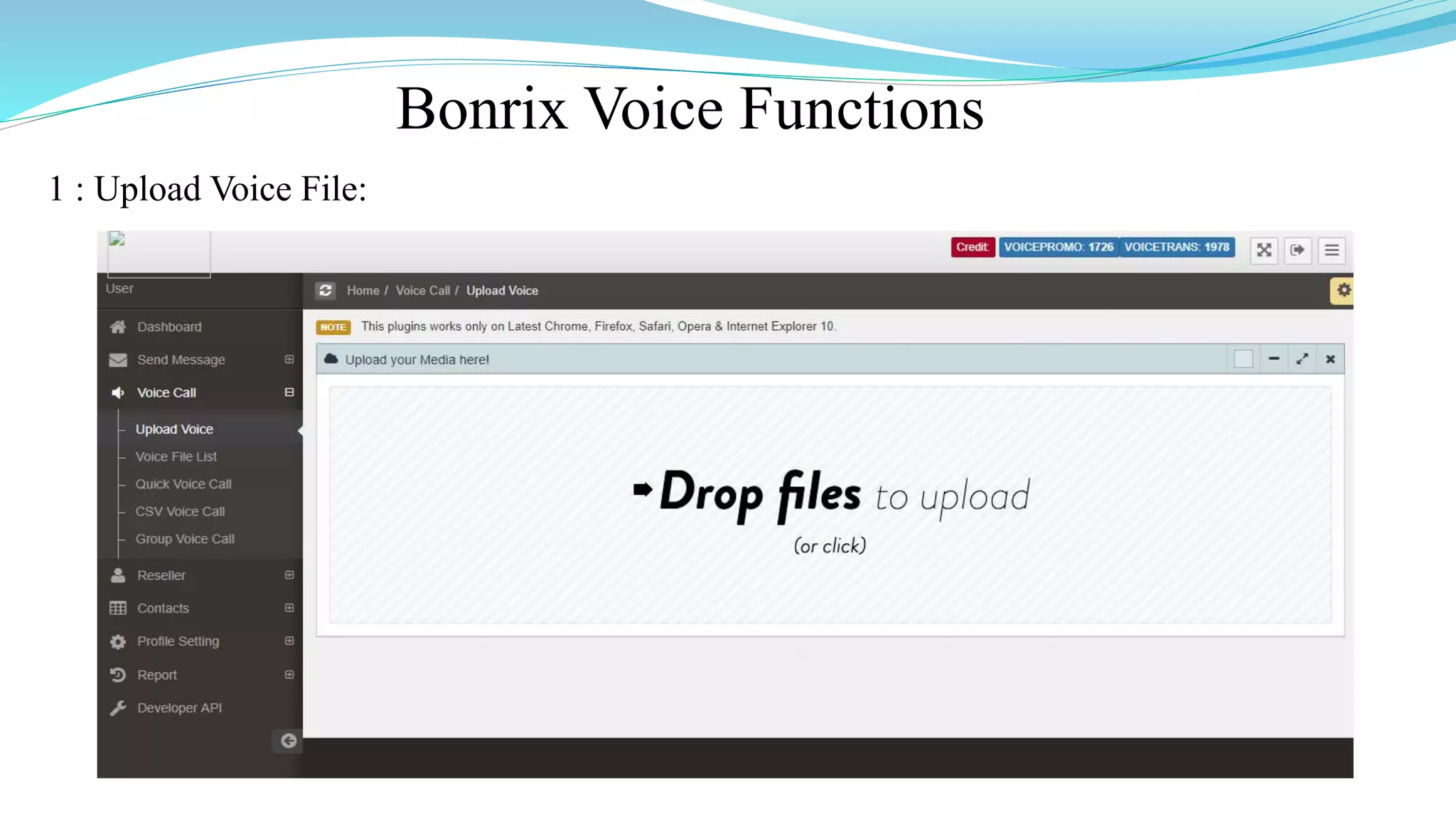
1 : Upload Voice File:
Bonrix Voice Functions
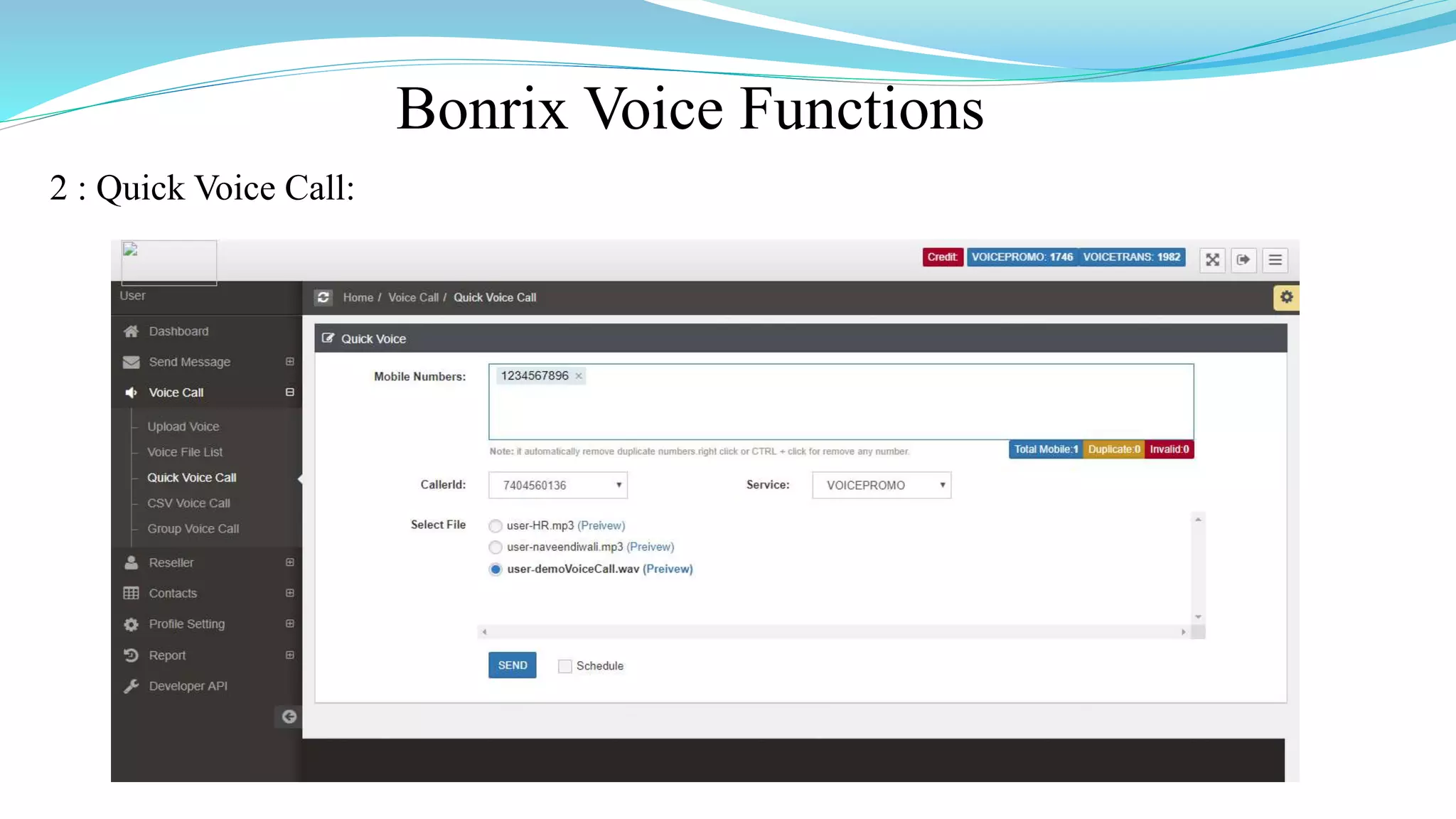
2 : Quick Voice Call:
Bonrix Voice Functions
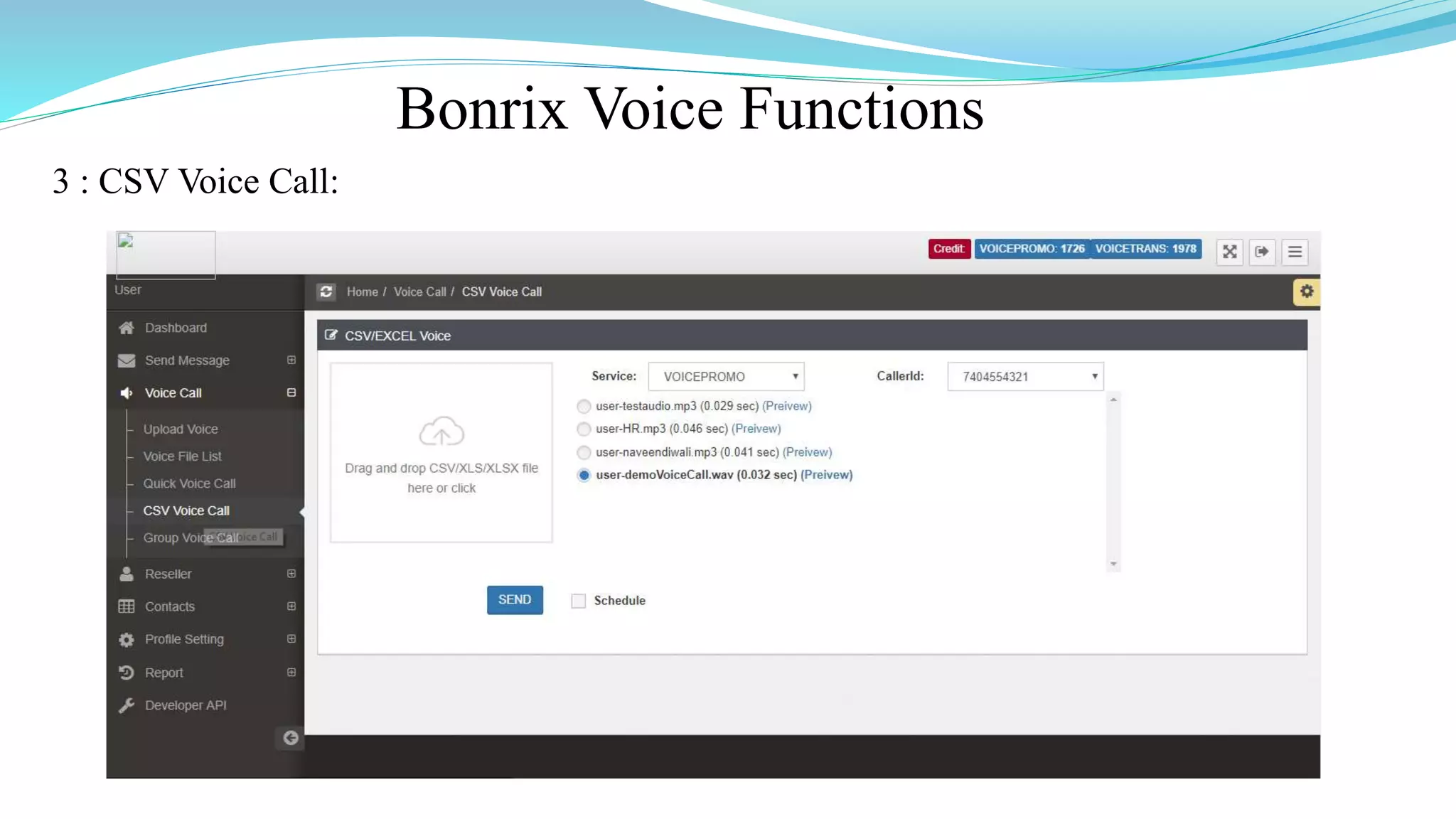
3 : CSV Voice Call:
Bonrix Voice Functions
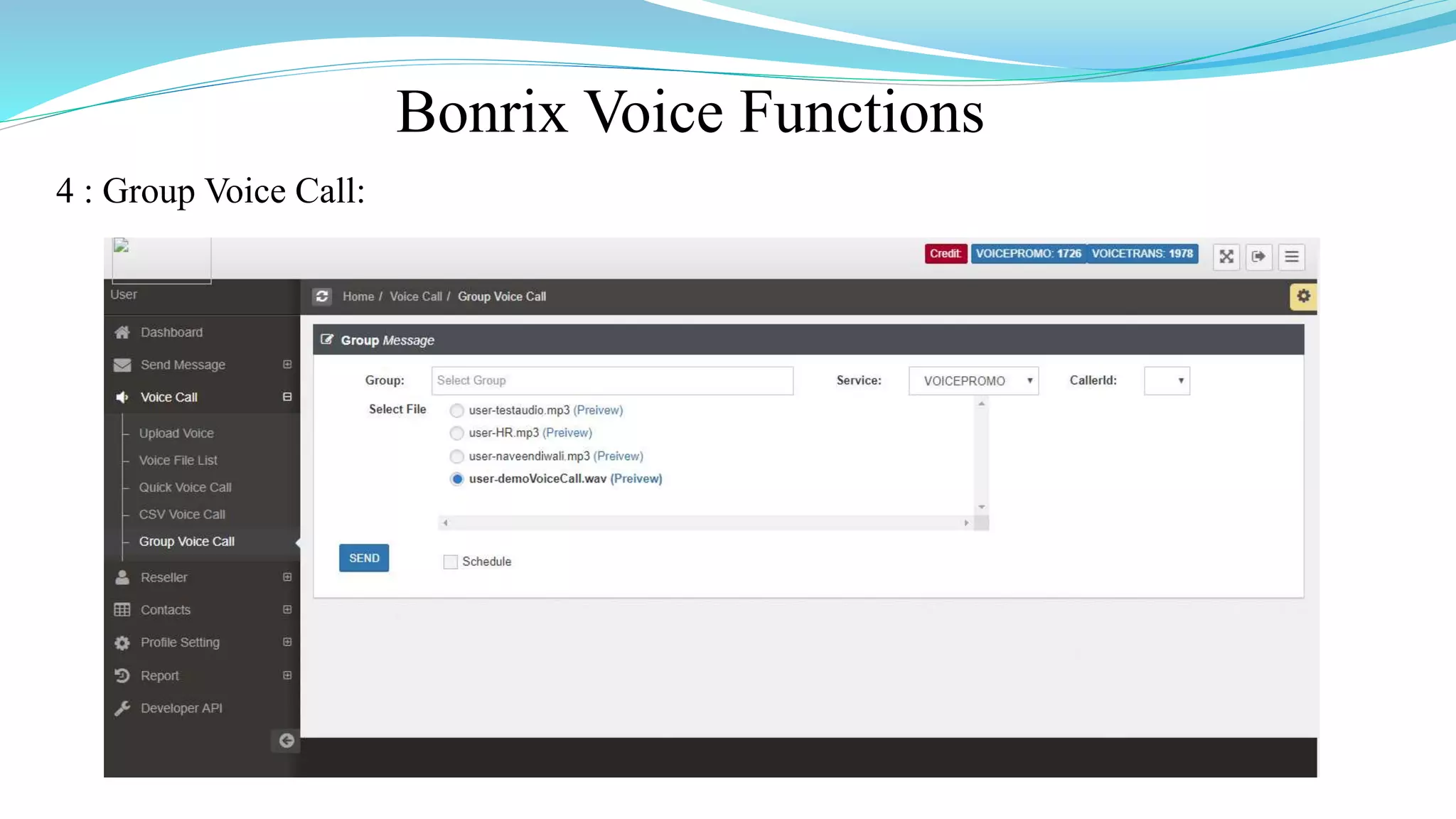
4 : Group Voice Call:
Bonrix Voice Functions
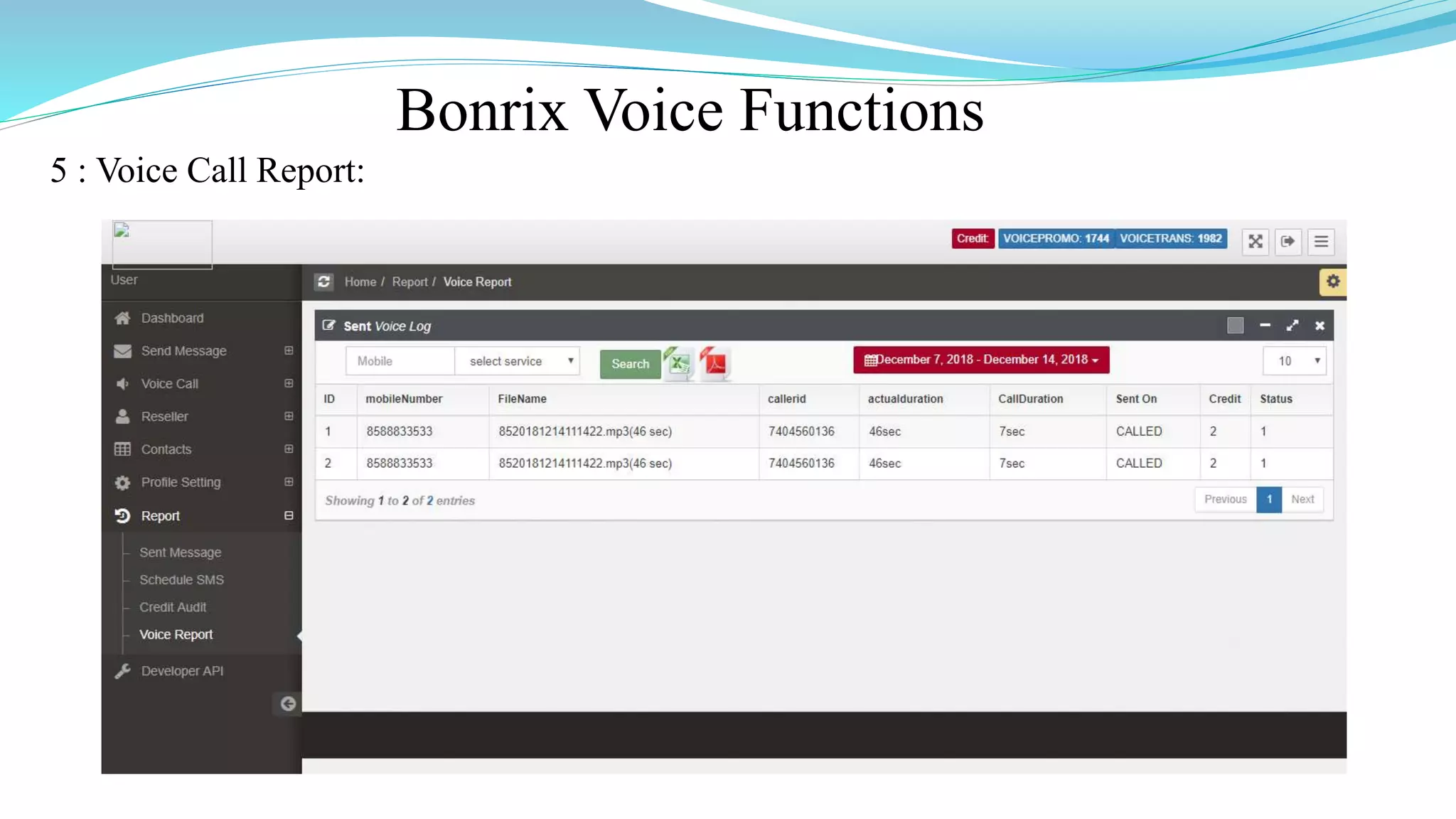
5 : Voice Call Report:
Bonrix Voice Functions
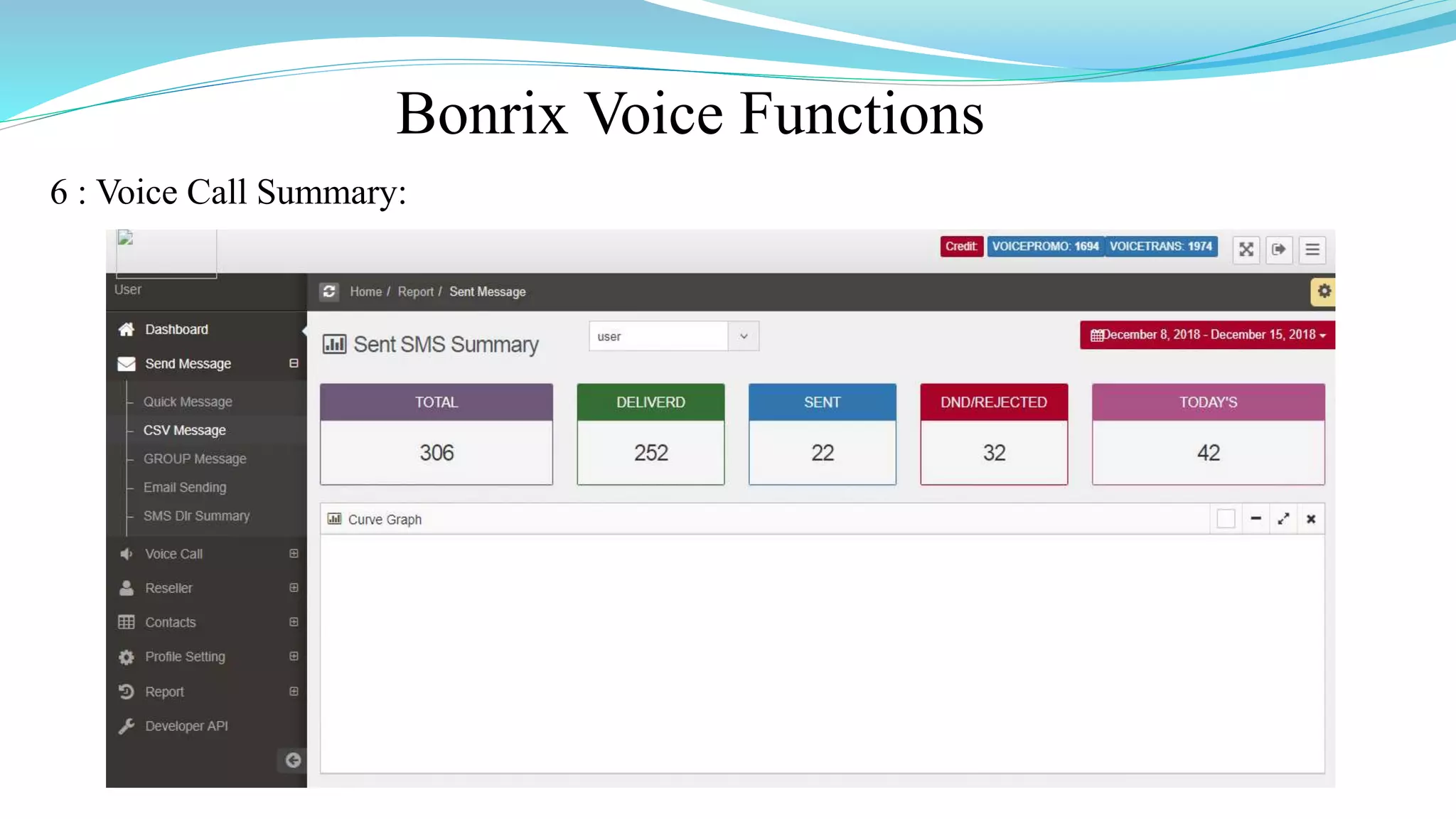
6 : Voice Call Summary:
Bonrix Voice Functions
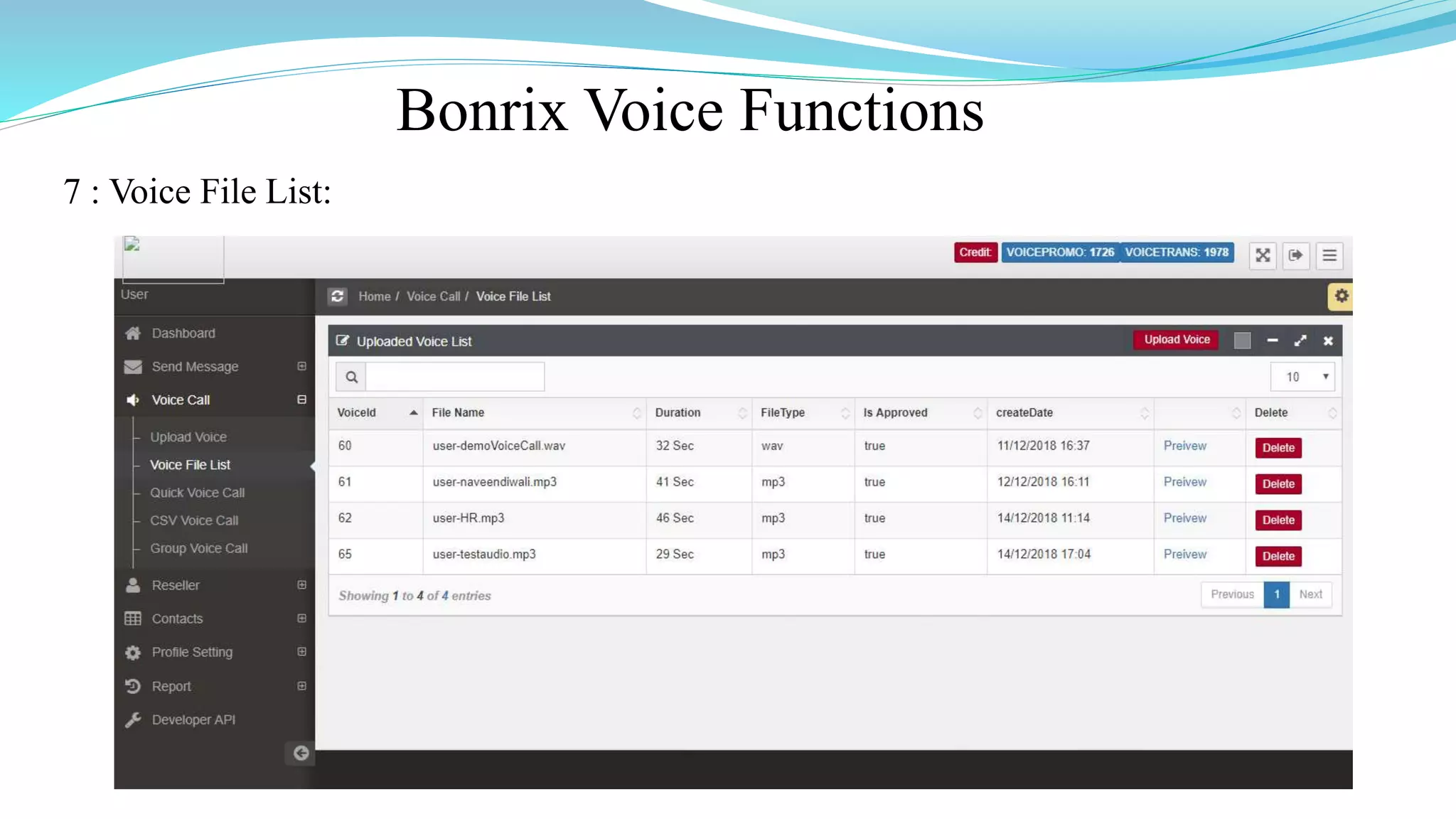
7 : Voice File List:
Bonrix Voice Functions
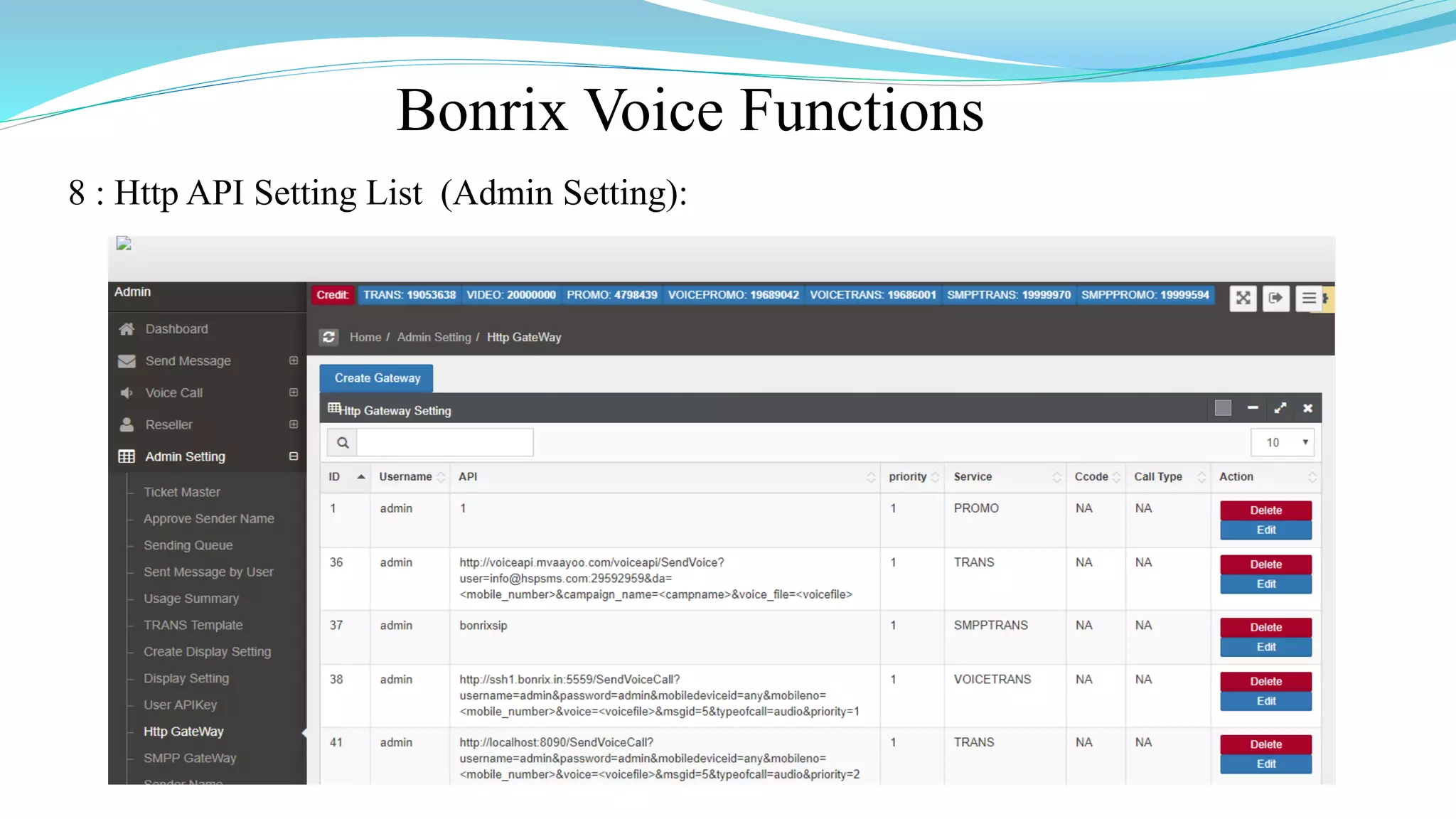
8 : Http API Setting List (Admin Setting):
Bonrix Voice Functions
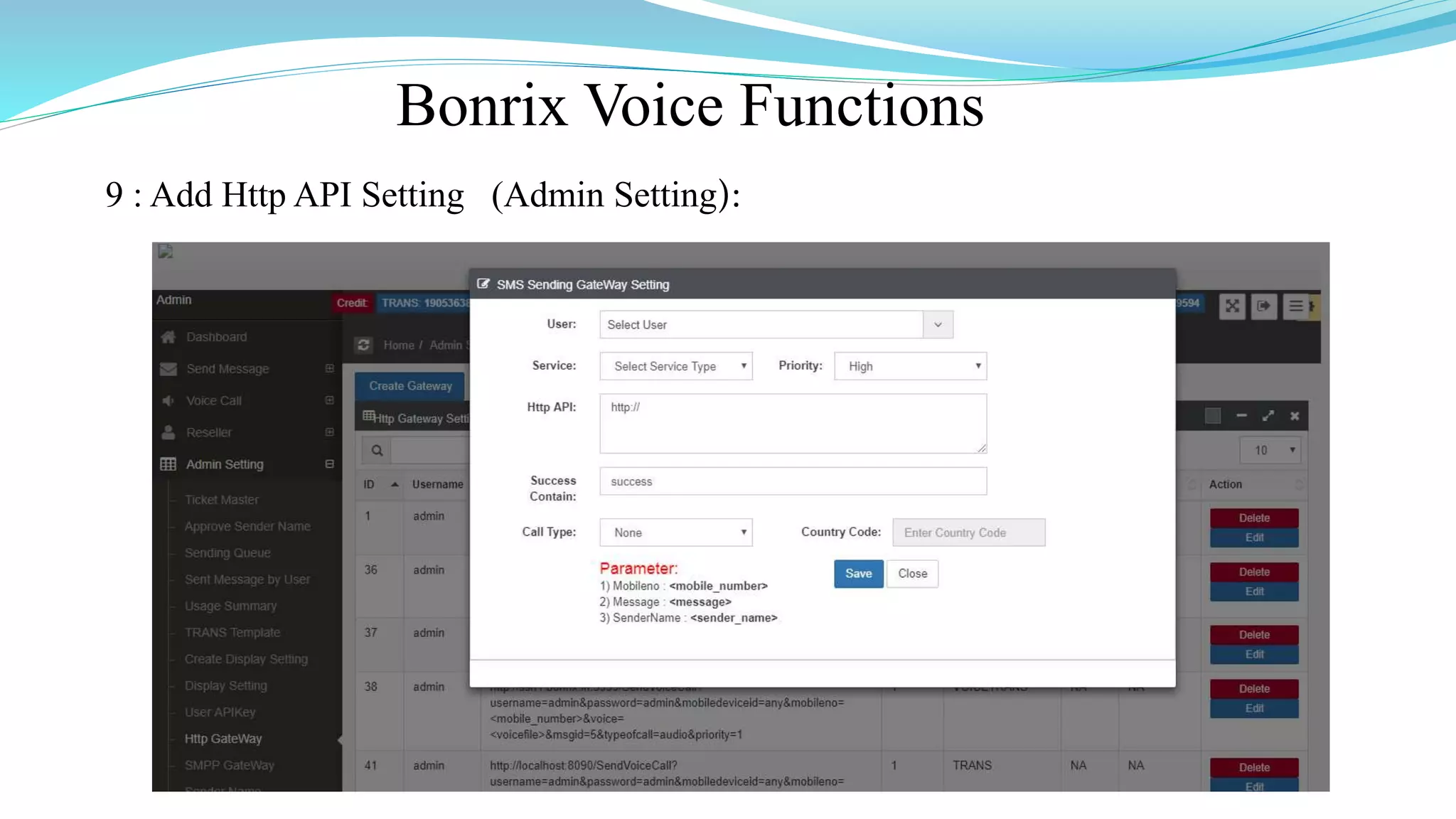
9 : Add Http API Setting (Admin Setting):
Bonrix Voice Functions
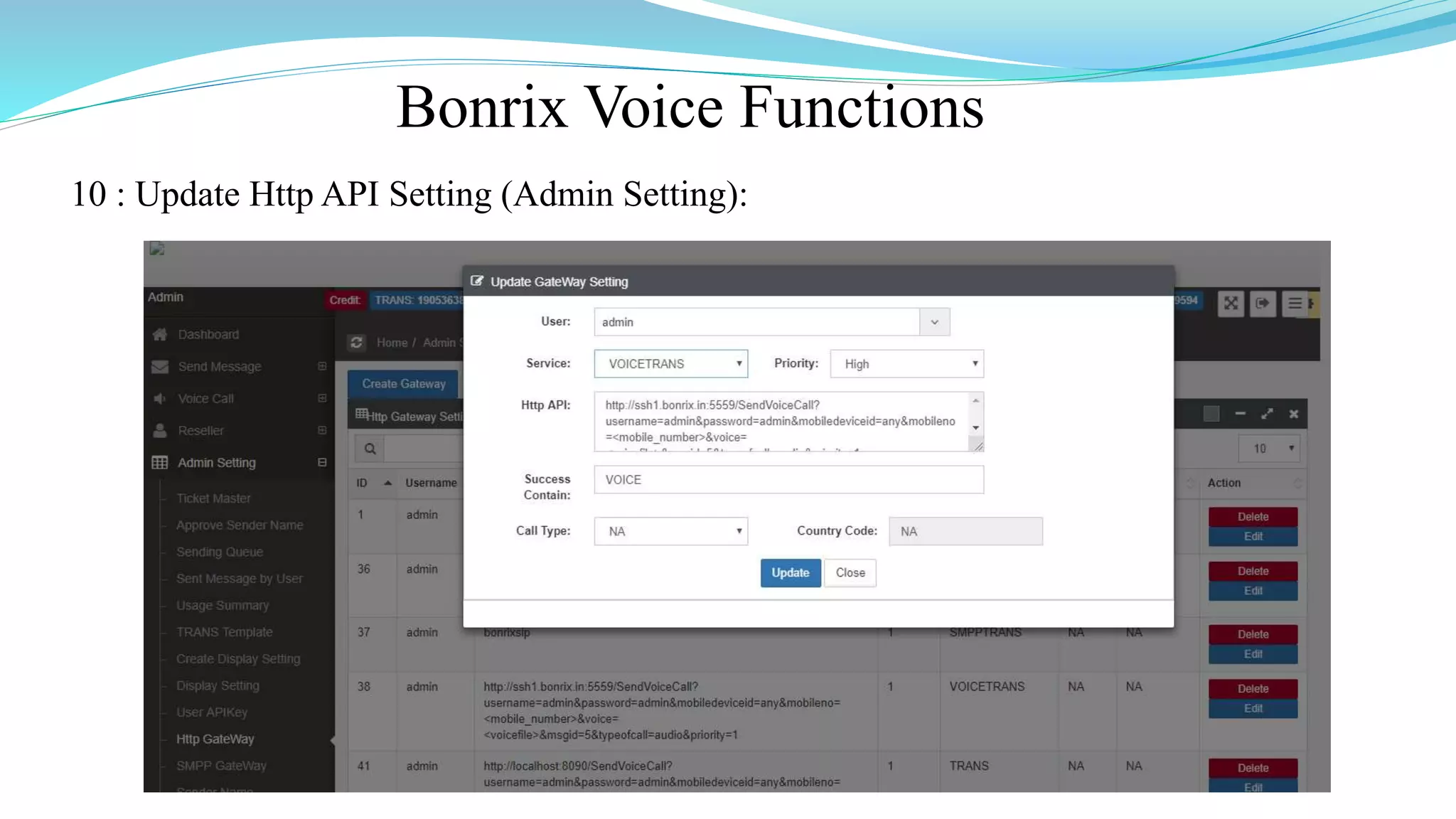
10 : Update Http API Setting (Admin Setting):
Bonrix Voice Functions
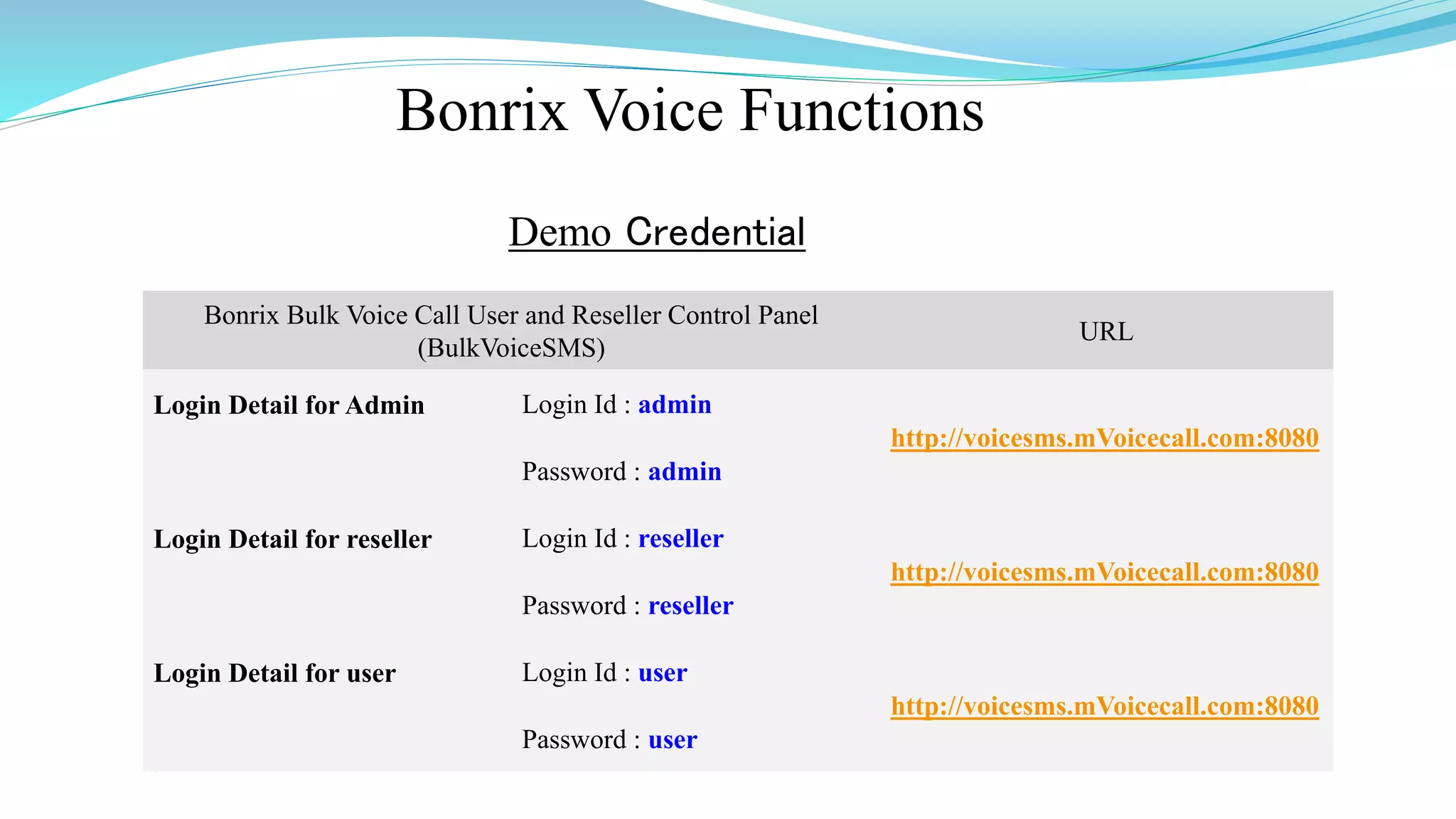
Demo Credential
Bonrix Bulk Voice Call User and Reseller Control Panel
(BulkVoiceSMS)
URL
Login Detail for Admin Login Id : admin
http://voicesms.mVoicecall.com:8080
Password : admin
Login Detail for reseller Login Id : reseller
http://voicesms.mVoicecall.com:8080
Password : reseller
Login Detail for user Login Id : user
http://voicesms.mVoicecall.com:8080
Password : user
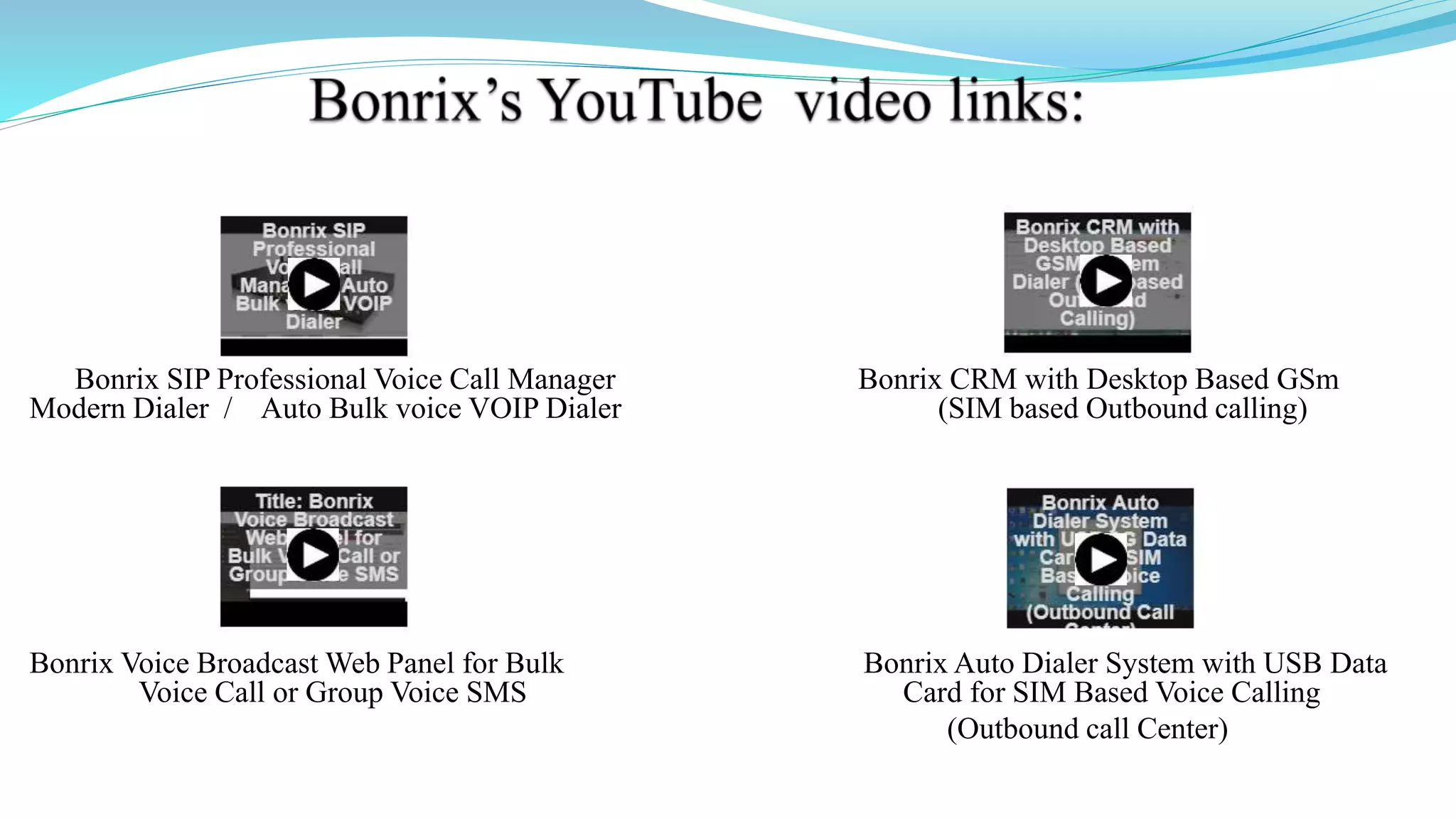
Bonrix SIP Professional Voice Call Manager Bonrix CRM with Desktop Based GSm
Modern Dialer / Auto Bulk voice VOIP Dialer (SIM based Outbound calling)
Bonrix Voice Broadcast Web Panel for Bulk Bonrix Auto Dialer System with USB Data
Voice Call or Group Voice SMS Card for SIM Based Voice Calling
(Outbound call Center)
Address :
M/S. Bonrix Software Systems
A-801, Samudra Complex,
Near Klassic Gold Hotel, Off. C. G. Road, Navrangpura,
Ahmedabad - 380009, Gujarat, India.
Contact NO :
+91-9429045500,9426045500
Website:
http://www.bonrix.net/ & http://www.bonrix.co.in/
http://mvoicecall.com & http://archive.mvoicecall.com/
Email Id:
bonrix@gmail.com

Bonrix Bulk voice call - Voice SMS Marketing Web Based Panel

  • 1.
    Bonrix Voice Call BonrixSoftware Systems http://www.bonrix.net/ http://www.bonrix.co.in/
  • 2.
    Voice Call WebPanel  Voice Call Web Panel Simplify The Calling Function.  Using Voice Call Web Panel User Can Use Calling Function By Various Platforms like VoIP Devices, SIP Professional Voice Call Manager Software etc.  Voice Call Web Panel Provide Various Calling Way Like Quick Call, Group Call, CSV Call By Simply Uploading an Audio File Of Any Formats.  Voice Call Web Panel Also Provide Date Vise Calling Summary And Calling Report As Well.
  • 3.
    Web Panel ToVoIP Device Call VoIP Device Bonrix Voice Call Call Direction Response Direction Network
  • 4.
    Web Panel ToSoftware Call VoIP Device Bonrix Voice Call Call Direction Response Direction Network SIP Prof. Software
  • 5.
    Bonrix Voice BroadcastWeb Panel Description Description Bonrix Voice Broadcast Web Panel provides facility for only voice campaign for marketing purposes and also for transnational purpose for voice notification and Alert as well as OTP notification on voice call. This web provide re-seller option for selling voice call for voice marketing purpose. Android app also available for Bulk Voice campaign from android phone.
  • 6.
    Bonrix Voice BroadcastWeb Panel Use Cases Admin Panel : 1. Overall management and voice campain routing - re-seller management, pricing and tariff management. Re-seller Panel : 1.User creation, User management , Credit allocation, reporting. User Panel: 1.Voice broadcasting, Voice sms, running voice marking campaign, upload pre-recorded audio file, upload bilk contact using Excel /CSV, Checking Voice report.
  • 7.
    Different Type OfVoice Termination  SIP - VOIP telephony provider connector.  USB-3G data card dongle based voice to GSM dialer.  GSM/3G Void GSM Gateway.  Third party HTTP API for Voice and FTP audio file upload.  Android app also available for Bulk Voice campaign from android phone.  Voice API is also available for third party external software integration
  • 8.
    SIP Professional VoiceCall Software Bonrix VoIP SIP is developed for outbound call center for processing leads via different types of VoIP Gateway. It is developed for automated calling from desktop based phone working on different VoIP based technology
  • 9.
    SIP Professional Config. Step1: After installation of Voice call messenger user need to redirect Program files > Bonrix SIP Professional Voice call manager.
  • 10.
    SIP Professional Config. Step2: User have to double click on bonrix-sipua.
  • 11.
    SIP Professional Config. Step3: After double click on bonrix-sipua User can see Bonrix SIP Auto Dialer software go to settings.
  • 12.
    SIP Professional Config. Step4: In setting go to Bindings panel and set IP as shown in below screenshot.
  • 13.
    SIP Professional Config. Step5: Go to Accounts panel and set User name, AOR, User Proxy, Proxy Server, Register, Registrar Server, Register Interval as shown in below screenshot.
  • 14.
    SIP Professional Config. Step6: Go to Credentials and set Domain, User Name, Password as shown in below screenshot.
  • 15.
    SIP Professional Config. Step7: Open Bonrix SIP Professional and go to Contacts panel then enter First, Last Name, Mobile no as shown in below screenshot.
  • 16.
    SIP Professional Config. Step8: go to Groups panel then click on new button and create group as shown in below screenshot. You can Import and Export by clicking on Import & Export button.
  • 17.
    SIP Professional Config. Step9: Go to Compose Panel and select your call type as per your choice Single, Group Voice Call, Group voice call from file and from Multi Column file.
  • 18.
    VoIP Devices ForVoice Call  A VoIP Devices uses voice over IP technologies for placing and transmitting transmitting telephone calls over an IP network, such as the Internet , instead of the traditional public switched telephone network (PSTN).  Digital IP-based telephone service uses control protocols such as the Session Initiation Protocol (SIP), Skinny Client Control Protocol (SCCP) or various other proprietary protocols.  A VoIP telephone consist of the hardware and software components.  The software requires standard networking components such as a TCP/IP network stack, client implementation for DHCP, and the Domain Name System (DNS).
  • 19.
    Several Models ofGoIP GSM-gateways  There Are Various Models of GoIP GSM-gateways. ◦ 1 Port GSM VoIP Gateway, ◦ 4 Port GSM VoIP Gateway, ◦ 8 Port GSM VoIP Gateway, ◦ 16 Port GSM VoIP Gateway, ◦ 32 Port GSM VoIP Gateway, ◦ 64 Port GSM VoIP Gateway
  • 20.
    Applications of GoIPgateways  They are vastly usable by system integrators, TCP, call-centers, large and little companies and domestic users of VoIP as well.  Adding the mobile lines in the existing telephone system Organization of outbound call-centers Call transfer from GSM into SIP and backward.  GoIP provides GSM network between telephone systems and IP PBX, and ensures the fast connection to PSTN where usual telephone lines are unavailable.
  • 21.
    GoIP gateways 1 -Port4 -Port 8 -Port 16 -Port 32 -Port 64 -Port
  • 22.
    Bonrix Voice Functions 1: Upload Voice File:
  • 23.
    Bonrix Voice Functions 2: Quick Voice Call:
  • 24.
    Bonrix Voice Functions 3: CSV Voice Call:
  • 25.
    Bonrix Voice Functions 4: Group Voice Call:
  • 26.
    Bonrix Voice Functions 5: Voice Call Report:
  • 27.
    Bonrix Voice Functions 6: Voice Call Summary:
  • 28.
    Bonrix Voice Functions 7: Voice File List:
  • 29.
    Bonrix Voice Functions 8: Http API Setting List (Admin Setting):
  • 30.
    Bonrix Voice Functions 9: Add Http API Setting (Admin Setting):
  • 31.
    Bonrix Voice Functions 10: Update Http API Setting (Admin Setting):
  • 32.
    Bonrix Voice Functions DemoCredential Bonrix Bulk Voice Call User and Reseller Control Panel (BulkVoiceSMS) URL Login Detail for Admin Login Id : admin http://voicesms.mVoicecall.com:8080 Password : admin Login Detail for reseller Login Id : reseller http://voicesms.mVoicecall.com:8080 Password : reseller Login Detail for user Login Id : user http://voicesms.mVoicecall.com:8080 Password : user
  • 33.
    Bonrix SIP ProfessionalVoice Call Manager Bonrix CRM with Desktop Based GSm Modern Dialer / Auto Bulk voice VOIP Dialer (SIM based Outbound calling) Bonrix Voice Broadcast Web Panel for Bulk Bonrix Auto Dialer System with USB Data Voice Call or Group Voice SMS Card for SIM Based Voice Calling (Outbound call Center)
  • 34.
    Address : M/S. BonrixSoftware Systems A-801, Samudra Complex, Near Klassic Gold Hotel, Off. C. G. Road, Navrangpura, Ahmedabad - 380009, Gujarat, India. Contact NO : +91-9429045500,9426045500 Website: http://www.bonrix.net/ & http://www.bonrix.co.in/ http://mvoicecall.com & http://archive.mvoicecall.com/ Email Id: bonrix@gmail.com