Sharing System File
Administrasi Peladen Jaringan Pertemuan 10
Outine
• Konsep Sharing system files
• Options in Sharing system files
• Lightweight Directory Access Protocol (LDAP)
• Network Information Service (NIS)
CONTENTS
Konsep Sharing System File
1
Konsep Sharing System File
• We’re all familiar with the concept of sharing data among computers
accomplished through
1. email attachments,
2. transfer protocols such as HTTP and FTP,
3. or file-sharing services like those provided by NFS
• However, UNIX and Linux systems can benefit from another type of sharing:
the distribution of administrative configuration data.
• User logins and passwords are a real-world example of the need for this kind
of sharing.
• You rarely want to add a user to a single machine; in most cases, you want to
define that user on an entire class or network of machines (single sign on)
System Files that are commonly shared
Options in Sharing system files
2
CONTENTS
NFS Option
• Some sites distribute configuration files by publishing them on an NFS server.
• This is perhaps the simplest possible technique from an automation point of
view—all you need on the client is cp, at least in theory.
• However, we strongly advise against this configuration. It makes every
system in the world dependent on one NFS server, and that server then has
to actively serve all those clients.
• Worse yet, many packages don’t expect remote systems to be locking their
configuration files or creating temporary files in their configuration directories;
the setup may not even work correctly.
Push systems
• With push, the master server periodically distributes the freshest files to
each client, whether the client wants them or not.
• Files can be pushed explicitly whenever a change is made, or they can
simply be distributed on a regular schedule.
• The push model has the advantage of keeping the distribution system
centralized on one machine.
• Files, lists of clients, update scripts, and timetables are stored in one place,
making the scheme easy to control.
• One disadvantage is that each client must let the master modify its system
files, thereby creating a security hazard.
Pull System
• In a pull system, each client is responsible for updating itself from the server.
• This is a less centralized way of distributing files, but it is also more
adaptable and more secure.
• When data is shared across administrative boundaries, a pull system is
especially attractive because the master and client machines need not be run
by the same administrative group or political faction.
Pull System vs Push System
Push Files Command -1
• rdist: push files
1. The rdist command is the easiest way to distribute files from a central server.
2. It has something of the flavor of make: you use a text editor to create a specification of the
files to be distributed,
3. and then you use rdist to bring reality into line with your specification.
4. rdist copies files only when they are out of date, so you can write your specification as if all
files were to be copied and let rdist optimize out unnecessary work.
Push Files Command -2
• rsync: transfer files more securely
1. rsync is available from rsync.samba.org. rsync,
2. written by Andrew Tridgell and Paul Mackerras, is similar in spirit to rdist but with a
somewhat different focus.
3. It does not use a file-copying control file in the manner of rdist (although the server side
does have a configuration file).
4. rsync is a bit like a souped-up version of scp that is scrupulous about preserving links,
modification times, and permissions.
5. It is more network efficient than rdist because it looks inside individual files and attempts
to transmit only the differences between versions.
Pull Files Command
• The most straightforward way is to make the files available on a central FTP
or web server and to have the clients automatically download them as
needed.
• One such utility that ships with most systems is the popular wget. It’s a
straightforward little program that fetches the contents of a URL (either FTP
or HTTP).
Lightweight Directory Access Protocol (LDAP)
3
CONTENTS
LDAP: THE LIGHTWEIGHT DIRECTORY ACCESS PROTOCOL
• A directory service is just a database, but one that makes a few assumptions.
Any data set that has characteristics matching the assumptions is a
candidate for inclusion in the directory. The basic assumptions are as follows:
1. Data objects are relatively small.
2. The database will be widely replicated and cached.
3. The information is attribute based.
4. Data are read often but written infrequently.
5. Searching is a common operation
• The current IETF standards-track system designed to fill this role is the
Lightweight Directory Access Protocol (LDAP). The LDAP specifications don’t
really speak to the database itself, just the way that it’s accessed through a
network. But because they specify how the data is schematized and how
searches are performed, they imply a fairly specific data model as well.
The structure of LDAP data
The advantage of LDAP -1
• LDAP can act as a central repository for information about your users,
including everything from their phone numbers and home addresses to their
login names and passwords.
• In a similar vein, you can use LDAP to distribute configuration information for
ancillary applications. Most mail systems—including sendmail, Exim, and
Postfix—can draw a large part of their routing information from LDAP
• LDAP makes it easy for applications (even those written by other teams and
other departments) to authenticate users without having to worry about the
exact details of account management.
• Changes to LDAP data take effect immediately and are instantly visible to all
hosts and client applications.
The advantage of LDAP -2
• It’s easy to access LDAP data through command-line tools such as
ldapsearch.
• Excellent web-based tools are available for managing LDAP, some examples
being phpLDAPadmin (phpldapadmin.sourceforge.net) and Directory
Administrator (diradmin.open-it.org).
• LDAP is well supported as a public directory service. Most major email clients
support the use of LDAP to access user directories.
• Microsoft’s Active Directory architecture is based on LDAP
LDAP and security
• The “standard” LDAP implementation grants unencrypted access through
TCP port 389 → not recomended
• LDAP-over-SSL (known as LDAPS, usually running on TCP port 686) is
available in most situations on both the client and server. → recommended
• Protects the information contained in both the query and the response.
• Use LDAPS when possible.
When we use LDAP?
• LDAP is well suited for
1. Information that is referenced by many entities and applications
2. Information that needs to be accessed from more than one location.
3. Information that is read more often than it is written
• LDAP is not well suited for
1. Information that changes often (it is not a relational database)
2. Information that is unstructured (it is not a file system)
OpenLDAP
• The traditional open source LDAP server
• slapd is the standard LDAP server daemon → A stand-alone server
• slurpd runs on the master server and handles replication by pushing changes
out to slave servers → for multiple OpenLDAP servers
Network Information Service (NIS)
4
CONTENTS
What is NIS?
• NIS, released by Sun in the 1980s, was the first “prime time” administrative
database. It was originally called the Sun Yellow Pages, but eventually had to
be renamed for legal reasons.
• NIS commands still begin with the letters yp, so it’s hard to forget the original
name.
• NIS was widely adopted among UNIX vendors and is supported by every
Linux distribution.
• These days, however, NIS should not be used for new deployments.
• Primarily because of the inevitable need to integrate with Windows systems,
but also because of NIS’s various security and scalability shortcomings.
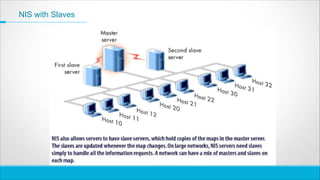
NIS Models
• Master server
1. maintains the authoritative copies of system files.
2. contains the set of maps that the system administrator creates and updates as
necessary
3. a single server as the master for all the maps (commonly)
• Slave servers
1. a complete copy of the master set of NIS maps
2. handle any overflow of requests from the master server, minimizing “server unavailable”
errors.
• Clients of NIS servers
1. request data from maps on the servers
2. Clients do not distinguish between the master server and the slaves
NIS Operation
NIS with Slaves
Konsep Sharing System File
1
Options in Sharing system files
2
Lightweight Directory Access Protocol (LDAP)
3
Network Information Service (NIS)
4
CONTENTS

Sharing system Linux using Network File Sharing

  • 1.
    Sharing System File AdministrasiPeladen Jaringan Pertemuan 10
  • 2.
    Outine • Konsep Sharingsystem files • Options in Sharing system files • Lightweight Directory Access Protocol (LDAP) • Network Information Service (NIS)
  • 3.
  • 4.
    Konsep Sharing SystemFile • We’re all familiar with the concept of sharing data among computers accomplished through 1. email attachments, 2. transfer protocols such as HTTP and FTP, 3. or file-sharing services like those provided by NFS • However, UNIX and Linux systems can benefit from another type of sharing: the distribution of administrative configuration data. • User logins and passwords are a real-world example of the need for this kind of sharing. • You rarely want to add a user to a single machine; in most cases, you want to define that user on an entire class or network of machines (single sign on)
  • 5.
    System Files thatare commonly shared
  • 6.
    Options in Sharingsystem files 2 CONTENTS
  • 7.
    NFS Option • Somesites distribute configuration files by publishing them on an NFS server. • This is perhaps the simplest possible technique from an automation point of view—all you need on the client is cp, at least in theory. • However, we strongly advise against this configuration. It makes every system in the world dependent on one NFS server, and that server then has to actively serve all those clients. • Worse yet, many packages don’t expect remote systems to be locking their configuration files or creating temporary files in their configuration directories; the setup may not even work correctly.
  • 8.
    Push systems • Withpush, the master server periodically distributes the freshest files to each client, whether the client wants them or not. • Files can be pushed explicitly whenever a change is made, or they can simply be distributed on a regular schedule. • The push model has the advantage of keeping the distribution system centralized on one machine. • Files, lists of clients, update scripts, and timetables are stored in one place, making the scheme easy to control. • One disadvantage is that each client must let the master modify its system files, thereby creating a security hazard.
  • 9.
    Pull System • Ina pull system, each client is responsible for updating itself from the server. • This is a less centralized way of distributing files, but it is also more adaptable and more secure. • When data is shared across administrative boundaries, a pull system is especially attractive because the master and client machines need not be run by the same administrative group or political faction.
  • 10.
    Pull System vsPush System
  • 11.
    Push Files Command-1 • rdist: push files 1. The rdist command is the easiest way to distribute files from a central server. 2. It has something of the flavor of make: you use a text editor to create a specification of the files to be distributed, 3. and then you use rdist to bring reality into line with your specification. 4. rdist copies files only when they are out of date, so you can write your specification as if all files were to be copied and let rdist optimize out unnecessary work.
  • 12.
    Push Files Command-2 • rsync: transfer files more securely 1. rsync is available from rsync.samba.org. rsync, 2. written by Andrew Tridgell and Paul Mackerras, is similar in spirit to rdist but with a somewhat different focus. 3. It does not use a file-copying control file in the manner of rdist (although the server side does have a configuration file). 4. rsync is a bit like a souped-up version of scp that is scrupulous about preserving links, modification times, and permissions. 5. It is more network efficient than rdist because it looks inside individual files and attempts to transmit only the differences between versions.
  • 13.
    Pull Files Command •The most straightforward way is to make the files available on a central FTP or web server and to have the clients automatically download them as needed. • One such utility that ships with most systems is the popular wget. It’s a straightforward little program that fetches the contents of a URL (either FTP or HTTP).
  • 14.
    Lightweight Directory AccessProtocol (LDAP) 3 CONTENTS
  • 15.
    LDAP: THE LIGHTWEIGHTDIRECTORY ACCESS PROTOCOL • A directory service is just a database, but one that makes a few assumptions. Any data set that has characteristics matching the assumptions is a candidate for inclusion in the directory. The basic assumptions are as follows: 1. Data objects are relatively small. 2. The database will be widely replicated and cached. 3. The information is attribute based. 4. Data are read often but written infrequently. 5. Searching is a common operation • The current IETF standards-track system designed to fill this role is the Lightweight Directory Access Protocol (LDAP). The LDAP specifications don’t really speak to the database itself, just the way that it’s accessed through a network. But because they specify how the data is schematized and how searches are performed, they imply a fairly specific data model as well.
  • 16.
  • 17.
    The advantage ofLDAP -1 • LDAP can act as a central repository for information about your users, including everything from their phone numbers and home addresses to their login names and passwords. • In a similar vein, you can use LDAP to distribute configuration information for ancillary applications. Most mail systems—including sendmail, Exim, and Postfix—can draw a large part of their routing information from LDAP • LDAP makes it easy for applications (even those written by other teams and other departments) to authenticate users without having to worry about the exact details of account management. • Changes to LDAP data take effect immediately and are instantly visible to all hosts and client applications.
  • 18.
    The advantage ofLDAP -2 • It’s easy to access LDAP data through command-line tools such as ldapsearch. • Excellent web-based tools are available for managing LDAP, some examples being phpLDAPadmin (phpldapadmin.sourceforge.net) and Directory Administrator (diradmin.open-it.org). • LDAP is well supported as a public directory service. Most major email clients support the use of LDAP to access user directories. • Microsoft’s Active Directory architecture is based on LDAP
  • 19.
    LDAP and security •The “standard” LDAP implementation grants unencrypted access through TCP port 389 → not recomended • LDAP-over-SSL (known as LDAPS, usually running on TCP port 686) is available in most situations on both the client and server. → recommended • Protects the information contained in both the query and the response. • Use LDAPS when possible.
  • 20.
    When we useLDAP? • LDAP is well suited for 1. Information that is referenced by many entities and applications 2. Information that needs to be accessed from more than one location. 3. Information that is read more often than it is written • LDAP is not well suited for 1. Information that changes often (it is not a relational database) 2. Information that is unstructured (it is not a file system)
  • 21.
    OpenLDAP • The traditionalopen source LDAP server • slapd is the standard LDAP server daemon → A stand-alone server • slurpd runs on the master server and handles replication by pushing changes out to slave servers → for multiple OpenLDAP servers
  • 22.
  • 23.
    What is NIS? •NIS, released by Sun in the 1980s, was the first “prime time” administrative database. It was originally called the Sun Yellow Pages, but eventually had to be renamed for legal reasons. • NIS commands still begin with the letters yp, so it’s hard to forget the original name. • NIS was widely adopted among UNIX vendors and is supported by every Linux distribution. • These days, however, NIS should not be used for new deployments. • Primarily because of the inevitable need to integrate with Windows systems, but also because of NIS’s various security and scalability shortcomings.
  • 24.
    NIS Models • Masterserver 1. maintains the authoritative copies of system files. 2. contains the set of maps that the system administrator creates and updates as necessary 3. a single server as the master for all the maps (commonly) • Slave servers 1. a complete copy of the master set of NIS maps 2. handle any overflow of requests from the master server, minimizing “server unavailable” errors. • Clients of NIS servers 1. request data from maps on the servers 2. Clients do not distinguish between the master server and the slaves
  • 25.
  • 26.
  • 27.
    Konsep Sharing SystemFile 1 Options in Sharing system files 2 Lightweight Directory Access Protocol (LDAP) 3 Network Information Service (NIS) 4 CONTENTS