BUILDING WORKFLOWS FOR SHAREPOINT 2010 WITH SHAREPOINT DESIGNER AND VISIO Eben Illingworth and Elaine van Bergen
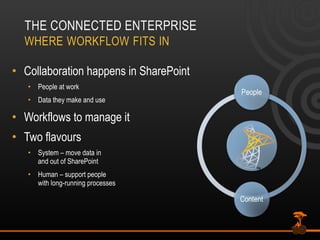
Collaboration happens in SharePoint People at work Data they make and use Workflows to manage it Two flavours System – move data in and out of SharePoint Human – support people with long-running processes
HUMAN WORKFLOW EXAMPLES Managing how people work Document approval & feedback Collaborative reviews & discussions Gathering signatures Business logic in action Rules for SharePoint content Applied automatically or on demand “ Glue” used to build common business apps
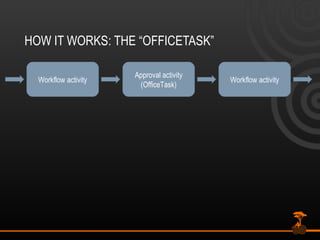
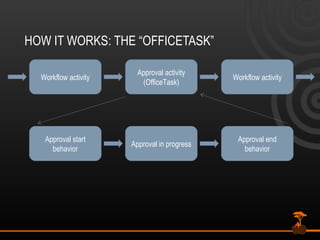
HOW IT WORKS: THE “OFFICETASK” Workflow activity Approval activity (OfficeTask) Workflow activity
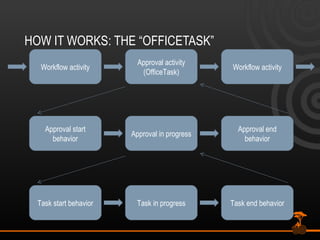
HOW IT WORKS: THE “OFFICETASK” Workflow activity Approval activity (OfficeTask) Workflow activity Approval start behavior Approval in progress Approval end behavior
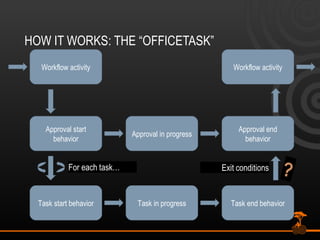
HOW IT WORKS: THE “OFFICETASK” Workflow activity Approval activity (OfficeTask) Workflow activity Approval start behavior Approval in progress Approval end behavior Task start behavior Task in progress Task end behavior
HOW IT WORKS: THE “OFFICETASK” Workflow activity Workflow activity Approval start behavior Approval in progress Approval end behavior Task start behavior Task in progress Task end behavior ?
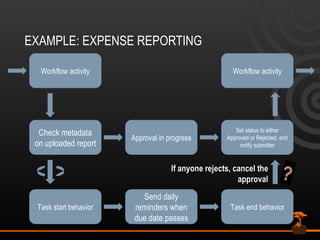
EXAMPLE: EXPENSE REPORTING Workflow activity Workflow activity Check metadata on uploaded report Approval in progress Set status to either Approved or Rejected, and notify submitter Task start behavior Send daily reminders when due date passes Task end behavior ?
A Gartner 2008 survey showed that: 67% of companies that are "doing BPM" changed some of their business processes at least twice a year.  18% needed to make changes on a monthly basis 10% on a weekly basis and  4% on a daily basis
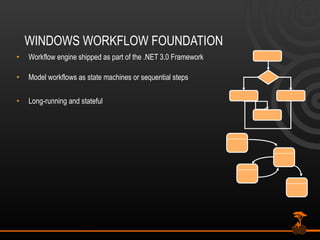
WINDOWS WORKFLOW FOUNDATION Workflow engine shipped as part of the .NET 3.0 Framework Model workflows as state machines or sequential steps Long-running and stateful
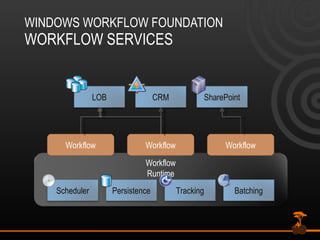
WINDOWS WORKFLOW FOUNDATION WORKFLOW SERVICES Workflow Workflow Workflow Workflow Runtime Scheduler Persistence Tracking Batching SharePoint CRM LOB
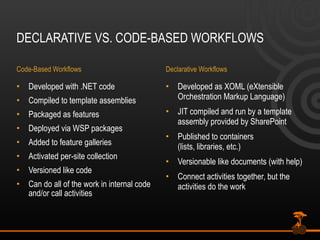
DECLARATIVE VS. CODE-BASED WORKFLOWS Code-Based Workflows Developed with .NET code Compiled to template assemblies Packaged as features Deployed via WSP packages Added to feature galleries Activated per-site collection Versioned like code Can do all of the work in internal code and/or call activities Declarative Workflows Developed as XOML (eXtensible Orchestration Markup Language) JIT compiled and run by a template assembly provided by SharePoint Published to containers  (lists, libraries, etc.) Versionable like documents (with help) Connect activities together, but the activities do the work
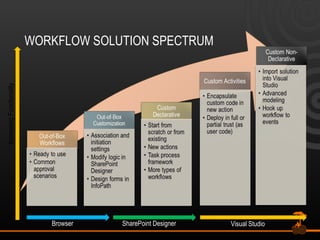
WORKFLOW SOLUTION SPECTRUM Increasing Functionality Browser Visual Studio SharePoint Designer
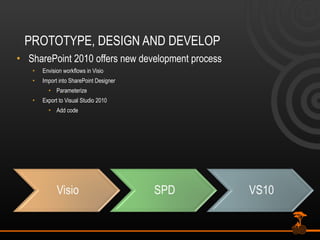
PROTOTYPE, DESIGN AND DEVELOP SharePoint 2010 offers new development process Envision workflows in Visio Import into SharePoint Designer Parameterize Export to Visual Studio 2010 Add code
VISIO TO DESIGNER
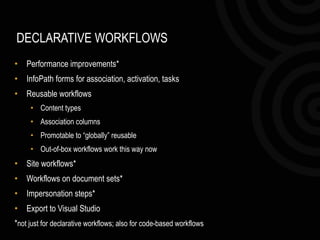
DECLARATIVE WORKFLOWS Performance improvements* InfoPath forms for association, activation, tasks Reusable workflows Content types Association columns Promotable to “globally” reusable Out-of-box workflows work this way now Site workflows* Workflows on document sets* Impersonation steps* Export to Visual Studio * not just for declarative workflows; also for code-based workflows
REUSABLE WORKFLOWS Not tightly coupled to specific lists Associated with lists or content types Association columns Promotable to “globally” reusable Out-of-box workflows work this way now
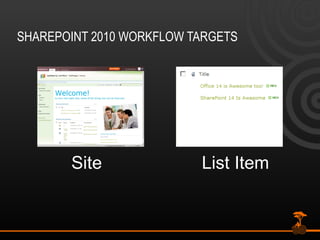
SHAREPOINT 2010 WORKFLOW TARGETS Site List Item
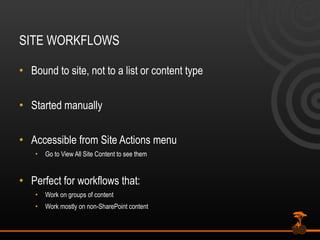
SITE WORKFLOWS Bound to site, not to a list or content type Started manually  Accessible from Site Actions menu Go to View All Site Content to see them Perfect for workflows that: Work on groups of content Work mostly on non-SharePoint content
CUSTOM ACTIVITIES Plug in your own custom activities Fully trusted deployment model Sandboxed code in the user solution gallery Build on top of existing activities OfficeTask exposed in Visual Studio Flexibility of custom code, reusable in code-based and declarative workflows alike
NEW AND IMPROVED OUT-OF-THE-BOX ACTIONS User profile lookups Document sets Declare record Set permissions Read/write to external lists Utility actions Task Processes e.g., Office Task Composite activities Design dialogs
TOOL ENHANCEMENTS SharePoint Designer 2010 Big design interface improvements Full screen, more available context data, import/export, nested logic It’s what we’ve been using for all of the demos so far Visio 2010 Allow business analysts to design workflows Provide graphical workflow status (Visio Services)
VISUAL STUDIO
SUMMARY SharePoint is a serious workflow platform The perfect place for human  workflow The perfect stopover point for longer-running business-to-business and application-to-application processes Declarative workflows’ limitations are nearly  gone Plenty of tool options exist
QUESTIONS?
Thank  you to our Sponsors Platinum Media Gold Silver Bronze

Building Workflows for SharePoint 2010 with SharePoint Designer and Visio

  • 1.
  • 2.
    BUILDING WORKFLOWS FORSHAREPOINT 2010 WITH SHAREPOINT DESIGNER AND VISIO Eben Illingworth and Elaine van Bergen
  • 3.
    Collaboration happens inSharePoint People at work Data they make and use Workflows to manage it Two flavours System – move data in and out of SharePoint Human – support people with long-running processes
  • 4.
    HUMAN WORKFLOW EXAMPLESManaging how people work Document approval & feedback Collaborative reviews & discussions Gathering signatures Business logic in action Rules for SharePoint content Applied automatically or on demand “ Glue” used to build common business apps
  • 5.
    HOW IT WORKS:THE “OFFICETASK” Workflow activity Approval activity (OfficeTask) Workflow activity
  • 6.
    HOW IT WORKS:THE “OFFICETASK” Workflow activity Approval activity (OfficeTask) Workflow activity Approval start behavior Approval in progress Approval end behavior
  • 7.
    HOW IT WORKS:THE “OFFICETASK” Workflow activity Approval activity (OfficeTask) Workflow activity Approval start behavior Approval in progress Approval end behavior Task start behavior Task in progress Task end behavior
  • 8.
    HOW IT WORKS:THE “OFFICETASK” Workflow activity Workflow activity Approval start behavior Approval in progress Approval end behavior Task start behavior Task in progress Task end behavior ?
  • 9.
    EXAMPLE: EXPENSE REPORTINGWorkflow activity Workflow activity Check metadata on uploaded report Approval in progress Set status to either Approved or Rejected, and notify submitter Task start behavior Send daily reminders when due date passes Task end behavior ?
  • 10.
    A Gartner 2008survey showed that: 67% of companies that are "doing BPM" changed some of their business processes at least twice a year. 18% needed to make changes on a monthly basis 10% on a weekly basis and 4% on a daily basis
  • 11.
    WINDOWS WORKFLOW FOUNDATIONWorkflow engine shipped as part of the .NET 3.0 Framework Model workflows as state machines or sequential steps Long-running and stateful
  • 12.
    WINDOWS WORKFLOW FOUNDATIONWORKFLOW SERVICES Workflow Workflow Workflow Workflow Runtime Scheduler Persistence Tracking Batching SharePoint CRM LOB
  • 13.
    DECLARATIVE VS. CODE-BASEDWORKFLOWS Code-Based Workflows Developed with .NET code Compiled to template assemblies Packaged as features Deployed via WSP packages Added to feature galleries Activated per-site collection Versioned like code Can do all of the work in internal code and/or call activities Declarative Workflows Developed as XOML (eXtensible Orchestration Markup Language) JIT compiled and run by a template assembly provided by SharePoint Published to containers (lists, libraries, etc.) Versionable like documents (with help) Connect activities together, but the activities do the work
  • 14.
    WORKFLOW SOLUTION SPECTRUMIncreasing Functionality Browser Visual Studio SharePoint Designer
  • 15.
    PROTOTYPE, DESIGN ANDDEVELOP SharePoint 2010 offers new development process Envision workflows in Visio Import into SharePoint Designer Parameterize Export to Visual Studio 2010 Add code
  • 16.
  • 17.
    DECLARATIVE WORKFLOWS Performanceimprovements* InfoPath forms for association, activation, tasks Reusable workflows Content types Association columns Promotable to “globally” reusable Out-of-box workflows work this way now Site workflows* Workflows on document sets* Impersonation steps* Export to Visual Studio * not just for declarative workflows; also for code-based workflows
  • 18.
    REUSABLE WORKFLOWS Nottightly coupled to specific lists Associated with lists or content types Association columns Promotable to “globally” reusable Out-of-box workflows work this way now
  • 19.
    SHAREPOINT 2010 WORKFLOWTARGETS Site List Item
  • 20.
    SITE WORKFLOWS Boundto site, not to a list or content type Started manually Accessible from Site Actions menu Go to View All Site Content to see them Perfect for workflows that: Work on groups of content Work mostly on non-SharePoint content
  • 21.
    CUSTOM ACTIVITIES Plugin your own custom activities Fully trusted deployment model Sandboxed code in the user solution gallery Build on top of existing activities OfficeTask exposed in Visual Studio Flexibility of custom code, reusable in code-based and declarative workflows alike
  • 22.
    NEW AND IMPROVEDOUT-OF-THE-BOX ACTIONS User profile lookups Document sets Declare record Set permissions Read/write to external lists Utility actions Task Processes e.g., Office Task Composite activities Design dialogs
  • 23.
    TOOL ENHANCEMENTS SharePointDesigner 2010 Big design interface improvements Full screen, more available context data, import/export, nested logic It’s what we’ve been using for all of the demos so far Visio 2010 Allow business analysts to design workflows Provide graphical workflow status (Visio Services)
  • 24.
  • 25.
    SUMMARY SharePoint isa serious workflow platform The perfect place for human workflow The perfect stopover point for longer-running business-to-business and application-to-application processes Declarative workflows’ limitations are nearly gone Plenty of tool options exist
  • 26.
  • 27.
    Thank youto our Sponsors Platinum Media Gold Silver Bronze

Editor's Notes

  • #11 MS Confidential : SharePoint 2010 Developer Workshop (Beta1)
  • #12 MS Confidential : SharePoint 2010 Developer Workshop (Beta1)
  • #13 Virtual Studio Connections / Architect Connections Updates will be available at http://www.devconnections.com/updates/LasVegas_Fall09/VS
  • #14 06/17/10 © 2009 Microsoft Corporation. All rights reserved. Microsoft, Windows, Windows Vista and other product names are or may be registered trademarks and/or trademarks in the U.S. and/or other countries. The information herein is for informational purposes only and represents the current view of Microsoft Corporation as of the date of this presentation. Because Microsoft must respond to changing market conditions, it should not be interpreted to be a commitment on the part of Microsoft, and Microsoft cannot guarantee the accuracy of any information provided after the date of this presentation. MICROSOFT MAKES NO WARRANTIES, EXPRESS, IMPLIED OR STATUTORY, AS TO THE INFORMATION IN THIS PRESENTATION. Microsoft SharePoint Conference 2009
  • #16 MS Confidential : SharePoint 2010 Developer Workshop (Beta1)
  • #18 06/17/10 © 2009 Microsoft Corporation. All rights reserved. Microsoft, Windows, Windows Vista and other product names are or may be registered trademarks and/or trademarks in the U.S. and/or other countries. The information herein is for informational purposes only and represents the current view of Microsoft Corporation as of the date of this presentation. Because Microsoft must respond to changing market conditions, it should not be interpreted to be a commitment on the part of Microsoft, and Microsoft cannot guarantee the accuracy of any information provided after the date of this presentation. MICROSOFT MAKES NO WARRANTIES, EXPRESS, IMPLIED OR STATUTORY, AS TO THE INFORMATION IN THIS PRESENTATION. Microsoft SharePoint Conference 2009
  • #20 MS Confidential : SharePoint 2010 Developer Workshop (Beta1)