




Training and Consulting: contact@winsmarts.com 
SharePoint Powers Hell 
WWW.WINSMARTS.COM 
@SAHILMALIK 
FACEBOOK.COM/SAHILMALIK 
LINKED.IN/SAHIL 
Sahil Malik
Training and Consulting: contact@winsmarts.com 
SharePoint Powershell 
WWW.WINSMARTS.COM 
@SAHILMALIK 
FACEBOOK.COM/SAHILMALIK 
LINKED.IN/SAHIL 
Sahil Malik
Training and Consulting: contact@winsmarts.com 
SharePoint Power sell? 
WWW.WINSMARTS.COM 
@SAHILMALIK 
FACEBOOK.COM/SAHILMALIK 
LINKED.IN/SAHIL 
Sahil Malik
Training and Consulting: contact@winsmarts.com
Training and Consulting: contact@winsmarts.com 
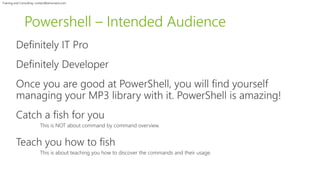
Powershell – Intended Audience
Training and Consulting: contact@winsmarts.com 
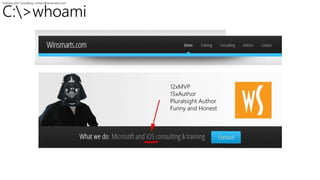
C:>whoami 
12xMVP 
15xAuthor 
Pluralsight Author 
Funny and Honest 
HTTP://BLAH.WINSMARTS.COM 
@SAHILMALIK
Training and Consulting: contact@winsmarts.com 
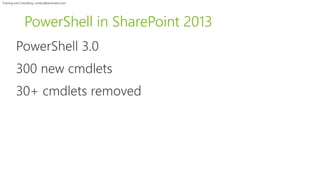
PowerShell in SharePoint 2013
Training and Consulting: contact@winsmarts.com 
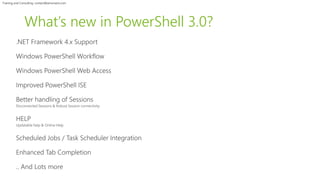
What’s new in PowerShell 3.0?
Training and Consulting: contact@winsmarts.com 
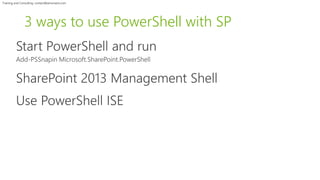
3 ways to use PowerShell with SP
Training and Consulting: contact@winsmarts.com 
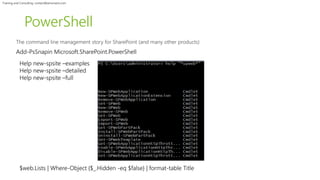
PowerShell 
Add-PsSnapin Microsoft.SharePoint.PowerShell 
Help new-spsite –examples 
Help new-spsite –detailed 
Help new-spsite –full 
$web.Lists | Where-Object {$_.Hidden -eq $false} | format-table Title
Training and Consulting: contact@winsmarts.com 
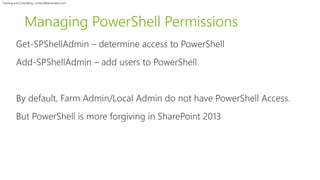
Managing PowerShell Permissions
Training and Consulting: contact@winsmarts.com 
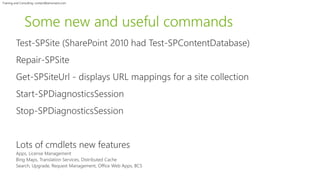
Some new and useful commands
Training and Consulting: contact@winsmarts.com 
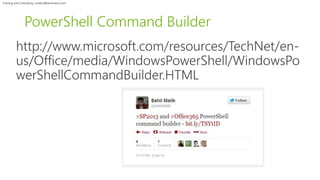
PowerShell Command Builder
Training and Consulting: contact@winsmarts.com
Training and Consulting: contact@winsmarts.com 
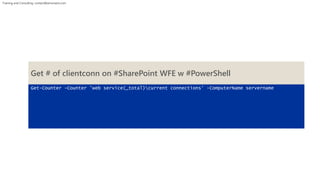
Get # of clientconn on #SharePoint WFE w #PowerShell 
Get-Counter -Counter 'web service(_total)current connections' -ComputerName servername
Training and Consulting: contact@winsmarts.com 
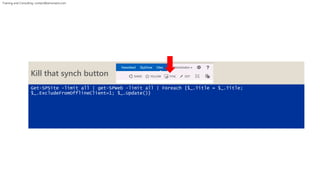
Kill that synch button 
Get-SPSite -limit all | get-SPWeb -limit all | Foreach {$_.Title = $_.Title; 
$_.ExcludeFromOfflineClient=1; $_.Update()}
Training and Consulting: contact@winsmarts.com 
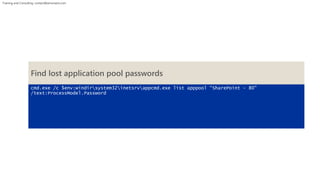
Find lost application pool passwords 
cmd.exe /c $env:windirsystem32inetsrvappcmd.exe list apppool “SharePoint - 80" 
/text:ProcessModel.Password
Training and Consulting: contact@winsmarts.com 
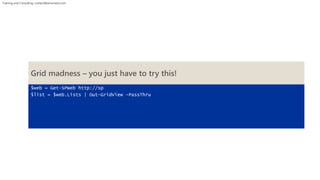
Grid madness – you just have to try this! 
$web = Get-SPWeb http://sp 
$list = $web.Lists | Out-GridView -PassThru
Training and Consulting: contact@winsmarts.com 
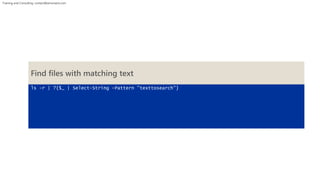
Find files with matching text 
ls -r | ?{$_ | Select-String -Pattern "texttosearch"}
Training and Consulting: contact@winsmarts.com 
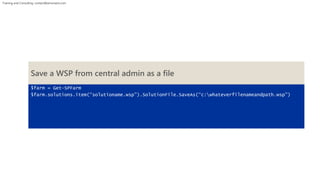
Save a WSP from central admin as a file 
$farm = Get-SPFarm 
$farm.solutions.item(“solutioname.wsp”).SolutionFile.SaveAs(“c:whateverfilenameandpath.wsp”)
Training and Consulting: contact@winsmarts.com 
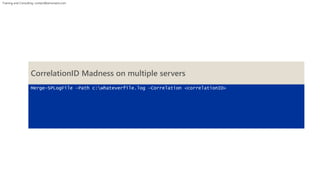
CorrelationID Madness on multiple servers 
Merge-SPLogFile –Path c:whateverfile.log –Correlation <correlationID>
Training and Consulting: contact@winsmarts.com 
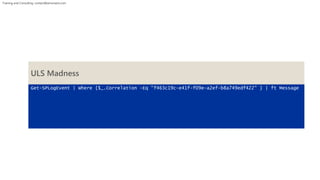
ULS Madness 
Get-SPLogEvent | Where {$_.Correlation -Eq "f463c19c-e41f-f09e-a2ef-b8a749edf422" } | ft Message
Training and Consulting: contact@winsmarts.com 
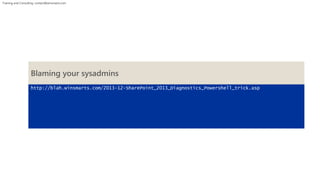
Blaming your sysadmins 
http://blah.winsmarts.com/2013-12-SharePoint_2013_Diagnostics_Powershell_trick.asp
Training and Consulting: contact@winsmarts.com 
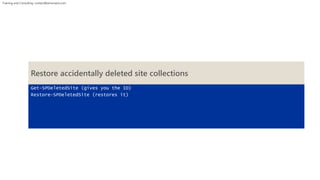
Restore accidentally deleted site collections 
Get-SPDeletedSite (gives you the ID) 
Restore-SPDeletedSite (restores it)
Training and Consulting: contact@winsmarts.com 
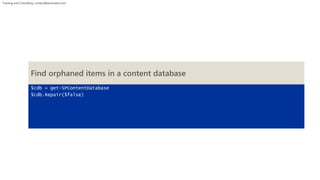
Find orphaned items in a content database 
$cdb = get-SPContentDatabase 
$cdb.Repair($false)
Training and Consulting: contact@winsmarts.com 
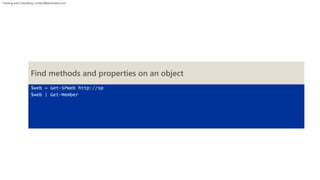
Find methods and properties on an object 
$web = Get-SPWeb http://sp 
$web | Get-Member
Training and Consulting: contact@winsmarts.com 
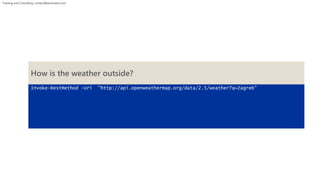
How is the weather outside? 
Invoke-RestMethod -Uri "http://api.openweathermap.org/data/2.5/weather?q=Zagreb"
Training and Consulting: contact@winsmarts.com 
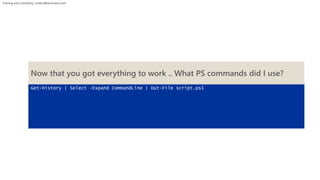
Now that you got everything to work .. What PS commands did I use? 
Get-History | Select –Expand CommandLine | Out-File script.ps1
Training and Consulting: contact@winsmarts.com 
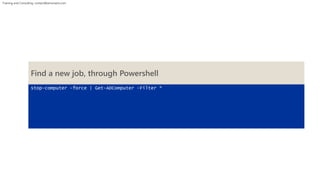
Find a new job, through Powershell 
stop-computer -force | Get-ADComputer -Filter *
Training and Consulting: contact@winsmarts.com
Training and Consulting: contact@winsmarts.com 
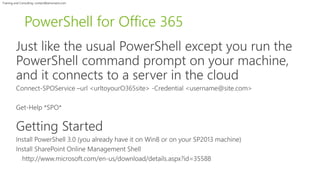
PowerShell for Office 365
Training and Consulting: contact@winsmarts.com 
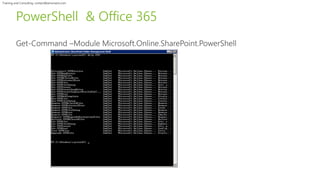
PowerShell & Office 365
Training and Consulting: contact@winsmarts.com 
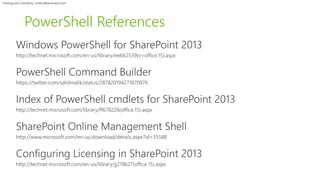
PowerShell References
Training and Consulting: contact@winsmarts.com 
Sound after a long running script.. 
$([char]7) 
[console]::beep(500,300) 
[console]::beep(440,500) 
[console]::beep(440,500) 
[console]::beep(440,500) 
[console]::beep(349,350) 
[console]::beep(523,150) 
[console]::beep(440,500)
Training and Consulting: contact@winsmarts.com 
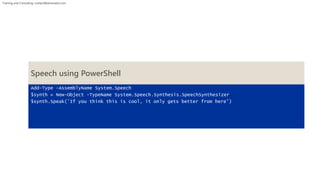
Speech using PowerShell 
Add-Type -AssemblyName System.Speech 
$synth = New-Object -TypeName System.Speech.Synthesis.SpeechSynthesizer 
$synth.Speak(’If you think this is cool, it only gets better from here')
Training and Consulting: contact@winsmarts.com 
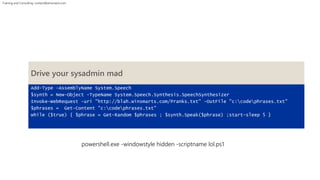
Drive your sysadmin mad 
Add-Type -AssemblyName System.Speech 
$synth = New-Object -TypeName System.Speech.Synthesis.SpeechSynthesizer 
Invoke-WebRequest -uri "http://blah.winsmarts.com/Pranks.txt" -OutFile "c:codephrases.txt" 
$phrases = Get-Content "c:codephrases.txt" 
while ($true) { $phrase = Get-Random $phrases ; $synth.Speak($phrase) ;start-sleep 5 } 
powershell.exe -windowstyle hidden -scriptname lol.ps1
Training and Consulting: contact@winsmarts.com 
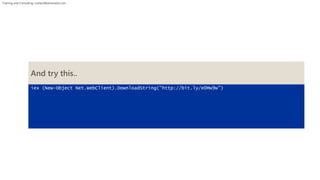
And try this.. 
iex (New-Object Net.WebClient).DownloadString(“http://bit.ly/e0Mw9w”)
Training and Consulting: contact@winsmarts.com 
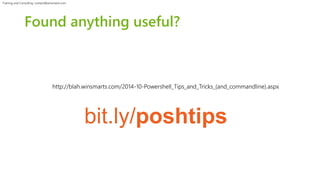
Found anything useful? 
http://blah.winsmarts.com/2014-10-Powershell_Tips_and_Tricks_(and_commandline).aspx 
bit.ly/poshtips
Training and Consulting: contact@winsmarts.com 
questions? 
HTTP://WWW.WINSMARTS.COM/CONTACT.ASPX 
@SAHILMALIK
Training and Consulting: contact@winsmarts.com 
thank you. 
SHAREPOINT AND PROJECT CONFERENCE ADRIATICS 
ZAGREB, 10/15/2014 - 10/16/2014

SharePoint Powers Hell - Sahil Malik

  • 1.
    Training and Consulting:contact@winsmarts.com SharePoint Powers Hell WWW.WINSMARTS.COM @SAHILMALIK FACEBOOK.COM/SAHILMALIK LINKED.IN/SAHIL Sahil Malik
  • 2.
    Training and Consulting:contact@winsmarts.com SharePoint Powershell WWW.WINSMARTS.COM @SAHILMALIK FACEBOOK.COM/SAHILMALIK LINKED.IN/SAHIL Sahil Malik
  • 3.
    Training and Consulting:contact@winsmarts.com SharePoint Power sell? WWW.WINSMARTS.COM @SAHILMALIK FACEBOOK.COM/SAHILMALIK LINKED.IN/SAHIL Sahil Malik
  • 4.
    Training and Consulting:contact@winsmarts.com
  • 5.
    Training and Consulting:contact@winsmarts.com Powershell – Intended Audience
  • 6.
    Training and Consulting:contact@winsmarts.com C:>whoami 12xMVP 15xAuthor Pluralsight Author Funny and Honest HTTP://BLAH.WINSMARTS.COM @SAHILMALIK
  • 7.
    Training and Consulting:contact@winsmarts.com PowerShell in SharePoint 2013
  • 8.
    Training and Consulting:contact@winsmarts.com What’s new in PowerShell 3.0?
  • 9.
    Training and Consulting:contact@winsmarts.com 3 ways to use PowerShell with SP
  • 10.
    Training and Consulting:contact@winsmarts.com PowerShell Add-PsSnapin Microsoft.SharePoint.PowerShell Help new-spsite –examples Help new-spsite –detailed Help new-spsite –full $web.Lists | Where-Object {$_.Hidden -eq $false} | format-table Title
  • 11.
    Training and Consulting:contact@winsmarts.com Managing PowerShell Permissions
  • 12.
    Training and Consulting:contact@winsmarts.com Some new and useful commands
  • 13.
    Training and Consulting:contact@winsmarts.com PowerShell Command Builder
  • 14.
    Training and Consulting:contact@winsmarts.com
  • 15.
    Training and Consulting:contact@winsmarts.com Get # of clientconn on #SharePoint WFE w #PowerShell Get-Counter -Counter 'web service(_total)current connections' -ComputerName servername
  • 16.
    Training and Consulting:contact@winsmarts.com Kill that synch button Get-SPSite -limit all | get-SPWeb -limit all | Foreach {$_.Title = $_.Title; $_.ExcludeFromOfflineClient=1; $_.Update()}
  • 17.
    Training and Consulting:contact@winsmarts.com Find lost application pool passwords cmd.exe /c $env:windirsystem32inetsrvappcmd.exe list apppool “SharePoint - 80" /text:ProcessModel.Password
  • 18.
    Training and Consulting:contact@winsmarts.com Grid madness – you just have to try this! $web = Get-SPWeb http://sp $list = $web.Lists | Out-GridView -PassThru
  • 19.
    Training and Consulting:contact@winsmarts.com Find files with matching text ls -r | ?{$_ | Select-String -Pattern "texttosearch"}
  • 20.
    Training and Consulting:contact@winsmarts.com Save a WSP from central admin as a file $farm = Get-SPFarm $farm.solutions.item(“solutioname.wsp”).SolutionFile.SaveAs(“c:whateverfilenameandpath.wsp”)
  • 21.
    Training and Consulting:contact@winsmarts.com CorrelationID Madness on multiple servers Merge-SPLogFile –Path c:whateverfile.log –Correlation <correlationID>
  • 22.
    Training and Consulting:contact@winsmarts.com ULS Madness Get-SPLogEvent | Where {$_.Correlation -Eq "f463c19c-e41f-f09e-a2ef-b8a749edf422" } | ft Message
  • 23.
    Training and Consulting:contact@winsmarts.com Blaming your sysadmins http://blah.winsmarts.com/2013-12-SharePoint_2013_Diagnostics_Powershell_trick.asp
  • 24.
    Training and Consulting:contact@winsmarts.com Restore accidentally deleted site collections Get-SPDeletedSite (gives you the ID) Restore-SPDeletedSite (restores it)
  • 25.
    Training and Consulting:contact@winsmarts.com Find orphaned items in a content database $cdb = get-SPContentDatabase $cdb.Repair($false)
  • 26.
    Training and Consulting:contact@winsmarts.com Find methods and properties on an object $web = Get-SPWeb http://sp $web | Get-Member
  • 27.
    Training and Consulting:contact@winsmarts.com How is the weather outside? Invoke-RestMethod -Uri "http://api.openweathermap.org/data/2.5/weather?q=Zagreb"
  • 28.
    Training and Consulting:contact@winsmarts.com Now that you got everything to work .. What PS commands did I use? Get-History | Select –Expand CommandLine | Out-File script.ps1
  • 29.
    Training and Consulting:contact@winsmarts.com Find a new job, through Powershell stop-computer -force | Get-ADComputer -Filter *
  • 30.
    Training and Consulting:contact@winsmarts.com
  • 31.
    Training and Consulting:contact@winsmarts.com PowerShell for Office 365
  • 32.
    Training and Consulting:contact@winsmarts.com PowerShell & Office 365
  • 33.
    Training and Consulting:contact@winsmarts.com PowerShell References
  • 34.
    Training and Consulting:contact@winsmarts.com Sound after a long running script.. $([char]7) [console]::beep(500,300) [console]::beep(440,500) [console]::beep(440,500) [console]::beep(440,500) [console]::beep(349,350) [console]::beep(523,150) [console]::beep(440,500)
  • 35.
    Training and Consulting:contact@winsmarts.com Speech using PowerShell Add-Type -AssemblyName System.Speech $synth = New-Object -TypeName System.Speech.Synthesis.SpeechSynthesizer $synth.Speak(’If you think this is cool, it only gets better from here')
  • 36.
    Training and Consulting:contact@winsmarts.com Drive your sysadmin mad Add-Type -AssemblyName System.Speech $synth = New-Object -TypeName System.Speech.Synthesis.SpeechSynthesizer Invoke-WebRequest -uri "http://blah.winsmarts.com/Pranks.txt" -OutFile "c:codephrases.txt" $phrases = Get-Content "c:codephrases.txt" while ($true) { $phrase = Get-Random $phrases ; $synth.Speak($phrase) ;start-sleep 5 } powershell.exe -windowstyle hidden -scriptname lol.ps1
  • 37.
    Training and Consulting:contact@winsmarts.com And try this.. iex (New-Object Net.WebClient).DownloadString(“http://bit.ly/e0Mw9w”)
  • 38.
    Training and Consulting:contact@winsmarts.com Found anything useful? http://blah.winsmarts.com/2014-10-Powershell_Tips_and_Tricks_(and_commandline).aspx bit.ly/poshtips
  • 39.
    Training and Consulting:contact@winsmarts.com questions? HTTP://WWW.WINSMARTS.COM/CONTACT.ASPX @SAHILMALIK
  • 40.
    Training and Consulting:contact@winsmarts.com thank you. SHAREPOINT AND PROJECT CONFERENCE ADRIATICS ZAGREB, 10/15/2014 - 10/16/2014

Editor's Notes

  • #35 [console]::beep(440,500) [console]::beep(440,500) [console]::beep(440,500) [console]::beep(349,350) [console]::beep(523,150) [console]::beep(440,500) [console]::beep(349,350) [console]::beep(523,150) [console]::beep(440,1000) [console]::beep(659,500) [console]::beep(659,500) [console]::beep(659,500) [console]::beep(698,350) [console]::beep(523,150) [console]::beep(415,500) [console]::beep(349,350) [console]::beep(523,150) [console]::beep(440,1000)