Adobe Experience ManagerAdobe Experience Manager
Adobe Experience Manager 6.1:
Responsive Websites &
Grid-Based Layouts
Damien Antipa, Senior UX Engineer
Twitter: @visiongeist
Gabriel Walt, Product Manager
Twitter: @gabrielwalt
https://www.slideshare.net/GabrielWalt/aem-responsive
Adobe Experience Manager https://www.slideshare.net/GabrielWalt/aem-responsive
Agenda
Responsive Websites & Grid-Based Layouts:
1. Overview
2. Edit Responsive Layouts
3. Setup Responsive Editing
4. Develop for the Grid
Adobe Experience Manager https://www.slideshare.net/GabrielWalt/aem-responsive
Overview
Adobe Experience Manager https://www.slideshare.net/GabrielWalt/aem-responsive
Adaptive vs Responsive
Adaptive
The server response will change to adapt to a defined set of screen size.
➔ Server-side device detection through a database of user-agents
➔ Consequence: Different URLs for different devices
Responsive
The design will fluidly change and respond to fit any screen size.
➔ Client-side feature detection through media queries
➔ Consequence: Same content delivered to all visitors
Adobe Experience Manager https://www.slideshare.net/GabrielWalt/aem-responsive
Making Content Responsive
Traditional workflow
• A designer mocks the different breakpoints
• A developer implements the mocks

for a specific template
• The author picks that template

and fills the content
Responsive layout editing
• The author fills the content
• The author can adapt the layout
Adobe Experience Manager https://www.slideshare.net/GabrielWalt/aem-responsive
Edit Responsive Layouts
Adobe Experience Manager https://www.slideshare.net/GabrielWalt/aem-responsive
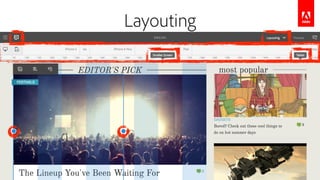
Layouting
Adobe Experience Manager https://www.slideshare.net/GabrielWalt/aem-responsive
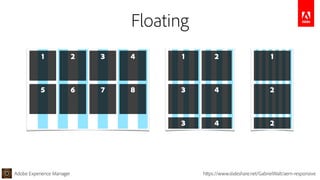
Floating
1 2 3 4
5 6 7 8
1 2
3 4
3 4
1
2
2
Adobe Experience Manager https://www.slideshare.net/GabrielWalt/aem-responsive
Floating
1 2 3 4
5
6 7 8
1
2
3
1 2
3
4 5
6
Adobe Experience Manager https://www.slideshare.net/GabrielWalt/aem-responsive
Breaking
1
2
3
1 2 3 4
5 6 7 8
1 2
3 4
5 6
Adobe Experience Manager https://www.slideshare.net/GabrielWalt/aem-responsive
Nesting
1
2
3
4
5
6
1 2 3
5
4
1
2
3
4
Adobe Experience Manager https://www.slideshare.net/GabrielWalt/aem-responsive
Hiding
1
2
3
4
5
6
1 3
5
4
4
5
6
Adobe Experience Manager https://www.slideshare.net/GabrielWalt/aem-responsive
Setup Responsive Editing
Adobe Experience Manager https://www.slideshare.net/GabrielWalt/aem-responsive
0. Enable the Responsive Emulator
Register page components for simulation
➔ List the sling:resourceType of your pages in an OSGi config for
com.day.cq.wcm.mobile.core.impl.MobileEmulatorProvider
Specify the device groups
➔ On jcr:content node of the site root, add the following property:

jcr:content[nt:unstructured]

@cq:deviceGroups=["/etc/mobile/groups/responsive"]
Adobe Experience Manager https://www.slideshare.net/GabrielWalt/aem-responsive
1. Enable the Layouting Mode
Specify the breakpoints
➔ On jcr:content node of the site root, add following node structure:

jcr:content[nt:unstructured]

cq:responsive[nt:unstructured]

breakpoints[nt:unstructured]

phone[nt:unstructured]

@title="Smaller Screen"

@width=650

tablet[nt:unstructured]

@title="Tablet"

@width=1200
Adobe Experience Manager https://www.slideshare.net/GabrielWalt/aem-responsive
2. Enable the Responsive Grid
Use the responsive paragraph system
➔ Replace the parsys with the responsive one:

@resourceType="wcm/foundation/components/responsivegrid"
Include the responsive stylesheet
➔ Copy the following file into your client library:

/etc/designs/geometrixx-media/clientlibs/css/grid.less
➔ Adapt the breakpoints and the number of columns to your needs
Adobe Experience Manager https://www.slideshare.net/GabrielWalt/aem-responsive
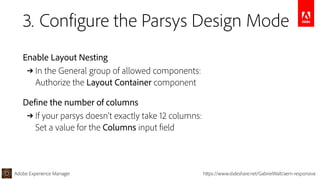
3. Configure the Parsys Design Mode
Enable Layout Nesting
➔ In the General group of allowed components:

Authorize the Layout Container component
Define the number of columns
➔ If your parsys doesn’t exactly take 12 columns:

Set a value for the Columns input field

Adobe Experience Manager https://www.slideshare.net/GabrielWalt/aem-responsive
Develop for the Grid
Adobe Experience Manager https://www.slideshare.net/GabrielWalt/aem-responsive
A Project’s Grid Configuration
@import (once) "/etc/clientlibs/wcm/foundation/grid/grid_base.less";
/* maximum amount of grid cells to be provided */
@max_col: 12;
.aem-Grid {
.generate-grid(default, @max_col);
}
/* smaller screen (phone) breakpoint */
@media (max-width: 650px) {
.aem-Grid {
.generate-grid(phone, @max_col);
}
}
/* tablet breakpoint */
@media (min-width: 651px) and (max-width: 1200px) {
.aem-Grid {
.generate-grid(tablet, @max_col);
}
}
Adobe Experience Manager https://www.slideshare.net/GabrielWalt/aem-responsive
Persistence in JCR Content
The component size is saved on the resource node

jcr:content[nt:unstructured]

parsys[nt:unstructured]

image[cq:Component]

@sling:resourceType="wcm/foundation/components/image"

cq:responsive[nt:unstructured]

default[nt:unstructured]

@width=4

phone[nt:unstructured]

@width=12
Adobe Experience Manager https://www.slideshare.net/GabrielWalt/aem-responsive
The Grid Markup
<div class="aem-Grid aem-Grid--12">
<div class="aem-GridColumn aem-GridColumn—default--2">
Col 1
</div>
<div class="aem-GridColumn aem-GridColumn—default--8">
Col 2
</div>
<div class="aem-GridColumn aem-GridColumn—default--2">
Col 3
</div>
</div>
Adobe Experience Manager https://www.slideshare.net/GabrielWalt/aem-responsive
The Grid Markup
Adobe Experience Manager https://www.slideshare.net/GabrielWalt/aem-responsive
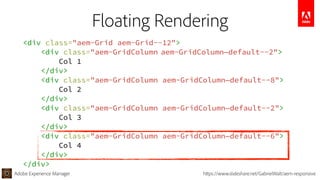
Floating Rendering
<div class="aem-Grid aem-Grid--12">
<div class="aem-GridColumn aem-GridColumn—default--2">
Col 1
</div>
<div class="aem-GridColumn aem-GridColumn—default--8">
Col 2
</div>
<div class="aem-GridColumn aem-GridColumn—default--2">
Col 3
</div>
<div class="aem-GridColumn aem-GridColumn—default--6">
Col 4
</div>
</div>
Adobe Experience Manager https://www.slideshare.net/GabrielWalt/aem-responsive
Floating Rendering
Adobe Experience Manager https://www.slideshare.net/GabrielWalt/aem-responsive
Leverage Breakpoints
<div class="aem-Grid aem-Grid--12">
<div class="aem-GridColumn
aem-GridColumn—default--2
aem-GridColumn—phone--12">
Col 1
</div>
<div class="aem-GridColumn
aem-GridColumn—default--8
aem-GridColumn—phone--6">
Col 2
</div>
<div class="aem-GridColumn
aem-GridColumn—default--2
aem-GridColumn—phone--6">
Col 3
</div>
</div>
/*
grid.less
smaller screen breakpoint
*/
@media (max-width: 650px) {
.aem-Grid {
.generate-grid(phone, 

@max_col);
}
}
Adobe Experience Manager https://www.slideshare.net/GabrielWalt/aem-responsive
Leverage Breakpoints
Adobe Experience Manager https://www.slideshare.net/GabrielWalt/aem-responsive
<div class="aem-Grid aem-Grid--12">
<div class="aem-GridColumn
aem-GridColumn—default--4
aem-GridColumn—phone--hide">
Col 1
</div>
<div class="aem-GridColumn
aem-GridColumn—default--4">
Col 2
</div>
<div class="aem-GridColumn
aem-GridColumn—default--4
aem-GridColumn—phone--newline">
Col 3
</div>
</div>
➔ hide item
➔ force new line
Custom Behaviour
Adobe Experience Manager https://www.slideshare.net/GabrielWalt/aem-responsive
Custom Behaviour
Adobe Experience Manager https://www.slideshare.net/GabrielWalt/aem-responsive
<div class="aem-Grid aem-Grid--12">
<div class="aem-GridColumn
aem-GridColumn--default--4">
Parent Col 2
</div>
</div>
<div class="aem-GridColumn
aem-GridColumn--default--8">
<div class="aem-Grid aem-Grid--8">
<div class="aem-GridColumn
aem-GridColumn--default--4">
Child Col 1
</div>
<div class="aem-GridColumn
aem-GridColumn--default--4">
Child Col 1
</div>
</div>
</div>
Nested Grid
➔ The grid system is global
➔ AEM will take care of
inheriting the width
Adobe Experience Manager
Thanks!
Damien Antipa, Senior UX Engineer
Twitter: @visiongeist
Gabriel Walt, Product Manager
Twitter: @gabrielwalt
Markup example for front-end developers:
http://adobe-marketing-cloud.github.io/aem-responsivegrid/
Documentation Links
http://docs.adobe.com/docs/en/aem/6-1/administer/operations/page-authoring/configuring-responsive-layouting.html
http://docs.adobe.com/docs/en/aem/6-1/author/page-authoring/responsive-layout.html
https://www.slideshare.net/GabrielWalt/aem-responsive
AEM responsive

AEM responsive

  • 1.
    Adobe Experience ManagerAdobeExperience Manager Adobe Experience Manager 6.1: Responsive Websites & Grid-Based Layouts Damien Antipa, Senior UX Engineer Twitter: @visiongeist Gabriel Walt, Product Manager Twitter: @gabrielwalt https://www.slideshare.net/GabrielWalt/aem-responsive
  • 2.
    Adobe Experience Managerhttps://www.slideshare.net/GabrielWalt/aem-responsive Agenda Responsive Websites & Grid-Based Layouts: 1. Overview 2. Edit Responsive Layouts 3. Setup Responsive Editing 4. Develop for the Grid
  • 3.
    Adobe Experience Managerhttps://www.slideshare.net/GabrielWalt/aem-responsive Overview
  • 4.
    Adobe Experience Managerhttps://www.slideshare.net/GabrielWalt/aem-responsive Adaptive vs Responsive Adaptive The server response will change to adapt to a defined set of screen size. ➔ Server-side device detection through a database of user-agents ➔ Consequence: Different URLs for different devices Responsive The design will fluidly change and respond to fit any screen size. ➔ Client-side feature detection through media queries ➔ Consequence: Same content delivered to all visitors
  • 5.
    Adobe Experience Managerhttps://www.slideshare.net/GabrielWalt/aem-responsive Making Content Responsive Traditional workflow • A designer mocks the different breakpoints • A developer implements the mocks
 for a specific template • The author picks that template
 and fills the content Responsive layout editing • The author fills the content • The author can adapt the layout
  • 6.
    Adobe Experience Managerhttps://www.slideshare.net/GabrielWalt/aem-responsive Edit Responsive Layouts
  • 7.
    Adobe Experience Managerhttps://www.slideshare.net/GabrielWalt/aem-responsive Layouting
  • 8.
    Adobe Experience Managerhttps://www.slideshare.net/GabrielWalt/aem-responsive Floating 1 2 3 4 5 6 7 8 1 2 3 4 3 4 1 2 2
  • 9.
    Adobe Experience Managerhttps://www.slideshare.net/GabrielWalt/aem-responsive Floating 1 2 3 4 5 6 7 8 1 2 3 1 2 3 4 5 6
  • 10.
    Adobe Experience Managerhttps://www.slideshare.net/GabrielWalt/aem-responsive Breaking 1 2 3 1 2 3 4 5 6 7 8 1 2 3 4 5 6
  • 11.
    Adobe Experience Managerhttps://www.slideshare.net/GabrielWalt/aem-responsive Nesting 1 2 3 4 5 6 1 2 3 5 4 1 2 3 4
  • 12.
    Adobe Experience Managerhttps://www.slideshare.net/GabrielWalt/aem-responsive Hiding 1 2 3 4 5 6 1 3 5 4 4 5 6
  • 13.
    Adobe Experience Managerhttps://www.slideshare.net/GabrielWalt/aem-responsive Setup Responsive Editing
  • 14.
    Adobe Experience Managerhttps://www.slideshare.net/GabrielWalt/aem-responsive 0. Enable the Responsive Emulator Register page components for simulation ➔ List the sling:resourceType of your pages in an OSGi config for com.day.cq.wcm.mobile.core.impl.MobileEmulatorProvider Specify the device groups ➔ On jcr:content node of the site root, add the following property:
 jcr:content[nt:unstructured]
 @cq:deviceGroups=["/etc/mobile/groups/responsive"]
  • 15.
    Adobe Experience Managerhttps://www.slideshare.net/GabrielWalt/aem-responsive 1. Enable the Layouting Mode Specify the breakpoints ➔ On jcr:content node of the site root, add following node structure:
 jcr:content[nt:unstructured]
 cq:responsive[nt:unstructured]
 breakpoints[nt:unstructured]
 phone[nt:unstructured]
 @title="Smaller Screen"
 @width=650
 tablet[nt:unstructured]
 @title="Tablet"
 @width=1200
  • 16.
    Adobe Experience Managerhttps://www.slideshare.net/GabrielWalt/aem-responsive 2. Enable the Responsive Grid Use the responsive paragraph system ➔ Replace the parsys with the responsive one:
 @resourceType="wcm/foundation/components/responsivegrid" Include the responsive stylesheet ➔ Copy the following file into your client library:
 /etc/designs/geometrixx-media/clientlibs/css/grid.less ➔ Adapt the breakpoints and the number of columns to your needs
  • 17.
    Adobe Experience Managerhttps://www.slideshare.net/GabrielWalt/aem-responsive 3. Configure the Parsys Design Mode Enable Layout Nesting ➔ In the General group of allowed components:
 Authorize the Layout Container component Define the number of columns ➔ If your parsys doesn’t exactly take 12 columns:
 Set a value for the Columns input field

  • 18.
    Adobe Experience Managerhttps://www.slideshare.net/GabrielWalt/aem-responsive Develop for the Grid
  • 19.
    Adobe Experience Managerhttps://www.slideshare.net/GabrielWalt/aem-responsive A Project’s Grid Configuration @import (once) "/etc/clientlibs/wcm/foundation/grid/grid_base.less"; /* maximum amount of grid cells to be provided */ @max_col: 12; .aem-Grid { .generate-grid(default, @max_col); } /* smaller screen (phone) breakpoint */ @media (max-width: 650px) { .aem-Grid { .generate-grid(phone, @max_col); } } /* tablet breakpoint */ @media (min-width: 651px) and (max-width: 1200px) { .aem-Grid { .generate-grid(tablet, @max_col); } }
  • 20.
    Adobe Experience Managerhttps://www.slideshare.net/GabrielWalt/aem-responsive Persistence in JCR Content The component size is saved on the resource node
 jcr:content[nt:unstructured]
 parsys[nt:unstructured]
 image[cq:Component]
 @sling:resourceType="wcm/foundation/components/image"
 cq:responsive[nt:unstructured]
 default[nt:unstructured]
 @width=4
 phone[nt:unstructured]
 @width=12
  • 21.
    Adobe Experience Managerhttps://www.slideshare.net/GabrielWalt/aem-responsive The Grid Markup <div class="aem-Grid aem-Grid--12"> <div class="aem-GridColumn aem-GridColumn—default--2"> Col 1 </div> <div class="aem-GridColumn aem-GridColumn—default--8"> Col 2 </div> <div class="aem-GridColumn aem-GridColumn—default--2"> Col 3 </div> </div>
  • 22.
    Adobe Experience Managerhttps://www.slideshare.net/GabrielWalt/aem-responsive The Grid Markup
  • 23.
    Adobe Experience Managerhttps://www.slideshare.net/GabrielWalt/aem-responsive Floating Rendering <div class="aem-Grid aem-Grid--12"> <div class="aem-GridColumn aem-GridColumn—default--2"> Col 1 </div> <div class="aem-GridColumn aem-GridColumn—default--8"> Col 2 </div> <div class="aem-GridColumn aem-GridColumn—default--2"> Col 3 </div> <div class="aem-GridColumn aem-GridColumn—default--6"> Col 4 </div> </div>
  • 24.
    Adobe Experience Managerhttps://www.slideshare.net/GabrielWalt/aem-responsive Floating Rendering
  • 25.
    Adobe Experience Managerhttps://www.slideshare.net/GabrielWalt/aem-responsive Leverage Breakpoints <div class="aem-Grid aem-Grid--12"> <div class="aem-GridColumn aem-GridColumn—default--2 aem-GridColumn—phone--12"> Col 1 </div> <div class="aem-GridColumn aem-GridColumn—default--8 aem-GridColumn—phone--6"> Col 2 </div> <div class="aem-GridColumn aem-GridColumn—default--2 aem-GridColumn—phone--6"> Col 3 </div> </div> /* grid.less smaller screen breakpoint */ @media (max-width: 650px) { .aem-Grid { .generate-grid(phone, 
 @max_col); } }
  • 26.
    Adobe Experience Managerhttps://www.slideshare.net/GabrielWalt/aem-responsive Leverage Breakpoints
  • 27.
    Adobe Experience Managerhttps://www.slideshare.net/GabrielWalt/aem-responsive <div class="aem-Grid aem-Grid--12"> <div class="aem-GridColumn aem-GridColumn—default--4 aem-GridColumn—phone--hide"> Col 1 </div> <div class="aem-GridColumn aem-GridColumn—default--4"> Col 2 </div> <div class="aem-GridColumn aem-GridColumn—default--4 aem-GridColumn—phone--newline"> Col 3 </div> </div> ➔ hide item ➔ force new line Custom Behaviour
  • 28.
    Adobe Experience Managerhttps://www.slideshare.net/GabrielWalt/aem-responsive Custom Behaviour
  • 29.
    Adobe Experience Managerhttps://www.slideshare.net/GabrielWalt/aem-responsive <div class="aem-Grid aem-Grid--12"> <div class="aem-GridColumn aem-GridColumn--default--4"> Parent Col 2 </div> </div> <div class="aem-GridColumn aem-GridColumn--default--8"> <div class="aem-Grid aem-Grid--8"> <div class="aem-GridColumn aem-GridColumn--default--4"> Child Col 1 </div> <div class="aem-GridColumn aem-GridColumn--default--4"> Child Col 1 </div> </div> </div> Nested Grid ➔ The grid system is global ➔ AEM will take care of inheriting the width
  • 30.
    Adobe Experience Manager Thanks! DamienAntipa, Senior UX Engineer Twitter: @visiongeist Gabriel Walt, Product Manager Twitter: @gabrielwalt Markup example for front-end developers: http://adobe-marketing-cloud.github.io/aem-responsivegrid/ Documentation Links http://docs.adobe.com/docs/en/aem/6-1/administer/operations/page-authoring/configuring-responsive-layouting.html http://docs.adobe.com/docs/en/aem/6-1/author/page-authoring/responsive-layout.html https://www.slideshare.net/GabrielWalt/aem-responsive