Angularjs-WebApi2-
EFCodeFirst Web App On 3-
Tier Architecture
Mohd Manzoor Ahmed [MCT]
(10+yrs of Training Cum Web Development Experience)
What are we going to implement?
Let's see live here http://EIS.ManzoorTheTrainer.com
Enroll Here
At 50% OFF - Use Coupon Code as ‘HALF-OFF’
Employee Information System - User Story In
DetailNeed a web app which allows Admin to create a short profile of any employee with the
following information i.e., Emp Id and Email and as soon as the profile is created an
email should be generated and send to the employee with login credentials of the
portal. Employee should be able to login and update hisher full profile (except EmpId
and Email). The updated profile should reflect on Admin's dashboard.
Admin should also have an option to upload an excel sheet with multiple employees
information and multiple emails should be generated to the respective employees with
their login credentials.
Admin should also have right to full search and update or delete any record.
Defining the Roles & Responsibilities
● Admin
○ Can manage single or multiple employee profiles. (CRUD)
● Employee
○ Can viewupdate their own profile
Project Setup
1. Download Source Code
a. EIS
b. Dummy Data
2. Set Connection String
3. Set Gmail UserName And Password
4. Set Build The Project
5. Set StartUp Projects
6. Set API path in EIS.js
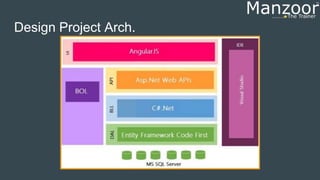
Design Project Arch.
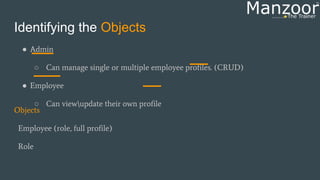
Identifying the Objects
● Admin
○ Can manage single or multiple employee profiles. (CRUD)
● Employee
○ Can viewupdate their own profile
Objects
Employee (role, full profile)
Role
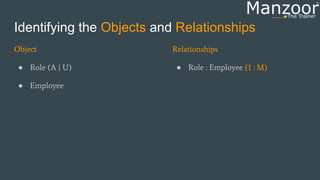
Identifying the Objects and Relationships
Object
● Role (A | U)
● Employee
Relationships
● Role : Employee (1 : M)
Enroll Here
At 50% OFF - Use Coupon Code as ‘HALF-OFF’
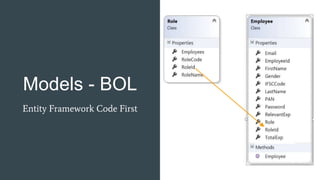
Models - BOL
Entity Framework Code First
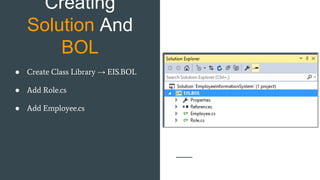
Creating
Solution And
BOL
● Create Class Library → EIS.BOL
● Add Role.cs
● Add Employee.cs
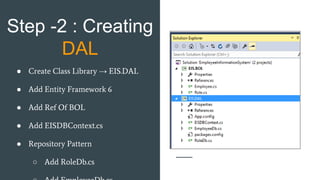
Step -2 : Creating
DAL
● Create Class Library → EIS.DAL
● Add Entity Framework 6
● Add Ref Of BOL
● Add EISDBContext.cs
● Repository Pattern
○ Add RoleDb.cs
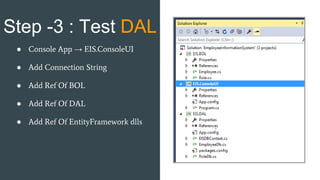
Step -3 : Test DAL
● Console App → EIS.ConsoleUI
● Add Connection String
● Add Ref Of BOL
● Add Ref Of DAL
● Add Ref Of EntityFramework dlls
Enroll Here
At 50% OFF - Use Coupon Code as ‘HALF-OFF’
Step -4 : Enabling
Code-First
Migration
Enable-Migrations (Install From Nuget
Console) in DAL
1. AutomaticMigrationsEnabled = true;
AutomaticMigrationDataLossAllowed =
true;
2. Database.SetInitializer(new
MigrateDatabaseToLatestVersion<EIS
DBContext,
EIS.DAL.Migrations.Configuration
>());
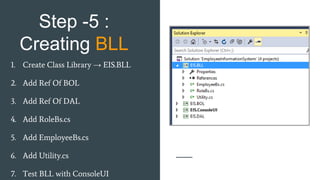
Step -5 :
Creating BLL
1. Create Class Library → EIS.BLL
2. Add Ref Of BOL
3. Add Ref Of DAL
4. Add RoleBs.cs
5. Add EmployeeBs.cs
6. Add Utility.cs
7. Test BLL with ConsoleUI
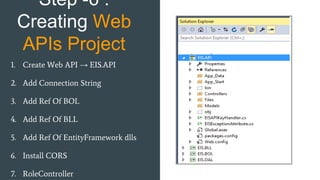
Step -6 :
Creating Web
APIs Project
1. Create Web API → EIS.API
2. Add Connection String
3. Add Ref Of BOL
4. Add Ref Of BLL
5. Add Ref Of EntityFramework dlls
6. Install CORS
7. RoleController
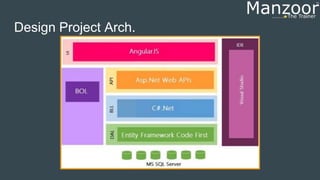
Design Project Arch.
Enroll Here
At 50% OFF - Use Coupon Code as ‘HALF-OFF’
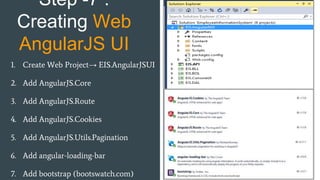
Step -7 :
Creating Web
AngularJS UI
1. Create Web Project→ EIS.AngularJSUI
2. Add AngularJS.Core
3. Add AngularJS.Route
4. Add AngularJS.Cookies
5. Add AngularJS.Utils.Pagination
6. Add angular-loading-bar
7. Add bootstrap (bootswatch.com)
Creating
Directory
Structure
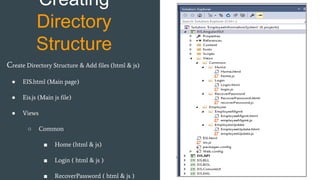
Create Directory Structure & Add files (html & js)
● EIS.html (Main page)
● Eis.js (Main js file)
● Views
○ Common
■ Home (html & js)
■ Login ( html & js )
■ RecoverPassword ( html & js )
Step -9 :
Creating Sidebar
Menu
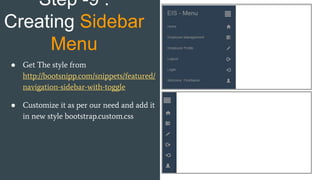
● Get The style from
http://bootsnipp.com/snippets/featured/
navigation-sidebar-with-toggle
● Customize it as per our need and add it
in new style bootstrap.custom.css
Step -10 :
Creating Route
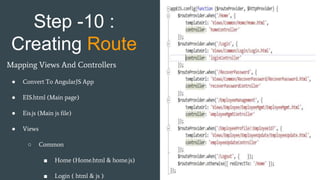
Mapping Views And Controllers
● Convert To AngularJS App
● EIS.html (Main page)
● Eis.js (Main js file)
● Views
○ Common
■ Home (Home.html & home.js)
■ Login ( html & js )
Step -11 :
Employee Mgmt
- Grid
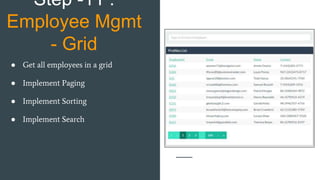
● Get all employees in a grid
● Implement Paging
● Implement Sorting
● Implement Search
Enroll Here
At 50% OFF - Use Coupon Code as ‘HALF-OFF’
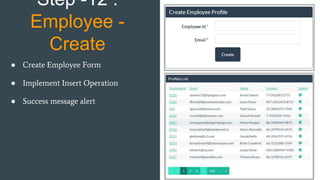
Step -12 :
Employee -
Create
● Create Employee Form
● Implement Insert Operation
● Success message alert
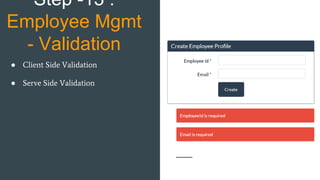
Step -13 :
Employee Mgmt
- Validation
● Client Side Validation
● Serve Side Validation
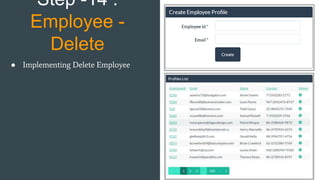
Step -14 :
Employee -
Delete
● Implementing Delete Employee
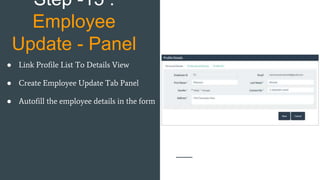
Step -15 :
Employee
Update - Panel
● Link Profile List To Details View
● Create Employee Update Tab Panel
● Autofill the employee details in the form
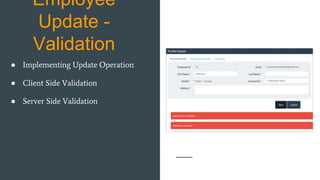
Employee
Update -
Validation
● Implementing Update Operation
● Client Side Validation
● Server Side Validation
Enroll Here
At 50% OFF - Use Coupon Code as ‘HALF-OFF’
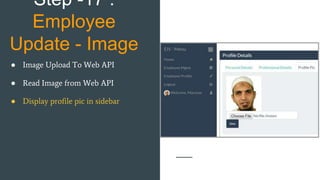
Step -17 :
Employee
Update - Image
● Image Upload To Web API
● Read Image from Web API
● Display profile pic in sidebar
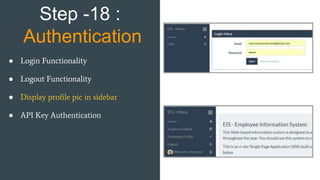
Step -18 :
Authentication
● Login Functionality
● Logout Functionality
● Display profile pic in sidebar
● API Key Authentication
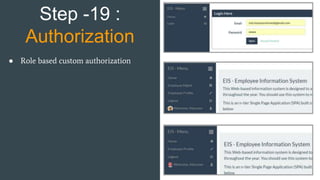
Step -19 :
Authorization
● Role based custom authorization
Step -20 : Exception Handling
● Client Side - AngularJS
● Server Side - Asp.Net Web APIs
● Implementing global exception handling.
Enroll Here
At 50% OFF - Use Coupon Code as ‘HALF-OFF’
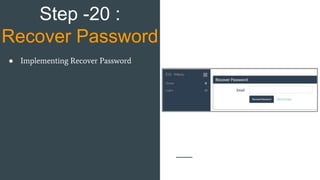
Step -20 :
Recover Password
● Implementing Recover Password
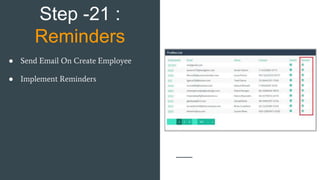
Step -21 :
Reminders
● Send Email On Create Employee
● Implement Reminders
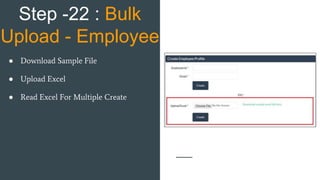
Step -22 : Bulk
Upload - Employee
● Download Sample File
● Upload Excel
● Read Excel For Multiple Create
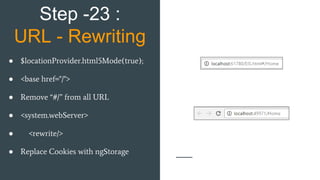
Step -23 :
URL - Rewriting
● $locationProvider.html5Mode(true);
● <base href="/">
● Remove “#/” from all URL
● <system.webServer>
● <rewrite/>
● Replace Cookies with ngStorage
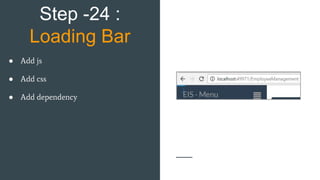
Step -24 :
Loading Bar
● Add js
● Add css
● Add dependency
Enroll Here
At 50% OFF - Use Coupon Code as ‘HALF-OFF’
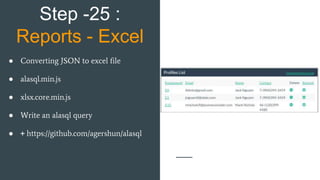
Step -25 :
Reports - Excel
● Converting JSON to excel file
● alasql.min.js
● xlsx.core.min.js
● Write an alasql query
● + https://github.com/agershun/alasql
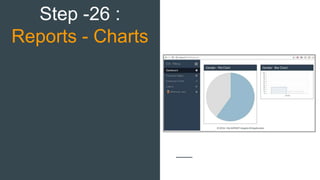
Step -26 :
Reports - Charts
Enroll Here
At 50% OFF - Use Coupon Code as ‘HALF-OFF’
Thanks

Angularjs Live Project

  • 2.
    Angularjs-WebApi2- EFCodeFirst Web AppOn 3- Tier Architecture Mohd Manzoor Ahmed [MCT] (10+yrs of Training Cum Web Development Experience)
  • 3.
    What are wegoing to implement? Let's see live here http://EIS.ManzoorTheTrainer.com
  • 4.
    Enroll Here At 50%OFF - Use Coupon Code as ‘HALF-OFF’
  • 5.
    Employee Information System- User Story In DetailNeed a web app which allows Admin to create a short profile of any employee with the following information i.e., Emp Id and Email and as soon as the profile is created an email should be generated and send to the employee with login credentials of the portal. Employee should be able to login and update hisher full profile (except EmpId and Email). The updated profile should reflect on Admin's dashboard. Admin should also have an option to upload an excel sheet with multiple employees information and multiple emails should be generated to the respective employees with their login credentials. Admin should also have right to full search and update or delete any record.
  • 6.
    Defining the Roles& Responsibilities ● Admin ○ Can manage single or multiple employee profiles. (CRUD) ● Employee ○ Can viewupdate their own profile
  • 7.
    Project Setup 1. DownloadSource Code a. EIS b. Dummy Data 2. Set Connection String 3. Set Gmail UserName And Password 4. Set Build The Project 5. Set StartUp Projects 6. Set API path in EIS.js
  • 8.
  • 9.
    Identifying the Objects ●Admin ○ Can manage single or multiple employee profiles. (CRUD) ● Employee ○ Can viewupdate their own profile Objects Employee (role, full profile) Role
  • 10.
    Identifying the Objectsand Relationships Object ● Role (A | U) ● Employee Relationships ● Role : Employee (1 : M)
  • 11.
    Enroll Here At 50%OFF - Use Coupon Code as ‘HALF-OFF’
  • 12.
    Models - BOL EntityFramework Code First
  • 13.
    Creating Solution And BOL ● CreateClass Library → EIS.BOL ● Add Role.cs ● Add Employee.cs
  • 14.
    Step -2 :Creating DAL ● Create Class Library → EIS.DAL ● Add Entity Framework 6 ● Add Ref Of BOL ● Add EISDBContext.cs ● Repository Pattern ○ Add RoleDb.cs
  • 15.
    Step -3 :Test DAL ● Console App → EIS.ConsoleUI ● Add Connection String ● Add Ref Of BOL ● Add Ref Of DAL ● Add Ref Of EntityFramework dlls
  • 16.
    Enroll Here At 50%OFF - Use Coupon Code as ‘HALF-OFF’
  • 17.
    Step -4 :Enabling Code-First Migration Enable-Migrations (Install From Nuget Console) in DAL 1. AutomaticMigrationsEnabled = true; AutomaticMigrationDataLossAllowed = true; 2. Database.SetInitializer(new MigrateDatabaseToLatestVersion<EIS DBContext, EIS.DAL.Migrations.Configuration >());
  • 18.
    Step -5 : CreatingBLL 1. Create Class Library → EIS.BLL 2. Add Ref Of BOL 3. Add Ref Of DAL 4. Add RoleBs.cs 5. Add EmployeeBs.cs 6. Add Utility.cs 7. Test BLL with ConsoleUI
  • 19.
    Step -6 : CreatingWeb APIs Project 1. Create Web API → EIS.API 2. Add Connection String 3. Add Ref Of BOL 4. Add Ref Of BLL 5. Add Ref Of EntityFramework dlls 6. Install CORS 7. RoleController
  • 20.
  • 21.
    Enroll Here At 50%OFF - Use Coupon Code as ‘HALF-OFF’
  • 22.
    Step -7 : CreatingWeb AngularJS UI 1. Create Web Project→ EIS.AngularJSUI 2. Add AngularJS.Core 3. Add AngularJS.Route 4. Add AngularJS.Cookies 5. Add AngularJS.Utils.Pagination 6. Add angular-loading-bar 7. Add bootstrap (bootswatch.com)
  • 23.
    Creating Directory Structure Create Directory Structure& Add files (html & js) ● EIS.html (Main page) ● Eis.js (Main js file) ● Views ○ Common ■ Home (html & js) ■ Login ( html & js ) ■ RecoverPassword ( html & js )
  • 24.
    Step -9 : CreatingSidebar Menu ● Get The style from http://bootsnipp.com/snippets/featured/ navigation-sidebar-with-toggle ● Customize it as per our need and add it in new style bootstrap.custom.css
  • 25.
    Step -10 : CreatingRoute Mapping Views And Controllers ● Convert To AngularJS App ● EIS.html (Main page) ● Eis.js (Main js file) ● Views ○ Common ■ Home (Home.html & home.js) ■ Login ( html & js )
  • 26.
    Step -11 : EmployeeMgmt - Grid ● Get all employees in a grid ● Implement Paging ● Implement Sorting ● Implement Search
  • 27.
    Enroll Here At 50%OFF - Use Coupon Code as ‘HALF-OFF’
  • 28.
    Step -12 : Employee- Create ● Create Employee Form ● Implement Insert Operation ● Success message alert
  • 29.
    Step -13 : EmployeeMgmt - Validation ● Client Side Validation ● Serve Side Validation
  • 30.
    Step -14 : Employee- Delete ● Implementing Delete Employee
  • 31.
    Step -15 : Employee Update- Panel ● Link Profile List To Details View ● Create Employee Update Tab Panel ● Autofill the employee details in the form
  • 32.
    Employee Update - Validation ● ImplementingUpdate Operation ● Client Side Validation ● Server Side Validation
  • 33.
    Enroll Here At 50%OFF - Use Coupon Code as ‘HALF-OFF’
  • 34.
    Step -17 : Employee Update- Image ● Image Upload To Web API ● Read Image from Web API ● Display profile pic in sidebar
  • 35.
    Step -18 : Authentication ●Login Functionality ● Logout Functionality ● Display profile pic in sidebar ● API Key Authentication
  • 36.
    Step -19 : Authorization ●Role based custom authorization
  • 37.
    Step -20 :Exception Handling ● Client Side - AngularJS ● Server Side - Asp.Net Web APIs ● Implementing global exception handling.
  • 38.
    Enroll Here At 50%OFF - Use Coupon Code as ‘HALF-OFF’
  • 39.
    Step -20 : RecoverPassword ● Implementing Recover Password
  • 40.
    Step -21 : Reminders ●Send Email On Create Employee ● Implement Reminders
  • 41.
    Step -22 :Bulk Upload - Employee ● Download Sample File ● Upload Excel ● Read Excel For Multiple Create
  • 42.
    Step -23 : URL- Rewriting ● $locationProvider.html5Mode(true); ● <base href="/"> ● Remove “#/” from all URL ● <system.webServer> ● <rewrite/> ● Replace Cookies with ngStorage
  • 43.
    Step -24 : LoadingBar ● Add js ● Add css ● Add dependency
  • 44.
    Enroll Here At 50%OFF - Use Coupon Code as ‘HALF-OFF’
  • 45.
    Step -25 : Reports- Excel ● Converting JSON to excel file ● alasql.min.js ● xlsx.core.min.js ● Write an alasql query ● + https://github.com/agershun/alasql
  • 46.
  • 47.
    Enroll Here At 50%OFF - Use Coupon Code as ‘HALF-OFF’
  • 48.