




LEARNING SOLUTION EVOLUTION
  What's New in Microsoft SharePoint Server 2010Eric Riz
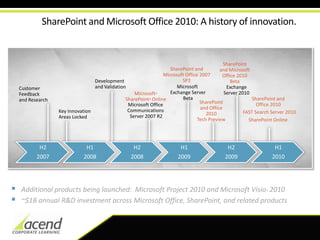
SharePoint and Microsoft Office 2010: A history of innovation.SharePoint and Microsoft  Office2010BetaSharePoint and Microsoft Office 2007 SP2Developmentand ValidationMicrosoft Exchange ServerBetaExchange Server 2010 CustomerFeedbackand ResearchMicrosoft®SharePoint®OnlineSharePoint and Office 2010 SharePoint and Office2010Tech PreviewMicrosoft Office Communications Server 2007 R2FAST Search Server 2010Key InnovationAreas LockedSharePoint OnlineH22007H1 2008H2 2008H12009H2 2009H1 2010Additional products being launched:  Microsoft Project 2010 and Microsoft Visio® 2010
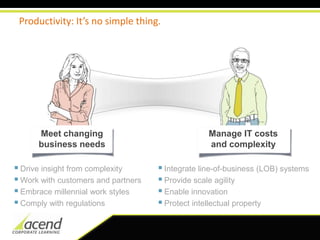
~$1B annual R&D investment across Microsoft Office, SharePoint, and related productsProductivity: It’s no simple thing.Meet changing business needsManage IT costs and complexityDrive insight from complexity
Work with customers and partners
Embrace millennial work styles
Comply with regulations
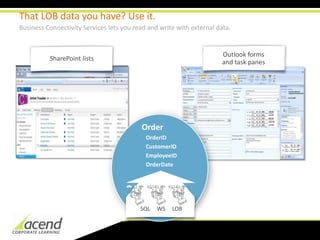
Integrate line-of-business (LOB) systems
Provide scale agility
Enable innovation
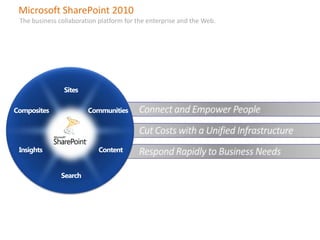
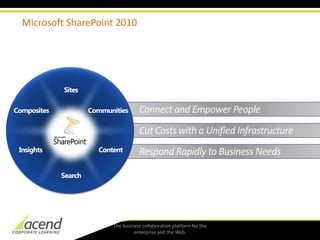
Protect intellectual propertyMicrosoft SharePoint 2010The business collaboration platform for the enterprise and the Web.SitesConnect and Empower PeopleCommunitiesCompositesCut Costs with a Unified InfrastructureRespond Rapidly to Business NeedsContentInsightsSearch
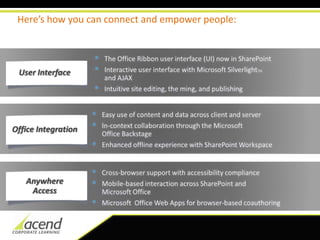
Here’s how you can connect and empower people:User InterfaceThe Office Ribbon user interface (UI) now in SharePoint
Interactive user interface with Microsoft SilverlightTMand AJAX
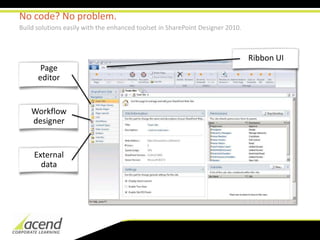
Intuitive site editing, the ming, and publishing
Easy use of content and data across client and server
In-context collaboration through the Microsoft Office Backstage
Enhanced offline experience with SharePoint WorkspaceOffice IntegrationAnywhereAccessCross-browser support with accessibility compliance
Mobile-based interaction across SharePoint and Microsoft Office
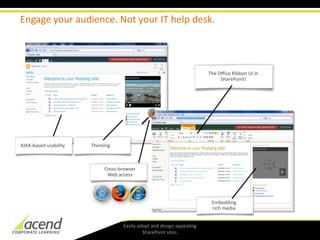
Microsoft  Office Web Apps for browser-based coauthoringEngage your audience. Not your IT help desk. The Office Ribbon UI in SharePoint!ThemingAJAX-basedusabilityEmbedding rich mediaEasily adopt and design appealing SharePoint sites. Cross-browserWeb access
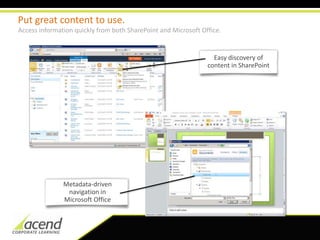
Put great content to use.Access information quickly from both SharePoint and Microsoft Office.Easy discovery of content in SharePointMetadata-driven navigation in Microsoft Office
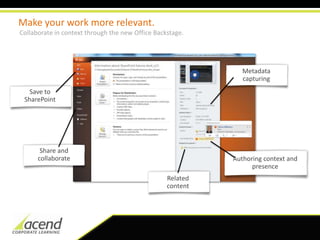
Make your work more relevant.Collaborate in context through the new Office Backstage.Metadata capturingSave to SharePointShare and collaborateAuthoring context and presenceRelated content
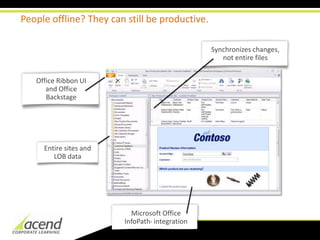
People offline? They can still be productive.Synchronizes changes, not entire filesOffice Ribbon UI and Office BackstageEntire sites and LOB dataMicrosoft Office InfoPath® integration
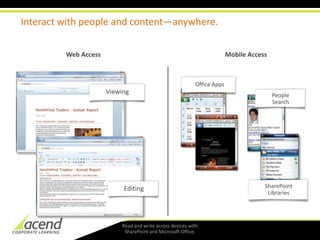
Interact with people and content—anywhere.EditingViewingMobile AccessWeb AccessOffice AppsSharePoint LibrariesPeople SearchRead and write across devices with SharePoint and Microsoft Office.
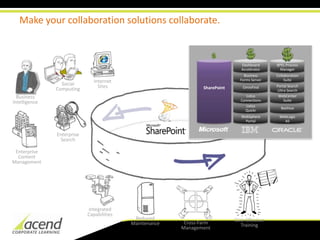
Here’s how you can unify your infrastructure and cut costs:Rich and integrated platform to replace niche systems

Microsoft SharePoint Server 2010

  • 1.
  • 2.
    What'sNew in Microsoft SharePoint Server 2010Eric Riz
  • 3.
    SharePoint and MicrosoftOffice 2010: A history of innovation.SharePoint and Microsoft Office2010BetaSharePoint and Microsoft Office 2007 SP2Developmentand ValidationMicrosoft Exchange ServerBetaExchange Server 2010 CustomerFeedbackand ResearchMicrosoft®SharePoint®OnlineSharePoint and Office 2010 SharePoint and Office2010Tech PreviewMicrosoft Office Communications Server 2007 R2FAST Search Server 2010Key InnovationAreas LockedSharePoint OnlineH22007H1 2008H2 2008H12009H2 2009H1 2010Additional products being launched: Microsoft Project 2010 and Microsoft Visio® 2010
  • 4.
    ~$1B annual R&Dinvestment across Microsoft Office, SharePoint, and related productsProductivity: It’s no simple thing.Meet changing business needsManage IT costs and complexityDrive insight from complexity
  • 5.
  • 6.
  • 7.
  • 8.
  • 9.
  • 10.
  • 11.
    Protect intellectual propertyMicrosoftSharePoint 2010The business collaboration platform for the enterprise and the Web.SitesConnect and Empower PeopleCommunitiesCompositesCut Costs with a Unified InfrastructureRespond Rapidly to Business NeedsContentInsightsSearch
  • 12.
    Here’s how youcan connect and empower people:User InterfaceThe Office Ribbon user interface (UI) now in SharePoint
  • 13.
    Interactive user interfacewith Microsoft SilverlightTMand AJAX
  • 14.
    Intuitive site editing,the ming, and publishing
  • 15.
    Easy use ofcontent and data across client and server
  • 16.
    In-context collaboration throughthe Microsoft Office Backstage
  • 17.
    Enhanced offline experiencewith SharePoint WorkspaceOffice IntegrationAnywhereAccessCross-browser support with accessibility compliance
  • 18.
    Mobile-based interaction acrossSharePoint and Microsoft Office
  • 19.
    Microsoft OfficeWeb Apps for browser-based coauthoringEngage your audience. Not your IT help desk. The Office Ribbon UI in SharePoint!ThemingAJAX-basedusabilityEmbedding rich mediaEasily adopt and design appealing SharePoint sites. Cross-browserWeb access
  • 20.
    Put great contentto use.Access information quickly from both SharePoint and Microsoft Office.Easy discovery of content in SharePointMetadata-driven navigation in Microsoft Office
  • 21.
    Make your workmore relevant.Collaborate in context through the new Office Backstage.Metadata capturingSave to SharePointShare and collaborateAuthoring context and presenceRelated content
  • 22.
    People offline? Theycan still be productive.Synchronizes changes, not entire filesOffice Ribbon UI and Office BackstageEntire sites and LOB dataMicrosoft Office InfoPath® integration
  • 23.
    Interact with peopleand content—anywhere.EditingViewingMobile AccessWeb AccessOffice AppsSharePoint LibrariesPeople SearchRead and write across devices with SharePoint and Microsoft Office.
  • 24.
    Here’s how youcan unify your infrastructure and cut costs:Rich and integrated platform to replace niche systems