










Front cover

IBM Flex System
Interoperability Guide
Quick reference for IBM Flex System
Interoperability
Covers internal components and
external connectivity
Latest updates as of
4 November 2013

David Watts
Ilya Krutov

ibm.com/redbooks

Redpaper
International Technical Support Organization
IBM Flex System Interoperability Guide
4 November 2013

REDP-FSIG-00
Note: Before using this information and the product it supports, read the information in “Notices” on page v.

This edition applies to:
IBM PureFlex System
IBM Flex System Enterprise Chassis
IBM Flex System Manager
IBM Flex System p24L Compute Node
IBM Flex System p260 Compute Node
IBM Flex System p270 Compute Node
IBM Flex System p460 Compute Node
IBM Flex System x220 Compute Node
IBM Flex System x222 Compute Node
IBM Flex System x240 Compute Node
IBM Flex System x440 Compute Node
IBM 42U 1100 mm Enterprise V2 Dynamic Rack
© Copyright International Business Machines Corporation 2012, 2013. All rights reserved.
Note to U.S. Government Users Restricted Rights -- Use, duplication or disclosure restricted by GSA ADP Schedule
Contract with IBM Corp.
Contents
Notices . . . . . . . . . . . . . . . . . . . . . . . . . . . . . . . . . . . . . . . . . . . . . . . . . . . . . . . . . . . . . . . . . .v
Trademarks . . . . . . . . . . . . . . . . . . . . . . . . . . . . . . . . . . . . . . . . . . . . . . . . . . . . . . . . . . . . . . vi
Preface . . . . . . . . . . . . . . . . . . . . . . . . . . . . . . . . . . . . . . . . . . . . . . . . . . . . . . . . . . . . . . . . . vii
The team who wrote this paper . . . . . . . . . . . . . . . . . . . . . . . . . . . . . . . . . . . . . . . . . . . . . . . vii
Now you can become a published author, too! . . . . . . . . . . . . . . . . . . . . . . . . . . . . . . . . . . viii
Comments welcome. . . . . . . . . . . . . . . . . . . . . . . . . . . . . . . . . . . . . . . . . . . . . . . . . . . . . . . viii
Stay connected to IBM Redbooks . . . . . . . . . . . . . . . . . . . . . . . . . . . . . . . . . . . . . . . . . . . . viii
Summary of changes . . . . . . . . . . . . . . . . . . . . . . . . . . . . . . . . . . . . . . . . . . . . . . . . . . . . . . ix
17 October 2013 . . . . . . . . . . . . . . . . . . . . . . . . . . . . . . . . . . . . . . . . . . . . . . . . . . . . . . . . . . ix
8 October 2013 . . . . . . . . . . . . . . . . . . . . . . . . . . . . . . . . . . . . . . . . . . . . . . . . . . . . . . . . . . . ix
6 August 2013 . . . . . . . . . . . . . . . . . . . . . . . . . . . . . . . . . . . . . . . . . . . . . . . . . . . . . . . . . . . . ix
2 July 2013 . . . . . . . . . . . . . . . . . . . . . . . . . . . . . . . . . . . . . . . . . . . . . . . . . . . . . . . . . . . . . . . .x
24 June 2013 . . . . . . . . . . . . . . . . . . . . . . . . . . . . . . . . . . . . . . . . . . . . . . . . . . . . . . . . . . . . . .x
19 June 2013 . . . . . . . . . . . . . . . . . . . . . . . . . . . . . . . . . . . . . . . . . . . . . . . . . . . . . . . . . . . . . .x
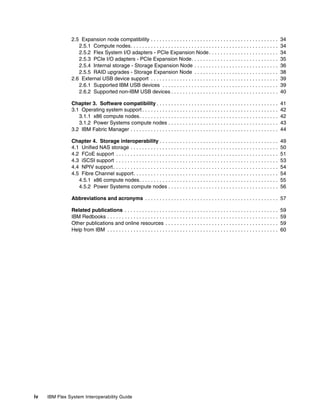
Chapter 1. Chassis interoperability . . . . . . . . . . . . . . . . . . . . . . . . . . . . . . . . . . . . . . . . . . 1
1.1 Chassis to compute node . . . . . . . . . . . . . . . . . . . . . . . . . . . . . . . . . . . . . . . . . . . . . . . . 2
1.2 Switch to adapter interoperability . . . . . . . . . . . . . . . . . . . . . . . . . . . . . . . . . . . . . . . . . . 3
1.2.1 Ethernet switches and adapters . . . . . . . . . . . . . . . . . . . . . . . . . . . . . . . . . . . . . . . 3
1.2.2 Fibre Channel switches and adapters. . . . . . . . . . . . . . . . . . . . . . . . . . . . . . . . . . . 4
1.2.3 InfiniBand switches and adapters . . . . . . . . . . . . . . . . . . . . . . . . . . . . . . . . . . . . . . 5
1.3 Switch to transceiver interoperability. . . . . . . . . . . . . . . . . . . . . . . . . . . . . . . . . . . . . . . . 6
1.3.1 Ethernet switches . . . . . . . . . . . . . . . . . . . . . . . . . . . . . . . . . . . . . . . . . . . . . . . . . . 6
1.3.2 Fibre Channel switches. . . . . . . . . . . . . . . . . . . . . . . . . . . . . . . . . . . . . . . . . . . . . . 8
1.3.3 InfiniBand switches . . . . . . . . . . . . . . . . . . . . . . . . . . . . . . . . . . . . . . . . . . . . . . . . . 9
1.4 Switch upgrades . . . . . . . . . . . . . . . . . . . . . . . . . . . . . . . . . . . . . . . . . . . . . . . . . . . . . . 10
1.4.1 IBM Flex System EN4023 10Gb Scalable Switch. . . . . . . . . . . . . . . . . . . . . . . . . 10
1.4.2 IBM Flex System Fabric CN4093 10Gb Converged Scalable Switch . . . . . . . . . . 10
1.4.3 IBM Flex System Fabric EN4093 & EN4093R 10Gb Scalable Switch . . . . . . . . . 11
1.4.4 IBM Flex System Fabric SI4093 System Interconnect Module . . . . . . . . . . . . . . . 12
1.4.5 IBM Flex System EN2092 1Gb Ethernet Scalable Switch . . . . . . . . . . . . . . . . . . 14
1.4.6 IBM Flex System IB6131 InfiniBand Switch . . . . . . . . . . . . . . . . . . . . . . . . . . . . . 14
1.4.7 IBM Flex System FC5022 16Gb SAN Scalable Switch. . . . . . . . . . . . . . . . . . . . . 15
1.5 vNIC and UFP support . . . . . . . . . . . . . . . . . . . . . . . . . . . . . . . . . . . . . . . . . . . . . . . . . 16
1.6 Chassis power supplies . . . . . . . . . . . . . . . . . . . . . . . . . . . . . . . . . . . . . . . . . . . . . . . . 17
1.7 Rack to chassis . . . . . . . . . . . . . . . . . . . . . . . . . . . . . . . . . . . . . . . . . . . . . . . . . . . . . . . 19
Chapter 2. Compute node component compatibility . . . . . . . . . . . . . . . . . . . . . . . . . . .
2.1 Compute node-to-card interoperability . . . . . . . . . . . . . . . . . . . . . . . . . . . . . . . . . . . . .
2.2 Memory DIMM compatibility . . . . . . . . . . . . . . . . . . . . . . . . . . . . . . . . . . . . . . . . . . . . .
2.2.1 x86 compute nodes. . . . . . . . . . . . . . . . . . . . . . . . . . . . . . . . . . . . . . . . . . . . . . . .
2.2.2 Power Systems compute nodes . . . . . . . . . . . . . . . . . . . . . . . . . . . . . . . . . . . . . .
2.3 Internal storage compatibility . . . . . . . . . . . . . . . . . . . . . . . . . . . . . . . . . . . . . . . . . . . .
2.3.1 x86 compute nodes: 2.5-inch drives . . . . . . . . . . . . . . . . . . . . . . . . . . . . . . . . . . .
2.3.2 x86 compute nodes: 1.8-inch drives . . . . . . . . . . . . . . . . . . . . . . . . . . . . . . . . . . .
2.3.3 Power Systems compute nodes . . . . . . . . . . . . . . . . . . . . . . . . . . . . . . . . . . . . . .
2.4 Embedded virtualization . . . . . . . . . . . . . . . . . . . . . . . . . . . . . . . . . . . . . . . . . . . . . . . .
© Copyright IBM Corp. 2012, 2013. All rights reserved.

21
22
24
24
26
27
27
29
31
32
iii
2.5 Expansion node compatibility . . . . . . . . . . . . . . . . . . . . . . . . . . . . . . . . . . . . . . . . . . . .
2.5.1 Compute nodes. . . . . . . . . . . . . . . . . . . . . . . . . . . . . . . . . . . . . . . . . . . . . . . . . . .
2.5.2 Flex System I/O adapters - PCIe Expansion Node . . . . . . . . . . . . . . . . . . . . . . . .
2.5.3 PCIe I/O adapters - PCIe Expansion Node. . . . . . . . . . . . . . . . . . . . . . . . . . . . . .
2.5.4 Internal storage - Storage Expansion Node . . . . . . . . . . . . . . . . . . . . . . . . . . . . .
2.5.5 RAID upgrades - Storage Expansion Node . . . . . . . . . . . . . . . . . . . . . . . . . . . . .
2.6 External USB device support . . . . . . . . . . . . . . . . . . . . . . . . . . . . . . . . . . . . . . . . . . . .
2.6.1 Supported IBM USB devices . . . . . . . . . . . . . . . . . . . . . . . . . . . . . . . . . . . . . . . .
2.6.2 Supported non-IBM USB devices . . . . . . . . . . . . . . . . . . . . . . . . . . . . . . . . . . . . .

34
34
34
35
36
38
39
39
40

Chapter 3. Software compatibility . . . . . . . . . . . . . . . . . . . . . . . . . . . . . . . . . . . . . . . . . .
3.1 Operating system support . . . . . . . . . . . . . . . . . . . . . . . . . . . . . . . . . . . . . . . . . . . . . . .
3.1.1 x86 compute nodes. . . . . . . . . . . . . . . . . . . . . . . . . . . . . . . . . . . . . . . . . . . . . . . .
3.1.2 Power Systems compute nodes . . . . . . . . . . . . . . . . . . . . . . . . . . . . . . . . . . . . . .
3.2 IBM Fabric Manager . . . . . . . . . . . . . . . . . . . . . . . . . . . . . . . . . . . . . . . . . . . . . . . . . . .

41
42
42
43
44

Chapter 4. Storage interoperability . . . . . . . . . . . . . . . . . . . . . . . . . . . . . . . . . . . . . . . . .
4.1 Unified NAS storage . . . . . . . . . . . . . . . . . . . . . . . . . . . . . . . . . . . . . . . . . . . . . . . . . . .
4.2 FCoE support . . . . . . . . . . . . . . . . . . . . . . . . . . . . . . . . . . . . . . . . . . . . . . . . . . . . . . . .
4.3 iSCSI support . . . . . . . . . . . . . . . . . . . . . . . . . . . . . . . . . . . . . . . . . . . . . . . . . . . . . . . .
4.4 NPIV support . . . . . . . . . . . . . . . . . . . . . . . . . . . . . . . . . . . . . . . . . . . . . . . . . . . . . . . . .
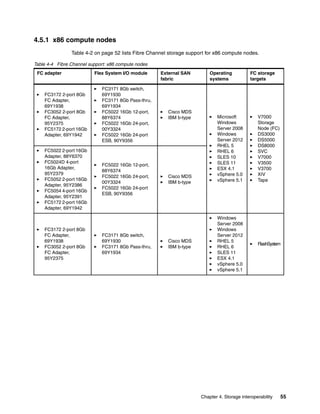
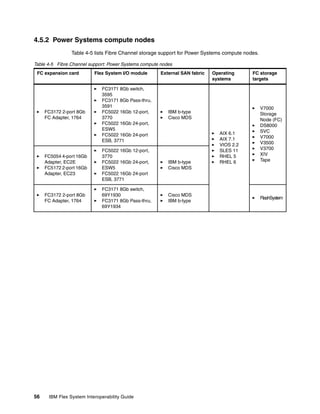
4.5 Fibre Channel support. . . . . . . . . . . . . . . . . . . . . . . . . . . . . . . . . . . . . . . . . . . . . . . . . .
4.5.1 x86 compute nodes. . . . . . . . . . . . . . . . . . . . . . . . . . . . . . . . . . . . . . . . . . . . . . . .
4.5.2 Power Systems compute nodes . . . . . . . . . . . . . . . . . . . . . . . . . . . . . . . . . . . . . .

49
50
51
53
54
54
55
56

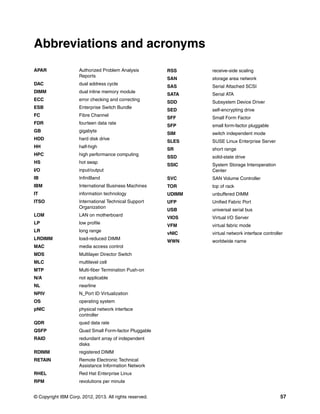
Abbreviations and acronyms . . . . . . . . . . . . . . . . . . . . . . . . . . . . . . . . . . . . . . . . . . . . . . 57
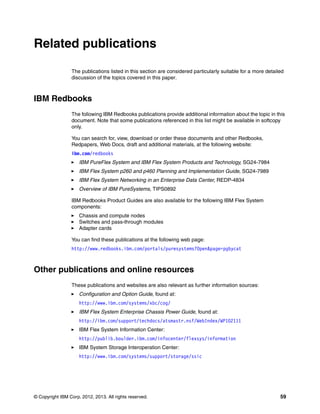
Related publications . . . . . . . . . . . . . . . . . . . . . . . . . . . . . . . . . . . . . . . . . . . . . . . . . . . . .
IBM Redbooks . . . . . . . . . . . . . . . . . . . . . . . . . . . . . . . . . . . . . . . . . . . . . . . . . . . . . . . . . . .
Other publications and online resources . . . . . . . . . . . . . . . . . . . . . . . . . . . . . . . . . . . . . . .
Help from IBM . . . . . . . . . . . . . . . . . . . . . . . . . . . . . . . . . . . . . . . . . . . . . . . . . . . . . . . . . . .

iv

IBM Flex System Interoperability Guide

59
59
59
60
Notices
This information was developed for products and services offered in the U.S.A.
IBM may not offer the products, services, or features discussed in this document in other countries. Consult
your local IBM representative for information on the products and services currently available in your area. Any
reference to an IBM product, program, or service is not intended to state or imply that only that IBM product,
program, or service may be used. Any functionally equivalent product, program, or service that does not
infringe any IBM intellectual property right may be used instead. However, it is the user's responsibility to
evaluate and verify the operation of any non-IBM product, program, or service.
IBM may have patents or pending patent applications covering subject matter described in this document. The
furnishing of this document does not grant you any license to these patents. You can send license inquiries, in
writing, to:
IBM Director of Licensing, IBM Corporation, North Castle Drive, Armonk, NY 10504-1785 U.S.A.
The following paragraph does not apply to the United Kingdom or any other country where such
provisions are inconsistent with local law: INTERNATIONAL BUSINESS MACHINES CORPORATION
PROVIDES THIS PUBLICATION "AS IS" WITHOUT WARRANTY OF ANY KIND, EITHER EXPRESS OR
IMPLIED, INCLUDING, BUT NOT LIMITED TO, THE IMPLIED WARRANTIES OF NON-INFRINGEMENT,
MERCHANTABILITY OR FITNESS FOR A PARTICULAR PURPOSE. Some states do not allow disclaimer of
express or implied warranties in certain transactions, therefore, this statement may not apply to you.
This information could include technical inaccuracies or typographical errors. Changes are periodically made
to the information herein; these changes will be incorporated in new editions of the publication. IBM may make
improvements and/or changes in the product(s) and/or the program(s) described in this publication at any time
without notice.
Any references in this information to non-IBM websites are provided for convenience only and do not in any
manner serve as an endorsement of those websites. The materials at those websites are not part of the
materials for this IBM product and use of those websites is at your own risk.
IBM may use or distribute any of the information you supply in any way it believes appropriate without incurring
any obligation to you.
Any performance data contained herein was determined in a controlled environment. Therefore, the results
obtained in other operating environments may vary significantly. Some measurements may have been made
on development-level systems and there is no guarantee that these measurements will be the same on
generally available systems. Furthermore, some measurements may have been estimated through
extrapolation. Actual results may vary. Users of this document should verify the applicable data for their
specific environment.
Information concerning non-IBM products was obtained from the suppliers of those products, their published
announcements or other publicly available sources. IBM has not tested those products and cannot confirm the
accuracy of performance, compatibility or any other claims related to non-IBM products. Questions on the
capabilities of non-IBM products should be addressed to the suppliers of those products.
This information contains examples of data and reports used in daily business operations. To illustrate them
as completely as possible, the examples include the names of individuals, companies, brands, and products.
All of these names are fictitious and any similarity to the names and addresses used by an actual business
enterprise is entirely coincidental.
COPYRIGHT LICENSE:
This information contains sample application programs in source language, which illustrate programming
techniques on various operating platforms. You may copy, modify, and distribute these sample programs in
any form without payment to IBM, for the purposes of developing, using, marketing or distributing application
programs conforming to the application programming interface for the operating platform for which the sample
programs are written. These examples have not been thoroughly tested under all conditions. IBM, therefore,
cannot guarantee or imply reliability, serviceability, or function of these programs.

© Copyright IBM Corp. 2012, 2013. All rights reserved.

v
Trademarks
IBM, the IBM logo, and ibm.com are trademarks or registered trademarks of International Business Machines
Corporation in the United States, other countries, or both. These and other IBM trademarked terms are
marked on their first occurrence in this information with the appropriate symbol (® or ™), indicating US
registered or common law trademarks owned by IBM at the time this information was published. Such
trademarks may also be registered or common law trademarks in other countries. A current list of IBM
trademarks is available on the Web at http://www.ibm.com/legal/copytrade.shtml
The following terms are trademarks of the International Business Machines Corporation in the United States,
other countries, or both:
AIX®
BladeCenter®
DS8000®
IBM Flex System™
IBM Flex System Manager™
IBM®
Netfinity®
Power Systems™

POWER7+™
POWER7®
PowerVM®
POWER®
PureFlex™
RackSwitch™
Redbooks®
Redpaper™

Redbooks (logo)
RETAIN®
ServerProven®
Storwize®
System Storage®
System x®
XIV®

®

The following terms are trademarks of other companies:
Intel, Intel logo, Intel Inside logo, and Intel Centrino logo are trademarks or registered trademarks of Intel
Corporation or its subsidiaries in the United States and other countries.
Linux is a trademark of Linus Torvalds in the United States, other countries, or both.
Microsoft, Windows, and the Windows logo are trademarks of Microsoft Corporation in the United States,
other countries, or both.
Java, and all Java-based trademarks and logos are trademarks or registered trademarks of Oracle and/or its
affiliates.
Other company, product, or service names may be trademarks or service marks of others.

vi

IBM Flex System Interoperability Guide
Preface
To meet today’s complex and ever-changing business demands, you need a solid foundation
of compute, storage, networking, and software resources. This system must be simple to
deploy, and be able to quickly and automatically adapt to changing conditions. You also need
to be able to take advantage of broad expertise and proven guidelines in systems
management, applications, hardware maintenance, and more.
The IBM® PureFlex™ System combines no-compromise system designs along with built-in
expertise and integrates them into complete and optimized solutions. At the heart of PureFlex
System is the IBM Flex System™ Enterprise Chassis. This fully integrated infrastructure
platform supports a mix of compute, storage, and networking resources to meet the demands
of your applications.
The solution is easily scalable with the addition of another chassis with the required nodes.
With the IBM Flex System Manager™, multiple chassis can be monitored from a single panel.
The 14 node, 10U chassis delivers high speed performance complete with integrated servers,
storage, and networking. This flexible chassis is simple to deploy, and scales to meet your
needs in the future.
This IBM Redpaper™ publication is a reference to compatibility and interoperability of
components inside and connected to IBM PureFlex System and IBM Flex System solutions.
The latest version of this document can be downloaded from:
http://www.redbooks.ibm.com/fsig

The team who wrote this paper
This paper was produced by a team of specialists from around the world working at the
International Technical Support Organization, Raleigh Center.
David Watts is a Consulting IT Specialist at the ITSO Center in Raleigh. He manages
residencies and produces IBM Redbooks® publications for hardware and software topics that
are related to IBM System x® and IBM BladeCenter® servers and associated client
platforms. He has authored over 300 books, papers, and web documents. David has worked
for IBM both in the US and Australia since 1989. He is an IBM Certified IT Specialist and a
member of the IT Specialist Certification Review Board. David holds a Bachelor of
Engineering degree from the University of Queensland (Australia).
Ilya Krutov is a Project Leader at the ITSO Center in Raleigh and has been with IBM since
1998. Before joining the ITSO, Ilya served in IBM as a Run Rate Team Leader, Portfolio
Manager, Brand Manager, Technical Sales Specialist, and Certified Instructor. Ilya has
expertise in IBM System x and BladeCenter products, server operating systems, and
networking solutions. He has a Bachelor’s degree in Computer Engineering from the Moscow
Engineering and Physics Institute.
Special thanks to Ashish Jain, the former author of this document.

© Copyright IBM Corp. 2012, 2013. All rights reserved.

vii
Now you can become a published author, too!
Here’s an opportunity to spotlight your skills, grow your career, and become a published
author—all at the same time! Join an ITSO residency project and help write a book in your
area of expertise, while honing your experience using leading-edge technologies. Your efforts
will help to increase product acceptance and customer satisfaction, as you expand your
network of technical contacts and relationships. Residencies run from two to six weeks in
length, and you can participate either in person or as a remote resident working from your
home base.
Find out more about the residency program, browse the residency index, and apply online at:
ibm.com/redbooks/residencies.html

Comments welcome
Your comments are important to us!
We want our papers to be as helpful as possible. Send us your comments about this paper or
other IBM Redbooks publications in one of the following ways:
Use the online Contact us review Redbooks form found at:
ibm.com/redbooks
Send your comments in an email to:
redbooks@us.ibm.com
Mail your comments to:
IBM Corporation, International Technical Support Organization
Dept. HYTD Mail Station P099
2455 South Road
Poughkeepsie, NY 12601-5400

Stay connected to IBM Redbooks
Find us on Facebook:
http://www.facebook.com/IBMRedbooks
Follow us on Twitter:
http://twitter.com/ibmredbooks
Look for us on LinkedIn:
http://www.linkedin.com/groups?home=&gid=2130806
Explore new Redbooks publications, residencies, and workshops with the IBM Redbooks
weekly newsletter:
https://www.redbooks.ibm.com/Redbooks.nsf/subscribe?OpenForm
Stay current on recent Redbooks publications with RSS Feeds:
http://www.redbooks.ibm.com/rss.html

viii

IBM Flex System Interoperability Guide
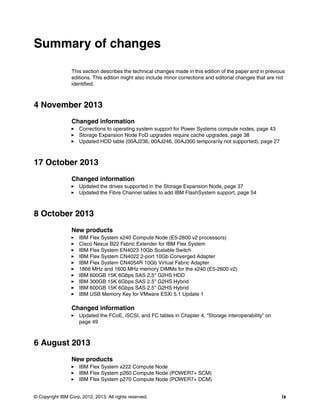
Summary of changes
This section describes the technical changes made in this edition of the paper and in previous
editions. This edition might also include minor corrections and editorial changes that are not
identified.

4 November 2013
Changed information
Corrections to operating system support for Power Systems compute nodes, page 43
Storage Expansion Node FoD upgrades require cache upgrades, page 38
Updated HDD table (00AJ236, 00AJ246, 00AJ300 temporarily not supported), page 27

17 October 2013
Changed information
Updated the drives supported in the Storage Expansion Node, page 37
Updated the Fibre Channel tables to add IBM FlashSystem support, page 54

8 October 2013
New products
IBM Flex System x240 Compute Node (E5-2600 v2 processors)
Cisco Nexus B22 Fabric Extender for IBM Flex System
IBM Flex System EN4023 10Gb Scalable Switch
IBM Flex System CN4022 2-port 10Gb Converged Adapter
IBM Flex System CN4054R 10Gb Virtual Fabric Adapter
1866 MHz and 1600 MHz memory DIMMs for the x240 (E5-2600 v2)
IBM 600GB 15K 6Gbps SAS 2.5'' G2HS HDD
IBM 300GB 15K 6Gbps SAS 2.5'' G2HS Hybrid
IBM 600GB 15K 6Gbps SAS 2.5'' G2HS Hybrid
IBM USB Memory Key for VMware ESXi 5.1 Update 1

Changed information
Updated the FCoE, iSCSI, and FC tables in Chapter 4, “Storage interoperability” on
page 49

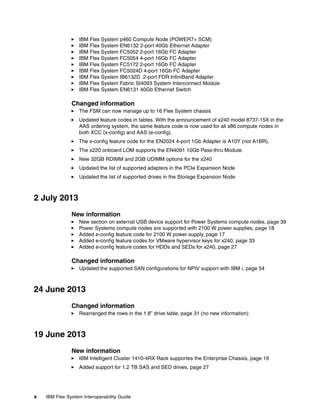
6 August 2013
New products
IBM Flex System x222 Compute Node
IBM Flex System p260 Compute Node (POWER7+ SCM)
IBM Flex System p270 Compute Node (POWER7+ DCM)
© Copyright IBM Corp. 2012, 2013. All rights reserved.

ix
IBM Flex System p460 Compute Node (POWER7+ SCM)
IBM Flex System EN6132 2-port 40Gb Ethernet Adapter
IBM Flex System FC5052 2-port 16Gb FC Adapter
IBM Flex System FC5054 4-port 16Gb FC Adapter
IBM Flex System FC5172 2-port 16Gb FC Adapter
IBM Flex System FC5024D 4-port 16Gb FC Adapter
IBM Flex System IB6132D 2-port FDR InfiniBand Adapter
IBM Flex System Fabric SI4093 System Interconnect Module
IBM Flex System EN6131 40Gb Ethernet Switch

Changed information
The FSM can now manage up to 16 Flex System chassis
Updated feature codes in tables. With the announcement of x240 model 8737-15X in the
AAS ordering system, the same feature code is now used for all x86 compute nodes in
both XCC (x-config) and AAS (e-config).
The x-config feature code for the EN2024 4-port 1Gb Adapter is A10Y (not A1BR).
The x220 onboard LOM supports the EN4091 10Gb Pass-thru Module.
New 32GB RDIMM and 2GB UDIMM options for the x240
Updated the list of supported adapters in the PCIe Expansion Node
Updated the list of supported drives in the Storage Expansion Node

2 July 2013
New information
New section on external USB device support for Power Systems compute nodes, page 39
Power Systems compute nodes are supported with 2100 W power supplies, page 18
Added e-config feature code for 2100 W power supply, page 17
Added e-config feature codes for VMware hypervisor keys for x240, page 33
Added e-config feature codes for HDDs and SEDs for x240, page 27

Changed information
Updated the supported SAN configurations for NPIV support with IBM i, page 54

24 June 2013
Changed information
Rearranged the rows in the 1.8” drive table, page 31 (no new information)

19 June 2013
New information
IBM Intelligent Cluster 1410-4RX Rack supportes the Enterprise Chassis, page 19
Added support for 1.2 TB SAS and SED drives, page 27

x

IBM Flex System Interoperability Guide
Changed information
Updated 2.5” drive support, page 27

We invite you to rate the usefulness of this document at the IBM Flex System Interoperability
Guide home page at:
http://www.redbooks.ibm.com/fsig

Summary of changes

xi
xii

IBM Flex System Interoperability Guide
1

Chapter 1.

Chassis interoperability
The IBM Flex System Enterprise Chassis is a 10U next-generation server platform with
integrated chassis management. It is a compact, high-density, high-performance, rack-mount,
and scalable server platform system. It supports up to 14 one-bay compute nodes that share
common resources, such as power, cooling, management, and I/O resources within a single
Enterprise Chassis. In addition, it can also support up to seven 2-bay compute nodes or three
4-bay compute nodes when the shelves are removed. You can mix and match 1-bay, 2-bay,
and 4-bay compute nodes to meet your specific hardware needs.
Topics in this chapter are:
1.1, “Chassis to compute node” on page 2
1.2, “Switch to adapter interoperability” on page 3
1.3, “Switch to transceiver interoperability” on page 6
1.4, “Switch upgrades” on page 10
1.5, “vNIC and UFP support” on page 16
1.6, “Chassis power supplies” on page 17
1.7, “Rack to chassis” on page 19

© Copyright IBM Corp. 2012, 2013. All rights reserved.

1
1.1 Chassis to compute node
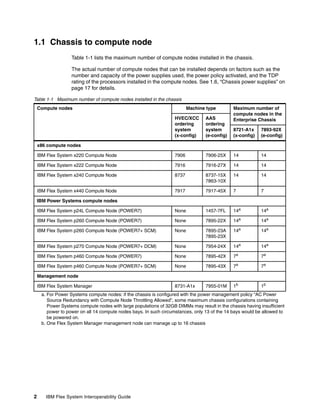
Table 1-1 lists the maximum number of compute nodes installed in the chassis.
The actual number of compute nodes that can be installed depends on factors such as the
number and capacity of the power supplies used, the power policy activated, and the TDP
rating of the processors installed in the compute nodes. See 1.6, “Chassis power supplies” on
page 17 for details.
Table 1-1 Maximum number of compute nodes installed in the chassis
Compute nodes

Machine type
HVEC/XCC
ordering
system
(x-config)

AAS
ordering
system
(e-config)

IBM Flex System x220 Compute Node

7906

IBM Flex System x222 Compute Node

Maximum number of
compute nodes in the
Enterprise Chassis
8721-A1x
(x-config)

7893-92X
(e-config)

7906-25X

14

14

7916

7916-27X

14

14

IBM Flex System x240 Compute Node

8737

8737-15X
7863-10X

14

14

IBM Flex System x440 Compute Node

7917

7917-45X

7

7

IBM Flex System p24L Compute Node (POWER7)

None

1457-7FL

14a

14a

IBM Flex System p260 Compute Node (POWER7)

None

7895-22X

14a

14a

IBM Flex System p260 Compute Node (POWER7+ SCM)

None

7895-23A
7895-23X

14a

14a

IBM Flex System p270 Compute Node (POWER7+ DCM)

None

7954-24X

14a

14a

IBM Flex System p460 Compute Node (POWER7)

None

7895-42X

7a

7a

IBM Flex System p460 Compute Node (POWER7+ SCM)

None

7895-43X

7a

7a

8731-A1x

7955-01M

1b

1b

x86 compute nodes

IBM Power Systems compute nodes

Management node
IBM Flex System Manager

a. For Power Systems compute nodes: if the chassis is configured with the power management policy “AC Power
Source Redundancy with Compute Node Throttling Allowed”, some maximum chassis configurations containing
Power Systems compute nodes with large populations of 32GB DIMMs may result in the chassis having insufficient
power to power on all 14 compute nodes bays. In such circumstances, only 13 of the 14 bays would be allowed to
be powered on.
b. One Flex System Manager management node can manage up to 16 chassis

2

IBM Flex System Interoperability Guide
1.2 Switch to adapter interoperability
In this section, we describe switch to adapter interoperability.

1.2.1 Ethernet switches and adapters
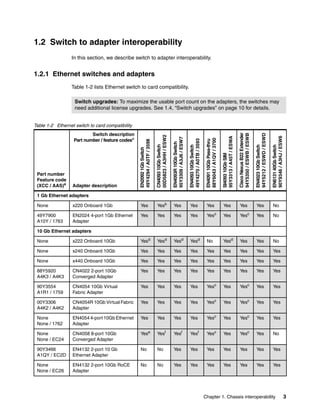
Table 1-2 lists Ethernet switch to card compatibility.
Switch upgrades: To maximize the usable port count on the adapters, the switches may
need additional license upgrades. See 1.4, “Switch upgrades” on page 10 for details.

EN4093 10Gb Switch
49Y4270 / A0TB / 3593

EN4091 10Gb Pass-thru
88Y6043 / A1QV / 3700

SI4093 10Gb SIM
95Y3313 / A45T / ESWA

Cisco Nexus B22 Extender
94Y5350 / ESWB / ESWB

EN4023 10Gb Switch
94Y5212 / ESWD / ESWD

EN6131 40Gb Switch
90Y9346 / A3HJ / ESW6

Adapter description

EN4093R 10Gb Switch
95Y3309 / A3J6 / ESW7

Part number
Feature code
(XCC / AAS)a

CN4093 10Gb Switch
00D5823 / A3HH / ESW2

Switch description
Part number / feature codesa

EN2092 1Gb Switch
49Y4294 / A0TF / 3598

Table 1-2 Ethernet switch to card compatibility

Yes

Yesb

Yes

Yes

Yes

Yes

Yes

Yes

No

1 Gb Ethernet adapters
None
49Y7900
A10Y / 1763

x220 Onboard 1Gb
EN2024 4-port 1Gb Ethernet
Adapter

Yes

Yes

Yes

Yes

Yesc

Yes

Yesc

Yes

No

10 Gb Ethernet adapters
None

x222 Onboard 10Gb

Yesd

Yesd

Yesd

Yesd

No

Yesd

Yes

Yes

No

None

x240 Onboard 10Gb

Yes

Yes

Yes

Yes

Yes

Yes

Yes

Yes

Yes

None

x440 Onboard 10Gb

Yes

Yes

Yes

Yes

Yes

Yes

Yes

Yes

Yes

88Y5920
A4K3 / A4K3

CN4022 2-port 10Gb
Converged Adapter

Yes

Yes

Yes

Yes

Yes

Yes

Yes

Yes

Yes

90Y3554
A1R1 / 1759

CN4054 10Gb Virtual
Fabric Adapter

Yes

Yes

Yes

Yes

Yesc

Yes

Yesc

Yes

Yes

00Y3306
A4K2 / A4K2

CN4054R 10Gb Virtual Fabric
Adapter

Yes

Yes

Yes

Yes

Yesc

Yes

Yesc

Yes

Yes

None
None / 1762

EN4054 4-port 10Gb Ethernet
Adapter

Yes

Yes

Yes

Yes

Yesc

Yes

Yesc

Yes

Yes

None
None / EC24

CN4058 8-port 10Gb
Converged Adapter

Yese

Yesf

Yesf

Yesf

Yesc

Yes

Yesc

Yes

No

90Y3466
A1QY / EC2D

EN4132 2-port 10 Gb
Ethernet Adapter

No

No

Yes

Yes

Yes

Yes

Yes

Yes

Yes

None
None / EC26

EN4132 2-port 10Gb RoCE
Adapter

No

No

Yes

Yes

Yes

Yes

Yes

Yes

Yes

Chapter 1. Chassis interoperability

3
EN4093R 10Gb Switch
95Y3309 / A3J6 / ESW7

EN4093 10Gb Switch
49Y4270 / A0TB / 3593

EN4091 10Gb Pass-thru
88Y6043 / A1QV / 3700

SI4093 10Gb SIM
95Y3313 / A45T / ESWA

Cisco Nexus B22 Extender
94Y5350 / ESWB / ESWB

EN4023 10Gb Switch
94Y5212 / ESWD / ESWD

EN6131 40Gb Switch
90Y9346 / A3HJ / ESW6

Adapter description

CN4093 10Gb Switch
00D5823 / A3HH / ESW2

Part number
Feature code
(XCC / AAS)a

EN2092 1Gb Switch
49Y4294 / A0TF / 3598

Switch description
Part number / feature codesa

No

No

No

No

No

No

No

No

Yes

40 Gb Ethernet adapters
90Y3482
A3HK / A3HK

EN6132 2-port 40Gb Ethernet
Adapter

a. The first feature code listed is for configurations ordered through System x sales channels (XCC using x-config). The
second feature code is for configurations ordered through the IBM Power Systems channel (AAS using e-config)
b. 1 Gb is supported on the CN4093’s two external 10 Gb SFP+ ports only. The 12 external Omni Ports do not support
1 GbE speeds.
c. Only two of the ports of this adapter are connected when used with the EN4091 10Gb Pass-thru or Cisco B22
Extender.
d. Upgrade 1 required to enable enough internal switch ports to connect to both servers in the x222
e. Only four of the eight ports of CN4058 adapter are connected with the EN2092 switch.
f. Only six of the eight ports of the CN4058 adapter are connected with the CN4093, EN4093, EN4093R switches

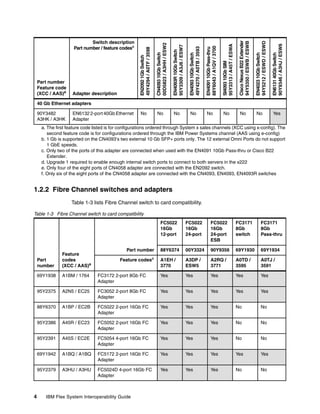
1.2.2 Fibre Channel switches and adapters
Table 1-3 lists Fibre Channel switch to card compatibility.
Table 1-3 Fibre Channel switch to card compatibility
FC5022
16Gb
12-port
Part number

FC5022
16Gb
24-port

FC5022
16Gb
24-port
ESB

FC3171
8Gb
switch

FC3171
8Gb
Pass-thru

88Y6374

00Y3324

90Y9356

69Y1930

69Y1934

A1EH /
3770

A3DP /
ESW5

A2RQ /
3771

A0TD /
3595

A0TJ /
3591

Part
number
69Y1938

A1BM / 1764

FC3172 2-port 8Gb FC
Adapter

Yes

Yes

Yes

Yes

Yes

95Y2375

A2N5 / EC25

FC3052 2-port 8Gb FC
Adapter

Yes

Yes

Yes

Yes

Yes

88Y6370

A1BP / EC2B

FC5022 2-port 16Gb FC
Adapter

Yes

Yes

Yes

No

No

95Y2386

A45R / EC23

FC5052 2-port 16Gb FC
Adapter

Yes

Yes

Yes

No

No

95Y2391

A45S / EC2E

FC5054 4-port 16Gb FC
Adapter

Yes

Yes

Yes

No

No

69Y1942

A1BQ / A1BQ

FC5172 2-port 16Gb FC
Adapter

Yes

Yes

Yes

Yes

Yes

95Y2379

4

Feature
codes
(XCC / AAS)a

A3HU / A3HU

FC5024D 4-port 16Gb FC
Adapter

Yes

Yes

Yes

No

No

Feature codesa

IBM Flex System Interoperability Guide
a. The first feature code listed is for configurations ordered through System x sales channels (XCC using x-config). The
second feature code is for configurations ordered through the IBM Power Systems channel (AAS using e-config)

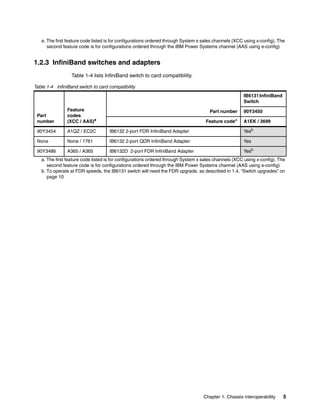
1.2.3 InfiniBand switches and adapters
Table 1-4 lists InfiniBand switch to card compatibility.
Table 1-4 InfiniBand switch to card compatibility
IB6131 InfiniBand
Switch
Part
number

Feature
codes
(XCC / AAS)a

90Y3454

A1QZ / EC2C

IB6132 2-port FDR InfiniBand Adapter

Yesb

None

None / 1761

IB6132 2-port QDR InfiniBand Adapter

Yes

90Y3486

A365 / A365

IB6132D 2-port FDR InfiniBand Adapter

Yesb

Part number
Feature

codea

90Y3450
A1EK / 3699

a. The first feature code listed is for configurations ordered through System x sales channels (XCC using x-config). The
second feature code is for configurations ordered through the IBM Power Systems channel (AAS using e-config)
b. To operate at FDR speeds, the IB6131 switch will need the FDR upgrade, as described in 1.4, “Switch upgrades” on
page 10

Chapter 1. Chassis interoperability

5
1.3 Switch to transceiver interoperability
This section specifies the transceivers and direct-attach copper (DAC) cables supported by
the various IBM Flex System I/O modules.
1.3.1, “Ethernet switches” on page 6
1.3.2, “Fibre Channel switches” on page 8
1.3.3, “InfiniBand switches” on page 9

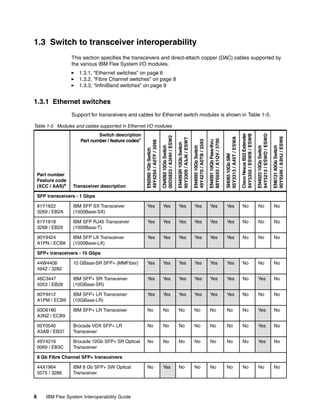
1.3.1 Ethernet switches
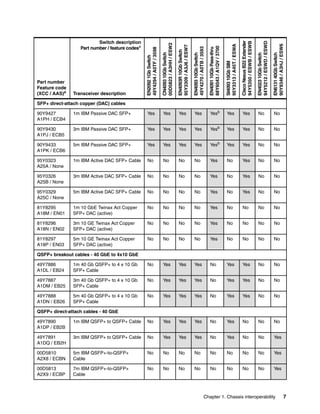
Support for transceivers and cables for Ethernet switch modules is shown in Table 1-5.

EN2092 1Gb Switch
49Y4294 / A0TF / 3598

CN4093 10Gb Switch
00D5823 / A3HH / ESW2

EN4093R 10Gb Switch
95Y3309 / A3J6 / ESW7

EN4093 10Gb Switch
49Y4270 / A0TB / 3593

EN4091 10Gb Pass-thru
88Y6043 / A1QV / 3700

SI4093 10Gb SIM
95Y3313 / A45T / ESWA

Cisco Nexus B22 Extender
94Y5350 / ESWB / ESWB

EN4023 10Gb Switch
94Y5212 / ESWD / ESWD

EN6131 40Gb Switch
90Y9346 / A3HJ / ESW6

Table 1-5 Modules and cables supported in Ethernet I/O modules

81Y1622
3269 / EB2A

IBM SFP SX Transceiver
(1000Base-SX)

Yes

Yes

Yes

Yes

Yes

Yes

No

No

No

81Y1618
3268 / EB29

IBM SFP RJ45 Transceiver
(1000Base-T)

Yes

Yes

Yes

Yes

Yes

Yes

No

No

No

90Y9424
A1PN / ECB8

IBM SFP LX Transceiver
(1000Base-LX)

Yes

Yes

Yes

Yes

Yes

Yes

No

No

No

Switch description
Part number / feature codesa

Part number
Feature code
(XCC / AAS)a

Transceiver description

SFP transceivers - 1 Gbps

SFP+ transceivers - 10 Gbps
44W4408
4942 / 3282

10 GBase-SR SFP+ (MMFiber)

Yes

Yes

Yes

Yes

Yes

Yes

No

No

No

46C3447
5053 / EB28

IBM SFP+ SR Transceiver
(10GBase-SR)

Yes

Yes

Yes

Yes

Yes

Yes

No

Yes

No

90Y9412
A1PM / ECB9

IBM SFP+ LR Transceiver
(10GBase-LR)

Yes

Yes

Yes

Yes

Yes

Yes

No

No

No

00D6180
A3NZ / ECB9

IBM SFP+ LR Transceiver

No

No

No

No

No

No

No

Yes

No

95Y0540
A3AB / EB37

Brocade VDX SFP+ LR
Transceiver

No

No

No

No

No

No

No

Yes

No

49Y4216
0069 / EB3C

Brocade 10Gb SFP+ SR Optical
Transceiver

No

No

No

No

No

No

No

Yes

No

No

Yes

No

No

No

No

No

No

No

8 Gb Fibre Channel SFP+ transceivers
44X1964
5075 / 3286

6

IBM 8 Gb SFP+ SW Optical
Transceiver

IBM Flex System Interoperability Guide
EN2092 1Gb Switch
49Y4294 / A0TF / 3598

CN4093 10Gb Switch
00D5823 / A3HH / ESW2

EN4093R 10Gb Switch
95Y3309 / A3J6 / ESW7

EN4093 10Gb Switch
49Y4270 / A0TB / 3593

EN4091 10Gb Pass-thru
88Y6043 / A1QV / 3700

SI4093 10Gb SIM
95Y3313 / A45T / ESWA

Cisco Nexus B22 Extender
94Y5350 / ESWB / ESWB

EN4023 10Gb Switch
94Y5212 / ESWD / ESWD

EN6131 40Gb Switch
90Y9346 / A3HJ / ESW6

Switch description
Part number / feature codesa

90Y9427
A1PH / ECB4

1m IBM Passive DAC SFP+

Yes

Yes

Yes

Yes

Yesb

Yes

Yes

No

No

90Y9430
A1PJ / ECB5

3m IBM Passive DAC SFP+

Yes

Yes

Yes

Yes

Yesb

Yes

Yes

No

No

90Y9433
A1PK / ECB6

5m IBM Passive DAC SFP+

Yes

Yes

Yes

Yes

Yesb

Yes

Yes

No

No

95Y0323
A25A / None

1m IBM Active DAC SFP+ Cable

No

No

No

No

Yes

No

Yes

No

No

95Y0326
A25B / None

3m IBM Active DAC SFP+ Cable

No

No

No

No

Yes

No

Yes

No

No

95Y0329
A25C / None

5m IBM Active DAC SFP+ Cable

No

No

No

No

Yes

No

Yes

No

No

81Y8295
A18M / EN01

1m 10 GbE Twinax Act Copper
SFP+ DAC (active)

No

No

No

No

Yes

No

No

No

No

81Y8296
A18N / EN02

3m 10 GE Twinax Act Copper
SFP+ DAC (active)

No

No

No

No

Yes

No

No

No

No

81Y8297
A18P / EN03

5m 10 GE Twinax Act Copper
SFP+ DAC (active)

No

No

No

No

Yes

No

No

No

No

Part number
Feature code
(XCC / AAS)a

Transceiver description

SFP+ direct-attach copper (DAC) cables

QSFP+ breakout cables - 40 GbE to 4x10 GbE
49Y7886
A1DL / EB24

1m 40 Gb QSFP+ to 4 x 10 Gb
SFP+ Cable

No

Yes

Yes

Yes

No

Yes

Yes

No

No

49Y7887
A1DM / EB25

3m 40 Gb QSFP+ to 4 x 10 Gb
SFP+ Cable

No

Yes

Yes

Yes

No

Yes

Yes

No

No

49Y7888
A1DN / EB26

5m 40 Gb QSFP+ to 4 x 10 Gb
SFP+ Cable

No

Yes

Yes

Yes

No

Yes

Yes

No

No

QSFP+ direct-attach cables - 40 GbE
49Y7890
A1DP / EB2B

1m IBM QSFP+ to QSFP+ Cable

No

Yes

Yes

Yes

No

Yes

No

No

No

49Y7891
A1DQ / EB2H

3m IBM QSFP+ to QSFP+ Cable

No

Yes

Yes

Yes

No

Yes

No

No

Yes

00D5810
A2X8 / ECBN

5m IBM QSFP+-to-QSFP+
Cable

No

No

No

No

No

No

No

No

Yes

00D5813
A2X9 / ECBP

7m IBM QSFP+-to-QSFP+
Cable

No

No

No

No

No

No

No

No

Yes

Chapter 1. Chassis interoperability

7
SI4093 10Gb SIM
95Y3313 / A45T / ESWA

Cisco Nexus B22 Extender
94Y5350 / ESWB / ESWB

No

No

No

No

No

EN6131 40Gb Switch
90Y9346 / A3HJ / ESW6

EN4091 10Gb Pass-thru
88Y6043 / A1QV / 3700

No

EN4023 10Gb Switch
94Y5212 / ESWD / ESWD

EN4093 10Gb Switch
49Y4270 / A0TB / 3593

3m FDR InfiniBand Cable
(passive)

EN4093R 10Gb Switch
95Y3309 / A3J6 / ESW7

90Y3470
A227 / ECB1

No

Transceiver description

CN4093 10Gb Switch
00D5823 / A3HH / ESW2

Part number
Feature code
(XCC / AAS)a

EN2092 1Gb Switch
49Y4294 / A0TF / 3598

Switch description
Part number / feature codesa

Yes

QSFP+ transceiver and cables - 40 GbE
49Y7884
A1DR / EB27

IBM QSFP+ SR Transceiver

No

Yes

Yes

Yes

No

Yes

No

Yes

Yes

90Y3519
A1MM / EB2J

10m IBM QSFP+ MTP Optical
cable

No

Yes

Yes

Yes

No

Yes

No

Yes

Yes

90Y3521
A1MN / EB2K

30m IBM QSFP+ MTP Optical
cable

No

Yes

Yes

Yes

No

Yes

No

Yes

Yes

a. The first feature code listed is for configurations ordered through System x sales channels (XCC using x-config). The
second feature code is for configurations ordered through the IBM Power Systems channel (AAS using e-config)
b. The EN4091 10Gb Pass-Thru supports Passive DAC cables as of firmware 2.0.2.0

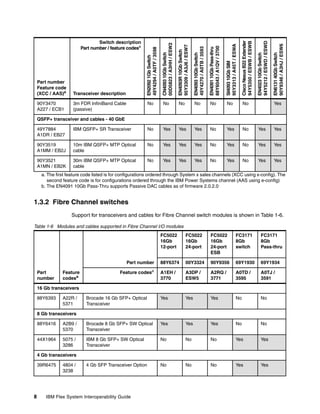
1.3.2 Fibre Channel switches
Support for transceivers and cables for Fibre Channel switch modules is shown in Table 1-6.
Table 1-6 Modules and cables supported in Fibre Channel I/O modules
FC5022
16Gb
12-port

FC5022
16Gb
24-port

FC5022
16Gb
24-port
ESB

FC3171
8Gb
switch

FC3171
8Gb
Pass-thru

88Y6374

00Y3324

90Y9356

69Y1930

69Y1934

A1EH /
3770

A3DP /
ESW5

A2RQ /
3771

A0TD /
3595

A0TJ /
3591

Brocade 16 Gb SFP+ Optical
Transceiver

Yes

Yes

Yes

No

No

Part number
Part
number

Feature
codesa

Feature codesa

16 Gb transceivers
88Y6393

A22R /
5371

8 Gb transceivers
88Y6416

A2B9 /
5370

Brocade 8 Gb SFP+ SW Optical
Transceiver

Yes

Yes

Yes

No

No

44X1964

5075 /
3286

IBM 8 Gb SFP+ SW Optical
Transceiver

No

No

No

Yes

Yes

4 Gb SFP Transceiver Option

No

No

No

Yes

Yes

4 Gb transceivers
39R6475

8

4804 /
3238

IBM Flex System Interoperability Guide
a. The first feature code listed is for configurations ordered through System x sales channels (XCC using x-config). The
second feature code is for configurations ordered through the IBM Power Systems channel (AAS using e-config)

1.3.3 InfiniBand switches
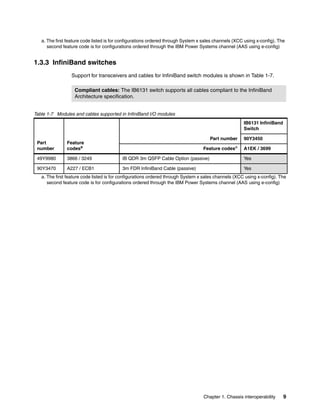
Support for transceivers and cables for InfiniBand switch modules is shown in Table 1-7.
Compliant cables: The IB6131 switch supports all cables compliant to the InfiniBand
Architecture specification.
Table 1-7 Modules and cables supported in InfiniBand I/O modules
IB6131 InfiniBand
Switch
Part number

90Y3450

Part
number

Feature
codesa

49Y9980

3866 / 3249

IB QDR 3m QSFP Cable Option (passive)

Yes

90Y3470

A227 / ECB1

3m FDR InfiniBand Cable (passive)

Yes

Feature codes

a

A1EK / 3699

a. The first feature code listed is for configurations ordered through System x sales channels (XCC using x-config). The
second feature code is for configurations ordered through the IBM Power Systems channel (AAS using e-config)

Chapter 1. Chassis interoperability

9
1.4 Switch upgrades
Various IBM Flex System switches can be upgraded via software licenses to enable additional
ports or features.
Switches covered in this section:
1.4.1, “IBM Flex System EN4023 10Gb Scalable Switch” on page 10
1.4.2, “IBM Flex System Fabric CN4093 10Gb Converged Scalable Switch” on page 10
1.4.3, “IBM Flex System Fabric EN4093 & EN4093R 10Gb Scalable Switch” on page 11
1.4.4, “IBM Flex System Fabric SI4093 System Interconnect Module” on page 12
1.4.5, “IBM Flex System EN2092 1Gb Ethernet Scalable Switch” on page 14
1.4.6, “IBM Flex System IB6131 InfiniBand Switch” on page 14
1.4.7, “IBM Flex System FC5022 16Gb SAN Scalable Switch” on page 15

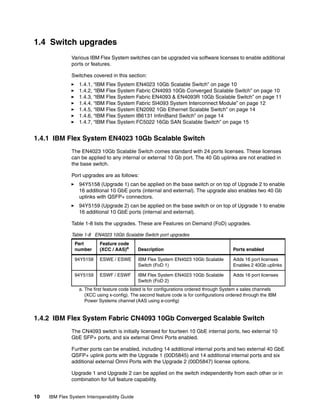
1.4.1 IBM Flex System EN4023 10Gb Scalable Switch
The EN4023 10Gb Scalable Switch comes standard with 24 ports licenses. These licenses
can be applied to any internal or external 10 Gb port. The 40 Gb uplinks are not enabled in
the base switch.
Port upgrades are as follows:
94Y5158 (Upgrade 1) can be applied on the base switch or on top of Upgrade 2 to enable
16 additional 10 GbE ports (internal and external). The upgrade also enables two 40 Gb
uplinks with QSFP+ connectors.
94Y5159 (Upgrade 2) can be applied on the base switch or on top of Upgrade 1 to enable
16 additional 10 GbE ports (internal and external).
Table 1-8 lists the upgrades. These are Features on Demand (FoD) upgrades.
Table 1-8 EN4023 10Gb Scalable Switch port upgrades
Part
number

Feature code
(XCC / AAS)a

94Y5158
94Y5159

Description

Ports enabled

ESWE / ESWE

IBM Flex System EN4023 10Gb Scalable
Switch (FoD 1)

Adds 16 port licenses
Enables 2 40Gb uplinks

ESWF / ESWF

IBM Flex System EN4023 10Gb Scalable
Switch (FoD 2)

Adds 16 port licenses

a. The first feature code listed is for configurations ordered through System x sales channels
(XCC using x-config). The second feature code is for configurations ordered through the IBM
Power Systems channel (AAS using e-config)

1.4.2 IBM Flex System Fabric CN4093 10Gb Converged Scalable Switch
The CN4093 switch is initially licensed for fourteen 10 GbE internal ports, two external 10
GbE SFP+ ports, and six external Omni Ports enabled.
Further ports can be enabled, including 14 additional internal ports and two external 40 GbE
QSFP+ uplink ports with the Upgrade 1 (00D5845) and 14 additional internal ports and six
additional external Omni Ports with the Upgrade 2 (00D5847) license options.
Upgrade 1 and Upgrade 2 can be applied on the switch independently from each other or in
combination for full feature capability.
10

IBM Flex System Interoperability Guide
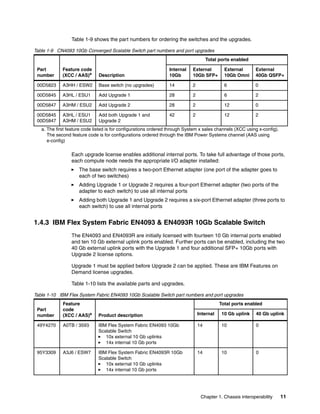
Table 1-9 shows the part numbers for ordering the switches and the upgrades.
Table 1-9 CN4093 10Gb Converged Scalable Switch part numbers and port upgrades
Total ports enabled
Part
number

Feature code
(XCC / AAS)a

Description

Internal
10Gb

External
10Gb SFP+

External
10Gb Omni

External
40Gb QSFP+

00D5823

A3HH / ESW2

Base switch (no upgrades)

14

2

6

0

00D5845

A3HL / ESU1

Add Upgrade 1

28

2

6

2

00D5847

A3HM / ESU2

Add Upgrade 2

28

2

12

0

00D5845
00D5847

A3HL / ESU1
A3HM / ESU2

Add both Upgrade 1 and
Upgrade 2

42

2

12

2

a. The first feature code listed is for configurations ordered through System x sales channels (XCC using x-config).
The second feature code is for configurations ordered through the IBM Power Systems channel (AAS using
e-config)

Each upgrade license enables additional internal ports. To take full advantage of those ports,
each compute node needs the appropriate I/O adapter installed:
The base switch requires a two-port Ethernet adapter (one port of the adapter goes to
each of two switches)
Adding Upgrade 1 or Upgrade 2 requires a four-port Ethernet adapter (two ports of the
adapter to each switch) to use all internal ports
Adding both Upgrade 1 and Upgrade 2 requires a six-port Ethernet adapter (three ports to
each switch) to use all internal ports

1.4.3 IBM Flex System Fabric EN4093 & EN4093R 10Gb Scalable Switch
The EN4093 and EN4093R are initially licensed with fourteen 10 Gb internal ports enabled
and ten 10 Gb external uplink ports enabled. Further ports can be enabled, including the two
40 Gb external uplink ports with the Upgrade 1 and four additional SFP+ 10Gb ports with
Upgrade 2 license options.
Upgrade 1 must be applied before Upgrade 2 can be applied. These are IBM Features on
Demand license upgrades.
Table 1-10 lists the available parts and upgrades.
Table 1-10 IBM Flex System Fabric EN4093 10Gb Scalable Switch part numbers and port upgrades
Part
number

Feature
code
(XCC / AAS)a

49Y4270

95Y3309

Total ports enabled
Product description

Internal

10 Gb uplink

40 Gb uplink

A0TB / 3593

IBM Flex System Fabric EN4093 10Gb
Scalable Switch
10x external 10 Gb uplinks
14x internal 10 Gb ports

14

10

0

A3J6 / ESW7

IBM Flex System Fabric EN4093R 10Gb
Scalable Switch
10x external 10 Gb uplinks
14x internal 10 Gb ports

14

10

0

Chapter 1. Chassis interoperability

11
Part
number

Feature
code
(XCC / AAS)a

49Y4798

88Y6037

Total ports enabled
Product description

Internal

10 Gb uplink

40 Gb uplink

A1EL / 3596

IBM Flex System Fabric EN4093 10Gb
Scalable Switch (Upgrade 1)
Adds 2x external 40 Gb uplinks
Adds 14x internal 10 Gb ports

28

10

2

A1EM / 3597

IBM Flex System Fabric EN4093 10Gb
Scalable Switch (Upgrade 2) (requires
Upgrade 1):
Adds 4x external 10 Gb uplinks
Add 14x internal 10 Gb ports

42

14

2

a. The first feature code listed is for configurations ordered through System x sales channels (XCC using x-config).
The second feature code is for configurations ordered through the IBM Power Systems channel (AAS using
e-config)

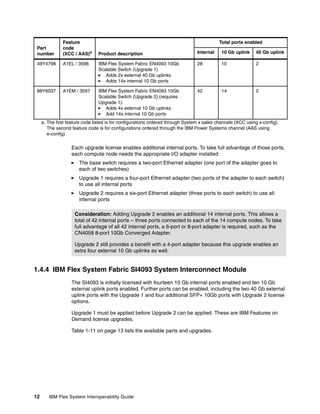
Each upgrade license enables additional internal ports. To take full advantage of those ports,
each compute node needs the appropriate I/O adapter installed:
The base switch requires a two-port Ethernet adapter (one port of the adapter goes to
each of two switches)
Upgrade 1 requires a four-port Ethernet adapter (two ports of the adapter to each switch)
to use all internal ports
Upgrade 2 requires a six-port Ethernet adapter (three ports to each switch) to use all
internal ports
Consideration: Adding Upgrade 2 enables an additional 14 internal ports. This allows a
total of 42 internal ports -- three ports connected to each of the 14 compute nodes. To take
full advantage of all 42 internal ports, a 6-port or 8-port adapter is required, such as the
CN4058 8-port 10Gb Converged Adapter.
Upgrade 2 still provides a benefit with a 4-port adapter because this upgrade enables an
extra four external 10 Gb uplinks as well.

1.4.4 IBM Flex System Fabric SI4093 System Interconnect Module
The SI4093 is initially licensed with fourteen 10 Gb internal ports enabled and ten 10 Gb
external uplink ports enabled. Further ports can be enabled, including the two 40 Gb external
uplink ports with the Upgrade 1 and four additional SFP+ 10Gb ports with Upgrade 2 license
options.
Upgrade 1 must be applied before Upgrade 2 can be applied. These are IBM Features on
Demand license upgrades.
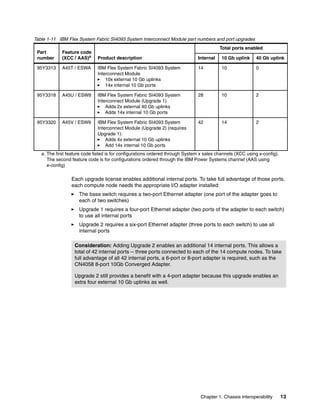
Table 1-11 on page 13 lists the available parts and upgrades.

12

IBM Flex System Interoperability Guide
Table 1-11 IBM Flex System Fabric SI4093 System Interconnect Module part numbers and port upgrades
Part
number

Feature code
(XCC / AAS)a

95Y3313

Total ports enabled
Product description

Internal

10 Gb uplink

40 Gb uplink

A45T / ESWA

IBM Flex System Fabric SI4093 System
Interconnect Module
10x external 10 Gb uplinks
14x internal 10 Gb ports

14

10

0

95Y3318

A45U / ESW8

IBM Flex System Fabric SI4093 System
Interconnect Module (Upgrade 1)
Adds 2x external 40 Gb uplinks
Adds 14x internal 10 Gb ports

28

10

2

95Y3320

A45V / ESW9

IBM Flex System Fabric SI4093 System
Interconnect Module (Upgrade 2) (requires
Upgrade 1):
Adds 4x external 10 Gb uplinks
Add 14x internal 10 Gb ports

42

14

2

a. The first feature code listed is for configurations ordered through System x sales channels (XCC using x-config).
The second feature code is for configurations ordered through the IBM Power Systems channel (AAS using
e-config)

Each upgrade license enables additional internal ports. To take full advantage of those ports,
each compute node needs the appropriate I/O adapter installed:
The base switch requires a two-port Ethernet adapter (one port of the adapter goes to
each of two switches)
Upgrade 1 requires a four-port Ethernet adapter (two ports of the adapter to each switch)
to use all internal ports
Upgrade 2 requires a six-port Ethernet adapter (three ports to each switch) to use all
internal ports
Consideration: Adding Upgrade 2 enables an additional 14 internal ports. This allows a
total of 42 internal ports -- three ports connected to each of the 14 compute nodes. To take
full advantage of all 42 internal ports, a 6-port or 8-port adapter is required, such as the
CN4058 8-port 10Gb Converged Adapter.
Upgrade 2 still provides a benefit with a 4-port adapter because this upgrade enables an
extra four external 10 Gb uplinks as well.

Chapter 1. Chassis interoperability

13
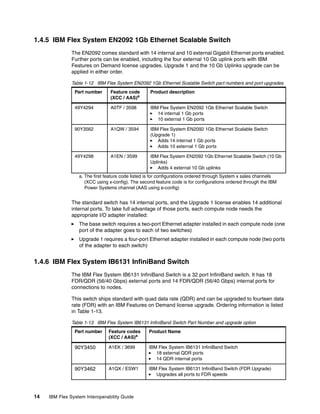
1.4.5 IBM Flex System EN2092 1Gb Ethernet Scalable Switch
The EN2092 comes standard with 14 internal and 10 external Gigabit Ethernet ports enabled.
Further ports can be enabled, including the four external 10 Gb uplink ports with IBM
Features on Demand license upgrades. Upgrade 1 and the 10 Gb Uplinks upgrade can be
applied in either order.
Table 1-12 IBM Flex System EN2092 1Gb Ethernet Scalable Switch part numbers and port upgrades
Part number

Feature code
(XCC / AAS)a

Product description

49Y4294

A0TF / 3598

IBM Flex System EN2092 1Gb Ethernet Scalable Switch
14 internal 1 Gb ports
10 external 1 Gb ports

90Y3562

A1QW / 3594

IBM Flex System EN2092 1Gb Ethernet Scalable Switch
(Upgrade 1)
Adds 14 internal 1 Gb ports
Adds 10 external 1 Gb ports

49Y4298

A1EN / 3599

IBM Flex System EN2092 1Gb Ethernet Scalable Switch (10 Gb
Uplinks)
Adds 4 external 10 Gb uplinks

a. The first feature code listed is for configurations ordered through System x sales channels
(XCC using x-config). The second feature code is for configurations ordered through the IBM
Power Systems channel (AAS using e-config)

The standard switch has 14 internal ports, and the Upgrade 1 license enables 14 additional
internal ports. To take full advantage of those ports, each compute node needs the
appropriate I/O adapter installed:
The base switch requires a two-port Ethernet adapter installed in each compute node (one
port of the adapter goes to each of two switches)
Upgrade 1 requires a four-port Ethernet adapter installed in each compute node (two ports
of the adapter to each switch)

1.4.6 IBM Flex System IB6131 InfiniBand Switch
The IBM Flex System IB6131 InfiniBand Switch is a 32 port InfiniBand switch. It has 18
FDR/QDR (56/40 Gbps) external ports and 14 FDR/QDR (56/40 Gbps) internal ports for
connections to nodes.
This switch ships standard with quad data rate (QDR) and can be upgraded to fourteen data
rate (FDR) with an IBM Features on Demand license upgrade. Ordering information is listed
in Table 1-13.
Table 1-13 IBM Flex System IB6131 InfiniBand Switch Part Number and upgrade option
Part number

Product Name

90Y3450

A1EK / 3699

IBM Flex System IB6131 InfiniBand Switch
18 external QDR ports
14 QDR internal ports

90Y3462

14

Feature codes
(XCC / AAS)a

A1QX / ESW1

IBM Flex System IB6131 InfiniBand Switch (FDR Upgrade)
Upgrades all ports to FDR speeds

IBM Flex System Interoperability Guide
a. The first feature code listed is for configurations ordered through System x sales channels
(XCC using x-config). The second feature code is for configurations ordered through the IBM
Power Systems channel (AAS using e-config)

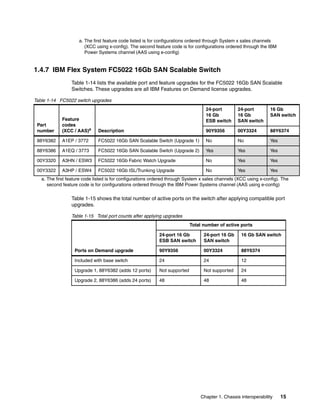
1.4.7 IBM Flex System FC5022 16Gb SAN Scalable Switch
Table 1-14 lists the available port and feature upgrades for the FC5022 16Gb SAN Scalable
Switches. These upgrades are all IBM Features on Demand license upgrades.
Table 1-14 FC5022 switch upgrades
24-port
16 Gb
ESB switch

24-port
16 Gb
SAN switch

16 Gb
SAN switch

Part
number

Feature
codes
(XCC / AAS)a

Description

90Y9356

00Y3324

88Y6374

88Y6382

A1EP / 3772

FC5022 16Gb SAN Scalable Switch (Upgrade 1)

No

No

Yes

88Y6386

A1EQ / 3773

FC5022 16Gb SAN Scalable Switch (Upgrade 2)

Yes

Yes

Yes

00Y3320

A3HN / ESW3

FC5022 16Gb Fabric Watch Upgrade

No

Yes

Yes

00Y3322

A3HP / ESW4

FC5022 16Gb ISL/Trunking Upgrade

No

Yes

Yes

a. The first feature code listed is for configurations ordered through System x sales channels (XCC using x-config). The
second feature code is for configurations ordered through the IBM Power Systems channel (AAS using e-config)

Table 1-15 shows the total number of active ports on the switch after applying compatible port
upgrades.
Table 1-15 Total port counts after applying upgrades
Total number of active ports
24-port 16 Gb
ESB SAN switch

24-port 16 Gb
SAN switch

16 Gb SAN switch

Ports on Demand upgrade

90Y9356

00Y3324

88Y6374

Included with base switch

24

24

12

Upgrade 1, 88Y6382 (adds 12 ports)

Not supported

Not supported

24

Upgrade 2, 88Y6386 (adds 24 ports)

48

48

48

Chapter 1. Chassis interoperability

15
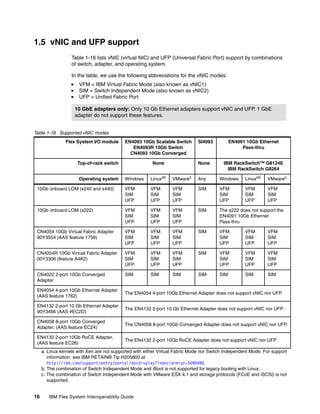
1.5 vNIC and UFP support
Table 1-16 lists vNIC (virtual NIC) and UFP (Universal Fabric Port) support by combinations
of switch, adapter, and operating system.
In the table, we use the following abbreviations for the vNIC modes:
VFM = IBM Virtual Fabric Mode (also known as vNIC1)
SIM = Switch Independent Mode (also known as vNIC2)
UFP = Unified Fabric Port
10 GbE adapters only: Only 10 Gb Ethernet adapters support vNIC and UFP. 1 GbE
adapter do not support these features.
Table 1-16 Supported vNIC modes
Flex System I/O module

EN4093 10Gb Scalable Switch
EN4093R 10Gb Switch
CN4093 10Gb Converged

Top-of-rack switch

None

SI4093

None

EN4091 10Gb Ethernet
Pass-thru
IBM RackSwitch™ G8124E
IBM RackSwitch G8264

Windows

Linuxab

VMwarec

Any

Windows

Linuxab

VMwarec

10Gb onboard LOM (x240 and x440)

VFM
SIM
UFP

VFM
SIM
UFP

VFM
SIM
UFP

SIM

VFM
SIM
UFP

VFM
SIM
UFP

VFM
SIM
UFP

10Gb onboard LOM (x222)

VFM
SIM
UFP

VFM
SIM
UFP

VFM
SIM
UFP

SIM

The x222 does not support the
EN4091 10Gb Ethernet
Pass-thru

CN4054 10Gb Virtual Fabric Adapter
90Y3554 (AAS feature 1759)

VFM
SIM
UFP

VFM
SIM
UFP

VFM
SIM
UFP

SIM

VFM
SIM
UFP

VFM
SIM
UFP

VFM
SIM
UFP

CN4054R 10Gb Virtual Fabric Adapter
00Y3306 (feature A4K2)

VFM
SIM
UFP

VFM
SIM
UFP

VFM
SIM
UFP

SIM

VFM
SIM
UFP

VFM
SIM
UFP

VFM
SIM
UFP

CN4022 2-port 10Gb Converged
Adapter

SIM

SIM

SIM

SIM

SIM

SIM

SIM

Operating system

EN4054 4-port 10Gb Ethernet Adapter
(AAS feature 1762)

The EN4054 4-port 10Gb Ethernet Adapter does not support vNIC nor UFP.

EN4132 2-port 10 Gb Ethernet Adapter
90Y3466 (AAS #EC2D)

The EN4132 2-port 10 Gb Ethernet Adapter does not support vNIC nor UFP.

CN4058 8-port 10Gb Converged
Adapter, (AAS feature EC24)

The CN4058 8-port 10Gb Converged Adapter does not support vNIC nor UFP.

EN4132 2-port 10Gb RoCE Adapter,
(AAS feature EC26)

The EN4132 2-port 10Gb RoCE Adapter does not support vNIC nor UFP.

a. Linux kernels with Xen are not supported with either Virtual Fabric Mode nor Switch Independent Mode. For support
information, see IBM RETAIN® Tip H205800 at
http://ibm.com/support/entry/portal/docdisplay?lndocid=migr-5090480.
b. The combination of Switch Independent Mode and iBoot is not supported for legacy booting with Linux.
c. The combination of Switch Independent Mode with VMware ESX 4.1 and storage protocols (FCoE and iSCSI) is not
supported.

16

IBM Flex System Interoperability Guide
1.6 Chassis power supplies
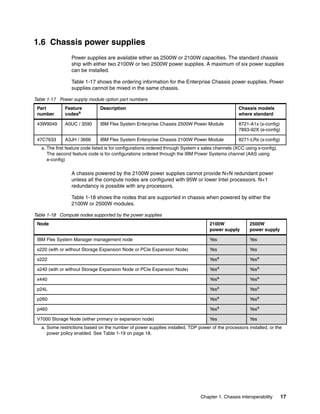
Power supplies are available either as 2500W or 2100W capacities. The standard chassis
ship with either two 2100W or two 2500W power supplies. A maximum of six power supplies
can be installed.
Table 1-17 shows the ordering information for the Enterprise Chassis power supplies. Power
supplies cannot be mixed in the same chassis.
Table 1-17 Power supply module option part numbers
Part
number

Feature
codesa

Description

Chassis models
where standard

43W9049

A0UC / 3590

IBM Flex System Enterprise Chassis 2500W Power Module

8721-A1x (x-config)
7893-92X (e-config)

47C7633

A3JH / 3666

IBM Flex System Enterprise Chassis 2100W Power Module

8271-LRx (x-config)

a. The first feature code listed is for configurations ordered through System x sales channels (XCC using x-config).
The second feature code is for configurations ordered through the IBM Power Systems channel (AAS using
e-config)

A chassis powered by the 2100W power supplies cannot provide N+N redundant power
unless all the compute nodes are configured with 95W or lower Intel processors. N+1
redundancy is possible with any processors.
Table 1-18 shows the nodes that are supported in chassis when powered by either the
2100W or 2500W modules.
Table 1-18 Compute nodes supported by the power supplies
Node

2100W
power supply

2500W
power supply

IBM Flex System Manager management node

Yes

Yes

x220 (with or without Storage Expansion Node or PCIe Expansion Node)

Yes

Yes

x222

Yesa

Yesa

x240 (with or without Storage Expansion Node or PCIe Expansion Node)

Yesa

Yesa

x440

Yesa

Yesa

p24L

Yesa

Yesa

p260

Yesa

Yesa

p460

Yesa

Yesa

V7000 Storage Node (either primary or expansion node)

Yes

Yes

a. Some restrictions based on the number of power supplies installed, TDP power of the processors installed, or the
power policy enabled. See Table 1-19 on page 18.

Chapter 1. Chassis interoperability

17
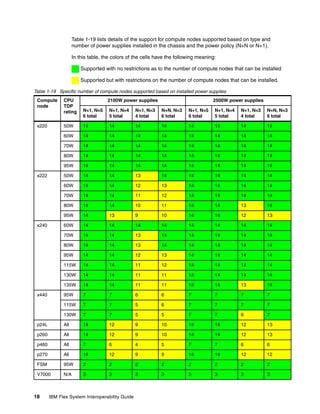
Table 1-19 lists details of the support for compute nodes supported based on type and
number of power supplies installed in the chassis and the power policy (N+N or N+1).
In this table, the colors of the cells have the following meaning:
Supported with no restrictions as to the number of compute nodes that can be installed
Supported but with restrictions on the number of compute nodes that can be installed.
Table 1-19 Specific number of compute nodes supported based on installed power supplies
Compute
node

CPU
TDP
rating

x220

2100W power supplies

2500W power supplies

N+1, N=5
6 total

N+1, N=4
5 total

N+1, N=3
4 total

N+N, N=3
6 total

N+1, N=5
6 total

N+1, N=4
5 total

N+1, N=3
4 total

N+N, N=3
6 total

50W

14

14

14

14

14

14

14

14

60W

14

14

14

14

14

14

14

14

70W

14

14

14

14

14

14

14

14

80W

14

14

14

14

14

14

14

14

95W

14

14

14

14

14

14

14

14

50W

14

14

13

14

14

14

14

14

60W

14

14

12

13

14

14

14

14

70W

14

14

11

12

14

14

14

14

80W

14

14

10

11

14

14

13

14

95W

14

13

9

10

14

14

12

13

60W

14

14

14

14

14

14

14

14

70W

14

14

13

14

14

14

14

14

80W

14

14

13

14

14

14

14

14

95W

14

14

12

13

14

14

14

14

115W

14

14

11

12

14

14

14

14

130W

14

14

11

11

14

14

14

14

135W

14

14

11

11

14

14

13

14

95W

7

7

6

6

7

7

7

7

115W

7

7

5

6

7

7

7

7

130W

7

7

5

5

7

7

6

7

p24L

All

14

12

9

10

14

14

12

13

p260

All

14

12

9

10

14

14

12

13

p460

All

7

6

4

5

7

7

6

6

p270

All

14

12

9

9

14

14

12

12

FSM

95W

2

2

2

2

2

2

2

2

V7000

N/A

3

3

3

3

3

3

3

3

x222

x240

x440

18

IBM Flex System Interoperability Guide
Assumptions:
All Compute Nodes fully configured
Throttling and over subscription is enabled
Tip: Consult the Power configurator for exact configuration support:
http://ibm.com/systems/bladecenter/resources/powerconfig.html

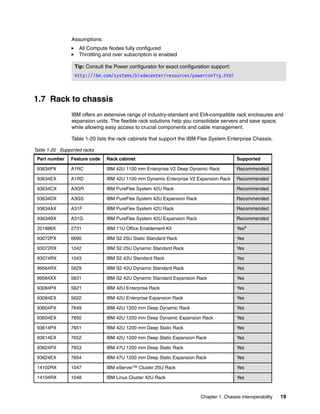
1.7 Rack to chassis
IBM offers an extensive range of industry-standard and EIA-compatible rack enclosures and
expansion units. The flexible rack solutions help you consolidate servers and save space,
while allowing easy access to crucial components and cable management.
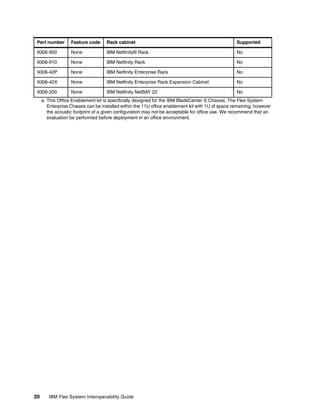
Table 1-20 lists the rack cabinets that support the IBM Flex System Enterprise Chassis.
Table 1-20 Supported racks
Part number

Feature code

Rack cabinet

Supported

93634PX

A1RC

IBM 42U 1100 mm Enterprise V2 Deep Dynamic Rack

Recommended

93634EX

A1RD

IBM 42U 1100 mm Dynamic Enterprise V2 Expansion Rack

Recommended

93634CX

A3GR

IBM PureFlex System 42U Rack

Recommended

93634DX

A3GS

IBM PureFlex System 42U Expansion Rack

Recommended

93634AX

A31F

IBM PureFlex System 42U Rack

Recommended

93634BX

A31G

IBM PureFlex System 42U Expansion Rack

Recommended

201886X

2731

IBM 11U Office Enablement Kit

Yesa

93072PX

6690

IBM S2 25U Static Standard Rack

Yes

93072RX

1042

IBM S2 25U Dynamic Standard Rack

Yes

93074RX

1043

IBM S2 42U Standard Rack

Yes

99564RX

5629

IBM S2 42U Dynamic Standard Rack

Yes

99564XX

5631

IBM S2 42U Dynamic Standard Expansion Rack

Yes

93084PX

5621

IBM 42U Enterprise Rack

Yes

93084EX

5622

IBM 42U Enterprise Expansion Rack

Yes

93604PX

7649

IBM 42U 1200 mm Deep Dynamic Rack

Yes

93604EX

7650

IBM 42U 1200 mm Deep Dynamic Expansion Rack

Yes

93614PX

7651

IBM 42U 1200 mm Deep Static Rack

Yes

93614EX

7652

IBM 42U 1200 mm Deep Static Expansion Rack

Yes

93624PX

7653

IBM 47U 1200 mm Deep Static Rack

Yes

93624EX

7654

IBM 47U 1200 mm Deep Static Expansion Rack

Yes

14102RX

1047

IBM eServer™ Cluster 25U Rack

Yes

14104RX

1048

IBM Linux Cluster 42U Rack

Yes

Chapter 1. Chassis interoperability

19
Part number

Feature code

Rack cabinet

Supported

9306-900

None

IBM Netfinity® Rack

No

9306-910

None

IBM Netfinity Rack

No

9306-42P

None

IBM Netfinity Enterprise Rack

No

9306-42X

None

IBM Netfinity Enterprise Rack Expansion Cabinet

No

9306-200

None

IBM Netfinity NetBAY 22

No

a. This Office Enablement kit is specifically designed for the IBM BladeCenter S Chassis. The Flex System
Enterprise Chassis can be installed within the 11U office enablement kit with 1U of space remaining, however
the acoustic footprint of a given configuration may not be acceptable for office use. We recommend that an
evaluation be performed before deployment in an office environment.

20

IBM Flex System Interoperability Guide
2

Chapter 2.

Compute node component
compatibility
This chapter lists the compatibility of components installed internally to each compute node.
Topics in this chapter are:
2.1, “Compute node-to-card interoperability” on page 22
2.2, “Memory DIMM compatibility” on page 24
2.3, “Internal storage compatibility” on page 27
2.4, “Embedded virtualization” on page 32
2.5, “Expansion node compatibility” on page 34
2.6, “External USB device support” on page 39

© Copyright IBM Corp. 2012, 2013. All rights reserved.

21
2.1 Compute node-to-card interoperability
Table 2-1 lists the available I/O adapters and their compatibility with compute nodes.
PCIe Expansion Node support: For PEN support of I/O adapters, see 2.5.2, “Flex
System I/O adapters - PCIe Expansion Node” on page 34.

Power Systems compute nodes: Some I/O adapters supported by Power Systems
compute nodes are restricted to only some of the available slots. See Table 2-2 on page 23
for specifics.
Table 2-1 I/O adapter compatibility matrix - compute nodes
Feature codesa

x220

x222

x240 (E5-2600)

x240 (E5-2600 v2)

x440b

p24L

p260 / p460

p270

Supported servers

49Y7900

A10Y

1763

1763

EN2024 4-port 1Gb Ethernet Adapter

Y

N

Y

Y

Y

Y

Y

Y

88Y5920

A4K3

None

None

CN4022 2-port 10Gb Converged Adapter

Y

N

Y

Y

Y

N

N

N

None

None

1762

None

EN4054 4-port 10Gb Ethernet Adapter

N

N

N

N

N

Y

Y

Y

90Y3554

A1R1

None

1759

CN4054 10Gb Virtual Fabric Adapter

Y

N

Y

N

Y

N

N

N

00Y3306

A4K2

None

None

CN4054R 10Gb Virtual Fabric Adapter

N

N

N

Y

N

N

N

N

90Y3558

A1R0

None

1760

CN4054 Virtual Fabric Adapter Upgradec

Y

N

Y

Y

Y

N

N

N

None

None

EC24

None

CN4058 8-port 10Gb Converged Adapter

N

N

N

N

N

Y

Y

Y

90Y3466

A1QY

None

EC2D

EN4132 2-port 10 Gb Ethernet Adapter

Y

N

Y

Y

Y

N

N

N

None

None

EC26

None

EN4132 2-port 10Gb RoCE Adapter

N

N

N

N

N

Y

Y

Y

90Y3482

A3HK

None

EC31

EN6132 2-port 40Gb Ethernet Adapter

Y

N

Y

Y

Y

N

N

N

Part
number

x86
nodes

POWER
nodes

786310X
only

I/O adapters

Ethernet adapters

Fibre Channel adapters
69Y1938

A1BM

1764

1764

FC3172 2-port 8Gb FC Adapter

Y

N

Y

Y

Y

Y

Y

Y

95Y2375

A2N5

None

EC25

FC3052 2-port 8Gb FC Adapter

Y

N

Y

Y

Y

N

N

N

88Y6370

A1BP

None

EC2B

FC5022 2-port 16Gb FC Adapter

Y

N

Y

Y

Y

N

N

N

95Y2386

A45R

EC23

None

FC5052 2-port 16Gb FC Adapter

Y

N

Y

Y

Y

Y

Y

Y

95Y2391

A45S

EC2E

None

FC5054 4-port 16Gb FC Adapter

Y

N

Y

Y

Y

Y

Y

Y

69Y1942

A1BQ

None

None

FC5172 2-port 16Gb FC Adapter

Y

N

Y

Y

Y

N

N

N

95Y2379

A3HU

None

None

FC5024D 4-port 16Gb FC Adapter

N

Y

N

N

N

N

N

N

22

IBM Flex System Interoperability Guide
Feature codesa

x220

x222

x240 (E5-2600)

x240 (E5-2600 v2)

x440b

p24L

p260 / p460

p270

Supported servers

90Y3454

A1QZ

None

EC2C

IB6132 2-port FDR InfiniBand Adapter

Y

N

Y

Y

Y

N

N

N

None

None

1761

None

IB6132 2-port QDR InfiniBand Adapter

N

N

N

N

N

Y

Y

Y

90Y3486

A365

None

None

IB6132D 2-port FDR InfiniBand Adapter

N

Y

N

N

N

N

N

N

A2XW

None

None

ServeRAID M5115 SAS/SATA
Controllerd

Y

N

Y

Y

Yb

N

N

N

Part
number

x86
nodes

POWER
nodes

786310X
only

I/O adapters

InfiniBand adapters

SAS
90Y4390

a. The three Feature Code columns are as follows:
* x86 nodes: For all x86 compute nodes in both XCC (x-config) and AAS (e-config), except for x240 7863-10X
* POWER nodes: For all Power Systems compute nodes in AAS (e-config)
* 7863-10X only: For x240 model 7863-10X in AAS (e-config) only
b. For compatibility as listed here, ensure the x440 is running IMM2 firmare Build 40a or later
c. Features on Demand (software) upgrade to enable FCoE and iSCSI on the CN4054. One upgrade needed per
adapter.
d. Various enablement kits and Features on Demand upgrades are available for the ServeRAID M5115. See the
ServeRAID M5115 Product Guide, http://www.redbooks.ibm.com/abstracts/tips0884.html?Open

For Power Systems compute nodes, Table 2-2 shows which specific I/O expansion slots each
of the supported adapters can be installed in to. Yes in the table means the adapter is
supported in that I/O expansion slot.
Tip: Table 2-2 applies to Power Systems compute nodes only.
Table 2-2 Slot locations supported by I/O expansion cards in Power Systems compute nodes
Feature
code

Description

Slot 1

Slot 2

Slot 3
(p460)

Slot 4
(p460)

10 Gb Ethernet
EC24

CN4058 8-port 10Gb Converged Adapter

Yes

Yes

Yes

Yes

EC26

EN4132 2-port 10Gb RoCE Adapter

No

Yes

Yes

Yes

1762

EN4054 4-port 10Gb Ethernet Adapter

Yes

Yes

Yes

Yes

EN2024 4-port 1Gb Ethernet Adapter

Yes

Yes

Yes

Yes

IB6132 2-port QDR InfiniBand Adapter

No

Yes

No

Yes

No

Yes

No

Yes

1 Gb Ethernet
1763
InfiniBand
1761

Fibre Channel
1764

FC3172 2-port 8Gb FC Adapter

Chapter 2. Compute node component compatibility

23
Feature
code

Description

Slot 1

Slot 2

Slot 3
(p460)

Slot 4
(p460)

EC23

FC5052 2-port 16Gb FC Adapter

No

Yes

No

Yes

EC2E

FC5054 4-port 16Gb FC Adapter

No

Yes

No

Yes

2.2 Memory DIMM compatibility
This section covers memory DIMMs for both compute node families. It covers the
following topics:
2.2.1, “x86 compute nodes” on page 24
2.2.2, “Power Systems compute nodes” on page 26

2.2.1 x86 compute nodes
Table 2-3 lists the memory DIMM options for the x86 compute nodes.
Table 2-3 Supported memory DIMMs - x86 compute nodes

49Y1403

A0QS

EEM2

2GB (1x2GB, 1Rx8, 1.35V) PC3L-10600 CL9
ECC DDR3 1333MHz LP UDIMM

Yes

No

Yes

No

No

49Y1404

8648

EEM3

4GB (1x4GB, 2Rx8, 1.35V) PC3L-10600 CL9
ECC DDR3 1333MHz LP UDIMM

Yes

No

Yes

No

Yes

00D5016

A3QC

None

8GB (1x8GB, 2Rx8, 1.35V) PC3L-12800
CL11 ECC DDR3 1600MHz LP UDIMM

No

No

No

Yes

No

x440

x240
(E5-2600 v2)

Description
x240
(E5-2600)

FC for x240
7863-10Xb

x222

Feature
codea

x220

Part
number

Unbuffered DIMM (UDIMM) modules

Registered DIMMs (RDIMMs) - 1333 MHz and 1066 MHz
49Y1405

8940

EM05

2GB (1x2GB, 1Rx8, 1.35V) PC3L-10600 CL9
ECC DDR3 1333MHz LP RDIMM

No

No

Yes

No

No

49Y1406

8941

EEM4

4GB (1x4GB, 1Rx4, 1.35V) PC3L-10600 CL9
ECC DDR3 1333MHz LP RDIMM

Yes

Yes

Yes

No

Yes

49Y1407

8942

EM09

4GB (1x4GB, 2Rx8, 1.35V) PC3L-10600 CL9
ECC DDR3 1333MHz LP RDIMM

Yes

Yes

Yes

No

Yes

49Y1397

8923

EM17

8GB (1x8GB, 2Rx4, 1.35V) PC3L-10600 CL9
ECC DDR3 1333MHz LP RDIMM

Yes

Yes

Yes

No

Yes

00D5036

A3QH

None

8GB (1x8GB, 1Rx4, 1.35V) PC3L-12800
CL11 ECC DDR3 1600MHz LP RDIMM

No

No

No

Yes

No

49Y1563

A1QT

EM33

16GB (1x16GB, 2Rx4, 1.35V) PC3L-10600
CL9 ECC DDR3 1333MHz LP RDIMM

Yes

Yes

Yes

No

Yes

49Y1400

8939

EEM1

16GB (1x16GB, 4Rx4, 1.35V) PC3L-8500
CL7 ECC DDR3 1066MHz LP RDIMM

Yes

No

Yes

No

No

24

IBM Flex System Interoperability Guide
Feature
codea

FC for x240
7863-10Xb

Description

x220

x222

x240
(E5-2600)

x240
(E5-2600 v2)

46W0672

A3QM

None

16GB (1x16GB, 2Rx4, 1.35V) PC3L-12800
CL11 ECC DDR3 1600MHz LP RDIMM

No

No

No

Yes

No

90Y3101

A1CP

EEM7

32GB (1x32GB, 4Rx4, 1.35V) PC3L-8500
CL7 ECC DDR3 1066MHz LP RDIMM

No

No

Yes

No

No

x440

Part
number

Registered DIMMs (RDIMMs) - 1600 MHz
49Y1559

A28Z

EEM5

4GB (1x4GB, 1Rx4, 1.5V) PC3-12800 CL11
ECC DDR3 1600MHz LP RDIMM

Yes

Yes

Yes

No

Yes

90Y3178

A24L

EEMC

4GB (1x4GB, 2Rx8, 1.5V) PC3-12800 CL11
ECC DDR3 1600MHz LP RDIMM

Yes

Yes

Yes

No

No

90Y3109

A292

EEM9

8GB (1x8GB, 2Rx4, 1.5V) PC3-12800 CL11
ECC DDR3 1600MHz LP RDIMM

Yes

Yes

Yes

No

Yes

00D4968

A2U5

EEMB

16GB (1x16GB, 2Rx4, 1.5V) PC3-12800
CL11 ECC DDR3 1600MHz LP RDIMM

Yes

Yes

Yes

No

Yes

Registered DIMMs (RDIMMs) - 1866 MHz
00D5040

A3QJ

None

8GB (1x8GB, 2Rx8, 1.5V) PC3-14900 CL13
ECC DDR3 1866MHz LP RDIMM

No

No

No

Yes

No

00D5048

A3QL

None

16GB (1x16GB, 2Rx4, 1.5V) PC3-14900
CL13 ECC DDR3 1866MHz LP RDIMM

No

No

No

Yes

No

Load-reduced DIMMs (LRDIMMs)
49Y1567

A290

EEM6

16GB (1x16GB, 4Rx4, 1.35V) PC3L-10600
CL9 ECC DDR3 1333MHz LP LRDIMM

No

No

Yes

No

Yes

90Y3105

A291

EEM8

32GB (1x32GB, 4Rx4, 1.35V) PC3L-10600
CL9 ECC DDR3 1333MHz LP LRDIMM

Yes

Yes

Yes

No

Yes

46W0761

A47K

None

32GB (1x32GB, 4Rx4, 1.5V) PC3-14900
CL13 ECC DDR3 1866MHz LP LRDIMM

No

No

No

Yes

No

a. This column lists the memory DIMM feature codes for all x86 compute nodes for both XCC (x-config) and AAS
(e-config), except for x240 model 7863-10X (AAS). Each feature code corresponds to one DIMM each.
b. This column lists memory DIMM feature codes for the x240 model 7863-10X (AAS ordering system). Each feature
code corresponds to two DIMMs each.

Chapter 2. Compute node component compatibility

25
2.2.2 Power Systems compute nodes
Table 2-4 lists the supported memory DIMMs for Power Systems compute nodes.
Table 2-4 Supported memory DIMMs - Power Systems compute nodes
Feature
code

Description

p24L
7FL

p260
22X

p260
23A

p260
23X

p460
42X

p460
43X

p270
24X

EM04

2x 2 GB DDR3 RDIMM 1066 MHz

Yes

Yes

No

No

Yes

No

No

8196

2x 4 GB DDR3 RDIMM 1066 MHz

Yes

Yes

Yes

Yes

Yes

Yes

Yes

8199

2x 8 GB DDR3 RDIMM 1066 MHz

Yes

Yes

No

No

Yes

No

No

EEMD

2x 8 GB DDR3 RDIMM 1066 MHz

Yes

Yes

Yes

Yes

Yes

Yes

Yes

8145

2x 16 GB DDR3 RDIMM 1066 MHz

Yes

Yes

No

No

Yes

No

No

EEME

2x 16 GB DDR3 RDIMM 1066 MHz

Yes

Yes

Yes

Yes

Yes

Yes

Yes

EEMF

2x 32 GB DDR3 RDIMM 1066 MHz

Yes

Yes

Yes

Yes

Yes

Yes

Yes

26

IBM Flex System Interoperability Guide
2.3 Internal storage compatibility
This section covers supported internal storage for both compute node families. It covers the
following topics:
2.3.1, “x86 compute nodes: 2.5-inch drives” on page 27
2.3.2, “x86 compute nodes: 1.8-inch drives” on page 29
2.3.3, “Power Systems compute nodes” on page 31

2.3.1 x86 compute nodes: 2.5-inch drives
Table 2-5 lists the 2.5-inch drives for x86 compute nodes.
Table 2-5 Supported 2-5-inch SAS and SATA drives
x240 (E5-2600 v2)

x440

Description
x240 (E5-2600)

FC for
x240
7863-10Xb

x222

Feature
codea

x220

Part
number

00AD085

A48T

None

IBM 1.2TB 10K 6Gbps SAS 2.5'' G2HS SED

Y

N

Y

Y

Y

81Y9662

A3EG

EHDG

IBM 900GB 10K 6Gbps SAS 2.5" SFF G2HS SED

Y

N

Y

Y

Y

90Y8908

A3EF

EHDH

IBM 600GB 10K 6Gbps SAS 2.5" SFF G2HS SED

Y

N

Y

Y

Y

90Y8913

A2XF

EHDJ

IBM 300GB 10K 6Gbps SAS 2.5" SFF G2HS SED

Y

N

Y

Y

Y

44W2264

5413

None

IBM 300GB 10K 6Gbps SAS 2.5" SFF Slim-HS SED

N

N

N

N

Y

90Y8944

A2ZK

EHDL

IBM 146GB 15K 6Gbps SAS 2.5" SFF G2HS SED

Y

N

Y

Y

Y

44W2294

5412

None

IBM 146GB 15K 6Gbps SAS 2.5" SFF Slim-HS SED

N

N

N

N

N

Self-encrypting drives (SEDs)

10K SAS hard disk drives
00AD075

A48S

None

IBM 1.2TB 10K 6Gbps SAS 2.5'' G2HS HDD

Y

N

Y

Y

Y

81Y9650

A282

EHD4

IBM 900GB 10K 6Gbps SAS 2.5" SFF HS HDD

Y

N

Y

Y

Y

90Y8872

A2XD

EHDE

IBM 600GB 10K 6Gbps SAS 2.5" SFF G2HS HDD

Y

N

Y

Y

Y

49Y2003

5433

3766

IBM 600GB 10K 6Gbps SAS 2.5" SFF Slim-HS HDD

Y

N

Y

Y

N

90Y8877

A2XC

EHDF

IBM 300GB 10K 6Gbps SAS 2.5" SFF G2HS HDD

Y

N

Y

Y

Y

42D0637

5599

3743

IBM 300GB 10K 6Gbps SAS 2.5" SFF Slim-HS HDD

Y

N

Y

Y

N

15K SAS hard disk drives
00AJ300

A4VB

None

IBM 600GB 15K 6Gbps SAS 2.5'' G2HS HDD

N

N

N

N

N

81Y9670

A283

EHD5

IBM 300GB 15K 6Gbps SAS 2.5" SFF HS HDD

Y

N

Y

Y

Y

90Y8926

A2XB

EHDK

IBM 146GB 15K 6Gbps SAS 2.5" SFF G2HS HDD

Y

N

Y

Y

Y

42D0677

5536

EHD1

IBM 146GB 15K 6Gbps SAS 2.5" SFF Slim-HS HDD

Y

N

Y

Y

N

Chapter 2. Compute node component compatibility

27
x240 (E5-2600 v2)

x440

Description
x240 (E5-2600)

FC for
x240
7863-10Xb

x222

Feature
codea

x220

Part
number

00AJ236

A4VD

None

IBM 300GB 15K 6Gbps SAS 2.5'' G2HS Hybrid

N

N

N

N

N

00AJ246

A4VF

None

IBM 600GB 15K 6Gbps SAS 2.5'' G2HS Hybrid

N

N

N

N

N

00AD102

A4G7

None

IBM 600GB 10K 6Gbps SAS 2.5'' G2HS Hybrid

Y

N

Y

Y

Y

10K & 15K SAS-SSD hybrid‘drives

NL SAS hard disk drives
81Y9690

A1P3

EHD6

IBM 1TB 7.2K 6Gbps NL SAS 2.5" SFF HS HDD

Y

N

Y

Y

Y

90Y8953

A2XE

EHDM

IBM 500GB 7.2K 6Gbps NL SAS 2.5" SFF G2HS HDD

Y

N

Y

Y

Y

42D0707

5409

EHD2

IBM 500GB 7200 6Gbps NL SAS 2.5" SFF HS HDD

Y

N

Y

Y

N

NL SATA hard disk drives
81Y9730

A1AV

EHD9

IBM 1TB 7.2K 6Gbps NL SATA 2.5" SFF HS HDD

Y

N

Y

Y

Y

81Y9722

A1NX

EHD7

IBM 250GB 7.2K 6Gbps NL SATA 2.5" SFF HS HDD

Y

N

Y

Y

Y

81Y9726

A1NZ

EHD8

IBM 500GB 7.2K 6Gbps NL SATA 2.5" SFF HS HDD

Y

N

Y

Y

Y

SATA simple-swap drives
90Y8979

A36A

None

IBM 1TB 7.2K 6Gbps SATA 2.5'' G2 SS HDD

N

Y

N

N

N

90Y8974

A369

None

IBM 500GB 7.2K 6Gbps SATA 2.5'' G2 SS HDD

N

Y

N

N

N

Solid-state drives - Enterprise
49Y6195

A4GH

None

IBM 1.6TB SAS 2.5" MLC HS Enterprise SSD

Y

N

Y

Y

Y

49Y6139

A3F0

None

IBM 800GB SAS 2.5" MLC HS Enterprise SSD

Y

N

Y

Y

Y

49Y6134

A3EY

None

IBM 400GB SAS 2.5" MLC HS Enterprise SSD

Y

N

Y

Y

Y

49Y6129

A3EW

None

IBM 200GB SAS 2.5" MLC HS Enterprise SSD

Y

N

Y

Y

Y

41Y8331

A4FL

None

S3700 200GB SATA 2.5" MLC HS Enterprise SSD

Y

N

Y

Y

Y

41Y8336

A4FN

None

S3700 400GB SATA 2.5" MLC HS Enterprise SSD

Y

N

Y

Y

Y

41Y8341

A4FQ

None

S3700 800GB SATA 2.5" MLC HS Enterprise SSD

Y

N

Y

Y

Y

00W1125

A3HR

None

IBM 100GB SATA 2.5" MLC HS Enterprise SSD

Y

N

Y

Y

Y

43W7718

A2FN

EHD3

IBM 200GB SATA 2.5" MLC HS SSD

Y

N

N

N

Y

90Y8994

A36D

None

IBM 100GB SATA 2.5” MLC Enterprise SSD for Flex
System x222

N

Y

N

N

N

Solid-state drives - Enterprise value
00AJ000

A4KM

None

S3500 120GB SATA 2.5" MLC HS Enterprise Value SSD

Y

N

Y

Y

Y

00AJ005

A4KN

None

S3500 240GB SATA 2.5" MLC HS Enterprise Value SSD

Y

N

Y

Y

Y

28

IBM Flex System Interoperability Guide
Part
number

Feature
codea

FC for
x240
7863-10Xb

Description

x220

x222

x240 (E5-2600)

x240 (E5-2600 v2)

x440

00AJ010

A4KP

None

S3500 480GB SATA 2.5" MLC HS Enterprise Value SSD

Y

N

Y

Y

Y

00AJ015

A4KQ

None

S3500 800GB SATA 2.5" MLC HS Enterprise Value SSD

Y

N

Y

Y

Y

49Y5839

A3AS

None

IBM 64GB SATA 2.5" MLC HS Enterprise Value SSD

Y

N

Y

Y

Y

49Y5844

A3AU

None

IBM 512GB SATA 2.5" MLC HS Enterprise Value SSD

Y

N

Y

Y

Y

90Y8648

A2U4

EHDD

IBM 128GB SATA 2.5" MLC HS Enterprise Value SSD

Y

N

Y

Y

Y

90Y8643

A2U3

EHDC

IBM 256GB SATA 2.5" MLC HS Enterprise Value SSD

Y

N

Y

Y

Y

90Y8984

A36B

None

IBM 128GB SATA 2.5” MLC Enterprise Value SSD for
Flex System x222

N

Y

N

N

N

90Y8989

A36C

None

IBM 256GB SATA 2.5” MLC Enterprise Value SSD for
Flex System x222

N

Y

N

N

N

a. This column lists the feature codes for all x86 compute nodes for both XCC (x-config) and AAS (e-config), except
for x240 model 7863-10X (AAS).
b. This column lists feature codes for the x240 model 7863-10X only (AAS ordering system). If the cell says “None”
use 7863-15X and the feature code listed in the adjacent cell instead

2.3.2 x86 compute nodes: 1.8-inch drives
The x86 compute nodes support 1.8-inch solid-state drives with the addition of the
ServeRAID M5115 RAID controller plus the appropriate enablement kits. For details about
configurations, see ServeRAID M5115 SAS/SATA Controller for IBM Flex System, TIPS0884.
Tip: The ServeRAID M5115 RAID controller is installed in I/O expansion slot 1 but can be
installed along with the Compute Node Fabric Connector (aka periscope connector) used
to connect the onboard Ethernet controller to the chassis midplane.

Chapter 2. Compute node component compatibility

29
Table 2-6 lists the supported enablement kits and Features on Demand activation upgrades
available for use with the ServeRAID M5115.
Table 2-6 ServeRAID M5115 compatibility

ServeRAID M5115 SAS/SATA Controller for IBM Flex System

x440

A2XW

x240 (E5-2600 v2)

90Y4390

x240 (E5-2600)

Description

x222

Feature
codea

x220

Part
number

Y

N

Y

Y

Y

Hardware enablement kits - IBM Flex System x220 Compute Node
90Y4424

A35L

ServeRAID M5100 Series Enablement Kit for x220

Y

N

N

N

N

90Y4425

A35M

ServeRAID M5100 Series IBM Flex System Flash Kit for x220

Y

N

N

N

N

90Y4426

A35N

ServeRAID M5100 Series SSD Expansion Kit for x220

Y

N

N

N

N

Hardware enablement kits - IBM Flex System x240 Compute Node
90Y4342

A2XX

ServeRAID M5100 Series Enablement Kit for x240

N

N

Y

Y

N

90Y4341

A2XY

ServeRAID M5100 Series IBM Flex System Flash Kit for x240

N

N

Y

N

N

47C8808

A47D

ServeRAID M5100 Series IBM Flex System Flash Kit v2 for x240

N

N

Y

Y

N

90Y4391

A2XZ

ServeRAID M5100 Series SSD Expansion Kit for x240

N

N

Yb

Yb

N

Hardware enablement kits - IBM Flex System x440 Compute Node
46C9030

A3DS

ServeRAID M5100 Series Enablement Kit for x440

N

N

N

N

Y

46C9031

A3DT

ServeRAID M5100 Series IBM Flex System Flash Kit for x440

N

N

N

N

Y

47C8809

A47E

ServeRAID M5100 Series IBM Flex System Flash Kit v2 for x440

N

N

N

N

Y

46C9032

A3DU

ServeRAID M5100 Series SSD Expansion Kit for x440

N

N

N

N

Y

Feature on-demand licenses (for all three compute nodes)
90Y4410

A2Y1

ServeRAID M5100 Series RAID 6 Upgrade

Y

N

Y

Y

Y

90Y4412

A2Y2

ServeRAID M5100 Series Performance Upgrade

Y

N

Y

Y

Y

90Y4447

A36G

ServeRAID M5100 Series SSD Caching Enabler

Y

N

Y

Y

Y

a. This column lists the drive feature codes for all x86 compute nodes for both XCC (x-config) and AAS (e-config),
except for x240 model 7863-10X (AAS).
b. If the ServeRAID M5100 Series SSD Expansion Kit (90Y4391) is installed, the x240 USB Enablement Kit
(49Y8119) canNt also be installed. Both the x240 USB Enablement Kit and the SSD Expansion Kit both
include special air baffles that canNt be installed at the same time.

30

IBM Flex System Interoperability Guide
Table 2-7 lists the drives supported in conjunction with the ServeRAID M5115 RAID
controller.
Table 2-7 Supported 1.8-inch solid-state drives
Part
number

Feature
codea

Description

x220

x222

x240

x440

Enterprise SSDs
49Y6124

A3AP

IBM 400GB SATA 1.8" MLC Enterprise SSD

No

No

Yesb

Yesc

49Y6119

A3AN

IBM 200GB SATA 1.8" MLC Enterprise SSD

No

Yes

Yesb

Yesc

00W1120

A3HQ

IBM 100GB SATA 1.8" MLC Enterprise SSD

Yes

Yes

Yesb

Yesc

43W7746

5420

IBM 200GB SATA 1.8" MLC SSD

Yes

No

Yes

Yes

43W7726

5428

IBM 50GB SATA 1.8" MLC SSD

Yes

No

Yes

Yes

Enterprise Value SSDs
49Y5834

A3AQ

IBM 64GB SATA 1.8" MLC Enterprise Value SSD

Yes

No

No

Yesc

49Y5993

A3AR

IBM 512GB SATA 1.8" MLC Enterprise Value SSD

Yes

No

No

Yesc

00W1222

A3TG

IBM 128GB SATA 1.8" MLC Enterprise Value SSD

Yes

No

Yesb

Yesc

00W1227

A3TH

IBM 256GB SATA 1.8" MLC Enterprise Value SSD

Yes

No

Yesb

Yesc

a. This column lists the drive feature codes for all x86 compute nodes for both XCC (x-config) and AAS (e-config),
except for x240 model 7863-10X (AAS).
b. Requires ServeRAID M5100 Series IBM Flex System Flash Kit v2 for x240 (47C8808). Flash Kit 90Y4341 is not
supported.
c. Requires ServeRAID M5100 Series IBM Flex System Flash Kit v2 for x440 (47C8809). Flash Kit 46C9031 is not
supported.

2.3.3 Power Systems compute nodes
Local storage options for Power Systems compute nodes are shown in Table 2-8. None of the
available drives are hot-swappable. The local drives (HDD or SDD) are mounted to the top
cover of the system. If you use local drives, you must order the appropriate cover with
connections for your wanted drive type as listed in Table 2-9 on page 32. The maximum
number of drives that can be installed in any Power Systems compute node is two. SSD and
HDD drives cannot be mixed.
Table 2-8 Local storage options for Power Systems compute nodes
e-config
feature

Description

p24L
7FL

p260
22X

p260
23A

p260
23X

p460
42X

p460
43X

p270
24X

2.5 inch SAS HDDs
8274

300 GB 10K RPM non-hot-swap 6 Gbps SAS

Yes

Yes

Yes

Yes

Yes

Yes

Yes

8276

600 GB 10K RPM non-hot-swap 6 Gbps SAS

Yes

Yes

Yes

Yes

Yes

Yes

Yes

8311

900 GB 10K RPM non-hot-swap 6 Gbps SAS

Yes

Yes

Yes

Yes

Yes

Yes

Yes

Yes

Yes

Yes

Yes

Yes

Yes

Yes

1.8 inch SSDs
8207

177 GB SATA non-hot-swap SSD

Chapter 2. Compute node component compatibility

31
Table 2-9 lists the top cover options. You must select the cover feature that matches the drives
you want to install: 2.5-inch drives, 1.8-inch drives, or no drives.
Table 2-9 Top cover options for Power Systems compute nodes
Feature
code

Description

p24L
All

p260
All

p270
All

p460
All

Cover features for systems with 2.5-inch drives
7069

Top cover with 2.5-inch HDD connectors for the p24L, p260, p270

Yes

Yes

Yes

No

7066

Top cover with 2.5-inch HDD connectors for the p460

No

No

No

Yes

Cover features for systems with 1.8-inch drives
7068

Top cover with 1.8-inch SSD connectors for the p24L, p260, p270

Yes

Yes

Yes

No

7065

Top Cover with 1.8-inch SSD connectors for p460

No

No

No

Yes

7067

Top cover for no drives on the p24L, p260, p270

Yes

Yes

Yes

No

7005

Top cover for no drives on the p460

No

No

No

Yes

No drives

2.4 Embedded virtualization
The x86 compute nodes support an IBM standard USB flash drive (USB Memory Key) option
preinstalled with VMware ESXi or VMware vSphere. It is fully contained on the flash drive,
without requiring any disk space.
On the x240 the USB memory keys plug into the USB ports on the optional x240 USB
Enablement Kit. On the x220 and x440, the USB memory keys plug directly into USB ports on
the system board.
There are two types of USB keys, preloaded keys or blank keys. Blank keys allow you to
download an IBM customized version of ESXi and load it onto the key. The x86 compute
nodes (including each of the servers in the x222) support one or two keys installed, but only
certain combinations:
Supported combinations:
One preload key
One blank key
One preload key and one blank key
Two blank keys
Unsupported combinations:
Two preload keys
Installing two preloaded keys will prevent ESXi from booting as described in
http://kb.vmware.com/kb/1035107. Having two keys installed provides a backup boot device.
both devices are listed in the boot menu, which allows you to boot from either device or to set
one as a backup in case the first one gets corrupted.

32

IBM Flex System Interoperability Guide
Table 2-10 lists the ordering information for the VMware hypervisor options.

Part
number

Feature
codea

FC for x240
7863-10Xb

Description

x220

x222

x240

x440

Table 2-10 IBM USB Memory Key for VMware hypervisors

49Y8119

A3A3c

EBK2

x240 USB Enablement Kit

No

No

Yesd

No

41Y8300

A2VC

A2VC

IBM USB Memory Key for VMware ESXi 5.0

Yes

No

Yes

Yes

41Y8307

A383

A383

IBM USB Memory Key for VMware ESXi 5.0 Update1

Yes

Yes

Yes

Yes

41Y8311

A2R3

A2R3

IBM USB Memory Key for VMware ESXi 5.1

Yes

Yes

Yes

Yes

41Y8382

A4WZ

None

IBM USB Memory Key for VMware ESXi 5.1 Update 1

Yes

Yes

Yes

Yes

41Y8298

A2G0

EBK1

IBM Blank USB Memory Key for ESXi Downloads

Yes

Yes

Yes

Yes

a. This column lists the feature codes for all x86 compute nodes for both XCC (x-config) and AAS (e-config), except
for x240 model 7863-10X (AAS).
b. This column lists feature codes for the x240 model 7863-10X only (AAS ordering system).
c. Replaces feature code A33M which is withdrawn from marketing
d. If the x240 USB Enablement Kit (49Y8119) is installed, the ServeRAID M5100 Series SSD Expansion Kit
(90Y4391) cannot also be installed. Both the x240 USB Enablement Kit and the SSD Expansion Kit both include
special air baffles that cannot be installed at the same time.

You can use the Blank USB Memory Key, 41Y8298, to use any available IBM customized
version of the VMware hypervisor. The VMware vSphere hypervisor with IBM customizations
can be downloaded from the following website:
http://ibm.com/systems/x/os/vmware/esxi
Power Systems compute nodes do not support VMware ESXi installed on a USB Memory
Key. Power Systems compute nodes support IBM PowerVM® as standard.
These servers do support virtual servers, also known as logical partitions or LPARs. The
maximum number of virtual serves is 10 times or 20 times the number of cores in the
compute node depending on the server:
p24L: Up to 160 virtual servers (10 x 16 cores)
p260: Up to 160 virtual servers (10 x 16 cores)
p460: Up to 320 virtual servers (10 x 32 cores)
p270: Up to 480 virtual servers (20 x 24 cores)

Chapter 2. Compute node component compatibility

33
2.5 Expansion node compatibility
This section describes the two expansion nodes and the components that are compatible with
each.
2.5.1, “Compute nodes” on page 34
2.5.2, “Flex System I/O adapters - PCIe Expansion Node” on page 34
2.5.3, “PCIe I/O adapters - PCIe Expansion Node” on page 35
2.5.4, “Internal storage - Storage Expansion Node” on page 36
2.5.5, “RAID upgrades - Storage Expansion Node” on page 38

2.5.1 Compute nodes
Table 2-11 lists the expansion nodes and their compatibility with compute nodes.
Table 2-11 I/O adapter compatibility matrix - compute nodes

System x
part number

Feature
codea

Description

x220

x222

x240

x440

p24L

p260

p270

p460

Supported servers

81Y8983

A1BV

IBM Flex System PCIe Expansion Node

Yb

N

Yb

N

N

N

N

N

68Y8588

A3JF

IBM Flex System Storage Expansion Node

Yb

N

Yb

N

N

N

N

N

a. This column lists the feature codes for all x86 compute nodes for both XCC (x-config) and AAS (e-config), except
for x240 model 7863-10X (AAS). These features are not available for 7863-10X.
b. The x220 and x240 both require the second processor be installed.

2.5.2 Flex System I/O adapters - PCIe Expansion Node
The PCIe Expansion Node supports the adapters listed in Table 2-12.
Storage Expansion Node: The Storage Expansion Node does not include connectors for
additional I/O adapters.
Table 2-12 I/O adapter compatibility matrix - expansion nodes
System x
part number

Feature
codea

FC for x240
7863-10Xb

I/O adapters

Supported in PCIe
Expansion Node

Ethernet adapters
49Y7900

A10Y

1763

EN2024 4-port 1Gb Ethernet Adapter

Yes

88Y5920

A4K3

None

CN4022 2-port 10Gb Converged Adapter

Yes

None

None

None

EN4054 4-port 10Gb Ethernet Adapter

No

90Y3554

A1R1

1759

CN4054 10Gb Virtual Fabric Adapter

Yesc

00Y3306

A4K2

None

CN4054R 10Gb Virtual Fabric Adapter

Yesc

90Y3558

A1R0

1760

CN4054 Virtual Fabric Adapter Upgraded

Yes

None

None

None

CN4058 8-port 10Gb Converged Adapter

No

90Y3466

A1QY

EC2D

EN4132 2-port 10 Gb Ethernet Adapter

Yesc

34

IBM Flex System Interoperability Guide
System x
part number

Feature
codea

FC for x240
7863-10Xb

I/O adapters

Supported in PCIe
Expansion Node

None

None

None

EN4132 2-port 10Gb RoCE Adapter

No

90Y3482

A3HK

None

EN6132 2-port 40Gb Ethernet Adapter

No

Fibre Channel adapters
69Y1938

A1BM

1764

FC3172 2-port 8Gb FC Adapter

Yes

95Y2375

A2N5

EC25

FC3052 2-port 8Gb FC Adapter

Yes

88Y6370

A1BP

EC2B

FC5022 2-port 16Gb FC Adapter

Yes

95Y2379

A3HU

None

FC5024D 4-port 16Gb FC Adapter

No

95Y2386

A45R

None

FC5052 2-port 16Gb FC Adapter

Yes

95Y2391

A45S

None

FC5054 4-port 16Gb FC Adapter

Yes

69Y1942

A1BQ

None

FC5172 2-port 16Gb FC Adapter

Yes

InfiniBand adapters
90Y3454

A1QZ

EC2C

IB6132 2-port FDR InfiniBand Adapter

Yes

None

None

None

IB6132 2-port QDR InfiniBand Adapter

No

90Y3486

A365

None

IB6132D 2-port FDR InfiniBand Adapter

No

A2XW

None

ServeRAID M5115 SAS/SATA Controller

No

SAS
90Y4390

a. This column lists the feature codes for all x86 compute nodes for both XCC (x-config) and AAS (e-config), except
for x240 model 7863-10X (AAS).
b. This column lists feature codes for the x240 model 7863-10X only (AAS ordering system).
c. Operates at PCIe 2.0 speeds when installed in the PCIe Expansion Node. For best performance install adapter
directly on Compute Node.
d. Features on Demand (software) upgrade to enable FCoE and iSCSI on the CN4054 and CN4054. One upgrade
needed per adapter.

2.5.3 PCIe I/O adapters - PCIe Expansion Node
The PCIe Expansion Node supports for up to four standard PCIe 2.0 adapters:
Two PCIe 2.0 x16 slots that support full-length, full-height adapters (1x, 2x, 4x, 8x, and
16x adapters supported)
Two PCIe 2.0 x8 slots that support low-profile adapters (1x, 2x, 4x, and 8x adapters
supported)
Storage Expansion Node: The Storage Expansion Node does not include connectors for
PCIe I/O adapters.
Table 2-13 on page 36 lists the supported adapters. Some adapters must be installed in one
of the full-height slots as noted. Some adapters, such as the NVIDIA Tesla M2090, are
double-slot adapters, meaning that another adapter cannot be installed in the other full-height
slot. The low-profile slots and Flex System I/O expansion slots can still be used, however.

Chapter 2. Compute node component compatibility

35
Table 2-13 Supported adapter cards
System x
part
number

Feature
codea

Description

Maximum
supported

46C9078

A3J3

IBM 365GB High IOPS MLC Mono Adapter (low-profile adapter)

4

46C9081

A3J4

IBM 785GB High IOPS MLC Mono Adapter (low-profile adapter)

4

81Y4519

5985

640GB High IOPS MLC Duo Adapter (full-height adapter)

2

81Y4527

A1NB

1.28TB High IOPS MLC Duo Adapter (full-height adapter)

2

90Y4377

A3DY

IBM 1.2TB High IOPS MLC Mono Adapter (low-profile adapter)

2

90Y4397

A3DZ

IBM 2.4TB High IOPS MLC Duo Adapter (full-height adapter)

2

94Y5960

A1R4

NVIDIA Tesla M2090 (full-height adapter)

1b

47C2119

A4F3

NVIDIA Tesla K20 for IBM Flex System PCIe Expansion Node

1b

47C2120

A4F1

NVIDIA GRID K1 for IBM Flex System PCIe Expansion Node

1b

47C2121

A4F2

NVIDIA GRID K2 for IBM Flex System PCIe Expansion Node

1b

47C2122

A4F4

Intel Xeon Phi 5110P for IBM Flex System PCIe Expansion Node

1b

None

4809c

IBM 4765 Crypto Card (full-height adapter)

2

a. This column lists the feature codes for all x86 compute nodes for both XCC (x-config) and AAS (e-config), except
for x240 model 7863-10X (AAS). None of these features are orderable with 7863-10X.
b. if this adapter is installed in the Expansion Node, then another adapter cannot be installed in the other full-height
slot. The low-profile slots and Flex System I/O expansion slots can still be used
c. Orderable as separate MTM 4765-001 feature 4809. Available via AAS (e-config) only.

Consult the IBM ServerProven® site for the current list of adapter cards that are supported in
the Expansion Node:
http://ibm.com/systems/info/x86servers/serverproven/compat/us/flexsystems.html
Note: Although the design of Expansion Node allows for a much greater set of standard PCIe
adapter cards, the preceding table lists the adapters that are specifically supported. If the PCI
Express adapter that you require is not on the ServerProven web site, use the IBM
ServerProven Opportunity Request for Evaluation (SPORE) process to confirm compatibility
in the desired configuration.

2.5.4 Internal storage - Storage Expansion Node
The Storage Expansion Node adds 12 drive bays to the attached compute node. The
expansion node supports 2.5-inch drives, either HDDs or SSDs.
PCIe Expansion Node: The PCIe Expansion Node does not support any drives.
Table 2-14 on page 37 shows the hard disk drives and solid state drives supported within the
Storage Expansion Node. Both SSD and HDD can be installed inside the unit at the same
time, although as per best practice it is recommended that logical drives are created of similar
type of disks. ie for a RAID 1 pair, choose identical drive types, SSD or HDD.

36

IBM Flex System Interoperability Guide
Table 2-14 HDDs and SSDs supported in Storage Expansion Node
Part number

Feature codea

Description

10K SAS hard disk drives
90Y8877

A2XC

IBM 300GB 10K 6Gbps SAS 2.5" SFF G2HS HDD

90Y8872

A2XD

IBM 600GB 10K 6Gbps SAS 2.5" SFF G2HS HDD

81Y9650

A282

IBM 900 GB 10K 6 Gbps SAS 2.5" SFF HS HDD

00AD075

A48S

IBM 1.2TB 10K 6Gbps SAS 2.5'' G2HS HDD

81Y9722

A1NX

IBM 250 GB 7.2K 6 Gbps NL SATA 2.5" SFF HS HDD

81Y9726

A1NZ

IBM 500 GB 7.2K 6 Gbps NL SATA 2.5" SFF HS HDD

81Y9730

A1AV

IBM 1TB 7.2K 6 Gbps NL SATA 2.5" SFF HS HDD

NL SATA

10K and 15K Self-encrypting drives (SED)
00AD085

A48T

IBM 1.2TB 10K 6Gbps SAS 2.5'' G2HS SED

SAS-SSD Hybrid drive
00AD102

A4G7

IBM 600GB 10K 6Gbps SAS 2.5'' G2HS Hybrid

Solid-state drives - Enterprise
41Y8331

A4FL

S3700 200GB SATA 2.5" MLC HS Enterprise SSD

41Y8336

A4FN

S3700 400GB SATA 2.5" MLC HS Enterprise SSD

41Y8341

A4FQ

S3700 800GB SATA 2.5" MLC HS Enterprise SSD

49Y6129

A3EW

IBM 200GB SAS 2.5" MLC HS Enterprise SSD

49Y6134

A3EY

IBM 400GB SAS 2.5" MLC HS Enterprise SSD

49Y6139

A3F0

IBM 800GB SAS 2.5" MLC HS Enterprise SSD

49Y6195

A4GH

IBM 1.6TB SAS 2.5" MLC HS Enterprise SSD

Solid-state drives - Enterprise Value
90Y8643

A2U3

IBM 256GB SATA 2.5" MLC HS Enterprise Value SSD

00AJ000

A4KM

S3500 120GB SATA 2.5" MLC HS Enterprise Value SSD

00AJ005

A4KN

S3500 240GB SATA 2.5" MLC HS Enterprise Value SSD

00AJ010

A4KP

S3500 480GB SATA 2.5" MLC HS Enterprise Value SSD

00AJ015

A4KQ

S3500 800GB SATA 2.5" MLC HS Enterprise Value SSD

a. The feature code listed is for both the System x sales channel (x-config) and the Power
Systems sales channel (e-config).

Chapter 2. Compute node component compatibility

37
2.5.5 RAID upgrades - Storage Expansion Node
The Storage Expansion Node supports the RAID upgrades listed in Table 2-15.
PCIe Expansion Node: The PCIe Expansion Node does not support any of these
upgrades.
The use of any of the Features on Demand upgrade requires that either the 1 GB cache
(81Y4559) or 512 MB cache (81Y4487) be configured.
Table 2-15 FOD options available for the Storage Expansion Node
System x
part number

Feature
codea

Description

Hardware upgrades
81Y4559

A1WY

ServeRAID M5100 Series 1GB Flash/RAID 5 Upgrade for IBM System x

81Y4487

A1J4

ServeRAID M5100 Series 512MB Flash/RAID 5 Upgrade for IBM System x

Features on Demand upgrades (license only)
90Y4410b

A2Y1

ServeRAID M5100 Series RAID 6 Upgrade for IBM Flex System

90Y4447b

A36G

ServeRAID M5100 Series SSD Caching Enabler for IBM Flex System

90Y4412b

A2Y2

ServeRAID M5100 Series Performance Accelerator for IBM Flex System

a. This column lists the feature codes for all x86 compute nodes for both XCC (x-config) and AAS (e-config), except
for x240 model 7863-10X (AAS). None of these features are orderable with 7863-10X.
b. Requires either the 1 GB cache (81Y4559) or 512 MB cache (81Y4487).

38

IBM Flex System Interoperability Guide
2.6 External USB device support
Use this information to determine which USB devices are supported for use with these Power
Systems compute nodes:
IBM Flex System p260 Compute Node
IBM Flex System p270 Compute Node
IBM Flex System p460 Compute Node
IBM Flex System p24L Compute Node
In this section:
2.6.1, “Supported IBM USB devices” on page 39
2.6.2, “Supported non-IBM USB devices” on page 40

2.6.1 Supported IBM USB devices
Table 2-16 shows the IBM USB devices supported for direct attach to Power Systems
compute nodes.
Table 2-16 IBM USB devices supported for direct attach to Power Systems compute nodes
Feature
code

Description

AIX and VIOS

Linux

VIOS clients:
AIX and Linux

VIOS clients:
IBM i

1104

RDX USB external dock

Yesa,b

Yes

Nob

No

EU04

RDX USB external dock

Yesa,b

Yes

Nob

No

1106

160 GB RDX removable disk drive

Yesa,b

Yes

Nob

No

1107

500 GB RDX removable disk drive

Yesa,b

Yes

Nob

No

EU01

1 TB RDX removable disk drive

Yesa,b

Yes

Nob

No

EU08

320 GB RDX removable disk drive

Yesa,b

Yes

Nob

No

EU15

1.5 TB RDX removable disk drive

Yesa,b

Yes

Nob

No

a. The AIX operating system supports the mksysb (system backup/restore) operations by using any of the USB
removable media types. The AIX operating system does not support using a USB device as a target for an AIX
operating system installation. The AIX operating system and VIOS only support writing to DVD-RAM media, but
can read all optical media formats through the read interface of the device driver.
b. Only USB tape drives and USB DVD-RAM drives can be virtual devices in a client partition. For all other USB
devices, the USB controller must be assigned to a partition for the partition to have access to the USB device.

Chapter 2. Compute node component compatibility

39
Table 2-17 lists the IBM USB devices supported for use in the IBM 7226 Multimedia Storage
Enclosure Model 1U3 (7226-1U3).
Table 2-17 IBM USB devices supported for use in the IBM 7226 Multimedia Storage Enclosure Model 1U3 (7226-1U3)
Feature
code

Description

AIX and VIOS

Linux

VIOS clients:
AIX and Linux

VIOS clients:
IBM i

1103

RDX USB internal dock

Yesa,b

Yes

Nob

No

EU03

RDX USB internal dock

Yesa,b

Yes

Nob

No

EU16

DAT160 USB tape drive

Yesa

Yes

Yesb

Yes

5762

SATA Slimline USB DVD-RAM drive

Yesa

Yes

Yesb

Yes

Yes

b

Yes

5757

IDE Slimline USB DVD-RAM drive

a

Yes

Yes

a. The AIX operating system supports the mksysb (system backup/restore) operations by using any of the USB
removable media types. The AIX operating system does not support using a USB device as a target for an AIX
operating system installation. The AIX operating system and VIOS only support writing to DVD-RAM media, but
can read all optical media formats through the read interface of the device driver.
b. Only USB tape drives and USB DVD-RAM drives can be virtual devices in a client partition. For all other USB
devices, the USB controller must be assigned to a partition for the partition to have access to the USB device.

2.6.2 Supported non-IBM USB devices
Table 2-18 lists the non-IBM USB device types can attach to the Power Systems compute
nodes. Due to the large number of manufacturers of these devices, not every device can be
guaranteed support.
External power: Non-IBM USB DVD-RAM, tape, and RDX drives must use an external
power supply.
Table 2-18 Non-IBM USB devices that can attach to the Power Systems compute nodes
Description

AIX and VIOS

Linux

VIOS clients:
AIX and Linux

VIOS clients:
IBM i

USB flash drive

Yesa,b,c

Yes

Nob

No

USB DVD-RAM drive with non-USB power source

Yesa

Yes

Yesb

Yes

USB tape drive with non-USB power source

Yesa

Yes

Yesb

No

USB RDX device with non-USB power source

Yesa,b

Yes

Nob

No

a. The AIX operating system supports the mksysb (system backup/restore) operations by using any of the USB
removable media types. The AIX operating system does not support using a USB device as a target for an AIX
operating system installation. The AIX operating system and VIOS only support writing to DVD-RAM media, but
can read all optical media formats through the read interface of the device driver.
b. Only USB tape drives and USB DVD-RAM drives can be virtual devices in a client partition. For all other USB
devices, the USB controller must be assigned to a partition for the partition to have access to the USB device.
c. Boot from a USB flash drive can only be used for AIX standalone diagnostics or mksysb (system restore). Booting
or installing AIX based media from a USB flash drive is not supported.

40

IBM Flex System Interoperability Guide
3

Chapter 3.

Software compatibility
This chapter describes aspects of software compatibility.
Topics in this chapter are:
3.1, “Operating system support” on page 42
3.2, “IBM Fabric Manager” on page 44
Unless it is otherwise specified, updates or service packs equal to or higher within the same
operating system release family and version of the operating system are also supported.
However, support for newer major versions are not supported unless specifically identified.
For customers interested in deploying operating systems not listed here, IBM can provide
customers with server hardware only warranty support. For operating system and software
support, customers must contact the operating system vendor or community. Customers must
obtain the operating system and OS software support directly from the operating system
vendor or community. For more information, see “Additional OS Information” on the IBM
ServerProven web page.

© Copyright IBM Corp. 2012, 2013. All rights reserved.

41
3.1 Operating system support
In this section:
3.1.1, “x86 compute nodes” on page 42
3.1.2, “Power Systems compute nodes” on page 43
For the latest information, see IBM ServerProven at the following website:
http://ibm.com/systems/info/x86servers/serverproven/compat/us/nos/flexmatrix.shtml

3.1.1 x86 compute nodes
Table 3-1 lists the operating systems supported by the x86 compute nodes.
Table 3-1 Operating system support - x86 compute nodes
Model

x220

x222

x240
E5-2600

x240
E5-2600 v2

x440

Windows Server 2012

Yes

Yes

Yes

Yes

Yes

Windows Server 2008 R2

Yes (SP1)

Yes (SP1)

Yes (SP1)

Yes (SP1)

Yes (SP1)

Windows Server 2008 HPC Edition

Yes (SP1)

No

Yes (SP1)

Yes (SP1)

No

Windows Server 2008, Datacenter x64 Edition

Yes (SP2)

Yes (SP2)

Yes (SP2)

Yes (SP2)

Yes (SP2)

Windows Server 2008, Enterprise x64 Edition

Yes (SP2)

Yes (SP2)

Yes (SP2)

Yes (SP2)

Yes (SP2)

Windows Server 2008, Standard x64 Edition

Yes (SP2)

Yes (SP2)

Yes (SP2)

Yes (SP2)

Yes (SP2)

Windows Server 2008, Web x64 Edition

Yes (SP2)

Yes (SP2)

Yes (SP2)

Yes (SP2)

Yes (SP2)

RHEL 6 Server x64 Edition

Yes (U2)

Yes (U4)

Yes (U2)

Yes (U4)

Yes (U3)

RHEL 5 Server with Xen x64 Edition

Yes (U7)ab

Yes (U9)b

Yes (U7)b

Yes (U9)b

Yes (U8)b

RHEL 5 Server x64 Edition

Yes (U7)

Yes (U9)

Yes (U7)

Yes (U9)

Yes (U8)

SLES 11 for AMD64/EM64T

Yes (SP2)

Yes (SP2)

Yes (SP1)

Yes (SP3)

Yes (SP2)

(SP2)ab

Yes

(SP2)b

Yes

(SP1)b

Yes

(SP3)b

Yes (SP2)b

SLES11 with Xen for AMD64/EM64T

Yes

SLES 10 for AMD64/EM64T

Yes (SP4)

Yes (SP4)

Yes (SP4)

No

Yes (SP4)

VMware ESXi 4.1

Yes (U2)a

No

Yes (U2)c

No

Yes (U2)

VMware ESX 4.1

Yes (U2)a

Yes (U3)

Yes (U2)c

No

VMware vSphere 5.0

Yesa

Yes (U2)

Yesc

Yes

VMware vSphere 5.1

Yesa

Yes (U1)

Yes

Yes (U1)

Yes

VMware vSphere 5.5

Yesa

Yes

Yes

Yes

Yes

Yes (U2)
(U2)c

Yes (U1)

a. Xen and VMware hypervisors are not supported with ServeRAID C105 (software RAID), but are supported with
ServeRAID H1135 Controller 90Y4750 and ServeRAID M5115 Controller 90Y4390.
b. Only pNIC mode is supported with Xen kernels. For support information, see RETAIN Tip H205800 at
http://ibm.com/support/entry/portal/docdisplay?lndocid=migr-5090480.
c. The IMM2 Ethernet over USB must be disabled using the IMM2 web interface. For support information, see
RETAIN Tip H205897 at http://ibm.com/support/entry/portal/docdisplay?lndocid=migr-5090620.

42

IBM Flex System Interoperability Guide
3.1.2 Power Systems compute nodes
Table 3-2 lists the operating systems supported by the Power Systems compute nodes.
Table 3-2 Operating system support - Power Systems compute nodes
Model

p24L
1457-7FL

p260
7895-22X

p260
7895-23X

p260
7895-23A

p270
7954-24X

p460
7895-42X

p460
7895-43X

IBM AIX® 7.1

No

Yes

Yes

Yes

Yes

Yes

Yes

IBM AIX 6.1

No

Yes

Yes

Yes

Yes

Yes

Yes

IBM i 7.1

No

Yes

Yes

Yes

Yes

Yes

Yes

IBM i 6.1

No

Yesa

Yesa

Yesa

Yesa

Yesa

Yesa

IBM VIOS 2.2.1

Yes

Yes

No

No

No

Yes

No

IBM VIOS 2.2.2

Yes

Yes

Yes

Yes

Yes

Yes

Yes

RHEL 5 for IBM POWER®

Yes (U7)

Yes (U7)

Yes (U9)

No

No

Yes (U7)

No

RHEL 6 for IBM POWER

Yes (U2)

Yes (U2)

Yes (U3)

Yes (U4)

Yes (U4)

Yes (U2)

Yes (U4)

SLES 11 for IBM POWERb

Yes (SP2)

Yes (SP2)

Yes (SP2)

Yes (SP2)

Yes (SP2)

Yes (SP2)

Yes (SP2)

a. IBM i 6.1 is supported but cannot be ordered preinstalled from IBM Manufacturing.
b. With current maintenance updates available from SUSE to enable all planned functionality.

Specific technology levels, service pack, and APAR levels are as follows:
For the p260 (model 22X), and p460:
–
–
–
–
–
–
–
–
–
–

IBM i 6.1 with i 6.1.1 machine code, or later
IBM i 7.1 TR4, or later
VIOS 2.2.1.4, or later
AIX V7.1 with the 7100-01 Technology Level with Service Pack 3 with APAR IV14284
AIX V7.1 with the 7100-01 Technology Level with Service Pack 4, or later
AIX V7.1 with the 7100-00 Technology Level with Service Pack 6, or later
AIX V6.1 with the 6100-07 Technology Level, with Service Pack 3 with APAR IV14283
AIX V6.1 with the 6100-07 Technology Level, with Service Pack 4, or later
AIX V6.1 with the 6100-06 Technology Level with Service Pack 8, or later
AIX V5.3 with the 5300-12 Technology Level with Service Pack 6, or later. An IBM
AIX 5L V5.3 Service Extension is also required.

For the p260 (model 23X):
–
–
–
–
–
–
–
–
–
–

1

IBM i 6.1 with i 6.1.1 machine code, or later
IBM i 7.1 TR5, or later
VIOS 2.2.2.1 or later
VIOS 2.2.1.5 or later
AIX V7.1 with the 7100-02 Technology Level or later
AIX V7.1 with the 7100-01 Technology Level with Service Pack 7 or later
AIX V6.1 with the 6100-08 Technology Level or later
AIX V6.1 with the 6100-07 Technology Level, with Service Pack 71, or later
AIX V6.1 with the 6100-06 Technology Level with Service Pack 111 , or later
AIX V5.3 with the 5300-12 Technology Level with Service Pack 7, or later. An IBM
AIX 5L V5.3 Service Extension is required.

Planned availability March 29, 2013

Chapter 3. Software compatibility

43
For p260 (P7+) 7895-23A, p270 (P7+) 7954-24X, p460 (P7+) 7895-43X:
–
–
–
–
–

VIOS 2.2.2.3 or later
IBM i 6.1 with i 6.1.1 machine code, or later
IBM i 7.1 TR6 or later
AIX V7.1 with the 7100-02 Technology Level with Service Pack 3 or later
AIX V6.1 with the 6100-08 Technology Level with Service Pack 3 or later

3.2 IBM Fabric Manager
IBM Fabric Manager is a solution that you can use to quickly replace and recover compute
nodes in your environment. It accomplishes this task by assigning Ethernet MAC, Fibre
Channel WWN, and SAS WWN addresses so that any compute nodes plugged into those
bays take on the assigned addresses. This configuration enables the Ethernet and Fibre
Channel infrastructure to be configured once and before any compute nodes are connected
to the chassis.
For information about IBM Fabric Manager, see the following website:
http://www.ibm.com/systems/flex/fabricmanager
The operating systems that IBM Fabric Manager supports are listed in the IBM Flex System
Information Center at the following website:
http://publib.boulder.ibm.com/infocenter/flexsys/information/topic/com.ibm.acc.iof
m.doc/dw1li_supported_os.html
The next two tables lists the adapters that support IBM Fabric Manager and the compute
nodes that they can be installed in:
Table 3-3 lists support for x86-based compute nodes
Table 3-4 on page 45 lists support for Power Systems compute nodes
Table 3-3 IBM Fabric Manager support - adapters and x86 compute nodes
Feature codesa
Part
number

x86
nodes

786310X
only

Description

x220

x222

x240

x440

Ethernet expansion cards
88Y5920

A4K3

None

CN4022 2-port 10Gb Converged Adapter

Yesb

N/Ac

Yesb

Yesb

90Y3554

A1R1

1759

CN4054 10Gb Virtual Fabric Adapter

Yes

N/Ac

Yes

Yes

00Y3306

A4K2

None

CN4054R 10Gb Virtual Fabric Adapter

Yes

N/Ac

Yes

Yes

49Y7900

A10Y

1763

EN2024 4-port 1Gb Ethernet Adapter

Yes

N/Ac

Yes

Yes

90Y3466

A1QY

EC2D

EN4132 2-port 10Gb Ethernet Adapter

Yes

N/Ac

Yes

Yes

90Y3482

A3HK

EC31

EN6132 2-port 40Gb Ethernet Adapter

Yes

N/Ac

Yes

Yes

Fibre Channel expansion cards
95Y2375

A2N5

EC25

FC3052 2-port 8Gb FC Adapter

Yes

N/Ac

Yes

Yes

69Y1938

A1BM

1764

FC3172 2-port 8Gb FC Adapter

Yes

N/Ac

Yes

Yes

88Y6370

A1BP

EC2B

FC5022 2-port 16Gb FC Adapter

Yes

N/Ac

Yes

Yes

44

IBM Flex System Interoperability Guide
Feature codesa
Part
number

x86
nodes

786310X
only

Description

x220

x222

x240

x440

95Y2379

A3HU

None

FC5024D 4-port 16Gb FC Adapter

N/Ac

Yes

N/Ac

N/Ac

95Y2386

A45R

None

FC5052 2-port 16Gb FC Adapter

Yes

N/Ac

Yes

Yes

95Y2391

A45S

None

FC5054 4-port 16Gb FC Adapter

Yes

N/Ac

Yes

Yes

69Y1942

A1BQ

None

FC5172 2-port 16Gb FC Adapter

Yes

N/Ac

Yes

Yes

InfiniBand expansion cards
90Y3454

A1QZ

EC2C

IB6132 2-port FDR InfiniBand Adapter

No

N/Ac

No

No

90Y3486

A365

None

IB6132D 2-port FDR InfiniBand Adapter

N/Ac

No

N/Ac

N/Ac

a. The two Feature Code columns are as follows:
* x86 nodes: For all x86 compute nodes in both XCC (x-config) and AAS (e-config), except for x240 7863-10X
* 7863-10X only: For x240 model 7863-10X in AAS (e-config) only
b. Planned for IFM v4.1 in 4Q/2013
c. Not applicable. This combination of adapter and compute node is not supported.
Table 3-4 IBM Fabric Manager support - adapters in Power Systems compute nodes
Feature
code

Description

p24L

p260

p270

p460

Ethernet expansion cards
1762

EN4054 4-port 10Gb Ethernet Adapter

Yes

Yes

Yes

Yes

1763

EN2024 4-port 1Gb Ethernet Adapter

Yes

Yes

Yes

Yes

EC24

CN4058 8-port 10Gb Converged Adapter

Yes

Yes

Yes

Yes

EC26

EN4132 2-port 10Gb RoCE Adapter

Yes

Yes

Yes

Yes

Fibre Channel expansion cards
1764

FC3172 2-port 8Gb FC Adapter

Yes

Yes

Yes

Yes

EC23

FC5052 2-port 16Gb FC Adapter

Yes

Yes

Yes

Yes

EC2E

FC5054 4-port 16Gb FC Adapter

Yes

Yes

Yes

Yes

No

No

No

No

InfiniBand expansion cards
1761

IB6132 2-port QDR InfiniBand Adapter

Chapter 3. Software compatibility

45
Table 3-5 lists the supported switches.
Table 3-5 IBM Fabric Manager support - switches
Description

Part
number

Feature
codes

Support IBM
Fabric Manager

Flex System Fabric CN4093 10Gb Converged Scalable Switch

00D5823

A3HH / ESW2

Yes - VLAN failovera

Flex System Fabric EN4093R 10Gb Scalable Switch

95Y3309

A3J6 / ESW7

Yes - VLAN failovera

Flex System Fabric EN4093 10Gb Scalable Switch

49Y4270

A0TB / 3593

Yes - VLAN failovera

Flex System EN2092 1Gb Ethernet Switch

49Y4294

A0TF / 3598

Yes - VLAN failovera

Flex System EN4023 10Gb Scalable Switch

94Y5212

ESWD / ESWD

No

Flex System EN4091 10Gb Ethernet Pass-thru

88Y6043

A1QV / 3700

Yesb

Flex System Fabric SI4093 System Interconnect Module

95Y3313

A45T / ESWA

Yes - VLAN failovera

Cisco Nexus B22 Fabric Extender for IBM Flex System

94Y5350

ESWB / ESWB

Yesb

Flex System EN6131 40Gb Ethernet Switch

90Y9346

A3HJ / ESW6

Yes - VLAN failovera

Flex System FC5022 16Gb SAN Scalable Switch

88Y6374

A1EH / 3770

Yesb

Flex System FC5022 16Gb 24-port SAN Scalable Switch

00Y3324

A3DP / ESW5

Yesb

Flex System FC5022 16Gb ESB Switch

90Y9356

A2RQ / 3771

Yesb

Flex System FC3171 8Gb SAN Switch

69Y1930

A0TD / 3595

Yesb

Flex System FC3171 8Gb SAN Pass-thru

69Y1934

A0TJ / 3591

Yesb

90Y3450

A1EK / 3699

No

Ethernet switches

Fibre Channel switches

InfiniBand switches
Flex System IB6131 InfiniBand Switch

a. VLAN failover (port based or untagged only) is supported
b. IBM Fabric Manager is transparent to the Cisco B22, pass-thru module, and Fibre Channel switch modules. There
is no dependency between IBM Fabric Manager and these modules.

IBM Fabric Manager V4.0 is supported on the following operating systems (see 3.1,
“Operating system support” on page 42 for operating systems supported by each compute
node):
Microsoft Windows 7 (client only)
Microsoft Windows Server 2003
Microsoft Windows Server 2003 R2
Microsoft Windows Server 2008
Microsoft Windows Server 2008 R2
Microsoft Windows Server 2012
Red Hat Enterprise Linux 5
Red Hat Enterprise Linux 6
SUSE Linux Enterprise Server 10
SUSE Linux Enterprise Server 11
IBM Fabric Manager V4.0 is supported on the following web browsers:
Internet Explorer 8
Internet Explorer 9
46

IBM Flex System Interoperability Guide
Firefox 17 ESR
IBM Fabric Manager V4.0 is supported on Java Runtime Edition 1.7.

Chapter 3. Software compatibility

47
48

IBM Flex System Interoperability Guide
4

Chapter 4.

Storage interoperability
This chapter describes storage subsystem compatibility.
Topics in this chapter are:
4.1, “Unified NAS storage” on page 50
4.2, “FCoE support” on page 51
4.3, “iSCSI support” on page 53
4.4, “NPIV support” on page 54
4.5, “Fibre Channel support” on page 54
Tip: Use these tables only as a starting point. Configuration support must be verified
through the IBM System Storage Interoperation Center (SSIC) found at the following
website:
http://ibm.com/systems/support/storage/ssic/interoperability.wss
The tables in this chapter and in SSIC are used primarily to document Fibre Channel SAN
and FCoE-attached block storage interoperability and iSCSI storage when a hardware iSCSI
initiator host adapters are used.

© Copyright IBM Corp. 2012, 2013. All rights reserved.

49
4.1 Unified NAS storage
NFS, CIFS and iSCSI protocols on storage products such as IBM N series, IBM Storwize®
V7000 Unified, and SONAS are supported with IBM Flex System based on the requirements
including operating system levels.
See the following interoperability documentation provided for those products for specific
support:
N series interoperability:
http://ibm.com/support/docview.wss?uid=ssg1S7003897
IBM Storwize V7000 Unified
http://ibm.com/support/docview.wss?uid=ssg1S1003911
IBM Storwize V7000
SVC 6.4: http://ibm.com/support/docview.wss?uid=ssg1S1004113
SVC 6.3: http://ibm.com/support/docview.wss?uid=ssg1S1003908
SONAS
http://pic.dhe.ibm.com/infocenter/sonasic/sonas1ic/index.jsp?topic=%2Fcom.ibm.s
onas.doc%2Fovr_nfssupportmatrix.html
Software iSCSI: Generally iSCSI would be supported with all types of storage as long as
software iSCSI initiators are used on the servers running supported OS and device driver
levels.

50

IBM Flex System Interoperability Guide
4.2 FCoE support
This section lists FCoE support. Table 4-1 lists FCoE support using native FCoE targets (that
is, end-to-end FCoE). Table 4-2 on page 52 lists FCoE support using Fibre Channel targets.
In the tables, we use the following abbreviations for the vNIC modes:
VFM = IBM Virtual Fabric Mode (also known as vNIC1)
SIM = Switch Independent Mode (also known as vNIC2)
UFP = Unified Fabric Port
Tip: Use these tables only as a starting point. Configuration support must be verified
through the IBM System Storage Interoperation Center (SSIC) web site:
http://ibm.com/systems/support/storage/ssic/interoperability.wss

Table 4-1 FCoE support using FCoE targets (end-to-end FCoE)
Ethernet adapter

Flex System I/O
module

Operating
systems

Storage targets

10Gb onboard LOM (x240, x440,
x222) + FCoE upgrade, 90Y9310
CN4054 10Gb Adapter, 90Y3554
+ FCoE upgrade, 90Y3558

CN4093 10Gb
Converged Switch
(VFM, SIM, and
pNIC)

Windows Server 2008 R2
Windows Server 2012
SLES 10
SLES 11
RHEL 5
RHEL 6
ESX 4.1
vSphere 5.0
vSphere 5.1

CN4058 8-port 10Gb Converged
Adapter, EC24

CN4093 10Gb
Converged Switch
(pNIC only)

AIX 6.1
AIX 7.1
VIOS 2.2
RHEL 6.4
SLES 11.2

V7000 Storage
Node (FCoE)

V7000 Storage
Node (FCoE)

Chapter 4. Storage interoperability

51
Table 4-2 FCoE support using FC targets
Ethernet
adapter

10Gb
onboard
LOM (x240,
x440, x222)
+ FCoE
upgrade,
90Y9310
CN4054
10GbE
90Y3554
+ FCoE
upgrade,
90Y3558

CN4058
8-port 10Gb
Converged
Adapter,
EC24

Flex System I/O
module
EN4091 10GbE
Pass-thru (SIM
and pNIC)
EN4093 10Gb
Switch (VFM,
SIM, UFP, and
pNIC)
EN4093R
10Gb Switch
(VFM, SIM,
UFP and pNIC)
SI4093 Server
Interconnect

FC Forwarder
(FCF)
Brocade
VDX 6730
Cisco Nexus
5010, 5020,
5548, 5596

Cisco MDS

IBM
G8264CS

IBM B-type
Cisco MDS
Direct
attach

Operating
systems

Storage targets

IBM B-type

CN4093 10Gb Converged Switch
(VFM, SIM and pNIC)

IBM B-type
Cisco MDS
Direct
attach

Brocade
VDX 6730
Cisco Nexus
5010, 5020,
5548, 5596

IBM B-type
Cisco MDS
Direct
attach

DS3500
DS5000
DS8000
SVC
Storwize V7000
Storwize V3500
Storwize V3700
Storwize V7000
Storage Node (FC)
IBM XIV
TS3200, TS3310,
TS3500

AIX 6.1
AIX 7.1
VIOS 2.2
RHEL 6.4
SLES
11.2

DS3500
DS5000
DS8000
SVC
Storwize V7000
Storwize V3500
Storwize V3700
Storwize V7000
Storage Node (FC)
IBM XIV
TS3200, TS3310,
TS3500

Cisco MDS

IBM
G8264CS

Windows
Server
2008 R2
Windows
Server
2012
SLES 10
SLES 11
RHEL 5
RHEL 6
ESX 4.1
vSphere
5.0
vSphere
5.1

IBM B-type

EN4093 10Gb
Switch (pNIC
only)
EN4093R
10Gb Switch
(pNIC only)
SI4093 Server
Interconnect

CN4093 10Gb Converged Switch
(pNIC only)

52

Supported
SAN fabric

IBM Flex System Interoperability Guide

IBM B-type
Cisco MDS
Direct
attach
4.3 iSCSI support
Table 4-3 lists iSCSI support using a hardware-based iSCSI initiator.
IBM System Storage Interoperation Center normally only lists support for iSCSI storage
attached using hardware iSCSI offload adapters in the servers. Flex System compute nodes
support any type of iSCSI (1Gb or 10Gb) storage as long as software iSCSI initiator device
drivers that meet the storage requirements for operating system and device driver levels are
met.
In the table, we use the following abbreviations for the vNIC modes:
VFM = IBM Virtual Fabric Mode (also known as vNIC1)
SIM = Switch Independent Mode (also known as vNIC2)
UFP = Unified Fabric Port
Tip: Use these tables only as a starting point. Configuration support must be verified
through the IBM System Storage Interoperation Center (SSIC) web site:
http://ibm.com/systems/support/storage/ssic/interoperability.wss

Table 4-3 Hardware-based iSCSI support
Ethernet adapter

10Gb onboard LOM
(x240, x440, x222)a
CN4054 10Gb
Virtual Fabric
Adapter, 90Y3554b

Flex System I/O module
EN4093 10Gb Switch
(VFM, SIM, UFP, and
pNIC)
EN4093R 10Gb Switch
(VFM, SIM, UFP and
pNIC)
SI4093 Server
Interconnect
CN4093 10Gb
Converged Switch
(VFM, SIM and pNIC)

Operating systems

Windows Server 2008 R2
Windows Server 2012
SLES 10 & 11
RHEL 5
RHEL 6
ESX 4.1
vSphere 5.0
vSphere 5.1

Storage targets
DS3500
DS5000
DS8000
SVC
Storwize V7000
Storwize V3500
Storwize V3700
Storwize V7000
Storage Node (iSCSI)
IBM XIV

a. iSCSI/FCoE upgrade is required, IBM Virtual Fabric Advanced Software Upgrade (LOM), 90Y9310
b. iSCSI/FCoE upgrade is required, IBM Flex System CN4054 Virtual Fabric Adapter Upgrade, 90Y3558

Chapter 4. Storage interoperability

53
4.4 NPIV support
NPIV is supported on all Fibre Channel and FCoE adapters that are supported in the
compute nodes. See Table 2-1 on page 22 for the list of supported adapters.
IBM i support of NPIV attachment is limited to the following SAN controllers:
For both IBM i 6.1 and 7.1:
IBM System Storage DS8000
For IBM i 7.1 only:
IBM Storewize V7000
IBM Storewize V3500
IBM Storewize V3700
IBM System Storage DS5100
IBM System Storage DS5300
IBM SVC
IBM Flex System V7000 Storage Node

4.5 Fibre Channel support
This section discusses Fibre Channel support for IBM BladeCenter. The following topics are
covered:
4.5.1, “x86 compute nodes” on page 55
4.5.2, “Power Systems compute nodes” on page 56
Tip: Use these tables only as a starting point. Not all combinations may be supported.
Configuration support must be verified through the IBM System Storage Interoperation
Center (SSIC) web site:
http://ibm.com/systems/support/storage/ssic/interoperability.wss

54

IBM Flex System Interoperability Guide
4.5.1 x86 compute nodes
Table 4-2 on page 52 lists Fibre Channel storage support for x86 compute nodes.
Table 4-4 Fibre Channel support: x86 compute nodes
FC adapter

Flex System I/O module

External SAN
fabric

FC3172 2-port 8Gb
FC Adapter,
69Y1938
FC3052 2-port 8Gb
FC Adapter,
95Y2375
FC5172 2-port 16Gb
Adapter, 69Y1942

FC3171 8Gb switch,
69Y1930
FC3171 8Gb Pass-thru,
69Y1934
FC5022 16Gb 12-port,
88Y6374
FC5022 16Gb 24-port,
00Y3324
FC5022 16Gb 24-port
ESB, 90Y9356

Cisco MDS
IBM b-type

FC5022 2-port 16Gb
Adapter, 88Y6370
FC5024D 4-port
16Gb Adapter,
95Y2379
FC5052 2-port 16Gb
Adapter, 95Y2386
FC5054 4-port 16Gb
Adapter, 95Y2391
FC5172 2-port 16Gb
Adapter, 69Y1942

FC5022 16Gb 12-port,
88Y6374
FC5022 16Gb 24-port,
00Y3324
FC5022 16Gb 24-port
ESB, 90Y9356

Cisco MDS
IBM b-type

FC3172 2-port 8Gb
FC Adapter,
69Y1938
FC3052 2-port 8Gb
FC Adapter,
95Y2375

FC3171 8Gb switch,
69Y1930
FC3171 8Gb Pass-thru,
69Y1934

Cisco MDS
IBM b-type

Operating
systems

FC storage
targets

Microsoft
Windows
Server 2008
Windows
Server 2012
RHEL 5
RHEL 6
SLES 10
SLES 11
ESX 4.1
vSphere 5.0
vSphere 5.1

V7000
Storage
Node (FC)
DS3000
DS5000
DS8000
SVC
V7000
V3500
V3700
XIV
Tape

Windows
Server 2008
Windows
Server 2012
RHEL 5
RHEL 6
SLES 11
ESX 4.1
vSphere 5.0
vSphere 5.1

FlashSystem

Chapter 4. Storage interoperability

55
4.5.2 Power Systems compute nodes
Table 4-5 lists Fibre Channel storage support for Power Systems compute nodes.
Table 4-5 Fibre Channel support: Power Systems compute nodes
FC expansion card

Flex System I/O module

External SAN fabric

FC3171 8Gb switch,
3595
FC3171 8Gb Pass-thru,
3591
FC5022 16Gb 12-port,
3770
FC5022 16Gb 24-port,
ESW5
FC5022 16Gb 24-port
ESB, 3771

IBM b-type
Cisco MDS

FC5054 4-port 16Gb
Adapter, EC2E
FC5172 2-port 16Gb
Adapter, EC23

FC5022 16Gb 12-port,
3770
FC5022 16Gb 24-port,
ESW5
FC5022 16Gb 24-port
ESB, 3771

IBM b-type
Cisco MDS

FC3172 2-port 8Gb
FC Adapter, 1764

FC3171 8Gb switch,
69Y1930
FC3171 8Gb Pass-thru,
69Y1934

Cisco MDS
IBM b-type

FC3172 2-port 8Gb
FC Adapter, 1764

56

Operating
systems

IBM Flex System Interoperability Guide

AIX 6.1
AIX 7.1
VIOS 2.2
SLES 11
RHEL 5
RHEL 6

FC storage
targets

V7000
Storage
Node (FC)
DS8000
SVC
V7000
V3500
V3700
XIV
Tape

FlashSystem
Abbreviations and acronyms
APAR

Authorized Problem Analysis
Reports

DAC

dual address cycle

DIMM

dual inline memory module

ECC

error checking and correcting

ESB

Enterprise Switch Bundle

FC

Fibre Channel

FDR

fourteen data rate

GB

gigabyte

HDD

hard disk drive

HH

half-high

HPC

high performance computing

HS

hot swap

I/O

input/output

IB

RSS

receive-side scaling

SAN

storage area network

SAS

Serial Attached SCSI

SATA

Serial ATA

SDD

Subsystem Device Driver

SED

self-encrypting drive

SFF

Small Form Factor

SFP

small form-factor pluggable

SIM

switch independent mode

SLES

SUSE Linux Enterprise Server

SR

short range

SSD

solid-state drive

SSIC

System Storage Interoperation
Center

InfiniBand

SVC

SAN Volume Controller

IBM

International Business Machines

TOR

top of rack

IT

information technology

UDIMM

unbuffered DIMM

ITSO

International Technical Support
Organization

UFP

Unified Fabric Port

USB

universal serial bus

LOM

LAN on motherboard

VIOS

Virtual I/O Server

LP

low profile

VFM

virtual fabric mode

LR

long range

vNIC

virtual network interface controller

LRDIMM

load-reduced DIMM

WWN

worldwide name

MAC

media access control

MDS

Multilayer Director Switch

MLC

multilevel cell

MTP

Multi-fiber Termination Push-on

N/A

not applicable

NL

nearline

NPIV

N_Port ID Virtualization

OS

operating system

pNIC

physical network interface
controller

QDR

quad data rate

QSFP

Quad Small Form-factor Pluggable

RAID

redundant array of independent
disks

RDIMM

registered DIMM

RETAIN

Remote Electronic Technical
Assistance Information Network

RHEL

Red Hat Enterprise Linux

RPM

revolutions per minute

© Copyright IBM Corp. 2012, 2013. All rights reserved.

57
58

IBM Flex System Interoperability Guide
Related publications
The publications listed in this section are considered particularly suitable for a more detailed
discussion of the topics covered in this paper.

IBM Redbooks
The following IBM Redbooks publications provide additional information about the topic in this
document. Note that some publications referenced in this list might be available in softcopy
only.
You can search for, view, download or order these documents and other Redbooks,
Redpapers, Web Docs, draft and additional materials, at the following website:
ibm.com/redbooks
IBM PureFlex System and IBM Flex System Products and Technology, SG24-7984
IBM Flex System p260 and p460 Planning and Implementation Guide, SG24-7989
IBM Flex System Networking in an Enterprise Data Center, REDP-4834
Overview of IBM PureSystems, TIPS0892
IBM Redbooks Product Guides are also available for the following IBM Flex System
components:
Chassis and compute nodes
Switches and pass-through modules
Adapter cards
You can find these publications at the following web page:
http://www.redbooks.ibm.com/portals/puresystems?Open&page=pgbycat

Other publications and online resources
These publications and websites are also relevant as further information sources:
Configuration and Option Guide, found at:
http://www.ibm.com/systems/xbc/cog/
IBM Flex System Enterprise Chassis Power Guide, found at:
http://ibm.com/support/techdocs/atsmastr.nsf/WebIndex/WP102111
IBM Flex System Information Center:
http://publib.boulder.ibm.com/infocenter/flexsys/information
IBM System Storage Interoperation Center:
http://www.ibm.com/systems/support/storage/ssic

© Copyright IBM Corp. 2012, 2013. All rights reserved.

59
ServerProven hardware compatibility page for IBM Flex System:
http://www.ibm.com/systems/info/x86servers/serverproven/compat/us/
xREF: IBM x86 Server Reference:
http://www.redbooks.ibm.com/xref
Power Configurator
http://ibm.com/systems/bladecenter/resources/powerconfig.html
IBM System x and Cluster Solutions configurator (x-config)
https://ibm.com/products/hardware/configurator/americas/bhui/asit/install.html
IBM Configurator for e-business (e-config)
http://ibm.com/services/econfig/

Help from IBM
IBM Support and downloads
ibm.com/support
IBM Global Services
ibm.com/services

60

IBM Flex System Interoperability Guide
Back cover

®

IBM Flex System
Interoperability Guide
Redpaper
Quick reference for
IBM Flex System
Interoperability
Covers internal
components and
external connectivity
Latest updates as of
4 November 2013

To meet today’s complex and ever-changing business demands, you
need a solid foundation of compute, storage, networking, and software
resources. This system must be simple to deploy, and be able to
quickly and automatically adapt to changing conditions. You also need
to be able to take advantage of broad expertise and proven guidelines
in systems management, applications, hardware maintenance, and
more.
The IBM PureFlex System combines no-compromise system designs
along with built-in expertise and integrates them into complete and
optimized solutions. At the heart of PureFlex System is the IBM Flex
System Enterprise Chassis. This fully integrated infrastructure platform
supports a mix of compute, storage, and networking resources to meet
the demands of your applications.
The solution is easily scalable with the addition of another chassis with
the required nodes. With the IBM Flex System Manager, multiple
chassis can be monitored from a single panel. The 14 node, 10U
chassis delivers high speed performance complete with integrated
servers, storage, and networking. This flexible chassis is simple to
deploy, and scales to meet your needs in the future.
This IBM Redpaper publication is a reference to compatibility and
interoperability of components inside and connected to IBM PureFlex
System and IBM Flex System solutions.

INTERNATIONAL
TECHNICAL
SUPPORT
ORGANIZATION

BUILDING TECHNICAL
INFORMATION BASED ON
PRACTICAL EXPERIENCE
IBM Redbooks are developed
by the IBM International
Technical Support
Organization. Experts from
IBM, Customers and Partners
from around the world create
timely technical information
based on realistic scenarios.
Specific recommendations
are provided to help you
implement IT solutions more
effectively in your
environment.

For more information:
ibm.com/redbooks
REDP-FSIG-00

™

IBM Flex System Interoperability Guide

  • 1.
    Front cover IBM FlexSystem Interoperability Guide Quick reference for IBM Flex System Interoperability Covers internal components and external connectivity Latest updates as of 4 November 2013 David Watts Ilya Krutov ibm.com/redbooks Redpaper
  • 3.
    International Technical SupportOrganization IBM Flex System Interoperability Guide 4 November 2013 REDP-FSIG-00
  • 4.
    Note: Before usingthis information and the product it supports, read the information in “Notices” on page v. This edition applies to: IBM PureFlex System IBM Flex System Enterprise Chassis IBM Flex System Manager IBM Flex System p24L Compute Node IBM Flex System p260 Compute Node IBM Flex System p270 Compute Node IBM Flex System p460 Compute Node IBM Flex System x220 Compute Node IBM Flex System x222 Compute Node IBM Flex System x240 Compute Node IBM Flex System x440 Compute Node IBM 42U 1100 mm Enterprise V2 Dynamic Rack © Copyright International Business Machines Corporation 2012, 2013. All rights reserved. Note to U.S. Government Users Restricted Rights -- Use, duplication or disclosure restricted by GSA ADP Schedule Contract with IBM Corp.
  • 5.
    Contents Notices . .. . . . . . . . . . . . . . . . . . . . . . . . . . . . . . . . . . . . . . . . . . . . . . . . . . . . . . . . . . . . . . . .v Trademarks . . . . . . . . . . . . . . . . . . . . . . . . . . . . . . . . . . . . . . . . . . . . . . . . . . . . . . . . . . . . . . vi Preface . . . . . . . . . . . . . . . . . . . . . . . . . . . . . . . . . . . . . . . . . . . . . . . . . . . . . . . . . . . . . . . . . vii The team who wrote this paper . . . . . . . . . . . . . . . . . . . . . . . . . . . . . . . . . . . . . . . . . . . . . . . vii Now you can become a published author, too! . . . . . . . . . . . . . . . . . . . . . . . . . . . . . . . . . . viii Comments welcome. . . . . . . . . . . . . . . . . . . . . . . . . . . . . . . . . . . . . . . . . . . . . . . . . . . . . . . viii Stay connected to IBM Redbooks . . . . . . . . . . . . . . . . . . . . . . . . . . . . . . . . . . . . . . . . . . . . viii Summary of changes . . . . . . . . . . . . . . . . . . . . . . . . . . . . . . . . . . . . . . . . . . . . . . . . . . . . . . ix 17 October 2013 . . . . . . . . . . . . . . . . . . . . . . . . . . . . . . . . . . . . . . . . . . . . . . . . . . . . . . . . . . ix 8 October 2013 . . . . . . . . . . . . . . . . . . . . . . . . . . . . . . . . . . . . . . . . . . . . . . . . . . . . . . . . . . . ix 6 August 2013 . . . . . . . . . . . . . . . . . . . . . . . . . . . . . . . . . . . . . . . . . . . . . . . . . . . . . . . . . . . . ix 2 July 2013 . . . . . . . . . . . . . . . . . . . . . . . . . . . . . . . . . . . . . . . . . . . . . . . . . . . . . . . . . . . . . . . .x 24 June 2013 . . . . . . . . . . . . . . . . . . . . . . . . . . . . . . . . . . . . . . . . . . . . . . . . . . . . . . . . . . . . . .x 19 June 2013 . . . . . . . . . . . . . . . . . . . . . . . . . . . . . . . . . . . . . . . . . . . . . . . . . . . . . . . . . . . . . .x Chapter 1. Chassis interoperability . . . . . . . . . . . . . . . . . . . . . . . . . . . . . . . . . . . . . . . . . . 1 1.1 Chassis to compute node . . . . . . . . . . . . . . . . . . . . . . . . . . . . . . . . . . . . . . . . . . . . . . . . 2 1.2 Switch to adapter interoperability . . . . . . . . . . . . . . . . . . . . . . . . . . . . . . . . . . . . . . . . . . 3 1.2.1 Ethernet switches and adapters . . . . . . . . . . . . . . . . . . . . . . . . . . . . . . . . . . . . . . . 3 1.2.2 Fibre Channel switches and adapters. . . . . . . . . . . . . . . . . . . . . . . . . . . . . . . . . . . 4 1.2.3 InfiniBand switches and adapters . . . . . . . . . . . . . . . . . . . . . . . . . . . . . . . . . . . . . . 5 1.3 Switch to transceiver interoperability. . . . . . . . . . . . . . . . . . . . . . . . . . . . . . . . . . . . . . . . 6 1.3.1 Ethernet switches . . . . . . . . . . . . . . . . . . . . . . . . . . . . . . . . . . . . . . . . . . . . . . . . . . 6 1.3.2 Fibre Channel switches. . . . . . . . . . . . . . . . . . . . . . . . . . . . . . . . . . . . . . . . . . . . . . 8 1.3.3 InfiniBand switches . . . . . . . . . . . . . . . . . . . . . . . . . . . . . . . . . . . . . . . . . . . . . . . . . 9 1.4 Switch upgrades . . . . . . . . . . . . . . . . . . . . . . . . . . . . . . . . . . . . . . . . . . . . . . . . . . . . . . 10 1.4.1 IBM Flex System EN4023 10Gb Scalable Switch. . . . . . . . . . . . . . . . . . . . . . . . . 10 1.4.2 IBM Flex System Fabric CN4093 10Gb Converged Scalable Switch . . . . . . . . . . 10 1.4.3 IBM Flex System Fabric EN4093 & EN4093R 10Gb Scalable Switch . . . . . . . . . 11 1.4.4 IBM Flex System Fabric SI4093 System Interconnect Module . . . . . . . . . . . . . . . 12 1.4.5 IBM Flex System EN2092 1Gb Ethernet Scalable Switch . . . . . . . . . . . . . . . . . . 14 1.4.6 IBM Flex System IB6131 InfiniBand Switch . . . . . . . . . . . . . . . . . . . . . . . . . . . . . 14 1.4.7 IBM Flex System FC5022 16Gb SAN Scalable Switch. . . . . . . . . . . . . . . . . . . . . 15 1.5 vNIC and UFP support . . . . . . . . . . . . . . . . . . . . . . . . . . . . . . . . . . . . . . . . . . . . . . . . . 16 1.6 Chassis power supplies . . . . . . . . . . . . . . . . . . . . . . . . . . . . . . . . . . . . . . . . . . . . . . . . 17 1.7 Rack to chassis . . . . . . . . . . . . . . . . . . . . . . . . . . . . . . . . . . . . . . . . . . . . . . . . . . . . . . . 19 Chapter 2. Compute node component compatibility . . . . . . . . . . . . . . . . . . . . . . . . . . . 2.1 Compute node-to-card interoperability . . . . . . . . . . . . . . . . . . . . . . . . . . . . . . . . . . . . . 2.2 Memory DIMM compatibility . . . . . . . . . . . . . . . . . . . . . . . . . . . . . . . . . . . . . . . . . . . . . 2.2.1 x86 compute nodes. . . . . . . . . . . . . . . . . . . . . . . . . . . . . . . . . . . . . . . . . . . . . . . . 2.2.2 Power Systems compute nodes . . . . . . . . . . . . . . . . . . . . . . . . . . . . . . . . . . . . . . 2.3 Internal storage compatibility . . . . . . . . . . . . . . . . . . . . . . . . . . . . . . . . . . . . . . . . . . . . 2.3.1 x86 compute nodes: 2.5-inch drives . . . . . . . . . . . . . . . . . . . . . . . . . . . . . . . . . . . 2.3.2 x86 compute nodes: 1.8-inch drives . . . . . . . . . . . . . . . . . . . . . . . . . . . . . . . . . . . 2.3.3 Power Systems compute nodes . . . . . . . . . . . . . . . . . . . . . . . . . . . . . . . . . . . . . . 2.4 Embedded virtualization . . . . . . . . . . . . . . . . . . . . . . . . . . . . . . . . . . . . . . . . . . . . . . . . © Copyright IBM Corp. 2012, 2013. All rights reserved. 21 22 24 24 26 27 27 29 31 32 iii
  • 6.
    2.5 Expansion nodecompatibility . . . . . . . . . . . . . . . . . . . . . . . . . . . . . . . . . . . . . . . . . . . . 2.5.1 Compute nodes. . . . . . . . . . . . . . . . . . . . . . . . . . . . . . . . . . . . . . . . . . . . . . . . . . . 2.5.2 Flex System I/O adapters - PCIe Expansion Node . . . . . . . . . . . . . . . . . . . . . . . . 2.5.3 PCIe I/O adapters - PCIe Expansion Node. . . . . . . . . . . . . . . . . . . . . . . . . . . . . . 2.5.4 Internal storage - Storage Expansion Node . . . . . . . . . . . . . . . . . . . . . . . . . . . . . 2.5.5 RAID upgrades - Storage Expansion Node . . . . . . . . . . . . . . . . . . . . . . . . . . . . . 2.6 External USB device support . . . . . . . . . . . . . . . . . . . . . . . . . . . . . . . . . . . . . . . . . . . . 2.6.1 Supported IBM USB devices . . . . . . . . . . . . . . . . . . . . . . . . . . . . . . . . . . . . . . . . 2.6.2 Supported non-IBM USB devices . . . . . . . . . . . . . . . . . . . . . . . . . . . . . . . . . . . . . 34 34 34 35 36 38 39 39 40 Chapter 3. Software compatibility . . . . . . . . . . . . . . . . . . . . . . . . . . . . . . . . . . . . . . . . . . 3.1 Operating system support . . . . . . . . . . . . . . . . . . . . . . . . . . . . . . . . . . . . . . . . . . . . . . . 3.1.1 x86 compute nodes. . . . . . . . . . . . . . . . . . . . . . . . . . . . . . . . . . . . . . . . . . . . . . . . 3.1.2 Power Systems compute nodes . . . . . . . . . . . . . . . . . . . . . . . . . . . . . . . . . . . . . . 3.2 IBM Fabric Manager . . . . . . . . . . . . . . . . . . . . . . . . . . . . . . . . . . . . . . . . . . . . . . . . . . . 41 42 42 43 44 Chapter 4. Storage interoperability . . . . . . . . . . . . . . . . . . . . . . . . . . . . . . . . . . . . . . . . . 4.1 Unified NAS storage . . . . . . . . . . . . . . . . . . . . . . . . . . . . . . . . . . . . . . . . . . . . . . . . . . . 4.2 FCoE support . . . . . . . . . . . . . . . . . . . . . . . . . . . . . . . . . . . . . . . . . . . . . . . . . . . . . . . . 4.3 iSCSI support . . . . . . . . . . . . . . . . . . . . . . . . . . . . . . . . . . . . . . . . . . . . . . . . . . . . . . . . 4.4 NPIV support . . . . . . . . . . . . . . . . . . . . . . . . . . . . . . . . . . . . . . . . . . . . . . . . . . . . . . . . . 4.5 Fibre Channel support. . . . . . . . . . . . . . . . . . . . . . . . . . . . . . . . . . . . . . . . . . . . . . . . . . 4.5.1 x86 compute nodes. . . . . . . . . . . . . . . . . . . . . . . . . . . . . . . . . . . . . . . . . . . . . . . . 4.5.2 Power Systems compute nodes . . . . . . . . . . . . . . . . . . . . . . . . . . . . . . . . . . . . . . 49 50 51 53 54 54 55 56 Abbreviations and acronyms . . . . . . . . . . . . . . . . . . . . . . . . . . . . . . . . . . . . . . . . . . . . . . 57 Related publications . . . . . . . . . . . . . . . . . . . . . . . . . . . . . . . . . . . . . . . . . . . . . . . . . . . . . IBM Redbooks . . . . . . . . . . . . . . . . . . . . . . . . . . . . . . . . . . . . . . . . . . . . . . . . . . . . . . . . . . . Other publications and online resources . . . . . . . . . . . . . . . . . . . . . . . . . . . . . . . . . . . . . . . Help from IBM . . . . . . . . . . . . . . . . . . . . . . . . . . . . . . . . . . . . . . . . . . . . . . . . . . . . . . . . . . . iv IBM Flex System Interoperability Guide 59 59 59 60
  • 7.
    Notices This information wasdeveloped for products and services offered in the U.S.A. IBM may not offer the products, services, or features discussed in this document in other countries. Consult your local IBM representative for information on the products and services currently available in your area. Any reference to an IBM product, program, or service is not intended to state or imply that only that IBM product, program, or service may be used. Any functionally equivalent product, program, or service that does not infringe any IBM intellectual property right may be used instead. However, it is the user's responsibility to evaluate and verify the operation of any non-IBM product, program, or service. IBM may have patents or pending patent applications covering subject matter described in this document. The furnishing of this document does not grant you any license to these patents. You can send license inquiries, in writing, to: IBM Director of Licensing, IBM Corporation, North Castle Drive, Armonk, NY 10504-1785 U.S.A. The following paragraph does not apply to the United Kingdom or any other country where such provisions are inconsistent with local law: INTERNATIONAL BUSINESS MACHINES CORPORATION PROVIDES THIS PUBLICATION "AS IS" WITHOUT WARRANTY OF ANY KIND, EITHER EXPRESS OR IMPLIED, INCLUDING, BUT NOT LIMITED TO, THE IMPLIED WARRANTIES OF NON-INFRINGEMENT, MERCHANTABILITY OR FITNESS FOR A PARTICULAR PURPOSE. Some states do not allow disclaimer of express or implied warranties in certain transactions, therefore, this statement may not apply to you. This information could include technical inaccuracies or typographical errors. Changes are periodically made to the information herein; these changes will be incorporated in new editions of the publication. IBM may make improvements and/or changes in the product(s) and/or the program(s) described in this publication at any time without notice. Any references in this information to non-IBM websites are provided for convenience only and do not in any manner serve as an endorsement of those websites. The materials at those websites are not part of the materials for this IBM product and use of those websites is at your own risk. IBM may use or distribute any of the information you supply in any way it believes appropriate without incurring any obligation to you. Any performance data contained herein was determined in a controlled environment. Therefore, the results obtained in other operating environments may vary significantly. Some measurements may have been made on development-level systems and there is no guarantee that these measurements will be the same on generally available systems. Furthermore, some measurements may have been estimated through extrapolation. Actual results may vary. Users of this document should verify the applicable data for their specific environment. Information concerning non-IBM products was obtained from the suppliers of those products, their published announcements or other publicly available sources. IBM has not tested those products and cannot confirm the accuracy of performance, compatibility or any other claims related to non-IBM products. Questions on the capabilities of non-IBM products should be addressed to the suppliers of those products. This information contains examples of data and reports used in daily business operations. To illustrate them as completely as possible, the examples include the names of individuals, companies, brands, and products. All of these names are fictitious and any similarity to the names and addresses used by an actual business enterprise is entirely coincidental. COPYRIGHT LICENSE: This information contains sample application programs in source language, which illustrate programming techniques on various operating platforms. You may copy, modify, and distribute these sample programs in any form without payment to IBM, for the purposes of developing, using, marketing or distributing application programs conforming to the application programming interface for the operating platform for which the sample programs are written. These examples have not been thoroughly tested under all conditions. IBM, therefore, cannot guarantee or imply reliability, serviceability, or function of these programs. © Copyright IBM Corp. 2012, 2013. All rights reserved. v
  • 8.
    Trademarks IBM, the IBMlogo, and ibm.com are trademarks or registered trademarks of International Business Machines Corporation in the United States, other countries, or both. These and other IBM trademarked terms are marked on their first occurrence in this information with the appropriate symbol (® or ™), indicating US registered or common law trademarks owned by IBM at the time this information was published. Such trademarks may also be registered or common law trademarks in other countries. A current list of IBM trademarks is available on the Web at http://www.ibm.com/legal/copytrade.shtml The following terms are trademarks of the International Business Machines Corporation in the United States, other countries, or both: AIX® BladeCenter® DS8000® IBM Flex System™ IBM Flex System Manager™ IBM® Netfinity® Power Systems™ POWER7+™ POWER7® PowerVM® POWER® PureFlex™ RackSwitch™ Redbooks® Redpaper™ Redbooks (logo) RETAIN® ServerProven® Storwize® System Storage® System x® XIV® ® The following terms are trademarks of other companies: Intel, Intel logo, Intel Inside logo, and Intel Centrino logo are trademarks or registered trademarks of Intel Corporation or its subsidiaries in the United States and other countries. Linux is a trademark of Linus Torvalds in the United States, other countries, or both. Microsoft, Windows, and the Windows logo are trademarks of Microsoft Corporation in the United States, other countries, or both. Java, and all Java-based trademarks and logos are trademarks or registered trademarks of Oracle and/or its affiliates. Other company, product, or service names may be trademarks or service marks of others. vi IBM Flex System Interoperability Guide
  • 9.
    Preface To meet today’scomplex and ever-changing business demands, you need a solid foundation of compute, storage, networking, and software resources. This system must be simple to deploy, and be able to quickly and automatically adapt to changing conditions. You also need to be able to take advantage of broad expertise and proven guidelines in systems management, applications, hardware maintenance, and more. The IBM® PureFlex™ System combines no-compromise system designs along with built-in expertise and integrates them into complete and optimized solutions. At the heart of PureFlex System is the IBM Flex System™ Enterprise Chassis. This fully integrated infrastructure platform supports a mix of compute, storage, and networking resources to meet the demands of your applications. The solution is easily scalable with the addition of another chassis with the required nodes. With the IBM Flex System Manager™, multiple chassis can be monitored from a single panel. The 14 node, 10U chassis delivers high speed performance complete with integrated servers, storage, and networking. This flexible chassis is simple to deploy, and scales to meet your needs in the future. This IBM Redpaper™ publication is a reference to compatibility and interoperability of components inside and connected to IBM PureFlex System and IBM Flex System solutions. The latest version of this document can be downloaded from: http://www.redbooks.ibm.com/fsig The team who wrote this paper This paper was produced by a team of specialists from around the world working at the International Technical Support Organization, Raleigh Center. David Watts is a Consulting IT Specialist at the ITSO Center in Raleigh. He manages residencies and produces IBM Redbooks® publications for hardware and software topics that are related to IBM System x® and IBM BladeCenter® servers and associated client platforms. He has authored over 300 books, papers, and web documents. David has worked for IBM both in the US and Australia since 1989. He is an IBM Certified IT Specialist and a member of the IT Specialist Certification Review Board. David holds a Bachelor of Engineering degree from the University of Queensland (Australia). Ilya Krutov is a Project Leader at the ITSO Center in Raleigh and has been with IBM since 1998. Before joining the ITSO, Ilya served in IBM as a Run Rate Team Leader, Portfolio Manager, Brand Manager, Technical Sales Specialist, and Certified Instructor. Ilya has expertise in IBM System x and BladeCenter products, server operating systems, and networking solutions. He has a Bachelor’s degree in Computer Engineering from the Moscow Engineering and Physics Institute. Special thanks to Ashish Jain, the former author of this document. © Copyright IBM Corp. 2012, 2013. All rights reserved. vii
  • 10.
    Now you canbecome a published author, too! Here’s an opportunity to spotlight your skills, grow your career, and become a published author—all at the same time! Join an ITSO residency project and help write a book in your area of expertise, while honing your experience using leading-edge technologies. Your efforts will help to increase product acceptance and customer satisfaction, as you expand your network of technical contacts and relationships. Residencies run from two to six weeks in length, and you can participate either in person or as a remote resident working from your home base. Find out more about the residency program, browse the residency index, and apply online at: ibm.com/redbooks/residencies.html Comments welcome Your comments are important to us! We want our papers to be as helpful as possible. Send us your comments about this paper or other IBM Redbooks publications in one of the following ways: Use the online Contact us review Redbooks form found at: ibm.com/redbooks Send your comments in an email to: redbooks@us.ibm.com Mail your comments to: IBM Corporation, International Technical Support Organization Dept. HYTD Mail Station P099 2455 South Road Poughkeepsie, NY 12601-5400 Stay connected to IBM Redbooks Find us on Facebook: http://www.facebook.com/IBMRedbooks Follow us on Twitter: http://twitter.com/ibmredbooks Look for us on LinkedIn: http://www.linkedin.com/groups?home=&gid=2130806 Explore new Redbooks publications, residencies, and workshops with the IBM Redbooks weekly newsletter: https://www.redbooks.ibm.com/Redbooks.nsf/subscribe?OpenForm Stay current on recent Redbooks publications with RSS Feeds: http://www.redbooks.ibm.com/rss.html viii IBM Flex System Interoperability Guide
  • 11.
    Summary of changes Thissection describes the technical changes made in this edition of the paper and in previous editions. This edition might also include minor corrections and editorial changes that are not identified. 4 November 2013 Changed information Corrections to operating system support for Power Systems compute nodes, page 43 Storage Expansion Node FoD upgrades require cache upgrades, page 38 Updated HDD table (00AJ236, 00AJ246, 00AJ300 temporarily not supported), page 27 17 October 2013 Changed information Updated the drives supported in the Storage Expansion Node, page 37 Updated the Fibre Channel tables to add IBM FlashSystem support, page 54 8 October 2013 New products IBM Flex System x240 Compute Node (E5-2600 v2 processors) Cisco Nexus B22 Fabric Extender for IBM Flex System IBM Flex System EN4023 10Gb Scalable Switch IBM Flex System CN4022 2-port 10Gb Converged Adapter IBM Flex System CN4054R 10Gb Virtual Fabric Adapter 1866 MHz and 1600 MHz memory DIMMs for the x240 (E5-2600 v2) IBM 600GB 15K 6Gbps SAS 2.5'' G2HS HDD IBM 300GB 15K 6Gbps SAS 2.5'' G2HS Hybrid IBM 600GB 15K 6Gbps SAS 2.5'' G2HS Hybrid IBM USB Memory Key for VMware ESXi 5.1 Update 1 Changed information Updated the FCoE, iSCSI, and FC tables in Chapter 4, “Storage interoperability” on page 49 6 August 2013 New products IBM Flex System x222 Compute Node IBM Flex System p260 Compute Node (POWER7+ SCM) IBM Flex System p270 Compute Node (POWER7+ DCM) © Copyright IBM Corp. 2012, 2013. All rights reserved. ix
  • 12.
    IBM Flex Systemp460 Compute Node (POWER7+ SCM) IBM Flex System EN6132 2-port 40Gb Ethernet Adapter IBM Flex System FC5052 2-port 16Gb FC Adapter IBM Flex System FC5054 4-port 16Gb FC Adapter IBM Flex System FC5172 2-port 16Gb FC Adapter IBM Flex System FC5024D 4-port 16Gb FC Adapter IBM Flex System IB6132D 2-port FDR InfiniBand Adapter IBM Flex System Fabric SI4093 System Interconnect Module IBM Flex System EN6131 40Gb Ethernet Switch Changed information The FSM can now manage up to 16 Flex System chassis Updated feature codes in tables. With the announcement of x240 model 8737-15X in the AAS ordering system, the same feature code is now used for all x86 compute nodes in both XCC (x-config) and AAS (e-config). The x-config feature code for the EN2024 4-port 1Gb Adapter is A10Y (not A1BR). The x220 onboard LOM supports the EN4091 10Gb Pass-thru Module. New 32GB RDIMM and 2GB UDIMM options for the x240 Updated the list of supported adapters in the PCIe Expansion Node Updated the list of supported drives in the Storage Expansion Node 2 July 2013 New information New section on external USB device support for Power Systems compute nodes, page 39 Power Systems compute nodes are supported with 2100 W power supplies, page 18 Added e-config feature code for 2100 W power supply, page 17 Added e-config feature codes for VMware hypervisor keys for x240, page 33 Added e-config feature codes for HDDs and SEDs for x240, page 27 Changed information Updated the supported SAN configurations for NPIV support with IBM i, page 54 24 June 2013 Changed information Rearranged the rows in the 1.8” drive table, page 31 (no new information) 19 June 2013 New information IBM Intelligent Cluster 1410-4RX Rack supportes the Enterprise Chassis, page 19 Added support for 1.2 TB SAS and SED drives, page 27 x IBM Flex System Interoperability Guide
  • 13.
    Changed information Updated 2.5”drive support, page 27 We invite you to rate the usefulness of this document at the IBM Flex System Interoperability Guide home page at: http://www.redbooks.ibm.com/fsig Summary of changes xi
  • 14.
    xii IBM Flex SystemInteroperability Guide
  • 15.
    1 Chapter 1. Chassis interoperability TheIBM Flex System Enterprise Chassis is a 10U next-generation server platform with integrated chassis management. It is a compact, high-density, high-performance, rack-mount, and scalable server platform system. It supports up to 14 one-bay compute nodes that share common resources, such as power, cooling, management, and I/O resources within a single Enterprise Chassis. In addition, it can also support up to seven 2-bay compute nodes or three 4-bay compute nodes when the shelves are removed. You can mix and match 1-bay, 2-bay, and 4-bay compute nodes to meet your specific hardware needs. Topics in this chapter are: 1.1, “Chassis to compute node” on page 2 1.2, “Switch to adapter interoperability” on page 3 1.3, “Switch to transceiver interoperability” on page 6 1.4, “Switch upgrades” on page 10 1.5, “vNIC and UFP support” on page 16 1.6, “Chassis power supplies” on page 17 1.7, “Rack to chassis” on page 19 © Copyright IBM Corp. 2012, 2013. All rights reserved. 1
  • 16.
    1.1 Chassis tocompute node Table 1-1 lists the maximum number of compute nodes installed in the chassis. The actual number of compute nodes that can be installed depends on factors such as the number and capacity of the power supplies used, the power policy activated, and the TDP rating of the processors installed in the compute nodes. See 1.6, “Chassis power supplies” on page 17 for details. Table 1-1 Maximum number of compute nodes installed in the chassis Compute nodes Machine type HVEC/XCC ordering system (x-config) AAS ordering system (e-config) IBM Flex System x220 Compute Node 7906 IBM Flex System x222 Compute Node Maximum number of compute nodes in the Enterprise Chassis 8721-A1x (x-config) 7893-92X (e-config) 7906-25X 14 14 7916 7916-27X 14 14 IBM Flex System x240 Compute Node 8737 8737-15X 7863-10X 14 14 IBM Flex System x440 Compute Node 7917 7917-45X 7 7 IBM Flex System p24L Compute Node (POWER7) None 1457-7FL 14a 14a IBM Flex System p260 Compute Node (POWER7) None 7895-22X 14a 14a IBM Flex System p260 Compute Node (POWER7+ SCM) None 7895-23A 7895-23X 14a 14a IBM Flex System p270 Compute Node (POWER7+ DCM) None 7954-24X 14a 14a IBM Flex System p460 Compute Node (POWER7) None 7895-42X 7a 7a IBM Flex System p460 Compute Node (POWER7+ SCM) None 7895-43X 7a 7a 8731-A1x 7955-01M 1b 1b x86 compute nodes IBM Power Systems compute nodes Management node IBM Flex System Manager a. For Power Systems compute nodes: if the chassis is configured with the power management policy “AC Power Source Redundancy with Compute Node Throttling Allowed”, some maximum chassis configurations containing Power Systems compute nodes with large populations of 32GB DIMMs may result in the chassis having insufficient power to power on all 14 compute nodes bays. In such circumstances, only 13 of the 14 bays would be allowed to be powered on. b. One Flex System Manager management node can manage up to 16 chassis 2 IBM Flex System Interoperability Guide
  • 17.
    1.2 Switch toadapter interoperability In this section, we describe switch to adapter interoperability. 1.2.1 Ethernet switches and adapters Table 1-2 lists Ethernet switch to card compatibility. Switch upgrades: To maximize the usable port count on the adapters, the switches may need additional license upgrades. See 1.4, “Switch upgrades” on page 10 for details. EN4093 10Gb Switch 49Y4270 / A0TB / 3593 EN4091 10Gb Pass-thru 88Y6043 / A1QV / 3700 SI4093 10Gb SIM 95Y3313 / A45T / ESWA Cisco Nexus B22 Extender 94Y5350 / ESWB / ESWB EN4023 10Gb Switch 94Y5212 / ESWD / ESWD EN6131 40Gb Switch 90Y9346 / A3HJ / ESW6 Adapter description EN4093R 10Gb Switch 95Y3309 / A3J6 / ESW7 Part number Feature code (XCC / AAS)a CN4093 10Gb Switch 00D5823 / A3HH / ESW2 Switch description Part number / feature codesa EN2092 1Gb Switch 49Y4294 / A0TF / 3598 Table 1-2 Ethernet switch to card compatibility Yes Yesb Yes Yes Yes Yes Yes Yes No 1 Gb Ethernet adapters None 49Y7900 A10Y / 1763 x220 Onboard 1Gb EN2024 4-port 1Gb Ethernet Adapter Yes Yes Yes Yes Yesc Yes Yesc Yes No 10 Gb Ethernet adapters None x222 Onboard 10Gb Yesd Yesd Yesd Yesd No Yesd Yes Yes No None x240 Onboard 10Gb Yes Yes Yes Yes Yes Yes Yes Yes Yes None x440 Onboard 10Gb Yes Yes Yes Yes Yes Yes Yes Yes Yes 88Y5920 A4K3 / A4K3 CN4022 2-port 10Gb Converged Adapter Yes Yes Yes Yes Yes Yes Yes Yes Yes 90Y3554 A1R1 / 1759 CN4054 10Gb Virtual Fabric Adapter Yes Yes Yes Yes Yesc Yes Yesc Yes Yes 00Y3306 A4K2 / A4K2 CN4054R 10Gb Virtual Fabric Adapter Yes Yes Yes Yes Yesc Yes Yesc Yes Yes None None / 1762 EN4054 4-port 10Gb Ethernet Adapter Yes Yes Yes Yes Yesc Yes Yesc Yes Yes None None / EC24 CN4058 8-port 10Gb Converged Adapter Yese Yesf Yesf Yesf Yesc Yes Yesc Yes No 90Y3466 A1QY / EC2D EN4132 2-port 10 Gb Ethernet Adapter No No Yes Yes Yes Yes Yes Yes Yes None None / EC26 EN4132 2-port 10Gb RoCE Adapter No No Yes Yes Yes Yes Yes Yes Yes Chapter 1. Chassis interoperability 3
  • 18.
    EN4093R 10Gb Switch 95Y3309/ A3J6 / ESW7 EN4093 10Gb Switch 49Y4270 / A0TB / 3593 EN4091 10Gb Pass-thru 88Y6043 / A1QV / 3700 SI4093 10Gb SIM 95Y3313 / A45T / ESWA Cisco Nexus B22 Extender 94Y5350 / ESWB / ESWB EN4023 10Gb Switch 94Y5212 / ESWD / ESWD EN6131 40Gb Switch 90Y9346 / A3HJ / ESW6 Adapter description CN4093 10Gb Switch 00D5823 / A3HH / ESW2 Part number Feature code (XCC / AAS)a EN2092 1Gb Switch 49Y4294 / A0TF / 3598 Switch description Part number / feature codesa No No No No No No No No Yes 40 Gb Ethernet adapters 90Y3482 A3HK / A3HK EN6132 2-port 40Gb Ethernet Adapter a. The first feature code listed is for configurations ordered through System x sales channels (XCC using x-config). The second feature code is for configurations ordered through the IBM Power Systems channel (AAS using e-config) b. 1 Gb is supported on the CN4093’s two external 10 Gb SFP+ ports only. The 12 external Omni Ports do not support 1 GbE speeds. c. Only two of the ports of this adapter are connected when used with the EN4091 10Gb Pass-thru or Cisco B22 Extender. d. Upgrade 1 required to enable enough internal switch ports to connect to both servers in the x222 e. Only four of the eight ports of CN4058 adapter are connected with the EN2092 switch. f. Only six of the eight ports of the CN4058 adapter are connected with the CN4093, EN4093, EN4093R switches 1.2.2 Fibre Channel switches and adapters Table 1-3 lists Fibre Channel switch to card compatibility. Table 1-3 Fibre Channel switch to card compatibility FC5022 16Gb 12-port Part number FC5022 16Gb 24-port FC5022 16Gb 24-port ESB FC3171 8Gb switch FC3171 8Gb Pass-thru 88Y6374 00Y3324 90Y9356 69Y1930 69Y1934 A1EH / 3770 A3DP / ESW5 A2RQ / 3771 A0TD / 3595 A0TJ / 3591 Part number 69Y1938 A1BM / 1764 FC3172 2-port 8Gb FC Adapter Yes Yes Yes Yes Yes 95Y2375 A2N5 / EC25 FC3052 2-port 8Gb FC Adapter Yes Yes Yes Yes Yes 88Y6370 A1BP / EC2B FC5022 2-port 16Gb FC Adapter Yes Yes Yes No No 95Y2386 A45R / EC23 FC5052 2-port 16Gb FC Adapter Yes Yes Yes No No 95Y2391 A45S / EC2E FC5054 4-port 16Gb FC Adapter Yes Yes Yes No No 69Y1942 A1BQ / A1BQ FC5172 2-port 16Gb FC Adapter Yes Yes Yes Yes Yes 95Y2379 4 Feature codes (XCC / AAS)a A3HU / A3HU FC5024D 4-port 16Gb FC Adapter Yes Yes Yes No No Feature codesa IBM Flex System Interoperability Guide
  • 19.
    a. The firstfeature code listed is for configurations ordered through System x sales channels (XCC using x-config). The second feature code is for configurations ordered through the IBM Power Systems channel (AAS using e-config) 1.2.3 InfiniBand switches and adapters Table 1-4 lists InfiniBand switch to card compatibility. Table 1-4 InfiniBand switch to card compatibility IB6131 InfiniBand Switch Part number Feature codes (XCC / AAS)a 90Y3454 A1QZ / EC2C IB6132 2-port FDR InfiniBand Adapter Yesb None None / 1761 IB6132 2-port QDR InfiniBand Adapter Yes 90Y3486 A365 / A365 IB6132D 2-port FDR InfiniBand Adapter Yesb Part number Feature codea 90Y3450 A1EK / 3699 a. The first feature code listed is for configurations ordered through System x sales channels (XCC using x-config). The second feature code is for configurations ordered through the IBM Power Systems channel (AAS using e-config) b. To operate at FDR speeds, the IB6131 switch will need the FDR upgrade, as described in 1.4, “Switch upgrades” on page 10 Chapter 1. Chassis interoperability 5
  • 20.
    1.3 Switch totransceiver interoperability This section specifies the transceivers and direct-attach copper (DAC) cables supported by the various IBM Flex System I/O modules. 1.3.1, “Ethernet switches” on page 6 1.3.2, “Fibre Channel switches” on page 8 1.3.3, “InfiniBand switches” on page 9 1.3.1 Ethernet switches Support for transceivers and cables for Ethernet switch modules is shown in Table 1-5. EN2092 1Gb Switch 49Y4294 / A0TF / 3598 CN4093 10Gb Switch 00D5823 / A3HH / ESW2 EN4093R 10Gb Switch 95Y3309 / A3J6 / ESW7 EN4093 10Gb Switch 49Y4270 / A0TB / 3593 EN4091 10Gb Pass-thru 88Y6043 / A1QV / 3700 SI4093 10Gb SIM 95Y3313 / A45T / ESWA Cisco Nexus B22 Extender 94Y5350 / ESWB / ESWB EN4023 10Gb Switch 94Y5212 / ESWD / ESWD EN6131 40Gb Switch 90Y9346 / A3HJ / ESW6 Table 1-5 Modules and cables supported in Ethernet I/O modules 81Y1622 3269 / EB2A IBM SFP SX Transceiver (1000Base-SX) Yes Yes Yes Yes Yes Yes No No No 81Y1618 3268 / EB29 IBM SFP RJ45 Transceiver (1000Base-T) Yes Yes Yes Yes Yes Yes No No No 90Y9424 A1PN / ECB8 IBM SFP LX Transceiver (1000Base-LX) Yes Yes Yes Yes Yes Yes No No No Switch description Part number / feature codesa Part number Feature code (XCC / AAS)a Transceiver description SFP transceivers - 1 Gbps SFP+ transceivers - 10 Gbps 44W4408 4942 / 3282 10 GBase-SR SFP+ (MMFiber) Yes Yes Yes Yes Yes Yes No No No 46C3447 5053 / EB28 IBM SFP+ SR Transceiver (10GBase-SR) Yes Yes Yes Yes Yes Yes No Yes No 90Y9412 A1PM / ECB9 IBM SFP+ LR Transceiver (10GBase-LR) Yes Yes Yes Yes Yes Yes No No No 00D6180 A3NZ / ECB9 IBM SFP+ LR Transceiver No No No No No No No Yes No 95Y0540 A3AB / EB37 Brocade VDX SFP+ LR Transceiver No No No No No No No Yes No 49Y4216 0069 / EB3C Brocade 10Gb SFP+ SR Optical Transceiver No No No No No No No Yes No No Yes No No No No No No No 8 Gb Fibre Channel SFP+ transceivers 44X1964 5075 / 3286 6 IBM 8 Gb SFP+ SW Optical Transceiver IBM Flex System Interoperability Guide
  • 21.
    EN2092 1Gb Switch 49Y4294/ A0TF / 3598 CN4093 10Gb Switch 00D5823 / A3HH / ESW2 EN4093R 10Gb Switch 95Y3309 / A3J6 / ESW7 EN4093 10Gb Switch 49Y4270 / A0TB / 3593 EN4091 10Gb Pass-thru 88Y6043 / A1QV / 3700 SI4093 10Gb SIM 95Y3313 / A45T / ESWA Cisco Nexus B22 Extender 94Y5350 / ESWB / ESWB EN4023 10Gb Switch 94Y5212 / ESWD / ESWD EN6131 40Gb Switch 90Y9346 / A3HJ / ESW6 Switch description Part number / feature codesa 90Y9427 A1PH / ECB4 1m IBM Passive DAC SFP+ Yes Yes Yes Yes Yesb Yes Yes No No 90Y9430 A1PJ / ECB5 3m IBM Passive DAC SFP+ Yes Yes Yes Yes Yesb Yes Yes No No 90Y9433 A1PK / ECB6 5m IBM Passive DAC SFP+ Yes Yes Yes Yes Yesb Yes Yes No No 95Y0323 A25A / None 1m IBM Active DAC SFP+ Cable No No No No Yes No Yes No No 95Y0326 A25B / None 3m IBM Active DAC SFP+ Cable No No No No Yes No Yes No No 95Y0329 A25C / None 5m IBM Active DAC SFP+ Cable No No No No Yes No Yes No No 81Y8295 A18M / EN01 1m 10 GbE Twinax Act Copper SFP+ DAC (active) No No No No Yes No No No No 81Y8296 A18N / EN02 3m 10 GE Twinax Act Copper SFP+ DAC (active) No No No No Yes No No No No 81Y8297 A18P / EN03 5m 10 GE Twinax Act Copper SFP+ DAC (active) No No No No Yes No No No No Part number Feature code (XCC / AAS)a Transceiver description SFP+ direct-attach copper (DAC) cables QSFP+ breakout cables - 40 GbE to 4x10 GbE 49Y7886 A1DL / EB24 1m 40 Gb QSFP+ to 4 x 10 Gb SFP+ Cable No Yes Yes Yes No Yes Yes No No 49Y7887 A1DM / EB25 3m 40 Gb QSFP+ to 4 x 10 Gb SFP+ Cable No Yes Yes Yes No Yes Yes No No 49Y7888 A1DN / EB26 5m 40 Gb QSFP+ to 4 x 10 Gb SFP+ Cable No Yes Yes Yes No Yes Yes No No QSFP+ direct-attach cables - 40 GbE 49Y7890 A1DP / EB2B 1m IBM QSFP+ to QSFP+ Cable No Yes Yes Yes No Yes No No No 49Y7891 A1DQ / EB2H 3m IBM QSFP+ to QSFP+ Cable No Yes Yes Yes No Yes No No Yes 00D5810 A2X8 / ECBN 5m IBM QSFP+-to-QSFP+ Cable No No No No No No No No Yes 00D5813 A2X9 / ECBP 7m IBM QSFP+-to-QSFP+ Cable No No No No No No No No Yes Chapter 1. Chassis interoperability 7
  • 22.
    SI4093 10Gb SIM 95Y3313/ A45T / ESWA Cisco Nexus B22 Extender 94Y5350 / ESWB / ESWB No No No No No EN6131 40Gb Switch 90Y9346 / A3HJ / ESW6 EN4091 10Gb Pass-thru 88Y6043 / A1QV / 3700 No EN4023 10Gb Switch 94Y5212 / ESWD / ESWD EN4093 10Gb Switch 49Y4270 / A0TB / 3593 3m FDR InfiniBand Cable (passive) EN4093R 10Gb Switch 95Y3309 / A3J6 / ESW7 90Y3470 A227 / ECB1 No Transceiver description CN4093 10Gb Switch 00D5823 / A3HH / ESW2 Part number Feature code (XCC / AAS)a EN2092 1Gb Switch 49Y4294 / A0TF / 3598 Switch description Part number / feature codesa Yes QSFP+ transceiver and cables - 40 GbE 49Y7884 A1DR / EB27 IBM QSFP+ SR Transceiver No Yes Yes Yes No Yes No Yes Yes 90Y3519 A1MM / EB2J 10m IBM QSFP+ MTP Optical cable No Yes Yes Yes No Yes No Yes Yes 90Y3521 A1MN / EB2K 30m IBM QSFP+ MTP Optical cable No Yes Yes Yes No Yes No Yes Yes a. The first feature code listed is for configurations ordered through System x sales channels (XCC using x-config). The second feature code is for configurations ordered through the IBM Power Systems channel (AAS using e-config) b. The EN4091 10Gb Pass-Thru supports Passive DAC cables as of firmware 2.0.2.0 1.3.2 Fibre Channel switches Support for transceivers and cables for Fibre Channel switch modules is shown in Table 1-6. Table 1-6 Modules and cables supported in Fibre Channel I/O modules FC5022 16Gb 12-port FC5022 16Gb 24-port FC5022 16Gb 24-port ESB FC3171 8Gb switch FC3171 8Gb Pass-thru 88Y6374 00Y3324 90Y9356 69Y1930 69Y1934 A1EH / 3770 A3DP / ESW5 A2RQ / 3771 A0TD / 3595 A0TJ / 3591 Brocade 16 Gb SFP+ Optical Transceiver Yes Yes Yes No No Part number Part number Feature codesa Feature codesa 16 Gb transceivers 88Y6393 A22R / 5371 8 Gb transceivers 88Y6416 A2B9 / 5370 Brocade 8 Gb SFP+ SW Optical Transceiver Yes Yes Yes No No 44X1964 5075 / 3286 IBM 8 Gb SFP+ SW Optical Transceiver No No No Yes Yes 4 Gb SFP Transceiver Option No No No Yes Yes 4 Gb transceivers 39R6475 8 4804 / 3238 IBM Flex System Interoperability Guide
  • 23.
    a. The firstfeature code listed is for configurations ordered through System x sales channels (XCC using x-config). The second feature code is for configurations ordered through the IBM Power Systems channel (AAS using e-config) 1.3.3 InfiniBand switches Support for transceivers and cables for InfiniBand switch modules is shown in Table 1-7. Compliant cables: The IB6131 switch supports all cables compliant to the InfiniBand Architecture specification. Table 1-7 Modules and cables supported in InfiniBand I/O modules IB6131 InfiniBand Switch Part number 90Y3450 Part number Feature codesa 49Y9980 3866 / 3249 IB QDR 3m QSFP Cable Option (passive) Yes 90Y3470 A227 / ECB1 3m FDR InfiniBand Cable (passive) Yes Feature codes a A1EK / 3699 a. The first feature code listed is for configurations ordered through System x sales channels (XCC using x-config). The second feature code is for configurations ordered through the IBM Power Systems channel (AAS using e-config) Chapter 1. Chassis interoperability 9
  • 24.
    1.4 Switch upgrades VariousIBM Flex System switches can be upgraded via software licenses to enable additional ports or features. Switches covered in this section: 1.4.1, “IBM Flex System EN4023 10Gb Scalable Switch” on page 10 1.4.2, “IBM Flex System Fabric CN4093 10Gb Converged Scalable Switch” on page 10 1.4.3, “IBM Flex System Fabric EN4093 & EN4093R 10Gb Scalable Switch” on page 11 1.4.4, “IBM Flex System Fabric SI4093 System Interconnect Module” on page 12 1.4.5, “IBM Flex System EN2092 1Gb Ethernet Scalable Switch” on page 14 1.4.6, “IBM Flex System IB6131 InfiniBand Switch” on page 14 1.4.7, “IBM Flex System FC5022 16Gb SAN Scalable Switch” on page 15 1.4.1 IBM Flex System EN4023 10Gb Scalable Switch The EN4023 10Gb Scalable Switch comes standard with 24 ports licenses. These licenses can be applied to any internal or external 10 Gb port. The 40 Gb uplinks are not enabled in the base switch. Port upgrades are as follows: 94Y5158 (Upgrade 1) can be applied on the base switch or on top of Upgrade 2 to enable 16 additional 10 GbE ports (internal and external). The upgrade also enables two 40 Gb uplinks with QSFP+ connectors. 94Y5159 (Upgrade 2) can be applied on the base switch or on top of Upgrade 1 to enable 16 additional 10 GbE ports (internal and external). Table 1-8 lists the upgrades. These are Features on Demand (FoD) upgrades. Table 1-8 EN4023 10Gb Scalable Switch port upgrades Part number Feature code (XCC / AAS)a 94Y5158 94Y5159 Description Ports enabled ESWE / ESWE IBM Flex System EN4023 10Gb Scalable Switch (FoD 1) Adds 16 port licenses Enables 2 40Gb uplinks ESWF / ESWF IBM Flex System EN4023 10Gb Scalable Switch (FoD 2) Adds 16 port licenses a. The first feature code listed is for configurations ordered through System x sales channels (XCC using x-config). The second feature code is for configurations ordered through the IBM Power Systems channel (AAS using e-config) 1.4.2 IBM Flex System Fabric CN4093 10Gb Converged Scalable Switch The CN4093 switch is initially licensed for fourteen 10 GbE internal ports, two external 10 GbE SFP+ ports, and six external Omni Ports enabled. Further ports can be enabled, including 14 additional internal ports and two external 40 GbE QSFP+ uplink ports with the Upgrade 1 (00D5845) and 14 additional internal ports and six additional external Omni Ports with the Upgrade 2 (00D5847) license options. Upgrade 1 and Upgrade 2 can be applied on the switch independently from each other or in combination for full feature capability. 10 IBM Flex System Interoperability Guide
  • 25.
    Table 1-9 showsthe part numbers for ordering the switches and the upgrades. Table 1-9 CN4093 10Gb Converged Scalable Switch part numbers and port upgrades Total ports enabled Part number Feature code (XCC / AAS)a Description Internal 10Gb External 10Gb SFP+ External 10Gb Omni External 40Gb QSFP+ 00D5823 A3HH / ESW2 Base switch (no upgrades) 14 2 6 0 00D5845 A3HL / ESU1 Add Upgrade 1 28 2 6 2 00D5847 A3HM / ESU2 Add Upgrade 2 28 2 12 0 00D5845 00D5847 A3HL / ESU1 A3HM / ESU2 Add both Upgrade 1 and Upgrade 2 42 2 12 2 a. The first feature code listed is for configurations ordered through System x sales channels (XCC using x-config). The second feature code is for configurations ordered through the IBM Power Systems channel (AAS using e-config) Each upgrade license enables additional internal ports. To take full advantage of those ports, each compute node needs the appropriate I/O adapter installed: The base switch requires a two-port Ethernet adapter (one port of the adapter goes to each of two switches) Adding Upgrade 1 or Upgrade 2 requires a four-port Ethernet adapter (two ports of the adapter to each switch) to use all internal ports Adding both Upgrade 1 and Upgrade 2 requires a six-port Ethernet adapter (three ports to each switch) to use all internal ports 1.4.3 IBM Flex System Fabric EN4093 & EN4093R 10Gb Scalable Switch The EN4093 and EN4093R are initially licensed with fourteen 10 Gb internal ports enabled and ten 10 Gb external uplink ports enabled. Further ports can be enabled, including the two 40 Gb external uplink ports with the Upgrade 1 and four additional SFP+ 10Gb ports with Upgrade 2 license options. Upgrade 1 must be applied before Upgrade 2 can be applied. These are IBM Features on Demand license upgrades. Table 1-10 lists the available parts and upgrades. Table 1-10 IBM Flex System Fabric EN4093 10Gb Scalable Switch part numbers and port upgrades Part number Feature code (XCC / AAS)a 49Y4270 95Y3309 Total ports enabled Product description Internal 10 Gb uplink 40 Gb uplink A0TB / 3593 IBM Flex System Fabric EN4093 10Gb Scalable Switch 10x external 10 Gb uplinks 14x internal 10 Gb ports 14 10 0 A3J6 / ESW7 IBM Flex System Fabric EN4093R 10Gb Scalable Switch 10x external 10 Gb uplinks 14x internal 10 Gb ports 14 10 0 Chapter 1. Chassis interoperability 11
  • 26.
    Part number Feature code (XCC / AAS)a 49Y4798 88Y6037 Totalports enabled Product description Internal 10 Gb uplink 40 Gb uplink A1EL / 3596 IBM Flex System Fabric EN4093 10Gb Scalable Switch (Upgrade 1) Adds 2x external 40 Gb uplinks Adds 14x internal 10 Gb ports 28 10 2 A1EM / 3597 IBM Flex System Fabric EN4093 10Gb Scalable Switch (Upgrade 2) (requires Upgrade 1): Adds 4x external 10 Gb uplinks Add 14x internal 10 Gb ports 42 14 2 a. The first feature code listed is for configurations ordered through System x sales channels (XCC using x-config). The second feature code is for configurations ordered through the IBM Power Systems channel (AAS using e-config) Each upgrade license enables additional internal ports. To take full advantage of those ports, each compute node needs the appropriate I/O adapter installed: The base switch requires a two-port Ethernet adapter (one port of the adapter goes to each of two switches) Upgrade 1 requires a four-port Ethernet adapter (two ports of the adapter to each switch) to use all internal ports Upgrade 2 requires a six-port Ethernet adapter (three ports to each switch) to use all internal ports Consideration: Adding Upgrade 2 enables an additional 14 internal ports. This allows a total of 42 internal ports -- three ports connected to each of the 14 compute nodes. To take full advantage of all 42 internal ports, a 6-port or 8-port adapter is required, such as the CN4058 8-port 10Gb Converged Adapter. Upgrade 2 still provides a benefit with a 4-port adapter because this upgrade enables an extra four external 10 Gb uplinks as well. 1.4.4 IBM Flex System Fabric SI4093 System Interconnect Module The SI4093 is initially licensed with fourteen 10 Gb internal ports enabled and ten 10 Gb external uplink ports enabled. Further ports can be enabled, including the two 40 Gb external uplink ports with the Upgrade 1 and four additional SFP+ 10Gb ports with Upgrade 2 license options. Upgrade 1 must be applied before Upgrade 2 can be applied. These are IBM Features on Demand license upgrades. Table 1-11 on page 13 lists the available parts and upgrades. 12 IBM Flex System Interoperability Guide
  • 27.
    Table 1-11 IBMFlex System Fabric SI4093 System Interconnect Module part numbers and port upgrades Part number Feature code (XCC / AAS)a 95Y3313 Total ports enabled Product description Internal 10 Gb uplink 40 Gb uplink A45T / ESWA IBM Flex System Fabric SI4093 System Interconnect Module 10x external 10 Gb uplinks 14x internal 10 Gb ports 14 10 0 95Y3318 A45U / ESW8 IBM Flex System Fabric SI4093 System Interconnect Module (Upgrade 1) Adds 2x external 40 Gb uplinks Adds 14x internal 10 Gb ports 28 10 2 95Y3320 A45V / ESW9 IBM Flex System Fabric SI4093 System Interconnect Module (Upgrade 2) (requires Upgrade 1): Adds 4x external 10 Gb uplinks Add 14x internal 10 Gb ports 42 14 2 a. The first feature code listed is for configurations ordered through System x sales channels (XCC using x-config). The second feature code is for configurations ordered through the IBM Power Systems channel (AAS using e-config) Each upgrade license enables additional internal ports. To take full advantage of those ports, each compute node needs the appropriate I/O adapter installed: The base switch requires a two-port Ethernet adapter (one port of the adapter goes to each of two switches) Upgrade 1 requires a four-port Ethernet adapter (two ports of the adapter to each switch) to use all internal ports Upgrade 2 requires a six-port Ethernet adapter (three ports to each switch) to use all internal ports Consideration: Adding Upgrade 2 enables an additional 14 internal ports. This allows a total of 42 internal ports -- three ports connected to each of the 14 compute nodes. To take full advantage of all 42 internal ports, a 6-port or 8-port adapter is required, such as the CN4058 8-port 10Gb Converged Adapter. Upgrade 2 still provides a benefit with a 4-port adapter because this upgrade enables an extra four external 10 Gb uplinks as well. Chapter 1. Chassis interoperability 13
  • 28.
    1.4.5 IBM FlexSystem EN2092 1Gb Ethernet Scalable Switch The EN2092 comes standard with 14 internal and 10 external Gigabit Ethernet ports enabled. Further ports can be enabled, including the four external 10 Gb uplink ports with IBM Features on Demand license upgrades. Upgrade 1 and the 10 Gb Uplinks upgrade can be applied in either order. Table 1-12 IBM Flex System EN2092 1Gb Ethernet Scalable Switch part numbers and port upgrades Part number Feature code (XCC / AAS)a Product description 49Y4294 A0TF / 3598 IBM Flex System EN2092 1Gb Ethernet Scalable Switch 14 internal 1 Gb ports 10 external 1 Gb ports 90Y3562 A1QW / 3594 IBM Flex System EN2092 1Gb Ethernet Scalable Switch (Upgrade 1) Adds 14 internal 1 Gb ports Adds 10 external 1 Gb ports 49Y4298 A1EN / 3599 IBM Flex System EN2092 1Gb Ethernet Scalable Switch (10 Gb Uplinks) Adds 4 external 10 Gb uplinks a. The first feature code listed is for configurations ordered through System x sales channels (XCC using x-config). The second feature code is for configurations ordered through the IBM Power Systems channel (AAS using e-config) The standard switch has 14 internal ports, and the Upgrade 1 license enables 14 additional internal ports. To take full advantage of those ports, each compute node needs the appropriate I/O adapter installed: The base switch requires a two-port Ethernet adapter installed in each compute node (one port of the adapter goes to each of two switches) Upgrade 1 requires a four-port Ethernet adapter installed in each compute node (two ports of the adapter to each switch) 1.4.6 IBM Flex System IB6131 InfiniBand Switch The IBM Flex System IB6131 InfiniBand Switch is a 32 port InfiniBand switch. It has 18 FDR/QDR (56/40 Gbps) external ports and 14 FDR/QDR (56/40 Gbps) internal ports for connections to nodes. This switch ships standard with quad data rate (QDR) and can be upgraded to fourteen data rate (FDR) with an IBM Features on Demand license upgrade. Ordering information is listed in Table 1-13. Table 1-13 IBM Flex System IB6131 InfiniBand Switch Part Number and upgrade option Part number Product Name 90Y3450 A1EK / 3699 IBM Flex System IB6131 InfiniBand Switch 18 external QDR ports 14 QDR internal ports 90Y3462 14 Feature codes (XCC / AAS)a A1QX / ESW1 IBM Flex System IB6131 InfiniBand Switch (FDR Upgrade) Upgrades all ports to FDR speeds IBM Flex System Interoperability Guide
  • 29.
    a. The firstfeature code listed is for configurations ordered through System x sales channels (XCC using x-config). The second feature code is for configurations ordered through the IBM Power Systems channel (AAS using e-config) 1.4.7 IBM Flex System FC5022 16Gb SAN Scalable Switch Table 1-14 lists the available port and feature upgrades for the FC5022 16Gb SAN Scalable Switches. These upgrades are all IBM Features on Demand license upgrades. Table 1-14 FC5022 switch upgrades 24-port 16 Gb ESB switch 24-port 16 Gb SAN switch 16 Gb SAN switch Part number Feature codes (XCC / AAS)a Description 90Y9356 00Y3324 88Y6374 88Y6382 A1EP / 3772 FC5022 16Gb SAN Scalable Switch (Upgrade 1) No No Yes 88Y6386 A1EQ / 3773 FC5022 16Gb SAN Scalable Switch (Upgrade 2) Yes Yes Yes 00Y3320 A3HN / ESW3 FC5022 16Gb Fabric Watch Upgrade No Yes Yes 00Y3322 A3HP / ESW4 FC5022 16Gb ISL/Trunking Upgrade No Yes Yes a. The first feature code listed is for configurations ordered through System x sales channels (XCC using x-config). The second feature code is for configurations ordered through the IBM Power Systems channel (AAS using e-config) Table 1-15 shows the total number of active ports on the switch after applying compatible port upgrades. Table 1-15 Total port counts after applying upgrades Total number of active ports 24-port 16 Gb ESB SAN switch 24-port 16 Gb SAN switch 16 Gb SAN switch Ports on Demand upgrade 90Y9356 00Y3324 88Y6374 Included with base switch 24 24 12 Upgrade 1, 88Y6382 (adds 12 ports) Not supported Not supported 24 Upgrade 2, 88Y6386 (adds 24 ports) 48 48 48 Chapter 1. Chassis interoperability 15
  • 30.
    1.5 vNIC andUFP support Table 1-16 lists vNIC (virtual NIC) and UFP (Universal Fabric Port) support by combinations of switch, adapter, and operating system. In the table, we use the following abbreviations for the vNIC modes: VFM = IBM Virtual Fabric Mode (also known as vNIC1) SIM = Switch Independent Mode (also known as vNIC2) UFP = Unified Fabric Port 10 GbE adapters only: Only 10 Gb Ethernet adapters support vNIC and UFP. 1 GbE adapter do not support these features. Table 1-16 Supported vNIC modes Flex System I/O module EN4093 10Gb Scalable Switch EN4093R 10Gb Switch CN4093 10Gb Converged Top-of-rack switch None SI4093 None EN4091 10Gb Ethernet Pass-thru IBM RackSwitch™ G8124E IBM RackSwitch G8264 Windows Linuxab VMwarec Any Windows Linuxab VMwarec 10Gb onboard LOM (x240 and x440) VFM SIM UFP VFM SIM UFP VFM SIM UFP SIM VFM SIM UFP VFM SIM UFP VFM SIM UFP 10Gb onboard LOM (x222) VFM SIM UFP VFM SIM UFP VFM SIM UFP SIM The x222 does not support the EN4091 10Gb Ethernet Pass-thru CN4054 10Gb Virtual Fabric Adapter 90Y3554 (AAS feature 1759) VFM SIM UFP VFM SIM UFP VFM SIM UFP SIM VFM SIM UFP VFM SIM UFP VFM SIM UFP CN4054R 10Gb Virtual Fabric Adapter 00Y3306 (feature A4K2) VFM SIM UFP VFM SIM UFP VFM SIM UFP SIM VFM SIM UFP VFM SIM UFP VFM SIM UFP CN4022 2-port 10Gb Converged Adapter SIM SIM SIM SIM SIM SIM SIM Operating system EN4054 4-port 10Gb Ethernet Adapter (AAS feature 1762) The EN4054 4-port 10Gb Ethernet Adapter does not support vNIC nor UFP. EN4132 2-port 10 Gb Ethernet Adapter 90Y3466 (AAS #EC2D) The EN4132 2-port 10 Gb Ethernet Adapter does not support vNIC nor UFP. CN4058 8-port 10Gb Converged Adapter, (AAS feature EC24) The CN4058 8-port 10Gb Converged Adapter does not support vNIC nor UFP. EN4132 2-port 10Gb RoCE Adapter, (AAS feature EC26) The EN4132 2-port 10Gb RoCE Adapter does not support vNIC nor UFP. a. Linux kernels with Xen are not supported with either Virtual Fabric Mode nor Switch Independent Mode. For support information, see IBM RETAIN® Tip H205800 at http://ibm.com/support/entry/portal/docdisplay?lndocid=migr-5090480. b. The combination of Switch Independent Mode and iBoot is not supported for legacy booting with Linux. c. The combination of Switch Independent Mode with VMware ESX 4.1 and storage protocols (FCoE and iSCSI) is not supported. 16 IBM Flex System Interoperability Guide
  • 31.
    1.6 Chassis powersupplies Power supplies are available either as 2500W or 2100W capacities. The standard chassis ship with either two 2100W or two 2500W power supplies. A maximum of six power supplies can be installed. Table 1-17 shows the ordering information for the Enterprise Chassis power supplies. Power supplies cannot be mixed in the same chassis. Table 1-17 Power supply module option part numbers Part number Feature codesa Description Chassis models where standard 43W9049 A0UC / 3590 IBM Flex System Enterprise Chassis 2500W Power Module 8721-A1x (x-config) 7893-92X (e-config) 47C7633 A3JH / 3666 IBM Flex System Enterprise Chassis 2100W Power Module 8271-LRx (x-config) a. The first feature code listed is for configurations ordered through System x sales channels (XCC using x-config). The second feature code is for configurations ordered through the IBM Power Systems channel (AAS using e-config) A chassis powered by the 2100W power supplies cannot provide N+N redundant power unless all the compute nodes are configured with 95W or lower Intel processors. N+1 redundancy is possible with any processors. Table 1-18 shows the nodes that are supported in chassis when powered by either the 2100W or 2500W modules. Table 1-18 Compute nodes supported by the power supplies Node 2100W power supply 2500W power supply IBM Flex System Manager management node Yes Yes x220 (with or without Storage Expansion Node or PCIe Expansion Node) Yes Yes x222 Yesa Yesa x240 (with or without Storage Expansion Node or PCIe Expansion Node) Yesa Yesa x440 Yesa Yesa p24L Yesa Yesa p260 Yesa Yesa p460 Yesa Yesa V7000 Storage Node (either primary or expansion node) Yes Yes a. Some restrictions based on the number of power supplies installed, TDP power of the processors installed, or the power policy enabled. See Table 1-19 on page 18. Chapter 1. Chassis interoperability 17
  • 32.
    Table 1-19 listsdetails of the support for compute nodes supported based on type and number of power supplies installed in the chassis and the power policy (N+N or N+1). In this table, the colors of the cells have the following meaning: Supported with no restrictions as to the number of compute nodes that can be installed Supported but with restrictions on the number of compute nodes that can be installed. Table 1-19 Specific number of compute nodes supported based on installed power supplies Compute node CPU TDP rating x220 2100W power supplies 2500W power supplies N+1, N=5 6 total N+1, N=4 5 total N+1, N=3 4 total N+N, N=3 6 total N+1, N=5 6 total N+1, N=4 5 total N+1, N=3 4 total N+N, N=3 6 total 50W 14 14 14 14 14 14 14 14 60W 14 14 14 14 14 14 14 14 70W 14 14 14 14 14 14 14 14 80W 14 14 14 14 14 14 14 14 95W 14 14 14 14 14 14 14 14 50W 14 14 13 14 14 14 14 14 60W 14 14 12 13 14 14 14 14 70W 14 14 11 12 14 14 14 14 80W 14 14 10 11 14 14 13 14 95W 14 13 9 10 14 14 12 13 60W 14 14 14 14 14 14 14 14 70W 14 14 13 14 14 14 14 14 80W 14 14 13 14 14 14 14 14 95W 14 14 12 13 14 14 14 14 115W 14 14 11 12 14 14 14 14 130W 14 14 11 11 14 14 14 14 135W 14 14 11 11 14 14 13 14 95W 7 7 6 6 7 7 7 7 115W 7 7 5 6 7 7 7 7 130W 7 7 5 5 7 7 6 7 p24L All 14 12 9 10 14 14 12 13 p260 All 14 12 9 10 14 14 12 13 p460 All 7 6 4 5 7 7 6 6 p270 All 14 12 9 9 14 14 12 12 FSM 95W 2 2 2 2 2 2 2 2 V7000 N/A 3 3 3 3 3 3 3 3 x222 x240 x440 18 IBM Flex System Interoperability Guide
  • 33.
    Assumptions: All Compute Nodesfully configured Throttling and over subscription is enabled Tip: Consult the Power configurator for exact configuration support: http://ibm.com/systems/bladecenter/resources/powerconfig.html 1.7 Rack to chassis IBM offers an extensive range of industry-standard and EIA-compatible rack enclosures and expansion units. The flexible rack solutions help you consolidate servers and save space, while allowing easy access to crucial components and cable management. Table 1-20 lists the rack cabinets that support the IBM Flex System Enterprise Chassis. Table 1-20 Supported racks Part number Feature code Rack cabinet Supported 93634PX A1RC IBM 42U 1100 mm Enterprise V2 Deep Dynamic Rack Recommended 93634EX A1RD IBM 42U 1100 mm Dynamic Enterprise V2 Expansion Rack Recommended 93634CX A3GR IBM PureFlex System 42U Rack Recommended 93634DX A3GS IBM PureFlex System 42U Expansion Rack Recommended 93634AX A31F IBM PureFlex System 42U Rack Recommended 93634BX A31G IBM PureFlex System 42U Expansion Rack Recommended 201886X 2731 IBM 11U Office Enablement Kit Yesa 93072PX 6690 IBM S2 25U Static Standard Rack Yes 93072RX 1042 IBM S2 25U Dynamic Standard Rack Yes 93074RX 1043 IBM S2 42U Standard Rack Yes 99564RX 5629 IBM S2 42U Dynamic Standard Rack Yes 99564XX 5631 IBM S2 42U Dynamic Standard Expansion Rack Yes 93084PX 5621 IBM 42U Enterprise Rack Yes 93084EX 5622 IBM 42U Enterprise Expansion Rack Yes 93604PX 7649 IBM 42U 1200 mm Deep Dynamic Rack Yes 93604EX 7650 IBM 42U 1200 mm Deep Dynamic Expansion Rack Yes 93614PX 7651 IBM 42U 1200 mm Deep Static Rack Yes 93614EX 7652 IBM 42U 1200 mm Deep Static Expansion Rack Yes 93624PX 7653 IBM 47U 1200 mm Deep Static Rack Yes 93624EX 7654 IBM 47U 1200 mm Deep Static Expansion Rack Yes 14102RX 1047 IBM eServer™ Cluster 25U Rack Yes 14104RX 1048 IBM Linux Cluster 42U Rack Yes Chapter 1. Chassis interoperability 19
  • 34.
    Part number Feature code Rackcabinet Supported 9306-900 None IBM Netfinity® Rack No 9306-910 None IBM Netfinity Rack No 9306-42P None IBM Netfinity Enterprise Rack No 9306-42X None IBM Netfinity Enterprise Rack Expansion Cabinet No 9306-200 None IBM Netfinity NetBAY 22 No a. This Office Enablement kit is specifically designed for the IBM BladeCenter S Chassis. The Flex System Enterprise Chassis can be installed within the 11U office enablement kit with 1U of space remaining, however the acoustic footprint of a given configuration may not be acceptable for office use. We recommend that an evaluation be performed before deployment in an office environment. 20 IBM Flex System Interoperability Guide
  • 35.
    2 Chapter 2. Compute nodecomponent compatibility This chapter lists the compatibility of components installed internally to each compute node. Topics in this chapter are: 2.1, “Compute node-to-card interoperability” on page 22 2.2, “Memory DIMM compatibility” on page 24 2.3, “Internal storage compatibility” on page 27 2.4, “Embedded virtualization” on page 32 2.5, “Expansion node compatibility” on page 34 2.6, “External USB device support” on page 39 © Copyright IBM Corp. 2012, 2013. All rights reserved. 21
  • 36.
    2.1 Compute node-to-cardinteroperability Table 2-1 lists the available I/O adapters and their compatibility with compute nodes. PCIe Expansion Node support: For PEN support of I/O adapters, see 2.5.2, “Flex System I/O adapters - PCIe Expansion Node” on page 34. Power Systems compute nodes: Some I/O adapters supported by Power Systems compute nodes are restricted to only some of the available slots. See Table 2-2 on page 23 for specifics. Table 2-1 I/O adapter compatibility matrix - compute nodes Feature codesa x220 x222 x240 (E5-2600) x240 (E5-2600 v2) x440b p24L p260 / p460 p270 Supported servers 49Y7900 A10Y 1763 1763 EN2024 4-port 1Gb Ethernet Adapter Y N Y Y Y Y Y Y 88Y5920 A4K3 None None CN4022 2-port 10Gb Converged Adapter Y N Y Y Y N N N None None 1762 None EN4054 4-port 10Gb Ethernet Adapter N N N N N Y Y Y 90Y3554 A1R1 None 1759 CN4054 10Gb Virtual Fabric Adapter Y N Y N Y N N N 00Y3306 A4K2 None None CN4054R 10Gb Virtual Fabric Adapter N N N Y N N N N 90Y3558 A1R0 None 1760 CN4054 Virtual Fabric Adapter Upgradec Y N Y Y Y N N N None None EC24 None CN4058 8-port 10Gb Converged Adapter N N N N N Y Y Y 90Y3466 A1QY None EC2D EN4132 2-port 10 Gb Ethernet Adapter Y N Y Y Y N N N None None EC26 None EN4132 2-port 10Gb RoCE Adapter N N N N N Y Y Y 90Y3482 A3HK None EC31 EN6132 2-port 40Gb Ethernet Adapter Y N Y Y Y N N N Part number x86 nodes POWER nodes 786310X only I/O adapters Ethernet adapters Fibre Channel adapters 69Y1938 A1BM 1764 1764 FC3172 2-port 8Gb FC Adapter Y N Y Y Y Y Y Y 95Y2375 A2N5 None EC25 FC3052 2-port 8Gb FC Adapter Y N Y Y Y N N N 88Y6370 A1BP None EC2B FC5022 2-port 16Gb FC Adapter Y N Y Y Y N N N 95Y2386 A45R EC23 None FC5052 2-port 16Gb FC Adapter Y N Y Y Y Y Y Y 95Y2391 A45S EC2E None FC5054 4-port 16Gb FC Adapter Y N Y Y Y Y Y Y 69Y1942 A1BQ None None FC5172 2-port 16Gb FC Adapter Y N Y Y Y N N N 95Y2379 A3HU None None FC5024D 4-port 16Gb FC Adapter N Y N N N N N N 22 IBM Flex System Interoperability Guide
  • 37.
    Feature codesa x220 x222 x240 (E5-2600) x240(E5-2600 v2) x440b p24L p260 / p460 p270 Supported servers 90Y3454 A1QZ None EC2C IB6132 2-port FDR InfiniBand Adapter Y N Y Y Y N N N None None 1761 None IB6132 2-port QDR InfiniBand Adapter N N N N N Y Y Y 90Y3486 A365 None None IB6132D 2-port FDR InfiniBand Adapter N Y N N N N N N A2XW None None ServeRAID M5115 SAS/SATA Controllerd Y N Y Y Yb N N N Part number x86 nodes POWER nodes 786310X only I/O adapters InfiniBand adapters SAS 90Y4390 a. The three Feature Code columns are as follows: * x86 nodes: For all x86 compute nodes in both XCC (x-config) and AAS (e-config), except for x240 7863-10X * POWER nodes: For all Power Systems compute nodes in AAS (e-config) * 7863-10X only: For x240 model 7863-10X in AAS (e-config) only b. For compatibility as listed here, ensure the x440 is running IMM2 firmare Build 40a or later c. Features on Demand (software) upgrade to enable FCoE and iSCSI on the CN4054. One upgrade needed per adapter. d. Various enablement kits and Features on Demand upgrades are available for the ServeRAID M5115. See the ServeRAID M5115 Product Guide, http://www.redbooks.ibm.com/abstracts/tips0884.html?Open For Power Systems compute nodes, Table 2-2 shows which specific I/O expansion slots each of the supported adapters can be installed in to. Yes in the table means the adapter is supported in that I/O expansion slot. Tip: Table 2-2 applies to Power Systems compute nodes only. Table 2-2 Slot locations supported by I/O expansion cards in Power Systems compute nodes Feature code Description Slot 1 Slot 2 Slot 3 (p460) Slot 4 (p460) 10 Gb Ethernet EC24 CN4058 8-port 10Gb Converged Adapter Yes Yes Yes Yes EC26 EN4132 2-port 10Gb RoCE Adapter No Yes Yes Yes 1762 EN4054 4-port 10Gb Ethernet Adapter Yes Yes Yes Yes EN2024 4-port 1Gb Ethernet Adapter Yes Yes Yes Yes IB6132 2-port QDR InfiniBand Adapter No Yes No Yes No Yes No Yes 1 Gb Ethernet 1763 InfiniBand 1761 Fibre Channel 1764 FC3172 2-port 8Gb FC Adapter Chapter 2. Compute node component compatibility 23
  • 38.
    Feature code Description Slot 1 Slot 2 Slot3 (p460) Slot 4 (p460) EC23 FC5052 2-port 16Gb FC Adapter No Yes No Yes EC2E FC5054 4-port 16Gb FC Adapter No Yes No Yes 2.2 Memory DIMM compatibility This section covers memory DIMMs for both compute node families. It covers the following topics: 2.2.1, “x86 compute nodes” on page 24 2.2.2, “Power Systems compute nodes” on page 26 2.2.1 x86 compute nodes Table 2-3 lists the memory DIMM options for the x86 compute nodes. Table 2-3 Supported memory DIMMs - x86 compute nodes 49Y1403 A0QS EEM2 2GB (1x2GB, 1Rx8, 1.35V) PC3L-10600 CL9 ECC DDR3 1333MHz LP UDIMM Yes No Yes No No 49Y1404 8648 EEM3 4GB (1x4GB, 2Rx8, 1.35V) PC3L-10600 CL9 ECC DDR3 1333MHz LP UDIMM Yes No Yes No Yes 00D5016 A3QC None 8GB (1x8GB, 2Rx8, 1.35V) PC3L-12800 CL11 ECC DDR3 1600MHz LP UDIMM No No No Yes No x440 x240 (E5-2600 v2) Description x240 (E5-2600) FC for x240 7863-10Xb x222 Feature codea x220 Part number Unbuffered DIMM (UDIMM) modules Registered DIMMs (RDIMMs) - 1333 MHz and 1066 MHz 49Y1405 8940 EM05 2GB (1x2GB, 1Rx8, 1.35V) PC3L-10600 CL9 ECC DDR3 1333MHz LP RDIMM No No Yes No No 49Y1406 8941 EEM4 4GB (1x4GB, 1Rx4, 1.35V) PC3L-10600 CL9 ECC DDR3 1333MHz LP RDIMM Yes Yes Yes No Yes 49Y1407 8942 EM09 4GB (1x4GB, 2Rx8, 1.35V) PC3L-10600 CL9 ECC DDR3 1333MHz LP RDIMM Yes Yes Yes No Yes 49Y1397 8923 EM17 8GB (1x8GB, 2Rx4, 1.35V) PC3L-10600 CL9 ECC DDR3 1333MHz LP RDIMM Yes Yes Yes No Yes 00D5036 A3QH None 8GB (1x8GB, 1Rx4, 1.35V) PC3L-12800 CL11 ECC DDR3 1600MHz LP RDIMM No No No Yes No 49Y1563 A1QT EM33 16GB (1x16GB, 2Rx4, 1.35V) PC3L-10600 CL9 ECC DDR3 1333MHz LP RDIMM Yes Yes Yes No Yes 49Y1400 8939 EEM1 16GB (1x16GB, 4Rx4, 1.35V) PC3L-8500 CL7 ECC DDR3 1066MHz LP RDIMM Yes No Yes No No 24 IBM Flex System Interoperability Guide
  • 39.
    Feature codea FC for x240 7863-10Xb Description x220 x222 x240 (E5-2600) x240 (E5-2600v2) 46W0672 A3QM None 16GB (1x16GB, 2Rx4, 1.35V) PC3L-12800 CL11 ECC DDR3 1600MHz LP RDIMM No No No Yes No 90Y3101 A1CP EEM7 32GB (1x32GB, 4Rx4, 1.35V) PC3L-8500 CL7 ECC DDR3 1066MHz LP RDIMM No No Yes No No x440 Part number Registered DIMMs (RDIMMs) - 1600 MHz 49Y1559 A28Z EEM5 4GB (1x4GB, 1Rx4, 1.5V) PC3-12800 CL11 ECC DDR3 1600MHz LP RDIMM Yes Yes Yes No Yes 90Y3178 A24L EEMC 4GB (1x4GB, 2Rx8, 1.5V) PC3-12800 CL11 ECC DDR3 1600MHz LP RDIMM Yes Yes Yes No No 90Y3109 A292 EEM9 8GB (1x8GB, 2Rx4, 1.5V) PC3-12800 CL11 ECC DDR3 1600MHz LP RDIMM Yes Yes Yes No Yes 00D4968 A2U5 EEMB 16GB (1x16GB, 2Rx4, 1.5V) PC3-12800 CL11 ECC DDR3 1600MHz LP RDIMM Yes Yes Yes No Yes Registered DIMMs (RDIMMs) - 1866 MHz 00D5040 A3QJ None 8GB (1x8GB, 2Rx8, 1.5V) PC3-14900 CL13 ECC DDR3 1866MHz LP RDIMM No No No Yes No 00D5048 A3QL None 16GB (1x16GB, 2Rx4, 1.5V) PC3-14900 CL13 ECC DDR3 1866MHz LP RDIMM No No No Yes No Load-reduced DIMMs (LRDIMMs) 49Y1567 A290 EEM6 16GB (1x16GB, 4Rx4, 1.35V) PC3L-10600 CL9 ECC DDR3 1333MHz LP LRDIMM No No Yes No Yes 90Y3105 A291 EEM8 32GB (1x32GB, 4Rx4, 1.35V) PC3L-10600 CL9 ECC DDR3 1333MHz LP LRDIMM Yes Yes Yes No Yes 46W0761 A47K None 32GB (1x32GB, 4Rx4, 1.5V) PC3-14900 CL13 ECC DDR3 1866MHz LP LRDIMM No No No Yes No a. This column lists the memory DIMM feature codes for all x86 compute nodes for both XCC (x-config) and AAS (e-config), except for x240 model 7863-10X (AAS). Each feature code corresponds to one DIMM each. b. This column lists memory DIMM feature codes for the x240 model 7863-10X (AAS ordering system). Each feature code corresponds to two DIMMs each. Chapter 2. Compute node component compatibility 25
  • 40.
    2.2.2 Power Systemscompute nodes Table 2-4 lists the supported memory DIMMs for Power Systems compute nodes. Table 2-4 Supported memory DIMMs - Power Systems compute nodes Feature code Description p24L 7FL p260 22X p260 23A p260 23X p460 42X p460 43X p270 24X EM04 2x 2 GB DDR3 RDIMM 1066 MHz Yes Yes No No Yes No No 8196 2x 4 GB DDR3 RDIMM 1066 MHz Yes Yes Yes Yes Yes Yes Yes 8199 2x 8 GB DDR3 RDIMM 1066 MHz Yes Yes No No Yes No No EEMD 2x 8 GB DDR3 RDIMM 1066 MHz Yes Yes Yes Yes Yes Yes Yes 8145 2x 16 GB DDR3 RDIMM 1066 MHz Yes Yes No No Yes No No EEME 2x 16 GB DDR3 RDIMM 1066 MHz Yes Yes Yes Yes Yes Yes Yes EEMF 2x 32 GB DDR3 RDIMM 1066 MHz Yes Yes Yes Yes Yes Yes Yes 26 IBM Flex System Interoperability Guide
  • 41.
    2.3 Internal storagecompatibility This section covers supported internal storage for both compute node families. It covers the following topics: 2.3.1, “x86 compute nodes: 2.5-inch drives” on page 27 2.3.2, “x86 compute nodes: 1.8-inch drives” on page 29 2.3.3, “Power Systems compute nodes” on page 31 2.3.1 x86 compute nodes: 2.5-inch drives Table 2-5 lists the 2.5-inch drives for x86 compute nodes. Table 2-5 Supported 2-5-inch SAS and SATA drives x240 (E5-2600 v2) x440 Description x240 (E5-2600) FC for x240 7863-10Xb x222 Feature codea x220 Part number 00AD085 A48T None IBM 1.2TB 10K 6Gbps SAS 2.5'' G2HS SED Y N Y Y Y 81Y9662 A3EG EHDG IBM 900GB 10K 6Gbps SAS 2.5" SFF G2HS SED Y N Y Y Y 90Y8908 A3EF EHDH IBM 600GB 10K 6Gbps SAS 2.5" SFF G2HS SED Y N Y Y Y 90Y8913 A2XF EHDJ IBM 300GB 10K 6Gbps SAS 2.5" SFF G2HS SED Y N Y Y Y 44W2264 5413 None IBM 300GB 10K 6Gbps SAS 2.5" SFF Slim-HS SED N N N N Y 90Y8944 A2ZK EHDL IBM 146GB 15K 6Gbps SAS 2.5" SFF G2HS SED Y N Y Y Y 44W2294 5412 None IBM 146GB 15K 6Gbps SAS 2.5" SFF Slim-HS SED N N N N N Self-encrypting drives (SEDs) 10K SAS hard disk drives 00AD075 A48S None IBM 1.2TB 10K 6Gbps SAS 2.5'' G2HS HDD Y N Y Y Y 81Y9650 A282 EHD4 IBM 900GB 10K 6Gbps SAS 2.5" SFF HS HDD Y N Y Y Y 90Y8872 A2XD EHDE IBM 600GB 10K 6Gbps SAS 2.5" SFF G2HS HDD Y N Y Y Y 49Y2003 5433 3766 IBM 600GB 10K 6Gbps SAS 2.5" SFF Slim-HS HDD Y N Y Y N 90Y8877 A2XC EHDF IBM 300GB 10K 6Gbps SAS 2.5" SFF G2HS HDD Y N Y Y Y 42D0637 5599 3743 IBM 300GB 10K 6Gbps SAS 2.5" SFF Slim-HS HDD Y N Y Y N 15K SAS hard disk drives 00AJ300 A4VB None IBM 600GB 15K 6Gbps SAS 2.5'' G2HS HDD N N N N N 81Y9670 A283 EHD5 IBM 300GB 15K 6Gbps SAS 2.5" SFF HS HDD Y N Y Y Y 90Y8926 A2XB EHDK IBM 146GB 15K 6Gbps SAS 2.5" SFF G2HS HDD Y N Y Y Y 42D0677 5536 EHD1 IBM 146GB 15K 6Gbps SAS 2.5" SFF Slim-HS HDD Y N Y Y N Chapter 2. Compute node component compatibility 27
  • 42.
    x240 (E5-2600 v2) x440 Description x240(E5-2600) FC for x240 7863-10Xb x222 Feature codea x220 Part number 00AJ236 A4VD None IBM 300GB 15K 6Gbps SAS 2.5'' G2HS Hybrid N N N N N 00AJ246 A4VF None IBM 600GB 15K 6Gbps SAS 2.5'' G2HS Hybrid N N N N N 00AD102 A4G7 None IBM 600GB 10K 6Gbps SAS 2.5'' G2HS Hybrid Y N Y Y Y 10K & 15K SAS-SSD hybrid‘drives NL SAS hard disk drives 81Y9690 A1P3 EHD6 IBM 1TB 7.2K 6Gbps NL SAS 2.5" SFF HS HDD Y N Y Y Y 90Y8953 A2XE EHDM IBM 500GB 7.2K 6Gbps NL SAS 2.5" SFF G2HS HDD Y N Y Y Y 42D0707 5409 EHD2 IBM 500GB 7200 6Gbps NL SAS 2.5" SFF HS HDD Y N Y Y N NL SATA hard disk drives 81Y9730 A1AV EHD9 IBM 1TB 7.2K 6Gbps NL SATA 2.5" SFF HS HDD Y N Y Y Y 81Y9722 A1NX EHD7 IBM 250GB 7.2K 6Gbps NL SATA 2.5" SFF HS HDD Y N Y Y Y 81Y9726 A1NZ EHD8 IBM 500GB 7.2K 6Gbps NL SATA 2.5" SFF HS HDD Y N Y Y Y SATA simple-swap drives 90Y8979 A36A None IBM 1TB 7.2K 6Gbps SATA 2.5'' G2 SS HDD N Y N N N 90Y8974 A369 None IBM 500GB 7.2K 6Gbps SATA 2.5'' G2 SS HDD N Y N N N Solid-state drives - Enterprise 49Y6195 A4GH None IBM 1.6TB SAS 2.5" MLC HS Enterprise SSD Y N Y Y Y 49Y6139 A3F0 None IBM 800GB SAS 2.5" MLC HS Enterprise SSD Y N Y Y Y 49Y6134 A3EY None IBM 400GB SAS 2.5" MLC HS Enterprise SSD Y N Y Y Y 49Y6129 A3EW None IBM 200GB SAS 2.5" MLC HS Enterprise SSD Y N Y Y Y 41Y8331 A4FL None S3700 200GB SATA 2.5" MLC HS Enterprise SSD Y N Y Y Y 41Y8336 A4FN None S3700 400GB SATA 2.5" MLC HS Enterprise SSD Y N Y Y Y 41Y8341 A4FQ None S3700 800GB SATA 2.5" MLC HS Enterprise SSD Y N Y Y Y 00W1125 A3HR None IBM 100GB SATA 2.5" MLC HS Enterprise SSD Y N Y Y Y 43W7718 A2FN EHD3 IBM 200GB SATA 2.5" MLC HS SSD Y N N N Y 90Y8994 A36D None IBM 100GB SATA 2.5” MLC Enterprise SSD for Flex System x222 N Y N N N Solid-state drives - Enterprise value 00AJ000 A4KM None S3500 120GB SATA 2.5" MLC HS Enterprise Value SSD Y N Y Y Y 00AJ005 A4KN None S3500 240GB SATA 2.5" MLC HS Enterprise Value SSD Y N Y Y Y 28 IBM Flex System Interoperability Guide
  • 43.
    Part number Feature codea FC for x240 7863-10Xb Description x220 x222 x240 (E5-2600) x240(E5-2600 v2) x440 00AJ010 A4KP None S3500 480GB SATA 2.5" MLC HS Enterprise Value SSD Y N Y Y Y 00AJ015 A4KQ None S3500 800GB SATA 2.5" MLC HS Enterprise Value SSD Y N Y Y Y 49Y5839 A3AS None IBM 64GB SATA 2.5" MLC HS Enterprise Value SSD Y N Y Y Y 49Y5844 A3AU None IBM 512GB SATA 2.5" MLC HS Enterprise Value SSD Y N Y Y Y 90Y8648 A2U4 EHDD IBM 128GB SATA 2.5" MLC HS Enterprise Value SSD Y N Y Y Y 90Y8643 A2U3 EHDC IBM 256GB SATA 2.5" MLC HS Enterprise Value SSD Y N Y Y Y 90Y8984 A36B None IBM 128GB SATA 2.5” MLC Enterprise Value SSD for Flex System x222 N Y N N N 90Y8989 A36C None IBM 256GB SATA 2.5” MLC Enterprise Value SSD for Flex System x222 N Y N N N a. This column lists the feature codes for all x86 compute nodes for both XCC (x-config) and AAS (e-config), except for x240 model 7863-10X (AAS). b. This column lists feature codes for the x240 model 7863-10X only (AAS ordering system). If the cell says “None” use 7863-15X and the feature code listed in the adjacent cell instead 2.3.2 x86 compute nodes: 1.8-inch drives The x86 compute nodes support 1.8-inch solid-state drives with the addition of the ServeRAID M5115 RAID controller plus the appropriate enablement kits. For details about configurations, see ServeRAID M5115 SAS/SATA Controller for IBM Flex System, TIPS0884. Tip: The ServeRAID M5115 RAID controller is installed in I/O expansion slot 1 but can be installed along with the Compute Node Fabric Connector (aka periscope connector) used to connect the onboard Ethernet controller to the chassis midplane. Chapter 2. Compute node component compatibility 29
  • 44.
    Table 2-6 liststhe supported enablement kits and Features on Demand activation upgrades available for use with the ServeRAID M5115. Table 2-6 ServeRAID M5115 compatibility ServeRAID M5115 SAS/SATA Controller for IBM Flex System x440 A2XW x240 (E5-2600 v2) 90Y4390 x240 (E5-2600) Description x222 Feature codea x220 Part number Y N Y Y Y Hardware enablement kits - IBM Flex System x220 Compute Node 90Y4424 A35L ServeRAID M5100 Series Enablement Kit for x220 Y N N N N 90Y4425 A35M ServeRAID M5100 Series IBM Flex System Flash Kit for x220 Y N N N N 90Y4426 A35N ServeRAID M5100 Series SSD Expansion Kit for x220 Y N N N N Hardware enablement kits - IBM Flex System x240 Compute Node 90Y4342 A2XX ServeRAID M5100 Series Enablement Kit for x240 N N Y Y N 90Y4341 A2XY ServeRAID M5100 Series IBM Flex System Flash Kit for x240 N N Y N N 47C8808 A47D ServeRAID M5100 Series IBM Flex System Flash Kit v2 for x240 N N Y Y N 90Y4391 A2XZ ServeRAID M5100 Series SSD Expansion Kit for x240 N N Yb Yb N Hardware enablement kits - IBM Flex System x440 Compute Node 46C9030 A3DS ServeRAID M5100 Series Enablement Kit for x440 N N N N Y 46C9031 A3DT ServeRAID M5100 Series IBM Flex System Flash Kit for x440 N N N N Y 47C8809 A47E ServeRAID M5100 Series IBM Flex System Flash Kit v2 for x440 N N N N Y 46C9032 A3DU ServeRAID M5100 Series SSD Expansion Kit for x440 N N N N Y Feature on-demand licenses (for all three compute nodes) 90Y4410 A2Y1 ServeRAID M5100 Series RAID 6 Upgrade Y N Y Y Y 90Y4412 A2Y2 ServeRAID M5100 Series Performance Upgrade Y N Y Y Y 90Y4447 A36G ServeRAID M5100 Series SSD Caching Enabler Y N Y Y Y a. This column lists the drive feature codes for all x86 compute nodes for both XCC (x-config) and AAS (e-config), except for x240 model 7863-10X (AAS). b. If the ServeRAID M5100 Series SSD Expansion Kit (90Y4391) is installed, the x240 USB Enablement Kit (49Y8119) canNt also be installed. Both the x240 USB Enablement Kit and the SSD Expansion Kit both include special air baffles that canNt be installed at the same time. 30 IBM Flex System Interoperability Guide
  • 45.
    Table 2-7 liststhe drives supported in conjunction with the ServeRAID M5115 RAID controller. Table 2-7 Supported 1.8-inch solid-state drives Part number Feature codea Description x220 x222 x240 x440 Enterprise SSDs 49Y6124 A3AP IBM 400GB SATA 1.8" MLC Enterprise SSD No No Yesb Yesc 49Y6119 A3AN IBM 200GB SATA 1.8" MLC Enterprise SSD No Yes Yesb Yesc 00W1120 A3HQ IBM 100GB SATA 1.8" MLC Enterprise SSD Yes Yes Yesb Yesc 43W7746 5420 IBM 200GB SATA 1.8" MLC SSD Yes No Yes Yes 43W7726 5428 IBM 50GB SATA 1.8" MLC SSD Yes No Yes Yes Enterprise Value SSDs 49Y5834 A3AQ IBM 64GB SATA 1.8" MLC Enterprise Value SSD Yes No No Yesc 49Y5993 A3AR IBM 512GB SATA 1.8" MLC Enterprise Value SSD Yes No No Yesc 00W1222 A3TG IBM 128GB SATA 1.8" MLC Enterprise Value SSD Yes No Yesb Yesc 00W1227 A3TH IBM 256GB SATA 1.8" MLC Enterprise Value SSD Yes No Yesb Yesc a. This column lists the drive feature codes for all x86 compute nodes for both XCC (x-config) and AAS (e-config), except for x240 model 7863-10X (AAS). b. Requires ServeRAID M5100 Series IBM Flex System Flash Kit v2 for x240 (47C8808). Flash Kit 90Y4341 is not supported. c. Requires ServeRAID M5100 Series IBM Flex System Flash Kit v2 for x440 (47C8809). Flash Kit 46C9031 is not supported. 2.3.3 Power Systems compute nodes Local storage options for Power Systems compute nodes are shown in Table 2-8. None of the available drives are hot-swappable. The local drives (HDD or SDD) are mounted to the top cover of the system. If you use local drives, you must order the appropriate cover with connections for your wanted drive type as listed in Table 2-9 on page 32. The maximum number of drives that can be installed in any Power Systems compute node is two. SSD and HDD drives cannot be mixed. Table 2-8 Local storage options for Power Systems compute nodes e-config feature Description p24L 7FL p260 22X p260 23A p260 23X p460 42X p460 43X p270 24X 2.5 inch SAS HDDs 8274 300 GB 10K RPM non-hot-swap 6 Gbps SAS Yes Yes Yes Yes Yes Yes Yes 8276 600 GB 10K RPM non-hot-swap 6 Gbps SAS Yes Yes Yes Yes Yes Yes Yes 8311 900 GB 10K RPM non-hot-swap 6 Gbps SAS Yes Yes Yes Yes Yes Yes Yes Yes Yes Yes Yes Yes Yes Yes 1.8 inch SSDs 8207 177 GB SATA non-hot-swap SSD Chapter 2. Compute node component compatibility 31
  • 46.
    Table 2-9 liststhe top cover options. You must select the cover feature that matches the drives you want to install: 2.5-inch drives, 1.8-inch drives, or no drives. Table 2-9 Top cover options for Power Systems compute nodes Feature code Description p24L All p260 All p270 All p460 All Cover features for systems with 2.5-inch drives 7069 Top cover with 2.5-inch HDD connectors for the p24L, p260, p270 Yes Yes Yes No 7066 Top cover with 2.5-inch HDD connectors for the p460 No No No Yes Cover features for systems with 1.8-inch drives 7068 Top cover with 1.8-inch SSD connectors for the p24L, p260, p270 Yes Yes Yes No 7065 Top Cover with 1.8-inch SSD connectors for p460 No No No Yes 7067 Top cover for no drives on the p24L, p260, p270 Yes Yes Yes No 7005 Top cover for no drives on the p460 No No No Yes No drives 2.4 Embedded virtualization The x86 compute nodes support an IBM standard USB flash drive (USB Memory Key) option preinstalled with VMware ESXi or VMware vSphere. It is fully contained on the flash drive, without requiring any disk space. On the x240 the USB memory keys plug into the USB ports on the optional x240 USB Enablement Kit. On the x220 and x440, the USB memory keys plug directly into USB ports on the system board. There are two types of USB keys, preloaded keys or blank keys. Blank keys allow you to download an IBM customized version of ESXi and load it onto the key. The x86 compute nodes (including each of the servers in the x222) support one or two keys installed, but only certain combinations: Supported combinations: One preload key One blank key One preload key and one blank key Two blank keys Unsupported combinations: Two preload keys Installing two preloaded keys will prevent ESXi from booting as described in http://kb.vmware.com/kb/1035107. Having two keys installed provides a backup boot device. both devices are listed in the boot menu, which allows you to boot from either device or to set one as a backup in case the first one gets corrupted. 32 IBM Flex System Interoperability Guide
  • 47.
    Table 2-10 liststhe ordering information for the VMware hypervisor options. Part number Feature codea FC for x240 7863-10Xb Description x220 x222 x240 x440 Table 2-10 IBM USB Memory Key for VMware hypervisors 49Y8119 A3A3c EBK2 x240 USB Enablement Kit No No Yesd No 41Y8300 A2VC A2VC IBM USB Memory Key for VMware ESXi 5.0 Yes No Yes Yes 41Y8307 A383 A383 IBM USB Memory Key for VMware ESXi 5.0 Update1 Yes Yes Yes Yes 41Y8311 A2R3 A2R3 IBM USB Memory Key for VMware ESXi 5.1 Yes Yes Yes Yes 41Y8382 A4WZ None IBM USB Memory Key for VMware ESXi 5.1 Update 1 Yes Yes Yes Yes 41Y8298 A2G0 EBK1 IBM Blank USB Memory Key for ESXi Downloads Yes Yes Yes Yes a. This column lists the feature codes for all x86 compute nodes for both XCC (x-config) and AAS (e-config), except for x240 model 7863-10X (AAS). b. This column lists feature codes for the x240 model 7863-10X only (AAS ordering system). c. Replaces feature code A33M which is withdrawn from marketing d. If the x240 USB Enablement Kit (49Y8119) is installed, the ServeRAID M5100 Series SSD Expansion Kit (90Y4391) cannot also be installed. Both the x240 USB Enablement Kit and the SSD Expansion Kit both include special air baffles that cannot be installed at the same time. You can use the Blank USB Memory Key, 41Y8298, to use any available IBM customized version of the VMware hypervisor. The VMware vSphere hypervisor with IBM customizations can be downloaded from the following website: http://ibm.com/systems/x/os/vmware/esxi Power Systems compute nodes do not support VMware ESXi installed on a USB Memory Key. Power Systems compute nodes support IBM PowerVM® as standard. These servers do support virtual servers, also known as logical partitions or LPARs. The maximum number of virtual serves is 10 times or 20 times the number of cores in the compute node depending on the server: p24L: Up to 160 virtual servers (10 x 16 cores) p260: Up to 160 virtual servers (10 x 16 cores) p460: Up to 320 virtual servers (10 x 32 cores) p270: Up to 480 virtual servers (20 x 24 cores) Chapter 2. Compute node component compatibility 33
  • 48.
    2.5 Expansion nodecompatibility This section describes the two expansion nodes and the components that are compatible with each. 2.5.1, “Compute nodes” on page 34 2.5.2, “Flex System I/O adapters - PCIe Expansion Node” on page 34 2.5.3, “PCIe I/O adapters - PCIe Expansion Node” on page 35 2.5.4, “Internal storage - Storage Expansion Node” on page 36 2.5.5, “RAID upgrades - Storage Expansion Node” on page 38 2.5.1 Compute nodes Table 2-11 lists the expansion nodes and their compatibility with compute nodes. Table 2-11 I/O adapter compatibility matrix - compute nodes System x part number Feature codea Description x220 x222 x240 x440 p24L p260 p270 p460 Supported servers 81Y8983 A1BV IBM Flex System PCIe Expansion Node Yb N Yb N N N N N 68Y8588 A3JF IBM Flex System Storage Expansion Node Yb N Yb N N N N N a. This column lists the feature codes for all x86 compute nodes for both XCC (x-config) and AAS (e-config), except for x240 model 7863-10X (AAS). These features are not available for 7863-10X. b. The x220 and x240 both require the second processor be installed. 2.5.2 Flex System I/O adapters - PCIe Expansion Node The PCIe Expansion Node supports the adapters listed in Table 2-12. Storage Expansion Node: The Storage Expansion Node does not include connectors for additional I/O adapters. Table 2-12 I/O adapter compatibility matrix - expansion nodes System x part number Feature codea FC for x240 7863-10Xb I/O adapters Supported in PCIe Expansion Node Ethernet adapters 49Y7900 A10Y 1763 EN2024 4-port 1Gb Ethernet Adapter Yes 88Y5920 A4K3 None CN4022 2-port 10Gb Converged Adapter Yes None None None EN4054 4-port 10Gb Ethernet Adapter No 90Y3554 A1R1 1759 CN4054 10Gb Virtual Fabric Adapter Yesc 00Y3306 A4K2 None CN4054R 10Gb Virtual Fabric Adapter Yesc 90Y3558 A1R0 1760 CN4054 Virtual Fabric Adapter Upgraded Yes None None None CN4058 8-port 10Gb Converged Adapter No 90Y3466 A1QY EC2D EN4132 2-port 10 Gb Ethernet Adapter Yesc 34 IBM Flex System Interoperability Guide
  • 49.
    System x part number Feature codea FCfor x240 7863-10Xb I/O adapters Supported in PCIe Expansion Node None None None EN4132 2-port 10Gb RoCE Adapter No 90Y3482 A3HK None EN6132 2-port 40Gb Ethernet Adapter No Fibre Channel adapters 69Y1938 A1BM 1764 FC3172 2-port 8Gb FC Adapter Yes 95Y2375 A2N5 EC25 FC3052 2-port 8Gb FC Adapter Yes 88Y6370 A1BP EC2B FC5022 2-port 16Gb FC Adapter Yes 95Y2379 A3HU None FC5024D 4-port 16Gb FC Adapter No 95Y2386 A45R None FC5052 2-port 16Gb FC Adapter Yes 95Y2391 A45S None FC5054 4-port 16Gb FC Adapter Yes 69Y1942 A1BQ None FC5172 2-port 16Gb FC Adapter Yes InfiniBand adapters 90Y3454 A1QZ EC2C IB6132 2-port FDR InfiniBand Adapter Yes None None None IB6132 2-port QDR InfiniBand Adapter No 90Y3486 A365 None IB6132D 2-port FDR InfiniBand Adapter No A2XW None ServeRAID M5115 SAS/SATA Controller No SAS 90Y4390 a. This column lists the feature codes for all x86 compute nodes for both XCC (x-config) and AAS (e-config), except for x240 model 7863-10X (AAS). b. This column lists feature codes for the x240 model 7863-10X only (AAS ordering system). c. Operates at PCIe 2.0 speeds when installed in the PCIe Expansion Node. For best performance install adapter directly on Compute Node. d. Features on Demand (software) upgrade to enable FCoE and iSCSI on the CN4054 and CN4054. One upgrade needed per adapter. 2.5.3 PCIe I/O adapters - PCIe Expansion Node The PCIe Expansion Node supports for up to four standard PCIe 2.0 adapters: Two PCIe 2.0 x16 slots that support full-length, full-height adapters (1x, 2x, 4x, 8x, and 16x adapters supported) Two PCIe 2.0 x8 slots that support low-profile adapters (1x, 2x, 4x, and 8x adapters supported) Storage Expansion Node: The Storage Expansion Node does not include connectors for PCIe I/O adapters. Table 2-13 on page 36 lists the supported adapters. Some adapters must be installed in one of the full-height slots as noted. Some adapters, such as the NVIDIA Tesla M2090, are double-slot adapters, meaning that another adapter cannot be installed in the other full-height slot. The low-profile slots and Flex System I/O expansion slots can still be used, however. Chapter 2. Compute node component compatibility 35
  • 50.
    Table 2-13 Supportedadapter cards System x part number Feature codea Description Maximum supported 46C9078 A3J3 IBM 365GB High IOPS MLC Mono Adapter (low-profile adapter) 4 46C9081 A3J4 IBM 785GB High IOPS MLC Mono Adapter (low-profile adapter) 4 81Y4519 5985 640GB High IOPS MLC Duo Adapter (full-height adapter) 2 81Y4527 A1NB 1.28TB High IOPS MLC Duo Adapter (full-height adapter) 2 90Y4377 A3DY IBM 1.2TB High IOPS MLC Mono Adapter (low-profile adapter) 2 90Y4397 A3DZ IBM 2.4TB High IOPS MLC Duo Adapter (full-height adapter) 2 94Y5960 A1R4 NVIDIA Tesla M2090 (full-height adapter) 1b 47C2119 A4F3 NVIDIA Tesla K20 for IBM Flex System PCIe Expansion Node 1b 47C2120 A4F1 NVIDIA GRID K1 for IBM Flex System PCIe Expansion Node 1b 47C2121 A4F2 NVIDIA GRID K2 for IBM Flex System PCIe Expansion Node 1b 47C2122 A4F4 Intel Xeon Phi 5110P for IBM Flex System PCIe Expansion Node 1b None 4809c IBM 4765 Crypto Card (full-height adapter) 2 a. This column lists the feature codes for all x86 compute nodes for both XCC (x-config) and AAS (e-config), except for x240 model 7863-10X (AAS). None of these features are orderable with 7863-10X. b. if this adapter is installed in the Expansion Node, then another adapter cannot be installed in the other full-height slot. The low-profile slots and Flex System I/O expansion slots can still be used c. Orderable as separate MTM 4765-001 feature 4809. Available via AAS (e-config) only. Consult the IBM ServerProven® site for the current list of adapter cards that are supported in the Expansion Node: http://ibm.com/systems/info/x86servers/serverproven/compat/us/flexsystems.html Note: Although the design of Expansion Node allows for a much greater set of standard PCIe adapter cards, the preceding table lists the adapters that are specifically supported. If the PCI Express adapter that you require is not on the ServerProven web site, use the IBM ServerProven Opportunity Request for Evaluation (SPORE) process to confirm compatibility in the desired configuration. 2.5.4 Internal storage - Storage Expansion Node The Storage Expansion Node adds 12 drive bays to the attached compute node. The expansion node supports 2.5-inch drives, either HDDs or SSDs. PCIe Expansion Node: The PCIe Expansion Node does not support any drives. Table 2-14 on page 37 shows the hard disk drives and solid state drives supported within the Storage Expansion Node. Both SSD and HDD can be installed inside the unit at the same time, although as per best practice it is recommended that logical drives are created of similar type of disks. ie for a RAID 1 pair, choose identical drive types, SSD or HDD. 36 IBM Flex System Interoperability Guide
  • 51.
    Table 2-14 HDDsand SSDs supported in Storage Expansion Node Part number Feature codea Description 10K SAS hard disk drives 90Y8877 A2XC IBM 300GB 10K 6Gbps SAS 2.5" SFF G2HS HDD 90Y8872 A2XD IBM 600GB 10K 6Gbps SAS 2.5" SFF G2HS HDD 81Y9650 A282 IBM 900 GB 10K 6 Gbps SAS 2.5" SFF HS HDD 00AD075 A48S IBM 1.2TB 10K 6Gbps SAS 2.5'' G2HS HDD 81Y9722 A1NX IBM 250 GB 7.2K 6 Gbps NL SATA 2.5" SFF HS HDD 81Y9726 A1NZ IBM 500 GB 7.2K 6 Gbps NL SATA 2.5" SFF HS HDD 81Y9730 A1AV IBM 1TB 7.2K 6 Gbps NL SATA 2.5" SFF HS HDD NL SATA 10K and 15K Self-encrypting drives (SED) 00AD085 A48T IBM 1.2TB 10K 6Gbps SAS 2.5'' G2HS SED SAS-SSD Hybrid drive 00AD102 A4G7 IBM 600GB 10K 6Gbps SAS 2.5'' G2HS Hybrid Solid-state drives - Enterprise 41Y8331 A4FL S3700 200GB SATA 2.5" MLC HS Enterprise SSD 41Y8336 A4FN S3700 400GB SATA 2.5" MLC HS Enterprise SSD 41Y8341 A4FQ S3700 800GB SATA 2.5" MLC HS Enterprise SSD 49Y6129 A3EW IBM 200GB SAS 2.5" MLC HS Enterprise SSD 49Y6134 A3EY IBM 400GB SAS 2.5" MLC HS Enterprise SSD 49Y6139 A3F0 IBM 800GB SAS 2.5" MLC HS Enterprise SSD 49Y6195 A4GH IBM 1.6TB SAS 2.5" MLC HS Enterprise SSD Solid-state drives - Enterprise Value 90Y8643 A2U3 IBM 256GB SATA 2.5" MLC HS Enterprise Value SSD 00AJ000 A4KM S3500 120GB SATA 2.5" MLC HS Enterprise Value SSD 00AJ005 A4KN S3500 240GB SATA 2.5" MLC HS Enterprise Value SSD 00AJ010 A4KP S3500 480GB SATA 2.5" MLC HS Enterprise Value SSD 00AJ015 A4KQ S3500 800GB SATA 2.5" MLC HS Enterprise Value SSD a. The feature code listed is for both the System x sales channel (x-config) and the Power Systems sales channel (e-config). Chapter 2. Compute node component compatibility 37
  • 52.
    2.5.5 RAID upgrades- Storage Expansion Node The Storage Expansion Node supports the RAID upgrades listed in Table 2-15. PCIe Expansion Node: The PCIe Expansion Node does not support any of these upgrades. The use of any of the Features on Demand upgrade requires that either the 1 GB cache (81Y4559) or 512 MB cache (81Y4487) be configured. Table 2-15 FOD options available for the Storage Expansion Node System x part number Feature codea Description Hardware upgrades 81Y4559 A1WY ServeRAID M5100 Series 1GB Flash/RAID 5 Upgrade for IBM System x 81Y4487 A1J4 ServeRAID M5100 Series 512MB Flash/RAID 5 Upgrade for IBM System x Features on Demand upgrades (license only) 90Y4410b A2Y1 ServeRAID M5100 Series RAID 6 Upgrade for IBM Flex System 90Y4447b A36G ServeRAID M5100 Series SSD Caching Enabler for IBM Flex System 90Y4412b A2Y2 ServeRAID M5100 Series Performance Accelerator for IBM Flex System a. This column lists the feature codes for all x86 compute nodes for both XCC (x-config) and AAS (e-config), except for x240 model 7863-10X (AAS). None of these features are orderable with 7863-10X. b. Requires either the 1 GB cache (81Y4559) or 512 MB cache (81Y4487). 38 IBM Flex System Interoperability Guide
  • 53.
    2.6 External USBdevice support Use this information to determine which USB devices are supported for use with these Power Systems compute nodes: IBM Flex System p260 Compute Node IBM Flex System p270 Compute Node IBM Flex System p460 Compute Node IBM Flex System p24L Compute Node In this section: 2.6.1, “Supported IBM USB devices” on page 39 2.6.2, “Supported non-IBM USB devices” on page 40 2.6.1 Supported IBM USB devices Table 2-16 shows the IBM USB devices supported for direct attach to Power Systems compute nodes. Table 2-16 IBM USB devices supported for direct attach to Power Systems compute nodes Feature code Description AIX and VIOS Linux VIOS clients: AIX and Linux VIOS clients: IBM i 1104 RDX USB external dock Yesa,b Yes Nob No EU04 RDX USB external dock Yesa,b Yes Nob No 1106 160 GB RDX removable disk drive Yesa,b Yes Nob No 1107 500 GB RDX removable disk drive Yesa,b Yes Nob No EU01 1 TB RDX removable disk drive Yesa,b Yes Nob No EU08 320 GB RDX removable disk drive Yesa,b Yes Nob No EU15 1.5 TB RDX removable disk drive Yesa,b Yes Nob No a. The AIX operating system supports the mksysb (system backup/restore) operations by using any of the USB removable media types. The AIX operating system does not support using a USB device as a target for an AIX operating system installation. The AIX operating system and VIOS only support writing to DVD-RAM media, but can read all optical media formats through the read interface of the device driver. b. Only USB tape drives and USB DVD-RAM drives can be virtual devices in a client partition. For all other USB devices, the USB controller must be assigned to a partition for the partition to have access to the USB device. Chapter 2. Compute node component compatibility 39
  • 54.
    Table 2-17 liststhe IBM USB devices supported for use in the IBM 7226 Multimedia Storage Enclosure Model 1U3 (7226-1U3). Table 2-17 IBM USB devices supported for use in the IBM 7226 Multimedia Storage Enclosure Model 1U3 (7226-1U3) Feature code Description AIX and VIOS Linux VIOS clients: AIX and Linux VIOS clients: IBM i 1103 RDX USB internal dock Yesa,b Yes Nob No EU03 RDX USB internal dock Yesa,b Yes Nob No EU16 DAT160 USB tape drive Yesa Yes Yesb Yes 5762 SATA Slimline USB DVD-RAM drive Yesa Yes Yesb Yes Yes b Yes 5757 IDE Slimline USB DVD-RAM drive a Yes Yes a. The AIX operating system supports the mksysb (system backup/restore) operations by using any of the USB removable media types. The AIX operating system does not support using a USB device as a target for an AIX operating system installation. The AIX operating system and VIOS only support writing to DVD-RAM media, but can read all optical media formats through the read interface of the device driver. b. Only USB tape drives and USB DVD-RAM drives can be virtual devices in a client partition. For all other USB devices, the USB controller must be assigned to a partition for the partition to have access to the USB device. 2.6.2 Supported non-IBM USB devices Table 2-18 lists the non-IBM USB device types can attach to the Power Systems compute nodes. Due to the large number of manufacturers of these devices, not every device can be guaranteed support. External power: Non-IBM USB DVD-RAM, tape, and RDX drives must use an external power supply. Table 2-18 Non-IBM USB devices that can attach to the Power Systems compute nodes Description AIX and VIOS Linux VIOS clients: AIX and Linux VIOS clients: IBM i USB flash drive Yesa,b,c Yes Nob No USB DVD-RAM drive with non-USB power source Yesa Yes Yesb Yes USB tape drive with non-USB power source Yesa Yes Yesb No USB RDX device with non-USB power source Yesa,b Yes Nob No a. The AIX operating system supports the mksysb (system backup/restore) operations by using any of the USB removable media types. The AIX operating system does not support using a USB device as a target for an AIX operating system installation. The AIX operating system and VIOS only support writing to DVD-RAM media, but can read all optical media formats through the read interface of the device driver. b. Only USB tape drives and USB DVD-RAM drives can be virtual devices in a client partition. For all other USB devices, the USB controller must be assigned to a partition for the partition to have access to the USB device. c. Boot from a USB flash drive can only be used for AIX standalone diagnostics or mksysb (system restore). Booting or installing AIX based media from a USB flash drive is not supported. 40 IBM Flex System Interoperability Guide
  • 55.
    3 Chapter 3. Software compatibility Thischapter describes aspects of software compatibility. Topics in this chapter are: 3.1, “Operating system support” on page 42 3.2, “IBM Fabric Manager” on page 44 Unless it is otherwise specified, updates or service packs equal to or higher within the same operating system release family and version of the operating system are also supported. However, support for newer major versions are not supported unless specifically identified. For customers interested in deploying operating systems not listed here, IBM can provide customers with server hardware only warranty support. For operating system and software support, customers must contact the operating system vendor or community. Customers must obtain the operating system and OS software support directly from the operating system vendor or community. For more information, see “Additional OS Information” on the IBM ServerProven web page. © Copyright IBM Corp. 2012, 2013. All rights reserved. 41
  • 56.
    3.1 Operating systemsupport In this section: 3.1.1, “x86 compute nodes” on page 42 3.1.2, “Power Systems compute nodes” on page 43 For the latest information, see IBM ServerProven at the following website: http://ibm.com/systems/info/x86servers/serverproven/compat/us/nos/flexmatrix.shtml 3.1.1 x86 compute nodes Table 3-1 lists the operating systems supported by the x86 compute nodes. Table 3-1 Operating system support - x86 compute nodes Model x220 x222 x240 E5-2600 x240 E5-2600 v2 x440 Windows Server 2012 Yes Yes Yes Yes Yes Windows Server 2008 R2 Yes (SP1) Yes (SP1) Yes (SP1) Yes (SP1) Yes (SP1) Windows Server 2008 HPC Edition Yes (SP1) No Yes (SP1) Yes (SP1) No Windows Server 2008, Datacenter x64 Edition Yes (SP2) Yes (SP2) Yes (SP2) Yes (SP2) Yes (SP2) Windows Server 2008, Enterprise x64 Edition Yes (SP2) Yes (SP2) Yes (SP2) Yes (SP2) Yes (SP2) Windows Server 2008, Standard x64 Edition Yes (SP2) Yes (SP2) Yes (SP2) Yes (SP2) Yes (SP2) Windows Server 2008, Web x64 Edition Yes (SP2) Yes (SP2) Yes (SP2) Yes (SP2) Yes (SP2) RHEL 6 Server x64 Edition Yes (U2) Yes (U4) Yes (U2) Yes (U4) Yes (U3) RHEL 5 Server with Xen x64 Edition Yes (U7)ab Yes (U9)b Yes (U7)b Yes (U9)b Yes (U8)b RHEL 5 Server x64 Edition Yes (U7) Yes (U9) Yes (U7) Yes (U9) Yes (U8) SLES 11 for AMD64/EM64T Yes (SP2) Yes (SP2) Yes (SP1) Yes (SP3) Yes (SP2) (SP2)ab Yes (SP2)b Yes (SP1)b Yes (SP3)b Yes (SP2)b SLES11 with Xen for AMD64/EM64T Yes SLES 10 for AMD64/EM64T Yes (SP4) Yes (SP4) Yes (SP4) No Yes (SP4) VMware ESXi 4.1 Yes (U2)a No Yes (U2)c No Yes (U2) VMware ESX 4.1 Yes (U2)a Yes (U3) Yes (U2)c No VMware vSphere 5.0 Yesa Yes (U2) Yesc Yes VMware vSphere 5.1 Yesa Yes (U1) Yes Yes (U1) Yes VMware vSphere 5.5 Yesa Yes Yes Yes Yes Yes (U2) (U2)c Yes (U1) a. Xen and VMware hypervisors are not supported with ServeRAID C105 (software RAID), but are supported with ServeRAID H1135 Controller 90Y4750 and ServeRAID M5115 Controller 90Y4390. b. Only pNIC mode is supported with Xen kernels. For support information, see RETAIN Tip H205800 at http://ibm.com/support/entry/portal/docdisplay?lndocid=migr-5090480. c. The IMM2 Ethernet over USB must be disabled using the IMM2 web interface. For support information, see RETAIN Tip H205897 at http://ibm.com/support/entry/portal/docdisplay?lndocid=migr-5090620. 42 IBM Flex System Interoperability Guide
  • 57.
    3.1.2 Power Systemscompute nodes Table 3-2 lists the operating systems supported by the Power Systems compute nodes. Table 3-2 Operating system support - Power Systems compute nodes Model p24L 1457-7FL p260 7895-22X p260 7895-23X p260 7895-23A p270 7954-24X p460 7895-42X p460 7895-43X IBM AIX® 7.1 No Yes Yes Yes Yes Yes Yes IBM AIX 6.1 No Yes Yes Yes Yes Yes Yes IBM i 7.1 No Yes Yes Yes Yes Yes Yes IBM i 6.1 No Yesa Yesa Yesa Yesa Yesa Yesa IBM VIOS 2.2.1 Yes Yes No No No Yes No IBM VIOS 2.2.2 Yes Yes Yes Yes Yes Yes Yes RHEL 5 for IBM POWER® Yes (U7) Yes (U7) Yes (U9) No No Yes (U7) No RHEL 6 for IBM POWER Yes (U2) Yes (U2) Yes (U3) Yes (U4) Yes (U4) Yes (U2) Yes (U4) SLES 11 for IBM POWERb Yes (SP2) Yes (SP2) Yes (SP2) Yes (SP2) Yes (SP2) Yes (SP2) Yes (SP2) a. IBM i 6.1 is supported but cannot be ordered preinstalled from IBM Manufacturing. b. With current maintenance updates available from SUSE to enable all planned functionality. Specific technology levels, service pack, and APAR levels are as follows: For the p260 (model 22X), and p460: – – – – – – – – – – IBM i 6.1 with i 6.1.1 machine code, or later IBM i 7.1 TR4, or later VIOS 2.2.1.4, or later AIX V7.1 with the 7100-01 Technology Level with Service Pack 3 with APAR IV14284 AIX V7.1 with the 7100-01 Technology Level with Service Pack 4, or later AIX V7.1 with the 7100-00 Technology Level with Service Pack 6, or later AIX V6.1 with the 6100-07 Technology Level, with Service Pack 3 with APAR IV14283 AIX V6.1 with the 6100-07 Technology Level, with Service Pack 4, or later AIX V6.1 with the 6100-06 Technology Level with Service Pack 8, or later AIX V5.3 with the 5300-12 Technology Level with Service Pack 6, or later. An IBM AIX 5L V5.3 Service Extension is also required. For the p260 (model 23X): – – – – – – – – – – 1 IBM i 6.1 with i 6.1.1 machine code, or later IBM i 7.1 TR5, or later VIOS 2.2.2.1 or later VIOS 2.2.1.5 or later AIX V7.1 with the 7100-02 Technology Level or later AIX V7.1 with the 7100-01 Technology Level with Service Pack 7 or later AIX V6.1 with the 6100-08 Technology Level or later AIX V6.1 with the 6100-07 Technology Level, with Service Pack 71, or later AIX V6.1 with the 6100-06 Technology Level with Service Pack 111 , or later AIX V5.3 with the 5300-12 Technology Level with Service Pack 7, or later. An IBM AIX 5L V5.3 Service Extension is required. Planned availability March 29, 2013 Chapter 3. Software compatibility 43
  • 58.
    For p260 (P7+)7895-23A, p270 (P7+) 7954-24X, p460 (P7+) 7895-43X: – – – – – VIOS 2.2.2.3 or later IBM i 6.1 with i 6.1.1 machine code, or later IBM i 7.1 TR6 or later AIX V7.1 with the 7100-02 Technology Level with Service Pack 3 or later AIX V6.1 with the 6100-08 Technology Level with Service Pack 3 or later 3.2 IBM Fabric Manager IBM Fabric Manager is a solution that you can use to quickly replace and recover compute nodes in your environment. It accomplishes this task by assigning Ethernet MAC, Fibre Channel WWN, and SAS WWN addresses so that any compute nodes plugged into those bays take on the assigned addresses. This configuration enables the Ethernet and Fibre Channel infrastructure to be configured once and before any compute nodes are connected to the chassis. For information about IBM Fabric Manager, see the following website: http://www.ibm.com/systems/flex/fabricmanager The operating systems that IBM Fabric Manager supports are listed in the IBM Flex System Information Center at the following website: http://publib.boulder.ibm.com/infocenter/flexsys/information/topic/com.ibm.acc.iof m.doc/dw1li_supported_os.html The next two tables lists the adapters that support IBM Fabric Manager and the compute nodes that they can be installed in: Table 3-3 lists support for x86-based compute nodes Table 3-4 on page 45 lists support for Power Systems compute nodes Table 3-3 IBM Fabric Manager support - adapters and x86 compute nodes Feature codesa Part number x86 nodes 786310X only Description x220 x222 x240 x440 Ethernet expansion cards 88Y5920 A4K3 None CN4022 2-port 10Gb Converged Adapter Yesb N/Ac Yesb Yesb 90Y3554 A1R1 1759 CN4054 10Gb Virtual Fabric Adapter Yes N/Ac Yes Yes 00Y3306 A4K2 None CN4054R 10Gb Virtual Fabric Adapter Yes N/Ac Yes Yes 49Y7900 A10Y 1763 EN2024 4-port 1Gb Ethernet Adapter Yes N/Ac Yes Yes 90Y3466 A1QY EC2D EN4132 2-port 10Gb Ethernet Adapter Yes N/Ac Yes Yes 90Y3482 A3HK EC31 EN6132 2-port 40Gb Ethernet Adapter Yes N/Ac Yes Yes Fibre Channel expansion cards 95Y2375 A2N5 EC25 FC3052 2-port 8Gb FC Adapter Yes N/Ac Yes Yes 69Y1938 A1BM 1764 FC3172 2-port 8Gb FC Adapter Yes N/Ac Yes Yes 88Y6370 A1BP EC2B FC5022 2-port 16Gb FC Adapter Yes N/Ac Yes Yes 44 IBM Flex System Interoperability Guide
  • 59.
    Feature codesa Part number x86 nodes 786310X only Description x220 x222 x240 x440 95Y2379 A3HU None FC5024D 4-port16Gb FC Adapter N/Ac Yes N/Ac N/Ac 95Y2386 A45R None FC5052 2-port 16Gb FC Adapter Yes N/Ac Yes Yes 95Y2391 A45S None FC5054 4-port 16Gb FC Adapter Yes N/Ac Yes Yes 69Y1942 A1BQ None FC5172 2-port 16Gb FC Adapter Yes N/Ac Yes Yes InfiniBand expansion cards 90Y3454 A1QZ EC2C IB6132 2-port FDR InfiniBand Adapter No N/Ac No No 90Y3486 A365 None IB6132D 2-port FDR InfiniBand Adapter N/Ac No N/Ac N/Ac a. The two Feature Code columns are as follows: * x86 nodes: For all x86 compute nodes in both XCC (x-config) and AAS (e-config), except for x240 7863-10X * 7863-10X only: For x240 model 7863-10X in AAS (e-config) only b. Planned for IFM v4.1 in 4Q/2013 c. Not applicable. This combination of adapter and compute node is not supported. Table 3-4 IBM Fabric Manager support - adapters in Power Systems compute nodes Feature code Description p24L p260 p270 p460 Ethernet expansion cards 1762 EN4054 4-port 10Gb Ethernet Adapter Yes Yes Yes Yes 1763 EN2024 4-port 1Gb Ethernet Adapter Yes Yes Yes Yes EC24 CN4058 8-port 10Gb Converged Adapter Yes Yes Yes Yes EC26 EN4132 2-port 10Gb RoCE Adapter Yes Yes Yes Yes Fibre Channel expansion cards 1764 FC3172 2-port 8Gb FC Adapter Yes Yes Yes Yes EC23 FC5052 2-port 16Gb FC Adapter Yes Yes Yes Yes EC2E FC5054 4-port 16Gb FC Adapter Yes Yes Yes Yes No No No No InfiniBand expansion cards 1761 IB6132 2-port QDR InfiniBand Adapter Chapter 3. Software compatibility 45
  • 60.
    Table 3-5 liststhe supported switches. Table 3-5 IBM Fabric Manager support - switches Description Part number Feature codes Support IBM Fabric Manager Flex System Fabric CN4093 10Gb Converged Scalable Switch 00D5823 A3HH / ESW2 Yes - VLAN failovera Flex System Fabric EN4093R 10Gb Scalable Switch 95Y3309 A3J6 / ESW7 Yes - VLAN failovera Flex System Fabric EN4093 10Gb Scalable Switch 49Y4270 A0TB / 3593 Yes - VLAN failovera Flex System EN2092 1Gb Ethernet Switch 49Y4294 A0TF / 3598 Yes - VLAN failovera Flex System EN4023 10Gb Scalable Switch 94Y5212 ESWD / ESWD No Flex System EN4091 10Gb Ethernet Pass-thru 88Y6043 A1QV / 3700 Yesb Flex System Fabric SI4093 System Interconnect Module 95Y3313 A45T / ESWA Yes - VLAN failovera Cisco Nexus B22 Fabric Extender for IBM Flex System 94Y5350 ESWB / ESWB Yesb Flex System EN6131 40Gb Ethernet Switch 90Y9346 A3HJ / ESW6 Yes - VLAN failovera Flex System FC5022 16Gb SAN Scalable Switch 88Y6374 A1EH / 3770 Yesb Flex System FC5022 16Gb 24-port SAN Scalable Switch 00Y3324 A3DP / ESW5 Yesb Flex System FC5022 16Gb ESB Switch 90Y9356 A2RQ / 3771 Yesb Flex System FC3171 8Gb SAN Switch 69Y1930 A0TD / 3595 Yesb Flex System FC3171 8Gb SAN Pass-thru 69Y1934 A0TJ / 3591 Yesb 90Y3450 A1EK / 3699 No Ethernet switches Fibre Channel switches InfiniBand switches Flex System IB6131 InfiniBand Switch a. VLAN failover (port based or untagged only) is supported b. IBM Fabric Manager is transparent to the Cisco B22, pass-thru module, and Fibre Channel switch modules. There is no dependency between IBM Fabric Manager and these modules. IBM Fabric Manager V4.0 is supported on the following operating systems (see 3.1, “Operating system support” on page 42 for operating systems supported by each compute node): Microsoft Windows 7 (client only) Microsoft Windows Server 2003 Microsoft Windows Server 2003 R2 Microsoft Windows Server 2008 Microsoft Windows Server 2008 R2 Microsoft Windows Server 2012 Red Hat Enterprise Linux 5 Red Hat Enterprise Linux 6 SUSE Linux Enterprise Server 10 SUSE Linux Enterprise Server 11 IBM Fabric Manager V4.0 is supported on the following web browsers: Internet Explorer 8 Internet Explorer 9 46 IBM Flex System Interoperability Guide
  • 61.
    Firefox 17 ESR IBMFabric Manager V4.0 is supported on Java Runtime Edition 1.7. Chapter 3. Software compatibility 47
  • 62.
    48 IBM Flex SystemInteroperability Guide
  • 63.
    4 Chapter 4. Storage interoperability Thischapter describes storage subsystem compatibility. Topics in this chapter are: 4.1, “Unified NAS storage” on page 50 4.2, “FCoE support” on page 51 4.3, “iSCSI support” on page 53 4.4, “NPIV support” on page 54 4.5, “Fibre Channel support” on page 54 Tip: Use these tables only as a starting point. Configuration support must be verified through the IBM System Storage Interoperation Center (SSIC) found at the following website: http://ibm.com/systems/support/storage/ssic/interoperability.wss The tables in this chapter and in SSIC are used primarily to document Fibre Channel SAN and FCoE-attached block storage interoperability and iSCSI storage when a hardware iSCSI initiator host adapters are used. © Copyright IBM Corp. 2012, 2013. All rights reserved. 49
  • 64.
    4.1 Unified NASstorage NFS, CIFS and iSCSI protocols on storage products such as IBM N series, IBM Storwize® V7000 Unified, and SONAS are supported with IBM Flex System based on the requirements including operating system levels. See the following interoperability documentation provided for those products for specific support: N series interoperability: http://ibm.com/support/docview.wss?uid=ssg1S7003897 IBM Storwize V7000 Unified http://ibm.com/support/docview.wss?uid=ssg1S1003911 IBM Storwize V7000 SVC 6.4: http://ibm.com/support/docview.wss?uid=ssg1S1004113 SVC 6.3: http://ibm.com/support/docview.wss?uid=ssg1S1003908 SONAS http://pic.dhe.ibm.com/infocenter/sonasic/sonas1ic/index.jsp?topic=%2Fcom.ibm.s onas.doc%2Fovr_nfssupportmatrix.html Software iSCSI: Generally iSCSI would be supported with all types of storage as long as software iSCSI initiators are used on the servers running supported OS and device driver levels. 50 IBM Flex System Interoperability Guide
  • 65.
    4.2 FCoE support Thissection lists FCoE support. Table 4-1 lists FCoE support using native FCoE targets (that is, end-to-end FCoE). Table 4-2 on page 52 lists FCoE support using Fibre Channel targets. In the tables, we use the following abbreviations for the vNIC modes: VFM = IBM Virtual Fabric Mode (also known as vNIC1) SIM = Switch Independent Mode (also known as vNIC2) UFP = Unified Fabric Port Tip: Use these tables only as a starting point. Configuration support must be verified through the IBM System Storage Interoperation Center (SSIC) web site: http://ibm.com/systems/support/storage/ssic/interoperability.wss Table 4-1 FCoE support using FCoE targets (end-to-end FCoE) Ethernet adapter Flex System I/O module Operating systems Storage targets 10Gb onboard LOM (x240, x440, x222) + FCoE upgrade, 90Y9310 CN4054 10Gb Adapter, 90Y3554 + FCoE upgrade, 90Y3558 CN4093 10Gb Converged Switch (VFM, SIM, and pNIC) Windows Server 2008 R2 Windows Server 2012 SLES 10 SLES 11 RHEL 5 RHEL 6 ESX 4.1 vSphere 5.0 vSphere 5.1 CN4058 8-port 10Gb Converged Adapter, EC24 CN4093 10Gb Converged Switch (pNIC only) AIX 6.1 AIX 7.1 VIOS 2.2 RHEL 6.4 SLES 11.2 V7000 Storage Node (FCoE) V7000 Storage Node (FCoE) Chapter 4. Storage interoperability 51
  • 66.
    Table 4-2 FCoEsupport using FC targets Ethernet adapter 10Gb onboard LOM (x240, x440, x222) + FCoE upgrade, 90Y9310 CN4054 10GbE 90Y3554 + FCoE upgrade, 90Y3558 CN4058 8-port 10Gb Converged Adapter, EC24 Flex System I/O module EN4091 10GbE Pass-thru (SIM and pNIC) EN4093 10Gb Switch (VFM, SIM, UFP, and pNIC) EN4093R 10Gb Switch (VFM, SIM, UFP and pNIC) SI4093 Server Interconnect FC Forwarder (FCF) Brocade VDX 6730 Cisco Nexus 5010, 5020, 5548, 5596 Cisco MDS IBM G8264CS IBM B-type Cisco MDS Direct attach Operating systems Storage targets IBM B-type CN4093 10Gb Converged Switch (VFM, SIM and pNIC) IBM B-type Cisco MDS Direct attach Brocade VDX 6730 Cisco Nexus 5010, 5020, 5548, 5596 IBM B-type Cisco MDS Direct attach DS3500 DS5000 DS8000 SVC Storwize V7000 Storwize V3500 Storwize V3700 Storwize V7000 Storage Node (FC) IBM XIV TS3200, TS3310, TS3500 AIX 6.1 AIX 7.1 VIOS 2.2 RHEL 6.4 SLES 11.2 DS3500 DS5000 DS8000 SVC Storwize V7000 Storwize V3500 Storwize V3700 Storwize V7000 Storage Node (FC) IBM XIV TS3200, TS3310, TS3500 Cisco MDS IBM G8264CS Windows Server 2008 R2 Windows Server 2012 SLES 10 SLES 11 RHEL 5 RHEL 6 ESX 4.1 vSphere 5.0 vSphere 5.1 IBM B-type EN4093 10Gb Switch (pNIC only) EN4093R 10Gb Switch (pNIC only) SI4093 Server Interconnect CN4093 10Gb Converged Switch (pNIC only) 52 Supported SAN fabric IBM Flex System Interoperability Guide IBM B-type Cisco MDS Direct attach
  • 67.
    4.3 iSCSI support Table4-3 lists iSCSI support using a hardware-based iSCSI initiator. IBM System Storage Interoperation Center normally only lists support for iSCSI storage attached using hardware iSCSI offload adapters in the servers. Flex System compute nodes support any type of iSCSI (1Gb or 10Gb) storage as long as software iSCSI initiator device drivers that meet the storage requirements for operating system and device driver levels are met. In the table, we use the following abbreviations for the vNIC modes: VFM = IBM Virtual Fabric Mode (also known as vNIC1) SIM = Switch Independent Mode (also known as vNIC2) UFP = Unified Fabric Port Tip: Use these tables only as a starting point. Configuration support must be verified through the IBM System Storage Interoperation Center (SSIC) web site: http://ibm.com/systems/support/storage/ssic/interoperability.wss Table 4-3 Hardware-based iSCSI support Ethernet adapter 10Gb onboard LOM (x240, x440, x222)a CN4054 10Gb Virtual Fabric Adapter, 90Y3554b Flex System I/O module EN4093 10Gb Switch (VFM, SIM, UFP, and pNIC) EN4093R 10Gb Switch (VFM, SIM, UFP and pNIC) SI4093 Server Interconnect CN4093 10Gb Converged Switch (VFM, SIM and pNIC) Operating systems Windows Server 2008 R2 Windows Server 2012 SLES 10 & 11 RHEL 5 RHEL 6 ESX 4.1 vSphere 5.0 vSphere 5.1 Storage targets DS3500 DS5000 DS8000 SVC Storwize V7000 Storwize V3500 Storwize V3700 Storwize V7000 Storage Node (iSCSI) IBM XIV a. iSCSI/FCoE upgrade is required, IBM Virtual Fabric Advanced Software Upgrade (LOM), 90Y9310 b. iSCSI/FCoE upgrade is required, IBM Flex System CN4054 Virtual Fabric Adapter Upgrade, 90Y3558 Chapter 4. Storage interoperability 53
  • 68.
    4.4 NPIV support NPIVis supported on all Fibre Channel and FCoE adapters that are supported in the compute nodes. See Table 2-1 on page 22 for the list of supported adapters. IBM i support of NPIV attachment is limited to the following SAN controllers: For both IBM i 6.1 and 7.1: IBM System Storage DS8000 For IBM i 7.1 only: IBM Storewize V7000 IBM Storewize V3500 IBM Storewize V3700 IBM System Storage DS5100 IBM System Storage DS5300 IBM SVC IBM Flex System V7000 Storage Node 4.5 Fibre Channel support This section discusses Fibre Channel support for IBM BladeCenter. The following topics are covered: 4.5.1, “x86 compute nodes” on page 55 4.5.2, “Power Systems compute nodes” on page 56 Tip: Use these tables only as a starting point. Not all combinations may be supported. Configuration support must be verified through the IBM System Storage Interoperation Center (SSIC) web site: http://ibm.com/systems/support/storage/ssic/interoperability.wss 54 IBM Flex System Interoperability Guide
  • 69.
    4.5.1 x86 computenodes Table 4-2 on page 52 lists Fibre Channel storage support for x86 compute nodes. Table 4-4 Fibre Channel support: x86 compute nodes FC adapter Flex System I/O module External SAN fabric FC3172 2-port 8Gb FC Adapter, 69Y1938 FC3052 2-port 8Gb FC Adapter, 95Y2375 FC5172 2-port 16Gb Adapter, 69Y1942 FC3171 8Gb switch, 69Y1930 FC3171 8Gb Pass-thru, 69Y1934 FC5022 16Gb 12-port, 88Y6374 FC5022 16Gb 24-port, 00Y3324 FC5022 16Gb 24-port ESB, 90Y9356 Cisco MDS IBM b-type FC5022 2-port 16Gb Adapter, 88Y6370 FC5024D 4-port 16Gb Adapter, 95Y2379 FC5052 2-port 16Gb Adapter, 95Y2386 FC5054 4-port 16Gb Adapter, 95Y2391 FC5172 2-port 16Gb Adapter, 69Y1942 FC5022 16Gb 12-port, 88Y6374 FC5022 16Gb 24-port, 00Y3324 FC5022 16Gb 24-port ESB, 90Y9356 Cisco MDS IBM b-type FC3172 2-port 8Gb FC Adapter, 69Y1938 FC3052 2-port 8Gb FC Adapter, 95Y2375 FC3171 8Gb switch, 69Y1930 FC3171 8Gb Pass-thru, 69Y1934 Cisco MDS IBM b-type Operating systems FC storage targets Microsoft Windows Server 2008 Windows Server 2012 RHEL 5 RHEL 6 SLES 10 SLES 11 ESX 4.1 vSphere 5.0 vSphere 5.1 V7000 Storage Node (FC) DS3000 DS5000 DS8000 SVC V7000 V3500 V3700 XIV Tape Windows Server 2008 Windows Server 2012 RHEL 5 RHEL 6 SLES 11 ESX 4.1 vSphere 5.0 vSphere 5.1 FlashSystem Chapter 4. Storage interoperability 55
  • 70.
    4.5.2 Power Systemscompute nodes Table 4-5 lists Fibre Channel storage support for Power Systems compute nodes. Table 4-5 Fibre Channel support: Power Systems compute nodes FC expansion card Flex System I/O module External SAN fabric FC3171 8Gb switch, 3595 FC3171 8Gb Pass-thru, 3591 FC5022 16Gb 12-port, 3770 FC5022 16Gb 24-port, ESW5 FC5022 16Gb 24-port ESB, 3771 IBM b-type Cisco MDS FC5054 4-port 16Gb Adapter, EC2E FC5172 2-port 16Gb Adapter, EC23 FC5022 16Gb 12-port, 3770 FC5022 16Gb 24-port, ESW5 FC5022 16Gb 24-port ESB, 3771 IBM b-type Cisco MDS FC3172 2-port 8Gb FC Adapter, 1764 FC3171 8Gb switch, 69Y1930 FC3171 8Gb Pass-thru, 69Y1934 Cisco MDS IBM b-type FC3172 2-port 8Gb FC Adapter, 1764 56 Operating systems IBM Flex System Interoperability Guide AIX 6.1 AIX 7.1 VIOS 2.2 SLES 11 RHEL 5 RHEL 6 FC storage targets V7000 Storage Node (FC) DS8000 SVC V7000 V3500 V3700 XIV Tape FlashSystem
  • 71.
    Abbreviations and acronyms APAR AuthorizedProblem Analysis Reports DAC dual address cycle DIMM dual inline memory module ECC error checking and correcting ESB Enterprise Switch Bundle FC Fibre Channel FDR fourteen data rate GB gigabyte HDD hard disk drive HH half-high HPC high performance computing HS hot swap I/O input/output IB RSS receive-side scaling SAN storage area network SAS Serial Attached SCSI SATA Serial ATA SDD Subsystem Device Driver SED self-encrypting drive SFF Small Form Factor SFP small form-factor pluggable SIM switch independent mode SLES SUSE Linux Enterprise Server SR short range SSD solid-state drive SSIC System Storage Interoperation Center InfiniBand SVC SAN Volume Controller IBM International Business Machines TOR top of rack IT information technology UDIMM unbuffered DIMM ITSO International Technical Support Organization UFP Unified Fabric Port USB universal serial bus LOM LAN on motherboard VIOS Virtual I/O Server LP low profile VFM virtual fabric mode LR long range vNIC virtual network interface controller LRDIMM load-reduced DIMM WWN worldwide name MAC media access control MDS Multilayer Director Switch MLC multilevel cell MTP Multi-fiber Termination Push-on N/A not applicable NL nearline NPIV N_Port ID Virtualization OS operating system pNIC physical network interface controller QDR quad data rate QSFP Quad Small Form-factor Pluggable RAID redundant array of independent disks RDIMM registered DIMM RETAIN Remote Electronic Technical Assistance Information Network RHEL Red Hat Enterprise Linux RPM revolutions per minute © Copyright IBM Corp. 2012, 2013. All rights reserved. 57
  • 72.
    58 IBM Flex SystemInteroperability Guide
  • 73.
    Related publications The publicationslisted in this section are considered particularly suitable for a more detailed discussion of the topics covered in this paper. IBM Redbooks The following IBM Redbooks publications provide additional information about the topic in this document. Note that some publications referenced in this list might be available in softcopy only. You can search for, view, download or order these documents and other Redbooks, Redpapers, Web Docs, draft and additional materials, at the following website: ibm.com/redbooks IBM PureFlex System and IBM Flex System Products and Technology, SG24-7984 IBM Flex System p260 and p460 Planning and Implementation Guide, SG24-7989 IBM Flex System Networking in an Enterprise Data Center, REDP-4834 Overview of IBM PureSystems, TIPS0892 IBM Redbooks Product Guides are also available for the following IBM Flex System components: Chassis and compute nodes Switches and pass-through modules Adapter cards You can find these publications at the following web page: http://www.redbooks.ibm.com/portals/puresystems?Open&page=pgbycat Other publications and online resources These publications and websites are also relevant as further information sources: Configuration and Option Guide, found at: http://www.ibm.com/systems/xbc/cog/ IBM Flex System Enterprise Chassis Power Guide, found at: http://ibm.com/support/techdocs/atsmastr.nsf/WebIndex/WP102111 IBM Flex System Information Center: http://publib.boulder.ibm.com/infocenter/flexsys/information IBM System Storage Interoperation Center: http://www.ibm.com/systems/support/storage/ssic © Copyright IBM Corp. 2012, 2013. All rights reserved. 59
  • 74.
    ServerProven hardware compatibilitypage for IBM Flex System: http://www.ibm.com/systems/info/x86servers/serverproven/compat/us/ xREF: IBM x86 Server Reference: http://www.redbooks.ibm.com/xref Power Configurator http://ibm.com/systems/bladecenter/resources/powerconfig.html IBM System x and Cluster Solutions configurator (x-config) https://ibm.com/products/hardware/configurator/americas/bhui/asit/install.html IBM Configurator for e-business (e-config) http://ibm.com/services/econfig/ Help from IBM IBM Support and downloads ibm.com/support IBM Global Services ibm.com/services 60 IBM Flex System Interoperability Guide
  • 76.
    Back cover ® IBM FlexSystem Interoperability Guide Redpaper Quick reference for IBM Flex System Interoperability Covers internal components and external connectivity Latest updates as of 4 November 2013 To meet today’s complex and ever-changing business demands, you need a solid foundation of compute, storage, networking, and software resources. This system must be simple to deploy, and be able to quickly and automatically adapt to changing conditions. You also need to be able to take advantage of broad expertise and proven guidelines in systems management, applications, hardware maintenance, and more. The IBM PureFlex System combines no-compromise system designs along with built-in expertise and integrates them into complete and optimized solutions. At the heart of PureFlex System is the IBM Flex System Enterprise Chassis. This fully integrated infrastructure platform supports a mix of compute, storage, and networking resources to meet the demands of your applications. The solution is easily scalable with the addition of another chassis with the required nodes. With the IBM Flex System Manager, multiple chassis can be monitored from a single panel. The 14 node, 10U chassis delivers high speed performance complete with integrated servers, storage, and networking. This flexible chassis is simple to deploy, and scales to meet your needs in the future. This IBM Redpaper publication is a reference to compatibility and interoperability of components inside and connected to IBM PureFlex System and IBM Flex System solutions. INTERNATIONAL TECHNICAL SUPPORT ORGANIZATION BUILDING TECHNICAL INFORMATION BASED ON PRACTICAL EXPERIENCE IBM Redbooks are developed by the IBM International Technical Support Organization. Experts from IBM, Customers and Partners from around the world create timely technical information based on realistic scenarios. Specific recommendations are provided to help you implement IT solutions more effectively in your environment. For more information: ibm.com/redbooks REDP-FSIG-00 ™