










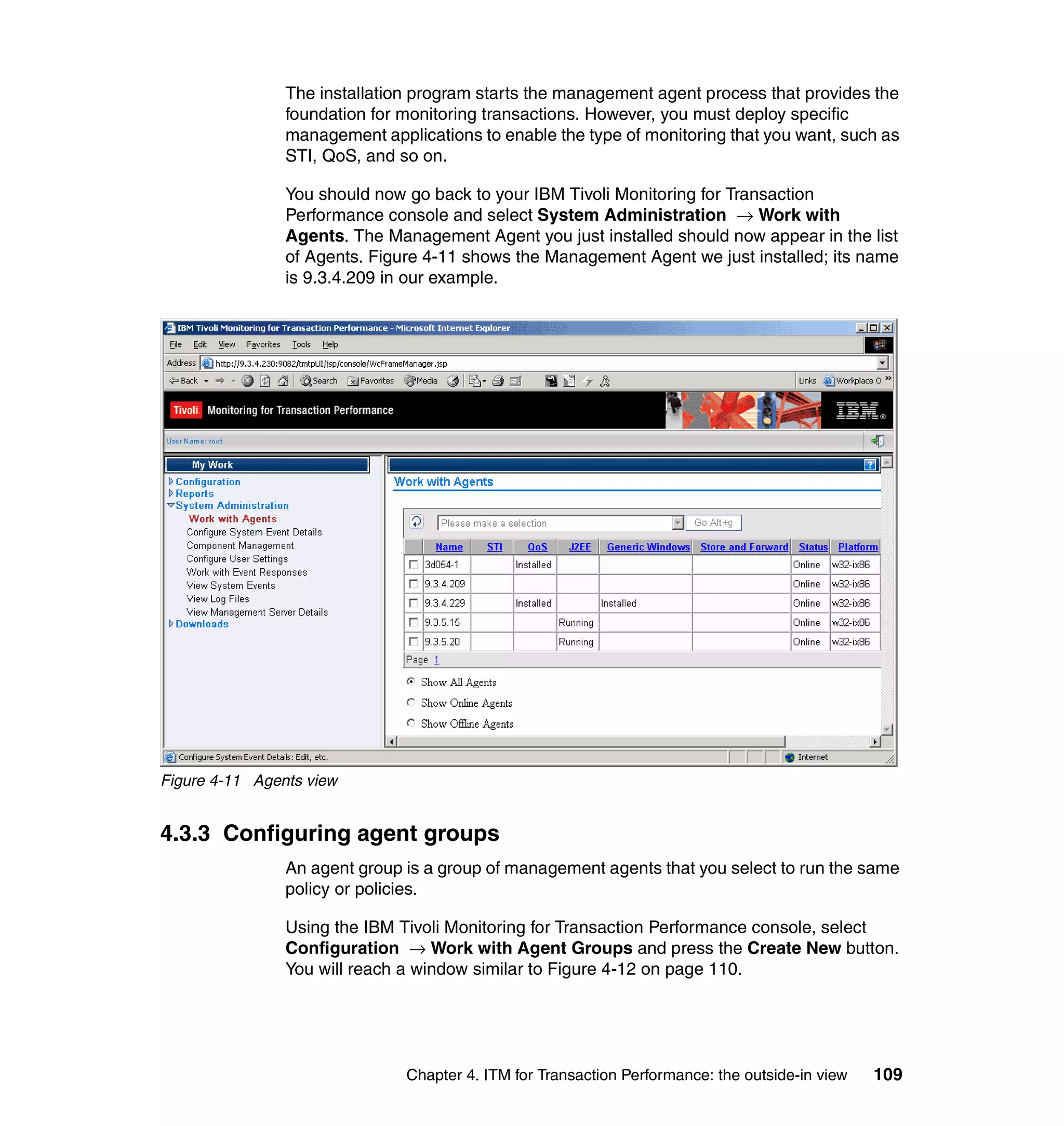
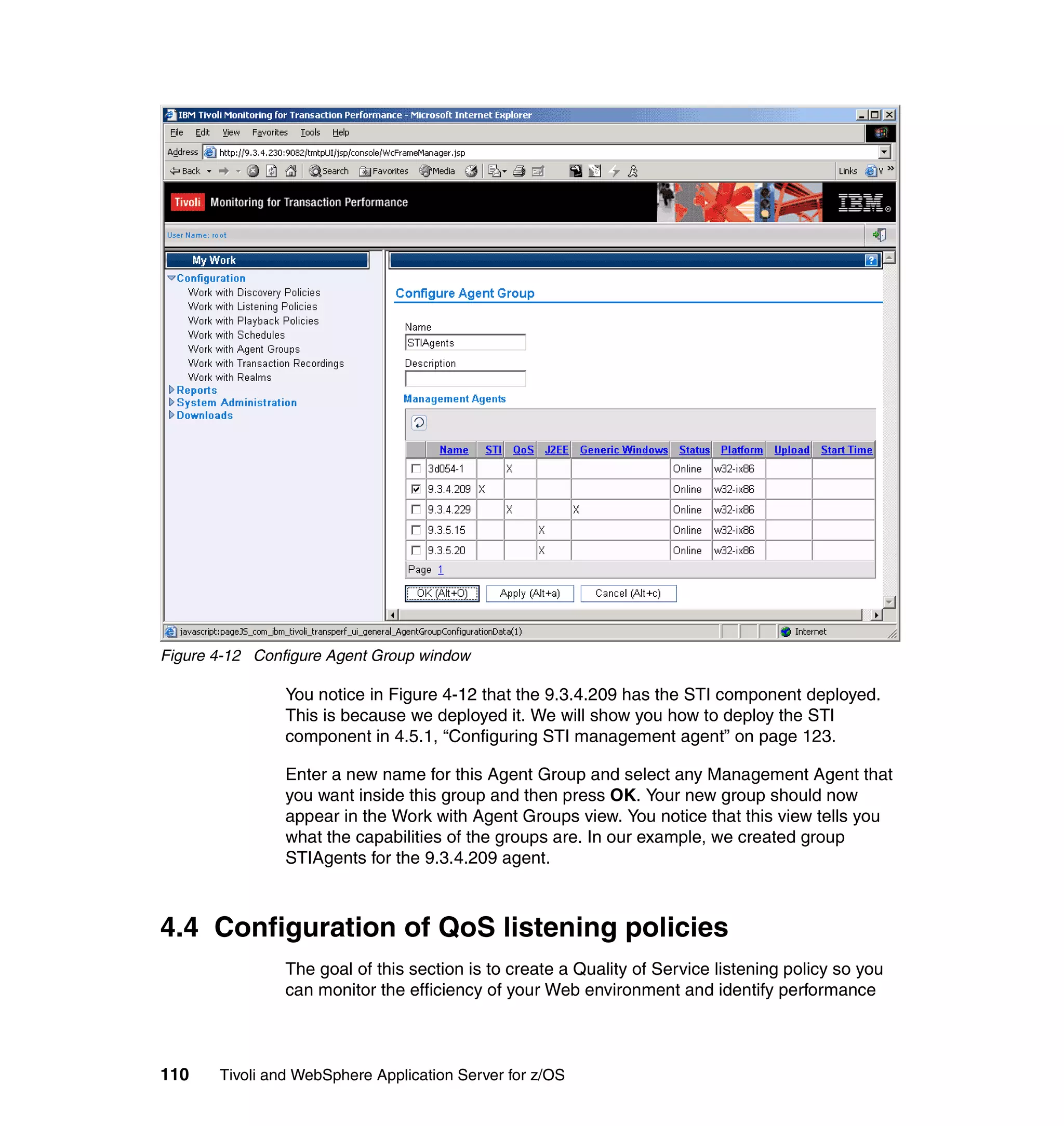


Front cover


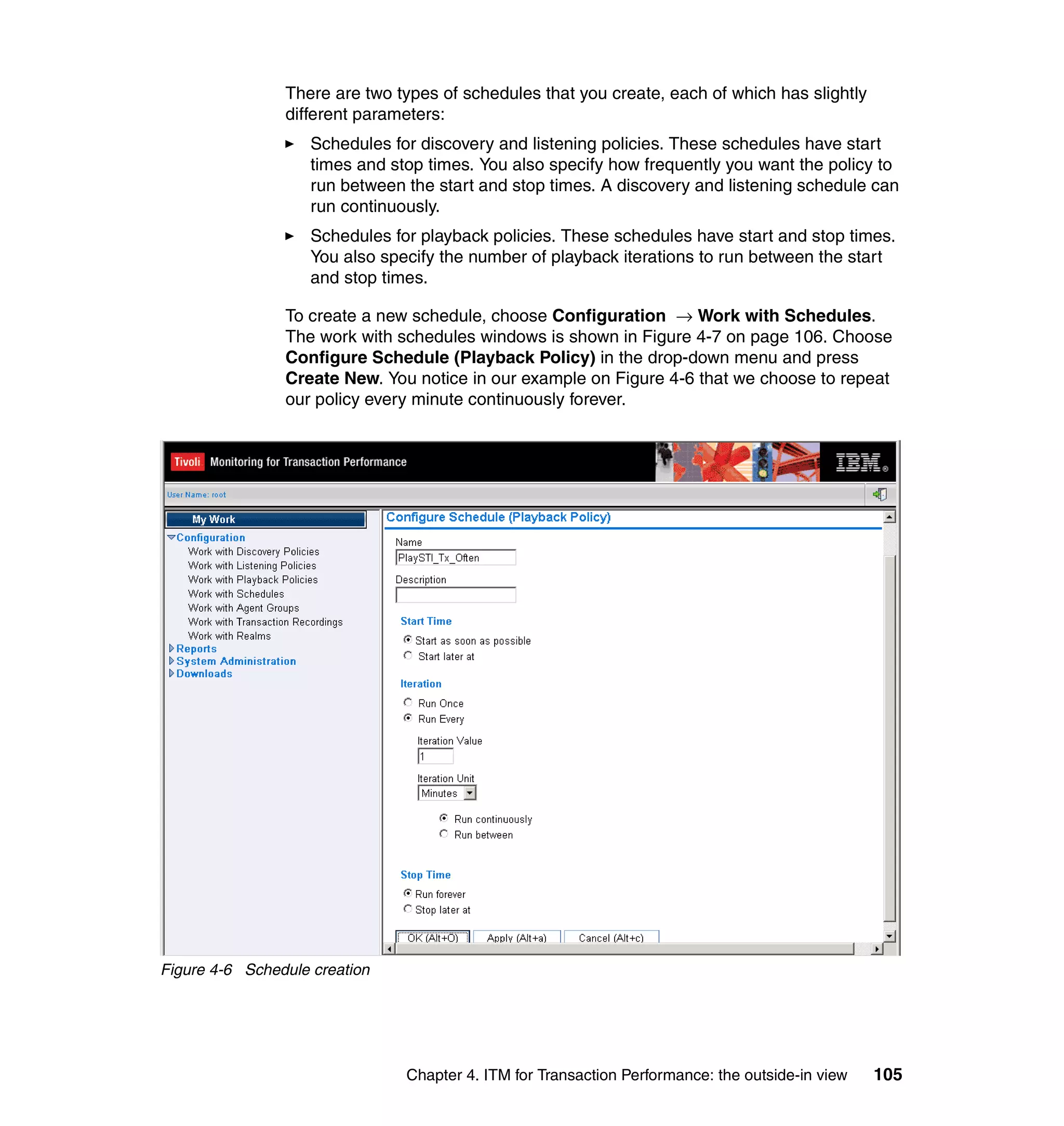
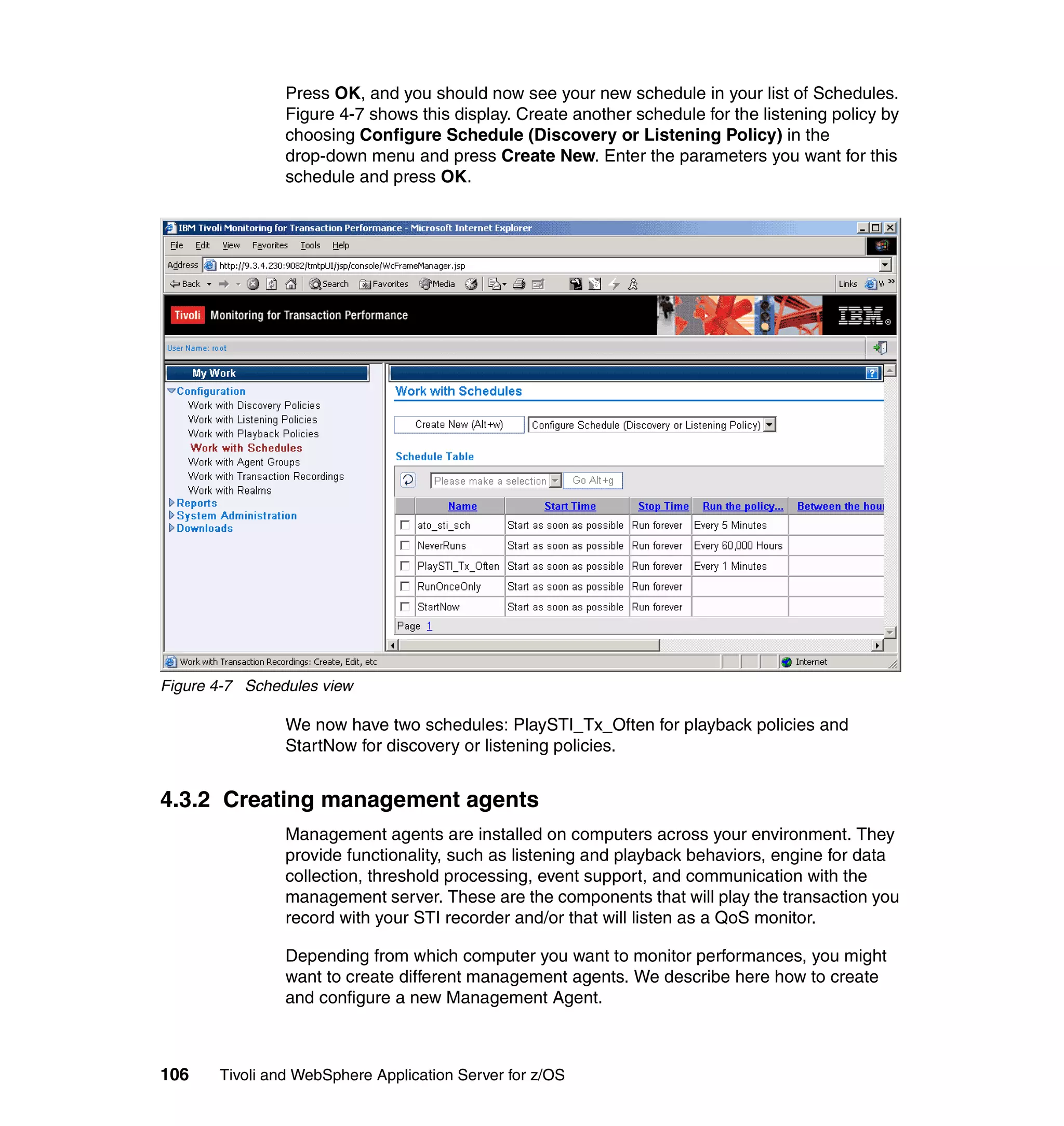
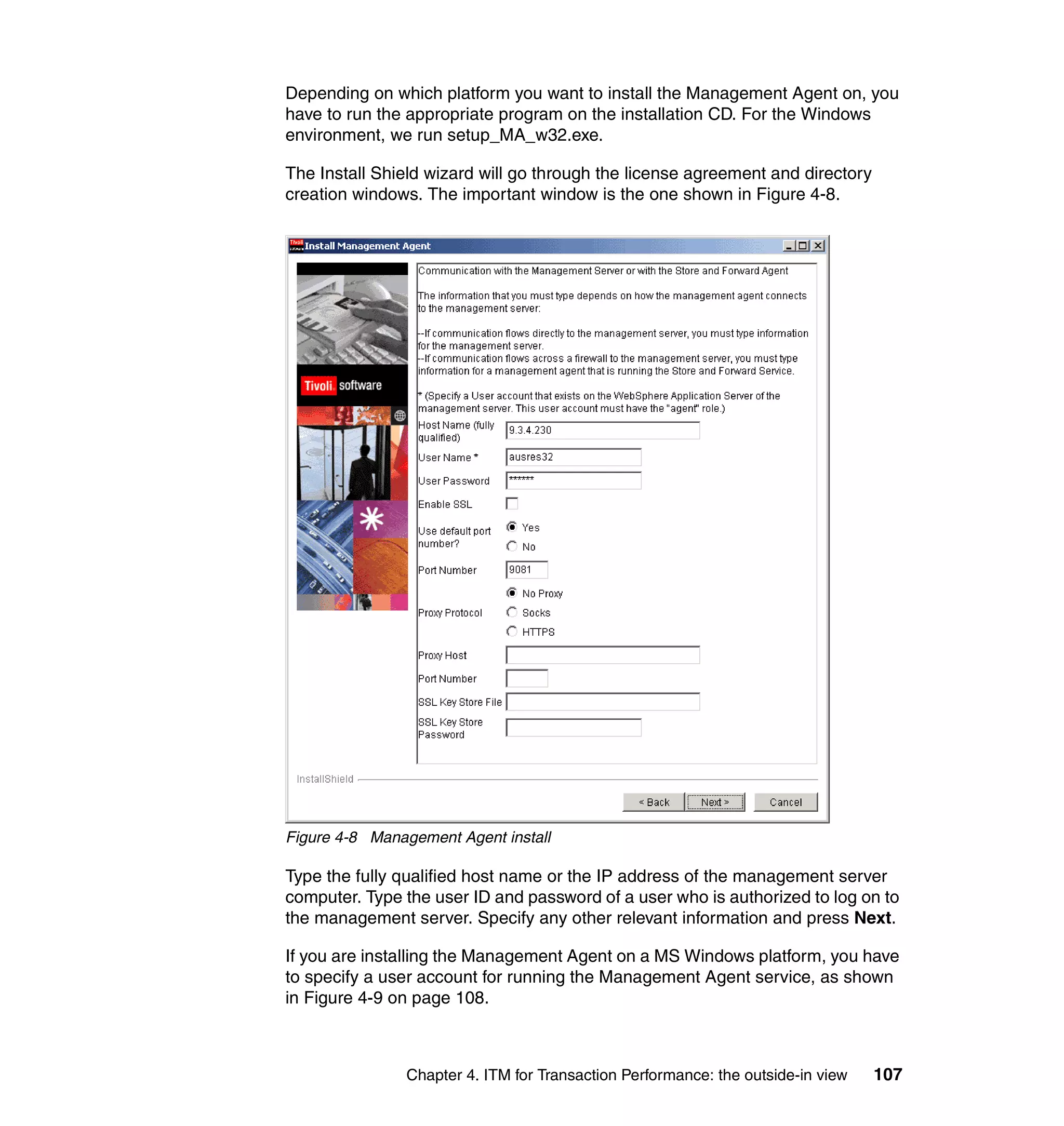
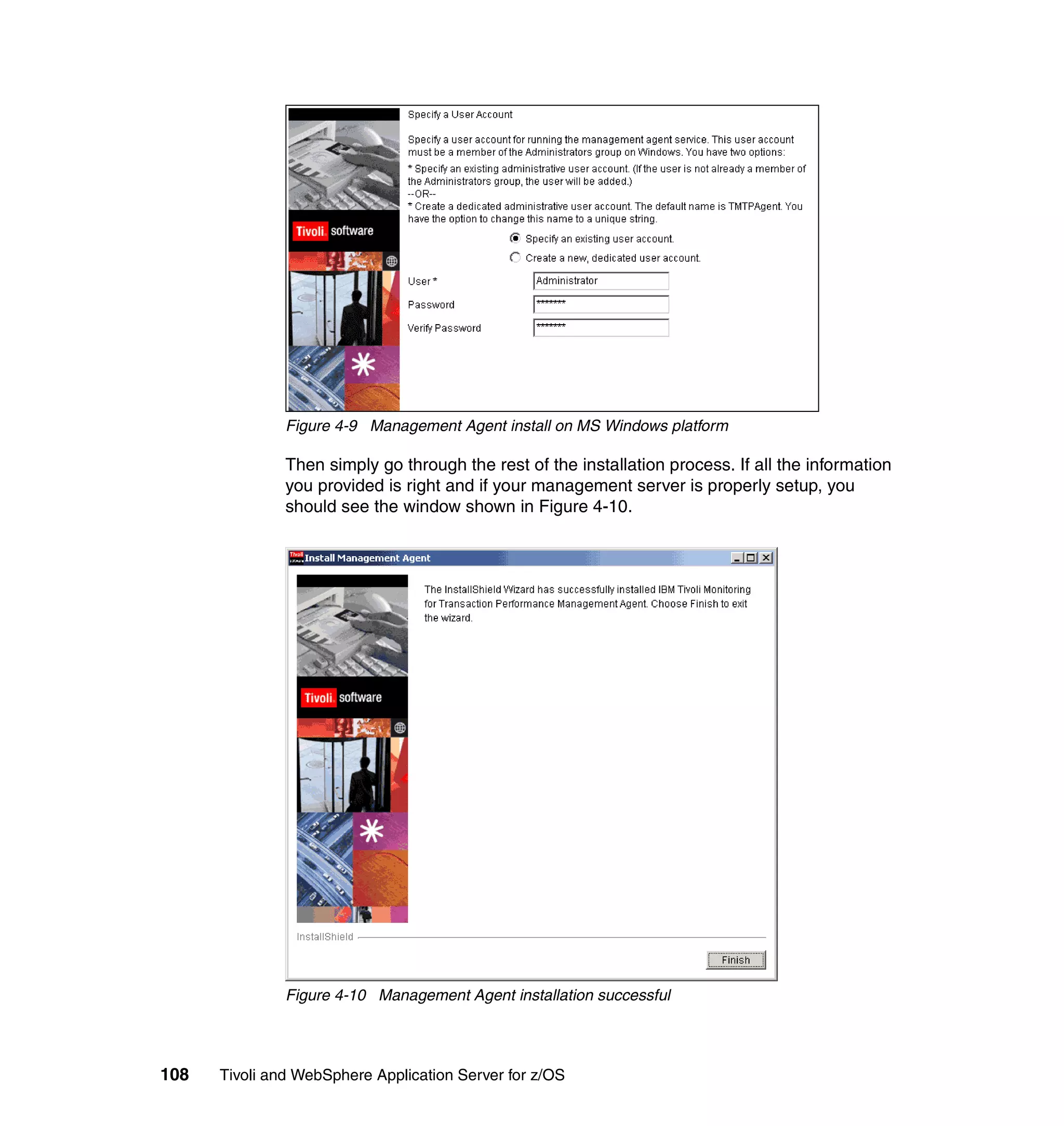
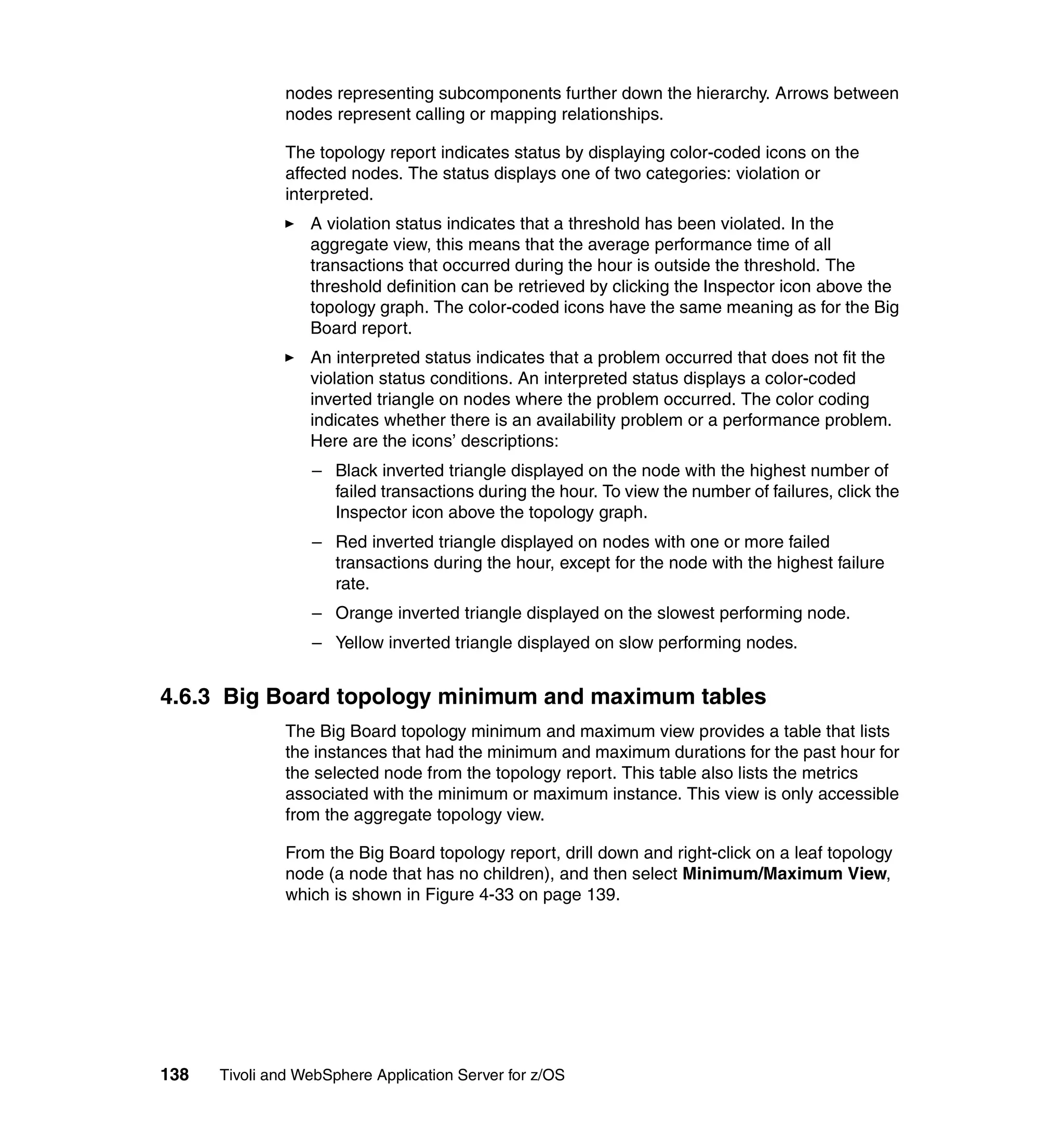
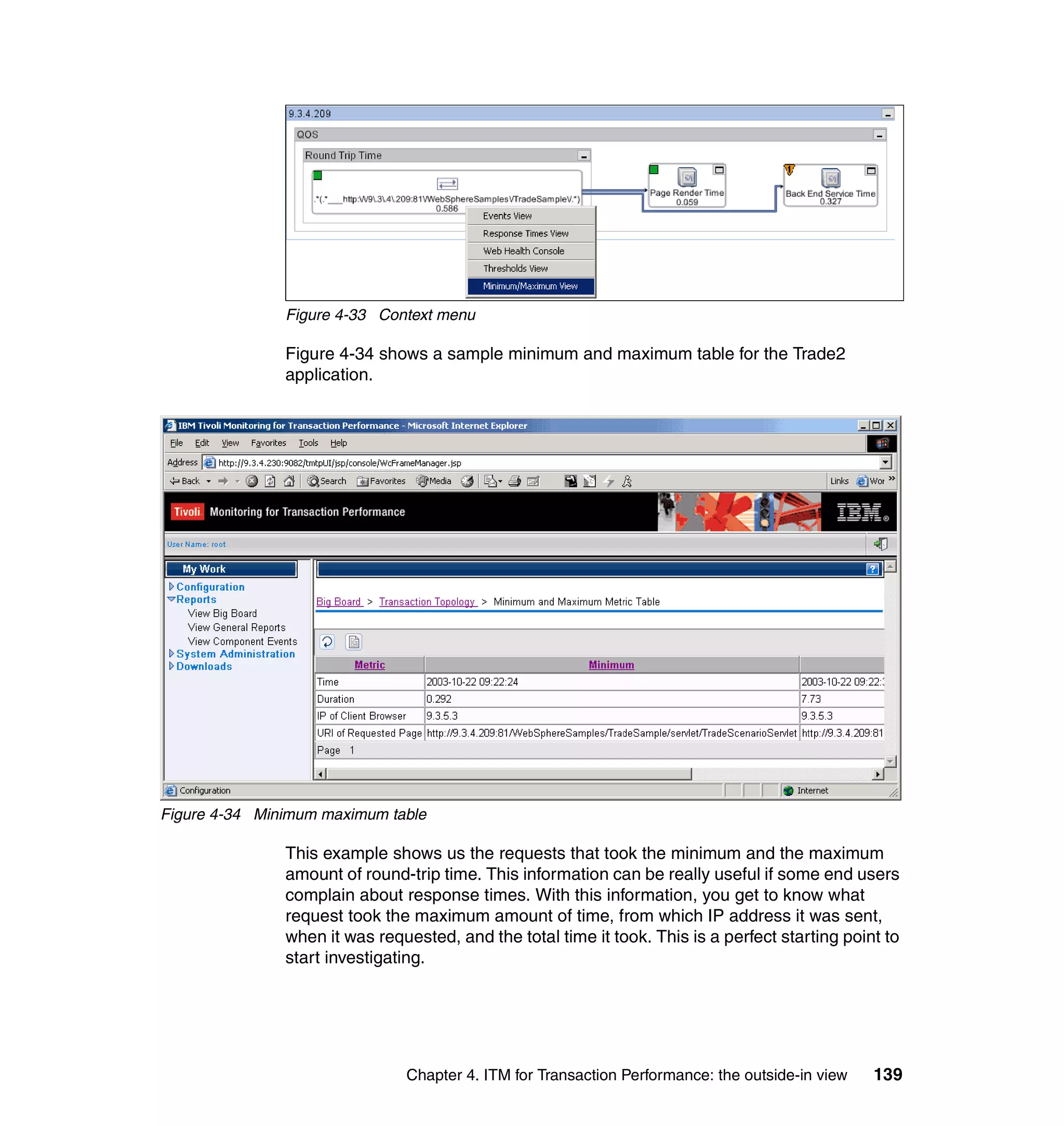
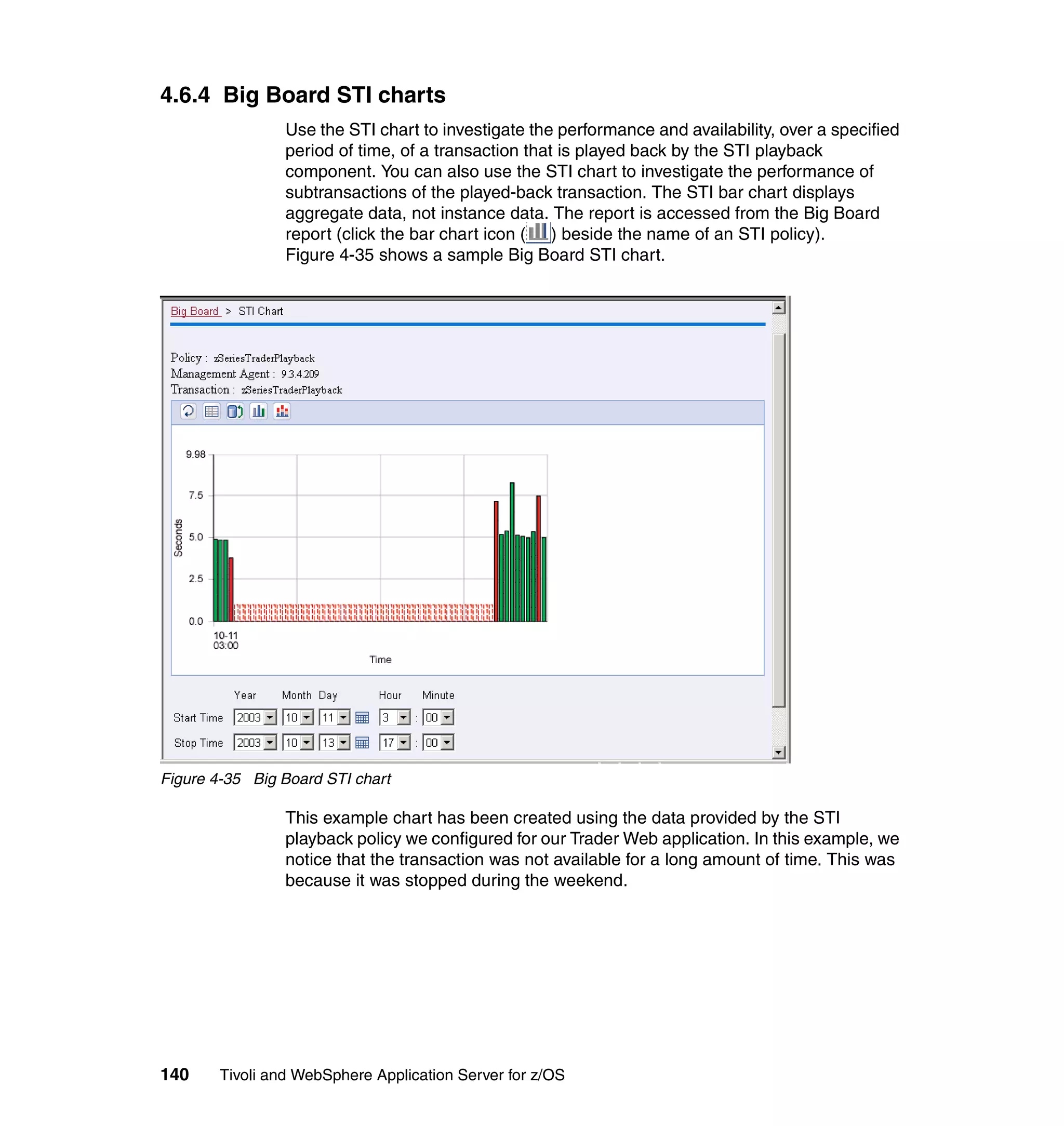
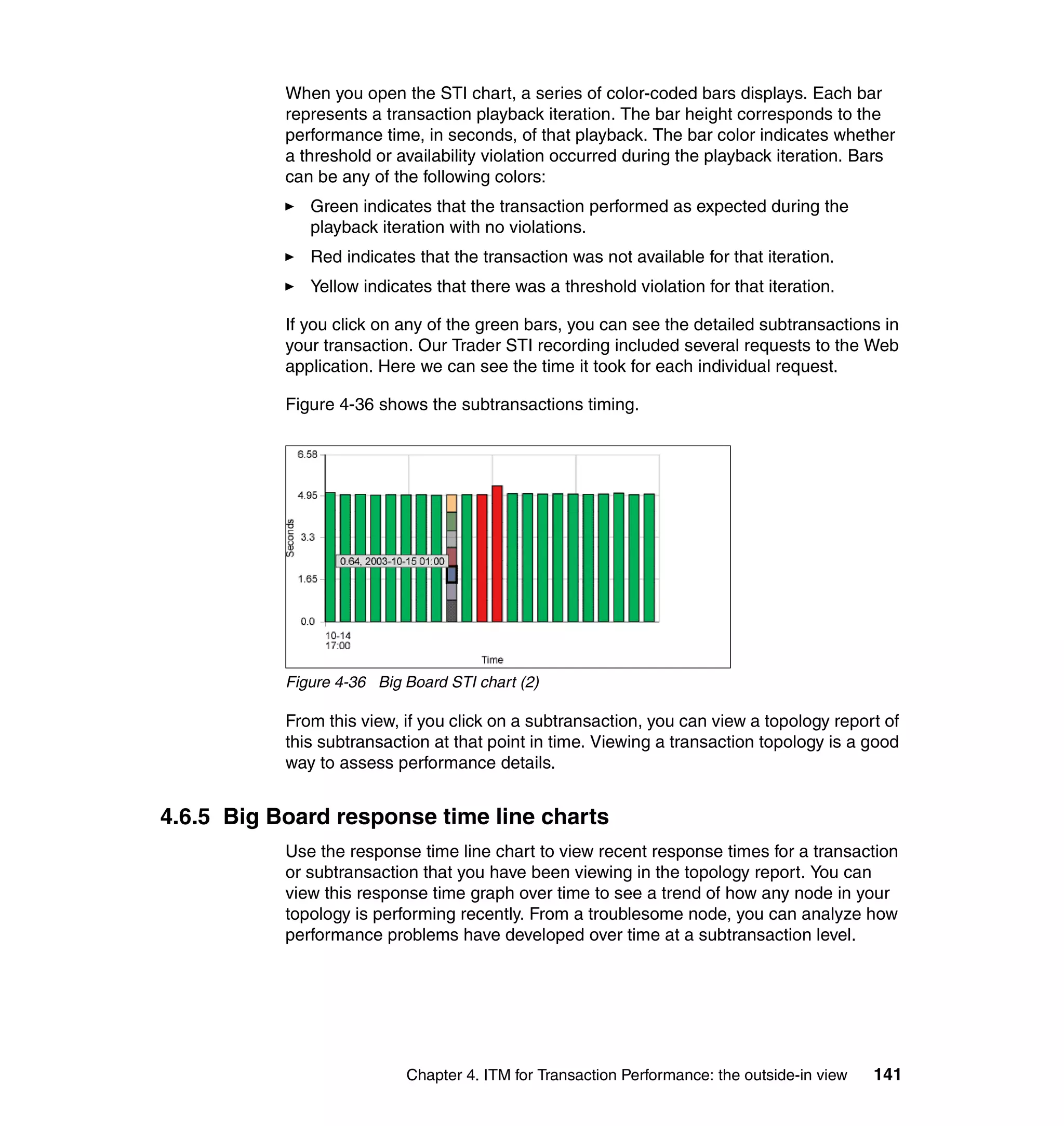
Tivoli and WebSphere
              Sphere
Application Server for
         on
z/OS
Comprehensive management of
WebSphere Application Server

From performance and
availability to security

Extensive examples and
scenarios


                                                 Budi Darmawan
                                             Foulques de Valence
                                                Daniela Chersoni


ibm.com/redbooks
International Technical Support Organization

Tivoli and WebSphere Application Server for z/OS

January 2004


                                               SG24-7062-00
Note: Before using this information and the product it supports, read the information in
 “Notices” on page xvii.


First Edition (January 2004)
This edition applies to IBM WebSphere Application Server for z/OS Version 4.0.1, IBM Tivoli
Monitoring for Web Infrastructure Version 5.1.1, IBM Tivoli Monitoring for Transaction
Performance Version 5.2, IBM System Automation for z/OS Version 2.2and IBM Tivoli Access
Manager for e-business Version 4.1.

© Copyright International Business Machines Corporation 2004. All rights reserved.
Note to U.S. Government Users Restricted Rights -- Use, duplication or disclosure restricted by GSA ADP
Schedule Contract with IBM Corp.
Contents

                 Figures . . . . . . . . . . . . . . . . . . . . . . . . . . . . . . . . . . . . . . . . . . . . . . . . . . . . . . . ix

                 Tables . . . . . . . . . . . . . . . . . . . . . . . . . . . . . . . . . . . . . . . . . . . . . . . . . . . . . . . xv

                 Notices . . . . . . . . . . . . . . . . . . . . . . . . . . . . . . . . . . . . . . . . . . . . . . . . . . . . . xvii
                 Trademarks . . . . . . . . . . . . . . . . . . . . . . . . . . . . . . . . . . . . . . . . . . . . . . . . . . xviii

                 Preface . . . . . . . . . . . . . . . . . . . . . . . . . . . . . . . . . . . . . . . . . . . . . . . . . . . . . . xix
                 The team that wrote this redbook. . . . . . . . . . . . . . . . . . . . . . . . . . . . . . . . . . . xix
                 Become a published author . . . . . . . . . . . . . . . . . . . . . . . . . . . . . . . . . . . . . . . xxi
                 Comments welcome. . . . . . . . . . . . . . . . . . . . . . . . . . . . . . . . . . . . . . . . . . . . . xxi

                 Chapter 1. Introduction . . . . . . . . . . . . . . . . . . . . . . . . . . . . . . . . . . . . . . . . . . 1
                 1.1 Managing WebSphere Application Server for z/OS . . . . . . . . . . . . . . . . . . 2
                 1.2 IBM automation blueprint . . . . . . . . . . . . . . . . . . . . . . . . . . . . . . . . . . . . . . 2
                 1.3 Our operating environment . . . . . . . . . . . . . . . . . . . . . . . . . . . . . . . . . . . . . 4
                 1.4 Document organization . . . . . . . . . . . . . . . . . . . . . . . . . . . . . . . . . . . . . . . . 6

                 Chapter 2. Our WebSphere Application Server for z/OS environment. . . . 9
                 2.1 WebSphere Application Server for z/OS environment . . . . . . . . . . . . . . . 10
                 2.2 IBM HTTP server and WebSphere z/OS HTTP plug-in . . . . . . . . . . . . . . 12
                 2.3 WebSphere Application Server for z/OS and DB2 . . . . . . . . . . . . . . . . . . 15
                    2.3.1 Creating a new J2EE server . . . . . . . . . . . . . . . . . . . . . . . . . . . . . . . 15
                    2.3.2 Installing the Trade2 application . . . . . . . . . . . . . . . . . . . . . . . . . . . . 19
                 2.4 WebSphere Application Server for z/OS and CICS . . . . . . . . . . . . . . . . . 22
                    2.4.1 Installing the Trader application within CICS . . . . . . . . . . . . . . . . . . 23
                    2.4.2 Enabling CICS connector support for WebSphere for z/OS . . . . . . . 25
                    2.4.3 Deploying the Trader presentation logic to WebSphere z/OS . . . . . 29
                 2.5 WebSphere Studio Workload Simulator for z/OS . . . . . . . . . . . . . . . . . . . 33

                 Chapter 3. IBM Tivoli Monitoring for Web Infrastructure: the inside-out
                            viewpoint . . . . . . . . . . . . . . . . . . . . . . . . . . . . . . . . . . . . . . . . . . . 41
                 3.1 What IBM Tivoli Monitoring for Web Infrastructure is . . . . . . . . . . . . . . . . 42
                    3.1.1 Availability management . . . . . . . . . . . . . . . . . . . . . . . . . . . . . . . . . . 43
                    3.1.2 Performance management . . . . . . . . . . . . . . . . . . . . . . . . . . . . . . . . 43
                    3.1.3 Operations management. . . . . . . . . . . . . . . . . . . . . . . . . . . . . . . . . . 43
                 3.2 How ITM for Web Infrastructure works . . . . . . . . . . . . . . . . . . . . . . . . . . . 43
                 3.3 Configuration of IBM Tivoli NetView for z/OS . . . . . . . . . . . . . . . . . . . . . . 46
                    3.3.1 Configuring the NetView UNIX System Services server . . . . . . . . . . 46


© Copyright IBM Corp. 2004. All rights reserved.                                                                                      iii
3.3.2 NETCONV connection . . . . . . . . . . . . . . . . . . . . . . . . . . . . . . . . . . . 47
                3.4 Configuration of WebSphere for z/OS. . . . . . . . . . . . . . . . . . . . . . . . . . . . 48
                3.5 Configuration of ITM for Web Infrastructure . . . . . . . . . . . . . . . . . . . . . . . 52
                   3.5.1 Defining the administration server. . . . . . . . . . . . . . . . . . . . . . . . . . . 52
                   3.5.2 Defining application servers . . . . . . . . . . . . . . . . . . . . . . . . . . . . . . . 55
                   3.5.3 Enabling metrics for application servers . . . . . . . . . . . . . . . . . . . . . . 58
                   3.5.4 Configuring the Data Collector . . . . . . . . . . . . . . . . . . . . . . . . . . . . . 63
                   3.5.5 Defining profiles to monitor application servers . . . . . . . . . . . . . . . . 64
                   3.5.6 Configuring the Web Health Console . . . . . . . . . . . . . . . . . . . . . . . . 70
                3.6 Usage examples . . . . . . . . . . . . . . . . . . . . . . . . . . . . . . . . . . . . . . . . . . . . 72
                   3.6.1 IBM Tivoli desktop. . . . . . . . . . . . . . . . . . . . . . . . . . . . . . . . . . . . . . . 72
                   3.6.2 IBM Tivoli Monitoring Web Health Console. . . . . . . . . . . . . . . . . . . . 74
                   3.6.3 Application Server Status resource model . . . . . . . . . . . . . . . . . . . . 76
                   3.6.4 EJBs resource model . . . . . . . . . . . . . . . . . . . . . . . . . . . . . . . . . . . . 78
                   3.6.5 HTTP Sessions resource model . . . . . . . . . . . . . . . . . . . . . . . . . . . . 82
                   3.6.6 DB Pools resource model . . . . . . . . . . . . . . . . . . . . . . . . . . . . . . . . . 83
                   3.6.7 JVM resource model . . . . . . . . . . . . . . . . . . . . . . . . . . . . . . . . . . . . . 83
                   3.6.8 Thread Pools resource model . . . . . . . . . . . . . . . . . . . . . . . . . . . . . . 86
                   3.6.9 Transactions resource model . . . . . . . . . . . . . . . . . . . . . . . . . . . . . . 87
                   3.6.10 Web Applications resource model. . . . . . . . . . . . . . . . . . . . . . . . . . 89

                Chapter 4. ITM for Transaction Performance: the outside-in view . . . . . . 95
                4.1 IBM Tivoli Monitoring for Transaction Performance . . . . . . . . . . . . . . . . . 96
                4.2 How IBM Tivoli Monitoring for Transaction Performance works . . . . . . . . 97
                   4.2.1 Discovery component . . . . . . . . . . . . . . . . . . . . . . . . . . . . . . . . . . . . 97
                   4.2.2 Listening component . . . . . . . . . . . . . . . . . . . . . . . . . . . . . . . . . . . . . 97
                   4.2.3 Playback component. . . . . . . . . . . . . . . . . . . . . . . . . . . . . . . . . . . . 100
                4.3 Schedules and agent groups configuration . . . . . . . . . . . . . . . . . . . . . . . 103
                   4.3.1 Configuring schedules. . . . . . . . . . . . . . . . . . . . . . . . . . . . . . . . . . . 104
                   4.3.2 Creating management agents. . . . . . . . . . . . . . . . . . . . . . . . . . . . . 106
                   4.3.3 Configuring agent groups . . . . . . . . . . . . . . . . . . . . . . . . . . . . . . . . 109
                4.4 Configuration of QoS listening policies . . . . . . . . . . . . . . . . . . . . . . . . . . 110
                   4.4.1 Configuring management agents . . . . . . . . . . . . . . . . . . . . . . . . . . 112
                   4.4.2 Configuring the QoS listener . . . . . . . . . . . . . . . . . . . . . . . . . . . . . . 114
                   4.4.3 Configuring QoS thresholds . . . . . . . . . . . . . . . . . . . . . . . . . . . . . . 117
                   4.4.4 Choosing a QoS schedule . . . . . . . . . . . . . . . . . . . . . . . . . . . . . . . 119
                   4.4.5 Choosing a QoS agent group . . . . . . . . . . . . . . . . . . . . . . . . . . . . . 120
                   4.4.6 Assigning a name . . . . . . . . . . . . . . . . . . . . . . . . . . . . . . . . . . . . . . 121
                4.5 Configuration of STI playback policy . . . . . . . . . . . . . . . . . . . . . . . . . . . . 123
                   4.5.1 Configuring STI management agent . . . . . . . . . . . . . . . . . . . . . . . . 123
                   4.5.2 Configuring transaction recordings . . . . . . . . . . . . . . . . . . . . . . . . . 124
                   4.5.3 Configuring a STI playback policy. . . . . . . . . . . . . . . . . . . . . . . . . . 131
                4.6 Usage examples . . . . . . . . . . . . . . . . . . . . . . . . . . . . . . . . . . . . . . . . . . . 134


iv   Tivoli and WebSphere Application Server for z/OS
4.6.1 The Big Board report. . . . . . . . . . . . . . . . . . . . . . . . . . . . . . . . . . . . 135
    4.6.2 Big Board topology reports . . . . . . . . . . . . . . . . . . . . . . . . . . . . . . . 136
    4.6.3 Big Board topology minimum and maximum tables . . . . . . . . . . . . 138
    4.6.4 Big Board STI charts . . . . . . . . . . . . . . . . . . . . . . . . . . . . . . . . . . . . 140
    4.6.5 Big Board response time line charts . . . . . . . . . . . . . . . . . . . . . . . . 141
    4.6.6 General report: overall transaction over time graphs . . . . . . . . . . . 143
    4.6.7 General report: transaction with subtransactions graphs . . . . . . . . 145
    4.6.8 General report: slowest transactions tables . . . . . . . . . . . . . . . . . . 146
    4.6.9 General report: availability graphs . . . . . . . . . . . . . . . . . . . . . . . . . 147
    4.6.10 General report: page analyzer viewer reports . . . . . . . . . . . . . . . . 149
    4.6.11 General report: table views . . . . . . . . . . . . . . . . . . . . . . . . . . . . . . 152
    4.6.12 General report: component events reports . . . . . . . . . . . . . . . . . . 153

Chapter 5. System Automation for z/OS: automation & high availability155
5.1 IBM System Automation for z/OS overview . . . . . . . . . . . . . . . . . . . . . . 156
   5.1.1 Concepts . . . . . . . . . . . . . . . . . . . . . . . . . . . . . . . . . . . . . . . . . . . . . 156
   5.1.2 System Automation for z/OS objects . . . . . . . . . . . . . . . . . . . . . . . 156
   5.1.3 Solution components. . . . . . . . . . . . . . . . . . . . . . . . . . . . . . . . . . . . 157
5.2 Getting started with policy database . . . . . . . . . . . . . . . . . . . . . . . . . . . . 158
   5.2.1 Allocate data sets for the customization dialog . . . . . . . . . . . . . . . . 158
   5.2.2 Allocate policy database . . . . . . . . . . . . . . . . . . . . . . . . . . . . . . . . . 159
   5.2.3 Using the sample policy database for WebSphere . . . . . . . . . . . . . 164
5.3 Defining policies for WebSphere Application Server . . . . . . . . . . . . . . . . 165
   5.3.1 Describing your environment . . . . . . . . . . . . . . . . . . . . . . . . . . . . . 165
   5.3.2 Application and application group design . . . . . . . . . . . . . . . . . . . . 184
   5.3.3 Defining applications . . . . . . . . . . . . . . . . . . . . . . . . . . . . . . . . . . . . 186
   5.3.4 Application group creation. . . . . . . . . . . . . . . . . . . . . . . . . . . . . . . . 208
   5.3.5 Linking application groups to their parent . . . . . . . . . . . . . . . . . . . . 212
   5.3.6 Defining relationships . . . . . . . . . . . . . . . . . . . . . . . . . . . . . . . . . . . 214
   5.3.7 Activating System Automation for z/OS . . . . . . . . . . . . . . . . . . . . . 216
   5.3.8 Activating the WebSphere Application Server automation . . . . . . . 221
5.4 Sample usage . . . . . . . . . . . . . . . . . . . . . . . . . . . . . . . . . . . . . . . . . . . . . 226

Chapter 6. IBM Tivoli Access Manager: securing WebSphere for z/OS . 235
6.1 Introducing IBM Tivoli Access Manager . . . . . . . . . . . . . . . . . . . . . . . . . 236
   6.1.1 IBM Tivoli Access Manager features. . . . . . . . . . . . . . . . . . . . . . . . 236
   6.1.2 IBM Tivoli Access Manager secure domain . . . . . . . . . . . . . . . . . . 237
   6.1.3 Using z/OS LDAP native authentication . . . . . . . . . . . . . . . . . . . . . 239
6.2 Configuration of z/OS LDAP native authentication . . . . . . . . . . . . . . . . . 240
   6.2.1 Configuring LDAP on z/OS . . . . . . . . . . . . . . . . . . . . . . . . . . . . . . . 241
   6.2.2 Configuring LDAP native authentication . . . . . . . . . . . . . . . . . . . . . 249
   6.2.3 Configuring LDAP on z/OS for IBM Tivoli Access Manager . . . . . . 251
   6.2.4 Configuring IBM Tivoli Access Manager with LDAP on z/OS . . . . . 252


                                                                                             Contents        v
6.3 Using IBM Tivoli Access Manager with RACF . . . . . . . . . . . . . . . . . . . . 259
                   6.3.1 WebSEAL junction to WebSphere for z/OS . . . . . . . . . . . . . . . . . . 260
                   6.3.2 Creating a new IBM Tivoli Access Manager user . . . . . . . . . . . . . . 264
                   6.3.3 First user logon and password change . . . . . . . . . . . . . . . . . . . . . . 268
                6.4 Single sign-on with Trust Association Interceptor . . . . . . . . . . . . . . . . . . 270
                   6.4.1 The SWIPE application . . . . . . . . . . . . . . . . . . . . . . . . . . . . . . . . . . 272
                   6.4.2 Configuring WebSphere for z/OS for authentication . . . . . . . . . . . . 279
                   6.4.3 Configuring WebSEAL to transfer identity. . . . . . . . . . . . . . . . . . . . 282
                   6.4.4 Trust Association Interceptor . . . . . . . . . . . . . . . . . . . . . . . . . . . . . 285

                Appendix A. Tivoli Management Framework: a short overview . . . . . . . 295
                The framework . . . . . . . . . . . . . . . . . . . . . . . . . . . . . . . . . . . . . . . . . . . . . . . . 296
                Physical management environment . . . . . . . . . . . . . . . . . . . . . . . . . . . . . . . . 297
                Working with the framework . . . . . . . . . . . . . . . . . . . . . . . . . . . . . . . . . . . . . . 298

                Appendix B. IBM Tivoli NetView for z/OS: a short overview . . . . . . . . . . 303
                IBM Tivoli NetView for z/OS concepts . . . . . . . . . . . . . . . . . . . . . . . . . . . . . . 304
                IBM Tivoli NetView for z/OS components . . . . . . . . . . . . . . . . . . . . . . . . . . . 304
                   Subsystem interface . . . . . . . . . . . . . . . . . . . . . . . . . . . . . . . . . . . . . . . . . 304
                   NetView interfaces . . . . . . . . . . . . . . . . . . . . . . . . . . . . . . . . . . . . . . . . . . 305
                   Event subsystem. . . . . . . . . . . . . . . . . . . . . . . . . . . . . . . . . . . . . . . . . . . . 305
                   Automation subsystem . . . . . . . . . . . . . . . . . . . . . . . . . . . . . . . . . . . . . . . 306

                Appendix C. The SMEUI: overview and concepts . . . . . . . . . . . . . . . . . . 307
                Introduction. . . . . . . . . . . . . . . . . . . . . . . . . . . . . . . . . . . . . . . . . . . . . . . . . . . 308
                Conversations . . . . . . . . . . . . . . . . . . . . . . . . . . . . . . . . . . . . . . . . . . . . . . . . 308
                J2EE servers . . . . . . . . . . . . . . . . . . . . . . . . . . . . . . . . . . . . . . . . . . . . . . . . . 310
                J2EE resources . . . . . . . . . . . . . . . . . . . . . . . . . . . . . . . . . . . . . . . . . . . . . . . 311
                J2EE applications . . . . . . . . . . . . . . . . . . . . . . . . . . . . . . . . . . . . . . . . . . . . . . 312
                Activation . . . . . . . . . . . . . . . . . . . . . . . . . . . . . . . . . . . . . . . . . . . . . . . . . . . . 314

                Appendix D. LDAP z/OS native authentication for TAM files. . . . . . . . . . 317
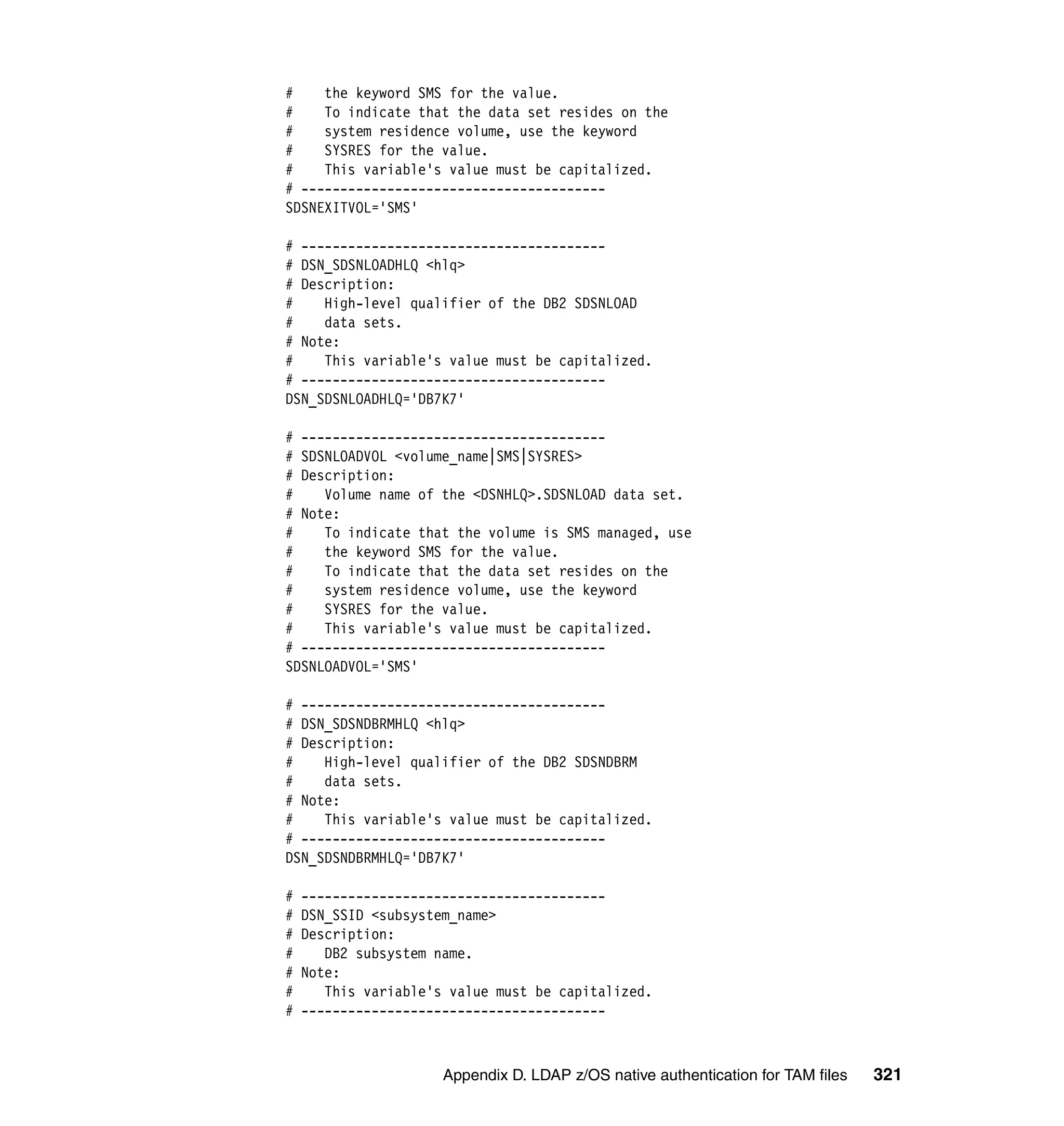
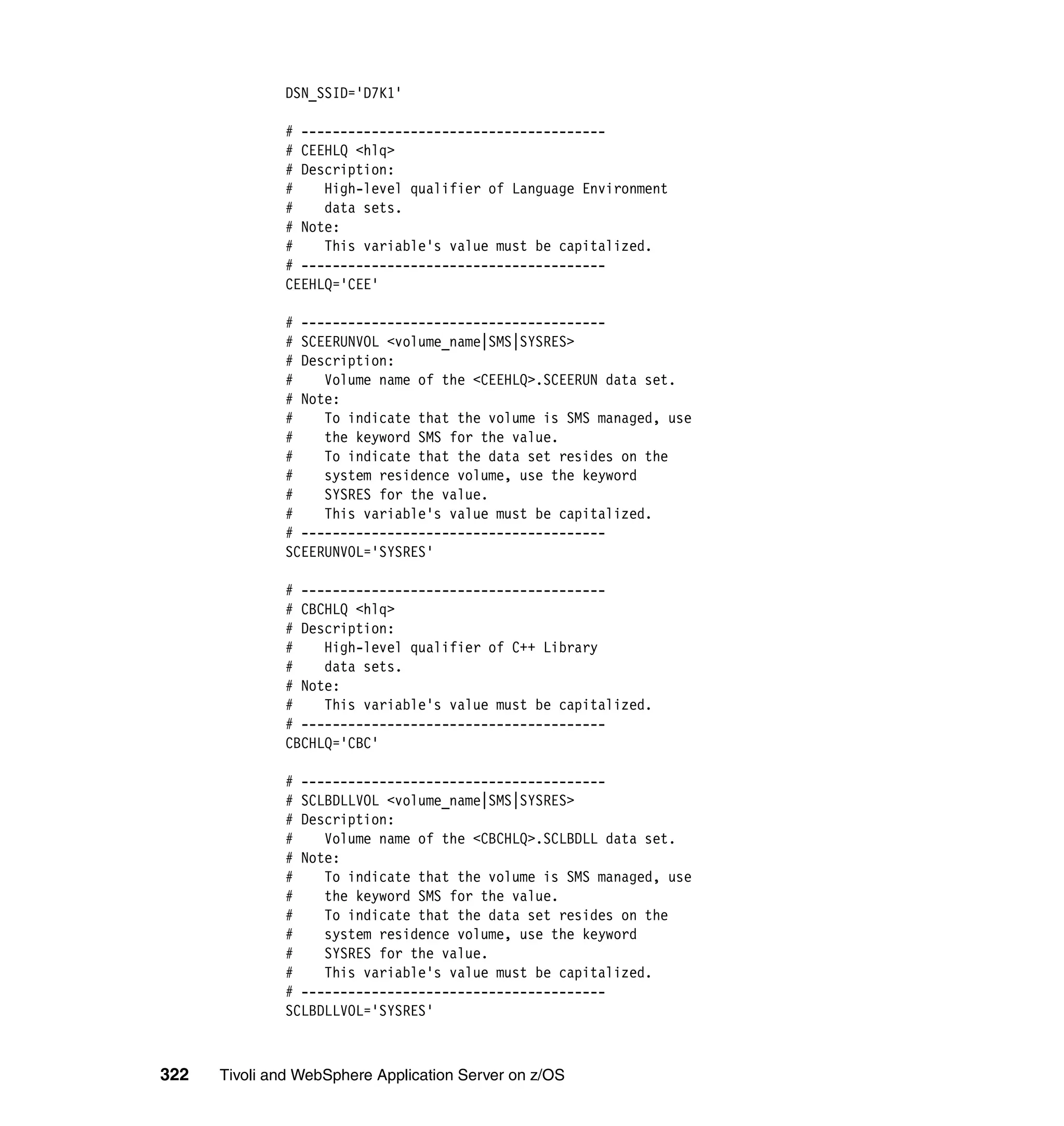
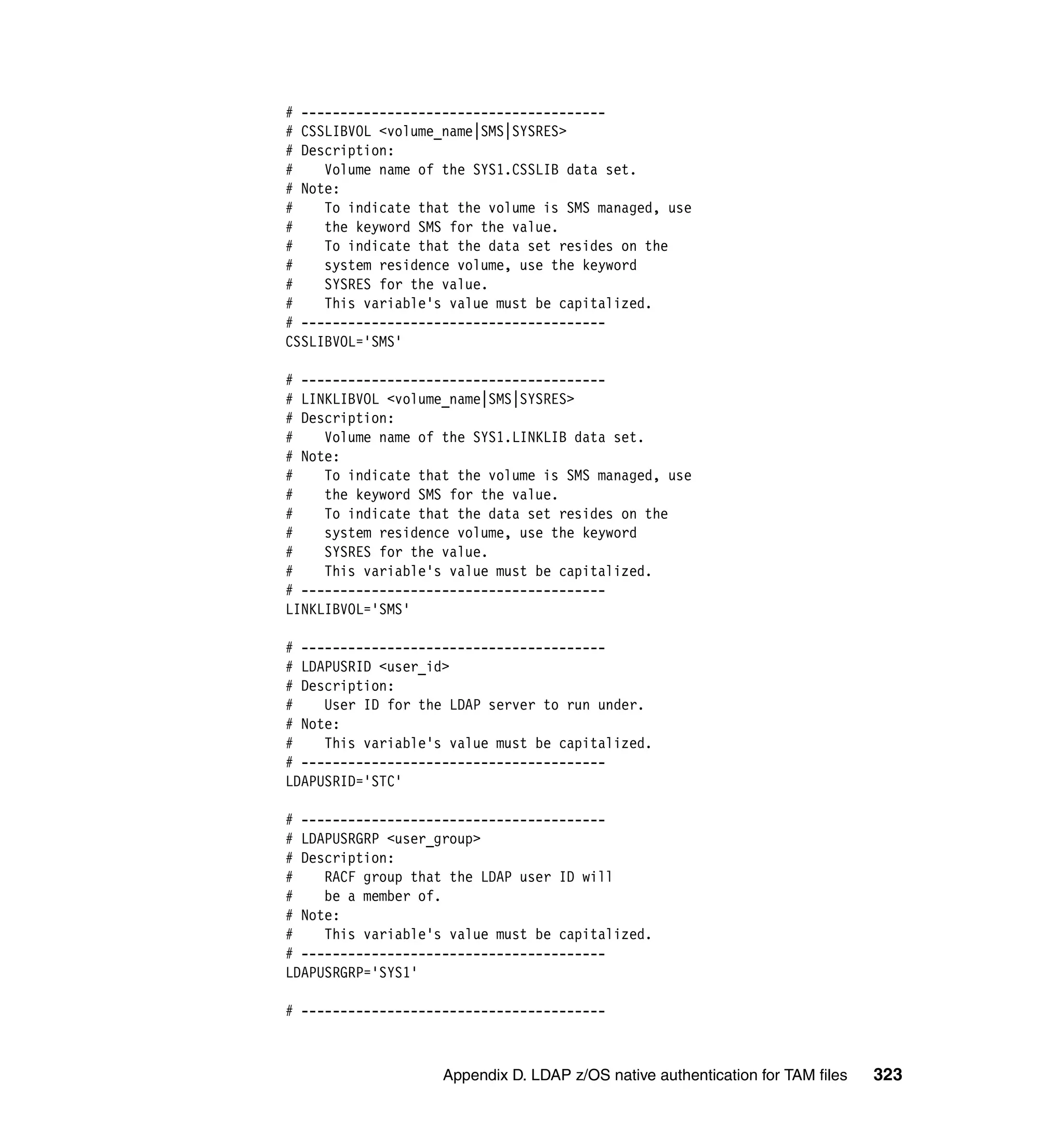
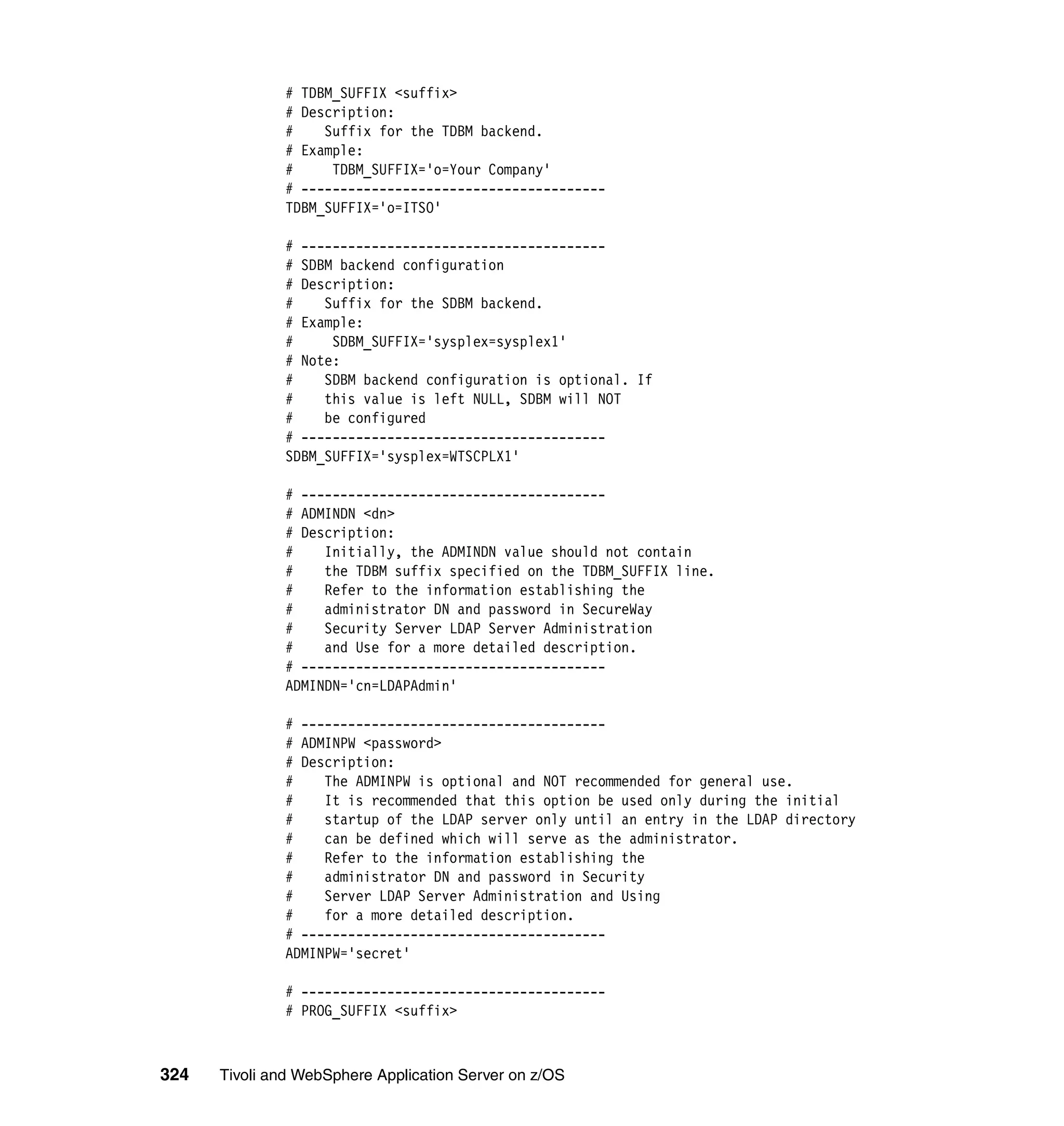
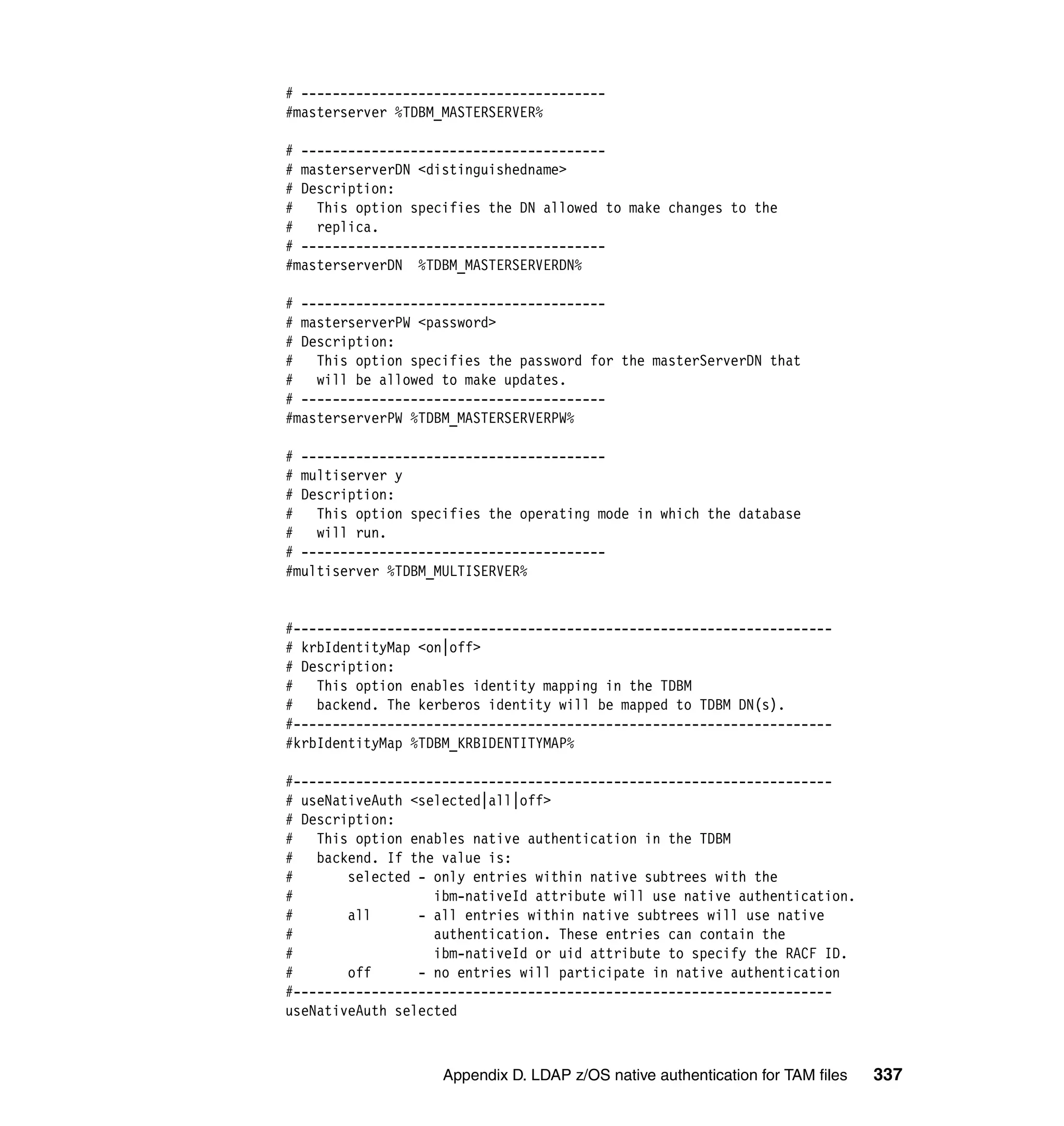
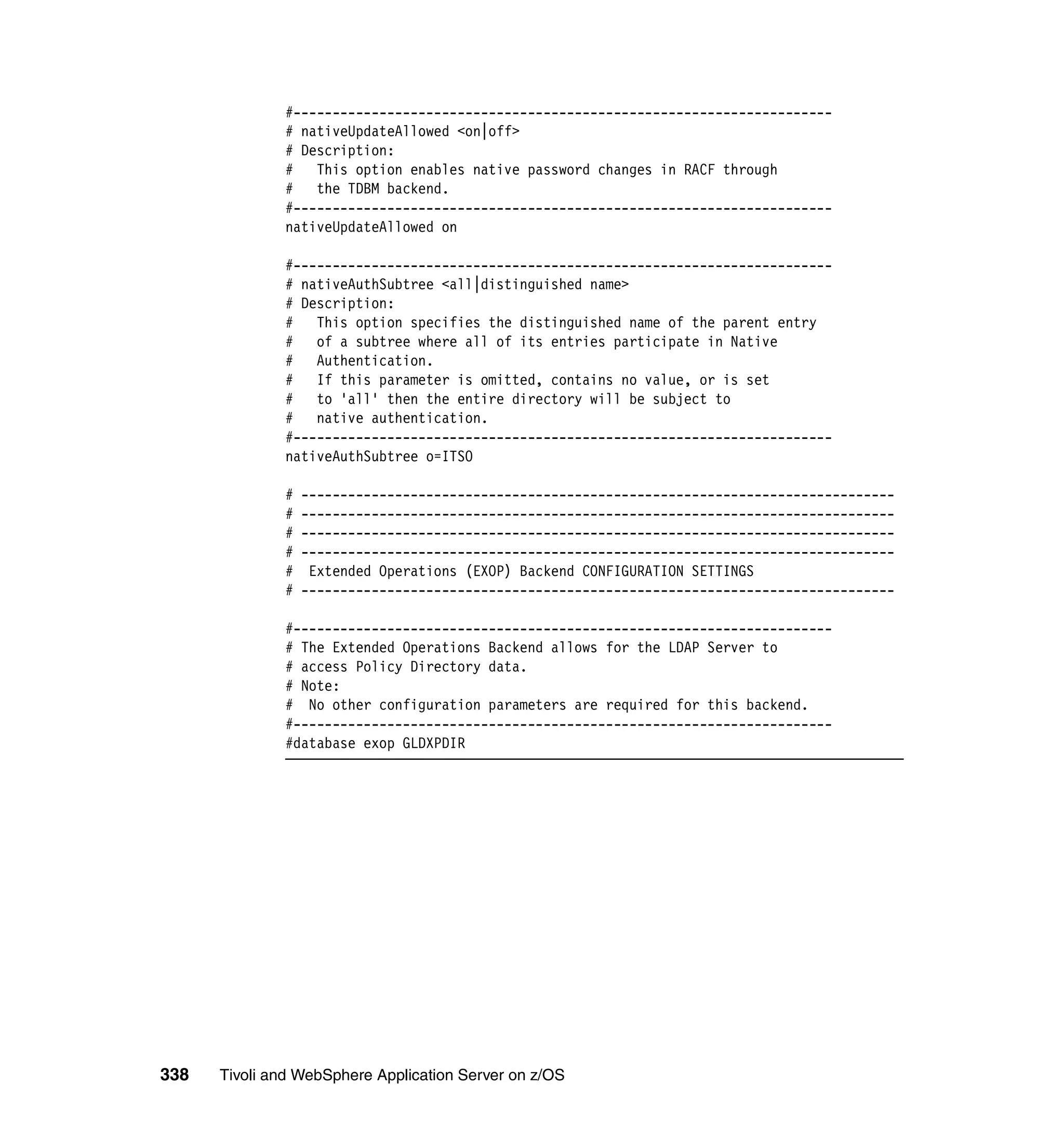
                LDAP setup configuration file: ldap.profile . . . . . . . . . . . . . . . . . . . . . . . . . . . 318
                LDAP configuration file: SLAPDCNF . . . . . . . . . . . . . . . . . . . . . . . . . . . . . . . 326

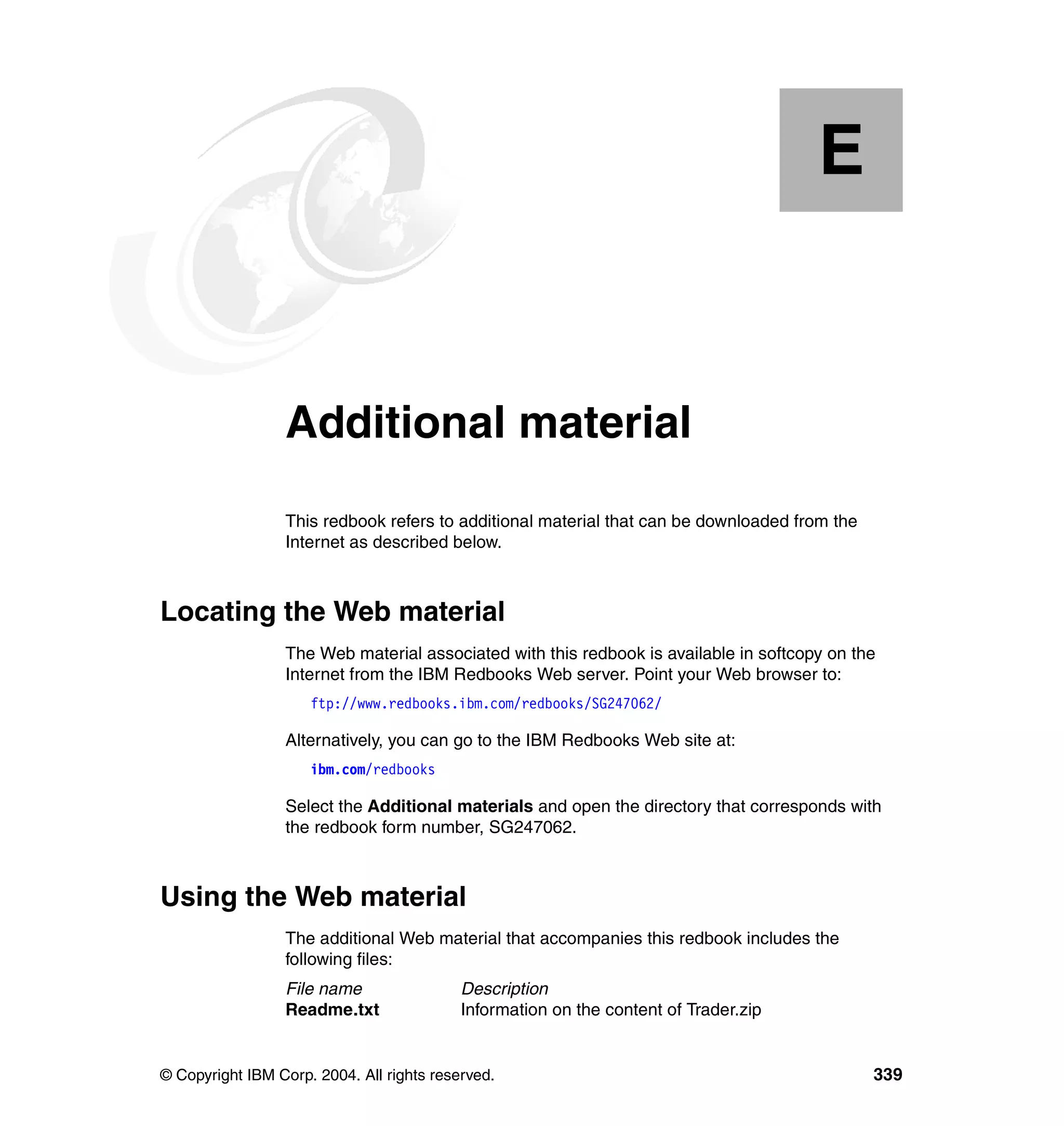
                Appendix E. Additional material . . . . . . . . . . . . . . . . . . . . . . . . . . . . . . . . 339
                Locating the Web material . . . . . . . . . . . . . . . . . . . . . . . . . . . . . . . . . . . . . . . 339
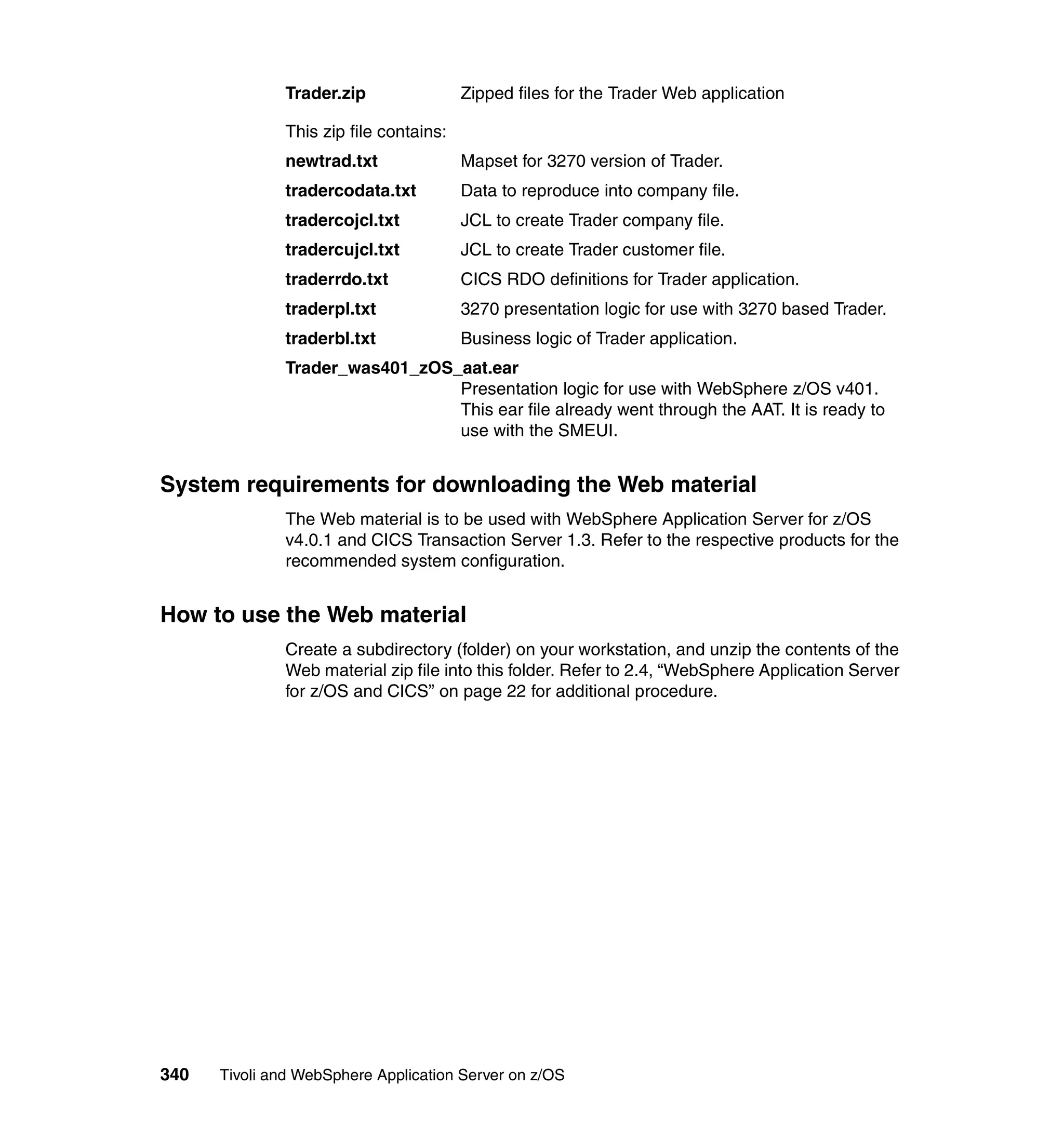
                Using the Web material . . . . . . . . . . . . . . . . . . . . . . . . . . . . . . . . . . . . . . . . . 339
                   System requirements for downloading the Web material . . . . . . . . . . . . . 340
                   How to use the Web material . . . . . . . . . . . . . . . . . . . . . . . . . . . . . . . . . . 340

                Abbreviations and acronyms . . . . . . . . . . . . . . . . . . . . . . . . . . . . . . . . . . . 341

                Related publications . . . . . . . . . . . . . . . . . . . . . . . . . . . . . . . . . . . . . . . . . . 343
                IBM Redbooks . . . . . . . . . . . . . . . . . . . . . . . . . . . . . . . . . . . . . . . . . . . . . . . . 343


vi   Tivoli and WebSphere Application Server for z/OS
Other publications . . . . . . . . . . . . . . . . . . . . . . . . . . . . . . . . . . . . . . . . . . . . . 344
Online resources . . . . . . . . . . . . . . . . . . . . . . . . . . . . . . . . . . . . . . . . . . . . . . 346
How to get IBM Redbooks . . . . . . . . . . . . . . . . . . . . . . . . . . . . . . . . . . . . . . . 346
Help from IBM . . . . . . . . . . . . . . . . . . . . . . . . . . . . . . . . . . . . . . . . . . . . . . . . 347

Index . . . . . . . . . . . . . . . . . . . . . . . . . . . . . . . . . . . . . . . . . . . . . . . . . . . . . . . 349


                                                                                                  Contents         vii
viii   Tivoli and WebSphere Application Server for z/OS
Figures

                 1-1     IBM automation blueprint . . . . . . . . . . . . . . . . . . . . . . . . . . . . . . . . . . . . . 3
                 1-2     Overall management environment . . . . . . . . . . . . . . . . . . . . . . . . . . . . . . 5
                 2-1     WebSphere Application Server for z/OS environment . . . . . . . . . . . . . . 11
                 2-2     WebSphere Application for z/OS PolicyIVP window . . . . . . . . . . . . . . . 14
                 2-3     Trade2 components and flow. . . . . . . . . . . . . . . . . . . . . . . . . . . . . . . . . 15
                 2-4     WLM administration main menu . . . . . . . . . . . . . . . . . . . . . . . . . . . . . . 16
                 2-5     Creating a new WLM application environment . . . . . . . . . . . . . . . . . . . 17
                 2-6     Trade2 application first page . . . . . . . . . . . . . . . . . . . . . . . . . . . . . . . . . 22
                 2-7     Trader components and flow . . . . . . . . . . . . . . . . . . . . . . . . . . . . . . . . . 23
                 2-8     Trader 3270 presentation logic logon window . . . . . . . . . . . . . . . . . . . . 25
                 2-9     CLASSPATH modification example . . . . . . . . . . . . . . . . . . . . . . . . . . . . 28
                 2-10    LIBPATH modification example . . . . . . . . . . . . . . . . . . . . . . . . . . . . . . . 28
                 2-11    CICS ECI connection J2EE Resource instance example . . . . . . . . . . . 29
                 2-12    Activation policy message . . . . . . . . . . . . . . . . . . . . . . . . . . . . . . . . . . . 30
                 2-13    Reference and Resource Resolution window . . . . . . . . . . . . . . . . . . . . 31
                 2-14    Trader Web presentation logic logon window . . . . . . . . . . . . . . . . . . . . 32
                 2-15    Trader company selection window. . . . . . . . . . . . . . . . . . . . . . . . . . . . . 33
                 2-16    WebSphere Studio Workload Simulator main window. . . . . . . . . . . . . . 34
                 2-17    WebSphere Studio Workload Simulator Capture process . . . . . . . . . . . 35
                 2-18    WebSphere Studio Workload Simulator Create new script window. . . . 35
                 2-19    WebSphere Studio Workload Simulator Run Script window . . . . . . . . . 36
                 2-20    WebSphere Studio Workload Simulator Run Options window . . . . . . . 37
                 2-21    WebSphere Studio Workload Simulator Monitor window . . . . . . . . . . . 38
                 2-22    WebSphere Studio Workload Simulator Run Options window (2) . . . . . 39

                 3-1     IBM Tivoli Monitoring for Web Infrastructure architecture . . . . . . . . . . . 45
                 3-2     SMEUI window example . . . . . . . . . . . . . . . . . . . . . . . . . . . . . . . . . . . . 48
                 3-3     SMEUI CLASSPATH modification window . . . . . . . . . . . . . . . . . . . . . . 49
                 3-4     SMEUI LIBPATH modification window . . . . . . . . . . . . . . . . . . . . . . . . . 50
                 3-5     SMEUI JVM_BOOTCLASSPATH modification window. . . . . . . . . . . . . 50
                 3-6     SMEUI WS_EXT_DIRS modification window . . . . . . . . . . . . . . . . . . . . 51
                 3-7     SMEUI WAS_JAVA_OPTIONS modification window . . . . . . . . . . . . . . 51
                 3-8     Tivoli desktop: create WSAdministrationServer window . . . . . . . . . . . . 53
                 3-9     Tivoli desktop: check status . . . . . . . . . . . . . . . . . . . . . . . . . . . . . . . . . . 54
                 3-10    Tivoli desktop: check status result window . . . . . . . . . . . . . . . . . . . . . . 54
                 3-11    Tivoli desktop: list application servers result window . . . . . . . . . . . . . . . 55
                 3-12    Tivoli desktop: policy region window . . . . . . . . . . . . . . . . . . . . . . . . . . . 56
                 3-13    Tivoli desktop: create WSApplicationServer window . . . . . . . . . . . . . . . 57
                 3-14    Tivoli desktop: application servers window . . . . . . . . . . . . . . . . . . . . . . 58


© Copyright IBM Corp. 2004. All rights reserved.                                                                           ix
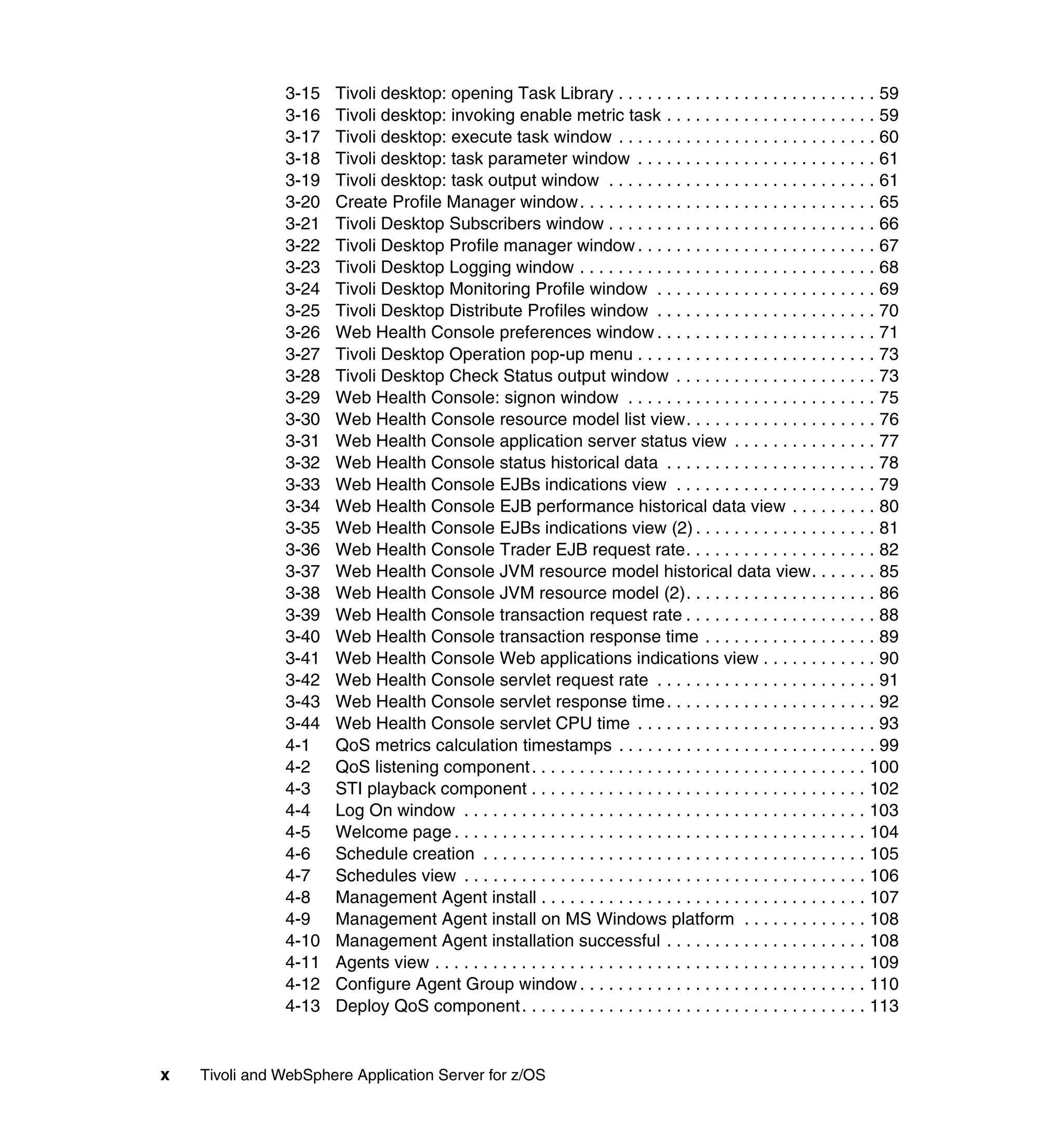
3-15   Tivoli desktop: opening Task Library . . . . . . . . . . . . . . . . . . . . . . . . . . . 59
               3-16   Tivoli desktop: invoking enable metric task . . . . . . . . . . . . . . . . . . . . . . 59
               3-17   Tivoli desktop: execute task window . . . . . . . . . . . . . . . . . . . . . . . . . . . 60
               3-18   Tivoli desktop: task parameter window . . . . . . . . . . . . . . . . . . . . . . . . . 61
               3-19   Tivoli desktop: task output window . . . . . . . . . . . . . . . . . . . . . . . . . . . . 61
               3-20   Create Profile Manager window. . . . . . . . . . . . . . . . . . . . . . . . . . . . . . . 65
               3-21   Tivoli Desktop Subscribers window . . . . . . . . . . . . . . . . . . . . . . . . . . . . 66
               3-22   Tivoli Desktop Profile manager window . . . . . . . . . . . . . . . . . . . . . . . . . 67
               3-23   Tivoli Desktop Logging window . . . . . . . . . . . . . . . . . . . . . . . . . . . . . . . 68
               3-24   Tivoli Desktop Monitoring Profile window . . . . . . . . . . . . . . . . . . . . . . . 69
               3-25   Tivoli Desktop Distribute Profiles window . . . . . . . . . . . . . . . . . . . . . . . 70
               3-26   Web Health Console preferences window . . . . . . . . . . . . . . . . . . . . . . . 71
               3-27   Tivoli Desktop Operation pop-up menu . . . . . . . . . . . . . . . . . . . . . . . . . 73
               3-28   Tivoli Desktop Check Status output window . . . . . . . . . . . . . . . . . . . . . 73
               3-29   Web Health Console: signon window . . . . . . . . . . . . . . . . . . . . . . . . . . 75
               3-30   Web Health Console resource model list view. . . . . . . . . . . . . . . . . . . . 76
               3-31   Web Health Console application server status view . . . . . . . . . . . . . . . 77
               3-32   Web Health Console status historical data . . . . . . . . . . . . . . . . . . . . . . 78
               3-33   Web Health Console EJBs indications view . . . . . . . . . . . . . . . . . . . . . 79
               3-34   Web Health Console EJB performance historical data view . . . . . . . . . 80
               3-35   Web Health Console EJBs indications view (2) . . . . . . . . . . . . . . . . . . . 81
               3-36   Web Health Console Trader EJB request rate. . . . . . . . . . . . . . . . . . . . 82
               3-37   Web Health Console JVM resource model historical data view. . . . . . . 85
               3-38   Web Health Console JVM resource model (2). . . . . . . . . . . . . . . . . . . . 86
               3-39   Web Health Console transaction request rate . . . . . . . . . . . . . . . . . . . . 88
               3-40   Web Health Console transaction response time . . . . . . . . . . . . . . . . . . 89
               3-41   Web Health Console Web applications indications view . . . . . . . . . . . . 90
               3-42   Web Health Console servlet request rate . . . . . . . . . . . . . . . . . . . . . . . 91
               3-43   Web Health Console servlet response time . . . . . . . . . . . . . . . . . . . . . . 92
               3-44   Web Health Console servlet CPU time . . . . . . . . . . . . . . . . . . . . . . . . . 93
               4-1    QoS metrics calculation timestamps . . . . . . . . . . . . . . . . . . . . . . . . . . . 99
               4-2    QoS listening component . . . . . . . . . . . . . . . . . . . . . . . . . . . . . . . . . . . 100
               4-3    STI playback component . . . . . . . . . . . . . . . . . . . . . . . . . . . . . . . . . . . 102
               4-4    Log On window . . . . . . . . . . . . . . . . . . . . . . . . . . . . . . . . . . . . . . . . . . 103
               4-5    Welcome page . . . . . . . . . . . . . . . . . . . . . . . . . . . . . . . . . . . . . . . . . . . 104
               4-6    Schedule creation . . . . . . . . . . . . . . . . . . . . . . . . . . . . . . . . . . . . . . . . 105
               4-7    Schedules view . . . . . . . . . . . . . . . . . . . . . . . . . . . . . . . . . . . . . . . . . . 106
               4-8    Management Agent install . . . . . . . . . . . . . . . . . . . . . . . . . . . . . . . . . . 107
               4-9    Management Agent install on MS Windows platform . . . . . . . . . . . . . 108
               4-10   Management Agent installation successful . . . . . . . . . . . . . . . . . . . . . 108
               4-11   Agents view . . . . . . . . . . . . . . . . . . . . . . . . . . . . . . . . . . . . . . . . . . . . . 109
               4-12   Configure Agent Group window . . . . . . . . . . . . . . . . . . . . . . . . . . . . . . 110
               4-13   Deploy QoS component . . . . . . . . . . . . . . . . . . . . . . . . . . . . . . . . . . . . 113


x   Tivoli and WebSphere Application Server for z/OS
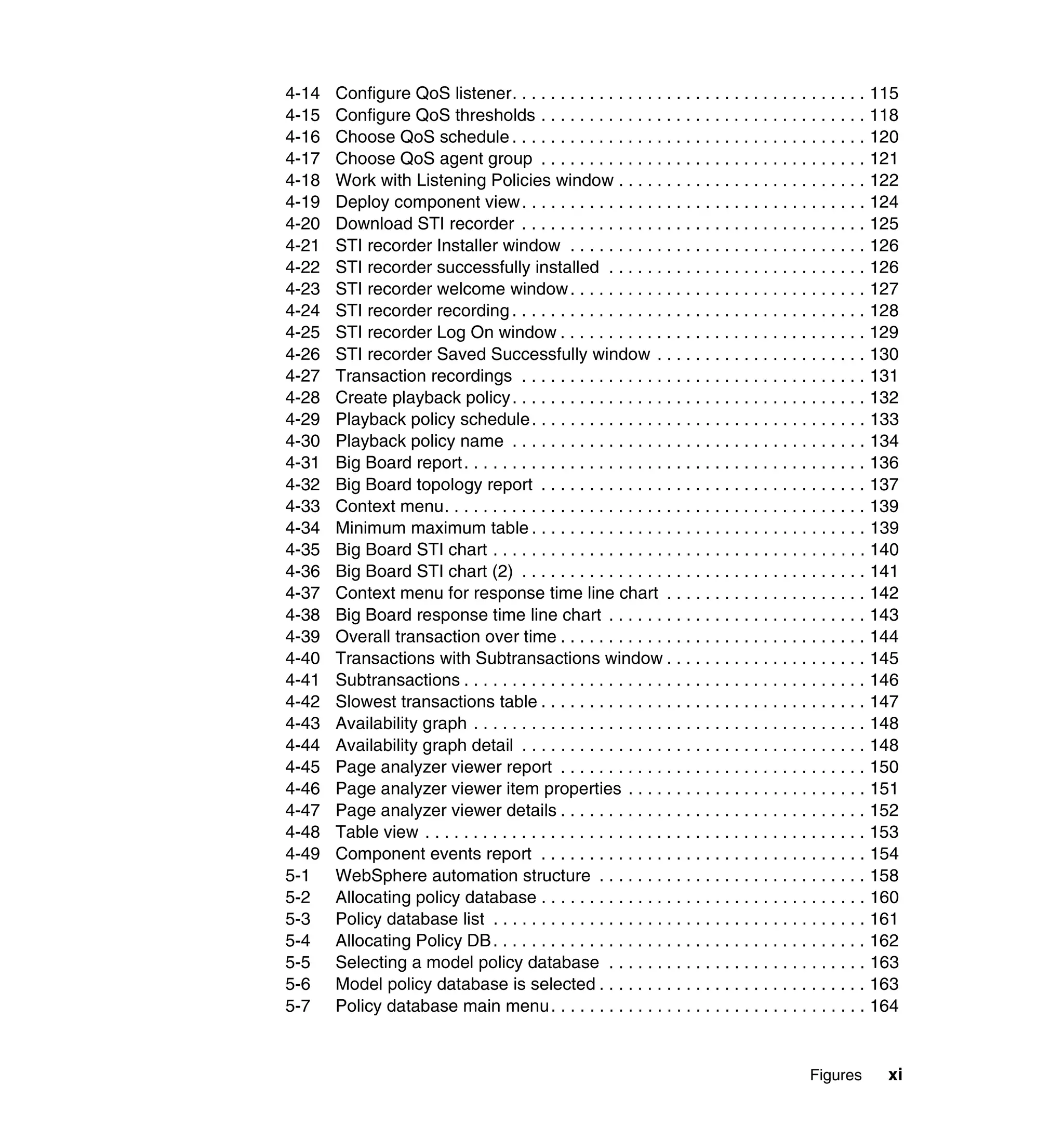
4-14   Configure QoS listener. . . . . . . . . . . . . . . . . . . . . . . . . . . . . . . . . . . . . 115
4-15   Configure QoS thresholds . . . . . . . . . . . . . . . . . . . . . . . . . . . . . . . . . . 118
4-16   Choose QoS schedule . . . . . . . . . . . . . . . . . . . . . . . . . . . . . . . . . . . . . 120
4-17   Choose QoS agent group . . . . . . . . . . . . . . . . . . . . . . . . . . . . . . . . . . 121
4-18   Work with Listening Policies window . . . . . . . . . . . . . . . . . . . . . . . . . . 122
4-19   Deploy component view . . . . . . . . . . . . . . . . . . . . . . . . . . . . . . . . . . . . 124
4-20   Download STI recorder . . . . . . . . . . . . . . . . . . . . . . . . . . . . . . . . . . . . 125
4-21   STI recorder Installer window . . . . . . . . . . . . . . . . . . . . . . . . . . . . . . . 126
4-22   STI recorder successfully installed . . . . . . . . . . . . . . . . . . . . . . . . . . . 126
4-23   STI recorder welcome window . . . . . . . . . . . . . . . . . . . . . . . . . . . . . . . 127
4-24   STI recorder recording . . . . . . . . . . . . . . . . . . . . . . . . . . . . . . . . . . . . . 128
4-25   STI recorder Log On window . . . . . . . . . . . . . . . . . . . . . . . . . . . . . . . . 129
4-26   STI recorder Saved Successfully window . . . . . . . . . . . . . . . . . . . . . . 130
4-27   Transaction recordings . . . . . . . . . . . . . . . . . . . . . . . . . . . . . . . . . . . . 131
4-28   Create playback policy . . . . . . . . . . . . . . . . . . . . . . . . . . . . . . . . . . . . . 132
4-29   Playback policy schedule . . . . . . . . . . . . . . . . . . . . . . . . . . . . . . . . . . . 133
4-30   Playback policy name . . . . . . . . . . . . . . . . . . . . . . . . . . . . . . . . . . . . . 134
4-31   Big Board report . . . . . . . . . . . . . . . . . . . . . . . . . . . . . . . . . . . . . . . . . . 136
4-32   Big Board topology report . . . . . . . . . . . . . . . . . . . . . . . . . . . . . . . . . . 137
4-33   Context menu. . . . . . . . . . . . . . . . . . . . . . . . . . . . . . . . . . . . . . . . . . . . 139
4-34   Minimum maximum table . . . . . . . . . . . . . . . . . . . . . . . . . . . . . . . . . . . 139
4-35   Big Board STI chart . . . . . . . . . . . . . . . . . . . . . . . . . . . . . . . . . . . . . . . 140
4-36   Big Board STI chart (2) . . . . . . . . . . . . . . . . . . . . . . . . . . . . . . . . . . . . 141
4-37   Context menu for response time line chart . . . . . . . . . . . . . . . . . . . . . 142
4-38   Big Board response time line chart . . . . . . . . . . . . . . . . . . . . . . . . . . . 143
4-39   Overall transaction over time . . . . . . . . . . . . . . . . . . . . . . . . . . . . . . . . 144
4-40   Transactions with Subtransactions window . . . . . . . . . . . . . . . . . . . . . 145
4-41   Subtransactions . . . . . . . . . . . . . . . . . . . . . . . . . . . . . . . . . . . . . . . . . . 146
4-42   Slowest transactions table . . . . . . . . . . . . . . . . . . . . . . . . . . . . . . . . . . 147
4-43   Availability graph . . . . . . . . . . . . . . . . . . . . . . . . . . . . . . . . . . . . . . . . . 148
4-44   Availability graph detail . . . . . . . . . . . . . . . . . . . . . . . . . . . . . . . . . . . . 148
4-45   Page analyzer viewer report . . . . . . . . . . . . . . . . . . . . . . . . . . . . . . . . 150
4-46   Page analyzer viewer item properties . . . . . . . . . . . . . . . . . . . . . . . . . 151
4-47   Page analyzer viewer details . . . . . . . . . . . . . . . . . . . . . . . . . . . . . . . . 152
4-48   Table view . . . . . . . . . . . . . . . . . . . . . . . . . . . . . . . . . . . . . . . . . . . . . . 153
4-49   Component events report . . . . . . . . . . . . . . . . . . . . . . . . . . . . . . . . . . 154
5-1    WebSphere automation structure . . . . . . . . . . . . . . . . . . . . . . . . . . . . 158
5-2    Allocating policy database . . . . . . . . . . . . . . . . . . . . . . . . . . . . . . . . . . 160
5-3    Policy database list . . . . . . . . . . . . . . . . . . . . . . . . . . . . . . . . . . . . . . . 161
5-4    Allocating Policy DB . . . . . . . . . . . . . . . . . . . . . . . . . . . . . . . . . . . . . . . 162
5-5    Selecting a model policy database . . . . . . . . . . . . . . . . . . . . . . . . . . . 163
5-6    Model policy database is selected . . . . . . . . . . . . . . . . . . . . . . . . . . . . 163
5-7    Policy database main menu . . . . . . . . . . . . . . . . . . . . . . . . . . . . . . . . . 164


                                                                                                Figures       xi
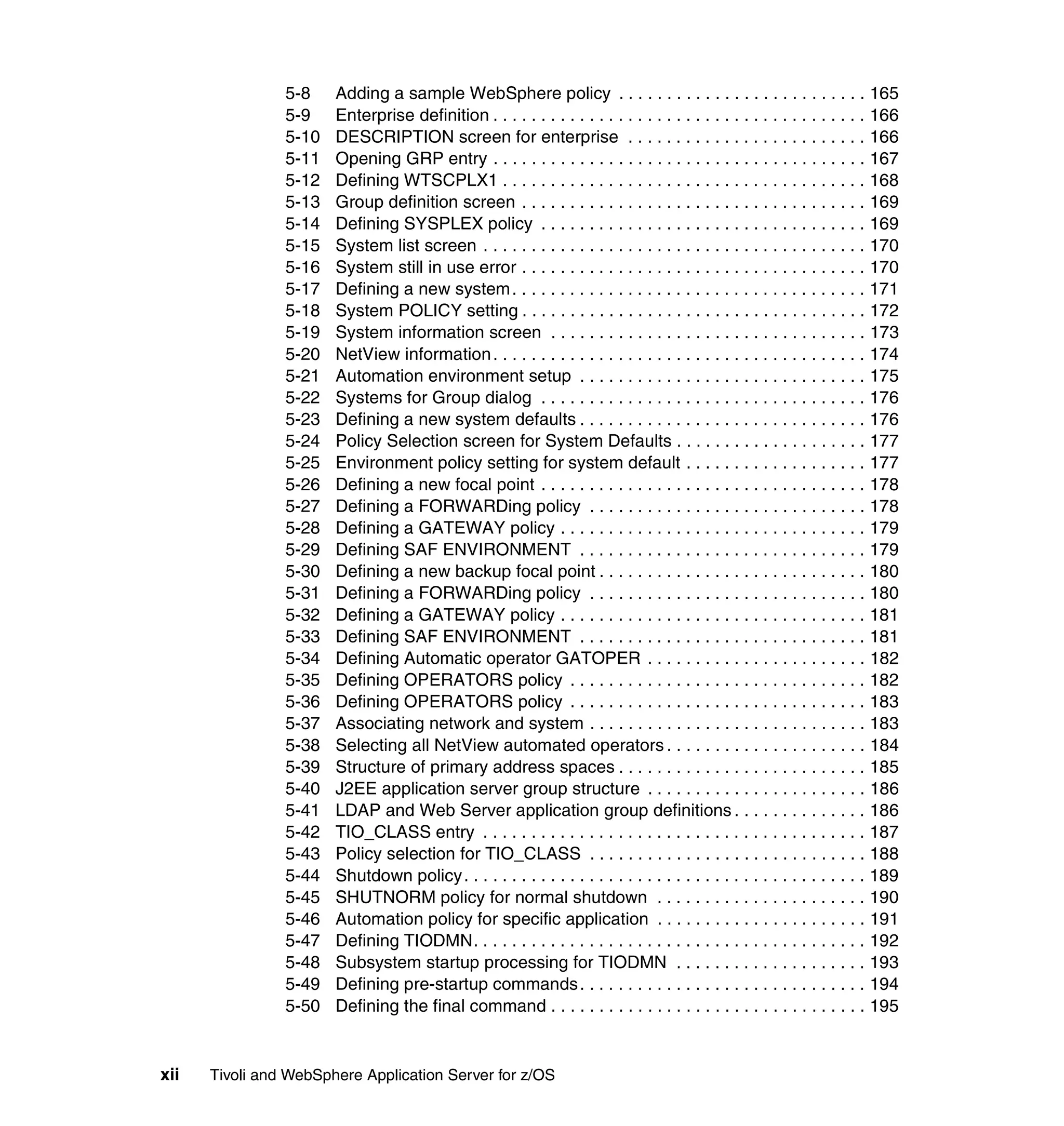
5-8    Adding a sample WebSphere policy . . . . . . . . . . . . . . . . . . . . . . . . . . 165
                5-9    Enterprise definition . . . . . . . . . . . . . . . . . . . . . . . . . . . . . . . . . . . . . . . 166
                5-10   DESCRIPTION screen for enterprise . . . . . . . . . . . . . . . . . . . . . . . . . 166
                5-11   Opening GRP entry . . . . . . . . . . . . . . . . . . . . . . . . . . . . . . . . . . . . . . . 167
                5-12   Defining WTSCPLX1 . . . . . . . . . . . . . . . . . . . . . . . . . . . . . . . . . . . . . . 168
                5-13   Group definition screen . . . . . . . . . . . . . . . . . . . . . . . . . . . . . . . . . . . . 169
                5-14   Defining SYSPLEX policy . . . . . . . . . . . . . . . . . . . . . . . . . . . . . . . . . . 169
                5-15   System list screen . . . . . . . . . . . . . . . . . . . . . . . . . . . . . . . . . . . . . . . . 170
                5-16   System still in use error . . . . . . . . . . . . . . . . . . . . . . . . . . . . . . . . . . . . 170
                5-17   Defining a new system . . . . . . . . . . . . . . . . . . . . . . . . . . . . . . . . . . . . . 171
                5-18   System POLICY setting . . . . . . . . . . . . . . . . . . . . . . . . . . . . . . . . . . . . 172
                5-19   System information screen . . . . . . . . . . . . . . . . . . . . . . . . . . . . . . . . . 173
                5-20   NetView information . . . . . . . . . . . . . . . . . . . . . . . . . . . . . . . . . . . . . . . 174
                5-21   Automation environment setup . . . . . . . . . . . . . . . . . . . . . . . . . . . . . . 175
                5-22   Systems for Group dialog . . . . . . . . . . . . . . . . . . . . . . . . . . . . . . . . . . 176
                5-23   Defining a new system defaults . . . . . . . . . . . . . . . . . . . . . . . . . . . . . . 176
                5-24   Policy Selection screen for System Defaults . . . . . . . . . . . . . . . . . . . . 177
                5-25   Environment policy setting for system default . . . . . . . . . . . . . . . . . . . 177
                5-26   Defining a new focal point . . . . . . . . . . . . . . . . . . . . . . . . . . . . . . . . . . 178
                5-27   Defining a FORWARDing policy . . . . . . . . . . . . . . . . . . . . . . . . . . . . . 178
                5-28   Defining a GATEWAY policy . . . . . . . . . . . . . . . . . . . . . . . . . . . . . . . . 179
                5-29   Defining SAF ENVIRONMENT . . . . . . . . . . . . . . . . . . . . . . . . . . . . . . 179
                5-30   Defining a new backup focal point . . . . . . . . . . . . . . . . . . . . . . . . . . . . 180
                5-31   Defining a FORWARDing policy . . . . . . . . . . . . . . . . . . . . . . . . . . . . . 180
                5-32   Defining a GATEWAY policy . . . . . . . . . . . . . . . . . . . . . . . . . . . . . . . . 181
                5-33   Defining SAF ENVIRONMENT . . . . . . . . . . . . . . . . . . . . . . . . . . . . . . 181
                5-34   Defining Automatic operator GATOPER . . . . . . . . . . . . . . . . . . . . . . . 182
                5-35   Defining OPERATORS policy . . . . . . . . . . . . . . . . . . . . . . . . . . . . . . . 182
                5-36   Defining OPERATORS policy . . . . . . . . . . . . . . . . . . . . . . . . . . . . . . . 183
                5-37   Associating network and system . . . . . . . . . . . . . . . . . . . . . . . . . . . . . 183
                5-38   Selecting all NetView automated operators . . . . . . . . . . . . . . . . . . . . . 184
                5-39   Structure of primary address spaces . . . . . . . . . . . . . . . . . . . . . . . . . . 185
                5-40   J2EE application server group structure . . . . . . . . . . . . . . . . . . . . . . . 186
                5-41   LDAP and Web Server application group definitions . . . . . . . . . . . . . . 186
                5-42   TIO_CLASS entry . . . . . . . . . . . . . . . . . . . . . . . . . . . . . . . . . . . . . . . . 187
                5-43   Policy selection for TIO_CLASS . . . . . . . . . . . . . . . . . . . . . . . . . . . . . 188
                5-44   Shutdown policy . . . . . . . . . . . . . . . . . . . . . . . . . . . . . . . . . . . . . . . . . . 189
                5-45   SHUTNORM policy for normal shutdown . . . . . . . . . . . . . . . . . . . . . . 190
                5-46   Automation policy for specific application . . . . . . . . . . . . . . . . . . . . . . 191
                5-47   Defining TIODMN. . . . . . . . . . . . . . . . . . . . . . . . . . . . . . . . . . . . . . . . . 192
                5-48   Subsystem startup processing for TIODMN . . . . . . . . . . . . . . . . . . . . 193
                5-49   Defining pre-startup commands . . . . . . . . . . . . . . . . . . . . . . . . . . . . . . 194
                5-50   Defining the final command . . . . . . . . . . . . . . . . . . . . . . . . . . . . . . . . . 195


xii   Tivoli and WebSphere Application Server for z/OS
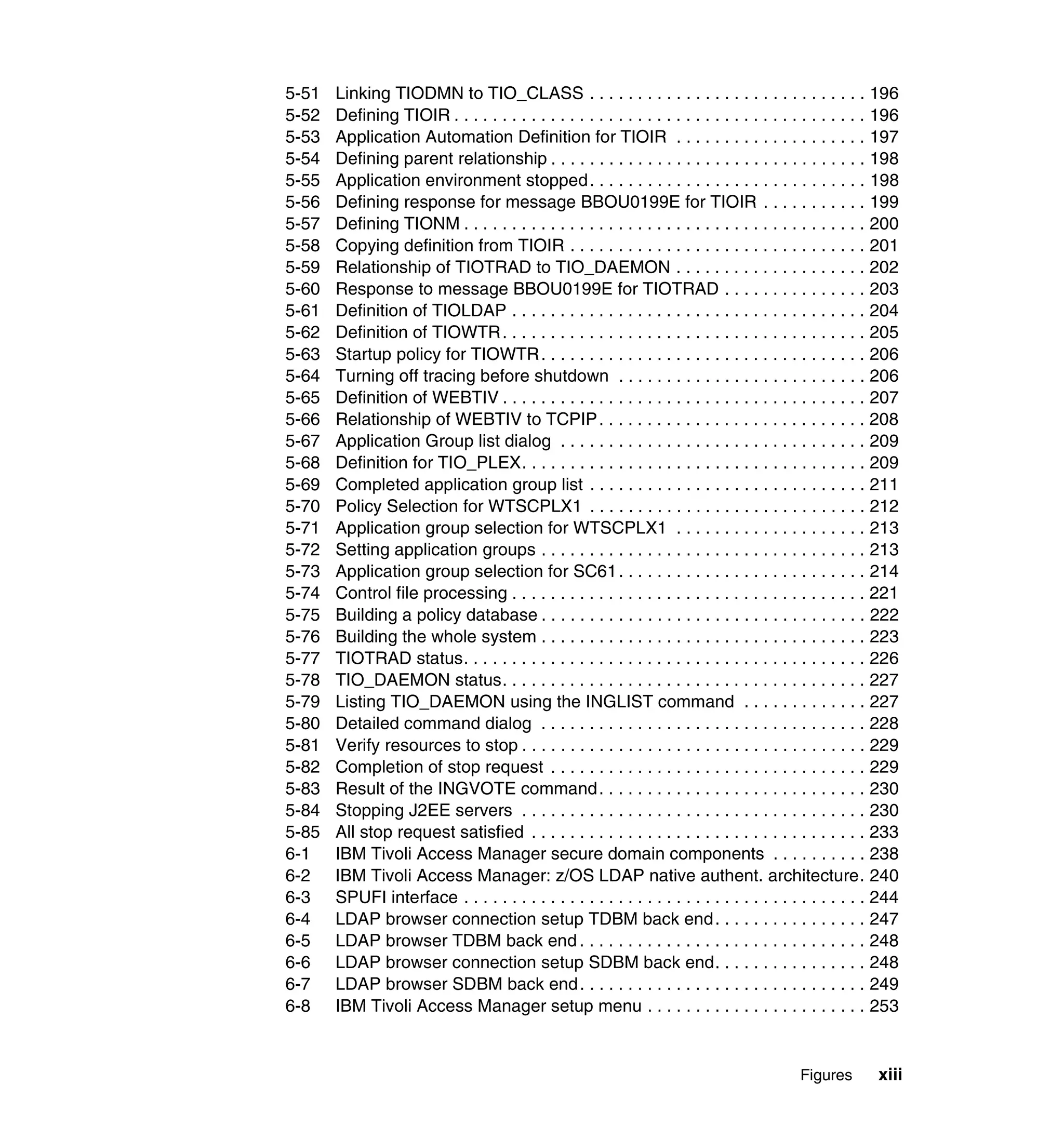
5-51   Linking TIODMN to TIO_CLASS . . . . . . . . . . . . . . . . . . . . . . . . . . . . . 196
5-52   Defining TIOIR . . . . . . . . . . . . . . . . . . . . . . . . . . . . . . . . . . . . . . . . . . . 196
5-53   Application Automation Definition for TIOIR . . . . . . . . . . . . . . . . . . . . 197
5-54   Defining parent relationship . . . . . . . . . . . . . . . . . . . . . . . . . . . . . . . . . 198
5-55   Application environment stopped . . . . . . . . . . . . . . . . . . . . . . . . . . . . . 198
5-56   Defining response for message BBOU0199E for TIOIR . . . . . . . . . . . 199
5-57   Defining TIONM . . . . . . . . . . . . . . . . . . . . . . . . . . . . . . . . . . . . . . . . . . 200
5-58   Copying definition from TIOIR . . . . . . . . . . . . . . . . . . . . . . . . . . . . . . . 201
5-59   Relationship of TIOTRAD to TIO_DAEMON . . . . . . . . . . . . . . . . . . . . 202
5-60   Response to message BBOU0199E for TIOTRAD . . . . . . . . . . . . . . . 203
5-61   Definition of TIOLDAP . . . . . . . . . . . . . . . . . . . . . . . . . . . . . . . . . . . . . 204
5-62   Definition of TIOWTR . . . . . . . . . . . . . . . . . . . . . . . . . . . . . . . . . . . . . . 205
5-63   Startup policy for TIOWTR . . . . . . . . . . . . . . . . . . . . . . . . . . . . . . . . . . 206
5-64   Turning off tracing before shutdown . . . . . . . . . . . . . . . . . . . . . . . . . . 206
5-65   Definition of WEBTIV . . . . . . . . . . . . . . . . . . . . . . . . . . . . . . . . . . . . . . 207
5-66   Relationship of WEBTIV to TCPIP . . . . . . . . . . . . . . . . . . . . . . . . . . . . 208
5-67   Application Group list dialog . . . . . . . . . . . . . . . . . . . . . . . . . . . . . . . . 209
5-68   Definition for TIO_PLEX. . . . . . . . . . . . . . . . . . . . . . . . . . . . . . . . . . . . 209
5-69   Completed application group list . . . . . . . . . . . . . . . . . . . . . . . . . . . . . 211
5-70   Policy Selection for WTSCPLX1 . . . . . . . . . . . . . . . . . . . . . . . . . . . . . 212
5-71   Application group selection for WTSCPLX1 . . . . . . . . . . . . . . . . . . . . 213
5-72   Setting application groups . . . . . . . . . . . . . . . . . . . . . . . . . . . . . . . . . . 213
5-73   Application group selection for SC61 . . . . . . . . . . . . . . . . . . . . . . . . . . 214
5-74   Control file processing . . . . . . . . . . . . . . . . . . . . . . . . . . . . . . . . . . . . . 221
5-75   Building a policy database . . . . . . . . . . . . . . . . . . . . . . . . . . . . . . . . . . 222
5-76   Building the whole system . . . . . . . . . . . . . . . . . . . . . . . . . . . . . . . . . . 223
5-77   TIOTRAD status. . . . . . . . . . . . . . . . . . . . . . . . . . . . . . . . . . . . . . . . . . 226
5-78   TIO_DAEMON status. . . . . . . . . . . . . . . . . . . . . . . . . . . . . . . . . . . . . . 227
5-79   Listing TIO_DAEMON using the INGLIST command . . . . . . . . . . . . . 227
5-80   Detailed command dialog . . . . . . . . . . . . . . . . . . . . . . . . . . . . . . . . . . 228
5-81   Verify resources to stop . . . . . . . . . . . . . . . . . . . . . . . . . . . . . . . . . . . . 229
5-82   Completion of stop request . . . . . . . . . . . . . . . . . . . . . . . . . . . . . . . . . 229
5-83   Result of the INGVOTE command . . . . . . . . . . . . . . . . . . . . . . . . . . . . 230
5-84   Stopping J2EE servers . . . . . . . . . . . . . . . . . . . . . . . . . . . . . . . . . . . . 230
5-85   All stop request satisfied . . . . . . . . . . . . . . . . . . . . . . . . . . . . . . . . . . . 233
6-1    IBM Tivoli Access Manager secure domain components . . . . . . . . . . 238
6-2    IBM Tivoli Access Manager: z/OS LDAP native authent. architecture. 240
6-3    SPUFI interface . . . . . . . . . . . . . . . . . . . . . . . . . . . . . . . . . . . . . . . . . . 244
6-4    LDAP browser connection setup TDBM back end . . . . . . . . . . . . . . . . 247
6-5    LDAP browser TDBM back end . . . . . . . . . . . . . . . . . . . . . . . . . . . . . . 248
6-6    LDAP browser connection setup SDBM back end. . . . . . . . . . . . . . . . 248
6-7    LDAP browser SDBM back end . . . . . . . . . . . . . . . . . . . . . . . . . . . . . . 249
6-8    IBM Tivoli Access Manager setup menu . . . . . . . . . . . . . . . . . . . . . . . 253


                                                                                            Figures        xiii
6-9    IBM Tivoli Access Manager run-time configuration . . . . . . . . . . . . . . . 254
               6-10   IBM Tivoli Access Manager policy Server configuration . . . . . . . . . . . 255
               6-11   IBM Tivoli Access Manager authorization server configuration . . . . . . 255
               6-12   IBM Tivoli Access Manager web portal manager configuration . . . . . . 256
               6-13   IBM Tivoli Access Manager WebSEAL configuration . . . . . . . . . . . . . 257
               6-14   IBM Tivoli Access Manager configuration status . . . . . . . . . . . . . . . . . 257
               6-15   IBM Tivoli Access Manager Web Console login . . . . . . . . . . . . . . . . . 258
               6-16   IBM Tivoli Access Manager Web Console main window . . . . . . . . . . . 259
               6-17   IBM Tivoli Access Manager: WebSEAL & LDAP native authentication 260
               6-18   IBM Tivoli Access Manager Create Junction window . . . . . . . . . . . . . 262
               6-19   MS Internet Explorer Enter Network Password window . . . . . . . . . . . 263
               6-20   Trade2 window going through the IBM Tivoli Access Manager junction264
               6-21   The pkmspasswd utility . . . . . . . . . . . . . . . . . . . . . . . . . . . . . . . . . . . . 265
               6-22   IBM Tivoli Access Manager Web Console create user window . . . . . . 266
               6-23   IBM Tivoli Access Manager password change . . . . . . . . . . . . . . . . . . 269
               6-24   IBM Tivoli Access Manager changing password window . . . . . . . . . . 270
               6-25   Single sign-on: IBM Tivoli Access Manager & WebSphere for z/OS . . 271
               6-26   SWIPE application EJBCaller servlet: part 1 of 2 . . . . . . . . . . . . . . . . 274
               6-27   SWIPE application EJBCaller servlet: part 2 of 2 . . . . . . . . . . . . . . . . 275
               6-28   SWIPE basic authentication. . . . . . . . . . . . . . . . . . . . . . . . . . . . . . . . . 280
               6-29   SWIPE basic authentication output sample . . . . . . . . . . . . . . . . . . . . . 281
               6-30   SWIPE through WebSEAL EJBCaller servlet . . . . . . . . . . . . . . . . . . . 283
               6-31   SWIPE through WebSEAL protected EJBCaller servlet . . . . . . . . . . . 284
               6-32   Trust Association Interceptor SMEUI . . . . . . . . . . . . . . . . . . . . . . . . . . 290
               6-33   Trust Association Interceptor SMEUI (2) . . . . . . . . . . . . . . . . . . . . . . . 291
               6-34   SWIPE through WebSEAL with TAI. . . . . . . . . . . . . . . . . . . . . . . . . . . 293
               A-1    The Tivoli Management Framework concept . . . . . . . . . . . . . . . . . . . . 296
               A-2    Three-tiered architecture of the TMR . . . . . . . . . . . . . . . . . . . . . . . . . . 298
               A-3    Tivoli desktop . . . . . . . . . . . . . . . . . . . . . . . . . . . . . . . . . . . . . . . . . . . . 299
               B-1    NetView 3270 main menu . . . . . . . . . . . . . . . . . . . . . . . . . . . . . . . . . . 305
               B-2    Alert display screen . . . . . . . . . . . . . . . . . . . . . . . . . . . . . . . . . . . . . . . 306
               C-1    SMEUI logon window . . . . . . . . . . . . . . . . . . . . . . . . . . . . . . . . . . . . . . 309
               C-2    SMEUI Server instance window. . . . . . . . . . . . . . . . . . . . . . . . . . . . . . 311
               C-3    SMEUI J2EE resources window . . . . . . . . . . . . . . . . . . . . . . . . . . . . . 312
               C-4    SMEUI reference and resource resolution window . . . . . . . . . . . . . . . 314
               C-5    SMEUI conversation activation context menu . . . . . . . . . . . . . . . . . . . 315


xiv   Tivoli and WebSphere Application Server for z/OS
Tables

                 4-1     IBM Tivoli Monitoring for Transaction Performance . . . . . . . . . . . . . . . . 96
                 5-1     Summary of WebSphere application groups . . . . . . . . . . . . . . . . . . . . 184
                 5-2     Defining TIOTRAD and TIOTRED . . . . . . . . . . . . . . . . . . . . . . . . . . . . 201
                 5-3     Base processes . . . . . . . . . . . . . . . . . . . . . . . . . . . . . . . . . . . . . . . . . . 214
                 5-4     Additional relationships between application groups . . . . . . . . . . . . . . 215


© Copyright IBM Corp. 2004. All rights reserved.                                                                            xv
xvi   Tivoli and WebSphere Application Server for z/OS
Notices

This information was developed for products and services offered in the U.S.A.

IBM may not offer the products, services, or features discussed in this document in other countries. Consult
your local IBM representative for information on the products and services currently available in your area.
Any reference to an IBM product, program, or service is not intended to state or imply that only that IBM
product, program, or service may be used. Any functionally equivalent product, program, or service that
does not infringe any IBM intellectual property right may be used instead. However, it is the user's
responsibility to evaluate and verify the operation of any non-IBM product, program, or service.

IBM may have patents or pending patent applications covering subject matter described in this document.
The furnishing of this document does not give you any license to these patents. You can send license
inquiries, in writing, to:
IBM Director of Licensing, IBM Corporation, North Castle Drive Armonk, NY 10504-1785 U.S.A.

The following paragraph does not apply to the United Kingdom or any other country where such provisions
are inconsistent with local law: INTERNATIONAL BUSINESS MACHINES CORPORATION PROVIDES
THIS PUBLICATION "AS IS" WITHOUT WARRANTY OF ANY KIND, EITHER EXPRESS OR IMPLIED,
INCLUDING, BUT NOT LIMITED TO, THE IMPLIED WARRANTIES OF NON-INFRINGEMENT,
MERCHANTABILITY OR FITNESS FOR A PARTICULAR PURPOSE. Some states do not allow disclaimer
of express or implied warranties in certain transactions, therefore, this statement may not apply to you.

This information could include technical inaccuracies or typographical errors. Changes are periodically made
to the information herein; these changes will be incorporated in new editions of the publication. IBM may
make improvements and/or changes in the product(s) and/or the program(s) described in this publication at
any time without notice.

Any references in this information to non-IBM Web sites are provided for convenience only and do not in any
manner serve as an endorsement of those Web sites. The materials at those Web sites are not part of the
materials for this IBM product and use of those Web sites is at your own risk.

IBM may use or distribute any of the information you supply in any way it believes appropriate without
incurring any obligation to you.

Information concerning non-IBM products was obtained from the suppliers of those products, their published
announcements or other publicly available sources. IBM has not tested those products and cannot confirm
the accuracy of performance, compatibility or any other claims related to non-IBM products. Questions on
the capabilities of non-IBM products should be addressed to the suppliers of those products.

This information contains examples of data and reports used in daily business operations. To illustrate them
as completely as possible, the examples include the names of individuals, companies, brands, and products.
All of these names are fictitious and any similarity to the names and addresses used by an actual business
enterprise is entirely coincidental.

COPYRIGHT LICENSE:
This information contains sample application programs in source language, which illustrates programming
techniques on various operating platforms. You may copy, modify, and distribute these sample programs in
any form without payment to IBM, for the purposes of developing, using, marketing or distributing application
programs conforming to the application programming interface for the operating platform for which the
sample programs are written. These examples have not been thoroughly tested under all conditions. IBM,
therefore, cannot guarantee or imply reliability, serviceability, or function of these programs. You may copy,
modify, and distribute these sample programs in any form without payment to IBM for the purposes of
developing, using, marketing, or distributing application programs conforming to IBM's application
programming interfaces.


© Copyright IBM Corp. 2004. All rights reserved.                                                          xvii
Trademarks
The following terms are trademarks of the International Business Machines Corporation in the United States,
other countries, or both:

  ibm.com®                                      ™                        Redbooks (logo)      ™
  z/OS®                               IBM®                               RACF®
  zSeries®                            IMS™                               RMF™
  CICS®                               Lotus®                             Tivoli Enterprise™
  Database 2™                         MVS™                               Tivoli Enterprise Console®
  Domino™                             NetView®                           Tivoli®
  DB2 Universal Database™             OS/390®                            VTAM®
  DB2®                                Redbooks™                          WebSphere®
The following terms are trademarks of the International Business Machines Corporation and the Rational
Software Corporation, in the United States, other countries, or both:

  Rational®

The following terms are trademarks of other companies:

Microsoft, Windows, and the Windows logo are trademarks of Microsoft Corporation in the United States,
other countries, or both.

Java and all Java-based trademarks and logos are trademarks or registered trademarks of Sun
Microsystems, Inc. in the United States, other countries, or both.

UNIX is a registered trademark of The Open Group in the United States and other countries.

Other company, product, and service names may be trademarks or service marks of others.


xviii    Tivoli and WebSphere Application Server for z/OS
Preface

                 IBM® WebSphere® Application Server has grown to be a successful application
                 server platform. With IBM WebSphere Application Server on z/OS®, the
                 preferred application server platform gains the benefits of capacity and
                 robustness from the mainframe legacy. It also gains access to data and
                 transactions residing on z/OS subsystems such as DB2® and CICS®.

                 In essence, the nature of the operating environment of WebSphere on z/OS is
                 quite different from its distributed counterpart. UNIX® System Services, although
                 similar to a UNIX-like environment, has fundamental differences, such as
                 workload management from z/OS Workload Manager, processes controlled by
                 JES engine, and so on.

                 The aim of this IBM Redbook is to show and discuss the usage of various
                 IBM/Tivoli® products that help manage the IBM WebSphere Application Server
                 on z/OS. The discussion consists of:
                     Managing the performance of WebSphere resources using IBM Tivoli
                     Monitoring (ITM) for Web Infrastructure
                     Monitoring Web transaction performance using the IBM Tivoli Monitoring for
                     Transaction Performance
                     Ensuring high availability of WebSphere systems in a SYSPLEX environment
                     using IBM System Automation
                     Managing access using IBM Tivoli Access Manager for e-business together
                     with z/OS Security Server

                 We discuss concepts, implementation, and sample scenarios, and how these
                 products can be used to manage IBM WebSphere Application Server on z/OS.


The team that wrote this redbook
                 This redbook was produced by a team of specialists from around the world
                 working at the International Technical Support Organization, Austin Center.


© Copyright IBM Corp. 2004. All rights reserved.                                               xix
Budi Darmawan is a Project Leader at the International Technical
               Support Organization, Austin Center. He writes extensively and
               teaches IBM classes worldwide in all areas of Tivoli systems
               management products. Before joining the ITSO four years ago,
               Budi worked in IBM Indonesia Integrated Technology Services as
               lead implementer and solution architect. His expertise is in general
               Tivoli systems management, z/OS system programming, and
               database administration. He currently specialize in Business Service
               Management and availability management.

               Foulques de Valence is a WebSphere for z/OS Specialist with
               IBM Global Services. Currently based in Paris, France, he works at
               the French customer Technical Support Center within the CICS
               and WebSphere for z/OS team. In previous years, he provided
               customer support on Lotus® Domino™ for OS/390® and UNIX
               System Services. Prior to IBM, Foulques served as the IT Manager
               of a small manufacturing company in the San Francisco bay area.
               He received his Master's degree in Computer Science and Engineering from
               Ensimag in France. He furthered his education at the State University of New
               York at Buffalo, and at Stanford University USA.

               Daniela Chersoni is an IT Systems Management Specialist with
               IBM Global Services Strategic Outsourcing Italy. She has worked
               on mainframe systems VM, MVS™, z/OS and networking since
               1982. She has several years experience with IBM System
               Automation for OS/390 and IBM Tivoli NetView® for OS/390. She
               works in IGS Vimercate (Italy), at the Server System Operation
               (SSO) organization within the Infrastructure Platform & Tivoli team.
               Her areas of expertise include systems management and support for outsourcing
               clients.

               Thanks to the following people for their contributions to this project:

               Axel Buecker and Wade Wallace
               International Technical Support Organization, Austin Center

               Rich Conway and Bob Haimowitz
               International Technical Support Organization, Poughkeepsie Center

               Scott Henley
               IBM Australia, Tivoli Software.

               Mari Heiser
               IBM US


xx   Tivoli and WebSphere Application Server for z/OS
Become a published author
        Join us for a two- to six-week residency program! Help write an IBM Redbook
        dealing with specific products or solutions, while getting hands-on experience
        with leading-edge technologies. You'll team with IBM technical professionals,
        Business Partners and/or customers.

        Your efforts will help increase product acceptance and customer satisfaction. As
        a bonus, you'll develop a network of contacts in IBM development labs, and
        increase your productivity and marketability.

        Find out more about the residency program, browse the residency index, and
        apply online at:
              ibm.com/redbooks/residencies.html


Comments welcome
        Your comments are important to us!

        We want our Redbooks™ to be as helpful as possible. Send us your comments
        about this or other Redbooks in one of the following ways:
           Use the online Contact us review redbook form found at:
              ibm.com/redbooks
           Send your comments in an Internet note to:
              redbook@us.ibm.com
           Mail your comments to:
              IBM Corporation, International Technical Support Organization
              Dept. 0SJB Building 003 Internal Zip 2834
              11400 Burnet Road
              Austin, Texas 78758-3493


                                                                           Preface       xxi
xxii   Tivoli and WebSphere Application Server for z/OS
1


    Chapter 1.   Introduction
                 This chapter introduces the redbook and provides an overview of our
                 environment, product versions that are used, and the organization of this
                 redbook. The discussion in this chapter is divided into:
                     1.1, “Managing WebSphere Application Server for z/OS” on page 2 contains a
                     discussion on the issues around managing WebSphere Application Server for
                     z/OS.
                     1.2, “IBM automation blueprint” on page 2 explains the management context
                     in the IBM Automation blueprint as part of the IBM OnDemand initiative.
                     1.3, “Our operating environment” on page 4 shows our operating
                     environment.
                     1.4, “Document organization” on page 6 lists the chapters in this Redbooks
                     and an overview of its content.


© Copyright IBM Corp. 2004. All rights reserved.                                                  1
1.1 Managing WebSphere Application Server for z/OS
               As enterprises move to Web-enable most applications they have, some
               applications with strong mainframe ties tend to stay in the mainframe. IBM
               WebSphere Application Server for z/OS is a very popular choice as the agent of
               change for legacy applications.

               IBM WebSphere Application Server for z/OS has strong back-end ties with
               legacy z/OS subsystems, such as CICS and DB2. It also interfaces well with
               WebSphere MQ for z/OS for enabling message queueing applications. The
               complexity of managing new subsystems that are becoming more critical over
               time and technology that is (mostly) unfamiliar to the z/OS system programming
               team introduces a significant friction in adopting IBM WebSphere Application
               Server for z/OS.

               Systems management of IBM WebSphere Application Server for z/OS should be
               approached in a holistic view. There are more management issue than just
               performance monitoring. This redbook will describe the approach that Tivoli has
               taken to managing performance, security, and operation of IBM WebSphere
               Application Server for z/OS. The redbook discusses implementation and usage
               of IBM/Tivoli tools to manage IBM WebSphere Application Server for z/OS.


1.2 IBM automation blueprint
               The IBM Tivoli solution is the basis for providing automation for the overall
               system management of the OnDemand world. Automation is critical for
               businesses to achieve resiliency, efficiency, responsiveness, and flexibility. The
               IBM automation platform provides the structure of the automation components
               for providing on demand automation capability.

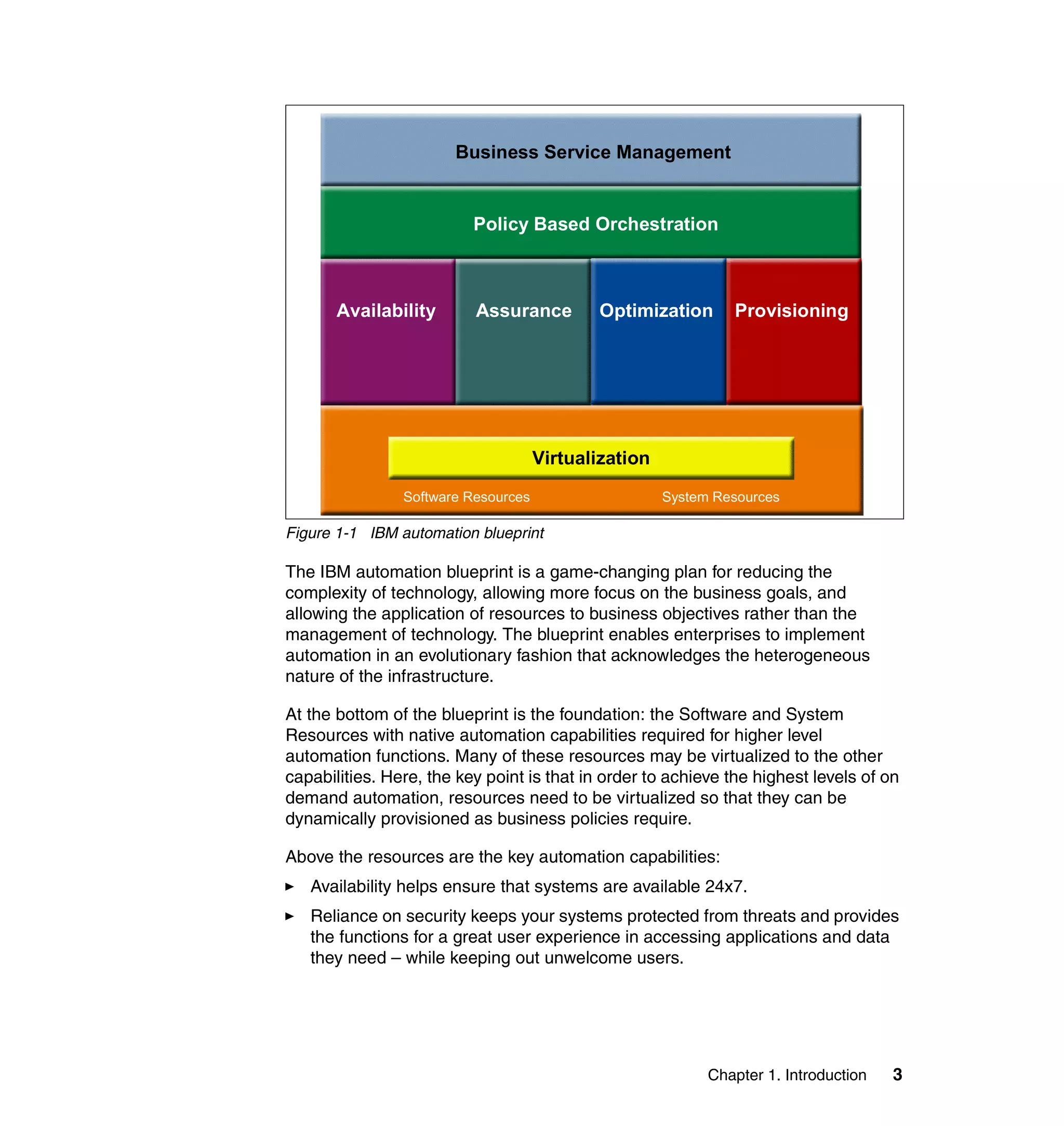
               The IBM automation blueprint is shown in Figure 1-1 on page 3.


2   Tivoli and WebSphere Application Server for z/OS
Business Service Management


                          Policy Based Orchestration


       Availability       Assurance         Optimization       Provisioning


                                     Virtualization
                Software Resources                    System Resources

Figure 1-1 IBM automation blueprint

The IBM automation blueprint is a game-changing plan for reducing the
complexity of technology, allowing more focus on the business goals, and
allowing the application of resources to business objectives rather than the
management of technology. The blueprint enables enterprises to implement
automation in an evolutionary fashion that acknowledges the heterogeneous
nature of the infrastructure.

At the bottom of the blueprint is the foundation: the Software and System
Resources with native automation capabilities required for higher level
automation functions. Many of these resources may be virtualized to the other
capabilities. Here, the key point is that in order to achieve the highest levels of on
demand automation, resources need to be virtualized so that they can be
dynamically provisioned as business policies require.

Above the resources are the key automation capabilities:
   Availability helps ensure that systems are available 24x7.
   Reliance on security keeps your systems protected from threats and provides
   the functions for a great user experience in accessing applications and data
   they need – while keeping out unwelcome users.


                                                            Chapter 1. Introduction   3
Optimization provides tools to make the most of the resources you have – so
                   that they are running at peak performance and efficiency and providing you
                   with the maximum return on your investment.
                   Provisioning focuses on the self-configuring, dynamic allocation of individual
                   elements of your IT infrastructure so that Identities or Storage or Servers are
                   provisioned as business needs dictate.

               The next layer, Policy-based Orchestration, helps customers automatically
               control all the capabilities of the four areas we just discussed so that the entire IT
               infrastructure is responding dynamically to changing conditions according to
               defined business policies. This orchestration builds on the best practices of the
               customer’s collective IT experience, and helps to ensure that complex
               deployments are achieved with speed and quality on demand.

               Finally, Business-driven Service Management capabilities provide the tools you
               need to manage service levels, meter system usage and bill customers for that
               usage, as well as model, integrate, connect, monitor, and manage your business
               processes end-to-end for complete linkage of IT and business processes. Being
               able to view IT resources in context of business systems is a unique capability
               that we need.

               The management tools that we discuss in this redbook primarily involve
               providing an Availability and Assurance (Security) solution for IBM WebSphere
               Application Server for z/OS. Operation support and provisioning in z/OS are
               available from the operating systems functions, such as Workload Manager and
               other subsystems, such as IBM Tivoli Workload Manager, which are not
               discussed in this redbook.


1.3 Our operating environment
               This redbook project was written at the IBM International Technical Support
               Organization (ITSO) in Austin center, with mainframe z/OS systems residing in
               the ITSO Poughkeepsie center. We used a SYSPLEX environment called
               WTSCPLX1 with system SC61 and SC62.

               The managed systems run IBM WebSphere Application Server for z/OS Version
               4.0.1. The management application that we discuss and used in this redbook
               are:
                   IBM Tivoli Monitoring for Web Infrastructure Version 5.1.1, which allows
                   monitoring of IBM WebSphere Application Server for z/OS internal metrics to
                   ensure that no bottleneck exists


4   Tivoli and WebSphere Application Server for z/OS
IBM Tivoli Monitoring for Transaction Performance Version 5.2, which allows
                            multiple agents to be placed around the network to see the performance
                            profile of transactions to the application server
                            IBM System Automation for z/OS Version 2.2, which provides message
                            automation, automatic controlled startup, shutdown automation, address
                            space cleanup, and recovery (restart or reallocate)
                            IBM Tivoli Access Manager for e-business Version 4.1, which allows coarse
                            or granular security definitions for access authorization and authentication
                            through RACF® and Web-enabled attributes.

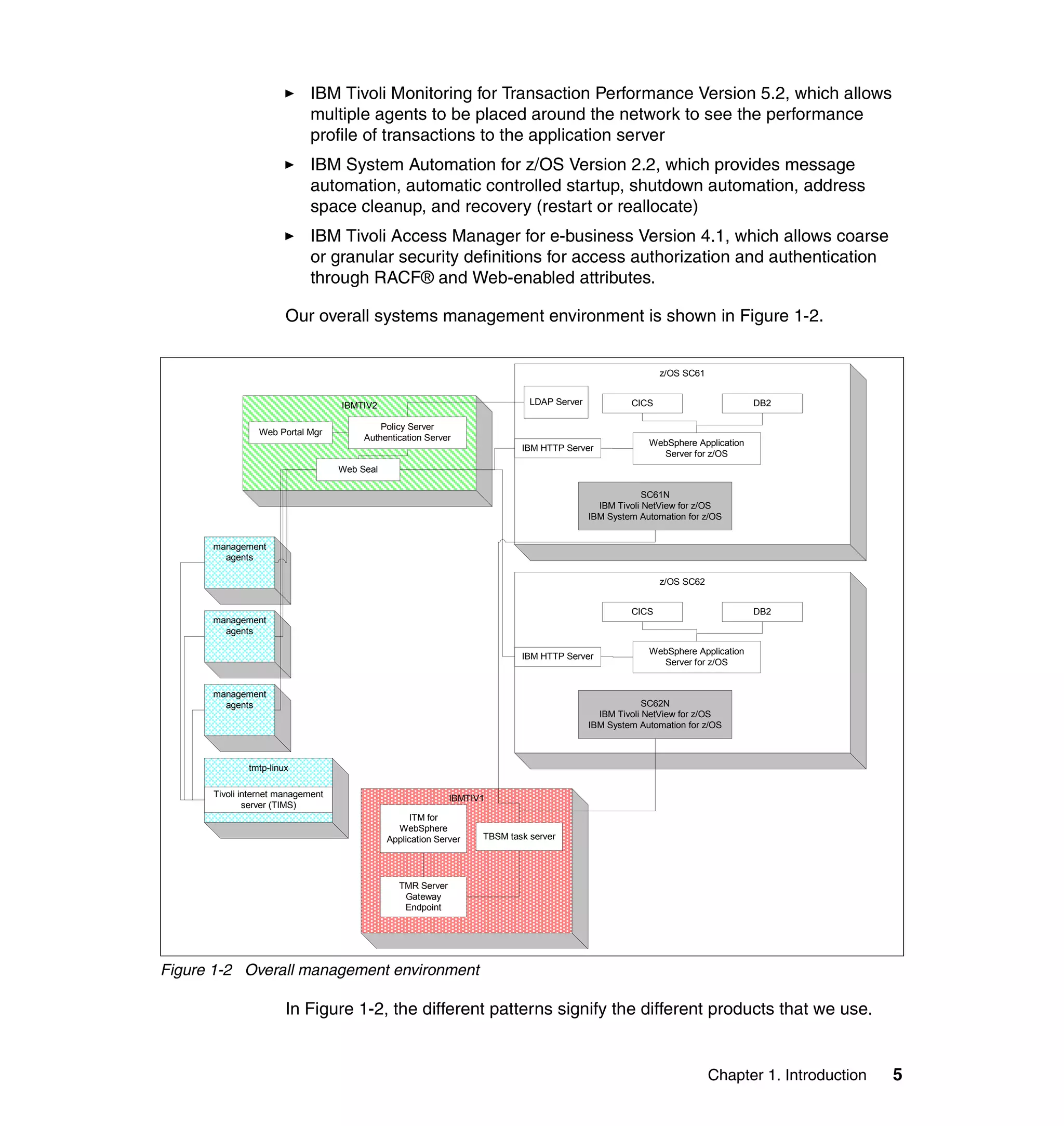
                       Our overall systems management environment is shown in Figure 1-2.


                                                                                                            z/OS SC61


                                   IBMTIV2                                    LDAP Server            CICS                        DB2

                                            Policy Server
                Web Portal Mgr
                                        Authentication Server
                                                                                                         WebSphere Application
                                                                            IBM HTTP Server
                                                                                                           Server for z/OS
                                   Web Seal

                                                                                                         SC61N
                                                                                              IBM Tivoli NetView for z/OS
                                                                                            IBM System Automation for z/OS


      management
        agents

                                                                                                            z/OS SC62


                                                                                                     CICS                        DB2
      management
        agents

                                                                                                         WebSphere Application
                                                                            IBM HTTP Server
                                                                                                           Server for z/OS


      management
        agents                                                                                           SC62N
                                                                                              IBM Tivoli NetView for z/OS
                                                                                            IBM System Automation for z/OS


              tmtp-linux

      Tivoli internet management                              IBMTIV1
              server (TIMS)
                                                    ITM for
                                                WebSphere
                                              Application Server    TBSM task server


                                                 TMR Server
                                                  Gateway
                                                  Endpoint


Figure 1-2 Overall management environment

                       In Figure 1-2, the different patterns signify the different products that we use.


                                                                                                                        Chapter 1. Introduction   5
Additional products that we use are:
                   On z/OS:
                   – z/OS Version 1.4
                   – IBM Tivoli NetView for z/OS Version 5
                   – IBM Database 2™ for z/OS Version
                   – CICS Transaction Server Version 1.3
                   – IBM HTTP Server for z/OS
                   – IBM WebSphere Application Server for z/OS Version 4.0.1
                   On distributed platform
                   – Tivoli Management Framework Version 4.1
                   – IBM Tivoli Monitoring Version 5.1.1
                   – IBM Tivoli Monitoring Component Services Version 5.1
                   – IBM Tivoli Business Systems Manager Version 2.1.1
                   – DB2 Universal Database™ Version 7.1


1.4 Document organization
               The document consists of the following chapters:
                   Chapter 1, “Introduction” on page 1, this chapter, explains the general
                   objective of the book, and introduces the environment that we operate.
                   Chapter 2, “Our WebSphere Application Server for z/OS environment” on
                   page 9 describes the setup of our WebSphere environment and the
                   application that we installed in it.
                   Chapter 3, “IBM Tivoli Monitoring for Web Infrastructure: the inside-out
                   viewpoint” on page 41 explains the implementation for IBM Tivoli Monitoring
                   for Web Infrastructure: WebSphere Application Server and also provides
                   some illustration of scenarios.
                   Chapter 4, “ITM for Transaction Performance: the outside-in view” on page 95
                   explains the implementation of the IBM Tivoli Monitoring for Transaction
                   Performance and also provides some illustration of scenarios.
                   Chapter 5, “System Automation for z/OS: automation & high availability” on
                   page 155 outlines the IBM System Automation for z/OS concepts and
                   implementation for managing WebSphere Application Server for z/OS.
                   Chapter 6, “IBM Tivoli Access Manager: securing WebSphere for z/OS” on
                   page 235 shows the sample implementation of an integrated Web security


6   Tivoli and WebSphere Application Server for z/OS
implementation using the IBM Tivoli Access Manager for e-business with
authorization to IBM Security Server for z/OS (formerly RACF).
Appendixes that discusses a range of topics that do not fit well into the
content of the book, such as:
– Appendix A, “Tivoli Management Framework: a short overview” on
  page 295 provides an overview of Tivoli Management Framework.
– Appendix B, “IBM Tivoli NetView for z/OS: a short overview” on page 303
  gives a short description of IBM Tivoli NetView for z/OS.
– Appendix C, “The SMEUI: overview and concepts” on page 307 explains
  basic concepts of the System Management Environment User Interface for
  managing WebSphere Application Server for z/OS Version 4.
– Appendix D, “LDAP z/OS native authentication for TAM files” on page 317
  provides listing of files that we use for native authentication with IBM Tivoli
  Access Manager.


                                                      Chapter 1. Introduction   7
8   Tivoli and WebSphere Application Server for z/OS
2


    Chapter 2.   Our WebSphere Application
                 Server for z/OS environment
                 This chapter discusses the setup of our test WebSphere Application Server for
                 z/OS environment. This goes from the setup of the WebSphere z/OS HTTP
                 plug-in for HTTP servers, to the deployment of sample Web Applications like
                 Trade2 or Trader, to the configuration of connectors like the CICS Transaction
                 Gateway.

                 We cover the following topics:
                     2.2, “IBM HTTP server and WebSphere z/OS HTTP plug-in” on page 12
                     2.3, “WebSphere Application Server for z/OS and DB2” on page 15
                     2.4, “WebSphere Application Server for z/OS and CICS” on page 22
                     2.5, “WebSphere Studio Workload Simulator for z/OS” on page 33


© Copyright IBM Corp. 2004. All rights reserved.                                                  9
2.1 WebSphere Application Server for z/OS environment
               Our operating environment consists of two z/OS logical partitions in a SYSPLEX.
               Each partition runs a HTTP server, a WebSphere Application Server for z/OS
               runtime and J2EE servers instances, a CICS region, and a DB2 database.

               This architecture is not the recommended architecture as far as security is
               concerned. In a real-life e-business architecture, HTTP servers should be
               separated from the applications servers with firewalls ensuring that only HTTP
               flow coming from designated HTTP servers reach the zSeries server. In this
               book, we would like to focus on the WebSphere Application Server for z/OS,
               hence we use the HTTP server on z/OS to avoid networks considerations and
               delays between HTTP servers and WebSphere Applications Servers for z/OS.
               This architecture is appropriate for testing, developing, or benchmarking Web
               applications.

               The two WebSphere Application Servers for z/OS runtimes are in the host cluster
               configuration. This means that the WebSphere for z/OS SYSPLEX configuration
               appears to be a single system to systems and application programs outside of
               the SYSPLEX even though there may be two or more physical systems within the
               SYSPLEX. The benefits of such a configuration include:
                  You can balance the workload across multiple systems, thus providing better
                  performance management for your applications.
                  As your workload grows, you can add new systems to meet demand, thus
                  providing a scalable solution to your processing needs.
                  By replicating the runtime and associated business application servers, you
                  provide the necessary system redundancy to assure availability for your
                  users. Thus, in the event of a failure on one system, you have other systems
                  available for work.
                  You can upgrade WebSphere for z/OS from one release or service level to
                  another without interrupting service to your users.

               To send requests from the HTTP servers to the WebSphere Application Servers,
               the WebSphere for z/OS HTTP plug-in is being used. This plug-in is provided by
               WebSphere for z/OS. Equivalent plug-ins for other platforms are also provided
               and the plug-in configuration file is the same on all platforms so that you can
               easily switch from using IBM HTTP servers for z/OS to HTTP servers on
               distributed platforms like Apache. Once you have WebSphere for z/OS and your
               Web server and plug-in properly configured, you can route requests from your
               browser, through the Web server and plug-in, to one of the WebSphere for z/OS
               J2EE server instances defined in the ServerGroup element in the plugin-cfg.xml
               file. New requests will get sprayed across these server instances, but once a
               session is established, requests will get routed back to the correct HTTP(S)


10   Tivoli and WebSphere Application Server for z/OS
transport handler based on the CloneID the WebSphere for z/OS Web container
assigned to the original request. If one J2EE server instance is down, the plug-in
automatically re-routes requests to other J2EE server instances available.

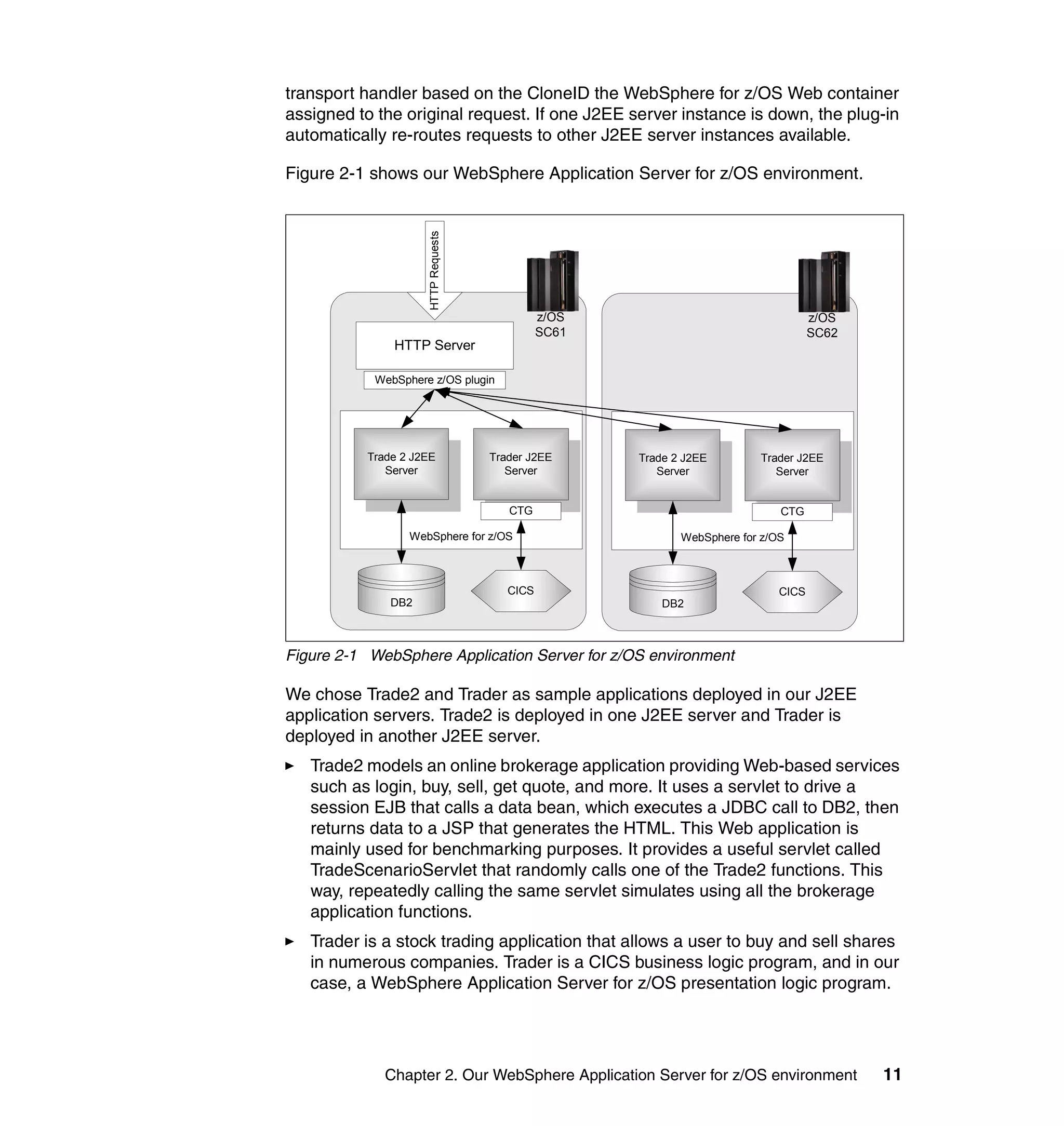
Figure 2-1 shows our WebSphere Application Server for z/OS environment.


                    HTTP Requests
                                              z/OS                                  z/OS
                                              SC61                                  SC62
              HTTP Server

           WebSphere z/OS plugin


          Trade 2 J2EE              Trader J2EE      Trade 2 J2EE        Trader J2EE
             Server                    Server           Server              Server


                                       CTG                                   CTG

                 WebSphere for z/OS                         WebSphere for z/OS


                                       CICS                                  CICS
              DB2                                        DB2


Figure 2-1 WebSphere Application Server for z/OS environment

We chose Trade2 and Trader as sample applications deployed in our J2EE
application servers. Trade2 is deployed in one J2EE server and Trader is
deployed in another J2EE server.
   Trade2 models an online brokerage application providing Web-based services
   such as login, buy, sell, get quote, and more. It uses a servlet to drive a
   session EJB that calls a data bean, which executes a JDBC call to DB2, then
   returns data to a JSP that generates the HTML. This Web application is
   mainly used for benchmarking purposes. It provides a useful servlet called
   TradeScenarioServlet that randomly calls one of the Trade2 functions. This
   way, repeatedly calling the same servlet simulates using all the brokerage
   application functions.
   Trader is a stock trading application that allows a user to buy and sell shares
   in numerous companies. Trader is a CICS business logic program, and in our
   case, a WebSphere Application Server for z/OS presentation logic program.


             Chapter 2. Our WebSphere Application Server for z/OS environment              11
This application requires the CICS Transaction Gateway in local mode to
                     communicate with the CICS Transaction Server.


2.2 IBM HTTP server and WebSphere z/OS HTTP plug-in
                 In our operating environment, we decided to use the z/OS HTTP plug-in
                 available with WebSphere service level W401500. This plug-in allows
                 connections through the HTTP(S) Transport Handler between a WebSphere for
                 z/OS Web container and the IBM HTTP server for z/OS and OS/390.

                 Similar plug-ins for Web servers running on a non-z/OS platform are also
                 available to allow connections with WebSphere for z/OS. You can read the
                 complete list of supported Web servers and platforms in the documentation for
                 the new WebSphere HTTP plug-in for z/OS introduced with APAR PQ68250,
                 available on the WebSphere for z/OS support Web site:
                 http://www.ibm.com/software/webservers/appserv/zos_os390/support/

                 On the HTTP server side, only the httpd.conf file needs to be customized. The
                 location of this UNIX System Services file can be found in the JCL of your IBM
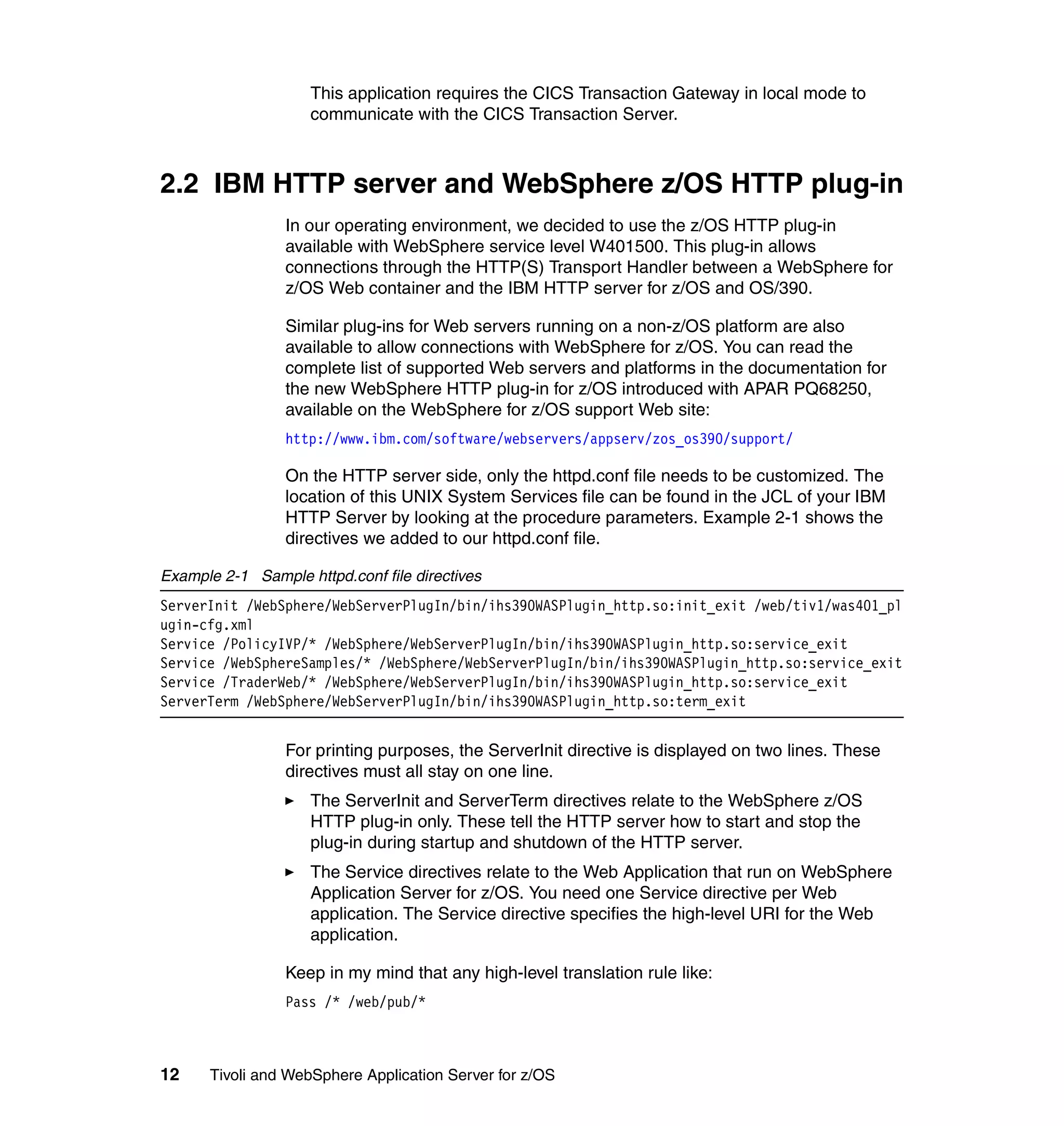
                 HTTP Server by looking at the procedure parameters. Example 2-1 shows the
                 directives we added to our httpd.conf file.

Example 2-1 Sample httpd.conf file directives
ServerInit /WebSphere/WebServerPlugIn/bin/ihs390WASPlugin_http.so:init_exit /web/tiv1/was401_pl
ugin-cfg.xml
Service /PolicyIVP/* /WebSphere/WebServerPlugIn/bin/ihs390WASPlugin_http.so:service_exit
Service /WebSphereSamples/* /WebSphere/WebServerPlugIn/bin/ihs390WASPlugin_http.so:service_exit
Service /TraderWeb/* /WebSphere/WebServerPlugIn/bin/ihs390WASPlugin_http.so:service_exit
ServerTerm /WebSphere/WebServerPlugIn/bin/ihs390WASPlugin_http.so:term_exit


                 For printing purposes, the ServerInit directive is displayed on two lines. These
                 directives must all stay on one line.
                     The ServerInit and ServerTerm directives relate to the WebSphere z/OS
                     HTTP plug-in only. These tell the HTTP server how to start and stop the
                     plug-in during startup and shutdown of the HTTP server.
                     The Service directives relate to the Web Application that run on WebSphere
                     Application Server for z/OS. You need one Service directive per Web
                     application. The Service directive specifies the high-level URI for the Web
                     application.

                 Keep in my mind that any high-level translation rule like:
                 Pass /* /web/pub/*


12    Tivoli and WebSphere Application Server for z/OS
should be placed after the WebSphere directives. If placed before, the
WebSphere directive may not be taken into account.

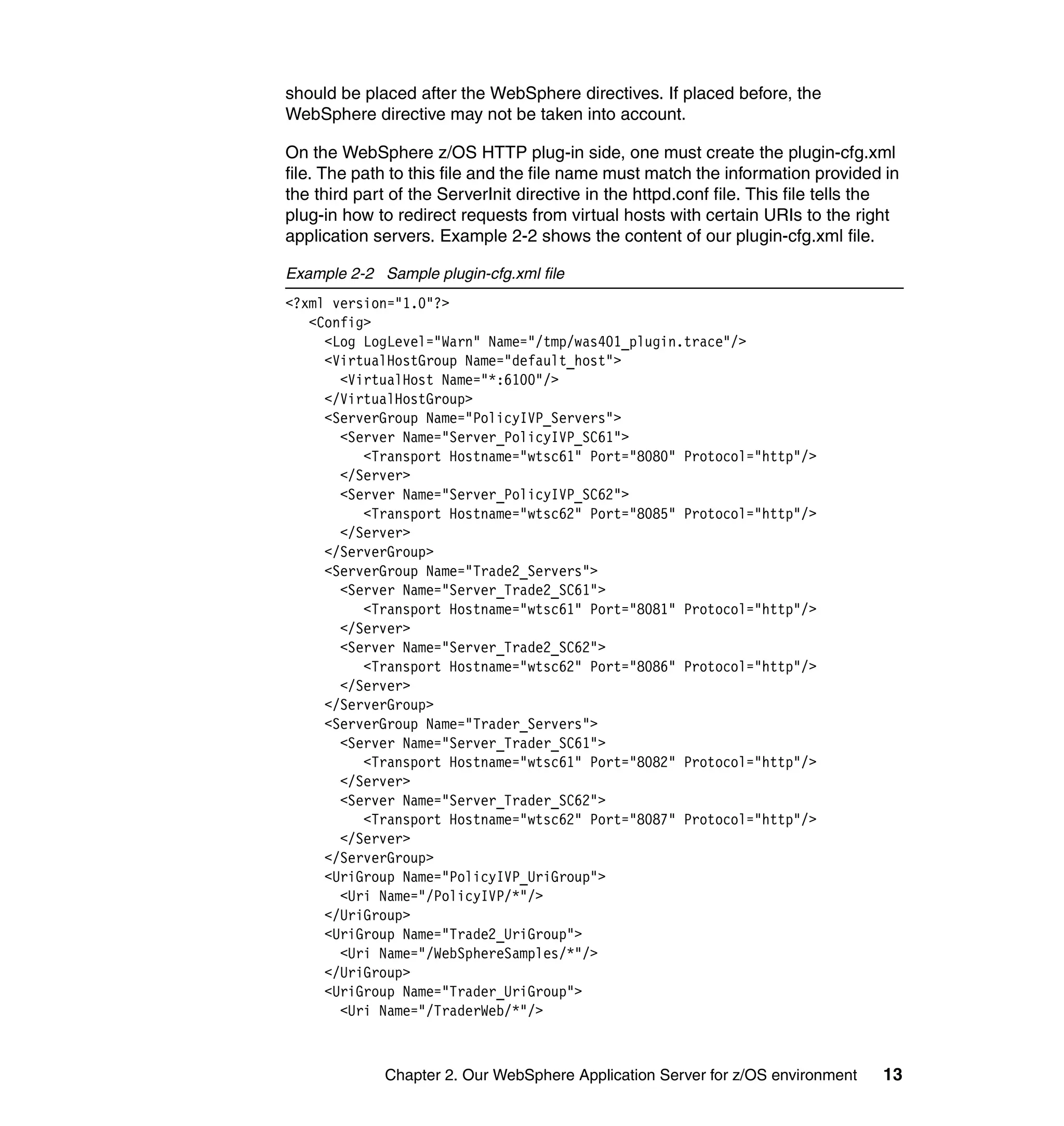
On the WebSphere z/OS HTTP plug-in side, one must create the plugin-cfg.xml
file. The path to this file and the file name must match the information provided in
the third part of the ServerInit directive in the httpd.conf file. This file tells the
plug-in how to redirect requests from virtual hosts with certain URIs to the right
application servers. Example 2-2 shows the content of our plugin-cfg.xml file.

Example 2-2 Sample plugin-cfg.xml file
<?xml version="1.0"?>
   <Config>
     <Log LogLevel="Warn" Name="/tmp/was401_plugin.trace"/>
     <VirtualHostGroup Name="default_host">
       <VirtualHost Name="*:6100"/>
     </VirtualHostGroup>
     <ServerGroup Name="PolicyIVP_Servers">
       <Server Name="Server_PolicyIVP_SC61">
          <Transport Hostname="wtsc61" Port="8080" Protocol="http"/>
       </Server>
       <Server Name="Server_PolicyIVP_SC62">
          <Transport Hostname="wtsc62" Port="8085" Protocol="http"/>
       </Server>
     </ServerGroup>
     <ServerGroup Name="Trade2_Servers">
       <Server Name="Server_Trade2_SC61">
          <Transport Hostname="wtsc61" Port="8081" Protocol="http"/>
       </Server>
       <Server Name="Server_Trade2_SC62">
          <Transport Hostname="wtsc62" Port="8086" Protocol="http"/>
       </Server>
     </ServerGroup>
     <ServerGroup Name="Trader_Servers">
       <Server Name="Server_Trader_SC61">
          <Transport Hostname="wtsc61" Port="8082" Protocol="http"/>
       </Server>
       <Server Name="Server_Trader_SC62">
          <Transport Hostname="wtsc62" Port="8087" Protocol="http"/>
       </Server>
     </ServerGroup>
     <UriGroup Name="PolicyIVP_UriGroup">
       <Uri Name="/PolicyIVP/*"/>
     </UriGroup>
     <UriGroup Name="Trade2_UriGroup">
       <Uri Name="/WebSphereSamples/*"/>
     </UriGroup>
     <UriGroup Name="Trader_UriGroup">
       <Uri Name="/TraderWeb/*"/>


             Chapter 2. Our WebSphere Application Server for z/OS environment      13
</UriGroup>
                     <Route ServerGroup="PolicyIVP_Servers" UriGroup="PolicyIVP_UriGroup"
                             VirtualHostGroup="default_host"/>
                     <Route ServerGroup="Trade2_Servers" UriGroup="Trade2_UriGroup"
                             VirtualHostGroup="default_host"/>
                     <Route ServerGroup="Trader_Servers" UriGroup="Trader_UriGroup"
                             VirtualHostGroup="default_host"/>
                  </Config>


                You can check that your WebSphere z/OS HTTP plug-in is properly configured
                and sending HTTP requests to the PolicyIVP IVP application server. For this
                purpose, make sure that your IVP application server is started, then use a
                browser to open the following URL:
                http://<http_server_hostname>:<port>/PolicyIVP/cebit.html

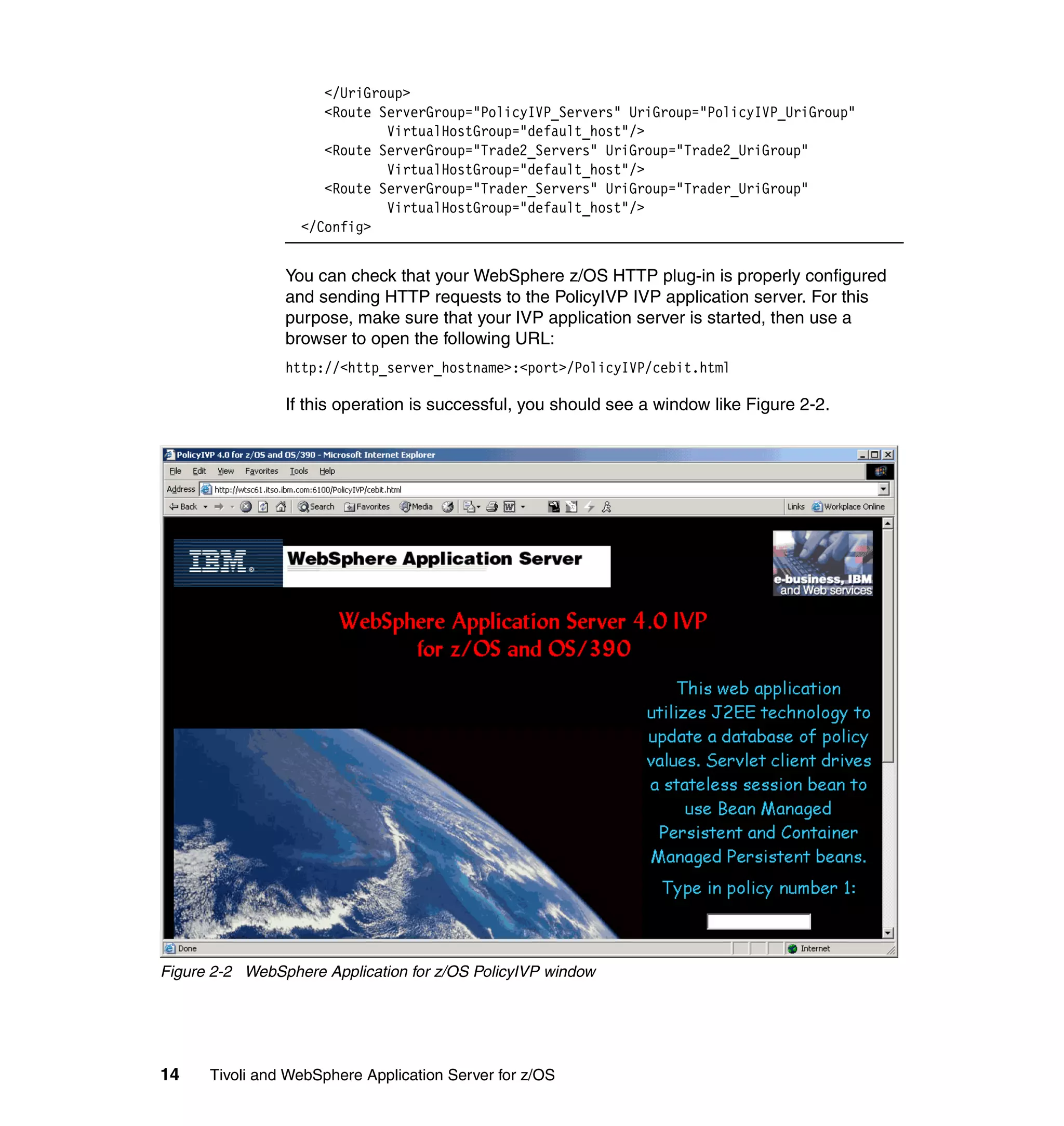
                If this operation is successful, you should see a window like Figure 2-2.


Figure 2-2 WebSphere Application for z/OS PolicyIVP window


14    Tivoli and WebSphere Application Server for z/OS
2.3 WebSphere Application Server for z/OS and DB2
           In order to observe the behavior of WebSphere Application Server interacting
           with DB2, we choose to use the Trade2 sample application. Trade2 is a popular
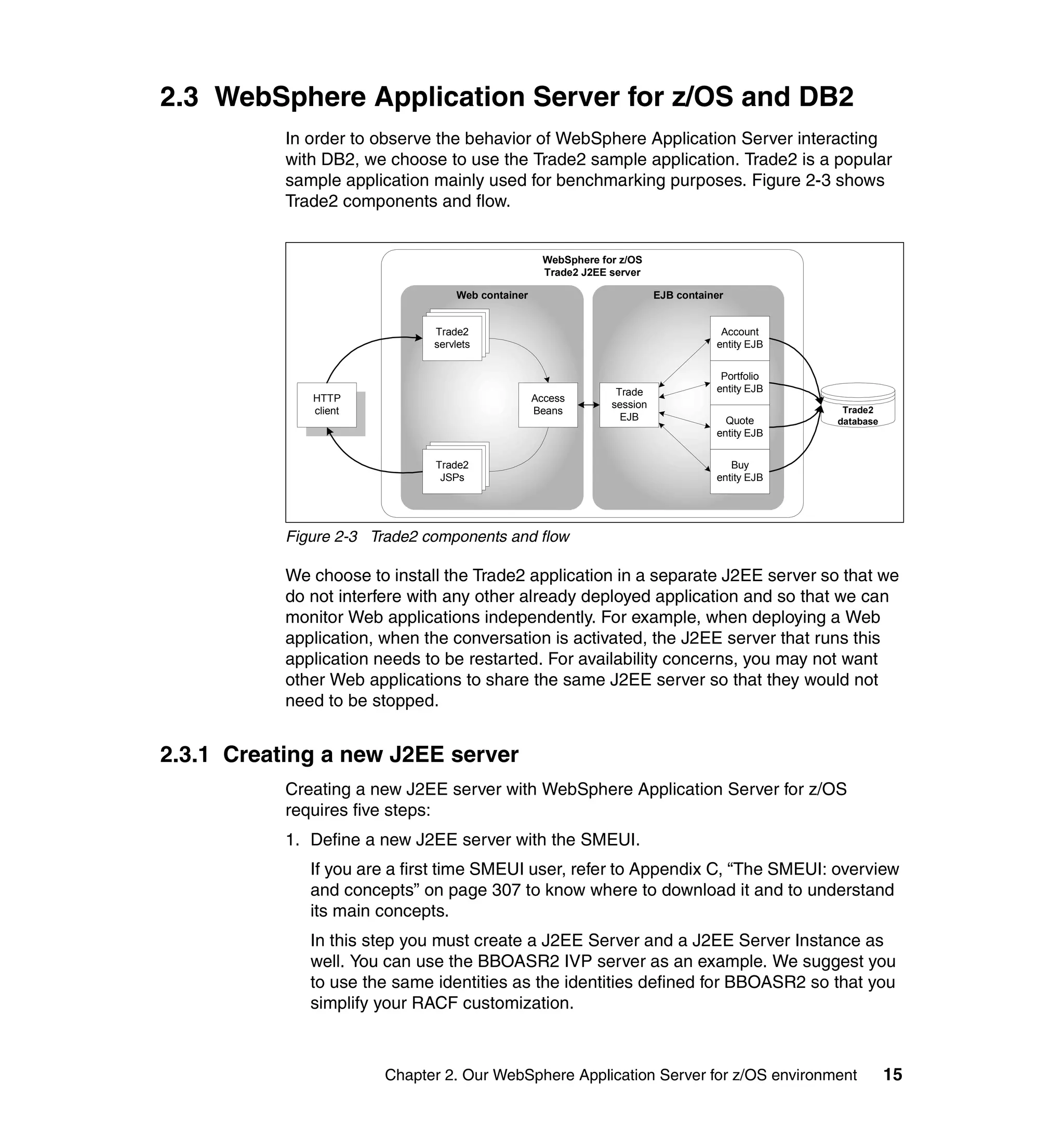
           sample application mainly used for benchmarking purposes. Figure 2-3 shows
           Trade2 components and flow.


                                                     WebSphere for z/OS
                                                     Trade2 J2EE server

                                   Web container                           EJB container

                                Trade2
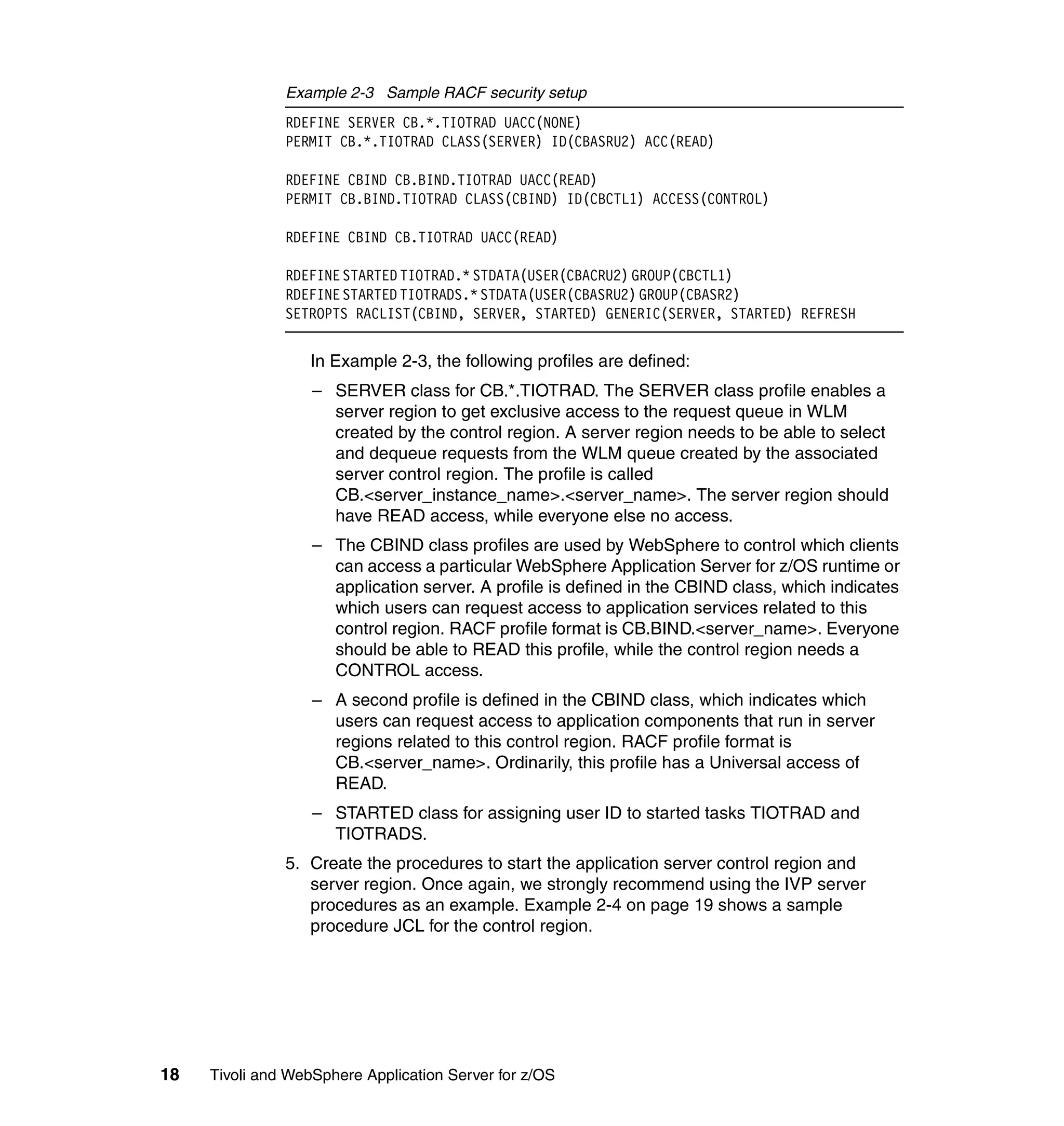
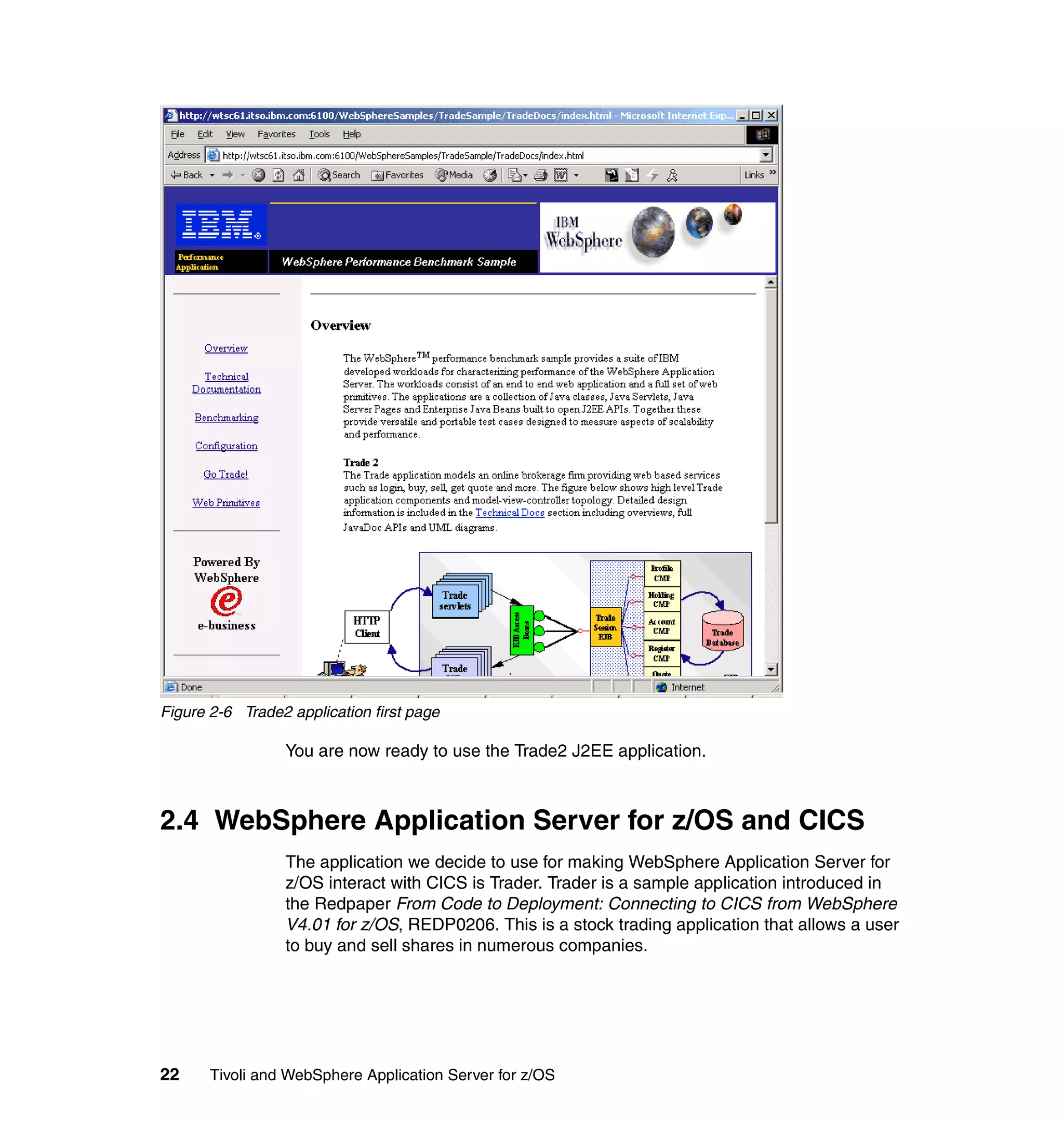
                               Trade2
                              Trade2                                                   Account
                                servlets
                               servlets
                              servlets                                                entity EJB


                                                                                       Portfolio
                                                                  Trade               entity EJB
              HTTP                                 Access
                                                                 session
              client                               Beans                                            Trade2
                                                                   EJB                  Quote      database
                                                                                      entity EJB

                                Trade2
                               Trade2
                              Trade2
                               servlets                                                  Buy
                              servlets
                               JSPs                                                   entity EJB


           Figure 2-3 Trade2 components and flow

           We choose to install the Trade2 application in a separate J2EE server so that we
           do not interfere with any other already deployed application and so that we can
           monitor Web applications independently. For example, when deploying a Web
           application, when the conversation is activated, the J2EE server that runs this
           application needs to be restarted. For availability concerns, you may not want
           other Web applications to share the same J2EE server so that they would not
           need to be stopped.


2.3.1 Creating a new J2EE server
           Creating a new J2EE server with WebSphere Application Server for z/OS
           requires five steps:
           1. Define a new J2EE server with the SMEUI.
              If you are a first time SMEUI user, refer to Appendix C, “The SMEUI: overview
              and concepts” on page 307 to know where to download it and to understand
              its main concepts.
              In this step you must create a J2EE Server and a J2EE Server Instance as
              well. You can use the BBOASR2 IVP server as an example. We suggest you
              to use the same identities as the identities defined for BBOASR2 so that you
              simplify your RACF customization.


                       Chapter 2. Our WebSphere Application Server for z/OS environment                       15
Tip: If you want to use the HTTP transport handler included in Service Level
                W401500, do not forget to add the server instance environment variable
                BBOC_HTTP_PORT associated with the port number you want to activate.

               2. Add a new Workload Manager (WLM) application environment. Use the WLM
                  administration ISPF dialog from TSO. The main menu from WLM
                  administration menu is shown in Figure 2-4.


                  EsssssssssssssssssssssssssssssssssssssssssssssN
                  e         Choose Service Definition           e
                  e                                             e
                  e Select one of the following options.        e
                  e __ 1. Read saved definition                 e
                  e     2. Extract definition from WLM          e
                  e         couple data set                     e
                  e     3. Create new definition                e
                  e                                             e
                  e F1=Help        F2=Split      F5=KeysHelp    e
                  e F9=Swap       F12=Cancel                    e
                  DsssssssssssssssssssssssssssssssssssssssssssssM
                               ENTER to continue

               Figure 2-4 WLM administration main menu

                  We choose menu option 2 to extract the definition from the WLM couple data
                  set, choose option 9 to manage the application environment, and choose
                  option 1 to create a new application environment, as shown in Figure 2-5 on
                  page 17.


16   Tivoli and WebSphere Application Server for z/OS
Application-Environment Notes Options Help
  --------------------------------------------------------------------------
                      Create an Application Environment
  Command ===> ______________________________________________________________

  Application Environment    .   .   .   TIOTRAD_________________________ Required
  Description . . . . . .    .   .   .   Application environment TIOTRAD
  Subsystem Type . . . . .   .   .   .   CB__ Required
  Procedure Name . . . . .   .   .   .   TIOTRADS
  Start Parameters . . . .   .   .   .   IWMSSNM=&IWMSSNM________________________
                                         ________________________________________
                                         ___________________________________

  Limit on starting server address spaces for a subsystem instance:
  1 1. No limit
      2. Single address space per system
      3. Single address space per sysplex

Figure 2-5 Creating a new WLM application environment

3. Set up the UNIX System Services configuration files
   There are four configuration files for each J2EE server inside <WebSphere
   home>/CB390/controlinfo/envfile/<plex name>/<instance name>:
   current.env, jvm.properties, webcontainer.conf, and trace.dat. The
   current.env file is generated by the SMEUI and does not need any
   customization here. jvm.properties, webcontainer.conf, and trace.dat can be
   taken from the IVP server directory and customized so that the
   <instancename> is correct and so that the host name is right inside the
   webcontainer.conf file.

    Attention: If you use the z/OS HTTP plug-in to redirect requests from the
    IBM HTTP server to the HTTP transport handler, then you have to specify
    (for the host.<virtual_hostname>.alias directive in the webcontainer.conf
    file) the host name with the port number and the host name without the port
    number. For example:
    host.default_host.alias=wtsc61.ibm.com:8081, wtsc61.ibm.com


4. Set up your RACF security.
   Example 2-3 on page 18 shows the RACF commands that we issued. This
   can be embedded in a JCL or issued from a TSO session. We are using the
   default user IDs from the IVP process for the users that granted access.


             Chapter 2. Our WebSphere Application Server for z/OS environment        17
Example 2-3 Sample RACF security setup
               RDEFINE SERVER CB.*.TIOTRAD UACC(NONE)
               PERMIT CB.*.TIOTRAD CLASS(SERVER) ID(CBASRU2) ACC(READ)

               RDEFINE CBIND CB.BIND.TIOTRAD UACC(READ)
               PERMIT CB.BIND.TIOTRAD CLASS(CBIND) ID(CBCTL1) ACCESS(CONTROL)

               RDEFINE CBIND CB.TIOTRAD UACC(READ)

               RDEFINE STARTED TIOTRAD.* STDATA(USER(CBACRU2) GROUP(CBCTL1)
               RDEFINE STARTED TIOTRADS.* STDATA(USER(CBASRU2) GROUP(CBASR2)
               SETROPTS RACLIST(CBIND, SERVER, STARTED) GENERIC(SERVER, STARTED) REFRESH


                  In Example 2-3, the following profiles are defined:
                   – SERVER class for CB.*.TIOTRAD. The SERVER class profile enables a
                     server region to get exclusive access to the request queue in WLM
                     created by the control region. A server region needs to be able to select
                     and dequeue requests from the WLM queue created by the associated
                     server control region. The profile is called
                     CB.<server_instance_name>.<server_name>. The server region should
                     have READ access, while everyone else no access.
                   – The CBIND class profiles are used by WebSphere to control which clients
                     can access a particular WebSphere Application Server for z/OS runtime or
                     application server. A profile is defined in the CBIND class, which indicates
                     which users can request access to application services related to this
                     control region. RACF profile format is CB.BIND.<server_name>. Everyone
                     should be able to READ this profile, while the control region needs a
                     CONTROL access.
                   – A second profile is defined in the CBIND class, which indicates which
                     users can request access to application components that run in server
                     regions related to this control region. RACF profile format is
                     CB.<server_name>. Ordinarily, this profile has a Universal access of
                     READ.
                   – STARTED class for assigning user ID to started tasks TIOTRAD and
                     TIOTRADS.
               5. Create the procedures to start the application server control region and
                  server region. Once again, we strongly recommend using the IVP server
                  procedures as an example. Example 2-4 on page 19 shows a sample
                  procedure JCL for the control region.


18   Tivoli and WebSphere Application Server for z/OS
Example 2-4 Sample JCL for the control region procedure
            //TIOTRAD PROC SRVNAME='TIOTRADA',
            //       PARMS=''
            // SET RELPATH='controlinfo/envfile'
            // SET CBCONFIG='/WebSphereTI/CB390'
            //TIOTRAD EXEC PGM=BBOCTL,REGION=0M,
            // PARM='/ -ORBsrvname &SRVNAME &PARMS'
            //STEPLIB DD DISP=SHR,DSN=DB7K7.SDSNEXIT
            //         DD DISP=SHR,DSN=DB7K7.SDSNLOAD
            //BBOENV DD PATH='&CBCONFIG/&RELPATH/&SYSPLEX/&SRVNAME/current.env'
            //CEEDUMP DD SYSOUT=*,SPIN=UNALLOC,FREE=CLOSE
            //SYSOUT    DD SYSOUT=*,SPIN=UNALLOC,FREE=CLOSE
            //SYSPRINT DD SYSOUT=*,SPIN=UNALLOC,FREE=CLOSE

               Example 2-5 shows a sample procedure JCL for the server region.

            Example 2-5 Sample JCL for the server region procedure
            //TIOTRADS PROC IWMSSNM='TIOTRADA',PARMS='-ORBsrvname '
            // SET CBCONFIG='/WebSphereTI/CB390'
            // SET RELPATH='controlinfo/envfile'
            //TIOTRADS EXEC PGM=BBOSR,REGION=0M,TIME=NOLIMIT,
            // PARM='/ &PARMS &IWMSSNM'
            //STEPLIB DD DISP=SHR,DSN=BBO61.SBBOULIB
            //         DD DISP=SHR,DSN=DB7K7.SDSNEXIT
            //         DD DISP=SHR,DSN=DB7K7.SDSNLOAD
            //BBOENV DD PATH='&CBCONFIG/&RELPATH/&SYSPLEX/&IWMSSNM/current.env'
            //CEEDUMP DD SYSOUT=*
            //SYSOUT DD SYSOUT=*
            //SYSPRINT DD SYSOUT=*


2.3.2 Installing the Trade2 application
            The instructions for setting up and running the Trade2 application with
            WebSphere Application Server for z/OS are available at:
            http://www.ibm.com/software/webservers/appserv/zos_os390/doc/v401/pstore/trade.
            html

            The following steps explain additional information from the Web page.
            1. Downloading the Trade2 application
               The Trade 2 Application is contained in the TradeSample.ear file included in
               the DB2_AE.zip file. This EAR file, along with an Installation Readme, is
               available at:
               http://www-4.ibm.com/software/webservers/appserv/wpbs_download.html


                         Chapter 2. Our WebSphere Application Server for z/OS environment   19
Follow the instruction to register and login. Get the DB2_AE.zip file and
                  extract the TradeSample.ear file using the jar xvf DB2_AE.zip command.
                  We only use the TradeSample.ear file from that archive file.
               2. Assembling the Trade2 application
                  For this operation, you need the WebSphere for z/OS Application Assembly
                  Tool (AAT), available at:
                  http://www.ibm.com/software/webservers/appserv/download_v4z.html
                  Step 2 of the instruction explains what to do with the AAT.
               3. Deploying the Trade2 application
                  For this operation, you need the WebSphere for z/OS System Management
                  Enhanced User Interface (SMEUI). If you are a first time SMEUI user, refer to
                  Appendix C, “The SMEUI: overview and concepts” on page 307 to know
                  where to download it and to understand its main concepts.
                  Step 3 of the instructions explains how to create the necessary J2EE
                  resource and how to install the J2EE application.
               4. Creating the Trade2 database
                  As explained in the instructions, download, customize, and submit the JCL
                  provided at the URL:
                  http://www.ibm.com/software/webservers/appserv/zos_os390/doc/v401/pstore/db
                  2ddl.txt
                  In the JCL text, you need to customize it by substituting several symbols. The
                  following lists the symbols and its usage:
                  <YourDb2SubSys>          DB2 subsystem ID. Our subsystem name is D7K1.
                  <YourDSNTIADPlan>
                                           The plan name from the DB2 installation procedure for
                                           module DSNTIAD. This name is dependent on the
                                           DB2 version, our DB2 V7 uses the plan name
                                           DSNTIA71.
                  <YourDSNTIADLoadLib>
                                   This indicates the library where the DSNTIAD module
                                   is located. Ours resides in DB7KU.RUNLIB.LOAD.
                  <YourDb2Hlq>             The high-level qualifier for DB2 cluster data sets. The
                                           first level is installation dependent, but the second
                                           must be DSNDBC. Our substitution is
                                           DB7KU.DSNDBC.
                  <YourDb2DataHlq>         The high-level qualifier for DB2 data. This must be the
                                           same as the cluster, except the second qualifier is
                                           DSNDBD. Our substitution is DB7KU.DSNDBD.


20   Tivoli and WebSphere Application Server for z/OS
<YourVol>             DASD volume where the data sets will be allocated.
   <YourDb2VCat>         The first level qualifier for the DB2 data sets. This must
                         be the first qualifier of the DB2 HLQ; ours is DB7KU.
   <Db2DfltQual>         The creator user ID for DB2 tablespaces, indexes and
                         tables. Usually similar to the owning user ID. We use
                         CBASRU2.
5. Running the Trade2 application
   This step requires you to start the J2EE server, configure the Trade2
   application with a browser and populate the Trade2 database. Keep in mind
   that you should reset and populate the database before each Trade2 run for
   consistent results. You can access the Trade2 welcome page at:
   http://<hostname>:<port>/WebSphereSamples/TradeSample/TradeDocs/index.html
   Figure 2-6 on page 22 shows the window you should get when first calling the
   Trade2 application.


            Chapter 2. Our WebSphere Application Server for z/OS environment    21
Figure 2-6 Trade2 application first page

                 You are now ready to use the Trade2 J2EE application.


2.4 WebSphere Application Server for z/OS and CICS
                 The application we decide to use for making WebSphere Application Server for
                 z/OS interact with CICS is Trader. Trader is a sample application introduced in
                 the Redpaper From Code to Deployment: Connecting to CICS from WebSphere
                 V4.01 for z/OS, REDP0206. This is a stock trading application that allows a user
                 to buy and sell shares in numerous companies.


22     Tivoli and WebSphere Application Server for z/OS
Trader is a CICS business logic program. We are going to use WebSphere for
           the presentation logic. Figure 2-7 shows the Trader application components and
           flow.


                                                   WebSphere for z/OS
                                                   Trade2 J2EE server

                                   Web container                        EJB container
                                                                                                                   CICS Transaction
                                                                                                                       Server
                                Trade2
                               Trade2
                              Trade2


                                                                                        CICS Transaction Gateway
                                servlets
                               servlets
                              servlets


                                                                         Trade
              HTTP                                 Access
                                                                        session                                     TRADEBL
              client                               Beans
                                                                          EJB


                                Trade2
                               Trade2
                              Trade2
                               servlets
                              servlets
                               JSPs


           Figure 2-7 Trader components and flow

           We have modified some of the sample provided with the original application.
           Refer to Appendix E, “Additional material” on page 339 for the definition that we
           used for setting up this application.

           Here are the steps for setting up and running the Trader application:
           1. Install the business logic COBOL Trader application within CICS.
           2. Enable CICS connector support for WebSphere Application Server for z/OS.
           3. Deploy the presentation logic to WebSphere Application Server for z/OS.

           We assume that you have a CICS Transaction Server Version 1.3 region or
           higher configured and running, and it assumes you have the CICS Transaction
           Gateway Version 4.0.2 or higher installed.


2.4.1 Installing the Trader application within CICS
           We suggest you install the complete 3270 Trader application (business logic and
           3270 presentation logic) so that you can easily verify that the business logic
           works on the CICS side. A description of the complete 3270 Trader application is
           available with the redpaper From Code to Deployment: Connecting to CICS from
           WebSphere V4.01 for z/OS, REDP0206.


                        Chapter 2. Our WebSphere Application Server for z/OS environment                                              23
To install the COBOL Trader application, the following CICS resources need to
               be created:
                  Files: Trader uses the following two VSAM files:
                   – COMPFILE: This file is used to store the list of companies and associated
                     share prices. It can be created using the supplied JCL
                     TRADERCOCJL.TXT, which requires the file TRADERCODATA.TXT as
                     input.
                   – CUSTFILE: This file is used to store the list of users and share holdings. It
                     can be created using the supplied JCL TRADERCUJCL.TXT.
                  Transactions: The 3270 version of Trader requires just one transaction,
                  TRAD, which should specify the program TRADERPL.
                  Programs: CICS program definitions are only required if the autoinstall
                  program is not active. The 3270 trader application uses two COBOL
                  programs, which will need to be compiled and placed in a data set in your
                  CICS region DFHRPL concatenation. The COBOL source code for these
                  applications is available with the sample source code with this book.
                   – TRADERPL: This contains the 3270 presentation logic and is invoked by
                     transaction TRAD.
                   – TRADERBL: This contains the business logic and is invoked by program
                     TRADERPL, or it can be linked to from another application that contains
                     its own presentation logic, such as a Java™ servlet.
                  Mapset: Trader uses the Mapset NEWTRAD, which comprises the maps
                  T001, T002, T003, T004, T005, and T006. The Mapset is supplied in the file
                  NEWTRAD.TXT and will need to be assembled and link-edited, and the load
                  module placed in a data set in your CICS region DFHRPL concatenation.

               For further information on creating the resource definitions for Trader, refer to the
               supplied file TRADERRDO.TXT, which contains the output of a CSD extract for
               the Trader application. Figure 2-8 on page 25 shows Trader 3270 presentation
               logic logon window.


24   Tivoli and WebSphere Application Server for z/OS
Figure 2-8 Trader 3270 presentation logic logon window


2.4.2 Enabling CICS connector support for WebSphere for z/OS
           The steps required to configure the CICS ECI resource adapter are fully
           described in Chapter 5, “Performing advanced tasks”, in the WebSphere
           Application Server for z/OS Installation and Customization Guide, GA22-7834.
           Ensure you obtain at least the Fifth Edition of this manual, which was published
           on April 2, 2002. Instructions given in this section summarize instructions given in
           the manual.
              CICS Transaction Server considerations
              For each CICS region that you wish to access through the CICS ECI resource
              adapter, you must set the following SIT parameter: RRMS=YES.
              Ensure that EXCI is configured in each CICS region you wish to access using
              the CICS ECI resource adapter. This involves installing a SESSIONS and
              CONNECTION resource definition. Samples are provided in the CICS
              supplied group DFH$EXCI. Also ensure IRC is set to Open.
              Make sure the WebSphere for z/OS J2EE server can access and load the
              CICS module DFHXCSTB. Thus you can either put the module in the link
              pack area (LPA), or add the SDFHEXCI library data set to LINKLIST or
              STEPLIB of the J2EE server region.
              If your CICS region uses SURROGAT checking for CICS regions (as defined
              in the DFHXCOPT table), you must authorize the user ID associated with the


                        Chapter 2. Our WebSphere Application Server for z/OS environment    25
J2EE server region to act as a surrogate for the clients that invoke J2EE
                  applications running in the J2EE server. Complete the following:
                  a. For all potential clients of J2EE application components that will use the
                     CICS ECI resource adapter, define a RACF CICS DFHEXCI SURROGAT
                     profile definition. You may define one profile for each user, one profile for
                     each group of users, or a single surrogate profile for all users. For
                     example:
                      RDEFINE SURROGAT *.DFHEXCI UACC(NONE) OWNER(profile-owner-userid)
                  b. Authorize the user ID of the J2EE server region to be the CICS DFHEXCI
                     surrogate for the specific user ID or set of user IDs that you just identified
                     through the profile in the RACF SURROGAT class. For example:
                      PERMIT *.DFHEXCI CLASS(SURROGAT) ID(server-userid) ACCESS(READ)
                  CICS Transaction Gateway considerations
                  Unlike many application servers, WebSphere Application Server for z/OS
                  Version 4.0.1 cannot work with RAR files directly, so you must extract the
                  contents of the RAR file into a directory, and point the WebSphere classpath
                  to each JAR file in this directory.
                  To install the CICS ECI resource adapter, perform the following:
                  a. Create a new directory in the UNIX System Services file system to extract
                     the contents of the RAR file to, for example, /usr/lpp/connectors. Ensure
                     your user ID has write access to this directory, and grant read and execute
                     permissions to everyone else. We recommend you also mount a separate
                     Hierarchical File System (HFS) on this directory.
                  b. Locate the cicseci.rar file and copy it to the connectors directory you just
                     created. By default, cicseci.rar will be in /usr/lpp/ctg/deployable.

                Note: Some documentations refer to a cicseciRRS.rar file. The cicseciRRS.rar
                file is no longer needed. Chapter 4 of the "Summary of Changes for the z/OS
                edition" document, which ships with the CICS Transaction Gateway 5.0.1,
                explains that there is now only one resource adapter shipped.

                  c. Add the bin directory of your Java installation to the PATH environment
                     variable if it is not already defined. For example:
                      export PATH=/usr/lpp/java/IBM/J1.3/bin:$PATH
                  d. In the connectors directory, extract the contents of cicseci.rar. Enter the
                     following command from the connectors directory:
                      jar -xvf cicseci.rar
                      This will extract the following directory and files: META-INF, ccf2.jar,
                      cicseci.jar, cicsframe.jar, ctgclient.jar, and ctgserver.jar.


26   Tivoli and WebSphere Application Server for z/OS
e. Locate the libCTGJNI.so and libCTGJNI_g.so files and copy them to the
   connectors directory you created. By default, they will be in directory
   /usr/lpp/ctg/bin.
f. Use the following commands to change the permissions of the
   libCTGJNI.so and libCTGJNI_g.so files:
   chmod ugo+x libCTGJNI.so
   chmod ugo+x libCTGJNI_g.so
WebSphere Application Server for z/OS considerations
You are now ready to define connection information to the J2EE server. If you
are a first time SMEUI user, refer to Appendix C, “The SMEUI: overview and
concepts” on page 307 to know where to download it and to understand its
main concepts. Perform the following steps:
a. From the SMEUI, create a new conversation. This conversation will be
   used to add the CICS connector support and to add a new J2EE server for
   the Trader application.
b. Turn on connection management in the SYSPLEX. To do this, right-click
   on the SYSPLEX name in the conversation and select Modify. In the
   Configuration Extensions section check the box labeled Connection
   Management. Click on Selected → Save to save your changes.
c. If you wish to use an existing J2EE server, you can skip this step. Create a
   new J2EE server like we already did for the Trade2 application. In this
   case again, there are five steps to perform:
   i. Add a new J2EE server with the SMEUI.
   ii. Add a new WLM application environment.
   iii. Set up the UNIX System Services configuration files.
   iv. Set up the security.
   v. Create procedures to start the application server control region and
      server region.
d. Expand the list of J2EE servers and locate the J2EE server that you wish
   to use with the CICS ECI resource adapter. Make the following changes in
   the environment variable list:
   Add the Java archives cicseci.jar, cicsframe.jar, ctgserver.jar, and
   ctgclient.jar from the connector directory to the CLASSPATH variable. You
   need to specify their full path name to access them. Notice that a colon
   separates each Java archive entries. Figure 2-9 on page 28 shows an
   example of this addition.


         Chapter 2. Our WebSphere Application Server for z/OS environment    27
Figure 2-9 CLASSPATH modification example

                      Add the connectors directory to the LIBPATH, for example,
                      /usr/lpp/connectors. Figure 2-10 shows an example.


               Figure 2-10 LIBPATH modification example

                      If you are using a specific EXCI pipe, you must set the DFHJVPIPE
                      environment variable here.
                      We recommend that you initially turn on JNDI tracing so you can see the
                      connections being made to CICS. Set the CTG_JNI_TRACE environment
                      variable to a file, for example, CTG_JNI_TRACE, to /tmp/jniTrace.txt.
                  e. Under the J2EE Resources section for the SYSPLEX, add a new J2EE
                     resource that has the type CICS_ECIConnectionFactory. You can now
                     create a J2EE resource instance that defines the connection information.
                     Set the CICS_ECIConnectionFactory instance name, the System name
                     with which this J2EE resource instance is to be associated, and the Server
                     name to the APPLID of the CICS server you wish to call and then save


28   Tivoli and WebSphere Application Server for z/OS
this. Figure 2-11 shows an example of the resource instance you should
                 get.


           Figure 2-11 CICS ECI connection J2EE Resource instance example

           The J2EE server region is now configured to use the CICS ECI resource
           adapter. Do not commit the conversation yet, because you still need to deploy an
           application to make use of this support, and this is described in the next section.


2.4.3 Deploying the Trader presentation logic to WebSphere z/OS
           For this section, we have included the file Trader_was401_zOS_aat.ear. This file
           has been created by WebSphere Studio Application Developer, which already
           went through the Application Assembly Tool (AAT). See Appendix E, “Additional
           material” on page 339 for downloading instructions.


                        Chapter 2. Our WebSphere Application Server for z/OS environment   29
If you are a first time SMEUI user, refer to Appendix C, “The SMEUI: overview
               and concepts” on page 307 to know where to download it and to understand its
               main concepts.

               In this section, we deploy the .ear file to a new J2EE server called TIOTRED. We
               created this when enabling CICS connector support for WebSphere for z/OS.
               1. Right-click on the J2EE server where you installed the CICS ECI resource
                  adapter and select Install J2EE Application. Select the
                  Trader_wsad_aat.ear file and press OK. You will see the message shown in
                  Figure 2-12.


               Figure 2-12 Activation policy message

                  This message implies that the Trader session bean specifies an activation
                  policy of once, and therefore can only be deployed to a single server region.
                  You can change the activation policy in the AAT by selecting the Trader
                  session bean and clicking on the Policy tab. For the purposes of our test, we
                  will leave this activation policy set to once, and will define our J2EE server to
                  be a single server region. Click OK.
               2. The Reference and Resource Resolution window will open. We need to set
                  and resolve some references before the Trader enterprise application can be
                  deployed.
                  a. Expand the Trader EJB folder and highlight the Trader session bean.
                     There are several properties we need to set in here. Ensure that the EJB
                     tab is selected. From here, you can specify the full JNDI name to give the
                     Trader session bean. You can set this value to what you want, as the
                     Trader Web application does not hard code the JNDI name of the session
                     bean. We keep the JNDI Path default, and set the JNDI Name to
                     TraderHome.
                  b. Click on the EJB Resource tab. Here you associate the resource
                     reference used by the command bean with an ECIConnectionFactory
                     object. Click in the J2EE resource field, and select the CICS_ECI resource
                     you created earlier.


30   Tivoli and WebSphere Application Server for z/OS
c. Expand the TraderWeb_WebApp.jar folder and select the
      TraderWeb_WebApp bean. You are required to provide a JNDI name for
      the Web application. This is used internally by WebSphere, and does not
      affect our application, so press the Set Default JNDI Path & Name
      button. Figure 2-13 shows the display at this point.


Figure 2-13 Reference and Resource Resolution window

   d. All required references should have now been set, and the OK button will
      become active, as shown in Figure 2-13. Press OK to deploy the
      enterprise application. If the operation completes successfully, a message
      similar to the one below will display:
      BBON0470I EAR file Trader_resolved.ear has been successfully installed
      on server TIOTRED.
   e. As an earlier message implied, we need to set this J2EE server to be a
      single server instance. Right-click on the J2EE server name and select
      Modify. Add the following environment variable to the list: MAX_SRS to 1.
   f. You are now ready to activate the conversation. Right-click the
      conversation name and select Validate, and then right-click and select
      Commit, then Complete → All tasks, and then click Activate.
3. Once the conversation is activated and the J2EE server is started and you get
   the message open for e-business, your are ready to test the Trader
   enterprise application. Open a Web browser and specify the host name and
   port of your J2EE server followed by the /TraderWeb/Logon.html URI. For
   example:
   http://wtsc61.itso.ibm.com:6100/TraderWeb/Logon.html


            Chapter 2. Our WebSphere Application Server for z/OS environment   31
The logon window should display as shown in Figure 2-14.


               Figure 2-14 Trader Web presentation logic logon window

               4. You need to specify the JNDI name of the Trader session bean on this
                  window. To confirm the value to set it to, look at the active conversation in the
                  SMEUI. Expand your J2EE server to show a list of J2EE applications installed
                  within it. From here, expand Trader → J2EEModules → TraderEJB.jar →
                  J2EE Components → Trader. Highlight the Trader J2EE component and
                  copy the value in the Home JNDI name field. Paste this value into the
                  JndiName field in the Web browser.
               5. Enter a user ID and password in the Web browser form and then press
                  Logon. You can begin testing the Trader enterprise application. You will see
                  a window as presented on Figure 2-15 on page 33.


32   Tivoli and WebSphere Application Server for z/OS
Figure 2-15 Trader company selection window

        You are now ready to use the Trader J2EE application.


2.5 WebSphere Studio Workload Simulator for z/OS
        WebSphere Studio Workload Simulator for z/OS lets you create virtual or
        simulated users. It consists of two components: a controller and an engine. For
        high scalability, WebSphere Workload Simulator's engine component, which
        generates the load used during load-testing, is installed on a zSeries® server.
        The load generated by the engine can be used to test any Web-serving
        environment.

        The user interfaces with WebSphere Workload Simulator through the controller.
        This component resides on a Windows® workstation and offers an interface for
        managing all aspects of the workload creation process: test scripts can be
        created and edited, simulation runs can be set up, executed, and monitored.
        Figure 2-16 on page 34 shows the controller main window.


                     Chapter 2. Our WebSphere Application Server for z/OS environment   33
Figure 2-16 WebSphere Studio Workload Simulator main window

               With WebSphere Workload Simulator, the workload-creation process consists of
               two steps: first, the user's actions during a Web session are captured to produce
               a test script. Second, the script is played back through the environment to create
               the workload.
                  Capture: Test scripts are automatically generated by a capture function. The
                  Capture function captures the session's Web traffic and turns it into a test
                  script ready for immediate playback. If needed, more complex programming
                  functions like weight distribution or looping can also be added to the test
                  script, to mimic the actions of a group of real users. Sections of a test script
                  can be defined as transactions for further monitoring and analysis.
                  To start capturing a script, press the Capture button on the main window (the
                  button with the camera icon). Your preferred browser window will pop up and
                  a small capture control window will pop up on top. Press Start when you want
                  to start recording the script. Use your Web application as you want it for your
                  script. This operation records HTTP requests, cookies, delays, and so on.
                  Figure 2-17 on page 35 shows the window at this stage.


34   Tivoli and WebSphere Application Server for z/OS
Figure 2-17 WebSphere Studio Workload Simulator Capture process

   When you are done with your scenario and you want to stop recording, press
   Stop. A pop-up window will ask you for a script name. Figure 2-18 shows the
   Create new script pop-up window.


Figure 2-18 WebSphere Studio Workload Simulator Create new script window

   Enter the desired script name for this new recording and press OK. The new
   script is then added to the list of scripts in your WebSphere Studio Workload
   Simulator workplace. If this new script needs any customization, the software
   includes the capability to edit it manually.


             Chapter 2. Our WebSphere Application Server for z/OS environment   35
Playback: For maximum flexibility during execution, several run-time
                  parameters can be set: whether the test should be repeated for a specific
                  number of times, should run until manually stopped, or should run for a
                  specific time period, and the number of virtual users to be simulated. To
                  simulate real-life conditions, various delay times can be specified: delays
                  between the virtual users as they go online (not all users logon at exactly the
                  same instant), delays between Web pages, and between the elements of a
                  Web page.
                  To start generating a workload, select the script you want to run, then select
                  Run → Run Script. A pop-up window then appears. Figure 2-19 shows the
                  Run Script window.


               Figure 2-19 WebSphere Studio Workload Simulator Run Script window

                  Press the Options button to choose how you want run this script. Figure 2-20
                  on page 37 shows the Run Options window.


36   Tivoli and WebSphere Application Server for z/OS
Figure 2-20 WebSphere Studio Workload Simulator Run Options window

   You can either set options using this window or set previous options in a
   configuration file. The second solution is the smart choice for repeated
   workload generation. In this case, select your Config File and press Run.
   Your script file and your option file are then transferred with FTP to the
   engine. The engine monitor window then appear. Figure 2-21 on page 38
   shows the engine monitor window.


            Chapter 2. Our WebSphere Application Server for z/OS environment    37
Figure 2-21 WebSphere Studio Workload Simulator Monitor window

               Press Start to generate the workload.

               Figure 2-22 on page 39 shows the Run Options window when you create a new
               configuration file.


38   Tivoli and WebSphere Application Server for z/OS
Figure 2-22 WebSphere Studio Workload Simulator Run Options window (2)

For our operating environment, we created two scripts simulating one user using
the Trade2 and Trader applications during one minute. These scripts can be
repeated as much as we want to simulate one user using applications during
more than one minute. We also created configuration files to generate workloads
going from 10 simultaneous users to 1000 simultaneous users.

For more information about WebSphere Studio Workload Simulator, refer to the
WebSphere Studio Workload Simulator User’s Guide, SC31-6307.


             Chapter 2. Our WebSphere Application Server for z/OS environment   39
40   Tivoli and WebSphere Application Server for z/OS
3


    Chapter 3.   IBM Tivoli Monitoring for
                 Web Infrastructure: the
                 inside-out viewpoint
                 In this chapter, we describe IBM Tivoli Monitoring for Web Infrastructure:
                 WebSphere Application Server as a solution for getting a live inside view of
                 WebSphere Application Server for z/OS.

                 We cover the following topics:
                     3.1, “What IBM Tivoli Monitoring for Web Infrastructure is” on page 42
                     3.2, “How ITM for Web Infrastructure works” on page 43
                     3.3, “Configuration of IBM Tivoli NetView for z/OS” on page 46
                     3.4, “Configuration of WebSphere for z/OS” on page 48
                     3.5, “Configuration of ITM for Web Infrastructure” on page 52
                     3.6, “Usage examples” on page 72


© Copyright IBM Corp. 2004. All rights reserved.                                                41
3.1 What IBM Tivoli Monitoring for Web Infrastructure is
               IBM Tivoli Monitoring for Web Infrastructure is a tool to help ensure the optimal
               performance and availability of both application servers and the associated Web
               servers that feed them. It provides a single point of control to enable IT
               organizations to understand the health of the key elements of a Web-based
               environment. It allows administrators to quickly identify problems, alert
               appropriate personnel as required, and offer a means for automated problem
               correction leveraging IBM best practices. In addition, IBM Tivoli Monitoring for
               Web Infrastructure provides a real-time view of performance health and feeds a
               common data warehouse for historical reporting and analysis.

               IBM Tivoli Monitoring for Web Infrastructure: WebSphere Application Server
               provides the ability to manage and monitor IBM WebSphere Application Server
               resources by providing extensions to Tivoli Management Framework, IBM Tivoli
               Monitoring, Tivoli Enterprise™ Console, Tivoli Business Systems Manager, and
               Tivoli Enterprise Data Warehouse.

               IBM Tivoli Monitoring for Web Infrastructure: WebSphere Application Server lets
               you perform the following tasks:
                  Monitor and interpret performance and availability data for all IBM
                  WebSphere Application Server resources across distributed environments
                  and z/OS environments.
                  Manage performance and availability of IBM WebSphere Application Server
                  for z/OS resources.
                  Capture and manage historical data that is stored in a central data
                  warehouse.
                  Forward IBM WebSphere Application Server for z/OS events to the Tivoli
                  Enterprise Console®.
                  Manage event correlation and automation using the Tivoli Business Systems
                  Manager.

               IBM Tivoli Monitoring for Web Infrastructure: WebSphere Application Server
               provides the following features:
                  Availability management
                  Performance management
                  Operations management


42   Tivoli and WebSphere Application Server for z/OS
3.1.1 Availability management
           IBM Tivoli Monitoring for Web Infrastructure: WebSphere Application Server
           provides resource models that periodically check the status of your IBM
           WebSphere Application Server components. For example, the resource models
           monitor the application servers Java Virtual Machine health.

           You can configure the resource models to customize the monitoring cycle and to
           change the triggering thresholds. IBM WebSphere Application Server resources
           report operational changes in local logs. IBM Tivoli Monitoring for Web
           Infrastructure: WebSphere Application Server provides event adapter functions
           to extract IBM WebSphere Application Server events from these logs. You can
           view these events on the Tivoli Enterprise Console event console, and you can
           write rules to automatically take action in response to these events. You can also
           forward events from Tivoli Enterprise Console to Tivoli Business Systems
           Manager.


3.1.2 Performance management
           The IBM Tivoli Monitoring for Web Infrastructure: WebSphere Application Server
           resource models enable you to measure and report the performance of various
           components running on your IBM WebSphere Application Server for z/OS
           resources, such as Enterprise Java Bean (EJB) performance or database
           connection pool performance, both of which affect the performance of Web
           applications running on your servers.


3.1.3 Operations management
           IBM Tivoli Monitoring for Web Infrastructure: WebSphere Application Server
           tasks enable you to manage your IBM WebSphere Application Server resources
           on a daily basis. You can use these tasks to do the following:
              Start and stop your IBM WebSphere Application Servers for z/OS.
              Check the status and retrieve information about your IBM WebSphere
              Application Server for z/OS resources.


3.2 How ITM for Web Infrastructure works
           IBM Tivoli Monitoring is a profile-based application that runs in a Tivoli
           environment. For an overview of the Tivoli Management Framework concepts,
           refer to Appendix A, “Tivoli Management Framework: a short overview” on
           page 295.


              Chapter 3. IBM Tivoli Monitoring for Web Infrastructure: the inside-out viewpoint   43
Different profiles can be defined containing different selections of resource
               models. All aspects of existing profiles can be modified, including the addition,
               deletion and customization of resource models. You can distribute multiple
               profiles to each endpoint.

               IBM Tivoli Monitoring for Web Infrastructure uses the Tivoli Management
               Framework and resource models to monitor WebSphere Application Server for
               z/OS. In the Tivoli Management Framework, the Tivoli Management Region
               (TMR) is the main interface for application management. Any Tivoli
               administration task is done using the Tivoli Desktop application that connects to
               the TMR. With this application, the Tivoli administrator defines WebSphere
               Application Server resources, defines monitoring tasks, and deploys resource
               models to endpoints.

               IBM Tivoli Monitoring products provide predefined resource models that access
               specific performance data from the system at run time. The resource models
               process the data they collect using an algorithm that determines whether or not
               the system is performing as expected. You can either use a resource model’s
               default values to collect performance data or customize the resource models to
               match specific requirements in your environment.

               Distributing resource models using default values enables you begin monitoring
               immediately to obtain useful data concerning your enterprise. When you become
               more familiar with the monitoring process and its result, you may choose to
               customize the resource model information. Data is collected for the performance
               categories, each of which contains counters. Each performance category has an
               instrumentation level, which determines which counters are collected for the
               category. Each category has a rating (maximum, high, medium, low, or none)
               that indicates the impact on an application’s performance if data is collected for
               the counters in that category.

               Each resource model contains performance indications. For each performance
               indication, you can define a threshold. Each threshold has a default numeric
               value that you can change when you define the profile. A threshold value
               represents a limit that, if not met, indicates an unsatisfactory resource state. For
               example, if you want the system to notify you when disk space drops under 70%,
               set the threshold value to 70 to generate an indication each time your disk space
               is less than 70%. You can also add parameters to control the scope of what the
               resource model monitors.

               In the WebSphere Application Server for z/OS environment, the endpoint does
               not collect data directly from the system. There is no endpoint running on z/OS.
               In the z/OS environment, the managed node communicates with Tivoli NetView
               for z/OS and the endpoint communicates with a Data Collector. The endpoint
               runs the Tivoli management agent, provides monitoring capabilities and gathers
               information from the connected WebSphere Application Server for z/OS.


44   Tivoli and WebSphere Application Server for z/OS
Resources models definitions are grouped into profiles. The Tivoli administrator
                  distribute profiles to make specific resource models be active on the endpoints
                  he wants. Once profiles have been distributed, the person in charge of
                  monitoring WebSphere Application for z/OS can start using the Web Health
                  Console. This console displays the current resource models health. It gives a
                  centralized view of all resource models deployed in your Tivoli cloud. This means
                  that this console gives you the ability to monitor several WebSphere Application
                  Servers (on z/OS platform or not) health at once.

                  Figure 3-1 shows the IBM Tivoli Monitoring for Web Infrastructure architecture
                  when communicating with WebSphere Application Server for z/OS in our
                  environment.


                                                                                     HTTP Requests
                                                                                                               z/OS
                                                                                                               SC61
                                                                               HTTP Server

                                                                            WebSphere z/OS plugin


                                 AIX


                                                                           Trade 2 J2EE              Trader J2EE
                                                                              Server                    Server
                            Managed Node
                                                      Tivoli NetView for
                                with
                                                             z/OS
                           TBSM Task Server                                                             CTG

                                                                                  WebSphere for z/OS

                                                           ITM for
                        Tivoli Management Agent
                                                         WebSphere
                             with ITM Engine                                                            CICS
                                                        Data Collector
                                                                               DB2


Figure 3-1 IBM Tivoli Monitoring for Web Infrastructure architecture

                  When you monitor WebSphere Application Server for z/OS, a Tivoli Managed
                  Node and a Tivoli Management Agent have to be installed in the same machine.
                  Considering that point, we recommend that you separate the Tivoli Managed
                  Nodes monitoring WebSphere Application Servers on z/OS from the other Tivoli
                  Managed Nodes. From an administrative and operational perspective, it is
                  clearer to have a Tivoli Managed Nodes dedicated to WebSphere Application
                  Servers for z/OS.

                  Setting up IBM Tivoli Monitoring for Web Infrastructure: WebSphere Application
                  Server includes setting up IBM Tivoli NetView for z/OS, the data Collector, and


                     Chapter 3. IBM Tivoli Monitoring for Web Infrastructure: the inside-out viewpoint                45
the WebSphere Application Server for z/OS itself. The following sections discuss
               these setups.


3.3 Configuration of IBM Tivoli NetView for z/OS
               In this section, we discuss customization of IBM Tivoli NetView for z/OS:
                  3.3.1, “Configuring the NetView UNIX System Services server” on page 46
                  3.3.2, “NETCONV connection” on page 47


3.3.1 Configuring the NetView UNIX System Services server
               This NetView UNIX System Services server enables you to issue UNIX System
               Services commands from Tivoli NetView for z/OS. All UNIX System Services
               commands are issued using a NetView PIPE UNIX command and command
               responses are returned with the same pipeline.

               Follow these steps to do the configuration:
               1. Customize the CNMSJUNX member of CNMSAMP and copy it into your
                  customized DSIPARM data set.
                  Example 3-1 shows our CNMSJUNX sample.

               Example 3-1 CNMSJUNX sample
               //        EXEC PGM=BPXBATCH,REGION=0M,
               //             PARM='PGM /usr/lpp/netview/v5r1/bin/cnmeunix'
               //STEPLIB DD DISP=SHR,DSN=NETVIEW.SCNMLNKN
               //STDOUT    DD PATH='/tmp/cnmeunix.stdout',
               //             PATHOPTS=(OWRONLY,OCREAT,OTRUNC),
               //             PATHMODE=SIRWXU
               //STDERR    DD PATH='/tmp/cnmeunix.stderr',
               //             PATHOPTS=(OWRONLY,OCREAT,OTRUNC),
               //             PATHMODE=SIRWXU
               //STDENV   DD DISP=SHR,DSN=NETVUSER.SC61N.DSIPARM(CNMEUNX1)
               //STDOUT EXEC PGM=IKJEFT01,COND=((256,LE),EVEN)
               //SYSTSPRT DD SYSOUT=*
               //FROMHFS DD PATH='/tmp/cnmeunix.stdout',
               //             PATHOPTS=(ORDONLY,OCREAT)
               //TOSYSOUT DD SYSOUT=*,
               //             RECFM=F,BLKSIZE=255
               //SYSTSIN DD DSN=NETVUSER.SC61N.DSIPARM(CNMEUNX2),DISP=SHR
               //*
               //STDERR EXEC PGM=IKJEFT01,COND=((256,LE),EVEN)
               //SYSTSPRT DD SYSOUT=*
               //FROMHFS DD PATH='/tmp/cnmeunix.stderr',


46   Tivoli and WebSphere Application Server for z/OS
//            PATHOPTS=(ORDONLY,OCREAT)
          //TOSYSOUT DD SYSOUT=*,
          //            RECFM=F,BLKSIZE=255
          //SYSTSIN DD DSN=NETVUSER.SC48N.DSIPARM(CNMEUNX2),DISP=SHR
          //*

          2. Ensure that the DSIPHONE module from SEKGLNK1 is found in LINKLST or
             in your STEPLIB concatenation in your NetView procedure.
          3. Ensure that you have the cnmeunix, cnmechld, and cnmework programs in
             your NetView bin directory (/usr/lpp/netview/v5r1/bin, in our case, for
             example).
          4. Ensure that NetView's started task ID has an OMVS segment.
          5. Ensure that NetView's started task ID has read access to BPX.DAEMON in
             the RACF’s FACILITY class.
          6. Start the NetView UNIX System Services Server from the NCCF console. The
             command is the following: START UNIXSERV=* MEM=<member_name>.
             For example:
             START UNIXSERV=* MEM=CNMSJUNX

           Note: If CNMEUNIX is in your PROCLIB concatenation, you do not need to
           specify the MEM option in the above command.


3.3.2 NETCONV connection
          A NETCONV session is used to issue system commands from a workstation to a
          z/OS machine through a NetView system. IBM Tivoli Monitoring for Web
          Infrastructure uses this facility to issue administrative commands. Here are the
          steps to start a NETCONV session:
          1. The CNMSTYLE is the master customization parameter found under the
             DSIPARM DD name. Ensure that the CNMTAMEL task is running and
             enabled. You need to have the definition similar to Example 3-2.

          Example 3-2 CNMTAMEL definition
          TASK.CNMTAMEL.INIT=Yes
          ************************************************************************
          * Define TCP/IP values for CNMTAMEL if this task uses TCP/IP            *
          * connectivity (used in member DUIFPMEM).                               *
          ************************************************************************
          TAMEL.TCPANAME = TCPIP // TCP/IP address space name
          TAMEL.PORT     = 4020    // The port number on which the workstation...
          *                           server is listening.
          TAMEL.SOCKETS = 50       // The number of simultaneous netconv sessions


            Chapter 3. IBM Tivoli Monitoring for Web Infrastructure: the inside-out viewpoint   47
2. Start the NETCONV session from the NetView command line. The
                  NETCONV session requires a user ID that is always logged on, therefore we
                  use AUTO1, which is an automatic operator. We issue the command as
                  follows:
                  EXCMD AUTO1, NETCONV ACTION=START,IP=9.3.4.51

               IBM Tivoli NetView for z/OS is now set up to communicate with the Task server
               where the Tivoli Management Agent for monitoring WebSphere Application
               server for z/OS resides.


3.4 Configuration of WebSphere for z/OS
               We configure IBM Tivoli Monitoring for Web Infrastructure for the Trade2
               application instance we deployed in the preceding section. You have to repeat
               the following steps for any application server instance you want to monitor. If you
               are a first time SMEUI user, refer to Appendix C, “The SMEUI: overview and
               concepts” on page 307 to know where to download it and to understand its main
               concepts.

               Using the SMEUI, create a new conversation, then right click on the J2EE Server
               Instance you wish to monitor and select Modify. Figure 3-2 shows the modify
               action for the TIOTRADA Server Instance we defined in the preceding section.


               Figure 3-2 SMEUI window example


48   Tivoli and WebSphere Application Server for z/OS
Five environment variables have to be updated or added for the considered
server instance.
1. CLASSPATH needs to include the following jar files. These are in the
   /usr/lpp/itmwas/V5R1M1/lib/ directory by default, but you may change that
   path depending on your installation:
   /usr/lpp/itmwas/V5R1M1/lib/itmwas.jar:
   /usr/lpp/itmwas/V5R1M1/lib/itmmsgs.jar:
   /usr/lpp/itmwas/V5R1M1/lib/conduit.jar:
   /usr/lpp/itmwas/V5R1M1/lib/probes.jar:
   /usr/lpp/itmwas/V5R1M1/lib/jlog.jar
   Figure 3-3 shows the CLASSPATH modification window.


Figure 3-3 SMEUI CLASSPATH modification window

2. LIBPATH needs to include the following path, which you may change
   depending on your installation:
   /usr/lpp/itmwas/V5R1M1/lib
   Figure 3-4 on page 50 shows the LIBPATH modification window.


  Chapter 3. IBM Tivoli Monitoring for Web Infrastructure: the inside-out viewpoint   49
Figure 3-4 SMEUI LIBPATH modification window

               3. JVM_BOOTCLASSPATH needs to be created if it does not already exist and
                  must point to the below file. The path may change depending on your
                  installation:
                  /usr/lpp/itmwas/V5R1M1/jiti/jiti.jar
                  Figure 3-5 shows the JVM_BOOTCLASSPATH modification window.


               Figure 3-5 SMEUI JVM_BOOTCLASSPATH modification window

               4. WS_EXT_DIRS needs to be created if it does not already exist and must
                  point to the following file. The path may change depending on your
                  installation:
                  /usr/lpp/itmwas/V5R1M1/wsextdirs
                  Figure 3-6 on page 51 shows the WS_EXT_DIRS modification window.


50   Tivoli and WebSphere Application Server for z/OS
Figure 3-6 SMEUI WS_EXT_DIRS modification window

5. WAS_JAVA_OPTIONS needs to be created if it does not already exist and
   must point to the below file. The path may change depending on your
   installation. The java.conf file will be created during the next step. It should
   reside in the /var/itmwas/cfg/<plexname>/<server_name>/<instance_name>
   directory. For example:
   -Xoptionsfile=/var/itmwas/cfg/WTSCPLX1/TIOTRAD/TIOTRADA/java.conf
   This file will be created in 3.5.3, “Enabling metrics for application servers” on
   page 58. Figure 3-7 shows the WAS_JAVA_OPTIONS modification window.


Figure 3-7 SMEUI WAS_JAVA_OPTIONS modification window

You can now click on the floppy disk icon to save the configuration changes for
your J2EE Server Instance. Validate, commit, complete all tasks, and activate
this conversation to make changes real.


   Chapter 3. IBM Tivoli Monitoring for Web Infrastructure: the inside-out viewpoint   51
3.5 Configuration of ITM for Web Infrastructure
               The first step in managing IBM WebSphere Application Server components
               (administration server and application servers) is to create IBM Tivoli Monitoring
               for Web Infrastructure WebSphere Application Server objects to represent the
               components that you want to manage. There are two kinds of IBM Tivoli
               Monitoring for Web Infrastructure WebSphere Application Server objects:
                  WSAdministrationServers represents IBM WebSphere Administration
                  Servers. For z/OS systems, a WSAdministrationServer represents all System
                  Management Server Instances.
                  WSApplicationServers that represent IBM WebSphere Application Servers.
                  For z/OS systems, a WSApplicationServer represents an application server
                  instance.


3.5.1 Defining the administration server
               This section shows you how to create an administration server. From the Policy
               Region window, select Create → WSAdministrationServer. This will bring up a
               window, as shown on Figure 3-8 on page 53. In this window, you have to enter
               the following attributes:
                  z/OS SYSPLEX name
                  z/OS host name
                  Endpoint host name
                  Endpoint name
                  WebSphere version
                  WebSphere for z/OS installation path


52   Tivoli and WebSphere Application Server for z/OS
Figure 3-8 Tivoli desktop: create WSAdministrationServer window

Press Set and Execute to create and store the definition. From now, you can
check the status of the WSAdministrationServer to verify the connectivity and the
configuration of the system. Figure 3-9 on page 54 shows you how to do this.


   Chapter 3. IBM Tivoli Monitoring for Web Infrastructure: the inside-out viewpoint   53
Figure 3-9 Tivoli desktop: check status

               The result of this operation is shown on Figure 3-10. It also gives the status of
               any System Management Server (one of the four component of the WebSphere
               Application Server runtime) defined in the SYSPLEX.


               Figure 3-10 Tivoli desktop: check status result window

               You can also perform a discovery of all the application servers instances defined
               in the SYSPLEX you specified. This can be done using the context menu as
               shown in Figure 3-9. Select Operation → List Application Servers. The result
               of this operation is shown on Figure 3-11 on page 55.


54   Tivoli and WebSphere Application Server for z/OS
Figure 3-11 Tivoli desktop: list application servers result window

           You are now ready to define application servers.


3.5.2 Defining application servers
           We describe in this section how to set up IBM Tivoli Monitoring for Web
           Infrastructure to monitor WebSphere Application Servers for z/OS. From the
           Tivoli Desktop, open the Monitoring for WebSphere Application Server Policy
           Region.

           In the Policy Region window, you define a new WebSphere Application Server by
           choosing Create → WSApplicationServer, as shown in Figure 3-12 on
           page 56.


              Chapter 3. IBM Tivoli Monitoring for Web Infrastructure: the inside-out viewpoint   55
Figure 3-12 Tivoli desktop: policy region window

               In Figure 3-13 on page 57, you need to specify the Application Server name, the
               Application Server instance name, the Administration Server label, the Endpoint
               name, and the z/OS system name. The Administration Server label is the name
               of the Administration Server you created in 3.5.1, “Defining the administration
               server” on page 52; it is called Monitoring for WebSphere Application
               Server@WTSCPLX1. The z/OS system name is the host name of the z/OS
               system where NetView and WebSphere Application for z/OS run. When you are
               done, click Set and Execute.


56   Tivoli and WebSphere Application Server for z/OS
Figure 3-13 Tivoli desktop: create WSApplicationServer window

You can check that this step was successful by double-clicking on your
administration server icon in the Policy Region window. This should show your
newly created application server. Figure 3-14 on page 58 shows the application
server created from Figure 3-13. You can create all application server instances,
as shown in Figure 3-11 on page 55.


   Chapter 3. IBM Tivoli Monitoring for Web Infrastructure: the inside-out viewpoint   57
Figure 3-14 Tivoli desktop: application servers window


3.5.3 Enabling metrics for application servers
               For this new WebSphere Application Server instance, we need to enable
               monitoring metrics. This is performed by opening the Task Library called
               WebSphere Application Server Utility Tasks and running the task called
               Enable_Metrics_Gathering. Figure 3-15 on page 59 shows how to open the
               task library.


58   Tivoli and WebSphere Application Server for z/OS
Figure 3-15 Tivoli desktop: opening Task Library

Figure 3-16 shows how to run the Enable_Metrics_Gathering task. Right-click
and select Execute Task.


Figure 3-16 Tivoli desktop: invoking enable metric task

You can select this task to run on all the WebSphere Application Server
instances that you have created. Select the task endpoint you want to run the
task for and press Execute, as shown in Figure 3-17 on page 60.


   Chapter 3. IBM Tivoli Monitoring for Web Infrastructure: the inside-out viewpoint   59
We choose to show the result on the desktop window, and we modify the
               time-out value to 600, or 10 minutes.


               Figure 3-17 Tivoli desktop: execute task window

               When you want to execute this task, the parameter window for this task is shown
               on Figure 3-18 on page 61. The parameters are the monitors that you want to
               enable for this particular WebSphere Application Server for z/OS instances. You
               can run this tasks for all the WSApplicationServer objects if you want the same
               monitors for all.


60   Tivoli and WebSphere Application Server for z/OS
Figure 3-18 Tivoli desktop: task parameter window

The result of executing this task is shown in Figure 3-19. The message IZY1002I
Task complete tells that the task completed successfully.


Figure 3-19 Tivoli desktop: task output window


   Chapter 3. IBM Tivoli Monitoring for Web Infrastructure: the inside-out viewpoint   61
This operation created three files: java.conf, jiti.conf, and jitipi.conf. These files
                  are in the /var/itmwas/cfg/<plexname>/<server_name>/<instance_name>
                  directory. You can check the content of each of these files:
                     java.conf file. Example 3-3 shows a sample java.conf file configuration.

Example 3-3 Sample java.conf file configuration
-Dcom.ibm.tivoli.jiti.config=/var/itmwas/cfg/WTSCPLX1/TIOTRAD/TIOTRADA/jiti.conf
-Dcom.ibm.websphere.monitor.plugIn=com.ibm.tivoli.ws390.plugin.MonitorPluginImpl
-Xrunijitipi:/var/itmwas/cfg/WTSCPLX1/TIOTRAD/TIOTRADA/jitipi.conf

                     jiti.conf file. This is the configuration file for the Java Just In Time
                     Instrumentation that is loaded by the WebSphere Application Server at
                     startup. Example 3-4 shows a sample jiti.conf file configuration.

Example 3-4 Sample jiti.conf file configuration
com.ibm.tivoli.jiti.probe.directory = /usr/lpp/itmwas/V5R1M1/lib
com.ibm.tivoli.jiti.registry.Registry.serializedFileName=/var/itmwas/cfg/WTSCPLX1/TIOTRAD/TIOTR
ADA/registry.ser
com.ibm.tivoli.jiti.injector.ProbeInjectorManager.dumpClassPath=/var/itmwas/log/WTSCPLX1/TIOTRA
D/TIOTRADA
com.ibm.tivoli.jiti.injector.ProbeInjectorManager.dumpClasses = false

com.ibm.tivoli.jiti.logging.ILoggingImpl = com.ibm.tivoli.jiti.logging.FileLogging390Impl
#com.ibm.tivoli.jiti.logging.ILoggingImpl = com.ibm.tivoli.jiti.logging.NativeFileLoggingImpl

# MUST SET com.ibm.tivoli.jiti.logging.ILoggingImpl (above) to enable the following.
com.ibm.tivoli.jiti.logging.FileLogging390Impl.logFileName=/var/itmwas/log/WTSCPLX1/TIOTRAD/TIO
TRADA/jiti.$(com.ibm.tivoli.jiti.timestamp).$(com.ibm.tivoli.jiti.asid).log
com.ibm.tivoli.jiti.logging.FileLogging390Impl.loggingEntryExit = false
com.ibm.tivoli.jiti.logging.FileLogging390Impl.loggingException = true
com.ibm.tivoli.jiti.logging.FileLogging390Impl.loggingMessage = true
com.ibm.tivoli.jiti.logging.FileLogging390Impl.loggingText = false

                     jitipi.conf file. This is the JVMPI configuration file. JVMPI means Java Virtual
                     Machine Profiler Interface. The JVMPI is a two-way function call interface
                     between the Java virtual machine and an in-process profiler agent. On one
                     hand, the virtual machine notifies the profiler agent of various events,
                     corresponding to, for example, heap allocation, thread start, and so on. On
                     the other hand, the profiler agent issues controls and requests for more
                     information through the JVMPI. For example, the profiler agent can turn on/off
                     a specific event notification, based on the needs of the profiler front-end.
                     Example 3-5 on page 63 shows a sample jitipi.conf file configuration.


62     Tivoli and WebSphere Application Server for z/OS
Attention: This file is stored in ASCII, hence it cannot be edited from the
                   UNIX System Services shell. We suggest you to transfer this file with FTP in
                   binary format to an ASCII workstation if you want to manipulate it.


Example 3-5 Sample jitipi.conf file configuration
com.ibm.tivoli.jiti.jvmpi.logging.loggingEntryExit = false
com.ibm.tivoli.jiti.jvmpi.logging.loggingException = true
com.ibm.tivoli.jiti.jvmpi.logging.loggingMessage = true
com.ibm.tivoli.jiti.jvmpi.logging.loggingText      = false
com.ibm.tivoli.jiti.jvmpi.logging.logFile=/var/itmwas/log/WTSCPLX1/TIOTRAD/TIOTRADA/jitipi.log
com.ibm.tivoli.jiti.jvmpi.dumpClasses = false
com.ibm.tivoli.jiti.jvmpi.dumpPath=/var/itmwas/log/WTSCPLX1/TIOTRAD/TIOTRADA


3.5.4 Configuring the Data Collector
                  The data collector is configured using the itmwas.conf file. Copy the itmwas.conf
                  file from /usr/lpp/itmwas/V5R1M1/etc to /var/itmwas/cfg. Customize this file
                  according to your environment. Example 3-6 shows a sample itmwas.conf file.

Example 3-6 Sample itmwas.conf file configuration
########################################################################
# Collector Configuration Section
#
# com.ibm.tivoli.ws390.collector.hostname is the host on which the
#    collector is running. Since this is usually the same system
#    as the agent is running, the default 127.0.0.1 is acceptable
#
# com.ibm.tivoli.ws390.collector.port is the port on which the collector
#    will listen for connections from agents. Both the agents and the
#    collector read this configuration file, so the collector will listen
#    on the specified port and the agents will attempt to connect to
#    the specified port.
#
# com.ibm.tivoli.ws390.collector.transmissionInterval is the interval
#    (in seconds) in which the collector will attempt to send data to
#    the listed endpoint
#
# com.ibm.tivoli.ws390.collector.logging.logDirectory is the directory
#    in which the daily log files for the collector will be written
#
# com.ibm.tivoli.ws390.collector.logging.level is the level of logging
#    desired for the collector
#    Valid levels are:
#      WARN


                     Chapter 3. IBM Tivoli Monitoring for Web Infrastructure: the inside-out viewpoint   63
#      INFO
#      DEBUG_MIN
#      DEBUG_MID
#      DEBUG_MAX
#
########################################################################
com.ibm.tivoli.ws390.collector.hostname=127.0.0.1
com.ibm.tivoli.ws390.collector.port=31173
com.ibm.tivoli.ws390.collector.transmissionInterval=30
com.ibm.tivoli.ws390.collector.logging.level=INFO
com.ibm.tivoli.ws390.collector.logging.logDirectory=/var/itmwas/log

########################################################################
# Endpoint Configuration Section
#
# com.ibm.tivoli.ws390.endpoint.hostname is the ip address or hostname
#    of the endpoint to which the collector will send data
#
# com.ibm.tivoli.ws390.endpoint.port is the port on which the endpoint
#    is listening for incoming connections. NOTE: This value must be
#    the same on both the z/OS system and the endpoint system.
#
########################################################################
com.ibm.tivoli.ws390.endpoint.hostname=9.3.4.51
com.ibm.tivoli.ws390.endpoint.port=31174


                To run the IBM Tivoli Monitoring for WebSphere Application Server collector, we
                suggest you create a procedure so that the collector starts within its own address
                space. Then it is easier to check whether the collector is running or not.
                Example 3-7 shows a sample procedure to start the collector.

Example 3-7 Sample collector JCL start procedure
//TIODATAC PROC
//*
//DATAC    EXEC PGM=BPXBATCH,
// PARM='SH /usr/lpp/itmwas/V5R1M1/scripts/collectorStart ',REGION=0M
//STDOUT DD      PATH='/tmp/collector.out',
//         PATHOPTS=(OWRONLY,OCREAT,OAPPEND),PATHMODE=SIRWXU
//STDERR DD      PATH='/tmp/collector.err',
//         PATHOPTS=(OWRONLY,OCREAT,OAPPEND),PATHMODE=SIRWXU
// PEND


3.5.5 Defining profiles to monitor application servers
                IBM Tivoli Monitoring is a profile-based application that runs in a Tivoli
                environment. Different profiles can be defined containing different selections of


64    Tivoli and WebSphere Application Server for z/OS
resource models. All aspects of existing profiles can be modified, including the
addition, deletion, and customization of resource models. You can distribute
multiple profiles to each endpoint.

Profiles can be created either within an existing profile manager or in a new one.
To create a new profile manager, select Create → ProfileManager from the
Policy Region window, then enter the profile manager name, check the Dataless
Endpoint Mode check box, and press Create & Close. You have to check the
Dataless Endpoint Mode check box because Endpoints and Endpoint resources
are considered dataless. Figure 3-20 shows the Create Profile Manager window.


Figure 3-20 Create Profile Manager window

The subscribers of a profile manager determines which systems will be
monitored when a profile within the profile manager is distributed. Back on the
Policy Region window, double-click on the Profile Manager you just created. In
the menu, select Profile Manager → Subscribers. In the list of available to
become subscribers, as shown in Figure 3-21 on page 66, select the application
server you want to monitor and then press Set Subscriptions & Close.


   Chapter 3. IBM Tivoli Monitoring for Web Infrastructure: the inside-out viewpoint   65
Figure 3-21 Tivoli Desktop Subscribers window

               Your application server should now appear in the bottom part (Subscribers part)
               of the Profile Manager window. It is now time to create a profile. Still from the
               Profile Manager window, in the menu, select Create → Profile. Enter a
               Name/Icon Label and press Create & Close.

               Your profile manager should now show the subscriber and the profile you
               created. Figure 3-22 on page 67 shows a sample profile manager window.


66   Tivoli and WebSphere Application Server for z/OS
Figure 3-22 Tivoli Desktop Profile manager window

Double-click on the profile you just created to set it up. The Tivoli Monitoring
Profile window lets you manage resource models in your profile. The list of
resource models is now empty, but you can add some by clicking the Add button.

A resource model is a set of definitions that contain monitors, threshold, and best
practices on getting resource health. It is used to monitor, capture, and return
information about multiple resources and applications. When adding resource
models to a profile, you need to choose the appropriate resource model based
on the type of resources that are being monitored.

To monitor WebSphere application servers, the WebSphere Application Server
category is available. Add the resource models you want from the right hand side
list. If you want to view Historical Data from the Web Health Console, you have to
specify Enable Data logging and Raw Data after pressing the Logging button, as
shown in Figure 3-23 on page 68.


   Chapter 3. IBM Tivoli Monitoring for Web Infrastructure: the inside-out viewpoint   67
Figure 3-23 Tivoli Desktop Logging window

               To collect data, you also have to start the collecting process on the endpoint. For
               this purpose, run the following command:
               wdmcollect -e <endpoint-name> -s 1

               Figure 3-24 on page 69 shows a Monitoring Profile window with some resource
               models added.


68   Tivoli and WebSphere Application Server for z/OS
Figure 3-24 Tivoli Desktop Monitoring Profile window

                 You can now just Close this Monitoring Profile window. The remaining step is to
                 distribute the profile to subscribers. In order to do that operation, you can either
                 drag and drop the profile on a subscriber, or you can select a profile, select a
                 subscriber and, in the menu, choose Profile Manager → Distribute, then press
                 Distribute Now. Figure 3-25 on page 70 shows the display when you use the
                 second method.


                    Chapter 3. IBM Tivoli Monitoring for Web Infrastructure: the inside-out viewpoint   69
Figure 3-25 Tivoli Desktop Distribute Profiles window

               On the Tivoli Desktop main window, you should see that your profile has been
               distributed with messages in the Operation Status frame like:
               Distributing profile wtscplx1_profile_tiotred...
               Distributed profile wtscplx1_profile_tiotred.


3.5.6 Configuring the Web Health Console
               To activate the online monitoring of the health of a resource, you have to log in to
               the Web Health Console. Use the following steps if you are logging in to the Web
               Health Console for the first time:
               1. Open your browser and type the following in the address field:
                  http://<server_name>:<port>/dmwhc/
                  Where <server_name> is the fully qualified host name or the IP address with
                  the correct port of the server hosting the Web Health Console.
               2. The first time you log in to the Web Health Console, the Preferences view is
                  displayed. You must populate the Selected Endpoint list before you can
                  access any other Web Health Console views. When you log in subsequently,
                  the endpoint list is automatically loaded.


70   Tivoli and WebSphere Application Server for z/OS
Enter * in the Filter field and press Go. Your endpoint should appear in the
                   Available Endpoints list. Select your endpoint and add it to the list of Selected
                   Endpoints. Press Save to keep those preferences. Figure 3-26 shows the
                   preferences window.


Figure 3-26 Web Health Console preferences window

                3. Select the endpoints that you want to monitor and choose the Endpoint
                   Health view. This is the most detailed view of the health of an endpoint. In this
                   view, the following information is displayed:
                   – The health and status of all resource models installed on the endpoint.
                   – The health of the indications that make up the resource model and
                     historical data.

                For more information about the IBM Tivoli Monitoring Web Health Console, see
                the Web Health Console documentation in the IBM Tivoli Monitoring publications
                library.


                   Chapter 3. IBM Tivoli Monitoring for Web Infrastructure: the inside-out viewpoint   71
3.6 Usage examples
               In this section, we first describe operations you can do with the IBM Tivoli
               Desktop, then we discuss the main reasons for using the IBM Tivoli Monitoring
               Web Health Console, and finally we show resource models that apply to
               WebSphere Application Server for z/OS.


3.6.1 IBM Tivoli desktop
               IBM Tivoli Monitoring for Web Infrastructure provides specialized tasks used to
               operate the servers from a central site. The IBM Tivoli Desktop provides three
               operation functions for application servers. You can check the status of an
               application server, start it, or stop it.

               Use the following steps to check the status of or start/stop servers from the Tivoli
               desktop:
               1. From the Tivoli desktop, double-click the policy region that contains the
                  administration or application server objects to display the Policy Region
                  window. The default policy region is Monitoring for WebSphere Application
                  Server. If you created additional policy regions, open the one that contains the
                  objects you want to work with.
               2. Right-click an IBM WebSphere administration or application server and select
                  Operation to display the Operation pop-up menu.
               3. Select either Check Status, Start Server, or Stop Server to display the
                  status of the server or start/stop the server.

               Figure 3-27 on page 73 shows the Operation pop-up menu.


72   Tivoli and WebSphere Application Server for z/OS
Figure 3-27 Tivoli Desktop Operation pop-up menu

As an example, if you check the status of an application server, you would get a
display like the one shown in Figure 3-28.


Figure 3-28 Tivoli Desktop Check Status output window


   Chapter 3. IBM Tivoli Monitoring for Web Infrastructure: the inside-out viewpoint   73
3.6.2 IBM Tivoli Monitoring Web Health Console
               You can use the Web Health Console for the following purposes:
                  Checking, displaying, and analyzing the status and health of endpoints that
                  run resource models.
                  Displaying an endpoint’s real-time and historical data logged to the IBM Tivoli
                  Monitoring database.
                  Viewing online and historical data on endpoints as a followup to specific
                  problems.
                  Starting and stopping the IBM Tivoli Monitoring engine and individual
                  resource models on the selected endpoint.
                  Removing a profile from the selected endpoint.

               The Web Health Console obtains events and indications from endpoints. It
               displays the health of each potential problem as a numeric value between 100
               (perfect health) and zero (with zero meaning that the conditions for the
               corresponding event are met). Intermediate values show the percentage of
               occurrences currently registered with respect to the total number of occurrences
               needed to trigger an event.

               The required occurrences, cycle times, thresholds, and parameters for
               indications are defined when the resource model is created in the Workbench. If
               you use the default profile managers created during the installation, the
               occurrences, cycle times, thresholds, and parameters are already defined.

               You can connect the Web Health Console to any Tivoli management region
               server, managed node, or endpoint, and configure it to monitor any or all of the
               endpoints that are found in that region. The Web Health Console does not have
               to be within the region itself, although it could be. To connect to the console, you
               need access to the server on which the Web Health Console server is installed
               and the IBM Tivoli Managed Region on which you want to monitor health. All
               user management and security is handled through the IBM Tivoli management
               environment. This includes creating users and passwords as well as assigning
               authority. Figure 3-29 on page 75 shows the signon window.


74   Tivoli and WebSphere Application Server for z/OS
Figure 3-29 Web Health Console: signon window

During normal operations, if all of your thresholds are set properly, your Web
Health Console should show all your resource models with a 100 health. The
resource model List View is a great way to check that everything runs fine at
once. Figure 3-30 on page 76 shows the resource model list view.


  Chapter 3. IBM Tivoli Monitoring for Web Infrastructure: the inside-out viewpoint   75
Figure 3-30 Web Health Console resource model list view

               This view is the one that should be viewed first. If all the resource models are
               100% healthy, then there is no need to worry about any WebSphere Application
               Server for z/OS monitored by IBM Tivoli Monitoring for Web Infrastructure. If one
               resource model is not 100% healthy, the console provides the tools to investigate
               about what is going on.


3.6.3 Application Server Status resource model
               This resource model monitors the status of the IBM WebSphere application
               server. Application servers can have the following status: initializing, up, down,
               terminating, or unknown. This resource model alerts you if the application server
               is down. If the resource model alerts you that the application server is down, you
               can start the application server manually through the Tivoli desktop or by running
               the Start Application Server task.

               Let us take the example of our Trade2 application server being down. In this
               case, the Web Health Console would appear as in Figure 3-31 on page 77.


76   Tivoli and WebSphere Application Server for z/OS
Figure 3-31 Web Health Console application server status view

                 In this case, you might want to restart the server manually or let ARM or System
                 Automation restart it automatically. You might also want to investigate more
                 about the reason why the application server stopped. The first step in this quest
                 is to know if this is the first time or not, and if this happens regularly. For this
                 purpose, you can visualize the Historical Data. Figure 3-32 on page 78 shows an
                 example.


                    Chapter 3. IBM Tivoli Monitoring for Web Infrastructure: the inside-out viewpoint   77
Figure 3-32 Web Health Console status historical data

                 You notice that this application server is down for the second time within 15
                 minutes.


3.6.4 EJBs resource model
                 This resource model monitors the performance of Enterprise Java Beans (EJBs)
                 by monitoring the average method response time and the EJB returns discarded
                 as a percentage of those returned to the pool. It monitors at the EJB level and the
                 EJB container level (application server).

                 Problems with EJB performance can arise due to insufficient CPU and other
                 resource capacity, as well as a small EJB pool size.


78    Tivoli and WebSphere Application Server for z/OS
If a problem appears on the EJB side, the first signs would show up on the Web
                Health Console with the general resource models view. Then you would click on
                the not healthy resource model and see the Indications view. Figure 3-33 gives
                an example of a problem occurring with EJBs with our Trader application.


Figure 3-33 Web Health Console EJBs indications view

                In this case again, we would like to know when this started to happen in order to
                have a better understanding of the situation. Figure 3-34 on page 80 shows the
                Historical Data for this resource model.


                   Chapter 3. IBM Tivoli Monitoring for Web Infrastructure: the inside-out viewpoint   79
Figure 3-34 Web Health Console EJB performance historical data view

                With this graphic, we can tell that the response time problem started ten minutes
                ago. The EJB request rate did not increase, so the EJB container should not be
                the culprit. We know that our EJBs use the CICS ECI resource adapter to make
                CICS TS run programs. After investigating on the CICS side, we find out that
                CICS is in SOS status. After increasing the CICS EDSA limit size, CICS behavior
                and EJBs response time come back to normal. Figure 3-35 on page 81 shows
                the resource model indication after the problem occurred.


80    Tivoli and WebSphere Application Server for z/OS
Figure 3-35 Web Health Console EJBs indications view (2)

                You notice that the Health rate is not 100 because it is just coming back from a
                threshold exceeded situation. This tells you that this resource model is not
                completely healthy and that the thresholds have been exceeded recently. After
                the CICS EDSA limit change, it will come back to 100.

                You can not only see the global EJBs response time for all your EJBs in an
                application server instance, but you can dig into the EJBs level and analyze the
                behavior of every EJBs individually.

                Figure 3-36 on page 82 shows the request rate for the Trader EJB during a
                benchmark. This kind of graph lets you find out which EJBs are often called and
                which are not. With this information, you are able to make decisions about server
                instances sizes where to deploy your EJBs.


                    Chapter 3. IBM Tivoli Monitoring for Web Infrastructure: the inside-out viewpoint   81
Figure 3-36 Web Health Console Trader EJB request rate


3.6.5 HTTP Sessions resource model
                This resource model monitors the performance of the HTTP sessions by
                monitoring the number of live sessions. The higher the number of live sessions,
                the more system memory that is used, which can affect the application server
                performance.

                It is available at the server level. Performance data for a servlet is collected only if
                the servlet is loaded when the application server is started.


82    Tivoli and WebSphere Application Server for z/OS
One way to address constraints on system memory caused by the number of live
          HTTP sessions is to shorten the time-out interval for sessions, effectively
          reducing the total number of live sessions.


3.6.6 DB Pools resource model
          DB Pools resource model monitors the performance of the WebSphere database
          connection pool at the data source level. Database connection pool problems
          can be caused by insufficient network or database availability. If you have
          sufficient network and your database is available, you might need to increase the
          size of the database connection pool.

          The DB Pools resource model monitors the following things:
             The average time to obtain a connection in the database connection pool
             The percentage of the database connection pool currently in use
             The number of connection pool faults

          You can change your DB2 JDBC pool size parameters in the
          db2sqljjdbc.properties file. This file can be found looking at the content of the
          DB2SQLJPROPERTIES environment variable for each J2EE server with the
          SMEUI. These parameters are for each started server region. This means that if
          you have a maximum connection pool size of 50 threads specified in this file, if
          WLM starts three control regions, the total maximum connection pool size would
          be 150 threads. You can use the following parameters:
             db2.connpool.max.size: Specifies the maximum number of concurrent
             physical connections (DB2 threads) that the driver maintains in the
             connection pool (The default is 100).
             db2.connpool.idle.timeout: Specifies the minimum number of seconds that an
             unused physical connection remains in the connection pool before the thread
             is closed (The default is 600).
             db2.connpool.connect.create.timeout: Specifies maximum number of
             seconds that a data source object waits for a connection to a data source.
             This value is used when the loginTimeout property for the DataSource object
             has a value of 0 (The default is 0).


3.6.7 JVM resource model
          JVM resource model monitors the performance of the Java virtual machine
          (JVM) run-time memory. It helps maintain the availability of the application
          server's JVM by providing information about the percentage of memory currently
          in use versus the total amount of memory available.


            Chapter 3. IBM Tivoli Monitoring for Web Infrastructure: the inside-out viewpoint   83
Do not run this resource model in production on an on-going basis. The nature of
               JVM garbage collection does not lend itself to meaningful threshold setting and
               on-going monitoring. Instead, run this resource model as needed for
               troubleshooting and performance tuning. The output will be of value as a visual
               display in the Web Health Console.

               This resource model can be really useful to tune your application server Java
               Virtual Machine (JVM) heap size. Knowing that WLM (z/OS Workload Manager)
               can start several Server Regions to do the work depending on the workload, you
               might want to control the size of the JVM so that more or less Server Regions are
               started for this workload.

               Figure 3-37 on page 85 shows the total JVM memory and the used JVM memory
               during a benchmark with 1000 simultaneous users. You only see the charge
               increase on this figure.


84   Tivoli and WebSphere Application Server for z/OS
Figure 3-37 Web Health Console JVM resource model historical data view

                In this example, you can notice that the total JVM memory increases five times.
                This corresponds to five additional Server Regions being started to handle
                requests coming from the 1000 simultaneous users.

                Figure 3-38 on page 86 shows the memory usage of the Trader Web application.
                During the first part of this graph, there is no activity. Then around 2:35 PM,
                some activity appears. You notice that in this case, the JVM garbage collection is
                not done until some activity appears.


                   Chapter 3. IBM Tivoli Monitoring for Web Infrastructure: the inside-out viewpoint   85
Figure 3-38 Web Health Console JVM resource model (2)

                The JVM size can be customized for each J2EE server at the server instance
                level. For this purpose, customize the jvm.properties file for this server and add
                or modify the following variables: JVM_HEAPSIZE and JVM_MINHEAPSIZE.
                The JVM_HEAPSIZE is the total JVM memory size available per server region.


3.6.8 Thread Pools resource model
                This resource model monitors the object related broker (ORB) and Web
                Container thread pool utilization. Problems with thread pools can arise if threads
                are not being released from the pool. It monitors this by measuring the number of


86    Tivoli and WebSphere Application Server for z/OS
active thread pools. If the ratio of active threads to the size of the pool exceeds
           the predefined threshold, there might be a deadlock in the application.


3.6.9 Transactions resource model
           Transactions resource model monitors the system transactions. Transaction
           problems can arise when associated databases or other back-end resources
           experience bottlenecks. It helps prevent this by monitoring the ratio of
           transactions that timed out to the total number of transactions, as well as the
           transaction response time.

           If you receive the “Recent transaction response time too high” indication, check
           the databases and other resources associated to the transactions that triggered
           the indication for any bottlenecks. If you receive the “Timed out transactions too
           high indication”, check databases for bottlenecks. You also might need to adjust
           the time-out setting.

           Figure 3-39 on page 88 shows the transaction request rate during two short in
           time benchmarks in a row.


              Chapter 3. IBM Tivoli Monitoring for Web Infrastructure: the inside-out viewpoint   87
Figure 3-39 Web Health Console transaction request rate

                 Figure 3-40 on page 89 shows the transaction response time during the same
                 period of time.


88    Tivoli and WebSphere Application Server for z/OS
Figure 3-40 Web Health Console transaction response time


3.6.10 Web Applications resource model
                Web Applications resource model monitors the performance of applications at
                the application server level, the Web application level, and the servlet level by
                monitoring the average servlet response time and the number of servlet errors
                for the cycle. It helps maintain the availability of your Web applications by alerting
                you if users are either unable to reach the servlet (with the servlet errors too high
                indications) or experiencing slow response time (with the servlet response time
                too high indications).


                   Chapter 3. IBM Tivoli Monitoring for Web Infrastructure: the inside-out viewpoint   89
If you receive a servlet errors too high indication, check the specified servlet for
                run-time errors. If you receive a servlet response time too high indication, check
                the server for overloaded CPU or potential bottlenecks, both of which can cause
                delays in the response time.

                This resource model is a great tool to check the health of servlets at application
                server level, Web application level, and servlet level. Figure 3-41 shows the
                Indications view for this resource model.


Figure 3-41 Web Health Console Web applications indications view

                But you can also go further than just check the health of your Web Applications.
                As this resource model also collects data at the servlet level, you can analyze the
                behavior of servlets. Hence, you can pinpoint which servlets are mostly used
                within your Web Application. You can check if these servlets have good response
                time or not. And you can even check how much CPU they use. Those pieces of
                information can be really useful when you test a new Web Application to
                understand which servlets are slow, and which servlets use a lot of CPU.


90    Tivoli and WebSphere Application Server for z/OS
Figure 3-42 shows the servlet request rate for one servlet from our Trader
                 application during a benchmark.


Figure 3-42 Web Health Console servlet request rate

                 Figure 3-43 on page 92 shows the response time for one precise servlet during
                 the same benchmark.


                    Chapter 3. IBM Tivoli Monitoring for Web Infrastructure: the inside-out viewpoint   91
Figure 3-43 Web Health Console servlet response time

                Figure 3-44 on page 93 shows the CPU time for this precise servlet during the
                same benchmark.


92    Tivoli and WebSphere Application Server for z/OS
Figure 3-44 Web Health Console servlet CPU time


                   Chapter 3. IBM Tivoli Monitoring for Web Infrastructure: the inside-out viewpoint   93
94   Tivoli and WebSphere Application Server for z/OS
4


    Chapter 4.   ITM for Transaction
                 Performance: the outside-in
                 view
                 In this chapter, we describe IBM Tivoli Monitoring for Transaction Performance as
                 a solution to get an outside-in view of WebSphere Application Server for z/OS.
                 We cover the following topics:
                     4.1, “IBM Tivoli Monitoring for Transaction Performance” on page 96
                     4.2, “How IBM Tivoli Monitoring for Transaction Performance works” on
                     page 97
                     4.3, “Schedules and agent groups configuration” on page 103
                     4.4, “Configuration of QoS listening policies” on page 110
                     4.5, “Configuration of STI playback policy” on page 123
                     4.6, “Usage examples” on page 134


© Copyright IBM Corp. 2004. All rights reserved.                                               95
4.1 IBM Tivoli Monitoring for Transaction Performance
               IBM Tivoli Monitoring for Transaction Performance is a centrally managed suite of
               software components that monitor the availability and performance of
               Web-based services and Microsoft® Windows applications.

               The product captures detailed performance data for all of your e-business
               transactions. You can use this software to perform the following e-business
               management tasks:
                  Monitor every step of a customer transaction as it passes through the array of
                  hosts, systems, and applications in your environment, including Web and
                  proxy servers, Web application servers, middleware, and database
                  management software.
                  Simulate customer transactions and collect performance data to help you
                  assess the health of your e-business components and configurations.
                  Consult comprehensive real-time reports that display recently collected data
                  in a variety of formats and from a variety of perspectives.
                  Integrate with the Tivoli Enterprise Data Warehouse, which stores collected
                  data for use in historical analysis and long-term planning.
                  Receive prompt, automated notification of performance problems. With IBM
                  Tivoli Monitoring for Transaction Performance, you can effectively measure
                  how users experience your Web site and applications under different
                  conditions and at different times. Most important, you can quickly isolate the
                  source of performance problems as they occur, so that you can correct those
                  problems before they produce expensive outages and lost revenue.

               Table 4-1 shows features, advantages, and benefits of IBM Tivoli Monitoring for
               Transaction Performance.

               Table 4-1 IBM Tivoli Monitoring for Transaction Performance
                 Features                    Advantages                      Benefits

                 Transaction availability    Executes synthetic              Guarantees that
                 monitoring                  transactions from multiple      customers can
                                             locations                       successfully complete
                                                                             critical e-business
                                                                             transactions

                 Non-intrusive customer      Monitors and measures           Maintains customer
                 experience measurement      customers experiences           productivity while
                                             without installing intrusive    proactively solving
                                             client agent software           performance problems


96   Tivoli and WebSphere Application Server for z/OS
Features                    Advantages                   Benefits

           Sets thresholds on          Monitor compliance           Delivers the service and
           response time                                            be able to prove it

           Sees response time for      Pinpoint problems            Targets investment to
           each component                                           optimize IT resources


4.2 How IBM Tivoli Monitoring for Transaction
Performance works
          IBM Tivoli Monitoring for Transaction Performance is based on three
          components: A discovery component, a listening component, and a playback
          component. Each component can be used individually or with the other ones.
          Nevertheless, you will find it useful to use several of them to have a more precise
          idea of how your Web environment behaves.


4.2.1 Discovery component
          The discovery component enables you to identify incoming Web transactions that
          you want to monitor. When you use discovery, you create a discovery policy in
          which you define an area of your Web environment to inspect. Discovery policies
          sample transaction activity and list Universal Resource Identifier (URI) requests,
          with average performance times, that occur during a discovery period. The
          discovered URIs help you identify which transactions to monitor with listening
          policies. Listening policies monitor incoming Web requests and collect detailed
          performance information.


4.2.2 Listening component
          The listening component collects performance data for transactions that occur
          within your Web environment. Running a policy produces detailed information
          about transaction performance times and enables you to assess the performance
          of individual subtransactions of a transaction. You can use a listening policy to
          assess the experience of real users of your Web sites and identify performance
          problems as they occur.

          IBM Tivoli Monitoring for Transaction Performance provides two listening
          components: Quality of Service (QoS) and J2EE. Monitoring occurs according to
          parameters you specify in a Quality of Service or J2EE listening policy.
             Quality of Service listeners collect performance data for HTTP transactions
             that are run against one or more Web servers in your environment.


                           Chapter 4. ITM for Transaction Performance: the outside-in view     97
J2EE listeners collect performance data for transactions that run on one or
                  more J2EE application servers in the environment. J2EE listeners are not
                  supported with WebSphere Application Server for z/OS.

               Quality of Service can collect performance data for the entire round-trip time of
               the transaction, the back-end service time, and the page display time. The J2EE
               component monitors only the application, but also gives you the added ability to
               view and analyze a detailed decomposition of the transaction in the topology
               report. Transaction decomposition enables you to perform root-cause analysis to
               identify the exact cause of slowdowns and bottlenecks.

               A listening policy is a comprehensive set of instructions that tell the Quality of
               Service or J2EE listener exactly how and when to monitor transactions. When
               you create or edit a policy, you establish which transaction is monitored, and how
               frequently. You define acceptable performance metrics, called thresholds,
               indicate the notifications you want to receive when a threshold violation occurs,
               and provide a range of other parameters that determine how and when the policy
               runs.

               When you create or edit a policy, the software leads you through a series of
               windows in which you define policy parameters. In the final step of the process,
               you name the policy (if you are creating a new policy) and save your policy
               definitions to the management server. The management server then sends the
               policy to specified management agents, and the management agents run the
               policy as instructed. After a listening policy runs, you can consult a range of
               reports that show recent threshold violations, recently collected performance
               times, transaction availability, and other data that helps you assess the health of
               the transactions you are monitoring.

               The Quality of Service listener collects performance data for HTTP transactions.
               An HTTP transaction consists of a single HTTP request, such as a click on a link,
               and an associated response, such as the display of a page. A sample of
               transactions might consist of every tenth transaction from a specific collection of
               users over a peak time period.

               Figure 4-1 on page 99 shows when the timestamps are taken for the metrics
               calculation during a http request and response. The T3 and T4 timestamps are
               uploaded back to the QoS Management Agent by the browser using a JavaScript
               program.


98   Tivoli and WebSphere Application Server for z/OS
QoS Management
                                T1
                                                                       WebSphere
   Web                                                   HTTP


                                        Agent
                                                                     Application Server
  Browser T3                                        T2   Server
                                                                          for z/OS
         T4                     T5


                                  Tivoli
                               Management
                                 Server


Figure 4-1 QoS metrics calculation timestamps

The Quality of Service component can measure the following time intervals for
each transaction:
   Round-trip time (T5-T1). This is the time it takes to complete the entire
   transaction, from the moment the user initiates the request (by clicking on a
   link, for example) until the request is fulfilled. The round trip time includes
   back-end service time, page display time, and network and data transfer time.
   Back-end service time (T2-T1). This is the time it takes a Web server to
   receive the request, process it, and respond to it.
   Page display time (T4-T3). This is the time it takes to process and display a
   Web page on the requestor’s browser, from the time page rendering begins
   until it is complete.

When you create or edit a Quality of Service listening policy, you indicate which
of the three time metrics to collect. You also specify a range of other definitions to
establish how and when the policy runs

Figure 4-2 on page 100 shows the architecture of the IBM Tivoli Monitoring for
Transaction Performance QoS listening component in our environment.


                  Chapter 4. ITM for Transaction Performance: the outside-in view    99
HTTP flow
                    ITMTP Web
                      Console


                                             ITMTP                                                 Linux
                                           Management             QoS Management Agent
                                             Server


                                                                               HTTP flow
                                         Linux


                                                                     HTTP Server                      z/OS
                                                                    WebSphere z/OS HTTP plugin


                                                                   Trade2
                                                                    J2EE
                                                                     J2EE                        Trader
                                                                                                  J2EE
                                                                      J2EE
                                                                    J2EE
                                                                    Server
                                                                    Server                       J2EE
                                                                                                 Server
                                                                     Server
                                                                   Server
                                                                   Trade2
                                                                    Trade2                       Server
                                                                                                 Trader
                                                                     Trade2

                                                                        WebSphere for z/OS


               Figure 4-2 QoS listening component

               The Web Management Server is a Web-based application that acts as the
               central point for the IBM Tivoli Monitoring for Transaction Performance
               architecture. It contains a database engine that provides persistency and stores
               all the management actions and results.

               The Web Management Server and the QoS Management Agent run on two
               different Linux servers. You should ensure that the QoS Management Agent is
               close enough to the HTTP server from a network perspective so that the implied
               network delay does not impact performances.

               Moreover, the QoS Management Agent acts as a reverse proxy server that also
               collects performance data. From a machine size perspective, it is recommended
               to size the QoS Management Agent like a HTTP server, which has to serve the
               same amount of HTTP requests.


4.2.3 Playback component
               The record and playback functionality enables you to record Web transactions
               and Microsoft Windows applications and play back the recordings to assess
               transaction performance and availability. The performance data you collect helps
               you determine whether a transaction is performing as expected and exposes


100   Tivoli and WebSphere Application Server for z/OS
areas of your Web and application environment that are having problems. You
can use the record and playback functionality to perform a number of important
tasks:
   Measure the availability of your business transactions at the end-user desktop
   from several different locations.
   Track the response time experienced by typical end users.
   Receive alerts if transactions fail, or if a response time is too long.
   Demonstrate that you are meeting service-level agreements with internal and
   external customers.

This product provides two playback components, each of which is paired with an
application used to make transaction recordings:
   Synthetic Transaction Investigator (STI) and the STI recorder. You use the STI
   recorder to record a sequence of steps that make up a Web transaction, such
   as searching for information, enrolling in a class, or viewing an account. The
   STI component then plays back the transaction, collecting performance data
   that helps you measure how users might experience your Web site in the
   course of performing the transaction.
   Generic Windows and Rational® Robot. Rational Robot is an application that
   you use to record actions in a Microsoft Windows application that you want to
   monitor. The Generic Windows component plays back a Rational Robot
   recording to provide timing measurements.

STI and Generic Windows are used in different contexts and collect different
kinds of performance data. When compared with Generic Windows, STI offers
several capabilities that make it particularly well-suited for Web transaction
playback: robust performance measurements, simple content and HTTP
response code checking, thorough reporting, and the ability to send performance
timing data without additional programming.

A playback operation collects performance and availability data for transactions
that you have recorded. When you use the STI component to play back a
transaction, you obtain information that helps you assess how users of your Web
site might experience a specific Web transaction.

An STI playback policy instructs STI to play back a Web transaction that you
have recorded using STI recorder. A recorded transaction consists of one or
more sub transactions. A sub transaction is an individual step (such as a single
page request) in the overall recorded transaction. For each playback, STI collects
performance times and other specified metrics for the overall transaction and for
each subtransaction. When there is no response to a subtransaction request, STI
retries the subtransaction according to playback settings specified in the policy.


                Chapter 4. ITM for Transaction Performance: the outside-in view   101
When you create or edit a playback policy, the software leads you step by step
               through a series of windows in which you define policy parameters. In the final
               step of the process, you name the policy (if you are creating a new policy) and
               save your policy definitions to the management server. The management server
               then sends the policy to specified management agents, and the management
               agents run the policy as instructed.

               Figure 4-3 shows the architecture of the IBM Tivoli Monitoring for Transaction
               Performance STI playback component in our environment.


                                                          STI Mgmt.
                                                            Agent


                                                                                            STI Mgmt.
                                                                                              Agent
                                         STI Mgmt.
                                           Agent
                   ITMTP Web
                     Console


                                                                                HTTP flow
                                     ITMTP
                                   Management
                                     Server
                                                                       HTTP Server                           z/OS
                                 Linux                                WebSphere z/OS HTTP plugin


                                                                      Trade2
                                                                       J2EE
                                                                        J2EE                            Trader
                                                                                                         J2EE
                                                                         J2EE
                                                                       J2EE
                                                                       Server
                                                                       Server                           J2EE
                                                                                                        Server
                                                                        Server
                                                                      Server
                                                                      Trade2
                                                                       Trade2                           Server
                                                                                                        Trader
                                                                        Trade2

                                                                          WebSphere for z/OS


               Figure 4-3 STI playback component

               STI Management Agents are spread out in the network environment. They can
               run on a dedicated machine and measure from a specific point of the network.
               They can also be deployed on a user workstation to troubleshoot Web
               applications problems on this specific workstation. It is recommended that you


102   Tivoli and WebSphere Application Server for z/OS
run them in different parts of your network so that you can get a global picture of
        your environment.


4.3 Schedules and agent groups configuration
        In this section, we describe how to configure Schedules, Management Agents
        and Agent Groups. These are necessary for both the configuration of QoS
        Listening Policies and STI Playback Policies.

        You first need to log on to your Management Server. You should point to the
        following address with a browser:
        http://<management_server_dns_name>:<port>/tmtpUI/LogOn.jsp

        Figure 4-4 shows the Management Server Log On window.


        Figure 4-4 Log On window

        Figure 4-5 on page 104 shows the IBM Tivoli Monitoring for Transaction
        Performance welcome page.


                        Chapter 4. ITM for Transaction Performance: the outside-in view   103
Figure 4-5 Welcome page


4.3.1 Configuring schedules
                When you create a discovery, listening, or playback policy, you assign a policy
                schedule. Schedules have start times, stop times, and parameters that
                determine how frequently a policy runs.

                We are going to create a schedule here apart from policy definition. A schedule
                or agent group created in this way becomes part of a repository and can be
                assigned to any policy that you create. Schedules can also be created in the
                course of defining a policy.

                The repository makes it easy to assign the same schedule to multiple policies
                that you want to run concurrently. For this reason, we create schedules before we
                start creating policies.


104    Tivoli and WebSphere Application Server for z/OS
There are two types of schedules that you create, each of which has slightly
                different parameters:
                    Schedules for discovery and listening policies. These schedules have start
                    times and stop times. You also specify how frequently you want the policy to
                    run between the start and stop times. A discovery and listening schedule can
                    run continuously.
                    Schedules for playback policies. These schedules have start and stop times.
                    You also specify the number of playback iterations to run between the start
                    and stop times.

                To create a new schedule, choose Configuration → Work with Schedules.
                The work with schedules windows is shown in Figure 4-7 on page 106. Choose
                Configure Schedule (Playback Policy) in the drop-down menu and press
                Create New. You notice in our example on Figure 4-6 that we choose to repeat
                our policy every minute continuously forever.


Figure 4-6 Schedule creation


                                Chapter 4. ITM for Transaction Performance: the outside-in view   105
Press OK, and you should now see your new schedule in your list of Schedules.
                Figure 4-7 shows this display. Create another schedule for the listening policy by
                choosing Configure Schedule (Discovery or Listening Policy) in the
                drop-down menu and press Create New. Enter the parameters you want for this
                schedule and press OK.


Figure 4-7 Schedules view

                We now have two schedules: PlaySTI_Tx_Often for playback policies and
                StartNow for discovery or listening policies.


4.3.2 Creating management agents
                Management agents are installed on computers across your environment. They
                provide functionality, such as listening and playback behaviors, engine for data
                collection, threshold processing, event support, and communication with the
                management server. These are the components that will play the transaction you
                record with your STI recorder and/or that will listen as a QoS monitor.

                Depending from which computer you want to monitor performances, you might
                want to create different management agents. We describe here how to create
                and configure a new Management Agent.


106    Tivoli and WebSphere Application Server for z/OS
Depending on which platform you want to install the Management Agent on, you
have to run the appropriate program on the installation CD. For the Windows
environment, we run setup_MA_w32.exe.

The Install Shield wizard will go through the license agreement and directory
creation windows. The important window is the one shown in Figure 4-8.


Figure 4-8 Management Agent install

Type the fully qualified host name or the IP address of the management server
computer. Type the user ID and password of a user who is authorized to log on to
the management server. Specify any other relevant information and press Next.

If you are installing the Management Agent on a MS Windows platform, you have
to specify a user account for running the Management Agent service, as shown
in Figure 4-9 on page 108.


               Chapter 4. ITM for Transaction Performance: the outside-in view   107
Figure 4-9 Management Agent install on MS Windows platform

               Then simply go through the rest of the installation process. If all the information
               you provided is right and if your management server is properly setup, you
               should see the window shown in Figure 4-10.


               Figure 4-10 Management Agent installation successful


108   Tivoli and WebSphere Application Server for z/OS
The installation program starts the management agent process that provides the
                foundation for monitoring transactions. However, you must deploy specific
                management applications to enable the type of monitoring that you want, such as
                STI, QoS, and so on.

                You should now go back to your IBM Tivoli Monitoring for Transaction
                Performance console and select System Administration → Work with
                Agents. The Management Agent you just installed should now appear in the list
                of Agents. Figure 4-11 shows the Management Agent we just installed; its name
                is 9.3.4.209 in our example.


Figure 4-11 Agents view


4.3.3 Configuring agent groups
                An agent group is a group of management agents that you select to run the same
                policy or policies.

                Using the IBM Tivoli Monitoring for Transaction Performance console, select
                Configuration → Work with Agent Groups and press the Create New button.
                You will reach a window similar to Figure 4-12 on page 110.


                               Chapter 4. ITM for Transaction Performance: the outside-in view   109
Figure 4-12 Configure Agent Group window

                You notice in Figure 4-12 that the 9.3.4.209 has the STI component deployed.
                This is because we deployed it. We will show you how to deploy the STI
                component in 4.5.1, “Configuring STI management agent” on page 123.

                Enter a new name for this Agent Group and select any Management Agent that
                you want inside this group and then press OK. Your new group should now
                appear in the Work with Agent Groups view. You notice that this view tells you
                what the capabilities of the groups are. In our example, we created group
                STIAgents for the 9.3.4.209 agent.


4.4 Configuration of QoS listening policies
                The goal of this section is to create a Quality of Service listening policy so you
                can monitor the efficiency of your Web environment and identify performance


110    Tivoli and WebSphere Application Server for z/OS
problems as they occur. This policy collects performance data for incoming
transactions that flow through one or more Web servers.

If you know of an area of your Web environment (HTTP transactions and
requesting users) that you want to monitor, you can create a Quality of Service
listening policy without first running a discovery policy.

If you want transaction decomposition, create the policy from a discovered
transaction. If you do not know which areas of your Web environment require
monitoring, create and run a discovery policy. The discovery process produces a
list of URIs (and associated timing data) that helps you identify transactions to
monitor with a new Quality of Service listening policy.

In our case, we deployed the Web Application and we know exactly which URIs
are being called. Therefore, we do not use the discovery process in this example.

When you create or edit a Quality of Service, you have different options for
starting the procedure:
   Select a transaction from the Discovered Transactions list. Starting with a
   discovered transaction is useful when you are identifying high-traffic areas of
   your environment for monitoring. When you start with a discovered
   transaction, your policy definition is pre populated with the transaction. You
   can edit the transaction, and you also supply all other policy definitions.
   Create a new Quality of Service policy with all new definitions. When you
   create a Quality of Service policy, you have the option of specifying a URI to
   monitor, rather than selecting the URI from the Discovered Transactions list.

To create or edit a Quality of Service listening policy, you move through the
process step by step, typically clicking Next when you are finished with one step
and want to proceed to the next step.

Configuring a QoS Listening Policy consists of six steps:
1. Configuring Management Agents
2. Configuring the QoS Listener
3. Configuring QoS Thresholds
4. Choosing a Schedule
5. Choosing an Agent Group
6. Assigning a name


                Chapter 4. ITM for Transaction Performance: the outside-in view   111
4.4.1 Configuring management agents
               The Quality of Service policy that you are about to configure will be executed by
               management agents. You need to make sure that each agent you want to
               execute the QoS policy with has the QoS component installed.

               For this purpose, using the IBM Tivoli Monitoring for Transaction Performance
               console, select System Administration → Work with Agents. With this view,
               you can check if agents you want to use have the QoS component installed.

               If you want to create additional Management Agents, refer to 4.3.2, “Creating
               management agents” on page 106.

               If the management agent you want to use is not QoS capable, select this agent,
               select Deploy Quality of Service Component in the drop-down menu, and then
               press Go. The setting window is shown in Figure 4-13 on page 113.


112   Tivoli and WebSphere Application Server for z/OS
Figure 4-13 Deploy QoS component

               The origin HTTP server is the Web server that the QoS component monitors.
               QoS architecture includes a reverse proxy server. It is possible for the same
               computer to host both the endpoint and the origin server. The proxy server acts
               as the entry point to the origin server. All traffic flows through the proxy server.
               The proxy server logs the beginning and ending times so that you know how long
               it takes for a transaction to complete.

               The HTTP Proxy Server Configuration contains information about your QoS
               reverse proxy server in the management agent. It will act as a reverse proxy
               server for the Web server you want to monitor.

               In our operating environment, we enter the information about the HTTP server,
               which is in front of the WebSphere Application Server for z/OS.


                               Chapter 4. ITM for Transaction Performance: the outside-in view   113
Fill out the Host Names and Port Numbers for your Management Agent and your
               Web server or Web application server, then press OK and then OK again on the
               JavaScript pop-up window. In our example, we deploy the QoS component on a
               management agent we created on 9.3.4.209.

               You should now see, in the Work with Agents view, that the agent you want to use
               has the QoS component installed.


4.4.2 Configuring the QoS listener
               Start configuring a QoS listening policy using the IBM Tivoli Monitoring for
               Transaction Performance console by selecting Configuration → Work with
               Listening Policies.

               In order for a policy to produce usable information, you limit monitoring to a
               manageable subset of transactions. When the policy runs, only those
               transactions that conform to your specifications are monitored. When you create
               a new policy by selecting a URI in the Discovered Transactions table, the
               workflow is pre-populated with the selected URI. You can edit any portion of the
               URI specification, including the query string portion.

                Note: If two listening policies are operating simultaneously, and a URI
                matches both listening policy filters, the listening policy with the longer (more
                specific) URI filter collects performance data for the transaction. The URI is
                ignored by the other policy. In addition, if the same URI is encountered by a
                discovery policy and a listening policy, the listening policy takes precedence.

               With Quality of Service policies, you can monitor how a transaction performs for a
               subset of users (IP addresses), such as an internal corporate division, the sales
               force in a partner organization, or a customer who reports a problem with a
               transaction. You can exclude one or more IP addresses from a monitoring
               operation. For example, you might want to monitor all transactions requested by
               external clients, but none of the transactions requested by your internal test
               group. Figure 4-14 on page 115 shows the display you have when configuring
               the QoS listener.


114   Tivoli and WebSphere Application Server for z/OS
Figure 4-14 Configure QoS listener

                In the configuration of the QoS listener shown in Figure 4-14, the following needs
                to be specified:
                    Pattern matching.
                    Matching of requests are performed for:
                    – Client IP address originator
                    – Specific Web page (URI)
                    You can choose Match at least One from Each list or Match at least One
                    from One list, depending on whether you want to perform AND or OR
                    operation. In our case, we want to listen to all requests going to the Trade2
                    application from any IP addresses. We use the OR option, so either match will
                    be monitored.


                                 Chapter 4. ITM for Transaction Performance: the outside-in view   115
The URIs that you want to listen to must be specified using a regular
                  expression. A regular expression is a text string that uses a set of predefined
                  characters and operators to define a pattern match. Here are few rules for
                  creating regular expressions:
                  – You have to precede . and / with a backslash for them to be treated like
                    literals. For example, to write http://www.ibm.com, use the following string:
                      http://www.ibm.com/
                  – The character . matches any one character. For example, the expression:
                      www.ibm..com/
                      matches www.ibm1.com, www.ibm3.com, www.ibmX.com, and so on
                  – The character * matches the preceding element zero or more times. For
                    example the expression ca*t matches ct, cat, and caat, but not cabt. This
                    can also be combined with . so that the expression
                    http://www.ibm.com/.*, matches any URIs that begin with
                    http://www.ibm.com/.
                  In our case, we use the following expression to listen to any Trade2 request
                  going through our QoS:
                  http://9.3.4.209:81/WebSphereSamples/TradeSample/.*
                  You can visit the following URL to fully understand how to build regular
                  expressions:
                  http://oss.software.ibm.com/icu/userguide/regexp.html
                  Choose the Data Filter you want.
                  The Sample Rate represents the percentage of matching IP addresses or
                  URIs that you want to investigate. For example, if you specify 50, response
                  times are collected for 50% of the transactions that match the specified filters.
                  We choose to investigate all of them. Hence, we choose Sample Rate and
                  100. You could choose a Number of Samples. This represents the number of
                  matching IP addresses and URIs that you want to investigate each minute.
                  Response times are collected for the first n matching requests that occur
                  each minute, where n is the number you type. For example, if you specify 3,
                  the first three matching requests are investigated each minute. If no matches
                  are found during one minute, the counter resets to zero at the start of the next
                  minute. In other words, 3 is the maximum number of matching requests that
                  are investigated per minute, regardless of whether any matching requests
                  were encountered during the preceding minute.
                  Select the Write on Disk option you want.
                  The Write on Disk option contains the following:
                  – Aggregate Data Only specifies that only aggregate data is collected.
                    Aggregate data is an average of all of the response times detected by a


116   Tivoli and WebSphere Application Server for z/OS
policy. Data is aggregated once per hour. All performance data, including
                aggregate data, is uploaded to the management server once an hour, by
                default.
             – Aggregate and Instance Data specifies that both aggregate and instance
               data are collected. Instance data consists of the individual response times
               that are collected every time the transaction is detected. All performance
               data, including instance and aggregate data, is uploaded to the
               management server once an hour, by default.
             In our case, we choose Aggregate Data Only and then press Next.

           Note: When you specify Aggregate and Instance Data, performance data is
           collected for every transaction that matches your IP address, URI, and data
           filter specifications. For a high-traffic Web site, specifying Aggregate and
           Instance Data quickly generates a great deal of performance data. Therefore,
           when you use this option, specify a sample rate much lower than 100% or a
           relatively low number of samples to collect each minute.


4.4.3 Configuring QoS thresholds
          The next step in the process is to set thresholds for the policy. When you set
          policy thresholds, you ensure that you will be notified when a transaction
          performs outside of expected bounds. Thresholds are central to your ability to
          effectively monitor transaction performance and maximize the efficiency of your
          environment. You can set two types of thresholds:
             Performance thresholds notify you of problems with back-end service time,
             page render time, or round-trip time.
             Transaction status thresholds notify you when the transaction fails or when an
             HTTP response code is received during monitoring.

          Violation events are generated when a transaction performs outside of
          acceptable bounds. For example, you can specify that if the back-end service
          time for transaction A takes longer than two seconds to execute, a violation event
          is generated and notification is sent. Recovery events and the associated
          notification are generated when acceptable performance is regained. In this part
          of the procedure, you set and manage policy thresholds, indicate the
          performance metrics that you want to collect, and establish the types of event
          notification you want to receive.

          To set up thresholds, you need to understand how times are calculated:
             Back-end service time: Time it takes the Web server to process the HTTP
             request and respond to it.


                          Chapter 4. ITM for Transaction Performance: the outside-in view   117
Page render time: Time it takes to process and display the Web page on a
                   browser.
                   Round-trip time: Time it takes to complete the entire page request. Round-trip
                   time includes back-end service time, page render time, and network and data
                   transfer time.

                You are not required to define thresholds in the current workflow. If you do, each
                threshold you define applies to all of the transactions that are monitored by the
                policy. Figure 4-15 shows the display you have when configuring thresholds.


Figure 4-15 Configure QoS thresholds

                While you are not required to enable intelligent event generation, do so in most
                cases. Without intelligent event generation, an overwhelming number of events
                can be generated. For example, a transaction might go above and fall below a


118    Tivoli and WebSphere Application Server for z/OS
threshold hundreds of times during a single monitoring period, and without
          intelligent event generation, each of these occurrences generates a separate
          event with associated notification. Intelligent event generation merges multiple
          threshold violations into a single event, making notification more useful and
          reports, such as the Big Board and the View Component Events table, much
          more meaningful.

          In our example, we decide to set up the following thresholds:
             Generate a Minor Violation event for any back-end service time above five
             seconds.
             Generate a Critical Violation event for any failure in the transaction status.

          We choose to Enable Intelligent Event Generation with a one minute time
          interval. Press Next to continue.


4.4.4 Choosing a QoS schedule
          The policy collects data according to a schedule that you determine. When you
          get to this step in the process, you have two options for assigning a schedule:
          select from the list of existing discovery and listening schedules or create a new
          schedule. Figure 4-16 on page 120 shows the Choose Schedule window.


                          Chapter 4. ITM for Transaction Performance: the outside-in view   119
Figure 4-16 Choose QoS schedule

                In our example, we choose to use the StartNow schedule that we defined in the
                Configuring Schedules section. This schedule is a schedule for Discovery or
                Listening policies. Select a schedule and press Next to continue.


4.4.5 Choosing a QoS agent group
                An agent group is a group of management agents that runs the policy according
                to the schedule that you select or create. You have two options for assigning an
                agent group: select from a list of existing agent groups or create a new agent
                group. Figure 4-17 on page 121 shows the Work with Agent Group window.


120    Tivoli and WebSphere Application Server for z/OS
Figure 4-17 Choose QoS agent group

               Only the QoS capable agent groups show up in the list. If the agent group you
               would like to use is not in the list, make sure that at least one of the Management
               Agents in your Agent Group has the Quality of Service (QoS) component
               deployed. You can only select one agent group.

               In our example, we choose to use the 9.3.4.229:80 agent group that we defined
               in the Configuring Agent Groups section. Select an Agent Group and press Next
               to continue.


4.4.6 Assigning a name
               The final step is to provide a name and description for the policy and determine
               when to send the policy information to the agent group that you assigned. The
               name and description identify the policy later when you want to view it, edit it,
               delete it, or use it as a base for creating a new policy.


                               Chapter 4. ITM for Transaction Performance: the outside-in view   121
Tip: Polling occurs every 15 minutes. Specify Send to agents at next interval
                  when the policy is scheduled to run in 15 minutes or more. Specify Send to
                  agents now when you must quickly investigate a performance problem in the
                  environment and do not want to wait for the next polling interval.

                 Enter a name, a description, choose when you want to send the policy
                 information, and press Finish. You should see following message:
                 The policy was successfully saved.

                 Your new QoS listening policy should now appear in the Work with Listening
                 Policies list that is shown in Figure 4-18.


Figure 4-18 Work with Listening Policies window

                 This example was for our Trade2 Web Application. We also created a similar QoS
                 listening policy for our Trader Web Application.

                 After the policy runs, view the Big Board report to see whether threshold
                 violations have been detected by the policy. You can also view a variety of other
                 reports to assess transaction performance and availability.


122     Tivoli and WebSphere Application Server for z/OS
4.5 Configuration of STI playback policy
          The goal of this section is to play back a recorded Web transaction so that you
          can investigate the performance of the transaction at different times, see how
          efficiently the transaction executes on different Web and application servers, and
          assess the overall performance and availability of transactions and
          subtransactions. Configuring a STI playback policy consists of three steps:
             4.5.1, “Configuring STI management agent” on page 123
             4.5.2, “Configuring transaction recordings” on page 124
             4.5.3, “Configuring a STI playback policy” on page 131


4.5.1 Configuring STI management agent
          The STI playback policy that you are about to configure will be executed by
          management agents. You need to make sure that each agent you want to
          execute the STI playback policy with has the STI component installed.

          For this purpose, using the IBM Tivoli Monitoring for Transaction Performance
          console, select System Administration → Work with Agents. With this view,
          you can check if agents you want to use have the STI component installed.

          If the Management Agent you want to use is not STI capable, select this agent,
          choose Deploy Synthetic Transaction Investigator Component in the
          drop-down menu, and then press Go. This will lead you to a window similar to
          Figure 4-19 on page 124.


                          Chapter 4. ITM for Transaction Performance: the outside-in view   123
Figure 4-19 Deploy component view

                You now only need to click OK, and then OK again on the JavaScript pop-up
                window. On the Work with Agents view, you should now see the Installed status
                in the STI column for your management agent.


4.5.2 Configuring transaction recordings
                The purpose of this section is to record a Web transaction that you want to
                monitor, so that you can create a Synthetic Transaction Investigator (STI)
                playback policy to collect performance data on the recorded transaction and
                subtransactions.

                For this purpose, we use the STI recorder. The STI recorder records all of the
                information about the HTTP requests (including URL, form data, and session
                data) and saves this information in an XML document. It streamlines and
                automates the process of generating XML to represent a specific series of HTTP
                requests.

                If you have a preexisting XML document that defines a transaction you want to
                play back, you can bypass the STI recorder and upload the XML document
                directly to the management server.

                If you do not have Synthetic Transaction Investigator Recorder (STI recorder)
                already installed on your workstation, you need to download and install it. The


124    Tivoli and WebSphere Application Server for z/OS
following steps show you how to do this. You might skip those if you already have
                the STI recorder installed.

                Choose Downloads on the left hand side menu, then select Download STI
                recorder, as shown in Figure 4-20.


Figure 4-20 Download STI recorder

                Click on the setup_sti_recorder.exe link to start downloading the installation
                program. You can choose to Open the file to execute the program without saving
                it. This action downloads the program and starts installing the STI recorder. You
                should then go through the Synthetic Transaction Investigator Recorder setup.
                The important window is the one shown on Figure 4-21 on page 126.


                                Chapter 4. ITM for Transaction Performance: the outside-in view   125
Figure 4-21 STI recorder Installer window

               You have to provide the Management Server information so that the STI recorder
               will be able to communicate with and upload the recorded transaction to the
               management server. Then complete the installation, going through the rest of the
               windows. You should see a window similar to Figure 4-22 if your installation is
               successful.


               Figure 4-22 STI recorder successfully installed


126   Tivoli and WebSphere Application Server for z/OS
It is now time to start the program using Programs → Tivoli → Synthetic
                Transaction Investigator Recorder. The STI recorder welcome window is
                shown on Figure 4-23.


Figure 4-23 STI recorder welcome window

                The STI recorder is ready to record. You do not need to press any button to start
                recording. Simply enter the URL that you want to start with and then use your
                Web application. All your actions are recorded and will be saved as a transaction.

                 Attention: For a proper recording, be careful to wait for the Progress field to
                 switch from Loading... to Done. If you do not wait, whatever click or action you
                 do will not be recorded.

                When you use the STI recorder to record a transaction, also pay attention to the
                value you type in the Completion Time field. When the Completion Time is
                reached, a page is automatically considered to be complete, so an incorrect
                document might be generated if the Completion Time is set too low.


                                Chapter 4. ITM for Transaction Performance: the outside-in view   127
If you are required to type a user name and password to access a page, write
                 down the type of realm you are accessing (proxy or Web server), the realm name
                 that is displayed on the authentication page, the server host name that is
                 displayed, the user name that you type, and the password that you type. You will
                 use this information later to specify realm settings if necessary.

                 Figure 4-24 shows what the STI Recorder looks like during the recording of a
                 transaction for our Trader application.


Figure 4-24 STI recorder recording

                 When you are done with all your actions, press Save Transaction to save this
                 recording. You will be asked to log on the Management Server. Figure 4-25 on
                 page 129 shows the Log On window for the STI recorder.


128     Tivoli and WebSphere Application Server for z/OS
Figure 4-25 STI recorder Log On window

                The next window displays the XML version of your recording. This is your
                Transaction Document. To save this document, you need to give it a Transaction
                Name, and then press OK. When the save is successful, you will get the display
                shown in Figure 4-26 on page 130.


                                Chapter 4. ITM for Transaction Performance: the outside-in view   129
Figure 4-26 STI recorder Saved Successfully window

               The recording is now finished and you can close the STI recorder. For more
               information, refer to IBM Tivoli Monitoring for Transaction Performance User’s
               Guide Version 5.2.0, SC23-1386.

               With your IBM Tivoli Monitoring for Transaction Performance console, you should
               now click on Configuration → Work with Transaction Recordings and see
               your new transaction in the list of Transaction Recordings, as shown in
               Figure 4-27 on page 131.


130   Tivoli and WebSphere Application Server for z/OS
Figure 4-27 Transaction recordings


4.5.3 Configuring a STI playback policy
                 To start configuring playback policies, select Configuration → Work with
                 Playback Policies. Choose STI in the drop-down menu and then press Create
                 New.

                 The first step in defining the policy is to indicate which recorded transaction is to
                 be played back. If you are working with an STI policy, choose from a list of all of
                 the STI transaction recordings that you have made. If you are working with a
                 Generic Windows policy, the list includes all of the Generic Windows recordings
                 that you have made.

                 In addition to indicating the played-back transaction, you specify settings that
                 determine how the playback component responds when a transaction is
                 temporarily unavailable. You set a number of retries for retrying a failed
                 subtransaction, a lag time to wait between retries, and (for STI) a time-out period
                 to wait before timing out. A subtransaction is a single step in the overall
                 played-back transaction. Figure 4-28 on page 132 shows the Create Playback
                 Policy first step. Press Next to continue.


                                 Chapter 4. ITM for Transaction Performance: the outside-in view   131
Figure 4-28 Create playback policy

                 The next three steps in the process are to set thresholds for the policy. When you
                 set policy thresholds, you ensure that you will be notified when a transaction
                 performs outside of expected bounds. Thresholds are central to your ability to
                 effectively monitor transaction performance and maximize the efficiency of your
                 Web and application environment.

                 When you are working with an STI policy, you can set not only STI thresholds but
                 also Quality of Service. The Quality of Service thresholds enable event
                 notification for played-back transactions that run on Web and Web application
                 servers that are monitored by Quality of Service management agents. Press
                 Next on these windows after configuring the thresholds.

                 The policy collects data according to a schedule that you determine. You can
                 either use the schedule you created in the 4.3.1, “Configuring schedules” on
                 page 104. Figure 4-29 on page 133 shows the Choose Schedule window. Select
                 the schedule you want to use with this playback policy and press Next.


132     Tivoli and WebSphere Application Server for z/OS
Figure 4-29 Playback policy schedule

                Now select the agent groups you want to run this policy. An agent group is a
                group of management agents that runs the policy according to the schedule that
                you select. Only agent groups that are STI capable show up on this window.
                Press Next.

                The final step is to provide a name and description for the policy and determine
                when to send the policy information to the agent group that you assigned. The
                name and description identify the policy later when you want to view it, edit it,
                delete it, or use it as a base for creating a new policy. The assign name window is
                shown in Figure 4-30 on page 134. Enter the name and the description you want
                for this playback policy and then press Finish. You should get the following
                message:
                The policy was successfully saved


                                 Chapter 4. ITM for Transaction Performance: the outside-in view   133
Figure 4-30 Playback policy name

                Once the policy is successfully saved, the management server sends the policy
                to specified management agents, and the management agents run the policy as
                instructed.

                After a playback policy runs, you can consult the Big Board report, which displays
                recent threshold violations, and view a range of other reports that show recently
                collected performance times, transaction availability, and other data that helps
                you assess the health of the Web transactions and Windows applications you are
                monitoring.


4.6 Usage examples
                Reports enable you to quickly assess the performance and availability of your
                Web applications. The provided reports graphically display performance data


134    Tivoli and WebSphere Application Server for z/OS
collected by the monitoring and playback components deployed in your
           environment. You can use these reports for:
              Viewing recent violation and recovery events that generate when a monitored
              or played-back transaction performs outside of expected bounds.
              Reviewing subtransaction performance of a transaction to discover where the
              worst problems occur in your environment.

           We recommend that you install Java Version 1.4.2 or higher on your workstation
           because many reports use Java applets, which requires the XML parser included
           with Java Version 1.3.1 or Java Version 1.4.2.


4.6.1 The Big Board report
           Use the Big Board to identify and investigate performance and availability
           problems across your Web environment. For all active listening and playback
           policies, the Big Board table displays information about recent events and
           transaction performance times. The Big Board also launches you into more
           detailed policy-specific views and reports. You get to the Big Board report from
           the menu Reports → View Big Board.

           The status column indicates performance status based on thresholds defined for
           the policy. If a policy has no thresholds defined at the policy level (transaction
           level, not subtransaction level), then the status of the policy never changes.
           Threshold violations display in order from most to least severe. Subtransaction
           thresholds do not affect the status of the Big Board. The six status levels and
           their associated icons are as follows:
              Fatal displays an X in a black circle        .
              Critical displays an X in a red circle       .
              Minor displays an exclamation point (!) in an orange triangle        .
              Warning displays an exclamation point (!) in a yellow triangle           .
              Harmless displays a green square         .
              Unknown displays a question mark (?) in a blue square          .

           On this report, you can also view details about the triggered event, if applicable,
           and view the average aggregate performance time that collects during the upload
           period. The Big Board report is shown in Figure 4-31 on page 136.


                           Chapter 4. ITM for Transaction Performance: the outside-in view   135
Figure 4-31 Big Board report

               The example in Figure 4-31 shows a critical violation for our Trader application
               and a Warning violation for our Trade2 application. Looking at the Event Time,
               Duration, and Threshold columns of the Big Board gives more information about
               the threshold violation going on.

               From this view, you can obtain detailed performance reports for each policy.
               There are different icons for STI or QoS policies:
                  Click the bar chart icon beside the name of an STI policy to open an STI bar
                  chart that shows the availability, over time, of the played-back transaction
                  associated with the policy.
                  Click the topology icon beside the name of a QoS listening policy to open a
                  topology report, which graphically represents the structure and performance
                  of transactions and subtransactions monitored by the policy.


4.6.2 Big Board topology reports
               The topology report graphically represents the structure and performance of
               transactions and subtransactions monitored by a QoS listening policy. In addition
               to viewing transaction times in the topology graph, you can view detailed
               information in the form of tables and reports, change threshold values, and
               launch the Health Console.


136   Tivoli and WebSphere Application Server for z/OS
This report is accessed from the Big Board report. Click the topology icon beside
the name of a QoS listening policy. Figure 4-32 shows a sample Big Board
topology report for the Trade2 Web application.


Figure 4-32 Big Board topology report

The graph in Figure 4-32 reveals the performance times collected by the Quality
of Service component. When viewing the topology graph, you can switch
between aggregate and instance views:
   The aggregate view is a composite representation of all transactions
   monitored by the policy during a one-hour period that you specify. The
   displayed performance times for a particular transaction are an average of all
   performance times that occurred during the hour.
   The instance view is a graphical representation of a single transaction and its
   component parts or subtransactions. This is the actual performance times
   display.

The topology graph displays levels within a hierarchy of software components or
transactions. Boxes and nodes represent hierarchical relationships. A box is a
container of nodes. When you drill into a node by clicking the square icon in the
upper right corner of the node ( ), the node changes into a box that encloses


                Chapter 4. ITM for Transaction Performance: the outside-in view   137
nodes representing subcomponents further down the hierarchy. Arrows between
               nodes represent calling or mapping relationships.

               The topology report indicates status by displaying color-coded icons on the
               affected nodes. The status displays one of two categories: violation or
               interpreted.
                  A violation status indicates that a threshold has been violated. In the
                  aggregate view, this means that the average performance time of all
                  transactions that occurred during the hour is outside the threshold. The
                  threshold definition can be retrieved by clicking the Inspector icon above the
                  topology graph. The color-coded icons have the same meaning as for the Big
                  Board report.
                  An interpreted status indicates that a problem occurred that does not fit the
                  violation status conditions. An interpreted status displays a color-coded
                  inverted triangle on nodes where the problem occurred. The color coding
                  indicates whether there is an availability problem or a performance problem.
                  Here are the icons’ descriptions:
                  – Black inverted triangle displayed on the node with the highest number of
                    failed transactions during the hour. To view the number of failures, click the
                    Inspector icon above the topology graph.
                  – Red inverted triangle displayed on nodes with one or more failed
                    transactions during the hour, except for the node with the highest failure
                    rate.
                  – Orange inverted triangle displayed on the slowest performing node.
                  – Yellow inverted triangle displayed on slow performing nodes.


4.6.3 Big Board topology minimum and maximum tables
               The Big Board topology minimum and maximum view provides a table that lists
               the instances that had the minimum and maximum durations for the past hour for
               the selected node from the topology report. This table also lists the metrics
               associated with the minimum or maximum instance. This view is only accessible
               from the aggregate topology view.

               From the Big Board topology report, drill down and right-click on a leaf topology
               node (a node that has no children), and then select Minimum/Maximum View,
               which is shown in Figure 4-33 on page 139.


138   Tivoli and WebSphere Application Server for z/OS
Figure 4-33 Context menu

               Figure 4-34 shows a sample minimum and maximum table for the Trade2
               application.


Figure 4-34 Minimum maximum table

               This example shows us the requests that took the minimum and the maximum
               amount of round-trip time. This information can be really useful if some end users
               complain about response times. With this information, you get to know what
               request took the maximum amount of time, from which IP address it was sent,
               when it was requested, and the total time it took. This is a perfect starting point to
               start investigating.


                               Chapter 4. ITM for Transaction Performance: the outside-in view   139
4.6.4 Big Board STI charts
                 Use the STI chart to investigate the performance and availability, over a specified
                 period of time, of a transaction that is played back by the STI playback
                 component. You can also use the STI chart to investigate the performance of
                 subtransactions of the played-back transaction. The STI bar chart displays
                 aggregate data, not instance data. The report is accessed from the Big Board
                 report (click the bar chart icon ( ) beside the name of an STI policy).
                 Figure 4-35 shows a sample Big Board STI chart.


Figure 4-35 Big Board STI chart

                 This example chart has been created using the data provided by the STI
                 playback policy we configured for our Trader Web application. In this example, we
                 notice that the transaction was not available for a long amount of time. This was
                 because it was stopped during the weekend.


140     Tivoli and WebSphere Application Server for z/OS
When you open the STI chart, a series of color-coded bars displays. Each bar
           represents a transaction playback iteration. The bar height corresponds to the
           performance time, in seconds, of that playback. The bar color indicates whether
           a threshold or availability violation occurred during the playback iteration. Bars
           can be any of the following colors:
              Green indicates that the transaction performed as expected during the
              playback iteration with no violations.
              Red indicates that the transaction was not available for that iteration.
              Yellow indicates that there was a threshold violation for that iteration.

           If you click on any of the green bars, you can see the detailed subtransactions in
           your transaction. Our Trader STI recording included several requests to the Web
           application. Here we can see the time it took for each individual request.

           Figure 4-36 shows the subtransactions timing.


           Figure 4-36 Big Board STI chart (2)

           From this view, if you click on a subtransaction, you can view a topology report of
           this subtransaction at that point in time. Viewing a transaction topology is a good
           way to assess performance details.


4.6.5 Big Board response time line charts
           Use the response time line chart to view recent response times for a transaction
           or subtransaction that you have been viewing in the topology report. You can
           view this response time graph over time to see a trend of how any node in your
           topology is performing recently. From a troublesome node, you can analyze how
           performance problems have developed over time at a subtransaction level.


                           Chapter 4. ITM for Transaction Performance: the outside-in view   141
This report is accessed from the Big Board topology report drill-down. Right-click
               on a base topology node (a node that has no children) and select Response
               Times View. Figure 4-37 shows you where to right-click.


               Figure 4-37 Context menu for response time line chart

               Figure 4-38 on page 143 shows a sample response time line chart.


142   Tivoli and WebSphere Application Server for z/OS
Figure 4-38 Big Board response time line chart

           A color-coded line in the chart contains a series of data points that represent the
           average aggregate response times recorded for the transaction. The right most
           data point in the chart corresponds to the date and time that you were viewing in
           the topology report. A shaded area represents the minimum and maximum
           instance response times collected during each aggregate period. Response
           times aggregate once per hour.


4.6.6 General report: overall transaction over time graphs
           Use the overall transaction over time line graph to investigate the performance of
           a monitored transaction over a specified period of time. For a specific transaction
           monitored by a specific monitoring policy, lines in the graph depict aggregate
           response times detected by up to five management agents in the agent group
           associated with the policy. The graph also displays a line that represents the
           transaction performance threshold specified in the policy. This report enables you
           to compare how a transaction performs on different management agents.


                           Chapter 4. ITM for Transaction Performance: the outside-in view   143
This report is accessed from the menu Reports -> View General Reports;
               select the Overall Transaction Over Time report. Press Change Settings to
               choose the transaction policy you want to analyze and the management agents.

               One of the useful feature of this report is that you can select several
               management agents and display the transaction times for all of them at once.
               With this information, you have the capability to compare the behavior of your
               transactions from different physical places in your environment, as shown in
               Figure 4-39.


               Figure 4-39 Overall transaction over time

               You notice in this example that the same transaction is running on three different
               STI management agents. In our environment, all Management Agents are on the
               same LAN and are very close to each other. Hence, the graph is very similar for
               each agent. When you roll the mouse over any point of the graph, you can read
               the precise value for that point.

               Transactions with hourly timings of 0 average, -0.001 min., and 0 max indicate
               that the transaction failed each time it ran during the hour. Failed transactions do
               not aggregate because they would interfere with the timings for successful
               transactions. You can launch a topology view for any of the data points shown in
               the graph.


144   Tivoli and WebSphere Application Server for z/OS
4.6.7 General report: transaction with subtransactions graphs
                Use the transaction with subtransactions graph to investigate the performance of
                a monitored transaction and up to five of its subtransactions over a specified
                period of time. A line with data points represents the aggregate response times
                collected for a specific transaction (URI or URI pattern) that is monitored by a
                specific monitoring policy running on a specific management agent. Colored
                areas below the line represent response times for up to five subtransactions of
                the monitored transaction. When a transaction is considered together with its
                subtransactions, as it is in this graph, it is often referred to as a parent
                transaction. Similarly, the sub transactions are referred to as children of the
                parent transaction.

                This report is accessed using the menu Reports → View General Reports;
                select the Transactions With Subtransactions report. Press Change Settings
                to choose the policy transaction you want to analyze and the management agent.
                Figure 4-40 shows a transaction with subtransactions graph.


Figure 4-40 Transactions with Subtransactions window

                From this report, you can drill into a subtransaction to observe its behavior over
                time. Figure 4-41 on page 146 shows the subtransaction behavior for our
                example.


                                 Chapter 4. ITM for Transaction Performance: the outside-in view   145
Figure 4-41 Subtransactions


4.6.8 General report: slowest transactions tables
                Use the slowest transactions table to discover where the worst problems lie
                across your Web environment. The table lists the transactions whose aggregate
                response times have been the slowest over a specified time period. By default,
                the transactions display in descending order of performance time, with the
                slowest performance time first in the list. For each transaction, the table displays
                the component, the average, minimum, and maximum aggregate response
                times, and the date and time when the slowest aggregate response time was
                detected. Each row conveys performance data for only one monitoring policy and
                management agent pair. For example, if a listening policy is performing very
                slowly on five different agents, the table displays a row for each of the agents.
                Response times aggregate hourly.

                This report is accessed using Reports → View General Reports and then
                selecting the Slowest Transactions report, as shown in Figure 4-42 on
                page 147.


146    Tivoli and WebSphere Application Server for z/OS
Figure 4-42 Slowest transactions table


4.6.9 General report: availability graphs
                 Use the availability line graph to investigate the health of a monitored transaction
                 over a specified period of time. For a specific policy running on a specific
                 management agent, the Availability graph displays the percentage of transaction
                 executions that completed successfully during the time period reported in the
                 graph. The data in the graph is based on hourly response time aggregates.

                 This report is accessed from selecting Reports → View General Reports and
                 then selecting the Availability report. Figure 4-43 on page 148 shows an
                 availability graph.


                                  Chapter 4. ITM for Transaction Performance: the outside-in view   147
Figure 4-43 Availability graph

               Figure 4-43 shows how you can select a time period to rapidly display the graph
               for that precise period of time. Simply select the area you want, and then click
               again on the shaded rectangle. Figure 4-44 shows the detailed graph.


               Figure 4-44 Availability graph detail


148   Tivoli and WebSphere Application Server for z/OS
4.6.10 General report: page analyzer viewer reports
           Use the page analyzer viewer report to examine details about the Web pages
           visited during an STI playback. The page analyzer viewer utility is part of the STI
           playback component. You enable the page analyzer viewer when you configure
           an STI playback. When it is enabled, the page analyzer viewer measures how
           long it takes to retrieve and render Web page subdocuments, such as Java
           script, style sheets, and images, during a playback. You can use a page analyzer
           viewer report to assess the performance impact of having several subdocuments
           in a Web page. If a document contains subdocuments from other servers, you
           can examine how the additional resolutions required for each host affect the total
           response time.

           Access this report by selecting Reports → View General Reports, and then
           select the Page Analyser Viewer report. Select a STI policy, a management
           agent, and a date.

           This report shows how long it takes to ask for a subdocument and how long it
           takes to download a subdocument. It also shows the time it takes to connect with
           SSL, and so on. To make it brief, it shows all the time used and how it is used
           from the request sent to the download of the complete page being finished. The
           page analyzer viewer is shown in Figure 4-45 on page 150.


                           Chapter 4. ITM for Transaction Performance: the outside-in view   149
Figure 4-45 Page analyzer viewer report

                 You can see that the requested page had many subdocuments. Just clicking on a
                 subdocument gives the URL, so it is possible to quickly find subdocuments that
                 are slow. A right-click on a document leads to a pop-up window that contains the
                 detailed information, such as the times between Web page activities, the time at
                 which the local socket closed, the time at which the host socket closed, and so
                 on.

                 Figure 4-46 on page 151 shows the Item Properties for the Cascading Style
                 Sheet (CSS) download.


150     Tivoli and WebSphere Application Server for z/OS
Figure 4-46 Page analyzer viewer item properties

                 The details view has all the subdocuments with the same starting time to
                 compare them. Figure 4-47 on page 152 shows the details view for this report.


                                 Chapter 4. ITM for Transaction Performance: the outside-in view   151
Figure 4-47 Page analyzer viewer details


4.6.11 General report: table views
               Use the table view to display line-graphed performance data in rows and
               columns. In addition, use this view to import performance data into a
               comma-separated values (CSV) file, so that you can perform spreadsheet-style
               operations on the data.

               This report is accessed from any line-graph general reports, such as Overall
               Transaction Over Time, Transactions with Subtransactions, or Availability, by
               clicking the table view icon ( ) in the upper left-hand corner of the graph.
               Figure 4-48 on page 153 shows a sample Table view.


152   Tivoli and WebSphere Application Server for z/OS
Figure 4-48 Table view


4.6.12 General report: component events reports
                Use the view component events window to view a list of the most recent violation
                and recovery events detected across your Web environment. By default, the
                Component Event Table displays the 50 most recent events, regardless of
                monitoring or playback component. You can specify a different number of events
                to view, and you can also specify one component to view events detected by that
                component. If no violation or recovery events have been detected in your
                environment, the rows in the Component Event Table are empty.

                This report is accessed from the menu Reports → View Component Events.
                Figure 4-49 on page 154 shows a sample component events report.


                               Chapter 4. ITM for Transaction Performance: the outside-in view   153
Figure 4-49 Component events report


154    Tivoli and WebSphere Application Server for z/OS
5


    Chapter 5.   System Automation for
                 z/OS: automation & high
                 availability
                 This chapter discusses the high availability solution for IBM WebSphere
                 Application Server for z/OS using the System Automation for z/OS. The
                 discussion here consists of:
                     5.1, “IBM System Automation for z/OS overview” on page 156
                     5.2, “Getting started with policy database” on page 158
                     5.3, “Defining policies for WebSphere Application Server” on page 165
                     5.4, “Sample usage” on page 226


© Copyright IBM Corp. 2004. All rights reserved.                                             155
5.1 IBM System Automation for z/OS overview
               IBM System Automation for z/OS is used to achieve high availability of z/OS
               system and subsystems using automation. It also helps reduce costs and ease
               the system management burden by specifying an automation policy and allowing
               the system to perform most of the routine tasks.

               The need to have continuous availability of the system is opposed by the fact that
               the applications running on z/OS systems are increasing in complexity and
               number. IBM System Automation for z/OS provides automation solutions for
               z/OS subsystems, CICS, IMS™, DB2, IBM Tivoli Workload Scheduler, and
               OS/390 UNIX System Service. The z/OS system may be running on a single
               system or in a SYSPLEX environment.

               Recent additions include the automation for the IBM WebSphere Application
               Server. The solution for IBM WebSphere Application Server provides an
               integrated automation platform to interact with all z/OS based subsystems on the
               IBM System Automation for z/OS Version 2.2.

               The automation reduces downtime, as the failing component will be restarted
               automatically. In a SYSPLEX environment, WebSphere Application Server runs
               on a predefined number of images in the SYSPLEX. The system automation can
               be designed to move all or parts of WebSphere Application Server from a failing
               image to another image if the restart of vital components fails.

               More information on this solution can be found on the Web at:
               http://www-1.ibm.com/servers/eserver/zseries/software/sa/washa.html


5.1.1 Concepts
               IBM System Automation for z/OS runs on top of the IBM Tivoli NetView for z/OS.
               It uses the automation facility provided by NetView to monitor and automate
               z/OS systems.

               Automation actions are defined in a policy database. This database contains
               objects and rules to manage the systems and subsystems. The policy database
               is built into members of the Automation Control File (ACF). When the automation
               is initialized in NetView, the ACF file is read, the control structure is defined and
               automation is activated.


5.1.2 System Automation for z/OS objects
               The policy database contain a set of entries. Each entry have a set of attributes
               called policy and has relationship to each other depending on its type. The main


156   Tivoli and WebSphere Application Server for z/OS
types that we will be dealing with on performing automation on WebSphere
          Application Server for z/OS are:
          ENT                    An Enterprise entry represents a logical grouping of an
                                 automation policy. There is one Enterprise entry in a
                                 policy database
          GRP                    A Group defines a container that is typically used for
                                 defining a SYSPLEX environment
          SYS                    A System is identified to a z/OS system in a SYSPLEX.
          APG                    An application group defines a group of applications that
                                 should be managed together, such as status monitoring,
                                 startup, or shutdown.
          APL                    An application represents a logical process in z/OS. An
                                 application can be tied in to a system in the SYSPLEX or
                                 to the whole SYSPLEX. It contains policy on how to start
                                 and stop it, events and messages responses, and its
                                 expected status.


5.1.3 Solution components
          The high availability solution for WebSphere Application Server for z/OS contains
          two aspects:
             Recommended definitions of the WebSphere subsystems for the automation
             Batch jobs and utilities to manage administration processes that minimize
             downtime

          We implement both solutions in our test environment. The WebSphere
          subsystem is defined in Figure 5-1 on page 158.


                    Chapter 5. System Automation for z/OS: automation & high availability   157
TIEMON01            TIONM
                       JES2             VTAM             TCPIP             Daemon           Naming server


                                                                                                  TIOIR
                                         USS                                              Interface Repository

                                                      WEBTIV1
                                                     HTTP Server
                                                                                               TIOSMS
                                                                                          System Mgmt Server
                                        RACF

                                                      TIOLDAP
                                                     LDAP server
                                         D7K1
                       WLM
                                     DB2 subsystem                   TRADE2 J2EE server   TRADER J2EE server


                                                                          TIOTRADS             TIOTREDS
                                                                         J2EE Server          J2EE Server


                                                                         TIOTRAD               TIOTRED
                                                                       J2EE processor        J2EE processor


               Figure 5-1 WebSphere automation structure

               Apart from the WebSphere address spaces, we also define z/OS based
               processes that are prerequisites for the WebSphere Application Server
               existence. The automation definition of the prerequisites are not discussed in this
               redbook. Some of these definitions may be referred when creating the
               relationship links and dependencies. A short listing of these resources are
               provided in 5.3.6, “Defining relationships” on page 214.


5.2 Getting started with policy database
               The customization will be discussed in the following sections:
                  5.2.1, “Allocate data sets for the customization dialog” on page 158
                  5.2.2, “Allocate policy database” on page 159
                  5.2.3, “Using the sample policy database for WebSphere” on page 164


5.2.1 Allocate data sets for the customization dialog
               System Automation for z/OS uses TSO ISPF to customize its PDB (policy
               database). To be able to use this facility, the first step is to allocate data sets for
               the customization dialog. The data set is allocated using the sample job
               INGEDLGA from the ING.SINGSAMP library. For more information on activating
               the customization dialog, see Chapter 8, “Installing on the Workstation“, in
               System Automation for OS/390 V1R3.0 Planning and Installation, GC28-1549.

               These data sets are allocated only on a system, that will be considered the Focal
               Point for the customization of the customer environment. We choose the Focal


158   Tivoli and WebSphere Application Server for z/OS
Point SC61 for the customization. In our environment, there are two z/OS
           systems: SC61 and SC62. The data sets defined with INGEDLGA job are:
           ING.CUSTOM.AOFTABL
                           The ISPF table library data set
           NETVUSER.OUTPDB
                                  The output data set for the customization dialog when
                                  building the system operation control files (Automation
                                  control file and Automation Manager control file)


5.2.2 Allocate policy database
           For more information see System Automation for OS/390 V2R2 Defining
           Automation Policy, SC33-7039. Follow these steps to define and create a policy
           database:
           1. Use the System Automation for OS/390 Customization Dialog. This dialog
              may have been set up in your system or you can use the REXX program
              shown in Example 5-1. This dialog is invoked from a TSO session.

           Example 5-1 Running the customization dialog
           /*REXX*/
             address ISPEXEC “CONTROL ERRORS RETURN”
             “ALTLIB ACTIVATE APPL(CLIST) DS('ING.SINGIREX')”
             “ALLOC FI(AOFEPOL) DUMMY REUSE”
             “ALLOC FI(CHSPARM) DA('ING.SINGSAMP(AOFCHSPR)') SHR REUSE”
             address ISPEXEC “SELECT CMD(INGDLG) HLQ(ING) AOFTABL('ING.CUSTOM.AOFTABL')”,
                “SELECT(ADMIN) )”
             “ALTLIB DEACTIVATE APPL(CLIST)”
             “FREE FI(AOFEPOL)”
             “FREE FI(CHSPARM)”
           exit

           2. When you invoke the program in Example 5-1, assuming you have the ING
              high level qualifier for System Automation for OS/390 data sets, then you get
              the customization dialog shown in Figure 5-2 on page 160. Use the maintain
              policy database to manage your policy database. Select option 4.


                     Chapter 5. System Automation for z/OS: automation & high availability   159
MENU OPTIONS HELP
                ------------------------------------------------------------------------------
                             System Automation for z/OS V2.2 Customization Dialog Primary Menu
                 Option ===> 4

                   0 Settings          User parameters

                   1   Open            Work with the Policy Data Base
                   2   Build           Build functions for Policy Data Base
                   3   Report          Generate reports from Policy Data Base
                   4   Policies        Maintain Policy Data Base list
                   5   Migrate         Migrate files into a Policy Data Base
                   U   User            User-defined selections

                   X Exit              Terminate Customization Dialog

                   To switch to another Policy Data Base, specify the Policy Data Base name
                   in the following field or specify a ? to get a selection list.
                   Current Policy Data Base. . . ____________________

                                      Licensed Materials - Property of IBM
                         5645-006 (C) Copyright IBM Corp. 1990 2002 All Rights Reserved.


               Figure 5-2 Allocating policy database

               3. After selecting option 4, the list of policy databases is shown. If this is the first
                  time you use the customization dialog, the screen will be similar to Figure 5-3
                  on page 161. You can then either add the policy database into the list or
                  define a new one.


160   Tivoli and WebSphere Application Server for z/OS
MENU COMMANDS ACTIONS VIEW HELP
  ------------------------------------------------------------------------------
                             Policy Data Base Selection
  Command ===>                                                   SCROLL===> PAGE

  Action     PolicyDB Name        Enterprise Name
  ******************************* Bottom of data ********************************


 EsssssssssssssssssssssssssssssssssssssssssssssssssssssssssssssssssssssssssssssN
 e There are no PolicyDBs available. If you are a new user on this system, use e
 e the ADD command to put an existing PolicyDB to the list, or the NEW command e
 e to create a PolicyDB.                                                       e
 DsssssssssssssssssssssssssssssssssssssssssssssssssssssssssssssssssssssssssssssM


Figure 5-3 Policy database list

4. In our case, we want to allocate a new policy database. To do this, you can
   issue the command NEW or use the menu COMMANDS -> 2. NEW. The allocate
   policy database dialog is shown in Figure 5-4 on page 162. The dialog allows
   you to specify all the characteristics of the new policy database.


           Chapter 5. System Automation for z/OS: automation & high availability   161
Create a New Policy Database
                 Command ===>

                 To define a new policy database, specify the following information:
                    PolicyDB Name. . . . . . ITSO_POLICYDB
                    Enterprise Name. . . . . ITSO_AUSTIN
                    Data Set Name. . . . . . ‘NETVUSER.REDBOOKS.POLICYDB’
                                                                                    More:      +
                    Managed storage. . . . . NO          YES      NO
                    Management class . . . .             Blank for default management class *
                    Storage class. . . . . .             Blank for default storage class       *
                      Volume serial. . . . .             Blank for authorized default volume
                    Data class . . . . . . .             Blank for default data class          *
                      Space units. . . . . . CYLINDERS CYLS TRKS BLKS KB MB
                      Primary quantity . . . 10          1 to 999 - In above units
                      Secondary quantity . . 1           0 to 999 - In above units
                      Directory blocks . . . 150          1 to 999 or blank - Required for PDS
                      Record format. . . . : FB
                      Record length. . . . : 80
                      Block size . . . . . . 3120
                      Data Set Name type . . PDS         LIBRARY PDS                           *
                      Device Type. . . . . . SYSDA

                    * Used only if Managed storage = YES

                 Specify one of the existing policy databases to serve as the model
                 for the policy database that is being created:
                    Model PolicyDB name. . . ?                    PolicyDB name or “?”

               Figure 5-4 Allocating Policy DB

               5. Setting the Model PolicyDB name to a question mark will give you the choice
                  of a policy database template, as shown in Figure 5-5 on page 163. Select
                  the *EMPTY template by using the S line command.


162   Tivoli and WebSphere Application Server for z/OS
Select Model Policy Database          Row 1 to 4 of 4
 Command ===>                                                     SCROLL===> PAGE

  Select the database to serve as a model and enter the END command:
  Action      Status          PolicyDB Name          Enterprise Name
   S                          *EMPTY                 EMPTY
                              *DEFAULTS              DEFAULTS
                              *MULTISYS              FOUR_SYSTEMS
                              *SYSPLEX               SYSPLEX_W_PRODUCTS
  ******************************* Bottom of data ********************************

Figure 5-5 Selecting a model policy database

6. The status of model Policy DB will be SELECTED, as shown in Figure 5-6. Press
   F3 to return to the policy database attribute list.


                           Select Model Policy Database          Row 1 to 4 of 4
 Command ===>                                                     SCROLL===> PAGE

 Select the database to serve as a model and enter the END command:
 Action      Status          PolicyDB Name          Enterprise Name
            SELECTED         *EMPTY                 EMPTY
                             *DEFAULTS              DEFAULTS
                             *MULTISYS              FOUR_SYSTEMS
                             *SYSPLEX               SYSPLEX_W_PRODUCTS
 ******************************* Bottom of data ********************************

Figure 5-6 Model policy database is selected

7. Press F3 again to actually create the policy database data set and copy the
   model database, as shown in the message box. This action shows that you
   have allocated the policy database and also copied the model policy
   database. This bring up the policy database entry type selection screen, as
   shown in Figure 5-7 on page 164.


          Chapter 5. System Automation for z/OS: automation & high availability   163
Entry Type Selection
                Option ===>

                  1   ENT     Enterprise                 30   TMR    Timers
                  2   GRP     Group                      31   TMO    Timeout Settings
                  3   SBG     SubGroup                   32   TPA    Tape Attendance
                  4   SYS     System                     33   MVC    MVS Component
                  5   APG     ApplicationGroup (*)       34   MDF    MVSCOMP Defaults
                  6   APL     Application      (*)       35   SDF    System Defaults
                  7   EVT     Events                     36   ADF    Application Defaults
                  8   SVP     Service Periods            37   AOP    Auto Operators
                  9   TRG     Triggers                   38   NFY    Notify Operators
                 10   PRO     Processor                  39   NTW    Network
                                                         40   NNT    NNT Sessions
                                                         41   RES    Resident CLISTs
                 20 PRD       Product Automation         42   SCR    Status Details

                                                         98 ICL      Includes
                                                         99 UET      User E-T Pairs
                                       (*) Multi-User-Capable

               Figure 5-7 Policy database main menu


5.2.3 Using the sample policy database for WebSphere

                Important: We do not use the sample policy database from the WebSphere
                automation. We merely import them to see how the definitions are achieved,
                and perform the definition for our environment in the ITSO_POLICYDB that
                we define in 5.2.2, “Allocate policy database” on page 159.

               A sample WebSphere customization for System Automation for OS/390 is
               provided in:
               ftp://ftp.software.ibm.com/eserver/zseries/sa/WAS_HA_download.zip

               The zip file contains a file called was401.bin that needs to be uploaded to a data
               set with an attribute of Fixed Block 80 (FB80). We create this data set called
               NETVUSER.WAS401.BIN and got the content of was401.bin using ftp. The file
               contains a transmitted library in a NETDATA format.

               The actual file needs to be created using the RECEIVE command. The
               command that we use is RECEIVE INDSN(‘NETVUSER.WAS401.BIN’). You can
               issue this command from the TSO READY prompt or from the ISPF command
               option. Specify the output characteristic shown in Example 5-2 on page 165.


164   Tivoli and WebSphere Application Server for z/OS
Example 5-2 Receiving a data set
           RECEIVE INDSN('NETVUSER.WAS401.BIN')
            INMR901I Dataset FREY.WAS401.PDB from FREY on BOEKEYA,
            INMR906A Enter restore parameters or 'DELETE' or 'END' +
           DA('NETVUSER.WAS401.POLICYDB')


           Now we have the sample policy definition for WebSphere in
           NETVUSER.WAS401.POLICYDB. You can add the sample policy database to
           our policy database list.

           From the policy database list screen, use the ADD command or the menu
           COMMANDS -> 5. ADD. The add policy database dialog is shown in Figure 5-8.


             COMMANDS HELP
            -----------------------------------------------------------------------------
                                     Add a Policy Data Base Entry
            Command ===>

            To add a new policy data base, specify the following information:
              PolicyDB Name. . . . . ITSO_POLICYDB_WAS401
              Data Set Name. . . . . ‘NETVUSER.WAS401.POLICYDB’


           Figure 5-8 Adding a sample WebSphere policy


5.3 Defining policies for WebSphere Application Server
           The policy definition for managing the IBM WebSphere Application Server for
           z/OS is performed in the following sections:
              5.3.1, “Describing your environment” on page 165
              5.3.2, “Application and application group design” on page 184
              5.3.3, “Defining applications” on page 186
              5.3.4, “Application group creation” on page 208
              5.3.5, “Linking application groups to their parent” on page 212


5.3.1 Describing your environment
           The environment is described in the following entries:
              “Enterprise definition” on page 166
              “SYSPLEX group definition” on page 167


                     Chapter 5. System Automation for z/OS: automation & high availability   165
“System definition” on page 170
                  “Setting system defaults” on page 176

               Enterprise definition
               From the Entry type selection screen for ITSO_POLICYDB, as shown in
               Figure 5-7 on page 164, select option 1 to define the enterprise definition. The
               enterprise definition that we create is shown in Figure 5-9.


                AOFGEPOL                          Policy Selection              Row 1 to 5 of 5
                Command ===>                                                    SCROLL===> PAGE

                Entry Type : Enterprise              PolicyDB Name : ITSO_POLICYDB
                Entry Name : ITSO_AUSTIN             Enterprise Name : ITSO_AUSTIN

                Action       Policy Name           Policy Description
                             DESCRIPTION           Enter description
                             SEND COMMAND OPERS    Define Operator Profile for sending commands
                             INGSEND PARMS         Define INGSEND Command Parms
                             PROCESSOR OPS INFO    Define processor operations focal point info
                             AUTO MSG CLASSES      Define Auto Msg Classes

               Figure 5-9 Enterprise definition

               Right now, there is no real need to modify any policy. You can modify the
               DESCRIPTION policy if you like by selecting line command S beside it. The
               DESCRIPTION policy screen is shown in Figure 5-10.


                                                     Description
                 Command ===>

                 Entry Type : Enterprise             PolicyDB Name : ITSO_POLICYDB
                 Entry Name : ITSO_AUSTIN            Enterprise Name : ITSO_AUSTIN

                 Enter or update the entry description:

                   Short Description. . . . ITSO Austin Redbook project

                   Extended Description . . Managing WebSphere Application Server for z/OS
                                        . . on SC61 and SC62

               Figure 5-10 DESCRIPTION screen for enterprise


166   Tivoli and WebSphere Application Server for z/OS
SYSPLEX group definition
Open the policy database to be modified by either selecting option 1 from the
primary menu or by selecting the appropriate policy database from the policy
database list. In the Entry Type Selection dialog, select the group (GRP) entry by
choosing option 2, as shown in Figure 5-11.


                                 Entry Type Selection
 Option ===> 2

   1   ENT       Enterprise                  30   TMR     Timers
   2   GRP       Group                       31   TMO     Timeout Settings
   3   SBG       SubGroup                    32   TPA     Tape Attendance
   4   SYS       System                      33   MVC     MVS Component
   5   APG       ApplicationGroup (*)        34   MDF     MVSCOMP Defaults
   6   APL       Application      (*)        35   SDF     System Defaults
   7   EVT       Events                      36   ADF     Application Defaults
   8   SVP       Service Periods             37   AOP     Auto Operators
   9   TRG       Triggers                    38   NFY     Notify Operators
  10   PRO       Processor                   39   NTW     Network
                                             40   NNT     NNT Sessions
                                             41   RES     Resident CLISTs
  20 PRD         Product Automation          42   SCR     Status Details

                                            98 ICL        Includes
                                            99 UET        User E-T Pairs
                          (*) Multi-User-Capable

Figure 5-11 Opening GRP entry

We create a SYSPLEX definition called WTSCPLX1. Either use the NEW
command or use the menu COMMANDS -> 2. NEW. Define the GRP definition, as
shown in Figure 5-12 on page 168.


             Chapter 5. System Automation for z/OS: automation & high availability   167
Define New Entry
                Command ===>

                To define a new entry, specify the following information:
                   Type. . . . . . . . . . Group
                   Name. . . . . . . . . . WTSCPLX1

                   Group Type . . . . . . . SYSPLEX      STANDARD SYSPLEX

                   ProcOps Commands . . . . NO           Group is valid for Processor
                                                         Operations commands (YES/NO)

                   Short Description . .   . WTSCPLX1 Sysplex with system SC61 SC62
                   Extended Description.   . WTSCPLX1
                                       .   .
                                       .   .
                                       .   .


               Figure 5-12 Defining WTSCPLX1

               Every Entry type has its own set of definitions; the list of policies for a GRP entry
               is shown in Figure 5-13 on page 169. To modify an attribute, enter the S line
               command in the Action column.


168   Tivoli and WebSphere Application Server for z/OS
Policy Selection                Row 1 to 16 of 16
 Command ===>                                                       SCROLL===> PAGE

 Entry Type : Group                       PolicyDB Name : ITSO_POLICYDB
 Entry Name : WTSCPLX1                    Enterprise Name : ITSO_AUSTIN

 Action      Policy Name          Policy Description
             DESCRIPTION          Enter description
             GROUP INFO           Display group information
             SUBGROUPS            Select subgroups for group
             SYSTEMS              Select systems for group
             -------------------- -----SYSPLEX SPECIFIC POLICY-----------------
             SYSPLEX              Define SYSPLEX policy
             APPLICATION GROUPS Select application groups for SYSPLEX
             -------------------- -----LOCAL PAGE DATA SET POLICY--------------
             LOCAL PAGE DATA SET Define local page data set recovery
             JOB DEFINITIONS      Define handling of jobs
             -------------------- -----LONG RUNNING ENQUEUE POLICY-------------
             JOB/ASID DEFINITIONS Define handling of long running jobs and ASID
             RESOURCE DEFINITIONS Define long running enqueue resources
             IEADMCxx SYMBOLS     Define IEADMCxx symbols
             -------------------- ---------------------------------------------
             COPY                 Copy data from an existing entry
 ******************************* Bottom of data ********************************

Figure 5-13 Group definition screen

We modify the SYSPLEX policy as shown in Figure 5-14.


                              Sysplex Policy Definition
  Command ===>

  Entry Type : Group                      PolicyDB Name : ITSO_POLICYDB
  Entry Name : WTSCPLX1                   Enterprise Name : ITSO_AUSTIN

  Sysplex Name. . . . . . . . . .     .   .
                                      . WTSCPLX1
  Sysplex Timer Monitoring. . . .     .
                                      . NO.      YES NO
  Number Monitored Sysplex Timers     .
                                      .   .      1 2
  Temporary Data Set HLQ. . . . .     .
                                      .   .
                                                 Data set HLQ (max. 17 chars)
  Started Task Job Name . . . . . . . .
  Couple Data Set HLQ . . . . . . . . .

  . . .

Figure 5-14 Defining SYSPLEX policy


          Chapter 5. System Automation for z/OS: automation & high availability   169
Now we need to set up other definitions before we get back to the GRP definition
               for setting the SYSTEMS and APPLICATION GROUPS.

               System definition
               We need to define both SC61 and SC62 in our setting. These systems are
               defined similarly, so we only illustrate the definition of SC61. From the policy
               database Entry Type Selection, select option 4 by entering the command 4. The
               system list is shown in Figure 5-15.


                AOFGENAM                        Entry Name Selection
                Command ===>                                                     SCROLL===> PAGE

                Entry Type : Group                     PolicyDB Name : ITSO_POLICYDB
                                                       Enterprise Name : ITSO_AUSTIN

                Action      Entry Name             C Short Description
                 ******************************* Bottom of data ********************************

               Figure 5-15 System list screen

               If there is any existing definition there that you do not need, use the D line
               command to delete these definitions. If the definition is still linked to other
               definitions, you may get the error shown in Figure 5-16.


                   COMMANDS HELP
                 ------------------------------------------------------------------------
                                                Delete Error
                 Command ===>

                 Entry Type : System                     PolicyDB Name   : ITSO_VBUDI
                 Entry Name : SAMPLE_SYSTEM_03           Enterprise Name : ITSO

                 The delete request cannot be completed because the
                 entry selected is currently referenced by one or more
                 entries.

                 You can use the WHEREUSED function to list all the
                 referencing entries and optionally remove this
                 entry from each of them.

                     Display WHEREUSED list. . . YES            YES      NO

               Figure 5-16 System still in use error


170   Tivoli and WebSphere Application Server for z/OS
We use the WHEREUSED list to show all the available links for the SYSTEM and
used the M line command to remove any SELECTED links. Press F3 from the
Where Used screen, then press Enter in the Confirm Delete screen.

In the system list, either issue the NEW command or select COMMANDS -> 2. NEW
from the menu. The define new system dialog appear. We enter the definition for
SC61, as shown in Figure 5-17.


                                    Define New Entry
  Command ===>

  To define a new entry specify the following information:
     Type. . . . . . . . . . . System
     Name. . . . . . . . . . . SC61

     Operating system. . . . . MVS         MVS VM VSE LINUX CF
     MVS SYSNAME . . . . . . . SC61        MVS system name (MVS systems only)
     Image/ProcOps name. . . . SC61        Image/ProcOps name

  Specify information for NMC Focal Point Communication (MVS systems only):
     Heartbeat Interval. . . . 5          1 - 60 (minutes)
     Missing Heartbeat Delay . 30         1 - 3600 (seconds)

  The following fields are   for reference:
     Short Description . .   . . wtsc61.itso.ibm.com
     Extended Description.   . .
                         .   . .

Figure 5-17 Defining a new system

When we press F3, then we get the system attributes screen, as shown in
Figure 5-18 on page 172.


          Chapter 5. System Automation for z/OS: automation & high availability   171
AOFGEPOL                         Policy Selection             Row 2 to 24 of 34
                Command ===>                                                    SCROLL===> PAGE

                Entry Type : System                 PolicyDB Name : ITSO_POLICYDB
                Entry Name : SC61                   Enterprise Name : ITSO_AUSTIN

                Action      Policy Name            Policy Description
                  s         SYSTEM INFO            Enter and display system information
                            APPLICATION GROUPS     Select applicationgroups for system
                            NetView                Enter NetView-related information
                            AUTOMATION CONSOLE     Enter MVS route codes for notifications
                            AUTOMATION SETUP       Define system environment for automation
                            AUTOMATION TIMERS      Select timers for system
                            NNT SESSIONS           Select NNT sessions for system
                            USER E-T PAIRS         Select user entry-type pairs for system
                            AUTOMATION TIMEOUT     Select timeout settings for system
                            RESIDENT CLISTS        Select resident clists for system
                            TAPE ATTENDANCE        Select tape attendance for system
                            APPLICATION DEFAULTS   Select application defaults for system
                            SYSTEM DEFAULTS        Select system defaults for system
                            MVSCOMP DEFAULTS       Select MVS Component Defaults for system
                            MVS COMPONENT          Select MVS Components for system

               Figure 5-18 System POLICY setting

               We now define the properties for:
                  SYSTEM INFO, the system information screen, which is shown in Figure 5-19
                  on page 173.


172   Tivoli and WebSphere Application Server for z/OS
AOFGSPD0                        System Information
 Command ===>

 Entry Type : System                  PolicyDB Name : ITSO_POLICYDB
 Entry Name : SC61                    Enterprise Name : ITSO_AUSTIN

    Operating system . . . . . MVS         MVS VM VSE LINUX CF
    MVS SYSNAME. . . . . . . . SC61        MVS system name (MVS systems only)
    Image/ProcOps name . . . . SC61        Image/ProcOps name

 Specify information for NMC Focal Point Communication (MVS systems only):
    Heartbeat Interval . . . . 5          1 - 60 (minutes)
    Missing Heartbeat Delay. . 30         1 - 3600 (seconds)

 Specify values for System Automation symbols (AOCCLONEx.):
  ì . . 1             1 . . 61            2 . . A               3 . .

Figure 5-19 System information screen

   In the screen shown in Figure 5-19, the System automation symbols that are
   used is called AOCCLONEx. They are used to identify names that reside in a
   specific system. The SC61 is associated with the following symbols:
   &AOCCLONE               1
   &AOCCLONE1              61
   &AOCCLONE2              A
   NetView, the NetView selection screen, which is shown in Figure 5-20 on
   page 174.


          Chapter 5. System Automation for z/OS: automation & high availability   173
AOFGSPG0                         NetView Information
                Command ===>

                Entry Type : System                  PolicyDB Name : ITSO_POLICYDB
                Entry Name : SC61                    Enterprise Name : ITSO_AUSTIN

                You can specify the following NetView-related information about
                this system.

                   Sys-Ops NetView Domain.. SC61N        Name of the NetView domain
                                                         under which System Automation for z/OS
                System Operations
                                                         functions run
                   Sys-Ops NetView Network
                     Name. . . . . . . . . USIBMSC       Network name for System Operations
                                                         NetView domain

                   Network NetView Domain.               Name of the NetView domain
                                                         under which network automation runs

               Figure 5-20 NetView information

                  The NetView information is used to direct automation action to a specific
                  NetView instance. The SC61 system is associated with the NetView instance
                  SC61N. The automation focal point can use the NetView SC61N to issue
                  commands specific to SC61.
                  AUTOMATION SETUP, the automation environment setup screen, which is
                  shown in Figure 5-21 on page 175.


174   Tivoli and WebSphere Application Server for z/OS
AOFPIES0                          Environment Setup
 Command ===>

 Entry Type : System                  PolicyDB Name : ITSO_POLICYDB
 Entry Name : SC61                    Enterprise Name : ITSO_AUSTIN

 Enter the following information:

 Primary JES . . . . . . . JES2      Primary JES2/JES3 subsystem name
 System Monitor Time . . . 00:30     Time between SYSTEM monitoring
                                     cycles (hh:mm or NONE)
 Gateway Monitor Time . . 02:00      Time between GATEWAY monitoring
                                     cycles (hh:mm or NONE)
 Monitor Option . . . . . AOFAJMON Default routine used to monitor
                                     application status
 Message Table . . . . . . INGMSG01
                                    NetView message automation table members
 MVS SYSNAME             : SC61      The MVS SYSID in SYS1.PARMLIB
 SDF Root Name . . . . . . SC61      Root of this system's SDF tree
 Exit name(s) . . . . . .
                                    Environment setup user exit names
 UNIX installation path. .


                                       System Automation UNIX installation path

Figure 5-21 Automation environment setup

That is all that we need to define for SC61. We can now define SC62 as we did
SC61. Note that in the AOCCLONE definition, similar to Figure 5-19 on
page 173, substitute the variables:
   1 should be substituted with 2
   61 should be substituted with 62
   A should be substituted with B

Back in the GRP definition for WTSCPLX1, we can now modify the SYSTEMS
policy. Select the SC61 and SC62 definitions that we have using the line
command S. The resulting screen is shown in Figure 5-22 on page 176.


          Chapter 5. System Automation for z/OS: automation & high availability   175
Systems for Group                         Row 1 to 1 of 1
                 Command ===>                                                    SCROLL===> PAGE

                 Entry Type : Group                   PolicyDB Name : ITSO_POLICYDB
                 Entry Name : WTSCPLX1                Enterprise Name : ITSO_AUSTIN

                 Action      Status            System
                             SELECTED          SC61
                             SELECTED          SC62
                ******************************* Bottom of data ********************************

               Figure 5-22 Systems for Group dialog

               Press F3 to commit the changes of the configuration.

               Setting system defaults
               There is a system default to be defined. Use Entry type selection number 35 from
               the Policy DB entry type selection dialog, as shown in Figure 5-7 on page 164.
               Enter selection 35 in the command line.

               In the application default list dialog shown in Figure 5-23, create a new entry from
               the menu COMMANDS -> 2. NEW.


                                                 Define New Entry
                 Command ===>

                 To define a new entry, specify the following information:
                    Type. . . . . . . . . . System Defaults
                    Name. . . . . . . . . . SYSTEM_DEFAULTS

                    Short Description . .   . System Defaults
                    Extended Description.   .
                                        .   .
                                        .   .
                                        .   .
                                        .   .

               Figure 5-23 Defining a new system defaults

               Pressing F3 takes you to the Policy Selection screen for the System Defaults, as
               shown in Figure 5-24 on page 177.


176   Tivoli and WebSphere Application Server for z/OS
Policy Selection            Row 1 to 7 of 7
  Command ===>                                                        SCROLL===> PAGE

  Entry Type : System Defaults              PolicyDB Name : ITSO_POLICYDB
  Entry Name : SYSTEM_DEFAULTS              Enterprise Name : ITSO_AUSTIN

  Action      Policy Name          Policy Description
              DESCRIPTION          Enter description
              AUTOMATION FLAGS     Define system automation flag defaults
              THRESHOLDS           Define system thresholds defaults
              ENVIRONMENT          Define system environment defaults
              -------------------- ---------------------------------------------
              WHERE USED           List systems linked to this entry
              COPY                 Copy data from an existing entry
  ******************************* Bottom of data ********************************

Figure 5-24 Policy Selection screen for System Defaults

Here we change the ENVIRONMENT using the line command S. The
ENVIRONMENT policy setting is shown in Figure 5-25.


                                       Subsystem Defaults
 Command ===>

 Entry Type : System Defaults              PolicyDB Name : ITSO_POLICYDB
 Entry Name : SYSTEM_DEFAULTS              Enterprise Name : ITSO_AUSTIN

 Enter the following information.

 JobType. . . . .   .   .   MVS       Job properties (MVS NONMVS TRANSIENT)
 Transient Rerun.   .   .   NO        Transient Jobtype can be rerun (YES NO)
 Shut delay . . .   .   .   00:01:00  Time between attempts to shutdown (hh:mm:ss)
 Start timeout. .   .   .   00:02:00  Time between "UP" status checks (hh:mm:ss)
 Start cycles . .   .   .             No. of times to check for start timeout (0-99)
 Term delay . . .   .   .   00:00:12 Time for termination cleanup (hh:mm:ss)
 Start on IPL . .   .   .             Start with NetView init (YES NO NONE blank)
 Start on Recycle   .   .             Start with Sys-Ops recycle (YES NO NONE blank)
 Restart option .   .   .   ABENDONLY Restart Circumstances (ALWAYS ABENDONLY NEVER)

Figure 5-25 Environment policy setting for system default


Defining gateways
In order to connect SC61 and SC62 using a Gateway, we assumed SC61 is
acting as the Focal Point and SC62 is acting as the Backup Focal Point. For


           Chapter 5. System Automation for z/OS: automation & high availability   177
more information see System Automation for OS/390 V2R2 Defining Automation
               Policy, SC33-7039.

               Select 39 NTW Network from the Entry Type Selection screen. Define a new entry
               for SC61, as shown in Figure 5-26.


                                                  Define New Entry
                 Command ===>

                 To define a new entry, specify the following information:
                    Type. . . . . . . . . . Network
                    Name. . . . . . . . . . FOCAL_NETWORK

                    Short Description . .   . Focal Point SC61
                    Extended Description.   .
                                        .   .
                                        .   .
                                        .   .

               Figure 5-26 Defining a new focal point

               When it is defined, we can define policies for this object.
                  Select policy name FORWARD and change it, as shown in Figure 5-27 to
                  define forwarding to SC62N.


                                               Notification Forwarding
                Command ===>

                Entry Type : Network                PolicyDB Name : ITSO_POLICYDB
                Entry Name : FOCAL_NETWORK          Enterprise Name : ITSO_AUSTIN

                Enter the NetView domains for automation notification forwarding.

                Primary Domain. . . SC61N         Primary Domain ID
                Backup Domain . . . SC62N         Backup Domain ID

               Figure 5-27 Defining a FORWARDing policy

                  Select policy name GATEWAY, as shown in Figure 5-28 on page 179, which
                  uses RACF password to authenticate to SC62.


178   Tivoli and WebSphere Application Server for z/OS
GATEWAY Definitions           Row 1 to 18 of 21
 Command ===>                                                      SCROLL===> PAGE

 Entry Type : Network                 PolicyDB Name : ITSO_POLICYDB
 Entry Name : FOCAL_NETWORK           Enterprise Name : ITSO_AUSTIN

 Enter the following information for each NetView domain that commands or
 responses are forwarded to. Use RACFNNT as the password if SA OS/390 is
 to retrieve the password from RACF.

  Domain Password     Logmode             Description
  SC62N RACFNNT                    Gateway to SC62

Figure 5-28 Defining a GATEWAY policy

   Select policy name SAF ENVIRONMENT, as shown in Figure 5-29, to define
   the SAF group. Remember that in our environment, the RACF subsystem for
   SC61 and SC62 are shared.


                                SAF Environment Definition        Row 1 to 16 of 21
  Command ===>                                                      SCROLL===> PAGE

  Entry Type : Network                 PolicyDB Name : ITSO_POLICYDB1
  Entry Name : FOCAL_NETWORK          Enterprise Name : ITSO_AUSTIN

  If a standard password format has been established, enter the corresponding
  Password Generation Mask. . .

  If you have NetView domains that share the same SA OS/390 password data set,
  enter the following information.
  Actions: M = Move B = Before A = After I = Insert

  Action   Owner Group Share
           SC61N 01    SC61N,SC62N

Figure 5-29 Defining SAF ENVIRONMENT

Similarly, we then define the SC62 entry called BACKUP_NETWORK, as shown
in Figure 5-30 on page 180.


           Chapter 5. System Automation for z/OS: automation & high availability   179
Define New Entry
                 Command ===>

                 To define a new entry, specify the following information:
                    Type. . . . . . . . . . Network
                    Name. . . . . . . . . . BACKUP_NETWORK

                    Short Description . .   . Backup Focal Point SC62
                    Extended Description.   .
                                        .   .
                                        .   .
                                        .   .

               Figure 5-30 Defining a new backup focal point

               Then we define the appropriate policies:
                  Policy name FORWARD is shown in Figure 5-31.


                                               Notification Forwarding
                Command ===>

                Entry Type : Network                PolicyDB Name : ITSO_POLICYDB
                Entry Name : BACKUP_NETWORK          Enterprise Name : ITSO_AUSTIN

                Enter the NetView domains for automation notification forwarding.

                Primary Domain. . . SC61N         Primary Domain ID
                Backup Domain . . . SC62N         Backup Domain ID

               Figure 5-31 Defining a FORWARDing policy

                  Policy name GATEWAY is shown in Figure 5-32 on page 181.


180   Tivoli and WebSphere Application Server for z/OS
GATEWAY Definitions           Row 1 to 18 of 21
 Command ===>                                                      SCROLL===> PAGE

 Entry Type : Network                 PolicyDB Name : ITSO_POLICYDB
 Entry Name : BACKUP_NETWORK           Enterprise Name : ITSO_AUSTIN

 Enter the following information for each NetView domain that commands or
 responses are forwarded to. Use RACFNNT as the password if SA OS/390 is
 to retrieve the password from RACF.

  Domain Password     Logmode             Description
  SC61N RACFNNT                    Gateway to SC61

Figure 5-32 Defining a GATEWAY policy

   Policy name SAF ENVIRONMENT is shown in Figure 5-33.


                                SAF Environment Definition        Row 1 to 16 of 21
  Command ===>                                                      SCROLL===> PAGE

  Entry Type : Network                 PolicyDB Name : ITSO_POLICYDB1
  Entry Name : BACKUP_NETWORK          Enterprise Name : ITSO_AUSTIN

  If a standard password format has been established, enter the corresponding
  Password Generation Mask. . .

  If you have NetView domains that share the same SA OS/390 password data set,
  enter the following information.
  Actions: M = Move B = Before A = After I = Insert

  Action   Owner Group Share
           SC62N 01    SC61N,SC62N

Figure 5-33 Defining SAF ENVIRONMENT

The user ID for the Gateway processes can be defined using the TSO
commands:
ADDUSER GATSC61N DEFLTGRP(SYS1) PASSWORD(XXXX) NOEXPIRE
ADDUSER GATSC62N DEFLTGRP(SYS1) PASSWORD(XXXX) NOEXPIRE

These operator user IDs are defined using option 37 AOP Auto Operators. These
are defined as a new entry called GATEWAY_OPERS, as shown in Figure 5-34
on page 182.


           Chapter 5. System Automation for z/OS: automation & high availability   181
Define New Entry
                 Command ===>

                 To define a new entry, specify the following information:
                    Type. . . . . . . . . . Auto Operators
                    Name. . . . . . . . . . GATEWAY_OPERS

                    Short Description . .   . Gateway auto operator definitions
                    Extended Description.   .
                                        .   .
                                        .   .

               Figure 5-34 Defining Automatic operator GATOPER

               When GATEWAY_OPERS is defined, we set the following policies:
                  Policy name OPERATORS is shown in Figure 5-35.


                                            Automation Operator Definitions       Row 1 to 19 of 20
                 Command ===>                                                       SCROLL===> PAGE

                 Entry Type : Auto Operators         PolicyDB Name : ITSO_POLICYDB
                 Entry Name : GATEWAY_OPERS          Enterprise Name : ITSO_AUSTIN

                 Actions: S = Select M = Move B = Before A = After I = Insert

                           Automated
                 Action    Function Messages for this Operator (* notation ok)
                 s         GATOPER

               Figure 5-35 Defining OPERATORS policy

                  After typing s, the Action column will be displayed, as shown in Figure 5-36 on
                  page 183.


182   Tivoli and WebSphere Application Server for z/OS
Automation Operator NetView Userids
 Command ===>

 Entry Type : Auto Operators         PolicyDB Name : ITSO_POLICYDB
 Entry Name : GATEWAY_OPERS          Enterprise Name : ITSO_AUSTIN

 Automated Function: GATOPER
 Messages assigned:

 Enter automation operators and NetView operator(s) to receive messages.

 Automation Operators                        NetView Operators
 Primary ==> GAT&DOMAIN.                         ==>
 Backup ==>                                      ==>
                                                 ==>
                                                 ==>
                                                 ==>
                                                 ==>

Figure 5-36 Defining OPERATORS policy

Come back to Entry Type 4 SYS System, and select the policy name
NETWORK; FOCAL_NETWORK is selected by SC61 and BACKUP_NETWORK
is selected by SC62. The screen for SC61 is shown in Figure 5-37.


                        Network for System                        Row 1 to 2 of 2
 Command ===>                                                     SCROLL===> PAGE

 Entry Type : System                 PolicyDB Name : ITSO_POLICYDB
 Entry Name : SC61                   Enterprise Name : ITSO_AUSTIN

 Action      Status             Network
                                BACKUP_NETWORK
             SELECTED           FOCAL_NETWORK

Figure 5-37 Associating network and system

Also, activate the AUTO OPERATORS policy for both SC61 and SC62 in order to
select all NetView automated operators definitions, as shown in Figure 5-38 on
page 184.


          Chapter 5. System Automation for z/OS: automation & high availability   183
Auto Operators for System               Row 1 to 5 of 5
                 Command ===>                                                   SCROLL===> PAGE

                 Entry Type : System                  PolicyDB Name : ITSO_POLICYDB
                 Entry Name : SC61                    Enterprise Name : ITSO_AUSTIN

                 Action      Status               Auto Operators
                             SELECTED             BASE_OPERS
                             SELECTED             GATEWAY_OPERS
                             SELECTED             NETVIEW_OPERS
                             SELECTED             TPO_OPERS
                             SELECTED             WORK_AUTOOPS

                Figure 5-38 Selecting all NetView automated operators


5.3.2 Application and application group design
                The solution for IBM WebSphere Application Server high availability also
                provides a design whitepaper on how the objects should be defined. This shows
                an overview of application groups and applications that are to be defined to
                manage WebSphere Application Server for z/OS in an SYSPLEX environment.

                In Table 5-1, we have listed the Application Groups and Applications that we
                need to define related to our system setup in SC61 and SC62 systems. This
                table is based on the design whitepaper and applied to the ITSO SYSPLEX
                environment.

Table 5-1 Summary of WebSphere application groups
 Application group        Scope           Type             Member APGs        Member APLs

 TIO_PLEX                 SYSPLEX         SERVER           TIO_DAEMON

 TIO_DAEMON               SYSTEM          BASIC                               TIODMN
                                                                              TIONM
                                                                              TIOIR
                                                                              TIOSMS

 TIO_J2EE                 SYSPLEX         BASIC            TIO_TRAD
                                                           TIO_TRED

 TIO_TRAD                 SYSPLEX         SERVER                              TIOTRAD

 TIO_TRED                 SYSPLEX         SERVER                              TIOTRED

 TIO_LDAP                 SYSPLEX         SERVER                              TIOLDAP

 WWW_WEBSRV               SYSPLEX         SERVER                              WEBTIV


184    Tivoli and WebSphere Application Server for z/OS
The group scope means:
SYSPLEX                The group members span across multiple systems in the
                       SYSPLEX.
SYSTEM                 The group members exist in a single system in the
                       SYSPLEX.

The group type means:
SERVER                 The availability status of the group is determined by a
                       certain number of members that are active.
BASIC                  The availability status of the group is determined by all
                       members of the group that are active.

Typically, a SERVER type group is used to represent instances that are
distributed across SYSPLEX systems, for example, you need four instances of
the application servers to be active across six SYSPLEX images, so it is
allowable to have two instances not active. The default SERVER threshold is
*ALL, where the SERVER type is not different from the BASIC type.

For the BASIC type, the members usually consist of different applications that
made up a function. Thus, this group should be active when all its components
are active.

Figure 5-39 shows the structure for the WebSphere primary address spaces
groups.


                                     TIO_PLEX/APG


            TIO_DAEMON/APG/SC61                       TIO_DAEMON/APG/SC62


                 TIODMN/APL/SC61                           TIODMN/APL/SC62
                  TIOIR/APL/SC61                            TIOIR/APL/SC62
                  TIONM/APL/SC61                            TIONM/APL/SC62
                 TIOSMS/APL/SC61                           TIOSMS/APL/SC62


Figure 5-39 Structure of primary address spaces


          Chapter 5. System Automation for z/OS: automation & high availability   185
Figure 5-40 shows the structure of WebSphere Application Server instances
               groups that host J2EE applications.


                                                   TIO_J2EE/APG


                                TIO_TRAD/APG                              TIO_TRED/APG


                                TIOTRAD/APL/SC61                          TIOTRED/APL/SC61
                                TIOTRAD/APL/SC62                          TIOTRED/APL/SC62


               Figure 5-40 J2EE application server group structure

               Figure 5-41 shows the supporting address spaces of the LDAP and HTTP
               servers groups.


                               TIO_LDAP/APG                     WWW_WEBSRV/APG


                               TIOLDAP/APL/SC61                      WEBTIV/APL/SC61
                               TIOLDAP/APL/SC62                      WEBTIV/APL/SC62


               Figure 5-41 LDAP and Web Server application group definitions

               Based on the design here, it is much easier to define the application and
               application groups from bottom up. That means to define the lower level objects
               first and then go up a level so that the definition process is not going back and
               forth.


5.3.3 Defining applications
               Applications typically represent an address space in z/OS. We can also define a
               class application, which serves as a template for real application definition. In the
               class application, we put together commands or automation that behave in a
               similar fashion that can be used by applications. We define a class application
               called TIO_CLASS for defining the shutdown procedure for most of the address
               spaces.


186   Tivoli and WebSphere Application Server for z/OS
Defining a class template TIO_CLASS
The TIO_CLASS template has common shutdown commands that are inherited
by the WebSphere Daemon, the J2EE servers, and the LDAP servers.

From the policy database Entry type selection, select option 6 Application, and
the Application list screen will be displayed. Create a new application using the
menu COMMANDS -> 2. NEW. This will bring up the new application entry dialog, as
shown in Figure 5-42. Here we define the TIO_CLASS template application.


                                  Define New Entry
  Command ===>

  To define a new entry,   specify the following information:
     Type. . . . . . . .   . . Application
     Application Name. .   . . TIO_CLASS
     Subsystem Name. . .   . . TIO_CLASS
                                                                      More:     +
     Object Type . . . . . . CLASS       CLASS     INSTANCE
     Application Type . . . STANDARD     STANDARD IMAGE JES2 JES3
                                         CICS IMS DB2 OPC USS
                                         (Only the value STANDARD can be changed)
                                         (once, all others cannot be changed)
                                         (after the application has been created)
     Subtype . . . . . . .   .           (Only for CICS, IMS, OPC or DB2)
     Job Name. . . . . . .   .
     Scheduling Subsystem.   .           MSTR, JES Subsystem or blank
     JCL Procedure Name. .   .
     MVS Automatic Restart
       Management Element
       Name. . . . . . . .   .
                                         (Only if the application uses)
                                         (MVS Automatic Restart Management)
     WLM Resource Name . . .

     Short Description . .   . WebSpere class with general definitions
     Extended Description.   .
                         .   .
                         .   .

Figure 5-42 TIO_CLASS entry

Now we define the MVS commands that IBM System Automation for z/OS will
issue to stop the applications belonging to TIO_CLASS. There are three different
sequences of MVS commands or CLISTs for stopping an Application. These
sequences represent the normal, immediate, or forced shutdown. First, select
Policy Selection SHUTDOWN, as shown in Figure 5-43 on page 188.


          Chapter 5. System Automation for z/OS: automation & high availability   187
Policy Selection                 Entry created
                 Command ===>                                                    SCROLL===> PAGE

                 Entry Type : Application            PolicyDB Name : ITSO_POLICYDB
                 Entry Name : TIO_CLASS              Enterprise Name : ITSO_AUSTIN

                 Action      Policy Name            Policy Description
                             DESCRIPTION            Enter description
                             LINK TO INSTANCES      Link class to instances
                             APPLICATION INFO       Define application information
                             AUTOMATION INFO        Define application automation information
                             AUTOMATION FLAGS       Define application automation flags
                             TRIGGER                Select trigger
                             SERVICE PERIOD         Select service period
                             RELATIONSHIPS          Define relationships
                             MESSAGES/USER DATA     Define application messages and user data
                             STARTUP                Define startup procedures
                 s           SHUTDOWN               Define shutdown procedures
                             THRESHOLDS             Define error thresholds
                             MINOR RESOURCE FLAGS   Define application sub-component flags
                             --------------------   ---------------------------------------------
                             COPY                   Copy data from an existing entry

               Figure 5-43 Policy selection for TIO_CLASS

               When we select the SHUTDOWN procedures, we get the dialog in Figure 5-44
               on page 189.


188   Tivoli and WebSphere Application Server for z/OS
Subsystem Shutdown Processing           Row 1 to 5 of 5
  Command ===>

  Entry Type : Application             PolicyDB Name : ITSO_POLICYDB
  Entry Name : TIO_CLASS               Enterprise Name : ITSO_AUSTIN

  Subsystem : TIO_CLASS
  Description: WebSpere class with general definitions

  To specify automated commands or replies when shutting down this subsystem,
  enter the appropriate action for the particular shutdown phase.

  Actions: CMD = Command      REP = Reply

  Action      Phase     Description                                  Cmd Rep

              INIT      Executed   when shutdown initiated
  cmd         NORM      Executed   when normal shutdown invoked
  cmd         IMMED     Executed   when immediate shutdown invoked
  cmd         FORCE     Executed   when force shutdown invoked
              FINAL     Executed   after final termination msg

Figure 5-44 Shutdown policy

Use the line command cmd to modify the command for the specific attributes. For
each execution, there is an option to provide two commands. The first command
is the primary command. The second command will be executed later after the
time period defined as ShutDelay expires and if the first command does not bring
the application down.

The commands that we use for SHUTNORM and SHUTIMMED are:
   First command: MVS P &SUBSJOB
   Second command: MVS C &SUBSJOB

There is only an option for 1 command for the SHUTFORCE, so we use MVS C
&SUBSJOB. The definition screen for SHUTNORM is shown in Figure 5-45 on
page 190.


           Chapter 5. System Automation for z/OS: automation & high availability   189
Shutdown Command Processing      Row 1 to 4 of 22
                 Command ===>                                                  SCROLL===> PAGE

                 Entry Type : Application            PolicyDB Name : ITSO_POLICYDB
                 Entry Name : TIO_CLASS              Enterprise Name : ITSO_AUSTIN

                 Subsystem     : TIO_CLASS
                 Shutdown Phase: SHUTNORM

                 Enter commands to be executed when the selected shutdown phase is invoked
                 for this subsystem.

                 Pass         Automated Function/'*'
                 Command text
                 1
                 MVS P &SUBSJOB


                 2
                 MVS C &SUBSJOB


               Figure 5-45 SHUTNORM policy for normal shutdown

               The command will be issued in different passes. Each pass is separated by the
               time specified in the ShutDelay policy. The system-wide policy of ShutDelay is
               defined in the System Defaults entry, as shown in Figure 5-23 on page 176. In
               this case, we have set as the ShutDelay to one minute (as the default). In the
               case of TIO_CLASS, after the first normal shutdown command MVS P
               taskname, IBM System Automation for z/OS waits one minute before issuing the
               second command, MVS C taskname, if the task has not already stopped.

                Note: It is possible to set an individual SHUTDELAY parameter for a specific
                application object. Use the Application Policy called AUTOMATION INFO and
                set the ShutDelay parameter.

               The AUTOMATION INFO policy setting for ShutDelay is shown in Figure 5-46 on
               page 191.


190   Tivoli and WebSphere Application Server for z/OS
Application Automation Definition
 Command ===>

 Entry Type : Application              PolicyDB Name : ITSO_POLICYDB
 Entry Name : TIO_CLASS                Enterprise Name : ITSO_AUSTIN

 Subsystem : TIO_CLASS
 Description: WebSpere class with general definitions
 Job Name :
                                                                    More:           -
 Enter or update the following fields:
 Job Type . . . . .             Job properties (MVS NONMVS TRANSIENT)
 Transient Rerun .              Transient Jobtype can be rerun (YES NO)
 Command Prefix .
                                Enter console command prefix (above)
 Message Prefix . .
                                Enter one or more prefixes (above)
 Sysname . . . . .              System name used by the application

 Start   on IPL . .   .            Start with NetView init (YES NO   NONE blank)
 Start   on Recycle   .            Start with Sys-Ops recycle (YES   NO NONE blank)
 Start   Timeout .    .            Time between "UP" status checks   (hh:mm:ss)
 Start   Cycles . .   .            No. of times to check for start   timeout (0-99)

 Monitor Routine. .                Routine used for monitoring (name NONE)
 Periodic Interval.                Periodic monitoring interval (hh:mm NONE)

 Restart Option . .                Restart Circumstances (ALWAYS ABENDONLY NEVER)
 External Startup .                External Startup (INITIAL ALWAYS NEVER blank)
 External Shutdown.                External Shutdown (FINAL ALWAYS NEVER blank)

 Shut Delay . . . . 00:05:00       Time between attempts to shutdown (hh:mm:ss)
 Term Delay . . . .                Time for termination cleanup (hh:mm:ss)

Figure 5-46 Automation policy for specific application

In this way the system default of one minute for this Application will be overridden
to five minutes, but only for Applications linked to TIO_CLASS.

Defining TIODMN
Create a new application for TIODMN from the application list screen by using
the menu COMMANDS -> 2. NEW and entering the application definition, as shown in
Figure 5-47 on page 192.


            Chapter 5. System Automation for z/OS: automation & high availability       191
Define New Entry
                 Command ===>

                 To define a new entry,   specify the following information:
                    Type. . . . . . . .   . . Application
                    Application Name. .   . . TIODMN
                    Subsystem Name. . .   . . TIODMN
                                                                                        More:     +
                    Object Type . . . . . . INSTANCE       CLASS     INSTANCE
                    Application Type . . . STANDARD        STANDARD IMAGE JES2 JES3
                                                           CICS IMS DB2 OPC USS
                                                           (Only the value STANDARD can be changed)
                                                           (once, all others cannot be changed)
                                                           (after the application has been created)
                    Subtype . . . . . . .   .              (Only for CICS, IMS, OPC or DB2)
                    Job Name. . . . . . .   .   TIEMON0&AOCCLONE.
                    Scheduling Subsystem.   .              MSTR, JES Subsystem or blank
                    JCL Procedure Name. .   .   TIODMN
                    MVS Automatic Restart
                      Management Element
                      Name. . . . . . . .   .
                                                          (Only if the application uses)
                                                          (MVS Automatic Restart Management)
                    WLM Resource Name . . .

                    Short Description . .   . WebSphere Daemon
                    Extended Description.   .
                                        .   .
                                        .   .

               Figure 5-47 Defining TIODMN

               Press F3 to define the TIODMN application. This brings up the Policy Selection
               screen for the application. In the Policy Selection, modify the following:
                  The STARTUP policy that defines the process that starts the application. The
                  STARTUP policy window is shown in Figure 5-48 on page 193. Use the line
                  command CMD for the PRESTART phase to define the command that must
                  be issued before starting the application.


192   Tivoli and WebSphere Application Server for z/OS
Subsystem Startup Processing          Row 1 to 3 of 3
  Command ===>

  Entry Type : Application             PolicyDB Name : ITSO_POLICYDB
  Entry Name : TIODMN                  Enterprise Name : ITSO_AUSTIN

  Subsystem : TIODMN
  Description: WebSphere Daemon

  To specify automated commands when starting this subsystem, select the
  appropriate startup phase.

  Action      Phase     Description                                Cmd

  cmd         PRESTART Executed before startup is initiated
              STARTUP Executed to initiate the startup
              POSTSTART Executed after startup has completed

Figure 5-48 Subsystem startup processing for TIODMN

   Before TIODMN is started, the following commands need to be issued:
   – Activate the workload manager application environment using the
     following commands:
        MVS V WLM,APPLENV=TINAMING,RESUME
        MVS V WLM,APPLENV=TIINTFRP,RESUME
        MVS V WLM,APPLENV=TISYSMGT,RESUME
        Example 5-3 shows the commands shows the available application
        environments.

Example 5-3 Displaying Workload Manager application environment
D WLM,APPLENV=*
IWM029I 04.42.03 WLM DISPLAY 108
  APPLICATION ENVIRONMENT NAME   STATE     STATE DATA
  TIINTFRP                       AVAILABLE
  TINAMING                       AVAILABLE
  TIOASR1                        AVAILABLE
  TIOASR2                        AVAILABLE
  TIOTRAD                        AVAILABLE
  TIOTRED                        AVAILABLE
  TISYSMGT                       AVAILABLE
  WEBHTML                        AVAILABLE

   – Clean up any existing dependent application environment, because if the
     termination of daemon fails, all the dependent servers (TIONMS, TIOIRS,
     and TIOSMSS) may be left in the system. The command list INGRCLUP is


           Chapter 5. System Automation for z/OS: automation & high availability   193
supplied in the library ING.SINGNREX, which is distributed by APAR
                      OA02375. Issue these commands:
                      INGRCLUP TIOSMSS
                      INGRCLUP TIONMS
                      INGRCLUP TIOIRS
                  – Cancel any remaining dependent applications to ensure that no more
                    existing address spaces are present:
                      MVS C TIOSMSS
                      MVS C TIONMS
                      MVS C TIOIRS
                  The definition of these commands is shown in Figure 5-49.


                                               Startup Command Processing      Row 1 to 3 of 20
                 Command ===>                                                   SCROLL===> PAGE

                 Entry Type : Application             PolicyDB Name : ITSO_POLICYDB
                 Entry Name : TIODMN                  Enterprise Name : ITSO_AUSTIN

                 Subsystem        : TIODMN
                 Startup Phase    : PRESTART

                 Schedule Subsys .            MSTR, JES Subsystem or blank
                 JCL Proc Name . . TIODMN                         (Proc used with JOBNAME=)
                 Parameters. . . . ,SRVNAME=TIEMON0&AOCCLONE.
                                              Enter Subsystem Startup Parameters(above)

                 Type         Automated Function/'*'
                 Command text

                 MVS V WLM,APPLENV=TINAMING,RESUME


                 MVS V WLM,APPLENV=TIINTFRP,RESUME


                 MVS V WLM,APPLENV=TISYSMGT,RESUME


               Figure 5-49 Defining pre-startup commands

                  The SHUTDOWN policy that defines the shutdown procedure for TIODMN.
                  We need to add commands after the stop command has been issued. This is
                  to ensure that all dependent address spaces are removed from the system.


194   Tivoli and WebSphere Application Server for z/OS
Issue the CMD line command in the Action column of FINAL phase in order to
   insert MVS Commands and System Automation clists, which are to be issued
   after the stop of TIODMN, as shown in Figure 5-50.


                          Subsystem Shutdown Processing        Row 1 to 5 of 5
 Command ===>

 Entry Type : Application              PolicyDB Name : ITSO_POLICYDB
 Entry Name : TIODMN                   Enterprise Name : ITSO_AUSTIN

 Subsystem : TIODMN
 Description: WebSphere Daemon

 To specify automated commands or replies when shutting down this subsystem,
 enter the appropriate action for the particular shutdown phase.

 Actions: CMD = Command      REP = Reply

 Action     Phase      Description                                  Cmd Rep

            INIT       Executed   when shutdown initiated
            NORM       Executed   when normal shutdown invoked
            IMMED      Executed   when immediate shutdown invoked
            FORCE      Executed   when force shutdown invoked
 cmd        FINAL      Executed   after final termination msg

Figure 5-50 Defining the final command

   We use the same commands that are used in the PRESTART phase:
   – Clean up for address spaces:
       INGRCLUP TIOSMSS
       INGRCLUP TIONMS
       INGRCLUP TIOIRS
   – Cancel any remaining dependent applications:
       MVS C TIOSMSS
       MVS C TIONMS
       MVS C TIOIRS
   The LINK TO CLASS policy, which links an instance to an application class.
   This will link TIODMN to TIO_CLASS, as shown in Figure 5-51 on page 196.


          Chapter 5. System Automation for z/OS: automation & high availability   195
Link Instance to Class            Row 1 to 1 of 1
                Command ===>                                                     SCROLL===> PAGE

                Entry Type : Application              PolicyDB Name : ITSO_POLICYDB
                Entry Name : TIODMN                   Enterprise Name : ITSO_AUSTIN

                Action      Status             Entry Name
                            SELECTED           TIO_CLASS

               Figure 5-51 Linking TIODMN to TIO_CLASS


               Defining TIOIR as dependent resource
               We define TIOIR from the application list screen and use the menu COMMANDS ->
               2. NEW. The definition screen is shown in Figure 5-52.


                                               Define New Entry
                Command ===>

                To define a new entry,   specify the following information:
                   Type. . . . . . . .   . . Application
                   Application Name. .   . . TIOIR
                   Subsystem Name. . .   . . TIOIR
                                                                                      More:     +
                   Object Type . . . . . . INSTANCE      CLASS     INSTANCE
                   Application Type . . . STANDARD       STANDARD IMAGE JES2 JES3
                                                         CICS IMS DB2 OPC USS
                                                         (Only the value STANDARD can be changed)
                                                         (once, all others cannot be changed)
                                                         (after the application has been created)
                   Subtype . . . . . . .   .             (Only for CICS, IMS, OPC or DB2)
                   Job Name. . . . . . .   . TIOIRS
                   Scheduling Subsystem.   .             MSTR, JES Subsystem or blank
                   JCL Procedure Name. .   .
                   MVS Automatic Restart
                     Management Element
                     Name. . . . . . . .   .
                                                         (Only if the application uses)
                                                         (MVS Automatic Restart Management)
                   WLM Resource Name . . .

                   Short Description . . . WebSphere I/F-repository control region
                   Extended Description. .

               Figure 5-52 Defining TIOIR


196   Tivoli and WebSphere Application Server for z/OS
Press F3 to commit the definition and start modifying the policies:
   The AUTOMATION INFO policy should indicate that TIOIR is started and
   stopped by TIODMN, as shown in Figure 5-53. It is indicated by the external
   startup and external shutdown attributes.


                           Application Automation Definition
  Command ===>

  Entry Type : Application               PolicyDB Name : ITSO_POLICYDB
  Entry Name : TIOIR                     Enterprise Name : ITSO_AUSTIN

  Subsystem : TIOIR
  Description: WebSphere I/F-repository control region
  Job Name : TIOIR
                                                                     More:          +
  Enter or update the following fields:
  Job Type . . . . .             Job properties (MVS NONMVS TRANSIENT)
  Transient Rerun .              Transient Jobtype can be rerun (YES NO)
  Command Prefix .
                                 Enter console command prefix (above)
  Message Prefix . .
                                 Enter one or more prefixes (above)
  Sysname . . . . .              System name used by the application

  Start   on IPL . .   .             Start with NetView init (YES NO   NONE blank)
  Start   on Recycle   .             Start with Sys-Ops recycle (YES   NO NONE blank)
  Start   Timeout .    .             Time between "UP" status checks   (hh:mm:ss)
  Start   Cycles . .   .             No. of times to check for start   timeout (0-99)

  Monitor Routine. .                 Routine used for monitoring (name NONE)
  Periodic Interval.                 Periodic monitoring interval (hh:mm NONE)

  Restart Option . .                 Restart Circumstances (ALWAYS ABENDONLY NEVER)
  External Startup . ALWAYS          External Startup (INITIAL ALWAYS NEVER blank)
  External Shutdown. ALWAYS          External Shutdown (FINAL ALWAYS NEVER blank)

Figure 5-53 Application Automation Definition for TIOIR

   The RELATIONSHIPS policy creates a new relationship to TIODMN as its
   parent. Use the NEW command or the menu COMMAND -> 1. NEW. The
   relationship definition screen is shown in Figure 5-54 on page 198.


            Chapter 5. System Automation for z/OS: automation & high availability   197
Define Relationship
                Command ===>

                Entry Type : Application             PolicyDB Name : ITSO_POLICYDB
                Entry Name : TIOIR                   Enterprise Name : ITSO_AUSTIN

                Subsystem :          TIOIR
                Description. . . . . IR is started by WAS daemon

                Relationship Type. . HASPARENT                 MAKEAVAILABLE MAKEUNAVAILABLE
                                                               PREPAVAILABLE PREPUNAVAILABLE
                                                               FORCEDOWN EXTERNALLY
                                                               HASPARENT HASPASSIVEPARENT
                Supporting Resource. TIODMN/APL/=
                                                               Resource Name
                Sequence Number. . .                           Sequence Number (1-99,blank)

                Automation . . . . .                           ACTIVE PASSIVE
                Chaining . . . . . .                           STRONG WEAK
                Condition . . . . . StartsMeAndStopsMe
                                                               Satisfy condition
                                                               (? for list of possible values)

               Figure 5-54 Defining parent relationship

                  The MESSAGES/USER DATA policy defines the action to be taken when a
                  message is received. In this case, we define a response for BBOI0199E,
                  which indicates that the Workload Manager APPLENV is stopped, as shown
                  in Figure 5-55.


                                                 Message Processing             Row 1 to 9 of 20
                Command ===>                                                     SCROLL===> PAGE

                Entry Type : Application              PolicyDB Name : ITSO_POLICYDB
                Entry Name : TIOIR                    Enterprise Name : ITSO_AUSTIN

                Define message IDs and their automation actions.
                CMD = Command REP = Reply CODE = CODE USER = User Data AUTO = UP Msg

                Action   Message ID                                   Cmd Rep Code User Auto
                         Description
                cmd      BBOU0199E
                         WLM environment stopped


               Figure 5-55 Application environment stopped


198   Tivoli and WebSphere Application Server for z/OS
The command responds first by trying to resume the APPLENV, and if it has
   failed, stop the address space. This definition is shown in Figure 5-56.


                                   CMD Processing                Row 1 to 4 of 20
  Command ===>                                                     SCROLL===> PAGE

  Entry Type : Application            PolicyDB Name : ITSO_POLICYDB
  Entry Name : TIOIR                  Enterprise Name : ITSO_AUSTIN

  Subsystem : TIOIR
  Message ID : BBOU0199E

  Enter commands to be executed when resource issues the selected message.

  Pass/Selection Automated Function/'*'
  Command Text
  1
  MVS V WLM,APPLENV=TIINTFRP,RESUME


  2
  HALTMSG JOBNAME=&SUBSJOB


Figure 5-56 Defining response for message BBOU0199E for TIOIR


TIONM and TIOSMS
Other dependent address spaces (TIONM and TIOSMS) are defined in a fashion
similar to TIOIR. Therefore, it is easier to copy from the TIOIR definition. Create
the new application definition for TIOIR, as shown in Figure 5-57 on page 200.


          Chapter 5. System Automation for z/OS: automation & high availability   199
Define New Entry
                 Command ===>

                 To define a new entry,   specify the following information:
                    Type. . . . . . . .   . . Application
                    Application Name. .   . . TIONM
                    Subsystem Name. . .   . . TIONM
                                                                                      More:     +
                    Object Type . . . . . . INSTANCE     CLASS     INSTANCE
                    Application Type . . . STANDARD      STANDARD IMAGE JES2 JES3
                                                         CICS IMS DB2 OPC USS
                                                         (Only the value STANDARD can be changed)
                                                         (once, all others cannot be changed)
                                                         (after the application has been created)
                    Subtype . . . . . . .   .            (Only for CICS, IMS, OPC or DB2)
                    Job Name. . . . . . .   . TIONM
                    Scheduling Subsystem.   .            MSTR, JES Subsystem or blank
                    JCL Procedure Name. .   .
                    MVS Automatic Restart
                      Management Element
                      Name. . . . . . . .   .
                                                         (Only if the application uses)
                                                         (MVS Automatic Restart Management)
                    WLM Resource Name . . .

                    Short Description . .   . WebSphere Naming-Server control region
                    Extended Description.   .
                                        .   .
                                        .   .

               Figure 5-57 Defining TIONM

               Press F3 to create TIONM, and then in the Policy Selection screen, select COPY
               to copy the policies from TIOIR, as shown in Figure 5-58 on page 201.


200   Tivoli and WebSphere Application Server for z/OS
Select Entry for Copy                   Row 1 from 4
  Command ===>                                                        SCROLL===> PAGE

  Entry Type : Application               PolicyDB Name : ITSO_POLICYDB
  Entry Name : TIONM                     Enterprise Name : ITSO_AUSTIN

  Action         Entry Name                Short Description
                 TIO_CLASS                 WebSpere class with general definitions
                 TIODMN                    WebSphere Daemon
  s              TIOIR                     WebSphere I/F-repository control region

Figure 5-58 Copying definition from TIOIR

Press F3 to copy the policies for TIOIR. You need to change the
MESSAGE/USER DATA policy to change the response to the message ID
BBOU0199E to:
MVS V WLM,APPLENV=TINAMING,RESUME

The TIOSMS is defined exactly like TIONM, and we use the short description of
WebSphere SMS control region. Also, after copying the TIOIR definition, you
need to change the MESSAGE/USER DATA policy to change the response to
message ID BBOU0199E to:
MVS V WLM,APPLENV=TISYSMGT,RESUME


TIOTRAD and TIOTRED
These J2EE application servers from WebSphere are defined in a fashion similar
to the other applications. We use the attributes shown in Table 5-2.

Table 5-2 Defining TIOTRAD and TIOTRED
 Attribute                      TIOTRAD                       TIOTRED

 Application name               TIOTRAD                       TIOTRED

 Subsystem name                 TIOTRAD                       TIOTRED

 Object type                    INSTANCE                      INSTANCE

 Application type               STANDARD                      STANDARD

 Job name                       TIOTRAD&AOCCLONE2             TIOTRED&AOCCLONE2

 Short Description              WebSphere J2EE server         WebSphere J2EE server


             Chapter 5. System Automation for z/OS: automation & high availability   201
The policies that we need to define for both applications are:
                  The LINK TO CLASS policy defines the link to the TIO_CLASS definition, as
                  discussed in Figure 5-51 on page 196.
                  The RELATIONSHIP policy, where we need to define a new relationship to
                  the TIO_DAEMON application group in the same system
                  (TIO_DAEMON/APG/=) as its parent. This prevents the restart of this
                  application without the parent being available. The relationship definition is
                  shown in Figure 5-59.


                                              Define Relationship
                 Command ===>

                 Entry Type : Application            PolicyDB Name : ITSO_POLICYDB
                 Entry Name : TIOTRAD                Enterprise Name : ITSO_AUSTIN

                 Subsystem :          TIOTRAD
                 Description. . . . . J2EE server dependent on daemon

                 Relationship Type. . HASPARENT                MAKEAVAILABLE MAKEUNAVAILABLE
                                                               PREPAVAILABLE PREPUNAVAILABLE
                                                               FORCEDOWN EXTERNALLY
                                                               HASPARENT HASPASSIVEPARENT
                 Supporting Resource. TIO_DAEMON/APG/=
                                                               Resource Name
                 Sequence Number. . .                          Sequence Number (1-99 blank)

                 Automation . . . . .                          ACTIVE PASSIVE
                 Chaining . . . . . .                          STRONG WEAK
                 Condition . . . . .
                                                               Satisfy condition
                                                               (? for list of possible values)

               Figure 5-59 Relationship of TIOTRAD to TIO_DAEMON

                  The MESSAGE/USER DATA policy defines a response to the message
                  BBOU0199E, that is, the command response of MVS V
                  WLM,APPLENV=TIOTRAD,RESUME, as shown in Figure 5-60 on page 203.


202   Tivoli and WebSphere Application Server for z/OS
Startup Command Processing         Row 1 to 3 of 22
  Command ===>                                                     SCROLL===> PAGE

  Entry Type : Application            PolicyDB Name : ITSO_POLICYDB
  Entry Name : TIOTRAD                Enterprise Name : ITSO_AUSTIN

  Subsystem       : TIOTRAD
  Startup Phase   : PRESTART

  Schedule Subsys .            MSTR JES Subsystem or blank
  JCL Proc Name . . TIOTRADS                       (Proc used with JOBNAME=)
  Parameters. . . . ,SRVNAME='TIOTRAD&AOCCLONE2.'
                               Enter Subsystem Startup Parameters(above)

  Type         Automated Function/'*'
  Command text

  MVS V WLM APPLENV=TIOTRAD RESUME


  INGRCLUP &SUBSJOB


Figure 5-60 Response to message BBOU0199E for TIOTRAD

   SHUTDOWN policy for the FINAL stage needs to contain the command
   INGRCLUP &SUBSJOB to perform automation cleanup for the application.

TIOTRED application can be defined separately by following the above steps or
you can copy its definition from TIOTRAD and then modify the responses for the
message ID BBOU0199E to use TIOTRED as the APPLENV.

TIOLDAP
The TIOLDAP definition is shown in Figure 5-61 on page 204.


          Chapter 5. System Automation for z/OS: automation & high availability   203
Define New Entry
                 Command ===>

                 To define a new entry,   specify the following information:
                    Type. . . . . . . .   . . Application
                    Application Name. .   . . TIOLDAP
                    Subsystem Name. . .   . . TIOLDAP
                                                                                      More:     +
                    Object Type . . . . . . INSTANCE     CLASS     INSTANCE
                    Application Type . . . STANDARD      STANDARD IMAGE JES2 JES3
                                                         CICS IMS DB2 OPC USS
                                                         (Only the value STANDARD can be changed)
                                                         (once, all others cannot be changed)
                                                         (after the application has been created)
                    Subtype . . . . . . .   .            (Only for CICS, IMS, OPC or DB2)
                    Job Name. . . . . . .   . TIOLDAP
                    Scheduling Subsystem.   .            MSTR, JES Subsystem or blank
                    JCL Procedure Name. .   .
                    MVS Automatic Restart
                      Management Element
                      Name. . . . . . . .   .
                                                         (Only if the application uses)
                                                         (MVS Automatic Restart Management)
                    WLM Resource Name . . .

                    Short Description . .   . WebSphere LDAP Server region
                    Extended Description.   .
                                        .   .
                                        .   .

               Figure 5-61 Definition of TIOLDAP

               Press F3 to define TIOLDAP. In the policy definition, select the LINK TO CLASS
               policy and link TIOLDAP to the shutdown procedure of TIO_CLASS, as shown in
               Figure 5-51 on page 196.

               TIOWTR
               The TIOWTR definition is shown in Figure 5-62 on page 205.


204   Tivoli and WebSphere Application Server for z/OS
Define New Entry
  Command ===>

  To define a new entry,   specify the following information:
     Type. . . . . . . .   . . Application
     Application Name. .   . . TIOWTR
     Subsystem Name. . .   . . TIOWTR
                                                                      More:     +
     Object Type . . . . . . INSTANCE    CLASS     INSTANCE
     Application Type . . . STANDARD     STANDARD IMAGE JES2 JES3
                                         CICS IMS DB2 OPC USS
                                         (Only the value STANDARD can be changed)
                                         (once, all others cannot be changed)
                                         (after the application has been created)
     Subtype . . . . . . .   .           (Only for CICS, IMS, OPC or DB2)
     Job Name. . . . . . .   . TIOWTR
     Scheduling Subsystem.   .           MSTR, JES Subsystem or blank
     JCL Procedure Name. .   .
     MVS Automatic Restart
       Management Element
       Name. . . . . . . .   .
                                         (Only if the application uses)
                                         (MVS Automatic Restart Management)
     WLM Resource Name . . .

     Short Description . .   . WebSphere Writer
     Extended Description.   .
                         .   .
                         .   .

Figure 5-62 Definition of TIOWTR

Press F3 to define TIOWTR. In the policy definition, modify the following:
   The STARTUP policy definition, which is shown in Figure 5-63 on page 206.


          Chapter 5. System Automation for z/OS: automation & high availability   205
Startup Command Processing        Row 1 to 3 of 21
                 Command ===>                                                    SCROLL===> PAGE

                 Entry Type : Application              PolicyDB Name : ITSO_POLICYDB
                 Entry Name : TIOWTR                   Enterprise Name : ITSO_AUSTIN

                 Subsystem        : TIOWTR
                 Startup Phase    : STARTUP

                 Schedule Subsys .             MSTR JES Subsystem or blank
                 JCL Proc Name . .                                (Proc used with JOBNAME=)
                 Parameters. . . .
                                               Enter Subsystem Startup Parameters(above)

                 Type         Automated Function/'*'
                 Command text

                 MVS TRACE CT,WTRSTART=&SUBSJOB


               Figure 5-63 Startup policy for TIOWTR

                  The SHUTDOWN policy, where several definitions need to be added, which
                  are:
                  – The SHUTINIT policy, where, before the shutdown is performed, the
                    Tracing needs to be ended, as shown in Figure 5-64.


                                              Shutdown Command Processing       Row 1 to 3 of 21
                 Command ===>                                                    SCROLL===> PAGE

                 Entry Type : Application              PolicyDB Name : ITSO_POLICYDB
                 Entry Name : TIOWTR                   Enterprise Name : ITSO_AUSTIN

                 Subsystem     : TIOWTR
                 Shutdown Phase: SHUTINIT

                 Enter commands to be executed when the selected shutdown phase is invoked
                 for this subsystem. Type may be NORM IMMED or FORCE.

                 Type         Automated Function/'*'
                 Command text

                 MVS TRACE CT OFF,COMP=SYSTIOSS


               Figure 5-64 Turning off tracing before shutdown


206   Tivoli and WebSphere Application Server for z/OS
– The SHUTNORM policy uses the command MVS TRACE
     CT,WTRSTOP=&SUBSJOB.
   – The SHUTIMMED policy uses the command MVS C &SUBSJOB.
   – The SHUTFORCE policy uses the command MVS FORCE
     &SUBSJOB,ARM.

WEBTIV
The definition for the HTTP server requires a definition of the TCPIP application,
if it exists. It is outside the scope of this redbook to discuss TCPIP automation
options. If you do not have TCPIP defined, you may skip the relationship
definition for the TCPIP application. The definition of WEBTIV is shown in
Figure 5-65.


                                   Define New Entry
  Command ===>

  To define a new entry,   specify the following information:
     Type. . . . . . . .   . . Application
     Application Name. .   . . WEBTIV
     Subsystem Name. . .   . . WEBTIV
                                                                     More:     +
     Object Type . . . . . . INSTANCE   CLASS     INSTANCE
     Application Type . . . STANDARD    STANDARD IMAGE JES2 JES3
                                        CICS IMS DB2 OPC USS
                                        (Only the value STANDARD can be changed)
                                        (once, all others cannot be changed)
                                        (after the application has been created)
     Subtype . . . . . . . .            (Only for CICS, IMS, OPC or DB2)
     Job Name. . . . . . . . WEBTIV&AOCCLONE.
     Scheduling Subsystem. .            MSTR, JES Subsystem or blank
     JCL Procedure Name. . .
     MVS Automatic Restart
       Management Element
       Name. . . . . . . . .
                                        (Only if the application uses)
                                        (MVS Automatic Restart Management)
     WLM Resource Name . . .

     Short Description . .   . WebSphere Naming-Server control region
     Extended Description.   .
                         .   .
                         .   .

Figure 5-65 Definition of WEBTIV


          Chapter 5. System Automation for z/OS: automation & high availability   207
Press F3 to define WEBTIV and then in the policy definition screen, define:
                  The LINK TO CLASS policy, which will inherit the TIO_CLASS shutdown
                  definition
                  The RELATIONSHIP policy, which will define the relationship to the TCPIP
                  application. The relationship result is shown in Figure 5-66.


                                             Relationship Selection List       Row 1 to 2 of 2
                 Command ===>

                 Entry Type : Application            PolicyDB Name : ITSO_POLICYDB
                 Entry Name : WEBTIV                 Enterprise Name : ITSO_AUSTIN

                 Action #    Type             Supporting Resource                Auto    Chain
                             FORCEDOWN        TCPIP/APL/=
                             HASPARENT        TCPIP/APL/=
                 ******************************* Bottom of data ********************************


               Figure 5-66 Relationship of WEBTIV to TCPIP


5.3.4 Application group creation
               As discussed in 5.3.2, “Application and application group design” on page 184,
               we have to define these application groups:
                  TIO_DAEMON
                  TIO_PLEX
                  TIO_TRAD
                  TIO_TRED
                  TIO_J2EE
                  TIO_LDAP
                  WWW_WEBSRV

               We decide to define the lower level groups first, so that we do not need to go
               back and forth on the definition screens to generate the links between these
               application groups. The application group list above also shows the sequence
               that we will use to define the application groups.

               The definition for an application group is performed from the policy database
               Entry type selection screen (select option 5 APG ApplicationGroup). This will
               bring up the application group list, as shown in Figure 5-67 on page 209.


208   Tivoli and WebSphere Application Server for z/OS
Entry Name Selection
  Command ===>                                                      SCROLL===> PAG

  Entry Type : ApplicationGroup        PolicyDB Name : ITSO_POLICYDB
                                       Enterprise Name : ITSO_AUSTIN

  Action      Entry Name             C Short Description
  ******************************* Bottom of data ******************************

Figure 5-67 Application Group list dialog

Use the menu COMMANDS -> 2. NEW to define a new entry for the TIO_PLEX group,
as shown in Figure 5-68.


                                   Define New Entry
 Command ===>

 To define a new entry, specify the following information:
   Type . . . . . . . . . . ApplicationGroup
   Name . . . . . . . . . . TIO_PLEX

   Application Group Type . SYSPLEX        SYSTEM SYSPLEX
   Nature . . . . . . . . . SERVER         BASIC MOVE SERVER
   Default Preference . . . *DEF           0 to 1000, *DEF
 ------------------------------------------------------------------------------

   Automation Name . . . . TIO_PLEX        Name
   Automatically link Application-Resources
     into APG . . . . . . . YES            YES           NO

   Behaviour. . . . . . . . ACTIVE            ACTIVE PASSIVE

   Short Description . . . WebSphere SYSPLEX server group
   Extended Description . . Group with TIO_DAEMON groups included
                        . .
                        . .
                        . .
                        . .

Figure 5-68 Definition for TIO_PLEX

The application group attributes will adhere to the type specified in Table 5-1 on
page 184. We define the following group with its Nature:
   SERVER type: TIO_TRAD, TIO_TRED, TIO_LDAP, and WWW_WEBSRV
   BASIC type: TIO_DAEMON and TIO_J2EE


           Chapter 5. System Automation for z/OS: automation & high availability   209
We define them one by one from the application group list dialog, as shown in
               Figure 5-67 on page 209. The same parameters can be specified on the group
               definition, as shown in Figure 5-68 on page 209, you need to change the
               Automation name to be the same as the group name and the Nature of the group
               can be either BASIC or SERVER. The following list explains the details of the
               creation of each group and the additional actions that need to be performed on
               their policies.
                  TIO_DAEMON:
                  Nature                  BASIC
                  Automation name         TIO_DAEMON
                  Description             WebSphere System Basic group
                  APPLICATION policy Include TIODMN, TIONM, TIOIR, and TIOSMS
                  APPL GROUP policy -
                  TIO_PLEX
                  Nature                  SERVER
                  Automation name         TIO_PLEX
                  Description             WebSphere SYSPLEX Server group for daemon
                  APPLICATION policy -
                  APPL GROUP policy Include TIO_DAEMON
                  TIO_TRAD
                  Nature                  SERVER
                  Automation name         TIO_TRAD
                  Description             WebSphere SYSPLEX Server group for TIOTRAD
                  APPLICATION policy TIOTRAD
                  APPL GROUP policy -
                  TIO_TRED
                  Nature                  SERVER
                  Automation name         TIO_TRED
                  Description             WebSphere SYSPLEX Server group for TIOTRED
                  APPLICATION policy TIOTRED
                  APPL GROUP policy -


210   Tivoli and WebSphere Application Server for z/OS
TIO_J2EE
   Nature                   BASIC
   Automation name          TIO_J2EE
   Description              WebSphere SYSPLEX Basic group for J2EE servers
   APPLICATION policy -
   APPL GROUP policy Include TIO_TRAD and TIO_TRED
   TIO_LDAP
   Nature                   SERVER
   Automation name          TIO_LDAP
   Description              WebSphere SYSPLEX Server group for LDAP servers
   APPLICATION policy Include TIOLDAP
   APPL GROUP policy -
   WWW_WEBSRV
   Nature                   SERVER
   Automation name          WWW_WEBSRV
   Description              Web server SYSPLEX Server group for HTTP server
   APPLICATION policy Include WEBTIV
   APPL GROUP policy -

The application group list screen should now look like Figure 5-69.


                              Entry Name Selection               Row 1 to7 of 7
  Command ===>                                                      SCROLL===> PAGE

  Entry Type : ApplicationGroup        PolicyDB Name : ITSO_POLICYDB
                                       Enterprise Name : ITSO_AUSTIN

  Action      Entry Name             C Short Description
              TIO_DAEMON                WebSphere system basic group
              TIO_J2EE                  WebSphere SYSPLEX basic group
              TIO_LDAP                  WebSphere LDAP SYSPLEX server group
              TIO_PLEX                  WebSphere SYSPLEX server group
              TIO_TRAD                  WebSphere J2EE SYSPLEX server group
              TIO_TRED                  WebSphere J2EE SYSPLEX server group
              WWW_WEBSRV                IBM HTTP Server SYSPLEX server group
  ******************************* Bottom of data ********************************

Figure 5-69 Completed application group list


           Chapter 5. System Automation for z/OS: automation & high availability   211
5.3.5 Linking application groups to their parent
               Now that the application groups have been defined, these groups need to be
               linked to the appropriate level. All these application groups are linked to the
               SYSPLEX (GRP) level except the TIO_DAEMON, which is linked to specific
               systems.

               Back in the GRP policy for WTSCPLX1, modify the policy called APPLICATION
               GROUPS, as shown in Figure 5-70.


                                                 Policy Selection             Row 1 to 16 of 16
                 Command ===>                                                    SCROLL===> PAGE

                 Entry Type : Group                  PolicyDB Name : ITSO_POLICYDB
                 Entry Name : WTSCPLX1               Enterprise Name : ITSO_AUSTIN

                 Action      Policy Name            Policy Description
                             DESCRIPTION            Enter description
                             GROUP INFO             Display group information
                             SUBGROUPS              Select subgroups for group
                             SYSTEMS                Select systems for group
                             --------------------   -----SYSPLEX SPECIFIC POLICY-----------------
                             SYSPLEX                Define SYSPLEX policy
                 s           APPLICATION GROUPS     Select application groups for SYSPLEX
                             --------------------   -----LOCAL PAGE DATA SET POLICY--------------
                             LOCAL PAGE DATA SET    Define local page data set recovery
                             JOB DEFINITIONS        Define handling of jobs
                             --------------------   -----LONG RUNNING ENQUEUE POLICY-------------
                             JOB/ASID DEFINITIONS   Define handling of long running jobs and ASID
                             RESOURCE DEFINITIONS   Define long running enqueue resources
                             IEADMCxx SYMBOLS       Define IEADMCxx symbols
                             --------------------   ---------------------------------------------
                             COPY                   Copy data from an existing entry

               Figure 5-70 Policy Selection for WTSCPLX1

               In the application group property dialog, shown in Figure 5-71 on page 213,
               connect the all groups, except TIO_DAEMON, to WTSCPLX1.


212   Tivoli and WebSphere Application Server for z/OS
Sysplex ApplGroups for Sysplex            Row 1 to 7 of 7
  Command ===>                                                      SCROLL===> PAGE

  Entry Type : Group                     PolicyDB Name : ITSO_POLICYDB
  Entry Name : WTSCPLX1                  Enterprise Name : ITSO_AUSTIN

  Action       Status              Sysplex ApplGroup
                                  TIO_DAEMON
  S                                TIO_J2EE
  S                                TIO_LDAP
  S                                TIO_PLEX
  S                                TIO_TRAD
  S                                TIO_TRED
  S                                WWW_WEBSRV

Figure 5-71 Application group selection for WTSCPLX1

Afterwards, the status column will show SELECTED on those application groups,
as shown in Figure 5-72.


                        Sysplex ApplGroups for Sysplex              Row 1 to 8 of 8
  Command ===>                                                      SCROLL===> PAGE

  Entry Type : Group                     PolicyDB Name : ITSO_POLICYDB
  Entry Name : WTSCPLX1                  Enterprise Name : ITSO_AUSTIN

  Action      Status            Sysplex ApplGroup
              SELECTED          AM_PLEX
              SELECTED          DB2_PLEX
              SELECTED          TIO_J2EE
              SELECTED          TIO_LDAP
              SELECTED          TIO_PLEX
              SELECTED          TIO_TRAD
              SELECTED          TIO_TRED
              SELECTED          WWW_WEBSRV
  ******************************* Bottom of data ********************************

Figure 5-72 Setting application groups

For the TIO_DAEMON Application group, we link it with SC61 and SC62. Using
the Policy definition screen for SC61 and SC62, we modify the APPLICATION
GROUPS policy. The definition screen is shown in Figure 5-73 on page 214.


           Chapter 5. System Automation for z/OS: automation & high availability   213
ApplicationGroups for System             Row 1 to 1 of 1
                 Command ===>                                                    SCROLL===> PAGE

                 Entry Type : System                 PolicyDB Name : ITSO_POLICYDB
                 Entry Name : SC61                   Enterprise Name : ITSO_AUSTIN

                 Action      Status             ApplicationGroup
                             SELECTED           TIO_DAEMON

               Figure 5-73 Application group selection for SC61


5.3.6 Defining relationships
               Basic system resources and their application groups are assumed to be defined
               as shown in Table 5-3.

               Table 5-3 Base processes
                Application group      Description                     Member

                NETWORK                Network resources system        APPC ASCH TCPIP VTAM®
                                       basic group

                BASE_SYS               Basic system component          LLA RMF™ RRS JES2 WLM
                                       system basic group

                D7K_PLEX               DB2 DK7 SYSPLEX basic           D7K_SYS
                                       group

                D7K_SYS                DB2 system basic group          D7K_DBM1 D7K_DIST
                                                                       D7K_MSTR D7K_SPAS
                                                                       D7K_IRLM

               Additional relationships existed between the applications and application groups.
               These need to be defined under the RELATIONSHIPS policy. There are several
               types of relationship that we used:
               MAKEAVAILABLE            The application or application group is started when the
                                        corresponding object is made available.
               HASPARENT                The application or application group cannot be started
                                        until the parent is started and the parent cannot be
                                        stopped until all dependents are stopped.
               FORCEDOWN                The application or application group is forced to be down
                                        when the corresponding object is stopped.

               The relationships that need to be defined are shown in Table 5-4 on page 215.


214   Tivoli and WebSphere Application Server for z/OS
Table 5-4 Additional relationships between application groups
Group ID          Relate to             Relation type         Automate     Chaining        Condition

WWW_WEBSRV       TIO_J2EE/APG           MAKEAVAILABLE         ACTIVE       WEAK            WhenRunning

                  Starts the Web server if J2EE server has started.

WWW_WEBSRV        TCPIP/APL/=           HASPARENT

                  The HTTP Server is dependent on TCPIP.

WWW_WEBSRV       TCPIP/APL/=            FORCEDOWN                                          WhenObservedDown

                  Stops the HTTP Server if TCPIP failed.

TIO_LDAP          TCPIP/APL/=           FORCEDOWN                                          WhenObservedDown

                  Stops the LDAP Server if TCPIP failed.

TIO_LDAP          D7K_SYS/APG/=         FORCEDOWN                                          WhenObservedDown

                  Stops the LDAP Server if DB2 failed.

TIO_LDAP          TCPIP/APL/=           HASPARENT

                  The LDAP is dependent on TCPIP.

TIO_LDAP         D7K_SYS/APG/=          HASPARENT

                  The LDAP is dependent on DB2.

TIO_DAEMON        D7K_SYS/APG/=         FORCEDOWN                                          WhenObservedDown

                  Stops WebSphere Application Server if DB2 fails.

TIO_DAEMON        TCPIP/APG/=           FORCEDOWN                                          WhenObservedDown

                  Stops WebSphere Application Server if TCPIP fails.

TIO_DAEMON        TIO_LDAP/APG          FORCEDOWN                                          WhenObservedHardDown

                  Stops WebSphere Application Server if LDAP fails.

TIO_DAEMON        D7K_SYS/APG/=         HASPARENT

                  Starts/stops WebSphere Application Server; dependent on DB2.

TIO_DAEMON        TCPIP/APG/=           HASPARENT

                  Starts/stops WebSphere Application Server; dependent on TCPIP.

TIO_DAEMON        TIO_LDAP/APG          MAKEAVAILABLE         ACTIVE       WEAK            WhenRunning

                  Starts WebSphere Application Server if at least one LDAP is available.

TIO_J2EE          TIO_DAEMON/APG HASPARENT

                  Dependency of J2EE servers to the daemons.


                              Chapter 5. System Automation for z/OS: automation & high availability           215
5.3.7 Activating System Automation for z/OS
               System Automation is defined as a tower of IBM Tivoli NetView for z/OS. In the
               ITSO, we use IBM Tivoli NetView for z/OS Version 5.1. A tower is a set of
               customized settings that have been predefined in the control members so that
               IBM Tivoli NetView for z/OS recognizes special processing for the application.

               The IBM System Automation for z/OS is activated using a IBM Tivoli NetView for
               z/OS startup procedure. The NetView procedure become an Automation Agent.
               Each NetView system in the SYSPLEX should be an Automation Agent.

               Apart from these automation agents, the Automation Manager is a separate
               address space. There is one primary Automation Manager for a SYSPLEX, with
               a secondary Automation Manager in the SYSPLEX for backup. In our
               environment, we have a SYSPLEX with two systems, SC61 and SC62. In SC61,
               we install a Primary Automation Manager (PAM) and an Automation Agent (AA).
               In SC62, we install a Secondary Automation Manager (SAM) and an Automation
               Agent (AA).

               The NetView domains are SC61N and SC62N respectively. We use the
               automation manager procedure called HSAMPROC. For more information, refer
               to System Automation for OS/390 V1R3.0 Planning and Installation, GC28-1549.

               Allocate data sets for Automation Agents
               These data sets are required for each Automation Agent and cannot be shared.
               Therefore, the NetView domain ID is used explicitly in the data set name. You
               need to define them in the NetView startup procedure (NETCVIEW) later. These
               data sets are:
                  Automation status file (the DD name is AOFSTAT.)
                  Gateway password file (the DD name is AOFPSWD.)
                  IPL data collection (the DD name is HSAIPL.)

               To allocate them, you can use the sample JCL in ING.SINGSAMP:
               INGALLC2                Allocates the automation status, gateway password, and
                                       dump data sets
               INGALLC4                Allocates and initializes the IPL data set

               Allocate data sets for Automation Managers
               These data sets are required once per SYSPLEX or stand-alone system; after
               allocating, you have to connect them to the Automation Managers procedure:
                  Schedule override file (the DD name is HSAOVR)
                  Configuration information data set (the DD name is HSACFGIN.)


216   Tivoli and WebSphere Application Server for z/OS
PARMLIB (the DD name is HSAPLIB.)
   Takeover file (the DD name is HSATKOVR.)

The following data sets must be allocated once for each Automation Manager; to
make it easy to use Symbolic substitution, we use &SYSNAME.AM (which is
mapped to SC61AM and SC62AM respectively) in their data set names:
   Optional Internal trace files (the DD name is TRACE0 or TRACE1.)
   SYSOUT data set (the DD name is SYSOUT.)

To allocate them, you can use the sample JCL INGALLC3, which is in the library
ING.SINGSAMP.

Automation Manager startup
You can find a sample in member HSAMPROC in the ING.SINGSAMP sample
library, and put it in SYS1.PROCLIB. Be sure to modify the qualifier to
&SYSNAME.AM so that it can be started on any system in the SYPLEX
unmodified.

Customize the Automation Manager HSAPRMxx in the HSAPLIB data set.
Parameters to be modified include:
   Communication between Automation Manager and Automation Agents within
   a SYSPLEX can use XCF. We use the definition:
   COMM=XCF
   An automation control file is defined as a Generation Data Group (GDG):
   CFGDSN=NETVUSER.ACF(0)

The Automation Manager is started by using the MVS command
S HSAMPROC,TYPE=COLD,SUB=MSTR.

Automation Agent startup
Modify the NetView procedure in SYS1.PROCLIB in order to add the DD name of
the System Automation for z/OS libraries and data sets. A sample NetView start
up procedure is provided in ING.SINGSAMP(INGENETV).

The following DD names should be modified to add the data sets (note that SQ2
maps to the high level qualifier for IBM System Automation for z/OS data sets,
while VQ2 maps to the high level qualifier for user defined data set):
DSICLD                &SQ2..SINGNREX
DSIPARM               &SQ2..SINGNPRM
DSIPRF                &SQ2..SINGNPRF


         Chapter 5. System Automation for z/OS: automation & high availability   217
DSIMSG                   &SQ2..SINGNMSG
               CNMPNL1                  &SQ2..SINGNPNL
               HSAIPL                   &VQ2..&DOMAIN..IPLDATA
               AOFSTAT                  &VQ2..&DOMAIN..STATS
               AOFPSWD                  &VQ2..&DOMAIN..PASSWORD

               In order to avoid S80A of NetView, it is better to set REG=64M.

               Customize NetView PARMLIB
               In the CNMSTYLE member, perform the following:
                  Activate the SA tower definition.
                  Change the RRD statement by adding the definitions of your systems:
                  RRD.SC61N = *
                  RRD.SC62N = *
                  Modify the CNMCSSIR task to use the name defined in AOFMSGSY. In our
                  definition, we use &DOMAIN.SIR.

               Copy ING.SINGNPRM member AOFOPFGW and modify it with the definition for
               your environment, defining the gateway operators; typically, the gateway
               operators are called GAT and appended with the NetView domain ID. A sample
               AOFOPFGW for our environment is shown in Example 5-4.

               Example 5-4 Sample gateway operator definition
               GATSC61N      OPERATOR     PASSWORD=GATSC61N
                             PROFILEN     AOFPRFAO
               GATSC62N      OPERATOR     PASSWORD=GATSC62N
                             PROFILEN     AOFPRFAO


               In order to avoid trouble with authorizations to issue commands represented by
               message ID BNH232E, define an include for INGSCAT1 in the CNMSCAT2
               DSIPARM member. Remember to make ING.SINGSAMP(INGSCAT1) available
               to DSIPARM.

               To refresh the Command Authority Table, issue the following command from
               NetView:
               REFRESH CMDAUTH=TABLE TBLNAME=CNMSCAT2

               Copy ING.SINGNPRM(AOFMSGSY) in your NetView user DSIPARM in order to
               set your environment definition.


218   Tivoli and WebSphere Application Server for z/OS
Customizing System Display Facility (SDF)
In your user NetView DSIPARM, copy AOFTREE from
ING.SINGNPRM(AOFTREE) and modify it with the definition of the your
environment systems. We use separate files for each system and include both of
them in the AOFTREE member. Our AOFTREE member is shown in
Example 5-5.

Example 5-5 AOFTREE tree
%INCLUDE(AOFTSC61)
%INCLUDE(AOFTSC62)


Both AOFTSC61 and AOFTSC62 should include all the systems to be controlled,
as they represent the Focal Point and the Backup Focal Point. In
ING.SINGNPRM, you can find a sample AOF table called AOFTKEY*. Copy one
as an example. Our sample file is shown in Example 5-6.

Example 5-6 Sample SDF tree
/*                                                                   */
1 SC61
   2 SYSTEM
     3 APPLIC
       4 SUBSYS
   2 WTOR
   2 SPOOL
   2 GATEWAY
   2 MVSCOMP
   2 APG
     3 GROUPS
   2 CPMSGS
   2 TAPE
/*                                                                   */
/* ----------------------------------------------------------------- */
/*                                                                   */
/* The following subtree is required if the extended CICS product    */
/* automation has been activated for the system.                     */
/*                                                                   */
/* Added CICSMTR                                                 §L1A*/
   2 CICS
     3 CICSHLTH
     3 CICSLMT
     3 CICSAUTO
     3 CICSSTG
       4 CICSSOS
       4 CICSVIOL
     3 CICSTRAN
     3 VTAMACB


          Chapter 5. System Automation for z/OS: automation & high availability   219
3 CICSMTR
               /*                                                                   */
               /* ----------------------------------------------------------------- */
               /*                                                                   */
               /* The following subtree is required if the extended IMS product     */
               /* automation has been activated for the system.                     */
               /*                                                                   */
                  2 IMS
                    3 IMSARCH
                    3 IMSMSCL
                    3 IMSOLDS
                    3 IMSRECN
                    3 IMSTRAN
                    3 IMSSTRCT
               /*                                                                   */
               /* ----------------------------------------------------------------- */
               /*                                                                   */
               /* The following subtrees are required if the extended OPC product   */
               /* automation has been activated for the system.                     */
               /*                                                                   */
                  2 MESSAGES                                                 /* §01A*/
                  2 OPCERR
                                                                             /* §01D*/
                  2 TSOUSERS
               /*                                                                   */
               /*                                                                   */
               /* ----------------------------------------------------------------- */
               /*                                                                   */
               /* The following subtree is required if the extended DB2 product     */
               /* automation has been activated for the system.                     */
               /*                                                                   */
                  2 DB2
                    3 DB2MSG


               Customizing AOF screens
               The following members from SINGNPRM may need to be copied to the NetView
               user DSIPARM and customized:
                  AOFPNLS: Add the definition of SC61 and SC62, as shown in Example 5-7.

               Example 5-7 Sample AOFPNLS
               %INCLUDE(AOFPSYST)
               %INCLUDE(AOFPSC61)
               %INCLUDE(AOFPSC62)

                  AOFPSYST: Change to the definition of your system environment. Our
                  sample AOFPSYST is shown in Example 5-8 on page 221.


220   Tivoli and WebSphere Application Server for z/OS
Example 5-8 Sample excerpt of AOFPSYST
           /*                                                                            */
           P(SYSTEM,24,80)
           TF(01,02,10,WHITE,NORMAL)
           TT(SYSTEM)
           TF(01,23,58,WHITE,NORMAL)
           TT(SA OS/390 - SUPPORT SYSTEMS)
           /*                                                                            */
           /* First column is system name                                                */
           /*                                                                            */
           TF(03,05,10,T,U)
           TT(System)
           SF(SC61,05,05,10,N,,SC61)
           ST(SC61)
           SF(SC62,07,05,10,N,,SC62)
           ST(SC62)
           . . .


5.3.8 Activating the WebSphere Application Server automation
           In this section, we discuss the steps needed to activate the automation
           definitions and deploy the additional maintenance automation for WebSphere
           Application Server for z/OS.

           Control file processing
           The control file processing is shown in Figure 5-74.


                                                 Build output            Automation Control
                    Policy Database    build                      copy
                                                   dataset                   File (ACF)


           Figure 5-74 Control file processing

           The build output data set has been allocated as NETVUSER.OUTPDB from the
           job INGEDLGA. In order to be able to use a separate build output and ACF and a
           different file each time, we use Generation Data Group (GDG) data sets. The job
           to define the GDG data set is shown in Example 5-9 on page 222. This job only
           needs to be submitted once.


                      Chapter 5. System Automation for z/OS: automation & high availability   221
Example 5-9 Defining GDG
               //DEFGDG     JOB ,,CLASS=A
               //DSILOG     EXEC PGM=IDCAMS
               //MODEL       DD DISP=(NEW,CATLG),DSN=NETVUSER.OUTPDB.ACFMODEL,SPACE=(TRK,1),
               //                DCB=(RECFM=FB,LRECL=80,BLKSIZE=8000)
               //SYSPRINT    DD SYSOUT=*
               //SYSIN       DD *
                  DEFINE      GDG (NAME('NETVUSER.OUTPDB.ACF') LIM(3) SCRATCH NOEMPTY)
                  DEFINE      GDG (NAME('NETVUSER.ACF') LIM(3) SCRATCH NOEMPTY)
               /*


               Every time, before building a new AMC file, we need to create a new GDG data
               set using a job similar to the one in Example 5-10.

               Example 5-10 Defining a new GDG data set
               //IEFBR14    JOB ,,CLASS=A
               //STEP001    EXEC PGM=IEFBR14,REGION=3000K
               //SYSPRINT   DD SYSOUT=*
               //OU1        DD DSN=NETVUSER.OUTPDB.ACF(+1),
               //              DISP=(,CATLG,DELETE),VOL=SER=TIVO02,
               //              UNIT=3390,DCB=NETVUSER.OUTPDB.ACFMODEL,
               //              SPACE=(CYL,(15,0,50),RLSE)


               Exiting the customization dialog does not automatically build the Automation
               Data and Control Files. You build them by selecting B (BUILD) besides the
               PolicyDB name, as shown in Figure 5-75.


                                             Policy Data Base Selection           Row 3 to 3 of 3
                 Command ===>                                                     SCROLL===> PAGE

                 Action      PolicyDB Name        Enterprise Name/Data Set Name
                 b           ITSO_POLICYDB        ITSO_AUSTIN
                                                  'NETVUSER.REDBOOKS.POLICYDB'

               Figure 5-75 Building a policy database

               In the build function menu, select 3 to build the System Operation control files.
               This option will build the Automation Control Files (ACF) and Automation
               Manager Configuration (AMC) files. The first time, we build the complete
               Enterprise, which we have just defined in PolicyDB, as shown in Figure 5-76 on
               page 223.


222   Tivoli and WebSphere Application Server for z/OS
Build Parameters
 Option ===> 1

   1 Build a complete enterprise
   2 Build SYSPLEX group or stand alone          system
            Sysplex / System name . . .          .                    (*, ?, or name)
   3 Build entry type or entry name
            Entry Type. . . . . . . . .          .                    (*, ?, or type)
            Entry Name. . . . . . . . .          . *                  (*, ?, or name)
   4 View build report

 Build options:
   Output Data Set   .   .   .   .   'NETVUSER.OUTPDB.ACF(0)'
   Mode . . . . .    .   .   .   .   ONLINE      (ONLINE BATCH)
   Type . . . . .    .   .   .   .   ALL         (MODIFIED ALL)
   Configuration .   .   .   .   .   NORMAL      (NORMAL ALTERNATE)

 Job statement information: (used for BATCH build)
 //AOFBUILD JOB
 //*
 //*

Figure 5-76 Building the whole system

The build process messages will scroll in a window called Command Progress
Display. When the Build It is finished, ISPF will show a Build Successful
message. After the build is finished, you can see the log build report by reading
the $BLDRPT member in the output library, as in Example 5-11.

Example 5-11 $BLDRPT content
/*********************************************************************/
/*                                                                  */
/* Function : BUILD                                                 */
/*                                                                  */
/* PolicyDB                                                         */
/*     Name    : ITSO_POLICYDB1                                     */
/*     Data set: 'NETVUSER.REDBOOKS.PDB1'                           */
/*     Output : 'NETVUSER.OUTPDB.ACF.G0001V00'                      */
/*                                                                  */
/* User        : TIVO02                                             */
/* Date/Time : 2003/10/28 at 06:06                                  */
/*                                                                  */
/*********************************************************************/
Checking....... Automation definitions for consistency
Starting....... Automation Control File (ACF) generation
............... No ADF fragments built; no entries exist
Building....... AOP (Auto Operators) ACF fragments


          Chapter 5. System Automation for z/OS: automation & high availability     223
...............   Fragment Z998AAOP built for AOP BASE_OPERS
               ...............   Fragment Z999AAOP built for AOP GATEWAY_OPERS
               ...............   Fragment Z996AAOP built for AOP NETVIEW_OPERS
               ...............   Fragment Z995AAOP built for AOP TPO_OPERS
               ...............   Fragment Z997AAOP built for AOP WORK_AUTOOPS
               Building.......   APG (ApplicationGroup) ACF fragments
               ...............   Fragment Z99SAAPG built for APG AM_PLEX
               ...............   Fragment Z99VAAPG built for APG BASE_SYS
               ...............   Fragment Z99XAAPG built for APG D7K_PLEX
               ...............   Fragment Z99WAAPG built for APG D7K_SYS


               The output partitioned data set NETVUSER.OUTPDB.ACF(0) generated by the
               BUILD contains both the Automation Control File (ACF) and the Automation
               Manager Configuration File (AMC). It is not recommended that you build your
               System Automation for z/OS PolicyDB directly into the partitioned data set used
               by Automation Manager, as this may interfere with the active automation during
               the build process. We copy the output into a new Automation Control File using
               the job shown in Example 5-12.

               Example 5-12 Copying automation control file
               //ACFCOPY JOB ,,CLASS=A
               //STEP001 EXEC PGM=IEBCOPY,REGION=3000K
               //SYSPRINT DD SYSOUT=*
               //IN1      DD DISP=SHR,DSN=NETVUSER.OUTPDB.ACF(0)
               //OU1      DD DSN=NETVUSER.ACF(+1),
               //            DISP=(,CATLG,DELETE),VOL=SER=TIVO02,
               //            UNIT=3390,DCB=NETVUSER.OUTPDB.ACFMODEL,
               //            SPACE=(CYL,(15,0,150),RLSE)
               //SYSIN    DD *
                  COPY OUTDD=OU1,INDD=((IN1,R))
               /*


               If System Automation for z/OS runs on a SYSPLEX, the same ACF and AMC
               files must be available to all the Automation Agents and Automation Managers in
               the SYSPLEX and must be shared between the systems of the SYSPLEX. It is
               possible to have a Primary Automation Manager and a Secondary Automation
               Manager in the SYSPLEX for backup reasons. It is recommended that the ACF
               data set NETVUSER.ACF not be placed into the DSIPARM concatenation of
               NetView.

               For more information, refer to System Automation for OS/390 V2R2 Defining
               Automation Policy, SC33-7039.


224   Tivoli and WebSphere Application Server for z/OS
WebSphere maintenance
The sample automation for WebSphere package also contains two jobs for
activating and committing SMEUI conversations. These jobs are defined in the
members WASMNTJ1 and WASMNTJ2. These members can be copied to a JCL
library accessible from NetView so that they can be submitted when needed.

WebSphere Application Server for z/OS administration shuts down and restarts
all running J2EE servers with changed configurations when the conversation
containing these changes is activated. When System Automation has the
responsibility to manage all tasks present in the system, the start and stop of
J2EE Servers can put under its control using the result of these sample jobs.

In this redbook, we present a way of simply using System Automation for z/OS. A
more complete solution should also use IBM Tivoli Workload Scheduler for z/OS
to manage the job submission and dependency resolution. The sample job
WASMNTJ1 scans all conversations to find if there are any conversations ready
to be deployed. It ends with return code of 0 only when exactly one conversation
is found for activation. The sample job WASMNTJ2 activates the
conversation.The process is as follows:
1. Make your change to the configuration.
2. Before you activate a conversation, stop all J2EE Servers by System
   Automation for z/OS.
3. Check for active conversation by using the WASMNTJ1 job.
4. If the WASMNTJ1 return code is 0, stop the J2EE servers (TIO_J2EE
   application group). The message automation table entry for achieving this is:
   IF TEXT = .'-WASMNTJ1          STEP001     00'.
       THEN EXEC(CMD('INGREQ TIO_J2EE REQ=STOP SCOPE=ALL VERIFY=NO'));
5. When TIO_J2EE is in AUTODOWN status, submit WASMNTJ2 to activate
   the conversation.
6. After activation is complete, restart TIO_J2EE using System Automation for
   z/OS using the message automation table entries as follows:
   IF MSGID = 'IEF404I' & TOKEN(2) = 'WASMNTJ2'
       THEN EXEC(CMD('INGREQ TIO_J2EE REQ=START SCOPE=ALL'));

This process can be seen in NetView NETLOG, as shown in Example 5-13.

Example 5-13 NETLOG for automation
IEF403I WASMNTJ1 -   STARTED - TIME=11.12.29 - ASID=0029 - SC61
-                                           --TIMINGS (MINS.)--            ----P
-JOBNAME STEPNAME    PROCSTEP    RC   EXCP    CPU    SRB CLOCK    SERV PG PAG
CNM493I INGMSGU2 :   00380600 : INGREQ TIO_J2EE REQ=STOP SCOPE=ALL VERIFY=NO
-WASMNTJ1            STEP001     00      7    .00    .00     .0    757   0


          Chapter 5. System Automation for z/OS: automation & high availability   225
. . .

               $HASP395 WASMNTJ2 ENDED
               CNM493I INGMSGU1 : 00362001 : INGREQ TIO_J2EE REQ=START SCOPE=ALL
               IEF404I WASMNTJ2 - ENDED - TIME=11.01.13 - ASID=0029 - SC61
               $HASP309 INIT A    INACTIVE ******** C=ABCDE


5.4 Sample usage
               In this section, we demonstrate how the automation can be used to control a
               planned shutdown of the J2EE servers. The J2EE servers, TIOTRAD and
               TIOTRED, have a relationship of HASPARENT to the application group
               TIO_DAEMON, so the TIO_DAEMON application group cannot be stopped
               before the J2EE servers.

               With the following System Automation for z/OS commands, you obtain the status
               of J2EE Servers running on SC61 TIOTRAD and TIOTRED. This is achieved
               using the command INGINFO TIOTRAD/APL/SC61. The result is shown in
               Figure 5-77.


                INGKYIN0                     SA OS/390 - Command Dialogs    Line 1     of 971
                Domain ID = SC61N           ---------- INGINFO ----------   Date = 11/06/03
                Operator ID = TIVO02              Sysplex = WTSCPLX1        Time = 09:04:19

                 Resource    ==> TIOTRAD/APL/SC61                  format: name/type/system
                 System      ==>            System name, domain ID or SYSPLEX name

                 Resource       : TIOTRAD/APL/SC61
                 Description    : WebSphere J2EE-control region

                 Status...
                    Observed Status     :   AVAILABLE
                    Desired Status      :   AVAILABLE
                    Automation Status   :   IDLE
                    Startable Status    :   YES
                    Compound Status     :   SATISFACTORY

               Figure 5-77 TIOTRAD status

               You need to also check the status of TIO_DAEMON using the INGINFO
               TIO_DAEMON/APG/SC61 command to see the backward relationships. The
               result is shown in Figure 5-78 on page 227.


226   Tivoli and WebSphere Application Server for z/OS
INGKYIN0                 SA OS/390 - Command Dialogs        Line 22 of 941
 Domain ID = SC61N       ---------- INGINFO ----------       Date = 11/06/03
 Operator ID = TIVO02          Sysplex = WTSCPLX1            Time = 09:07:13

  Resource   ==> TIO_DAEMON/APG/SC61              format: name/type/system
  System     ==>            System name, domain ID or SYSPLEX name

    Shutdown            : Satisfied

  Schedule              : -None-

  Flags...
     Automation         : YES
     Hold               : NO

  Current Order         : -None-

  Commands...
     Start type         : -None-
     Stop type          : -None-

  Backward Relationships :
     TIO_PLEX/APG               HasMember
     TIOTRAD/APL/SC61           HasParent
     TIOTRED/APL/SC61            HasParent

Figure 5-78 TIO_DAEMON status

Now we stop the TIO_DAEMON by using the INGLIST command interface. We
issue INGLIST TIO_DAEMON/APG/SC61. The display is shown in Figure 5-79.


 INGKYST0                 SA OS/390 - Command Dialogs   Line 1     of 1
 Domain ID = SC61N        -------- INGLIST ---------    Date = 11/06/03
 Operator ID = TIVO02          Sysplex = WTSCPLX1       Time = 09:11:53
 CMD: A Update    B Start     C Stop      D INGRELS E INGVOTE F INGINFO
      G Members H DISPTRG I INGSCHED J INGGROUP                 / scroll
 CMD Name         Type System    Compound      Desired    Observed    Nature
 --- ------------ ---- -------- ------------ ----------- ---------- --------
     TIO_DAEMON APG SC61         SATISFACTORY AVAILABLE   AVAILABLE BASIC

Figure 5-79 Listing TIO_DAEMON using the INGLIST command

Stopping TIO_DAEMON is achieved by issuing line command C beside it. The
detailed command dialog is shown in Figure 5-80 on page 228.


         Chapter 5. System Automation for z/OS: automation & high availability   227
INGKYRU0                    SA OS/390 - Command Dialogs   Page 1 of 2
                Domain ID = SC61N          ---------- INGREQ ----------   Date = 11/06/03
                Operator ID = TIVO02                                      Time = 09:13:49

                  Resource     => TIO_DAEMON/APG/SC61                format: name/type/system
                  System       =>             System name, domain ID or SYSPLEX name

                  Request      =>   STOP     Request type (START, UP or STOP, DOWN)
                  Type         =>   NORM     Type of processing (NORM/IMMED/FORCE/user) or ?
                  Scope        =>   ONLY     Request scope (ONLY/CHILDREN/ALL)
                  Priority     =>   LOW      Priority of request (FORCE/HIGH/LOW)
                  Expire       =>           ,        Expiration date(yyyy-mm-dd), time(hh:mm)
                  Timeout      =>   0 / MSG    Interval in minutes / Option (MSG/CANCEL)
                  AutoRemove   =>                     Remove when (SYSGONE, UNKNOWN)
                  Restart      =>   NO       Restart resource after shutdown (YES/NO)
                  Override     =>   NO                     (ALL/NO/TRG/FLG/DPY/STS/UOW/INIT)
                  Verify       =>   YES      Check affected resources (YES/NO/WTOR)
                  Precheck     =>   YES      Precheck for flags and passes (YES/NO)
                  Appl Parms   =>

                AOF710A VERIFY/REVISE INPUT AND THEN PRESS ENTER
                Command ===>
                   PF1=Help     PF2=End      PF3=Return                           PF6=Roll
                                                                     PF11=Next   PF12=Retrieve

               Figure 5-80 Detailed command dialog

               Verify all parameters shown in Figure 5-80 and press Enter. This will show the
               confirmation dialog to verify the resources to be stopped, as shown in
               Figure 5-81 on page 229.


228   Tivoli and WebSphere Application Server for z/OS
AOFKVFY1                  SA OS/390 - Command Dialogs        Line 1     of 1
 Domain ID = SC61N        ---------- INGREQ ----------        Date = 11/06/03
 Operator ID = TIVO02                                         Time = 09:14:13

  Verify list of affected resources for request STOP

 CMD: S show overrides T show trigger     details    V show votes
 Cmd Name        Type System TRG SVP      W Action   Type     Observed Stat
 --- ----------- ---- -------- --- ----   - ------   -------- -------------
     TIO_DAEMON APG SC61                  Y STOP     NORM     AVAILABLE


 Command ===>
  PF1=Help PF2=End      PF3=Return                                   PF6=Roll
                                         PF10=GO     PF11=CANCEL    PF12=Retrieve

Figure 5-81 Verify resources to stop

From Figure 5-81, press PF10 to confirm the shutdown. The result is shown in
Figure 5-82.


 AOFKMSG0                  SA OS/390 - Command Dialogs        Line 1     of 2
 Domain ID = SC61N        ---------- INGREQ ----------        Date = 11/06/03
 Operator ID = TIVO02                                         Time = 09:15:12

 Sel System Message
 --- -------- ------------------------------------------------------------------
     SC61     AOF302I    09:15:12 : REQUEST INGREQ STOP BY TIVO02 IS COMPLETED
                         FOR TIO_DAEMON/APG/SC61


 Command ===>
      PF1=Help      PF2=End       PF3=Return
      PF6=Roll                                                  PF12=Retrieve

Figure 5-82 Completion of stop request

Although the message in Figure 5-82 shows that the request is completed, the
TIO_DAEMON components are not stopped by System Automation for z/OS.
This is because the dependent children of it are still active. You can control the
status of the shutdown request with the INGVOTE command. The result of
INGVOTE command is shown in Figure 5-83 on page 230.


           Chapter 5. System Automation for z/OS: automation & high availability    229
INGKYRQ2                   SA OS/390 - Command Dialogs    Line 1     of 5
                Domain ID = SC61N         ---------- INGVOTE ----------   Date = 11/06/03
                Operator ID = TIVO02            Sysplex = WTSCPLX1        Time = 09:18:16

                Cmd: C Cancel request     K Kill request    S Show details    V Show votes
                Cmd Name        Type System Request Data
                --- ----------- ---- -------- ------ ------------------------------------------
                    TIO_DAEMON APG SC61       Req : MakeUnAvailable_Only
                                              At : 2003-11-06 09:15:11
                                              Org : OPERATOR(TIVO02)
                                              Pri : 01720000 Should Be Down - Operator
                                              Stat: Winning/Unsatisfied

                Command ===>
                  PF1=Help      PF2=End        PF3=Return                       PF6=Roll
                                               PF9=Refresh                     PF12=Retrieve

               Figure 5-83 Result of the INGVOTE command

               If we want to actually stop TIO_DAEMON, we have to also stop the J2EE
               servers. We can do this by stopping TIO_J2EE or by stopping each J2EE server
               group. We choose to use the latter option. Using the INGLIST TIOTR*/APL/SC61
               command, we issue the stop command by using the C line command, as shown
               in Figure 5-84.


                INGKYST0                 SA OS/390 - Command Dialogs   Line 1     of 1
                Domain ID = SC61N        -------- INGLIST ---------    Date = 11/06/03
                Operator ID = TIVO02          Sysplex = WTSCPLX1       Time = 09:20:28
                CMD: A Update    B Start     C Stop      D INGRELS E INGVOTE F INGINFO
                     G Members H DISPTRG I INGSCHED J INGGROUP                 / scroll
                CMD Name         Type System    Compound      Desired    Observed    Nature
                --- ------------ ---- -------- ------------ ----------- ---------- --------
                 c TIOTRAD       APL SC61       SATISFACTORY AVAILABLE   AVAILABLE
                 c TIOTRED       APL SC61       SATISFACTORY AVAILABLE   AVAILABLE

                Command ===>
                 PF1=Help    PF2=End       PF3=Return PF4=DISPSTAT PF5=Filters PF6=Roll
                                           PF9=Refresh PF10=Previous PF11=Next PF12=Retrieve

               Figure 5-84 Stopping J2EE servers

               The System Automation for z/OS shutdown TIOTRAD is shown in Example 5-14
               on page 231 (from MVS log).


230   Tivoli and WebSphere Application Server for z/OS
Example 5-14 System log for stopping TIOTRAD
AOF571I 09:21:07 : TIOTRAD SUBSYSTEM STATUS FOR JOB TIOTRADA IS 312
 AUTOTERM - SET BY SHUTDOWN
P TIOTRADA
BBOU0561I CB SERIES STOP COMMAND ISSUED FOR SERVER TIOTRADA.
AOF570I 09:21 : ISSUED "MVS P TIOTRADA" FOR SUBSYSTEM TIOTRAD - 315
 MSGTYPE IS SHUTNORM
+BBOU0005I CB SERIES SERVER TIOTRADA ENDED NORMALLY.
DSN3201I -D7K1 ABNORMAL EOT IN PROGRESS FOR 317
USER=CBASRU2 CONNECTION-ID=RRSAF CORRELATION-ID=TIOTRADS
JOBNAME=TIOTRADS ASID=00DB TCB=00000000
-                                          --TIMINGS (MINS.)--
   ----PAGING COUNTS---
-JOBNAME STEPNAME PROCSTEP       RC  EXCP    CPU     SRB CLOCK   SERV
PG PAGE SWAP         VIO SWAPS
-TIOTRADS TIOTRADS TIOTRADS      00  684K    .40     .00 158.4   456M
 0      0       0      0     0
IEF404I TIOTRADS - ENDED - TIME=09.21.09 - ASID=00DB - SC61
-TIOTRADS ENDED. NAME-                       TOTAL CPU TIME=   .40
TOTAL ELAPSED TIME= 158.5
IEF352I ADDRESS SPACE UNAVAILABLE
$HASP395 TIOTRADA ENDED
AOF571I 09:21:12 : TIOTRAD SUBSYSTEM STATUS FOR JOB TIOTRADA IS 335
 AUTODOWN - SET BY SHUTDOWN
D A,TIOTRADS
IEE115I 09.21.13 2003.310 ACTIVITY 337
 JOBS      M/S    TS USERS     SYSAS   INITS ACTIVE/MAX VTAM       OAS
00005     00046    00001       00036   00062     00001/00050      00033
TIOTRADS NOT FOUND
AOF570I 09:21 : ISSUED "INGRCLUP TIOTRADS" FOR SUBSYSTEM TIOTRAD - 338
 MSGTYPE IS SHUTFINAL
AOF749I SHUTDOWN COMPLETE FOR TIOTRAD (RESTART=NO)                  339


When TIOTRED is also in AUTODOWN status, the proceeding shutdown
request for TIO_DAEMON is satisfied. System Automation for z/OS stops all of
its components (TIODMN, TIOIR, TIOSMS, and TIONM). This action is shown in
the MVS log excerpt shown in Example 5-15.

Example 5-15 System log of shutting down the daemon
IEF404I TIOTREDA - ENDED - TIME=09.25.17 - ASID=00DA - SC61
 -TIOTREDA ENDED. NAME-                      TOTAL CPU TIME=   .66
 TOTAL ELAPSED TIME= 162.6
 IEF352I ADDRESS SPACE UNAVAILABLE
 $HASP395 TIOTREDA ENDED
 IEA989I SLIP TRAP ID=X33E MATCHED. JOBNAME=*UNAVAIL, ASID=00DA.
 AOF571I 09:25:19 : TIOTRED SUBSYSTEM STATUS FOR JOB TIOTREDA IS 363
  AUTODOWN - SET BY SHUTDOWN


          Chapter 5. System Automation for z/OS: automation & high availability   231
D A,TIOTREDS
                IEE115I 09.25.20 2003.310 ACTIVITY 365
                 JOBS      M/S   TS USERS    SYSAS    INITS   ACTIVE/MAX VTAM      OAS
                00005    00045    00001      00035    00062    00001/00050       00031
                TIOTREDS NOT FOUND
                AOF570I 09:25 : ISSUED "INGRCLUP TIOTREDS" FOR SUBSYSTEM TIOTRED - 366
                 MSGTYPE IS SHUTFINAL
                AOF749I SHUTDOWN COMPLETE FOR TIOTRED (RESTART=NO)                  367
                AOF571I 09:25:20 : TIODMN SUBSYSTEM STATUS FOR JOB TIEMON01 IS 368
                 AUTOTERM - SET BY SHUTDOWN
                AOF571I 09:25:21 : TIOIR SUBSYSTEM STATUS FOR JOB TIOIR IS 369
                 AUTOTERM - SET BY SHUTDOWN
                P TIEMON01
                BBOU0561I CB SERIES STOP COMMAND ISSUED FOR SERVER TIEMON01.
                AOF571I 09:25:21 : TIONM SUBSYSTEM STATUS FOR JOB TIONM IS 371
                 AUTOTERM - SET BY SHUTDOWN
                AOF570I 09:25 : ISSUED "MVS P TIEMON01" FOR SUBSYSTEM TIODMN - 372
                 MSGTYPE IS SHUTNORM
                BBOU0561I CB SERIES STOP COMMAND ISSUED FOR SERVER TISMGT01.


               Now the application groups TIOTREDA, TIOTRED, and TIO_DAEMON and their
               components are in AUTODOWN status. When you issue the INGVOTE
               command, the result is shown in Figure 5-85 on page 233.


232   Tivoli and WebSphere Application Server for z/OS
INGKYRQ2                   SA OS/390 - Command Dialogs       Line 1     of 15
 Domain ID = SC61N         ---------- INGVOTE ----------      Date = 11/06/03
 Operator ID = TIVO02            Sysplex = WTSCPLX1           Time = 09:31:21

 Cmd: C Cancel request     K Kill request    S Show details    V Show votes
 Cmd Name        Type System Request Data
 --- ----------- ---- -------- ------ ------------------------------------------
     TIO_DAEMON APG SC61       Req : MakeUnAvailable_Only
                               At : 2003-11-06 09:15:11
                               Org : OPERATOR(TIVO02)
                               Pri : 01720000 Should Be Down - Operator
                               Stat: Winning/Satisfied
     TIOTRAD     APL SC61      Req : MakeUnAvailable
                               At : 2003-11-06 09:21:07
                               Org : OPERATOR(TIVO02)
                               Pri : 01720000 Should Be Down - Operator
                               Stat: Winning/Satisfied
     TIOTRED     APL SC61      Req : MakeUnAvailable
                               At : 2003-11-06 09:25:15
                               Org : OPERATOR(TIVO02)
                               Pri : 01720000 Should Be Down - Operator
                               Stat: Winning/Satisfied

 Command ===>
   PF1=Help      PF2=End         PF3=Return                         PF6=Roll
                                 PF9=Refresh                       PF12=Retrieve

Figure 5-85 All stop request satisfied


           Chapter 5. System Automation for z/OS: automation & high availability   233
234   Tivoli and WebSphere Application Server for z/OS
6


    Chapter 6.   IBM Tivoli Access Manager:
                 securing WebSphere for
                 z/OS
                 In this chapter, we discuss IBM Tivoli Access Manager as a solution to secure
                 access to WebSphere Application Server for z/OS. We focus on using z/OS
                 security products like RACF to benefit from the highest level of security available,
                 to centralize user registries, and to provide a single sign-on solution between IBM
                 Tivoli Access Manager and WebSphere Application Server for z/OS.

                 We cover the following topics:
                     6.1, “Introducing IBM Tivoli Access Manager” on page 236
                     6.2, “Configuration of z/OS LDAP native authentication” on page 240
                     6.3, “Using IBM Tivoli Access Manager with RACF” on page 259
                     6.4, “Single sign-on with Trust Association Interceptor” on page 270


© Copyright IBM Corp. 2004. All rights reserved.                                                 235
6.1 Introducing IBM Tivoli Access Manager
               In this section, we discuss the IBM Tivoli Access Manager features and
               components, and we introduce the IBM Tivoli Access Manager with z/OS LDAP
               native authentication architecture.


6.1.1 IBM Tivoli Access Manager features
               IBM Tivoli Access Manager is an authentication and authorization solution for
               corporate Web, client/server, and existing applications. IBM Tivoli Access
               Manager allows you to control user access to protected information and
               resources. By providing a centralized, flexible, and scalable access control
               solution, IBM Tivoli Access Manager allows you to build secure and
               easy-to-manage network-based applications and e-business infrastructure.

               IBM Tivoli Access Manager supports authentication, authorization, data security,
               and resource management capabilities. You use IBM Tivoli Access Manager in
               conjunction with standard Internet-based applications to build a highly secure
               and well-managed intranet.

               IBM Tivoli Access Manager provides:
                  Authentication framework: IBM Tivoli Access Manager provides a wide range
                  of built-in authenticators and supports external authenticators.
                  Authorization framework: The IBM Tivoli Access Manager authorization
                  service, accessed through a standard authorization application programming
                  interface (authorization API), provides permit and deny decisions on access
                  requests for native IBM Tivoli Access Manager servers and other applications.

               The authorization service, together with resource managers, provides a standard
               authorization mechanism for business network systems. IBM Tivoli Access
               Manager can be integrated into existing legacy and emerging infrastructures to
               provide secure, centralized policy management capability. The IBM Tivoli Access
               Manager network security management solution provides and supports the
               following core technologies:
                  Authentication: Authentication is the first step a user must take when making
                  a request for a resource that is protected by IBM Tivoli Access Manager.
                  During authentication, a user’s identity is validated. The authentication
                  process is usually dependent on the specific requirements of the
                  service-providing application. IBM Tivoli Access Manager allows a highly
                  flexible approach to authentication through the use of the authorization API.
                  Authorization: Authorization enforces the security policy by determining what
                  objects a user can access and what actions a user can take on those objects
                  and then granting appropriate access to the user.


236   Tivoli and WebSphere Application Server for z/OS
Quality of protection: This is the degree to which IBM Tivoli Access Manager
             protects any information transmitted between client and server. The quality of
             data protection is determined by the combined effect of encryption standards
             and modification-detection algorithms. The resource manager is responsible
             for ensuring that the quality of data protection is enforced. Quality of
             protection levels include:
             – Standard Transmission Control Protocol (TCP) communication (no
               protection).
             – Data integrity: Protects messages (data stream) from being modified
               during network communication.
             – Data privacy: Protects messages from being modified or inspected during
               network communication.
             Scalability: This is the ability to respond to increasing numbers of users who
             access resources in the domain. IBM Tivoli Access Manager uses the
             following techniques to provide scalability:
             – Replication of services.
             – Front-end replicated servers.
             – Back-end replicated servers.
             – Optimized performance by allowing the off-loading of authentication and
               authorization services to separate servers.
             – Scaled deployment of services without increasing management overhead.
             Accountability: IBM Tivoli Access Manager provides a number of logging and
             auditing capabilities. Log files capture any error and warning messages
             generated by IBM Tivoli Access Manager servers. Audit trail files monitor IBM
             Tivoli Access Manager server activity.
             Centralized management: Three methods are provided for managing security
             policy and the IBM Tivoli Access Manager servers:
             – pdadmin command line utility.
             – Web Portal Manager graphical user interface (GUI).
             – Administration API.
             You can accomplish most tasks using any of these methods. However some
             tasks can not be performed using the Web Portal Manager.


6.1.2 IBM Tivoli Access Manager secure domain
          The computing environment in which IBM Tivoli Access Manager enforces your
          security policies for authentication, authorization, and access control is called the
          secure domain. Integral to the secure domain is a registry and an authorization


                     Chapter 6. IBM Tivoli Access Manager: securing WebSphere for z/OS     237
service, consisting of an authorization database and an authorization engine.
               These core components must exist for IBM Tivoli Access Manager to perform
               fundamental operations, such as permitting or denying user access to protected
               objects (resources). All other IBM Tivoli Access Manager services and
               components are built on this base.

               Figure 6-1 represents the IBM Tivoli Access Manager components in a typical
               secure domain.


                                     TIVOLI ACCESS MANAGER SECURE DOMAIN


                          User Registry                  Runtime              Policy Server


                        Web Portal        Development         Authorization     Java runtime
                         Manager            System               Server         environment


                                              OPTIONAL COMPONENTS


               Figure 6-1 IBM Tivoli Access Manager secure domain components

               IBM Tivoli Access Manager requires a user registry to support the operation of its
               authorization functions. The registry provides a database of the user identities
               known to IBM Tivoli Access Manager. It also provides a representation of groups
               in IBM Tivoli Access Manager roles that may be associated with users. In this
               book, we are going to use LDAP on z/OS for this user registry.

               The IBM Tivoli Access Manager policy server maintains the master authorization
               database for the secure domain. This server is key to the processing of access
               control, authentication, and authorization requests. It also updates authorization
               database replicas and maintains location information about other IBM Tivoli
               Access Manager servers in the secure domain. There can be only one instance
               of the policy server and its master authorization database in any secure domain
               at one time. For availability purposes, a standby server can be configured to take
               over policy server functions in the event of a system failure.


238   Tivoli and WebSphere Application Server for z/OS
The authorization server off loads access control and authorization decisions
           from the policy server. It maintains a replica of the authorization policy database
           and functions as the authorization decision-making evaluator. A separate
           authorization server also provides access to the authorization service for
           third-party applications that use the IBM Tivoli Access Manager authorization
           API in remote cache mode. This component is optional.

           The IBM Tivoli Access Manager Java run-time environment offers a reliable
           environment for developing and deploying Java applications in an IBM Tivoli
           Access Manager secure domain. Use it to add IBM Tivoli Access Manager
           authorization and security services to new or existing Java applications. Note that
           if you plan to install the Web Portal Manager interface, this component is
           required.

           The IBM Tivoli Access Manager runtime contains run-time libraries and
           supporting files that applications can use to access IBM Tivoli Access Manager
           servers. You must install the IBM Tivoli Access Manager runtime or the IBM Tivoli
           Access Manager Java run-time environment on every system in your secure
           domain.

           The Web Portal Manager is a Web-based graphical user interface (GUI) used for
           IBM Tivoli Access Manager administration. Similar to the pdadmin command line
           interface, this GUI provides management of users, groups, roles, permissions,
           policies, and other IBM Tivoli Access Manager tasks. A key advantage is that you
           can perform these tasks remotely, without requiring any special network
           configuration. The Web Portal Manager also includes a set of delegated
           management services that enables a business to delegate user administration,
           group and role administration, security administration, and application access
           provisioning to participants (sub-domains) in the business system. These
           sub-domains can further delegate management and administration to trusted
           sub-domains under their control, thereby supporting multi-level delegation and
           management hierarchy based on roles.


6.1.3 Using z/OS LDAP native authentication
           IBM Tivoli Access Manager has the ability to use a z/OS LDAP server to store its
           user registry. Additionally, z/OS LDAP can be configured for native
           authentication. Native authentication allows authentication to be done using
           RACF user IDs and passwords. Many companies that require full auditing
           capability, such as banks or insurance companies, find that RACF user IDs are
           required for all users to access secure data and that using this method of
           securing Web applications is easier. The result of this configuration is that IBM
           Tivoli Access Manager uses z/OS LDAP and RACF to authenticate user IDs and
           passwords.


                     Chapter 6. IBM Tivoli Access Manager: securing WebSphere for z/OS    239
Figure 6-2 shows the recommended e-business architecture when using IBM
                    Tivoli Access Manager in conjunction with z/OS LDAP native authentication.


                                                               TAM
                                           TAM Policy                          TAM Web
                                                           Authorization
                                             Server                          Portal Manager
                                                              Server
                                                                                                    TAM Web
                                                                                                     Console
                                                               F I REWAL L


                        F


                                      F


                                                                                                F
                        I


                                      I


                                                                                                I
                                            z
         Internet             TAM                                                       TAM

                        R


                                      R


                                                                                                R
                                                                                                      Intranet
                            WebSEAL                                                   WebSEAL
                        E


                                      E


                                                                                                E
                        W


                                      W


                                                                                                W
                        A


                                      A


                                                                                                A
                        L


                                      L


                                                                                                L
                                                        LDAP        HTTP Server
                        L


                                      L


                                                                                                L
                                           z/OS


                                                                   WebSphere for
                                                        RACF
                                                                      z/OS


Figure 6-2 IBM Tivoli Access Manager: z/OS LDAP native authent. architecture

                    Here are the listed advantages of such an architecture:
                       IBM Tivoli Access Manager enables cross platform security solutions.
                       WebSEAL does authentication in the DMZ.
                       WebSEAL hides WebSphere for z/OS from the exposed network.
                       WebSEAL protects URIs.
                       End users enter their RACF user ID and password when they access a
                       protected URL.
                       z/OS LDAP and RACF is a central user registry for both IBM Tivoli Access
                       Manager and WebSphere for z/OS. This makes easier single sign-on
                       solutions between IBM Tivoli Access Manager and WebSphere for z/OS.

                    In 6.4, “Single sign-on with Trust Association Interceptor” on page 270, we show
                    you how to set up a TAI for WebSphere for z/OS to enable single sign-on
                    between IBM Tivoli Access Manager and WebSphere for z/OS.


6.2 Configuration of z/OS LDAP native authentication
                    In this section, we show you how to configure LDAP and IBM Tivoli Access
                    Manager to use z/OS LDAP native authentication.


240     Tivoli and WebSphere Application Server for z/OS
6.2.1, “Configuring LDAP on z/OS” on page 241
             6.2.2, “Configuring LDAP native authentication” on page 249
             6.2.3, “Configuring LDAP on z/OS for IBM Tivoli Access Manager” on
             page 251
             6.2.4, “Configuring IBM Tivoli Access Manager with LDAP on z/OS” on
             page 252


6.2.1 Configuring LDAP on z/OS
          The LDAP server accesses LDAP directory data in one of two places:
             Normal LDAP directory data is stored in DB2 tables managed by the LDAP
             server. Initially, the server used an internal protocol called RDBM to access
             the directory data. With OS/390 V2R10, a new protocol called TDBM has
             been introduced. It provides an optional alternative and gives better
             performance and flexibility. To talk to DB2, both TDBM and RDBM exploit the
             DB2 Call Level Interface (CLI).
             LDAP can also access data from selected RACF profiles kept in the RACF
             database, and therefore enable LDAP clients to indirectly exploit RACF. In this
             case, the RACF database is part of the LDAP directory, and an LDAP protocol
             called SDBM handles the mapping of LDAP requests between LDAP and
             RACF.

          The structure of LDAP directory entries must be defined in schema files. IBM
          supplies a number of schema files (stored in UNIX HFS files) with LDAP, which
          support general directory structure as well as structure for entries required by
          IBM products exploiting LDAP. In this section, we configure both a TDBM and
          SDBM back end.

          LDAP on z/OS offers a configuration utility called ldapcnf to assist in the
          installation and customization of an LDAP native authentication server. To
          complete the installation process, follow the following steps:
          1. Create an LDAP working directory for your new LDAP server.
          2. Copy the /usr/lpp/ldap/etc/ldap.profile file to this new directory. In our
             example, this is /SC61/LdapRacfNative.
          3. Customize the ldap.profile file to reflect your system and the configuration
             variables by following the detailed descriptions of each attribute in the profile.
             Some attributes in the ldap.profile file are required, but not given a default
             value. Make sure you read through the entire file, completing all required
             variables. Our sample ldap.profile customization file is available in
             Appendix D, “LDAP z/OS native authentication for TAM files” on page 317.


                     Chapter 6. IBM Tivoli Access Manager: securing WebSphere for z/OS     241
4. Run ldapcnf from the UNIX System Services. This utility will generate a set of
                  jobs in the MVS data set that was specified in the OUTPUT_DATASET
                  definition in ldap.profile. Example 6-1 shows the output from the ldapcnf
                  utility.

               Example 6-1 Stdout from the ldapcnf utility
               VBUDI @ SC61>/usr/lpp/ldap/sbin/ldapcnf -i ldap.profile
               alloc DA('VBUDI.LDAP') RECFM(F,B) LRECL(80) SPACE(6,1) DSNTYPE(PDS) TRACKS
               DSORG(PO) BLKSIZE(3200) DIR(10) VOL(TIVO01)
               free DA('VBUDI.LDAP')
               The utility is finished checking for errors.
               Generating dbCli ....
               oget '/tmp/dbCli.jcl'                                   'VBUDI.LDAP(dbCli)'
               Finished generating dbCli.
               Generating dbSpufi ....
               oget '/tmp/dbSpufi.spufi' 'VBUDI.LDAP(dbSpufi)'
               Finished generating dbSpufi.
               Generating dsnaoini ....
               oget '/tmp/dsnaoini.ini' 'VBUDI.LDAP(dsnaoini)'
               Finished generating dsnaoini.
               Generating ldapSrvProc ....
               oget '/tmp/ldapSrvProc.jcl' 'VBUDI.LDAP(STC)'
               Finished generating ldapSrvProc.
               Generating slapdcnf ....
               oget '/tmp/slapdcnf' 'VBUDI.LDAP(slapdcnf)'
               Finished generating slapdcnf.
               Generating irr ....
               Finished generating irr.
               Generating kerb ....
               Finished generating kerb.
               Generating slapdenv ....
               oget '/tmp/slapdenv' 'VBUDI.LDAP(slapdenv)'
               Finished generating slapdenv.
               Generating racf ....
               oget '/tmp/racf.jcl' 'VBUDI.LDAP(racf)'
               Finished generating racf.
               Generating prgmCtrl ....
               Finished generating prgmCtrl.
               Generating ocsfApf ....
               Finished generating ocsfApf.
               Generating ocsf ....
               oget '/tmp/prgmCtrl.jcl' 'VBUDI.LDAP(prgmCtrl)'
               Finished generating ocsf.
               Generating gldOcsfApf ....
               Finished generating gldOcsfApf.
               Generating PROGxx ....
               oget '/tmp/PROGxx' 'VBUDI.LDAP(PROGLD)'
               Finished generating PROGxx.


242   Tivoli and WebSphere Application Server for z/OS
Generating apf ....
oget '/tmp/apf.jcl' 'VBUDI.LDAP(apf)'
Finished generating apf.
Exiting with return code 0.

5. Copy the LDAP server started task procedure from the output data set
   member STC to the system PROCLIB. We renamed the started task
   LDAPSRV.
6. Make sure the data sets contained in the PROGxx (PROGLD, in our example)
   output are APF authorized. You can use the PROGxx definition in the system
   PARMLIB for activating this.
7. The following jobs are created in the output data set. Run each job in
   sequence. Check the output for successful return codes.
   a. RACF: This job defines and set authorization for RACF profiles that are
      needed to run the LDAP server using the user ID called STC. You need to
      review and modify the appropriate definition that conforms to your security
      standard.
   b. APF: This job defines the APF authorization by activating the PROGxx
      definition from SDSF. You can also issue the SET PROG=xx command
      from system console manually.
   c. DBCLI: This job defines the DB2 call level interface to DB2. Make sure
      DB2 is started before submitting this job.
   d. PGRMCTRL: This is an optional job for setting program controlled profiles
      in RACF. When this facility is enabled, access to the LDAP libraries and
      other supporting libraries becomes restricted, and a user must be
      authorized for accessing these modules.
8. Use DB2 SPUFI tool to execute the DBSPUFI SQL requests. The DB2SPUFI
   SQL commands defines the LDAP TDBM database schema. Example 6-3 on
   page 244 shows the SPUFI interface.


          Chapter 6. IBM Tivoli Access Manager: securing WebSphere for z/OS   243
SPUFI                                   SSID: D7K1
                ===>

                Enter the input data set name:       (Can be sequential or partitioned)
                 1 DATA SET NAME ... ===> TIVO01.LDAP(DBSPUFI)
                 2 VOLUME SERIAL ... ===>            (Enter if not cataloged)
                 3 DATA SET PASSWORD ===>            (Enter if password protected)

                Enter the output data set name:      (Must be a sequential data set)
                 4 DATA SET NAME ... ===> TIVO01.SPUFIOUT


                Specify processing options:
                 5   CHANGE DEFAULTS     ===>   YES           (Y/N   -   Display SPUFI defaults panel?)
                 6   EDIT INPUT ......   ===>   YES           (Y/N   -   Enter SQL statements?)
                 7   EXECUTE .........   ===>   YES           (Y/N   -   Execute SQL statements?)
                 8   AUTOCOMMIT ......   ===>   YES           (Y/N   -   Commit after successful run?)
                 9   BROWSE OUTPUT ...   ===>   YES           (Y/N   -   Browse output data set?)

                For remote SQL processing:
                10 CONNECT LOCATION ===>


                PRESS: ENTER to process         END to exit                      HELP for more information

               Figure 6-3 SPUFI interface

               9. Check your servername parameter in the SLAPDCNF member to see if it
                  defaulted to LOC1. You need to change that to the DB2 location name for your
                  DB2 database. The DB2 location name appears in message DSNL004I when
                  DB2 is started, as shown in Example 6-2.

               Example 6-2 DB2 location name
               07.06.26 STC08447 DSNL004I         -D7K1 DDF START COMPLETE 663
                  663                              LOCATION DB7K
                  663                              LU        USIBMSC.SCPD7K1
                  663                              GENERICLU USIBMSC.SCPDB7K
                  663                              DOMAIN    db7k.wtscplx1.itso.ibm.com
                  663                              TCPPORT   33770
                  663                              RESPORT   33771

                  Our SLAPDCNF configuration file is available in Appendix D, “LDAP z/OS
                  native authentication for TAM files” on page 317.
               10.Start the LDAP server using the LDAPSRV started task. From SDSF, you can
                  start the server by entering /S LDAPSRV. Your LDAP native authentication is


244   Tivoli and WebSphere Application Server for z/OS
started when the message Slapd is ready for requests appears in the
   JOBLOG. Check in the JOBLOG that the TDBM back end encounters no
   error.
11.Copy the following files to your LDAP working directory:
   /usr/lpp/ldap/etc/schema.user.ldif
   /usr/lpp/ldap/etc/schema.IBM.ldif
12.Edit the above files and change the line cn=schema,<suffix> to reflect the
   suffix that is defined in your configuration file. This is our example:
   dn: cn=schema,o=ITSO
   Notice that there should be no spaces between the “,” and “o=”.
   Those schema files contain the objects and attributes used to organize data
   for the IBM Tivoli Access Manager services, as well as the SAF native
   authentication object class.
13.From UNIX System Services, use the ldapmodify command to load the
   schema files into the directory:
   ldapmodify -h wtsc61 -p 3389 -D “cn=LDAPAdmin” -w secret -f
   schema.user.ldif
   ldapmodify -h wtsc61 -p 3389 -D “cn=LDAPAdmin” -w secret -f schema.IBM.ldif
   You must load schema.user.ldif followed by schema.IBM.ldif. The options here
   are:
   -h hostname              Defines the hostname where LDAP is running
   -p portnumber            Defines the port on which LDAP is listening
   -D adminDN               Defines the administrator Distinguished Name (DN)
   -w password              Administrator password
14.Now we can define entries to our LDAP server. We create a file called
   schema.suffix.ldif, as shown in Example 6-3.

Example 6-3 LDAP input file
dn: o=itso
objectclass: organization
objectclass:top
o: itso

dn: cn=User1,o=itso
objectclass: top
objectclass: person
cn: User1
sn: 32456
description: Test User


          Chapter 6. IBM Tivoli Access Manager: securing WebSphere for z/OS   245
Use the ldapadd command to run these input directive as follows:
                  ldapadd -h wtsc61 -p 3389 -D “cn=LDAPAdmin” -w secret -f schema.suffix.ldif
               15.Run the ldapsearch command to check that LDAP is set up properly:
                  ldapsearch -h wtsc61 -p 3389 -V 3 -s base -b ""   "objectclass=*"
                  Example 6-4 shows the output from this command.

               Example 6-4 The ldapsearch command output example
               supportedcontrol=2.16.840.1.113730.3.4.2
               supportedcontrol=1.3.18.0.2.10.2
               supportedcontrol=1.3.18.0.2.10.10
               supportedcontrol=1.3.18.0.2.10.11
               supportedextension=1.3.6.1.4.1.1466.20037
               namingcontexts=o=ITSO
               namingcontexts=sysplex=WTSCPLX1
               subschemasubentry=CN=SCHEMA,o=ITSO
               supportedsaslmechanisms=EXTERNAL
               supportedsaslmechanisms=CRAM-MD5
               supportedsaslmechanisms=DIGEST-MD5
               supportedldapversion=2
               supportedldapversion=3
               ibmdirectoryversion=z/OS V1R4
               ibm-sasldigestrealmname=wtsc61oe


               You can also see the o=ITSO namespace that will show the entries from the
               TDBM back end to see the test user you added, as shown in Example 6-5.

               Example 6-5 TDBM search
               $ ldapsearch -h wtsc61 -p 3389 -D “cn=LDAPAdmin” -w secret -b "o=ITSO"
               "objectclass=*"
               o=ITSO
               objectclass=top
               objectclass=organization
               o=itso

               . . .

               cn=User1,o=itso
               objectclass=top
               objectclass=person
               cn=User1
               sn=32456
               description=Test User

               . . .


246   Tivoli and WebSphere Application Server for z/OS
You can also see the sysplex=WTSCPLX1 namespace that gives you the SDBM
back end entries, which correspond to a subset of the RACF database with the
following command:
ldapsearch -h wtsc61 -p 3389 -v -w TIVOPW -b "sysplex=WTSCPLX1"
-D "racfid=TIVO01,profiletype=user,sysplex=WTSCPLX1" "objectclass=*"

The user ID that you use (TIVO01, in this case) must be authorized to list other
users for the preceding command.

The native LDAP commands are quite cumbersome to run from UNIX System
Services. You may want to use a simpler way to access LDAP. We use an
independently developed LDAP browser client, which can be downloaded from
this URL:
http://www.iit.edu/~gawojar/ldap/

Figure 6-4 shows our connection setup for the LDAP browser to connect to our
LDAP z/OS TDBM back end.


Figure 6-4 LDAP browser connection setup TDBM back end

Figure 6-5 on page 248 shows the LDAP browser once connected to our LDAP
z/OS TDBM back end.


          Chapter 6. IBM Tivoli Access Manager: securing WebSphere for z/OS   247
Figure 6-5 LDAP browser TDBM back end

               Figure 6-6 shows our connection setup for the LDAP browser to connect to our
               LDAP z/OS SDBM back end.


               Figure 6-6 LDAP browser connection setup SDBM back end

               Figure 6-7 on page 249 shows the LDAP browser once connected to our LDAP
               z/OS SDBM back end, which is our RACF database.


248   Tivoli and WebSphere Application Server for z/OS
Figure 6-7 LDAP browser SDBM back end


6.2.2 Configuring LDAP native authentication
           LDAP has the ability to authenticate to the Security Server through TDBM by
           supplying a Security Server password on a simple bind to a TDBM back end.
           Authorization information is still gathered by the LDAP server based on the DN
           that performed the bind operation. The LDAP entry that contains the bind DN
           should contain either the ibm-nativeId attribute or uid attribute to specify the ID
           that is associated with this entry. Note that the SDBM back end does not have to
           be configured. The ID and password are passed to the Security Server and the
           verification of the password is performed by the Security Server. Another feature
           of native authentication is the ability to change your Security Server’s password
           by issuing an LDAP modify command.

           For LDAP to use a TDBM back end and bind to RACF, one needs to do the
           following steps:
           1. Open the schema.IBM.ldif file from your LDAP working directory. This file is a
              compilation of other ldif files. In the first section, verify that
              NativeAuthentication.ldif is part of the compilation, as shown in Example 6-6.

           Example 6-6 schema.IBM.ldif file extract
           #   --------------------------------------------------------------
           #   This is the z/OS LDAP Server general IBM-defined schema
           #   definition file. Do not alter the definitions in this file.
           #   --------------------------------------------------------------
           #   This file is a compilation of the following schema ldif files:
           #   CommServer.ldif
           #   DB2.ldif
           #   DMTF.ldif
           #   IBM.ldif
           #   Kerberos-V1.ldif
           #   ManagedSystemInfrastructure.ldif


                       Chapter 6. IBM Tivoli Access Manager: securing WebSphere for z/OS   249
# MCI.ldif
               # MetaDirectory.ldif
               # NativeAuthentication.ldif

                  As we have imported this ldif schema in 6.2.1, “Configuring LDAP on z/OS”
                  on page 241, the definition for native authentication has been created.
                  Otherwise, we need to import the schema from the
                  /usr/lpp/ldap/etc/NativeAuthenication.ldif file. Copy the file to your working
                  directory and edit it to put your suffix on the cn=schema,<suffix> line (for
                  example cn=schema,o=ITSO). Then execute the following command:
                  ldapmodify -h wtsc61 -p 3389 -D “cn=LDAPAdmin” -w secret -f
                  NativeAuthentication.ldif
               2. Additional modification is needed in the LDAP configuration file. It is the
                  SLAPDCNF member from the output data set created from the ldapcnf
                  command. Specify the native authentication options in this configuration file in
                  the TDBM section. To do this, uncomment the following directives:
                  useNativeAuth           This line defines which attribute will use native
                                          authentication. We use the value of selected, which
                                          means only the ibm-nativeId attribute is subject to
                                          native authentication.
                  nativeUpdateAllowed
                                     This defines whether LDAP can modify attributes such
                                     as password for the native authentication system. We
                                     input the value of on.
                  nativeAuthSubtree       This defines which subtree in the LDAP structure in
                                          which native authentication will be made effective.
               3. Restart the LDAP server to activate these configuration modifications. You
                  should now see the following message in the LDAP JOBLOG:
                  The useNativeAuth configuration option SELECTED has been enabled.
               4. When using the TDBM back end for native authentication, users need to have
                  the ibm-nativeAuthentication objectclass and ibm-nativeId attribute. If you
                  have existing users in your LDAP TDBM back end, you need to modify their
                  definition to include the ibm-nativeAuthentication objectclass and ibm-nativeId
                  attribute. In our example, we only have user User1 to modify. For that
                  purpose, we create a file called nativeupdate.ldif, which is shown in
                  Example 6-7 on page 251.


250   Tivoli and WebSphere Application Server for z/OS
Example 6-7 The nativeupdate.ldif
                  dn: cn=User1,o=itso
                  changetype: modify
                  add: x
                  ibm-nativeId: VBUDI
                  objectclass: ibm-nativeAuthentication

                      The ibm-nativeId attribute specifies the user ID to which the entry binds to in
                      the RACF database. In this example, the User1 LDAP entry binds to the user
                      VBUDI in the RACF database. Then we run the following command:
                      ldapmodify -h wtsc61 -p 3389 -D “cn=LDAPAdmin” -w secret -f
                      nativeupdate.ldif

                  The z/OS LDAP server is now configured for native authentication.


6.2.3 Configuring LDAP on z/OS for IBM Tivoli Access Manager
                  IBM Tivoli Access Manager (IBM Tivoli Access Manager) data is stored within the
                  LDAP server in a hierarchical tree structure called the Directory Information Tree
                  (DIT). An LDAP server can contain multiple suffixes to organize the data tree into
                  logical branches or organizational units. You must create directory entries for
                  each suffix. This is necessary to instantiate the suffix. Otherwise, IBM Tivoli
                  Access Manager is unable to attach ACLs when it is being configured. ACLs give
                  IBM Tivoli Access Manager the needed permission to manage users and groups
                  defined within those suffixes.

                  These are the steps for activating this additional information. Before doing the
                  following, make sure that your LDAP server on z/OS is up and running.
                  1. For every suffix IBM Tivoli Access Manager accesses, you must apply an ACL
                     LDIF as shown in Example 6-8. We use o=ITSO for our suffix and
                     cn=LDAPAdmin for the distinguished name of the administrator. Note that there
                     is a new restricted permission for members of cn=SecurityGroup.

Example 6-8 Sample sufix.acl.ldif file
o=ITSO
aclpropagate=TRUE
aclentry=group:cn=ivacld-servers,cn=securitygroups,secauthority=default:normal:csr
aclentry=group:cn=remote-acl-users,cn=securitygroups,secauthority=default:normal:csr
aclentry=group:cn=securitygroup,secauthority=default:object:ad:normal:cwsr:sensitive:cwsr:criti
cal:cwsr:restricted:cwsr
aclentry=access-id:<LDAPAdminDN>:object:ad:normal:rwsc:sensitive:rwsc:critical:cwsr:restricted:
cwsr

o=ITSO
ownerpropagate=TRUE


                             Chapter 6. IBM Tivoli Access Manager: securing WebSphere for z/OS   251
entryOwner=group:cn=SecurityGroup,secAuthority=Default
entryOwner=access-id:cn=LDAPAdmin

                   We run the following command to modify the entry:
                   ldapmodify -h wtsc61 -p 3389 -D "cn=LDAPAdmin" -w secret -c -v -r -f
                   suffix.acl.ldif
                   The -r option is for replacing any existing value.
                2. IBM Tivoli Access Manager requires that you create a suffix named
                   secAuthority=Default, which maintains IBM Tivoli Access Manager
                   metadata. This suffix enables IBM Tivoli Access Manager to easily locate and
                   manage the data. It also secures access to the data, thus avoiding integrity or
                   corruption problems. We modify the SLAPDCNF configuration file to add
                   secAuthority=Default suffix, as shown in Example 6-9.

                Example 6-9 Sample SLAPDCNF member extract
                # ---------------------------------------
                #
                # suffix <toplevelname>
                #
                # Description:
                # This option specifies the suffix for the TDBM back end
                #
                # ---------------------------------------
                suffix "o=ITSO"
                suffix "secAuthority=Default"


                Your LDAP server on z/OS is now ready to run with IBM Tivoli Access Manager.


6.2.4 Configuring IBM Tivoli Access Manager with LDAP on z/OS
                In this section, we configure IBM Tivoli Access Manager to use LDAP on z/OS as
                its registry.

                 Note: If you already installed IBM Tivoli Access Manager with an LDAP server
                 that is not LDAP on z/OS, and if you want to keep all the users already
                 defined, then you have to export data from the current IBM Tivoli Access
                 Manager LDAP server, import those data into the LDAP server on z/OS, then
                 reconfigure IBM Tivoli Access Manager to use LDAP on z/OS.

                 This section describes an installation from scratch.


252    Tivoli and WebSphere Application Server for z/OS
Unconfiguring existing IBM Tivoli Access Manager
If this is your first configuration, you can skip this first part. Here are the steps to
unconfigure IBM Tivoli Access Manager:
1. Launch the pdconfig utility.
2. In the Access Manager for e-business Setup Menu, choose 2. Unconfigure
   Package then 1. Access Manager WebSEAL Unconfiguration, then you need to
   unconfigure all WebSEAL instances, if applicable.
3. Choose 1. Access Manager Web Portal Manager Unconfiguration. You
   should see the message:
   This package has been successfully unconfigured.
4. Choose 1. Access Manager Authorization Server Unconfiguration. You
   should see the message:
   This package has been successfully unconfigured.
5. Choose 1. Access Manager Policy Server Unconfiguration, enter yes to
   continue, then enter the LDAP administrator DN and password. You should
   see the following messages:
   WARNING: Unconfiguring this package will remove the configuration and
   authorization information for ALL Access Manager servers and applications
   installed in this Secure Domain. Do you wish to continue [No]? yes
   Enter the LDAP administrative user DN
   Enter the LDAP administrative user password
   This package has been successfully unconfigured.
6. Choose 1. Access Manager Runtime Unconfiguration. You should see the
   message:
   This package has been successfully unconfigured.


Configuring IBM Tivoli Access Manager for LDAP on z/OS
Here are the steps to configure IBM Tivoli Access Manager with LDAP on z/OS:
1. Launch the pdconfig utility. You should see a window similar to Figure 6-8.


Figure 6-8 IBM Tivoli Access Manager setup menu


           Chapter 6. IBM Tivoli Access Manager: securing WebSphere for z/OS        253
2. Choose 1. Configure Package to start configuring. You have to configure
                  each of the packages that are shown in the order that they are listed.
               3. Choose 1. Access Manager Runtime Configuration. Enter the z/OS LDAP
                  server host name and port number. Figure 6-9 shows that this package is
                  successfully configured.


               Figure 6-9 IBM Tivoli Access Manager run-time configuration

               4. Choose 1. Access Manager Policy Server Configuration. The
                  configuration process is shown in Figure 6-10 on page 255.


254   Tivoli and WebSphere Application Server for z/OS
Figure 6-10 IBM Tivoli Access Manager policy Server configuration

5. Choose 1. Access Manager Authorization Server Configuration. Enter the
   IBM Tivoli Access Manager Administrator password you define in the
   proceeding operation. The configuration is shown in Figure 6-11.


Figure 6-11 IBM Tivoli Access Manager authorization server configuration


           Chapter 6. IBM Tivoli Access Manager: securing WebSphere for z/OS   255
6. Choose 1. Access Manager Web Portal Manager Configuration. Enter the
                  IBM Tivoli Access Manager administrator password, as shown in Figure 6-12.


               Figure 6-12 IBM Tivoli Access Manager web portal manager configuration

               7. Choose 1. Access Manager WebSEAL Configuration. On the Access
                  Manager WebSEAL for e-business Setup Menu, choose 1. Configure. Enter
                  the password for sec_master.

                Note: If you repeatedly enter an incorrect password, you may see the error
                message: Error: This account has been temporarily locked out due to
                too many failed login attempts. If this occurs, obtain the correct password,
                wait five minutes for the lock to clear, and then restart pdconfig.

                  Choose if you want to enable SSL communication between the IBM Tivoli
                  Access Manager server and the LDAP server. Check the Web server
                  configuration values. Modify any that need to be changed. In most cases, you
                  can accept the default values. Figure 6-13 on page 257 shows the WebSEAL
                  configuration window.


256   Tivoli and WebSphere Application Server for z/OS
Figure 6-13 IBM Tivoli Access Manager WebSEAL configuration

8. Choose x to exit. Choose x again to exit the Access Manager for e-business
   Configuration Menu.
9. On the Access Manager for e-business Setup menu, choose 3. Display
   Configuration Status. You can check on this window that you configured all
   your packages needed as shown in Figure 6-14.


Figure 6-14 IBM Tivoli Access Manager configuration status


          Chapter 6. IBM Tivoli Access Manager: securing WebSphere for z/OS   257
10.To use native authentication, you must turn off auth-using-compare. To do so,
                  edit the [ldap] stanza of the /opt/PolicyDirector/etc/ivmgrd.conf and
                  /opt/pdweb/etc/webseald.conf files and change the line as follows:
                  auth-using-compare = no
                  By default, authentications to LDAP are made with a compare operation
                  rather than a bind.
               11.Recycle your IBM Tivoli Access Manager server. Here are the commands:
                  Check servers statuspd_start status
                  Stop servers        pd_start stop
                  Start server        pd_start start

               You should now be able to use the IBM Tivoli Access Manager Web Console at
               the following address:
               https://<web_portal_manager_hostname>:9443/pdadmin

               Figure 6-15 shows the IBM Tivoli Access Manager Web Console login window.


               Figure 6-15 IBM Tivoli Access Manager Web Console login


258   Tivoli and WebSphere Application Server for z/OS
For the first time, use the default user ID of sec_master and its password that you
                provide when you configure the Policy server, then press Login. The main
                window is shown in Figure 6-16.


Figure 6-16 IBM Tivoli Access Manager Web Console main window

                You are now ready to use IBM Tivoli Access Manager with z/OS LDAP native
                authentication.


6.3 Using IBM Tivoli Access Manager with RACF
                IBM Tivoli Access Manager is now configured to use LDAP on z/OS for its user
                registry. LDAP is also configured for native authentication so that authentication
                is done against the RACF database. Figure 6-17 on page 260 shows the
                processing of an incoming HTTP request with this configuration when accessing
                non-protected resources at the WebSphere for z/OS level.


                          Chapter 6. IBM Tivoli Access Manager: securing WebSphere for z/OS    259
z/OS


                                             AUTHENTICATION   LDAP         RACF


                                                                        WebSphere
                       Internet   username     Web            HTTP
                                                                         Application
                       Intranet   password     Seal           Server
                                                                       Server for z/OS


               Figure 6-17 IBM Tivoli Access Manager: WebSEAL & LDAP native authentication

               In Figure 6-17, when a Web browsing request come from the Internet or intranet,
               it goes through the WebSEAL. Authentication and authorization are performed
               using LDAP on z/OS with RACF native authentication. If the user name and
               password are accepted, the request is then passed to the real HTTP Server.

               This section discusses the setup of this configuration in the following topics:
                  6.3.1, “WebSEAL junction to WebSphere for z/OS” on page 260 shows how
                  to configure WebSEAL to transfer requests to WebSphere for z/OS.
                  6.3.2, “Creating a new IBM Tivoli Access Manager user” on page 264
                  describes how to create IBM Tivoli Access Manager users using LDAP native
                  authentication.
                  6.3.3, “First user logon and password change” on page 268 about password
                  changes concerns.


6.3.1 WebSEAL junction to WebSphere for z/OS
               A WebSEAL junction is an HTTP or HTTPS connection between a front-end
               WebSEAL server and a back-end Web server. Junctions logically combine the
               Web space of the back-end server with the Web space of the WebSEAL server,
               resulting in a unified view of the entire Web object space. A junction allows
               WebSEAL to provide protective services on behalf of the back-end server.
               WebSEAL performs authentication and authorization checks on all requests for
               resources before passing those requests across a junction to the back-end
               server. Junctions also allow a variety of single sign-on solutions between a client
               and the junctioned back-end application.


260   Tivoli and WebSphere Application Server for z/OS
In this section, we show you how to create a junction from the WebSEAL server
to the IBM HTTP server, which is in front of the WebSphere Application Server
for z/OS.
1. Log on to the IBM Tivoli Access Manager Web Console and select WebSEAL
   Junction -> Create.
2. Fill out the Create Junction form as shown in Figure 6-18 on page 262. The
   following are the important fields:
   Type                   TCP type defines a junction over a standard HTTP
                          connection.
   Junction Point         This name will be the base URL for the namespace of
                          the Web Server. We choose to use /SC61. This means
                          the URL https://webseal/SC61/index.html is
                          mapped to http://realhost/index.html.
   Target server          This define the target server information, such as host
                          name, port, and virtual host. A stateful junction
                          ensures that a client's requests are forwarded to the
                          same server throughout an entire session. In our case,
                          we do not need this option.
   Client identity headers
                         This are the HTTP headers that will be preserved
                         across the junction. The HTTP header information
                         enables applications on junctioned third-party servers
                         to perform user-specific actions based on the client's
                         identity. Note that you must specify either the short or
                         long form of the user name, but not both.
   Basic authentication It defines how the WebSEAL server passes HTTP
                        basic authentication information to the back-end
                        server. The default option filter filters out the Basic
                        Authentication from the client. The ignore option does
                        not filter out the header from the client. The supply
                        option allows you to supply a dummy header. The gso
                        option enables global sign-on capability. In our case,
                        we choose filter.
   Junction Fairness      This defines the limits for consumption of worker
                          threads.


          Chapter 6. IBM Tivoli Access Manager: securing WebSphere for z/OS   261
Figure 6-18 IBM Tivoli Access Manager Create Junction window

                  Then press Create. You should get a message like:
                  /SC61 : Junction created successfully
                  You can see your newly created junction in the list of junctions if you select
                  WebSEAL Junction → List. You can then click on the junction itself to see
                  its details.


262   Tivoli and WebSphere Application Server for z/OS
3. We now test the new junction. Select a URL accessible from your target
   server. For example:
   http://wtsc61/WebSphereSamples/TradeSample/servlet/TradeScenarioServlet
   Then modify this URL to use the HTTPS protocol and to point to the
   WebSEAL host name, SSL port, and junction. For example:
   https://ibmtiv2:444/SC61/WebSphereSamples/TradeSample/servlet/TradeScenario
   Servlet
   You should now be asked for a user name and a password to access the
   “Access Manager for e-business” realm. You can use the IBM Tivoli Access
   Manager administrator user name sec_master and password. Figure 6-19
   shows the display at this point.


Figure 6-19 MS Internet Explorer Enter Network Password window

   Press OK and the page, servlet, or JSP you requested should now appear.
   Figure 6-20 on page 264 shows the window for our example.


          Chapter 6. IBM Tivoli Access Manager: securing WebSphere for z/OS   263
Figure 6-20 Trade2 window going through the IBM Tivoli Access Manager junction

               We now want users to be authenticated against the LDAP registry using native
               authentication. In the following section, we show how to create such users.


6.3.2 Creating a new IBM Tivoli Access Manager user
               The majority of user administrative tasks remain unchanged with the addition of
               native authentication. Operations such as user create, user show, adding a user
               to an ACL entry or group, and all user modify commands (except password) work
               the same as IBM Tivoli Access Manager configured against any other LDAP
               registry. Users can change their own SAF passwords with the Web-based
               pkmspasswd utility, which is shown in Figure 6-21 on page 265.


264   Tivoli and WebSphere Application Server for z/OS
Figure 6-21 The pkmspasswd utility

OS/390 LDAP native authentication bind does not provide the authority to
perform a password reset. For example, with native authentication enabled, the
following IBM Tivoli Access Manager administration command does not work:
pdadmin> user modify user1 password ChangeMe1

The creation of a new IBM Tivoli Access Manager user is the same with or
without LDAP native authentication. You can either create a user using the IBM
Tivoli Access Manager Web Console or using the pdadmin command line utility.
Here are the steps to create a new user with the Web Console:
1. Log on to the IBM Tivoli Access Manager Web Console and select User ->
   Create.
2. Fill out the Create User form in Figure 6-22 on page 266 as follows:
   User ID                This is the login identifier for the new user.
   Password               This is the IBM Tivoli Access Manager password. This
                          is the one being used by IBM Tivoli Access Manager if
                          native authentication is not enabled for this user.

 Tip: In production, consider making this password something long and difficult
 to guess in case native authentication is ever inadvertently disabled.


          Chapter 6. IBM Tivoli Access Manager: securing WebSphere for z/OS   265
Registry UID            This is the location on the registry database where the
                                          new user is created, which contains the full
                                          distinguished name for the new user. Remember to
                                          append the suffix of your LDAP server.
                  Additional attributes are:
                  – The “Is Account Valid” check box specifies that the user has the ability to
                    participate in the secure domain. Otherwise, the user is not used in
                    authentication.
                  – The “Is Password Valid” check box enforces password change on first
                    login.
                  – The “Is GSO User” check box allows global signon (GSO) capabilities,
                    which enables access to multiple Web resources through a single login.


               Figure 6-22 IBM Tivoli Access Manager Web Console create user window

                  Press Create. You should get a message similar to:
                  tam_user1 : User created successfully
                  This new user is not set up for LDAP to ask RACF for authentication yet. For
                  this purpose, you have to enable LDAP native authentication for this new user.


266   Tivoli and WebSphere Application Server for z/OS
Note: The following command line sequence achieves a similar create user
 function:
 $ pdadmin -a sec_master -p <sec_master_password>
 pdadmin> user create tam_user1 "cn=tam_user1,o=ITSO" "cn=IBM Tivoli Access
 Manager" "sn=user1" mypasswd
 pdadmin> user modify tam_user1 account-valid yes
 pdadmin> exit


3. The associated user for RACF needs to be defined. The new user ID needs to
   have at least OMVS UID information for IBM Tivoli Access Manager. The
   command to create the user from TSO is:
   ADDUSER TAMUSER1 OMVS( UID (999) )
   If you want the user to change his password at first logon, either one of the
   two following has to be true:
   – The RACF password is expired.
   – The “Is Password Valid” check box at the IBM Tivoli Access Manager level
     is unchecked.
   Hence, if you want the user to not have to change his password at first logon,
   both of the following must be true:
   – If the RACF password is not expired, use the command:
      ALTUSER TAMUSER1 PASSWORD(my01pwd) NOEXPIRED
   – The “Is Password Valid” box at the IBM Tivoli Access Manager level is
     checked.
4. There is no out-of-the-box administration command to set the RACF user
   attribute ibm-nativeId and ibm-nativeAuthentication objectclass for a user. You
   can do this operation with any LDAP client that has the capability to modify
   several attributes to a LDAP entry at the same time. We use the ldapmodify
   command line utility. Create an ldif file, as shown in Example 6-10. We call
   this file vbudi.ldif.

Example 6-10 Enabling native authentication
cn=tam_user1,o=ITSO
objectclass=ibm-nativeAuthentication
ibm-nativeId=TAMUSER1


          Chapter 6. IBM Tivoli Access Manager: securing WebSphere for z/OS   267
5. Load the ldif file using the ldapmodify command similar to the following:
                  ldapmodify -h wtsc61 -p 3389 -D "cn=LDAPAdmin" -w secret -f tamuser1.ldif
                  If you see a message modifying entry cn=tam_user1,o=ITSO and no error
                  messages, this operation is successful.


6.3.3 First user logon and password change
               Once you configured IBM Tivoli Access Manager with LDAP native
               authentication, created a Junction, and created a IBM Tivoli Access Manager
               user with native authentication, you are ready to log on with a secure
               authentication against RACF.

               Select a URL through the WebSEAL junction for example:
               https://ibmtiv2:444/SC61/WebSphereSamples/TradeSample/servlet/TradeScenarioServ
               let

               You should now be asked for a user name and a password to access the “Access
               Manager for e-business” realm. Enter the IBM Tivoli Access Manager User ID
               and the RACF password.

               You may now be asked to change your expired password. The user has to
               change his password at first logon if either one of the following two items are true:
                  The RACF password is expired.
                  The “Is Password Valid” box at the IBM Tivoli Access Manager level is
                  unchecked.

               Figure 6-23 on page 269 shows the password expired window.


268   Tivoli and WebSphere Application Server for z/OS
Figure 6-23 IBM Tivoli Access Manager password change

Enter the expired RACF password and enter a new one.

 Attention: The new password you enter in this window must conform both to
 the IBM Tivoli Access Manager password policy and the RACF password
 policy.

Once this password is successfully changed, you should reach the Web
application you asked for with the URL. Users can also change their own
password at any time. For this purpose, they have to connect to the following
URL:
https://<web_portal_manager_hostname>:9443/delegate

Then the user can log in and select Change My Password in the Task List.
Figure 6-24 on page 270 shows the Change My Password window.


          Chapter 6. IBM Tivoli Access Manager: securing WebSphere for z/OS     269
Figure 6-24 IBM Tivoli Access Manager changing password window


6.4 Single sign-on with Trust Association Interceptor
               The problem of administering and maintaining multiple login identities can often
               be solved with a single sign-on (SSO) mechanism. A single sign-on solution
               allows the user to access a resource, regardless of the resource’s location, using
               only one initial login. Any further login requirements from back-end servers are
               handled transparently to the user.

               In this section, we present a single sign-on solution for IBM Tivoli Access
               Manager and WebSphere for z/OS using LDAP native authentication and Trust
               Association Interceptor (TAI).

               Figure 6-25 on page 271 shows the processing of an incoming HTTP request
               when accessing protected resources at the WebSphere for z/OS level with this
               single sign-on solution.


270   Tivoli and WebSphere Application Server for z/OS
z/OS


                              AUTHENTICATION        LDAP                          RACF


                                                                              AUTHORIZATION


                                                                               WebSphere
        Internet   username    Web       Username   HTTP
        Intranet   password
                                                                                Application
                               Seal                 Server
                                                                      TAI     Server for z/OS

                                                             IDENTIFICATION


Figure 6-25 Single sign-on: IBM Tivoli Access Manager & WebSphere for z/OS

Authentication is the process of determining whether someone or something is,
in fact, who or what it is declared to be. In private and public computer networks
(including the Internet), authentication is commonly done through the use of
logon user IDs and passwords. Knowledge of the password is assumed to
guarantee that the user is authentic.

Identification is the process of determining who someone or something is.
Identification is commonly done through the use of user IDs.

Authorization is the process of giving someone permission to do or have
something. In multi-user computer systems, a system administrator defines for
the system which users are allowed access to the system and what are their
privileges, such as access to which file directories, hours of access, amount of
allocated storage space, and so forth.

With this single sign-on solution, requests needing access to protected resources
at WebSphere for z/OS level first go through WebSeal where users have to
authenticate. This authentication is done against the RACF database. Once
successfully authenticated, WebSEAL includes the user name within the request.
When arriving at the WebSphere for z/OS level, the authentication information is
modified by the TAI to an identification process. The identity is a valid RACF
identity and is used for the authorization process. With this solution, the TAI that
does the identification must also ensure that requests come from WebSEAL.

The discussion in this section is divided into:
   6.4.1, “The SWIPE application” on page 272 discusses the SWIPE
   application, which is a nice J2EE application to test security scenarios.
   6.4.2, “Configuring WebSphere for z/OS for authentication” on page 279, for
   experimenting with SWIPE application.


            Chapter 6. IBM Tivoli Access Manager: securing WebSphere for z/OS                   271
6.4.3, “Configuring WebSEAL to transfer identity” on page 282, including the
                  junction setup.
                  6.4.4, “Trust Association Interceptor” on page 285, which includes a
                  configuration for this solution.


6.4.1 The SWIPE application
               SWIPE is a security investigation application that has been introduced in redbook
               z/OS WebSphere and J2EE Security Handbook, SG24-6846. SWIPE is an
               acronym that stands for Security in WebSphere Investigation Program Example.
               We use this application in this chapter to experiment and test our security
               scenario. Here are the scenarios that the SWIPE application lets you experiment
               with:
                  Servlet authentication: The SWIPE application consists of a main servlet that
                  can be invoked either with or without authentication. When invoked with
                  authentication, this can be done using any of the following: Basic, Forms, or
                  Client certificate.
                  EJB authorization: The SWIPE application also consists of a session EJB
                  with various remote methods defined. The aim here is to demonstrate the
                  following: EJBROLEs, Declarative security, runAs settings, Use of Sync to OS
                  Thread, and Programmatic security. A number of methods in the EJB are
                  defined with different runAs settings. They can be run in any combination to
                  allow you to examine the principal user ID associated with a process and the
                  user ID of the caller of that method change.
                  File access: The SWIPE application allows you to access a file. This is done
                  from the servlet, the EJB, and the methods in the EJB that demonstrate the
                  use of runAs setting. Using these items, you can see which user ID is used to
                  access a file residing outside the WebSphere environment.
                  Remote EJB: Another aspect of J2EE programming can be to invoke an EJB
                  from an EJB. One of the features of EJBs is that the EJB being invoked may
                  be in the same or a different WebSphere location. The SWIPE application can
                  be installed into any number of WebSphere servers and provides a way for
                  you to specify where the remote location of a second SWIPE application is.
                  When you do, the EJB called by the servlet will invoke methods on the remote
                  EJB and provide some information as to what occurred.


272   Tivoli and WebSphere Application Server for z/OS
For more information about the SWIPE application structure, about how to deploy
it, and about how to use it, refer to redbook z/OS WebSphere and J2EE Security
Handbook, SG24-6846. You can download the SWIPE application at the
following URL:
ftp://www.redbooks.ibm.com/redbooks/SG246846/sg246846.zip

The SWIPE application in this archive file is in the sourcecodeSwipezOS
directory and it is called Swipe.ear. In our test environment, we decide to deploy
the SWIPE application in an existing J2EE server, which is the TIOASR2 IVP
server. This is because we only use it as a utility and not as a production Web
application.

If you configured your J2EE server to use the HTTP transport handler with the
BBOC_HTTP_PORT environment variable, then you can check that your SWIPE
application runs properly. We use the URL under IBMEBizWeb/EJBCaller.
Figure 6-26 on page 274 shows the EJBCaller servlet window.


          Chapter 6. IBM Tivoli Access Manager: securing WebSphere for z/OS   273
Figure 6-26 SWIPE application EJBCaller servlet: part 1 of 2

                 The lower part of the SWIPE application is shown in Figure 6-27 on page 275.


274     Tivoli and WebSphere Application Server for z/OS
Figure 6-27 SWIPE application EJBCaller servlet: part 2 of 2

                 You notice in the Servlet Security Info section that the remote user ID and the
                 principalId are not known. Also, you do not have access to the Worker role. To be
                 able to use roles defined in the SWIPE application, we need to define those roles
                 within RACF and we need to define users that are allowed to use those roles.

                 There is some additional setup needed to use the SWIPE application, which are:
                     Defining appropriate roles in RACF (see “RACF definitions” on page 276)
                     Adding LDAP attributes (see “IBM Tivoli Access Manager LDAP definitions”
                     on page 277)


                            Chapter 6. IBM Tivoli Access Manager: securing WebSphere for z/OS   275
Activating plug-in from the HTTP server (see “Defining HTTP server plug-in”
                  on page 278)

               RACF definitions
               These roles need to be defined and authorized. Example 6-11 shows the RACF
               commands we ran to set up users and roles for the SWIPE application. You can
               issue these command using a TSO interface or a TSO batch.

               Example 6-11 SWIPE application setup RACF commands
               ADDUSER USREMP NAME('Employee')     PASSWORD(USREMP) OMVS( UID    (123))
               ALTUSER USREMP PASSWORD(USREMP)     NOEXPIRED
               ADDUSER USRWORK NAME('Hard Worker') PASSWORD(USRWORK) OMVS( UID   (124))
               ALTUSER USRWORK PASSWORD(USRWORK)   NOEXPIRED
               ADDUSER USRMGR NAME('Company Mgr') PASSWORD(USRMGR) OMVS( UID     (125))
               ALTUSER USRMGR PASSWORD(USRMGR)     NOEXPIRED
               ADDUSER ROLEMGR NAME('Generic Mgr') PASSWORD(ROLEMGR) OMVS( UID   (126))
               ALTUSER ROLEMGR PASSWORD(ROLEMGR)   NOEXPIRED
               ADDUSER USRCEO NAME('Comp. CEO')    PASSWORD(USRCEO) OMVS( UID    (127))
               ALTUSER USRCEO PASSWORD(USRCEO)     NOEXPIRED
               ADDUSER ROLECEO NAME('Generic CEO') PASSWORD(ROLECEO) OMVS( UID   (128))
               ALTUSER ROLECEO PASSWORD(ROLECEO)   NOEXPIRED
               RDEFINE EJBROLE Employee UACC(NONE)
               RDEFINE EJBROLE Worker   UACC(NONE)
               RDEFINE EJBROLE Manager UACC(NONE) APPLDATA('ROLEMGR')
               RDEFINE EJBROLE CEO      UACC(NONE) APPLDATA('ROLECEO')
               RDEFINE EJBROLE GrantPayRise UACC(NONE)
               RDEFINE EJBROLE PromoteWorkers UACC(NONE)
               RDEFINE GEJBROLE CEOTasks UACC(NONE)
               RALTER GEJBROLE CEOTasks ADDMEM(GrantPayRise, PromoteWorkers)
               PERMIT Employee CLASS(EJBROLE) ID(USREMP) ACCESS(READ)
               PERMIT Employee CLASS(EJBROLE) ID(USRWORK) ACCESS(READ)
               PERMIT Employee CLASS(EJBROLE) ID(USRMGR) ACCESS(READ)
               PERMIT Employee CLASS(EJBROLE) ID(ROLEMGR) ACCESS(READ)
               PERMIT Employee CLASS(EJBROLE) ID(USRCEO) ACCESS(READ)
               PERMIT Employee CLASS(EJBROLE) ID(ROLECEO) ACCESS(READ)
               PERMIT Worker CLASS(EJBROLE) ID(USRWORK) ACCESS(READ)
               PERMIT Worker CLASS(EJBROLE) ID(USRMGR) ACCESS(READ)
               PERMIT Worker CLASS(EJBROLE) ID(ROLEMGR) ACCESS(READ)
               PERMIT Worker CLASS(EJBROLE) ID(USRCEO) ACCESS(READ)
               PERMIT Worker CLASS(EJBROLE) ID(ROLECEO) ACCESS(READ)
               PERMIT Manager CLASS(EJBROLE) ID(USRMGR) ACCESS(READ)
               PERMIT Manager CLASS(EJBROLE) ID(ROLEMGR) ACCESS(READ)
               PERMIT Manager CLASS(EJBROLE) ID(USRCEO) ACCESS(READ)
               PERMIT Manager CLASS(EJBROLE) ID(ROLECEO) ACCESS(READ)
               PERMIT CEO      CLASS(EJBROLE) ID(USRCEO) ACCESS(READ)
               PERMIT CEO      CLASS(EJBROLE) ID(ROLECEO) ACCESS(READ)
               PERMIT CEOTasks CLASS(GEJBROLE) ID(USRCEO) ACCESS(READ)


276   Tivoli and WebSphere Application Server for z/OS
PERMIT CEOTasks CLASS(GEJBROLE) ID(ROLECEO) ACCESS(READ)
SETROPTS CLASSACT(EJBROLE)
SETROPTS RACLIST(EJBROLE) GENERIC(EJBROLE) REFRESH
RLIST EJBROLE * ALL


All the user IDs are assigned an OMVS segment user ID number. This is
required only if the J2EE server has the Enable Setting OS Thread Identity to
RunAs identity set. When set, and the methods running are using the runAs
identity approach, the user ID that the process is running under is used when the
J2EE server is accessing resources, such as a HFS outside of WebSphere. For
such access, z/OS requires that the user ID have an OMVS segment. If it does
not, then the processing fails.

The value specified for APPLDATA is the RACF user ID, which comes into effect
if you use the RunAs role approach. If a method is configured to run as an
EJBROLE, then the user ID specified in the APPLDATA field is the user ID that
the process runs as in WebSphere. Additionally, if you have marked the method
with the Set OS Thread Identity to RunAsIdentity, then if that process accesses a
resource outside of WebSphere, such as a HFS, this is the user ID that the
access will occur under. This user ID will only be used if the J2EE server has the
Enable Setting OS Thread Identity to RunAsIdentity set. Otherwise, the user ID
the J2EE server region is running under is used.

IBM Tivoli Access Manager LDAP definitions
In the following sections, we also need these users defined in IBM Tivoli Access
Manager. Example 6-12 shows the commands we did with the pdadmin
command line utility to define users.

Example 6-12 Commands for pdadmin to define SWIPE users
user   create   usremp "cn=usremp,o=ITSO" "cn=usr" "sn=emp" hard2findpassword
user   modify   usremp account-valid yes
user   modify   usremp password-valid yes
user   create   uswork "cn=usrwork,o=ITSO" "cn=usr" "sn=work" hard2findpassword
user   modify   usrwork account-valid yes
user   modify   usrwork password-valid yes
user   create   usrmgr "cn=usrmgr,o=ITSO" "cn=usr" "sn=mgr" hard2findpassword
user   modify   usrmgr account-valid yes
user   modify   usrmgr password-valid yes
user   create   usrceo "cn=usrceo,o=ITSO" "cn=usr" "sn=ceo" hard2findpassword
user   modify   usrceo account-valid yes
user   modify   usrceo password-valid yes


            Chapter 6. IBM Tivoli Access Manager: securing WebSphere for z/OS     277
Important: Because the Trust Association Interceptor we will use in this
                scenario takes the IBM Tivoli Access Manager user common name as the
                PrincipalID to run protected servlets or EJBs, it is important to enter the exact
                same name in IBM Tivoli Access Manager and in RACF. If the names are
                different, the servlet will not be authorized to run in WebSphere z/OS under
                the identity provided by IBM Tivoli Access Manager.

               We would like to use native authentication with those users, so we have to add
               the ibm-nativeId and the ibm-nativeAuthentication objectclass attributes for those
               four new users. For this purpose, we use the following command:
               ldapmodify -h wtsc61 -p 3389 -D "cn=LDAPAdmin" -w secret -f swipeuser.ldif

               The swipeuser.ldif file, in our case, contains what is provided in Example 6-13.

               Example 6-13 Sample swipeuser.ldif file
               cn=usremp,o=ITSO
               objectclass=ibm-nativeauthentication
               ibm-nativeid=USREMP

               cn=usrwork,o=ITSO
               objectclass=ibm-nativeauthentication
               ibm-nativeid=USRWORK

               cn=usrmgr,o=ITSO
               objectclass=ibm-nativeauthentication
               ibm-nativeid=USRMGR

               cn=usrceo,o=ITSO
               objectclass=ibm-nativeauthentication
               ibm-nativeid=USRCEO


               Defining HTTP server plug-in
               The HTTP server is in front of the Application server. Hence, in order to access
               the servlet through the HTTP server, one has to configure the httpd.conf file for
               the HTTP server and the plugin-cfg.xml file for the HTTP plug-in.

               A Service directive must be added between the ServerInit and ServerTerm
               directives to transfer requests to the z/OS HTTP plug-in. Example 6-14 on
               page 279 shows the line we added to our httpd.conf file. For printing purposes
               only, this directive appears on two lines. It should be on one line only.


278   Tivoli and WebSphere Application Server for z/OS
Example 6-14 SWIPE httpd.conf file customization sample
           Service /IBMEBizWeb/*
           /usr/lpp/WebSphere/WebServerPlugIn/bin/ihs390WASPlugin_http.so:service_exit


           The HTTP plug-in configuration must also be customized to redirect URIs to the
           correct J2EE server. Example 6-15 shows the lines we added to our
           plugin-cfg.xml file.

           Example 6-15 SWIPE plugin-cfg.xml customization sample
           <ServerGroup Name="IBMEBizWeb_Servers">
           <Server Name="Server_IBMEBizWeb_SC61">
           <Transport Hostname="wtsc61.itso.ibm.com" Port="8080" Protocol="http"/>
           </Server>
           </ServerGroup>
           <UriGroup Name="IBMEBizWeb_UriGroup">
           <Uri Name="/IBMEBizWeb/*"/>
           </UriGroup>
           <Route ServerGroup="IBMEBizWeb_Servers" UriGroup="IBMEBizWeb_UriGroup"
           VirtualHostGroup="default_host"/>


6.4.2 Configuring WebSphere for z/OS for authentication
           A typical application in WebSphere Application Server consists of servlets that
           may or may not invoke EJBs. Some parts of the application may contain general
           information, requiring no authentication or authorization to access. But it is likely
           that some parts of the application will require that a process to authenticate the
           user be performed. The Java J2EE specification specifies different forms of
           authentication that may be used, such as basic or form-based. The method to
           use is stored in the deployment descriptor, the web.xml file, associated with the
           application. When WebSphere receives a request to access a protected servlet
           and the request contains no authentication information to indicate that a
           successful authentication process has been carried out, then WebSphere
           invokes the authentication method specified in the deployment descriptor. The
           result of this approach is that the authentication is occurring in WebSphere itself.

           Using the HTTP transport handler is the recommended way to transfer requests
           from the HTTP server to WebSphere Application Server for z/OS. In the
           jvm.properties file for the server instance, specify the following:
           WEB_SECURITY_VERSION=2

           This variable is required in order for authentication to take place in the Web
           container. Otherwise, the Web container does not examine the client certificate,
           because it assumes this has been done in the IBM HTTP Server local redirector


                      Chapter 6. IBM Tivoli Access Manager: securing WebSphere for z/OS     279
plug-in. The jvm.properties file is in the
                CB390/controlinfo/envfile/<plex name>/<server instance name> directory.

                HTTP basic authentication is based on a user ID and password. When
                processing a request for a protected resource, the container looks in the HTTP
                message for a user ID and password. If these are found, the container then
                consults the operating platform’s security mechanism to verify that the password
                is correct. If the password matches, the user ID is authenticated and a principal is
                established. If the user ID and password are not found, or if the password does
                not match what is expected, the container returns an HTTP 401 response. This
                response causes the browser to prompt the end user for a user ID and password.
                The application developer can configure a realm name in the deployment
                descriptor. The container passes this realm name with the 401 HTTP return
                code, and the browser displays it in the prompt.

                We now want to check that Basic Authentication is properly configured with
                SWIPE. Let us now call the Basic Authentication protected EJBCaller servlet at
                the following URL (http://wtsc61:8080/IBMEBizWeb/secure/EJBCaller). You
                should now be requested for a user ID and password, as shown in Figure 6-28.


Figure 6-28 SWIPE basic authentication

                You can enter whatever user you defined earlier with your RACF definitions. The
                minimum requirement for the user to access the secure/EJBCaller servlet is to
                have read access to the Employee EJBROLE class.


280    Tivoli and WebSphere Application Server for z/OS
You notice, in the Servlet Security Info section, your remote user ID, your
                PrincipalID, and if you have access to a role that you can specify. The remote
                user ID is the user you use to authenticate against RACF. The Principal ID is the
                user name the servlet runs under. Figure 6-29 shows the window we see after a
                logon using the USRWORK user ID.


Figure 6-29 SWIPE basic authentication output sample

                The SWIPE application displays HTTP headers, which are included with your
                HTTP request. For example, when you use Basic Authentication, you notice the
                authorization header, which contains the parameter Basic and the encoded value
                of your user name and password.

                You should also be able to verify that the behavior is exactly the same when you
                call the servlet through the HTTP server at the URL:
                http://wtsc61:6100/IBMEBizWeb/secure/EJBCaller

                In this case, there is no authentication at the HTTP server level. The user ID
                collection still happens at the Web container level. The HTTP server simply
                transfer requests and responses.


                           Chapter 6. IBM Tivoli Access Manager: securing WebSphere for z/OS     281
6.4.3 Configuring WebSEAL to transfer identity
               Authentication at the WebSphere for z/OS may be acceptable in most cases. In
               certain cases, some design requires that authentication should occur in the DMZ
               on a separate system from where the application is running. Or it may be that a
               site already has an authentication mechanism that occurs on some separate
               system from the one running WebSphere. This is the case when we are running
               IBM Tivoli Access Manager with WebSEAL. The scenario requires a way for
               authentication to occur in some location and have WebSphere accept and act on
               this authentication process rather than driving its own authentication process.
               WebSphere uses a feature called Trust Association Interceptor (TAI) to make this
               possible.

               In our example, the TAI reads the iv-user HTTP header of the incoming request
               to assign the PrincipalId. For this to happen, we need to make sure that the
               junction between WebSEAL and the HTTP server transfers the iv-user HTTP
               header. For this purpose, we create another junction that will transfer the identity
               of the user within the iv-user HTTP header.

               Using the pdadmin utility, issue the following command:
               server task webseald-ibmtiv2.itsc.austin.ibm.com create -t tcp -h
               wtsc61.itso.ibm.com -p 6100 -c iv_user /SC61identity

               The above command creates a new junction under /SC61identity for the host
               wtsc61.itso.ibm.com® on port 6100. For the junction, HTTP header iv_user is
               inserted using the short user name.

               Now we can verify that this junction creates the necessary header for our Trust
               Association Interceptor. To do this, we use the junction to access the
               non-protected version of EJBCaller at the following URL:
               https://ibmtiv2:444/SC61identity/IBMEBizWeb/EJBCaller

               This asks you to enter a IBM Tivoli Access Manager user name and the
               corresponding RACF password. The request is then forwarded to the HTTP
               server with some additional headers, then to WebSphere, which executes the
               non-protected servlet.

               You can check in the HTTP request headers section that the iv-user contains the
               name of the user you used to log in to IBM Tivoli Access Manager, as shown in
               Figure 6-30 on page 283.


282   Tivoli and WebSphere Application Server for z/OS
Figure 6-30 SWIPE through WebSEAL EJBCaller servlet

               Pay attention to the via and host HTTP headers shown in Figure 6-30. They will
               be necessary in 6.4.4, “Trust Association Interceptor” on page 285. The via
               header contains the WebSEAL host while the host header contain the z/OS
               machine.

               You could also try to access the protected version of the EJBCaller servlet
               through WebSEAL and after IBM Tivoli Access Manager authentication at the
               URL https://ibmtiv2:444/SC61identity/IBMEBizWeb/secure/EJBCaller. You
               should see a window similar to Figure 6-31 on page 284.


                          Chapter 6. IBM Tivoli Access Manager: securing WebSphere for z/OS   283
Figure 6-31 SWIPE through WebSEAL protected EJBCaller servlet

                This happens because the WebSphere for z/OS Web Container requests
                WebSEAL to authenticate in order to access the protected servlet and WebSEAL
                is not configured to authenticate in this case.

                As we want to keep the Servlet protection on the WebSphere Application Server
                level, we need to re-configure the junction. The junction can provide basic
                authentication sign-on information along with HTTP requests, which is specified
                using the -b command switch. The value for the -b switch are:
                   filter: This option removes the basic authentication header before sending the
                   requests to the back-end server. This is the default option and our junction
                   uses this option. This does not work because WebSphere requires an
                   authentication.
                   supply: This option supplies the client identity and a generic password. This
                   would not fit our SWIPE application because users have different passwords.
                   ignore: This option forwards the original client basic authentication header
                   information. This would work, but this is not a true single sign-on mechanism,
                   but rather a direct login to the back-end server, transparent to WebSEAL.


284    Tivoli and WebSphere Application Server for z/OS
gso: This option would supply user names and passwords from a GSO server.
              This would work. This solution fits well when the back-end server applications
              require different user names and passwords that are not contained in the IBM
              Tivoli Access Manager registry.

           In our case, users authenticate at the WebSEAL level against the RACF
           database. WebSphere Application Server for z/OS also asks for authentication
           against the same RACF database. This second authentication is not necessary if
           we are sure that requests come from WebSEAL. An identification is enough.
           Therefore, we keep using the filter option, but we will change the WebSphere
           Application Server for z/OS authentication process so that only an identification
           coming from WebSEAL is necessary to access protected resources.


6.4.4 Trust Association Interceptor
           The Trust Association Interceptor (TAI) discussion is divided into:
              “Introducing the TAI” on page 285
              “The ITSO sample TAI” on page 287
              “Setting up a TAI” on page 288
              “Testing the ITSO sample TAI with SWIPE” on page 292

           Introducing the TAI
           If authentication is being done on the remote system by the WebSEAL
           component of IBM Tivoli Access Manager against the RACF database, then
           WebSphere does not need to do the exact same authentication against RACF as
           long as it knows requests come from WebSEAL.

           The WebSphere for z/OS authentication process should be modified to execute
           two tasks:
              Make sure requests come from WebSEAL.
              Get the identity of users from requests and give it to WebSphere.

           The solution for modifying WebSphere Application Server for z/OS behavior
           regarding authentication is the Trust Association Interceptor (TAI). The TAI
           feature is, in essence, a point in the WebSphere authentication process where an
           organization can insert their own code to achieve whatever authentication
           outcome they desire. As the name implies, WebSphere is going to trust the result
           returned to it by the TAI. Therefore, WebSphere needs to trust the server that did
           the authentication. What the TAI must return to WebSphere is a valid RACF user
           ID.


                     Chapter 6. IBM Tivoli Access Manager: securing WebSphere for z/OS   285
The WebSphere TAI on z/OS does not implement the trust relationship between
               the authenticating server and the WebSphere Application Server itself. We
               recommend that you establish a level of trust by enforcing a trusted connection
               between these two parties. This connection could, for example, be a VPN or
               specially secured network segments.

               TAI is coded as a Java class. In a WebSphere environment, there can be several
               TAI classes active. Each TAI class has these three main Java methods:
               isTargetInterceptor     This method determines whether this TAI class is to
                                       process the request received. If it returns a value of false,
                                       then WebSphere invokes the next Trust Association
                                       Interceptor, if any are specified, or processing returns to
                                       WebSphere, which then performs standard authentication
                                       processing. This method can use the
                                       HTTPServletRequest object, which contains the HTTP
                                       Headers of the request. The method can use information
                                       obtained from this object to make its decision as to
                                       whether or not it will process the request.
               validateEstablishedTrust
                                    Having decided that this class is to process the request,
                                    this method determines if the request is valid. Rather than
                                    having WebSphere perform its own authentication,
                                    WebSphere relies on this method to verify that the request
                                    it is processing comes from a trusted source, where
                                    authentication was successful. This method can also use
                                    the HTTPServletRequest object. How it does this
                                    depends on how authentication has been done by the
                                    remote authenticating process. Typically, the remote
                                    authentication process will need to add some HTTP
                                    Header tag to the request after it completes
                                    authentication. This method would then know to look for
                                    that HTTP Header tag and validate it.
               getAuthenticatedUserName
                                  Having decided that the request is valid, the purpose of
                                  this method is to return a user ID that will then be used by
                                  WebSphere. The user ID needs to be a valid user ID in
                                  the security system on the z/OS platform, for example, a
                                  valid RACF user ID. How this method determines what
                                  user ID to return will again be dependent on the
                                  information available to it in the request object, and how
                                  the organization where the TAI is being implemented
                                  wants to handle this.


286   Tivoli and WebSphere Application Server for z/OS
In conjunction with IBM Tivoli Access Manager and WebSEAL, the
validateEstablishedTrust method should verify that requests come from
WebSEAL and the getAuthenticatedUserName method should get the user
identity and give it to WebSphere.

The ITSO sample TAI
We now present the sample WebSEAL TAI developed by ITSO and introduced in
the redbook z/OS WebSphere and J2EE Security Handbook, SG24-6846. You
can download the ITSO sample TAI at the following URL:
ftp://www.redbooks.ibm.com/redbooks/SG246846/sg246846.zip

The ITSO sample TAI in this archive file is in the sourcecodeTrust-AI directory
and it is called pokItsoTai1.jar.

This WebSEAL TAI is packaged in a Java archive file that contains several TAIs.
The ITSO sample TAIs Java archive is named pokItsoTai1.jar. The compiled TAI
class that we use here is named websealTAI.class. The TAI source code is
named websealTAI.java. This WebSEAL TAI uses a property file called
WebSealTai.properties. Here are the choices that have been made for this
sample WebSEAL TAI:
   isTargetInterceptor reads through the HTTP headers looking for the “Host”
   header. When found, it checks if the values extracted match the values coded
   for WS390Host in the WebSealTai.properties file. If it is a match, processing
   continues to the validateEstablishedTrust method. If it is not a match, a value
   of false is returned, which tells WebSphere that this TAI will not process this
   request.
   validateEstablishedTrust reads through the HTTP headers looking for the
   “Via” header. When found, it extracts the value and checks that the string
   specified in the WS390Via field is from the WebSealTai.properties file. The
   purpose of this check is to verify that the request came from a known system,
   in this case the WebSEAL system. If this is successful, processing continues
   in the getAuthenticatedUsername method. If it is not, then an exception is
   thrown and the request is rejected.
   getAuthenticatedUsername reads through the HTTP headers looking for the
   iv-user header, and then extracts the value associated with this header, which
   is the user ID that was validated by WebSEAL. Having obtained the user ID,
   which should correspond to a valid RACF user ID, we just pass this value
   back to WebSphere as the user ID that the servlet is to be run under.
   WebSphere then runs the servlet as that user ID. If no match is found, an
   exception is thrown and the request is rejected.

In an HTTP request, the Host header field specifies the Internet host of the
resource being requested. This is the host name of our z/OS LPAR in our


          Chapter 6. IBM Tivoli Access Manager: securing WebSphere for z/OS    287
example. The Via header field is used by gateways and proxies to indicate the
               intermediate protocols and recipients between the user agent and the server on
               requests. The iv-user header field is added by WebSEAL junction and contains
               the IBM Tivoli Access Manager user ID.

               Here again, the WebSphere TAI on z/OS does not implement the trust
               relationship between the authenticating server and the WebSphere Application
               Server itself. We recommend that you establish a level of trust by enforcing a
               trusted connection between these two parties.

               Setting up a TAI
               This section describes how to set up a Trust Association Interceptor in
               WebSphere Application Server for z/OS. We use the WebSEAL TAI contained in
               the pokItsoTai1.jar file. We renamed the pokItsoTai1.jar to ItsoTAI.jar in our
               example.
               1. If the TAI requires a property file, customize the property file for your TAI. This
                  property file should be included within the TAI Java archive.
                  In our example, extract the WebSealTai.properties file from the ItsoTAI.jar.
                  You can use utilities like Winzip to do this. Customize the
                  WebSealTai.properties file to fit your environment. In 6.4.3, “Configuring
                  WebSEAL to transfer identity” on page 282, we showed you how to use the
                  non protected version of the EJBCaller caller servlet to know your Host and
                  Via HTTP header values. These should be the WebSphere server host name
                  and the WebSEAL server host name. Example 6-16 shows the content of our
                  WebSealTai.properties file.

               Example 6-16 WebSealTai.properties sample
               WS390Host=wtsc61.itso.ibm.com
               WS390Via=ibmtiv2

                  After customizing the WebSealTai.properties file, replace the original
                  WebSealTai.properties in the ItsoTAI.jar java archive with your customized
                  version.
               2. Transfer the TAI Java archive to UNIX System Services in binary format. Make
                  sure any WebSphere user has at least read access to this file and to the
                  directory where it is stored.
               3. The webcontainer.conf file needs to be customized to include statements that
                  specify the name of the Trust Association class you wish to use with a J2EE
                  server instance. We decide to use the TAI with the server instance where the
                  SWIPE application has been deployed. The webcontainer.conf file is in the
                  CB390/controlinfo/envfile/<plex name>/<instance name> directory.
                  Example 6-17 on page 289 shows our webcontainer.conf file extract.


288   Tivoli and WebSphere Application Server for z/OS
Example 6-17 Trust Association Interceptor webcontainer.conf extract
#       WebAuth.TrustAssociationInterceptor.<value>.ImplClass=<classname>
#         Specifies the implementation class for a trust association
#         interceptor. You must include one of these properties for each
#         trust association interceptor you will be using.
#            <classname> is the name of a trust association interceptor's
#               implementation class.
#            <value> is a unique string of alphanumeric characters that is
#               used to correlate a TAI with its property file. Even if
#               a property file is not being using, a character string,
#               such as TA1, must be included as a place holder.
#      Example: WebAuth.TrustAssociationInterceptor.TA1.ImplClass=class1
#         There is no default.
#
WebAuth.TrustAssociationInterceptor.TAI1.ImplClass=pok.pd.websealTai
#
#--------------------------------------------------------------------#
#     WebAuth.TrustAssociationInterceptor.<value>.Properties=
#            <filename>
#       This property is optional and is only required if the trust
#       association interceptor class is using a configuration file
#       to set up the environment for a trust association interceptor.
#         <value> is a unique string of alphanumeric characters that
#            is used to correlate this property file to a TAI.
#            This string must match the string specified on a
#            WebAuth.TrustAssociationInterceptor.<value>.ImplClass
#            property.
#         <filename> is the name of the trust association interceptor's
#               properties file.
#         Example: WebAuth.TrustAssociationInterceptor.TA1.Properties=
#                    configFile1
#         There is no default.
#
WebAuth.TrustAssociationInterceptor.TAI1.Properties=WebSealTai

4. The Trust Association Interceptor feature in WebSphere on 390 is enabled by
   setting a environment variable in the J2EE server where it is to be used.
   There is no requirement to use it in every J2EE server in an installation. It is
   enabled by adding the following environment variable using SMEUI:
   ENABLE_TRUSTED_APPLICATIONS=1
   Create a new conversation by right-clicking on the J2EE server (or J2EE
   server instance) for which you want to enable the TAI and select Modify.
   Scroll down to the environment variables section, double-click on an empty
   line, enter the ENABLE_TRUSTED_APPLICATIONS name and the 1 value,
   as shown in Figure 6-32 on page 290.


           Chapter 6. IBM Tivoli Access Manager: securing WebSphere for z/OS   289
Figure 6-32 Trust Association Interceptor SMEUI

                 5. WebSphere needs to be able to load the new TAI Java class. Hence, it is
                    necessary to add the full path to the TAI Java archive to the CLASSPATH
                    environment variable.
                    For this purpose, within the same SMEUI conversation, double click on the
                    CLASSPATH environment variable and press Modify. Add the full path and
                    the file name to the list of files you may already have. Keep in mind that all
                    files should be separated by a colon. Figure 6-33 on page 291 shows the
                    SMEUI window at this point.


290     Tivoli and WebSphere Application Server for z/OS
Figure 6-33 Trust Association Interceptor SMEUI (2)

                    Press OK, then press the diskette icon to save the J2EE server changes.
                    Validate, commit, complete all tasks, and activate the current conversation.

                 Activating this conversation will stop the servers where you decided to enable the
                 Trust Association Interceptor. If your J2EE server was not started before the
                 conversation activation, start it. You should see in the server region SYSOUT
                 messages similar to Example 6-18.

                 Example 6-18 TAI initialization
                 . . .
                 +Trust Association Init class pok.pd.websealTai loaded successfully
                 +Trust Association Init loaded 1 interceptor(s)
                 +Server "TIOASR2A" open for business.
                 . . .
                 ITSO wsTai - resourceBunlde :java.util.PropertyResourceBundle
                 ITSO wsTai --> Exiting initialization: SUCCESS
                 . . .


                 You should also notice that your TAI jar file has been added to the CLASSPATH
                 concatenation.


                            Chapter 6. IBM Tivoli Access Manager: securing WebSphere for z/OS   291
Testing the ITSO sample TAI with SWIPE
               We now want to check that the Trust Association Interceptor works as expected.
               First, we access the non-protected version of the EJBCaller servlet through
               WebSEAL at https://ibmtiv2:444/SC61identity/IBMEBizWeb/EJBCaller.

               We log in with a valid IBM Tivoli Access Manager user ID and RACF password.
               We could access this servlet in 6.4.3, “Configuring WebSEAL to transfer identity”
               on page 282, and you are still able to access it with the TAI. You can check in the
               server region SYSOUT that the TAI did not do any processing on this request.
               This is because the servlet is not protected and the Web Container does not
               need any authentication mechanism, so the TAI is not called.

               We then access the protected version of the EJBCaller servlet through
               WebSEAL at:
               https://ibmtiv2:444/SC61identity/IBMEBizWeb/secure/EJBCaller

               Previously, this gave us an Unexpected Authentication Challenge error message,
               as shown in Figure 6-31 on page 284. This now works using the TAI, as shown in
               Figure 6-34 on page 293.


292   Tivoli and WebSphere Application Server for z/OS
Figure 6-34 SWIPE through WebSEAL with TAI

               Figure 6-34 shows that we used the USRWORK user to log in when WebSEAL
               asked for authentication. Then the WebSEAL junction added the iv-user HTTP
               header field with the USRWORK value. This is the identity of our user.

               Then the WebSphere Web Container noticed that we want access to a protected
               servlet, so it started the authentication process that is replaced by the TAI. So the
               TAI runs and gives the USRWORK iv-user field value back to WebSphere.
               WebSphere then checks this identity against EJBROLE resources that are
               defined in RACF. USRWORK has access to the Employee EJBROLE, hence it
               can run the servlet under the USRWORK Principal ID.


                          Chapter 6. IBM Tivoli Access Manager: securing WebSphere for z/OS     293
Example 6-19 shows a J2EE server SYSOUT extract showing the TAI trace
               when processing this request.

               Example 6-19 J2EE server SYSOUT extract
               ITSO wsTai--> isTargetInterceptor: HttpHdr: via HTTP/1.1 ibmtiv2:444
               ITSO wsTai--> isTargetInterceptor: HttpHdr: host wtsc61.itso.ibm.com
               ITSO wsTai --> isTargetInterceptor: Check for Host=wtsc61.itso.ibm.com
               ITSO wsTai --> matched host, will action
               ITSO wsTai: in validateEstablishedTrust
               ITSO wsTai: --> validateEstablishedTrust: HttpHdr: via HTTP/1.1 ibmtiv2:444
               found viavia HTTP/1.1 ibmtiv2:444 ibmtiv2 VIA
               found viavia HTTP/1.1 ibmtiv2:444 ibmtiv2
               ITSO wsTai --> validateEstablishedTrust: will acceptvia
               ITSO wsTai: --> validateEstablishedTrust: HttpHdr: host wtsc61.itso.ibm.com
               found viahost wtsc61.itso.ibm.com ibmtiv2 HOST
               ITSO wsTai: --> validateEstablishedTrust: HttpHdr: user-agent Mozilla/4.0
               found viauser-agent Mozilla/4.0 (compatible; MSIE 6.0; Windows NT 5.0) ibmtiv2
               ITSO wsTai: --> validateEstablishedTrust: HttpHdr: accept image/gif,
               found viaaccept image/gif, image/x-xbitmap, image/jpeg, image/pjpeg,
               ITSO wsTai: --> validateEstablishedTrust: HttpHdr: accept-language
               found viaaccept-language en-us,fr;q=0.5 ibmtiv2 ACCEPT-LANGUAGE
               ITSO wsTai: --> validateEstablishedTrust: HttpHdr: accept-encoding gzip,
               found viaaccept-encoding gzip, deflate ibmtiv2 ACCEPT-ENCODING
               ITSO wsTai: --> validateEstablishedTrust: HttpHdr: connection close
               found viaconnection close ibmtiv2 CONNECTION
               ITSO wsTai: --> validateEstablishedTrust: HttpHdr: iv-user usrwork
               found viaiv-user usrwork ibmtiv2 IV-USER
               ITSO wsTai: --> validateEstablishedTrust: HttpHdr: cookie JSESSIONID=0000RiEzi
               found viacookie JSESSIONID=0000RiEzihcSAOWj5GWnLJVC-DE:TIOASR2.TIOASR2A; msp=2
               ITSO wsTai: --> validateEstablishedTrust: HttpHdr: $wsis false
               found via$wsis false ibmtiv2 $WSIS
               ITSO wsTai: --> validateEstablishedTrust: HttpHdr: $wssc http
               found via$wssc http ibmtiv2 $WSSC
               ITSO wsTai: --> validateEstablishedTrust: HttpHdr: $wspr HTTP/1.1
               found via$wspr HTTP/1.1 ibmtiv2 $WSPR
               ITSO wsTai: --> validateEstablishedTrust: HttpHdr: $wsra 9.3.4.52
               found via$wsra 9.3.4.52 ibmtiv2 $WSRA
               ITSO wsTai: --> validateEstablishedTrust: HttpHdr: $wssn wtsc61.itso.ibm.com
               found via$wssn wtsc61.itso.ibm.com ibmtiv2 $WSSN
               ITSO wsTai: --> validateEstablishedTrust: HttpHdr: $wssp 6100
               found via$wssp 6100 ibmtiv2 $WSSP
               ITSO - TAI - SimpleExample - in getAuthenticatedUsername
               ITSO wsTai --> using value from iv header of: usrwork to: usrwork


294   Tivoli and WebSphere Application Server for z/OS
A


  Appendix A.    Tivoli Management
                 Framework: a short
                 overview
                 This appendix provides some basic initial concepts of the Tivoli Management
                 Framework environment. It is intended to introduce the concepts and
                 terminologies that will be used in the discussion in some of the chapters for a
                 first-time Tivoli user.

                 The discussion consists of:
                     “The framework” on page 296
                     “Physical management environment” on page 297
                     “Working with the framework” on page 298


© Copyright IBM Corp. 2004. All rights reserved.                                               295
The framework
               A Tivoli management application uses the Tivoli Management Framework. The
               Tivoli Management Framework provides an abstraction layer over the various
               operating systems and hardware platforms that the management application
               needs to handle.

               The Tivoli Management Framework provides common services for management
               applications, such as:
                  Security and authentication: All user ID authentication and interface to the
                  native operating system environment are handled by the framework. It also
                  provides a authorization role scheme for each user.
                  Persistent data repository interface: A distributed object-oriented storage
                  space that spans across machines and systems; optionally, the framework
                  also provides an interface to relational database systems that supports
                  different database vendors.
                  Unique transport mechanism across the enterprise: Data movement is
                  handled using a bandwidth aware mechanism that allows data to be
                  transported securely, reliably, and is non-blocking for other applications.

               From the management application, the Tivoli Management Framework can be
               thought of as a cloud of data related to multiple systems and objects that needs
               to be managed, as shown in Figure A-1.


                                       Management                Management
                                        application               application


                                       Tivoli Management Framework


               Figure A-1 The Tivoli Management Framework concept


296   Tivoli and WebSphere Application Server for z/OS
A single Tivoli Management Framework cloud is often referred to as a Tivoli
        Management Region (TMR). Several TMRs can be interconnected to provide
        larger management reach and to provide independence over management
        capabilities.


Physical management environment
        There are different types of machines in the Tivoli Management Framework
        environments. These types provide the scalability of the management
        environment and the robust structure to handle a very large number of managed
        machines without overburdening any single server or single network. The Tivoli
        Management Framework is implemented as a three-tiered architecture of
        machines:
           The Tivoli Management Region (TMR) server (also known as the Endpoint
           Manager). This is the first machine that the Tivoli Management Framework
           installs and is designated as the primary repository resolver for the whole
           region. It provides a final management decision over the leaf nodes called
           endpoints.
           The managed nodes host Tivoli Management Framework code and part of
           the distributed object-oriented repository. It overloads processing from the
           TMR server and performs additional service functions for other machines in
           the TMR. The TMR server also functions as a managed node.
           A well known function of the managed node is to act as Endpoint gateway.
           The Endpoint gateway facilitates direct communication between the leaf
           nodes and the endpoints, and reports back to the Endpoint manager in the
           TMR server. It also provides routing capability across the TMR. In a TMR,
           there is a known limit of 200 managed nodes.
           The endpoints or Tivoli Management Agent is a light-weight client that
           typically performs management actions per instructions from the Endpoint
           gateways. Each Endpoint gateway is typically responsible for communication
           with hundreds or thousands of endpoints. Therefore, a TMR can manage up
           to several hundred-thousands of endpoints.

        This three tiered structure is shown in Figure A-2 on page 298.


                          Appendix A. Tivoli Management Framework: a short overview   297
TMR Server     Managed Node
                                           Endpoint Manager


                                Managed Node
                               Endpoint Gateway         Managed Node
                                                       Endpoint Gateway


                                                                          Endpoints
                           Endpoints


Figure A-2 Three-tiered architecture of the TMR

                 The managed nodes, including the TMR server, runs a process called oserv.
                 This oserv process is the Tivoli Management Framework process that serves the
                 distributed object-oriented database.

                 The endpoints run a special code called Tivoli Management Agent. It is a minimal
                 code to communicate with the Endpoint gateway. The code executable is called
                 lcf, which stands for light-weight client framework.

                 When a management action is performed to the endpoint (a down-call), such as
                 a software distribution, an inventory information collection, or the start of
                 monitoring, the necessary methods (executables and data files) are downloaded
                 from the gateway. These codes then reside in the endpoint, every time a new
                 management action is performed, the endpoint checks the validity of the method
                 files that it has and re-downloads the method, if necessary.

                 The endpoint does not participate in the TMR distributed object-oriented
                 database. Therefore, it is often called a dataless endpoint.


Working with the framework
                 Management of the Tivoli Management Framework is performed using the Tivoli
                 Desktop. The Tivoli Desktop is an object-oriented workspace that provides an
                 interface to the TMR object-oriented database. It connects to any managed node


298     Tivoli and WebSphere Application Server for z/OS
in the TMR. Figure A-3 shows a Tivoli Desktop window. The top area contains
the objects that the administrator can use, while the bottom part provides
messages.


Figure A-3 Tivoli desktop

The following are the primary objects (and their respective icons) that you will
find while using the Tivoli desktop:
Administrator           A Tivoli administrator is a logical entity that
                        maps a set of native operating system logins to
                        a set of roles for manipulating Tivoli resources.
                        Every user that needs to perform a
                        management action must be defined as a Tivoli
                        administrator.
Policy Region           A policy region is a container that groups
                        resources. It is the base for determining
                        resource roles for administrators. An
                        administrator can be authorized to view or use
                        resources by policy region boundary. A policy region also
                        restricts the type of resources that can be created inside
                        it.


                   Appendix A. Tivoli Management Framework: a short overview   299
Task Library            A task library exists inside a policy region. It
                                       contains tasks and jobs. A task is precoded
                                       information on running a specific function for
                                       different supported platforms. A job is a task that
                                       has been supplied its run-time parameters, such as the
                                       actual execution target, logging option, timeout, and
                                       others. Running a task or job masks the need for an
                                       operator to understand how a specific command should
                                       be carried out from an operating system specific
                                       environment.
               Profile Manager         A profile manager exists inside a policy region. It
                                       contains a mapping between profiles and their
                                       subscribers. There are two types of profile
                                       manager: a database profile manager and a
                                       data-less profile manager. A data-less profile manager
                                       has an endpoint or resource on an endpoint as its
                                       subscriber.
               Profile                 Profiles are system management entities that define the
                                       management actions. There are a lot of different types of
                                       profiles, such as a software package profile, inventory
                                       scan profile, user profile, and monitoring profile. Each
                                       type of profile provides a specific management action.
               Subscribers             Subscribers receive profiles using a mechanism called
                                       profile distribution. Profiles are sent to the subscribers
                                       using either distribute action, drag and drop, or the
                                       wdistrib command. There are two types of subscribers, a
                                       real subscriber, which is an endpoint or other manager
                                       resource, and another profile manager, which acts as a
                                       container for other set of subscribers.

               Most of the management actions can be performed using the Tivoli desktop.
               However, some of these actions may need to be scripted to run consistently. To
               accommodate this, Tivoli Management Framework provides another interface,
               which is called a command line interface (CLI). This interface allows an operating
               system prompt command to be issued to perform functions similar to what can
               be performed using the Tivoli desktop.

               The Tivoli CLI environment is only available on managed nodes. The invoker
               needs to be mapped to a Tivoli administrator to perform most of the commands.
               To initiate a Tivoli CLI environment, a Tivoli environment must be established.
               This is done by executing the setup_env command. On a UNIX platform, the
               following command should be issued:
               . /etc/Tivoli/setup_env.sh


300   Tivoli and WebSphere Application Server for z/OS
or
. /etc/Tivoli/setup_env.csh

On a Windows platform, run the following:
%WINDIR%System32driversetcTivolisetup_env

A known trick for UNIX is to call this in the .profile file, which is executed every
time a user logs in. For Windows, a short cut can be created that executes the
cmd.exe /k %WINDIR%System32driversetcTivolisetup_env command.

Most of the Tivoli CLI commands start with the letter w, and are usually called the
w-commands. The following are some important basic Tivoli CLI commands:
wlookup                 Retrieves a list of object names, as defined in the TMR
wlsinst                 Lists the installed software products and patches in the
                        TMR
wbkupdb                 Back ups and restores the Tivoli distributed
                        object-oriented database
odadmin                 Performs administrative instruction to the framework
                        process
odstat                  Retrieves the current method and method history for
                        debugging purposes
wdistrib                Distributes profile to its subscribers

For more information on Tivoli Management Framework, refer to the following
Tivoli Management Framework documentations:
     Tivoli Management Framework Release Notes Version 4.1, GI11-0890
     Tivoli Management Framework Reference Manual Version 4.1, SC32-0806
     Tivoli Enterprise Installation Guide Version 4.1, GC32-0804
     Tivoli Management Framework User’s Guide Version 4.1, GC32-0805
     Tivoli Management Framework Maintenance and Troubleshooting Guide
     Version 4.1, GC32-0807


                   Appendix A. Tivoli Management Framework: a short overview      301
302   Tivoli and WebSphere Application Server for z/OS
B


  Appendix B.    IBM Tivoli NetView for z/OS:
                 a short overview
                 This appendix provides some basic initial concepts of the IBM Tivoli NetView for
                 z/OS. It is intended to introduce the concepts and terminologies that will be used
                 in the discussion in some of the chapters for the first time NetView user.

                 The discussion divided into:
                     “IBM Tivoli NetView for z/OS concepts” on page 304
                     “IBM Tivoli NetView for z/OS components” on page 304


© Copyright IBM Corp. 2004. All rights reserved.                                               303
IBM Tivoli NetView for z/OS concepts
               IBM Tivoli NetView for z/OS addresses the challenges of network and systems
               management by focusing on operator productivity through the use of graphical
               displays and embedded automation capability. IBM Tivoli NetView for z/OS
               continues its leadership in SNA management and strongly addresses the
               management of mixed network architecture environments.

               IBM Tivoli NetView for z/OS provides the ability to launch a Web interface for any
               vendor application from the NetView Management Console (NMC). NMC
               improvements include view cycling, view and resource security, and other
               ease-of-use enhancements. In addition, there are enhancements that integrate
               the NMC and NetView 3270 Management Console into a single console.

               IBM Tivoli NetView for z/OS’s robust timer and automation table capabilities are
               expanded to assist in automation table management, and a new CHRON
               command with calendering support has been introduced.

               IBM Tivoli NetView for z/OS adapts dynamically to daylight savings time and
               other system time changes without requiring a recycle.

               IBM Tivoli NetView for z/OS consists of two server address spaces. These are
               the subsystem interface (SSI) monitor, which collects SSI communication from
               the z/OS engine, and the primary NetView address space, which does all the
               other work. Most of the components will be discussed in the next sections.


IBM Tivoli NetView for z/OS components
               In this section, we describe some of IBM Tivoli NetView for z/OS facilities and
               components.


Subsystem interface
               IBM Tivoli NetView for z/OS acquires messages and events through the use of
               the z/OS subsystem interface (SSI). These capabilities are provided by the
               NetView subsystem interface address space. Various automation tools can
               communicate to the subsystem using this SSI interface, including IBM Tivoli
               Business Systems Management automation.

               User defined programs can also access this interface through the use of the
               DSIPHONE REXX interface. This DSIPHONE module allows REXX program to
               read and write from a subsystem interface for IBM Tivoli NetView for z/OS
               automation support.


304   Tivoli and WebSphere Application Server for z/OS
NetView interfaces
           The 3270 console is the primary interface to IBM Tivoli NetView for z/OS. Other
           interfaces are the Java-based 3270 interface, the Web console for issuing
           commands and getting responses, and the NetView Network Management
           Console (NMC), which provides GUI icon-style color coded status of system
           resources.

           The primary menu of the IBM Tivoli NetView for z/OS 3270 screen is shown in
           Figure B-1.


           Figure B-1 NetView 3270 main menu


Event subsystem
           The event subsystem is used to call the hardware monitor or network problem
           determination application (NPDA). It provides the means for transferring
           unsolicited messages about critical conditions on the system. This events are
           also called alerts. Events or alerts are, in principle, similar to the SNMP trap in
           distributed network management.

           The event subsystem is accessed using the NPDA command from NetView 3270
           main menu. A sample event display screen is shown in Figure B-2 on page 306.


                                 Appendix B. IBM Tivoli NetView for z/OS: a short overview   305
Figure B-2 Alert display screen


Automation subsystem
               The primary usage of IBM Tivoli NetView for z/OS is its automation capabilities.
               Automation in NetView is achieved through the use of:
                  Advanced timer functions, implemented using the commands AT, AFTER,
                  and CHRON.
                  State storage, using global variables that are accessed using the GLOBALV
                  command.
                  Message and event based automation, using an automation table.
                  Automation tables are set using the AUTOTBL command.

               A message automation table (MAT) is the primary mechanism to automate
               operator responses for system conditions. The table is constructed as a set of IF
               THEN structures. It selects actions based on the attributes of the event or
               messages and executes the actions that are typically running a command or
               program.

               The default automation table for IBM Tivoli NetView for z/OS is called DSITBL01,
               which resides in the DSIPARM DD-name.


306   Tivoli and WebSphere Application Server for z/OS
C


  Appendix C.    The SMEUI: overview and
                 concepts
                 This appendix provides some initial concepts of the System Management End
                 User Interface (SMEUI). It is intended to introduce the concepts, terminologies
                 and manipulations that will be used in the discussion in some of the chapters for
                 first-time SMEUI users.

                 The discussion consists of:
                     “Introduction” on page 308
                     “Conversations” on page 308
                     “J2EE servers” on page 310
                     “J2EE resources” on page 311
                     “J2EE applications” on page 312
                     “Activation” on page 314


© Copyright IBM Corp. 2004. All rights reserved.                                              307
Introduction
               The SMEUI is a Windows-based dialog that is used to administer the
               WebSphere for z/OS Version 4.0.1 configuration. The tool connects to the
               WebSphere system management server using TCP/IP sockets and FTP. It
               sends commands to the system management server, which carries out
               requested operations on the system management database that holds the
               WebSphere configuration.

               The Systems Management End User Interface (SMEUI) ships with WebSphere
               and can be downloaded in binary format with FTP from the USS HFS file
               /usr/lpp/WebSphere/bin/bboninst.exe.

               You can then install this program on your workstation. There are two applications
               available with the SMEUI:
                  The Administration application: It is delivered to manage administration tasks.
                  It allows you to display and modify the Application Server configuration, that
                  is, the WebSphere for z/OS applications and the environment in which they
                  run.
                  The Operations application: It manages operating tasks. It lets you manage
                  the WebSphere for z/OS servers and server instances.

               All the administrative operations that we discuss in the following sections are
               done with the Administration application. We present here concepts in the order
               you need them to deploy a new J2EE application in a new J2EE server.


Conversations
               A conversation is a set of definitions that describe the objects making up a
               WebSphere for z/OS Version 4.0.1 configuration. The conversation definition is
               stored in the WebSphere for z/OS Version 4.0.1 system management database.
               The Active conversation is the configuration currently being used by WebSphere
               for z/OS Version 4.0.1.

               To modify the conversation, the first action is to create a conversation. This
               makes a copy of the currently active conversation called the Working
               conversation. Changes are made to the Working conversation. The Validate
               action verifies that the changed conversation is still valid. Change/Validate can
               be repeated several times. The Commit action freezes the conversation from
               further changes, and creates a new conversation image that can be activated.
               Complete instructions refers to additional actions that must be done outside of
               the SMEUI to handle the changed configuration, security setup, WLM changes,
               and so on. Activate conversation attempts to make the current conversation


308   Tivoli and WebSphere Application Server for z/OS
ready. If the activation succeeds, the new conversation status becomes Active,
and the previously active conversation status becomes Replaced.

The SMEUI dialog is started by opening the Windows program list, selecting IBM
WebSphere SMEUI for z/OS, and then selecting the application
Administration. The first window requests the administrator to log in to
WebSphere for z/OS Version 4.0.1 system management. The parameters
required are:
   The host name of the z/OS on which the WebSphere for z/OS Version 4.0.1
   bootstrap ran.
   The port number on which the WebSphere for z/OS Version 4.0.1 system
   management server listens (the default is 900).
   The RACF ID and password for the administrator (the WebSphere for z/OS
   Version 4.0.1 defaults are CBADMIN/CBADMIN).

Figure C-1 shows the SMEUI logon window.


Figure C-1 SMEUI logon window

When an administrator uses the SMEUI to change the WebSphere for z/OS
Version 4.0.1 configuration, he first needs to create a new conversation. The
WebSphere for z/OS Version 4.0.1 system management server does this by
making a copy (also called an image) of the currently active configuration. This
way, changes can be made without affecting active servers.

After logging on to the SMEUI with an administrator ID, the WebSphere for z/OS
Version 4.0.1 system management server searches the database for all
conversations owned by this administrator and lists them. Icons to the left of the
conversation indicate the status of conversations.

If you want to modify the WebSphere for z/OS Version 4.0.1 configuration, you
need a new modifiable conversation. To create a new conversation, right-click on


                              Appendix C. The SMEUI: overview and concepts    309
the label Conversations and select Add in the context menu. You are asked for
               a conversation name and description. Then click on the save disk icon. After
               saving this, the active conversation is copied to the new conversation (also called
               the working conversation) and appears on the list.


J2EE servers
               When a new J2EE application is deployed, it can be added to an existing
               WebSphere for z/OS Version 4.0.1 server, or you can create a new J2EE
               application server to run it. The server referred to here is the generic server.
               Application requests for the server are executed in a server instance on a real
               z/OS image. A server instance consists of a control region and 0-n server
               regions (real z/OS address spaces). If you define a new J2EE generic server for
               the application, you must also define new server instance(s).

               Before working with the new conversation, the administrator first expands the
               tree of entries under the conversation name by doing a left click on twist tabs.
               After expanding the tree, you will see a label named Sysplexes, followed by the
               name of the sysplex in which WebSphere for z/OS Version 4.0.1 is running.
               Underneath the sysplex name, there are labels that identify the main resources
               that can be defined in a WebSphere for z/OS Version 4.0.1 configuration.

               The resources of interest right now are those represented by the label J2EE
               Servers. A resource defined under this label is a generic J2EE server, which
               means that this server could run as a server instance on one or more system
               images in the sysplex. To create a new WebSphere for z/OS Version 4.0.1
               server, right-click on the label J2EE Servers and select Add. The SMEUI dialog
               now pops up an entry window on the right into which the administrator enters the
               attributes of the new application server. Attributes to be defined include:
                  The application server name
                  The RACF IDs used by the control and server regions
                  The control region procedure name
                  Rules for authenticating clients
                  Environment variable settings

               For a custom J2EE applications, the required values would usually have to be
               generated by the system programmer and application development team, based
               on the application design.

               Changing an environment variable using the SMEUI requires you to create a
               conversation, modify the values, and commit and activate the new conversation.


310   Tivoli and WebSphere Application Server for z/OS
Generic servers cannot perform work. The administrator must define at least one
        real server instance on a host system in the sysplex. To create the new server
        instance, expand the tree under the new server to show the label Server
        Instances. Right-click on Server Instances and select Add. The SMEUI shows
        the definition window for a server instance. Attributes include:
           The server instance name (convention is server name + 1 character)
           Server name to which instance is related
           SYSNAME of the system on which the instance will run
           Name of LOGSTREAM to which run-time messages are logged
           Server instance environment variables

        After completing the definition, click the disk icon to save it.

        Figure C-2 shows a Server Instance window.


        Figure C-2 SMEUI Server instance window


J2EE resources
        J2EE resources and J2EE resource instances represent, respectively, generic
        types of system resources and the specific subsystems that manage those types
        of resources. For example, DB2 is an example of a z/OS J2EE resource, and a
        specific DB2 subsystem that manages all of the DB2 databases and tables on


                                       Appendix C. The SMEUI: overview and concepts   311
that system is a resource instance. Defining these resources in the configuration
               enables J2EE applications to access DB2 data.

               A J2EE resource definition theoretically establishes access to a certain type
               (class) of managed resources. However, to be able to access the resources, the
               WebSphere for z/OS Version 4.0.1 environment must connect to an actual
               software application managing those resources. This connection is established
               by defining a resource instance. Figure C-3 shows the J2EE Resources window.


               Figure C-3 SMEUI J2EE resources window


J2EE applications
               At this point, the SMEUI has been used to define the main objects in the
               WebSphere for z/OS Version 4.0.1 conversation that support the J2EE
               application server and related resources. The last part of deploying the
               application must be done, which is loading or importing the J2EE application
               components from the workstation to the WebSphere for z/OS Version 4.0.1
               configuration HFS.

               To start this, right-click on the J2EE server object, and select Install J2EE
               application.

               A J2EE application that is going to be deployed to WebSphere for z/OS Version
               4.0.1 must be packaged in a single file in a specific format called an Enterprise
               Archive File (file type is *.ear). An IBM tool called the Application Assembly Tool
               (AAT) is used to create this package on a workstation.


312   Tivoli and WebSphere Application Server for z/OS
After requesting an install on a J2EE application, a window asks the
administrator to point to the *.ear file that contains the application code. It also
asks for the host name of the system on which SMEUI can find a z/OS FTP
server. When the administrator selects OK, the SMEUI creates a FTP session to
the IP host and transfers the *.ear file to WebSphere for z/OS Version 4.0.1
system management. When the file has been completely transferred to the host,
it is analyzed and the individual application components (EJBs or servlets) are
identified. The SMEUI then shows the administrator the list of components, and
asks the administrator to do the Reference and Resource resolution.

Each J2EE component (EJB or servlet) must now be processed by the
administrator, who has to resolve the following three items:
   Assign a full JNDI name to components. This consists of a path name and a
   component name. This name is used to register the component in the
   WebSphere for z/OS Version 4.0.1 LDAP name space.
   When an EJB calls another EJB, the address of the target EJB is stored in a
   reference pointer. The administrator must check that all references are
   resolved.
   If components need to use a J2EE resource (say DB2 data), the administrator
   must point the component to the name of the appropriate J2EE resource in
   the configuration.

When a component is completely resolved, a green check mark appears on the
bean symbol. If all the components are ticked, the OK button is enabled. After
pressing OK, a second FTP transfer completes the loading of the application to
WebSphere for z/OS Version 4.0.1. Figure C-4 on page 314 shows the
Reference and Resource Resolution window.


                              Appendix C. The SMEUI: overview and concepts      313
Figure C-4 SMEUI reference and resource resolution window

               If you display the tree under the J2EE application in the SMEUI, you can now see
               new entries. A J2EEApplication entry has been created. This identifies a loaded
               J2EE application, where the name of the application is set to the prefix of the
               *.ear file name. J2EEModules entries are created for each jar and war file in the
               application. J2EEComponent entries are created for EJBs and servlets that are
               part of each J2EE module. Each component also has a related name space
               name in the LDAP name space directory so that it can be located by a JNDI
               lookup on the name space.

               If a component uses a J2EE resource, this is indicated by a J2EE Resource
               connection entry located below the component itself in the tree.


Activation
               Now that the J2EE application has been added to the working conversation, the
               administrator needs to make the working conversation be an active conversation.
               The first step to do is to right-click on the conversation name and select Validate.
               This runs an internal syntax check of the new conversation. The second step is
               to right-click on the conversation name and select Commit. The Commit action is
               non-reversible. It saves the modified conversation to the system management
               database and sets the configuration as ready to be activated. Before the new


314   Tivoli and WebSphere Application Server for z/OS
conversation gets activated, it should be complete. To do this, right-click on the
conversation name and select Instructions from the drop-down menu. This lists
the completion instructions. This refers to all the non-SMEUI tasks that must be
completed before activating a new J2EE application server. To make the
conversation complete, right-click on the conversation name, select Complete
from the drop-down menu, and then select All tasks.

The SMEUI Activate procedure completes the exchange of the currently active
WebSphere for z/OS Version 4.0.1 conversation for the new modified
conversation. To make it happen, right-click on the new conversation object in
the SMEUI tree and select Activate. As part of the process, the environment files
are rewritten for all servers in the configuration. Any servers that are affected by
the changes will be recycled, that is, they are stopped and restarted. Any
pending requests on the WLM queues for those servers are kept and will be
executed after startup. Figure C-5 shows the conversation activation context
menu.


Figure C-5 SMEUI conversation activation context menu

When a new application server is started for the first time, the JNDI names for
the J2EE components are registered by JNDI in the LDAP name space. This is
only done once.


                              Appendix C. The SMEUI: overview and concepts      315
316   Tivoli and WebSphere Application Server for z/OS
D


  Appendix D.    LDAP z/OS native
                 authentication for TAM files
                 This appendix provides the configuration files we customized for our environment
                 to set up LDAP z/OS Native Authentication for Tivoli Access Manager.

                 This appendix consists of two files:
                     “LDAP setup configuration file: ldap.profile” on page 318
                     “LDAP configuration file: SLAPDCNF” on page 326


© Copyright IBM Corp. 2004. All rights reserved.                                             317
LDAP setup configuration file: ldap.profile
              This is the ldap.profile file for our environment. This file includes the setup
              parameters for the SDBM and the TDBM backends.

              Example: D-1 Sample LDAP setup configuration file
              # ************************************************************************
              # This file is shipped in code page IBM-1047 and must remain in
              # code page IBM-1047.
              # ************************************************************************
              #
              # ************************************************************************
              # Licensed Materials - Property of IBM
              # 5694-A01
              # (C) Copyright IBM Corp. 2000
              # ************************************************************************
              #
              # ************************************************************************
              # This is the main input file for the configuration utility for
              # the LDAP server.
              #
              # Refer to publication:
              # z/OS Security Server LDAP Server Administration and Use
              #   (SC24-5923)
              # ************************************************************************
              #
              # ************************************************************************
              # NOTE:
              # This file is a standard UNIX Shell environment variable file.
              # All values in this file must be within double quotes.
              # All variables in this file are REQUIRED to have values
              # specified unless otherwise specified. Many variables have
              # default values already specified.
              # ************************************************************************
              #
              # ---------------------------------------
              # USR_LPP_ROOT <dir>
              # Description:
              #    Name of root directory of the usr/lpp
              #    directory.
              # ---------------------------------------
              USR_LPP_ROOT='/'

              # ---------------------------------------
              #
              # OUTPUT_DATASET <data_set_name>
              # Description:
              #    Name of data set where all configuration


318   Tivoli and WebSphere Application Server on z/OS
#    utility output will be placed.
# Note:
#    This variable's value must be capitalized.
# ---------------------------------------
OUTPUT_DATASET='TIVO01.LDAP'

# ---------------------------------------
#
# OUTPUT_DATASET_VOLUME <volume_name|SMS|SYSRES>
# Description:
#    Name of volume for the output data set.
#    This variable is only required if the
#    output data set is NOT pre-allocated
#    and the user wishes to specify which
#    volume the output data set should reside.
# Notes:
#    To indicate that the volume should be SMS managed,
#    use the keyword SMS for the value.
#    To indicate that the data set resides on the
#    system residence volume, use the keyword
#    SYSRES for the value.
#    This variable's value must be capitalized.
# ---------------------------------------
OUTPUT_DATASET_VOLUME='TIVO01'

# ---------------------------------------
# TEMPORARY_DIR <dir>
# Description:
#    Name of temporary directory which will
#    be used by the configuration utility
#    at run time.
# ---------------------------------------
TEMPORARY_DIR='/tmp'

# ---------------------------------------
# GLDHLQ <hlq>
# Description:
#    High-level qualifier of the LDAP server
#    data sets.
# Note:
#    This variable's value must be capitalized.
# ---------------------------------------
GLDHLQ='GLD'

#   ---------------------------------------
#   SGLDLNKVOL <volume_name|SMS|SYSRES>
#   Description:
#      Volume name of the <GLDHLQ>.SGLDLNK data set.
#   Note:


                      Appendix D. LDAP z/OS native authentication for TAM files   319
#    To indicate that the volume is SMS managed, use
              #    the keyword SMS for the value.
              #    To indicate that the data set resides on the
              #    system residence volume, use the keyword
              #    SYSRES for the value.
              #    This variable's value must be capitalized.
              # ---------------------------------------
              SGLDLNKVOL='SYSRES'

              # ---------------------------------------
              # GSKHLQ <hlq>
              # Description:
              #    High-level qualifier of the System SSL
              #    data sets.
              # Note:
              #    This variable's value must be capitalized.
              # ---------------------------------------
              GSKHLQ='GSK'

              # ---------------------------------------
              # SGSKLOADVOL <volume_name|SMS|SYSRES>
              # Description:
              #    Volume name of the <GSKHLQ>.SGSKLOAD data set.
              # Note:
              #    To indicate that the volume is SMS managed, use
              #    the keyword SMS for the value.
              #    To indicate that the data set resides on the
              #    system residence volume, use the keyword
              #    SYSRES for the value.
              #    This variable's value must be capitalized.
              # ---------------------------------------
              SGSKLOADVOL='SYSRES'

              # ---------------------------------------
              # DSN_SDSNEXITHLQ <hlq>
              # Description:
              #    High-level qualifier of the DB2 SDSNEXIT
              #    data sets.
              # Note:
              #    This variable's value must be capitalized.
              # ---------------------------------------
              DSN_SDSNEXITHLQ='DB7K7'

              #   ---------------------------------------
              #   SDSNEXITVOL <volume_name|SMS|SYSRES>
              #   Description:
              #      Volume name of the <DSNHLQ>.SDSNEXIT data set.
              #   Note:
              #      To indicate that the volume is SMS managed, use


320   Tivoli and WebSphere Application Server on z/OS
#    the keyword SMS for the value.
#    To indicate that the data set resides on the
#    system residence volume, use the keyword
#    SYSRES for the value.
#    This variable's value must be capitalized.
# ---------------------------------------
SDSNEXITVOL='SMS'

# ---------------------------------------
# DSN_SDSNLOADHLQ <hlq>
# Description:
#    High-level qualifier of the DB2 SDSNLOAD
#    data sets.
# Note:
#    This variable's value must be capitalized.
# ---------------------------------------
DSN_SDSNLOADHLQ='DB7K7'

# ---------------------------------------
# SDSNLOADVOL <volume_name|SMS|SYSRES>
# Description:
#    Volume name of the <DSNHLQ>.SDSNLOAD data set.
# Note:
#    To indicate that the volume is SMS managed, use
#    the keyword SMS for the value.
#    To indicate that the data set resides on the
#    system residence volume, use the keyword
#    SYSRES for the value.
#    This variable's value must be capitalized.
# ---------------------------------------
SDSNLOADVOL='SMS'

# ---------------------------------------
# DSN_SDSNDBRMHLQ <hlq>
# Description:
#    High-level qualifier of the DB2 SDSNDBRM
#    data sets.
# Note:
#    This variable's value must be capitalized.
# ---------------------------------------
DSN_SDSNDBRMHLQ='DB7K7'

#   ---------------------------------------
#   DSN_SSID <subsystem_name>
#   Description:
#      DB2 subsystem name.
#   Note:
#      This variable's value must be capitalized.
#   ---------------------------------------


                      Appendix D. LDAP z/OS native authentication for TAM files   321
DSN_SSID='D7K1'

              # ---------------------------------------
              # CEEHLQ <hlq>
              # Description:
              #    High-level qualifier of Language Environment
              #    data sets.
              # Note:
              #    This variable's value must be capitalized.
              # ---------------------------------------
              CEEHLQ='CEE'

              # ---------------------------------------
              # SCEERUNVOL <volume_name|SMS|SYSRES>
              # Description:
              #    Volume name of the <CEEHLQ>.SCEERUN data set.
              # Note:
              #    To indicate that the volume is SMS managed, use
              #    the keyword SMS for the value.
              #    To indicate that the data set resides on the
              #    system residence volume, use the keyword
              #    SYSRES for the value.
              #    This variable's value must be capitalized.
              # ---------------------------------------
              SCEERUNVOL='SYSRES'

              # ---------------------------------------
              # CBCHLQ <hlq>
              # Description:
              #    High-level qualifier of C++ Library
              #    data sets.
              # Note:
              #    This variable's value must be capitalized.
              # ---------------------------------------
              CBCHLQ='CBC'

              # ---------------------------------------
              # SCLBDLLVOL <volume_name|SMS|SYSRES>
              # Description:
              #    Volume name of the <CBCHLQ>.SCLBDLL data set.
              # Note:
              #    To indicate that the volume is SMS managed, use
              #    the keyword SMS for the value.
              #    To indicate that the data set resides on the
              #    system residence volume, use the keyword
              #    SYSRES for the value.
              #    This variable's value must be capitalized.
              # ---------------------------------------
              SCLBDLLVOL='SYSRES'


322   Tivoli and WebSphere Application Server on z/OS
# ---------------------------------------
# CSSLIBVOL <volume_name|SMS|SYSRES>
# Description:
#    Volume name of the SYS1.CSSLIB data set.
# Note:
#    To indicate that the volume is SMS managed, use
#    the keyword SMS for the value.
#    To indicate that the data set resides on the
#    system residence volume, use the keyword
#    SYSRES for the value.
#    This variable's value must be capitalized.
# ---------------------------------------
CSSLIBVOL='SMS'

# ---------------------------------------
# LINKLIBVOL <volume_name|SMS|SYSRES>
# Description:
#    Volume name of the SYS1.LINKLIB data set.
# Note:
#    To indicate that the volume is SMS managed, use
#    the keyword SMS for the value.
#    To indicate that the data set resides on the
#    system residence volume, use the keyword
#    SYSRES for the value.
#    This variable's value must be capitalized.
# ---------------------------------------
LINKLIBVOL='SMS'

# ---------------------------------------
# LDAPUSRID <user_id>
# Description:
#    User ID for the LDAP server to run under.
# Note:
#    This variable's value must be capitalized.
# ---------------------------------------
LDAPUSRID='STC'

# ---------------------------------------
# LDAPUSRGRP <user_group>
# Description:
#    RACF group that the LDAP user ID will
#    be a member of.
# Note:
#    This variable's value must be capitalized.
# ---------------------------------------
LDAPUSRGRP='SYS1'

# ---------------------------------------


                    Appendix D. LDAP z/OS native authentication for TAM files   323
# TDBM_SUFFIX <suffix>
              # Description:
              #    Suffix for the TDBM backend.
              # Example:
              #     TDBM_SUFFIX='o=Your Company'
              # ---------------------------------------
              TDBM_SUFFIX='o=ITSO'

              # ---------------------------------------
              # SDBM backend configuration
              # Description:
              #    Suffix for the SDBM backend.
              # Example:
              #     SDBM_SUFFIX='sysplex=sysplex1'
              # Note:
              #    SDBM backend configuration is optional. If
              #    this value is left NULL, SDBM will NOT
              #    be configured
              # ---------------------------------------
              SDBM_SUFFIX='sysplex=WTSCPLX1'

              # ---------------------------------------
              # ADMINDN <dn>
              # Description:
              #    Initially, the ADMINDN value should not contain
              #    the TDBM suffix specified on the TDBM_SUFFIX line.
              #    Refer to the information establishing the
              #    administrator DN and password in SecureWay
              #    Security Server LDAP Server Administration
              #    and Use for a more detailed description.
              # ---------------------------------------
              ADMINDN='cn=LDAPAdmin'

              # ---------------------------------------
              # ADMINPW <password>
              # Description:
              #    The ADMINPW is optional and NOT recommended for general use.
              #    It is recommended that this option be used only during the initial
              #    startup of the LDAP server only until an entry in the LDAP directory
              #    can be defined which will serve as the administrator.
              #    Refer to the information establishing the
              #    administrator DN and password in Security
              #    Server LDAP Server Administration and Using
              #    for a more detailed description.
              # ---------------------------------------
              ADMINPW='secret'

              # ---------------------------------------
              # PROG_SUFFIX <suffix>


324   Tivoli and WebSphere Application Server on z/OS
# Description:
#    Suffix of the PROG member to be created in the output data set.
#    The PROG member contains the APF authorization
#    statements required for an LDAP server.
#    After ldapcnf completes successfully, the PROG member should
#    be copied to the target system's PARMLIB prior to submitting
#    the APF JCL job.
# Note:
#    This variable's value must be capitalized.
# ---------------------------------------
PROG_SUFFIX='LD'

# ---------------------------------------
# The following are job cards for the output JCL jobs that will be produced.
# There is a maximum of five lines that can be entered for each job card.
# The first line must be filled in for each job card. The additional lines
# are optional.
# Notes:
#    These variables' values must be capitalized.
#    The first line for each job card must contain a unique job name.
#    Each line must begin with the characters, '//'.
#    If you wish to use an asterisk sign ('*') in the job card, you
#    need to precede it with a backslash ('').
#    If you wish to use a dollar sign ('$') in the job card, you
#    need to precede it with a backslash ('').
#    If you wish to use a double quote ('"') in the job card, you
#    need to precede it with a backslash ('').
# ---------------------------------------
APF_JOBCARD_1="//TIAPF     JOB ,'LDAP APF',REGION=0M,"
APF_JOBCARD_2="//          CLASS=A,NOTIFY=&SYSUID"
APF_JOBCARD_3=""
APF_JOBCARD_4=""
APF_JOBCARD_5=""

PRGCTRL_JOBCARD_1="//TIPRG       JOB ,'LDAP PRG',REGION=0M,"
PRGCTRL_JOBCARD_2="//            CLASS=A,NOTIFY=&SYSUID"
PRGCTRL_JOBCARD_3=""
PRGCTRL_JOBCARD_4=""
PRGCTRL_JOBCARD_5=""

DB2_JOBCARD_1="//TIDB2       JOB ,'LDAP DB2',REGION=0M,"
DB2_JOBCARD_2="//            CLASS=A,NOTIFY=&SYSUID"
DB2_JOBCARD_3=""
DB2_JOBCARD_4=""
DB2_JOBCARD_5=""

RACF_JOBCARD_1="//TIRAC      JOB ,'LDAP RACF',REGION=0M,"
RACF_JOBCARD_2="//           CLASS=A,NOTIFY=&SYSUID"
RACF_JOBCARD_3=""


                    Appendix D. LDAP z/OS native authentication for TAM files   325
RACF_JOBCARD_4=""
              RACF_JOBCARD_5=""

              # The following include the advanced profile files.
              # Update the following lines to properly import advanced
              # configuration settings
              ${SOURCE_CMD} ${USR_LPP_ROOT}/usr/lpp/ldap/etc/ldap.slapd.profile
              ${SOURCE_CMD} ${USR_LPP_ROOT}/usr/lpp/ldap/etc/ldap.db2.profile
              ${SOURCE_CMD} ${USR_LPP_ROOT}/usr/lpp/ldap/etc/ldap.racf.profile


LDAP configuration file: SLAPDCNF
              This is the HLQ.LDAP(SLAPDCNF) file for our environment. Example D-2 shows
              the content of this file. This file includes the configuration for Native
              Authentication and for Tivoli Access Manager.

              Example: D-2 Sample LDAP configuration file
              # ************************************************************************
              # This file is shipped in code page IBM-1047 and must remain in
              # code page IBM-1047.
              # ************************************************************************
              # ************************************************************************
              # Licensed Materials - Property of IBM
              # 5694-A01
              # (C) Copyright IBM Corp. 2000
              # ************************************************************************
              # ************************************************************************
              # This was generated by ldapcnf on Fri Oct 24 16:55:17 EDT 2003.
              # This was generated by ldapcnf with the input
              # file: '/SC61/LdapRacfNative/ldap.profile'.
              # WARNING: Any manual updates to this file will be lost
              # if ldapcnf is executed again and the OUTPUT_DATASET option is
              # set to TIVO01.LDAP.
              # ************************************************************************
              # The following substitutions occurred in this file:
              # MAXCONNECTIONS - 60
              ## ALTSERVER - %ALTSERVER%
              ## REFERRAL - %REFERRAL%
              ##   ADMINDN - cn=LDAPAdmin
              # ADMINPW - secret
              ## LDAP_HOSTNAME -
              ## PORT - 3389
              ##   GLOBAL_TIMELIMIT - %GLOBAL_TIMELIMIT%
              ##   GLOBAL_SIZELIMIT - %GLOBAL_SIZELIMIT%
              ## SECUREPORT - %SECUREPORT%
              ##   SYSPLEXGROUPNAME - %SYSPLEXGROUPNAME%


326   Tivoli and WebSphere Application Server on z/OS
##    SYSPLEXSERVERNAME - %SYSPLEXSERVERNAME%
##    SSL_AUTH - %SSL_AUTH%
##    SSL_CERTIFICATE - %SSL_CERTIFICATE%
##    SSL_CIPHERSPECS - %SSL_CIPHERSPECS%
##    SSL_KEYRINGFILE - %SSL_KEYRINGFILE%
##    SSL_KEYRINGFILEPW - %SSL_KEYRINGFILEPW%
##    SSL_KEYRINGPWSTASHFILE - %SSL_KEYRINGPWSTASHFILE%
##    VALIDATEINCOMINGV2STRINGS - %VALIDATEINCOMINGV2STRINGS%
##    SENDV3STRINGSOVERV2AS - %SENDV3STRINGSOVERV2AS%
#    SDBM_SUFFIX - sysplex=WTSCPLX1
##    SDBM_SIZELIMIT - %SDBM_SIZELIMIT%
##    SDBM_TIMELIMIT - %SDBM_TIMELIMIT%
##    TDBM_SUFFIX - o=ITSO
##    TDBM_DB2_LOCATION - DB7K
##    TDBM_DB2_USERID - GLDSRV
##    TDBM_DB2_DBNAME - GLDDB
##    TDBM_DSNAOINI - TIVO01.LDAP(DSNAOINI)
##    TDBM_ATTROVERFLOWSIZE - 255
##    TDBM_PWENCRYPTION - %TDBM_PWENCRYPTION%
#    TDBM_EXTENDEDGROUPSEARCHING - on
##    TDBM_SIZELIMIT - %TDBM_SIZELIMIT%
##    TDBM_TIMELIMIT - %TDBM_TIMELIMIT%
##    TDBM_READONLY - %TDBM_READONLY%
##    TDBM_MASTERSERVER - %TDBM_MASTERSERVER%
##    TDBM_MASTERSERVERDN - %TDBM_MASTERSERVERDN%
##    TDBM_MASTERSERVERPW - %TDBM_MASTERSERVERPW%
##    TDBM_MULTISERVER - %TDBM_MULTISERVER%
##    COMMTHREADS - %COMMTHREADS%
##    IDLECONNECTIONTIMEOUT - %IDLECONNECTIONTIMEOUT%
##    SUPPORTKRB5 - %SUPPORTKRB5%
##    SERVERKRBPRINC - %SERVERKRBPRINC%
##    KRBKEYTAB - %KRBKEYTAB%
##    KRBLDAPADMIN - %KRBLDAPADMIN%
##    TDBM_KRBIDENTITYMAP - %TDBM_KRBIDENTITYMAP%
##    SDBM_KRBIDENTITYMAP - %SDBM_KRBIDENTITYMAP%
##    TDBM_USENATIVEAUTH - %TDBM_USENATIVEAUTH%
##    TDBM_NATIVEUPDATEALLOWED - %TDBM_NATIVEUPDATEALLOWED%
##    TDBM_NATIVEAUTHSUBTREE - %TDBM_NATIVEAUTHSUBTREE%
##    PC_THREADS - %PC_THREADS%
##    LOGFILE - %LOGFILE%
##    SERVERETHERADDR - %SERVERETHERADDR%
##    DIGESTREALM - %DIGESTREALM%

#---------------------------------------------------------------------
# listen <ldapURL>
# Description:
# This option will be used to have the LDAP Server accept PC calls.
#---------------------------------------------------------------------
#listen ldap://:pc


                     Appendix D. LDAP z/OS native authentication for TAM files   327
#---------------------------------------------------------------------
              # pcThreads <number>
              # Description:
              # This option specifies the number of the threads that the LDAP
              #   Server will use to process incoming PC calls.
              #---------------------------------------------------------------------
              #pcThreads %PC_THREADS%

              #---------------------------------------------------------------------
              # commThreads <number>
              # Description:
              #   This option will be used to determine the number of threads
              #   that will be initialized for the thread pool that controls
              # communications between any clients and the LDAP server itself.
              #---------------------------------------------------------------------
              #commThreads %COMMTHREADS%

              #---------------------------------------------------------------------
              # idleConnectionTimeout <number>
              # Description:
              #   This parameter specifies the amount of time in seconds the LDAP
              #   server will wait on a particular client connection before it
              # will be severed. When 0 is specified, an idle connection will
              #   wait indefinitely.
              #---------------------------------------------------------------------
              #idleConnectionTimeout %IDLECONNECTIONTIMEOUT%

              #---------------------------------------------------------------------
              # listen <ldapURL>
              # Description:
              # This option will be used to bind non-SSL connections to the LDAP
              #   server for a particular port on a host name/IP address.
              #---------------------------------------------------------------------
              listen ldap://:3389

              #---------------------------------------------------------------------
              # listen <ldapURL>
              # Description:
              # This option will be used to bind SSL connections to the LDAP
              #   server for a particular port on a host name/IP address.
              #---------------------------------------------------------------------
              #listen ldaps://:%SECUREPORT%

              #---------------------------------------------------------------------
              # supportKrb5 <YES|NO>
              # Description:
              #   This option enables/disables Kerberos GSSAPI binds.
              #---------------------------------------------------------------------


328   Tivoli and WebSphere Application Server on z/OS
#supportKrb5 %SUPPORTKRB5%

#---------------------------------------------------------------------
# serverKrbPrinc <LDAP/hostname@REALM>
# Description:
# This option specifies the server's Kerberos principal name.
# Note:
# This is a required option if supportKrb5 is set to YES.
#---------------------------------------------------------------------
#serverKrbPrinc %SERVERKRBPRINC%

#---------------------------------------------------------------------
# krbKeytab <none|filename>
# Description:
# This option specifies the keytab file for the server's principal
#   that contains the server's private key which is needed at server
#   startup.
#---------------------------------------------------------------------
#krbKeytab %KRBKEYTAB%
#---------------------------------------------------------------------
# krbLDAPAdmin <kerberos identity>
# Description:
# This option specifies the Kerberos style administrators DN so that
#   the LDAP administrator can bind using kerberos.
#---------------------------------------------------------------------
#krbLDAPAdmin %KRBLDAPADMIN%

# ---------------------------------------
# timeLimit      <seconds>
# Description:
# This option limits the time that a connection can remain active
#   with the LDAP server.
# ---------------------------------------
#timeLimit %GLOBAL_TIMELIMIT%

# ---------------------------------------
# sizeLimit      <number>
# Description:
# This option limits the number of entries that will be returned in
#   a single search operation from the LDAP server.
# ---------------------------------------
sizeLimit 2000

# ---------------------------------------
# maxConnections <number>
# Description:
# This option limits the number of concurrent client connections
#   that the LDAP server will handle. In addition, when the number of
#   concurrent connections drops below 10, threads will remain


                    Appendix D. LDAP z/OS native authentication for TAM files   329
# started (but in a waiting state) ready to process work when
              #   new connections are made to the server.
              # ---------------------------------------
              maxConnections 60

              # ---------------------------------------
              # altServer <ldapURL>
              # Description:
              #   This option specifies an equivalent server to this LDAP server.
              #   It may or may not be a replica, but should contain the same
              #   naming contexts. The alternate server is specified as an LDAP URL.
              # ---------------------------------------
              #altserver %ALTSERVER%

              # ---------------------------------------
              # referral <ldapURL>
              # Description:
              #   This option establishes a default referral server for this
              #   LDAP server.
              # ---------------------------------------
              #referral %REFERRAL%

              # ---------------------------------------
              # adminDN <distinguished name>
              # Description:
              # This option specifies the distinguished name (DN) of the
              #   administrator for this LDAP server.
              # ---------------------------------------
              adminDN "cn=LDAPAdmin"

              # ---------------------------------------
              # adminPW <password>
              # Description:
              # This option specifies the password for the administrator (adminDN)
              #   for this server.
              # ---------------------------------------
              adminPW "secret"

              # ---------------------------------------
              # sysplexgroupname <name>
              # Description:
              #   This option specifies the name of the application group within
              # which this server instance becomes a member for purposes of
              # dynamic workload balancing.
              # ---------------------------------------
              #sysplexgroupname %SYSPLEXGROUPNAME%


              # ---------------------------------------


330   Tivoli and WebSphere Application Server on z/OS
# sysplexservername <name>
# Description:
#   This option specifies the name of the server within the
#   sysplex group which participates in dynamic workload balancing.
# ---------------------------------------
#sysplexservername %SYSPLEXSERVERNAME%

# ---------------------------------------
# sslAuth <serverClientAuth|serverAuth>
# Description:
# This option specifies the SSL authentication method. The
#   serverAuth method allows the LDAP client to validate the LDAP
# server on the initial contact between the client and the server.
# ---------------------------------------
#sslAuth %SSL_AUTH%

# ---------------------------------------
# sslCertificate <certificateLabel|none>
# Description:
# This option specifies the label of the certificate that will be used
# for server authentication that is stored in the key database file
# which is created and managed using the gskkyman tool.
# ---------------------------------------
#sslCertificate %SSL_CERTIFICATE%

# ---------------------------------------
# sslCipherSpecs <number|string>
# Description:
#   The option specifies the cipher specification.
# It is a blank delimited string that represents an ORed bitmask
# indicating the SSL cipher specifications that will be accepted from
#   clients. It may be specified as follows:
#     A decimal value (for example, 256)
#     A hexadecimal value (for example, x100)
#     A keyword (for example, TRIPLE_DES_SHA_US)
#     A construct of those values using plus and minus signs to indicate
#      inclusion or exclusion of a value. For example:
#        '256+512' is the same as specifying '768', or 'x100+x200',
#          or 'TRIPLE_DES_SHA_US+DES_SHA_US'
#        '2816' is the same as specifying 'ALL-RC2_MD5_EXPORT-RC4_MD5_EXPORT'
# Note:
# This is a required option if using SSL.
# ---------------------------------------
#sslCipherspecs %SSL_CIPHERSPECS%

# ---------------------------------------
# sslKeyRingFile <filename>
# Description:
# This option specifies the path and file name of the SSL key


                    Appendix D. LDAP z/OS native authentication for TAM files   331
#   database file for the LDAP server.
              # ---------------------------------------
              #sslKeyRingFile %SSL_KEYRINGFILE%

              # ---------------------------------------
              # sslKeyRingFilePW <password>
              # Description:
              # This option specifies the password protecting access to the
              # SSL key database file.
              #---------------------------------------
              #sslKeyRingFilePW %SSL_KEYRINGFILEPW%

              # ---------------------------------------
              # sslKeyRingPWStashFile <filename>
              # Description:
              # This option specifies a file name where the password for the
              #   server's key database file is stashed.
              #
              # ---------------------------------------
              #sslKeyRingPWStashFile %SSL_KEYRINGPWSTASHFILE%

              # ---------------------------------------
              # validateincomingV2strings <on|yes|off|no>
              # Description:
              #   This option specifies whether the incoming strings are validated.
              # ---------------------------------------
              #validateincomingV2strings %VALIDATEINCOMINGV2STRINGS%

              # ---------------------------------------
              # sendV3stringsoverV2as <ISO8859-1|UTF-8>
              # Description:
              # This option specifies the output data format to use when
              # sending UTF-8 information over the LDAP Version 2 protocol.
              # ---------------------------------------
              #sendV3stringsoverV2as %SENDV3STRINGSOVERV2AS%

              # ---------------------------------------
              # logfile <filename>
              # Description:
              #   This option specifies an output filename for the server activity log.
              #   File names can be specified in one of five ways:
              #    /pathname/filename
              #       Specifies the full path name of a file in the USS Hierarchical
              #       File System (HFS) to store log records.
              #    filename
              #      Specifies a path name to store log records that is relative to
              #      the current working directory of the LDAP server.
              #      Note that when running from a started task or batch,
              #      there is no current working directory defined. This format is


332   Tivoli and WebSphere Application Server on z/OS
#      not recommended.
#    //'dataset.name'
#      Specifies the fully-qualified name of an allocated sequential
#      dataset to store log records.
#    //'dataset.name(member)'
#      Specifies the fully-qualified name of an allocated partitioned dataset
#      and member to store log records.
#    //DD: DDNAME
#      Specifies the DDNAME to store log records.
# ---------------------------------------
#logfile %LOGFILE%

# ---------------------------------------
# serverEtherAddr <MAC address>
# Description:
#   This option specifies the MAC address used for entry UUID generation.
#   This value should be unique for all LDAP servers in your enterprise.
#
# The suggested form of the address you place here is
#   4xmmmmssssss, where:
#            x      = a 1-character lpar number
#                     If more than one LDAP server is operating on a CPU
#                     specify a different "x" value for each server. If more
#                     than 16 LDAP servers are desired then use a serial number
#                     and model number from a CPU that is not running a LDAP
#                     server. If another CPU is not available then use a MAC
#                     address for the x, mmmm, and ssssss values from an old
#                     ethernet card that is no longer being used or not used
#                     to run an LDAP server.
#            mmmm   = the 4-digit model number of the cpu
#            ssssss = the 6-digit serial number of the cpu
#            note that the allowable values for x, m, and s are:
#                0,1,2,3,4,5,6,7,8,9,A,B,C,D,E,and F
# ---------------------------------------
#serverEtherAddr %SERVERETHERADDR%


# ---------------------------------------
# digestRealm <digest hostname>
# Description:
# This option specifies the realm name that will be used during CRAM-MD5 and
# DIGEST-MD5 binds. This value is sent to the client to help hash the
# password while doing a CRAM-MD5 or DIGEST-MD5 bind.
# If this value is not specified, it defaults to the hostname of the LDAP
#   server.
# ---------------------------------------
#digestRealm %DIGESTREALM%

# ----------------------------------------------------------------------------


                    Appendix D. LDAP z/OS native authentication for TAM files   333
#   ----------------------------------------------------------------------------
              #   ----------------------------------------------------------------------------
              #   ----------------------------------------------------------------------------
              #
              #   SDBM-specific CONFIGURATION SETTINGS
              #
              #   ----------------------------------------------------------------------------

              database sdbm GLDBSDBM

              # ---------------------------------------
              # suffix <toplevelname>
              # Description:
              # This option specifies the suffix for the SDBM backend
              # ---------------------------------------
              suffix "sysplex=WTSCPLX1"

              # ---------------------------------------
              # sizeLimit      <number>
              # Description:
              # This option limits the number of entries that will be returned in
              #   a single search operation from the LDAP server.
              # ---------------------------------------
              #sizeLimit %SDBM_SIZELIMIT%

              # ---------------------------------------
              # timeLimit      <seconds>
              # Description:
              # This option limits the time that a connection can remain active
              #   with the LDAP server.
              # ---------------------------------------
              #timeLimit %SDBM_TIMELIMIT%

              #---------------------------------------------------------------------
              # krbIdentityMap <ON|OFF>
              # Description:
              # This option specifies enables identity mapping in the SDBM
              #   backend. The kerberos identity will be mapped to SDBM DN(s).
              #---------------------------------------------------------------------
              #krbIdentityMap %SDBM_KRBIDENTITYMAP%

              #   ----------------------------------------------------------------------------
              #   ----------------------------------------------------------------------------
              #   ----------------------------------------------------------------------------
              #   ----------------------------------------------------------------------------
              #
              #   TDBM-specific CONFIGURATION SETTINGS
              #
              #   ----------------------------------------------------------------------------


334   Tivoli and WebSphere Application Server on z/OS
database tdbm GLDBTDBM

# ---------------------------------------
# suffix <toplevelname>
# Description:
# This option specifies the suffix for the TDBM backend
# ---------------------------------------
suffix "o=ITSO"
suffix "secAuthority=Default"

# ---------------------------------------
# servername <name>
# Description:
# The option specifies the name of the DB2 data source.
# This name is also referred to as the location name.
# ---------------------------------------
servername DB7K

# ---------------------------------------
# dbuserid <userid>
# Description:
# This option specifies the userid that was used to create
#   DB2 tables that are used by the TDBM database. DB2 table
# names are prefixed with the userid that was used to create
#   the tables.
# ---------------------------------------
dbuserid GLDSRV

# ---------------------------------------
# databasename <name>
# Description:
#   This option specifies the name of the database that was
#   created to hold the tables that the LDAP server uses.
# ---------------------------------------
databasename GLDDB

# ---------------------------------------
# dsnaoini <data_set_name|filename>
# Description:
#   This option specifies the name of CLI init file also
#   known as dsnaoini.
# ---------------------------------------
dsnaoini TIVO01.LDAP(DSNAOINI)

# ---------------------------------------
# attroverflowsize <number>
# Description:
# This option indicates the maximum length of an entry


                    Appendix D. LDAP z/OS native authentication for TAM files   335
# attribute value that will be stored with the rest of the
              #   entry information.
              # ---------------------------------------
              attroverflowsize 255

              # ---------------------------------------
              # pwEncryption <none|crypt|md5|sha|des:keylabel>
              # Description:
              # This option defines the password encryption used by the LDAP
              #   Server.
              # ---------------------------------------
              #pwEncryption %TDBM_PWENCRYPTION%

              # ---------------------------------------
              # extendedgroupsearching <on|off>
              # Description:
              # This option specifies whether a backend participates in
              # extended group membership searching on a client bind request.
              # ---------------------------------------
              extendedgroupsearching on

              # ---------------------------------------
              # sizeLimit      <number>
              # Description:
              # This option limits the number of entries that will be returned in
              #   a single search operation from the LDAP server.
              # ---------------------------------------
              #sizeLimit %TDBM_SIZELIMIT%

              # ---------------------------------------
              # timeLimit      <seconds>
              # Description:
              # This option limits the time that a connection can remain active
              #   with the LDAP server.
              # ---------------------------------------
              #timeLimit %TDBM_TIMELIMIT%

              # ---------------------------------------
              # readonly <on|off>
              # Description:
              #   This option specifies the ablity to modify the database.
              # ---------------------------------------
              #readonly %TDBM_READONLY%

              # ---------------------------------------
              # masterserver <ldapURL>
              # Description:
              # This option specifies the location of this replica's master
              # server in LDAP URL format.


336   Tivoli and WebSphere Application Server on z/OS
# ---------------------------------------
#masterserver %TDBM_MASTERSERVER%

# ---------------------------------------
# masterserverDN <distinguishedname>
# Description:
#   This option specifies the DN allowed to make changes to the
#   replica.
# ---------------------------------------
#masterserverDN %TDBM_MASTERSERVERDN%

# ---------------------------------------
# masterserverPW <password>
# Description:
# This option specifies the password for the masterServerDN that
#   will be allowed to make updates.
# ---------------------------------------
#masterserverPW %TDBM_MASTERSERVERPW%

# ---------------------------------------
# multiserver y
# Description:
# This option specifies the operating mode in which the database
#   will run.
# ---------------------------------------
#multiserver %TDBM_MULTISERVER%


#---------------------------------------------------------------------
# krbIdentityMap <on|off>
# Description:
#   This option enables identity mapping in the TDBM
#   backend. The kerberos identity will be mapped to TDBM DN(s).
#---------------------------------------------------------------------
#krbIdentityMap %TDBM_KRBIDENTITYMAP%

#---------------------------------------------------------------------
# useNativeAuth <selected|all|off>
# Description:
#   This option enables native authentication in the TDBM
#   backend. If the value is:
#       selected - only entries within native subtrees with the
#                  ibm-nativeId attribute will use native authentication.
#       all      - all entries within native subtrees will use native
#                  authentication. These entries can contain the
#                  ibm-nativeId or uid attribute to specify the RACF ID.
#       off      - no entries will participate in native authentication
#---------------------------------------------------------------------
useNativeAuth selected


                    Appendix D. LDAP z/OS native authentication for TAM files   337
#---------------------------------------------------------------------
              # nativeUpdateAllowed <on|off>
              # Description:
              #   This option enables native password changes in RACF through
              #   the TDBM backend.
              #---------------------------------------------------------------------
              nativeUpdateAllowed on

              #---------------------------------------------------------------------
              # nativeAuthSubtree <all|distinguished name>
              # Description:
              # This option specifies the distinguished name of the parent entry
              # of a subtree where all of its entries participate in Native
              #   Authentication.
              # If this parameter is omitted, contains no value, or is set
              #   to 'all' then the entire directory will be subject to
              #   native authentication.
              #---------------------------------------------------------------------
              nativeAuthSubtree o=ITSO

              #   ----------------------------------------------------------------------------
              #   ----------------------------------------------------------------------------
              #   ----------------------------------------------------------------------------
              #   ----------------------------------------------------------------------------
              #    Extended Operations (EXOP) Backend CONFIGURATION SETTINGS
              #   ----------------------------------------------------------------------------

              #---------------------------------------------------------------------
              # The Extended Operations Backend allows for the LDAP Server to
              # access Policy Directory data.
              # Note:
              # No other configuration parameters are required for this backend.
              #---------------------------------------------------------------------
              #database exop GLDXPDIR


338   Tivoli and WebSphere Application Server on z/OS
E


  Appendix E.    Additional material
                 This redbook refers to additional material that can be downloaded from the
                 Internet as described below.


Locating the Web material
                 The Web material associated with this redbook is available in softcopy on the
                 Internet from the IBM Redbooks Web server. Point your Web browser to:
                     ftp://www.redbooks.ibm.com/redbooks/SG247062/

                 Alternatively, you can go to the IBM Redbooks Web site at:
                     ibm.com/redbooks

                 Select the Additional materials and open the directory that corresponds with
                 the redbook form number, SG247062.


Using the Web material
                 The additional Web material that accompanies this redbook includes the
                 following files:
                 File name                 Description
                 Readme.txt                Information on the content of Trader.zip


© Copyright IBM Corp. 2004. All rights reserved.                                              339
Trader.zip                Zipped files for the Trader Web application

              This zip file contains:
              newtrad.txt               Mapset for 3270 version of Trader.
              tradercodata.txt          Data to reproduce into company file.
              tradercojcl.txt           JCL to create Trader company file.
              tradercujcl.txt           JCL to create Trader customer file.
              traderrdo.txt             CICS RDO definitions for Trader application.
              traderpl.txt              3270 presentation logic for use with 3270 based Trader.
              traderbl.txt              Business logic of Trader application.
              Trader_was401_zOS_aat.ear
                                Presentation logic for use with WebSphere z/OS v401.
                                This ear file already went through the AAT. It is ready to
                                use with the SMEUI.


System requirements for downloading the Web material
              The Web material is to be used with WebSphere Application Server for z/OS
              v4.0.1 and CICS Transaction Server 1.3. Refer to the respective products for the
              recommended system configuration.


How to use the Web material
              Create a subdirectory (folder) on your workstation, and unzip the contents of the
              Web material zip file into this folder. Refer to 2.4, “WebSphere Application Server
              for z/OS and CICS” on page 22 for additional procedure.


340   Tivoli and WebSphere Application Server on z/OS
Abbreviations and acronyms
AAT                  Application Assembly Tool      EXCI    External CICS Interface
ACF                  Advanced Communication         EXCP    I/O Exception
                     Facility                       FB80    Fixed Block 80
ACL                  Access Control List            FTP     File Transfer Protocol
ADMINDN              Administrator Distinguished    GDG     Generation Data Group
                     Name
                                                    GSO     Global Sign-On
AMC                  Automation Manager Control
                     file                           GUI     Graphical User Interface
AOF                  Automation Operator Facility   HFS     Hierarchical File System
AOP                  Automated Operator             HLQ     High-level Qualifier
APAR                 Authorized Program Analysis    HTML    HyperText Markup Language
                     Report                         HTTP    HyperText Transfer Protocol
APF                  Authorized Program Facility    HTTPS   HTTP Secure
APG                  Application Group              IBM     International Business
API                  Application Programming                Machine Corporation
                     Interface                      IGS     IBM Global Service
ARM                  Automated Restart Manager      IMS     Information Management
CICS                 Customer Information Control           System
                     System                         IPL     Initial Program Load
CLI                  Command Line Interface         ISPF    Interactive Systems
COBOL                Common Business Oriented               Productivity Facility
                     Language                       ITM     IBM Tivoli Monitoring
CPU                  Central Processing Unit        ITSO    International Technical
CSD                  CICS System Definition                 Support Organization
CSS                  Cascading Style Sheet          IVP     Installation Verification
                                                            Program
CSV                  Comma Separated Value
                                                    J2EE    Java 2 Enterprise Edition
DB2                  Database 2
                                                    JAR     Java Archive
DDF                  Distributed Data Facility
                                                    JCL     Job Control Language
DMZ                  Demilitarized Zone
                                                    JDBC    Java Database Connectivity
EAR                  EJB archive
                                                    JES     Job Entry Subsystem
ECI                  External Call Interface
                                                    JNDI    Java Naming and Directory
EDSA                 Extended Dynamic Storage               Interface
                     Area
                                                    JSP     Java Server Page
EJB                  Enterprise Java Bean


© Copyright IBM Corp. 2004. All rights reserved.                                        341
JVM                  Java Virtual Machine             SPUFI    SQL Program Using File Input
JVMPI                Java Virtual Machine Profiler    SQL      Structured Query Language
                     Interface                        SSI      Subsystem Interface
LAN                  Local Area Network               SSL      Secured Socket Layer
LDAP                 Light-weight Directory Access    STC      Started Task
                     Protocol
                                                      STI      Synthetic Transaction
LDIF                 LDAP Input File                           Investigator
LPA                  Link Pack Area                   TAI      Trust Association Interceptor
LPAR                 Logical Partition                TAM      Tivoli Access Manager
MAC                  Medium Access Control            TCP/IP   Transmission Control
MVS                  Multiple Virtual Storage                  Protocol/Internet Protocol
NCCF                 Network Communication            TMR      Tivoli Management Region
                     Control Facility                 TSO      Time Sharing Option
NMC                  NetView Management               URI      Universal Resource Identifier
                     Console
                                                      URL      Uniform Resource Locator
NPDA                 Network Problem
                     Determination Application        USS      UNIX System Services
OMVS                 Open MVS                         VPN      Virtual Private Network
OPC                  Operation Planning and           VSAM     Virtual Storage Access
                     Control                                   Method
OS/390               Operating System/390             VTAM     Virtual Telecommunication
                                                               Access Method
RACF                 Resource Access Control
                     Facility                         WLM      Workload Manager
RDBM                 Relational Database Manager      WTOR     Write to Operator with Reply
REXX                 Restructured Extended            XCF      Cross System Coupling
                     Executor Language                         Facility
SAF                  System Authorization Facility    XML      eXtensible Markup Language
SDBM                 Security Database Manager
SDF                  System Display Facility
SDSF                 System Display and Search
                     Facility
SMEUI                System Management End
                     User Interface
SMS                  System Managed Storage
SNA                  System Network Architecture
SNMP                 Simple Network Management
                     Protocol
SOS                  Short On Storage


342      Tivoli and WebSphere Application Server for z/OS
Related publications

                 The publications listed in this section are considered particularly suitable for a
                 more detailed discussion of the topics covered in this redbook.


IBM Redbooks
                 For information on ordering these publications, see “How to get IBM Redbooks”
                 on page 346. Note that some of the documents referenced here may be available
                 in softcopy only.
                     Automation Using Tivoli NetView OS/390 V1R3 and System Automation
                     OS/390 V1R3, SG24-5515
                     Enterprise JavaBeans for z/OS and OS/390 WebSphere Application Server
                     V4.0, SG24-6283
                     Enterprise Security Architecture using IBM Tivoli Security Solutions,
                     SG24-6014
                     From Code to Deployment: Connecting to CICS from WebSphere for z/OS,
                     REDP0206
                     IBM Tivoli Access Manager for e-business, REDP3677
                     IBM Tivoli Monitoring Version 5.1: Advanced Resource Monitoring,
                     SG24-5519
                     IBM Tivoli Monitoring Version 5.1.1 Creating Resource Models and Providers,
                     SG24-6900
                     IBM Tivoli Monitoring for Web InfraStructure Managing WebSphere
                     Application Server on z/OS, REDP3665
                     Introducing IBM Tivoli Monitoring for Web Infrastructure, SG24-6618
                     An Introduction to Tivoli NetView for OS/390 V1R2, SG24-5224
                     Monitoring WebSphere Application Performance on z/OS, SG24-6825
                     Parallel Sysplex Automation: Using System Automation for OS/390,
                     SG24-5442
                     Unveil Your e-business Transaction Performance with IBM TMTP 5.1,
                     SG24-6912
                     z/OS WebSphere Application Server V5 and J2EE 1.3 Security Handbook,
                     SG24-6086


© Copyright IBM Corp. 2004. All rights reserved.                                                  343
z/OS WebSphere and J2EE Security Handbook, SG24-6846


Other publications
              These publications are also relevant as further information sources:
                  System Automation for OS/390 V2R2 Defining Automation Policy,
                  SC33-7039
                  System Automation for OS/390 V1R3.0 Planning and Installation, GC28-1549
                  IBM WebSphere Application Server publications
                  – WebSphere Application Server V4.0.1 for z/OS and OS/390: Assembling
                    CORBA Applications, SA22-7848
                  – WebSphere Application Server V4.0.1 for z/OS and OS/390: Assembling
                    J2EE Applications, SA22-7836
                  – WebSphere Application Server V4.0.1 for z/OS and OS/390: Installation
                    and Customization, GA22-7834
                  – WebSphere Application Server V4.0.1 for z/OS and OS/390: Messages
                    and Diagnosis, GA22-7837
                  – WebSphere Application Server V4.0.1 for z/OS and OS/390: Operations
                    and Administration, SA22-7835
                  – WebSphere Application Server V4.0.1 for z/OS and OS/390: Program
                    Directory, GI10-0680
                  – WebSphere Application Server V4.0.1 for z/OS and OS/390: System
                    Management Scripting API, SA22-7839
                  – WebSphere Application Server V4.0.1 for z/OS and OS/390: System
                    Management User Interface, SA22-7838
                  WebSphere Studio Workload Simulator publication
                  – WebSphere Studio Workload Simulator Administrators Guide, SC31-6307
                  – WebSphere Studio Workload Simulator Getting Started, SC31-6383
                  – WebSphere Studio Workload Simulator Programming Reference,
                    SC31-6308
                  Tivoli Management Framework publications
                  – Tivoli Enterprise Installation Guide Version 4.1, GC32-0804
                  – Tivoli Management Framework Maintenance and Troubleshooting Guide
                    Version 4.1, GC32-0807
                  – Tivoli Management Framework Release Notes Version 4.1, GI11-0890


344   Tivoli and WebSphere Application Server for z/OS
– Tivoli Management Framework Reference Manual Version 4.1,
  SC32-0806
– Tivoli Management Framework User’s Guide Version 4.1, GC32-0805
IBM Tivoli NetView for z/OS publications
– Tivoli NetView for z/OS V5R1 Administration Reference, SC31-8854
– Tivoli NetView for z/OS V5R1 Automation Guide, SC31-8853
– Tivoli NetView for z/OS V5R1 Command Reference Volume 1, SC31-8857
– Tivoli NetView for z/OS V5R1 Command Reference Volume 2, SC31-8858
– Tivoli NetView for z/OS V5R1 Installation: Configuring Additional
  Features, SC31-8874
– Tivoli NetView for z/OS V5R1 Installation: Configuring Graphical Features,
  SC31-8875
– Tivoli NetView for z/OS V5R1 Installation: Getting Started, SC31-8872
– Tivoli NetView for z/OS V5R1 Installation: Migration Guide, SC31-8873
– Tivoli NetView for z/OS V5R1 Messages and Codes, SC31-8866
– Tivoli NetView for z/OS V5R1 Security Reference, SC31-8870
– Tivoli NetView for z/OS V5R1 User's Guide, GC31-8849
IBM Tivoli Monitoring publications
– IBM Tivoli Monitoring Resource Model Reference V5.1.1, SH19-4570
– IBM Tivoli Monitoring User’s Guide V5.1.1, SH19-4569
IBM Tivoli Monitoring for Web Infrastructure publications
– IBM Tivoli Monitoring for Web Infrastructure Installation and Setup Guide
  V5.1.1, GC23-4717
– IBM Tivoli Monitoring for Web Infrastructure Reference Guide V5.1.1,
  GC23-4720
– IBM Tivoli Monitoring for Web Infrastructure: WebSphere Application
  Server User’s Guide V5.1.1, SC23-4705
IBM Tivoli Monitoring for Transaction Performance publications
– IBM Tivoli Monitoring for Transaction Performance User’s Guide V5.2.0,
  SC32-1386
– IBM Tivoli Monitoring for Transaction Performance: Web Transaction
  Performance Installation Guide V5.2.0, SC32-1385
IBM Tivoli Access Manager for e-business publications
– IBM Tivoli Access Manager Base Administrator’s Guide V4.1, SC32-1132


                                                    Related publications   345
– IBM Tivoli Access Manager Base Installation Guide V4.1, SC32-1131
                  – IBM Tivoli Access Manager WebSEAL Administrator’s Guide V4.1,
                    SC32-1134
                  – IBM Tivoli Access Manager WebSEAL Installation Guide V4.1, SC32-1133
                  – IBM Tivoli Access Manager Command Reference V4.1, GC32-1107


Online resources
              These Web sites and URLs are also relevant as further information sources:
                  WebSphere resources
                  http://www.ibm.com/software/webservers/appserv/download_v4z.html
                  http://www.ibm.com/software/webservers/appserv/zos_os390/doc/v401/pstore/db
                  2ddl.txt
                  http://www-4.ibm.com/software/webservers/appserv/wpbs_download.html
                  http://www.ibm.com/software/webservers/appserv/zos_os390/doc/v401/pstore/tr
                  ade.html
                  http://www.ibm.com/software/webservers/appserv/zos_os390/support
                  Regular expression online help
                  http://oss.software.ibm.com/icu/userguide/regexp.html
                  System Automation solution for WebSphere high availability
                  http://www-1.ibm.com/servers/eserver/zseries/software/sa/washa.html
                  ftp://ftp.software.ibm.com/eserver/zseries/sa/WAS_HA_download.zip
                  Additional material for security samples
                  ftp://www.redbooks.ibm.com/redbooks/SG246846/sg246846.zip
                  LDAP browser page
                  http://www.iit.edu/~gawojar/ldap


How to get IBM Redbooks
              You can search for, view, or download Redbooks, Redpapers, Hints and Tips,
              draft publications and Additional materials, as well as order hardcopy Redbooks
              or CD-ROMs, at this Web site:
                  ibm.com/redbooks


346   Tivoli and WebSphere Application Server for z/OS
Help from IBM
        IBM Support and downloads
           ibm.com/support

        IBM Global Services
           ibm.com/services


                                    Related publications   347
348   Tivoli and WebSphere Application Server for z/OS
Index
                                                      business service management 4
Symbols                                               foundation 3
$BLDRPT 223
                                                      optimization 4
                                                      orchestration 4
Numerics                                              provisioning 4
3270 console 305                                      reliance 3
3270 presentation logic 23                            virtualization 3
                                                   automation capabilities 3
                                                   Automation Control File 156
A                                                  Automation Control Files
abstraction layer 296
                                                      build 222
Access Manager Policy Server 254
                                                   Automation Manager 216
Access Manager Runtime 254
                                                   Automation Manager Configuration File 224
Access Manager Web Portal Manager 256
                                                   automation solutions 156
Access Manager WebSEAL 256
                                                   Automation status file 216
ACF, see Automation Control File
                                                   availability 3
ALTUSER command 267
                                                   availability line graph 147
AMC, see Automation Manager Configuration file
AOFMSGSY 218
AOFOPFGW 218                                       B
AOFPNLS 220                                        Backup Focal Point 177
AOFPSWD 216, 218                                   balance the workload 10
AOFPSYST 220                                       Basic Authentication 281
AOFSTAT 216, 218                                   BASIC type 185
AOFTREE 219                                        BBOASR2 15
APF authorized 243                                 BBOC_HTTP_PORT 16, 273
application 157                                    bboninst.exe 308
Application Assembly Tool 20, 312                  BBOU0199E 203
application design 184                             benchmarking 15
application environment 193                        Big Board report 134–135
application group 157                              BNH232E 218
application group design 184                       business service management 4
application group object 208
   linking 212
architecture 10
                                                   C
                                                   CBADMIN 309
authentication process 236
                                                   CBIND class 18
authorization service 236
                                                   CHRON command 304
auto operators object 182
                                                   CICS 2, 11
   OPERATORS policy 182
                                                   CICS business logic 11, 23
AUTODOWN status 232
                                                   CICS connector 25
automation 306
                                                   CICS ECI resource adapter 25
Automation Agent 216
                                                   CICS Transaction Gateway 12, 26
automation blueprint 2
                                                   CICS Transaction Server 6, 12, 25
   availability 3
                                                   CICS_ECIConnectionFactory 28


© Copyright IBM Corp. 2004. All rights reserved.                                               349
cicseci.rar 26                                      enterprise object 166
cicseciRRS.rar 26                                      DESCRIPTION policy 166
class application 186                               EXCI 25
class application object 187                        EXCI pipe 28
    SHUTDOWN procedures 188                         External CICS interface, see EXCI
    SHUTFORCE 189
    SHUTIMMED 189
    SHUTNORM policy 189
                                                    F
                                                    Focal Point 177
CLASSPATH 27
                                                    FORCEDOWN 214
CNMPNL1 218
                                                    foundation 3
CNMSCAT2 218
                                                    framework 296
command line interface 300
Command Progress Display 223
comma-separated values 152                          G
COMPFILE 24                                         Gateway password file 216
component event report 153                          gateway user ID 181
configuration files 17                              GATEWAY_OPERS 181
Configuration information 216                       Generation Data Group 221
control file processing 221                         getAuthenticatedUserName 286
conversation 308                                    Group entry 157
conversation activation 315                         group object 167
CTG_JNI_TRACE 28                                       APPLICATION GROUPS policy 212
current.env 17                                         SYSPLEX policy 169
CUSTFILE 24                                            SYSTEMS policy 175
                                                    group scope 185
                                                    group type 185
D
data-less endpoint 298
DB2 2, 11                                           H
DB2 location name 244                               HASPARENT 214
DB2 Universal Database 6                            host header 283
DFHXCSTB 25                                         host.default_host.alias 17
document organization 6                             HSACFGIN 216
DSICLD 217                                          HSAIPL 216, 218
DSIMSG 218                                          HSAMPROC 216
DSIPARM 217, 224                                    HSAOVR 216
DSIPHONE 304                                        HSAPLIB 217
DSIPRF 217                                          HSATKOVR 217
DSITBL01 306                                        HTTP plug-in 10
                                                    HTTP request 259
                                                    HTTP request headers 282
E                                                   HTTP servers 10
ECI resource adapter 26
                                                    HTTP servers groups 186
EJB 11
                                                    httpd.conf 12
EJBROLE 272
ENABLE_TRUSTED_APPLICATIONS 289
Endpoint gateway 297                                I
Endpoint Manager 297                                IBM automation blueprint 2
endpoints 297                                       IBM Database 2 6
Enterprise Archive File 312                         IBM HTTP Server 6


350    Tivoli and WebSphere Application Server for z/OS
IBM System Automation for z/OS 5, 156               J2EEApplication 314
    overview 156                                    J2EEComponent 314
IBM Tivoli Access Manager 236                       Java Database Connectivity 11
    accountability 237                              Java Server Page, see JSP
    configuration 252                               JDBC 11
    configuration status 257                        JNDI name 313
    features 236                                    JSP 11
    protection 237                                  jvm.properties 17, 280
    registry 285
    scalability 237
    secure domain 237
                                                    L
                                                    lcf 298
IBM Tivoli Access Manager for e-business 5
                                                    LDAP browser 247
IBM Tivoli Business Systems Manager 6
                                                    LDAP group 186
IBM Tivoli Monitoring 6
                                                    LDAP name space 315
IBM Tivoli Monitoring Component Services 6
                                                    LDAP native authentication 239
IBM Tivoli Monitoring for Transaction Performance
                                                    LDAP on z/OS 238
5, 96
                                                    LDAP registry 264
IBM Tivoli Monitoring for Web Infrastructure 4
                                                    ldap.profile 242
IBM Tivoli NetView for z/OS 6, 303
                                                         listing 318
IBM WebSphere Application Server for z/OS 2
                                                    ldapcnf command 241
ibm-nativeAuthentication 278
                                                    ldapmodify command 245, 250, 268
ibm-nativeId 278
                                                    ldapsearch command 246
IDCAMS 222
                                                    LDAPSRV 243
IEFBR14 222
                                                    leaf topology node 138
ING.SINGSAMP 216
                                                    libCTGJNI.so 27
INGALLC2 216
                                                    libCTGJNI_g.so 27
INGALLC3 217
                                                    light-weight client 297
INGALLC4 216
                                                    listening component 97
INGINFO command 226
                                                    load-testing 33
INGLIST command 227
                                                    LOGSTREAM 311
INGRCLUP command 194–195
INGSCAT1 218
INGVOTE command 229                                 M
Interactive System Productivity Facility 16         mainframe 4
IPL data collection 216                             MAKEAVAILABLE 214
ISPF dialog 16                                      managed node 297
isTargetInterceptor 286                             management agent
IVP 14                                                 configuration 112
iv-user 282                                            installation 106
                                                    message automation table 306
                                                    minimum and maximum view report 138
J
J2EE application 310, 312
J2EE component 313                                  N
J2EE generic server 310                             nativeAuthSubtree 250
J2EE resource instances 311                         nativeUpdateAllowed 250
J2EE resources 311                                  NetView Management Console 304
J2EE server 11                                      network object 178
J2EE servers 310                                        FORWARD policy 178


                                                                                       Index   351
GATEWAY policy 178                                   agent group 120
  SAF ENVIRONMENT policy 179                           data filter 116
NPDA 305                                               event generation 119
                                                       name 121
                                                       pattern matching 115
O                                                      sample rate 116
object policies 156
                                                       schedule 119
object relationship 156
                                                       threshold 117
objectclass attributes 278
                                                       write on disk option 116
object-oriented database 298
                                                     QoS Management Agent 100
odadmin command 301
                                                     Quality of Service 97
odstat command 301
                                                       back-end service time 99
OnDemand 2
                                                       page display time 99
operating environment 4
                                                       round-trip time 99
optimization 4
orchestration 4
oserv 298                                            R
overall transaction over time line graph 143         RACF 5, 239
                                                         CBIND class 18
                                                         SERVER class 18
P                                                        STARTED class 18
page analyzer viewer 149
                                                         SURROGAT class 25
PARMLIB 243
                                                     RACF database 285
password expired window 268
                                                     RACF security 17
pdadmin command 237
                                                     RDBM database 241
pdconfig utility 253
                                                     record Web transactions 100
performance data 96
                                                     Redbooks Web site 346
pkmspasswd utility 264
                                                         Contact us xxi
planned shutdown 226
                                                     REFRESH command 218
plugin-cfg.xml 10, 13
                                                     regular expression 116
Policy Database 156
                                                     relationship policy 156
policy database 159
                                                     RELATIONSHIPS policy 214
    creation 159
                                                     reliance 3
    definition 165
                                                     Remote EJB 272
    environment setting 165
                                                     report
    template 162
                                                         performance comparison 144
policy region 299
                                                     reports
policy-based orchestration 4
                                                         availability 147
PolicyIVP 14
                                                         Big Board report 135
PQ68250 12
                                                         component event 153
presentation logic 23
                                                         minimum and maximum view 138
Primary Automation Manager 216
                                                         overall transaction over time 143
profile manager 300
                                                         page analyzer 149
profiles 300
                                                         response time line chart 141
provisioning 4
                                                         slowest transaction table 146
                                                         STI chart 140
Q                                                        subtransaction graph 145
QoS listening policies 110                               topology 136
QoS listening policy 114                             resource managers 236


352     Tivoli and WebSphere Application Server for z/OS
resource virtualization 3          subscribers 300
response time line chart 141       subsystem interface 304
RRD statement 218                  subtransactions graph 145
RRMS 25                            SURROGAT class 25
runAs settings 272                 SWIPE application 272
                                      RACF definitions 276
                                   Synthetic Transaction Investigator 101
S                                  SYSOUT extract 294
SC61 4
                                   SYSPLEX 4
schedule override file 216
                                   SYSPLEX configuration 10
SDBM database 241
                                   SYSPLEX scope 185
sec_master 259
                                   System Automation
secAuthority 252
                                      customization dialog 158
Secondary Automation Manager 216
                                      J2EE applications 186
security 3
                                      objects 156
SERVER class 18
                                      policy 156
SERVER type 185
                                      policy database 159
ServerGroup element 10
                                      relationship 156
ServerInit directive 12–13
                                      WebSphere objects design 184
Servlet protection 284
                                      WebSphere subsystem 157
Servlet Security Info 275
                                   system default object 176
setup_env command 300
                                      ENVIRONMENT policy 177
setup_MA_w32.exe 107
                                   System Display Facility 219
setup_sti_recorder.exe 125
                                   System entry 157
ShutDelay system default 190
                                   System Management Enhanced User Interface
single sign-on 270
                                   307
single sign-on solution 260
                                   system object 170
SINGNMSG 218
                                      APPLICATION GROUPS policy 213
SINGNPNL 218
                                      AUTO OPERATORS policy 183
SINGNPRF 217
                                      AUTOMATION SETUP policy 174
SINGNPRM 217
                                      NetView policy 173
SINGNREX 217
                                      NETWORK policy 183
SLAPDCNF 244
                                      SYSTEM INFO policy 172
    listing 326
                                   SYSTEM scope 185
slowest transactions table 146
                                   systems management 2
SMEUI 15, 308
    conversation 308
SNA management 304                 T
SPUFI tool 243                     TAI class 286
SSL communication 256                  getAuthenticatedUserName method 286
STARTED class 18                       isTargetInterceptor method 286
status levels 135                      validateEstablishedTrust method 286
STI chart 140                      TAI, see Trust Association Interceptor
STI playback 102                   takeover file 217
STI playback policy 123            task library 300
STI recorder 124                   TDBM database 241
    recording 128                  Time Sharing Option, see TSO
    transaction 128                TIO_CLASS 186
    XML file 130                   TIO_DAEMON 185, 210


                                                                    Index      353
TIO_J2EE 186, 211                                      database 20
TIO_LDAP 186, 211                                      installation 19
TIO_PLEX 185, 209                                      instruction 19
TIO_TRAD 186, 210                                      running 21
TIO_TRED 186, 210                                      simulation script 39
TIODMN 185, 191                                    Trader application 11
   LINK TO CLASS policy 195                            business logic 23
   PRESTART policy 191                                 CICS programs 24
   SHUTDOWN policy 194                                 CICS resources 24
   SHUTFINAL policy 195                                CICS transaction 24
   STARTUP policy 192                                  JNDI name 31
TIOIR 185, 196                                         logon screen 32
   AUTOMATION INFO policy 197                          mapset 24
   MESSAGE/USER DATA policy 201                        simulation script 39
   MESSAGES/USER DATA policy 198                       VSAM files 24
   RELATIONSHIPS policy 197                        Trader.zip 340
TIOLDAP 186, 203                                   TRADERBL 24
   LINK TO CLASS policy 204                        TraderHome 30
TIONM 185, 199                                     TRADERPL 24
   COPY policy 200                                 Transaction Performance
TIOSMS 185, 199                                        agent group 109
   COPY policy 200                                     Big Board report 134
   MESSAGE/USER DATA policy 201                        discovery component 97
TIOTRAD 186, 201                                       J2EE listener 98
   LINK TO CLASS policy 202                            Log On screen 103
   MESSAGE/USER DATA policy 202                        QoS Management Agent 100
   RELATIONSHIP policy 202                             Quality of Service 97
   SHUTFINAL policy 203                                Rational Robot 101
TIOTRED 186, 201                                       reports 134
   LINK TO CLASS policy 202                            schedule configuration 104
   MESSAGE/USER DATA policy 202                        Synthetic Transaction Investigator 101
   RELATIONSHIP policy 202                             Web Management Server 100
   SHUTFINAL policy 203                            Transaction Performance features 96
TIOWTR 204                                         transaction recordings 124
   SHUTDOWN policy 206                             translation rule 12
   SHUTFORCE policy 207                            transport handler 11
   SHUTIMMED policy 207                            Trust Association Interceptor 270
   SHUTINIT policy 206                                 concept 285
   SHUTNORM policy 207                                 testing 292
   STARTUP policy 205                              TSO 16
Tivoli administrator 299
Tivoli Desktop 298
Tivoli Management Agent 297
                                                   U
                                                   Universal Resource Identifier 97
Tivoli Management Framework 6
                                                   UNIX System Services 17
   common services 296
                                                   useNativeAuth 250
   environment 295
                                                   user creation 265
Tivoli Management Region 297
                                                   user registry 238
topology report 136
Trade2 application 11, 15


354   Tivoli and WebSphere Application Server for z/OS
V                                                   simulation 36
validateEstablishedTrust 286                      WS390Host field 287
via header 283                                    WS390Via field 287
virtual hosts 13                                  WTSCPLX1 4
virtualized resources 3                           WWW_WEBSRV 186, 211
VSAM files 24
                                                  X
W                                                 XML parser 135
W401500 12, 16
WASMNTJ1 225
                                                  Z
WASMNTJ2 225                                      z/OS subsystems 156
wbkupdb command 301
wdistrib command 300–301
Web Container 293
Web Management Server 100
Web object space 260
Web Portal Manager 237
WEB_SECURITY_VERSION 279
webcontainer.conf 17
WebSEAL 240, 271
WebSEAL junction 260
WebSEAL TAI 287
websealTAI.class 287
WebSealTai.properties 287
WebSphere Application Server
    high availability 156
WebSphere Application Server for z/OS 2
WebSphere for z/OS
    dependency structure 157
    HTTP plug-in 10
    maintenance 225
    System Automation design 184
WebSphere MQ 2
WebSphere Studio Workload Simulator for z/OS 33
WEBTIV 186, 207
    RELATIONSHIP policy 208
WLM, see Workload Manager
wlookup command 301
wlsinst command 301
workload balancing 10
Workload Manager 16
    application environment 16
Workload Simulator
    capture function 34
    generate workload 38
    playback 36
    recording 35
    result 38


                                                                        Index   355
356   Tivoli and WebSphere Application Server for z/OS
Tivoli and WebSphere Application Server for z/OS
                                                      (0.5” spine)
                                                    0.475”<->0.875”
                                                   250 <-> 459 pages
Back cover                                                    ®


Tivoli and WebSphere
Application Server for
z/OS
Comprehensive         IBM WebSphere Application Server has grown to be a successful application
management of         server platform. With IBM WebSphere Application Server on z/OS, the          INTERNATIONAL
WebSphere             preferred application server platform gains the benefits of capacity and     TECHNICAL
Application Server    robustness from the mainframe legacy. It also gains access to data and       SUPPORT
                      transactions residing on z/OS subsystems such as DB2 and CICS.               ORGANIZATION
From performance      In essence, the nature of the operating environment of WebSphere on z/OS
and availability to   is quite different from its distributed counterpart. UNIX System Services,
security              although similar to a UNIX-like environment, has fundamental differences,    BUILDING TECHNICAL
                      such as workload management from z/OS Workload Manager, processes            INFORMATION BASED ON
Extensive examples    controlled by JES engine, and so on.                                         PRACTICAL EXPERIENCE
and scenarios
                      The aim of this IBM Redbook is to show and discuss the usage of various
                                                                                                   IBM Redbooks are developed by
                      IBM/Tivoli products that help manage the IBM WebSphere Application Server    the IBM International Technical
                      on z/OS. The discussion consists of:                                         Support Organization. Experts
                                                                                                   from IBM, Customers and
                      - Managing the performance of WebSphere resources using IBM Tivoli           Partners from around the world
                        Monitoring (ITM) for Web Infrastructure                                    create timely technical
                      - Monitoring Web transaction performance using the IBM Tivoli Monitoring     information based on realistic
                                                                                                   scenarios. Specific
                        for Transaction Performance
                                                                                                   recommendations are provided
                      - Ensuring high availability of WebSphere systems in a SYSPLEX               to help you implement IT
                        environment using IBM System Automation                                    solutions more effectively in
                      - Managing access using IBM Tivoli Access Manager for e-business -           your environment.
                        together with z/OS Security Server

                      We discuss concepts, implementation, and sample scenarios, and how these
                      products can be used to manage IBM WebSphere Application Server on z/OS.     For more information:
                                                                                                   ibm.com/redbooks

                          SG24-7062-00                    ISBN 0738498610

Tivoli and web sphere application server on z os sg247062

  • 1.
    Front cover Tivoli andWebSphere Sphere Application Server for on z/OS Comprehensive management of WebSphere Application Server From performance and availability to security Extensive examples and scenarios Budi Darmawan Foulques de Valence Daniela Chersoni ibm.com/redbooks
  • 3.
    International Technical SupportOrganization Tivoli and WebSphere Application Server for z/OS January 2004 SG24-7062-00
  • 4.
    Note: Before usingthis information and the product it supports, read the information in “Notices” on page xvii. First Edition (January 2004) This edition applies to IBM WebSphere Application Server for z/OS Version 4.0.1, IBM Tivoli Monitoring for Web Infrastructure Version 5.1.1, IBM Tivoli Monitoring for Transaction Performance Version 5.2, IBM System Automation for z/OS Version 2.2and IBM Tivoli Access Manager for e-business Version 4.1. © Copyright International Business Machines Corporation 2004. All rights reserved. Note to U.S. Government Users Restricted Rights -- Use, duplication or disclosure restricted by GSA ADP Schedule Contract with IBM Corp.
  • 5.
    Contents Figures . . . . . . . . . . . . . . . . . . . . . . . . . . . . . . . . . . . . . . . . . . . . . . . . . . . . . . . ix Tables . . . . . . . . . . . . . . . . . . . . . . . . . . . . . . . . . . . . . . . . . . . . . . . . . . . . . . . xv Notices . . . . . . . . . . . . . . . . . . . . . . . . . . . . . . . . . . . . . . . . . . . . . . . . . . . . . xvii Trademarks . . . . . . . . . . . . . . . . . . . . . . . . . . . . . . . . . . . . . . . . . . . . . . . . . . xviii Preface . . . . . . . . . . . . . . . . . . . . . . . . . . . . . . . . . . . . . . . . . . . . . . . . . . . . . . xix The team that wrote this redbook. . . . . . . . . . . . . . . . . . . . . . . . . . . . . . . . . . . xix Become a published author . . . . . . . . . . . . . . . . . . . . . . . . . . . . . . . . . . . . . . . xxi Comments welcome. . . . . . . . . . . . . . . . . . . . . . . . . . . . . . . . . . . . . . . . . . . . . xxi Chapter 1. Introduction . . . . . . . . . . . . . . . . . . . . . . . . . . . . . . . . . . . . . . . . . . 1 1.1 Managing WebSphere Application Server for z/OS . . . . . . . . . . . . . . . . . . 2 1.2 IBM automation blueprint . . . . . . . . . . . . . . . . . . . . . . . . . . . . . . . . . . . . . . 2 1.3 Our operating environment . . . . . . . . . . . . . . . . . . . . . . . . . . . . . . . . . . . . . 4 1.4 Document organization . . . . . . . . . . . . . . . . . . . . . . . . . . . . . . . . . . . . . . . . 6 Chapter 2. Our WebSphere Application Server for z/OS environment. . . . 9 2.1 WebSphere Application Server for z/OS environment . . . . . . . . . . . . . . . 10 2.2 IBM HTTP server and WebSphere z/OS HTTP plug-in . . . . . . . . . . . . . . 12 2.3 WebSphere Application Server for z/OS and DB2 . . . . . . . . . . . . . . . . . . 15 2.3.1 Creating a new J2EE server . . . . . . . . . . . . . . . . . . . . . . . . . . . . . . . 15 2.3.2 Installing the Trade2 application . . . . . . . . . . . . . . . . . . . . . . . . . . . . 19 2.4 WebSphere Application Server for z/OS and CICS . . . . . . . . . . . . . . . . . 22 2.4.1 Installing the Trader application within CICS . . . . . . . . . . . . . . . . . . 23 2.4.2 Enabling CICS connector support for WebSphere for z/OS . . . . . . . 25 2.4.3 Deploying the Trader presentation logic to WebSphere z/OS . . . . . 29 2.5 WebSphere Studio Workload Simulator for z/OS . . . . . . . . . . . . . . . . . . . 33 Chapter 3. IBM Tivoli Monitoring for Web Infrastructure: the inside-out viewpoint . . . . . . . . . . . . . . . . . . . . . . . . . . . . . . . . . . . . . . . . . . . 41 3.1 What IBM Tivoli Monitoring for Web Infrastructure is . . . . . . . . . . . . . . . . 42 3.1.1 Availability management . . . . . . . . . . . . . . . . . . . . . . . . . . . . . . . . . . 43 3.1.2 Performance management . . . . . . . . . . . . . . . . . . . . . . . . . . . . . . . . 43 3.1.3 Operations management. . . . . . . . . . . . . . . . . . . . . . . . . . . . . . . . . . 43 3.2 How ITM for Web Infrastructure works . . . . . . . . . . . . . . . . . . . . . . . . . . . 43 3.3 Configuration of IBM Tivoli NetView for z/OS . . . . . . . . . . . . . . . . . . . . . . 46 3.3.1 Configuring the NetView UNIX System Services server . . . . . . . . . . 46 © Copyright IBM Corp. 2004. All rights reserved. iii
  • 6.
    3.3.2 NETCONV connection. . . . . . . . . . . . . . . . . . . . . . . . . . . . . . . . . . . 47 3.4 Configuration of WebSphere for z/OS. . . . . . . . . . . . . . . . . . . . . . . . . . . . 48 3.5 Configuration of ITM for Web Infrastructure . . . . . . . . . . . . . . . . . . . . . . . 52 3.5.1 Defining the administration server. . . . . . . . . . . . . . . . . . . . . . . . . . . 52 3.5.2 Defining application servers . . . . . . . . . . . . . . . . . . . . . . . . . . . . . . . 55 3.5.3 Enabling metrics for application servers . . . . . . . . . . . . . . . . . . . . . . 58 3.5.4 Configuring the Data Collector . . . . . . . . . . . . . . . . . . . . . . . . . . . . . 63 3.5.5 Defining profiles to monitor application servers . . . . . . . . . . . . . . . . 64 3.5.6 Configuring the Web Health Console . . . . . . . . . . . . . . . . . . . . . . . . 70 3.6 Usage examples . . . . . . . . . . . . . . . . . . . . . . . . . . . . . . . . . . . . . . . . . . . . 72 3.6.1 IBM Tivoli desktop. . . . . . . . . . . . . . . . . . . . . . . . . . . . . . . . . . . . . . . 72 3.6.2 IBM Tivoli Monitoring Web Health Console. . . . . . . . . . . . . . . . . . . . 74 3.6.3 Application Server Status resource model . . . . . . . . . . . . . . . . . . . . 76 3.6.4 EJBs resource model . . . . . . . . . . . . . . . . . . . . . . . . . . . . . . . . . . . . 78 3.6.5 HTTP Sessions resource model . . . . . . . . . . . . . . . . . . . . . . . . . . . . 82 3.6.6 DB Pools resource model . . . . . . . . . . . . . . . . . . . . . . . . . . . . . . . . . 83 3.6.7 JVM resource model . . . . . . . . . . . . . . . . . . . . . . . . . . . . . . . . . . . . . 83 3.6.8 Thread Pools resource model . . . . . . . . . . . . . . . . . . . . . . . . . . . . . . 86 3.6.9 Transactions resource model . . . . . . . . . . . . . . . . . . . . . . . . . . . . . . 87 3.6.10 Web Applications resource model. . . . . . . . . . . . . . . . . . . . . . . . . . 89 Chapter 4. ITM for Transaction Performance: the outside-in view . . . . . . 95 4.1 IBM Tivoli Monitoring for Transaction Performance . . . . . . . . . . . . . . . . . 96 4.2 How IBM Tivoli Monitoring for Transaction Performance works . . . . . . . . 97 4.2.1 Discovery component . . . . . . . . . . . . . . . . . . . . . . . . . . . . . . . . . . . . 97 4.2.2 Listening component . . . . . . . . . . . . . . . . . . . . . . . . . . . . . . . . . . . . . 97 4.2.3 Playback component. . . . . . . . . . . . . . . . . . . . . . . . . . . . . . . . . . . . 100 4.3 Schedules and agent groups configuration . . . . . . . . . . . . . . . . . . . . . . . 103 4.3.1 Configuring schedules. . . . . . . . . . . . . . . . . . . . . . . . . . . . . . . . . . . 104 4.3.2 Creating management agents. . . . . . . . . . . . . . . . . . . . . . . . . . . . . 106 4.3.3 Configuring agent groups . . . . . . . . . . . . . . . . . . . . . . . . . . . . . . . . 109 4.4 Configuration of QoS listening policies . . . . . . . . . . . . . . . . . . . . . . . . . . 110 4.4.1 Configuring management agents . . . . . . . . . . . . . . . . . . . . . . . . . . 112 4.4.2 Configuring the QoS listener . . . . . . . . . . . . . . . . . . . . . . . . . . . . . . 114 4.4.3 Configuring QoS thresholds . . . . . . . . . . . . . . . . . . . . . . . . . . . . . . 117 4.4.4 Choosing a QoS schedule . . . . . . . . . . . . . . . . . . . . . . . . . . . . . . . 119 4.4.5 Choosing a QoS agent group . . . . . . . . . . . . . . . . . . . . . . . . . . . . . 120 4.4.6 Assigning a name . . . . . . . . . . . . . . . . . . . . . . . . . . . . . . . . . . . . . . 121 4.5 Configuration of STI playback policy . . . . . . . . . . . . . . . . . . . . . . . . . . . . 123 4.5.1 Configuring STI management agent . . . . . . . . . . . . . . . . . . . . . . . . 123 4.5.2 Configuring transaction recordings . . . . . . . . . . . . . . . . . . . . . . . . . 124 4.5.3 Configuring a STI playback policy. . . . . . . . . . . . . . . . . . . . . . . . . . 131 4.6 Usage examples . . . . . . . . . . . . . . . . . . . . . . . . . . . . . . . . . . . . . . . . . . . 134 iv Tivoli and WebSphere Application Server for z/OS
  • 7.
    4.6.1 The BigBoard report. . . . . . . . . . . . . . . . . . . . . . . . . . . . . . . . . . . . 135 4.6.2 Big Board topology reports . . . . . . . . . . . . . . . . . . . . . . . . . . . . . . . 136 4.6.3 Big Board topology minimum and maximum tables . . . . . . . . . . . . 138 4.6.4 Big Board STI charts . . . . . . . . . . . . . . . . . . . . . . . . . . . . . . . . . . . . 140 4.6.5 Big Board response time line charts . . . . . . . . . . . . . . . . . . . . . . . . 141 4.6.6 General report: overall transaction over time graphs . . . . . . . . . . . 143 4.6.7 General report: transaction with subtransactions graphs . . . . . . . . 145 4.6.8 General report: slowest transactions tables . . . . . . . . . . . . . . . . . . 146 4.6.9 General report: availability graphs . . . . . . . . . . . . . . . . . . . . . . . . . 147 4.6.10 General report: page analyzer viewer reports . . . . . . . . . . . . . . . . 149 4.6.11 General report: table views . . . . . . . . . . . . . . . . . . . . . . . . . . . . . . 152 4.6.12 General report: component events reports . . . . . . . . . . . . . . . . . . 153 Chapter 5. System Automation for z/OS: automation & high availability155 5.1 IBM System Automation for z/OS overview . . . . . . . . . . . . . . . . . . . . . . 156 5.1.1 Concepts . . . . . . . . . . . . . . . . . . . . . . . . . . . . . . . . . . . . . . . . . . . . . 156 5.1.2 System Automation for z/OS objects . . . . . . . . . . . . . . . . . . . . . . . 156 5.1.3 Solution components. . . . . . . . . . . . . . . . . . . . . . . . . . . . . . . . . . . . 157 5.2 Getting started with policy database . . . . . . . . . . . . . . . . . . . . . . . . . . . . 158 5.2.1 Allocate data sets for the customization dialog . . . . . . . . . . . . . . . . 158 5.2.2 Allocate policy database . . . . . . . . . . . . . . . . . . . . . . . . . . . . . . . . . 159 5.2.3 Using the sample policy database for WebSphere . . . . . . . . . . . . . 164 5.3 Defining policies for WebSphere Application Server . . . . . . . . . . . . . . . . 165 5.3.1 Describing your environment . . . . . . . . . . . . . . . . . . . . . . . . . . . . . 165 5.3.2 Application and application group design . . . . . . . . . . . . . . . . . . . . 184 5.3.3 Defining applications . . . . . . . . . . . . . . . . . . . . . . . . . . . . . . . . . . . . 186 5.3.4 Application group creation. . . . . . . . . . . . . . . . . . . . . . . . . . . . . . . . 208 5.3.5 Linking application groups to their parent . . . . . . . . . . . . . . . . . . . . 212 5.3.6 Defining relationships . . . . . . . . . . . . . . . . . . . . . . . . . . . . . . . . . . . 214 5.3.7 Activating System Automation for z/OS . . . . . . . . . . . . . . . . . . . . . 216 5.3.8 Activating the WebSphere Application Server automation . . . . . . . 221 5.4 Sample usage . . . . . . . . . . . . . . . . . . . . . . . . . . . . . . . . . . . . . . . . . . . . . 226 Chapter 6. IBM Tivoli Access Manager: securing WebSphere for z/OS . 235 6.1 Introducing IBM Tivoli Access Manager . . . . . . . . . . . . . . . . . . . . . . . . . 236 6.1.1 IBM Tivoli Access Manager features. . . . . . . . . . . . . . . . . . . . . . . . 236 6.1.2 IBM Tivoli Access Manager secure domain . . . . . . . . . . . . . . . . . . 237 6.1.3 Using z/OS LDAP native authentication . . . . . . . . . . . . . . . . . . . . . 239 6.2 Configuration of z/OS LDAP native authentication . . . . . . . . . . . . . . . . . 240 6.2.1 Configuring LDAP on z/OS . . . . . . . . . . . . . . . . . . . . . . . . . . . . . . . 241 6.2.2 Configuring LDAP native authentication . . . . . . . . . . . . . . . . . . . . . 249 6.2.3 Configuring LDAP on z/OS for IBM Tivoli Access Manager . . . . . . 251 6.2.4 Configuring IBM Tivoli Access Manager with LDAP on z/OS . . . . . 252 Contents v
  • 8.
    6.3 Using IBMTivoli Access Manager with RACF . . . . . . . . . . . . . . . . . . . . 259 6.3.1 WebSEAL junction to WebSphere for z/OS . . . . . . . . . . . . . . . . . . 260 6.3.2 Creating a new IBM Tivoli Access Manager user . . . . . . . . . . . . . . 264 6.3.3 First user logon and password change . . . . . . . . . . . . . . . . . . . . . . 268 6.4 Single sign-on with Trust Association Interceptor . . . . . . . . . . . . . . . . . . 270 6.4.1 The SWIPE application . . . . . . . . . . . . . . . . . . . . . . . . . . . . . . . . . . 272 6.4.2 Configuring WebSphere for z/OS for authentication . . . . . . . . . . . . 279 6.4.3 Configuring WebSEAL to transfer identity. . . . . . . . . . . . . . . . . . . . 282 6.4.4 Trust Association Interceptor . . . . . . . . . . . . . . . . . . . . . . . . . . . . . 285 Appendix A. Tivoli Management Framework: a short overview . . . . . . . 295 The framework . . . . . . . . . . . . . . . . . . . . . . . . . . . . . . . . . . . . . . . . . . . . . . . . 296 Physical management environment . . . . . . . . . . . . . . . . . . . . . . . . . . . . . . . . 297 Working with the framework . . . . . . . . . . . . . . . . . . . . . . . . . . . . . . . . . . . . . . 298 Appendix B. IBM Tivoli NetView for z/OS: a short overview . . . . . . . . . . 303 IBM Tivoli NetView for z/OS concepts . . . . . . . . . . . . . . . . . . . . . . . . . . . . . . 304 IBM Tivoli NetView for z/OS components . . . . . . . . . . . . . . . . . . . . . . . . . . . 304 Subsystem interface . . . . . . . . . . . . . . . . . . . . . . . . . . . . . . . . . . . . . . . . . 304 NetView interfaces . . . . . . . . . . . . . . . . . . . . . . . . . . . . . . . . . . . . . . . . . . 305 Event subsystem. . . . . . . . . . . . . . . . . . . . . . . . . . . . . . . . . . . . . . . . . . . . 305 Automation subsystem . . . . . . . . . . . . . . . . . . . . . . . . . . . . . . . . . . . . . . . 306 Appendix C. The SMEUI: overview and concepts . . . . . . . . . . . . . . . . . . 307 Introduction. . . . . . . . . . . . . . . . . . . . . . . . . . . . . . . . . . . . . . . . . . . . . . . . . . . 308 Conversations . . . . . . . . . . . . . . . . . . . . . . . . . . . . . . . . . . . . . . . . . . . . . . . . 308 J2EE servers . . . . . . . . . . . . . . . . . . . . . . . . . . . . . . . . . . . . . . . . . . . . . . . . . 310 J2EE resources . . . . . . . . . . . . . . . . . . . . . . . . . . . . . . . . . . . . . . . . . . . . . . . 311 J2EE applications . . . . . . . . . . . . . . . . . . . . . . . . . . . . . . . . . . . . . . . . . . . . . . 312 Activation . . . . . . . . . . . . . . . . . . . . . . . . . . . . . . . . . . . . . . . . . . . . . . . . . . . . 314 Appendix D. LDAP z/OS native authentication for TAM files. . . . . . . . . . 317 LDAP setup configuration file: ldap.profile . . . . . . . . . . . . . . . . . . . . . . . . . . . 318 LDAP configuration file: SLAPDCNF . . . . . . . . . . . . . . . . . . . . . . . . . . . . . . . 326 Appendix E. Additional material . . . . . . . . . . . . . . . . . . . . . . . . . . . . . . . . 339 Locating the Web material . . . . . . . . . . . . . . . . . . . . . . . . . . . . . . . . . . . . . . . 339 Using the Web material . . . . . . . . . . . . . . . . . . . . . . . . . . . . . . . . . . . . . . . . . 339 System requirements for downloading the Web material . . . . . . . . . . . . . 340 How to use the Web material . . . . . . . . . . . . . . . . . . . . . . . . . . . . . . . . . . 340 Abbreviations and acronyms . . . . . . . . . . . . . . . . . . . . . . . . . . . . . . . . . . . 341 Related publications . . . . . . . . . . . . . . . . . . . . . . . . . . . . . . . . . . . . . . . . . . 343 IBM Redbooks . . . . . . . . . . . . . . . . . . . . . . . . . . . . . . . . . . . . . . . . . . . . . . . . 343 vi Tivoli and WebSphere Application Server for z/OS
  • 9.
    Other publications .. . . . . . . . . . . . . . . . . . . . . . . . . . . . . . . . . . . . . . . . . . . . 344 Online resources . . . . . . . . . . . . . . . . . . . . . . . . . . . . . . . . . . . . . . . . . . . . . . 346 How to get IBM Redbooks . . . . . . . . . . . . . . . . . . . . . . . . . . . . . . . . . . . . . . . 346 Help from IBM . . . . . . . . . . . . . . . . . . . . . . . . . . . . . . . . . . . . . . . . . . . . . . . . 347 Index . . . . . . . . . . . . . . . . . . . . . . . . . . . . . . . . . . . . . . . . . . . . . . . . . . . . . . . 349 Contents vii
  • 10.
    viii Tivoli and WebSphere Application Server for z/OS
  • 11.
    Figures 1-1 IBM automation blueprint . . . . . . . . . . . . . . . . . . . . . . . . . . . . . . . . . . . . . 3 1-2 Overall management environment . . . . . . . . . . . . . . . . . . . . . . . . . . . . . . 5 2-1 WebSphere Application Server for z/OS environment . . . . . . . . . . . . . . 11 2-2 WebSphere Application for z/OS PolicyIVP window . . . . . . . . . . . . . . . 14 2-3 Trade2 components and flow. . . . . . . . . . . . . . . . . . . . . . . . . . . . . . . . . 15 2-4 WLM administration main menu . . . . . . . . . . . . . . . . . . . . . . . . . . . . . . 16 2-5 Creating a new WLM application environment . . . . . . . . . . . . . . . . . . . 17 2-6 Trade2 application first page . . . . . . . . . . . . . . . . . . . . . . . . . . . . . . . . . 22 2-7 Trader components and flow . . . . . . . . . . . . . . . . . . . . . . . . . . . . . . . . . 23 2-8 Trader 3270 presentation logic logon window . . . . . . . . . . . . . . . . . . . . 25 2-9 CLASSPATH modification example . . . . . . . . . . . . . . . . . . . . . . . . . . . . 28 2-10 LIBPATH modification example . . . . . . . . . . . . . . . . . . . . . . . . . . . . . . . 28 2-11 CICS ECI connection J2EE Resource instance example . . . . . . . . . . . 29 2-12 Activation policy message . . . . . . . . . . . . . . . . . . . . . . . . . . . . . . . . . . . 30 2-13 Reference and Resource Resolution window . . . . . . . . . . . . . . . . . . . . 31 2-14 Trader Web presentation logic logon window . . . . . . . . . . . . . . . . . . . . 32 2-15 Trader company selection window. . . . . . . . . . . . . . . . . . . . . . . . . . . . . 33 2-16 WebSphere Studio Workload Simulator main window. . . . . . . . . . . . . . 34 2-17 WebSphere Studio Workload Simulator Capture process . . . . . . . . . . . 35 2-18 WebSphere Studio Workload Simulator Create new script window. . . . 35 2-19 WebSphere Studio Workload Simulator Run Script window . . . . . . . . . 36 2-20 WebSphere Studio Workload Simulator Run Options window . . . . . . . 37 2-21 WebSphere Studio Workload Simulator Monitor window . . . . . . . . . . . 38 2-22 WebSphere Studio Workload Simulator Run Options window (2) . . . . . 39 3-1 IBM Tivoli Monitoring for Web Infrastructure architecture . . . . . . . . . . . 45 3-2 SMEUI window example . . . . . . . . . . . . . . . . . . . . . . . . . . . . . . . . . . . . 48 3-3 SMEUI CLASSPATH modification window . . . . . . . . . . . . . . . . . . . . . . 49 3-4 SMEUI LIBPATH modification window . . . . . . . . . . . . . . . . . . . . . . . . . 50 3-5 SMEUI JVM_BOOTCLASSPATH modification window. . . . . . . . . . . . . 50 3-6 SMEUI WS_EXT_DIRS modification window . . . . . . . . . . . . . . . . . . . . 51 3-7 SMEUI WAS_JAVA_OPTIONS modification window . . . . . . . . . . . . . . 51 3-8 Tivoli desktop: create WSAdministrationServer window . . . . . . . . . . . . 53 3-9 Tivoli desktop: check status . . . . . . . . . . . . . . . . . . . . . . . . . . . . . . . . . . 54 3-10 Tivoli desktop: check status result window . . . . . . . . . . . . . . . . . . . . . . 54 3-11 Tivoli desktop: list application servers result window . . . . . . . . . . . . . . . 55 3-12 Tivoli desktop: policy region window . . . . . . . . . . . . . . . . . . . . . . . . . . . 56 3-13 Tivoli desktop: create WSApplicationServer window . . . . . . . . . . . . . . . 57 3-14 Tivoli desktop: application servers window . . . . . . . . . . . . . . . . . . . . . . 58 © Copyright IBM Corp. 2004. All rights reserved. ix
  • 12.
    3-15 Tivoli desktop: opening Task Library . . . . . . . . . . . . . . . . . . . . . . . . . . . 59 3-16 Tivoli desktop: invoking enable metric task . . . . . . . . . . . . . . . . . . . . . . 59 3-17 Tivoli desktop: execute task window . . . . . . . . . . . . . . . . . . . . . . . . . . . 60 3-18 Tivoli desktop: task parameter window . . . . . . . . . . . . . . . . . . . . . . . . . 61 3-19 Tivoli desktop: task output window . . . . . . . . . . . . . . . . . . . . . . . . . . . . 61 3-20 Create Profile Manager window. . . . . . . . . . . . . . . . . . . . . . . . . . . . . . . 65 3-21 Tivoli Desktop Subscribers window . . . . . . . . . . . . . . . . . . . . . . . . . . . . 66 3-22 Tivoli Desktop Profile manager window . . . . . . . . . . . . . . . . . . . . . . . . . 67 3-23 Tivoli Desktop Logging window . . . . . . . . . . . . . . . . . . . . . . . . . . . . . . . 68 3-24 Tivoli Desktop Monitoring Profile window . . . . . . . . . . . . . . . . . . . . . . . 69 3-25 Tivoli Desktop Distribute Profiles window . . . . . . . . . . . . . . . . . . . . . . . 70 3-26 Web Health Console preferences window . . . . . . . . . . . . . . . . . . . . . . . 71 3-27 Tivoli Desktop Operation pop-up menu . . . . . . . . . . . . . . . . . . . . . . . . . 73 3-28 Tivoli Desktop Check Status output window . . . . . . . . . . . . . . . . . . . . . 73 3-29 Web Health Console: signon window . . . . . . . . . . . . . . . . . . . . . . . . . . 75 3-30 Web Health Console resource model list view. . . . . . . . . . . . . . . . . . . . 76 3-31 Web Health Console application server status view . . . . . . . . . . . . . . . 77 3-32 Web Health Console status historical data . . . . . . . . . . . . . . . . . . . . . . 78 3-33 Web Health Console EJBs indications view . . . . . . . . . . . . . . . . . . . . . 79 3-34 Web Health Console EJB performance historical data view . . . . . . . . . 80 3-35 Web Health Console EJBs indications view (2) . . . . . . . . . . . . . . . . . . . 81 3-36 Web Health Console Trader EJB request rate. . . . . . . . . . . . . . . . . . . . 82 3-37 Web Health Console JVM resource model historical data view. . . . . . . 85 3-38 Web Health Console JVM resource model (2). . . . . . . . . . . . . . . . . . . . 86 3-39 Web Health Console transaction request rate . . . . . . . . . . . . . . . . . . . . 88 3-40 Web Health Console transaction response time . . . . . . . . . . . . . . . . . . 89 3-41 Web Health Console Web applications indications view . . . . . . . . . . . . 90 3-42 Web Health Console servlet request rate . . . . . . . . . . . . . . . . . . . . . . . 91 3-43 Web Health Console servlet response time . . . . . . . . . . . . . . . . . . . . . . 92 3-44 Web Health Console servlet CPU time . . . . . . . . . . . . . . . . . . . . . . . . . 93 4-1 QoS metrics calculation timestamps . . . . . . . . . . . . . . . . . . . . . . . . . . . 99 4-2 QoS listening component . . . . . . . . . . . . . . . . . . . . . . . . . . . . . . . . . . . 100 4-3 STI playback component . . . . . . . . . . . . . . . . . . . . . . . . . . . . . . . . . . . 102 4-4 Log On window . . . . . . . . . . . . . . . . . . . . . . . . . . . . . . . . . . . . . . . . . . 103 4-5 Welcome page . . . . . . . . . . . . . . . . . . . . . . . . . . . . . . . . . . . . . . . . . . . 104 4-6 Schedule creation . . . . . . . . . . . . . . . . . . . . . . . . . . . . . . . . . . . . . . . . 105 4-7 Schedules view . . . . . . . . . . . . . . . . . . . . . . . . . . . . . . . . . . . . . . . . . . 106 4-8 Management Agent install . . . . . . . . . . . . . . . . . . . . . . . . . . . . . . . . . . 107 4-9 Management Agent install on MS Windows platform . . . . . . . . . . . . . 108 4-10 Management Agent installation successful . . . . . . . . . . . . . . . . . . . . . 108 4-11 Agents view . . . . . . . . . . . . . . . . . . . . . . . . . . . . . . . . . . . . . . . . . . . . . 109 4-12 Configure Agent Group window . . . . . . . . . . . . . . . . . . . . . . . . . . . . . . 110 4-13 Deploy QoS component . . . . . . . . . . . . . . . . . . . . . . . . . . . . . . . . . . . . 113 x Tivoli and WebSphere Application Server for z/OS
  • 13.
    4-14 Configure QoS listener. . . . . . . . . . . . . . . . . . . . . . . . . . . . . . . . . . . . . 115 4-15 Configure QoS thresholds . . . . . . . . . . . . . . . . . . . . . . . . . . . . . . . . . . 118 4-16 Choose QoS schedule . . . . . . . . . . . . . . . . . . . . . . . . . . . . . . . . . . . . . 120 4-17 Choose QoS agent group . . . . . . . . . . . . . . . . . . . . . . . . . . . . . . . . . . 121 4-18 Work with Listening Policies window . . . . . . . . . . . . . . . . . . . . . . . . . . 122 4-19 Deploy component view . . . . . . . . . . . . . . . . . . . . . . . . . . . . . . . . . . . . 124 4-20 Download STI recorder . . . . . . . . . . . . . . . . . . . . . . . . . . . . . . . . . . . . 125 4-21 STI recorder Installer window . . . . . . . . . . . . . . . . . . . . . . . . . . . . . . . 126 4-22 STI recorder successfully installed . . . . . . . . . . . . . . . . . . . . . . . . . . . 126 4-23 STI recorder welcome window . . . . . . . . . . . . . . . . . . . . . . . . . . . . . . . 127 4-24 STI recorder recording . . . . . . . . . . . . . . . . . . . . . . . . . . . . . . . . . . . . . 128 4-25 STI recorder Log On window . . . . . . . . . . . . . . . . . . . . . . . . . . . . . . . . 129 4-26 STI recorder Saved Successfully window . . . . . . . . . . . . . . . . . . . . . . 130 4-27 Transaction recordings . . . . . . . . . . . . . . . . . . . . . . . . . . . . . . . . . . . . 131 4-28 Create playback policy . . . . . . . . . . . . . . . . . . . . . . . . . . . . . . . . . . . . . 132 4-29 Playback policy schedule . . . . . . . . . . . . . . . . . . . . . . . . . . . . . . . . . . . 133 4-30 Playback policy name . . . . . . . . . . . . . . . . . . . . . . . . . . . . . . . . . . . . . 134 4-31 Big Board report . . . . . . . . . . . . . . . . . . . . . . . . . . . . . . . . . . . . . . . . . . 136 4-32 Big Board topology report . . . . . . . . . . . . . . . . . . . . . . . . . . . . . . . . . . 137 4-33 Context menu. . . . . . . . . . . . . . . . . . . . . . . . . . . . . . . . . . . . . . . . . . . . 139 4-34 Minimum maximum table . . . . . . . . . . . . . . . . . . . . . . . . . . . . . . . . . . . 139 4-35 Big Board STI chart . . . . . . . . . . . . . . . . . . . . . . . . . . . . . . . . . . . . . . . 140 4-36 Big Board STI chart (2) . . . . . . . . . . . . . . . . . . . . . . . . . . . . . . . . . . . . 141 4-37 Context menu for response time line chart . . . . . . . . . . . . . . . . . . . . . 142 4-38 Big Board response time line chart . . . . . . . . . . . . . . . . . . . . . . . . . . . 143 4-39 Overall transaction over time . . . . . . . . . . . . . . . . . . . . . . . . . . . . . . . . 144 4-40 Transactions with Subtransactions window . . . . . . . . . . . . . . . . . . . . . 145 4-41 Subtransactions . . . . . . . . . . . . . . . . . . . . . . . . . . . . . . . . . . . . . . . . . . 146 4-42 Slowest transactions table . . . . . . . . . . . . . . . . . . . . . . . . . . . . . . . . . . 147 4-43 Availability graph . . . . . . . . . . . . . . . . . . . . . . . . . . . . . . . . . . . . . . . . . 148 4-44 Availability graph detail . . . . . . . . . . . . . . . . . . . . . . . . . . . . . . . . . . . . 148 4-45 Page analyzer viewer report . . . . . . . . . . . . . . . . . . . . . . . . . . . . . . . . 150 4-46 Page analyzer viewer item properties . . . . . . . . . . . . . . . . . . . . . . . . . 151 4-47 Page analyzer viewer details . . . . . . . . . . . . . . . . . . . . . . . . . . . . . . . . 152 4-48 Table view . . . . . . . . . . . . . . . . . . . . . . . . . . . . . . . . . . . . . . . . . . . . . . 153 4-49 Component events report . . . . . . . . . . . . . . . . . . . . . . . . . . . . . . . . . . 154 5-1 WebSphere automation structure . . . . . . . . . . . . . . . . . . . . . . . . . . . . 158 5-2 Allocating policy database . . . . . . . . . . . . . . . . . . . . . . . . . . . . . . . . . . 160 5-3 Policy database list . . . . . . . . . . . . . . . . . . . . . . . . . . . . . . . . . . . . . . . 161 5-4 Allocating Policy DB . . . . . . . . . . . . . . . . . . . . . . . . . . . . . . . . . . . . . . . 162 5-5 Selecting a model policy database . . . . . . . . . . . . . . . . . . . . . . . . . . . 163 5-6 Model policy database is selected . . . . . . . . . . . . . . . . . . . . . . . . . . . . 163 5-7 Policy database main menu . . . . . . . . . . . . . . . . . . . . . . . . . . . . . . . . . 164 Figures xi
  • 14.
    5-8 Adding a sample WebSphere policy . . . . . . . . . . . . . . . . . . . . . . . . . . 165 5-9 Enterprise definition . . . . . . . . . . . . . . . . . . . . . . . . . . . . . . . . . . . . . . . 166 5-10 DESCRIPTION screen for enterprise . . . . . . . . . . . . . . . . . . . . . . . . . 166 5-11 Opening GRP entry . . . . . . . . . . . . . . . . . . . . . . . . . . . . . . . . . . . . . . . 167 5-12 Defining WTSCPLX1 . . . . . . . . . . . . . . . . . . . . . . . . . . . . . . . . . . . . . . 168 5-13 Group definition screen . . . . . . . . . . . . . . . . . . . . . . . . . . . . . . . . . . . . 169 5-14 Defining SYSPLEX policy . . . . . . . . . . . . . . . . . . . . . . . . . . . . . . . . . . 169 5-15 System list screen . . . . . . . . . . . . . . . . . . . . . . . . . . . . . . . . . . . . . . . . 170 5-16 System still in use error . . . . . . . . . . . . . . . . . . . . . . . . . . . . . . . . . . . . 170 5-17 Defining a new system . . . . . . . . . . . . . . . . . . . . . . . . . . . . . . . . . . . . . 171 5-18 System POLICY setting . . . . . . . . . . . . . . . . . . . . . . . . . . . . . . . . . . . . 172 5-19 System information screen . . . . . . . . . . . . . . . . . . . . . . . . . . . . . . . . . 173 5-20 NetView information . . . . . . . . . . . . . . . . . . . . . . . . . . . . . . . . . . . . . . . 174 5-21 Automation environment setup . . . . . . . . . . . . . . . . . . . . . . . . . . . . . . 175 5-22 Systems for Group dialog . . . . . . . . . . . . . . . . . . . . . . . . . . . . . . . . . . 176 5-23 Defining a new system defaults . . . . . . . . . . . . . . . . . . . . . . . . . . . . . . 176 5-24 Policy Selection screen for System Defaults . . . . . . . . . . . . . . . . . . . . 177 5-25 Environment policy setting for system default . . . . . . . . . . . . . . . . . . . 177 5-26 Defining a new focal point . . . . . . . . . . . . . . . . . . . . . . . . . . . . . . . . . . 178 5-27 Defining a FORWARDing policy . . . . . . . . . . . . . . . . . . . . . . . . . . . . . 178 5-28 Defining a GATEWAY policy . . . . . . . . . . . . . . . . . . . . . . . . . . . . . . . . 179 5-29 Defining SAF ENVIRONMENT . . . . . . . . . . . . . . . . . . . . . . . . . . . . . . 179 5-30 Defining a new backup focal point . . . . . . . . . . . . . . . . . . . . . . . . . . . . 180 5-31 Defining a FORWARDing policy . . . . . . . . . . . . . . . . . . . . . . . . . . . . . 180 5-32 Defining a GATEWAY policy . . . . . . . . . . . . . . . . . . . . . . . . . . . . . . . . 181 5-33 Defining SAF ENVIRONMENT . . . . . . . . . . . . . . . . . . . . . . . . . . . . . . 181 5-34 Defining Automatic operator GATOPER . . . . . . . . . . . . . . . . . . . . . . . 182 5-35 Defining OPERATORS policy . . . . . . . . . . . . . . . . . . . . . . . . . . . . . . . 182 5-36 Defining OPERATORS policy . . . . . . . . . . . . . . . . . . . . . . . . . . . . . . . 183 5-37 Associating network and system . . . . . . . . . . . . . . . . . . . . . . . . . . . . . 183 5-38 Selecting all NetView automated operators . . . . . . . . . . . . . . . . . . . . . 184 5-39 Structure of primary address spaces . . . . . . . . . . . . . . . . . . . . . . . . . . 185 5-40 J2EE application server group structure . . . . . . . . . . . . . . . . . . . . . . . 186 5-41 LDAP and Web Server application group definitions . . . . . . . . . . . . . . 186 5-42 TIO_CLASS entry . . . . . . . . . . . . . . . . . . . . . . . . . . . . . . . . . . . . . . . . 187 5-43 Policy selection for TIO_CLASS . . . . . . . . . . . . . . . . . . . . . . . . . . . . . 188 5-44 Shutdown policy . . . . . . . . . . . . . . . . . . . . . . . . . . . . . . . . . . . . . . . . . . 189 5-45 SHUTNORM policy for normal shutdown . . . . . . . . . . . . . . . . . . . . . . 190 5-46 Automation policy for specific application . . . . . . . . . . . . . . . . . . . . . . 191 5-47 Defining TIODMN. . . . . . . . . . . . . . . . . . . . . . . . . . . . . . . . . . . . . . . . . 192 5-48 Subsystem startup processing for TIODMN . . . . . . . . . . . . . . . . . . . . 193 5-49 Defining pre-startup commands . . . . . . . . . . . . . . . . . . . . . . . . . . . . . . 194 5-50 Defining the final command . . . . . . . . . . . . . . . . . . . . . . . . . . . . . . . . . 195 xii Tivoli and WebSphere Application Server for z/OS
  • 15.
    5-51 Linking TIODMN to TIO_CLASS . . . . . . . . . . . . . . . . . . . . . . . . . . . . . 196 5-52 Defining TIOIR . . . . . . . . . . . . . . . . . . . . . . . . . . . . . . . . . . . . . . . . . . . 196 5-53 Application Automation Definition for TIOIR . . . . . . . . . . . . . . . . . . . . 197 5-54 Defining parent relationship . . . . . . . . . . . . . . . . . . . . . . . . . . . . . . . . . 198 5-55 Application environment stopped . . . . . . . . . . . . . . . . . . . . . . . . . . . . . 198 5-56 Defining response for message BBOU0199E for TIOIR . . . . . . . . . . . 199 5-57 Defining TIONM . . . . . . . . . . . . . . . . . . . . . . . . . . . . . . . . . . . . . . . . . . 200 5-58 Copying definition from TIOIR . . . . . . . . . . . . . . . . . . . . . . . . . . . . . . . 201 5-59 Relationship of TIOTRAD to TIO_DAEMON . . . . . . . . . . . . . . . . . . . . 202 5-60 Response to message BBOU0199E for TIOTRAD . . . . . . . . . . . . . . . 203 5-61 Definition of TIOLDAP . . . . . . . . . . . . . . . . . . . . . . . . . . . . . . . . . . . . . 204 5-62 Definition of TIOWTR . . . . . . . . . . . . . . . . . . . . . . . . . . . . . . . . . . . . . . 205 5-63 Startup policy for TIOWTR . . . . . . . . . . . . . . . . . . . . . . . . . . . . . . . . . . 206 5-64 Turning off tracing before shutdown . . . . . . . . . . . . . . . . . . . . . . . . . . 206 5-65 Definition of WEBTIV . . . . . . . . . . . . . . . . . . . . . . . . . . . . . . . . . . . . . . 207 5-66 Relationship of WEBTIV to TCPIP . . . . . . . . . . . . . . . . . . . . . . . . . . . . 208 5-67 Application Group list dialog . . . . . . . . . . . . . . . . . . . . . . . . . . . . . . . . 209 5-68 Definition for TIO_PLEX. . . . . . . . . . . . . . . . . . . . . . . . . . . . . . . . . . . . 209 5-69 Completed application group list . . . . . . . . . . . . . . . . . . . . . . . . . . . . . 211 5-70 Policy Selection for WTSCPLX1 . . . . . . . . . . . . . . . . . . . . . . . . . . . . . 212 5-71 Application group selection for WTSCPLX1 . . . . . . . . . . . . . . . . . . . . 213 5-72 Setting application groups . . . . . . . . . . . . . . . . . . . . . . . . . . . . . . . . . . 213 5-73 Application group selection for SC61 . . . . . . . . . . . . . . . . . . . . . . . . . . 214 5-74 Control file processing . . . . . . . . . . . . . . . . . . . . . . . . . . . . . . . . . . . . . 221 5-75 Building a policy database . . . . . . . . . . . . . . . . . . . . . . . . . . . . . . . . . . 222 5-76 Building the whole system . . . . . . . . . . . . . . . . . . . . . . . . . . . . . . . . . . 223 5-77 TIOTRAD status. . . . . . . . . . . . . . . . . . . . . . . . . . . . . . . . . . . . . . . . . . 226 5-78 TIO_DAEMON status. . . . . . . . . . . . . . . . . . . . . . . . . . . . . . . . . . . . . . 227 5-79 Listing TIO_DAEMON using the INGLIST command . . . . . . . . . . . . . 227 5-80 Detailed command dialog . . . . . . . . . . . . . . . . . . . . . . . . . . . . . . . . . . 228 5-81 Verify resources to stop . . . . . . . . . . . . . . . . . . . . . . . . . . . . . . . . . . . . 229 5-82 Completion of stop request . . . . . . . . . . . . . . . . . . . . . . . . . . . . . . . . . 229 5-83 Result of the INGVOTE command . . . . . . . . . . . . . . . . . . . . . . . . . . . . 230 5-84 Stopping J2EE servers . . . . . . . . . . . . . . . . . . . . . . . . . . . . . . . . . . . . 230 5-85 All stop request satisfied . . . . . . . . . . . . . . . . . . . . . . . . . . . . . . . . . . . 233 6-1 IBM Tivoli Access Manager secure domain components . . . . . . . . . . 238 6-2 IBM Tivoli Access Manager: z/OS LDAP native authent. architecture. 240 6-3 SPUFI interface . . . . . . . . . . . . . . . . . . . . . . . . . . . . . . . . . . . . . . . . . . 244 6-4 LDAP browser connection setup TDBM back end . . . . . . . . . . . . . . . . 247 6-5 LDAP browser TDBM back end . . . . . . . . . . . . . . . . . . . . . . . . . . . . . . 248 6-6 LDAP browser connection setup SDBM back end. . . . . . . . . . . . . . . . 248 6-7 LDAP browser SDBM back end . . . . . . . . . . . . . . . . . . . . . . . . . . . . . . 249 6-8 IBM Tivoli Access Manager setup menu . . . . . . . . . . . . . . . . . . . . . . . 253 Figures xiii
  • 16.
    6-9 IBM Tivoli Access Manager run-time configuration . . . . . . . . . . . . . . . 254 6-10 IBM Tivoli Access Manager policy Server configuration . . . . . . . . . . . 255 6-11 IBM Tivoli Access Manager authorization server configuration . . . . . . 255 6-12 IBM Tivoli Access Manager web portal manager configuration . . . . . . 256 6-13 IBM Tivoli Access Manager WebSEAL configuration . . . . . . . . . . . . . 257 6-14 IBM Tivoli Access Manager configuration status . . . . . . . . . . . . . . . . . 257 6-15 IBM Tivoli Access Manager Web Console login . . . . . . . . . . . . . . . . . 258 6-16 IBM Tivoli Access Manager Web Console main window . . . . . . . . . . . 259 6-17 IBM Tivoli Access Manager: WebSEAL & LDAP native authentication 260 6-18 IBM Tivoli Access Manager Create Junction window . . . . . . . . . . . . . 262 6-19 MS Internet Explorer Enter Network Password window . . . . . . . . . . . 263 6-20 Trade2 window going through the IBM Tivoli Access Manager junction264 6-21 The pkmspasswd utility . . . . . . . . . . . . . . . . . . . . . . . . . . . . . . . . . . . . 265 6-22 IBM Tivoli Access Manager Web Console create user window . . . . . . 266 6-23 IBM Tivoli Access Manager password change . . . . . . . . . . . . . . . . . . 269 6-24 IBM Tivoli Access Manager changing password window . . . . . . . . . . 270 6-25 Single sign-on: IBM Tivoli Access Manager & WebSphere for z/OS . . 271 6-26 SWIPE application EJBCaller servlet: part 1 of 2 . . . . . . . . . . . . . . . . 274 6-27 SWIPE application EJBCaller servlet: part 2 of 2 . . . . . . . . . . . . . . . . 275 6-28 SWIPE basic authentication. . . . . . . . . . . . . . . . . . . . . . . . . . . . . . . . . 280 6-29 SWIPE basic authentication output sample . . . . . . . . . . . . . . . . . . . . . 281 6-30 SWIPE through WebSEAL EJBCaller servlet . . . . . . . . . . . . . . . . . . . 283 6-31 SWIPE through WebSEAL protected EJBCaller servlet . . . . . . . . . . . 284 6-32 Trust Association Interceptor SMEUI . . . . . . . . . . . . . . . . . . . . . . . . . . 290 6-33 Trust Association Interceptor SMEUI (2) . . . . . . . . . . . . . . . . . . . . . . . 291 6-34 SWIPE through WebSEAL with TAI. . . . . . . . . . . . . . . . . . . . . . . . . . . 293 A-1 The Tivoli Management Framework concept . . . . . . . . . . . . . . . . . . . . 296 A-2 Three-tiered architecture of the TMR . . . . . . . . . . . . . . . . . . . . . . . . . . 298 A-3 Tivoli desktop . . . . . . . . . . . . . . . . . . . . . . . . . . . . . . . . . . . . . . . . . . . . 299 B-1 NetView 3270 main menu . . . . . . . . . . . . . . . . . . . . . . . . . . . . . . . . . . 305 B-2 Alert display screen . . . . . . . . . . . . . . . . . . . . . . . . . . . . . . . . . . . . . . . 306 C-1 SMEUI logon window . . . . . . . . . . . . . . . . . . . . . . . . . . . . . . . . . . . . . . 309 C-2 SMEUI Server instance window. . . . . . . . . . . . . . . . . . . . . . . . . . . . . . 311 C-3 SMEUI J2EE resources window . . . . . . . . . . . . . . . . . . . . . . . . . . . . . 312 C-4 SMEUI reference and resource resolution window . . . . . . . . . . . . . . . 314 C-5 SMEUI conversation activation context menu . . . . . . . . . . . . . . . . . . . 315 xiv Tivoli and WebSphere Application Server for z/OS
  • 17.
    Tables 4-1 IBM Tivoli Monitoring for Transaction Performance . . . . . . . . . . . . . . . . 96 5-1 Summary of WebSphere application groups . . . . . . . . . . . . . . . . . . . . 184 5-2 Defining TIOTRAD and TIOTRED . . . . . . . . . . . . . . . . . . . . . . . . . . . . 201 5-3 Base processes . . . . . . . . . . . . . . . . . . . . . . . . . . . . . . . . . . . . . . . . . . 214 5-4 Additional relationships between application groups . . . . . . . . . . . . . . 215 © Copyright IBM Corp. 2004. All rights reserved. xv
  • 18.
    xvi Tivoli and WebSphere Application Server for z/OS
  • 19.
    Notices This information wasdeveloped for products and services offered in the U.S.A. IBM may not offer the products, services, or features discussed in this document in other countries. Consult your local IBM representative for information on the products and services currently available in your area. Any reference to an IBM product, program, or service is not intended to state or imply that only that IBM product, program, or service may be used. Any functionally equivalent product, program, or service that does not infringe any IBM intellectual property right may be used instead. However, it is the user's responsibility to evaluate and verify the operation of any non-IBM product, program, or service. IBM may have patents or pending patent applications covering subject matter described in this document. The furnishing of this document does not give you any license to these patents. You can send license inquiries, in writing, to: IBM Director of Licensing, IBM Corporation, North Castle Drive Armonk, NY 10504-1785 U.S.A. The following paragraph does not apply to the United Kingdom or any other country where such provisions are inconsistent with local law: INTERNATIONAL BUSINESS MACHINES CORPORATION PROVIDES THIS PUBLICATION "AS IS" WITHOUT WARRANTY OF ANY KIND, EITHER EXPRESS OR IMPLIED, INCLUDING, BUT NOT LIMITED TO, THE IMPLIED WARRANTIES OF NON-INFRINGEMENT, MERCHANTABILITY OR FITNESS FOR A PARTICULAR PURPOSE. Some states do not allow disclaimer of express or implied warranties in certain transactions, therefore, this statement may not apply to you. This information could include technical inaccuracies or typographical errors. Changes are periodically made to the information herein; these changes will be incorporated in new editions of the publication. IBM may make improvements and/or changes in the product(s) and/or the program(s) described in this publication at any time without notice. Any references in this information to non-IBM Web sites are provided for convenience only and do not in any manner serve as an endorsement of those Web sites. The materials at those Web sites are not part of the materials for this IBM product and use of those Web sites is at your own risk. IBM may use or distribute any of the information you supply in any way it believes appropriate without incurring any obligation to you. Information concerning non-IBM products was obtained from the suppliers of those products, their published announcements or other publicly available sources. IBM has not tested those products and cannot confirm the accuracy of performance, compatibility or any other claims related to non-IBM products. Questions on the capabilities of non-IBM products should be addressed to the suppliers of those products. This information contains examples of data and reports used in daily business operations. To illustrate them as completely as possible, the examples include the names of individuals, companies, brands, and products. All of these names are fictitious and any similarity to the names and addresses used by an actual business enterprise is entirely coincidental. COPYRIGHT LICENSE: This information contains sample application programs in source language, which illustrates programming techniques on various operating platforms. You may copy, modify, and distribute these sample programs in any form without payment to IBM, for the purposes of developing, using, marketing or distributing application programs conforming to the application programming interface for the operating platform for which the sample programs are written. These examples have not been thoroughly tested under all conditions. IBM, therefore, cannot guarantee or imply reliability, serviceability, or function of these programs. You may copy, modify, and distribute these sample programs in any form without payment to IBM for the purposes of developing, using, marketing, or distributing application programs conforming to IBM's application programming interfaces. © Copyright IBM Corp. 2004. All rights reserved. xvii
  • 20.
    Trademarks The following termsare trademarks of the International Business Machines Corporation in the United States, other countries, or both: ibm.com® ™ Redbooks (logo) ™ z/OS® IBM® RACF® zSeries® IMS™ RMF™ CICS® Lotus® Tivoli Enterprise™ Database 2™ MVS™ Tivoli Enterprise Console® Domino™ NetView® Tivoli® DB2 Universal Database™ OS/390® VTAM® DB2® Redbooks™ WebSphere® The following terms are trademarks of the International Business Machines Corporation and the Rational Software Corporation, in the United States, other countries, or both: Rational® The following terms are trademarks of other companies: Microsoft, Windows, and the Windows logo are trademarks of Microsoft Corporation in the United States, other countries, or both. Java and all Java-based trademarks and logos are trademarks or registered trademarks of Sun Microsystems, Inc. in the United States, other countries, or both. UNIX is a registered trademark of The Open Group in the United States and other countries. Other company, product, and service names may be trademarks or service marks of others. xviii Tivoli and WebSphere Application Server for z/OS
  • 21.
    Preface IBM® WebSphere® Application Server has grown to be a successful application server platform. With IBM WebSphere Application Server on z/OS®, the preferred application server platform gains the benefits of capacity and robustness from the mainframe legacy. It also gains access to data and transactions residing on z/OS subsystems such as DB2® and CICS®. In essence, the nature of the operating environment of WebSphere on z/OS is quite different from its distributed counterpart. UNIX® System Services, although similar to a UNIX-like environment, has fundamental differences, such as workload management from z/OS Workload Manager, processes controlled by JES engine, and so on. The aim of this IBM Redbook is to show and discuss the usage of various IBM/Tivoli® products that help manage the IBM WebSphere Application Server on z/OS. The discussion consists of: Managing the performance of WebSphere resources using IBM Tivoli Monitoring (ITM) for Web Infrastructure Monitoring Web transaction performance using the IBM Tivoli Monitoring for Transaction Performance Ensuring high availability of WebSphere systems in a SYSPLEX environment using IBM System Automation Managing access using IBM Tivoli Access Manager for e-business together with z/OS Security Server We discuss concepts, implementation, and sample scenarios, and how these products can be used to manage IBM WebSphere Application Server on z/OS. The team that wrote this redbook This redbook was produced by a team of specialists from around the world working at the International Technical Support Organization, Austin Center. © Copyright IBM Corp. 2004. All rights reserved. xix
  • 22.
    Budi Darmawan isa Project Leader at the International Technical Support Organization, Austin Center. He writes extensively and teaches IBM classes worldwide in all areas of Tivoli systems management products. Before joining the ITSO four years ago, Budi worked in IBM Indonesia Integrated Technology Services as lead implementer and solution architect. His expertise is in general Tivoli systems management, z/OS system programming, and database administration. He currently specialize in Business Service Management and availability management. Foulques de Valence is a WebSphere for z/OS Specialist with IBM Global Services. Currently based in Paris, France, he works at the French customer Technical Support Center within the CICS and WebSphere for z/OS team. In previous years, he provided customer support on Lotus® Domino™ for OS/390® and UNIX System Services. Prior to IBM, Foulques served as the IT Manager of a small manufacturing company in the San Francisco bay area. He received his Master's degree in Computer Science and Engineering from Ensimag in France. He furthered his education at the State University of New York at Buffalo, and at Stanford University USA. Daniela Chersoni is an IT Systems Management Specialist with IBM Global Services Strategic Outsourcing Italy. She has worked on mainframe systems VM, MVS™, z/OS and networking since 1982. She has several years experience with IBM System Automation for OS/390 and IBM Tivoli NetView® for OS/390. She works in IGS Vimercate (Italy), at the Server System Operation (SSO) organization within the Infrastructure Platform & Tivoli team. Her areas of expertise include systems management and support for outsourcing clients. Thanks to the following people for their contributions to this project: Axel Buecker and Wade Wallace International Technical Support Organization, Austin Center Rich Conway and Bob Haimowitz International Technical Support Organization, Poughkeepsie Center Scott Henley IBM Australia, Tivoli Software. Mari Heiser IBM US xx Tivoli and WebSphere Application Server for z/OS
  • 23.
    Become a publishedauthor Join us for a two- to six-week residency program! Help write an IBM Redbook dealing with specific products or solutions, while getting hands-on experience with leading-edge technologies. You'll team with IBM technical professionals, Business Partners and/or customers. Your efforts will help increase product acceptance and customer satisfaction. As a bonus, you'll develop a network of contacts in IBM development labs, and increase your productivity and marketability. Find out more about the residency program, browse the residency index, and apply online at: ibm.com/redbooks/residencies.html Comments welcome Your comments are important to us! We want our Redbooks™ to be as helpful as possible. Send us your comments about this or other Redbooks in one of the following ways: Use the online Contact us review redbook form found at: ibm.com/redbooks Send your comments in an Internet note to: redbook@us.ibm.com Mail your comments to: IBM Corporation, International Technical Support Organization Dept. 0SJB Building 003 Internal Zip 2834 11400 Burnet Road Austin, Texas 78758-3493 Preface xxi
  • 24.
    xxii Tivoli and WebSphere Application Server for z/OS
  • 25.
    1 Chapter 1. Introduction This chapter introduces the redbook and provides an overview of our environment, product versions that are used, and the organization of this redbook. The discussion in this chapter is divided into: 1.1, “Managing WebSphere Application Server for z/OS” on page 2 contains a discussion on the issues around managing WebSphere Application Server for z/OS. 1.2, “IBM automation blueprint” on page 2 explains the management context in the IBM Automation blueprint as part of the IBM OnDemand initiative. 1.3, “Our operating environment” on page 4 shows our operating environment. 1.4, “Document organization” on page 6 lists the chapters in this Redbooks and an overview of its content. © Copyright IBM Corp. 2004. All rights reserved. 1
  • 26.
    1.1 Managing WebSphereApplication Server for z/OS As enterprises move to Web-enable most applications they have, some applications with strong mainframe ties tend to stay in the mainframe. IBM WebSphere Application Server for z/OS is a very popular choice as the agent of change for legacy applications. IBM WebSphere Application Server for z/OS has strong back-end ties with legacy z/OS subsystems, such as CICS and DB2. It also interfaces well with WebSphere MQ for z/OS for enabling message queueing applications. The complexity of managing new subsystems that are becoming more critical over time and technology that is (mostly) unfamiliar to the z/OS system programming team introduces a significant friction in adopting IBM WebSphere Application Server for z/OS. Systems management of IBM WebSphere Application Server for z/OS should be approached in a holistic view. There are more management issue than just performance monitoring. This redbook will describe the approach that Tivoli has taken to managing performance, security, and operation of IBM WebSphere Application Server for z/OS. The redbook discusses implementation and usage of IBM/Tivoli tools to manage IBM WebSphere Application Server for z/OS. 1.2 IBM automation blueprint The IBM Tivoli solution is the basis for providing automation for the overall system management of the OnDemand world. Automation is critical for businesses to achieve resiliency, efficiency, responsiveness, and flexibility. The IBM automation platform provides the structure of the automation components for providing on demand automation capability. The IBM automation blueprint is shown in Figure 1-1 on page 3. 2 Tivoli and WebSphere Application Server for z/OS
  • 27.
    Business Service Management Policy Based Orchestration Availability Assurance Optimization Provisioning Virtualization Software Resources System Resources Figure 1-1 IBM automation blueprint The IBM automation blueprint is a game-changing plan for reducing the complexity of technology, allowing more focus on the business goals, and allowing the application of resources to business objectives rather than the management of technology. The blueprint enables enterprises to implement automation in an evolutionary fashion that acknowledges the heterogeneous nature of the infrastructure. At the bottom of the blueprint is the foundation: the Software and System Resources with native automation capabilities required for higher level automation functions. Many of these resources may be virtualized to the other capabilities. Here, the key point is that in order to achieve the highest levels of on demand automation, resources need to be virtualized so that they can be dynamically provisioned as business policies require. Above the resources are the key automation capabilities: Availability helps ensure that systems are available 24x7. Reliance on security keeps your systems protected from threats and provides the functions for a great user experience in accessing applications and data they need – while keeping out unwelcome users. Chapter 1. Introduction 3
  • 28.
    Optimization provides toolsto make the most of the resources you have – so that they are running at peak performance and efficiency and providing you with the maximum return on your investment. Provisioning focuses on the self-configuring, dynamic allocation of individual elements of your IT infrastructure so that Identities or Storage or Servers are provisioned as business needs dictate. The next layer, Policy-based Orchestration, helps customers automatically control all the capabilities of the four areas we just discussed so that the entire IT infrastructure is responding dynamically to changing conditions according to defined business policies. This orchestration builds on the best practices of the customer’s collective IT experience, and helps to ensure that complex deployments are achieved with speed and quality on demand. Finally, Business-driven Service Management capabilities provide the tools you need to manage service levels, meter system usage and bill customers for that usage, as well as model, integrate, connect, monitor, and manage your business processes end-to-end for complete linkage of IT and business processes. Being able to view IT resources in context of business systems is a unique capability that we need. The management tools that we discuss in this redbook primarily involve providing an Availability and Assurance (Security) solution for IBM WebSphere Application Server for z/OS. Operation support and provisioning in z/OS are available from the operating systems functions, such as Workload Manager and other subsystems, such as IBM Tivoli Workload Manager, which are not discussed in this redbook. 1.3 Our operating environment This redbook project was written at the IBM International Technical Support Organization (ITSO) in Austin center, with mainframe z/OS systems residing in the ITSO Poughkeepsie center. We used a SYSPLEX environment called WTSCPLX1 with system SC61 and SC62. The managed systems run IBM WebSphere Application Server for z/OS Version 4.0.1. The management application that we discuss and used in this redbook are: IBM Tivoli Monitoring for Web Infrastructure Version 5.1.1, which allows monitoring of IBM WebSphere Application Server for z/OS internal metrics to ensure that no bottleneck exists 4 Tivoli and WebSphere Application Server for z/OS
  • 29.
    IBM Tivoli Monitoringfor Transaction Performance Version 5.2, which allows multiple agents to be placed around the network to see the performance profile of transactions to the application server IBM System Automation for z/OS Version 2.2, which provides message automation, automatic controlled startup, shutdown automation, address space cleanup, and recovery (restart or reallocate) IBM Tivoli Access Manager for e-business Version 4.1, which allows coarse or granular security definitions for access authorization and authentication through RACF® and Web-enabled attributes. Our overall systems management environment is shown in Figure 1-2. z/OS SC61 IBMTIV2 LDAP Server CICS DB2 Policy Server Web Portal Mgr Authentication Server WebSphere Application IBM HTTP Server Server for z/OS Web Seal SC61N IBM Tivoli NetView for z/OS IBM System Automation for z/OS management agents z/OS SC62 CICS DB2 management agents WebSphere Application IBM HTTP Server Server for z/OS management agents SC62N IBM Tivoli NetView for z/OS IBM System Automation for z/OS tmtp-linux Tivoli internet management IBMTIV1 server (TIMS) ITM for WebSphere Application Server TBSM task server TMR Server Gateway Endpoint Figure 1-2 Overall management environment In Figure 1-2, the different patterns signify the different products that we use. Chapter 1. Introduction 5
  • 30.
    Additional products thatwe use are: On z/OS: – z/OS Version 1.4 – IBM Tivoli NetView for z/OS Version 5 – IBM Database 2™ for z/OS Version – CICS Transaction Server Version 1.3 – IBM HTTP Server for z/OS – IBM WebSphere Application Server for z/OS Version 4.0.1 On distributed platform – Tivoli Management Framework Version 4.1 – IBM Tivoli Monitoring Version 5.1.1 – IBM Tivoli Monitoring Component Services Version 5.1 – IBM Tivoli Business Systems Manager Version 2.1.1 – DB2 Universal Database™ Version 7.1 1.4 Document organization The document consists of the following chapters: Chapter 1, “Introduction” on page 1, this chapter, explains the general objective of the book, and introduces the environment that we operate. Chapter 2, “Our WebSphere Application Server for z/OS environment” on page 9 describes the setup of our WebSphere environment and the application that we installed in it. Chapter 3, “IBM Tivoli Monitoring for Web Infrastructure: the inside-out viewpoint” on page 41 explains the implementation for IBM Tivoli Monitoring for Web Infrastructure: WebSphere Application Server and also provides some illustration of scenarios. Chapter 4, “ITM for Transaction Performance: the outside-in view” on page 95 explains the implementation of the IBM Tivoli Monitoring for Transaction Performance and also provides some illustration of scenarios. Chapter 5, “System Automation for z/OS: automation & high availability” on page 155 outlines the IBM System Automation for z/OS concepts and implementation for managing WebSphere Application Server for z/OS. Chapter 6, “IBM Tivoli Access Manager: securing WebSphere for z/OS” on page 235 shows the sample implementation of an integrated Web security 6 Tivoli and WebSphere Application Server for z/OS
  • 31.
    implementation using theIBM Tivoli Access Manager for e-business with authorization to IBM Security Server for z/OS (formerly RACF). Appendixes that discusses a range of topics that do not fit well into the content of the book, such as: – Appendix A, “Tivoli Management Framework: a short overview” on page 295 provides an overview of Tivoli Management Framework. – Appendix B, “IBM Tivoli NetView for z/OS: a short overview” on page 303 gives a short description of IBM Tivoli NetView for z/OS. – Appendix C, “The SMEUI: overview and concepts” on page 307 explains basic concepts of the System Management Environment User Interface for managing WebSphere Application Server for z/OS Version 4. – Appendix D, “LDAP z/OS native authentication for TAM files” on page 317 provides listing of files that we use for native authentication with IBM Tivoli Access Manager. Chapter 1. Introduction 7
  • 32.
    8 Tivoli and WebSphere Application Server for z/OS
  • 33.
    2 Chapter 2. Our WebSphere Application Server for z/OS environment This chapter discusses the setup of our test WebSphere Application Server for z/OS environment. This goes from the setup of the WebSphere z/OS HTTP plug-in for HTTP servers, to the deployment of sample Web Applications like Trade2 or Trader, to the configuration of connectors like the CICS Transaction Gateway. We cover the following topics: 2.2, “IBM HTTP server and WebSphere z/OS HTTP plug-in” on page 12 2.3, “WebSphere Application Server for z/OS and DB2” on page 15 2.4, “WebSphere Application Server for z/OS and CICS” on page 22 2.5, “WebSphere Studio Workload Simulator for z/OS” on page 33 © Copyright IBM Corp. 2004. All rights reserved. 9
  • 34.
    2.1 WebSphere ApplicationServer for z/OS environment Our operating environment consists of two z/OS logical partitions in a SYSPLEX. Each partition runs a HTTP server, a WebSphere Application Server for z/OS runtime and J2EE servers instances, a CICS region, and a DB2 database. This architecture is not the recommended architecture as far as security is concerned. In a real-life e-business architecture, HTTP servers should be separated from the applications servers with firewalls ensuring that only HTTP flow coming from designated HTTP servers reach the zSeries server. In this book, we would like to focus on the WebSphere Application Server for z/OS, hence we use the HTTP server on z/OS to avoid networks considerations and delays between HTTP servers and WebSphere Applications Servers for z/OS. This architecture is appropriate for testing, developing, or benchmarking Web applications. The two WebSphere Application Servers for z/OS runtimes are in the host cluster configuration. This means that the WebSphere for z/OS SYSPLEX configuration appears to be a single system to systems and application programs outside of the SYSPLEX even though there may be two or more physical systems within the SYSPLEX. The benefits of such a configuration include: You can balance the workload across multiple systems, thus providing better performance management for your applications. As your workload grows, you can add new systems to meet demand, thus providing a scalable solution to your processing needs. By replicating the runtime and associated business application servers, you provide the necessary system redundancy to assure availability for your users. Thus, in the event of a failure on one system, you have other systems available for work. You can upgrade WebSphere for z/OS from one release or service level to another without interrupting service to your users. To send requests from the HTTP servers to the WebSphere Application Servers, the WebSphere for z/OS HTTP plug-in is being used. This plug-in is provided by WebSphere for z/OS. Equivalent plug-ins for other platforms are also provided and the plug-in configuration file is the same on all platforms so that you can easily switch from using IBM HTTP servers for z/OS to HTTP servers on distributed platforms like Apache. Once you have WebSphere for z/OS and your Web server and plug-in properly configured, you can route requests from your browser, through the Web server and plug-in, to one of the WebSphere for z/OS J2EE server instances defined in the ServerGroup element in the plugin-cfg.xml file. New requests will get sprayed across these server instances, but once a session is established, requests will get routed back to the correct HTTP(S) 10 Tivoli and WebSphere Application Server for z/OS
  • 35.
    transport handler basedon the CloneID the WebSphere for z/OS Web container assigned to the original request. If one J2EE server instance is down, the plug-in automatically re-routes requests to other J2EE server instances available. Figure 2-1 shows our WebSphere Application Server for z/OS environment. HTTP Requests z/OS z/OS SC61 SC62 HTTP Server WebSphere z/OS plugin Trade 2 J2EE Trader J2EE Trade 2 J2EE Trader J2EE Server Server Server Server CTG CTG WebSphere for z/OS WebSphere for z/OS CICS CICS DB2 DB2 Figure 2-1 WebSphere Application Server for z/OS environment We chose Trade2 and Trader as sample applications deployed in our J2EE application servers. Trade2 is deployed in one J2EE server and Trader is deployed in another J2EE server. Trade2 models an online brokerage application providing Web-based services such as login, buy, sell, get quote, and more. It uses a servlet to drive a session EJB that calls a data bean, which executes a JDBC call to DB2, then returns data to a JSP that generates the HTML. This Web application is mainly used for benchmarking purposes. It provides a useful servlet called TradeScenarioServlet that randomly calls one of the Trade2 functions. This way, repeatedly calling the same servlet simulates using all the brokerage application functions. Trader is a stock trading application that allows a user to buy and sell shares in numerous companies. Trader is a CICS business logic program, and in our case, a WebSphere Application Server for z/OS presentation logic program. Chapter 2. Our WebSphere Application Server for z/OS environment 11
  • 36.
    This application requiresthe CICS Transaction Gateway in local mode to communicate with the CICS Transaction Server. 2.2 IBM HTTP server and WebSphere z/OS HTTP plug-in In our operating environment, we decided to use the z/OS HTTP plug-in available with WebSphere service level W401500. This plug-in allows connections through the HTTP(S) Transport Handler between a WebSphere for z/OS Web container and the IBM HTTP server for z/OS and OS/390. Similar plug-ins for Web servers running on a non-z/OS platform are also available to allow connections with WebSphere for z/OS. You can read the complete list of supported Web servers and platforms in the documentation for the new WebSphere HTTP plug-in for z/OS introduced with APAR PQ68250, available on the WebSphere for z/OS support Web site: http://www.ibm.com/software/webservers/appserv/zos_os390/support/ On the HTTP server side, only the httpd.conf file needs to be customized. The location of this UNIX System Services file can be found in the JCL of your IBM HTTP Server by looking at the procedure parameters. Example 2-1 shows the directives we added to our httpd.conf file. Example 2-1 Sample httpd.conf file directives ServerInit /WebSphere/WebServerPlugIn/bin/ihs390WASPlugin_http.so:init_exit /web/tiv1/was401_pl ugin-cfg.xml Service /PolicyIVP/* /WebSphere/WebServerPlugIn/bin/ihs390WASPlugin_http.so:service_exit Service /WebSphereSamples/* /WebSphere/WebServerPlugIn/bin/ihs390WASPlugin_http.so:service_exit Service /TraderWeb/* /WebSphere/WebServerPlugIn/bin/ihs390WASPlugin_http.so:service_exit ServerTerm /WebSphere/WebServerPlugIn/bin/ihs390WASPlugin_http.so:term_exit For printing purposes, the ServerInit directive is displayed on two lines. These directives must all stay on one line. The ServerInit and ServerTerm directives relate to the WebSphere z/OS HTTP plug-in only. These tell the HTTP server how to start and stop the plug-in during startup and shutdown of the HTTP server. The Service directives relate to the Web Application that run on WebSphere Application Server for z/OS. You need one Service directive per Web application. The Service directive specifies the high-level URI for the Web application. Keep in my mind that any high-level translation rule like: Pass /* /web/pub/* 12 Tivoli and WebSphere Application Server for z/OS
  • 37.
    should be placedafter the WebSphere directives. If placed before, the WebSphere directive may not be taken into account. On the WebSphere z/OS HTTP plug-in side, one must create the plugin-cfg.xml file. The path to this file and the file name must match the information provided in the third part of the ServerInit directive in the httpd.conf file. This file tells the plug-in how to redirect requests from virtual hosts with certain URIs to the right application servers. Example 2-2 shows the content of our plugin-cfg.xml file. Example 2-2 Sample plugin-cfg.xml file <?xml version="1.0"?> <Config> <Log LogLevel="Warn" Name="/tmp/was401_plugin.trace"/> <VirtualHostGroup Name="default_host"> <VirtualHost Name="*:6100"/> </VirtualHostGroup> <ServerGroup Name="PolicyIVP_Servers"> <Server Name="Server_PolicyIVP_SC61"> <Transport Hostname="wtsc61" Port="8080" Protocol="http"/> </Server> <Server Name="Server_PolicyIVP_SC62"> <Transport Hostname="wtsc62" Port="8085" Protocol="http"/> </Server> </ServerGroup> <ServerGroup Name="Trade2_Servers"> <Server Name="Server_Trade2_SC61"> <Transport Hostname="wtsc61" Port="8081" Protocol="http"/> </Server> <Server Name="Server_Trade2_SC62"> <Transport Hostname="wtsc62" Port="8086" Protocol="http"/> </Server> </ServerGroup> <ServerGroup Name="Trader_Servers"> <Server Name="Server_Trader_SC61"> <Transport Hostname="wtsc61" Port="8082" Protocol="http"/> </Server> <Server Name="Server_Trader_SC62"> <Transport Hostname="wtsc62" Port="8087" Protocol="http"/> </Server> </ServerGroup> <UriGroup Name="PolicyIVP_UriGroup"> <Uri Name="/PolicyIVP/*"/> </UriGroup> <UriGroup Name="Trade2_UriGroup"> <Uri Name="/WebSphereSamples/*"/> </UriGroup> <UriGroup Name="Trader_UriGroup"> <Uri Name="/TraderWeb/*"/> Chapter 2. Our WebSphere Application Server for z/OS environment 13
  • 38.
    </UriGroup> <Route ServerGroup="PolicyIVP_Servers" UriGroup="PolicyIVP_UriGroup" VirtualHostGroup="default_host"/> <Route ServerGroup="Trade2_Servers" UriGroup="Trade2_UriGroup" VirtualHostGroup="default_host"/> <Route ServerGroup="Trader_Servers" UriGroup="Trader_UriGroup" VirtualHostGroup="default_host"/> </Config> You can check that your WebSphere z/OS HTTP plug-in is properly configured and sending HTTP requests to the PolicyIVP IVP application server. For this purpose, make sure that your IVP application server is started, then use a browser to open the following URL: http://<http_server_hostname>:<port>/PolicyIVP/cebit.html If this operation is successful, you should see a window like Figure 2-2. Figure 2-2 WebSphere Application for z/OS PolicyIVP window 14 Tivoli and WebSphere Application Server for z/OS
  • 39.
    2.3 WebSphere ApplicationServer for z/OS and DB2 In order to observe the behavior of WebSphere Application Server interacting with DB2, we choose to use the Trade2 sample application. Trade2 is a popular sample application mainly used for benchmarking purposes. Figure 2-3 shows Trade2 components and flow. WebSphere for z/OS Trade2 J2EE server Web container EJB container Trade2 Trade2 Trade2 Account servlets servlets servlets entity EJB Portfolio Trade entity EJB HTTP Access session client Beans Trade2 EJB Quote database entity EJB Trade2 Trade2 Trade2 servlets Buy servlets JSPs entity EJB Figure 2-3 Trade2 components and flow We choose to install the Trade2 application in a separate J2EE server so that we do not interfere with any other already deployed application and so that we can monitor Web applications independently. For example, when deploying a Web application, when the conversation is activated, the J2EE server that runs this application needs to be restarted. For availability concerns, you may not want other Web applications to share the same J2EE server so that they would not need to be stopped. 2.3.1 Creating a new J2EE server Creating a new J2EE server with WebSphere Application Server for z/OS requires five steps: 1. Define a new J2EE server with the SMEUI. If you are a first time SMEUI user, refer to Appendix C, “The SMEUI: overview and concepts” on page 307 to know where to download it and to understand its main concepts. In this step you must create a J2EE Server and a J2EE Server Instance as well. You can use the BBOASR2 IVP server as an example. We suggest you to use the same identities as the identities defined for BBOASR2 so that you simplify your RACF customization. Chapter 2. Our WebSphere Application Server for z/OS environment 15
  • 40.
    Tip: If youwant to use the HTTP transport handler included in Service Level W401500, do not forget to add the server instance environment variable BBOC_HTTP_PORT associated with the port number you want to activate. 2. Add a new Workload Manager (WLM) application environment. Use the WLM administration ISPF dialog from TSO. The main menu from WLM administration menu is shown in Figure 2-4. EsssssssssssssssssssssssssssssssssssssssssssssN e Choose Service Definition e e e e Select one of the following options. e e __ 1. Read saved definition e e 2. Extract definition from WLM e e couple data set e e 3. Create new definition e e e e F1=Help F2=Split F5=KeysHelp e e F9=Swap F12=Cancel e DsssssssssssssssssssssssssssssssssssssssssssssM ENTER to continue Figure 2-4 WLM administration main menu We choose menu option 2 to extract the definition from the WLM couple data set, choose option 9 to manage the application environment, and choose option 1 to create a new application environment, as shown in Figure 2-5 on page 17. 16 Tivoli and WebSphere Application Server for z/OS
  • 41.
    Application-Environment Notes OptionsHelp -------------------------------------------------------------------------- Create an Application Environment Command ===> ______________________________________________________________ Application Environment . . . TIOTRAD_________________________ Required Description . . . . . . . . . Application environment TIOTRAD Subsystem Type . . . . . . . . CB__ Required Procedure Name . . . . . . . . TIOTRADS Start Parameters . . . . . . . IWMSSNM=&IWMSSNM________________________ ________________________________________ ___________________________________ Limit on starting server address spaces for a subsystem instance: 1 1. No limit 2. Single address space per system 3. Single address space per sysplex Figure 2-5 Creating a new WLM application environment 3. Set up the UNIX System Services configuration files There are four configuration files for each J2EE server inside <WebSphere home>/CB390/controlinfo/envfile/<plex name>/<instance name>: current.env, jvm.properties, webcontainer.conf, and trace.dat. The current.env file is generated by the SMEUI and does not need any customization here. jvm.properties, webcontainer.conf, and trace.dat can be taken from the IVP server directory and customized so that the <instancename> is correct and so that the host name is right inside the webcontainer.conf file. Attention: If you use the z/OS HTTP plug-in to redirect requests from the IBM HTTP server to the HTTP transport handler, then you have to specify (for the host.<virtual_hostname>.alias directive in the webcontainer.conf file) the host name with the port number and the host name without the port number. For example: host.default_host.alias=wtsc61.ibm.com:8081, wtsc61.ibm.com 4. Set up your RACF security. Example 2-3 on page 18 shows the RACF commands that we issued. This can be embedded in a JCL or issued from a TSO session. We are using the default user IDs from the IVP process for the users that granted access. Chapter 2. Our WebSphere Application Server for z/OS environment 17
  • 42.
    Example 2-3 SampleRACF security setup RDEFINE SERVER CB.*.TIOTRAD UACC(NONE) PERMIT CB.*.TIOTRAD CLASS(SERVER) ID(CBASRU2) ACC(READ) RDEFINE CBIND CB.BIND.TIOTRAD UACC(READ) PERMIT CB.BIND.TIOTRAD CLASS(CBIND) ID(CBCTL1) ACCESS(CONTROL) RDEFINE CBIND CB.TIOTRAD UACC(READ) RDEFINE STARTED TIOTRAD.* STDATA(USER(CBACRU2) GROUP(CBCTL1) RDEFINE STARTED TIOTRADS.* STDATA(USER(CBASRU2) GROUP(CBASR2) SETROPTS RACLIST(CBIND, SERVER, STARTED) GENERIC(SERVER, STARTED) REFRESH In Example 2-3, the following profiles are defined: – SERVER class for CB.*.TIOTRAD. The SERVER class profile enables a server region to get exclusive access to the request queue in WLM created by the control region. A server region needs to be able to select and dequeue requests from the WLM queue created by the associated server control region. The profile is called CB.<server_instance_name>.<server_name>. The server region should have READ access, while everyone else no access. – The CBIND class profiles are used by WebSphere to control which clients can access a particular WebSphere Application Server for z/OS runtime or application server. A profile is defined in the CBIND class, which indicates which users can request access to application services related to this control region. RACF profile format is CB.BIND.<server_name>. Everyone should be able to READ this profile, while the control region needs a CONTROL access. – A second profile is defined in the CBIND class, which indicates which users can request access to application components that run in server regions related to this control region. RACF profile format is CB.<server_name>. Ordinarily, this profile has a Universal access of READ. – STARTED class for assigning user ID to started tasks TIOTRAD and TIOTRADS. 5. Create the procedures to start the application server control region and server region. Once again, we strongly recommend using the IVP server procedures as an example. Example 2-4 on page 19 shows a sample procedure JCL for the control region. 18 Tivoli and WebSphere Application Server for z/OS
  • 43.
    Example 2-4 SampleJCL for the control region procedure //TIOTRAD PROC SRVNAME='TIOTRADA', // PARMS='' // SET RELPATH='controlinfo/envfile' // SET CBCONFIG='/WebSphereTI/CB390' //TIOTRAD EXEC PGM=BBOCTL,REGION=0M, // PARM='/ -ORBsrvname &SRVNAME &PARMS' //STEPLIB DD DISP=SHR,DSN=DB7K7.SDSNEXIT // DD DISP=SHR,DSN=DB7K7.SDSNLOAD //BBOENV DD PATH='&CBCONFIG/&RELPATH/&SYSPLEX/&SRVNAME/current.env' //CEEDUMP DD SYSOUT=*,SPIN=UNALLOC,FREE=CLOSE //SYSOUT DD SYSOUT=*,SPIN=UNALLOC,FREE=CLOSE //SYSPRINT DD SYSOUT=*,SPIN=UNALLOC,FREE=CLOSE Example 2-5 shows a sample procedure JCL for the server region. Example 2-5 Sample JCL for the server region procedure //TIOTRADS PROC IWMSSNM='TIOTRADA',PARMS='-ORBsrvname ' // SET CBCONFIG='/WebSphereTI/CB390' // SET RELPATH='controlinfo/envfile' //TIOTRADS EXEC PGM=BBOSR,REGION=0M,TIME=NOLIMIT, // PARM='/ &PARMS &IWMSSNM' //STEPLIB DD DISP=SHR,DSN=BBO61.SBBOULIB // DD DISP=SHR,DSN=DB7K7.SDSNEXIT // DD DISP=SHR,DSN=DB7K7.SDSNLOAD //BBOENV DD PATH='&CBCONFIG/&RELPATH/&SYSPLEX/&IWMSSNM/current.env' //CEEDUMP DD SYSOUT=* //SYSOUT DD SYSOUT=* //SYSPRINT DD SYSOUT=* 2.3.2 Installing the Trade2 application The instructions for setting up and running the Trade2 application with WebSphere Application Server for z/OS are available at: http://www.ibm.com/software/webservers/appserv/zos_os390/doc/v401/pstore/trade. html The following steps explain additional information from the Web page. 1. Downloading the Trade2 application The Trade 2 Application is contained in the TradeSample.ear file included in the DB2_AE.zip file. This EAR file, along with an Installation Readme, is available at: http://www-4.ibm.com/software/webservers/appserv/wpbs_download.html Chapter 2. Our WebSphere Application Server for z/OS environment 19
  • 44.
    Follow the instructionto register and login. Get the DB2_AE.zip file and extract the TradeSample.ear file using the jar xvf DB2_AE.zip command. We only use the TradeSample.ear file from that archive file. 2. Assembling the Trade2 application For this operation, you need the WebSphere for z/OS Application Assembly Tool (AAT), available at: http://www.ibm.com/software/webservers/appserv/download_v4z.html Step 2 of the instruction explains what to do with the AAT. 3. Deploying the Trade2 application For this operation, you need the WebSphere for z/OS System Management Enhanced User Interface (SMEUI). If you are a first time SMEUI user, refer to Appendix C, “The SMEUI: overview and concepts” on page 307 to know where to download it and to understand its main concepts. Step 3 of the instructions explains how to create the necessary J2EE resource and how to install the J2EE application. 4. Creating the Trade2 database As explained in the instructions, download, customize, and submit the JCL provided at the URL: http://www.ibm.com/software/webservers/appserv/zos_os390/doc/v401/pstore/db 2ddl.txt In the JCL text, you need to customize it by substituting several symbols. The following lists the symbols and its usage: <YourDb2SubSys> DB2 subsystem ID. Our subsystem name is D7K1. <YourDSNTIADPlan> The plan name from the DB2 installation procedure for module DSNTIAD. This name is dependent on the DB2 version, our DB2 V7 uses the plan name DSNTIA71. <YourDSNTIADLoadLib> This indicates the library where the DSNTIAD module is located. Ours resides in DB7KU.RUNLIB.LOAD. <YourDb2Hlq> The high-level qualifier for DB2 cluster data sets. The first level is installation dependent, but the second must be DSNDBC. Our substitution is DB7KU.DSNDBC. <YourDb2DataHlq> The high-level qualifier for DB2 data. This must be the same as the cluster, except the second qualifier is DSNDBD. Our substitution is DB7KU.DSNDBD. 20 Tivoli and WebSphere Application Server for z/OS
  • 45.
    <YourVol> DASD volume where the data sets will be allocated. <YourDb2VCat> The first level qualifier for the DB2 data sets. This must be the first qualifier of the DB2 HLQ; ours is DB7KU. <Db2DfltQual> The creator user ID for DB2 tablespaces, indexes and tables. Usually similar to the owning user ID. We use CBASRU2. 5. Running the Trade2 application This step requires you to start the J2EE server, configure the Trade2 application with a browser and populate the Trade2 database. Keep in mind that you should reset and populate the database before each Trade2 run for consistent results. You can access the Trade2 welcome page at: http://<hostname>:<port>/WebSphereSamples/TradeSample/TradeDocs/index.html Figure 2-6 on page 22 shows the window you should get when first calling the Trade2 application. Chapter 2. Our WebSphere Application Server for z/OS environment 21
  • 46.
    Figure 2-6 Trade2application first page You are now ready to use the Trade2 J2EE application. 2.4 WebSphere Application Server for z/OS and CICS The application we decide to use for making WebSphere Application Server for z/OS interact with CICS is Trader. Trader is a sample application introduced in the Redpaper From Code to Deployment: Connecting to CICS from WebSphere V4.01 for z/OS, REDP0206. This is a stock trading application that allows a user to buy and sell shares in numerous companies. 22 Tivoli and WebSphere Application Server for z/OS
  • 47.
    Trader is aCICS business logic program. We are going to use WebSphere for the presentation logic. Figure 2-7 shows the Trader application components and flow. WebSphere for z/OS Trade2 J2EE server Web container EJB container CICS Transaction Server Trade2 Trade2 Trade2 CICS Transaction Gateway servlets servlets servlets Trade HTTP Access session TRADEBL client Beans EJB Trade2 Trade2 Trade2 servlets servlets JSPs Figure 2-7 Trader components and flow We have modified some of the sample provided with the original application. Refer to Appendix E, “Additional material” on page 339 for the definition that we used for setting up this application. Here are the steps for setting up and running the Trader application: 1. Install the business logic COBOL Trader application within CICS. 2. Enable CICS connector support for WebSphere Application Server for z/OS. 3. Deploy the presentation logic to WebSphere Application Server for z/OS. We assume that you have a CICS Transaction Server Version 1.3 region or higher configured and running, and it assumes you have the CICS Transaction Gateway Version 4.0.2 or higher installed. 2.4.1 Installing the Trader application within CICS We suggest you install the complete 3270 Trader application (business logic and 3270 presentation logic) so that you can easily verify that the business logic works on the CICS side. A description of the complete 3270 Trader application is available with the redpaper From Code to Deployment: Connecting to CICS from WebSphere V4.01 for z/OS, REDP0206. Chapter 2. Our WebSphere Application Server for z/OS environment 23
  • 48.
    To install theCOBOL Trader application, the following CICS resources need to be created: Files: Trader uses the following two VSAM files: – COMPFILE: This file is used to store the list of companies and associated share prices. It can be created using the supplied JCL TRADERCOCJL.TXT, which requires the file TRADERCODATA.TXT as input. – CUSTFILE: This file is used to store the list of users and share holdings. It can be created using the supplied JCL TRADERCUJCL.TXT. Transactions: The 3270 version of Trader requires just one transaction, TRAD, which should specify the program TRADERPL. Programs: CICS program definitions are only required if the autoinstall program is not active. The 3270 trader application uses two COBOL programs, which will need to be compiled and placed in a data set in your CICS region DFHRPL concatenation. The COBOL source code for these applications is available with the sample source code with this book. – TRADERPL: This contains the 3270 presentation logic and is invoked by transaction TRAD. – TRADERBL: This contains the business logic and is invoked by program TRADERPL, or it can be linked to from another application that contains its own presentation logic, such as a Java™ servlet. Mapset: Trader uses the Mapset NEWTRAD, which comprises the maps T001, T002, T003, T004, T005, and T006. The Mapset is supplied in the file NEWTRAD.TXT and will need to be assembled and link-edited, and the load module placed in a data set in your CICS region DFHRPL concatenation. For further information on creating the resource definitions for Trader, refer to the supplied file TRADERRDO.TXT, which contains the output of a CSD extract for the Trader application. Figure 2-8 on page 25 shows Trader 3270 presentation logic logon window. 24 Tivoli and WebSphere Application Server for z/OS
  • 49.
    Figure 2-8 Trader3270 presentation logic logon window 2.4.2 Enabling CICS connector support for WebSphere for z/OS The steps required to configure the CICS ECI resource adapter are fully described in Chapter 5, “Performing advanced tasks”, in the WebSphere Application Server for z/OS Installation and Customization Guide, GA22-7834. Ensure you obtain at least the Fifth Edition of this manual, which was published on April 2, 2002. Instructions given in this section summarize instructions given in the manual. CICS Transaction Server considerations For each CICS region that you wish to access through the CICS ECI resource adapter, you must set the following SIT parameter: RRMS=YES. Ensure that EXCI is configured in each CICS region you wish to access using the CICS ECI resource adapter. This involves installing a SESSIONS and CONNECTION resource definition. Samples are provided in the CICS supplied group DFH$EXCI. Also ensure IRC is set to Open. Make sure the WebSphere for z/OS J2EE server can access and load the CICS module DFHXCSTB. Thus you can either put the module in the link pack area (LPA), or add the SDFHEXCI library data set to LINKLIST or STEPLIB of the J2EE server region. If your CICS region uses SURROGAT checking for CICS regions (as defined in the DFHXCOPT table), you must authorize the user ID associated with the Chapter 2. Our WebSphere Application Server for z/OS environment 25
  • 50.
    J2EE server regionto act as a surrogate for the clients that invoke J2EE applications running in the J2EE server. Complete the following: a. For all potential clients of J2EE application components that will use the CICS ECI resource adapter, define a RACF CICS DFHEXCI SURROGAT profile definition. You may define one profile for each user, one profile for each group of users, or a single surrogate profile for all users. For example: RDEFINE SURROGAT *.DFHEXCI UACC(NONE) OWNER(profile-owner-userid) b. Authorize the user ID of the J2EE server region to be the CICS DFHEXCI surrogate for the specific user ID or set of user IDs that you just identified through the profile in the RACF SURROGAT class. For example: PERMIT *.DFHEXCI CLASS(SURROGAT) ID(server-userid) ACCESS(READ) CICS Transaction Gateway considerations Unlike many application servers, WebSphere Application Server for z/OS Version 4.0.1 cannot work with RAR files directly, so you must extract the contents of the RAR file into a directory, and point the WebSphere classpath to each JAR file in this directory. To install the CICS ECI resource adapter, perform the following: a. Create a new directory in the UNIX System Services file system to extract the contents of the RAR file to, for example, /usr/lpp/connectors. Ensure your user ID has write access to this directory, and grant read and execute permissions to everyone else. We recommend you also mount a separate Hierarchical File System (HFS) on this directory. b. Locate the cicseci.rar file and copy it to the connectors directory you just created. By default, cicseci.rar will be in /usr/lpp/ctg/deployable. Note: Some documentations refer to a cicseciRRS.rar file. The cicseciRRS.rar file is no longer needed. Chapter 4 of the "Summary of Changes for the z/OS edition" document, which ships with the CICS Transaction Gateway 5.0.1, explains that there is now only one resource adapter shipped. c. Add the bin directory of your Java installation to the PATH environment variable if it is not already defined. For example: export PATH=/usr/lpp/java/IBM/J1.3/bin:$PATH d. In the connectors directory, extract the contents of cicseci.rar. Enter the following command from the connectors directory: jar -xvf cicseci.rar This will extract the following directory and files: META-INF, ccf2.jar, cicseci.jar, cicsframe.jar, ctgclient.jar, and ctgserver.jar. 26 Tivoli and WebSphere Application Server for z/OS
  • 51.
    e. Locate thelibCTGJNI.so and libCTGJNI_g.so files and copy them to the connectors directory you created. By default, they will be in directory /usr/lpp/ctg/bin. f. Use the following commands to change the permissions of the libCTGJNI.so and libCTGJNI_g.so files: chmod ugo+x libCTGJNI.so chmod ugo+x libCTGJNI_g.so WebSphere Application Server for z/OS considerations You are now ready to define connection information to the J2EE server. If you are a first time SMEUI user, refer to Appendix C, “The SMEUI: overview and concepts” on page 307 to know where to download it and to understand its main concepts. Perform the following steps: a. From the SMEUI, create a new conversation. This conversation will be used to add the CICS connector support and to add a new J2EE server for the Trader application. b. Turn on connection management in the SYSPLEX. To do this, right-click on the SYSPLEX name in the conversation and select Modify. In the Configuration Extensions section check the box labeled Connection Management. Click on Selected → Save to save your changes. c. If you wish to use an existing J2EE server, you can skip this step. Create a new J2EE server like we already did for the Trade2 application. In this case again, there are five steps to perform: i. Add a new J2EE server with the SMEUI. ii. Add a new WLM application environment. iii. Set up the UNIX System Services configuration files. iv. Set up the security. v. Create procedures to start the application server control region and server region. d. Expand the list of J2EE servers and locate the J2EE server that you wish to use with the CICS ECI resource adapter. Make the following changes in the environment variable list: Add the Java archives cicseci.jar, cicsframe.jar, ctgserver.jar, and ctgclient.jar from the connector directory to the CLASSPATH variable. You need to specify their full path name to access them. Notice that a colon separates each Java archive entries. Figure 2-9 on page 28 shows an example of this addition. Chapter 2. Our WebSphere Application Server for z/OS environment 27
  • 52.
    Figure 2-9 CLASSPATHmodification example Add the connectors directory to the LIBPATH, for example, /usr/lpp/connectors. Figure 2-10 shows an example. Figure 2-10 LIBPATH modification example If you are using a specific EXCI pipe, you must set the DFHJVPIPE environment variable here. We recommend that you initially turn on JNDI tracing so you can see the connections being made to CICS. Set the CTG_JNI_TRACE environment variable to a file, for example, CTG_JNI_TRACE, to /tmp/jniTrace.txt. e. Under the J2EE Resources section for the SYSPLEX, add a new J2EE resource that has the type CICS_ECIConnectionFactory. You can now create a J2EE resource instance that defines the connection information. Set the CICS_ECIConnectionFactory instance name, the System name with which this J2EE resource instance is to be associated, and the Server name to the APPLID of the CICS server you wish to call and then save 28 Tivoli and WebSphere Application Server for z/OS
  • 53.
    this. Figure 2-11shows an example of the resource instance you should get. Figure 2-11 CICS ECI connection J2EE Resource instance example The J2EE server region is now configured to use the CICS ECI resource adapter. Do not commit the conversation yet, because you still need to deploy an application to make use of this support, and this is described in the next section. 2.4.3 Deploying the Trader presentation logic to WebSphere z/OS For this section, we have included the file Trader_was401_zOS_aat.ear. This file has been created by WebSphere Studio Application Developer, which already went through the Application Assembly Tool (AAT). See Appendix E, “Additional material” on page 339 for downloading instructions. Chapter 2. Our WebSphere Application Server for z/OS environment 29
  • 54.
    If you area first time SMEUI user, refer to Appendix C, “The SMEUI: overview and concepts” on page 307 to know where to download it and to understand its main concepts. In this section, we deploy the .ear file to a new J2EE server called TIOTRED. We created this when enabling CICS connector support for WebSphere for z/OS. 1. Right-click on the J2EE server where you installed the CICS ECI resource adapter and select Install J2EE Application. Select the Trader_wsad_aat.ear file and press OK. You will see the message shown in Figure 2-12. Figure 2-12 Activation policy message This message implies that the Trader session bean specifies an activation policy of once, and therefore can only be deployed to a single server region. You can change the activation policy in the AAT by selecting the Trader session bean and clicking on the Policy tab. For the purposes of our test, we will leave this activation policy set to once, and will define our J2EE server to be a single server region. Click OK. 2. The Reference and Resource Resolution window will open. We need to set and resolve some references before the Trader enterprise application can be deployed. a. Expand the Trader EJB folder and highlight the Trader session bean. There are several properties we need to set in here. Ensure that the EJB tab is selected. From here, you can specify the full JNDI name to give the Trader session bean. You can set this value to what you want, as the Trader Web application does not hard code the JNDI name of the session bean. We keep the JNDI Path default, and set the JNDI Name to TraderHome. b. Click on the EJB Resource tab. Here you associate the resource reference used by the command bean with an ECIConnectionFactory object. Click in the J2EE resource field, and select the CICS_ECI resource you created earlier. 30 Tivoli and WebSphere Application Server for z/OS
  • 55.
    c. Expand theTraderWeb_WebApp.jar folder and select the TraderWeb_WebApp bean. You are required to provide a JNDI name for the Web application. This is used internally by WebSphere, and does not affect our application, so press the Set Default JNDI Path & Name button. Figure 2-13 shows the display at this point. Figure 2-13 Reference and Resource Resolution window d. All required references should have now been set, and the OK button will become active, as shown in Figure 2-13. Press OK to deploy the enterprise application. If the operation completes successfully, a message similar to the one below will display: BBON0470I EAR file Trader_resolved.ear has been successfully installed on server TIOTRED. e. As an earlier message implied, we need to set this J2EE server to be a single server instance. Right-click on the J2EE server name and select Modify. Add the following environment variable to the list: MAX_SRS to 1. f. You are now ready to activate the conversation. Right-click the conversation name and select Validate, and then right-click and select Commit, then Complete → All tasks, and then click Activate. 3. Once the conversation is activated and the J2EE server is started and you get the message open for e-business, your are ready to test the Trader enterprise application. Open a Web browser and specify the host name and port of your J2EE server followed by the /TraderWeb/Logon.html URI. For example: http://wtsc61.itso.ibm.com:6100/TraderWeb/Logon.html Chapter 2. Our WebSphere Application Server for z/OS environment 31
  • 56.
    The logon windowshould display as shown in Figure 2-14. Figure 2-14 Trader Web presentation logic logon window 4. You need to specify the JNDI name of the Trader session bean on this window. To confirm the value to set it to, look at the active conversation in the SMEUI. Expand your J2EE server to show a list of J2EE applications installed within it. From here, expand Trader → J2EEModules → TraderEJB.jar → J2EE Components → Trader. Highlight the Trader J2EE component and copy the value in the Home JNDI name field. Paste this value into the JndiName field in the Web browser. 5. Enter a user ID and password in the Web browser form and then press Logon. You can begin testing the Trader enterprise application. You will see a window as presented on Figure 2-15 on page 33. 32 Tivoli and WebSphere Application Server for z/OS
  • 57.
    Figure 2-15 Tradercompany selection window You are now ready to use the Trader J2EE application. 2.5 WebSphere Studio Workload Simulator for z/OS WebSphere Studio Workload Simulator for z/OS lets you create virtual or simulated users. It consists of two components: a controller and an engine. For high scalability, WebSphere Workload Simulator's engine component, which generates the load used during load-testing, is installed on a zSeries® server. The load generated by the engine can be used to test any Web-serving environment. The user interfaces with WebSphere Workload Simulator through the controller. This component resides on a Windows® workstation and offers an interface for managing all aspects of the workload creation process: test scripts can be created and edited, simulation runs can be set up, executed, and monitored. Figure 2-16 on page 34 shows the controller main window. Chapter 2. Our WebSphere Application Server for z/OS environment 33
  • 58.
    Figure 2-16 WebSphereStudio Workload Simulator main window With WebSphere Workload Simulator, the workload-creation process consists of two steps: first, the user's actions during a Web session are captured to produce a test script. Second, the script is played back through the environment to create the workload. Capture: Test scripts are automatically generated by a capture function. The Capture function captures the session's Web traffic and turns it into a test script ready for immediate playback. If needed, more complex programming functions like weight distribution or looping can also be added to the test script, to mimic the actions of a group of real users. Sections of a test script can be defined as transactions for further monitoring and analysis. To start capturing a script, press the Capture button on the main window (the button with the camera icon). Your preferred browser window will pop up and a small capture control window will pop up on top. Press Start when you want to start recording the script. Use your Web application as you want it for your script. This operation records HTTP requests, cookies, delays, and so on. Figure 2-17 on page 35 shows the window at this stage. 34 Tivoli and WebSphere Application Server for z/OS
  • 59.
    Figure 2-17 WebSphereStudio Workload Simulator Capture process When you are done with your scenario and you want to stop recording, press Stop. A pop-up window will ask you for a script name. Figure 2-18 shows the Create new script pop-up window. Figure 2-18 WebSphere Studio Workload Simulator Create new script window Enter the desired script name for this new recording and press OK. The new script is then added to the list of scripts in your WebSphere Studio Workload Simulator workplace. If this new script needs any customization, the software includes the capability to edit it manually. Chapter 2. Our WebSphere Application Server for z/OS environment 35
  • 60.
    Playback: For maximumflexibility during execution, several run-time parameters can be set: whether the test should be repeated for a specific number of times, should run until manually stopped, or should run for a specific time period, and the number of virtual users to be simulated. To simulate real-life conditions, various delay times can be specified: delays between the virtual users as they go online (not all users logon at exactly the same instant), delays between Web pages, and between the elements of a Web page. To start generating a workload, select the script you want to run, then select Run → Run Script. A pop-up window then appears. Figure 2-19 shows the Run Script window. Figure 2-19 WebSphere Studio Workload Simulator Run Script window Press the Options button to choose how you want run this script. Figure 2-20 on page 37 shows the Run Options window. 36 Tivoli and WebSphere Application Server for z/OS
  • 61.
    Figure 2-20 WebSphereStudio Workload Simulator Run Options window You can either set options using this window or set previous options in a configuration file. The second solution is the smart choice for repeated workload generation. In this case, select your Config File and press Run. Your script file and your option file are then transferred with FTP to the engine. The engine monitor window then appear. Figure 2-21 on page 38 shows the engine monitor window. Chapter 2. Our WebSphere Application Server for z/OS environment 37
  • 62.
    Figure 2-21 WebSphereStudio Workload Simulator Monitor window Press Start to generate the workload. Figure 2-22 on page 39 shows the Run Options window when you create a new configuration file. 38 Tivoli and WebSphere Application Server for z/OS
  • 63.
    Figure 2-22 WebSphereStudio Workload Simulator Run Options window (2) For our operating environment, we created two scripts simulating one user using the Trade2 and Trader applications during one minute. These scripts can be repeated as much as we want to simulate one user using applications during more than one minute. We also created configuration files to generate workloads going from 10 simultaneous users to 1000 simultaneous users. For more information about WebSphere Studio Workload Simulator, refer to the WebSphere Studio Workload Simulator User’s Guide, SC31-6307. Chapter 2. Our WebSphere Application Server for z/OS environment 39
  • 64.
    40 Tivoli and WebSphere Application Server for z/OS
  • 65.
    3 Chapter 3. IBM Tivoli Monitoring for Web Infrastructure: the inside-out viewpoint In this chapter, we describe IBM Tivoli Monitoring for Web Infrastructure: WebSphere Application Server as a solution for getting a live inside view of WebSphere Application Server for z/OS. We cover the following topics: 3.1, “What IBM Tivoli Monitoring for Web Infrastructure is” on page 42 3.2, “How ITM for Web Infrastructure works” on page 43 3.3, “Configuration of IBM Tivoli NetView for z/OS” on page 46 3.4, “Configuration of WebSphere for z/OS” on page 48 3.5, “Configuration of ITM for Web Infrastructure” on page 52 3.6, “Usage examples” on page 72 © Copyright IBM Corp. 2004. All rights reserved. 41
  • 66.
    3.1 What IBMTivoli Monitoring for Web Infrastructure is IBM Tivoli Monitoring for Web Infrastructure is a tool to help ensure the optimal performance and availability of both application servers and the associated Web servers that feed them. It provides a single point of control to enable IT organizations to understand the health of the key elements of a Web-based environment. It allows administrators to quickly identify problems, alert appropriate personnel as required, and offer a means for automated problem correction leveraging IBM best practices. In addition, IBM Tivoli Monitoring for Web Infrastructure provides a real-time view of performance health and feeds a common data warehouse for historical reporting and analysis. IBM Tivoli Monitoring for Web Infrastructure: WebSphere Application Server provides the ability to manage and monitor IBM WebSphere Application Server resources by providing extensions to Tivoli Management Framework, IBM Tivoli Monitoring, Tivoli Enterprise™ Console, Tivoli Business Systems Manager, and Tivoli Enterprise Data Warehouse. IBM Tivoli Monitoring for Web Infrastructure: WebSphere Application Server lets you perform the following tasks: Monitor and interpret performance and availability data for all IBM WebSphere Application Server resources across distributed environments and z/OS environments. Manage performance and availability of IBM WebSphere Application Server for z/OS resources. Capture and manage historical data that is stored in a central data warehouse. Forward IBM WebSphere Application Server for z/OS events to the Tivoli Enterprise Console®. Manage event correlation and automation using the Tivoli Business Systems Manager. IBM Tivoli Monitoring for Web Infrastructure: WebSphere Application Server provides the following features: Availability management Performance management Operations management 42 Tivoli and WebSphere Application Server for z/OS
  • 67.
    3.1.1 Availability management IBM Tivoli Monitoring for Web Infrastructure: WebSphere Application Server provides resource models that periodically check the status of your IBM WebSphere Application Server components. For example, the resource models monitor the application servers Java Virtual Machine health. You can configure the resource models to customize the monitoring cycle and to change the triggering thresholds. IBM WebSphere Application Server resources report operational changes in local logs. IBM Tivoli Monitoring for Web Infrastructure: WebSphere Application Server provides event adapter functions to extract IBM WebSphere Application Server events from these logs. You can view these events on the Tivoli Enterprise Console event console, and you can write rules to automatically take action in response to these events. You can also forward events from Tivoli Enterprise Console to Tivoli Business Systems Manager. 3.1.2 Performance management The IBM Tivoli Monitoring for Web Infrastructure: WebSphere Application Server resource models enable you to measure and report the performance of various components running on your IBM WebSphere Application Server for z/OS resources, such as Enterprise Java Bean (EJB) performance or database connection pool performance, both of which affect the performance of Web applications running on your servers. 3.1.3 Operations management IBM Tivoli Monitoring for Web Infrastructure: WebSphere Application Server tasks enable you to manage your IBM WebSphere Application Server resources on a daily basis. You can use these tasks to do the following: Start and stop your IBM WebSphere Application Servers for z/OS. Check the status and retrieve information about your IBM WebSphere Application Server for z/OS resources. 3.2 How ITM for Web Infrastructure works IBM Tivoli Monitoring is a profile-based application that runs in a Tivoli environment. For an overview of the Tivoli Management Framework concepts, refer to Appendix A, “Tivoli Management Framework: a short overview” on page 295. Chapter 3. IBM Tivoli Monitoring for Web Infrastructure: the inside-out viewpoint 43
  • 68.
    Different profiles canbe defined containing different selections of resource models. All aspects of existing profiles can be modified, including the addition, deletion and customization of resource models. You can distribute multiple profiles to each endpoint. IBM Tivoli Monitoring for Web Infrastructure uses the Tivoli Management Framework and resource models to monitor WebSphere Application Server for z/OS. In the Tivoli Management Framework, the Tivoli Management Region (TMR) is the main interface for application management. Any Tivoli administration task is done using the Tivoli Desktop application that connects to the TMR. With this application, the Tivoli administrator defines WebSphere Application Server resources, defines monitoring tasks, and deploys resource models to endpoints. IBM Tivoli Monitoring products provide predefined resource models that access specific performance data from the system at run time. The resource models process the data they collect using an algorithm that determines whether or not the system is performing as expected. You can either use a resource model’s default values to collect performance data or customize the resource models to match specific requirements in your environment. Distributing resource models using default values enables you begin monitoring immediately to obtain useful data concerning your enterprise. When you become more familiar with the monitoring process and its result, you may choose to customize the resource model information. Data is collected for the performance categories, each of which contains counters. Each performance category has an instrumentation level, which determines which counters are collected for the category. Each category has a rating (maximum, high, medium, low, or none) that indicates the impact on an application’s performance if data is collected for the counters in that category. Each resource model contains performance indications. For each performance indication, you can define a threshold. Each threshold has a default numeric value that you can change when you define the profile. A threshold value represents a limit that, if not met, indicates an unsatisfactory resource state. For example, if you want the system to notify you when disk space drops under 70%, set the threshold value to 70 to generate an indication each time your disk space is less than 70%. You can also add parameters to control the scope of what the resource model monitors. In the WebSphere Application Server for z/OS environment, the endpoint does not collect data directly from the system. There is no endpoint running on z/OS. In the z/OS environment, the managed node communicates with Tivoli NetView for z/OS and the endpoint communicates with a Data Collector. The endpoint runs the Tivoli management agent, provides monitoring capabilities and gathers information from the connected WebSphere Application Server for z/OS. 44 Tivoli and WebSphere Application Server for z/OS
  • 69.
    Resources models definitionsare grouped into profiles. The Tivoli administrator distribute profiles to make specific resource models be active on the endpoints he wants. Once profiles have been distributed, the person in charge of monitoring WebSphere Application for z/OS can start using the Web Health Console. This console displays the current resource models health. It gives a centralized view of all resource models deployed in your Tivoli cloud. This means that this console gives you the ability to monitor several WebSphere Application Servers (on z/OS platform or not) health at once. Figure 3-1 shows the IBM Tivoli Monitoring for Web Infrastructure architecture when communicating with WebSphere Application Server for z/OS in our environment. HTTP Requests z/OS SC61 HTTP Server WebSphere z/OS plugin AIX Trade 2 J2EE Trader J2EE Server Server Managed Node Tivoli NetView for with z/OS TBSM Task Server CTG WebSphere for z/OS ITM for Tivoli Management Agent WebSphere with ITM Engine CICS Data Collector DB2 Figure 3-1 IBM Tivoli Monitoring for Web Infrastructure architecture When you monitor WebSphere Application Server for z/OS, a Tivoli Managed Node and a Tivoli Management Agent have to be installed in the same machine. Considering that point, we recommend that you separate the Tivoli Managed Nodes monitoring WebSphere Application Servers on z/OS from the other Tivoli Managed Nodes. From an administrative and operational perspective, it is clearer to have a Tivoli Managed Nodes dedicated to WebSphere Application Servers for z/OS. Setting up IBM Tivoli Monitoring for Web Infrastructure: WebSphere Application Server includes setting up IBM Tivoli NetView for z/OS, the data Collector, and Chapter 3. IBM Tivoli Monitoring for Web Infrastructure: the inside-out viewpoint 45
  • 70.
    the WebSphere ApplicationServer for z/OS itself. The following sections discuss these setups. 3.3 Configuration of IBM Tivoli NetView for z/OS In this section, we discuss customization of IBM Tivoli NetView for z/OS: 3.3.1, “Configuring the NetView UNIX System Services server” on page 46 3.3.2, “NETCONV connection” on page 47 3.3.1 Configuring the NetView UNIX System Services server This NetView UNIX System Services server enables you to issue UNIX System Services commands from Tivoli NetView for z/OS. All UNIX System Services commands are issued using a NetView PIPE UNIX command and command responses are returned with the same pipeline. Follow these steps to do the configuration: 1. Customize the CNMSJUNX member of CNMSAMP and copy it into your customized DSIPARM data set. Example 3-1 shows our CNMSJUNX sample. Example 3-1 CNMSJUNX sample // EXEC PGM=BPXBATCH,REGION=0M, // PARM='PGM /usr/lpp/netview/v5r1/bin/cnmeunix' //STEPLIB DD DISP=SHR,DSN=NETVIEW.SCNMLNKN //STDOUT DD PATH='/tmp/cnmeunix.stdout', // PATHOPTS=(OWRONLY,OCREAT,OTRUNC), // PATHMODE=SIRWXU //STDERR DD PATH='/tmp/cnmeunix.stderr', // PATHOPTS=(OWRONLY,OCREAT,OTRUNC), // PATHMODE=SIRWXU //STDENV DD DISP=SHR,DSN=NETVUSER.SC61N.DSIPARM(CNMEUNX1) //STDOUT EXEC PGM=IKJEFT01,COND=((256,LE),EVEN) //SYSTSPRT DD SYSOUT=* //FROMHFS DD PATH='/tmp/cnmeunix.stdout', // PATHOPTS=(ORDONLY,OCREAT) //TOSYSOUT DD SYSOUT=*, // RECFM=F,BLKSIZE=255 //SYSTSIN DD DSN=NETVUSER.SC61N.DSIPARM(CNMEUNX2),DISP=SHR //* //STDERR EXEC PGM=IKJEFT01,COND=((256,LE),EVEN) //SYSTSPRT DD SYSOUT=* //FROMHFS DD PATH='/tmp/cnmeunix.stderr', 46 Tivoli and WebSphere Application Server for z/OS
  • 71.
    // PATHOPTS=(ORDONLY,OCREAT) //TOSYSOUT DD SYSOUT=*, // RECFM=F,BLKSIZE=255 //SYSTSIN DD DSN=NETVUSER.SC48N.DSIPARM(CNMEUNX2),DISP=SHR //* 2. Ensure that the DSIPHONE module from SEKGLNK1 is found in LINKLST or in your STEPLIB concatenation in your NetView procedure. 3. Ensure that you have the cnmeunix, cnmechld, and cnmework programs in your NetView bin directory (/usr/lpp/netview/v5r1/bin, in our case, for example). 4. Ensure that NetView's started task ID has an OMVS segment. 5. Ensure that NetView's started task ID has read access to BPX.DAEMON in the RACF’s FACILITY class. 6. Start the NetView UNIX System Services Server from the NCCF console. The command is the following: START UNIXSERV=* MEM=<member_name>. For example: START UNIXSERV=* MEM=CNMSJUNX Note: If CNMEUNIX is in your PROCLIB concatenation, you do not need to specify the MEM option in the above command. 3.3.2 NETCONV connection A NETCONV session is used to issue system commands from a workstation to a z/OS machine through a NetView system. IBM Tivoli Monitoring for Web Infrastructure uses this facility to issue administrative commands. Here are the steps to start a NETCONV session: 1. The CNMSTYLE is the master customization parameter found under the DSIPARM DD name. Ensure that the CNMTAMEL task is running and enabled. You need to have the definition similar to Example 3-2. Example 3-2 CNMTAMEL definition TASK.CNMTAMEL.INIT=Yes ************************************************************************ * Define TCP/IP values for CNMTAMEL if this task uses TCP/IP * * connectivity (used in member DUIFPMEM). * ************************************************************************ TAMEL.TCPANAME = TCPIP // TCP/IP address space name TAMEL.PORT = 4020 // The port number on which the workstation... * server is listening. TAMEL.SOCKETS = 50 // The number of simultaneous netconv sessions Chapter 3. IBM Tivoli Monitoring for Web Infrastructure: the inside-out viewpoint 47
  • 72.
    2. Start theNETCONV session from the NetView command line. The NETCONV session requires a user ID that is always logged on, therefore we use AUTO1, which is an automatic operator. We issue the command as follows: EXCMD AUTO1, NETCONV ACTION=START,IP=9.3.4.51 IBM Tivoli NetView for z/OS is now set up to communicate with the Task server where the Tivoli Management Agent for monitoring WebSphere Application server for z/OS resides. 3.4 Configuration of WebSphere for z/OS We configure IBM Tivoli Monitoring for Web Infrastructure for the Trade2 application instance we deployed in the preceding section. You have to repeat the following steps for any application server instance you want to monitor. If you are a first time SMEUI user, refer to Appendix C, “The SMEUI: overview and concepts” on page 307 to know where to download it and to understand its main concepts. Using the SMEUI, create a new conversation, then right click on the J2EE Server Instance you wish to monitor and select Modify. Figure 3-2 shows the modify action for the TIOTRADA Server Instance we defined in the preceding section. Figure 3-2 SMEUI window example 48 Tivoli and WebSphere Application Server for z/OS
  • 73.
    Five environment variableshave to be updated or added for the considered server instance. 1. CLASSPATH needs to include the following jar files. These are in the /usr/lpp/itmwas/V5R1M1/lib/ directory by default, but you may change that path depending on your installation: /usr/lpp/itmwas/V5R1M1/lib/itmwas.jar: /usr/lpp/itmwas/V5R1M1/lib/itmmsgs.jar: /usr/lpp/itmwas/V5R1M1/lib/conduit.jar: /usr/lpp/itmwas/V5R1M1/lib/probes.jar: /usr/lpp/itmwas/V5R1M1/lib/jlog.jar Figure 3-3 shows the CLASSPATH modification window. Figure 3-3 SMEUI CLASSPATH modification window 2. LIBPATH needs to include the following path, which you may change depending on your installation: /usr/lpp/itmwas/V5R1M1/lib Figure 3-4 on page 50 shows the LIBPATH modification window. Chapter 3. IBM Tivoli Monitoring for Web Infrastructure: the inside-out viewpoint 49
  • 74.
    Figure 3-4 SMEUILIBPATH modification window 3. JVM_BOOTCLASSPATH needs to be created if it does not already exist and must point to the below file. The path may change depending on your installation: /usr/lpp/itmwas/V5R1M1/jiti/jiti.jar Figure 3-5 shows the JVM_BOOTCLASSPATH modification window. Figure 3-5 SMEUI JVM_BOOTCLASSPATH modification window 4. WS_EXT_DIRS needs to be created if it does not already exist and must point to the following file. The path may change depending on your installation: /usr/lpp/itmwas/V5R1M1/wsextdirs Figure 3-6 on page 51 shows the WS_EXT_DIRS modification window. 50 Tivoli and WebSphere Application Server for z/OS
  • 75.
    Figure 3-6 SMEUIWS_EXT_DIRS modification window 5. WAS_JAVA_OPTIONS needs to be created if it does not already exist and must point to the below file. The path may change depending on your installation. The java.conf file will be created during the next step. It should reside in the /var/itmwas/cfg/<plexname>/<server_name>/<instance_name> directory. For example: -Xoptionsfile=/var/itmwas/cfg/WTSCPLX1/TIOTRAD/TIOTRADA/java.conf This file will be created in 3.5.3, “Enabling metrics for application servers” on page 58. Figure 3-7 shows the WAS_JAVA_OPTIONS modification window. Figure 3-7 SMEUI WAS_JAVA_OPTIONS modification window You can now click on the floppy disk icon to save the configuration changes for your J2EE Server Instance. Validate, commit, complete all tasks, and activate this conversation to make changes real. Chapter 3. IBM Tivoli Monitoring for Web Infrastructure: the inside-out viewpoint 51
  • 76.
    3.5 Configuration ofITM for Web Infrastructure The first step in managing IBM WebSphere Application Server components (administration server and application servers) is to create IBM Tivoli Monitoring for Web Infrastructure WebSphere Application Server objects to represent the components that you want to manage. There are two kinds of IBM Tivoli Monitoring for Web Infrastructure WebSphere Application Server objects: WSAdministrationServers represents IBM WebSphere Administration Servers. For z/OS systems, a WSAdministrationServer represents all System Management Server Instances. WSApplicationServers that represent IBM WebSphere Application Servers. For z/OS systems, a WSApplicationServer represents an application server instance. 3.5.1 Defining the administration server This section shows you how to create an administration server. From the Policy Region window, select Create → WSAdministrationServer. This will bring up a window, as shown on Figure 3-8 on page 53. In this window, you have to enter the following attributes: z/OS SYSPLEX name z/OS host name Endpoint host name Endpoint name WebSphere version WebSphere for z/OS installation path 52 Tivoli and WebSphere Application Server for z/OS
  • 77.
    Figure 3-8 Tivolidesktop: create WSAdministrationServer window Press Set and Execute to create and store the definition. From now, you can check the status of the WSAdministrationServer to verify the connectivity and the configuration of the system. Figure 3-9 on page 54 shows you how to do this. Chapter 3. IBM Tivoli Monitoring for Web Infrastructure: the inside-out viewpoint 53
  • 78.
    Figure 3-9 Tivolidesktop: check status The result of this operation is shown on Figure 3-10. It also gives the status of any System Management Server (one of the four component of the WebSphere Application Server runtime) defined in the SYSPLEX. Figure 3-10 Tivoli desktop: check status result window You can also perform a discovery of all the application servers instances defined in the SYSPLEX you specified. This can be done using the context menu as shown in Figure 3-9. Select Operation → List Application Servers. The result of this operation is shown on Figure 3-11 on page 55. 54 Tivoli and WebSphere Application Server for z/OS
  • 79.
    Figure 3-11 Tivolidesktop: list application servers result window You are now ready to define application servers. 3.5.2 Defining application servers We describe in this section how to set up IBM Tivoli Monitoring for Web Infrastructure to monitor WebSphere Application Servers for z/OS. From the Tivoli Desktop, open the Monitoring for WebSphere Application Server Policy Region. In the Policy Region window, you define a new WebSphere Application Server by choosing Create → WSApplicationServer, as shown in Figure 3-12 on page 56. Chapter 3. IBM Tivoli Monitoring for Web Infrastructure: the inside-out viewpoint 55
  • 80.
    Figure 3-12 Tivolidesktop: policy region window In Figure 3-13 on page 57, you need to specify the Application Server name, the Application Server instance name, the Administration Server label, the Endpoint name, and the z/OS system name. The Administration Server label is the name of the Administration Server you created in 3.5.1, “Defining the administration server” on page 52; it is called Monitoring for WebSphere Application Server@WTSCPLX1. The z/OS system name is the host name of the z/OS system where NetView and WebSphere Application for z/OS run. When you are done, click Set and Execute. 56 Tivoli and WebSphere Application Server for z/OS
  • 81.
    Figure 3-13 Tivolidesktop: create WSApplicationServer window You can check that this step was successful by double-clicking on your administration server icon in the Policy Region window. This should show your newly created application server. Figure 3-14 on page 58 shows the application server created from Figure 3-13. You can create all application server instances, as shown in Figure 3-11 on page 55. Chapter 3. IBM Tivoli Monitoring for Web Infrastructure: the inside-out viewpoint 57
  • 82.
    Figure 3-14 Tivolidesktop: application servers window 3.5.3 Enabling metrics for application servers For this new WebSphere Application Server instance, we need to enable monitoring metrics. This is performed by opening the Task Library called WebSphere Application Server Utility Tasks and running the task called Enable_Metrics_Gathering. Figure 3-15 on page 59 shows how to open the task library. 58 Tivoli and WebSphere Application Server for z/OS
  • 83.
    Figure 3-15 Tivolidesktop: opening Task Library Figure 3-16 shows how to run the Enable_Metrics_Gathering task. Right-click and select Execute Task. Figure 3-16 Tivoli desktop: invoking enable metric task You can select this task to run on all the WebSphere Application Server instances that you have created. Select the task endpoint you want to run the task for and press Execute, as shown in Figure 3-17 on page 60. Chapter 3. IBM Tivoli Monitoring for Web Infrastructure: the inside-out viewpoint 59
  • 84.
    We choose toshow the result on the desktop window, and we modify the time-out value to 600, or 10 minutes. Figure 3-17 Tivoli desktop: execute task window When you want to execute this task, the parameter window for this task is shown on Figure 3-18 on page 61. The parameters are the monitors that you want to enable for this particular WebSphere Application Server for z/OS instances. You can run this tasks for all the WSApplicationServer objects if you want the same monitors for all. 60 Tivoli and WebSphere Application Server for z/OS
  • 85.
    Figure 3-18 Tivolidesktop: task parameter window The result of executing this task is shown in Figure 3-19. The message IZY1002I Task complete tells that the task completed successfully. Figure 3-19 Tivoli desktop: task output window Chapter 3. IBM Tivoli Monitoring for Web Infrastructure: the inside-out viewpoint 61
  • 86.
    This operation createdthree files: java.conf, jiti.conf, and jitipi.conf. These files are in the /var/itmwas/cfg/<plexname>/<server_name>/<instance_name> directory. You can check the content of each of these files: java.conf file. Example 3-3 shows a sample java.conf file configuration. Example 3-3 Sample java.conf file configuration -Dcom.ibm.tivoli.jiti.config=/var/itmwas/cfg/WTSCPLX1/TIOTRAD/TIOTRADA/jiti.conf -Dcom.ibm.websphere.monitor.plugIn=com.ibm.tivoli.ws390.plugin.MonitorPluginImpl -Xrunijitipi:/var/itmwas/cfg/WTSCPLX1/TIOTRAD/TIOTRADA/jitipi.conf jiti.conf file. This is the configuration file for the Java Just In Time Instrumentation that is loaded by the WebSphere Application Server at startup. Example 3-4 shows a sample jiti.conf file configuration. Example 3-4 Sample jiti.conf file configuration com.ibm.tivoli.jiti.probe.directory = /usr/lpp/itmwas/V5R1M1/lib com.ibm.tivoli.jiti.registry.Registry.serializedFileName=/var/itmwas/cfg/WTSCPLX1/TIOTRAD/TIOTR ADA/registry.ser com.ibm.tivoli.jiti.injector.ProbeInjectorManager.dumpClassPath=/var/itmwas/log/WTSCPLX1/TIOTRA D/TIOTRADA com.ibm.tivoli.jiti.injector.ProbeInjectorManager.dumpClasses = false com.ibm.tivoli.jiti.logging.ILoggingImpl = com.ibm.tivoli.jiti.logging.FileLogging390Impl #com.ibm.tivoli.jiti.logging.ILoggingImpl = com.ibm.tivoli.jiti.logging.NativeFileLoggingImpl # MUST SET com.ibm.tivoli.jiti.logging.ILoggingImpl (above) to enable the following. com.ibm.tivoli.jiti.logging.FileLogging390Impl.logFileName=/var/itmwas/log/WTSCPLX1/TIOTRAD/TIO TRADA/jiti.$(com.ibm.tivoli.jiti.timestamp).$(com.ibm.tivoli.jiti.asid).log com.ibm.tivoli.jiti.logging.FileLogging390Impl.loggingEntryExit = false com.ibm.tivoli.jiti.logging.FileLogging390Impl.loggingException = true com.ibm.tivoli.jiti.logging.FileLogging390Impl.loggingMessage = true com.ibm.tivoli.jiti.logging.FileLogging390Impl.loggingText = false jitipi.conf file. This is the JVMPI configuration file. JVMPI means Java Virtual Machine Profiler Interface. The JVMPI is a two-way function call interface between the Java virtual machine and an in-process profiler agent. On one hand, the virtual machine notifies the profiler agent of various events, corresponding to, for example, heap allocation, thread start, and so on. On the other hand, the profiler agent issues controls and requests for more information through the JVMPI. For example, the profiler agent can turn on/off a specific event notification, based on the needs of the profiler front-end. Example 3-5 on page 63 shows a sample jitipi.conf file configuration. 62 Tivoli and WebSphere Application Server for z/OS
  • 87.
    Attention: This fileis stored in ASCII, hence it cannot be edited from the UNIX System Services shell. We suggest you to transfer this file with FTP in binary format to an ASCII workstation if you want to manipulate it. Example 3-5 Sample jitipi.conf file configuration com.ibm.tivoli.jiti.jvmpi.logging.loggingEntryExit = false com.ibm.tivoli.jiti.jvmpi.logging.loggingException = true com.ibm.tivoli.jiti.jvmpi.logging.loggingMessage = true com.ibm.tivoli.jiti.jvmpi.logging.loggingText = false com.ibm.tivoli.jiti.jvmpi.logging.logFile=/var/itmwas/log/WTSCPLX1/TIOTRAD/TIOTRADA/jitipi.log com.ibm.tivoli.jiti.jvmpi.dumpClasses = false com.ibm.tivoli.jiti.jvmpi.dumpPath=/var/itmwas/log/WTSCPLX1/TIOTRAD/TIOTRADA 3.5.4 Configuring the Data Collector The data collector is configured using the itmwas.conf file. Copy the itmwas.conf file from /usr/lpp/itmwas/V5R1M1/etc to /var/itmwas/cfg. Customize this file according to your environment. Example 3-6 shows a sample itmwas.conf file. Example 3-6 Sample itmwas.conf file configuration ######################################################################## # Collector Configuration Section # # com.ibm.tivoli.ws390.collector.hostname is the host on which the # collector is running. Since this is usually the same system # as the agent is running, the default 127.0.0.1 is acceptable # # com.ibm.tivoli.ws390.collector.port is the port on which the collector # will listen for connections from agents. Both the agents and the # collector read this configuration file, so the collector will listen # on the specified port and the agents will attempt to connect to # the specified port. # # com.ibm.tivoli.ws390.collector.transmissionInterval is the interval # (in seconds) in which the collector will attempt to send data to # the listed endpoint # # com.ibm.tivoli.ws390.collector.logging.logDirectory is the directory # in which the daily log files for the collector will be written # # com.ibm.tivoli.ws390.collector.logging.level is the level of logging # desired for the collector # Valid levels are: # WARN Chapter 3. IBM Tivoli Monitoring for Web Infrastructure: the inside-out viewpoint 63
  • 88.
    # INFO # DEBUG_MIN # DEBUG_MID # DEBUG_MAX # ######################################################################## com.ibm.tivoli.ws390.collector.hostname=127.0.0.1 com.ibm.tivoli.ws390.collector.port=31173 com.ibm.tivoli.ws390.collector.transmissionInterval=30 com.ibm.tivoli.ws390.collector.logging.level=INFO com.ibm.tivoli.ws390.collector.logging.logDirectory=/var/itmwas/log ######################################################################## # Endpoint Configuration Section # # com.ibm.tivoli.ws390.endpoint.hostname is the ip address or hostname # of the endpoint to which the collector will send data # # com.ibm.tivoli.ws390.endpoint.port is the port on which the endpoint # is listening for incoming connections. NOTE: This value must be # the same on both the z/OS system and the endpoint system. # ######################################################################## com.ibm.tivoli.ws390.endpoint.hostname=9.3.4.51 com.ibm.tivoli.ws390.endpoint.port=31174 To run the IBM Tivoli Monitoring for WebSphere Application Server collector, we suggest you create a procedure so that the collector starts within its own address space. Then it is easier to check whether the collector is running or not. Example 3-7 shows a sample procedure to start the collector. Example 3-7 Sample collector JCL start procedure //TIODATAC PROC //* //DATAC EXEC PGM=BPXBATCH, // PARM='SH /usr/lpp/itmwas/V5R1M1/scripts/collectorStart ',REGION=0M //STDOUT DD PATH='/tmp/collector.out', // PATHOPTS=(OWRONLY,OCREAT,OAPPEND),PATHMODE=SIRWXU //STDERR DD PATH='/tmp/collector.err', // PATHOPTS=(OWRONLY,OCREAT,OAPPEND),PATHMODE=SIRWXU // PEND 3.5.5 Defining profiles to monitor application servers IBM Tivoli Monitoring is a profile-based application that runs in a Tivoli environment. Different profiles can be defined containing different selections of 64 Tivoli and WebSphere Application Server for z/OS
  • 89.
    resource models. Allaspects of existing profiles can be modified, including the addition, deletion, and customization of resource models. You can distribute multiple profiles to each endpoint. Profiles can be created either within an existing profile manager or in a new one. To create a new profile manager, select Create → ProfileManager from the Policy Region window, then enter the profile manager name, check the Dataless Endpoint Mode check box, and press Create & Close. You have to check the Dataless Endpoint Mode check box because Endpoints and Endpoint resources are considered dataless. Figure 3-20 shows the Create Profile Manager window. Figure 3-20 Create Profile Manager window The subscribers of a profile manager determines which systems will be monitored when a profile within the profile manager is distributed. Back on the Policy Region window, double-click on the Profile Manager you just created. In the menu, select Profile Manager → Subscribers. In the list of available to become subscribers, as shown in Figure 3-21 on page 66, select the application server you want to monitor and then press Set Subscriptions & Close. Chapter 3. IBM Tivoli Monitoring for Web Infrastructure: the inside-out viewpoint 65
  • 90.
    Figure 3-21 TivoliDesktop Subscribers window Your application server should now appear in the bottom part (Subscribers part) of the Profile Manager window. It is now time to create a profile. Still from the Profile Manager window, in the menu, select Create → Profile. Enter a Name/Icon Label and press Create & Close. Your profile manager should now show the subscriber and the profile you created. Figure 3-22 on page 67 shows a sample profile manager window. 66 Tivoli and WebSphere Application Server for z/OS
  • 91.
    Figure 3-22 TivoliDesktop Profile manager window Double-click on the profile you just created to set it up. The Tivoli Monitoring Profile window lets you manage resource models in your profile. The list of resource models is now empty, but you can add some by clicking the Add button. A resource model is a set of definitions that contain monitors, threshold, and best practices on getting resource health. It is used to monitor, capture, and return information about multiple resources and applications. When adding resource models to a profile, you need to choose the appropriate resource model based on the type of resources that are being monitored. To monitor WebSphere application servers, the WebSphere Application Server category is available. Add the resource models you want from the right hand side list. If you want to view Historical Data from the Web Health Console, you have to specify Enable Data logging and Raw Data after pressing the Logging button, as shown in Figure 3-23 on page 68. Chapter 3. IBM Tivoli Monitoring for Web Infrastructure: the inside-out viewpoint 67
  • 92.
    Figure 3-23 TivoliDesktop Logging window To collect data, you also have to start the collecting process on the endpoint. For this purpose, run the following command: wdmcollect -e <endpoint-name> -s 1 Figure 3-24 on page 69 shows a Monitoring Profile window with some resource models added. 68 Tivoli and WebSphere Application Server for z/OS
  • 93.
    Figure 3-24 TivoliDesktop Monitoring Profile window You can now just Close this Monitoring Profile window. The remaining step is to distribute the profile to subscribers. In order to do that operation, you can either drag and drop the profile on a subscriber, or you can select a profile, select a subscriber and, in the menu, choose Profile Manager → Distribute, then press Distribute Now. Figure 3-25 on page 70 shows the display when you use the second method. Chapter 3. IBM Tivoli Monitoring for Web Infrastructure: the inside-out viewpoint 69
  • 94.
    Figure 3-25 TivoliDesktop Distribute Profiles window On the Tivoli Desktop main window, you should see that your profile has been distributed with messages in the Operation Status frame like: Distributing profile wtscplx1_profile_tiotred... Distributed profile wtscplx1_profile_tiotred. 3.5.6 Configuring the Web Health Console To activate the online monitoring of the health of a resource, you have to log in to the Web Health Console. Use the following steps if you are logging in to the Web Health Console for the first time: 1. Open your browser and type the following in the address field: http://<server_name>:<port>/dmwhc/ Where <server_name> is the fully qualified host name or the IP address with the correct port of the server hosting the Web Health Console. 2. The first time you log in to the Web Health Console, the Preferences view is displayed. You must populate the Selected Endpoint list before you can access any other Web Health Console views. When you log in subsequently, the endpoint list is automatically loaded. 70 Tivoli and WebSphere Application Server for z/OS
  • 95.
    Enter * inthe Filter field and press Go. Your endpoint should appear in the Available Endpoints list. Select your endpoint and add it to the list of Selected Endpoints. Press Save to keep those preferences. Figure 3-26 shows the preferences window. Figure 3-26 Web Health Console preferences window 3. Select the endpoints that you want to monitor and choose the Endpoint Health view. This is the most detailed view of the health of an endpoint. In this view, the following information is displayed: – The health and status of all resource models installed on the endpoint. – The health of the indications that make up the resource model and historical data. For more information about the IBM Tivoli Monitoring Web Health Console, see the Web Health Console documentation in the IBM Tivoli Monitoring publications library. Chapter 3. IBM Tivoli Monitoring for Web Infrastructure: the inside-out viewpoint 71
  • 96.
    3.6 Usage examples In this section, we first describe operations you can do with the IBM Tivoli Desktop, then we discuss the main reasons for using the IBM Tivoli Monitoring Web Health Console, and finally we show resource models that apply to WebSphere Application Server for z/OS. 3.6.1 IBM Tivoli desktop IBM Tivoli Monitoring for Web Infrastructure provides specialized tasks used to operate the servers from a central site. The IBM Tivoli Desktop provides three operation functions for application servers. You can check the status of an application server, start it, or stop it. Use the following steps to check the status of or start/stop servers from the Tivoli desktop: 1. From the Tivoli desktop, double-click the policy region that contains the administration or application server objects to display the Policy Region window. The default policy region is Monitoring for WebSphere Application Server. If you created additional policy regions, open the one that contains the objects you want to work with. 2. Right-click an IBM WebSphere administration or application server and select Operation to display the Operation pop-up menu. 3. Select either Check Status, Start Server, or Stop Server to display the status of the server or start/stop the server. Figure 3-27 on page 73 shows the Operation pop-up menu. 72 Tivoli and WebSphere Application Server for z/OS
  • 97.
    Figure 3-27 TivoliDesktop Operation pop-up menu As an example, if you check the status of an application server, you would get a display like the one shown in Figure 3-28. Figure 3-28 Tivoli Desktop Check Status output window Chapter 3. IBM Tivoli Monitoring for Web Infrastructure: the inside-out viewpoint 73
  • 98.
    3.6.2 IBM TivoliMonitoring Web Health Console You can use the Web Health Console for the following purposes: Checking, displaying, and analyzing the status and health of endpoints that run resource models. Displaying an endpoint’s real-time and historical data logged to the IBM Tivoli Monitoring database. Viewing online and historical data on endpoints as a followup to specific problems. Starting and stopping the IBM Tivoli Monitoring engine and individual resource models on the selected endpoint. Removing a profile from the selected endpoint. The Web Health Console obtains events and indications from endpoints. It displays the health of each potential problem as a numeric value between 100 (perfect health) and zero (with zero meaning that the conditions for the corresponding event are met). Intermediate values show the percentage of occurrences currently registered with respect to the total number of occurrences needed to trigger an event. The required occurrences, cycle times, thresholds, and parameters for indications are defined when the resource model is created in the Workbench. If you use the default profile managers created during the installation, the occurrences, cycle times, thresholds, and parameters are already defined. You can connect the Web Health Console to any Tivoli management region server, managed node, or endpoint, and configure it to monitor any or all of the endpoints that are found in that region. The Web Health Console does not have to be within the region itself, although it could be. To connect to the console, you need access to the server on which the Web Health Console server is installed and the IBM Tivoli Managed Region on which you want to monitor health. All user management and security is handled through the IBM Tivoli management environment. This includes creating users and passwords as well as assigning authority. Figure 3-29 on page 75 shows the signon window. 74 Tivoli and WebSphere Application Server for z/OS
  • 99.
    Figure 3-29 WebHealth Console: signon window During normal operations, if all of your thresholds are set properly, your Web Health Console should show all your resource models with a 100 health. The resource model List View is a great way to check that everything runs fine at once. Figure 3-30 on page 76 shows the resource model list view. Chapter 3. IBM Tivoli Monitoring for Web Infrastructure: the inside-out viewpoint 75
  • 100.
    Figure 3-30 WebHealth Console resource model list view This view is the one that should be viewed first. If all the resource models are 100% healthy, then there is no need to worry about any WebSphere Application Server for z/OS monitored by IBM Tivoli Monitoring for Web Infrastructure. If one resource model is not 100% healthy, the console provides the tools to investigate about what is going on. 3.6.3 Application Server Status resource model This resource model monitors the status of the IBM WebSphere application server. Application servers can have the following status: initializing, up, down, terminating, or unknown. This resource model alerts you if the application server is down. If the resource model alerts you that the application server is down, you can start the application server manually through the Tivoli desktop or by running the Start Application Server task. Let us take the example of our Trade2 application server being down. In this case, the Web Health Console would appear as in Figure 3-31 on page 77. 76 Tivoli and WebSphere Application Server for z/OS
  • 101.
    Figure 3-31 WebHealth Console application server status view In this case, you might want to restart the server manually or let ARM or System Automation restart it automatically. You might also want to investigate more about the reason why the application server stopped. The first step in this quest is to know if this is the first time or not, and if this happens regularly. For this purpose, you can visualize the Historical Data. Figure 3-32 on page 78 shows an example. Chapter 3. IBM Tivoli Monitoring for Web Infrastructure: the inside-out viewpoint 77
  • 102.
    Figure 3-32 WebHealth Console status historical data You notice that this application server is down for the second time within 15 minutes. 3.6.4 EJBs resource model This resource model monitors the performance of Enterprise Java Beans (EJBs) by monitoring the average method response time and the EJB returns discarded as a percentage of those returned to the pool. It monitors at the EJB level and the EJB container level (application server). Problems with EJB performance can arise due to insufficient CPU and other resource capacity, as well as a small EJB pool size. 78 Tivoli and WebSphere Application Server for z/OS
  • 103.
    If a problemappears on the EJB side, the first signs would show up on the Web Health Console with the general resource models view. Then you would click on the not healthy resource model and see the Indications view. Figure 3-33 gives an example of a problem occurring with EJBs with our Trader application. Figure 3-33 Web Health Console EJBs indications view In this case again, we would like to know when this started to happen in order to have a better understanding of the situation. Figure 3-34 on page 80 shows the Historical Data for this resource model. Chapter 3. IBM Tivoli Monitoring for Web Infrastructure: the inside-out viewpoint 79
  • 104.
    Figure 3-34 WebHealth Console EJB performance historical data view With this graphic, we can tell that the response time problem started ten minutes ago. The EJB request rate did not increase, so the EJB container should not be the culprit. We know that our EJBs use the CICS ECI resource adapter to make CICS TS run programs. After investigating on the CICS side, we find out that CICS is in SOS status. After increasing the CICS EDSA limit size, CICS behavior and EJBs response time come back to normal. Figure 3-35 on page 81 shows the resource model indication after the problem occurred. 80 Tivoli and WebSphere Application Server for z/OS
  • 105.
    Figure 3-35 WebHealth Console EJBs indications view (2) You notice that the Health rate is not 100 because it is just coming back from a threshold exceeded situation. This tells you that this resource model is not completely healthy and that the thresholds have been exceeded recently. After the CICS EDSA limit change, it will come back to 100. You can not only see the global EJBs response time for all your EJBs in an application server instance, but you can dig into the EJBs level and analyze the behavior of every EJBs individually. Figure 3-36 on page 82 shows the request rate for the Trader EJB during a benchmark. This kind of graph lets you find out which EJBs are often called and which are not. With this information, you are able to make decisions about server instances sizes where to deploy your EJBs. Chapter 3. IBM Tivoli Monitoring for Web Infrastructure: the inside-out viewpoint 81
  • 106.
    Figure 3-36 WebHealth Console Trader EJB request rate 3.6.5 HTTP Sessions resource model This resource model monitors the performance of the HTTP sessions by monitoring the number of live sessions. The higher the number of live sessions, the more system memory that is used, which can affect the application server performance. It is available at the server level. Performance data for a servlet is collected only if the servlet is loaded when the application server is started. 82 Tivoli and WebSphere Application Server for z/OS
  • 107.
    One way toaddress constraints on system memory caused by the number of live HTTP sessions is to shorten the time-out interval for sessions, effectively reducing the total number of live sessions. 3.6.6 DB Pools resource model DB Pools resource model monitors the performance of the WebSphere database connection pool at the data source level. Database connection pool problems can be caused by insufficient network or database availability. If you have sufficient network and your database is available, you might need to increase the size of the database connection pool. The DB Pools resource model monitors the following things: The average time to obtain a connection in the database connection pool The percentage of the database connection pool currently in use The number of connection pool faults You can change your DB2 JDBC pool size parameters in the db2sqljjdbc.properties file. This file can be found looking at the content of the DB2SQLJPROPERTIES environment variable for each J2EE server with the SMEUI. These parameters are for each started server region. This means that if you have a maximum connection pool size of 50 threads specified in this file, if WLM starts three control regions, the total maximum connection pool size would be 150 threads. You can use the following parameters: db2.connpool.max.size: Specifies the maximum number of concurrent physical connections (DB2 threads) that the driver maintains in the connection pool (The default is 100). db2.connpool.idle.timeout: Specifies the minimum number of seconds that an unused physical connection remains in the connection pool before the thread is closed (The default is 600). db2.connpool.connect.create.timeout: Specifies maximum number of seconds that a data source object waits for a connection to a data source. This value is used when the loginTimeout property for the DataSource object has a value of 0 (The default is 0). 3.6.7 JVM resource model JVM resource model monitors the performance of the Java virtual machine (JVM) run-time memory. It helps maintain the availability of the application server's JVM by providing information about the percentage of memory currently in use versus the total amount of memory available. Chapter 3. IBM Tivoli Monitoring for Web Infrastructure: the inside-out viewpoint 83
  • 108.
    Do not runthis resource model in production on an on-going basis. The nature of JVM garbage collection does not lend itself to meaningful threshold setting and on-going monitoring. Instead, run this resource model as needed for troubleshooting and performance tuning. The output will be of value as a visual display in the Web Health Console. This resource model can be really useful to tune your application server Java Virtual Machine (JVM) heap size. Knowing that WLM (z/OS Workload Manager) can start several Server Regions to do the work depending on the workload, you might want to control the size of the JVM so that more or less Server Regions are started for this workload. Figure 3-37 on page 85 shows the total JVM memory and the used JVM memory during a benchmark with 1000 simultaneous users. You only see the charge increase on this figure. 84 Tivoli and WebSphere Application Server for z/OS
  • 109.
    Figure 3-37 WebHealth Console JVM resource model historical data view In this example, you can notice that the total JVM memory increases five times. This corresponds to five additional Server Regions being started to handle requests coming from the 1000 simultaneous users. Figure 3-38 on page 86 shows the memory usage of the Trader Web application. During the first part of this graph, there is no activity. Then around 2:35 PM, some activity appears. You notice that in this case, the JVM garbage collection is not done until some activity appears. Chapter 3. IBM Tivoli Monitoring for Web Infrastructure: the inside-out viewpoint 85
  • 110.
    Figure 3-38 WebHealth Console JVM resource model (2) The JVM size can be customized for each J2EE server at the server instance level. For this purpose, customize the jvm.properties file for this server and add or modify the following variables: JVM_HEAPSIZE and JVM_MINHEAPSIZE. The JVM_HEAPSIZE is the total JVM memory size available per server region. 3.6.8 Thread Pools resource model This resource model monitors the object related broker (ORB) and Web Container thread pool utilization. Problems with thread pools can arise if threads are not being released from the pool. It monitors this by measuring the number of 86 Tivoli and WebSphere Application Server for z/OS
  • 111.
    active thread pools.If the ratio of active threads to the size of the pool exceeds the predefined threshold, there might be a deadlock in the application. 3.6.9 Transactions resource model Transactions resource model monitors the system transactions. Transaction problems can arise when associated databases or other back-end resources experience bottlenecks. It helps prevent this by monitoring the ratio of transactions that timed out to the total number of transactions, as well as the transaction response time. If you receive the “Recent transaction response time too high” indication, check the databases and other resources associated to the transactions that triggered the indication for any bottlenecks. If you receive the “Timed out transactions too high indication”, check databases for bottlenecks. You also might need to adjust the time-out setting. Figure 3-39 on page 88 shows the transaction request rate during two short in time benchmarks in a row. Chapter 3. IBM Tivoli Monitoring for Web Infrastructure: the inside-out viewpoint 87
  • 112.
    Figure 3-39 WebHealth Console transaction request rate Figure 3-40 on page 89 shows the transaction response time during the same period of time. 88 Tivoli and WebSphere Application Server for z/OS
  • 113.
    Figure 3-40 WebHealth Console transaction response time 3.6.10 Web Applications resource model Web Applications resource model monitors the performance of applications at the application server level, the Web application level, and the servlet level by monitoring the average servlet response time and the number of servlet errors for the cycle. It helps maintain the availability of your Web applications by alerting you if users are either unable to reach the servlet (with the servlet errors too high indications) or experiencing slow response time (with the servlet response time too high indications). Chapter 3. IBM Tivoli Monitoring for Web Infrastructure: the inside-out viewpoint 89
  • 114.
    If you receivea servlet errors too high indication, check the specified servlet for run-time errors. If you receive a servlet response time too high indication, check the server for overloaded CPU or potential bottlenecks, both of which can cause delays in the response time. This resource model is a great tool to check the health of servlets at application server level, Web application level, and servlet level. Figure 3-41 shows the Indications view for this resource model. Figure 3-41 Web Health Console Web applications indications view But you can also go further than just check the health of your Web Applications. As this resource model also collects data at the servlet level, you can analyze the behavior of servlets. Hence, you can pinpoint which servlets are mostly used within your Web Application. You can check if these servlets have good response time or not. And you can even check how much CPU they use. Those pieces of information can be really useful when you test a new Web Application to understand which servlets are slow, and which servlets use a lot of CPU. 90 Tivoli and WebSphere Application Server for z/OS
  • 115.
    Figure 3-42 showsthe servlet request rate for one servlet from our Trader application during a benchmark. Figure 3-42 Web Health Console servlet request rate Figure 3-43 on page 92 shows the response time for one precise servlet during the same benchmark. Chapter 3. IBM Tivoli Monitoring for Web Infrastructure: the inside-out viewpoint 91
  • 116.
    Figure 3-43 WebHealth Console servlet response time Figure 3-44 on page 93 shows the CPU time for this precise servlet during the same benchmark. 92 Tivoli and WebSphere Application Server for z/OS
  • 117.
    Figure 3-44 WebHealth Console servlet CPU time Chapter 3. IBM Tivoli Monitoring for Web Infrastructure: the inside-out viewpoint 93
  • 118.
    94 Tivoli and WebSphere Application Server for z/OS
  • 119.
    4 Chapter 4. ITM for Transaction Performance: the outside-in view In this chapter, we describe IBM Tivoli Monitoring for Transaction Performance as a solution to get an outside-in view of WebSphere Application Server for z/OS. We cover the following topics: 4.1, “IBM Tivoli Monitoring for Transaction Performance” on page 96 4.2, “How IBM Tivoli Monitoring for Transaction Performance works” on page 97 4.3, “Schedules and agent groups configuration” on page 103 4.4, “Configuration of QoS listening policies” on page 110 4.5, “Configuration of STI playback policy” on page 123 4.6, “Usage examples” on page 134 © Copyright IBM Corp. 2004. All rights reserved. 95
  • 120.
    4.1 IBM TivoliMonitoring for Transaction Performance IBM Tivoli Monitoring for Transaction Performance is a centrally managed suite of software components that monitor the availability and performance of Web-based services and Microsoft® Windows applications. The product captures detailed performance data for all of your e-business transactions. You can use this software to perform the following e-business management tasks: Monitor every step of a customer transaction as it passes through the array of hosts, systems, and applications in your environment, including Web and proxy servers, Web application servers, middleware, and database management software. Simulate customer transactions and collect performance data to help you assess the health of your e-business components and configurations. Consult comprehensive real-time reports that display recently collected data in a variety of formats and from a variety of perspectives. Integrate with the Tivoli Enterprise Data Warehouse, which stores collected data for use in historical analysis and long-term planning. Receive prompt, automated notification of performance problems. With IBM Tivoli Monitoring for Transaction Performance, you can effectively measure how users experience your Web site and applications under different conditions and at different times. Most important, you can quickly isolate the source of performance problems as they occur, so that you can correct those problems before they produce expensive outages and lost revenue. Table 4-1 shows features, advantages, and benefits of IBM Tivoli Monitoring for Transaction Performance. Table 4-1 IBM Tivoli Monitoring for Transaction Performance Features Advantages Benefits Transaction availability Executes synthetic Guarantees that monitoring transactions from multiple customers can locations successfully complete critical e-business transactions Non-intrusive customer Monitors and measures Maintains customer experience measurement customers experiences productivity while without installing intrusive proactively solving client agent software performance problems 96 Tivoli and WebSphere Application Server for z/OS
  • 121.
    Features Advantages Benefits Sets thresholds on Monitor compliance Delivers the service and response time be able to prove it Sees response time for Pinpoint problems Targets investment to each component optimize IT resources 4.2 How IBM Tivoli Monitoring for Transaction Performance works IBM Tivoli Monitoring for Transaction Performance is based on three components: A discovery component, a listening component, and a playback component. Each component can be used individually or with the other ones. Nevertheless, you will find it useful to use several of them to have a more precise idea of how your Web environment behaves. 4.2.1 Discovery component The discovery component enables you to identify incoming Web transactions that you want to monitor. When you use discovery, you create a discovery policy in which you define an area of your Web environment to inspect. Discovery policies sample transaction activity and list Universal Resource Identifier (URI) requests, with average performance times, that occur during a discovery period. The discovered URIs help you identify which transactions to monitor with listening policies. Listening policies monitor incoming Web requests and collect detailed performance information. 4.2.2 Listening component The listening component collects performance data for transactions that occur within your Web environment. Running a policy produces detailed information about transaction performance times and enables you to assess the performance of individual subtransactions of a transaction. You can use a listening policy to assess the experience of real users of your Web sites and identify performance problems as they occur. IBM Tivoli Monitoring for Transaction Performance provides two listening components: Quality of Service (QoS) and J2EE. Monitoring occurs according to parameters you specify in a Quality of Service or J2EE listening policy. Quality of Service listeners collect performance data for HTTP transactions that are run against one or more Web servers in your environment. Chapter 4. ITM for Transaction Performance: the outside-in view 97
  • 122.
    J2EE listeners collectperformance data for transactions that run on one or more J2EE application servers in the environment. J2EE listeners are not supported with WebSphere Application Server for z/OS. Quality of Service can collect performance data for the entire round-trip time of the transaction, the back-end service time, and the page display time. The J2EE component monitors only the application, but also gives you the added ability to view and analyze a detailed decomposition of the transaction in the topology report. Transaction decomposition enables you to perform root-cause analysis to identify the exact cause of slowdowns and bottlenecks. A listening policy is a comprehensive set of instructions that tell the Quality of Service or J2EE listener exactly how and when to monitor transactions. When you create or edit a policy, you establish which transaction is monitored, and how frequently. You define acceptable performance metrics, called thresholds, indicate the notifications you want to receive when a threshold violation occurs, and provide a range of other parameters that determine how and when the policy runs. When you create or edit a policy, the software leads you through a series of windows in which you define policy parameters. In the final step of the process, you name the policy (if you are creating a new policy) and save your policy definitions to the management server. The management server then sends the policy to specified management agents, and the management agents run the policy as instructed. After a listening policy runs, you can consult a range of reports that show recent threshold violations, recently collected performance times, transaction availability, and other data that helps you assess the health of the transactions you are monitoring. The Quality of Service listener collects performance data for HTTP transactions. An HTTP transaction consists of a single HTTP request, such as a click on a link, and an associated response, such as the display of a page. A sample of transactions might consist of every tenth transaction from a specific collection of users over a peak time period. Figure 4-1 on page 99 shows when the timestamps are taken for the metrics calculation during a http request and response. The T3 and T4 timestamps are uploaded back to the QoS Management Agent by the browser using a JavaScript program. 98 Tivoli and WebSphere Application Server for z/OS
  • 123.
    QoS Management T1 WebSphere Web HTTP Agent Application Server Browser T3 T2 Server for z/OS T4 T5 Tivoli Management Server Figure 4-1 QoS metrics calculation timestamps The Quality of Service component can measure the following time intervals for each transaction: Round-trip time (T5-T1). This is the time it takes to complete the entire transaction, from the moment the user initiates the request (by clicking on a link, for example) until the request is fulfilled. The round trip time includes back-end service time, page display time, and network and data transfer time. Back-end service time (T2-T1). This is the time it takes a Web server to receive the request, process it, and respond to it. Page display time (T4-T3). This is the time it takes to process and display a Web page on the requestor’s browser, from the time page rendering begins until it is complete. When you create or edit a Quality of Service listening policy, you indicate which of the three time metrics to collect. You also specify a range of other definitions to establish how and when the policy runs Figure 4-2 on page 100 shows the architecture of the IBM Tivoli Monitoring for Transaction Performance QoS listening component in our environment. Chapter 4. ITM for Transaction Performance: the outside-in view 99
  • 124.
    HTTP flow ITMTP Web Console ITMTP Linux Management QoS Management Agent Server HTTP flow Linux HTTP Server z/OS WebSphere z/OS HTTP plugin Trade2 J2EE J2EE Trader J2EE J2EE J2EE Server Server J2EE Server Server Server Trade2 Trade2 Server Trader Trade2 WebSphere for z/OS Figure 4-2 QoS listening component The Web Management Server is a Web-based application that acts as the central point for the IBM Tivoli Monitoring for Transaction Performance architecture. It contains a database engine that provides persistency and stores all the management actions and results. The Web Management Server and the QoS Management Agent run on two different Linux servers. You should ensure that the QoS Management Agent is close enough to the HTTP server from a network perspective so that the implied network delay does not impact performances. Moreover, the QoS Management Agent acts as a reverse proxy server that also collects performance data. From a machine size perspective, it is recommended to size the QoS Management Agent like a HTTP server, which has to serve the same amount of HTTP requests. 4.2.3 Playback component The record and playback functionality enables you to record Web transactions and Microsoft Windows applications and play back the recordings to assess transaction performance and availability. The performance data you collect helps you determine whether a transaction is performing as expected and exposes 100 Tivoli and WebSphere Application Server for z/OS
  • 125.
    areas of yourWeb and application environment that are having problems. You can use the record and playback functionality to perform a number of important tasks: Measure the availability of your business transactions at the end-user desktop from several different locations. Track the response time experienced by typical end users. Receive alerts if transactions fail, or if a response time is too long. Demonstrate that you are meeting service-level agreements with internal and external customers. This product provides two playback components, each of which is paired with an application used to make transaction recordings: Synthetic Transaction Investigator (STI) and the STI recorder. You use the STI recorder to record a sequence of steps that make up a Web transaction, such as searching for information, enrolling in a class, or viewing an account. The STI component then plays back the transaction, collecting performance data that helps you measure how users might experience your Web site in the course of performing the transaction. Generic Windows and Rational® Robot. Rational Robot is an application that you use to record actions in a Microsoft Windows application that you want to monitor. The Generic Windows component plays back a Rational Robot recording to provide timing measurements. STI and Generic Windows are used in different contexts and collect different kinds of performance data. When compared with Generic Windows, STI offers several capabilities that make it particularly well-suited for Web transaction playback: robust performance measurements, simple content and HTTP response code checking, thorough reporting, and the ability to send performance timing data without additional programming. A playback operation collects performance and availability data for transactions that you have recorded. When you use the STI component to play back a transaction, you obtain information that helps you assess how users of your Web site might experience a specific Web transaction. An STI playback policy instructs STI to play back a Web transaction that you have recorded using STI recorder. A recorded transaction consists of one or more sub transactions. A sub transaction is an individual step (such as a single page request) in the overall recorded transaction. For each playback, STI collects performance times and other specified metrics for the overall transaction and for each subtransaction. When there is no response to a subtransaction request, STI retries the subtransaction according to playback settings specified in the policy. Chapter 4. ITM for Transaction Performance: the outside-in view 101
  • 126.
    When you createor edit a playback policy, the software leads you step by step through a series of windows in which you define policy parameters. In the final step of the process, you name the policy (if you are creating a new policy) and save your policy definitions to the management server. The management server then sends the policy to specified management agents, and the management agents run the policy as instructed. Figure 4-3 shows the architecture of the IBM Tivoli Monitoring for Transaction Performance STI playback component in our environment. STI Mgmt. Agent STI Mgmt. Agent STI Mgmt. Agent ITMTP Web Console HTTP flow ITMTP Management Server HTTP Server z/OS Linux WebSphere z/OS HTTP plugin Trade2 J2EE J2EE Trader J2EE J2EE J2EE Server Server J2EE Server Server Server Trade2 Trade2 Server Trader Trade2 WebSphere for z/OS Figure 4-3 STI playback component STI Management Agents are spread out in the network environment. They can run on a dedicated machine and measure from a specific point of the network. They can also be deployed on a user workstation to troubleshoot Web applications problems on this specific workstation. It is recommended that you 102 Tivoli and WebSphere Application Server for z/OS
  • 127.
    run them indifferent parts of your network so that you can get a global picture of your environment. 4.3 Schedules and agent groups configuration In this section, we describe how to configure Schedules, Management Agents and Agent Groups. These are necessary for both the configuration of QoS Listening Policies and STI Playback Policies. You first need to log on to your Management Server. You should point to the following address with a browser: http://<management_server_dns_name>:<port>/tmtpUI/LogOn.jsp Figure 4-4 shows the Management Server Log On window. Figure 4-4 Log On window Figure 4-5 on page 104 shows the IBM Tivoli Monitoring for Transaction Performance welcome page. Chapter 4. ITM for Transaction Performance: the outside-in view 103
  • 128.
    Figure 4-5 Welcomepage 4.3.1 Configuring schedules When you create a discovery, listening, or playback policy, you assign a policy schedule. Schedules have start times, stop times, and parameters that determine how frequently a policy runs. We are going to create a schedule here apart from policy definition. A schedule or agent group created in this way becomes part of a repository and can be assigned to any policy that you create. Schedules can also be created in the course of defining a policy. The repository makes it easy to assign the same schedule to multiple policies that you want to run concurrently. For this reason, we create schedules before we start creating policies. 104 Tivoli and WebSphere Application Server for z/OS
  • 129.
    There are twotypes of schedules that you create, each of which has slightly different parameters: Schedules for discovery and listening policies. These schedules have start times and stop times. You also specify how frequently you want the policy to run between the start and stop times. A discovery and listening schedule can run continuously. Schedules for playback policies. These schedules have start and stop times. You also specify the number of playback iterations to run between the start and stop times. To create a new schedule, choose Configuration → Work with Schedules. The work with schedules windows is shown in Figure 4-7 on page 106. Choose Configure Schedule (Playback Policy) in the drop-down menu and press Create New. You notice in our example on Figure 4-6 that we choose to repeat our policy every minute continuously forever. Figure 4-6 Schedule creation Chapter 4. ITM for Transaction Performance: the outside-in view 105
  • 130.
    Press OK, andyou should now see your new schedule in your list of Schedules. Figure 4-7 shows this display. Create another schedule for the listening policy by choosing Configure Schedule (Discovery or Listening Policy) in the drop-down menu and press Create New. Enter the parameters you want for this schedule and press OK. Figure 4-7 Schedules view We now have two schedules: PlaySTI_Tx_Often for playback policies and StartNow for discovery or listening policies. 4.3.2 Creating management agents Management agents are installed on computers across your environment. They provide functionality, such as listening and playback behaviors, engine for data collection, threshold processing, event support, and communication with the management server. These are the components that will play the transaction you record with your STI recorder and/or that will listen as a QoS monitor. Depending from which computer you want to monitor performances, you might want to create different management agents. We describe here how to create and configure a new Management Agent. 106 Tivoli and WebSphere Application Server for z/OS
  • 131.
    Depending on whichplatform you want to install the Management Agent on, you have to run the appropriate program on the installation CD. For the Windows environment, we run setup_MA_w32.exe. The Install Shield wizard will go through the license agreement and directory creation windows. The important window is the one shown in Figure 4-8. Figure 4-8 Management Agent install Type the fully qualified host name or the IP address of the management server computer. Type the user ID and password of a user who is authorized to log on to the management server. Specify any other relevant information and press Next. If you are installing the Management Agent on a MS Windows platform, you have to specify a user account for running the Management Agent service, as shown in Figure 4-9 on page 108. Chapter 4. ITM for Transaction Performance: the outside-in view 107
  • 132.
    Figure 4-9 ManagementAgent install on MS Windows platform Then simply go through the rest of the installation process. If all the information you provided is right and if your management server is properly setup, you should see the window shown in Figure 4-10. Figure 4-10 Management Agent installation successful 108 Tivoli and WebSphere Application Server for z/OS
  • 133.
    The installation programstarts the management agent process that provides the foundation for monitoring transactions. However, you must deploy specific management applications to enable the type of monitoring that you want, such as STI, QoS, and so on. You should now go back to your IBM Tivoli Monitoring for Transaction Performance console and select System Administration → Work with Agents. The Management Agent you just installed should now appear in the list of Agents. Figure 4-11 shows the Management Agent we just installed; its name is 9.3.4.209 in our example. Figure 4-11 Agents view 4.3.3 Configuring agent groups An agent group is a group of management agents that you select to run the same policy or policies. Using the IBM Tivoli Monitoring for Transaction Performance console, select Configuration → Work with Agent Groups and press the Create New button. You will reach a window similar to Figure 4-12 on page 110. Chapter 4. ITM for Transaction Performance: the outside-in view 109
  • 134.
    Figure 4-12 ConfigureAgent Group window You notice in Figure 4-12 that the 9.3.4.209 has the STI component deployed. This is because we deployed it. We will show you how to deploy the STI component in 4.5.1, “Configuring STI management agent” on page 123. Enter a new name for this Agent Group and select any Management Agent that you want inside this group and then press OK. Your new group should now appear in the Work with Agent Groups view. You notice that this view tells you what the capabilities of the groups are. In our example, we created group STIAgents for the 9.3.4.209 agent. 4.4 Configuration of QoS listening policies The goal of this section is to create a Quality of Service listening policy so you can monitor the efficiency of your Web environment and identify performance 110 Tivoli and WebSphere Application Server for z/OS
  • 135.
    problems as theyoccur. This policy collects performance data for incoming transactions that flow through one or more Web servers. If you know of an area of your Web environment (HTTP transactions and requesting users) that you want to monitor, you can create a Quality of Service listening policy without first running a discovery policy. If you want transaction decomposition, create the policy from a discovered transaction. If you do not know which areas of your Web environment require monitoring, create and run a discovery policy. The discovery process produces a list of URIs (and associated timing data) that helps you identify transactions to monitor with a new Quality of Service listening policy. In our case, we deployed the Web Application and we know exactly which URIs are being called. Therefore, we do not use the discovery process in this example. When you create or edit a Quality of Service, you have different options for starting the procedure: Select a transaction from the Discovered Transactions list. Starting with a discovered transaction is useful when you are identifying high-traffic areas of your environment for monitoring. When you start with a discovered transaction, your policy definition is pre populated with the transaction. You can edit the transaction, and you also supply all other policy definitions. Create a new Quality of Service policy with all new definitions. When you create a Quality of Service policy, you have the option of specifying a URI to monitor, rather than selecting the URI from the Discovered Transactions list. To create or edit a Quality of Service listening policy, you move through the process step by step, typically clicking Next when you are finished with one step and want to proceed to the next step. Configuring a QoS Listening Policy consists of six steps: 1. Configuring Management Agents 2. Configuring the QoS Listener 3. Configuring QoS Thresholds 4. Choosing a Schedule 5. Choosing an Agent Group 6. Assigning a name Chapter 4. ITM for Transaction Performance: the outside-in view 111
  • 136.
    4.4.1 Configuring managementagents The Quality of Service policy that you are about to configure will be executed by management agents. You need to make sure that each agent you want to execute the QoS policy with has the QoS component installed. For this purpose, using the IBM Tivoli Monitoring for Transaction Performance console, select System Administration → Work with Agents. With this view, you can check if agents you want to use have the QoS component installed. If you want to create additional Management Agents, refer to 4.3.2, “Creating management agents” on page 106. If the management agent you want to use is not QoS capable, select this agent, select Deploy Quality of Service Component in the drop-down menu, and then press Go. The setting window is shown in Figure 4-13 on page 113. 112 Tivoli and WebSphere Application Server for z/OS
  • 137.
    Figure 4-13 DeployQoS component The origin HTTP server is the Web server that the QoS component monitors. QoS architecture includes a reverse proxy server. It is possible for the same computer to host both the endpoint and the origin server. The proxy server acts as the entry point to the origin server. All traffic flows through the proxy server. The proxy server logs the beginning and ending times so that you know how long it takes for a transaction to complete. The HTTP Proxy Server Configuration contains information about your QoS reverse proxy server in the management agent. It will act as a reverse proxy server for the Web server you want to monitor. In our operating environment, we enter the information about the HTTP server, which is in front of the WebSphere Application Server for z/OS. Chapter 4. ITM for Transaction Performance: the outside-in view 113
  • 138.
    Fill out theHost Names and Port Numbers for your Management Agent and your Web server or Web application server, then press OK and then OK again on the JavaScript pop-up window. In our example, we deploy the QoS component on a management agent we created on 9.3.4.209. You should now see, in the Work with Agents view, that the agent you want to use has the QoS component installed. 4.4.2 Configuring the QoS listener Start configuring a QoS listening policy using the IBM Tivoli Monitoring for Transaction Performance console by selecting Configuration → Work with Listening Policies. In order for a policy to produce usable information, you limit monitoring to a manageable subset of transactions. When the policy runs, only those transactions that conform to your specifications are monitored. When you create a new policy by selecting a URI in the Discovered Transactions table, the workflow is pre-populated with the selected URI. You can edit any portion of the URI specification, including the query string portion. Note: If two listening policies are operating simultaneously, and a URI matches both listening policy filters, the listening policy with the longer (more specific) URI filter collects performance data for the transaction. The URI is ignored by the other policy. In addition, if the same URI is encountered by a discovery policy and a listening policy, the listening policy takes precedence. With Quality of Service policies, you can monitor how a transaction performs for a subset of users (IP addresses), such as an internal corporate division, the sales force in a partner organization, or a customer who reports a problem with a transaction. You can exclude one or more IP addresses from a monitoring operation. For example, you might want to monitor all transactions requested by external clients, but none of the transactions requested by your internal test group. Figure 4-14 on page 115 shows the display you have when configuring the QoS listener. 114 Tivoli and WebSphere Application Server for z/OS
  • 139.
    Figure 4-14 ConfigureQoS listener In the configuration of the QoS listener shown in Figure 4-14, the following needs to be specified: Pattern matching. Matching of requests are performed for: – Client IP address originator – Specific Web page (URI) You can choose Match at least One from Each list or Match at least One from One list, depending on whether you want to perform AND or OR operation. In our case, we want to listen to all requests going to the Trade2 application from any IP addresses. We use the OR option, so either match will be monitored. Chapter 4. ITM for Transaction Performance: the outside-in view 115
  • 140.
    The URIs thatyou want to listen to must be specified using a regular expression. A regular expression is a text string that uses a set of predefined characters and operators to define a pattern match. Here are few rules for creating regular expressions: – You have to precede . and / with a backslash for them to be treated like literals. For example, to write http://www.ibm.com, use the following string: http://www.ibm.com/ – The character . matches any one character. For example, the expression: www.ibm..com/ matches www.ibm1.com, www.ibm3.com, www.ibmX.com, and so on – The character * matches the preceding element zero or more times. For example the expression ca*t matches ct, cat, and caat, but not cabt. This can also be combined with . so that the expression http://www.ibm.com/.*, matches any URIs that begin with http://www.ibm.com/. In our case, we use the following expression to listen to any Trade2 request going through our QoS: http://9.3.4.209:81/WebSphereSamples/TradeSample/.* You can visit the following URL to fully understand how to build regular expressions: http://oss.software.ibm.com/icu/userguide/regexp.html Choose the Data Filter you want. The Sample Rate represents the percentage of matching IP addresses or URIs that you want to investigate. For example, if you specify 50, response times are collected for 50% of the transactions that match the specified filters. We choose to investigate all of them. Hence, we choose Sample Rate and 100. You could choose a Number of Samples. This represents the number of matching IP addresses and URIs that you want to investigate each minute. Response times are collected for the first n matching requests that occur each minute, where n is the number you type. For example, if you specify 3, the first three matching requests are investigated each minute. If no matches are found during one minute, the counter resets to zero at the start of the next minute. In other words, 3 is the maximum number of matching requests that are investigated per minute, regardless of whether any matching requests were encountered during the preceding minute. Select the Write on Disk option you want. The Write on Disk option contains the following: – Aggregate Data Only specifies that only aggregate data is collected. Aggregate data is an average of all of the response times detected by a 116 Tivoli and WebSphere Application Server for z/OS
  • 141.
    policy. Data isaggregated once per hour. All performance data, including aggregate data, is uploaded to the management server once an hour, by default. – Aggregate and Instance Data specifies that both aggregate and instance data are collected. Instance data consists of the individual response times that are collected every time the transaction is detected. All performance data, including instance and aggregate data, is uploaded to the management server once an hour, by default. In our case, we choose Aggregate Data Only and then press Next. Note: When you specify Aggregate and Instance Data, performance data is collected for every transaction that matches your IP address, URI, and data filter specifications. For a high-traffic Web site, specifying Aggregate and Instance Data quickly generates a great deal of performance data. Therefore, when you use this option, specify a sample rate much lower than 100% or a relatively low number of samples to collect each minute. 4.4.3 Configuring QoS thresholds The next step in the process is to set thresholds for the policy. When you set policy thresholds, you ensure that you will be notified when a transaction performs outside of expected bounds. Thresholds are central to your ability to effectively monitor transaction performance and maximize the efficiency of your environment. You can set two types of thresholds: Performance thresholds notify you of problems with back-end service time, page render time, or round-trip time. Transaction status thresholds notify you when the transaction fails or when an HTTP response code is received during monitoring. Violation events are generated when a transaction performs outside of acceptable bounds. For example, you can specify that if the back-end service time for transaction A takes longer than two seconds to execute, a violation event is generated and notification is sent. Recovery events and the associated notification are generated when acceptable performance is regained. In this part of the procedure, you set and manage policy thresholds, indicate the performance metrics that you want to collect, and establish the types of event notification you want to receive. To set up thresholds, you need to understand how times are calculated: Back-end service time: Time it takes the Web server to process the HTTP request and respond to it. Chapter 4. ITM for Transaction Performance: the outside-in view 117
  • 142.
    Page render time:Time it takes to process and display the Web page on a browser. Round-trip time: Time it takes to complete the entire page request. Round-trip time includes back-end service time, page render time, and network and data transfer time. You are not required to define thresholds in the current workflow. If you do, each threshold you define applies to all of the transactions that are monitored by the policy. Figure 4-15 shows the display you have when configuring thresholds. Figure 4-15 Configure QoS thresholds While you are not required to enable intelligent event generation, do so in most cases. Without intelligent event generation, an overwhelming number of events can be generated. For example, a transaction might go above and fall below a 118 Tivoli and WebSphere Application Server for z/OS
  • 143.
    threshold hundreds oftimes during a single monitoring period, and without intelligent event generation, each of these occurrences generates a separate event with associated notification. Intelligent event generation merges multiple threshold violations into a single event, making notification more useful and reports, such as the Big Board and the View Component Events table, much more meaningful. In our example, we decide to set up the following thresholds: Generate a Minor Violation event for any back-end service time above five seconds. Generate a Critical Violation event for any failure in the transaction status. We choose to Enable Intelligent Event Generation with a one minute time interval. Press Next to continue. 4.4.4 Choosing a QoS schedule The policy collects data according to a schedule that you determine. When you get to this step in the process, you have two options for assigning a schedule: select from the list of existing discovery and listening schedules or create a new schedule. Figure 4-16 on page 120 shows the Choose Schedule window. Chapter 4. ITM for Transaction Performance: the outside-in view 119
  • 144.
    Figure 4-16 ChooseQoS schedule In our example, we choose to use the StartNow schedule that we defined in the Configuring Schedules section. This schedule is a schedule for Discovery or Listening policies. Select a schedule and press Next to continue. 4.4.5 Choosing a QoS agent group An agent group is a group of management agents that runs the policy according to the schedule that you select or create. You have two options for assigning an agent group: select from a list of existing agent groups or create a new agent group. Figure 4-17 on page 121 shows the Work with Agent Group window. 120 Tivoli and WebSphere Application Server for z/OS
  • 145.
    Figure 4-17 ChooseQoS agent group Only the QoS capable agent groups show up in the list. If the agent group you would like to use is not in the list, make sure that at least one of the Management Agents in your Agent Group has the Quality of Service (QoS) component deployed. You can only select one agent group. In our example, we choose to use the 9.3.4.229:80 agent group that we defined in the Configuring Agent Groups section. Select an Agent Group and press Next to continue. 4.4.6 Assigning a name The final step is to provide a name and description for the policy and determine when to send the policy information to the agent group that you assigned. The name and description identify the policy later when you want to view it, edit it, delete it, or use it as a base for creating a new policy. Chapter 4. ITM for Transaction Performance: the outside-in view 121
  • 146.
    Tip: Polling occursevery 15 minutes. Specify Send to agents at next interval when the policy is scheduled to run in 15 minutes or more. Specify Send to agents now when you must quickly investigate a performance problem in the environment and do not want to wait for the next polling interval. Enter a name, a description, choose when you want to send the policy information, and press Finish. You should see following message: The policy was successfully saved. Your new QoS listening policy should now appear in the Work with Listening Policies list that is shown in Figure 4-18. Figure 4-18 Work with Listening Policies window This example was for our Trade2 Web Application. We also created a similar QoS listening policy for our Trader Web Application. After the policy runs, view the Big Board report to see whether threshold violations have been detected by the policy. You can also view a variety of other reports to assess transaction performance and availability. 122 Tivoli and WebSphere Application Server for z/OS
  • 147.
    4.5 Configuration ofSTI playback policy The goal of this section is to play back a recorded Web transaction so that you can investigate the performance of the transaction at different times, see how efficiently the transaction executes on different Web and application servers, and assess the overall performance and availability of transactions and subtransactions. Configuring a STI playback policy consists of three steps: 4.5.1, “Configuring STI management agent” on page 123 4.5.2, “Configuring transaction recordings” on page 124 4.5.3, “Configuring a STI playback policy” on page 131 4.5.1 Configuring STI management agent The STI playback policy that you are about to configure will be executed by management agents. You need to make sure that each agent you want to execute the STI playback policy with has the STI component installed. For this purpose, using the IBM Tivoli Monitoring for Transaction Performance console, select System Administration → Work with Agents. With this view, you can check if agents you want to use have the STI component installed. If the Management Agent you want to use is not STI capable, select this agent, choose Deploy Synthetic Transaction Investigator Component in the drop-down menu, and then press Go. This will lead you to a window similar to Figure 4-19 on page 124. Chapter 4. ITM for Transaction Performance: the outside-in view 123
  • 148.
    Figure 4-19 Deploycomponent view You now only need to click OK, and then OK again on the JavaScript pop-up window. On the Work with Agents view, you should now see the Installed status in the STI column for your management agent. 4.5.2 Configuring transaction recordings The purpose of this section is to record a Web transaction that you want to monitor, so that you can create a Synthetic Transaction Investigator (STI) playback policy to collect performance data on the recorded transaction and subtransactions. For this purpose, we use the STI recorder. The STI recorder records all of the information about the HTTP requests (including URL, form data, and session data) and saves this information in an XML document. It streamlines and automates the process of generating XML to represent a specific series of HTTP requests. If you have a preexisting XML document that defines a transaction you want to play back, you can bypass the STI recorder and upload the XML document directly to the management server. If you do not have Synthetic Transaction Investigator Recorder (STI recorder) already installed on your workstation, you need to download and install it. The 124 Tivoli and WebSphere Application Server for z/OS
  • 149.
    following steps showyou how to do this. You might skip those if you already have the STI recorder installed. Choose Downloads on the left hand side menu, then select Download STI recorder, as shown in Figure 4-20. Figure 4-20 Download STI recorder Click on the setup_sti_recorder.exe link to start downloading the installation program. You can choose to Open the file to execute the program without saving it. This action downloads the program and starts installing the STI recorder. You should then go through the Synthetic Transaction Investigator Recorder setup. The important window is the one shown on Figure 4-21 on page 126. Chapter 4. ITM for Transaction Performance: the outside-in view 125
  • 150.
    Figure 4-21 STIrecorder Installer window You have to provide the Management Server information so that the STI recorder will be able to communicate with and upload the recorded transaction to the management server. Then complete the installation, going through the rest of the windows. You should see a window similar to Figure 4-22 if your installation is successful. Figure 4-22 STI recorder successfully installed 126 Tivoli and WebSphere Application Server for z/OS
  • 151.
    It is nowtime to start the program using Programs → Tivoli → Synthetic Transaction Investigator Recorder. The STI recorder welcome window is shown on Figure 4-23. Figure 4-23 STI recorder welcome window The STI recorder is ready to record. You do not need to press any button to start recording. Simply enter the URL that you want to start with and then use your Web application. All your actions are recorded and will be saved as a transaction. Attention: For a proper recording, be careful to wait for the Progress field to switch from Loading... to Done. If you do not wait, whatever click or action you do will not be recorded. When you use the STI recorder to record a transaction, also pay attention to the value you type in the Completion Time field. When the Completion Time is reached, a page is automatically considered to be complete, so an incorrect document might be generated if the Completion Time is set too low. Chapter 4. ITM for Transaction Performance: the outside-in view 127
  • 152.
    If you arerequired to type a user name and password to access a page, write down the type of realm you are accessing (proxy or Web server), the realm name that is displayed on the authentication page, the server host name that is displayed, the user name that you type, and the password that you type. You will use this information later to specify realm settings if necessary. Figure 4-24 shows what the STI Recorder looks like during the recording of a transaction for our Trader application. Figure 4-24 STI recorder recording When you are done with all your actions, press Save Transaction to save this recording. You will be asked to log on the Management Server. Figure 4-25 on page 129 shows the Log On window for the STI recorder. 128 Tivoli and WebSphere Application Server for z/OS
  • 153.
    Figure 4-25 STIrecorder Log On window The next window displays the XML version of your recording. This is your Transaction Document. To save this document, you need to give it a Transaction Name, and then press OK. When the save is successful, you will get the display shown in Figure 4-26 on page 130. Chapter 4. ITM for Transaction Performance: the outside-in view 129
  • 154.
    Figure 4-26 STIrecorder Saved Successfully window The recording is now finished and you can close the STI recorder. For more information, refer to IBM Tivoli Monitoring for Transaction Performance User’s Guide Version 5.2.0, SC23-1386. With your IBM Tivoli Monitoring for Transaction Performance console, you should now click on Configuration → Work with Transaction Recordings and see your new transaction in the list of Transaction Recordings, as shown in Figure 4-27 on page 131. 130 Tivoli and WebSphere Application Server for z/OS
  • 155.
    Figure 4-27 Transactionrecordings 4.5.3 Configuring a STI playback policy To start configuring playback policies, select Configuration → Work with Playback Policies. Choose STI in the drop-down menu and then press Create New. The first step in defining the policy is to indicate which recorded transaction is to be played back. If you are working with an STI policy, choose from a list of all of the STI transaction recordings that you have made. If you are working with a Generic Windows policy, the list includes all of the Generic Windows recordings that you have made. In addition to indicating the played-back transaction, you specify settings that determine how the playback component responds when a transaction is temporarily unavailable. You set a number of retries for retrying a failed subtransaction, a lag time to wait between retries, and (for STI) a time-out period to wait before timing out. A subtransaction is a single step in the overall played-back transaction. Figure 4-28 on page 132 shows the Create Playback Policy first step. Press Next to continue. Chapter 4. ITM for Transaction Performance: the outside-in view 131
  • 156.
    Figure 4-28 Createplayback policy The next three steps in the process are to set thresholds for the policy. When you set policy thresholds, you ensure that you will be notified when a transaction performs outside of expected bounds. Thresholds are central to your ability to effectively monitor transaction performance and maximize the efficiency of your Web and application environment. When you are working with an STI policy, you can set not only STI thresholds but also Quality of Service. The Quality of Service thresholds enable event notification for played-back transactions that run on Web and Web application servers that are monitored by Quality of Service management agents. Press Next on these windows after configuring the thresholds. The policy collects data according to a schedule that you determine. You can either use the schedule you created in the 4.3.1, “Configuring schedules” on page 104. Figure 4-29 on page 133 shows the Choose Schedule window. Select the schedule you want to use with this playback policy and press Next. 132 Tivoli and WebSphere Application Server for z/OS
  • 157.
    Figure 4-29 Playbackpolicy schedule Now select the agent groups you want to run this policy. An agent group is a group of management agents that runs the policy according to the schedule that you select. Only agent groups that are STI capable show up on this window. Press Next. The final step is to provide a name and description for the policy and determine when to send the policy information to the agent group that you assigned. The name and description identify the policy later when you want to view it, edit it, delete it, or use it as a base for creating a new policy. The assign name window is shown in Figure 4-30 on page 134. Enter the name and the description you want for this playback policy and then press Finish. You should get the following message: The policy was successfully saved Chapter 4. ITM for Transaction Performance: the outside-in view 133
  • 158.
    Figure 4-30 Playbackpolicy name Once the policy is successfully saved, the management server sends the policy to specified management agents, and the management agents run the policy as instructed. After a playback policy runs, you can consult the Big Board report, which displays recent threshold violations, and view a range of other reports that show recently collected performance times, transaction availability, and other data that helps you assess the health of the Web transactions and Windows applications you are monitoring. 4.6 Usage examples Reports enable you to quickly assess the performance and availability of your Web applications. The provided reports graphically display performance data 134 Tivoli and WebSphere Application Server for z/OS
  • 159.
    collected by themonitoring and playback components deployed in your environment. You can use these reports for: Viewing recent violation and recovery events that generate when a monitored or played-back transaction performs outside of expected bounds. Reviewing subtransaction performance of a transaction to discover where the worst problems occur in your environment. We recommend that you install Java Version 1.4.2 or higher on your workstation because many reports use Java applets, which requires the XML parser included with Java Version 1.3.1 or Java Version 1.4.2. 4.6.1 The Big Board report Use the Big Board to identify and investigate performance and availability problems across your Web environment. For all active listening and playback policies, the Big Board table displays information about recent events and transaction performance times. The Big Board also launches you into more detailed policy-specific views and reports. You get to the Big Board report from the menu Reports → View Big Board. The status column indicates performance status based on thresholds defined for the policy. If a policy has no thresholds defined at the policy level (transaction level, not subtransaction level), then the status of the policy never changes. Threshold violations display in order from most to least severe. Subtransaction thresholds do not affect the status of the Big Board. The six status levels and their associated icons are as follows: Fatal displays an X in a black circle . Critical displays an X in a red circle . Minor displays an exclamation point (!) in an orange triangle . Warning displays an exclamation point (!) in a yellow triangle . Harmless displays a green square . Unknown displays a question mark (?) in a blue square . On this report, you can also view details about the triggered event, if applicable, and view the average aggregate performance time that collects during the upload period. The Big Board report is shown in Figure 4-31 on page 136. Chapter 4. ITM for Transaction Performance: the outside-in view 135
  • 160.
    Figure 4-31 BigBoard report The example in Figure 4-31 shows a critical violation for our Trader application and a Warning violation for our Trade2 application. Looking at the Event Time, Duration, and Threshold columns of the Big Board gives more information about the threshold violation going on. From this view, you can obtain detailed performance reports for each policy. There are different icons for STI or QoS policies: Click the bar chart icon beside the name of an STI policy to open an STI bar chart that shows the availability, over time, of the played-back transaction associated with the policy. Click the topology icon beside the name of a QoS listening policy to open a topology report, which graphically represents the structure and performance of transactions and subtransactions monitored by the policy. 4.6.2 Big Board topology reports The topology report graphically represents the structure and performance of transactions and subtransactions monitored by a QoS listening policy. In addition to viewing transaction times in the topology graph, you can view detailed information in the form of tables and reports, change threshold values, and launch the Health Console. 136 Tivoli and WebSphere Application Server for z/OS
  • 161.
    This report isaccessed from the Big Board report. Click the topology icon beside the name of a QoS listening policy. Figure 4-32 shows a sample Big Board topology report for the Trade2 Web application. Figure 4-32 Big Board topology report The graph in Figure 4-32 reveals the performance times collected by the Quality of Service component. When viewing the topology graph, you can switch between aggregate and instance views: The aggregate view is a composite representation of all transactions monitored by the policy during a one-hour period that you specify. The displayed performance times for a particular transaction are an average of all performance times that occurred during the hour. The instance view is a graphical representation of a single transaction and its component parts or subtransactions. This is the actual performance times display. The topology graph displays levels within a hierarchy of software components or transactions. Boxes and nodes represent hierarchical relationships. A box is a container of nodes. When you drill into a node by clicking the square icon in the upper right corner of the node ( ), the node changes into a box that encloses Chapter 4. ITM for Transaction Performance: the outside-in view 137
  • 162.
    nodes representing subcomponentsfurther down the hierarchy. Arrows between nodes represent calling or mapping relationships. The topology report indicates status by displaying color-coded icons on the affected nodes. The status displays one of two categories: violation or interpreted. A violation status indicates that a threshold has been violated. In the aggregate view, this means that the average performance time of all transactions that occurred during the hour is outside the threshold. The threshold definition can be retrieved by clicking the Inspector icon above the topology graph. The color-coded icons have the same meaning as for the Big Board report. An interpreted status indicates that a problem occurred that does not fit the violation status conditions. An interpreted status displays a color-coded inverted triangle on nodes where the problem occurred. The color coding indicates whether there is an availability problem or a performance problem. Here are the icons’ descriptions: – Black inverted triangle displayed on the node with the highest number of failed transactions during the hour. To view the number of failures, click the Inspector icon above the topology graph. – Red inverted triangle displayed on nodes with one or more failed transactions during the hour, except for the node with the highest failure rate. – Orange inverted triangle displayed on the slowest performing node. – Yellow inverted triangle displayed on slow performing nodes. 4.6.3 Big Board topology minimum and maximum tables The Big Board topology minimum and maximum view provides a table that lists the instances that had the minimum and maximum durations for the past hour for the selected node from the topology report. This table also lists the metrics associated with the minimum or maximum instance. This view is only accessible from the aggregate topology view. From the Big Board topology report, drill down and right-click on a leaf topology node (a node that has no children), and then select Minimum/Maximum View, which is shown in Figure 4-33 on page 139. 138 Tivoli and WebSphere Application Server for z/OS
  • 163.
    Figure 4-33 Contextmenu Figure 4-34 shows a sample minimum and maximum table for the Trade2 application. Figure 4-34 Minimum maximum table This example shows us the requests that took the minimum and the maximum amount of round-trip time. This information can be really useful if some end users complain about response times. With this information, you get to know what request took the maximum amount of time, from which IP address it was sent, when it was requested, and the total time it took. This is a perfect starting point to start investigating. Chapter 4. ITM for Transaction Performance: the outside-in view 139
  • 164.
    4.6.4 Big BoardSTI charts Use the STI chart to investigate the performance and availability, over a specified period of time, of a transaction that is played back by the STI playback component. You can also use the STI chart to investigate the performance of subtransactions of the played-back transaction. The STI bar chart displays aggregate data, not instance data. The report is accessed from the Big Board report (click the bar chart icon ( ) beside the name of an STI policy). Figure 4-35 shows a sample Big Board STI chart. Figure 4-35 Big Board STI chart This example chart has been created using the data provided by the STI playback policy we configured for our Trader Web application. In this example, we notice that the transaction was not available for a long amount of time. This was because it was stopped during the weekend. 140 Tivoli and WebSphere Application Server for z/OS
  • 165.
    When you openthe STI chart, a series of color-coded bars displays. Each bar represents a transaction playback iteration. The bar height corresponds to the performance time, in seconds, of that playback. The bar color indicates whether a threshold or availability violation occurred during the playback iteration. Bars can be any of the following colors: Green indicates that the transaction performed as expected during the playback iteration with no violations. Red indicates that the transaction was not available for that iteration. Yellow indicates that there was a threshold violation for that iteration. If you click on any of the green bars, you can see the detailed subtransactions in your transaction. Our Trader STI recording included several requests to the Web application. Here we can see the time it took for each individual request. Figure 4-36 shows the subtransactions timing. Figure 4-36 Big Board STI chart (2) From this view, if you click on a subtransaction, you can view a topology report of this subtransaction at that point in time. Viewing a transaction topology is a good way to assess performance details. 4.6.5 Big Board response time line charts Use the response time line chart to view recent response times for a transaction or subtransaction that you have been viewing in the topology report. You can view this response time graph over time to see a trend of how any node in your topology is performing recently. From a troublesome node, you can analyze how performance problems have developed over time at a subtransaction level. Chapter 4. ITM for Transaction Performance: the outside-in view 141
  • 166.
    This report isaccessed from the Big Board topology report drill-down. Right-click on a base topology node (a node that has no children) and select Response Times View. Figure 4-37 shows you where to right-click. Figure 4-37 Context menu for response time line chart Figure 4-38 on page 143 shows a sample response time line chart. 142 Tivoli and WebSphere Application Server for z/OS
  • 167.
    Figure 4-38 BigBoard response time line chart A color-coded line in the chart contains a series of data points that represent the average aggregate response times recorded for the transaction. The right most data point in the chart corresponds to the date and time that you were viewing in the topology report. A shaded area represents the minimum and maximum instance response times collected during each aggregate period. Response times aggregate once per hour. 4.6.6 General report: overall transaction over time graphs Use the overall transaction over time line graph to investigate the performance of a monitored transaction over a specified period of time. For a specific transaction monitored by a specific monitoring policy, lines in the graph depict aggregate response times detected by up to five management agents in the agent group associated with the policy. The graph also displays a line that represents the transaction performance threshold specified in the policy. This report enables you to compare how a transaction performs on different management agents. Chapter 4. ITM for Transaction Performance: the outside-in view 143
  • 168.
    This report isaccessed from the menu Reports -> View General Reports; select the Overall Transaction Over Time report. Press Change Settings to choose the transaction policy you want to analyze and the management agents. One of the useful feature of this report is that you can select several management agents and display the transaction times for all of them at once. With this information, you have the capability to compare the behavior of your transactions from different physical places in your environment, as shown in Figure 4-39. Figure 4-39 Overall transaction over time You notice in this example that the same transaction is running on three different STI management agents. In our environment, all Management Agents are on the same LAN and are very close to each other. Hence, the graph is very similar for each agent. When you roll the mouse over any point of the graph, you can read the precise value for that point. Transactions with hourly timings of 0 average, -0.001 min., and 0 max indicate that the transaction failed each time it ran during the hour. Failed transactions do not aggregate because they would interfere with the timings for successful transactions. You can launch a topology view for any of the data points shown in the graph. 144 Tivoli and WebSphere Application Server for z/OS
  • 169.
    4.6.7 General report:transaction with subtransactions graphs Use the transaction with subtransactions graph to investigate the performance of a monitored transaction and up to five of its subtransactions over a specified period of time. A line with data points represents the aggregate response times collected for a specific transaction (URI or URI pattern) that is monitored by a specific monitoring policy running on a specific management agent. Colored areas below the line represent response times for up to five subtransactions of the monitored transaction. When a transaction is considered together with its subtransactions, as it is in this graph, it is often referred to as a parent transaction. Similarly, the sub transactions are referred to as children of the parent transaction. This report is accessed using the menu Reports → View General Reports; select the Transactions With Subtransactions report. Press Change Settings to choose the policy transaction you want to analyze and the management agent. Figure 4-40 shows a transaction with subtransactions graph. Figure 4-40 Transactions with Subtransactions window From this report, you can drill into a subtransaction to observe its behavior over time. Figure 4-41 on page 146 shows the subtransaction behavior for our example. Chapter 4. ITM for Transaction Performance: the outside-in view 145
  • 170.
    Figure 4-41 Subtransactions 4.6.8General report: slowest transactions tables Use the slowest transactions table to discover where the worst problems lie across your Web environment. The table lists the transactions whose aggregate response times have been the slowest over a specified time period. By default, the transactions display in descending order of performance time, with the slowest performance time first in the list. For each transaction, the table displays the component, the average, minimum, and maximum aggregate response times, and the date and time when the slowest aggregate response time was detected. Each row conveys performance data for only one monitoring policy and management agent pair. For example, if a listening policy is performing very slowly on five different agents, the table displays a row for each of the agents. Response times aggregate hourly. This report is accessed using Reports → View General Reports and then selecting the Slowest Transactions report, as shown in Figure 4-42 on page 147. 146 Tivoli and WebSphere Application Server for z/OS
  • 171.
    Figure 4-42 Slowesttransactions table 4.6.9 General report: availability graphs Use the availability line graph to investigate the health of a monitored transaction over a specified period of time. For a specific policy running on a specific management agent, the Availability graph displays the percentage of transaction executions that completed successfully during the time period reported in the graph. The data in the graph is based on hourly response time aggregates. This report is accessed from selecting Reports → View General Reports and then selecting the Availability report. Figure 4-43 on page 148 shows an availability graph. Chapter 4. ITM for Transaction Performance: the outside-in view 147
  • 172.
    Figure 4-43 Availabilitygraph Figure 4-43 shows how you can select a time period to rapidly display the graph for that precise period of time. Simply select the area you want, and then click again on the shaded rectangle. Figure 4-44 shows the detailed graph. Figure 4-44 Availability graph detail 148 Tivoli and WebSphere Application Server for z/OS
  • 173.
    4.6.10 General report:page analyzer viewer reports Use the page analyzer viewer report to examine details about the Web pages visited during an STI playback. The page analyzer viewer utility is part of the STI playback component. You enable the page analyzer viewer when you configure an STI playback. When it is enabled, the page analyzer viewer measures how long it takes to retrieve and render Web page subdocuments, such as Java script, style sheets, and images, during a playback. You can use a page analyzer viewer report to assess the performance impact of having several subdocuments in a Web page. If a document contains subdocuments from other servers, you can examine how the additional resolutions required for each host affect the total response time. Access this report by selecting Reports → View General Reports, and then select the Page Analyser Viewer report. Select a STI policy, a management agent, and a date. This report shows how long it takes to ask for a subdocument and how long it takes to download a subdocument. It also shows the time it takes to connect with SSL, and so on. To make it brief, it shows all the time used and how it is used from the request sent to the download of the complete page being finished. The page analyzer viewer is shown in Figure 4-45 on page 150. Chapter 4. ITM for Transaction Performance: the outside-in view 149
  • 174.
    Figure 4-45 Pageanalyzer viewer report You can see that the requested page had many subdocuments. Just clicking on a subdocument gives the URL, so it is possible to quickly find subdocuments that are slow. A right-click on a document leads to a pop-up window that contains the detailed information, such as the times between Web page activities, the time at which the local socket closed, the time at which the host socket closed, and so on. Figure 4-46 on page 151 shows the Item Properties for the Cascading Style Sheet (CSS) download. 150 Tivoli and WebSphere Application Server for z/OS
  • 175.
    Figure 4-46 Pageanalyzer viewer item properties The details view has all the subdocuments with the same starting time to compare them. Figure 4-47 on page 152 shows the details view for this report. Chapter 4. ITM for Transaction Performance: the outside-in view 151
  • 176.
    Figure 4-47 Pageanalyzer viewer details 4.6.11 General report: table views Use the table view to display line-graphed performance data in rows and columns. In addition, use this view to import performance data into a comma-separated values (CSV) file, so that you can perform spreadsheet-style operations on the data. This report is accessed from any line-graph general reports, such as Overall Transaction Over Time, Transactions with Subtransactions, or Availability, by clicking the table view icon ( ) in the upper left-hand corner of the graph. Figure 4-48 on page 153 shows a sample Table view. 152 Tivoli and WebSphere Application Server for z/OS
  • 177.
    Figure 4-48 Tableview 4.6.12 General report: component events reports Use the view component events window to view a list of the most recent violation and recovery events detected across your Web environment. By default, the Component Event Table displays the 50 most recent events, regardless of monitoring or playback component. You can specify a different number of events to view, and you can also specify one component to view events detected by that component. If no violation or recovery events have been detected in your environment, the rows in the Component Event Table are empty. This report is accessed from the menu Reports → View Component Events. Figure 4-49 on page 154 shows a sample component events report. Chapter 4. ITM for Transaction Performance: the outside-in view 153
  • 178.
    Figure 4-49 Componentevents report 154 Tivoli and WebSphere Application Server for z/OS
  • 179.
    5 Chapter 5. System Automation for z/OS: automation & high availability This chapter discusses the high availability solution for IBM WebSphere Application Server for z/OS using the System Automation for z/OS. The discussion here consists of: 5.1, “IBM System Automation for z/OS overview” on page 156 5.2, “Getting started with policy database” on page 158 5.3, “Defining policies for WebSphere Application Server” on page 165 5.4, “Sample usage” on page 226 © Copyright IBM Corp. 2004. All rights reserved. 155
  • 180.
    5.1 IBM SystemAutomation for z/OS overview IBM System Automation for z/OS is used to achieve high availability of z/OS system and subsystems using automation. It also helps reduce costs and ease the system management burden by specifying an automation policy and allowing the system to perform most of the routine tasks. The need to have continuous availability of the system is opposed by the fact that the applications running on z/OS systems are increasing in complexity and number. IBM System Automation for z/OS provides automation solutions for z/OS subsystems, CICS, IMS™, DB2, IBM Tivoli Workload Scheduler, and OS/390 UNIX System Service. The z/OS system may be running on a single system or in a SYSPLEX environment. Recent additions include the automation for the IBM WebSphere Application Server. The solution for IBM WebSphere Application Server provides an integrated automation platform to interact with all z/OS based subsystems on the IBM System Automation for z/OS Version 2.2. The automation reduces downtime, as the failing component will be restarted automatically. In a SYSPLEX environment, WebSphere Application Server runs on a predefined number of images in the SYSPLEX. The system automation can be designed to move all or parts of WebSphere Application Server from a failing image to another image if the restart of vital components fails. More information on this solution can be found on the Web at: http://www-1.ibm.com/servers/eserver/zseries/software/sa/washa.html 5.1.1 Concepts IBM System Automation for z/OS runs on top of the IBM Tivoli NetView for z/OS. It uses the automation facility provided by NetView to monitor and automate z/OS systems. Automation actions are defined in a policy database. This database contains objects and rules to manage the systems and subsystems. The policy database is built into members of the Automation Control File (ACF). When the automation is initialized in NetView, the ACF file is read, the control structure is defined and automation is activated. 5.1.2 System Automation for z/OS objects The policy database contain a set of entries. Each entry have a set of attributes called policy and has relationship to each other depending on its type. The main 156 Tivoli and WebSphere Application Server for z/OS
  • 181.
    types that wewill be dealing with on performing automation on WebSphere Application Server for z/OS are: ENT An Enterprise entry represents a logical grouping of an automation policy. There is one Enterprise entry in a policy database GRP A Group defines a container that is typically used for defining a SYSPLEX environment SYS A System is identified to a z/OS system in a SYSPLEX. APG An application group defines a group of applications that should be managed together, such as status monitoring, startup, or shutdown. APL An application represents a logical process in z/OS. An application can be tied in to a system in the SYSPLEX or to the whole SYSPLEX. It contains policy on how to start and stop it, events and messages responses, and its expected status. 5.1.3 Solution components The high availability solution for WebSphere Application Server for z/OS contains two aspects: Recommended definitions of the WebSphere subsystems for the automation Batch jobs and utilities to manage administration processes that minimize downtime We implement both solutions in our test environment. The WebSphere subsystem is defined in Figure 5-1 on page 158. Chapter 5. System Automation for z/OS: automation & high availability 157
  • 182.
    TIEMON01 TIONM JES2 VTAM TCPIP Daemon Naming server TIOIR USS Interface Repository WEBTIV1 HTTP Server TIOSMS System Mgmt Server RACF TIOLDAP LDAP server D7K1 WLM DB2 subsystem TRADE2 J2EE server TRADER J2EE server TIOTRADS TIOTREDS J2EE Server J2EE Server TIOTRAD TIOTRED J2EE processor J2EE processor Figure 5-1 WebSphere automation structure Apart from the WebSphere address spaces, we also define z/OS based processes that are prerequisites for the WebSphere Application Server existence. The automation definition of the prerequisites are not discussed in this redbook. Some of these definitions may be referred when creating the relationship links and dependencies. A short listing of these resources are provided in 5.3.6, “Defining relationships” on page 214. 5.2 Getting started with policy database The customization will be discussed in the following sections: 5.2.1, “Allocate data sets for the customization dialog” on page 158 5.2.2, “Allocate policy database” on page 159 5.2.3, “Using the sample policy database for WebSphere” on page 164 5.2.1 Allocate data sets for the customization dialog System Automation for z/OS uses TSO ISPF to customize its PDB (policy database). To be able to use this facility, the first step is to allocate data sets for the customization dialog. The data set is allocated using the sample job INGEDLGA from the ING.SINGSAMP library. For more information on activating the customization dialog, see Chapter 8, “Installing on the Workstation“, in System Automation for OS/390 V1R3.0 Planning and Installation, GC28-1549. These data sets are allocated only on a system, that will be considered the Focal Point for the customization of the customer environment. We choose the Focal 158 Tivoli and WebSphere Application Server for z/OS
  • 183.
    Point SC61 forthe customization. In our environment, there are two z/OS systems: SC61 and SC62. The data sets defined with INGEDLGA job are: ING.CUSTOM.AOFTABL The ISPF table library data set NETVUSER.OUTPDB The output data set for the customization dialog when building the system operation control files (Automation control file and Automation Manager control file) 5.2.2 Allocate policy database For more information see System Automation for OS/390 V2R2 Defining Automation Policy, SC33-7039. Follow these steps to define and create a policy database: 1. Use the System Automation for OS/390 Customization Dialog. This dialog may have been set up in your system or you can use the REXX program shown in Example 5-1. This dialog is invoked from a TSO session. Example 5-1 Running the customization dialog /*REXX*/ address ISPEXEC “CONTROL ERRORS RETURN” “ALTLIB ACTIVATE APPL(CLIST) DS('ING.SINGIREX')” “ALLOC FI(AOFEPOL) DUMMY REUSE” “ALLOC FI(CHSPARM) DA('ING.SINGSAMP(AOFCHSPR)') SHR REUSE” address ISPEXEC “SELECT CMD(INGDLG) HLQ(ING) AOFTABL('ING.CUSTOM.AOFTABL')”, “SELECT(ADMIN) )” “ALTLIB DEACTIVATE APPL(CLIST)” “FREE FI(AOFEPOL)” “FREE FI(CHSPARM)” exit 2. When you invoke the program in Example 5-1, assuming you have the ING high level qualifier for System Automation for OS/390 data sets, then you get the customization dialog shown in Figure 5-2 on page 160. Use the maintain policy database to manage your policy database. Select option 4. Chapter 5. System Automation for z/OS: automation & high availability 159
  • 184.
    MENU OPTIONS HELP ------------------------------------------------------------------------------ System Automation for z/OS V2.2 Customization Dialog Primary Menu Option ===> 4 0 Settings User parameters 1 Open Work with the Policy Data Base 2 Build Build functions for Policy Data Base 3 Report Generate reports from Policy Data Base 4 Policies Maintain Policy Data Base list 5 Migrate Migrate files into a Policy Data Base U User User-defined selections X Exit Terminate Customization Dialog To switch to another Policy Data Base, specify the Policy Data Base name in the following field or specify a ? to get a selection list. Current Policy Data Base. . . ____________________ Licensed Materials - Property of IBM 5645-006 (C) Copyright IBM Corp. 1990 2002 All Rights Reserved. Figure 5-2 Allocating policy database 3. After selecting option 4, the list of policy databases is shown. If this is the first time you use the customization dialog, the screen will be similar to Figure 5-3 on page 161. You can then either add the policy database into the list or define a new one. 160 Tivoli and WebSphere Application Server for z/OS
  • 185.
    MENU COMMANDS ACTIONSVIEW HELP ------------------------------------------------------------------------------ Policy Data Base Selection Command ===> SCROLL===> PAGE Action PolicyDB Name Enterprise Name ******************************* Bottom of data ******************************** EsssssssssssssssssssssssssssssssssssssssssssssssssssssssssssssssssssssssssssssN e There are no PolicyDBs available. If you are a new user on this system, use e e the ADD command to put an existing PolicyDB to the list, or the NEW command e e to create a PolicyDB. e DsssssssssssssssssssssssssssssssssssssssssssssssssssssssssssssssssssssssssssssM Figure 5-3 Policy database list 4. In our case, we want to allocate a new policy database. To do this, you can issue the command NEW or use the menu COMMANDS -> 2. NEW. The allocate policy database dialog is shown in Figure 5-4 on page 162. The dialog allows you to specify all the characteristics of the new policy database. Chapter 5. System Automation for z/OS: automation & high availability 161
  • 186.
    Create a NewPolicy Database Command ===> To define a new policy database, specify the following information: PolicyDB Name. . . . . . ITSO_POLICYDB Enterprise Name. . . . . ITSO_AUSTIN Data Set Name. . . . . . ‘NETVUSER.REDBOOKS.POLICYDB’ More: + Managed storage. . . . . NO YES NO Management class . . . . Blank for default management class * Storage class. . . . . . Blank for default storage class * Volume serial. . . . . Blank for authorized default volume Data class . . . . . . . Blank for default data class * Space units. . . . . . CYLINDERS CYLS TRKS BLKS KB MB Primary quantity . . . 10 1 to 999 - In above units Secondary quantity . . 1 0 to 999 - In above units Directory blocks . . . 150 1 to 999 or blank - Required for PDS Record format. . . . : FB Record length. . . . : 80 Block size . . . . . . 3120 Data Set Name type . . PDS LIBRARY PDS * Device Type. . . . . . SYSDA * Used only if Managed storage = YES Specify one of the existing policy databases to serve as the model for the policy database that is being created: Model PolicyDB name. . . ? PolicyDB name or “?” Figure 5-4 Allocating Policy DB 5. Setting the Model PolicyDB name to a question mark will give you the choice of a policy database template, as shown in Figure 5-5 on page 163. Select the *EMPTY template by using the S line command. 162 Tivoli and WebSphere Application Server for z/OS
  • 187.
    Select Model PolicyDatabase Row 1 to 4 of 4 Command ===> SCROLL===> PAGE Select the database to serve as a model and enter the END command: Action Status PolicyDB Name Enterprise Name S *EMPTY EMPTY *DEFAULTS DEFAULTS *MULTISYS FOUR_SYSTEMS *SYSPLEX SYSPLEX_W_PRODUCTS ******************************* Bottom of data ******************************** Figure 5-5 Selecting a model policy database 6. The status of model Policy DB will be SELECTED, as shown in Figure 5-6. Press F3 to return to the policy database attribute list. Select Model Policy Database Row 1 to 4 of 4 Command ===> SCROLL===> PAGE Select the database to serve as a model and enter the END command: Action Status PolicyDB Name Enterprise Name SELECTED *EMPTY EMPTY *DEFAULTS DEFAULTS *MULTISYS FOUR_SYSTEMS *SYSPLEX SYSPLEX_W_PRODUCTS ******************************* Bottom of data ******************************** Figure 5-6 Model policy database is selected 7. Press F3 again to actually create the policy database data set and copy the model database, as shown in the message box. This action shows that you have allocated the policy database and also copied the model policy database. This bring up the policy database entry type selection screen, as shown in Figure 5-7 on page 164. Chapter 5. System Automation for z/OS: automation & high availability 163
  • 188.
    Entry Type Selection Option ===> 1 ENT Enterprise 30 TMR Timers 2 GRP Group 31 TMO Timeout Settings 3 SBG SubGroup 32 TPA Tape Attendance 4 SYS System 33 MVC MVS Component 5 APG ApplicationGroup (*) 34 MDF MVSCOMP Defaults 6 APL Application (*) 35 SDF System Defaults 7 EVT Events 36 ADF Application Defaults 8 SVP Service Periods 37 AOP Auto Operators 9 TRG Triggers 38 NFY Notify Operators 10 PRO Processor 39 NTW Network 40 NNT NNT Sessions 41 RES Resident CLISTs 20 PRD Product Automation 42 SCR Status Details 98 ICL Includes 99 UET User E-T Pairs (*) Multi-User-Capable Figure 5-7 Policy database main menu 5.2.3 Using the sample policy database for WebSphere Important: We do not use the sample policy database from the WebSphere automation. We merely import them to see how the definitions are achieved, and perform the definition for our environment in the ITSO_POLICYDB that we define in 5.2.2, “Allocate policy database” on page 159. A sample WebSphere customization for System Automation for OS/390 is provided in: ftp://ftp.software.ibm.com/eserver/zseries/sa/WAS_HA_download.zip The zip file contains a file called was401.bin that needs to be uploaded to a data set with an attribute of Fixed Block 80 (FB80). We create this data set called NETVUSER.WAS401.BIN and got the content of was401.bin using ftp. The file contains a transmitted library in a NETDATA format. The actual file needs to be created using the RECEIVE command. The command that we use is RECEIVE INDSN(‘NETVUSER.WAS401.BIN’). You can issue this command from the TSO READY prompt or from the ISPF command option. Specify the output characteristic shown in Example 5-2 on page 165. 164 Tivoli and WebSphere Application Server for z/OS
  • 189.
    Example 5-2 Receivinga data set RECEIVE INDSN('NETVUSER.WAS401.BIN') INMR901I Dataset FREY.WAS401.PDB from FREY on BOEKEYA, INMR906A Enter restore parameters or 'DELETE' or 'END' + DA('NETVUSER.WAS401.POLICYDB') Now we have the sample policy definition for WebSphere in NETVUSER.WAS401.POLICYDB. You can add the sample policy database to our policy database list. From the policy database list screen, use the ADD command or the menu COMMANDS -> 5. ADD. The add policy database dialog is shown in Figure 5-8. COMMANDS HELP ----------------------------------------------------------------------------- Add a Policy Data Base Entry Command ===> To add a new policy data base, specify the following information: PolicyDB Name. . . . . ITSO_POLICYDB_WAS401 Data Set Name. . . . . ‘NETVUSER.WAS401.POLICYDB’ Figure 5-8 Adding a sample WebSphere policy 5.3 Defining policies for WebSphere Application Server The policy definition for managing the IBM WebSphere Application Server for z/OS is performed in the following sections: 5.3.1, “Describing your environment” on page 165 5.3.2, “Application and application group design” on page 184 5.3.3, “Defining applications” on page 186 5.3.4, “Application group creation” on page 208 5.3.5, “Linking application groups to their parent” on page 212 5.3.1 Describing your environment The environment is described in the following entries: “Enterprise definition” on page 166 “SYSPLEX group definition” on page 167 Chapter 5. System Automation for z/OS: automation & high availability 165
  • 190.
    “System definition” onpage 170 “Setting system defaults” on page 176 Enterprise definition From the Entry type selection screen for ITSO_POLICYDB, as shown in Figure 5-7 on page 164, select option 1 to define the enterprise definition. The enterprise definition that we create is shown in Figure 5-9. AOFGEPOL Policy Selection Row 1 to 5 of 5 Command ===> SCROLL===> PAGE Entry Type : Enterprise PolicyDB Name : ITSO_POLICYDB Entry Name : ITSO_AUSTIN Enterprise Name : ITSO_AUSTIN Action Policy Name Policy Description DESCRIPTION Enter description SEND COMMAND OPERS Define Operator Profile for sending commands INGSEND PARMS Define INGSEND Command Parms PROCESSOR OPS INFO Define processor operations focal point info AUTO MSG CLASSES Define Auto Msg Classes Figure 5-9 Enterprise definition Right now, there is no real need to modify any policy. You can modify the DESCRIPTION policy if you like by selecting line command S beside it. The DESCRIPTION policy screen is shown in Figure 5-10. Description Command ===> Entry Type : Enterprise PolicyDB Name : ITSO_POLICYDB Entry Name : ITSO_AUSTIN Enterprise Name : ITSO_AUSTIN Enter or update the entry description: Short Description. . . . ITSO Austin Redbook project Extended Description . . Managing WebSphere Application Server for z/OS . . on SC61 and SC62 Figure 5-10 DESCRIPTION screen for enterprise 166 Tivoli and WebSphere Application Server for z/OS
  • 191.
    SYSPLEX group definition Openthe policy database to be modified by either selecting option 1 from the primary menu or by selecting the appropriate policy database from the policy database list. In the Entry Type Selection dialog, select the group (GRP) entry by choosing option 2, as shown in Figure 5-11. Entry Type Selection Option ===> 2 1 ENT Enterprise 30 TMR Timers 2 GRP Group 31 TMO Timeout Settings 3 SBG SubGroup 32 TPA Tape Attendance 4 SYS System 33 MVC MVS Component 5 APG ApplicationGroup (*) 34 MDF MVSCOMP Defaults 6 APL Application (*) 35 SDF System Defaults 7 EVT Events 36 ADF Application Defaults 8 SVP Service Periods 37 AOP Auto Operators 9 TRG Triggers 38 NFY Notify Operators 10 PRO Processor 39 NTW Network 40 NNT NNT Sessions 41 RES Resident CLISTs 20 PRD Product Automation 42 SCR Status Details 98 ICL Includes 99 UET User E-T Pairs (*) Multi-User-Capable Figure 5-11 Opening GRP entry We create a SYSPLEX definition called WTSCPLX1. Either use the NEW command or use the menu COMMANDS -> 2. NEW. Define the GRP definition, as shown in Figure 5-12 on page 168. Chapter 5. System Automation for z/OS: automation & high availability 167
  • 192.
    Define New Entry Command ===> To define a new entry, specify the following information: Type. . . . . . . . . . Group Name. . . . . . . . . . WTSCPLX1 Group Type . . . . . . . SYSPLEX STANDARD SYSPLEX ProcOps Commands . . . . NO Group is valid for Processor Operations commands (YES/NO) Short Description . . . WTSCPLX1 Sysplex with system SC61 SC62 Extended Description. . WTSCPLX1 . . . . . . Figure 5-12 Defining WTSCPLX1 Every Entry type has its own set of definitions; the list of policies for a GRP entry is shown in Figure 5-13 on page 169. To modify an attribute, enter the S line command in the Action column. 168 Tivoli and WebSphere Application Server for z/OS
  • 193.
    Policy Selection Row 1 to 16 of 16 Command ===> SCROLL===> PAGE Entry Type : Group PolicyDB Name : ITSO_POLICYDB Entry Name : WTSCPLX1 Enterprise Name : ITSO_AUSTIN Action Policy Name Policy Description DESCRIPTION Enter description GROUP INFO Display group information SUBGROUPS Select subgroups for group SYSTEMS Select systems for group -------------------- -----SYSPLEX SPECIFIC POLICY----------------- SYSPLEX Define SYSPLEX policy APPLICATION GROUPS Select application groups for SYSPLEX -------------------- -----LOCAL PAGE DATA SET POLICY-------------- LOCAL PAGE DATA SET Define local page data set recovery JOB DEFINITIONS Define handling of jobs -------------------- -----LONG RUNNING ENQUEUE POLICY------------- JOB/ASID DEFINITIONS Define handling of long running jobs and ASID RESOURCE DEFINITIONS Define long running enqueue resources IEADMCxx SYMBOLS Define IEADMCxx symbols -------------------- --------------------------------------------- COPY Copy data from an existing entry ******************************* Bottom of data ******************************** Figure 5-13 Group definition screen We modify the SYSPLEX policy as shown in Figure 5-14. Sysplex Policy Definition Command ===> Entry Type : Group PolicyDB Name : ITSO_POLICYDB Entry Name : WTSCPLX1 Enterprise Name : ITSO_AUSTIN Sysplex Name. . . . . . . . . . . . . WTSCPLX1 Sysplex Timer Monitoring. . . . . . NO. YES NO Number Monitored Sysplex Timers . . . 1 2 Temporary Data Set HLQ. . . . . . . . Data set HLQ (max. 17 chars) Started Task Job Name . . . . . . . . Couple Data Set HLQ . . . . . . . . . . . . Figure 5-14 Defining SYSPLEX policy Chapter 5. System Automation for z/OS: automation & high availability 169
  • 194.
    Now we needto set up other definitions before we get back to the GRP definition for setting the SYSTEMS and APPLICATION GROUPS. System definition We need to define both SC61 and SC62 in our setting. These systems are defined similarly, so we only illustrate the definition of SC61. From the policy database Entry Type Selection, select option 4 by entering the command 4. The system list is shown in Figure 5-15. AOFGENAM Entry Name Selection Command ===> SCROLL===> PAGE Entry Type : Group PolicyDB Name : ITSO_POLICYDB Enterprise Name : ITSO_AUSTIN Action Entry Name C Short Description ******************************* Bottom of data ******************************** Figure 5-15 System list screen If there is any existing definition there that you do not need, use the D line command to delete these definitions. If the definition is still linked to other definitions, you may get the error shown in Figure 5-16. COMMANDS HELP ------------------------------------------------------------------------ Delete Error Command ===> Entry Type : System PolicyDB Name : ITSO_VBUDI Entry Name : SAMPLE_SYSTEM_03 Enterprise Name : ITSO The delete request cannot be completed because the entry selected is currently referenced by one or more entries. You can use the WHEREUSED function to list all the referencing entries and optionally remove this entry from each of them. Display WHEREUSED list. . . YES YES NO Figure 5-16 System still in use error 170 Tivoli and WebSphere Application Server for z/OS
  • 195.
    We use theWHEREUSED list to show all the available links for the SYSTEM and used the M line command to remove any SELECTED links. Press F3 from the Where Used screen, then press Enter in the Confirm Delete screen. In the system list, either issue the NEW command or select COMMANDS -> 2. NEW from the menu. The define new system dialog appear. We enter the definition for SC61, as shown in Figure 5-17. Define New Entry Command ===> To define a new entry specify the following information: Type. . . . . . . . . . . System Name. . . . . . . . . . . SC61 Operating system. . . . . MVS MVS VM VSE LINUX CF MVS SYSNAME . . . . . . . SC61 MVS system name (MVS systems only) Image/ProcOps name. . . . SC61 Image/ProcOps name Specify information for NMC Focal Point Communication (MVS systems only): Heartbeat Interval. . . . 5 1 - 60 (minutes) Missing Heartbeat Delay . 30 1 - 3600 (seconds) The following fields are for reference: Short Description . . . . wtsc61.itso.ibm.com Extended Description. . . . . . Figure 5-17 Defining a new system When we press F3, then we get the system attributes screen, as shown in Figure 5-18 on page 172. Chapter 5. System Automation for z/OS: automation & high availability 171
  • 196.
    AOFGEPOL Policy Selection Row 2 to 24 of 34 Command ===> SCROLL===> PAGE Entry Type : System PolicyDB Name : ITSO_POLICYDB Entry Name : SC61 Enterprise Name : ITSO_AUSTIN Action Policy Name Policy Description s SYSTEM INFO Enter and display system information APPLICATION GROUPS Select applicationgroups for system NetView Enter NetView-related information AUTOMATION CONSOLE Enter MVS route codes for notifications AUTOMATION SETUP Define system environment for automation AUTOMATION TIMERS Select timers for system NNT SESSIONS Select NNT sessions for system USER E-T PAIRS Select user entry-type pairs for system AUTOMATION TIMEOUT Select timeout settings for system RESIDENT CLISTS Select resident clists for system TAPE ATTENDANCE Select tape attendance for system APPLICATION DEFAULTS Select application defaults for system SYSTEM DEFAULTS Select system defaults for system MVSCOMP DEFAULTS Select MVS Component Defaults for system MVS COMPONENT Select MVS Components for system Figure 5-18 System POLICY setting We now define the properties for: SYSTEM INFO, the system information screen, which is shown in Figure 5-19 on page 173. 172 Tivoli and WebSphere Application Server for z/OS
  • 197.
    AOFGSPD0 System Information Command ===> Entry Type : System PolicyDB Name : ITSO_POLICYDB Entry Name : SC61 Enterprise Name : ITSO_AUSTIN Operating system . . . . . MVS MVS VM VSE LINUX CF MVS SYSNAME. . . . . . . . SC61 MVS system name (MVS systems only) Image/ProcOps name . . . . SC61 Image/ProcOps name Specify information for NMC Focal Point Communication (MVS systems only): Heartbeat Interval . . . . 5 1 - 60 (minutes) Missing Heartbeat Delay. . 30 1 - 3600 (seconds) Specify values for System Automation symbols (AOCCLONEx.): ì . . 1 1 . . 61 2 . . A 3 . . Figure 5-19 System information screen In the screen shown in Figure 5-19, the System automation symbols that are used is called AOCCLONEx. They are used to identify names that reside in a specific system. The SC61 is associated with the following symbols: &AOCCLONE 1 &AOCCLONE1 61 &AOCCLONE2 A NetView, the NetView selection screen, which is shown in Figure 5-20 on page 174. Chapter 5. System Automation for z/OS: automation & high availability 173
  • 198.
    AOFGSPG0 NetView Information Command ===> Entry Type : System PolicyDB Name : ITSO_POLICYDB Entry Name : SC61 Enterprise Name : ITSO_AUSTIN You can specify the following NetView-related information about this system. Sys-Ops NetView Domain.. SC61N Name of the NetView domain under which System Automation for z/OS System Operations functions run Sys-Ops NetView Network Name. . . . . . . . . USIBMSC Network name for System Operations NetView domain Network NetView Domain. Name of the NetView domain under which network automation runs Figure 5-20 NetView information The NetView information is used to direct automation action to a specific NetView instance. The SC61 system is associated with the NetView instance SC61N. The automation focal point can use the NetView SC61N to issue commands specific to SC61. AUTOMATION SETUP, the automation environment setup screen, which is shown in Figure 5-21 on page 175. 174 Tivoli and WebSphere Application Server for z/OS
  • 199.
    AOFPIES0 Environment Setup Command ===> Entry Type : System PolicyDB Name : ITSO_POLICYDB Entry Name : SC61 Enterprise Name : ITSO_AUSTIN Enter the following information: Primary JES . . . . . . . JES2 Primary JES2/JES3 subsystem name System Monitor Time . . . 00:30 Time between SYSTEM monitoring cycles (hh:mm or NONE) Gateway Monitor Time . . 02:00 Time between GATEWAY monitoring cycles (hh:mm or NONE) Monitor Option . . . . . AOFAJMON Default routine used to monitor application status Message Table . . . . . . INGMSG01 NetView message automation table members MVS SYSNAME : SC61 The MVS SYSID in SYS1.PARMLIB SDF Root Name . . . . . . SC61 Root of this system's SDF tree Exit name(s) . . . . . . Environment setup user exit names UNIX installation path. . System Automation UNIX installation path Figure 5-21 Automation environment setup That is all that we need to define for SC61. We can now define SC62 as we did SC61. Note that in the AOCCLONE definition, similar to Figure 5-19 on page 173, substitute the variables: 1 should be substituted with 2 61 should be substituted with 62 A should be substituted with B Back in the GRP definition for WTSCPLX1, we can now modify the SYSTEMS policy. Select the SC61 and SC62 definitions that we have using the line command S. The resulting screen is shown in Figure 5-22 on page 176. Chapter 5. System Automation for z/OS: automation & high availability 175
  • 200.
    Systems for Group Row 1 to 1 of 1 Command ===> SCROLL===> PAGE Entry Type : Group PolicyDB Name : ITSO_POLICYDB Entry Name : WTSCPLX1 Enterprise Name : ITSO_AUSTIN Action Status System SELECTED SC61 SELECTED SC62 ******************************* Bottom of data ******************************** Figure 5-22 Systems for Group dialog Press F3 to commit the changes of the configuration. Setting system defaults There is a system default to be defined. Use Entry type selection number 35 from the Policy DB entry type selection dialog, as shown in Figure 5-7 on page 164. Enter selection 35 in the command line. In the application default list dialog shown in Figure 5-23, create a new entry from the menu COMMANDS -> 2. NEW. Define New Entry Command ===> To define a new entry, specify the following information: Type. . . . . . . . . . System Defaults Name. . . . . . . . . . SYSTEM_DEFAULTS Short Description . . . System Defaults Extended Description. . . . . . . . . . Figure 5-23 Defining a new system defaults Pressing F3 takes you to the Policy Selection screen for the System Defaults, as shown in Figure 5-24 on page 177. 176 Tivoli and WebSphere Application Server for z/OS
  • 201.
    Policy Selection Row 1 to 7 of 7 Command ===> SCROLL===> PAGE Entry Type : System Defaults PolicyDB Name : ITSO_POLICYDB Entry Name : SYSTEM_DEFAULTS Enterprise Name : ITSO_AUSTIN Action Policy Name Policy Description DESCRIPTION Enter description AUTOMATION FLAGS Define system automation flag defaults THRESHOLDS Define system thresholds defaults ENVIRONMENT Define system environment defaults -------------------- --------------------------------------------- WHERE USED List systems linked to this entry COPY Copy data from an existing entry ******************************* Bottom of data ******************************** Figure 5-24 Policy Selection screen for System Defaults Here we change the ENVIRONMENT using the line command S. The ENVIRONMENT policy setting is shown in Figure 5-25. Subsystem Defaults Command ===> Entry Type : System Defaults PolicyDB Name : ITSO_POLICYDB Entry Name : SYSTEM_DEFAULTS Enterprise Name : ITSO_AUSTIN Enter the following information. JobType. . . . . . . MVS Job properties (MVS NONMVS TRANSIENT) Transient Rerun. . . NO Transient Jobtype can be rerun (YES NO) Shut delay . . . . . 00:01:00 Time between attempts to shutdown (hh:mm:ss) Start timeout. . . . 00:02:00 Time between "UP" status checks (hh:mm:ss) Start cycles . . . . No. of times to check for start timeout (0-99) Term delay . . . . . 00:00:12 Time for termination cleanup (hh:mm:ss) Start on IPL . . . . Start with NetView init (YES NO NONE blank) Start on Recycle . . Start with Sys-Ops recycle (YES NO NONE blank) Restart option . . . ABENDONLY Restart Circumstances (ALWAYS ABENDONLY NEVER) Figure 5-25 Environment policy setting for system default Defining gateways In order to connect SC61 and SC62 using a Gateway, we assumed SC61 is acting as the Focal Point and SC62 is acting as the Backup Focal Point. For Chapter 5. System Automation for z/OS: automation & high availability 177
  • 202.
    more information seeSystem Automation for OS/390 V2R2 Defining Automation Policy, SC33-7039. Select 39 NTW Network from the Entry Type Selection screen. Define a new entry for SC61, as shown in Figure 5-26. Define New Entry Command ===> To define a new entry, specify the following information: Type. . . . . . . . . . Network Name. . . . . . . . . . FOCAL_NETWORK Short Description . . . Focal Point SC61 Extended Description. . . . . . . . Figure 5-26 Defining a new focal point When it is defined, we can define policies for this object. Select policy name FORWARD and change it, as shown in Figure 5-27 to define forwarding to SC62N. Notification Forwarding Command ===> Entry Type : Network PolicyDB Name : ITSO_POLICYDB Entry Name : FOCAL_NETWORK Enterprise Name : ITSO_AUSTIN Enter the NetView domains for automation notification forwarding. Primary Domain. . . SC61N Primary Domain ID Backup Domain . . . SC62N Backup Domain ID Figure 5-27 Defining a FORWARDing policy Select policy name GATEWAY, as shown in Figure 5-28 on page 179, which uses RACF password to authenticate to SC62. 178 Tivoli and WebSphere Application Server for z/OS
  • 203.
    GATEWAY Definitions Row 1 to 18 of 21 Command ===> SCROLL===> PAGE Entry Type : Network PolicyDB Name : ITSO_POLICYDB Entry Name : FOCAL_NETWORK Enterprise Name : ITSO_AUSTIN Enter the following information for each NetView domain that commands or responses are forwarded to. Use RACFNNT as the password if SA OS/390 is to retrieve the password from RACF. Domain Password Logmode Description SC62N RACFNNT Gateway to SC62 Figure 5-28 Defining a GATEWAY policy Select policy name SAF ENVIRONMENT, as shown in Figure 5-29, to define the SAF group. Remember that in our environment, the RACF subsystem for SC61 and SC62 are shared. SAF Environment Definition Row 1 to 16 of 21 Command ===> SCROLL===> PAGE Entry Type : Network PolicyDB Name : ITSO_POLICYDB1 Entry Name : FOCAL_NETWORK Enterprise Name : ITSO_AUSTIN If a standard password format has been established, enter the corresponding Password Generation Mask. . . If you have NetView domains that share the same SA OS/390 password data set, enter the following information. Actions: M = Move B = Before A = After I = Insert Action Owner Group Share SC61N 01 SC61N,SC62N Figure 5-29 Defining SAF ENVIRONMENT Similarly, we then define the SC62 entry called BACKUP_NETWORK, as shown in Figure 5-30 on page 180. Chapter 5. System Automation for z/OS: automation & high availability 179
  • 204.
    Define New Entry Command ===> To define a new entry, specify the following information: Type. . . . . . . . . . Network Name. . . . . . . . . . BACKUP_NETWORK Short Description . . . Backup Focal Point SC62 Extended Description. . . . . . . . Figure 5-30 Defining a new backup focal point Then we define the appropriate policies: Policy name FORWARD is shown in Figure 5-31. Notification Forwarding Command ===> Entry Type : Network PolicyDB Name : ITSO_POLICYDB Entry Name : BACKUP_NETWORK Enterprise Name : ITSO_AUSTIN Enter the NetView domains for automation notification forwarding. Primary Domain. . . SC61N Primary Domain ID Backup Domain . . . SC62N Backup Domain ID Figure 5-31 Defining a FORWARDing policy Policy name GATEWAY is shown in Figure 5-32 on page 181. 180 Tivoli and WebSphere Application Server for z/OS
  • 205.
    GATEWAY Definitions Row 1 to 18 of 21 Command ===> SCROLL===> PAGE Entry Type : Network PolicyDB Name : ITSO_POLICYDB Entry Name : BACKUP_NETWORK Enterprise Name : ITSO_AUSTIN Enter the following information for each NetView domain that commands or responses are forwarded to. Use RACFNNT as the password if SA OS/390 is to retrieve the password from RACF. Domain Password Logmode Description SC61N RACFNNT Gateway to SC61 Figure 5-32 Defining a GATEWAY policy Policy name SAF ENVIRONMENT is shown in Figure 5-33. SAF Environment Definition Row 1 to 16 of 21 Command ===> SCROLL===> PAGE Entry Type : Network PolicyDB Name : ITSO_POLICYDB1 Entry Name : BACKUP_NETWORK Enterprise Name : ITSO_AUSTIN If a standard password format has been established, enter the corresponding Password Generation Mask. . . If you have NetView domains that share the same SA OS/390 password data set, enter the following information. Actions: M = Move B = Before A = After I = Insert Action Owner Group Share SC62N 01 SC61N,SC62N Figure 5-33 Defining SAF ENVIRONMENT The user ID for the Gateway processes can be defined using the TSO commands: ADDUSER GATSC61N DEFLTGRP(SYS1) PASSWORD(XXXX) NOEXPIRE ADDUSER GATSC62N DEFLTGRP(SYS1) PASSWORD(XXXX) NOEXPIRE These operator user IDs are defined using option 37 AOP Auto Operators. These are defined as a new entry called GATEWAY_OPERS, as shown in Figure 5-34 on page 182. Chapter 5. System Automation for z/OS: automation & high availability 181
  • 206.
    Define New Entry Command ===> To define a new entry, specify the following information: Type. . . . . . . . . . Auto Operators Name. . . . . . . . . . GATEWAY_OPERS Short Description . . . Gateway auto operator definitions Extended Description. . . . . . Figure 5-34 Defining Automatic operator GATOPER When GATEWAY_OPERS is defined, we set the following policies: Policy name OPERATORS is shown in Figure 5-35. Automation Operator Definitions Row 1 to 19 of 20 Command ===> SCROLL===> PAGE Entry Type : Auto Operators PolicyDB Name : ITSO_POLICYDB Entry Name : GATEWAY_OPERS Enterprise Name : ITSO_AUSTIN Actions: S = Select M = Move B = Before A = After I = Insert Automated Action Function Messages for this Operator (* notation ok) s GATOPER Figure 5-35 Defining OPERATORS policy After typing s, the Action column will be displayed, as shown in Figure 5-36 on page 183. 182 Tivoli and WebSphere Application Server for z/OS
  • 207.
    Automation Operator NetViewUserids Command ===> Entry Type : Auto Operators PolicyDB Name : ITSO_POLICYDB Entry Name : GATEWAY_OPERS Enterprise Name : ITSO_AUSTIN Automated Function: GATOPER Messages assigned: Enter automation operators and NetView operator(s) to receive messages. Automation Operators NetView Operators Primary ==> GAT&DOMAIN. ==> Backup ==> ==> ==> ==> ==> ==> Figure 5-36 Defining OPERATORS policy Come back to Entry Type 4 SYS System, and select the policy name NETWORK; FOCAL_NETWORK is selected by SC61 and BACKUP_NETWORK is selected by SC62. The screen for SC61 is shown in Figure 5-37. Network for System Row 1 to 2 of 2 Command ===> SCROLL===> PAGE Entry Type : System PolicyDB Name : ITSO_POLICYDB Entry Name : SC61 Enterprise Name : ITSO_AUSTIN Action Status Network BACKUP_NETWORK SELECTED FOCAL_NETWORK Figure 5-37 Associating network and system Also, activate the AUTO OPERATORS policy for both SC61 and SC62 in order to select all NetView automated operators definitions, as shown in Figure 5-38 on page 184. Chapter 5. System Automation for z/OS: automation & high availability 183
  • 208.
    Auto Operators forSystem Row 1 to 5 of 5 Command ===> SCROLL===> PAGE Entry Type : System PolicyDB Name : ITSO_POLICYDB Entry Name : SC61 Enterprise Name : ITSO_AUSTIN Action Status Auto Operators SELECTED BASE_OPERS SELECTED GATEWAY_OPERS SELECTED NETVIEW_OPERS SELECTED TPO_OPERS SELECTED WORK_AUTOOPS Figure 5-38 Selecting all NetView automated operators 5.3.2 Application and application group design The solution for IBM WebSphere Application Server high availability also provides a design whitepaper on how the objects should be defined. This shows an overview of application groups and applications that are to be defined to manage WebSphere Application Server for z/OS in an SYSPLEX environment. In Table 5-1, we have listed the Application Groups and Applications that we need to define related to our system setup in SC61 and SC62 systems. This table is based on the design whitepaper and applied to the ITSO SYSPLEX environment. Table 5-1 Summary of WebSphere application groups Application group Scope Type Member APGs Member APLs TIO_PLEX SYSPLEX SERVER TIO_DAEMON TIO_DAEMON SYSTEM BASIC TIODMN TIONM TIOIR TIOSMS TIO_J2EE SYSPLEX BASIC TIO_TRAD TIO_TRED TIO_TRAD SYSPLEX SERVER TIOTRAD TIO_TRED SYSPLEX SERVER TIOTRED TIO_LDAP SYSPLEX SERVER TIOLDAP WWW_WEBSRV SYSPLEX SERVER WEBTIV 184 Tivoli and WebSphere Application Server for z/OS
  • 209.
    The group scopemeans: SYSPLEX The group members span across multiple systems in the SYSPLEX. SYSTEM The group members exist in a single system in the SYSPLEX. The group type means: SERVER The availability status of the group is determined by a certain number of members that are active. BASIC The availability status of the group is determined by all members of the group that are active. Typically, a SERVER type group is used to represent instances that are distributed across SYSPLEX systems, for example, you need four instances of the application servers to be active across six SYSPLEX images, so it is allowable to have two instances not active. The default SERVER threshold is *ALL, where the SERVER type is not different from the BASIC type. For the BASIC type, the members usually consist of different applications that made up a function. Thus, this group should be active when all its components are active. Figure 5-39 shows the structure for the WebSphere primary address spaces groups. TIO_PLEX/APG TIO_DAEMON/APG/SC61 TIO_DAEMON/APG/SC62 TIODMN/APL/SC61 TIODMN/APL/SC62 TIOIR/APL/SC61 TIOIR/APL/SC62 TIONM/APL/SC61 TIONM/APL/SC62 TIOSMS/APL/SC61 TIOSMS/APL/SC62 Figure 5-39 Structure of primary address spaces Chapter 5. System Automation for z/OS: automation & high availability 185
  • 210.
    Figure 5-40 showsthe structure of WebSphere Application Server instances groups that host J2EE applications. TIO_J2EE/APG TIO_TRAD/APG TIO_TRED/APG TIOTRAD/APL/SC61 TIOTRED/APL/SC61 TIOTRAD/APL/SC62 TIOTRED/APL/SC62 Figure 5-40 J2EE application server group structure Figure 5-41 shows the supporting address spaces of the LDAP and HTTP servers groups. TIO_LDAP/APG WWW_WEBSRV/APG TIOLDAP/APL/SC61 WEBTIV/APL/SC61 TIOLDAP/APL/SC62 WEBTIV/APL/SC62 Figure 5-41 LDAP and Web Server application group definitions Based on the design here, it is much easier to define the application and application groups from bottom up. That means to define the lower level objects first and then go up a level so that the definition process is not going back and forth. 5.3.3 Defining applications Applications typically represent an address space in z/OS. We can also define a class application, which serves as a template for real application definition. In the class application, we put together commands or automation that behave in a similar fashion that can be used by applications. We define a class application called TIO_CLASS for defining the shutdown procedure for most of the address spaces. 186 Tivoli and WebSphere Application Server for z/OS
  • 211.
    Defining a classtemplate TIO_CLASS The TIO_CLASS template has common shutdown commands that are inherited by the WebSphere Daemon, the J2EE servers, and the LDAP servers. From the policy database Entry type selection, select option 6 Application, and the Application list screen will be displayed. Create a new application using the menu COMMANDS -> 2. NEW. This will bring up the new application entry dialog, as shown in Figure 5-42. Here we define the TIO_CLASS template application. Define New Entry Command ===> To define a new entry, specify the following information: Type. . . . . . . . . . Application Application Name. . . . TIO_CLASS Subsystem Name. . . . . TIO_CLASS More: + Object Type . . . . . . CLASS CLASS INSTANCE Application Type . . . STANDARD STANDARD IMAGE JES2 JES3 CICS IMS DB2 OPC USS (Only the value STANDARD can be changed) (once, all others cannot be changed) (after the application has been created) Subtype . . . . . . . . (Only for CICS, IMS, OPC or DB2) Job Name. . . . . . . . Scheduling Subsystem. . MSTR, JES Subsystem or blank JCL Procedure Name. . . MVS Automatic Restart Management Element Name. . . . . . . . . (Only if the application uses) (MVS Automatic Restart Management) WLM Resource Name . . . Short Description . . . WebSpere class with general definitions Extended Description. . . . . . Figure 5-42 TIO_CLASS entry Now we define the MVS commands that IBM System Automation for z/OS will issue to stop the applications belonging to TIO_CLASS. There are three different sequences of MVS commands or CLISTs for stopping an Application. These sequences represent the normal, immediate, or forced shutdown. First, select Policy Selection SHUTDOWN, as shown in Figure 5-43 on page 188. Chapter 5. System Automation for z/OS: automation & high availability 187
  • 212.
    Policy Selection Entry created Command ===> SCROLL===> PAGE Entry Type : Application PolicyDB Name : ITSO_POLICYDB Entry Name : TIO_CLASS Enterprise Name : ITSO_AUSTIN Action Policy Name Policy Description DESCRIPTION Enter description LINK TO INSTANCES Link class to instances APPLICATION INFO Define application information AUTOMATION INFO Define application automation information AUTOMATION FLAGS Define application automation flags TRIGGER Select trigger SERVICE PERIOD Select service period RELATIONSHIPS Define relationships MESSAGES/USER DATA Define application messages and user data STARTUP Define startup procedures s SHUTDOWN Define shutdown procedures THRESHOLDS Define error thresholds MINOR RESOURCE FLAGS Define application sub-component flags -------------------- --------------------------------------------- COPY Copy data from an existing entry Figure 5-43 Policy selection for TIO_CLASS When we select the SHUTDOWN procedures, we get the dialog in Figure 5-44 on page 189. 188 Tivoli and WebSphere Application Server for z/OS
  • 213.
    Subsystem Shutdown Processing Row 1 to 5 of 5 Command ===> Entry Type : Application PolicyDB Name : ITSO_POLICYDB Entry Name : TIO_CLASS Enterprise Name : ITSO_AUSTIN Subsystem : TIO_CLASS Description: WebSpere class with general definitions To specify automated commands or replies when shutting down this subsystem, enter the appropriate action for the particular shutdown phase. Actions: CMD = Command REP = Reply Action Phase Description Cmd Rep INIT Executed when shutdown initiated cmd NORM Executed when normal shutdown invoked cmd IMMED Executed when immediate shutdown invoked cmd FORCE Executed when force shutdown invoked FINAL Executed after final termination msg Figure 5-44 Shutdown policy Use the line command cmd to modify the command for the specific attributes. For each execution, there is an option to provide two commands. The first command is the primary command. The second command will be executed later after the time period defined as ShutDelay expires and if the first command does not bring the application down. The commands that we use for SHUTNORM and SHUTIMMED are: First command: MVS P &SUBSJOB Second command: MVS C &SUBSJOB There is only an option for 1 command for the SHUTFORCE, so we use MVS C &SUBSJOB. The definition screen for SHUTNORM is shown in Figure 5-45 on page 190. Chapter 5. System Automation for z/OS: automation & high availability 189
  • 214.
    Shutdown Command Processing Row 1 to 4 of 22 Command ===> SCROLL===> PAGE Entry Type : Application PolicyDB Name : ITSO_POLICYDB Entry Name : TIO_CLASS Enterprise Name : ITSO_AUSTIN Subsystem : TIO_CLASS Shutdown Phase: SHUTNORM Enter commands to be executed when the selected shutdown phase is invoked for this subsystem. Pass Automated Function/'*' Command text 1 MVS P &SUBSJOB 2 MVS C &SUBSJOB Figure 5-45 SHUTNORM policy for normal shutdown The command will be issued in different passes. Each pass is separated by the time specified in the ShutDelay policy. The system-wide policy of ShutDelay is defined in the System Defaults entry, as shown in Figure 5-23 on page 176. In this case, we have set as the ShutDelay to one minute (as the default). In the case of TIO_CLASS, after the first normal shutdown command MVS P taskname, IBM System Automation for z/OS waits one minute before issuing the second command, MVS C taskname, if the task has not already stopped. Note: It is possible to set an individual SHUTDELAY parameter for a specific application object. Use the Application Policy called AUTOMATION INFO and set the ShutDelay parameter. The AUTOMATION INFO policy setting for ShutDelay is shown in Figure 5-46 on page 191. 190 Tivoli and WebSphere Application Server for z/OS
  • 215.
    Application Automation Definition Command ===> Entry Type : Application PolicyDB Name : ITSO_POLICYDB Entry Name : TIO_CLASS Enterprise Name : ITSO_AUSTIN Subsystem : TIO_CLASS Description: WebSpere class with general definitions Job Name : More: - Enter or update the following fields: Job Type . . . . . Job properties (MVS NONMVS TRANSIENT) Transient Rerun . Transient Jobtype can be rerun (YES NO) Command Prefix . Enter console command prefix (above) Message Prefix . . Enter one or more prefixes (above) Sysname . . . . . System name used by the application Start on IPL . . . Start with NetView init (YES NO NONE blank) Start on Recycle . Start with Sys-Ops recycle (YES NO NONE blank) Start Timeout . . Time between "UP" status checks (hh:mm:ss) Start Cycles . . . No. of times to check for start timeout (0-99) Monitor Routine. . Routine used for monitoring (name NONE) Periodic Interval. Periodic monitoring interval (hh:mm NONE) Restart Option . . Restart Circumstances (ALWAYS ABENDONLY NEVER) External Startup . External Startup (INITIAL ALWAYS NEVER blank) External Shutdown. External Shutdown (FINAL ALWAYS NEVER blank) Shut Delay . . . . 00:05:00 Time between attempts to shutdown (hh:mm:ss) Term Delay . . . . Time for termination cleanup (hh:mm:ss) Figure 5-46 Automation policy for specific application In this way the system default of one minute for this Application will be overridden to five minutes, but only for Applications linked to TIO_CLASS. Defining TIODMN Create a new application for TIODMN from the application list screen by using the menu COMMANDS -> 2. NEW and entering the application definition, as shown in Figure 5-47 on page 192. Chapter 5. System Automation for z/OS: automation & high availability 191
  • 216.
    Define New Entry Command ===> To define a new entry, specify the following information: Type. . . . . . . . . . Application Application Name. . . . TIODMN Subsystem Name. . . . . TIODMN More: + Object Type . . . . . . INSTANCE CLASS INSTANCE Application Type . . . STANDARD STANDARD IMAGE JES2 JES3 CICS IMS DB2 OPC USS (Only the value STANDARD can be changed) (once, all others cannot be changed) (after the application has been created) Subtype . . . . . . . . (Only for CICS, IMS, OPC or DB2) Job Name. . . . . . . . TIEMON0&AOCCLONE. Scheduling Subsystem. . MSTR, JES Subsystem or blank JCL Procedure Name. . . TIODMN MVS Automatic Restart Management Element Name. . . . . . . . . (Only if the application uses) (MVS Automatic Restart Management) WLM Resource Name . . . Short Description . . . WebSphere Daemon Extended Description. . . . . . Figure 5-47 Defining TIODMN Press F3 to define the TIODMN application. This brings up the Policy Selection screen for the application. In the Policy Selection, modify the following: The STARTUP policy that defines the process that starts the application. The STARTUP policy window is shown in Figure 5-48 on page 193. Use the line command CMD for the PRESTART phase to define the command that must be issued before starting the application. 192 Tivoli and WebSphere Application Server for z/OS
  • 217.
    Subsystem Startup Processing Row 1 to 3 of 3 Command ===> Entry Type : Application PolicyDB Name : ITSO_POLICYDB Entry Name : TIODMN Enterprise Name : ITSO_AUSTIN Subsystem : TIODMN Description: WebSphere Daemon To specify automated commands when starting this subsystem, select the appropriate startup phase. Action Phase Description Cmd cmd PRESTART Executed before startup is initiated STARTUP Executed to initiate the startup POSTSTART Executed after startup has completed Figure 5-48 Subsystem startup processing for TIODMN Before TIODMN is started, the following commands need to be issued: – Activate the workload manager application environment using the following commands: MVS V WLM,APPLENV=TINAMING,RESUME MVS V WLM,APPLENV=TIINTFRP,RESUME MVS V WLM,APPLENV=TISYSMGT,RESUME Example 5-3 shows the commands shows the available application environments. Example 5-3 Displaying Workload Manager application environment D WLM,APPLENV=* IWM029I 04.42.03 WLM DISPLAY 108 APPLICATION ENVIRONMENT NAME STATE STATE DATA TIINTFRP AVAILABLE TINAMING AVAILABLE TIOASR1 AVAILABLE TIOASR2 AVAILABLE TIOTRAD AVAILABLE TIOTRED AVAILABLE TISYSMGT AVAILABLE WEBHTML AVAILABLE – Clean up any existing dependent application environment, because if the termination of daemon fails, all the dependent servers (TIONMS, TIOIRS, and TIOSMSS) may be left in the system. The command list INGRCLUP is Chapter 5. System Automation for z/OS: automation & high availability 193
  • 218.
    supplied in thelibrary ING.SINGNREX, which is distributed by APAR OA02375. Issue these commands: INGRCLUP TIOSMSS INGRCLUP TIONMS INGRCLUP TIOIRS – Cancel any remaining dependent applications to ensure that no more existing address spaces are present: MVS C TIOSMSS MVS C TIONMS MVS C TIOIRS The definition of these commands is shown in Figure 5-49. Startup Command Processing Row 1 to 3 of 20 Command ===> SCROLL===> PAGE Entry Type : Application PolicyDB Name : ITSO_POLICYDB Entry Name : TIODMN Enterprise Name : ITSO_AUSTIN Subsystem : TIODMN Startup Phase : PRESTART Schedule Subsys . MSTR, JES Subsystem or blank JCL Proc Name . . TIODMN (Proc used with JOBNAME=) Parameters. . . . ,SRVNAME=TIEMON0&AOCCLONE. Enter Subsystem Startup Parameters(above) Type Automated Function/'*' Command text MVS V WLM,APPLENV=TINAMING,RESUME MVS V WLM,APPLENV=TIINTFRP,RESUME MVS V WLM,APPLENV=TISYSMGT,RESUME Figure 5-49 Defining pre-startup commands The SHUTDOWN policy that defines the shutdown procedure for TIODMN. We need to add commands after the stop command has been issued. This is to ensure that all dependent address spaces are removed from the system. 194 Tivoli and WebSphere Application Server for z/OS
  • 219.
    Issue the CMDline command in the Action column of FINAL phase in order to insert MVS Commands and System Automation clists, which are to be issued after the stop of TIODMN, as shown in Figure 5-50. Subsystem Shutdown Processing Row 1 to 5 of 5 Command ===> Entry Type : Application PolicyDB Name : ITSO_POLICYDB Entry Name : TIODMN Enterprise Name : ITSO_AUSTIN Subsystem : TIODMN Description: WebSphere Daemon To specify automated commands or replies when shutting down this subsystem, enter the appropriate action for the particular shutdown phase. Actions: CMD = Command REP = Reply Action Phase Description Cmd Rep INIT Executed when shutdown initiated NORM Executed when normal shutdown invoked IMMED Executed when immediate shutdown invoked FORCE Executed when force shutdown invoked cmd FINAL Executed after final termination msg Figure 5-50 Defining the final command We use the same commands that are used in the PRESTART phase: – Clean up for address spaces: INGRCLUP TIOSMSS INGRCLUP TIONMS INGRCLUP TIOIRS – Cancel any remaining dependent applications: MVS C TIOSMSS MVS C TIONMS MVS C TIOIRS The LINK TO CLASS policy, which links an instance to an application class. This will link TIODMN to TIO_CLASS, as shown in Figure 5-51 on page 196. Chapter 5. System Automation for z/OS: automation & high availability 195
  • 220.
    Link Instance toClass Row 1 to 1 of 1 Command ===> SCROLL===> PAGE Entry Type : Application PolicyDB Name : ITSO_POLICYDB Entry Name : TIODMN Enterprise Name : ITSO_AUSTIN Action Status Entry Name SELECTED TIO_CLASS Figure 5-51 Linking TIODMN to TIO_CLASS Defining TIOIR as dependent resource We define TIOIR from the application list screen and use the menu COMMANDS -> 2. NEW. The definition screen is shown in Figure 5-52. Define New Entry Command ===> To define a new entry, specify the following information: Type. . . . . . . . . . Application Application Name. . . . TIOIR Subsystem Name. . . . . TIOIR More: + Object Type . . . . . . INSTANCE CLASS INSTANCE Application Type . . . STANDARD STANDARD IMAGE JES2 JES3 CICS IMS DB2 OPC USS (Only the value STANDARD can be changed) (once, all others cannot be changed) (after the application has been created) Subtype . . . . . . . . (Only for CICS, IMS, OPC or DB2) Job Name. . . . . . . . TIOIRS Scheduling Subsystem. . MSTR, JES Subsystem or blank JCL Procedure Name. . . MVS Automatic Restart Management Element Name. . . . . . . . . (Only if the application uses) (MVS Automatic Restart Management) WLM Resource Name . . . Short Description . . . WebSphere I/F-repository control region Extended Description. . Figure 5-52 Defining TIOIR 196 Tivoli and WebSphere Application Server for z/OS
  • 221.
    Press F3 tocommit the definition and start modifying the policies: The AUTOMATION INFO policy should indicate that TIOIR is started and stopped by TIODMN, as shown in Figure 5-53. It is indicated by the external startup and external shutdown attributes. Application Automation Definition Command ===> Entry Type : Application PolicyDB Name : ITSO_POLICYDB Entry Name : TIOIR Enterprise Name : ITSO_AUSTIN Subsystem : TIOIR Description: WebSphere I/F-repository control region Job Name : TIOIR More: + Enter or update the following fields: Job Type . . . . . Job properties (MVS NONMVS TRANSIENT) Transient Rerun . Transient Jobtype can be rerun (YES NO) Command Prefix . Enter console command prefix (above) Message Prefix . . Enter one or more prefixes (above) Sysname . . . . . System name used by the application Start on IPL . . . Start with NetView init (YES NO NONE blank) Start on Recycle . Start with Sys-Ops recycle (YES NO NONE blank) Start Timeout . . Time between "UP" status checks (hh:mm:ss) Start Cycles . . . No. of times to check for start timeout (0-99) Monitor Routine. . Routine used for monitoring (name NONE) Periodic Interval. Periodic monitoring interval (hh:mm NONE) Restart Option . . Restart Circumstances (ALWAYS ABENDONLY NEVER) External Startup . ALWAYS External Startup (INITIAL ALWAYS NEVER blank) External Shutdown. ALWAYS External Shutdown (FINAL ALWAYS NEVER blank) Figure 5-53 Application Automation Definition for TIOIR The RELATIONSHIPS policy creates a new relationship to TIODMN as its parent. Use the NEW command or the menu COMMAND -> 1. NEW. The relationship definition screen is shown in Figure 5-54 on page 198. Chapter 5. System Automation for z/OS: automation & high availability 197
  • 222.
    Define Relationship Command ===> Entry Type : Application PolicyDB Name : ITSO_POLICYDB Entry Name : TIOIR Enterprise Name : ITSO_AUSTIN Subsystem : TIOIR Description. . . . . IR is started by WAS daemon Relationship Type. . HASPARENT MAKEAVAILABLE MAKEUNAVAILABLE PREPAVAILABLE PREPUNAVAILABLE FORCEDOWN EXTERNALLY HASPARENT HASPASSIVEPARENT Supporting Resource. TIODMN/APL/= Resource Name Sequence Number. . . Sequence Number (1-99,blank) Automation . . . . . ACTIVE PASSIVE Chaining . . . . . . STRONG WEAK Condition . . . . . StartsMeAndStopsMe Satisfy condition (? for list of possible values) Figure 5-54 Defining parent relationship The MESSAGES/USER DATA policy defines the action to be taken when a message is received. In this case, we define a response for BBOI0199E, which indicates that the Workload Manager APPLENV is stopped, as shown in Figure 5-55. Message Processing Row 1 to 9 of 20 Command ===> SCROLL===> PAGE Entry Type : Application PolicyDB Name : ITSO_POLICYDB Entry Name : TIOIR Enterprise Name : ITSO_AUSTIN Define message IDs and their automation actions. CMD = Command REP = Reply CODE = CODE USER = User Data AUTO = UP Msg Action Message ID Cmd Rep Code User Auto Description cmd BBOU0199E WLM environment stopped Figure 5-55 Application environment stopped 198 Tivoli and WebSphere Application Server for z/OS
  • 223.
    The command respondsfirst by trying to resume the APPLENV, and if it has failed, stop the address space. This definition is shown in Figure 5-56. CMD Processing Row 1 to 4 of 20 Command ===> SCROLL===> PAGE Entry Type : Application PolicyDB Name : ITSO_POLICYDB Entry Name : TIOIR Enterprise Name : ITSO_AUSTIN Subsystem : TIOIR Message ID : BBOU0199E Enter commands to be executed when resource issues the selected message. Pass/Selection Automated Function/'*' Command Text 1 MVS V WLM,APPLENV=TIINTFRP,RESUME 2 HALTMSG JOBNAME=&SUBSJOB Figure 5-56 Defining response for message BBOU0199E for TIOIR TIONM and TIOSMS Other dependent address spaces (TIONM and TIOSMS) are defined in a fashion similar to TIOIR. Therefore, it is easier to copy from the TIOIR definition. Create the new application definition for TIOIR, as shown in Figure 5-57 on page 200. Chapter 5. System Automation for z/OS: automation & high availability 199
  • 224.
    Define New Entry Command ===> To define a new entry, specify the following information: Type. . . . . . . . . . Application Application Name. . . . TIONM Subsystem Name. . . . . TIONM More: + Object Type . . . . . . INSTANCE CLASS INSTANCE Application Type . . . STANDARD STANDARD IMAGE JES2 JES3 CICS IMS DB2 OPC USS (Only the value STANDARD can be changed) (once, all others cannot be changed) (after the application has been created) Subtype . . . . . . . . (Only for CICS, IMS, OPC or DB2) Job Name. . . . . . . . TIONM Scheduling Subsystem. . MSTR, JES Subsystem or blank JCL Procedure Name. . . MVS Automatic Restart Management Element Name. . . . . . . . . (Only if the application uses) (MVS Automatic Restart Management) WLM Resource Name . . . Short Description . . . WebSphere Naming-Server control region Extended Description. . . . . . Figure 5-57 Defining TIONM Press F3 to create TIONM, and then in the Policy Selection screen, select COPY to copy the policies from TIOIR, as shown in Figure 5-58 on page 201. 200 Tivoli and WebSphere Application Server for z/OS
  • 225.
    Select Entry forCopy Row 1 from 4 Command ===> SCROLL===> PAGE Entry Type : Application PolicyDB Name : ITSO_POLICYDB Entry Name : TIONM Enterprise Name : ITSO_AUSTIN Action Entry Name Short Description TIO_CLASS WebSpere class with general definitions TIODMN WebSphere Daemon s TIOIR WebSphere I/F-repository control region Figure 5-58 Copying definition from TIOIR Press F3 to copy the policies for TIOIR. You need to change the MESSAGE/USER DATA policy to change the response to the message ID BBOU0199E to: MVS V WLM,APPLENV=TINAMING,RESUME The TIOSMS is defined exactly like TIONM, and we use the short description of WebSphere SMS control region. Also, after copying the TIOIR definition, you need to change the MESSAGE/USER DATA policy to change the response to message ID BBOU0199E to: MVS V WLM,APPLENV=TISYSMGT,RESUME TIOTRAD and TIOTRED These J2EE application servers from WebSphere are defined in a fashion similar to the other applications. We use the attributes shown in Table 5-2. Table 5-2 Defining TIOTRAD and TIOTRED Attribute TIOTRAD TIOTRED Application name TIOTRAD TIOTRED Subsystem name TIOTRAD TIOTRED Object type INSTANCE INSTANCE Application type STANDARD STANDARD Job name TIOTRAD&AOCCLONE2 TIOTRED&AOCCLONE2 Short Description WebSphere J2EE server WebSphere J2EE server Chapter 5. System Automation for z/OS: automation & high availability 201
  • 226.
    The policies thatwe need to define for both applications are: The LINK TO CLASS policy defines the link to the TIO_CLASS definition, as discussed in Figure 5-51 on page 196. The RELATIONSHIP policy, where we need to define a new relationship to the TIO_DAEMON application group in the same system (TIO_DAEMON/APG/=) as its parent. This prevents the restart of this application without the parent being available. The relationship definition is shown in Figure 5-59. Define Relationship Command ===> Entry Type : Application PolicyDB Name : ITSO_POLICYDB Entry Name : TIOTRAD Enterprise Name : ITSO_AUSTIN Subsystem : TIOTRAD Description. . . . . J2EE server dependent on daemon Relationship Type. . HASPARENT MAKEAVAILABLE MAKEUNAVAILABLE PREPAVAILABLE PREPUNAVAILABLE FORCEDOWN EXTERNALLY HASPARENT HASPASSIVEPARENT Supporting Resource. TIO_DAEMON/APG/= Resource Name Sequence Number. . . Sequence Number (1-99 blank) Automation . . . . . ACTIVE PASSIVE Chaining . . . . . . STRONG WEAK Condition . . . . . Satisfy condition (? for list of possible values) Figure 5-59 Relationship of TIOTRAD to TIO_DAEMON The MESSAGE/USER DATA policy defines a response to the message BBOU0199E, that is, the command response of MVS V WLM,APPLENV=TIOTRAD,RESUME, as shown in Figure 5-60 on page 203. 202 Tivoli and WebSphere Application Server for z/OS
  • 227.
    Startup Command Processing Row 1 to 3 of 22 Command ===> SCROLL===> PAGE Entry Type : Application PolicyDB Name : ITSO_POLICYDB Entry Name : TIOTRAD Enterprise Name : ITSO_AUSTIN Subsystem : TIOTRAD Startup Phase : PRESTART Schedule Subsys . MSTR JES Subsystem or blank JCL Proc Name . . TIOTRADS (Proc used with JOBNAME=) Parameters. . . . ,SRVNAME='TIOTRAD&AOCCLONE2.' Enter Subsystem Startup Parameters(above) Type Automated Function/'*' Command text MVS V WLM APPLENV=TIOTRAD RESUME INGRCLUP &SUBSJOB Figure 5-60 Response to message BBOU0199E for TIOTRAD SHUTDOWN policy for the FINAL stage needs to contain the command INGRCLUP &SUBSJOB to perform automation cleanup for the application. TIOTRED application can be defined separately by following the above steps or you can copy its definition from TIOTRAD and then modify the responses for the message ID BBOU0199E to use TIOTRED as the APPLENV. TIOLDAP The TIOLDAP definition is shown in Figure 5-61 on page 204. Chapter 5. System Automation for z/OS: automation & high availability 203
  • 228.
    Define New Entry Command ===> To define a new entry, specify the following information: Type. . . . . . . . . . Application Application Name. . . . TIOLDAP Subsystem Name. . . . . TIOLDAP More: + Object Type . . . . . . INSTANCE CLASS INSTANCE Application Type . . . STANDARD STANDARD IMAGE JES2 JES3 CICS IMS DB2 OPC USS (Only the value STANDARD can be changed) (once, all others cannot be changed) (after the application has been created) Subtype . . . . . . . . (Only for CICS, IMS, OPC or DB2) Job Name. . . . . . . . TIOLDAP Scheduling Subsystem. . MSTR, JES Subsystem or blank JCL Procedure Name. . . MVS Automatic Restart Management Element Name. . . . . . . . . (Only if the application uses) (MVS Automatic Restart Management) WLM Resource Name . . . Short Description . . . WebSphere LDAP Server region Extended Description. . . . . . Figure 5-61 Definition of TIOLDAP Press F3 to define TIOLDAP. In the policy definition, select the LINK TO CLASS policy and link TIOLDAP to the shutdown procedure of TIO_CLASS, as shown in Figure 5-51 on page 196. TIOWTR The TIOWTR definition is shown in Figure 5-62 on page 205. 204 Tivoli and WebSphere Application Server for z/OS
  • 229.
    Define New Entry Command ===> To define a new entry, specify the following information: Type. . . . . . . . . . Application Application Name. . . . TIOWTR Subsystem Name. . . . . TIOWTR More: + Object Type . . . . . . INSTANCE CLASS INSTANCE Application Type . . . STANDARD STANDARD IMAGE JES2 JES3 CICS IMS DB2 OPC USS (Only the value STANDARD can be changed) (once, all others cannot be changed) (after the application has been created) Subtype . . . . . . . . (Only for CICS, IMS, OPC or DB2) Job Name. . . . . . . . TIOWTR Scheduling Subsystem. . MSTR, JES Subsystem or blank JCL Procedure Name. . . MVS Automatic Restart Management Element Name. . . . . . . . . (Only if the application uses) (MVS Automatic Restart Management) WLM Resource Name . . . Short Description . . . WebSphere Writer Extended Description. . . . . . Figure 5-62 Definition of TIOWTR Press F3 to define TIOWTR. In the policy definition, modify the following: The STARTUP policy definition, which is shown in Figure 5-63 on page 206. Chapter 5. System Automation for z/OS: automation & high availability 205
  • 230.
    Startup Command Processing Row 1 to 3 of 21 Command ===> SCROLL===> PAGE Entry Type : Application PolicyDB Name : ITSO_POLICYDB Entry Name : TIOWTR Enterprise Name : ITSO_AUSTIN Subsystem : TIOWTR Startup Phase : STARTUP Schedule Subsys . MSTR JES Subsystem or blank JCL Proc Name . . (Proc used with JOBNAME=) Parameters. . . . Enter Subsystem Startup Parameters(above) Type Automated Function/'*' Command text MVS TRACE CT,WTRSTART=&SUBSJOB Figure 5-63 Startup policy for TIOWTR The SHUTDOWN policy, where several definitions need to be added, which are: – The SHUTINIT policy, where, before the shutdown is performed, the Tracing needs to be ended, as shown in Figure 5-64. Shutdown Command Processing Row 1 to 3 of 21 Command ===> SCROLL===> PAGE Entry Type : Application PolicyDB Name : ITSO_POLICYDB Entry Name : TIOWTR Enterprise Name : ITSO_AUSTIN Subsystem : TIOWTR Shutdown Phase: SHUTINIT Enter commands to be executed when the selected shutdown phase is invoked for this subsystem. Type may be NORM IMMED or FORCE. Type Automated Function/'*' Command text MVS TRACE CT OFF,COMP=SYSTIOSS Figure 5-64 Turning off tracing before shutdown 206 Tivoli and WebSphere Application Server for z/OS
  • 231.
    – The SHUTNORMpolicy uses the command MVS TRACE CT,WTRSTOP=&SUBSJOB. – The SHUTIMMED policy uses the command MVS C &SUBSJOB. – The SHUTFORCE policy uses the command MVS FORCE &SUBSJOB,ARM. WEBTIV The definition for the HTTP server requires a definition of the TCPIP application, if it exists. It is outside the scope of this redbook to discuss TCPIP automation options. If you do not have TCPIP defined, you may skip the relationship definition for the TCPIP application. The definition of WEBTIV is shown in Figure 5-65. Define New Entry Command ===> To define a new entry, specify the following information: Type. . . . . . . . . . Application Application Name. . . . WEBTIV Subsystem Name. . . . . WEBTIV More: + Object Type . . . . . . INSTANCE CLASS INSTANCE Application Type . . . STANDARD STANDARD IMAGE JES2 JES3 CICS IMS DB2 OPC USS (Only the value STANDARD can be changed) (once, all others cannot be changed) (after the application has been created) Subtype . . . . . . . . (Only for CICS, IMS, OPC or DB2) Job Name. . . . . . . . WEBTIV&AOCCLONE. Scheduling Subsystem. . MSTR, JES Subsystem or blank JCL Procedure Name. . . MVS Automatic Restart Management Element Name. . . . . . . . . (Only if the application uses) (MVS Automatic Restart Management) WLM Resource Name . . . Short Description . . . WebSphere Naming-Server control region Extended Description. . . . . . Figure 5-65 Definition of WEBTIV Chapter 5. System Automation for z/OS: automation & high availability 207
  • 232.
    Press F3 todefine WEBTIV and then in the policy definition screen, define: The LINK TO CLASS policy, which will inherit the TIO_CLASS shutdown definition The RELATIONSHIP policy, which will define the relationship to the TCPIP application. The relationship result is shown in Figure 5-66. Relationship Selection List Row 1 to 2 of 2 Command ===> Entry Type : Application PolicyDB Name : ITSO_POLICYDB Entry Name : WEBTIV Enterprise Name : ITSO_AUSTIN Action # Type Supporting Resource Auto Chain FORCEDOWN TCPIP/APL/= HASPARENT TCPIP/APL/= ******************************* Bottom of data ******************************** Figure 5-66 Relationship of WEBTIV to TCPIP 5.3.4 Application group creation As discussed in 5.3.2, “Application and application group design” on page 184, we have to define these application groups: TIO_DAEMON TIO_PLEX TIO_TRAD TIO_TRED TIO_J2EE TIO_LDAP WWW_WEBSRV We decide to define the lower level groups first, so that we do not need to go back and forth on the definition screens to generate the links between these application groups. The application group list above also shows the sequence that we will use to define the application groups. The definition for an application group is performed from the policy database Entry type selection screen (select option 5 APG ApplicationGroup). This will bring up the application group list, as shown in Figure 5-67 on page 209. 208 Tivoli and WebSphere Application Server for z/OS
  • 233.
    Entry Name Selection Command ===> SCROLL===> PAG Entry Type : ApplicationGroup PolicyDB Name : ITSO_POLICYDB Enterprise Name : ITSO_AUSTIN Action Entry Name C Short Description ******************************* Bottom of data ****************************** Figure 5-67 Application Group list dialog Use the menu COMMANDS -> 2. NEW to define a new entry for the TIO_PLEX group, as shown in Figure 5-68. Define New Entry Command ===> To define a new entry, specify the following information: Type . . . . . . . . . . ApplicationGroup Name . . . . . . . . . . TIO_PLEX Application Group Type . SYSPLEX SYSTEM SYSPLEX Nature . . . . . . . . . SERVER BASIC MOVE SERVER Default Preference . . . *DEF 0 to 1000, *DEF ------------------------------------------------------------------------------ Automation Name . . . . TIO_PLEX Name Automatically link Application-Resources into APG . . . . . . . YES YES NO Behaviour. . . . . . . . ACTIVE ACTIVE PASSIVE Short Description . . . WebSphere SYSPLEX server group Extended Description . . Group with TIO_DAEMON groups included . . . . . . . . Figure 5-68 Definition for TIO_PLEX The application group attributes will adhere to the type specified in Table 5-1 on page 184. We define the following group with its Nature: SERVER type: TIO_TRAD, TIO_TRED, TIO_LDAP, and WWW_WEBSRV BASIC type: TIO_DAEMON and TIO_J2EE Chapter 5. System Automation for z/OS: automation & high availability 209
  • 234.
    We define themone by one from the application group list dialog, as shown in Figure 5-67 on page 209. The same parameters can be specified on the group definition, as shown in Figure 5-68 on page 209, you need to change the Automation name to be the same as the group name and the Nature of the group can be either BASIC or SERVER. The following list explains the details of the creation of each group and the additional actions that need to be performed on their policies. TIO_DAEMON: Nature BASIC Automation name TIO_DAEMON Description WebSphere System Basic group APPLICATION policy Include TIODMN, TIONM, TIOIR, and TIOSMS APPL GROUP policy - TIO_PLEX Nature SERVER Automation name TIO_PLEX Description WebSphere SYSPLEX Server group for daemon APPLICATION policy - APPL GROUP policy Include TIO_DAEMON TIO_TRAD Nature SERVER Automation name TIO_TRAD Description WebSphere SYSPLEX Server group for TIOTRAD APPLICATION policy TIOTRAD APPL GROUP policy - TIO_TRED Nature SERVER Automation name TIO_TRED Description WebSphere SYSPLEX Server group for TIOTRED APPLICATION policy TIOTRED APPL GROUP policy - 210 Tivoli and WebSphere Application Server for z/OS
  • 235.
    TIO_J2EE Nature BASIC Automation name TIO_J2EE Description WebSphere SYSPLEX Basic group for J2EE servers APPLICATION policy - APPL GROUP policy Include TIO_TRAD and TIO_TRED TIO_LDAP Nature SERVER Automation name TIO_LDAP Description WebSphere SYSPLEX Server group for LDAP servers APPLICATION policy Include TIOLDAP APPL GROUP policy - WWW_WEBSRV Nature SERVER Automation name WWW_WEBSRV Description Web server SYSPLEX Server group for HTTP server APPLICATION policy Include WEBTIV APPL GROUP policy - The application group list screen should now look like Figure 5-69. Entry Name Selection Row 1 to7 of 7 Command ===> SCROLL===> PAGE Entry Type : ApplicationGroup PolicyDB Name : ITSO_POLICYDB Enterprise Name : ITSO_AUSTIN Action Entry Name C Short Description TIO_DAEMON WebSphere system basic group TIO_J2EE WebSphere SYSPLEX basic group TIO_LDAP WebSphere LDAP SYSPLEX server group TIO_PLEX WebSphere SYSPLEX server group TIO_TRAD WebSphere J2EE SYSPLEX server group TIO_TRED WebSphere J2EE SYSPLEX server group WWW_WEBSRV IBM HTTP Server SYSPLEX server group ******************************* Bottom of data ******************************** Figure 5-69 Completed application group list Chapter 5. System Automation for z/OS: automation & high availability 211
  • 236.
    5.3.5 Linking applicationgroups to their parent Now that the application groups have been defined, these groups need to be linked to the appropriate level. All these application groups are linked to the SYSPLEX (GRP) level except the TIO_DAEMON, which is linked to specific systems. Back in the GRP policy for WTSCPLX1, modify the policy called APPLICATION GROUPS, as shown in Figure 5-70. Policy Selection Row 1 to 16 of 16 Command ===> SCROLL===> PAGE Entry Type : Group PolicyDB Name : ITSO_POLICYDB Entry Name : WTSCPLX1 Enterprise Name : ITSO_AUSTIN Action Policy Name Policy Description DESCRIPTION Enter description GROUP INFO Display group information SUBGROUPS Select subgroups for group SYSTEMS Select systems for group -------------------- -----SYSPLEX SPECIFIC POLICY----------------- SYSPLEX Define SYSPLEX policy s APPLICATION GROUPS Select application groups for SYSPLEX -------------------- -----LOCAL PAGE DATA SET POLICY-------------- LOCAL PAGE DATA SET Define local page data set recovery JOB DEFINITIONS Define handling of jobs -------------------- -----LONG RUNNING ENQUEUE POLICY------------- JOB/ASID DEFINITIONS Define handling of long running jobs and ASID RESOURCE DEFINITIONS Define long running enqueue resources IEADMCxx SYMBOLS Define IEADMCxx symbols -------------------- --------------------------------------------- COPY Copy data from an existing entry Figure 5-70 Policy Selection for WTSCPLX1 In the application group property dialog, shown in Figure 5-71 on page 213, connect the all groups, except TIO_DAEMON, to WTSCPLX1. 212 Tivoli and WebSphere Application Server for z/OS
  • 237.
    Sysplex ApplGroups forSysplex Row 1 to 7 of 7 Command ===> SCROLL===> PAGE Entry Type : Group PolicyDB Name : ITSO_POLICYDB Entry Name : WTSCPLX1 Enterprise Name : ITSO_AUSTIN Action Status Sysplex ApplGroup TIO_DAEMON S TIO_J2EE S TIO_LDAP S TIO_PLEX S TIO_TRAD S TIO_TRED S WWW_WEBSRV Figure 5-71 Application group selection for WTSCPLX1 Afterwards, the status column will show SELECTED on those application groups, as shown in Figure 5-72. Sysplex ApplGroups for Sysplex Row 1 to 8 of 8 Command ===> SCROLL===> PAGE Entry Type : Group PolicyDB Name : ITSO_POLICYDB Entry Name : WTSCPLX1 Enterprise Name : ITSO_AUSTIN Action Status Sysplex ApplGroup SELECTED AM_PLEX SELECTED DB2_PLEX SELECTED TIO_J2EE SELECTED TIO_LDAP SELECTED TIO_PLEX SELECTED TIO_TRAD SELECTED TIO_TRED SELECTED WWW_WEBSRV ******************************* Bottom of data ******************************** Figure 5-72 Setting application groups For the TIO_DAEMON Application group, we link it with SC61 and SC62. Using the Policy definition screen for SC61 and SC62, we modify the APPLICATION GROUPS policy. The definition screen is shown in Figure 5-73 on page 214. Chapter 5. System Automation for z/OS: automation & high availability 213
  • 238.
    ApplicationGroups for System Row 1 to 1 of 1 Command ===> SCROLL===> PAGE Entry Type : System PolicyDB Name : ITSO_POLICYDB Entry Name : SC61 Enterprise Name : ITSO_AUSTIN Action Status ApplicationGroup SELECTED TIO_DAEMON Figure 5-73 Application group selection for SC61 5.3.6 Defining relationships Basic system resources and their application groups are assumed to be defined as shown in Table 5-3. Table 5-3 Base processes Application group Description Member NETWORK Network resources system APPC ASCH TCPIP VTAM® basic group BASE_SYS Basic system component LLA RMF™ RRS JES2 WLM system basic group D7K_PLEX DB2 DK7 SYSPLEX basic D7K_SYS group D7K_SYS DB2 system basic group D7K_DBM1 D7K_DIST D7K_MSTR D7K_SPAS D7K_IRLM Additional relationships existed between the applications and application groups. These need to be defined under the RELATIONSHIPS policy. There are several types of relationship that we used: MAKEAVAILABLE The application or application group is started when the corresponding object is made available. HASPARENT The application or application group cannot be started until the parent is started and the parent cannot be stopped until all dependents are stopped. FORCEDOWN The application or application group is forced to be down when the corresponding object is stopped. The relationships that need to be defined are shown in Table 5-4 on page 215. 214 Tivoli and WebSphere Application Server for z/OS
  • 239.
    Table 5-4 Additionalrelationships between application groups Group ID Relate to Relation type Automate Chaining Condition WWW_WEBSRV TIO_J2EE/APG MAKEAVAILABLE ACTIVE WEAK WhenRunning Starts the Web server if J2EE server has started. WWW_WEBSRV TCPIP/APL/= HASPARENT The HTTP Server is dependent on TCPIP. WWW_WEBSRV TCPIP/APL/= FORCEDOWN WhenObservedDown Stops the HTTP Server if TCPIP failed. TIO_LDAP TCPIP/APL/= FORCEDOWN WhenObservedDown Stops the LDAP Server if TCPIP failed. TIO_LDAP D7K_SYS/APG/= FORCEDOWN WhenObservedDown Stops the LDAP Server if DB2 failed. TIO_LDAP TCPIP/APL/= HASPARENT The LDAP is dependent on TCPIP. TIO_LDAP D7K_SYS/APG/= HASPARENT The LDAP is dependent on DB2. TIO_DAEMON D7K_SYS/APG/= FORCEDOWN WhenObservedDown Stops WebSphere Application Server if DB2 fails. TIO_DAEMON TCPIP/APG/= FORCEDOWN WhenObservedDown Stops WebSphere Application Server if TCPIP fails. TIO_DAEMON TIO_LDAP/APG FORCEDOWN WhenObservedHardDown Stops WebSphere Application Server if LDAP fails. TIO_DAEMON D7K_SYS/APG/= HASPARENT Starts/stops WebSphere Application Server; dependent on DB2. TIO_DAEMON TCPIP/APG/= HASPARENT Starts/stops WebSphere Application Server; dependent on TCPIP. TIO_DAEMON TIO_LDAP/APG MAKEAVAILABLE ACTIVE WEAK WhenRunning Starts WebSphere Application Server if at least one LDAP is available. TIO_J2EE TIO_DAEMON/APG HASPARENT Dependency of J2EE servers to the daemons. Chapter 5. System Automation for z/OS: automation & high availability 215
  • 240.
    5.3.7 Activating SystemAutomation for z/OS System Automation is defined as a tower of IBM Tivoli NetView for z/OS. In the ITSO, we use IBM Tivoli NetView for z/OS Version 5.1. A tower is a set of customized settings that have been predefined in the control members so that IBM Tivoli NetView for z/OS recognizes special processing for the application. The IBM System Automation for z/OS is activated using a IBM Tivoli NetView for z/OS startup procedure. The NetView procedure become an Automation Agent. Each NetView system in the SYSPLEX should be an Automation Agent. Apart from these automation agents, the Automation Manager is a separate address space. There is one primary Automation Manager for a SYSPLEX, with a secondary Automation Manager in the SYSPLEX for backup. In our environment, we have a SYSPLEX with two systems, SC61 and SC62. In SC61, we install a Primary Automation Manager (PAM) and an Automation Agent (AA). In SC62, we install a Secondary Automation Manager (SAM) and an Automation Agent (AA). The NetView domains are SC61N and SC62N respectively. We use the automation manager procedure called HSAMPROC. For more information, refer to System Automation for OS/390 V1R3.0 Planning and Installation, GC28-1549. Allocate data sets for Automation Agents These data sets are required for each Automation Agent and cannot be shared. Therefore, the NetView domain ID is used explicitly in the data set name. You need to define them in the NetView startup procedure (NETCVIEW) later. These data sets are: Automation status file (the DD name is AOFSTAT.) Gateway password file (the DD name is AOFPSWD.) IPL data collection (the DD name is HSAIPL.) To allocate them, you can use the sample JCL in ING.SINGSAMP: INGALLC2 Allocates the automation status, gateway password, and dump data sets INGALLC4 Allocates and initializes the IPL data set Allocate data sets for Automation Managers These data sets are required once per SYSPLEX or stand-alone system; after allocating, you have to connect them to the Automation Managers procedure: Schedule override file (the DD name is HSAOVR) Configuration information data set (the DD name is HSACFGIN.) 216 Tivoli and WebSphere Application Server for z/OS
  • 241.
    PARMLIB (the DDname is HSAPLIB.) Takeover file (the DD name is HSATKOVR.) The following data sets must be allocated once for each Automation Manager; to make it easy to use Symbolic substitution, we use &SYSNAME.AM (which is mapped to SC61AM and SC62AM respectively) in their data set names: Optional Internal trace files (the DD name is TRACE0 or TRACE1.) SYSOUT data set (the DD name is SYSOUT.) To allocate them, you can use the sample JCL INGALLC3, which is in the library ING.SINGSAMP. Automation Manager startup You can find a sample in member HSAMPROC in the ING.SINGSAMP sample library, and put it in SYS1.PROCLIB. Be sure to modify the qualifier to &SYSNAME.AM so that it can be started on any system in the SYPLEX unmodified. Customize the Automation Manager HSAPRMxx in the HSAPLIB data set. Parameters to be modified include: Communication between Automation Manager and Automation Agents within a SYSPLEX can use XCF. We use the definition: COMM=XCF An automation control file is defined as a Generation Data Group (GDG): CFGDSN=NETVUSER.ACF(0) The Automation Manager is started by using the MVS command S HSAMPROC,TYPE=COLD,SUB=MSTR. Automation Agent startup Modify the NetView procedure in SYS1.PROCLIB in order to add the DD name of the System Automation for z/OS libraries and data sets. A sample NetView start up procedure is provided in ING.SINGSAMP(INGENETV). The following DD names should be modified to add the data sets (note that SQ2 maps to the high level qualifier for IBM System Automation for z/OS data sets, while VQ2 maps to the high level qualifier for user defined data set): DSICLD &SQ2..SINGNREX DSIPARM &SQ2..SINGNPRM DSIPRF &SQ2..SINGNPRF Chapter 5. System Automation for z/OS: automation & high availability 217
  • 242.
    DSIMSG &SQ2..SINGNMSG CNMPNL1 &SQ2..SINGNPNL HSAIPL &VQ2..&DOMAIN..IPLDATA AOFSTAT &VQ2..&DOMAIN..STATS AOFPSWD &VQ2..&DOMAIN..PASSWORD In order to avoid S80A of NetView, it is better to set REG=64M. Customize NetView PARMLIB In the CNMSTYLE member, perform the following: Activate the SA tower definition. Change the RRD statement by adding the definitions of your systems: RRD.SC61N = * RRD.SC62N = * Modify the CNMCSSIR task to use the name defined in AOFMSGSY. In our definition, we use &DOMAIN.SIR. Copy ING.SINGNPRM member AOFOPFGW and modify it with the definition for your environment, defining the gateway operators; typically, the gateway operators are called GAT and appended with the NetView domain ID. A sample AOFOPFGW for our environment is shown in Example 5-4. Example 5-4 Sample gateway operator definition GATSC61N OPERATOR PASSWORD=GATSC61N PROFILEN AOFPRFAO GATSC62N OPERATOR PASSWORD=GATSC62N PROFILEN AOFPRFAO In order to avoid trouble with authorizations to issue commands represented by message ID BNH232E, define an include for INGSCAT1 in the CNMSCAT2 DSIPARM member. Remember to make ING.SINGSAMP(INGSCAT1) available to DSIPARM. To refresh the Command Authority Table, issue the following command from NetView: REFRESH CMDAUTH=TABLE TBLNAME=CNMSCAT2 Copy ING.SINGNPRM(AOFMSGSY) in your NetView user DSIPARM in order to set your environment definition. 218 Tivoli and WebSphere Application Server for z/OS
  • 243.
    Customizing System DisplayFacility (SDF) In your user NetView DSIPARM, copy AOFTREE from ING.SINGNPRM(AOFTREE) and modify it with the definition of the your environment systems. We use separate files for each system and include both of them in the AOFTREE member. Our AOFTREE member is shown in Example 5-5. Example 5-5 AOFTREE tree %INCLUDE(AOFTSC61) %INCLUDE(AOFTSC62) Both AOFTSC61 and AOFTSC62 should include all the systems to be controlled, as they represent the Focal Point and the Backup Focal Point. In ING.SINGNPRM, you can find a sample AOF table called AOFTKEY*. Copy one as an example. Our sample file is shown in Example 5-6. Example 5-6 Sample SDF tree /* */ 1 SC61 2 SYSTEM 3 APPLIC 4 SUBSYS 2 WTOR 2 SPOOL 2 GATEWAY 2 MVSCOMP 2 APG 3 GROUPS 2 CPMSGS 2 TAPE /* */ /* ----------------------------------------------------------------- */ /* */ /* The following subtree is required if the extended CICS product */ /* automation has been activated for the system. */ /* */ /* Added CICSMTR §L1A*/ 2 CICS 3 CICSHLTH 3 CICSLMT 3 CICSAUTO 3 CICSSTG 4 CICSSOS 4 CICSVIOL 3 CICSTRAN 3 VTAMACB Chapter 5. System Automation for z/OS: automation & high availability 219
  • 244.
    3 CICSMTR /* */ /* ----------------------------------------------------------------- */ /* */ /* The following subtree is required if the extended IMS product */ /* automation has been activated for the system. */ /* */ 2 IMS 3 IMSARCH 3 IMSMSCL 3 IMSOLDS 3 IMSRECN 3 IMSTRAN 3 IMSSTRCT /* */ /* ----------------------------------------------------------------- */ /* */ /* The following subtrees are required if the extended OPC product */ /* automation has been activated for the system. */ /* */ 2 MESSAGES /* §01A*/ 2 OPCERR /* §01D*/ 2 TSOUSERS /* */ /* */ /* ----------------------------------------------------------------- */ /* */ /* The following subtree is required if the extended DB2 product */ /* automation has been activated for the system. */ /* */ 2 DB2 3 DB2MSG Customizing AOF screens The following members from SINGNPRM may need to be copied to the NetView user DSIPARM and customized: AOFPNLS: Add the definition of SC61 and SC62, as shown in Example 5-7. Example 5-7 Sample AOFPNLS %INCLUDE(AOFPSYST) %INCLUDE(AOFPSC61) %INCLUDE(AOFPSC62) AOFPSYST: Change to the definition of your system environment. Our sample AOFPSYST is shown in Example 5-8 on page 221. 220 Tivoli and WebSphere Application Server for z/OS
  • 245.
    Example 5-8 Sampleexcerpt of AOFPSYST /* */ P(SYSTEM,24,80) TF(01,02,10,WHITE,NORMAL) TT(SYSTEM) TF(01,23,58,WHITE,NORMAL) TT(SA OS/390 - SUPPORT SYSTEMS) /* */ /* First column is system name */ /* */ TF(03,05,10,T,U) TT(System) SF(SC61,05,05,10,N,,SC61) ST(SC61) SF(SC62,07,05,10,N,,SC62) ST(SC62) . . . 5.3.8 Activating the WebSphere Application Server automation In this section, we discuss the steps needed to activate the automation definitions and deploy the additional maintenance automation for WebSphere Application Server for z/OS. Control file processing The control file processing is shown in Figure 5-74. Build output Automation Control Policy Database build copy dataset File (ACF) Figure 5-74 Control file processing The build output data set has been allocated as NETVUSER.OUTPDB from the job INGEDLGA. In order to be able to use a separate build output and ACF and a different file each time, we use Generation Data Group (GDG) data sets. The job to define the GDG data set is shown in Example 5-9 on page 222. This job only needs to be submitted once. Chapter 5. System Automation for z/OS: automation & high availability 221
  • 246.
    Example 5-9 DefiningGDG //DEFGDG JOB ,,CLASS=A //DSILOG EXEC PGM=IDCAMS //MODEL DD DISP=(NEW,CATLG),DSN=NETVUSER.OUTPDB.ACFMODEL,SPACE=(TRK,1), // DCB=(RECFM=FB,LRECL=80,BLKSIZE=8000) //SYSPRINT DD SYSOUT=* //SYSIN DD * DEFINE GDG (NAME('NETVUSER.OUTPDB.ACF') LIM(3) SCRATCH NOEMPTY) DEFINE GDG (NAME('NETVUSER.ACF') LIM(3) SCRATCH NOEMPTY) /* Every time, before building a new AMC file, we need to create a new GDG data set using a job similar to the one in Example 5-10. Example 5-10 Defining a new GDG data set //IEFBR14 JOB ,,CLASS=A //STEP001 EXEC PGM=IEFBR14,REGION=3000K //SYSPRINT DD SYSOUT=* //OU1 DD DSN=NETVUSER.OUTPDB.ACF(+1), // DISP=(,CATLG,DELETE),VOL=SER=TIVO02, // UNIT=3390,DCB=NETVUSER.OUTPDB.ACFMODEL, // SPACE=(CYL,(15,0,50),RLSE) Exiting the customization dialog does not automatically build the Automation Data and Control Files. You build them by selecting B (BUILD) besides the PolicyDB name, as shown in Figure 5-75. Policy Data Base Selection Row 3 to 3 of 3 Command ===> SCROLL===> PAGE Action PolicyDB Name Enterprise Name/Data Set Name b ITSO_POLICYDB ITSO_AUSTIN 'NETVUSER.REDBOOKS.POLICYDB' Figure 5-75 Building a policy database In the build function menu, select 3 to build the System Operation control files. This option will build the Automation Control Files (ACF) and Automation Manager Configuration (AMC) files. The first time, we build the complete Enterprise, which we have just defined in PolicyDB, as shown in Figure 5-76 on page 223. 222 Tivoli and WebSphere Application Server for z/OS
  • 247.
    Build Parameters Option===> 1 1 Build a complete enterprise 2 Build SYSPLEX group or stand alone system Sysplex / System name . . . . (*, ?, or name) 3 Build entry type or entry name Entry Type. . . . . . . . . . (*, ?, or type) Entry Name. . . . . . . . . . * (*, ?, or name) 4 View build report Build options: Output Data Set . . . . 'NETVUSER.OUTPDB.ACF(0)' Mode . . . . . . . . . ONLINE (ONLINE BATCH) Type . . . . . . . . . ALL (MODIFIED ALL) Configuration . . . . . NORMAL (NORMAL ALTERNATE) Job statement information: (used for BATCH build) //AOFBUILD JOB //* //* Figure 5-76 Building the whole system The build process messages will scroll in a window called Command Progress Display. When the Build It is finished, ISPF will show a Build Successful message. After the build is finished, you can see the log build report by reading the $BLDRPT member in the output library, as in Example 5-11. Example 5-11 $BLDRPT content /*********************************************************************/ /* */ /* Function : BUILD */ /* */ /* PolicyDB */ /* Name : ITSO_POLICYDB1 */ /* Data set: 'NETVUSER.REDBOOKS.PDB1' */ /* Output : 'NETVUSER.OUTPDB.ACF.G0001V00' */ /* */ /* User : TIVO02 */ /* Date/Time : 2003/10/28 at 06:06 */ /* */ /*********************************************************************/ Checking....... Automation definitions for consistency Starting....... Automation Control File (ACF) generation ............... No ADF fragments built; no entries exist Building....... AOP (Auto Operators) ACF fragments Chapter 5. System Automation for z/OS: automation & high availability 223
  • 248.
    ............... Fragment Z998AAOP built for AOP BASE_OPERS ............... Fragment Z999AAOP built for AOP GATEWAY_OPERS ............... Fragment Z996AAOP built for AOP NETVIEW_OPERS ............... Fragment Z995AAOP built for AOP TPO_OPERS ............... Fragment Z997AAOP built for AOP WORK_AUTOOPS Building....... APG (ApplicationGroup) ACF fragments ............... Fragment Z99SAAPG built for APG AM_PLEX ............... Fragment Z99VAAPG built for APG BASE_SYS ............... Fragment Z99XAAPG built for APG D7K_PLEX ............... Fragment Z99WAAPG built for APG D7K_SYS The output partitioned data set NETVUSER.OUTPDB.ACF(0) generated by the BUILD contains both the Automation Control File (ACF) and the Automation Manager Configuration File (AMC). It is not recommended that you build your System Automation for z/OS PolicyDB directly into the partitioned data set used by Automation Manager, as this may interfere with the active automation during the build process. We copy the output into a new Automation Control File using the job shown in Example 5-12. Example 5-12 Copying automation control file //ACFCOPY JOB ,,CLASS=A //STEP001 EXEC PGM=IEBCOPY,REGION=3000K //SYSPRINT DD SYSOUT=* //IN1 DD DISP=SHR,DSN=NETVUSER.OUTPDB.ACF(0) //OU1 DD DSN=NETVUSER.ACF(+1), // DISP=(,CATLG,DELETE),VOL=SER=TIVO02, // UNIT=3390,DCB=NETVUSER.OUTPDB.ACFMODEL, // SPACE=(CYL,(15,0,150),RLSE) //SYSIN DD * COPY OUTDD=OU1,INDD=((IN1,R)) /* If System Automation for z/OS runs on a SYSPLEX, the same ACF and AMC files must be available to all the Automation Agents and Automation Managers in the SYSPLEX and must be shared between the systems of the SYSPLEX. It is possible to have a Primary Automation Manager and a Secondary Automation Manager in the SYSPLEX for backup reasons. It is recommended that the ACF data set NETVUSER.ACF not be placed into the DSIPARM concatenation of NetView. For more information, refer to System Automation for OS/390 V2R2 Defining Automation Policy, SC33-7039. 224 Tivoli and WebSphere Application Server for z/OS
  • 249.
    WebSphere maintenance The sampleautomation for WebSphere package also contains two jobs for activating and committing SMEUI conversations. These jobs are defined in the members WASMNTJ1 and WASMNTJ2. These members can be copied to a JCL library accessible from NetView so that they can be submitted when needed. WebSphere Application Server for z/OS administration shuts down and restarts all running J2EE servers with changed configurations when the conversation containing these changes is activated. When System Automation has the responsibility to manage all tasks present in the system, the start and stop of J2EE Servers can put under its control using the result of these sample jobs. In this redbook, we present a way of simply using System Automation for z/OS. A more complete solution should also use IBM Tivoli Workload Scheduler for z/OS to manage the job submission and dependency resolution. The sample job WASMNTJ1 scans all conversations to find if there are any conversations ready to be deployed. It ends with return code of 0 only when exactly one conversation is found for activation. The sample job WASMNTJ2 activates the conversation.The process is as follows: 1. Make your change to the configuration. 2. Before you activate a conversation, stop all J2EE Servers by System Automation for z/OS. 3. Check for active conversation by using the WASMNTJ1 job. 4. If the WASMNTJ1 return code is 0, stop the J2EE servers (TIO_J2EE application group). The message automation table entry for achieving this is: IF TEXT = .'-WASMNTJ1 STEP001 00'. THEN EXEC(CMD('INGREQ TIO_J2EE REQ=STOP SCOPE=ALL VERIFY=NO')); 5. When TIO_J2EE is in AUTODOWN status, submit WASMNTJ2 to activate the conversation. 6. After activation is complete, restart TIO_J2EE using System Automation for z/OS using the message automation table entries as follows: IF MSGID = 'IEF404I' & TOKEN(2) = 'WASMNTJ2' THEN EXEC(CMD('INGREQ TIO_J2EE REQ=START SCOPE=ALL')); This process can be seen in NetView NETLOG, as shown in Example 5-13. Example 5-13 NETLOG for automation IEF403I WASMNTJ1 - STARTED - TIME=11.12.29 - ASID=0029 - SC61 - --TIMINGS (MINS.)-- ----P -JOBNAME STEPNAME PROCSTEP RC EXCP CPU SRB CLOCK SERV PG PAG CNM493I INGMSGU2 : 00380600 : INGREQ TIO_J2EE REQ=STOP SCOPE=ALL VERIFY=NO -WASMNTJ1 STEP001 00 7 .00 .00 .0 757 0 Chapter 5. System Automation for z/OS: automation & high availability 225
  • 250.
    . . . $HASP395 WASMNTJ2 ENDED CNM493I INGMSGU1 : 00362001 : INGREQ TIO_J2EE REQ=START SCOPE=ALL IEF404I WASMNTJ2 - ENDED - TIME=11.01.13 - ASID=0029 - SC61 $HASP309 INIT A INACTIVE ******** C=ABCDE 5.4 Sample usage In this section, we demonstrate how the automation can be used to control a planned shutdown of the J2EE servers. The J2EE servers, TIOTRAD and TIOTRED, have a relationship of HASPARENT to the application group TIO_DAEMON, so the TIO_DAEMON application group cannot be stopped before the J2EE servers. With the following System Automation for z/OS commands, you obtain the status of J2EE Servers running on SC61 TIOTRAD and TIOTRED. This is achieved using the command INGINFO TIOTRAD/APL/SC61. The result is shown in Figure 5-77. INGKYIN0 SA OS/390 - Command Dialogs Line 1 of 971 Domain ID = SC61N ---------- INGINFO ---------- Date = 11/06/03 Operator ID = TIVO02 Sysplex = WTSCPLX1 Time = 09:04:19 Resource ==> TIOTRAD/APL/SC61 format: name/type/system System ==> System name, domain ID or SYSPLEX name Resource : TIOTRAD/APL/SC61 Description : WebSphere J2EE-control region Status... Observed Status : AVAILABLE Desired Status : AVAILABLE Automation Status : IDLE Startable Status : YES Compound Status : SATISFACTORY Figure 5-77 TIOTRAD status You need to also check the status of TIO_DAEMON using the INGINFO TIO_DAEMON/APG/SC61 command to see the backward relationships. The result is shown in Figure 5-78 on page 227. 226 Tivoli and WebSphere Application Server for z/OS
  • 251.
    INGKYIN0 SA OS/390 - Command Dialogs Line 22 of 941 Domain ID = SC61N ---------- INGINFO ---------- Date = 11/06/03 Operator ID = TIVO02 Sysplex = WTSCPLX1 Time = 09:07:13 Resource ==> TIO_DAEMON/APG/SC61 format: name/type/system System ==> System name, domain ID or SYSPLEX name Shutdown : Satisfied Schedule : -None- Flags... Automation : YES Hold : NO Current Order : -None- Commands... Start type : -None- Stop type : -None- Backward Relationships : TIO_PLEX/APG HasMember TIOTRAD/APL/SC61 HasParent TIOTRED/APL/SC61 HasParent Figure 5-78 TIO_DAEMON status Now we stop the TIO_DAEMON by using the INGLIST command interface. We issue INGLIST TIO_DAEMON/APG/SC61. The display is shown in Figure 5-79. INGKYST0 SA OS/390 - Command Dialogs Line 1 of 1 Domain ID = SC61N -------- INGLIST --------- Date = 11/06/03 Operator ID = TIVO02 Sysplex = WTSCPLX1 Time = 09:11:53 CMD: A Update B Start C Stop D INGRELS E INGVOTE F INGINFO G Members H DISPTRG I INGSCHED J INGGROUP / scroll CMD Name Type System Compound Desired Observed Nature --- ------------ ---- -------- ------------ ----------- ---------- -------- TIO_DAEMON APG SC61 SATISFACTORY AVAILABLE AVAILABLE BASIC Figure 5-79 Listing TIO_DAEMON using the INGLIST command Stopping TIO_DAEMON is achieved by issuing line command C beside it. The detailed command dialog is shown in Figure 5-80 on page 228. Chapter 5. System Automation for z/OS: automation & high availability 227
  • 252.
    INGKYRU0 SA OS/390 - Command Dialogs Page 1 of 2 Domain ID = SC61N ---------- INGREQ ---------- Date = 11/06/03 Operator ID = TIVO02 Time = 09:13:49 Resource => TIO_DAEMON/APG/SC61 format: name/type/system System => System name, domain ID or SYSPLEX name Request => STOP Request type (START, UP or STOP, DOWN) Type => NORM Type of processing (NORM/IMMED/FORCE/user) or ? Scope => ONLY Request scope (ONLY/CHILDREN/ALL) Priority => LOW Priority of request (FORCE/HIGH/LOW) Expire => , Expiration date(yyyy-mm-dd), time(hh:mm) Timeout => 0 / MSG Interval in minutes / Option (MSG/CANCEL) AutoRemove => Remove when (SYSGONE, UNKNOWN) Restart => NO Restart resource after shutdown (YES/NO) Override => NO (ALL/NO/TRG/FLG/DPY/STS/UOW/INIT) Verify => YES Check affected resources (YES/NO/WTOR) Precheck => YES Precheck for flags and passes (YES/NO) Appl Parms => AOF710A VERIFY/REVISE INPUT AND THEN PRESS ENTER Command ===> PF1=Help PF2=End PF3=Return PF6=Roll PF11=Next PF12=Retrieve Figure 5-80 Detailed command dialog Verify all parameters shown in Figure 5-80 and press Enter. This will show the confirmation dialog to verify the resources to be stopped, as shown in Figure 5-81 on page 229. 228 Tivoli and WebSphere Application Server for z/OS
  • 253.
    AOFKVFY1 SA OS/390 - Command Dialogs Line 1 of 1 Domain ID = SC61N ---------- INGREQ ---------- Date = 11/06/03 Operator ID = TIVO02 Time = 09:14:13 Verify list of affected resources for request STOP CMD: S show overrides T show trigger details V show votes Cmd Name Type System TRG SVP W Action Type Observed Stat --- ----------- ---- -------- --- ---- - ------ -------- ------------- TIO_DAEMON APG SC61 Y STOP NORM AVAILABLE Command ===> PF1=Help PF2=End PF3=Return PF6=Roll PF10=GO PF11=CANCEL PF12=Retrieve Figure 5-81 Verify resources to stop From Figure 5-81, press PF10 to confirm the shutdown. The result is shown in Figure 5-82. AOFKMSG0 SA OS/390 - Command Dialogs Line 1 of 2 Domain ID = SC61N ---------- INGREQ ---------- Date = 11/06/03 Operator ID = TIVO02 Time = 09:15:12 Sel System Message --- -------- ------------------------------------------------------------------ SC61 AOF302I 09:15:12 : REQUEST INGREQ STOP BY TIVO02 IS COMPLETED FOR TIO_DAEMON/APG/SC61 Command ===> PF1=Help PF2=End PF3=Return PF6=Roll PF12=Retrieve Figure 5-82 Completion of stop request Although the message in Figure 5-82 shows that the request is completed, the TIO_DAEMON components are not stopped by System Automation for z/OS. This is because the dependent children of it are still active. You can control the status of the shutdown request with the INGVOTE command. The result of INGVOTE command is shown in Figure 5-83 on page 230. Chapter 5. System Automation for z/OS: automation & high availability 229
  • 254.
    INGKYRQ2 SA OS/390 - Command Dialogs Line 1 of 5 Domain ID = SC61N ---------- INGVOTE ---------- Date = 11/06/03 Operator ID = TIVO02 Sysplex = WTSCPLX1 Time = 09:18:16 Cmd: C Cancel request K Kill request S Show details V Show votes Cmd Name Type System Request Data --- ----------- ---- -------- ------ ------------------------------------------ TIO_DAEMON APG SC61 Req : MakeUnAvailable_Only At : 2003-11-06 09:15:11 Org : OPERATOR(TIVO02) Pri : 01720000 Should Be Down - Operator Stat: Winning/Unsatisfied Command ===> PF1=Help PF2=End PF3=Return PF6=Roll PF9=Refresh PF12=Retrieve Figure 5-83 Result of the INGVOTE command If we want to actually stop TIO_DAEMON, we have to also stop the J2EE servers. We can do this by stopping TIO_J2EE or by stopping each J2EE server group. We choose to use the latter option. Using the INGLIST TIOTR*/APL/SC61 command, we issue the stop command by using the C line command, as shown in Figure 5-84. INGKYST0 SA OS/390 - Command Dialogs Line 1 of 1 Domain ID = SC61N -------- INGLIST --------- Date = 11/06/03 Operator ID = TIVO02 Sysplex = WTSCPLX1 Time = 09:20:28 CMD: A Update B Start C Stop D INGRELS E INGVOTE F INGINFO G Members H DISPTRG I INGSCHED J INGGROUP / scroll CMD Name Type System Compound Desired Observed Nature --- ------------ ---- -------- ------------ ----------- ---------- -------- c TIOTRAD APL SC61 SATISFACTORY AVAILABLE AVAILABLE c TIOTRED APL SC61 SATISFACTORY AVAILABLE AVAILABLE Command ===> PF1=Help PF2=End PF3=Return PF4=DISPSTAT PF5=Filters PF6=Roll PF9=Refresh PF10=Previous PF11=Next PF12=Retrieve Figure 5-84 Stopping J2EE servers The System Automation for z/OS shutdown TIOTRAD is shown in Example 5-14 on page 231 (from MVS log). 230 Tivoli and WebSphere Application Server for z/OS
  • 255.
    Example 5-14 Systemlog for stopping TIOTRAD AOF571I 09:21:07 : TIOTRAD SUBSYSTEM STATUS FOR JOB TIOTRADA IS 312 AUTOTERM - SET BY SHUTDOWN P TIOTRADA BBOU0561I CB SERIES STOP COMMAND ISSUED FOR SERVER TIOTRADA. AOF570I 09:21 : ISSUED "MVS P TIOTRADA" FOR SUBSYSTEM TIOTRAD - 315 MSGTYPE IS SHUTNORM +BBOU0005I CB SERIES SERVER TIOTRADA ENDED NORMALLY. DSN3201I -D7K1 ABNORMAL EOT IN PROGRESS FOR 317 USER=CBASRU2 CONNECTION-ID=RRSAF CORRELATION-ID=TIOTRADS JOBNAME=TIOTRADS ASID=00DB TCB=00000000 - --TIMINGS (MINS.)-- ----PAGING COUNTS--- -JOBNAME STEPNAME PROCSTEP RC EXCP CPU SRB CLOCK SERV PG PAGE SWAP VIO SWAPS -TIOTRADS TIOTRADS TIOTRADS 00 684K .40 .00 158.4 456M 0 0 0 0 0 IEF404I TIOTRADS - ENDED - TIME=09.21.09 - ASID=00DB - SC61 -TIOTRADS ENDED. NAME- TOTAL CPU TIME= .40 TOTAL ELAPSED TIME= 158.5 IEF352I ADDRESS SPACE UNAVAILABLE $HASP395 TIOTRADA ENDED AOF571I 09:21:12 : TIOTRAD SUBSYSTEM STATUS FOR JOB TIOTRADA IS 335 AUTODOWN - SET BY SHUTDOWN D A,TIOTRADS IEE115I 09.21.13 2003.310 ACTIVITY 337 JOBS M/S TS USERS SYSAS INITS ACTIVE/MAX VTAM OAS 00005 00046 00001 00036 00062 00001/00050 00033 TIOTRADS NOT FOUND AOF570I 09:21 : ISSUED "INGRCLUP TIOTRADS" FOR SUBSYSTEM TIOTRAD - 338 MSGTYPE IS SHUTFINAL AOF749I SHUTDOWN COMPLETE FOR TIOTRAD (RESTART=NO) 339 When TIOTRED is also in AUTODOWN status, the proceeding shutdown request for TIO_DAEMON is satisfied. System Automation for z/OS stops all of its components (TIODMN, TIOIR, TIOSMS, and TIONM). This action is shown in the MVS log excerpt shown in Example 5-15. Example 5-15 System log of shutting down the daemon IEF404I TIOTREDA - ENDED - TIME=09.25.17 - ASID=00DA - SC61 -TIOTREDA ENDED. NAME- TOTAL CPU TIME= .66 TOTAL ELAPSED TIME= 162.6 IEF352I ADDRESS SPACE UNAVAILABLE $HASP395 TIOTREDA ENDED IEA989I SLIP TRAP ID=X33E MATCHED. JOBNAME=*UNAVAIL, ASID=00DA. AOF571I 09:25:19 : TIOTRED SUBSYSTEM STATUS FOR JOB TIOTREDA IS 363 AUTODOWN - SET BY SHUTDOWN Chapter 5. System Automation for z/OS: automation & high availability 231
  • 256.
    D A,TIOTREDS IEE115I 09.25.20 2003.310 ACTIVITY 365 JOBS M/S TS USERS SYSAS INITS ACTIVE/MAX VTAM OAS 00005 00045 00001 00035 00062 00001/00050 00031 TIOTREDS NOT FOUND AOF570I 09:25 : ISSUED "INGRCLUP TIOTREDS" FOR SUBSYSTEM TIOTRED - 366 MSGTYPE IS SHUTFINAL AOF749I SHUTDOWN COMPLETE FOR TIOTRED (RESTART=NO) 367 AOF571I 09:25:20 : TIODMN SUBSYSTEM STATUS FOR JOB TIEMON01 IS 368 AUTOTERM - SET BY SHUTDOWN AOF571I 09:25:21 : TIOIR SUBSYSTEM STATUS FOR JOB TIOIR IS 369 AUTOTERM - SET BY SHUTDOWN P TIEMON01 BBOU0561I CB SERIES STOP COMMAND ISSUED FOR SERVER TIEMON01. AOF571I 09:25:21 : TIONM SUBSYSTEM STATUS FOR JOB TIONM IS 371 AUTOTERM - SET BY SHUTDOWN AOF570I 09:25 : ISSUED "MVS P TIEMON01" FOR SUBSYSTEM TIODMN - 372 MSGTYPE IS SHUTNORM BBOU0561I CB SERIES STOP COMMAND ISSUED FOR SERVER TISMGT01. Now the application groups TIOTREDA, TIOTRED, and TIO_DAEMON and their components are in AUTODOWN status. When you issue the INGVOTE command, the result is shown in Figure 5-85 on page 233. 232 Tivoli and WebSphere Application Server for z/OS
  • 257.
    INGKYRQ2 SA OS/390 - Command Dialogs Line 1 of 15 Domain ID = SC61N ---------- INGVOTE ---------- Date = 11/06/03 Operator ID = TIVO02 Sysplex = WTSCPLX1 Time = 09:31:21 Cmd: C Cancel request K Kill request S Show details V Show votes Cmd Name Type System Request Data --- ----------- ---- -------- ------ ------------------------------------------ TIO_DAEMON APG SC61 Req : MakeUnAvailable_Only At : 2003-11-06 09:15:11 Org : OPERATOR(TIVO02) Pri : 01720000 Should Be Down - Operator Stat: Winning/Satisfied TIOTRAD APL SC61 Req : MakeUnAvailable At : 2003-11-06 09:21:07 Org : OPERATOR(TIVO02) Pri : 01720000 Should Be Down - Operator Stat: Winning/Satisfied TIOTRED APL SC61 Req : MakeUnAvailable At : 2003-11-06 09:25:15 Org : OPERATOR(TIVO02) Pri : 01720000 Should Be Down - Operator Stat: Winning/Satisfied Command ===> PF1=Help PF2=End PF3=Return PF6=Roll PF9=Refresh PF12=Retrieve Figure 5-85 All stop request satisfied Chapter 5. System Automation for z/OS: automation & high availability 233
  • 258.
    234 Tivoli and WebSphere Application Server for z/OS
  • 259.
    6 Chapter 6. IBM Tivoli Access Manager: securing WebSphere for z/OS In this chapter, we discuss IBM Tivoli Access Manager as a solution to secure access to WebSphere Application Server for z/OS. We focus on using z/OS security products like RACF to benefit from the highest level of security available, to centralize user registries, and to provide a single sign-on solution between IBM Tivoli Access Manager and WebSphere Application Server for z/OS. We cover the following topics: 6.1, “Introducing IBM Tivoli Access Manager” on page 236 6.2, “Configuration of z/OS LDAP native authentication” on page 240 6.3, “Using IBM Tivoli Access Manager with RACF” on page 259 6.4, “Single sign-on with Trust Association Interceptor” on page 270 © Copyright IBM Corp. 2004. All rights reserved. 235
  • 260.
    6.1 Introducing IBMTivoli Access Manager In this section, we discuss the IBM Tivoli Access Manager features and components, and we introduce the IBM Tivoli Access Manager with z/OS LDAP native authentication architecture. 6.1.1 IBM Tivoli Access Manager features IBM Tivoli Access Manager is an authentication and authorization solution for corporate Web, client/server, and existing applications. IBM Tivoli Access Manager allows you to control user access to protected information and resources. By providing a centralized, flexible, and scalable access control solution, IBM Tivoli Access Manager allows you to build secure and easy-to-manage network-based applications and e-business infrastructure. IBM Tivoli Access Manager supports authentication, authorization, data security, and resource management capabilities. You use IBM Tivoli Access Manager in conjunction with standard Internet-based applications to build a highly secure and well-managed intranet. IBM Tivoli Access Manager provides: Authentication framework: IBM Tivoli Access Manager provides a wide range of built-in authenticators and supports external authenticators. Authorization framework: The IBM Tivoli Access Manager authorization service, accessed through a standard authorization application programming interface (authorization API), provides permit and deny decisions on access requests for native IBM Tivoli Access Manager servers and other applications. The authorization service, together with resource managers, provides a standard authorization mechanism for business network systems. IBM Tivoli Access Manager can be integrated into existing legacy and emerging infrastructures to provide secure, centralized policy management capability. The IBM Tivoli Access Manager network security management solution provides and supports the following core technologies: Authentication: Authentication is the first step a user must take when making a request for a resource that is protected by IBM Tivoli Access Manager. During authentication, a user’s identity is validated. The authentication process is usually dependent on the specific requirements of the service-providing application. IBM Tivoli Access Manager allows a highly flexible approach to authentication through the use of the authorization API. Authorization: Authorization enforces the security policy by determining what objects a user can access and what actions a user can take on those objects and then granting appropriate access to the user. 236 Tivoli and WebSphere Application Server for z/OS
  • 261.
    Quality of protection:This is the degree to which IBM Tivoli Access Manager protects any information transmitted between client and server. The quality of data protection is determined by the combined effect of encryption standards and modification-detection algorithms. The resource manager is responsible for ensuring that the quality of data protection is enforced. Quality of protection levels include: – Standard Transmission Control Protocol (TCP) communication (no protection). – Data integrity: Protects messages (data stream) from being modified during network communication. – Data privacy: Protects messages from being modified or inspected during network communication. Scalability: This is the ability to respond to increasing numbers of users who access resources in the domain. IBM Tivoli Access Manager uses the following techniques to provide scalability: – Replication of services. – Front-end replicated servers. – Back-end replicated servers. – Optimized performance by allowing the off-loading of authentication and authorization services to separate servers. – Scaled deployment of services without increasing management overhead. Accountability: IBM Tivoli Access Manager provides a number of logging and auditing capabilities. Log files capture any error and warning messages generated by IBM Tivoli Access Manager servers. Audit trail files monitor IBM Tivoli Access Manager server activity. Centralized management: Three methods are provided for managing security policy and the IBM Tivoli Access Manager servers: – pdadmin command line utility. – Web Portal Manager graphical user interface (GUI). – Administration API. You can accomplish most tasks using any of these methods. However some tasks can not be performed using the Web Portal Manager. 6.1.2 IBM Tivoli Access Manager secure domain The computing environment in which IBM Tivoli Access Manager enforces your security policies for authentication, authorization, and access control is called the secure domain. Integral to the secure domain is a registry and an authorization Chapter 6. IBM Tivoli Access Manager: securing WebSphere for z/OS 237
  • 262.
    service, consisting ofan authorization database and an authorization engine. These core components must exist for IBM Tivoli Access Manager to perform fundamental operations, such as permitting or denying user access to protected objects (resources). All other IBM Tivoli Access Manager services and components are built on this base. Figure 6-1 represents the IBM Tivoli Access Manager components in a typical secure domain. TIVOLI ACCESS MANAGER SECURE DOMAIN User Registry Runtime Policy Server Web Portal Development Authorization Java runtime Manager System Server environment OPTIONAL COMPONENTS Figure 6-1 IBM Tivoli Access Manager secure domain components IBM Tivoli Access Manager requires a user registry to support the operation of its authorization functions. The registry provides a database of the user identities known to IBM Tivoli Access Manager. It also provides a representation of groups in IBM Tivoli Access Manager roles that may be associated with users. In this book, we are going to use LDAP on z/OS for this user registry. The IBM Tivoli Access Manager policy server maintains the master authorization database for the secure domain. This server is key to the processing of access control, authentication, and authorization requests. It also updates authorization database replicas and maintains location information about other IBM Tivoli Access Manager servers in the secure domain. There can be only one instance of the policy server and its master authorization database in any secure domain at one time. For availability purposes, a standby server can be configured to take over policy server functions in the event of a system failure. 238 Tivoli and WebSphere Application Server for z/OS
  • 263.
    The authorization serveroff loads access control and authorization decisions from the policy server. It maintains a replica of the authorization policy database and functions as the authorization decision-making evaluator. A separate authorization server also provides access to the authorization service for third-party applications that use the IBM Tivoli Access Manager authorization API in remote cache mode. This component is optional. The IBM Tivoli Access Manager Java run-time environment offers a reliable environment for developing and deploying Java applications in an IBM Tivoli Access Manager secure domain. Use it to add IBM Tivoli Access Manager authorization and security services to new or existing Java applications. Note that if you plan to install the Web Portal Manager interface, this component is required. The IBM Tivoli Access Manager runtime contains run-time libraries and supporting files that applications can use to access IBM Tivoli Access Manager servers. You must install the IBM Tivoli Access Manager runtime or the IBM Tivoli Access Manager Java run-time environment on every system in your secure domain. The Web Portal Manager is a Web-based graphical user interface (GUI) used for IBM Tivoli Access Manager administration. Similar to the pdadmin command line interface, this GUI provides management of users, groups, roles, permissions, policies, and other IBM Tivoli Access Manager tasks. A key advantage is that you can perform these tasks remotely, without requiring any special network configuration. The Web Portal Manager also includes a set of delegated management services that enables a business to delegate user administration, group and role administration, security administration, and application access provisioning to participants (sub-domains) in the business system. These sub-domains can further delegate management and administration to trusted sub-domains under their control, thereby supporting multi-level delegation and management hierarchy based on roles. 6.1.3 Using z/OS LDAP native authentication IBM Tivoli Access Manager has the ability to use a z/OS LDAP server to store its user registry. Additionally, z/OS LDAP can be configured for native authentication. Native authentication allows authentication to be done using RACF user IDs and passwords. Many companies that require full auditing capability, such as banks or insurance companies, find that RACF user IDs are required for all users to access secure data and that using this method of securing Web applications is easier. The result of this configuration is that IBM Tivoli Access Manager uses z/OS LDAP and RACF to authenticate user IDs and passwords. Chapter 6. IBM Tivoli Access Manager: securing WebSphere for z/OS 239
  • 264.
    Figure 6-2 showsthe recommended e-business architecture when using IBM Tivoli Access Manager in conjunction with z/OS LDAP native authentication. TAM TAM Policy TAM Web Authorization Server Portal Manager Server TAM Web Console F I REWAL L F F F I I I z Internet TAM TAM R R R Intranet WebSEAL WebSEAL E E E W W W A A A L L L LDAP HTTP Server L L L z/OS WebSphere for RACF z/OS Figure 6-2 IBM Tivoli Access Manager: z/OS LDAP native authent. architecture Here are the listed advantages of such an architecture: IBM Tivoli Access Manager enables cross platform security solutions. WebSEAL does authentication in the DMZ. WebSEAL hides WebSphere for z/OS from the exposed network. WebSEAL protects URIs. End users enter their RACF user ID and password when they access a protected URL. z/OS LDAP and RACF is a central user registry for both IBM Tivoli Access Manager and WebSphere for z/OS. This makes easier single sign-on solutions between IBM Tivoli Access Manager and WebSphere for z/OS. In 6.4, “Single sign-on with Trust Association Interceptor” on page 270, we show you how to set up a TAI for WebSphere for z/OS to enable single sign-on between IBM Tivoli Access Manager and WebSphere for z/OS. 6.2 Configuration of z/OS LDAP native authentication In this section, we show you how to configure LDAP and IBM Tivoli Access Manager to use z/OS LDAP native authentication. 240 Tivoli and WebSphere Application Server for z/OS
  • 265.
    6.2.1, “Configuring LDAPon z/OS” on page 241 6.2.2, “Configuring LDAP native authentication” on page 249 6.2.3, “Configuring LDAP on z/OS for IBM Tivoli Access Manager” on page 251 6.2.4, “Configuring IBM Tivoli Access Manager with LDAP on z/OS” on page 252 6.2.1 Configuring LDAP on z/OS The LDAP server accesses LDAP directory data in one of two places: Normal LDAP directory data is stored in DB2 tables managed by the LDAP server. Initially, the server used an internal protocol called RDBM to access the directory data. With OS/390 V2R10, a new protocol called TDBM has been introduced. It provides an optional alternative and gives better performance and flexibility. To talk to DB2, both TDBM and RDBM exploit the DB2 Call Level Interface (CLI). LDAP can also access data from selected RACF profiles kept in the RACF database, and therefore enable LDAP clients to indirectly exploit RACF. In this case, the RACF database is part of the LDAP directory, and an LDAP protocol called SDBM handles the mapping of LDAP requests between LDAP and RACF. The structure of LDAP directory entries must be defined in schema files. IBM supplies a number of schema files (stored in UNIX HFS files) with LDAP, which support general directory structure as well as structure for entries required by IBM products exploiting LDAP. In this section, we configure both a TDBM and SDBM back end. LDAP on z/OS offers a configuration utility called ldapcnf to assist in the installation and customization of an LDAP native authentication server. To complete the installation process, follow the following steps: 1. Create an LDAP working directory for your new LDAP server. 2. Copy the /usr/lpp/ldap/etc/ldap.profile file to this new directory. In our example, this is /SC61/LdapRacfNative. 3. Customize the ldap.profile file to reflect your system and the configuration variables by following the detailed descriptions of each attribute in the profile. Some attributes in the ldap.profile file are required, but not given a default value. Make sure you read through the entire file, completing all required variables. Our sample ldap.profile customization file is available in Appendix D, “LDAP z/OS native authentication for TAM files” on page 317. Chapter 6. IBM Tivoli Access Manager: securing WebSphere for z/OS 241
  • 266.
    4. Run ldapcnffrom the UNIX System Services. This utility will generate a set of jobs in the MVS data set that was specified in the OUTPUT_DATASET definition in ldap.profile. Example 6-1 shows the output from the ldapcnf utility. Example 6-1 Stdout from the ldapcnf utility VBUDI @ SC61>/usr/lpp/ldap/sbin/ldapcnf -i ldap.profile alloc DA('VBUDI.LDAP') RECFM(F,B) LRECL(80) SPACE(6,1) DSNTYPE(PDS) TRACKS DSORG(PO) BLKSIZE(3200) DIR(10) VOL(TIVO01) free DA('VBUDI.LDAP') The utility is finished checking for errors. Generating dbCli .... oget '/tmp/dbCli.jcl' 'VBUDI.LDAP(dbCli)' Finished generating dbCli. Generating dbSpufi .... oget '/tmp/dbSpufi.spufi' 'VBUDI.LDAP(dbSpufi)' Finished generating dbSpufi. Generating dsnaoini .... oget '/tmp/dsnaoini.ini' 'VBUDI.LDAP(dsnaoini)' Finished generating dsnaoini. Generating ldapSrvProc .... oget '/tmp/ldapSrvProc.jcl' 'VBUDI.LDAP(STC)' Finished generating ldapSrvProc. Generating slapdcnf .... oget '/tmp/slapdcnf' 'VBUDI.LDAP(slapdcnf)' Finished generating slapdcnf. Generating irr .... Finished generating irr. Generating kerb .... Finished generating kerb. Generating slapdenv .... oget '/tmp/slapdenv' 'VBUDI.LDAP(slapdenv)' Finished generating slapdenv. Generating racf .... oget '/tmp/racf.jcl' 'VBUDI.LDAP(racf)' Finished generating racf. Generating prgmCtrl .... Finished generating prgmCtrl. Generating ocsfApf .... Finished generating ocsfApf. Generating ocsf .... oget '/tmp/prgmCtrl.jcl' 'VBUDI.LDAP(prgmCtrl)' Finished generating ocsf. Generating gldOcsfApf .... Finished generating gldOcsfApf. Generating PROGxx .... oget '/tmp/PROGxx' 'VBUDI.LDAP(PROGLD)' Finished generating PROGxx. 242 Tivoli and WebSphere Application Server for z/OS
  • 267.
    Generating apf .... oget'/tmp/apf.jcl' 'VBUDI.LDAP(apf)' Finished generating apf. Exiting with return code 0. 5. Copy the LDAP server started task procedure from the output data set member STC to the system PROCLIB. We renamed the started task LDAPSRV. 6. Make sure the data sets contained in the PROGxx (PROGLD, in our example) output are APF authorized. You can use the PROGxx definition in the system PARMLIB for activating this. 7. The following jobs are created in the output data set. Run each job in sequence. Check the output for successful return codes. a. RACF: This job defines and set authorization for RACF profiles that are needed to run the LDAP server using the user ID called STC. You need to review and modify the appropriate definition that conforms to your security standard. b. APF: This job defines the APF authorization by activating the PROGxx definition from SDSF. You can also issue the SET PROG=xx command from system console manually. c. DBCLI: This job defines the DB2 call level interface to DB2. Make sure DB2 is started before submitting this job. d. PGRMCTRL: This is an optional job for setting program controlled profiles in RACF. When this facility is enabled, access to the LDAP libraries and other supporting libraries becomes restricted, and a user must be authorized for accessing these modules. 8. Use DB2 SPUFI tool to execute the DBSPUFI SQL requests. The DB2SPUFI SQL commands defines the LDAP TDBM database schema. Example 6-3 on page 244 shows the SPUFI interface. Chapter 6. IBM Tivoli Access Manager: securing WebSphere for z/OS 243
  • 268.
    SPUFI SSID: D7K1 ===> Enter the input data set name: (Can be sequential or partitioned) 1 DATA SET NAME ... ===> TIVO01.LDAP(DBSPUFI) 2 VOLUME SERIAL ... ===> (Enter if not cataloged) 3 DATA SET PASSWORD ===> (Enter if password protected) Enter the output data set name: (Must be a sequential data set) 4 DATA SET NAME ... ===> TIVO01.SPUFIOUT Specify processing options: 5 CHANGE DEFAULTS ===> YES (Y/N - Display SPUFI defaults panel?) 6 EDIT INPUT ...... ===> YES (Y/N - Enter SQL statements?) 7 EXECUTE ......... ===> YES (Y/N - Execute SQL statements?) 8 AUTOCOMMIT ...... ===> YES (Y/N - Commit after successful run?) 9 BROWSE OUTPUT ... ===> YES (Y/N - Browse output data set?) For remote SQL processing: 10 CONNECT LOCATION ===> PRESS: ENTER to process END to exit HELP for more information Figure 6-3 SPUFI interface 9. Check your servername parameter in the SLAPDCNF member to see if it defaulted to LOC1. You need to change that to the DB2 location name for your DB2 database. The DB2 location name appears in message DSNL004I when DB2 is started, as shown in Example 6-2. Example 6-2 DB2 location name 07.06.26 STC08447 DSNL004I -D7K1 DDF START COMPLETE 663 663 LOCATION DB7K 663 LU USIBMSC.SCPD7K1 663 GENERICLU USIBMSC.SCPDB7K 663 DOMAIN db7k.wtscplx1.itso.ibm.com 663 TCPPORT 33770 663 RESPORT 33771 Our SLAPDCNF configuration file is available in Appendix D, “LDAP z/OS native authentication for TAM files” on page 317. 10.Start the LDAP server using the LDAPSRV started task. From SDSF, you can start the server by entering /S LDAPSRV. Your LDAP native authentication is 244 Tivoli and WebSphere Application Server for z/OS
  • 269.
    started when themessage Slapd is ready for requests appears in the JOBLOG. Check in the JOBLOG that the TDBM back end encounters no error. 11.Copy the following files to your LDAP working directory: /usr/lpp/ldap/etc/schema.user.ldif /usr/lpp/ldap/etc/schema.IBM.ldif 12.Edit the above files and change the line cn=schema,<suffix> to reflect the suffix that is defined in your configuration file. This is our example: dn: cn=schema,o=ITSO Notice that there should be no spaces between the “,” and “o=”. Those schema files contain the objects and attributes used to organize data for the IBM Tivoli Access Manager services, as well as the SAF native authentication object class. 13.From UNIX System Services, use the ldapmodify command to load the schema files into the directory: ldapmodify -h wtsc61 -p 3389 -D “cn=LDAPAdmin” -w secret -f schema.user.ldif ldapmodify -h wtsc61 -p 3389 -D “cn=LDAPAdmin” -w secret -f schema.IBM.ldif You must load schema.user.ldif followed by schema.IBM.ldif. The options here are: -h hostname Defines the hostname where LDAP is running -p portnumber Defines the port on which LDAP is listening -D adminDN Defines the administrator Distinguished Name (DN) -w password Administrator password 14.Now we can define entries to our LDAP server. We create a file called schema.suffix.ldif, as shown in Example 6-3. Example 6-3 LDAP input file dn: o=itso objectclass: organization objectclass:top o: itso dn: cn=User1,o=itso objectclass: top objectclass: person cn: User1 sn: 32456 description: Test User Chapter 6. IBM Tivoli Access Manager: securing WebSphere for z/OS 245
  • 270.
    Use the ldapaddcommand to run these input directive as follows: ldapadd -h wtsc61 -p 3389 -D “cn=LDAPAdmin” -w secret -f schema.suffix.ldif 15.Run the ldapsearch command to check that LDAP is set up properly: ldapsearch -h wtsc61 -p 3389 -V 3 -s base -b "" "objectclass=*" Example 6-4 shows the output from this command. Example 6-4 The ldapsearch command output example supportedcontrol=2.16.840.1.113730.3.4.2 supportedcontrol=1.3.18.0.2.10.2 supportedcontrol=1.3.18.0.2.10.10 supportedcontrol=1.3.18.0.2.10.11 supportedextension=1.3.6.1.4.1.1466.20037 namingcontexts=o=ITSO namingcontexts=sysplex=WTSCPLX1 subschemasubentry=CN=SCHEMA,o=ITSO supportedsaslmechanisms=EXTERNAL supportedsaslmechanisms=CRAM-MD5 supportedsaslmechanisms=DIGEST-MD5 supportedldapversion=2 supportedldapversion=3 ibmdirectoryversion=z/OS V1R4 ibm-sasldigestrealmname=wtsc61oe You can also see the o=ITSO namespace that will show the entries from the TDBM back end to see the test user you added, as shown in Example 6-5. Example 6-5 TDBM search $ ldapsearch -h wtsc61 -p 3389 -D “cn=LDAPAdmin” -w secret -b "o=ITSO" "objectclass=*" o=ITSO objectclass=top objectclass=organization o=itso . . . cn=User1,o=itso objectclass=top objectclass=person cn=User1 sn=32456 description=Test User . . . 246 Tivoli and WebSphere Application Server for z/OS
  • 271.
    You can alsosee the sysplex=WTSCPLX1 namespace that gives you the SDBM back end entries, which correspond to a subset of the RACF database with the following command: ldapsearch -h wtsc61 -p 3389 -v -w TIVOPW -b "sysplex=WTSCPLX1" -D "racfid=TIVO01,profiletype=user,sysplex=WTSCPLX1" "objectclass=*" The user ID that you use (TIVO01, in this case) must be authorized to list other users for the preceding command. The native LDAP commands are quite cumbersome to run from UNIX System Services. You may want to use a simpler way to access LDAP. We use an independently developed LDAP browser client, which can be downloaded from this URL: http://www.iit.edu/~gawojar/ldap/ Figure 6-4 shows our connection setup for the LDAP browser to connect to our LDAP z/OS TDBM back end. Figure 6-4 LDAP browser connection setup TDBM back end Figure 6-5 on page 248 shows the LDAP browser once connected to our LDAP z/OS TDBM back end. Chapter 6. IBM Tivoli Access Manager: securing WebSphere for z/OS 247
  • 272.
    Figure 6-5 LDAPbrowser TDBM back end Figure 6-6 shows our connection setup for the LDAP browser to connect to our LDAP z/OS SDBM back end. Figure 6-6 LDAP browser connection setup SDBM back end Figure 6-7 on page 249 shows the LDAP browser once connected to our LDAP z/OS SDBM back end, which is our RACF database. 248 Tivoli and WebSphere Application Server for z/OS
  • 273.
    Figure 6-7 LDAPbrowser SDBM back end 6.2.2 Configuring LDAP native authentication LDAP has the ability to authenticate to the Security Server through TDBM by supplying a Security Server password on a simple bind to a TDBM back end. Authorization information is still gathered by the LDAP server based on the DN that performed the bind operation. The LDAP entry that contains the bind DN should contain either the ibm-nativeId attribute or uid attribute to specify the ID that is associated with this entry. Note that the SDBM back end does not have to be configured. The ID and password are passed to the Security Server and the verification of the password is performed by the Security Server. Another feature of native authentication is the ability to change your Security Server’s password by issuing an LDAP modify command. For LDAP to use a TDBM back end and bind to RACF, one needs to do the following steps: 1. Open the schema.IBM.ldif file from your LDAP working directory. This file is a compilation of other ldif files. In the first section, verify that NativeAuthentication.ldif is part of the compilation, as shown in Example 6-6. Example 6-6 schema.IBM.ldif file extract # -------------------------------------------------------------- # This is the z/OS LDAP Server general IBM-defined schema # definition file. Do not alter the definitions in this file. # -------------------------------------------------------------- # This file is a compilation of the following schema ldif files: # CommServer.ldif # DB2.ldif # DMTF.ldif # IBM.ldif # Kerberos-V1.ldif # ManagedSystemInfrastructure.ldif Chapter 6. IBM Tivoli Access Manager: securing WebSphere for z/OS 249
  • 274.
    # MCI.ldif # MetaDirectory.ldif # NativeAuthentication.ldif As we have imported this ldif schema in 6.2.1, “Configuring LDAP on z/OS” on page 241, the definition for native authentication has been created. Otherwise, we need to import the schema from the /usr/lpp/ldap/etc/NativeAuthenication.ldif file. Copy the file to your working directory and edit it to put your suffix on the cn=schema,<suffix> line (for example cn=schema,o=ITSO). Then execute the following command: ldapmodify -h wtsc61 -p 3389 -D “cn=LDAPAdmin” -w secret -f NativeAuthentication.ldif 2. Additional modification is needed in the LDAP configuration file. It is the SLAPDCNF member from the output data set created from the ldapcnf command. Specify the native authentication options in this configuration file in the TDBM section. To do this, uncomment the following directives: useNativeAuth This line defines which attribute will use native authentication. We use the value of selected, which means only the ibm-nativeId attribute is subject to native authentication. nativeUpdateAllowed This defines whether LDAP can modify attributes such as password for the native authentication system. We input the value of on. nativeAuthSubtree This defines which subtree in the LDAP structure in which native authentication will be made effective. 3. Restart the LDAP server to activate these configuration modifications. You should now see the following message in the LDAP JOBLOG: The useNativeAuth configuration option SELECTED has been enabled. 4. When using the TDBM back end for native authentication, users need to have the ibm-nativeAuthentication objectclass and ibm-nativeId attribute. If you have existing users in your LDAP TDBM back end, you need to modify their definition to include the ibm-nativeAuthentication objectclass and ibm-nativeId attribute. In our example, we only have user User1 to modify. For that purpose, we create a file called nativeupdate.ldif, which is shown in Example 6-7 on page 251. 250 Tivoli and WebSphere Application Server for z/OS
  • 275.
    Example 6-7 Thenativeupdate.ldif dn: cn=User1,o=itso changetype: modify add: x ibm-nativeId: VBUDI objectclass: ibm-nativeAuthentication The ibm-nativeId attribute specifies the user ID to which the entry binds to in the RACF database. In this example, the User1 LDAP entry binds to the user VBUDI in the RACF database. Then we run the following command: ldapmodify -h wtsc61 -p 3389 -D “cn=LDAPAdmin” -w secret -f nativeupdate.ldif The z/OS LDAP server is now configured for native authentication. 6.2.3 Configuring LDAP on z/OS for IBM Tivoli Access Manager IBM Tivoli Access Manager (IBM Tivoli Access Manager) data is stored within the LDAP server in a hierarchical tree structure called the Directory Information Tree (DIT). An LDAP server can contain multiple suffixes to organize the data tree into logical branches or organizational units. You must create directory entries for each suffix. This is necessary to instantiate the suffix. Otherwise, IBM Tivoli Access Manager is unable to attach ACLs when it is being configured. ACLs give IBM Tivoli Access Manager the needed permission to manage users and groups defined within those suffixes. These are the steps for activating this additional information. Before doing the following, make sure that your LDAP server on z/OS is up and running. 1. For every suffix IBM Tivoli Access Manager accesses, you must apply an ACL LDIF as shown in Example 6-8. We use o=ITSO for our suffix and cn=LDAPAdmin for the distinguished name of the administrator. Note that there is a new restricted permission for members of cn=SecurityGroup. Example 6-8 Sample sufix.acl.ldif file o=ITSO aclpropagate=TRUE aclentry=group:cn=ivacld-servers,cn=securitygroups,secauthority=default:normal:csr aclentry=group:cn=remote-acl-users,cn=securitygroups,secauthority=default:normal:csr aclentry=group:cn=securitygroup,secauthority=default:object:ad:normal:cwsr:sensitive:cwsr:criti cal:cwsr:restricted:cwsr aclentry=access-id:<LDAPAdminDN>:object:ad:normal:rwsc:sensitive:rwsc:critical:cwsr:restricted: cwsr o=ITSO ownerpropagate=TRUE Chapter 6. IBM Tivoli Access Manager: securing WebSphere for z/OS 251
  • 276.
    entryOwner=group:cn=SecurityGroup,secAuthority=Default entryOwner=access-id:cn=LDAPAdmin We run the following command to modify the entry: ldapmodify -h wtsc61 -p 3389 -D "cn=LDAPAdmin" -w secret -c -v -r -f suffix.acl.ldif The -r option is for replacing any existing value. 2. IBM Tivoli Access Manager requires that you create a suffix named secAuthority=Default, which maintains IBM Tivoli Access Manager metadata. This suffix enables IBM Tivoli Access Manager to easily locate and manage the data. It also secures access to the data, thus avoiding integrity or corruption problems. We modify the SLAPDCNF configuration file to add secAuthority=Default suffix, as shown in Example 6-9. Example 6-9 Sample SLAPDCNF member extract # --------------------------------------- # # suffix <toplevelname> # # Description: # This option specifies the suffix for the TDBM back end # # --------------------------------------- suffix "o=ITSO" suffix "secAuthority=Default" Your LDAP server on z/OS is now ready to run with IBM Tivoli Access Manager. 6.2.4 Configuring IBM Tivoli Access Manager with LDAP on z/OS In this section, we configure IBM Tivoli Access Manager to use LDAP on z/OS as its registry. Note: If you already installed IBM Tivoli Access Manager with an LDAP server that is not LDAP on z/OS, and if you want to keep all the users already defined, then you have to export data from the current IBM Tivoli Access Manager LDAP server, import those data into the LDAP server on z/OS, then reconfigure IBM Tivoli Access Manager to use LDAP on z/OS. This section describes an installation from scratch. 252 Tivoli and WebSphere Application Server for z/OS
  • 277.
    Unconfiguring existing IBMTivoli Access Manager If this is your first configuration, you can skip this first part. Here are the steps to unconfigure IBM Tivoli Access Manager: 1. Launch the pdconfig utility. 2. In the Access Manager for e-business Setup Menu, choose 2. Unconfigure Package then 1. Access Manager WebSEAL Unconfiguration, then you need to unconfigure all WebSEAL instances, if applicable. 3. Choose 1. Access Manager Web Portal Manager Unconfiguration. You should see the message: This package has been successfully unconfigured. 4. Choose 1. Access Manager Authorization Server Unconfiguration. You should see the message: This package has been successfully unconfigured. 5. Choose 1. Access Manager Policy Server Unconfiguration, enter yes to continue, then enter the LDAP administrator DN and password. You should see the following messages: WARNING: Unconfiguring this package will remove the configuration and authorization information for ALL Access Manager servers and applications installed in this Secure Domain. Do you wish to continue [No]? yes Enter the LDAP administrative user DN Enter the LDAP administrative user password This package has been successfully unconfigured. 6. Choose 1. Access Manager Runtime Unconfiguration. You should see the message: This package has been successfully unconfigured. Configuring IBM Tivoli Access Manager for LDAP on z/OS Here are the steps to configure IBM Tivoli Access Manager with LDAP on z/OS: 1. Launch the pdconfig utility. You should see a window similar to Figure 6-8. Figure 6-8 IBM Tivoli Access Manager setup menu Chapter 6. IBM Tivoli Access Manager: securing WebSphere for z/OS 253
  • 278.
    2. Choose 1.Configure Package to start configuring. You have to configure each of the packages that are shown in the order that they are listed. 3. Choose 1. Access Manager Runtime Configuration. Enter the z/OS LDAP server host name and port number. Figure 6-9 shows that this package is successfully configured. Figure 6-9 IBM Tivoli Access Manager run-time configuration 4. Choose 1. Access Manager Policy Server Configuration. The configuration process is shown in Figure 6-10 on page 255. 254 Tivoli and WebSphere Application Server for z/OS
  • 279.
    Figure 6-10 IBMTivoli Access Manager policy Server configuration 5. Choose 1. Access Manager Authorization Server Configuration. Enter the IBM Tivoli Access Manager Administrator password you define in the proceeding operation. The configuration is shown in Figure 6-11. Figure 6-11 IBM Tivoli Access Manager authorization server configuration Chapter 6. IBM Tivoli Access Manager: securing WebSphere for z/OS 255
  • 280.
    6. Choose 1.Access Manager Web Portal Manager Configuration. Enter the IBM Tivoli Access Manager administrator password, as shown in Figure 6-12. Figure 6-12 IBM Tivoli Access Manager web portal manager configuration 7. Choose 1. Access Manager WebSEAL Configuration. On the Access Manager WebSEAL for e-business Setup Menu, choose 1. Configure. Enter the password for sec_master. Note: If you repeatedly enter an incorrect password, you may see the error message: Error: This account has been temporarily locked out due to too many failed login attempts. If this occurs, obtain the correct password, wait five minutes for the lock to clear, and then restart pdconfig. Choose if you want to enable SSL communication between the IBM Tivoli Access Manager server and the LDAP server. Check the Web server configuration values. Modify any that need to be changed. In most cases, you can accept the default values. Figure 6-13 on page 257 shows the WebSEAL configuration window. 256 Tivoli and WebSphere Application Server for z/OS
  • 281.
    Figure 6-13 IBMTivoli Access Manager WebSEAL configuration 8. Choose x to exit. Choose x again to exit the Access Manager for e-business Configuration Menu. 9. On the Access Manager for e-business Setup menu, choose 3. Display Configuration Status. You can check on this window that you configured all your packages needed as shown in Figure 6-14. Figure 6-14 IBM Tivoli Access Manager configuration status Chapter 6. IBM Tivoli Access Manager: securing WebSphere for z/OS 257
  • 282.
    10.To use nativeauthentication, you must turn off auth-using-compare. To do so, edit the [ldap] stanza of the /opt/PolicyDirector/etc/ivmgrd.conf and /opt/pdweb/etc/webseald.conf files and change the line as follows: auth-using-compare = no By default, authentications to LDAP are made with a compare operation rather than a bind. 11.Recycle your IBM Tivoli Access Manager server. Here are the commands: Check servers statuspd_start status Stop servers pd_start stop Start server pd_start start You should now be able to use the IBM Tivoli Access Manager Web Console at the following address: https://<web_portal_manager_hostname>:9443/pdadmin Figure 6-15 shows the IBM Tivoli Access Manager Web Console login window. Figure 6-15 IBM Tivoli Access Manager Web Console login 258 Tivoli and WebSphere Application Server for z/OS
  • 283.
    For the firsttime, use the default user ID of sec_master and its password that you provide when you configure the Policy server, then press Login. The main window is shown in Figure 6-16. Figure 6-16 IBM Tivoli Access Manager Web Console main window You are now ready to use IBM Tivoli Access Manager with z/OS LDAP native authentication. 6.3 Using IBM Tivoli Access Manager with RACF IBM Tivoli Access Manager is now configured to use LDAP on z/OS for its user registry. LDAP is also configured for native authentication so that authentication is done against the RACF database. Figure 6-17 on page 260 shows the processing of an incoming HTTP request with this configuration when accessing non-protected resources at the WebSphere for z/OS level. Chapter 6. IBM Tivoli Access Manager: securing WebSphere for z/OS 259
  • 284.
    z/OS AUTHENTICATION LDAP RACF WebSphere Internet username Web HTTP Application Intranet password Seal Server Server for z/OS Figure 6-17 IBM Tivoli Access Manager: WebSEAL & LDAP native authentication In Figure 6-17, when a Web browsing request come from the Internet or intranet, it goes through the WebSEAL. Authentication and authorization are performed using LDAP on z/OS with RACF native authentication. If the user name and password are accepted, the request is then passed to the real HTTP Server. This section discusses the setup of this configuration in the following topics: 6.3.1, “WebSEAL junction to WebSphere for z/OS” on page 260 shows how to configure WebSEAL to transfer requests to WebSphere for z/OS. 6.3.2, “Creating a new IBM Tivoli Access Manager user” on page 264 describes how to create IBM Tivoli Access Manager users using LDAP native authentication. 6.3.3, “First user logon and password change” on page 268 about password changes concerns. 6.3.1 WebSEAL junction to WebSphere for z/OS A WebSEAL junction is an HTTP or HTTPS connection between a front-end WebSEAL server and a back-end Web server. Junctions logically combine the Web space of the back-end server with the Web space of the WebSEAL server, resulting in a unified view of the entire Web object space. A junction allows WebSEAL to provide protective services on behalf of the back-end server. WebSEAL performs authentication and authorization checks on all requests for resources before passing those requests across a junction to the back-end server. Junctions also allow a variety of single sign-on solutions between a client and the junctioned back-end application. 260 Tivoli and WebSphere Application Server for z/OS
  • 285.
    In this section,we show you how to create a junction from the WebSEAL server to the IBM HTTP server, which is in front of the WebSphere Application Server for z/OS. 1. Log on to the IBM Tivoli Access Manager Web Console and select WebSEAL Junction -> Create. 2. Fill out the Create Junction form as shown in Figure 6-18 on page 262. The following are the important fields: Type TCP type defines a junction over a standard HTTP connection. Junction Point This name will be the base URL for the namespace of the Web Server. We choose to use /SC61. This means the URL https://webseal/SC61/index.html is mapped to http://realhost/index.html. Target server This define the target server information, such as host name, port, and virtual host. A stateful junction ensures that a client's requests are forwarded to the same server throughout an entire session. In our case, we do not need this option. Client identity headers This are the HTTP headers that will be preserved across the junction. The HTTP header information enables applications on junctioned third-party servers to perform user-specific actions based on the client's identity. Note that you must specify either the short or long form of the user name, but not both. Basic authentication It defines how the WebSEAL server passes HTTP basic authentication information to the back-end server. The default option filter filters out the Basic Authentication from the client. The ignore option does not filter out the header from the client. The supply option allows you to supply a dummy header. The gso option enables global sign-on capability. In our case, we choose filter. Junction Fairness This defines the limits for consumption of worker threads. Chapter 6. IBM Tivoli Access Manager: securing WebSphere for z/OS 261
  • 286.
    Figure 6-18 IBMTivoli Access Manager Create Junction window Then press Create. You should get a message like: /SC61 : Junction created successfully You can see your newly created junction in the list of junctions if you select WebSEAL Junction → List. You can then click on the junction itself to see its details. 262 Tivoli and WebSphere Application Server for z/OS
  • 287.
    3. We nowtest the new junction. Select a URL accessible from your target server. For example: http://wtsc61/WebSphereSamples/TradeSample/servlet/TradeScenarioServlet Then modify this URL to use the HTTPS protocol and to point to the WebSEAL host name, SSL port, and junction. For example: https://ibmtiv2:444/SC61/WebSphereSamples/TradeSample/servlet/TradeScenario Servlet You should now be asked for a user name and a password to access the “Access Manager for e-business” realm. You can use the IBM Tivoli Access Manager administrator user name sec_master and password. Figure 6-19 shows the display at this point. Figure 6-19 MS Internet Explorer Enter Network Password window Press OK and the page, servlet, or JSP you requested should now appear. Figure 6-20 on page 264 shows the window for our example. Chapter 6. IBM Tivoli Access Manager: securing WebSphere for z/OS 263
  • 288.
    Figure 6-20 Trade2window going through the IBM Tivoli Access Manager junction We now want users to be authenticated against the LDAP registry using native authentication. In the following section, we show how to create such users. 6.3.2 Creating a new IBM Tivoli Access Manager user The majority of user administrative tasks remain unchanged with the addition of native authentication. Operations such as user create, user show, adding a user to an ACL entry or group, and all user modify commands (except password) work the same as IBM Tivoli Access Manager configured against any other LDAP registry. Users can change their own SAF passwords with the Web-based pkmspasswd utility, which is shown in Figure 6-21 on page 265. 264 Tivoli and WebSphere Application Server for z/OS
  • 289.
    Figure 6-21 Thepkmspasswd utility OS/390 LDAP native authentication bind does not provide the authority to perform a password reset. For example, with native authentication enabled, the following IBM Tivoli Access Manager administration command does not work: pdadmin> user modify user1 password ChangeMe1 The creation of a new IBM Tivoli Access Manager user is the same with or without LDAP native authentication. You can either create a user using the IBM Tivoli Access Manager Web Console or using the pdadmin command line utility. Here are the steps to create a new user with the Web Console: 1. Log on to the IBM Tivoli Access Manager Web Console and select User -> Create. 2. Fill out the Create User form in Figure 6-22 on page 266 as follows: User ID This is the login identifier for the new user. Password This is the IBM Tivoli Access Manager password. This is the one being used by IBM Tivoli Access Manager if native authentication is not enabled for this user. Tip: In production, consider making this password something long and difficult to guess in case native authentication is ever inadvertently disabled. Chapter 6. IBM Tivoli Access Manager: securing WebSphere for z/OS 265
  • 290.
    Registry UID This is the location on the registry database where the new user is created, which contains the full distinguished name for the new user. Remember to append the suffix of your LDAP server. Additional attributes are: – The “Is Account Valid” check box specifies that the user has the ability to participate in the secure domain. Otherwise, the user is not used in authentication. – The “Is Password Valid” check box enforces password change on first login. – The “Is GSO User” check box allows global signon (GSO) capabilities, which enables access to multiple Web resources through a single login. Figure 6-22 IBM Tivoli Access Manager Web Console create user window Press Create. You should get a message similar to: tam_user1 : User created successfully This new user is not set up for LDAP to ask RACF for authentication yet. For this purpose, you have to enable LDAP native authentication for this new user. 266 Tivoli and WebSphere Application Server for z/OS
  • 291.
    Note: The followingcommand line sequence achieves a similar create user function: $ pdadmin -a sec_master -p <sec_master_password> pdadmin> user create tam_user1 "cn=tam_user1,o=ITSO" "cn=IBM Tivoli Access Manager" "sn=user1" mypasswd pdadmin> user modify tam_user1 account-valid yes pdadmin> exit 3. The associated user for RACF needs to be defined. The new user ID needs to have at least OMVS UID information for IBM Tivoli Access Manager. The command to create the user from TSO is: ADDUSER TAMUSER1 OMVS( UID (999) ) If you want the user to change his password at first logon, either one of the two following has to be true: – The RACF password is expired. – The “Is Password Valid” check box at the IBM Tivoli Access Manager level is unchecked. Hence, if you want the user to not have to change his password at first logon, both of the following must be true: – If the RACF password is not expired, use the command: ALTUSER TAMUSER1 PASSWORD(my01pwd) NOEXPIRED – The “Is Password Valid” box at the IBM Tivoli Access Manager level is checked. 4. There is no out-of-the-box administration command to set the RACF user attribute ibm-nativeId and ibm-nativeAuthentication objectclass for a user. You can do this operation with any LDAP client that has the capability to modify several attributes to a LDAP entry at the same time. We use the ldapmodify command line utility. Create an ldif file, as shown in Example 6-10. We call this file vbudi.ldif. Example 6-10 Enabling native authentication cn=tam_user1,o=ITSO objectclass=ibm-nativeAuthentication ibm-nativeId=TAMUSER1 Chapter 6. IBM Tivoli Access Manager: securing WebSphere for z/OS 267
  • 292.
    5. Load theldif file using the ldapmodify command similar to the following: ldapmodify -h wtsc61 -p 3389 -D "cn=LDAPAdmin" -w secret -f tamuser1.ldif If you see a message modifying entry cn=tam_user1,o=ITSO and no error messages, this operation is successful. 6.3.3 First user logon and password change Once you configured IBM Tivoli Access Manager with LDAP native authentication, created a Junction, and created a IBM Tivoli Access Manager user with native authentication, you are ready to log on with a secure authentication against RACF. Select a URL through the WebSEAL junction for example: https://ibmtiv2:444/SC61/WebSphereSamples/TradeSample/servlet/TradeScenarioServ let You should now be asked for a user name and a password to access the “Access Manager for e-business” realm. Enter the IBM Tivoli Access Manager User ID and the RACF password. You may now be asked to change your expired password. The user has to change his password at first logon if either one of the following two items are true: The RACF password is expired. The “Is Password Valid” box at the IBM Tivoli Access Manager level is unchecked. Figure 6-23 on page 269 shows the password expired window. 268 Tivoli and WebSphere Application Server for z/OS
  • 293.
    Figure 6-23 IBMTivoli Access Manager password change Enter the expired RACF password and enter a new one. Attention: The new password you enter in this window must conform both to the IBM Tivoli Access Manager password policy and the RACF password policy. Once this password is successfully changed, you should reach the Web application you asked for with the URL. Users can also change their own password at any time. For this purpose, they have to connect to the following URL: https://<web_portal_manager_hostname>:9443/delegate Then the user can log in and select Change My Password in the Task List. Figure 6-24 on page 270 shows the Change My Password window. Chapter 6. IBM Tivoli Access Manager: securing WebSphere for z/OS 269
  • 294.
    Figure 6-24 IBMTivoli Access Manager changing password window 6.4 Single sign-on with Trust Association Interceptor The problem of administering and maintaining multiple login identities can often be solved with a single sign-on (SSO) mechanism. A single sign-on solution allows the user to access a resource, regardless of the resource’s location, using only one initial login. Any further login requirements from back-end servers are handled transparently to the user. In this section, we present a single sign-on solution for IBM Tivoli Access Manager and WebSphere for z/OS using LDAP native authentication and Trust Association Interceptor (TAI). Figure 6-25 on page 271 shows the processing of an incoming HTTP request when accessing protected resources at the WebSphere for z/OS level with this single sign-on solution. 270 Tivoli and WebSphere Application Server for z/OS
  • 295.
    z/OS AUTHENTICATION LDAP RACF AUTHORIZATION WebSphere Internet username Web Username HTTP Intranet password Application Seal Server TAI Server for z/OS IDENTIFICATION Figure 6-25 Single sign-on: IBM Tivoli Access Manager & WebSphere for z/OS Authentication is the process of determining whether someone or something is, in fact, who or what it is declared to be. In private and public computer networks (including the Internet), authentication is commonly done through the use of logon user IDs and passwords. Knowledge of the password is assumed to guarantee that the user is authentic. Identification is the process of determining who someone or something is. Identification is commonly done through the use of user IDs. Authorization is the process of giving someone permission to do or have something. In multi-user computer systems, a system administrator defines for the system which users are allowed access to the system and what are their privileges, such as access to which file directories, hours of access, amount of allocated storage space, and so forth. With this single sign-on solution, requests needing access to protected resources at WebSphere for z/OS level first go through WebSeal where users have to authenticate. This authentication is done against the RACF database. Once successfully authenticated, WebSEAL includes the user name within the request. When arriving at the WebSphere for z/OS level, the authentication information is modified by the TAI to an identification process. The identity is a valid RACF identity and is used for the authorization process. With this solution, the TAI that does the identification must also ensure that requests come from WebSEAL. The discussion in this section is divided into: 6.4.1, “The SWIPE application” on page 272 discusses the SWIPE application, which is a nice J2EE application to test security scenarios. 6.4.2, “Configuring WebSphere for z/OS for authentication” on page 279, for experimenting with SWIPE application. Chapter 6. IBM Tivoli Access Manager: securing WebSphere for z/OS 271
  • 296.
    6.4.3, “Configuring WebSEALto transfer identity” on page 282, including the junction setup. 6.4.4, “Trust Association Interceptor” on page 285, which includes a configuration for this solution. 6.4.1 The SWIPE application SWIPE is a security investigation application that has been introduced in redbook z/OS WebSphere and J2EE Security Handbook, SG24-6846. SWIPE is an acronym that stands for Security in WebSphere Investigation Program Example. We use this application in this chapter to experiment and test our security scenario. Here are the scenarios that the SWIPE application lets you experiment with: Servlet authentication: The SWIPE application consists of a main servlet that can be invoked either with or without authentication. When invoked with authentication, this can be done using any of the following: Basic, Forms, or Client certificate. EJB authorization: The SWIPE application also consists of a session EJB with various remote methods defined. The aim here is to demonstrate the following: EJBROLEs, Declarative security, runAs settings, Use of Sync to OS Thread, and Programmatic security. A number of methods in the EJB are defined with different runAs settings. They can be run in any combination to allow you to examine the principal user ID associated with a process and the user ID of the caller of that method change. File access: The SWIPE application allows you to access a file. This is done from the servlet, the EJB, and the methods in the EJB that demonstrate the use of runAs setting. Using these items, you can see which user ID is used to access a file residing outside the WebSphere environment. Remote EJB: Another aspect of J2EE programming can be to invoke an EJB from an EJB. One of the features of EJBs is that the EJB being invoked may be in the same or a different WebSphere location. The SWIPE application can be installed into any number of WebSphere servers and provides a way for you to specify where the remote location of a second SWIPE application is. When you do, the EJB called by the servlet will invoke methods on the remote EJB and provide some information as to what occurred. 272 Tivoli and WebSphere Application Server for z/OS
  • 297.
    For more informationabout the SWIPE application structure, about how to deploy it, and about how to use it, refer to redbook z/OS WebSphere and J2EE Security Handbook, SG24-6846. You can download the SWIPE application at the following URL: ftp://www.redbooks.ibm.com/redbooks/SG246846/sg246846.zip The SWIPE application in this archive file is in the sourcecodeSwipezOS directory and it is called Swipe.ear. In our test environment, we decide to deploy the SWIPE application in an existing J2EE server, which is the TIOASR2 IVP server. This is because we only use it as a utility and not as a production Web application. If you configured your J2EE server to use the HTTP transport handler with the BBOC_HTTP_PORT environment variable, then you can check that your SWIPE application runs properly. We use the URL under IBMEBizWeb/EJBCaller. Figure 6-26 on page 274 shows the EJBCaller servlet window. Chapter 6. IBM Tivoli Access Manager: securing WebSphere for z/OS 273
  • 298.
    Figure 6-26 SWIPEapplication EJBCaller servlet: part 1 of 2 The lower part of the SWIPE application is shown in Figure 6-27 on page 275. 274 Tivoli and WebSphere Application Server for z/OS
  • 299.
    Figure 6-27 SWIPEapplication EJBCaller servlet: part 2 of 2 You notice in the Servlet Security Info section that the remote user ID and the principalId are not known. Also, you do not have access to the Worker role. To be able to use roles defined in the SWIPE application, we need to define those roles within RACF and we need to define users that are allowed to use those roles. There is some additional setup needed to use the SWIPE application, which are: Defining appropriate roles in RACF (see “RACF definitions” on page 276) Adding LDAP attributes (see “IBM Tivoli Access Manager LDAP definitions” on page 277) Chapter 6. IBM Tivoli Access Manager: securing WebSphere for z/OS 275
  • 300.
    Activating plug-in fromthe HTTP server (see “Defining HTTP server plug-in” on page 278) RACF definitions These roles need to be defined and authorized. Example 6-11 shows the RACF commands we ran to set up users and roles for the SWIPE application. You can issue these command using a TSO interface or a TSO batch. Example 6-11 SWIPE application setup RACF commands ADDUSER USREMP NAME('Employee') PASSWORD(USREMP) OMVS( UID (123)) ALTUSER USREMP PASSWORD(USREMP) NOEXPIRED ADDUSER USRWORK NAME('Hard Worker') PASSWORD(USRWORK) OMVS( UID (124)) ALTUSER USRWORK PASSWORD(USRWORK) NOEXPIRED ADDUSER USRMGR NAME('Company Mgr') PASSWORD(USRMGR) OMVS( UID (125)) ALTUSER USRMGR PASSWORD(USRMGR) NOEXPIRED ADDUSER ROLEMGR NAME('Generic Mgr') PASSWORD(ROLEMGR) OMVS( UID (126)) ALTUSER ROLEMGR PASSWORD(ROLEMGR) NOEXPIRED ADDUSER USRCEO NAME('Comp. CEO') PASSWORD(USRCEO) OMVS( UID (127)) ALTUSER USRCEO PASSWORD(USRCEO) NOEXPIRED ADDUSER ROLECEO NAME('Generic CEO') PASSWORD(ROLECEO) OMVS( UID (128)) ALTUSER ROLECEO PASSWORD(ROLECEO) NOEXPIRED RDEFINE EJBROLE Employee UACC(NONE) RDEFINE EJBROLE Worker UACC(NONE) RDEFINE EJBROLE Manager UACC(NONE) APPLDATA('ROLEMGR') RDEFINE EJBROLE CEO UACC(NONE) APPLDATA('ROLECEO') RDEFINE EJBROLE GrantPayRise UACC(NONE) RDEFINE EJBROLE PromoteWorkers UACC(NONE) RDEFINE GEJBROLE CEOTasks UACC(NONE) RALTER GEJBROLE CEOTasks ADDMEM(GrantPayRise, PromoteWorkers) PERMIT Employee CLASS(EJBROLE) ID(USREMP) ACCESS(READ) PERMIT Employee CLASS(EJBROLE) ID(USRWORK) ACCESS(READ) PERMIT Employee CLASS(EJBROLE) ID(USRMGR) ACCESS(READ) PERMIT Employee CLASS(EJBROLE) ID(ROLEMGR) ACCESS(READ) PERMIT Employee CLASS(EJBROLE) ID(USRCEO) ACCESS(READ) PERMIT Employee CLASS(EJBROLE) ID(ROLECEO) ACCESS(READ) PERMIT Worker CLASS(EJBROLE) ID(USRWORK) ACCESS(READ) PERMIT Worker CLASS(EJBROLE) ID(USRMGR) ACCESS(READ) PERMIT Worker CLASS(EJBROLE) ID(ROLEMGR) ACCESS(READ) PERMIT Worker CLASS(EJBROLE) ID(USRCEO) ACCESS(READ) PERMIT Worker CLASS(EJBROLE) ID(ROLECEO) ACCESS(READ) PERMIT Manager CLASS(EJBROLE) ID(USRMGR) ACCESS(READ) PERMIT Manager CLASS(EJBROLE) ID(ROLEMGR) ACCESS(READ) PERMIT Manager CLASS(EJBROLE) ID(USRCEO) ACCESS(READ) PERMIT Manager CLASS(EJBROLE) ID(ROLECEO) ACCESS(READ) PERMIT CEO CLASS(EJBROLE) ID(USRCEO) ACCESS(READ) PERMIT CEO CLASS(EJBROLE) ID(ROLECEO) ACCESS(READ) PERMIT CEOTasks CLASS(GEJBROLE) ID(USRCEO) ACCESS(READ) 276 Tivoli and WebSphere Application Server for z/OS
  • 301.
    PERMIT CEOTasks CLASS(GEJBROLE)ID(ROLECEO) ACCESS(READ) SETROPTS CLASSACT(EJBROLE) SETROPTS RACLIST(EJBROLE) GENERIC(EJBROLE) REFRESH RLIST EJBROLE * ALL All the user IDs are assigned an OMVS segment user ID number. This is required only if the J2EE server has the Enable Setting OS Thread Identity to RunAs identity set. When set, and the methods running are using the runAs identity approach, the user ID that the process is running under is used when the J2EE server is accessing resources, such as a HFS outside of WebSphere. For such access, z/OS requires that the user ID have an OMVS segment. If it does not, then the processing fails. The value specified for APPLDATA is the RACF user ID, which comes into effect if you use the RunAs role approach. If a method is configured to run as an EJBROLE, then the user ID specified in the APPLDATA field is the user ID that the process runs as in WebSphere. Additionally, if you have marked the method with the Set OS Thread Identity to RunAsIdentity, then if that process accesses a resource outside of WebSphere, such as a HFS, this is the user ID that the access will occur under. This user ID will only be used if the J2EE server has the Enable Setting OS Thread Identity to RunAsIdentity set. Otherwise, the user ID the J2EE server region is running under is used. IBM Tivoli Access Manager LDAP definitions In the following sections, we also need these users defined in IBM Tivoli Access Manager. Example 6-12 shows the commands we did with the pdadmin command line utility to define users. Example 6-12 Commands for pdadmin to define SWIPE users user create usremp "cn=usremp,o=ITSO" "cn=usr" "sn=emp" hard2findpassword user modify usremp account-valid yes user modify usremp password-valid yes user create uswork "cn=usrwork,o=ITSO" "cn=usr" "sn=work" hard2findpassword user modify usrwork account-valid yes user modify usrwork password-valid yes user create usrmgr "cn=usrmgr,o=ITSO" "cn=usr" "sn=mgr" hard2findpassword user modify usrmgr account-valid yes user modify usrmgr password-valid yes user create usrceo "cn=usrceo,o=ITSO" "cn=usr" "sn=ceo" hard2findpassword user modify usrceo account-valid yes user modify usrceo password-valid yes Chapter 6. IBM Tivoli Access Manager: securing WebSphere for z/OS 277
  • 302.
    Important: Because theTrust Association Interceptor we will use in this scenario takes the IBM Tivoli Access Manager user common name as the PrincipalID to run protected servlets or EJBs, it is important to enter the exact same name in IBM Tivoli Access Manager and in RACF. If the names are different, the servlet will not be authorized to run in WebSphere z/OS under the identity provided by IBM Tivoli Access Manager. We would like to use native authentication with those users, so we have to add the ibm-nativeId and the ibm-nativeAuthentication objectclass attributes for those four new users. For this purpose, we use the following command: ldapmodify -h wtsc61 -p 3389 -D "cn=LDAPAdmin" -w secret -f swipeuser.ldif The swipeuser.ldif file, in our case, contains what is provided in Example 6-13. Example 6-13 Sample swipeuser.ldif file cn=usremp,o=ITSO objectclass=ibm-nativeauthentication ibm-nativeid=USREMP cn=usrwork,o=ITSO objectclass=ibm-nativeauthentication ibm-nativeid=USRWORK cn=usrmgr,o=ITSO objectclass=ibm-nativeauthentication ibm-nativeid=USRMGR cn=usrceo,o=ITSO objectclass=ibm-nativeauthentication ibm-nativeid=USRCEO Defining HTTP server plug-in The HTTP server is in front of the Application server. Hence, in order to access the servlet through the HTTP server, one has to configure the httpd.conf file for the HTTP server and the plugin-cfg.xml file for the HTTP plug-in. A Service directive must be added between the ServerInit and ServerTerm directives to transfer requests to the z/OS HTTP plug-in. Example 6-14 on page 279 shows the line we added to our httpd.conf file. For printing purposes only, this directive appears on two lines. It should be on one line only. 278 Tivoli and WebSphere Application Server for z/OS
  • 303.
    Example 6-14 SWIPEhttpd.conf file customization sample Service /IBMEBizWeb/* /usr/lpp/WebSphere/WebServerPlugIn/bin/ihs390WASPlugin_http.so:service_exit The HTTP plug-in configuration must also be customized to redirect URIs to the correct J2EE server. Example 6-15 shows the lines we added to our plugin-cfg.xml file. Example 6-15 SWIPE plugin-cfg.xml customization sample <ServerGroup Name="IBMEBizWeb_Servers"> <Server Name="Server_IBMEBizWeb_SC61"> <Transport Hostname="wtsc61.itso.ibm.com" Port="8080" Protocol="http"/> </Server> </ServerGroup> <UriGroup Name="IBMEBizWeb_UriGroup"> <Uri Name="/IBMEBizWeb/*"/> </UriGroup> <Route ServerGroup="IBMEBizWeb_Servers" UriGroup="IBMEBizWeb_UriGroup" VirtualHostGroup="default_host"/> 6.4.2 Configuring WebSphere for z/OS for authentication A typical application in WebSphere Application Server consists of servlets that may or may not invoke EJBs. Some parts of the application may contain general information, requiring no authentication or authorization to access. But it is likely that some parts of the application will require that a process to authenticate the user be performed. The Java J2EE specification specifies different forms of authentication that may be used, such as basic or form-based. The method to use is stored in the deployment descriptor, the web.xml file, associated with the application. When WebSphere receives a request to access a protected servlet and the request contains no authentication information to indicate that a successful authentication process has been carried out, then WebSphere invokes the authentication method specified in the deployment descriptor. The result of this approach is that the authentication is occurring in WebSphere itself. Using the HTTP transport handler is the recommended way to transfer requests from the HTTP server to WebSphere Application Server for z/OS. In the jvm.properties file for the server instance, specify the following: WEB_SECURITY_VERSION=2 This variable is required in order for authentication to take place in the Web container. Otherwise, the Web container does not examine the client certificate, because it assumes this has been done in the IBM HTTP Server local redirector Chapter 6. IBM Tivoli Access Manager: securing WebSphere for z/OS 279
  • 304.
    plug-in. The jvm.propertiesfile is in the CB390/controlinfo/envfile/<plex name>/<server instance name> directory. HTTP basic authentication is based on a user ID and password. When processing a request for a protected resource, the container looks in the HTTP message for a user ID and password. If these are found, the container then consults the operating platform’s security mechanism to verify that the password is correct. If the password matches, the user ID is authenticated and a principal is established. If the user ID and password are not found, or if the password does not match what is expected, the container returns an HTTP 401 response. This response causes the browser to prompt the end user for a user ID and password. The application developer can configure a realm name in the deployment descriptor. The container passes this realm name with the 401 HTTP return code, and the browser displays it in the prompt. We now want to check that Basic Authentication is properly configured with SWIPE. Let us now call the Basic Authentication protected EJBCaller servlet at the following URL (http://wtsc61:8080/IBMEBizWeb/secure/EJBCaller). You should now be requested for a user ID and password, as shown in Figure 6-28. Figure 6-28 SWIPE basic authentication You can enter whatever user you defined earlier with your RACF definitions. The minimum requirement for the user to access the secure/EJBCaller servlet is to have read access to the Employee EJBROLE class. 280 Tivoli and WebSphere Application Server for z/OS
  • 305.
    You notice, inthe Servlet Security Info section, your remote user ID, your PrincipalID, and if you have access to a role that you can specify. The remote user ID is the user you use to authenticate against RACF. The Principal ID is the user name the servlet runs under. Figure 6-29 shows the window we see after a logon using the USRWORK user ID. Figure 6-29 SWIPE basic authentication output sample The SWIPE application displays HTTP headers, which are included with your HTTP request. For example, when you use Basic Authentication, you notice the authorization header, which contains the parameter Basic and the encoded value of your user name and password. You should also be able to verify that the behavior is exactly the same when you call the servlet through the HTTP server at the URL: http://wtsc61:6100/IBMEBizWeb/secure/EJBCaller In this case, there is no authentication at the HTTP server level. The user ID collection still happens at the Web container level. The HTTP server simply transfer requests and responses. Chapter 6. IBM Tivoli Access Manager: securing WebSphere for z/OS 281
  • 306.
    6.4.3 Configuring WebSEALto transfer identity Authentication at the WebSphere for z/OS may be acceptable in most cases. In certain cases, some design requires that authentication should occur in the DMZ on a separate system from where the application is running. Or it may be that a site already has an authentication mechanism that occurs on some separate system from the one running WebSphere. This is the case when we are running IBM Tivoli Access Manager with WebSEAL. The scenario requires a way for authentication to occur in some location and have WebSphere accept and act on this authentication process rather than driving its own authentication process. WebSphere uses a feature called Trust Association Interceptor (TAI) to make this possible. In our example, the TAI reads the iv-user HTTP header of the incoming request to assign the PrincipalId. For this to happen, we need to make sure that the junction between WebSEAL and the HTTP server transfers the iv-user HTTP header. For this purpose, we create another junction that will transfer the identity of the user within the iv-user HTTP header. Using the pdadmin utility, issue the following command: server task webseald-ibmtiv2.itsc.austin.ibm.com create -t tcp -h wtsc61.itso.ibm.com -p 6100 -c iv_user /SC61identity The above command creates a new junction under /SC61identity for the host wtsc61.itso.ibm.com® on port 6100. For the junction, HTTP header iv_user is inserted using the short user name. Now we can verify that this junction creates the necessary header for our Trust Association Interceptor. To do this, we use the junction to access the non-protected version of EJBCaller at the following URL: https://ibmtiv2:444/SC61identity/IBMEBizWeb/EJBCaller This asks you to enter a IBM Tivoli Access Manager user name and the corresponding RACF password. The request is then forwarded to the HTTP server with some additional headers, then to WebSphere, which executes the non-protected servlet. You can check in the HTTP request headers section that the iv-user contains the name of the user you used to log in to IBM Tivoli Access Manager, as shown in Figure 6-30 on page 283. 282 Tivoli and WebSphere Application Server for z/OS
  • 307.
    Figure 6-30 SWIPEthrough WebSEAL EJBCaller servlet Pay attention to the via and host HTTP headers shown in Figure 6-30. They will be necessary in 6.4.4, “Trust Association Interceptor” on page 285. The via header contains the WebSEAL host while the host header contain the z/OS machine. You could also try to access the protected version of the EJBCaller servlet through WebSEAL and after IBM Tivoli Access Manager authentication at the URL https://ibmtiv2:444/SC61identity/IBMEBizWeb/secure/EJBCaller. You should see a window similar to Figure 6-31 on page 284. Chapter 6. IBM Tivoli Access Manager: securing WebSphere for z/OS 283
  • 308.
    Figure 6-31 SWIPEthrough WebSEAL protected EJBCaller servlet This happens because the WebSphere for z/OS Web Container requests WebSEAL to authenticate in order to access the protected servlet and WebSEAL is not configured to authenticate in this case. As we want to keep the Servlet protection on the WebSphere Application Server level, we need to re-configure the junction. The junction can provide basic authentication sign-on information along with HTTP requests, which is specified using the -b command switch. The value for the -b switch are: filter: This option removes the basic authentication header before sending the requests to the back-end server. This is the default option and our junction uses this option. This does not work because WebSphere requires an authentication. supply: This option supplies the client identity and a generic password. This would not fit our SWIPE application because users have different passwords. ignore: This option forwards the original client basic authentication header information. This would work, but this is not a true single sign-on mechanism, but rather a direct login to the back-end server, transparent to WebSEAL. 284 Tivoli and WebSphere Application Server for z/OS
  • 309.
    gso: This optionwould supply user names and passwords from a GSO server. This would work. This solution fits well when the back-end server applications require different user names and passwords that are not contained in the IBM Tivoli Access Manager registry. In our case, users authenticate at the WebSEAL level against the RACF database. WebSphere Application Server for z/OS also asks for authentication against the same RACF database. This second authentication is not necessary if we are sure that requests come from WebSEAL. An identification is enough. Therefore, we keep using the filter option, but we will change the WebSphere Application Server for z/OS authentication process so that only an identification coming from WebSEAL is necessary to access protected resources. 6.4.4 Trust Association Interceptor The Trust Association Interceptor (TAI) discussion is divided into: “Introducing the TAI” on page 285 “The ITSO sample TAI” on page 287 “Setting up a TAI” on page 288 “Testing the ITSO sample TAI with SWIPE” on page 292 Introducing the TAI If authentication is being done on the remote system by the WebSEAL component of IBM Tivoli Access Manager against the RACF database, then WebSphere does not need to do the exact same authentication against RACF as long as it knows requests come from WebSEAL. The WebSphere for z/OS authentication process should be modified to execute two tasks: Make sure requests come from WebSEAL. Get the identity of users from requests and give it to WebSphere. The solution for modifying WebSphere Application Server for z/OS behavior regarding authentication is the Trust Association Interceptor (TAI). The TAI feature is, in essence, a point in the WebSphere authentication process where an organization can insert their own code to achieve whatever authentication outcome they desire. As the name implies, WebSphere is going to trust the result returned to it by the TAI. Therefore, WebSphere needs to trust the server that did the authentication. What the TAI must return to WebSphere is a valid RACF user ID. Chapter 6. IBM Tivoli Access Manager: securing WebSphere for z/OS 285
  • 310.
    The WebSphere TAIon z/OS does not implement the trust relationship between the authenticating server and the WebSphere Application Server itself. We recommend that you establish a level of trust by enforcing a trusted connection between these two parties. This connection could, for example, be a VPN or specially secured network segments. TAI is coded as a Java class. In a WebSphere environment, there can be several TAI classes active. Each TAI class has these three main Java methods: isTargetInterceptor This method determines whether this TAI class is to process the request received. If it returns a value of false, then WebSphere invokes the next Trust Association Interceptor, if any are specified, or processing returns to WebSphere, which then performs standard authentication processing. This method can use the HTTPServletRequest object, which contains the HTTP Headers of the request. The method can use information obtained from this object to make its decision as to whether or not it will process the request. validateEstablishedTrust Having decided that this class is to process the request, this method determines if the request is valid. Rather than having WebSphere perform its own authentication, WebSphere relies on this method to verify that the request it is processing comes from a trusted source, where authentication was successful. This method can also use the HTTPServletRequest object. How it does this depends on how authentication has been done by the remote authenticating process. Typically, the remote authentication process will need to add some HTTP Header tag to the request after it completes authentication. This method would then know to look for that HTTP Header tag and validate it. getAuthenticatedUserName Having decided that the request is valid, the purpose of this method is to return a user ID that will then be used by WebSphere. The user ID needs to be a valid user ID in the security system on the z/OS platform, for example, a valid RACF user ID. How this method determines what user ID to return will again be dependent on the information available to it in the request object, and how the organization where the TAI is being implemented wants to handle this. 286 Tivoli and WebSphere Application Server for z/OS
  • 311.
    In conjunction withIBM Tivoli Access Manager and WebSEAL, the validateEstablishedTrust method should verify that requests come from WebSEAL and the getAuthenticatedUserName method should get the user identity and give it to WebSphere. The ITSO sample TAI We now present the sample WebSEAL TAI developed by ITSO and introduced in the redbook z/OS WebSphere and J2EE Security Handbook, SG24-6846. You can download the ITSO sample TAI at the following URL: ftp://www.redbooks.ibm.com/redbooks/SG246846/sg246846.zip The ITSO sample TAI in this archive file is in the sourcecodeTrust-AI directory and it is called pokItsoTai1.jar. This WebSEAL TAI is packaged in a Java archive file that contains several TAIs. The ITSO sample TAIs Java archive is named pokItsoTai1.jar. The compiled TAI class that we use here is named websealTAI.class. The TAI source code is named websealTAI.java. This WebSEAL TAI uses a property file called WebSealTai.properties. Here are the choices that have been made for this sample WebSEAL TAI: isTargetInterceptor reads through the HTTP headers looking for the “Host” header. When found, it checks if the values extracted match the values coded for WS390Host in the WebSealTai.properties file. If it is a match, processing continues to the validateEstablishedTrust method. If it is not a match, a value of false is returned, which tells WebSphere that this TAI will not process this request. validateEstablishedTrust reads through the HTTP headers looking for the “Via” header. When found, it extracts the value and checks that the string specified in the WS390Via field is from the WebSealTai.properties file. The purpose of this check is to verify that the request came from a known system, in this case the WebSEAL system. If this is successful, processing continues in the getAuthenticatedUsername method. If it is not, then an exception is thrown and the request is rejected. getAuthenticatedUsername reads through the HTTP headers looking for the iv-user header, and then extracts the value associated with this header, which is the user ID that was validated by WebSEAL. Having obtained the user ID, which should correspond to a valid RACF user ID, we just pass this value back to WebSphere as the user ID that the servlet is to be run under. WebSphere then runs the servlet as that user ID. If no match is found, an exception is thrown and the request is rejected. In an HTTP request, the Host header field specifies the Internet host of the resource being requested. This is the host name of our z/OS LPAR in our Chapter 6. IBM Tivoli Access Manager: securing WebSphere for z/OS 287
  • 312.
    example. The Viaheader field is used by gateways and proxies to indicate the intermediate protocols and recipients between the user agent and the server on requests. The iv-user header field is added by WebSEAL junction and contains the IBM Tivoli Access Manager user ID. Here again, the WebSphere TAI on z/OS does not implement the trust relationship between the authenticating server and the WebSphere Application Server itself. We recommend that you establish a level of trust by enforcing a trusted connection between these two parties. Setting up a TAI This section describes how to set up a Trust Association Interceptor in WebSphere Application Server for z/OS. We use the WebSEAL TAI contained in the pokItsoTai1.jar file. We renamed the pokItsoTai1.jar to ItsoTAI.jar in our example. 1. If the TAI requires a property file, customize the property file for your TAI. This property file should be included within the TAI Java archive. In our example, extract the WebSealTai.properties file from the ItsoTAI.jar. You can use utilities like Winzip to do this. Customize the WebSealTai.properties file to fit your environment. In 6.4.3, “Configuring WebSEAL to transfer identity” on page 282, we showed you how to use the non protected version of the EJBCaller caller servlet to know your Host and Via HTTP header values. These should be the WebSphere server host name and the WebSEAL server host name. Example 6-16 shows the content of our WebSealTai.properties file. Example 6-16 WebSealTai.properties sample WS390Host=wtsc61.itso.ibm.com WS390Via=ibmtiv2 After customizing the WebSealTai.properties file, replace the original WebSealTai.properties in the ItsoTAI.jar java archive with your customized version. 2. Transfer the TAI Java archive to UNIX System Services in binary format. Make sure any WebSphere user has at least read access to this file and to the directory where it is stored. 3. The webcontainer.conf file needs to be customized to include statements that specify the name of the Trust Association class you wish to use with a J2EE server instance. We decide to use the TAI with the server instance where the SWIPE application has been deployed. The webcontainer.conf file is in the CB390/controlinfo/envfile/<plex name>/<instance name> directory. Example 6-17 on page 289 shows our webcontainer.conf file extract. 288 Tivoli and WebSphere Application Server for z/OS
  • 313.
    Example 6-17 TrustAssociation Interceptor webcontainer.conf extract # WebAuth.TrustAssociationInterceptor.<value>.ImplClass=<classname> # Specifies the implementation class for a trust association # interceptor. You must include one of these properties for each # trust association interceptor you will be using. # <classname> is the name of a trust association interceptor's # implementation class. # <value> is a unique string of alphanumeric characters that is # used to correlate a TAI with its property file. Even if # a property file is not being using, a character string, # such as TA1, must be included as a place holder. # Example: WebAuth.TrustAssociationInterceptor.TA1.ImplClass=class1 # There is no default. # WebAuth.TrustAssociationInterceptor.TAI1.ImplClass=pok.pd.websealTai # #--------------------------------------------------------------------# # WebAuth.TrustAssociationInterceptor.<value>.Properties= # <filename> # This property is optional and is only required if the trust # association interceptor class is using a configuration file # to set up the environment for a trust association interceptor. # <value> is a unique string of alphanumeric characters that # is used to correlate this property file to a TAI. # This string must match the string specified on a # WebAuth.TrustAssociationInterceptor.<value>.ImplClass # property. # <filename> is the name of the trust association interceptor's # properties file. # Example: WebAuth.TrustAssociationInterceptor.TA1.Properties= # configFile1 # There is no default. # WebAuth.TrustAssociationInterceptor.TAI1.Properties=WebSealTai 4. The Trust Association Interceptor feature in WebSphere on 390 is enabled by setting a environment variable in the J2EE server where it is to be used. There is no requirement to use it in every J2EE server in an installation. It is enabled by adding the following environment variable using SMEUI: ENABLE_TRUSTED_APPLICATIONS=1 Create a new conversation by right-clicking on the J2EE server (or J2EE server instance) for which you want to enable the TAI and select Modify. Scroll down to the environment variables section, double-click on an empty line, enter the ENABLE_TRUSTED_APPLICATIONS name and the 1 value, as shown in Figure 6-32 on page 290. Chapter 6. IBM Tivoli Access Manager: securing WebSphere for z/OS 289
  • 314.
    Figure 6-32 TrustAssociation Interceptor SMEUI 5. WebSphere needs to be able to load the new TAI Java class. Hence, it is necessary to add the full path to the TAI Java archive to the CLASSPATH environment variable. For this purpose, within the same SMEUI conversation, double click on the CLASSPATH environment variable and press Modify. Add the full path and the file name to the list of files you may already have. Keep in mind that all files should be separated by a colon. Figure 6-33 on page 291 shows the SMEUI window at this point. 290 Tivoli and WebSphere Application Server for z/OS
  • 315.
    Figure 6-33 TrustAssociation Interceptor SMEUI (2) Press OK, then press the diskette icon to save the J2EE server changes. Validate, commit, complete all tasks, and activate the current conversation. Activating this conversation will stop the servers where you decided to enable the Trust Association Interceptor. If your J2EE server was not started before the conversation activation, start it. You should see in the server region SYSOUT messages similar to Example 6-18. Example 6-18 TAI initialization . . . +Trust Association Init class pok.pd.websealTai loaded successfully +Trust Association Init loaded 1 interceptor(s) +Server "TIOASR2A" open for business. . . . ITSO wsTai - resourceBunlde :java.util.PropertyResourceBundle ITSO wsTai --> Exiting initialization: SUCCESS . . . You should also notice that your TAI jar file has been added to the CLASSPATH concatenation. Chapter 6. IBM Tivoli Access Manager: securing WebSphere for z/OS 291
  • 316.
    Testing the ITSOsample TAI with SWIPE We now want to check that the Trust Association Interceptor works as expected. First, we access the non-protected version of the EJBCaller servlet through WebSEAL at https://ibmtiv2:444/SC61identity/IBMEBizWeb/EJBCaller. We log in with a valid IBM Tivoli Access Manager user ID and RACF password. We could access this servlet in 6.4.3, “Configuring WebSEAL to transfer identity” on page 282, and you are still able to access it with the TAI. You can check in the server region SYSOUT that the TAI did not do any processing on this request. This is because the servlet is not protected and the Web Container does not need any authentication mechanism, so the TAI is not called. We then access the protected version of the EJBCaller servlet through WebSEAL at: https://ibmtiv2:444/SC61identity/IBMEBizWeb/secure/EJBCaller Previously, this gave us an Unexpected Authentication Challenge error message, as shown in Figure 6-31 on page 284. This now works using the TAI, as shown in Figure 6-34 on page 293. 292 Tivoli and WebSphere Application Server for z/OS
  • 317.
    Figure 6-34 SWIPEthrough WebSEAL with TAI Figure 6-34 shows that we used the USRWORK user to log in when WebSEAL asked for authentication. Then the WebSEAL junction added the iv-user HTTP header field with the USRWORK value. This is the identity of our user. Then the WebSphere Web Container noticed that we want access to a protected servlet, so it started the authentication process that is replaced by the TAI. So the TAI runs and gives the USRWORK iv-user field value back to WebSphere. WebSphere then checks this identity against EJBROLE resources that are defined in RACF. USRWORK has access to the Employee EJBROLE, hence it can run the servlet under the USRWORK Principal ID. Chapter 6. IBM Tivoli Access Manager: securing WebSphere for z/OS 293
  • 318.
    Example 6-19 showsa J2EE server SYSOUT extract showing the TAI trace when processing this request. Example 6-19 J2EE server SYSOUT extract ITSO wsTai--> isTargetInterceptor: HttpHdr: via HTTP/1.1 ibmtiv2:444 ITSO wsTai--> isTargetInterceptor: HttpHdr: host wtsc61.itso.ibm.com ITSO wsTai --> isTargetInterceptor: Check for Host=wtsc61.itso.ibm.com ITSO wsTai --> matched host, will action ITSO wsTai: in validateEstablishedTrust ITSO wsTai: --> validateEstablishedTrust: HttpHdr: via HTTP/1.1 ibmtiv2:444 found viavia HTTP/1.1 ibmtiv2:444 ibmtiv2 VIA found viavia HTTP/1.1 ibmtiv2:444 ibmtiv2 ITSO wsTai --> validateEstablishedTrust: will acceptvia ITSO wsTai: --> validateEstablishedTrust: HttpHdr: host wtsc61.itso.ibm.com found viahost wtsc61.itso.ibm.com ibmtiv2 HOST ITSO wsTai: --> validateEstablishedTrust: HttpHdr: user-agent Mozilla/4.0 found viauser-agent Mozilla/4.0 (compatible; MSIE 6.0; Windows NT 5.0) ibmtiv2 ITSO wsTai: --> validateEstablishedTrust: HttpHdr: accept image/gif, found viaaccept image/gif, image/x-xbitmap, image/jpeg, image/pjpeg, ITSO wsTai: --> validateEstablishedTrust: HttpHdr: accept-language found viaaccept-language en-us,fr;q=0.5 ibmtiv2 ACCEPT-LANGUAGE ITSO wsTai: --> validateEstablishedTrust: HttpHdr: accept-encoding gzip, found viaaccept-encoding gzip, deflate ibmtiv2 ACCEPT-ENCODING ITSO wsTai: --> validateEstablishedTrust: HttpHdr: connection close found viaconnection close ibmtiv2 CONNECTION ITSO wsTai: --> validateEstablishedTrust: HttpHdr: iv-user usrwork found viaiv-user usrwork ibmtiv2 IV-USER ITSO wsTai: --> validateEstablishedTrust: HttpHdr: cookie JSESSIONID=0000RiEzi found viacookie JSESSIONID=0000RiEzihcSAOWj5GWnLJVC-DE:TIOASR2.TIOASR2A; msp=2 ITSO wsTai: --> validateEstablishedTrust: HttpHdr: $wsis false found via$wsis false ibmtiv2 $WSIS ITSO wsTai: --> validateEstablishedTrust: HttpHdr: $wssc http found via$wssc http ibmtiv2 $WSSC ITSO wsTai: --> validateEstablishedTrust: HttpHdr: $wspr HTTP/1.1 found via$wspr HTTP/1.1 ibmtiv2 $WSPR ITSO wsTai: --> validateEstablishedTrust: HttpHdr: $wsra 9.3.4.52 found via$wsra 9.3.4.52 ibmtiv2 $WSRA ITSO wsTai: --> validateEstablishedTrust: HttpHdr: $wssn wtsc61.itso.ibm.com found via$wssn wtsc61.itso.ibm.com ibmtiv2 $WSSN ITSO wsTai: --> validateEstablishedTrust: HttpHdr: $wssp 6100 found via$wssp 6100 ibmtiv2 $WSSP ITSO - TAI - SimpleExample - in getAuthenticatedUsername ITSO wsTai --> using value from iv header of: usrwork to: usrwork 294 Tivoli and WebSphere Application Server for z/OS
  • 319.
    A AppendixA. Tivoli Management Framework: a short overview This appendix provides some basic initial concepts of the Tivoli Management Framework environment. It is intended to introduce the concepts and terminologies that will be used in the discussion in some of the chapters for a first-time Tivoli user. The discussion consists of: “The framework” on page 296 “Physical management environment” on page 297 “Working with the framework” on page 298 © Copyright IBM Corp. 2004. All rights reserved. 295
  • 320.
    The framework A Tivoli management application uses the Tivoli Management Framework. The Tivoli Management Framework provides an abstraction layer over the various operating systems and hardware platforms that the management application needs to handle. The Tivoli Management Framework provides common services for management applications, such as: Security and authentication: All user ID authentication and interface to the native operating system environment are handled by the framework. It also provides a authorization role scheme for each user. Persistent data repository interface: A distributed object-oriented storage space that spans across machines and systems; optionally, the framework also provides an interface to relational database systems that supports different database vendors. Unique transport mechanism across the enterprise: Data movement is handled using a bandwidth aware mechanism that allows data to be transported securely, reliably, and is non-blocking for other applications. From the management application, the Tivoli Management Framework can be thought of as a cloud of data related to multiple systems and objects that needs to be managed, as shown in Figure A-1. Management Management application application Tivoli Management Framework Figure A-1 The Tivoli Management Framework concept 296 Tivoli and WebSphere Application Server for z/OS
  • 321.
    A single TivoliManagement Framework cloud is often referred to as a Tivoli Management Region (TMR). Several TMRs can be interconnected to provide larger management reach and to provide independence over management capabilities. Physical management environment There are different types of machines in the Tivoli Management Framework environments. These types provide the scalability of the management environment and the robust structure to handle a very large number of managed machines without overburdening any single server or single network. The Tivoli Management Framework is implemented as a three-tiered architecture of machines: The Tivoli Management Region (TMR) server (also known as the Endpoint Manager). This is the first machine that the Tivoli Management Framework installs and is designated as the primary repository resolver for the whole region. It provides a final management decision over the leaf nodes called endpoints. The managed nodes host Tivoli Management Framework code and part of the distributed object-oriented repository. It overloads processing from the TMR server and performs additional service functions for other machines in the TMR. The TMR server also functions as a managed node. A well known function of the managed node is to act as Endpoint gateway. The Endpoint gateway facilitates direct communication between the leaf nodes and the endpoints, and reports back to the Endpoint manager in the TMR server. It also provides routing capability across the TMR. In a TMR, there is a known limit of 200 managed nodes. The endpoints or Tivoli Management Agent is a light-weight client that typically performs management actions per instructions from the Endpoint gateways. Each Endpoint gateway is typically responsible for communication with hundreds or thousands of endpoints. Therefore, a TMR can manage up to several hundred-thousands of endpoints. This three tiered structure is shown in Figure A-2 on page 298. Appendix A. Tivoli Management Framework: a short overview 297
  • 322.
    TMR Server Managed Node Endpoint Manager Managed Node Endpoint Gateway Managed Node Endpoint Gateway Endpoints Endpoints Figure A-2 Three-tiered architecture of the TMR The managed nodes, including the TMR server, runs a process called oserv. This oserv process is the Tivoli Management Framework process that serves the distributed object-oriented database. The endpoints run a special code called Tivoli Management Agent. It is a minimal code to communicate with the Endpoint gateway. The code executable is called lcf, which stands for light-weight client framework. When a management action is performed to the endpoint (a down-call), such as a software distribution, an inventory information collection, or the start of monitoring, the necessary methods (executables and data files) are downloaded from the gateway. These codes then reside in the endpoint, every time a new management action is performed, the endpoint checks the validity of the method files that it has and re-downloads the method, if necessary. The endpoint does not participate in the TMR distributed object-oriented database. Therefore, it is often called a dataless endpoint. Working with the framework Management of the Tivoli Management Framework is performed using the Tivoli Desktop. The Tivoli Desktop is an object-oriented workspace that provides an interface to the TMR object-oriented database. It connects to any managed node 298 Tivoli and WebSphere Application Server for z/OS
  • 323.
    in the TMR.Figure A-3 shows a Tivoli Desktop window. The top area contains the objects that the administrator can use, while the bottom part provides messages. Figure A-3 Tivoli desktop The following are the primary objects (and their respective icons) that you will find while using the Tivoli desktop: Administrator A Tivoli administrator is a logical entity that maps a set of native operating system logins to a set of roles for manipulating Tivoli resources. Every user that needs to perform a management action must be defined as a Tivoli administrator. Policy Region A policy region is a container that groups resources. It is the base for determining resource roles for administrators. An administrator can be authorized to view or use resources by policy region boundary. A policy region also restricts the type of resources that can be created inside it. Appendix A. Tivoli Management Framework: a short overview 299
  • 324.
    Task Library A task library exists inside a policy region. It contains tasks and jobs. A task is precoded information on running a specific function for different supported platforms. A job is a task that has been supplied its run-time parameters, such as the actual execution target, logging option, timeout, and others. Running a task or job masks the need for an operator to understand how a specific command should be carried out from an operating system specific environment. Profile Manager A profile manager exists inside a policy region. It contains a mapping between profiles and their subscribers. There are two types of profile manager: a database profile manager and a data-less profile manager. A data-less profile manager has an endpoint or resource on an endpoint as its subscriber. Profile Profiles are system management entities that define the management actions. There are a lot of different types of profiles, such as a software package profile, inventory scan profile, user profile, and monitoring profile. Each type of profile provides a specific management action. Subscribers Subscribers receive profiles using a mechanism called profile distribution. Profiles are sent to the subscribers using either distribute action, drag and drop, or the wdistrib command. There are two types of subscribers, a real subscriber, which is an endpoint or other manager resource, and another profile manager, which acts as a container for other set of subscribers. Most of the management actions can be performed using the Tivoli desktop. However, some of these actions may need to be scripted to run consistently. To accommodate this, Tivoli Management Framework provides another interface, which is called a command line interface (CLI). This interface allows an operating system prompt command to be issued to perform functions similar to what can be performed using the Tivoli desktop. The Tivoli CLI environment is only available on managed nodes. The invoker needs to be mapped to a Tivoli administrator to perform most of the commands. To initiate a Tivoli CLI environment, a Tivoli environment must be established. This is done by executing the setup_env command. On a UNIX platform, the following command should be issued: . /etc/Tivoli/setup_env.sh 300 Tivoli and WebSphere Application Server for z/OS
  • 325.
    or . /etc/Tivoli/setup_env.csh On aWindows platform, run the following: %WINDIR%System32driversetcTivolisetup_env A known trick for UNIX is to call this in the .profile file, which is executed every time a user logs in. For Windows, a short cut can be created that executes the cmd.exe /k %WINDIR%System32driversetcTivolisetup_env command. Most of the Tivoli CLI commands start with the letter w, and are usually called the w-commands. The following are some important basic Tivoli CLI commands: wlookup Retrieves a list of object names, as defined in the TMR wlsinst Lists the installed software products and patches in the TMR wbkupdb Back ups and restores the Tivoli distributed object-oriented database odadmin Performs administrative instruction to the framework process odstat Retrieves the current method and method history for debugging purposes wdistrib Distributes profile to its subscribers For more information on Tivoli Management Framework, refer to the following Tivoli Management Framework documentations: Tivoli Management Framework Release Notes Version 4.1, GI11-0890 Tivoli Management Framework Reference Manual Version 4.1, SC32-0806 Tivoli Enterprise Installation Guide Version 4.1, GC32-0804 Tivoli Management Framework User’s Guide Version 4.1, GC32-0805 Tivoli Management Framework Maintenance and Troubleshooting Guide Version 4.1, GC32-0807 Appendix A. Tivoli Management Framework: a short overview 301
  • 326.
    302 Tivoli and WebSphere Application Server for z/OS
  • 327.
    B AppendixB. IBM Tivoli NetView for z/OS: a short overview This appendix provides some basic initial concepts of the IBM Tivoli NetView for z/OS. It is intended to introduce the concepts and terminologies that will be used in the discussion in some of the chapters for the first time NetView user. The discussion divided into: “IBM Tivoli NetView for z/OS concepts” on page 304 “IBM Tivoli NetView for z/OS components” on page 304 © Copyright IBM Corp. 2004. All rights reserved. 303
  • 328.
    IBM Tivoli NetViewfor z/OS concepts IBM Tivoli NetView for z/OS addresses the challenges of network and systems management by focusing on operator productivity through the use of graphical displays and embedded automation capability. IBM Tivoli NetView for z/OS continues its leadership in SNA management and strongly addresses the management of mixed network architecture environments. IBM Tivoli NetView for z/OS provides the ability to launch a Web interface for any vendor application from the NetView Management Console (NMC). NMC improvements include view cycling, view and resource security, and other ease-of-use enhancements. In addition, there are enhancements that integrate the NMC and NetView 3270 Management Console into a single console. IBM Tivoli NetView for z/OS’s robust timer and automation table capabilities are expanded to assist in automation table management, and a new CHRON command with calendering support has been introduced. IBM Tivoli NetView for z/OS adapts dynamically to daylight savings time and other system time changes without requiring a recycle. IBM Tivoli NetView for z/OS consists of two server address spaces. These are the subsystem interface (SSI) monitor, which collects SSI communication from the z/OS engine, and the primary NetView address space, which does all the other work. Most of the components will be discussed in the next sections. IBM Tivoli NetView for z/OS components In this section, we describe some of IBM Tivoli NetView for z/OS facilities and components. Subsystem interface IBM Tivoli NetView for z/OS acquires messages and events through the use of the z/OS subsystem interface (SSI). These capabilities are provided by the NetView subsystem interface address space. Various automation tools can communicate to the subsystem using this SSI interface, including IBM Tivoli Business Systems Management automation. User defined programs can also access this interface through the use of the DSIPHONE REXX interface. This DSIPHONE module allows REXX program to read and write from a subsystem interface for IBM Tivoli NetView for z/OS automation support. 304 Tivoli and WebSphere Application Server for z/OS
  • 329.
    NetView interfaces The 3270 console is the primary interface to IBM Tivoli NetView for z/OS. Other interfaces are the Java-based 3270 interface, the Web console for issuing commands and getting responses, and the NetView Network Management Console (NMC), which provides GUI icon-style color coded status of system resources. The primary menu of the IBM Tivoli NetView for z/OS 3270 screen is shown in Figure B-1. Figure B-1 NetView 3270 main menu Event subsystem The event subsystem is used to call the hardware monitor or network problem determination application (NPDA). It provides the means for transferring unsolicited messages about critical conditions on the system. This events are also called alerts. Events or alerts are, in principle, similar to the SNMP trap in distributed network management. The event subsystem is accessed using the NPDA command from NetView 3270 main menu. A sample event display screen is shown in Figure B-2 on page 306. Appendix B. IBM Tivoli NetView for z/OS: a short overview 305
  • 330.
    Figure B-2 Alertdisplay screen Automation subsystem The primary usage of IBM Tivoli NetView for z/OS is its automation capabilities. Automation in NetView is achieved through the use of: Advanced timer functions, implemented using the commands AT, AFTER, and CHRON. State storage, using global variables that are accessed using the GLOBALV command. Message and event based automation, using an automation table. Automation tables are set using the AUTOTBL command. A message automation table (MAT) is the primary mechanism to automate operator responses for system conditions. The table is constructed as a set of IF THEN structures. It selects actions based on the attributes of the event or messages and executes the actions that are typically running a command or program. The default automation table for IBM Tivoli NetView for z/OS is called DSITBL01, which resides in the DSIPARM DD-name. 306 Tivoli and WebSphere Application Server for z/OS
  • 331.
    C AppendixC. The SMEUI: overview and concepts This appendix provides some initial concepts of the System Management End User Interface (SMEUI). It is intended to introduce the concepts, terminologies and manipulations that will be used in the discussion in some of the chapters for first-time SMEUI users. The discussion consists of: “Introduction” on page 308 “Conversations” on page 308 “J2EE servers” on page 310 “J2EE resources” on page 311 “J2EE applications” on page 312 “Activation” on page 314 © Copyright IBM Corp. 2004. All rights reserved. 307
  • 332.
    Introduction The SMEUI is a Windows-based dialog that is used to administer the WebSphere for z/OS Version 4.0.1 configuration. The tool connects to the WebSphere system management server using TCP/IP sockets and FTP. It sends commands to the system management server, which carries out requested operations on the system management database that holds the WebSphere configuration. The Systems Management End User Interface (SMEUI) ships with WebSphere and can be downloaded in binary format with FTP from the USS HFS file /usr/lpp/WebSphere/bin/bboninst.exe. You can then install this program on your workstation. There are two applications available with the SMEUI: The Administration application: It is delivered to manage administration tasks. It allows you to display and modify the Application Server configuration, that is, the WebSphere for z/OS applications and the environment in which they run. The Operations application: It manages operating tasks. It lets you manage the WebSphere for z/OS servers and server instances. All the administrative operations that we discuss in the following sections are done with the Administration application. We present here concepts in the order you need them to deploy a new J2EE application in a new J2EE server. Conversations A conversation is a set of definitions that describe the objects making up a WebSphere for z/OS Version 4.0.1 configuration. The conversation definition is stored in the WebSphere for z/OS Version 4.0.1 system management database. The Active conversation is the configuration currently being used by WebSphere for z/OS Version 4.0.1. To modify the conversation, the first action is to create a conversation. This makes a copy of the currently active conversation called the Working conversation. Changes are made to the Working conversation. The Validate action verifies that the changed conversation is still valid. Change/Validate can be repeated several times. The Commit action freezes the conversation from further changes, and creates a new conversation image that can be activated. Complete instructions refers to additional actions that must be done outside of the SMEUI to handle the changed configuration, security setup, WLM changes, and so on. Activate conversation attempts to make the current conversation 308 Tivoli and WebSphere Application Server for z/OS
  • 333.
    ready. If theactivation succeeds, the new conversation status becomes Active, and the previously active conversation status becomes Replaced. The SMEUI dialog is started by opening the Windows program list, selecting IBM WebSphere SMEUI for z/OS, and then selecting the application Administration. The first window requests the administrator to log in to WebSphere for z/OS Version 4.0.1 system management. The parameters required are: The host name of the z/OS on which the WebSphere for z/OS Version 4.0.1 bootstrap ran. The port number on which the WebSphere for z/OS Version 4.0.1 system management server listens (the default is 900). The RACF ID and password for the administrator (the WebSphere for z/OS Version 4.0.1 defaults are CBADMIN/CBADMIN). Figure C-1 shows the SMEUI logon window. Figure C-1 SMEUI logon window When an administrator uses the SMEUI to change the WebSphere for z/OS Version 4.0.1 configuration, he first needs to create a new conversation. The WebSphere for z/OS Version 4.0.1 system management server does this by making a copy (also called an image) of the currently active configuration. This way, changes can be made without affecting active servers. After logging on to the SMEUI with an administrator ID, the WebSphere for z/OS Version 4.0.1 system management server searches the database for all conversations owned by this administrator and lists them. Icons to the left of the conversation indicate the status of conversations. If you want to modify the WebSphere for z/OS Version 4.0.1 configuration, you need a new modifiable conversation. To create a new conversation, right-click on Appendix C. The SMEUI: overview and concepts 309
  • 334.
    the label Conversationsand select Add in the context menu. You are asked for a conversation name and description. Then click on the save disk icon. After saving this, the active conversation is copied to the new conversation (also called the working conversation) and appears on the list. J2EE servers When a new J2EE application is deployed, it can be added to an existing WebSphere for z/OS Version 4.0.1 server, or you can create a new J2EE application server to run it. The server referred to here is the generic server. Application requests for the server are executed in a server instance on a real z/OS image. A server instance consists of a control region and 0-n server regions (real z/OS address spaces). If you define a new J2EE generic server for the application, you must also define new server instance(s). Before working with the new conversation, the administrator first expands the tree of entries under the conversation name by doing a left click on twist tabs. After expanding the tree, you will see a label named Sysplexes, followed by the name of the sysplex in which WebSphere for z/OS Version 4.0.1 is running. Underneath the sysplex name, there are labels that identify the main resources that can be defined in a WebSphere for z/OS Version 4.0.1 configuration. The resources of interest right now are those represented by the label J2EE Servers. A resource defined under this label is a generic J2EE server, which means that this server could run as a server instance on one or more system images in the sysplex. To create a new WebSphere for z/OS Version 4.0.1 server, right-click on the label J2EE Servers and select Add. The SMEUI dialog now pops up an entry window on the right into which the administrator enters the attributes of the new application server. Attributes to be defined include: The application server name The RACF IDs used by the control and server regions The control region procedure name Rules for authenticating clients Environment variable settings For a custom J2EE applications, the required values would usually have to be generated by the system programmer and application development team, based on the application design. Changing an environment variable using the SMEUI requires you to create a conversation, modify the values, and commit and activate the new conversation. 310 Tivoli and WebSphere Application Server for z/OS
  • 335.
    Generic servers cannotperform work. The administrator must define at least one real server instance on a host system in the sysplex. To create the new server instance, expand the tree under the new server to show the label Server Instances. Right-click on Server Instances and select Add. The SMEUI shows the definition window for a server instance. Attributes include: The server instance name (convention is server name + 1 character) Server name to which instance is related SYSNAME of the system on which the instance will run Name of LOGSTREAM to which run-time messages are logged Server instance environment variables After completing the definition, click the disk icon to save it. Figure C-2 shows a Server Instance window. Figure C-2 SMEUI Server instance window J2EE resources J2EE resources and J2EE resource instances represent, respectively, generic types of system resources and the specific subsystems that manage those types of resources. For example, DB2 is an example of a z/OS J2EE resource, and a specific DB2 subsystem that manages all of the DB2 databases and tables on Appendix C. The SMEUI: overview and concepts 311
  • 336.
    that system isa resource instance. Defining these resources in the configuration enables J2EE applications to access DB2 data. A J2EE resource definition theoretically establishes access to a certain type (class) of managed resources. However, to be able to access the resources, the WebSphere for z/OS Version 4.0.1 environment must connect to an actual software application managing those resources. This connection is established by defining a resource instance. Figure C-3 shows the J2EE Resources window. Figure C-3 SMEUI J2EE resources window J2EE applications At this point, the SMEUI has been used to define the main objects in the WebSphere for z/OS Version 4.0.1 conversation that support the J2EE application server and related resources. The last part of deploying the application must be done, which is loading or importing the J2EE application components from the workstation to the WebSphere for z/OS Version 4.0.1 configuration HFS. To start this, right-click on the J2EE server object, and select Install J2EE application. A J2EE application that is going to be deployed to WebSphere for z/OS Version 4.0.1 must be packaged in a single file in a specific format called an Enterprise Archive File (file type is *.ear). An IBM tool called the Application Assembly Tool (AAT) is used to create this package on a workstation. 312 Tivoli and WebSphere Application Server for z/OS
  • 337.
    After requesting aninstall on a J2EE application, a window asks the administrator to point to the *.ear file that contains the application code. It also asks for the host name of the system on which SMEUI can find a z/OS FTP server. When the administrator selects OK, the SMEUI creates a FTP session to the IP host and transfers the *.ear file to WebSphere for z/OS Version 4.0.1 system management. When the file has been completely transferred to the host, it is analyzed and the individual application components (EJBs or servlets) are identified. The SMEUI then shows the administrator the list of components, and asks the administrator to do the Reference and Resource resolution. Each J2EE component (EJB or servlet) must now be processed by the administrator, who has to resolve the following three items: Assign a full JNDI name to components. This consists of a path name and a component name. This name is used to register the component in the WebSphere for z/OS Version 4.0.1 LDAP name space. When an EJB calls another EJB, the address of the target EJB is stored in a reference pointer. The administrator must check that all references are resolved. If components need to use a J2EE resource (say DB2 data), the administrator must point the component to the name of the appropriate J2EE resource in the configuration. When a component is completely resolved, a green check mark appears on the bean symbol. If all the components are ticked, the OK button is enabled. After pressing OK, a second FTP transfer completes the loading of the application to WebSphere for z/OS Version 4.0.1. Figure C-4 on page 314 shows the Reference and Resource Resolution window. Appendix C. The SMEUI: overview and concepts 313
  • 338.
    Figure C-4 SMEUIreference and resource resolution window If you display the tree under the J2EE application in the SMEUI, you can now see new entries. A J2EEApplication entry has been created. This identifies a loaded J2EE application, where the name of the application is set to the prefix of the *.ear file name. J2EEModules entries are created for each jar and war file in the application. J2EEComponent entries are created for EJBs and servlets that are part of each J2EE module. Each component also has a related name space name in the LDAP name space directory so that it can be located by a JNDI lookup on the name space. If a component uses a J2EE resource, this is indicated by a J2EE Resource connection entry located below the component itself in the tree. Activation Now that the J2EE application has been added to the working conversation, the administrator needs to make the working conversation be an active conversation. The first step to do is to right-click on the conversation name and select Validate. This runs an internal syntax check of the new conversation. The second step is to right-click on the conversation name and select Commit. The Commit action is non-reversible. It saves the modified conversation to the system management database and sets the configuration as ready to be activated. Before the new 314 Tivoli and WebSphere Application Server for z/OS
  • 339.
    conversation gets activated,it should be complete. To do this, right-click on the conversation name and select Instructions from the drop-down menu. This lists the completion instructions. This refers to all the non-SMEUI tasks that must be completed before activating a new J2EE application server. To make the conversation complete, right-click on the conversation name, select Complete from the drop-down menu, and then select All tasks. The SMEUI Activate procedure completes the exchange of the currently active WebSphere for z/OS Version 4.0.1 conversation for the new modified conversation. To make it happen, right-click on the new conversation object in the SMEUI tree and select Activate. As part of the process, the environment files are rewritten for all servers in the configuration. Any servers that are affected by the changes will be recycled, that is, they are stopped and restarted. Any pending requests on the WLM queues for those servers are kept and will be executed after startup. Figure C-5 shows the conversation activation context menu. Figure C-5 SMEUI conversation activation context menu When a new application server is started for the first time, the JNDI names for the J2EE components are registered by JNDI in the LDAP name space. This is only done once. Appendix C. The SMEUI: overview and concepts 315
  • 340.
    316 Tivoli and WebSphere Application Server for z/OS
  • 341.
    D AppendixD. LDAP z/OS native authentication for TAM files This appendix provides the configuration files we customized for our environment to set up LDAP z/OS Native Authentication for Tivoli Access Manager. This appendix consists of two files: “LDAP setup configuration file: ldap.profile” on page 318 “LDAP configuration file: SLAPDCNF” on page 326 © Copyright IBM Corp. 2004. All rights reserved. 317
  • 342.
    LDAP setup configurationfile: ldap.profile This is the ldap.profile file for our environment. This file includes the setup parameters for the SDBM and the TDBM backends. Example: D-1 Sample LDAP setup configuration file # ************************************************************************ # This file is shipped in code page IBM-1047 and must remain in # code page IBM-1047. # ************************************************************************ # # ************************************************************************ # Licensed Materials - Property of IBM # 5694-A01 # (C) Copyright IBM Corp. 2000 # ************************************************************************ # # ************************************************************************ # This is the main input file for the configuration utility for # the LDAP server. # # Refer to publication: # z/OS Security Server LDAP Server Administration and Use # (SC24-5923) # ************************************************************************ # # ************************************************************************ # NOTE: # This file is a standard UNIX Shell environment variable file. # All values in this file must be within double quotes. # All variables in this file are REQUIRED to have values # specified unless otherwise specified. Many variables have # default values already specified. # ************************************************************************ # # --------------------------------------- # USR_LPP_ROOT <dir> # Description: # Name of root directory of the usr/lpp # directory. # --------------------------------------- USR_LPP_ROOT='/' # --------------------------------------- # # OUTPUT_DATASET <data_set_name> # Description: # Name of data set where all configuration 318 Tivoli and WebSphere Application Server on z/OS
  • 343.
    # utility output will be placed. # Note: # This variable's value must be capitalized. # --------------------------------------- OUTPUT_DATASET='TIVO01.LDAP' # --------------------------------------- # # OUTPUT_DATASET_VOLUME <volume_name|SMS|SYSRES> # Description: # Name of volume for the output data set. # This variable is only required if the # output data set is NOT pre-allocated # and the user wishes to specify which # volume the output data set should reside. # Notes: # To indicate that the volume should be SMS managed, # use the keyword SMS for the value. # To indicate that the data set resides on the # system residence volume, use the keyword # SYSRES for the value. # This variable's value must be capitalized. # --------------------------------------- OUTPUT_DATASET_VOLUME='TIVO01' # --------------------------------------- # TEMPORARY_DIR <dir> # Description: # Name of temporary directory which will # be used by the configuration utility # at run time. # --------------------------------------- TEMPORARY_DIR='/tmp' # --------------------------------------- # GLDHLQ <hlq> # Description: # High-level qualifier of the LDAP server # data sets. # Note: # This variable's value must be capitalized. # --------------------------------------- GLDHLQ='GLD' # --------------------------------------- # SGLDLNKVOL <volume_name|SMS|SYSRES> # Description: # Volume name of the <GLDHLQ>.SGLDLNK data set. # Note: Appendix D. LDAP z/OS native authentication for TAM files 319
  • 344.
    # To indicate that the volume is SMS managed, use # the keyword SMS for the value. # To indicate that the data set resides on the # system residence volume, use the keyword # SYSRES for the value. # This variable's value must be capitalized. # --------------------------------------- SGLDLNKVOL='SYSRES' # --------------------------------------- # GSKHLQ <hlq> # Description: # High-level qualifier of the System SSL # data sets. # Note: # This variable's value must be capitalized. # --------------------------------------- GSKHLQ='GSK' # --------------------------------------- # SGSKLOADVOL <volume_name|SMS|SYSRES> # Description: # Volume name of the <GSKHLQ>.SGSKLOAD data set. # Note: # To indicate that the volume is SMS managed, use # the keyword SMS for the value. # To indicate that the data set resides on the # system residence volume, use the keyword # SYSRES for the value. # This variable's value must be capitalized. # --------------------------------------- SGSKLOADVOL='SYSRES' # --------------------------------------- # DSN_SDSNEXITHLQ <hlq> # Description: # High-level qualifier of the DB2 SDSNEXIT # data sets. # Note: # This variable's value must be capitalized. # --------------------------------------- DSN_SDSNEXITHLQ='DB7K7' # --------------------------------------- # SDSNEXITVOL <volume_name|SMS|SYSRES> # Description: # Volume name of the <DSNHLQ>.SDSNEXIT data set. # Note: # To indicate that the volume is SMS managed, use 320 Tivoli and WebSphere Application Server on z/OS
  • 345.
    # the keyword SMS for the value. # To indicate that the data set resides on the # system residence volume, use the keyword # SYSRES for the value. # This variable's value must be capitalized. # --------------------------------------- SDSNEXITVOL='SMS' # --------------------------------------- # DSN_SDSNLOADHLQ <hlq> # Description: # High-level qualifier of the DB2 SDSNLOAD # data sets. # Note: # This variable's value must be capitalized. # --------------------------------------- DSN_SDSNLOADHLQ='DB7K7' # --------------------------------------- # SDSNLOADVOL <volume_name|SMS|SYSRES> # Description: # Volume name of the <DSNHLQ>.SDSNLOAD data set. # Note: # To indicate that the volume is SMS managed, use # the keyword SMS for the value. # To indicate that the data set resides on the # system residence volume, use the keyword # SYSRES for the value. # This variable's value must be capitalized. # --------------------------------------- SDSNLOADVOL='SMS' # --------------------------------------- # DSN_SDSNDBRMHLQ <hlq> # Description: # High-level qualifier of the DB2 SDSNDBRM # data sets. # Note: # This variable's value must be capitalized. # --------------------------------------- DSN_SDSNDBRMHLQ='DB7K7' # --------------------------------------- # DSN_SSID <subsystem_name> # Description: # DB2 subsystem name. # Note: # This variable's value must be capitalized. # --------------------------------------- Appendix D. LDAP z/OS native authentication for TAM files 321
  • 346.
    DSN_SSID='D7K1' # --------------------------------------- # CEEHLQ <hlq> # Description: # High-level qualifier of Language Environment # data sets. # Note: # This variable's value must be capitalized. # --------------------------------------- CEEHLQ='CEE' # --------------------------------------- # SCEERUNVOL <volume_name|SMS|SYSRES> # Description: # Volume name of the <CEEHLQ>.SCEERUN data set. # Note: # To indicate that the volume is SMS managed, use # the keyword SMS for the value. # To indicate that the data set resides on the # system residence volume, use the keyword # SYSRES for the value. # This variable's value must be capitalized. # --------------------------------------- SCEERUNVOL='SYSRES' # --------------------------------------- # CBCHLQ <hlq> # Description: # High-level qualifier of C++ Library # data sets. # Note: # This variable's value must be capitalized. # --------------------------------------- CBCHLQ='CBC' # --------------------------------------- # SCLBDLLVOL <volume_name|SMS|SYSRES> # Description: # Volume name of the <CBCHLQ>.SCLBDLL data set. # Note: # To indicate that the volume is SMS managed, use # the keyword SMS for the value. # To indicate that the data set resides on the # system residence volume, use the keyword # SYSRES for the value. # This variable's value must be capitalized. # --------------------------------------- SCLBDLLVOL='SYSRES' 322 Tivoli and WebSphere Application Server on z/OS
  • 347.
    # --------------------------------------- # CSSLIBVOL<volume_name|SMS|SYSRES> # Description: # Volume name of the SYS1.CSSLIB data set. # Note: # To indicate that the volume is SMS managed, use # the keyword SMS for the value. # To indicate that the data set resides on the # system residence volume, use the keyword # SYSRES for the value. # This variable's value must be capitalized. # --------------------------------------- CSSLIBVOL='SMS' # --------------------------------------- # LINKLIBVOL <volume_name|SMS|SYSRES> # Description: # Volume name of the SYS1.LINKLIB data set. # Note: # To indicate that the volume is SMS managed, use # the keyword SMS for the value. # To indicate that the data set resides on the # system residence volume, use the keyword # SYSRES for the value. # This variable's value must be capitalized. # --------------------------------------- LINKLIBVOL='SMS' # --------------------------------------- # LDAPUSRID <user_id> # Description: # User ID for the LDAP server to run under. # Note: # This variable's value must be capitalized. # --------------------------------------- LDAPUSRID='STC' # --------------------------------------- # LDAPUSRGRP <user_group> # Description: # RACF group that the LDAP user ID will # be a member of. # Note: # This variable's value must be capitalized. # --------------------------------------- LDAPUSRGRP='SYS1' # --------------------------------------- Appendix D. LDAP z/OS native authentication for TAM files 323
  • 348.
    # TDBM_SUFFIX <suffix> # Description: # Suffix for the TDBM backend. # Example: # TDBM_SUFFIX='o=Your Company' # --------------------------------------- TDBM_SUFFIX='o=ITSO' # --------------------------------------- # SDBM backend configuration # Description: # Suffix for the SDBM backend. # Example: # SDBM_SUFFIX='sysplex=sysplex1' # Note: # SDBM backend configuration is optional. If # this value is left NULL, SDBM will NOT # be configured # --------------------------------------- SDBM_SUFFIX='sysplex=WTSCPLX1' # --------------------------------------- # ADMINDN <dn> # Description: # Initially, the ADMINDN value should not contain # the TDBM suffix specified on the TDBM_SUFFIX line. # Refer to the information establishing the # administrator DN and password in SecureWay # Security Server LDAP Server Administration # and Use for a more detailed description. # --------------------------------------- ADMINDN='cn=LDAPAdmin' # --------------------------------------- # ADMINPW <password> # Description: # The ADMINPW is optional and NOT recommended for general use. # It is recommended that this option be used only during the initial # startup of the LDAP server only until an entry in the LDAP directory # can be defined which will serve as the administrator. # Refer to the information establishing the # administrator DN and password in Security # Server LDAP Server Administration and Using # for a more detailed description. # --------------------------------------- ADMINPW='secret' # --------------------------------------- # PROG_SUFFIX <suffix> 324 Tivoli and WebSphere Application Server on z/OS
  • 349.
    # Description: # Suffix of the PROG member to be created in the output data set. # The PROG member contains the APF authorization # statements required for an LDAP server. # After ldapcnf completes successfully, the PROG member should # be copied to the target system's PARMLIB prior to submitting # the APF JCL job. # Note: # This variable's value must be capitalized. # --------------------------------------- PROG_SUFFIX='LD' # --------------------------------------- # The following are job cards for the output JCL jobs that will be produced. # There is a maximum of five lines that can be entered for each job card. # The first line must be filled in for each job card. The additional lines # are optional. # Notes: # These variables' values must be capitalized. # The first line for each job card must contain a unique job name. # Each line must begin with the characters, '//'. # If you wish to use an asterisk sign ('*') in the job card, you # need to precede it with a backslash (''). # If you wish to use a dollar sign ('$') in the job card, you # need to precede it with a backslash (''). # If you wish to use a double quote ('"') in the job card, you # need to precede it with a backslash (''). # --------------------------------------- APF_JOBCARD_1="//TIAPF JOB ,'LDAP APF',REGION=0M," APF_JOBCARD_2="// CLASS=A,NOTIFY=&SYSUID" APF_JOBCARD_3="" APF_JOBCARD_4="" APF_JOBCARD_5="" PRGCTRL_JOBCARD_1="//TIPRG JOB ,'LDAP PRG',REGION=0M," PRGCTRL_JOBCARD_2="// CLASS=A,NOTIFY=&SYSUID" PRGCTRL_JOBCARD_3="" PRGCTRL_JOBCARD_4="" PRGCTRL_JOBCARD_5="" DB2_JOBCARD_1="//TIDB2 JOB ,'LDAP DB2',REGION=0M," DB2_JOBCARD_2="// CLASS=A,NOTIFY=&SYSUID" DB2_JOBCARD_3="" DB2_JOBCARD_4="" DB2_JOBCARD_5="" RACF_JOBCARD_1="//TIRAC JOB ,'LDAP RACF',REGION=0M," RACF_JOBCARD_2="// CLASS=A,NOTIFY=&SYSUID" RACF_JOBCARD_3="" Appendix D. LDAP z/OS native authentication for TAM files 325
  • 350.
    RACF_JOBCARD_4="" RACF_JOBCARD_5="" # The following include the advanced profile files. # Update the following lines to properly import advanced # configuration settings ${SOURCE_CMD} ${USR_LPP_ROOT}/usr/lpp/ldap/etc/ldap.slapd.profile ${SOURCE_CMD} ${USR_LPP_ROOT}/usr/lpp/ldap/etc/ldap.db2.profile ${SOURCE_CMD} ${USR_LPP_ROOT}/usr/lpp/ldap/etc/ldap.racf.profile LDAP configuration file: SLAPDCNF This is the HLQ.LDAP(SLAPDCNF) file for our environment. Example D-2 shows the content of this file. This file includes the configuration for Native Authentication and for Tivoli Access Manager. Example: D-2 Sample LDAP configuration file # ************************************************************************ # This file is shipped in code page IBM-1047 and must remain in # code page IBM-1047. # ************************************************************************ # ************************************************************************ # Licensed Materials - Property of IBM # 5694-A01 # (C) Copyright IBM Corp. 2000 # ************************************************************************ # ************************************************************************ # This was generated by ldapcnf on Fri Oct 24 16:55:17 EDT 2003. # This was generated by ldapcnf with the input # file: '/SC61/LdapRacfNative/ldap.profile'. # WARNING: Any manual updates to this file will be lost # if ldapcnf is executed again and the OUTPUT_DATASET option is # set to TIVO01.LDAP. # ************************************************************************ # The following substitutions occurred in this file: # MAXCONNECTIONS - 60 ## ALTSERVER - %ALTSERVER% ## REFERRAL - %REFERRAL% ## ADMINDN - cn=LDAPAdmin # ADMINPW - secret ## LDAP_HOSTNAME - ## PORT - 3389 ## GLOBAL_TIMELIMIT - %GLOBAL_TIMELIMIT% ## GLOBAL_SIZELIMIT - %GLOBAL_SIZELIMIT% ## SECUREPORT - %SECUREPORT% ## SYSPLEXGROUPNAME - %SYSPLEXGROUPNAME% 326 Tivoli and WebSphere Application Server on z/OS
  • 351.
    ## SYSPLEXSERVERNAME - %SYSPLEXSERVERNAME% ## SSL_AUTH - %SSL_AUTH% ## SSL_CERTIFICATE - %SSL_CERTIFICATE% ## SSL_CIPHERSPECS - %SSL_CIPHERSPECS% ## SSL_KEYRINGFILE - %SSL_KEYRINGFILE% ## SSL_KEYRINGFILEPW - %SSL_KEYRINGFILEPW% ## SSL_KEYRINGPWSTASHFILE - %SSL_KEYRINGPWSTASHFILE% ## VALIDATEINCOMINGV2STRINGS - %VALIDATEINCOMINGV2STRINGS% ## SENDV3STRINGSOVERV2AS - %SENDV3STRINGSOVERV2AS% # SDBM_SUFFIX - sysplex=WTSCPLX1 ## SDBM_SIZELIMIT - %SDBM_SIZELIMIT% ## SDBM_TIMELIMIT - %SDBM_TIMELIMIT% ## TDBM_SUFFIX - o=ITSO ## TDBM_DB2_LOCATION - DB7K ## TDBM_DB2_USERID - GLDSRV ## TDBM_DB2_DBNAME - GLDDB ## TDBM_DSNAOINI - TIVO01.LDAP(DSNAOINI) ## TDBM_ATTROVERFLOWSIZE - 255 ## TDBM_PWENCRYPTION - %TDBM_PWENCRYPTION% # TDBM_EXTENDEDGROUPSEARCHING - on ## TDBM_SIZELIMIT - %TDBM_SIZELIMIT% ## TDBM_TIMELIMIT - %TDBM_TIMELIMIT% ## TDBM_READONLY - %TDBM_READONLY% ## TDBM_MASTERSERVER - %TDBM_MASTERSERVER% ## TDBM_MASTERSERVERDN - %TDBM_MASTERSERVERDN% ## TDBM_MASTERSERVERPW - %TDBM_MASTERSERVERPW% ## TDBM_MULTISERVER - %TDBM_MULTISERVER% ## COMMTHREADS - %COMMTHREADS% ## IDLECONNECTIONTIMEOUT - %IDLECONNECTIONTIMEOUT% ## SUPPORTKRB5 - %SUPPORTKRB5% ## SERVERKRBPRINC - %SERVERKRBPRINC% ## KRBKEYTAB - %KRBKEYTAB% ## KRBLDAPADMIN - %KRBLDAPADMIN% ## TDBM_KRBIDENTITYMAP - %TDBM_KRBIDENTITYMAP% ## SDBM_KRBIDENTITYMAP - %SDBM_KRBIDENTITYMAP% ## TDBM_USENATIVEAUTH - %TDBM_USENATIVEAUTH% ## TDBM_NATIVEUPDATEALLOWED - %TDBM_NATIVEUPDATEALLOWED% ## TDBM_NATIVEAUTHSUBTREE - %TDBM_NATIVEAUTHSUBTREE% ## PC_THREADS - %PC_THREADS% ## LOGFILE - %LOGFILE% ## SERVERETHERADDR - %SERVERETHERADDR% ## DIGESTREALM - %DIGESTREALM% #--------------------------------------------------------------------- # listen <ldapURL> # Description: # This option will be used to have the LDAP Server accept PC calls. #--------------------------------------------------------------------- #listen ldap://:pc Appendix D. LDAP z/OS native authentication for TAM files 327
  • 352.
    #--------------------------------------------------------------------- # pcThreads <number> # Description: # This option specifies the number of the threads that the LDAP # Server will use to process incoming PC calls. #--------------------------------------------------------------------- #pcThreads %PC_THREADS% #--------------------------------------------------------------------- # commThreads <number> # Description: # This option will be used to determine the number of threads # that will be initialized for the thread pool that controls # communications between any clients and the LDAP server itself. #--------------------------------------------------------------------- #commThreads %COMMTHREADS% #--------------------------------------------------------------------- # idleConnectionTimeout <number> # Description: # This parameter specifies the amount of time in seconds the LDAP # server will wait on a particular client connection before it # will be severed. When 0 is specified, an idle connection will # wait indefinitely. #--------------------------------------------------------------------- #idleConnectionTimeout %IDLECONNECTIONTIMEOUT% #--------------------------------------------------------------------- # listen <ldapURL> # Description: # This option will be used to bind non-SSL connections to the LDAP # server for a particular port on a host name/IP address. #--------------------------------------------------------------------- listen ldap://:3389 #--------------------------------------------------------------------- # listen <ldapURL> # Description: # This option will be used to bind SSL connections to the LDAP # server for a particular port on a host name/IP address. #--------------------------------------------------------------------- #listen ldaps://:%SECUREPORT% #--------------------------------------------------------------------- # supportKrb5 <YES|NO> # Description: # This option enables/disables Kerberos GSSAPI binds. #--------------------------------------------------------------------- 328 Tivoli and WebSphere Application Server on z/OS
  • 353.
    #supportKrb5 %SUPPORTKRB5% #--------------------------------------------------------------------- # serverKrbPrinc<LDAP/hostname@REALM> # Description: # This option specifies the server's Kerberos principal name. # Note: # This is a required option if supportKrb5 is set to YES. #--------------------------------------------------------------------- #serverKrbPrinc %SERVERKRBPRINC% #--------------------------------------------------------------------- # krbKeytab <none|filename> # Description: # This option specifies the keytab file for the server's principal # that contains the server's private key which is needed at server # startup. #--------------------------------------------------------------------- #krbKeytab %KRBKEYTAB% #--------------------------------------------------------------------- # krbLDAPAdmin <kerberos identity> # Description: # This option specifies the Kerberos style administrators DN so that # the LDAP administrator can bind using kerberos. #--------------------------------------------------------------------- #krbLDAPAdmin %KRBLDAPADMIN% # --------------------------------------- # timeLimit <seconds> # Description: # This option limits the time that a connection can remain active # with the LDAP server. # --------------------------------------- #timeLimit %GLOBAL_TIMELIMIT% # --------------------------------------- # sizeLimit <number> # Description: # This option limits the number of entries that will be returned in # a single search operation from the LDAP server. # --------------------------------------- sizeLimit 2000 # --------------------------------------- # maxConnections <number> # Description: # This option limits the number of concurrent client connections # that the LDAP server will handle. In addition, when the number of # concurrent connections drops below 10, threads will remain Appendix D. LDAP z/OS native authentication for TAM files 329
  • 354.
    # started (butin a waiting state) ready to process work when # new connections are made to the server. # --------------------------------------- maxConnections 60 # --------------------------------------- # altServer <ldapURL> # Description: # This option specifies an equivalent server to this LDAP server. # It may or may not be a replica, but should contain the same # naming contexts. The alternate server is specified as an LDAP URL. # --------------------------------------- #altserver %ALTSERVER% # --------------------------------------- # referral <ldapURL> # Description: # This option establishes a default referral server for this # LDAP server. # --------------------------------------- #referral %REFERRAL% # --------------------------------------- # adminDN <distinguished name> # Description: # This option specifies the distinguished name (DN) of the # administrator for this LDAP server. # --------------------------------------- adminDN "cn=LDAPAdmin" # --------------------------------------- # adminPW <password> # Description: # This option specifies the password for the administrator (adminDN) # for this server. # --------------------------------------- adminPW "secret" # --------------------------------------- # sysplexgroupname <name> # Description: # This option specifies the name of the application group within # which this server instance becomes a member for purposes of # dynamic workload balancing. # --------------------------------------- #sysplexgroupname %SYSPLEXGROUPNAME% # --------------------------------------- 330 Tivoli and WebSphere Application Server on z/OS
  • 355.
    # sysplexservername <name> #Description: # This option specifies the name of the server within the # sysplex group which participates in dynamic workload balancing. # --------------------------------------- #sysplexservername %SYSPLEXSERVERNAME% # --------------------------------------- # sslAuth <serverClientAuth|serverAuth> # Description: # This option specifies the SSL authentication method. The # serverAuth method allows the LDAP client to validate the LDAP # server on the initial contact between the client and the server. # --------------------------------------- #sslAuth %SSL_AUTH% # --------------------------------------- # sslCertificate <certificateLabel|none> # Description: # This option specifies the label of the certificate that will be used # for server authentication that is stored in the key database file # which is created and managed using the gskkyman tool. # --------------------------------------- #sslCertificate %SSL_CERTIFICATE% # --------------------------------------- # sslCipherSpecs <number|string> # Description: # The option specifies the cipher specification. # It is a blank delimited string that represents an ORed bitmask # indicating the SSL cipher specifications that will be accepted from # clients. It may be specified as follows: # A decimal value (for example, 256) # A hexadecimal value (for example, x100) # A keyword (for example, TRIPLE_DES_SHA_US) # A construct of those values using plus and minus signs to indicate # inclusion or exclusion of a value. For example: # '256+512' is the same as specifying '768', or 'x100+x200', # or 'TRIPLE_DES_SHA_US+DES_SHA_US' # '2816' is the same as specifying 'ALL-RC2_MD5_EXPORT-RC4_MD5_EXPORT' # Note: # This is a required option if using SSL. # --------------------------------------- #sslCipherspecs %SSL_CIPHERSPECS% # --------------------------------------- # sslKeyRingFile <filename> # Description: # This option specifies the path and file name of the SSL key Appendix D. LDAP z/OS native authentication for TAM files 331
  • 356.
    # database file for the LDAP server. # --------------------------------------- #sslKeyRingFile %SSL_KEYRINGFILE% # --------------------------------------- # sslKeyRingFilePW <password> # Description: # This option specifies the password protecting access to the # SSL key database file. #--------------------------------------- #sslKeyRingFilePW %SSL_KEYRINGFILEPW% # --------------------------------------- # sslKeyRingPWStashFile <filename> # Description: # This option specifies a file name where the password for the # server's key database file is stashed. # # --------------------------------------- #sslKeyRingPWStashFile %SSL_KEYRINGPWSTASHFILE% # --------------------------------------- # validateincomingV2strings <on|yes|off|no> # Description: # This option specifies whether the incoming strings are validated. # --------------------------------------- #validateincomingV2strings %VALIDATEINCOMINGV2STRINGS% # --------------------------------------- # sendV3stringsoverV2as <ISO8859-1|UTF-8> # Description: # This option specifies the output data format to use when # sending UTF-8 information over the LDAP Version 2 protocol. # --------------------------------------- #sendV3stringsoverV2as %SENDV3STRINGSOVERV2AS% # --------------------------------------- # logfile <filename> # Description: # This option specifies an output filename for the server activity log. # File names can be specified in one of five ways: # /pathname/filename # Specifies the full path name of a file in the USS Hierarchical # File System (HFS) to store log records. # filename # Specifies a path name to store log records that is relative to # the current working directory of the LDAP server. # Note that when running from a started task or batch, # there is no current working directory defined. This format is 332 Tivoli and WebSphere Application Server on z/OS
  • 357.
    # not recommended. # //'dataset.name' # Specifies the fully-qualified name of an allocated sequential # dataset to store log records. # //'dataset.name(member)' # Specifies the fully-qualified name of an allocated partitioned dataset # and member to store log records. # //DD: DDNAME # Specifies the DDNAME to store log records. # --------------------------------------- #logfile %LOGFILE% # --------------------------------------- # serverEtherAddr <MAC address> # Description: # This option specifies the MAC address used for entry UUID generation. # This value should be unique for all LDAP servers in your enterprise. # # The suggested form of the address you place here is # 4xmmmmssssss, where: # x = a 1-character lpar number # If more than one LDAP server is operating on a CPU # specify a different "x" value for each server. If more # than 16 LDAP servers are desired then use a serial number # and model number from a CPU that is not running a LDAP # server. If another CPU is not available then use a MAC # address for the x, mmmm, and ssssss values from an old # ethernet card that is no longer being used or not used # to run an LDAP server. # mmmm = the 4-digit model number of the cpu # ssssss = the 6-digit serial number of the cpu # note that the allowable values for x, m, and s are: # 0,1,2,3,4,5,6,7,8,9,A,B,C,D,E,and F # --------------------------------------- #serverEtherAddr %SERVERETHERADDR% # --------------------------------------- # digestRealm <digest hostname> # Description: # This option specifies the realm name that will be used during CRAM-MD5 and # DIGEST-MD5 binds. This value is sent to the client to help hash the # password while doing a CRAM-MD5 or DIGEST-MD5 bind. # If this value is not specified, it defaults to the hostname of the LDAP # server. # --------------------------------------- #digestRealm %DIGESTREALM% # ---------------------------------------------------------------------------- Appendix D. LDAP z/OS native authentication for TAM files 333
  • 358.
    # ---------------------------------------------------------------------------- # ---------------------------------------------------------------------------- # ---------------------------------------------------------------------------- # # SDBM-specific CONFIGURATION SETTINGS # # ---------------------------------------------------------------------------- database sdbm GLDBSDBM # --------------------------------------- # suffix <toplevelname> # Description: # This option specifies the suffix for the SDBM backend # --------------------------------------- suffix "sysplex=WTSCPLX1" # --------------------------------------- # sizeLimit <number> # Description: # This option limits the number of entries that will be returned in # a single search operation from the LDAP server. # --------------------------------------- #sizeLimit %SDBM_SIZELIMIT% # --------------------------------------- # timeLimit <seconds> # Description: # This option limits the time that a connection can remain active # with the LDAP server. # --------------------------------------- #timeLimit %SDBM_TIMELIMIT% #--------------------------------------------------------------------- # krbIdentityMap <ON|OFF> # Description: # This option specifies enables identity mapping in the SDBM # backend. The kerberos identity will be mapped to SDBM DN(s). #--------------------------------------------------------------------- #krbIdentityMap %SDBM_KRBIDENTITYMAP% # ---------------------------------------------------------------------------- # ---------------------------------------------------------------------------- # ---------------------------------------------------------------------------- # ---------------------------------------------------------------------------- # # TDBM-specific CONFIGURATION SETTINGS # # ---------------------------------------------------------------------------- 334 Tivoli and WebSphere Application Server on z/OS
  • 359.
    database tdbm GLDBTDBM #--------------------------------------- # suffix <toplevelname> # Description: # This option specifies the suffix for the TDBM backend # --------------------------------------- suffix "o=ITSO" suffix "secAuthority=Default" # --------------------------------------- # servername <name> # Description: # The option specifies the name of the DB2 data source. # This name is also referred to as the location name. # --------------------------------------- servername DB7K # --------------------------------------- # dbuserid <userid> # Description: # This option specifies the userid that was used to create # DB2 tables that are used by the TDBM database. DB2 table # names are prefixed with the userid that was used to create # the tables. # --------------------------------------- dbuserid GLDSRV # --------------------------------------- # databasename <name> # Description: # This option specifies the name of the database that was # created to hold the tables that the LDAP server uses. # --------------------------------------- databasename GLDDB # --------------------------------------- # dsnaoini <data_set_name|filename> # Description: # This option specifies the name of CLI init file also # known as dsnaoini. # --------------------------------------- dsnaoini TIVO01.LDAP(DSNAOINI) # --------------------------------------- # attroverflowsize <number> # Description: # This option indicates the maximum length of an entry Appendix D. LDAP z/OS native authentication for TAM files 335
  • 360.
    # attribute valuethat will be stored with the rest of the # entry information. # --------------------------------------- attroverflowsize 255 # --------------------------------------- # pwEncryption <none|crypt|md5|sha|des:keylabel> # Description: # This option defines the password encryption used by the LDAP # Server. # --------------------------------------- #pwEncryption %TDBM_PWENCRYPTION% # --------------------------------------- # extendedgroupsearching <on|off> # Description: # This option specifies whether a backend participates in # extended group membership searching on a client bind request. # --------------------------------------- extendedgroupsearching on # --------------------------------------- # sizeLimit <number> # Description: # This option limits the number of entries that will be returned in # a single search operation from the LDAP server. # --------------------------------------- #sizeLimit %TDBM_SIZELIMIT% # --------------------------------------- # timeLimit <seconds> # Description: # This option limits the time that a connection can remain active # with the LDAP server. # --------------------------------------- #timeLimit %TDBM_TIMELIMIT% # --------------------------------------- # readonly <on|off> # Description: # This option specifies the ablity to modify the database. # --------------------------------------- #readonly %TDBM_READONLY% # --------------------------------------- # masterserver <ldapURL> # Description: # This option specifies the location of this replica's master # server in LDAP URL format. 336 Tivoli and WebSphere Application Server on z/OS
  • 361.
    # --------------------------------------- #masterserver %TDBM_MASTERSERVER% #--------------------------------------- # masterserverDN <distinguishedname> # Description: # This option specifies the DN allowed to make changes to the # replica. # --------------------------------------- #masterserverDN %TDBM_MASTERSERVERDN% # --------------------------------------- # masterserverPW <password> # Description: # This option specifies the password for the masterServerDN that # will be allowed to make updates. # --------------------------------------- #masterserverPW %TDBM_MASTERSERVERPW% # --------------------------------------- # multiserver y # Description: # This option specifies the operating mode in which the database # will run. # --------------------------------------- #multiserver %TDBM_MULTISERVER% #--------------------------------------------------------------------- # krbIdentityMap <on|off> # Description: # This option enables identity mapping in the TDBM # backend. The kerberos identity will be mapped to TDBM DN(s). #--------------------------------------------------------------------- #krbIdentityMap %TDBM_KRBIDENTITYMAP% #--------------------------------------------------------------------- # useNativeAuth <selected|all|off> # Description: # This option enables native authentication in the TDBM # backend. If the value is: # selected - only entries within native subtrees with the # ibm-nativeId attribute will use native authentication. # all - all entries within native subtrees will use native # authentication. These entries can contain the # ibm-nativeId or uid attribute to specify the RACF ID. # off - no entries will participate in native authentication #--------------------------------------------------------------------- useNativeAuth selected Appendix D. LDAP z/OS native authentication for TAM files 337
  • 362.
    #--------------------------------------------------------------------- # nativeUpdateAllowed <on|off> # Description: # This option enables native password changes in RACF through # the TDBM backend. #--------------------------------------------------------------------- nativeUpdateAllowed on #--------------------------------------------------------------------- # nativeAuthSubtree <all|distinguished name> # Description: # This option specifies the distinguished name of the parent entry # of a subtree where all of its entries participate in Native # Authentication. # If this parameter is omitted, contains no value, or is set # to 'all' then the entire directory will be subject to # native authentication. #--------------------------------------------------------------------- nativeAuthSubtree o=ITSO # ---------------------------------------------------------------------------- # ---------------------------------------------------------------------------- # ---------------------------------------------------------------------------- # ---------------------------------------------------------------------------- # Extended Operations (EXOP) Backend CONFIGURATION SETTINGS # ---------------------------------------------------------------------------- #--------------------------------------------------------------------- # The Extended Operations Backend allows for the LDAP Server to # access Policy Directory data. # Note: # No other configuration parameters are required for this backend. #--------------------------------------------------------------------- #database exop GLDXPDIR 338 Tivoli and WebSphere Application Server on z/OS
  • 363.
    E AppendixE. Additional material This redbook refers to additional material that can be downloaded from the Internet as described below. Locating the Web material The Web material associated with this redbook is available in softcopy on the Internet from the IBM Redbooks Web server. Point your Web browser to: ftp://www.redbooks.ibm.com/redbooks/SG247062/ Alternatively, you can go to the IBM Redbooks Web site at: ibm.com/redbooks Select the Additional materials and open the directory that corresponds with the redbook form number, SG247062. Using the Web material The additional Web material that accompanies this redbook includes the following files: File name Description Readme.txt Information on the content of Trader.zip © Copyright IBM Corp. 2004. All rights reserved. 339
  • 364.
    Trader.zip Zipped files for the Trader Web application This zip file contains: newtrad.txt Mapset for 3270 version of Trader. tradercodata.txt Data to reproduce into company file. tradercojcl.txt JCL to create Trader company file. tradercujcl.txt JCL to create Trader customer file. traderrdo.txt CICS RDO definitions for Trader application. traderpl.txt 3270 presentation logic for use with 3270 based Trader. traderbl.txt Business logic of Trader application. Trader_was401_zOS_aat.ear Presentation logic for use with WebSphere z/OS v401. This ear file already went through the AAT. It is ready to use with the SMEUI. System requirements for downloading the Web material The Web material is to be used with WebSphere Application Server for z/OS v4.0.1 and CICS Transaction Server 1.3. Refer to the respective products for the recommended system configuration. How to use the Web material Create a subdirectory (folder) on your workstation, and unzip the contents of the Web material zip file into this folder. Refer to 2.4, “WebSphere Application Server for z/OS and CICS” on page 22 for additional procedure. 340 Tivoli and WebSphere Application Server on z/OS
  • 365.
    Abbreviations and acronyms AAT Application Assembly Tool EXCI External CICS Interface ACF Advanced Communication EXCP I/O Exception Facility FB80 Fixed Block 80 ACL Access Control List FTP File Transfer Protocol ADMINDN Administrator Distinguished GDG Generation Data Group Name GSO Global Sign-On AMC Automation Manager Control file GUI Graphical User Interface AOF Automation Operator Facility HFS Hierarchical File System AOP Automated Operator HLQ High-level Qualifier APAR Authorized Program Analysis HTML HyperText Markup Language Report HTTP HyperText Transfer Protocol APF Authorized Program Facility HTTPS HTTP Secure APG Application Group IBM International Business API Application Programming Machine Corporation Interface IGS IBM Global Service ARM Automated Restart Manager IMS Information Management CICS Customer Information Control System System IPL Initial Program Load CLI Command Line Interface ISPF Interactive Systems COBOL Common Business Oriented Productivity Facility Language ITM IBM Tivoli Monitoring CPU Central Processing Unit ITSO International Technical CSD CICS System Definition Support Organization CSS Cascading Style Sheet IVP Installation Verification Program CSV Comma Separated Value J2EE Java 2 Enterprise Edition DB2 Database 2 JAR Java Archive DDF Distributed Data Facility JCL Job Control Language DMZ Demilitarized Zone JDBC Java Database Connectivity EAR EJB archive JES Job Entry Subsystem ECI External Call Interface JNDI Java Naming and Directory EDSA Extended Dynamic Storage Interface Area JSP Java Server Page EJB Enterprise Java Bean © Copyright IBM Corp. 2004. All rights reserved. 341
  • 366.
    JVM Java Virtual Machine SPUFI SQL Program Using File Input JVMPI Java Virtual Machine Profiler SQL Structured Query Language Interface SSI Subsystem Interface LAN Local Area Network SSL Secured Socket Layer LDAP Light-weight Directory Access STC Started Task Protocol STI Synthetic Transaction LDIF LDAP Input File Investigator LPA Link Pack Area TAI Trust Association Interceptor LPAR Logical Partition TAM Tivoli Access Manager MAC Medium Access Control TCP/IP Transmission Control MVS Multiple Virtual Storage Protocol/Internet Protocol NCCF Network Communication TMR Tivoli Management Region Control Facility TSO Time Sharing Option NMC NetView Management URI Universal Resource Identifier Console URL Uniform Resource Locator NPDA Network Problem Determination Application USS UNIX System Services OMVS Open MVS VPN Virtual Private Network OPC Operation Planning and VSAM Virtual Storage Access Control Method OS/390 Operating System/390 VTAM Virtual Telecommunication Access Method RACF Resource Access Control Facility WLM Workload Manager RDBM Relational Database Manager WTOR Write to Operator with Reply REXX Restructured Extended XCF Cross System Coupling Executor Language Facility SAF System Authorization Facility XML eXtensible Markup Language SDBM Security Database Manager SDF System Display Facility SDSF System Display and Search Facility SMEUI System Management End User Interface SMS System Managed Storage SNA System Network Architecture SNMP Simple Network Management Protocol SOS Short On Storage 342 Tivoli and WebSphere Application Server for z/OS
  • 367.
    Related publications The publications listed in this section are considered particularly suitable for a more detailed discussion of the topics covered in this redbook. IBM Redbooks For information on ordering these publications, see “How to get IBM Redbooks” on page 346. Note that some of the documents referenced here may be available in softcopy only. Automation Using Tivoli NetView OS/390 V1R3 and System Automation OS/390 V1R3, SG24-5515 Enterprise JavaBeans for z/OS and OS/390 WebSphere Application Server V4.0, SG24-6283 Enterprise Security Architecture using IBM Tivoli Security Solutions, SG24-6014 From Code to Deployment: Connecting to CICS from WebSphere for z/OS, REDP0206 IBM Tivoli Access Manager for e-business, REDP3677 IBM Tivoli Monitoring Version 5.1: Advanced Resource Monitoring, SG24-5519 IBM Tivoli Monitoring Version 5.1.1 Creating Resource Models and Providers, SG24-6900 IBM Tivoli Monitoring for Web InfraStructure Managing WebSphere Application Server on z/OS, REDP3665 Introducing IBM Tivoli Monitoring for Web Infrastructure, SG24-6618 An Introduction to Tivoli NetView for OS/390 V1R2, SG24-5224 Monitoring WebSphere Application Performance on z/OS, SG24-6825 Parallel Sysplex Automation: Using System Automation for OS/390, SG24-5442 Unveil Your e-business Transaction Performance with IBM TMTP 5.1, SG24-6912 z/OS WebSphere Application Server V5 and J2EE 1.3 Security Handbook, SG24-6086 © Copyright IBM Corp. 2004. All rights reserved. 343
  • 368.
    z/OS WebSphere andJ2EE Security Handbook, SG24-6846 Other publications These publications are also relevant as further information sources: System Automation for OS/390 V2R2 Defining Automation Policy, SC33-7039 System Automation for OS/390 V1R3.0 Planning and Installation, GC28-1549 IBM WebSphere Application Server publications – WebSphere Application Server V4.0.1 for z/OS and OS/390: Assembling CORBA Applications, SA22-7848 – WebSphere Application Server V4.0.1 for z/OS and OS/390: Assembling J2EE Applications, SA22-7836 – WebSphere Application Server V4.0.1 for z/OS and OS/390: Installation and Customization, GA22-7834 – WebSphere Application Server V4.0.1 for z/OS and OS/390: Messages and Diagnosis, GA22-7837 – WebSphere Application Server V4.0.1 for z/OS and OS/390: Operations and Administration, SA22-7835 – WebSphere Application Server V4.0.1 for z/OS and OS/390: Program Directory, GI10-0680 – WebSphere Application Server V4.0.1 for z/OS and OS/390: System Management Scripting API, SA22-7839 – WebSphere Application Server V4.0.1 for z/OS and OS/390: System Management User Interface, SA22-7838 WebSphere Studio Workload Simulator publication – WebSphere Studio Workload Simulator Administrators Guide, SC31-6307 – WebSphere Studio Workload Simulator Getting Started, SC31-6383 – WebSphere Studio Workload Simulator Programming Reference, SC31-6308 Tivoli Management Framework publications – Tivoli Enterprise Installation Guide Version 4.1, GC32-0804 – Tivoli Management Framework Maintenance and Troubleshooting Guide Version 4.1, GC32-0807 – Tivoli Management Framework Release Notes Version 4.1, GI11-0890 344 Tivoli and WebSphere Application Server for z/OS
  • 369.
    – Tivoli ManagementFramework Reference Manual Version 4.1, SC32-0806 – Tivoli Management Framework User’s Guide Version 4.1, GC32-0805 IBM Tivoli NetView for z/OS publications – Tivoli NetView for z/OS V5R1 Administration Reference, SC31-8854 – Tivoli NetView for z/OS V5R1 Automation Guide, SC31-8853 – Tivoli NetView for z/OS V5R1 Command Reference Volume 1, SC31-8857 – Tivoli NetView for z/OS V5R1 Command Reference Volume 2, SC31-8858 – Tivoli NetView for z/OS V5R1 Installation: Configuring Additional Features, SC31-8874 – Tivoli NetView for z/OS V5R1 Installation: Configuring Graphical Features, SC31-8875 – Tivoli NetView for z/OS V5R1 Installation: Getting Started, SC31-8872 – Tivoli NetView for z/OS V5R1 Installation: Migration Guide, SC31-8873 – Tivoli NetView for z/OS V5R1 Messages and Codes, SC31-8866 – Tivoli NetView for z/OS V5R1 Security Reference, SC31-8870 – Tivoli NetView for z/OS V5R1 User's Guide, GC31-8849 IBM Tivoli Monitoring publications – IBM Tivoli Monitoring Resource Model Reference V5.1.1, SH19-4570 – IBM Tivoli Monitoring User’s Guide V5.1.1, SH19-4569 IBM Tivoli Monitoring for Web Infrastructure publications – IBM Tivoli Monitoring for Web Infrastructure Installation and Setup Guide V5.1.1, GC23-4717 – IBM Tivoli Monitoring for Web Infrastructure Reference Guide V5.1.1, GC23-4720 – IBM Tivoli Monitoring for Web Infrastructure: WebSphere Application Server User’s Guide V5.1.1, SC23-4705 IBM Tivoli Monitoring for Transaction Performance publications – IBM Tivoli Monitoring for Transaction Performance User’s Guide V5.2.0, SC32-1386 – IBM Tivoli Monitoring for Transaction Performance: Web Transaction Performance Installation Guide V5.2.0, SC32-1385 IBM Tivoli Access Manager for e-business publications – IBM Tivoli Access Manager Base Administrator’s Guide V4.1, SC32-1132 Related publications 345
  • 370.
    – IBM TivoliAccess Manager Base Installation Guide V4.1, SC32-1131 – IBM Tivoli Access Manager WebSEAL Administrator’s Guide V4.1, SC32-1134 – IBM Tivoli Access Manager WebSEAL Installation Guide V4.1, SC32-1133 – IBM Tivoli Access Manager Command Reference V4.1, GC32-1107 Online resources These Web sites and URLs are also relevant as further information sources: WebSphere resources http://www.ibm.com/software/webservers/appserv/download_v4z.html http://www.ibm.com/software/webservers/appserv/zos_os390/doc/v401/pstore/db 2ddl.txt http://www-4.ibm.com/software/webservers/appserv/wpbs_download.html http://www.ibm.com/software/webservers/appserv/zos_os390/doc/v401/pstore/tr ade.html http://www.ibm.com/software/webservers/appserv/zos_os390/support Regular expression online help http://oss.software.ibm.com/icu/userguide/regexp.html System Automation solution for WebSphere high availability http://www-1.ibm.com/servers/eserver/zseries/software/sa/washa.html ftp://ftp.software.ibm.com/eserver/zseries/sa/WAS_HA_download.zip Additional material for security samples ftp://www.redbooks.ibm.com/redbooks/SG246846/sg246846.zip LDAP browser page http://www.iit.edu/~gawojar/ldap How to get IBM Redbooks You can search for, view, or download Redbooks, Redpapers, Hints and Tips, draft publications and Additional materials, as well as order hardcopy Redbooks or CD-ROMs, at this Web site: ibm.com/redbooks 346 Tivoli and WebSphere Application Server for z/OS
  • 371.
    Help from IBM IBM Support and downloads ibm.com/support IBM Global Services ibm.com/services Related publications 347
  • 372.
    348 Tivoli and WebSphere Application Server for z/OS
  • 373.
    Index business service management 4 Symbols foundation 3 $BLDRPT 223 optimization 4 orchestration 4 Numerics provisioning 4 3270 console 305 reliance 3 3270 presentation logic 23 virtualization 3 automation capabilities 3 Automation Control File 156 A Automation Control Files abstraction layer 296 build 222 Access Manager Policy Server 254 Automation Manager 216 Access Manager Runtime 254 Automation Manager Configuration File 224 Access Manager Web Portal Manager 256 automation solutions 156 Access Manager WebSEAL 256 Automation status file 216 ACF, see Automation Control File availability 3 ALTUSER command 267 availability line graph 147 AMC, see Automation Manager Configuration file AOFMSGSY 218 AOFOPFGW 218 B AOFPNLS 220 Backup Focal Point 177 AOFPSWD 216, 218 balance the workload 10 AOFPSYST 220 Basic Authentication 281 AOFSTAT 216, 218 BASIC type 185 AOFTREE 219 BBOASR2 15 APF authorized 243 BBOC_HTTP_PORT 16, 273 application 157 bboninst.exe 308 Application Assembly Tool 20, 312 BBOU0199E 203 application design 184 benchmarking 15 application environment 193 Big Board report 134–135 application group 157 BNH232E 218 application group design 184 business service management 4 application group object 208 linking 212 architecture 10 C CBADMIN 309 authentication process 236 CBIND class 18 authorization service 236 CHRON command 304 auto operators object 182 CICS 2, 11 OPERATORS policy 182 CICS business logic 11, 23 AUTODOWN status 232 CICS connector 25 automation 306 CICS ECI resource adapter 25 Automation Agent 216 CICS Transaction Gateway 12, 26 automation blueprint 2 CICS Transaction Server 6, 12, 25 availability 3 CICS_ECIConnectionFactory 28 © Copyright IBM Corp. 2004. All rights reserved. 349
  • 374.
    cicseci.rar 26 enterprise object 166 cicseciRRS.rar 26 DESCRIPTION policy 166 class application 186 EXCI 25 class application object 187 EXCI pipe 28 SHUTDOWN procedures 188 External CICS interface, see EXCI SHUTFORCE 189 SHUTIMMED 189 SHUTNORM policy 189 F Focal Point 177 CLASSPATH 27 FORCEDOWN 214 CNMPNL1 218 foundation 3 CNMSCAT2 218 framework 296 command line interface 300 Command Progress Display 223 comma-separated values 152 G COMPFILE 24 Gateway password file 216 component event report 153 gateway user ID 181 configuration files 17 GATEWAY_OPERS 181 Configuration information 216 Generation Data Group 221 control file processing 221 getAuthenticatedUserName 286 conversation 308 Group entry 157 conversation activation 315 group object 167 CTG_JNI_TRACE 28 APPLICATION GROUPS policy 212 current.env 17 SYSPLEX policy 169 CUSTFILE 24 SYSTEMS policy 175 group scope 185 group type 185 D data-less endpoint 298 DB2 2, 11 H DB2 location name 244 HASPARENT 214 DB2 Universal Database 6 host header 283 DFHXCSTB 25 host.default_host.alias 17 document organization 6 HSACFGIN 216 DSICLD 217 HSAIPL 216, 218 DSIMSG 218 HSAMPROC 216 DSIPARM 217, 224 HSAOVR 216 DSIPHONE 304 HSAPLIB 217 DSIPRF 217 HSATKOVR 217 DSITBL01 306 HTTP plug-in 10 HTTP request 259 HTTP request headers 282 E HTTP servers 10 ECI resource adapter 26 HTTP servers groups 186 EJB 11 httpd.conf 12 EJBROLE 272 ENABLE_TRUSTED_APPLICATIONS 289 Endpoint gateway 297 I Endpoint Manager 297 IBM automation blueprint 2 endpoints 297 IBM Database 2 6 Enterprise Archive File 312 IBM HTTP Server 6 350 Tivoli and WebSphere Application Server for z/OS
  • 375.
    IBM System Automationfor z/OS 5, 156 J2EEApplication 314 overview 156 J2EEComponent 314 IBM Tivoli Access Manager 236 Java Database Connectivity 11 accountability 237 Java Server Page, see JSP configuration 252 JDBC 11 configuration status 257 JNDI name 313 features 236 JSP 11 protection 237 jvm.properties 17, 280 registry 285 scalability 237 secure domain 237 L lcf 298 IBM Tivoli Access Manager for e-business 5 LDAP browser 247 IBM Tivoli Business Systems Manager 6 LDAP group 186 IBM Tivoli Monitoring 6 LDAP name space 315 IBM Tivoli Monitoring Component Services 6 LDAP native authentication 239 IBM Tivoli Monitoring for Transaction Performance LDAP on z/OS 238 5, 96 LDAP registry 264 IBM Tivoli Monitoring for Web Infrastructure 4 ldap.profile 242 IBM Tivoli NetView for z/OS 6, 303 listing 318 IBM WebSphere Application Server for z/OS 2 ldapcnf command 241 ibm-nativeAuthentication 278 ldapmodify command 245, 250, 268 ibm-nativeId 278 ldapsearch command 246 IDCAMS 222 LDAPSRV 243 IEFBR14 222 leaf topology node 138 ING.SINGSAMP 216 libCTGJNI.so 27 INGALLC2 216 libCTGJNI_g.so 27 INGALLC3 217 light-weight client 297 INGALLC4 216 listening component 97 INGINFO command 226 load-testing 33 INGLIST command 227 LOGSTREAM 311 INGRCLUP command 194–195 INGSCAT1 218 INGVOTE command 229 M Interactive System Productivity Facility 16 mainframe 4 IPL data collection 216 MAKEAVAILABLE 214 ISPF dialog 16 managed node 297 isTargetInterceptor 286 management agent IVP 14 configuration 112 iv-user 282 installation 106 message automation table 306 minimum and maximum view report 138 J J2EE application 310, 312 J2EE component 313 N J2EE generic server 310 nativeAuthSubtree 250 J2EE resource instances 311 nativeUpdateAllowed 250 J2EE resources 311 NetView Management Console 304 J2EE server 11 network object 178 J2EE servers 310 FORWARD policy 178 Index 351
  • 376.
    GATEWAY policy 178 agent group 120 SAF ENVIRONMENT policy 179 data filter 116 NPDA 305 event generation 119 name 121 pattern matching 115 O sample rate 116 object policies 156 schedule 119 object relationship 156 threshold 117 objectclass attributes 278 write on disk option 116 object-oriented database 298 QoS Management Agent 100 odadmin command 301 Quality of Service 97 odstat command 301 back-end service time 99 OnDemand 2 page display time 99 operating environment 4 round-trip time 99 optimization 4 orchestration 4 oserv 298 R overall transaction over time line graph 143 RACF 5, 239 CBIND class 18 SERVER class 18 P STARTED class 18 page analyzer viewer 149 SURROGAT class 25 PARMLIB 243 RACF database 285 password expired window 268 RACF security 17 pdadmin command 237 RDBM database 241 pdconfig utility 253 record Web transactions 100 performance data 96 Redbooks Web site 346 pkmspasswd utility 264 Contact us xxi planned shutdown 226 REFRESH command 218 plugin-cfg.xml 10, 13 regular expression 116 Policy Database 156 relationship policy 156 policy database 159 RELATIONSHIPS policy 214 creation 159 reliance 3 definition 165 Remote EJB 272 environment setting 165 report template 162 performance comparison 144 policy region 299 reports policy-based orchestration 4 availability 147 PolicyIVP 14 Big Board report 135 PQ68250 12 component event 153 presentation logic 23 minimum and maximum view 138 Primary Automation Manager 216 overall transaction over time 143 profile manager 300 page analyzer 149 profiles 300 response time line chart 141 provisioning 4 slowest transaction table 146 STI chart 140 Q subtransaction graph 145 QoS listening policies 110 topology 136 QoS listening policy 114 resource managers 236 352 Tivoli and WebSphere Application Server for z/OS
  • 377.
    resource virtualization 3 subscribers 300 response time line chart 141 subsystem interface 304 RRD statement 218 subtransactions graph 145 RRMS 25 SURROGAT class 25 runAs settings 272 SWIPE application 272 RACF definitions 276 Synthetic Transaction Investigator 101 S SYSOUT extract 294 SC61 4 SYSPLEX 4 schedule override file 216 SYSPLEX configuration 10 SDBM database 241 SYSPLEX scope 185 sec_master 259 System Automation secAuthority 252 customization dialog 158 Secondary Automation Manager 216 J2EE applications 186 security 3 objects 156 SERVER class 18 policy 156 SERVER type 185 policy database 159 ServerGroup element 10 relationship 156 ServerInit directive 12–13 WebSphere objects design 184 Servlet protection 284 WebSphere subsystem 157 Servlet Security Info 275 system default object 176 setup_env command 300 ENVIRONMENT policy 177 setup_MA_w32.exe 107 System Display Facility 219 setup_sti_recorder.exe 125 System entry 157 ShutDelay system default 190 System Management Enhanced User Interface single sign-on 270 307 single sign-on solution 260 system object 170 SINGNMSG 218 APPLICATION GROUPS policy 213 SINGNPNL 218 AUTO OPERATORS policy 183 SINGNPRF 217 AUTOMATION SETUP policy 174 SINGNPRM 217 NetView policy 173 SINGNREX 217 NETWORK policy 183 SLAPDCNF 244 SYSTEM INFO policy 172 listing 326 SYSTEM scope 185 slowest transactions table 146 systems management 2 SMEUI 15, 308 conversation 308 SNA management 304 T SPUFI tool 243 TAI class 286 SSL communication 256 getAuthenticatedUserName method 286 STARTED class 18 isTargetInterceptor method 286 status levels 135 validateEstablishedTrust method 286 STI chart 140 TAI, see Trust Association Interceptor STI playback 102 takeover file 217 STI playback policy 123 task library 300 STI recorder 124 TDBM database 241 recording 128 Time Sharing Option, see TSO transaction 128 TIO_CLASS 186 XML file 130 TIO_DAEMON 185, 210 Index 353
  • 378.
    TIO_J2EE 186, 211 database 20 TIO_LDAP 186, 211 installation 19 TIO_PLEX 185, 209 instruction 19 TIO_TRAD 186, 210 running 21 TIO_TRED 186, 210 simulation script 39 TIODMN 185, 191 Trader application 11 LINK TO CLASS policy 195 business logic 23 PRESTART policy 191 CICS programs 24 SHUTDOWN policy 194 CICS resources 24 SHUTFINAL policy 195 CICS transaction 24 STARTUP policy 192 JNDI name 31 TIOIR 185, 196 logon screen 32 AUTOMATION INFO policy 197 mapset 24 MESSAGE/USER DATA policy 201 simulation script 39 MESSAGES/USER DATA policy 198 VSAM files 24 RELATIONSHIPS policy 197 Trader.zip 340 TIOLDAP 186, 203 TRADERBL 24 LINK TO CLASS policy 204 TraderHome 30 TIONM 185, 199 TRADERPL 24 COPY policy 200 Transaction Performance TIOSMS 185, 199 agent group 109 COPY policy 200 Big Board report 134 MESSAGE/USER DATA policy 201 discovery component 97 TIOTRAD 186, 201 J2EE listener 98 LINK TO CLASS policy 202 Log On screen 103 MESSAGE/USER DATA policy 202 QoS Management Agent 100 RELATIONSHIP policy 202 Quality of Service 97 SHUTFINAL policy 203 Rational Robot 101 TIOTRED 186, 201 reports 134 LINK TO CLASS policy 202 schedule configuration 104 MESSAGE/USER DATA policy 202 Synthetic Transaction Investigator 101 RELATIONSHIP policy 202 Web Management Server 100 SHUTFINAL policy 203 Transaction Performance features 96 TIOWTR 204 transaction recordings 124 SHUTDOWN policy 206 translation rule 12 SHUTFORCE policy 207 transport handler 11 SHUTIMMED policy 207 Trust Association Interceptor 270 SHUTINIT policy 206 concept 285 SHUTNORM policy 207 testing 292 STARTUP policy 205 TSO 16 Tivoli administrator 299 Tivoli Desktop 298 Tivoli Management Agent 297 U Universal Resource Identifier 97 Tivoli Management Framework 6 UNIX System Services 17 common services 296 useNativeAuth 250 environment 295 user creation 265 Tivoli Management Region 297 user registry 238 topology report 136 Trade2 application 11, 15 354 Tivoli and WebSphere Application Server for z/OS
  • 379.
    V simulation 36 validateEstablishedTrust 286 WS390Host field 287 via header 283 WS390Via field 287 virtual hosts 13 WTSCPLX1 4 virtualized resources 3 WWW_WEBSRV 186, 211 VSAM files 24 X W XML parser 135 W401500 12, 16 WASMNTJ1 225 Z WASMNTJ2 225 z/OS subsystems 156 wbkupdb command 301 wdistrib command 300–301 Web Container 293 Web Management Server 100 Web object space 260 Web Portal Manager 237 WEB_SECURITY_VERSION 279 webcontainer.conf 17 WebSEAL 240, 271 WebSEAL junction 260 WebSEAL TAI 287 websealTAI.class 287 WebSealTai.properties 287 WebSphere Application Server high availability 156 WebSphere Application Server for z/OS 2 WebSphere for z/OS dependency structure 157 HTTP plug-in 10 maintenance 225 System Automation design 184 WebSphere MQ 2 WebSphere Studio Workload Simulator for z/OS 33 WEBTIV 186, 207 RELATIONSHIP policy 208 WLM, see Workload Manager wlookup command 301 wlsinst command 301 workload balancing 10 Workload Manager 16 application environment 16 Workload Simulator capture function 34 generate workload 38 playback 36 recording 35 result 38 Index 355
  • 380.
    356 Tivoli and WebSphere Application Server for z/OS
  • 381.
    Tivoli and WebSphereApplication Server for z/OS (0.5” spine) 0.475”<->0.875” 250 <-> 459 pages
  • 384.
    Back cover ® Tivoli and WebSphere Application Server for z/OS Comprehensive IBM WebSphere Application Server has grown to be a successful application management of server platform. With IBM WebSphere Application Server on z/OS, the INTERNATIONAL WebSphere preferred application server platform gains the benefits of capacity and TECHNICAL Application Server robustness from the mainframe legacy. It also gains access to data and SUPPORT transactions residing on z/OS subsystems such as DB2 and CICS. ORGANIZATION From performance In essence, the nature of the operating environment of WebSphere on z/OS and availability to is quite different from its distributed counterpart. UNIX System Services, security although similar to a UNIX-like environment, has fundamental differences, BUILDING TECHNICAL such as workload management from z/OS Workload Manager, processes INFORMATION BASED ON Extensive examples controlled by JES engine, and so on. PRACTICAL EXPERIENCE and scenarios The aim of this IBM Redbook is to show and discuss the usage of various IBM Redbooks are developed by IBM/Tivoli products that help manage the IBM WebSphere Application Server the IBM International Technical on z/OS. The discussion consists of: Support Organization. Experts from IBM, Customers and - Managing the performance of WebSphere resources using IBM Tivoli Partners from around the world Monitoring (ITM) for Web Infrastructure create timely technical - Monitoring Web transaction performance using the IBM Tivoli Monitoring information based on realistic scenarios. Specific for Transaction Performance recommendations are provided - Ensuring high availability of WebSphere systems in a SYSPLEX to help you implement IT environment using IBM System Automation solutions more effectively in - Managing access using IBM Tivoli Access Manager for e-business - your environment. together with z/OS Security Server We discuss concepts, implementation, and sample scenarios, and how these products can be used to manage IBM WebSphere Application Server on z/OS. For more information: ibm.com/redbooks SG24-7062-00 ISBN 0738498610