










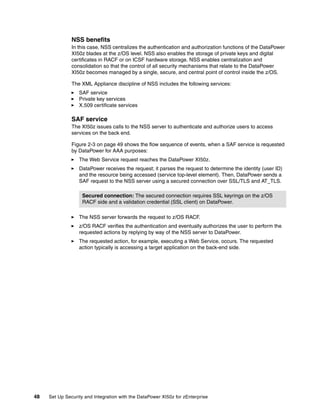

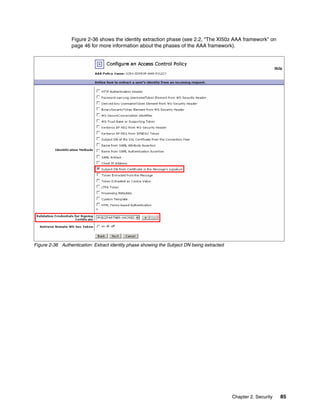
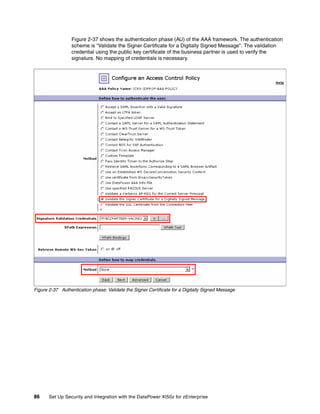
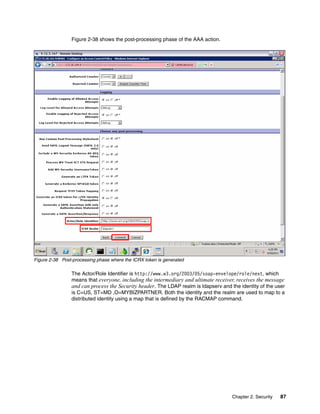
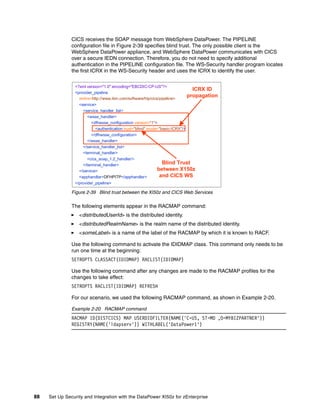
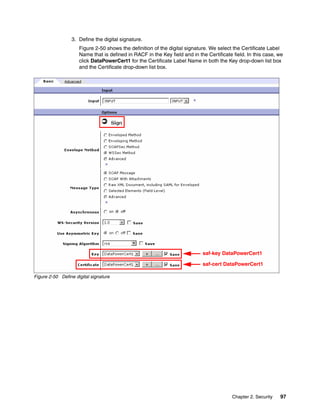
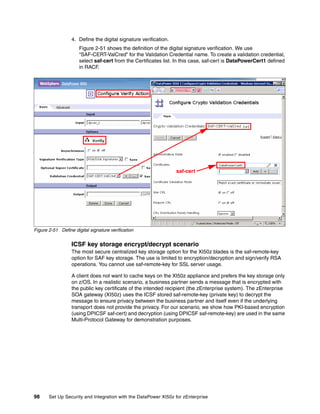
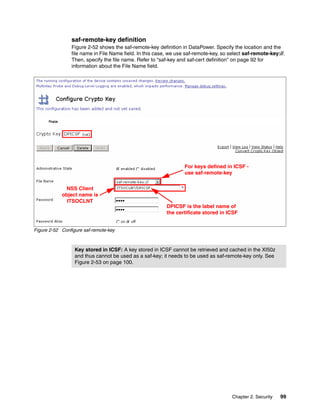
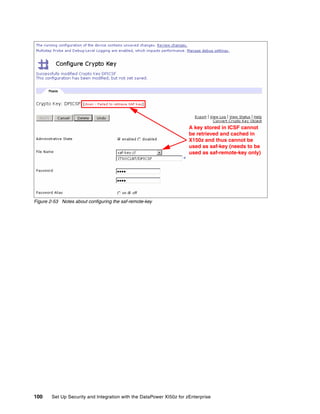
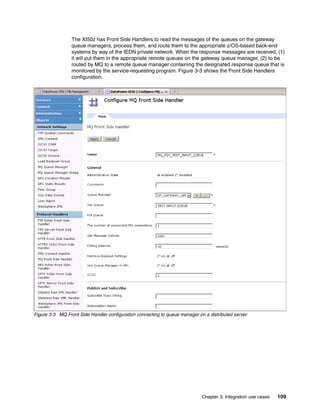

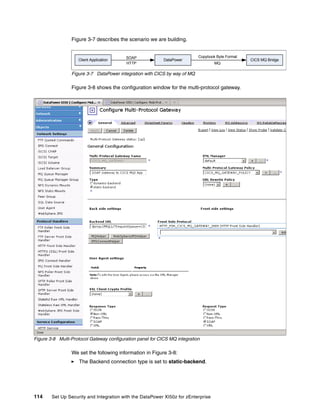
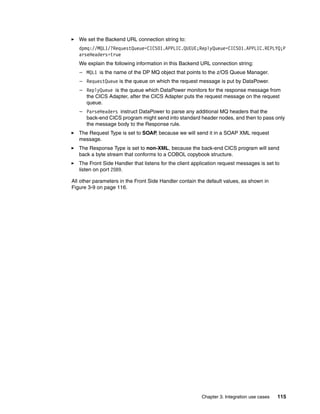
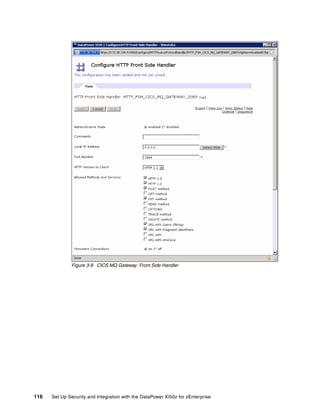
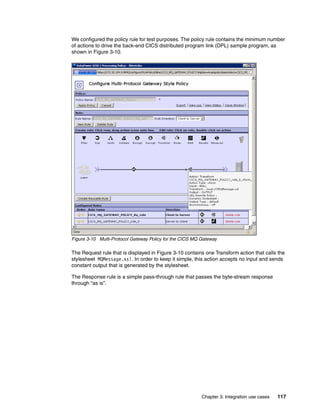
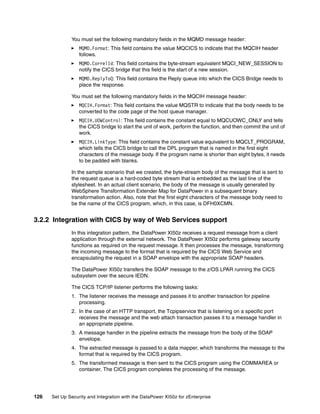
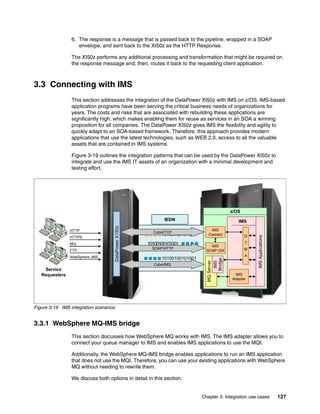

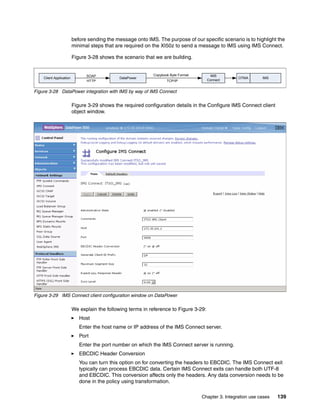

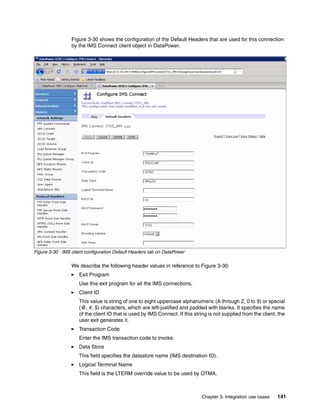
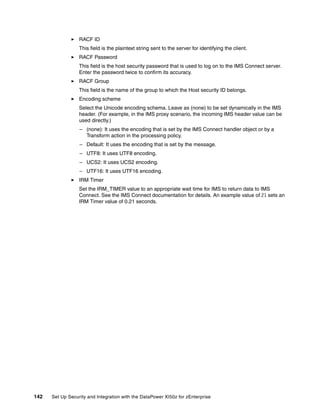
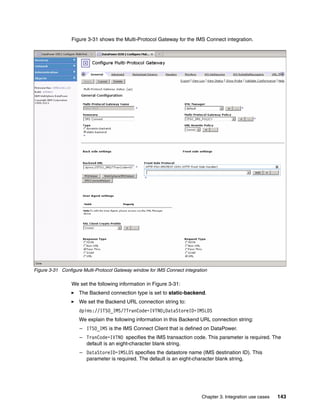
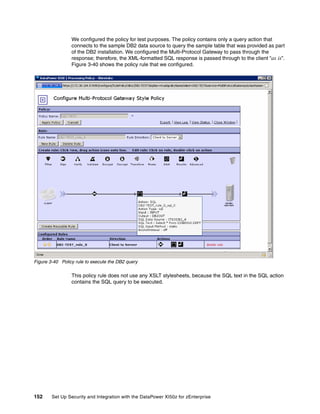
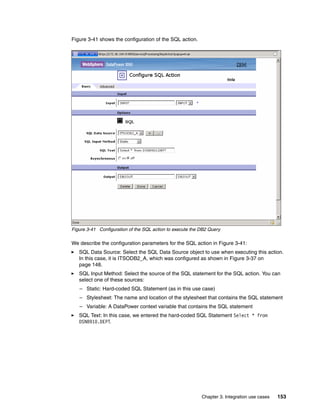
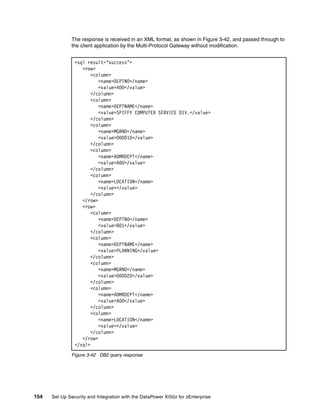



Front cover

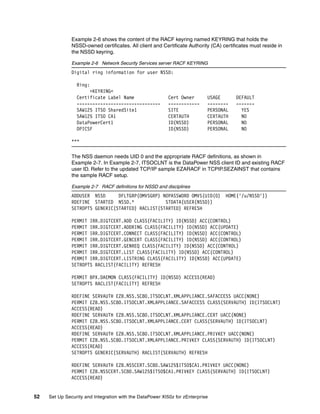
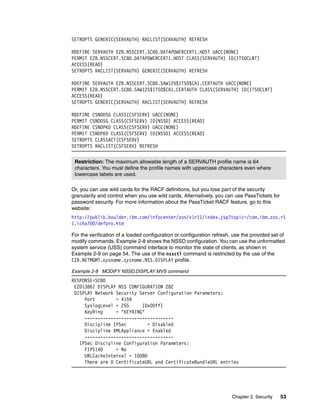
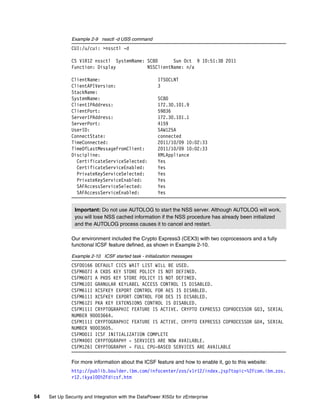
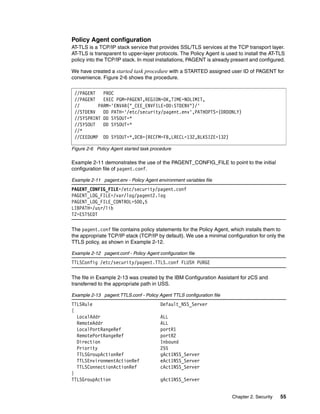
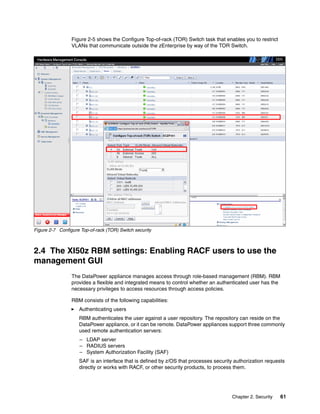
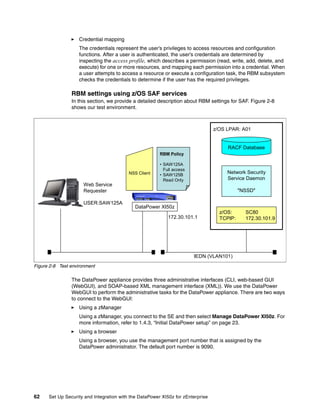
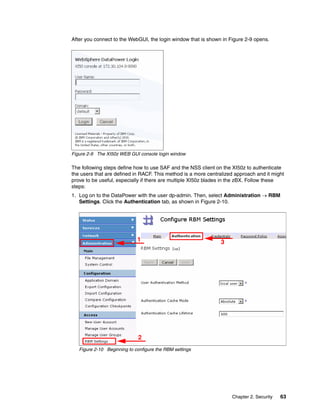
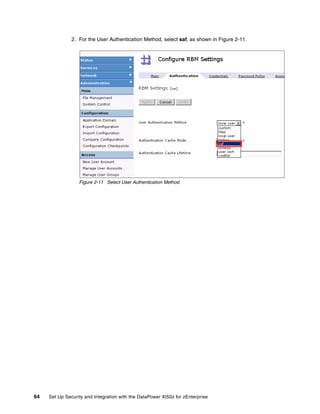
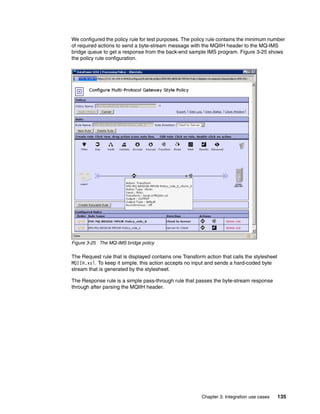
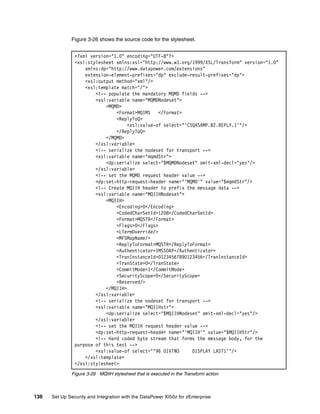
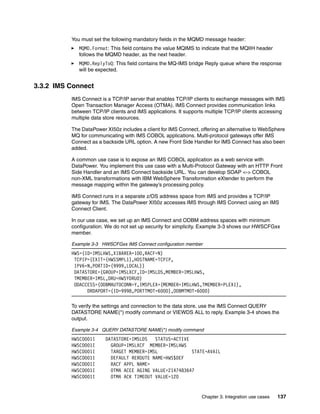
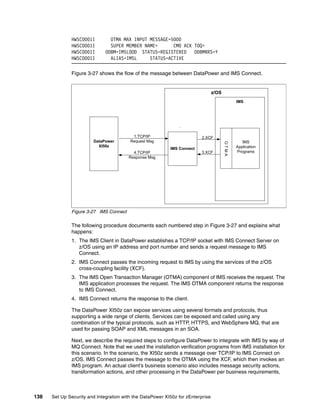
Set Up Security and Integration with
the DataPower XI50z for zEnterprise


Bridge the gap between mainframe and
distributed with DataPower XI50z

Learn to implement the
zEnterprise ensemble network

Use XI50z to connect with
WMQ, CICS, IMS, and DB2


                                                           Rufus Credle
                                                             Libor Cada
                                                        Karan Punwani
                                                     Noriyuki Samejima
                                                       Pradeep Thomas
                                                      Corrado Troncone


ibm.com/redbooks
International Technical Support Organization

Set Up Security and Integration with the DataPower
XI50z for zEnterprise

December 2011


                                               SG24-7988-00
Note: Before using this information and the product it supports, read the information in “Notices” on page v.


First Edition (December 2011)

This edition applies to the DataPower® XI50z, zEnterprise BladeCenter® Extension (zBX) 002, and the
System z z196.


© Copyright International Business Machines Corporation 2011. All rights reserved.
Note to U.S. Government Users Restricted Rights -- Use, duplication or disclosure restricted by GSA ADP Schedule
Contract with IBM Corp.
Contents

                 Notices . . . . . . . . . . . . . . . . . . . . . . . . . . . . . . . . . . . . . . . . . . . . . . . . . . . . . . . . . . . . . . . . . .v
                 Trademarks . . . . . . . . . . . . . . . . . . . . . . . . . . . . . . . . . . . . . . . . . . . . . . . . . . . . . . . . . . . . . . vi

                 Preface . . . . . . . . . . . . . . . . . . . . . . . . . . . . . . . . . . . . . . . . . . . . . . . . . . . . . . . . . . . . . . . . . vii
                 The team who wrote this book . . . . . . . . . . . . . . . . . . . . . . . . . . . . . . . . . . . . . . . . . . . . . . . . vii
                 Now you can become a published author, too! . . . . . . . . . . . . . . . . . . . . . . . . . . . . . . . . . . viii
                 Comments welcome. . . . . . . . . . . . . . . . . . . . . . . . . . . . . . . . . . . . . . . . . . . . . . . . . . . . . . . . ix
                 Stay connected to IBM Redbooks . . . . . . . . . . . . . . . . . . . . . . . . . . . . . . . . . . . . . . . . . . . . . ix

                 Chapter 1. Getting started with the XI50z . . . . . . . . . . . . . . . . . . . . . . . . . . . . . . . . . . . . . 1
                 1.1 zEnterprise ensemble . . . . . . . . . . . . . . . . . . . . . . . . . . . . . . . . . . . . . . . . . . . . . . . . . . . 2
                 1.2 Ensemble networking . . . . . . . . . . . . . . . . . . . . . . . . . . . . . . . . . . . . . . . . . . . . . . . . . . . 2
                    1.2.1 Types of LANs . . . . . . . . . . . . . . . . . . . . . . . . . . . . . . . . . . . . . . . . . . . . . . . . . . . . 2
                    1.2.2 Network security in the ensemble . . . . . . . . . . . . . . . . . . . . . . . . . . . . . . . . . . . . . . 4
                 1.3 Ensemble planning . . . . . . . . . . . . . . . . . . . . . . . . . . . . . . . . . . . . . . . . . . . . . . . . . . . . . 7
                    1.3.1 Network planning . . . . . . . . . . . . . . . . . . . . . . . . . . . . . . . . . . . . . . . . . . . . . . . . . . 8
                 1.4 Initial setup . . . . . . . . . . . . . . . . . . . . . . . . . . . . . . . . . . . . . . . . . . . . . . . . . . . . . . . . . . . 9
                    1.4.1 Setting up the virtual network . . . . . . . . . . . . . . . . . . . . . . . . . . . . . . . . . . . . . . . . . 9
                    1.4.2 z/OS definitions to set up the virtual network . . . . . . . . . . . . . . . . . . . . . . . . . . . . 19
                    1.4.3 Initial DataPower setup . . . . . . . . . . . . . . . . . . . . . . . . . . . . . . . . . . . . . . . . . . . . . 23

                 Chapter 2. Security . . . . . . . . . . . . . . . . . . . . . . . . . . . . . . . . . . . . . . . . . . . . . . . . . . . . . .          39
                 2.1 Security concepts for the XI50z . . . . . . . . . . . . . . . . . . . . . . . . . . . . . . . . . . . . . . . . . .                  40
                    2.1.1 Authentication services . . . . . . . . . . . . . . . . . . . . . . . . . . . . . . . . . . . . . . . . . . . . .               40
                    2.1.2 Authorization services . . . . . . . . . . . . . . . . . . . . . . . . . . . . . . . . . . . . . . . . . . . . . .              40
                    2.1.3 Confidentiality services . . . . . . . . . . . . . . . . . . . . . . . . . . . . . . . . . . . . . . . . . . . . .              41
                    2.1.4 Integrity services . . . . . . . . . . . . . . . . . . . . . . . . . . . . . . . . . . . . . . . . . . . . . . . . . .          42
                    2.1.5 Audit services . . . . . . . . . . . . . . . . . . . . . . . . . . . . . . . . . . . . . . . . . . . . . . . . . . . .          42
                    2.1.6 Key management service . . . . . . . . . . . . . . . . . . . . . . . . . . . . . . . . . . . . . . . . . . .                    45
                    2.1.7 Identity propagation services . . . . . . . . . . . . . . . . . . . . . . . . . . . . . . . . . . . . . . . .                   45
                 2.2 The XI50z AAA framework . . . . . . . . . . . . . . . . . . . . . . . . . . . . . . . . . . . . . . . . . . . . . .                  46
                 2.3 zEnterprise security. . . . . . . . . . . . . . . . . . . . . . . . . . . . . . . . . . . . . . . . . . . . . . . . . . . .          47
                    2.3.1 Network Security Services for the DataPower XI50z . . . . . . . . . . . . . . . . . . . . . .                                   47
                    2.3.2 Network Security Services server and Policy Agent setup on z/OS . . . . . . . . . . .                                           51
                    2.3.3 Security provided by VLAN . . . . . . . . . . . . . . . . . . . . . . . . . . . . . . . . . . . . . . . . . .                   59
                    2.3.4 Top-of-rack (TOR) Switch security . . . . . . . . . . . . . . . . . . . . . . . . . . . . . . . . . . . .                       60
                 2.4 The XI50z RBM settings: Enabling RACF users to use the management GUI. . . . . . .                                                   61
                 2.5 SAF authentication and authorization details . . . . . . . . . . . . . . . . . . . . . . . . . . . . . . . .                         70
                 2.6 Identity propagation using ICRX tokens for CICS WS . . . . . . . . . . . . . . . . . . . . . . . . .                                 83
                 2.7 Securing keys and certificates on zEnterprise . . . . . . . . . . . . . . . . . . . . . . . . . . . . . . .                          91

                 Chapter 3. Integration use cases . . . . . . . . . . . . . . . . . . . . . . . . . . . . . . . . . . . . . . . . . .                   105
                 3.1 XI50z connecting to and using WMQ . . . . . . . . . . . . . . . . . . . . . . . . . . . . . . . . . . . . .                        106
                    3.1.1 Connecting to the z/OS Queue Manager . . . . . . . . . . . . . . . . . . . . . . . . . . . . . .                              106
                    3.1.2 Connecting to distributed queue managers to receive service requests. . . . . . .                                             107
                 3.2 Connecting with CICS . . . . . . . . . . . . . . . . . . . . . . . . . . . . . . . . . . . . . . . . . . . . . . . . .             110
                    3.2.1 Integrating with CICS by way of WebSphere MQ . . . . . . . . . . . . . . . . . . . . . . . .                                  110
                    3.2.2 Integration with CICS by way of Web Services support . . . . . . . . . . . . . . . . . . .                                    126
                 3.3 Connecting with IMS . . . . . . . . . . . . . . . . . . . . . . . . . . . . . . . . . . . . . . . . . . . . . . . . . .            127


© Copyright IBM Corp. 2011. All rights reserved.                                                                                                           iii
3.3.1 WebSphere MQ-IMS bridge . . . . . . . . . . . . . . . . . . . . . . . . . . . . . . . . . . . . . . . .                    127
                  3.3.2 IMS Connect . . . . . . . . . . . . . . . . . . . . . . . . . . . . . . . . . . . . . . . . . . . . . . . . . . . .        137
               3.4 Connecting with DB2 on z/OS. . . . . . . . . . . . . . . . . . . . . . . . . . . . . . . . . . . . . . . . . . .                146
                  3.4.1 Data Web Services . . . . . . . . . . . . . . . . . . . . . . . . . . . . . . . . . . . . . . . . . . . . . . .            146
                  3.4.2 Connecting to DB2 on z/OS . . . . . . . . . . . . . . . . . . . . . . . . . . . . . . . . . . . . . . . .                  147

               Related publications . . . . . . . . . . . . . . . . . . . . . . . . . . . . . . . . . . . . . . . . . . . . . . . . . . . .        155
               IBM Redbooks . . . . . . . . . . . . . . . . . . . . . . . . . . . . . . . . . . . . . . . . . . . . . . . . . . . . . . . . . .    155
               Online resources . . . . . . . . . . . . . . . . . . . . . . . . . . . . . . . . . . . . . . . . . . . . . . . . . . . . . . . .    155
               Help from IBM . . . . . . . . . . . . . . . . . . . . . . . . . . . . . . . . . . . . . . . . . . . . . . . . . . . . . . . . . .   156


iv   Set Up Security and Integration with the DataPower XI50z for zEnterprise
Notices

This information was developed for products and services offered in the U.S.A.

IBM may not offer the products, services, or features discussed in this document in other countries. Consult
your local IBM representative for information on the products and services currently available in your area. Any
reference to an IBM product, program, or service is not intended to state or imply that only that IBM product,
program, or service may be used. Any functionally equivalent product, program, or service that does not
infringe any IBM intellectual property right may be used instead. However, it is the user's responsibility to
evaluate and verify the operation of any non-IBM product, program, or service.

IBM may have patents or pending patent applications covering subject matter described in this document. The
furnishing of this document does not give you any license to these patents. You can send license inquiries, in
writing, to:
IBM Director of Licensing, IBM Corporation, North Castle Drive, Armonk, NY 10504-1785 U.S.A.

The following paragraph does not apply to the United Kingdom or any other country where such
provisions are inconsistent with local law: INTERNATIONAL BUSINESS MACHINES CORPORATION
PROVIDES THIS PUBLICATION "AS IS" WITHOUT WARRANTY OF ANY KIND, EITHER EXPRESS OR
IMPLIED, INCLUDING, BUT NOT LIMITED TO, THE IMPLIED WARRANTIES OF NON-INFRINGEMENT,
MERCHANTABILITY OR FITNESS FOR A PARTICULAR PURPOSE. Some states do not allow disclaimer of
express or implied warranties in certain transactions, therefore, this statement may not apply to you.

This information could include technical inaccuracies or typographical errors. Changes are periodically made
to the information herein; these changes will be incorporated in new editions of the publication. IBM may make
improvements and/or changes in the product(s) and/or the program(s) described in this publication at any time
without notice.

Any references in this information to non-IBM websites are provided for convenience only and do not in any
manner serve as an endorsement of those websites. The materials at those websites are not part of the
materials for this IBM product and use of those websites is at your own risk.

IBM may use or distribute any of the information you supply in any way it believes appropriate without incurring
any obligation to you.

Information concerning non-IBM products was obtained from the suppliers of those products, their published
announcements or other publicly available sources. IBM has not tested those products and cannot confirm the
accuracy of performance, compatibility or any other claims related to non-IBM products. Questions on the
capabilities of non-IBM products should be addressed to the suppliers of those products.

This information contains examples of data and reports used in daily business operations. To illustrate them
as completely as possible, the examples include the names of individuals, companies, brands, and products.
All of these names are fictitious and any similarity to the names and addresses used by an actual business
enterprise is entirely coincidental.

COPYRIGHT LICENSE:

This information contains sample application programs in source language, which illustrate programming
techniques on various operating platforms. You may copy, modify, and distribute these sample programs in
any form without payment to IBM, for the purposes of developing, using, marketing or distributing application
programs conforming to the application programming interface for the operating platform for which the sample
programs are written. These examples have not been thoroughly tested under all conditions. IBM, therefore,
cannot guarantee or imply reliability, serviceability, or function of these programs.


© Copyright IBM Corp. 2011. All rights reserved.                                                               v
Trademarks
IBM, the IBM logo, and ibm.com are trademarks or registered trademarks of International Business Machines
Corporation in the United States, other countries, or both. These and other IBM trademarked terms are
marked on their first occurrence in this information with the appropriate symbol (® or ™), indicating US
registered or common law trademarks owned by IBM at the time this information was published. Such
trademarks may also be registered or common law trademarks in other countries. A current list of IBM
trademarks is available on the Web at http://www.ibm.com/legal/copytrade.shtml

The following terms are trademarks of the International Business Machines Corporation in the United States,
other countries, or both:
     AIX®                                 IMS™                                     System x®
     BladeCenter®                         InfoSphere®                              System z®
     CICS®                                MVS™                                     Tivoli®
     DataPower®                           OS/390®                                  VTAM®
     DB2 Connect™                         Parallel Sysplex®                        WebSphere®
     DB2®                                 POWER7®                                  xSeries®
     Distributed Relational Database      RACF®                                    z/OS®
         Architecture™                    Redbooks®                                z/VM®
     DRDA®                                Redpaper™                                zEnterprise™
     IBM®                                 Redbooks (logo)      ®                   zSeries®

The following terms are trademarks of other companies:

Java, and all Java-based trademarks and logos are trademarks or registered trademarks of Oracle and/or its
affiliates.

Intel, Intel logo, Intel Inside, Intel Inside logo, Intel Centrino, Intel Centrino logo, Celeron, Intel Xeon, Intel
SpeedStep, Itanium, and Pentium are trademarks or registered trademarks of Intel Corporation or its
subsidiaries in the United States and other countries.

Linux is a trademark of Linus Torvalds in the United States, other countries, or both.

Other company, product, or service names may be trademarks or service marks of others.


vi      Set Up Security and Integration with the DataPower XI50z for zEnterprise
Preface

                 This IBM® Redbooks® publication discusses the new IBM WebSphere® DataPower®
                 Integration Appliance XI50 for zEnterprise™ that bridges the gap between mainframe and
                 distributed. The DataPower XI50z (a multifunctional appliance) within the zEnterprise
                 BladeCenter® Extension (zBX) is managed with a single point of control, which can help to
                 streamline operations and maintenance. The DataPower XI50z simplifies the translation of
                 your existing formats to XML (hardware acceleration) for easier communication and
                 connectivity.

                 This book will help you install, tailor, and configure the new attributes for implementing a
                 zEnterprise ensemble network. The zEnterprise System introduces internal virtual networks
                 (VLANs) and additional networking attributes that need to be addressed. Also, we describe
                 the planning considerations for the internal virtual networks and external networks.

                 This book is for anyone who wants an understanding of the security on the zEnterprise that
                 focuses on the usage of the XI50z Network Security Services.

                 As you can expect from an IBM Redbooks publication, we provide several integration
                 use cases that you are able to use immediately within a production environment, for
                 example, the XI50z connecting with and using WebSphere MQ (WMQ), connecting
                 with CICS®, connecting with IMS™, and connecting with DB2®.


The team who wrote this book
                 This book was produced by a team of specialists from around the world working at the
                 International Technical Support Organization, Raleigh Center.

                 Rufus Credle is a Consulting IT Specialist at the ITSO, Raleigh Center. In his role as Project
                 Leader, he conducts residencies and develops IBM Redbooks publications about network
                 operating systems, ERP solutions, voice technology, high availability and clustering solutions,
                 web application servers, pervasive computing, IBM and other equipment manufacturers
                 (OEM) e-business applications, IBM System x®, and IBM BladeCenter. Rufus’ various
                 positions during his IBM career have included assignments in administration and asset
                 management, systems engineering, sales and marketing, and IT services. He holds a BS
                 degree in Business Management from Saint Augustine’s College. Rufus has been employed
                 at IBM for 31 years.

                 Libor Cada is an IT Specialist working in Integrated Delivery Center SSO, in Brno, Czech
                 Republic. He has eight years of experience in the IT and banking industries on mainframe
                 System z® and zLinux environments. Previously holding a position of z/OS® database/data
                 communication (DB/DC) systems programmer for CICS, DB2, WMQ, and IMS products. He
                 currently supports clients from multiple geographies in his role of WebSphere Application
                 Server and z/OS System Programmer.

                 Karan Punwani is an Executive Consultant with AIM Industry Business Solutions Services in
                 IBM Software Group. He has 21 years of experience in Information Technology, specializing
                 in service-oriented architecture (SOA) appliances, SOA security, architecture, governance,
                 and SOA-enabling z/OS existing systems and virtualization solutions. He has worked at IBM
                 for 12 years. His product knowledge includes DataPower, Business Process Management


© Copyright IBM Corp. 2011. All rights reserved.                                                              vii
(BPM) suite, MQ, and the InfoSphere® and Tivoli® suites. He currently leads complex
                integration projects for IBM large enterprise clients.

                Noriyuki Samejima is an IT Specialist who has been with IBM Japan for over six years. His
                areas of expertise are TCP/IP, Linux on System z®, and System z hardware. For more than
                five years, he has been working with System z as a Technical Support team member,
                providing consultation, design, and implementation services for enterprise System z
                solutions.

                Pradeep Thomas is a Senior Information Technology Specialist in the IBM Software Group.
                He has five years of DataPower experience. He specializes in the integration of DataPower
                and CICS and IMS using MQ bridge and IMS Connect.

                Corrado Troncone is a Senior Client Technical Specialist at STG Sales in IBM Italy. He has
                28 years of experience as a Systems Programmer in OS/390®, z/OS, and Parallel Sysplex®
                in both the GTS and STG Technical Sales fields. He has written a textbook for the students of
                a formal university course called “Central Systems” within the IBM Academic Initiative
                program to spread mainframe knowledge.

                Thanks to the following people for their contributions to this project:

                Tamikia Barrow, Bob Haimowitz, Shari Deiana
                International Technical Support Organization, Raleigh Center

                Alexander Louwe Kooijmans, David Bennin, William G. White, Richard Conway, John Gierloff
                International Technical Support Organization, Poughkeepsie Center

                Barry J. Silliman, System z Applied Technologies - Advanced Technical Skills (ATS)
                IBM Gaithersburg

                Srinivasan Muralidharan, Software Developer - DataPower z-Integration
                IBM Durham

                Bill T. Huynh, IMS Connect Development
                IBM San Jose


Now you can become a published author, too!
                Here’s an opportunity to spotlight your skills, grow your career, and become a published
                author—all at the same time! Join an ITSO residency project and help write a book in your
                area of expertise, while honing your experience using leading-edge technologies. Your efforts
                will help to increase product acceptance and customer satisfaction, as you expand your
                network of technical contacts and relationships. Residencies run from two to six weeks in
                length, and you can participate either in person or as a remote resident working from your
                home base.

                Find out more about the residency program, browse the residency index, and apply online at:
                ibm.com/redbooks/residencies.html


viii   Set Up Security and Integration with the DataPower XI50z for zEnterprise
Comments welcome
        Your comments are important to us!

        We want our books to be as helpful as possible. Send us your comments about this book or
        other IBM Redbooks publications in one of the following ways:
           Use the online Contact us review Redbooks form found at:
           ibm.com/redbooks
           Send your comments in an email to:
           redbooks@us.ibm.com
           Mail your comments to:
           IBM Corporation, International Technical Support Organization
           Dept. HYTD Mail Station P099
           2455 South Road
           Poughkeepsie, NY 12601-5400


Stay connected to IBM Redbooks
           Find us on Facebook:
           http://www.facebook.com/IBMRedbooks
           Follow us on Twitter:
           http://twitter.com/ibmredbooks
           Look for us on LinkedIn:
           http://www.linkedin.com/groups?home=&gid=2130806
           Explore new Redbooks publications, residencies, and workshops with the IBM Redbooks
           weekly newsletter:
           https://www.redbooks.ibm.com/Redbooks.nsf/subscribe?OpenForm
           Stay current on recent Redbooks publications with RSS Feeds:
           http://www.redbooks.ibm.com/rss.html


                                                                                     Preface   ix
x   Set Up Security and Integration with the DataPower XI50z for zEnterprise
1


    Chapter 1.   Getting started with the XI50z
                 This chapter discusses the planning attributes for implementing a zEnterprise ensemble
                 network.

                 The zEnterprise System introduces internal virtual networks (VLANs) and additional
                 networking attributes that need to be addressed. We also describe the planning
                 considerations for the internal virtual networks and external networks. We provide the
                 worksheets that helped us with the collection of information needed to implement the
                 zEnterprise ensemble network.

                 This chapter includes the following sections:
                     zEnterprise ensemble
                     Ensemble networking
                     Ensemble planning
                     Initial setup


© Copyright IBM Corp. 2011. All rights reserved.                                                          1
1.1 zEnterprise ensemble
               A zEnterprise ensemble is a collection of zEnterprise central processor complex (CPC)
               systems and the optionally attached zEnterprise BladeCenter Extension (zBX) that is
               managed as a single logical entity. The Unified Resource Manager (zManager) provides
               advanced end-to-end management capabilities for the diverse systems in the ensemble.

               Each zEnterprise CPC, and the optional zBX, is called a node of a zEnterprise ensemble. A
               zEnterprise ensemble can contain up to eight nodes, with up to eight zEnterprise CPC
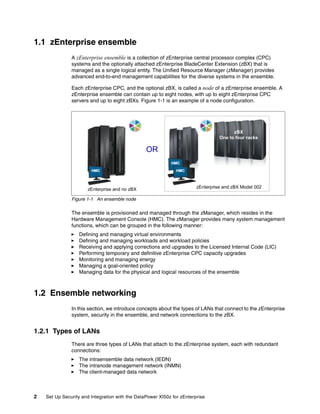
               servers and up to eight zBXs. Figure 1-1 is an example of a node configuration.


                                                                                        zBX
                                                                                  One to four racks

                                                 OR
                                                            HMC
                        HMC                                    HMC


                      zEnterprise and no zBX                            zEnterprise and zBX Model 002

               Figure 1-1 An ensemble node

               The ensemble is provisioned and managed through the zManager, which resides in the
               Hardware Management Console (HMC). The zManager provides many system management
               functions, which can be grouped in the following manner:
                   Defining and managing virtual environments
                   Defining and managing workloads and workload policies
                   Receiving and applying corrections and upgrades to the Licensed Internal Code (LIC)
                   Performing temporary and definitive zEnterprise CPC capacity upgrades
                   Monitoring and managing energy
                   Managing a goal-oriented policy
                   Managing data for the physical and logical resources of the ensemble


1.2 Ensemble networking
               In this section, we introduce concepts about the types of LANs that connect to the zEnterprise
               system, security in the ensemble, and network connections to the zBX.


1.2.1 Types of LANs
               There are three types of LANs that attach to the zEnterprise system, each with redundant
               connections:
                   The intraensemble data network (IEDN)
                   The intranode management network (INMN)
                   The client-managed data network


2   Set Up Security and Integration with the DataPower XI50z for zEnterprise
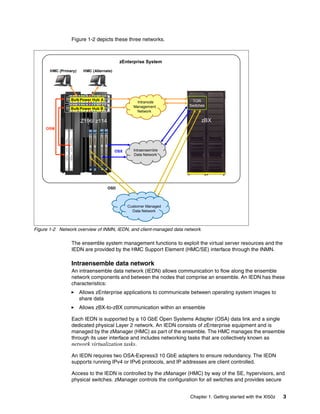
Figure 1-2 depicts these three networks.


                                           zEnterprise System
       HMC (Primary)    HMC (Alternate)


                 Bulk Power Hub A                      -
                                                   Intranode          TOR
                                                     Intranode
                                                  Management
                                                   Management        Switches
                 Bulk Power Hub B
                                                    Network
                                                     Network

                       Z196/ z114                                            zBX
     OSM


                                                    Intraensemble
                                                         -
                                                   Intraensemble
                                          OSX
                                                     Data Network
                                                   Data Network


                                    OSD


                                                Customer Managed
                                                 Customer Managed
                                                  Data Network
                                                   Data Network


Figure 1-2 Network overview of INMN, IEDN, and client-managed data network

                 The ensemble system management functions to exploit the virtual server resources and the
                 IEDN are provided by the HMC Support Element (HMC/SE) interface through the INMN.

                 Intraensemble data network
                 An intraensemble data network (IEDN) allows communication to flow along the ensemble
                 network components and between the nodes that comprise an ensemble. An IEDN has these
                 characteristics:
                       Allows zEnterprise applications to communicate between operating system images to
                       share data
                       Allows zBX-to-zBX communication within an ensemble

                 Each IEDN is supported by a 10 GbE Open Systems Adapter (OSA) data link and a single
                 dedicated physical Layer 2 network. An IEDN consists of zEnterprise equipment and is
                 managed by the zManager (HMC) as part of the ensemble. The HMC manages the ensemble
                 through its user interface and includes networking tasks that are collectively known as
                 network virtualization tasks.

                 An IEDN requires two OSA-Express3 10 GbE adapters to ensure redundancy. The IEDN
                 supports running IPv4 or IPv6 protocols, and IP addresses are client controlled.

                 Access to the IEDN is controlled by the zManager (HMC) by way of the SE, hypervisors, and
                 physical switches. zManager controls the configuration for all switches and provides secure


                                                                     Chapter 1. Getting started with the XI50z   3
access to the IEDN. Communications through the IEDN has the benefit of being performed
               through a physical network within the machine; therefore, it is more secure than external
               network communications.

               zEnterprise CPC connectivity to the IEDN is provided by OSA-Express for zBX (OSX)
               channel path identifier (CHPID) types. Currently, only z/OS and z/VM® TCP/IP can connect
               directly to OSX with a dedicated connection; other virtual servers must use the z/VM
               VSWITCH. Guests under z/VM on a VSWITCH can also participate in the ensemble through
               the z/VM hypervisor OSD to OSX simulation, which is called OSDSIM.

               Intranode management network
               An intranode management network (INMN) is required for platform management within a
               node, and it cannot span multiple nodes. The network allows the HMC to communicate to the
               hypervisors within the managed ensemble. An ensemble must have an INMN, and it is used
               by zManager components.

               An INMN is a 1000BASET network that is provided and managed by IBM. However, unlike the
               IEDN, INMN configuration (VLAN, IP addressing) is automatically deployed by the HMC and
               its network virtualization function tasks.

               zEnterprise connectivity to the INMN is provided by an OSA-Express3 (CHPID type OSM).
               An INMN requires two ports from two separate OSA-Express3 1000BaseT Ethernet adapters
               (ensuring redundancy). The INMN only supports running IPv6 protocols. IPv6 link local
               addresses are assigned by the system.

               Client-provided data network
               A client-provided data network is used for external communication by way of the IEDN.
               Depending on factors, such as network traffic patterns and load balancing requirements, you
               can connect the client-provided data network to the IEDN in two ways:
                   Direct connection by way of the access ports in IEDN Top-of-rack (TOR) switches
                   Connecting to a TCP/IP defined router in a z/OS partition (using an OSA feature)

               The client data network is provided and managed by the client. It is not managed by an HMC
               and its network virtualization function tasks.


1.2.2 Network security in the ensemble
               The isolation of networks from each other is a basic method of network security. In the
               ensemble, the two internal networks, the INMN and the IEDN, are physically isolated from
               each other.

               The IEDN can be further logically subdivided at the Layer 2 level into multiple virtual
               networks, with each virtual network isolated from the others. This subdivision can be done by
               the use of unique VLAN IDs for each virtual network and the assignment of IEDN network
               endpoints to the virtual networks.

               Because the IEDN is built on a Layer 2 network design, each server that accesses the IEDN
               must be an authorized virtual server and must belong to an authorized virtual LAN (VLAN)
               within the physical IEDN. VLAN enforcement is done within the hypervisor functions of the
               ensemble. Controls reside in the OSA (CHPID type OSX), in the z/VM VSWITCH, and in the
               VSWITCH hypervisor function of the blades in the zBX. The VLAN IDs and the virtual
               machine address codes (MACs) that are assigned to the connections from the virtual servers
               are tightly controlled through the zManager. Therefore, there is no chance of either MAC or
               VLAN spoofing for any of the servers on the IEDN. If you decide to attach to the TOR switches


4   Set Up Security and Integration with the DataPower XI50z for zEnterprise
of the zBX to send data to virtual servers in the zBX, the permitted VLAN IDs and MACs must
be authorized in the TOR switches. Although the TOR switches enforce the MACs and VLAN
IDs, you must take the usual network security measures to ensure that the attaching devices
in the client-managed network are not subject to MAC or VLAN spoofing. The zManager
functions cannot control the assignment of VLAN IDs and MACs in those devices. In other
words, whenever you decide to interconnect the external network to the secured IEDN, the
security of that external network must involve all the usual layers of the IBM Security
Framework: physical security, platform security, application and process security, data and
information security, and so on.

An external client data network cannot connect directly to the INMN. The INMN is accessible
only through the HMC, and the HMC is locally secured on a private LAN with authentication
and authorization. If accessed remotely, the HMC is secure with firewall filtering through a
Secure Sockets Layer (SSL) connection. Also, the zManager functions are further secured
with discrete authorizations to its special functions.

The INMN uses separate hardware from the external network hardware. Although the IEDN
10Gb TOR switches are connected to an INMN management port in the 1Gb TOR switches,
the INMN cannot forward or receive traffic from the IEDN data ports.

The INMN is entirely private and can be accessed only through the HMC, by its connection to
the SE. Standard HMC security also still applies. There are additions to zManager
“role-based” security, so that not just any user can reach the zManager panels even if that
user can perform other HMC functions. Extremely strict authorizations for users and
programs control who is allowed to take advantage of the INMN.

The centralized and internal network design of both the INMN and the IEDN limit the scope of
vulnerability to security breaches. Both networks reduce the amount of network equipment,
processes, and routing hops that are under the control of multiple individuals and subject to
security threats. Both networks require the use of IBM-only equipment (switches and blades),
which have been tested previously and, in certain cases, have been pre-installed.

In summary, many technologies are architected in a more robust, secure fashion in the client
network than they have been implemented in the past. This improvement is because of either
their implementation through the ensemble and zManager, or because of additional System
Authorization Facility (SAF) controls that are specific to zEnterprise System and the
ensemble, such as these controls:
   MAC filtering
   VLAN enforcement
   Access control
   Role-based security

The following standard security implementations are still available for use in the IEDN:
   Authentication
   Authorization and access control, including Multilevel Security (MLS). Also, firewall IP
   filtering. Only stateless firewalls or IP filtering implementations can be installed in a virtual
   server in the ensemble.
   Confidentiality
   Data integrity
   Non-repudiation


                                                       Chapter 1. Getting started with the XI50z   5
Ensemble security
               Virtual machines running on separate operating system platforms are usually housed in
               separate physical boxes. The networks that connect them are essentially wires and cables
               that flow between the separate machines. These physical connections often span both virtual
               and physical networks with the potential of multiple hops and multiple points of failure. The
               security of distributed networks is often only as secure as the physical media.

               Virtual servers in an ensemble communicate with each other over the IEDN, which is an
               internal secure and physically isolated data highway. Data path length within the IEDN can be
               logically reduced to one hop. External client networks enter through the zBX TOR Switch or
               through a traditional OSA OS deployment (OSD) adapter. VLAN and MAC enforcement
               guarantees that only packets that originate from particular VLANs or MAC addresses can
               enter the IEDN network. The OSA OSX, the z/VM VSWITCH, the zBX TOR Switch, and the
               zBX Ethernet Switch Module (ESM) can all act as security enforcement points, depending on
               where an external network packet originates. Also, the traditional mainframe, Linux, and AIX®
               security methods are still available.

               The ensemble is more secure from within, because the IEDN can be segmented with
               separate VLANs. Nodes in the ensemble that need to communicate with other nodes or
               servers within the nodes are defined on the same VLAN network. The servers that do not
               need a direct connection to a particular VLAN network are not defined on that VLAN. Network
               addressability between virtual servers and ensemble nodes is limited by Layer 2 VLAN
               membership. Network traffic cannot route between separate Layer 2 VLANs unless a Layer 3
               router is used as a gateway.

               The zEnterprise consists of heterogeneous platforms where zManager acts as a single point
               of control for the virtual network, security, storage, energy, and performance policy
               management. A single interface controls the allocation and management of the System z
               resources across the diverse operating systems that coexist on a zEnterprise. This single
               interface provides additional security through the single point of control and the use of
               zManager user IDs and roles that have various management scopes and responsibilities.

               Security in the INMN network
               Virtual servers cannot communicate with each other over the INMN. The z/OS access to the
               INMN is further protected by the RACF® security class. External access to the INMN is
               impossible, because the end of the network is at the HMC/SE. The INMN is exploited and
               usable only by authorized management applications using communication between the virtual
               server and the SE.

               Secure client external network
               If preferred practices are followed, the IEDN and INMN networks are secure from connections
               by an external client network. Firewall requirements still exist for traffic entering and leaving
               the zEnterprise System or where separate workloads on separate virtual networks need to
               communicate with each other.

               A client external network is a network that exists outside of the ensemble network, for
               example, a network that connects a client workstation to the mainframe to use for
               administrative purposes. There are also external client data networks where web servers or
               other external workload generators rely on dedicated network connections to the zEnterprise.
               However, these networks are managed by the client and not by zManager.

               In addition to the requirement for the client data network to access the IEDN, there can also
               be a requirement for the external client management or administration network to connect to
               the IEDN. The client external network can connect to the IBM zEnterprise with the zBX TOR
               Switch or connect to the OSA OSD CHPID.


6   Set Up Security and Integration with the DataPower XI50z for zEnterprise
Access controls are provided for the enablement of each external port on the zBX TOR
        Switch. Using the zManager tasks, an administrator enables the physical TOR Switch ports
        by defining the specific VLANs that are to be granted access to the TOR switches (ports) and
        the MAC addresses for access to zBX system resources by servers that are not part of the
        ensemble.

        Virtual local area networks (VLANs)
        Ensemble networking has many of the same features and constructs as general networks.
        The virtual local area network (VLAN) is a central feature. All VLANs, by definition, are a
        grouping of hosts with the same subnet address and broadcast address. VLANs have the
        same operating characteristics as physical networks, but VLANs do not need to share the
        same physical switch or wires. Software performs the configuration of the VLAN, instead of
        requiring a change to wiring or switch locations.

        Central to the VLAN is the unique VLAN ID tag that is affixed to every network packet. VLAN
        tags are attached to the data packets on entry to the VLAN. When an Ethernet frame (packet)
        traverses a switch or virtual switch, the tag is added. As the frame exits, the tag can be
        stripped off or it can be forwarded out of the VLAN if its tag does not match the VLAN ID of
        the current VLAN. An operating system that is VLAN-aware is capable of handling VLAN tags.


1.3 Ensemble planning
        The high-level network diagram is the starting point for our ensemble networking scenario. In
        this chapter, we use the high-level diagram to create a detailed design of our networking
        environment and to help us determine the type of information that is needed to implement the
        network for our ensemble.

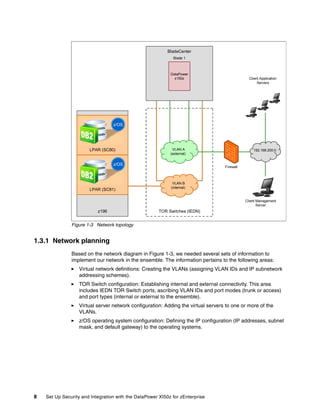
        Our target network environment has two network security zones, which are isolated by
        VLANs, as shown in Figure 1-3 on page 8. The security zones are based on our workload
        data traffic flow and required server-to-server communication in the network. We use these
        VLANs in our networking environment:
           VLAN A: Client access to DataPower
           VLAN B: DataPower access to zEnterprise CPC (that is, the data serving layer)


                                                           Chapter 1. Getting started with the XI50z   7
BladeCenter
                                                             Blade 1


                                                            DataPower
                                                              x150z                             Client Application
                                                                                                     Servers


                                  z/OS


                       LPAR (SC80)                           VLAN A                               192.168.200.0
                                                            (external)


                                  z/OS
                                                                                   Firewall


                                                             VLAN B
                                                            (internal)
                       LPAR (SC81)

                                                                                              Client Management
                                                                                                     Server
                           z196                        TOR Switches (IEDN)


               Figure 1-3 Network topology


1.3.1 Network planning
               Based on the network diagram in Figure 1-3, we needed several sets of information to
               implement our network in the ensemble. The information pertains to the following areas:
                   Virtual network definitions: Creating the VLANs (assigning VLAN IDs and IP subnetwork
                   addressing schemes).
                   TOR Switch configuration: Establishing internal and external connectivity. This area
                   includes IEDN TOR Switch ports, ascribing VLAN IDs and port modes (trunk or access)
                   and port types (internal or external to the ensemble).
                   Virtual server network configuration: Adding the virtual servers to one or more of the
                   VLANs.
                   z/OS operating system configuration: Defining the IP configuration (IP addresses, subnet
                   mask, and default gateway) to the operating systems.


8   Set Up Security and Integration with the DataPower XI50z for zEnterprise
1.4 Initial setup
           Before you perform all of the tasks that are needed to set up your environment, you must first
           install a zBX, then connect it to the zEnterprise CPC, and then install the DataPower blades
           or other Power and System x blades. You might also have to perform other necessary tasks,
           as described in “Tasks already done” on page 9.

           For the purposes of this IBM Redbooks publication, we assume that the tasks that are listed
           in “Tasks already done” on page 9 have already been completed.

           In any case, for a comprehensive list and details about how to fully prepare and set up an
           ensemble, refer to Chapter 8 in IBM zEnterprise Unified Resource Manager, SG24-7921.

           Tasks already done
           We had already completed the following preliminary steps when we installed both the
           DataPower blade and the zBX containing the DataPower blade:
              Cabling to the ensemble OSA ports (OSM and OSX CHPIDs) on the CPC
              Cabling to the BladeCenter for the INMN and IEDN
              Cabling on the IEDN TORs to the external client network
              Defining the input/output configuration data set (IOCDS) for the ensemble
              OSM and OSX CHPIDs are set Online
              Installing the HMC and the zManager suite
              Implementing ensemble HMC user roles and tasks
              Creating an ensemble
              Adding members to the ensemble
              Entitling the zBX blades to the ensemble OSX definitions (performing the I/O configuration
              program (IOCP))


1.4.1 Setting up the virtual network
           We create the virtual network or VLANs through the HMC interface to the ensemble. The
           purpose of the virtual network is to isolate each network within the ensemble, thereby
           providing network-level security. The VLANs that are planned for this integration scenario are
           meant to isolate the client networks from the zEnterprise CPC servers.

           The planned VLANs will only allow client applications to communicate with the XI50z blades
           that are housed in the zBX. The XI50z will then communicate with the servers on the
           zEnterprise CPC through an isolated VLAN.

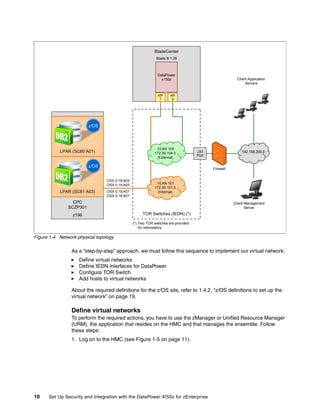
           In this chapter, we provide a detailed description of how to implement the two VLANs that
           have been designed for this integration pattern. Figure 1-4 on page 10 shows the VLAN
           addressing scheme that is to be implemented.


                                                               Chapter 1. Getting started with the XI50z   9
BladeCenter
                                                            Blade B 1.08


                                                             DataPower
                                                               x150z                                   Client Application
                                                                                                            Servers


                                                             eth     eth
                                                              7       9


                         z/OS


                                                            VLAN 104
           LPAR (SC80 A01)                                 172.30.104.0            J33                   192.168.200.0
                                                                                   Port
                                                            (External)

                         z/OS
                                                                                          Firewall


                                OSX 0.18:A03
                                OSX 0.19:A03                VLAN 101
                                                           172.30.101.0
           LPAR (SC81 A03)      OSX 0.19:A01                 (Internal)
                                OSX 0.18:A01
                 CPC                                                                                 Client Management
               SCZP301                                                                                      Server

                 z196                               TOR Switches (IEDN) (*)

                                               (*) Two TOR switches are provided
                                                   for redundancy

Figure 1-4 Network physical topology

                As a “step-by-step” approach, we must follow this sequence to implement our virtual network:
                    Define virtual networks
                    Define IEDN interfaces for DataPower
                    Configure TOR Switch
                    Add hosts to virtual networks

                About the required definitions for the z/OS site, refer to 1.4.2, “z/OS definitions to set up the
                virtual network” on page 19.

                Define virtual networks
                To perform the required actions, you have to use the zManager or Unified Resource Manager
                (URM), the application that resides on the HMC and that manages the ensemble. Follow
                these steps:
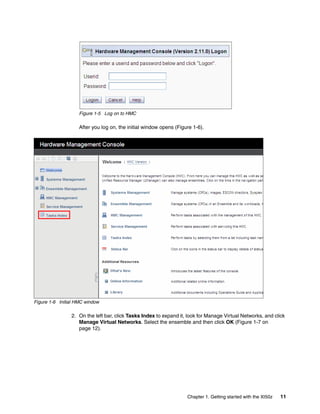
                1. Log on to the HMC (see Figure 1-5 on page 11).


10    Set Up Security and Integration with the DataPower XI50z for zEnterprise
Figure 1-5 Log on to HMC

                    After you log on, the initial window opens (Figure 1-6).


Figure 1-6 Initial HMC window

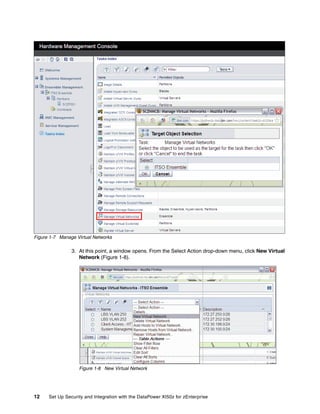
                2. On the left bar, click Tasks Index to expand it, look for Manage Virtual Networks, and click
                   Manage Virtual Networks. Select the ensemble and then click OK (Figure 1-7 on
                   page 12).


                                                                    Chapter 1. Getting started with the XI50z   11
Figure 1-7 Manage Virtual Networks

                3. At this point, a window opens. From the Select Action drop-down menu, click New Virtual
                   Network (Figure 1-8).


                   Figure 1-8 New Virtual Network


12    Set Up Security and Integration with the DataPower XI50z for zEnterprise
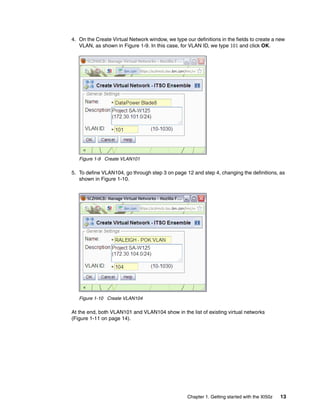
4. On the Create Virtual Network window, we type our definitions in the fields to create a new
   VLAN, as shown in Figure 1-9. In this case, for VLAN ID, we type 101 and click OK.


   Figure 1-9 Create VLAN101

5. To define VLAN104, go through step 3 on page 12 and step 4, changing the definitions, as
   shown in Figure 1-10.


   Figure 1-10 Create VLAN104

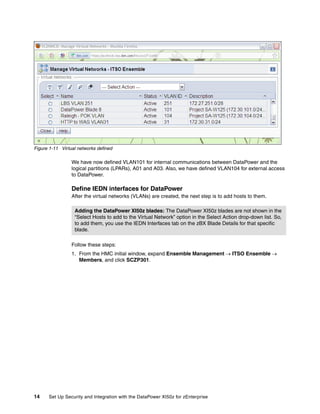
At the end, both VLAN101 and VLAN104 show in the list of existing virtual networks
(Figure 1-11 on page 14).


                                                   Chapter 1. Getting started with the XI50z   13
Figure 1-11 Virtual networks defined

                 We have now defined VLAN101 for internal communications between DataPower and the
                 logical partitions (LPARs), A01 and A03. Also, we have defined VLAN104 for external access
                 to DataPower.

                 Define IEDN interfaces for DataPower
                 After the virtual networks (VLANs) are created, the next step is to add hosts to them.

                  Adding the DataPower XI50z blades: The DataPower XI50z blades are not shown in the
                  “Select Hosts to add to the Virtual Network” option in the Select Action drop-down list. So,
                  to add them, you use the IEDN Interfaces tab on the zBX Blade Details for that specific
                  blade.

                 Follow these steps:
                 1. From the HMC initial window, expand Ensemble Management  ITSO Ensemble 
                    Members, and click SCZP301.


14    Set Up Security and Integration with the DataPower XI50z for zEnterprise
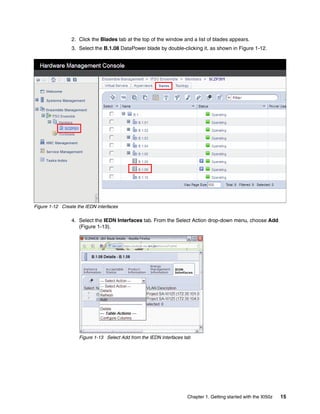
2. Click the Blades tab at the top of the window and a list of blades appears.
                 3. Select the B.1.08 DataPower blade by double-clicking it, as shown in Figure 1-12.


Figure 1-12 Create the IEDN interfaces

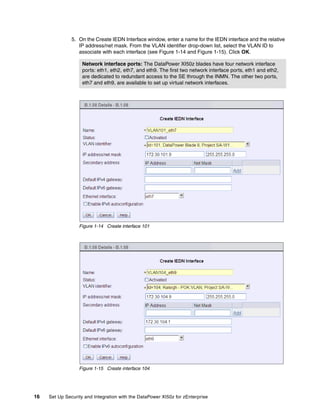
                 4. Select the IEDN Interfaces tab. From the Select Action drop-down menu, choose Add
                    (Figure 1-13).


                    Figure 1-13 Select Add from the IEDN Interfaces tab


                                                                     Chapter 1. Getting started with the XI50z   15
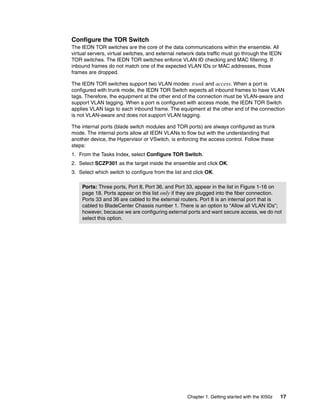
5. On the Create IEDN Interface window, enter a name for the IEDN interface and the relative
                  IP address/net mask. From the VLAN identifier drop-down list, select the VLAN ID to
                  associate with each interface (see Figure 1-14 and Figure 1-15). Click OK.

                    Network interface ports: The DataPower XI50z blades have four network interface
                    ports: eth1, eth2, eth7, and eth9. The first two network interface ports, eth1 and eth2,
                    are dedicated to redundant access to the SE through the INMN. The other two ports,
                    eth7 and eth9, are available to set up virtual network interfaces.


                  Figure 1-14 Create interface 101


                  Figure 1-15 Create interface 104


16   Set Up Security and Integration with the DataPower XI50z for zEnterprise
Configure the TOR Switch
The IEDN TOR switches are the core of the data communications within the ensemble. All
virtual servers, virtual switches, and external network data traffic must go through the IEDN
TOR switches. The IEDN TOR switches enforce VLAN ID checking and MAC filtering. If
inbound frames do not match one of the expected VLAN IDs or MAC addresses, those
frames are dropped.

The IEDN TOR switches support two VLAN modes: trunk and access. When a port is
configured with trunk mode, the IEDN TOR Switch expects all inbound frames to have VLAN
tags. Therefore, the equipment at the other end of the connection must be VLAN-aware and
support VLAN tagging. When a port is configured with access mode, the IEDN TOR Switch
applies VLAN tags to each inbound frame. The equipment at the other end of the connection
is not VLAN-aware and does not support VLAN tagging.

The internal ports (blade switch modules and TOR ports) are always configured as trunk
mode. The internal ports allow all IEDN VLANs to flow but with the understanding that
another device, the Hypervisor or VSwitch, is enforcing the access control. Follow these
steps:
1. From the Tasks Index, select Configure TOR Switch.
2. Select SCZP301 as the target inside the ensemble and click OK.
3. Select which switch to configure from the list and click OK.

    Ports: Three ports, Port 8, Port 36, and Port 33, appear in the list in Figure 1-16 on
    page 18. Ports appear on this list only if they are plugged into the fiber connection.
    Ports 33 and 36 are cabled to the external routers. Port 8 is an internal port that is
    cabled to BladeCenter Chassis number 1. There is an option to “Allow all VLAN IDs”;
    however, because we are configuring external ports and want secure access, we do not
    select this option.


                                                   Chapter 1. Getting started with the XI50z   17
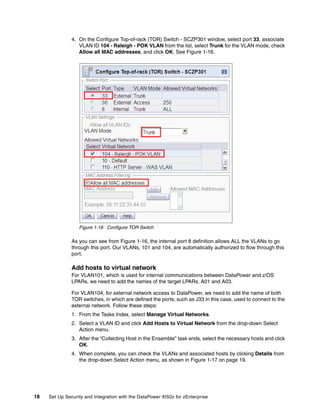
4. On the Configure Top-of-rack (TOR) Switch - SCZP301 window, select port 33, associate
                  VLAN ID 104 - Raleigh - POK VLAN from the list, select Trunk for the VLAN mode, check
                  Allow all MAC addresses, and click OK. See Figure 1-16.


                  Figure 1-16 Configure TOR Switch

               As you can see from Figure 1-16, the internal port 8 definition allows ALL the VLANs to go
               through this port. Our VLANs, 101 and 104, are automatically authorized to flow through this
               port.

               Add hosts to virtual network
               For VLAN101, which is used for internal communications between DataPower and z/OS
               LPARs, we need to add the names of the target LPARs, A01 and A03.

               For VLAN104, for external network access to DataPower, we need to add the name of both
               TOR switches, in which are defined the ports, such as J33 in this case, used to connect to the
               external network. Follow these steps:
               1. From the Tasks Index, select Manage Virtual Networks.
               2. Select a VLAN ID and click Add Hosts to Virtual Network from the drop-down Select
                  Action menu.
               3. After the “Collecting Host in the Ensemble” task ends, select the necessary hosts and click
                  OK.
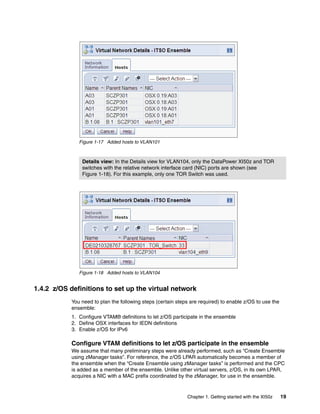
               4. When complete, you can check the VLANs and associated hosts by clicking Details from
                  the drop-down Select Action menu, as shown in Figure 1-17 on page 19.


18   Set Up Security and Integration with the DataPower XI50z for zEnterprise
Figure 1-17 Added hosts to VLAN101


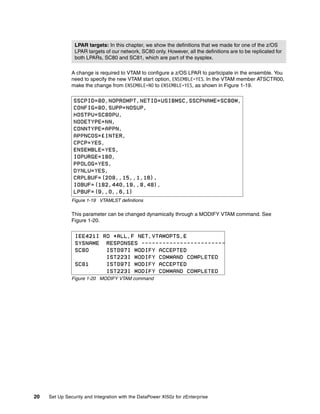
                Details view: In the Details view for VLAN104, only the DataPower XI50z and TOR
                switches with the relative network interface card (NIC) ports are shown (see
                Figure 1-18). For this example, only one TOR Switch was used.


               Figure 1-18 Added hosts to VLAN104


1.4.2 z/OS definitions to set up the virtual network
            You need to plan the following steps (certain steps are required) to enable z/OS to use the
            ensemble:
            1. Configure VTAM® definitions to let z/OS participate in the ensemble
            2. Define OSX interfaces for IEDN definitions
            3. Enable z/OS for IPv6

            Configure VTAM definitions to let z/OS participate in the ensemble
            We assume that many preliminary steps were already performed, such as “Create Ensemble
            using zManager tasks”. For reference, the z/OS LPAR automatically becomes a member of
            the ensemble when the “Create Ensemble using zManager tasks” is performed and the CPC
            is added as a member of the ensemble. Unlike other virtual servers, z/OS, in its own LPAR,
            acquires a NIC with a MAC prefix coordinated by the zManager, for use in the ensemble.


                                                              Chapter 1. Getting started with the XI50z   19
LPAR targets: In this chapter, we show the definitions that we made for one of the z/OS
                LPAR targets of our network, SC80 only. However, all the definitions are to be replicated for
                both LPARs, SC80 and SC81, which are part of the sysplex.

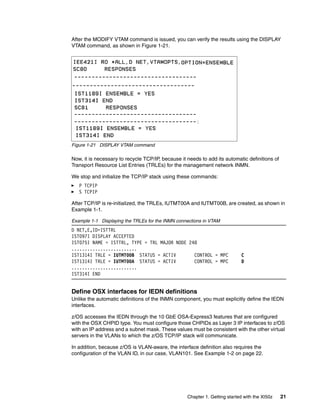
               A change is required to VTAM to configure a z/OS LPAR to participate in the ensemble. You
               need to specify the new VTAM start option, ENSEMBLE=YES. In the VTAM member ATSCTR00,
               make the change from ENSEMBLE=NO to ENSEMBLE=YES, as shown in Figure 1-19.


               Figure 1-19 VTAMLST definitions

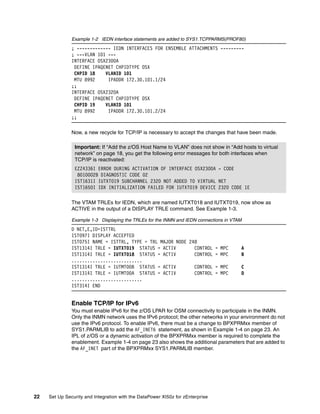
               This parameter can be changed dynamically through a MODIFY VTAM command. See
               Figure 1-20.


               Figure 1-20 MODIFY VTAM command


20   Set Up Security and Integration with the DataPower XI50z for zEnterprise
After the MODIFY VTAM command is issued, you can verify the results using the DISPLAY
VTAM command, as shown in Figure 1-21.


Figure 1-21 DISPLAY VTAM command

Now, it is necessary to recycle TCP/IP, because it needs to add its automatic definitions of
Transport Resource List Entries (TRLEs) for the management network INMN.

We stop and initialize the TCP/IP stack using these commands:
   P TCPIP
   S TCPIP

After TCP/IP is re-initialized, the TRLEs, IUTMT00A and IUTMT00B, are created, as shown in
Example 1-1.

Example 1-1 Displaying the TRLEs for the INMN connections in VTAM
D NET,E,ID=ISTTRL
IST097I DISPLAY ACCEPTED
IST075I NAME = ISTTRL, TYPE = TRL MAJOR NODE 248
.........................
IST1314I TRLE = IUTMT00B STATUS = ACTIV        CONTROL = MPC                 C
IST1314I TRLE = IUTMT00A STATUS = ACTIV        CONTROL = MPC                 D
.........................
IST314I END


Define OSX interfaces for IEDN definitions
Unlike the automatic definitions of the INMN component, you must explicitly define the IEDN
interfaces.

z/OS accesses the IEDN through the 10 GbE OSA-Express3 features that are configured
with the OSX CHPID type. You must configure those CHPIDs as Layer 3 IP interfaces to z/OS
with an IP address and a subnet mask. These values must be consistent with the other virtual
servers in the VLANs to which the z/OS TCP/IP stack will communicate.

In addition, because z/OS is VLAN-aware, the interface definition also requires the
configuration of the VLAN ID, in our case, VLAN101. See Example 1-2 on page 22.


                                                   Chapter 1. Getting started with the XI50z   21
Example 1-2 IEDN interface statements are added to SYS1.TCPPARMS(PROF80)
               ; ------------- IEDN INTERFACES FOR ENSEMBLE ATTACHMENTS ---------
               ; ---VLAN 101 ---
               INTERFACE OSX2300A
                DEFINE IPAQENET CHPIDTYPE OSX
                CHPID 18    VLANID 101
                MTU 8992     IPADDR 172.30.101.1/24
               ;;
               INTERFACE OSX2320A
                DEFINE IPAQENET CHPIDTYPE OSX
                CHPID 19    VLANID 101
                MTU 8992     IPADDR 172.30.101.2/24
               ;;

               Now, a new recycle for TCP/IP is necessary to accept the changes that have been made.

                Important: If “Add the z/OS Host Name to VLAN” does not show in “Add hosts to virtual
                network” on page 18, you get the following error messages for both interfaces when
                TCP/IP is reactivated:
                EZZ4336I ERROR DURING ACTIVATION OF INTERFACE OSX2300A - CODE
                 8010002B DIAGNOSTIC CODE 02
                IST1631I IUTXT019 SUBCHANNEL 2320 NOT ADDED TO VIRTUAL NET
                IST1650I IDX INITIALIZATION FAILED FOR IUTXT019 DEVICE 2320 CODE 1E

               The VTAM TRLEs for IEDN, which are named IUTXT018 and IUTXT019, now show as
               ACTIVE in the output of a DISPLAY TRLE command. See Example 1-3.

               Example 1-3 Displaying the TRLEs for the INMN and IEDN connections in VTAM
               D NET,E,ID=ISTTRL
               IST097I DISPLAY ACCEPTED
               IST075I NAME = ISTTRL, TYPE = TRL MAJOR NODE 248
               IST1314I TRLE = IUTXT019 STATUS = ACTIV        CONTROL           = MPC   A
               IST1314I TRLE = IUTXT018 STATUS = ACTIV        CONTROL           = MPC   B
               ...........................
               IST1314I TRLE = IUTMT00B STATUS = ACTIV        CONTROL           = MPC   C
               IST1314I TRLE = IUTMT00A STATUS = ACTIV        CONTROL           = MPC   D
               ...........................
               IST314I END


               Enable TCP/IP for IPv6
               You must enable IPv6 for the z/OS LPAR for OSM connectivity to participate in the INMN.
               Only the INMN network uses the IPv6 protocol; the other networks in your environment do not
               use the IPv6 protocol. To enable IPv6, there must be a change to BPXPRMxx member of
               SYS1.PARMLIB to add the AF_INET6 statement, as shown in Example 1-4 on page 23. An
               IPL of z/OS or a dynamic activation of the BPXPRMxx member is required to complete the
               enablement. Example 1-4 on page 23 also shows the additional parameters that are added to
               the AF_INET part of the BPXPRMxx SYS1.PARMLIB member.


22   Set Up Security and Integration with the DataPower XI50z for zEnterprise
Example 1-4 Example BPXPRMxx entry for enabling IPv6
           FILESYSTYPE TYPE(INET)ENTRYPOINT(EZBPFINI)
           NETWORK DOMAINNAME(AF_INET6)
           DOMMAINNUMBER(19)
           MAXSOCKETS(3000)
           TYPE(INET)

           Next, display the TCP/IP stack’s home list to verify that there is a LOOPBACK6 device. This
           device indicates that the stack is enabled for IPv6.


1.4.3 Initial DataPower setup
           You must perform the initial setup for the DataPower blade before you start to use it.

           Setting up the dp-admin user
           To set up the dp-admin user, you must access the DataPower from the HMC. When you
           access DataPower for the first time, the default user ID and password are both dp-admin. At
           the first logon, you are asked to change the password.

           Perform the following steps:
           1. Log on to the HMC.
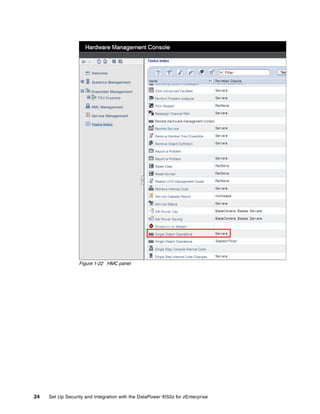
              When the logon is complete, from the left bar, expand Tasks Index and a list appears, as
              shown in Figure 1-22 on page 24.
           2. Click Single Object Operations, which connects you directly to the HMC SE.


                                                              Chapter 1. Getting started with the XI50z   23
Figure 1-22 HMC panel


24   Set Up Security and Integration with the DataPower XI50z for zEnterprise
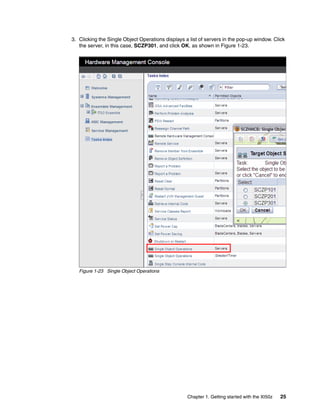
3. Clicking the Single Object Operations displays a list of servers in the pop-up window. Click
   the server, in this case, SCZP301, and click OK, as shown in Figure 1-23.


   Figure 1-23 Single Object Operations


                                                   Chapter 1. Getting started with the XI50z   25
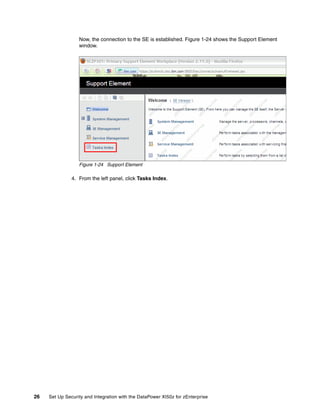
Now, the connection to the SE is established. Figure 1-24 shows the Support Element
                  window.


                  Figure 1-24 Support Element

               4. From the left panel, click Tasks Index.


26   Set Up Security and Integration with the DataPower XI50z for zEnterprise
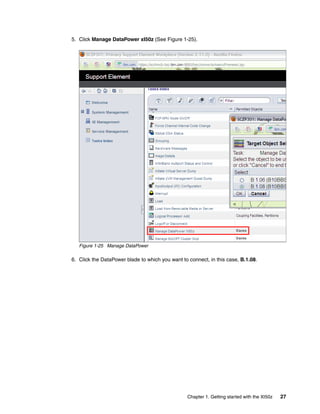
5. Click Manage DataPower xI50z (See Figure 1-25).


   Figure 1-25 Manage DataPower

6. Click the DataPower blade to which you want to connect, in this case, B.1.08.


                                                 Chapter 1. Getting started with the XI50z   27
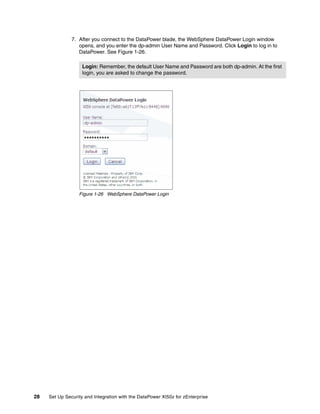
7. After you connect to the DataPower blade, the WebSphere DataPower Login window
                  opens, and you enter the dp-admin User Name and Password. Click Login to log in to
                  DataPower. See Figure 1-26.

                    Login: Remember, the default User Name and Password are both dp-admin. At the first
                    login, you are asked to change the password.


                  Figure 1-26 WebSphere DataPower Login


28   Set Up Security and Integration with the DataPower XI50z for zEnterprise
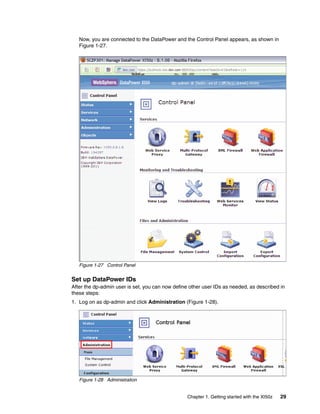
Now, you are connected to the DataPower and the Control Panel appears, as shown in
   Figure 1-27.


   Figure 1-27 Control Panel


Set up DataPower IDs
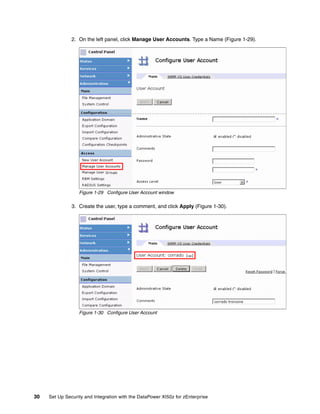
After the dp-admin user is set, you can now define other user IDs as needed, as described in
these steps:
1. Log on as dp-admin and click Administration (Figure 1-28).


   Figure 1-28 Administration


                                                 Chapter 1. Getting started with the XI50z   29
2. On the left panel, click Manage User Accounts. Type a Name (Figure 1-29).


                  Figure 1-29 Configure User Account window

               3. Create the user, type a comment, and click Apply (Figure 1-30).


                  Figure 1-30 Configure User Account


30   Set Up Security and Integration with the DataPower XI50z for zEnterprise
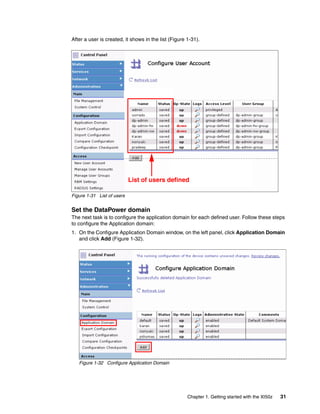
After a user is created, it shows in the list (Figure 1-31).


                            List of users defined

Figure 1-31 List of users


Set the DataPower domain
The next task is to configure the application domain for each defined user. Follow these steps
to configure the Application domain:
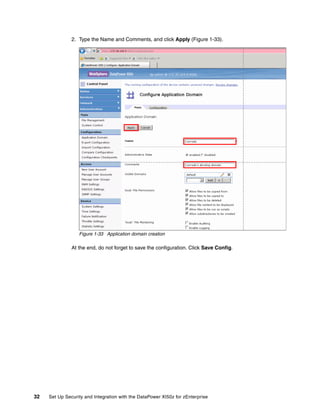
1. On the Configure Application Domain window, on the left panel, click Application Domain
   and click Add (Figure 1-32).


   Figure 1-32 Configure Application Domain


                                                      Chapter 1. Getting started with the XI50z   31
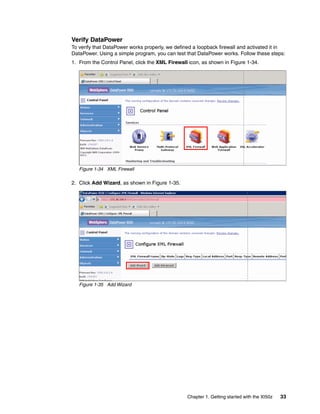
2. Type the Name and Comments, and click Apply (Figure 1-33).


                  Figure 1-33 Application domain creation

               At the end, do not forget to save the configuration. Click Save Config.


32   Set Up Security and Integration with the DataPower XI50z for zEnterprise
Verify DataPower
To verify that DataPower works properly, we defined a loopback firewall and activated it in
DataPower. Using a simple program, you can test that DataPower works. Follow these steps:
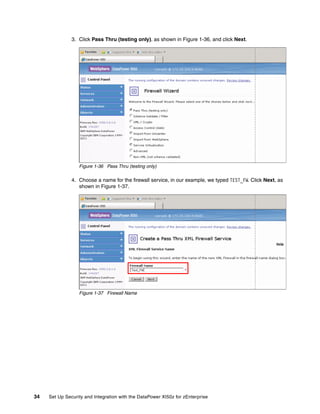
1. From the Control Panel, click the XML Firewall icon, as shown in Figure 1-34.


   Figure 1-34 XML Firewall

2. Click Add Wizard, as shown in Figure 1-35.


   Figure 1-35 Add Wizard


                                                 Chapter 1. Getting started with the XI50z   33
3. Click Pass Thru (testing only), as shown in Figure 1-36, and click Next.


                  Figure 1-36 Pass Thru (testing only)

               4. Choose a name for the firewall service, in our example, we typed TEST_FW. Click Next, as
                  shown in Figure 1-37.


                  Figure 1-37 Firewall Name


34   Set Up Security and Integration with the DataPower XI50z for zEnterprise
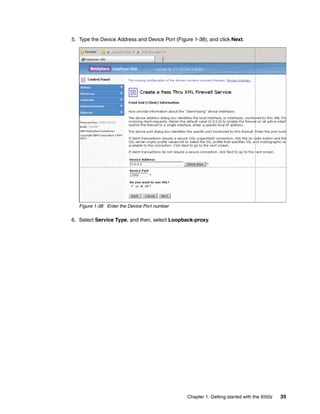
5. Type the Device Address and Device Port (Figure 1-38), and click Next.


   Figure 1-38 Enter the Device Port number

6. Select Service Type, and then, select Loopback-proxy.


                                                 Chapter 1. Getting started with the XI50z   35
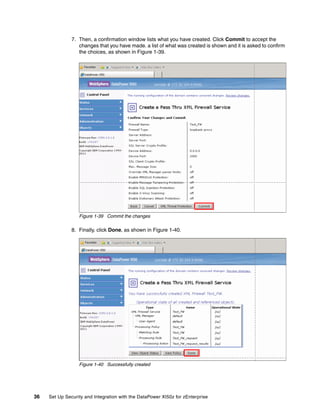
7. Then, a confirmation window lists what you have created. Click Commit to accept the
                  changes that you have made. a list of what was created is shown and it is asked to confirm
                  the choices, as shown in Figure 1-39.


                  Figure 1-39 Commit the changes

               8. Finally, click Done, as shown in Figure 1-40.


                  Figure 1-40 Successfully created


36   Set Up Security and Integration with the DataPower XI50z for zEnterprise
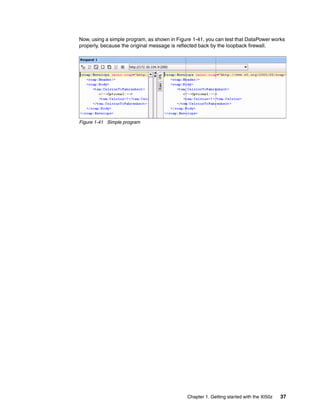
Now, using a simple program, as shown in Figure 1-41, you can test that DataPower works
properly, because the original message is reflected back by the loopback firewall.


Figure 1-41 Simple program


                                             Chapter 1. Getting started with the XI50z   37
38   Set Up Security and Integration with the DataPower XI50z for zEnterprise
2


    Chapter 2.   Security
                 This chapter describes the security on the zEnterprise, focusing on the usage of the XI50z
                 Network Security Services (NSS).

                 This chapter includes the following topics:
                     Security concepts for the XI50z
                     The XI50z AAA framework
                     zEnterprise security
                     SAF authentication and authorization details
                     Identity propagation using ICRX tokens for CICS WS
                     Securing keys and certificates on zEnterprise


© Copyright IBM Corp. 2011. All rights reserved.                                                              39
2.1 Security concepts for the XI50z
               The IBM Service-Oriented Architecture (SOA) Security Reference Model defines the
               framework for providing security to IT solutions. We explain the security services and
               enablers that are most relevant to the XI50z. You can obtain more information about the IBM
               SOA Security Reference Model in Section 4.2 of the IBM Redbooks publication,
               Understanding SOA Security Design and Implementation, SG24-7310. In the security
               scenarios that we describe in this section, the XI50z can act in the role of an SOA gateway or
               an enterprise service bus (ESB). For more information about these architectural patterns,
               refer to Section 4.1 in the IBM Redpaper™ document, Simplifying Integration with IBM
               WebSphere DataPower Integration Appliance XI50 for zEnterprise, REDP-4783.


2.1.1 Authentication services
               Authentication services enable an application to verify that a user-provided identity is known
               and registered in a policy-designated user registry. Authentication services also validate the
               user-provided proof of identity using a policy-designated challenge and authentication
               mechanism.

               Often, the systems serving the request are not the systems to which the user provided the
               authentication data. There are two kinds of implementations that can be used to carry over an
               already authenticated identity from system to system:
                  Implementations based on the use of authentication mechanisms supporting delegation,
                  that is, the intermediate system has to provide valid and verifiable authentication data on
                  behalf of the requesting user.
                  Implementations based on identity assertion. With identity assertion, there is no
                  authentication data carried over after the authentication has been performed by one
                  system. Instead, the authenticating system propagates the user identity only and the other
                  systems assume that this identity has been properly authenticated, on the basis of the
                  trust they have been set up to have in the authenticating system. Refer to 2.1.7, “Identity
                  propagation services” on page 45 for more information.

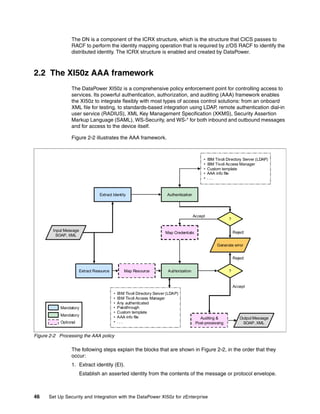
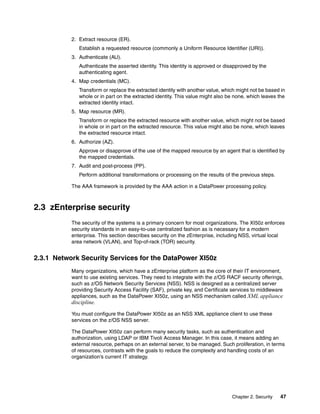
               The XI50z provides the authentication, authorization, and auditing (AAA) framework to
               provide authentication services, as described in 2.2, “The XI50z AAA framework” on page 46.
               Authentication, in relation to the XI50z, also applies to the users logging in to the XI50z, for
               example, securing the processing policies and configurations residing on the DataPower
               device. Authentication is controlled by role-based management (RBM) settings on the XI50z;
               refer to 2.4, “The XI50z RBM settings: Enabling RACF users to use the management GUI” on
               page 61.

               For scenarios regarding authentication in this IBM Redbooks publication, refer to Chapter 3,
               “Integration use cases” on page 105. The focus for this book is the interaction of the XI50z
               with the Security Services.


2.1.2 Authorization services
               Access control is the service by which a user request for accessing a resource is submitted to
               checking for proper authorization, generally on the basis of the authenticated identity that is
               associated with the request. When enforced, access control is then considered authorization.
               Authorization is performed on transactions at run time using the AAA action in a processing
               policy that is associated with the DataPower service. Access to the device itself and its
               resources can also be controlled. Authorization or selective access to resources is usually
               defined using groups. These groups are attached to access profiles that define what

40   Set Up Security and Integration with the DataPower XI50z for zEnterprise
resources can be accessed. The XI50z (unlike the XI52 or XI50 devices) comes with three
           predefined administrator groups (and associated access profiles that control access to
           objects and tasks on the XI50z):
           dp-admin-group         This group can create privileged users. It has read, write, audit, delete,
                                  and execute privileges on almost everything, except network-related
                                  tasks. Network-related tasks are performed by the dp-admin-nw
                                  group.
           dp-admin-fw-group      This group performs boot and quiesce type tasks on services and the
                                  blade.
           dp-admin-nw-group This group can perform network-related tasks, such as modifying
                             network parameters, such as Ethernet interface parameters (eth7 and
                             eth9 only) and web management services, for example, WebGUI
                             timeouts. However, this group cannot create or modify users or
                             groups, such as the dp-admin-group.

           Clients can create their own custom groups that grant specific privileges. For more
           information, go to the information center for the XI50z:
           http://publib.boulder.ibm.com/infocenter/wsdatap/v3r8m1/topic/xi50/welcome.htm

           The XI50z provides the AAA framework to provide authentication services for transactions, as
           described in 2.2, “The XI50z AAA framework” on page 46. You can obtain information about
           authorization and authentication using Network Software and Services (NSS) and Resource
           Access Control Facility (RACF) in 2.5, “SAF authentication and authorization details” on
           page 70.


2.1.3 Confidentiality services
           Data from both service consumers and providers that are mediated through the ESB needs to
           be protected from disclosure. You can protect data from disclosure by using Confidentiality
           services and choosing message-level security using WS-Security and transport level-security
           with Secure Sockets Layer (SSL)/Transport Layer Security (TLS). Decisions about which
           method is appropriate depend upon the nature of the service being orchestrated and the
           business requirements.

           For example, if the ESB expects signed and encrypted messages from a service provider, the
           service provider must be aware that the ESB expects signed and encrypted messages so that
           outbound messages are correctly prepared before sending. If the ESB then requires
           communication with one or more service providers to provide a response to the service
           consumer, it needs to be aware of message protection policies for interacting with those
           service providers.

           The XI50z provides confidentiality service with the following mechanisms:
              SSL/TLS protection over most of the supported popular TCP transport protocols, such as
              HTTP, WebSphere MQ, Java Message Service (JMS), and TIBCO Enterprise Message
              Service (EMS). Optionally, the XI50z can support SSL mutual authentication (SSL client
              certificates).
              Encryption services in the XI50z also provides message-level confidentiality between
              service consumers and providers. Encryption can be based on symmetrical key (shared
              secret) or public key infrastructure (PKI)-based asymmetric encryption. In PKI-based
              asymmetric encryption, the message sender can encrypt with the public key of the
              receiver, who is the only one capable of decrypting the message with the receiver private
              key.


                                                                                   Chapter 2. Security   41
For scenarios in this book focusing on confidentiality, see “ICSF key storage encrypt/decrypt
               scenario” on page 98.


2.1.4 Integrity services
               Protecting message content from being modified without detection, being sure of its origin,
               and protection against message replays are the primary concerns of Integrity services.
               Integrity services are usually achieved on an XI50z by digitally signing the message body,
               header elements, or any combination of these parts in a WS-Security message. Also, a
               signed message can come in from a business partner, and because only the holder of the
               private key (that is, the business partner) can sign the message, the XI50z can verify that the
               message was sent by that business partner by using the public key of the business partner.
               The public key is usually authorized (signed) by a well-known certificate authority (CA). The
               signature also includes a checksum that ensures that a message that is tampered with
               triggers a signature verification error.

               Many security tokens that are defined in WS-Security have the ability to include a data
               element, such as a nonce, to prevent the reuse of a security token, and to protect against
               exploits that reuse a security token.

               The XI50z as an ESB can use Integrity services to safeguard the data from both service
               consumers and providers that are mediated through the ESB.

               For scenarios in this book focusing on Integrity services, see “Settings for digital
               signature/digital signature verification” on page 95.


2.1.5 Audit services
               Auditing is the service that permanently maintains an audit trail of security-relevant events. A
               security-relevant event can be defined as an action taken that reflects adhesion to or violation
               of a security policy in place in a system. The audit trail is to provide historical data that can be
               used for the purpose of detecting precise actions (and their originators), or trends in actions,
               that diverge from or can potentially lead to divergence from the security policy.


42   Set Up Security and Integration with the DataPower XI50z for zEnterprise
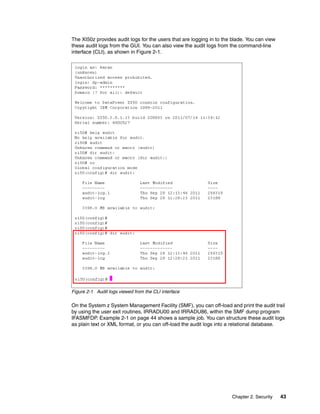
The XI50z provides audit logs for the users that are logging in to the blade. You can view
these audit logs from the GUI. You can also view the audit logs from the command-line
interface (CLI), as shown in Figure 2-1.


Figure 2-1 Audit logs viewed from the CLI interface

On the System z System Management Facility (SMF), you can off-load and print the audit trail
by using the user exit routines, IRRADU00 and IRRADU86, within the SMF dump program
IFASMFDP. Example 2-1 on page 44 shows a sample job. You can structure these audit logs
as plain text or XML format, or you can off-load the audit logs into a relational database.


                                                                      Chapter 2. Security    43
Example 2-1 SMF data unload into XML-style audit trail report
               //SMFDUMP EXEC PGM=IFASMFDP
               //SYSPRINT DD SYSOUT=*
               //ADUPRINT DD SYSOUT=*
               //XMLFORM DD DISP=(NEW,CATLG,KEEP),
               // DSN=CUI.RACF.XMLFORM,
               // SPACE=(CYL,(1500,550),RLSE),UNIT=SYSDA,VOL=SER=BH8WA0,
               // DCB=(LRECL=12288,RECFM=VB,BLKSIZE=0)
               //SMFDATA DD DISP=SHR,DSN=SYS1.SMF.MAN1
               //SMFOUT   DD DUMMY
               //SYSIN    DD *
                    INDD(SMFDATA,OPTIONS(DUMP))
                    OUTDD(SMFOUT,TYPE(30(1,5),80:83))
                    ABEND(NORETRY)
                    USER2(IRRADU00)
                    USER3(IRRADU86)
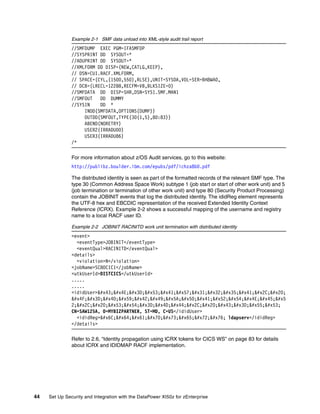
               /*

               For more information about z/OS Audit services, go to this website:
               http://publibz.boulder.ibm.com/epubs/pdf/ichza8b0.pdf

               The distributed identity is seen as part of the formatted records of the relevant SMF type. The
               type 30 (Common Address Space Work) subtype 1 (job start or start of other work unit) and 5
               (job termination or termination of other work unit) and type 80 (Security Product Processing)
               contain the JOBINIT events that log the distributed identity. The ididReg element represents
               the UTF-8 hex and EBCDIC representation of the received Extended Identity Context
               Reference (ICRX). Example 2-2 shows a successful mapping of the username and registry
               name to a local RACF user ID.

               Example 2-2 JOBINIT RACINITD work unit termination with distributed identity
               <event>
                 <eventType>JOBINIT</eventType>
                 <eventQual>RACINITD</eventQual>
               <details>
                 <violation>N</violation>
               <jobName>SC80CIC1</jobName>
               <utkUserId>DISTCICS</utkUserId>
               .....
               .....
               <ididUser>&#x43;&#x4E;&#x3D;&#x53;&#x41;&#x57;&#x31;&#x32;&#x35;&#x41;&#x2C;&#x20;
               &#x4F;&#x3D;&#x4D;&#x59;&#x42;&#x49;&#x5A;&#x50;&#x41;&#x52;&#x54;&#x4E;&#x45;&#x5
               2;&#x2C;&#x20;&#x53;&#x54;&#x3D;&#x4D;&#x44;&#x2C;&#x20;&#x43;&#x3D;&#x55;&#x53;
               CN=SAW125A, O=MYBIZPARTNER, ST=MD, C=US</ididUser>
                 <ididReg>&#x6C;&#x64;&#x61;&#x70;&#x73;&#x65;&#x72;&#x76; ldapserv</ididReg>
               </details>

               Refer to 2.6, “Identity propagation using ICRX tokens for CICS WS” on page 83 for details
               about ICRX and IDIDMAP RACF implementation.


44   Set Up Security and Integration with the DataPower XI50z for zEnterprise
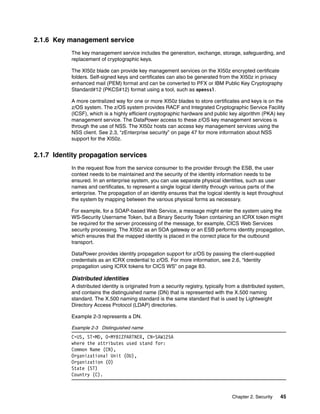
2.1.6 Key management service
           The key management service includes the generation, exchange, storage, safeguarding, and
           replacement of cryptographic keys.

           The XI50z blade can provide key management services on the XI50z encrypted certificate
           folders. Self-signed keys and certificates can also be generated from the XI50z in privacy
           enhanced mail (PEM) format and can be converted to PFX or IBM Public Key Cryptography
           Standard#12 (PKCS#12) format using a tool, such as openssl.

           A more centralized way for one or more XI50z blades to store certificates and keys is on the
           z/OS system. The z/OS system provides RACF and Integrated Cryptographic Service Facility
           (ICSF), which is a highly efficient cryptographic hardware and public key algorithm (PKA) key
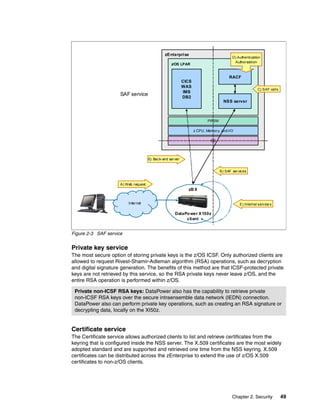
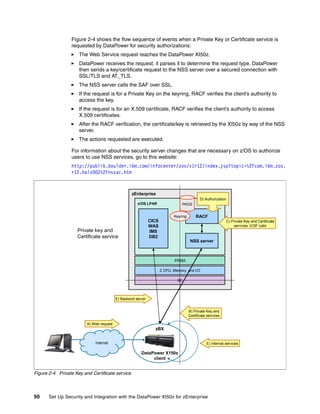
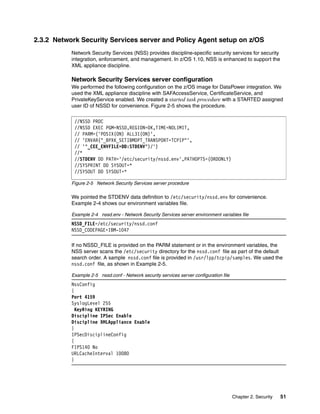
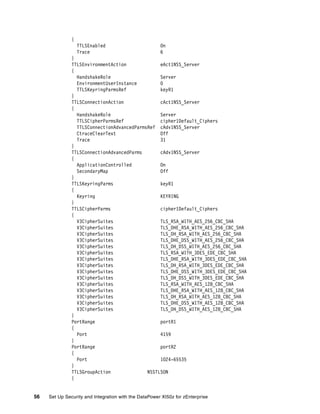
           management service. The DataPower access to these z/OS key management services is
           through the use of NSS. The XI50z hosts can access key management services using the
           NSS client. See 2.3, “zEnterprise security” on page 47 for more information about NSS
           support for the XI50z.


2.1.7 Identity propagation services
           In the request flow from the service consumer to the provider through the ESB, the user
           context needs to be maintained and the security of the identity information needs to be
           ensured. In an enterprise system, you can use separate physical identities, such as user
           names and certificates, to represent a single logical identity through various parts of the
           enterprise. The propagation of an identity ensures that the logical identity is kept throughout
           the system by mapping between the various physical forms as necessary.

           For example, for a SOAP-based Web Service, a message might enter the system using the
           WS-Security Username Token, but a Binary Security Token containing an ICRX token might
           be required for the server processing of the message, for example, CICS Web Services
           security processing. The XI50z as an SOA gateway or an ESB performs identity propagation,
           which ensures that the mapped identity is placed in the correct place for the outbound
           transport.

           DataPower provides identity propagation support for z/OS by passing the client-supplied
           credentials as an ICRX credential to z/OS. For more information, see 2.6, “Identity
           propagation using ICRX tokens for CICS WS” on page 83.

           Distributed identities
           A distributed identity is originated from a security registry, typically from a distributed system,
           and contains the distinguished name (DN) that is represented with the X.500 naming
           standard. The X.500 naming standard is the same standard that is used by Lightweight
           Directory Access Protocol (LDAP) directories.

           Example 2-3 represents a DN.

           Example 2-3 Distinguished name
           C=US, ST=MD, O=MYBIZPARTNER, CN=SAW125A
           where the attributes used stand for:
           Common Name (CN),
           Organizational Unit (OU),
           Organization (O)
           State (ST)
           Country (C).


                                                                                     Chapter 2. Security   45
The DN is a component of the ICRX structure, which is the structure that CICS passes to
                 RACF to perform the identity mapping operation that is required by z/OS RACF to identify the
                 distributed identity. The ICRX structure is enabled and created by DataPower.


2.2 The XI50z AAA framework
                 The DataPower XI50z is a comprehensive policy enforcement point for controlling access to
                 services. Its powerful authentication, authorization, and auditing (AAA) framework enables
                 the XI50z to integrate flexibly with most types of access control solutions: from an onboard
                 XML file for testing, to standards-based integration using LDAP, remote authentication dial-in
                 user service (RADIUS), XML Key Management Specification (XKMS), Security Assertion
                 Markup Language (SAML), WS-Security, and WS-* for both inbound and outbound messages
                 and for access to the device itself.

                 Figure 2-2 illustrates the AAA framework.


                                                                                              •   IBM Tivoli Directory Server (LDAP)
                                                                                              •   IBM Tivoli Access Manager
                                                                                              •   Custom template
                                                                                              •   AAA info file
                                                                                              •   ...


                                Extract Identity                        Authentication


                                                                                         Accept
                                                                                                              ?

        Input Message                                                                                             Reject
                                                                       Map Credentials
         SOAP, XML

                                                                                                       Generate error


                                                                                                                  Reject


                      Extract Resource          Map Resource             Authorization                        ?


                                                                                                                  Accept
                                         •   IBM Tivoli Directory Server (LDAP)
                                         •   IBM Tivoli Access Manager
                                         •   Any authenticated
           Mandatory                     •   Passthrough
                                         •   Custom template
           Mandatory                     •   AAA info file                                  Auditing &               Output Message
           Optional                      •   ...                                          Post-processing             SOAP, XML


Figure 2-2 Processing the AAA policy

                 The following steps explain the blocks that are shown in Figure 2-2, in the order that they
                 occur:
                 1. Extract identity (EI).
                        Establish an asserted identity from the contents of the message or protocol envelope.


46    Set Up Security and Integration with the DataPower XI50z for zEnterprise
2. Extract resource (ER).
              Establish a requested resource (commonly a Uniform Resource Identifier (URI)).
           3. Authenticate (AU).
              Authenticate the asserted identity. This identity is approved or disapproved by the
              authenticating agent.
           4. Map credentials (MC).
              Transform or replace the extracted identity with another value, which might not be based in
              whole or in part on the extracted identity. This value might also be none, which leaves the
              extracted identity intact.
           5. Map resource (MR).
              Transform or replace the extracted resource with another value, which might not be based
              in whole or in part on the extracted resource. This value might also be none, which leaves
              the extracted resource intact.
           6. Authorize (AZ).
              Approve or disapprove of the use of the mapped resource by an agent that is identified by
              the mapped credentials.
           7. Audit and post-process (PP).
              Perform additional transformations or processing on the results of the previous steps.

           The AAA framework is provided by the AAA action in a DataPower processing policy.


2.3 zEnterprise security
           The security of the systems is a primary concern for most organizations. The XI50z enforces
           security standards in an easy-to-use centralized fashion as is necessary for a modern
           enterprise. This section describes security on the zEnterprise, including NSS, virtual local
           area network (VLAN), and Top-of-rack (TOR) security.


2.3.1 Network Security Services for the DataPower XI50z
           Many organizations, which have a zEnterprise platform as the core of their IT environment,
           want to use existing services. They need to integrate with the z/OS RACF security offerings,
           such as z/OS Network Security Services (NSS). NSS is designed as a centralized server
           providing Security Access Facility (SAF), private key, and Certificate services to middleware
           appliances, such as the DataPower XI50z, using an NSS mechanism called XML appliance
           discipline.
           You must configure the DataPower XI50z as an NSS XML appliance client to use these
           services on the z/OS NSS server.

           The DataPower XI50z can perform many security tasks, such as authentication and
           authorization, using LDAP or IBM Tivoli Access Manager. In this case, it means adding an
           external resource, perhaps on an external server, to be managed. Such proliferation, in terms
           of resources, contrasts with the goals to reduce the complexity and handling costs of an
           organization’s current IT strategy.


                                                                                 Chapter 2. Security   47
NSS benefits
               In this case, NSS centralizes the authentication and authorization functions of the DataPower
               XI50z blades at the z/OS level. NSS also enables the storage of private keys and digital
               certificates in RACF or on ICSF hardware storage. NSS enables centralization and
               consolidation so that the control of all security mechanisms that relate to the DataPower
               XI50z becomes managed by a single, secure, and central point of control inside the z/OS.

               The XML Appliance discipline of NSS includes the following services:
                  SAF service
                  Private key services
                  X.509 certificate services

               SAF service
               The XI50z issues calls to the NSS server to authenticate and authorize users to access
               services on the back end.

               Figure 2-3 on page 49 shows the flow sequence of events, when a SAF service is requested
               by DataPower for AAA purposes:
                  The Web Service request reaches the DataPower XI50z.
                  DataPower receives the request; it parses the request to determine the identity (user ID)
                  and the resource being accessed (service top-level element). Then, DataPower sends a
                  SAF request to the NSS server using a secured connection over SSL/TLS and AT_TLS.

                    Secured connection: The secured connection requires SSL keyrings on the z/OS
                    RACF side and a validation credential (SSL client) on DataPower.

                  The NSS server forwards the request to z/OS RACF.
                  z/OS RACF verifies the authentication and eventually authorizes the user to perform the
                  requested actions by replying by way of the NSS server to DataPower.
                  The requested action, for example, executing a Web Service, occurs. The requested
                  action typically is accessing a target application on the back-end side.


48   Set Up Security and Integration with the DataPower XI50z for zEnterprise
zEnterprise
                                                                                       D) Authentication
                                                                                        Author ization
                                                   z/OS LPAR


                                                                                     RACF
                                                           CICS
                                                           WAS
                                                                                                      C) SAF calls
                                                           IMS
                     SAF service
                                                           DB2
                                                                                  NSS server


                                                                         PRSM

                                                                  z CPU, Memory, and I/O

                                                                           SE


                                      E) Back-end server


                                                                                B) SAF services


                     A) Web request
                                                             zB X


                         Internet                                                          E) Internal service s

                                                     DataPo wer X150z
                                                          client


Figure 2-3 SAF service


Private key service
The most secure option of storing private keys is the z/OS ICSF. Only authorized clients are
allowed to request Rivest-Shamir-Adleman algorithm (RSA) operations, such as decryption
and digital signature generation. The benefits of this method are that ICSF-protected private
keys are not retrieved by this service, so the RSA private keys never leave z/OS, and the
entire RSA operation is performed within z/OS.

 Private non-ICSF RSA keys: DataPower also has the capability to retrieve private
 non-ICSF RSA keys over the secure intraensemble data network (IEDN) connection.
 DataPower also can perform private key operations, such as creating an RSA signature or
 decrypting data, locally on the XI50z.


Certificate service
The Certificate service allows authorized clients to list and retrieve certificates from the
keyring that is configured inside the NSS server. The X.509 certificates are the most widely
adopted standard and are supported and retrieved one time from the NSS keyring. X.509
certificates can be distributed across the zEnterprise to extend the use of z/OS X.509
certificates to non-z/OS clients.


                                                                                       Chapter 2. Security           49
Figure 2-4 shows the flow sequence of events when a Private Key or Certificate service is
                 requested by DataPower for security authorizations:
                     The Web Service request reaches the DataPower XI50z.
                     DataPower receives the request; it parses it to determine the request type. DataPower
                     then sends a key/certificate request to the NSS server over a secured connection with
                     SSL/TLS and AT_TLS.
                     The NSS server calls the SAF over SSL.
                     If the request is for a Private Key on the keyring, RACF verifies the client’s authority to
                     access the key.
                     If the request is for an X.509 certificate, RACF verifies the client’s authority to access
                     X.509 certificates.
                     After the RACF verification, the certificate/key is retrieved by the XI50z by way of the NSS
                     server.
                     The actions requested are executed.

                 For information about the security server changes that are necessary on z/OS to authorize
                 users to use NSS services, go to this website:
                 http://publib.boulder.ibm.com/infocenter/zos/v1r12/index.jsp?topic=%2Fcom.ibm.zos.
                 r12.halz002%2Fnssac.htm


                                                   zEnterprise
                                                                                             D) Authorization
                                                      z/OS LPAR                  PKDS


                                                                            Keyring       RACF
                                                              CICS                                           C) Private Key and Certificate
                                                              WAS                                                services: ICSF calls
                    Private key and                           IMS
                    Certificate service                       DB2
                                                                                       NSS server


                                                                             PRSM

                                                                     Z CPU, Memory, and I/O

                                                                              SE


                                          E) Backend server


                                                                                      B) Private Key and
                                                                                      Certificate services

                         A) Web request
                                                                zBX


                             Internet                                                            E) Internal services

                                                        DataPower X150z
                                                             client


Figure 2-4 Private Key and Certificate service


50     Set Up Security and Integration with the DataPower XI50z for zEnterprise
2.3.2 Network Security Services server and Policy Agent setup on z/OS
           Network Security Services (NSS) provides discipline-specific security services for security
           integration, enforcement, and management. In z/OS 1.10, NSS is enhanced to support the
           XML appliance discipline.

           Network Security Services server configuration
           We performed the following configuration on the z/OS image for DataPower integration. We
           used the XML appliance discipline with SAFAccessService, CertificateService, and
           PrivateKeyService enabled. We created a started task procedure with a STARTED assigned
           user ID of NSSD for convenience. Figure 2-5 shows the procedure.

            //NSSD PROC
            //NSSD EXEC PGM=NSSD,REGION=0K,TIME=NOLIMIT,
            // PARM=('POSIX(ON) ALL31(ON)',
            // 'ENVAR("_BPXK_SETIBMOPT_TRANSPORT=TCPIP"',
            // '"_CEE_ENVFILE=DD:STDENV")/')
            //*
            //STDENV DD PATH='/etc/security/nssd.env',PATHOPTS=(ORDONLY)
            //SYSPRINT DD SYSOUT=*
            //SYSOUT DD SYSOUT=*

           Figure 2-5 Network Security Services server procedure

           We pointed the STDENV data definition to /etc/security/nssd.env for convenience.
           Example 2-4 shows our environment variables file.

           Example 2-4 nssd.env - Network Security Services server environment variables file
           NSSD_FILE=/etc/security/nssd.conf
           NSSD_CODEPAGE=IBM-1047

           If no NSSD_FILE is provided on the PARM statement or in the environment variables, the
           NSS server scans the /etc/security directory for the nssd.conf file as part of the default
           search order. A sample nssd.conf file is provided in /usr/lpp/tcpip/samples. We used the
           nssd.conf file, as shown in Example 2-5.

           Example 2-5 nssd.conf - Network security services server configuration file
           NssConfig
           {
           Port 4159
           SyslogLevel 255
             KeyRing KEYRING
           Discipline IPSec Enable
           Discipline XMLAppliance Enable
           }
           IPSecDisciplineConfig
           {
           FIPS140 No
           URLCacheInterval 10080
           }


                                                                                         Chapter 2. Security   51
Example 2-6 shows the content of the RACF keyring named KEYRING that holds the
               NSSD-owned certificates. All client and Certificate Authority (CA) certificates must reside in
               the NSSD keyring.

               Example 2-6 Network Security Services server RACF KEYRING
               Digital ring information for user NSSD:

                 Ring:
                      >KEYRING<
                 Certificate Label Name                    Cert Owner       USAGE       DEFAULT
                 --------------------------------          ------------     --------    -------
                 SAW125 ITSO SharedSite1                   SITE             PERSONAL      YES
                 SAW125 ITSO CA1                           CERTAUTH         CERTAUTH      NO
                 DataPowerCert1                            ID(NSSD)         PERSONAL      NO
                 DPICSF                                    ID(NSSD)         PERSONAL      NO

               ***

               The NSS daemon needs UID 0 and the appropriate RACF definitions, as shown in
               Example 2-7. In Example 2-7, ITSOCLNT is the DataPower NSS client ID and existing RACF
               user ID. Refer to the updated TCP/IP sample EZARACF in TCPIP.SEZAINST that contains
               the sample RACF setup.

               Example 2-7 RACF definitions for NSSD and disciplines
               ADDUSER NSSD      DFLTGRP(OMVSGRP) NOPASSWORD OMVS(UID(0)           HOME('/u/NSSD'))
               RDEFINE STARTED NSSD.*              STDATA(USER(NSSD))
               SETROPTS GENERIC(STARTED) RACLIST(STARTED) REFRESH

               PERMIT IRR.DIGTCERT.ADD CLASS(FACILITY) ID(NSSD) ACC(CONTROL)
               PERMIT IRR.DIGTCERT.ADDRING CLASS(FACILITY) ID(NSSD) ACC(UPDATE)
               PERMIT IRR.DIGTCERT.CONNECT CLASS(FACILITY) ID(NSSD) ACC(CONTROL)
               PERMIT IRR.DIGTCERT.GENCERT CLASS(FACILITY) ID(NSSD) ACC(CONTROL)
               PERMIT IRR.DIGTCERT.GENREQ CLASS(FACILITY) ID(NSSD) ACC(CONTROL)
               PERMIT IRR.DIGTCERT.LIST CLASS(FACILITY) ID(NSSD) ACC(CONTROL)
               PERMIT IRR.DIGTCERT.LISTRING CLASS(FACILITY) ID(NSSD) ACC(UPDATE)
               SETROPTS RACLIST(FACILITY) REFRESH

               PERMIT BPX.DAEMON CLASS(FACILITY) ID(NSSD) ACCESS(READ)
               SETROPTS RACLIST(FACILITY) REFRESH

               RDEFINE SERVAUTH EZB.NSS.SC80.ITSOCLNT.XMLAPPLIANCE.SAFACCESS UACC(NONE)
               PERMIT EZB.NSS.SC80.ITSOCLNT.XMLAPPLIANCE.SAFACCESS CLASS(SERVAUTH) ID(ITSOCLNT)
               ACCESS(READ)
               RDEFINE SERVAUTH EZB.NSS.SC80.ITSOCLNT.XMLAPPLIANCE.CERT UACC(NONE)
               PERMIT EZB.NSS.SC80.ITSOCLNT.XMLAPPLIANCE.CERT CLASS(SERVAUTH) ID(ITSOCLNT)
               ACCESS(READ)
               RDEFINE SERVAUTH EZB.NSS.SC80.ITSOCLNT.XMLAPPLIANCE.PRIVKEY UACC(NONE)
               PERMIT EZB.NSS.SC80.ITSOCLNT.XMLAPPLIANCE.PRIVKEY CLASS(SERVAUTH) ID(ITSOCLNT)
               ACCESS(READ)
               SETROPTS GENERIC(SERVAUTH) RACLIST(SERVAUTH) REFRESH

               RDEFINE SERVAUTH EZB.NSSCERT.SC80.SAW125$ITSO$CA1.PRIVKEY UACC(NONE)
               PERMIT EZB.NSSCERT.SC80.SAW125$ITSO$CA1.PRIVKEY CLASS(SERVAUTH) ID(ITSOCLNT)
               ACCESS(READ)


52   Set Up Security and Integration with the DataPower XI50z for zEnterprise
SETROPTS GENERIC(SERVAUTH) RACLIST(SERVAUTH) REFRESH

RDEFINE SERVAUTH EZB.NSSCERT.SC80.DATAPOWERCERT1.HOST UACC(NONE)
PERMIT EZB.NSSCERT.SC80.DATAPOWERCERT1.HOST CLASS(SERVAUTH) ID(ITSOCLNT)
ACCESS(READ)
SETROPTS RACLIST(SERVAUTH) GENERIC(SERVAUTH) REFRESH

RDEFINE SERVAUTH EZB.NSSCERT.SC80.SAW125$ITSO$CA1.CERTAUTH UACC(NONE)
PERMIT EZB.NSSCERT.SC80.SAW125$ITSO$CA1.CERTAUTH CLASS(SERVAUTH) ID(ITSOCLNT)
ACCESS(READ)
SETROPTS GENERIC(SERVAUTH) RACLIST(SERVAUTH) REFRESH

RDEFINE CSNDDSG CLASS(CSFSERV) UACC(NONE)
PERMIT CSNDDSG CLASS(CSFSERV) ID(NSSD) ACCESS(READ)
RDEFINE CSNDPKD CLASS(CSFSERV) UACC(NONE)
PERMIT CSNDPKD CLASS(CSFSERV) ID(NSSD) ACCESS(READ)
SETROPTS CLASSACT(CSFSERV)
SETROPTS RACLIST(CSFSERV) REFRESH


 Restriction: The maximum allowable length of a SERVAUTH profile name is 64
 characters. You must define the profile names with uppercase characters even where
 lowercase labels are used.

Or, you can use wild cards for the RACF definitions, but you lose part of the security
granularity and control when you use wild cards. Alternatively, you can use PassTickets for
password security. For more information about the PassTicket RACF feature, go to this
website:
http://publib.boulder.ibm.com/infocenter/zos/v1r11/index.jsp?topic=/com.ibm.zos.r1
1.icha700/defpro.htm

For the verification of a loaded configuration or configuration refresh, use the provided set of
modify commands. Example 2-8 shows the NSSD configuration. You can use the unformatted
system service (USS) command interface to monitor the state of clients, as shown in
Example 2-9 on page 54. The use of the nssctl command is restricted by the use of the
EZB.NETMGMT.sysname.sysname.NSS.DISPLAY profile.

Example 2-8 MODIFY NSSD,DISPLAY MVS command
RESPONSE=SC80
 EZD1386I DISPLAY NSS CONFIGURATION 282
 DISPLAY Network Security Server Configuration Parameters:
     Port        = 4159
     SyslogLevel = 255     (0x00ff)
     KeyRing     = "KEYRING"
     ----------------------------------
     Discipline IPSec         = Disabled
     Discipline XMLAppliance = Enabled
     ----------------------------------
   IPSec Discipline Configuration Parameters:
     FIPS140     = No
     URLCacheInterval = 10080
     There are 0 CertificateURL and CertificateBundleURL entries


                                                                        Chapter 2. Security   53
Example 2-9 nssctl -d USS command
               CUI:/u/cui: >nssctl -d

               CS V1R12 nssctl SystemName: SC80      Sun Oct 9 10:51:38 2011
               Function: Display           NSSClientName: n/a

               ClientName:                             ITSOCLNT
               ClientAPIVersion:                       3
               StackName:
               SystemName:                             SC80
               ClientIPAddress:                        172.30.101.9
               ClientPort:                             59836
               ServerIPAddress:                        172.30.101.1
               ServerPort:                             4159
               UserID:                                 SAW125A
               ConnectState:                           connected
               TimeConnected:                          2011/10/09 10:02:33
               TimeOfLastMessageFromClient:            2011/10/09 10:02:33
               Discipline:                             XMLAppliance
                 CertificateServiceSelected:           Yes
                 CertificateServiceEnabled:            Yes
                 PrivateKeyServiceSelected:            Yes
                 PrivateKeyServiceEnabled:             Yes
                 SAFAccessServiceSelected:             Yes
                 SAFAccessServiceEnabled:              Yes


                Important: Do not use AUTOLOG to start the NSS server. Although AUTOLOG will work,
                you will lose NSS cached information if the NSS procedure has already been initialized
                and the AUTOLOG process causes it to cancel and restart.

               Our environment included the Crypto Express3 (CEX3) with two coprocessors and a fully
               functional ICSF feature defined, as shown in Example 2-10.

               Example 2-10 ICSF started task - initialization messages
               CSFO0166 DEFAULT CICS WAIT LIST WILL BE USED.
               CSFM607I A CKDS KEY STORE POLICY IS NOT DEFINED.
               CSFM607I A PKDS KEY STORE POLICY IS NOT DEFINED.
               CSFM610I GRANULAR KEYLABEL ACCESS CONTROL IS DISABLED.
               CSFM611I XCSFKEY EXPORT CONTROL FOR AES IS DISABLED.
               CSFM611I XCSFKEY EXPORT CONTROL FOR DES IS DISABLED.
               CSFM612I PKA KEY EXTENSIONS CONTROL IS DISABLED.
               CSFM111I CRYPTOGRAPHIC FEATURE IS ACTIVE. CRYPTO EXPRESS3 COPROCESSOR G03, SERIAL
               NUMBER 90003664.
               CSFM111I CRYPTOGRAPHIC FEATURE IS ACTIVE. CRYPTO EXPRESS3 COPROCESSOR G04, SERIAL
               NUMBER 90003605.
               CSFM001I ICSF INITIALIZATION COMPLETE
               CSFM400I CRYPTOGRAPHY - SERVICES ARE NOW AVAILABLE.
               CSFM126I CRYPTOGRAPHY - FULL CPU-BASED SERVICES ARE AVAILABLE

               For more information about the ICSF feature and how to enable it, go to this website:
               http://publib.boulder.ibm.com/infocenter/zos/v1r12/index.jsp?topic=%2Fcom.ibm.zos.
               r12.ikya100%2Fdicsf.htm


54   Set Up Security and Integration with the DataPower XI50z for zEnterprise
Policy Agent configuration
AT-TLS is a TCP/IP stack service that provides SSL/TLS services at the TCP transport layer.
AT-TLS is transparent to upper-layer protocols. The Policy Agent is used to install the AT-TLS
policy into the TCP/IP stack. In most installations, PAGENT is already present and configured.

We have created a started task procedure with a STARTED assigned user ID of PAGENT for
convenience. Figure 2-6 shows the procedure.

 //PAGENT   PROC
 //PAGENT   EXEC PGM=PAGENT,REGION=0K,TIME=NOLIMIT,
 //       PARM='ENVAR("_CEE_ENVFILE=DD:STDENV")/'
 //STDENV   DD PATH='/etc/security/pagent.env',PATHOPTS=(ORDONLY)
 //SYSPRINT DD SYSOUT=*
 //SYSOUT   DD SYSOUT=*
 //*
 //CEEDUMP DD SYSOUT=*,DCB=(RECFM=FB,LRECL=132,BLKSIZE=132)

Figure 2-6 Policy Agent started task procedure

Example 2-11 demonstrates the use of the PAGENT_CONFIG_FILE to point to the initial
configuration file of pagent.conf.

Example 2-11 pagent.env - Policy Agent environment variables file
PAGENT_CONFIG_FILE=/etc/security/pagent.conf
PAGENT_LOG_FILE=/var/log/pagent2.log
PAGENT_LOG_FILE_CONTROL=500,5
LIBPATH=/usr/lib
TZ=EST5EDT

The pagent.conf file contains policy statements for the Policy Agent, which installs them to
the appropriate TCP/IP stack (TCP/IP by default). We use a minimal configuration for only the
TTLS policy, as shown in Example 2-12.

Example 2-12 pagent.conf - Policy Agent configuration file
TTLSConfig /etc/security/pagent.TTLS.conf FLUSH PURGE

The file in Example 2-13 was created by the IBM Configuration Assistant for zCS and
transferred to the appropriate path in USS.

Example 2-13 pagent.TTLS.conf - Policy Agent TTLS configuration file
TTLSRule                                 Default_NSS_Server
{
  LocalAddr                              ALL
  RemoteAddr                             ALL
  LocalPortRangeRef                      portR1
  RemotePortRangeRef                     portR2
  Direction                              Inbound
  Priority                               255
  TTLSGroupActionRef                     gAct1NSS_Server
  TTLSEnvironmentActionRef               eAct1NSS_Server
  TTLSConnectionActionRef                cAct1NSS_Server
}
TTLSGroupAction                          gAct1NSS_Server


                                                                       Chapter 2. Security   55
{
                   TTLSEnabled                         On
                   Trace                               6
               }
               TTLSEnvironmentAction             eAct1NSS_Server
               {
                 HandshakeRole                   Server
                 EnvironmentUserInstance         0
                 TTLSKeyringParmsRef             keyR1
               }
               TTLSConnectionAction              cAct1NSS_Server
               {
                 HandshakeRole                   Server
                 TTLSCipherParmsRef              cipher1Default_Ciphers
                 TTLSConnectionAdvancedParmsRef cAdv1NSS_Server
                 CtraceClearText                 Off
                 Trace                           31
               }
               TTLSConnectionAdvancedParms       cAdv1NSS_Server
               {
                 ApplicationControlled           On
                 SecondaryMap                    Off
               }
               TTLSKeyringParms                  keyR1
               {
                 Keyring                         KEYRING
               }
               TTLSCipherParms                   cipher1Default_Ciphers
               {
                 V3CipherSuites                  TLS_RSA_WITH_AES_256_CBC_SHA
                 V3CipherSuites                  TLS_DHE_RSA_WITH_AES_256_CBC_SHA
                 V3CipherSuites                  TLS_DH_RSA_WITH_AES_256_CBC_SHA
                 V3CipherSuites                  TLS_DHE_DSS_WITH_AES_256_CBC_SHA
                 V3CipherSuites                  TLS_DH_DSS_WITH_AES_256_CBC_SHA
                 V3CipherSuites                  TLS_RSA_WITH_3DES_EDE_CBC_SHA
                 V3CipherSuites                  TLS_DHE_RSA_WITH_3DES_EDE_CBC_SHA
                 V3CipherSuites                  TLS_DH_RSA_WITH_3DES_EDE_CBC_SHA
                 V3CipherSuites                  TLS_DHE_DSS_WITH_3DES_EDE_CBC_SHA
                 V3CipherSuites                  TLS_DH_DSS_WITH_3DES_EDE_CBC_SHA
                 V3CipherSuites                  TLS_RSA_WITH_AES_128_CBC_SHA
                 V3CipherSuites                  TLS_DHE_RSA_WITH_AES_128_CBC_SHA
                 V3CipherSuites                  TLS_DH_RSA_WITH_AES_128_CBC_SHA
                 V3CipherSuites                  TLS_DHE_DSS_WITH_AES_128_CBC_SHA
                 V3CipherSuites                  TLS_DH_DSS_WITH_AES_128_CBC_SHA
               }
               PortRange                         portR1
               {
                 Port                            4159
               }
               PortRange                         portR2
               {
                 Port                            1024-65535
               }
               TTLSGroupAction              NSSTLSON
               {


56   Set Up Security and Integration with the DataPower XI50z for zEnterprise
TTLSEnabled                   On
}
TTLSCipherParms                  NSSCIPHERPARMS
{
   V3CipherSuites                TLS_RSA_WITH_3DES_EDE_CBC_SHA
}
TTLSEnvironmentAction            NSSTLSCLIENTENV
{
   HandShakeRole                 Client
   TTLSCipherParmsRef            NSSCIPHERPARMS
   TTLSKeyRingParms
   {
      Keyring                    KEYRING
   }
}
TTLSRule                         NSSTLSCLIENT1
{
   RemotePortRange               4159
   Direction                     Outbound
   TTLSGroupActionRef            NSSTLSON
   TTLSEnvironmentActionRef      NSSTLSCLIENTENV
}

Example 2-14 illustrates the necessary RACF commands to enable the Policy Agent. Define
and authorize selected subsystems to the profile EZB.INITSTACK.sysname.imagename that
controls which users can access the TCP/IP stack before PAGENT is active (and the TTLS
policy is loaded).

Example 2-14 RACF definitions for PAGENT and TTLS
ADDUSER PAGENT      DFLTGRP(OMVSGRP) OMVS(UID(0) HOME('/u/PAGENT')) NOPASSWORD

PERMIT BPX.DAEMON CLASS(FACILITY) ID(PAGENT) ACCESS(READ)

RDEFINE STARTED PAGENT.* STDATA(USER(PAGENT))
SETROPTS GENERIC(STARTED) RACLIST(STARTED) REFRESH

RDEFINE SERVAUTH EZB.PAGENT.SC80.TCPIP.* UACC(NONE)
PERMIT   EZB.PAGENT.SC80.TCPIP.* CLASS(SERVAUTH) ID(SAW125A) ACCESS(READ)
SETROPTS GENERIC(SERVAUTH) RACLIST(SERVAUTH) REFRESH


Example 2-15 shows that the Policy Agent is configured with the CA certificate in its keyring.

Example 2-15 Policy Agent RACF KEYRING
Digital ring information for user PAGENT:

  Ring:
       >KEYRING<
  Certificate Label Name                   Cert Owner       USAGE       DEFAULT
  --------------------------------         ------------     --------    -------
  SAW125 ITSO CA1                          CERTAUTH         CERTAUTH      NO

***


                                                                       Chapter 2. Security   57
Example 2-16 shows the necessary modifications to the TCP/IP configuration profile.
               Optionally, you can add port reservations.

               Example 2-16 TCP/IP profile TCPCONFIG TTLS statement
               TCPCONFIG TCPSENDBFRSIZE 16K TCPRCVBUFRSIZE 16K SENDGARBAGE FALSE
                 RESTRICTLOWPORTS TTLS


                Tip: Do not use AUTOLOG to start the NSS server. You will lose NSS cached information if
                the NSS procedure has already been initialized and the AUTOLOG process causes it to
                cancel and restart.

               You can verify the AT-TLS installation by using these supplied MVS™ and USS commands:
                  You can use D TCPIP,TCPIP,N,CONN,CLIENT=NSSD, as shown in Example 2-17.
                  You can use D TCPIP,TCPIP,N,TTLS,CONN=0084,DETAIL (where 0084 is a variable to
                  represent the CONN ID for the NSSD connection) to see the current configuration that is
                  installed in the stack, as shown in Example 2-18.
                  You can use pasearch -t, which is a USS command, for a more detailed display.

               Example 2-17 D TCPIP,TCPIP,N,CONN,CLIENT=NSSD MVS command
               RESPONSE=SC80
                EZZ2500I NETSTAT CS V1R12 TCPIP 096
                USER ID CONN      LOCAL SOCKET                   FOREIGN SOCKET        STATE
                NSSD     00000084 172.30.101.1..4159             172.30.101.9..45998   ESTBLSH
                NSSD     0000005B 0.0.0.0..4159                  0.0.0.0..0            LISTEN
                2 OF 2 RECORDS DISPLAYED
                END OF THE REPORT

               Example 2-18 D TCPIP,TCPIP,N,TTLS,CONN=0084,DETAIL
               D TCPIP,TCPIP,N,TTLS,CONN=0084,detail
               EZD0101I NETSTAT CS V1R12 TCPIP 108
               CONNID: 00000084
                 JOBNAME:       NSSD
                 LOCALSOCKET: 172.30.101.1..4159
                 REMOTESOCKET: 172.30.101.9..45998
                 SECLEVEL:      TLS VERSION 1
                 CIPHER:        35 TLS_RSA_WITH_AES_256_CBC_SHA
                 CERTUSERID:    N/A
                 MAPTYPE:       PRIMARY
                 FIPS140:       OFF
               TTLSRULE: DEFAULT_NSS_SERVER
                 PRIORITY:        255
                 LOCALADDR:       ALL
                 LOCALPORT:       4159
                 REMOTEADDR:      ALL
                 REMOTEPORTFROM: 1024                REMOTEPORTTO: 65535
                 DIRECTION:       INBOUND
                 TTLSGRPACTION: GACT1NSS_SERVER
                   GROUPID:                     00000001
                   TTLSENABLED:                 ON
                   CTRACECLEARTEXT:             OFF
                   TRACE:                       6
                   SYSLOGFACILITY:              DAEMON

58   Set Up Security and Integration with the DataPower XI50z for zEnterprise
SECONDARYMAP:               OFF
               FIPS140:                    OFF
             TTLSENVACTION: EACT1NSS_SERVER
               ENVIRONMENTUSERINSTANCE:    0
               HANDSHAKEROLE:              SERVER
               KEYRING:                    KEYRING
               SSLV2:                      OFF
               SSLV3:                      ON
               TLSV1:                      ON
               TLSV1.1:                    ON
               RESETCIPHERTIMER:           0
               APPLICATIONCONTROLLED:      OFF
               HANDSHAKETIMEOUT:           10
               TRUNCATEDHMAC:              OFF
               CLIENTMAXSSLFRAGMENT:       OFF
               SERVERMAXSSLFRAGMENT:       OFF
               CLIENTHANDSHAKESNI:         OFF
               SERVERHANDSHAKESNI:         OFF
               CLIENTAUTHTYPE:             REQUIRED
               CERTVALIDATIONMODE:         ANY
             TTLSCONNACTION: CACT1NSS_SERVER
               HANDSHAKEROLE:              SERVER
               V3CIPHERSUITES:             35 TLS_RSA_WITH_AES_256_CBC_SHA
                                           39 TLS_DHE_RSA_WITH_AES_256_CBC_SHA
                                           37 TLS_DH_RSA_WITH_AES_256_CBC_SHA
                                           38 TLS_DHE_DSS_WITH_AES_256_CBC_SHA
                                           36 TLS_DH_DSS_WITH_AES_256_CBC_SHA
                                           0A TLS_RSA_WITH_3DES_EDE_CBC_SHA
                                           16 TLS_DHE_RSA_WITH_3DES_EDE_CBC_SHA
                                           10 TLS_DH_RSA_WITH_3DES_EDE_CBC_SHA
                                           13 TLS_DHE_DSS_WITH_3DES_EDE_CBC_SHA
                                           0D TLS_DH_DSS_WITH_3DES_EDE_CBC_SHA
                                           2F TLS_RSA_WITH_AES_128_CBC_SHA
                                           33 TLS_DHE_RSA_WITH_AES_128_CBC_SHA
                                           31 TLS_DH_RSA_WITH_AES_128_CBC_SHA
                                           32 TLS_DHE_DSS_WITH_AES_128_CBC_SHA
                                           30 TLS_DH_DSS_WITH_AES_128_CBC_SHA
               CTRACECLEARTEXT:            OFF
               TRACE:                      31
               APPLICATIONCONTROLLED:      ON
               SECONDARYMAP:               OFF
           1 OF 1 RECORDS DISPLAYED
           END OF THE REPORT

           For more information about NSSD, PAGENT, and DataPower integration, refer to Chapter 10
           of IBM z/OS V1R12 Communications Server TCP/IP Implementation: Volume 4 Security and
           Policy-Based Networking, SG24-7899.


2.3.3 Security provided by VLAN
           The zEnterprise provides the ability to define multiple distinct virtual networks for all network
           access points across a common shared physical network fabric called the IEDN. VLAN
           support provides the enforced isolation of network traffic with secure private networks and
           integration with RACF security. You can view these virtual networks as distinct security zones


                                                                                    Chapter 2. Security   59
and exploit the VLAN technology for the strict isolation of these networks. The IEDN allows
               you to set up VLAN connections between the virtual servers running in the ensemble. From
               z/VM, the virtual servers attach to the IEDN through virtual switches. For more information,
               refer to 1.2.2, “Network security in the ensemble” on page 4.


2.3.4 Top-of-rack (TOR) Switch security
               The Top-of-rack (TOR) Switch enables external connectivity for the zEnterprise to the outside.
               We have two DataPower Ethernet interfaces, eth7 and eth9, that are available for user
               configuration. Interfaces eth0 and eth1 remain under the control of the zEnterprise and
               cannot be configured by using the Hardware Management Console (HMC).

               For the purposes of this Redbooks test environment, we chose interface eth7 to be the
               internal interface to use to connect to the z196s within the ensemble. For communication
               outside the ensemble (including the WebGUI management interface), we selected interface
               eth9. Chapter 1, “Getting started with the XI50z” on page 1 describes the VLAN structure in
               detail. In summary, we have defined two VLANs. VLAN 101 is active on eth7 for internal
               communication from the XI50z blade (B.1.08 in Figure 2-5 on page 51) to CICS, IMS, DB2,
               and other applications that are running on the z196. VLAN 104 is active on eth9 for external
               communication outside the zEnterprise. Usually, a router or server is connected to a port (in
               our case, port 33 in Figure 2-7 on page 61) on the TOR Switch. The port then shows in the list
               of switch ports. The network administrator can then attach the defined VLANs to the “Allowed
               Virtual Networks” list.


60   Set Up Security and Integration with the DataPower XI50z for zEnterprise
Figure 2-5 shows the Configure Top-of-rack (TOR) Switch task that enables you to restrict
                 VLANs that communicate outside the zEnterprise by way of the TOR Switch.


Figure 2-7 Configure Top-of-rack (TOR) Switch security


2.4 The XI50z RBM settings: Enabling RACF users to use the
management GUI
                 The DataPower appliance manages access through role-based management (RBM). RBM
                 provides a flexible and integrated means to control whether an authenticated user has the
                 necessary privileges to access resources through access policies.

                 RBM consists of the following capabilities:
                    Authenticating users
                    RBM authenticates the user against a user repository. The repository can reside on the
                    DataPower appliance, or it can be remote. DataPower appliances support three commonly
                    used remote authentication servers:
                     – LDAP server
                     – RADIUS servers
                     – System Authorization Facility (SAF)
                    SAF is an interface that is defined by z/OS that processes security authorization requests
                    directly or works with RACF, or other security products, to process them.


                                                                                       Chapter 2. Security   61
Credential mapping
                    The credentials represent the user’s privileges to access resources and configuration
                    functions. After a user is authenticated, the user’s credentials are determined by
                    inspecting the access profile, which describes a permission (read, write, add, delete, and
                    execute) for one or more resources, and mapping each permission into a credential. When
                    a user attempts to access a resource or execute a configuration task, the RBM subsystem
                    checks the credentials to determine if the user has the required privileges.

                RBM settings using z/OS SAF services
                In this section, we provide a detailed description about RBM settings for SAF. Figure 2-8
                shows our test environment.


                                                                                 z/OS LPAR: A01


                                                                                      RACF Database
                                                        RBM Policy

                                                        • SAW125A
                                                          Full access
                                          NSS Client    • SAW125B
                                                                                      Network Security
                                                          Read Only                   Service Daemon
                     Web Service
                     Requester                                                              "NSSD"

                     USER:SAW125A
                                             DataPower XI50z
                                                                                   z/OS:      SC80
                                                            172.30.101.1           TCPIP:     172.30.101.9


                                                                        IEDN (VLAN101)
Figure 2-8 Test environment

                The DataPower appliance provides three administrative interfaces (CLI, web-based GUI
                (WebGUI), and SOAP-based XML management interface (XML)). We use the DataPower
                WebGUI to perform the administrative tasks for the DataPower appliance. There are two ways
                to connect to the WebGUI:
                    Using a zManager
                    Using a zManager, you connect to the SE and then select Manage DataPower XI50z. For
                    more information, refer to 1.4.3, “Initial DataPower setup” on page 23.
                    Using a browser
                    Using a browser, you use the management port number that is assigned by the
                    DataPower administrator. The default port number is 9090.


62    Set Up Security and Integration with the DataPower XI50z for zEnterprise
After you connect to the WebGUI, the login window that is shown in Figure 2-9 opens.


Figure 2-9 The XI50z WEB GUI console login window

The following steps define how to use SAF and the NSS client on the XI50z to authenticate
the users that are defined in RACF. This method is a more centralized approach and it might
prove to be useful, especially if there are multiple XI50z blades in the zBX. Follow these
steps:
1. Log on to the DataPower with the user dp-admin. Then, select Administration  RBM
   Settings. Click the Authentication tab, as shown in Figure 2-10.


                             1                                 3


                             2
   Figure 2-10 Beginning to configure the RBM settings


                                                                    Chapter 2. Security   63
2. For the User Authentication Method, select saf, as shown in Figure 2-11.


                  Figure 2-11 Select User Authentication Method


64   Set Up Security and Integration with the DataPower XI50z for zEnterprise
3. On the Configure RBM Settings window, select the plus symbol (+) to the right of the
   ZOS/NSS Client Configuration field to define the NSS client, as shown in Figure 2-12.
   Provide the following information (a, b, and c correspond to the fields on the window):
   a. Local Login As Fallback
      Select whether to use local user accounts as fallback users. With fallback users, locally
      defined users can log on to the appliance if the authentication method fails or in the
      event of a network outage that affects the primary login authentication (for example, the
      remote authentication server is down).
   b. Authentication Cache Mode
      Select the desired caching mode.
   c. Authentication Cache Lifetime
      Specify an explicit TTL in seconds to retain the cached results.


                                                      a

                                                     b
                                                      c
   Figure 2-12 Select ZOS/NSS Client Configuration

4. Enter the following items to define the NSS Client and click Apply, as shown in
   Figure 2-13 on page 66 (a, b, c, and so on correspond to the fields on the window):
   a. Remote Address
      Specify the IP address or host name of the NSS server.
   b. Remote Port
      Specify the port on which the NSS server listens. The default port is 4159.
   c. SSL Proxy
      Select an SSL Proxy Profile to provide a secured connection to the remote
      authentication server.


                                                                         Chapter 2. Security   65
d. Client ID
                      Specify the name that is assigned to each NSS client that will request authentication of
                      the NSS server.
                  e. System Name
                      Specify the system name to identify the NSS client to the NSS server.
                  f. User Name
                      Specify the user name to use to authenticate with the SAF.
                  g. Password
                      Specify the password to use to authenticate with the SAF.


                                                                                              a

                                                                                              b
                                                                                              c

                                                                                              d
                                                                                              e

                                                                                              f

                                                                                              g

                      Figure 2-13 Define NSS Client


66   Set Up Security and Integration with the DataPower XI50z for zEnterprise
5. Select the Credentials tab. For the Mapping Credentials Method, in this case, choose
   xmlfile. When we select xmlfile, we type the URL of the RBM file in the Mapping RBM
   Policy URL input field. The default URL is local:///saf-rbm-auth.xml. Click the ellipsis
   (...) to customize this file, as shown in Figure 2-14.


   Figure 2-14 Select credentials

6. Verify the filename and then click Next, as shown in Figure 2-15.


   Figure 2-15 Edit RBM Policy FIle

7. Enter the Default Credential Name, as shown in Figure 2-16. This credential will be used
   for requests for which no User Authentication entry matched. Leave this field blank to deny
   access to all users who fail authentication.


                                                                a


   Figure 2-16 Enter Default Credential Name


                                                                       Chapter 2. Security   67
8. Add a credential. In this case, we add a credential saw125a with full access, and add a
                  credential saw125b with read-only access. Click Add and then click Next, as shown in
                  Figure 2-17.


                                         Add a credential ‘saw125a’ with full access
                                         Also add a credential ‘saw1125b’
                                         with read-only access
                                         Click Next when finished


                  Figure 2-17 Add a credential

               9. Enter the username and Credential Name and then click Submit, as shown in
                  Figure 2-18:
                  a. Username and Password
                      Specify a user name and password.
                  b. Credential Name
                      Specify the name of the credential to assign to this user. The value in the Credential
                      Name field is stored in the Authenticate section of the RBMInfo.xml file as the value of
                      the OutputCredential for this user.


                                                                            a


                                                                           b


                      Figure 2-18 Add a credential saw125a


68   Set Up Security and Integration with the DataPower XI50z for zEnterprise
10.Click Next to display the Access Profile Mappings catalog. If this is a new file, no access
   policy maps are listed. Click Build to create a new Access Profile, as shown in
   Figure 2-19.


                                                              a


            Click to build an access profile

   Figure 2-19 Access Profile Mappings catalog

11.In this case, we allow saw125a full access, so select all the check boxes that are
   associated with Permissions. Then, click Save, as shown in Figure 2-20.


                                                    Full access for saw125a


   Figure 2-20 Edit access profile


                                                                       Chapter 2. Security   69
12.Repeat the same procedure to create the credential saw125b. Verify the Access Profile
                  settings and then click Next, as shown in Figure 2-21.


                                                                                          Full access
                                                                                          Read only


                  Figure 2-21 Verify the Access Profile


2.5 SAF authentication and authorization details
               The XI50z acts as an intermediary, usually an SOA gateway or an ESB, that protects and
               mediates transactions for the ensemble. One of the commonly used patterns on the XI50z is
               to provide a facade to existing services on the zEnterprise. This facade can be consumed by
               clients with separate format, protocol, and security requirements than what the existing
               services can provide.

               The XI50z provides a range of security, transformation, and routing schemes to service
               consumers over a variety of popular protocols while maintaining the back-end connectivity
               without requiring a change to the existing z/OS services. Also, the Web Services consumer is
               isolated from the back-end implementation and continues to send requests to the same
               DataPower port even if the back-end implementation changes.

               Consider a scenario in which a RACF security system is well-established for CICS, IMS, DB2,
               and other z/OS applications, These applications need to be opened up to new Web
               Services-based clients. The XI50z can act as an intermediary and perform the authentication
               and authorization of the transaction before forwarding it to the z/OS application. You can tailor
               the security scheme that is used inbound into the XI50z to the convenience of the services
               consumer, and the XI50z provides a variety of choices.

               In our scenario, the consumer authenticates with the XI50z using WS-Security Username
               Token; the username and password are authenticated using SAF Authentication against a
               RACF repository. Figure 2-22 on page 71 shows our scenario. The WS-Security Username
               Token, where the username (saw125b) and password combination is sent in the SOAP
               header from the consumer, is extracted in the XI50z, along with the resource being accessed,
               which we have selected to be the top-level element of the Web Service
               (FahrenheitToCelsius).

               We implemented two use cases in the same AAA action. We explain them in detail with
               window images. We also explain the required RACF configuration changes.


70   Set Up Security and Integration with the DataPower XI50z for zEnterprise
Authentication and authorization are the two use cases:
                    Authentication using the username and password
                    Authorization of the authenticated credential to be able to access the FahrenheitToCelsius
                    service (resource=FahrenheitToCelsius is defined in RACF, giving read permission to the
                    user)

                After the transaction is authenticated and authorized by the XI50z, acting as a SOAP
                gateway, the message can be transformed to back-end specifications (usually a binary
                transformation to a COBOL copybook format) and routed to the appropriate back end. The
                transformation and routing are not included in this scenario, because they focus on security.


                                                                            z/OS LPAR: A01

                                                                                     RACF Database
                                                                              User        saw125b
                                                                              Pass word   saw125b
                                                                              Authority   FahrenheitToCelsius
                                                   A AA    Authentication                 "Read"
                                                  Policy        and
                                     NSS Client            Authorization
                    Web Service                                                      Network Security
                    Requester                                                        Service Daemon
                                                                                         "NSSD"
                    USER:saw125b                           SAF Request
                                       DataPower XI50z                                Web Service
                                                                                  "FahrenheitToCelsius"
                                                                                          WAS


                                                                 IEDN
Figure 2-22 SAF authentication against a RACF repository


                                                                                          Chapter 2. Security   71
The following steps describe how to configure the authentication and authorization of a
               transaction coming into the zEnterprise XI50z, which is acting as an SOA gateway against a
               RACF repository using NSS SAF services:
               1. Configure the AAA action:
                  a. Add the AAA action.
                      Select the AAA Action icon, and click the plus symbol (+) beside the AAA Policy list,
                      as shown in Figure 2-23.


                                                                AAA Action
                      Figure 2-23 Configure the AAA Action

                  b. Create a new AAA Policy Object.
                      In the AAA Policy Name field, enter the name for the new AAA policy. For our example,
                      type SAF-Auth-AAA-Policy. Click Create.


                      Figure 2-24 Create a new AAA Policy Object


72   Set Up Security and Integration with the DataPower XI50z for zEnterprise
c. Specify the Identity method.
                        Specify the method or methods that are used by the AAA Policy to extract the identity
                        that is claimed by the service requester.
                        In this case, we use the UserName element from the WS-Security header. The claimed
                        identity of the requester is extracted from the WS-Security UserName element (name
                        and password) that is contained in a SOAP header.
                        Select Password-carrying UsernameToken Element from WS-Security Header
                        and click Next, as shown in Figure 2-25.


                                                                                Input Message


Figure 2-25 Specify identity method


                                                                                       Chapter 2. Security   73
Figure 2-26 shows the input message.


Figure 2-26 Input message


74    Set Up Security and Integration with the DataPower XI50z for zEnterprise
d. Specify the authentication method.
   The authentication process can use internal or external resources. In this case, select
   Contact NSS for SAF Authentication. Through this action, the requester is
   authenticated by the SAF. For the SAF Client Configuration field, click the plus symbol
   (+) and select NSS Client object. In the Define how to map credentials Method field,
   select None. Then, click Next, as shown in Figure 2-27.


   Figure 2-27 Specify the authentication method


                                                                   Chapter 2. Security   75
e. Specify the Resource Extraction Method.
                       You designate the methods that are used to identify the resource that is requested by
                       an authenticated client.
                       In this case, select Local Name of Request Element in the Resource Identification
                       Methods field. Through this action, the identity of the requested resource is extracted
                       from the simple name of the top-level application element (FahrenheitToCelsius).
                       Select None in the Define how to map resources method field. Then, click Next, as
                       shown in Figure 2-28.


                                                                                 Input Message


Figure 2-28 Specify Resource Extraction Method


76    Set Up Security and Integration with the DataPower XI50z for zEnterprise
f. Specify how to authorize a request.
   You select the way to determine if the authenticated service requester is allowed
   access to the requested resource. In this case, select Contact NSS for SAF
   Authentication in the Method field. The WebGUI prompts for the SAF Client
   Configuration, select NSS Client object. For the Default Action, select
   r (Read). Then, click Next, as shown in Figure 2-29.


   Figure 2-29 Specify how to authorize a request


                                                                  Chapter 2. Security   77
2. RACF definition:
                   a. Add the Resource Profile in the SERVAUTH CLASS. Enter SERVAUTH for the RACF
                      Class for TCP in the CLASS field. Enter FAHRENHEITTOCELSIUS for the Resource
                      (Service name) in the PROFILE field. See Figure 2-30.


                                                                      RACF Class for TCP

                                                                      Resource=Service Name
                                                                      (top level element)


Figure 2-30 Add Resource Profile in SERVAUTH CLASS


78    Set Up Security and Integration with the DataPower XI50z for zEnterprise
b. Then, specify SAW125A for the Owner of this resource, type FAIL for the Failed Accesses
                        behavior, and type NONE for the universal access authority (UACC), as shown in
                        Figure 2-31.


Figure 2-31 Specify the general information of the resource profile


                                                                                       Chapter 2. Security   79
c. Add the access list for the resource profile.
                       Add the access list for the just-defined resource profile. Type SERVAUTH for the CLASS
                       and enter FAHRENHEITTOCELSIUS for the Profile name. Then, select COPY or SPECIFY.
                       If you want to copy an existing access list from another profile, choose COPY. In our
                       case, we entered yes in the SPECIFY field to manually create the access list, as shown
                       in Figure 2-32.


Figure 2-32 Add Access list


80    Set Up Security and Integration with the DataPower XI50z for zEnterprise
d. Then, for the access authority, type READ. For the users (or groups), type SAW125B and
      SYS1, as shown in Figure 2-33.


Figure 2-33 Specify the authority and users (groups)


                                                                      Chapter 2. Security   81
e. Refresh the RACF table.
                       To activate the definition, refresh the RACF tables. Specify SERVAUTH in the CLASS
                       field, YES in the GENERIC field, and YES in the RACLIST field, as shown in Figure 2-34.
                       Or, you can issue the TSO SETR RACLIST(SERVAUTH) GENERIC(SERVAUTH) REFRESH
                       command.


Figure 2-34 Refresh the RACF table

                3. Confirm the successful authorization in the NSSD log.
                   You can explore the various logs and read the entries to confirm that the authentication
                   and authorization succeed. Example 2-19 shows the output of the /var/syslog/NSSD.log.

                Example 2-19 Successful authentication and authorization log
                Sep 19 20:51:51 WTSC80/NSSD     NSSD     NSSD: DBG0031I NSS_VERBOSE UseridCheck(
                SAW125B,******) passed (1)
                Sep 19 20:51:51 WTSC80/NSSD     NSSD     NSSD: DBG0016I NSS_SAF_ACCESS_INFO
                Clientname (ITSOCLNT               ) requested authentication for SAF ID (saw125b
                ) - user authenticated: (yes) (1)
                Sep 19 20:51:51 WTSC80/NSSD     NSSD     NSSD: DBG0032I NSS_VERBOSE ProfileCheck
                (SAW125B ,FAHRENHEITTOCELSIUS) rc 0 (AUTH (LEVEL CHECK)) racfRC 0 racfRsn 0 (2)
                Sep 19 20:51:51 WTSC80/NSSD     NSSD     NSSD: DBG0017I NSS_SAF_ACCESS_INFO Clie
                ntname (ITSOCLNT                ) requested access level (0x02) authorization for
                SAF ID (saw125b ) to SAF CLASS (SERVAUTH) resource (FahrenheitToCelsius) - user
                authorized: (yes) (2)

                In Example 2-19, the bold numbers correspond to the following information:
                   The user ID that is presented by the NSS client passed authentication (1)
                   The user ID is authorized to access the SERVAUTH profile that we created earlier (2)


82    Set Up Security and Integration with the DataPower XI50z for zEnterprise
2.6 Identity propagation using ICRX tokens for CICS WS
         Identity propagation is a new function that is provided by z/OS V1R11 and CICS Transaction
         Server V4.1. It provides an end-to-end security solution, together with WebSphere
         DataPower, for enabling identity assertion, control, and auditing. The WebSphere DataPower
         XI50z can act as an intermediary and provides an effective service virtualization pattern for
         CICS Web Services. Remote requestor applications can connect to the WebSphere
         DataPower appliance using SOAP encoding over a variety of protocols. WebSphere
         DataPower authenticates the credentials that are supplied by the remote client and creates
         credentials for a z/OS ICRX identity token on the outbound side. The SOAP message is then
         forwarded to CICS with an ICRX identity token in a WS-Security header. The transport
         between DataPower and the CICS WS back end can be encrypted, but with the XI50z, the
         IEDN provides the isolation (and thus the integrity and privacy) required so that SSL is not
         required.

          Important: Identity propagation support needs the following products:
             z/OS, Version 1 Release 11 with z/OS support APAR OA26294
             CICS TS for z/OS, Version 4.1 with the following APARs:
             PK95579, PM01622, PK83741, PK98426

         The ICRX token is created by using the AAA framework, as shown in Figure 2-35 on page 84.
         For our scenario, we have a business partner communicating with the zEnterprise consuming
         CICS Web Services. There are several users at the business partner that want to use these
         services, but the company wants to differentiate between those users in an audit trail. For
         security purposes, all the users have the same type of security, so only a single credential
         needs to represent them in the company RACF repository.

         Each SOAP consumer (business partner user) digitally signs the message with its private key
         before sending the message over to the company’s zEnterprise system. The XI50z blade in
         the zEnterprise, acting as the ESB, uses the Subject DN from the digital signature as the
         identity to propagate. The authentication scheme is “Validate the Signer Certificate for a
         Digitally Signed Message” and no authorization is performed. The ICRX token is generated
         with the authenticated credential (Subject DN) and the Realm (ldapserv). Starting with
         Figure 2-35 on page 84, we show you the windows for the scenario.


                                                                               Chapter 2. Security   83
Figure 2-35 Web Service Proxy (WSP) with AAA action


84    Set Up Security and Integration with the DataPower XI50z for zEnterprise
Figure 2-36 shows the identity extraction phase (see 2.2, “The XI50z AAA framework” on
                 page 46 for more information about the phases of the AAA framework).


Figure 2-36 Authentication: Extract identity phase showing the Subject DN being extracted


                                                                                            Chapter 2. Security   85
Figure 2-37 shows the authentication phase (AU) of the AAA framework. The authentication
                 scheme is “Validate the Signer Certificate for a Digitally Signed Message”. The validation
                 credential using the public key certificate of the business partner is used to verify the
                 signature. No mapping of credentials is necessary.


Figure 2-37 Authentication phase: Validate the Signer Certificate for a Digitally Signed Message


86     Set Up Security and Integration with the DataPower XI50z for zEnterprise
Figure 2-38 shows the post-processing phase of the AAA action.


Figure 2-38 Post-processing phase where the ICRX token is generated

                The Actor/Role Identifier is http://www.w3.org/2003/05/soap-envelope/role/next, which
                means that everyone, including the intermediary and ultimate receiver, receives the message
                and can process the Security header. The LDAP realm is ldapserv and the identity of the user
                is C=US, ST=MD ,O=MYBIZPARTNER. Both the identity and the realm are used to map to a
                distributed identity using a map that is defined by the RACMAP command.


                                                                                     Chapter 2. Security   87
CICS receives the SOAP message from WebSphere DataPower. The PIPELINE
               configuration file in Figure 2-39 specifies blind trust. The only possible client is the
               WebSphere DataPower appliance, and WebSphere DataPower communicates with CICS
               over a secure IEDN connection. Therefore, you do not need to specify additional
               authentication in the PIPELINE configuration file. The WS-Security handler program locates
               the first ICRX in the WS-Security header and uses the ICRX to identify the user.

                <?xml version="1.0" encoding="EBCDIC-CP-US"?>
                                                                                 ICRX ID
                <provider_pipeline
                  xmlns=http://www.ibm.com/software/htp/cics/pipeline>
                                                                               propagation
                  <service>
                    <service_handler_list>
                      <wsse_handler>
                         <dfhwsse_configuration version="1">
                           <authentication trust="blind" mode="basic-ICRX"/>
                        </dfhwsse_configuration>
                      </wsse_handler>
                    </service_handler_list>
                    <terminal_handler>
                      <cics_soap_1.2_handler/>
                    </terminal_handler>                       Blind Trust
                  </service>                                between X150z
                  <apphandler>DFHPITP</apphandler>           and CICS WS
                </provider_pipeline>

               Figure 2-39 Blind trust between the XI50z and CICS Web Services

               The following elements appear in the RACMAP command:
                  <distributedUserId> is the distributed identity.
                  <distributedRealmName> is the realm name of the distributed identity.
                  <someLabel> is a name of the label of the RACMAP by which it is known to RACF.

               Use the following command to activate the IDIDMAP class. This command only needs to be
               run one time at the beginning:
               SETROPTS CLASSACT(IDIDMAP) RACLIST(IDIDMAP)

               Use the following command after any changes are made to the RACMAP profiles for the
               changes to take effect:
               SETROPTS RACLIST(IDIDMAP) REFRESH

               For our scenario, we used the following RACMAP command, as shown in Example 2-20.

               Example 2-20 RACMAP command
               RACMAP ID(DISTCICS) MAP USERDIDFILTER(NAME('C=US, ST=MD ,O=MYBIZPARTNER'))
               REGISTRY(NAME('ldapserv')) WITHLABEL('DataPower1')


88   Set Up Security and Integration with the DataPower XI50z for zEnterprise
Figure 2-40 shows the distributed identity DISTCICS and its mapping to the MYBIZPARTNER
(C=US,ST=MD,O=MYBIZPARTNER).


Figure 2-40 RACMAP for DISTCICS ID


                                                                 Chapter 2. Security   89
Figure 2-41 shows the dummy distributed identity NORACMAP, which is defined with
               generics and represents the default if no RACMAP for a specific identity can be found. The
               user ID that is associated is restricted and has no authority, which ensures that the default
               access is not to allow access when there is no match to the RACMAP definition.


               Figure 2-41 RACMAP for NORACMAP identity

               We performed the following test: an unauthorized user (not using the correct certificate) is
               mapped to RACNOMAP and rejected. Figure 2-42 shows the message that was received.


               Figure 2-42 Message result

               Figure 2-43 on page 91 shows the successful transaction.


90   Set Up Security and Integration with the DataPower XI50z for zEnterprise
Figure 2-43 Successful response from CICS Web Service


2.7 Securing keys and certificates on zEnterprise
                The DataPower XI50z blade can securely store keys and certificates in an encrypted folder.
                For central management keys and certificates, they can also be stored in RACF and retrieved
                during certificate and key object start-up.

                These keys can be used like any other certificates and keys that are stored on the XI50z and
                used for cryptographic operations for use in SSL, digital signatures, verifications, encryption,
                and decryption. These keys are retrieved during boot time and cached. A valid NSS client
                connection must be up when the keys are being retrieved.

                Keys, such as saf-remote-keys, are considered the highest level of security. You need to store
                these keys in the ICSF public key dataset (PKDS) or ICSFPKDS. You can only use these keys
                for creating digital signatures and encryption/decryption operations. These ICSF keys are not
                retrieved or cached, unlike the RACF keys and certificates.

                Centralized key management with RACF key storage
                You can use the saf-key and saf-cert in several security scenarios, such as digital signatures,
                signature verifications, encryption/decryption, and for SSL. Typical scenarios for the XI50z
                acting as an ESB or an SOA gateway to the z196 applications include certificates for SSL
                termination, the digital signature verification of a business partner message, the public key
                infrastructure (PKI) encryption of an outbound message to a partner using a business partner
                certificate stored in RACF, digitally signing a message for an external entity, and several
                others. For our scenario, we demonstrate the usage of a saf-cert in an SSL server (using
                Identity Credentials), and digital signature (using saf-key) and signature verification (using
                saf-cert) in the same gateway for convenience. But, the message typically comes signed from
                the consumer using the consumer’s private key and is verified using the consumer’s public
                key/certificate. The consumer’s public key.certificate typically has been securely transferred
                and stored in RACF and defined as a saf-cert in the DataPower XI50z. We use a SOAP client
                sending a message over HTTPS to the XI50z. The XI50z performs a digital signature using
                saf-key and the digital signature verification using saf-key.


                                                                                        Chapter 2. Security   91
Figure 2-44 shows the concept.


                                                                           z/OS LPAR: A01

                                                                                      RACF Database

                                                                                 Keyring   DataPowerCert1


                                                          Keyring
                                        NSS Client   (saf-key, saf-cert)
                     SOAP                                                            Network Security
                     client                                                          Service Daemon
                                                                                         "NSSD"
                                                          SAF Request
                                      DataPower XI50z


                                                                IEDN
Figure 2-44 RACF key storage


                saf-key and saf-cert definition
                In this section, we discuss saf-key and saf-cert in a DataPower definition. We also mention
                the keyring definition in RACF.


92    Set Up Security and Integration with the DataPower XI50z for zEnterprise
Figure 2-45 shows the saf-key definition in DataPower. Specify the location and the file name
                 in the File Name field. In this case, we use saf-key, so we select saf-key:// for the File Name.
                 Then, we specify the file name using the following format:

                 nssclient/ZOSKEYLABEL

                 In this format, nssclient specifies an existing NSS client object, and ZOSKEYLABEL specifies
                 the label name of an existing SAF key residing on the z/OS system.


                                                                       Use saf-key:// for
                                                                     keys stored in RACF
                                                                     and cached in X150z


                 NSS client
                object name                                         Label name of
                                                                 certificate/key stored
                                                                         in RACF
Figure 2-45 saf-key definition in DataPower

                 Figure 2-46 on page 94 shows the saf-cert definition in DataPower.


                                                                                          Chapter 2. Security   93
Select saf-cert:// for
                                                                  certificate stored in RACF


                 NSS client
                object name                                          Certificate label
                                                                     stored in RACF


Figure 2-46 saf-cert definition in DataPower

                 Figure 2-47 shows the keyring definition in RACF. In this case, we use “DataPowerCert1” for
                 the Certificate Label Name.


Figure 2-47 Keyring definition in RACF


94     Set Up Security and Integration with the DataPower XI50z for zEnterprise
Settings for digital signature/digital signature verification
                The following steps describe the usage of saf-key and saf-cert for digital signature
                verification.

                Using saf-key and saf-cert
                We perform the digital signature (using saf-key) and digital signature verification (using
                saf-cert) in the same gateway in our scenario for convenience. In this section, we explain the
                settings in the XI50z. Follow these steps:
                1. Create the new Multi-Protocol Gateway.
                    Figure 2-48 shows the configuration of the Multi-Protocol Gateway. To create a new
                    Multi-Protocol Gateway, specify the new Multi-Protocol Gateway Name. Then, click the
                    plus symbol (+) to the right of the Multi-Protocol Gateway Policy field. Also, select an
                    existing Front Side Handler from the drop-down list box and click Add in the Front Side
                    Protocol field.


                                                                          Click to create
                                                                          MPGW Policy


Figure 2-48 Configure Multi-Protocol Gateway


                                                                                       Chapter 2. Security     95
2. Add the Digital Signature and Digital Signature verification.
                      Add the digital signature using saf-cert and the digital signature verification using saf-key.
                      See Figure 2-49.


                   Digital Signature                        Digital Signature verification
                    using saf-cert                                  using saf-key


Figure 2-49 Add digital signature and digital signature verification


96     Set Up Security and Integration with the DataPower XI50z for zEnterprise
3. Define the digital signature.
                     Figure 2-50 shows the definition of the digital signature. We select the Certificate Label
                     Name that is defined in RACF in the Key field and in the Certificate field. In this case, we
                     click DataPowerCert1 for the Certificate Label Name in both the Key drop-down list box
                     and the Certificate drop-down list box.


                                                                            saf-key DataPowerCert1

                                                                            saf-cert DataPowerCert1

Figure 2-50 Define digital signature


                                                                                          Chapter 2. Security   97
4. Define the digital signature verification.
                      Figure 2-51 shows the definition of the digital signature verification. We use
                      “SAF-CERT-ValCred” for the Validation Credential name. To create a validation credential,
                      select saf-cert from the Certificates list. In this case, saf-cert is DataPowerCert1 defined
                      in RACF.


                                                                  saf-cert


Figure 2-51 Define digital signature verification


                  ICSF key storage encrypt/decrypt scenario
                  The most secure centralized key storage option for the XI50z blades is the saf-remote-key
                  option for SAF key storage. The use is limited to encryption/decryption and sign/verify RSA
                  operations. You cannot use saf-remote-key for SSL server usage.

                  A client does not want to cache keys on the XI50z appliance and prefers the key storage only
                  on z/OS. In a realistic scenario, a business partner sends a message that is encrypted with
                  the public key certificate of the intended recipient (the zEnterprise system). The zEnterprise
                  SOA gateway (XI50z) uses the ICSF stored saf-remote-key (private key) to decrypt the
                  message to ensure privacy between the business partner and itself even if the underlying
                  transport does not provide the privacy. For our scenario, we show how PKI-based encryption
                  (using DPICSF saf-cert) and decryption (using DPICSF saf-remote-key) are used in the same
                  Multi-Protocol Gateway for demonstration purposes.


98     Set Up Security and Integration with the DataPower XI50z for zEnterprise
saf-remote-key definition
                Figure 2-52 shows the saf-remote-key definition in DataPower. Specify the location and the
                file name in File Name field. In this case, we use saf-remote-key, so select saf-remote-key://.
                Then, specify the file name. Refer to “saf-key and saf-cert definition” on page 92 for
                information about the File Name field.


                                                                  For keys defined in ICSF -
                                                                  use saf-remote-key


              NSS Client
            object name is
              ITSOCLNT
                                                          DPICSF is the label name of
                                                          the certificate stored in ICSF


Figure 2-52 Configure saf-remote-key


                  Key stored in ICSF: A key stored in ICSF cannot be retrieved and cached in the XI50z
                  and thus cannot be used as a saf-key; it needs to be used as saf-remote-key only. See
                  Figure 2-53 on page 100.


                                                                                       Chapter 2. Security   99
A key stored in ICSF cannot
                                                                      be retrieved and cached in
                                                                      X150z and thus cannot be
                                                                      used as saf-key (needs to be
                                                                      used as saf-remote-key only)


Figure 2-53 Notes about configuring the saf-remote-key


100     Set Up Security and Integration with the DataPower XI50z for zEnterprise
Settings for Encrypt and Decrypt using saf-remote-key
                 In this section, we explain the Encrypt and Decrypt settings in the XI50z:
                 1. Add Encrypt and Decrypt in the Multi-Protocol Gateway.
                    Just as in the saf-key and saf-cert scenario, “Using saf-key and saf-cert” on page 95,
                    create a new Multi-Protocol Gateway, and then add the Encrypt and Decrypt actions, as
                    shown in Figure 2-54.


                 Digital Signature                     Digital Signature verification
                  using saf-cert                               using saf-key


Figure 2-54 Add Encrypt and Decrypt actions in Multi-Protocol Gateway


                                                                                        Chapter 2. Security   101
2. Configure the Encrypt action.
                   Figure 2-55 shows the definition of the Encrypt Action. For the Encryption Key Type, select
                   Use Ephemeral Key Transported by Asymmetric Algorithm, which is PKI-based
                   encryption and the default. Then, for the Recipient Certificate, select DPICSF.


                                                                    PKI-based
                                                                encryption (default)


                                                                      Certificate (public key) of recipient
                                                                      (saf-cert://DPICSF) stored in RACF


Figure 2-55 Configure Encrypt Action


102    Set Up Security and Integration with the DataPower XI50z for zEnterprise
3. Configure the Decrypt Action.
                    Figure 2-56 shows the definition of the Decrypt Action. Just as in the Configure Encrypt
                    Action window, set the Decrypt Key. In this case, the recipient certificate is DPICSF, so you
                    select DPICSF for the Decrypt Key.


                                                           saf-remote-key://DPICSF stored in
                                                           ICSF will be used to perform the
                                                           RSA operation on Z (and not on
                                                           DataPower)


Figure 2-56 Configure Decrypt Action


                     Important: The XI50z will let you define a Crypto ID credential using a Crypto Key in
                     ICSF. However, you must not use this method, because you will get a runtime error
                     using it. ICSF stored keys have limited use and cannot be used in SSL operations.


                                                                                       Chapter 2. Security   103
4. Figure 2-57 shows defining an Identification Credential based on a key that is stored in
                    ICSF that will be used to decrypt the transaction.


                                                                X150z will let you define a Crypto ID
                                                                credential using a Crypto Key in
                                                                ICSF, but do not use this method
                                                                because you will get a runtime error
                                                                using it (ICSF stored keys have
                                                                limited use and cannot be used in
                                                                SSL operations).


Figure 2-57 Crypto Identification Credentials

                 5. Confirm the encryption and decryption in the NSSD log on z/OS.
                     You can see that the encryption and decryption ran successfully, as shown in
                     Example 2-21 and Example 2-22. The output is taken from the NSSD log. The CSNDDSG
                     service is called on z/OS to perform a signature operation, and the CSNDPKD service is
                     called on z/OS to perform decryption.

                     Example 2-21 Successful encryption log
                     Sep 21 16:10:19 WTSC80/NSSD     NSSD     NSSD: DBG0013I NSS_CERTINFO The ICSF
                     CSNDDSG callable service for client ITSOCLNT                 completed with
                     rc=0x00000000, rsn=0x00000000


                     Example 2-22 Successful decryption log
                     Sep 21 18:08:56 WTSC80/NSSD     NSSD     NSSD: DBG0013I NSS_CERTINFO The ICSF
                     CSNDPKD callable service for client ITSOCLNT                 completed with
                     rc=0x00000000, rsn=0x00000000


                 For more information about the PKA callable services, go to these websites:
                     http://publib.boulder.ibm.com/infocenter/zos/v1r12/topic/com.ibm.zos.r12.csfb400/
                     sumpka.htm
                     http://publib.boulder.ibm.com/infocenter/zos/v1r12/topic/com.ibm.zos.r12.csfb400/
                     spkd.htm


104     Set Up Security and Integration with the DataPower XI50z for zEnterprise
3


    Chapter 3.   Integration use cases
                 The DataPower XI50z provides a security layer and ESB capabilities, such as connectivity,
                 routing, data transformation, and protocol bridging. The XI50z can rapidly enable an existing
                 application to be available to new channels and clients using various standards-based
                 protocols from several platforms. A service-oriented architecture (SOA) is normally the
                 preferred architecture, because it facilitates the maximum reuse of existing assets. Service
                 integration can be based on point-to-point connections, or it can provide the capability to
                 mediate, transform, route, and transport service requests from the service requester to the
                 correct service provider.

                 This chapter specifically outlines integration scenarios that uniquely position the XI50z to be
                 the ideal solution to exploit and reuse the wealth of assets that are hosted in the zEnterprise.
                 It isolates the zEnterprise systems from the external world, by providing a secure service
                 facade to all external client applications that need to use the vast array of business functions
                 hosted by the systems on the zEnterprise.

                 This chapter includes the following integration topics:
                     XI50z connecting to and using WMQ
                     Connecting with CICS
                     Connecting with IMS
                     Connecting with DB2 on z/OS


© Copyright IBM Corp. 2011. All rights reserved.                                                             105
3.1 XI50z connecting to and using WMQ
              WebSphere MQ is used in a majority of the z/OS existing systems. Many of the z/OS systems
              have exposed services to the enterprise by way of WebSphere MQ. In this chapter, we
              discuss a recommended WebSphere MQ architecture for the DataPower XI50z.


3.1.1 Connecting to the z/OS Queue Manager
              IBM WebSphere MQ for z/OS helps to ensure reliable, proven message delivery, where
              messages are delivered exactly one time and transactional (unit-of-work) support helps
              ensure the integrity of critical transactions. Engineered natively for z/OS, WebSphere MQ for
              z/OS takes full advantage of the unique features of the platform to enable its tremendous
              quality of service (QoS) and dynamic workload management. Features include integration
              with platform services, such as IBM Resource Access Control Facility (RACF), automatic
              restart manager (ARM), IBM Workload Manager (WLM), Parallel Sysplex with WebSphere
              MQ shared-queue support, DB2 data sharing, and Resource Recovery Services (RRS)
              global transaction coordination. WebSphere MQ for z/OS provides a specialized bridge for
              CICS and IMS transactions. For these reasons, a WebSphere MQ client is now on the
              DataPower XI50, which allows the device to be a powerful gateway for the z/OS platform.

              The XI50z makes client MQ connections to the queue managers on the z/OS logical
              partitions (LPARs) using the private intraensemble data network (IEDN) that was established
              using the 101 virtual local area network (VLAN) interfaces that were defined in Chapter 1,
              “Getting started with the XI50z” on page 1. The queue manager named MQL1 that is hosted
              on the SC80 LPAR is isolated from the public network and can be accessed only by the
              XI50z. Therefore, only the XI50z is able to put messages to the queues on this queue
              manager.

              This queue manager is also accessed by the CICS and IMS regions that are hosted on the
              same LPAR. The request messages that are sent from the XI50z to the queues are accessed
              by CICS Adapter Programs, CICS MQ bridge, IMS Adapter Programs, or the IMS MQ bridge
              programs, which then invoke the appropriate CICS or IMS transactions/programs for
              processing. We explain these integration scenarios in detail in subsequent sections of this
              chapter. Note that the XI50z will act as the sole gateway that is allowed access to this queue
              manager. In other words, no external application will be able to send messages directly to this
              queue manager, due to the privacy and protection that are provided by the private VLAN.

              Therefore, when an external application wants to request any back-end service that is
              exposed by way of queues that are hosted by the queue manager on this LPAR, the external
              application will need to send the request message to the XI50z DataPower device. The XI50z
              will then route the message to the appropriate queue.


106   Set Up Security and Integration with the DataPower XI50z for zEnterprise
A queue manager object is defined on the XI50z to access this queue manager. The queue
           manager object is defined on the XI50z, as shown Figure 3-1. It is important to notice that the
           IP Address that is entered for the Host Name is the VLAN address of the z/OS LPAR.


           Figure 3-1 DataPower Queue Manager Object MQL1


3.1.2 Connecting to distributed queue managers to receive service requests
           The XI50z will connect to external queue managers that are not hosted on z/OS. These
           queue managers can be hosted on the zBX BladeCenter on POWER7® Blades or an
           external server. DataPower makes connections to these queue managers using MQ Front
           Side Handlers that are configured on the various gateways on the XI50z.


                                                                    Chapter 3. Integration use cases   107
As a general practice, the XI50z is given access to two or more queue managers that act as a
              gateway in receiving messages for the XI50z. These gateway queue managers are hosted on
              a distributed platform, either on the zBX BladeCenter that is part of the zEnsemble or
              externally on other servers. You set these queue managers up in a highly available
              configuration so that DataPower can always receive request messages by way of the MQ
              Transport. Figure 3-2 shows the DataPower with MQ cluster integration.


                                                              DataPower


                                           DataPower MQ Gateway in HA Configuration


                                    DP_Gateway_QM1                            DP_Gateway_QM1


                                      Cluster Queues                            Cluster Queues


                                                         Remote Qmgr1

                                          Remote Qmgr2
                                                                             Remote Qmgr2
                                                        Client Application

                                         Client Application
                                                                           Client Application


                                                              MQ Cluster


              Figure 3-2 MQ Gateway Architecture for DataPower


108   Set Up Security and Integration with the DataPower XI50z for zEnterprise
The XI50z has Front Side Handlers to read the messages of the queues on the gateway
                 queue managers, process them, and route them to the appropriate z/OS-based back-end
                 systems by way of the IEDN private network. When the response messages are received, (1)
                 it will put them in the appropriate remote queues on the gateway queue manager, (2) to be
                 routed by MQ to a remote queue manager containing the designated response queue that is
                 monitored by the service-requesting program. Figure 3-3 shows the Front Side Handlers
                 configuration.


Figure 3-3 MQ Front Side Handler configuration connecting to queue manager on a distributed server


                                                                             Chapter 3. Integration use cases   109
3.2 Connecting with CICS
                 In this scenario, a client sends a request message through various supported protocols to the
                 DataPower XI50z (see Figure 3-4). The DataPower XI50z transforms the message to a
                 format that can be consumed by the target CICS application. The message is transported
                 from the DataPower XI50z over the private and secure IEDN that connects the zBX to the
                 z/OS LPARs running core business applications.


                                                              IEDN                             CICS


                                                                               MQ Server
                                     DataPower X150z


                                                                                                          CICS Applications
                HTTP                                                                          CICS
                                                            10100100101001                   Adapter
                HTTPS                                    Cobol/MQ
                                                                                              CICS
                MQ                                     10100100101001                         Bridge
                FTP                                           10100100101001
                WebSphere JMS                                10100100101001                Web Services
                                                            SOAP/HTTP
                                                                                             Support
    Service
   Requesters


Figure 3-4 CICS Integration with the XI50z


3.2.1 Integrating with CICS by way of WebSphere MQ
                 In this integration pattern, the XI50z receives a request message from a client application
                 through the external network. The XI50z performs gateway security functions as required on
                 the request message. These security functions include authentication, authorization, verifying
                 message integrity, and decryption.

                 The XI50z transforms the request message to the format that is required by the CICS
                 application. The XI50z then makes a connection or uses an established connection to the
                 WebSphere MQ Queue Manager running on z/OS over the secure IEDN. The WebSphere
                 MQ Queue Manager connects to the CICS region using well-proven components, such as the
                 CICS Adapter and CICS bridge for WebSphere MQ. When the response message is
                 received, the XI50z does the necessary processing and transformation and then routes the
                 response message back to the client application.

                 CICS Adapter
                 The IBM WebSphere MQ CICS Adapter (also referred to as the CICS Adapter in this section)
                 allows you to connect your queue manager to CICS for z/OS, and enables CICS applications
                 to use the Message Queue Interface (MQI). The CICS Adapter connects a CICS subsystem
                 to a queue manager. A single CICS address space can connect to only one queue manager
                 at a time. However, multiple CICS address spaces can connect to the same queue manager.


110     Set Up Security and Integration with the DataPower XI50z for zEnterprise
The CICS Adapter’s control functions (the CKQC transaction) let you manage the
connections between CICS and WebSphere MQ dynamically. You can invoke these functions
using the CICS Adapter panels, from the CICS command line, or from a CICS application.
The functions include starting, stopping, and modifying the current connection to
WebSphere MQ.

The CICS Adapter implements the MQI for use by CICS application programs. The MQI calls,
and how they are used, are described in the WebSphere MQ Application Programming
Guide, SC34-6939-01. The adapter also supports an application programming interface
(API)-crossing exit and a trace facility.

All application programs that run under CICS must be link-edited with the supplied API stub
program called CSQCSTUB if they are to access WebSphere MQ, unless the program is
using dynamic calls. This stub provides the application with access to all MQI calls. For
transaction integrity, the adapter supports syncpointing under the control of the CICS
syncpoint manager, so that units of work can be committed or backed out, as required. The
adapter also supports security checking of WebSphere MQ resources when used with an
appropriate security management product, such as Security Server (previously known as
RACF). The adapter provides high availability with the automatic connection retry feature
after a queue manager termination, and automatic resource resynchronization after a restart.
It also features an alert monitor (the CKAM transaction) that responds to unscheduled events,
such as a shutdown of the queue manager.

CICS and the adapter share the same address space. The queue manager executes in its
own address space.

Part of the adapter is a CICS task-related user exit that communicates with the WebSphere
MQ Queue Manager. CICS management modules call the exit directly. Application programs
call the exit through the supplied API stub program (CSQCSTUB). The CICS Customization
Guide, SC34-6429-08, describes the task-related user exits and stub programs.

CKTI is a WebSphere MQ-supplied CICS transaction that acts as a task initiator or trigger
monitor to start a CICS transaction. Each CKTI transaction is normally in an MQGET WAIT
state, ready to respond to any trigger messages that are placed on its initiation queue. CKTI
starts a CICS transaction when a WebSphere MQ trigger message is read, for example,
when a message is put onto a specific queue.

When a message is put onto an application message queue, a trigger is generated if the
trigger conditions are met. The queue manager then writes a message, containing
user-defined data that is known as a trigger message, to the initiation queue that has been
specified for that message queue. In a CICS environment, you can set up an instance of CKTI
to monitor an initiation queue and to retrieve the trigger messages from it as they arrive. CKTI
starts another CICS transaction (specified using the DEFINE PROCESS command), which
typically reads the message from the application message queue and then processes it. The
process must be named on the application queue definition, not the initiation queue.

Each copy of CKTI services a single initiation queue. To start or stop a copy of CKTI, you
must supply the name of the queue that this CKTI is to serve, or is serving. You cannot start
more than one instance of CKTI against the same initiation queue from a single CICS
subsystem.

At CICS system initialization or at connect time, you can define a default initiation queue. If
you issue a STARTCKTI or a STOPCKTI command without specifying an initiation queue,
these commands are automatically interpreted as the default initiation queue.


                                                           Chapter 3. Integration use cases   111
Figure 3-5 shows an overview of the CICS Adapter topology.


                                                                                      WebSphere MQ
                                                      CICS system                     queue manager


                                     Application                    Task initiation
                                      programs                       transaction
                                      API stub                        API stub


                                        CICS
                                  syncpoint manager


                                                                                        Message
                                        CICS                        Task-related        manager
                                    task manager                     user exit


                                        CICS
                                     termination


                                                                    Subtask
                                                                     TCB


                                                                                        Connection
                                         PLT                          Adapter            manager
                                   startup program                  management


              Figure 3-5 Relationships between CICS, the CICS Adapter, and a WebSphere MQ Queue Manager


112   Set Up Security and Integration with the DataPower XI50z for zEnterprise
The XI50z interacts with the CICS applications by writing and reading from the queues on the
queue manager that is attached to the CICS region. Figure 3-6 is an illustration of how the
XI50z interacts with CICS using CKTI as the trigger monitor to call the CICS application
program. The CICS application program has the capability to GET a request message,
process it, and PUT the response message back on the queue for the XI50z to consume.


                                                                     z/OS
                                                                                       CICS
                                            Websphere MQ
                                                                    3. MQGET
                                                                      Trigger
                                           2. QMgr writes                            CKTI
                                                                     Message
                                          Trigger message                           Trigger
                                                                                    Monitor


                                                                                        3. EXEC
                                           CICS01.APPLIC.INITQ
                                                                                      CICS START
                        1.MQPUT
     DataPower         Request Msg                                  4. MQGET          CICS
       XI50z                                                         Request         Program
                                          CICS01.APPLIC.QUEUE
                                                                                     with MQI
                        6.MQGET                                                        calls
                      Response Msg                                  5. MQPUT
                                                                    Response

                                           CICS01.APPLIC.REPLYQ


Figure 3-6 CICS Adapter with CKTI trigger monitor

The following procedure documents each numbered step that is shown in Figure 3-6 and
explains what happens:
1. DataPower puts a message in the request queue CICS01.APPLIC.QUEUE. Every
   back-end service program has a dedicated queue.
2. The WebSphere MQ Queue Manager writes out a trigger message to the
   CICS01.APPLIC.INITQ. The content of the trigger message is derived from the process
   definition of the process that was named on the request queue CICS01.APPLIC.QUEUE.
3. CKTI is a long-running transaction that monitors the initiation queue
   CICS01.APPLIC.INITQ. When the message is received, it uses the application ID that is in
   the message to launch the required transaction.
4. The CICS application program uses the MQ API to GET the message of the queue and
   process the request appropriately.
5. After processing the message, the CICS application program puts the response message
   back to the response queue CICS01.APPLIC.REPLYQ.
6. DataPower is waiting on the CICS01.APPLIC.REPLYQ for the response message, and
   takes it off the queue as soon as it arrives.

The following steps show DataPower integrating with CICS by way of the CICS Adapter. Note
that the sample MQI program that is added from the CICS installation is set up as a
transaction that is used for this scenario. In an actual business scenario, you also have
message transformation and processing per the business requirements.

The purpose of this specific scenario is to highlight the minimal steps that are required for
DataPower to write an MQ message that can be consumed by the CICS program using the
CICS Adapter that is provided by the MQI calls.

                                                                 Chapter 3. Integration use cases   113
Figure 3-7 describes the scenario we are building.


                                          SOAP                              Copybook Byte Format
                    Client Application                      DataPower                              CICS MQ Bridge
                                          HTTP                                      MQ

                 Figure 3-7 DataPower integration with CICS by way of MQ

                 Figure 3-8 shows the configuration window for the multi-protocol gateway.


Figure 3-8 Multi-Protocol Gateway configuration panel for CICS MQ integration

                 We set the following information in Figure 3-8:
                    The Backend connection type is set to static-backend.


114     Set Up Security and Integration with the DataPower XI50z for zEnterprise
We set the Backend URL connection string to:
   dpmq://MQL1/?RequestQueue=CICS01.APPLIC.QUEUE;ReplyQueue=CICS01.APPLIC.REPLYQ;P
   arseHeaders=true
   We explain the following information in this Backend URL connection string:
   – MQL1 is the name of the DP MQ object that points to the z/OS Queue Manager.
   – RequestQueue is the queue on which the request message is put by DataPower.
   – ReplyQueue is the queue which DataPower monitors for the response message from
     the CICS Adapter, after the CICS Adapter puts the request message on the request
     queue.
   – ParseHeaders instruct DataPower to parse any additional MQ headers that the
     back-end CICS program might send into standard header nodes, and then to pass only
     the message body to the Response rule.
   The Request Type is set to SOAP, because we will send it in a SOAP XML request
   message.
   The Response Type is set to non-XML, because the back-end CICS program will send
   back a byte stream that conforms to a COBOL copybook structure.
   The Front Side Handler that listens for the client application request messages is set to
   listen on port 2089.

All other parameters in the Front Side Handler contain the default values, as shown in
Figure 3-9 on page 116.


                                                         Chapter 3. Integration use cases   115
Figure 3-9 CICS MQ Gateway: Front Side Handler


116   Set Up Security and Integration with the DataPower XI50z for zEnterprise
We configured the policy rule for test purposes. The policy rule contains the minimum number
of actions to drive the back-end CICS distributed program link (DPL) sample program, as
shown in Figure 3-10.


Figure 3-10 Multi-Protocol Gateway Policy for the CICS MQ Gateway

The Request rule that is displayed in Figure 3-10 contains one Transform action that calls the
stylesheet MQMessage.xsl. In order to keep it simple, this action accepts no input and sends
constant output that is generated by the stylesheet.

The Response rule is a simple pass-through rule that passes the byte-stream response
through “as is”.


                                                          Chapter 3. Integration use cases   117
Figure 3-11 lists the source code for the stylesheet.


                <?xml version="1.0" encoding="UTF-8"?>
                <xsl:stylesheet xmlns:xsl="http://www.w3.org/1999/XSL/Transform" version="1.0"
                                xmlns:dp="http://www.datapower.com/extensions"
                                extension-element-prefixes="dp" exclude-result-prefixes="dp">

                     <xsl:output method="text"/>

                    <xsl:template match="/">
                        <!-- populate the mandatory MQMD fields -->
                        <xsl:variable name="MQMDNodeset">
                          <MQMD>
                            <Format>MQSTR</Format>
                            <ReplyToQ>
                              <xsl:value-of select="'CICS01.APPLIC.REPLYQ'"/>
                            </ReplyToQ>
                          </MQMD>
                        </xsl:variable>
                        <!-- serialize the nodeset for transport -->
                        <xsl:variable name="mqmdStr">
                            <dp:serialize select="$MQMDNodeset" omit-xml-decl="yes"/>
                        </xsl:variable>
                        <!-- set the MQMD request header value -->
                        <dp:set-http-request-header name="'MQMD'" value="$mqmdStr"/>
                        <!-- Hard coded byte stream that forms the message body, for the
                purpose of this test -->
                      <xsl:value-of select="'01INQS00c        001000000000000
                000      0000000'"/>
                    </xsl:template>
                </xsl:stylesheet>
              Figure 3-11 MQMessage.xsl stylesheet that is executed in the Transform action

              You must set the following mandatory fields in the MQMD message header:
                  MQMD.Format: This field contains the value MQSTR to indicate that the message is in a
                  byte-stream string format and needs to be converted to the code page of the z/OS Queue
                  Manager before it is passed to the CICS application.
                  MQMD.ReplyToQ: This field contains the Reply queue name. The CICS application program
                  needs to place a response into this header using the MQI MQPUTcall or place a response
                  to use the MQI MQPUTcall.

              In the sample scenario, a byte-stream message body was sent to the request queue using a
              hard-coded byte stream that was embedded in the last line of the stylesheet. In an actual
              client scenario, the body of the message is usually generated by a WebSphere
              Transformation Extender Map for DataPower in a subsequent binary transformation action.

              CICS bridge
              The WebSphere MQ-CICS bridge enables applications to run a CICS program or transaction
              that does not have to be MQI-enabled. Therefore, you can use your existing applications with
              WebSphere MQ without needing to rewrite them.


118   Set Up Security and Integration with the DataPower XI50z for zEnterprise
The CICS bridge is the component of WebSphere MQ for z/OS that allows direct access from
DataPower to applications on your CICS system. The CICS applications that are called by the
CICS bridge will not make any WebSphere MQ calls (the CICS bridge enables implicit MQI
support). Therefore, you can re-engineer your existing applications that were controlled by
3270-connected terminals to be controlled by WebSphere MQ messages, without having to
rewrite, recompile, or relink-edit them.

DataPower uses the CICS bridge header (the MQCIH structure) in the message data to
ensure that the applications can execute as they did when driven by terminals. The CICS
bridge header in the message data allows DataPower to run a program or transaction on
CICS and get a response back. This method is possible because the XI50z can securely
connect to the queue manager on z/OS to which the CICS region is connected over the
private IEDN network and send/receive messages from the CICS Bridge.

A CICS program can be invoked using the EXEC CICS LINK command. It must conform to
the DPL subset of the CICS API, that is, it must not use the CICS terminal or syncpoint
facilities. A CICS transaction, however, is designed to run on a 3270 terminal. This transaction
can use basic mapping support (BMS) or terminal control (TC) commands. It can be
conversational or part of a pseudoconversation. It is permitted to issue syncpoints. For
information about the transactions that can be run, see the CICS Transaction Server for z/OS
V4.1: External Interfaces Guide, SC34-7019-02.

Running CICS DPL programs
The necessary data to run the program is provided in the WebSphere MQ message. The
bridge builds a COMMAREA from this data and runs the program using EXEC CICS LINK.
Figure 3-12 shows the sequence of actions taken to process a single message to run a CICS
DPL program.


                                                                    z/OS
                                                                                      CICS
                                           Websphere MQ
                                                                   3. MQGET
                                                                     Trigger
                                           2. QMgr writes                           CKTI
                                                                    Message
                                          Trigger message                          Trigger
                                                                                   Monitor


                                                                                       3. EXEC
                                          CICS01.APPLIC.INITQ
                                                                                     CICS START
                        1.MQPUT
     DataPower         Request Msg                                 4. MQGET          CICS
       XI50z                                                        Request         Program
                                         CICS01.APPLIC.QUEUE
                                                                                    with MQI
                        6.MQGET                                                       calls
                      Response Msg                                 5. MQPUT
                                                                   Response

                                          CICS01.APPLIC.REPLYQ


Figure 3-12 CICS MQ Bridge: Calling a DPL program

The following procedure documents each numbered step in Figure 3-12 and explains what
happens:
1. A message, with a request to run a CICS program, is put on the request queue.


                                                                Chapter 3. Integration use cases   119
2. The CICS bridge monitor task, which is constantly browsing the queue, recognizes that a
                 start unit of work message is waiting (CorrelId=MQCI_NEW_SESSION).
              3. Relevant authentication checks are made, and a CICS DPL bridge task is started with the
                 appropriate authority, with a particular user ID (depending on the options that are used to
                 start the bridge monitor).
              4. The CICS DPL bridge task removes the message from the request queue.
              5. The CICS DPL bridge task builds a COMMAREA from the data in the message and issues
                 an EXEC CICS LINK for the program that is requested in the message.
              6. The program returns the response in the COMMAREA that is used by the request.
              7. The CICS DPL bridge task reads the COMMAREA, creates a message, and puts it on the
                 reply-to queue that is specified in the request message. All response messages (normal
                 and error, requests, and replies) are put to the reply-to queue with default context.
              8. The CICS DPL bridge task ends. If this message is the last flow in the transaction, the
                 transaction ends. If it is not the last message, the transaction waits until the next message
                 is received or the specified timeout interval expires.

              Running CICS 3270 transactions
              The WebSphere MQ message provides the necessary data to run the transaction. The CICS
              transaction runs as though it has an actual 3270 terminal, but instead it uses one or more MQ
              messages to communicate between the CICS transaction and the WebSphere MQ
              application.

              Unlike traditional 3270 emulators, the bridge does not work by replacing the VTAM flows with
              WebSphere MQ messages. Instead, the message consists of a number of parts called
              vectors, each of which corresponds to an EXEC CICS request. Therefore, the application is
              talking directly to the CICS transaction, rather than through an emulator, using the actual
              data, which is known as application data structures (ADS), that is used by the transaction.

              Figure 3-13 shows the sequence of actions taken to process a single message to run a CICS
              3270 transaction.


                                                                           z/OS

                                                    Websphere MQ                                 CICS
                                                                      2. MQGET
                                                                        Browse
                                                                       Request      CICS
                                                                                   Bridge
                                                                                   Monitor

                                                                                                    CICS 3270
                                                                                       3. EXEC        bridge
                                                                       4. MQGET      CICS START
                              1.MQPUT                                   Request              5
                 DataPower   Request Msg
                   XI50z                                                           CICS
                                                                                   Bridge                  User
                                8.MQGET         CICS01.BRIDGE.QUEUE                 Task                Transaction
                              Response Msg                            7. MQPUT
                                                                                             6
                                                                      Response

                                                   CICS01.REPLYQ


              Figure 3-13 CICS MQ Bridge: Calling a 3270 transaction


120   Set Up Security and Integration with the DataPower XI50z for zEnterprise
The following procedure documents each step in Figure 3-13 on page 120 and explains what
happens:
1. A message, with a request to run a CICS transaction, is put on the request queue.
2. The CICS bridge monitor task, which is constantly browsing the queue, recognizes that a
   start unit of work message is waiting (CorrelId=MQCI_NEW_SESSION).
3. Relevant authentication checks are made, and a CICS 3270 bridge task is started with the
   appropriate authority with a particular user ID (depending on the options that are used to
   start the bridge monitor).
4. The WebSphere MQ-CICS bridge removes the message from the queue and changes the
   task to run a user transaction.
5. Vectors in the message provide data to answer all terminal-related input EXEC CICS
   requests in the transaction.
6. Terminal-related output EXEC CICS requests result in output vectors being built.
7. The WebSphere MQ-CICS bridge builds all the output vectors into a single message and
   puts this message on the reply-to queue.
8. The CICS 3270 bridge task ends. If this message is the last flow in the transaction, the
   transaction ends. If it is not the last message, the transaction waits until the next message
   is received or the specified timeout interval expires.

The following basic steps show DataPower integrating with CICS. Note that the installation
verification programs from CICS installation were used for this scenario. The scenario covers
the CICS Bridge calling a DPL program. In an actual business scenario, there will be
message transformation and processing per business requirements. The purpose of this
specific scenario is to highlight the minimal steps that are required for the CICS MQ Bridge to
accept and process the request message.

Figure 3-14 describes the scenario we are building.


                        SOAP                             Copybook Byte Format
   Client Application                    DataPower                               CICS MQ Bridge
                        HTTP                                     MQ

Figure 3-14 DataPower Integration with CICS MQ Bridge


                                                          Chapter 3. Integration use cases    121
Figure 3-15 shows the Multi-Protocol Gateway general configuration window for this scenario.


Figure 3-15 Multi-Protocol Gateway configuration window for the CICS MQ Bridge

                 We set the following information in Figure 3-15:
                    The Backend connection type is set to static-backend.
                    We set the Backend URL connection string to:
                    dpmq://MQL1/?RequestQueue=CICS01.BRIDGE.QUEUE;ReplyQueue=CSQ4SAMP.B2.REPLY.1;Pa
                    rseHeaders=true
                    We explain the following information in this Backend URL connection string:
                    – MQL1 is the name of the DP MQ object that points to the z/OS Queue Manager.
                    – RequestQueue is the queue on which the request message is put by DataPower.
                    – ReplyQueue is the queue that DataPower monitors for the response message from the
                      CICS MQ Bridge, after it places the request message on the request queue.
                    – ParseHeaders instruct DataPower to parse the MQCIH header into a header node
                      before passing control to the Response rule.


122     Set Up Security and Integration with the DataPower XI50z for zEnterprise
The Request Type is set to SOAP, because we will send it a SOAP XML request message.
   The Response Type is set to Non-XML, because the back-end CICS program will send
   back a byte stream, which conforms to a COBOL copybook structure.
   The Front Side Handler that listens for client application request messages is set to listen
   on port 2099.

All other parameters in the Front Side Handler contain the default values. Figure 3-16 shows
the Front Side Handler configuration window.


Figure 3-16 CICS MQ Bridge Gateway: Front Side Handler


                                                         Chapter 3. Integration use cases   123
We configured the policy rule for test purposes. The policy rule contains the minimum number
                 of actions to drive the back-end CICS DPL sample program, as shown in Figure 3-17.


Figure 3-17 Multi-Protocol Gateway Policy Rule for the CICS MQ Bridge

                 The Request rule that is displayed contains one Transform action that calls the stylesheet
                 MQCIH.xsl. In order to keep it simple, this action accepts no input and sends constant output
                 that is generated by the stylesheet.

                 The Response rule is a simple pass-through rule that passes the byte-stream response
                 through “as is” after parsing the MQCIH header.

                 Figure 3-18 on page 125 lists the source code for the stylesheet.


124     Set Up Security and Integration with the DataPower XI50z for zEnterprise
<?xml version="1.0" encoding="UTF-8"?>
 <xsl:stylesheet xmlns:xsl="http://www.w3.org/1999/XSL/Transform" version="1.0"
                 xmlns:dp="http://www.datapower.com/extensions"
                 extension-element-prefixes="dp" exclude-result-prefixes="dp">

      <xsl:output method="text"/>

     <xsl:template match="/">
         <!-- populate the mandatory MQMD fields -->
         <xsl:variable name="MQMDNodeset">
           <MQMD>
             <Format>MQCICS</Format>
             <CorrelId>
                <xsl:value-of
 select="'414D51214E45575F53455353494F4E5F434F5252454C4944'"/>
             </CorrelId>
             <ReplyToQ>
               <xsl:value-of select="'CSQ4SAMP.B2.REPLY.1'"/>
             </ReplyToQ>
           </MQMD>
         </xsl:variable>
         <!-- serialize the nodeset for transport -->
         <xsl:variable name="mqmdStr">
             <dp:serialize select="$MQMDNodeset" omit-xml-decl="yes"/>
         </xsl:variable>
         <!-- set the MQMD request header value -->
         <dp:set-http-request-header name="'MQMD'" value="$mqmdStr"/>

         <!-- populate the mandatory MQCIH fields -->
         <xsl:variable name="MQCIHNodeset">
           <MQCIH>
             <!-- set MQCIH.Format to 'MQSTR' -->
            <Format>MQSTR</Format>
            <!-- set MQCIH.UOWControl to 'MQCUOWC_ONLY' -->
            <UOWControl>273</UOWControl>
            <!-- MQCIH.LinkType to 'MQCLT_PROGRAM' -->
            <LinkType>1</LinkType>
          </MQCIH>
         </xsl:variable>
         <!-- serialize the nodeset for transport -->
         <xsl:variable name="mqcihStr">
             <dp:serialize select="$MQCIHNodeset" omit-xml-decl="yes"/>
         </xsl:variable>
         <!-- set the MQCIH request header value -->
         <dp:set-http-request-header name="'MQCIH'" value="$mqcihStr"/>
         <!-- Hard coded byte stream that forms the message body,
         the first 8 chars of the message body constitute
         the name of the CICS program to be called -->
     <xsl:value-of select="'DFH0XCMN01INQS00c       001000000000000
 000      0000000'"/>
     </xsl:template>
 </xsl:stylesheet>
Figure 3-18 The MQCIH.xsl stylesheet executed in the Transform action


                                                           Chapter 3. Integration use cases   125
You must set the following mandatory fields in the MQMD message header:
                  MQMD.Format: This field contains the value MQCICS to indicate that the MQCIH header
                  follows.
                  MQMD.CorrelId: This field contains the byte-stream equivalent MQCI_NEW_SESSION to
                  notify the CICS bridge that this field is the start of a new session.
                  MQMD.ReplyToQ: This field contains the Reply queue into which the CICS Bridge needs to
                  place the response.

              You must set the following mandatory fields in the MQCIH message header:
                  MQCIH.Format: This field contains the value MQSTR to indicate that the body needs to be
                  converted to the code page of the host queue manager.
                  MQCIH.UOWControl: This field contains the constant equal to MQCUOWC_ONLY and tells
                  the CICS bridge to start the unit of work, perform the function, and then commit the unit of
                  work.
                  MQCIH.LinkType: This field contains the constant value equivalent to MQCLT_PROGRAM,
                  which tells the CICS bridge to call the DPL program that is named in the first eight
                  characters of the message body. If the program name is shorter than eight bytes, it needs
                  to be padded with blanks.

              In the sample scenario that we created, the byte-stream body of the message that is sent to
              the request queue is a hard-coded byte stream that is embedded as the last line of the
              stylesheet. In an actual client scenario, the body of the message is usually generated by
              WebSphere Transformation Extender Map for DataPower in a subsequent binary
              transformation action. Also, note that the first eight characters of the message body need to
              be the name of the CICS program, which, in this case, is DFH0XCMN.


3.2.2 Integration with CICS by way of Web Services support
              In this integration pattern, the DataPower XI50z receives a request message from a client
              application through the external network. The DataPower XI50z performs gateway security
              functions as required on the request message. It then processes the message, transforming
              the incoming message to the format that is required by the CICS Web Service and
              encapsulating the request in a SOAP envelope with the appropriate SOAP headers.

              The DataPower XI50z transfers the SOAP message to the z/OS LPAR running the CICS
              subsystem over the secure IEDN.

              The CICS TCP/IP listener performs the following tasks:
              1. The listener receives the message and passes it to another transaction for pipeline
                 processing.
              2. In the case of an HTTP transport, the Tcpipservice that is listening on a specific port
                 receives the message and the web attach transaction passes it to a message handler in
                 an appropriate pipeline.
              3. A message handler in the pipeline extracts the message from the body of the SOAP
                 envelope.
              4. The extracted message is passed to a data mapper, which transforms the message to the
                 format that is required by the CICS program.
              5. The transformed message is then sent to the CICS program using the COMMAREA or
                 container. The CICS program completes the processing of the message.


126   Set Up Security and Integration with the DataPower XI50z for zEnterprise
6. The response is a message that is passed back to the pipeline, wrapped in a SOAP
                    envelope, and sent back to the XI50z as the HTTP Response.

                 The XI50z performs any additional processing and transformation that might be required on
                 the response message and, then, routes it back to the requesting client application.


3.3 Connecting with IMS
                 This section addresses the integration of the DataPower XI50z with IMS on z/OS. IMS-based
                 application programs have been serving the critical business needs of organizations for
                 years. The costs and risks that are associated with rebuilding these applications are
                 significantly high, which makes enabling them for reuse as services in an SOA a winning
                 proposition for all companies. The DataPower XI50z gives IMS the flexibility and agility to
                 quickly adapt to an SOA-based framework. Therefore, this approach provides modern
                 applications that use the latest technologies, such as WEB 2.0, access to all the valuable
                 assets that are contained in IMS systems.

                 Figure 3-19 outlines the integration patterns that can be used by the DataPower XI50z to
                 integrate and use the IMS IT assets of an organization with a minimal development and
                 testing effort.


                                                                                             z/OS
                                                             IEDN                               IMS
                                    DataPower X150z


                HTTP                                                              IMS
                                                        Cobol/TCP
                                                            10100100101001       Connect            O


                                                                                                        IMS Applications
                HTTPS
                MQ                                    10100100101001                                T
                                                                                  IMS
                                                        SOAP/HTTP
                                                             10100100101001                         M
                FTP                                                             SOAP GW
                WebSphere JMS                                                                       A
                                                            10100100101001
                                                                                    Bridge
                                                                                MQ Server
                                                                                     IMS


                                                        Cobol/MQ
    Service
   Requesters                                                                                 IMS
                                                                                             Adapter


Figure 3-19 IMS integration scenarios


3.3.1 WebSphere MQ-IMS bridge
                 This section discusses how WebSphere MQ works with IMS. The IMS adapter allows you to
                 connect your queue manager to IMS and enables IMS applications to use the MQI.

                 Additionally, the WebSphere MQ-IMS bridge enables applications to run an IMS application
                 that does not use the MQI. Therefore, you can use your existing applications with WebSphere
                 MQ without needing to rewrite them.

                 We discuss both options in detail in this section.


                                                                              Chapter 3. Integration use cases             127
The IMS adapter
              The IMS adapter is the interface between IMS application programs and a WebSphere MQ
              subsystem. It makes it possible for IMS application programs to use the MQI.

              The IMS adapter receives and interprets requests for access to WebSphere MQ using the
              External Subsystem Attach Facility (ESAF) that is provided by IMS. The IMS Customization
              Guide, SC18-7817-04, describes this facility. Usually, IMS connects to WebSphere MQ
              automatically without operator intervention.

              The WebSphere MQ adapters enable various application environments to send and receive
              messages through a message queuing network. The IMS adapter is the interface between
              IMS application programs and a WebSphere MQ subsystem. It makes it possible for IMS
              application programs to use the MQI.

              The adapter supports a two-phase commit protocol for changes that are made to resources
              that are owned by WebSphere MQ with IMS acting as the syncpoint coordinator. The IMS
              adapter does not support conversations where IMS is not the syncpoint coordinator, for
              example, Advanced Program-to-Program Communication (APPC)-protected
              (SYNCLVL=SYNCPT) conversations.

              The application programs and the IMS adapter run in the same address space. The queue
              manager is separate, in its own address space.

              Every IMS program that issues one or more MQI calls needs to be link-edited to a suitable
              IMS language interface module, and the WebSphere MQ-supplied API stub program,
              CSQQSTUB (except when it uses the MQI calls dynamically). When the application issues an
              MQI call, the stub transfers control to the adapter through the IMS external subsystem
              interface, which manages the request processing by the message queue manager.

              The adapter provides a trigger monitor transaction called CSQQTRMN. The IMS trigger
              monitor, CSQQTRMN, is a WebSphere MQ-supplied IMS application that starts an IMS
              transaction when a WebSphere MQ trigger event occurs. A trigger event occurs when a
              message is put onto a specific queue that is set up for triggering. The WebSphere MQ
              Application Programming Guide, SC34-6064-03, explains setting up triggering on the
              WebSphere MQ queue in detail.

              Each copy of CSQQTRMN services a single initiation queue. When it has started, the trigger
              monitor runs until WebSphere MQ or IMS ends.

              The APPLCTN macro for CSQQTRMN must specify SCHDTYP=PARALLEL, because the
              trigger monitor is a batch-oriented batch message processing program (BMP). IMS
              transactions that are started by the trigger monitor contain the following information:
                  Blanks in the LTERM field of the input/output program communication block (IOPCB)
                  The program specification block (PSB) name of the trigger monitor BMP in the Userid field
                  of the IOPCB

              If the target IMS transaction is protected by Security Server (previously known as RACF), you
              might need to define CSQQTRMN as a user ID to Security Server.

              The XI50z interacts with the IMS applications by writing and reading from the queues on the
              queue manager that is attached to the IMS region. Figure 3-20 on page 129 is an illustration
              of how the XI50z interacts with IMS, using CSQQTRMN as the trigger monitor. The
              CSQQTRMN calls an IMS application program that has the capability to GET a request
              message, process it, and PUT the response message back on the queue for the XI50z to
              consume.


128   Set Up Security and Integration with the DataPower XI50z for zEnterprise
z/OS
                                                                                    IMS
                                           Websphere MQ
                                                                 3. MQGET
                                                                   Trigger      CSQQTRMN
                                         2. QMgr writes           Message         Trigger
                                        Trigger message                           Monitor


                                                                                       4. INSERT
                                         IMS01.APPLIC.INITQ                               to IMS
                                                                                        Message
                                                                                         Queue
                                                                 5. MQGET
                       1.MQPUT                                    Request
                                                                                   IMS
     DataPower        Request Msg
                                                                                 Program
       XI50z
                                                                                 with MQI
                                         IMS01.APPLIC.QUEUE                        calls
                       7.MQGET
                     Response Msg                                6. MQPUT
                                                                 Response

                                        IMS01.APPLIC.REPLYQ


Figure 3-20 IMS adapter with CSQQTRMN trigger monitor

The following procedure documents each numbered step in Figure 3-20 and explains what
happens:
1. The XI50z puts a message to an application message queue, which is set up as a
   triggered queue.
2. The queue manager then writes a trigger message, which contains user-defined data, to
   the initiation queue that has been specified for that request queue.
3. The specific instance of CSQQTRMN that monitors the initiation queue retrieves the
   trigger messages from the initiation queue.
4. CSQQTRMN schedules an IMS transaction by an INSERT (ISRT) to the IMS message
   queue.
5. IMS starts the requested application. The started IMS application reads the message from
   the application message queue and then processes it.
6. The IMS application writes a response to a response queue.
7. The XI50z reads the response message from the response queue.

The WebSphere MQ-IMS bridge
The WebSphere MQ-IMS bridge is the component of WebSphere MQ for z/OS that allows
direct access from WebSphere MQ applications to applications on your IMS system (the
bridge enables implicit MQI support). You can re-engineer your existing applications that were
controlled by the 3270-connected terminals to be controlled by WebSphere MQ messages.
You do not need to rewrite, recompile, or re-link them. The bridge is an IMS Open Transaction
Manager Access (OTMA) client.

In bridge applications, there are no WebSphere MQ calls within the IMS application. The
application gets its input using a GET UNIQUE (GU) to the IOPCB and sends its output using
an ISRT to the IOPCB. WebSphere MQ applications use the IMS header (the MQIIH
structure) in the message data to ensure that the applications can execute as they did when
driven by non-programmable terminals. If you use an IMS application that processes


                                                              Chapter 3. Integration use cases     129
multi-segment messages, note that all segments must be contained within one WebSphere
              MQ message.

              One WebSphere MQ Queue Manager can connect to multiple IMS control regions, and one
              IMS control region can connect to multiple WebSphere MQ Queue Managers. The only
              restriction is that they must all belong to the same z/OS cross-system coupling facility (XCF)
              group and must all be in the same sysplex.

              The IMS OTMA facility is a transaction-based connection-less client/server protocol that runs
              on IMS Version 5.1 or later. It functions as an interface for host-based communications
              servers accessing IMS Transaction Manager (TM) applications through the z/OS XCF.

              The OTMA enables clients to connect to IMS to provide high performance for interactions
              between clients and IMS for a large network or large number of sessions. You implement
              OTMA in a z/OS sysplex environment. Therefore, the domain of OTMA is restricted to the
              domain of XCF. Figure 3-21 shows how the WebSphere MQ-IMS bridge connects with IMS.


                  WebSphere MQ                                                   IMS/ESA
                                       Bridge
                                                          O
                                                          T                        IMS
                                                   XCF
                                                          M                         TP
                                                          A
                                                                    IOPCB


                  Storage Classes                                                IMS/ESA
                                                          O
                                                          T                        IMS
                                                    XCF
                                                          M                         TP
                                                          A
                                                                    IOPCB

                XCF Group

              Figure 3-21 WebSphere MQ-IMS bridge

              The WebSphere MQ-IMS bridge is code in the WebSphere MQ Queue Manager, and it does
              not require connecting WebSphere MQ to IMS through ESAF.

              The WebSphere MQ-IMS bridge is an OTMA client that ships with WebSphere MQ Queue
              manager code. The IMS bridge communicates with IMS using specially defined queues for
              taking the messages off the queue and sending them to IMS using the IMS OTMA interface,
              as well as receiving the output messages through the OTMA interface. The storage class of
              the WebSphere MQ queue determines whether the queue is an OTMA queue. An OTMA
              queue is used to transmit messages to the WebSphere MQ-IMS bridge and the particular
              IMS partner to which the message data is sent.

              As with all OTMAs and OTMA clients, WebSphere MQ (client) and the IMS control region
              (OTMA server) must be in the same XCF group. One WebSphere MQ Queue Manager can
              connect to multiple IMS control regions, and one IMS control region can connect to multiple
              WebSphere MQ Queue Managers. WebSphere MQ and IMS can be on separate z/OS
              LPARs in the same Parallel Sysplex.

              To enable OTMA on WebSphere MQ, use the CSQ6SYSP macro to provide the OTMACON
              zPARM that specifies names for the following (XCFGroup, Member, Druexit, Age, or
              Tpipepfx). We used the values that are shown in Example 3-1 on page 131 for the MQ


130   Set Up Security and Integration with the DataPower XI50z for zEnterprise
OTMACON during the MQ IMS bridge use case. We verified the presence of message
CSQ2010I for the successful connection to the partner.

Example 3-1 DIS SYSTEM: MQ command
CSQJ322I -MQL1 DISPLAY SYSTEM report ...
Parameter   Initial value          SET value
----------- ---------------------- ----------------------
OPMODE      COMPAT , 701
IDBACK      20
IDFORE      50
LOGLOAD     500000
CMDUSER     IBMUSR
QMCCSID     0
ROUTCDE     1
SMFACCT     YES
SMFSTAT     YES
STATIME     30
OTMACON
  GROUP     IMSLXCF
  MEMBER    MQL1
  DRUEXIT   DFSYDRU0
  AGE       2147483647
  TPIPEPFX CSQ

For more information about MQ zPARM and the CSQ6SYSP macro, go to this website:
http://publib.boulder.ibm.com/infocenter/wmqv7/v7r0/topic/com.ibm.mq.csqsav.doc/zs
10580_.htm

To enable OTMA on IMS, specify the following parameters in the DFSPBxx configuration
member with the appropriate values:
   OTMA=
   OTMANM=
   OTMASE=
   GRNAME=

You can confirm the enablement of the IMS OTMA connection by examining the output of the
DISPLAY OTMA command, as shown in Example 3-2, and the successful XCF connection.

Example 3-2 DISPLAY OTMA: IMS command
DFS4444I DISPLAY FROM ID=IMSL
+      GROUP/MEMBER    XCF-STATUS   USER-STATUS        SECURITY   TIB INPT
  SMEM
                         DRUEXIT T/O
       IMSLXCF
       -IMSL           ACTIVE       SERVER             NONE          0 8000
      -IMSL              N/A        0
      -IMSLHWS         ACTIVE       ACCEPT TRAFFIC     NONE          0 5000
      -IMSLHWS           HWSYDRU0 120
      -MQL1            ACTIVE       ACCEPT TRAFFIC     NONE          0 5000
      -MQL1              DFSYDRU0 120
      *11290/195233*


                                                     Chapter 3. Integration use cases   131
For more information about IMS parameters, go to this website:
                       http://publib.boulder.ibm.com/infocenter/dzichelp/v2r2/topic/com.ibm.ims11.doc.ccg
                       /ims_otma_admin_003.htm

                       To invoke an IMS transaction, the XI50z puts messages on a WebSphere MQ queue as
                       usual. The WebSphere MQ queue has been specifically defined for the IMS OTMA interface.
                       The messages contain IMS transaction data. The messages can have an IMS header (the
                       MQIIH structure) or allow the WebSphere MQ-IMS bridge to make assumptions about the
                       data in the message. The WebSphere MQ-IMS bridge then puts the message to an IMS
                       queue for processing. The storage class of the WebSphere MQ queue determines whether
                       the queue is an OTMA queue and the particular IMS partner to which the message data is
                       sent.

                       Figure 3-22 shows the steps for DataPower integrating with IMS by way of the MQ-IMS Bridge
                       queue. Note that we used the installation verification programs from the IMS installation for
                       this scenario. The scenario has the XI50z putting a message to a queue that is configured to
                       be an MQ-IMS Bridge queue, which will eventually invoke an IMS program. An actual client’s
                       business scenario also includes message transformation and processing per the business
                       requirements. The purpose of this specific scenario is to highlight the minimal steps that are
                       required on the XI50z to format a message for the MQ-IMS Bridge to accept and process the
                       request message.

                       Figure 3-22 describes the scenario that we are building.


                            SOAP                         Copybook Byte Format
  Client Application                       DataPower                            MQ-IMS Bridge    OTMA      IMS
                            HTTP                                 MQ


Figure 3-22 DataPower Integration with MQ-IMS bridge


132      Set Up Security and Integration with the DataPower XI50z for zEnterprise
We configured the multi-protocol gateway, which receives the messages to be transformed
                and put to the MQ-IMS bridge queue, as shown in Figure 3-18 on page 125.


Figure 3-23 WebSphere MQ-IMS bridge Configure Multi-Protocol Gateway window

                We set the following information in Figure 3-23:
                   The Backend connection type is set to static-backend.
                   We set the Backend URL connection string to:
                   dpmq://MQL1/?RequestQueue==IMS01.BRIDGE.QUEUE;ReplyQueue=CSQ4SAMP.B2.REPLY.1;Pa
                   rseHeaders=true
                   We explain the following information in this Backend URL connection string:
                   – MQL1 is the name of the DP MQ object that points to the z/OS Queue Manager.
                   – RequestQueue is the MQ-IMS bridge queue on which the request message is put by
                     DataPower.


                                                                        Chapter 3. Integration use cases   133
– ReplyQueue is the MQ-IMS bridge queue which DataPower monitors for the response
                    message from IMS.
                  – ParseHeaders instructs DataPower to parse the MQIIH header into a header node
                    before passing control to the Response rule.

              Figure 3-24 shows the Front Side Handler configuration window. We configured the HTTP
              Front Side Handler to listen on Port 3001 for incoming client requests.


              Figure 3-24 Front Side Handler for MQ-IMS Multi-Protocol Gateway


134   Set Up Security and Integration with the DataPower XI50z for zEnterprise
We configured the policy rule for test purposes. The policy rule contains the minimum number
of required actions to send a byte-stream message with the MQIIH header to the MQ-IMS
bridge queue to get a response from the back-end sample IMS program. Figure 3-25 shows
the policy rule configuration.


Figure 3-25 The MQ-IMS bridge policy

The Request rule that is displayed contains one Transform action that calls the stylesheet
MQIIH.xsl. To keep it simple, this action accepts no input and sends a hard-coded byte
stream that is generated by the stylesheet.

The Response rule is a simple pass-through rule that passes the byte-stream response
through after parsing the MQIIH header.


                                                        Chapter 3. Integration use cases     135
Figure 3-26 shows the source code for the stylesheet.


                <?xml version="1.0" encoding="UTF-8"?>
                <xsl:stylesheet xmlns:xsl="http://www.w3.org/1999/XSL/Transform" version="1.0"
                    xmlns:dp="http://www.datapower.com/extensions"
                    extension-element-prefixes="dp" exclude-result-prefixes="dp">
                    <xsl:output method="xml"/>
                    <xsl:template match="/">
                        <!-- populate the mandatory MQMD fields -->
                        <xsl:variable name="MQMDNodeset">
                            <MQMD>
                                <Format>MQIMS    </Format>
                                <ReplyToQ>
                                     <xsl:value-of select="'CSQ4SAMP.B2.REPLY.1'"/>
                                </ReplyToQ>
                            </MQMD>
                        </xsl:variable>
                        <!-- serialize the nodeset for transport -->
                        <xsl:variable name="mqmdStr">
                            <dp:serialize select="$MQMDNodeset" omit-xml-decl="yes"/>
                        </xsl:variable>
                        <!-- set the MQMD request header value -->
                        <dp:set-http-request-header name="'MQMD'" value="$mqmdStr"/>
                        <!-- Create MQIIH header to prefix the message data -->
                        <xsl:variable name="MQIIHNodeset">
                            <MQIIH>
                                <Encoding>0</Encoding>
                                <CodedCharSetId>1208</CodedCharSetId>
                                <Format>MQSTR</Format>
                                <Flags>0</Flags>
                                <LTermOverride/>
                                <MFSMapName/>
                                <ReplyToFormat>MQSTR</ReplyToFormat>
                                <Authenticator>IMSSOAP</Authenticator>
                                <TranInstanceId>01234567890123456</TranInstanceId>
                                <TranState>0</TranState>
                                <CommitMode>1</CommitMode>
                                <SecurityScope>0</SecurityScope>
                                <Reserved/>
                            </MQIIH>
                        </xsl:variable>
                        <!-- serialize the nodeset for transport -->
                        <xsl:variable name="MQIIHstr">
                            <dp:serialize select="$MQIIHNodeset" omit-xml-decl="yes"/>
                        </xsl:variable>
                        <!-- set the MQIIH request header value -->
                        <dp:set-http-request-header name="'MQIIH'" value="$MQIIHStr"/>
                        <!-- Hard coded byte stream that forms the message body, for the
                purpose of this test -->
                        <xsl:value-of select="‘96 0IVTNO      DISPLAY LAST1'"/>
                    </xsl:template>
                </xsl:stylesheet>
              Figure 3-26 MQIIH stylesheet that is executed in the Transform action


136   Set Up Security and Integration with the DataPower XI50z for zEnterprise
You must set the following mandatory fields in the MQMD message header:
             MQMD.Format: This field contains the value MQIMS to indicate that the MQIIH header
             follows the MQMD header, as the next header.
             MQMD.ReplyToQ: This field contains the MQ-IMS bridge Reply queue where the response
             will be expected.


3.3.2 IMS Connect
          IMS Connect is a TCP/IP server that enables TCP/IP clients to exchange messages with IMS
          Open Transaction Manager Access (OTMA). IMS Connect provides communication links
          between TCP/IP clients and IMS applications. It supports multiple TCP/IP clients accessing
          multiple data store resources.

          The DataPower XI50z includes a client for IMS Connect, offering an alternative to WebSphere
          MQ for communicating with IMS COBOL applications. Multi-protocol gateways offer IMS
          Connect as a backside URL option. A new Front Side Handler for IMS Connect has also been
          added.

          A common use case is to expose an IMS COBOL application as a web service with
          DataPower. You implement this use case with a Multi-Protocol Gateway with an HTTP Front
          Side Handler and an IMS Connect backside URL. You can develop SOAP <-> COBOL
          non-XML transformations with IBM WebSphere Transformation eXtender to perform the
          message mapping within the gateway’s processing policy.

          IMS Connect runs in a separate z/OS address space from IMS and provides a TCP/IP
          gateway for IMS. The DataPower XI50z accesses IMS through IMS Connect using an IMS
          Connect Client.

          In our use case, we set up an IMS Connect and ODBM address spaces with minimum
          configuration. We do not set up security for simplicity. Example 3-3 shows our HWSCFGxx
          member.

          Example 3-3 HWSCFGxx IMS Connect configuration member
          HWS=(ID=IMSLHWS,XIBAREA=100,RACF=N)
           TCPIP=(EXIT=(HWSSMPL1),HOSTNAME=TCPIP,
           IPV6=N,PORTID=(9999,LOCAL))
           DATASTORE=(GROUP=IMSLXCF,ID=IMSLDS,MEMBER=IMSLHWS,
           TMEMBER=IMSL,DRU=HWSYDRU0)
           ODACCESS=(ODBMAUTOCONN=Y,IMSPLEX=(MEMBER=IMSLHWS,TMEMBER=PLEX1),
                DRDAPORT=(ID=9998,PORTTMOT=6000),ODBMTMOT=6000)

          To verify the settings and connection to the data store, use the IMS Connect QUERY
          DATASTORE NAME(*) modify command or VIEWDS ALL to reply. Example 3-4 shows the
          output.

          Example 3-4 QUERY DATASTORE NAME(*) modify command
          HWSC0001I     DATASTORE=IMSLDS   STATUS=ACTIVE
          HWSC0001I       GROUP=IMSLXCF MEMBER=IMSLHWS
          HWSC0001I       TARGET MEMBER=IMSL             STATE=AVAIL
          HWSC0001I       DEFAULT REROUTE NAME=HWS$DEF
          HWSC0001I       RACF APPL NAME=
          HWSC0001I       OTMA ACEE AGING VALUE=2147483647
          HWSC0001I       OTMA ACK TIMEOUT VALUE=120


                                                                 Chapter 3. Integration use cases   137
HWSC0001I         OTMA MAX INPUT MESSAGE=5000
              HWSC0001I         SUPER MEMBER NAME=      CM0 ACK TOQ=
              HWSC0001I       ODBM=IMSLOOD STATUS=REGISTERED    ODBMRRS=Y
              HWSC0001I         ALIAS=IMSL     STATUS=ACTIVE

              Figure 3-27 shows the flow of the message between DataPower and IMS Connect.


                                                                                 z/OS
                                                                                               IMS


                                          1.TCP/IP                        2.XCF
                        DataPower        Request Msg                                              IMS


                                                                                        OTMA
                          XI50z                                                                Application
                                                           IMS Connect
                                          4.TCP/IP                       3.XCF                 Programs
                                        Response Msg


              Figure 3-27 IMS Connect

              The following procedure documents each numbered step in Figure 3-27 and explains what
              happens:
              1. The IMS Client in DataPower establishes a TCP/IP socket with IMS Connect Server on
                 z/OS using an IP address and port number and sends a request message to IMS
                 Connect.
              2. IMS Connect passes the incoming request to IMS by using the services of the z/OS
                 cross-coupling facility (XCF).
              3. The IMS Open Transaction Manager (OTMA) component of IMS receives the request. The
                 IMS application processes the request. The IMS OTMA component returns the response
                 to IMS Connect.
              4. IMS Connect returns the response to the client.

              The DataPower XI50z can expose services using several formats and protocols, thus
              supporting a wide range of clients. Services can be exposed and called using any
              combination of the typical protocols, such as HTTP, HTTPS, and WebSphere MQ, that are
              used for passing SOAP and XML messages in an SOA.

              Next, we describe the required steps to configure DataPower to integrate with IMS by way of
              MQ Connect. Note that we used the installation verification programs from IMS installation for
              this scenario. In the scenario, the XI50z sends a message over TCP/IP to IMS Connect on
              z/OS. IMS Connect passes the message to the OTMA using the XCF, which then invokes an
              IMS program. An actual client’s business scenario also includes message security actions,
              transformation actions, and other processing in the DataPower per business requirements,


138   Set Up Security and Integration with the DataPower XI50z for zEnterprise
before sending the message onto IMS. The purpose of our specific scenario is to highlight the
                         minimal steps that are required on the XI50z to send a message to IMS using IMS Connect.

                         Figure 3-28 shows the scenario that we are building.


                               SOAP                         Copybook Byte Format        IMS
    Client Application                        DataPower                                             OTMA       IMS
                               HTTP                                TCP/IP              Connect


Figure 3-28 DataPower integration with IMS by way of IMS Connect

                         Figure 3-29 shows the required configuration details in the Configure IMS Connect client
                         object window.


Figure 3-29 IMS Connect client configuration window on DataPower

                         We explain the following terms in reference to Figure 3-29:
                            Host
                            Enter the host name or IP address of the IMS Connect server.
                            Port
                            Enter the port number on which the IMS Connect server is running.
                            EBCDIC Header Conversion
                            You can turn this option on for converting the headers to EBCDIC. The IMS Connect exit
                            typically can process EBCDIC data. Certain IMS Connect exits can handle both UTF-8
                            and EBCDIC. This conversion affects only the headers. Any data conversion needs to be
                            done in the policy using transformation.

                                                                                   Chapter 3. Integration use cases   139
Generate Client ID Prefix
                  This two-letter prefix is for the generated client ID. DP is used, if you do not specify an ID.
                  Maximum Segment Size
                  Specify 0 (OFF) or an integer value in the range from 1 - 32, representing the segment
                  size in kilobytes. The default is 0, which disables segmentation.
                  Expect LLLL Response Header
                  This value Indicates whether the response message includes an extra 4-byte LLLL header
                  that specifies the total response message size back from IMS Connect. The default is off.
                  Sync Level
                  You can select either 0x00: IMS Sync Level 0x00 (NONE) or 0x01: IMS Sync Level 0x01
                  (CONFIRM).
                  This field indicates whether the Sync Level is 0x00 (NONE) or 0x01 (CONFIRM). The
                  default is 0x00 (NONE).

              When communicating with the IMS Connect server on the back end and a transaction is
              specified with a Sync Level of 0x01 (CONFIRM), the client must send an ACK (successful) or
              a NAK (unsuccessful) after processing the response. The IMS Connect server then sends
              DEALLOCATE CONFIRM (successful) or DEALLOCATE ABORT (unsuccessful) back to the
              client. The DataPower appliance always sends an ACK upon receiving the response and then
              checks for the DEALLOCATE CONFIRM.


140   Set Up Security and Integration with the DataPower XI50z for zEnterprise
Figure 3-30 shows the configuration of the Default Headers that are used for this connection
                 by the IMS Connect client object in DataPower.


Figure 3-30 IMS client configuration Default Headers tab on DataPower

                 We describe the following header values in reference to Figure 3-30:
                    Exit Program
                    Use this exit program for all the IMS connections.
                    Client ID
                    This value is string of one to eight uppercase alphanumeric (A through Z, 0 to 9) or special
                    (@, #, $) characters, which are left-justified and padded with blanks. It specifies the name
                    of the client ID that is used by IMS Connect. If this string is not supplied from the client, the
                    user exit generates it.
                    Transaction Code
                    Enter the IMS transaction code to invoke.
                    Data Store
                    This field specifies the datastore name (IMS destination ID).
                    Logical Terminal Name
                    This field is the LTERM override value to be used by OTMA.


                                                                             Chapter 3. Integration use cases    141
RACF ID
                  This field is the plaintext string sent to the server for identifying the client.
                  RACF Password
                  This field is the host security password that is used to log on to the IMS Connect server.
                  Enter the password twice to confirm its accuracy.
                  RACF Group
                  This field is the name of the group to which the Host security ID belongs.
                  Encoding scheme
                  Select the Unicode encoding schema. Leave as (none) to be set dynamically in the IMS
                  header. (For example, in the IMS proxy scenario, the incoming IMS header value can be
                  used directly.)
                  – (none): It uses the encoding that is set by the IMS Connect handler object or by a
                    Transform action in the processing policy.
                  – Default: It uses the encoding that is set by the message.
                  – UTF8: It uses UTF8 encoding.
                  – UCS2: It uses UCS2 encoding.
                  – UTF16: It uses UTF16 encoding.
                  IRM Timer
                  Set the IRM_TIMER value to an appropriate wait time for IMS to return data to IMS
                  Connect. See the IMS Connect documentation for details. An example value of 21 sets an
                  IRM Timer value of 0.21 seconds.


142   Set Up Security and Integration with the DataPower XI50z for zEnterprise
Figure 3-31 shows the Multi-Protocol Gateway for the IMS Connect integration.


Figure 3-31 Configure Multi-Protocol Gateway window for IMS Connect integration

                 We set the following information in Figure 3-31:
                    The Backend connection type is set to static-backend.
                    We set the Backend URL connection string to:
                    dpims://ITSO_IMS/?TranCode=IVTNO;DataStoreID=IMSLDS
                    We explain the following information in this Backend URL connection string:
                    – ITSO_IMS is the IMS Connect Client that is defined on DataPower.
                    – TranCode=IVTNO specifies the IMS transaction code. This parameter is required. The
                      default is an eight-character blank string.
                    – DataStoreID=IMSLDS specifies the datastore name (IMS destination ID). This
                      parameter is required. The default is an eight-character blank string.


                                                                            Chapter 3. Integration use cases   143
We configured the DataPower HTTP Front Side Handler to receive SOAP messages from
              client applications, as shown in Figure 3-32. We set the port number to 2093 and left all other
              configuration fields with the DataPower default values.


              Figure 3-32 Configure HTTP Front Side Handler window for IMS Connect multi-protocol gateway


144   Set Up Security and Integration with the DataPower XI50z for zEnterprise
We configured the policy for test purposes. It contains the minimum number of required
actions to send a byte-stream message to invoke the IVTNO sample transaction to get a
response from the back-end sample IMS program. We configured the Multi-Protocol Gateway
to pass through the byte-steam response from the sample IMS program. We configured the
policy rule, as shown in Figure 3-33.


Figure 3-33 Policy for IMS Connect integration


                                                     Chapter 3. Integration use cases   145
We used a simple stylesheet to generate the single-segment byte stream that is sent to IMS
              Connect and, subsequently, the sample installation verification IMS transaction. Figure 3-34
              shows the stylesheet. The first eight characters of the byte stream need to be the IMS
              transaction code padded with blanks, which is then followed by the input data.


                <?xml version="1.0" encoding="utf-8"?>
                <xsl:stylesheet xmlns:xsl="http://www.w3.org/1999/XSL/Transform" version="1.0"
                  xmlns:dp="http://www.datapower.com/extensions"
                  extension-element-prefixes="dp"
                  exclude-result-prefixes="dp">
                  <xsl:output method="xml"/>
                  <xsl:template match="/">

                     <xsl:value-of select="'IVTNO           DISPLAY LAST1'"/>

                  </xsl:template>
                </xsl:stylesheet>


              Figure 3-34 IMS Connect stylesheet


3.4 Connecting with DB2 on z/OS
              In most organizations that use zEnterprise, DB2 databases on z/OS contain a wealth of
              information that needs to be accessible by the business units within the organization. The
              DataPower XI50z provides an extremely secure way to access the data that is stored in DB2.
              The DataPower XI50z uses Distributed Relational Database Architecture™ (DRDA®) to
              access DB2 on z/OS. IBM developed DRDA to enable access to relational data that is
              distributed among multiple platforms.

              In this section, we discuss Data Web Services (DWS), which is a tool that can be used to
              generate code that can be used by DataPower to securely expose DB2 data to the enterprise
              by way of Web Services. Then, we show how to configure DataPower to access DB2 for z/OS.


3.4.1 Data Web Services
              Data Web Services (DWS) is a solution to significantly ease the development, deployment,
              and management of Web Services-based access to DB2 database servers.

              IBM Data Studio lets you use data manipulation statements, such as SELECT, INSERT,
              UPDATE, DELETE, AND XQUERY, and stored procedure calls to generate Web services
              without writing a single line of code.

              DWS provides a full Web service interface, including support for SOAP and Representational
              State Transfer (REST)-style bindings. All of this interface is part of IBM Data Studio
              Developer, which means that you can develop Web Services and database applications in
              one environment. The generated Web Services (Web Services Description Language
              (WSDL), data mapping, and query XSL Transformation (XSLT)) are packaged in a form that
              can be deployed to the DataPower XI50z easily.


146   Set Up Security and Integration with the DataPower XI50z for zEnterprise
Figure 3-35 shows the integration pattern that can be used by the DataPower XI50z to expose
                DWS to the enterprise by using the secure, high-performance, private 10 Gbps IEDN to
                connect to the z/OS-based DB2 servers.


                                                                             IEDN
                                                                                                               DB2
                                             DataPower X150z
                HTTP
                                                                            10100100101001
                HTTPS
                MQ                                                    10100100101001
                                                                              DRDA
                FTP                                                          10100100101001
                WebSphere JMS                                               10100100101001

    Service
   Requesters


Figure 3-35 The DataPower XI50z integration with IMS on z/OS

                DRDA is a database interoperability standard from The Open Group. The IBM WebSphere
                DataPower XI50z can access DB2 data directly using the DRDA protocol without needing
                DB2 Connect™.

                Using the DataPower XI50z Integration Appliance as the hosting environment for Data Web
                Services exploits the superior support of the network protocols. Using the XI50z as the
                hosting environment for DWS gives a wide variety of clients the ability to talk to DB2 and
                access the data and information that are contained within DB2 without even being
                database-aware.


3.4.2 Connecting to DB2 on z/OS
                In this section, we describe the required steps to configure DataPower to integrate with DB2
                using the DRDA protocol. Note that this scenario uses the sample database that is installed
                with the DB2 installation. The scenario uses the XI50z running an SQL query against the DB2
                database on z/OS over the IEDN using the VLAN host address that was set up in Chapter 1,
                “Getting started with the XI50z” on page 1. The purpose of this sample scenario is to highlight
                the minimal configuration steps that are required on the DataPower XI50z to run an SQL
                query against a DB2 table that is hosted on the zEnterprise ensemble.

                Figure 3-36 shows the scenario that we are building.


                                                               SOAP                                SQL Query
                        Client Application                                      DataPower                               DB2
                                                               HTTP                                  DRDA


                Figure 3-36 DataPower integration with DB2


                                                                                              Chapter 3. Integration use cases   147
Figure 3-37 shows the required configuration details for the SQL Data Source object to
                connect to DB2 on z/OS.


Figure 3-37 DB2 SQL Data Source configuration window on DataPower

                We describe the item’s configuration parameters in Figure 3-37:
                   Connection User Name
                   This field is the name of the user to establish the connection to the data source. The data
                   server maintains this information, not the appliance.


148    Set Up Security and Integration with the DataPower XI50z for zEnterprise
Connection Password
This field is the password for the user to establish the connection to the data source. The
data server maintains this information, not the appliance.
Data Source ID
This field is the identifier of the data source.
Data Source Host
This field is the host name or IP address of the server where the data source resides. In
this case, we use the VLAN IP address to which the XI50z has access.
Data Source Port
This field is the TCP port on which the data source (DB2 on z/OS) listens for requests.
Limited Returned Data
This field shows whether to limit the amount of data that a SQL SELECT statement can
return:
– To limit, set to on and set the maximum limit to allow.
– To not limit, set to off, which is the default.
Maximum Connections
This field is the maximum number of concurrent connections that can be opened to this
data source. The default is 10.
Allow Read-Only Access
This field shows whether the data source accepts only SQL SELECT statements or all
statements:
– To restrict SQL SELECT statements, set this field to on. If you select on, you allow only
  SELECT statements, reject UPDATE, MODIFY, and DELETE statements, and prevent
  the execution of stored procedures or functions.
– To accept all statements, set this field to off, which is the default.


                                                        Chapter 3. Integration use cases   149
Figure 3-38 shows the Configure Multi-Protocol Gateway window for the DB2 Connect
                 integration.


Figure 3-38 Configure Multi-Protocol Gateway window for DB2 integration

                 We set the following information in Figure 3-38:
                    The Backend connection type is set to dynamic-backend. The SQL query action within
                    the Policy rule that is called by the Multi-Protocol Gateway Policy will reference the SQL
                    Data Source Object that was configured in Figure 3-37 on page 148.


150     Set Up Security and Integration with the DataPower XI50z for zEnterprise
The Request Type is configured as SOAP, so the Gateway will only accept SOAP
                     messages and validate the request message for conformance with the SOAP standards.
                     The Response Type is set as Pass-Thru, which means that DataPower passes the
                     response back to the client without processing or modifying it.

                 We configured the DataPower HTTP Front Side Handler for the DB2 integration to receive
                 SOAP messages from client applications, as shown in Figure 3-39. We set the port number to
                 2198, and left all other configuration fields with the DataPower default values.


Figure 3-39 Front Side Handler for DB2 integration multi-protocol gateway


                                                                            Chapter 3. Integration use cases   151
We configured the policy for test purposes. The policy contains only a query action that
                 connects to the sample DB2 data source to query the sample table that was provided as part
                 of the DB2 installation. We configured the Multi-Protocol Gateway to pass through the
                 response; therefore, the XML-formatted SQL response is passed through to the client “as is”.
                 Figure 3-40 shows the policy rule that we configured.


Figure 3-40 Policy rule to execute the DB2 query

                 This policy rule does not use any XSLT stylesheets, because the SQL text in the SQL action
                 contains the SQL query to be executed.


152     Set Up Security and Integration with the DataPower XI50z for zEnterprise
Figure 3-41 shows the configuration of the SQL action.


Figure 3-41 Configuration of the SQL action to execute the DB2 Query

We describe the configuration parameters for the SQL action in Figure 3-41:
   SQL Data Source: Select the SQL Data Source object to use when executing this action.
   In this case, it is ITSODB2_A, which was configured as shown in Figure 3-37 on
   page 148.
   SQL Input Method: Select the source of the SQL statement for the SQL action. You can
   select one of these sources:
   – Static: Hard-coded SQL Statement (as in this use case)
   – Stylesheet: The name and location of the stylesheet that contains the SQL statement
   – Variable: A DataPower context variable that contains the SQL statement
   SQL Text: In this case, we entered the hard-coded SQL Statement Select * from
   DSN8910.DEPT.


                                                           Chapter 3. Integration use cases   153
The response is received in an XML format, as shown in Figure 3-42, and passed through to
              the client application by the Multi-Protocol Gateway without modification.


                <sql result="success">
                   <row>
                       <column>
                          <name>DEPTNO</name>
                          <value>A00</value>
                       </column>
                       <column>
                          <name>DEPTNAME</name>
                          <value>SPIFFY COMPUTER SERVICE DIV.</value>
                       </column>
                       <column>
                          <name>MGRNO</name>
                          <value>000010</value>
                       </column>
                       <column>
                          <name>ADMRDEPT</name>
                          <value>A00</value>
                       </column>
                       <column>
                          <name>LOCATION</name>
                          <value></value>
                       </column>
                   </row>
                   <row>
                       <column>
                          <name>DEPTNO</name>
                          <value>B01</value>
                       </column>
                       <column>
                          <name>DEPTNAME</name>
                          <value>PLANNING</value>
                       </column>
                       <column>
                          <name>MGRNO</name>
                          <value>000020</value>
                       </column>
                       <column>
                          <name>ADMRDEPT</name>
                          <value>A00</value>
                       </column>
                       <column>
                          <name>LOCATION</name>
                          <value></value>
                       </column>
                   </row>
                </sql>
              Figure 3-42 DB2 query response


154   Set Up Security and Integration with the DataPower XI50z for zEnterprise
Related publications

                 The publications listed in this section are considered particularly suitable for a more detailed
                 discussion of the topics covered in this book.


IBM Redbooks
                 The following IBM Redbooks publications provide additional information about the topic in this
                 document. Note that several publications referenced in this list might be available in softcopy
                 only.
                     Simplifying Integration with IBM WebSphere DataPower Integration Appliance XI50 for
                     zEnterprise, REDP-4783-00
                     DataPower SOA Appliance Service Planning, Implementation, and Best Practices,
                     SG24-7943-00
                     DataPower SOA Appliance Administration, Deployment, and Best Practices,
                     SG24-7901-00
                     IBM zEnterprise 196 Technical Guide, SG24-7833-01
                     IBM zEnterprise 114 Technical Guide, SG24-7954-00
                     WebSphere MQ Application Programming Guide, SC34-6939-01

                 You can search for, view, download or order these documents and other Redbooks,
                 Redpapers, Web Docs, draft and additional materials, at the following website:
                 ibm.com/redbooks


Online resources
                 These websites are also relevant as further information sources:
                     XI50z information center:
                     http://publib.boulder.ibm.com/infocenter/wsdatap/v3r8m1/topic/xi50/welcome.htm
                     Security Server RACF Auditor’s Guide
                     http://publibz.boulder.ibm.com/epubs/pdf/ichza8b0.pdf
                     Steps for authorizing resources for Network Security Services (NSS)
                     http://publib.boulder.ibm.com/infocenter/zos/v1r12/index.jsp?topic=%2Fcom.ibm.z
                     os.r12.halz002%2Fnssac.htm
                     Installing and configuring Integrated Cryptographic Service Facility (ICSF) (optional)
                     http://publib.boulder.ibm.com/infocenter/zos/v1r12/index.jsp?topic=%2Fcom.ibm.z
                     os.r12.ikya100%2Fdicsf.htm
                     SOAP versions
                     http://www.w3.org/2003/05/soap-envelope/role/next
                     Defining Profiles in the PTKTDATA Class


© Copyright IBM Corp. 2011. All rights reserved.                                                              155
http://publib.boulder.ibm.com/infocenter/zos/v1r11/index.jsp?topic=/com.ibm.zos
                  .r11.icha700/defpro.htm
                  Summary of the Public Key Algorithm (PKA) Callable Services
                  http://publib.boulder.ibm.com/infocenter/zos/v1r12/topic/com.ibm.zos.r12.csfb40
                  0/sumpka.htm
                  PKA Decrypt (CSNDPKD and CSNFPKD)
                  http://publib.boulder.ibm.com/infocenter/zos/v1r12/topic/com.ibm.zos.r12.csfb40
                  0/spkd.htm
                  Using CSQ6SYSP
                  http://publib.boulder.ibm.com/infocenter/wmqv7/v7r0/topic/com.ibm.mq.csqsav.doc
                  /zs10580_.htm
                  Configuring Open Transaction Manager Access (OTMA) during Information Management
                  System (IMS) system definition
                  http://publib.boulder.ibm.com/infocenter/dzichelp/v2r2/topic/com.ibm.ims11.doc.
                  ccg/ims_otma_admin_003.htm


Help from IBM
              IBM Support and downloads
              ibm.com/support

              IBM Global Services
              ibm.com/services


156   Set Up Security and Integration with the DataPower XI50z for zEnterprise
Set Up Security and Integration with
the DataPower XI50z for
zEnterprise
Set Up Security and Integration with
the DataPower XI50z for zEnterprise
Set Up Security and Integration with the DataPower XI50z for
Set Up Security and Integration with the DataPower XI50z for zEnterprise
                                                                              (0.2”spine)
                                                                            0.17”<->0.473”
                                                                           90<->249 pages
Set Up Security and Integration with
the DataPower XI50z for
zEnterprise
Set Up Security and Integration with
the DataPower XI50z for
zEnterprise
Back cover                                                     ®


Set Up Security and Integration with
the DataPower XI50z for zEnterprise

                                                                                                                                ®


Bridge the gap between   This IBM Redbooks publication discusses the new IBM WebSphere
                         DataPower Integration Appliance XI50 for zEnterprise that bridges the       INTERNATIONAL
mainframe and
                         gap between mainframe and distributed. The DataPower XI50z (a               TECHNICAL
distributed with
                         multifunctional appliance) within the zEnterprise BladeCenter               SUPPORT
DataPower XI50z          Extension (zBX) is managed with a single point of control, which can        ORGANIZATION
                         help to streamline operations and maintenance. The DataPower XI50z
Learn to implement the   simplifies the translation of your existing formats to XML (hardware
zEnterprise ensemble     acceleration) for easier communication and connectivity.
network
                         This book will help you install, tailor, and configure the new attributes   BUILDING TECHNICAL
                         for implementing a zEnterprise ensemble network. The zEnterprise            INFORMATION BASED ON
Use XI50z to connect     System introduces internal virtual networks (VLANs) and additional          PRACTICAL EXPERIENCE
with WMQ, CICS, IMS,     networking attributes that need to be addressed. Also, we describe the
and DB2                  planning considerations for the internal virtual networks and external      IBM Redbooks are developed
                         networks.                                                                   by the IBM International
                                                                                                     Technical Support
                         This book is for anyone who wants an understanding of the security on       Organization. Experts from
                         the zEnterprise that focuses on the usage of XI50z Network Security         IBM, Customers and Partners
                         Services.                                                                   from around the world create
                                                                                                     timely technical information
                         As you can expect from an IBM Redbooks publication, we provide              based on realistic scenarios.
                         several integration use cases that you are able to use immediately          Specific recommendations
                         within a production environment, for example, the XI50z connecting          are provided to help you
                         with and using WebSphere MQ (WMQ), connecting with CICS,                    implement IT solutions more
                         connecting with IMS, and connecting with DB2.                               effectively in your
                                                                                                     environment.


                                                                                                     For more information:
                                                                                                     ibm.com/redbooks


                           SG24-7988-00                    ISBN 0738436348

Set Up Security and Integration with DataPower XI50z

  • 1.
    Front cover Set UpSecurity and Integration with the DataPower XI50z for zEnterprise Bridge the gap between mainframe and distributed with DataPower XI50z Learn to implement the zEnterprise ensemble network Use XI50z to connect with WMQ, CICS, IMS, and DB2 Rufus Credle Libor Cada Karan Punwani Noriyuki Samejima Pradeep Thomas Corrado Troncone ibm.com/redbooks
  • 3.
    International Technical SupportOrganization Set Up Security and Integration with the DataPower XI50z for zEnterprise December 2011 SG24-7988-00
  • 4.
    Note: Before usingthis information and the product it supports, read the information in “Notices” on page v. First Edition (December 2011) This edition applies to the DataPower® XI50z, zEnterprise BladeCenter® Extension (zBX) 002, and the System z z196. © Copyright International Business Machines Corporation 2011. All rights reserved. Note to U.S. Government Users Restricted Rights -- Use, duplication or disclosure restricted by GSA ADP Schedule Contract with IBM Corp.
  • 5.
    Contents Notices . . . . . . . . . . . . . . . . . . . . . . . . . . . . . . . . . . . . . . . . . . . . . . . . . . . . . . . . . . . . . . . . . .v Trademarks . . . . . . . . . . . . . . . . . . . . . . . . . . . . . . . . . . . . . . . . . . . . . . . . . . . . . . . . . . . . . . vi Preface . . . . . . . . . . . . . . . . . . . . . . . . . . . . . . . . . . . . . . . . . . . . . . . . . . . . . . . . . . . . . . . . . vii The team who wrote this book . . . . . . . . . . . . . . . . . . . . . . . . . . . . . . . . . . . . . . . . . . . . . . . . vii Now you can become a published author, too! . . . . . . . . . . . . . . . . . . . . . . . . . . . . . . . . . . viii Comments welcome. . . . . . . . . . . . . . . . . . . . . . . . . . . . . . . . . . . . . . . . . . . . . . . . . . . . . . . . ix Stay connected to IBM Redbooks . . . . . . . . . . . . . . . . . . . . . . . . . . . . . . . . . . . . . . . . . . . . . ix Chapter 1. Getting started with the XI50z . . . . . . . . . . . . . . . . . . . . . . . . . . . . . . . . . . . . . 1 1.1 zEnterprise ensemble . . . . . . . . . . . . . . . . . . . . . . . . . . . . . . . . . . . . . . . . . . . . . . . . . . . 2 1.2 Ensemble networking . . . . . . . . . . . . . . . . . . . . . . . . . . . . . . . . . . . . . . . . . . . . . . . . . . . 2 1.2.1 Types of LANs . . . . . . . . . . . . . . . . . . . . . . . . . . . . . . . . . . . . . . . . . . . . . . . . . . . . 2 1.2.2 Network security in the ensemble . . . . . . . . . . . . . . . . . . . . . . . . . . . . . . . . . . . . . . 4 1.3 Ensemble planning . . . . . . . . . . . . . . . . . . . . . . . . . . . . . . . . . . . . . . . . . . . . . . . . . . . . . 7 1.3.1 Network planning . . . . . . . . . . . . . . . . . . . . . . . . . . . . . . . . . . . . . . . . . . . . . . . . . . 8 1.4 Initial setup . . . . . . . . . . . . . . . . . . . . . . . . . . . . . . . . . . . . . . . . . . . . . . . . . . . . . . . . . . . 9 1.4.1 Setting up the virtual network . . . . . . . . . . . . . . . . . . . . . . . . . . . . . . . . . . . . . . . . . 9 1.4.2 z/OS definitions to set up the virtual network . . . . . . . . . . . . . . . . . . . . . . . . . . . . 19 1.4.3 Initial DataPower setup . . . . . . . . . . . . . . . . . . . . . . . . . . . . . . . . . . . . . . . . . . . . . 23 Chapter 2. Security . . . . . . . . . . . . . . . . . . . . . . . . . . . . . . . . . . . . . . . . . . . . . . . . . . . . . . 39 2.1 Security concepts for the XI50z . . . . . . . . . . . . . . . . . . . . . . . . . . . . . . . . . . . . . . . . . . 40 2.1.1 Authentication services . . . . . . . . . . . . . . . . . . . . . . . . . . . . . . . . . . . . . . . . . . . . . 40 2.1.2 Authorization services . . . . . . . . . . . . . . . . . . . . . . . . . . . . . . . . . . . . . . . . . . . . . . 40 2.1.3 Confidentiality services . . . . . . . . . . . . . . . . . . . . . . . . . . . . . . . . . . . . . . . . . . . . . 41 2.1.4 Integrity services . . . . . . . . . . . . . . . . . . . . . . . . . . . . . . . . . . . . . . . . . . . . . . . . . . 42 2.1.5 Audit services . . . . . . . . . . . . . . . . . . . . . . . . . . . . . . . . . . . . . . . . . . . . . . . . . . . . 42 2.1.6 Key management service . . . . . . . . . . . . . . . . . . . . . . . . . . . . . . . . . . . . . . . . . . . 45 2.1.7 Identity propagation services . . . . . . . . . . . . . . . . . . . . . . . . . . . . . . . . . . . . . . . . 45 2.2 The XI50z AAA framework . . . . . . . . . . . . . . . . . . . . . . . . . . . . . . . . . . . . . . . . . . . . . . 46 2.3 zEnterprise security. . . . . . . . . . . . . . . . . . . . . . . . . . . . . . . . . . . . . . . . . . . . . . . . . . . . 47 2.3.1 Network Security Services for the DataPower XI50z . . . . . . . . . . . . . . . . . . . . . . 47 2.3.2 Network Security Services server and Policy Agent setup on z/OS . . . . . . . . . . . 51 2.3.3 Security provided by VLAN . . . . . . . . . . . . . . . . . . . . . . . . . . . . . . . . . . . . . . . . . . 59 2.3.4 Top-of-rack (TOR) Switch security . . . . . . . . . . . . . . . . . . . . . . . . . . . . . . . . . . . . 60 2.4 The XI50z RBM settings: Enabling RACF users to use the management GUI. . . . . . . 61 2.5 SAF authentication and authorization details . . . . . . . . . . . . . . . . . . . . . . . . . . . . . . . . 70 2.6 Identity propagation using ICRX tokens for CICS WS . . . . . . . . . . . . . . . . . . . . . . . . . 83 2.7 Securing keys and certificates on zEnterprise . . . . . . . . . . . . . . . . . . . . . . . . . . . . . . . 91 Chapter 3. Integration use cases . . . . . . . . . . . . . . . . . . . . . . . . . . . . . . . . . . . . . . . . . . 105 3.1 XI50z connecting to and using WMQ . . . . . . . . . . . . . . . . . . . . . . . . . . . . . . . . . . . . . 106 3.1.1 Connecting to the z/OS Queue Manager . . . . . . . . . . . . . . . . . . . . . . . . . . . . . . 106 3.1.2 Connecting to distributed queue managers to receive service requests. . . . . . . 107 3.2 Connecting with CICS . . . . . . . . . . . . . . . . . . . . . . . . . . . . . . . . . . . . . . . . . . . . . . . . . 110 3.2.1 Integrating with CICS by way of WebSphere MQ . . . . . . . . . . . . . . . . . . . . . . . . 110 3.2.2 Integration with CICS by way of Web Services support . . . . . . . . . . . . . . . . . . . 126 3.3 Connecting with IMS . . . . . . . . . . . . . . . . . . . . . . . . . . . . . . . . . . . . . . . . . . . . . . . . . . 127 © Copyright IBM Corp. 2011. All rights reserved. iii
  • 6.
    3.3.1 WebSphere MQ-IMSbridge . . . . . . . . . . . . . . . . . . . . . . . . . . . . . . . . . . . . . . . . 127 3.3.2 IMS Connect . . . . . . . . . . . . . . . . . . . . . . . . . . . . . . . . . . . . . . . . . . . . . . . . . . . . 137 3.4 Connecting with DB2 on z/OS. . . . . . . . . . . . . . . . . . . . . . . . . . . . . . . . . . . . . . . . . . . 146 3.4.1 Data Web Services . . . . . . . . . . . . . . . . . . . . . . . . . . . . . . . . . . . . . . . . . . . . . . . 146 3.4.2 Connecting to DB2 on z/OS . . . . . . . . . . . . . . . . . . . . . . . . . . . . . . . . . . . . . . . . 147 Related publications . . . . . . . . . . . . . . . . . . . . . . . . . . . . . . . . . . . . . . . . . . . . . . . . . . . . 155 IBM Redbooks . . . . . . . . . . . . . . . . . . . . . . . . . . . . . . . . . . . . . . . . . . . . . . . . . . . . . . . . . . 155 Online resources . . . . . . . . . . . . . . . . . . . . . . . . . . . . . . . . . . . . . . . . . . . . . . . . . . . . . . . . 155 Help from IBM . . . . . . . . . . . . . . . . . . . . . . . . . . . . . . . . . . . . . . . . . . . . . . . . . . . . . . . . . . 156 iv Set Up Security and Integration with the DataPower XI50z for zEnterprise
  • 7.
    Notices This information wasdeveloped for products and services offered in the U.S.A. IBM may not offer the products, services, or features discussed in this document in other countries. Consult your local IBM representative for information on the products and services currently available in your area. Any reference to an IBM product, program, or service is not intended to state or imply that only that IBM product, program, or service may be used. Any functionally equivalent product, program, or service that does not infringe any IBM intellectual property right may be used instead. However, it is the user's responsibility to evaluate and verify the operation of any non-IBM product, program, or service. IBM may have patents or pending patent applications covering subject matter described in this document. The furnishing of this document does not give you any license to these patents. You can send license inquiries, in writing, to: IBM Director of Licensing, IBM Corporation, North Castle Drive, Armonk, NY 10504-1785 U.S.A. The following paragraph does not apply to the United Kingdom or any other country where such provisions are inconsistent with local law: INTERNATIONAL BUSINESS MACHINES CORPORATION PROVIDES THIS PUBLICATION "AS IS" WITHOUT WARRANTY OF ANY KIND, EITHER EXPRESS OR IMPLIED, INCLUDING, BUT NOT LIMITED TO, THE IMPLIED WARRANTIES OF NON-INFRINGEMENT, MERCHANTABILITY OR FITNESS FOR A PARTICULAR PURPOSE. Some states do not allow disclaimer of express or implied warranties in certain transactions, therefore, this statement may not apply to you. This information could include technical inaccuracies or typographical errors. Changes are periodically made to the information herein; these changes will be incorporated in new editions of the publication. IBM may make improvements and/or changes in the product(s) and/or the program(s) described in this publication at any time without notice. Any references in this information to non-IBM websites are provided for convenience only and do not in any manner serve as an endorsement of those websites. The materials at those websites are not part of the materials for this IBM product and use of those websites is at your own risk. IBM may use or distribute any of the information you supply in any way it believes appropriate without incurring any obligation to you. Information concerning non-IBM products was obtained from the suppliers of those products, their published announcements or other publicly available sources. IBM has not tested those products and cannot confirm the accuracy of performance, compatibility or any other claims related to non-IBM products. Questions on the capabilities of non-IBM products should be addressed to the suppliers of those products. This information contains examples of data and reports used in daily business operations. To illustrate them as completely as possible, the examples include the names of individuals, companies, brands, and products. All of these names are fictitious and any similarity to the names and addresses used by an actual business enterprise is entirely coincidental. COPYRIGHT LICENSE: This information contains sample application programs in source language, which illustrate programming techniques on various operating platforms. You may copy, modify, and distribute these sample programs in any form without payment to IBM, for the purposes of developing, using, marketing or distributing application programs conforming to the application programming interface for the operating platform for which the sample programs are written. These examples have not been thoroughly tested under all conditions. IBM, therefore, cannot guarantee or imply reliability, serviceability, or function of these programs. © Copyright IBM Corp. 2011. All rights reserved. v
  • 8.
    Trademarks IBM, the IBMlogo, and ibm.com are trademarks or registered trademarks of International Business Machines Corporation in the United States, other countries, or both. These and other IBM trademarked terms are marked on their first occurrence in this information with the appropriate symbol (® or ™), indicating US registered or common law trademarks owned by IBM at the time this information was published. Such trademarks may also be registered or common law trademarks in other countries. A current list of IBM trademarks is available on the Web at http://www.ibm.com/legal/copytrade.shtml The following terms are trademarks of the International Business Machines Corporation in the United States, other countries, or both: AIX® IMS™ System x® BladeCenter® InfoSphere® System z® CICS® MVS™ Tivoli® DataPower® OS/390® VTAM® DB2 Connect™ Parallel Sysplex® WebSphere® DB2® POWER7® xSeries® Distributed Relational Database RACF® z/OS® Architecture™ Redbooks® z/VM® DRDA® Redpaper™ zEnterprise™ IBM® Redbooks (logo) ® zSeries® The following terms are trademarks of other companies: Java, and all Java-based trademarks and logos are trademarks or registered trademarks of Oracle and/or its affiliates. Intel, Intel logo, Intel Inside, Intel Inside logo, Intel Centrino, Intel Centrino logo, Celeron, Intel Xeon, Intel SpeedStep, Itanium, and Pentium are trademarks or registered trademarks of Intel Corporation or its subsidiaries in the United States and other countries. Linux is a trademark of Linus Torvalds in the United States, other countries, or both. Other company, product, or service names may be trademarks or service marks of others. vi Set Up Security and Integration with the DataPower XI50z for zEnterprise
  • 9.
    Preface This IBM® Redbooks® publication discusses the new IBM WebSphere® DataPower® Integration Appliance XI50 for zEnterprise™ that bridges the gap between mainframe and distributed. The DataPower XI50z (a multifunctional appliance) within the zEnterprise BladeCenter® Extension (zBX) is managed with a single point of control, which can help to streamline operations and maintenance. The DataPower XI50z simplifies the translation of your existing formats to XML (hardware acceleration) for easier communication and connectivity. This book will help you install, tailor, and configure the new attributes for implementing a zEnterprise ensemble network. The zEnterprise System introduces internal virtual networks (VLANs) and additional networking attributes that need to be addressed. Also, we describe the planning considerations for the internal virtual networks and external networks. This book is for anyone who wants an understanding of the security on the zEnterprise that focuses on the usage of the XI50z Network Security Services. As you can expect from an IBM Redbooks publication, we provide several integration use cases that you are able to use immediately within a production environment, for example, the XI50z connecting with and using WebSphere MQ (WMQ), connecting with CICS®, connecting with IMS™, and connecting with DB2®. The team who wrote this book This book was produced by a team of specialists from around the world working at the International Technical Support Organization, Raleigh Center. Rufus Credle is a Consulting IT Specialist at the ITSO, Raleigh Center. In his role as Project Leader, he conducts residencies and develops IBM Redbooks publications about network operating systems, ERP solutions, voice technology, high availability and clustering solutions, web application servers, pervasive computing, IBM and other equipment manufacturers (OEM) e-business applications, IBM System x®, and IBM BladeCenter. Rufus’ various positions during his IBM career have included assignments in administration and asset management, systems engineering, sales and marketing, and IT services. He holds a BS degree in Business Management from Saint Augustine’s College. Rufus has been employed at IBM for 31 years. Libor Cada is an IT Specialist working in Integrated Delivery Center SSO, in Brno, Czech Republic. He has eight years of experience in the IT and banking industries on mainframe System z® and zLinux environments. Previously holding a position of z/OS® database/data communication (DB/DC) systems programmer for CICS, DB2, WMQ, and IMS products. He currently supports clients from multiple geographies in his role of WebSphere Application Server and z/OS System Programmer. Karan Punwani is an Executive Consultant with AIM Industry Business Solutions Services in IBM Software Group. He has 21 years of experience in Information Technology, specializing in service-oriented architecture (SOA) appliances, SOA security, architecture, governance, and SOA-enabling z/OS existing systems and virtualization solutions. He has worked at IBM for 12 years. His product knowledge includes DataPower, Business Process Management © Copyright IBM Corp. 2011. All rights reserved. vii
  • 10.
    (BPM) suite, MQ,and the InfoSphere® and Tivoli® suites. He currently leads complex integration projects for IBM large enterprise clients. Noriyuki Samejima is an IT Specialist who has been with IBM Japan for over six years. His areas of expertise are TCP/IP, Linux on System z®, and System z hardware. For more than five years, he has been working with System z as a Technical Support team member, providing consultation, design, and implementation services for enterprise System z solutions. Pradeep Thomas is a Senior Information Technology Specialist in the IBM Software Group. He has five years of DataPower experience. He specializes in the integration of DataPower and CICS and IMS using MQ bridge and IMS Connect. Corrado Troncone is a Senior Client Technical Specialist at STG Sales in IBM Italy. He has 28 years of experience as a Systems Programmer in OS/390®, z/OS, and Parallel Sysplex® in both the GTS and STG Technical Sales fields. He has written a textbook for the students of a formal university course called “Central Systems” within the IBM Academic Initiative program to spread mainframe knowledge. Thanks to the following people for their contributions to this project: Tamikia Barrow, Bob Haimowitz, Shari Deiana International Technical Support Organization, Raleigh Center Alexander Louwe Kooijmans, David Bennin, William G. White, Richard Conway, John Gierloff International Technical Support Organization, Poughkeepsie Center Barry J. Silliman, System z Applied Technologies - Advanced Technical Skills (ATS) IBM Gaithersburg Srinivasan Muralidharan, Software Developer - DataPower z-Integration IBM Durham Bill T. Huynh, IMS Connect Development IBM San Jose Now you can become a published author, too! Here’s an opportunity to spotlight your skills, grow your career, and become a published author—all at the same time! Join an ITSO residency project and help write a book in your area of expertise, while honing your experience using leading-edge technologies. Your efforts will help to increase product acceptance and customer satisfaction, as you expand your network of technical contacts and relationships. Residencies run from two to six weeks in length, and you can participate either in person or as a remote resident working from your home base. Find out more about the residency program, browse the residency index, and apply online at: ibm.com/redbooks/residencies.html viii Set Up Security and Integration with the DataPower XI50z for zEnterprise
  • 11.
    Comments welcome Your comments are important to us! We want our books to be as helpful as possible. Send us your comments about this book or other IBM Redbooks publications in one of the following ways: Use the online Contact us review Redbooks form found at: ibm.com/redbooks Send your comments in an email to: redbooks@us.ibm.com Mail your comments to: IBM Corporation, International Technical Support Organization Dept. HYTD Mail Station P099 2455 South Road Poughkeepsie, NY 12601-5400 Stay connected to IBM Redbooks Find us on Facebook: http://www.facebook.com/IBMRedbooks Follow us on Twitter: http://twitter.com/ibmredbooks Look for us on LinkedIn: http://www.linkedin.com/groups?home=&gid=2130806 Explore new Redbooks publications, residencies, and workshops with the IBM Redbooks weekly newsletter: https://www.redbooks.ibm.com/Redbooks.nsf/subscribe?OpenForm Stay current on recent Redbooks publications with RSS Feeds: http://www.redbooks.ibm.com/rss.html Preface ix
  • 12.
    x Set Up Security and Integration with the DataPower XI50z for zEnterprise
  • 13.
    1 Chapter 1. Getting started with the XI50z This chapter discusses the planning attributes for implementing a zEnterprise ensemble network. The zEnterprise System introduces internal virtual networks (VLANs) and additional networking attributes that need to be addressed. We also describe the planning considerations for the internal virtual networks and external networks. We provide the worksheets that helped us with the collection of information needed to implement the zEnterprise ensemble network. This chapter includes the following sections: zEnterprise ensemble Ensemble networking Ensemble planning Initial setup © Copyright IBM Corp. 2011. All rights reserved. 1
  • 14.
    1.1 zEnterprise ensemble A zEnterprise ensemble is a collection of zEnterprise central processor complex (CPC) systems and the optionally attached zEnterprise BladeCenter Extension (zBX) that is managed as a single logical entity. The Unified Resource Manager (zManager) provides advanced end-to-end management capabilities for the diverse systems in the ensemble. Each zEnterprise CPC, and the optional zBX, is called a node of a zEnterprise ensemble. A zEnterprise ensemble can contain up to eight nodes, with up to eight zEnterprise CPC servers and up to eight zBXs. Figure 1-1 is an example of a node configuration. zBX One to four racks OR HMC HMC HMC zEnterprise and no zBX zEnterprise and zBX Model 002 Figure 1-1 An ensemble node The ensemble is provisioned and managed through the zManager, which resides in the Hardware Management Console (HMC). The zManager provides many system management functions, which can be grouped in the following manner: Defining and managing virtual environments Defining and managing workloads and workload policies Receiving and applying corrections and upgrades to the Licensed Internal Code (LIC) Performing temporary and definitive zEnterprise CPC capacity upgrades Monitoring and managing energy Managing a goal-oriented policy Managing data for the physical and logical resources of the ensemble 1.2 Ensemble networking In this section, we introduce concepts about the types of LANs that connect to the zEnterprise system, security in the ensemble, and network connections to the zBX. 1.2.1 Types of LANs There are three types of LANs that attach to the zEnterprise system, each with redundant connections: The intraensemble data network (IEDN) The intranode management network (INMN) The client-managed data network 2 Set Up Security and Integration with the DataPower XI50z for zEnterprise
  • 15.
    Figure 1-2 depictsthese three networks. zEnterprise System HMC (Primary) HMC (Alternate) Bulk Power Hub A - Intranode TOR Intranode Management Management Switches Bulk Power Hub B Network Network Z196/ z114 zBX OSM Intraensemble - Intraensemble OSX Data Network Data Network OSD Customer Managed Customer Managed Data Network Data Network Figure 1-2 Network overview of INMN, IEDN, and client-managed data network The ensemble system management functions to exploit the virtual server resources and the IEDN are provided by the HMC Support Element (HMC/SE) interface through the INMN. Intraensemble data network An intraensemble data network (IEDN) allows communication to flow along the ensemble network components and between the nodes that comprise an ensemble. An IEDN has these characteristics: Allows zEnterprise applications to communicate between operating system images to share data Allows zBX-to-zBX communication within an ensemble Each IEDN is supported by a 10 GbE Open Systems Adapter (OSA) data link and a single dedicated physical Layer 2 network. An IEDN consists of zEnterprise equipment and is managed by the zManager (HMC) as part of the ensemble. The HMC manages the ensemble through its user interface and includes networking tasks that are collectively known as network virtualization tasks. An IEDN requires two OSA-Express3 10 GbE adapters to ensure redundancy. The IEDN supports running IPv4 or IPv6 protocols, and IP addresses are client controlled. Access to the IEDN is controlled by the zManager (HMC) by way of the SE, hypervisors, and physical switches. zManager controls the configuration for all switches and provides secure Chapter 1. Getting started with the XI50z 3
  • 16.
    access to theIEDN. Communications through the IEDN has the benefit of being performed through a physical network within the machine; therefore, it is more secure than external network communications. zEnterprise CPC connectivity to the IEDN is provided by OSA-Express for zBX (OSX) channel path identifier (CHPID) types. Currently, only z/OS and z/VM® TCP/IP can connect directly to OSX with a dedicated connection; other virtual servers must use the z/VM VSWITCH. Guests under z/VM on a VSWITCH can also participate in the ensemble through the z/VM hypervisor OSD to OSX simulation, which is called OSDSIM. Intranode management network An intranode management network (INMN) is required for platform management within a node, and it cannot span multiple nodes. The network allows the HMC to communicate to the hypervisors within the managed ensemble. An ensemble must have an INMN, and it is used by zManager components. An INMN is a 1000BASET network that is provided and managed by IBM. However, unlike the IEDN, INMN configuration (VLAN, IP addressing) is automatically deployed by the HMC and its network virtualization function tasks. zEnterprise connectivity to the INMN is provided by an OSA-Express3 (CHPID type OSM). An INMN requires two ports from two separate OSA-Express3 1000BaseT Ethernet adapters (ensuring redundancy). The INMN only supports running IPv6 protocols. IPv6 link local addresses are assigned by the system. Client-provided data network A client-provided data network is used for external communication by way of the IEDN. Depending on factors, such as network traffic patterns and load balancing requirements, you can connect the client-provided data network to the IEDN in two ways: Direct connection by way of the access ports in IEDN Top-of-rack (TOR) switches Connecting to a TCP/IP defined router in a z/OS partition (using an OSA feature) The client data network is provided and managed by the client. It is not managed by an HMC and its network virtualization function tasks. 1.2.2 Network security in the ensemble The isolation of networks from each other is a basic method of network security. In the ensemble, the two internal networks, the INMN and the IEDN, are physically isolated from each other. The IEDN can be further logically subdivided at the Layer 2 level into multiple virtual networks, with each virtual network isolated from the others. This subdivision can be done by the use of unique VLAN IDs for each virtual network and the assignment of IEDN network endpoints to the virtual networks. Because the IEDN is built on a Layer 2 network design, each server that accesses the IEDN must be an authorized virtual server and must belong to an authorized virtual LAN (VLAN) within the physical IEDN. VLAN enforcement is done within the hypervisor functions of the ensemble. Controls reside in the OSA (CHPID type OSX), in the z/VM VSWITCH, and in the VSWITCH hypervisor function of the blades in the zBX. The VLAN IDs and the virtual machine address codes (MACs) that are assigned to the connections from the virtual servers are tightly controlled through the zManager. Therefore, there is no chance of either MAC or VLAN spoofing for any of the servers on the IEDN. If you decide to attach to the TOR switches 4 Set Up Security and Integration with the DataPower XI50z for zEnterprise
  • 17.
    of the zBXto send data to virtual servers in the zBX, the permitted VLAN IDs and MACs must be authorized in the TOR switches. Although the TOR switches enforce the MACs and VLAN IDs, you must take the usual network security measures to ensure that the attaching devices in the client-managed network are not subject to MAC or VLAN spoofing. The zManager functions cannot control the assignment of VLAN IDs and MACs in those devices. In other words, whenever you decide to interconnect the external network to the secured IEDN, the security of that external network must involve all the usual layers of the IBM Security Framework: physical security, platform security, application and process security, data and information security, and so on. An external client data network cannot connect directly to the INMN. The INMN is accessible only through the HMC, and the HMC is locally secured on a private LAN with authentication and authorization. If accessed remotely, the HMC is secure with firewall filtering through a Secure Sockets Layer (SSL) connection. Also, the zManager functions are further secured with discrete authorizations to its special functions. The INMN uses separate hardware from the external network hardware. Although the IEDN 10Gb TOR switches are connected to an INMN management port in the 1Gb TOR switches, the INMN cannot forward or receive traffic from the IEDN data ports. The INMN is entirely private and can be accessed only through the HMC, by its connection to the SE. Standard HMC security also still applies. There are additions to zManager “role-based” security, so that not just any user can reach the zManager panels even if that user can perform other HMC functions. Extremely strict authorizations for users and programs control who is allowed to take advantage of the INMN. The centralized and internal network design of both the INMN and the IEDN limit the scope of vulnerability to security breaches. Both networks reduce the amount of network equipment, processes, and routing hops that are under the control of multiple individuals and subject to security threats. Both networks require the use of IBM-only equipment (switches and blades), which have been tested previously and, in certain cases, have been pre-installed. In summary, many technologies are architected in a more robust, secure fashion in the client network than they have been implemented in the past. This improvement is because of either their implementation through the ensemble and zManager, or because of additional System Authorization Facility (SAF) controls that are specific to zEnterprise System and the ensemble, such as these controls: MAC filtering VLAN enforcement Access control Role-based security The following standard security implementations are still available for use in the IEDN: Authentication Authorization and access control, including Multilevel Security (MLS). Also, firewall IP filtering. Only stateless firewalls or IP filtering implementations can be installed in a virtual server in the ensemble. Confidentiality Data integrity Non-repudiation Chapter 1. Getting started with the XI50z 5
  • 18.
    Ensemble security Virtual machines running on separate operating system platforms are usually housed in separate physical boxes. The networks that connect them are essentially wires and cables that flow between the separate machines. These physical connections often span both virtual and physical networks with the potential of multiple hops and multiple points of failure. The security of distributed networks is often only as secure as the physical media. Virtual servers in an ensemble communicate with each other over the IEDN, which is an internal secure and physically isolated data highway. Data path length within the IEDN can be logically reduced to one hop. External client networks enter through the zBX TOR Switch or through a traditional OSA OS deployment (OSD) adapter. VLAN and MAC enforcement guarantees that only packets that originate from particular VLANs or MAC addresses can enter the IEDN network. The OSA OSX, the z/VM VSWITCH, the zBX TOR Switch, and the zBX Ethernet Switch Module (ESM) can all act as security enforcement points, depending on where an external network packet originates. Also, the traditional mainframe, Linux, and AIX® security methods are still available. The ensemble is more secure from within, because the IEDN can be segmented with separate VLANs. Nodes in the ensemble that need to communicate with other nodes or servers within the nodes are defined on the same VLAN network. The servers that do not need a direct connection to a particular VLAN network are not defined on that VLAN. Network addressability between virtual servers and ensemble nodes is limited by Layer 2 VLAN membership. Network traffic cannot route between separate Layer 2 VLANs unless a Layer 3 router is used as a gateway. The zEnterprise consists of heterogeneous platforms where zManager acts as a single point of control for the virtual network, security, storage, energy, and performance policy management. A single interface controls the allocation and management of the System z resources across the diverse operating systems that coexist on a zEnterprise. This single interface provides additional security through the single point of control and the use of zManager user IDs and roles that have various management scopes and responsibilities. Security in the INMN network Virtual servers cannot communicate with each other over the INMN. The z/OS access to the INMN is further protected by the RACF® security class. External access to the INMN is impossible, because the end of the network is at the HMC/SE. The INMN is exploited and usable only by authorized management applications using communication between the virtual server and the SE. Secure client external network If preferred practices are followed, the IEDN and INMN networks are secure from connections by an external client network. Firewall requirements still exist for traffic entering and leaving the zEnterprise System or where separate workloads on separate virtual networks need to communicate with each other. A client external network is a network that exists outside of the ensemble network, for example, a network that connects a client workstation to the mainframe to use for administrative purposes. There are also external client data networks where web servers or other external workload generators rely on dedicated network connections to the zEnterprise. However, these networks are managed by the client and not by zManager. In addition to the requirement for the client data network to access the IEDN, there can also be a requirement for the external client management or administration network to connect to the IEDN. The client external network can connect to the IBM zEnterprise with the zBX TOR Switch or connect to the OSA OSD CHPID. 6 Set Up Security and Integration with the DataPower XI50z for zEnterprise
  • 19.
    Access controls areprovided for the enablement of each external port on the zBX TOR Switch. Using the zManager tasks, an administrator enables the physical TOR Switch ports by defining the specific VLANs that are to be granted access to the TOR switches (ports) and the MAC addresses for access to zBX system resources by servers that are not part of the ensemble. Virtual local area networks (VLANs) Ensemble networking has many of the same features and constructs as general networks. The virtual local area network (VLAN) is a central feature. All VLANs, by definition, are a grouping of hosts with the same subnet address and broadcast address. VLANs have the same operating characteristics as physical networks, but VLANs do not need to share the same physical switch or wires. Software performs the configuration of the VLAN, instead of requiring a change to wiring or switch locations. Central to the VLAN is the unique VLAN ID tag that is affixed to every network packet. VLAN tags are attached to the data packets on entry to the VLAN. When an Ethernet frame (packet) traverses a switch or virtual switch, the tag is added. As the frame exits, the tag can be stripped off or it can be forwarded out of the VLAN if its tag does not match the VLAN ID of the current VLAN. An operating system that is VLAN-aware is capable of handling VLAN tags. 1.3 Ensemble planning The high-level network diagram is the starting point for our ensemble networking scenario. In this chapter, we use the high-level diagram to create a detailed design of our networking environment and to help us determine the type of information that is needed to implement the network for our ensemble. Our target network environment has two network security zones, which are isolated by VLANs, as shown in Figure 1-3 on page 8. The security zones are based on our workload data traffic flow and required server-to-server communication in the network. We use these VLANs in our networking environment: VLAN A: Client access to DataPower VLAN B: DataPower access to zEnterprise CPC (that is, the data serving layer) Chapter 1. Getting started with the XI50z 7
  • 20.
    BladeCenter Blade 1 DataPower x150z Client Application Servers z/OS LPAR (SC80) VLAN A 192.168.200.0 (external) z/OS Firewall VLAN B (internal) LPAR (SC81) Client Management Server z196 TOR Switches (IEDN) Figure 1-3 Network topology 1.3.1 Network planning Based on the network diagram in Figure 1-3, we needed several sets of information to implement our network in the ensemble. The information pertains to the following areas: Virtual network definitions: Creating the VLANs (assigning VLAN IDs and IP subnetwork addressing schemes). TOR Switch configuration: Establishing internal and external connectivity. This area includes IEDN TOR Switch ports, ascribing VLAN IDs and port modes (trunk or access) and port types (internal or external to the ensemble). Virtual server network configuration: Adding the virtual servers to one or more of the VLANs. z/OS operating system configuration: Defining the IP configuration (IP addresses, subnet mask, and default gateway) to the operating systems. 8 Set Up Security and Integration with the DataPower XI50z for zEnterprise
  • 21.
    1.4 Initial setup Before you perform all of the tasks that are needed to set up your environment, you must first install a zBX, then connect it to the zEnterprise CPC, and then install the DataPower blades or other Power and System x blades. You might also have to perform other necessary tasks, as described in “Tasks already done” on page 9. For the purposes of this IBM Redbooks publication, we assume that the tasks that are listed in “Tasks already done” on page 9 have already been completed. In any case, for a comprehensive list and details about how to fully prepare and set up an ensemble, refer to Chapter 8 in IBM zEnterprise Unified Resource Manager, SG24-7921. Tasks already done We had already completed the following preliminary steps when we installed both the DataPower blade and the zBX containing the DataPower blade: Cabling to the ensemble OSA ports (OSM and OSX CHPIDs) on the CPC Cabling to the BladeCenter for the INMN and IEDN Cabling on the IEDN TORs to the external client network Defining the input/output configuration data set (IOCDS) for the ensemble OSM and OSX CHPIDs are set Online Installing the HMC and the zManager suite Implementing ensemble HMC user roles and tasks Creating an ensemble Adding members to the ensemble Entitling the zBX blades to the ensemble OSX definitions (performing the I/O configuration program (IOCP)) 1.4.1 Setting up the virtual network We create the virtual network or VLANs through the HMC interface to the ensemble. The purpose of the virtual network is to isolate each network within the ensemble, thereby providing network-level security. The VLANs that are planned for this integration scenario are meant to isolate the client networks from the zEnterprise CPC servers. The planned VLANs will only allow client applications to communicate with the XI50z blades that are housed in the zBX. The XI50z will then communicate with the servers on the zEnterprise CPC through an isolated VLAN. In this chapter, we provide a detailed description of how to implement the two VLANs that have been designed for this integration pattern. Figure 1-4 on page 10 shows the VLAN addressing scheme that is to be implemented. Chapter 1. Getting started with the XI50z 9
  • 22.
    BladeCenter Blade B 1.08 DataPower x150z Client Application Servers eth eth 7 9 z/OS VLAN 104 LPAR (SC80 A01) 172.30.104.0 J33 192.168.200.0 Port (External) z/OS Firewall OSX 0.18:A03 OSX 0.19:A03 VLAN 101 172.30.101.0 LPAR (SC81 A03) OSX 0.19:A01 (Internal) OSX 0.18:A01 CPC Client Management SCZP301 Server z196 TOR Switches (IEDN) (*) (*) Two TOR switches are provided for redundancy Figure 1-4 Network physical topology As a “step-by-step” approach, we must follow this sequence to implement our virtual network: Define virtual networks Define IEDN interfaces for DataPower Configure TOR Switch Add hosts to virtual networks About the required definitions for the z/OS site, refer to 1.4.2, “z/OS definitions to set up the virtual network” on page 19. Define virtual networks To perform the required actions, you have to use the zManager or Unified Resource Manager (URM), the application that resides on the HMC and that manages the ensemble. Follow these steps: 1. Log on to the HMC (see Figure 1-5 on page 11). 10 Set Up Security and Integration with the DataPower XI50z for zEnterprise
  • 23.
    Figure 1-5 Logon to HMC After you log on, the initial window opens (Figure 1-6). Figure 1-6 Initial HMC window 2. On the left bar, click Tasks Index to expand it, look for Manage Virtual Networks, and click Manage Virtual Networks. Select the ensemble and then click OK (Figure 1-7 on page 12). Chapter 1. Getting started with the XI50z 11
  • 24.
    Figure 1-7 ManageVirtual Networks 3. At this point, a window opens. From the Select Action drop-down menu, click New Virtual Network (Figure 1-8). Figure 1-8 New Virtual Network 12 Set Up Security and Integration with the DataPower XI50z for zEnterprise
  • 25.
    4. On theCreate Virtual Network window, we type our definitions in the fields to create a new VLAN, as shown in Figure 1-9. In this case, for VLAN ID, we type 101 and click OK. Figure 1-9 Create VLAN101 5. To define VLAN104, go through step 3 on page 12 and step 4, changing the definitions, as shown in Figure 1-10. Figure 1-10 Create VLAN104 At the end, both VLAN101 and VLAN104 show in the list of existing virtual networks (Figure 1-11 on page 14). Chapter 1. Getting started with the XI50z 13
  • 26.
    Figure 1-11 Virtualnetworks defined We have now defined VLAN101 for internal communications between DataPower and the logical partitions (LPARs), A01 and A03. Also, we have defined VLAN104 for external access to DataPower. Define IEDN interfaces for DataPower After the virtual networks (VLANs) are created, the next step is to add hosts to them. Adding the DataPower XI50z blades: The DataPower XI50z blades are not shown in the “Select Hosts to add to the Virtual Network” option in the Select Action drop-down list. So, to add them, you use the IEDN Interfaces tab on the zBX Blade Details for that specific blade. Follow these steps: 1. From the HMC initial window, expand Ensemble Management  ITSO Ensemble  Members, and click SCZP301. 14 Set Up Security and Integration with the DataPower XI50z for zEnterprise
  • 27.
    2. Click theBlades tab at the top of the window and a list of blades appears. 3. Select the B.1.08 DataPower blade by double-clicking it, as shown in Figure 1-12. Figure 1-12 Create the IEDN interfaces 4. Select the IEDN Interfaces tab. From the Select Action drop-down menu, choose Add (Figure 1-13). Figure 1-13 Select Add from the IEDN Interfaces tab Chapter 1. Getting started with the XI50z 15
  • 28.
    5. On theCreate IEDN Interface window, enter a name for the IEDN interface and the relative IP address/net mask. From the VLAN identifier drop-down list, select the VLAN ID to associate with each interface (see Figure 1-14 and Figure 1-15). Click OK. Network interface ports: The DataPower XI50z blades have four network interface ports: eth1, eth2, eth7, and eth9. The first two network interface ports, eth1 and eth2, are dedicated to redundant access to the SE through the INMN. The other two ports, eth7 and eth9, are available to set up virtual network interfaces. Figure 1-14 Create interface 101 Figure 1-15 Create interface 104 16 Set Up Security and Integration with the DataPower XI50z for zEnterprise
  • 29.
    Configure the TORSwitch The IEDN TOR switches are the core of the data communications within the ensemble. All virtual servers, virtual switches, and external network data traffic must go through the IEDN TOR switches. The IEDN TOR switches enforce VLAN ID checking and MAC filtering. If inbound frames do not match one of the expected VLAN IDs or MAC addresses, those frames are dropped. The IEDN TOR switches support two VLAN modes: trunk and access. When a port is configured with trunk mode, the IEDN TOR Switch expects all inbound frames to have VLAN tags. Therefore, the equipment at the other end of the connection must be VLAN-aware and support VLAN tagging. When a port is configured with access mode, the IEDN TOR Switch applies VLAN tags to each inbound frame. The equipment at the other end of the connection is not VLAN-aware and does not support VLAN tagging. The internal ports (blade switch modules and TOR ports) are always configured as trunk mode. The internal ports allow all IEDN VLANs to flow but with the understanding that another device, the Hypervisor or VSwitch, is enforcing the access control. Follow these steps: 1. From the Tasks Index, select Configure TOR Switch. 2. Select SCZP301 as the target inside the ensemble and click OK. 3. Select which switch to configure from the list and click OK. Ports: Three ports, Port 8, Port 36, and Port 33, appear in the list in Figure 1-16 on page 18. Ports appear on this list only if they are plugged into the fiber connection. Ports 33 and 36 are cabled to the external routers. Port 8 is an internal port that is cabled to BladeCenter Chassis number 1. There is an option to “Allow all VLAN IDs”; however, because we are configuring external ports and want secure access, we do not select this option. Chapter 1. Getting started with the XI50z 17
  • 30.
    4. On theConfigure Top-of-rack (TOR) Switch - SCZP301 window, select port 33, associate VLAN ID 104 - Raleigh - POK VLAN from the list, select Trunk for the VLAN mode, check Allow all MAC addresses, and click OK. See Figure 1-16. Figure 1-16 Configure TOR Switch As you can see from Figure 1-16, the internal port 8 definition allows ALL the VLANs to go through this port. Our VLANs, 101 and 104, are automatically authorized to flow through this port. Add hosts to virtual network For VLAN101, which is used for internal communications between DataPower and z/OS LPARs, we need to add the names of the target LPARs, A01 and A03. For VLAN104, for external network access to DataPower, we need to add the name of both TOR switches, in which are defined the ports, such as J33 in this case, used to connect to the external network. Follow these steps: 1. From the Tasks Index, select Manage Virtual Networks. 2. Select a VLAN ID and click Add Hosts to Virtual Network from the drop-down Select Action menu. 3. After the “Collecting Host in the Ensemble” task ends, select the necessary hosts and click OK. 4. When complete, you can check the VLANs and associated hosts by clicking Details from the drop-down Select Action menu, as shown in Figure 1-17 on page 19. 18 Set Up Security and Integration with the DataPower XI50z for zEnterprise
  • 31.
    Figure 1-17 Addedhosts to VLAN101 Details view: In the Details view for VLAN104, only the DataPower XI50z and TOR switches with the relative network interface card (NIC) ports are shown (see Figure 1-18). For this example, only one TOR Switch was used. Figure 1-18 Added hosts to VLAN104 1.4.2 z/OS definitions to set up the virtual network You need to plan the following steps (certain steps are required) to enable z/OS to use the ensemble: 1. Configure VTAM® definitions to let z/OS participate in the ensemble 2. Define OSX interfaces for IEDN definitions 3. Enable z/OS for IPv6 Configure VTAM definitions to let z/OS participate in the ensemble We assume that many preliminary steps were already performed, such as “Create Ensemble using zManager tasks”. For reference, the z/OS LPAR automatically becomes a member of the ensemble when the “Create Ensemble using zManager tasks” is performed and the CPC is added as a member of the ensemble. Unlike other virtual servers, z/OS, in its own LPAR, acquires a NIC with a MAC prefix coordinated by the zManager, for use in the ensemble. Chapter 1. Getting started with the XI50z 19
  • 32.
    LPAR targets: Inthis chapter, we show the definitions that we made for one of the z/OS LPAR targets of our network, SC80 only. However, all the definitions are to be replicated for both LPARs, SC80 and SC81, which are part of the sysplex. A change is required to VTAM to configure a z/OS LPAR to participate in the ensemble. You need to specify the new VTAM start option, ENSEMBLE=YES. In the VTAM member ATSCTR00, make the change from ENSEMBLE=NO to ENSEMBLE=YES, as shown in Figure 1-19. Figure 1-19 VTAMLST definitions This parameter can be changed dynamically through a MODIFY VTAM command. See Figure 1-20. Figure 1-20 MODIFY VTAM command 20 Set Up Security and Integration with the DataPower XI50z for zEnterprise
  • 33.
    After the MODIFYVTAM command is issued, you can verify the results using the DISPLAY VTAM command, as shown in Figure 1-21. Figure 1-21 DISPLAY VTAM command Now, it is necessary to recycle TCP/IP, because it needs to add its automatic definitions of Transport Resource List Entries (TRLEs) for the management network INMN. We stop and initialize the TCP/IP stack using these commands: P TCPIP S TCPIP After TCP/IP is re-initialized, the TRLEs, IUTMT00A and IUTMT00B, are created, as shown in Example 1-1. Example 1-1 Displaying the TRLEs for the INMN connections in VTAM D NET,E,ID=ISTTRL IST097I DISPLAY ACCEPTED IST075I NAME = ISTTRL, TYPE = TRL MAJOR NODE 248 ......................... IST1314I TRLE = IUTMT00B STATUS = ACTIV CONTROL = MPC C IST1314I TRLE = IUTMT00A STATUS = ACTIV CONTROL = MPC D ......................... IST314I END Define OSX interfaces for IEDN definitions Unlike the automatic definitions of the INMN component, you must explicitly define the IEDN interfaces. z/OS accesses the IEDN through the 10 GbE OSA-Express3 features that are configured with the OSX CHPID type. You must configure those CHPIDs as Layer 3 IP interfaces to z/OS with an IP address and a subnet mask. These values must be consistent with the other virtual servers in the VLANs to which the z/OS TCP/IP stack will communicate. In addition, because z/OS is VLAN-aware, the interface definition also requires the configuration of the VLAN ID, in our case, VLAN101. See Example 1-2 on page 22. Chapter 1. Getting started with the XI50z 21
  • 34.
    Example 1-2 IEDNinterface statements are added to SYS1.TCPPARMS(PROF80) ; ------------- IEDN INTERFACES FOR ENSEMBLE ATTACHMENTS --------- ; ---VLAN 101 --- INTERFACE OSX2300A DEFINE IPAQENET CHPIDTYPE OSX CHPID 18 VLANID 101 MTU 8992 IPADDR 172.30.101.1/24 ;; INTERFACE OSX2320A DEFINE IPAQENET CHPIDTYPE OSX CHPID 19 VLANID 101 MTU 8992 IPADDR 172.30.101.2/24 ;; Now, a new recycle for TCP/IP is necessary to accept the changes that have been made. Important: If “Add the z/OS Host Name to VLAN” does not show in “Add hosts to virtual network” on page 18, you get the following error messages for both interfaces when TCP/IP is reactivated: EZZ4336I ERROR DURING ACTIVATION OF INTERFACE OSX2300A - CODE 8010002B DIAGNOSTIC CODE 02 IST1631I IUTXT019 SUBCHANNEL 2320 NOT ADDED TO VIRTUAL NET IST1650I IDX INITIALIZATION FAILED FOR IUTXT019 DEVICE 2320 CODE 1E The VTAM TRLEs for IEDN, which are named IUTXT018 and IUTXT019, now show as ACTIVE in the output of a DISPLAY TRLE command. See Example 1-3. Example 1-3 Displaying the TRLEs for the INMN and IEDN connections in VTAM D NET,E,ID=ISTTRL IST097I DISPLAY ACCEPTED IST075I NAME = ISTTRL, TYPE = TRL MAJOR NODE 248 IST1314I TRLE = IUTXT019 STATUS = ACTIV CONTROL = MPC A IST1314I TRLE = IUTXT018 STATUS = ACTIV CONTROL = MPC B ........................... IST1314I TRLE = IUTMT00B STATUS = ACTIV CONTROL = MPC C IST1314I TRLE = IUTMT00A STATUS = ACTIV CONTROL = MPC D ........................... IST314I END Enable TCP/IP for IPv6 You must enable IPv6 for the z/OS LPAR for OSM connectivity to participate in the INMN. Only the INMN network uses the IPv6 protocol; the other networks in your environment do not use the IPv6 protocol. To enable IPv6, there must be a change to BPXPRMxx member of SYS1.PARMLIB to add the AF_INET6 statement, as shown in Example 1-4 on page 23. An IPL of z/OS or a dynamic activation of the BPXPRMxx member is required to complete the enablement. Example 1-4 on page 23 also shows the additional parameters that are added to the AF_INET part of the BPXPRMxx SYS1.PARMLIB member. 22 Set Up Security and Integration with the DataPower XI50z for zEnterprise
  • 35.
    Example 1-4 ExampleBPXPRMxx entry for enabling IPv6 FILESYSTYPE TYPE(INET)ENTRYPOINT(EZBPFINI) NETWORK DOMAINNAME(AF_INET6) DOMMAINNUMBER(19) MAXSOCKETS(3000) TYPE(INET) Next, display the TCP/IP stack’s home list to verify that there is a LOOPBACK6 device. This device indicates that the stack is enabled for IPv6. 1.4.3 Initial DataPower setup You must perform the initial setup for the DataPower blade before you start to use it. Setting up the dp-admin user To set up the dp-admin user, you must access the DataPower from the HMC. When you access DataPower for the first time, the default user ID and password are both dp-admin. At the first logon, you are asked to change the password. Perform the following steps: 1. Log on to the HMC. When the logon is complete, from the left bar, expand Tasks Index and a list appears, as shown in Figure 1-22 on page 24. 2. Click Single Object Operations, which connects you directly to the HMC SE. Chapter 1. Getting started with the XI50z 23
  • 36.
    Figure 1-22 HMCpanel 24 Set Up Security and Integration with the DataPower XI50z for zEnterprise
  • 37.
    3. Clicking theSingle Object Operations displays a list of servers in the pop-up window. Click the server, in this case, SCZP301, and click OK, as shown in Figure 1-23. Figure 1-23 Single Object Operations Chapter 1. Getting started with the XI50z 25
  • 38.
    Now, the connectionto the SE is established. Figure 1-24 shows the Support Element window. Figure 1-24 Support Element 4. From the left panel, click Tasks Index. 26 Set Up Security and Integration with the DataPower XI50z for zEnterprise
  • 39.
    5. Click ManageDataPower xI50z (See Figure 1-25). Figure 1-25 Manage DataPower 6. Click the DataPower blade to which you want to connect, in this case, B.1.08. Chapter 1. Getting started with the XI50z 27
  • 40.
    7. After youconnect to the DataPower blade, the WebSphere DataPower Login window opens, and you enter the dp-admin User Name and Password. Click Login to log in to DataPower. See Figure 1-26. Login: Remember, the default User Name and Password are both dp-admin. At the first login, you are asked to change the password. Figure 1-26 WebSphere DataPower Login 28 Set Up Security and Integration with the DataPower XI50z for zEnterprise
  • 41.
    Now, you areconnected to the DataPower and the Control Panel appears, as shown in Figure 1-27. Figure 1-27 Control Panel Set up DataPower IDs After the dp-admin user is set, you can now define other user IDs as needed, as described in these steps: 1. Log on as dp-admin and click Administration (Figure 1-28). Figure 1-28 Administration Chapter 1. Getting started with the XI50z 29
  • 42.
    2. On theleft panel, click Manage User Accounts. Type a Name (Figure 1-29). Figure 1-29 Configure User Account window 3. Create the user, type a comment, and click Apply (Figure 1-30). Figure 1-30 Configure User Account 30 Set Up Security and Integration with the DataPower XI50z for zEnterprise
  • 43.
    After a useris created, it shows in the list (Figure 1-31). List of users defined Figure 1-31 List of users Set the DataPower domain The next task is to configure the application domain for each defined user. Follow these steps to configure the Application domain: 1. On the Configure Application Domain window, on the left panel, click Application Domain and click Add (Figure 1-32). Figure 1-32 Configure Application Domain Chapter 1. Getting started with the XI50z 31
  • 44.
    2. Type theName and Comments, and click Apply (Figure 1-33). Figure 1-33 Application domain creation At the end, do not forget to save the configuration. Click Save Config. 32 Set Up Security and Integration with the DataPower XI50z for zEnterprise
  • 45.
    Verify DataPower To verifythat DataPower works properly, we defined a loopback firewall and activated it in DataPower. Using a simple program, you can test that DataPower works. Follow these steps: 1. From the Control Panel, click the XML Firewall icon, as shown in Figure 1-34. Figure 1-34 XML Firewall 2. Click Add Wizard, as shown in Figure 1-35. Figure 1-35 Add Wizard Chapter 1. Getting started with the XI50z 33
  • 46.
    3. Click PassThru (testing only), as shown in Figure 1-36, and click Next. Figure 1-36 Pass Thru (testing only) 4. Choose a name for the firewall service, in our example, we typed TEST_FW. Click Next, as shown in Figure 1-37. Figure 1-37 Firewall Name 34 Set Up Security and Integration with the DataPower XI50z for zEnterprise
  • 47.
    5. Type theDevice Address and Device Port (Figure 1-38), and click Next. Figure 1-38 Enter the Device Port number 6. Select Service Type, and then, select Loopback-proxy. Chapter 1. Getting started with the XI50z 35
  • 48.
    7. Then, aconfirmation window lists what you have created. Click Commit to accept the changes that you have made. a list of what was created is shown and it is asked to confirm the choices, as shown in Figure 1-39. Figure 1-39 Commit the changes 8. Finally, click Done, as shown in Figure 1-40. Figure 1-40 Successfully created 36 Set Up Security and Integration with the DataPower XI50z for zEnterprise
  • 49.
    Now, using asimple program, as shown in Figure 1-41, you can test that DataPower works properly, because the original message is reflected back by the loopback firewall. Figure 1-41 Simple program Chapter 1. Getting started with the XI50z 37
  • 50.
    38 Set Up Security and Integration with the DataPower XI50z for zEnterprise
  • 51.
    2 Chapter 2. Security This chapter describes the security on the zEnterprise, focusing on the usage of the XI50z Network Security Services (NSS). This chapter includes the following topics: Security concepts for the XI50z The XI50z AAA framework zEnterprise security SAF authentication and authorization details Identity propagation using ICRX tokens for CICS WS Securing keys and certificates on zEnterprise © Copyright IBM Corp. 2011. All rights reserved. 39
  • 52.
    2.1 Security conceptsfor the XI50z The IBM Service-Oriented Architecture (SOA) Security Reference Model defines the framework for providing security to IT solutions. We explain the security services and enablers that are most relevant to the XI50z. You can obtain more information about the IBM SOA Security Reference Model in Section 4.2 of the IBM Redbooks publication, Understanding SOA Security Design and Implementation, SG24-7310. In the security scenarios that we describe in this section, the XI50z can act in the role of an SOA gateway or an enterprise service bus (ESB). For more information about these architectural patterns, refer to Section 4.1 in the IBM Redpaper™ document, Simplifying Integration with IBM WebSphere DataPower Integration Appliance XI50 for zEnterprise, REDP-4783. 2.1.1 Authentication services Authentication services enable an application to verify that a user-provided identity is known and registered in a policy-designated user registry. Authentication services also validate the user-provided proof of identity using a policy-designated challenge and authentication mechanism. Often, the systems serving the request are not the systems to which the user provided the authentication data. There are two kinds of implementations that can be used to carry over an already authenticated identity from system to system: Implementations based on the use of authentication mechanisms supporting delegation, that is, the intermediate system has to provide valid and verifiable authentication data on behalf of the requesting user. Implementations based on identity assertion. With identity assertion, there is no authentication data carried over after the authentication has been performed by one system. Instead, the authenticating system propagates the user identity only and the other systems assume that this identity has been properly authenticated, on the basis of the trust they have been set up to have in the authenticating system. Refer to 2.1.7, “Identity propagation services” on page 45 for more information. The XI50z provides the authentication, authorization, and auditing (AAA) framework to provide authentication services, as described in 2.2, “The XI50z AAA framework” on page 46. Authentication, in relation to the XI50z, also applies to the users logging in to the XI50z, for example, securing the processing policies and configurations residing on the DataPower device. Authentication is controlled by role-based management (RBM) settings on the XI50z; refer to 2.4, “The XI50z RBM settings: Enabling RACF users to use the management GUI” on page 61. For scenarios regarding authentication in this IBM Redbooks publication, refer to Chapter 3, “Integration use cases” on page 105. The focus for this book is the interaction of the XI50z with the Security Services. 2.1.2 Authorization services Access control is the service by which a user request for accessing a resource is submitted to checking for proper authorization, generally on the basis of the authenticated identity that is associated with the request. When enforced, access control is then considered authorization. Authorization is performed on transactions at run time using the AAA action in a processing policy that is associated with the DataPower service. Access to the device itself and its resources can also be controlled. Authorization or selective access to resources is usually defined using groups. These groups are attached to access profiles that define what 40 Set Up Security and Integration with the DataPower XI50z for zEnterprise
  • 53.
    resources can beaccessed. The XI50z (unlike the XI52 or XI50 devices) comes with three predefined administrator groups (and associated access profiles that control access to objects and tasks on the XI50z): dp-admin-group This group can create privileged users. It has read, write, audit, delete, and execute privileges on almost everything, except network-related tasks. Network-related tasks are performed by the dp-admin-nw group. dp-admin-fw-group This group performs boot and quiesce type tasks on services and the blade. dp-admin-nw-group This group can perform network-related tasks, such as modifying network parameters, such as Ethernet interface parameters (eth7 and eth9 only) and web management services, for example, WebGUI timeouts. However, this group cannot create or modify users or groups, such as the dp-admin-group. Clients can create their own custom groups that grant specific privileges. For more information, go to the information center for the XI50z: http://publib.boulder.ibm.com/infocenter/wsdatap/v3r8m1/topic/xi50/welcome.htm The XI50z provides the AAA framework to provide authentication services for transactions, as described in 2.2, “The XI50z AAA framework” on page 46. You can obtain information about authorization and authentication using Network Software and Services (NSS) and Resource Access Control Facility (RACF) in 2.5, “SAF authentication and authorization details” on page 70. 2.1.3 Confidentiality services Data from both service consumers and providers that are mediated through the ESB needs to be protected from disclosure. You can protect data from disclosure by using Confidentiality services and choosing message-level security using WS-Security and transport level-security with Secure Sockets Layer (SSL)/Transport Layer Security (TLS). Decisions about which method is appropriate depend upon the nature of the service being orchestrated and the business requirements. For example, if the ESB expects signed and encrypted messages from a service provider, the service provider must be aware that the ESB expects signed and encrypted messages so that outbound messages are correctly prepared before sending. If the ESB then requires communication with one or more service providers to provide a response to the service consumer, it needs to be aware of message protection policies for interacting with those service providers. The XI50z provides confidentiality service with the following mechanisms: SSL/TLS protection over most of the supported popular TCP transport protocols, such as HTTP, WebSphere MQ, Java Message Service (JMS), and TIBCO Enterprise Message Service (EMS). Optionally, the XI50z can support SSL mutual authentication (SSL client certificates). Encryption services in the XI50z also provides message-level confidentiality between service consumers and providers. Encryption can be based on symmetrical key (shared secret) or public key infrastructure (PKI)-based asymmetric encryption. In PKI-based asymmetric encryption, the message sender can encrypt with the public key of the receiver, who is the only one capable of decrypting the message with the receiver private key. Chapter 2. Security 41
  • 54.
    For scenarios inthis book focusing on confidentiality, see “ICSF key storage encrypt/decrypt scenario” on page 98. 2.1.4 Integrity services Protecting message content from being modified without detection, being sure of its origin, and protection against message replays are the primary concerns of Integrity services. Integrity services are usually achieved on an XI50z by digitally signing the message body, header elements, or any combination of these parts in a WS-Security message. Also, a signed message can come in from a business partner, and because only the holder of the private key (that is, the business partner) can sign the message, the XI50z can verify that the message was sent by that business partner by using the public key of the business partner. The public key is usually authorized (signed) by a well-known certificate authority (CA). The signature also includes a checksum that ensures that a message that is tampered with triggers a signature verification error. Many security tokens that are defined in WS-Security have the ability to include a data element, such as a nonce, to prevent the reuse of a security token, and to protect against exploits that reuse a security token. The XI50z as an ESB can use Integrity services to safeguard the data from both service consumers and providers that are mediated through the ESB. For scenarios in this book focusing on Integrity services, see “Settings for digital signature/digital signature verification” on page 95. 2.1.5 Audit services Auditing is the service that permanently maintains an audit trail of security-relevant events. A security-relevant event can be defined as an action taken that reflects adhesion to or violation of a security policy in place in a system. The audit trail is to provide historical data that can be used for the purpose of detecting precise actions (and their originators), or trends in actions, that diverge from or can potentially lead to divergence from the security policy. 42 Set Up Security and Integration with the DataPower XI50z for zEnterprise
  • 55.
    The XI50z providesaudit logs for the users that are logging in to the blade. You can view these audit logs from the GUI. You can also view the audit logs from the command-line interface (CLI), as shown in Figure 2-1. Figure 2-1 Audit logs viewed from the CLI interface On the System z System Management Facility (SMF), you can off-load and print the audit trail by using the user exit routines, IRRADU00 and IRRADU86, within the SMF dump program IFASMFDP. Example 2-1 on page 44 shows a sample job. You can structure these audit logs as plain text or XML format, or you can off-load the audit logs into a relational database. Chapter 2. Security 43
  • 56.
    Example 2-1 SMFdata unload into XML-style audit trail report //SMFDUMP EXEC PGM=IFASMFDP //SYSPRINT DD SYSOUT=* //ADUPRINT DD SYSOUT=* //XMLFORM DD DISP=(NEW,CATLG,KEEP), // DSN=CUI.RACF.XMLFORM, // SPACE=(CYL,(1500,550),RLSE),UNIT=SYSDA,VOL=SER=BH8WA0, // DCB=(LRECL=12288,RECFM=VB,BLKSIZE=0) //SMFDATA DD DISP=SHR,DSN=SYS1.SMF.MAN1 //SMFOUT DD DUMMY //SYSIN DD * INDD(SMFDATA,OPTIONS(DUMP)) OUTDD(SMFOUT,TYPE(30(1,5),80:83)) ABEND(NORETRY) USER2(IRRADU00) USER3(IRRADU86) /* For more information about z/OS Audit services, go to this website: http://publibz.boulder.ibm.com/epubs/pdf/ichza8b0.pdf The distributed identity is seen as part of the formatted records of the relevant SMF type. The type 30 (Common Address Space Work) subtype 1 (job start or start of other work unit) and 5 (job termination or termination of other work unit) and type 80 (Security Product Processing) contain the JOBINIT events that log the distributed identity. The ididReg element represents the UTF-8 hex and EBCDIC representation of the received Extended Identity Context Reference (ICRX). Example 2-2 shows a successful mapping of the username and registry name to a local RACF user ID. Example 2-2 JOBINIT RACINITD work unit termination with distributed identity <event> <eventType>JOBINIT</eventType> <eventQual>RACINITD</eventQual> <details> <violation>N</violation> <jobName>SC80CIC1</jobName> <utkUserId>DISTCICS</utkUserId> ..... ..... <ididUser>&#x43;&#x4E;&#x3D;&#x53;&#x41;&#x57;&#x31;&#x32;&#x35;&#x41;&#x2C;&#x20; &#x4F;&#x3D;&#x4D;&#x59;&#x42;&#x49;&#x5A;&#x50;&#x41;&#x52;&#x54;&#x4E;&#x45;&#x5 2;&#x2C;&#x20;&#x53;&#x54;&#x3D;&#x4D;&#x44;&#x2C;&#x20;&#x43;&#x3D;&#x55;&#x53; CN=SAW125A, O=MYBIZPARTNER, ST=MD, C=US</ididUser> <ididReg>&#x6C;&#x64;&#x61;&#x70;&#x73;&#x65;&#x72;&#x76; ldapserv</ididReg> </details> Refer to 2.6, “Identity propagation using ICRX tokens for CICS WS” on page 83 for details about ICRX and IDIDMAP RACF implementation. 44 Set Up Security and Integration with the DataPower XI50z for zEnterprise
  • 57.
    2.1.6 Key managementservice The key management service includes the generation, exchange, storage, safeguarding, and replacement of cryptographic keys. The XI50z blade can provide key management services on the XI50z encrypted certificate folders. Self-signed keys and certificates can also be generated from the XI50z in privacy enhanced mail (PEM) format and can be converted to PFX or IBM Public Key Cryptography Standard#12 (PKCS#12) format using a tool, such as openssl. A more centralized way for one or more XI50z blades to store certificates and keys is on the z/OS system. The z/OS system provides RACF and Integrated Cryptographic Service Facility (ICSF), which is a highly efficient cryptographic hardware and public key algorithm (PKA) key management service. The DataPower access to these z/OS key management services is through the use of NSS. The XI50z hosts can access key management services using the NSS client. See 2.3, “zEnterprise security” on page 47 for more information about NSS support for the XI50z. 2.1.7 Identity propagation services In the request flow from the service consumer to the provider through the ESB, the user context needs to be maintained and the security of the identity information needs to be ensured. In an enterprise system, you can use separate physical identities, such as user names and certificates, to represent a single logical identity through various parts of the enterprise. The propagation of an identity ensures that the logical identity is kept throughout the system by mapping between the various physical forms as necessary. For example, for a SOAP-based Web Service, a message might enter the system using the WS-Security Username Token, but a Binary Security Token containing an ICRX token might be required for the server processing of the message, for example, CICS Web Services security processing. The XI50z as an SOA gateway or an ESB performs identity propagation, which ensures that the mapped identity is placed in the correct place for the outbound transport. DataPower provides identity propagation support for z/OS by passing the client-supplied credentials as an ICRX credential to z/OS. For more information, see 2.6, “Identity propagation using ICRX tokens for CICS WS” on page 83. Distributed identities A distributed identity is originated from a security registry, typically from a distributed system, and contains the distinguished name (DN) that is represented with the X.500 naming standard. The X.500 naming standard is the same standard that is used by Lightweight Directory Access Protocol (LDAP) directories. Example 2-3 represents a DN. Example 2-3 Distinguished name C=US, ST=MD, O=MYBIZPARTNER, CN=SAW125A where the attributes used stand for: Common Name (CN), Organizational Unit (OU), Organization (O) State (ST) Country (C). Chapter 2. Security 45
  • 58.
    The DN isa component of the ICRX structure, which is the structure that CICS passes to RACF to perform the identity mapping operation that is required by z/OS RACF to identify the distributed identity. The ICRX structure is enabled and created by DataPower. 2.2 The XI50z AAA framework The DataPower XI50z is a comprehensive policy enforcement point for controlling access to services. Its powerful authentication, authorization, and auditing (AAA) framework enables the XI50z to integrate flexibly with most types of access control solutions: from an onboard XML file for testing, to standards-based integration using LDAP, remote authentication dial-in user service (RADIUS), XML Key Management Specification (XKMS), Security Assertion Markup Language (SAML), WS-Security, and WS-* for both inbound and outbound messages and for access to the device itself. Figure 2-2 illustrates the AAA framework. • IBM Tivoli Directory Server (LDAP) • IBM Tivoli Access Manager • Custom template • AAA info file • ... Extract Identity Authentication Accept ? Input Message Reject Map Credentials SOAP, XML Generate error Reject Extract Resource Map Resource Authorization ? Accept • IBM Tivoli Directory Server (LDAP) • IBM Tivoli Access Manager • Any authenticated Mandatory • Passthrough • Custom template Mandatory • AAA info file Auditing & Output Message Optional • ... Post-processing SOAP, XML Figure 2-2 Processing the AAA policy The following steps explain the blocks that are shown in Figure 2-2, in the order that they occur: 1. Extract identity (EI). Establish an asserted identity from the contents of the message or protocol envelope. 46 Set Up Security and Integration with the DataPower XI50z for zEnterprise
  • 59.
    2. Extract resource(ER). Establish a requested resource (commonly a Uniform Resource Identifier (URI)). 3. Authenticate (AU). Authenticate the asserted identity. This identity is approved or disapproved by the authenticating agent. 4. Map credentials (MC). Transform or replace the extracted identity with another value, which might not be based in whole or in part on the extracted identity. This value might also be none, which leaves the extracted identity intact. 5. Map resource (MR). Transform or replace the extracted resource with another value, which might not be based in whole or in part on the extracted resource. This value might also be none, which leaves the extracted resource intact. 6. Authorize (AZ). Approve or disapprove of the use of the mapped resource by an agent that is identified by the mapped credentials. 7. Audit and post-process (PP). Perform additional transformations or processing on the results of the previous steps. The AAA framework is provided by the AAA action in a DataPower processing policy. 2.3 zEnterprise security The security of the systems is a primary concern for most organizations. The XI50z enforces security standards in an easy-to-use centralized fashion as is necessary for a modern enterprise. This section describes security on the zEnterprise, including NSS, virtual local area network (VLAN), and Top-of-rack (TOR) security. 2.3.1 Network Security Services for the DataPower XI50z Many organizations, which have a zEnterprise platform as the core of their IT environment, want to use existing services. They need to integrate with the z/OS RACF security offerings, such as z/OS Network Security Services (NSS). NSS is designed as a centralized server providing Security Access Facility (SAF), private key, and Certificate services to middleware appliances, such as the DataPower XI50z, using an NSS mechanism called XML appliance discipline. You must configure the DataPower XI50z as an NSS XML appliance client to use these services on the z/OS NSS server. The DataPower XI50z can perform many security tasks, such as authentication and authorization, using LDAP or IBM Tivoli Access Manager. In this case, it means adding an external resource, perhaps on an external server, to be managed. Such proliferation, in terms of resources, contrasts with the goals to reduce the complexity and handling costs of an organization’s current IT strategy. Chapter 2. Security 47
  • 60.
    NSS benefits In this case, NSS centralizes the authentication and authorization functions of the DataPower XI50z blades at the z/OS level. NSS also enables the storage of private keys and digital certificates in RACF or on ICSF hardware storage. NSS enables centralization and consolidation so that the control of all security mechanisms that relate to the DataPower XI50z becomes managed by a single, secure, and central point of control inside the z/OS. The XML Appliance discipline of NSS includes the following services: SAF service Private key services X.509 certificate services SAF service The XI50z issues calls to the NSS server to authenticate and authorize users to access services on the back end. Figure 2-3 on page 49 shows the flow sequence of events, when a SAF service is requested by DataPower for AAA purposes: The Web Service request reaches the DataPower XI50z. DataPower receives the request; it parses the request to determine the identity (user ID) and the resource being accessed (service top-level element). Then, DataPower sends a SAF request to the NSS server using a secured connection over SSL/TLS and AT_TLS. Secured connection: The secured connection requires SSL keyrings on the z/OS RACF side and a validation credential (SSL client) on DataPower. The NSS server forwards the request to z/OS RACF. z/OS RACF verifies the authentication and eventually authorizes the user to perform the requested actions by replying by way of the NSS server to DataPower. The requested action, for example, executing a Web Service, occurs. The requested action typically is accessing a target application on the back-end side. 48 Set Up Security and Integration with the DataPower XI50z for zEnterprise
  • 61.
    zEnterprise D) Authentication Author ization z/OS LPAR RACF CICS WAS C) SAF calls IMS SAF service DB2 NSS server PRSM z CPU, Memory, and I/O SE E) Back-end server B) SAF services A) Web request zB X Internet E) Internal service s DataPo wer X150z client Figure 2-3 SAF service Private key service The most secure option of storing private keys is the z/OS ICSF. Only authorized clients are allowed to request Rivest-Shamir-Adleman algorithm (RSA) operations, such as decryption and digital signature generation. The benefits of this method are that ICSF-protected private keys are not retrieved by this service, so the RSA private keys never leave z/OS, and the entire RSA operation is performed within z/OS. Private non-ICSF RSA keys: DataPower also has the capability to retrieve private non-ICSF RSA keys over the secure intraensemble data network (IEDN) connection. DataPower also can perform private key operations, such as creating an RSA signature or decrypting data, locally on the XI50z. Certificate service The Certificate service allows authorized clients to list and retrieve certificates from the keyring that is configured inside the NSS server. The X.509 certificates are the most widely adopted standard and are supported and retrieved one time from the NSS keyring. X.509 certificates can be distributed across the zEnterprise to extend the use of z/OS X.509 certificates to non-z/OS clients. Chapter 2. Security 49
  • 62.
    Figure 2-4 showsthe flow sequence of events when a Private Key or Certificate service is requested by DataPower for security authorizations: The Web Service request reaches the DataPower XI50z. DataPower receives the request; it parses it to determine the request type. DataPower then sends a key/certificate request to the NSS server over a secured connection with SSL/TLS and AT_TLS. The NSS server calls the SAF over SSL. If the request is for a Private Key on the keyring, RACF verifies the client’s authority to access the key. If the request is for an X.509 certificate, RACF verifies the client’s authority to access X.509 certificates. After the RACF verification, the certificate/key is retrieved by the XI50z by way of the NSS server. The actions requested are executed. For information about the security server changes that are necessary on z/OS to authorize users to use NSS services, go to this website: http://publib.boulder.ibm.com/infocenter/zos/v1r12/index.jsp?topic=%2Fcom.ibm.zos. r12.halz002%2Fnssac.htm zEnterprise D) Authorization z/OS LPAR PKDS Keyring RACF CICS C) Private Key and Certificate WAS services: ICSF calls Private key and IMS Certificate service DB2 NSS server PRSM Z CPU, Memory, and I/O SE E) Backend server B) Private Key and Certificate services A) Web request zBX Internet E) Internal services DataPower X150z client Figure 2-4 Private Key and Certificate service 50 Set Up Security and Integration with the DataPower XI50z for zEnterprise
  • 63.
    2.3.2 Network SecurityServices server and Policy Agent setup on z/OS Network Security Services (NSS) provides discipline-specific security services for security integration, enforcement, and management. In z/OS 1.10, NSS is enhanced to support the XML appliance discipline. Network Security Services server configuration We performed the following configuration on the z/OS image for DataPower integration. We used the XML appliance discipline with SAFAccessService, CertificateService, and PrivateKeyService enabled. We created a started task procedure with a STARTED assigned user ID of NSSD for convenience. Figure 2-5 shows the procedure. //NSSD PROC //NSSD EXEC PGM=NSSD,REGION=0K,TIME=NOLIMIT, // PARM=('POSIX(ON) ALL31(ON)', // 'ENVAR("_BPXK_SETIBMOPT_TRANSPORT=TCPIP"', // '"_CEE_ENVFILE=DD:STDENV")/') //* //STDENV DD PATH='/etc/security/nssd.env',PATHOPTS=(ORDONLY) //SYSPRINT DD SYSOUT=* //SYSOUT DD SYSOUT=* Figure 2-5 Network Security Services server procedure We pointed the STDENV data definition to /etc/security/nssd.env for convenience. Example 2-4 shows our environment variables file. Example 2-4 nssd.env - Network Security Services server environment variables file NSSD_FILE=/etc/security/nssd.conf NSSD_CODEPAGE=IBM-1047 If no NSSD_FILE is provided on the PARM statement or in the environment variables, the NSS server scans the /etc/security directory for the nssd.conf file as part of the default search order. A sample nssd.conf file is provided in /usr/lpp/tcpip/samples. We used the nssd.conf file, as shown in Example 2-5. Example 2-5 nssd.conf - Network security services server configuration file NssConfig { Port 4159 SyslogLevel 255 KeyRing KEYRING Discipline IPSec Enable Discipline XMLAppliance Enable } IPSecDisciplineConfig { FIPS140 No URLCacheInterval 10080 } Chapter 2. Security 51
  • 64.
    Example 2-6 showsthe content of the RACF keyring named KEYRING that holds the NSSD-owned certificates. All client and Certificate Authority (CA) certificates must reside in the NSSD keyring. Example 2-6 Network Security Services server RACF KEYRING Digital ring information for user NSSD: Ring: >KEYRING< Certificate Label Name Cert Owner USAGE DEFAULT -------------------------------- ------------ -------- ------- SAW125 ITSO SharedSite1 SITE PERSONAL YES SAW125 ITSO CA1 CERTAUTH CERTAUTH NO DataPowerCert1 ID(NSSD) PERSONAL NO DPICSF ID(NSSD) PERSONAL NO *** The NSS daemon needs UID 0 and the appropriate RACF definitions, as shown in Example 2-7. In Example 2-7, ITSOCLNT is the DataPower NSS client ID and existing RACF user ID. Refer to the updated TCP/IP sample EZARACF in TCPIP.SEZAINST that contains the sample RACF setup. Example 2-7 RACF definitions for NSSD and disciplines ADDUSER NSSD DFLTGRP(OMVSGRP) NOPASSWORD OMVS(UID(0) HOME('/u/NSSD')) RDEFINE STARTED NSSD.* STDATA(USER(NSSD)) SETROPTS GENERIC(STARTED) RACLIST(STARTED) REFRESH PERMIT IRR.DIGTCERT.ADD CLASS(FACILITY) ID(NSSD) ACC(CONTROL) PERMIT IRR.DIGTCERT.ADDRING CLASS(FACILITY) ID(NSSD) ACC(UPDATE) PERMIT IRR.DIGTCERT.CONNECT CLASS(FACILITY) ID(NSSD) ACC(CONTROL) PERMIT IRR.DIGTCERT.GENCERT CLASS(FACILITY) ID(NSSD) ACC(CONTROL) PERMIT IRR.DIGTCERT.GENREQ CLASS(FACILITY) ID(NSSD) ACC(CONTROL) PERMIT IRR.DIGTCERT.LIST CLASS(FACILITY) ID(NSSD) ACC(CONTROL) PERMIT IRR.DIGTCERT.LISTRING CLASS(FACILITY) ID(NSSD) ACC(UPDATE) SETROPTS RACLIST(FACILITY) REFRESH PERMIT BPX.DAEMON CLASS(FACILITY) ID(NSSD) ACCESS(READ) SETROPTS RACLIST(FACILITY) REFRESH RDEFINE SERVAUTH EZB.NSS.SC80.ITSOCLNT.XMLAPPLIANCE.SAFACCESS UACC(NONE) PERMIT EZB.NSS.SC80.ITSOCLNT.XMLAPPLIANCE.SAFACCESS CLASS(SERVAUTH) ID(ITSOCLNT) ACCESS(READ) RDEFINE SERVAUTH EZB.NSS.SC80.ITSOCLNT.XMLAPPLIANCE.CERT UACC(NONE) PERMIT EZB.NSS.SC80.ITSOCLNT.XMLAPPLIANCE.CERT CLASS(SERVAUTH) ID(ITSOCLNT) ACCESS(READ) RDEFINE SERVAUTH EZB.NSS.SC80.ITSOCLNT.XMLAPPLIANCE.PRIVKEY UACC(NONE) PERMIT EZB.NSS.SC80.ITSOCLNT.XMLAPPLIANCE.PRIVKEY CLASS(SERVAUTH) ID(ITSOCLNT) ACCESS(READ) SETROPTS GENERIC(SERVAUTH) RACLIST(SERVAUTH) REFRESH RDEFINE SERVAUTH EZB.NSSCERT.SC80.SAW125$ITSO$CA1.PRIVKEY UACC(NONE) PERMIT EZB.NSSCERT.SC80.SAW125$ITSO$CA1.PRIVKEY CLASS(SERVAUTH) ID(ITSOCLNT) ACCESS(READ) 52 Set Up Security and Integration with the DataPower XI50z for zEnterprise
  • 65.
    SETROPTS GENERIC(SERVAUTH) RACLIST(SERVAUTH)REFRESH RDEFINE SERVAUTH EZB.NSSCERT.SC80.DATAPOWERCERT1.HOST UACC(NONE) PERMIT EZB.NSSCERT.SC80.DATAPOWERCERT1.HOST CLASS(SERVAUTH) ID(ITSOCLNT) ACCESS(READ) SETROPTS RACLIST(SERVAUTH) GENERIC(SERVAUTH) REFRESH RDEFINE SERVAUTH EZB.NSSCERT.SC80.SAW125$ITSO$CA1.CERTAUTH UACC(NONE) PERMIT EZB.NSSCERT.SC80.SAW125$ITSO$CA1.CERTAUTH CLASS(SERVAUTH) ID(ITSOCLNT) ACCESS(READ) SETROPTS GENERIC(SERVAUTH) RACLIST(SERVAUTH) REFRESH RDEFINE CSNDDSG CLASS(CSFSERV) UACC(NONE) PERMIT CSNDDSG CLASS(CSFSERV) ID(NSSD) ACCESS(READ) RDEFINE CSNDPKD CLASS(CSFSERV) UACC(NONE) PERMIT CSNDPKD CLASS(CSFSERV) ID(NSSD) ACCESS(READ) SETROPTS CLASSACT(CSFSERV) SETROPTS RACLIST(CSFSERV) REFRESH Restriction: The maximum allowable length of a SERVAUTH profile name is 64 characters. You must define the profile names with uppercase characters even where lowercase labels are used. Or, you can use wild cards for the RACF definitions, but you lose part of the security granularity and control when you use wild cards. Alternatively, you can use PassTickets for password security. For more information about the PassTicket RACF feature, go to this website: http://publib.boulder.ibm.com/infocenter/zos/v1r11/index.jsp?topic=/com.ibm.zos.r1 1.icha700/defpro.htm For the verification of a loaded configuration or configuration refresh, use the provided set of modify commands. Example 2-8 shows the NSSD configuration. You can use the unformatted system service (USS) command interface to monitor the state of clients, as shown in Example 2-9 on page 54. The use of the nssctl command is restricted by the use of the EZB.NETMGMT.sysname.sysname.NSS.DISPLAY profile. Example 2-8 MODIFY NSSD,DISPLAY MVS command RESPONSE=SC80 EZD1386I DISPLAY NSS CONFIGURATION 282 DISPLAY Network Security Server Configuration Parameters: Port = 4159 SyslogLevel = 255 (0x00ff) KeyRing = "KEYRING" ---------------------------------- Discipline IPSec = Disabled Discipline XMLAppliance = Enabled ---------------------------------- IPSec Discipline Configuration Parameters: FIPS140 = No URLCacheInterval = 10080 There are 0 CertificateURL and CertificateBundleURL entries Chapter 2. Security 53
  • 66.
    Example 2-9 nssctl-d USS command CUI:/u/cui: >nssctl -d CS V1R12 nssctl SystemName: SC80 Sun Oct 9 10:51:38 2011 Function: Display NSSClientName: n/a ClientName: ITSOCLNT ClientAPIVersion: 3 StackName: SystemName: SC80 ClientIPAddress: 172.30.101.9 ClientPort: 59836 ServerIPAddress: 172.30.101.1 ServerPort: 4159 UserID: SAW125A ConnectState: connected TimeConnected: 2011/10/09 10:02:33 TimeOfLastMessageFromClient: 2011/10/09 10:02:33 Discipline: XMLAppliance CertificateServiceSelected: Yes CertificateServiceEnabled: Yes PrivateKeyServiceSelected: Yes PrivateKeyServiceEnabled: Yes SAFAccessServiceSelected: Yes SAFAccessServiceEnabled: Yes Important: Do not use AUTOLOG to start the NSS server. Although AUTOLOG will work, you will lose NSS cached information if the NSS procedure has already been initialized and the AUTOLOG process causes it to cancel and restart. Our environment included the Crypto Express3 (CEX3) with two coprocessors and a fully functional ICSF feature defined, as shown in Example 2-10. Example 2-10 ICSF started task - initialization messages CSFO0166 DEFAULT CICS WAIT LIST WILL BE USED. CSFM607I A CKDS KEY STORE POLICY IS NOT DEFINED. CSFM607I A PKDS KEY STORE POLICY IS NOT DEFINED. CSFM610I GRANULAR KEYLABEL ACCESS CONTROL IS DISABLED. CSFM611I XCSFKEY EXPORT CONTROL FOR AES IS DISABLED. CSFM611I XCSFKEY EXPORT CONTROL FOR DES IS DISABLED. CSFM612I PKA KEY EXTENSIONS CONTROL IS DISABLED. CSFM111I CRYPTOGRAPHIC FEATURE IS ACTIVE. CRYPTO EXPRESS3 COPROCESSOR G03, SERIAL NUMBER 90003664. CSFM111I CRYPTOGRAPHIC FEATURE IS ACTIVE. CRYPTO EXPRESS3 COPROCESSOR G04, SERIAL NUMBER 90003605. CSFM001I ICSF INITIALIZATION COMPLETE CSFM400I CRYPTOGRAPHY - SERVICES ARE NOW AVAILABLE. CSFM126I CRYPTOGRAPHY - FULL CPU-BASED SERVICES ARE AVAILABLE For more information about the ICSF feature and how to enable it, go to this website: http://publib.boulder.ibm.com/infocenter/zos/v1r12/index.jsp?topic=%2Fcom.ibm.zos. r12.ikya100%2Fdicsf.htm 54 Set Up Security and Integration with the DataPower XI50z for zEnterprise
  • 67.
    Policy Agent configuration AT-TLSis a TCP/IP stack service that provides SSL/TLS services at the TCP transport layer. AT-TLS is transparent to upper-layer protocols. The Policy Agent is used to install the AT-TLS policy into the TCP/IP stack. In most installations, PAGENT is already present and configured. We have created a started task procedure with a STARTED assigned user ID of PAGENT for convenience. Figure 2-6 shows the procedure. //PAGENT PROC //PAGENT EXEC PGM=PAGENT,REGION=0K,TIME=NOLIMIT, // PARM='ENVAR("_CEE_ENVFILE=DD:STDENV")/' //STDENV DD PATH='/etc/security/pagent.env',PATHOPTS=(ORDONLY) //SYSPRINT DD SYSOUT=* //SYSOUT DD SYSOUT=* //* //CEEDUMP DD SYSOUT=*,DCB=(RECFM=FB,LRECL=132,BLKSIZE=132) Figure 2-6 Policy Agent started task procedure Example 2-11 demonstrates the use of the PAGENT_CONFIG_FILE to point to the initial configuration file of pagent.conf. Example 2-11 pagent.env - Policy Agent environment variables file PAGENT_CONFIG_FILE=/etc/security/pagent.conf PAGENT_LOG_FILE=/var/log/pagent2.log PAGENT_LOG_FILE_CONTROL=500,5 LIBPATH=/usr/lib TZ=EST5EDT The pagent.conf file contains policy statements for the Policy Agent, which installs them to the appropriate TCP/IP stack (TCP/IP by default). We use a minimal configuration for only the TTLS policy, as shown in Example 2-12. Example 2-12 pagent.conf - Policy Agent configuration file TTLSConfig /etc/security/pagent.TTLS.conf FLUSH PURGE The file in Example 2-13 was created by the IBM Configuration Assistant for zCS and transferred to the appropriate path in USS. Example 2-13 pagent.TTLS.conf - Policy Agent TTLS configuration file TTLSRule Default_NSS_Server { LocalAddr ALL RemoteAddr ALL LocalPortRangeRef portR1 RemotePortRangeRef portR2 Direction Inbound Priority 255 TTLSGroupActionRef gAct1NSS_Server TTLSEnvironmentActionRef eAct1NSS_Server TTLSConnectionActionRef cAct1NSS_Server } TTLSGroupAction gAct1NSS_Server Chapter 2. Security 55
  • 68.
    { TTLSEnabled On Trace 6 } TTLSEnvironmentAction eAct1NSS_Server { HandshakeRole Server EnvironmentUserInstance 0 TTLSKeyringParmsRef keyR1 } TTLSConnectionAction cAct1NSS_Server { HandshakeRole Server TTLSCipherParmsRef cipher1Default_Ciphers TTLSConnectionAdvancedParmsRef cAdv1NSS_Server CtraceClearText Off Trace 31 } TTLSConnectionAdvancedParms cAdv1NSS_Server { ApplicationControlled On SecondaryMap Off } TTLSKeyringParms keyR1 { Keyring KEYRING } TTLSCipherParms cipher1Default_Ciphers { V3CipherSuites TLS_RSA_WITH_AES_256_CBC_SHA V3CipherSuites TLS_DHE_RSA_WITH_AES_256_CBC_SHA V3CipherSuites TLS_DH_RSA_WITH_AES_256_CBC_SHA V3CipherSuites TLS_DHE_DSS_WITH_AES_256_CBC_SHA V3CipherSuites TLS_DH_DSS_WITH_AES_256_CBC_SHA V3CipherSuites TLS_RSA_WITH_3DES_EDE_CBC_SHA V3CipherSuites TLS_DHE_RSA_WITH_3DES_EDE_CBC_SHA V3CipherSuites TLS_DH_RSA_WITH_3DES_EDE_CBC_SHA V3CipherSuites TLS_DHE_DSS_WITH_3DES_EDE_CBC_SHA V3CipherSuites TLS_DH_DSS_WITH_3DES_EDE_CBC_SHA V3CipherSuites TLS_RSA_WITH_AES_128_CBC_SHA V3CipherSuites TLS_DHE_RSA_WITH_AES_128_CBC_SHA V3CipherSuites TLS_DH_RSA_WITH_AES_128_CBC_SHA V3CipherSuites TLS_DHE_DSS_WITH_AES_128_CBC_SHA V3CipherSuites TLS_DH_DSS_WITH_AES_128_CBC_SHA } PortRange portR1 { Port 4159 } PortRange portR2 { Port 1024-65535 } TTLSGroupAction NSSTLSON { 56 Set Up Security and Integration with the DataPower XI50z for zEnterprise
  • 69.
    TTLSEnabled On } TTLSCipherParms NSSCIPHERPARMS { V3CipherSuites TLS_RSA_WITH_3DES_EDE_CBC_SHA } TTLSEnvironmentAction NSSTLSCLIENTENV { HandShakeRole Client TTLSCipherParmsRef NSSCIPHERPARMS TTLSKeyRingParms { Keyring KEYRING } } TTLSRule NSSTLSCLIENT1 { RemotePortRange 4159 Direction Outbound TTLSGroupActionRef NSSTLSON TTLSEnvironmentActionRef NSSTLSCLIENTENV } Example 2-14 illustrates the necessary RACF commands to enable the Policy Agent. Define and authorize selected subsystems to the profile EZB.INITSTACK.sysname.imagename that controls which users can access the TCP/IP stack before PAGENT is active (and the TTLS policy is loaded). Example 2-14 RACF definitions for PAGENT and TTLS ADDUSER PAGENT DFLTGRP(OMVSGRP) OMVS(UID(0) HOME('/u/PAGENT')) NOPASSWORD PERMIT BPX.DAEMON CLASS(FACILITY) ID(PAGENT) ACCESS(READ) RDEFINE STARTED PAGENT.* STDATA(USER(PAGENT)) SETROPTS GENERIC(STARTED) RACLIST(STARTED) REFRESH RDEFINE SERVAUTH EZB.PAGENT.SC80.TCPIP.* UACC(NONE) PERMIT EZB.PAGENT.SC80.TCPIP.* CLASS(SERVAUTH) ID(SAW125A) ACCESS(READ) SETROPTS GENERIC(SERVAUTH) RACLIST(SERVAUTH) REFRESH Example 2-15 shows that the Policy Agent is configured with the CA certificate in its keyring. Example 2-15 Policy Agent RACF KEYRING Digital ring information for user PAGENT: Ring: >KEYRING< Certificate Label Name Cert Owner USAGE DEFAULT -------------------------------- ------------ -------- ------- SAW125 ITSO CA1 CERTAUTH CERTAUTH NO *** Chapter 2. Security 57
  • 70.
    Example 2-16 showsthe necessary modifications to the TCP/IP configuration profile. Optionally, you can add port reservations. Example 2-16 TCP/IP profile TCPCONFIG TTLS statement TCPCONFIG TCPSENDBFRSIZE 16K TCPRCVBUFRSIZE 16K SENDGARBAGE FALSE RESTRICTLOWPORTS TTLS Tip: Do not use AUTOLOG to start the NSS server. You will lose NSS cached information if the NSS procedure has already been initialized and the AUTOLOG process causes it to cancel and restart. You can verify the AT-TLS installation by using these supplied MVS™ and USS commands: You can use D TCPIP,TCPIP,N,CONN,CLIENT=NSSD, as shown in Example 2-17. You can use D TCPIP,TCPIP,N,TTLS,CONN=0084,DETAIL (where 0084 is a variable to represent the CONN ID for the NSSD connection) to see the current configuration that is installed in the stack, as shown in Example 2-18. You can use pasearch -t, which is a USS command, for a more detailed display. Example 2-17 D TCPIP,TCPIP,N,CONN,CLIENT=NSSD MVS command RESPONSE=SC80 EZZ2500I NETSTAT CS V1R12 TCPIP 096 USER ID CONN LOCAL SOCKET FOREIGN SOCKET STATE NSSD 00000084 172.30.101.1..4159 172.30.101.9..45998 ESTBLSH NSSD 0000005B 0.0.0.0..4159 0.0.0.0..0 LISTEN 2 OF 2 RECORDS DISPLAYED END OF THE REPORT Example 2-18 D TCPIP,TCPIP,N,TTLS,CONN=0084,DETAIL D TCPIP,TCPIP,N,TTLS,CONN=0084,detail EZD0101I NETSTAT CS V1R12 TCPIP 108 CONNID: 00000084 JOBNAME: NSSD LOCALSOCKET: 172.30.101.1..4159 REMOTESOCKET: 172.30.101.9..45998 SECLEVEL: TLS VERSION 1 CIPHER: 35 TLS_RSA_WITH_AES_256_CBC_SHA CERTUSERID: N/A MAPTYPE: PRIMARY FIPS140: OFF TTLSRULE: DEFAULT_NSS_SERVER PRIORITY: 255 LOCALADDR: ALL LOCALPORT: 4159 REMOTEADDR: ALL REMOTEPORTFROM: 1024 REMOTEPORTTO: 65535 DIRECTION: INBOUND TTLSGRPACTION: GACT1NSS_SERVER GROUPID: 00000001 TTLSENABLED: ON CTRACECLEARTEXT: OFF TRACE: 6 SYSLOGFACILITY: DAEMON 58 Set Up Security and Integration with the DataPower XI50z for zEnterprise
  • 71.
    SECONDARYMAP: OFF FIPS140: OFF TTLSENVACTION: EACT1NSS_SERVER ENVIRONMENTUSERINSTANCE: 0 HANDSHAKEROLE: SERVER KEYRING: KEYRING SSLV2: OFF SSLV3: ON TLSV1: ON TLSV1.1: ON RESETCIPHERTIMER: 0 APPLICATIONCONTROLLED: OFF HANDSHAKETIMEOUT: 10 TRUNCATEDHMAC: OFF CLIENTMAXSSLFRAGMENT: OFF SERVERMAXSSLFRAGMENT: OFF CLIENTHANDSHAKESNI: OFF SERVERHANDSHAKESNI: OFF CLIENTAUTHTYPE: REQUIRED CERTVALIDATIONMODE: ANY TTLSCONNACTION: CACT1NSS_SERVER HANDSHAKEROLE: SERVER V3CIPHERSUITES: 35 TLS_RSA_WITH_AES_256_CBC_SHA 39 TLS_DHE_RSA_WITH_AES_256_CBC_SHA 37 TLS_DH_RSA_WITH_AES_256_CBC_SHA 38 TLS_DHE_DSS_WITH_AES_256_CBC_SHA 36 TLS_DH_DSS_WITH_AES_256_CBC_SHA 0A TLS_RSA_WITH_3DES_EDE_CBC_SHA 16 TLS_DHE_RSA_WITH_3DES_EDE_CBC_SHA 10 TLS_DH_RSA_WITH_3DES_EDE_CBC_SHA 13 TLS_DHE_DSS_WITH_3DES_EDE_CBC_SHA 0D TLS_DH_DSS_WITH_3DES_EDE_CBC_SHA 2F TLS_RSA_WITH_AES_128_CBC_SHA 33 TLS_DHE_RSA_WITH_AES_128_CBC_SHA 31 TLS_DH_RSA_WITH_AES_128_CBC_SHA 32 TLS_DHE_DSS_WITH_AES_128_CBC_SHA 30 TLS_DH_DSS_WITH_AES_128_CBC_SHA CTRACECLEARTEXT: OFF TRACE: 31 APPLICATIONCONTROLLED: ON SECONDARYMAP: OFF 1 OF 1 RECORDS DISPLAYED END OF THE REPORT For more information about NSSD, PAGENT, and DataPower integration, refer to Chapter 10 of IBM z/OS V1R12 Communications Server TCP/IP Implementation: Volume 4 Security and Policy-Based Networking, SG24-7899. 2.3.3 Security provided by VLAN The zEnterprise provides the ability to define multiple distinct virtual networks for all network access points across a common shared physical network fabric called the IEDN. VLAN support provides the enforced isolation of network traffic with secure private networks and integration with RACF security. You can view these virtual networks as distinct security zones Chapter 2. Security 59
  • 72.
    and exploit theVLAN technology for the strict isolation of these networks. The IEDN allows you to set up VLAN connections between the virtual servers running in the ensemble. From z/VM, the virtual servers attach to the IEDN through virtual switches. For more information, refer to 1.2.2, “Network security in the ensemble” on page 4. 2.3.4 Top-of-rack (TOR) Switch security The Top-of-rack (TOR) Switch enables external connectivity for the zEnterprise to the outside. We have two DataPower Ethernet interfaces, eth7 and eth9, that are available for user configuration. Interfaces eth0 and eth1 remain under the control of the zEnterprise and cannot be configured by using the Hardware Management Console (HMC). For the purposes of this Redbooks test environment, we chose interface eth7 to be the internal interface to use to connect to the z196s within the ensemble. For communication outside the ensemble (including the WebGUI management interface), we selected interface eth9. Chapter 1, “Getting started with the XI50z” on page 1 describes the VLAN structure in detail. In summary, we have defined two VLANs. VLAN 101 is active on eth7 for internal communication from the XI50z blade (B.1.08 in Figure 2-5 on page 51) to CICS, IMS, DB2, and other applications that are running on the z196. VLAN 104 is active on eth9 for external communication outside the zEnterprise. Usually, a router or server is connected to a port (in our case, port 33 in Figure 2-7 on page 61) on the TOR Switch. The port then shows in the list of switch ports. The network administrator can then attach the defined VLANs to the “Allowed Virtual Networks” list. 60 Set Up Security and Integration with the DataPower XI50z for zEnterprise
  • 73.
    Figure 2-5 showsthe Configure Top-of-rack (TOR) Switch task that enables you to restrict VLANs that communicate outside the zEnterprise by way of the TOR Switch. Figure 2-7 Configure Top-of-rack (TOR) Switch security 2.4 The XI50z RBM settings: Enabling RACF users to use the management GUI The DataPower appliance manages access through role-based management (RBM). RBM provides a flexible and integrated means to control whether an authenticated user has the necessary privileges to access resources through access policies. RBM consists of the following capabilities: Authenticating users RBM authenticates the user against a user repository. The repository can reside on the DataPower appliance, or it can be remote. DataPower appliances support three commonly used remote authentication servers: – LDAP server – RADIUS servers – System Authorization Facility (SAF) SAF is an interface that is defined by z/OS that processes security authorization requests directly or works with RACF, or other security products, to process them. Chapter 2. Security 61
  • 74.
    Credential mapping The credentials represent the user’s privileges to access resources and configuration functions. After a user is authenticated, the user’s credentials are determined by inspecting the access profile, which describes a permission (read, write, add, delete, and execute) for one or more resources, and mapping each permission into a credential. When a user attempts to access a resource or execute a configuration task, the RBM subsystem checks the credentials to determine if the user has the required privileges. RBM settings using z/OS SAF services In this section, we provide a detailed description about RBM settings for SAF. Figure 2-8 shows our test environment. z/OS LPAR: A01 RACF Database RBM Policy • SAW125A Full access NSS Client • SAW125B Network Security Read Only Service Daemon Web Service Requester "NSSD" USER:SAW125A DataPower XI50z z/OS: SC80 172.30.101.1 TCPIP: 172.30.101.9 IEDN (VLAN101) Figure 2-8 Test environment The DataPower appliance provides three administrative interfaces (CLI, web-based GUI (WebGUI), and SOAP-based XML management interface (XML)). We use the DataPower WebGUI to perform the administrative tasks for the DataPower appliance. There are two ways to connect to the WebGUI: Using a zManager Using a zManager, you connect to the SE and then select Manage DataPower XI50z. For more information, refer to 1.4.3, “Initial DataPower setup” on page 23. Using a browser Using a browser, you use the management port number that is assigned by the DataPower administrator. The default port number is 9090. 62 Set Up Security and Integration with the DataPower XI50z for zEnterprise
  • 75.
    After you connectto the WebGUI, the login window that is shown in Figure 2-9 opens. Figure 2-9 The XI50z WEB GUI console login window The following steps define how to use SAF and the NSS client on the XI50z to authenticate the users that are defined in RACF. This method is a more centralized approach and it might prove to be useful, especially if there are multiple XI50z blades in the zBX. Follow these steps: 1. Log on to the DataPower with the user dp-admin. Then, select Administration  RBM Settings. Click the Authentication tab, as shown in Figure 2-10. 1 3 2 Figure 2-10 Beginning to configure the RBM settings Chapter 2. Security 63
  • 76.
    2. For theUser Authentication Method, select saf, as shown in Figure 2-11. Figure 2-11 Select User Authentication Method 64 Set Up Security and Integration with the DataPower XI50z for zEnterprise
  • 77.
    3. On theConfigure RBM Settings window, select the plus symbol (+) to the right of the ZOS/NSS Client Configuration field to define the NSS client, as shown in Figure 2-12. Provide the following information (a, b, and c correspond to the fields on the window): a. Local Login As Fallback Select whether to use local user accounts as fallback users. With fallback users, locally defined users can log on to the appliance if the authentication method fails or in the event of a network outage that affects the primary login authentication (for example, the remote authentication server is down). b. Authentication Cache Mode Select the desired caching mode. c. Authentication Cache Lifetime Specify an explicit TTL in seconds to retain the cached results. a b c Figure 2-12 Select ZOS/NSS Client Configuration 4. Enter the following items to define the NSS Client and click Apply, as shown in Figure 2-13 on page 66 (a, b, c, and so on correspond to the fields on the window): a. Remote Address Specify the IP address or host name of the NSS server. b. Remote Port Specify the port on which the NSS server listens. The default port is 4159. c. SSL Proxy Select an SSL Proxy Profile to provide a secured connection to the remote authentication server. Chapter 2. Security 65
  • 78.
    d. Client ID Specify the name that is assigned to each NSS client that will request authentication of the NSS server. e. System Name Specify the system name to identify the NSS client to the NSS server. f. User Name Specify the user name to use to authenticate with the SAF. g. Password Specify the password to use to authenticate with the SAF. a b c d e f g Figure 2-13 Define NSS Client 66 Set Up Security and Integration with the DataPower XI50z for zEnterprise
  • 79.
    5. Select theCredentials tab. For the Mapping Credentials Method, in this case, choose xmlfile. When we select xmlfile, we type the URL of the RBM file in the Mapping RBM Policy URL input field. The default URL is local:///saf-rbm-auth.xml. Click the ellipsis (...) to customize this file, as shown in Figure 2-14. Figure 2-14 Select credentials 6. Verify the filename and then click Next, as shown in Figure 2-15. Figure 2-15 Edit RBM Policy FIle 7. Enter the Default Credential Name, as shown in Figure 2-16. This credential will be used for requests for which no User Authentication entry matched. Leave this field blank to deny access to all users who fail authentication. a Figure 2-16 Enter Default Credential Name Chapter 2. Security 67
  • 80.
    8. Add acredential. In this case, we add a credential saw125a with full access, and add a credential saw125b with read-only access. Click Add and then click Next, as shown in Figure 2-17. Add a credential ‘saw125a’ with full access Also add a credential ‘saw1125b’ with read-only access Click Next when finished Figure 2-17 Add a credential 9. Enter the username and Credential Name and then click Submit, as shown in Figure 2-18: a. Username and Password Specify a user name and password. b. Credential Name Specify the name of the credential to assign to this user. The value in the Credential Name field is stored in the Authenticate section of the RBMInfo.xml file as the value of the OutputCredential for this user. a b Figure 2-18 Add a credential saw125a 68 Set Up Security and Integration with the DataPower XI50z for zEnterprise
  • 81.
    10.Click Next todisplay the Access Profile Mappings catalog. If this is a new file, no access policy maps are listed. Click Build to create a new Access Profile, as shown in Figure 2-19. a Click to build an access profile Figure 2-19 Access Profile Mappings catalog 11.In this case, we allow saw125a full access, so select all the check boxes that are associated with Permissions. Then, click Save, as shown in Figure 2-20. Full access for saw125a Figure 2-20 Edit access profile Chapter 2. Security 69
  • 82.
    12.Repeat the sameprocedure to create the credential saw125b. Verify the Access Profile settings and then click Next, as shown in Figure 2-21. Full access Read only Figure 2-21 Verify the Access Profile 2.5 SAF authentication and authorization details The XI50z acts as an intermediary, usually an SOA gateway or an ESB, that protects and mediates transactions for the ensemble. One of the commonly used patterns on the XI50z is to provide a facade to existing services on the zEnterprise. This facade can be consumed by clients with separate format, protocol, and security requirements than what the existing services can provide. The XI50z provides a range of security, transformation, and routing schemes to service consumers over a variety of popular protocols while maintaining the back-end connectivity without requiring a change to the existing z/OS services. Also, the Web Services consumer is isolated from the back-end implementation and continues to send requests to the same DataPower port even if the back-end implementation changes. Consider a scenario in which a RACF security system is well-established for CICS, IMS, DB2, and other z/OS applications, These applications need to be opened up to new Web Services-based clients. The XI50z can act as an intermediary and perform the authentication and authorization of the transaction before forwarding it to the z/OS application. You can tailor the security scheme that is used inbound into the XI50z to the convenience of the services consumer, and the XI50z provides a variety of choices. In our scenario, the consumer authenticates with the XI50z using WS-Security Username Token; the username and password are authenticated using SAF Authentication against a RACF repository. Figure 2-22 on page 71 shows our scenario. The WS-Security Username Token, where the username (saw125b) and password combination is sent in the SOAP header from the consumer, is extracted in the XI50z, along with the resource being accessed, which we have selected to be the top-level element of the Web Service (FahrenheitToCelsius). We implemented two use cases in the same AAA action. We explain them in detail with window images. We also explain the required RACF configuration changes. 70 Set Up Security and Integration with the DataPower XI50z for zEnterprise
  • 83.
    Authentication and authorizationare the two use cases: Authentication using the username and password Authorization of the authenticated credential to be able to access the FahrenheitToCelsius service (resource=FahrenheitToCelsius is defined in RACF, giving read permission to the user) After the transaction is authenticated and authorized by the XI50z, acting as a SOAP gateway, the message can be transformed to back-end specifications (usually a binary transformation to a COBOL copybook format) and routed to the appropriate back end. The transformation and routing are not included in this scenario, because they focus on security. z/OS LPAR: A01 RACF Database User saw125b Pass word saw125b Authority FahrenheitToCelsius A AA Authentication "Read" Policy and NSS Client Authorization Web Service Network Security Requester Service Daemon "NSSD" USER:saw125b SAF Request DataPower XI50z Web Service "FahrenheitToCelsius" WAS IEDN Figure 2-22 SAF authentication against a RACF repository Chapter 2. Security 71
  • 84.
    The following stepsdescribe how to configure the authentication and authorization of a transaction coming into the zEnterprise XI50z, which is acting as an SOA gateway against a RACF repository using NSS SAF services: 1. Configure the AAA action: a. Add the AAA action. Select the AAA Action icon, and click the plus symbol (+) beside the AAA Policy list, as shown in Figure 2-23. AAA Action Figure 2-23 Configure the AAA Action b. Create a new AAA Policy Object. In the AAA Policy Name field, enter the name for the new AAA policy. For our example, type SAF-Auth-AAA-Policy. Click Create. Figure 2-24 Create a new AAA Policy Object 72 Set Up Security and Integration with the DataPower XI50z for zEnterprise
  • 85.
    c. Specify theIdentity method. Specify the method or methods that are used by the AAA Policy to extract the identity that is claimed by the service requester. In this case, we use the UserName element from the WS-Security header. The claimed identity of the requester is extracted from the WS-Security UserName element (name and password) that is contained in a SOAP header. Select Password-carrying UsernameToken Element from WS-Security Header and click Next, as shown in Figure 2-25. Input Message Figure 2-25 Specify identity method Chapter 2. Security 73
  • 86.
    Figure 2-26 showsthe input message. Figure 2-26 Input message 74 Set Up Security and Integration with the DataPower XI50z for zEnterprise
  • 87.
    d. Specify theauthentication method. The authentication process can use internal or external resources. In this case, select Contact NSS for SAF Authentication. Through this action, the requester is authenticated by the SAF. For the SAF Client Configuration field, click the plus symbol (+) and select NSS Client object. In the Define how to map credentials Method field, select None. Then, click Next, as shown in Figure 2-27. Figure 2-27 Specify the authentication method Chapter 2. Security 75
  • 88.
    e. Specify theResource Extraction Method. You designate the methods that are used to identify the resource that is requested by an authenticated client. In this case, select Local Name of Request Element in the Resource Identification Methods field. Through this action, the identity of the requested resource is extracted from the simple name of the top-level application element (FahrenheitToCelsius). Select None in the Define how to map resources method field. Then, click Next, as shown in Figure 2-28. Input Message Figure 2-28 Specify Resource Extraction Method 76 Set Up Security and Integration with the DataPower XI50z for zEnterprise
  • 89.
    f. Specify howto authorize a request. You select the way to determine if the authenticated service requester is allowed access to the requested resource. In this case, select Contact NSS for SAF Authentication in the Method field. The WebGUI prompts for the SAF Client Configuration, select NSS Client object. For the Default Action, select r (Read). Then, click Next, as shown in Figure 2-29. Figure 2-29 Specify how to authorize a request Chapter 2. Security 77
  • 90.
    2. RACF definition: a. Add the Resource Profile in the SERVAUTH CLASS. Enter SERVAUTH for the RACF Class for TCP in the CLASS field. Enter FAHRENHEITTOCELSIUS for the Resource (Service name) in the PROFILE field. See Figure 2-30. RACF Class for TCP Resource=Service Name (top level element) Figure 2-30 Add Resource Profile in SERVAUTH CLASS 78 Set Up Security and Integration with the DataPower XI50z for zEnterprise
  • 91.
    b. Then, specifySAW125A for the Owner of this resource, type FAIL for the Failed Accesses behavior, and type NONE for the universal access authority (UACC), as shown in Figure 2-31. Figure 2-31 Specify the general information of the resource profile Chapter 2. Security 79
  • 92.
    c. Add theaccess list for the resource profile. Add the access list for the just-defined resource profile. Type SERVAUTH for the CLASS and enter FAHRENHEITTOCELSIUS for the Profile name. Then, select COPY or SPECIFY. If you want to copy an existing access list from another profile, choose COPY. In our case, we entered yes in the SPECIFY field to manually create the access list, as shown in Figure 2-32. Figure 2-32 Add Access list 80 Set Up Security and Integration with the DataPower XI50z for zEnterprise
  • 93.
    d. Then, forthe access authority, type READ. For the users (or groups), type SAW125B and SYS1, as shown in Figure 2-33. Figure 2-33 Specify the authority and users (groups) Chapter 2. Security 81
  • 94.
    e. Refresh theRACF table. To activate the definition, refresh the RACF tables. Specify SERVAUTH in the CLASS field, YES in the GENERIC field, and YES in the RACLIST field, as shown in Figure 2-34. Or, you can issue the TSO SETR RACLIST(SERVAUTH) GENERIC(SERVAUTH) REFRESH command. Figure 2-34 Refresh the RACF table 3. Confirm the successful authorization in the NSSD log. You can explore the various logs and read the entries to confirm that the authentication and authorization succeed. Example 2-19 shows the output of the /var/syslog/NSSD.log. Example 2-19 Successful authentication and authorization log Sep 19 20:51:51 WTSC80/NSSD NSSD NSSD: DBG0031I NSS_VERBOSE UseridCheck( SAW125B,******) passed (1) Sep 19 20:51:51 WTSC80/NSSD NSSD NSSD: DBG0016I NSS_SAF_ACCESS_INFO Clientname (ITSOCLNT ) requested authentication for SAF ID (saw125b ) - user authenticated: (yes) (1) Sep 19 20:51:51 WTSC80/NSSD NSSD NSSD: DBG0032I NSS_VERBOSE ProfileCheck (SAW125B ,FAHRENHEITTOCELSIUS) rc 0 (AUTH (LEVEL CHECK)) racfRC 0 racfRsn 0 (2) Sep 19 20:51:51 WTSC80/NSSD NSSD NSSD: DBG0017I NSS_SAF_ACCESS_INFO Clie ntname (ITSOCLNT ) requested access level (0x02) authorization for SAF ID (saw125b ) to SAF CLASS (SERVAUTH) resource (FahrenheitToCelsius) - user authorized: (yes) (2) In Example 2-19, the bold numbers correspond to the following information: The user ID that is presented by the NSS client passed authentication (1) The user ID is authorized to access the SERVAUTH profile that we created earlier (2) 82 Set Up Security and Integration with the DataPower XI50z for zEnterprise
  • 95.
    2.6 Identity propagationusing ICRX tokens for CICS WS Identity propagation is a new function that is provided by z/OS V1R11 and CICS Transaction Server V4.1. It provides an end-to-end security solution, together with WebSphere DataPower, for enabling identity assertion, control, and auditing. The WebSphere DataPower XI50z can act as an intermediary and provides an effective service virtualization pattern for CICS Web Services. Remote requestor applications can connect to the WebSphere DataPower appliance using SOAP encoding over a variety of protocols. WebSphere DataPower authenticates the credentials that are supplied by the remote client and creates credentials for a z/OS ICRX identity token on the outbound side. The SOAP message is then forwarded to CICS with an ICRX identity token in a WS-Security header. The transport between DataPower and the CICS WS back end can be encrypted, but with the XI50z, the IEDN provides the isolation (and thus the integrity and privacy) required so that SSL is not required. Important: Identity propagation support needs the following products: z/OS, Version 1 Release 11 with z/OS support APAR OA26294 CICS TS for z/OS, Version 4.1 with the following APARs: PK95579, PM01622, PK83741, PK98426 The ICRX token is created by using the AAA framework, as shown in Figure 2-35 on page 84. For our scenario, we have a business partner communicating with the zEnterprise consuming CICS Web Services. There are several users at the business partner that want to use these services, but the company wants to differentiate between those users in an audit trail. For security purposes, all the users have the same type of security, so only a single credential needs to represent them in the company RACF repository. Each SOAP consumer (business partner user) digitally signs the message with its private key before sending the message over to the company’s zEnterprise system. The XI50z blade in the zEnterprise, acting as the ESB, uses the Subject DN from the digital signature as the identity to propagate. The authentication scheme is “Validate the Signer Certificate for a Digitally Signed Message” and no authorization is performed. The ICRX token is generated with the authenticated credential (Subject DN) and the Realm (ldapserv). Starting with Figure 2-35 on page 84, we show you the windows for the scenario. Chapter 2. Security 83
  • 96.
    Figure 2-35 WebService Proxy (WSP) with AAA action 84 Set Up Security and Integration with the DataPower XI50z for zEnterprise
  • 97.
    Figure 2-36 showsthe identity extraction phase (see 2.2, “The XI50z AAA framework” on page 46 for more information about the phases of the AAA framework). Figure 2-36 Authentication: Extract identity phase showing the Subject DN being extracted Chapter 2. Security 85
  • 98.
    Figure 2-37 showsthe authentication phase (AU) of the AAA framework. The authentication scheme is “Validate the Signer Certificate for a Digitally Signed Message”. The validation credential using the public key certificate of the business partner is used to verify the signature. No mapping of credentials is necessary. Figure 2-37 Authentication phase: Validate the Signer Certificate for a Digitally Signed Message 86 Set Up Security and Integration with the DataPower XI50z for zEnterprise
  • 99.
    Figure 2-38 showsthe post-processing phase of the AAA action. Figure 2-38 Post-processing phase where the ICRX token is generated The Actor/Role Identifier is http://www.w3.org/2003/05/soap-envelope/role/next, which means that everyone, including the intermediary and ultimate receiver, receives the message and can process the Security header. The LDAP realm is ldapserv and the identity of the user is C=US, ST=MD ,O=MYBIZPARTNER. Both the identity and the realm are used to map to a distributed identity using a map that is defined by the RACMAP command. Chapter 2. Security 87
  • 100.
    CICS receives theSOAP message from WebSphere DataPower. The PIPELINE configuration file in Figure 2-39 specifies blind trust. The only possible client is the WebSphere DataPower appliance, and WebSphere DataPower communicates with CICS over a secure IEDN connection. Therefore, you do not need to specify additional authentication in the PIPELINE configuration file. The WS-Security handler program locates the first ICRX in the WS-Security header and uses the ICRX to identify the user. <?xml version="1.0" encoding="EBCDIC-CP-US"?> ICRX ID <provider_pipeline xmlns=http://www.ibm.com/software/htp/cics/pipeline> propagation <service> <service_handler_list> <wsse_handler> <dfhwsse_configuration version="1"> <authentication trust="blind" mode="basic-ICRX"/> </dfhwsse_configuration> </wsse_handler> </service_handler_list> <terminal_handler> <cics_soap_1.2_handler/> </terminal_handler> Blind Trust </service> between X150z <apphandler>DFHPITP</apphandler> and CICS WS </provider_pipeline> Figure 2-39 Blind trust between the XI50z and CICS Web Services The following elements appear in the RACMAP command: <distributedUserId> is the distributed identity. <distributedRealmName> is the realm name of the distributed identity. <someLabel> is a name of the label of the RACMAP by which it is known to RACF. Use the following command to activate the IDIDMAP class. This command only needs to be run one time at the beginning: SETROPTS CLASSACT(IDIDMAP) RACLIST(IDIDMAP) Use the following command after any changes are made to the RACMAP profiles for the changes to take effect: SETROPTS RACLIST(IDIDMAP) REFRESH For our scenario, we used the following RACMAP command, as shown in Example 2-20. Example 2-20 RACMAP command RACMAP ID(DISTCICS) MAP USERDIDFILTER(NAME('C=US, ST=MD ,O=MYBIZPARTNER')) REGISTRY(NAME('ldapserv')) WITHLABEL('DataPower1') 88 Set Up Security and Integration with the DataPower XI50z for zEnterprise
  • 101.
    Figure 2-40 showsthe distributed identity DISTCICS and its mapping to the MYBIZPARTNER (C=US,ST=MD,O=MYBIZPARTNER). Figure 2-40 RACMAP for DISTCICS ID Chapter 2. Security 89
  • 102.
    Figure 2-41 showsthe dummy distributed identity NORACMAP, which is defined with generics and represents the default if no RACMAP for a specific identity can be found. The user ID that is associated is restricted and has no authority, which ensures that the default access is not to allow access when there is no match to the RACMAP definition. Figure 2-41 RACMAP for NORACMAP identity We performed the following test: an unauthorized user (not using the correct certificate) is mapped to RACNOMAP and rejected. Figure 2-42 shows the message that was received. Figure 2-42 Message result Figure 2-43 on page 91 shows the successful transaction. 90 Set Up Security and Integration with the DataPower XI50z for zEnterprise
  • 103.
    Figure 2-43 Successfulresponse from CICS Web Service 2.7 Securing keys and certificates on zEnterprise The DataPower XI50z blade can securely store keys and certificates in an encrypted folder. For central management keys and certificates, they can also be stored in RACF and retrieved during certificate and key object start-up. These keys can be used like any other certificates and keys that are stored on the XI50z and used for cryptographic operations for use in SSL, digital signatures, verifications, encryption, and decryption. These keys are retrieved during boot time and cached. A valid NSS client connection must be up when the keys are being retrieved. Keys, such as saf-remote-keys, are considered the highest level of security. You need to store these keys in the ICSF public key dataset (PKDS) or ICSFPKDS. You can only use these keys for creating digital signatures and encryption/decryption operations. These ICSF keys are not retrieved or cached, unlike the RACF keys and certificates. Centralized key management with RACF key storage You can use the saf-key and saf-cert in several security scenarios, such as digital signatures, signature verifications, encryption/decryption, and for SSL. Typical scenarios for the XI50z acting as an ESB or an SOA gateway to the z196 applications include certificates for SSL termination, the digital signature verification of a business partner message, the public key infrastructure (PKI) encryption of an outbound message to a partner using a business partner certificate stored in RACF, digitally signing a message for an external entity, and several others. For our scenario, we demonstrate the usage of a saf-cert in an SSL server (using Identity Credentials), and digital signature (using saf-key) and signature verification (using saf-cert) in the same gateway for convenience. But, the message typically comes signed from the consumer using the consumer’s private key and is verified using the consumer’s public key/certificate. The consumer’s public key.certificate typically has been securely transferred and stored in RACF and defined as a saf-cert in the DataPower XI50z. We use a SOAP client sending a message over HTTPS to the XI50z. The XI50z performs a digital signature using saf-key and the digital signature verification using saf-key. Chapter 2. Security 91
  • 104.
    Figure 2-44 showsthe concept. z/OS LPAR: A01 RACF Database Keyring DataPowerCert1 Keyring NSS Client (saf-key, saf-cert) SOAP Network Security client Service Daemon "NSSD" SAF Request DataPower XI50z IEDN Figure 2-44 RACF key storage saf-key and saf-cert definition In this section, we discuss saf-key and saf-cert in a DataPower definition. We also mention the keyring definition in RACF. 92 Set Up Security and Integration with the DataPower XI50z for zEnterprise
  • 105.
    Figure 2-45 showsthe saf-key definition in DataPower. Specify the location and the file name in the File Name field. In this case, we use saf-key, so we select saf-key:// for the File Name. Then, we specify the file name using the following format: nssclient/ZOSKEYLABEL In this format, nssclient specifies an existing NSS client object, and ZOSKEYLABEL specifies the label name of an existing SAF key residing on the z/OS system. Use saf-key:// for keys stored in RACF and cached in X150z NSS client object name Label name of certificate/key stored in RACF Figure 2-45 saf-key definition in DataPower Figure 2-46 on page 94 shows the saf-cert definition in DataPower. Chapter 2. Security 93
  • 106.
    Select saf-cert:// for certificate stored in RACF NSS client object name Certificate label stored in RACF Figure 2-46 saf-cert definition in DataPower Figure 2-47 shows the keyring definition in RACF. In this case, we use “DataPowerCert1” for the Certificate Label Name. Figure 2-47 Keyring definition in RACF 94 Set Up Security and Integration with the DataPower XI50z for zEnterprise
  • 107.
    Settings for digitalsignature/digital signature verification The following steps describe the usage of saf-key and saf-cert for digital signature verification. Using saf-key and saf-cert We perform the digital signature (using saf-key) and digital signature verification (using saf-cert) in the same gateway in our scenario for convenience. In this section, we explain the settings in the XI50z. Follow these steps: 1. Create the new Multi-Protocol Gateway. Figure 2-48 shows the configuration of the Multi-Protocol Gateway. To create a new Multi-Protocol Gateway, specify the new Multi-Protocol Gateway Name. Then, click the plus symbol (+) to the right of the Multi-Protocol Gateway Policy field. Also, select an existing Front Side Handler from the drop-down list box and click Add in the Front Side Protocol field. Click to create MPGW Policy Figure 2-48 Configure Multi-Protocol Gateway Chapter 2. Security 95
  • 108.
    2. Add theDigital Signature and Digital Signature verification. Add the digital signature using saf-cert and the digital signature verification using saf-key. See Figure 2-49. Digital Signature Digital Signature verification using saf-cert using saf-key Figure 2-49 Add digital signature and digital signature verification 96 Set Up Security and Integration with the DataPower XI50z for zEnterprise
  • 109.
    3. Define thedigital signature. Figure 2-50 shows the definition of the digital signature. We select the Certificate Label Name that is defined in RACF in the Key field and in the Certificate field. In this case, we click DataPowerCert1 for the Certificate Label Name in both the Key drop-down list box and the Certificate drop-down list box. saf-key DataPowerCert1 saf-cert DataPowerCert1 Figure 2-50 Define digital signature Chapter 2. Security 97
  • 110.
    4. Define thedigital signature verification. Figure 2-51 shows the definition of the digital signature verification. We use “SAF-CERT-ValCred” for the Validation Credential name. To create a validation credential, select saf-cert from the Certificates list. In this case, saf-cert is DataPowerCert1 defined in RACF. saf-cert Figure 2-51 Define digital signature verification ICSF key storage encrypt/decrypt scenario The most secure centralized key storage option for the XI50z blades is the saf-remote-key option for SAF key storage. The use is limited to encryption/decryption and sign/verify RSA operations. You cannot use saf-remote-key for SSL server usage. A client does not want to cache keys on the XI50z appliance and prefers the key storage only on z/OS. In a realistic scenario, a business partner sends a message that is encrypted with the public key certificate of the intended recipient (the zEnterprise system). The zEnterprise SOA gateway (XI50z) uses the ICSF stored saf-remote-key (private key) to decrypt the message to ensure privacy between the business partner and itself even if the underlying transport does not provide the privacy. For our scenario, we show how PKI-based encryption (using DPICSF saf-cert) and decryption (using DPICSF saf-remote-key) are used in the same Multi-Protocol Gateway for demonstration purposes. 98 Set Up Security and Integration with the DataPower XI50z for zEnterprise
  • 111.
    saf-remote-key definition Figure 2-52 shows the saf-remote-key definition in DataPower. Specify the location and the file name in File Name field. In this case, we use saf-remote-key, so select saf-remote-key://. Then, specify the file name. Refer to “saf-key and saf-cert definition” on page 92 for information about the File Name field. For keys defined in ICSF - use saf-remote-key NSS Client object name is ITSOCLNT DPICSF is the label name of the certificate stored in ICSF Figure 2-52 Configure saf-remote-key Key stored in ICSF: A key stored in ICSF cannot be retrieved and cached in the XI50z and thus cannot be used as a saf-key; it needs to be used as saf-remote-key only. See Figure 2-53 on page 100. Chapter 2. Security 99
  • 112.
    A key storedin ICSF cannot be retrieved and cached in X150z and thus cannot be used as saf-key (needs to be used as saf-remote-key only) Figure 2-53 Notes about configuring the saf-remote-key 100 Set Up Security and Integration with the DataPower XI50z for zEnterprise
  • 113.
    Settings for Encryptand Decrypt using saf-remote-key In this section, we explain the Encrypt and Decrypt settings in the XI50z: 1. Add Encrypt and Decrypt in the Multi-Protocol Gateway. Just as in the saf-key and saf-cert scenario, “Using saf-key and saf-cert” on page 95, create a new Multi-Protocol Gateway, and then add the Encrypt and Decrypt actions, as shown in Figure 2-54. Digital Signature Digital Signature verification using saf-cert using saf-key Figure 2-54 Add Encrypt and Decrypt actions in Multi-Protocol Gateway Chapter 2. Security 101
  • 114.
    2. Configure theEncrypt action. Figure 2-55 shows the definition of the Encrypt Action. For the Encryption Key Type, select Use Ephemeral Key Transported by Asymmetric Algorithm, which is PKI-based encryption and the default. Then, for the Recipient Certificate, select DPICSF. PKI-based encryption (default) Certificate (public key) of recipient (saf-cert://DPICSF) stored in RACF Figure 2-55 Configure Encrypt Action 102 Set Up Security and Integration with the DataPower XI50z for zEnterprise
  • 115.
    3. Configure theDecrypt Action. Figure 2-56 shows the definition of the Decrypt Action. Just as in the Configure Encrypt Action window, set the Decrypt Key. In this case, the recipient certificate is DPICSF, so you select DPICSF for the Decrypt Key. saf-remote-key://DPICSF stored in ICSF will be used to perform the RSA operation on Z (and not on DataPower) Figure 2-56 Configure Decrypt Action Important: The XI50z will let you define a Crypto ID credential using a Crypto Key in ICSF. However, you must not use this method, because you will get a runtime error using it. ICSF stored keys have limited use and cannot be used in SSL operations. Chapter 2. Security 103
  • 116.
    4. Figure 2-57shows defining an Identification Credential based on a key that is stored in ICSF that will be used to decrypt the transaction. X150z will let you define a Crypto ID credential using a Crypto Key in ICSF, but do not use this method because you will get a runtime error using it (ICSF stored keys have limited use and cannot be used in SSL operations). Figure 2-57 Crypto Identification Credentials 5. Confirm the encryption and decryption in the NSSD log on z/OS. You can see that the encryption and decryption ran successfully, as shown in Example 2-21 and Example 2-22. The output is taken from the NSSD log. The CSNDDSG service is called on z/OS to perform a signature operation, and the CSNDPKD service is called on z/OS to perform decryption. Example 2-21 Successful encryption log Sep 21 16:10:19 WTSC80/NSSD NSSD NSSD: DBG0013I NSS_CERTINFO The ICSF CSNDDSG callable service for client ITSOCLNT completed with rc=0x00000000, rsn=0x00000000 Example 2-22 Successful decryption log Sep 21 18:08:56 WTSC80/NSSD NSSD NSSD: DBG0013I NSS_CERTINFO The ICSF CSNDPKD callable service for client ITSOCLNT completed with rc=0x00000000, rsn=0x00000000 For more information about the PKA callable services, go to these websites: http://publib.boulder.ibm.com/infocenter/zos/v1r12/topic/com.ibm.zos.r12.csfb400/ sumpka.htm http://publib.boulder.ibm.com/infocenter/zos/v1r12/topic/com.ibm.zos.r12.csfb400/ spkd.htm 104 Set Up Security and Integration with the DataPower XI50z for zEnterprise
  • 117.
    3 Chapter 3. Integration use cases The DataPower XI50z provides a security layer and ESB capabilities, such as connectivity, routing, data transformation, and protocol bridging. The XI50z can rapidly enable an existing application to be available to new channels and clients using various standards-based protocols from several platforms. A service-oriented architecture (SOA) is normally the preferred architecture, because it facilitates the maximum reuse of existing assets. Service integration can be based on point-to-point connections, or it can provide the capability to mediate, transform, route, and transport service requests from the service requester to the correct service provider. This chapter specifically outlines integration scenarios that uniquely position the XI50z to be the ideal solution to exploit and reuse the wealth of assets that are hosted in the zEnterprise. It isolates the zEnterprise systems from the external world, by providing a secure service facade to all external client applications that need to use the vast array of business functions hosted by the systems on the zEnterprise. This chapter includes the following integration topics: XI50z connecting to and using WMQ Connecting with CICS Connecting with IMS Connecting with DB2 on z/OS © Copyright IBM Corp. 2011. All rights reserved. 105
  • 118.
    3.1 XI50z connectingto and using WMQ WebSphere MQ is used in a majority of the z/OS existing systems. Many of the z/OS systems have exposed services to the enterprise by way of WebSphere MQ. In this chapter, we discuss a recommended WebSphere MQ architecture for the DataPower XI50z. 3.1.1 Connecting to the z/OS Queue Manager IBM WebSphere MQ for z/OS helps to ensure reliable, proven message delivery, where messages are delivered exactly one time and transactional (unit-of-work) support helps ensure the integrity of critical transactions. Engineered natively for z/OS, WebSphere MQ for z/OS takes full advantage of the unique features of the platform to enable its tremendous quality of service (QoS) and dynamic workload management. Features include integration with platform services, such as IBM Resource Access Control Facility (RACF), automatic restart manager (ARM), IBM Workload Manager (WLM), Parallel Sysplex with WebSphere MQ shared-queue support, DB2 data sharing, and Resource Recovery Services (RRS) global transaction coordination. WebSphere MQ for z/OS provides a specialized bridge for CICS and IMS transactions. For these reasons, a WebSphere MQ client is now on the DataPower XI50, which allows the device to be a powerful gateway for the z/OS platform. The XI50z makes client MQ connections to the queue managers on the z/OS logical partitions (LPARs) using the private intraensemble data network (IEDN) that was established using the 101 virtual local area network (VLAN) interfaces that were defined in Chapter 1, “Getting started with the XI50z” on page 1. The queue manager named MQL1 that is hosted on the SC80 LPAR is isolated from the public network and can be accessed only by the XI50z. Therefore, only the XI50z is able to put messages to the queues on this queue manager. This queue manager is also accessed by the CICS and IMS regions that are hosted on the same LPAR. The request messages that are sent from the XI50z to the queues are accessed by CICS Adapter Programs, CICS MQ bridge, IMS Adapter Programs, or the IMS MQ bridge programs, which then invoke the appropriate CICS or IMS transactions/programs for processing. We explain these integration scenarios in detail in subsequent sections of this chapter. Note that the XI50z will act as the sole gateway that is allowed access to this queue manager. In other words, no external application will be able to send messages directly to this queue manager, due to the privacy and protection that are provided by the private VLAN. Therefore, when an external application wants to request any back-end service that is exposed by way of queues that are hosted by the queue manager on this LPAR, the external application will need to send the request message to the XI50z DataPower device. The XI50z will then route the message to the appropriate queue. 106 Set Up Security and Integration with the DataPower XI50z for zEnterprise
  • 119.
    A queue managerobject is defined on the XI50z to access this queue manager. The queue manager object is defined on the XI50z, as shown Figure 3-1. It is important to notice that the IP Address that is entered for the Host Name is the VLAN address of the z/OS LPAR. Figure 3-1 DataPower Queue Manager Object MQL1 3.1.2 Connecting to distributed queue managers to receive service requests The XI50z will connect to external queue managers that are not hosted on z/OS. These queue managers can be hosted on the zBX BladeCenter on POWER7® Blades or an external server. DataPower makes connections to these queue managers using MQ Front Side Handlers that are configured on the various gateways on the XI50z. Chapter 3. Integration use cases 107
  • 120.
    As a generalpractice, the XI50z is given access to two or more queue managers that act as a gateway in receiving messages for the XI50z. These gateway queue managers are hosted on a distributed platform, either on the zBX BladeCenter that is part of the zEnsemble or externally on other servers. You set these queue managers up in a highly available configuration so that DataPower can always receive request messages by way of the MQ Transport. Figure 3-2 shows the DataPower with MQ cluster integration. DataPower DataPower MQ Gateway in HA Configuration DP_Gateway_QM1 DP_Gateway_QM1 Cluster Queues Cluster Queues Remote Qmgr1 Remote Qmgr2 Remote Qmgr2 Client Application Client Application Client Application MQ Cluster Figure 3-2 MQ Gateway Architecture for DataPower 108 Set Up Security and Integration with the DataPower XI50z for zEnterprise
  • 121.
    The XI50z hasFront Side Handlers to read the messages of the queues on the gateway queue managers, process them, and route them to the appropriate z/OS-based back-end systems by way of the IEDN private network. When the response messages are received, (1) it will put them in the appropriate remote queues on the gateway queue manager, (2) to be routed by MQ to a remote queue manager containing the designated response queue that is monitored by the service-requesting program. Figure 3-3 shows the Front Side Handlers configuration. Figure 3-3 MQ Front Side Handler configuration connecting to queue manager on a distributed server Chapter 3. Integration use cases 109
  • 122.
    3.2 Connecting withCICS In this scenario, a client sends a request message through various supported protocols to the DataPower XI50z (see Figure 3-4). The DataPower XI50z transforms the message to a format that can be consumed by the target CICS application. The message is transported from the DataPower XI50z over the private and secure IEDN that connects the zBX to the z/OS LPARs running core business applications. IEDN CICS MQ Server DataPower X150z CICS Applications HTTP CICS 10100100101001 Adapter HTTPS Cobol/MQ CICS MQ 10100100101001 Bridge FTP 10100100101001 WebSphere JMS 10100100101001 Web Services SOAP/HTTP Support Service Requesters Figure 3-4 CICS Integration with the XI50z 3.2.1 Integrating with CICS by way of WebSphere MQ In this integration pattern, the XI50z receives a request message from a client application through the external network. The XI50z performs gateway security functions as required on the request message. These security functions include authentication, authorization, verifying message integrity, and decryption. The XI50z transforms the request message to the format that is required by the CICS application. The XI50z then makes a connection or uses an established connection to the WebSphere MQ Queue Manager running on z/OS over the secure IEDN. The WebSphere MQ Queue Manager connects to the CICS region using well-proven components, such as the CICS Adapter and CICS bridge for WebSphere MQ. When the response message is received, the XI50z does the necessary processing and transformation and then routes the response message back to the client application. CICS Adapter The IBM WebSphere MQ CICS Adapter (also referred to as the CICS Adapter in this section) allows you to connect your queue manager to CICS for z/OS, and enables CICS applications to use the Message Queue Interface (MQI). The CICS Adapter connects a CICS subsystem to a queue manager. A single CICS address space can connect to only one queue manager at a time. However, multiple CICS address spaces can connect to the same queue manager. 110 Set Up Security and Integration with the DataPower XI50z for zEnterprise
  • 123.
    The CICS Adapter’scontrol functions (the CKQC transaction) let you manage the connections between CICS and WebSphere MQ dynamically. You can invoke these functions using the CICS Adapter panels, from the CICS command line, or from a CICS application. The functions include starting, stopping, and modifying the current connection to WebSphere MQ. The CICS Adapter implements the MQI for use by CICS application programs. The MQI calls, and how they are used, are described in the WebSphere MQ Application Programming Guide, SC34-6939-01. The adapter also supports an application programming interface (API)-crossing exit and a trace facility. All application programs that run under CICS must be link-edited with the supplied API stub program called CSQCSTUB if they are to access WebSphere MQ, unless the program is using dynamic calls. This stub provides the application with access to all MQI calls. For transaction integrity, the adapter supports syncpointing under the control of the CICS syncpoint manager, so that units of work can be committed or backed out, as required. The adapter also supports security checking of WebSphere MQ resources when used with an appropriate security management product, such as Security Server (previously known as RACF). The adapter provides high availability with the automatic connection retry feature after a queue manager termination, and automatic resource resynchronization after a restart. It also features an alert monitor (the CKAM transaction) that responds to unscheduled events, such as a shutdown of the queue manager. CICS and the adapter share the same address space. The queue manager executes in its own address space. Part of the adapter is a CICS task-related user exit that communicates with the WebSphere MQ Queue Manager. CICS management modules call the exit directly. Application programs call the exit through the supplied API stub program (CSQCSTUB). The CICS Customization Guide, SC34-6429-08, describes the task-related user exits and stub programs. CKTI is a WebSphere MQ-supplied CICS transaction that acts as a task initiator or trigger monitor to start a CICS transaction. Each CKTI transaction is normally in an MQGET WAIT state, ready to respond to any trigger messages that are placed on its initiation queue. CKTI starts a CICS transaction when a WebSphere MQ trigger message is read, for example, when a message is put onto a specific queue. When a message is put onto an application message queue, a trigger is generated if the trigger conditions are met. The queue manager then writes a message, containing user-defined data that is known as a trigger message, to the initiation queue that has been specified for that message queue. In a CICS environment, you can set up an instance of CKTI to monitor an initiation queue and to retrieve the trigger messages from it as they arrive. CKTI starts another CICS transaction (specified using the DEFINE PROCESS command), which typically reads the message from the application message queue and then processes it. The process must be named on the application queue definition, not the initiation queue. Each copy of CKTI services a single initiation queue. To start or stop a copy of CKTI, you must supply the name of the queue that this CKTI is to serve, or is serving. You cannot start more than one instance of CKTI against the same initiation queue from a single CICS subsystem. At CICS system initialization or at connect time, you can define a default initiation queue. If you issue a STARTCKTI or a STOPCKTI command without specifying an initiation queue, these commands are automatically interpreted as the default initiation queue. Chapter 3. Integration use cases 111
  • 124.
    Figure 3-5 showsan overview of the CICS Adapter topology. WebSphere MQ CICS system queue manager Application Task initiation programs transaction API stub API stub CICS syncpoint manager Message CICS Task-related manager task manager user exit CICS termination Subtask TCB Connection PLT Adapter manager startup program management Figure 3-5 Relationships between CICS, the CICS Adapter, and a WebSphere MQ Queue Manager 112 Set Up Security and Integration with the DataPower XI50z for zEnterprise
  • 125.
    The XI50z interactswith the CICS applications by writing and reading from the queues on the queue manager that is attached to the CICS region. Figure 3-6 is an illustration of how the XI50z interacts with CICS using CKTI as the trigger monitor to call the CICS application program. The CICS application program has the capability to GET a request message, process it, and PUT the response message back on the queue for the XI50z to consume. z/OS CICS Websphere MQ 3. MQGET Trigger 2. QMgr writes CKTI Message Trigger message Trigger Monitor 3. EXEC CICS01.APPLIC.INITQ CICS START 1.MQPUT DataPower Request Msg 4. MQGET CICS XI50z Request Program CICS01.APPLIC.QUEUE with MQI 6.MQGET calls Response Msg 5. MQPUT Response CICS01.APPLIC.REPLYQ Figure 3-6 CICS Adapter with CKTI trigger monitor The following procedure documents each numbered step that is shown in Figure 3-6 and explains what happens: 1. DataPower puts a message in the request queue CICS01.APPLIC.QUEUE. Every back-end service program has a dedicated queue. 2. The WebSphere MQ Queue Manager writes out a trigger message to the CICS01.APPLIC.INITQ. The content of the trigger message is derived from the process definition of the process that was named on the request queue CICS01.APPLIC.QUEUE. 3. CKTI is a long-running transaction that monitors the initiation queue CICS01.APPLIC.INITQ. When the message is received, it uses the application ID that is in the message to launch the required transaction. 4. The CICS application program uses the MQ API to GET the message of the queue and process the request appropriately. 5. After processing the message, the CICS application program puts the response message back to the response queue CICS01.APPLIC.REPLYQ. 6. DataPower is waiting on the CICS01.APPLIC.REPLYQ for the response message, and takes it off the queue as soon as it arrives. The following steps show DataPower integrating with CICS by way of the CICS Adapter. Note that the sample MQI program that is added from the CICS installation is set up as a transaction that is used for this scenario. In an actual business scenario, you also have message transformation and processing per the business requirements. The purpose of this specific scenario is to highlight the minimal steps that are required for DataPower to write an MQ message that can be consumed by the CICS program using the CICS Adapter that is provided by the MQI calls. Chapter 3. Integration use cases 113
  • 126.
    Figure 3-7 describesthe scenario we are building. SOAP Copybook Byte Format Client Application DataPower CICS MQ Bridge HTTP MQ Figure 3-7 DataPower integration with CICS by way of MQ Figure 3-8 shows the configuration window for the multi-protocol gateway. Figure 3-8 Multi-Protocol Gateway configuration panel for CICS MQ integration We set the following information in Figure 3-8: The Backend connection type is set to static-backend. 114 Set Up Security and Integration with the DataPower XI50z for zEnterprise
  • 127.
    We set theBackend URL connection string to: dpmq://MQL1/?RequestQueue=CICS01.APPLIC.QUEUE;ReplyQueue=CICS01.APPLIC.REPLYQ;P arseHeaders=true We explain the following information in this Backend URL connection string: – MQL1 is the name of the DP MQ object that points to the z/OS Queue Manager. – RequestQueue is the queue on which the request message is put by DataPower. – ReplyQueue is the queue which DataPower monitors for the response message from the CICS Adapter, after the CICS Adapter puts the request message on the request queue. – ParseHeaders instruct DataPower to parse any additional MQ headers that the back-end CICS program might send into standard header nodes, and then to pass only the message body to the Response rule. The Request Type is set to SOAP, because we will send it in a SOAP XML request message. The Response Type is set to non-XML, because the back-end CICS program will send back a byte stream that conforms to a COBOL copybook structure. The Front Side Handler that listens for the client application request messages is set to listen on port 2089. All other parameters in the Front Side Handler contain the default values, as shown in Figure 3-9 on page 116. Chapter 3. Integration use cases 115
  • 128.
    Figure 3-9 CICSMQ Gateway: Front Side Handler 116 Set Up Security and Integration with the DataPower XI50z for zEnterprise
  • 129.
    We configured thepolicy rule for test purposes. The policy rule contains the minimum number of actions to drive the back-end CICS distributed program link (DPL) sample program, as shown in Figure 3-10. Figure 3-10 Multi-Protocol Gateway Policy for the CICS MQ Gateway The Request rule that is displayed in Figure 3-10 contains one Transform action that calls the stylesheet MQMessage.xsl. In order to keep it simple, this action accepts no input and sends constant output that is generated by the stylesheet. The Response rule is a simple pass-through rule that passes the byte-stream response through “as is”. Chapter 3. Integration use cases 117
  • 130.
    Figure 3-11 liststhe source code for the stylesheet. <?xml version="1.0" encoding="UTF-8"?> <xsl:stylesheet xmlns:xsl="http://www.w3.org/1999/XSL/Transform" version="1.0" xmlns:dp="http://www.datapower.com/extensions" extension-element-prefixes="dp" exclude-result-prefixes="dp"> <xsl:output method="text"/> <xsl:template match="/"> <!-- populate the mandatory MQMD fields --> <xsl:variable name="MQMDNodeset"> <MQMD> <Format>MQSTR</Format> <ReplyToQ> <xsl:value-of select="'CICS01.APPLIC.REPLYQ'"/> </ReplyToQ> </MQMD> </xsl:variable> <!-- serialize the nodeset for transport --> <xsl:variable name="mqmdStr"> <dp:serialize select="$MQMDNodeset" omit-xml-decl="yes"/> </xsl:variable> <!-- set the MQMD request header value --> <dp:set-http-request-header name="'MQMD'" value="$mqmdStr"/> <!-- Hard coded byte stream that forms the message body, for the purpose of this test --> <xsl:value-of select="'01INQS00c 001000000000000 000 0000000'"/> </xsl:template> </xsl:stylesheet> Figure 3-11 MQMessage.xsl stylesheet that is executed in the Transform action You must set the following mandatory fields in the MQMD message header: MQMD.Format: This field contains the value MQSTR to indicate that the message is in a byte-stream string format and needs to be converted to the code page of the z/OS Queue Manager before it is passed to the CICS application. MQMD.ReplyToQ: This field contains the Reply queue name. The CICS application program needs to place a response into this header using the MQI MQPUTcall or place a response to use the MQI MQPUTcall. In the sample scenario, a byte-stream message body was sent to the request queue using a hard-coded byte stream that was embedded in the last line of the stylesheet. In an actual client scenario, the body of the message is usually generated by a WebSphere Transformation Extender Map for DataPower in a subsequent binary transformation action. CICS bridge The WebSphere MQ-CICS bridge enables applications to run a CICS program or transaction that does not have to be MQI-enabled. Therefore, you can use your existing applications with WebSphere MQ without needing to rewrite them. 118 Set Up Security and Integration with the DataPower XI50z for zEnterprise
  • 131.
    The CICS bridgeis the component of WebSphere MQ for z/OS that allows direct access from DataPower to applications on your CICS system. The CICS applications that are called by the CICS bridge will not make any WebSphere MQ calls (the CICS bridge enables implicit MQI support). Therefore, you can re-engineer your existing applications that were controlled by 3270-connected terminals to be controlled by WebSphere MQ messages, without having to rewrite, recompile, or relink-edit them. DataPower uses the CICS bridge header (the MQCIH structure) in the message data to ensure that the applications can execute as they did when driven by terminals. The CICS bridge header in the message data allows DataPower to run a program or transaction on CICS and get a response back. This method is possible because the XI50z can securely connect to the queue manager on z/OS to which the CICS region is connected over the private IEDN network and send/receive messages from the CICS Bridge. A CICS program can be invoked using the EXEC CICS LINK command. It must conform to the DPL subset of the CICS API, that is, it must not use the CICS terminal or syncpoint facilities. A CICS transaction, however, is designed to run on a 3270 terminal. This transaction can use basic mapping support (BMS) or terminal control (TC) commands. It can be conversational or part of a pseudoconversation. It is permitted to issue syncpoints. For information about the transactions that can be run, see the CICS Transaction Server for z/OS V4.1: External Interfaces Guide, SC34-7019-02. Running CICS DPL programs The necessary data to run the program is provided in the WebSphere MQ message. The bridge builds a COMMAREA from this data and runs the program using EXEC CICS LINK. Figure 3-12 shows the sequence of actions taken to process a single message to run a CICS DPL program. z/OS CICS Websphere MQ 3. MQGET Trigger 2. QMgr writes CKTI Message Trigger message Trigger Monitor 3. EXEC CICS01.APPLIC.INITQ CICS START 1.MQPUT DataPower Request Msg 4. MQGET CICS XI50z Request Program CICS01.APPLIC.QUEUE with MQI 6.MQGET calls Response Msg 5. MQPUT Response CICS01.APPLIC.REPLYQ Figure 3-12 CICS MQ Bridge: Calling a DPL program The following procedure documents each numbered step in Figure 3-12 and explains what happens: 1. A message, with a request to run a CICS program, is put on the request queue. Chapter 3. Integration use cases 119
  • 132.
    2. The CICSbridge monitor task, which is constantly browsing the queue, recognizes that a start unit of work message is waiting (CorrelId=MQCI_NEW_SESSION). 3. Relevant authentication checks are made, and a CICS DPL bridge task is started with the appropriate authority, with a particular user ID (depending on the options that are used to start the bridge monitor). 4. The CICS DPL bridge task removes the message from the request queue. 5. The CICS DPL bridge task builds a COMMAREA from the data in the message and issues an EXEC CICS LINK for the program that is requested in the message. 6. The program returns the response in the COMMAREA that is used by the request. 7. The CICS DPL bridge task reads the COMMAREA, creates a message, and puts it on the reply-to queue that is specified in the request message. All response messages (normal and error, requests, and replies) are put to the reply-to queue with default context. 8. The CICS DPL bridge task ends. If this message is the last flow in the transaction, the transaction ends. If it is not the last message, the transaction waits until the next message is received or the specified timeout interval expires. Running CICS 3270 transactions The WebSphere MQ message provides the necessary data to run the transaction. The CICS transaction runs as though it has an actual 3270 terminal, but instead it uses one or more MQ messages to communicate between the CICS transaction and the WebSphere MQ application. Unlike traditional 3270 emulators, the bridge does not work by replacing the VTAM flows with WebSphere MQ messages. Instead, the message consists of a number of parts called vectors, each of which corresponds to an EXEC CICS request. Therefore, the application is talking directly to the CICS transaction, rather than through an emulator, using the actual data, which is known as application data structures (ADS), that is used by the transaction. Figure 3-13 shows the sequence of actions taken to process a single message to run a CICS 3270 transaction. z/OS Websphere MQ CICS 2. MQGET Browse Request CICS Bridge Monitor CICS 3270 3. EXEC bridge 4. MQGET CICS START 1.MQPUT Request 5 DataPower Request Msg XI50z CICS Bridge User 8.MQGET CICS01.BRIDGE.QUEUE Task Transaction Response Msg 7. MQPUT 6 Response CICS01.REPLYQ Figure 3-13 CICS MQ Bridge: Calling a 3270 transaction 120 Set Up Security and Integration with the DataPower XI50z for zEnterprise
  • 133.
    The following proceduredocuments each step in Figure 3-13 on page 120 and explains what happens: 1. A message, with a request to run a CICS transaction, is put on the request queue. 2. The CICS bridge monitor task, which is constantly browsing the queue, recognizes that a start unit of work message is waiting (CorrelId=MQCI_NEW_SESSION). 3. Relevant authentication checks are made, and a CICS 3270 bridge task is started with the appropriate authority with a particular user ID (depending on the options that are used to start the bridge monitor). 4. The WebSphere MQ-CICS bridge removes the message from the queue and changes the task to run a user transaction. 5. Vectors in the message provide data to answer all terminal-related input EXEC CICS requests in the transaction. 6. Terminal-related output EXEC CICS requests result in output vectors being built. 7. The WebSphere MQ-CICS bridge builds all the output vectors into a single message and puts this message on the reply-to queue. 8. The CICS 3270 bridge task ends. If this message is the last flow in the transaction, the transaction ends. If it is not the last message, the transaction waits until the next message is received or the specified timeout interval expires. The following basic steps show DataPower integrating with CICS. Note that the installation verification programs from CICS installation were used for this scenario. The scenario covers the CICS Bridge calling a DPL program. In an actual business scenario, there will be message transformation and processing per business requirements. The purpose of this specific scenario is to highlight the minimal steps that are required for the CICS MQ Bridge to accept and process the request message. Figure 3-14 describes the scenario we are building. SOAP Copybook Byte Format Client Application DataPower CICS MQ Bridge HTTP MQ Figure 3-14 DataPower Integration with CICS MQ Bridge Chapter 3. Integration use cases 121
  • 134.
    Figure 3-15 showsthe Multi-Protocol Gateway general configuration window for this scenario. Figure 3-15 Multi-Protocol Gateway configuration window for the CICS MQ Bridge We set the following information in Figure 3-15: The Backend connection type is set to static-backend. We set the Backend URL connection string to: dpmq://MQL1/?RequestQueue=CICS01.BRIDGE.QUEUE;ReplyQueue=CSQ4SAMP.B2.REPLY.1;Pa rseHeaders=true We explain the following information in this Backend URL connection string: – MQL1 is the name of the DP MQ object that points to the z/OS Queue Manager. – RequestQueue is the queue on which the request message is put by DataPower. – ReplyQueue is the queue that DataPower monitors for the response message from the CICS MQ Bridge, after it places the request message on the request queue. – ParseHeaders instruct DataPower to parse the MQCIH header into a header node before passing control to the Response rule. 122 Set Up Security and Integration with the DataPower XI50z for zEnterprise
  • 135.
    The Request Typeis set to SOAP, because we will send it a SOAP XML request message. The Response Type is set to Non-XML, because the back-end CICS program will send back a byte stream, which conforms to a COBOL copybook structure. The Front Side Handler that listens for client application request messages is set to listen on port 2099. All other parameters in the Front Side Handler contain the default values. Figure 3-16 shows the Front Side Handler configuration window. Figure 3-16 CICS MQ Bridge Gateway: Front Side Handler Chapter 3. Integration use cases 123
  • 136.
    We configured thepolicy rule for test purposes. The policy rule contains the minimum number of actions to drive the back-end CICS DPL sample program, as shown in Figure 3-17. Figure 3-17 Multi-Protocol Gateway Policy Rule for the CICS MQ Bridge The Request rule that is displayed contains one Transform action that calls the stylesheet MQCIH.xsl. In order to keep it simple, this action accepts no input and sends constant output that is generated by the stylesheet. The Response rule is a simple pass-through rule that passes the byte-stream response through “as is” after parsing the MQCIH header. Figure 3-18 on page 125 lists the source code for the stylesheet. 124 Set Up Security and Integration with the DataPower XI50z for zEnterprise
  • 137.
    <?xml version="1.0" encoding="UTF-8"?> <xsl:stylesheet xmlns:xsl="http://www.w3.org/1999/XSL/Transform" version="1.0" xmlns:dp="http://www.datapower.com/extensions" extension-element-prefixes="dp" exclude-result-prefixes="dp"> <xsl:output method="text"/> <xsl:template match="/"> <!-- populate the mandatory MQMD fields --> <xsl:variable name="MQMDNodeset"> <MQMD> <Format>MQCICS</Format> <CorrelId> <xsl:value-of select="'414D51214E45575F53455353494F4E5F434F5252454C4944'"/> </CorrelId> <ReplyToQ> <xsl:value-of select="'CSQ4SAMP.B2.REPLY.1'"/> </ReplyToQ> </MQMD> </xsl:variable> <!-- serialize the nodeset for transport --> <xsl:variable name="mqmdStr"> <dp:serialize select="$MQMDNodeset" omit-xml-decl="yes"/> </xsl:variable> <!-- set the MQMD request header value --> <dp:set-http-request-header name="'MQMD'" value="$mqmdStr"/> <!-- populate the mandatory MQCIH fields --> <xsl:variable name="MQCIHNodeset"> <MQCIH> <!-- set MQCIH.Format to 'MQSTR' --> <Format>MQSTR</Format> <!-- set MQCIH.UOWControl to 'MQCUOWC_ONLY' --> <UOWControl>273</UOWControl> <!-- MQCIH.LinkType to 'MQCLT_PROGRAM' --> <LinkType>1</LinkType> </MQCIH> </xsl:variable> <!-- serialize the nodeset for transport --> <xsl:variable name="mqcihStr"> <dp:serialize select="$MQCIHNodeset" omit-xml-decl="yes"/> </xsl:variable> <!-- set the MQCIH request header value --> <dp:set-http-request-header name="'MQCIH'" value="$mqcihStr"/> <!-- Hard coded byte stream that forms the message body, the first 8 chars of the message body constitute the name of the CICS program to be called --> <xsl:value-of select="'DFH0XCMN01INQS00c 001000000000000 000 0000000'"/> </xsl:template> </xsl:stylesheet> Figure 3-18 The MQCIH.xsl stylesheet executed in the Transform action Chapter 3. Integration use cases 125
  • 138.
    You must setthe following mandatory fields in the MQMD message header: MQMD.Format: This field contains the value MQCICS to indicate that the MQCIH header follows. MQMD.CorrelId: This field contains the byte-stream equivalent MQCI_NEW_SESSION to notify the CICS bridge that this field is the start of a new session. MQMD.ReplyToQ: This field contains the Reply queue into which the CICS Bridge needs to place the response. You must set the following mandatory fields in the MQCIH message header: MQCIH.Format: This field contains the value MQSTR to indicate that the body needs to be converted to the code page of the host queue manager. MQCIH.UOWControl: This field contains the constant equal to MQCUOWC_ONLY and tells the CICS bridge to start the unit of work, perform the function, and then commit the unit of work. MQCIH.LinkType: This field contains the constant value equivalent to MQCLT_PROGRAM, which tells the CICS bridge to call the DPL program that is named in the first eight characters of the message body. If the program name is shorter than eight bytes, it needs to be padded with blanks. In the sample scenario that we created, the byte-stream body of the message that is sent to the request queue is a hard-coded byte stream that is embedded as the last line of the stylesheet. In an actual client scenario, the body of the message is usually generated by WebSphere Transformation Extender Map for DataPower in a subsequent binary transformation action. Also, note that the first eight characters of the message body need to be the name of the CICS program, which, in this case, is DFH0XCMN. 3.2.2 Integration with CICS by way of Web Services support In this integration pattern, the DataPower XI50z receives a request message from a client application through the external network. The DataPower XI50z performs gateway security functions as required on the request message. It then processes the message, transforming the incoming message to the format that is required by the CICS Web Service and encapsulating the request in a SOAP envelope with the appropriate SOAP headers. The DataPower XI50z transfers the SOAP message to the z/OS LPAR running the CICS subsystem over the secure IEDN. The CICS TCP/IP listener performs the following tasks: 1. The listener receives the message and passes it to another transaction for pipeline processing. 2. In the case of an HTTP transport, the Tcpipservice that is listening on a specific port receives the message and the web attach transaction passes it to a message handler in an appropriate pipeline. 3. A message handler in the pipeline extracts the message from the body of the SOAP envelope. 4. The extracted message is passed to a data mapper, which transforms the message to the format that is required by the CICS program. 5. The transformed message is then sent to the CICS program using the COMMAREA or container. The CICS program completes the processing of the message. 126 Set Up Security and Integration with the DataPower XI50z for zEnterprise
  • 139.
    6. The responseis a message that is passed back to the pipeline, wrapped in a SOAP envelope, and sent back to the XI50z as the HTTP Response. The XI50z performs any additional processing and transformation that might be required on the response message and, then, routes it back to the requesting client application. 3.3 Connecting with IMS This section addresses the integration of the DataPower XI50z with IMS on z/OS. IMS-based application programs have been serving the critical business needs of organizations for years. The costs and risks that are associated with rebuilding these applications are significantly high, which makes enabling them for reuse as services in an SOA a winning proposition for all companies. The DataPower XI50z gives IMS the flexibility and agility to quickly adapt to an SOA-based framework. Therefore, this approach provides modern applications that use the latest technologies, such as WEB 2.0, access to all the valuable assets that are contained in IMS systems. Figure 3-19 outlines the integration patterns that can be used by the DataPower XI50z to integrate and use the IMS IT assets of an organization with a minimal development and testing effort. z/OS IEDN IMS DataPower X150z HTTP IMS Cobol/TCP 10100100101001 Connect O IMS Applications HTTPS MQ 10100100101001 T IMS SOAP/HTTP 10100100101001 M FTP SOAP GW WebSphere JMS A 10100100101001 Bridge MQ Server IMS Cobol/MQ Service Requesters IMS Adapter Figure 3-19 IMS integration scenarios 3.3.1 WebSphere MQ-IMS bridge This section discusses how WebSphere MQ works with IMS. The IMS adapter allows you to connect your queue manager to IMS and enables IMS applications to use the MQI. Additionally, the WebSphere MQ-IMS bridge enables applications to run an IMS application that does not use the MQI. Therefore, you can use your existing applications with WebSphere MQ without needing to rewrite them. We discuss both options in detail in this section. Chapter 3. Integration use cases 127
  • 140.
    The IMS adapter The IMS adapter is the interface between IMS application programs and a WebSphere MQ subsystem. It makes it possible for IMS application programs to use the MQI. The IMS adapter receives and interprets requests for access to WebSphere MQ using the External Subsystem Attach Facility (ESAF) that is provided by IMS. The IMS Customization Guide, SC18-7817-04, describes this facility. Usually, IMS connects to WebSphere MQ automatically without operator intervention. The WebSphere MQ adapters enable various application environments to send and receive messages through a message queuing network. The IMS adapter is the interface between IMS application programs and a WebSphere MQ subsystem. It makes it possible for IMS application programs to use the MQI. The adapter supports a two-phase commit protocol for changes that are made to resources that are owned by WebSphere MQ with IMS acting as the syncpoint coordinator. The IMS adapter does not support conversations where IMS is not the syncpoint coordinator, for example, Advanced Program-to-Program Communication (APPC)-protected (SYNCLVL=SYNCPT) conversations. The application programs and the IMS adapter run in the same address space. The queue manager is separate, in its own address space. Every IMS program that issues one or more MQI calls needs to be link-edited to a suitable IMS language interface module, and the WebSphere MQ-supplied API stub program, CSQQSTUB (except when it uses the MQI calls dynamically). When the application issues an MQI call, the stub transfers control to the adapter through the IMS external subsystem interface, which manages the request processing by the message queue manager. The adapter provides a trigger monitor transaction called CSQQTRMN. The IMS trigger monitor, CSQQTRMN, is a WebSphere MQ-supplied IMS application that starts an IMS transaction when a WebSphere MQ trigger event occurs. A trigger event occurs when a message is put onto a specific queue that is set up for triggering. The WebSphere MQ Application Programming Guide, SC34-6064-03, explains setting up triggering on the WebSphere MQ queue in detail. Each copy of CSQQTRMN services a single initiation queue. When it has started, the trigger monitor runs until WebSphere MQ or IMS ends. The APPLCTN macro for CSQQTRMN must specify SCHDTYP=PARALLEL, because the trigger monitor is a batch-oriented batch message processing program (BMP). IMS transactions that are started by the trigger monitor contain the following information: Blanks in the LTERM field of the input/output program communication block (IOPCB) The program specification block (PSB) name of the trigger monitor BMP in the Userid field of the IOPCB If the target IMS transaction is protected by Security Server (previously known as RACF), you might need to define CSQQTRMN as a user ID to Security Server. The XI50z interacts with the IMS applications by writing and reading from the queues on the queue manager that is attached to the IMS region. Figure 3-20 on page 129 is an illustration of how the XI50z interacts with IMS, using CSQQTRMN as the trigger monitor. The CSQQTRMN calls an IMS application program that has the capability to GET a request message, process it, and PUT the response message back on the queue for the XI50z to consume. 128 Set Up Security and Integration with the DataPower XI50z for zEnterprise
  • 141.
    z/OS IMS Websphere MQ 3. MQGET Trigger CSQQTRMN 2. QMgr writes Message Trigger Trigger message Monitor 4. INSERT IMS01.APPLIC.INITQ to IMS Message Queue 5. MQGET 1.MQPUT Request IMS DataPower Request Msg Program XI50z with MQI IMS01.APPLIC.QUEUE calls 7.MQGET Response Msg 6. MQPUT Response IMS01.APPLIC.REPLYQ Figure 3-20 IMS adapter with CSQQTRMN trigger monitor The following procedure documents each numbered step in Figure 3-20 and explains what happens: 1. The XI50z puts a message to an application message queue, which is set up as a triggered queue. 2. The queue manager then writes a trigger message, which contains user-defined data, to the initiation queue that has been specified for that request queue. 3. The specific instance of CSQQTRMN that monitors the initiation queue retrieves the trigger messages from the initiation queue. 4. CSQQTRMN schedules an IMS transaction by an INSERT (ISRT) to the IMS message queue. 5. IMS starts the requested application. The started IMS application reads the message from the application message queue and then processes it. 6. The IMS application writes a response to a response queue. 7. The XI50z reads the response message from the response queue. The WebSphere MQ-IMS bridge The WebSphere MQ-IMS bridge is the component of WebSphere MQ for z/OS that allows direct access from WebSphere MQ applications to applications on your IMS system (the bridge enables implicit MQI support). You can re-engineer your existing applications that were controlled by the 3270-connected terminals to be controlled by WebSphere MQ messages. You do not need to rewrite, recompile, or re-link them. The bridge is an IMS Open Transaction Manager Access (OTMA) client. In bridge applications, there are no WebSphere MQ calls within the IMS application. The application gets its input using a GET UNIQUE (GU) to the IOPCB and sends its output using an ISRT to the IOPCB. WebSphere MQ applications use the IMS header (the MQIIH structure) in the message data to ensure that the applications can execute as they did when driven by non-programmable terminals. If you use an IMS application that processes Chapter 3. Integration use cases 129
  • 142.
    multi-segment messages, notethat all segments must be contained within one WebSphere MQ message. One WebSphere MQ Queue Manager can connect to multiple IMS control regions, and one IMS control region can connect to multiple WebSphere MQ Queue Managers. The only restriction is that they must all belong to the same z/OS cross-system coupling facility (XCF) group and must all be in the same sysplex. The IMS OTMA facility is a transaction-based connection-less client/server protocol that runs on IMS Version 5.1 or later. It functions as an interface for host-based communications servers accessing IMS Transaction Manager (TM) applications through the z/OS XCF. The OTMA enables clients to connect to IMS to provide high performance for interactions between clients and IMS for a large network or large number of sessions. You implement OTMA in a z/OS sysplex environment. Therefore, the domain of OTMA is restricted to the domain of XCF. Figure 3-21 shows how the WebSphere MQ-IMS bridge connects with IMS. WebSphere MQ IMS/ESA Bridge O T IMS XCF M TP A IOPCB Storage Classes IMS/ESA O T IMS XCF M TP A IOPCB XCF Group Figure 3-21 WebSphere MQ-IMS bridge The WebSphere MQ-IMS bridge is code in the WebSphere MQ Queue Manager, and it does not require connecting WebSphere MQ to IMS through ESAF. The WebSphere MQ-IMS bridge is an OTMA client that ships with WebSphere MQ Queue manager code. The IMS bridge communicates with IMS using specially defined queues for taking the messages off the queue and sending them to IMS using the IMS OTMA interface, as well as receiving the output messages through the OTMA interface. The storage class of the WebSphere MQ queue determines whether the queue is an OTMA queue. An OTMA queue is used to transmit messages to the WebSphere MQ-IMS bridge and the particular IMS partner to which the message data is sent. As with all OTMAs and OTMA clients, WebSphere MQ (client) and the IMS control region (OTMA server) must be in the same XCF group. One WebSphere MQ Queue Manager can connect to multiple IMS control regions, and one IMS control region can connect to multiple WebSphere MQ Queue Managers. WebSphere MQ and IMS can be on separate z/OS LPARs in the same Parallel Sysplex. To enable OTMA on WebSphere MQ, use the CSQ6SYSP macro to provide the OTMACON zPARM that specifies names for the following (XCFGroup, Member, Druexit, Age, or Tpipepfx). We used the values that are shown in Example 3-1 on page 131 for the MQ 130 Set Up Security and Integration with the DataPower XI50z for zEnterprise
  • 143.
    OTMACON during theMQ IMS bridge use case. We verified the presence of message CSQ2010I for the successful connection to the partner. Example 3-1 DIS SYSTEM: MQ command CSQJ322I -MQL1 DISPLAY SYSTEM report ... Parameter Initial value SET value ----------- ---------------------- ---------------------- OPMODE COMPAT , 701 IDBACK 20 IDFORE 50 LOGLOAD 500000 CMDUSER IBMUSR QMCCSID 0 ROUTCDE 1 SMFACCT YES SMFSTAT YES STATIME 30 OTMACON GROUP IMSLXCF MEMBER MQL1 DRUEXIT DFSYDRU0 AGE 2147483647 TPIPEPFX CSQ For more information about MQ zPARM and the CSQ6SYSP macro, go to this website: http://publib.boulder.ibm.com/infocenter/wmqv7/v7r0/topic/com.ibm.mq.csqsav.doc/zs 10580_.htm To enable OTMA on IMS, specify the following parameters in the DFSPBxx configuration member with the appropriate values: OTMA= OTMANM= OTMASE= GRNAME= You can confirm the enablement of the IMS OTMA connection by examining the output of the DISPLAY OTMA command, as shown in Example 3-2, and the successful XCF connection. Example 3-2 DISPLAY OTMA: IMS command DFS4444I DISPLAY FROM ID=IMSL + GROUP/MEMBER XCF-STATUS USER-STATUS SECURITY TIB INPT SMEM DRUEXIT T/O IMSLXCF -IMSL ACTIVE SERVER NONE 0 8000 -IMSL N/A 0 -IMSLHWS ACTIVE ACCEPT TRAFFIC NONE 0 5000 -IMSLHWS HWSYDRU0 120 -MQL1 ACTIVE ACCEPT TRAFFIC NONE 0 5000 -MQL1 DFSYDRU0 120 *11290/195233* Chapter 3. Integration use cases 131
  • 144.
    For more informationabout IMS parameters, go to this website: http://publib.boulder.ibm.com/infocenter/dzichelp/v2r2/topic/com.ibm.ims11.doc.ccg /ims_otma_admin_003.htm To invoke an IMS transaction, the XI50z puts messages on a WebSphere MQ queue as usual. The WebSphere MQ queue has been specifically defined for the IMS OTMA interface. The messages contain IMS transaction data. The messages can have an IMS header (the MQIIH structure) or allow the WebSphere MQ-IMS bridge to make assumptions about the data in the message. The WebSphere MQ-IMS bridge then puts the message to an IMS queue for processing. The storage class of the WebSphere MQ queue determines whether the queue is an OTMA queue and the particular IMS partner to which the message data is sent. Figure 3-22 shows the steps for DataPower integrating with IMS by way of the MQ-IMS Bridge queue. Note that we used the installation verification programs from the IMS installation for this scenario. The scenario has the XI50z putting a message to a queue that is configured to be an MQ-IMS Bridge queue, which will eventually invoke an IMS program. An actual client’s business scenario also includes message transformation and processing per the business requirements. The purpose of this specific scenario is to highlight the minimal steps that are required on the XI50z to format a message for the MQ-IMS Bridge to accept and process the request message. Figure 3-22 describes the scenario that we are building. SOAP Copybook Byte Format Client Application DataPower MQ-IMS Bridge OTMA IMS HTTP MQ Figure 3-22 DataPower Integration with MQ-IMS bridge 132 Set Up Security and Integration with the DataPower XI50z for zEnterprise
  • 145.
    We configured themulti-protocol gateway, which receives the messages to be transformed and put to the MQ-IMS bridge queue, as shown in Figure 3-18 on page 125. Figure 3-23 WebSphere MQ-IMS bridge Configure Multi-Protocol Gateway window We set the following information in Figure 3-23: The Backend connection type is set to static-backend. We set the Backend URL connection string to: dpmq://MQL1/?RequestQueue==IMS01.BRIDGE.QUEUE;ReplyQueue=CSQ4SAMP.B2.REPLY.1;Pa rseHeaders=true We explain the following information in this Backend URL connection string: – MQL1 is the name of the DP MQ object that points to the z/OS Queue Manager. – RequestQueue is the MQ-IMS bridge queue on which the request message is put by DataPower. Chapter 3. Integration use cases 133
  • 146.
    – ReplyQueue isthe MQ-IMS bridge queue which DataPower monitors for the response message from IMS. – ParseHeaders instructs DataPower to parse the MQIIH header into a header node before passing control to the Response rule. Figure 3-24 shows the Front Side Handler configuration window. We configured the HTTP Front Side Handler to listen on Port 3001 for incoming client requests. Figure 3-24 Front Side Handler for MQ-IMS Multi-Protocol Gateway 134 Set Up Security and Integration with the DataPower XI50z for zEnterprise
  • 147.
    We configured thepolicy rule for test purposes. The policy rule contains the minimum number of required actions to send a byte-stream message with the MQIIH header to the MQ-IMS bridge queue to get a response from the back-end sample IMS program. Figure 3-25 shows the policy rule configuration. Figure 3-25 The MQ-IMS bridge policy The Request rule that is displayed contains one Transform action that calls the stylesheet MQIIH.xsl. To keep it simple, this action accepts no input and sends a hard-coded byte stream that is generated by the stylesheet. The Response rule is a simple pass-through rule that passes the byte-stream response through after parsing the MQIIH header. Chapter 3. Integration use cases 135
  • 148.
    Figure 3-26 showsthe source code for the stylesheet. <?xml version="1.0" encoding="UTF-8"?> <xsl:stylesheet xmlns:xsl="http://www.w3.org/1999/XSL/Transform" version="1.0" xmlns:dp="http://www.datapower.com/extensions" extension-element-prefixes="dp" exclude-result-prefixes="dp"> <xsl:output method="xml"/> <xsl:template match="/"> <!-- populate the mandatory MQMD fields --> <xsl:variable name="MQMDNodeset"> <MQMD> <Format>MQIMS </Format> <ReplyToQ> <xsl:value-of select="'CSQ4SAMP.B2.REPLY.1'"/> </ReplyToQ> </MQMD> </xsl:variable> <!-- serialize the nodeset for transport --> <xsl:variable name="mqmdStr"> <dp:serialize select="$MQMDNodeset" omit-xml-decl="yes"/> </xsl:variable> <!-- set the MQMD request header value --> <dp:set-http-request-header name="'MQMD'" value="$mqmdStr"/> <!-- Create MQIIH header to prefix the message data --> <xsl:variable name="MQIIHNodeset"> <MQIIH> <Encoding>0</Encoding> <CodedCharSetId>1208</CodedCharSetId> <Format>MQSTR</Format> <Flags>0</Flags> <LTermOverride/> <MFSMapName/> <ReplyToFormat>MQSTR</ReplyToFormat> <Authenticator>IMSSOAP</Authenticator> <TranInstanceId>01234567890123456</TranInstanceId> <TranState>0</TranState> <CommitMode>1</CommitMode> <SecurityScope>0</SecurityScope> <Reserved/> </MQIIH> </xsl:variable> <!-- serialize the nodeset for transport --> <xsl:variable name="MQIIHstr"> <dp:serialize select="$MQIIHNodeset" omit-xml-decl="yes"/> </xsl:variable> <!-- set the MQIIH request header value --> <dp:set-http-request-header name="'MQIIH'" value="$MQIIHStr"/> <!-- Hard coded byte stream that forms the message body, for the purpose of this test --> <xsl:value-of select="‘96 0IVTNO DISPLAY LAST1'"/> </xsl:template> </xsl:stylesheet> Figure 3-26 MQIIH stylesheet that is executed in the Transform action 136 Set Up Security and Integration with the DataPower XI50z for zEnterprise
  • 149.
    You must setthe following mandatory fields in the MQMD message header: MQMD.Format: This field contains the value MQIMS to indicate that the MQIIH header follows the MQMD header, as the next header. MQMD.ReplyToQ: This field contains the MQ-IMS bridge Reply queue where the response will be expected. 3.3.2 IMS Connect IMS Connect is a TCP/IP server that enables TCP/IP clients to exchange messages with IMS Open Transaction Manager Access (OTMA). IMS Connect provides communication links between TCP/IP clients and IMS applications. It supports multiple TCP/IP clients accessing multiple data store resources. The DataPower XI50z includes a client for IMS Connect, offering an alternative to WebSphere MQ for communicating with IMS COBOL applications. Multi-protocol gateways offer IMS Connect as a backside URL option. A new Front Side Handler for IMS Connect has also been added. A common use case is to expose an IMS COBOL application as a web service with DataPower. You implement this use case with a Multi-Protocol Gateway with an HTTP Front Side Handler and an IMS Connect backside URL. You can develop SOAP <-> COBOL non-XML transformations with IBM WebSphere Transformation eXtender to perform the message mapping within the gateway’s processing policy. IMS Connect runs in a separate z/OS address space from IMS and provides a TCP/IP gateway for IMS. The DataPower XI50z accesses IMS through IMS Connect using an IMS Connect Client. In our use case, we set up an IMS Connect and ODBM address spaces with minimum configuration. We do not set up security for simplicity. Example 3-3 shows our HWSCFGxx member. Example 3-3 HWSCFGxx IMS Connect configuration member HWS=(ID=IMSLHWS,XIBAREA=100,RACF=N) TCPIP=(EXIT=(HWSSMPL1),HOSTNAME=TCPIP, IPV6=N,PORTID=(9999,LOCAL)) DATASTORE=(GROUP=IMSLXCF,ID=IMSLDS,MEMBER=IMSLHWS, TMEMBER=IMSL,DRU=HWSYDRU0) ODACCESS=(ODBMAUTOCONN=Y,IMSPLEX=(MEMBER=IMSLHWS,TMEMBER=PLEX1), DRDAPORT=(ID=9998,PORTTMOT=6000),ODBMTMOT=6000) To verify the settings and connection to the data store, use the IMS Connect QUERY DATASTORE NAME(*) modify command or VIEWDS ALL to reply. Example 3-4 shows the output. Example 3-4 QUERY DATASTORE NAME(*) modify command HWSC0001I DATASTORE=IMSLDS STATUS=ACTIVE HWSC0001I GROUP=IMSLXCF MEMBER=IMSLHWS HWSC0001I TARGET MEMBER=IMSL STATE=AVAIL HWSC0001I DEFAULT REROUTE NAME=HWS$DEF HWSC0001I RACF APPL NAME= HWSC0001I OTMA ACEE AGING VALUE=2147483647 HWSC0001I OTMA ACK TIMEOUT VALUE=120 Chapter 3. Integration use cases 137
  • 150.
    HWSC0001I OTMA MAX INPUT MESSAGE=5000 HWSC0001I SUPER MEMBER NAME= CM0 ACK TOQ= HWSC0001I ODBM=IMSLOOD STATUS=REGISTERED ODBMRRS=Y HWSC0001I ALIAS=IMSL STATUS=ACTIVE Figure 3-27 shows the flow of the message between DataPower and IMS Connect. z/OS IMS 1.TCP/IP 2.XCF DataPower Request Msg IMS OTMA XI50z Application IMS Connect 4.TCP/IP 3.XCF Programs Response Msg Figure 3-27 IMS Connect The following procedure documents each numbered step in Figure 3-27 and explains what happens: 1. The IMS Client in DataPower establishes a TCP/IP socket with IMS Connect Server on z/OS using an IP address and port number and sends a request message to IMS Connect. 2. IMS Connect passes the incoming request to IMS by using the services of the z/OS cross-coupling facility (XCF). 3. The IMS Open Transaction Manager (OTMA) component of IMS receives the request. The IMS application processes the request. The IMS OTMA component returns the response to IMS Connect. 4. IMS Connect returns the response to the client. The DataPower XI50z can expose services using several formats and protocols, thus supporting a wide range of clients. Services can be exposed and called using any combination of the typical protocols, such as HTTP, HTTPS, and WebSphere MQ, that are used for passing SOAP and XML messages in an SOA. Next, we describe the required steps to configure DataPower to integrate with IMS by way of MQ Connect. Note that we used the installation verification programs from IMS installation for this scenario. In the scenario, the XI50z sends a message over TCP/IP to IMS Connect on z/OS. IMS Connect passes the message to the OTMA using the XCF, which then invokes an IMS program. An actual client’s business scenario also includes message security actions, transformation actions, and other processing in the DataPower per business requirements, 138 Set Up Security and Integration with the DataPower XI50z for zEnterprise
  • 151.
    before sending themessage onto IMS. The purpose of our specific scenario is to highlight the minimal steps that are required on the XI50z to send a message to IMS using IMS Connect. Figure 3-28 shows the scenario that we are building. SOAP Copybook Byte Format IMS Client Application DataPower OTMA IMS HTTP TCP/IP Connect Figure 3-28 DataPower integration with IMS by way of IMS Connect Figure 3-29 shows the required configuration details in the Configure IMS Connect client object window. Figure 3-29 IMS Connect client configuration window on DataPower We explain the following terms in reference to Figure 3-29: Host Enter the host name or IP address of the IMS Connect server. Port Enter the port number on which the IMS Connect server is running. EBCDIC Header Conversion You can turn this option on for converting the headers to EBCDIC. The IMS Connect exit typically can process EBCDIC data. Certain IMS Connect exits can handle both UTF-8 and EBCDIC. This conversion affects only the headers. Any data conversion needs to be done in the policy using transformation. Chapter 3. Integration use cases 139
  • 152.
    Generate Client IDPrefix This two-letter prefix is for the generated client ID. DP is used, if you do not specify an ID. Maximum Segment Size Specify 0 (OFF) or an integer value in the range from 1 - 32, representing the segment size in kilobytes. The default is 0, which disables segmentation. Expect LLLL Response Header This value Indicates whether the response message includes an extra 4-byte LLLL header that specifies the total response message size back from IMS Connect. The default is off. Sync Level You can select either 0x00: IMS Sync Level 0x00 (NONE) or 0x01: IMS Sync Level 0x01 (CONFIRM). This field indicates whether the Sync Level is 0x00 (NONE) or 0x01 (CONFIRM). The default is 0x00 (NONE). When communicating with the IMS Connect server on the back end and a transaction is specified with a Sync Level of 0x01 (CONFIRM), the client must send an ACK (successful) or a NAK (unsuccessful) after processing the response. The IMS Connect server then sends DEALLOCATE CONFIRM (successful) or DEALLOCATE ABORT (unsuccessful) back to the client. The DataPower appliance always sends an ACK upon receiving the response and then checks for the DEALLOCATE CONFIRM. 140 Set Up Security and Integration with the DataPower XI50z for zEnterprise
  • 153.
    Figure 3-30 showsthe configuration of the Default Headers that are used for this connection by the IMS Connect client object in DataPower. Figure 3-30 IMS client configuration Default Headers tab on DataPower We describe the following header values in reference to Figure 3-30: Exit Program Use this exit program for all the IMS connections. Client ID This value is string of one to eight uppercase alphanumeric (A through Z, 0 to 9) or special (@, #, $) characters, which are left-justified and padded with blanks. It specifies the name of the client ID that is used by IMS Connect. If this string is not supplied from the client, the user exit generates it. Transaction Code Enter the IMS transaction code to invoke. Data Store This field specifies the datastore name (IMS destination ID). Logical Terminal Name This field is the LTERM override value to be used by OTMA. Chapter 3. Integration use cases 141
  • 154.
    RACF ID This field is the plaintext string sent to the server for identifying the client. RACF Password This field is the host security password that is used to log on to the IMS Connect server. Enter the password twice to confirm its accuracy. RACF Group This field is the name of the group to which the Host security ID belongs. Encoding scheme Select the Unicode encoding schema. Leave as (none) to be set dynamically in the IMS header. (For example, in the IMS proxy scenario, the incoming IMS header value can be used directly.) – (none): It uses the encoding that is set by the IMS Connect handler object or by a Transform action in the processing policy. – Default: It uses the encoding that is set by the message. – UTF8: It uses UTF8 encoding. – UCS2: It uses UCS2 encoding. – UTF16: It uses UTF16 encoding. IRM Timer Set the IRM_TIMER value to an appropriate wait time for IMS to return data to IMS Connect. See the IMS Connect documentation for details. An example value of 21 sets an IRM Timer value of 0.21 seconds. 142 Set Up Security and Integration with the DataPower XI50z for zEnterprise
  • 155.
    Figure 3-31 showsthe Multi-Protocol Gateway for the IMS Connect integration. Figure 3-31 Configure Multi-Protocol Gateway window for IMS Connect integration We set the following information in Figure 3-31: The Backend connection type is set to static-backend. We set the Backend URL connection string to: dpims://ITSO_IMS/?TranCode=IVTNO;DataStoreID=IMSLDS We explain the following information in this Backend URL connection string: – ITSO_IMS is the IMS Connect Client that is defined on DataPower. – TranCode=IVTNO specifies the IMS transaction code. This parameter is required. The default is an eight-character blank string. – DataStoreID=IMSLDS specifies the datastore name (IMS destination ID). This parameter is required. The default is an eight-character blank string. Chapter 3. Integration use cases 143
  • 156.
    We configured theDataPower HTTP Front Side Handler to receive SOAP messages from client applications, as shown in Figure 3-32. We set the port number to 2093 and left all other configuration fields with the DataPower default values. Figure 3-32 Configure HTTP Front Side Handler window for IMS Connect multi-protocol gateway 144 Set Up Security and Integration with the DataPower XI50z for zEnterprise
  • 157.
    We configured thepolicy for test purposes. It contains the minimum number of required actions to send a byte-stream message to invoke the IVTNO sample transaction to get a response from the back-end sample IMS program. We configured the Multi-Protocol Gateway to pass through the byte-steam response from the sample IMS program. We configured the policy rule, as shown in Figure 3-33. Figure 3-33 Policy for IMS Connect integration Chapter 3. Integration use cases 145
  • 158.
    We used asimple stylesheet to generate the single-segment byte stream that is sent to IMS Connect and, subsequently, the sample installation verification IMS transaction. Figure 3-34 shows the stylesheet. The first eight characters of the byte stream need to be the IMS transaction code padded with blanks, which is then followed by the input data. <?xml version="1.0" encoding="utf-8"?> <xsl:stylesheet xmlns:xsl="http://www.w3.org/1999/XSL/Transform" version="1.0" xmlns:dp="http://www.datapower.com/extensions" extension-element-prefixes="dp" exclude-result-prefixes="dp"> <xsl:output method="xml"/> <xsl:template match="/"> <xsl:value-of select="'IVTNO DISPLAY LAST1'"/> </xsl:template> </xsl:stylesheet> Figure 3-34 IMS Connect stylesheet 3.4 Connecting with DB2 on z/OS In most organizations that use zEnterprise, DB2 databases on z/OS contain a wealth of information that needs to be accessible by the business units within the organization. The DataPower XI50z provides an extremely secure way to access the data that is stored in DB2. The DataPower XI50z uses Distributed Relational Database Architecture™ (DRDA®) to access DB2 on z/OS. IBM developed DRDA to enable access to relational data that is distributed among multiple platforms. In this section, we discuss Data Web Services (DWS), which is a tool that can be used to generate code that can be used by DataPower to securely expose DB2 data to the enterprise by way of Web Services. Then, we show how to configure DataPower to access DB2 for z/OS. 3.4.1 Data Web Services Data Web Services (DWS) is a solution to significantly ease the development, deployment, and management of Web Services-based access to DB2 database servers. IBM Data Studio lets you use data manipulation statements, such as SELECT, INSERT, UPDATE, DELETE, AND XQUERY, and stored procedure calls to generate Web services without writing a single line of code. DWS provides a full Web service interface, including support for SOAP and Representational State Transfer (REST)-style bindings. All of this interface is part of IBM Data Studio Developer, which means that you can develop Web Services and database applications in one environment. The generated Web Services (Web Services Description Language (WSDL), data mapping, and query XSL Transformation (XSLT)) are packaged in a form that can be deployed to the DataPower XI50z easily. 146 Set Up Security and Integration with the DataPower XI50z for zEnterprise
  • 159.
    Figure 3-35 showsthe integration pattern that can be used by the DataPower XI50z to expose DWS to the enterprise by using the secure, high-performance, private 10 Gbps IEDN to connect to the z/OS-based DB2 servers. IEDN DB2 DataPower X150z HTTP 10100100101001 HTTPS MQ 10100100101001 DRDA FTP 10100100101001 WebSphere JMS 10100100101001 Service Requesters Figure 3-35 The DataPower XI50z integration with IMS on z/OS DRDA is a database interoperability standard from The Open Group. The IBM WebSphere DataPower XI50z can access DB2 data directly using the DRDA protocol without needing DB2 Connect™. Using the DataPower XI50z Integration Appliance as the hosting environment for Data Web Services exploits the superior support of the network protocols. Using the XI50z as the hosting environment for DWS gives a wide variety of clients the ability to talk to DB2 and access the data and information that are contained within DB2 without even being database-aware. 3.4.2 Connecting to DB2 on z/OS In this section, we describe the required steps to configure DataPower to integrate with DB2 using the DRDA protocol. Note that this scenario uses the sample database that is installed with the DB2 installation. The scenario uses the XI50z running an SQL query against the DB2 database on z/OS over the IEDN using the VLAN host address that was set up in Chapter 1, “Getting started with the XI50z” on page 1. The purpose of this sample scenario is to highlight the minimal configuration steps that are required on the DataPower XI50z to run an SQL query against a DB2 table that is hosted on the zEnterprise ensemble. Figure 3-36 shows the scenario that we are building. SOAP SQL Query Client Application DataPower DB2 HTTP DRDA Figure 3-36 DataPower integration with DB2 Chapter 3. Integration use cases 147
  • 160.
    Figure 3-37 showsthe required configuration details for the SQL Data Source object to connect to DB2 on z/OS. Figure 3-37 DB2 SQL Data Source configuration window on DataPower We describe the item’s configuration parameters in Figure 3-37: Connection User Name This field is the name of the user to establish the connection to the data source. The data server maintains this information, not the appliance. 148 Set Up Security and Integration with the DataPower XI50z for zEnterprise
  • 161.
    Connection Password This fieldis the password for the user to establish the connection to the data source. The data server maintains this information, not the appliance. Data Source ID This field is the identifier of the data source. Data Source Host This field is the host name or IP address of the server where the data source resides. In this case, we use the VLAN IP address to which the XI50z has access. Data Source Port This field is the TCP port on which the data source (DB2 on z/OS) listens for requests. Limited Returned Data This field shows whether to limit the amount of data that a SQL SELECT statement can return: – To limit, set to on and set the maximum limit to allow. – To not limit, set to off, which is the default. Maximum Connections This field is the maximum number of concurrent connections that can be opened to this data source. The default is 10. Allow Read-Only Access This field shows whether the data source accepts only SQL SELECT statements or all statements: – To restrict SQL SELECT statements, set this field to on. If you select on, you allow only SELECT statements, reject UPDATE, MODIFY, and DELETE statements, and prevent the execution of stored procedures or functions. – To accept all statements, set this field to off, which is the default. Chapter 3. Integration use cases 149
  • 162.
    Figure 3-38 showsthe Configure Multi-Protocol Gateway window for the DB2 Connect integration. Figure 3-38 Configure Multi-Protocol Gateway window for DB2 integration We set the following information in Figure 3-38: The Backend connection type is set to dynamic-backend. The SQL query action within the Policy rule that is called by the Multi-Protocol Gateway Policy will reference the SQL Data Source Object that was configured in Figure 3-37 on page 148. 150 Set Up Security and Integration with the DataPower XI50z for zEnterprise
  • 163.
    The Request Typeis configured as SOAP, so the Gateway will only accept SOAP messages and validate the request message for conformance with the SOAP standards. The Response Type is set as Pass-Thru, which means that DataPower passes the response back to the client without processing or modifying it. We configured the DataPower HTTP Front Side Handler for the DB2 integration to receive SOAP messages from client applications, as shown in Figure 3-39. We set the port number to 2198, and left all other configuration fields with the DataPower default values. Figure 3-39 Front Side Handler for DB2 integration multi-protocol gateway Chapter 3. Integration use cases 151
  • 164.
    We configured thepolicy for test purposes. The policy contains only a query action that connects to the sample DB2 data source to query the sample table that was provided as part of the DB2 installation. We configured the Multi-Protocol Gateway to pass through the response; therefore, the XML-formatted SQL response is passed through to the client “as is”. Figure 3-40 shows the policy rule that we configured. Figure 3-40 Policy rule to execute the DB2 query This policy rule does not use any XSLT stylesheets, because the SQL text in the SQL action contains the SQL query to be executed. 152 Set Up Security and Integration with the DataPower XI50z for zEnterprise
  • 165.
    Figure 3-41 showsthe configuration of the SQL action. Figure 3-41 Configuration of the SQL action to execute the DB2 Query We describe the configuration parameters for the SQL action in Figure 3-41: SQL Data Source: Select the SQL Data Source object to use when executing this action. In this case, it is ITSODB2_A, which was configured as shown in Figure 3-37 on page 148. SQL Input Method: Select the source of the SQL statement for the SQL action. You can select one of these sources: – Static: Hard-coded SQL Statement (as in this use case) – Stylesheet: The name and location of the stylesheet that contains the SQL statement – Variable: A DataPower context variable that contains the SQL statement SQL Text: In this case, we entered the hard-coded SQL Statement Select * from DSN8910.DEPT. Chapter 3. Integration use cases 153
  • 166.
    The response isreceived in an XML format, as shown in Figure 3-42, and passed through to the client application by the Multi-Protocol Gateway without modification. <sql result="success"> <row> <column> <name>DEPTNO</name> <value>A00</value> </column> <column> <name>DEPTNAME</name> <value>SPIFFY COMPUTER SERVICE DIV.</value> </column> <column> <name>MGRNO</name> <value>000010</value> </column> <column> <name>ADMRDEPT</name> <value>A00</value> </column> <column> <name>LOCATION</name> <value></value> </column> </row> <row> <column> <name>DEPTNO</name> <value>B01</value> </column> <column> <name>DEPTNAME</name> <value>PLANNING</value> </column> <column> <name>MGRNO</name> <value>000020</value> </column> <column> <name>ADMRDEPT</name> <value>A00</value> </column> <column> <name>LOCATION</name> <value></value> </column> </row> </sql> Figure 3-42 DB2 query response 154 Set Up Security and Integration with the DataPower XI50z for zEnterprise
  • 167.
    Related publications The publications listed in this section are considered particularly suitable for a more detailed discussion of the topics covered in this book. IBM Redbooks The following IBM Redbooks publications provide additional information about the topic in this document. Note that several publications referenced in this list might be available in softcopy only. Simplifying Integration with IBM WebSphere DataPower Integration Appliance XI50 for zEnterprise, REDP-4783-00 DataPower SOA Appliance Service Planning, Implementation, and Best Practices, SG24-7943-00 DataPower SOA Appliance Administration, Deployment, and Best Practices, SG24-7901-00 IBM zEnterprise 196 Technical Guide, SG24-7833-01 IBM zEnterprise 114 Technical Guide, SG24-7954-00 WebSphere MQ Application Programming Guide, SC34-6939-01 You can search for, view, download or order these documents and other Redbooks, Redpapers, Web Docs, draft and additional materials, at the following website: ibm.com/redbooks Online resources These websites are also relevant as further information sources: XI50z information center: http://publib.boulder.ibm.com/infocenter/wsdatap/v3r8m1/topic/xi50/welcome.htm Security Server RACF Auditor’s Guide http://publibz.boulder.ibm.com/epubs/pdf/ichza8b0.pdf Steps for authorizing resources for Network Security Services (NSS) http://publib.boulder.ibm.com/infocenter/zos/v1r12/index.jsp?topic=%2Fcom.ibm.z os.r12.halz002%2Fnssac.htm Installing and configuring Integrated Cryptographic Service Facility (ICSF) (optional) http://publib.boulder.ibm.com/infocenter/zos/v1r12/index.jsp?topic=%2Fcom.ibm.z os.r12.ikya100%2Fdicsf.htm SOAP versions http://www.w3.org/2003/05/soap-envelope/role/next Defining Profiles in the PTKTDATA Class © Copyright IBM Corp. 2011. All rights reserved. 155
  • 168.
    http://publib.boulder.ibm.com/infocenter/zos/v1r11/index.jsp?topic=/com.ibm.zos .r11.icha700/defpro.htm Summary of the Public Key Algorithm (PKA) Callable Services http://publib.boulder.ibm.com/infocenter/zos/v1r12/topic/com.ibm.zos.r12.csfb40 0/sumpka.htm PKA Decrypt (CSNDPKD and CSNFPKD) http://publib.boulder.ibm.com/infocenter/zos/v1r12/topic/com.ibm.zos.r12.csfb40 0/spkd.htm Using CSQ6SYSP http://publib.boulder.ibm.com/infocenter/wmqv7/v7r0/topic/com.ibm.mq.csqsav.doc /zs10580_.htm Configuring Open Transaction Manager Access (OTMA) during Information Management System (IMS) system definition http://publib.boulder.ibm.com/infocenter/dzichelp/v2r2/topic/com.ibm.ims11.doc. ccg/ims_otma_admin_003.htm Help from IBM IBM Support and downloads ibm.com/support IBM Global Services ibm.com/services 156 Set Up Security and Integration with the DataPower XI50z for zEnterprise
  • 169.
    Set Up Securityand Integration with the DataPower XI50z for zEnterprise Set Up Security and Integration with the DataPower XI50z for zEnterprise Set Up Security and Integration with the DataPower XI50z for Set Up Security and Integration with the DataPower XI50z for zEnterprise (0.2”spine) 0.17”<->0.473” 90<->249 pages
  • 170.
    Set Up Securityand Integration with the DataPower XI50z for zEnterprise Set Up Security and Integration with the DataPower XI50z for zEnterprise
  • 172.
    Back cover ® Set Up Security and Integration with the DataPower XI50z for zEnterprise ® Bridge the gap between This IBM Redbooks publication discusses the new IBM WebSphere DataPower Integration Appliance XI50 for zEnterprise that bridges the INTERNATIONAL mainframe and gap between mainframe and distributed. The DataPower XI50z (a TECHNICAL distributed with multifunctional appliance) within the zEnterprise BladeCenter SUPPORT DataPower XI50z Extension (zBX) is managed with a single point of control, which can ORGANIZATION help to streamline operations and maintenance. The DataPower XI50z Learn to implement the simplifies the translation of your existing formats to XML (hardware zEnterprise ensemble acceleration) for easier communication and connectivity. network This book will help you install, tailor, and configure the new attributes BUILDING TECHNICAL for implementing a zEnterprise ensemble network. The zEnterprise INFORMATION BASED ON Use XI50z to connect System introduces internal virtual networks (VLANs) and additional PRACTICAL EXPERIENCE with WMQ, CICS, IMS, networking attributes that need to be addressed. Also, we describe the and DB2 planning considerations for the internal virtual networks and external IBM Redbooks are developed networks. by the IBM International Technical Support This book is for anyone who wants an understanding of the security on Organization. Experts from the zEnterprise that focuses on the usage of XI50z Network Security IBM, Customers and Partners Services. from around the world create timely technical information As you can expect from an IBM Redbooks publication, we provide based on realistic scenarios. several integration use cases that you are able to use immediately Specific recommendations within a production environment, for example, the XI50z connecting are provided to help you with and using WebSphere MQ (WMQ), connecting with CICS, implement IT solutions more connecting with IMS, and connecting with DB2. effectively in your environment. For more information: ibm.com/redbooks SG24-7988-00 ISBN 0738436348