eTwinning tools and Comenius Ways and benefits of transferring tools Irina Vasilescu School no. 195 Bucharest, Romania
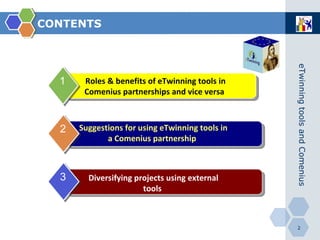
CONTENTS Roles & benefits of eTwinning tools in Comenius partnerships and vice versa   1 Suggestions for using eTwinning tools in a Comenius partnership   2 Diversifying projects using external tools 3
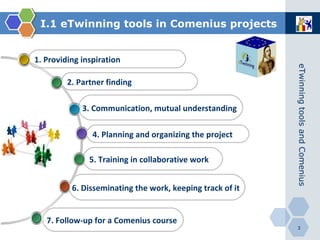
I.1 eTwinning tools in Comenius projects 6.  Disseminating the work, keeping track of it   4.  Planning and organizing the project   3.  Communication, mutual understanding   2.  Partner finding 1.  Providing inspiration 7.  Follow-up for a Comenius course   5.  Training   in collaborative work
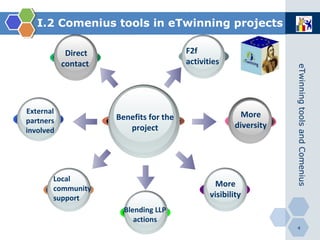
Direct contact   Benefits for the project External partners   involved More diversity More visibility Blending LLP actions I.2 Comenius tools in eTwinning projects Local community support F2f activities
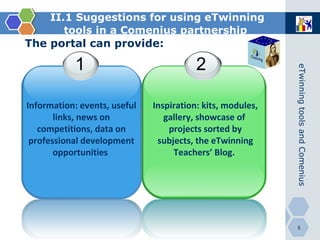
II.1 Suggestions for using eTwinning tools in a Comenius partnership   The portal can provide: Information: events, useful links, news on competitions, data on professional development opportunities   Inspiration: kits, modules, gallery, showcase of  projects sorted by subjects, the eTwinning Teachers’ Blog.   1 2
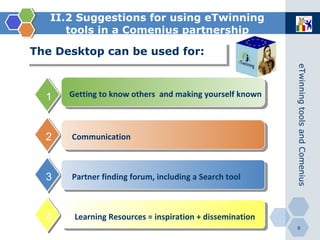
II.2 Suggestions for using eTwinning tools in a Comenius partnership Learning Resources = inspiration + dissemination The Desktop can be used for:  2 3 4 1 Getting to know others  and making yourself known   Communication   Partner finding forum, including a Search tool
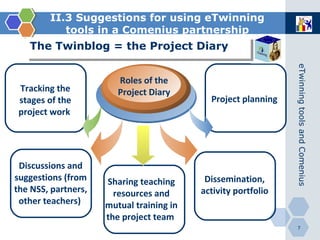
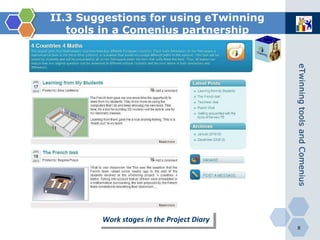
II.3 Suggestions for using eTwinning tools in a Comenius partnership The Twinblog = the Project Diary   Tracking the stages of the project work   Roles of the Project Diary Project planning   Discussions and suggestions (from the NSS, partners, other teachers)   Dissemination, activity portfolio   Sharing teaching resources and mutual training in the project team
II.3 Suggestions for using eTwinning tools in a Comenius partnership Work stages in the Project Diary
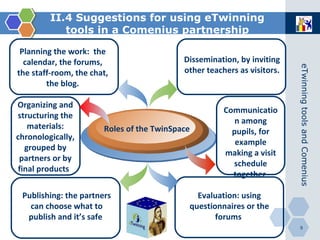
II.4 Suggestions for using eTwinning tools in a Comenius partnership Roles of the TwinSpace Planning the work :   the calendar, the forums, the staff-room, the chat, the blog. Organizing and structuring the materials: chronologically, grouped by partners or by final products   Publishing: the partners can choose what to publish and it’s safe   Dissemination, by inviting other teachers as visitors.   Communication among pupils, for example making a visit schedule together   Evaluation: using questionnaires or the forums
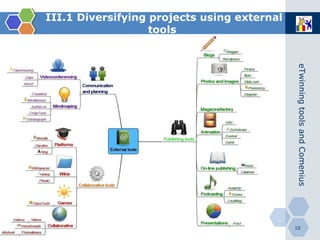
III.1 Diversifying projects using external   tools
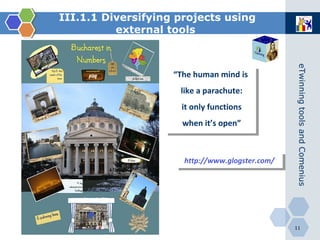
http://www.glogster.com/ III.1.1 Diversifying projects using external   tools   “ The human mind is like a parachute: it only functions when it’s open”
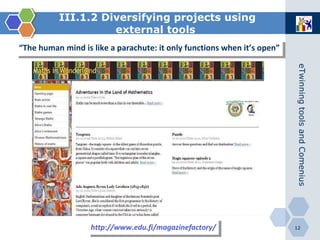
http://www.edu.fi/magazinefactory/ III.1.2 Diversifying projects using external   tools   “ The human mind is like a parachute: it only functions when it’s open”
Thank you! ...and don’t forget the parachute! Irina Vasilescu School no. 195 Bucharest, Romania

Sevilla

  • 1.
    eTwinning tools andComenius Ways and benefits of transferring tools Irina Vasilescu School no. 195 Bucharest, Romania
  • 2.
    CONTENTS Roles &benefits of eTwinning tools in Comenius partnerships and vice versa 1 Suggestions for using eTwinning tools in a Comenius partnership 2 Diversifying projects using external tools 3
  • 3.
    I.1 eTwinning toolsin Comenius projects 6. Disseminating the work, keeping track of it 4. Planning and organizing the project 3. Communication, mutual understanding 2. Partner finding 1. Providing inspiration 7. Follow-up for a Comenius course 5. Training in collaborative work
  • 4.
    Direct contact Benefits for the project External partners involved More diversity More visibility Blending LLP actions I.2 Comenius tools in eTwinning projects Local community support F2f activities
  • 5.
    II.1 Suggestions forusing eTwinning tools in a Comenius partnership The portal can provide: Information: events, useful links, news on competitions, data on professional development opportunities Inspiration: kits, modules, gallery, showcase of projects sorted by subjects, the eTwinning Teachers’ Blog. 1 2
  • 6.
    II.2 Suggestions forusing eTwinning tools in a Comenius partnership Learning Resources = inspiration + dissemination The Desktop can be used for: 2 3 4 1 Getting to know others and making yourself known Communication Partner finding forum, including a Search tool
  • 7.
    II.3 Suggestions forusing eTwinning tools in a Comenius partnership The Twinblog = the Project Diary Tracking the stages of the project work Roles of the Project Diary Project planning Discussions and suggestions (from the NSS, partners, other teachers) Dissemination, activity portfolio Sharing teaching resources and mutual training in the project team
  • 8.
    II.3 Suggestions forusing eTwinning tools in a Comenius partnership Work stages in the Project Diary
  • 9.
    II.4 Suggestions forusing eTwinning tools in a Comenius partnership Roles of the TwinSpace Planning the work : the calendar, the forums, the staff-room, the chat, the blog. Organizing and structuring the materials: chronologically, grouped by partners or by final products Publishing: the partners can choose what to publish and it’s safe Dissemination, by inviting other teachers as visitors. Communication among pupils, for example making a visit schedule together Evaluation: using questionnaires or the forums
  • 10.
    III.1 Diversifying projectsusing external tools
  • 11.
    http://www.glogster.com/ III.1.1 Diversifyingprojects using external tools “ The human mind is like a parachute: it only functions when it’s open”
  • 12.
    http://www.edu.fi/magazinefactory/ III.1.2 Diversifyingprojects using external tools “ The human mind is like a parachute: it only functions when it’s open”
  • 13.
    Thank you! ...anddon’t forget the parachute! Irina Vasilescu School no. 195 Bucharest, Romania

Editor's Notes