eTwinning
www.etwinning.net
eTwinning Ambassador
John Warwick


Regional Officer:
Florence Anderson
florence.anderson@britishcouncil.org

Project Manager:
Liz Arriens
ME !
Background
School
ICT
Web 2 technologies
International education/understanding
eTwinning / Comenius
Outline of the workshop
Intro to eTwinning
Example of projects
Practical task(s)
Other British Council Opportunities
Next steps
Evaluation
Your Aspirations ?
What is eTwinning?


eTwinning is a free, flexible, easy to use
resource for enhancing the use of ICT across all
areas of the curriculum.
Resources: Hundreds of categorised project ideas publically available for
working with students aged 3-18 across various subject areas e.g. ‘Statistics
and You’, Maths and Sciences, Age group 3-13
Safe environment: Online community of over 160, 000 teachers from 32
countries
Partner-finding tool: Once registered you can search online for partner
schools and create joint projects
Project space: Once you’ve registered a project your project will be given
it’s own virtual classroom where you can upload files, photos, videos, blogs,
and wikis etc and use the live chat facility
Support: There is a complete package of free online resources available to
support partnerships
Awards: Schools can apply for a Quality Label for their project and can use
this work as part of their application for the International Schools Award
Professional Development opportunities As well as online networking with
other teachers online, there are online learning opportunities and webinars
Aims of eTwinning
Facilitate collaboration between teachers
in different countries in Europe
Allow teachers and pupils to work
together online using various tools
Provide a multilingual platform for online
work in 23 languages
Make it easy to use ICT in education
32 European
Countries
 25 languages


  163,000
teachers
  5100+ active projects
eTwinning in the UK
Over 9,300 teachers in UK
Approx. 150 eTwinning ambassadors
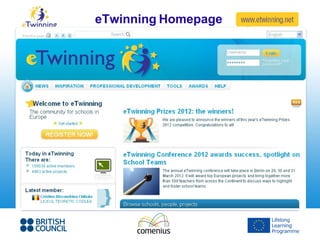
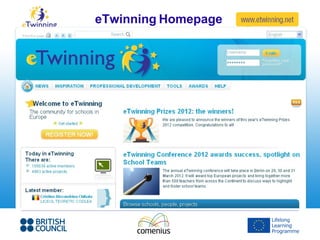
eTwinning Homepage
Why eTwinning ?
Benefits of using ICT


 Real Audience
 Motivation
 Personalised learning
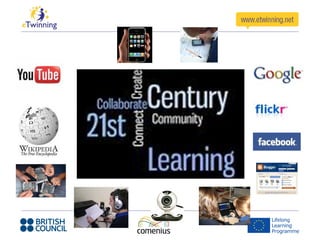
 21st Century Learning
 Most important of all: Collaboration
A first project


 Email
 Powerpoints
 Webcam conferencing
 Christmas cards
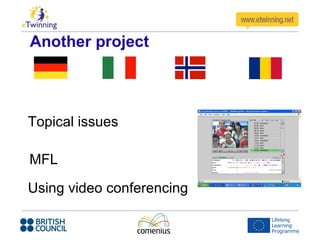
Another project


Topical issues

MFL

Using video conferencing
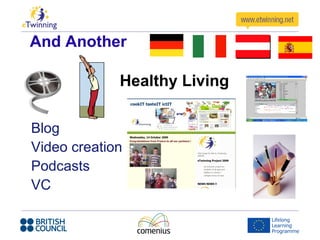
And Another

             Healthy Living

Blog
Video creation
Podcasts
VC
Reasons to use eTwinning:
It is a free resource
Safe online environment
No application form or lengthy admin
process
Could be your 1st step or could enhance
an existing link
Real context for learning
What eTwinning can do for You

 CPD opportunities:
 – Local ICT based workshops
 – Webinars
 – European Professional Development
   Workshops
 Part of a community of peers
 Exciting and interesting way to work
 Develop your ICT skills
eTwinning Homepage
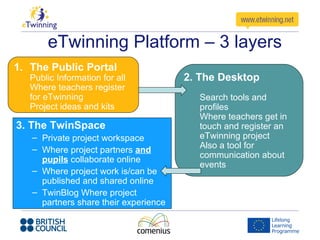
eTwinning Platform – 3 layers
1. The Public Portal
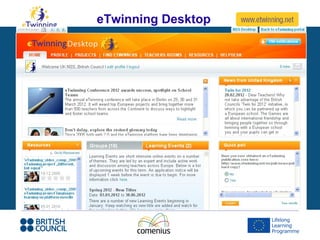
   Public Information for all          2. The Desktop
   Where teachers register
   for eTwinning                         Search tools and
   Project ideas and kits                profiles
                                         Where teachers get in
3. The TwinSpace                         touch and register an
   – Private project workspace           eTwinning project
   – Where project partners and          Also a tool for
                                         communication about
     pupils collaborate online
                                         events
   – Where project work is/can be
     published and shared online
   – TwinBlog Where project
     partners share their experience
eTwinning Homepage
eTwinning Desktop
Twinspace (virtual classroom)
Tasks
Curriculum Integration
Action Aid – Climate Change – Global
warming
Fair Trade
Social Enterprise – raising money for
items to send to Africa
Assemblies led by students
Whole school International Days
World Peace Days etc etc
Outside of www.etwinning.net
 Blogging www.blogger.com
 Video-conferencing
 http://flashmeeting.e2bn.net/ & www.elluminate.com
 Wikispaces www.wikispaces.com
 Google docs http://docs.google.com
 Wordle www.wordle.net
 Animoto www.animoto.com
 ???? Lots of others
Comenius In-service Training
Comenius Assistants
Comenius Bilateral Partnerships
Comenius Multilateral Partnerships
Comenius Regio
Fulbright UK/US Programme
Schools Online
International Schools Award
British Council Schools Programme
What next ?
Support
  Florence.anderson@britishcouncil.org – Your
  local eTwinning contact based in London
  etwinning@britishcouncil.org – Main team

On the web –
 www.britishcouncil.org/etwinning - UK site
 www.etwinninguk.wikispaces.com –
 eTwinnning UK Wikispace
 www.etwinninguk.typepad – eTwinning UK
 Blog
Most importantly…
REMEMBER TO ENJOY YOUR ETWINNING !

eTwinning by John Warwick & Florence Anderson

  • 1.
    eTwinning www.etwinning.net eTwinning Ambassador John Warwick RegionalOfficer: Florence Anderson florence.anderson@britishcouncil.org Project Manager: Liz Arriens
  • 2.
    ME ! Background School ICT Web 2technologies International education/understanding eTwinning / Comenius
  • 3.
    Outline of theworkshop Intro to eTwinning Example of projects Practical task(s) Other British Council Opportunities Next steps Evaluation
  • 4.
  • 5.
    What is eTwinning? eTwinningis a free, flexible, easy to use resource for enhancing the use of ICT across all areas of the curriculum.
  • 6.
    Resources: Hundreds ofcategorised project ideas publically available for working with students aged 3-18 across various subject areas e.g. ‘Statistics and You’, Maths and Sciences, Age group 3-13 Safe environment: Online community of over 160, 000 teachers from 32 countries Partner-finding tool: Once registered you can search online for partner schools and create joint projects Project space: Once you’ve registered a project your project will be given it’s own virtual classroom where you can upload files, photos, videos, blogs, and wikis etc and use the live chat facility Support: There is a complete package of free online resources available to support partnerships Awards: Schools can apply for a Quality Label for their project and can use this work as part of their application for the International Schools Award Professional Development opportunities As well as online networking with other teachers online, there are online learning opportunities and webinars
  • 7.
    Aims of eTwinning Facilitatecollaboration between teachers in different countries in Europe Allow teachers and pupils to work together online using various tools Provide a multilingual platform for online work in 23 languages Make it easy to use ICT in education
  • 8.
    32 European Countries 25languages 163,000 teachers 5100+ active projects
  • 9.
    eTwinning in theUK Over 9,300 teachers in UK Approx. 150 eTwinning ambassadors
  • 10.
  • 11.
  • 13.
    Benefits of usingICT Real Audience Motivation Personalised learning 21st Century Learning Most important of all: Collaboration
  • 14.
    A first project Email Powerpoints Webcam conferencing Christmas cards
  • 15.
  • 16.
    And Another Healthy Living Blog Video creation Podcasts VC
  • 17.
    Reasons to useeTwinning: It is a free resource Safe online environment No application form or lengthy admin process Could be your 1st step or could enhance an existing link Real context for learning
  • 18.
    What eTwinning cando for You CPD opportunities: – Local ICT based workshops – Webinars – European Professional Development Workshops Part of a community of peers Exciting and interesting way to work Develop your ICT skills
  • 19.
  • 20.
    eTwinning Platform –3 layers 1. The Public Portal Public Information for all 2. The Desktop Where teachers register for eTwinning Search tools and Project ideas and kits profiles Where teachers get in 3. The TwinSpace touch and register an – Private project workspace eTwinning project – Where project partners and Also a tool for communication about pupils collaborate online events – Where project work is/can be published and shared online – TwinBlog Where project partners share their experience
  • 21.
  • 22.
  • 23.
  • 24.
  • 25.
    Curriculum Integration Action Aid– Climate Change – Global warming Fair Trade Social Enterprise – raising money for items to send to Africa Assemblies led by students Whole school International Days World Peace Days etc etc
  • 26.
    Outside of www.etwinning.net Blogging www.blogger.com Video-conferencing http://flashmeeting.e2bn.net/ & www.elluminate.com Wikispaces www.wikispaces.com Google docs http://docs.google.com Wordle www.wordle.net Animoto www.animoto.com ???? Lots of others
  • 27.
    Comenius In-service Training ComeniusAssistants Comenius Bilateral Partnerships Comenius Multilateral Partnerships Comenius Regio Fulbright UK/US Programme Schools Online International Schools Award British Council Schools Programme
  • 28.
  • 29.
    Support Florence.anderson@britishcouncil.org– Your local eTwinning contact based in London etwinning@britishcouncil.org – Main team On the web – www.britishcouncil.org/etwinning - UK site www.etwinninguk.wikispaces.com – eTwinnning UK Wikispace www.etwinninguk.typepad – eTwinning UK Blog
  • 30.
    Most importantly… REMEMBER TOENJOY YOUR ETWINNING !

Editor's Notes

  • #9 32 European Countries: All EU countries can participate Plus Norway, Iceland, Turkey, Switzerland & Croatia can participate. Switzerland is the newest member of eTwinning and joined in 2011 25 Languages eTwinning website available in 25 languages to make it easier for all teachers across Europe to use eTwinning, not just those who are fluent in English. You can change the display language of the website on the home page at www.etwinning.net. There is a support team for every European country Teachers Teacher numbers are constantly changing but you can see the most up to date figures on the home page For example, how many teachers are registered and who joined most recently. Projects eTwinning project numbers are constantly changing as teachers join eTwinning & start/finish collaborative projects at any time Over 750 Yorkshire schools registered Over 1200 Yorkshire teacher registered
  • #11 Screenshot of main eTwinning site. Public view - lots of project and activity ideas - news from across Europe - details on the most recent teacher/school/projects registereed - info on professional development opportunities - helpdesk Then register & get involved! By registering you create your own personal username/password so that you can access your private desktop.
  • #20 Screenshot of main eTwinning site. Public view - lots of project and activity ideas - news from across Europe - details on the most recent teacher/school/projects registereed - info on professional development opportunities - helpdesk Then register & get involved! By registering you create your own personal username/password so that you can access your private desktop.
  • #22 Screenshot of main eTwinning site. Public view - lots of project and activity ideas - news from across Europe - details on the most recent teacher/school/projects registereed - info on professional development opportunities - helpdesk Then register & get involved! By registering you create your own personal username/password so that you can access your private desktop.
  • #23 eTwinning desktop You can access your desktop once you have registered on eTwinning: - personal, private area of eTwinning - username & password protected - communicate with other European teachers - share and use teaching resources from across Europe - find partner schools to work with on collaborative projects - more learning opportunities
  • #24 Notes on eTwinning projects: Projects can have any number of partners You decide what project activities to do & for how long You can start or finish a project at any time You can run any number of projects at the same time eTwinning Twinspace - virtual classroom - free resource given to each new eTwinning project - private to you and your project partners - share/upload/collaborate with your project partners