Session Outline
1.1 Related Terminology
1.2 What is a Computer?
1.3 Characteristics of a Computer
1.4 Limitations of a Computer
1.5 Different Types of Computers
1.6 Different Types of Personal Computers (PCs)
1.7 Main parts of a computer system
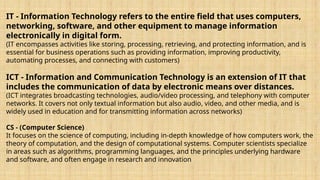
IT - InformationTechnology refers to the entire field that uses computers,
networking, software, and other equipment to manage information
electronically in digital form.
(IT encompasses activities like storing, processing, retrieving, and protecting information, and is
essential for business operations such as providing information, improving productivity,
automating processes, and connecting with customers)
ICT - Information and Communication Technology is an extension of IT that
includes the communication of data by electronic means over distances.
(ICT integrates broadcasting technologies, audio/video processing, and telephony with computer
networks. It covers not only textual information but also audio, video, and other media, and is
widely used in education and for transmitting information across networks)
CS - (Computer Science)
It focuses on the science of computing, including in-depth knowledge of how computers work, the
theory of computation, and the design of computational systems. Computer scientists specialize
in areas such as algorithms, programming languages, and the principles underlying hardware
and software, and often engage in research and innovation
3.
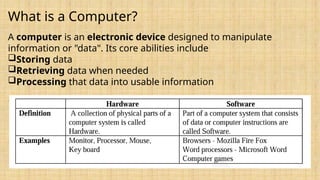
What is aComputer?
A computer is an electronic device designed to manipulate
information or "data". Its core abilities include
Storing data
Retrieving data when needed
Processing that data into usable information
4.
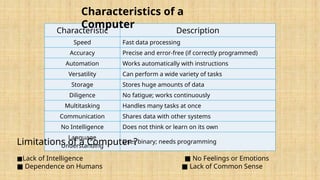
Characteristic Description
Speed Fastdata processing
Accuracy Precise and error-free (if correctly programmed)
Automation Works automatically with instructions
Versatility Can perform a wide variety of tasks
Storage Stores huge amounts of data
Diligence No fatigue; works continuously
Multitasking Handles many tasks at once
Communication Shares data with other systems
No Intelligence Does not think or learn on its own
Language
Understanding
Uses binary; needs programming
Characteristics of a
Computer
Limitations of a Computer ?
■Lack of Intelligence ■ No Feelings or Emotions
■ Dependence on Humans ■ Lack of Common Sense
5.
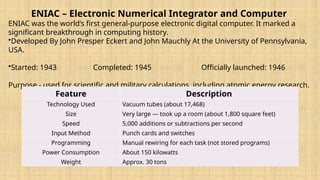
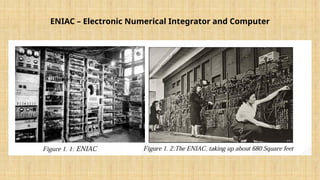
ENIAC – ElectronicNumerical Integrator and Computer
ENIAC was the world’s first general-purpose electronic digital computer. It marked a
significant breakthrough in computing history.
•Developed By John Presper Eckert and John Mauchly At the University of Pennsylvania,
USA.
•Started: 1943 Completed: 1945 Officially launched: 1946
Purpose - used for scientific and military calculations, including atomic energy research.
Feature Description
Technology Used Vacuum tubes (about 17,468)
Size Very large — took up a room (about 1,800 square feet)
Speed 5,000 additions or subtractions per second
Input Method Punch cards and switches
Programming Manual rewiring for each task (not stored programs)
Power Consumption About 150 kilowatts
Weight Approx. 30 tons
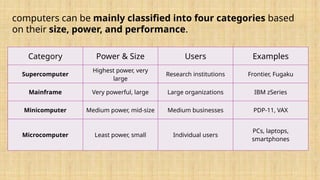
computers can bemainly classified into four categories based
on their size, power, and performance.
Category Power & Size Users Examples
Supercomputer
Highest power, very
large
Research institutions Frontier, Fugaku
Mainframe Very powerful, large Large organizations IBM zSeries
Minicomputer Medium power, mid-size Medium businesses PDP-11, VAX
Microcomputer Least power, small Individual users
PCs, laptops,
smartphones
8.
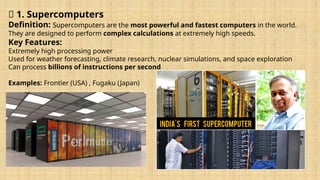
🔹 1. Supercomputers
Definition:Supercomputers are the most powerful and fastest computers in the world.
They are designed to perform complex calculations at extremely high speeds.
Key Features:
Extremely high processing power
Used for weather forecasting, climate research, nuclear simulations, and space exploration
Can process billions of instructions per second
Examples: Frontier (USA) , Fugaku (Japan)
9.
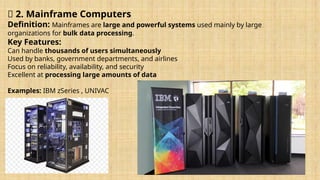
🔹 2. MainframeComputers
Definition: Mainframes are large and powerful systems used mainly by large
organizations for bulk data processing.
Key Features:
Can handle thousands of users simultaneously
Used by banks, government departments, and airlines
Focus on reliability, availability, and security
Excellent at processing large amounts of data
Examples: IBM zSeries , UNIVAC
10.
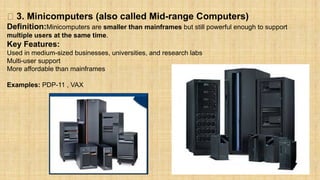
🔹 3. Minicomputers(also called Mid-range Computers)
Definition:Minicomputers are smaller than mainframes but still powerful enough to support
multiple users at the same time.
Key Features:
Used in medium-sized businesses, universities, and research labs
Multi-user support
More affordable than mainframes
Examples: PDP-11 , VAX
11.
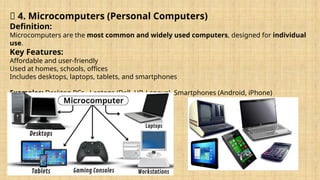
🔹 4. Microcomputers(Personal Computers)
Definition:
Microcomputers are the most common and widely used computers, designed for individual
use.
Key Features:
Affordable and user-friendly
Used at homes, schools, offices
Includes desktops, laptops, tablets, and smartphones
Examples: Desktop PCs , Laptops (Dell, HP, Lenovo) ,Smartphones (Android, iPhone)
12.
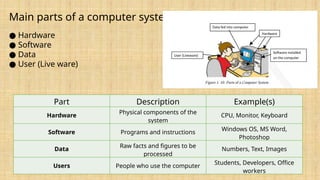
Main parts ofa computer system
● Hardware
● Software
● Data
● User (Live ware)
Part Description Example(s)
Hardware
Physical components of the
system
CPU, Monitor, Keyboard
Software Programs and instructions
Windows OS, MS Word,
Photoshop
Data
Raw facts and figures to be
processed
Numbers, Text, Images
Users People who use the computer
Students, Developers, Office
workers
13.
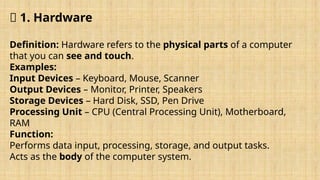
🔹 1. Hardware
Definition:Hardware refers to the physical parts of a computer
that you can see and touch.
Examples:
Input Devices – Keyboard, Mouse, Scanner
Output Devices – Monitor, Printer, Speakers
Storage Devices – Hard Disk, SSD, Pen Drive
Processing Unit – CPU (Central Processing Unit), Motherboard,
RAM
Function:
Performs data input, processing, storage, and output tasks.
Acts as the body of the computer system.
14.
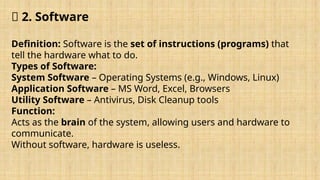
🔹 2. Software
Definition:Software is the set of instructions (programs) that
tell the hardware what to do.
Types of Software:
System Software – Operating Systems (e.g., Windows, Linux)
Application Software – MS Word, Excel, Browsers
Utility Software – Antivirus, Disk Cleanup tools
Function:
Acts as the brain of the system, allowing users and hardware to
communicate.
Without software, hardware is useless.
15.
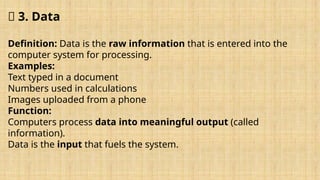
🔹 3. Data
Definition:Data is the raw information that is entered into the
computer system for processing.
Examples:
Text typed in a document
Numbers used in calculations
Images uploaded from a phone
Function:
Computers process data into meaningful output (called
information).
Data is the input that fuels the system.
16.
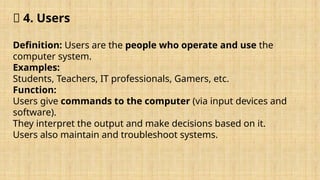
🔹 4. Users
Definition:Users are the people who operate and use the
computer system.
Examples:
Students, Teachers, IT professionals, Gamers, etc.
Function:
Users give commands to the computer (via input devices and
software).
They interpret the output and make decisions based on it.
Users also maintain and troubleshoot systems.