SEMINAR ON
BLUETOOTH
HOTSPOT
Kamonasish Hore
GUIST, CSE
Roll No. 100103003
• Bluetooth Hotspot is a technology which allows
Bluetooth enabled mobile devices to access the
internet.
• With this technology mobile phones need not
have GPRS connection in it.
• It manages the web page request of each client
connected to the bluetooth server.
• The speed is much better than GPRS speed
offered by the service providers.
• It runs on client-server architecture.
INTRODUCTION
TECHNOLOGY USED
• HOTSPOT Technology
• BLUETOOTH Technology.
• L2CAP protocol (for packet data)
• RFCOMM protocol (for stream data)
• OBEX protocol. (for object data)
HOTSPOT Technology
A Hotspot is a public location such as an
airport, shopping mall or conference centre that
has readily accessible to the wireless bluetooth
network. It is a specification for ‘a small form-
factor, low-cost radio solution’ providing links
between mobile phones, computers and other
bluetooth enabled portable devices. It enables
users to connect a wide range of computing and
telecommunications devices easily and simply
without the need to buy, carry, or connect cables.
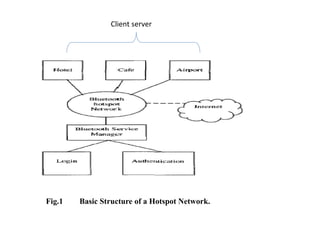
Fig.1 Basic Structure of a Hotspot Network.
Client server
BLUETOOTH TECHNOLGY
• Short private area that uses radio frequencies to
transmit data.
• Has a very limited range , usually 10 meters on mobile
phones and around 100 meters on laptops.
• Operates at Unlicensed Industrial Scientific and
Medical (ISM) band at 2.4 GHz power.
• Connects various devices alike laptop , camera,
mobile, mouse, etc. in a PAN (Personal Area Network)
via RF link through short-range piconets.
• Low power.
• Low cost.
• Has ability to be full duplex ability to transmit data
and voice transmission simultaneously.
LOGIC LINK CONTROLAND
ADAPTATION PROTOCOL
(L2CAP)
• L2CAP is used within the Bluetooth protocol
stack. It passes packets to either Host
Controller Interface (HCI) or on a Hostless
System, directly to the Link Manager.
• L2CAP is used to communicate over the Link
Manager. Its connection is established after it
is connected to the Link Manager.
RADIO FREQUENCY
COMMUNICATION
(RFCOMM)
• RFCOMM is a simple set of transport protocol ,
made on top of the L2CAP protocol.
• The RFCOMM protocol supports up to 60
simultaneous connections between two
Bluetooth devices.
• Two types of RFCOMM protocol exists
1. Type 1 (For e.g. Computers and Printer)
2. Type 2 (For e.g. Modems)
OBEX PROTOCOL
• OBEX (abbreviation of Object Exchange) is a
communication protocol that facilitates the
exchange of binary objects between devices.
• Helps to exchange business card , data , even
applications.
• Initially OBEX was designed for infrared,
latterly now has been adopted by BLUETOOTH
also used over USB.
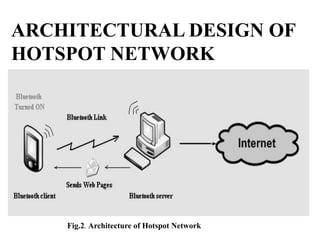
Fig.2. Architecture of Hotspot Network
ARCHITECTURAL DESIGN OF
HOTSPOT NETWORK
PROCEDURE OF USING
HOTSPOT NETWORK.
• Server continuously opens for detecting new
Bluetooth devices in Hotspot area.
• Bluetooth client in Hotspot turns on its
Bluetooth connection.
• Server detects the connection and sends
pairing request and also informs the manager
about new device in Hotspot.
• Hotspot manager asks passkey for pairing after
examining the new client.
Continued. . .
• Server sends the client program to client
device through Bluetooth
• Client allows the installation of client program
sent by the server.
• A window to accept URL is opened after
installation.
• Client types the URL of required webpage.
• The server notes the URL and the device that
requested it.
• The URL is then sent to the Internet server.
• The webpage is fetched and returned to
Bluetooth Server.
• The server checks the database to get the name
of requesting device for currently processed
URL.
• The webpage is then sent to the Bluetooth
Device.
• The client program opens the webpage for the
client to read.
• The client can now request for another webpage
or close the client program application
Continued. . .
OBJECTIVES OF BLUETOOTH
HOTSPOT
• Development of wireless applications that can
benefit everyone in the society.
• To develop low cost technology that is
affordable and useful to common man.
• To allow internet access to multiple Bluetooth
devices present in the Hotspot area.
• To bridge the digital divide between people
who do or do not have access to the
technology.
CONCLUSION
BLUETOOTH HOTSPOT is a technique
to evaluate the market for Bluetooth technology
as a Hotspot Technology by deploying multiple
access points in the form of server. People can
communicate with each other from long
distances on free of cost.
So we can conclude that in future this technology
becomes the key for communication to interact
with the world.
• http://www.exforsys.com/tutorials/wireless/blue
tooth-vs-802.11b-wireless-lans.html
• http://www.slideshare.net/?ss
• http://en.wikipedia.org/wiki/Bluetooth_protocols
• http://www.fileguru.com/apps/bluetooth_hotspo
t_ppt
• http://seminarprojects.com/s/bluetooth-hotspot-
pdf-files
• http://seminarprojects.com/s/ppt-on-hot-spot-
technology
REFRENCES
THANK YOU. . .

SEMINAR ON Bluetooth Hotspot

  • 1.
  • 2.
    • Bluetooth Hotspotis a technology which allows Bluetooth enabled mobile devices to access the internet. • With this technology mobile phones need not have GPRS connection in it. • It manages the web page request of each client connected to the bluetooth server. • The speed is much better than GPRS speed offered by the service providers. • It runs on client-server architecture. INTRODUCTION
  • 3.
    TECHNOLOGY USED • HOTSPOTTechnology • BLUETOOTH Technology. • L2CAP protocol (for packet data) • RFCOMM protocol (for stream data) • OBEX protocol. (for object data)
  • 4.
    HOTSPOT Technology A Hotspotis a public location such as an airport, shopping mall or conference centre that has readily accessible to the wireless bluetooth network. It is a specification for ‘a small form- factor, low-cost radio solution’ providing links between mobile phones, computers and other bluetooth enabled portable devices. It enables users to connect a wide range of computing and telecommunications devices easily and simply without the need to buy, carry, or connect cables.
  • 5.
    Fig.1 Basic Structureof a Hotspot Network. Client server
  • 6.
    BLUETOOTH TECHNOLGY • Shortprivate area that uses radio frequencies to transmit data. • Has a very limited range , usually 10 meters on mobile phones and around 100 meters on laptops. • Operates at Unlicensed Industrial Scientific and Medical (ISM) band at 2.4 GHz power. • Connects various devices alike laptop , camera, mobile, mouse, etc. in a PAN (Personal Area Network) via RF link through short-range piconets. • Low power. • Low cost. • Has ability to be full duplex ability to transmit data and voice transmission simultaneously.
  • 7.
    LOGIC LINK CONTROLAND ADAPTATIONPROTOCOL (L2CAP) • L2CAP is used within the Bluetooth protocol stack. It passes packets to either Host Controller Interface (HCI) or on a Hostless System, directly to the Link Manager. • L2CAP is used to communicate over the Link Manager. Its connection is established after it is connected to the Link Manager.
  • 8.
    RADIO FREQUENCY COMMUNICATION (RFCOMM) • RFCOMMis a simple set of transport protocol , made on top of the L2CAP protocol. • The RFCOMM protocol supports up to 60 simultaneous connections between two Bluetooth devices. • Two types of RFCOMM protocol exists 1. Type 1 (For e.g. Computers and Printer) 2. Type 2 (For e.g. Modems)
  • 9.
    OBEX PROTOCOL • OBEX(abbreviation of Object Exchange) is a communication protocol that facilitates the exchange of binary objects between devices. • Helps to exchange business card , data , even applications. • Initially OBEX was designed for infrared, latterly now has been adopted by BLUETOOTH also used over USB.
  • 10.
    Fig.2. Architecture ofHotspot Network ARCHITECTURAL DESIGN OF HOTSPOT NETWORK
  • 11.
    PROCEDURE OF USING HOTSPOTNETWORK. • Server continuously opens for detecting new Bluetooth devices in Hotspot area. • Bluetooth client in Hotspot turns on its Bluetooth connection. • Server detects the connection and sends pairing request and also informs the manager about new device in Hotspot. • Hotspot manager asks passkey for pairing after examining the new client.
  • 12.
    Continued. . . •Server sends the client program to client device through Bluetooth • Client allows the installation of client program sent by the server. • A window to accept URL is opened after installation. • Client types the URL of required webpage. • The server notes the URL and the device that requested it. • The URL is then sent to the Internet server.
  • 13.
    • The webpageis fetched and returned to Bluetooth Server. • The server checks the database to get the name of requesting device for currently processed URL. • The webpage is then sent to the Bluetooth Device. • The client program opens the webpage for the client to read. • The client can now request for another webpage or close the client program application Continued. . .
  • 14.
    OBJECTIVES OF BLUETOOTH HOTSPOT •Development of wireless applications that can benefit everyone in the society. • To develop low cost technology that is affordable and useful to common man. • To allow internet access to multiple Bluetooth devices present in the Hotspot area. • To bridge the digital divide between people who do or do not have access to the technology.
  • 15.
    CONCLUSION BLUETOOTH HOTSPOT isa technique to evaluate the market for Bluetooth technology as a Hotspot Technology by deploying multiple access points in the form of server. People can communicate with each other from long distances on free of cost. So we can conclude that in future this technology becomes the key for communication to interact with the world.
  • 16.
    • http://www.exforsys.com/tutorials/wireless/blue tooth-vs-802.11b-wireless-lans.html • http://www.slideshare.net/?ss •http://en.wikipedia.org/wiki/Bluetooth_protocols • http://www.fileguru.com/apps/bluetooth_hotspo t_ppt • http://seminarprojects.com/s/bluetooth-hotspot- pdf-files • http://seminarprojects.com/s/ppt-on-hot-spot- technology REFRENCES
  • 17.