DOCUMENTATION ON SEMANTIC SEARCH
A basic idea of semantic search can be obtained by going through the following link.
http://wiki.hsr.ch/Datenbanken/files/Semantic_Search_In_MS_SQL_2012_Rico_Suter.pdf
1.INSTALLATION OF SEMANTICS IN SQL SERVER
1.1 Installation First we have to install the Microsoft SQL Server 2012 with semantic search
capabilities. The setup needs three steps:
1. Installing the server with semantic search feature
2. Install additional filter packs
3. Install a Semantic Language Database
The details about the installation are also mentioned in the pdf link given above.
2. SEMANTIC SEARCHING
For a semantic to work on any table, say ​CM.APPLICATION_GROUP_MF​,
we have to create two things,
1. Catalog for a table
2. Fulltext Index for a table
2.1 CATALOGUE CREATION
The syntax for making the catalog is as follows:
CREATE​​FULLTEXT​​CATALOG​​<catalogname>​​WITH​​ACCENT_SENSITIVITY​​=​​ON​;
​Go
An example is given below:
--createcatalogforCM.APPLICATION_GROUP_MF
CREATE​​FULLTEXT​​CATALOG​​Application_groupCatalog​​WITH​​ACCENT_SENSITIVITY​​=​​ON​;
​Go
2.1 FULLTEXT INDEX CREATION
The syntax for creating a Fulltext Index is as follows:
CREATE​​FULLTEXT​​INDEX​​ON​​<TableName>​​(
[ColumnName]​​LANGUAGE​1033​Statistical_Semantics​,
[ColumnName]​​LANGUAGE​1033​Statistical_Semantics​,
.
.
.
[ColumnName]​LANGUAGE​1033​Statistical_Semantics
)
KEY​​INDEX​<​PK_TableName>
ON​​<catalog_created_previously>
WITH​​STOPLIST​​=​​SYSTEM
Go
An Example has been given below:
--createFULLTEXTINDEXonCM.APPLICATION_GROUP_MF
​CREATE​​FULLTEXT​​INDEX​​ON​​CM​.​APPLICATION_GROUP_MF​​(
[HARD_CODE]​​LANGUAGE​1033​Statistical_Semantics​,
[NAME]​​LANGUAGE​1033​Statistical_Semantics​,
[UPDATED_BY]​​LANGUAGE​1033​Statistical_Semantics
)
KEY​​INDEX​​PK_APPLICATION_GROUP_MF
ON​​Application_groupCatalog
WITH​​STOPLIST​​=​​SYSTEM
Go
Now as we have created both index and catalog for a given table, we can apply semantics to that as
follows :
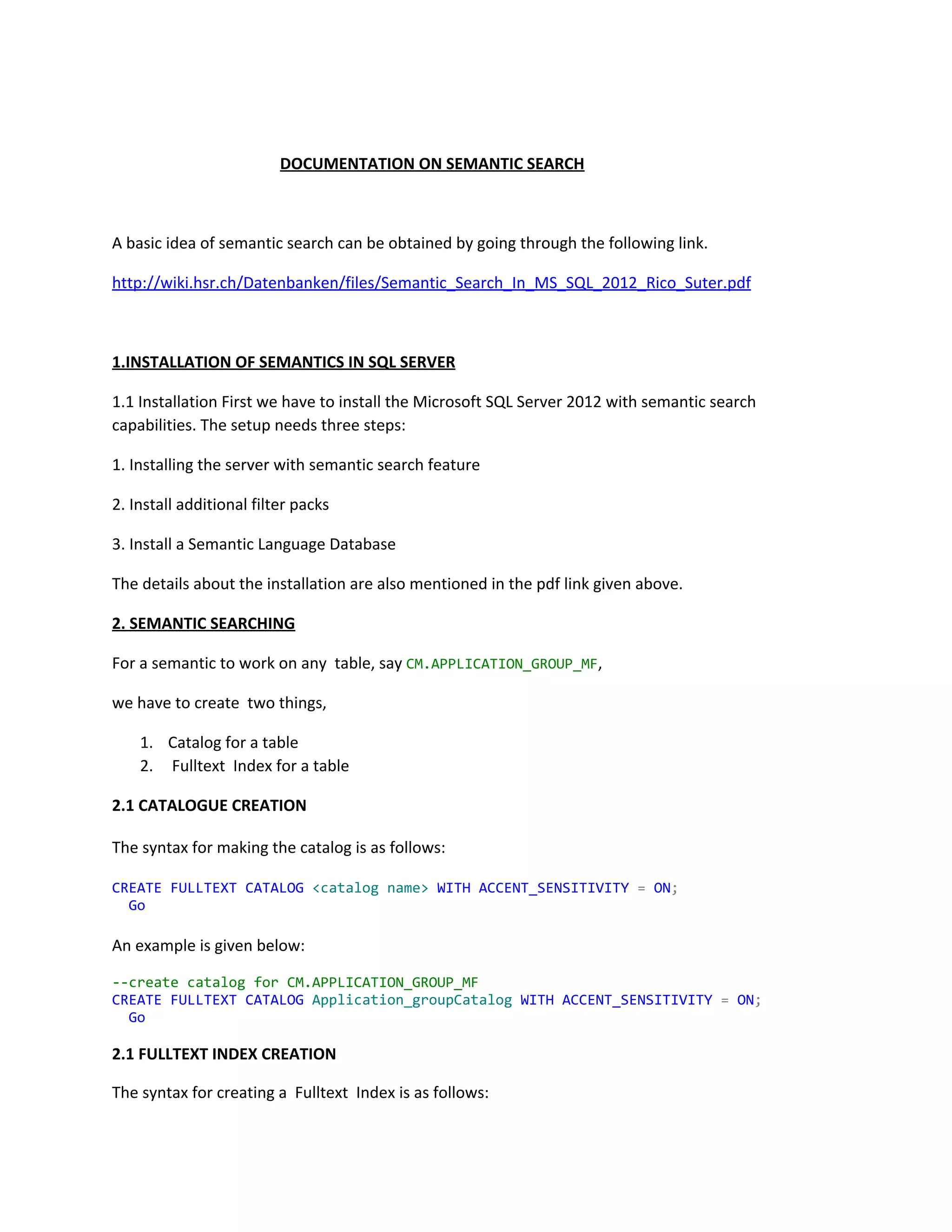
DECLARE​​@SearchTerm​​AS​​NVARCHAR​(​max​);
Set​​@SearchTerm​=​'<whatyouwanttosearch>'​;
DECLARE​​@cmd​​AS​​NVARCHAR​(​max​)
DECLARE​​@tmpSearch​​NVARCHAR​(​500​)
SELECT​​@tmpSearch​​=​​REPLACE​(​@SearchTerm​,​''​,​''','''​)
SET​​@cmd​​=​​N'SELECT*FROM<​TableName>​INNERJOIN
semantickeyphrasetable(<​TableName>​,*)
on<​primarykey_of_the_table>​=document_keyWHEREkeyphraseIN
('''​+​@tmpSearch​+​''')ORDERBYscoreDESC'
print​​@cmd
EXEC​(​@cmd​)
An example has been given below :
DECLARE​​@SearchTerm​​AS​​NVARCHAR​(​max​);
Set​​@SearchTerm​=​'WHATARETHEDETAILSABOUTSHIPMATE'​;
DECLARE​​@cmd​​AS​​NVARCHAR​(​max​)
DECLARE​​@tmpSearch​​NVARCHAR​(​500​)
SELECT​​@tmpSearch​​=​​REPLACE​(​@SearchTerm​,​''​,​''','''​)
SET​​@cmd​​=​​N'SELECT*FROMCM.APPLICATION_GROUP_MFINNERJOIN
semantickeyphrasetable(CM.APPLICATION_GROUP_MF,*)
onID=document_keyWHEREkeyphraseIN('''​+​@tmpSearch​+​''')ORDERBYscoreDESC'
print​​@cmd
EXEC​(​@cmd​)
Now, if you want to apply semantics to a combination of tables, you can use inner join of tables.
Eg,
​SET​​@cmd​​=​​N'SELECTdistincta.SUR_NAME,a.FIRST_NAME,a.MIDDLE_NAME,c.APPRAISAL_SCORE
FROM CM.PERSONNEL_MFasa
INNERJOINsemantickeyphrasetable(CM.PERSONNEL_MF,*)assona.id=document_key
INNERJOINFD.TEMPLATE_DATA_HDasconc.EMP_ID=a.id
InnerJoinsemantickeyphrasetable(FD.TEMPLATE_DATA_HD,*)asqonc.ID=q.document_key
WHEREq.keyphraseIN('''​+​@tmpSearch​+​''')ors.keyphraseIN('''​+​@tmpSearch​+​''')'
Here, appraisal_score is in ​FD.TEMPLATE_DATA_HD​table and and the rest of the selected columns are
from ​CM.PERSONNEL_MF​table. So, here we are applying semantics to the combination of both the
tables.
Semantics without the required BUSSINESS LOGIC is useless. So, we shall now learn how to include
BUSSINESS LOGIC to the semantics.
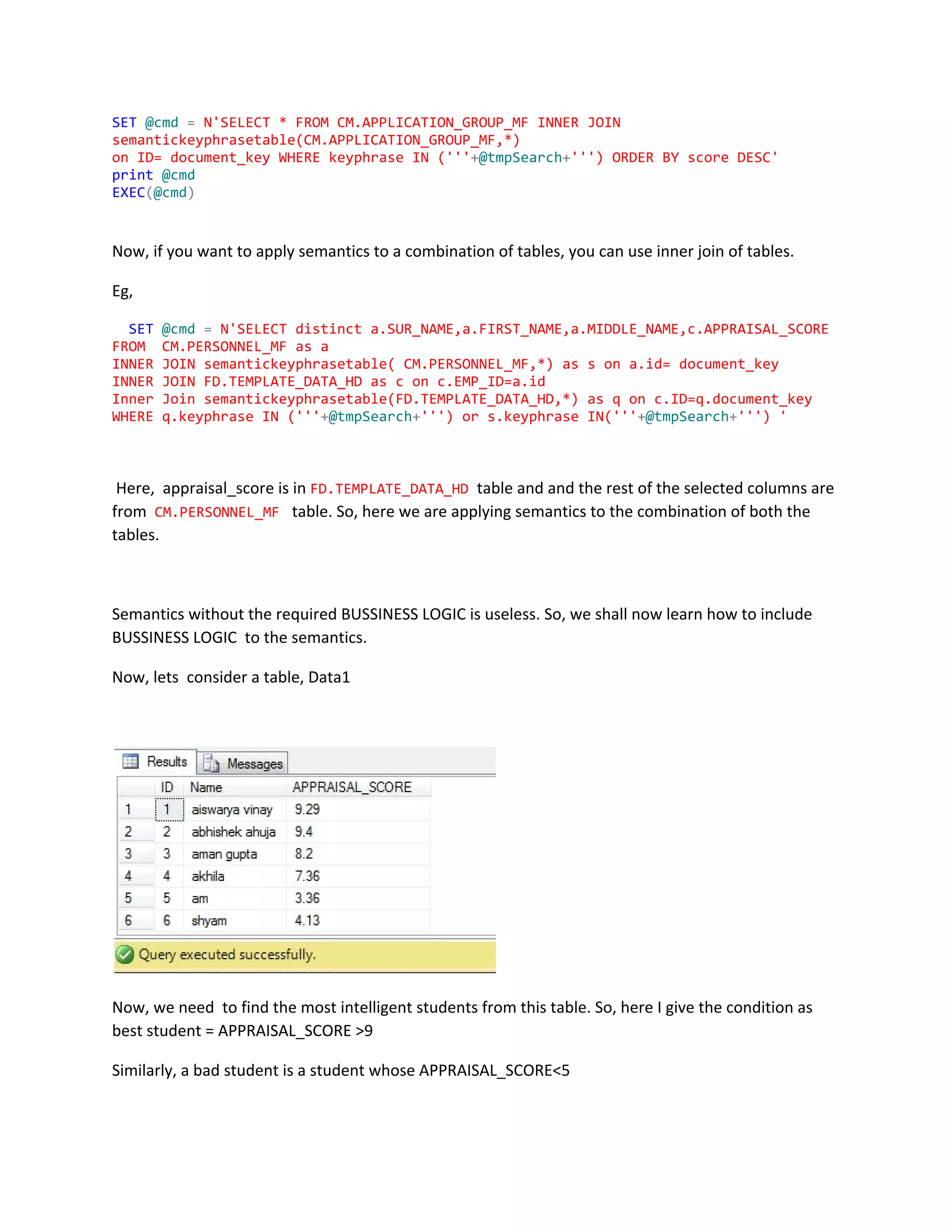
Now, lets consider a table, Data1
Now, we need to find the most intelligent students from this table. So, here I give the condition as
best student = APPRAISAL_SCORE >9
Similarly, a bad student is a student whose APPRAISAL_SCORE<5
So, using semantics , we can give intelligence to our program.
For doing so, we have to give ‘Qualifier Tables’.
So, my Qualifier table in this case is ​Qualifier_Promotion
Now, I shall share the code here:
USE​​SHIPMATE1704_4SBNT
GO
/******Object: StoredProcedure[dbo].[shipmate_Search] ScriptDate:6/5/2015
12:04:49AM******/
SET​​ANSI_NULLS​​ON
GO
SET​​QUOTED_IDENTIFIER​​ON
GO
--toexecutetheprocedure
--execshipmate_Search'whoisbothgoodandreliableofallfromData1'
ALTER​​PROCEDURE​​[dbo]​.​[shipmate_Search]
​(
​@SearchTerm​​NVARCHAR​(​500​)
)
​AS
​BEGIN
​DECLARE​​@cmd​​AS​​NVARCHAR​(​max​)
DECLARE​​@columnname​​AS​​NVARCHAR​(​max​)
DECLARE​​@tmpSearch​​NVARCHAR​(​500​)
DECLARE​​@wherequery​​NVARCHAR​(​Max​)​​=​​NULL
Declare​​@orderbyquery​​NVARCHAR​(​MAX​)=NULL
Declare​​@SQLQUERY​​NVARCHAR​(​MAX​)
DECLARE​​@cmd2​​AS​​NVARCHAR​(​max​)
SELECT​​@tmpSearch​​=​​REPLACE​(​@SearchTerm​,​''​,​''','''​)
---Qualifierlisttabledatafetch---
​SET​​@cmd2​​=​​N'SELECT*into##tempTable2FROMQualifier_PromotionWHERE
WordIN('''​+​@tmpSearch​+​''')orSynonymsIN('''​+​@tmpSearch​+​''')'
​print​​@cmd2
​EXEC​(​@cmd2​)
​select​​*​​into​​#temp​​from​​##tempTable2
​drop​​table​​##tempTable2
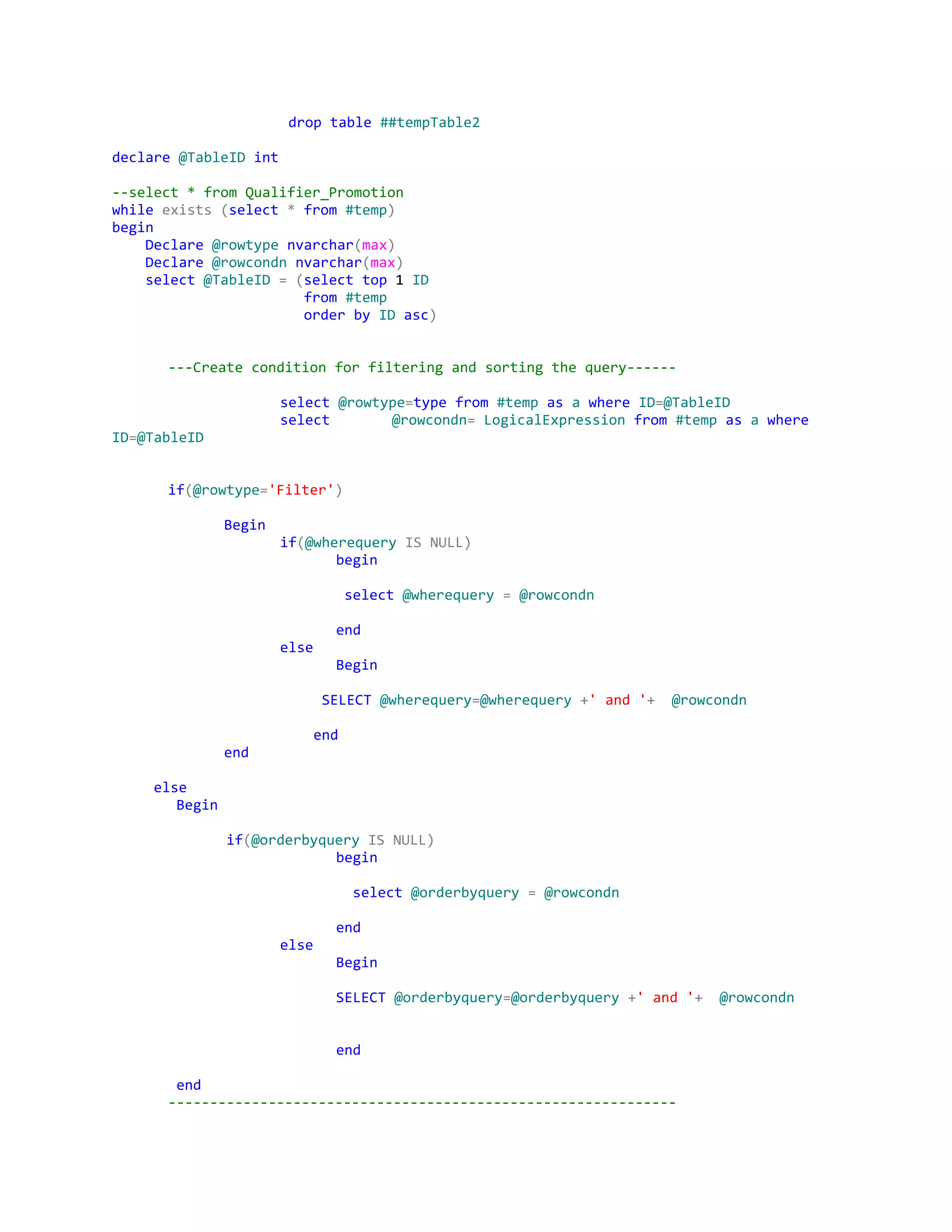
declare​​@TableID​​int
--select*fromQualifier_Promotion
while​​exists​​(​select​​*​​from​​#temp​)
begin
​Declare​​@rowtype​​nvarchar​(​max​)
​Declare​​@rowcondn​​nvarchar​(​max​)
​select​​@TableID​​=​​(​select​​top​1​ID
​from​​#temp
​order​​by​​ID​​asc​)
---Createconditionforfilteringandsortingthequery------
select​​@rowtype​=​type​​from​​#temp​​as​​a​​where​​ID​=​@TableID
select @rowcondn​=​​LogicalExpression​​from​​#temp​​as​​a​​where
ID​=​@TableID
if​(​@rowtype​=​'Filter'​)
Begin
if​(​@wherequery​​IS​​NULL)
begin
​select​​@wherequery​​=​​@rowcondn
end
else
Begin
​SELECT​​@wherequery​=​@wherequery​​+​'and'​+​​@rowcondn
​end
end
​else
​Begin
​if​(​@orderbyquery​​IS​​NULL)
begin
​select​​@orderbyquery​​=​​@rowcondn
end
else
Begin
SELECT​​@orderbyquery​=​@orderbyquery​​+​'and'​+​​@rowcondn
end
​end
-------------------------------------------------------------
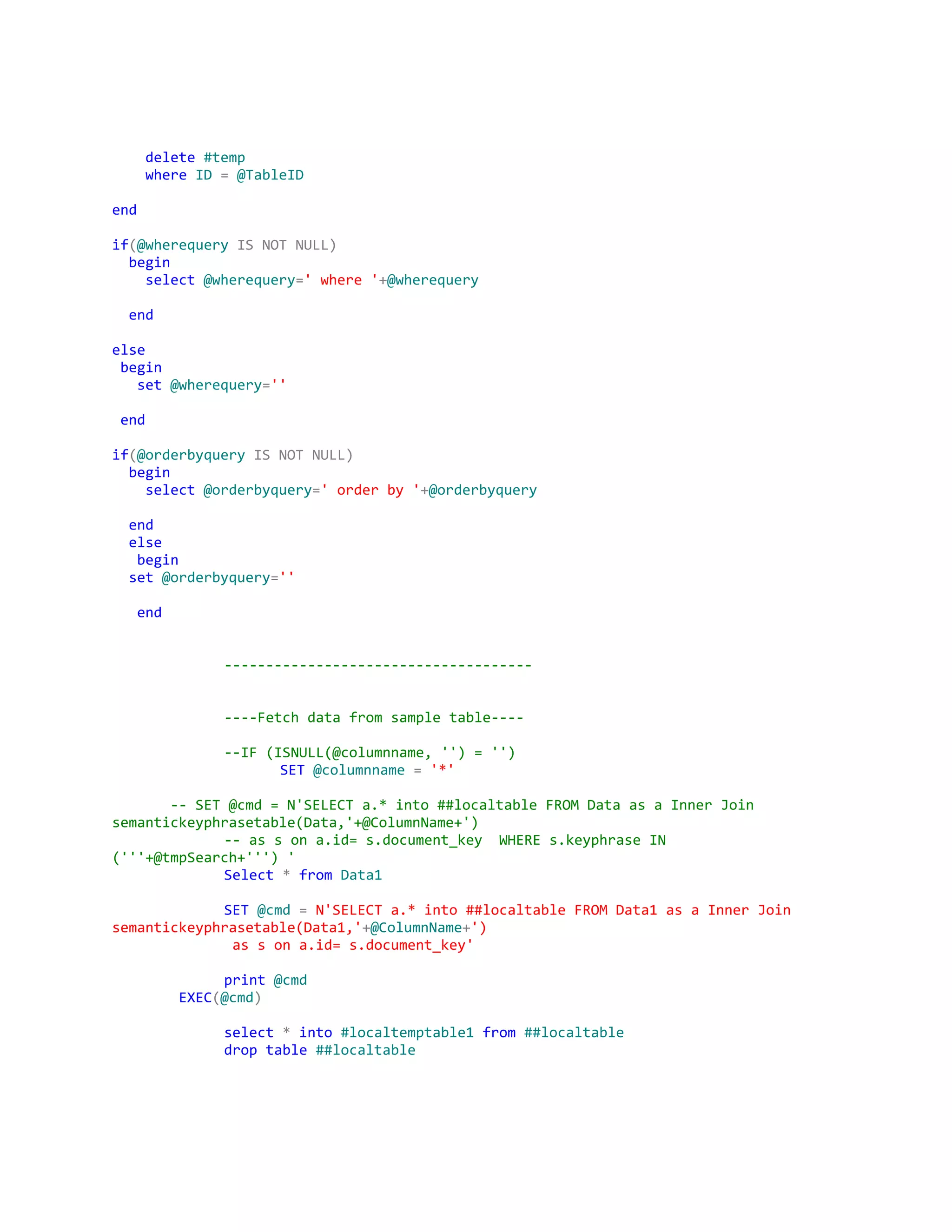
​delete​​#temp
​where​​ID​​=​​@TableID
end
if​(​@wherequery​​IS​​NOT​​NULL)
​begin
​select​​@wherequery​=​'where'​+​@wherequery
​end
else
​begin
​set​​@wherequery​=​''
​end
if​(​@orderbyquery​​IS​​NOT​​NULL)
​begin
​select​​@orderbyquery​=​'orderby'​+​@orderbyquery
​end
​else
​begin
​set​​@orderbyquery​=​''
​end
-------------------------------------
----Fetchdatafromsampletable----
--IF(ISNULL(@columnname,'')='')
SET​​@columnname​​=​​'*'
​--SET@cmd=N'SELECTa.*into##localtableFROMDataasaInnerJoin
semantickeyphrasetable(Data,'+@ColumnName+')
--assona.id=s.document_key WHEREs.keyphraseIN
('''+@tmpSearch+''')'
Select​​*​​from​​Data1
SET​​@cmd​​=​​N'SELECTa.*into##localtableFROMData1asaInnerJoin
semantickeyphrasetable(Data1,'​+​@ColumnName​+​')
assona.id=s.document_key'
print​​@cmd
​EXEC​(​@cmd​)
select​​*​​into​​#localtemptable1​​from​​##localtable
drop​​table​​##localtable
SET​​@SQLQuery​​=​​'SELECTDistinctID,Name,APPRAISAL_SCOREFROM
#localtemptable1'​​+​@wherequery​+​''​+​​@orderbyquery
print​​@SQLQuery
​EXEC​(​@SQLQuery​)
​END
​update​​Data1​​set​​APPRAISAL_SCORE​=​8.2​WHERE​​ID​=​3
--execshipmate_Search'abadstudent'
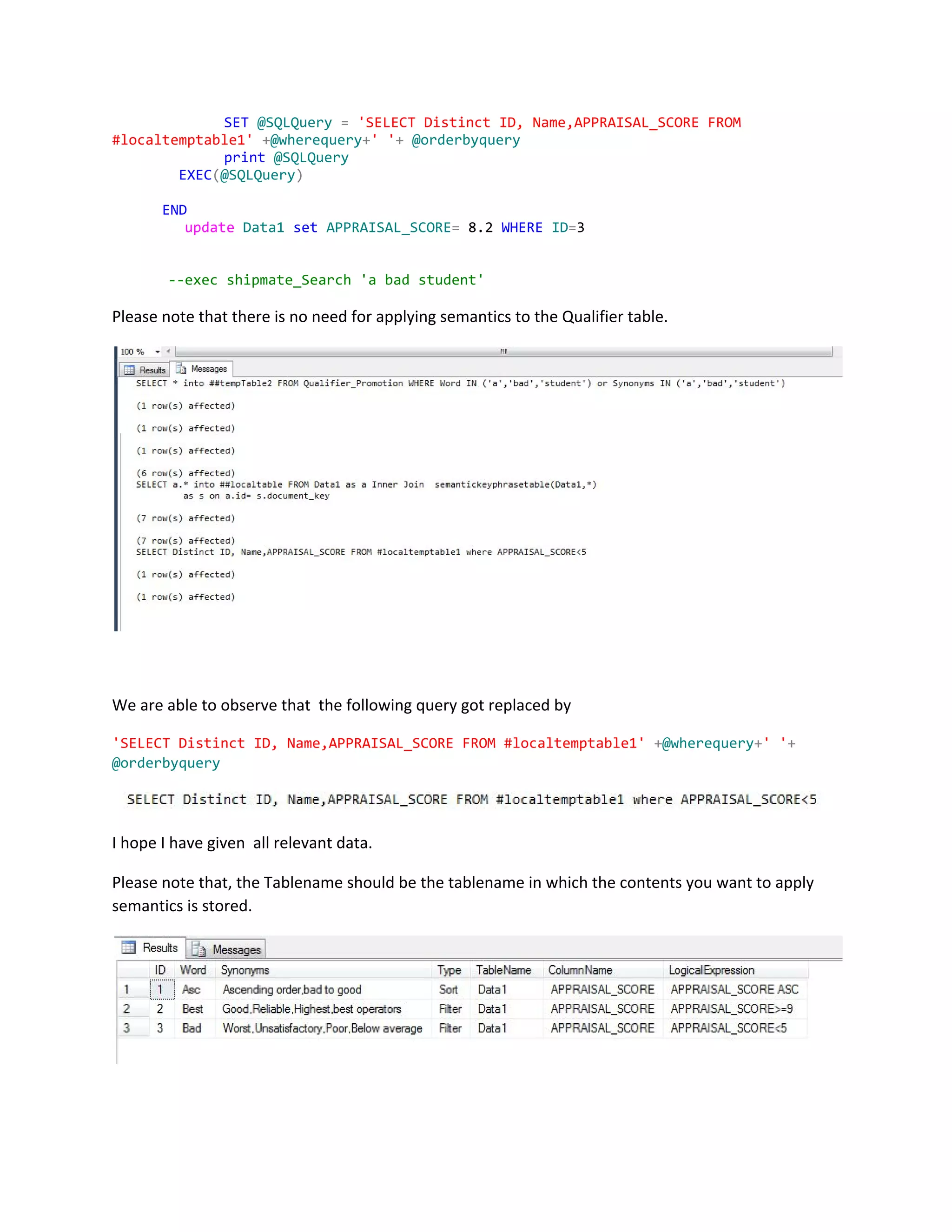
Please note that there is no need for applying semantics to the Qualifier table.
We are able to observe that the following query got replaced by
'SELECTDistinctID,Name,APPRAISAL_SCOREFROM#localtemptable1'​​+​@wherequery​+​''​+
@orderbyquery
I hope I have given all relevant data.
Please note that, the Tablename should be the tablename in which the contents you want to apply
semantics is stored.
Documented By,
Aiswarya Vinayachandran 6/6/2015
Amrita Vishwa Vidyapeetham 2:26 P.M
Coimbatore

semantics_documentationsbn