Daniel Rosenberg
San Jose State Univ.
Human Factors Engineering Program
Semantic
Interaction
Design
rCDOUX.com
What is the first thing you do when
you start to create/define/specify
an Interaction Design?
Don’t do that!
There is a better way to start…
What
Semantic IxD is a proven (cognitive science based)
scalable UX design method that ensures maximum
usability is achieved 10X more effectively & efficiently
than current UX practice today.
Chapter 1
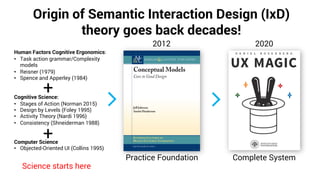
Origin of Semantic Interaction Design (IxD)
theory goes back decades!
2020
Complete System
Science starts here
Human Factors Cognitive Ergonomics:
• Task action grammar/Complexity
models
• Reisner (1979)
• Spence and Apperley (1984)
Cognitive Science:
• Stages of Action (Norman 2015)
• Design by Levels (Foley 1995)
• Activity Theory (Nardi 1996)
• Consistency (Shneiderman 1988)
Computer Science
• Objected-Oriented UI (Collins 1995)
+
2012
Practice Foundation
+
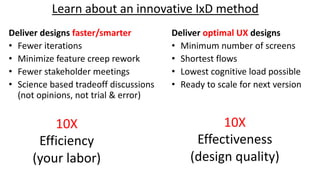
Learn about an innovative IxD method
Deliver optimal UX designs
• Minimum number of screens
• Shortest flows
• Lowest cognitive load possible
• Ready to scale for next version
Deliver designs faster/smarter
• Fewer iterations
• Minimize feature creep rework
• Fewer stakeholder meetings
• Science based tradeoff discussions
(not opinions, not trial & error)
10X
Effectiveness
(design quality)
10X
Efficiency
(your labor)
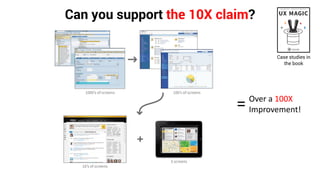
Can you support the 10X claim?
Case studies in
the book
Over a 100X
Improvement!=
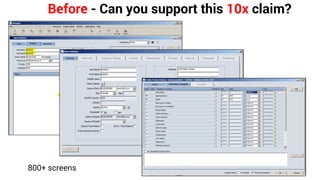
Before - Can you support this 10x claim?
800+ screens
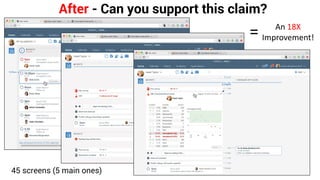
After - Can you support this claim?
45 screens (5 main ones)
An 18X
Improvement!=
When
At the heart of the User Centered Design step.
Chapter 1
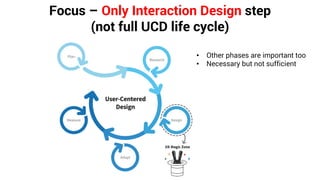
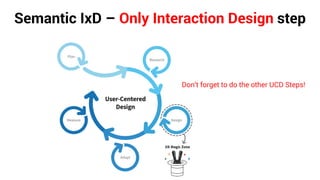
Focus – Only Interaction Design step
(not full UCD life cycle)
• Other phases are important too
• Necessary but not sufficient
Why
Because Design Darwinism does not work!
Current design methods don’t scale to complex systems,
are inefficient and often lead to product failure at
significant expense because
*Design Darwinism = Believing A/B testing is a legitimate form of iteration
Chapter 1
Real quality is not achieved by eliminating defects – occurs through design
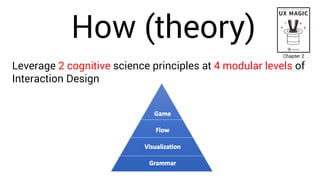
How (theory)
Leverage 2 cognitive science principles at 4 modular levels of
Interaction Design
Chapter 2
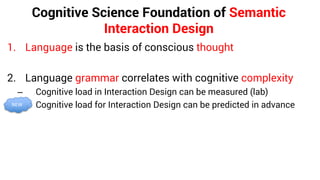
Cognitive Science Foundation of Semantic
Interaction Design
1. Language is the basis of conscious thought
2. Language grammar correlates with cognitive complexity
– Cognitive load in Interaction Design can be measured (lab)
– Cognitive load for Interaction Design can be predicted in advanceNEW
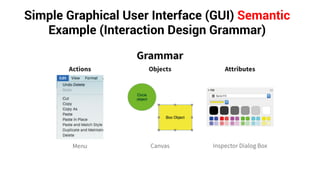
Simple Graphical User Interface (GUI) Semantic
Example (Interaction Design Grammar)
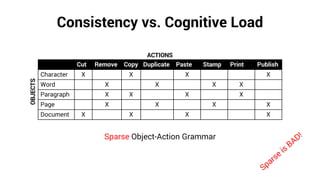
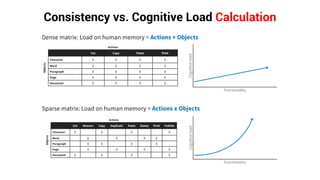
Consistency vs. Cognitive Load
Cut Remove Copy Duplicate Paste Stamp Print Publish
Character X X X X
Word X X X X
Paragraph X X X X
Page X X X X
Document X X X X
Sparse Object-Action Grammar
Sparse
is
BAD!
ACTIONS
OBJECTS
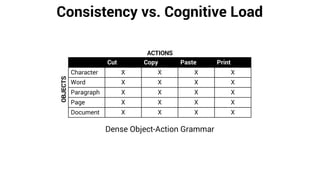
Consistency vs. Cognitive Load
Cut Copy Paste Print
Character X X X X
Word X X X X
Paragraph X X X X
Page X X X X
Document X X X X
Dense Object-Action Grammar
ACTIONS
OBJECTS
Consistency vs. Cognitive Load Calculation
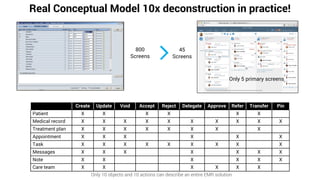
Real Conceptual Model 10x deconstruction in practice!
800
Screens
45
Screens
Create Update Void Accept Reject Delegate Approve Refer Transfer Pin
Patient X X X X X X
Medical record X X X X X X X X X X
Treatment plan X X X X X X X X
Appointment X X X X X X
Task X X X X X X X X X
Messages X X X X X X X
Note X X X X X X
Care team X X X X X X
Only 5 primary screens
Only 10 objects and 10 actions can describe an entire EMR solution
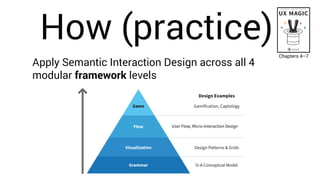
How (practice)
Apply Semantic Interaction Design across all 4
modular framework levels
Chapters 4–7
User Flow, Micro-Interaction Design
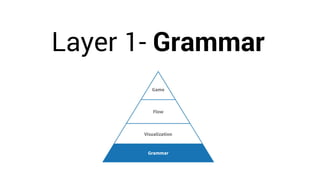
Layer 1- Grammar
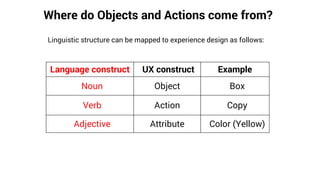
Where do Objects and Actions come from?
Linguistic structure can be mapped to experience design as follows:
Language construct UX construct Example
Noun Object Box
Verb Action Copy
Adjective Attribute Color (Yellow)
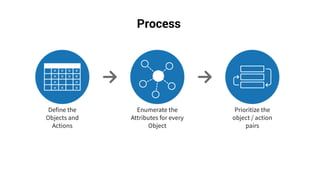
Process
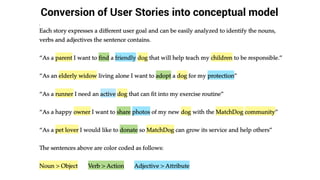
Conversion of User Stories into conceptual model
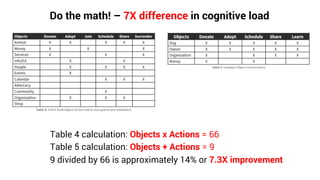
Do the math! – 7X difference in cognitive load
Table 4 calculation: Objects x Actions = 66
Table 5 calculation: Objects + Actions = 9
9 divided by 66 is approximately 14% or 7.3X improvement
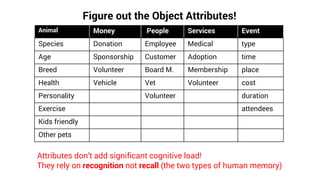
Figure out the Object Attributes!
Animal Money People Services Event
Species Donation Employee Medical type
Age Sponsorship Customer Adoption time
Breed Volunteer Board M. Membership place
Health Vehicle Vet Volunteer cost
Personality Volunteer duration
Exercise attendees
Kids friendly
Other pets
Attributes don’t add significant cognitive load!
They rely on recognition not recall (the two types of human memory)
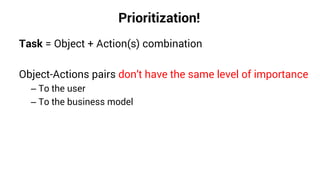
Prioritization!
Task = Object + Action(s) combination
Object-Actions pairs don’t have the same level of importance
– To the user
– To the business model
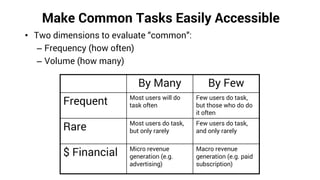
Make Common Tasks Easily Accessible
• Two dimensions to evaluate “common”:
– Frequency (how often)
– Volume (how many)
By Many By Few
Frequent Most users will do
task often
Few users do task,
but those who do do
it often
Rare Most users do task,
but only rarely
Few users do task,
and only rarely
$ Financial Micro revenue
generation (e.g.
advertising)
Macro revenue
generation (e.g. paid
subscription)
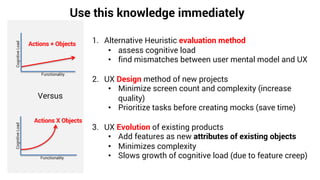
Use this knowledge immediately
Actions + Objects
Functionality
CognitiveLoad
Actions X Objects
Functionality
CognitiveLoad
Versus
1. Alternative Heuristic evaluation method
• assess cognitive load
• find mismatches between user mental model and UX
2. UX Design method of new projects
• Minimize screen count and complexity (increase
quality)
• Prioritize tasks before creating mocks (save time)
3. UX Evolution of existing products
• Add features as new attributes of existing objects
• Minimizes complexity
• Slows growth of cognitive load (due to feature creep)
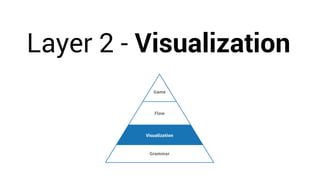
Layer 2 - Visualization
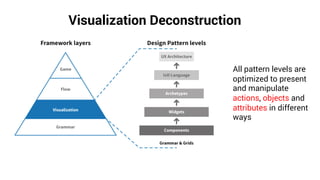
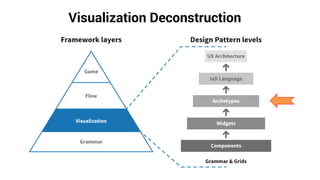
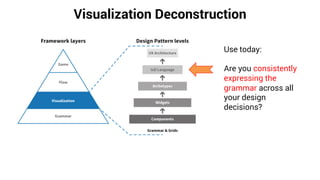
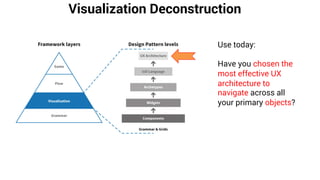
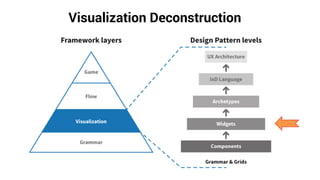
Visualization Deconstruction
All pattern levels are
optimized to present
and manipulate
actions, objects and
attributes in different
ways
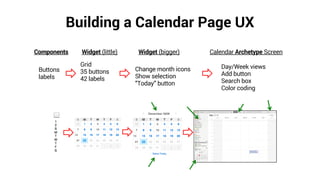
Building a Calendar Page UX
Components Widget (little) Widget (bigger) Calendar Archetype Screen
Buttons
labels
Grid
35 buttons
42 labels
Change month icons
Show selection
“Today” button
Day/Week views
Add button
Search box
Color coding
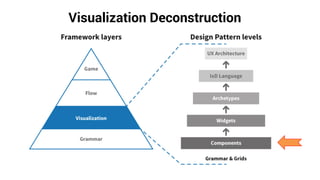
Visualization Deconstruction
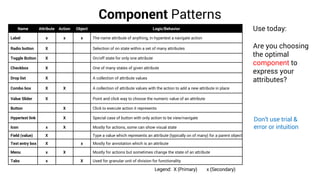
Component Patterns
Name Attribute Action Object Logic/Behavior
Label x x x The name attribute of anything, in hypertext a navigate action
Radio button X Selection of on state within a set of many attributes
Toggle Button X On/off state for only one attribute
Checkbox X One of many states of given attribute
Drop list X A collection of attribute values
Combo box X X A collection of attribute values with the action to add a new attribute in place
Value Slider X Point and click way to choose the numeric value of an attribute
Button X Click to execute action it represents
Hypertext link X Special case of button with only action to be view/navigate
Icon x X Mostly for actions, some can show visual state
Field (value) X Type a value which represents an attribute (typically on of many) for a parent object
Text entry box X x Mostly for annotation which is an attribute
Menu x X Mostly for actions but sometimes change the state of an attribute
Tabs x X Used for granular unit of division for functionality
Legend: X (Primary) x (Secondary)
Use today:
Are you choosing
the optimal
component to
express your
attributes?
Don’t use trial &
error or intuition
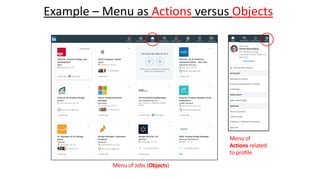
Example – Menu as Actions versus Objects
Menu of Jobs (Objects)
Menu of
Actions related
to profile
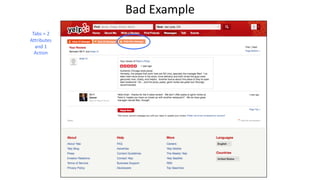
Tabs = 2
Attributes
and 1
Action
Bad Example
Visualization Deconstruction
Widget Patterns
Name Attribute Action Object Logic/Behavior
List X Table with one column (can be horizontal like a Carrousel or Cover flow)
Table x X Table itself or each row can be an object
Tree control X Represents hierarchy of Object
H-Grid Combination of tree and table, so set attributes be shown as well
Master-detail X X Combination of list of objects and its attributes or Attributes and sub-attributes
Form x X Logically represents an object, fields and controls inside are attributes
Card x X Expanding (Detail)/Collapsing (Summary) element used for a series of object.
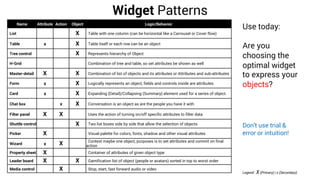
Chat box x X Conversation is an object as are the people you have it with
Filter panel X X Uses the action of turning on/off specific attributes to filter data
Shuttle control X Two list boxes side by side that allow the selection of objects
Picker X Visual palette for colors, fonts, shadow and other visual attributes
Wizard x X Context maybe one object, purposes is to set attributes and commit on final
action
Property sheet X Container of attributes of given object type
Leader board X X Gamification list of object (people or avatars) sorted in top to worst order
Media control X Stop, start, fast forward audio or video
Legend: X (Primary) | x (Secondary)
Use today:
Are you
choosing the
optimal widget
to express your
objects?
Don’t use trial &
error or intuition!
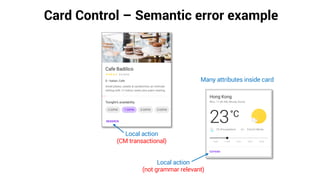
Card Control – Semantic error example
Local action
(CM transactional)
Many attributes inside card
Local action
(not grammar relevant)
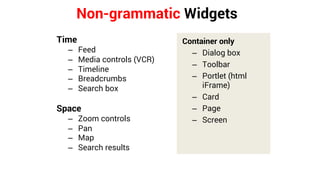
Non-grammatic Widgets
Time
– Feed
– Media controls (VCR)
– Timeline
– Breadcrumbs
– Search box
Space
– Zoom controls
– Pan
– Map
– Search results
Container only
– Dialog box
– Toolbar
– Portlet (html
iFrame)
– Card
– Page
– Screen
Visualization Deconstruction
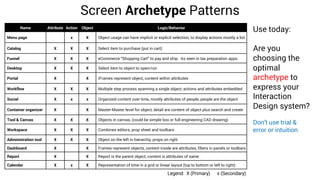
Screen Archetype Patterns
Legend: X (Primary) x (Secondary)
Name Attribute Action Object Logic/Behavior
Menu page x X Object usage can have implicit or explicit selection, to display actions mostly a list
Catalog X X X Select item to purchase (put in cart)
Funnel X X X eCommerce “Shopping Cart” to pay and ship. As seen in tax preparation apps.
Desktop X X X Select item to object to open/run
Portal X X iFrames represent object, content within attributes
Workflow X X X Multiple step process spanning a single object, actions and attributes embedded
Social X x x Organized content over time, mostly attributes of people, people are the object
Container organizer X X Master-Master level for object, detail are content of object plus search and create
Tool & Canvas X X X Objects in canvas, (could be simple box or full engineering CAD drawing)
Workspace X X X Combines editors, prop sheet and toolbars
Administration tool X X X Object on the left in hierarchy, props on right
Dashboard X X Frames represent objects, content inside are attributes, filters in panels or toolbars
Report X X Report is the parent object, content is attributes of same
Calendar X x X Representation of time in a grid or linear layout (top to bottom or left to right)
Use today:
Are you
choosing the
optimal
archetype to
express your
Interaction
Design system?
Don’t use trial &
error or intuition
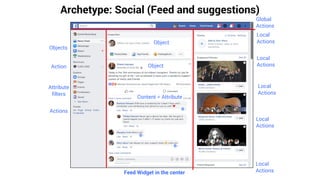
Archetype: Social (Feed and suggestions)
Feed Widget in the center
Objects
Local
Actions
Content = Attribute
Object
Local
Actions
Local
Actions
Global
Actions
Local
Actions
Local
Actions
ObjectAction
Attribute
filters
Actions
Visualization Deconstruction
Use today:
Are you consistently
expressing the
grammar across all
your design
decisions?
Medical Interaction Design Language
examples
1. Behavior the Appointment Object inside different archetypes
2. Consistent use of the Void Action to remove errors
A day in the life of…
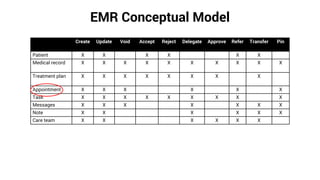
EMR Conceptual Model
Create Update Void Accept Reject Delegate Approve Refer Transfer Pin
Patient X X X X X X
Medical record X X X X X X X X X X
Treatment plan X X X X X X X X
Appointment X X X X X X
Task X X X X X X X X X
Messages X X X X X X X
Note X X X X X X
Care team X X X X X X
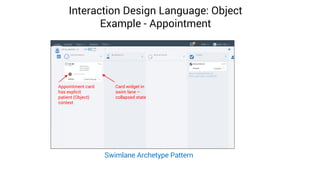
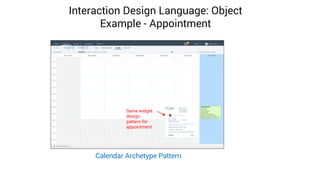
Interaction Design Language: Object
Example - Appointment
Card widget in
swim lane –
collapsed state
Appointment card
has explicit
patient (Object)
context
Swimlane Archetype Pattern
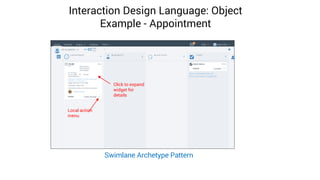
Interaction Design Language: Object
Example - Appointment
Click to expand
widget for
details
Local action
menu
Swimlane Archetype Pattern
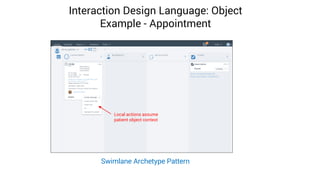
Interaction Design Language: Object
Example - Appointment
Local actions assume
patient object context
Swimlane Archetype Pattern
Interaction Design Language: Object
Example - Appointment
Same widget
design
pattern for
appointment
Calendar Archetype Pattern
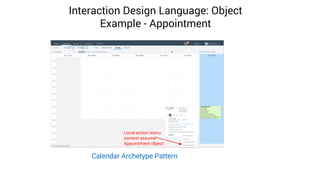
Interaction Design Language: Object
Example - Appointment
Local action menu
context assume
Appointment object
Calendar Archetype Pattern
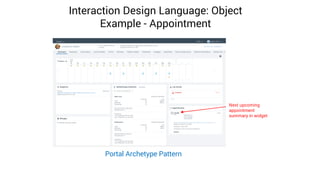
Interaction Design Language: Object
Example - Appointment
Portal Archetype Pattern
Next upcoming
appointment
summary in widget
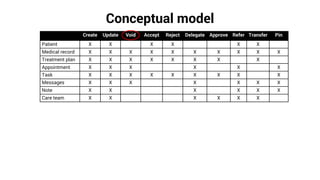
Conceptual model
Create Update Void Accept Reject Delegate Approve Refer Transfer Pin
Patient X X X X X X
Medical record X X X X X X X X X X
Treatment plan X X X X X X X X
Appointment X X X X X X
Task X X X X X X X X X
Messages X X X X X X X
Note X X X X X X
Care team X X X X X X
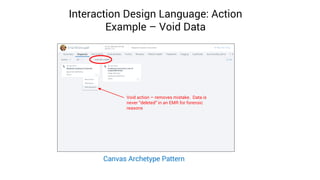
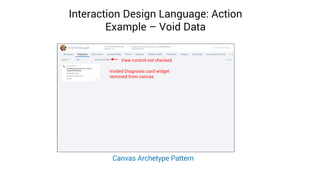
Interaction Design Language: Action
Example – Void Data
Canvas Archetype Pattern
Void action – removes mistake. Data is
never “deleted” in an EMR for forensic
reasons
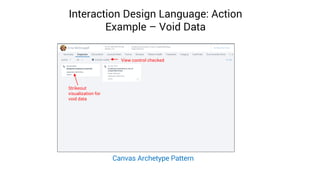
Interaction Design Language: Action
Example – Void Data
View control checked
Strikeout
visualization for
void data
Canvas Archetype Pattern
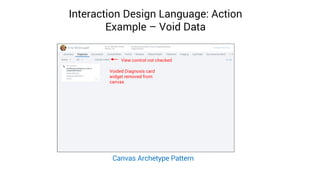
Interaction Design Language: Action
Example – Void Data
Voided Diagnosis card
widget removed from
canvas
View control not checked
Canvas Archetype Pattern
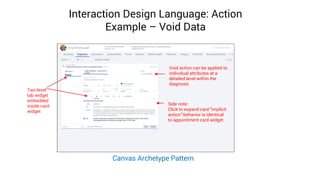
Interaction Design Language: Action
Example – Void Data
Side note:
Click to expand card “implicit
action” behavior is identical
to appointment card widget
Void action can be applied to
individual attributes at a
detailed level within the
diagnosis
Two level
tab widget
embedded
inside card
widget
Canvas Archetype Pattern
Interaction Design Language: Action
Example – Void Data
Voided Diagnosis card widget
removed from canvas
View control not checked
Canvas Archetype Pattern
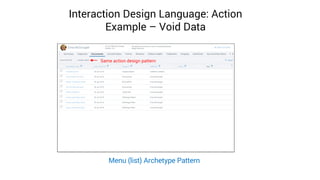
Interaction Design Language: Action
Example – Void Data
Menu (list) Archetype Pattern
Same action design pattern
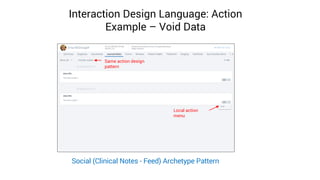
Interaction Design Language: Action
Example – Void Data
Social (Clinical Notes - Feed) Archetype Pattern
Same action design
pattern
Local action
menu
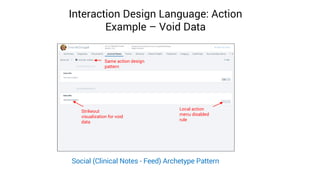
Interaction Design Language: Action
Example – Void Data
Same action design
pattern
Local action
menu disabled
rule
Strikeout
visualization for void
data
Social (Clinical Notes - Feed) Archetype Pattern
Visualization Deconstruction
Use today:
Have you chosen the
most effective UX
architecture to
navigate across all
your primary objects?
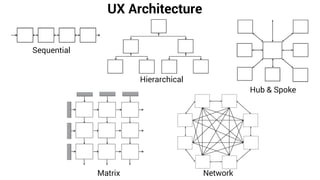
UX Architecture
Sequential
Hierarchical
Hub & Spoke
Matrix Network
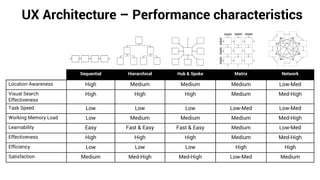
UX Architecture – Performance characteristics
Sequential Hierarchical Hub & Spoke Matrix Network
Location Awareness High Medium Medium Medium Low-Med
Visual Search
Effectiveness
High High High Medium Med-High
Task Speed Low Low Low Low-Med Low-Med
Working Memory Load Low Medium Medium Medium Med-High
Learnability Easy Fast & Easy Fast & Easy Medium Low-Med
Effectiveness High High High Medium Med-High
Efficiency Low Low Low High High
Satisfaction Medium Med-High Med-High Low-Med Medium
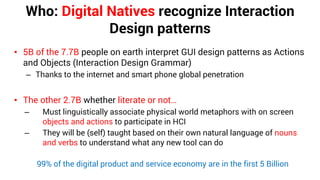
Who: Digital Natives recognize Interaction
Design patterns
• 5B of the 7.7B people on earth interpret GUI design patterns as Actions
and Objects (Interaction Design Grammar)
– Thanks to the internet and smart phone global penetration
• The other 2.7B whether literate or not…
– Must linguistically associate physical world metaphors with on screen
objects and actions to participate in HCI
– They will be (self) taught based on their own natural language of nouns
and verbs to understand what any new tool can do
99% of the digital product and service economy are in the first 5 Billion
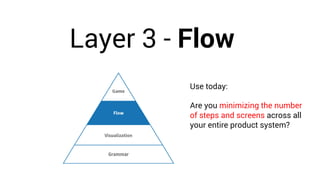
Layer 3 - Flow
Use today:
Are you minimizing the number
of steps and screens across all
your entire product system?
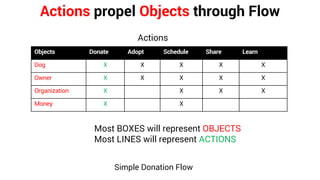
Actions propel Objects through Flow
Simple Donation Flow
Objects Donate Adopt Schedule Share Learn
Dog X X X X X
Owner X X X X X
Organization X X X X
Money X X
Most BOXES will represent OBJECTS
Most LINES will represent ACTIONS
Actions
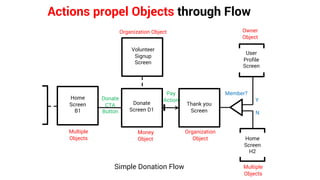
Actions propel Objects through Flow
Donate
Screen D1
User
Profile
Screen
Donate
CTA
Button
Money
Object
Thank you
Screen
Organization
Object Home
Screen
H2
Member?
Y
N
Pay
Action
Volunteer
Signup
Screen
Organization Object Owner
Object
Multiple
Objects
Home
Screen
B1
Multiple
Objects
Simple Donation Flow
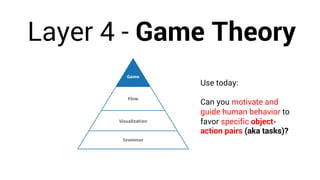
Layer 4 - Game Theory
Use today:
Can you motivate and
guide human behavior to
favor specific object-
action pairs (aka tasks)?
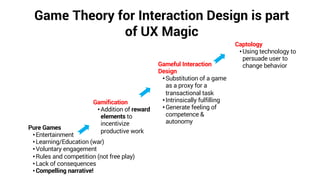
Game Theory for Interaction Design is part
of UX Magic
Pure Games
•Entertainment
•Learning/Education (war)
•Voluntary engagement
•Rules and competition (not free play)
•Lack of consequences
•Compelling narrative!
Gamification
•Addition of reward
elements to
incentivize
productive work
Captology
•Using technology to
persuade user to
change behaviorGameful Interaction
Design
•Substitution of a game
as a proxy for a
transactional task
•Intrinsically fulfilling
•Generate feeling of
competence &
autonomy
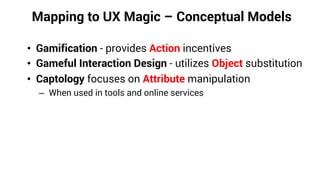
Mapping to UX Magic – Conceptual Models
• Gamification - provides Action incentives
• Gameful Interaction Design - utilizes Object substitution
• Captology focuses on Attribute manipulation
– When used in tools and online services
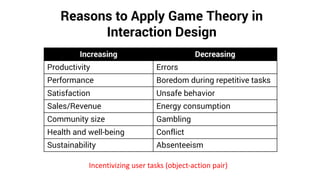
Reasons to Apply Game Theory in
Interaction Design
Increasing Decreasing
Productivity Errors
Performance Boredom during repetitive tasks
Satisfaction Unsafe behavior
Sales/Revenue Energy consumption
Community size Gambling
Health and well-being Conflict
Sustainability Absenteeism
Incentivizing user tasks (object-action pair)
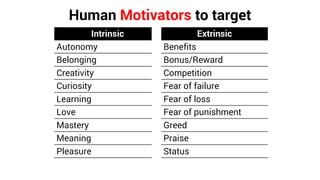
Human Motivators to target
Intrinsic Extrinsic
Autonomy Benefits
Belonging Bonus/Reward
Creativity Competition
Curiosity Fear of failure
Learning Fear of loss
Love Fear of punishment
Mastery Greed
Meaning Praise
Pleasure Status
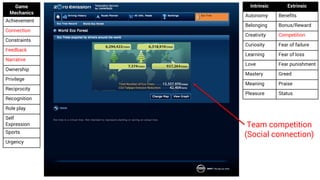
Game
Mechanics
Achievement
Connection
Constraints
Feedback
Narrative
Ownership
Privilege
Reciprocity
Recognition
Role play
Self
Expression
Sports
Urgency
Intrinsic Extrinsic
Autonomy Benefits
Belonging Bonus/Reward
Creativity Competition
Curiosity Fear of failure
Learning Fear of loss
Love Fear punishment
Mastery Greed
Meaning Praise
Pleasure Status
Team competition
(Social connection)
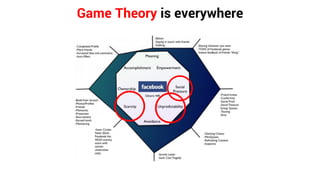
Game Theory is everywhere
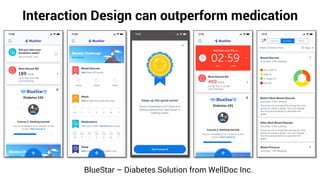
Interaction Design can outperform medication
BlueStar – Diabetes Solution from WellDoc Inc.
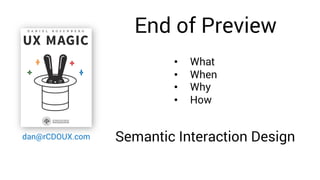
End of Preview
dan@rCDOUX.com
• What
• When
• Why
• How
Semantic Interaction Design
Semantic IxD – Only Interaction Design step
Don’t forget to do the other UCD Steps!
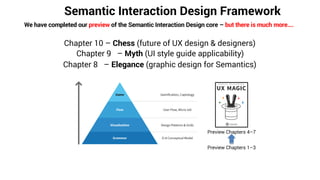
Semantic Interaction Design Framework
We have completed our preview of the Semantic Interaction Design core – but there is much more….
Chapter 9 – Myth (UI style guide applicability)
Chapter 8 – Elegance (graphic design for Semantics)
Chapter 10 – Chess (future of UX design & designers)
Preview Chapters 4–7
Preview Chapters 1–3
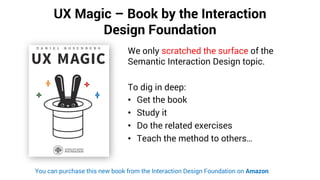
UX Magic – Book by the Interaction
Design Foundation
We only scratched the surface of the
Semantic Interaction Design topic.
To dig in deep:
• Get the book
• Study it
• Do the related exercises
• Teach the method to others…
You can purchase this new book from the Interaction Design Foundation on Amazon
Addendum
dan@rCDOUX.com
For individuals:
• If you found this new Semantic IxD approach compelling please tell your UX colleagues at
other companies about it. Post on social media and help spread the word within the global
UX design community.
• Join the Interaction Design Foundation (the publisher) and learn more about IxD in general…
For UX leaders/manager:
• I have been giving corporate training classes on this the Semantic IxD method for years
• It includes how it integrates into Data Visualization and Information Architecture which are
not covered in the book.
The End – Q&A
dan@rCDOUX.com

Semantic interaction design guest talk v6

  • 1.
    Daniel Rosenberg San JoseState Univ. Human Factors Engineering Program Semantic Interaction Design rCDOUX.com
  • 2.
    What is thefirst thing you do when you start to create/define/specify an Interaction Design?
  • 3.
    Don’t do that! Thereis a better way to start…
  • 4.
    What Semantic IxD isa proven (cognitive science based) scalable UX design method that ensures maximum usability is achieved 10X more effectively & efficiently than current UX practice today. Chapter 1
  • 5.
    Origin of SemanticInteraction Design (IxD) theory goes back decades! 2020 Complete System Science starts here Human Factors Cognitive Ergonomics: • Task action grammar/Complexity models • Reisner (1979) • Spence and Apperley (1984) Cognitive Science: • Stages of Action (Norman 2015) • Design by Levels (Foley 1995) • Activity Theory (Nardi 1996) • Consistency (Shneiderman 1988) Computer Science • Objected-Oriented UI (Collins 1995) + 2012 Practice Foundation +
  • 6.
    Learn about aninnovative IxD method Deliver optimal UX designs • Minimum number of screens • Shortest flows • Lowest cognitive load possible • Ready to scale for next version Deliver designs faster/smarter • Fewer iterations • Minimize feature creep rework • Fewer stakeholder meetings • Science based tradeoff discussions (not opinions, not trial & error) 10X Effectiveness (design quality) 10X Efficiency (your labor)
  • 7.
    Can you supportthe 10X claim? Case studies in the book Over a 100X Improvement!=
  • 8.
    Before - Canyou support this 10x claim? 800+ screens
  • 9.
    After - Canyou support this claim? 45 screens (5 main ones) An 18X Improvement!=
  • 10.
    When At the heartof the User Centered Design step. Chapter 1
  • 11.
    Focus – OnlyInteraction Design step (not full UCD life cycle) • Other phases are important too • Necessary but not sufficient
  • 12.
    Why Because Design Darwinismdoes not work! Current design methods don’t scale to complex systems, are inefficient and often lead to product failure at significant expense because *Design Darwinism = Believing A/B testing is a legitimate form of iteration Chapter 1 Real quality is not achieved by eliminating defects – occurs through design
  • 13.
    How (theory) Leverage 2cognitive science principles at 4 modular levels of Interaction Design Chapter 2
  • 14.
    Cognitive Science Foundationof Semantic Interaction Design 1. Language is the basis of conscious thought 2. Language grammar correlates with cognitive complexity – Cognitive load in Interaction Design can be measured (lab) – Cognitive load for Interaction Design can be predicted in advanceNEW
  • 15.
    Simple Graphical UserInterface (GUI) Semantic Example (Interaction Design Grammar)
  • 16.
    Consistency vs. CognitiveLoad Cut Remove Copy Duplicate Paste Stamp Print Publish Character X X X X Word X X X X Paragraph X X X X Page X X X X Document X X X X Sparse Object-Action Grammar Sparse is BAD! ACTIONS OBJECTS
  • 17.
    Consistency vs. CognitiveLoad Cut Copy Paste Print Character X X X X Word X X X X Paragraph X X X X Page X X X X Document X X X X Dense Object-Action Grammar ACTIONS OBJECTS
  • 18.
    Consistency vs. CognitiveLoad Calculation
  • 19.
    Real Conceptual Model10x deconstruction in practice! 800 Screens 45 Screens Create Update Void Accept Reject Delegate Approve Refer Transfer Pin Patient X X X X X X Medical record X X X X X X X X X X Treatment plan X X X X X X X X Appointment X X X X X X Task X X X X X X X X X Messages X X X X X X X Note X X X X X X Care team X X X X X X Only 5 primary screens Only 10 objects and 10 actions can describe an entire EMR solution
  • 20.
    How (practice) Apply SemanticInteraction Design across all 4 modular framework levels Chapters 4–7 User Flow, Micro-Interaction Design
  • 21.
  • 22.
    Where do Objectsand Actions come from? Linguistic structure can be mapped to experience design as follows: Language construct UX construct Example Noun Object Box Verb Action Copy Adjective Attribute Color (Yellow)
  • 23.
  • 24.
    Conversion of UserStories into conceptual model
  • 25.
    Do the math!– 7X difference in cognitive load Table 4 calculation: Objects x Actions = 66 Table 5 calculation: Objects + Actions = 9 9 divided by 66 is approximately 14% or 7.3X improvement
  • 26.
    Figure out theObject Attributes! Animal Money People Services Event Species Donation Employee Medical type Age Sponsorship Customer Adoption time Breed Volunteer Board M. Membership place Health Vehicle Vet Volunteer cost Personality Volunteer duration Exercise attendees Kids friendly Other pets Attributes don’t add significant cognitive load! They rely on recognition not recall (the two types of human memory)
  • 27.
    Prioritization! Task = Object+ Action(s) combination Object-Actions pairs don’t have the same level of importance – To the user – To the business model
  • 28.
    Make Common TasksEasily Accessible • Two dimensions to evaluate “common”: – Frequency (how often) – Volume (how many) By Many By Few Frequent Most users will do task often Few users do task, but those who do do it often Rare Most users do task, but only rarely Few users do task, and only rarely $ Financial Micro revenue generation (e.g. advertising) Macro revenue generation (e.g. paid subscription)
  • 29.
    Use this knowledgeimmediately Actions + Objects Functionality CognitiveLoad Actions X Objects Functionality CognitiveLoad Versus 1. Alternative Heuristic evaluation method • assess cognitive load • find mismatches between user mental model and UX 2. UX Design method of new projects • Minimize screen count and complexity (increase quality) • Prioritize tasks before creating mocks (save time) 3. UX Evolution of existing products • Add features as new attributes of existing objects • Minimizes complexity • Slows growth of cognitive load (due to feature creep)
  • 30.
    Layer 2 -Visualization
  • 31.
    Visualization Deconstruction All patternlevels are optimized to present and manipulate actions, objects and attributes in different ways
  • 32.
    Building a CalendarPage UX Components Widget (little) Widget (bigger) Calendar Archetype Screen Buttons labels Grid 35 buttons 42 labels Change month icons Show selection “Today” button Day/Week views Add button Search box Color coding
  • 33.
  • 34.
    Component Patterns Name AttributeAction Object Logic/Behavior Label x x x The name attribute of anything, in hypertext a navigate action Radio button X Selection of on state within a set of many attributes Toggle Button X On/off state for only one attribute Checkbox X One of many states of given attribute Drop list X A collection of attribute values Combo box X X A collection of attribute values with the action to add a new attribute in place Value Slider X Point and click way to choose the numeric value of an attribute Button X Click to execute action it represents Hypertext link X Special case of button with only action to be view/navigate Icon x X Mostly for actions, some can show visual state Field (value) X Type a value which represents an attribute (typically on of many) for a parent object Text entry box X x Mostly for annotation which is an attribute Menu x X Mostly for actions but sometimes change the state of an attribute Tabs x X Used for granular unit of division for functionality Legend: X (Primary) x (Secondary) Use today: Are you choosing the optimal component to express your attributes? Don’t use trial & error or intuition
  • 35.
    Example – Menuas Actions versus Objects Menu of Jobs (Objects) Menu of Actions related to profile
  • 36.
    Tabs = 2 Attributes and1 Action Bad Example
  • 37.
  • 38.
    Widget Patterns Name AttributeAction Object Logic/Behavior List X Table with one column (can be horizontal like a Carrousel or Cover flow) Table x X Table itself or each row can be an object Tree control X Represents hierarchy of Object H-Grid Combination of tree and table, so set attributes be shown as well Master-detail X X Combination of list of objects and its attributes or Attributes and sub-attributes Form x X Logically represents an object, fields and controls inside are attributes Card x X Expanding (Detail)/Collapsing (Summary) element used for a series of object. Chat box x X Conversation is an object as are the people you have it with Filter panel X X Uses the action of turning on/off specific attributes to filter data Shuttle control X Two list boxes side by side that allow the selection of objects Picker X Visual palette for colors, fonts, shadow and other visual attributes Wizard x X Context maybe one object, purposes is to set attributes and commit on final action Property sheet X Container of attributes of given object type Leader board X X Gamification list of object (people or avatars) sorted in top to worst order Media control X Stop, start, fast forward audio or video Legend: X (Primary) | x (Secondary) Use today: Are you choosing the optimal widget to express your objects? Don’t use trial & error or intuition!
  • 39.
    Card Control –Semantic error example Local action (CM transactional) Many attributes inside card Local action (not grammar relevant)
  • 40.
    Non-grammatic Widgets Time – Feed –Media controls (VCR) – Timeline – Breadcrumbs – Search box Space – Zoom controls – Pan – Map – Search results Container only – Dialog box – Toolbar – Portlet (html iFrame) – Card – Page – Screen
  • 41.
  • 42.
    Screen Archetype Patterns Legend:X (Primary) x (Secondary) Name Attribute Action Object Logic/Behavior Menu page x X Object usage can have implicit or explicit selection, to display actions mostly a list Catalog X X X Select item to purchase (put in cart) Funnel X X X eCommerce “Shopping Cart” to pay and ship. As seen in tax preparation apps. Desktop X X X Select item to object to open/run Portal X X iFrames represent object, content within attributes Workflow X X X Multiple step process spanning a single object, actions and attributes embedded Social X x x Organized content over time, mostly attributes of people, people are the object Container organizer X X Master-Master level for object, detail are content of object plus search and create Tool & Canvas X X X Objects in canvas, (could be simple box or full engineering CAD drawing) Workspace X X X Combines editors, prop sheet and toolbars Administration tool X X X Object on the left in hierarchy, props on right Dashboard X X Frames represent objects, content inside are attributes, filters in panels or toolbars Report X X Report is the parent object, content is attributes of same Calendar X x X Representation of time in a grid or linear layout (top to bottom or left to right) Use today: Are you choosing the optimal archetype to express your Interaction Design system? Don’t use trial & error or intuition
  • 43.
    Archetype: Social (Feedand suggestions) Feed Widget in the center Objects Local Actions Content = Attribute Object Local Actions Local Actions Global Actions Local Actions Local Actions ObjectAction Attribute filters Actions
  • 44.
    Visualization Deconstruction Use today: Areyou consistently expressing the grammar across all your design decisions?
  • 45.
    Medical Interaction DesignLanguage examples 1. Behavior the Appointment Object inside different archetypes 2. Consistent use of the Void Action to remove errors A day in the life of…
  • 46.
    EMR Conceptual Model CreateUpdate Void Accept Reject Delegate Approve Refer Transfer Pin Patient X X X X X X Medical record X X X X X X X X X X Treatment plan X X X X X X X X Appointment X X X X X X Task X X X X X X X X X Messages X X X X X X X Note X X X X X X Care team X X X X X X
  • 47.
    Interaction Design Language:Object Example - Appointment Card widget in swim lane – collapsed state Appointment card has explicit patient (Object) context Swimlane Archetype Pattern
  • 48.
    Interaction Design Language:Object Example - Appointment Click to expand widget for details Local action menu Swimlane Archetype Pattern
  • 49.
    Interaction Design Language:Object Example - Appointment Local actions assume patient object context Swimlane Archetype Pattern
  • 50.
    Interaction Design Language:Object Example - Appointment Same widget design pattern for appointment Calendar Archetype Pattern
  • 51.
    Interaction Design Language:Object Example - Appointment Local action menu context assume Appointment object Calendar Archetype Pattern
  • 52.
    Interaction Design Language:Object Example - Appointment Portal Archetype Pattern Next upcoming appointment summary in widget
  • 53.
    Conceptual model Create UpdateVoid Accept Reject Delegate Approve Refer Transfer Pin Patient X X X X X X Medical record X X X X X X X X X X Treatment plan X X X X X X X X Appointment X X X X X X Task X X X X X X X X X Messages X X X X X X X Note X X X X X X Care team X X X X X X
  • 54.
    Interaction Design Language:Action Example – Void Data Canvas Archetype Pattern Void action – removes mistake. Data is never “deleted” in an EMR for forensic reasons
  • 55.
    Interaction Design Language:Action Example – Void Data View control checked Strikeout visualization for void data Canvas Archetype Pattern
  • 56.
    Interaction Design Language:Action Example – Void Data Voided Diagnosis card widget removed from canvas View control not checked Canvas Archetype Pattern
  • 57.
    Interaction Design Language:Action Example – Void Data Side note: Click to expand card “implicit action” behavior is identical to appointment card widget Void action can be applied to individual attributes at a detailed level within the diagnosis Two level tab widget embedded inside card widget Canvas Archetype Pattern
  • 58.
    Interaction Design Language:Action Example – Void Data Voided Diagnosis card widget removed from canvas View control not checked Canvas Archetype Pattern
  • 59.
    Interaction Design Language:Action Example – Void Data Menu (list) Archetype Pattern Same action design pattern
  • 60.
    Interaction Design Language:Action Example – Void Data Social (Clinical Notes - Feed) Archetype Pattern Same action design pattern Local action menu
  • 61.
    Interaction Design Language:Action Example – Void Data Same action design pattern Local action menu disabled rule Strikeout visualization for void data Social (Clinical Notes - Feed) Archetype Pattern
  • 62.
    Visualization Deconstruction Use today: Haveyou chosen the most effective UX architecture to navigate across all your primary objects?
  • 63.
  • 64.
    UX Architecture –Performance characteristics Sequential Hierarchical Hub & Spoke Matrix Network Location Awareness High Medium Medium Medium Low-Med Visual Search Effectiveness High High High Medium Med-High Task Speed Low Low Low Low-Med Low-Med Working Memory Load Low Medium Medium Medium Med-High Learnability Easy Fast & Easy Fast & Easy Medium Low-Med Effectiveness High High High Medium Med-High Efficiency Low Low Low High High Satisfaction Medium Med-High Med-High Low-Med Medium
  • 65.
    Who: Digital Nativesrecognize Interaction Design patterns • 5B of the 7.7B people on earth interpret GUI design patterns as Actions and Objects (Interaction Design Grammar) – Thanks to the internet and smart phone global penetration • The other 2.7B whether literate or not… – Must linguistically associate physical world metaphors with on screen objects and actions to participate in HCI – They will be (self) taught based on their own natural language of nouns and verbs to understand what any new tool can do 99% of the digital product and service economy are in the first 5 Billion
  • 66.
    Layer 3 -Flow Use today: Are you minimizing the number of steps and screens across all your entire product system?
  • 67.
    Actions propel Objectsthrough Flow Simple Donation Flow Objects Donate Adopt Schedule Share Learn Dog X X X X X Owner X X X X X Organization X X X X Money X X Most BOXES will represent OBJECTS Most LINES will represent ACTIONS Actions
  • 68.
    Actions propel Objectsthrough Flow Donate Screen D1 User Profile Screen Donate CTA Button Money Object Thank you Screen Organization Object Home Screen H2 Member? Y N Pay Action Volunteer Signup Screen Organization Object Owner Object Multiple Objects Home Screen B1 Multiple Objects Simple Donation Flow
  • 69.
    Layer 4 -Game Theory Use today: Can you motivate and guide human behavior to favor specific object- action pairs (aka tasks)?
  • 70.
    Game Theory forInteraction Design is part of UX Magic Pure Games •Entertainment •Learning/Education (war) •Voluntary engagement •Rules and competition (not free play) •Lack of consequences •Compelling narrative! Gamification •Addition of reward elements to incentivize productive work Captology •Using technology to persuade user to change behaviorGameful Interaction Design •Substitution of a game as a proxy for a transactional task •Intrinsically fulfilling •Generate feeling of competence & autonomy
  • 71.
    Mapping to UXMagic – Conceptual Models • Gamification - provides Action incentives • Gameful Interaction Design - utilizes Object substitution • Captology focuses on Attribute manipulation – When used in tools and online services
  • 72.
    Reasons to ApplyGame Theory in Interaction Design Increasing Decreasing Productivity Errors Performance Boredom during repetitive tasks Satisfaction Unsafe behavior Sales/Revenue Energy consumption Community size Gambling Health and well-being Conflict Sustainability Absenteeism Incentivizing user tasks (object-action pair)
  • 73.
    Human Motivators totarget Intrinsic Extrinsic Autonomy Benefits Belonging Bonus/Reward Creativity Competition Curiosity Fear of failure Learning Fear of loss Love Fear of punishment Mastery Greed Meaning Praise Pleasure Status
  • 74.
    Game Mechanics Achievement Connection Constraints Feedback Narrative Ownership Privilege Reciprocity Recognition Role play Self Expression Sports Urgency Intrinsic Extrinsic AutonomyBenefits Belonging Bonus/Reward Creativity Competition Curiosity Fear of failure Learning Fear of loss Love Fear punishment Mastery Greed Meaning Praise Pleasure Status Team competition (Social connection)
  • 75.
    Game Theory iseverywhere
  • 76.
    Interaction Design canoutperform medication BlueStar – Diabetes Solution from WellDoc Inc.
  • 77.
    End of Preview dan@rCDOUX.com •What • When • Why • How Semantic Interaction Design
  • 78.
    Semantic IxD –Only Interaction Design step Don’t forget to do the other UCD Steps!
  • 79.
    Semantic Interaction DesignFramework We have completed our preview of the Semantic Interaction Design core – but there is much more…. Chapter 9 – Myth (UI style guide applicability) Chapter 8 – Elegance (graphic design for Semantics) Chapter 10 – Chess (future of UX design & designers) Preview Chapters 4–7 Preview Chapters 1–3
  • 80.
    UX Magic –Book by the Interaction Design Foundation We only scratched the surface of the Semantic Interaction Design topic. To dig in deep: • Get the book • Study it • Do the related exercises • Teach the method to others… You can purchase this new book from the Interaction Design Foundation on Amazon
  • 81.
    Addendum dan@rCDOUX.com For individuals: • Ifyou found this new Semantic IxD approach compelling please tell your UX colleagues at other companies about it. Post on social media and help spread the word within the global UX design community. • Join the Interaction Design Foundation (the publisher) and learn more about IxD in general… For UX leaders/manager: • I have been giving corporate training classes on this the Semantic IxD method for years • It includes how it integrates into Data Visualization and Information Architecture which are not covered in the book.
  • 82.
    The End –Q&A dan@rCDOUX.com