User Experience Research and Design
Week 2
Introduction to User Experience
LEARNING OUTCOMES
• LO1: Describe the essentials of designing user experience
OUTLINE
• The variety of UX
• The concerns of UX
• The skills of the UX Designer
• PACT : Framework for designing UX
• Scoping a problem with PACT
The variety of UX
Introduction to User Experience
UX is concerned with developing
high-quality interactive systems,
products and services that fit
with people and their ways of
living.
Computing and communication
devices are embedded in all
sorts of everyday devices such
as washing machines and
televisions, ticket machines and
jewelry.
No self-respecting exhibition,
museum or library is without its
interactive component. We
carry and wear technologies
that are far more powerful than
the computers of just a few
years ago.
There are websites, online
communities, apps for mobile
phones and tablets, and all
manner of other interactive
devices and services that need
developing. UX is about all of
this.
The Variety of UX
UX has developed over the years from work in HCI and interaction design
into the central focus of much design work.
UX draws upon many different design disciplines.
UX designers need to know about people, technologies, the activities
people want to undertake and the contexts in which those activities occur.
UX is necessary if we are to have safe, effective, ethical and sustainable
design.
The variety of interactive systems
Designing
interactive
systems is
concerned
with many
different
types of
product.
It is about designing software systems that will run on a computer at work.
It is about designing websites, games, interactive products such as MP3
players, digital cameras and applications for tablet PCs (personal
computers).
It is about designing whole environments in which phones, tablets, laptop
computers, digital projectors and other devices and services communicate
with one another and through which people interact with one another.
It is about designing interactive systems, products and services for the
home, for work or to support communities.
The Variety of UX
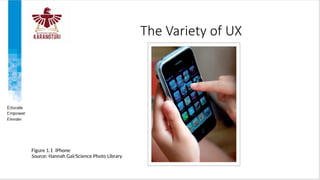
Figure 1.1 iPhone
Source: Hannah Gal/Science Photo Library
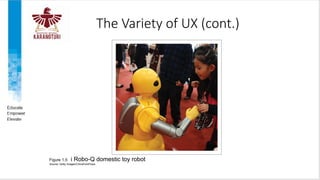
Figure 1.5 i Robo-Q domestic toy robot
Source: Getty Images/ChinaFotoPress
The Variety of UX (cont.)
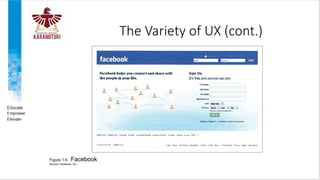
Figure 1.6 Facebook
Source: Facebook, Inc.
The concerns of UX
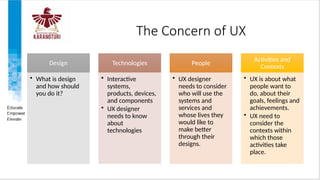
The Concern of UX
Design
• What is design
and how should
you do it?
Technologies
• Interactive
systems,
products, devices,
and components
• UX designer
needs to know
about
technologies
People
• UX designer
needs to consider
who will use the
systems and
services and
whose lives they
would like to
make better
through their
designs.
Activities and
Contexts
• UX is about what
people want to
do, about their
goals, feelings and
achievements.
• UX need to
consider the
contexts within
which those
activities take
place.
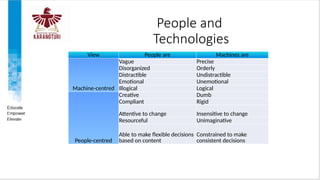
People and
Technologies
View People are Machines are
Machine-centred
Vague Precise
Disorganized Orderly
Distractible Undistractible
Emotional Unemotional
Illogical Logical
People-centred
Creative Dumb
Compliant Rigid
Attentive to change Insensitive to change
Resourceful Unimaginative
Able to make flexible decisions
based on content
Constrained to make
consistent decisions
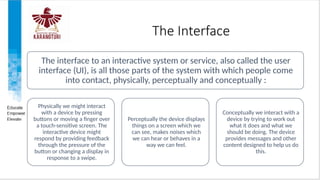
The Interface
The interface to an interactive system or service, also called the user
interface (UI), is all those parts of the system with which people come
into contact, physically, perceptually and conceptually :
Physically we might interact
with a device by pressing
buttons or moving a finger over
a touch-sensitive screen. The
interactive device might
respond by providing feedback
through the pressure of the
button or changing a display in
response to a swipe.
Perceptually the device displays
things on a screen which we
can see, makes noises which
we can hear or behaves in a
way we can feel.
Conceptually we interact with a
device by trying to work out
what it does and what we
should be doing. The device
provides messages and other
content designed to help us do
this.
The Interface (cont.)
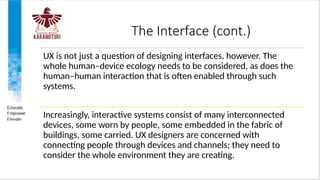
UX is not just a question of designing interfaces, however. The
whole human–device ecology needs to be considered, as does the
human–human interaction that is often enabled through such
systems.
Increasingly, interactive systems consist of many interconnected
devices, some worn by people, some embedded in the fabric of
buildings, some carried. UX designers are concerned with
connecting people through devices and channels; they need to
consider the whole environment they are creating.
The Interface (cont.)
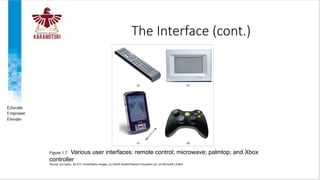
Figure 1.7 Various user interfaces: remote control; microwave; palmtop; and Xbox
controller
Source: (a) Fujitsu; (b) © D. Hurst/Alamy Images; (c) Gareth Boden/Pearson Education Ltd. (d) Microsoft Limited
The skills of the UX Designer
The Skills of UX Designer
• Study and understand the activities, goals and aspirations of
people and the contexts within which some technology might
prove useful and hence generate requirements for technologies
(sometimes called ‘user research’)
• Know the possibilities offered by technologies
• Create technological solutions that fit in with people, the activities
they want to undertake and the contexts in which those activities
occur (sometimes called ‘ideation’)
• Evaluate alternative designs and iterate (do more research and
more design) until a solution is arrived at.
UX designers
need a variety of
skills and need to
understand a
variety of
disciplines if they
are to be able to
do their jobs
well. They need
the mixture of
skills that allows
them to be able
to:
The Skills of UX Designer (cont.)
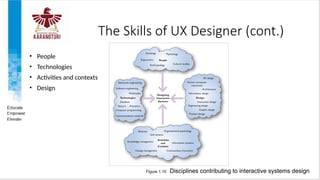
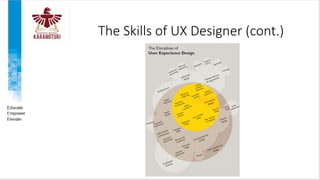
• People
• Technologies
• Activities and contexts
• Design
Figure 1.10 Disciplines contributing to interactive systems design
The Skills of UX Designer (cont.)
Discussion
Spend some time browsing the websites of corporations such as
IDEO, Sony and Apple. Do not look just at the design of the site
(though that can be useful), look at the products they are talking
about and the philosophy of their design approach. Collect
together your favourites and be prepared to spend time
discussing them with your colleagues. Think of the whole range
of issues about the site: what it looks like, how easy it is to use,
how relevant the content of the site is, how clearly the content is
organized, what the overall ‘feel’ of the site is.
PACT : Framework for designing UX
PACT: a framework for
designing interactive systems
• People use technologies to undertake activities in contexts. For example, teenagers user
smartphones to send text messages to their friends while sitting on a bus. Secretaries use MS
Word to write documents in a firm of solicitors.
• Figure 2.1 shows how activities establish requirements for technologies that in turn offer
opportunities that change the nature of activities.
Figure 2.1 Activities and technologies
Source: Based on Carroll (2002), Figure 3.1, p. 68
PACT: a framework for
designing interactive systems (cont.)
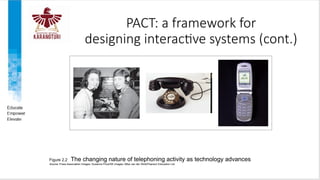
Figure 2.2 The changing nature of telephoning activity as technology advances
Source: Press Association Images; Susanna Price/DK Images; Mike van der Wolk/Pearson Education Ltd.
PACT: a framework for
designing interactive systems (cont.)
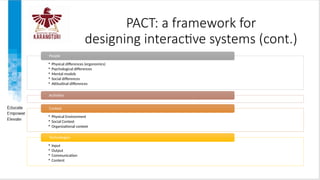
• Physical differences (ergonomics)
• Psychological differences
• Mental models
• Social differences
• Attitudinal differences
People
Activities
• Physical Environment
• Social Context
• Organizational context
Context
• Input
• Output
• Communication
• Content
Technologies
People (Ergonomics)
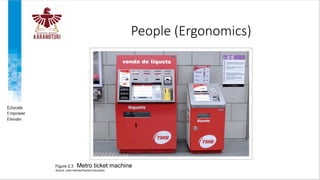
Figure 2.3 Metro ticket machine
Source: Jules Selmes/Pearson Education
People (Ergonomics) (cont.)
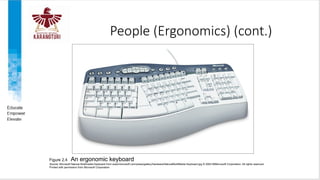
Figure 2.4 An ergonomic keyboard
Source: Microsoft Natural Multimedia Keyboard from www/microsoft.com/press/gallery/hardware/NaturalMultiMedia Keyboard.jpg © 2004 66Microsoft Corporation. All rights reserved.
Printed with permission from Microsoft Corporation
People (Mental Models) (cont.)
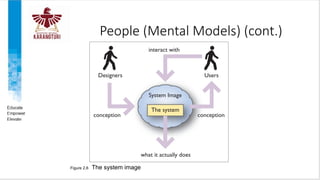
Figure 2.6 The system image
Contexts
Activities always happen in a
context, so there is a need to
analyze the two together.
Three useful types of context
are distinguishable: the
organizational context, the
social context and the physical
circumstances under which the
activity takes place.
Context can be a difficult term.
Sometimes it is useful to see
context as surrounding an
activity;
The physical environment in
which an activity happens is
important. For example, the sun
shining on an ATM display may
make it unreadable.
The social context within which
the activity takes place is also
important. A supportive
environment will offer plenty of
help for the activity
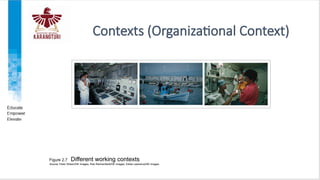
The organizational context
(Figure 2.7) is important as
changes in technology often
alter communication and power
structures and may have effects
on jobs, such as deskilling.
Contexts (Organizational Context)
Figure 2.7 Different working contexts
Source: Peter Wilson/DK Images; Rob Reichenfield/DK Images; Eddie Lawrence/DK Images
Technologies
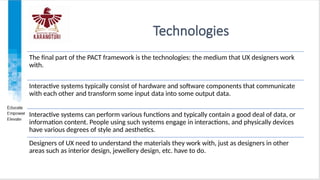
The final part of the PACT framework is the technologies: the medium that UX designers work
with.
Interactive systems typically consist of hardware and software components that communicate
with each other and transform some input data into some output data.
Interactive systems can perform various functions and typically contain a good deal of data, or
information content. People using such systems engage in interactions, and physically devices
have various degrees of style and aesthetics.
Designers of UX need to understand the materials they work with, just as designers in other
areas such as interior design, jewellery design, etc. have to do.
Technologies (Input)
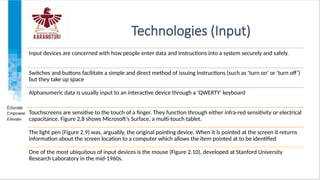
Input devices are concerned with how people enter data and instructions into a system securely and safely.
Switches and buttons facilitate a simple and direct method of issuing instructions (such as ‘turn on’ or ‘turn off’)
but they take up space
Alphanumeric data is usually input to an interactive device through a ‘QWERTY’ keyboard
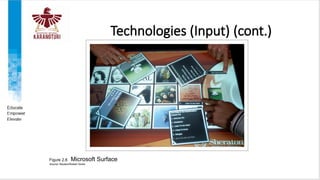
Touchscreens are sensitive to the touch of a finger. They function through either infra-red sensitivity or electrical
capacitance. Figure 2.8 shows Microsoft’s Surface, a multi-touch tablet.
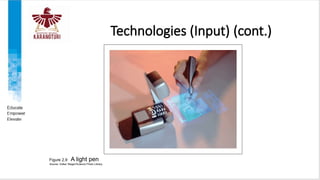
The light pen (Figure 2.9) was, arguably, the original pointing device. When it is pointed at the screen it returns
information about the screen location to a computer which allows the item pointed at to be identified
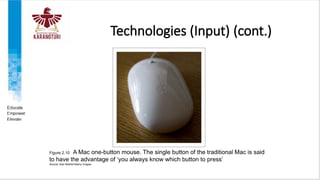
One of the most ubiquitous of input devices is the mouse (Figure 2.10), developed at Stanford University
Research Laboratory in the mid-1960s.
Technologies (Input) (cont.)
Figure 2.8 Microsoft Surface
Source: Reuters/Robert Sorbo
Technologies (Input) (cont.)
Figure 2.9 A light pen
Source: Volker Steger/Science Photo Library
Technologies (Input) (cont.)
Figure 2.10 A Mac one-button mouse. The single button of the traditional Mac is said
to have the advantage of ‘you always know which button to press’
Source: Alan Mather/Alamy Images
Technologies (Input) (cont.)
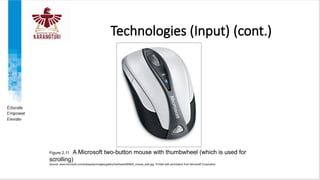
The mouse has become the default pointing device. More contemporary mouse design includes a wheel (see Figure
2.11) for scrolling through documents or web pages. A mouse may be cordless, using infra-red to communicate with
the host computer.
In 2009 Apple introduced the ‘magic mouse’, which combined traditional mouse functions with multi-touch capability,
allowing a range of new touch gestures for interaction.
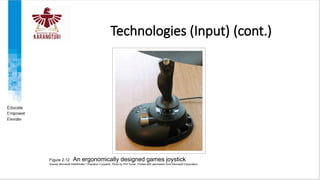
A joystick (Figure 2.12) is a handle which pivots from a central point. Viewing the joystick from above, it may be moved
north, south, east and west (and all points between) to control an on-screen pointer, spaceship or any other on-screen
object.
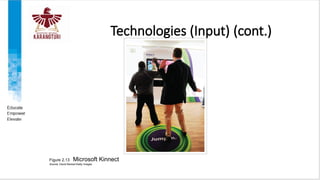
Other systems, notably the Microsoft Kinect, recognize gestures through tracking limb and body movements by
attaching sensors to the limb or by using cameras (Figure 2.13).
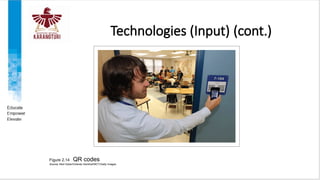
Other forms of input include quick response (QR) codes and augmented-reality (AR) fiducial markers (Figure 2.14). QR
codes are used by a general-purpose scanning app on a phone to connect the phone to a website, or to execute a
short sequence
Technologies (Input) (cont.)
Figure 2.11 A Microsoft two-button mouse with thumbwheel (which is used for
scrolling)
Source: www.microsoft.com/presspass/images/gallery/hardware/BNMS_mouse_web.jpg. Printed with permission from Microsoft Corporation
Technologies (Input) (cont.)
Figure 2.12 An ergonomically designed games joystick
Source: Microsoft SideWinder ®
Precision 2 joystick. Photo by Phil Turner. Printed with permission from Microsoft Corporation
Technologies (Input) (cont.)
Figure 2.13 Microsoft Kinnect
Source: David Becker/Getty Images
Technologies (Input) (cont.)
Figure 2.14 QR codes
Source: Red Huber/Orlando Sentinel/MCT/Getty Images
Technologies (Output)
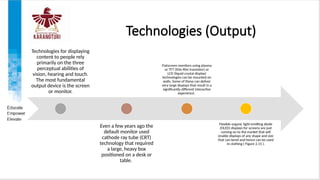
Technologies for displaying
content to people rely
primarily on the three
perceptual abilities of
vision, hearing and touch.
The most fundamental
output device is the screen
or monitor.
Even a few years ago the
default monitor used
cathode ray tube (CRT)
technology that required
a large, heavy box
positioned on a desk or
table.
Flatscreen monitors using plasma
or TFT (thin-film transistor) or
LCD (liquid crystal display)
technologies can be mounted on
walls. Some of these can deliver
very large displays that result in a
significantly different interactive
experience.
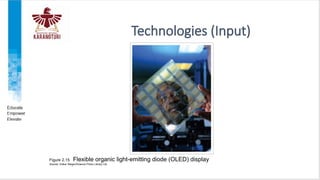
Flexible organic light-emitting diode
(OLED) displays for screens are just
coming on to the market that will
enable displays of any shape and size
that can bend and hence can be used
in clothing ( Figure 2.15 ).
Technologies (Input)
Figure 2.15 Flexible organic light-emitting diode (OLED) display
Source: Volker Steger/Science Photo Library Ltd
Technologies (Output) (cont.)
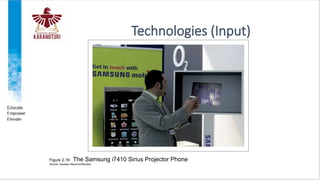
One way past the problems with restrictive display ‘real estate’ is to use a data
projector (Figure 2.16). While the resolution is usually less than that of a
monitor, the resulting projected image can be huge.
Besides the visual display of content, sound is an important method of output.
Sound is an output medium that is significantly under-used. Speech output is
also an increasingly popular option (e.g. in satellite navigation systems).
A printer is a device that prints text or illustrations on paper, while a plotter
draws pictures or shapes. Several companies have developed three-dimensional
printers.
Technologies (Input)
Figure 2.16 The Samsung i7410 Sirius Projector Phone
Source: Gaustau Nacarino/Reuters
Scooping a problem with PACT
The aim of human-centered UX design is
to arrive at the best combination of the
PACT elements with respect to a
particular domain. Designers want to get
the right mix of technologies to support
the activities being undertaken by people
in different contexts.
A PACT analysis is useful for both analysis
and design activities: understanding the
current situation, seeing where possible
improvements can be made or
envisioning future situations.
To conduct a PACT analysis the designer
simply scopes out the variety of Ps, As, Cs
and Ts that are possible, or likely, in a
domain. This can be done using
brainstorming and other envisionment
techniques and by working with people
through observations, interviews and
workshops. There are many techniques
for this.
A PACT analysis is also useful for
developing personas and scenarios. The
designer should look for trade-offs
between combinations of PACT and think
about how these might affect design
REFERENCES
• Benyon, David. (2019). Designing User Experience: A guide to HCI, UX
and interaction design (4th Edition). 04. Pearson. United Kingdom.
ISBN-13: 978-1292155517. Chapter 1 and 2
20210530160355_ISYS6601 - Week 1 - Session 2.pptx

20210530160355_ISYS6601 - Week 1 - Session 2.pptx

  • 1.
    User Experience Researchand Design Week 2 Introduction to User Experience
  • 2.
    LEARNING OUTCOMES • LO1:Describe the essentials of designing user experience
  • 3.
    OUTLINE • The varietyof UX • The concerns of UX • The skills of the UX Designer • PACT : Framework for designing UX • Scoping a problem with PACT
  • 4.
  • 5.
    Introduction to UserExperience UX is concerned with developing high-quality interactive systems, products and services that fit with people and their ways of living. Computing and communication devices are embedded in all sorts of everyday devices such as washing machines and televisions, ticket machines and jewelry. No self-respecting exhibition, museum or library is without its interactive component. We carry and wear technologies that are far more powerful than the computers of just a few years ago. There are websites, online communities, apps for mobile phones and tablets, and all manner of other interactive devices and services that need developing. UX is about all of this.
  • 6.
    The Variety ofUX UX has developed over the years from work in HCI and interaction design into the central focus of much design work. UX draws upon many different design disciplines. UX designers need to know about people, technologies, the activities people want to undertake and the contexts in which those activities occur. UX is necessary if we are to have safe, effective, ethical and sustainable design.
  • 7.
    The variety ofinteractive systems Designing interactive systems is concerned with many different types of product. It is about designing software systems that will run on a computer at work. It is about designing websites, games, interactive products such as MP3 players, digital cameras and applications for tablet PCs (personal computers). It is about designing whole environments in which phones, tablets, laptop computers, digital projectors and other devices and services communicate with one another and through which people interact with one another. It is about designing interactive systems, products and services for the home, for work or to support communities.
  • 8.
    The Variety ofUX Figure 1.1 iPhone Source: Hannah Gal/Science Photo Library
  • 9.
    Figure 1.5 iRobo-Q domestic toy robot Source: Getty Images/ChinaFotoPress The Variety of UX (cont.)
  • 10.
    The Variety ofUX (cont.) Figure 1.6 Facebook Source: Facebook, Inc.
  • 11.
  • 12.
    The Concern ofUX Design • What is design and how should you do it? Technologies • Interactive systems, products, devices, and components • UX designer needs to know about technologies People • UX designer needs to consider who will use the systems and services and whose lives they would like to make better through their designs. Activities and Contexts • UX is about what people want to do, about their goals, feelings and achievements. • UX need to consider the contexts within which those activities take place.
  • 13.
    People and Technologies View Peopleare Machines are Machine-centred Vague Precise Disorganized Orderly Distractible Undistractible Emotional Unemotional Illogical Logical People-centred Creative Dumb Compliant Rigid Attentive to change Insensitive to change Resourceful Unimaginative Able to make flexible decisions based on content Constrained to make consistent decisions
  • 14.
    The Interface The interfaceto an interactive system or service, also called the user interface (UI), is all those parts of the system with which people come into contact, physically, perceptually and conceptually : Physically we might interact with a device by pressing buttons or moving a finger over a touch-sensitive screen. The interactive device might respond by providing feedback through the pressure of the button or changing a display in response to a swipe. Perceptually the device displays things on a screen which we can see, makes noises which we can hear or behaves in a way we can feel. Conceptually we interact with a device by trying to work out what it does and what we should be doing. The device provides messages and other content designed to help us do this.
  • 15.
    The Interface (cont.) UXis not just a question of designing interfaces, however. The whole human–device ecology needs to be considered, as does the human–human interaction that is often enabled through such systems. Increasingly, interactive systems consist of many interconnected devices, some worn by people, some embedded in the fabric of buildings, some carried. UX designers are concerned with connecting people through devices and channels; they need to consider the whole environment they are creating.
  • 16.
    The Interface (cont.) Figure1.7 Various user interfaces: remote control; microwave; palmtop; and Xbox controller Source: (a) Fujitsu; (b) © D. Hurst/Alamy Images; (c) Gareth Boden/Pearson Education Ltd. (d) Microsoft Limited
  • 17.
    The skills ofthe UX Designer
  • 18.
    The Skills ofUX Designer • Study and understand the activities, goals and aspirations of people and the contexts within which some technology might prove useful and hence generate requirements for technologies (sometimes called ‘user research’) • Know the possibilities offered by technologies • Create technological solutions that fit in with people, the activities they want to undertake and the contexts in which those activities occur (sometimes called ‘ideation’) • Evaluate alternative designs and iterate (do more research and more design) until a solution is arrived at. UX designers need a variety of skills and need to understand a variety of disciplines if they are to be able to do their jobs well. They need the mixture of skills that allows them to be able to:
  • 19.
    The Skills ofUX Designer (cont.) • People • Technologies • Activities and contexts • Design Figure 1.10 Disciplines contributing to interactive systems design
  • 20.
    The Skills ofUX Designer (cont.)
  • 21.
    Discussion Spend some timebrowsing the websites of corporations such as IDEO, Sony and Apple. Do not look just at the design of the site (though that can be useful), look at the products they are talking about and the philosophy of their design approach. Collect together your favourites and be prepared to spend time discussing them with your colleagues. Think of the whole range of issues about the site: what it looks like, how easy it is to use, how relevant the content of the site is, how clearly the content is organized, what the overall ‘feel’ of the site is.
  • 22.
    PACT : Frameworkfor designing UX
  • 23.
    PACT: a frameworkfor designing interactive systems • People use technologies to undertake activities in contexts. For example, teenagers user smartphones to send text messages to their friends while sitting on a bus. Secretaries use MS Word to write documents in a firm of solicitors. • Figure 2.1 shows how activities establish requirements for technologies that in turn offer opportunities that change the nature of activities. Figure 2.1 Activities and technologies Source: Based on Carroll (2002), Figure 3.1, p. 68
  • 24.
    PACT: a frameworkfor designing interactive systems (cont.) Figure 2.2 The changing nature of telephoning activity as technology advances Source: Press Association Images; Susanna Price/DK Images; Mike van der Wolk/Pearson Education Ltd.
  • 25.
    PACT: a frameworkfor designing interactive systems (cont.) • Physical differences (ergonomics) • Psychological differences • Mental models • Social differences • Attitudinal differences People Activities • Physical Environment • Social Context • Organizational context Context • Input • Output • Communication • Content Technologies
  • 26.
    People (Ergonomics) Figure 2.3Metro ticket machine Source: Jules Selmes/Pearson Education
  • 27.
    People (Ergonomics) (cont.) Figure2.4 An ergonomic keyboard Source: Microsoft Natural Multimedia Keyboard from www/microsoft.com/press/gallery/hardware/NaturalMultiMedia Keyboard.jpg © 2004 66Microsoft Corporation. All rights reserved. Printed with permission from Microsoft Corporation
  • 28.
    People (Mental Models)(cont.) Figure 2.6 The system image
  • 29.
    Contexts Activities always happenin a context, so there is a need to analyze the two together. Three useful types of context are distinguishable: the organizational context, the social context and the physical circumstances under which the activity takes place. Context can be a difficult term. Sometimes it is useful to see context as surrounding an activity; The physical environment in which an activity happens is important. For example, the sun shining on an ATM display may make it unreadable. The social context within which the activity takes place is also important. A supportive environment will offer plenty of help for the activity The organizational context (Figure 2.7) is important as changes in technology often alter communication and power structures and may have effects on jobs, such as deskilling.
  • 30.
    Contexts (Organizational Context) Figure2.7 Different working contexts Source: Peter Wilson/DK Images; Rob Reichenfield/DK Images; Eddie Lawrence/DK Images
  • 31.
    Technologies The final partof the PACT framework is the technologies: the medium that UX designers work with. Interactive systems typically consist of hardware and software components that communicate with each other and transform some input data into some output data. Interactive systems can perform various functions and typically contain a good deal of data, or information content. People using such systems engage in interactions, and physically devices have various degrees of style and aesthetics. Designers of UX need to understand the materials they work with, just as designers in other areas such as interior design, jewellery design, etc. have to do.
  • 32.
    Technologies (Input) Input devicesare concerned with how people enter data and instructions into a system securely and safely. Switches and buttons facilitate a simple and direct method of issuing instructions (such as ‘turn on’ or ‘turn off’) but they take up space Alphanumeric data is usually input to an interactive device through a ‘QWERTY’ keyboard Touchscreens are sensitive to the touch of a finger. They function through either infra-red sensitivity or electrical capacitance. Figure 2.8 shows Microsoft’s Surface, a multi-touch tablet. The light pen (Figure 2.9) was, arguably, the original pointing device. When it is pointed at the screen it returns information about the screen location to a computer which allows the item pointed at to be identified One of the most ubiquitous of input devices is the mouse (Figure 2.10), developed at Stanford University Research Laboratory in the mid-1960s.
  • 33.
    Technologies (Input) (cont.) Figure2.8 Microsoft Surface Source: Reuters/Robert Sorbo
  • 34.
    Technologies (Input) (cont.) Figure2.9 A light pen Source: Volker Steger/Science Photo Library
  • 35.
    Technologies (Input) (cont.) Figure2.10 A Mac one-button mouse. The single button of the traditional Mac is said to have the advantage of ‘you always know which button to press’ Source: Alan Mather/Alamy Images
  • 36.
    Technologies (Input) (cont.) Themouse has become the default pointing device. More contemporary mouse design includes a wheel (see Figure 2.11) for scrolling through documents or web pages. A mouse may be cordless, using infra-red to communicate with the host computer. In 2009 Apple introduced the ‘magic mouse’, which combined traditional mouse functions with multi-touch capability, allowing a range of new touch gestures for interaction. A joystick (Figure 2.12) is a handle which pivots from a central point. Viewing the joystick from above, it may be moved north, south, east and west (and all points between) to control an on-screen pointer, spaceship or any other on-screen object. Other systems, notably the Microsoft Kinect, recognize gestures through tracking limb and body movements by attaching sensors to the limb or by using cameras (Figure 2.13). Other forms of input include quick response (QR) codes and augmented-reality (AR) fiducial markers (Figure 2.14). QR codes are used by a general-purpose scanning app on a phone to connect the phone to a website, or to execute a short sequence
  • 37.
    Technologies (Input) (cont.) Figure2.11 A Microsoft two-button mouse with thumbwheel (which is used for scrolling) Source: www.microsoft.com/presspass/images/gallery/hardware/BNMS_mouse_web.jpg. Printed with permission from Microsoft Corporation
  • 38.
    Technologies (Input) (cont.) Figure2.12 An ergonomically designed games joystick Source: Microsoft SideWinder ® Precision 2 joystick. Photo by Phil Turner. Printed with permission from Microsoft Corporation
  • 39.
    Technologies (Input) (cont.) Figure2.13 Microsoft Kinnect Source: David Becker/Getty Images
  • 40.
    Technologies (Input) (cont.) Figure2.14 QR codes Source: Red Huber/Orlando Sentinel/MCT/Getty Images
  • 41.
    Technologies (Output) Technologies fordisplaying content to people rely primarily on the three perceptual abilities of vision, hearing and touch. The most fundamental output device is the screen or monitor. Even a few years ago the default monitor used cathode ray tube (CRT) technology that required a large, heavy box positioned on a desk or table. Flatscreen monitors using plasma or TFT (thin-film transistor) or LCD (liquid crystal display) technologies can be mounted on walls. Some of these can deliver very large displays that result in a significantly different interactive experience. Flexible organic light-emitting diode (OLED) displays for screens are just coming on to the market that will enable displays of any shape and size that can bend and hence can be used in clothing ( Figure 2.15 ).
  • 42.
    Technologies (Input) Figure 2.15Flexible organic light-emitting diode (OLED) display Source: Volker Steger/Science Photo Library Ltd
  • 43.
    Technologies (Output) (cont.) Oneway past the problems with restrictive display ‘real estate’ is to use a data projector (Figure 2.16). While the resolution is usually less than that of a monitor, the resulting projected image can be huge. Besides the visual display of content, sound is an important method of output. Sound is an output medium that is significantly under-used. Speech output is also an increasingly popular option (e.g. in satellite navigation systems). A printer is a device that prints text or illustrations on paper, while a plotter draws pictures or shapes. Several companies have developed three-dimensional printers.
  • 44.
    Technologies (Input) Figure 2.16The Samsung i7410 Sirius Projector Phone Source: Gaustau Nacarino/Reuters
  • 45.
  • 46.
    Scooping a problemwith PACT The aim of human-centered UX design is to arrive at the best combination of the PACT elements with respect to a particular domain. Designers want to get the right mix of technologies to support the activities being undertaken by people in different contexts. A PACT analysis is useful for both analysis and design activities: understanding the current situation, seeing where possible improvements can be made or envisioning future situations. To conduct a PACT analysis the designer simply scopes out the variety of Ps, As, Cs and Ts that are possible, or likely, in a domain. This can be done using brainstorming and other envisionment techniques and by working with people through observations, interviews and workshops. There are many techniques for this. A PACT analysis is also useful for developing personas and scenarios. The designer should look for trade-offs between combinations of PACT and think about how these might affect design
  • 47.
    REFERENCES • Benyon, David.(2019). Designing User Experience: A guide to HCI, UX and interaction design (4th Edition). 04. Pearson. United Kingdom. ISBN-13: 978-1292155517. Chapter 1 and 2