In this module we will discuss :-
1. How to download Paytm Mall seller app?
2. How to register as a seller on Paytm Mall?
3. How can you view your profile?
Seller app- Registration
with Paytm Mall Shop
How to download Paytm Mall seller app?
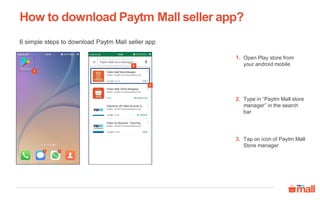
6 simple steps to download Paytm Mall seller app
1
Open Play store from
your android mobile
Type in “Paytm Mall store
manager” in the search
bar
1.
2.
2
3
Tap on icon of Paytm Mall
Store manager
3.
4
5
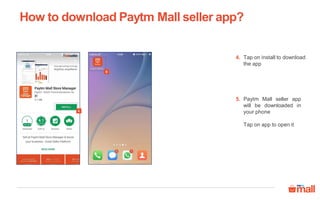
Tap on install to download
the app
Paytm Mall seller app
will be downloaded in
your phone
Tap on app to open it
4.
5.
How to download Paytm Mall seller app?
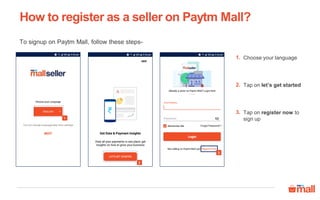
To signup on Paytm Mall, follow these steps-
Choose your language
Tap on let’s get started
Tap on register now to
sign up
1.
2.
1
2
3
3.
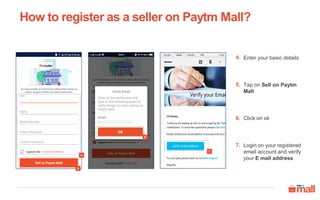
How to register as a seller on Paytm Mall?
Enter your basic details4.
Tap on Sell on Paytm
Mall
5.
Login on your registered
email account and verify
your E mail address
7.
4
7
5
Click on ok6.
How to register as a seller on Paytm Mall?
6
8
9
How to register as a seller on Paytm Mall?
10
12
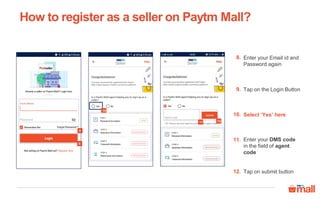
Enter your Email id and
Password again
8.
Tap on the Login Button9.
Select ‘Yes’ here10.
Tap on submit button12.
Enter your DMS code
in the field of agent
code
11.
11
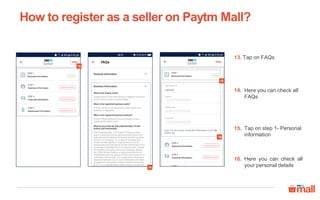
Tap on FAQs13.
Here you can check all
FAQs
14.
Tap on step 1- Personal
information
15.
How to register as a seller on Paytm Mall?
16
15
13
14
Here you can check all
your personal details
16.
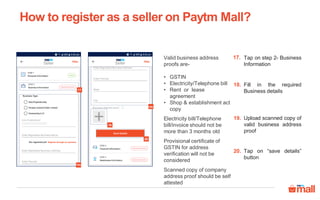
Tap on step 2- Business
Information
17.
Fill in the required
Business details
18.
Upload scanned copy of
valid business address
proof
19.
How to register as a seller on Paytm Mall?
18a
17
20
18b
19
Tap on “save details”
button
20.
Valid business address
proofs are-
• GSTIN
• Electricity/Telephone bill
• Rent or lease
agreement
• Shop & establishment act
copy
Electricity bill/Telephone
bill/invoice should not be
more than 3 months old
Provisional certificate of
GSTIN for address
verification will not be
considered
Scanned copy of company
address proof should be self
attested
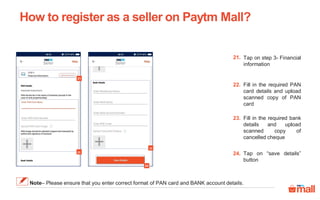
Tap on step 3- Financial
information
21.
Fill in the required PAN
card details and upload
scanned copy of PAN
card
22.
Fill in the required bank
details and upload
scanned copy of
cancelled cheque
23.
How to register as a seller on Paytm Mall?
21
22
23
24
Tap on “save details”
button
24.
Note– Please ensure that you enter correct format of PAN card and BANK account details.
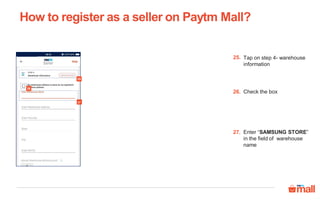
Tap on step 4- warehouse
information
25.
Check the box26.
Enter “SAMSUNG STORE”
in the field of warehouse
name
27.
How to register as a seller on Paytm Mall?
25
27
26
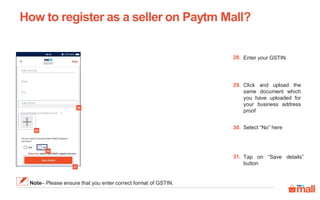
Enter your GSTIN28.
Click and upload the
same document which
you have uploaded for
your business address
proof
29.
Tap on “Save details”
button
31.
Select “No” here30.
How to register as a seller on Paytm Mall?
30
31
28
Note– Please ensure that you enter correct format of GSTIN.
29
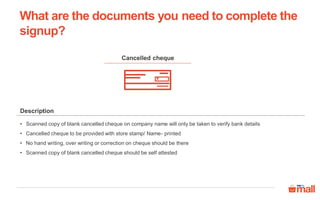
Documents required
Cancelled cheque
Description
• Scanned copy of blank cancelled cheque on company name will only be taken to verify bank details
• Cancelled cheque to be provided with store stamp/ Name- printed
• No hand writing, over writing or correction on cheque should be there
• Scanned copy of blank cancelled cheque should be self attested
What are the documents you need to complete the
signup?
PAN card
• PAN card stands for Permanent Account Number, it’s mandatory for financial transactions
• Scanned copy of PAN card is mandatory for verification
• Photocopy/online snapshot of PAN card will not be considered
• Scanned copy of PAN card should be self attested
Description
What are the documents you need to complete the
signup?
Company address proof
• Address proof is a document which is required to verify your store/business/company address details
• Scanned copy of GSTIN, Electricity/Telephone bill, rent or lease agreement, Shop & establishment act copy
• Electricity bill/Telephone bill/invoice should not be more than 3 months old
• Provisional certificate of GSTIN for address verification will not be considered
• Scanned copy of company address proof should be self attested
Description
What are the documents you need to complete the
signup?
Warehouse address proof
• Warehouse address proof is a document which is required to verify your warehouse address details
• In case warehouse is in different state, GSTIN certificate of the new warehouse state should be provided
• However in case of exempted categories, seller can provide Electricity/Telephone bill, rent invoice, lease agreement
• Electricity bill/Telephone bill/rent invoice should not be more than 3 months old
• Scanned copy of warehouse address proof should be self attested
Description
What are the documents you need to complete the
signup?
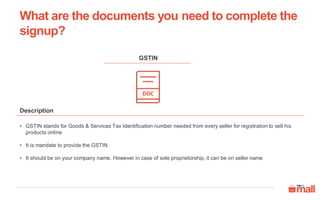
• GSTIN stands for Goods & Services Tax Identification number needed from every seller for registration to sell his
products online
• It is mandate to provide the GSTIN
• It should be on your company name. However in case of sole proprietorship, it can be on seller name
Description
GSTIN
What are the documents you need to complete the
signup?
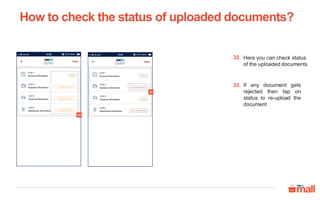
Here you can check status
of the uploaded documents
32.
If any document gets
rejected then tap on
status to re-upload the
document
33.
How to check the status of uploaded documents?
32
33
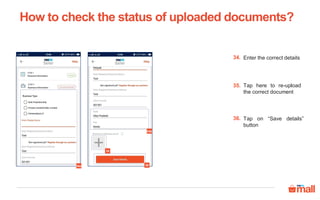
Enter the correct details34.
Tap on “Save details”
button
36.
Tap here to re-upload
the correct document
35.
How to check the status of uploaded documents?
34a 36
34b
35
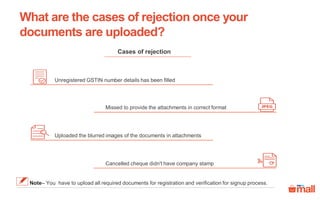
What are the cases of rejection once your
documents are uploaded?
Note– You have to upload all required documents for registration and verification for signup process.
Cases of rejection
Missed to provide the attachments in correct format
Cancelled cheque didn't have company stamp
Uploaded the blurred images of the documents in attachments
Unregistered GSTIN number details has been filled
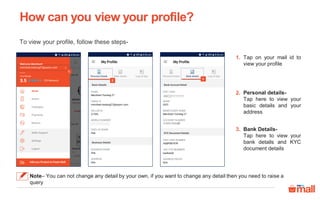
Tap on your mail id to
view your profile
Personal details-
Tap here to view your
basic details and your
address
Bank Details-
Tap here to view your
bank details and KYC
document details
1.
2.
1
2
3
3.
How can you view your profile?
Note– You can not change any detail by your own, if you want to change any detail then you need to raise a
query
To view your profile, follow these steps-
ABCD1111111
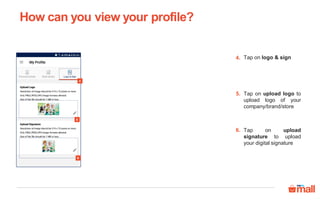
Tap on logo & sign
Tap on upload logo to
upload logo of your
company/brand/store
Tap on upload
signature to upload
your digital signature
4.
5.
4
5
6
6.
How can you view your profile?
Thanks everyone!
For any query please raise a ticket on support

Seller app- registration with paytm mall shop_androidversion

  • 1.
    In this modulewe will discuss :- 1. How to download Paytm Mall seller app? 2. How to register as a seller on Paytm Mall? 3. How can you view your profile? Seller app- Registration with Paytm Mall Shop
  • 2.
    How to downloadPaytm Mall seller app? 6 simple steps to download Paytm Mall seller app 1 Open Play store from your android mobile Type in “Paytm Mall store manager” in the search bar 1. 2. 2 3 Tap on icon of Paytm Mall Store manager 3.
  • 3.
    4 5 Tap on installto download the app Paytm Mall seller app will be downloaded in your phone Tap on app to open it 4. 5. How to download Paytm Mall seller app?
  • 4.
    To signup onPaytm Mall, follow these steps- Choose your language Tap on let’s get started Tap on register now to sign up 1. 2. 1 2 3 3. How to register as a seller on Paytm Mall?
  • 5.
    Enter your basicdetails4. Tap on Sell on Paytm Mall 5. Login on your registered email account and verify your E mail address 7. 4 7 5 Click on ok6. How to register as a seller on Paytm Mall? 6
  • 6.
    8 9 How to registeras a seller on Paytm Mall? 10 12 Enter your Email id and Password again 8. Tap on the Login Button9. Select ‘Yes’ here10. Tap on submit button12. Enter your DMS code in the field of agent code 11. 11
  • 7.
    Tap on FAQs13. Hereyou can check all FAQs 14. Tap on step 1- Personal information 15. How to register as a seller on Paytm Mall? 16 15 13 14 Here you can check all your personal details 16.
  • 8.
    Tap on step2- Business Information 17. Fill in the required Business details 18. Upload scanned copy of valid business address proof 19. How to register as a seller on Paytm Mall? 18a 17 20 18b 19 Tap on “save details” button 20. Valid business address proofs are- • GSTIN • Electricity/Telephone bill • Rent or lease agreement • Shop & establishment act copy Electricity bill/Telephone bill/invoice should not be more than 3 months old Provisional certificate of GSTIN for address verification will not be considered Scanned copy of company address proof should be self attested
  • 9.
    Tap on step3- Financial information 21. Fill in the required PAN card details and upload scanned copy of PAN card 22. Fill in the required bank details and upload scanned copy of cancelled cheque 23. How to register as a seller on Paytm Mall? 21 22 23 24 Tap on “save details” button 24. Note– Please ensure that you enter correct format of PAN card and BANK account details.
  • 10.
    Tap on step4- warehouse information 25. Check the box26. Enter “SAMSUNG STORE” in the field of warehouse name 27. How to register as a seller on Paytm Mall? 25 27 26
  • 11.
    Enter your GSTIN28. Clickand upload the same document which you have uploaded for your business address proof 29. Tap on “Save details” button 31. Select “No” here30. How to register as a seller on Paytm Mall? 30 31 28 Note– Please ensure that you enter correct format of GSTIN. 29
  • 12.
  • 13.
    Cancelled cheque Description • Scannedcopy of blank cancelled cheque on company name will only be taken to verify bank details • Cancelled cheque to be provided with store stamp/ Name- printed • No hand writing, over writing or correction on cheque should be there • Scanned copy of blank cancelled cheque should be self attested What are the documents you need to complete the signup?
  • 14.
    PAN card • PANcard stands for Permanent Account Number, it’s mandatory for financial transactions • Scanned copy of PAN card is mandatory for verification • Photocopy/online snapshot of PAN card will not be considered • Scanned copy of PAN card should be self attested Description What are the documents you need to complete the signup?
  • 15.
    Company address proof •Address proof is a document which is required to verify your store/business/company address details • Scanned copy of GSTIN, Electricity/Telephone bill, rent or lease agreement, Shop & establishment act copy • Electricity bill/Telephone bill/invoice should not be more than 3 months old • Provisional certificate of GSTIN for address verification will not be considered • Scanned copy of company address proof should be self attested Description What are the documents you need to complete the signup?
  • 16.
    Warehouse address proof •Warehouse address proof is a document which is required to verify your warehouse address details • In case warehouse is in different state, GSTIN certificate of the new warehouse state should be provided • However in case of exempted categories, seller can provide Electricity/Telephone bill, rent invoice, lease agreement • Electricity bill/Telephone bill/rent invoice should not be more than 3 months old • Scanned copy of warehouse address proof should be self attested Description What are the documents you need to complete the signup?
  • 17.
    • GSTIN standsfor Goods & Services Tax Identification number needed from every seller for registration to sell his products online • It is mandate to provide the GSTIN • It should be on your company name. However in case of sole proprietorship, it can be on seller name Description GSTIN What are the documents you need to complete the signup?
  • 18.
    Here you cancheck status of the uploaded documents 32. If any document gets rejected then tap on status to re-upload the document 33. How to check the status of uploaded documents? 32 33
  • 19.
    Enter the correctdetails34. Tap on “Save details” button 36. Tap here to re-upload the correct document 35. How to check the status of uploaded documents? 34a 36 34b 35
  • 20.
    What are thecases of rejection once your documents are uploaded? Note– You have to upload all required documents for registration and verification for signup process. Cases of rejection Missed to provide the attachments in correct format Cancelled cheque didn't have company stamp Uploaded the blurred images of the documents in attachments Unregistered GSTIN number details has been filled
  • 21.
    Tap on yourmail id to view your profile Personal details- Tap here to view your basic details and your address Bank Details- Tap here to view your bank details and KYC document details 1. 2. 1 2 3 3. How can you view your profile? Note– You can not change any detail by your own, if you want to change any detail then you need to raise a query To view your profile, follow these steps- ABCD1111111
  • 22.
    Tap on logo& sign Tap on upload logo to upload logo of your company/brand/store Tap on upload signature to upload your digital signature 4. 5. 4 5 6 6. How can you view your profile?
  • 23.
    Thanks everyone! For anyquery please raise a ticket on support