Selenium WorkshopSelenium Workshop
By Atirek GuptaBy Atirek Gupta
Out of scopeOut of scope
 When and why to do functional test automation.
 Test specification.
 Test data management.
 Detailed architecture of Browser.
 Going deeper into Java Script
 Build tools, CI and VCS
AgendaAgenda
 Origin of Selenium
 Understanding same origin policy
 Interacting with HTML using JavaScript
 How Selenium-RC and WebDriver works
 Locators
 More about Selenium and WebDriver
 Overview of how browser works
 Exploring WebDriver API’s with examples
 Building test automation framework using Java and WebDriver
Origin of SeleniumOrigin of Selenium
 Selenium first came to life in 2004.
 Selenium was written in pure JavaScript.
 These scripts are injected into the web page, thus
simulating user activity.
 Limitations due to browser security policy called
SOP(Same origin policy).
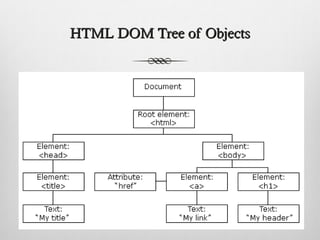
HTML DOM Tree of ObjectsHTML DOM Tree of Objects
Interacting with HTML using JavaScriptInteracting with HTML using JavaScript
 JavaScript is a scripting language designed primarily
for adding interactivity to Web pages.
 Some JavaScript methods and interaction with browser
e.g.
 document.getElementById(“id”).innerHtml = “Some
text”
 document.getElementById(“id”).click
 Let’s do some hands on.
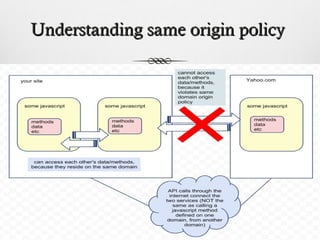
Understanding same origin policyUnderstanding same origin policy
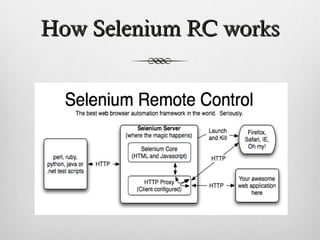
How Selenium RC worksHow Selenium RC works
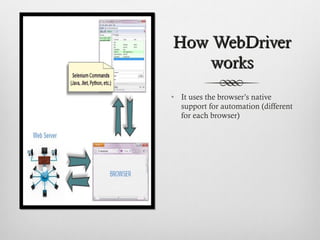
How WebDriverHow WebDriver
worksworks
• It uses the browser’s native
support for automation (different
for each browser)
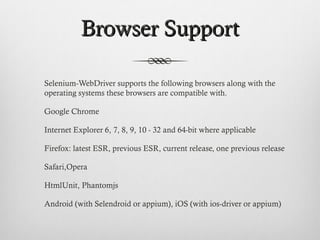
Browser SupportBrowser Support
Selenium-WebDriver supports the following browsers along with the
operating systems these browsers are compatible with.
Google Chrome
Internet Explorer 6, 7, 8, 9, 10 - 32 and 64-bit where applicable
Firefox: latest ESR, previous ESR, current release, one previous release
Safari,Opera
HtmlUnit, Phantomjs
Android (with Selendroid or appium), iOS (with ios-driver or appium)
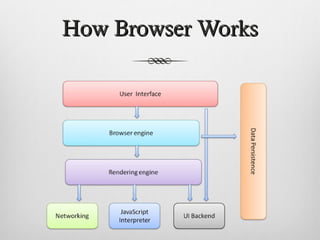
How Browser WorksHow Browser Works
LocatorsLocators
CSS
XPath
More about Selenium-More about Selenium-
WebDriverWebDriver
How does WebDriver know if the page is completely loaded?
When document.readyState is “complete”
More about Selenium-More about Selenium-
WebDriverWebDriver
 What is StaleElementReferenceException
 What causes them?
 Page Refresh
 JavaScript MVC frameworks
 Elements being re-rendered
More about Selenium-More about Selenium-
WebDriverWebDriver
 Can WebDriver execute javascript commands on DOM?
 WebElement element = driver.findElement(By.id("gbqfd"));
 JavascriptExecutor executor = (JavascriptExecutor)driver;
 executor.executeScript("arguments[0].click();", element);
More about Selenium-More about Selenium-
WebDriverWebDriver
 Handling : Explicit and Implicit Waits.
 driver.manage().timeouts().implicitlyWait(10,TimeUnit.SEC
ONDS)
 driver.manage().timeouts().pageLoadTimeout(10,
TimeUnit.SECONDS);
 WebElement element = (new WebDriverWait(driver,10))
.
until(ExpectedConditions.elementToBeClickable(By.Id(“id”))
).click
Hands on with WebDriverHands on with WebDriver
API’sAPI’s
Reference -
http://selenium.googlecode.com/git/docs/api/java/index.html
Key principle for designing /Key principle for designing /
building an Automationbuilding an Automation
Framework?Framework?
 Readable
 Re-Usable
 Maintainable
 Well Abstracted
 Scalable
 Browser support?
 Tests to be run in distributed environment or on one machine?
 …
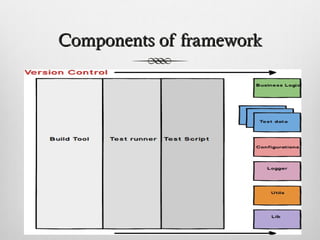
Components of frameworkComponents of framework
Let’s codeLet’s code
Thank YouThank You
Atirek Gupta
atirekg@gmail.com, agupta@thoughtworks.com

Understanding Selenium/RC, Webdriver Architecture and developing the page object test automation framework

  • 1.
    Selenium WorkshopSelenium Workshop ByAtirek GuptaBy Atirek Gupta
  • 2.
    Out of scopeOutof scope  When and why to do functional test automation.  Test specification.  Test data management.  Detailed architecture of Browser.  Going deeper into Java Script  Build tools, CI and VCS
  • 3.
    AgendaAgenda  Origin ofSelenium  Understanding same origin policy  Interacting with HTML using JavaScript  How Selenium-RC and WebDriver works  Locators  More about Selenium and WebDriver  Overview of how browser works  Exploring WebDriver API’s with examples  Building test automation framework using Java and WebDriver
  • 4.
    Origin of SeleniumOriginof Selenium  Selenium first came to life in 2004.  Selenium was written in pure JavaScript.  These scripts are injected into the web page, thus simulating user activity.  Limitations due to browser security policy called SOP(Same origin policy).
  • 5.
    HTML DOM Treeof ObjectsHTML DOM Tree of Objects
  • 6.
    Interacting with HTMLusing JavaScriptInteracting with HTML using JavaScript  JavaScript is a scripting language designed primarily for adding interactivity to Web pages.  Some JavaScript methods and interaction with browser e.g.  document.getElementById(“id”).innerHtml = “Some text”  document.getElementById(“id”).click  Let’s do some hands on.
  • 7.
    Understanding same originpolicyUnderstanding same origin policy
  • 8.
    How Selenium RCworksHow Selenium RC works
  • 9.
    How WebDriverHow WebDriver worksworks •It uses the browser’s native support for automation (different for each browser)
  • 10.
    Browser SupportBrowser Support Selenium-WebDriversupports the following browsers along with the operating systems these browsers are compatible with. Google Chrome Internet Explorer 6, 7, 8, 9, 10 - 32 and 64-bit where applicable Firefox: latest ESR, previous ESR, current release, one previous release Safari,Opera HtmlUnit, Phantomjs Android (with Selendroid or appium), iOS (with ios-driver or appium)
  • 11.
    How Browser WorksHowBrowser Works
  • 12.
  • 13.
    More about Selenium-Moreabout Selenium- WebDriverWebDriver How does WebDriver know if the page is completely loaded? When document.readyState is “complete”
  • 14.
    More about Selenium-Moreabout Selenium- WebDriverWebDriver  What is StaleElementReferenceException  What causes them?  Page Refresh  JavaScript MVC frameworks  Elements being re-rendered
  • 15.
    More about Selenium-Moreabout Selenium- WebDriverWebDriver  Can WebDriver execute javascript commands on DOM?  WebElement element = driver.findElement(By.id("gbqfd"));  JavascriptExecutor executor = (JavascriptExecutor)driver;  executor.executeScript("arguments[0].click();", element);
  • 16.
    More about Selenium-Moreabout Selenium- WebDriverWebDriver  Handling : Explicit and Implicit Waits.  driver.manage().timeouts().implicitlyWait(10,TimeUnit.SEC ONDS)  driver.manage().timeouts().pageLoadTimeout(10, TimeUnit.SECONDS);  WebElement element = (new WebDriverWait(driver,10)) . until(ExpectedConditions.elementToBeClickable(By.Id(“id”)) ).click
  • 17.
    Hands on withWebDriverHands on with WebDriver API’sAPI’s Reference - http://selenium.googlecode.com/git/docs/api/java/index.html
  • 18.
    Key principle fordesigning /Key principle for designing / building an Automationbuilding an Automation Framework?Framework?  Readable  Re-Usable  Maintainable  Well Abstracted  Scalable  Browser support?  Tests to be run in distributed environment or on one machine?  …
  • 19.
  • 20.
  • 22.
    Thank YouThank You AtirekGupta atirekg@gmail.com, agupta@thoughtworks.com

Editor's Notes

  • #5 1. Selenium was a tremendous tool, it wasn’t without its drawbacks. Because of its Javascript based automation engine and the security limitations browsers apply to Javascript, different things became impossible to do. 2. Because Selenium was written in pure Javascript, its initial design required developers to host Core and their tests on the same server as the application under test (AUT). 3. There is a java script security restriction (same origin policy) which lets you modify html of page using js only if js also originates from the same domain as html.
  • #6 JavaScript can change all the HTML elements in the page JavaScript can change all the HTML attributes in the page JavaScript can change all the CSS styles in the page JavaScript can remove existing HTML elements and attributes JavaScript can add new HTML elements and attributes JavaScript can react to all existing HTML events in the page JavaScript can create new HTML events in the page
  • #8 Lets understand SOP with some live example.
  • #9 Selenium RC Server acts as a "middleman” Selenium RC Server "injects" a Javascript program called Selenium Core into the browser. Once injected, Selenium Core will start receiving instructions relayed by the RC Server from your test program. Then the instructions are received, Selenium Core will execute them as Javascript commands. The browser will obey the instructions of Selenium Core, and will relay its response to the RC Server. The RC Server will receive the response of the browser and then display the results to you. RC Server will fetch the next instruction from your test script to repeat the whole cycle.
  • #12 user interface: this includes the address bar browser engine: marshals actions between the UI and the rendering engine. rendering engine : responsible for displaying requested content. Internet Explorer uses Trident, Firefox uses Gecko, Safari uses WebKit. Chrome and Opera (from version 15) use Blink, a fork of WebKit. Networking: for network calls such as HTTP requests, UI backend: used for drawing basic widgets like combo boxes JavaScript interpreter. Used to parse and execute JavaScript code. Data Storage: Browsers also support storage mechanisms such as localStorage, IndexedDB, WebSQL and FileSystem. Think of the areas where you need to retest your app in different browsers based on the information you know about different rendering engines
  • #15 Many JavaScript MVC frameworks can update contents of a list or a control by rapidly tearing down and recreating the same element.
  • #20 Build tool: follows a standard design and development process Well-defined process should be established for Team communication, Library versioning and Artifacts creation