9 March, 2006 mark.baker@computer.org
Security Basics
Prof Mark Baker
ACET, University of Reading
Tel: +44 118 378 8615
E-mail: Mark.Baker@computer.org
Web: http://acet.rdg.ac.uk/~mab
9 March, 2006 mark.baker@computer.org
Basic Security - Outline
• Concerns.
• Objectives.
• Basic Definitions
• Security Components:
– Symmetric/asymmetric systems,
– Public Key Encryption.
• Public Key Infrastructure:
– Certificates,
– Signatures.
• Summary.
9 March, 2006 mark.baker@computer.org
Security Concerns
• Unauthorised access to resources.
• Masquerade as authorised user or end system.
• E-mail forgery.
• Malicious attacks.
• Monitoring and capture of network traffic.
• Exploitation of software bugs.
9 March, 2006 mark.baker@computer.org
Contributing Factors
• Increased Internet use:
– Home broadband,
– Greater coverage (wired and wireless):
– More ubiquitous on-line use:
• Education,
• Business,
• Games,
• Shopping…
• Lack of awareness of threats and risks.
• Wide-open network policies.
• Unencrypted network traffic.
• Complexity of security measurements and
administration.
• Software bugs.
• Availability of cracking tools .
9 March, 2006 mark.baker@computer.org
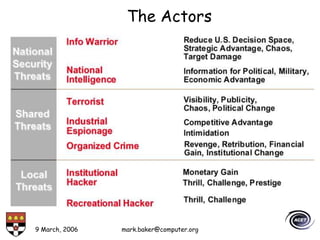
The Actors
9 March, 2006 mark.baker@computer.org
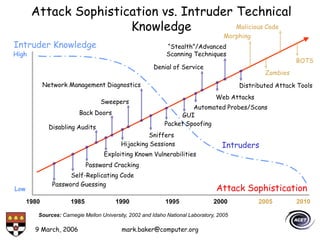
Attack Sophistication vs. Intruder Technical
Knowledge
1980 1985 1990 1995 2000 2005 2010
Automated Probes/Scans
Password Guessing
Self-Replicating Code
Password Cracking
Exploiting Known Vulnerabilities
Disabling Audits
Hijacking Sessions
Sweepers
Sniffers
Distributed Attack Tools
Denial of Service
GUI
Network Management Diagnostics
Web Attacks
“Stealth”/Advanced
Scanning Techniques
High
Low
Intruders
Back Doors
Zombies
BOTS
Morphing
Malicious Code
Attack Sophistication
Intruder Knowledge
Packet Spoofing
Sources: Carnegie Mellon University, 2002 and Idaho National Laboratory, 2005
9 March, 2006 mark.baker@computer.org
Basic Security Terms
• Classic security concerns deal more with data:
– Confidentiality – data only available to those authorised,
– Availability – you can get it when you want it,
– Integrity – data has not been changed.
• Additional concerns deal more with people and
transactions:
– Trust – who you are and what you are authorized to do,
– Non-repudiation – you can’t deny doing something you did,
– Auditability – I can check what you did to the data,
– Reliability – the system does what I want, when I want it to,
– Privacy – within certain limits no one should know who I am or
what I do.
9 March, 2006 mark.baker@computer.org
Basic Security Objectives
• Confidentiality: prevent/detect/deter
improper disclosure of information.
• Integrity: prevent/detect/deter improper
modification of information.
• Availability: prevent/detect/deter improper
denial of access to services.
9 March, 2006 mark.baker@computer.org
Security Terms
Authentication:
• The process by which a person or other entity proves
that it is who (or what) it says it is.
• Want to authenticate the person or entity that you
are dealing before transferring something valuable,
such as information or money, to or from, it.
• Authentication is achieved by presenting some unique
identifying entity to the endpoint that is undertaking
the process:
– An example of this process is the way you authenticate
yourself with an ATM: here you insert your bank card
(something you have) and enter your personal identification
number (PIN, something you know).
9 March, 2006 mark.baker@computer.org
Identification
• Being able to identify yourself to a computer
is absolutely essential:
– ATM, e-banking,
– Access to e-mail, computer accounts,
– Access to personal information (e.g., staff or
student portal).
Non-computer identification
• Bank teller knows you by sight (good).
• Bank teller checks your picture against a photo ID
(dodgy).
• Bank back office compares cheque signature to one on
record (dodgy).
• All examples of biometric identification.
9 March, 2006 mark.baker@computer.org
Computer Identification
• How we identify a human to a computer?
– Username/Passwords (common),
– Token, e.g. ATM card,
– Cryptographic protocols,
– Combinations, e.g. token and password,
– Biometrics, e.g. face recognition, finger prints, and
retina/iris scans.
9 March, 2006 mark.baker@computer.org
Passwords
• Most common identification technique:
– Variants: such as “PIN” (number), memorable date,
mothers maiden name.
• Problem: we are not well-suited to
remembering passwords:
– Especially rarely used ones,
– We can also confuse passwords used in similar
contexts.
9 March, 2006 mark.baker@computer.org
Vulnerabilities
• Users reveal passwords to outsiders.
• Users reuse passwords.
• Users choose “easy to guess” passwords.
• Password observed on entry.
• Password obtained from system files.
Biometric identification
• Passwords are pretty useless at identifying people.
• Can we identify them by their properties?
– Face, handwriting, retina, DNA, voice, signature, fingerprint…
• “How humans identify other humans”.
9 March, 2006 mark.baker@computer.org
Other issues
• Cost:
– Voice recognition is cheap,
– Eye (iris) scanning is expensive.
• User comfort:
– Face recognition is nice (look into camera),
– DNA matching is not (blood/skin sample).
• Theoretical accuracy:
– Iris is unique (determined while an embryo),
– DNA is shared by identical twins,
– Voice can be imitated.
• Excluded population:
– Voice does not work on mute people,
– Fingerprints do not work on amputees,
– DNA works on everyone!
• Variability:
– Dirty fingers, or sick (cold) for voice.
9 March, 2006 mark.baker@computer.org
Security Terms
Authorisation:
• Is the act of providing the rights to perform some
action:
– Typically based on based on what are known as Access Control
Lists (ACLs), which for some set of resources, a list of user
names and their rights are provided.
• For example, the mere possession of a security badge
does not grant you the right to enter a restricted
area, such as the administration room:
– An examples could be a guest list for an event or a door lock
that reads your badge.
9 March, 2006 mark.baker@computer.org
Setting Up Access Rights
• Classify users into groups:
– Patients, doctors, chemist, lab, NHS admin, …
• Classify resources into groups:
– Prescriptions, blood test results, diagnoses, patient contact
details, …
• Classify access rights:
– Read, write, delete, modify, append, …
– Domain specific: number AIDS cases per region.
9 March, 2006 mark.baker@computer.org
Access Control Lists (ACL)
• Specify the access permissions of each group for each
resource (or resource type):
– (doctors, blood-test.db) – read access.
– (lab, blood-test.db) - read, write access.
• Program-specific permissions:
– Allows application-specific restrictions:
• (NHS, blood-test.db, SPSS) – AIDS/region
9 March, 2006 mark.baker@computer.org
Security Terms
Trust:
• Trust is the “assured reliance on the character,
ability, strength, or truth of someone or something”.
• A distributed environment requires explicit
statements of trust, such as:
– “who is trusted to do what”,
– Also obligations of all the parties involved in the trust
relationship.
• Trust percolates through almost every stage of
today’s security infrastructure and can be seen as a
key issue with the world of information assurance.
9 March, 2006 mark.baker@computer.org
Security Terms
Integrity:
• This is the assurance that the data has not changed
since it was written:
– e.g., prevent a potential intruder-in-the-middle from changing
messages.
• Data integrity can be checked using:
– A check-sum, which is a simple error-detection scheme where
each transmitted message is accompanied by a numerical value
based on the number of set bits in the message:
• Checked by the receiving station - if different the receiver can
assume that the message has been garbled.
– Hash functions, any one-way function that reduces variable
sized data to a fixed length “hash code”:
• If the hashes of two documents differ, then the documents
differ.
9 March, 2006 mark.baker@computer.org
Security Terms
Confidentiality:
• This is the act of ensuring no one but authorised
parties (who know some secret) can understand the
data.
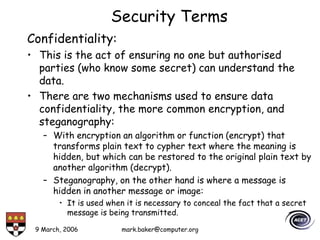
• There are two mechanisms used to ensure data
confidentiality, the more common encryption, and
steganography:
– With encryption an algorithm or function (encrypt) that
transforms plain text to cypher text where the meaning is
hidden, but which can be restored to the original plain text by
another algorithm (decrypt).
– Steganography, on the other hand is where a message is
hidden in another message or image:
• It is used when it is necessary to conceal the fact that a secret
message is being transmitted.
9 March, 2006 mark.baker@computer.org
Security Components
Encryption and Decryption:
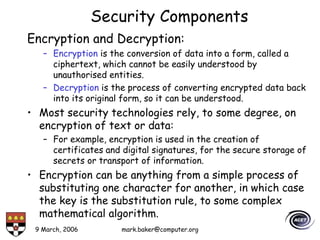
– Encryption is the conversion of data into a form, called a
ciphertext, which cannot be easily understood by
unauthorised entities.
– Decryption is the process of converting encrypted data back
into its original form, so it can be understood.
• Most security technologies rely, to some degree, on
encryption of text or data:
– For example, encryption is used in the creation of
certificates and digital signatures, for the secure storage of
secrets or transport of information.
• Encryption can be anything from a simple process of
substituting one character for another, in which case
the key is the substitution rule, to some complex
mathematical algorithm.
9 March, 2006 mark.baker@computer.org
Security Components
Encryption and Decryption:
• We assume that the more difficult it is to decrypt
the ciphertext, the better.
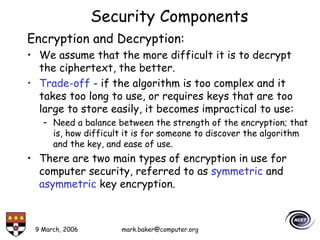
• Trade-off - if the algorithm is too complex and it
takes too long to use, or requires keys that are too
large to store easily, it becomes impractical to use:
– Need a balance between the strength of the encryption; that
is, how difficult it is for someone to discover the algorithm
and the key, and ease of use.
• There are two main types of encryption in use for
computer security, referred to as symmetric and
asymmetric key encryption.
9 March, 2006 mark.baker@computer.org
Symmetric Key
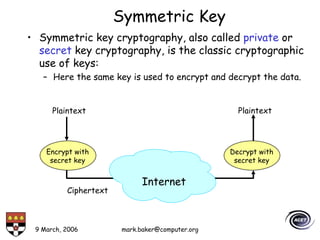
• Symmetric key cryptography, also called private or
secret key cryptography, is the classic cryptographic
use of keys:
– Here the same key is used to encrypt and decrypt the data.
Encrypt with
secret key
Decrypt with
secret key
Plaintext Plaintext
Internet
Ciphertext
9 March, 2006 mark.baker@computer.org
Symmetric Key
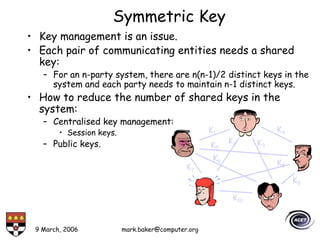
• Key management is an issue.
• Each pair of communicating entities needs a shared
key:
– For an n-party system, there are n(n-1)/2 distinct keys in the
system and each party needs to maintain n-1 distinct keys.
• How to reduce the number of shared keys in the
system:
– Centralised key management:
• Session keys.
– Public keys.
K1 K4
K2 K3
K5
K6
K7
K8
K9
K10
9 March, 2006 mark.baker@computer.org
Asymmetric Keys
• In asymmetric key cryptography, different keys are
used for encrypting and decrypting a message.
• In that case, one key can be made public while the
other is kept private.
• There are advantages to this public-key–private-key
arrangement, often referred to as public key
cryptography:
– The necessity of distributing secret keys to large numbers of
users is eliminated,
– The algorithm can be used for authentication as well as for
creating cipertext.
9 March, 2006 mark.baker@computer.org
Public Key Encryption
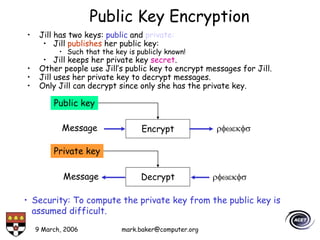
• Jill has two keys: public and private:
• Jill publishes her public key:
• Such that the key is publicly known!
• Jill keeps her private key secret.
• Other people use Jill’s public key to encrypt messages for Jill.
• Jill uses her private key to decrypt messages.
• Only Jill can decrypt since only she has the private key.
Message rfwekfs
Encrypt
Public key
Message rfwekfs
Decrypt
Private key
• Security: To compute the private key from the public key is
assumed difficult.
9 March, 2006 mark.baker@computer.org
Secure Message Exchange Using Asymmetric Keys
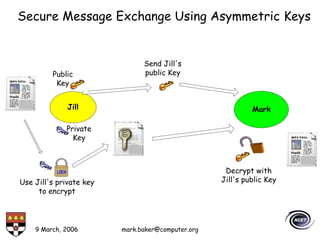
Jill Mark
Send Jill's
public Key
Use Jill's private key
to encrypt
Decrypt with
Jill's public Key
Private
Key
Public
Key
9 March, 2006 mark.baker@computer.org
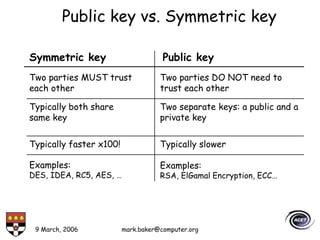
Public key vs. Symmetric key
Symmetric key Public key
Typically both share
same key
Typically faster x100! Typically slower
Two parties MUST trust
each other
Two parties DO NOT need to
trust each other
Two separate keys: a public and a
private key
Examples:
DES, IDEA, RC5, AES, …
Examples:
RSA, ElGamal Encryption, ECC…
9 March, 2006 mark.baker@computer.org
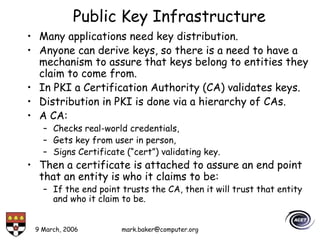
Public Key Infrastructure
• Many applications need key distribution.
• Anyone can derive keys, so there is a need to have a
mechanism to assure that keys belong to entities they
claim to come from.
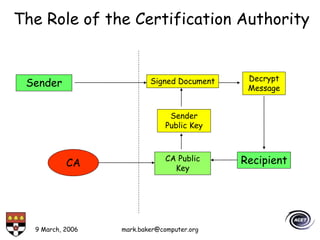
• In PKI a Certification Authority (CA) validates keys.
• Distribution in PKI is done via a hierarchy of CAs.
• A CA:
– Checks real-world credentials,
– Gets key from user in person,
– Signs Certificate (“cert”) validating key.
• Then a certificate is attached to assure an end point
that an entity is who it claims to be:
– If the end point trusts the CA, then it will trust that entity
and who it claim to be.
9 March, 2006 mark.baker@computer.org
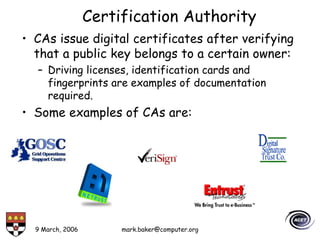
Certification Authority
• CAs issue digital certificates after verifying
that a public key belongs to a certain owner:
– Driving licenses, identification cards and
fingerprints are examples of documentation
required.
• Some examples of CAs are:
9 March, 2006 mark.baker@computer.org
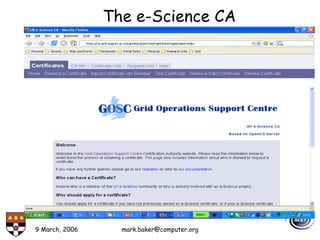
The e-Science CA
9 March, 2006 mark.baker@computer.org
Public Key Certificate
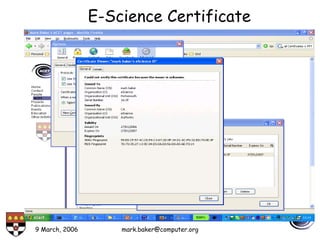
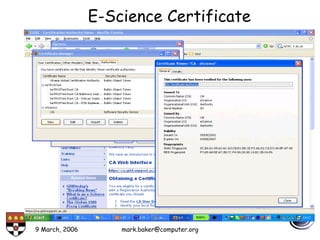
• A public key certificate is a file that contains a public
key, together with identity information, such as a
person's name, all of which is signed by a certification
authority (CA):
– Similar in concept to a passport signed by the national
government.
• The CA is a guarantor who verifies that the public key
belongs to the named entity.
• Certificates are required for the large-scale use of
public-key cryptography, since anybody can create a
public-private key pair:
– So in principle, if the originator is sending private information
encrypted with the recipient’s public key, a malicious user can
fool the originator into using their public key, and so get
access to the information, since it knows its corresponding
private key.
9 March, 2006 mark.baker@computer.org
Public Key Certificate
• But if the originator only trusts public keys that have
been signed ("certified") by an authority, then this
type of attack can be prevented.
• In large-scale deployments one user may not be
familiar with another’s certificate authority (perhaps
they each have a different company CA), so a
certificate may also include a CA's public key signed
by a higher level CA, which is more widely recognised.
• This process can lead to a hierarchy of certificates,
and complex graphs representing trust relations.
9 March, 2006 mark.baker@computer.org
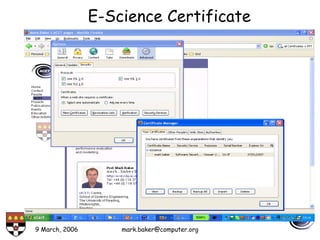
E-Science Certificate
9 March, 2006 mark.baker@computer.org
E-Science Certificate
9 March, 2006 mark.baker@computer.org
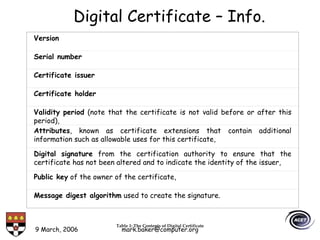
Digital Certificate – Info.
Version
Serial number
Certificate issuer
Certificate holder
Validity period (note that the certificate is not valid before or after this
period),
Attributes, known as certificate extensions that contain additional
information such as allowable uses for this certificate,
Digital signature from the certification authority to ensure that the
certificate has not been altered and to indicate the identity of the issuer,
Public key of the owner of the certificate,
Message digest algorithm used to create the signature.
Table 1: The Contents of Digital Certificate
9 March, 2006 mark.baker@computer.org
E-Science Certificate
9 March, 2006 mark.baker@computer.org
Sender
CA CA Public
Key
Sender
Public Key
Signed Document Decrypt
Message
Recipient
The Role of the Certification Authority
9 March, 2006 mark.baker@computer.org
Digital Signatures
• Integrity is guaranteed in public-key systems
by using digital signatures:
– This is a method of authenticating digital
information, in the same manner that an individual
would sign a paper document to authenticate it.
• A digital signature is itself a sequence of bits
conforming to one of a number of standards.
• Most digital signatures rely on public key
cryptography to work.
9 March, 2006 mark.baker@computer.org
Digital Signatures
• Often, a cryptographically strong hash
function is applied to the message.
– A hash function is an algorithm which creates a
digital representation in the form of a "hash value"
of a standard length, which is typically much
smaller than the message but nevertheless unique
to it.
• The resulting message digest is encrypted
instead of the entire message:
– This makes the signature significantly shorter than
the message and saves considerable time since
hashing is generally much faster, byte for byte,
than public-key encryption.
9 March, 2006 mark.baker@computer.org
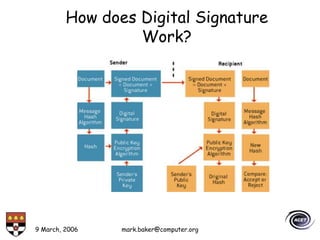
Basic Features of a Digital Signature
• Private key: sender uses the private key to
sign the document.
• Public key: recipient uses the public key to
authenticate the document.
• Message hash algorithm: perform a
mathematical calculation on the document and
generate a hash value unique to the message.
• Encryption algorithm: accept the private key
and a hash value to generate a digital
signature or accept a public key and a digital
signature to generate a hash value.
9 March, 2006 mark.baker@computer.org
How does Digital Signature
Work?
9 March, 2006 mark.baker@computer.org
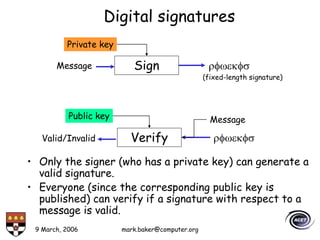
Digital signatures
• Only the signer (who has a private key) can generate a
valid signature.
• Everyone (since the corresponding public key is
published) can verify if a signature with respect to a
message is valid.
Message rfwekfs
Sign
Private key
Message
rfwekfs
Verify
Public key
Valid/Invalid
(fixed-length signature)
9 March, 2006 mark.baker@computer.org
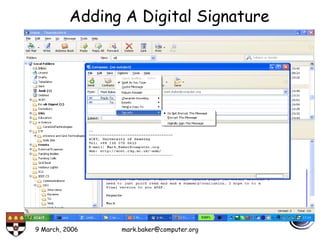
Adding A Digital Signature
9 March, 2006 mark.baker@computer.org
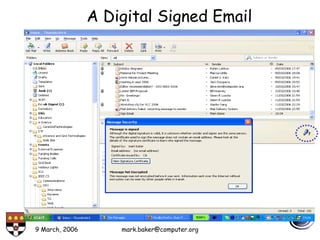
A Digital Signed Email
9 March, 2006 mark.baker@computer.org
Security – Summary
• Security Concerns:
– Confidentiality – data only available to those authorised,
– Availability – you can get it when you want it,
– Integrity – data has not been changed.
– Trust – who you are and what you are authorized to do,
– Non-repudiation – you can’t deny doing something you did,
– Auditability – I can check what you did to the data,
– Reliability – the system does what I want, when I want it to,
• Public Key Infrastructure:
– Secret key,
– Public key,
– Certificates,
– Digital Signatures.
9 March, 2006 mark.baker@computer.org
Questions?

SecurityBasics.ppt

  • 1.
    9 March, 2006mark.baker@computer.org Security Basics Prof Mark Baker ACET, University of Reading Tel: +44 118 378 8615 E-mail: Mark.Baker@computer.org Web: http://acet.rdg.ac.uk/~mab
  • 2.
    9 March, 2006mark.baker@computer.org Basic Security - Outline • Concerns. • Objectives. • Basic Definitions • Security Components: – Symmetric/asymmetric systems, – Public Key Encryption. • Public Key Infrastructure: – Certificates, – Signatures. • Summary.
  • 3.
    9 March, 2006mark.baker@computer.org Security Concerns • Unauthorised access to resources. • Masquerade as authorised user or end system. • E-mail forgery. • Malicious attacks. • Monitoring and capture of network traffic. • Exploitation of software bugs.
  • 4.
    9 March, 2006mark.baker@computer.org Contributing Factors • Increased Internet use: – Home broadband, – Greater coverage (wired and wireless): – More ubiquitous on-line use: • Education, • Business, • Games, • Shopping… • Lack of awareness of threats and risks. • Wide-open network policies. • Unencrypted network traffic. • Complexity of security measurements and administration. • Software bugs. • Availability of cracking tools .
  • 5.
    9 March, 2006mark.baker@computer.org The Actors
  • 6.
    9 March, 2006mark.baker@computer.org Attack Sophistication vs. Intruder Technical Knowledge 1980 1985 1990 1995 2000 2005 2010 Automated Probes/Scans Password Guessing Self-Replicating Code Password Cracking Exploiting Known Vulnerabilities Disabling Audits Hijacking Sessions Sweepers Sniffers Distributed Attack Tools Denial of Service GUI Network Management Diagnostics Web Attacks “Stealth”/Advanced Scanning Techniques High Low Intruders Back Doors Zombies BOTS Morphing Malicious Code Attack Sophistication Intruder Knowledge Packet Spoofing Sources: Carnegie Mellon University, 2002 and Idaho National Laboratory, 2005
  • 7.
    9 March, 2006mark.baker@computer.org Basic Security Terms • Classic security concerns deal more with data: – Confidentiality – data only available to those authorised, – Availability – you can get it when you want it, – Integrity – data has not been changed. • Additional concerns deal more with people and transactions: – Trust – who you are and what you are authorized to do, – Non-repudiation – you can’t deny doing something you did, – Auditability – I can check what you did to the data, – Reliability – the system does what I want, when I want it to, – Privacy – within certain limits no one should know who I am or what I do.
  • 8.
    9 March, 2006mark.baker@computer.org Basic Security Objectives • Confidentiality: prevent/detect/deter improper disclosure of information. • Integrity: prevent/detect/deter improper modification of information. • Availability: prevent/detect/deter improper denial of access to services.
  • 9.
    9 March, 2006mark.baker@computer.org Security Terms Authentication: • The process by which a person or other entity proves that it is who (or what) it says it is. • Want to authenticate the person or entity that you are dealing before transferring something valuable, such as information or money, to or from, it. • Authentication is achieved by presenting some unique identifying entity to the endpoint that is undertaking the process: – An example of this process is the way you authenticate yourself with an ATM: here you insert your bank card (something you have) and enter your personal identification number (PIN, something you know).
  • 10.
    9 March, 2006mark.baker@computer.org Identification • Being able to identify yourself to a computer is absolutely essential: – ATM, e-banking, – Access to e-mail, computer accounts, – Access to personal information (e.g., staff or student portal). Non-computer identification • Bank teller knows you by sight (good). • Bank teller checks your picture against a photo ID (dodgy). • Bank back office compares cheque signature to one on record (dodgy). • All examples of biometric identification.
  • 11.
    9 March, 2006mark.baker@computer.org Computer Identification • How we identify a human to a computer? – Username/Passwords (common), – Token, e.g. ATM card, – Cryptographic protocols, – Combinations, e.g. token and password, – Biometrics, e.g. face recognition, finger prints, and retina/iris scans.
  • 12.
    9 March, 2006mark.baker@computer.org Passwords • Most common identification technique: – Variants: such as “PIN” (number), memorable date, mothers maiden name. • Problem: we are not well-suited to remembering passwords: – Especially rarely used ones, – We can also confuse passwords used in similar contexts.
  • 13.
    9 March, 2006mark.baker@computer.org Vulnerabilities • Users reveal passwords to outsiders. • Users reuse passwords. • Users choose “easy to guess” passwords. • Password observed on entry. • Password obtained from system files. Biometric identification • Passwords are pretty useless at identifying people. • Can we identify them by their properties? – Face, handwriting, retina, DNA, voice, signature, fingerprint… • “How humans identify other humans”.
  • 14.
    9 March, 2006mark.baker@computer.org Other issues • Cost: – Voice recognition is cheap, – Eye (iris) scanning is expensive. • User comfort: – Face recognition is nice (look into camera), – DNA matching is not (blood/skin sample). • Theoretical accuracy: – Iris is unique (determined while an embryo), – DNA is shared by identical twins, – Voice can be imitated. • Excluded population: – Voice does not work on mute people, – Fingerprints do not work on amputees, – DNA works on everyone! • Variability: – Dirty fingers, or sick (cold) for voice.
  • 15.
    9 March, 2006mark.baker@computer.org Security Terms Authorisation: • Is the act of providing the rights to perform some action: – Typically based on based on what are known as Access Control Lists (ACLs), which for some set of resources, a list of user names and their rights are provided. • For example, the mere possession of a security badge does not grant you the right to enter a restricted area, such as the administration room: – An examples could be a guest list for an event or a door lock that reads your badge.
  • 16.
    9 March, 2006mark.baker@computer.org Setting Up Access Rights • Classify users into groups: – Patients, doctors, chemist, lab, NHS admin, … • Classify resources into groups: – Prescriptions, blood test results, diagnoses, patient contact details, … • Classify access rights: – Read, write, delete, modify, append, … – Domain specific: number AIDS cases per region.
  • 17.
    9 March, 2006mark.baker@computer.org Access Control Lists (ACL) • Specify the access permissions of each group for each resource (or resource type): – (doctors, blood-test.db) – read access. – (lab, blood-test.db) - read, write access. • Program-specific permissions: – Allows application-specific restrictions: • (NHS, blood-test.db, SPSS) – AIDS/region
  • 18.
    9 March, 2006mark.baker@computer.org Security Terms Trust: • Trust is the “assured reliance on the character, ability, strength, or truth of someone or something”. • A distributed environment requires explicit statements of trust, such as: – “who is trusted to do what”, – Also obligations of all the parties involved in the trust relationship. • Trust percolates through almost every stage of today’s security infrastructure and can be seen as a key issue with the world of information assurance.
  • 19.
    9 March, 2006mark.baker@computer.org Security Terms Integrity: • This is the assurance that the data has not changed since it was written: – e.g., prevent a potential intruder-in-the-middle from changing messages. • Data integrity can be checked using: – A check-sum, which is a simple error-detection scheme where each transmitted message is accompanied by a numerical value based on the number of set bits in the message: • Checked by the receiving station - if different the receiver can assume that the message has been garbled. – Hash functions, any one-way function that reduces variable sized data to a fixed length “hash code”: • If the hashes of two documents differ, then the documents differ.
  • 20.
    9 March, 2006mark.baker@computer.org Security Terms Confidentiality: • This is the act of ensuring no one but authorised parties (who know some secret) can understand the data. • There are two mechanisms used to ensure data confidentiality, the more common encryption, and steganography: – With encryption an algorithm or function (encrypt) that transforms plain text to cypher text where the meaning is hidden, but which can be restored to the original plain text by another algorithm (decrypt). – Steganography, on the other hand is where a message is hidden in another message or image: • It is used when it is necessary to conceal the fact that a secret message is being transmitted.
  • 21.
    9 March, 2006mark.baker@computer.org Security Components Encryption and Decryption: – Encryption is the conversion of data into a form, called a ciphertext, which cannot be easily understood by unauthorised entities. – Decryption is the process of converting encrypted data back into its original form, so it can be understood. • Most security technologies rely, to some degree, on encryption of text or data: – For example, encryption is used in the creation of certificates and digital signatures, for the secure storage of secrets or transport of information. • Encryption can be anything from a simple process of substituting one character for another, in which case the key is the substitution rule, to some complex mathematical algorithm.
  • 22.
    9 March, 2006mark.baker@computer.org Security Components Encryption and Decryption: • We assume that the more difficult it is to decrypt the ciphertext, the better. • Trade-off - if the algorithm is too complex and it takes too long to use, or requires keys that are too large to store easily, it becomes impractical to use: – Need a balance between the strength of the encryption; that is, how difficult it is for someone to discover the algorithm and the key, and ease of use. • There are two main types of encryption in use for computer security, referred to as symmetric and asymmetric key encryption.
  • 23.
    9 March, 2006mark.baker@computer.org Symmetric Key • Symmetric key cryptography, also called private or secret key cryptography, is the classic cryptographic use of keys: – Here the same key is used to encrypt and decrypt the data. Encrypt with secret key Decrypt with secret key Plaintext Plaintext Internet Ciphertext
  • 24.
    9 March, 2006mark.baker@computer.org Symmetric Key • Key management is an issue. • Each pair of communicating entities needs a shared key: – For an n-party system, there are n(n-1)/2 distinct keys in the system and each party needs to maintain n-1 distinct keys. • How to reduce the number of shared keys in the system: – Centralised key management: • Session keys. – Public keys. K1 K4 K2 K3 K5 K6 K7 K8 K9 K10
  • 25.
    9 March, 2006mark.baker@computer.org Asymmetric Keys • In asymmetric key cryptography, different keys are used for encrypting and decrypting a message. • In that case, one key can be made public while the other is kept private. • There are advantages to this public-key–private-key arrangement, often referred to as public key cryptography: – The necessity of distributing secret keys to large numbers of users is eliminated, – The algorithm can be used for authentication as well as for creating cipertext.
  • 26.
    9 March, 2006mark.baker@computer.org Public Key Encryption • Jill has two keys: public and private: • Jill publishes her public key: • Such that the key is publicly known! • Jill keeps her private key secret. • Other people use Jill’s public key to encrypt messages for Jill. • Jill uses her private key to decrypt messages. • Only Jill can decrypt since only she has the private key. Message rfwekfs Encrypt Public key Message rfwekfs Decrypt Private key • Security: To compute the private key from the public key is assumed difficult.
  • 27.
    9 March, 2006mark.baker@computer.org Secure Message Exchange Using Asymmetric Keys Jill Mark Send Jill's public Key Use Jill's private key to encrypt Decrypt with Jill's public Key Private Key Public Key
  • 28.
    9 March, 2006mark.baker@computer.org Public key vs. Symmetric key Symmetric key Public key Typically both share same key Typically faster x100! Typically slower Two parties MUST trust each other Two parties DO NOT need to trust each other Two separate keys: a public and a private key Examples: DES, IDEA, RC5, AES, … Examples: RSA, ElGamal Encryption, ECC…
  • 29.
    9 March, 2006mark.baker@computer.org Public Key Infrastructure • Many applications need key distribution. • Anyone can derive keys, so there is a need to have a mechanism to assure that keys belong to entities they claim to come from. • In PKI a Certification Authority (CA) validates keys. • Distribution in PKI is done via a hierarchy of CAs. • A CA: – Checks real-world credentials, – Gets key from user in person, – Signs Certificate (“cert”) validating key. • Then a certificate is attached to assure an end point that an entity is who it claims to be: – If the end point trusts the CA, then it will trust that entity and who it claim to be.
  • 30.
    9 March, 2006mark.baker@computer.org Certification Authority • CAs issue digital certificates after verifying that a public key belongs to a certain owner: – Driving licenses, identification cards and fingerprints are examples of documentation required. • Some examples of CAs are:
  • 31.
    9 March, 2006mark.baker@computer.org The e-Science CA
  • 32.
    9 March, 2006mark.baker@computer.org Public Key Certificate • A public key certificate is a file that contains a public key, together with identity information, such as a person's name, all of which is signed by a certification authority (CA): – Similar in concept to a passport signed by the national government. • The CA is a guarantor who verifies that the public key belongs to the named entity. • Certificates are required for the large-scale use of public-key cryptography, since anybody can create a public-private key pair: – So in principle, if the originator is sending private information encrypted with the recipient’s public key, a malicious user can fool the originator into using their public key, and so get access to the information, since it knows its corresponding private key.
  • 33.
    9 March, 2006mark.baker@computer.org Public Key Certificate • But if the originator only trusts public keys that have been signed ("certified") by an authority, then this type of attack can be prevented. • In large-scale deployments one user may not be familiar with another’s certificate authority (perhaps they each have a different company CA), so a certificate may also include a CA's public key signed by a higher level CA, which is more widely recognised. • This process can lead to a hierarchy of certificates, and complex graphs representing trust relations.
  • 34.
    9 March, 2006mark.baker@computer.org E-Science Certificate
  • 35.
    9 March, 2006mark.baker@computer.org E-Science Certificate
  • 36.
    9 March, 2006mark.baker@computer.org Digital Certificate – Info. Version Serial number Certificate issuer Certificate holder Validity period (note that the certificate is not valid before or after this period), Attributes, known as certificate extensions that contain additional information such as allowable uses for this certificate, Digital signature from the certification authority to ensure that the certificate has not been altered and to indicate the identity of the issuer, Public key of the owner of the certificate, Message digest algorithm used to create the signature. Table 1: The Contents of Digital Certificate
  • 37.
    9 March, 2006mark.baker@computer.org E-Science Certificate
  • 38.
    9 March, 2006mark.baker@computer.org Sender CA CA Public Key Sender Public Key Signed Document Decrypt Message Recipient The Role of the Certification Authority
  • 39.
    9 March, 2006mark.baker@computer.org Digital Signatures • Integrity is guaranteed in public-key systems by using digital signatures: – This is a method of authenticating digital information, in the same manner that an individual would sign a paper document to authenticate it. • A digital signature is itself a sequence of bits conforming to one of a number of standards. • Most digital signatures rely on public key cryptography to work.
  • 40.
    9 March, 2006mark.baker@computer.org Digital Signatures • Often, a cryptographically strong hash function is applied to the message. – A hash function is an algorithm which creates a digital representation in the form of a "hash value" of a standard length, which is typically much smaller than the message but nevertheless unique to it. • The resulting message digest is encrypted instead of the entire message: – This makes the signature significantly shorter than the message and saves considerable time since hashing is generally much faster, byte for byte, than public-key encryption.
  • 41.
    9 March, 2006mark.baker@computer.org Basic Features of a Digital Signature • Private key: sender uses the private key to sign the document. • Public key: recipient uses the public key to authenticate the document. • Message hash algorithm: perform a mathematical calculation on the document and generate a hash value unique to the message. • Encryption algorithm: accept the private key and a hash value to generate a digital signature or accept a public key and a digital signature to generate a hash value.
  • 42.
    9 March, 2006mark.baker@computer.org How does Digital Signature Work?
  • 43.
    9 March, 2006mark.baker@computer.org Digital signatures • Only the signer (who has a private key) can generate a valid signature. • Everyone (since the corresponding public key is published) can verify if a signature with respect to a message is valid. Message rfwekfs Sign Private key Message rfwekfs Verify Public key Valid/Invalid (fixed-length signature)
  • 44.
    9 March, 2006mark.baker@computer.org Adding A Digital Signature
  • 45.
    9 March, 2006mark.baker@computer.org A Digital Signed Email
  • 46.
    9 March, 2006mark.baker@computer.org Security – Summary • Security Concerns: – Confidentiality – data only available to those authorised, – Availability – you can get it when you want it, – Integrity – data has not been changed. – Trust – who you are and what you are authorized to do, – Non-repudiation – you can’t deny doing something you did, – Auditability – I can check what you did to the data, – Reliability – the system does what I want, when I want it to, • Public Key Infrastructure: – Secret key, – Public key, – Certificates, – Digital Signatures.
  • 47.
    9 March, 2006mark.baker@computer.org Questions?